You are viewing a plain text version of this content. The canonical link for it is here.
Posted to issues@cordova.apache.org by GitBox <gi...@apache.org> on 2022/01/30 21:39:49 UTC
[GitHub] [cordova-plugin-file] AEiosApp opened a new issue #510: Android deletes folders with images after Jan, 2022 security update
AEiosApp opened a new issue #510:
URL: https://github.com/apache/cordova-plugin-file/issues/510


   # Bug Report
   I was using ```cordova.file.dataDirectory``` for several years as a location to download images from server to be able to use them offline in my app.

   After updating Android with Jan, 2022 security update, I've noticed following activity:
   #1 First app launch after installation - download images to ```cordova.file.dataDirectory```, can successfully access images during the session

   #2 Second app launch - I can see that images are not available any more. When I tried to readEntries of ```cordova.file.dataDirectory```, I've noticed that my folder with images is absent! So, Android removed it without asking me (or user)

   What else I've noticed:
   - same issue if I use ```cordova.file.applicationStorageDirectory```, ```cordova.file.cacheDirectory```, ```cordova.file.externalDataDirectory```
   - issue happens only with folder with images (*.jpg files). I also downloaded another data with different file format - and this folder still on place, but worth to say that folder with images has much bigger size.

   ### What is expected to happen?

   Any suggestion on where to store images downloaded from the server using this plugin?


--
This is an automated message from the Apache Git Service.
To respond to the message, please log on to GitHub and use the
URL above to go to the specific comment.

To unsubscribe, e-mail: issues-unsubscribe@cordova.apache.org

For queries about this service, please contact Infrastructure at:
users@infra.apache.org


---------------------------------------------------------------------
To unsubscribe, e-mail: issues-unsubscribe@cordova.apache.org
For additional commands, e-mail: issues-help@cordova.apache.org
[GitHub] [cordova-plugin-file] AEiosApp commented on issue #510: Android deletes folders with images after Jan, 2022 security update
Posted by GitBox <gi...@apache.org>.
AEiosApp commented on issue #510:
URL: https://github.com/apache/cordova-plugin-file/issues/510#issuecomment-1025308188
Hi @breautek thanks for quick and detail response, really appreciate.
I always used ```cordova.file.dataDirectory```, other folders just for debugging.
Please, see the ```adb shell``` folder listing. This is after the first app launch and downloading data:
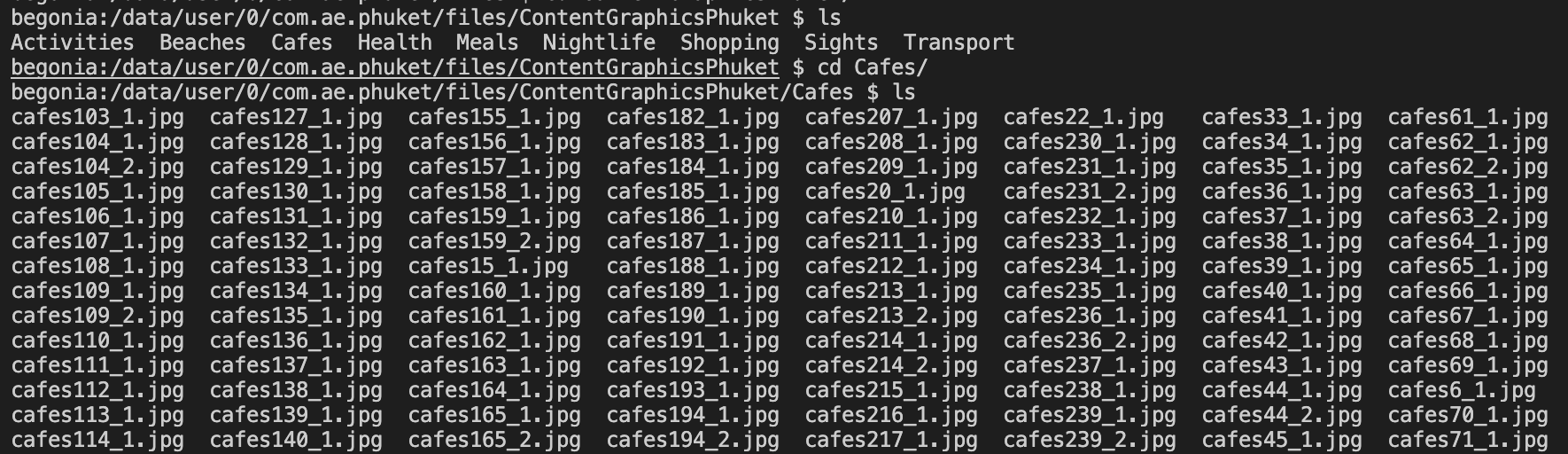
You can see here listed ```ContentGraphicsPhuket``` folder
However, here you can see folder listing after first launch and the second listing is after second launch - ```ContentGraphicsPhuket``` folder disappeared
<img width="913" alt="Screen Shot 2022-01-30 at 5 43 20 PM" src="https://user-images.githubusercontent.com/19554725/151728435-6073f5b6-01ed-48bf-95c6-0374c9da3f22.png">
Few more facts:
- several users reported to me this issue, but on my Android phone with Android 11 everything worked fine.
- then, I've checked for available system update - and it was available Android security update from January, 2022. Once I've updated my device - I was able to reproduce an issue.
- on the second screenshot you can see that folder ```mapphuket``` is still present. This folder was downloaded from the same server as ```ContentGraphicsPhuket```, the only difference is the type of files.
My device data:
- Xiaomi Note 8 Pro
- MIUI 12.5.7
- Android 11 RP1A.200720.011
- Android Security update 2022-01-01
This issue looks pretty critical, as I've already got about 10 reports from app users, so it's not smth occasional.
--
This is an automated message from the Apache Git Service.
To respond to the message, please log on to GitHub and use the
URL above to go to the specific comment.
To unsubscribe, e-mail: issues-unsubscribe@cordova.apache.org
For queries about this service, please contact Infrastructure at:
users@infra.apache.org
---------------------------------------------------------------------
To unsubscribe, e-mail: issues-unsubscribe@cordova.apache.org
For additional commands, e-mail: issues-help@cordova.apache.org
[GitHub] [cordova-plugin-file] breautek commented on issue #510: Android deletes folders with images after Jan, 2022 security update
Posted by GitBox <gi...@apache.org>.
breautek commented on issue #510:
URL: https://github.com/apache/cordova-plugin-file/issues/510#issuecomment-1025244967


   `cordova.file.cacheDirectory` is the only directory of the directories you mentioned that the Android OS reserves the right to free files at any time.

   `cordova.file.externalDataDirectory` as of API 29 (although reversible with a flag) all external directories operate differently and applications don't have free access. As of API 30, the aforementioned flag is forcefully disabled, so you're forced to use the newer scoped storage system. Personally I'd avoid all `cordova.file.external*` directories. Natively, their paths start with `/storage/emulated/` or `/storage/sdcard` (depends whether the device is using a physical SD card).

   `cordova.file.applicationStorageDirectory` / `cordova.file.dataDirectory` shouldn't have their files removed unless it was an explicit action from the user (e.g. "Clear Data" button in App Info screen) or the app does it programmatically. Generally I use `cordova.file.dataDirectory` for files myself, but I don't work with image files.

   I don't think this works on release variants, but if you can reproduce on a debug variant of your app, I'd be curious if the files are shown under `adb shell`. Alternatively you can use Android Studio device file explorer as well.

   Refer to the [Device Path](https://github.com/apache/cordova-plugin-file#android-file-system-layout) for general file system locations.

   E.g. the below should show you your `cordova.file.dataDirectory`

   ```
   adb shell
   run-as <your app bundle id>
   cd /data/data/<app.id>/files
   ```


--
This is an automated message from the Apache Git Service.
To respond to the message, please log on to GitHub and use the
URL above to go to the specific comment.

To unsubscribe, e-mail: issues-unsubscribe@cordova.apache.org

For queries about this service, please contact Infrastructure at:
users@infra.apache.org


---------------------------------------------------------------------
To unsubscribe, e-mail: issues-unsubscribe@cordova.apache.org
For additional commands, e-mail: issues-help@cordova.apache.org
[GitHub] [cordova-plugin-file] AEiosApp commented on issue #510: Android deletes folders with images after Jan, 2022 security update
Posted by GitBox <gi...@apache.org>.
AEiosApp commented on issue #510:
URL: https://github.com/apache/cordova-plugin-file/issues/510#issuecomment-1025347177


   Several sources, like this:
   https://www.raywenderlich.com/10768834-scoped-storage-tutorial-for-android-11-deep-dive

   refer, that we have to use MediaStore API to store media files ... I don't know if it may help ...


--
This is an automated message from the Apache Git Service.
To respond to the message, please log on to GitHub and use the
URL above to go to the specific comment.

To unsubscribe, e-mail: issues-unsubscribe@cordova.apache.org

For queries about this service, please contact Infrastructure at:
users@infra.apache.org


---------------------------------------------------------------------
To unsubscribe, e-mail: issues-unsubscribe@cordova.apache.org
For additional commands, e-mail: issues-help@cordova.apache.org
[GitHub] [cordova-plugin-file] AEiosApp commented on issue #510: Android deletes folders with images after Jan, 2022 security update
Posted by GitBox <gi...@apache.org>.
AEiosApp commented on issue #510:
URL: https://github.com/apache/cordova-plugin-file/issues/510#issuecomment-1025380585


   **Found temporary workaround:**

   In my app I downloaded an archive (about 84 Mb) with images to ```cordova.file.dataDirectory```, that after extracting was like this:
   ```
   ContentGraphics/
                          - SubFolder1/
                                             - image1_1.jpg
                                             - image1_2.jpg
                          - SubFolder2/
                                             - image2_1.jpg
                                             - image2_2.jpg
   ```

   On the second app launch Android deleted this folder without any prompt

   **How I made it working:**

   I restructured my archive with images to be:
   ```
   ContentGraphicsSubFolder1/
                                             - image1_1.jpg
                                             - image1_2.jpg
   ContentGraphicsSubFolder2/
                                             - image2_1.jpg
                                             - image2_2.jpg
   ```

   After this magic Android don't delete (smaller) folders any more.

   Hope it may help anybody!)


--
This is an automated message from the Apache Git Service.
To respond to the message, please log on to GitHub and use the
URL above to go to the specific comment.

To unsubscribe, e-mail: issues-unsubscribe@cordova.apache.org

For queries about this service, please contact Infrastructure at:
users@infra.apache.org


---------------------------------------------------------------------
To unsubscribe, e-mail: issues-unsubscribe@cordova.apache.org
For additional commands, e-mail: issues-help@cordova.apache.org