You are viewing a plain text version of this content. The canonical link for it is here.
Posted to commits@iotdb.apache.org by sp...@apache.org on 2023/11/08 10:35:20 UTC
(iotdb) 01/01: Update command
This is an automated email from the ASF dual-hosted git repository.
spricoder pushed a commit to branch fix/it-doc
in repository https://gitbox.apache.org/repos/asf/iotdb.git
commit 3ba2d6f769ce48d09d5e464ada97adaac1018b28
Author: spricoder <sp...@qq.com>
AuthorDate: Wed Nov 8 18:35:08 2023 +0800
Update command
---
integration-test/README.md | 24 +++++++++++++++++++-----
1 file changed, 19 insertions(+), 5 deletions(-)
diff --git a/integration-test/README.md b/integration-test/README.md
index 27a6eff7fc5..2514cce9030 100644
--- a/integration-test/README.md
+++ b/integration-test/README.md
@@ -34,7 +34,7 @@ Integration testing in `Simple` mode can be run with both maven and IDEs like In
The maven command is:
```
-mvn clean verify -DskipUTs -pl integration-test -am
+mvn clean verify -DskipUTs -pl integration-test -am -P with-integration-tests
```
Notice that, this above maven command only run IT.
@@ -42,7 +42,7 @@ Notice that, this above maven command only run IT.
And if you want to run IT in the IDE like IntelliJ, when you run the test for the first time, or when you change the code of the module that the integration test module depends on, you may need to use the following command to generate `integration-test/target/template-node` for the node to be tested.
```
-mvn clean package -DskipTests -pl integration-test -am
+mvn clean package -DskipTests -pl integration-test -am -P with-integration-tests
```
After doing this, you can run any one just by clicking the test case and pressing `Run`, like running normal cases :).
@@ -56,7 +56,7 @@ You can run the integration test in a 'real' cluster mode. At present, we have i
The maven command is:
```
-mvn clean verify -DskipUTs -pl integration-test -am -PClusterIT
+mvn clean verify -DskipUTs -pl integration-test -am -PClusterIT -P with-integration-tests
```
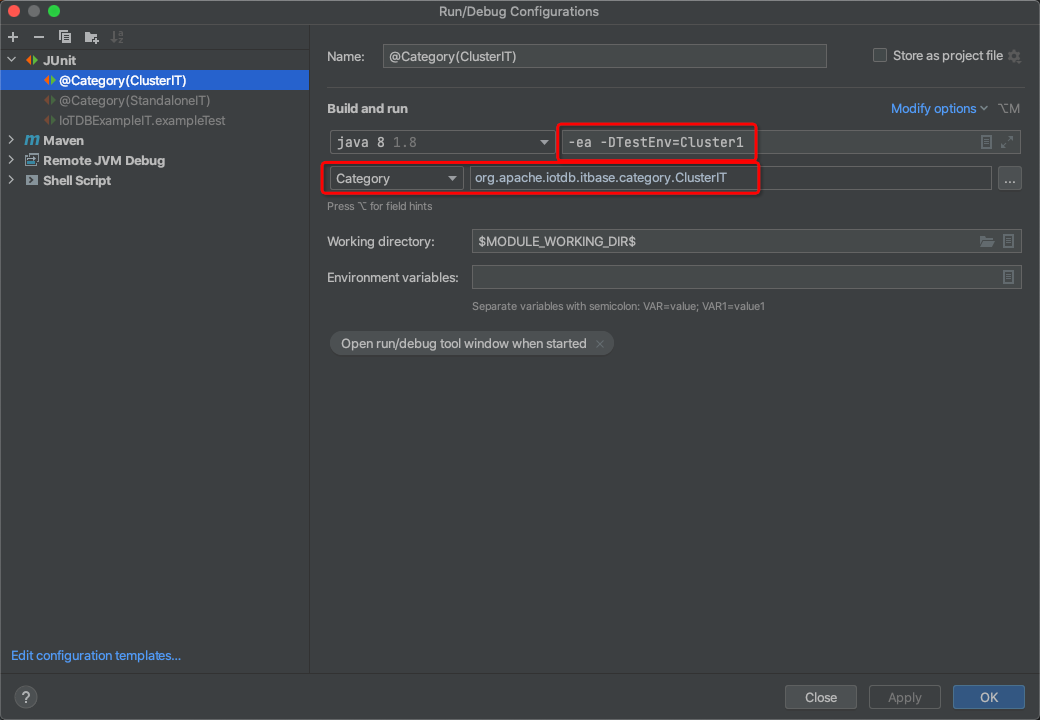
If you want to run IT in `Cluster1` mode in the IDE like IntelliJ, you need to achieve the effect as the `ClusterIT` profile in maven explicitly. Follow Steps 1-4 to achieve it.
@@ -66,7 +66,7 @@ If you want to run IT in `Cluster1` mode in the IDE like IntelliJ, you need to a
It has the same effect as the `Simple` counterpart; these two commands' generations are the same content.
```
- mvn clean package -DskipTests -pl integration-test
+ mvn clean package -DskipTests -pl integration-test -P with-integration-tests
```
- Step 1. Run(Menu) -> Edit Configurations...
@@ -78,4 +78,18 @@ If you want to run IT in `Cluster1` mode in the IDE like IntelliJ, you need to a
- Step 3. Input some fields as the following picture
- 
\ No newline at end of file
+ 
+
+## Let IDEA recognize integration test module
+
+- Step 1. Open the Maven tab onn the right side of the IDEA window.
+- Step 2. Open `Profiles` folder
+- Step 3. Select `with-integration-tests` profile
+
+## Format code style of integration test
+
+The maven command is:
+
+```
+mvn spotless::apply -P with-integration-tests
+```
\ No newline at end of file