You are viewing a plain text version of this content. The canonical link for it is here.
Posted to notifications@apisix.apache.org by GitBox <gi...@apache.org> on 2022/07/03 14:28:55 UTC
[GitHub] [apisix-java-plugin-runner] chenyyyang opened a new issue, #161: request help: failed to connect to the unix socket through docker
chenyyyang opened a new issue, #161:
URL: https://github.com/apache/apisix-java-plugin-runner/issues/161

   After solved the issue [https://github.com/apache/apisix-java-plugin-runner/issues/156]

   I use docker-compose.yml which file is created by you to start apisix
   ```
   sudo docker-compose  -f ../ci/docker-compose.yml up -d

   ```

   After that,  apisix works. I can set routes as the quick-start.md.
   But it not works after I configuring the Java plugin via
   ```
   curl "http://127.0.0.1:9080/apisix/admin/routes/1" -H "X-API-KEY: edd1c9f034335f136f87ad84b625c8f1" -X PUT -d '
   {
     "methods": ["GET"],
     "host": "example.com",
     "uri": "/anything/*",
     "plugins": {
       "ext-plugin-pre-req": {
         "conf": [
           {
             "name": "RewriteRequestDemoFilter",
             "value": "{\"body\":\"hello\"}"
           }
         ]
       }
     },
     "upstream": {
       "type": "roundrobin",
       "nodes": {
         "httpbin.org:80": 1
       }
     }
   }'
   ```


   I have checked the logs of the  apisix docker
   ```
   sudo docker logs -f ab0b81f8bdd5

   ```

   ```

   2022/07/03 14:11:05 [error] 49#49: *49726 connect() to unix:/tmp/runner.sock failed (111: Connection refused), client: 172.18.0.1, server: _, request: "GET /anything/foo?arg=10 HTTP/1.1", host: "example.com"
   2022/07/03 14:11:05 [error] 49#49: *49726 [lua] init.lua:841: phase_func(): failed to connect to the unix socket unix:/tmp/runner.sock: connection refused, client: 172.18.0.1, server: _, request: "GET /anything/foo?arg=10 HTTP/1.1", host: "example.com"
   2022/07/03 14:11:05 [warn] 49#49: *49726 [lua] plugin.lua:844: run_plugin(): ext-plugin-pre-req exits with http status code 503, client: 172.18.0.1, server: _, request: "GET /anything/foo?arg=10 HTTP/1.1", host: "example.com"
   172.18.0.1 - - [03/Jul/2022:14:11:05 +0000] example.com "GET /anything/foo?arg=10 HTTP/1.1" 503 194 0.000 "-" "curl/7.77.0" - - - "http://example.com"
   ```

   There is the issue about the unix domain socket through docker  and the host machine?

   @tzssangglass  Do you mind taking a look at this issue...
   Thanks for your help in advance.


--
This is an automated message from the Apache Git Service.
To respond to the message, please log on to GitHub and use the
URL above to go to the specific comment.

To unsubscribe, e-mail: notifications-unsubscribe@apisix.apache.org.apache.org

For queries about this service, please contact Infrastructure at:
users@infra.apache.org
[GitHub] [apisix-java-plugin-runner] tzssangglass commented on issue #161: request help: failed to connect to the unix socket through docker
Posted by GitBox <gi...@apache.org>.
tzssangglass commented on issue #161:
URL: https://github.com/apache/apisix-java-plugin-runner/issues/161#issuecomment-1173308140

   > Sorry, but I'm not sure I understand what you mean by"As you are on M1 mac, you may need to create a CentOS VM."

   What he means is that it is recommended that you develop in a CentOS environment rather than a Mac (M1 or X86), otherwise you will need to solve a lot of environmental problems yourself.

   > I have to develop java-plugin via IDEA(linux version) in CentOS VM directly? I have to install GUI for centOS?

   It's up to you. For example, I use VSCode SSH Remote to work in my CentOS VM.


--
This is an automated message from the Apache Git Service.
To respond to the message, please log on to GitHub and use the
URL above to go to the specific comment.

To unsubscribe, e-mail: notifications-unsubscribe@apisix.apache.org

For queries about this service, please contact Infrastructure at:
users@infra.apache.org
[GitHub] [apisix-java-plugin-runner] lufengchun commented on issue #161: request help: failed to connect to the unix socket through docker
Posted by GitBox <gi...@apache.org>.
lufengchun commented on issue #161:
URL: https://github.com/apache/apisix-java-plugin-runner/issues/161#issuecomment-1173566897
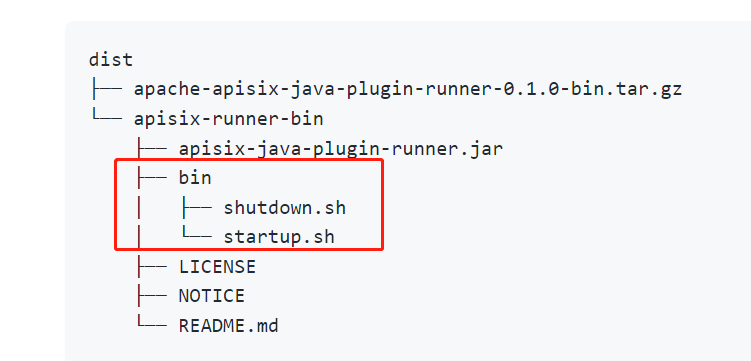
@chenyyyang 请问mvnw package打包后的tar包,解压缩后没有bin目录,您有遇到不?
--
This is an automated message from the Apache Git Service.
To respond to the message, please log on to GitHub and use the
URL above to go to the specific comment.
To unsubscribe, e-mail: notifications-unsubscribe@apisix.apache.org
For queries about this service, please contact Infrastructure at:
users@infra.apache.org
[GitHub] [apisix-java-plugin-runner] chenyyyang commented on issue #161: request help: failed to connect to the unix socket through docker
Posted by GitBox <gi...@apache.org>.
chenyyyang commented on issue #161:
URL: https://github.com/apache/apisix-java-plugin-runner/issues/161#issuecomment-1175724154

   @lufengchun   我用mvnw package打包会报错(可能是因为我没有配置mavne环境变量)
   所以我直接用idea 的maven 来打包,可以打出jar  没有bin目录。


--
This is an automated message from the Apache Git Service.
To respond to the message, please log on to GitHub and use the
URL above to go to the specific comment.

To unsubscribe, e-mail: notifications-unsubscribe@apisix.apache.org

For queries about this service, please contact Infrastructure at:
users@infra.apache.org
[GitHub] [apisix-java-plugin-runner] chenyyyang commented on issue #161: request help: failed to connect to the unix socket through docker
Posted by GitBox <gi...@apache.org>.
chenyyyang commented on issue #161:
URL: https://github.com/apache/apisix-java-plugin-runner/issues/161#issuecomment-1173228290

   @ericluoliu
   Sorry, but I'm not sure I understand what you mean by"As you are on M1 mac, you may need to create a CentOS VM."
   I have to develop java-plugin via IDEA(linux version) in CentOS VM directly? I have to install GUI for centOS?


--
This is an automated message from the Apache Git Service.
To respond to the message, please log on to GitHub and use the
URL above to go to the specific comment.

To unsubscribe, e-mail: notifications-unsubscribe@apisix.apache.org

For queries about this service, please contact Infrastructure at:
users@infra.apache.org
[GitHub] [apisix-java-plugin-runner] OrezzerO commented on issue #161: request help: failed to connect to the unix socket through docker
Posted by GitBox <gi...@apache.org>.
OrezzerO commented on issue #161:
URL: https://github.com/apache/apisix-java-plugin-runner/issues/161#issuecomment-1303125706

   > I meet the same problem . I mount runner.sock to apisix container and run java plugin in my host machine. I am curious why it didn't work. Java and apisix are using the same socket file.

    I found the answer : https://github.com/apache/apisix-java-plugin-runner/issues/61


--
This is an automated message from the Apache Git Service.
To respond to the message, please log on to GitHub and use the
URL above to go to the specific comment.

To unsubscribe, e-mail: notifications-unsubscribe@apisix.apache.org

For queries about this service, please contact Infrastructure at:
users@infra.apache.org
[GitHub] [apisix-java-plugin-runner] chenyyyang commented on issue #161: request help: failed to connect to the unix socket through docker
Posted by GitBox <gi...@apache.org>.
chenyyyang commented on issue #161:
URL: https://github.com/apache/apisix-java-plugin-runner/issues/161#issuecomment-1173105453

   in the docker :
   ```
   root@ab0b81f8bdd5:/tmp# socat -d -d - UNIX-LISTEN:/tmp/runner.sock
   2022/07/03 14:50:22 socat[128] N reading from and writing to stdio
   2022/07/03 14:50:22 socat[128] E "/tmp/runner.sock" exists
   2022/07/03 14:50:22 socat[128] N exit(1)
   root@ab0b81f8bdd5:/tmp# socat -d -d - UNIX-CONNECT:/tmp/runner.sock
   2022/07/03 14:50:29 socat[129] N reading from and writing to stdio
   2022/07/03 14:50:29 socat[129] N opening connection to AF=1 "/tmp/runner.sock"
   2022/07/03 14:50:29 socat[129] E connect(5, AF=1 "/tmp/runner.sock", 18): Connection refused
   2022/07/03 14:50:29 socat[129] N exit(1)
   ```


--
This is an automated message from the Apache Git Service.
To respond to the message, please log on to GitHub and use the
URL above to go to the specific comment.

To unsubscribe, e-mail: notifications-unsubscribe@apisix.apache.org

For queries about this service, please contact Infrastructure at:
users@infra.apache.org
[GitHub] [apisix-java-plugin-runner] OrezzerO commented on issue #161: request help: failed to connect to the unix socket through docker
Posted by GitBox <gi...@apache.org>.
OrezzerO commented on issue #161:
URL: https://github.com/apache/apisix-java-plugin-runner/issues/161#issuecomment-1303114125

   I meet the same problem . I mount `runner.sock` to apisix container and run java plugin in my host machine. I am curious  why  it didn't work. Java and apisix are using the same socket file.


--
This is an automated message from the Apache Git Service.
To respond to the message, please log on to GitHub and use the
URL above to go to the specific comment.

To unsubscribe, e-mail: notifications-unsubscribe@apisix.apache.org

For queries about this service, please contact Infrastructure at:
users@infra.apache.org
[GitHub] [apisix-java-plugin-runner] ericluoliu commented on issue #161: request help: failed to connect to the unix socket through docker
Posted by GitBox <gi...@apache.org>.
ericluoliu commented on issue #161:
URL: https://github.com/apache/apisix-java-plugin-runner/issues/161#issuecomment-1173166962

   Hi @chenyyyang,

   I think you cannot use Docker (as it is a separate container) to install apisix if you want to run it alongside java-plugin-runner.

   According to https://apisix.apache.org/docs/java-plugin-runner/the-internal-of-apisix-java-plugin-runner/:
   "apisix-java-plugin-runner and APISIX use the Unix Domain Socket for inter-process communication, so they need to be deployed in the same instance."

   To resolve this issue, you should use the RPM installation (https://apisix.apache.org/docs/apisix/how-to-build) to run apisix. As you are on M1 mac, you may need to create a CentOS VM.


--
This is an automated message from the Apache Git Service.
To respond to the message, please log on to GitHub and use the
URL above to go to the specific comment.

To unsubscribe, e-mail: notifications-unsubscribe@apisix.apache.org

For queries about this service, please contact Infrastructure at:
users@infra.apache.org
[GitHub] [apisix-java-plugin-runner] ericluoliu commented on issue #161: request help: failed to connect to the unix socket through docker
Posted by GitBox <gi...@apache.org>.
ericluoliu commented on issue #161:
URL: https://github.com/apache/apisix-java-plugin-runner/issues/161#issuecomment-1173282393

   @chenyyyang
   To **run** your java-plugins with apisix you cannot use Docker. I used Parallels (https://www.parallels.com/) to setup a centOS virtual machine and was able to test java-plugins from there.


--
This is an automated message from the Apache Git Service.
To respond to the message, please log on to GitHub and use the
URL above to go to the specific comment.

To unsubscribe, e-mail: notifications-unsubscribe@apisix.apache.org

For queries about this service, please contact Infrastructure at:
users@infra.apache.org