You are viewing a plain text version of this content. The canonical link for it is here.
Posted to notifications@shardingsphere.apache.org by zh...@apache.org on 2023/05/08 07:09:25 UTC
[shardingsphere] branch master updated: Remove useless plainColumn in document and faq (#25516)
This is an automated email from the ASF dual-hosted git repository.
zhaojinchao pushed a commit to branch master
in repository https://gitbox.apache.org/repos/asf/shardingsphere.git
The following commit(s) were added to refs/heads/master by this push:
new 4aef03a77c6 Remove useless plainColumn in document and faq (#25516)
4aef03a77c6 is described below
commit 4aef03a77c6c10c3d0c1c172ffbc5d242f32053c
Author: Zhengqiang Duan <du...@apache.org>
AuthorDate: Mon May 8 15:09:17 2023 +0800
Remove useless plainColumn in document and faq (#25516)
---
docs/document/content/faq/_index.cn.md | 12 --
docs/document/content/faq/_index.en.md | 12 --
.../document/content/features/encrypt/_index.cn.md | 17 +--
.../document/content/features/encrypt/_index.en.md | 17 +--
.../content/features/encrypt/concept.cn.md | 5 -
.../content/features/encrypt/concept.en.md | 6 +-
.../content/reference/encrypt/_index.cn.md | 131 ++-------------------
.../content/reference/encrypt/_index.en.md | 125 ++------------------
.../java-api/rules/encrypt.cn.md | 6 +-
.../java-api/rules/encrypt.en.md | 6 +-
.../encrypt/alter-encrypt-rule.cn.md | 4 +-
.../encrypt/alter-encrypt-rule.en.md | 4 +-
.../encrypt/create-encrypt-rule.cn.md | 4 +-
.../encrypt/create-encrypt-rule.en.md | 4 +-
.../distsql/syntax/reserved-word.cn.md | 2 +-
.../distsql/syntax/reserved-word.en.md | 2 +-
.../src/main/antlr4/imports/encrypt/Keyword.g4 | 4 -
.../e2e/driver/statement/EncryptStatementTest.java | 10 +-
18 files changed, 44 insertions(+), 327 deletions(-)
diff --git a/docs/document/content/faq/_index.cn.md b/docs/document/content/faq/_index.cn.md
index de4c6bec63c..abd12884816 100644
--- a/docs/document/content/faq/_index.cn.md
+++ b/docs/document/content/faq/_index.cn.md
@@ -170,18 +170,6 @@ ShardingSphere 采用 snowflake 算法作为默认的分布式自增主键策略
由于 ShardingSphere 并不知晓数据库的表结构,而原生自增主键是不包含在原始 SQL 中内的,因此 ShardingSphere 无法将该字段解析为分片字段。如自增主键非分片键,则无需关注,可正常返回;若自增主键同时作为分片键使用,ShardingSphere 无法解析其分片值,导致 SQL 路由至多张表,从而影响应用的正确性。
而原生自增主键返回的前提条件是 INSERT SQL 必须最终路由至一张表,因此,面对返回多表的 INSERT SQL,自增主键则会返回零。
-## 数据加密
-
-### [数据加密] JPA 和 数据加密无法一起使用,如何解决?
-
-回答:
-
-由于数据加密的 DDL 尚未开发完成,因此对于自动生成 DDL 语句的 JPA 与 数据加密一起使用时,会导致 JPA 的实体类(Entity)无法同时满足 DDL 和 DML 的情况。
-解决方案如下:
-1. 以需要加密的逻辑列名编写 JPA 的实体类(Entity)。
-2. 关闭 JPA 的 auto-ddl,如 auto-ddl=none。
-3. 手动建表,建表时应使用数据加密配置的 `cipherColumn`,`plainColumn` 和 `assistedQueryColumn` 代替逻辑列。
-
## DistSQL
### [DistSQL] 使用 DistSQL 添加数据源时,如何设置自定义的 JDBC 连接参数或连接池属性?
diff --git a/docs/document/content/faq/_index.en.md b/docs/document/content/faq/_index.en.md
index ce422fbdcc4..19a620b4ea9 100644
--- a/docs/document/content/faq/_index.en.md
+++ b/docs/document/content/faq/_index.en.md
@@ -174,18 +174,6 @@ Yes. But there is restriction to the use of native auto-increment keys, which me
Since ShardingSphere does not have the database table structure and native auto-increment key is not included in original SQL, it cannot parse that field to the sharding field. If the auto-increment key is not sharding key, it can be returned normally and is needless to be cared. But if the auto-increment key is also used as sharding key, ShardingSphere cannot parse its sharding value, which will make SQL routed to multiple tables and influence the rightness of the application.
The premise for returning native auto-increment key is that INSERT SQL is eventually routed to one table. Therefore, auto-increment key will return zero when INSERT SQL returns multiple tables.
-## Encryption
-
-### [Encryption] How to solve that `data encryption` can't work with JPA?
-
-Answer:
-
-Because DDL for data encryption has not yet finished, JPA Entity cannot meet the DDL and DML at the same time, when JPA that automatically generates DDL is used with data encryption.
-The solutions are as follows:
-1. Create JPA Entity with logicColumn which needs to encrypt.
-2. Disable JPA auto-ddl, For example setting auto-ddl=none.
-3. Create table manually. Table structure should use `cipherColumn`,`plainColumn` and `assistedQueryColumn` to replace the logicColumn.
-
## DistSQL
### [DistSQL] How to set custom JDBC connection properties or connection pool properties when adding a data source using DistSQL?
diff --git a/docs/document/content/features/encrypt/_index.cn.md b/docs/document/content/features/encrypt/_index.cn.md
index 16671940eb0..275e743bc93 100644
--- a/docs/document/content/features/encrypt/_index.cn.md
+++ b/docs/document/content/features/encrypt/_index.cn.md
@@ -9,14 +9,9 @@ chapter = true
安全控制一直是治理的重要环节,数据加密属于安全控制的范畴。 无论对互联网公司还是传统行业来说,数据安全一直是极为重视和敏感的话题。 数据加密是指对某些敏感信息通过加密规则进行数据的变形,实现敏感隐私数据的可靠保护。 涉及客户安全数据或者一些商业性敏感数据,如身份证号、手机号、卡号、客户号等个人信息按照相关部门规定,都需要进行数据加密。
-对于数据加密的需求,在现实的业务场景中一般分为两种情况:
+对于数据加密的需求,在现实的业务场景中存在如下情况:
-1. 新业务上线,安全部门规定需将涉及用户敏感信息,例如银行、手机号码等进行加密后存储到数据库,在使用的时候再进行解密处理。因为是全新系统,因而没有存量数据清洗问题,所以实现相对简单。
-2. 已上线业务,之前一直将明文存储在数据库中。相关部门突然需要对已上线业务进行加密整改。这种场景一般需要处理 3 个问题:
-
-- 历史数据需要如何进行加密处理,即洗数。
-- 如何能在不改动业务 SQL 和逻辑情况下,将新增数据进行加密处理,并存储到数据库;在使用时,再进行解密取出。
-- 如何较为安全、无缝、透明化地实现业务系统在明文与密文数据间的迁移。
+* 安全部门规定需将涉及用户敏感信息,例如银行、手机号码等进行加密后存储到数据库,在使用的时候再进行解密处理。
## 挑战
@@ -28,13 +23,7 @@ chapter = true
## 应用场景
-### 新上线业务
-
-对于想要快速上线新业务,同时又需要完成安全部门的加密规定的场景,接入 ShardingSphere encrypt 功能,可以快速完成数据的合规化加密,客户无需自行开发复杂的加密系统,同时 ShardingSphere encrypt 的灵活性,也能够帮助客户避免加密场景变更带来的复杂重构和修改风险。
-
-### 成熟业务
-
-对于已经上线的成熟业务,用户不仅需要考虑历史数据的清洗,还需要考虑新旧功能的切换。接入 ShardingSphere encrypt, 用户就可以方便地完成系统的加密改造,它还能够帮助用户安全快速地切换新旧功能。用户无需改动任何业务逻辑和 SQL 就能够透明化地使用加解密功能。
+对于想要快速上线的业务,同时又需要完成安全部门的加密规定的场景,接入 ShardingSphere encrypt 功能,可以快速完成数据的合规化加密,客户无需自行开发复杂的加密系统,同时 ShardingSphere encrypt 的灵活性,也能够帮助客户避免加密场景变更带来的复杂重构和修改风险。
## 相关参考
diff --git a/docs/document/content/features/encrypt/_index.en.md b/docs/document/content/features/encrypt/_index.en.md
index bb50d16b310..dada78a350e 100644
--- a/docs/document/content/features/encrypt/_index.en.md
+++ b/docs/document/content/features/encrypt/_index.en.md
@@ -9,14 +9,9 @@ chapter = true
Security control has always been a crucial link of data governance, data encryption falls into this category. For both Internet enterprises and traditional sectors, data security has always been a highly valued and sensitive topic. Data encryption refers to transforming some sensitive information through encrypt rules to safely protect the private data. Data involves client’s security or business sensibility, such as ID number, phone number, card number, client number and other personal [...]
-The demand for data encryption is generally divided into two situations in real business scenarios:
+For data encryption requirements, there are the following situations in realistic business scenarios:
-1. When the new business start to launch, and the security department stipulates that the sensitive information related to users, such as banks and mobile phone numbers, should be encrypted and stored in the database, and then decrypted when used. Because it is a brand new system, there is no inventory data cleaning problem, so the implementation is relatively simple.
-2. For the service has been launched, and plaintext has been stored in the database before. The relevant department suddenly needs to encrypt the data from the on-line business. This scenario generally needs to deal with three issues as followings:
-
-- How to encrypt the historical data, a.k.a.s data clean.
-- How to encrypt the newly added data and store it in the database without changing the business SQL and logic; then decrypt the taken out data when use it.
-- How to securely, seamlessly and transparently migrate plaintext and ciphertext data between business systems.
+* When the new business start to launch, and the security department stipulates that the sensitive information related to users, such as banks and mobile phone numbers, should be encrypted and stored in the database, and then decrypted when used.
## Challenges
@@ -28,18 +23,10 @@ Provides a security and transparent data encryption solution, which is the main
## Application Scenarios
-### Newly launched services
-
For scenarios requiring the quick launch of new services while respecting encryption regulations. The ShardingSphere encryption feature can be used to quickly achieve compliant data encryption, without requiring users to develop complex encryption systems.
At the same time, its flexibility can also help users avoid complex rebuilding and modification risks caused by encryption scenario changes.
-### Existing services
-
-For mature services that have already been launched, users need to consider the historical data cleansing and the switchover between old and new features.
-
-By accessing ShardingSphere encrypt, users can easily complete the encryption transformation of the system, and it can also help users securely and quickly switch between old and new features. Users can transparently use encryption and decryption features without changing any business logic and SQL.
-
## Related References
- [Configuration: Data Encryption](/en/user-manual/shardingsphere-jdbc/yaml-config/rules/encrypt/)
diff --git a/docs/document/content/features/encrypt/concept.cn.md b/docs/document/content/features/encrypt/concept.cn.md
index cca99703b46..45fa0c74cb8 100644
--- a/docs/document/content/features/encrypt/concept.cn.md
+++ b/docs/document/content/features/encrypt/concept.cn.md
@@ -20,8 +20,3 @@ weight = 1
## 模糊查询列
用于模糊查询的列。
-
-## 明文列
-
-存储明文的列,用于在加密数据迁移过程中仍旧提供服务。
-在洗数结束后可以删除。
diff --git a/docs/document/content/features/encrypt/concept.en.md b/docs/document/content/features/encrypt/concept.en.md
index 102f890fa62..0f1cbdffaea 100644
--- a/docs/document/content/features/encrypt/concept.en.md
+++ b/docs/document/content/features/encrypt/concept.en.md
@@ -17,8 +17,4 @@ It is a helper column used for queries. For some non-idempotent encryption algor
## Like query column
-It is a helper column used for like queries.
-
-## Plain column
-
-The column is used to store plaintext and provide services during the migration of encrypted data. It can be deleted after the data cleansing is complete.
+It is a helper column used for like queries.
diff --git a/docs/document/content/reference/encrypt/_index.cn.md b/docs/document/content/reference/encrypt/_index.cn.md
index 1da9245a5d5..273b4533e19 100644
--- a/docs/document/content/reference/encrypt/_index.cn.md
+++ b/docs/document/content/reference/encrypt/_index.cn.md
@@ -6,10 +6,9 @@ weight = 7
## 处理流程详解
-Apache ShardingSphere 通过对用户输入的 SQL 进行解析,并依据用户提供的加密规则对 SQL 进行改写,从而实现对原文数据进行加密,并将原文数据(可选)及密文数据同时存储到底层数据库。
+Apache ShardingSphere 通过对用户输入的 SQL 进行解析,并依据用户提供的加密规则对 SQL 进行改写,从而实现对原文数据进行加密。
在用户查询数据时,它仅从数据库中取出密文数据,并对其解密,最终将解密后的原始数据返回给用户。
Apache ShardingSphere 自动化 & 透明化了数据加密过程,让用户无需关注数据加密的实现细节,像使用普通数据那样使用加密数据。
-此外,无论是已在线业务进行加密改造,还是新上线业务使用加密功能,Apache ShardingSphere 都可以提供一套相对完善的解决方案。
### 整体架构
@@ -21,7 +20,7 @@ Apache ShardingSphere 会将用户请求的明文进行加密后存储到底层
### 加密规则
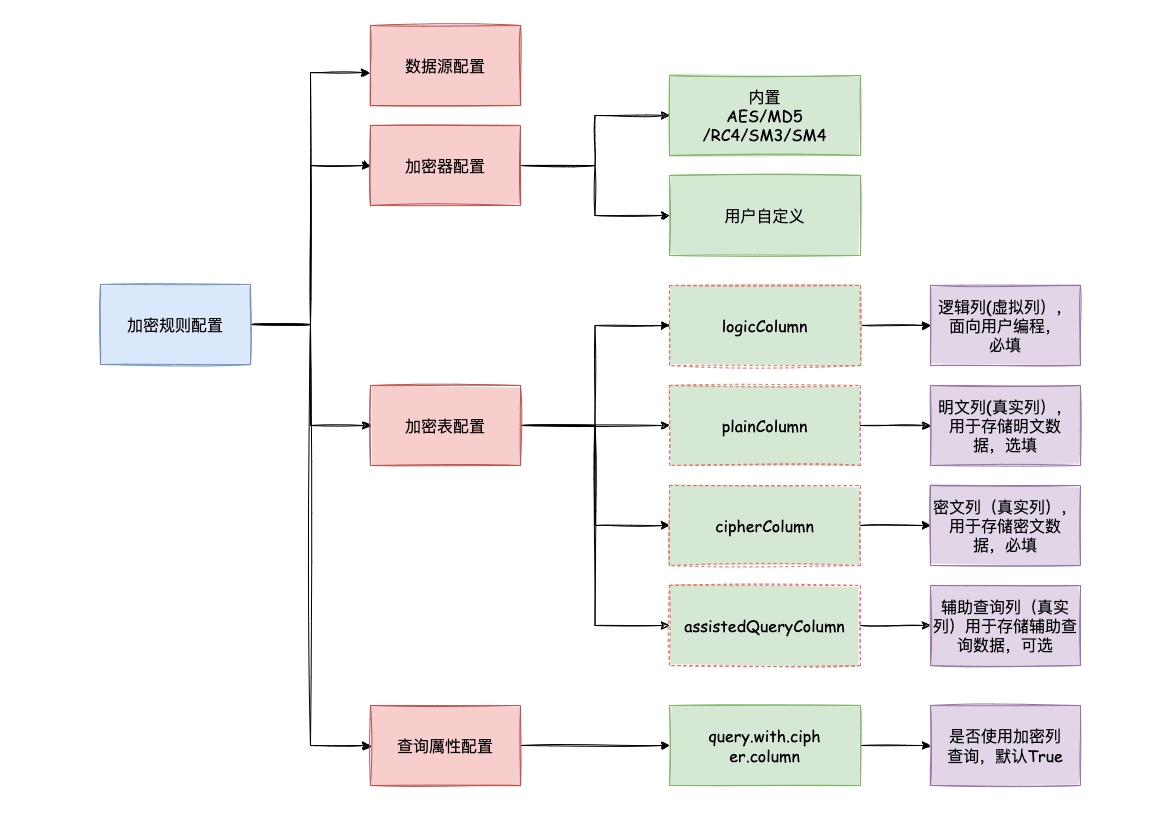
-在详解整套流程之前,我们需要先了解下加密规则与配置,这是认识整套流程的基础。加密配置主要分为四部分:数据源配置,加密算法配置,加密表配置以及查询属性配置,其详情如下图所示:
+在详解整套流程之前,我们需要先了解下加密规则与配置,这是认识整套流程的基础。加密配置主要分为三部分:数据源配置,加密算法配置,加密表配置,其详情如下图所示:
@@ -29,26 +28,23 @@ Apache ShardingSphere 会将用户请求的明文进行加密后存储到底层
**加密算法配置**:指使用什么加密算法进行加解密。目前 ShardingSphere 内置了五种加解密算法:AES,MD5,RC4,SM3 和 SM4。用户还可以通过实现 ShardingSphere 提供的接口,自行实现一套加解密算法。
-**加密表配置**:用于告诉 ShardingSphere 数据表里哪个列用于存储密文数据(cipherColumn)、使用什么算法加解密(encryptorName)、哪个列用于存储辅助查询数据(assistedQueryColumn)、使用什么算法加解密(assistedQueryEncryptorName)、哪个列用于存储明文数据(plainColumn)以及用户想使用哪个列进行 SQL 编写(logicColumn)。
+**加密表配置**:用于告诉 ShardingSphere 数据表里哪个列用于存储密文数据(cipherColumn)、使用什么算法加解密(encryptorName)、哪个列用于存储辅助查询数据(assistedQueryColumn)、使用什么算法加解密(assistedQueryEncryptorName)以及用户想使用哪个列进行 SQL 编写(logicColumn)。
> 如何理解 `用户想使用哪个列进行 SQL 编写(logicColumn)`?
>
-> 我们可以从加密模块存在的意义来理解。加密模块最终目的是希望屏蔽底层对数据的加密处理,也就是说我们不希望用户知道数据是如何被加解密的、如何将明文数据存储到 plainColumn,将密文数据存储到 cipherColumn,将辅助查询数据存储到 assistedQueryColumn。
-换句话说,我们不希望用户知道 plainColumn、cipherColumn 和 assistedQueryColumn 的存在和使用。
-所以,我们需要给用户提供一个概念意义上的列,这个列可以脱离底层数据库的真实列,它可以是数据库表里的一个真实列,也可以不是,从而使得用户可以随意改变底层数据库的 plainColumn、cipherColumn 和 assistedQueryColumn 的列名。
-或者删除 plainColumn,选择永远不再存储明文,只存储密文。
-只要用户的 SQL 面向这个逻辑列进行编写,并在加密规则里给出 logicColumn 和 plainColumn、cipherColumn、assistedQueryColumn 之间正确的映射关系即可。
+> 我们可以从加密模块存在的意义来理解。加密模块最终目的是希望屏蔽底层对数据的加密处理,也就是说我们不希望用户知道数据是如何被加解密的、如何将密文数据存储到 cipherColumn,将辅助查询数据存储到 assistedQueryColumn。
+换句话说,我们不希望用户知道 cipherColumn 和 assistedQueryColumn 的存在和使用。
+所以,我们需要给用户提供一个概念意义上的列,这个列可以脱离底层数据库的真实列,它可以是数据库表里的一个真实列,也可以不是,从而使得用户可以随意改变底层数据库的 cipherColumn 和 assistedQueryColumn 的列名。
+只要用户的 SQL 面向这个逻辑列进行编写,并在加密规则里给出 logicColumn、cipherColumn、assistedQueryColumn 之间正确的映射关系即可。
>
> 为什么要这么做呢?答案在文章后面,即为了让已上线的业务能无缝、透明、安全地进行数据加密迁移。
-**查询属性的配置**:当底层数据库表里同时存储了明文数据、密文数据后,该属性开关用于决定是直接查询数据库表里的明文数据进行返回,还是查询密文数据通过 Apache ShardingSphere 解密后返回。该属性开关支持表级别和整个规则级别配置,表级别优先级最高。
-
### 加密处理过程
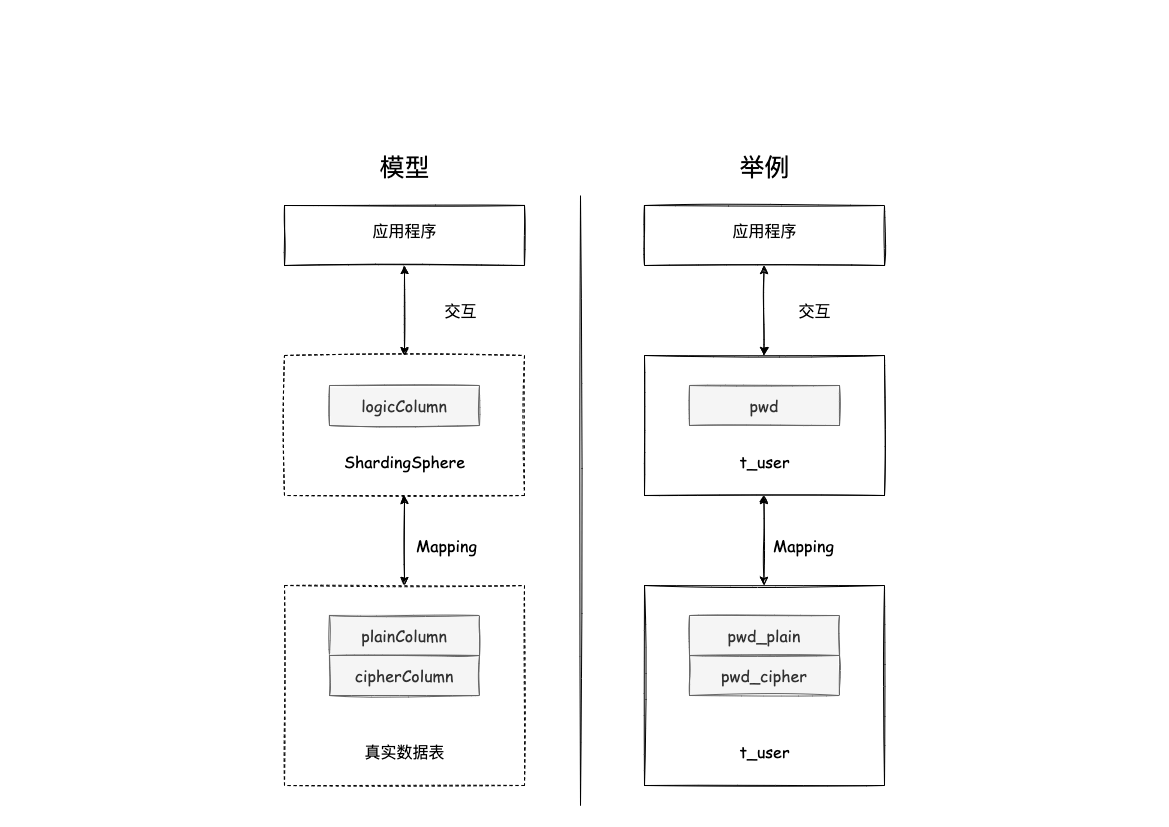
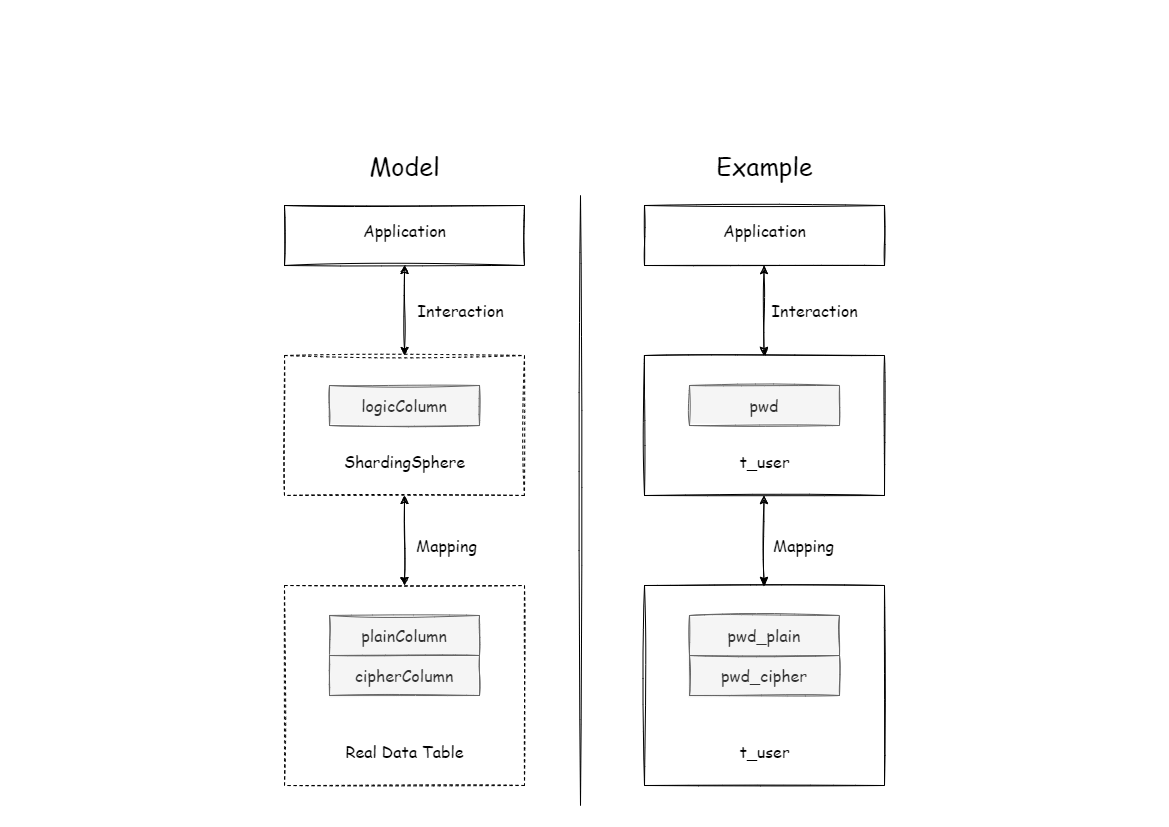
-举例说明,假如数据库里有一张表叫做 `t_user`,这张表里实际有两个字段 `pwd_plain`,用于存放明文数据、`pwd_cipher`,用于存放密文数据、`pwd_assisted_query`,用于存放辅助查询数据,同时定义 logicColumn 为 `pwd`。
+举例说明,假如数据库里有一张表叫做 `t_user`,这张表里实际有两个字段 `pwd_cipher`,用于存放密文数据、`pwd_assisted_query`,用于存放辅助查询数据,同时定义 logicColumn 为 `pwd`。
那么,用户在编写 SQL 时应该面向 logicColumn 进行编写,即 `INSERT INTO t_user SET pwd = '123'`。
Apache ShardingSphere 接收到该 SQL,通过用户提供的加密配置,发现 `pwd` 是 logicColumn,于是便对逻辑列及其对应的明文数据进行加密处理。
-**Apache ShardingSphere 将面向用户的逻辑列与面向底层数据库的明文列和密文列进行了列名以及数据的加密映射转换。**
+**Apache ShardingSphere 将面向用户的逻辑列与面向底层数据库的密文列进行了列名以及数据的加密映射转换。**
如下图所示:
@@ -65,8 +61,6 @@ Apache ShardingSphere 接收到该 SQL,通过用户提供的加密配置,发
在了解了 Apache ShardingSphere 加密处理流程后,即可将加密配置、加密处理流程与实际场景进行结合。
所有的设计开发都是为了解决业务场景遇到的痛点。那么面对之前提到的业务场景需求,又应该如何使用 Apache ShardingSphere 这把利器来满足业务需求呢?
-### 新上线业务
-
业务场景分析:新上线业务由于一切从零开始,不存在历史数据清洗问题,所以相对简单。
解决方案说明:选择合适的加密算法,如 AES 后,只需配置逻辑列(面向用户编写 SQL )和密文列(数据表存密文数据)即可,**逻辑列和密文列可以相同也可以不同**。建议配置如下(YAML 格式展示):
@@ -89,121 +83,16 @@ Apache ShardingSphere 接收到该 SQL,通过用户提供的加密配置,发
```
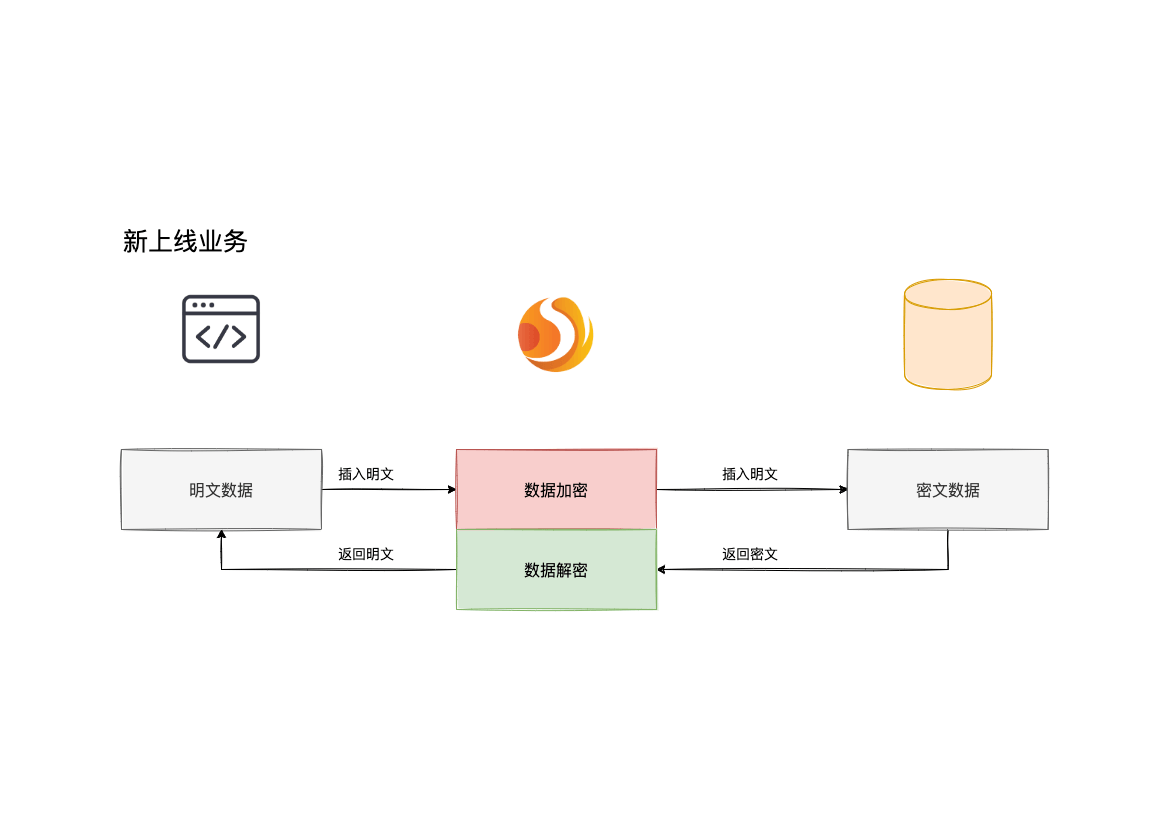
使用这套配置, Apache ShardingSphere 只需将 logicColumn 和 cipherColumn,assistedQueryColumn 进行转换,底层数据表不存储明文,只存储了密文,这也是安全审计部分的要求所在。
-如果用户希望将明文、密文一同存储到数据库,只需添加 plainColumn 配置即可。整体处理流程如下图所示:
+整体处理流程如下图所示:
-### 已上线业务改造
-
-业务场景分析:由于业务已经在线上运行,数据库里必然存有大量明文历史数据。现在的问题是如何让历史数据得以加密清洗、如何让增量数据得以加密处理、如何让业务在新旧两套数据系统之间进行无缝、透明化迁移。
-
-解决方案说明:在提供解决方案之前,我们先来头脑风暴一下:首先,既然是旧业务需要进行加密改造,那一定存储了非常重要且敏感的信息。这些信息含金量高且业务相对基础重要。
-不应该采用停止业务禁止新数据写入,再找个加密算法把历史数据全部加密清洗,再把之前重构的代码部署上线,使其能把存量和增量数据进行在线加密解密。
-
-那么另一种相对安全的做法是:重新搭建一套和生产环境一模一样的预发环境,然后通过相关迁移洗数工具把生产环境的**存量原文数据**加密后存储到预发环境,
-而**新增数据**则通过例如 MySQL 主从复制及业务方自行开发的工具加密后存储到预发环境的数据库里,再把重构后可以进行加解密的代码部署到预发环境。
-这样生产环境是一套**以明文为核心的查询修改**的环境;预发环境是一套**以密文为核心加解密查询修改**的环境。
-在对比一段时间无误后,可以夜间操作将生产流量切到预发环境中。
-此方案相对安全可靠,只是时间、人力、资金、成本较高,主要包括:预发环境搭建、生产代码整改、相关辅助工具开发等。
-
-业务开发人员最希望的做法是:减少资金费用的承担、最好不要修改业务代码、能够安全平滑迁移系统。于是,ShardingSphere 的加密功能模块便应运而生。可分为 3 步进行:
-
-1. 系统迁移前
-
-假设系统需要对 `t_user` 的 `pwd` 字段进行加密处理,业务方使用 Apache ShardingSphere 来代替标准化的 JDBC 接口,此举基本不需要额外改造(我们还提供了 YAML 接入方式,满足不同业务方需求)。
-另外,提供一套加密配置规则,如下所示:
-
-```yaml
--!ENCRYPT
- encryptors:
- aes_encryptor:
- type: AES
- props:
- aes-key-value: 123456abc
- tables:
- t_user:
- columns:
- pwd:
- cipherColumn: pwd_cipher
- encryptorName: aes_encryptor
- assistedQueryColumn: pwd_assisted_query
- assistedQueryEncryptorName: pwd_assisted_query_cipher
-```
-
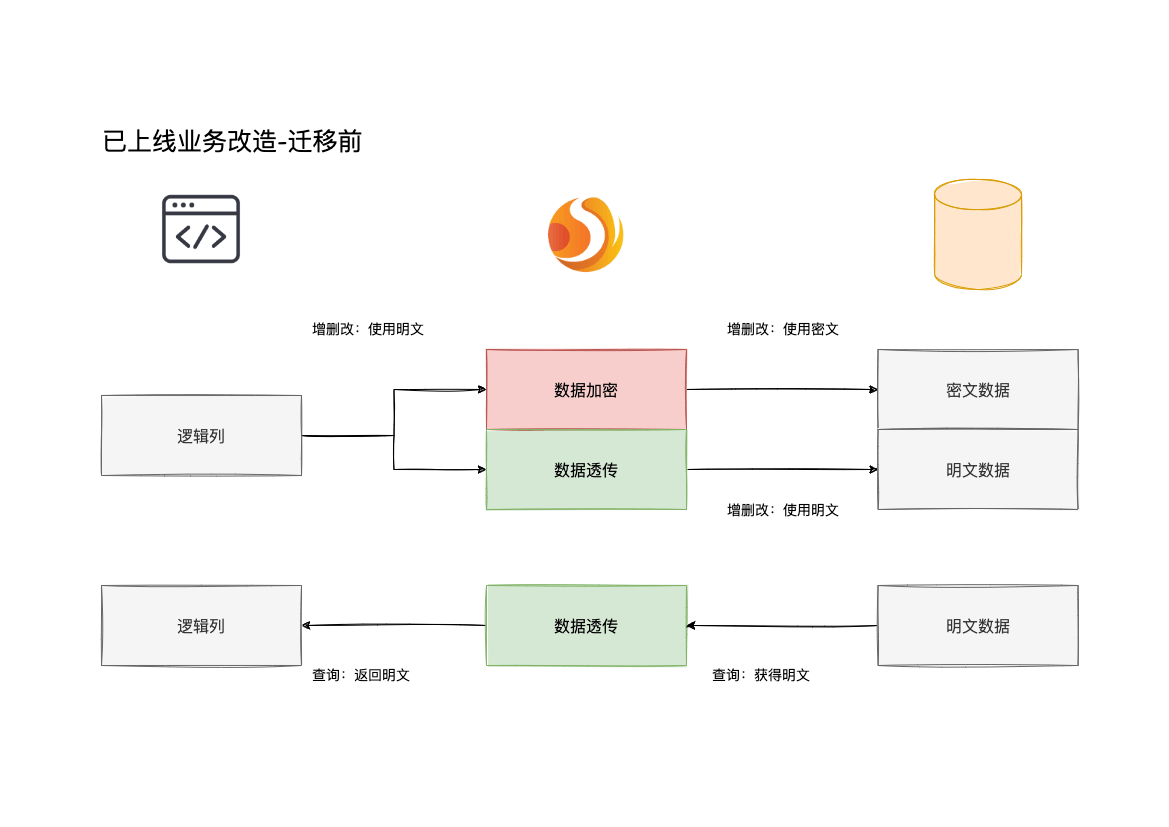
-依据上述加密规则可知,首先需要在数据库表 `t_user` 里新增一个字段叫做 `pwd_cipher`,即 cipherColumn,用于存放密文数据,同时我们把 plainColumn 设置为 `pwd`,用于存放明文数据,而把 logicColumn 也设置为 `pwd`。
-由于之前的代码 SQL 就是使用 `pwd` 进行编写,即面向逻辑列进行 SQL 编写,所以业务代码无需改动。
-通过 Apache ShardingSphere,针对新增的数据,会把明文写到 pwd 列,并同时把明文进行加密存储到 `pwd_cipher` 列。
-此时,由于 `queryWithCipherColumn` 设置为 false,对业务应用来说,依旧使用 `pwd` 这一明文列进行查询存储,却在底层数据库表 `pwd_cipher` 上额外存储了新增数据的密文数据,其处理流程如下图所示:
-
-
-
-新增数据在插入时,就通过 Apache ShardingSphere 加密为密文数据,并被存储到了 cipherColumn。而现在就需要处理历史明文存量数据。
-**由于 Apache ShardingSphere 目前并未提供相关迁移洗数工具,此时需要业务方自行将 `pwd` 中的明文数据进行加密处理存储到 `pwd_cipher`。**
-
-2. 系统迁移中
-
-新增的数据已被 Apache ShardingSphere 将密文存储到密文列,明文存储到明文列;历史数据被业务方自行加密清洗后,将密文也存储到密文列。
-也就是说现在的数据库里即存放着明文也存放着密文,只是由于配置项中的 `queryWithCipherColumn = false`,所以密文一直没有被使用过。
-现在我们为了让系统能切到密文数据进行查询,需要将加密配置中的 queryWithCipherColumn 设置为 true。
-在重启系统后,我们发现系统业务一切正常,但是 Apache ShardingSphere 已经开始从数据库里取出密文列的数据,解密后返回给用户;
-而对于用户的增删改需求,则依旧会把原文数据存储到明文列,加密后密文数据存储到密文列。
-
-虽然现在业务系统通过将密文列的数据取出,解密后返回;但是,在存储的时候仍旧会存一份原文数据到明文列,这是为什么呢?
-答案是:为了能够进行系统回滚。
-**因为只要密文和明文永远同时存在,我们就可以通过开关项配置自由将业务查询切换到 cipherColumn 或 plainColumn。**
-也就是说,如果将系统切到密文列进行查询时,发现系统报错,需要回滚。那么只需将 `queryWithCipherColumn = false`,Apache ShardingSphere 将会还原,即又重新开始使用 plainColumn 进行查询。
-处理流程如下图所示:
-
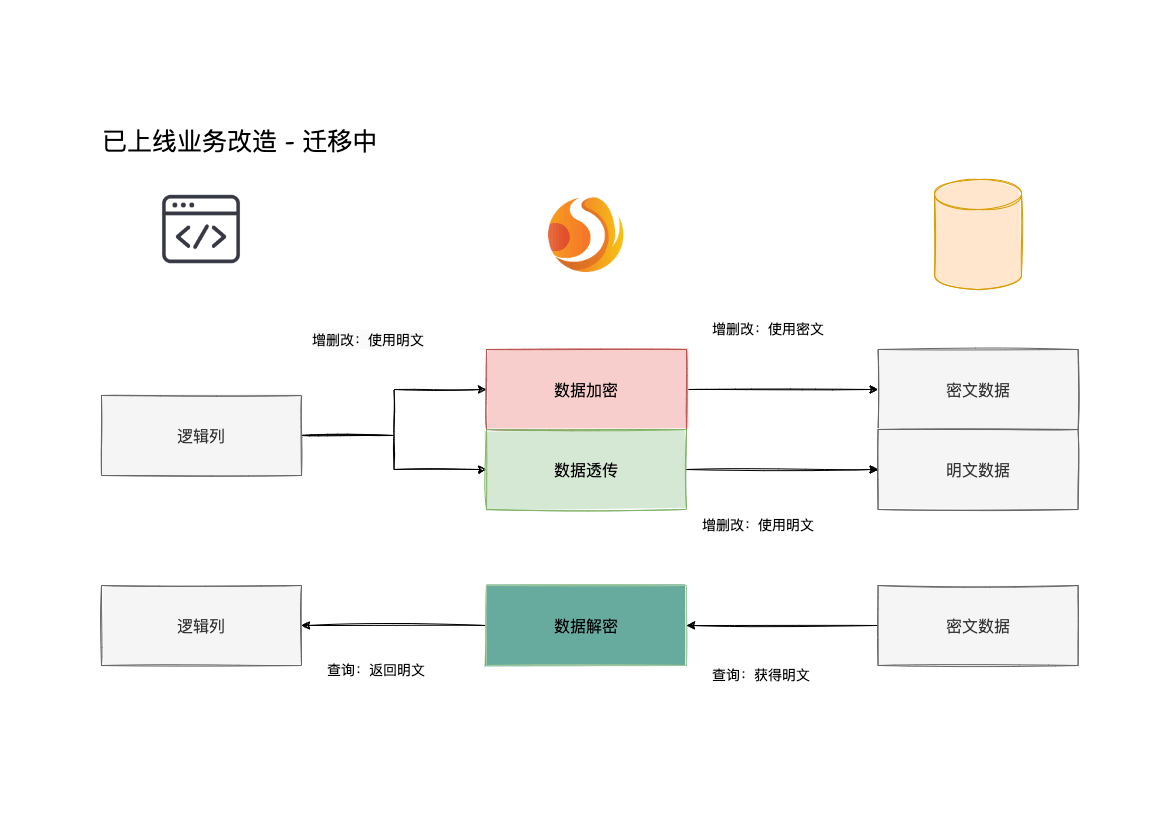
-
-
-3. 系统迁移后
-
-由于安全审计部门要求,业务系统一般不可能让数据库的明文列和密文列永久同步保留,我们需要在系统稳定后将明文列数据删除。
-即我们需要在系统迁移后将 plainColumn,即 pwd 进行删除。那问题来了,现在业务代码都是面向pwd进行编写 SQL 的,把底层数据表中的存放明文的 pwd 删除了,
-换用 pwd_cipher 进行解密得到原文数据,那岂不是意味着业务方需要整改所有 SQL,从而不使用即将要被删除的 pwd 列?还记得我们 Apache ShardingSphere 的核心意义所在吗?
-
-> 这也正是 Apache ShardingSphere 核心意义所在,即依据用户提供的加密规则,将用户 SQL 与底层数据库表结构割裂开来,使得用户的 SQL 编写不再依赖于真实的数据库表结构。
-而用户与底层数据库之间的衔接、映射、转换交由 Apache ShardingSphere 进行处理。
-
-是的,因为有 logicColumn 存在,用户的编写 SQL 都面向这个虚拟列,Apache ShardingSphere 就可以把这个逻辑列和底层数据表中的密文列进行映射转换。于是迁移后的加密配置即为:
-
-```yaml
--!ENCRYPT
- encryptors:
- aes_encryptor:
- type: AES
- props:
- aes-key-value: 123456abc
- tables:
- t_user:
- columns:
- pwd: # pwd 与 pwd_cipher 的转换映射
- cipherColumn: pwd_cipher
- encryptorName: aes_encryptor
- assistedQueryColumn: pwd_assisted_query
- assistedQueryEncryptorName: pwd_assisted_query_cipher
-```
-
-其处理流程如下:
-
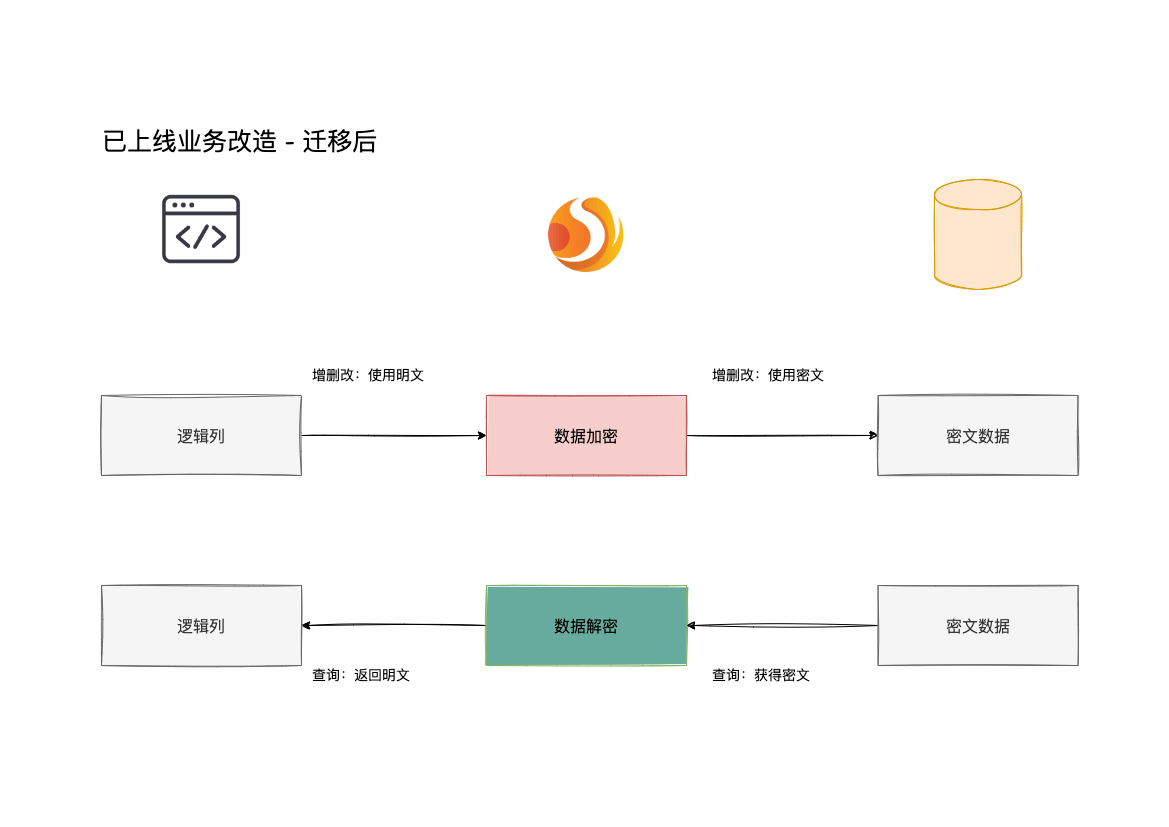
-
-
-4. 系统迁移完成
-
-安全审计部门再要求,业务系统需要定期或某些紧急安全事件触发修改密钥,我们需要再次进行迁移洗数,即使用旧密钥解密后再使用新密钥加密。既要又要还要的问题来了,明文列数据已删除,数据库表中数据量千万级,迁移洗数需要一定时间,迁移洗数过程中密文列在变化,系统还需正确提供服务。怎么办?
-答案是:辅助查询列
-**因为辅助查询列一般使用不可逆的 MD5 和 SM3 等算法,基于辅助列进行查询,即使在迁移洗数过程中,系统也是可以提供正确服务。**
-
-至此,已在线业务加密整改解决方案全部叙述完毕。我们提供了 Java、YAML 两方式供用户选择接入,力求满足业务不同的接入需求。
-该解决方案目前已在京东数科不断落地上线,提供对内基础服务支撑。
-
## 中间件加密服务优势
1. 自动化 & 透明化数据加密过程,用户无需关注加密中间实现细节。
2. 提供多种内置、第三方(AKS)的加密算法,用户仅需简单配置即可使用。
3. 提供加密算法 API 接口,用户可实现接口,从而使用自定义加密算法进行数据加密。
4. 支持切换不同的加密算法。
-5. 针对已上线业务,可实现明文数据与密文数据同步存储,并通过配置决定使用明文列还是密文列进行查询。可实现在不改变业务查询 SQL 前提下,已上线系统对加密前后数据进行安全、透明化迁移。
## 加密算法解析
diff --git a/docs/document/content/reference/encrypt/_index.en.md b/docs/document/content/reference/encrypt/_index.en.md
index afb65bc2299..a88100f698f 100644
--- a/docs/document/content/reference/encrypt/_index.en.md
+++ b/docs/document/content/reference/encrypt/_index.en.md
@@ -4,7 +4,7 @@ title = "Encryption"
weight = 7
+++
-Apache ShardingSphere parses the SQL entered by users and rewrites the SQL according to the encryption rules provided by users, to encrypt the source data and store the source data (optional) and ciphertext data in the underlying database.
+Apache ShardingSphere parses the SQL entered by users and rewrites the SQL according to the encryption rules provided by users.
When a user queries data, it only retrieves ciphertext data from the database, decrypts it, and finally returns the decrypted source data to the user. Apache ShardingSphere achieves a transparent and automatic data encryption process. Users can use encrypted data as normal data without paying attention to the implementation details of data encryption.
@@ -18,7 +18,7 @@ Apache ShardingSphere will encrypt the plaintext requested by users and store it
### Encryption Rules
-Before explaining the whole process, we need to understand the encryption rules and configuration. Encryption configuration is mainly divided into four parts: data source configuration, encryptor configuration, encryption table configuration, and query attribute configuration, as shown in the figure below:
+Before explaining the whole process, we need to understand the encryption rules and configuration. Encryption configuration is mainly divided into three parts: data source configuration, encryptor configuration, encryption table configuration, as shown in the figure below:
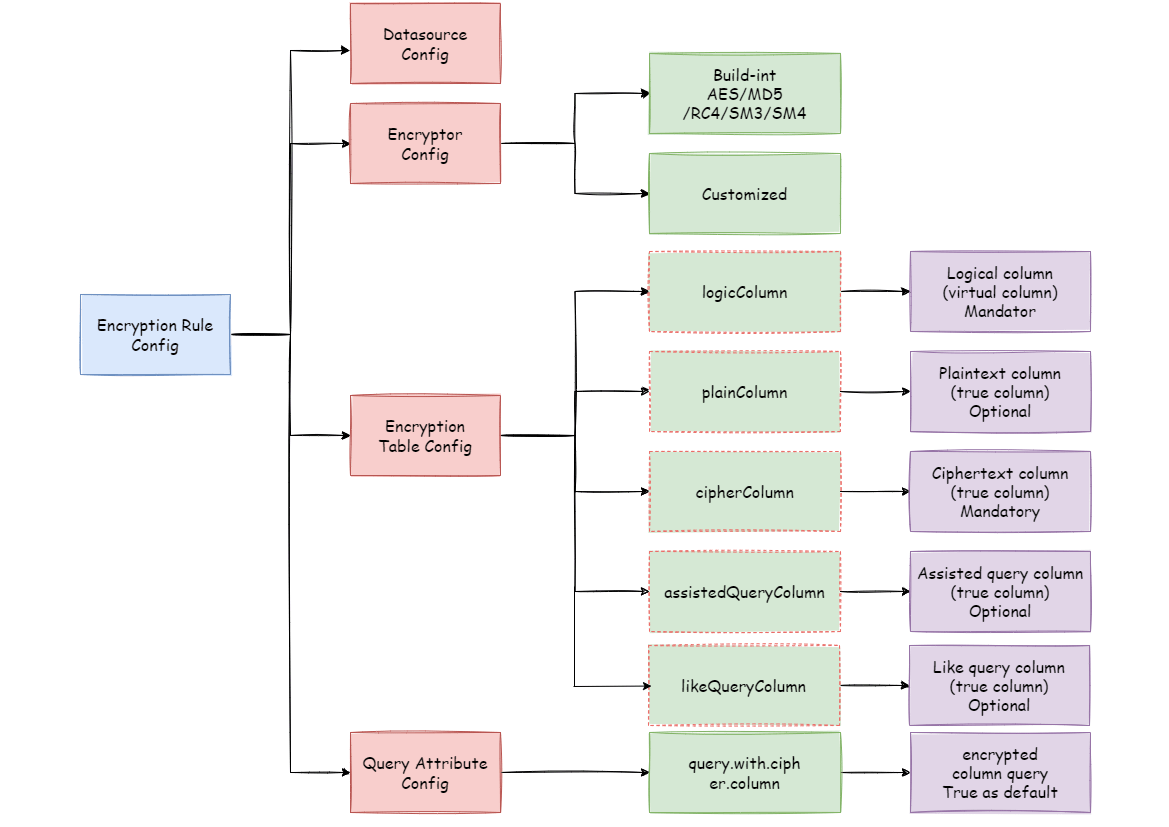
@@ -26,19 +26,19 @@ Data source configuration: the configuration of the data source.
Encryptor configuration: refers to the encryption algorithm used for encryption and decryption. Currently, ShardingSphere has five built-in encryption and decryption algorithms: AES, MD5, RC4, SM3, and SM4. Users can also implement a set of encryption and decryption algorithms by implementing the interfaces provided by ShardingSphere.
-Encryption table configuration: it is used to tell ShardingSphere which column in the data table is used to store ciphertext data (`cipherColumn`), which column is used to store plaintext data (`plainColumn`), and which column the user would like to use for SQL writing (`logicColumn`).
+Encryption table configuration: it is used to tell ShardingSphere which column in the data table is used to store ciphertext data (`cipherColumn`), and which column the user would like to use for SQL writing (`logicColumn`).
> What does it mean by "which column the user would like to use for SQL writing (logicColumn)"?
-We have to know first why the encrypted module exists. The goal of the encrypted module is to shield the underlying data encryption process, which means we don't want users to know how data is encrypted and decrypted, and how to store plaintext data into `plainColumn` and ciphertext data into `cipherColumn`. In other words, we don't want users to know there is a `plainColumn` and `cipherColumn` or how they are used. Therefore, we need to provide the user with a conceptual column that can [...]
+We have to know first why the encrypted module exists. The goal of the encrypted module is to shield the underlying data encryption process, which means we don't want users to know how data is encrypted and decrypted, and how to store ciphertext data into `cipherColumn`. In other words, we don't want users to know there is a `cipherColumn` or how they are used. Therefore, we need to provide the user with a conceptual column that can be separated from the real column in the underlying dat [...]
>
Query attribute configuration: if both plaintext and ciphertext data are stored in the underlying database table, this attribute can be used to determine whether to query the plaintext data in the database table and return it directly, or query the ciphertext data and return it after decryption through Apache ShardingSphere. This attribute can be configured at the table level and the entire rule level. The table-level has the highest priority.
### Encryption Process
-For example, if there is a table named `t_user` in the database, and they're two fields in the table: `pwd_plain` for storing plaintext data and `pwd_cipher` for storing ciphertext data, and logicColumn is defined as `pwd`, then users should write SQL for `logicColumn`, that is `INSERT INTO t_user SET pwd = '123'`. Apache ShardingSphere receives the SQL and finds that the `pwd` is the `logicColumn` based on the encryption configuration provided by the user. Therefore, it encrypts the log [...]
+For example, if there is a table named `t_user` in the database, and they're two fields in the table: `pwd_cipher` for storing ciphertext data, and logicColumn is defined as `pwd`, then users should write SQL for `logicColumn`, that is `INSERT INTO t_user SET pwd = '123'`. Apache ShardingSphere receives the SQL and finds that the `pwd` is the `logicColumn` based on the encryption configuration provided by the user. Therefore, it encrypts the logical column and its corresponding plaintext data.
-Apache ShardingSphere transforms the column names and data encryption mapping between the logical columns facing users and the plain and cipher columns facing the underlying database. As shown in the figure below:
+Apache ShardingSphere transforms the column names and data encryption mapping between the logical columns facing users and cipher columns facing the underlying database. As shown in the figure below:
@@ -54,8 +54,6 @@ The picture below shows the processing flow and conversion logic when the encryp
After understanding Apache ShardingSphere's encryption process, you can combine the encryption configuration and encryption process according to your scenario. The entire design & development was conceived to address the pain points encountered in business scenarios. So, how to use Apache ShardingSphere to meet the business requirements mentioned before?
-### New Business
-
Business scenario analysis: the newly launched business is relatively simple because it starts from scratch and there's no need to clean up historical data.
Solution description: after selecting the appropriate encryption algorithm, such as AES, you only need to configure the logical column (write SQL for users) and the ciphertext column (the data table stores the ciphertext data). The logical columns and ciphertext columns can also be different. The following configurations are recommended (in YAML format):
@@ -79,125 +77,16 @@ Solution description: after selecting the appropriate encryption algorithm, such
With the above configuration, Apache ShardingSphere only needs to convert `logicColumn`, `cipherColumn`, and `assistedQueryColumn`.
-The underlying data table does not store plaintext, and only ciphertext is stored, which is also the requirement of the security audit. If you want to store both plaintext and ciphertext in the database, add the `plainColumn` configuration. The overall processing flow is shown in the figure below:
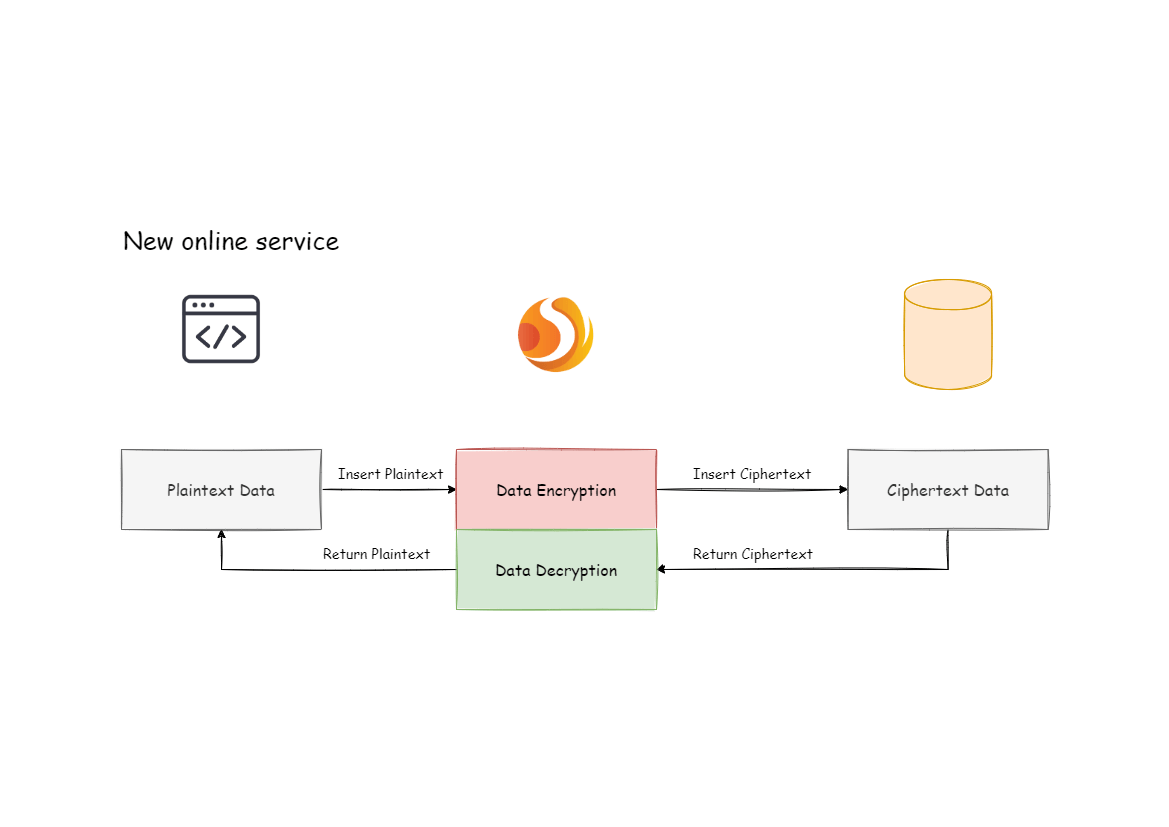
+The underlying data table does not store plaintext, and only ciphertext is stored, which is also the requirement of the security audit. The overall processing flow is shown in the figure below:
-### Online Business Transformation
-
-Business scenario analysis: as the business is already running, the database will already have stored a large amount of plaintext historical data. The current challenges are how to encrypt and clean up the historical data, how to encrypt and process the incremental data, and how to seamlessly and transparently migrate business between the old and new data systems.
-
-Solution Description: before coming up with a solution, let's brainstorm.
-
-First, since it is an old business that needs to be encrypted and transformed, it must have stored very important and sensitive information, which is valuable and related to critical businesses. Therefore, it is impossible to suspend business immediately, prohibit writing new data, encrypt and clean all historical data with an encryption algorithm. And then deploy and launch the reconstructed code to encrypt and decrypt the stock and incremental data online. Such a complex solution will [...]
-
-Another relatively safe solution is to build a set of pre-released environments exactly the same as the production environment, and then encrypt the stock original data of the production environment and store it in the pre-released environment through migration and data cleansing tools.
-
-The new data is encrypted and stored in the database of the pre-released environment through tools such as MySQL primary/secondary replication and self-developed ones by the business side. The reconfigurable code that can be encrypted and decrypted is deployed to the pre-released environment. This way, the production environment takes plaintext as the core used for queries and modifications.
-
-The pre-released environment is a ciphertext-based environment for encrypted and decrypted queries and modifications. After comparison, the production flow can be transferred to the pre-released environment by nighttime operation. This method is relatively safe and reliable, but time consuming,labor and capital intensive, mainly including building a pre-released environment, modifying production code, developing auxiliary tools, etc.
-
-The most popular solutions for developers are to reduce the capital cost, not change the business code, and be able to migrate the system safely and smoothly. Thus, the encryption function module of ShardingSphere was created. It can be divided into three steps:
-
-1. Before system migration
-
-Assuming that the system needs to encrypt the `pwd` field of `t_user`, the business side uses Apache ShardingSphere to replace the standardized JDBC interface, which basically requires no additional modification (we also provide YAML and other access methods to meet different business requirements). In addition, we would like to demonstrate a set of encryption configuration rules, as follows:
-
-```yaml
--!ENCRYPT
- encryptors:
- aes_encryptor:
- type: AES
- props:
- aes-key-value: 123456abc
- tables:
- t_user:
- columns:
- pwd:
- cipherColumn: pwd_cipher
- encryptorName: aes_encryptor
- assistedQueryColumn: pwd_assisted_query
- assistedQueryEncryptorName: pwd_assisted_query_cipher
-```
-
-According to the above encryption rules, we need to add a field called `pwd_cipher`, namely `cipherColumn`, in the `t_user` table, which is used to store ciphertext data.
-
-At the same time, we set `plainColumn` to `pwd`, which is used to store plaintext data, and `logicColumn` is also set to `pwd`.
-
-Because the previous SQL was written using `pwd`, the SQL was written for logical columns, and the business code does not need to be changed. Through Apache ShardingSphere, for the incremental data, the plaintext will be written to the `pwd` column and be encrypted and stored in the `pwd_cipher` column.
-
-At this time, because `queryWithCipherColumn` is set to `false`, for business applications, the plaintext column of `pwd` is still used for query and storage, but the ciphertext data of the new data is additionally stored on the underlying database table `pwd_cipher`. The processing flow is shown below:
-
-
-
-When the new data is inserted, it is encrypted as ciphertext data by Apache ShardingSphere and stored in the `cipherColumn`. Now you need to deal with the historical plaintext stock data. Apache ShardingSphere currently does not provide a migration and data cleansing tool, so you need to encrypt the plaintext data in the `pwd` and store it in the `pwd_cipher`.
-
-2. During system migration
-
-The new ciphertext data is stored in the `cipherColumn` and the new plaintext one is stored in the `plainColumn` by Apache ShardingSphere. After the historical data is encrypted and cleaned by the business side, its ciphertext is also stored in the `cipherColumn`. In other words, the current database stores both plaintext and ciphertext.
-
-Owing to the configuration item `queryWithCipherColumn = false`, the ciphertext is never used. Now we need to set `queryWithCipherColumn` in the encryption configuration to true in order for the system to query ciphertext data.
-
-After restarting the system, we found that all system businesses are normal, but Apache ShardingSphere has started to take out and decrypt the cipherColumn data from the database and returned those data to the user. In terms of users' requirements of addition, deletion and modification, the original data is still stored in the `plainColumn`, and the encrypted ciphertext data is stored in the `cipherColumn`.
-
-Although the business system has taken out the data in the `cipherColumn` and returned it after decryption, it will still save a copy of the original data to the `plainColumn`. Why? The answer is: to enable system rollback.
-
-Because as long as the ciphertext and plaintext always exist at the same time, we can freely switch the business query to `cipherColumn` or `plainColumn` through the configuration of the switch item.
-
-In other words, if the system is switched to the ciphertext column for query, the system reports an error and needs to be rolled back. Then we only need to set `queryWithCipherColumn = false`, and Apache ShardingSphere will restore and start using `plainColumn` to query again. The processing flow is shown in the following figure:
-
-
-
-3. After system migration
-
-As required by security audit teams, it is generally impossible for the business system to permanently synchronize the plaintext column and ciphertext column of the database, so we need to delete the plaintext column data after the system is stable.
-
-That is, we need to delete plainColumn (i.e.`pwd`) after system migration. The problem is that now the business code is written for `pwd` SQL, and we delete the pwd that stores plaintext in the underlying data table and use the `pwd_cipher` to decrypt the original data.
-
-Does that mean that the business side needs to change all SQL, to not use the pwd column to be deleted? No. Remember the core concept of Apache ShardingSphere?
-
-> That is exactly the core concept of Apache ShardingSphere's encryption module. According to the encryption rules provided by the user, the user SQL is separated from the underlying database table structure, so that the user’s SQL writing no longer depends on the actual database table structure. The connection, mapping, and conversion between the user and the underlying database are handled by ShardingSphere.
-
-The existence of the `logicColumn` means that users write SQL for this virtual column. Apache ShardingSphere can map this logical column and the ciphertext column in the underlying data table. So the encryption configuration after the migration is:
-
-```yaml
--!ENCRYPT
- encryptors:
- aes_encryptor:
- type: AES
- props:
- aes-key-value: 123456abc
- tables:
- t_user:
- columns:
- pwd: # pwd and pwd_cipher transformation mapping
- cipherColumn: pwd_cipher
- encryptorName: aes_encryptor
- assistedQueryColumn: pwd_assisted_query
- assistedQueryEncryptorName: pwd_assisted_query_cipher
-```
-
-The processing flow is as follows:
-
-
-
-4. System migration completed
-
-As required by security audit teams, the business system needs to periodically trigger key modifications or through some emergency events. We need to perform migration data cleansing again, which means using the old key to decrypt and then use the new key to encrypt.
-
-The problem persists. The plaintext column data has been deleted, and the amount of data in the database table is tens of millions. Additionally, the migration and cleansing take a certain amount of time, during which the cipher column changes.
-
-Under these circumstances, the system still needs to provide services correctly. What can we do? The answer lies in the auxiliary query column. Because auxiliary query columns generally use algorithms such as irreversible MD5 and SM3. Queries based on auxiliary columns are performed correctly by the system even during the migration and data cleansing process.
-
-So far, the encryption rectification solution for the released business has been completely demonstrated. We provide Java, YAML for users to choose and access to meet different business requirements. This solution has been continuously verified by enterprise users such as JD Technology.
-
## The advantages of Middleware encryption service
1. Automatic and transparent data encryption process. Encryption implementation details are no longer a concern for users.
2. It provides a variety of built-in and third-party (AKS) encryption algorithms, which are available through simple configurations.
3. It provides an encryption algorithm API interface. Users can implement the interface to use a custom encryption algorithm for data encryption.
4. It can switch among different encryption algorithms.
-5. For businesses already launched, it is possible to store plaintext data and ciphertext data synchronously. And you can decide whether to use plaintext or ciphertext columns for query through configuration. Without changing the business query SQL, the released system can safely and transparently migrate data before and after encryption.
## Solution
diff --git a/docs/document/content/user-manual/shardingsphere-jdbc/java-api/rules/encrypt.cn.md b/docs/document/content/user-manual/shardingsphere-jdbc/java-api/rules/encrypt.cn.md
index 2c419b074ef..7b698b45774 100644
--- a/docs/document/content/user-manual/shardingsphere-jdbc/java-api/rules/encrypt.cn.md
+++ b/docs/document/content/user-manual/shardingsphere-jdbc/java-api/rules/encrypt.cn.md
@@ -75,9 +75,9 @@ public final class EncryptDatabasesConfiguration {
public DataSource getDataSource() throws SQLException {
Properties props = new Properties();
props.setProperty("aes-key-value", "123456");
- EncryptColumnRuleConfiguration columnConfigAes = new EncryptColumnRuleConfiguration("username", "username", "", "", "username_plain", "name_encryptor", null);
- EncryptColumnRuleConfiguration columnConfigTest = new EncryptColumnRuleConfiguration("pwd", "pwd", "assisted_query_pwd", "like_pwd", "", "pwd_encryptor", null);
- EncryptTableRuleConfiguration encryptTableRuleConfig = new EncryptTableRuleConfiguration("t_user", Arrays.asList(columnConfigAes, columnConfigTest), null);
+ EncryptColumnRuleConfiguration columnConfigAes = new EncryptColumnRuleConfiguration("username", "username", "", "", "name_encryptor");
+ EncryptColumnRuleConfiguration columnConfigTest = new EncryptColumnRuleConfiguration("pwd", "pwd", "assisted_query_pwd", "like_pwd", "pwd_encryptor");
+ EncryptTableRuleConfiguration encryptTableRuleConfig = new EncryptTableRuleConfiguration("t_user", Arrays.asList(columnConfigAes, columnConfigTest));
Map<String, AlgorithmConfiguration> encryptAlgorithmConfigs = new HashMap<>();
encryptAlgorithmConfigs.put("name_encryptor", new AlgorithmConfiguration("AES", props));
encryptAlgorithmConfigs.put("pwd_encryptor", new AlgorithmConfiguration("assistedTest", props));
diff --git a/docs/document/content/user-manual/shardingsphere-jdbc/java-api/rules/encrypt.en.md b/docs/document/content/user-manual/shardingsphere-jdbc/java-api/rules/encrypt.en.md
index 1e41825e078..e95bd87e389 100644
--- a/docs/document/content/user-manual/shardingsphere-jdbc/java-api/rules/encrypt.en.md
+++ b/docs/document/content/user-manual/shardingsphere-jdbc/java-api/rules/encrypt.en.md
@@ -75,9 +75,9 @@ public final class EncryptDatabasesConfiguration {
public DataSource getDataSource() throws SQLException {
Properties props = new Properties();
props.setProperty("aes-key-value", "123456");
- EncryptColumnRuleConfiguration columnConfigAes = new EncryptColumnRuleConfiguration("username", "username", "", "", "username_plain", "name_encryptor", null);
- EncryptColumnRuleConfiguration columnConfigTest = new EncryptColumnRuleConfiguration("pwd", "pwd", "assisted_query_pwd", "like_pwd", "", "pwd_encryptor", null);
- EncryptTableRuleConfiguration encryptTableRuleConfig = new EncryptTableRuleConfiguration("t_user", Arrays.asList(columnConfigAes, columnConfigTest), null);
+ EncryptColumnRuleConfiguration columnConfigAes = new EncryptColumnRuleConfiguration("username", "username", "", "", "name_encryptor");
+ EncryptColumnRuleConfiguration columnConfigTest = new EncryptColumnRuleConfiguration("pwd", "pwd", "assisted_query_pwd", "like_pwd", "pwd_encryptor");
+ EncryptTableRuleConfiguration encryptTableRuleConfig = new EncryptTableRuleConfiguration("t_user", Arrays.asList(columnConfigAes, columnConfigTest));
Map<String, AlgorithmConfiguration> encryptAlgorithmConfigs = new HashMap<>();
encryptAlgorithmConfigs.put("name_encryptor", new AlgorithmConfiguration("AES", props));
encryptAlgorithmConfigs.put("pwd_encryptor", new AlgorithmConfiguration("assistedTest", props));
diff --git a/docs/document/content/user-manual/shardingsphere-proxy/distsql/syntax/rdl/rule-definition/encrypt/alter-encrypt-rule.cn.md b/docs/document/content/user-manual/shardingsphere-proxy/distsql/syntax/rdl/rule-definition/encrypt/alter-encrypt-rule.cn.md
index 3c976fec1da..c1732e0ecca 100644
--- a/docs/document/content/user-manual/shardingsphere-proxy/distsql/syntax/rdl/rule-definition/encrypt/alter-encrypt-rule.cn.md
+++ b/docs/document/content/user-manual/shardingsphere-proxy/distsql/syntax/rdl/rule-definition/encrypt/alter-encrypt-rule.cn.md
@@ -65,7 +65,7 @@ value ::=
### 补充说明
-- `PLAIN` 指定明文数据列,`CIPHER` 指定密文数据列,`ASSISTED_QUERY_COLUMN` 指定辅助查询列,`LIKE_QUERY_COLUMN` 指定模糊查询列;
+- `CIPHER` 指定密文数据列,`ASSISTED_QUERY_COLUMN` 指定辅助查询列,`LIKE_QUERY_COLUMN` 指定模糊查询列;
- `encryptAlgorithmType` 指定加密算法类型,请参考 [加密算法](/cn/user-manual/common-config/builtin-algorithm/encrypt/);
- 重复的 `ruleName` 将无法被创建。
@@ -83,7 +83,7 @@ COLUMNS(
### 保留字
-`ALTER`、`ENCRYPT`、`RULE`、`COLUMNS`、`NAME`、`CIPHER`、`PLAIN`、`ENCRYPT_ALGORITHM`、`TYPE`、`TRUE`、`FALSE`
+`ALTER`、`ENCRYPT`、`RULE`、`COLUMNS`、`NAME`、`CIPHER`、`ENCRYPT_ALGORITHM`、`TYPE`、`TRUE`、`FALSE`
### 相关链接
diff --git a/docs/document/content/user-manual/shardingsphere-proxy/distsql/syntax/rdl/rule-definition/encrypt/alter-encrypt-rule.en.md b/docs/document/content/user-manual/shardingsphere-proxy/distsql/syntax/rdl/rule-definition/encrypt/alter-encrypt-rule.en.md
index 1121df03498..6fba1e2f5a5 100644
--- a/docs/document/content/user-manual/shardingsphere-proxy/distsql/syntax/rdl/rule-definition/encrypt/alter-encrypt-rule.en.md
+++ b/docs/document/content/user-manual/shardingsphere-proxy/distsql/syntax/rdl/rule-definition/encrypt/alter-encrypt-rule.en.md
@@ -65,7 +65,7 @@ value ::=
### Supplement
-- `PLAIN` specifies the plain column, `CIPHER` specifies the cipher column, `ASSISTED_QUERY_COLUMN` specifies the assisted query column,`LIKE_QUERY_COLUMN` specifies the like query column
+- `CIPHER` specifies the cipher column, `ASSISTED_QUERY_COLUMN` specifies the assisted query column,`LIKE_QUERY_COLUMN` specifies the like query column
- `encryptAlgorithmType` specifies the encryption algorithm type, please refer to [Encryption Algorithm](/en/user-manual/common-config/builtin-algorithm/encrypt/)
### Example
@@ -82,7 +82,7 @@ COLUMNS(
### Reserved words
-`ALTER`, `ENCRYPT`, `RULE`, `COLUMNS`, `NAME`, `CIPHER`, `PLAIN`, `ENCRYPT_ALGORITHM`, `TYPE`, `TRUE`, `FALSE`
+`ALTER`, `ENCRYPT`, `RULE`, `COLUMNS`, `NAME`, `CIPHER`, `ENCRYPT_ALGORITHM`, `TYPE`, `TRUE`, `FALSE`
### Related links
diff --git a/docs/document/content/user-manual/shardingsphere-proxy/distsql/syntax/rdl/rule-definition/encrypt/create-encrypt-rule.cn.md b/docs/document/content/user-manual/shardingsphere-proxy/distsql/syntax/rdl/rule-definition/encrypt/create-encrypt-rule.cn.md
index 010197b7795..cb30966c6d2 100644
--- a/docs/document/content/user-manual/shardingsphere-proxy/distsql/syntax/rdl/rule-definition/encrypt/create-encrypt-rule.cn.md
+++ b/docs/document/content/user-manual/shardingsphere-proxy/distsql/syntax/rdl/rule-definition/encrypt/create-encrypt-rule.cn.md
@@ -68,7 +68,7 @@ value ::=
### 补充说明
-- `PLAIN` 指定明文数据列,`CIPHER` 指定密文数据列,`ASSISTED_QUERY_COLUMN` 指定辅助查询列,`LIKE_QUERY_COLUMN` 指定模糊查询列;
+- `CIPHER` 指定密文数据列,`ASSISTED_QUERY_COLUMN` 指定辅助查询列,`LIKE_QUERY_COLUMN` 指定模糊查询列;
- `encryptAlgorithmType` 指定加密算法类型,请参考 [加密算法](/cn/user-manual/common-config/builtin-algorithm/encrypt/);
- 重复的 `ruleName` 将无法被创建;
- `ifNotExists` 子句用于避免出现 `Duplicate encrypt rule` 错误。
@@ -107,7 +107,7 @@ COLUMNS(
### 保留字
-`CREATE`、`ENCRYPT`、`RULE`、`COLUMNS`、`NAME`、`CIPHER`、`PLAIN`、`ENCRYPT_ALGORITHM`、`TYPE`、`TRUE`、`FALSE`
+`CREATE`、`ENCRYPT`、`RULE`、`COLUMNS`、`NAME`、`CIPHER`、`ENCRYPT_ALGORITHM`、`TYPE`、`TRUE`、`FALSE`
### 相关链接
diff --git a/docs/document/content/user-manual/shardingsphere-proxy/distsql/syntax/rdl/rule-definition/encrypt/create-encrypt-rule.en.md b/docs/document/content/user-manual/shardingsphere-proxy/distsql/syntax/rdl/rule-definition/encrypt/create-encrypt-rule.en.md
index c38f85333e9..857ee58ef64 100644
--- a/docs/document/content/user-manual/shardingsphere-proxy/distsql/syntax/rdl/rule-definition/encrypt/create-encrypt-rule.en.md
+++ b/docs/document/content/user-manual/shardingsphere-proxy/distsql/syntax/rdl/rule-definition/encrypt/create-encrypt-rule.en.md
@@ -68,7 +68,7 @@ value ::=
### Supplement
-- `PLAIN` specifies the plain column, `CIPHER` specifies the cipher column, `ASSISTED_QUERY_COLUMN` specifies the assisted query column,`LIKE_QUERY_COLUMN` specifies the like query column;
+- `CIPHER` specifies the cipher column, `ASSISTED_QUERY_COLUMN` specifies the assisted query column,`LIKE_QUERY_COLUMN` specifies the like query column;
- `encryptAlgorithmType` specifies the encryption algorithm type, please refer to [Encryption Algorithm](/en/user-manual/common-config/builtin-algorithm/encrypt/);
- Duplicate `ruleName` will not be created;
- `ifNotExists` clause used for avoid `Duplicate encrypt rule` error.
@@ -107,7 +107,7 @@ COLUMNS(
### Reserved words
-`CREATE`, `ENCRYPT`, `RULE`, `COLUMNS`, `NAME`, `CIPHER`, `PLAIN`, `ENCRYPT_ALGORITHM`, `TYPE`, `TRUE`, `FALSE`
+`CREATE`, `ENCRYPT`, `RULE`, `COLUMNS`, `NAME`, `CIPHER`, `ENCRYPT_ALGORITHM`, `TYPE`, `TRUE`, `FALSE`
### Related links
diff --git a/docs/document/content/user-manual/shardingsphere-proxy/distsql/syntax/reserved-word.cn.md b/docs/document/content/user-manual/shardingsphere-proxy/distsql/syntax/reserved-word.cn.md
index e85a91420c7..de843779c63 100644
--- a/docs/document/content/user-manual/shardingsphere-proxy/distsql/syntax/reserved-word.cn.md
+++ b/docs/document/content/user-manual/shardingsphere-proxy/distsql/syntax/reserved-word.cn.md
@@ -33,7 +33,7 @@ weight = 5
#### 数据加密
-`ENCRYPT`、`COLUMNS`、`CIPHER`、`PLAIN`、`ENCRYPT_ALGORITHM`
+`ENCRYPT`、`COLUMNS`、`CIPHER`、`ENCRYPT_ALGORITHM`
#### 数据库发现
diff --git a/docs/document/content/user-manual/shardingsphere-proxy/distsql/syntax/reserved-word.en.md b/docs/document/content/user-manual/shardingsphere-proxy/distsql/syntax/reserved-word.en.md
index 8f061bcb908..17f6c8fc6a7 100644
--- a/docs/document/content/user-manual/shardingsphere-proxy/distsql/syntax/reserved-word.en.md
+++ b/docs/document/content/user-manual/shardingsphere-proxy/distsql/syntax/reserved-word.en.md
@@ -34,7 +34,7 @@ weight = 5
#### Encrypt
-`ENCRYPT`, `COLUMNS`, `CIPHER`, `PLAIN`, `ENCRYPT_ALGORITHM`
+`ENCRYPT`, `COLUMNS`, `CIPHER`, `ENCRYPT_ALGORITHM`
#### Database Discovery
diff --git a/features/encrypt/distsql/parser/src/main/antlr4/imports/encrypt/Keyword.g4 b/features/encrypt/distsql/parser/src/main/antlr4/imports/encrypt/Keyword.g4
index ca365ab76b3..87549594c2c 100644
--- a/features/encrypt/distsql/parser/src/main/antlr4/imports/encrypt/Keyword.g4
+++ b/features/encrypt/distsql/parser/src/main/antlr4/imports/encrypt/Keyword.g4
@@ -99,10 +99,6 @@ CIPHER
: C I P H E R
;
-PLAIN
- : P L A I N
- ;
-
ASSISTED_QUERY_COLUMN
: A S S I S T E D UL_ Q U E R Y UL_ C O L U M N
;
diff --git a/test/e2e/driver/src/test/java/org/apache/shardingsphere/test/e2e/driver/statement/EncryptStatementTest.java b/test/e2e/driver/src/test/java/org/apache/shardingsphere/test/e2e/driver/statement/EncryptStatementTest.java
index b3d0fa6cb19..8a178147951 100644
--- a/test/e2e/driver/src/test/java/org/apache/shardingsphere/test/e2e/driver/statement/EncryptStatementTest.java
+++ b/test/e2e/driver/src/test/java/org/apache/shardingsphere/test/e2e/driver/statement/EncryptStatementTest.java
@@ -65,7 +65,7 @@ class EncryptStatementTest extends AbstractEncryptDriverTest {
try (Statement statement = getEncryptConnection().createStatement()) {
statement.execute(INSERT_SQL);
}
- assertResultSet(3, 2, "encryptValue", "b");
+ assertResultSet(3, 2, "encryptValue");
}
@Test
@@ -77,7 +77,7 @@ class EncryptStatementTest extends AbstractEncryptDriverTest {
assertThat(resultSet.getInt(1), is(6));
assertFalse(resultSet.next());
}
- assertResultSet(3, 6, "encryptValue", "b");
+ assertResultSet(3, 6, "encryptValue");
}
@Test
@@ -85,7 +85,7 @@ class EncryptStatementTest extends AbstractEncryptDriverTest {
try (Statement statement = getEncryptConnection().createStatement()) {
statement.execute(DELETE_SQL);
}
- assertResultSet(1, 5, "encryptValue", "b");
+ assertResultSet(1, 5, "encryptValue");
}
@Test
@@ -95,7 +95,7 @@ class EncryptStatementTest extends AbstractEncryptDriverTest {
result = statement.executeUpdate(UPDATE_SQL);
}
assertThat(result, is(2));
- assertResultSet(2, 1, "encryptValue", "f");
+ assertResultSet(2, 1, "encryptValue");
}
@Test
@@ -150,7 +150,7 @@ class EncryptStatementTest extends AbstractEncryptDriverTest {
}
}
- private void assertResultSet(final int resultSetCount, final int id, final Object pwd, final Object plain) throws SQLException {
+ private void assertResultSet(final int resultSetCount, final int id, final Object pwd) throws SQLException {
try (
Connection connection = getActualDataSources().get("encrypt").getConnection();
Statement statement = connection.createStatement()) {