You are viewing a plain text version of this content. The canonical link for it is here.
Posted to commits@zeppelin.apache.org by zj...@apache.org on 2021/08/17 03:58:04 UTC
[zeppelin] branch branch-0.10 updated (f9667b2 -> faf1511)
This is an automated email from the ASF dual-hosted git repository.

zjffdu pushed a change to branch branch-0.10
in repository https://gitbox.apache.org/repos/asf/zeppelin.git.


    from f9667b2  Preparing development version 0.11.0-SANPSHOT
     new bdaa3ef  [ZEPPELIN-5468]Fast return when invalid ticket of no session case
     new f61afb5  [ZEPPELIN-5480] Update python doc
     new 9d1dd88  [ZEPPELIN-5484]. Update flink doc
     new 1073213  [ZEPPELIN-5487] Add docker usage in R interpreter doc
     new 264d1ac  [ZEPPELIN-5489] Fix NullPointerException, if the InterpreterResult is null
     new faf1511  [ZEPPELIN-5483] Update spark doc

The 6 revisions listed above as "new" are entirely new to this
repository and will be described in separate emails.  The revisions
listed as "add" were already present in the repository and have only
been added to this reference.


Summary of changes:
 docs/README.md                                     |    2 +-
 docs/_includes/themes/zeppelin/_navigation.html    |    4 +-
 .../zeppelin/img/docs-img/flink_append_mode.gif    |  Bin 294307 -> 283669 bytes
 .../zeppelin/img/docs-img/flink_architecture.png   |  Bin 0 -> 71228 bytes
 .../img/docs-img/flink_docker_tutorial.gif         |  Bin 0 -> 1688852 bytes
 .../img/docs-img/flink_scala_codecompletion.png    |  Bin 0 -> 24687 bytes
 .../zeppelin/img/docs-img/flink_sql_comment.png    |  Bin 0 -> 115812 bytes
 .../zeppelin/img/docs-img/flink_sql_jobname.png    |  Bin 0 -> 37968 bytes
 .../img/docs-img/flink_sql_multiple_insert.png     |  Bin 0 -> 64647 bytes
 .../img/docs-img/flink_sql_parallelism.png         |  Bin 0 -> 36481 bytes
 .../img/docs-img/flink_streaming_wordcount.png     |  Bin 0 -> 159732 bytes
 .../zeppelin/img/docs-img/flink_udf_jars.png       |  Bin 0 -> 52702 bytes
 .../zeppelin/img/docs-img/flink_update_mode.gif    |  Bin 131055 -> 205217 bytes
 .../zeppelin/img/docs-img/python_pandas_sql.png    |  Bin 0 -> 137740 bytes
 .../zeppelin/img/docs-img/python_zshow_df.png      |  Bin 0 -> 206138 bytes
 .../themes/zeppelin/img/docs-img/r_shiny_app.gif   |  Bin 0 -> 477942 bytes
 docs/interpreter/flink.md                          |  594 ++++++---
 docs/interpreter/ksql.md                           |    6 +-
 docs/interpreter/python.md                         |  203 ++-
 docs/interpreter/r.md                              |   17 +
 docs/interpreter/spark.md                          |  304 +++--
 docs/quickstart/flink_with_zeppelin.md             |   42 +
 docs/quickstart/install.md                         |   30 +-
 docs/quickstart/python_with_zeppelin.md            |    5 +-
 docs/quickstart/r_with_zeppelin.md                 |   42 +
 docs/quickstart/spark_with_zeppelin.md             |   13 +-
 docs/quickstart/sql_with_zeppelin.md               |    2 +
 docs/setup/deployment/flink_and_spark_cluster.md   |    2 +
 docs/usage/interpreter/dependency_management.md    |    5 +-
 .... PySpark Conda Env in Yarn Mode_2GE79Y5FV.zpln | 1397 ++++++++++++++++++++
 .../zeppelin/rest/message/ParagraphJobStatus.java  |    2 +-
 .../org/apache/zeppelin/socket/NotebookServer.java |   19 +-
 32 files changed, 2340 insertions(+), 349 deletions(-)
 create mode 100644 docs/assets/themes/zeppelin/img/docs-img/flink_architecture.png
 create mode 100644 docs/assets/themes/zeppelin/img/docs-img/flink_docker_tutorial.gif
 create mode 100644 docs/assets/themes/zeppelin/img/docs-img/flink_scala_codecompletion.png
 create mode 100644 docs/assets/themes/zeppelin/img/docs-img/flink_sql_comment.png
 create mode 100644 docs/assets/themes/zeppelin/img/docs-img/flink_sql_jobname.png
 create mode 100644 docs/assets/themes/zeppelin/img/docs-img/flink_sql_multiple_insert.png
 create mode 100644 docs/assets/themes/zeppelin/img/docs-img/flink_sql_parallelism.png
 create mode 100644 docs/assets/themes/zeppelin/img/docs-img/flink_streaming_wordcount.png
 create mode 100644 docs/assets/themes/zeppelin/img/docs-img/flink_udf_jars.png
 create mode 100644 docs/assets/themes/zeppelin/img/docs-img/python_pandas_sql.png
 create mode 100644 docs/assets/themes/zeppelin/img/docs-img/python_zshow_df.png
 create mode 100644 docs/assets/themes/zeppelin/img/docs-img/r_shiny_app.gif
 create mode 100644 docs/quickstart/flink_with_zeppelin.md
 create mode 100644 docs/quickstart/r_with_zeppelin.md
 create mode 100644 notebook/Spark Tutorial/8. PySpark Conda Env in Yarn Mode_2GE79Y5FV.zpln
[zeppelin] 02/06: [ZEPPELIN-5480] Update python doc
Posted by zj...@apache.org.
This is an automated email from the ASF dual-hosted git repository.

zjffdu pushed a commit to branch branch-0.10
in repository https://gitbox.apache.org/repos/asf/zeppelin.git

commit f61afb5af0df86867caa41a2e434a1ed5f487749
Author: Jeff Zhang <zj...@apache.org>
AuthorDate: Sat Aug 7 15:18:33 2021 +0800

    [ZEPPELIN-5480] Update python doc

    ### What is this PR for?

    This PR just update the python to reflect the latest feature and remove some outdated content.

    ### What type of PR is it?
    [Documentation]

    ### Todos
    * [ ] - Task

    ### What is the Jira issue?
    * https://issues.apache.org/jira/browse/ZEPPELIN-5480
    *
    ### How should this be tested?
    * No ci needed

    ### Screenshots (if appropriate)

    ### Questions:
    * Does the licenses files need update? no
    * Is there breaking changes for older versions? no
    * Does this needs documentation? no

    Author: Jeff Zhang <zj...@apache.org>

    Closes #4201 from zjffdu/ZEPPELIN-5480 and squashes the following commits:

    77933fec0b [Jeff Zhang] [ZEPPELIN-5480] Update python doc

    (cherry picked from commit e94790b58e70fc4024f07c7f079e7537af04c719)
---
 .../zeppelin/img/docs-img/python_pandas_sql.png    | Bin 0 -> 137740 bytes
 .../zeppelin/img/docs-img/python_zshow_df.png      | Bin 0 -> 206138 bytes
 docs/interpreter/python.md                         | 203 +++++++++++++--------
 3 files changed, 130 insertions(+), 73 deletions(-)

diff --git a/docs/assets/themes/zeppelin/img/docs-img/python_pandas_sql.png b/docs/assets/themes/zeppelin/img/docs-img/python_pandas_sql.png
new file mode 100644
index 0000000..960e6b0
Binary files /dev/null and b/docs/assets/themes/zeppelin/img/docs-img/python_pandas_sql.png differ
diff --git a/docs/assets/themes/zeppelin/img/docs-img/python_zshow_df.png b/docs/assets/themes/zeppelin/img/docs-img/python_zshow_df.png
new file mode 100644
index 0000000..ce654f3
Binary files /dev/null and b/docs/assets/themes/zeppelin/img/docs-img/python_zshow_df.png differ
diff --git a/docs/interpreter/python.md b/docs/interpreter/python.md
index 86fb1db..3045718 100644
--- a/docs/interpreter/python.md
+++ b/docs/interpreter/python.md
@@ -36,20 +36,61 @@ Zeppelin supports python language which is very popular in data analytics and ma
   <tr>
     <td>%python</td>
     <td>PythonInterpreter</td>
-    <td>Vanilla python interpreter, with least dependencies, only python environment installed is required</td>
+    <td>Vanilla python interpreter, with least dependencies, only python environment installed is required, <code>%python</code> will use IPython if its prerequisites are met</td>
   </tr>
   <tr>
     <td>%python.ipython</td>
     <td>IPythonInterpreter</td>
-    <td>Provide more fancy python runtime via IPython, almost the same experience like Jupyter. It requires more things, but is the recommended interpreter for using python in Zeppelin, see below</td>
+    <td>Provide more fancy python runtime via IPython, almost the same experience like Jupyter. It requires more things, but is the recommended interpreter for using python in Zeppelin, see below for more details</td>
   </tr>
   <tr>
     <td>%python.sql</td>
     <td>PythonInterpreterPandasSql</td>
-    <td>Provide sql capability to query data in Pandas DataFrame via <code>pandasql</code></td>
+    <td>Provide sql capability to query data in Pandas DataFrame via <code>pandasql</code>, it can access dataframes in <code>%python</code></td>
   </tr>
 </table>

+## Main Features
+
+<table class="table-configuration">
+  <tr>
+    <th>Feature</th>
+    <th>Description</th>
+  </tr>
+  <tr>
+    <td>Support vanilla Python and IPython</td>
+    <td>Vanilla Python only requires python install, IPython provides almost the same user experience like Jupyter, like inline plotting, code completion, magic methods and etc.</td>
+  </tr>
+  <tr>
+    <td>Built-in ZeppelinContext Support</td>
+    <td>You can use ZeppelinContext to visualize pandas dataframe</td>
+  </tr>
+  <tr>
+    <td>Support SQL on Pandas dataframe</td>
+    <td>You can use Sql to query dataframe which is defined in Python</td>
+  </tr>
+  <tr>
+    <td>Run Python in yarn cluster with customized Python runtime</td>
+    <td>You can run Python in yarn cluster with customized Python runtime without affecting each other</td>
+  </tr>
+</table>
+
+## Play Python in Zeppelin docker
+
+For beginner, we would suggest you to play Python in Zeppelin docker first.
+In the Zeppelin docker image, we have already installed
+miniconda and lots of [useful python libraries](https://github.com/apache/zeppelin/blob/branch-0.10/scripts/docker/zeppelin/bin/env_python_3_with_R.yml)
+including IPython's prerequisites, so `%python` would use IPython.
+
+Without any extra configuration, you can run most of tutorial notes under folder `Python Tutorial` directly.
+
+
+```bash
+docker run -u $(id -u) -p 8080:8080 --rm --name zeppelin apache/zeppelin:0.10.0
+```
+
+After running the above command, you can open `http://localhost:8080` to play Python in Zeppelin.
+

 ## Configuration
 <table class="table-configuration">
@@ -80,12 +121,13 @@ Zeppelin supports python language which is very popular in data analytics and ma
   <tr>
     <td>zeppelin.yarn.dist.archives</td>
     <td></td>
-    <td>Comma separated list of archives to be extracted into the working directory of interpreter. e.g. You can specify conda pack archive files via this property in python's yarn mode. It could be either files in local filesystem or files on hadoop compatible file systems</td>
+    <td>Used for ipython in yarn mode. It is a general zeppelin interpreter configuration, not python specific. For Python interpreter it is used
+        to specify the conda env archive file which could be on local filesystem or on hadoop compatible file system.</td>
   </tr>
   <tr>
     <td>zeppelin.interpreter.conda.env.name</td>
     <td></td>
-    <td>conda environment name, aka the folder name in the working directory of interpreter</td>
+    <td>Used for ipython in yarn mode. conda environment name, aka the folder name in the working directory of interpreter yarn container.</td>
   </tr>
 </table>

@@ -143,29 +185,32 @@ z.show(plt, height='150px', fmt='svg')
 <img class="img-responsive" src="{{BASE_PATH}}/assets/themes/zeppelin/img/docs-img/pythonMatplotlib.png" />


-
 ## IPython Interpreter (`%python.ipython`) (recommended)

-IPython is more powerful than the vanilla python interpreter with extra functionality. You can use IPython with Python2 or Python3 which depends on which python you set in `zeppelin.python`.
+IPython is more powerful than the vanilla python interpreter with extra functionality. This is what we recommend you to use instead of vanilla python interpreter. You can use IPython with Python2 or Python3 which depends on which python you set in `zeppelin.python`.

-For non-anaconda environment
+### Prerequisites

-   **Prerequisites**
-
-    - Jupyter `pip install jupyter`
-    - grpcio `pip install grpcio`
-    - protobuf `pip install protobuf`
+* For non-anaconda environment, You need to install the following packages

-For anaconda environment (`zeppelin.python` points to the python under anaconda)
+```
+pip install jupyter
+pip install grpcio
+pip install protobuf
+```
+
+* For anaconda environment (`zeppelin.python` points to the python under anaconda)
+
+```
+pip install grpcio
+pip install protobuf
+```

-   **Prerequisites**
-
-    - grpcio `pip install grpcio`
-    - protobuf `pip install protobuf`
+Zeppelin will check the above prerequisites when using `%python`, if IPython prerequisites are met, `%python` would use IPython interpreter,
+otherwise it would use vanilla Python interpreter in `%python`.

 In addition to all the basic functions of the vanilla python interpreter, you can use all the IPython advanced features as you use it in Jupyter Notebook.
-
-e.g.
+Take a look at tutorial note `Python Tutorial/1. IPython Basic` and  `Python Tutorial/2. IPython Visualization Tutorial` for how to use IPython in Zeppelin.

 ### Use IPython magic

@@ -193,67 +238,76 @@ plt.figure()
 plt.plot(data)
 ```

+### Run shell command
+
+```
+%python.ipython
+
+!pip install pandas
+```
+
 ### Colored text output

-<img class="img-responsive" src="{{BASE_PATH}}/assets/themes/zeppelin/img/docs-img/ipython_error.png" />
+<img class="img-responsive" src="{{BASE_PATH}}/assets/themes/zeppelin/img/docs-img/ipython_error.png" width="80%"/>

 ### More types of visualization
-e.g. IPython supports hvplot
+
+e.g. You can use hvplot in the same way as in Jupyter, Take a look at tutorial note `Python Tutorial/2. IPython Visualization Tutorial` for more visualization examples.
+
 <img class="img-responsive" src="{{BASE_PATH}}/assets/themes/zeppelin/img/docs-img/ipython_hvplot.png" />

+
 ### Better code completion
-<img class="img-responsive" src="{{BASE_PATH}}/assets/themes/zeppelin/img/docs-img/ipython_code_completion.png" />

+Type `tab` can give you all the completion candidates just like in Jupyter.
+
+<img class="img-responsive" src="{{BASE_PATH}}/assets/themes/zeppelin/img/docs-img/ipython_code_completion.png" />

-By default, Zeppelin would use IPython in `%python` if IPython prerequisites are meet, otherwise it would use vanilla Python interpreter in `%python`.
-If you don't want to use IPython via `%python`, then you can set `zeppelin.python.useIPython` as `false` in interpreter setting.

+## Pandas Integration

-## Pandas integration
 Apache Zeppelin [Table Display System](../usage/display_system/basic.html#table) provides built-in data visualization capabilities.
-Python interpreter leverages it to visualize Pandas DataFrames though similar `z.show()` API, same as with [Matplotlib integration](#matplotlib-integration).
+Python interpreter leverages it to visualize Pandas DataFrames via `z.show()` API.

-Example:
+For example:

-```python
-%python
+<img class="img-responsive" src="{{BASE_PATH}}/assets/themes/zeppelin/img/docs-img/python_zshow_df.png" />

-import pandas as pd
-rates = pd.read_csv("bank.csv", sep=";")
-z.show(rates)
-```
+By default, `z.show` only display 1000 rows, you can configure `zeppelin.python.maxResult` to adjust the max number of rows.

 ## SQL over Pandas DataFrames

 There is a convenience `%python.sql` interpreter that matches Apache Spark experience in Zeppelin and
 enables usage of SQL language to query [Pandas DataFrames](http://pandas.pydata.org/pandas-docs/stable/generated/pandas.DataFrame.html) and
-visualization of results though built-in [Table Display System](../usage/display_system/basic.html#table).
+visualization of results through built-in [Table Display System](../usage/display_system/basic.html#table).
+`%python.sql` can access dataframes defined in `%python`.

- **Prerequisites**
+**Prerequisites**

   - Pandas `pip install pandas`
   - PandaSQL `pip install -U pandasql`

 Here's one example:

- - first paragraph
+* first paragraph

   ```python
 %python
-
 import pandas as pd
 rates = pd.read_csv("bank.csv", sep=";")
   ```

- - next paragraph
+* next paragraph

   ```sql
 %python.sql
-
 SELECT * FROM rates WHERE age < 40
   ```


+<img class="img-responsive" src="{{BASE_PATH}}/assets/themes/zeppelin/img/docs-img/python_pandas_sql.png" />
+
+
 ## Using Zeppelin Dynamic Forms
 You can leverage [Zeppelin Dynamic Form]({{BASE_PATH}}/usage/dynamic_form/intro.html) inside your Python code.

@@ -357,24 +411,31 @@ Python interpreter create a variable `z` which represent `ZeppelinContext` for y
   </tr>
 </table>

-## Run Python in yarn cluster
+## Run Python interpreter in yarn cluster

-Zeppelin supports to run python interpreter in yarn cluster which means the python interpreter runs in the yarn container.
+Zeppelin supports to [run interpreter in yarn cluster](../quickstart/yarn.html) which means the python interpreter can run in a yarn container.
 This can achieve better multi-tenant for python interpreter especially when you already have a hadoop yarn cluster.

-But there's one critical problem to run python in yarn cluster: how to manage the python environment in yarn container. Because yarn cluster is a distributed cluster environemt
-which is composed many nodes, and your python interpreter can start in any node. It is not practical to manage python environment in each nodes.
+But there's one critical problem to run python in yarn cluster: how to manage the python environment in yarn container. Because hadoop yarn cluster is a distributed cluster environment
+which is composed of many nodes, and your python interpreter can start in any node. It is not practical to manage python environment in each node beforehand.

 So in order to run python in yarn cluster, we would suggest you to use conda to manage your python environment, and Zeppelin can ship your
-codna environment to yarn container, so that each python interpreter can has its own python environment.
+conda environment to yarn container, so that each python interpreter can have its own python environment without affecting each other.
+
+Python interpreter in yarn cluster only works for IPython, so make sure IPython's prerequisites are met. So make sure including the following packages in Step 1.
+
+* python
+* jupyter
+* grpcio
+* protobuf

 ### Step 1
-We would suggest you to use conda pack to create archives of conda environments, and ship it to yarn container. Otherwise python interpreter
-will use the python executable in PATH of yarn container.
+We would suggest you to use [conda-pack](https://conda.github.io/conda-pack/) to create archive of conda environment, and ship it to yarn container. Otherwise python interpreter
+will use the python executable file in PATH of yarn container.

-Here's one example of yml file which could be used to generate a conda environment with python 3 and some useful python libraries.
+Here's one example of yaml file which could be used to create a conda environment with python 3 and some useful python libraries.

-* Create yml file for conda environment, write the following content into file `env_python_3.yml`
+* Create yaml file for conda environment, write the following content into file `python_3_env.yml`

 ```text
 name: python_3_env
@@ -383,16 +444,14 @@ channels:
   - defaults
 dependencies:
   - python=3.7
+  - jupyter
+  - grpcio
+  - protobuf
   - pycodestyle
   - numpy
   - pandas
   - scipy
-  - grpcio
-  - protobuf
-  - pandasql
-  - ipython
-  - ipykernel
-  - jupyter_client
+  - pandasql
   - panel
   - pyyaml
   - seaborn
@@ -407,11 +466,11 @@ dependencies:

 ```

-* Create conda environment via this yml file using either `conda` or `mamba`
+* Create conda environment via this yml file using either [conda](https://docs.conda.io/en/latest/) or [mamba](https://github.com/mamba-org/mamba)

 ```bash

-conda env create -f env_python_3.yml
+conda env create -f python_3_env.yml
 ```

 ```bash
@@ -420,28 +479,34 @@ mamba env create -f python_3_env
 ```


-* Pack the conda environment using either `conda`
+* Pack the conda environment using `conda`

 ```bash

-conda pack -n python_3
+conda pack -n python_3_env
 ```

 ### Step 2

-Specify the following properties to enable yarn mode for python interpreter, and specify the correct python environment.
+Specify the following properties to enable yarn mode for python interpreter.

 ```
+%python.conf
+
 zeppelin.interpreter.launcher yarn
-zeppelin.yarn.dist.archives /home/hadoop/python_3.tar.gz#environment
+zeppelin.yarn.dist.archives /home/hadoop/python_3_env.tar.gz#environment
 zeppelin.interpreter.conda.env.name environment
 ```

+Setting `zeppelin.interpreter.launcher` as `yarn` will launch python interpreter in yarn cluster.
+
 `zeppelin.yarn.dist.archives` is the python conda environment tar which is created in step 1.
 This tar will be shipped to yarn container and untar in the working directory of yarn container.
-`environment` in `/home/hadoop/python_3.tar.gz#environment` is the folder name after untar. This folder name should be the same as `zeppelin.interpreter.conda.env.name`.
+`environment` in `/home/hadoop/python_3.tar.gz#environment` is the folder name after untar.

-## Python environments (used for non-yarn mode)
+This folder name should be the same as `zeppelin.interpreter.conda.env.name`. Usually we name it as `environment` here.
+
+## Python environments (used for vanilla python interpreter in non-yarn mode)

 ### Default
 By default, PythonInterpreter will use python command defined in `zeppelin.python` property to run python process.
@@ -529,14 +594,6 @@ Here is an example
 %python.docker activate gcr.io/tensorflow/tensorflow:latest
 ```

-## Technical description
-
-For in-depth technical details on current implementation please refer to [python/README.md](https://github.com/apache/zeppelin/blob/master/python/README.md).
-
-
-## Some features not yet implemented in the vanilla Python interpreter
+## Community

-* Interrupt a paragraph execution (`cancel()` method) is currently only supported in Linux and MacOs.
-If interpreter runs in another operating system (for instance MS Windows) , interrupt a paragraph will close the whole interpreter.
-A JIRA ticket ([ZEPPELIN-893](https://issues.apache.org/jira/browse/ZEPPELIN-893)) is opened to implement this feature in a next release of the interpreter.
-* Progression bar in webUI  (`getProgress()` method) is currently not implemented.
+[Join our community](http://zeppelin.apache.org/community.html) to discuss with others.
[zeppelin] 03/06: [ZEPPELIN-5484]. Update flink doc
Posted by zj...@apache.org.
This is an automated email from the ASF dual-hosted git repository.
zjffdu pushed a commit to branch branch-0.10
in repository https://gitbox.apache.org/repos/asf/zeppelin.git
commit 9d1dd88f75f27839519cf8c15b1f6def62536c1f
Author: Jeff Zhang <zj...@apache.org>
AuthorDate: Mon Aug 9 11:53:55 2021 +0800
[ZEPPELIN-5484]. Update flink doc
### What is this PR for?
Add more content for flink interpreter.
### What type of PR is it?
[Documentation ]
### Todos
* [ ] - Task
### What is the Jira issue?
* https://issues.apache.org/jira/browse/ZEPPELIN-5484
### How should this be tested?
* No test needed
### Screenshots (if appropriate)
### Questions:
* Does the licenses files need update? No
* Is there breaking changes for older versions? No
* Does this needs documentation? No
Author: Jeff Zhang <zj...@apache.org>
Closes #4202 from zjffdu/ZEPPELIN-5484 and squashes the following commits:
41beb1bdfb [Jeff Zhang] [ZEPPELIN-5484] Update flink doc
(cherry picked from commit 3b5d4c2c674cffd2dcc2cfd9f8ffe9c2f2997b5c)
---
.../zeppelin/img/docs-img/flink_append_mode.gif | Bin 294307 -> 283669 bytes
.../zeppelin/img/docs-img/flink_architecture.png | Bin 0 -> 71228 bytes
.../img/docs-img/flink_docker_tutorial.gif | Bin 0 -> 1688852 bytes
.../img/docs-img/flink_scala_codecompletion.png | Bin 0 -> 24687 bytes
.../zeppelin/img/docs-img/flink_sql_comment.png | Bin 0 -> 115812 bytes
.../zeppelin/img/docs-img/flink_sql_jobname.png | Bin 0 -> 37968 bytes
.../img/docs-img/flink_sql_multiple_insert.png | Bin 0 -> 64647 bytes
.../img/docs-img/flink_sql_parallelism.png | Bin 0 -> 36481 bytes
.../img/docs-img/flink_streaming_wordcount.png | Bin 0 -> 159732 bytes
.../zeppelin/img/docs-img/flink_udf_jars.png | Bin 0 -> 52702 bytes
.../zeppelin/img/docs-img/flink_update_mode.gif | Bin 131055 -> 205217 bytes
docs/interpreter/flink.md | 594 ++++++++++++++++-----
12 files changed, 446 insertions(+), 148 deletions(-)
diff --git a/docs/assets/themes/zeppelin/img/docs-img/flink_append_mode.gif b/docs/assets/themes/zeppelin/img/docs-img/flink_append_mode.gif
index 3c827f4..dd4d1da 100644
Binary files a/docs/assets/themes/zeppelin/img/docs-img/flink_append_mode.gif and b/docs/assets/themes/zeppelin/img/docs-img/flink_append_mode.gif differ
diff --git a/docs/assets/themes/zeppelin/img/docs-img/flink_architecture.png b/docs/assets/themes/zeppelin/img/docs-img/flink_architecture.png
new file mode 100644
index 0000000..6a2a6e9
Binary files /dev/null and b/docs/assets/themes/zeppelin/img/docs-img/flink_architecture.png differ
diff --git a/docs/assets/themes/zeppelin/img/docs-img/flink_docker_tutorial.gif b/docs/assets/themes/zeppelin/img/docs-img/flink_docker_tutorial.gif
new file mode 100644
index 0000000..aa53c5b
Binary files /dev/null and b/docs/assets/themes/zeppelin/img/docs-img/flink_docker_tutorial.gif differ
diff --git a/docs/assets/themes/zeppelin/img/docs-img/flink_scala_codecompletion.png b/docs/assets/themes/zeppelin/img/docs-img/flink_scala_codecompletion.png
new file mode 100644
index 0000000..6b6dcda
Binary files /dev/null and b/docs/assets/themes/zeppelin/img/docs-img/flink_scala_codecompletion.png differ
diff --git a/docs/assets/themes/zeppelin/img/docs-img/flink_sql_comment.png b/docs/assets/themes/zeppelin/img/docs-img/flink_sql_comment.png
new file mode 100644
index 0000000..6d866ac
Binary files /dev/null and b/docs/assets/themes/zeppelin/img/docs-img/flink_sql_comment.png differ
diff --git a/docs/assets/themes/zeppelin/img/docs-img/flink_sql_jobname.png b/docs/assets/themes/zeppelin/img/docs-img/flink_sql_jobname.png
new file mode 100644
index 0000000..9f8e2f4
Binary files /dev/null and b/docs/assets/themes/zeppelin/img/docs-img/flink_sql_jobname.png differ
diff --git a/docs/assets/themes/zeppelin/img/docs-img/flink_sql_multiple_insert.png b/docs/assets/themes/zeppelin/img/docs-img/flink_sql_multiple_insert.png
new file mode 100644
index 0000000..5eaa4ac
Binary files /dev/null and b/docs/assets/themes/zeppelin/img/docs-img/flink_sql_multiple_insert.png differ
diff --git a/docs/assets/themes/zeppelin/img/docs-img/flink_sql_parallelism.png b/docs/assets/themes/zeppelin/img/docs-img/flink_sql_parallelism.png
new file mode 100644
index 0000000..260686c
Binary files /dev/null and b/docs/assets/themes/zeppelin/img/docs-img/flink_sql_parallelism.png differ
diff --git a/docs/assets/themes/zeppelin/img/docs-img/flink_streaming_wordcount.png b/docs/assets/themes/zeppelin/img/docs-img/flink_streaming_wordcount.png
new file mode 100644
index 0000000..4b1168b
Binary files /dev/null and b/docs/assets/themes/zeppelin/img/docs-img/flink_streaming_wordcount.png differ
diff --git a/docs/assets/themes/zeppelin/img/docs-img/flink_udf_jars.png b/docs/assets/themes/zeppelin/img/docs-img/flink_udf_jars.png
new file mode 100644
index 0000000..c5431b4
Binary files /dev/null and b/docs/assets/themes/zeppelin/img/docs-img/flink_udf_jars.png differ
diff --git a/docs/assets/themes/zeppelin/img/docs-img/flink_update_mode.gif b/docs/assets/themes/zeppelin/img/docs-img/flink_update_mode.gif
index fe7e2e9..29e3820 100644
Binary files a/docs/assets/themes/zeppelin/img/docs-img/flink_update_mode.gif and b/docs/assets/themes/zeppelin/img/docs-img/flink_update_mode.gif differ
diff --git a/docs/interpreter/flink.md b/docs/interpreter/flink.md
index 01ea99e..77e4b99 100644
--- a/docs/interpreter/flink.md
+++ b/docs/interpreter/flink.md
@@ -24,7 +24,8 @@ limitations under the License.
<div id="toc"></div>
## Overview
-[Apache Flink](https://flink.apache.org) is an open source platform for distributed stream and batch data processing. Flink’s core is a streaming dataflow engine that provides data distribution, communication, and fault tolerance for distributed computations over data streams. Flink also builds batch processing on top of the streaming engine, overlaying native iteration support, managed memory, and program optimization.
+[Apache Flink](https://flink.apache.org) is a framework and distributed processing engine for stateful computations over unbounded and bounded data streams.
+Flink has been designed to run in all common cluster environments, perform computations at in-memory speed and at any scale.
In Zeppelin 0.9, we refactor the Flink interpreter in Zeppelin to support the latest version of Flink. **Only Flink 1.10+ is supported, old versions of flink won't work.**
Apache Flink is supported in Zeppelin with the Flink interpreter group which consists of the five interpreters listed below.
@@ -62,13 +63,106 @@ Apache Flink is supported in Zeppelin with the Flink interpreter group which con
</tr>
</table>
+## Main Features
+
+<table class="table-configuration">
+ <tr>
+ <th>Feature</th>
+ <th>Description</th>
+ </tr>
+ <tr>
+ <td>Support multiple versions of Flink</td>
+ <td>You can run different versions of Flink in one Zeppelin instance</td>
+ </tr>
+ <tr>
+ <td>Support multiple versions of Scala</td>
+ <td>You can run different Scala versions of Flink in on Zeppelin instance</td>
+ </tr>
+ <tr>
+ <td>Support multiple languages</td>
+ <td>Scala, Python, SQL are supported, besides that you can also collaborate across languages, e.g. you can write Scala UDF and use it in PyFlink</td>
+ </tr>
+ <tr>
+ <td>Support multiple execution modes</td>
+ <td>Local | Remote | Yarn | Yarn Application</td>
+ </tr>
+ <tr>
+ <td>Support Hive</td>
+ <td>Hive catalog is supported</td>
+ </tr>
+ <tr>
+ <td>Interactive development</td>
+ <td>Interactive development user experience increase your productivity</td>
+ </tr>
+ <tr>
+ <td>Enhancement on Flink SQL</td>
+ <td>* Support both streaming sql and batch sql in one notebook <br/>
+* Support sql comment (single line comment/multiple line comment) <br/>
+* Support advanced configuration (jobName, parallelism) <br/>
+* Support multiple insert statements
+ </td>
+ </tr>
+ <td>Multi-tenancy</td>
+ <td>Multiple user can work in one Zeppelin instance without affecting each other.</td>
+ </tr>
+
+ </tr>
+ <td>Rest API Support</td>
+ <td>You can not only submit Flink job via Zeppelin notebook UI, but also can do that via its rest api (You can use Zeppelin as Flink job server).</td>
+ </tr>
+</table>
+
+## Play Flink in Zeppelin docker
+
+For beginner, we would suggest you to play Flink in Zeppelin docker.
+First you need to download Flink, because there's no Flink binary distribution shipped with Zeppelin.
+e.g. Here we download Flink 1.12.2 to`/mnt/disk1/flink-1.12.2`,
+and we mount it to Zeppelin docker container and run the following command to start Zeppelin docker.
+
+```bash
+docker run -u $(id -u) -p 8080:8080 --rm -v /mnt/disk1/flink-1.12.2:/opt/flink -e FLINK_HOME=/opt/flink --name zeppelin apache/zeppelin:0.10.0
+```
+
+After running the above command, you can open `http://localhost:8080` to play Flink in Zeppelin. We only verify the flink local mode in Zeppelin docker, other modes may not due to network issues.
+
+Here's screenshot of running note `Flink Tutorial/5. Streaming Data Analytics`
+
+<img src="{{BASE_PATH}}/assets/themes/zeppelin/img/docs-img/flink_docker_tutorial.gif">
+
+
+You can also mount notebook folder to replace the built-in zeppelin tutorial notebook.
+e.g. Here's a repo of Flink sql cookbook on Zeppelin: [https://github.com/zjffdu/flink-sql-cookbook-on-zeppelin/](https://github.com/zjffdu/flink-sql-cookbook-on-zeppelin/)
+
+You can clone this repo and mount it to docker,
+
+```
+docker run -u $(id -u) -p 8080:8080 --rm -v /mnt/disk1/flink-sql-cookbook-on-zeppelin:/notebook -v /mnt/disk1/flink-1.12.2:/opt/flink -e FLINK_HOME=/opt/flink -e ZEPPELIN_NOTEBOOK_DIR='/notebook' --name zeppelin apache/zeppelin:0.10.0
+```
+
## Prerequisites
-* Download Flink 1.10 for scala 2.11 (Only scala-2.11 is supported, scala-2.12 is not supported yet in Zeppelin)
+Download Flink 1.10 or afterwards (Scala 2.11 & 2.12 are both supported)
+
+
+## Flink on Zeppelin Architecture
+
+<img src="{{BASE_PATH}}/assets/themes/zeppelin/img/docs-img/flink_architecture.png">
+
+The above diagram is the architecture of Flink on Zeppelin. Flink interpreter on the left side is actually a Flink client
+which is responsible for compiling and managing Flink job lifecycle, such as submit, cancel job,
+monitoring job progress and so on. The Flink cluster on the right side is the place where executing Flink job.
+It could be a MiniCluster (local mode), Standalone cluster (remote mode),
+Yarn session cluster (yarn mode) or Yarn application session cluster (yarn-application mode)
+
+There are 2 important components in Flink interpreter: Scala shell & Python shell
+
+* Scala shell is the entry point of Flink interpreter, it would create all the entry points of Flink program, such as ExecutionEnvironment,StreamExecutionEnvironment and TableEnvironment. Scala shell is responsible for compiling and running Scala code and sql.
+* Python shell is the entry point of PyFlink, it is responsible for compiling and running Python code.
## Configuration
+
The Flink interpreter can be configured with properties provided by Zeppelin (as following table).
-You can also add and set other flink properties which are not listed in the table. For a list of additional properties, refer to [Flink Available Properties](https://ci.apache.org/projects/flink/flink-docs-master/ops/config.html).
+You can also add and set other Flink properties which are not listed in the table. For a list of additional properties, refer to [Flink Available Properties](https://ci.apache.org/projects/flink/flink-docs-master/ops/config.html).
<table class="table-configuration">
<tr>
<th>Property</th>
@@ -78,7 +172,7 @@ You can also add and set other flink properties which are not listed in the tabl
<tr>
<td>`FLINK_HOME`</td>
<td></td>
- <td>Location of flink installation. It is must be specified, otherwise you can not use flink in Zeppelin</td>
+ <td>Location of Flink installation. It is must be specified, otherwise you can not use Flink in Zeppelin</td>
</tr>
<tr>
<td>`HADOOP_CONF_DIR`</td>
@@ -93,7 +187,7 @@ You can also add and set other flink properties which are not listed in the tabl
<tr>
<td>flink.execution.mode</td>
<td>local</td>
- <td>Execution mode of flink, e.g. local | yarn | remote</td>
+ <td>Execution mode of Flink, e.g. local | remote | yarn | yarn-application</td>
</tr>
<tr>
<td>flink.execution.remote.host</td>
@@ -108,12 +202,12 @@ You can also add and set other flink properties which are not listed in the tabl
<tr>
<td>jobmanager.memory.process.size</td>
<td>1024m</td>
- <td>Total number of memory of JobManager, e.g. 1024m. It is official [flink property](https://ci.apache.org/projects/flink/flink-docs-release-1.13/docs/deployment/config/)</td>
+ <td>Total memory size of JobManager, e.g. 1024m. It is official [Flink property](https://ci.apache.org/projects/flink/flink-docs-release-1.13/docs/deployment/config/)</td>
</tr>
<tr>
<td>taskmanager.memory.process.size</td>
<td>1024m</td>
- <td>Total number of memory of TaskManager, e.g. 1024m. It is official [flink property](https://ci.apache.org/projects/flink/flink-docs-release-1.13/docs/deployment/config/)</td>
+ <td>Total memory size of TaskManager, e.g. 1024m. It is official [Flink property](https://ci.apache.org/projects/flink/flink-docs-release-1.13/docs/deployment/config/)</td>
</tr>
<tr>
<td>taskmanager.numberOfTaskSlots</td>
@@ -138,32 +232,32 @@ You can also add and set other flink properties which are not listed in the tabl
<tr>
<td>zeppelin.flink.uiWebUrl</td>
<td></td>
- <td>User specified Flink JobManager url, it could be used in remote mode where Flink cluster is already started, or could be used as url template, e.g. https://knox-server:8443/gateway/cluster-topo/yarn/proxy/{{applicationId}}/ where {{applicationId}} would be replaced with yarn app id</td>
+ <td>User specified Flink JobManager url, it could be used in remote mode where Flink cluster is already started, or could be used as url template, e.g. https://knox-server:8443/gateway/cluster-topo/yarn/proxy/{% raw %}{{applicationId}}{% endraw %}/ where {% raw %}{{applicationId}}{% endraw %} is placeholder of yarn app id</td>
</tr>
<tr>
<td>zeppelin.flink.run.asLoginUser</td>
<td>true</td>
- <td>Whether run flink job as the zeppelin login user, it is only applied when running flink job in hadoop yarn cluster and shiro is enabled</td>
+ <td>Whether run Flink job as the Zeppelin login user, it is only applied when running Flink job in hadoop yarn cluster and shiro is enabled</td>
</tr>
<tr>
<td>flink.udf.jars</td>
<td></td>
- <td>Flink udf jars (comma separated), zeppelin will register udf in this jar automatically for user. These udf jars could be either local files or hdfs files if you have hadoop installed. The udf name is the class name.</td>
+ <td>Flink udf jars (comma separated), Zeppelin will register udf in these jars automatically for user. These udf jars could be either local files or hdfs files if you have hadoop installed. The udf name is the class name.</td>
</tr>
<tr>
<td>flink.udf.jars.packages</td>
<td></td>
- <td>Packages (comma separated) that would be searched for the udf defined in `flink.udf.jars`.</td>
+ <td>Packages (comma separated) that would be searched for the udf defined in `flink.udf.jars`. Specifying this can reduce the number of classes to scan, otherwise all the classes in udf jar will be scanned.</td>
</tr>
<tr>
<td>flink.execution.jars</td>
<td></td>
- <td>Additional user jars (comma separated), these jars could be either local files or hdfs files if you have hadoop installed.</td>
+ <td>Additional user jars (comma separated), these jars could be either local files or hdfs files if you have hadoop installed. It can be used to specify Flink connector jars or udf jars (no udf class auto-registration like `flink.udf.jars`)</td>
</tr>
<tr>
<td>flink.execution.packages</td>
<td></td>
- <td>Additional user packages (comma separated), e.g. org.apache.flink:flink-connector-kafka_2.11:1.10,org.apache.flink:flink-connector-kafka-base_2.11:1.10.0,org.apache.flink:flink-json:1.10.0</td>
+ <td>Additional user packages (comma separated), e.g. `org.apache.flink:flink-json:1.10.0`</td>
</tr>
<tr>
<td>zeppelin.flink.concurrentBatchSql.max</td>
@@ -183,12 +277,12 @@ You can also add and set other flink properties which are not listed in the tabl
<tr>
<td>table.exec.resource.default-parallelism</td>
<td>1</td>
- <td>Default parallelism for flink sql job</td>
+ <td>Default parallelism for Flink sql job</td>
</tr>
<tr>
<td>zeppelin.flink.scala.color</td>
<td>true</td>
- <td>Whether display scala shell output in colorful format</td>
+ <td>Whether display Scala shell output in colorful format</td>
</tr>
<tr>
@@ -204,7 +298,7 @@ You can also add and set other flink properties which are not listed in the tabl
<tr>
<td>zeppelin.flink.module.enableHive</td>
<td>false</td>
- <td>Whether enable hive module, hive udf take precedence over flink udf if hive module is enabled.</td>
+ <td>Whether enable hive module, hive udf take precedence over Flink udf if hive module is enabled.</td>
</tr>
<tr>
<td>zeppelin.flink.maxResult</td>
@@ -212,157 +306,329 @@ You can also add and set other flink properties which are not listed in the tabl
<td>max number of row returned by sql interpreter</td>
</tr>
<tr>
+ <td>`zeppelin.flink.job.check_interval`</td>
+ <td>1000</td>
+ <td>Check interval (in milliseconds) to check Flink job progress</td>
+ </tr>
+ <tr>
<td>`flink.interpreter.close.shutdown_cluster`</td>
<td>true</td>
- <td>Whether shutdown application when closing interpreter</td>
+ <td>Whether shutdown Flink cluster when closing interpreter</td>
</tr>
<tr>
<td>`zeppelin.interpreter.close.cancel_job`</td>
<td>true</td>
- <td>Whether cancel flink job when closing interpreter</td>
- </tr>
- <tr>
- <td>`zeppelin.flink.job.check_interval`</td>
- <td>1000</td>
- <td>Check interval (in milliseconds) to check flink job progress</td>
+ <td>Whether cancel Flink job when closing interpreter</td>
</tr>
</table>
-## StreamExecutionEnvironment, ExecutionEnvironment, StreamTableEnvironment, BatchTableEnvironment
+## Interpreter Binding Mode
-Zeppelin will create 6 variables as flink scala (`%flink`) entry point:
+The default [interpreter binding mode](../usage/interpreter/interpreter_binding_mode.html) is `globally shared`. That means all notes share the same Flink interpreter which means they share the same Flink cluster.
+In practice, we would recommend you to use `isolated per note` which means each note has own Flink interpreter without affecting each other (Each one has his own Flink cluster).
-* `senv` (StreamExecutionEnvironment),
-* `benv` (ExecutionEnvironment)
-* `stenv` (StreamTableEnvironment for blink planner)
-* `btenv` (BatchTableEnvironment for blink planner)
-* `stenv_2` (StreamTableEnvironment for flink planner)
-* `btenv_2` (BatchTableEnvironment for flink planner)
-And will create 6 variables as pyflink (`%flink.pyflink` or `%flink.ipyflink`) entry point:
+## Execution Mode
-* `s_env` (StreamExecutionEnvironment),
-* `b_env` (ExecutionEnvironment)
-* `st_env` (StreamTableEnvironment for blink planner)
-* `bt_env` (BatchTableEnvironment for blink planner)
-* `st_env_2` (StreamTableEnvironment for flink planner)
-* `bt_env_2` (BatchTableEnvironment for flink planner)
+Flink in Zeppelin supports 4 execution modes (`flink.execution.mode`):
+
+* Local
+* Remote
+* Yarn
+* Yarn Application
+
+### Local Mode
+
+Running Flink in local mode will start a MiniCluster in local JVM. By default, the local MiniCluster use port 8081, so make sure this port is available in your machine,
+otherwise you can configure `rest.port` to specify another port. You can also specify `local.number-taskmanager` and `flink.tm.slot` to customize the number of TM and number of slots per TM.
+Because by default it is only 4 TM with 1 slot in this MiniCluster which may not be enough for some cases.
+
+### Remote Mode
+
+Running Flink in remote mode will connect to an existing Flink cluster which could be standalone cluster or yarn session cluster. Besides specifying `flink.execution.mode` to be `remote`, you also need to specify
+`flink.execution.remote.host` and `flink.execution.remote.port` to point to Flink job manager's rest api address.
+
+### Yarn Mode
+
+In order to run Flink in Yarn mode, you need to make the following settings:
+
+* Set `flink.execution.mode` to be `yarn`
+* Set `HADOOP_CONF_DIR` in Flink's interpreter setting or `zeppelin-env.sh`.
+* Make sure `hadoop` command is on your `PATH`. Because internally Flink will call command `hadoop classpath` and load all the hadoop related jars in the Flink interpreter process
+
+In this mode, Zeppelin would launch a Flink yarn session cluster for you and destroy it when you shutdown your Flink interpreter.
+
+### Yarn Application Mode
+
+In the above yarn mode, there will be a separated Flink interpreter process on the Zeppelin server host. However, this may run out of resources when there are too many interpreter processes.
+So in practise, we would recommend you to use yarn application mode if you are using Flink 1.11 or afterwards (yarn application mode is only supported after Flink 1.11).
+In this mode Flink interpreter runs in the JobManager which is in yarn container.
+In order to run Flink in yarn application mode, you need to make the following settings:
+
+* Set `flink.execution.mode` to be `yarn-application`
+* Set `HADOOP_CONF_DIR` in Flink's interpreter setting or `zeppelin-env.sh`.
+* Make sure `hadoop` command is on your `PATH`. Because internally flink will call command `hadoop classpath` and load all the hadoop related jars in Flink interpreter process
-## Blink/Flink Planner
-There are 2 planners supported by Flink's table api: `flink` & `blink`.
+## Flink Scala
-* If you want to use DataSet api, and convert it to flink table then please use flink planner (`btenv_2` and `stenv_2`).
-* In other cases, we would always recommend you to use `blink` planner. This is also what flink batch/streaming sql interpreter use (`%flink.bsql` & `%flink.ssql`)
+Scala is the default language of Flink on Zeppelin(`%flink`), and it is also the entry point of Flink interpreter. Underneath Flink interpreter will create Scala shell
+which would create several built-in variables, including ExecutionEnvironment,StreamExecutionEnvironment and so on.
+So don't create these Flink environment variables again, otherwise you might hit weird issues. The Scala code you write in Zeppelin will be submitted to this Scala shell.
+Here are the builtin variables created in Flink Scala shell.
+
+* senv (StreamExecutionEnvironment),
+* benv (ExecutionEnvironment)
+* stenv (StreamTableEnvironment for blink planner)
+* btenv (BatchTableEnvironment for blink planner)
+* stenv_2 (StreamTableEnvironment for flink planner)
+* btenv_2 (BatchTableEnvironment for flink planner)
+* z (ZeppelinContext)
+
+### Blink/Flink Planner
+
+There are 2 planners supported by Flink SQL: `flink` & `blink`.
+
+* If you want to use DataSet api, and convert it to Flink table then please use `flink` planner (`btenv_2` and `stenv_2`).
+* In other cases, we would always recommend you to use `blink` planner. This is also what Flink batch/streaming sql interpreter use (`%flink.bsql` & `%flink.ssql`)
Check this [page](https://ci.apache.org/projects/flink/flink-docs-release-1.10/dev/table/common.html#main-differences-between-the-two-planners) for the difference between flink planner and blink planner.
-## Execution mode (Local/Remote/Yarn/Yarn Application)
+### Stream WordCount Example
-Flink in Zeppelin supports 4 execution modes (`flink.execution.mode`):
+You can write whatever Scala code in Zeppelin.
-* Local
-* Remote
-* Yarn
-* Yarn Application
+e.g. in the following example, we write a classical streaming wordcount example.
-### Run Flink in Local Mode
-Running Flink in Local mode will start a MiniCluster in local JVM. By default, the local MiniCluster will use port 8081, so make sure this port is available in your machine,
-otherwise you can configure `rest.port` to specify another port. You can also specify `local.number-taskmanager` and `flink.tm.slot` to customize the number of TM and number of slots per TM,
-because by default it is only 4 TM with 1 Slots which may not be enough for some cases.
+<img src="{{BASE_PATH}}/assets/themes/zeppelin/img/docs-img/flink_streaming_wordcount.png" width="80%">
-### Run Flink in Remote Mode
-Running Flink in remote mode will connect to an existing flink cluster which could be standalone cluster or yarn session cluster. Besides specifying `flink.execution.mode` to be `remote`. You also need to specify
-`flink.execution.remote.host` and `flink.execution.remote.port` to point to flink job manager.
+### Code Completion
-### Run Flink in Yarn Mode
+You can type tab for code completion.
-In order to run flink in Yarn mode, you need to make the following settings:
+<img src="{{BASE_PATH}}/assets/themes/zeppelin/img/docs-img/flink_scala_codecompletion.png" width="80%">
-* Set `flink.execution.mode` to `yarn`
-* Set `HADOOP_CONF_DIR` in flink's interpreter setting or `zeppelin-env.sh`.
-* Make sure `hadoop` command is on your PATH. Because internally flink will call command `hadoop classpath` and load all the hadoop related jars in the flink interpreter process
+### ZeppelinContext
-### Run Flink in Yarn Application Mode
+`ZeppelinContext` provides some additional functions and utilities.
+See [Zeppelin-Context](../usage/other_features/zeppelin_context.html) for more details.
+For Flink interpreter, you can use `z` to display Flink `Dataset/Table`.
-In the above yarn mode, there will be a separated flink interpreter process. This may run out of resources when there're many interpreter processes.
-So it is recommended to use yarn application mode if you are using flink 1.11 or afterwards (yarn application mode is only supported after flink 1.11). In this mode flink interpreter runs in the JobManager which is in yarn container.
-In order to run flink in yarn application mode, you need to make the following settings:
+e.g. you can use `z.show` to display DataSet, Batch Table, Stream Table.
-* Set `flink.execution.mode` to `yarn-application`
-* Set `HADOOP_CONF_DIR` in flink's interpreter setting or `zeppelin-env.sh`.
-* Make sure `hadoop` command is on your PATH. Because internally flink will call command `hadoop classpath` and load all the hadoop related jars in the flink interpreter process
+* z.show(DataSet)
+<img src="{{BASE_PATH}}/assets/themes/zeppelin/img/docs-img/flink_z_dataset.png">
-## How to use Hive
-In order to use Hive in Flink, you have to make the following setting.
+* z.show(Batch Table)
-* Set `zeppelin.flink.enableHive` to be true
-* Set `zeppelin.flink.hive.version` to be the hive version you are using.
-* Set `HIVE_CONF_DIR` to be the location where `hive-site.xml` is located. Make sure hive metastore is started and you have configured `hive.metastore.uris` in `hive-site.xml`
-* Copy the following dependencies to the lib folder of flink installation.
- * flink-connector-hive_2.11–1.10.0.jar
- * flink-hadoop-compatibility_2.11–1.10.0.jar
- * hive-exec-2.x.jar (for hive 1.x, you need to copy hive-exec-1.x.jar, hive-metastore-1.x.jar, libfb303–0.9.2.jar and libthrift-0.9.2.jar)
+<img src="{{BASE_PATH}}/assets/themes/zeppelin/img/docs-img/flink_z_batch_table.png">
+
+
+* z.show(Stream Table)
+
+<img src="{{BASE_PATH}}/assets/themes/zeppelin/img/docs-img/flink_z_stream_table.gif">
+
+
+## Flink SQL
+
+In Zeppelin, there are 2 kinds of Flink sql interpreter you can use
+
+* `%flink.ssql`
+Streaming Sql interpreter which launch Flink streaming job via `StreamTableEnvironment`
+* `%flink.bsql`
+Batch Sql interpreter which launch Flink batch job via `BatchTableEnvironment`
+
+Flink Sql interpreter in Zeppelin is equal to Flink Sql-client + many other enhancement features.
+
+### Enhancement SQL Features
+
+#### Support batch SQL and streaming sql together.
+In Flink Sql-client, either you run streaming sql or run batch sql in one session. You can not run them together.
+But in Zeppelin, you can do that. `%flink.ssql` is used for running streaming sql, while `%flink.bsql` is used for running batch sql.
+Batch/Streaming Flink jobs run in the same Flink session cluster.
-## Flink Batch SQL
+#### Support multiple statements
-`%flink.bsql` is used for flink's batch sql. You can type `help` to get all the available commands.
-It supports all the flink sql, including DML/DDL/DQL.
+You can write multiple sql statements in one paragraph, each sql statement is separated by semicolon.
-* Use `insert into` statement for batch ETL
-* Use `select` statement for batch data analytics
+#### Comment support
-## Flink Streaming SQL
+2 kinds of sql comments are supported in Zeppelin:
-`%flink.ssql` is used for flink's streaming sql. You just type `help` to get all the available commands.
-It supports all the flink sql, including DML/DDL/DQL.
+* Single line comment start with `--`
+* Multiple line comment around with `/* */`
-* Use `insert into` statement for streaming ETL
-* Use `select` statement for streaming data analytics
+<img src="{{BASE_PATH}}/assets/themes/zeppelin/img/docs-img/flink_sql_comment.png">
-## Streaming Data Visualization
-Zeppelin supports 3 types of streaming data analytics:
+#### Job parallelism setting
+
+You can set the sql parallelism via paragraph local property: `parallelism`
+
+<img src="{{BASE_PATH}}/assets/themes/zeppelin/img/docs-img/flink_sql_parallelism.png">
+
+#### Support multiple insert
+
+Sometimes you have multiple insert statements which read the same source,
+but write to different sinks. By default, each insert statement would launch a separated Flink job,
+but you can set paragraph local property: `runAsOne` to be `true` to run them in one single Flink job.
+
+<img src="{{BASE_PATH}}/assets/themes/zeppelin/img/docs-img/flink_sql_multiple_insert.png">
+
+#### Set job name
+
+You can set Flink job name for insert statement via setting paragraph local property: `jobName`. To be noticed,
+you can only set job name for insert statement. Select statement is not supported yet.
+And this kind of setting only works for single insert statement. It doesn't work for multiple insert we mentioned above.
+
+<img src="{{BASE_PATH}}/assets/themes/zeppelin/img/docs-img/flink_sql_jobname.png">
+
+### Streaming Data Visualization
+
+Zeppelin can visualize the select sql result of Flink streaming job. Overall it supports 3 modes:
+
* Single
* Update
* Append
-### type=single
-Single mode is for the case when the result of sql statement is always one row, such as the following example. The output format is HTML,
+#### Single Mode
+
+Single mode is for the case when the result of sql statement is always one row,
+such as the following example. The output format is HTML,
and you can specify paragraph local property `template` for the final output content template.
-And you can use `{i}` as placeholder for the ith column of result.
+You can use `{i}` as placeholder for the `ith` column of result.
+
+<img src="{{BASE_PATH}}/assets/themes/zeppelin/img/docs-img/flink_single_mode.gif">
- <center>
- 
- </center>
-### type=update
-Update mode is suitable for the case when the output is more than one rows, and always will be updated continuously.
+#### Update Mode
+
+Update mode is suitable for the case when the output is more than one rows, and will always be updated continuously.
Here’s one example where we use group by.
- <center>
- 
- </center>
+<img src="{{BASE_PATH}}/assets/themes/zeppelin/img/docs-img/flink_update_mode.gif">
+
+#### Append Mode
+
+Append mode is suitable for the scenario where output data is always appended.
+E.g. the following example which use tumble window.
+
+<img src="{{BASE_PATH}}/assets/themes/zeppelin/img/docs-img/flink_append_mode.gif">
+
+## PyFlink
+
+PyFlink is Python entry point of Flink on Zeppelin, internally Flink interpreter will create Python shell which
+would create Flink's environment variables (including ExecutionEnvironment, StreamExecutionEnvironment and so on).
+To be noticed, the java environment behind Pyflink is created in Scala shell.
+That means underneath Scala shell and Python shell share the same environment.
+These are variables created in Python shell.
+
+* `s_env` (StreamExecutionEnvironment),
+* `b_env` (ExecutionEnvironment)
+* `st_env` (StreamTableEnvironment for blink planner)
+* `bt_env` (BatchTableEnvironment for blink planner)
+* `st_env_2` (StreamTableEnvironment for flink planner)
+* `bt_env_2` (BatchTableEnvironment for flink planner)
+
+
+### Configure PyFlink
+
+There are 3 things you need to configure to make Pyflink work in Zeppelin.
+
+* Install pyflink
+ e.g. ( pip install apache-flink==1.11.1 ).
+ If you need to use Pyflink udf, then you to install pyflink on all the task manager nodes. That means if you are using yarn, then all the yarn nodes need to install pyflink.
+* Copy `python` folder under `${FLINK_HOME}/opt` to `${FLINK_HOME/lib`.
+* Set `zeppelin.pyflink.python` as the python executable path. By default, it is the python in `PATH`. In case you have multiple versions of python installed, you need to configure `zeppelin.pyflink.python` as the python version you want to use.
+
+### How to use PyFlink
+
+There are 2 ways to use PyFlink in Zeppelin
+
+* `%flink.pyflink`
+* `%flink.ipyflink`
+
+`%flink.pyflink` is much simple and easy, you don't need to do anything except the above setting,
+but its function is also limited. We suggest you to use `%flink.ipyflink` which provides almost the same user experience like jupyter.
+
+### Configure IPyFlink
+
+If you don't have anaconda installed, then you need to install the following 3 libraries.
+
+```
+pip install jupyter
+pip install grpcio
+pip install protobuf
+```
+
+If you have anaconda installed, then you only need to install following 2 libraries.
+
+```
+pip install grpcio
+pip install protobuf
+```
+
+`ZeppelinContext` is also available in PyFlink, you can use it almost the same as in Flink Scala.
+
+Check the [Python doc](python.html) for more features of IPython.
+
+
+## Third party dependencies
+
+It is very common to have third party dependencies when you write Flink job in whatever languages (Scala, Python, Sql).
+It is very easy to add dependencies in IDE (e.g. add dependency in pom.xml),
+but how can you do that in Zeppelin ? Mainly there are 2 settings you can use to add third party dependencies
+
+* flink.execution.packages
+* flink.execution.jars
+
+### flink.execution.packages
+
+This is the recommended way of adding dependencies. Its implementation is the same as adding
+dependencies in `pom.xml`. Underneath it would download all the packages and its transitive dependencies
+from maven repository, then put them on the classpath. Here's one example of how to add kafka connector of Flink 1.10 via [inline configuration](../usage/interpreter/overview.html#inline-generic-configuration).
+
+```
+%flink.conf
+
+flink.execution.packages org.apache.flink:flink-connector-kafka_2.11:1.10.0,org.apache.flink:flink-connector-kafka-base_2.11:1.10.0,org.apache.flink:flink-json:1.10.0
+```
+
+The format is `artifactGroup:artifactId:version`, if you have multiple packages,
+then separate them with comma. `flink.execution.packages` requires internet accessible.
+So if you can not access internet, you need to use `flink.execution.jars` instead.
+
+### flink.execution.jars
+
+If your Zeppelin machine can not access internet or your dependencies are not deployed to maven repository,
+then you can use `flink.execution.jars` to specify the jar files you depend on (each jar file is separated with comma)
+
+Here's one example of how to add kafka dependencies(including kafka connector and its transitive dependencies) via `flink.execution.jars`
+
+```
+%flink.conf
+
+flink.execution.jars /usr/lib/flink-kafka/target/flink-kafka-1.0-SNAPSHOT.jar
+```
-### type=append
-Append mode is suitable for the scenario where output data is always appended. E.g. the following example which use tumble window.
- <center>
- 
- </center>
-
## Flink UDF
-You can use Flink scala UDF or Python UDF in sql. UDF for batch and streaming sql is the same. Here're 2 examples.
+There are 4 ways you can define UDF in Zeppelin.
+
+* Write Scala UDF
+* Write PyFlink UDF
+* Create UDF via SQL
+* Configure udf jar via flink.udf.jars
-* Scala UDF
+### Scala UDF
```scala
%flink
@@ -370,11 +636,16 @@ You can use Flink scala UDF or Python UDF in sql. UDF for batch and streaming sq
class ScalaUpper extends ScalarFunction {
def eval(str: String) = str.toUpperCase
}
-btenv.registerFunction("scala_upper", new ScalaUpper())
+btenv.registerFunction("scala_upper", new ScalaUpper())
```
-* Python UDF
+It is very straightforward to define scala udf almost the same as what you do in IDE.
+After creating udf class, you need to register it via `btenv`.
+You can also register it via `stenv` which share the same Catalog with `btenv`.
+
+
+### Python UDF
```python
@@ -387,54 +658,78 @@ class PythonUpper(ScalarFunction):
bt_env.register_function("python_upper", udf(PythonUpper(), DataTypes.STRING(), DataTypes.STRING()))
```
+It is also very straightforward to define Python udf almost the same as what you do in IDE.
+After creating udf class, you need to register it via `bt_env`.
+You can also register it via `st_env` which share the same Catalog with `bt_env`.
-Zeppelin only supports scala and python for flink interpreter, if you want to write a java udf or the udf is pretty complicated which make it not suitable to write in Zeppelin,
-then you can write the udf in IDE and build an udf jar.
-In Zeppelin you just need to specify `flink.udf.jars` to this jar, and flink
-interpreter will detect all the udfs in this jar and register all the udfs to TableEnvironment, the udf name is the class name.
+### UDF via SQL
-## PyFlink(%flink.pyflink)
-In order to use PyFlink in Zeppelin, you just need to do the following configuration.
-* Install apache-flink (e.g. pip install apache-flink)
-* Set `zeppelin.pyflink.python` to the python executable where apache-flink is installed in case you have multiple python installed.
-* Copy flink-python_2.11–1.10.0.jar from flink opt folder to flink lib folder
+Some simple udf can be written in Zeppelin. But if the udf logic is very complicated,
+then it is better to write it in IDE, then register it in Zeppelin as following
-And PyFlink will create 6 variables for you:
+```sql
+%flink.ssql
-* `s_env` (StreamExecutionEnvironment),
-* `b_env` (ExecutionEnvironment)
-* `st_env` (StreamTableEnvironment for blink planner)
-* `bt_env` (BatchTableEnvironment for blink planner)
-* `st_env_2` (StreamTableEnvironment for flink planner)
-* `bt_env_2` (BatchTableEnvironment for flink planner)
+CREATE FUNCTION myupper AS 'org.apache.zeppelin.flink.udf.JavaUpper';
+```
+
+But this kind of approach requires the udf jar must be on `CLASSPATH`,
+so you need to configure `flink.execution.jars` to include this udf jar on `CLASSPATH`, such as following:
+
+```
+%flink.conf
+
+flink.execution.jars /usr/lib/flink-udf-1.0-SNAPSHOT.jar
+```
+
+### flink.udf.jars
+
+The above 3 approaches all have some limitations:
+
+* It is suitable to write simple Scala udf or Python udf in Zeppelin, but not suitable to write very complicated udf in Zeppelin. Because notebook doesn't provide advanced features compared to IDE, such as package management, code navigation and etc.
+* It is not easy to share the udf between notes or users, you have to run the paragraph of defining udf in each flink interpreter.
+
+So when you have many udfs or udf logic is very complicated and you don't want to register them by yourself every time, then you can use `flink.udf.jars`
+
+* Step 1. Create a udf project in your IDE, write your udf there.
+* Step 2. Set `flink.udf.jars` to point to the udf jar you build from your udf project
+
+For example,
+
+```
+%flink.conf
+
+flink.execution.jars /usr/lib/flink-udf-1.0-SNAPSHOT.jar
+```
+
+Zeppelin would scan this jar, find out all the udf classes and then register them automatically for you.
+The udf name is the class name. For example, here's the output of show functions after specifing the above udf jars in `flink.udf.jars`
+
+<img src="{{BASE_PATH}}/assets/themes/zeppelin/img/docs-img/flink_udf_jars.png">
+
+By default, Zeppelin would scan all the classes in this jar,
+so it would be pretty slow if your jar is very big specially when your udf jar has other dependencies.
+So in this case we would recommend you to specify `flink.udf.jars.packages` to specify the package to scan,
+this can reduce the number of classes to scan and make the udf detection much faster.
+
+
+## How to use Hive
+
+In order to use Hive in Flink, you have to make the following settings.
+
+* Set `zeppelin.flink.enableHive` to be true
+* Set `zeppelin.flink.hive.version` to be the hive version you are using.
+* Set `HIVE_CONF_DIR` to be the location where `hive-site.xml` is located. Make sure hive metastore is started and you have configured `hive.metastore.uris` in `hive-site.xml`
+* Copy the following dependencies to the lib folder of flink installation.
+ * flink-connector-hive_2.11–*.jar
+ * flink-hadoop-compatibility_2.11–*.jar
+ * hive-exec-2.x.jar (for hive 1.x, you need to copy hive-exec-1.x.jar, hive-metastore-1.x.jar, libfb303–0.9.2.jar and libthrift-0.9.2.jar)
-### IPython Support(%flink.ipyflink)
-
-By default, zeppelin would use IPython in `%flink.pyflink` when IPython is available, Otherwise it would fall back to the original python implementation.
-For the IPython features, you can refer doc[Python Interpreter](python.html)
-
-## ZeppelinContext
-Zeppelin automatically injects `ZeppelinContext` as variable `z` in your Scala/Python environment. `ZeppelinContext` provides some additional functions and utilities.
-See [Zeppelin-Context](../usage/other_features/zeppelin_context.html) for more details. You can use `z` to display both flink DataSet and batch/stream table.
-
-* Display DataSet
- <center>
- 
- </center>
-
-* Display Batch Table
- <center>
- 
- </center>
-* Display Stream Table
- <center>
- 
- </center>
## Paragraph local properties
In the section of `Streaming Data Visualization`, we demonstrate the different visualization type via paragraph local properties: `type`.
-In this section, we will list and explain all the supported local properties in flink interpreter.
+In this section, we will list and explain all the supported local properties in Flink interpreter.
<table class="table-configuration">
<tr>
@@ -498,5 +793,8 @@ In this section, we will list and explain all the supported local properties in
Zeppelin is shipped with several Flink tutorial notes which may be helpful for you. You can check for more features in the tutorial notes.
+## Community
+
+[Join our community](http://zeppelin.apache.org/community.html) to discuss with others.
[zeppelin] 01/06: [ZEPPELIN-5468]Fast return when invalid ticket of
no session case
Posted by zj...@apache.org.
This is an automated email from the ASF dual-hosted git repository.
zjffdu pushed a commit to branch branch-0.10
in repository https://gitbox.apache.org/repos/asf/zeppelin.git
commit bdaa3ef46118a400bcc2387190a7e0889b5fbb48
Author: vmaster <vm...@gmail.com>
AuthorDate: Sat Jul 24 12:12:34 2021 +0800
[ZEPPELIN-5468]Fast return when invalid ticket of no session case
### What is this PR for?
Fix NullPointerException of org.apache.zeppelin.socket.NotebookServer when invalid ticket message received
This exception may occur when server sessions is not contains received principal. In other words, it happend when no session case.
### What type of PR is it?
Bug Fix
### Todos
haven't
### What is the Jira issue?
[ZEPPELIN-5468] Fix NullPointerException of org.apache.zeppelin.socket.NotebookServer when invalid ticket message received
### How should this be tested?
Login visit page and then logout in other page, see log output
### Screenshots (if appropriate)
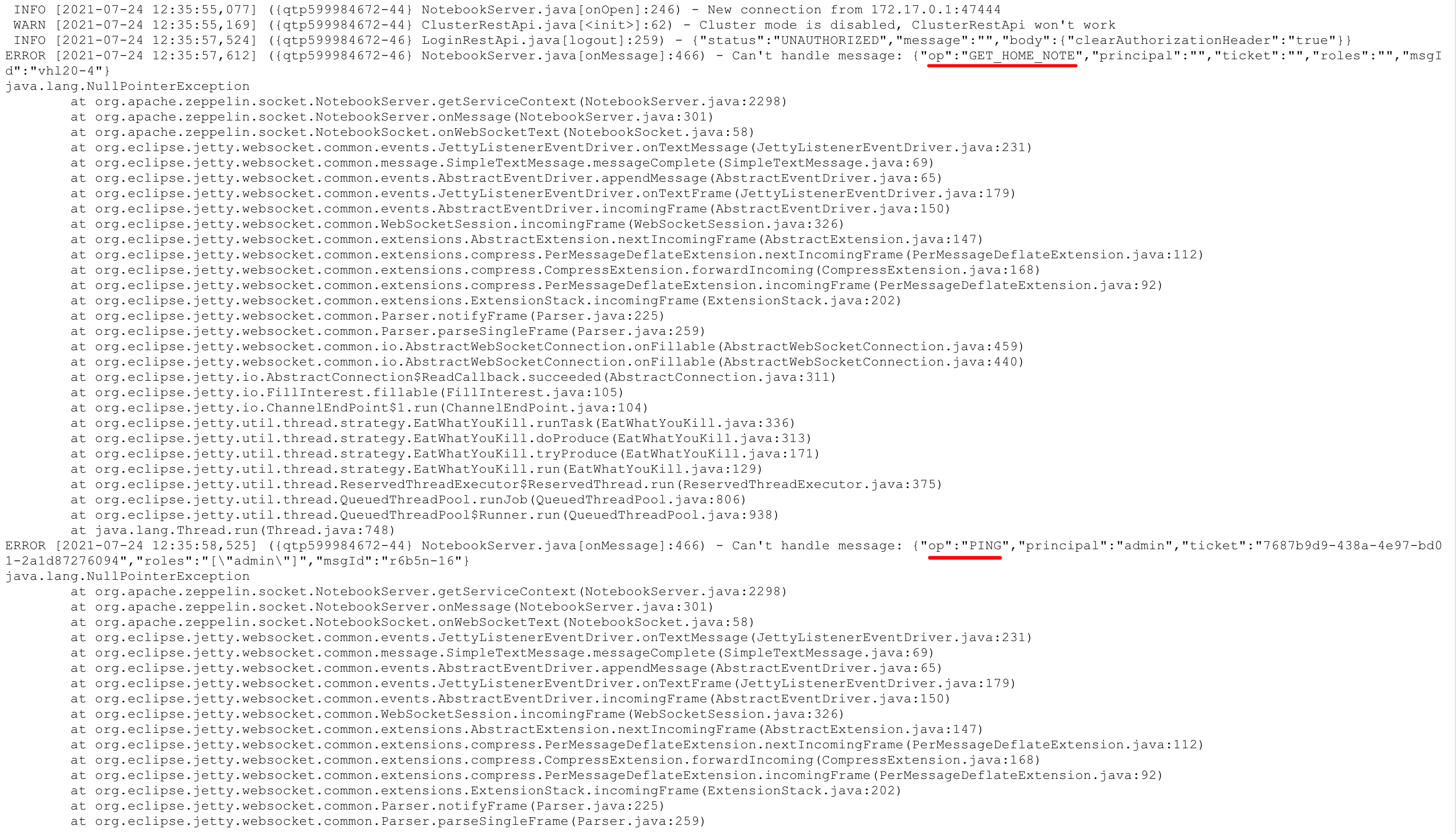
### Questions:
* Does the licenses files need update? no
* Is there breaking changes for older versions? no
* Does this needs documentation? no
Author: vmaster <vm...@gmail.com>
Closes #4186 from aib628/branch-0.9-bugfix and squashes the following commits:
026c1f872 [vmaster] [bugfix]Fast return when invalid ticket of no session case
(cherry picked from commit 831dc50bd81e0f087dfe9e3099c19f45df0da844)
Signed-off-by: Philipp Dallig <ph...@gmail.com>
(cherry picked from commit 114a06f37b96e46414d6293bc73dfddf288dd4cd)
---
.../org/apache/zeppelin/socket/NotebookServer.java | 19 ++++++++-----------
1 file changed, 8 insertions(+), 11 deletions(-)
diff --git a/zeppelin-server/src/main/java/org/apache/zeppelin/socket/NotebookServer.java b/zeppelin-server/src/main/java/org/apache/zeppelin/socket/NotebookServer.java
index 677b1b3..b7359b7 100644
--- a/zeppelin-server/src/main/java/org/apache/zeppelin/socket/NotebookServer.java
+++ b/zeppelin-server/src/main/java/org/apache/zeppelin/socket/NotebookServer.java
@@ -263,19 +263,16 @@ public class NotebookServer extends WebSocketServlet
}
TicketContainer.Entry ticketEntry = TicketContainer.instance.getTicketEntry(receivedMessage.principal);
- if (ticketEntry != null &&
- (!ticketEntry.getTicket().equals(receivedMessage.ticket))) {
+ if (ticketEntry == null || StringUtils.isEmpty(ticketEntry.getTicket())) {
+ LOG.debug("{} message: invalid ticket {}", receivedMessage.op, receivedMessage.ticket);
+ return;
+ } else if (!ticketEntry.getTicket().equals(receivedMessage.ticket)) {
/* not to pollute logs, log instead of exception */
- if (StringUtils.isEmpty(receivedMessage.ticket)) {
- LOG.debug("{} message: invalid ticket {} != {}", receivedMessage.op,
- receivedMessage.ticket, ticketEntry.getTicket());
- } else {
- if (!receivedMessage.op.equals(OP.PING)) {
- conn.send(serializeMessage(new Message(OP.SESSION_LOGOUT).put("info",
- "Your ticket is invalid possibly due to server restart. "
- + "Please login again.")));
- }
+ LOG.debug("{} message: invalid ticket {} != {}", receivedMessage.op, receivedMessage.ticket, ticketEntry.getTicket());
+ if (!receivedMessage.op.equals(OP.PING)) {
+ conn.send(serializeMessage(new Message(OP.SESSION_LOGOUT).put("info", "Your ticket is invalid possibly due to server restart. Please login again.")));
}
+
return;
}
[zeppelin] 05/06: [ZEPPELIN-5489] Fix NullPointerException,
if the InterpreterResult is null
Posted by zj...@apache.org.
This is an automated email from the ASF dual-hosted git repository.

zjffdu pushed a commit to branch branch-0.10
in repository https://gitbox.apache.org/repos/asf/zeppelin.git

commit 264d1acf7c68f7972a3e280164421c57bf81619a
Author: Philipp Dallig <ph...@gmail.com>
AuthorDate: Fri Aug 13 09:54:30 2021 +0200

    [ZEPPELIN-5489] Fix NullPointerException, if the InterpreterResult is null

    ### What is this PR for?
    This PR fixes a NullPointerException if the InterpreterResult is `null`.

    ### What type of PR is it?
    Bug Fix

    ### What is the Jira issue?
    * https://issues.apache.org/jira/browse/ZEPPELIN-5489

    ### How should this be tested?
    * via CI

    ### Questions:
    * Does the licenses files need update? No
    * Is there breaking changes for older versions? No
    * Does this needs documentation? No

    Author: Philipp Dallig <ph...@gmail.com>

    Closes #4205 from Reamer/ApiNullPointer and squashes the following commits:

    550f7a4e4 [Philipp Dallig] Fix NullPointerException, if the InterpreterResult is null

    (cherry picked from commit d8961637300450e504affa6e27832bd7fc10e5a9)
---
 .../main/java/org/apache/zeppelin/rest/message/ParagraphJobStatus.java  | 2 +-
 1 file changed, 1 insertion(+), 1 deletion(-)

diff --git a/zeppelin-server/src/main/java/org/apache/zeppelin/rest/message/ParagraphJobStatus.java b/zeppelin-server/src/main/java/org/apache/zeppelin/rest/message/ParagraphJobStatus.java
index c9caf62..de09d96 100644
--- a/zeppelin-server/src/main/java/org/apache/zeppelin/rest/message/ParagraphJobStatus.java
+++ b/zeppelin-server/src/main/java/org/apache/zeppelin/rest/message/ParagraphJobStatus.java
@@ -46,7 +46,7 @@ public class ParagraphJobStatus {
         if (!StringUtils.isBlank(p.getErrorMessage())) {
           this.errorMessage = p.getErrorMessage();
         } else {
-          this.errorMessage = p.getReturn().toString();
+          this.errorMessage = String.valueOf(p.getReturn());
         }
       }
     } else {
[zeppelin] 06/06: [ZEPPELIN-5483] Update spark doc
Posted by zj...@apache.org.
This is an automated email from the ASF dual-hosted git repository.
zjffdu pushed a commit to branch branch-0.10
in repository https://gitbox.apache.org/repos/asf/zeppelin.git
commit faf1511cc72f9bad7f52cebaed8d032f95159f0b
Author: Jeff Zhang <zj...@apache.org>
AuthorDate: Mon Aug 9 11:53:55 2021 +0800
[ZEPPELIN-5483] Update spark doc
### What is this PR for?
* Update spark doc
* Other docs like install.md are updated in this PR as well
* Add one new tutorial note for how to run pyspark with customized python runtime in yarn
### What type of PR is it?
[Documentation ]
### Todos
* [ ] - Task
### What is the Jira issue?
* https://issues.apache.org/jira/browse/ZEPPELIN-5483
### How should this be tested?
* no tests needed
### Screenshots (if appropriate)
### Questions:
* Does the licenses files need update? no
* Is there breaking changes for older versions? no
* Does this needs documentation? no
Author: Jeff Zhang <zj...@apache.org>
Closes #4203 from zjffdu/ZEPPELIN-5483 and squashes the following commits:
42b6213d47 [Jeff Zhang] [ZEPPELIN-5483] Update spark doc
(cherry picked from commit 227657365193793515bd64aa1678f45fe3502b0f)
---
docs/README.md | 2 +-
docs/_includes/themes/zeppelin/_navigation.html | 4 +-
docs/interpreter/ksql.md | 6 +-
docs/interpreter/spark.md | 304 +++--
docs/quickstart/flink_with_zeppelin.md | 42 +
docs/quickstart/install.md | 30 +-
docs/quickstart/python_with_zeppelin.md | 5 +-
docs/quickstart/r_with_zeppelin.md | 42 +
docs/quickstart/spark_with_zeppelin.md | 13 +-
docs/quickstart/sql_with_zeppelin.md | 2 +
docs/setup/deployment/flink_and_spark_cluster.md | 2 +
docs/usage/interpreter/dependency_management.md | 5 +-
.... PySpark Conda Env in Yarn Mode_2GE79Y5FV.zpln | 1397 ++++++++++++++++++++
13 files changed, 1738 insertions(+), 116 deletions(-)
diff --git a/docs/README.md b/docs/README.md
index 7ca822e..c9646e1 100644
--- a/docs/README.md
+++ b/docs/README.md
@@ -42,7 +42,7 @@ bundle exec jekyll serve --watch
**Run locally using docker**
```
-docker run --rm -it \
+docker run --rm -it \
-v $PWD:/docs \
-w /docs \
-p '4000:4000' \
diff --git a/docs/_includes/themes/zeppelin/_navigation.html b/docs/_includes/themes/zeppelin/_navigation.html
index 8bbf6b0..3459856 100644
--- a/docs/_includes/themes/zeppelin/_navigation.html
+++ b/docs/_includes/themes/zeppelin/_navigation.html
@@ -34,8 +34,10 @@
<li><a href="{{BASE_PATH}}/quickstart/yarn.html">Yarn</a></li>
<li role="separator" class="divider"></li>
<li><a href="{{BASE_PATH}}/quickstart/spark_with_zeppelin.html">Spark with Zeppelin</a></li>
+ <li><a href="{{BASE_PATH}}/quickstart/flink_with_zeppelin.html">Flink with Zeppelin</a></li>
<li><a href="{{BASE_PATH}}/quickstart/sql_with_zeppelin.html">SQL with Zeppelin</a></li>
<li><a href="{{BASE_PATH}}/quickstart/python_with_zeppelin.html">Python with Zeppelin</a></li>
+ <li><a href="{{BASE_PATH}}/quickstart/r_with_zeppelin.html">R with Zeppelin</a></li>
</ul>
</li>
@@ -131,6 +133,7 @@
<li><a href="{{BASE_PATH}}/usage/interpreter/overview.html">Overview</a></li>
<li role="separator" class="divider"></li>
<li><a href="{{BASE_PATH}}/interpreter/spark.html">Spark</a></li>
+ <li><a href="{{BASE_PATH}}/interpreter/flink.html">Flink</a></li>
<li><a href="{{BASE_PATH}}/interpreter/jdbc.html">JDBC</a></li>
<li><a href="{{BASE_PATH}}/interpreter/python.html">Python</a></li>
<li><a href="{{BASE_PATH}}/interpreter/r.html">R</a></li>
@@ -140,7 +143,6 @@
<li><a href="{{BASE_PATH}}/interpreter/bigquery.html">BigQuery</a></li>
<li><a href="{{BASE_PATH}}/interpreter/cassandra.html">Cassandra</a></li>
<li><a href="{{BASE_PATH}}/interpreter/elasticsearch.html">Elasticsearch</a></li>
- <li><a href="{{BASE_PATH}}/interpreter/flink.html">Flink</a></li>
<li><a href="{{BASE_PATH}}/interpreter/geode.html">Geode</a></li>
<li><a href="{{BASE_PATH}}/interpreter/groovy.html">Groovy</a></li>
<li><a href="{{BASE_PATH}}/interpreter/hazelcastjet.html">Hazelcast Jet</a></li>
diff --git a/docs/interpreter/ksql.md b/docs/interpreter/ksql.md
index bc91ade..2a308be 100644
--- a/docs/interpreter/ksql.md
+++ b/docs/interpreter/ksql.md
@@ -57,7 +57,7 @@ Following some examples:
PRINT 'orders';
```
-
+
```
%ksql
@@ -66,7 +66,7 @@ CREATE STREAM ORDERS WITH
KAFKA_TOPIC ='orders');
```
-
+
```
%ksql
@@ -75,4 +75,4 @@ FROM ORDERS
LIMIT 10
```
-
\ No newline at end of file
+
\ No newline at end of file
diff --git a/docs/interpreter/spark.md b/docs/interpreter/spark.md
index fd0356d..12e0560 100644
--- a/docs/interpreter/spark.md
+++ b/docs/interpreter/spark.md
@@ -26,7 +26,7 @@ limitations under the License.
## Overview
[Apache Spark](http://spark.apache.org) is a fast and general-purpose cluster computing system.
It provides high-level APIs in Java, Scala, Python and R, and an optimized engine that supports general execution graphs.
-Apache Spark is supported in Zeppelin with Spark interpreter group which consists of below six interpreters.
+Apache Spark is supported in Zeppelin with Spark interpreter group which consists of following interpreters.
<table class="table-configuration">
<tr>
@@ -52,7 +52,17 @@ Apache Spark is supported in Zeppelin with Spark interpreter group which consist
<tr>
<td>%spark.r</td>
<td>SparkRInterpreter</td>
- <td>Provides an R environment with SparkR support</td>
+ <td>Provides an vanilla R environment with SparkR support</td>
+ </tr>
+ <tr>
+ <td>%spark.ir</td>
+ <td>SparkIRInterpreter</td>
+ <td>Provides an R environment with SparkR support based on Jupyter IRKernel</td>
+ </tr>
+ <tr>
+ <td>%spark.shiny</td>
+ <td>SparkShinyInterpreter</td>
+ <td>Used to create R shiny app with SparkR support</td>
</tr>
<tr>
<td>%spark.sql</td>
@@ -66,6 +76,69 @@ Apache Spark is supported in Zeppelin with Spark interpreter group which consist
</tr>
</table>
+## Main Features
+
+<table class="table-configuration">
+ <tr>
+ <th>Feature</th>
+ <th>Description</th>
+ </tr>
+ <tr>
+ <td>Support multiple versions of Spark</td>
+ <td>You can run different versions of Spark in one Zeppelin instance</td>
+ </tr>
+ <tr>
+ <td>Support multiple versions of Scala</td>
+ <td>You can run different Scala versions (2.10/2.11/2.12) of Spark in on Zeppelin instance</td>
+ </tr>
+ <tr>
+ <td>Support multiple languages</td>
+ <td>Scala, SQL, Python, R are supported, besides that you can also collaborate across languages, e.g. you can write Scala UDF and use it in PySpark</td>
+ </tr>
+ <tr>
+ <td>Support multiple execution modes</td>
+ <td>Local | Standalone | Yarn | K8s </td>
+ </tr>
+ <tr>
+ <td>Interactive development</td>
+ <td>Interactive development user experience increase your productivity</td>
+ </tr>
+
+ <tr>
+ <td>Inline Visualization</td>
+ <td>You can visualize Spark Dataset/DataFrame vis Python/R's plotting libraries, and even you can make SparkR Shiny app in Zeppelin</td>
+ </tr>
+
+ </tr>
+ <td>Multi-tenancy</td>
+ <td>Multiple user can work in one Zeppelin instance without affecting each other.</td>
+ </tr>
+
+ </tr>
+ <td>Rest API Support</td>
+ <td>You can not only submit Spark job via Zeppelin notebook UI, but also can do that via its rest api (You can use Zeppelin as Spark job server).</td>
+ </tr>
+</table>
+
+## Play Spark in Zeppelin docker
+
+For beginner, we would suggest you to play Spark in Zeppelin docker.
+In the Zeppelin docker image, we have already installed
+miniconda and lots of [useful python and R libraries](https://github.com/apache/zeppelin/blob/branch-0.10/scripts/docker/zeppelin/bin/env_python_3_with_R.yml)
+including IPython and IRkernel prerequisites, so `%spark.pyspark` would use IPython and `%spark.ir` is enabled.
+Without any extra configuration, you can run most of tutorial notes under folder `Spark Tutorial` directly.
+
+First you need to download Spark, because there's no Spark binary distribution shipped with Zeppelin.
+e.g. Here we download Spark 3.1.2 to`/mnt/disk1/spark-3.1.2`,
+and we mount it to Zeppelin docker container and run the following command to start Zeppelin docker container.
+
+```bash
+docker run -u $(id -u) -p 8080:8080 --rm -v /mnt/disk1/spark-3.1.2:/opt/spark -e SPARK_HOME=/opt/spark --name zeppelin apache/zeppelin:0.10.0
+```
+
+After running the above command, you can open `http://localhost:8080` to play Spark in Zeppelin. We only verify the spark local mode in Zeppelin docker, other modes may not work due to network issues.
+
+
## Configuration
The Spark interpreter can be configured with properties provided by Zeppelin.
You can also set other Spark properties which are not listed in the table. For a list of additional properties, refer to [Spark Available Properties](http://spark.apache.org/docs/latest/configuration.html#available-properties).
@@ -201,14 +274,15 @@ You can also set other Spark properties which are not listed in the table. For a
<td></td>
<td>
Overrides Spark UI default URL. Value should be a full URL (ex: http://{hostName}/{uniquePath}.
- In Kubernetes mode, value can be Jinja template string with 3 template variables 'PORT', 'SERVICE_NAME' and 'SERVICE_DOMAIN'.
- (ex: http://{{PORT}}-{{SERVICE_NAME}}.{{SERVICE_DOMAIN}})
+ In Kubernetes mode, value can be Jinja template string with 3 template variables PORT, {% raw %} SERVICE_NAME {% endraw %} and {% raw %} SERVICE_DOMAIN {% endraw %}.
+ (e.g.: {% raw %}http://{{PORT}}-{{SERVICE_NAME}}.{{SERVICE_DOMAIN}} {% endraw %}). In yarn mode, value could be a knox url with {% raw %} {{applicationId}} {% endraw %} as placeholder,
+ (e.g.: {% raw %}https://knox-server:8443/gateway/yarnui/yarn/proxy/{{applicationId}}/{% endraw %})
</td>
</tr>
<tr>
<td>spark.webui.yarn.useProxy</td>
<td>false</td>
- <td>whether use yarn proxy url as spark weburl, e.g. http://localhost:8088/proxy/application_1583396598068_0004</td>
+ <td>whether use yarn proxy url as Spark weburl, e.g. http://localhost:8088/proxy/application_1583396598068_0004</td>
</tr>
<tr>
<td>spark.repl.target</td>
@@ -224,17 +298,21 @@ You can also set other Spark properties which are not listed in the table. For a
Without any configuration, Spark interpreter works out of box in local mode. But if you want to connect to your Spark cluster, you'll need to follow below two simple steps.
-### Export SPARK_HOME
+* Set SPARK_HOME
+* Set master
+
+
+### Set SPARK_HOME
There are several options for setting `SPARK_HOME`.
* Set `SPARK_HOME` in `zeppelin-env.sh`
-* Set `SPARK_HOME` in Interpreter setting page
+* Set `SPARK_HOME` in interpreter setting page
* Set `SPARK_HOME` via [inline generic configuration](../usage/interpreter/overview.html#inline-generic-confinterpreter)
-#### 1. Set `SPARK_HOME` in `zeppelin-env.sh`
+#### Set `SPARK_HOME` in `zeppelin-env.sh`
-If you work with only one version of spark, then you can set `SPARK_HOME` in `zeppelin-env.sh` because any setting in `zeppelin-env.sh` is globally applied.
+If you work with only one version of Spark, then you can set `SPARK_HOME` in `zeppelin-env.sh` because any setting in `zeppelin-env.sh` is globally applied.
e.g.
@@ -251,21 +329,21 @@ export HADOOP_CONF_DIR=/usr/lib/hadoop
```
-#### 2. Set `SPARK_HOME` in Interpreter setting page
+#### Set `SPARK_HOME` in interpreter setting page
-If you want to use multiple versions of spark, then you need create multiple spark interpreters and set `SPARK_HOME` for each of them. e.g.
-Create a new spark interpreter `spark24` for spark 2.4 and set `SPARK_HOME` in interpreter setting page
+If you want to use multiple versions of Spark, then you need to create multiple Spark interpreters and set `SPARK_HOME` separately. e.g.
+Create a new Spark interpreter `spark24` for Spark 2.4 and set its `SPARK_HOME` in interpreter setting page as following,
<center>
<img src="{{BASE_PATH}}/assets/themes/zeppelin/img/docs-img/spark_SPARK_HOME24.png" width="80%">
</center>
-Create a new spark interpreter `spark16` for spark 1.6 and set `SPARK_HOME` in interpreter setting page
+Create a new Spark interpreter `spark16` for Spark 1.6 and set its `SPARK_HOME` in interpreter setting page as following,
<center>
<img src="{{BASE_PATH}}/assets/themes/zeppelin/img/docs-img/spark_SPARK_HOME16.png" width="80%">
</center>
-#### 3. Set `SPARK_HOME` via [inline generic configuration](../usage/interpreter/overview.html#inline-generic-confinterpreter)
+#### Set `SPARK_HOME` via [inline generic configuration](../usage/interpreter/overview.html#inline-generic-confinterpreter)
Besides setting `SPARK_HOME` in interpreter setting page, you can also use inline generic configuration to put the
configuration with code together for more flexibility. e.g.
@@ -273,23 +351,26 @@ configuration with code together for more flexibility. e.g.
<img src="{{BASE_PATH}}/assets/themes/zeppelin/img/docs-img/spark_inline_configuration.png" width="80%">
</center>
-### Set master in Interpreter menu
-After starting Zeppelin, go to **Interpreter** menu and edit **spark.master** property in your Spark interpreter setting. The value may vary depending on your Spark cluster deployment type.
+### Set master
+
+After setting `SPARK_HOME`, you need to set **spark.master** property in either interpreter setting page or inline configuartion. The value may vary depending on your Spark cluster deployment type.
For example,
* **local[*]** in local mode
* **spark://master:7077** in standalone cluster
- * **yarn-client** in Yarn client mode (Not supported in spark 3.x, refer below for how to configure yarn-client in Spark 3.x)
- * **yarn-cluster** in Yarn cluster mode (Not supported in spark 3.x, refer below for how to configure yarn-client in Spark 3.x)
+ * **yarn-client** in Yarn client mode (Not supported in Spark 3.x, refer below for how to configure yarn-client in Spark 3.x)
+ * **yarn-cluster** in Yarn cluster mode (Not supported in Spark 3.x, refer below for how to configure yarn-cluster in Spark 3.x)
* **mesos://host:5050** in Mesos cluster
That's it. Zeppelin will work with any version of Spark and any deployment type without rebuilding Zeppelin in this way.
For the further information about Spark & Zeppelin version compatibility, please refer to "Available Interpreters" section in [Zeppelin download page](https://zeppelin.apache.org/download.html).
-> Note that without exporting `SPARK_HOME`, it's running in local mode with included version of Spark. The included version may vary depending on the build profile.
+Note that without setting `SPARK_HOME`, it's running in local mode with included version of Spark. The included version may vary depending on the build profile. And this included version Spark has limited function, so it
+is always recommended to set `SPARK_HOME`.
-> Yarn client mode and local mode will run driver in the same machine with zeppelin server, this would be dangerous for production. Because it may run out of memory when there's many spark interpreters running at the same time. So we suggest you only allow yarn-cluster mode via setting `zeppelin.spark.only_yarn_cluster` in `zeppelin-site.xml`.
+Yarn client mode and local mode will run driver in the same machine with zeppelin server, this would be dangerous for production. Because it may run out of memory when there's many Spark interpreters running at the same time. So we suggest you
+only allow yarn-cluster mode via setting `zeppelin.spark.only_yarn_cluster` in `zeppelin-site.xml`.
#### Configure yarn mode for Spark 3.x
@@ -314,77 +395,55 @@ Specifying `yarn-client` & `yarn-cluster` in `spark.master` is not supported in
</table>
-## SparkContext, SQLContext, SparkSession, ZeppelinContext
+## Interpreter binding mode
-SparkContext, SQLContext, SparkSession (for spark 2.x) and ZeppelinContext are automatically created and exposed as variable names `sc`, `sqlContext`, `spark` and `z`, respectively, in Scala, Kotlin, Python and R environments.
+The default [interpreter binding mode](../usage/interpreter/interpreter_binding_mode.html) is `globally shared`. That means all notes share the same Spark interpreter.
+So we recommend you to use `isolated per note` which means each note has own Spark interpreter without affecting each other. But it may run out of your machine resource if too many
+Spark interpreters are created, so we recommend to always use yarn-cluster mode in production if you run Spark in hadoop cluster. And you can use [inline configuration](../usage/interpreter/overview.html#inline-generic-configuration) via `%spark.conf` in the first paragraph to customize your spark configuration.
-> Note that Scala/Python/R environment shares the same SparkContext, SQLContext, SparkSession and ZeppelinContext instance.
+You can also choose `scoped` mode. For `scoped` per note mode, Zeppelin creates separated scala compiler/python shell for each note but share a single `SparkContext/SqlContext/SparkSession`.
-## YARN Mode
-Zeppelin support both yarn client and yarn cluster mode (yarn cluster mode is supported from 0.8.0). For yarn mode, you must specify `SPARK_HOME` & `HADOOP_CONF_DIR`.
-Usually you only have one hadoop cluster, so you can set `HADOOP_CONF_DIR` in `zeppelin-env.sh` which is applied to all spark interpreters. If you want to use spark against multiple hadoop cluster, then you need to define
-`HADOOP_CONF_DIR` in interpreter setting or via inline generic configuration.
-## Dependency Management
+## SparkContext, SQLContext, SparkSession, ZeppelinContext
-For spark interpreter, it is not recommended to use Zeppelin's [Dependency Management](../usage/interpreter/dependency_management.html) for managing
-third party dependencies (`%spark.dep` is removed from Zeppelin 0.9 as well). Instead you should set the standard Spark properties.
+SparkContext, SQLContext, SparkSession (for spark 2.x, 3.x) and ZeppelinContext are automatically created and exposed as variable names `sc`, `sqlContext`, `spark` and `z` respectively, in Scala, Kotlin, Python and R environments.
-<table class="table-configuration">
- <tr>
- <th>Spark Property</th>
- <th>Spark Submit Argument</th>
- <th>Description</th>
- </tr>
- <tr>
- <td>spark.files</td>
- <td>--files</td>
- <td>Comma-separated list of files to be placed in the working directory of each executor. Globs are allowed.</td>
- </tr>
- <tr>
- <td>spark.jars</td>
- <td>--jars</td>
- <td>Comma-separated list of jars to include on the driver and executor classpaths. Globs are allowed.</td>
- </tr>
- <tr>
- <td>spark.jars.packages</td>
- <td>--packages</td>
- <td>Comma-separated list of Maven coordinates of jars to include on the driver and executor classpaths. The coordinates should be groupId:artifactId:version. If spark.jars.ivySettings is given artifacts will be resolved according to the configuration in the file, otherwise artifacts will be searched for in the local maven repo, then maven central and finally any additional remote repositories given by the command-line option --repositories.</td>
- </tr>
-</table>
-You can either set Spark properties in interpreter setting page or set Spark submit arguments in `zeppelin-env.sh` via environment variable `SPARK_SUBMIT_OPTIONS`.
-For examples:
+> Note that Scala/Python/R environment shares the same SparkContext, SQLContext, SparkSession and ZeppelinContext instance.
-```bash
-export SPARK_SUBMIT_OPTIONS="--files <my_file> --jars <my_jar> --packages <my_package>"
-```
+## Yarn Mode
+
+Zeppelin support both yarn client and yarn cluster mode (yarn cluster mode is supported from 0.8.0). For yarn mode, you must specify `SPARK_HOME` & `HADOOP_CONF_DIR`.
+Usually you only have one hadoop cluster, so you can set `HADOOP_CONF_DIR` in `zeppelin-env.sh` which is applied to all Spark interpreters. If you want to use spark against multiple hadoop cluster, then you need to define
+`HADOOP_CONF_DIR` in interpreter setting or via inline generic configuration.
+
+## K8s Mode
-But it is not recommended to set them in `SPARK_SUBMIT_OPTIONS`. Because it will be shared by all spark interpreters, which means you can not set different dependencies for different users.
+Regarding how to run Spark on K8s in Zeppelin, please check [this doc](../quickstart/kubernetes.html).
## PySpark
-There're 2 ways to use PySpark in Zeppelin:
+There are 2 ways to use PySpark in Zeppelin:
* Vanilla PySpark
* IPySpark
### Vanilla PySpark (Not Recommended)
-Vanilla PySpark interpreter is almost the same as vanilla Python interpreter except Zeppelin inject SparkContext, SQLContext, SparkSession via variables `sc`, `sqlContext`, `spark`.
-By default, Zeppelin would use IPython in `%spark.pyspark` when IPython is available, Otherwise it would fall back to the original PySpark implementation.
-If you don't want to use IPython, then you can set `zeppelin.pyspark.useIPython` as `false` in interpreter setting. For the IPython features, you can refer doc
-[Python Interpreter](python.html)
+Vanilla PySpark interpreter is almost the same as vanilla Python interpreter except Spark interpreter inject SparkContext, SQLContext, SparkSession via variables `sc`, `sqlContext`, `spark`.
+
+By default, Zeppelin would use IPython in `%spark.pyspark` when IPython is available (Zeppelin would check whether ipython's prerequisites are met), Otherwise it would fall back to the vanilla PySpark implementation.
### IPySpark (Recommended)
-You can use `IPySpark` explicitly via `%spark.ipyspark`. IPySpark interpreter is almost the same as IPython interpreter except Zeppelin inject SparkContext, SQLContext, SparkSession via variables `sc`, `sqlContext`, `spark`.
-For the IPython features, you can refer doc [Python Interpreter](python.html)
+
+You can use `IPySpark` explicitly via `%spark.ipyspark`. IPySpark interpreter is almost the same as IPython interpreter except Spark interpreter inject SparkContext, SQLContext, SparkSession via variables `sc`, `sqlContext`, `spark`.
+For the IPython features, you can refer doc [Python Interpreter](python.html#ipython-interpreter-pythonipython-recommended)
## SparkR
-Zeppelin support SparkR via `%spark.r`. Here's configuration for SparkR Interpreter.
+Zeppelin support SparkR via `%spark.r`, `%spark.ir` and `%spark.shiny`. Here's configuration for SparkR Interpreter.
<table class="table-configuration">
<tr>
@@ -412,12 +471,28 @@ Zeppelin support SparkR via `%spark.r`. Here's configuration for SparkR Interpre
<td>out.format = 'html', comment = NA, echo = FALSE, results = 'asis', message = F, warning = F, fig.retina = 2</td>
<td>R plotting options.</td>
</tr>
+ <tr>
+ <td>zeppelin.R.shiny.iframe_width</td>
+ <td>100%</td>
+ <td>IFrame width of Shiny App</td>
+ </tr>
+ <tr>
+ <td>zeppelin.R.shiny.iframe_height</td>
+ <td>500px</td>
+ <td>IFrame height of Shiny App</td>
+ </tr>
+ <tr>
+ <td>zeppelin.R.shiny.portRange</td>
+ <td>:</td>
+ <td>Shiny app would launch a web app at some port, this property is to specify the portRange via format '<start>:<end>', e.g. '5000:5001'. By default it is ':' which means any port</td>
+ </tr>
</table>
+Refer [R doc](r.html) for how to use R in Zeppelin.
## SparkSql
-Spark Sql Interpreter share the same SparkContext/SparkSession with other Spark interpreter. That means any table registered in scala, python or r code can be accessed by Spark Sql.
+Spark sql interpreter share the same SparkContext/SparkSession with other Spark interpreters. That means any table registered in scala, python or r code can be accessed by Spark sql.
For examples:
```scala
@@ -435,11 +510,13 @@ df.createOrReplaceTempView("people")
select * from people
```
-By default, each sql statement would run sequentially in `%spark.sql`. But you can run them concurrently by following setup.
+You can write multiple sql statements in one paragraph. Each sql statement is separated by semicolon.
+Sql statement in one paragraph would run sequentially.
+But sql statements in different paragraphs can run concurrently by the following configuration.
-1. Set `zeppelin.spark.concurrentSQL` to true to enable the sql concurrent feature, underneath zeppelin will change to use fairscheduler for spark. And also set `zeppelin.spark.concurrentSQL.max` to control the max number of sql statements running concurrently.
+1. Set `zeppelin.spark.concurrentSQL` to true to enable the sql concurrent feature, underneath zeppelin will change to use fairscheduler for Spark. And also set `zeppelin.spark.concurrentSQL.max` to control the max number of sql statements running concurrently.
2. Configure pools by creating `fairscheduler.xml` under your `SPARK_CONF_DIR`, check the official spark doc [Configuring Pool Properties](http://spark.apache.org/docs/latest/job-scheduling.html#configuring-pool-properties)
-3. Set pool property via setting paragraph property. e.g.
+3. Set pool property via setting paragraph local property. e.g.
```
%spark(pool=pool1)
@@ -448,25 +525,61 @@ By default, each sql statement would run sequentially in `%spark.sql`. But you c
```
This pool feature is also available for all versions of scala Spark, PySpark. For SparkR, it is only available starting from 2.3.0.
-
-## Interpreter Setting Option
-You can choose one of `shared`, `scoped` and `isolated` options when you configure Spark interpreter.
-e.g.
+## Dependency Management
+
+For Spark interpreter, it is not recommended to use Zeppelin's [Dependency Management](../usage/interpreter/dependency_management.html) for managing
+third party dependencies (`%spark.dep` is removed from Zeppelin 0.9 as well). Instead, you should set the standard Spark properties as following:
+
+<table class="table-configuration">
+ <tr>
+ <th>Spark Property</th>
+ <th>Spark Submit Argument</th>
+ <th>Description</th>
+ </tr>
+ <tr>
+ <td>spark.files</td>
+ <td>--files</td>
+ <td>Comma-separated list of files to be placed in the working directory of each executor. Globs are allowed.</td>
+ </tr>
+ <tr>
+ <td>spark.jars</td>
+ <td>--jars</td>
+ <td>Comma-separated list of jars to include on the driver and executor classpaths. Globs are allowed.</td>
+ </tr>
+ <tr>
+ <td>spark.jars.packages</td>
+ <td>--packages</td>
+ <td>Comma-separated list of Maven coordinates of jars to include on the driver and executor classpaths. The coordinates should be groupId:artifactId:version. If spark.jars.ivySettings is given artifacts will be resolved according to the configuration in the file, otherwise artifacts will be searched for in the local maven repo, then maven central and finally any additional remote repositories given by the command-line option --repositories.</td>
+ </tr>
+</table>
+
+As general Spark properties, you can set them in via inline configuration or interpreter setting page or in `zeppelin-env.sh` via environment variable `SPARK_SUBMIT_OPTIONS`.
+For examples:
+
+```bash
+export SPARK_SUBMIT_OPTIONS="--files <my_file> --jars <my_jar> --packages <my_package>"
+```
+
+To be noticed, `SPARK_SUBMIT_OPTIONS` is deprecated and will be removed in future release.
-* In `scoped` per user mode, Zeppelin creates separated Scala compiler for each user but share a single SparkContext.
-* In `isolated` per user mode, Zeppelin creates separated SparkContext for each user.
## ZeppelinContext
+
Zeppelin automatically injects `ZeppelinContext` as variable `z` in your Scala/Python environment. `ZeppelinContext` provides some additional functions and utilities.
-See [Zeppelin-Context](../usage/other_features/zeppelin_context.html) for more details.
+See [Zeppelin-Context](../usage/other_features/zeppelin_context.html) for more details. For Spark interpreter, you can use z to display Spark `Dataset/Dataframe`.
+
+
+<img src="{{BASE_PATH}}/assets/themes/zeppelin/img/docs-img/spark_zshow.png">
+
## Setting up Zeppelin with Kerberos
+
Logical setup with Zeppelin, Kerberos Key Distribution Center (KDC), and Spark on YARN:
<img src="{{BASE_PATH}}/assets/themes/zeppelin/img/docs-img/kdc_zeppelin.png">
-There're several ways to make spark work with kerberos enabled hadoop cluster in Zeppelin.
+There are several ways to make Spark work with kerberos enabled hadoop cluster in Zeppelin.
1. Share one single hadoop cluster.
In this case you just need to specify `zeppelin.server.kerberos.keytab` and `zeppelin.server.kerberos.principal` in zeppelin-site.xml, Spark interpreter will use these setting by default.
@@ -474,11 +587,26 @@ In this case you just need to specify `zeppelin.server.kerberos.keytab` and `zep
2. Work with multiple hadoop clusters.
In this case you can specify `spark.yarn.keytab` and `spark.yarn.principal` to override `zeppelin.server.kerberos.keytab` and `zeppelin.server.kerberos.principal`.
+### Configuration Setup
+
+1. On the server that Zeppelin is installed, install Kerberos client modules and configuration, krb5.conf.
+ This is to make the server communicate with KDC.
+
+2. Add the two properties below to Spark configuration (`[SPARK_HOME]/conf/spark-defaults.conf`):
+
+ ```
+ spark.yarn.principal
+ spark.yarn.keytab
+ ```
+
+> **NOTE:** If you do not have permission to access for the above spark-defaults.conf file, optionally, you can add the above lines to the Spark Interpreter setting through the Interpreter tab in the Zeppelin UI.
+
+3. That's it. Play with Zeppelin!
## User Impersonation
-In yarn mode, the user who launch the zeppelin server will be used to launch the spark yarn application. This is not a good practise.
-Most of time, you will enable shiro in Zeppelin and would like to use the login user to submit the spark yarn app. For this purpose,
+In yarn mode, the user who launch the zeppelin server will be used to launch the Spark yarn application. This is not a good practise.
+Most of time, you will enable shiro in Zeppelin and would like to use the login user to submit the Spark yarn app. For this purpose,
you need to enable user impersonation for more security control. In order the enable user impersonation, you need to do the following steps
**Step 1** Enable user impersonation setting hadoop's `core-site.xml`. E.g. if you are using user `zeppelin` to launch Zeppelin, then add the following to `core-site.xml`, then restart both hdfs and yarn.
@@ -508,19 +636,7 @@ You can get rid of this message by setting `zeppelin.spark.deprecatedMsg.show` t
<img src="{{BASE_PATH}}/assets/themes/zeppelin/img/docs-img/spark_deprecate.png">
-### Configuration Setup
-
-1. On the server that Zeppelin is installed, install Kerberos client modules and configuration, krb5.conf.
-This is to make the server communicate with KDC.
-
-2. Add the two properties below to Spark configuration (`[SPARK_HOME]/conf/spark-defaults.conf`):
- ```
- spark.yarn.principal
- spark.yarn.keytab
- ```
-
- > **NOTE:** If you do not have permission to access for the above spark-defaults.conf file, optionally, you can add the above lines to the Spark Interpreter setting through the Interpreter tab in the Zeppelin UI.
-
-3. That's it. Play with Zeppelin!
+## Community
+[Join our community](http://zeppelin.apache.org/community.html) to discuss with others.
diff --git a/docs/quickstart/flink_with_zeppelin.md b/docs/quickstart/flink_with_zeppelin.md
new file mode 100644
index 0000000..70f7970
--- /dev/null
+++ b/docs/quickstart/flink_with_zeppelin.md
@@ -0,0 +1,42 @@
+---
+layout: page
+title: "Flink with Zeppelin"
+description: ""
+group: quickstart
+---
+<!--
+Licensed under the Apache License, Version 2.0 (the "License");
+you may not use this file except in compliance with the License.
+You may obtain a copy of the License at
+
+http://www.apache.org/licenses/LICENSE-2.0
+
+Unless required by applicable law or agreed to in writing, software
+distributed under the License is distributed on an "AS IS" BASIS,
+WITHOUT WARRANTIES OR CONDITIONS OF ANY KIND, either express or implied.
+See the License for the specific language governing permissions and
+limitations under the License.
+-->
+{% include JB/setup %}
+
+# Flink support in Zeppelin
+
+<div id="toc"></div>
+
+<br/>
+
+For a brief overview of Apache Flink fundamentals with Apache Zeppelin, see the following guide:
+
+- **built-in** Apache Flink integration.
+- With [Flink Scala Scala](https://ci.apache.org/projects/flink/flink-docs-release-1.13/docs/deployment/repls/scala_shell/) [PyFlink Shell](https://ci.apache.org/projects/flink/flink-docs-release-1.13/docs/deployment/repls/python_shell/), [Flink SQL](https://ci.apache.org/projects/flink/flink-docs-release-1.13/docs/dev/table/sql/overview/)
+- Inject ExecutionEnvironment, StreamExecutionEnvironment, BatchTableEnvironment, StreamTableEnvironment.
+- Canceling job and displaying its progress
+- Supports different modes: local, remote, yarn, yarn-application
+- Dependency management
+- Streaming Visualization
+
+<br/>
+
+For the further information about Flink support in Zeppelin, please check
+
+- [Flink Interpreter](../interpreter/flink.html)
diff --git a/docs/quickstart/install.md b/docs/quickstart/install.md
index aa14d9f..4606e0f 100644
--- a/docs/quickstart/install.md
+++ b/docs/quickstart/install.md
@@ -50,7 +50,7 @@ Two binary packages are available on the [download page](http://zeppelin.apache.
- **all interpreter package**: unpack it in a directory of your choice and you're ready to go.
- **net-install interpreter package**: only spark, python, markdown and shell interpreter included. Unpack and follow [install additional interpreters](../usage/interpreter/installation.html) to install other interpreters. If you're unsure, just run `./bin/install-interpreter.sh --all` and install all interpreters.
-
+
### Building Zeppelin from source
Follow the instructions [How to Build](../setup/basics/how_to_build.html), If you want to build from source instead of using binary package.
@@ -67,9 +67,11 @@ bin/zeppelin-daemon.sh start
After Zeppelin has started successfully, go to [http://localhost:8080](http://localhost:8080) with your web browser.
-By default Zeppelin is listening at `127.0.0.1:8080`, so you can't access it when it is deployed in another remote machine.
+By default Zeppelin is listening at `127.0.0.1:8080`, so you can't access it when it is deployed on another remote machine.
To access a remote Zeppelin, you need to change `zeppelin.server.addr` to `0.0.0.0` in `conf/zeppelin-site.xml`.
+Check log file at `ZEPPELIN_HOME/logs/zeppelin-server-*.log` if you can not open Zeppelin.
+
#### Stopping Zeppelin
```
@@ -84,15 +86,27 @@ Make sure that [docker](https://www.docker.com/community-edition) is installed i
Use this command to launch Apache Zeppelin in a container.
```bash
-docker run -p 8080:8080 --rm --name zeppelin apache/zeppelin:0.9.0
+docker run -p 8080:8080 --rm --name zeppelin apache/zeppelin:0.10.0
```
+
To persist `logs` and `notebook` directories, use the [volume](https://docs.docker.com/engine/reference/commandline/run/#mount-volume--v-read-only) option for docker container.
```bash
-docker run -p 8080:8080 --rm -v $PWD/logs:/logs -v $PWD/notebook:/notebook \
+docker run -u $(id -u) -p 8080:8080 --rm -v $PWD/logs:/logs -v $PWD/notebook:/notebook \
-e ZEPPELIN_LOG_DIR='/logs' -e ZEPPELIN_NOTEBOOK_DIR='/notebook' \
- --name zeppelin apache/zeppelin:0.9.0
+ --name zeppelin apache/zeppelin:0.10.0
+```
+
+`-u $(id -u)` is to make sure you have the permission to write logs and notebooks.
+
+For many interpreters, they require other dependencies, e.g. Spark interpreter requires Spark binary distribution
+and Flink interpreter requires Flink binary distribution. You can also mount them via docker volumn. e.g.
+
+```bash
+docker run -u $(id -u) -p 8080:8080 --rm -v /mnt/disk1/notebook:/notebook \
+-v /usr/lib/spark-current:/opt/spark -v /mnt/disk1/flink-1.12.2:/opt/flink -e FLINK_HOME=/opt/flink \
+-e SPARK_HOME=/opt/spark -e ZEPPELIN_NOTEBOOK_DIR='/notebook' --name zeppelin apache/zeppelin:0.10.0
```
If you have trouble accessing `localhost:8080` in the browser, Please clear browser cache.
@@ -146,13 +160,15 @@ Congratulations, you have successfully installed Apache Zeppelin! Here are a few
#### New to Apache Zeppelin...
* For an in-depth overview, head to [Explore Zeppelin UI](../quickstart/explore_ui.html).
- * And then, try run [Tutorial Notebook](http://localhost:8080/#/notebook/2A94M5J1Z) in your Zeppelin.
+ * And then, try run Tutorial Notebooks shipped with your Zeppelin distribution.
* And see how to change [configurations](../setup/operation/configuration.html) like port number, etc.
-#### Spark, Python, SQL, and more
+#### Spark, Flink, SQL, Python, R and more
* [Spark support in Zeppelin](./spark_with_zeppelin.html), to know more about deep integration with [Apache Spark](http://spark.apache.org/).
+ * [Flink support in Zeppelin](./flink_with_zeppelin.html), to know more about deep integration with [Apache Flink](http://flink.apache.org/).
* [SQL support in Zeppelin](./sql_with_zeppelin.html) for SQL support
* [Python support in Zeppelin](./python_with_zeppelin.html), for Matplotlib, Pandas, Conda/Docker integration.
+ * [R support in Zeppelin](./r_with_zeppelin.html)
* [All Available Interpreters](../#available-interpreters)
#### Multi-user support ...
diff --git a/docs/quickstart/python_with_zeppelin.md b/docs/quickstart/python_with_zeppelin.md
index 80237f8..76b3d58 100644
--- a/docs/quickstart/python_with_zeppelin.md
+++ b/docs/quickstart/python_with_zeppelin.md
@@ -27,16 +27,17 @@ limitations under the License.
The following guides explain how to use Apache Zeppelin that enables you to write in Python:
+- supports [vanilla python](../interpreter/python.html#vanilla-python-interpreter-python) and [ipython](../interpreter/python.html#ipython-interpreter-pythonipython-recommended)
- supports flexible python environments using [conda](../interpreter/python.html#conda), [docker](../interpreter/python.html#docker)
- can query using [PandasSQL](../interpreter/python.html#sql-over-pandas-dataframes)
- also, provides [PySpark](../interpreter/spark.html)
+- [run python interpreter in yarn cluster](../interpreter/python.html#run-python-in-yarn-cluster) with customized conda python environment.
- with [matplotlib integration](../interpreter/python.html#matplotlib-integration)
-- support [ipython](../interpreter/python.html#ipython-interpreter-pythonipython-recommended)
- can create results including **UI widgets** using [Dynamic Form](../interpreter/python.html#using-zeppelin-dynamic-forms)
<br/>
-For the further information about Spark support in Zeppelin, please check
+For the further information about Python support in Zeppelin, please check
- [Python Interpreter](../interpreter/python.html)
diff --git a/docs/quickstart/r_with_zeppelin.md b/docs/quickstart/r_with_zeppelin.md
new file mode 100644
index 0000000..f9b9feb
--- /dev/null
+++ b/docs/quickstart/r_with_zeppelin.md
@@ -0,0 +1,42 @@
+---
+layout: page
+title: "R with Zeppelin"
+description: ""
+group: quickstart
+---
+<!--
+Licensed under the Apache License, Version 2.0 (the "License");
+you may not use this file except in compliance with the License.
+You may obtain a copy of the License at
+
+http://www.apache.org/licenses/LICENSE-2.0
+
+Unless required by applicable law or agreed to in writing, software
+distributed under the License is distributed on an "AS IS" BASIS,
+WITHOUT WARRANTIES OR CONDITIONS OF ANY KIND, either express or implied.
+See the License for the specific language governing permissions and
+limitations under the License.
+-->
+{% include JB/setup %}
+
+# R support in Zeppelin
+
+<div id="toc"></div>
+
+<br/>
+
+The following guides explain how to use Apache Zeppelin that enables you to write in R:
+
+- Supports [vanilla R](../interpreter/r.html#how-to-use-r-interpreter) and [IRkernel](../interpreter/r.html#how-to-use-r-interpreter)
+- Visualize R dataframe via [ZeppelinContext](../interpreter/r.html#zshow)
+- [Run R interpreter in yarn cluster](../interpreter/r.html#run-r-in-yarn-cluster) with customized conda R environment.
+- [Make R Shiny App] (../interpreter/r.html#make-shiny-app-in-zeppelin)
+
+<br/>
+
+For the further information about R support in Zeppelin, please check
+
+- [R Interpreter](../interpreter/r.html)
+
+
+
diff --git a/docs/quickstart/spark_with_zeppelin.md b/docs/quickstart/spark_with_zeppelin.md
index 6b35beb..7250f00 100644
--- a/docs/quickstart/spark_with_zeppelin.md
+++ b/docs/quickstart/spark_with_zeppelin.md
@@ -28,12 +28,13 @@ limitations under the License.
For a brief overview of Apache Spark fundamentals with Apache Zeppelin, see the following guide:
- **built-in** Apache Spark integration.
-- with [SparkSQL](http://spark.apache.org/sql/), [PySpark](https://spark.apache.org/docs/latest/api/python/pyspark.html), [SparkR](https://spark.apache.org/docs/latest/sparkr.html)
-- inject [SparkContext](https://spark.apache.org/docs/latest/api/java/org/apache/spark/SparkContext.html), [SQLContext](https://spark.apache.org/docs/latest/sql-programming-guide.html) and [SparkSession](https://spark.apache.org/docs/latest/sql-programming-guide.html) automatically
-- canceling job and displaying its progress
-- supporting [Spark Cluster Mode](../setup/deployment/spark_cluster_mode.html#apache-zeppelin-on-spark-cluster-mode) for external spark clusters
-- supports [different context per user / note](../usage/interpreter/interpreter_binding_mode.html)
-- sharing variables among PySpark, SparkR and Spark through [ZeppelinContext](../interpreter/spark.html#zeppelincontext)
+- With [Spark Scala](https://spark.apache.org/docs/latest/quick-start.html) [SparkSQL](http://spark.apache.org/sql/), [PySpark](https://spark.apache.org/docs/latest/api/python/pyspark.html), [SparkR](https://spark.apache.org/docs/latest/sparkr.html)
+- Inject [SparkContext](https://spark.apache.org/docs/latest/api/java/org/apache/spark/SparkContext.html), [SQLContext](https://spark.apache.org/docs/latest/sql-programming-guide.html) and [SparkSession](https://spark.apache.org/docs/latest/sql-programming-guide.html) automatically
+- Canceling job and displaying its progress
+- Supports different modes: local, standalone, yarn(client & cluster), k8s
+- Dependency management
+- Supports [different context per user / note](../usage/interpreter/interpreter_binding_mode.html)
+- Sharing variables among PySpark, SparkR and Spark through [ZeppelinContext](../interpreter/spark.html#zeppelincontext)
- [Livy Interpreter](../interpreter/livy.html)
<br/>
diff --git a/docs/quickstart/sql_with_zeppelin.md b/docs/quickstart/sql_with_zeppelin.md
index df63ccd..e007f20 100644
--- a/docs/quickstart/sql_with_zeppelin.md
+++ b/docs/quickstart/sql_with_zeppelin.md
@@ -38,6 +38,7 @@ The following guides explain how to use Apache Zeppelin that enables you to writ
* [Apache Tajo](../interpreter/jdbc.html#apache-tajo)
* and so on
- [Spark Interpreter](../interpreter/spark.html) supports [SparkSQL](http://spark.apache.org/sql/)
+- [Flink Interpreter](../interpreter/flink.html) supports [Flink SQL](https://ci.apache.org/projects/flink/flink-docs-release-1.13/docs/dev/table/sql/overview/)
- [Python Interpreter](../interpreter/python.html) supports [pandasSQL](../interpreter/python.html#sql-over-pandas-dataframes)
- can create query result including **UI widgets** using [Dynamic Form](../usage/dynamic_form/intro.html)
@@ -56,6 +57,7 @@ For the further information about SQL support in Zeppelin, please check
- [JDBC Interpreter](../interpreter/jdbc.html)
- [Spark Interpreter](../interpreter/spark.html)
+- [Flink Interpreter](../interpreter/flink.html)
- [Python Interpreter](../interpreter/python.html)
- [IgniteSQL Interpreter](../interpreter/ignite.html#ignite-sql-interpreter) for [Apache Ignite](https://ignite.apache.org/)
- [Kylin Interpreter](../interpreter/kylin.html) for [Apache Kylin](http://kylin.apache.org/)
diff --git a/docs/setup/deployment/flink_and_spark_cluster.md b/docs/setup/deployment/flink_and_spark_cluster.md
index c793651..8aaa495 100644
--- a/docs/setup/deployment/flink_and_spark_cluster.md
+++ b/docs/setup/deployment/flink_and_spark_cluster.md
@@ -20,6 +20,8 @@ limitations under the License.
{% include JB/setup %}
+<font color=red>This document is outdated, it is not verified in the latest Zeppelin.</font>
+
# Install with Flink and Spark cluster
<div id="toc"></div>
diff --git a/docs/usage/interpreter/dependency_management.md b/docs/usage/interpreter/dependency_management.md
index f4aeb44..d616d4e 100644
--- a/docs/usage/interpreter/dependency_management.md
+++ b/docs/usage/interpreter/dependency_management.md
@@ -24,13 +24,14 @@ limitations under the License.
You can include external libraries to interpreter by setting dependencies in interpreter menu.
+To be noticed, this approach doesn't work for spark and flink interpreters. They have their own dependency management, please refer their doc for details.
+
When your code requires external library, instead of doing download/copy/restart Zeppelin, you can easily do following jobs in this menu.
* Load libraries recursively from Maven repository
* Load libraries from local filesystem
* Add additional maven repository
- * Automatically add libraries to SparkCluster
-
+
<hr>
<div class="row">
<div class="col-md-6">
diff --git a/notebook/Spark Tutorial/8. PySpark Conda Env in Yarn Mode_2GE79Y5FV.zpln b/notebook/Spark Tutorial/8. PySpark Conda Env in Yarn Mode_2GE79Y5FV.zpln
new file mode 100644
index 0000000..7532541
--- /dev/null
+++ b/notebook/Spark Tutorial/8. PySpark Conda Env in Yarn Mode_2GE79Y5FV.zpln
@@ -0,0 +1,1397 @@
+{
+ "paragraphs": [
+ {
+ "text": "%md\n\nThis tutorial is for how to customize pyspark runtime environment via conda in yarn-cluster mode.\nIn this approach, the spark interpreter (driver) and spark executor all run in yarn containers. \nAnd remmeber this approach only works when ipython is enabled, so make sure you include the following python packages in your conda env which are required for ipython.\n\n* jupyter\n* grpcio\n* protobuf\n\nThis turorial is only verified with spark 3.1.2, other versions of [...]
+ "user": "anonymous",
+ "dateUpdated": "2021-08-09 20:25:07.164",
+ "progress": 0,
+ "config": {
+ "tableHide": false,
+ "editorSetting": {
+ "language": "markdown",
+ "editOnDblClick": true,
+ "completionKey": "TAB",
+ "completionSupport": false
+ },
+ "colWidth": 12.0,
+ "editorMode": "ace/mode/markdown",
+ "fontSize": 9.0,
+ "editorHide": true,
+ "title": false,
+ "results": {},
+ "enabled": true
+ },
+ "settings": {
+ "params": {},
+ "forms": {}
+ },
+ "results": {
+ "code": "SUCCESS",
+ "msg": [
+ {
+ "type": "HTML",
+ "data": "\u003cdiv class\u003d\"markdown-body\"\u003e\n\u003cp\u003eThis tutorial is for how to customize pyspark runtime environment via conda in yarn-cluster mode.\u003cbr /\u003e\nIn this approach, the spark interpreter (driver) and spark executor all run in yarn containers.\u003cbr /\u003e\nAnd remmeber this approach only works when ipython is enabled, so make sure you include the following python packages in your conda env which are required for ipython.\u003c/p\u003e\n\ [...]
+ }
+ ]
+ },
+ "apps": [],
+ "runtimeInfos": {},
+ "progressUpdateIntervalMs": 500,
+ "jobName": "paragraph_1628499052501_412639221",
+ "id": "paragraph_1616510705826_532544979",
+ "dateCreated": "2021-08-09 16:50:52.501",
+ "dateStarted": "2021-08-09 20:25:07.190",
+ "dateFinished": "2021-08-09 20:25:09.774",
+ "status": "FINISHED"
+ },
+ {
+ "title": "Create Python conda env",
+ "text": "%sh\n\n# make sure you have conda and momba installed.\n# install miniconda: https://docs.conda.io/en/latest/miniconda.html\n# install mamba: https://github.com/mamba-org/mamba\n\necho \"name: pyspark_env\nchannels:\n - conda-forge\n - defaults\ndependencies:\n - python\u003d3.8 \n - jupyter\n - grpcio\n - protobuf\n - pandasql\n - pycodestyle\n # use numpy \u003c 1.20, otherwise the following pandas udf example will fail, see https://github.com/Azure/MachineLearn [...]
+ "user": "anonymous",
+ "dateUpdated": "2021-08-09 20:25:09.790",
+ "progress": 0,
+ "config": {
+ "editorSetting": {
+ "language": "sh",
+ "editOnDblClick": false,
+ "completionKey": "TAB",
+ "completionSupport": false
+ },
+ "colWidth": 12.0,
+ "editorMode": "ace/mode/sh",
+ "fontSize": 9.0,
+ "title": true,
+ "results": {},
+ "enabled": true
+ },
+ "settings": {
+ "params": {},
+ "forms": {}
+ },
+ "results": {
+ "code": "SUCCESS",
+ "msg": [
+ {
+ "type": "TEXT",
+ "data": "\nRemove all packages in environment /mnt/disk1/jzhang/miniconda3/envs/pyspark_env:\n\npkgs/r/linux-64 \npkgs/main/noarch \npkgs/main/linux-64 \npkgs/r/noarch \nconda-forge/noarch \nconda-forge/linux-64 \nTransaction\n\n Prefix: /mnt/disk1/jzhang/miniconda3/envs/pyspark_env\n\n Updating specs:\n\n - python\u003d3.8\n - jupyter\n - grpcio\n - protobuf\n - pandasql\n - pycodestyle\n - numpy\u003d\u003d1. [...]
+ }
+ ]
+ },
+ "apps": [],
+ "runtimeInfos": {},
+ "progressUpdateIntervalMs": 500,
+ "jobName": "paragraph_1628499052502_43002557",
+ "id": "paragraph_1617163651950_276096757",
+ "dateCreated": "2021-08-09 16:50:52.502",
+ "dateStarted": "2021-08-09 20:25:09.796",
+ "dateFinished": "2021-08-09 20:26:01.854",
+ "status": "FINISHED"
+ },
+ {
+ "title": "Create Python conda tar",
+ "text": "%sh\n\nrm -rf pyspark_env.tar.gz\nconda pack -n pyspark_env\n",
+ "user": "anonymous",
+ "dateUpdated": "2021-08-09 20:26:01.935",
+ "progress": 0,
+ "config": {
+ "editorSetting": {
+ "language": "sh",
+ "editOnDblClick": false,
+ "completionKey": "TAB",
+ "completionSupport": false
+ },
+ "colWidth": 12.0,
+ "editorMode": "ace/mode/sh",
+ "fontSize": 9.0,
+ "title": true,
+ "results": {},
+ "enabled": true
+ },
+ "settings": {
+ "params": {},
+ "forms": {}
+ },
+ "results": {
+ "code": "SUCCESS",
+ "msg": [
+ {
+ "type": "TEXT",
+ "data": "Collecting packages...\nPacking environment at \u0027/mnt/disk1/jzhang/miniconda3/envs/pyspark_env\u0027 to \u0027pyspark_env.tar.gz\u0027\n\r[ ] | 0% Completed | 0.0s\r[ ] | 0% Completed | 0.1s\r[ ] | 0% Completed | 0.2s\r[ ] | 0% Completed | 0.3s\r[ ] | 1% Completed | [...]
+ }
+ ]
+ },
+ "apps": [],
+ "runtimeInfos": {},
+ "progressUpdateIntervalMs": 500,
+ "jobName": "paragraph_1628499052502_1290046721",
+ "id": "paragraph_1617170106834_1523620028",
+ "dateCreated": "2021-08-09 16:50:52.502",
+ "dateStarted": "2021-08-09 20:26:01.944",
+ "dateFinished": "2021-08-09 20:27:03.580",
+ "status": "FINISHED"
+ },
+ {
+ "title": "Upload Python conda tar to hdfs",
+ "text": "%sh\n\nhadoop fs -rmr /tmp/pyspark_env.tar.gz\nhadoop fs -put pyspark_env.tar.gz /tmp\n# The python conda tar should be public accessible, so need to change permission here.\nhadoop fs -chmod 644 /tmp/pyspark_env.tar.gz\n",
+ "user": "anonymous",
+ "dateUpdated": "2021-08-09 20:27:03.588",
+ "progress": 0,
+ "config": {
+ "editorSetting": {
+ "language": "sh",
+ "editOnDblClick": false,
+ "completionKey": "TAB",
+ "completionSupport": false
+ },
+ "colWidth": 12.0,
+ "editorMode": "ace/mode/sh",
+ "fontSize": 9.0,
+ "title": true,
+ "results": {},
+ "enabled": true
+ },
+ "settings": {
+ "params": {},
+ "forms": {}
+ },
+ "results": {
+ "code": "SUCCESS",
+ "msg": [
+ {
+ "type": "TEXT",
+ "data": "rmr: DEPRECATED: Please use \u0027-rm -r\u0027 instead.\n21/08/09 20:27:05 INFO fs.TrashPolicyDefault: Moved: \u0027hdfs://emr-header-1.cluster-46718:9000/tmp/pyspark_env.tar.gz\u0027 to trash at: hdfs://emr-header-1.cluster-46718:9000/user/hadoop/.Trash/Current/tmp/pyspark_env.tar.gz\n"
+ }
+ ]
+ },
+ "apps": [],
+ "runtimeInfos": {},
+ "progressUpdateIntervalMs": 500,
+ "jobName": "paragraph_1628499052503_165730412",
+ "id": "paragraph_1617163700271_1335210825",
+ "dateCreated": "2021-08-09 16:50:52.503",
+ "dateStarted": "2021-08-09 20:27:03.591",
+ "dateFinished": "2021-08-09 20:27:10.407",
+ "status": "FINISHED"
+ },
+ {
+ "title": "Configure Spark Interpreter",
+ "text": "%spark.conf\n\n# set the following 2 properties to run spark in yarn-cluster mode\nspark.master yarn\nspark.submit.deployMode cluster\n\nspark.driver.memory 4g\nspark.executor.memory 4g\n\n# spark.yarn.dist.archives can be either local file or hdfs file\nspark.yarn.dist.archives hdfs:///tmp/pyspark_env.tar.gz#environment\n# spark.yarn.dist.archives pyspark_env.tar.gz#environment\n\nzeppelin.interpreter.conda.env.name environment\n\nspark.sql.execution.arrow.pyspark.enabled [...]
+ "user": "anonymous",
+ "dateUpdated": "2021-08-09 20:27:10.499",
+ "progress": 0,
+ "config": {
+ "editorSetting": {
+ "language": "text",
+ "editOnDblClick": false,
+ "completionKey": "TAB",
+ "completionSupport": false
+ },
+ "colWidth": 12.0,
+ "editorMode": "ace/mode/text",
+ "fontSize": 9.0,
+ "title": true,
+ "results": {},
+ "enabled": true
+ },
+ "settings": {
+ "params": {},
+ "forms": {}
+ },
+ "results": {
+ "code": "SUCCESS",
+ "msg": []
+ },
+ "apps": [],
+ "runtimeInfos": {},
+ "progressUpdateIntervalMs": 500,
+ "jobName": "paragraph_1628499052503_1438301861",
+ "id": "paragraph_1616750271530_2029224504",
+ "dateCreated": "2021-08-09 16:50:52.503",
+ "dateStarted": "2021-08-09 20:27:10.506",
+ "dateFinished": "2021-08-09 20:27:10.517",
+ "status": "FINISHED"
+ },
+ {
+ "title": "Use Matplotlib",
+ "text": "%md\n\nThe following example use matplotlib in pyspark. Here the matplotlib is only used in spark driver.\n",
+ "user": "anonymous",
+ "dateUpdated": "2021-08-09 20:27:10.603",
+ "progress": 0,
+ "config": {
+ "tableHide": false,
+ "editorSetting": {
+ "language": "markdown",
+ "editOnDblClick": true,
+ "completionKey": "TAB",
+ "completionSupport": false
+ },
+ "colWidth": 12.0,
+ "editorMode": "ace/mode/markdown",
+ "fontSize": 9.0,
+ "editorHide": true,
+ "title": true,
+ "results": {},
+ "enabled": true
+ },
+ "settings": {
+ "params": {},
+ "forms": {}
+ },
+ "results": {
+ "code": "SUCCESS",
+ "msg": [
+ {
+ "type": "HTML",
+ "data": "\u003cdiv class\u003d\"markdown-body\"\u003e\n\u003cp\u003eThe following example use matplotlib in pyspark. Here the matplotlib is only used in spark driver.\u003c/p\u003e\n\n\u003c/div\u003e"
+ }
+ ]
+ },
+ "apps": [],
+ "runtimeInfos": {},
+ "progressUpdateIntervalMs": 500,
+ "jobName": "paragraph_1628502898787_1101584010",
+ "id": "paragraph_1628502898787_1101584010",
+ "dateCreated": "2021-08-09 17:54:58.787",
+ "dateStarted": "2021-08-09 20:27:10.607",
+ "dateFinished": "2021-08-09 20:27:10.614",
+ "status": "FINISHED"
+ },
+ {
+ "title": "Use Matplotlib",
+ "text": "%spark.pyspark\n\n%matplotlib inline\n\nimport matplotlib.pyplot as plt\n\nplt.plot([1,2,3,4])\nplt.ylabel(\u0027some numbers\u0027)\nplt.show()\n",
+ "user": "anonymous",
+ "dateUpdated": "2021-08-09 20:27:10.707",
+ "progress": 0,
+ "config": {
+ "editorSetting": {
+ "language": "python",
+ "editOnDblClick": false,
+ "completionKey": "TAB",
+ "completionSupport": true
+ },
+ "colWidth": 12.0,
+ "editorMode": "ace/mode/python",
+ "fontSize": 9.0,
+ "title": false,
+ "results": {},
+ "enabled": true
+ },
+ "settings": {
+ "params": {},
+ "forms": {}
+ },
+ "results": {
+ "code": "SUCCESS",
+ "msg": [
+ {
+ "type": "IMG",
+ "data": "iVBORw0KGgoAAAANSUhEUgAAAYIAAAD4CAYAAADhNOGaAAAAOXRFWHRTb2Z0d2FyZQBNYXRwbG90bGliIHZlcnNpb24zLjQuMiwgaHR0cHM6Ly9tYXRwbG90bGliLm9yZy8rg+JYAAAACXBIWXMAAAsTAAALEwEAmpwYAAAmEUlEQVR4nO3dd3xV9f3H8dcHCHsbRhhhb4KIYTjqHoAo4mitra1aRa3+OhUQtahYd4etVcSqldbaWsKS4d5boJLBDEv2lIQVsj6/P+7194sxkBvIzcnNfT8fjzy499zvvfdzPJg355zv+Rxzd0REJH7VCroAEREJloJARCTOKQhEROKcgkBEJM4pCERE4lydoAuoqMTERO/cuXPQZYiIxJRFixbtdPdWZb0Wc0HQuXNnFi5cGHQZIiIxxczWH+41HRoSEYlzCgIRkTinIBARiXMKAhGROKcgEBGJc1EPAjOrbWb [...]
+ }
+ ]
+ },
+ "apps": [],
+ "runtimeInfos": {},
+ "progressUpdateIntervalMs": 500,
+ "jobName": "paragraph_1628499052504_67784564",
+ "id": "paragraph_1623916874799_812799753",
+ "dateCreated": "2021-08-09 16:50:52.504",
+ "dateStarted": "2021-08-09 20:27:10.711",
+ "dateFinished": "2021-08-09 20:28:22.417",
+ "status": "FINISHED"
+ },
+ {
+ "title": "PySpark UDF using Pandas and PyArrow",
+ "text": "%md\n\nFollowing are examples of using pandas and pyarrow in udf. Here we use python packages in both spark driver and executors. All the examples are from [apache spark official document](https://spark.apache.org/docs/latest/api/python/user_guide/arrow_pandas.html#recommended-pandas-and-pyarrow-versions)",
+ "user": "anonymous",
+ "dateUpdated": "2021-08-09 20:28:22.458",
+ "progress": 0,
+ "config": {
+ "tableHide": false,
+ "editorSetting": {
+ "language": "markdown",
+ "editOnDblClick": true,
+ "completionKey": "TAB",
+ "completionSupport": false
+ },
+ "colWidth": 12.0,
+ "editorMode": "ace/mode/markdown",
+ "fontSize": 9.0,
+ "editorHide": true,
+ "title": true,
+ "results": {},
+ "enabled": true
+ },
+ "settings": {
+ "params": {},
+ "forms": {}
+ },
+ "results": {
+ "code": "SUCCESS",
+ "msg": [
+ {
+ "type": "HTML",
+ "data": "\u003cdiv class\u003d\"markdown-body\"\u003e\n\u003cp\u003eFollowing are examples of using pandas and pyarrow in udf. Here we use python packages in both spark driver and executors. All the examples are from \u003ca href\u003d\"https://spark.apache.org/docs/latest/api/python/user_guide/arrow_pandas.html#recommended-pandas-and-pyarrow-versions\"\u003eapache spark official document\u003c/a\u003e\u003c/p\u003e\n\n\u003c/div\u003e"
+ }
+ ]
+ },
+ "apps": [],
+ "runtimeInfos": {},
+ "progressUpdateIntervalMs": 500,
+ "jobName": "paragraph_1628502428567_60098788",
+ "id": "paragraph_1628502428567_60098788",
+ "dateCreated": "2021-08-09 17:47:08.568",
+ "dateStarted": "2021-08-09 20:28:22.461",
+ "dateFinished": "2021-08-09 20:28:22.478",
+ "status": "FINISHED"
+ },
+ {
+ "title": "Enabling for Conversion to/from Pandas",
+ "text": "%md\n\nArrow is available as an optimization when converting a Spark DataFrame to a Pandas DataFrame using the call `DataFrame.toPandas()` and when creating a Spark DataFrame from a Pandas DataFrame with `SparkSession.createDataFrame()`. To use Arrow when executing these calls, users need to first set the Spark configuration `spark.sql.execution.arrow.pyspark.enabled` to true. This is disabled by default.\n\nIn addition, optimizations enabled by `spark.sql.execution.arrow. [...]
+ "user": "anonymous",
+ "dateUpdated": "2021-08-09 20:28:22.561",
+ "progress": 0,
+ "config": {
+ "tableHide": false,
+ "editorSetting": {
+ "language": "markdown",
+ "editOnDblClick": true,
+ "completionKey": "TAB",
+ "completionSupport": false
+ },
+ "colWidth": 12.0,
+ "editorMode": "ace/mode/markdown",
+ "fontSize": 9.0,
+ "editorHide": true,
+ "title": true,
+ "results": {},
+ "enabled": true
+ },
+ "settings": {
+ "params": {},
+ "forms": {}
+ },
+ "results": {
+ "code": "SUCCESS",
+ "msg": [
+ {
+ "type": "HTML",
+ "data": "\u003cdiv class\u003d\"markdown-body\"\u003e\n\u003cp\u003eArrow is available as an optimization when converting a Spark DataFrame to a Pandas DataFrame using the call \u003ccode\u003eDataFrame.toPandas()\u003c/code\u003e and when creating a Spark DataFrame from a Pandas DataFrame with \u003ccode\u003eSparkSession.createDataFrame()\u003c/code\u003e. To use Arrow when executing these calls, users need to first set the Spark configuration \u003ccode\u003espark.sql.exec [...]
+ }
+ ]
+ },
+ "apps": [],
+ "runtimeInfos": {},
+ "progressUpdateIntervalMs": 500,
+ "jobName": "paragraph_1628503042999_590218180",
+ "id": "paragraph_1628503042999_590218180",
+ "dateCreated": "2021-08-09 17:57:22.999",
+ "dateStarted": "2021-08-09 20:28:22.565",
+ "dateFinished": "2021-08-09 20:28:22.574",
+ "status": "FINISHED"
+ },
+ {
+ "text": "%spark.pyspark\n\nimport pandas as pd\nimport numpy as np\n\n# Generate a Pandas DataFrame\npdf \u003d pd.DataFrame(np.random.rand(100, 3))\n\n# Create a Spark DataFrame from a Pandas DataFrame using Arrow\ndf \u003d spark.createDataFrame(pdf)\n\n# Convert the Spark DataFrame back to a Pandas DataFrame using Arrow\nresult_pdf \u003d df.select(\"*\").toPandas()\n",
+ "user": "anonymous",
+ "dateUpdated": "2021-08-09 20:28:22.664",
+ "progress": 0,
+ "config": {
+ "editorSetting": {
+ "language": "python",
+ "editOnDblClick": false,
+ "completionKey": "TAB",
+ "completionSupport": true
+ },
+ "colWidth": 12.0,
+ "editorMode": "ace/mode/python",
+ "fontSize": 9.0,
+ "results": {},
+ "enabled": true
+ },
+ "settings": {
+ "params": {},
+ "forms": {}
+ },
+ "results": {
+ "code": "SUCCESS",
+ "msg": []
+ },
+ "apps": [],
+ "runtimeInfos": {
+ "jobUrl": {
+ "propertyName": "jobUrl",
+ "label": "SPARK JOB",
+ "tooltip": "View in Spark web UI",
+ "group": "spark",
+ "values": [
+ {
+ "jobUrl": "http://emr-worker-2.cluster-46718:37989/jobs/job?id\u003d0"
+ }
+ ],
+ "interpreterSettingId": "spark"
+ }
+ },
+ "progressUpdateIntervalMs": 500,
+ "jobName": "paragraph_1628499052504_328504071",
+ "id": "paragraph_1628487947468_761461400",
+ "dateCreated": "2021-08-09 16:50:52.504",
+ "dateStarted": "2021-08-09 20:28:22.668",
+ "dateFinished": "2021-08-09 20:28:27.045",
+ "status": "FINISHED"
+ },
+ {
+ "title": "Pandas UDFs (a.k.a. Vectorized UDFs)",
+ "text": "%md\n\nPandas UDFs are user defined functions that are executed by Spark using Arrow to transfer data and Pandas to work with the data, which allows vectorized operations. A Pandas UDF is defined using the `pandas_udf()` as a decorator or to wrap the function, and no additional configuration is required. A Pandas UDF behaves as a regular PySpark function API in general.\n\nBefore Spark 3.0, Pandas UDFs used to be defined with `pyspark.sql.functions.PandasUDFType`. From Spa [...]
+ "user": "anonymous",
+ "dateUpdated": "2021-08-09 20:28:27.071",
+ "progress": 0,
+ "config": {
+ "tableHide": false,
+ "editorSetting": {
+ "language": "markdown",
+ "editOnDblClick": true,
+ "completionKey": "TAB",
+ "completionSupport": false
+ },
+ "colWidth": 12.0,
+ "editorMode": "ace/mode/markdown",
+ "fontSize": 9.0,
+ "editorHide": true,
+ "title": true,
+ "results": {},
+ "enabled": true
+ },
+ "settings": {
+ "params": {},
+ "forms": {}
+ },
+ "results": {
+ "code": "SUCCESS",
+ "msg": [
+ {
+ "type": "HTML",
+ "data": "\u003cdiv class\u003d\"markdown-body\"\u003e\n\u003cp\u003ePandas UDFs are user defined functions that are executed by Spark using Arrow to transfer data and Pandas to work with the data, which allows vectorized operations. A Pandas UDF is defined using the \u003ccode\u003epandas_udf()\u003c/code\u003e as a decorator or to wrap the function, and no additional configuration is required. A Pandas UDF behaves as a regular PySpark function API in general.\u003c/p\u003e\n [...]
+ }
+ ]
+ },
+ "apps": [],
+ "runtimeInfos": {},
+ "progressUpdateIntervalMs": 500,
+ "jobName": "paragraph_1628503123247_32503996",
+ "id": "paragraph_1628503123247_32503996",
+ "dateCreated": "2021-08-09 17:58:43.248",
+ "dateStarted": "2021-08-09 20:28:27.075",
+ "dateFinished": "2021-08-09 20:28:27.083",
+ "status": "FINISHED"
+ },
+ {
+ "text": "%spark.pyspark\n\nimport pandas as pd\n\nfrom pyspark.sql.functions import pandas_udf\n\n@pandas_udf(\"col1 string, col2 long\")\ndef func(s1: pd.Series, s2: pd.Series, s3: pd.DataFrame) -\u003e pd.DataFrame:\n s3[\u0027col2\u0027] \u003d s1 + s2.str.len()\n return s3\n\n# Create a Spark DataFrame that has three columns including a struct column.\ndf \u003d spark.createDataFrame(\n [[1, \"a string\", (\"a nested string\",)]],\n \"long_col long, string_col strin [...]
+ "user": "anonymous",
+ "dateUpdated": "2021-08-09 20:28:27.174",
+ "progress": 0,
+ "config": {
+ "editorSetting": {
+ "language": "python",
+ "editOnDblClick": false,
+ "completionKey": "TAB",
+ "completionSupport": true
+ },
+ "colWidth": 12.0,
+ "editorMode": "ace/mode/python",
+ "fontSize": 9.0,
+ "results": {},
+ "enabled": true
+ },
+ "settings": {
+ "params": {},
+ "forms": {}
+ },
+ "results": {
+ "code": "SUCCESS",
+ "msg": [
+ {
+ "type": "TEXT",
+ "data": "root\n |-- long_col: long (nullable \u003d true)\n |-- string_col: string (nullable \u003d true)\n |-- struct_col: struct (nullable \u003d true)\n | |-- col1: string (nullable \u003d true)\n\nroot\n |-- func(long_col, string_col, struct_col): struct (nullable \u003d true)\n | |-- col1: string (nullable \u003d true)\n | |-- col2: long (nullable \u003d true)\n\n"
+ }
+ ]
+ },
+ "apps": [],
+ "runtimeInfos": {},
+ "progressUpdateIntervalMs": 500,
+ "jobName": "paragraph_1628499507315_836384477",
+ "id": "paragraph_1628499507315_836384477",
+ "dateCreated": "2021-08-09 16:58:27.315",
+ "dateStarted": "2021-08-09 20:28:27.177",
+ "dateFinished": "2021-08-09 20:28:27.797",
+ "status": "FINISHED"
+ },
+ {
+ "title": "Series to Series",
+ "text": "%md\n\nThe type hint can be expressed as `pandas.Series`, … -\u003e `pandas.Series`.\n\nBy using `pandas_udf()` with the function having such type hints above, it creates a Pandas UDF where the given function takes one or more `pandas.Series` and outputs one `pandas.Series`. The output of the function should always be of the same length as the input. Internally, PySpark will execute a Pandas UDF by splitting columns into batches and calling the function for each batch as a [...]
+ "user": "anonymous",
+ "dateUpdated": "2021-08-09 20:28:27.878",
+ "progress": 0,
+ "config": {
+ "tableHide": false,
+ "editorSetting": {
+ "language": "markdown",
+ "editOnDblClick": true,
+ "completionKey": "TAB",
+ "completionSupport": false
+ },
+ "colWidth": 12.0,
+ "editorMode": "ace/mode/markdown",
+ "fontSize": 9.0,
+ "editorHide": true,
+ "title": true,
+ "results": {},
+ "enabled": true
+ },
+ "settings": {
+ "params": {},
+ "forms": {}
+ },
+ "results": {
+ "code": "SUCCESS",
+ "msg": [
+ {
+ "type": "HTML",
+ "data": "\u003cdiv class\u003d\"markdown-body\"\u003e\n\u003cp\u003eThe type hint can be expressed as \u003ccode\u003epandas.Series\u003c/code\u003e, … -\u0026gt; \u003ccode\u003epandas.Series\u003c/code\u003e.\u003c/p\u003e\n\u003cp\u003eBy using \u003ccode\u003epandas_udf()\u003c/code\u003e with the function having such type hints above, it creates a Pandas UDF where the given function takes one or more \u003ccode\u003epandas.Series\u003c/code\u003e and outputs one \u003cco [...]
+ }
+ ]
+ },
+ "apps": [],
+ "runtimeInfos": {},
+ "progressUpdateIntervalMs": 500,
+ "jobName": "paragraph_1628503203208_1371139053",
+ "id": "paragraph_1628503203208_1371139053",
+ "dateCreated": "2021-08-09 18:00:03.208",
+ "dateStarted": "2021-08-09 20:28:27.881",
+ "dateFinished": "2021-08-09 20:28:27.889",
+ "status": "FINISHED"
+ },
+ {
+ "title": "Series to Series",
+ "text": "%spark.pyspark\n\nimport pandas as pd\n\nfrom pyspark.sql.functions import col, pandas_udf\nfrom pyspark.sql.types import LongType\n\n# Declare the function and create the UDF\ndef multiply_func(a: pd.Series, b: pd.Series) -\u003e pd.Series:\n return a * b\n\nmultiply \u003d pandas_udf(multiply_func, returnType\u003dLongType())\n\n# The function for a pandas_udf should be able to execute with local Pandas data\nx \u003d pd.Series([1, 2, 3])\nprint(multiply_func(x, x))\n [...]
+ "user": "anonymous",
+ "dateUpdated": "2021-08-09 20:28:27.981",
+ "progress": 0,
+ "config": {
+ "editorSetting": {
+ "language": "python",
+ "editOnDblClick": false,
+ "completionKey": "TAB",
+ "completionSupport": true
+ },
+ "colWidth": 12.0,
+ "editorMode": "ace/mode/python",
+ "fontSize": 9.0,
+ "title": false,
+ "results": {},
+ "enabled": true
+ },
+ "settings": {
+ "params": {},
+ "forms": {}
+ },
+ "results": {
+ "code": "SUCCESS",
+ "msg": [
+ {
+ "type": "TEXT",
+ "data": "0 1\n1 4\n2 9\ndtype: int64\n+-------------------+\n|multiply_func(x, x)|\n+-------------------+\n| 1|\n| 4|\n| 9|\n+-------------------+\n\n"
+ }
+ ]
+ },
+ "apps": [],
+ "runtimeInfos": {
+ "jobUrl": {
+ "propertyName": "jobUrl",
+ "label": "SPARK JOB",
+ "tooltip": "View in Spark web UI",
+ "group": "spark",
+ "values": [
+ {
+ "jobUrl": "http://emr-worker-2.cluster-46718:37989/jobs/job?id\u003d1"
+ },
+ {
+ "jobUrl": "http://emr-worker-2.cluster-46718:37989/jobs/job?id\u003d2"
+ }
+ ],
+ "interpreterSettingId": "spark"
+ }
+ },
+ "progressUpdateIntervalMs": 500,
+ "jobName": "paragraph_1628499530530_1328752796",
+ "id": "paragraph_1628499530530_1328752796",
+ "dateCreated": "2021-08-09 16:58:50.530",
+ "dateStarted": "2021-08-09 20:28:27.984",
+ "dateFinished": "2021-08-09 20:28:29.754",
+ "status": "FINISHED"
+ },
+ {
+ "title": "Iterator of Series to Iterator of Series",
+ "text": "%md\n\nThe type hint can be expressed as `Iterator[pandas.Series]` -\u003e `Iterator[pandas.Series]`.\n\nBy using `pandas_udf()` with the function having such type hints above, it creates a Pandas UDF where the given function takes an iterator of pandas.Series and outputs an iterator of `pandas.Series`. The length of the entire output from the function should be the same length of the entire input; therefore, it can prefetch the data from the input iterator as long as the [...]
+ "user": "anonymous",
+ "dateUpdated": "2021-08-09 20:28:29.785",
+ "progress": 0,
+ "config": {
+ "tableHide": false,
+ "editorSetting": {
+ "language": "markdown",
+ "editOnDblClick": true,
+ "completionKey": "TAB",
+ "completionSupport": false
+ },
+ "colWidth": 12.0,
+ "editorMode": "ace/mode/markdown",
+ "fontSize": 9.0,
+ "editorHide": true,
+ "title": true,
+ "results": {},
+ "enabled": true
+ },
+ "settings": {
+ "params": {},
+ "forms": {}
+ },
+ "results": {
+ "code": "SUCCESS",
+ "msg": [
+ {
+ "type": "HTML",
+ "data": "\u003cdiv class\u003d\"markdown-body\"\u003e\n\u003cp\u003eThe type hint can be expressed as \u003ccode\u003eIterator[pandas.Series]\u003c/code\u003e -\u0026gt; \u003ccode\u003eIterator[pandas.Series]\u003c/code\u003e.\u003c/p\u003e\n\u003cp\u003eBy using \u003ccode\u003epandas_udf()\u003c/code\u003e with the function having such type hints above, it creates a Pandas UDF where the given function takes an iterator of pandas.Series and outputs an iterator of \u003ccode [...]
+ }
+ ]
+ },
+ "apps": [],
+ "runtimeInfos": {},
+ "progressUpdateIntervalMs": 500,
+ "jobName": "paragraph_1628503263767_1381148085",
+ "id": "paragraph_1628503263767_1381148085",
+ "dateCreated": "2021-08-09 18:01:03.767",
+ "dateStarted": "2021-08-09 20:28:29.788",
+ "dateFinished": "2021-08-09 20:28:29.798",
+ "status": "FINISHED"
+ },
+ {
+ "title": "Iterator of Series to Iterator of Series",
+ "text": "%spark.pyspark\n\nfrom typing import Iterator\n\nimport pandas as pd\n\nfrom pyspark.sql.functions import pandas_udf\n\npdf \u003d pd.DataFrame([1, 2, 3], columns\u003d[\"x\"])\ndf \u003d spark.createDataFrame(pdf)\n\n# Declare the function and create the UDF\n@pandas_udf(\"long\")\ndef plus_one(iterator: Iterator[pd.Series]) -\u003e Iterator[pd.Series]:\n for x in iterator:\n yield x + 1\n\ndf.select(plus_one(\"x\")).show()",
+ "user": "anonymous",
+ "dateUpdated": "2021-08-09 20:28:29.888",
+ "progress": 0,
+ "config": {
+ "editorSetting": {
+ "language": "python",
+ "editOnDblClick": false,
+ "completionKey": "TAB",
+ "completionSupport": true
+ },
+ "colWidth": 12.0,
+ "editorMode": "ace/mode/python",
+ "fontSize": 9.0,
+ "title": false,
+ "results": {},
+ "enabled": true
+ },
+ "settings": {
+ "params": {},
+ "forms": {}
+ },
+ "results": {
+ "code": "SUCCESS",
+ "msg": [
+ {
+ "type": "TEXT",
+ "data": "+-----------+\n|plus_one(x)|\n+-----------+\n| 2|\n| 3|\n| 4|\n+-----------+\n\n"
+ }
+ ]
+ },
+ "apps": [],
+ "runtimeInfos": {
+ "jobUrl": {
+ "propertyName": "jobUrl",
+ "label": "SPARK JOB",
+ "tooltip": "View in Spark web UI",
+ "group": "spark",
+ "values": [
+ {
+ "jobUrl": "http://emr-worker-2.cluster-46718:37989/jobs/job?id\u003d3"
+ },
+ {
+ "jobUrl": "http://emr-worker-2.cluster-46718:37989/jobs/job?id\u003d4"
+ }
+ ],
+ "interpreterSettingId": "spark"
+ }
+ },
+ "progressUpdateIntervalMs": 500,
+ "jobName": "paragraph_1628499052505_1336286916",
+ "id": "paragraph_1624351615156_2079208031",
+ "dateCreated": "2021-08-09 16:50:52.505",
+ "dateStarted": "2021-08-09 20:28:29.891",
+ "dateFinished": "2021-08-09 20:28:30.361",
+ "status": "FINISHED"
+ },
+ {
+ "title": "Iterator of Multiple Series to Iterator of Series",
+ "text": "%md\n\nThe type hint can be expressed as `Iterator[Tuple[pandas.Series, ...]]` -\u003e `Iterator[pandas.Series]`.\n\nBy using `pandas_udf()` with the function having such type hints above, it creates a Pandas UDF where the given function takes an iterator of a tuple of multiple pandas.Series and outputs an iterator of` pandas.Series`. In this case, the created pandas UDF requires multiple input columns as many as the series in the tuple when the Pandas UDF is called. Other [...]
+ "user": "anonymous",
+ "dateUpdated": "2021-08-09 20:28:30.391",
+ "progress": 0,
+ "config": {
+ "tableHide": false,
+ "editorSetting": {
+ "language": "markdown",
+ "editOnDblClick": true,
+ "completionKey": "TAB",
+ "completionSupport": false
+ },
+ "colWidth": 12.0,
+ "editorMode": "ace/mode/markdown",
+ "fontSize": 9.0,
+ "editorHide": true,
+ "title": true,
+ "results": {},
+ "enabled": true
+ },
+ "settings": {
+ "params": {},
+ "forms": {}
+ },
+ "results": {
+ "code": "SUCCESS",
+ "msg": [
+ {
+ "type": "HTML",
+ "data": "\u003cdiv class\u003d\"markdown-body\"\u003e\n\u003cp\u003eThe type hint can be expressed as \u003ccode\u003eIterator[Tuple[pandas.Series, ...]]\u003c/code\u003e -\u0026gt; \u003ccode\u003eIterator[pandas.Series]\u003c/code\u003e.\u003c/p\u003e\n\u003cp\u003eBy using \u003ccode\u003epandas_udf()\u003c/code\u003e with the function having such type hints above, it creates a Pandas UDF where the given function takes an iterator of a tuple of multiple pandas.Series and o [...]
+ }
+ ]
+ },
+ "apps": [],
+ "runtimeInfos": {},
+ "progressUpdateIntervalMs": 500,
+ "jobName": "paragraph_1628503345832_1007259088",
+ "id": "paragraph_1628503345832_1007259088",
+ "dateCreated": "2021-08-09 18:02:25.832",
+ "dateStarted": "2021-08-09 20:28:30.395",
+ "dateFinished": "2021-08-09 20:28:30.402",
+ "status": "FINISHED"
+ },
+ {
+ "title": "Iterator of Multiple Series to Iterator of Series",
+ "text": "%spark.pyspark\n\nfrom typing import Iterator, Tuple\n\nimport pandas as pd\n\nfrom pyspark.sql.functions import pandas_udf\n\npdf \u003d pd.DataFrame([1, 2, 3], columns\u003d[\"x\"])\ndf \u003d spark.createDataFrame(pdf)\n\n# Declare the function and create the UDF\n@pandas_udf(\"long\")\ndef multiply_two_cols(\n iterator: Iterator[Tuple[pd.Series, pd.Series]]) -\u003e Iterator[pd.Series]:\n for a, b in iterator:\n yield a * b\n\ndf.select(multiply_two_co [...]
+ "user": "anonymous",
+ "dateUpdated": "2021-08-09 20:28:30.495",
+ "progress": 0,
+ "config": {
+ "editorSetting": {
+ "language": "python",
+ "editOnDblClick": false,
+ "completionKey": "TAB",
+ "completionSupport": true
+ },
+ "colWidth": 12.0,
+ "editorMode": "ace/mode/python",
+ "fontSize": 9.0,
+ "title": false,
+ "results": {},
+ "enabled": true
+ },
+ "settings": {
+ "params": {},
+ "forms": {}
+ },
+ "results": {
+ "code": "SUCCESS",
+ "msg": [
+ {
+ "type": "TEXT",
+ "data": "+-----------------------+\n|multiply_two_cols(x, x)|\n+-----------------------+\n| 1|\n| 4|\n| 9|\n+-----------------------+\n\n"
+ }
+ ]
+ },
+ "apps": [],
+ "runtimeInfos": {
+ "jobUrl": {
+ "propertyName": "jobUrl",
+ "label": "SPARK JOB",
+ "tooltip": "View in Spark web UI",
+ "group": "spark",
+ "values": [
+ {
+ "jobUrl": "http://emr-worker-2.cluster-46718:37989/jobs/job?id\u003d5"
+ },
+ {
+ "jobUrl": "http://emr-worker-2.cluster-46718:37989/jobs/job?id\u003d6"
+ }
+ ],
+ "interpreterSettingId": "spark"
+ }
+ },
+ "progressUpdateIntervalMs": 500,
+ "jobName": "paragraph_1628499631390_1986337647",
+ "id": "paragraph_1628499631390_1986337647",
+ "dateCreated": "2021-08-09 17:00:31.390",
+ "dateStarted": "2021-08-09 20:28:30.498",
+ "dateFinished": "2021-08-09 20:28:32.071",
+ "status": "FINISHED"
+ },
+ {
+ "title": "Series to Scalar",
+ "text": "%md\n\nThe type hint can be expressed as `pandas.Series`, … -\u003e `Any`.\n\nBy using `pandas_udf()` with the function having such type hints above, it creates a Pandas UDF similar to PySpark’s aggregate functions. The given function takes pandas.Series and returns a scalar value. The return type should be a primitive data type, and the returned scalar can be either a python primitive type, e.g., int or float or a numpy data type, e.g., numpy.int64 or numpy.float64. Any s [...]
+ "user": "anonymous",
+ "dateUpdated": "2021-08-09 20:28:32.098",
+ "progress": 0,
+ "config": {
+ "tableHide": false,
+ "editorSetting": {
+ "language": "markdown",
+ "editOnDblClick": true,
+ "completionKey": "TAB",
+ "completionSupport": false
+ },
+ "colWidth": 12.0,
+ "editorMode": "ace/mode/markdown",
+ "fontSize": 9.0,
+ "editorHide": true,
+ "title": true,
+ "results": {},
+ "enabled": true
+ },
+ "settings": {
+ "params": {},
+ "forms": {}
+ },
+ "results": {
+ "code": "SUCCESS",
+ "msg": [
+ {
+ "type": "HTML",
+ "data": "\u003cdiv class\u003d\"markdown-body\"\u003e\n\u003cp\u003eThe type hint can be expressed as \u003ccode\u003epandas.Series\u003c/code\u003e, … -\u0026gt; \u003ccode\u003eAny\u003c/code\u003e.\u003c/p\u003e\n\u003cp\u003eBy using \u003ccode\u003epandas_udf()\u003c/code\u003e with the function having such type hints above, it creates a Pandas UDF similar to PySpark’s aggregate functions. The given function takes pandas.Series and returns a scalar value. The return type [...]
+ }
+ ]
+ },
+ "apps": [],
+ "runtimeInfos": {},
+ "progressUpdateIntervalMs": 500,
+ "jobName": "paragraph_1628503394877_382217858",
+ "id": "paragraph_1628503394877_382217858",
+ "dateCreated": "2021-08-09 18:03:14.877",
+ "dateStarted": "2021-08-09 20:28:32.101",
+ "dateFinished": "2021-08-09 20:28:32.109",
+ "status": "FINISHED"
+ },
+ {
+ "title": "Series to Scalar",
+ "text": "%spark.pyspark\n\nimport pandas as pd\n\nfrom pyspark.sql.functions import pandas_udf\nfrom pyspark.sql import Window\n\ndf \u003d spark.createDataFrame(\n [(1, 1.0), (1, 2.0), (2, 3.0), (2, 5.0), (2, 10.0)],\n (\"id\", \"v\"))\n\n# Declare the function and create the UDF\n@pandas_udf(\"double\")\ndef mean_udf(v: pd.Series) -\u003e float:\n return v.mean()\n\ndf.select(mean_udf(df[\u0027v\u0027])).show()\n\n\ndf.groupby(\"id\").agg(mean_udf(df[\u0027v\u0027])).sho [...]
+ "user": "anonymous",
+ "dateUpdated": "2021-08-09 20:28:32.201",
+ "progress": 88,
+ "config": {
+ "editorSetting": {
+ "language": "python",
+ "editOnDblClick": false,
+ "completionKey": "TAB",
+ "completionSupport": true
+ },
+ "colWidth": 12.0,
+ "editorMode": "ace/mode/python",
+ "fontSize": 9.0,
+ "title": false,
+ "results": {},
+ "enabled": true
+ },
+ "settings": {
+ "params": {},
+ "forms": {}
+ },
+ "results": {
+ "code": "SUCCESS",
+ "msg": [
+ {
+ "type": "TEXT",
+ "data": "+-----------+\n|mean_udf(v)|\n+-----------+\n| 4.2|\n+-----------+\n\n+---+-----------+\n| id|mean_udf(v)|\n+---+-----------+\n| 1| 1.5|\n| 2| 6.0|\n+---+-----------+\n\n+---+----+------+\n| id| v|mean_v|\n+---+----+------+\n| 1| 1.0| 1.5|\n| 1| 2.0| 1.5|\n| 2| 3.0| 6.0|\n| 2| 5.0| 6.0|\n| 2|10.0| 6.0|\n+---+----+------+\n\n"
+ }
+ ]
+ },
+ "apps": [],
+ "runtimeInfos": {
+ "jobUrl": {
+ "propertyName": "jobUrl",
+ "label": "SPARK JOB",
+ "tooltip": "View in Spark web UI",
+ "group": "spark",
+ "values": [
+ {
+ "jobUrl": "http://emr-worker-2.cluster-46718:37989/jobs/job?id\u003d7"
+ },
+ {
+ "jobUrl": "http://emr-worker-2.cluster-46718:37989/jobs/job?id\u003d8"
+ },
+ {
+ "jobUrl": "http://emr-worker-2.cluster-46718:37989/jobs/job?id\u003d9"
+ },
+ {
+ "jobUrl": "http://emr-worker-2.cluster-46718:37989/jobs/job?id\u003d10"
+ },
+ {
+ "jobUrl": "http://emr-worker-2.cluster-46718:37989/jobs/job?id\u003d11"
+ },
+ {
+ "jobUrl": "http://emr-worker-2.cluster-46718:37989/jobs/job?id\u003d12"
+ },
+ {
+ "jobUrl": "http://emr-worker-2.cluster-46718:37989/jobs/job?id\u003d13"
+ },
+ {
+ "jobUrl": "http://emr-worker-2.cluster-46718:37989/jobs/job?id\u003d14"
+ },
+ {
+ "jobUrl": "http://emr-worker-2.cluster-46718:37989/jobs/job?id\u003d15"
+ },
+ {
+ "jobUrl": "http://emr-worker-2.cluster-46718:37989/jobs/job?id\u003d16"
+ },
+ {
+ "jobUrl": "http://emr-worker-2.cluster-46718:37989/jobs/job?id\u003d17"
+ }
+ ],
+ "interpreterSettingId": "spark"
+ }
+ },
+ "progressUpdateIntervalMs": 500,
+ "jobName": "paragraph_1628499645163_1973652977",
+ "id": "paragraph_1628499645163_1973652977",
+ "dateCreated": "2021-08-09 17:00:45.163",
+ "dateStarted": "2021-08-09 20:28:32.204",
+ "dateFinished": "2021-08-09 20:28:42.919",
+ "status": "FINISHED"
+ },
+ {
+ "title": "Pandas Function APIs",
+ "text": "%md\n\nPandas Function APIs can directly apply a Python native function against the whole DataFrame by using Pandas instances. Internally it works similarly with Pandas UDFs by using Arrow to transfer data and Pandas to work with the data, which allows vectorized operations. However, a Pandas Function API behaves as a regular API under PySpark DataFrame instead of Column, and Python type hints in Pandas Functions APIs are optional and do not affect how it works internally [...]
+ "user": "anonymous",
+ "dateUpdated": "2021-08-09 20:28:43.011",
+ "progress": 0,
+ "config": {
+ "tableHide": false,
+ "editorSetting": {
+ "language": "markdown",
+ "editOnDblClick": true,
+ "completionKey": "TAB",
+ "completionSupport": false
+ },
+ "colWidth": 12.0,
+ "editorMode": "ace/mode/markdown",
+ "fontSize": 9.0,
+ "editorHide": true,
+ "title": true,
+ "results": {},
+ "enabled": true
+ },
+ "settings": {
+ "params": {},
+ "forms": {}
+ },
+ "results": {
+ "code": "SUCCESS",
+ "msg": [
+ {
+ "type": "HTML",
+ "data": "\u003cdiv class\u003d\"markdown-body\"\u003e\n\u003cp\u003ePandas Function APIs can directly apply a Python native function against the whole DataFrame by using Pandas instances. Internally it works similarly with Pandas UDFs by using Arrow to transfer data and Pandas to work with the data, which allows vectorized operations. However, a Pandas Function API behaves as a regular API under PySpark DataFrame instead of Column, and Python type hints in Pandas Functions AP [...]
+ }
+ ]
+ },
+ "apps": [],
+ "runtimeInfos": {},
+ "progressUpdateIntervalMs": 500,
+ "jobName": "paragraph_1628503449747_446542293",
+ "id": "paragraph_1628503449747_446542293",
+ "dateCreated": "2021-08-09 18:04:09.747",
+ "dateStarted": "2021-08-09 20:28:43.014",
+ "dateFinished": "2021-08-09 20:28:43.025",
+ "status": "FINISHED"
+ },
+ {
+ "title": "Grouped Map",
+ "text": "%md\n\nGrouped map operations with Pandas instances are supported by `DataFrame.groupby().applyInPandas()` which requires a Python function that takes a `pandas.DataFrame` and return another `pandas.DataFrame`. It maps each group to each pandas.DataFrame in the Python function.\n\nThis API implements the “split-apply-combine” pattern which consists of three steps:\n\n* Split the data into groups by using `DataFrame.groupBy()`.\n* Apply a function on each group. The input a [...]
+ "user": "anonymous",
+ "dateUpdated": "2021-08-09 20:28:43.114",
+ "progress": 0,
+ "config": {
+ "tableHide": false,
+ "editorSetting": {
+ "language": "markdown",
+ "editOnDblClick": true,
+ "completionKey": "TAB",
+ "completionSupport": false
+ },
+ "colWidth": 12.0,
+ "editorMode": "ace/mode/markdown",
+ "fontSize": 9.0,
+ "editorHide": true,
+ "title": true,
+ "results": {},
+ "enabled": true
+ },
+ "settings": {
+ "params": {},
+ "forms": {}
+ },
+ "results": {
+ "code": "SUCCESS",
+ "msg": [
+ {
+ "type": "HTML",
+ "data": "\u003cdiv class\u003d\"markdown-body\"\u003e\n\u003cp\u003eGrouped map operations with Pandas instances are supported by \u003ccode\u003eDataFrame.groupby().applyInPandas()\u003c/code\u003e which requires a Python function that takes a \u003ccode\u003epandas.DataFrame\u003c/code\u003e and return another \u003ccode\u003epandas.DataFrame\u003c/code\u003e. It maps each group to each pandas.DataFrame in the Python function.\u003c/p\u003e\n\u003cp\u003eThis API implements [...]
+ }
+ ]
+ },
+ "apps": [],
+ "runtimeInfos": {},
+ "progressUpdateIntervalMs": 500,
+ "jobName": "paragraph_1628503542685_1593420516",
+ "id": "paragraph_1628503542685_1593420516",
+ "dateCreated": "2021-08-09 18:05:42.685",
+ "dateStarted": "2021-08-09 20:28:43.117",
+ "dateFinished": "2021-08-09 20:28:43.127",
+ "status": "FINISHED"
+ },
+ {
+ "title": "Grouped Map",
+ "text": "%spark.pyspark\n\ndf \u003d spark.createDataFrame(\n [(1, 1.0), (1, 2.0), (2, 3.0), (2, 5.0), (2, 10.0)],\n (\"id\", \"v\"))\n\ndef subtract_mean(pdf):\n # pdf is a pandas.DataFrame\n v \u003d pdf.v\n return pdf.assign(v\u003dv - v.mean())\n\ndf.groupby(\"id\").applyInPandas(subtract_mean, schema\u003d\"id long, v double\").show()",
+ "user": "anonymous",
+ "dateUpdated": "2021-08-09 20:28:43.217",
+ "progress": 75,
+ "config": {
+ "editorSetting": {
+ "language": "python",
+ "editOnDblClick": false,
+ "completionKey": "TAB",
+ "completionSupport": true
+ },
+ "colWidth": 12.0,
+ "editorMode": "ace/mode/python",
+ "fontSize": 9.0,
+ "title": false,
+ "results": {},
+ "enabled": true
+ },
+ "settings": {
+ "params": {},
+ "forms": {}
+ },
+ "results": {
+ "code": "SUCCESS",
+ "msg": [
+ {
+ "type": "TEXT",
+ "data": "+---+----+\n| id| v|\n+---+----+\n| 1|-0.5|\n| 1| 0.5|\n| 2|-3.0|\n| 2|-1.0|\n| 2| 4.0|\n+---+----+\n\n"
+ }
+ ]
+ },
+ "apps": [],
+ "runtimeInfos": {
+ "jobUrl": {
+ "propertyName": "jobUrl",
+ "label": "SPARK JOB",
+ "tooltip": "View in Spark web UI",
+ "group": "spark",
+ "values": [
+ {
+ "jobUrl": "http://emr-worker-2.cluster-46718:37989/jobs/job?id\u003d18"
+ },
+ {
+ "jobUrl": "http://emr-worker-2.cluster-46718:37989/jobs/job?id\u003d19"
+ },
+ {
+ "jobUrl": "http://emr-worker-2.cluster-46718:37989/jobs/job?id\u003d20"
+ },
+ {
+ "jobUrl": "http://emr-worker-2.cluster-46718:37989/jobs/job?id\u003d21"
+ },
+ {
+ "jobUrl": "http://emr-worker-2.cluster-46718:37989/jobs/job?id\u003d22"
+ }
+ ],
+ "interpreterSettingId": "spark"
+ }
+ },
+ "progressUpdateIntervalMs": 500,
+ "jobName": "paragraph_1628499671399_1794474062",
+ "id": "paragraph_1628499671399_1794474062",
+ "dateCreated": "2021-08-09 17:01:11.399",
+ "dateStarted": "2021-08-09 20:28:43.220",
+ "dateFinished": "2021-08-09 20:28:44.605",
+ "status": "FINISHED"
+ },
+ {
+ "title": "Map",
+ "text": "%md\n\nMap operations with Pandas instances are supported by `DataFrame.mapInPandas()` which maps an iterator of pandas.DataFrames to another iterator of `pandas.DataFrames` that represents the current PySpark DataFrame and returns the result as a PySpark DataFrame. The function takes and outputs an iterator of `pandas.DataFrame`. It can return the output of arbitrary length in contrast to some Pandas UDFs although internally it works similarly with Series to Series Pandas [...]
+ "user": "anonymous",
+ "dateUpdated": "2021-08-09 20:28:44.621",
+ "progress": 0,
+ "config": {
+ "tableHide": false,
+ "editorSetting": {
+ "language": "markdown",
+ "editOnDblClick": true,
+ "completionKey": "TAB",
+ "completionSupport": false
+ },
+ "colWidth": 12.0,
+ "editorMode": "ace/mode/markdown",
+ "fontSize": 9.0,
+ "editorHide": true,
+ "title": true,
+ "results": {},
+ "enabled": true
+ },
+ "settings": {
+ "params": {},
+ "forms": {}
+ },
+ "results": {
+ "code": "SUCCESS",
+ "msg": [
+ {
+ "type": "HTML",
+ "data": "\u003cdiv class\u003d\"markdown-body\"\u003e\n\u003cp\u003eMap operations with Pandas instances are supported by \u003ccode\u003eDataFrame.mapInPandas()\u003c/code\u003e which maps an iterator of pandas.DataFrames to another iterator of \u003ccode\u003epandas.DataFrames\u003c/code\u003e that represents the current PySpark DataFrame and returns the result as a PySpark DataFrame. The function takes and outputs an iterator of \u003ccode\u003epandas.DataFrame\u003c/code\ [...]
+ }
+ ]
+ },
+ "apps": [],
+ "runtimeInfos": {},
+ "progressUpdateIntervalMs": 500,
+ "jobName": "paragraph_1628502659243_294355457",
+ "id": "paragraph_1628502659243_294355457",
+ "dateCreated": "2021-08-09 17:50:59.243",
+ "dateStarted": "2021-08-09 20:28:44.624",
+ "dateFinished": "2021-08-09 20:28:44.630",
+ "status": "FINISHED"
+ },
+ {
+ "title": "Map",
+ "text": "%spark.pyspark\n\ndf \u003d spark.createDataFrame([(1, 21), (2, 30)], (\"id\", \"age\"))\n\ndef filter_func(iterator):\n for pdf in iterator:\n yield pdf[pdf.id \u003d\u003d 1]\n\ndf.mapInPandas(filter_func, schema\u003ddf.schema).show()",
+ "user": "anonymous",
+ "dateUpdated": "2021-08-09 20:28:44.724",
+ "progress": 0,
+ "config": {
+ "editorSetting": {
+ "language": "python",
+ "editOnDblClick": false,
+ "completionKey": "TAB",
+ "completionSupport": true
+ },
+ "colWidth": 12.0,
+ "editorMode": "ace/mode/python",
+ "fontSize": 9.0,
+ "title": false,
+ "results": {},
+ "enabled": true
+ },
+ "settings": {
+ "params": {},
+ "forms": {}
+ },
+ "results": {
+ "code": "SUCCESS",
+ "msg": [
+ {
+ "type": "TEXT",
+ "data": "+---+---+\n| id|age|\n+---+---+\n| 1| 21|\n+---+---+\n\n"
+ }
+ ]
+ },
+ "apps": [],
+ "runtimeInfos": {
+ "jobUrl": {
+ "propertyName": "jobUrl",
+ "label": "SPARK JOB",
+ "tooltip": "View in Spark web UI",
+ "group": "spark",
+ "values": [
+ {
+ "jobUrl": "http://emr-worker-2.cluster-46718:37989/jobs/job?id\u003d23"
+ },
+ {
+ "jobUrl": "http://emr-worker-2.cluster-46718:37989/jobs/job?id\u003d24"
+ }
+ ],
+ "interpreterSettingId": "spark"
+ }
+ },
+ "progressUpdateIntervalMs": 500,
+ "jobName": "paragraph_1628499682627_2106140471",
+ "id": "paragraph_1628499682627_2106140471",
+ "dateCreated": "2021-08-09 17:01:22.627",
+ "dateStarted": "2021-08-09 20:28:44.729",
+ "dateFinished": "2021-08-09 20:28:46.155",
+ "status": "FINISHED"
+ },
+ {
+ "title": "Co-grouped Map",
+ "text": "%md\n\n\u003cbr/\u003e\n\nCo-grouped map operations with Pandas instances are supported by `DataFrame.groupby().cogroup().applyInPandas()` which allows two PySpark DataFrames to be cogrouped by a common key and then a Python function applied to each cogroup. It consists of the following steps:\n\n* Shuffle the data such that the groups of each dataframe which share a key are cogrouped together.\n* Apply a function to each cogroup. The input of the function is two `pandas.D [...]
+ "user": "anonymous",
+ "dateUpdated": "2021-08-09 20:28:46.229",
+ "progress": 0,
+ "config": {
+ "tableHide": false,
+ "editorSetting": {
+ "language": "markdown",
+ "editOnDblClick": true,
+ "completionKey": "TAB",
+ "completionSupport": false
+ },
+ "colWidth": 12.0,
+ "editorMode": "ace/mode/markdown",
+ "fontSize": 9.0,
+ "editorHide": true,
+ "title": true,
+ "results": {},
+ "enabled": true
+ },
+ "settings": {
+ "params": {},
+ "forms": {}
+ },
+ "results": {
+ "code": "SUCCESS",
+ "msg": [
+ {
+ "type": "HTML",
+ "data": "\u003cdiv class\u003d\"markdown-body\"\u003e\n\u003cbr/\u003e\n\u003cp\u003eCo-grouped map operations with Pandas instances are supported by \u003ccode\u003eDataFrame.groupby().cogroup().applyInPandas()\u003c/code\u003e which allows two PySpark DataFrames to be cogrouped by a common key and then a Python function applied to each cogroup. It consists of the following steps:\u003c/p\u003e\n\u003cul\u003e\n\u003cli\u003eShuffle the data such that the groups of each data [...]
+ }
+ ]
+ },
+ "apps": [],
+ "runtimeInfos": {},
+ "progressUpdateIntervalMs": 500,
+ "jobName": "paragraph_1628502751727_153024564",
+ "id": "paragraph_1628502751727_153024564",
+ "dateCreated": "2021-08-09 17:52:31.727",
+ "dateStarted": "2021-08-09 20:28:46.233",
+ "dateFinished": "2021-08-09 20:28:46.242",
+ "status": "FINISHED"
+ },
+ {
+ "title": "Co-grouped Map",
+ "text": "%spark.pyspark\n\nimport pandas as pd\n\ndf1 \u003d spark.createDataFrame(\n [(20000101, 1, 1.0), (20000101, 2, 2.0), (20000102, 1, 3.0), (20000102, 2, 4.0)],\n (\"time\", \"id\", \"v1\"))\n\ndf2 \u003d spark.createDataFrame(\n [(20000101, 1, \"x\"), (20000101, 2, \"y\")],\n (\"time\", \"id\", \"v2\"))\n\ndef asof_join(l, r):\n return pd.merge_asof(l, r, on\u003d\"time\", by\u003d\"id\")\n\ndf1.groupby(\"id\").cogroup(df2.groupby(\"id\")).applyInPandas(\n [...]
+ "user": "anonymous",
+ "dateUpdated": "2021-08-09 20:28:46.332",
+ "progress": 22,
+ "config": {
+ "editorSetting": {
+ "language": "python",
+ "editOnDblClick": false,
+ "completionKey": "TAB",
+ "completionSupport": true
+ },
+ "colWidth": 12.0,
+ "editorMode": "ace/mode/python",
+ "fontSize": 9.0,
+ "title": false,
+ "results": {},
+ "enabled": true
+ },
+ "settings": {
+ "params": {},
+ "forms": {}
+ },
+ "results": {
+ "code": "SUCCESS",
+ "msg": [
+ {
+ "type": "TEXT",
+ "data": "+--------+---+---+---+\n| time| id| v1| v2|\n+--------+---+---+---+\n|20000101| 1|1.0| x|\n|20000102| 1|3.0| x|\n|20000101| 2|2.0| y|\n|20000102| 2|4.0| y|\n+--------+---+---+---+\n\n"
+ }
+ ]
+ },
+ "apps": [],
+ "runtimeInfos": {
+ "jobUrl": {
+ "propertyName": "jobUrl",
+ "label": "SPARK JOB",
+ "tooltip": "View in Spark web UI",
+ "group": "spark",
+ "values": [
+ {
+ "jobUrl": "http://emr-worker-2.cluster-46718:37989/jobs/job?id\u003d25"
+ },
+ {
+ "jobUrl": "http://emr-worker-2.cluster-46718:37989/jobs/job?id\u003d26"
+ },
+ {
+ "jobUrl": "http://emr-worker-2.cluster-46718:37989/jobs/job?id\u003d27"
+ },
+ {
+ "jobUrl": "http://emr-worker-2.cluster-46718:37989/jobs/job?id\u003d28"
+ },
+ {
+ "jobUrl": "http://emr-worker-2.cluster-46718:37989/jobs/job?id\u003d29"
+ }
+ ],
+ "interpreterSettingId": "spark"
+ }
+ },
+ "progressUpdateIntervalMs": 500,
+ "jobName": "paragraph_1628499694411_1813984093",
+ "id": "paragraph_1628499694411_1813984093",
+ "dateCreated": "2021-08-09 17:01:34.411",
+ "dateStarted": "2021-08-09 20:28:46.335",
+ "dateFinished": "2021-08-09 20:28:48.012",
+ "status": "FINISHED"
+ },
+ {
+ "text": "%spark.pyspark\n",
+ "user": "anonymous",
+ "dateUpdated": "2021-08-09 20:28:48.036",
+ "progress": 0,
+ "config": {
+ "colWidth": 12.0,
+ "editorMode": "ace/mode/python",
+ "fontSize": 9.0,
+ "results": {},
+ "enabled": true,
+ "editorSetting": {
+ "language": "python",
+ "editOnDblClick": false,
+ "completionKey": "TAB",
+ "completionSupport": true
+ }
+ },
+ "settings": {
+ "params": {},
+ "forms": {}
+ },
+ "results": {
+ "code": "SUCCESS",
+ "msg": []
+ },
+ "apps": [],
+ "runtimeInfos": {},
+ "progressUpdateIntervalMs": 500,
+ "jobName": "paragraph_1628502158993_661405207",
+ "id": "paragraph_1628502158993_661405207",
+ "dateCreated": "2021-08-09 17:42:38.993",
+ "dateStarted": "2021-08-09 20:28:48.040",
+ "dateFinished": "2021-08-09 20:28:48.261",
+ "status": "FINISHED"
+ }
+ ],
+ "name": "8. PySpark Conda Env in Yarn Mode",
+ "id": "2GE79Y5FV",
+ "defaultInterpreterGroup": "spark",
+ "version": "0.10.0-SNAPSHOT",
+ "noteParams": {},
+ "noteForms": {},
+ "angularObjects": {},
+ "config": {
+ "personalizedMode": "false",
+ "looknfeel": "default",
+ "isZeppelinNotebookCronEnable": false
+ },
+ "info": {
+ "isRunning": true
+ }
+}
\ No newline at end of file
[zeppelin] 04/06: [ZEPPELIN-5487] Add docker usage in R interpreter
doc
Posted by zj...@apache.org.
This is an automated email from the ASF dual-hosted git repository.

zjffdu pushed a commit to branch branch-0.10
in repository https://gitbox.apache.org/repos/asf/zeppelin.git

commit 10732139b5282ac1a35b6145a45e36e0e1c03873
Author: Jeff Zhang <zj...@apache.org>
AuthorDate: Fri Aug 13 10:54:31 2021 +0800

    [ZEPPELIN-5487] Add docker usage in R interpreter doc

    (cherry picked from commit d4d82e3a843903e66f76e12157c16eeade926576)
---
 .../themes/zeppelin/img/docs-img/r_shiny_app.gif       | Bin 0 -> 477942 bytes
 docs/interpreter/r.md                                  |  17 +++++++++++++++++
 2 files changed, 17 insertions(+)

diff --git a/docs/assets/themes/zeppelin/img/docs-img/r_shiny_app.gif b/docs/assets/themes/zeppelin/img/docs-img/r_shiny_app.gif
new file mode 100644
index 0000000..21c2432
Binary files /dev/null and b/docs/assets/themes/zeppelin/img/docs-img/r_shiny_app.gif differ
diff --git a/docs/interpreter/r.md b/docs/interpreter/r.md
index 2d39126..648d579 100644
--- a/docs/interpreter/r.md
+++ b/docs/interpreter/r.md
@@ -151,6 +151,23 @@ If you want to use R with Spark, it is almost the same via `%spark.r`, `%spark.i
   </tr>
 </table>

+## Play R in Zeppelin docker
+
+For beginner, we would suggest you to play R in Zeppelin docker first. In the Zeppelin docker image, we have already installed R and lots of useful R libraries including IRKernel's prerequisites, so `%r.ir` is available.
+
+Without any extra configuration, you can run most of tutorial notes under folder `R Tutorial` directly.
+
+```
+docker run -u $(id -u) -p 8080:8080 -p:6789:6789 --rm --name zeppelin apache/zeppelin:0.10.0
+```
+
+After running the above command, you can open http://localhost:8080 to play R in Zeppelin.
+The port `6789` exposed in the above command is for R shiny app. You need to configure `zeppelin.R.shiny.portRange` to be `6789:6789`
+to enable shiny app accessible as iframe in Zeppelin.
+
+<img class="img-responsive" src="{{BASE_PATH}}/assets/themes/zeppelin/img/docs-img/r_shiny_app.gif" width="800px"/>
+
+
 ## Interpreter binding mode

 The default [interpreter binding mode](../usage/interpreter/interpreter_binding_mode.html) is `globally shared`. That means all notes share the same R interpreter.