You are viewing a plain text version of this content. The canonical link for it is here.
Posted to commits@echarts.apache.org by GitBox <gi...@apache.org> on 2021/06/10 09:41:33 UTC
[GitHub] [echarts] AndyGeng123 commented on issue #15122: x轴为时间轴, step: 'end' 类型的面积曲线图, 是否能让提示框不进行四舍五入,显示下一个时间点的内容?
AndyGeng123 commented on issue #15122:
URL: https://github.com/apache/echarts/issues/15122#issuecomment-858474253
Let me descript it in English again:
Here is echart options:
var chart_option = {
backgroundColor: 'rgba(128, 128, 128, 0.1)',
tooltip: { trigger: 'axis', position: function (pt) { return [pt[0], '10%']; } },
legend: { data: ['my_stat_val'] },
xAxis: { type: 'time', boundaryGap: false },
yAxis: { type: 'value', boundaryGap: [0, '20%'] },
dataset: { source: [] },
series: [
{ name: 'my_stat_val', type: 'line', areaStyle: {}, step: 'end', encode: { x: 0, y: 1 } },
]
};
Here is data:
chart_option.dataset.source = [
['2021/01/02 00:00:00', 10.00],
['2021/01/02 00:01:00', 20.00],
['2021/01/02 00:02:00', 90.00],
['2021/01/02 00:03:00', 40.00],
['2021/01/02 00:04:00', 70.00]
];
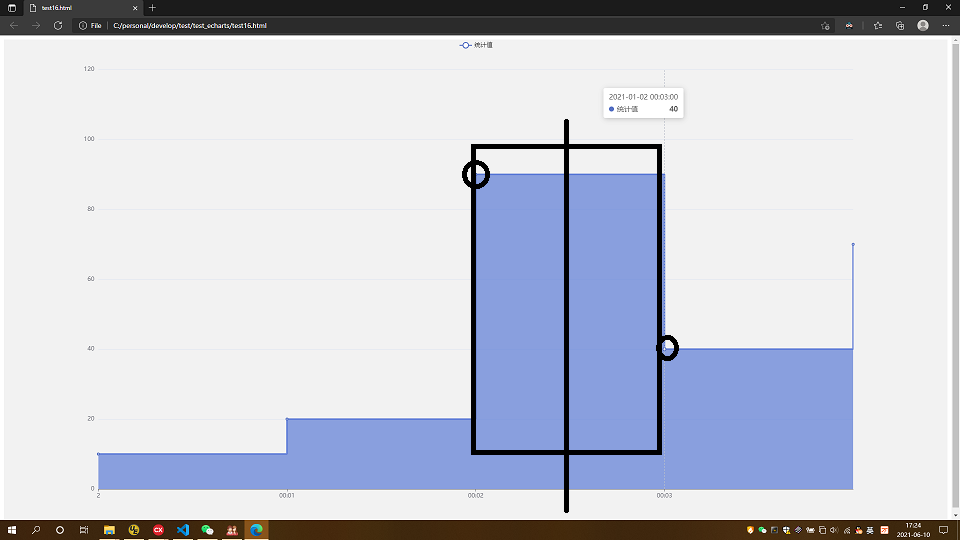
Because each row stand for a 1 minute range, when mouse pointer move to one area item, the "tooltip" box should show the corresponded values.
But echarts's behave is different, tooltip box will show the next point, when the mouse pointer move to the last half of the area item.
So I need to find a way, to implement the feature, when mouse move to any point of the area item, it should ONLY show it's value, not snap to the next value.
--
This is an automated message from the Apache Git Service.
To respond to the message, please log on to GitHub and use the
URL above to go to the specific comment.
For queries about this service, please contact Infrastructure at:
users@infra.apache.org
---------------------------------------------------------------------
To unsubscribe, e-mail: commits-unsubscribe@echarts.apache.org
For additional commands, e-mail: commits-help@echarts.apache.org