You are viewing a plain text version of this content. The canonical link for it is here.
Posted to commits@cloudstack.apache.org by GitBox <gi...@apache.org> on 2021/10/29 03:33:56 UTC
[GitHub] [cloudstack] div8cn opened a new issue #5637: [ui] restorevm does not show password
div8cn opened a new issue #5637:
URL: https://github.com/apache/cloudstack/issues/5637
<!--
Verify first that your issue/request is not already reported on GitHub.
Also test if the latest release and main branch are affected too.
Always add information AFTER of these HTML comments, but no need to delete the comments.
-->
##### ISSUE TYPE
<!-- Pick one below and delete the rest -->
* Bug Report
##### COMPONENT NAME
<!--
-->
~~~
UI
~~~
##### CLOUDSTACK VERSION
<!--
New line separated list of affected versions, commit ID for issues on main branch.
-->
~~~
4.15.0.0
4.15.2.0
~~~
##### CONFIGURATION
<!--
Information about the configuration if relevant, e.g. basic network, advanced networking, etc. N/A otherwise
-->
##### OS / ENVIRONMENT
<!--
Information about the environment if relevant, N/A otherwise
-->
cloudstack: 4.15.2.0
Compiled against library: libvirt 6.0.0
Using library: libvirt 6.0.0
Using API: QEMU 6.0.0
Running hypervisor: QEMU 4.2.1
##### SUMMARY
<!-- Explain the problem/feature briefly -->
##### STEPS TO REPRODUCE
<!--
For bugs, show exactly how to reproduce the problem, using a minimal test-case. Use Screenshots if accurate.
For new features, show how the feature would be used.
-->
<!-- Paste example playbooks or commands between quotes below -->
~~~
1. Upload template, enabled passwors
2. Use a template to create a VM
3. Test to log in to the VM through the UI prompting the password
4.UI Reinstall VM
5. UI prompts new password
6. Test to log in to the VM through the UI prompting the password
~~~
<!-- You can also paste gist.github.com links for larger files -->
##### EXPECTED RESULTS
<!-- What did you expect to happen when running the steps above? -->
~~~
The UI displays the password and can log in to the OS
~~~
##### ACTUAL RESULTS
<!-- What actually happened? -->
<!-- Paste verbatim command output between quotes below -->
~~~
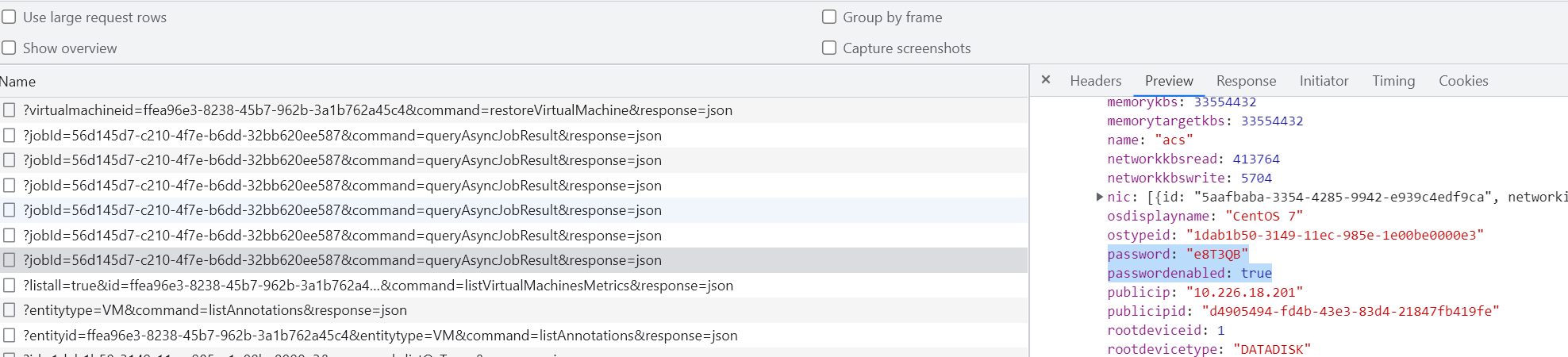
The UI does not display the password after reinstalling the VM;
The asynchronous task query interface has returned the password
~~~
--
This is an automated message from the Apache Git Service.
To respond to the message, please log on to GitHub and use the
URL above to go to the specific comment.
To unsubscribe, e-mail: commits-unsubscribe@cloudstack.apache.org
For queries about this service, please contact Infrastructure at:
users@infra.apache.org
[GitHub] [cloudstack] rhtyd closed issue #5637: [ui] restorevm does not show password
Posted by GitBox <gi...@apache.org>.
rhtyd closed issue #5637:
URL: https://github.com/apache/cloudstack/issues/5637


--
This is an automated message from the Apache Git Service.
To respond to the message, please log on to GitHub and use the
URL above to go to the specific comment.

To unsubscribe, e-mail: commits-unsubscribe@cloudstack.apache.org

For queries about this service, please contact Infrastructure at:
users@infra.apache.org