You are viewing a plain text version of this content. The canonical link for it is here.
Posted to commits@pulsar.apache.org by GitBox <gi...@apache.org> on 2022/03/14 06:27:48 UTC
[GitHub] [pulsar] ZW007 opened a new issue #14673: Pulsar C++ client compilation failed on Ubuntu 18.04
ZW007 opened a new issue #14673:
URL: https://github.com/apache/pulsar/issues/14673
**Describe the bug**
Could not get c++ client built on my Ubuntu 18.04
**To Reproduce**
Follwed steps from [official tutorial](https://pulsar.apache.org/docs/en/next/client-libraries-cpp/#compilation)
1. `git clone https://github.com/apache/pulsar`
2. `apt-get install cmake libssl-dev libcurl4-openssl-dev liblog4cxx-dev \
libprotobuf-dev protobuf-compiler libboost-all-dev google-mock libgtest-dev libjsoncpp-dev`
3. `# libgtest-dev version is 1.18.0 or above`
`cd /usr/src/googletest`
`sudo cmake .`
`sudo make`
`sudo cp ./googlemock/libgmock.a ./googlemock/gtest/libgtest.a /usr/lib/`
4. `cd /usr/src/gmock`
` sudo cmake .`
` sudo make`
` sudo cp libgmock.a /usr/lib`
5. `cd pulsar-client-cpp`
`cmake .`
**make**
Could not **make**, it says: ` error: ‘class google::protobuf::FileDescriptorSet’ has no member named ‘ByteSizeLong’; did you mean ‘ByteSize’?` ` lib/CMakeFiles/PULSAR_OBJECT_LIB.dir/build.make:1605: recipe for target 'lib/CMakeFiles/PULSAR_OBJECT_LIB.dir/ProtobufNativeSchema.cc.o' failed
`
**Error**

**Try to fix the error**
As suggsted, changed `ByteSizeLong` to `ByteSize` in ./pulsar-client-cpp/lib/ProtobufNativeSchema.cc code, then got new error:
`PaddingDemo.proto:25:12: Explicit 'optional' labels are disallowed in the Proto3 syntax. To define 'optional' fields in Proto3, simply remove the 'optional' label, as fields are 'optional' by default.
tests/CMakeFiles/main.dir/build.make:68: recipe for target 'generated/tests/PaddingDemo.pb.cc' failed`

**Desktop (please complete the following information):**
- OS: [Ubuntu 18.04]
**Additional context**
I guess it has to do with protobuf version, but could not find any more information. Thank you!
--
This is an automated message from the Apache Git Service.
To respond to the message, please log on to GitHub and use the
URL above to go to the specific comment.
To unsubscribe, e-mail: commits-unsubscribe@pulsar.apache.org
For queries about this service, please contact Infrastructure at:
users@infra.apache.org
[GitHub] [pulsar] BewareMyPower commented on issue #14673: Pulsar C++ client compilation failed on Ubuntu 18.04
Posted by GitBox <gi...@apache.org>.
BewareMyPower commented on issue #14673:
URL: https://github.com/apache/pulsar/issues/14673#issuecomment-1066961467


   > Am I good to go?

   Yeah.


--
This is an automated message from the Apache Git Service.
To respond to the message, please log on to GitHub and use the
URL above to go to the specific comment.

To unsubscribe, e-mail: commits-unsubscribe@pulsar.apache.org

For queries about this service, please contact Infrastructure at:
users@infra.apache.org
[GitHub] [pulsar] BewareMyPower removed a comment on issue #14673: Pulsar C++ client compilation failed on Ubuntu 18.04
Posted by GitBox <gi...@apache.org>.
BewareMyPower removed a comment on issue #14673:
URL: https://github.com/apache/pulsar/issues/14673#issuecomment-1066610950


   I think we need to install ProtoBuf 3.1.0 or higher. Could you try to install a newer Protobuf from source?


--
This is an automated message from the Apache Git Service.
To respond to the message, please log on to GitHub and use the
URL above to go to the specific comment.

To unsubscribe, e-mail: commits-unsubscribe@pulsar.apache.org

For queries about this service, please contact Infrastructure at:
users@infra.apache.org
[GitHub] [pulsar] BewareMyPower commented on issue #14673: Pulsar C++ client compilation failed on Ubuntu 18.04
Posted by GitBox <gi...@apache.org>.
BewareMyPower commented on issue #14673:
URL: https://github.com/apache/pulsar/issues/14673#issuecomment-1066610950


   I think we need to install ProtoBuf 3.4 or higher. Could you try to install a newer Protobuf from source?


--
This is an automated message from the Apache Git Service.
To respond to the message, please log on to GitHub and use the
URL above to go to the specific comment.

To unsubscribe, e-mail: commits-unsubscribe@pulsar.apache.org

For queries about this service, please contact Infrastructure at:
users@infra.apache.org
[GitHub] [pulsar] BewareMyPower commented on issue #14673: Pulsar C++ client compilation failed on Ubuntu 18.04
Posted by GitBox <gi...@apache.org>.
BewareMyPower commented on issue #14673:
URL: https://github.com/apache/pulsar/issues/14673#issuecomment-1066654426


   It looks like the support for `optional` keyword in Protobuf 3 was introduced from [3.15.0](https://github.com/protocolbuffers/protobuf/releases/tag/v3.15.0). However, it's only a part of tests and the Pulsar C++ library doesn't rely on it.


--
This is an automated message from the Apache Git Service.
To respond to the message, please log on to GitHub and use the
URL above to go to the specific comment.

To unsubscribe, e-mail: commits-unsubscribe@pulsar.apache.org

For queries about this service, please contact Infrastructure at:
users@infra.apache.org
[GitHub] [pulsar] BewareMyPower edited a comment on issue #14673: Pulsar C++ client compilation failed on Ubuntu 18.04
Posted by GitBox <gi...@apache.org>.
BewareMyPower edited a comment on issue #14673:
URL: https://github.com/apache/pulsar/issues/14673#issuecomment-1066615913


   If you're not a developer for C++ client, you can add `-DBUILD_TESTS=OFF` option that disables the build of tests, or remove the `optional` prefix in `tests/PaddingDemo.proto`.

   As for this issue, I think we can either restore the code compatibility for Protobuf 3.0 or fix the docs.


--
This is an automated message from the Apache Git Service.
To respond to the message, please log on to GitHub and use the
URL above to go to the specific comment.

To unsubscribe, e-mail: commits-unsubscribe@pulsar.apache.org

For queries about this service, please contact Infrastructure at:
users@infra.apache.org
[GitHub] [pulsar] BewareMyPower edited a comment on issue #14673: Pulsar C++ client compilation failed on Ubuntu 18.04
Posted by GitBox <gi...@apache.org>.
BewareMyPower edited a comment on issue #14673:
URL: https://github.com/apache/pulsar/issues/14673#issuecomment-1066610950


--
This is an automated message from the Apache Git Service.
To respond to the message, please log on to GitHub and use the
URL above to go to the specific comment.

To unsubscribe, e-mail: commits-unsubscribe@pulsar.apache.org

For queries about this service, please contact Infrastructure at:
users@infra.apache.org
[GitHub] [pulsar] BewareMyPower edited a comment on issue #14673: Pulsar C++ client compilation failed on Ubuntu 18.04
Posted by GitBox <gi...@apache.org>.
BewareMyPower edited a comment on issue #14673:
URL: https://github.com/apache/pulsar/issues/14673#issuecomment-1066654426


   It looks like the support for `optional` keyword in Protobuf 3 was introduced from [3.15.0](https://github.com/protocolbuffers/protobuf/releases/tag/v3.15.0). However, it's only a part of tests and the Pulsar C++ library doesn't rely on it.

   I think we should update the documents for building C++ client from source. For developers, Protobuf 3.15.0 or higher is required. For users, Protobuf 3.1.0 or higher is required, and they should add `-DBUILD_TESTS=OFF` option to CMake command.


--
This is an automated message from the Apache Git Service.
To respond to the message, please log on to GitHub and use the
URL above to go to the specific comment.

To unsubscribe, e-mail: commits-unsubscribe@pulsar.apache.org

For queries about this service, please contact Infrastructure at:
users@infra.apache.org
[GitHub] [pulsar] BewareMyPower commented on issue #14673: Pulsar C++ client compilation failed on Ubuntu 18.04
Posted by GitBox <gi...@apache.org>.
BewareMyPower commented on issue #14673:
URL: https://github.com/apache/pulsar/issues/14673#issuecomment-1066615913


   If you're not a developer for C++ client, you can add `-DBUILD_TESTS=OFF` option that disables the build of tests as a workground.

   As for this issue, I think we can either restore the code compatibility for Protobuf 3.0 or fix the docs.


--
This is an automated message from the Apache Git Service.
To respond to the message, please log on to GitHub and use the
URL above to go to the specific comment.

To unsubscribe, e-mail: commits-unsubscribe@pulsar.apache.org

For queries about this service, please contact Infrastructure at:
users@infra.apache.org
[GitHub] [pulsar] ZW007 edited a comment on issue #14673: Pulsar C++ client compilation failed on Ubuntu 18.04
Posted by GitBox <gi...@apache.org>.
ZW007 edited a comment on issue #14673:
URL: https://github.com/apache/pulsar/issues/14673#issuecomment-1069723692
@BewareMyPower Sorry, but I am still confused. After running the `cmake` and `make` I have `libpulsar.a` and `libpulsar.so` in my `./pulsar/pulsar-client-cpp/lib` folder

Noticed from the [tutorial](https://pulsar.apache.org/docs/en/next/client-libraries-cpp/#install-debian), there is a follow-up step called `install Debian` which I do not know what it is for (I am using Ubuntu). But I did download `apache-pulsar-client.deb ` and did `apt install ./apache-pulsar-client.deb` Now I have `.so` (**but no** `.a`) in my system's /usr/lib folder

Are there any more steps needed? I want to run pulsar-client-cpp on my local computer.
There seems to be no tutorial on how to write cpp client code and compile and run it other than [this](https://pulsar.apache.org/docs/en/next/client-libraries-cpp/#create-a-producer). I used this code and run command where `/pulsar/pulsar-client-cpp/include` is included because it contains `<pulsar/Client.h>` head file:
` g++ --std=c++11 myFirstProducer.cpp -o myFirstProducer -I /pulsar/pulsar-client-cpp/include`
I got error: `producer was not declared in this scope `

Have I successfully got the pulsar-client-cpp built on my computer? And is the above compiling command correct? Thank you!
--
This is an automated message from the Apache Git Service.
To respond to the message, please log on to GitHub and use the
URL above to go to the specific comment.
To unsubscribe, e-mail: commits-unsubscribe@pulsar.apache.org
For queries about this service, please contact Infrastructure at:
users@infra.apache.org
[GitHub] [pulsar] BewareMyPower edited a comment on issue #14673: Pulsar C++ client compilation failed on Ubuntu 18.04
Posted by GitBox <gi...@apache.org>.
BewareMyPower edited a comment on issue #14673:
URL: https://github.com/apache/pulsar/issues/14673#issuecomment-1070361140


   TL; DR the example code is wrong, we need to fix the doc. /cc @Anonymitaet

   You should add a declaration before `createProducer`:

   ```c++
       Client client("pulsar://localhost:6650");

       Producer producer;  // **See here**
       Result result = client.createProducer("persistent://public/default/my-topic", producer);
   ```

   ----

   > there is a follow-up step called install Debian which I do not know what it is for (I am using Ubuntu)

   It's not a follow-up step. It's a parallel step.

   When you install a C++ SDK, it means following files need to be generated:
   - C++ headers (`*.h`)
   - C++ libraries, it can be either a dynamic library (`*.so` on Linux) or a static library (`*.a` on Linux).

   A `*.deb` file is a pre-built Debian C++ package. (Ubuntu is derived from Debian) i.e. the `apt install ./apache-pulsar-client.deb` command will install the C++ headers and libraries to the target directory. Since the pre-built Debian C++ package doesn't include a static library, you won't see a `*.a` file.

   However, if you have the source code of the C++ SDK, you can compile it by yourself, i.e. run `cmake` and `make` commands (or `./configure` for C++ libraries that use [GNU Autotools](https://en.wikipedia.org/wiki/GNU_Autotools) to build). At last, you need to run `make install`, which needs the superuser permission, to copy these files (`*.h`, `*.so`, `*.a`) to the target directory. You can also copy these files manually.

   In short, you can choose to either compile from source or install from a pre-built package. The advantage of compiling from source is that you can get the latest library.


--
This is an automated message from the Apache Git Service.
To respond to the message, please log on to GitHub and use the
URL above to go to the specific comment.

To unsubscribe, e-mail: commits-unsubscribe@pulsar.apache.org

For queries about this service, please contact Infrastructure at:
users@infra.apache.org
[GitHub] [pulsar] BewareMyPower edited a comment on issue #14673: Pulsar C++ client compilation failed on Ubuntu 18.04
Posted by GitBox <gi...@apache.org>.
BewareMyPower edited a comment on issue #14673:
URL: https://github.com/apache/pulsar/issues/14673#issuecomment-1066615913


   If you're not a developer for C++ client, you can add `-DBUILD_TESTS=OFF` option that disables the build of tests.

   As for this issue, I think we can either restore the code compatibility for Protobuf 3.0 or fix the docs.


--
This is an automated message from the Apache Git Service.
To respond to the message, please log on to GitHub and use the
URL above to go to the specific comment.

To unsubscribe, e-mail: commits-unsubscribe@pulsar.apache.org

For queries about this service, please contact Infrastructure at:
users@infra.apache.org
[GitHub] [pulsar] BewareMyPower edited a comment on issue #14673: Pulsar C++ client compilation failed on Ubuntu 18.04
Posted by GitBox <gi...@apache.org>.
BewareMyPower edited a comment on issue #14673:
URL: https://github.com/apache/pulsar/issues/14673#issuecomment-1066654426


   It looks like the support for `optional` keyword in Protobuf 3 was introduced from [3.15.0](https://github.com/protocolbuffers/protobuf/releases/tag/v3.15.0). However, it's only a part of tests and the Pulsar C++ library doesn't rely on it.

   I think we should update the documents for building C++ client from source. For developers, Protobuf 3.15.0 or higher is required. For users, Protobuf 3.4.0 or higher is required, and they should add `-DBUILD_TESTS=OFF` option to CMake command.


--
This is an automated message from the Apache Git Service.
To respond to the message, please log on to GitHub and use the
URL above to go to the specific comment.

To unsubscribe, e-mail: commits-unsubscribe@pulsar.apache.org

For queries about this service, please contact Infrastructure at:
users@infra.apache.org
[GitHub] [pulsar] ZW007 commented on issue #14673: Pulsar C++ client compilation failed on Ubuntu 18.04
Posted by GitBox <gi...@apache.org>.
ZW007 commented on issue #14673:
URL: https://github.com/apache/pulsar/issues/14673#issuecomment-1066945135
> It looks like the support for `optional` keyword in Protobuf 3 was introduced from [3.15.0](https://github.com/protocolbuffers/protobuf/releases/tag/v3.15.0). However, it's only a part of tests and the Pulsar C++ library doesn't rely on it.
>
> I think we should update the documents for building C++ client from source. For developers, Protobuf 3.15.0 or higher is required. For users, Protobuf 3.1.0 or higher is required, and they should add `-DBUILD_TESTS=OFF` option to CMake command.
@BewareMyPower Thanks again. Here are the steps I tried:
1. first changed `ByteSizeLong` to `ByteSize` in `./pulsar-client-cpp/lib/ProtobufNativeSchema.cc` as stated in question above
2. `cmake . -DBUILD_TESTS=OFF`
3. `make`
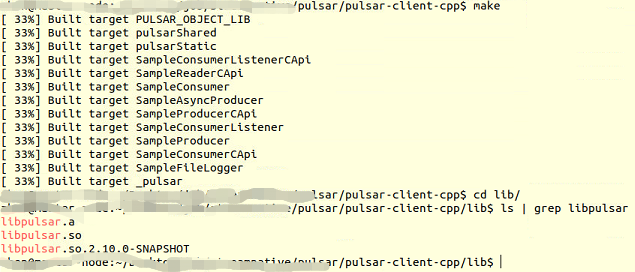
Here is the screenshot the result, no error but it looks like the build stops at 33%, and there are `libpulsar.so` and `libpulsar.a` are in the lib folder. Am I good to go?
--
This is an automated message from the Apache Git Service.
To respond to the message, please log on to GitHub and use the
URL above to go to the specific comment.
To unsubscribe, e-mail: commits-unsubscribe@pulsar.apache.org
For queries about this service, please contact Infrastructure at:
users@infra.apache.org
[GitHub] [pulsar] BewareMyPower commented on issue #14673: Pulsar C++ client compilation failed on Ubuntu 18.04
Posted by GitBox <gi...@apache.org>.
BewareMyPower commented on issue #14673:
URL: https://github.com/apache/pulsar/issues/14673#issuecomment-1070361140


   TL; DR the example code is wrong, we need to fix the doc. /cc @Anonymitaet

   You should add a declaration before `createProducer`:

   ```c++
       Client client("pulsar://localhost:6650");

       Producer producer;  // **See here**
       Result result = client.createProducer("persistent://public/default/my-topic", producer);
   ```

   ----

   > there is a follow-up step called install Debian which I do not know what it is for (I am using Ubuntu)

   It's not a follow-up step. It's a parallel step.

   When you install a C++ SDK, it means following files need to be generated:
   - C++ headers (`*.h`)
   - C++ libraries, it can be either a dynamic library (`*.so` on Linux) or a static library (`*.a` on Linux).

   A `*.deb` file is a pre-built Debian C++ package. (Ubuntu is derived from Debian) i.e. the `apt install ./apache-pulsar-client.deb` command will install the C++ headers and libraries to the target directory. Since the pre-built Debian C++ package doesn't include a static library, so you won't see a `*.a` file.

   However, if you have the source code of the C++ SDK, you can compile it by yourself, i.e. run `cmake` and `make` commands (or `./configure` for C++ libraries that use [GNU Autotools](https://en.wikipedia.org/wiki/GNU_Autotools) to build). At last, you need to run `make install`, which needs the superuser permission, to copy these files (`*.h`, `*.so`, `*.a`) to the target directory. You can also copy these files manually.

   In short, you can choose to either compile from source or install from a pre-built package. The advantage of compiling from source is that you can get the latest library.


--
This is an automated message from the Apache Git Service.
To respond to the message, please log on to GitHub and use the
URL above to go to the specific comment.

To unsubscribe, e-mail: commits-unsubscribe@pulsar.apache.org

For queries about this service, please contact Infrastructure at:
users@infra.apache.org
[GitHub] [pulsar] ZW007 commented on issue #14673: Pulsar C++ client compilation failed on Ubuntu 18.04
Posted by GitBox <gi...@apache.org>.
ZW007 commented on issue #14673:
URL: https://github.com/apache/pulsar/issues/14673#issuecomment-1069723692
@BewareMyPower Sorry, but I am still confused. After running the `cmake` and `make` I have `libpulsar.a` and `libpulsar.so` in my `./pulsar/pulsar-client-cpp/lib` folder

Noticed from the [tutorial](https://pulsar.apache.org/docs/en/next/client-libraries-cpp/#install-debian), there is a follow-up step called `install Debian` which I do not know what it is for (I am using Ubuntu). But I did download `apache-pulsar-client.deb ` and did `apt install ./apache-pulsar-client.deb` Now I have `.so` (**but no** `.a`) in my system's /usr/lib folder

Are there any more steps needed? I want to run pulsar-client-cpp on my local computer.
There seems to be no tutorial on how to write cpp client code and compile and run it other than [this](https://pulsar.apache.org/docs/en/next/client-libraries-cpp/#create-a-producer). I used this code and run command where `/pulsar/pulsar-client-cpp/include` is included because it contains `<pulsar/Client.h>` head file:
` g++ --std=c++11 myFirstProducer.cpp -o myFirstProducer -I /pulsar/pulsar-client-cpp/include`
I got error: `producer was not declared in this scope `

Have I successfully got the pulsar-client-cpp built on my computer and Is the compiling command correct? Thank you!
--
This is an automated message from the Apache Git Service.
To respond to the message, please log on to GitHub and use the
URL above to go to the specific comment.
To unsubscribe, e-mail: commits-unsubscribe@pulsar.apache.org
For queries about this service, please contact Infrastructure at:
users@infra.apache.org