You are viewing a plain text version of this content. The canonical link for it is here.
Posted to commits@pulsar.apache.org by GitBox <gi...@apache.org> on 2022/04/26 09:41:59 UTC
[GitHub] [pulsar] wojtekkedzior opened a new issue, #15332: ledgers not getting deleted when disk used exceeds threshold on all bookies
wojtekkedzior opened a new issue, #15332:
URL: https://github.com/apache/pulsar/issues/15332
**Describe the bug**
I'm trying to understand the behavior where my bookies run out of space and how quickly the cluster will return to normal. In my scenario I produce enough data to fill the bookies and then use a consumer to empty them only to observer that the ledgers drive remains full, but there are no more messages in the backlog. The cluster is the essentially locked because no producers can connect as there are not enough fault-free bookies. The odd thing I see is that when I'm producing and consuming at the same time, I can observer the ledger disk getting cleaned up every so often. This is not the case when I first produce to fill the drives and then try to consume.
**To Reproduce**
Steps to reproduce the behavior:
1. start with a clean pulsar install
2. create a topic:
```
kubectl exec -i pulsar-toolset-0 -- /bin/bash -c "/pulsar/bin/pulsar-admin tenants create wojtekt"
kubectl exec -i pulsar-toolset-0 -- /bin/bash -c "/pulsar/bin/pulsar-admin namespaces create wojtekt/wojtekns"
kubectl exec -i pulsar-toolset-0 -- /bin/bash -c "/pulsar/bin/pulsar-admin topics create-partitioned-topic wojtekt/wojtekns/wojtektopic -p 2"
```
3. in the toolset pod run "/pulsar/bin/pulsar-perf consume persistent://wojtekt/wojtekns/wojtektopic" to create a subscription with the name 'sub'. Once you see output that it processed 0 messages, stop the consumer:
`07:17:54.318 [main] INFO org.apache.pulsar.testclient.PerformanceConsumer - Throughput received: 0.000 msg/s -- 0.000 Mbit/s --- Latency: mean: 0.000 ms - med: 0 - 95pct: 0 - 99pct: 0 - 99.9pct: 0 - 99.99pct: 0 - Max: 0`
4. run the producer to create enough data to fill up the two bookies:
` /pulsar/bin/pulsar-perf produce wojtekt/wojtekns/wojtektopic --rate 800 --size 65536`
The output will be similar to this:
`07:20:16.019 [main] INFO org.apache.pulsar.testclient.PerformanceProducer - Throughput produced: 809.5 msg/s --- 404.7 Mbit/s --- failure 0.0 msg/s --- Latency: mean: 28.819 ms - med: 17.330 - 95pct: 101.059 - 99pct: 168.939 - 99.9pct: 214.436 - 99.99pct: 219.691 - Max: 220.720`
Continue until the producer errors out (due to out of disk space on the bookies). This takes only a few minutes.
5. verify the ledger volumes are full: See full-ledger-volume.png
6. check the backlog has data: overview-before.png
7. run the consumer:
`/pulsar/bin/pulsar-perf consume persistent://wojtekt/wojtekns/wojtektopic`
The output will be similar to:
` 07:29:51.046 [main] INFO org.apache.pulsar.testclient.PerformanceConsumer - Throughput received: 1335.152 msg/s -- 667.576 Mbit/s --- Latency: mean: 586063.945 ms - med: 586175 - 95pct: 589011 - 99pct: 589383 - 99.9pct: 589495 - 99.99pct: 589499 - Max: 589507`
8. watch the backlog decrease: backlog-decreasing.png
```
07:33:51.875 [main] INFO org.apache.pulsar.testclient.PerformanceConsumer - Throughput received: 0.000 msg/s -- 0.000 Mbit/s --- Latency: mean: 0.000 ms - med: 0 - 95pct: 0 - 99pct: 0 - 99.9pct: 0 - 99.99pct: 0 - Max: 0
07:33:54.928 [Thread-1] INFO org.apache.pulsar.testclient.PerformanceConsumer - Aggregated throughput stats --- 291790 records received --- 1104.725 msg/s --- 552.363 Mbit/s
07:33:54.949 [Thread-1] INFO org.apache.pulsar.testclient.PerformanceConsumer - Aggregated latency stats --- Latency: mean: 519065.797 ms - med: 519649 - 95pct: 588203 - 99pct: 593671 - 99.9pct: 594895 - 99.99pct: 595031 - 99.999pct: 595051 - Max: 595051
```
9. now the disks are full: full-ledger-disks.png, but the backlog is empty empty-backlog.png
10. the 'GC Reclaim Disk' graph shows nothing gc-reclaim-disk.png.
**Expected behavior**
I would expect that a cleanup of ack'ed messages be continuously taking place and freeing some disk space. I would also expect the bookies to come out of being unavailable as soon as the disk space used gets below the threshold (0.95%). I don't expect the cleanup to remove all the data at once. Yes, my expectation would result in bookies 'flapping' if a producer were to start up again and fill the freshly freed space. This is a better scenario than what I have now where the cluster is unusable as no producers can connect. The cluster state is also questionable because it retains data which my consumer already ack'ed.
When you run the producer and consumer at the same time, the graph shows lots of spikes meaning ledgers are being deleted. see ledger-disk-usage-correct.png and disk-reclaim-correct.png
**Screenshots**






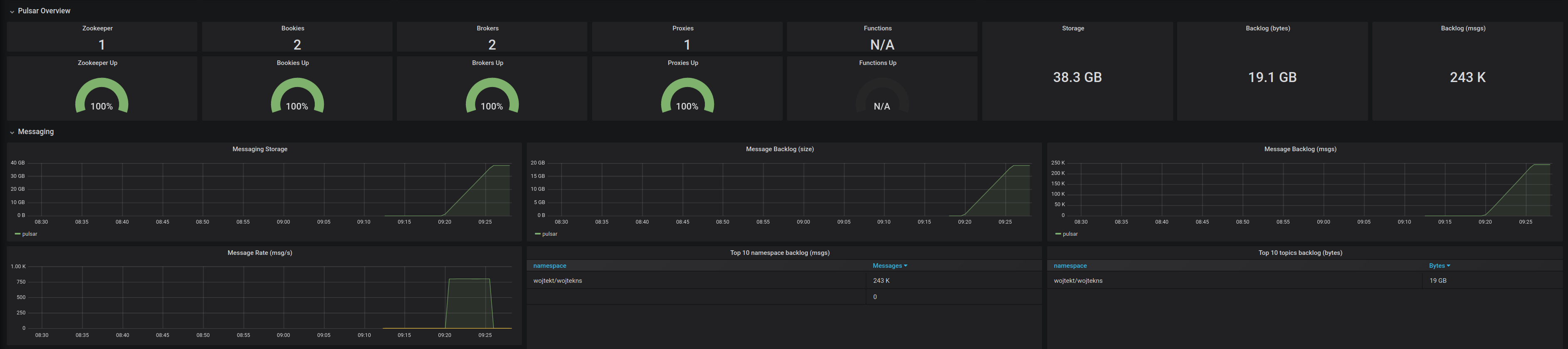

**Desktop (please complete the following information):**
I'm running the following dev setup:
K8s Rev: v1.20.15 (1 dedicated SSD drive for 2 K8 nodes and all the persistent volumes (PV). A separate drive for the control-plane node)
Worker OS: alpinelinux3.8
Pulsar: apachepulsar/pulsar-all:2.7.2 (installed with Helm(version.BuildInfo{Version:"v3.6.3"))
Volume provider: k8s.gcr.io/sig-storage/local-volume-provisioner:v2.4.0
2 bookies (20GB ledger PV, 1GB journal PV)
2 brokers
1 proxy
Using the 'toolset' for the producer and consumer
other than the broker and bookie parameters (below) I increased each component's '-Xms', '-Xmx' and '-XX:MaxDirectMemorySize' parameters.
broker config:
managedLedgerDefaultEnsembleSize: "2"
managedLedgerDefaultWriteQuorum: "2"
managedLedgerDefaultAckQuorum: "2"
managedLedgerMaxLedgerRolloverTimeMinutes: "3"
managedLedgerMinLedgerRolloverTimeMinutes: "1"
managedLedgerCursorRolloverTimeInSeconds: "60"
bookie config:
dbStorage_writeCacheMaxSizeMb: "32"
dbStorage_readAheadCacheMaxSizeMb: "32"
dbStorage_rocksDB_writeBufferSizeMB: "8"
dbStorage_rocksDB_blockCacheSize: "8388608"
journalMaxSizeMB: "500"
journalFlushWhenQueueEmpty: "true"
logSizeLimit: "104857600"
gcWaitTime: "40000"
**Additional context**
I have tried a few things like:
./bookkeeper shell triggeraudit (on each bookies)
./bookkeeper shell forceauditchecks -checkallledgerscheck (on each bookies)
./bookkeeper shell metaformat (on each bookies)
Both 'audit' commands had no visible effect (at least I couldn't tell if anything changed by looking at Grafana)
The metaformat did clean stuff up, but the price is that we can lose data. This cannot be the solution to this problem. Interestingly enough the Messaging Storage graph is still pegged at the limit while the ledgers are emptied. The cluster is usable again as a producer can connect and start sending messages.
Some other observations:
- there were lots of minor memfaults, but nonmajor ones.
- context switches were constant
- file handles were well below the limit
- I can provide the Nodes dashboard for the test run if anyone would like to look at it
.
--
This is an automated message from the Apache Git Service.
To respond to the message, please log on to GitHub and use the
URL above to go to the specific comment.
To unsubscribe, e-mail: commits-unsubscribe@pulsar.apache.org.apache.org
For queries about this service, please contact Infrastructure at:
users@infra.apache.org
[GitHub] [pulsar] wojtekkedzior closed issue #15332: ledgers not getting deleted when disk used exceeds threshold on all bookies
Posted by GitBox <gi...@apache.org>.
wojtekkedzior closed issue #15332: ledgers not getting deleted when disk used exceeds threshold on all bookies
URL: https://github.com/apache/pulsar/issues/15332


--
This is an automated message from the Apache Git Service.
To respond to the message, please log on to GitHub and use the
URL above to go to the specific comment.

To unsubscribe, e-mail: commits-unsubscribe@pulsar.apache.org

For queries about this service, please contact Infrastructure at:
users@infra.apache.org
[GitHub] [pulsar] wojtekkedzior commented on issue #15332: ledgers not getting deleted when disk used exceeds threshold on all bookies
Posted by GitBox <gi...@apache.org>.
wojtekkedzior commented on issue #15332:
URL: https://github.com/apache/pulsar/issues/15332#issuecomment-1132758568

   Right, so after playing around with this a bit I realise that the only way to get out of this scenario is to scale your resources, if you can.   In case you cannot scale becuase you are at the limit of your hardware, then you have to decommission the bookies and bring them back that way.  Since the cluster is not usable anyway it doesn't really matter that your are going to decommission them.
   I also found a setting called: isForceGCAllowWhenNoSpace.  which should take care of this issue, but I have not tested it yet.


--
This is an automated message from the Apache Git Service.
To respond to the message, please log on to GitHub and use the
URL above to go to the specific comment.

To unsubscribe, e-mail: commits-unsubscribe@pulsar.apache.org

For queries about this service, please contact Infrastructure at:
users@infra.apache.org