You are viewing a plain text version of this content. The canonical link for it is here.
Posted to notifications@apisix.apache.org by "zhangyuthink (via GitHub)" <gi...@apache.org> on 2023/09/09 21:33:38 UTC
[GitHub] [apisix] zhangyuthink opened a new pull request, #10182: docs: translate getting-started
zhangyuthink opened a new pull request, #10182:
URL: https://github.com/apache/apisix/pull/10182

   ### Description

   <!-- Please include a summary of the change and which issue is fixed. -->
   <!-- Please also include relevant motivation and context. -->

   translate getting-started

   ### Checklist

   - [X] I have explained the need for this PR and the problem it solves
   - [ ] I have explained the changes or the new features added to this PR
   - [ ] I have added tests corresponding to this change
   - [X] I have updated the documentation to reflect this change
   - [ ] I have verified that this change is backward compatible (If not, please discuss on the [APISIX mailing list](https://github.com/apache/apisix/tree/master#community) first)

   <!--

   Note

   1. Mark the PR as draft until it's ready to be reviewed.
   2. Always add/update tests for any changes unless you have a good reason.
   3. Always update the documentation to reflect the changes made in the PR.
   4. Make a new commit to resolve conversations instead of `push -f`.
   5. To resolve merge conflicts, merge master instead of rebasing.
   6. Use "request review" to notify the reviewer after making changes.
   7. Only a reviewer can mark a conversation as resolved.

   -->


--
This is an automated message from the Apache Git Service.
To respond to the message, please log on to GitHub and use the
URL above to go to the specific comment.

To unsubscribe, e-mail: notifications-unsubscribe@apisix.apache.org

For queries about this service, please contact Infrastructure at:
users@infra.apache.org
[GitHub] [apisix] monkeyDluffy6017 merged pull request #10182: docs: translate getting-started
Posted by "monkeyDluffy6017 (via GitHub)" <gi...@apache.org>.
monkeyDluffy6017 merged PR #10182:
URL: https://github.com/apache/apisix/pull/10182


--
This is an automated message from the Apache Git Service.
To respond to the message, please log on to GitHub and use the
URL above to go to the specific comment.

To unsubscribe, e-mail: notifications-unsubscribe@apisix.apache.org

For queries about this service, please contact Infrastructure at:
users@infra.apache.org
[GitHub] [apisix] kayx23 commented on a diff in pull request #10182: docs: translate getting-started
Posted by "kayx23 (via GitHub)" <gi...@apache.org>.
kayx23 commented on code in PR #10182:
URL: https://github.com/apache/apisix/pull/10182#discussion_r1323836238


##########
docs/zh/latest/getting-started/load-balancing.md:
##########
@@ -0,0 +1,100 @@
+---
+title: 负载均衡
+slug: /getting-started/load-balancing
+---
+
+<head>
+  <link rel="canonical" href="https://docs.api7.ai/apisix/getting-started/load-balancing" />
+</head>
+
+> 本教程由 [API7.ai](https://api7.ai/) 编写。
+
+负载均衡管理客户端和服务端之间的流量。它决定由哪个服务来处理特定的请求,从而提高性能、可扩展性和可靠性。在设计需要处理大量流量的系统时,负载均衡是一个关键的考虑因素。
+
+Apache APISIX 支持加权负载均衡算法,传入的流量按照预定顺序轮流分配给一组服务器的其中一个。
+
+在本教程中,你将创建一个具有两个上游服务的路由,并且启用负载均衡来测试在两个服务之间的切换情况。
+
+## 前置条件
+
+1. 参考[入门指南](./README.md)完成 APISIX 的安装。
+2. 了解 APISIX 中[路由及上游](./configure-routes.md#route-是什么)的概念。
+
+## 启用负载均衡
+
+创建一个具有两个上游服务的路由,访问 `/headers` 将被转发到 [httpbin.org](https://httpbin.org/headers) 和 [mock.api7.ai](https://mock.api7.ai/headers) 这两个上游服务,并且会返回请求头。
+
+```shell
+curl -i "http://127.0.0.1:9180/apisix/admin/routes" -X PUT -d '
+{
+  "id": "getting-started-headers",
+  "uri": "/headers",
+  "upstream" : {
+    "type": "roundrobin",
+    "nodes": {
+      "httpbin.org:443": 1,
+      "mock.api7.ai:443": 1
+    },
+    "pass_host": "node",
+    "scheme": "https"
+  }
+}'
+```
+
+如果路由创建成功,你将会收到返回 `HTTP/1.1 201 OK`。
+
+:::描述

Review Comment:
   ```suggestion
   :::描述
   ```
   Was the admonition also translated (unintended)? If so, please change it back. Ignore if this will be rendered properly.


##########
docs/zh/latest/getting-started/load-balancing.md:
##########
@@ -0,0 +1,100 @@
+---
+title: 负载均衡
+slug: /getting-started/load-balancing
+---
+
+<head>
+  <link rel="canonical" href="https://docs.api7.ai/apisix/getting-started/load-balancing" />
+</head>
+
+> 本教程由 [API7.ai](https://api7.ai/) 编写。
+
+负载均衡管理客户端和服务端之间的流量。它决定由哪个服务来处理特定的请求,从而提高性能、可扩展性和可靠性。在设计需要处理大量流量的系统时,负载均衡是一个关键的考虑因素。
+
+Apache APISIX 支持加权负载均衡算法,传入的流量按照预定顺序轮流分配给一组服务器的其中一个。
+
+在本教程中,你将创建一个具有两个上游服务的路由,并且启用负载均衡来测试在两个服务之间的切换情况。
+
+## 前置条件
+
+1. 参考[入门指南](./README.md)完成 APISIX 的安装。
+2. 了解 APISIX 中[路由及上游](./configure-routes.md#route-是什么)的概念。
+
+## 启用负载均衡
+
+创建一个具有两个上游服务的路由,访问 `/headers` 将被转发到 [httpbin.org](https://httpbin.org/headers) 和 [mock.api7.ai](https://mock.api7.ai/headers) 这两个上游服务,并且会返回请求头。
+
+```shell
+curl -i "http://127.0.0.1:9180/apisix/admin/routes" -X PUT -d '
+{
+  "id": "getting-started-headers",
+  "uri": "/headers",
+  "upstream" : {
+    "type": "roundrobin",
+    "nodes": {
+      "httpbin.org:443": 1,
+      "mock.api7.ai:443": 1
+    },
+    "pass_host": "node",
+    "scheme": "https"
+  }
+}'
+```
+
+如果路由创建成功,你将会收到返回 `HTTP/1.1 201 OK`。
+
+:::描述

Review Comment:
   ```suggestion
   :::描述
   ```
   Was the admonition also translated (unintended)? If so, please change it back. Ignore if this will be rendered properly.


--
This is an automated message from the Apache Git Service.
To respond to the message, please log on to GitHub and use the
URL above to go to the specific comment.

To unsubscribe, e-mail: notifications-unsubscribe@apisix.apache.org

For queries about this service, please contact Infrastructure at:
users@infra.apache.org
[GitHub] [apisix] kayx23 commented on a diff in pull request #10182: docs: translate getting-started
Posted by "kayx23 (via GitHub)" <gi...@apache.org>.
kayx23 commented on code in PR #10182:
URL: https://github.com/apache/apisix/pull/10182#discussion_r1322685576
##########
docs/zh/latest/getting-started.md:
##########
@@ -1,249 +0,0 @@
----
-title: 快速入门指南
-keywords:
- - APISIX
- - APISIX 入门指南
- - APISIX docker 安装教程
-description: 本文档将引导你了解如何开始使用 Apache APISIX。
----
-
-<!--
-#
-# Licensed to the Apache Software Foundation (ASF) under one or more
-# contributor license agreements. See the NOTICE file distributed with
-# this work for additional information regarding copyright ownership.
-# The ASF licenses this file to You under the Apache License, Version 2.0
-# (the "License"); you may not use this file except in compliance with
-# the License. You may obtain a copy of the License at
-#
-# http://www.apache.org/licenses/LICENSE-2.0
-#
-# Unless required by applicable law or agreed to in writing, software
-# distributed under the License is distributed on an "AS IS" BASIS,
-# WITHOUT WARRANTIES OR CONDITIONS OF ANY KIND, either express or implied.
-# See the License for the specific language governing permissions and
-# limitations under the License.
-#
--->
-
-import Tabs from '@theme/Tabs';
-import TabItem from '@theme/TabItem';
-
-本文将为你介绍 Apache APISIX 的概念、功能以及如何使用 APISIX。
-
-通过本文你可以了解到以下内容:
-
-- Apache APISIX 是什么?
-- APISIX 的架构及主要概念。
-- 如何使用 Docker 安装并运行 APISIX。
-- 如何使用 Admin API 创建第一个路由并配置上游。
-- 如何使用 APISIX Dashboard。
-- 如何寻求帮助。
-
-## Apache APISIX 是什么?
-
-Apache APISIX 是由 API7.ai(支流科技)捐赠给 Apache 软件基金会的云原生 API 网关,它兼具动态、实时、高性能等特点,提供了负载均衡、动态上游、灰度发布(金丝雀发布)、服务熔断、身份认证、可观测性等丰富的流量管理功能。我们可以使用 Apache APISIX 来处理传统的南北向流量,也可以处理服务间的东西向流量。同时,它也支持作为 [K8s Ingress Controller](https://github.com/apache/apisix-ingress-controller) 来使用。
-
-### 主要特性
-
-- 多平台支持:APISIX 提供了多平台解决方案,它不但支持裸机运行,也支持在 Kubernetes 中使用,还支持与 AWS Lambda、Azure Function、Lua 函数和 Apache OpenWhisk 等云服务集成。
-- 全动态能力:APISIX 支持热加载,这意味着你不需要重启服务就可以更新 APISIX 的配置。请访问[为什么 Apache APISIX 选择 Nginx + Lua 这个技术栈?](https://apisix.apache.org/zh/blog/2021/08/25/why-apache-apisix-chose-nginx-and-lua/)以了解实现原理。
-- 精细化路由:APISIX 支持使用 [NGINX 内置变量](https://nginx.org/en/docs/varindex.html)做为路由的匹配条件,你可以自定义匹配函数来过滤请求,匹配路由。
-- 运维友好:APISIX 支持与以下工具和平台集成:[HashiCorp Vault](./terminology/secret.md#使用-vault-管理密钥)、[Zipkin](./plugins/zipkin.md)、[Apache SkyWalking](./plugins/skywalking.md)、[Consul](../../en/latest/discovery/consul_kv.md)、[Nacos](./discovery/nacos.md)、[Eureka](./discovery.md)。通过 [APISIX Dashboard](/docs/dashboard/USER_GUIDE),运维人员可以通过友好且直观的 UI 配置 APISIX。
-- 多语言插件支持:APISIX 支持多种开发语言进行插件开发,开发人员可以选择擅长语言的 SDK 开发自定义插件。
-
-## 主要概念
-
-下图为 Apache APISIX 的架构:
-
-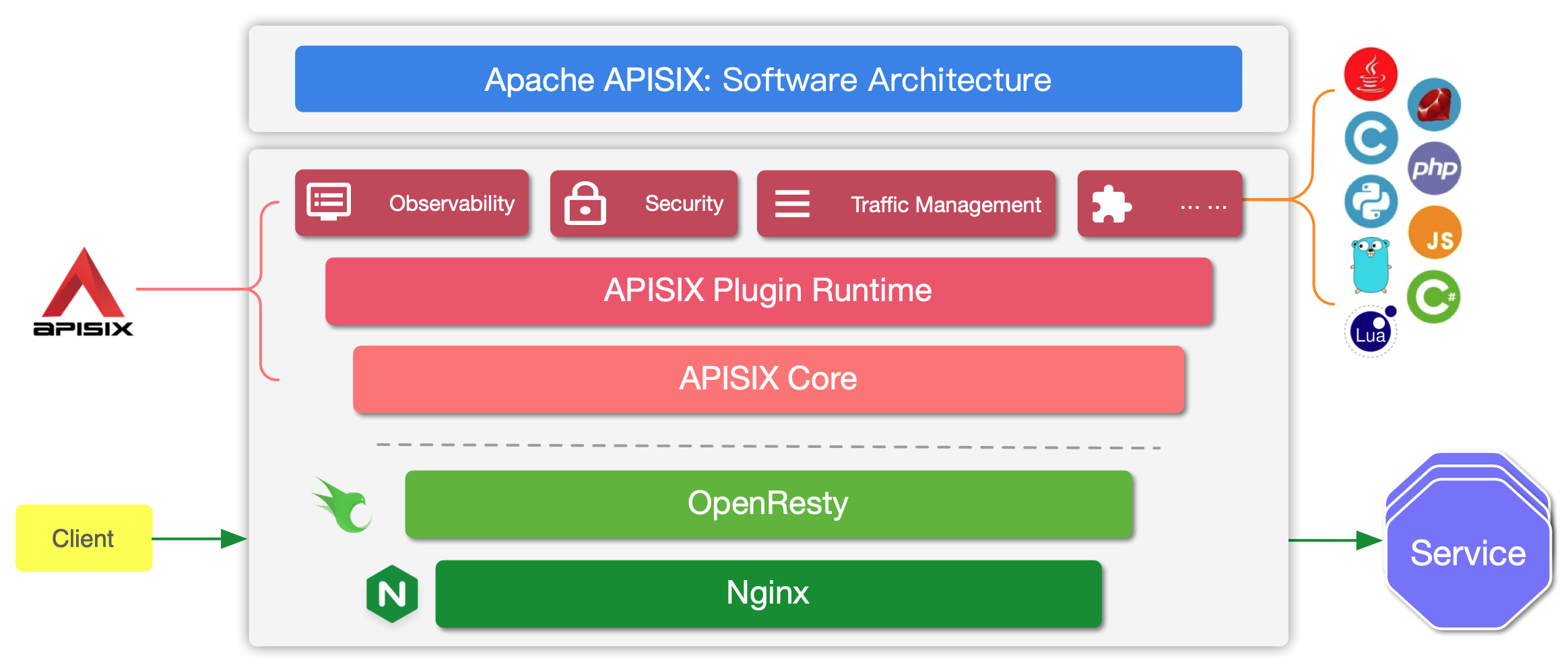
-
-下表是本文涉及到的 APISIX 的主要概念和组件:
-
-| 概念/组件 | 描述 |
-|-------------|--------------------------------------------------------------------------------------------------|
-| Route | 通过路由定义规则来匹配客户端请求,根据匹配结果加载并执行相应的插件,最后把请求转发给到指定的上游应用。 |
-| Upstream | 上游的作用是按照配置规则对服务节点进行负载均衡,它的地址信息可以直接配置到路由或服务上。 |
-| Admin API | 用户可以通过 Admin API 控制 APISIX 实例。 |
-
-## 前提条件
-
-在开始使用 APISIX 之前,请确保你已经安装以下应用:
-
-- [Docker](https://www.docker.com/) 和 [Docker Compose](https://docs.docker.com/compose/)。
-- [curl](https://curl.se/docs/manpage.html) 用于测试 API。你也可以使用 [Hoppscotch](https://hoppscotch.io/) 之类的工具。
-- 本文使用的上游服务是 [httpbin.org](https://httpbin.org),你可以使用它进行测试。这是一个返回服务,它将返回我们在请求中传递的参数。
-
-**请求内容:**
-
-请求 URL 由以下参数构成:
-
-- Protocol:即网络传输协议,在示例中,我们使用的是 `HTTP` 协议。
-- Port:即端口,示例中使用的 `80` 端口。
-- Host:即主机地址,示例中使用的是 `httpbin.org`。
-- Path:即路径,示例中的路径是 `/get`。
-- Query Parameters:即查询字符串,这里有两个字符串,分别是 `foo1` 和 `foo2`。
-
-运行以下命令,发送请求:
-
-```bash
-curl --location --request GET "http://httpbin.org/get?foo1=bar1&foo2=bar2"
-```
-
-**响应内容:**
-
-```json
-{
- "args": {
- "foo1": "bar1",
- "foo2": "bar2"
- },
- "headers": {
- "Accept": "*/*",
- "Host": "httpbin.org",
- "User-Agent": "curl/7.29.0",
- "X-Amzn-Trace-Id": "Root=1-6088fe84-24f39487166cce1f0e41efc9"
- },
- "origin": "58.152.81.42",
- "url": "http://httpbin.org/get?foo1=bar1&foo2=bar2"
-}
-```
-
-## 安装 APISIX
-
-APISIX 可以借助 quickstart 脚本快速安装并启动。
-
-```sh
-curl -sL https://run.api7.ai/apisix/quickstart | sh
-```
-
-该命令在本地安装并运行了基于 Docker 的 APISIX 和 etcd 容器,其中 APISIX 采用 etcd 保存和同步配置信息。APISIX 和 etcd 容器使用 [**host**](https://docs.docker.com/network/host/) 的 Docker 网络模式,因此可以从本地直接访问。
-
-如果一切顺利,将输出如下信息。
-
-```text
-✔ APISIX is ready!
-```
-
-:::note
-
-你也可以参考 [APISIX 安装指南](./installation-guide.md)了解不同的安装方法。
-
-:::
-
-:::info IMPORTANT
-
-请确保其他系统进程没有占用 **9080、9180、9443 和 2379** 端口。
-
-:::
-
-你可以通过 curl 来访问正在运行的 APISIX 实例。比如,你可以发送一个简单的 HTTP 请求来验证 APISIX 运行状态是否正常。
-
-```sh
-curl "http://127.0.0.1:9080" --head | grep Server
-```
-
-如果一切顺利,将输出如下信息。
-
-```text
-Server: APISIX/Version
-```
-
-`Version` 是指您已经安装的 APISIX 的版本。例如,`APISIX/3.3.0`。
-
-现在,你已经成功安装并运行了 APISIX!
-
-## 创建路由
-
-APISIX 提供了强大的 [Admin API](./admin-api.md) 和 [Dashboard](https://github.com/apache/apisix-dashboard) 供用户使用。在下述示例中,我们将使用 Admin API 创建一个 [Route](./terminology/route.md) 并与 [Upstream](./terminology/upstream.md) 绑定,当一个请求到达 APISIX 时,APISIX 会将请求转发到指定的上游服务中。
-
-以下示例代码中,我们将为路由配置匹配规则,以便 APISIX 可以将请求转发到对应的上游服务:
-
-```bash
-curl "http://127.0.0.1:9180/apisix/admin/routes/1" -X PUT -d '
-{
- "methods": ["GET"],
- "host": "example.com",
- "uri": "/anything/*",
- "upstream": {
- "type": "roundrobin",
- "nodes": {
- "httpbin.org:80": 1
- }
- }
-}'
-```
-
-该配置意味着,当请求满足下述的**所有**规则时,请求将被转发到上游服务(`httpbin.org:80`):
-
-- 请求的 HTTP 方法为 `GET`。
-- 请求头包含 `host` 字段,且它的值为 `example.com`。
-- 请求路径匹配 `/anything/*`,`*` 意味着任意的子路径,例如 `/anything/foo?arg=10`。
-
-当路由创建完成后,可以通过以下命令访问上游服务:
-
-```bash
-curl -i -X GET "http://127.0.0.1:9080/anything/foo?arg=10" -H "Host: example.com"
-```
-
-该请求将被 APISIX 转发到 `http://httpbin.org:80/anything/foo?arg=10`。
-
-## 使用上游服务创建路由
-
-你可以通过以下命令创建一个上游,并在路由中使用它,而不是直接将其配置在路由中:
-
-```bash
-curl "http://127.0.0.1:9180/apisix/admin/upstreams/1" -X PUT -d '
-{
- "type": "roundrobin",
- "nodes": {
- "httpbin.org:80": 1
- }
-}'
-```
-
-该上游配置与上一节配置在路由中的上游相同。同样使用了 `roundrobin` 作为负载均衡机制,并设置了 `httpbin.org:80` 为上游服务。为了将该上游绑定到路由,此处需要把 `upstream_id` 设置为 `"1"`。更多字段信息,请参考 [Admin API](./admin-api.md)。
-
-上游服务创建完成后,可以通过以下命令绑定到指定路由:
-
-```bash
-curl "http://127.0.0.1:9180/apisix/admin/routes/1" -X PUT -d '
-{
- "methods": ["GET"],
- "host": "example.com",
- "uri": "/anything/*",
- "upstream_id": "1"
-}'
-```
-
-我们已经创建了路由与上游服务,现在可以通过以下命令访问上游服务:
-
-```bash
-curl -i -X GET "http://127.0.0.1:9080/anything/foo?arg=10" -H "Host: example.com"
-```
-
-该请求将被 APISIX 转发到 `http://httpbin.org:80/anything/foo?arg=10`。
-
-## 使用 APISIX Dashboard
Review Comment:
We probably shouldn't remove this doc completely. The getting start docs built by API7 would not mention anything about dashboard.
--
This is an automated message from the Apache Git Service.
To respond to the message, please log on to GitHub and use the
URL above to go to the specific comment.
To unsubscribe, e-mail: notifications-unsubscribe@apisix.apache.org
For queries about this service, please contact Infrastructure at:
users@infra.apache.org
[GitHub] [apisix] zhangyuthink commented on a diff in pull request #10182: docs: translate getting-started
Posted by "zhangyuthink (via GitHub)" <gi...@apache.org>.
zhangyuthink commented on code in PR #10182:
URL: https://github.com/apache/apisix/pull/10182#discussion_r1324020594
##########
docs/zh/latest/getting-started/key-authentication.md:
##########
@@ -0,0 +1,183 @@
+---
+title: 密钥验证
+slug: /getting-started/key-authentication
+---
+
+<head>
+ <link rel="canonical" href="https://docs.api7.ai/apisix/getting-started/key-authentication" />
+</head>
+
+> 本教程由 [API7.ai](https://api7.ai/) 编写。
+
+API 网关主要作用是连接 API 消费者和提供者。出于安全考虑,在访问内部资源之前,应先对消费者进行身份验证和授权。
+
+
+
+APISIX 拥有灵活的插件扩展系统,目前有很多可用于用户身份验证和授权的插件。例如:
+
+- [Key Authentication](https://apisix.apache.org/docs/apisix/plugins/key-auth/)
Review Comment:
ok
--
This is an automated message from the Apache Git Service.
To respond to the message, please log on to GitHub and use the
URL above to go to the specific comment.
To unsubscribe, e-mail: notifications-unsubscribe@apisix.apache.org
For queries about this service, please contact Infrastructure at:
users@infra.apache.org
[GitHub] [apisix] kayx23 commented on a diff in pull request #10182: docs: translate getting-started
Posted by "kayx23 (via GitHub)" <gi...@apache.org>.
kayx23 commented on code in PR #10182:
URL: https://github.com/apache/apisix/pull/10182#discussion_r1322685576
##########
docs/zh/latest/getting-started.md:
##########
@@ -1,249 +0,0 @@
----
-title: 快速入门指南
-keywords:
- - APISIX
- - APISIX 入门指南
- - APISIX docker 安装教程
-description: 本文档将引导你了解如何开始使用 Apache APISIX。
----
-
-<!--
-#
-# Licensed to the Apache Software Foundation (ASF) under one or more
-# contributor license agreements. See the NOTICE file distributed with
-# this work for additional information regarding copyright ownership.
-# The ASF licenses this file to You under the Apache License, Version 2.0
-# (the "License"); you may not use this file except in compliance with
-# the License. You may obtain a copy of the License at
-#
-# http://www.apache.org/licenses/LICENSE-2.0
-#
-# Unless required by applicable law or agreed to in writing, software
-# distributed under the License is distributed on an "AS IS" BASIS,
-# WITHOUT WARRANTIES OR CONDITIONS OF ANY KIND, either express or implied.
-# See the License for the specific language governing permissions and
-# limitations under the License.
-#
--->
-
-import Tabs from '@theme/Tabs';
-import TabItem from '@theme/TabItem';
-
-本文将为你介绍 Apache APISIX 的概念、功能以及如何使用 APISIX。
-
-通过本文你可以了解到以下内容:
-
-- Apache APISIX 是什么?
-- APISIX 的架构及主要概念。
-- 如何使用 Docker 安装并运行 APISIX。
-- 如何使用 Admin API 创建第一个路由并配置上游。
-- 如何使用 APISIX Dashboard。
-- 如何寻求帮助。
-
-## Apache APISIX 是什么?
-
-Apache APISIX 是由 API7.ai(支流科技)捐赠给 Apache 软件基金会的云原生 API 网关,它兼具动态、实时、高性能等特点,提供了负载均衡、动态上游、灰度发布(金丝雀发布)、服务熔断、身份认证、可观测性等丰富的流量管理功能。我们可以使用 Apache APISIX 来处理传统的南北向流量,也可以处理服务间的东西向流量。同时,它也支持作为 [K8s Ingress Controller](https://github.com/apache/apisix-ingress-controller) 来使用。
-
-### 主要特性
-
-- 多平台支持:APISIX 提供了多平台解决方案,它不但支持裸机运行,也支持在 Kubernetes 中使用,还支持与 AWS Lambda、Azure Function、Lua 函数和 Apache OpenWhisk 等云服务集成。
-- 全动态能力:APISIX 支持热加载,这意味着你不需要重启服务就可以更新 APISIX 的配置。请访问[为什么 Apache APISIX 选择 Nginx + Lua 这个技术栈?](https://apisix.apache.org/zh/blog/2021/08/25/why-apache-apisix-chose-nginx-and-lua/)以了解实现原理。
-- 精细化路由:APISIX 支持使用 [NGINX 内置变量](https://nginx.org/en/docs/varindex.html)做为路由的匹配条件,你可以自定义匹配函数来过滤请求,匹配路由。
-- 运维友好:APISIX 支持与以下工具和平台集成:[HashiCorp Vault](./terminology/secret.md#使用-vault-管理密钥)、[Zipkin](./plugins/zipkin.md)、[Apache SkyWalking](./plugins/skywalking.md)、[Consul](../../en/latest/discovery/consul_kv.md)、[Nacos](./discovery/nacos.md)、[Eureka](./discovery.md)。通过 [APISIX Dashboard](/docs/dashboard/USER_GUIDE),运维人员可以通过友好且直观的 UI 配置 APISIX。
-- 多语言插件支持:APISIX 支持多种开发语言进行插件开发,开发人员可以选择擅长语言的 SDK 开发自定义插件。
-
-## 主要概念
-
-下图为 Apache APISIX 的架构:
-
-
-
-下表是本文涉及到的 APISIX 的主要概念和组件:
-
-| 概念/组件 | 描述 |
-|-------------|--------------------------------------------------------------------------------------------------|
-| Route | 通过路由定义规则来匹配客户端请求,根据匹配结果加载并执行相应的插件,最后把请求转发给到指定的上游应用。 |
-| Upstream | 上游的作用是按照配置规则对服务节点进行负载均衡,它的地址信息可以直接配置到路由或服务上。 |
-| Admin API | 用户可以通过 Admin API 控制 APISIX 实例。 |
-
-## 前提条件
-
-在开始使用 APISIX 之前,请确保你已经安装以下应用:
-
-- [Docker](https://www.docker.com/) 和 [Docker Compose](https://docs.docker.com/compose/)。
-- [curl](https://curl.se/docs/manpage.html) 用于测试 API。你也可以使用 [Hoppscotch](https://hoppscotch.io/) 之类的工具。
-- 本文使用的上游服务是 [httpbin.org](https://httpbin.org),你可以使用它进行测试。这是一个返回服务,它将返回我们在请求中传递的参数。
-
-**请求内容:**
-
-请求 URL 由以下参数构成:
-
-- Protocol:即网络传输协议,在示例中,我们使用的是 `HTTP` 协议。
-- Port:即端口,示例中使用的 `80` 端口。
-- Host:即主机地址,示例中使用的是 `httpbin.org`。
-- Path:即路径,示例中的路径是 `/get`。
-- Query Parameters:即查询字符串,这里有两个字符串,分别是 `foo1` 和 `foo2`。
-
-运行以下命令,发送请求:
-
-```bash
-curl --location --request GET "http://httpbin.org/get?foo1=bar1&foo2=bar2"
-```
-
-**响应内容:**
-
-```json
-{
- "args": {
- "foo1": "bar1",
- "foo2": "bar2"
- },
- "headers": {
- "Accept": "*/*",
- "Host": "httpbin.org",
- "User-Agent": "curl/7.29.0",
- "X-Amzn-Trace-Id": "Root=1-6088fe84-24f39487166cce1f0e41efc9"
- },
- "origin": "58.152.81.42",
- "url": "http://httpbin.org/get?foo1=bar1&foo2=bar2"
-}
-```
-
-## 安装 APISIX
-
-APISIX 可以借助 quickstart 脚本快速安装并启动。
-
-```sh
-curl -sL https://run.api7.ai/apisix/quickstart | sh
-```
-
-该命令在本地安装并运行了基于 Docker 的 APISIX 和 etcd 容器,其中 APISIX 采用 etcd 保存和同步配置信息。APISIX 和 etcd 容器使用 [**host**](https://docs.docker.com/network/host/) 的 Docker 网络模式,因此可以从本地直接访问。
-
-如果一切顺利,将输出如下信息。
-
-```text
-✔ APISIX is ready!
-```
-
-:::note
-
-你也可以参考 [APISIX 安装指南](./installation-guide.md)了解不同的安装方法。
-
-:::
-
-:::info IMPORTANT
-
-请确保其他系统进程没有占用 **9080、9180、9443 和 2379** 端口。
-
-:::
-
-你可以通过 curl 来访问正在运行的 APISIX 实例。比如,你可以发送一个简单的 HTTP 请求来验证 APISIX 运行状态是否正常。
-
-```sh
-curl "http://127.0.0.1:9080" --head | grep Server
-```
-
-如果一切顺利,将输出如下信息。
-
-```text
-Server: APISIX/Version
-```
-
-`Version` 是指您已经安装的 APISIX 的版本。例如,`APISIX/3.3.0`。
-
-现在,你已经成功安装并运行了 APISIX!
-
-## 创建路由
-
-APISIX 提供了强大的 [Admin API](./admin-api.md) 和 [Dashboard](https://github.com/apache/apisix-dashboard) 供用户使用。在下述示例中,我们将使用 Admin API 创建一个 [Route](./terminology/route.md) 并与 [Upstream](./terminology/upstream.md) 绑定,当一个请求到达 APISIX 时,APISIX 会将请求转发到指定的上游服务中。
-
-以下示例代码中,我们将为路由配置匹配规则,以便 APISIX 可以将请求转发到对应的上游服务:
-
-```bash
-curl "http://127.0.0.1:9180/apisix/admin/routes/1" -X PUT -d '
-{
- "methods": ["GET"],
- "host": "example.com",
- "uri": "/anything/*",
- "upstream": {
- "type": "roundrobin",
- "nodes": {
- "httpbin.org:80": 1
- }
- }
-}'
-```
-
-该配置意味着,当请求满足下述的**所有**规则时,请求将被转发到上游服务(`httpbin.org:80`):
-
-- 请求的 HTTP 方法为 `GET`。
-- 请求头包含 `host` 字段,且它的值为 `example.com`。
-- 请求路径匹配 `/anything/*`,`*` 意味着任意的子路径,例如 `/anything/foo?arg=10`。
-
-当路由创建完成后,可以通过以下命令访问上游服务:
-
-```bash
-curl -i -X GET "http://127.0.0.1:9080/anything/foo?arg=10" -H "Host: example.com"
-```
-
-该请求将被 APISIX 转发到 `http://httpbin.org:80/anything/foo?arg=10`。
-
-## 使用上游服务创建路由
-
-你可以通过以下命令创建一个上游,并在路由中使用它,而不是直接将其配置在路由中:
-
-```bash
-curl "http://127.0.0.1:9180/apisix/admin/upstreams/1" -X PUT -d '
-{
- "type": "roundrobin",
- "nodes": {
- "httpbin.org:80": 1
- }
-}'
-```
-
-该上游配置与上一节配置在路由中的上游相同。同样使用了 `roundrobin` 作为负载均衡机制,并设置了 `httpbin.org:80` 为上游服务。为了将该上游绑定到路由,此处需要把 `upstream_id` 设置为 `"1"`。更多字段信息,请参考 [Admin API](./admin-api.md)。
-
-上游服务创建完成后,可以通过以下命令绑定到指定路由:
-
-```bash
-curl "http://127.0.0.1:9180/apisix/admin/routes/1" -X PUT -d '
-{
- "methods": ["GET"],
- "host": "example.com",
- "uri": "/anything/*",
- "upstream_id": "1"
-}'
-```
-
-我们已经创建了路由与上游服务,现在可以通过以下命令访问上游服务:
-
-```bash
-curl -i -X GET "http://127.0.0.1:9080/anything/foo?arg=10" -H "Host: example.com"
-```
-
-该请求将被 APISIX 转发到 `http://httpbin.org:80/anything/foo?arg=10`。
-
-## 使用 APISIX Dashboard
Review Comment:
Not sure if we should remove this doc completely. The getting start docs built by API7 would not mention anything about dashboard.
--
This is an automated message from the Apache Git Service.
To respond to the message, please log on to GitHub and use the
URL above to go to the specific comment.
To unsubscribe, e-mail: notifications-unsubscribe@apisix.apache.org
For queries about this service, please contact Infrastructure at:
users@infra.apache.org
[GitHub] [apisix] kayx23 commented on a diff in pull request #10182: docs: translate getting-started
Posted by "kayx23 (via GitHub)" <gi...@apache.org>.
kayx23 commented on code in PR #10182:
URL: https://github.com/apache/apisix/pull/10182#discussion_r1323835404


##########
docs/zh/latest/getting-started/load-balancing.md:
##########
@@ -0,0 +1,100 @@
+---
+title: 负载均衡
+slug: /getting-started/load-balancing
+---
+
+<head>
+  <link rel="canonical" href="https://docs.api7.ai/apisix/getting-started/load-balancing" />
+</head>
+
+> 本教程由 [API7.ai](https://api7.ai/) 编写。
+
+负载均衡管理客户端和服务端之间的流量。它决定由哪个服务来处理特定的请求,从而提高性能、可扩展性和可靠性。在设计需要处理大量流量的系统时,负载均衡是一个关键的考虑因素。
+
+Apache APISIX 支持加权负载均衡算法,传入的流量按照预定顺序轮流分配给一组服务器的其中一个。
+
+在本教程中,你将创建一个具有两个上游服务的路由,并且启用负载均衡来测试在两个服务之间的切换情况。
+
+## 前置条件
+
+1. 参考[入门指南](./README.md)完成 APISIX 的安装。
+2. 了解 APISIX 中[路由及上游](./configure-routes.md#route-是什么)的概念。
+
+## 启用负载均衡
+
+创建一个具有两个上游服务的路由,访问 `/headers` 将被转发到 [httpbin.org](https://httpbin.org/headers) 和 [mock.api7.ai](https://mock.api7.ai/headers) 这两个上游服务,并且会返回请求头。
+
+```shell
+curl -i "http://127.0.0.1:9180/apisix/admin/routes" -X PUT -d '
+{
+  "id": "getting-started-headers",
+  "uri": "/headers",
+  "upstream" : {
+    "type": "roundrobin",
+    "nodes": {
+      "httpbin.org:443": 1,
+      "mock.api7.ai:443": 1
+    },
+    "pass_host": "node",
+    "scheme": "https"
+  }
+}'
+```
+
+如果路由创建成功,你将会收到返回 `HTTP/1.1 201 OK`。
+
+:::描述
+
+1. 将 `pass_host` 字段设置为 `node`,将传递请求头给上游。
+2. 将 `scheme` 字段设置为 `https`,向上游发送请求时将启用 TLS。
+
+:::
+
+## 验证
+
+这两个服务返回不同的数据。
+The two services respond with different data.

Review Comment:
   ```suggestion
   ```


--
This is an automated message from the Apache Git Service.
To respond to the message, please log on to GitHub and use the
URL above to go to the specific comment.

To unsubscribe, e-mail: notifications-unsubscribe@apisix.apache.org

For queries about this service, please contact Infrastructure at:
users@infra.apache.org
[GitHub] [apisix] zhangyuthink commented on a diff in pull request #10182: docs: translate getting-started
Posted by "zhangyuthink (via GitHub)" <gi...@apache.org>.
zhangyuthink commented on code in PR #10182:
URL: https://github.com/apache/apisix/pull/10182#discussion_r1323802019
##########
docs/zh/latest/getting-started.md:
##########
@@ -1,249 +0,0 @@
----
-title: 快速入门指南
-keywords:
- - APISIX
- - APISIX 入门指南
- - APISIX docker 安装教程
-description: 本文档将引导你了解如何开始使用 Apache APISIX。
----
-
-<!--
-#
-# Licensed to the Apache Software Foundation (ASF) under one or more
-# contributor license agreements. See the NOTICE file distributed with
-# this work for additional information regarding copyright ownership.
-# The ASF licenses this file to You under the Apache License, Version 2.0
-# (the "License"); you may not use this file except in compliance with
-# the License. You may obtain a copy of the License at
-#
-# http://www.apache.org/licenses/LICENSE-2.0
-#
-# Unless required by applicable law or agreed to in writing, software
-# distributed under the License is distributed on an "AS IS" BASIS,
-# WITHOUT WARRANTIES OR CONDITIONS OF ANY KIND, either express or implied.
-# See the License for the specific language governing permissions and
-# limitations under the License.
-#
--->
-
-import Tabs from '@theme/Tabs';
-import TabItem from '@theme/TabItem';
-
-本文将为你介绍 Apache APISIX 的概念、功能以及如何使用 APISIX。
-
-通过本文你可以了解到以下内容:
-
-- Apache APISIX 是什么?
-- APISIX 的架构及主要概念。
-- 如何使用 Docker 安装并运行 APISIX。
-- 如何使用 Admin API 创建第一个路由并配置上游。
-- 如何使用 APISIX Dashboard。
-- 如何寻求帮助。
-
-## Apache APISIX 是什么?
-
-Apache APISIX 是由 API7.ai(支流科技)捐赠给 Apache 软件基金会的云原生 API 网关,它兼具动态、实时、高性能等特点,提供了负载均衡、动态上游、灰度发布(金丝雀发布)、服务熔断、身份认证、可观测性等丰富的流量管理功能。我们可以使用 Apache APISIX 来处理传统的南北向流量,也可以处理服务间的东西向流量。同时,它也支持作为 [K8s Ingress Controller](https://github.com/apache/apisix-ingress-controller) 来使用。
-
-### 主要特性
-
-- 多平台支持:APISIX 提供了多平台解决方案,它不但支持裸机运行,也支持在 Kubernetes 中使用,还支持与 AWS Lambda、Azure Function、Lua 函数和 Apache OpenWhisk 等云服务集成。
-- 全动态能力:APISIX 支持热加载,这意味着你不需要重启服务就可以更新 APISIX 的配置。请访问[为什么 Apache APISIX 选择 Nginx + Lua 这个技术栈?](https://apisix.apache.org/zh/blog/2021/08/25/why-apache-apisix-chose-nginx-and-lua/)以了解实现原理。
-- 精细化路由:APISIX 支持使用 [NGINX 内置变量](https://nginx.org/en/docs/varindex.html)做为路由的匹配条件,你可以自定义匹配函数来过滤请求,匹配路由。
-- 运维友好:APISIX 支持与以下工具和平台集成:[HashiCorp Vault](./terminology/secret.md#使用-vault-管理密钥)、[Zipkin](./plugins/zipkin.md)、[Apache SkyWalking](./plugins/skywalking.md)、[Consul](../../en/latest/discovery/consul_kv.md)、[Nacos](./discovery/nacos.md)、[Eureka](./discovery.md)。通过 [APISIX Dashboard](/docs/dashboard/USER_GUIDE),运维人员可以通过友好且直观的 UI 配置 APISIX。
-- 多语言插件支持:APISIX 支持多种开发语言进行插件开发,开发人员可以选择擅长语言的 SDK 开发自定义插件。
-
-## 主要概念
-
-下图为 Apache APISIX 的架构:
-
-
-
-下表是本文涉及到的 APISIX 的主要概念和组件:
-
-| 概念/组件 | 描述 |
-|-------------|--------------------------------------------------------------------------------------------------|
-| Route | 通过路由定义规则来匹配客户端请求,根据匹配结果加载并执行相应的插件,最后把请求转发给到指定的上游应用。 |
-| Upstream | 上游的作用是按照配置规则对服务节点进行负载均衡,它的地址信息可以直接配置到路由或服务上。 |
-| Admin API | 用户可以通过 Admin API 控制 APISIX 实例。 |
-
-## 前提条件
-
-在开始使用 APISIX 之前,请确保你已经安装以下应用:
-
-- [Docker](https://www.docker.com/) 和 [Docker Compose](https://docs.docker.com/compose/)。
-- [curl](https://curl.se/docs/manpage.html) 用于测试 API。你也可以使用 [Hoppscotch](https://hoppscotch.io/) 之类的工具。
-- 本文使用的上游服务是 [httpbin.org](https://httpbin.org),你可以使用它进行测试。这是一个返回服务,它将返回我们在请求中传递的参数。
-
-**请求内容:**
-
-请求 URL 由以下参数构成:
-
-- Protocol:即网络传输协议,在示例中,我们使用的是 `HTTP` 协议。
-- Port:即端口,示例中使用的 `80` 端口。
-- Host:即主机地址,示例中使用的是 `httpbin.org`。
-- Path:即路径,示例中的路径是 `/get`。
-- Query Parameters:即查询字符串,这里有两个字符串,分别是 `foo1` 和 `foo2`。
-
-运行以下命令,发送请求:
-
-```bash
-curl --location --request GET "http://httpbin.org/get?foo1=bar1&foo2=bar2"
-```
-
-**响应内容:**
-
-```json
-{
- "args": {
- "foo1": "bar1",
- "foo2": "bar2"
- },
- "headers": {
- "Accept": "*/*",
- "Host": "httpbin.org",
- "User-Agent": "curl/7.29.0",
- "X-Amzn-Trace-Id": "Root=1-6088fe84-24f39487166cce1f0e41efc9"
- },
- "origin": "58.152.81.42",
- "url": "http://httpbin.org/get?foo1=bar1&foo2=bar2"
-}
-```
-
-## 安装 APISIX
-
-APISIX 可以借助 quickstart 脚本快速安装并启动。
-
-```sh
-curl -sL https://run.api7.ai/apisix/quickstart | sh
-```
-
-该命令在本地安装并运行了基于 Docker 的 APISIX 和 etcd 容器,其中 APISIX 采用 etcd 保存和同步配置信息。APISIX 和 etcd 容器使用 [**host**](https://docs.docker.com/network/host/) 的 Docker 网络模式,因此可以从本地直接访问。
-
-如果一切顺利,将输出如下信息。
-
-```text
-✔ APISIX is ready!
-```
-
-:::note
-
-你也可以参考 [APISIX 安装指南](./installation-guide.md)了解不同的安装方法。
-
-:::
-
-:::info IMPORTANT
-
-请确保其他系统进程没有占用 **9080、9180、9443 和 2379** 端口。
-
-:::
-
-你可以通过 curl 来访问正在运行的 APISIX 实例。比如,你可以发送一个简单的 HTTP 请求来验证 APISIX 运行状态是否正常。
-
-```sh
-curl "http://127.0.0.1:9080" --head | grep Server
-```
-
-如果一切顺利,将输出如下信息。
-
-```text
-Server: APISIX/Version
-```
-
-`Version` 是指您已经安装的 APISIX 的版本。例如,`APISIX/3.3.0`。
-
-现在,你已经成功安装并运行了 APISIX!
-
-## 创建路由
-
-APISIX 提供了强大的 [Admin API](./admin-api.md) 和 [Dashboard](https://github.com/apache/apisix-dashboard) 供用户使用。在下述示例中,我们将使用 Admin API 创建一个 [Route](./terminology/route.md) 并与 [Upstream](./terminology/upstream.md) 绑定,当一个请求到达 APISIX 时,APISIX 会将请求转发到指定的上游服务中。
-
-以下示例代码中,我们将为路由配置匹配规则,以便 APISIX 可以将请求转发到对应的上游服务:
-
-```bash
-curl "http://127.0.0.1:9180/apisix/admin/routes/1" -X PUT -d '
-{
- "methods": ["GET"],
- "host": "example.com",
- "uri": "/anything/*",
- "upstream": {
- "type": "roundrobin",
- "nodes": {
- "httpbin.org:80": 1
- }
- }
-}'
-```
-
-该配置意味着,当请求满足下述的**所有**规则时,请求将被转发到上游服务(`httpbin.org:80`):
-
-- 请求的 HTTP 方法为 `GET`。
-- 请求头包含 `host` 字段,且它的值为 `example.com`。
-- 请求路径匹配 `/anything/*`,`*` 意味着任意的子路径,例如 `/anything/foo?arg=10`。
-
-当路由创建完成后,可以通过以下命令访问上游服务:
-
-```bash
-curl -i -X GET "http://127.0.0.1:9080/anything/foo?arg=10" -H "Host: example.com"
-```
-
-该请求将被 APISIX 转发到 `http://httpbin.org:80/anything/foo?arg=10`。
-
-## 使用上游服务创建路由
-
-你可以通过以下命令创建一个上游,并在路由中使用它,而不是直接将其配置在路由中:
-
-```bash
-curl "http://127.0.0.1:9180/apisix/admin/upstreams/1" -X PUT -d '
-{
- "type": "roundrobin",
- "nodes": {
- "httpbin.org:80": 1
- }
-}'
-```
-
-该上游配置与上一节配置在路由中的上游相同。同样使用了 `roundrobin` 作为负载均衡机制,并设置了 `httpbin.org:80` 为上游服务。为了将该上游绑定到路由,此处需要把 `upstream_id` 设置为 `"1"`。更多字段信息,请参考 [Admin API](./admin-api.md)。
-
-上游服务创建完成后,可以通过以下命令绑定到指定路由:
-
-```bash
-curl "http://127.0.0.1:9180/apisix/admin/routes/1" -X PUT -d '
-{
- "methods": ["GET"],
- "host": "example.com",
- "uri": "/anything/*",
- "upstream_id": "1"
-}'
-```
-
-我们已经创建了路由与上游服务,现在可以通过以下命令访问上游服务:
-
-```bash
-curl -i -X GET "http://127.0.0.1:9080/anything/foo?arg=10" -H "Host: example.com"
-```
-
-该请求将被 APISIX 转发到 `http://httpbin.org:80/anything/foo?arg=10`。
-
-## 使用 APISIX Dashboard
Review Comment:
Can we add apisix-dashboard.md in /getting-started?
--
This is an automated message from the Apache Git Service.
To respond to the message, please log on to GitHub and use the
URL above to go to the specific comment.
To unsubscribe, e-mail: notifications-unsubscribe@apisix.apache.org
For queries about this service, please contact Infrastructure at:
users@infra.apache.org
[GitHub] [apisix] kayx23 commented on a diff in pull request #10182: docs: translate getting-started
Posted by "kayx23 (via GitHub)" <gi...@apache.org>.
kayx23 commented on code in PR #10182:
URL: https://github.com/apache/apisix/pull/10182#discussion_r1322672493


##########
docs/zh/latest/getting-started/configure-routes.md:
##########
@@ -0,0 +1,73 @@
+---
+title: 配置路由
+slug: /getting-started/configure-routes
+---
+
+<head>
+  <link rel="canonical" href="https://docs.api7.ai/apisix/getting-started/configure-routes" />
+</head>
+
+> 本教程由 [API7.ai](https://api7.ai/) 编写。
+
+Apache APISIX 使用 _routes_ 来提供灵活的网关管理功能,在一个请求中,_routes_ 包含了访问路径和上游目标等信息。
+
+本教程将引导你创建一个 route 并验证它,你可以参考以下步骤:
+
+1. 创建一个指向 [httpbin.org](http://httpbin.org)的 _upstream_。
+2. 使用 _cURL_ 发送一个请求,了解 APISIX 的代理和转发请求机制。
+
+## Route 是什么
+
+Route(也称之为路由)是访问上游目标的路径,在 [Apache APISIX](https://api7.ai/apisix) 中,Route 首先通过预定的规则来匹配客户端请求,然后加载和执行相应的插件,最后将请求转发至特定的 Upstream。
+
+在 APISIX 中,一个最简单的 Route 仅由匹配路径和 Upstream 地址两个信息组成。
+
+## Upstream 是什么
+
+Upstream(也称之为上游)是一组具备相同功能的节点集合,它是对虚拟主机的抽象。Upstream 可以通过预先配置的规则对多个服务节点进行负载均衡。
+
+## 前置条件
+
+1. 参考[入门指南](./README.md)完成 APISIX 的安装。
+
+## 创建路由
+
+你可以创建一个路由,将客户端的请求转发至 [httpbin.org](http://httpbin.org)(这个网站能测试 HTTP 请求和响应的各种信息)。
+
+通过下面的命令,你将创建一个路由,把请求`http://127.0.0.1:9080/ip` 转发至 [httpbin.org/ip](http://httpbin.org/ip):
+
+[//]: <TODO: Add the link to the authorization of Admin API>

Review Comment:
   Please remove all these `[//]: <TODO: xxx>`. It was copied over initially have doesn't have much to do with apache/apisix docs.


--
This is an automated message from the Apache Git Service.
To respond to the message, please log on to GitHub and use the
URL above to go to the specific comment.

To unsubscribe, e-mail: notifications-unsubscribe@apisix.apache.org

For queries about this service, please contact Infrastructure at:
users@infra.apache.org
[GitHub] [apisix] kayx23 commented on a diff in pull request #10182: docs: translate getting-started
Posted by "kayx23 (via GitHub)" <gi...@apache.org>.
kayx23 commented on code in PR #10182:
URL: https://github.com/apache/apisix/pull/10182#discussion_r1322707221
##########
docs/zh/latest/getting-started/key-authentication.md:
##########
@@ -0,0 +1,183 @@
+---
+title: 密钥验证
+slug: /getting-started/key-authentication
+---
+
+<head>
+ <link rel="canonical" href="https://docs.api7.ai/apisix/getting-started/key-authentication" />
+</head>
+
+> 本教程由 [API7.ai](https://api7.ai/) 编写。
+
+API 网关主要作用是连接 API 消费者和提供者。出于安全考虑,在访问内部资源之前,应先对消费者进行身份验证和授权。
+
+
+
+APISIX 拥有灵活的插件扩展系统,目前有很多可用于用户身份验证和授权的插件。例如:
+
+- [Key Authentication](https://apisix.apache.org/docs/apisix/plugins/key-auth/)
+- [Basic Authentication](https://apisix.apache.org/docs/apisix/plugins/basic-auth/)
+- [JSON Web Token (JWT) Authentication](https://apisix.apache.org/docs/apisix/plugins/jwt-auth/)
+- [Keycloak](https://apisix.apache.org/docs/apisix/plugins/authz-keycloak/)
+- [Casdoor](https://apisix.apache.org/docs/apisix/plugins/authz-casdoor/)
+- [Wolf RBAC](https://apisix.apache.org/docs/apisix/plugins/wolf-rbac/)
+- [OpenID Connect](https://apisix.apache.org/docs/apisix/plugins/openid-connect/)
+- [Central Authentication Service (CAS)](https://apisix.apache.org/docs/apisix/plugins/cas-auth/)
+- [HMAC](https://apisix.apache.org/docs/apisix/plugins/hmac-auth/)
+- [Casbin](https://apisix.apache.org/docs/apisix/plugins/authz-casbin/)
+- [LDAP](https://apisix.apache.org/docs/apisix/plugins/ldap-auth/)
+- [Open Policy Agent (OPA)](https://apisix.apache.org/docs/apisix/plugins/opa/)
+- [Forward Authentication](https://apisix.apache.org/docs/apisix/plugins/forward-auth/)
+
+本教程中,你将创建一个带有 _密钥验证_ 插件的 _消费者_,并学习如何启用和停用身份验证插件。
+
+## Consumer 是什么
+
+Consumer(也称之为消费者)是指使用 API 的应用或开发人员。
+
+在 APISIX 中,消费者需要一个全局唯一的 _名称_,并从上面的列表中选择一个身份验证 _插件_。
+
+## Key Authentication 是什么
+
+Key Authentication(也称之为密钥验证)是一个相对比较简单但是应用广泛的身份验证方法,它的设计思路如下:
+
+1. 管理员为路由添加一个身份验证密钥(API 密钥)。
+2. API 消费者在发送请求时,在查询字符串或者请求头中添加密钥。
+
+## 启用 Key Authentication
+
+### 前置条件
+
+1. 参考[快入门指南](./README.md)完成 APISIX 的安装。
+2. 完成[配置路由](./configure-routes.md#route-是什么)。
+
+### 创建消费者
+
+创建一个名为 `tom` 的消费者,并启用 `key-auth` 插件,密钥设置为 `secret-key`。所有携带密钥 `secret-key` 的请求都会被识别为消费者 `tom`。
+
+:::caution 警告
Review Comment:
```suggestion
:::caution
```
--
This is an automated message from the Apache Git Service.
To respond to the message, please log on to GitHub and use the
URL above to go to the specific comment.
To unsubscribe, e-mail: notifications-unsubscribe@apisix.apache.org
For queries about this service, please contact Infrastructure at:
users@infra.apache.org
[GitHub] [apisix] xuruidong commented on a diff in pull request #10182: docs: translate getting-started
Posted by "xuruidong (via GitHub)" <gi...@apache.org>.
xuruidong commented on code in PR #10182:
URL: https://github.com/apache/apisix/pull/10182#discussion_r1320730113
##########
docs/zh/latest/getting-started/key-authentication.md:
##########
@@ -0,0 +1,183 @@
+---
+title: 密钥验证
+slug: /getting-started/key-authentication
+---
+
+<head>
+ <link rel="canonical" href="https://docs.api7.ai/apisix/getting-started/key-authentication" />
+</head>
+
+> 本教程由 [API7.ai](https://api7.ai/) 编写。
+
+API 网关主要作用是连接 API 消费者和提供者。出于安全考虑,在访问内部资源之前,应先对消费者进行身份验证和授权。
+
+
+
+APISIX 拥有灵活的插件扩展系统,目前有很多可用于用户身份验证和授权的插件。例如:
+
+- [Key Authentication](https://apisix.apache.org/docs/apisix/plugins/key-auth/)
+- [Basic Authentication](https://apisix.apache.org/docs/apisix/plugins/basic-auth/)
+- [JSON Web Token (JWT) Authentication](https://apisix.apache.org/docs/apisix/plugins/jwt-auth/)
+- [Keycloak](https://apisix.apache.org/docs/apisix/plugins/authz-keycloak/)
+- [Casdoor](https://apisix.apache.org/docs/apisix/plugins/authz-casdoor/)
+- [Wolf RBAC](https://apisix.apache.org/docs/apisix/plugins/wolf-rbac/)
+- [OpenID Connect](https://apisix.apache.org/docs/apisix/plugins/openid-connect/)
+- [Central Authentication Service (CAS)](https://apisix.apache.org/docs/apisix/plugins/cas-auth/)
+- [HMAC](https://apisix.apache.org/docs/apisix/plugins/hmac-auth/)
+- [Casbin](https://apisix.apache.org/docs/apisix/plugins/authz-casbin/)
+- [LDAP](https://apisix.apache.org/docs/apisix/plugins/ldap-auth/)
+- [Open Policy Agent (OPA)](https://apisix.apache.org/docs/apisix/plugins/opa/)
+- [Forward Authentication](https://apisix.apache.org/docs/apisix/plugins/forward-auth/)
+
+本教程中,你将创建一个带有 _密钥验证_ 插件的 _消费者_,并学习如何启用和停用身份验证插件。
+
+## Consumer 是什么
+
+Consumer(也称之为消费者)是指使用 API 的应用或开发人员。
+
+在 APISIX 中,消费者需要一个全局唯一的 _名称_,并从上面的列表中选择一个身份验证 _插件_。
+
+## Key Authentication 是什么
+
+Key Authentication(也称之为密钥验证)是一个相对比较简单但是应用广泛的身份验证方法,它的设计思路如下:
+
+1. 管理员为路由添加一个身份验证密钥(API 密钥)。
+2. API 消费者在发送请求时,在查询字符串或者请求头中添加密钥。
+
+## 启用 Key Authentication
+
+### 前置条件
+
+1. 参考[快入门指南](./README.md)完成 APISIX 的安装。
+2. 完成[配置路由](./configure-routes.md#route-是什么)。
+
+### 创建消费者
+
+创建一个名为 `tom` 的消费者,并启用 `key-auth` 插件,密钥设置为 `secret-key`。所有携带密钥 `secret-key` 的请求都会被识别为消费者 `tom`。
+
+:::警告
Review Comment:
ditto,
refer to https://docusaurus.io/docs/next/markdown-features/admonitions
##########
docs/zh/latest/getting-started/README.md:
##########
@@ -0,0 +1,71 @@
+---
+title: 入门指南
+description: 本教程使用脚本在本地环境快速安装 Apache APISIX,并且通过管理 API 来验证是否安装成功。
+---
+
+<head>
+ <link rel="canonical" href="https://docs.api7.ai/apisix/getting-started/" />
+</head>
+
+> 本教程由 [API7.ai](https://api7.ai/) 编写。
+
+Apache APISIX 是 Apache 软件基金会下的[顶级项目](https://projects.apache.org/project.html?apisix),由 API7.ai 开发并捐赠。它是一个具有动态、实时、高性能等特点的云原生 API 网关。
+
+你可以使用 APISIX 网关作为所有业务的流量入口,它提供了动态路由、动态上游、动态证书、A/B 测试、灰度发布(金丝雀发布)、蓝绿部署、限速、防攻击、收集指标、监控报警、可观测、服务治理等功能。
+
+本教程使用脚本在本地环境快速安装 Apache APISIX,并且通过管理 API 来验证是否安装成功。
+
+## 前置条件
+
+快速启动脚本需要以下条件:
+
+* 已安装 [Docker](https://docs.docker.com/get-docker/),用于部署 **etcd** 和 **APISIX**。
+* 已安装 [curl](https://curl.se/),用于验证 APISIX 是否安装成功。
+
+## 安装 APISIX
+
+:::注意
Review Comment:
`:::caution` or `:::caution 注意`
##########
docs/zh/latest/getting-started/README.md:
##########
@@ -0,0 +1,71 @@
+---
+title: 入门指南
+description: 本教程使用脚本在本地环境快速安装 Apache APISIX,并且通过管理 API 来验证是否安装成功。
+---
+
+<head>
+ <link rel="canonical" href="https://docs.api7.ai/apisix/getting-started/" />
+</head>
+
+> 本教程由 [API7.ai](https://api7.ai/) 编写。
+
+Apache APISIX 是 Apache 软件基金会下的[顶级项目](https://projects.apache.org/project.html?apisix),由 API7.ai 开发并捐赠。它是一个具有动态、实时、高性能等特点的云原生 API 网关。
+
+你可以使用 APISIX 网关作为所有业务的流量入口,它提供了动态路由、动态上游、动态证书、A/B 测试、灰度发布(金丝雀发布)、蓝绿部署、限速、防攻击、收集指标、监控报警、可观测、服务治理等功能。
+
+本教程使用脚本在本地环境快速安装 Apache APISIX,并且通过管理 API 来验证是否安装成功。
+
+## 前置条件
+
+快速启动脚本需要以下条件:
+
+* 已安装 [Docker](https://docs.docker.com/get-docker/),用于部署 **etcd** 和 **APISIX**。
+* 已安装 [curl](https://curl.se/),用于验证 APISIX 是否安装成功。
+
+## 安装 APISIX
+
+:::注意
Review Comment:
`:::caution` or `:::caution 注意`
##########
docs/zh/latest/getting-started/key-authentication.md:
##########
@@ -0,0 +1,183 @@
+---
+title: 密钥验证
+slug: /getting-started/key-authentication
+---
+
+<head>
+ <link rel="canonical" href="https://docs.api7.ai/apisix/getting-started/key-authentication" />
+</head>
+
+> 本教程由 [API7.ai](https://api7.ai/) 编写。
+
+API 网关主要作用是连接 API 消费者和提供者。出于安全考虑,在访问内部资源之前,应先对消费者进行身份验证和授权。
+
+
+
+APISIX 拥有灵活的插件扩展系统,目前有很多可用于用户身份验证和授权的插件。例如:
+
+- [Key Authentication](https://apisix.apache.org/docs/apisix/plugins/key-auth/)
+- [Basic Authentication](https://apisix.apache.org/docs/apisix/plugins/basic-auth/)
+- [JSON Web Token (JWT) Authentication](https://apisix.apache.org/docs/apisix/plugins/jwt-auth/)
+- [Keycloak](https://apisix.apache.org/docs/apisix/plugins/authz-keycloak/)
+- [Casdoor](https://apisix.apache.org/docs/apisix/plugins/authz-casdoor/)
+- [Wolf RBAC](https://apisix.apache.org/docs/apisix/plugins/wolf-rbac/)
+- [OpenID Connect](https://apisix.apache.org/docs/apisix/plugins/openid-connect/)
+- [Central Authentication Service (CAS)](https://apisix.apache.org/docs/apisix/plugins/cas-auth/)
+- [HMAC](https://apisix.apache.org/docs/apisix/plugins/hmac-auth/)
+- [Casbin](https://apisix.apache.org/docs/apisix/plugins/authz-casbin/)
+- [LDAP](https://apisix.apache.org/docs/apisix/plugins/ldap-auth/)
+- [Open Policy Agent (OPA)](https://apisix.apache.org/docs/apisix/plugins/opa/)
+- [Forward Authentication](https://apisix.apache.org/docs/apisix/plugins/forward-auth/)
+
+本教程中,你将创建一个带有 _密钥验证_ 插件的 _消费者_,并学习如何启用和停用身份验证插件。
+
+## Consumer 是什么
+
+Consumer(也称之为消费者)是指使用 API 的应用或开发人员。
+
+在 APISIX 中,消费者需要一个全局唯一的 _名称_,并从上面的列表中选择一个身份验证 _插件_。
+
+## Key Authentication 是什么
+
+Key Authentication(也称之为密钥验证)是一个相对比较简单但是应用广泛的身份验证方法,它的设计思路如下:
+
+1. 管理员为路由添加一个身份验证密钥(API 密钥)。
+2. API 消费者在发送请求时,在查询字符串或者请求头中添加密钥。
+
+## 启用 Key Authentication
+
+### 前置条件
+
+1. 参考[快入门指南](./README.md)完成 APISIX 的安装。
+2. 完成[配置路由](./configure-routes.md#route-是什么)。
+
+### 创建消费者
+
+创建一个名为 `tom` 的消费者,并启用 `key-auth` 插件,密钥设置为 `secret-key`。所有携带密钥 `secret-key` 的请求都会被识别为消费者 `tom`。
+
+:::警告
Review Comment:
ditto,
refer to https://docusaurus.io/docs/next/markdown-features/admonitions
--
This is an automated message from the Apache Git Service.
To respond to the message, please log on to GitHub and use the
URL above to go to the specific comment.
To unsubscribe, e-mail: notifications-unsubscribe@apisix.apache.org
For queries about this service, please contact Infrastructure at:
users@infra.apache.org
[GitHub] [apisix] kayx23 commented on a diff in pull request #10182: docs: translate getting-started
Posted by "kayx23 (via GitHub)" <gi...@apache.org>.
kayx23 commented on code in PR #10182:
URL: https://github.com/apache/apisix/pull/10182#discussion_r1323833216
##########
docs/zh/latest/getting-started.md:
##########
@@ -1,249 +0,0 @@
----
-title: 快速入门指南
-keywords:
- - APISIX
- - APISIX 入门指南
- - APISIX docker 安装教程
-description: 本文档将引导你了解如何开始使用 Apache APISIX。
----
-
-<!--
-#
-# Licensed to the Apache Software Foundation (ASF) under one or more
-# contributor license agreements. See the NOTICE file distributed with
-# this work for additional information regarding copyright ownership.
-# The ASF licenses this file to You under the Apache License, Version 2.0
-# (the "License"); you may not use this file except in compliance with
-# the License. You may obtain a copy of the License at
-#
-# http://www.apache.org/licenses/LICENSE-2.0
-#
-# Unless required by applicable law or agreed to in writing, software
-# distributed under the License is distributed on an "AS IS" BASIS,
-# WITHOUT WARRANTIES OR CONDITIONS OF ANY KIND, either express or implied.
-# See the License for the specific language governing permissions and
-# limitations under the License.
-#
--->
-
-import Tabs from '@theme/Tabs';
-import TabItem from '@theme/TabItem';
-
-本文将为你介绍 Apache APISIX 的概念、功能以及如何使用 APISIX。
-
-通过本文你可以了解到以下内容:
-
-- Apache APISIX 是什么?
-- APISIX 的架构及主要概念。
-- 如何使用 Docker 安装并运行 APISIX。
-- 如何使用 Admin API 创建第一个路由并配置上游。
-- 如何使用 APISIX Dashboard。
-- 如何寻求帮助。
-
-## Apache APISIX 是什么?
-
-Apache APISIX 是由 API7.ai(支流科技)捐赠给 Apache 软件基金会的云原生 API 网关,它兼具动态、实时、高性能等特点,提供了负载均衡、动态上游、灰度发布(金丝雀发布)、服务熔断、身份认证、可观测性等丰富的流量管理功能。我们可以使用 Apache APISIX 来处理传统的南北向流量,也可以处理服务间的东西向流量。同时,它也支持作为 [K8s Ingress Controller](https://github.com/apache/apisix-ingress-controller) 来使用。
-
-### 主要特性
-
-- 多平台支持:APISIX 提供了多平台解决方案,它不但支持裸机运行,也支持在 Kubernetes 中使用,还支持与 AWS Lambda、Azure Function、Lua 函数和 Apache OpenWhisk 等云服务集成。
-- 全动态能力:APISIX 支持热加载,这意味着你不需要重启服务就可以更新 APISIX 的配置。请访问[为什么 Apache APISIX 选择 Nginx + Lua 这个技术栈?](https://apisix.apache.org/zh/blog/2021/08/25/why-apache-apisix-chose-nginx-and-lua/)以了解实现原理。
-- 精细化路由:APISIX 支持使用 [NGINX 内置变量](https://nginx.org/en/docs/varindex.html)做为路由的匹配条件,你可以自定义匹配函数来过滤请求,匹配路由。
-- 运维友好:APISIX 支持与以下工具和平台集成:[HashiCorp Vault](./terminology/secret.md#使用-vault-管理密钥)、[Zipkin](./plugins/zipkin.md)、[Apache SkyWalking](./plugins/skywalking.md)、[Consul](../../en/latest/discovery/consul_kv.md)、[Nacos](./discovery/nacos.md)、[Eureka](./discovery.md)。通过 [APISIX Dashboard](/docs/dashboard/USER_GUIDE),运维人员可以通过友好且直观的 UI 配置 APISIX。
-- 多语言插件支持:APISIX 支持多种开发语言进行插件开发,开发人员可以选择擅长语言的 SDK 开发自定义插件。
-
-## 主要概念
-
-下图为 Apache APISIX 的架构:
-
-
-
-下表是本文涉及到的 APISIX 的主要概念和组件:
-
-| 概念/组件 | 描述 |
-|-------------|--------------------------------------------------------------------------------------------------|
-| Route | 通过路由定义规则来匹配客户端请求,根据匹配结果加载并执行相应的插件,最后把请求转发给到指定的上游应用。 |
-| Upstream | 上游的作用是按照配置规则对服务节点进行负载均衡,它的地址信息可以直接配置到路由或服务上。 |
-| Admin API | 用户可以通过 Admin API 控制 APISIX 实例。 |
-
-## 前提条件
-
-在开始使用 APISIX 之前,请确保你已经安装以下应用:
-
-- [Docker](https://www.docker.com/) 和 [Docker Compose](https://docs.docker.com/compose/)。
-- [curl](https://curl.se/docs/manpage.html) 用于测试 API。你也可以使用 [Hoppscotch](https://hoppscotch.io/) 之类的工具。
-- 本文使用的上游服务是 [httpbin.org](https://httpbin.org),你可以使用它进行测试。这是一个返回服务,它将返回我们在请求中传递的参数。
-
-**请求内容:**
-
-请求 URL 由以下参数构成:
-
-- Protocol:即网络传输协议,在示例中,我们使用的是 `HTTP` 协议。
-- Port:即端口,示例中使用的 `80` 端口。
-- Host:即主机地址,示例中使用的是 `httpbin.org`。
-- Path:即路径,示例中的路径是 `/get`。
-- Query Parameters:即查询字符串,这里有两个字符串,分别是 `foo1` 和 `foo2`。
-
-运行以下命令,发送请求:
-
-```bash
-curl --location --request GET "http://httpbin.org/get?foo1=bar1&foo2=bar2"
-```
-
-**响应内容:**
-
-```json
-{
- "args": {
- "foo1": "bar1",
- "foo2": "bar2"
- },
- "headers": {
- "Accept": "*/*",
- "Host": "httpbin.org",
- "User-Agent": "curl/7.29.0",
- "X-Amzn-Trace-Id": "Root=1-6088fe84-24f39487166cce1f0e41efc9"
- },
- "origin": "58.152.81.42",
- "url": "http://httpbin.org/get?foo1=bar1&foo2=bar2"
-}
-```
-
-## 安装 APISIX
-
-APISIX 可以借助 quickstart 脚本快速安装并启动。
-
-```sh
-curl -sL https://run.api7.ai/apisix/quickstart | sh
-```
-
-该命令在本地安装并运行了基于 Docker 的 APISIX 和 etcd 容器,其中 APISIX 采用 etcd 保存和同步配置信息。APISIX 和 etcd 容器使用 [**host**](https://docs.docker.com/network/host/) 的 Docker 网络模式,因此可以从本地直接访问。
-
-如果一切顺利,将输出如下信息。
-
-```text
-✔ APISIX is ready!
-```
-
-:::note
-
-你也可以参考 [APISIX 安装指南](./installation-guide.md)了解不同的安装方法。
-
-:::
-
-:::info IMPORTANT
-
-请确保其他系统进程没有占用 **9080、9180、9443 和 2379** 端口。
-
-:::
-
-你可以通过 curl 来访问正在运行的 APISIX 实例。比如,你可以发送一个简单的 HTTP 请求来验证 APISIX 运行状态是否正常。
-
-```sh
-curl "http://127.0.0.1:9080" --head | grep Server
-```
-
-如果一切顺利,将输出如下信息。
-
-```text
-Server: APISIX/Version
-```
-
-`Version` 是指您已经安装的 APISIX 的版本。例如,`APISIX/3.3.0`。
-
-现在,你已经成功安装并运行了 APISIX!
-
-## 创建路由
-
-APISIX 提供了强大的 [Admin API](./admin-api.md) 和 [Dashboard](https://github.com/apache/apisix-dashboard) 供用户使用。在下述示例中,我们将使用 Admin API 创建一个 [Route](./terminology/route.md) 并与 [Upstream](./terminology/upstream.md) 绑定,当一个请求到达 APISIX 时,APISIX 会将请求转发到指定的上游服务中。
-
-以下示例代码中,我们将为路由配置匹配规则,以便 APISIX 可以将请求转发到对应的上游服务:
-
-```bash
-curl "http://127.0.0.1:9180/apisix/admin/routes/1" -X PUT -d '
-{
- "methods": ["GET"],
- "host": "example.com",
- "uri": "/anything/*",
- "upstream": {
- "type": "roundrobin",
- "nodes": {
- "httpbin.org:80": 1
- }
- }
-}'
-```
-
-该配置意味着,当请求满足下述的**所有**规则时,请求将被转发到上游服务(`httpbin.org:80`):
-
-- 请求的 HTTP 方法为 `GET`。
-- 请求头包含 `host` 字段,且它的值为 `example.com`。
-- 请求路径匹配 `/anything/*`,`*` 意味着任意的子路径,例如 `/anything/foo?arg=10`。
-
-当路由创建完成后,可以通过以下命令访问上游服务:
-
-```bash
-curl -i -X GET "http://127.0.0.1:9080/anything/foo?arg=10" -H "Host: example.com"
-```
-
-该请求将被 APISIX 转发到 `http://httpbin.org:80/anything/foo?arg=10`。
-
-## 使用上游服务创建路由
-
-你可以通过以下命令创建一个上游,并在路由中使用它,而不是直接将其配置在路由中:
-
-```bash
-curl "http://127.0.0.1:9180/apisix/admin/upstreams/1" -X PUT -d '
-{
- "type": "roundrobin",
- "nodes": {
- "httpbin.org:80": 1
- }
-}'
-```
-
-该上游配置与上一节配置在路由中的上游相同。同样使用了 `roundrobin` 作为负载均衡机制,并设置了 `httpbin.org:80` 为上游服务。为了将该上游绑定到路由,此处需要把 `upstream_id` 设置为 `"1"`。更多字段信息,请参考 [Admin API](./admin-api.md)。
-
-上游服务创建完成后,可以通过以下命令绑定到指定路由:
-
-```bash
-curl "http://127.0.0.1:9180/apisix/admin/routes/1" -X PUT -d '
-{
- "methods": ["GET"],
- "host": "example.com",
- "uri": "/anything/*",
- "upstream_id": "1"
-}'
-```
-
-我们已经创建了路由与上游服务,现在可以通过以下命令访问上游服务:
-
-```bash
-curl -i -X GET "http://127.0.0.1:9080/anything/foo?arg=10" -H "Host: example.com"
-```
-
-该请求将被 APISIX 转发到 `http://httpbin.org:80/anything/foo?arg=10`。
-
-## 使用 APISIX Dashboard
Review Comment:
ok I just noticed the page in English has far gone; and APISIX Dashboard has its own doc. No additional question about removing this page.
--
This is an automated message from the Apache Git Service.
To respond to the message, please log on to GitHub and use the
URL above to go to the specific comment.
To unsubscribe, e-mail: notifications-unsubscribe@apisix.apache.org
For queries about this service, please contact Infrastructure at:
users@infra.apache.org
[GitHub] [apisix] kayx23 commented on a diff in pull request #10182: docs: translate getting-started
Posted by "kayx23 (via GitHub)" <gi...@apache.org>.
kayx23 commented on code in PR #10182:
URL: https://github.com/apache/apisix/pull/10182#discussion_r1323834374
##########
docs/zh/latest/getting-started/key-authentication.md:
##########
@@ -0,0 +1,183 @@
+---
+title: 密钥验证
+slug: /getting-started/key-authentication
+---
+
+<head>
+ <link rel="canonical" href="https://docs.api7.ai/apisix/getting-started/key-authentication" />
+</head>
+
+> 本教程由 [API7.ai](https://api7.ai/) 编写。
+
+API 网关主要作用是连接 API 消费者和提供者。出于安全考虑,在访问内部资源之前,应先对消费者进行身份验证和授权。
+
+
+
+APISIX 拥有灵活的插件扩展系统,目前有很多可用于用户身份验证和授权的插件。例如:
+
Review Comment:
Could you update the following links to their corresponding Chinese pages?
##########
docs/zh/latest/getting-started/key-authentication.md:
##########
@@ -0,0 +1,183 @@
+---
+title: 密钥验证
+slug: /getting-started/key-authentication
+---
+
+<head>
+ <link rel="canonical" href="https://docs.api7.ai/apisix/getting-started/key-authentication" />
+</head>
+
+> 本教程由 [API7.ai](https://api7.ai/) 编写。
+
+API 网关主要作用是连接 API 消费者和提供者。出于安全考虑,在访问内部资源之前,应先对消费者进行身份验证和授权。
+
+
+
+APISIX 拥有灵活的插件扩展系统,目前有很多可用于用户身份验证和授权的插件。例如:
+
+- [Key Authentication](https://apisix.apache.org/docs/apisix/plugins/key-auth/)
Review Comment:
Could you update the following links to their corresponding Chinese pages?
--
This is an automated message from the Apache Git Service.
To respond to the message, please log on to GitHub and use the
URL above to go to the specific comment.
To unsubscribe, e-mail: notifications-unsubscribe@apisix.apache.org
For queries about this service, please contact Infrastructure at:
users@infra.apache.org
[GitHub] [apisix] kayx23 commented on a diff in pull request #10182: docs: translate getting-started
Posted by "kayx23 (via GitHub)" <gi...@apache.org>.
kayx23 commented on code in PR #10182:
URL: https://github.com/apache/apisix/pull/10182#discussion_r1323834374
##########
docs/zh/latest/getting-started/key-authentication.md:
##########
@@ -0,0 +1,183 @@
+---
+title: 密钥验证
+slug: /getting-started/key-authentication
+---
+
+<head>
+ <link rel="canonical" href="https://docs.api7.ai/apisix/getting-started/key-authentication" />
+</head>
+
+> 本教程由 [API7.ai](https://api7.ai/) 编写。
+
+API 网关主要作用是连接 API 消费者和提供者。出于安全考虑,在访问内部资源之前,应先对消费者进行身份验证和授权。
+
+
+
+APISIX 拥有灵活的插件扩展系统,目前有很多可用于用户身份验证和授权的插件。例如:
+
Review Comment:
Could you update the following links to their corresponding Chinese pages?
--
This is an automated message from the Apache Git Service.
To respond to the message, please log on to GitHub and use the
URL above to go to the specific comment.
To unsubscribe, e-mail: notifications-unsubscribe@apisix.apache.org
For queries about this service, please contact Infrastructure at:
users@infra.apache.org