You are viewing a plain text version of this content. The canonical link for it is here.
Posted to notifications@skywalking.apache.org by wa...@apache.org on 2024/08/05 06:55:34 UTC
(skywalking-banyandb) branch doc created (now e8a712b2)
This is an automated email from the ASF dual-hosted git repository.

wankai pushed a change to branch doc
in repository https://gitbox.apache.org/repos/asf/skywalking-banyandb.git


      at e8a712b2 Add bydbctl and web-ui interacting guide.

This branch includes the following new commits:

     new e8a712b2 Add bydbctl and web-ui interacting guide.

The 1 revisions listed above as "new" are entirely new to this
repository and will be described in separate emails.  The revisions
listed as "add" were already present in the repository and have only
been added to this reference.
(skywalking-banyandb) 01/01: Add bydbctl and web-ui interacting guide.
Posted by wa...@apache.org.
This is an automated email from the ASF dual-hosted git repository.
wankai pushed a commit to branch doc
in repository https://gitbox.apache.org/repos/asf/skywalking-banyandb.git
commit e8a712b20792a5698ac6a111a50e5e188fd2eeb8
Author: wankai123 <wa...@foxmail.com>
AuthorDate: Mon Aug 5 14:55:18 2024 +0800
Add bydbctl and web-ui interacting guide.
---
CHANGES.md | 2 +
docs/interacting/bydbctl/bydbctl.md | 20 ++
docs/interacting/bydbctl/property.md | 173 ++++++++++++++++
docs/interacting/bydbctl/query/measure.md | 221 +++++++++++++++++++++
docs/interacting/bydbctl/query/stream.md | 203 +++++++++++++++++++
docs/interacting/bydbctl/schema/group.md | 90 +++++++++
.../bydbctl/schema/index-rule-binding.md | 137 +++++++++++++
docs/interacting/bydbctl/schema/index-rule.md | 108 ++++++++++
docs/interacting/bydbctl/schema/measure.md | 123 ++++++++++++
docs/interacting/bydbctl/schema/stream.md | 112 +++++++++++
docs/interacting/java-client.md | 3 +
docs/interacting/web-ui.md | 35 ++++
docs/menu.yml | 88 ++++----
13 files changed, 1270 insertions(+), 45 deletions(-)
diff --git a/CHANGES.md b/CHANGES.md
index ba07da6f..1ba48b3d 100644
--- a/CHANGES.md
+++ b/CHANGES.md
@@ -40,6 +40,8 @@ Release Notes.
- Introduce new doc menu structure.
- Add installation on Docker and Kubernetes.
- Add quick-start guide.
+- Add web-ui interacting guide.
+- Add bydbctl interacting guide.
## 0.6.1
diff --git a/docs/interacting/bydbctl/bydbctl.md b/docs/interacting/bydbctl/bydbctl.md
new file mode 100644
index 00000000..90c0f466
--- /dev/null
+++ b/docs/interacting/bydbctl/bydbctl.md
@@ -0,0 +1,20 @@
+# bydbctl
+`bydbctl` is the command line tool for interacting with BanyanDB. It is a powerful tool that can be used to create, update, read, and delete schemas. It can also be used to query data stored in streams, measures, and properties.
+
+These are several ways to install:
+
+* Get binaries from [download](https://skywalking.apache.org/downloads/).
+* Build from [sources](https://github.com/apache/skywalking-banyandb/tree/main/bydbctl) to get latest features.
+
+The config file named `.bydbctl.yaml` will be created in `$HOME` folder after the first CRUD command is applied.
+```shell
+> more ~/.bydbctl.yaml
+addr: http://127.0.0.1:17913
+group: ""
+```
+
+`bydbctl` leverages HTTP endpoints to retrieve data instead of gRPC.
+
+## HTTP client
+
+Users could select any HTTP client to access the HTTP based endpoints. The default address is `localhost:17913/api`
\ No newline at end of file
diff --git a/docs/interacting/bydbctl/property.md b/docs/interacting/bydbctl/property.md
new file mode 100644
index 00000000..8d1eb38f
--- /dev/null
+++ b/docs/interacting/bydbctl/property.md
@@ -0,0 +1,173 @@
+# CRUD Property
+
+CRUD operations create/update, read and delete property.
+
+Property stores the user defined data.
+
+[bydbctl](bydbctl.md) is the command line tool in examples.
+
+## Apply (Create/Update) operation
+
+Apply creates a property if it's absent, or updates an existed one based on a strategy. If the property does not currently exist, create operation will create the property.
+
+### Examples of applying
+
+A property belongs to a unique group. We should create such a group before creating a property.
+
+The group's catalog should be empty.
+
+```shell
+bydbctl group create -f - <<EOF
+metadata:
+ name: sw
+EOF
+```
+
+Then, below command will create a new property:
+
+```shell
+bydbctl property apply -f - <<EOF
+metadata:
+ container:
+ group: sw
+ name: temp_data
+ id: General-Service
+tags:
+- key: name
+ value:
+ str:
+ value: "hello"
+- key: state
+ value:
+ str:
+ value: "succeed"
+EOF
+```
+
+The operation supports updating partial tags.
+
+```shell
+bydbctl property apply -f - <<EOF
+metadata:
+ container:
+ group: sw
+ name: temp_data
+ id: General-Service
+tags:
+- key: state
+ value:
+ str:
+ value: "failed"
+EOF
+```
+
+TTL is supported in the operation.
+
+```shell
+bydbctl property apply -f - <<EOF
+metadata:
+ container:
+ group: sw
+ name: temp_data
+ id: General-Service
+tags:
+- key: state
+ value:
+ str:
+ value: "failed"
+ttl: "1h"
+EOF
+```
+
+## Get operation
+
+Get operation gets a property.
+
+### Examples of getting
+
+```shell
+bydbctl property get -g sw -n temp_data --id General-Service
+```
+
+The operation could filter data by tags.
+
+```shell
+bydbctl property get -g sw -n temp_data --id General-Service --tags state
+```
+
+## Delete operation
+
+Delete operation delete a property.
+
+### Examples of deleting
+
+```shell
+bydbctl property delete -g sw -n temp_data --id General-Service
+```
+
+The delete operation could remove specific tags instead of the whole property.
+
+```shell
+bydbctl property delete -g sw -n temp_data --id General-Service --tags state
+```
+
+## List operation
+
+List operation lists all properties in a group.
+
+### Examples of listing in a group
+
+```shell
+bydbctl property list -g sw
+```
+
+List operation lists all properties in a group with a name.
+
+### Examples of listing in a group with a name
+
+```shell
+bydbctl property list -g sw -n temp_data
+```
+
+## TTL field in a property
+
+TTL field in a property is used to set the time to live of the property. The property will be deleted automatically after the TTL.
+
+This functionality is supported by the lease mechanism. The readonly lease_id field is used to identify the lease of the property.
+
+### Examples of setting TTL
+
+```shell
+bydbctl property apply -f - <<EOF
+metadata:
+ container:
+ group: sw
+ name: temp_data
+ id: General-Service
+tags:
+- key: state
+ value:
+ str:
+ value: "failed"
+ttl: "1h"
+EOF
+```
+
+The lease_id is returned in the response.
+You can use get operation to get the property with the lease_id as well.
+
+```shell
+bydbctl property get -g sw -n temp_data --id General-Service
+```
+
+The lease_id is used to keep the property alive. You can use keepalive operation to keep the property alive.
+When the keepalive operation is called, the property's TTL will be reset to the original value.
+
+```shell
+bydbctl property keepalive --lease_id 1
+```
+
+
+## API Reference
+
+[PropertyService v1](../../api-reference.md#propertyservice)
diff --git a/docs/interacting/bydbctl/query/measure.md b/docs/interacting/bydbctl/query/measure.md
new file mode 100644
index 00000000..7160f992
--- /dev/null
+++ b/docs/interacting/bydbctl/query/measure.md
@@ -0,0 +1,221 @@
+# Query [Measures](../../../concept/data-model.md#measures)
+
+Query operation queries the data in a measure.
+
+[bydbctl](../bydbctl.md) is the command line tool in examples.
+
+The input contains two parts:
+
+* Request: a YAML-based text which is defined by the [API](#api-reference)
+* Time Range: YAML and CLI's flags both support it.
+
+## Time Range
+
+The query specification contains `time_range` field. The request should set absolute times to it.
+`bydbctl` also provides `start` and `end` flags to support passing absolute and relative times.
+
+"start" and "end" specify a time range during which the query is performed, they can be an absolute time like ["2006-01-02T15:04:05Z07:00"](https://www.rfc-editor.org/rfc/rfc3339),
+or relative time (to the current time) like "-30m", or "30m".
+They are both optional and their default values follow the rules below:
+
+* when "start" and "end" are both absent, "start = now - 30 minutes" and "end = now",
+namely past 30 minutes;
+* when "start" is absent and "end" is present, this command calculates "start" (minus 30 units),
+e.g. "end = 2022-11-09T12:34:00Z", so "start = end - 30 minutes = 2022-11-09T12:04:00Z";
+* when "start" is present and "end" is absent, this command calculates "end" (plus 30 units),
+e.g. "start = 2022-11-09T12:04:00Z", so "end = start + 30 minutes = 2022-11-09T12:34:00Z".
+
+## Understand the schema you are querying
+Before querying the data, you need to know the measure name and the tag families and fields in the measure. You can use the `bydbctl measure get` command to get the measure schema.
+If you want to get the schema of a measure named `service_cpm_minute` in the group `measure-minute`, you can use the below command:
+```shell
+bydbctl measure get -g measure-minute -n service_cpm_minute
+```
+```shell
+measure:
+ entity:
+ tagNames:
+ - entity_id
+ fields:
+ - compressionMethod: COMPRESSION_METHOD_ZSTD
+ encodingMethod: ENCODING_METHOD_GORILLA
+ fieldType: FIELD_TYPE_INT
+ name: value
+ - compressionMethod: COMPRESSION_METHOD_ZSTD
+ encodingMethod: ENCODING_METHOD_GORILLA
+ fieldType: FIELD_TYPE_INT
+ name: total
+ interval: 1m
+ metadata:
+ createRevision: "206"
+ group: measure-minute
+ id: 0
+ modRevision: "206"
+ name: service_cpm_minute
+ tagFamilies:
+ - name: storage-only
+ tags:
+ - indexedOnly: false
+ name: entity_id
+ type: TAG_TYPE_STRING
+ updatedAt: null
+```
+
+## Examples
+The following examples use above schema to show how to query data in a measure and cover some common use cases:
+
+### Query between specific time range
+To retrieve a series of data points between `2022-10-15T22:32:48Z` and `2022-10-15T23:32:48Z` could use the below command. These data points contain tags: `id` and `entity_id` that belong to a family `default`. They also choose fields: `total` and `value`.
+
+```shell
+bydbctl measure query -f - <<EOF
+name: "service_cpm_minute"
+groups: ["measure-minute"]
+tagProjection:
+ tagFamilies:
+ - name: "storage-only"
+ tags: ["entity_id"]
+fieldProjection:
+ names: ["total", "value"]
+timeRange:
+ begin: 2022-10-15T22:32:48Z
+ end: 2022-10-15T23:32:48Z
+EOF
+```
+
+### Query using relative time duration
+The below command could query data in the last 30 minutes using relative time duration :
+
+```shell
+bydbctl measure query --start -30m -f - <<EOF
+name: "service_cpm_minute"
+groups: ["measure-minute"]
+tagProjection:
+ tagFamilies:
+ - name: "storage-only"
+ tags: ["entity_id"]
+fieldProjection:
+ names: ["total", "value"]
+EOF
+```
+
+### Query with filter
+The below command could query data with a filter where the entity_id is `bW9ja19iX3NlcnZpY2U=.1`:
+
+```shell
+bydbctl measure query -f - <<EOF
+name: "service_cpm_minute"
+groups: ["measure-minute"]
+tagProjection:
+ tagFamilies:
+ - name: "storage-only"
+ tags: ["entity_id"]
+fieldProjection:
+ names: ["total", "value"]
+criteria:
+ condition:
+ name: "entity_id"
+ op: "BINARY_OP_EQ"
+ value:
+ str:
+ value: "bW9ja19iX3NlcnZpY2U=.1"
+EOF
+```
+
+### Query ordered by time-series
+The below command could query data order by time-series in descending [order](../../../api-reference.md#sort) :
+
+```shell
+bydbctl measure query -f - <<EOF
+name: "service_cpm_minute"
+groups: ["measure-minute"]
+tagProjection:
+ tagFamilies:
+ - name: "storage-only"
+ tags: ["entity_id"]
+fieldProjection:
+ names: ["total", "value"]
+orderBy:
+ sort: "SORT_DESC"
+EOF
+```
+
+### Query limit result
+The below command could query ordered data and return the first two results:
+
+```shell
+bydbctl measure query -f - <<EOF
+name: "service_cpm_minute"
+groups: ["measure-minute"]
+tagProjection:
+ tagFamilies:
+ - name: "storage-only"
+ tags: ["entity_id"]
+fieldProjection:
+ names: ["total", "value"]
+orderBy:
+ sort: "SORT_DESC"
+limit: 2
+offset: 0
+EOF
+```
+
+### Aggregation Query Max
+The below command could query data with aggregate by entity_id and get `MAX` value:
+
+```shell
+bydbctl measure query -f - <<EOF
+name: "service_cpm_minute"
+groups: ["measure-minute"]
+tagProjection:
+ tagFamilies:
+ - name: "storage-only"
+ tags: ["entity_id"]
+fieldProjection:
+ names: ["total", "value"]
+groupBy:
+ tagProjection:
+ tagFamilies:
+ - name: "storage-only"
+ tags: ["entity_id"]
+ fieldName: "value"
+agg:
+ function: "AGGREGATION_FUNCTION_MAX"
+ fieldName: "value"
+EOF
+```
+
+### Aggregation Query TopN
+The below command could query data with aggregate by entity_id and get `AVG` top 3 value:
+
+```shell
+bydbctl measure query -f - <<EOF
+name: "service_cpm_minute"
+groups: ["measure-minute"]
+tagProjection:
+ tagFamilies:
+ - name: "storage-only"
+ tags: ["entity_id"]
+fieldProjection:
+ names: ["value"]
+groupBy:
+ tagProjection:
+ tagFamilies:
+ - name: "storage-only"
+ tags: ["entity_id"]
+ fieldName: "value"
+agg:
+ function: "AGGREGATION_FUNCTION_MEAN"
+ fieldName: "value"
+top:
+ number: 3
+ fieldName: "value"
+ fieldValueSort: "SORT_DESC"
+EOF
+```
+
+### More examples can be found in [here](https://github.com/apache/skywalking-banyandb/tree/main/test/cases/measure/data/input).
+
+## API Reference
+
+[MeasureService v1](../../../api-reference.md#measureservice)
diff --git a/docs/interacting/bydbctl/query/stream.md b/docs/interacting/bydbctl/query/stream.md
new file mode 100644
index 00000000..a02f231b
--- /dev/null
+++ b/docs/interacting/bydbctl/query/stream.md
@@ -0,0 +1,203 @@
+# Query [Streams](../../../concept/data-model.md#streams)
+
+Query operation queries the data in a stream.
+
+[bydbctl](../bydbctl.md) is the command line tool in examples.
+
+The input contains two parts:
+
+* Request: a YAML-based text which is defined by the [API](#api-reference)
+* Time Range: YAML and CLI's flags both support it.
+
+## Time Range
+
+The query specification contains `time_range` field. The request should set absolute times to it.
+`bydbctl` also provides `start` and `end` flags to support passing absolute and relative times.
+
+"start" and "end" specify a time range during which the query is performed, they can be an absolute time like ["2006-01-02T15:04:05Z07:00"](https://www.rfc-editor.org/rfc/rfc3339),
+or relative time (to the current time) like "-30m", or "30m".
+They are both optional and their default values follow the rules below:
+
+* when "start" and "end" are both absent, "start = now - 30 minutes" and "end = now",
+ namely past 30 minutes;
+* when "start" is absent and "end" is present, this command calculates "start" (minus 30 units),
+ e.g. "end = 2022-11-09T12:34:00Z", so "start = end - 30 minutes = 2022-11-09T12:04:00Z";
+* when "start" is present and "end" is absent, this command calculates "end" (plus 30 units),
+ e.g. "start = 2022-11-09T12:04:00Z", so "end = start + 30 minutes = 2022-11-09T12:34:00Z".
+
+
+## Understand the schema you are querying
+Before querying the data, you need to know the stream name and the tag families and fields in the stream. You can use the `bydbctl stream get` command to get the stream schema.
+for example, if you want to get the schema of a stream named `segment` in the group `stream-segment`, you can use the below command:
+```shell
+bydbctl stream get -g stream-segment -n segment
+```
+```shell
+stream:
+ entity:
+ tagNames:
+ - service_id
+ - service_instance_id
+ - is_error
+ metadata:
+ createRevision: "100"
+ group: stream-segment
+ id: 0
+ modRevision: "100"
+ name: segment
+ tagFamilies:
+ - name: storage-only
+ tags:
+ - indexedOnly: false
+ name: service_id
+ type: TAG_TYPE_STRING
+ - indexedOnly: false
+ name: service_instance_id
+ type: TAG_TYPE_STRING
+ - indexedOnly: false
+ name: start_time
+ type: TAG_TYPE_INT
+ - indexedOnly: false
+ name: is_error
+ type: TAG_TYPE_INT
+ - indexedOnly: false
+ name: data_binary
+ type: TAG_TYPE_DATA_BINARY
+ - name: searchable
+ tags:
+ - indexedOnly: false
+ name: segment_id
+ type: TAG_TYPE_STRING
+ - indexedOnly: false
+ name: trace_id
+ type: TAG_TYPE_STRING
+ - indexedOnly: false
+ name: endpoint_id
+ type: TAG_TYPE_STRING
+ - indexedOnly: false
+ name: latency
+ type: TAG_TYPE_INT
+ - indexedOnly: true
+ name: tags
+ type: TAG_TYPE_STRING_ARRAY
+ updatedAt: null
+```
+
+## Examples
+The following examples use above schema to show how to query data in a stream and cover some common use cases:
+
+### Query between specific time range
+To retrieve elements in a stream named `sw` between `2022-10-15T22:32:48Z` and `2022-10-15T23:32:48Z` could use the below command. These elements also choose a tag `trace_id` which lives in a family named `searchable`.
+
+```shell
+bydbctl stream query -f - <<EOF
+groups: ["stream-segment"]
+name: "segment"
+projection:
+ tagFamilies:
+ - name: "searchable"
+ tags: ["trace_id"]
+timeRange:
+ begin: 2022-10-15T22:32:48+08:00
+ end: 2022-10-15T23:32:48+08:00
+EOF
+```
+
+### Query using relative time duration
+The below command could query data in the last 30 minutes using relative time duration :
+
+```shell
+bydbctl stream query --start -30m -f - <<EOF
+groups: ["stream-segment"]
+name: "segment"
+projection:
+ tagFamilies:
+ - name: "searchable"
+ tags: ["trace_id"]
+EOF
+```
+
+### Query with filter
+The below command could query data with a filter where the service_id is `bW9ja19iX3NlcnZpY2U=.1`:
+
+```shell
+bydbctl stream query -f - <<EOF
+name: "segment"
+groups: ["stream-segment"]
+projection:
+ tagFamilies:
+ - name: "searchable"
+ tags: ["service_id", "trace_id", "latency"]
+criteria:
+ condition:
+ name: "service_id"
+ op: "BINARY_OP_EQ"
+ value:
+ str:
+ value: "bW9ja19iX3NlcnZpY2U=.1"
+EOF
+```
+
+### Query ordered by time-series
+The below command could query data order by time-series in descending [order](../../../api-reference.md#sort) :
+
+```shell
+bydbctl stream query -f - <<EOF
+name: "segment"
+groups: ["stream-segment"]
+projection:
+ tagFamilies:
+ - name: "searchable"
+ tags: ["trace_id", "latency"]
+ - name: "storage-only"
+ tags: ["start_time", "data_binary"]
+orderBy:
+ sort: "SORT_DESC"
+EOF
+```
+
+### Query ordered by index (searchable tag)
+The below command could query data order by index in descending [order](../../../api-reference.md#sort) :
+
+```shell
+bydbctl stream query -f - <<EOF
+name: "segment"
+groups: ["stream-segment"]
+projection:
+ tagFamilies:
+ - name: "searchable"
+ tags: ["trace_id", "latency"]
+ - name: "storage-only"
+ tags: ["start_time", "data_binary"]
+orderBy:
+ indexRuleName: "latency"
+ sort: "SORT_DESC"
+EOF
+```
+
+### Query limit result
+The below command could query ordered data and return the first two results:
+
+```shell
+bydbctl stream query -f - <<EOF
+name: "segment"
+groups: ["stream-segment"]
+projection:
+ tagFamilies:
+ - name: "searchable"
+ tags: ["trace_id", "latency"]
+ - name: "storage-only"
+ tags: ["start_time", "data_binary"]
+orderBy:
+ indexRuleName: "latency"
+ sort: "SORT_DESC"
+limit: 2
+offset: 0
+EOF
+```
+
+### More examples can be found in [here](https://github.com/apache/skywalking-banyandb/tree/main/test/cases/stream/data/input).
+
+## API Reference
+
+[StreamService v1](../../../api-reference.md#streamservice)
diff --git a/docs/interacting/bydbctl/schema/group.md b/docs/interacting/bydbctl/schema/group.md
new file mode 100644
index 00000000..dc3afded
--- /dev/null
+++ b/docs/interacting/bydbctl/schema/group.md
@@ -0,0 +1,90 @@
+# CRUD [Groups](../../../concept/data-model.md#groups)
+
+CRUD operations create, read, update and delete groups.
+
+The group represents a collection of a class of resources. Each resource has a name unique to a group.
+
+[bydbctl](../bydbctl.md) is the command line tool in examples.
+
+## Create operation
+
+Create operation adds a new group to the database's metadata registry repository. If the group does not currently exist, create operation will create the schema.
+
+### Examples of creating
+
+```shell
+bydbctl group create -f - <<EOF
+metadata:
+ name: sw_metric
+catalog: CATALOG_MEASURE
+resource_opts:
+ shard_num: 2
+ segment_interval:
+ unit: UNIT_DAY
+ num: 1
+ ttl:
+ unit: UNIT_DAY
+ num: 7
+EOF
+```
+
+The group creates two shards to store group data points. Every day, it would create a segment that will generate a block every 2 hours.
+
+The data in this group will keep 7 days.
+
+## Get operation
+
+Get operation gets a group's schema.
+
+### Examples of getting
+
+```shell
+bydbctl group get -g sw_metric
+```
+
+## Update operation
+
+Update operation updates a group's schema.
+
+### Examples of updating
+
+If we want to change the `ttl` of the data in this group to be 1 day, use the command:
+
+```shell
+bydbctl group update -f - <<EOF
+metadata:
+ name: sw_metric
+catalog: CATALOG_MEASURE
+resource_opts:
+ shard_num: 2
+ segment_interval:
+ unit: UNIT_DAY
+ num: 1
+ ttl:
+ unit: UNIT_DAY
+ num: 1
+EOF
+```
+
+## Delete operation
+
+Delete operation deletes a group's schema.
+
+### Examples of deleting
+
+```shell
+bydbctl group delete -g sw_metric
+```
+
+## List operation
+
+The list operation shows all groups' schema.
+
+### Examples
+
+```shell
+bydbctl group list
+```
+
+## API Reference
+[GroupService v1](../api-reference.md#groupservice)
diff --git a/docs/interacting/bydbctl/schema/index-rule-binding.md b/docs/interacting/bydbctl/schema/index-rule-binding.md
new file mode 100644
index 00000000..95d40452
--- /dev/null
+++ b/docs/interacting/bydbctl/schema/index-rule-binding.md
@@ -0,0 +1,137 @@
+# CRUD [IndexRuleBindings](../../../concept/data-model.md#indexrule--indexrulebinding)
+
+CRUD operations create, read, update and delete index rule bindings.
+
+An index rule binding is a bridge to connect several index rules to a subject.
+This binding is valid between `begin_at_nanoseconds` and `expire_at_nanoseconds`, that provides flexible strategies to control how to generate time series indices.
+
+[bydbctl](../bydbctl.md) is the command line tool in examples.
+
+## Create operation
+
+Create operation adds a new index rule binding to the database's metadata registry repository. If the index rule binding does not currently exist, create operation will create the schema.
+
+### Examples
+
+An index rule binding belongs to a unique group. We should create such a group with a catalog `CATALOG_STREAM` before creating a index rule binding. The subject(stream/measure) and index rule MUST live in the same group with the binding.
+
+```shell
+bydbctl group create -f - <<EOF
+metadata:
+ name: default
+catalog: CATALOG_STREAM
+resource_opts:
+ shard_num: 2
+ segment_interval:
+ unit: UNIT_DAY
+ num: 1
+ ttl:
+ unit: UNIT_DAY
+ num: 7
+EOF
+```
+
+The group creates two shards to store indexRuleBinding data points. Every one day, it would create a
+segment which will generate a block every 2 hours.
+
+The data in this group will keep 7 days.
+
+Then, below command will create a new indexRuleBinding:
+
+```shell
+bydbctl indexRuleBinding create -f - <<EOF
+metadata:
+ name: stream_binding
+ group: sw_stream
+rules:
+- trace_id
+- duration
+- endpoint_id
+- status_code
+- http.method
+- db.instance
+- db.type
+- mq.broker
+- mq.queue
+- mq.topic
+- extended_tags
+subject:
+ catalog: CATALOG_STREAM
+ name: sw
+begin_at: '2021-04-15T01:30:15.01Z'
+expire_at: '2121-04-15T01:30:15.01Z'
+EOF
+```
+
+The YAML contains:
+
+* `rules`: references to the name of index rules.
+* `subject`: stream or measure's name and catalog.
+* `begin_at` and `expire_at`: the TTL of this binding.
+
+## Get operation
+
+Get(Read) operation gets an index rule binding's schema.
+
+### Examples of getting
+
+```shell
+bydbctl indexRuleBinding get -g sw_stream -n stream_binding
+```
+
+## Update operation
+
+Update operation update an index rule binding's schema.
+
+### Examples updating
+
+```shell
+bydbctl indexRuleBinding update -f - <<EOF
+metadata:
+ name: stream_binding
+ group: sw_stream
+rules:
+- trace_id
+- duration
+- endpoint_id
+- status_code
+- http.method
+- db.instance
+- db.type
+- mq.broker
+- mq.queue
+- mq.topic
+# Remove this rule
+# - extended_tags
+subject:
+ catalog: CATALOG_STREAM
+ name: sw
+begin_at: '2021-04-15T01:30:15.01Z'
+expire_at: '2121-04-15T01:30:15.01Z'
+EOF
+```
+
+The new YAML removed the index rule `extended_tags`'s binding.
+
+## Delete operation
+
+Delete operation delete an index rule binding's schema.
+### Examples of deleting
+
+```shell
+bydbctl indexRuleBinding delete -g sw_stream -n stream_binding
+```
+
+## List operation
+
+List operation list all index rule bindings in a group.
+
+### Examples of listing
+
+```shell
+bydbctl indexRuleBinding list -g sw_stream
+```
+
+## API Reference
+
+[indexRuleBindingService v1](../api-reference.md#IndexRuleBindingRegistryService)
\ No newline at end of file
diff --git a/docs/interacting/bydbctl/schema/index-rule.md b/docs/interacting/bydbctl/schema/index-rule.md
new file mode 100644
index 00000000..c5c446a8
--- /dev/null
+++ b/docs/interacting/bydbctl/schema/index-rule.md
@@ -0,0 +1,108 @@
+# CRUD [IndexRules](../../../concept/data-model.md#indexrule--indexrulebinding)
+
+CRUD operations create, read, update and delete index rules.
+
+IndexRule defines how to generate indices based on tags and the index type.
+IndexRule should bind to a subject(stream or measure) through an IndexRuleBinding to generate proper indices.
+
+[bydbctl](../bydbctl.md) is the command line tool in examples.
+
+## Create operation
+
+Create operation adds a new index rule to the database's metadata registry repository. If the index rule does not currently exist, create operation will create the schema.
+
+### Examples of creating
+
+An index rule belongs to its subjects' group. We should create such a group if there is no such group.
+
+The command supposes that the index rule will bind to streams. So it creates a `CATALOG_STREAM` group here.
+
+```shell
+bydbctl group create -f - <<EOF
+metadata:
+ name: sw_stream
+catalog: CATALOG_STREAM
+resource_opts:
+ shard_num: 2
+ segment_interval:
+ unit: UNIT_DAY
+ num: 1
+ ttl:
+ unit: UNIT_DAY
+ num: 7
+EOF
+```
+
+The group creates two shards to store indexRule data points. Every day, it would create a
+segment that will generate a block every 2 hours.
+
+The data in this group will keep 7 days.
+
+Then, the next command will create a new index rule:
+
+```shell
+bydbctl indexRule create -f - <<EOF
+metadata:
+ name: trace_id
+ group: sw_stream
+tags:
+- trace_id
+type: TYPE_INVERTED
+EOF
+```
+
+This YAML creates an index rule which uses the tag `trace_id` to generate a `TYPE_INVERTED` index.
+
+## Get operation
+
+Get(Read) operation gets an index rule's schema.
+
+### Examples of getting
+
+```shell
+bydbctl indexRule get -g sw_stream -n trace_id
+```
+
+## Update operation
+
+Update operation updates an index rule's schema.
+
+### Examples of updating
+
+This example changes the type from `TREE` to `INVERTED`.
+
+```shell
+bydbctl indexRule update -f - <<EOF
+metadata:
+ name: trace_id
+ group: sw_stream
+tags:
+- trace_id
+type: TYPE_INVERTED
+EOF
+
+```
+
+## Delete operation
+
+Delete operation deletes an index rule's schema.
+
+### Examples of deleting
+
+```shell
+bydbctl indexRule delete -g sw_stream -n trace_id
+```
+
+## List operation
+
+List operation list all index rules' schema in a group.
+
+### Examples of listing
+
+```shell
+bydbctl indexRule list -g sw_stream
+```
+
+## API Reference
+
+[indexRuleService v1](../api-reference.md#IndexRuleRegistryService)
diff --git a/docs/interacting/bydbctl/schema/measure.md b/docs/interacting/bydbctl/schema/measure.md
new file mode 100644
index 00000000..99a5476b
--- /dev/null
+++ b/docs/interacting/bydbctl/schema/measure.md
@@ -0,0 +1,123 @@
+# CRUD [Measures](../../../concept/data-model.md#measures)
+
+CRUD operations create, read, update and delete measures.
+
+[bydbctl](../bydbctl.md) is the command line tool in examples.
+
+## Create operation
+
+Create operation adds a new measure to the database's metadata registry repository. If the measure does not currently exist, create operation will create the schema.
+
+### Examples of creating
+
+A measure belongs to a unique group. We should create such a group with a catalog `CATALOG_MEASURE`
+before creating a measure.
+
+```shell
+bydbctl group create -f - <<EOF
+metadata:
+ name: sw_metric
+catalog: CATALOG_MEASURE
+resource_opts:
+ shard_num: 2
+ segment_interval:
+ unit: UNIT_DAY
+ num: 1
+ ttl:
+ unit: UNIT_DAY
+ num: 7
+EOF
+```
+
+The group creates two shards to store data points. Every day, it would create a
+segment that will generate a block every 2 hours.
+
+The data in this group will keep 7 days.
+
+Then, the below command will create a new measure:
+
+```shell
+bydbctl measure create -f - <<EOF
+metadata:
+ name: service_cpm_minute
+ group: sw_metric
+tag_families:
+- name: default
+ tags:
+ - name: id
+ type: TAG_TYPE_STRING
+ - name: entity_id
+ type: TAG_TYPE_STRING
+fields:
+- name: total
+ field_type: FIELD_TYPE_INT
+ encoding_method: ENCODING_METHOD_GORILLA
+ compression_method: COMPRESSION_METHOD_ZSTD
+- name: value
+ field_type: FIELD_TYPE_INT
+ encoding_method: ENCODING_METHOD_GORILLA
+ compression_method: COMPRESSION_METHOD_ZSTD
+entity:
+ tag_names:
+ - entity_id
+interval: 1m
+EOF
+```
+
+`service_cpm_minute` expects to ingest a series of data points with a minute interval.
+
+## Get operation
+
+Get(Read) operation gets a measure's schema.
+
+### Examples of getting
+
+```shell
+bydbctl measure get -g sw_metric -n service_cpm_minute
+```
+
+## Update operation
+
+Update operation changes a measure's schema.
+
+### Examples of updating
+
+```shell
+bydbctl measure update -f - <<EOF
+metadata:
+ name: service_cpm_minute
+ group: sw_metric
+tagFamilies:
+ - name: searchable
+ tags:
+ - name: trace_id
+ type: TAG_TYPE_STRING
+entity:
+ tag_names:
+ - entity_id
+EOF
+```
+
+## Delete operation
+
+Delete operation removes a measure's schema.
+
+### Examples of deleting
+
+```shell
+bydbctl measure delete -g sw_metric -n service_cpm_minute
+```
+
+## List operation
+
+The list operation shows all measures' schema in a group.
+
+### Examples of listing
+
+```shell
+bydbctl measure list -g sw_metric
+```
+
+## API Reference
+
+[MeasureService v1](../../../api-reference.md#MeasureService)
diff --git a/docs/interacting/bydbctl/schema/stream.md b/docs/interacting/bydbctl/schema/stream.md
new file mode 100644
index 00000000..da960f00
--- /dev/null
+++ b/docs/interacting/bydbctl/schema/stream.md
@@ -0,0 +1,112 @@
+# CRUD [Streams](../../../concept/data-model.md#streams)
+
+CRUD operations create, read, update and delete streams.
+
+[bydbctl](../bydbctl.md) is the command line tool in examples.
+
+Stream intends to store streaming data, for example, traces or logs.
+## Create operation
+
+Create operation adds a new stream to the database's metadata registry repository. If the stream does not currently exist, create operation will create the schema.
+
+### Examples of creating
+
+A stream belongs to a unique group. We should create such a group with a catalog `CATALOG_STREAM`
+before creating a stream.
+
+```shell
+bydbctl group create -f - <<EOF
+metadata:
+ name: default
+catalog: CATALOG_STREAM
+resource_opts:
+ shard_num: 2
+ segment_interval:
+ unit: UNIT_DAY
+ num: 1
+ ttl:
+ unit: UNIT_DAY
+ num: 7
+EOF
+```
+
+The group creates two shards to store stream data points. Every one day, it would create a
+segment which will generate a block every 2 hours.
+
+The data in this group will keep 7 days.
+
+Then, below command will create a new stream:
+
+```shell
+bydbctl stream create -f - <<EOF
+metadata:
+ name: sw
+ group: default
+tagFamilies:
+ - name: searchable
+ tags:
+ - name: trace_id
+ type: TAG_TYPE_STRING
+entity:
+ tagNames:
+ - stream_id
+EOF
+```
+
+## Get operation
+
+Get(Read) operation get a stream's schema.
+
+### Examples of getting
+
+```shell
+bydbctl stream get -g default -n sw
+```
+
+## Update operation
+
+Update operation update a stream's schema.
+
+### Examples of updating
+
+`bydbctl` is the command line tool to update a stream in this example.
+```shell
+bydbctl stream update -f - <<EOF
+metadata:
+ name: sw
+ group: default
+tagFamilies:
+ - name: searchable
+ tags:
+ - name: trace_id
+ type: TAG_TYPE_STRING
+entity:
+ tagNames:
+ - stream_id
+EOF
+
+```
+
+## Delete operation
+
+Delete operation delete a stream's schema.
+
+### Examples of deleting
+
+`bydbctl` is the command line tool to delete a stream in this example.
+```shell
+bydbctl stream delete -g default -n sw
+```
+
+## List operation
+
+List operation list all streams' schema in a group.
+### Examples of listing
+
+```shell
+bydbctl stream list -g default
+```
+
+## API Reference
+
+[StreamService v1](../../../api-reference.md#streamservice)
diff --git a/docs/interacting/java-client.md b/docs/interacting/java-client.md
new file mode 100644
index 00000000..338fa48a
--- /dev/null
+++ b/docs/interacting/java-client.md
@@ -0,0 +1,3 @@
+# Java Client
+
+The java native client is hosted at [skywalking-banyandb-java-client](https://github.com/apache/skywalking-banyandb-java-client).
\ No newline at end of file
diff --git a/docs/interacting/web-ui.md b/docs/interacting/web-ui.md
new file mode 100644
index 00000000..a56f2a74
--- /dev/null
+++ b/docs/interacting/web-ui.md
@@ -0,0 +1,35 @@
+# Web application
+
+The web application is hosted at [skywalking-banyandb-webapp](http://localhost:17913/) when you boot up the BanyanDB server.
+The web ui could use to query data stored in streams, measures, and properties.
+
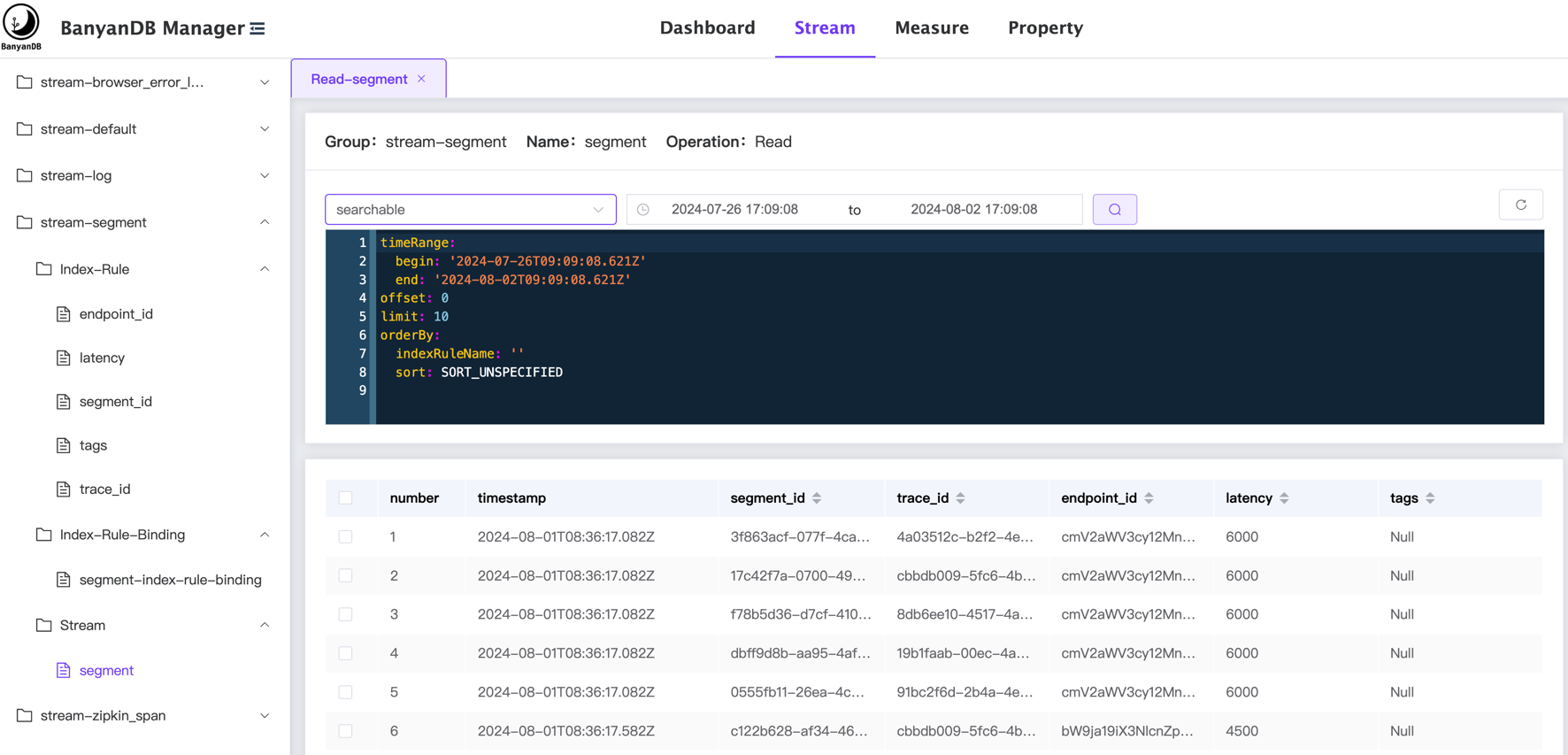
+## Stream
+
+
+The stream page shows the data stored in the stream. The menu on the left side shows the list of streams, index-rule, index-rule-binding and organized by their groups.
+
+The user can select the stream to view the data, the data is displayed in a table format and can query/filter the data by the following:
+- Select the `Time Range` to be queried.
+- Select the `Tag Families` to be queried.
+- Modify/Write the query config directly on the page. The config can refer to the [bydbctl query stream](./bydbctl/query/stream.md).
+
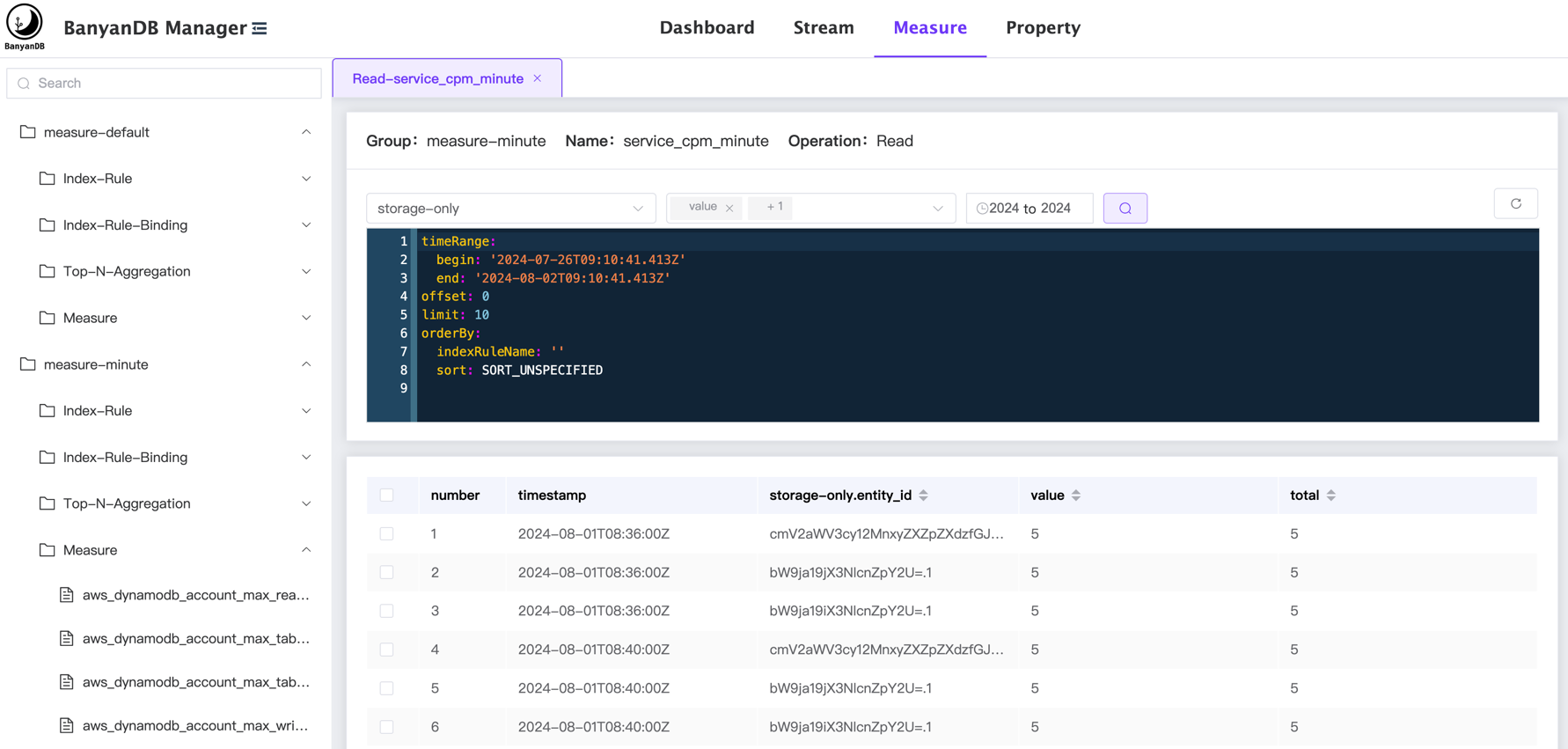
+## Measure
+
+
+The measure page shows the data stored in the measure. The menu on the left side shows the list of measures, index-rule, index-rule-binding and organized by their groups.
+
+The user can select the measure to view the data, the data is displayed in a table format and can query/filter the data by the following:
+- Select the `Time Range` to be queried.
+- Select the `Tag Families` to be queried.
+- Select the `Fields` to be queried.
+- Modify/Write the query config directly on the page. The config can refer to the [bydbctl query measure](./bydbctl/query/measure.md).
+
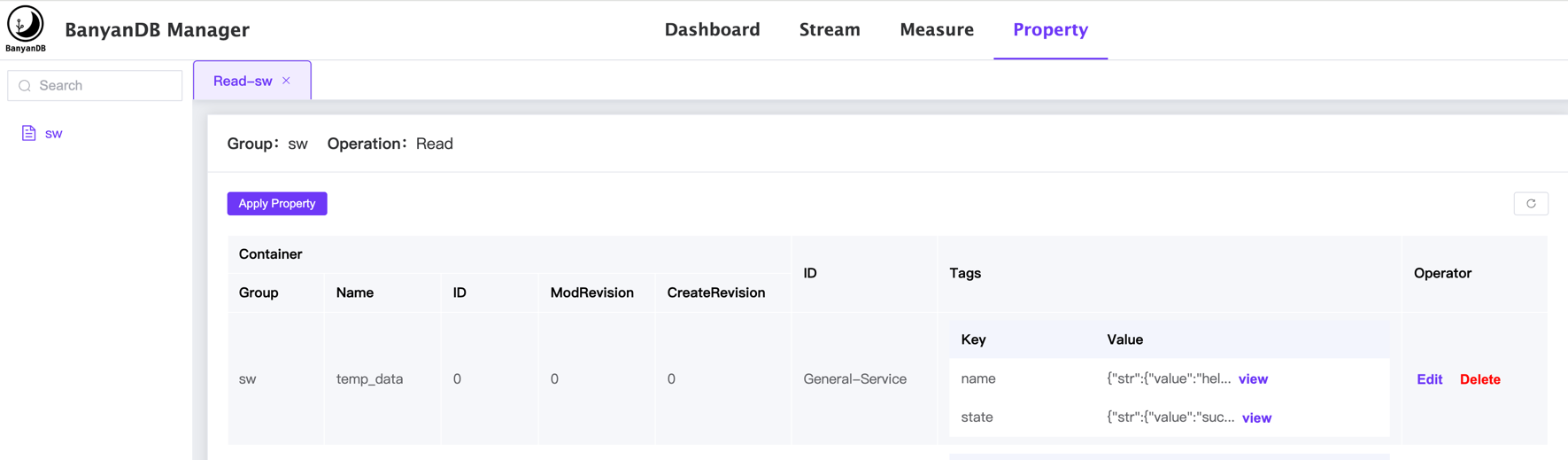
+## Property
+
+
+The property page shows the data stored in the property. The menu on the left side shows the list of properties, index-rule, index-rule-binding and organized by their groups.
+
+The user can select the group to view the property data, the data is displayed in a table format and can view/edit/delete the property by the following:
+- Click the `View` to show the value in the specific property and key.
+- Click the `Edit` to `add/update/delete` the tags in the specific property.
+- Click the `Delete` to delete the specific property.
\ No newline at end of file
diff --git a/docs/menu.yml b/docs/menu.yml
index 539747a0..8562009b 100644
--- a/docs/menu.yml
+++ b/docs/menu.yml
@@ -20,56 +20,54 @@ catalog:
path: "/readme"
- name: "User Guide"
catalog:
- - name: "Installation"
- catalog:
- - name: "Get Binaries"
- path: "/installation/binaries"
- - name: "Standalone Mode"
- path: "/installation/standalone"
- - name: "Cluster Mode"
- path: "/installation/cluster"
- - name: "Installation On Docker"
- path: "/installation/docker"
- - name: "Installation On Kubernetes"
- path: "/installation/kubernetes"
- - name: "Basic Concepts and Terminology"
- catalog:
- - name: "Data Model"
- path: "/concept/data-model"
- - name: "Quick Start Tutorial"
- path: "/guides/quick-start/quick-start"
+ - name: "Installation"
+ catalog:
+ - name: "Get Binaries"
+ path: "/installation/binaries"
+ - name: "Standalone Mode"
+ path: "/installation/standalone"
+ - name: "Cluster Mode"
+ path: "/installation/cluster"
+ - name: "Installation On Docker"
+ path: "/installation/docker"
+ - name: "Installation On Kubernetes"
+ path: "/installation/kubernetes"
+ - name: "Basic Concepts and Terminology"
+ catalog:
+ - name: "Data Model"
+ path: "/concept/data-model"
+ - name: "Quick Start Tutorial"
+ path: "/guides/quick-start/quick-start"
- name: "Interacting"
catalog:
- - name: "Clients"
- path: "/clients"
- - name: "Insert and Update Data"
- path: ""
- - name: "Querying Data"
- path: ""
- - name: "Deleting Data"
- path: ""
- - name: "CRUD Operations"
+ - name: "CLI"
catalog:
- - name: "Group"
- path: "/crud/group"
- - name: "Measure"
+ - name: "bydbctl"
+ path: "/interacting/bydbctl/bydbctl"
+ - name: "CRUD Schema"
catalog:
- - name: "Schema"
- path: "/crud/measure/schema"
- - name: "Query"
- path: "/crud/measure/query"
- - name: "Stream"
+ - name: "Group"
+ path: "/interacting/bydbctl/schema/group"
+ - name: "Measure"
+ path: "/interacting/bydbctl/schema/measure"
+ - name: "Stream"
+ path: "/interacting/bydbctl/schema/stream"
+ - name: "IndexRule"
+ path: "/interacting/bydbctl/schema/index-rule"
+ - name: "IndexRuleBinding"
+ path: "/interacting/bydbctl/schema/index-rule-binding"
+ - name: "Querying Data"
catalog:
- - name: "Schema"
- path: "/crud/stream/schema"
- - name: "Query"
- path: "/crud/stream/query"
- - name: "IndexRule"
- path: "/crud/index_rule"
- - name: "IndexRuleBinding"
- path: "/crud/index_rule_binding"
- - name: "Property"
- path: "/crud/property"
+ - name: "Measure"
+ path: "/interacting/bydbctl/query/measure"
+ - name: "Stream"
+ path: "/interacting/bydbctl/query/stream"
+ - name: "CRUD Property"
+ path: "/interacting/bydbctl/property"
+ - name: "Java Client"
+ path: "/interacting/java-client"
+ - name: "Web UI"
+ path: "/interacting/web-ui"
- name: "Operation and Maintenance"
catalog:
- name: "Configure BanyanDB"