You are viewing a plain text version of this content. The canonical link for it is here.
Posted to notifications@shenyu.apache.org by fe...@apache.org on 2021/09/01 04:26:47 UTC
[incubator-shenyu-website] branch main updated: Add markdownlint
(#222)
This is an automated email from the ASF dual-hosted git repository.
fengzhenbing pushed a commit to branch main
in repository https://gitbox.apache.org/repos/asf/incubator-shenyu-website.git
The following commit(s) were added to refs/heads/main by this push:
new df5e618 Add markdownlint (#222)
df5e618 is described below
commit df5e618c42f120f5081446f934d6d96c29478f26
Author: dengliming <li...@gmail.com>
AuthorDate: Wed Sep 1 12:26:18 2021 +0800
Add markdownlint (#222)
* Add markdownlint
* Fix markdownlint
---
.github/.markdownlint.yml | 62 +++++++++
.github/workflows/lint.yml | 16 +++
README.md | 5 +-
community/0-Apache-ShenYu-Subscribe-Email.md | 2 +-
community/1-Apache-ShenYu-Code-Conduct.md | 38 +++---
community/10-User-Registration.md | 2 +-
.../2-Apache-ShenYu-Issue-And-Pull-Request.md | 2 +-
community/3-Apache-ShenYu-Contributor's-Guide.md | 29 ++--
community/4-Apache-ShenYu-Committer.md | 22 ++--
community/5-Apache-ShenYu-Release-Guide.md | 40 +++---
community/6-How-to-vote-Apache-ShenYu-Committer.md | 3 +
community/7-Apache-ShenYu-Two-FA.md | 2 +-
community/8-Sign-ICLA-Guide.md | 6 +-
docs/deployment/deployment-k8s.md | 24 +++-
docs/deployment/deployment-local.md | 5 +-
docs/design/data-sync.md | 10 +-
docs/design/database-design.md | 7 +-
docs/developer/custom-filter.md | 4 +-
docs/developer/custom-parsing-ip-and-host.md | 4 +-
docs/developer/custom-plugin.md | 16 ++-
docs/developer/custom-result.md | 3 +-
docs/index.md | 2 +-
.../authority-and-certification/jwt-plugin.md | 9 +-
.../authority-and-certification/sign-plugin.md | 6 +-
.../authority-and-certification/waf-plugin.md | 4 +-
.../fault-tolerance/hystrix-plugin.md | 32 ++---
.../fault-tolerance/rate-limiter-plugin.md | 24 ++--
.../fault-tolerance/resilience4j-plugin.md | 34 ++---
.../fault-tolerance/sentinel-plugin.md | 30 ++---
.../http-handle/modify-response-plugin.md | 22 ++--
.../http-handle/param-mapping-plugin.md | 13 +-
docs/plugin-center/observability/monitor-plugin.md | 2 +
docs/plugin-center/rpc-proxy/divide-plugin.md | 31 ++---
docs/plugin-center/rpc-proxy/dubbo-plugin.md | 12 +-
docs/plugin-center/rpc-proxy/grpc-plugin.md | 8 +-
.../plugin-center/rpc-proxy/spring-cloud-plugin.md | 6 +-
docs/plugin-center/rpc-proxy/tars-plugin.md | 20 +--
docs/quick-start/quick-start-dubbo.md | 3 +
docs/quick-start/quick-start-grpc.md | 12 +-
docs/quick-start/quick-start-http.md | 1 +
docs/quick-start/quick-start-motan.md | 1 -
docs/quick-start/quick-start-sofa.md | 4 +
docs/quick-start/quick-start-springcloud.md | 2 +
docs/quick-start/quick-start-tars.md | 2 +
docs/release-notes.md | 1 +
.../admin-usage/dictionary-management.md | 2 +-
.../admin-usage/plugin-handle-explanation.md | 2 +-
docs/user-guide/admin-usage/selector-and-rule.md | 146 ++++++++++-----------
docs/user-guide/dubbo-proxy.md | 40 +++---
docs/user-guide/grpc-proxy.md | 1 +
docs/user-guide/http-proxy.md | 9 +-
.../property-config/admin-property-config.md | 2 +-
docs/user-guide/sofa-rpc-proxy.md | 7 +-
docs/user-guide/spring-cloud-proxy.md | 2 +
docs/user-guide/tars-proxy.md | 2 +-
docs/user-guide/use-data-sync.md | 4 +-
...pache-ShenYu-release-milestone-version-2.4.0.md | 5 +-
...Soul-gateway-release-milestone-version-2.3.0.md | 10 ++
.../current/3-Apache-ShenYu-Contributor's-Guide.md | 34 ++---
.../current/4-Apache-ShenYu-Committer.md | 22 ++--
.../6-How-to-vote-Apache-ShenYu-Committer.md | 2 +
.../current/7-Apache-ShenYu-Two-FA.md | 2 +-
.../current/8-Sign-ICLA-Guide.md | 5 +-
.../current/deployment/deployment-k8s.md | 28 +++-
.../current/deployment/deployment-local.md | 5 +-
.../current/design/data-sync.md | 10 +-
.../current/design/database-design.md | 20 +--
.../current/design/register-center-design.md | 2 +-
.../current/developer/custom-plugin.md | 5 +-
.../current/developer/custom-result.md | 2 +-
.../current/developer/custom-sign-algorithm.md | 4 +-
.../current/download.md | 1 +
.../authority-and-certification/jwt-plugin.md | 2 +
.../authority-and-certification/sign-plugin.md | 4 +
.../authority-and-certification/waf-plugin.md | 5 +-
.../fault-tolerance/hystrix-plugin.md | 6 +-
.../fault-tolerance/resilience4j-plugin.md | 6 +-
.../fault-tolerance/sentinel-plugin.md | 6 +-
.../http-handle/context-path-plugin.md | 5 +-
.../http-handle/modify-response-plugin.md | 6 +-
.../http-handle/param-mapping-plugin.md | 7 +-
.../plugin-center/http-handle/rewrite-plugin.md | 2 +-
.../plugin-center/observability/monitor-plugin.md | 4 +-
.../plugin-center/rpc-proxy/dubbo-plugin.md | 8 +-
.../current/plugin-center/rpc-proxy/grpc-plugin.md | 8 +-
.../current/quick-start/quick-start-dubbo.md | 3 +
.../current/quick-start/quick-start-grpc.md | 9 +-
.../current/quick-start/quick-start-http.md | 2 +
.../current/quick-start/quick-start-motan.md | 2 +
.../current/quick-start/quick-start-sofa.md | 5 +
.../current/quick-start/quick-start-springcloud.md | 3 +
.../current/quick-start/quick-start-tars.md | 3 +
.../current/release-notes.md | 3 +
.../user-guide/admin-usage/selector-and-rule.md | 142 ++++++++++----------
.../current/user-guide/dubbo-proxy.md | 47 +++----
.../current/user-guide/grpc-proxy.md | 3 +
.../current/user-guide/http-proxy.md | 2 +-
.../property-config/admin-property-config.md | 2 +-
.../current/user-guide/register-center-access.md | 2 +
.../current/user-guide/sofa-rpc-proxy.md | 6 +-
.../current/user-guide/spring-cloud-proxy.md | 2 +
.../current/user-guide/use-data-sync.md | 2 +
.../version-2.3.0/admin/dictionary-management.md | 1 +
.../admin/plugin-handle-explanation.md | 1 +
.../version-2.3.0/admin/selector-and-rule.md | 109 +++++++--------
.../version-2.3.0/design/database-design.md | 10 +-
.../version-2.3.0/design/meta-data.md | 1 +
.../version-2.3.0/developer-guide/custom-filter.md | 2 +
.../version-2.3.0/developer-guide/custom-plugin.md | 22 ++--
.../version-2.3.0/developer-guide/custom-result.md | 3 +-
.../developer-guide/custom-sign-algorithm.md | 4 +-
.../developer-guide/developer-soul-client.md | 1 +
.../version-2.3.0/plugins/divide-plugin.md | 12 +-
.../version-2.3.0/plugins/dubbo-plugin.md | 2 +
.../version-2.3.0/plugins/hystrix-plugin.md | 14 +-
.../version-2.3.0/plugins/monitor-plugin.md | 8 +-
.../version-2.3.0/plugins/rate-limiter-plugin.md | 7 +-
.../version-2.3.0/plugins/resilience4j-plugin.md | 26 ++--
.../version-2.3.0/plugins/sentinel-plugin.md | 16 +--
.../version-2.3.0/plugins/sign-plugin.md | 16 ++-
.../version-2.3.0/plugins/sofa-plugin.md | 2 +
.../version-2.3.0/plugins/spring-cloud-plugin.md | 2 +-
.../version-2.3.0/plugins/websocket-plugin.md | 1 +
.../version-2.3.0/quick-start/quick-start-dubbo.md | 8 +-
.../version-2.3.0/quick-start/quick-start-grpc.md | 3 +
.../version-2.3.0/quick-start/quick-start-http.md | 2 +
.../version-2.3.0/quick-start/quick-start-sofa.md | 9 +-
.../quick-start/quick-start-springcloud.md | 2 +
.../version-2.3.0/quick-start/quick-start-tars.md | 4 +
.../version-2.3.0/users-guide/dubbo-proxy.md | 62 ++++-----
.../version-2.3.0/users-guide/http-proxy.md | 29 ++--
.../version-2.3.0/users-guide/sofa-rpc-proxy.md | 29 ++--
.../version-2.3.0/users-guide/soul-set-up.md | 13 +-
.../users-guide/spring-cloud-proxy.md | 15 ++-
.../version-2.3.0/users-guide/use-data-sync.md | 26 ++--
.../version-2.4.0/deployment/deployment-k8s.md | 28 +++-
.../version-2.4.0/deployment/deployment-local.md | 5 +-
.../version-2.4.0/design/data-sync.md | 10 +-
.../version-2.4.0/design/database-design.md | 20 +--
.../version-2.4.0/design/register-center-design.md | 2 +-
.../version-2.4.0/developer/custom-plugin.md | 5 +-
.../version-2.4.0/developer/custom-result.md | 2 +-
.../developer/custom-sign-algorithm.md | 4 +-
.../version-2.4.0/download.md | 1 +
.../authority-and-certification/jwt-plugin.md | 2 +
.../authority-and-certification/sign-plugin.md | 4 +
.../authority-and-certification/waf-plugin.md | 5 +-
.../fault-tolerance/hystrix-plugin.md | 6 +-
.../fault-tolerance/resilience4j-plugin.md | 6 +-
.../fault-tolerance/sentinel-plugin.md | 6 +-
.../http-handle/context-path-plugin.md | 5 +-
.../http-handle/modify-response-plugin.md | 6 +-
.../http-handle/param-mapping-plugin.md | 7 +-
.../plugin-center/http-handle/rewrite-plugin.md | 2 +-
.../plugin-center/observability/monitor-plugin.md | 4 +-
.../plugin-center/rpc-proxy/dubbo-plugin.md | 8 +-
.../plugin-center/rpc-proxy/grpc-plugin.md | 8 +-
.../version-2.4.0/quick-start/quick-start-dubbo.md | 3 +
.../version-2.4.0/quick-start/quick-start-grpc.md | 9 +-
.../version-2.4.0/quick-start/quick-start-http.md | 2 +
.../version-2.4.0/quick-start/quick-start-motan.md | 2 +
.../version-2.4.0/quick-start/quick-start-sofa.md | 5 +
.../quick-start/quick-start-springcloud.md | 3 +
.../version-2.4.0/quick-start/quick-start-tars.md | 3 +
.../version-2.4.0/release-notes.md | 3 +
.../user-guide/admin-usage/selector-and-rule.md | 142 ++++++++++----------
.../version-2.4.0/user-guide/dubbo-proxy.md | 47 +++----
.../version-2.4.0/user-guide/grpc-proxy.md | 3 +
.../version-2.4.0/user-guide/http-proxy.md | 1 +
.../property-config/admin-property-config.md | 2 +-
.../user-guide/register-center-access.md | 2 +
.../version-2.4.0/user-guide/sofa-rpc-proxy.md | 6 +-
.../version-2.4.0/user-guide/spring-cloud-proxy.md | 2 +
.../version-2.4.0/user-guide/use-data-sync.md | 2 +
...pache-ShenYu-release-milestone-version-2.4.0.md | 2 +-
...Soul-gateway-release-milestone-version-2.3.0.md | 15 ++-
.../admin/plugin-handle-explanation.md | 1 +
.../version-2.3.0/admin/selector-and-rule.md | 105 +++++++--------
versioned_docs/version-2.3.0/design/meta-data.md | 1 +
.../version-2.3.0/developer-guide/custom-filter.md | 4 +-
.../developer-guide/custom-parsing-ip-and-host.md | 4 +-
.../version-2.3.0/developer-guide/custom-plugin.md | 13 +-
.../version-2.3.0/developer-guide/custom-result.md | 3 +-
versioned_docs/version-2.3.0/index.md | 2 +-
.../version-2.3.0/plugins/divide-plugin.md | 12 +-
.../version-2.3.0/plugins/dubbo-plugin.md | 1 +
.../version-2.3.0/plugins/hystrix-plugin.md | 14 +-
.../version-2.3.0/plugins/monitor-plugin.md | 2 +
.../version-2.3.0/plugins/rate-limiter-plugin.md | 11 +-
.../version-2.3.0/plugins/resilience4j-plugin.md | 26 ++--
.../version-2.3.0/plugins/sentinel-plugin.md | 16 +--
.../version-2.3.0/plugins/sign-plugin.md | 18 ++-
.../version-2.3.0/plugins/sofa-plugin.md | 2 +
versioned_docs/version-2.3.0/plugins/waf-plugin.md | 2 +-
.../version-2.3.0/plugins/websocket-plugin.md | 1 +
.../version-2.3.0/quick-start/quick-start-dubbo.md | 8 +-
.../version-2.3.0/quick-start/quick-start-grpc.md | 3 +
.../version-2.3.0/quick-start/quick-start-http.md | 1 +
.../version-2.3.0/quick-start/quick-start-sofa.md | 6 +
.../quick-start/quick-start-springcloud.md | 1 +
.../version-2.3.0/quick-start/quick-start-tars.md | 2 +
.../version-2.3.0/users-guide/dubbo-proxy.md | 66 ++++++----
.../version-2.3.0/users-guide/http-proxy.md | 24 ++--
.../version-2.3.0/users-guide/sofa-rpc-proxy.md | 23 ++--
.../version-2.3.0/users-guide/soul-set-up.md | 5 +-
.../users-guide/spring-cloud-proxy.md | 13 +-
.../version-2.3.0/users-guide/use-data-sync.md | 26 ++--
.../version-2.4.0/deployment/deployment-k8s.md | 24 +++-
.../version-2.4.0/deployment/deployment-local.md | 5 +-
.../version-2.4.0/design/database-design.md | 7 +-
.../version-2.4.0/developer/custom-filter.md | 4 +-
.../developer/custom-parsing-ip-and-host.md | 4 +-
.../version-2.4.0/developer/custom-plugin.md | 16 ++-
.../version-2.4.0/developer/custom-result.md | 3 +-
versioned_docs/version-2.4.0/index.md | 2 +-
.../authority-and-certification/jwt-plugin.md | 9 +-
.../authority-and-certification/sign-plugin.md | 6 +-
.../authority-and-certification/waf-plugin.md | 8 +-
.../fault-tolerance/hystrix-plugin.md | 32 ++---
.../fault-tolerance/rate-limiter-plugin.md | 30 ++---
.../fault-tolerance/resilience4j-plugin.md | 34 ++---
.../fault-tolerance/sentinel-plugin.md | 30 ++---
.../http-handle/modify-response-plugin.md | 22 ++--
.../http-handle/param-mapping-plugin.md | 13 +-
.../plugin-center/observability/monitor-plugin.md | 2 +
.../plugin-center/rpc-proxy/divide-plugin.md | 35 ++---
.../plugin-center/rpc-proxy/dubbo-plugin.md | 14 +-
.../plugin-center/rpc-proxy/grpc-plugin.md | 12 +-
.../plugin-center/rpc-proxy/spring-cloud-plugin.md | 13 +-
.../plugin-center/rpc-proxy/tars-plugin.md | 24 ++--
.../version-2.4.0/quick-start/quick-start-dubbo.md | 3 +
.../version-2.4.0/quick-start/quick-start-grpc.md | 12 +-
.../version-2.4.0/quick-start/quick-start-http.md | 1 +
.../version-2.4.0/quick-start/quick-start-motan.md | 1 -
.../version-2.4.0/quick-start/quick-start-sofa.md | 4 +
.../quick-start/quick-start-springcloud.md | 2 +
.../version-2.4.0/quick-start/quick-start-tars.md | 2 +
versioned_docs/version-2.4.0/release-notes.md | 5 +-
.../user-guide/admin-usage/authority-management.md | 6 +-
.../admin-usage/dictionary-management.md | 2 +-
.../admin-usage/plugin-handle-explanation.md | 2 +-
.../user-guide/admin-usage/selector-and-rule.md | 146 ++++++++++-----------
.../version-2.4.0/user-guide/dubbo-proxy.md | 40 +++---
.../version-2.4.0/user-guide/grpc-proxy.md | 1 +
.../version-2.4.0/user-guide/http-proxy.md | 16 +--
.../property-config/admin-property-config.md | 4 +-
.../property-config/client-property-config.md | 5 +-
.../user-guide/register-center-access.md | 27 +---
.../version-2.4.0/user-guide/sofa-rpc-proxy.md | 23 ++--
.../version-2.4.0/user-guide/spring-cloud-proxy.md | 9 +-
.../version-2.4.0/user-guide/tars-proxy.md | 10 +-
.../version-2.4.0/user-guide/use-data-sync.md | 92 +++++--------
252 files changed, 1904 insertions(+), 1400 deletions(-)
diff --git a/.github/.markdownlint.yml b/.github/.markdownlint.yml
new file mode 100644
index 0000000..d094bf2
--- /dev/null
+++ b/.github/.markdownlint.yml
@@ -0,0 +1,62 @@
+# MD013 Line length
+MD013: false
+
+# MD014 Dollar signs used before commands without showing output
+MD014: false
+
+# MD026/no-trailing-punctuation Trailing punctuation in heading
+MD026: false
+
+# MD029/ol-prefix Ordered list item prefix
+MD029: false
+
+# MD033/no-inline-html
+MD033: false
+
+# MD034/no-bare-urls
+MD034: false
+
+# MD040/fenced-code-language
+MD040: false
+
+# MD041/first-line-heading/first-line-h1 First line in file should be a top level heading
+MD041: false
+
+# MD010/no-hard-tabs Hard tabs
+MD010: false
+
+# MD009/no-trailing-spaces
+MD009: false
+
+# MD012/no-multiple-blanks
+MD012: false
+
+# MD045/no-alt-text Images should have alternate text (alt text)
+MD045: false
+
+# MD036/no-emphasis-as-heading/no-emphasis-as-header Emphasis used instead of a heading
+MD036: false
+
+# MD004/ul-style Unordered list style [Expected: asterisk; Actual: dash]
+MD004: false
+
+# MD032/blanks-around-lists Lists should be surrounded by blank lines
+MD032: false
+
+# MD046/code-block-style Code block style
+MD046: false
+
+# MD001/heading-increment/header-increment Heading levels should only increment by one level at a time
+MD001: false
+
+# MD003/heading-style/header-style Heading style
+MD003: false
+
+# MD024/no-duplicate-heading/no-duplicate-header Multiple headings with the same content
+MD024: false
+
+# MD025/single-title/single-h1 Multiple top level headings in the same document
+MD025: false
+
+# MD007/ul-indent Unordered list indentation
+MD007: false
diff --git a/.github/workflows/lint.yml b/.github/workflows/lint.yml
new file mode 100644
index 0000000..d32695e
--- /dev/null
+++ b/.github/workflows/lint.yml
@@ -0,0 +1,16 @@
+name: ❄️ Lint
+
+on: [pull_request]
+
+jobs:
+ markdownlint:
+ name: 🍇 Markdown
+ runs-on: ubuntu-latest
+ steps:
+ - uses: actions/checkout@v2.3.4
+ - name: 🚀 Use Node.js
+ uses: actions/setup-node@v2.4.0
+ with:
+ node-version: '12.x'
+ - run: npm install -g markdownlint-cli@0.25.0
+ - run: markdownlint '**/*.md' --ignore node_modules --config ./.github/.markdownlint.yml
diff --git a/README.md b/README.md
index cd9e6ce..32b4152 100755
--- a/README.md
+++ b/README.md
@@ -7,6 +7,7 @@ This project keeps all sources used for building up Apache ShenYu official websi
This website is built using [Docusaurus 2](https://docusaurus.io/), a modern static website generator.
## Requirements
+
- Node.js version >= 12.13.0 or above (which can be checked by running node -v).
- Yarn version >= 1.5 (which can be checked by running yarn --version).
@@ -19,11 +20,13 @@ yarn install
## Local Development
- Start your localized site using the default locale. Then Your site is accessible at http://localhost:3000/.
+
```console
yarn start
```
-- Start your localized site in dev mode, using the locale of your choice.Then Your site is accessible at http://localhost:3000/zh/.
+- Start your localized site in dev mode, using the locale of your choice.Then Your site is accessible at http://localhost:3000/zh/.
+
```console
yarn start -- --locale zh
```
diff --git a/community/0-Apache-ShenYu-Subscribe-Email.md b/community/0-Apache-ShenYu-Subscribe-Email.md
index c1e7dd1..9b3d783 100755
--- a/community/0-Apache-ShenYu-Subscribe-Email.md
+++ b/community/0-Apache-ShenYu-Subscribe-Email.md
@@ -22,4 +22,4 @@ After Step 1, you will receive a confirmation e-mail from [dev-help@shenyu.apach
After finishing the two steps above, an e-mail with the subject of `WELCOME to dev@shenyu.apache.org` will be sent to your e-mail address. Until now, you have succeeded in subscribing Apache ShenYu mail-list.
-Until now, you can interact with community by your subscribed email or track email conversations by [Archived email list](https://lists.apache.org/list.html?dev@shenyu.apache.org).
\ No newline at end of file
+Until now, you can interact with community by your subscribed email or track email conversations by [Archived email list](https://lists.apache.org/list.html?dev@shenyu.apache.org).
diff --git a/community/1-Apache-ShenYu-Code-Conduct.md b/community/1-Apache-ShenYu-Code-Conduct.md
index d089d4d..982c335 100755
--- a/community/1-Apache-ShenYu-Code-Conduct.md
+++ b/community/1-Apache-ShenYu-Code-Conduct.md
@@ -51,22 +51,22 @@ cover: "/img/architecture/shenyu-framework.png"
## Contributor Covenant Unit Test of Conduct {#contributor-covenant-unit-test-of-conduct}
- - Test codes and production codes should follow the same kind of code of conduct.
- - Unit test should follow AIR (Automatic, Independent, Repeatable) principle.
- - Automatic: Unit test should run automatically, not interactively. Check test result manually and `System.out`, `log` are prohibited, use assert to check test results.
- - Independent: Call each other and sequence dependency during unit test cases are prohibited. Every test case should run independent.
- - Repeatable: Unit test case should not dependency external environment, they can run repeatable.
- - Unit test should follow BCDE (Border, Correct, Design, Error) design principle.
- - Border: Border value test, test for loop border, special value and value sequence to get expect result.
- - Correct: Correct value test, test for correct value to get expect result.
- - Design: Design with production codes.
- - Error: Error value test, test for error input, exception to get expect result.
- - Without particular reasons, test cases should be fully covered.
- - Every test case need precised assertion.
- - Environment preparation codes should be separate from test codes.
- - Only those that relate to junit `Assert`, hamcrest `CoreMatchers` and `Mockito` can use static import.
- - For single parameter asserts, `assertTrue`, `assertFalse`, `assertNull` and `assertNotNull` should be used.
- - For multiple parameter asserts, `assertThat` should be used.
- - For accurate asserts, try not to use `not`, `containsString` to make assertions.
- - Actual values of test cases should be named `actualXXX`, expected values `expectedXXX`.
- - Class for test case and `@Test` annotation do not need javadoc.
+- Test codes and production codes should follow the same kind of code of conduct.
+- Unit test should follow AIR (Automatic, Independent, Repeatable) principle.
+ - Automatic: Unit test should run automatically, not interactively. Check test result manually and `System.out`, `log` are prohibited, use assert to check test results.
+ - Independent: Call each other and sequence dependency during unit test cases are prohibited. Every test case should run independent.
+ - Repeatable: Unit test case should not dependency external environment, they can run repeatable.
+- Unit test should follow BCDE (Border, Correct, Design, Error) design principle.
+ - Border: Border value test, test for loop border, special value and value sequence to get expect result.
+ - Correct: Correct value test, test for correct value to get expect result.
+ - Design: Design with production codes.
+ - Error: Error value test, test for error input, exception to get expect result.
+- Without particular reasons, test cases should be fully covered.
+- Every test case need precised assertion.
+- Environment preparation codes should be separate from test codes.
+- Only those that relate to junit `Assert`, hamcrest `CoreMatchers` and `Mockito` can use static import.
+- For single parameter asserts, `assertTrue`, `assertFalse`, `assertNull` and `assertNotNull` should be used.
+- For multiple parameter asserts, `assertThat` should be used.
+- For accurate asserts, try not to use `not`, `containsString` to make assertions.
+- Actual values of test cases should be named `actualXXX`, expected values `expectedXXX`.
+- Class for test case and `@Test` annotation do not need javadoc.
diff --git a/community/10-User-Registration.md b/community/10-User-Registration.md
index 99a70cc..3107fc6 100755
--- a/community/10-User-Registration.md
+++ b/community/10-User-Registration.md
@@ -45,4 +45,4 @@ Here is a list of companies or organizations that we know have used all or some
Please register and let us know so that we can serve you better.
-* [Apache ShenYu registration](https://github.com/apache/incubator-shenyu/issues/68)
\ No newline at end of file
+* [Apache ShenYu registration](https://github.com/apache/incubator-shenyu/issues/68)
diff --git a/community/2-Apache-ShenYu-Issue-And-Pull-Request.md b/community/2-Apache-ShenYu-Issue-And-Pull-Request.md
index d67c368..5543d39 100755
--- a/community/2-Apache-ShenYu-Issue-And-Pull-Request.md
+++ b/community/2-Apache-ShenYu-Issue-And-Pull-Request.md
@@ -92,4 +92,4 @@ Except for the following Labels:
* In general, pull request should be marked with 2 Lable and must set milestone.
-* After the merge is completed, need to check if the associated issueNo is closed.
\ No newline at end of file
+* After the merge is completed, need to check if the associated issueNo is closed.
diff --git a/community/3-Apache-ShenYu-Contributor's-Guide.md b/community/3-Apache-ShenYu-Contributor's-Guide.md
index 1448d26..590ea97 100755
--- a/community/3-Apache-ShenYu-Contributor's-Guide.md
+++ b/community/3-Apache-ShenYu-Contributor's-Guide.md
@@ -13,13 +13,13 @@ You can report a bug, submit a new function enhancement suggestion, or submit a
## Submit an Issue {#submit-an-issue}
- - Before submitting an issue, please go through a comprehensive search to make sure the problem cannot be solved just by searching.
- - Check the [Issue List](https://github.com/apache/incubator-shenyu/issues) to make sure the problem is not repeated.
- - [Create](https://github.com/apache/incubator-shenyu/issues/new/choose) a new issue and choose the type of issue.
- - Define the issue with a clear and descriptive title.
- - Fill in necessary information according to the template.
- - Choose a label after the issue is created, for example: bug,enhancement,discussion.
- - Please pay attention to your issue, you may need to provide more information during discussion.
+- Before submitting an issue, please go through a comprehensive search to make sure the problem cannot be solved just by searching.
+- Check the [Issue List](https://github.com/apache/incubator-shenyu/issues) to make sure the problem is not repeated.
+- [Create](https://github.com/apache/incubator-shenyu/issues/new/choose) a new issue and choose the type of issue.
+- Define the issue with a clear and descriptive title.
+- Fill in necessary information according to the template.
+- Choose a label after the issue is created, for example: bug,enhancement,discussion.
+- Please pay attention to your issue, you may need to provide more information during discussion.
## Developer Flow {#developer-flow}
@@ -33,12 +33,12 @@ git remote add upstream https://github.com/apache/incubator-shenyu.git
**Choose Issue**
- - Please choose the issue to be edited. If it is a new issue discovered or a new function enhancement to offer, please create an issue and set the right label for it.
- - After choosing the relevant issue, please reply with a deadline to indicate that you are working on it.
+- Please choose the issue to be edited. If it is a new issue discovered or a new function enhancement to offer, please create an issue and set the right label for it.
+- After choosing the relevant issue, please reply with a deadline to indicate that you are working on it.
**Create Branch**
- - Switch to forked master branch, pull codes from upstream, then create a new branch.
+- Switch to forked master branch, pull codes from upstream, then create a new branch.
```shell
git checkout master
@@ -61,19 +61,20 @@ git push origin issueNo
**Submit Pull Request**
- - Send a pull request to the master branch.
- - The mentor will do code review before discussing some details (including the design, the implementation and the performance) with you. The request will be merged into the branch of current development version after the edit is well enough.
- - At last, congratulate to be an official contributor of ShenYu.
+- Send a pull request to the master branch.
+- The mentor will do code review before discussing some details (including the design, the implementation and the performance) with you. The request will be merged into the branch of current development version after the edit is well enough.
+- At last, congratulate to be an official contributor of ShenYu.
**Delete Branch**
- - You can delete the remote branch (origin/issueNo) and the local branch (issueNo) associated with the remote branch (origin/issueNo) after the mentor merged the pull request into the master branch of ShenYu.
+- You can delete the remote branch (origin/issueNo) and the local branch (issueNo) associated with the remote branch (origin/issueNo) after the mentor merged the pull request into the master branch of ShenYu.
```shell
git checkout master
git branch -d issueNo
git push origin --delete issueNo
```
+
**Notice**: Please note that in order to show your id in the contributor list, don't forget the configurations below:
```shell
diff --git a/community/4-Apache-ShenYu-Committer.md b/community/4-Apache-ShenYu-Committer.md
index b186ccf..17c00e9 100755
--- a/community/4-Apache-ShenYu-Committer.md
+++ b/community/4-Apache-ShenYu-Committer.md
@@ -17,14 +17,14 @@ After you have made a lot of contributions, the community will nominate. Become
## Committer Responsibilities {#committer-responsibilities}
-- Develop new features;
-- Refactor codes;
-- Review pull requests reliably and in time;
-- Consider and accept feature requests;
-- Answer questions;
-- Update documentation and example;
-- Improve processes and tools;
-- Guide new contributors join community.
+* Develop new features;
+* Refactor codes;
+* Review pull requests reliably and in time;
+* Consider and accept feature requests;
+* Answer questions;
+* Update documentation and example;
+* Improve processes and tools;
+* Guide new contributors join community.
## Committer Routine {#committer-routine}
@@ -32,9 +32,9 @@ After you have made a lot of contributions, the community will nominate. Become
2. After a committer is assigned with an issue, the following work is required:
-- Estimate whether it is a long-term issue. If it is, please label it as pending;
-- Add issue labels, such as bug, enhancement, discussion, etc;
-- Add milestone.
+* Estimate whether it is a long-term issue. If it is, please label it as pending;
+* Add issue labels, such as bug, enhancement, discussion, etc;
+* Add milestone.
**Notice**: Whether it is a community issue or not, there must be Assignee until the issue is completed.
diff --git a/community/5-Apache-ShenYu-Release-Guide.md b/community/5-Apache-ShenYu-Release-Guide.md
index 57980ba..db5b4e8 100755
--- a/community/5-Apache-ShenYu-Release-Guide.md
+++ b/community/5-Apache-ShenYu-Release-Guide.md
@@ -180,6 +180,7 @@ After making sure there is no mistake in local files, submit them to GitHub.
git push origin ${RELEASE.VERSION}-release
git push origin --tags
```
+
**6. Deploy the Release**
```shell
@@ -310,15 +311,15 @@ diff -r -x "shenyu-dashboard" -x "shenyu-examples" -x "shenyu-integrated-test" -
**Check source package**
-* Check whether source tarball is oversized for including nonessential files
-* The release files have the word `incubating` in their names
-* `LICENSE` and `NOTICE` files exist
-* `DISCLAIMER` file exists
-* Correct year in `NOTICE` file
-* There is only text files but no binary files
-* All source files have ASF headers
-* Codes can be compiled and pass the unit tests (./mvnw install) (compatible with JAVA 8 for now)
-* Check if there is any extra files or folders, empty folders for example
+* Check whether source tarball is oversized for including nonessential files
+* The release files have the word `incubating` in their names
+* `LICENSE` and `NOTICE` files exist
+* `DISCLAIMER` file exists
+* Correct year in `NOTICE` file
+* There is only text files but no binary files
+* All source files have ASF headers
+* Codes can be compiled and pass the unit tests (./mvnw install) (compatible with JAVA 8 for now)
+* Check if there is any extra files or folders, empty folders for example
**Check binary packages**
@@ -327,16 +328,16 @@ Decompress
`apache-shenyu-incubating-${RELEASE.VERSION}-admin-bin.tar.gz`
to check the following items:
-* The release files have the word `incubating` in their name
-* `LICENSE` and `NOTICE` files exist
-* `DISCLAIMER` file exists
-* Correct year in `NOTICE` file
-* All text files have ASF headers
-* Check the third party dependency license:
- * The software has a compatible license
- * All software licenses mentioned in `LICENSE`
- * All the third party dependency licenses are under `licenses` folder
- * If it depends on Apache license and has a `NOTICE` file, that `NOTICE` file need to be added to `NOTICE` file of the release
+* The release files have the word `incubating` in their name
+* `LICENSE` and `NOTICE` files exist
+* `DISCLAIMER` file exists
+* Correct year in `NOTICE` file
+* All text files have ASF headers
+* Check the third party dependency license:
+ * The software has a compatible license
+ * All software licenses mentioned in `LICENSE`
+ * All the third party dependency licenses are under `licenses` folder
+ * If it depends on Apache license and has a `NOTICE` file, that `NOTICE` file need to be added to `NOTICE` file of the release
## Call for a Vote
@@ -444,6 +445,7 @@ We’ve received 7 +1 votes:
Thank you everyone for taking the time to review the release and help us.
```
+
3. Incubator Community Vote Template
Title:
diff --git a/community/6-How-to-vote-Apache-ShenYu-Committer.md b/community/6-How-to-vote-Apache-ShenYu-Committer.md
index 5b420be..a31699f 100755
--- a/community/6-How-to-vote-Apache-ShenYu-Committer.md
+++ b/community/6-How-to-vote-Apache-ShenYu-Committer.md
@@ -86,9 +86,11 @@ Best wishes,
(PPMC)
```
+
**5. Nominee replies the invitation, including content like accept the offer and give thanks.**
**6. PPMC replies the email.**
+
```
Hi (nominee),
@@ -118,6 +120,7 @@ https://www.apache.org/foundation/policies/conduct.html
Here is the guideline for all of the Apache ShenYu committers:
https://shenyu.apache.org/community/en/contribute/committer/
```
+
**7. New committer signs iCLA, this step refers to [Sign ICLA Guide](https://shenyu.apache.org/community/icla/).**
**8. New committer waits for secretary to create a new account.**
diff --git a/community/7-Apache-ShenYu-Two-FA.md b/community/7-Apache-ShenYu-Two-FA.md
index 5ee43dd..6598af8 100755
--- a/community/7-Apache-ShenYu-Two-FA.md
+++ b/community/7-Apache-ShenYu-Two-FA.md
@@ -28,4 +28,4 @@ After enabling 2FA, you need to sign in GitHub with the way of username/password
After enabling 2FA, you need to generate a private access Token to perform operations such as git submit and so on.
At this time, you will use username + private access Token in replace of username + password to submit codes.
-For detailed operations, please refer to [Create a Private Token](https://help.github.com/articles/creating-a-personal-access-token-for-the-command-line/).
\ No newline at end of file
+For detailed operations, please refer to [Create a Private Token](https://help.github.com/articles/creating-a-personal-access-token-for-the-command-line/).
diff --git a/community/8-Sign-ICLA-Guide.md b/community/8-Sign-ICLA-Guide.md
index 3644275..c0d438d 100755
--- a/community/8-Sign-ICLA-Guide.md
+++ b/community/8-Sign-ICLA-Guide.md
@@ -26,7 +26,6 @@ The process of submitting ICLA are:
**3. Open the PDF, and fill in the following columns in English.**
> To be noticed:
-
> - Leave a space between family name and last name, remember capitalize the first letter, please write family name at first.
> - Preferred Apache id(s) is a required field for committers.
@@ -44,7 +43,6 @@ Apache only accept hand-written signature or [PDF signature software](https://pd
## Manual signature and PDF software signature Demo {#manual-signature-and-pdf-software-signature-demo}
> PDF online signature
-
> - Download the PDF source file
> - Fill in items and personal information
> - Open PDF and sign URL online
@@ -58,7 +56,6 @@ Apache only accept hand-written signature or [PDF signature software](https://pd

> Handwritten signature
-
> - Download the PDF source file
> - Fill in items and personal information
> - Print documents
@@ -72,5 +69,6 @@ Apache only accept hand-written signature or [PDF signature software](https://pd

## Email Template {#email-template}
+

-
\ No newline at end of file
+
diff --git a/docs/deployment/deployment-k8s.md b/docs/deployment/deployment-k8s.md
index 0a819c0..e62a870 100644
--- a/docs/deployment/deployment-k8s.md
+++ b/docs/deployment/deployment-k8s.md
@@ -11,10 +11,10 @@ This article introduces the use of `k8s` to deploy the `Apache ShenYu` gateway.
> Catalog
>
> I. Using h2 as a database
+>
> 1. create nameSpace and configMap
> 2. deploying shenyu-admin
> 3. deploy shenyu-bootstrap
-
> II. Use mysql as the database
>
> Similar to the h2 process, there are two points to note
@@ -23,6 +23,7 @@ This article introduces the use of `k8s` to deploy the `Apache ShenYu` gateway.
> 2. you need to specify an external mysql database configuration to proxy the external mysql database via endpoint
>
> The process is as follows.
+>
> 1. create nameSpace and configMap
> 2. create endpoint to proxy external mysql
> 3. create pv store mysql-connector.jar
@@ -32,8 +33,11 @@ This article introduces the use of `k8s` to deploy the `Apache ShenYu` gateway.
## I. Using h2 as a database
+
### 1. Create nameSpace and configMap
+
- create shenyu-ns.yaml
+
```yaml
apiVersion: v1
kind: Namespace
@@ -95,10 +99,13 @@ data:
org.apache.shenyu.lottery: info
org.apache.shenyu: info
```
+
- execute `kubectl apply -f shenyu-ns.yaml`
### 2. Create shenyu-admin
+
- create shenyu-admin.yaml
+
```yaml
# Example of using the nodeport type to expose ports
apiVersion: v1
@@ -142,11 +149,13 @@ spec:
- name: 'TZ'
value: 'Asia/Beijing'
```
+
- execute`kubectl apply -f shenyu-ns.yaml`
### 3. Create shenyu-bootstrap
- create shenyu-bootstrap.yaml
+
```yaml
# Example of using the nodeport type to expose ports
apiVersion: v1
@@ -210,7 +219,9 @@ spec:
## II. Use mysql as the database
### 1. Create nameSpace and configMap
+
- create shenyu-ns.yaml
+
```yaml
apiVersion: v1
kind: Namespace
@@ -276,10 +287,13 @@ data:
spring.datasource.user: {your_mysql_user}
spring.datasource.password: {your_mysql_password}
```
+
- execute `kubectl apply -f shenyu-ns.yaml`
### 2. Create endpoint to represent mysql
+
- create shenyu-ep.yaml
+
```yaml
kind: Service
apiVersion: v1
@@ -304,9 +318,13 @@ subsets:
- port: {your_mysql_port}
name: mysql
```
+
- execute `kubectl apply -f shenyu-ep.yaml`
+
### 3. Create pv to store mysql-connector.jar
+
- create shenyu-store.yaml
+
```yaml
# Example of using pvc、pv、storageClass to store jar file
apiVersion: v1
@@ -352,6 +370,7 @@ metadata:
provisioner: kubernetes.io/no-provisioner
volumeBindingMode: WaitForFirstConsumer
```
+
- execute `kubectl apply -f shenyu-pv.yaml`
- pv mounted directory upload `mysql-connector.jar`
@@ -359,6 +378,7 @@ volumeBindingMode: WaitForFirstConsumer
### 4. Create shenyu-admin
- create shenyu-admin.yaml
+
```yaml
# Example of using the nodeport type to expose ports
apiVersion: v1
@@ -420,11 +440,13 @@ spec:
- mountPath: /opt/shenyu-admin/ext-lib
name: mysql-connector-volume
```
+
- execute`kubectl apply -f shenyu-ns.yaml`
### 3. Create shenyu-bootstrap
- create shenyu-bootstrap.yaml
+
```yaml
# Example of using the nodeport type to expose ports
apiVersion: v1
diff --git a/docs/deployment/deployment-local.md b/docs/deployment/deployment-local.md
index 75df11e..e8f9176 100644
--- a/docs/deployment/deployment-local.md
+++ b/docs/deployment/deployment-local.md
@@ -17,6 +17,7 @@ This article introduces how to start the `Apache ShenYu` gateway in the local en
### Download the compiled code
* Download
+
```
> git clone https://github.com/apache/incubator-shenyu.git
> cd shenyu
@@ -25,9 +26,9 @@ This article introduces how to start the `Apache ShenYu` gateway in the local en
* use the development tool to start `org.apache.shenyu.admin.ShenyuAdminBootstrap`,Visit http://localhost:9095, the default username and password are: `admin` and `123456` respectively.
- * If you use `h2` to store, set the variable `--spring.profiles.active = h2`.
+ * If you use `h2` to store, set the variable `--spring.profiles.active = h2`.
- * If you use `MySQL` for storage, modify the `mysql` configuration in `application.yaml`.
+ * If you use `MySQL` for storage, modify the `mysql` configuration in `application.yaml`.
* use the development tool to start `org.apache.shenyu.bootstrap.ShenyuBootstrapApplication`.
diff --git a/docs/design/data-sync.md b/docs/design/data-sync.md
index 9d7843c..c129baf 100644
--- a/docs/design/data-sync.md
+++ b/docs/design/data-sync.md
@@ -32,15 +32,15 @@ In the actual use of Apache ShenYu Gateway, users also feedback some problems:
According to the feedback of users, we have also partially reconstructed ShenYu. The current data synchronization features are as follows:
-- All configuration is cached in ShenYu gateway memory, each request uses local cache, which is very fast.
+* All configuration is cached in ShenYu gateway memory, each request uses local cache, which is very fast.
-- Users can modify any data in the background of shenyu-admin, and immediately synchronize to the gateway memory.
+* Users can modify any data in the background of shenyu-admin, and immediately synchronize to the gateway memory.
-- Support ShenYu plugin, selector, rule data, metadata, signature data and other data synchronization.
+* Support ShenYu plugin, selector, rule data, metadata, signature data and other data synchronization.
-- All plugin selectors and rules are configured dynamically and take effect immediately, no service restart required.
+* All plugin selectors and rules are configured dynamically and take effect immediately, no service restart required.
-- Data synchronization mode supports Zookeeper, HTTP long polling, Websocket, Nacos, Etcd and Consul.
+* Data synchronization mode supports Zookeeper, HTTP long polling, Websocket, Nacos, Etcd and Consul.
## Principle Analysis {#principle-analysis}
diff --git a/docs/design/database-design.md b/docs/design/database-design.md
index ebe45d8..90b4aed 100644
--- a/docs/design/database-design.md
+++ b/docs/design/database-design.md
@@ -8,6 +8,7 @@ description: Database Design
Apache Shenyu Admin is the management system of the gateway, which can manage all plugins, selectors and rules visually, set users, roles and resources.
## Plugin, Selector And Rule {#plugin-selector-and-rule}
+
* Plugin: ShenYu uses the plugin design idea to realize the hot plug of the plugin, which is easy to expand. Built-in rich plugins, including RPC proxy, circuit breaker and current limiting, authority and certification, monitoring, and more.
* Selector: Each plugin can set multiple selectors to carry out preliminary filtering of traffic.
* Rule: Multiple rules can be set per selector for more fine-grained control of flow.
@@ -25,6 +26,7 @@ Apache Shenyu Admin is the management system of the gateway, which can manage al
* Each rule handles differently in corresponding plugin according to field handler,field handler is a kind of data of JSON string type.You can view detail during the use of shenyu-admin.
## Resource Permission {#resource-permission}
+
* The resource are the menus and buttons in the shenyu-admin console.
* Resource Permission use database to store user name,role,resource data and relationship.
@@ -36,6 +38,7 @@ Apache Shenyu Admin is the management system of the gateway, which can manage al
- one user corresponds to multiple role,one role corresponds to multiple resources.
## Data Permissin {#data-permissin}
+
* Data Permission use database to store the relationship between users, selectors and rules.
* The Data Permission Table UML Diagram:
@@ -57,9 +60,9 @@ Apache Shenyu Admin is the management system of the gateway, which can manage al
* Detailed design:
- * `path`: When the gateway is requested, a piece of data will be matched according to `path`, and then the subsequent process will be carried out.
+ * `path`: When the gateway is requested, a piece of data will be matched according to `path`, and then the subsequent process will be carried out.
- * `rpc_ext`: Used to hold extended information for the RPC proxy.。
+ * `rpc_ext`: Used to hold extended information for the RPC proxy.。
## Dictionary Management {#dictionary-management}
diff --git a/docs/developer/custom-filter.md b/docs/developer/custom-filter.md
index 140921d..211d3bc 100644
--- a/docs/developer/custom-filter.md
+++ b/docs/developer/custom-filter.md
@@ -47,6 +47,7 @@ description: custom filter
}
}
```
+
* Registering `CrossFilter` as a `Spring Bean`.
## Filtering Spring Boot health check
@@ -77,7 +78,7 @@ public final class HealthFilter implements WebFilter {
```
-## Extending `org.apache.shenyu.web.filter.AbstractWebFilter`
+## Extending `org.apache.shenyu.web.filter.AbstractWebFilter`
* Add a new class and inherit from `org.apache.shenyu.web.filter.AbstractWebFilter`.
* Implement abstract methods of parent class.
@@ -100,6 +101,7 @@ public final class HealthFilter implements WebFilter {
*/
protected abstract Mono<Void> doDenyResponse(ServerWebExchange exchange);
```
+
* if method `doFilter` returns `Mono<true>`, this filter is passing, While rejecting, it will call method `doDenyResponse` and sending infos in response body to frontend.
diff --git a/docs/developer/custom-parsing-ip-and-host.md b/docs/developer/custom-parsing-ip-and-host.md
index fb0f880..a974f75 100644
--- a/docs/developer/custom-parsing-ip-and-host.md
+++ b/docs/developer/custom-parsing-ip-and-host.md
@@ -11,9 +11,9 @@ description: Fetching correct IP address and host
## Default Implementation
-* The embedded implementation in `Apache ShenYu` is :`org.apache.shenyu.web.forward.ForwardedRemoteAddressResolver`.
+* The embedded implementation in `Apache ShenYu` is :`org.apache.shenyu.web.forward.ForwardedRemoteAddressResolver`.
-* You need to config `X-Forwarded-For` in `nginx` first to get correct `IP address` and `host`.
+* You need to config `X-Forwarded-For` in `nginx` first to get correct `IP address` and `host`.
## Implement through a Plugin
diff --git a/docs/developer/custom-plugin.md b/docs/developer/custom-plugin.md
index a3bfaf1..a5ed304 100644
--- a/docs/developer/custom-plugin.md
+++ b/docs/developer/custom-plugin.md
@@ -8,8 +8,8 @@ description: plugins
* Plugins are core executors of `Apache ShenYu` gateway. Every plugin handles matched requests when enabled.
* There are two kinds of plugins in the `Apache ShenYu` gateway.
- * The first type is a chain with single responsibility, and can not custom filtering of traffic.
- * The other one can do its own chain of responsibility for matched traffic.
+ * The first type is a chain with single responsibility, and can not custom filtering of traffic.
+ * The other one can do its own chain of responsibility for matched traffic.
* You could reference from [shenyu-plugin](https://github.com/apache/incubator-shenyu/tree/v2.4.0/shenyu-plugin) module and develop plugins by yourself. Please fire pull requests of your wonderful plugins without hesitate.
## Single Responsibility Plugins
@@ -71,6 +71,7 @@ public interface ShenyuPlugin {
}
```
+
Detailed instruction of interface methods:
* `execute()` core method, you can do any task here freely.
@@ -90,6 +91,7 @@ Detailed instruction of interface methods:
## Matching Traffic Processing Plugin
* Introduce the following dependency:
+
```xml
<dependency>
<groupId>org.apache.shenyu</groupId>
@@ -97,6 +99,7 @@ Detailed instruction of interface methods:
<version>${project.version}</version>
</dependency>
```
+
* Add a new class `CustomPlugin`, inherit from `org.apache.shenyu.plugin.base.AbstractShenyuPlugin`
* examples down below:
@@ -183,13 +186,13 @@ public class CustomPlugin extends AbstractShenyuPlugin {
* Detailed explanation:
- * Plugins will match the selector rule for customized plugins inherit from this abstract class.
+ * Plugins will match the selector rule for customized plugins inherit from this abstract class.
- * Firstly define a new plugin in `shenyu-admin` –> BasicConfig –> Plugin, please mind that your plugin name should match the `named()` method overridden in your class.
+ * Firstly define a new plugin in `shenyu-admin` –> BasicConfig –> Plugin, please mind that your plugin name should match the `named()` method overridden in your class.
- * Re-login `shenyu-admin`, the plugin you added now showing on plugin-list page, you can choose selectors for matching.
+ * Re-login `shenyu-admin`, the plugin you added now showing on plugin-list page, you can choose selectors for matching.
- * There is a field named `handler` in rules, it is customized json string to be processed. You can process data after acquiring a ruleHandle (` final String ruleHandle = rule.getHandle();`) in `doExecute()` method.
+ * There is a field named `handler` in rules, it is customized json string to be processed. You can process data after acquiring a ruleHandle (`final String ruleHandle = rule.getHandle();`) in `doExecute()` method.
* Register plugin in `Spring` as a `Bean`, or simply apply `@Component` in implementation class.
@@ -267,6 +270,7 @@ public interface PluginDataHandler {
* Ensure `pluginNamed()` is same as the plugin name you defined.
* Register defined class as a `Spring Bean`, or simply apply `@Component` in implementation class.
+
```java
@Bean
public PluginDataHandler pluginDataHandler() {
diff --git a/docs/developer/custom-result.md b/docs/developer/custom-result.md
index 4293181..2d5e9ab 100644
--- a/docs/developer/custom-result.md
+++ b/docs/developer/custom-result.md
@@ -30,6 +30,7 @@ public class ShenyuDefaultEntity implements Serializable {
```
* The returned `json` as follows:
+
```json
{
"code": -100, //response code,
@@ -40,7 +41,7 @@ public class ShenyuDefaultEntity implements Serializable {
## Extensions
-* Declare a new class named `CustomShenyuResult` and implements `org.apache.shenyu.plugin.api.result.ShenyuResult`
+* Declare a new class named `CustomShenyuResult` and implements `org.apache.shenyu.plugin.api.result.ShenyuResult`
```java
public interface ShenyuResult<T> {
diff --git a/docs/index.md b/docs/index.md
index b88f9bb..cc9a5d3 100755
--- a/docs/index.md
+++ b/docs/index.md
@@ -19,6 +19,6 @@ This is an asynchronous, high-performance, cross-language, responsive API gatewa
* Dynamic flow configuration, high performance.
* Support cluster deployment, A/B Test, blue-green release.
-# Architecture Diagram
+## Architecture Diagram

diff --git a/docs/plugin-center/authority-and-certification/jwt-plugin.md b/docs/plugin-center/authority-and-certification/jwt-plugin.md
index 6e2a20e..2e2e0fc 100644
--- a/docs/plugin-center/authority-and-certification/jwt-plugin.md
+++ b/docs/plugin-center/authority-and-certification/jwt-plugin.md
@@ -1,4 +1,5 @@
---
+
title: JWT plugin
keywords: ["JWT"]
description: JWT plugin
@@ -18,13 +19,13 @@ Please refer to the `deployment` document, choose a way to start `shenyu-admin`.
* Add configuration mode in plugin editing.
- * `{"secretKey":"","filterPath":[]}`
+ * `{"secretKey":"","filterPath":[]}`
- * `secretKey`: The private key when using `jwt` to generate `token`, it is required.
+ * `secretKey`: The private key when using `jwt` to generate `token`, it is required.
- * `filterPath`:Authentication whitelist list, fill in the API path of the request interface.
+ * `filterPath`:Authentication whitelist list, fill in the API path of the request interface.
- * e.g. `http://127.0.0.1:8080/cloud/shenyu` , filterPath just add `/cloud/shenyu`.
+ * e.g. `http://127.0.0.1:8080/cloud/shenyu` , filterPath just add `/cloud/shenyu`.
## Plugin Use
diff --git a/docs/plugin-center/authority-and-certification/sign-plugin.md b/docs/plugin-center/authority-and-certification/sign-plugin.md
index 568a7be..9a6b4ca 100644
--- a/docs/plugin-center/authority-and-certification/sign-plugin.md
+++ b/docs/plugin-center/authority-and-certification/sign-plugin.md
@@ -49,7 +49,7 @@ Please refer to the `deployment` document, choose a way to start `shenyu-admin`.
* Step 1: `AK/SK` is assigned by the gateway. For example, the `AK` assigned to you is: `1TEST123456781` SK is: ` 506eeb535cf740d7a755cb49f4a1536'
-* Step 2: Decide the gateway path you want to access, such as ` /api/service/abc`
+* Step 2: Decide the gateway path you want to access, such as `/api/service/abc`
* Step 3: Construct parameters (the following are general parameters)
@@ -63,6 +63,7 @@ Sort the above three field natually according to the key, then splice fields and
Step 1: First, construct a Map.
+
```java
Map<String, String> map = Maps.newHashMapWithExpectedSize(3);
@@ -73,6 +74,7 @@ Step 1: First, construct a Map.
```
Step 2: Sort the `Keys` naturally, then splice the key and values, and finally splice the `SK` assigned to you.
+
```java
List<String> storedKeys = Arrays.stream(map.keySet()
.toArray(new String[]{}))
@@ -83,9 +85,11 @@ final String sign = storedKeys.stream()
.collect(Collectors.joining()).trim()
.concat("506EEB535CF740D7A755CB4B9F4A1536");
```
+
* The returned sign value should be:`path/api/service/abctimestamp1571711067186version1.0.0506EEB535CF740D7A755CB4B9F4A1536`
Step 3: Md5 encryption and then capitalization.
+
```java
DigestUtils.md5DigestAsHex(sign.getBytes()).toUpperCase()
```
diff --git a/docs/plugin-center/authority-and-certification/waf-plugin.md b/docs/plugin-center/authority-and-certification/waf-plugin.md
index c328ec8..802dd98 100644
--- a/docs/plugin-center/authority-and-certification/waf-plugin.md
+++ b/docs/plugin-center/authority-and-certification/waf-plugin.md
@@ -59,9 +59,9 @@ For requests that are denied access by `Waf` , the response header status code i
* The `Handler` feild in the rule configuration must be configured:
- * `permission`: The handle logic that matches the rule. `reject`: deny access, `allow`: allow access.
+ * `permission`: The handle logic that matches the rule. `reject`: deny access, `allow`: allow access.
- * `statusCode`: When access is denied, the value of the code field in the response body. `Will not modify the status code of the response header`.
+ * `statusCode`: When access is denied, the value of the code field in the response body. `Will not modify the status code of the response header`.
e.g.:`statusCode=10001`,The rejected response body is :
diff --git a/docs/plugin-center/fault-tolerance/hystrix-plugin.md b/docs/plugin-center/fault-tolerance/hystrix-plugin.md
index 9ffc8f1..b5e26b7 100644
--- a/docs/plugin-center/fault-tolerance/hystrix-plugin.md
+++ b/docs/plugin-center/fault-tolerance/hystrix-plugin.md
@@ -35,12 +35,12 @@ Select a mode to start shenyu-admin. For details, see deployment. For example,
-## Hystrix Config
+## Hystrix Config
For more information on selectors and rules configuration, see [Selector And Rule Config](../../user-guide/admin-usage/selector-and-rule) , only some of the fields are covered here.
-#### Selector Config
+#### Selector Config
It is used to filter traffic for the first time and does not require handle fields.
@@ -56,25 +56,25 @@ For the final filtering of traffic, there is a rule handler logic, isolation mod
* Hystrix handler details:
- * Trip minimum request quantity: the minimum request quantity, which must be reached at least before the fuse is triggered
- * Error half-score threshold: the percentage of exceptions in this period of time.
- * Maximum concurrency: the maximum concurrency
- * Trip sleep time (ms): the recovery time after fusing.
- * Grouping Key: generally set as: contextPath
- * Command Key: generally set to specific path interface.
- * CallBackUrl: default url: /fallback/hystrix.
+ * Trip minimum request quantity: the minimum request quantity, which must be reached at least before the fuse is triggered
+ * Error half-score threshold: the percentage of exceptions in this period of time.
+ * Maximum concurrency: the maximum concurrency
+ * Trip sleep time (ms): the recovery time after fusing.
+ * Grouping Key: generally set as: contextPath
+ * Command Key: generally set to specific path interface.
+ * CallBackUrl: default url: /fallback/hystrix.
- * MinimumRequests: the minimum number of requests required to trigger a circuit breaker.
+ * MinimumRequests: the minimum number of requests required to trigger a circuit breaker.
- * ErrorThresholdPercentage: percentage of exception occurring during that time.
+ * ErrorThresholdPercentage: percentage of exception occurring during that time.
- * MaxConcurrentRequests: max concurrent requests.
+ * MaxConcurrentRequests: max concurrent requests.
- * Sleep`(ms)`: The recovery time after the circuit breaker.
+ * Sleep`(ms)`: The recovery time after the circuit breaker.
- * GroupKey: It is generally set to: `contextPath`.
+ * GroupKey: It is generally set to: `contextPath`.
- * CallBackUrl: default url `/fallback/hystrix`.
+ * CallBackUrl: default url `/fallback/hystrix`.
- * CommandKey: generally, it is set to a specific path interface.
+ * CommandKey: generally, it is set to a specific path interface.
diff --git a/docs/plugin-center/fault-tolerance/rate-limiter-plugin.md b/docs/plugin-center/fault-tolerance/rate-limiter-plugin.md
index 75e5ad0..e9ca1bd 100644
--- a/docs/plugin-center/fault-tolerance/rate-limiter-plugin.md
+++ b/docs/plugin-center/fault-tolerance/rate-limiter-plugin.md
@@ -80,30 +80,30 @@ For more information on selectors and rules configuration, see [Selector And Rul
* TokenBucket/Concurrent
- * `algorithmName`: `tokenBucket`/`concurrent`.
+ * `algorithmName`: `tokenBucket`/`concurrent`.
- * `replenishRate`: It is how many requests you allow users to execute per second, while not discarding any requests. This is the filling rate of token bucket.
+ * `replenishRate`: It is how many requests you allow users to execute per second, while not discarding any requests. This is the filling rate of token bucket.
- * `burstCapacity`: it is the maximum number of requests that users are allowed to execute in one second. This is token bucket can save the number of token.
+ * `burstCapacity`: it is the maximum number of requests that users are allowed to execute in one second. This is token bucket can save the number of token.
- * `keyResolverName`: `whole` indicates that the traffic is limited by gateway per second, and `remoteAddress` indicates that the traffic is limited by IP per second.
+ * `keyResolverName`: `whole` indicates that the traffic is limited by gateway per second, and `remoteAddress` indicates that the traffic is limited by IP per second.
* LeakyBucket
- * `algorithmName`: `leakyBucket`.
+ * `algorithmName`: `leakyBucket`.
- * `replenishRate`: The rate at which requests are executed per unit time, and the rate at which water droplets leak out of the leaky bucket.
+ * `replenishRate`: The rate at which requests are executed per unit time, and the rate at which water droplets leak out of the leaky bucket.
- * `burstCapacity`: The maximum number of requests that users are allowed to execute in one second. This is the amount of water in the bucket.
+ * `burstCapacity`: The maximum number of requests that users are allowed to execute in one second. This is the amount of water in the bucket.
- * `keyResolverName`: `whole` indicates that the traffic is limited by gateway per second, and `remoteAddress` indicates that the traffic is limited by IP per second.
+ * `keyResolverName`: `whole` indicates that the traffic is limited by gateway per second, and `remoteAddress` indicates that the traffic is limited by IP per second.
* SlidingWindow
- * `algorithmName`: `slidingWindow`.
+ * `algorithmName`: `slidingWindow`.
- * `replenishRate`: The rate of requests per unit time, used to calculate the size of the time window.
+ * `replenishRate`: The rate of requests per unit time, used to calculate the size of the time window.
- * `burstCapacity`: The maximum number of requests in the time window (per unit time).
+ * `burstCapacity`: The maximum number of requests in the time window (per unit time).
- * `keyResolverName`: `whole` indicates that the traffic is limited by gateway per second, and `remoteAddress` indicates that the traffic is limited by IP per second.
+ * `keyResolverName`: `whole` indicates that the traffic is limited by gateway per second, and `remoteAddress` indicates that the traffic is limited by IP per second.
diff --git a/docs/plugin-center/fault-tolerance/resilience4j-plugin.md b/docs/plugin-center/fault-tolerance/resilience4j-plugin.md
index eab4cd1..0d4d347 100644
--- a/docs/plugin-center/fault-tolerance/resilience4j-plugin.md
+++ b/docs/plugin-center/fault-tolerance/resilience4j-plugin.md
@@ -20,7 +20,7 @@ Select a mode to start shenyu-admin. For details, see deployment. For example,
-## Add resilience4j plugin dependency
+## Add resilience4j plugin dependency
* Add `resilience4j` dependency in the `pom.xml` file of the gateway.
@@ -34,18 +34,18 @@ Select a mode to start shenyu-admin. For details, see deployment. For example,
<!-- apache shenyu resilience4j plugin end-->
```
-## Resilience4j Config
+## Resilience4j Config
For more information on selectors and rules configuration, see [Selector And Rule Config](../../user-guide/admin-usage/selector-and-rule) , only some of the fields are covered here.
-#### Selector Config
+#### Selector Config
It is used to filter traffic for the first time and does not require handle fields.
<img src="/img/shenyu/plugin/resilience4j/resilience4j-plugin-en-2.png" width="80%" height="80%" />
-#### Rule Config
+#### Rule Config
For the final filtering of traffic, there is a rule handler logic.
@@ -53,29 +53,29 @@ For the final filtering of traffic, there is a rule handler logic.
* Resilience4j Processing Details
- * `limitForPeriod` :Configures the number of permissions available during one limit refresh period,default value:`50`.
+ * `limitForPeriod` :Configures the number of permissions available during one limit refresh period,default value:`50`.
- * `limitRefreshPeriod` :Configures the period of a limit refresh. After each period the rate limiter sets its permissions count back to the limitForPeriod value,default value:`500`.
+ * `limitRefreshPeriod` :Configures the period of a limit refresh. After each period the rate limiter sets its permissions count back to the limitForPeriod value,default value:`500`.
- * `timeoutDurationRate` :Configures wait time(ms) a thread waits for a permission,default value:`5000`.
+ * `timeoutDurationRate` :Configures wait time(ms) a thread waits for a permission,default value:`5000`.
- * `circuitEnable` :Configures circuitBreaker enable, `0`:OFF ,`1`:ON ,default value:`0`.
+ * `circuitEnable` :Configures circuitBreaker enable, `0`:OFF ,`1`:ON ,default value:`0`.
- * `failureRateThreshold` :Configures the failure rate threshold in percentage,When the failure rate is equal or greater than the threshold the CircuitBreaker transitions to open and starts short-circuiting calls,default value:`50`.
+ * `failureRateThreshold` :Configures the failure rate threshold in percentage,When the failure rate is equal or greater than the threshold the CircuitBreaker transitions to open and starts short-circuiting calls,default value:`50`.
- * `fallbackUri` :Configures the fall back uri.
+ * `fallbackUri` :Configures the fall back uri.
- * `minimumNumberOfCalls` :Configures the minimum number of calls which are required (per sliding window period) before the CircuitBreaker can calculate the error rate or slow call rate,default value:`100`.
+ * `minimumNumberOfCalls` :Configures the minimum number of calls which are required (per sliding window period) before the CircuitBreaker can calculate the error rate or slow call rate,default value:`100`.
- * `bufferSizeInHalfOpen`:Configures the number of permitted calls when the CircuitBreaker is half open,default value:`10`.
+ * `bufferSizeInHalfOpen`:Configures the number of permitted calls when the CircuitBreaker is half open,default value:`10`.
- * `slidingWindowSize` :Configures the size of the sliding window which is used to record the outcome of calls when the CircuitBreaker is closed,default value:`100`.
+ * `slidingWindowSize` :Configures the size of the sliding window which is used to record the outcome of calls when the CircuitBreaker is closed,default value:`100`.
- * `slidingWindowType` :Configures the type of the sliding window which is used to record the outcome of calls when the CircuitBreaker is closed,
+ * `slidingWindowType` :Configures the type of the sliding window which is used to record the outcome of calls when the CircuitBreaker is closed,
Sliding window can either be `0`:count-based or `1`:time-based.,default value:`0`.
- * `timeoutDuration` :Configures request CircuitBreaker timeout(ms),default value:`30000`.
+ * `timeoutDuration` :Configures request CircuitBreaker timeout(ms),default value:`30000`.
- * `waitIntervalInOpen` :Configures the circuitBreaker time(ms) of duration,default value:`10`.
+ * `waitIntervalInOpen` :Configures the circuitBreaker time(ms) of duration,default value:`10`.
- * `automaticTransitionFromOpenToHalfOpenEnabled` :Configures automatically transition from open state to half open state,`true`:ON, `false`:OFF, default value:`false`.
+ * `automaticTransitionFromOpenToHalfOpenEnabled` :Configures automatically transition from open state to half open state,`true`:ON, `false`:OFF, default value:`false`.
diff --git a/docs/plugin-center/fault-tolerance/sentinel-plugin.md b/docs/plugin-center/fault-tolerance/sentinel-plugin.md
index ee04ab3..3341dbe 100644
--- a/docs/plugin-center/fault-tolerance/sentinel-plugin.md
+++ b/docs/plugin-center/fault-tolerance/sentinel-plugin.md
@@ -36,18 +36,18 @@ Select a mode to start shenyu-admin. For details, see deployment. For example,
```
-## Sentinel Config
+## Sentinel Config
For more information on selectors and rules configuration, see [Selector And Rule Config](../../user-guide/admin-usage/selector-and-rule) , only some of the fields are covered here.
-#### Selector Config
+#### Selector Config
It is used to filter traffic for the first time and does not require `handle` fields.
<img src="/img/shenyu/plugin/sentinel/selector_en.png" width="80%" height="80%" />
-#### Rule Config
+#### Rule Config
For the final filtering of traffic, there is a rule handler logic.
@@ -58,27 +58,27 @@ For the final filtering of traffic, there is a rule handler logic.
* sentinel handler details:
- * `degradeRuleCount`: threshold.
+ * `degradeRuleCount`: threshold.
- * `degradeRuleEnable (1 or 0)`: whether enable circuit breaking function of `sentinel`.
+ * `degradeRuleEnable (1 or 0)`: whether enable circuit breaking function of `sentinel`.
- * `degradeRuleGrade`: circuit breaker strategy, support RT of seconds level/ Error Ratio of seconds level/ Error Count of minutes level strategy.
+ * `degradeRuleGrade`: circuit breaker strategy, support RT of seconds level/ Error Ratio of seconds level/ Error Count of minutes level strategy.
- * `degradeRuleMinRequestAmount`: circuit breaker min request amount.
+ * `degradeRuleMinRequestAmount`: circuit breaker min request amount.
- * `degradeRuleSlowRatioThreshold`: slow ratio threshold of degrading.
+ * `degradeRuleSlowRatioThreshold`: slow ratio threshold of degrading.
- * `getDegradeRuleStatIntervals`: status intervals of degrade.
+ * `getDegradeRuleStatIntervals`: status intervals of degrade.
- * `degradeRuleTimeWindow`: time of degrading(unit: second).
+ * `degradeRuleTimeWindow`: time of degrading(unit: second).
- * `flowRuleControlBehavior`: effect(reject directly/ queue/ slow start up), it do not support flow control by invocation relation.
+ * `flowRuleControlBehavior`: effect(reject directly/ queue/ slow start up), it do not support flow control by invocation relation.
- * `flowRuleCount`: sentinel flow control count.
+ * `flowRuleCount`: sentinel flow control count.
- * `flowRuleEnable (1 or 0)`: whether enable sentinel flow control function.
+ * `flowRuleEnable (1 or 0)`: whether enable sentinel flow control function.
- * `flowRuleGrade`: type of current limit threshold(QPS or Thread Count)。
+ * `flowRuleGrade`: type of current limit threshold(QPS or Thread Count)。
- * `fallbackUri`: degraded uri after circuit breaking.
+ * `fallbackUri`: degraded uri after circuit breaking.
diff --git a/docs/plugin-center/http-handle/modify-response-plugin.md b/docs/plugin-center/http-handle/modify-response-plugin.md
index fa73bf7..b179b32 100644
--- a/docs/plugin-center/http-handle/modify-response-plugin.md
+++ b/docs/plugin-center/http-handle/modify-response-plugin.md
@@ -29,9 +29,10 @@ description: modifyResponse Plugin
```
* Selectors and rules, please refer to:[Selector And Rule Config](../../user-guide/admin-usage/selector-and-rule)。
- * only those matched requests can be modified response.
+ * only those matched requests can be modified response.
## ModifyResponsePlugin Guide
+
* 1.Configuration selector
* 2.Configuration rule
* 3.modify response statusCode
@@ -41,22 +42,25 @@ description: modifyResponse Plugin
* 5.modify response body

* param details:
- * `addHeaders`: add response header,`key-value`.
- * `setHeaders`: set response header,`key-value`.
- * `replaceHeaderKeys`: replace response header name,`key` is the value to be replaced,`value` is the value after replacement
- * `removeHeaderKeys`: remove response header `key`
- * `statusCode`: response status code
- * `addBodyKeys`: add response body
- * `replaceBodyKeys`: replace response body ,`key` is the value to be replaced,`value` is the value after replacement
- * `removeBodyKeys`: remove response body `key`
+ * `addHeaders`: add response header,`key-value`.
+ * `setHeaders`: set response header,`key-value`.
+ * `replaceHeaderKeys`: replace response header name,`key` is the value to be replaced,`value` is the value after replacement
+ * `removeHeaderKeys`: remove response header `key`
+ * `statusCode`: response status code
+ * `addBodyKeys`: add response body
+ * `replaceBodyKeys`: replace response body ,`key` is the value to be replaced,`value` is the value after replacement
+ * `removeBodyKeys`: remove response body `key`
modify response body is achieved through `JSONPath` , `$.` represents the root directory.
use the configuration,unopened the plugin,response body is
+
```json
{"id":3,"name":"hello world findById"}
```
+
open the plugin,response body is
+
```json
{"id2":3,"add":"4"}
```
diff --git a/docs/plugin-center/http-handle/param-mapping-plugin.md b/docs/plugin-center/http-handle/param-mapping-plugin.md
index 3df421b..40dec85 100644
--- a/docs/plugin-center/http-handle/param-mapping-plugin.md
+++ b/docs/plugin-center/http-handle/param-mapping-plugin.md
@@ -28,27 +28,32 @@ description: param-mapping-plugin
* Selectors and rules, please refer to:[Selector And Rule Config](../../user-guide/admin-usage/selector-and-rule)。
- * Only those matched requests can be modified your request body.
+ * Only those matched requests can be modified your request body.
## ParamMappingPlugin Guide
+
* 1.Configuration selector
* 2.Configuration rule
* 3.modify request body

* param details:
- * `addParameterKeys`: add a new `key-value` on body
- * `replaceParameterKeys`: replace request body's `key` ,`key` is the value to be replaced,`value` is the value after replacement
- * `removeParameterKeys`: remove a body `key`
+ * `addParameterKeys`: add a new `key-value` on body
+ * `replaceParameterKeys`: replace request body's `key` ,`key` is the value to be replaced,`value` is the value after replacement
+ * `removeParameterKeys`: remove a body `key`
param_mapping modify the request body is achieved through `JSONPath` , `$.` represents the root directory.
use the configuration,unopened the plugin,request body is:
+
```json
{"id":3,"data":{"value":"18","age":"36"}}
```
+
open the plugin,the final request body is
+
```json
{"name":"shenyu","userId":3,"data":{"age":"36"}}
```
+
add a new key-value `name:shenyu`,replace the key `id` to `userId`, remove the key `data.value` .
diff --git a/docs/plugin-center/observability/monitor-plugin.md b/docs/plugin-center/observability/monitor-plugin.md
index 817c00d..190840a 100644
--- a/docs/plugin-center/observability/monitor-plugin.md
+++ b/docs/plugin-center/observability/monitor-plugin.md
@@ -41,6 +41,7 @@ description: monitor plugin
</dependency>
<!-- apache shenyu monitor plugin end-->
```
+
* Selectors and rules, please refer to: [Selector And Rule Config](../../user-guide/admin-usage/selector-and-rule).
* Only when the url is matched, the url will request event tracking.
@@ -71,6 +72,7 @@ Users need to install `Prometheus` service to collect
static_configs:
- targets: ['localhost:9190']
```
+
**Note:** The `job_name` corresponds to the `metricsName` of the `monitor` plug-in configuration
* After the configuration is completed, you can directly double-click `prometheus.exe` in the window to start. The default boot port is `9090`, Success can be verified at http://localhost:9090/
diff --git a/docs/plugin-center/rpc-proxy/divide-plugin.md b/docs/plugin-center/rpc-proxy/divide-plugin.md
index e35aa03..c69d1aa 100644
--- a/docs/plugin-center/rpc-proxy/divide-plugin.md
+++ b/docs/plugin-center/rpc-proxy/divide-plugin.md
@@ -30,27 +30,28 @@ After the client connects to the `Apache ShenYu` gateway, it will automatically
Selector Handler, corresponding to the `handle` field of [Selector And Rule Config](../../user-guide/admin-usage/selector-and-rule) , it is the `http` configuration that is actually called after the gateway matches the traffic. You can configure multiple and set the load The balance weight, the specific load balancing strategy, is specified in the rules. For more information, please refer to [Plugin handle management](../../user-guide/admin-usage/plugin-handle-explanation) in Plugin Config.
+
* detailed processing setting:
- * `host`: input `localhost`,this field is ignored.
+ * `host`: input `localhost`,this field is ignored.
- * `ip:port`: ip and port, input your true service `ip` + port here.
+ * `ip:port`: ip and port, input your true service `ip` + port here.
- * `protocol`: `HTTP` protocol, input `http://` or `https://`, default is:`http://` .
+ * `protocol`: `HTTP` protocol, input `http://` or `https://`, default is:`http://` .
- * `startupTime`: enabling the time.
+ * `startupTime`: enabling the time.
- * `weight`: load balancing weight.
+ * `weight`: load balancing weight.
- * `warmupTime`: warm-up time.
+ * `warmupTime`: warm-up time.
- * `status`: open or closed.
+ * `status`: open or closed.
- * `ip + port` check
+ * `ip + port` check
- * there will be a scheduled task in `shenyu-admin` to scan the configured `ip` port, if it is found offline, choose to delete the `ip + port`.
+ * there will be a scheduled task in `shenyu-admin` to scan the configured `ip` port, if it is found offline, choose to delete the `ip + port`.
- * can be configured as follows:
+ * can be configured as follows:
```yaml
shenyu:
@@ -73,10 +74,10 @@ shenyu:
Rule Handler, corresponding to the `handle` field of [Selector And Rule Config](../../user-guide/admin-usage/selector-and-rule). It is the processing rule that the gateway adopts after the final matching of the traffic is completed. For more information, please refer to [Plugin handle management](../../user-guide/admin-usage/plugin-handle-explanation) in Plugin Config.
* detailed processing setting:
- * `loadStrategy`: if the `http` client is a cluster, which load balancing strategy is adopted when the `Apache ShenYu` gateway is called, currently supports `roundRobin`, `random` and `hash`.
- * `retryCount`: number of retries for calling the `http` client.
- * `timeout`: timeout period for calling the `http` client.
- * `headerMaxSize`: maximum value of the requested `header`.
- * `requestMaxSize`: maximum size of the request body.
+ * `loadStrategy`: if the `http` client is a cluster, which load balancing strategy is adopted when the `Apache ShenYu` gateway is called, currently supports `roundRobin`, `random` and `hash`.
+ * `retryCount`: number of retries for calling the `http` client.
+ * `timeout`: timeout period for calling the `http` client.
+ * `headerMaxSize`: maximum value of the requested `header`.
+ * `requestMaxSize`: maximum size of the request body.
diff --git a/docs/plugin-center/rpc-proxy/dubbo-plugin.md b/docs/plugin-center/rpc-proxy/dubbo-plugin.md
index ada0d29..f116c75 100644
--- a/docs/plugin-center/rpc-proxy/dubbo-plugin.md
+++ b/docs/plugin-center/rpc-proxy/dubbo-plugin.md
@@ -36,27 +36,27 @@ description: dubbo plugin
* ParamsType: List of parameter types of dubbo interface, there are two declaration methods here:
e.g. we have an interface `update(Integer id, String name, Integer age)`
- * Type list
+ * Type list
```yaml
java.lang.Integer,java.lang.String,java.lang.Integer
```
- * According to the order of the parameter types of the interface, separated by `,`
+ * According to the order of the parameter types of the interface, separated by `,`
- * When requesting to pass parameters, **the parameters must be passed in strictly in accordance with the order of the parameter types**, if a parameter without value use `null` as a placeholder.
+ * When requesting to pass parameters, **the parameters must be passed in strictly in accordance with the order of the parameter types**, if a parameter without value use `null` as a placeholder.
Request body example: `{"id":1,"name": null,"age":18}`
- * Name mapping
+ * Name mapping
```yaml
{"id":"java.lang.Integer","name":"java.lang.String","age":"java.lang.Integer"}
```
- * Use `"parameter name":"parameter type"` to represent a parameter, set in order of interface parameter type, separated by `,`
+ * Use `"parameter name":"parameter type"` to represent a parameter, set in order of interface parameter type, separated by `,`
- * No need to pay attention to the order when requesting, and no need to use null placeholders.
+ * No need to pay attention to the order when requesting, and no need to use null placeholders.
Request body example: `{"name":"Mike","id":1}`
diff --git a/docs/plugin-center/rpc-proxy/grpc-plugin.md b/docs/plugin-center/rpc-proxy/grpc-plugin.md
index 639ad2c..8379f19 100644
--- a/docs/plugin-center/rpc-proxy/grpc-plugin.md
+++ b/docs/plugin-center/rpc-proxy/grpc-plugin.md
@@ -34,13 +34,13 @@ Selector Handler, the `handle` field, is the processing operation that the gatew
* config details:
- * `ip:port`:enter the ip:port of your real service .
+ * `ip:port`:enter the ip:port of your real service .
- * `protocol`:indicates the Http protocol. Generally, the value is `http://` or `https://`. If the value is not specified, the default value is `http://` .
+ * `protocol`:indicates the Http protocol. Generally, the value is `http://` or `https://`. If the value is not specified, the default value is `http://` .
- * `weight`:service weight.
+ * `weight`:service weight.
- * `status`:open or close.
+ * `status`:open or close.
## Metadata
diff --git a/docs/plugin-center/rpc-proxy/spring-cloud-plugin.md b/docs/plugin-center/rpc-proxy/spring-cloud-plugin.md
index f9dbf7f..1a136bb 100644
--- a/docs/plugin-center/rpc-proxy/spring-cloud-plugin.md
+++ b/docs/plugin-center/rpc-proxy/spring-cloud-plugin.md
@@ -64,7 +64,7 @@ Selector Handler, the `handle` field, is an operation that can be processed by t
* details:
- * `serviceId`:service id.
+ * `serviceId`:service id.
#### Rule Handler
@@ -75,8 +75,8 @@ Rule Handler, the `handle` field, can be performed by the gateway after the fina
* details:
- * `path`:request path.
- * `timeout`:set time out.
+ * `path`:request path.
+ * `timeout`:set time out.
* Application name: it is your specific application name that needs to be invoked after the conditions are matched.
* Apache ShenYu will obtain the real IP of the corresponding service and initiate http proxy calls from registration center of springCloud.
diff --git a/docs/plugin-center/rpc-proxy/tars-plugin.md b/docs/plugin-center/rpc-proxy/tars-plugin.md
index 215137a..4020ca8 100644
--- a/docs/plugin-center/rpc-proxy/tars-plugin.md
+++ b/docs/plugin-center/rpc-proxy/tars-plugin.md
@@ -34,19 +34,19 @@ Selector Handler, the `handle` field is the tars service that is actually invoke
* config details:
- * `host`:generally, enter `localhost`.
+ * `host`:generally, enter `localhost`.
- * `ip:port`:enter the ip:port of your real service .
+ * `ip:port`:enter the ip:port of your real service .
- * `protocol`:indicates the Http protocol. Generally, the value is `http://` or `https://`. If the value is not specified, the default value is `http://` .
+ * `protocol`:indicates the Http protocol. Generally, the value is `http://` or `https://`. If the value is not specified, the default value is `http://` .
- * `startupTime`: start up time.
+ * `startupTime`: start up time.
- * `weight`: load balancing weight.
+ * `weight`: load balancing weight.
- * `warmupTime`:warm up time.
+ * `warmupTime`:warm up time.
- * `status`:open or close.
+ * `status`:open or close.
#### Rule Handle
@@ -56,9 +56,9 @@ Selector Handler, the `handle` field is the tars service that is actually invoke
Rule Handle, the `handle` field indicates the processing rule adopted by the gateway after the final matching of traffic. For more information, see [Plugin Handle Management](../../user-guide/admin-usage/plugin-handle-explanation) .
* config details:
- * `loadStrategy`: if the `Http` client is a cluster, Apache ShenYu gateway uses the load balancing policy when calling, currently supporting `roundRobin`, `random`, and `hash`.
- * `retryCount`: the number of retries to invoke the client.
- * `timeout`: time out to invoke the client.
+ * `loadStrategy`: if the `Http` client is a cluster, Apache ShenYu gateway uses the load balancing policy when calling, currently supporting `roundRobin`, `random`, and `hash`.
+ * `retryCount`: the number of retries to invoke the client.
+ * `timeout`: time out to invoke the client.
## Metadata
diff --git a/docs/quick-start/quick-start-dubbo.md b/docs/quick-start/quick-start-dubbo.md
index 4115b28..ce914b8 100644
--- a/docs/quick-start/quick-start-dubbo.md
+++ b/docs/quick-start/quick-start-dubbo.md
@@ -104,12 +104,15 @@ If client is `alibaba dubbo`, registry center is `Zookeeper`, please refer to th
Download [shenyu-examples-dubbo](https://github.com/apache/incubator-shenyu/tree/v2.4.0/shenyu-examples/shenyu-examples-dubbo) .
replace the register address in `shenyu-examples-alibaba-dubbo-service/src/main/resources/spring-dubbo.xml` with your local zk address, such as:
+
```xml
<dubbo:registry address="zookeeper://localhost:2181"/>
```
+
Execute the `org.apache.shenyu.examples.alibaba.dubbo.service.TestAlibabaDubboApplication` main method to start dubbo project.
The following log appears when the startup is successful:
+
```shell
2021-02-06 20:58:01.807 INFO 3724 --- [pool-2-thread-1] o.d.s.client.common.utils.RegisterUtils : dubbo client register success: {"appName":"dubbo","contextPath":"/dubbo","path":"/dubbo/insert","pathDesc":"Insert a row of data","rpcType":"dubbo","serviceName":"org.dromara.shenyu.examples.dubbo.api.service.DubboTestService","methodName":"insert","ruleName":"/dubbo/insert","parameterTypes":"org.dromara.shenyu.examples.dubbo.api.entity.DubboTest","rpcExt":"{\"group\":\"\",\"version\":\"\" [...]
2021-02-06 20:58:01.821 INFO 3724 --- [pool-2-thread-1] o.d.s.client.common.utils.RegisterUtils : dubbo client register success: {"appName":"dubbo","contextPath":"/dubbo","path":"/dubbo/findAll","pathDesc":"Get all data","rpcType":"dubbo","serviceName":"org.dromara.shenyu.examples.dubbo.api.service.DubboTestService","methodName":"findAll","ruleName":"/dubbo/findAll","parameterTypes":"","rpcExt":"{\"group\":\"\",\"version\":\"\",\"loadbalance\":\"random\",\"retries\":2,\"timeout\":10000 [...]
diff --git a/docs/quick-start/quick-start-grpc.md b/docs/quick-start/quick-start-grpc.md
index 986d3a1..a47fee9 100644
--- a/docs/quick-start/quick-start-grpc.md
+++ b/docs/quick-start/quick-start-grpc.md
@@ -44,6 +44,7 @@ mvn protobuf:compile-custom
Execute the `org.apache.shenyu.examples.grpc.ShenyuTestGrpcApplication` main method to start project.
The following log appears when the startup is successful:
+
```shell
2021-06-18 19:33:32.866 INFO 11004 --- [or_consumer_-19] o.a.s.r.client.http.utils.RegisterUtils : grpc client register success: {"appName":"127.0.0.1:8080","contextPath":"/grpc","path":"/grpc/clientStreamingFun","pathDesc":"clientStreamingFun","rpcType":"grpc","serviceName":"stream.StreamService","methodName":"clientStreamingFun","ruleName":"/grpc/clientStreamingFun","parameterTypes":"io.grpc.stub.StreamObserver","rpcExt":"{\"timeout\":5000,\"methodType\":\"CLIENT_STREAMING\"}","enabl [...]
2021-06-18 19:33:32.866 INFO 11004 --- [or_consumer_-17] o.a.s.r.client.http.utils.RegisterUtils : grpc client register success: {"appName":"127.0.0.1:8080","contextPath":"/grpc","path":"/grpc/echo","pathDesc":"echo","rpcType":"grpc","serviceName":"echo.EchoService","methodName":"echo","ruleName":"/grpc/echo","parameterTypes":"echo.EchoRequest,io.grpc.stub.StreamObserver","rpcExt":"{\"timeout\":5000,\"methodType\":\"UNARY\"}","enabled":true,"host":"172.20.10.6","port":8080,"registerMet [...]
@@ -77,13 +78,15 @@ Use `postman` to simulate `http` to request your gRPC service. The following is
The parameters are passed in json format. The name of the key is `data` by default, and you can reset it in `GrpcConstants.JSON_DESCRIPTOR_PROTO_FIELD_NAME`. The input of value is based on the proto file defined by you.
-## Streaming
+## Streaming
+
the Apache ShenYu can support streaming of gRPC. The following shows the calls of the four method types of gRPC. In streaming, you can pass multiple parameters in the form of an array.
- `UNARY`
The request body like this.
+
```json
{
"data": [
@@ -93,6 +96,7 @@ The request body like this.
]
}
```
+
Then, call gRPC service by `UNARY` method type.

@@ -100,6 +104,7 @@ Then, call gRPC service by `UNARY` method type.
- `CLIENT_STREAMING`
The request body like this.
+
```json
{
"data": [
@@ -115,6 +120,7 @@ The request body like this.
]
}
```
+
Then, call gRPC service by `CLIENT_STREAMING` method type.

@@ -122,6 +128,7 @@ Then, call gRPC service by `CLIENT_STREAMING` method type.
- `SERVER_STREAMING`
The request body like this.
+
```json
{
"data": [
@@ -131,6 +138,7 @@ The request body like this.
]
}
```
+
Then, call gRPC service by `SERVER_STREAMING` method type.

@@ -139,6 +147,7 @@ Then, call gRPC service by `SERVER_STREAMING` method type.
The request body like this.
+
```json
{
"data": [
@@ -154,6 +163,7 @@ The request body like this.
]
}
```
+
Then, call gRPC service by `BIDI_STREAMING` method type.

diff --git a/docs/quick-start/quick-start-http.md b/docs/quick-start/quick-start-http.md
index a87e299..b95856b 100644
--- a/docs/quick-start/quick-start-http.md
+++ b/docs/quick-start/quick-start-http.md
@@ -44,6 +44,7 @@ Download [shenyu-examples-http](https://github.com/apache/incubator-shenyu/tree/
Execute the `org.apache.shenyu.examples.http.ShenyuTestHttpApplication` main method to start project.
The following log appears when the startup is successful:
+
```shell
2021-02-10 00:57:07.561 INFO 3700 --- [pool-1-thread-1] o.d.s.client.common.utils.RegisterUtils : http client register success: {"appName":"http","context":"/http","path":"/http/test/**","pathDesc":"","rpcType":"http","host":"192.168.50.13","port":8188,"ruleName":"/http/test/**","enabled":true,"registerMetaData":false}
2021-02-10 00:57:07.577 INFO 3700 --- [pool-1-thread-1] o.d.s.client.common.utils.RegisterUtils : http client register success: {"appName":"http","context":"/http","path":"/http/order/save","pathDesc":"Save order","rpcType":"http","host":"192.168.50.13","port":8188,"ruleName":"/http/order/save","enabled":true,"registerMetaData":false}
diff --git a/docs/quick-start/quick-start-motan.md b/docs/quick-start/quick-start-motan.md
index 776a807..5ef09f9 100644
--- a/docs/quick-start/quick-start-motan.md
+++ b/docs/quick-start/quick-start-motan.md
@@ -18,7 +18,6 @@ After successful startup, you need to open the Sofa plugin on in the BasicConfig
If you are a startup gateway by means of source, can be directly run the ShenyuBootstrapApplication of shenyu-bootstrap module.
> Note: Before starting, make sure the gateway has added dependencies.
-
> Start up zookeeper in local.
Import the gateway proxy plugin for `Motan` and add the following dependencies to the gateway's `pom.xml` file:
diff --git a/docs/quick-start/quick-start-sofa.md b/docs/quick-start/quick-start-sofa.md
index 00036ee..57be423 100644
--- a/docs/quick-start/quick-start-sofa.md
+++ b/docs/quick-start/quick-start-sofa.md
@@ -58,6 +58,7 @@ If client is `sofa`, registry center is `Zookeeper`, please refer to the followi
## Run the shenyu-examples-sofa project
Download [shenyu-examples-sofa](https://github.com/apache/incubator-shenyu/tree/v2.4.0/shenyu-examples/shenyu-examples-sofa), replace the register address in `spring-dubbo.xml` with your local zk address, such as:
+
```xml
com:
alipay:
@@ -69,6 +70,7 @@ com:
Execute the `org.apache.shenyu.examples.sofa.service.TestSofaApplication` main method to start sofa service.
The following log appears when the startup is successful:
+
```shell
2021-02-10 02:31:45.599 INFO 2156 --- [pool-1-thread-1] o.d.s.client.common.utils.RegisterUtils : sofa client register success: {"appName":"sofa","contextPath":"/sofa","path":"/sofa/insert","pathDesc":"Insert a row of data","rpcType":"sofa","serviceName":"org.dromara.shenyu.examples.sofa.api.service.SofaSingleParamService","methodName":"insert","ruleName":"/sofa/insert","parameterTypes":"org.dromara.shenyu.examples.sofa.api.entity.SofaSimpleTypeBean","rpcExt":"{\"loadbalance\":\"hash\" [...]
2021-02-10 02:31:45.605 INFO 2156 --- [pool-1-thread-1] o.d.s.client.common.utils.RegisterUtils : sofa client register success: {"appName":"sofa","contextPath":"/sofa","path":"/sofa/findById","pathDesc":"Find by Id","rpcType":"sofa","serviceName":"org.dromara.shenyu.examples.sofa.api.service.SofaSingleParamService","methodName":"findById","ruleName":"/sofa/findById","parameterTypes":"java.lang.String","rpcExt":"{\"loadbalance\":\"hash\",\"retries\":3,\"timeout\":-1}","enabled":true}
@@ -121,6 +123,7 @@ Use PostMan to simulate HTTP to request your Sofa service:

Complex multi-parameter example: The related interface implementation class is `org.apache.shenyu.examples.sofa.service.impl.SofaMultiParamServiceImpl#batchSaveNameAndId`
+
```java
@Override
@ShenyuSofaClient(path = "/batchSaveNameAndId")
@@ -131,4 +134,5 @@ public SofaSimpleTypeBean batchSaveNameAndId(final List<SofaSimpleTypeBean> sofa
return simpleTypeBean;
}
```
+

diff --git a/docs/quick-start/quick-start-springcloud.md b/docs/quick-start/quick-start-springcloud.md
index 4b2227c..2e050a8 100644
--- a/docs/quick-start/quick-start-springcloud.md
+++ b/docs/quick-start/quick-start-springcloud.md
@@ -55,6 +55,7 @@ Add the gateway proxy plugin for `Spring Cloud` and add the your registry center
`eureka` config information:
+
```xml
eureka:
client:
@@ -82,6 +83,7 @@ Startup the Spring Cloud service:
Execute the `org.apache.shenyu.examples.springcloud.ShenyuTestSpringCloudApplication` main method to start project.
The following log appears when the startup is successful:
+
```shell
2021-02-10 14:03:51.301 INFO 2860 --- [ main] o.s.s.concurrent.ThreadPoolTaskExecutor : Initializing ExecutorService 'applicationTaskExecutor'
2021-02-10 14:03:51.669 INFO 2860 --- [pool-1-thread-1] o.d.s.client.common.utils.RegisterUtils : springCloud client register success: {"appName":"springCloud-test","context":"/springcloud","path":"/springcloud/order/save","pathDesc":"","rpcType":"springCloud","ruleName":"/springcloud/order/save","enabled":true}
diff --git a/docs/quick-start/quick-start-tars.md b/docs/quick-start/quick-start-tars.md
index fe30a1e..cc5d1d5 100644
--- a/docs/quick-start/quick-start-tars.md
+++ b/docs/quick-start/quick-start-tars.md
@@ -57,6 +57,7 @@ Execute the `org.apache.shenyu.examples.tars.ShenyuTestTarsApplication` main met
**Note:** The `configuration file address` needs to be specified in the startup command when the service starts **-Dconfig=xxx/ShenyuExampleServer.ShenyuExampleApp.config.conf**
If the `-Dconfig` parameter is not added, the configuration may throw the following exceptions:
+
```xml
com.qq.tars.server.config.ConfigurationException: error occurred on load server config
at com.qq.tars.server.config.ConfigurationManager.loadServerConfig(ConfigurationManager.java:113)
@@ -87,6 +88,7 @@ The exception occurred at load server config
```
The following log appears when the startup is successful:
+
```shell
[SERVER] server starting at tcp -h 127.0.0.1 -p 21715 -t 60000...
[SERVER] server started at tcp -h 127.0.0.1 -p 21715 -t 60000...
diff --git a/docs/release-notes.md b/docs/release-notes.md
index 2d4c427..f6ddb77 100644
--- a/docs/release-notes.md
+++ b/docs/release-notes.md
@@ -34,6 +34,7 @@ description: release-notes
### 2.2.0
+
- Complete plug-in architecture design, plug-in hot-swappable.
- Fully supports all versions of dubbo, alibaba-dubbo, apache-dubbo.
- Support dubbo generalization call, multi-parameter, complex parameter interface.
diff --git a/docs/user-guide/admin-usage/dictionary-management.md b/docs/user-guide/admin-usage/dictionary-management.md
index c200550..91b6989 100644
--- a/docs/user-guide/admin-usage/dictionary-management.md
+++ b/docs/user-guide/admin-usage/dictionary-management.md
@@ -10,7 +10,7 @@ This document will introduce the use of dictionary management in the Apache Shen
Please refer to the `deployment` document, choose a way to start `shenyu-admin`. For example, [local deployment](../../deployment/deployment-local). After startup, visit `http://localhost:9095`, the default username and password are: `admin` and `123456` .
-The current usage scenario is in the [pluginHandle ](./plugin-handle-explanation), when the data type is selected as the `dropdown`:
+The current usage scenario is in the [pluginHandle](./plugin-handle-explanation), when the data type is selected as the `dropdown`:
<img src="/img/shenyu/basicConfig/dictionaryManagement/dictionary_pluginhandle_config_en.jpg" width="80%" height="50%" />
diff --git a/docs/user-guide/admin-usage/plugin-handle-explanation.md b/docs/user-guide/admin-usage/plugin-handle-explanation.md
index be92f78..365f211 100644
--- a/docs/user-guide/admin-usage/plugin-handle-explanation.md
+++ b/docs/user-guide/admin-usage/plugin-handle-explanation.md
@@ -38,7 +38,7 @@ For example, add a string type field `path` and a digital type field `timeout` t
- Field: Add the name of the field.
- Describe: Field description.
- DataType: Field data type.
- - If the `DropDown` is selected, the drop-down selection of the input box on the rule addition page is to go to the dictionary table to find all the available options through the field name to select, so you need to config the selection in [Dictionary Management](../dictionary-management).
+ - If the `DropDown` is selected, the drop-down selection of the input box on the rule addition page is to go to the dictionary table to find all the available options through the field name to select, so you need to config the selection in [Dictionary Management](../dictionary-management).
- FieldType: This field belongs to selector, rule or plugin.
- Sort: Sequence number.
- Required: Is this field required.
diff --git a/docs/user-guide/admin-usage/selector-and-rule.md b/docs/user-guide/admin-usage/selector-and-rule.md
index 6d88866..ac090ac 100644
--- a/docs/user-guide/admin-usage/selector-and-rule.md
+++ b/docs/user-guide/admin-usage/selector-and-rule.md
@@ -22,37 +22,37 @@ For example, add a selector to the `divide` plugin:
* selector detailed explanation:
- * Name: create your selector with a distinguish name.
- * Type: Choose request matching strategy.
- * `custom`: Only handle requests that meet the following matching conditions.
- * `full`: Handle all requests.
- * MatchType: Condition combination type.
- * `and`: Need to meet all conditions.
- * `or`: Meet any of the conditions.
- * Conditions:
- * uri: filter request with uri.
- * header: filter request with request header.
- * query: filter request with query string.
- * ip: filter request with your real ip.
- * host: filter request with your real host.
- * post: not recommend to use.
- * cookie: filter request with cookie.
- * req_method: filter request with request method.
- * condition match:
- * match : fuzzy string matching,recommend to combine with uri,support path-matching.(/test/**).
- * = : matches only if they are equal.
- * regEx : regex matching,match characters in regex expression.
- * like : string fuzzy matching.
- * contains: when it contains the specified value, it matches.
- * SpEl: SpEl expression matches.
- * Groovy: match through Groovy.
- * TimeBefore: before the specified time.
- * TimeAfter: after the specified time.
- * Continued: whether the subsequent selector is still executed.
- * PrintLogs: it will print the matching log with the open option enabled.
- * Enable: whether to enable the plugin.
- * Order:the smaller will have high priorty to execute among multi-selectors.
- * Handler: The operation when the request matches the selector.
+ * Name: create your selector with a distinguish name.
+ * Type: Choose request matching strategy.
+ * `custom`: Only handle requests that meet the following matching conditions.
+ * `full`: Handle all requests.
+ * MatchType: Condition combination type.
+ * `and`: Need to meet all conditions.
+ * `or`: Meet any of the conditions.
+ * Conditions:
+ * uri: filter request with uri.
+ * header: filter request with request header.
+ * query: filter request with query string.
+ * ip: filter request with your real ip.
+ * host: filter request with your real host.
+ * post: not recommend to use.
+ * cookie: filter request with cookie.
+ * req_method: filter request with request method.
+ * condition match:
+ * match : fuzzy string matching,recommend to combine with uri,support path-matching.(/test/**).
+ * = : matches only if they are equal.
+ * regEx : regex matching,match characters in regex expression.
+ * like : string fuzzy matching.
+ * contains: when it contains the specified value, it matches.
+ * SpEl: SpEl expression matches.
+ * Groovy: match through Groovy.
+ * TimeBefore: before the specified time.
+ * TimeAfter: after the specified time.
+ * Continued: whether the subsequent selector is still executed.
+ * PrintLogs: it will print the matching log with the open option enabled.
+ * Enable: whether to enable the plugin.
+ * Order:the smaller will have high priorty to execute among multi-selectors.
+ * Handler: The operation when the request matches the selector.
* the above picture means: when the prefix of the request uri is `/http`, it will redirect to this service `127.0.0.1:8080`.
@@ -65,83 +65,83 @@ For example, add a selector to the `divide` plugin:
* when the request was passed by the seletor, then it will be processed by the rule, the final filter.
* rule is the final confirmation about how to execute request logically.
* rule detailed explanation:
- * Name:create your rule with a distinguish name.
+ * Name:create your rule with a distinguish name.
- * MatchType: you can combine these conditions with 'and' , 'or' operators.
+ * MatchType: you can combine these conditions with 'and' , 'or' operators.
- * Conditions:
+ * Conditions:
- * uri: filter request with uri.
- * header: filter request with request header.
- * query: filter request with query string.
- * ip: filter request with your real ip.
- * host: filter request with your real host.
- * post: not recommend to use.
- * cookie: filter request with cookie.
- * req_method: filter request with request method.
+ * uri: filter request with uri.
+ * header: filter request with request header.
+ * query: filter request with query string.
+ * ip: filter request with your real ip.
+ * host: filter request with your real host.
+ * post: not recommend to use.
+ * cookie: filter request with cookie.
+ * req_method: filter request with request method.
- * condition match:
- * match : fuzzy string matching,recommend to combine with uri,support path-matching.(/test/**).
- * = : matches only if they are equal.
- * regEx : regex matching,match characters in regex expression.
- * like : string fuzzy matching.
- * contains: when it contains the specified value, it matches.
- * SpEl: SpEl expression matches.
- * Groovy: match through Groovy.
- * TimeBefore: before the specified time.
- * TimeAfter: after the specified time.
+ * condition match:
+ * match : fuzzy string matching,recommend to combine with uri,support path-matching.(/test/**).
+ * = : matches only if they are equal.
+ * regEx : regex matching,match characters in regex expression.
+ * like : string fuzzy matching.
+ * contains: when it contains the specified value, it matches.
+ * SpEl: SpEl expression matches.
+ * Groovy: match through Groovy.
+ * TimeBefore: before the specified time.
+ * TimeAfter: after the specified time.
- * PrintLogs: it will print the matching log with the open option enabled.
+ * PrintLogs: it will print the matching log with the open option enabled.
- * Enable: whether to enable the plugin.
+ * Enable: whether to enable the plugin.
- * Order:the smaller will have high priorty to execute among multi-rules.
+ * Order:the smaller will have high priorty to execute among multi-rules.
- * handle: The operation when the request matches the rule.
+ * handle: The operation when the request matches the rule.
* above picture means: when the request `uri` equals to `/http/order/save`, it will execute based on this rule,load strategy is `random`.
* rule advice: combine `uri` condition with `match` the real `uri path` condition as the final filter.
-* combine selector means :when the request `uri ` is `/http/order/save`, it will be redicted to `127.0.0.1:8080` by `random` method.
+* combine selector means :when the request `uri` is `/http/order/save`, it will be redicted to `127.0.0.1:8080` by `random` method.
## Condition Explanation
* uri matching (recommend)
- * uri matching is based on your request uri, the frontend won't change anything before accessing the gateway.
+ * uri matching is based on your request uri, the frontend won't change anything before accessing the gateway.
- * the `match` filter method is the same with`springmvc` fuzzy matching.
+ * the `match` filter method is the same with`springmvc` fuzzy matching.
- * in selector,we recommend to match with the prefix of uri, and use the specific path in rule.
+ * in selector,we recommend to match with the prefix of uri, and use the specific path in rule.
- * when changing the match method, the matching field name can be filled randomly, but make sure the match value must be correct.
+ * when changing the match method, the matching field name can be filled randomly, but make sure the match value must be correct.
* header matching
- * header matches with your `http` request header value.
+ * header matches with your `http` request header value.
-* query matching
+* query matching
- * it matches the query string in your uri, such as: /test?a=1&&b=2.
+ * it matches the query string in your uri, such as: /test?a=1&&b=2.
- * so you can add a new condition, choose query method: a = 1.
+ * so you can add a new condition, choose query method: a = 1.
-* ip matching
+* ip matching
- * it matches the ip of the http caller.
+ * it matches the ip of the http caller.
- * especially in the waf plugin, if you find some ip is unsafe, you can add a match condition with this ip, then it can't access any more.
+ * especially in the waf plugin, if you find some ip is unsafe, you can add a match condition with this ip, then it can't access any more.
- * if you use nginx proxy before ShenYu, you can get the right ip with refering to [parsing-ip-and-host](../../developer/custom-parsing-ip-and-host)
+ * if you use nginx proxy before ShenYu, you can get the right ip with refering to [parsing-ip-and-host](../../developer/custom-parsing-ip-and-host)
* host matching
- * it matches the host of http caller.
+ * it matches the host of http caller.
- * especially in waf plugin, if you find some host is unsafe, you can add a match condition with this host, then it can't access any more.
+ * especially in waf plugin, if you find some host is unsafe, you can add a match condition with this host, then it can't access any more.
- * if you use nginx proxy before ShenYu, you can get the right ip with refering to [parsing-ip-and-host](../../developer/custom-parsing-ip-and-host)
+ * if you use nginx proxy before ShenYu, you can get the right ip with refering to [parsing-ip-and-host](../../developer/custom-parsing-ip-and-host)
* post matching
- * not recommend to use.
+ * not recommend to use.
diff --git a/docs/user-guide/dubbo-proxy.md b/docs/user-guide/dubbo-proxy.md
index 4f0a4e3..d92ab6e 100644
--- a/docs/user-guide/dubbo-proxy.md
+++ b/docs/user-guide/dubbo-proxy.md
@@ -105,7 +105,7 @@ Apache dubbo user, configure the dubbo version and registry center with yours.
Dubbo integration with gateway, please refer to : [shenyu-examples-dubbo](https://github.com/apache/incubator-shenyu/tree/v2.4.0/shenyu-examples/shenyu-examples-dubbo) .
* Alibaba Dubbo User
- * SpringBoot
+ * SpringBoot
Add these dependencies:
@@ -117,7 +117,7 @@ Dubbo integration with gateway, please refer to : [shenyu-examples-dubbo](https:
</dependency>
```
- * Spring
+ * Spring
Add these dependencies:
@@ -128,6 +128,7 @@ Dubbo integration with gateway, please refer to : [shenyu-examples-dubbo](https:
<version>${shenyu.version}</version>
</dependency>
```
+
Inject these properties into your Spring beans XML file:
```xml
@@ -147,9 +148,10 @@ Dubbo integration with gateway, please refer to : [shenyu-examples-dubbo](https:
</property>
</bean>
```
+
* Apache Dubbo User
- * SpringBoot
+ * SpringBoot
Add these dependencies:
@@ -161,7 +163,7 @@ Dubbo integration with gateway, please refer to : [shenyu-examples-dubbo](https:
</dependency>
```
- * Spring
+ * Spring
Add these dependencies:
@@ -222,8 +224,8 @@ Dubbo integration with gateway, please refer to : [shenyu-examples-dubbo](https:
```
* parameter deliver:
- * communicate with gateway through body or json of http post request.
- * more parameter types, please refer to the interface definition in [shenyu-examples-dubbo](https://github.com/apache/incubator-shenyu/tree/v2.4.0/shenyu-examples/shenyu-examples-dubbo) and parameter passing
+ * communicate with gateway through body or json of http post request.
+ * more parameter types, please refer to the interface definition in [shenyu-examples-dubbo](https://github.com/apache/incubator-shenyu/tree/v2.4.0/shenyu-examples/shenyu-examples-dubbo) and parameter passing
method.
* Single java bean parameter type (`default`).
* Multi-parameter type support, add this config value in gateway's yaml file:
@@ -254,8 +256,8 @@ public interface DubboParamResolveService {
* `body` is the json string in http request.
* `parameterTypes`: the list of method parameter types that are matched,split with `,`.
-* in Pair,left is parmeter type,right is parameter value, it's the standard of dubbo generalization calls.
-* Inject your class into Spring bean, cover the default implementation.
+* in Pair,left is parmeter type,right is parameter value, it's the standard of dubbo generalization calls.
+* Inject your class into Spring bean, cover the default implementation.
```java
@Bean
@@ -265,15 +267,17 @@ public DubboParamResolveService myDubboParamResolveService() {
```
## Service governance
+
* Tag route
- * Add `Dubbo_Tag_Route` when send request, the current request will be routed to the provider of the specified tag, which is only valid for the current request.
+ * Add `Dubbo_Tag_Route` when send request, the current request will be routed to the provider of the specified tag, which is only valid for the current request.
* Explicit Target
- * Set the `url` property in the annotation `@ShenyuDubboClient`.
- * Update the configuration in Admin.
- * It's valid for all request.
+ * Set the `url` property in the annotation `@ShenyuDubboClient`.
+ * Update the configuration in Admin.
+ * It's valid for all request.
* Param valid and ShenyuException
- * Set `validation="shenyuValidation"`.
- * When `ShenyuException` is thrown in the interface, exception information will be returned. It should be noted that `ShenyuException` is thrown explicitly.
+ * Set `validation="shenyuValidation"`.
+ * When `ShenyuException` is thrown in the interface, exception information will be returned. It should be noted that `ShenyuException` is thrown explicitly.
+
```java
@Service(validation = "shenyuValidation")
public class TestServiceImpl implements TestService {
@@ -289,7 +293,7 @@ public DubboParamResolveService myDubboParamResolveService() {
}
```
- * Request param
+ * Request param
```java
public class HelloServiceRequest implements Serializable {
@@ -320,7 +324,7 @@ public DubboParamResolveService myDubboParamResolveService() {
}
```
- * Send request
+ * Send request
```json
{
@@ -328,7 +332,7 @@ public DubboParamResolveService myDubboParamResolveService() {
}
```
- * Response
+ * Response
```json
{
@@ -338,7 +342,7 @@ public DubboParamResolveService myDubboParamResolveService() {
}
```
- * Error message
+ * Error message
```json
{
diff --git a/docs/user-guide/grpc-proxy.md b/docs/user-guide/grpc-proxy.md
index e4d0483..a734085 100644
--- a/docs/user-guide/grpc-proxy.md
+++ b/docs/user-guide/grpc-proxy.md
@@ -101,6 +101,7 @@ So the request parameters look like this:
]
}
```
+
The parameters are currently passed in `json` format, and the name of `key` defaults to `data`, which you can reset in `GrpcConstants.JSON_DESCRIPTOR_PROTO_FIELD_NAME`; The `value` is passed in according to the `proto` file you define.
diff --git a/docs/user-guide/http-proxy.md b/docs/user-guide/http-proxy.md
index 8ebd6fb..26eaa01 100644
--- a/docs/user-guide/http-proxy.md
+++ b/docs/user-guide/http-proxy.md
@@ -64,6 +64,7 @@ Please refer this:[shenyu-examples-http](https://github.com/apache/incubator-s
<version>${shenyu.version}</version>
</dependency>
```
+
Add the following to the `XML` file defined by your `bean` :
@@ -162,13 +163,13 @@ The following indicates that `/order/save` is proxied by the gateway, while `/or
* Send the request as before, only two points need to notice.
* Firstly, the domain name that requested before in your service, now need to replace with gateway's domain name.
* Secondly, `Apache ShenYu` Gateway needs a route prefix which comes from `contextPath`, it configured during the integration with gateway, you can change it freely in `divide` plugin of `shenyu-admin`, if you are familiar with it.
- * for example, if you have an `order` service, and it has an interface, the request url: `http://localhost:8080/test/save`
+ * for example, if you have an `order` service, and it has an interface, the request url: `http://localhost:8080/test/save`
- * Now need to change to: `http://localhost:9195/order/test/save`
+ * Now need to change to: `http://localhost:9195/order/test/save`
- * We can see `localhost:9195` is your gateway's `ip` port,default port number is `9195` ,`/order` is your `contextPath` which you configured with gateway.
+ * We can see `localhost:9195` is your gateway's `ip` port,default port number is `9195` ,`/order` is your `contextPath` which you configured with gateway.
- * Other parameters doesn't change in request method.
+ * Other parameters doesn't change in request method.
* Then you can visit, very easy and simple.
diff --git a/docs/user-guide/property-config/admin-property-config.md b/docs/user-guide/property-config/admin-property-config.md
index de3037f..20cf3fe 100644
--- a/docs/user-guide/property-config/admin-property-config.md
+++ b/docs/user-guide/property-config/admin-property-config.md
@@ -258,7 +258,7 @@ Spring ldap properties:
|Name | Type | Default | Required | Description |
|:------------------------ |:----- |:-------: |:-------:|:----------------------------|
-| expired-seconds | long | 24 * 60 * 60 * 1000L | No |expiration time(millisecond)|
+| expired-seconds | long | 24 *60* 60 * 1000L | No |expiration time(millisecond)|
##### shenyu.shiro config
diff --git a/docs/user-guide/sofa-rpc-proxy.md b/docs/user-guide/sofa-rpc-proxy.md
index 6d39c85..d92b4b9 100644
--- a/docs/user-guide/sofa-rpc-proxy.md
+++ b/docs/user-guide/sofa-rpc-proxy.md
@@ -61,6 +61,7 @@ you can refer to:[shenyu-examples-sofa](https://github.com/apache/incubator-sh
* SpringBoot
Add the following dependencies :
+
```xml
<dependency>
<groupId>org.apache.shenyu</groupId>
@@ -73,6 +74,7 @@ you can refer to:[shenyu-examples-sofa](https://github.com/apache/incubator-sh
* Spring
Add the following dependencies:
+
```xml
<dependency>
<groupId>org.apache.shenyu</groupId>
@@ -80,6 +82,7 @@ you can refer to:[shenyu-examples-sofa](https://github.com/apache/incubator-sh
<version>${shenyu.version}</version>
</dependency>
```
+
Add the following in the xml file of your bean definition:
```xml
@@ -128,8 +131,8 @@ ShenYu gateway needs to have a routing prefix, this routing prefix is for you to
* Parameter passing:
- * Access the gateway through http post,and pass through body and json.
- * For more parameter type transfer, please refer to the interface definition in [shenyu-examples-sofa](https://github.com/apache/incubator-shenyu/tree/v2.4.0/shenyu-examples/shenyu-examples-sofa) and the parameter transfer method.
+ * Access the gateway through http post,and pass through body and json.
+ * For more parameter type transfer, please refer to the interface definition in [shenyu-examples-sofa](https://github.com/apache/incubator-shenyu/tree/v2.4.0/shenyu-examples/shenyu-examples-sofa) and the parameter transfer method.
* Single java bean parameter type (default)
* Customize multi-parameter support:
diff --git a/docs/user-guide/spring-cloud-proxy.md b/docs/user-guide/spring-cloud-proxy.md
index ff78cbb..db575ee 100644
--- a/docs/user-guide/spring-cloud-proxy.md
+++ b/docs/user-guide/spring-cloud-proxy.md
@@ -157,6 +157,7 @@ example (2):`/order/save` will be handled by gateway, and `/order/findById` wo
```
example (3): `isFull`:`true` represents that all service will be represented by the gateway.
+
```yaml
shenyu:
client:
@@ -172,6 +173,7 @@ shenyu:
# appName:your application name
# isFull: set true to proxy your all service and false to proxy some of your controllers
```
+
```java
@RestController
@RequestMapping("/order")
diff --git a/docs/user-guide/tars-proxy.md b/docs/user-guide/tars-proxy.md
index 358f7b0..910d910 100644
--- a/docs/user-guide/tars-proxy.md
+++ b/docs/user-guide/tars-proxy.md
@@ -77,5 +77,5 @@ Example:
## User Request
-You can request your tars service by Http. The `Apache ShenYu` gateway needs to have a route prefix which is the `contextPath` configured by the access gateway. For example: ` http://localhost:9195/tars/hello` .
+You can request your tars service by Http. The `Apache ShenYu` gateway needs to have a route prefix which is the `contextPath` configured by the access gateway. For example: `http://localhost:9195/tars/hello` .
diff --git a/docs/user-guide/use-data-sync.md b/docs/user-guide/use-data-sync.md
index 67862e9..792b9ac 100644
--- a/docs/user-guide/use-data-sync.md
+++ b/docs/user-guide/use-data-sync.md
@@ -178,6 +178,7 @@ Add these dependencies in `pom.xml`:
<version>${project.version}</version>
</dependency>
```
+
<img src="/img/shenyu/dataSync/shenyu-data-sync-nacos-pom.png" width="80%" height="70%" />
@@ -200,6 +201,7 @@ shenyu:
secretKey:
# other configure,please refer to the naocs website.
```
+
<img src="/img/shenyu/dataSync/shenyu-data-sync-nacos-yml.png" width="80%" height="70%" />
@@ -252,8 +254,8 @@ shenyu:
</exclusions>
</dependency>
```
- <img src="/img/shenyu/dataSync/shenyu-data-sync-etcd-pom.png" width="80%" height="70%" />
+<img src="/img/shenyu/dataSync/shenyu-data-sync-etcd-pom.png" width="80%" height="70%" />
Add these config values in yaml file:
diff --git a/i18n/zh/docusaurus-plugin-content-blog-news/Apache-ShenYu-release-milestone-version-2.4.0.md b/i18n/zh/docusaurus-plugin-content-blog-news/Apache-ShenYu-release-milestone-version-2.4.0.md
index c8240fa..deba4fd 100755
--- a/i18n/zh/docusaurus-plugin-content-blog-news/Apache-ShenYu-release-milestone-version-2.4.0.md
+++ b/i18n/zh/docusaurus-plugin-content-blog-news/Apache-ShenYu-release-milestone-version-2.4.0.md
@@ -23,7 +23,7 @@ cover: "/img/architecture/shenyu-framework.png"
`Apache ShenYu`是使用`Java reactor`编程方式开发的,具有`异步`,`高性能`,`跨语言`等特性的 `API 网关`。
在流量控制方面,有精美的Admin控制台,能够`精准`,`动态`控制流量,满足复杂的业务场景。
-在功能方面,它使用插件化的设计思想,支持许多常见的协议:如 `http/https`, `Dubbo`、 `Spring Cloud`、 `GRPC`、 `Motan`、` Sofa`、 `Tars` 等。
+在功能方面,它使用插件化的设计思想,支持许多常见的协议:如 `http/https`, `Dubbo`、 `Spring Cloud`、 `GRPC`、 `Motan`、`Sofa`、 `Tars` 等。
同时内置十分丰富的功能插件,如 `熔断`,`限流`,`鉴权`,`黑白名单`,`防火墙`,`监控`,`参数更改`等等插件。其架构图如下:
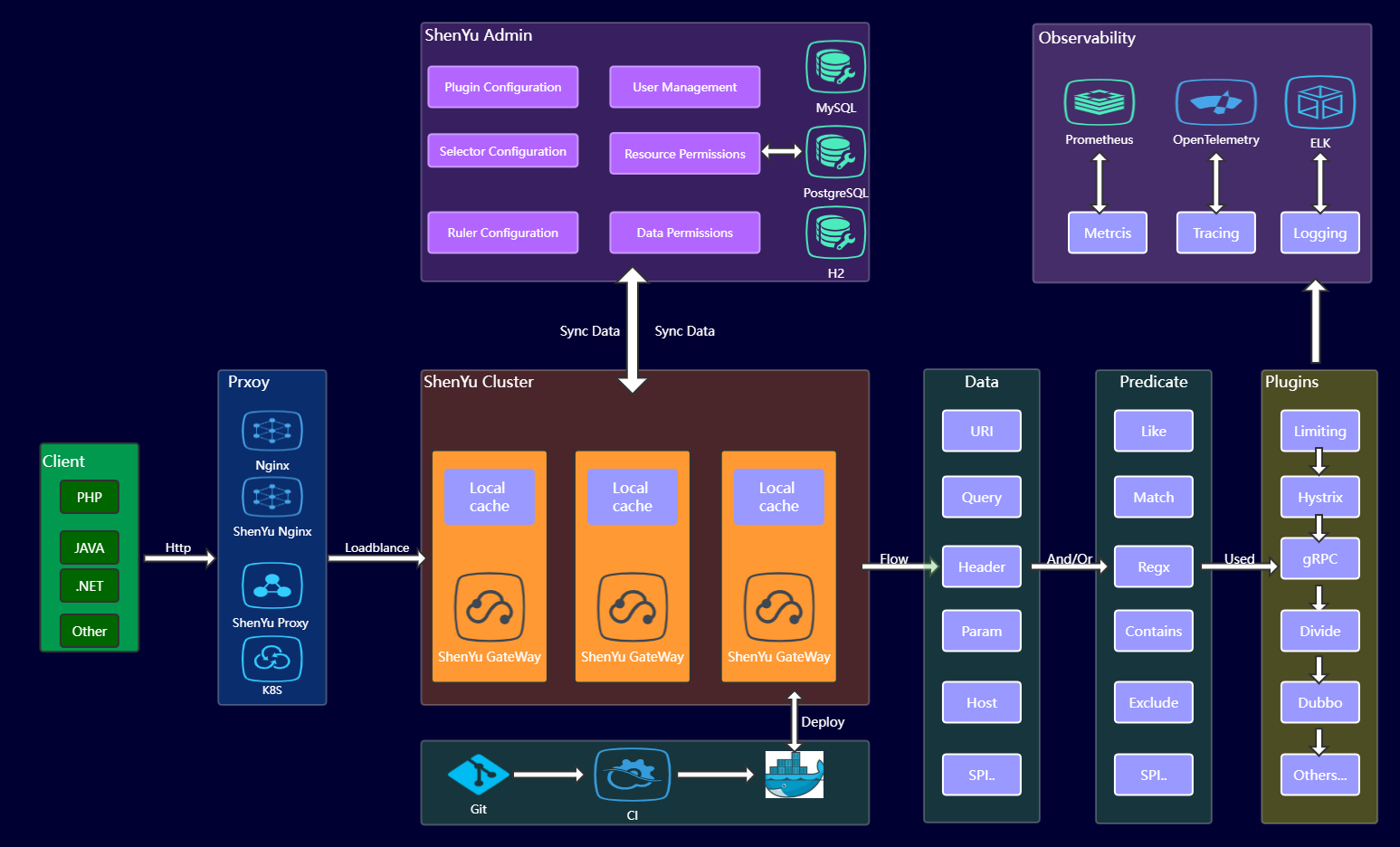
@@ -88,7 +88,7 @@ Apache ShenYu网关就是这样通过层层筛选完成流量控制。其流程
## 协议代理
-协议代理是网关最核心的功能,目前 `Apache ShenYu` 支持 `http` 转成 `http/https`, `Websocket`,`Dubbo`、 `Spring Cloud`、 `GRPC`、 `Motan`、` Sofa`、 `Tars` 等协议的转换,未来将支持 `TCP`, `MQTT`,`MQTT` 等协议。
+协议代理是网关最核心的功能,目前 `Apache ShenYu` 支持 `http` 转成 `http/https`, `Websocket`,`Dubbo`、 `Spring Cloud`、 `GRPC`、 `Motan`、`Sofa`、 `Tars` 等协议的转换,未来将支持 `TCP`, `MQTT`,`MQTT` 等协议。
#### Divide插件
@@ -387,6 +387,7 @@ Apache ShenYu网关就是这样通过层层筛选完成流量控制。其流程
## 社区
+
`Apache ShenYu` 是完全由国人主导的自主性社区开源项目,目前处在高速发展时期,
`功能开发`,`文档完善`,`BUG修复` 等大量的事情需要完成。
`Apache ShenYu` 社区遵循 `Apache Way`的社区理念,打造一个`完全开放`,`治理`的社区。
diff --git a/i18n/zh/docusaurus-plugin-content-blog-news/Soul-gateway-release-milestone-version-2.3.0.md b/i18n/zh/docusaurus-plugin-content-blog-news/Soul-gateway-release-milestone-version-2.3.0.md
index 7dc1eb7..1df7a7d 100755
--- a/i18n/zh/docusaurus-plugin-content-blog-news/Soul-gateway-release-milestone-version-2.3.0.md
+++ b/i18n/zh/docusaurus-plugin-content-blog-news/Soul-gateway-release-milestone-version-2.3.0.md
@@ -12,6 +12,7 @@ cover: "/img/architecture/shenyu-framework.png"
完成了将近 `200` 多次PR,发表了将近`300` 篇文章的源码解析,新增贡献者 `120` 多位,晋升了 `7` 位committer,并且全部获得正版 `jetbrains` 全家桶。非常感谢他们,在他们的帮助下,我们完成了非常多非常多的功能。
## soul-admin(dashboard)
+
`admin`是整个网关的控制面板,掌管所有的流量,规则的匹配。
- 整合`shiro`框架,完成了用户按钮级别的权限控制。
@@ -22,7 +23,9 @@ cover: "/img/architecture/shenyu-framework.png"
- 新增单元测试,覆盖率达到百分之七十。
## Soul 网关插件
+
### 插件新增
+
- 新增`GRPC`插件,全面支持`GRPC`协议。
- 新增`Tars`插件,支持腾讯 `tars RPC`协议。
- 新增`Sofa` 插件,支持 `sofa RPC`协议。
@@ -32,13 +35,16 @@ cover: "/img/architecture/shenyu-framework.png"
- 新增 `Context-path`插件,支持用户自定义 `context-path`
### 插件优化
+
- `Divide` 插件:节点探活方式的优化,流量预热方式的优化。
- `Ratelimiter`插件:新增并发,漏桶等不同的限流算法,供用户选择。
- `Sign` 插件:修复必须设置 url 的 bug,新增是否验证 标记,可以用来做开放平台的URI认证。
- `Dubbo`插件:新增 form 表单,URI 参数请求, 新增注册中心直连,参数校验等功能。
## Soul Client
+
##### soul-client只是提供一种快速接入网关的客户端,不是必须的。如果用户不使用,可以在soul-admin自行配置规则即可。
+
- `spring-mvc`客户端的优化,支持`spring`, `spring-boot`所有版本。
- `spring-cloud`客户端的优化,支持`spring`, `spring-boot`所有版本。
- `dubbo`客户端的优化,支持`spring`, `spring-boot`所有版本。
@@ -47,6 +53,7 @@ cover: "/img/architecture/shenyu-framework.png"
- 新增 `soul-sofa-client` 支持 `sofa-java`用户接入。
##### 在之前的版本中,只支持http方式接入,而这次新增注册中心方式接入。
+
- 新增 `zookeeper` 作为注册中心的方式接入`soul`网关。
- 新增 `Nacos` 作为注册中心的方式接入`soul`网关。
- 新增 `Consul` 作为注册中心的方式接入`soul`网关。
@@ -54,14 +61,17 @@ cover: "/img/architecture/shenyu-framework.png"
- 使用方式请参考: https://shenyu.apache.org/zh/projects/shenyu/register-center-design/
## Soul 数据同步
+
- 修复 `Nacos` 配置中心同步未设置 `NameSpace` 的Bug。
- 优化 `Websocket` 同步方式。
- 解决 `soul-admin` 集群部署时候,`Http` 长轮询方式同步数据 Bug。
## 鸣谢
+
这是一次具有里程碑意义的发布,也是 soul 网关,正式正规的一次变革,我们的 dashboard, 代码,文档, issue, PR 全部英文国际化,整个项目的单元测试覆盖率达到了百分之70。再次感谢你们的辛苦付出。虽然我们完成了非常多的功能(在上面我没有完全列举),但是在接下来,我们会有更多的挑战,我相信有你们在,这并不是我们的终点,而是我们腾飞起点。
## 加入我们
+
目前 soul 处于高速发展阶段,如果你追求写高质量的代码,或者想深刻的理解API网关,或者享受开源的乐趣,结识很多优秀的朋友,欢迎大家加入我们的社区。
- github : https://github.com/apache/incubator-shenyu
diff --git a/i18n/zh/docusaurus-plugin-content-docs-community/current/3-Apache-ShenYu-Contributor's-Guide.md b/i18n/zh/docusaurus-plugin-content-docs-community/current/3-Apache-ShenYu-Contributor's-Guide.md
index e6bfe20..0c01885 100755
--- a/i18n/zh/docusaurus-plugin-content-docs-community/current/3-Apache-ShenYu-Contributor's-Guide.md
+++ b/i18n/zh/docusaurus-plugin-content-docs-community/current/3-Apache-ShenYu-Contributor's-Guide.md
@@ -13,19 +13,19 @@ cover: "/img/architecture/shenyu-framework.png"
## 提交issue
- - 在提交issue之前,请经过充分的搜索,确定该issue不是通过简单的检索即可以解决的问题。
- - 查看[issue列表](https://github.com/apache/incubator-shenyu/issues),确定该issue不是一个重复的问题。
- - [新建](https://github.com/apache/incubator-shenyu/issues/new/choose)一个issue并选择您的issue类型。
- - 使用一个清晰并有描述性的标题来定义issue。
- - 根据模板填写必要信息。
- - 在提交issue之后,对该issue分配合适的标签。如:bug,enhancement,discussion等。
- - 请对自己提交的issue保持关注,在讨论中进一步提供必要信息。
+- 在提交issue之前,请经过充分的搜索,确定该issue不是通过简单的检索即可以解决的问题。
+- 查看[issue列表](https://github.com/apache/incubator-shenyu/issues),确定该issue不是一个重复的问题。
+- [新建](https://github.com/apache/incubator-shenyu/issues/new/choose)一个issue并选择您的issue类型。
+- 使用一个清晰并有描述性的标题来定义issue。
+- 根据模板填写必要信息。
+- 在提交issue之后,对该issue分配合适的标签。如:bug,enhancement,discussion等。
+- 请对自己提交的issue保持关注,在讨论中进一步提供必要信息。
## 开发流程
**Fork分支到本地**
- - 从 ShenYu 的repo上fork一个分支到您自己的repo来开始工作,并设置upstream为 ShenYu 的repo。
+- 从 ShenYu 的repo上fork一个分支到您自己的repo来开始工作,并设置upstream为 ShenYu 的repo。
```shell
git remote add upstream https://github.com/apache/incubator-shenyu.git
@@ -33,12 +33,12 @@ git remote add upstream https://github.com/apache/incubator-shenyu.git
**选择issue**
- - 请在选择您要修改的issue。如果是您新发现的问题或想提供issue中没有的功能增强,请先新建一个issue并设置正确的标签。
- - 在选中相关的issue之后,请回复以表明您当前正在这个issue上工作。并在回复的时候为自己设置一个deadline,添加至回复内容中。
+- 请在选择您要修改的issue。如果是您新发现的问题或想提供issue中没有的功能增强,请先新建一个issue并设置正确的标签。
+- 在选中相关的issue之后,请回复以表明您当前正在这个issue上工作。并在回复的时候为自己设置一个deadline,添加至回复内容中。
**创建分支**
- - 切换到fork的master分支,拉取最新代码,创建本次的分支。
+- 切换到fork的master分支,拉取最新代码,创建本次的分支。
```shell
git checkout master
@@ -50,8 +50,8 @@ git checkout -b issueNo
**编码**
- - 请您在开发过程中遵循 ShenYu 的 [开发规范](../code-conduct)。并在准备提交pull request之前完成相应的检查。
- - 将修改的代码push到fork库的分支上。
+- 请您在开发过程中遵循 ShenYu 的 [开发规范](../code-conduct)。并在准备提交pull request之前完成相应的检查。
+- 将修改的代码push到fork库的分支上。
```shell
git add 修改代码
@@ -61,13 +61,13 @@ git push origin issueNo
**提交PR**
- - 发送一个pull request到 ShenYu 的master分支。
- - 接着导师做CodeReview,然后他会与您讨论一些细节(包括设计,实现,性能等)。当导师对本次修改满意后,会将提交合并到当前开发版本的分支中。
- - 最后,恭喜您已经成为了ShenYu的贡献者!
+- 发送一个pull request到 ShenYu 的master分支。
+- 接着导师做CodeReview,然后他会与您讨论一些细节(包括设计,实现,性能等)。当导师对本次修改满意后,会将提交合并到当前开发版本的分支中。
+- 最后,恭喜您已经成为了ShenYu的贡献者!
**删除分支**
- - 在导师将pull request合并到 ShenYu 的master分支中之后,您就可以将远程的分支(origin/issueNo)及与远程分支(origin/issueNo)关联的本地分支(issueNo)删除。
+- 在导师将pull request合并到 ShenYu 的master分支中之后,您就可以将远程的分支(origin/issueNo)及与远程分支(origin/issueNo)关联的本地分支(issueNo)删除。
```shell
git checkout master
diff --git a/i18n/zh/docusaurus-plugin-content-docs-community/current/4-Apache-ShenYu-Committer.md b/i18n/zh/docusaurus-plugin-content-docs-community/current/4-Apache-ShenYu-Committer.md
index 21361ac..2853bae 100755
--- a/i18n/zh/docusaurus-plugin-content-docs-community/current/4-Apache-ShenYu-Committer.md
+++ b/i18n/zh/docusaurus-plugin-content-docs-community/current/4-Apache-ShenYu-Committer.md
@@ -18,14 +18,14 @@ cover: "/img/architecture/shenyu-framework.png"
## 提交者责任
- - 开发新功能;
- - 代码重构;
- - 及时和可靠的评审Pull Request;
- - 思考和接纳新特性请求;
- - 解答问题;
- - 维护文档和代码示例;
- - 改进流程和工具;
- - 引导新的参与者融入社区。
+- 开发新功能;
+- 代码重构;
+- 及时和可靠的评审Pull Request;
+- 思考和接纳新特性请求;
+- 解答问题;
+- 维护文档和代码示例;
+- 改进流程和工具;
+- 引导新的参与者融入社区。
## 日常工作
@@ -33,9 +33,9 @@ cover: "/img/architecture/shenyu-framework.png"
2. assignee在被分配issue后,需要进行如下判断:
- - 判断是否是长期issue,如是,则标记为pending。
- - 判断issue类型,如:bug,enhancement,discussion等。
- - 判断Milestone,并标记。
+- 判断是否是长期issue,如是,则标记为pending。
+- 判断issue类型,如:bug,enhancement,discussion等。
+- 判断Milestone,并标记。
**注意**
diff --git a/i18n/zh/docusaurus-plugin-content-docs-community/current/6-How-to-vote-Apache-ShenYu-Committer.md b/i18n/zh/docusaurus-plugin-content-docs-community/current/6-How-to-vote-Apache-ShenYu-Committer.md
index 5e4378b..34d6ccf 100755
--- a/i18n/zh/docusaurus-plugin-content-docs-community/current/6-How-to-vote-Apache-ShenYu-Committer.md
+++ b/i18n/zh/docusaurus-plugin-content-docs-community/current/6-How-to-vote-Apache-ShenYu-Committer.md
@@ -90,6 +90,7 @@ Best wishes,
**5、准Committer回复邀请函内容,回复表达同意与感谢。**
**6、PPMC 做出回复**
+
```
Hi (nominee),
@@ -119,6 +120,7 @@ https://www.apache.org/foundation/policies/conduct.html
Here is the guideline for all of the Apache ShenYu committers:
https://shenyu.apache.org/community/en/contribute/committer/
```
+
**7、新Committer签署iCLA 具体步骤参考 [Sign ICLA Guide](https://shenyu.apache.org/community/icla/)**
**8、新committer等待Secretary通知创建账户**
diff --git a/i18n/zh/docusaurus-plugin-content-docs-community/current/7-Apache-ShenYu-Two-FA.md b/i18n/zh/docusaurus-plugin-content-docs-community/current/7-Apache-ShenYu-Two-FA.md
index 4661f85..dd52764 100755
--- a/i18n/zh/docusaurus-plugin-content-docs-community/current/7-Apache-ShenYu-Two-FA.md
+++ b/i18n/zh/docusaurus-plugin-content-docs-community/current/7-Apache-ShenYu-Two-FA.md
@@ -28,4 +28,4 @@ tags: ["Two-FA"]
当启用2FA认证后,您需要生成私有访问Token来进行git提交等操作。此时,您将使用用户名 + 私有访问Token 来代替 用户名 + 密码的方式
进行代码的提交。
-具体操作,请参考[创建私有Token](https://help.github.com/articles/creating-a-personal-access-token-for-the-command-line/)。
\ No newline at end of file
+具体操作,请参考[创建私有Token](https://help.github.com/articles/creating-a-personal-access-token-for-the-command-line/)。
diff --git a/i18n/zh/docusaurus-plugin-content-docs-community/current/8-Sign-ICLA-Guide.md b/i18n/zh/docusaurus-plugin-content-docs-community/current/8-Sign-ICLA-Guide.md
index 174df7a..4a7f3e4 100755
--- a/i18n/zh/docusaurus-plugin-content-docs-community/current/8-Sign-ICLA-Guide.md
+++ b/i18n/zh/docusaurus-plugin-content-docs-community/current/8-Sign-ICLA-Guide.md
@@ -25,7 +25,6 @@ Apache CLA 全称 Apache Contributor License Agreement,签署ICLA的目的是
**3. 打开PDF,ICLA需要填写的是两个部分,均需要全英文填写。**
> 注意事项:
-
> - 姓名需要填写拼音,姓与名之间空一格,首字母均为大写,名在前姓氏在后。
> - Committer相关的签署,则preferred Apache id(s)是必填项。
@@ -42,7 +41,6 @@ Apache CLA 全称 Apache Contributor License Agreement,签署ICLA的目的是
## 手动签名和PDF软件签名DEMO
> PDF在线签名
-
> - 下载PDF源文件
> - 填写项目与个人信息
> - 打开PDF在线签署网址
@@ -56,7 +54,6 @@ Apache CLA 全称 Apache Contributor License Agreement,签署ICLA的目的是

> 手写签名
-
> - 下载PDF源文件
> - 填写项目与个人信息n
> - 打印文件
@@ -71,4 +68,4 @@ Apache CLA 全称 Apache Contributor License Agreement,签署ICLA的目的是
## 邮件发送模板
-
\ No newline at end of file
+
diff --git a/i18n/zh/docusaurus-plugin-content-docs/current/deployment/deployment-k8s.md b/i18n/zh/docusaurus-plugin-content-docs/current/deployment/deployment-k8s.md
index 15fc95e..ed80f69 100644
--- a/i18n/zh/docusaurus-plugin-content-docs/current/deployment/deployment-k8s.md
+++ b/i18n/zh/docusaurus-plugin-content-docs/current/deployment/deployment-k8s.md
@@ -11,18 +11,19 @@ description: k8s部署
> 目录
>
> 一. 使用 h2 作为数据库
+>
> 1. 创建 nameSpace和 configMap
> 2. 部署 shenyu-admin
> 3. 部署 shenyu-bootstrap
-
> 二. 使用 mysql 作为数据库
>
-> 和 h2 过程类似,需要注意的两个地方
+> 和 h2 过程类似,需要注意的两个地方
>
> 1. 需要加载 mysql-connector.jar,所以需要一个文件存储的地方
> 2. 需要指定外部 mysql 数据库配置,通过 endpoint 来代理外部 mysql 数据库
>
-> 具体流程如下:
+> 具体流程如下:
+>
> 1. 创建 nameSpace和 configMap
> 2. 创建 endpoint 代理外部 mysql
> 3. 创建 pv 存储 mysql-connector.jar
@@ -32,8 +33,11 @@ description: k8s部署
## 一. 使用 h2 作为数据库
+
### 1. 创建 nameSpace 和 configMap
+
- 创建文件 shenyu-ns.yaml
+
```yaml
apiVersion: v1
kind: Namespace
@@ -95,10 +99,13 @@ data:
org.apache.shenyu.lottery: info
org.apache.shenyu: info
```
+
- 执行 `kubectl apply -f shenyu-ns.yaml`
### 2. 部署 shenyu-admin
+
- 创建文件 shenyu-admin.yaml
+
```yaml
# 示例使用 nodeport 方式暴露端口
apiVersion: v1
@@ -142,11 +149,13 @@ spec:
- name: 'TZ'
value: 'Asia/Beijing'
```
+
- 执行`kubectl apply -f shenyu-ns.yaml`
### 3. 部署 shenyu-bootstrap
- 创建文件 shenyu-bootstrap.yaml
+
```yaml
# 示例使用 nodeport 方式暴露端口
apiVersion: v1
@@ -210,7 +219,9 @@ spec:
## 二. 使用 mysql 作为数据库
### 1. 创建 nameSpace和 configMap
+
- 创建文件 shenyu-ns.yaml
+
```yaml
apiVersion: v1
kind: Namespace
@@ -276,10 +287,13 @@ data:
spring.datasource.user: {your_mysql_user}
spring.datasource.password: {your_mysql_password}
```
+
- 执行 `kubectl apply -f shenyu-ns.yaml`
### 2. 创建 endpoint 代理外部 mysql
+
- 创建文件 shenyu-ep.yaml
+
```yaml
kind: Service
apiVersion: v1
@@ -304,9 +318,13 @@ subsets:
- port: {your_mysql_port}
name: mysql
```
+
- 执行 `kubectl apply -f shenyu-ep.yaml`
+
### 3. 创建 pv 存储 mysql-connector.jar
+
- 创建文件 shenyu-store.yaml
+
```yaml
# 示例使用 pvc、pv、storageClass 来存储文件
apiVersion: v1
@@ -352,6 +370,7 @@ metadata:
provisioner: kubernetes.io/no-provisioner
volumeBindingMode: WaitForFirstConsumer
```
+
- 执行 `kubectl apply -f shenyu-store.yaml`
- pv挂载目录下上传 `mysql-connector.jar`
@@ -359,6 +378,7 @@ volumeBindingMode: WaitForFirstConsumer
### 4. 部署 shenyu-admin
- 创建文件 shenyu-admin.yaml
+
```yaml
# 示例使用 nodeport 方式暴露端口
apiVersion: v1
@@ -420,11 +440,13 @@ spec:
- mountPath: /opt/shenyu-admin/ext-lib
name: mysql-connector-volume
```
+
- 执行`kubectl apply -f shenyu-admin.yaml`
### 3. 部署 shenyu-bootstrap
- 创建文件 shenyu-bootstrap.yaml
+
```yaml
# 示例使用 nodeport 方式暴露端口
apiVersion: v1
diff --git a/i18n/zh/docusaurus-plugin-content-docs/current/deployment/deployment-local.md b/i18n/zh/docusaurus-plugin-content-docs/current/deployment/deployment-local.md
index 9c6513a..d331c10 100644
--- a/i18n/zh/docusaurus-plugin-content-docs/current/deployment/deployment-local.md
+++ b/i18n/zh/docusaurus-plugin-content-docs/current/deployment/deployment-local.md
@@ -17,6 +17,7 @@ description: 本地部署
### 下载编译代码
* 下载代码
+
```
> git clone https://github.com/apache/incubator-shenyu.git
> cd incubator-shenyu
@@ -25,9 +26,9 @@ description: 本地部署
* 使用开发工具启动 `org.apache.shenyu.admin.ShenyuAdminBootstrap`,访问 http://localhost:9095 , 默认用户名和密码分别为: `admin` 和 `123456`。
- * 如果使用`h2`来存储,设置变量 `--spring.profiles.active = h2`
+ * 如果使用`h2`来存储,设置变量 `--spring.profiles.active = h2`
- * 如果使用`MySQL`来存储,修改 `application.yaml` 中的 `mysql` 配置。
+ * 如果使用`MySQL`来存储,修改 `application.yaml` 中的 `mysql` 配置。
* 使用开发工具启动 `org.apache.shenyu.bootstrap.ShenyuBootstrapApplication`。
diff --git a/i18n/zh/docusaurus-plugin-content-docs/current/design/data-sync.md b/i18n/zh/docusaurus-plugin-content-docs/current/design/data-sync.md
index f90deba..c9282ad 100644
--- a/i18n/zh/docusaurus-plugin-content-docs/current/design/data-sync.md
+++ b/i18n/zh/docusaurus-plugin-content-docs/current/design/data-sync.md
@@ -18,11 +18,11 @@ description: 数据同步
在实际使用 `Apache ShenYu` 网关过程中,用户也反馈了一些问题:
- * 依赖 `Zookeeper`,怎么使用 `Etcd`、`Consul`、`Nacos`等其他注册中心?
- * 依赖 `Redis`、`influxdb`,没有使用限流插件、监控插件,为什么需要这些?
- * 配置同步为什么不使用配置中心?
- * 为什么不能动态配置更新?
- * 每次都要查询数据库,使用`Redis`不就行了吗?
+* 依赖 `Zookeeper`,怎么使用 `Etcd`、`Consul`、`Nacos`等其他注册中心?
+* 依赖 `Redis`、`influxdb`,没有使用限流插件、监控插件,为什么需要这些?
+* 配置同步为什么不使用配置中心?
+* 为什么不能动态配置更新?
+* 每次都要查询数据库,使用`Redis`不就行了吗?
根据用户的反馈信息,我们对 `Apache ShenYu` 也进行了部分的重构,当前数据同步特性如下:
diff --git a/i18n/zh/docusaurus-plugin-content-docs/current/design/database-design.md b/i18n/zh/docusaurus-plugin-content-docs/current/design/database-design.md
index f6ea28a..0a840f2 100644
--- a/i18n/zh/docusaurus-plugin-content-docs/current/design/database-design.md
+++ b/i18n/zh/docusaurus-plugin-content-docs/current/design/database-design.md
@@ -18,13 +18,14 @@ description: ShenYu Admin数据结构
* 设计详解:
- * 一个插件对应多个选择器,一个选择器对应多个规则。
+ * 一个插件对应多个选择器,一个选择器对应多个规则。
- * 一个选择器对应多个匹配条件,一个规则对应多个匹配条件。
+ * 一个选择器对应多个匹配条件,一个规则对应多个匹配条件。
- * 每个规则在对应插件下,有不同的处理能力。
+ * 每个规则在对应插件下,有不同的处理能力。
## 资源权限
+
* 资源代表的是 `shenyu-admin` 用户后台中的菜单或者按钮。
* 资源权限数据表用来存储用户名称、角色、资源数据以及对应关系。
@@ -34,19 +35,20 @@ description: ShenYu Admin数据结构
<img src="/img/shenyu/db/shenyu-permission-table.png" width="80%" height="60%" />
* 设计详解:
- * 一个用户对应多个角色,一个角色对应多个资源。
+ * 一个用户对应多个角色,一个角色对应多个资源。
## 数据权限
+
* 数据权限表用来存储用户,选择器、规则对应关系。
* 数据库 `UML` 类图:
<img src="/img/shenyu/db/shenyu-data_permission-table.png" width="80%" height="60%" />
* 设计详解:
- * 数据权限的表为: `data_permission`,一个用户对应多条数据权限。
- * 数据权限表中字段 `data_type` 区分不同的类型数据, 具体对应关系如下:`0 -> 选择器, 1 -> 规则`。
- * 数据权限表中字段 `data_id` 存放相应类型的主键`id`。
+ * 数据权限的表为: `data_permission`,一个用户对应多条数据权限。
+ * 数据权限表中字段 `data_type` 区分不同的类型数据, 具体对应关系如下:`0 -> 选择器, 1 -> 规则`。
+ * 数据权限表中字段 `data_id` 存放相应类型的主键`id`。
## 元数据
@@ -58,9 +60,9 @@ description: ShenYu Admin数据结构
* 设计详解:
- * `path`:在请求网关的时候,会根据 `path` 来匹配到一条数据,然后进行后续的流程。
+ * `path`:在请求网关的时候,会根据 `path` 来匹配到一条数据,然后进行后续的流程。
- * `rpc_ext`:用于保存`RPC`代理中的扩展信息。
+ * `rpc_ext`:用于保存`RPC`代理中的扩展信息。
## 字典管理
diff --git a/i18n/zh/docusaurus-plugin-content-docs/current/design/register-center-design.md b/i18n/zh/docusaurus-plugin-content-docs/current/design/register-center-design.md
index 54431e8..71a8ce8 100644
--- a/i18n/zh/docusaurus-plugin-content-docs/current/design/register-center-design.md
+++ b/i18n/zh/docusaurus-plugin-content-docs/current/design/register-center-design.md
@@ -108,7 +108,7 @@ shenyu
`Nacos`注册分为两部分:`URI` 和 `Metadata`。`URI` 使用实例注册方式,在服务异常的情况下,相关`URI`数据节点会自动进行删除,并发送事件到订阅端,订阅端进行相关的下线处理。`Metadata` 使用配置注册方式,没有相关上下线操作,当有`URI`实例注册时,会相应的发布`Metadata`配置,订阅端监听数据变化,进行更新处理。
-`URI `实例注册命令规则如下:
+`URI`实例注册命令规则如下:
```
shenyu.register.service.${rpcType}
diff --git a/i18n/zh/docusaurus-plugin-content-docs/current/developer/custom-plugin.md b/i18n/zh/docusaurus-plugin-content-docs/current/developer/custom-plugin.md
index c143073..e1f869e 100644
--- a/i18n/zh/docusaurus-plugin-content-docs/current/developer/custom-plugin.md
+++ b/i18n/zh/docusaurus-plugin-content-docs/current/developer/custom-plugin.md
@@ -71,6 +71,7 @@ public interface ShenyuPlugin {
}
```
+
* 接口方法详细说明
* `execute()` 方法为核心的执行方法,用户可以在里面自由的实现自己想要的功能。
@@ -95,6 +96,7 @@ public interface ShenyuPlugin {
## 匹配流量处理插件
* 引入如下依赖:
+
```xml
<dependency>
<groupId>org.apache.shenyu</groupId>
@@ -102,6 +104,7 @@ public interface ShenyuPlugin {
<version>${project.version}</version>
</dependency>
```
+
* 新增一个类 `CustomPlugin`,继承 `org.apache.shenyu.plugin.base.AbstractShenyuPlugin`
* 以下是参考:
@@ -194,7 +197,7 @@ public class CustomPlugin extends AbstractShenyuPlugin {
* 重新登陆 `shenyu-admin` 后台,可以看见刚新增的插件,然后就可以进行选择器规则匹配。
- * 在规则中,有个 `handler` 字段,是自定义处理数据,在 `doExecute()` 方法中,通过 ` final String ruleHandle = rule.getHandle();` 获取,然后进行你的操作。
+ * 在规则中,有个 `handler` 字段,是自定义处理数据,在 `doExecute()` 方法中,通过 `final String ruleHandle = rule.getHandle();` 获取,然后进行你的操作。
* 注册成`Spring`的`bean`,参考如下或者直接在实现类上加 `@Component` 注解。
diff --git a/i18n/zh/docusaurus-plugin-content-docs/current/developer/custom-result.md b/i18n/zh/docusaurus-plugin-content-docs/current/developer/custom-result.md
index 0f53919..a406a88 100644
--- a/i18n/zh/docusaurus-plugin-content-docs/current/developer/custom-result.md
+++ b/i18n/zh/docusaurus-plugin-content-docs/current/developer/custom-result.md
@@ -41,7 +41,7 @@ public class DefaultShenyuEntity implements Serializable {
## 扩展
-* 新增一个类 `CustomShenyuResult` 实现 `org.apache.shenyu.plugin.api.result.ShenyuResult`
+* 新增一个类 `CustomShenyuResult` 实现 `org.apache.shenyu.plugin.api.result.ShenyuResult`
```java
public interface ShenyuResult<T> {
diff --git a/i18n/zh/docusaurus-plugin-content-docs/current/developer/custom-sign-algorithm.md b/i18n/zh/docusaurus-plugin-content-docs/current/developer/custom-sign-algorithm.md
index 881835d..023356a 100644
--- a/i18n/zh/docusaurus-plugin-content-docs/current/developer/custom-sign-algorithm.md
+++ b/i18n/zh/docusaurus-plugin-content-docs/current/developer/custom-sign-algorithm.md
@@ -10,9 +10,9 @@ description: 自定义sign插件检验
## 扩展
-* 默认的实现为 `org.apache.shenyu.plugin.sign.service.DefaultSignService`。
+* 默认的实现为 `org.apache.shenyu.plugin.sign.service.DefaultSignService`。
-* 新增一个类 `CustomSignService` 实现 `org.apache.shenyu.plugin.api.SignService`。
+* 新增一个类 `CustomSignService` 实现 `org.apache.shenyu.plugin.api.SignService`。
```java
public interface SignService {
diff --git a/i18n/zh/docusaurus-plugin-content-docs/current/download.md b/i18n/zh/docusaurus-plugin-content-docs/current/download.md
index 7d71001..457ed36 100644
--- a/i18n/zh/docusaurus-plugin-content-docs/current/download.md
+++ b/i18n/zh/docusaurus-plugin-content-docs/current/download.md
@@ -70,6 +70,7 @@ pgp apache-shenyu-********.asc
* [English](/pdf/apache_shenyu_docs_en.pdf)
---
+
title: Download
keywords: ["Download"]
description: Download
diff --git a/i18n/zh/docusaurus-plugin-content-docs/current/plugin-center/authority-and-certification/jwt-plugin.md b/i18n/zh/docusaurus-plugin-content-docs/current/plugin-center/authority-and-certification/jwt-plugin.md
index 2725b8c..ba8030a 100644
--- a/i18n/zh/docusaurus-plugin-content-docs/current/plugin-center/authority-and-certification/jwt-plugin.md
+++ b/i18n/zh/docusaurus-plugin-content-docs/current/plugin-center/authority-and-certification/jwt-plugin.md
@@ -1,4 +1,5 @@
---
+
title: JWT插件
keywords: ["JWT"]
description: JWT插件
@@ -42,6 +43,7 @@ description: JWT插件
<!-- apache shenyu jwt plugin end-->
```
+
* 选择器和规则,只有匹配的请求,才会进行 `jwt` 鉴权判断,请详细看:[选择器和规则管理](../../user-guide/admin-usage/selector-and-rule)。
## 场景
diff --git a/i18n/zh/docusaurus-plugin-content-docs/current/plugin-center/authority-and-certification/sign-plugin.md b/i18n/zh/docusaurus-plugin-content-docs/current/plugin-center/authority-and-certification/sign-plugin.md
index 6dd3790..998999b 100644
--- a/i18n/zh/docusaurus-plugin-content-docs/current/plugin-center/authority-and-certification/sign-plugin.md
+++ b/i18n/zh/docusaurus-plugin-content-docs/current/plugin-center/authority-and-certification/sign-plugin.md
@@ -64,6 +64,7 @@ description: sign插件
第一步:首先构造一个 `Map` 。
+
```java
Map<String, String> map = Maps.newHashMapWithExpectedSize(3);
//timestamp为毫秒数的字符串形式 String.valueOf(LocalDateTime.now().toInstant(ZoneOffset.of("+8")).toEpochMilli())
@@ -73,6 +74,7 @@ map.put("version", "1.0.0");
```
第二步:进行 `Key` 的自然排序,然后 `Key`,`Value`值拼接最后再拼接分配给你的 `SK`。
+
```java
List<String> storedKeys = Arrays.stream(map.keySet()
.toArray(new String[]{}))
@@ -83,9 +85,11 @@ final String sign = storedKeys.stream()
.collect(Collectors.joining()).trim()
.concat("506EEB535CF740D7A755CB4B9F4A1536");
```
+
* 你得到的 `sign` 值应该为:`path/api/service/abctimestamp1571711067186version1.0.0506EEB535CF740D7A755CB4B9F4A1536`
第三步:进行 `MD5` 加密后转成大写。
+
```java
DigestUtils.md5DigestAsHex(sign.getBytes()).toUpperCase()
```
diff --git a/i18n/zh/docusaurus-plugin-content-docs/current/plugin-center/authority-and-certification/waf-plugin.md b/i18n/zh/docusaurus-plugin-content-docs/current/plugin-center/authority-and-certification/waf-plugin.md
index 0cb979d..ffbafd9 100644
--- a/i18n/zh/docusaurus-plugin-content-docs/current/plugin-center/authority-and-certification/waf-plugin.md
+++ b/i18n/zh/docusaurus-plugin-content-docs/current/plugin-center/authority-and-certification/waf-plugin.md
@@ -59,10 +59,11 @@ description: waf插件
* 此时规则配置中的 `处理` 配置必选:
- * `permission`:匹配到该规则的处理逻辑。`reject`: 拒绝访问,`allow`: 允许访问。
+ * `permission`:匹配到该规则的处理逻辑。`reject`: 拒绝访问,`allow`: 允许访问。
- * `statusCode`:被拒绝访问时,响应体中`code`字段的值, `不会修改响应头的状态码`。
+ * `statusCode`:被拒绝访问时,响应体中`code`字段的值, `不会修改响应头的状态码`。
例如设置为:`statusCode=10001`,被拒绝的响应体如下:
+
```json
{"code":10001,"message":"You are forbidden to visit"}
```
diff --git a/i18n/zh/docusaurus-plugin-content-docs/current/plugin-center/fault-tolerance/hystrix-plugin.md b/i18n/zh/docusaurus-plugin-content-docs/current/plugin-center/fault-tolerance/hystrix-plugin.md
index efb2870..34d9580 100644
--- a/i18n/zh/docusaurus-plugin-content-docs/current/plugin-center/fault-tolerance/hystrix-plugin.md
+++ b/i18n/zh/docusaurus-plugin-content-docs/current/plugin-center/fault-tolerance/hystrix-plugin.md
@@ -34,17 +34,17 @@ description: hystrix插件
<!-- apache shenyu hystrix plugin end-->
```
-## hystrix 插件配置
+## hystrix 插件配置
关于选择器和规则配置的更多说明,请参考:[选择器和规则管理](../../user-guide/admin-usage/selector-and-rule), 这里只对部分字段进行了介绍。
-#### 选择器配置
+#### 选择器配置
用于对流量第一次筛选,不需要特殊处理字段。
<img src="/img/shenyu/plugin/hystrix/selector.png" width="80%" height="80%" />
-#### 规则配置
+#### 规则配置
用于对流量最终筛选,有规则处理逻辑,隔离模式支持 `thread` 和 `semaphore` 。
diff --git a/i18n/zh/docusaurus-plugin-content-docs/current/plugin-center/fault-tolerance/resilience4j-plugin.md b/i18n/zh/docusaurus-plugin-content-docs/current/plugin-center/fault-tolerance/resilience4j-plugin.md
index a9079b6..083d327 100644
--- a/i18n/zh/docusaurus-plugin-content-docs/current/plugin-center/fault-tolerance/resilience4j-plugin.md
+++ b/i18n/zh/docusaurus-plugin-content-docs/current/plugin-center/fault-tolerance/resilience4j-plugin.md
@@ -33,17 +33,17 @@ description: resilience4j插件
<!-- apache shenyu resilience4j plugin end-->
```
-## Resilience4j 插件配置
+## Resilience4j 插件配置
关于选择器和规则配置的更多说明,请参考:[选择器和规则管理](../../user-guide/admin-usage/selector-and-rule), 这里只对部分字段进行了介绍。
-#### 选择器配置
+#### 选择器配置
用于对流量第一次筛选,不需要特殊处理字段。
<img src="/img/shenyu/plugin/resilience4j/resilience4j-2.png" width="80%" height="80%" />
-#### 规则配置
+#### 规则配置
用于对流量最终筛选,有规则处理逻辑。
diff --git a/i18n/zh/docusaurus-plugin-content-docs/current/plugin-center/fault-tolerance/sentinel-plugin.md b/i18n/zh/docusaurus-plugin-content-docs/current/plugin-center/fault-tolerance/sentinel-plugin.md
index 82b6400..8028ffd 100644
--- a/i18n/zh/docusaurus-plugin-content-docs/current/plugin-center/fault-tolerance/sentinel-plugin.md
+++ b/i18n/zh/docusaurus-plugin-content-docs/current/plugin-center/fault-tolerance/sentinel-plugin.md
@@ -34,17 +34,17 @@ description: sentinel插件
```
-## sentinel 插件配置
+## sentinel 插件配置
关于选择器和规则配置的更多说明,请参考:[选择器和规则管理](../../user-guide/admin-usage/selector-and-rule), 这里只对部分字段进行了介绍。
-#### 选择器配置
+#### 选择器配置
用于对流量第一次筛选,不需要特殊处理字段。
<img src="/img/shenyu/plugin/sentinel/selector_zh.png" width="80%" height="80%" />
-#### 规则配置
+#### 规则配置
用于对流量最终筛选,有规则处理逻辑。
diff --git a/i18n/zh/docusaurus-plugin-content-docs/current/plugin-center/http-handle/context-path-plugin.md b/i18n/zh/docusaurus-plugin-content-docs/current/plugin-center/http-handle/context-path-plugin.md
index 5c693ba..88a3bfb 100644
--- a/i18n/zh/docusaurus-plugin-content-docs/current/plugin-center/http-handle/context-path-plugin.md
+++ b/i18n/zh/docusaurus-plugin-content-docs/current/plugin-center/http-handle/context-path-plugin.md
@@ -10,10 +10,11 @@ description: context_path插件
## 插件设置
-- 在 `shenyu-admin` --> 基础配置 --> 插件管理 --> `context_path` 设置为开启。
-- 如果用户不需要,可以把插件禁用。
+- 在 `shenyu-admin` --> 基础配置 --> 插件管理 --> `context_path` 设置为开启。
+- 如果用户不需要,可以把插件禁用。
## 插件使用
+
- 在网关的 `pom.xml` 文件中添加 `context_path` 的支持。
```xml
diff --git a/i18n/zh/docusaurus-plugin-content-docs/current/plugin-center/http-handle/modify-response-plugin.md b/i18n/zh/docusaurus-plugin-content-docs/current/plugin-center/http-handle/modify-response-plugin.md
index 1b01227..9070f14 100644
--- a/i18n/zh/docusaurus-plugin-content-docs/current/plugin-center/http-handle/modify-response-plugin.md
+++ b/i18n/zh/docusaurus-plugin-content-docs/current/plugin-center/http-handle/modify-response-plugin.md
@@ -12,7 +12,7 @@ description: modifyResponse插件
## 插件设置
-- 在 `shenyu-admin` --> 基础配置 --> 插件管理 --> `modifyResponse` 设置为开启。
+- 在 `shenyu-admin` --> 基础配置 --> 插件管理 --> `modifyResponse` 设置为开启。
## 插件使用
@@ -32,6 +32,7 @@ description: modifyResponse插件
* 只有匹配的请求,才会修改响应。
## 修改响应插件使用指南
+
* 1.配置选择器
* 2.配置规则
* 3.修改响应状态码
@@ -53,10 +54,13 @@ description: modifyResponse插件
修改响应体是通过 `JSONPath` 来实现的,`$.` 代表根目录
上面的配置,插件开启前,响应内容为
+
```json
{"id":3,"name":"hello world findById"}
```
+
插件开启后,响应内容为
+
```json
{"id2":3,"add":"4"}
```
diff --git a/i18n/zh/docusaurus-plugin-content-docs/current/plugin-center/http-handle/param-mapping-plugin.md b/i18n/zh/docusaurus-plugin-content-docs/current/plugin-center/http-handle/param-mapping-plugin.md
index 7007a61..f3de4fa 100644
--- a/i18n/zh/docusaurus-plugin-content-docs/current/plugin-center/http-handle/param-mapping-plugin.md
+++ b/i18n/zh/docusaurus-plugin-content-docs/current/plugin-center/http-handle/param-mapping-plugin.md
@@ -12,7 +12,7 @@ description: Param-mapping插件
## 插件设置
-- 在 `shenyu-admin` --> 基础配置 --> 插件管理 --> `param_mapping` 设置为开启。
+- 在 `shenyu-admin` --> 基础配置 --> 插件管理 --> `param_mapping` 设置为开启。
## 插件使用
@@ -33,6 +33,7 @@ description: Param-mapping插件
* 只有匹配的请求,才会修改请求体。
## 修改请求插件使用指南
+
* 1.配置选择器
* 2.配置规则
* 3.修改请求体
@@ -45,11 +46,15 @@ description: Param-mapping插件
修改请求体是通过 `JSONPath` 来实现的, `$.` 代表根目录
上面的配置,插件开启前,请求内容为
+
```json
{"id":3,"data":{"value":"18","age":"36"}}
```
+
插件开启后,请求内容为
+
```json
{"name":"shenyu","userId":3,"data":{"age":"36"}}
```
+
上述操作,增加一个`name:shenyu`,把`id`替换为`userId`,移除`data`中的`value` 。
diff --git a/i18n/zh/docusaurus-plugin-content-docs/current/plugin-center/http-handle/rewrite-plugin.md b/i18n/zh/docusaurus-plugin-content-docs/current/plugin-center/http-handle/rewrite-plugin.md
index 09d4c10..0ac2ede 100644
--- a/i18n/zh/docusaurus-plugin-content-docs/current/plugin-center/http-handle/rewrite-plugin.md
+++ b/i18n/zh/docusaurus-plugin-content-docs/current/plugin-center/http-handle/rewrite-plugin.md
@@ -32,7 +32,7 @@ description: rewrite插件
* 选择器和规则设置,请参考:[选择器和规则管理](../../user-guide/admin-usage/selector-and-rule)。
- * 只有匹配的请求,才会进行重写。
+ * 只有匹配的请求,才会进行重写。
## 场景
diff --git a/i18n/zh/docusaurus-plugin-content-docs/current/plugin-center/observability/monitor-plugin.md b/i18n/zh/docusaurus-plugin-content-docs/current/plugin-center/observability/monitor-plugin.md
index 4a2d30d..ddad2a3 100644
--- a/i18n/zh/docusaurus-plugin-content-docs/current/plugin-center/observability/monitor-plugin.md
+++ b/i18n/zh/docusaurus-plugin-content-docs/current/plugin-center/observability/monitor-plugin.md
@@ -15,7 +15,7 @@ description: monitor插件
* 异步或者同步的方式,在 `Apache ShenYu` 网关里面进行 `metrics` 埋点。
-* `prometheus` 服务端通过 `http` 请求来拉取 `metrics`,再使用 `Grafana ` 展示。
+* `prometheus` 服务端通过 `http` 请求来拉取 `metrics`,再使用 `Grafana` 展示。
## 插件设置
@@ -49,6 +49,7 @@ description: monitor插件
</dependency>
<!-- apache shenyu monitor plugin end-->
```
+
* 选择器和规则配置,请参考: [选择器和规则管理](../../user-guide/admin-usage/selector-and-rule)。
* 只有当匹配的`url`,才会进行`url`请求埋点。
@@ -79,6 +80,7 @@ description: monitor插件
static_configs:
- targets: ['localhost:9190']
```
+
**注:** `job_name`跟`monitor`插件配置的`metricsName`相对应
* 配置完成之后 `window` 下可以直接双击 `prometheus.exe` 启动即可,默认启动端口为 `9090` ,可通过http://localhost:9090/ 验证是否成功
diff --git a/i18n/zh/docusaurus-plugin-content-docs/current/plugin-center/rpc-proxy/dubbo-plugin.md b/i18n/zh/docusaurus-plugin-content-docs/current/plugin-center/rpc-proxy/dubbo-plugin.md
index 50f9fc6..f13eb96 100644
--- a/i18n/zh/docusaurus-plugin-content-docs/current/plugin-center/rpc-proxy/dubbo-plugin.md
+++ b/i18n/zh/docusaurus-plugin-content-docs/current/plugin-center/rpc-proxy/dubbo-plugin.md
@@ -41,8 +41,8 @@ description: dubbo插件
java.lang.Integer,java.lang.String,java.lang.Integer
```
- * 按照接口的参数类型顺序,通过半角逗号分隔。
- * 请求传参时需**严格按照参数类型顺序传参**,没有值的用 `null`占位 。请求体示例:`{"id":1,"name": null,"age":18}`
+ * 按照接口的参数类型顺序,通过半角逗号分隔。
+ * 请求传参时需**严格按照参数类型顺序传参**,没有值的用 `null`占位 。请求体示例:`{"id":1,"name": null,"age":18}`
方式二、名称映射
@@ -50,8 +50,8 @@ description: dubbo插件
{"id":"java.lang.Integer","name":"java.lang.String","age":"java.lang.Integer"}
```
- * 使用 `"参数名":"参数类型"`表示一个参数,按接口参数类型顺序设置,半角逗号分隔。
- * 请求时无需关注顺序,也无需使用null占位。请求体示例: `{"name":"Mike","id":1}`
+ * 使用 `"参数名":"参数类型"`表示一个参数,按接口参数类型顺序设置,半角逗号分隔。
+ * 请求时无需关注顺序,也无需使用null占位。请求体示例: `{"name":"Mike","id":1}`
* Rpc扩展参数:`dubbo`接口的其他配置,支持`json`格式,字段如下:
diff --git a/i18n/zh/docusaurus-plugin-content-docs/current/plugin-center/rpc-proxy/grpc-plugin.md b/i18n/zh/docusaurus-plugin-content-docs/current/plugin-center/rpc-proxy/grpc-plugin.md
index c79d288..2568832 100644
--- a/i18n/zh/docusaurus-plugin-content-docs/current/plugin-center/rpc-proxy/grpc-plugin.md
+++ b/i18n/zh/docusaurus-plugin-content-docs/current/plugin-center/rpc-proxy/grpc-plugin.md
@@ -33,13 +33,13 @@ description: gRPC插件
* 处理配置详解:
- * `ip:port`:`ip` 与端口,这里填写你真实服务的 `ip` + 端口。
+ * `ip:port`:`ip` 与端口,这里填写你真实服务的 `ip` + 端口。
- * `protocol`:`http` 协议,一般填写 `http://` 或者 `https://` ,不填写默认为:`http://`
+ * `protocol`:`http` 协议,一般填写 `http://` 或者 `https://` ,不填写默认为:`http://`
- * `weight`:服务权重。
+ * `weight`:服务权重。
- * `status`:开启或关闭。
+ * `status`:开启或关闭。
## 元数据
diff --git a/i18n/zh/docusaurus-plugin-content-docs/current/quick-start/quick-start-dubbo.md b/i18n/zh/docusaurus-plugin-content-docs/current/quick-start/quick-start-dubbo.md
index 8287c33..a30b70b 100644
--- a/i18n/zh/docusaurus-plugin-content-docs/current/quick-start/quick-start-dubbo.md
+++ b/i18n/zh/docusaurus-plugin-content-docs/current/quick-start/quick-start-dubbo.md
@@ -102,6 +102,7 @@ description: Dubbo快速开始
下载 [shenyu-examples-dubbo](https://github.com/apache/incubator-shenyu/tree/v2.4.0/shenyu-examples/shenyu-examples-dubbo) .
修改 `spring-dubbo.xml` 中的注册地址为你本地(注意区分`dubbo`的版本是`apache dubbo`还是`alibaba dubbo`),如:
+
```xml
<dubbo:registry address="zookeeper://localhost:2181"/>
```
@@ -109,6 +110,7 @@ description: Dubbo快速开始
运行相应的`main`方法启动项目,(注意区分`dubbo`的版本是`apache dubbo`还是`alibaba dubbo`)。
成功启动会有如下日志:
+
```shell
2021-02-06 20:58:01.807 INFO 3724 --- [pool-2-thread-1] o.d.s.client.common.utils.RegisterUtils : dubbo client register success: {"appName":"dubbo","contextPath":"/dubbo","path":"/dubbo/insert","pathDesc":"Insert a row of data","rpcType":"dubbo","serviceName":"org.dromara.shenyu.examples.dubbo.api.service.DubboTestService","methodName":"insert","ruleName":"/dubbo/insert","parameterTypes":"org.dromara.shenyu.examples.dubbo.api.entity.DubboTest","rpcExt":"{\"group\":\"\",\"version\":\"\" [...]
2021-02-06 20:58:01.821 INFO 3724 --- [pool-2-thread-1] o.d.s.client.common.utils.RegisterUtils : dubbo client register success: {"appName":"dubbo","contextPath":"/dubbo","path":"/dubbo/findAll","pathDesc":"Get all data","rpcType":"dubbo","serviceName":"org.dromara.shenyu.examples.dubbo.api.service.DubboTestService","methodName":"findAll","ruleName":"/dubbo/findAll","parameterTypes":"","rpcExt":"{\"group\":\"\",\"version\":\"\",\"loadbalance\":\"random\",\"retries\":2,\"timeout\":10000 [...]
@@ -150,6 +152,7 @@ public DubboTest batchSaveAndNameAndId(List<DubboTest> dubboTestList, String id,
return test;
}
```
+

当你的参数不匹配时会报如下异常:
diff --git a/i18n/zh/docusaurus-plugin-content-docs/current/quick-start/quick-start-grpc.md b/i18n/zh/docusaurus-plugin-content-docs/current/quick-start/quick-start-grpc.md
index 6f64cd3..fe0f82b 100644
--- a/i18n/zh/docusaurus-plugin-content-docs/current/quick-start/quick-start-grpc.md
+++ b/i18n/zh/docusaurus-plugin-content-docs/current/quick-start/quick-start-grpc.md
@@ -49,6 +49,7 @@ mvn protobuf:compile-custom //依赖消息对象,生成接口服务
运行 `org.apache.shenyu.examples.grpc.ShenyuTestGrpcApplication` 中的 `main` 方法启动项目。
成功启动会有如下日志,表示将 `gRPC` 服务成功注册到 `shenyu-admin` 中。
+
```shell
2021-06-18 19:33:32.866 INFO 11004 --- [or_consumer_-19] o.a.s.r.client.http.utils.RegisterUtils : grpc client register success: {"appName":"127.0.0.1:8080","contextPath":"/grpc","path":"/grpc/clientStreamingFun","pathDesc":"clientStreamingFun","rpcType":"grpc","serviceName":"stream.StreamService","methodName":"clientStreamingFun","ruleName":"/grpc/clientStreamingFun","parameterTypes":"io.grpc.stub.StreamObserver","rpcExt":"{\"timeout\":5000,\"methodType\":\"CLIENT_STREAMING\"}","enabl [...]
2021-06-18 19:33:32.866 INFO 11004 --- [or_consumer_-17] o.a.s.r.client.http.utils.RegisterUtils : grpc client register success: {"appName":"127.0.0.1:8080","contextPath":"/grpc","path":"/grpc/echo","pathDesc":"echo","rpcType":"grpc","serviceName":"echo.EchoService","methodName":"echo","ruleName":"/grpc/echo","parameterTypes":"echo.EchoRequest,io.grpc.stub.StreamObserver","rpcExt":"{\"timeout\":5000,\"methodType\":\"UNARY\"}","enabled":true,"host":"172.20.10.6","port":8080,"registerMet [...]
@@ -68,6 +69,7 @@ mvn protobuf:compile-custom //依赖消息对象,生成接口服务
下面使用 `postman` 模拟 `http` 的方式来请求你的 `gRPC` 服务。
请求参数如下:
+
```json
{
"data": [
@@ -77,16 +79,19 @@ mvn protobuf:compile-custom //依赖消息对象,生成接口服务
]
}
```
+
<img src="/img/shenyu/quick-start/grpc/grpc-echo.png" width="80%" height="50%" />
当前是以 `json` 的格式传递参数,`key`的名称默认是`data`,你可以在 `GrpcConstants.JSON_DESCRIPTOR_PROTO_FIELD_NAME` 中进行重置;`value`的传入则根据你定义的 `proto` 文件。
-## 流式调用
+## 流式调用
+
`Apache ShenYu` 可以支持 `gRPC` 的流式调用,下面展示的是 `gRPC` 四种方法类型的调用。 在流式调用中,你可以通过数组的形式传递多个参数。
- `UNARY`
请求参数如下:
+
```json
{
"data": [
@@ -104,6 +109,7 @@ mvn protobuf:compile-custom //依赖消息对象,生成接口服务
- `CLIENT_STREAMING`
请求参数如下:
+
```json
{
"data": [
@@ -145,6 +151,7 @@ mvn protobuf:compile-custom //依赖消息对象,生成接口服务
- `BIDI_STREAMING`
请求参数如下:
+
```json
{
"data": [
diff --git a/i18n/zh/docusaurus-plugin-content-docs/current/quick-start/quick-start-http.md b/i18n/zh/docusaurus-plugin-content-docs/current/quick-start/quick-start-http.md
index 3dbefff..2e31535 100644
--- a/i18n/zh/docusaurus-plugin-content-docs/current/quick-start/quick-start-http.md
+++ b/i18n/zh/docusaurus-plugin-content-docs/current/quick-start/quick-start-http.md
@@ -44,6 +44,7 @@ description: Http快速开始
运行`org.apache.shenyu.examples.http.ShenyuTestHttpApplication`main方法启动项目。
成功启动会有如下日志:
+
```shell
2021-02-10 00:57:07.561 INFO 3700 --- [pool-1-thread-1] o.d.s.client.common.utils.RegisterUtils : http client register success: {"appName":"http","context":"/http","path":"/http/test/**","pathDesc":"","rpcType":"http","host":"192.168.50.13","port":8188,"ruleName":"/http/test/**","enabled":true,"registerMetaData":false}
2021-02-10 00:57:07.577 INFO 3700 --- [pool-1-thread-1] o.d.s.client.common.utils.RegisterUtils : http client register success: {"appName":"http","context":"/http","path":"/http/order/save","pathDesc":"Save order","rpcType":"http","host":"192.168.50.13","port":8188,"ruleName":"/http/order/save","enabled":true,"registerMetaData":false}
@@ -57,6 +58,7 @@ description: Http快速开始
## 测试Http请求
+
`shenyu-examples-http`项目成功启动之后会自动把加 `@ShenyuSpringMvcClient` 注解的接口方法注册到网关。
打开`插件列表 -> http process -> divide`可以看到插件规则配置列表:
diff --git a/i18n/zh/docusaurus-plugin-content-docs/current/quick-start/quick-start-motan.md b/i18n/zh/docusaurus-plugin-content-docs/current/quick-start/quick-start-motan.md
index 265cb6a..f59e1dc 100644
--- a/i18n/zh/docusaurus-plugin-content-docs/current/quick-start/quick-start-motan.md
+++ b/i18n/zh/docusaurus-plugin-content-docs/current/quick-start/quick-start-motan.md
@@ -64,6 +64,7 @@ description: Motan快速开始
运行`org.apache.shenyu.examples.motan.service.TestMotanApplication`main方法启动项目。
成功启动会有如下日志:
+
```shell
2021-07-18 16:46:25.388 INFO 96 --- [ main] o.s.b.w.embedded.tomcat.TomcatWebServer : Tomcat started on port(s): 8081 (http) with context path ''
2021-07-18 16:46:25.393 INFO 96 --- [ main] o.a.s.e.m.service.TestMotanApplication : Started TestMotanApplication in 3.89 seconds (JVM running for 4.514)
@@ -79,6 +80,7 @@ description: Motan快速开始
## 测试Http请求
+
`shenyu-examples-motan`项目成功启动之后会自动把加 `@ShenyuMotanClient` 注解的接口方法注册到网关,并添加选择器和规则,如果没有,可以手动添加。
打开`插件列表 -> rpc proxy -> motan`可以看到插件规则配置列表:
diff --git a/i18n/zh/docusaurus-plugin-content-docs/current/quick-start/quick-start-sofa.md b/i18n/zh/docusaurus-plugin-content-docs/current/quick-start/quick-start-sofa.md
index 5290928..8c24423 100644
--- a/i18n/zh/docusaurus-plugin-content-docs/current/quick-start/quick-start-sofa.md
+++ b/i18n/zh/docusaurus-plugin-content-docs/current/quick-start/quick-start-sofa.md
@@ -56,6 +56,7 @@ description: Sofa快速开始
下载 [shenyu-examples-sofa](https://github.com/apache/incubator-shenyu/tree/v2.4.0/shenyu-examples/shenyu-examples-sofa)
设置`application.yml`的`zk`注册地址,如:
+
```xml
com:
alipay:
@@ -67,6 +68,7 @@ com:
运行`org.apache.shenyu.examples.sofa.service.TestSofaApplication`main方法启动sofa服务。
成功启动会有如下日志:
+
```shell
2021-02-10 02:31:45.599 INFO 2156 --- [pool-1-thread-1] o.d.s.client.common.utils.RegisterUtils : sofa client register success: {"appName":"sofa","contextPath":"/sofa","path":"/sofa/insert","pathDesc":"Insert a row of data","rpcType":"sofa","serviceName":"org.dromara.shenyu.examples.sofa.api.service.SofaSingleParamService","methodName":"insert","ruleName":"/sofa/insert","parameterTypes":"org.dromara.shenyu.examples.sofa.api.entity.SofaSimpleTypeBean","rpcExt":"{\"loadbalance\":\"hash\" [...]
2021-02-10 02:31:45.605 INFO 2156 --- [pool-1-thread-1] o.d.s.client.common.utils.RegisterUtils : sofa client register success: {"appName":"sofa","contextPath":"/sofa","path":"/sofa/findById","pathDesc":"Find by Id","rpcType":"sofa","serviceName":"org.dromara.shenyu.examples.sofa.api.service.SofaSingleParamService","methodName":"findById","ruleName":"/sofa/findById","parameterTypes":"java.lang.String","rpcExt":"{\"loadbalance\":\"hash\",\"retries\":3,\"timeout\":-1}","enabled":true}
@@ -106,6 +108,7 @@ com:
```
## 测试
+
`shenyu-examples-sofa`项目成功启动之后会自动把加 `@ShenyuSofaClient` 注解的接口方法注册到网关。
打开`插件列表 -> rpc proxy -> sofa`可以看到插件规则配置列表:
@@ -118,6 +121,7 @@ com:

复杂多参数示例:对应接口实现类为`org.apache.shenyu.examples.sofa.service.impl.SofaMultiParamServiceImpl#batchSaveNameAndId`
+
```java
@Override
@ShenyuSofaClient(path = "/batchSaveNameAndId")
@@ -128,4 +132,5 @@ public SofaSimpleTypeBean batchSaveNameAndId(final List<SofaSimpleTypeBean> sofa
return simpleTypeBean;
}
```
+

diff --git a/i18n/zh/docusaurus-plugin-content-docs/current/quick-start/quick-start-springcloud.md b/i18n/zh/docusaurus-plugin-content-docs/current/quick-start/quick-start-springcloud.md
index 1d70218..b345797 100644
--- a/i18n/zh/docusaurus-plugin-content-docs/current/quick-start/quick-start-springcloud.md
+++ b/i18n/zh/docusaurus-plugin-content-docs/current/quick-start/quick-start-springcloud.md
@@ -55,6 +55,7 @@ description: Spring Cloud快速开始
```
`eureka`配置信息如下:
+
```xml
eureka:
client:
@@ -77,6 +78,7 @@ eureka:
启动`spring cloud`服务,运行`org.apache.shenyu.examples.springcloud.ShenyuTestSpringCloudApplication`main方法启动项目。
成功启动会有如下日志:
+
```shell
2021-02-10 14:03:51.301 INFO 2860 --- [ main] o.s.s.concurrent.ThreadPoolTaskExecutor : Initializing ExecutorService 'applicationTaskExecutor'
2021-02-10 14:03:51.669 INFO 2860 --- [pool-1-thread-1] o.d.s.client.common.utils.RegisterUtils : springCloud client register success: {"appName":"springCloud-test","context":"/springcloud","path":"/springcloud/order/save","pathDesc":"","rpcType":"springCloud","ruleName":"/springcloud/order/save","enabled":true}
@@ -115,6 +117,7 @@ eureka:
## 测试Http请求
+
`shenyu-examples-springcloud`项目成功启动之后会自动把加 `@ShenyuSpringCloudClient` 注解的接口方法注册到网关。
打开`插件列表 -> rpc proxy -> springCloud` 可以看到插件规则配置列表:
diff --git a/i18n/zh/docusaurus-plugin-content-docs/current/quick-start/quick-start-tars.md b/i18n/zh/docusaurus-plugin-content-docs/current/quick-start/quick-start-tars.md
index 9dd22da..bae3ce6 100644
--- a/i18n/zh/docusaurus-plugin-content-docs/current/quick-start/quick-start-tars.md
+++ b/i18n/zh/docusaurus-plugin-content-docs/current/quick-start/quick-start-tars.md
@@ -54,6 +54,7 @@ description: Tars快速开始
**注:** 服务启动时需要在启动命令中指定配置文件地址 **-Dconfig=xxx/ShenyuExampleServer.ShenyuExampleApp.config.conf**
如果不加`-Dconfig`参数配置会可能会如下抛异常:
+
```xml
com.qq.tars.server.config.ConfigurationException: error occurred on load server config
at com.qq.tars.server.config.ConfigurationManager.loadServerConfig(ConfigurationManager.java:113)
@@ -84,6 +85,7 @@ The exception occurred at load server config
```
成功启动会有如下日志:
+
```shell
[SERVER] server starting at tcp -h 127.0.0.1 -p 21715 -t 60000...
[SERVER] server started at tcp -h 127.0.0.1 -p 21715 -t 60000...
@@ -100,6 +102,7 @@ The session manager service started...
## 测试
+
`shenyu-examples-tars`项目成功启动之后会自动把加 `@ShenyuTarsClient` 注解的接口方法注册到网关。
打开`插件列表 -> rpc proxy -> tars` 可以看到插件规则配置列表:
diff --git a/i18n/zh/docusaurus-plugin-content-docs/current/release-notes.md b/i18n/zh/docusaurus-plugin-content-docs/current/release-notes.md
index b372ac7..e8ae73d 100644
--- a/i18n/zh/docusaurus-plugin-content-docs/current/release-notes.md
+++ b/i18n/zh/docusaurus-plugin-content-docs/current/release-notes.md
@@ -7,6 +7,7 @@ description: release-notes
### 2.3.0
##### soul-admin
+
- Sign 插件新增是否开启APP 认证的字段。
- 优化Divide 插件,使用通用的插件模板。
- 插件处理管理中添加默认值和规则检查。
@@ -15,6 +16,7 @@ description: release-notes
- 新增支持H2来存储数据。
##### soul-bootstrap
+
- 新增 Tars 插件,支持 tars RPC 协议。
- 新增 Sofa 插件 ,支持 sofa RPC 协议。
- 新增 GRPC 插件,全面支持 GRPC 协议。
@@ -31,6 +33,7 @@ description: release-notes
- 新增 Etcd 作为注册中心的方式接入soul网关。
### 2.2.0
+
- 完全的插件化架构设计,插件热插拔。
- 完整支持dubbo所有版本,alibaba-dubbo ,apache-dubbo。
- 支持dubbo泛化调用,多参数,复杂参数接口。
diff --git a/i18n/zh/docusaurus-plugin-content-docs/current/user-guide/admin-usage/selector-and-rule.md b/i18n/zh/docusaurus-plugin-content-docs/current/user-guide/admin-usage/selector-and-rule.md
index 2954b32..dceb815 100644
--- a/i18n/zh/docusaurus-plugin-content-docs/current/user-guide/admin-usage/selector-and-rule.md
+++ b/i18n/zh/docusaurus-plugin-content-docs/current/user-guide/admin-usage/selector-and-rule.md
@@ -23,33 +23,33 @@ description: 选择器和规则管理
* 选择器详解:
- * 名称:给选择器取一个名字。
- * 类型:自定义流量(`custom flow`) 或 全流量(`full flow`)。自定义流量就是请求会走下面的匹配方式与条件。全流量则不走。
- * 匹配方式:`and `或者 `or` 是指下面多个条件是按照 并(`and`) 还是 或(`or`) 的方式来组合。
- * 条件:
- * `uri`:根据 `uri` 的方式来筛选流量,`match` 的方式支持模糊匹配(`/**`)
- * `header`:根据请求头里面的字段来筛选流量。
- * `query`:根据 `uri` 的查询条件来进行筛选流量。
- * `ip`:根据请求的真实 `ip` 来筛选流量。
- * `host`:根据请求的真实 `host` 来筛选流量。
- * `post`:不建议使用。
- * `cookie`:根据请求的 `cookie` 来筛选流量。
- * `req_method`:根据请求的 `req_method` 来筛选流量。
- * 条件匹配:
- * `match`:模糊匹配,建议和`uri`条件搭配,支持 `restful` 风格的匹配。(`/test/**`)
- * `=`:前后值相等,才能匹配。
- * `regEx`:正则匹配,表示前面一个值去匹配后面的正则表达式。
- * `like`:字符串模糊匹配。
- * `contains`:请求包含指定的值,才能匹配。
- * `SpEl`:`SpEl`表达式匹配。
- * `Groovy`:通过`Groovy`脚本语言匹配。
- * `TimeBefore`:指定时间之前。
- * `TimeAfter`:指定时间之后。
- * 继续后续选择器:后续选择器还是否执行。
- * 是否开启:打开才会生效。
- * 打印日志:打开时,当匹配上的时候,会打印匹配日志。
- * 执行顺序:当多个选择器的时候,执行顺序小的优先执行,值越小优先级越高。
- * 处理:即`handle`字段,在 [插件处理管理](./plugin-handle-explanation) 中进行设置。作用是:当请求流量匹配上该选择器时,做什么样的处理操作。
+ * 名称:给选择器取一个名字。
+ * 类型:自定义流量(`custom flow`) 或 全流量(`full flow`)。自定义流量就是请求会走下面的匹配方式与条件。全流量则不走。
+ * 匹配方式:`and`或者 `or` 是指下面多个条件是按照 并(`and`) 还是 或(`or`) 的方式来组合。
+ * 条件:
+ * `uri`:根据 `uri` 的方式来筛选流量,`match` 的方式支持模糊匹配(`/**`)
+ * `header`:根据请求头里面的字段来筛选流量。
+ * `query`:根据 `uri` 的查询条件来进行筛选流量。
+ * `ip`:根据请求的真实 `ip` 来筛选流量。
+ * `host`:根据请求的真实 `host` 来筛选流量。
+ * `post`:不建议使用。
+ * `cookie`:根据请求的 `cookie` 来筛选流量。
+ * `req_method`:根据请求的 `req_method` 来筛选流量。
+ * 条件匹配:
+ * `match`:模糊匹配,建议和`uri`条件搭配,支持 `restful` 风格的匹配。(`/test/**`)
+ * `=`:前后值相等,才能匹配。
+ * `regEx`:正则匹配,表示前面一个值去匹配后面的正则表达式。
+ * `like`:字符串模糊匹配。
+ * `contains`:请求包含指定的值,才能匹配。
+ * `SpEl`:`SpEl`表达式匹配。
+ * `Groovy`:通过`Groovy`脚本语言匹配。
+ * `TimeBefore`:指定时间之前。
+ * `TimeAfter`:指定时间之后。
+ * 继续后续选择器:后续选择器还是否执行。
+ * 是否开启:打开才会生效。
+ * 打印日志:打开时,当匹配上的时候,会打印匹配日志。
+ * 执行顺序:当多个选择器的时候,执行顺序小的优先执行,值越小优先级越高。
+ * 处理:即`handle`字段,在 [插件处理管理](./plugin-handle-explanation) 中进行设置。作用是:当请求流量匹配上该选择器时,做什么样的处理操作。
* 上述图片中表示: 当请求的 `uri` 前缀是 `/http`,会转发到 `127.0.0.1:8080` 这个服务上。
@@ -64,37 +64,37 @@ description: 选择器和规则管理
* 规则是对流量最终执行逻辑的确认。
* 规则详解:
- * 名称:给规则取一个名字。
- * 匹配方式:`and` 或者 `or` 是指下面多个条件的组合方式。
- * 条件:
- * `uri`:根据 `uri` 的方式来筛选流量,`match` 的方式支持模糊匹配(`/**`)
- * `header`:根据请求头里面的字段来筛选流量。
- * `query`:根据 `uri` 的查询条件来进行筛选流量。
- * `ip`:根据请求的真实 `ip` 来筛选流量。
- * `host`:根据请求的真实 `host` 来筛选流量。
- * `post`:不建议使用。
- * `cookie`:根据请求的 `cookie` 来筛选流量。
- * `req_method`:根据请求的 `req_method` 来筛选流量。
- * 条件匹配:
- * `match`:模糊匹配,建议和`uri`条件搭配,支持 `restful` 风格的匹配。(`/test/**`)
- * `=`:前后值相等,才能匹配。
- * `regEx`:正则匹配,表示前面一个值去匹配后面的正则表达式。
- * `like`:字符串模糊匹配。
- * `contains`:请求包含指定的值,才能匹配。
- * `SpEl`:`SpEl`表达式匹配。
- * `Groovy`:通过`Groovy`脚本语言匹配。
- * `TimeBefore`:指定时间之前。
- * `TimeAfter`:指定时间之后。
- * 是否开启:打开才会生效。
- * 打印日志:打开时,当匹配上的时候,才会打印匹配日志。
- * 执行顺序:当多个规则的时候,执行顺序小的优先执行。
- * 处理:即`handle`字段,在 [插件处理管理](./plugin-handle-explanation) 中进行设置。每个插件的规则处理不一样,具体请查看每个对应插件的处理。
+ * 名称:给规则取一个名字。
+ * 匹配方式:`and` 或者 `or` 是指下面多个条件的组合方式。
+ * 条件:
+ * `uri`:根据 `uri` 的方式来筛选流量,`match` 的方式支持模糊匹配(`/**`)
+ * `header`:根据请求头里面的字段来筛选流量。
+ * `query`:根据 `uri` 的查询条件来进行筛选流量。
+ * `ip`:根据请求的真实 `ip` 来筛选流量。
+ * `host`:根据请求的真实 `host` 来筛选流量。
+ * `post`:不建议使用。
+ * `cookie`:根据请求的 `cookie` 来筛选流量。
+ * `req_method`:根据请求的 `req_method` 来筛选流量。
+ * 条件匹配:
+ * `match`:模糊匹配,建议和`uri`条件搭配,支持 `restful` 风格的匹配。(`/test/**`)
+ * `=`:前后值相等,才能匹配。
+ * `regEx`:正则匹配,表示前面一个值去匹配后面的正则表达式。
+ * `like`:字符串模糊匹配。
+ * `contains`:请求包含指定的值,才能匹配。
+ * `SpEl`:`SpEl`表达式匹配。
+ * `Groovy`:通过`Groovy`脚本语言匹配。
+ * `TimeBefore`:指定时间之前。
+ * `TimeAfter`:指定时间之后。
+ * 是否开启:打开才会生效。
+ * 打印日志:打开时,当匹配上的时候,才会打印匹配日志。
+ * 执行顺序:当多个规则的时候,执行顺序小的优先执行。
+ * 处理:即`handle`字段,在 [插件处理管理](./plugin-handle-explanation) 中进行设置。每个插件的规则处理不一样,具体请查看每个对应插件的处理。
* 上图表示:当 `uri` 等于 `/http/order/save` 的时候能够匹配上该规则,就会执行该规则中,负载策略是 `random`,重试次数是 `3` 等处理操作。
-* 规则建议:可以`uri` 条件, `match` 最真实的`uri路径`,进行流量的最终筛选 。
+* 规则建议:可以`uri` 条件, `match` 最真实的`uri路径`,进行流量的最终筛选 。
-联合选择器,我们来表述一下:当一个请求的 `uri ` 为 `/http/order/save`,会通过 `random` 的方式,转发到 `127.0.0.1:8080` 机器上。
+联合选择器,我们来表述一下:当一个请求的 `uri` 为 `/http/order/save`,会通过 `random` 的方式,转发到 `127.0.0.1:8080` 机器上。
## 条件详解
@@ -102,41 +102,41 @@ description: 选择器和规则管理
* `uri` 匹配 (推荐)
- * `uri` 匹配是根据你请求路径中的 `uri` 来进行匹配,在接入网关的时候,前端几乎不用做任何更改。
+ * `uri` 匹配是根据你请求路径中的 `uri` 来进行匹配,在接入网关的时候,前端几乎不用做任何更改。
- * 当使用 `match` 方式匹配时候,同 `springmvc` 模糊匹配原理相同。
+ * 当使用 `match` 方式匹配时候,同 `springmvc` 模糊匹配原理相同。
- * 在选择器中,推荐使用 `uri` 中的前缀来进行匹配,而在规则中,则使用具体路径来进行匹配。
+ * 在选择器中,推荐使用 `uri` 中的前缀来进行匹配,而在规则中,则使用具体路径来进行匹配。
- * 该匹配方式的时候,在匹配字段名称可以任意填写,匹配字段值需要正确填写。
+ * 该匹配方式的时候,在匹配字段名称可以任意填写,匹配字段值需要正确填写。
* `header` 匹配
- * `header` 是根据你的 `http` 请求头中的字段值来匹配。
+ * `header` 是根据你的 `http` 请求头中的字段值来匹配。
-* `query` 匹配
+* `query` 匹配
- * 这个是根据你的 `uri` 中的查询参数来进行匹配,比如 `/test?a=1&b=2` ,那么可以选择该匹配方式。
+ * 这个是根据你的 `uri` 中的查询参数来进行匹配,比如 `/test?a=1&b=2` ,那么可以选择该匹配方式。
- * 上述就可以新增一个条件,选取 `query` 方式, `a = 1`。
+ * 上述就可以新增一个条件,选取 `query` 方式, `a = 1`。
-* `ip`匹配
+* `ip`匹配
- * 这个是根据 `http` 调用方的 `ip` 来进行匹配。
+ * 这个是根据 `http` 调用方的 `ip` 来进行匹配。
- * 尤其是在 `waf` 插件里面,如果发现一个 `ip`地址有攻击,可以新增一条匹配条件,填上该 `ip`,拒绝该 `ip` 的访问。
+ * 尤其是在 `waf` 插件里面,如果发现一个 `ip`地址有攻击,可以新增一条匹配条件,填上该 `ip`,拒绝该 `ip` 的访问。
- * 如果在 `Apache ShenYu` 前面使用了 `nginx` 代理,为了获取正确的 `ip`,可以参考 [自定义解析IP与Host](../../developer/custom-parsing-ip-and-host)
+ * 如果在 `Apache ShenYu` 前面使用了 `nginx` 代理,为了获取正确的 `ip`,可以参考 [自定义解析IP与Host](../../developer/custom-parsing-ip-and-host)
* `host` 匹配
- * 这个是根据 `http` 调用方的 `host` 来进行匹配。
+ * 这个是根据 `http` 调用方的 `host` 来进行匹配。
- * 尤其是在 `waf` 插件里面,如果发现一个 `host` 地址有攻击,可以新增一条匹配条件,填上该 `host`,拒绝该 `host` 的访问。
+ * 尤其是在 `waf` 插件里面,如果发现一个 `host` 地址有攻击,可以新增一条匹配条件,填上该 `host`,拒绝该 `host` 的访问。
- * 如果在 `Apache ShenYu` 前面使用了 `nginx` 代理,为了获取正确的 `host`,可以参考 [自定义解析IP与Host](../../developer/custom-parsing-ip-and-host)
+ * 如果在 `Apache ShenYu` 前面使用了 `nginx` 代理,为了获取正确的 `host`,可以参考 [自定义解析IP与Host](../../developer/custom-parsing-ip-and-host)
-* `post` 匹配
+* `post` 匹配
- * 不推荐使用。
+ * 不推荐使用。
diff --git a/i18n/zh/docusaurus-plugin-content-docs/current/user-guide/dubbo-proxy.md b/i18n/zh/docusaurus-plugin-content-docs/current/user-guide/dubbo-proxy.md
index bd850ca..dde23ba 100644
--- a/i18n/zh/docusaurus-plugin-content-docs/current/user-guide/dubbo-proxy.md
+++ b/i18n/zh/docusaurus-plugin-content-docs/current/user-guide/dubbo-proxy.md
@@ -20,7 +20,7 @@ description: Dubbo服务接入
* 在网关的 `pom.xml` 文件中增加如下依赖:
- * `alibaba dubbo` 用户, `dubbo` 版本换成你的,引入你需要的注册中心依赖,以下是参考。
+ * `alibaba dubbo` 用户, `dubbo` 版本换成你的,引入你需要的注册中心依赖,以下是参考。
```xml
<!-- apache shenyu alibaba dubbo plugin start-->
@@ -52,7 +52,7 @@ description: Dubbo服务接入
</dependency>
```
- * `apache dubbo` 用户,`dubbo` 版本换成你的,引入你需要的注册中心依赖,如下是参考。
+ * `apache dubbo` 用户,`dubbo` 版本换成你的,引入你需要的注册中心依赖,如下是参考。
```xml
<!-- apache shenyu apache dubbo plugin start-->
@@ -199,7 +199,7 @@ description: Dubbo服务接入
* 首先在 `shenyu-admin` 插件管理中,把`dubbo` 插件设置为开启。
-* 其次在 `dubbo ` 插件中配置你的注册地址,或者其他注册中心的地址。
+* 其次在 `dubbo` 插件中配置你的注册地址,或者其他注册中心的地址。
```yaml
{"register":"zookeeper://localhost:2181"} or {"register":"nacos://localhost:8848"}
@@ -217,17 +217,15 @@ description: Dubbo服务接入
可以通过 `http` 的方式来请求你的 `dubbo` 服务。`Apache ShenYu` 网关需要有一个路由前缀,这个路由前缀就是你接入项目进行配置 `contextPath`
> 比如你有一个 order服务 它有一个接口,它的注册路径 /order/test/save
-
> 现在就是通过 post 方式请求网关:http://localhost:9195/order/test/save
-
> 其中 localhost:9195 为网关的 ip 端口,默认端口是 9195 ,/order 是你 dubbo 接入网关配置的 contextPath
* 参数传递:
- * 通过 `http`协议, `post` 方式访问网关,通过在`http body`中传入`json`类型参数。
+ * 通过 `http`协议, `post` 方式访问网关,通过在`http body`中传入`json`类型参数。
- * 更多参数类型传递,可以参考 [shenyu-examples-dubbo](https://github.com/apache/incubator-shenyu/tree/v2.4.0/shenyu-examples/shenyu-examples-dubbo) 中的接口定义,以及参数传递方式。
+ * 更多参数类型传递,可以参考 [shenyu-examples-dubbo](https://github.com/apache/incubator-shenyu/tree/v2.4.0/shenyu-examples/shenyu-examples-dubbo) 中的接口定义,以及参数传递方式。
* 单个 `java bean`参数类型(默认)
@@ -241,7 +239,7 @@ shenyu:
* 自定义实现多参数支持:
- * 在你搭建的网关项目中,新增一个类 `MyDubboParamResolveService`,实现 `org.apache.shenyu.web.dubbo.DubboParamResolveService`接口。
+ * 在你搭建的网关项目中,新增一个类 `MyDubboParamResolveService`,实现 `org.apache.shenyu.web.dubbo.DubboParamResolveService`接口。
```java
public interface DubboParamResolveService {
@@ -258,13 +256,13 @@ shenyu:
}
```
- * `body` 为 `http` 中 `body` 传的 `json` 字符串。
+ * `body` 为 `http` 中 `body` 传的 `json` 字符串。
- * `parameterTypes`: 匹配到的方法参数类型列表,如果有多个,则使用 `,` 分割。
+ * `parameterTypes`: 匹配到的方法参数类型列表,如果有多个,则使用 `,` 分割。
- * `Pair` 中,`left` 为参数类型,`right` 为参数值,这是 `dubbo` 泛化调用的标准
+ * `Pair` 中,`left` 为参数类型,`right` 为参数值,这是 `dubbo` 泛化调用的标准
- * 把你的类注册成 `Spring` 的 `bean`,覆盖默认的实现。
+ * 把你的类注册成 `Spring` 的 `bean`,覆盖默认的实现。
```java
@Bean
@@ -274,15 +272,16 @@ shenyu:
```
## 服务治理
+
* 标签路由
- * 请求时在 `header` 中添加 `Dubbo_Tag_Route`,并设置对应的值,之后当前请求就会路由到指定 `tag` 的 `provider`,只对当前请求有效。
+ * 请求时在 `header` 中添加 `Dubbo_Tag_Route`,并设置对应的值,之后当前请求就会路由到指定 `tag` 的 `provider`,只对当前请求有效。
* 服务提供者直连
- * 设置 `@ShenyuDubboClient` 注解中的 `url` 属性。
- * 修改 `Admin` 控制台修改元数据内的 `url` 属性。
- * 对所有请求有效。
+ * 设置 `@ShenyuDubboClient` 注解中的 `url` 属性。
+ * 修改 `Admin` 控制台修改元数据内的 `url` 属性。
+ * 对所有请求有效。
* 参数验证和自定义异常
- * 指定 `validation = "shenyuValidation"`。
- * 在接口中抛出 `ShenyuException` 时,异常信息会返回,需要注意的是显式抛出 `ShenyuException`。
+ * 指定 `validation = "shenyuValidation"`。
+ * 在接口中抛出 `ShenyuException` 时,异常信息会返回,需要注意的是显式抛出 `ShenyuException`。
```java
@Service(validation = "shenyuValidation")
@@ -299,7 +298,7 @@ shenyu:
}
```
- * 请求参数
+ * 请求参数
```java
public class HelloServiceRequest implements Serializable {
@@ -330,7 +329,7 @@ shenyu:
}
```
- * 发送请求
+ * 发送请求
```json
{
@@ -338,7 +337,7 @@ shenyu:
}
```
- * 返回
+ * 返回
```json
{
@@ -348,7 +347,7 @@ shenyu:
}
```
- * 当按照要求传递请求参数时,会返回自定义异常的信息
+ * 当按照要求传递请求参数时,会返回自定义异常的信息
```json
{
@@ -382,8 +381,10 @@ public DubboTest insert(final DubboTest dubboTest) {
{"id": "1234", "name": "XIAO5y"}
```
-如果接口中,没有参数,那么` body` 传值为:
+如果接口中,没有参数,那么`body` 传值为:
+
```
{}
```
+
如果接口有很多个参数,请参考上面介绍过的多参数类型支持。
diff --git a/i18n/zh/docusaurus-plugin-content-docs/current/user-guide/grpc-proxy.md b/i18n/zh/docusaurus-plugin-content-docs/current/user-guide/grpc-proxy.md
index 6a2df71..ff8a4c2 100644
--- a/i18n/zh/docusaurus-plugin-content-docs/current/user-guide/grpc-proxy.md
+++ b/i18n/zh/docusaurus-plugin-content-docs/current/user-guide/grpc-proxy.md
@@ -50,6 +50,7 @@ description: gRPC服务接入
```
在 `shenyu-examples-grpc` 下执行以下命令生成 `java` 代码。
+
```shell
mvn protobuf:compile //编译消息对象
mvn protobuf:compile-custom //依赖消息对象,生成接口服务
@@ -87,6 +88,7 @@ message EchoRequest {
```
那么请求参数如下所示:
+
```json
{
"data": [
@@ -103,6 +105,7 @@ message EchoRequest {
如果你的`proto`文件定义如下:
+
```protobuf
message RequestData {
string text = 1;
diff --git a/i18n/zh/docusaurus-plugin-content-docs/current/user-guide/http-proxy.md b/i18n/zh/docusaurus-plugin-content-docs/current/user-guide/http-proxy.md
index c160b6e..a7e3c00 100644
--- a/i18n/zh/docusaurus-plugin-content-docs/current/user-guide/http-proxy.md
+++ b/i18n/zh/docusaurus-plugin-content-docs/current/user-guide/http-proxy.md
@@ -59,6 +59,7 @@ description: Http服务接入
<version>${shenyu.version}</version>
</dependency>
```
+
并在你的 `bean` 定义的 `xml` 文件中新增如下:
```xml
@@ -80,7 +81,6 @@ description: Http服务接入
</bean>
```
-
在你的 `controller` 的接口上加上 `@ShenyuSpringMvcClient` 注解。
你可以把注解加到 `Controller` 类上面,里面的`path`属性则为前缀,如果含有 `/**` 代表你的整个接口需要被网关代理。
diff --git a/i18n/zh/docusaurus-plugin-content-docs/current/user-guide/property-config/admin-property-config.md b/i18n/zh/docusaurus-plugin-content-docs/current/user-guide/property-config/admin-property-config.md
index cbf2fda..d675872 100644
--- a/i18n/zh/docusaurus-plugin-content-docs/current/user-guide/property-config/admin-property-config.md
+++ b/i18n/zh/docusaurus-plugin-content-docs/current/user-guide/property-config/admin-property-config.md
@@ -258,7 +258,7 @@ shenyu:
|名称 | 类型 | 默认值 | 是否必填 | 说明 |
|:------------------------ |:----- |:-------: |:-------:|:----------------------------|
-| expired-seconds | long | 24 * 60 * 60 * 1000L | 否 |过期时间(毫秒)|
+| expired-seconds | long | 24 *60* 60 * 1000L | 否 |过期时间(毫秒)|
##### shenyu.shiro 配置
diff --git a/i18n/zh/docusaurus-plugin-content-docs/current/user-guide/register-center-access.md b/i18n/zh/docusaurus-plugin-content-docs/current/user-guide/register-center-access.md
index 8956d8c..2fb4213 100644
--- a/i18n/zh/docusaurus-plugin-content-docs/current/user-guide/register-center-access.md
+++ b/i18n/zh/docusaurus-plugin-content-docs/current/user-guide/register-center-access.md
@@ -107,6 +107,7 @@ shenyu:
<version>${shenyu.version}</version>
</dependency>
```
+
<img src="/img/shenyu/register/client_register_zk_pom.png" width="70%" height="60%" />
* 然后在 `yml` 中配置注册类型为`zookeeper`,并填写`Zookeeper`服务地址和相关参数,如下:
@@ -392,6 +393,7 @@ shenyu:
# isFull: 设置true 代表代理你的整个服务,false表示代理你其中某几个controller;目前适用于springmvc/springcloud
# nacosNameSpace: nacos的命名空间
```
+
<img src="/img/shenyu/register/register-nacos-client-yml.png" width="70%" height="60%" />
总结,本文主要介绍了如何将你的微服务(当前支持`Http`、 `Dubbo`、 `Spring Cloud`、 `gRPC`、 `Motan`、 `Sofa`、 `Tars`等协议)接入到`Apache ShenYu`网关。介绍了注册中心的原理,`Apache ShenYu`网关支持的注册中心有`Http`、`Zookeeper`、`Etcd`、`Consul`、`Nacos`等方式。介绍了以`http`服务作为客户端接入到`Apache ShenYu`网关时,使用不同方式注册配置信息。
diff --git a/i18n/zh/docusaurus-plugin-content-docs/current/user-guide/sofa-rpc-proxy.md b/i18n/zh/docusaurus-plugin-content-docs/current/user-guide/sofa-rpc-proxy.md
index 6d3aea9..a7e612e 100644
--- a/i18n/zh/docusaurus-plugin-content-docs/current/user-guide/sofa-rpc-proxy.md
+++ b/i18n/zh/docusaurus-plugin-content-docs/current/user-guide/sofa-rpc-proxy.md
@@ -80,7 +80,9 @@ description: sofa 接入 Apache ShenYu 网关
<version>${shenyu.version}</version>
</dependency>
```
+
并在你的 `bean`定义的`xml`文件中新增如下 :
+
```xml
<bean id ="sofaServiceBeanPostProcessor" class ="org.apache.shenyu.client.sofa.SofaServiceBeanPostProcessor">
<constructor-arg ref="shenyuRegisterCenterConfig"/>
@@ -151,9 +153,9 @@ description: sofa 接入 Apache ShenYu 网关
* `body`为`http`中`body`传的`json`字符串。
-* `parameterTypes`: 匹配到的方法参数类型列表,如果有多个,则使用`,`分割。
+* `parameterTypes`: 匹配到的方法参数类型列表,如果有多个,则使用`,`分割。
-* `Pair`中,`left`为参数类型,`right`为参数值,这是`sofa`泛化调用的标准。
+* `Pair`中,`left`为参数类型,`right`为参数值,这是`sofa`泛化调用的标准。
* 把你的类注册成`Spring`的`bean`,覆盖默认的实现。
diff --git a/i18n/zh/docusaurus-plugin-content-docs/current/user-guide/spring-cloud-proxy.md b/i18n/zh/docusaurus-plugin-content-docs/current/user-guide/spring-cloud-proxy.md
index e4fe586..24e705b 100644
--- a/i18n/zh/docusaurus-plugin-content-docs/current/user-guide/spring-cloud-proxy.md
+++ b/i18n/zh/docusaurus-plugin-content-docs/current/user-guide/spring-cloud-proxy.md
@@ -161,6 +161,7 @@ description: SpringCloud接入ShenYu网关
* 示例三:
`isFull`:`true` 代表整个服务都会被网关代理。
+
```yaml
shenyu:
client:
@@ -176,6 +177,7 @@ shenyu:
# appName:你的应用名称,不配置的话,会默认取application 中的名称
# isFull: 设置true 代表代理你的整个服务,false表示代理你其中某几个controller
```
+
```java
@RestController
@RequestMapping("/order")
diff --git a/i18n/zh/docusaurus-plugin-content-docs/current/user-guide/use-data-sync.md b/i18n/zh/docusaurus-plugin-content-docs/current/user-guide/use-data-sync.md
index e18cc5b..d28d7ae 100644
--- a/i18n/zh/docusaurus-plugin-content-docs/current/user-guide/use-data-sync.md
+++ b/i18n/zh/docusaurus-plugin-content-docs/current/user-guide/use-data-sync.md
@@ -171,6 +171,7 @@ shenyu:
<version>${project.version}</version>
</dependency>
```
+
<img src="/img/shenyu/dataSync/shenyu-data-sync-nacos-pom.png" width="80%" height="70%" />
@@ -246,6 +247,7 @@ shenyu:
</exclusions>
</dependency>
```
+
<img src="/img/shenyu/dataSync/shenyu-data-sync-etcd-pom.png" width="80%" height="70%" />
diff --git a/i18n/zh/docusaurus-plugin-content-docs/version-2.3.0/admin/dictionary-management.md b/i18n/zh/docusaurus-plugin-content-docs/version-2.3.0/admin/dictionary-management.md
index b72dfaa..69fc300 100755
--- a/i18n/zh/docusaurus-plugin-content-docs/version-2.3.0/admin/dictionary-management.md
+++ b/i18n/zh/docusaurus-plugin-content-docs/version-2.3.0/admin/dictionary-management.md
@@ -12,6 +12,7 @@ description: 字典管理详解
## 表设计
* sql
+
```sql
CREATE TABLE IF NOT EXISTS `soul_dict` (
`id` varchar(128) COLLATE utf8mb4_unicode_ci NOT NULL COMMENT '主键id',
diff --git a/i18n/zh/docusaurus-plugin-content-docs/version-2.3.0/admin/plugin-handle-explanation.md b/i18n/zh/docusaurus-plugin-content-docs/version-2.3.0/admin/plugin-handle-explanation.md
index 8f5ffda..f67f8cf 100755
--- a/i18n/zh/docusaurus-plugin-content-docs/version-2.3.0/admin/plugin-handle-explanation.md
+++ b/i18n/zh/docusaurus-plugin-content-docs/version-2.3.0/admin/plugin-handle-explanation.md
@@ -13,6 +13,7 @@ description: 插件处理详解
### 表设计
* sql
+
```sql
CREATE TABLE IF NOT EXISTS `plugin_handle` (
`id` varchar(128) NOT NULL,
diff --git a/i18n/zh/docusaurus-plugin-content-docs/version-2.3.0/admin/selector-and-rule.md b/i18n/zh/docusaurus-plugin-content-docs/version-2.3.0/admin/selector-and-rule.md
index b573fb1..8997665 100755
--- a/i18n/zh/docusaurus-plugin-content-docs/version-2.3.0/admin/selector-and-rule.md
+++ b/i18n/zh/docusaurus-plugin-content-docs/version-2.3.0/admin/selector-and-rule.md
@@ -22,63 +22,64 @@ description: 选择器规则详解
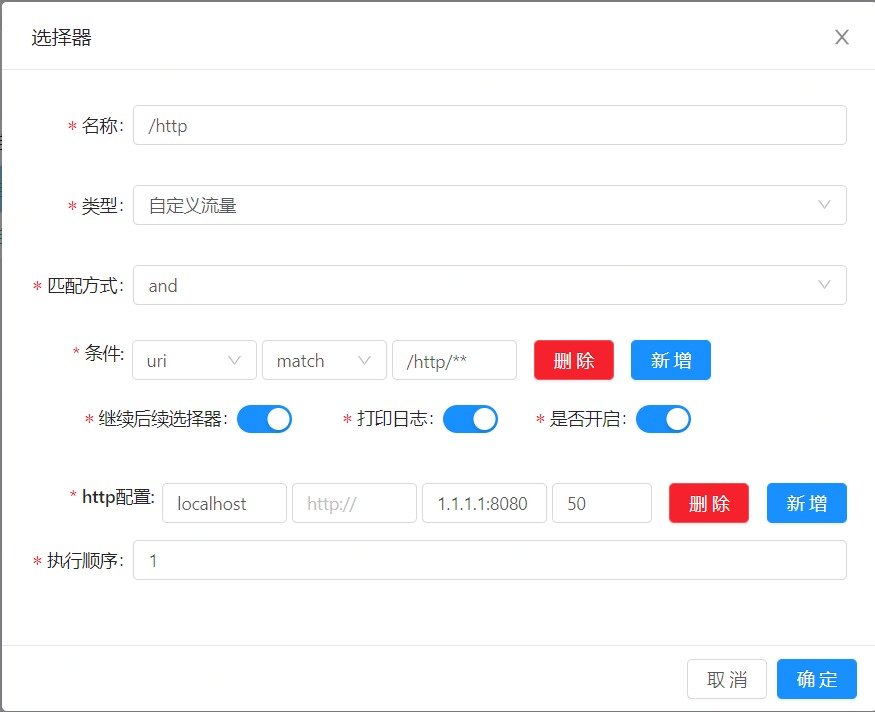
- * 选择器详解:
+* 选择器详解:
- * 名称:为你的选择器起一个容易分辨的名字
- * 类型:custom flow 是自定义流量。full flow 是全流量。自定义流量就是请求会走你下面的匹配方式与条件。全流量则不走。
- * 匹配方式:and 或者or 是指下面多个条件是按照and 还是or的方式来组合。
- * 条件:
- * uri:是指你根据uri的方式来筛选流量,match的方式支持模糊匹配(/**)
- * header:是指根据请求头里面的字段来筛选流量。
- * query:是指根据uri的查询条件来进行筛选流量。
- * ip:是指根据你请求的真实ip,来筛选流量。
- * host:是指根据你请求的真实host,来筛选流量。
- * post:建议不要使用。
- * 条件匹配:
- * match:模糊匹配,建议和uri条件搭配,支持 restful风格的匹配。(/test/**)
- * =:前后值相等,才能匹配。
- * regEx:正则匹配,表示前面一个值去匹配后面的正则表达式。
- * like:字符串模糊匹配。
- * 是否开启:打开才会生效
- * 打印日志:打开的时候,当匹配上的时候,会打印匹配日志。
- * 执行顺序:当多个选择器的时候,执行顺序小的优先执行。
+ * 名称:为你的选择器起一个容易分辨的名字
+ * 类型:custom flow 是自定义流量。full flow 是全流量。自定义流量就是请求会走你下面的匹配方式与条件。全流量则不走。
+ * 匹配方式:and 或者or 是指下面多个条件是按照and 还是or的方式来组合。
+ * 条件:
+ * uri:是指你根据uri的方式来筛选流量,match的方式支持模糊匹配(/**)
+ * header:是指根据请求头里面的字段来筛选流量。
+ * query:是指根据uri的查询条件来进行筛选流量。
+ * ip:是指根据你请求的真实ip,来筛选流量。
+ * host:是指根据你请求的真实host,来筛选流量。
+ * post:建议不要使用。
+ * 条件匹配:
+ * match:模糊匹配,建议和uri条件搭配,支持 restful风格的匹配。(/test/**)
+ * =:前后值相等,才能匹配。
+ * regEx:正则匹配,表示前面一个值去匹配后面的正则表达式。
+ * like:字符串模糊匹配。
+ * 是否开启:打开才会生效
+ * 打印日志:打开的时候,当匹配上的时候,会打印匹配日志。
+ * 执行顺序:当多个选择器的时候,执行顺序小的优先执行。
- * 上述图片中表示:当请求的`uri`前缀是 `/test`,并且`header` 头上 `module` 字段值为`test` 的时候,会转发到 `1.1.1.1:8080` 这个服务。
+* 上述图片中表示:当请求的`uri`前缀是 `/test`,并且`header` 头上 `module` 字段值为`test` 的时候,会转发到 `1.1.1.1:8080` 这个服务。
- * 选择器建议:可以`uri` 条件, `match` 前缀 (/contextPath),进行第一道流量筛选。
+* 选择器建议:可以`uri` 条件, `match` 前缀 (/contextPath),进行第一道流量筛选。
## 规则
+
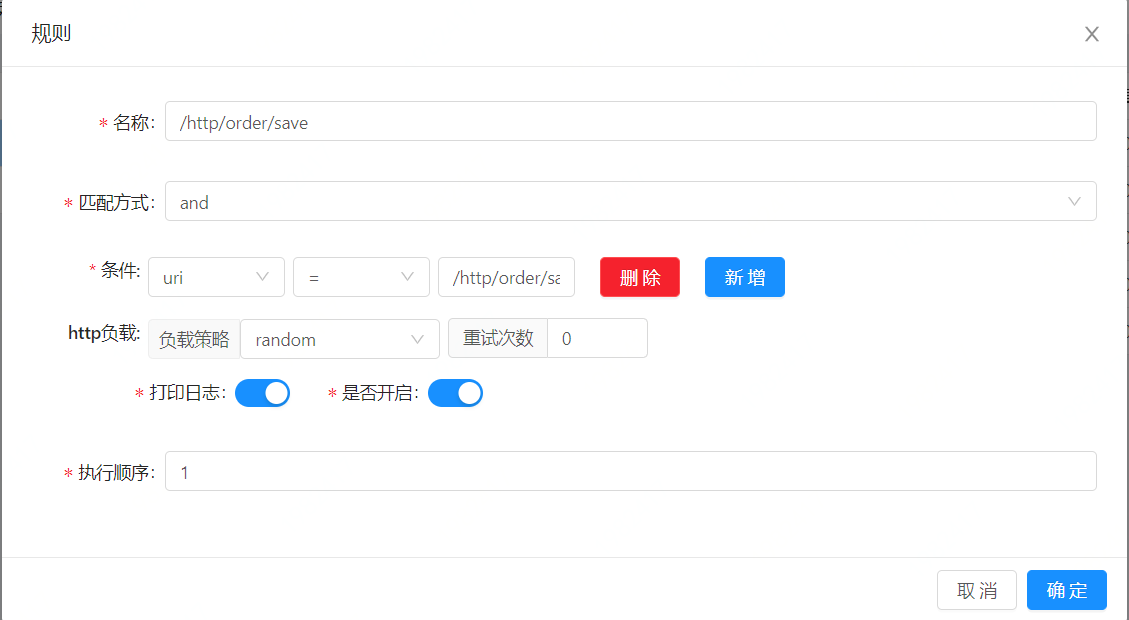
- * 当流量经过选择器匹配成功之后,会进入规则来进行最终的流量匹配。
+* 当流量经过选择器匹配成功之后,会进入规则来进行最终的流量匹配。
- * 规则是对流量最终执行逻辑的确认。
+* 规则是对流量最终执行逻辑的确认。
- * 规则详解:
- * 名称:为你的规则起一个容易分辨的名字
- * 匹配方式:and 或者or 是指下面多个条件是按照and 还是or。
- * 条件:
- * uri:是指你根据uri的方式来筛选流量,match的方式支持模糊匹配(/**)
- * header:是指根据请求头里面的字段来筛选流量。
- * query:是指根据uri的查询条件来进行筛选流量。
- * ip:是指根据你请求的真实ip,来筛选流量。
- * host:是指根据你请求的真实host,来筛选流量。
- * post:建议不要使用。
- * 条件匹配:
- * match : 模糊匹配,建议和uri条件搭配,支持 restful风格的匹配。(/test/**)
- * = : 前后值相等,才能匹配。
- * regEx : 正则匹配,表示前面一个值去匹配后面的正则表达式。
- * like :字符串模糊匹配。
- * 是否开启:打开才会生效。
- * 打印日志:打开的时候,当匹配上的时候,会打印匹配日志。
- * 执行顺序:当多个规则的时候,执行顺序小的优先执行。
- * 处理:每个插件的规则处理不一样,具体的差有具体的处理,具体请查看每个对应插件的处理。
+* 规则详解:
+ * 名称:为你的规则起一个容易分辨的名字
+ * 匹配方式:and 或者or 是指下面多个条件是按照and 还是or。
+ * 条件:
+ * uri:是指你根据uri的方式来筛选流量,match的方式支持模糊匹配(/**)
+ * header:是指根据请求头里面的字段来筛选流量。
+ * query:是指根据uri的查询条件来进行筛选流量。
+ * ip:是指根据你请求的真实ip,来筛选流量。
+ * host:是指根据你请求的真实host,来筛选流量。
+ * post:建议不要使用。
+ * 条件匹配:
+ * match : 模糊匹配,建议和uri条件搭配,支持 restful风格的匹配。(/test/**)
+ * = : 前后值相等,才能匹配。
+ * regEx : 正则匹配,表示前面一个值去匹配后面的正则表达式。
+ * like :字符串模糊匹配。
+ * 是否开启:打开才会生效。
+ * 打印日志:打开的时候,当匹配上的时候,会打印匹配日志。
+ * 执行顺序:当多个规则的时候,执行顺序小的优先执行。
+ * 处理:每个插件的规则处理不一样,具体的差有具体的处理,具体请查看每个对应插件的处理。
* 上图表示:当 `uri` 等于 `/http/order/save` 的时候该规则被匹配,就会执行该规则中,负载策略是 `random`。
-* 联合选择器,我们来表述一下:当一个 请求的 `uri ` 为 `/http/order/save`,会通过 `random` 的方式,转发到 `1.1.1.1:8080`。
+* 联合选择器,我们来表述一下:当一个 请求的 `uri` 为 `/http/order/save`,会通过 `random` 的方式,转发到 `1.1.1.1:8080`。
-* 规则建议:可以`uri` 条件, `match` 最真实的`uri路径`,进行流量的最终筛选 。
+* 规则建议:可以`uri` 条件, `match` 最真实的`uri路径`,进行流量的最终筛选 。
## 条件详解
@@ -95,21 +96,21 @@ description: 选择器规则详解
* header 匹配
- * header是根据你的`http` 请求头中的字段值来匹配。
+ * header是根据你的`http` 请求头中的字段值来匹配。
-* query 匹配
+* query 匹配
- * 这个是根据你的uri中的查询参数来进行匹配,比如 /test?a=1&&b=2 ,那么可以选择该匹配方式。
+ * 这个是根据你的uri中的查询参数来进行匹配,比如 /test?a=1&&b=2 ,那么可以选择该匹配方式。
- * 上述就可以新增一个条件,选取 query方式 , a = 1 。
+ * 上述就可以新增一个条件,选取 query方式 , a = 1 。
-* ip匹配
+* ip匹配
- * 这个是根据 http调用方的 ip来进行匹配。
+ * 这个是根据 http调用方的 ip来进行匹配。
- * 尤其是在waf插件里面,如果发现一个ip地址有攻击,可以新增一条匹配条件,填上该ip,拒绝该ip的访问。
+ * 尤其是在waf插件里面,如果发现一个ip地址有攻击,可以新增一条匹配条件,填上该ip,拒绝该ip的访问。
- * 如果在soul前面使用了nginx代理,为了获取正确的ip,你可能要参考 [parsing-ip-and-host](../developer-guide/custom-parsing-ip-and-host)
+ * 如果在soul前面使用了nginx代理,为了获取正确的ip,你可能要参考 [parsing-ip-and-host](../developer-guide/custom-parsing-ip-and-host)
* host匹配
@@ -119,7 +120,7 @@ description: 选择器规则详解
* 如果在soul前面使用了nginx代理,为了获取正确的host,你可能要参考 [parsing-ip-and-host](../developer-guide/custom-parsing-ip-and-host)
-* post匹配
+* post匹配
- * 不推荐使用。
+ * 不推荐使用。
diff --git a/i18n/zh/docusaurus-plugin-content-docs/version-2.3.0/design/database-design.md b/i18n/zh/docusaurus-plugin-content-docs/version-2.3.0/design/database-design.md
index 230985a..21a521e 100755
--- a/i18n/zh/docusaurus-plugin-content-docs/version-2.3.0/design/database-design.md
+++ b/i18n/zh/docusaurus-plugin-content-docs/version-2.3.0/design/database-design.md
@@ -12,17 +12,17 @@ description: 数据库设计
* 设计详解:
- * 一个插件对应多个选择器,一个选择器对应多个规则。
+ * 一个插件对应多个选择器,一个选择器对应多个规则。
- * 一个选择器对应多个匹配条件,一个规则对应多个匹配条件。
+ * 一个选择器对应多个匹配条件,一个规则对应多个匹配条件。
- * 每个规则在对应插件下,不同的处理表现为handle字段,handle字段就是一个json字符串。具体的可以在admin使用过程中进行查看。
+ * 每个规则在对应插件下,不同的处理表现为handle字段,handle字段就是一个json字符串。具体的可以在admin使用过程中进行查看。
- * 资源权限设计用来存储用户名称、角色、资源数据以及对应关系
+ * 资源权限设计用来存储用户名称、角色、资源数据以及对应关系
* 数据库UML类图:

* 设计详情:
- * 一个用户对应多个角色,一个角色对应多个资源。
+ * 一个用户对应多个角色,一个角色对应多个资源。
diff --git a/i18n/zh/docusaurus-plugin-content-docs/version-2.3.0/design/meta-data.md b/i18n/zh/docusaurus-plugin-content-docs/version-2.3.0/design/meta-data.md
index 7160629..52523e4 100755
--- a/i18n/zh/docusaurus-plugin-content-docs/version-2.3.0/design/meta-data.md
+++ b/i18n/zh/docusaurus-plugin-content-docs/version-2.3.0/design/meta-data.md
@@ -13,6 +13,7 @@ description: 元数据概念设计
* 在数据库中,新增了一张表,然后通过数据同步的方案,会把这张表的数据同步到网关JVM内存。
* 表结构如下:
+
```sql
CREATE TABLE IF NOT EXISTS `meta_data` (
`id` varchar(128) CHARACTER SET utf8mb4 COLLATE utf8mb4_unicode_ci NOT NULL COMMENT 'id',
diff --git a/i18n/zh/docusaurus-plugin-content-docs/version-2.3.0/developer-guide/custom-filter.md b/i18n/zh/docusaurus-plugin-content-docs/version-2.3.0/developer-guide/custom-filter.md
index 4b7d775..248e5ba 100755
--- a/i18n/zh/docusaurus-plugin-content-docs/version-2.3.0/developer-guide/custom-filter.md
+++ b/i18n/zh/docusaurus-plugin-content-docs/version-2.3.0/developer-guide/custom-filter.md
@@ -48,6 +48,7 @@ description: filter扩展
}
}
```
+
* 将 CrossFilter 注册成为 spring的bean,完事。
@@ -103,6 +104,7 @@ public final class HealthFilter implements WebFilter {
*/
protected abstract Mono<Void> doDenyResponse(ServerWebExchange exchange);
```
+
* `doFilter` 方法返回 Mono`true` 表示通过,反之则不通过,不通过的时候,会调用 `doDenyResponse`输出相关信息到前端。
diff --git a/i18n/zh/docusaurus-plugin-content-docs/version-2.3.0/developer-guide/custom-plugin.md b/i18n/zh/docusaurus-plugin-content-docs/version-2.3.0/developer-guide/custom-plugin.md
index 100fc5e..45c691d 100755
--- a/i18n/zh/docusaurus-plugin-content-docs/version-2.3.0/developer-guide/custom-plugin.md
+++ b/i18n/zh/docusaurus-plugin-content-docs/version-2.3.0/developer-guide/custom-plugin.md
@@ -71,15 +71,16 @@ public interface SoulPlugin {
}
```
+
* 接口方法详细说明
- * `execute()` 方法为核心的执行方法,用户可以在里面自由的实现自己想要的功能。
+ * `execute()` 方法为核心的执行方法,用户可以在里面自由的实现自己想要的功能。
- * `getOrder()` 指定插件的排序。
+ * `getOrder()` 指定插件的排序。
- * `named()` 指定插件的名称。
+ * `named()` 指定插件的名称。
- * `skip()` 在特定的条件下,该插件是否被跳过。
+ * `skip()` 在特定的条件下,该插件是否被跳过。
* 注册成Spring的bean,参考如下,或者直接在实现类上加 `@Component` 注解。
@@ -95,6 +96,7 @@ public interface SoulPlugin {
## 匹配流量处理插件
* 引入如下依赖:
+
```xml
<dependency>
<groupId>org.dromara</groupId>
@@ -102,6 +104,7 @@ public interface SoulPlugin {
<version>${last.version}</version>
</dependency>
```
+
* 新增一个类A,继承 `org.dromara.soul.plugin.base.AbstractSoulPlugin`
* 以下是参考:
@@ -179,13 +182,13 @@ public class CustomPlugin extends AbstractSoulPlugin {
* 详细讲解:
- * 继承该类的插件,插件会进行选择器规则匹配,那如何来设置呢?
+ * 继承该类的插件,插件会进行选择器规则匹配,那如何来设置呢?
- * 首先在 `soul-admin` 后台 -->插件管理中,新增一个插件,注意 名称与 你自定义插件的 `named()` 方法要一致。
+ * 首先在 `soul-admin` 后台 -->插件管理中,新增一个插件,注意 名称与 你自定义插件的 `named()` 方法要一致。
- * 重新登陆 `soul-admin` 后台 ,你会发现在插件列表就多了一个你刚新增的插件,你就可以进行选择器规则匹配
+ * 重新登陆 `soul-admin` 后台 ,你会发现在插件列表就多了一个你刚新增的插件,你就可以进行选择器规则匹配
- * 在规则中,有个 `handler` 字段,是你自定义处理数据,在 `doExecute()` 方法中,通过 ` final String ruleHandle = rule.getHandle();` 获取,然后进行你的操作。
+ * 在规则中,有个 `handler` 字段,是你自定义处理数据,在 `doExecute()` 方法中,通过 `final String ruleHandle = rule.getHandle();` 获取,然后进行你的操作。
* 注册成Spring的bean,参考如下或者直接在实现类上加 `@Component` 注解。
@@ -264,6 +267,7 @@ public interface PluginDataHandler {
* 注意 `pluginNamed()` 要和你自定义的插件名称相同。
* 注册成Spring的bean,参考如下或者直接在实现类上加 `@Component` 注解。
+
```java
@Bean
public PluginDataHandler a() {
@@ -272,6 +276,7 @@ public interface PluginDataHandler {
```
## 不使用 SelectorList 以及 RulesList
+
不是所有的插件都需要这两者。
因此我们提供以下两个方法,写在 **CustomPlugin** 中。
@@ -291,6 +296,7 @@ public interface PluginDataHandler {
return doExecute(exchange, chain, null, null);
}
```
+
* 注意,当如果没有重写的时候,由于没有 **SelectorList** 以及 **RulesList** 会导致你的插件无效。
diff --git a/i18n/zh/docusaurus-plugin-content-docs/version-2.3.0/developer-guide/custom-result.md b/i18n/zh/docusaurus-plugin-content-docs/version-2.3.0/developer-guide/custom-result.md
index 30e59eb..07dfc32 100755
--- a/i18n/zh/docusaurus-plugin-content-docs/version-2.3.0/developer-guide/custom-result.md
+++ b/i18n/zh/docusaurus-plugin-content-docs/version-2.3.0/developer-guide/custom-result.md
@@ -31,6 +31,7 @@ public class SoulDefaultEntity implements Serializable {
```
* 返回的json 格式如下:
+
```json
{
"code": -100, //返回码,
@@ -41,7 +42,7 @@ public class SoulDefaultEntity implements Serializable {
## 扩展
-* 新增一个类 A 实现 `org.dromara.soul.plugin.api.result.SoulResult`
+* 新增一个类 A 实现 `org.dromara.soul.plugin.api.result.SoulResult`
```java
public interface SoulResult<T> {
diff --git a/i18n/zh/docusaurus-plugin-content-docs/version-2.3.0/developer-guide/custom-sign-algorithm.md b/i18n/zh/docusaurus-plugin-content-docs/version-2.3.0/developer-guide/custom-sign-algorithm.md
index 9204501..ffeb928 100755
--- a/i18n/zh/docusaurus-plugin-content-docs/version-2.3.0/developer-guide/custom-sign-algorithm.md
+++ b/i18n/zh/docusaurus-plugin-content-docs/version-2.3.0/developer-guide/custom-sign-algorithm.md
@@ -11,9 +11,9 @@ description: 自定义sign插件检验
## 扩展
-* 默认的实现为 `org.dromara.soul.plugin.sign.service.DefaultSignService`。
+* 默认的实现为 `org.dromara.soul.plugin.sign.service.DefaultSignService`。
-* 新增一个类 A 实现 `org.dromara.soul.plugin.api.SignService`。
+* 新增一个类 A 实现 `org.dromara.soul.plugin.api.SignService`。
```java
public interface SignService {
diff --git a/i18n/zh/docusaurus-plugin-content-docs/version-2.3.0/developer-guide/developer-soul-client.md b/i18n/zh/docusaurus-plugin-content-docs/version-2.3.0/developer-guide/developer-soul-client.md
index fa16148..2aa7aa5 100755
--- a/i18n/zh/docusaurus-plugin-content-docs/version-2.3.0/developer-guide/developer-soul-client.md
+++ b/i18n/zh/docusaurus-plugin-content-docs/version-2.3.0/developer-guide/developer-soul-client.md
@@ -14,6 +14,7 @@ description: 多语言http客户端
* 请求方式:`POST`
* 请求路径:`http://soul-admin/soul-client/springmvc-register` soul-admin,表示为 admin的 ip + port
* 请求参数:soul网关默认的需要参数,通过body里面传,json类型。
+
```json
{
"appName": "xxx", //应用名称 必填
diff --git a/i18n/zh/docusaurus-plugin-content-docs/version-2.3.0/plugins/divide-plugin.md b/i18n/zh/docusaurus-plugin-content-docs/version-2.3.0/plugins/divide-plugin.md
index ccb2680..97232ff 100755
--- a/i18n/zh/docusaurus-plugin-content-docs/version-2.3.0/plugins/divide-plugin.md
+++ b/i18n/zh/docusaurus-plugin-content-docs/version-2.3.0/plugins/divide-plugin.md
@@ -39,19 +39,19 @@ description: divide插件
* http配置,是网关匹配到流量以后,真实调用的http配置,可以配置多个,设置负载均衡权重,具体的负载均衡策略,在规则中指定。
* 配置详解:
- * 第一个框:hostName,一般填写 `localhost`,该字段暂时没使用。
+ * 第一个框:hostName,一般填写 `localhost`,该字段暂时没使用。
- * 第二个框:http协议,一般填写 `http://` 或者 `https://` ,不填写默认为:`http://`
+ * 第二个框:http协议,一般填写 `http://` 或者 `https://` ,不填写默认为:`http://`
- * 第三个框:ip与端口,这里填写你真实服务的 ip + 端口。
+ * 第三个框:ip与端口,这里填写你真实服务的 ip + 端口。
- * 第四个框:负载均衡权重。
+ * 第四个框:负载均衡权重。
* ip + port 检测
- * 在soul-admin 会有一个定时任务来扫描 配置的ip端口,如果发现下线,则会删除该 ip + port
+ * 在soul-admin 会有一个定时任务来扫描 配置的ip端口,如果发现下线,则会删除该 ip + port
- * 可以进行如下配置 :
+ * 可以进行如下配置 :
```yaml
soul.upstream.check:true 默认为 ture,设置为false,不检测
diff --git a/i18n/zh/docusaurus-plugin-content-docs/version-2.3.0/plugins/dubbo-plugin.md b/i18n/zh/docusaurus-plugin-content-docs/version-2.3.0/plugins/dubbo-plugin.md
index 3debd24..14e0abd 100755
--- a/i18n/zh/docusaurus-plugin-content-docs/version-2.3.0/plugins/dubbo-plugin.md
+++ b/i18n/zh/docusaurus-plugin-content-docs/version-2.3.0/plugins/dubbo-plugin.md
@@ -31,9 +31,11 @@ description: dubbo插件
* 在 `soul-admin` --> 插件管理-> `dubbo` 设置为开启。
* 在dubbo插件的配置中,配置如下:配置dubbo的注册中心。
+
```yaml
{"register":"zookeeper://localhost:2181"} or {"register":"nacos://localhost:8848"}
```
+
* 插件需要配合依赖 `starter` 进行使用,具体请看:[dubbo用户](../users-guide/dubbo-proxy)。
* 选择器和规则,请详细看:[选择器规则](../admin/selector-and-rule)。
diff --git a/i18n/zh/docusaurus-plugin-content-docs/version-2.3.0/plugins/hystrix-plugin.md b/i18n/zh/docusaurus-plugin-content-docs/version-2.3.0/plugins/hystrix-plugin.md
index 2c972a9..9cb74a0 100755
--- a/i18n/zh/docusaurus-plugin-content-docs/version-2.3.0/plugins/hystrix-plugin.md
+++ b/i18n/zh/docusaurus-plugin-content-docs/version-2.3.0/plugins/hystrix-plugin.md
@@ -33,16 +33,16 @@ description: hystrix插件
* Hystrix处理详解:
- * 跳闸最小请求数量:最小的请求量,至少要达到这个量才会触发熔断
+ * 跳闸最小请求数量:最小的请求量,至少要达到这个量才会触发熔断
- * 错误百分比阀值: 这段时间内,发生异常的百分比。
+ * 错误百分比阀值: 这段时间内,发生异常的百分比。
- * 最大并发量: 最大的并发量
+ * 最大并发量: 最大的并发量
- * 跳闸休眠时间(ms):熔断以后恢复的时间。
+ * 跳闸休眠时间(ms):熔断以后恢复的时间。
- * 分组Key: 一般设置为:contextPath
+ * 分组Key: 一般设置为:contextPath
- * 命令Key: 一般设置为具体的 路径接口。
+ * 命令Key: 一般设置为具体的 路径接口。
- * 失败降级URL: 默认为 /fallback/hystrix。
+ * 失败降级URL: 默认为 /fallback/hystrix。
diff --git a/i18n/zh/docusaurus-plugin-content-docs/version-2.3.0/plugins/monitor-plugin.md b/i18n/zh/docusaurus-plugin-content-docs/version-2.3.0/plugins/monitor-plugin.md
index 473564e..7bf11fd 100755
--- a/i18n/zh/docusaurus-plugin-content-docs/version-2.3.0/plugins/monitor-plugin.md
+++ b/i18n/zh/docusaurus-plugin-content-docs/version-2.3.0/plugins/monitor-plugin.md
@@ -16,7 +16,7 @@ description: monitor插件
* 异步或者同步的方式,在soul网关里面进行 `metrics` 埋点。
-* `prometheus` 服务端通过 http 请求 来 拉取 `metrics`,再使用 `Grafana ` 展示。
+* `prometheus` 服务端通过 http 请求 来 拉取 `metrics`,再使用 `Grafana` 展示。
## 插件设置
@@ -47,13 +47,14 @@ description: monitor插件
</dependency>
<!-- soul monitor plugin end-->
```
+
* 选择器和规则,请详细看 : [选择器规则](../admin/selector-and-rule)。
- * 只有当匹配的url,才会进行url请求埋点。
+ * 只有当匹配的url,才会进行url请求埋点。
## metrics信息
-* 所有的JVM,线程,内存,等相关信息都会埋点,可以在 `Granfana ` 面板中,新增一个 JVM 模块,则会完全展示 具体请看:https://github.com/prometheus/jmx_exporter
+* 所有的JVM,线程,内存,等相关信息都会埋点,可以在 `Granfana` 面板中,新增一个 JVM 模块,则会完全展示 具体请看:https://github.com/prometheus/jmx_exporter
* 另外还有如下自定义的 `metrics`
@@ -78,6 +79,7 @@ description: monitor插件
static_configs:
- targets: ['localhost:9190']
```
+
**注:** `job_name`跟`monitor`插件配置的`metricsName`相对应
* 配置完成之后window下可以直接双击`prometheus.exe`启动即可,默认启动端口为9090,可通过http://localhost:9090/ 验证是否成功
diff --git a/i18n/zh/docusaurus-plugin-content-docs/version-2.3.0/plugins/rate-limiter-plugin.md b/i18n/zh/docusaurus-plugin-content-docs/version-2.3.0/plugins/rate-limiter-plugin.md
index 6e1aca1..8ea9de4 100755
--- a/i18n/zh/docusaurus-plugin-content-docs/version-2.3.0/plugins/rate-limiter-plugin.md
+++ b/i18n/zh/docusaurus-plugin-content-docs/version-2.3.0/plugins/rate-limiter-plugin.md
@@ -78,8 +78,7 @@ description: rateLimiter插件
* 规则详细说明
-* * 令牌桶算法/并发令牌桶算法
-
+ *令牌桶算法/并发令牌桶算法
algorithmName(算法名):tocketBucket/concurrent
@@ -88,7 +87,7 @@ replenishRate(速率):是你允许用户每秒执行多少请求,而丢
burstCapacity(容量):是允许用户在一秒钟内执行的最大请求数。这是令牌桶可以保存的令牌数。
-* * 漏桶算法
+ * 漏桶算法
algorithmName(算法名):leakyBucket
@@ -97,7 +96,7 @@ replenishRate(速率):单位时间内执行请求的速率,漏桶中水
burstCapacity(容量):是允许用户在一秒钟内执行的最大请求数。这是桶中的水量。
-* * 滑动窗口算法
+ * * 滑动窗口算法
algorithmName(算法名):sildingWindow
diff --git a/i18n/zh/docusaurus-plugin-content-docs/version-2.3.0/plugins/resilience4j-plugin.md b/i18n/zh/docusaurus-plugin-content-docs/version-2.3.0/plugins/resilience4j-plugin.md
index cef356d..0fab85e 100755
--- a/i18n/zh/docusaurus-plugin-content-docs/version-2.3.0/plugins/resilience4j-plugin.md
+++ b/i18n/zh/docusaurus-plugin-content-docs/version-2.3.0/plugins/resilience4j-plugin.md
@@ -33,28 +33,28 @@ description: resilience4j插件
* Resilience4j处理详解:
- * timeoutDurationRate:等待获取令牌的超时时间,单位ms,默认值:5000。
+ * timeoutDurationRate:等待获取令牌的超时时间,单位ms,默认值:5000。
- * limitRefreshPeriod:刷新令牌的时间间隔,单位ms,默认值:500。
+ * limitRefreshPeriod:刷新令牌的时间间隔,单位ms,默认值:500。
- * limitForPeriod:每次刷新令牌的数量,默认值:50。
+ * limitForPeriod:每次刷新令牌的数量,默认值:50。
- * circuitEnable:是否开启熔断,0:关闭,1:开启,默认值:0。
+ * circuitEnable:是否开启熔断,0:关闭,1:开启,默认值:0。
- * timeoutDuration:熔断超时时间,单位ms,默认值:30000。
+ * timeoutDuration:熔断超时时间,单位ms,默认值:30000。
- * fallbackUri:降级处理的uri。
+ * fallbackUri:降级处理的uri。
- * slidingWindowSize:滑动窗口大小,默认值:100。
+ * slidingWindowSize:滑动窗口大小,默认值:100。
- * slidingWindowType:滑动窗口类型,0:基于计数,1:基于时间,默认值:0。
+ * slidingWindowType:滑动窗口类型,0:基于计数,1:基于时间,默认值:0。
- * minimumNumberOfCalls:开启熔断的最小请求数,超过这个请求数才开启熔断统计,默认值:100。
+ * minimumNumberOfCalls:开启熔断的最小请求数,超过这个请求数才开启熔断统计,默认值:100。
- * waitIntervalFunctionInOpenState:熔断器开启持续时间,单位ms,默认值:10。
+ * waitIntervalFunctionInOpenState:熔断器开启持续时间,单位ms,默认值:10。
- * permittedNumberOfCallsInHalfOpenState:半开状态下的环形缓冲区大小,必须达到此数量才会计算失败率,默认值:10。
+ * permittedNumberOfCallsInHalfOpenState:半开状态下的环形缓冲区大小,必须达到此数量才会计算失败率,默认值:10。
- * failureRateThreshold:错误率百分比,达到这个阈值,熔断器才会开启,默认值50。
+ * failureRateThreshold:错误率百分比,达到这个阈值,熔断器才会开启,默认值50。
- * automaticTransitionFromOpenToHalfOpenEnabled:是否自动从open状态转换为half-open状态,,true:是,false:否,默认值:false。
+ * automaticTransitionFromOpenToHalfOpenEnabled:是否自动从open状态转换为half-open状态,,true:是,false:否,默认值:false。
diff --git a/i18n/zh/docusaurus-plugin-content-docs/version-2.3.0/plugins/sentinel-plugin.md b/i18n/zh/docusaurus-plugin-content-docs/version-2.3.0/plugins/sentinel-plugin.md
index 6faf496..bbf3dd2 100755
--- a/i18n/zh/docusaurus-plugin-content-docs/version-2.3.0/plugins/sentinel-plugin.md
+++ b/i18n/zh/docusaurus-plugin-content-docs/version-2.3.0/plugins/sentinel-plugin.md
@@ -34,19 +34,19 @@ description: sentinel插件
* Sentinel处理详解:
- * 是否开启流控(1或0) :是否开启sentinel的流控。
+ * 是否开启流控(1或0) :是否开启sentinel的流控。
- * 流控效果 : 流控效果(直接拒绝 / 排队等待 / 慢启动模式),不支持按调用关系限流。
+ * 流控效果 : 流控效果(直接拒绝 / 排队等待 / 慢启动模式),不支持按调用关系限流。
- * 限流阈值类型 : 限流阈值类型,QPS 或线程数模式。
+ * 限流阈值类型 : 限流阈值类型,QPS 或线程数模式。
- * 是否开启熔断(1或0) :是否开启sentinel熔断。
+ * 是否开启熔断(1或0) :是否开启sentinel熔断。
- * 熔断类型: 熔断策略,支持秒级 RT/秒级异常比例/分钟级异常数。
+ * 熔断类型: 熔断策略,支持秒级 RT/秒级异常比例/分钟级异常数。
- * 熔断阈值: 阈值。
+ * 熔断阈值: 阈值。
- * 熔断窗口大小: 降级的时间,单位为 s。
+ * 熔断窗口大小: 降级的时间,单位为 s。
- * 熔断URI: 熔断后的降级uri。
+ * 熔断URI: 熔断后的降级uri。
diff --git a/i18n/zh/docusaurus-plugin-content-docs/version-2.3.0/plugins/sign-plugin.md b/i18n/zh/docusaurus-plugin-content-docs/version-2.3.0/plugins/sign-plugin.md
index 73cbd47..d1bf3c0 100755
--- a/i18n/zh/docusaurus-plugin-content-docs/version-2.3.0/plugins/sign-plugin.md
+++ b/i18n/zh/docusaurus-plugin-content-docs/version-2.3.0/plugins/sign-plugin.md
@@ -39,18 +39,18 @@ description: sign插件
## 网关技术实现
- * 采用Ak/SK鉴权技术方案。
- * 采用鉴权插件,责任链的模式来完成。
- * 当鉴权插件开启,并配置所有接口鉴权时候生效。
+* 采用Ak/SK鉴权技术方案。
+* 采用鉴权插件,责任链的模式来完成。
+* 当鉴权插件开启,并配置所有接口鉴权时候生效。
## 鉴权使用指南
- * 第一步:AK/SK由网关来进行分配,比如分配给你的AK为: `1TEST123456781` SK为:`506EEB535CF740D7A755CB4B9F4A1536`
+* 第一步:AK/SK由网关来进行分配,比如分配给你的AK为: `1TEST123456781` SK为:`506EEB535CF740D7A755CB4B9F4A1536`
- * 第二步:确定好你要访问的网关路径 比如 `/api/service/abc`
+* 第二步:确定好你要访问的网关路径 比如 `/api/service/abc`
- * 第三步:构造参数(以下是通用参数)
+* 第三步:构造参数(以下是通用参数)
| 字段 | 值 | 描述 |
| -------- | -----: | :----: |
@@ -62,6 +62,7 @@ description: sign插件
第一步:首先构造一个Map。
+
```java
Map<String, String> map = Maps.newHashMapWithExpectedSize(2);
@@ -72,6 +73,7 @@ description: sign插件
```
第二步:进行Key的自然排序,然后Key,Value值拼接最后再拼接分配给你的Sk。
+
```java
List<String> storedKeys = Arrays.stream(map.keySet()
.toArray(new String[]{}))
@@ -82,9 +84,11 @@ final String sign = storedKeys.stream()
.collect(Collectors.joining()).trim()
.concat("506EEB535CF740D7A755CB4B9F4A1536");
```
+
* 你得到的sign值应该为:`path/api/service/abctimestamp1571711067186version1.0.0506EEB535CF740D7A755CB4B9F4A1536`
第三步:进行Md5加密后转成大写。
+
```java
DigestUtils.md5DigestAsHex(sign.getBytes()).toUpperCase()
```
diff --git a/i18n/zh/docusaurus-plugin-content-docs/version-2.3.0/plugins/sofa-plugin.md b/i18n/zh/docusaurus-plugin-content-docs/version-2.3.0/plugins/sofa-plugin.md
index 975a89e..216b2df 100755
--- a/i18n/zh/docusaurus-plugin-content-docs/version-2.3.0/plugins/sofa-plugin.md
+++ b/i18n/zh/docusaurus-plugin-content-docs/version-2.3.0/plugins/sofa-plugin.md
@@ -23,9 +23,11 @@ description: sofa插件
* 在 `soul-admin` --> 插件管理-> `sofa` 设置为开启。
* 在sofa插件的配置中,配置如下:配置sofa的注册中心。
+
```yaml
{"protocol":"zookeeper","register":"127.0.0.1:2181"}
```
+
* 插件需要配合依赖 `starter` 进行使用,具体请看:[sofa用户](../users-guide/sofa-rpc-proxy)。
* 选择器和规则,请详细看:[选择器规则](../admin/selector-and-rule)。
diff --git a/i18n/zh/docusaurus-plugin-content-docs/version-2.3.0/plugins/spring-cloud-plugin.md b/i18n/zh/docusaurus-plugin-content-docs/version-2.3.0/plugins/spring-cloud-plugin.md
index 0de0e94..df72791 100755
--- a/i18n/zh/docusaurus-plugin-content-docs/version-2.3.0/plugins/spring-cloud-plugin.md
+++ b/i18n/zh/docusaurus-plugin-content-docs/version-2.3.0/plugins/spring-cloud-plugin.md
@@ -7,7 +7,7 @@ description: SpringCloud插件
## 说明
-* 该插件是用来将`http协议` 转成` springCloud协议` 的核心。
+* 该插件是用来将`http协议` 转成`springCloud协议` 的核心。
## 引入网关 springCloud的插件支持
diff --git a/i18n/zh/docusaurus-plugin-content-docs/version-2.3.0/plugins/websocket-plugin.md b/i18n/zh/docusaurus-plugin-content-docs/version-2.3.0/plugins/websocket-plugin.md
index 3ed4784..1bbaeb5 100755
--- a/i18n/zh/docusaurus-plugin-content-docs/version-2.3.0/plugins/websocket-plugin.md
+++ b/i18n/zh/docusaurus-plugin-content-docs/version-2.3.0/plugins/websocket-plugin.md
@@ -32,6 +32,7 @@ description: websocket支持
<version>${last.version}</version>
</dependency>
```
+
## 请求路径
* 使用soul代理websocket的时候,其请求路径为(例子):`ws://localhost:9195/?module=ws&method=/websocket&rpcType=websocket`。
diff --git a/i18n/zh/docusaurus-plugin-content-docs/version-2.3.0/quick-start/quick-start-dubbo.md b/i18n/zh/docusaurus-plugin-content-docs/version-2.3.0/quick-start/quick-start-dubbo.md
index eb30d19..d32f88c 100755
--- a/i18n/zh/docusaurus-plugin-content-docs/version-2.3.0/quick-start/quick-start-dubbo.md
+++ b/i18n/zh/docusaurus-plugin-content-docs/version-2.3.0/quick-start/quick-start-dubbo.md
@@ -13,11 +13,14 @@ description: Dubbo快速开始
下载[soul-examples-dubbo](https://github.com/dromara/soul/tree/2.3.0/soul-examples/soul-examples-dubbo),调整`spring-dubbo.xml`
的注册地址为你本地,如:
+
```xml
<dubbo:registry address="zookeeper://localhost:2181"/>
```
+
运行`TestApacheDubboApplication`main方法启动dubbo项目。
成功启动会有如下日志:
+
```shell
2021-02-06 20:58:01.807 INFO 3724 --- [pool-2-thread-1] o.d.s.client.common.utils.RegisterUtils : dubbo client register success: {"appName":"dubbo","contextPath":"/dubbo","path":"/dubbo/insert","pathDesc":"Insert a row of data","rpcType":"dubbo","serviceName":"org.dromara.soul.examples.dubbo.api.service.DubboTestService","methodName":"insert","ruleName":"/dubbo/insert","parameterTypes":"org.dromara.soul.examples.dubbo.api.entity.DubboTest","rpcExt":"{\"group\":\"\",\"version\":\"\",\"l [...]
2021-02-06 20:58:01.821 INFO 3724 --- [pool-2-thread-1] o.d.s.client.common.utils.RegisterUtils : dubbo client register success: {"appName":"dubbo","contextPath":"/dubbo","path":"/dubbo/findAll","pathDesc":"Get all data","rpcType":"dubbo","serviceName":"org.dromara.soul.examples.dubbo.api.service.DubboTestService","methodName":"findAll","ruleName":"/dubbo/findAll","parameterTypes":"","rpcExt":"{\"group\":\"\",\"version\":\"\",\"loadbalance\":\"random\",\"retries\":2,\"timeout\":10000,\ [...]
@@ -35,7 +38,7 @@ description: Dubbo快速开始
## dubbo 插件设置
* 首先在 `soul-admin` 插件管理中,把`dubbo` 插件设置为开启。
-* 其次在 `dubbo ` 插件中配置你的注册地址,或者其他注册中心的地址。
+* 其次在 `dubbo` 插件中配置你的注册地址,或者其他注册中心的地址。
## 测试
@@ -50,6 +53,7 @@ description: Dubbo快速开始

复杂多参数示例:对应接口实现类为`org.dromara.soul.examples.apache.dubbo.service.impl.DubboMultiParamServiceImpl#batchSaveAndNameAndId`
+
```java
@Override
@SoulDubboClient(path = "/batchSaveAndNameAndId")
@@ -60,9 +64,11 @@ public DubboTest batchSaveAndNameAndId(List<DubboTest> dubboTestList, String id,
return test;
}
```
+

当你的参数不匹配时会报如下异常:
+
```java
2021-02-07 22:24:04.015 ERROR 14860 --- [:20888-thread-3] o.d.soul.web.handler.GlobalErrorHandler : [e47b2a2a] Resolved [SoulException: org.apache.dubbo.remoting.RemotingException: java.lang.IllegalArgumentException: args.length != types.length
java.lang.IllegalArgumentException: args.length != types.length
diff --git a/i18n/zh/docusaurus-plugin-content-docs/version-2.3.0/quick-start/quick-start-grpc.md b/i18n/zh/docusaurus-plugin-content-docs/version-2.3.0/quick-start/quick-start-grpc.md
index 62ed67e..e3f8a8e 100755
--- a/i18n/zh/docusaurus-plugin-content-docs/version-2.3.0/quick-start/quick-start-grpc.md
+++ b/i18n/zh/docusaurus-plugin-content-docs/version-2.3.0/quick-start/quick-start-grpc.md
@@ -10,6 +10,7 @@ description: Grpc快速开始
请参考[配置网关环境](../users-guide/soul-set-up)并启动`soul-admin`和`soul-bootstrap`。
注:`soul-bootstrap`需要引入grpc依赖
+
```xml
<dependency>
<groupId>org.dromara</groupId>
@@ -23,6 +24,7 @@ description: Grpc快速开始
下载[soul-examples-grpc](https://github.com/dromara/soul/tree/2.3.0/soul-examples/soul-examples-grpc)
在`soul-examples-grpc`下执行以下命令生成java代码
+
```shell
mvn protobuf:compile //编译消息对象
mvn protobuf:compile-custom //依赖消息对象,生成接口服务
@@ -31,6 +33,7 @@ mvn protobuf:compile-custom //依赖消息对象,生成接口服务
运行`org.dromara.soul.examples.grpc.SoulTestGrpcApplication`main方法启动项目。
成功启动会有如下日志:
+
```shell
2021-02-10 01:57:02.154 INFO 76 --- [ main] o.d.s.e.grpc.SoulTestGrpcApplication : Started SoulTestGrpcApplication in 2.088 seconds (JVM running for 3.232)
2021-02-10 01:57:02.380 INFO 76 --- [pool-1-thread-1] o.d.s.client.common.utils.RegisterUtils : grpc client register success: {"appName":"127.0.0.1:8080","contextPath":"/grpc","path":"/grpc/echo","pathDesc":"","rpcType":"grpc","serviceName":"echo.EchoService","methodName":"echo","ruleName":"/grpc/echo","parameterTypes":"echo.EchoRequest,io.grpc.stub.StreamObserver","rpcExt":"{\"timeout\":-1}","enabled":true}
diff --git a/i18n/zh/docusaurus-plugin-content-docs/version-2.3.0/quick-start/quick-start-http.md b/i18n/zh/docusaurus-plugin-content-docs/version-2.3.0/quick-start/quick-start-http.md
index 57348f9..716faaa 100755
--- a/i18n/zh/docusaurus-plugin-content-docs/version-2.3.0/quick-start/quick-start-http.md
+++ b/i18n/zh/docusaurus-plugin-content-docs/version-2.3.0/quick-start/quick-start-http.md
@@ -37,6 +37,7 @@ description: Http快速开始
运行`org.dromara.soul.examples.http.SoulTestHttpApplication`main方法启动项目。
成功启动会有如下日志:
+
```shell
2021-02-10 00:57:07.561 INFO 3700 --- [pool-1-thread-1] o.d.s.client.common.utils.RegisterUtils : http client register success: {"appName":"http","context":"/http","path":"/http/test/**","pathDesc":"","rpcType":"http","host":"192.168.50.13","port":8188,"ruleName":"/http/test/**","enabled":true,"registerMetaData":false}
2021-02-10 00:57:07.577 INFO 3700 --- [pool-1-thread-1] o.d.s.client.common.utils.RegisterUtils : http client register success: {"appName":"http","context":"/http","path":"/http/order/save","pathDesc":"Save order","rpcType":"http","host":"192.168.50.13","port":8188,"ruleName":"/http/order/save","enabled":true,"registerMetaData":false}
@@ -52,6 +53,7 @@ description: Http快速开始
* 在 `soul-admin` 插件管理中,把`divide` 插件设置为开启。
## 测试Http请求
+
`soul-examples-http`项目成功启动之后会自动把加 `@SoulSpringMvcClient` 注解的接口方法注册到网关。
打开插件管理->divide 可以看到插件规则配置列表
diff --git a/i18n/zh/docusaurus-plugin-content-docs/version-2.3.0/quick-start/quick-start-sofa.md b/i18n/zh/docusaurus-plugin-content-docs/version-2.3.0/quick-start/quick-start-sofa.md
index 09dce95..7db1a3b 100755
--- a/i18n/zh/docusaurus-plugin-content-docs/version-2.3.0/quick-start/quick-start-sofa.md
+++ b/i18n/zh/docusaurus-plugin-content-docs/version-2.3.0/quick-start/quick-start-sofa.md
@@ -10,6 +10,7 @@ description: Sofa快速开始
请参考[配置网关环境](../users-guide/soul-set-up)并启动`soul-admin`和`soul-bootstrap`,另外使用zookeeper需提前下载启动。
注:启动`soul-bootstrap`之前需要引入sofa依赖
+
```xml
<!-- soul sofa plugin starter-->
<dependency>
@@ -42,10 +43,12 @@ description: Sofa快速开始
<!-- soul sofa plugin end-->
```
+
## 运行soul-examples-sofa项目
下载[soul-examples-dubbo](https://github.com/dromara/soul/tree/2.3.0/soul-examples/soul-examples-sofa),调整`application.yml`
的zk注册地址为你本地,如:
+
```xml
com:
alipay:
@@ -57,6 +60,7 @@ com:
运行`org.dromara.soul.examples.sofa.service.TestSofaApplication`main方法启动sofa服务。
成功启动会有如下日志:
+
```shell
2021-02-10 02:31:45.599 INFO 2156 --- [pool-1-thread-1] o.d.s.client.common.utils.RegisterUtils : sofa client register success: {"appName":"sofa","contextPath":"/sofa","path":"/sofa/insert","pathDesc":"Insert a row of data","rpcType":"sofa","serviceName":"org.dromara.soul.examples.sofa.api.service.SofaSingleParamService","methodName":"insert","ruleName":"/sofa/insert","parameterTypes":"org.dromara.soul.examples.sofa.api.entity.SofaSimpleTypeBean","rpcExt":"{\"loadbalance\":\"hash\",\"r [...]
2021-02-10 02:31:45.605 INFO 2156 --- [pool-1-thread-1] o.d.s.client.common.utils.RegisterUtils : sofa client register success: {"appName":"sofa","contextPath":"/sofa","path":"/sofa/findById","pathDesc":"Find by Id","rpcType":"sofa","serviceName":"org.dromara.soul.examples.sofa.api.service.SofaSingleParamService","methodName":"findById","ruleName":"/sofa/findById","parameterTypes":"java.lang.String","rpcExt":"{\"loadbalance\":\"hash\",\"retries\":3,\"timeout\":-1}","enabled":true}
@@ -98,9 +102,10 @@ com:
## sofa 插件设置
* 首先在 `soul-admin` 插件管理中,把`sofa` 插件设置为开启。
-* 其次在 `sofa ` 插件中配置你的注册地址,或者其他注册中心的地址。
+* 其次在 `sofa` 插件中配置你的注册地址,或者其他注册中心的地址。
## 测试
+
`soul-examples-sofa`项目成功启动之后会自动把加 `@SoulSofaClient` 注解的接口方法注册到网关。
打开插件管理->sofa可以看到插件规则配置列表
@@ -112,6 +117,7 @@ com:

复杂多参数示例:对应接口实现类为`org.dromara.soul.examples.sofa.service.impl.SofaMultiParamServiceImpl#batchSaveNameAndId`
+
```java
@Override
@SoulSofaClient(path = "/batchSaveNameAndId")
@@ -122,4 +128,5 @@ public SofaSimpleTypeBean batchSaveNameAndId(final List<SofaSimpleTypeBean> sofa
return simpleTypeBean;
}
```
+

diff --git a/i18n/zh/docusaurus-plugin-content-docs/version-2.3.0/quick-start/quick-start-springcloud.md b/i18n/zh/docusaurus-plugin-content-docs/version-2.3.0/quick-start/quick-start-springcloud.md
index 8f777a4..54c171b 100755
--- a/i18n/zh/docusaurus-plugin-content-docs/version-2.3.0/quick-start/quick-start-springcloud.md
+++ b/i18n/zh/docusaurus-plugin-content-docs/version-2.3.0/quick-start/quick-start-springcloud.md
@@ -56,6 +56,7 @@ dependency>
运行`org.dromara.soul.examples.springcloud.SoulTestSpringCloudApplication`main方法启动项目。
成功启动会有如下日志:
+
```shell
2021-02-10 14:03:51.301 INFO 2860 --- [ main] o.s.s.concurrent.ThreadPoolTaskExecutor : Initializing ExecutorService 'applicationTaskExecutor'
2021-02-10 14:03:51.669 INFO 2860 --- [pool-1-thread-1] o.d.s.client.common.utils.RegisterUtils : springCloud client register success: {"appName":"springCloud-test","context":"/springcloud","path":"/springcloud/order/save","pathDesc":"","rpcType":"springCloud","ruleName":"/springcloud/order/save","enabled":true}
@@ -97,6 +98,7 @@ dependency>
* 在 `soul-admin` 插件管理中,把`springCloud` 插件设置为开启。
## 测试Http请求
+
`soul-examples-springcloud`项目成功启动之后会自动把加 `@SoulSpringCloudClient` 注解的接口方法注册到网关。
打开插件管理->springCloud 可以看到插件规则配置列表
diff --git a/i18n/zh/docusaurus-plugin-content-docs/version-2.3.0/quick-start/quick-start-tars.md b/i18n/zh/docusaurus-plugin-content-docs/version-2.3.0/quick-start/quick-start-tars.md
index 42dbdc9..1926fab 100755
--- a/i18n/zh/docusaurus-plugin-content-docs/version-2.3.0/quick-start/quick-start-tars.md
+++ b/i18n/zh/docusaurus-plugin-content-docs/version-2.3.0/quick-start/quick-start-tars.md
@@ -10,6 +10,7 @@ description: Tars快速开始
请参考[配置网关环境](../users-guide/soul-set-up)并启动`soul-admin`和`soul-bootstrap`。
注:`soul-bootstrap`需要引入tars依赖
+
```xml
<dependency>
<groupId>org.dromara</groupId>
@@ -45,6 +46,7 @@ description: Tars快速开始
**注:** 服务启动时需要在启动命令中指定配置文件地址 **-Dconfig=xxx/SoulExampleServer.SoulExampleApp.config.conf**
如果不加`-Dconfig`参数配置会可能会如下抛异常:
+
```xml
com.qq.tars.server.config.ConfigurationException: error occurred on load server config
at com.qq.tars.server.config.ConfigurationManager.loadServerConfig(ConfigurationManager.java:113)
@@ -75,6 +77,7 @@ The exception occurred at load server config
```
成功启动会有如下日志:
+
```shell
[SERVER] server starting at tcp -h 127.0.0.1 -p 21715 -t 60000...
[SERVER] server started at tcp -h 127.0.0.1 -p 21715 -t 60000...
@@ -94,6 +97,7 @@ The session manager service started...
* 在 `soul-admin` 插件管理中,把`tars` 插件设置为开启。
## 测试
+
`soul-examples-tars`项目成功启动之后会自动把加 `@SoulTarsClient` 注解的接口方法注册到网关。
打开插件管理->tars可以看到插件规则配置列表
diff --git a/i18n/zh/docusaurus-plugin-content-docs/version-2.3.0/users-guide/dubbo-proxy.md b/i18n/zh/docusaurus-plugin-content-docs/version-2.3.0/users-guide/dubbo-proxy.md
index b74a8f6..f6bdd80 100755
--- a/i18n/zh/docusaurus-plugin-content-docs/version-2.3.0/users-guide/dubbo-proxy.md
+++ b/i18n/zh/docusaurus-plugin-content-docs/version-2.3.0/users-guide/dubbo-proxy.md
@@ -100,11 +100,11 @@ description: dubbo接入soul网关
## dubbo服务接入网关,可以参考:[soul-examples-dubbo](https://github.com/dromara/soul/tree/2.3.0/soul-examples/soul-examples-dubbo)
- * alibaba dubbo 用户
+* alibaba dubbo 用户
- * springboot
+ * springboot
- * 引入以下依赖
+ * 引入以下依赖
```xml
<dependency>
@@ -114,11 +114,11 @@ description: dubbo接入soul网关
</dependency>
```
- * 注册中心详细接入配置请参考:[注册中心接入](../register-center/register-center-access)。
+ * 注册中心详细接入配置请参考:[注册中心接入](../register-center/register-center-access)。
- * spring
+ * spring
- * 引入以下依赖 :
+ * 引入以下依赖 :
```xml
<dependency>
@@ -127,7 +127,8 @@ description: dubbo接入soul网关
<version>${last.version}</version>
</dependency>
```
- * 在你的 bean定义的xml文件中新增如下 :
+
+ * 在你的 bean定义的xml文件中新增如下 :
```xml
<bean id ="alibabaDubboServiceBeanPostProcessor" class ="org.dromara.soul.client.alibaba.dubbo.AlibabaDubboServiceBeanPostProcessor">
@@ -148,11 +149,11 @@ description: dubbo接入soul网关
```
- * apache dubbo 用户
+* apache dubbo 用户
- * springboot
+ * springboot
- * 引入以下依赖
+ * 引入以下依赖
```xml
<dependency>
@@ -162,11 +163,11 @@ description: dubbo接入soul网关
</dependency>
```
- * 注册中心详细接入配置请参考:[注册中心配置](../register-center/register-center-access).
+ * 注册中心详细接入配置请参考:[注册中心配置](../register-center/register-center-access).
- * spring
+ * spring
- * 引入以下依赖 :
+ * 引入以下依赖 :
```xml
<dependency>
@@ -176,7 +177,7 @@ description: dubbo接入soul网关
</dependency>
```
- * 在你的 bean定义的xml文件中新增如下 :
+ * 在你的 bean定义的xml文件中新增如下 :
```xml
<bean id ="apacheDubboServiceBeanPostProcessor" class ="org.dromara.soul.client.apache.dubbo.ApacheDubboServiceBeanPostProcessor">
@@ -200,7 +201,7 @@ description: dubbo接入soul网关
* 首先在 `soul-admin` 插件管理中,把`dubbo` 插件设置为开启。
-* 其次在 `dubbo ` 插件中配置你的注册地址,或者其他注册中心的地址。
+* 其次在 `dubbo` 插件中配置你的注册地址,或者其他注册中心的地址。
```yaml
{"register":"zookeeper://localhost:2181"} or {"register":"nacos://localhost:8848"}
@@ -210,7 +211,7 @@ description: dubbo接入soul网关
* 你dubbo服务实现类的,方法上加上 `@SoulDubboClient` 注解,表示该接口方法注册到网关。
-* 启动你的提供者,输出日志 `dubbo client register success ` 大功告成,你的dubbo接口已经发布到 soul网关.如果还有不懂的,可以参考 `soul-test-dubbo`项目。
+* 启动你的提供者,输出日志 `dubbo client register success` 大功告成,你的dubbo接口已经发布到 soul网关.如果还有不懂的,可以参考 `soul-test-dubbo`项目。
## dubbo用户请求以及参数说明
@@ -229,9 +230,9 @@ description: dubbo接入soul网关
* 参数传递:
- * 通过 http post 方式访问网关,通过body,json类型传递。
+ * 通过 http post 方式访问网关,通过body,json类型传递。
- * 更多参数类型传递,可以参考 [soul-examples-dubbo](https://github.com/dromara/soul/tree/2.3.0/soul-examples/soul-examples-dubbo) 中的接口定义,以及参数传递方式。
+ * 更多参数类型传递,可以参考 [soul-examples-dubbo](https://github.com/dromara/soul/tree/2.3.0/soul-examples/soul-examples-dubbo) 中的接口定义,以及参数传递方式。
* 单个java bean参数类型 (默认)
@@ -264,9 +265,9 @@ soul :
* `body`为http中body传的json字符串。
- * `parameterTypes`: 匹配到的方法参数类型列表,如果有多个,则使用`,`分割。
+ * `parameterTypes`: 匹配到的方法参数类型列表,如果有多个,则使用`,`分割。
- * Pair中,left为参数类型,right为参数值,这是dubbo泛化调用的标准
+ * Pair中,left为参数类型,right为参数值,这是dubbo泛化调用的标准
* 把你的类注册成Spring的bean,覆盖默认的实现。
@@ -278,15 +279,16 @@ soul :
```
## 服务治理
+
* 标签路由
- * 请求时在header中添加`Dubbo_Tag_Route`,并设置对应的值,之后当前请求就会路由到指定tag的provider,只对当前请求有效;
+ * 请求时在header中添加`Dubbo_Tag_Route`,并设置对应的值,之后当前请求就会路由到指定tag的provider,只对当前请求有效;
* 服务提供者直连
- * 设置`@SoulDubboClient`注解中的`url`属性;
- * 修改Admin控制台修改元数据内的url属性;
- * 对所有请求有效;
+ * 设置`@SoulDubboClient`注解中的`url`属性;
+ * 修改Admin控制台修改元数据内的url属性;
+ * 对所有请求有效;
* 参数验证和自定义异常
- * 指定`validation="soulValidation"`;
- * 在接口中抛出`SoulException`时,异常信息会返回,需要注意的是显式抛出`SoulException`;
+ * 指定`validation="soulValidation"`;
+ * 在接口中抛出`SoulException`时,异常信息会返回,需要注意的是显式抛出`SoulException`;
```java
@Service(validation = "soulValidation")
@@ -303,7 +305,7 @@ soul :
}
```
- * 请求参数
+ * 请求参数
```java
public class HelloServiceRequest implements Serializable {
@@ -334,7 +336,7 @@ soul :
}
```
- * 发送请求
+ * 发送请求
```json
{
@@ -342,7 +344,7 @@ soul :
}
```
- * 返回
+ * 返回
```json
{
@@ -352,7 +354,7 @@ soul :
}
```
- * 当按照要求传递请求参数时,会返回自定义异常的信息
+ * 当按照要求传递请求参数时,会返回自定义异常的信息
```json
{
diff --git a/i18n/zh/docusaurus-plugin-content-docs/version-2.3.0/users-guide/http-proxy.md b/i18n/zh/docusaurus-plugin-content-docs/version-2.3.0/users-guide/http-proxy.md
index a8cd076..7c5f9d2 100755
--- a/i18n/zh/docusaurus-plugin-content-docs/version-2.3.0/users-guide/http-proxy.md
+++ b/i18n/zh/docusaurus-plugin-content-docs/version-2.3.0/users-guide/http-proxy.md
@@ -41,7 +41,7 @@ description: http用户
* `SpringBoot用户`
- * 在你的真实服务的 `pom.xml` 新增如下依赖:
+ * 在你的真实服务的 `pom.xml` 新增如下依赖:
```xml
<dependency>
@@ -51,11 +51,11 @@ description: http用户
</dependency>
```
- * 注册中心详细接入配置请参考:[注册中心接入](../register-center/register-center-access).
+ * 注册中心详细接入配置请参考:[注册中心接入](../register-center/register-center-access).
* `SpringMvc用户`
- * 在你的真实服务的 `pom.xml` 新增如下依赖:
+ * 在你的真实服务的 `pom.xml` 新增如下依赖:
```xml
<dependency>
@@ -64,6 +64,7 @@ description: http用户
<version>${last.version}</version>
</dependency>
```
+
* 在你的 bean定义的xml文件中新增如下:
```xml
@@ -84,13 +85,14 @@ description: http用户
</property>
</bean>
```
+
* 在你的 `controller` 的接口上加上 `@SoulSpringMvcClient` 注解。
- * 你可以把注解加到 `Controller` 类上面,里面的path属性则为前缀,如果含有 `/**` 代表你的整个接口需要被网关代理。
+ * 你可以把注解加到 `Controller` 类上面,里面的path属性则为前缀,如果含有 `/**` 代表你的整个接口需要被网关代理。
- * 举例子 (1): 代表 `/test/payment`,`/test/findByUserId` 都会被网关代理。
+ * 举例子 (1): 代表 `/test/payment`,`/test/findByUserId` 都会被网关代理。
- ```java
+ ```java
@RestController
@RequestMapping("/test")
@SoulSpringMvcClient(path = "/test/**")
@@ -109,8 +111,9 @@ description: http用户
return userDTO;
}
}
- ```
- * 举例子 (2):代表 `/order/save`,会被网关代理,而`/order/findById` 则不会。
+ ```
+
+ * 举例子 (2):代表 `/order/save`,会被网关代理,而`/order/findById` 则不会。
```java
@RestController
@@ -152,13 +155,13 @@ description: http用户
* 第一点,你之前请求的域名是你自己的服务,现在要换成网关的域名 (这个你听的懂?)
* 第二点,soul网关需要有一个路由前缀,这个路由前缀就是你接入项目进行配置 `contextPath`,如果熟的话,可以自由在 `soul-admin` 中的divide插件进行自由更改。
- * 比如你有一个 order服务 它有一个接口,请求路径 http://localhost:8080/test/save
+ * 比如你有一个 order服务 它有一个接口,请求路径 http://localhost:8080/test/save
- * 现在就需要换成:http://localhost:9195/order/test/save
+ * 现在就需要换成:http://localhost:9195/order/test/save
- * 其中 localhost:9195 为网关的ip端口,默认端口是9195 ,/order 是你接入网关配置的 contextPath
+ * 其中 localhost:9195 为网关的ip端口,默认端口是9195 ,/order 是你接入网关配置的 contextPath
- * 其他参数,请求方式不变。
+ * 其他参数,请求方式不变。
- * 我讲到这里还不懂? 请加群问吧
+ * 我讲到这里还不懂? 请加群问吧
* 然后你就可以进行访问了,如此的方便与简单。
diff --git a/i18n/zh/docusaurus-plugin-content-docs/version-2.3.0/users-guide/sofa-rpc-proxy.md b/i18n/zh/docusaurus-plugin-content-docs/version-2.3.0/users-guide/sofa-rpc-proxy.md
index 74a8c0e..d7c24ed 100755
--- a/i18n/zh/docusaurus-plugin-content-docs/version-2.3.0/users-guide/sofa-rpc-proxy.md
+++ b/i18n/zh/docusaurus-plugin-content-docs/version-2.3.0/users-guide/sofa-rpc-proxy.md
@@ -49,9 +49,10 @@ description: sofa接入soul网关
## sofa服务接入网关,可以参考:[soul-examples-sofa](https://github.com/dromara/soul/tree/2.3.0/soul-examples/soul-examples-sofa)
- * springboot
+* springboot
+
+ * 引入以下依赖
- * 引入以下依赖
```xml
<dependency>
<groupId>org.dromara</groupId>
@@ -60,11 +61,11 @@ description: sofa接入soul网关
</dependency>
```
- * 注册中心详细接入配置请参考:[注册中心接入](../register-center/register-center-access)
+* 注册中心详细接入配置请参考:[注册中心接入](../register-center/register-center-access)
* spring
- * 引入以下依赖 :
+ * 引入以下依赖 :
```xml
<dependency>
@@ -73,7 +74,9 @@ description: sofa接入soul网关
<version>${project.version}</version>
</dependency>
```
- * 在你的 bean定义的xml文件中新增如下 :
+
+* 在你的 bean定义的xml文件中新增如下 :
+
```xml
<bean id ="sofaServiceBeanPostProcessor" class ="org.dromara.soul.client.sofa.SofaServiceBeanPostProcessor">
<constructor-arg ref="soulRegisterCenterConfig"/>
@@ -95,7 +98,7 @@ description: sofa接入soul网关
* 首先在 `soul-admin` 插件管理中,把`sofa` 插件设置为开启。
-* 其次在 `sofa ` 插件中配置你的注册地址或者其他注册中心的地址.
+* 其次在 `sofa` 插件中配置你的注册地址或者其他注册中心的地址.
```yaml
{"protocol":"zookeeper","register":"127.0.0.1:2181"}
@@ -105,7 +108,7 @@ description: sofa接入soul网关
* 你sofa服务实现类的,方法上加上 @SoulSofaClient 注解,表示该接口方法注册到网关。
-* 启动你的提供者,输出日志 `sofa client register success ` 大功告成,你的sofa接口已经发布到 soul网关.如果还有不懂的,可以参考 `soul-test-sofa`项目。
+* 启动你的提供者,输出日志 `sofa client register success` 大功告成,你的sofa接口已经发布到 soul网关.如果还有不懂的,可以参考 `soul-test-sofa`项目。
## sofa用户请求以及参数说明
@@ -123,8 +126,8 @@ description: sofa接入soul网关
* 参数传递:
- * 通过 http post 方式访问网关,通过body,json类型传递。
- * 更多参数类型传递,可以参考[soul-examples-sofa](https://github.com/dromara/soul/tree/2.3.0/soul-examples/soul-examples-sofa) 中的接口定义,以及参数传递方式。
+ * 通过 http post 方式访问网关,通过body,json类型传递。
+ * 更多参数类型传递,可以参考[soul-examples-sofa](https://github.com/dromara/soul/tree/2.3.0/soul-examples/soul-examples-sofa) 中的接口定义,以及参数传递方式。
* 单个java bean参数类型 (默认)
* 自定义实现多参数支持:
@@ -145,13 +148,13 @@ description: sofa接入soul网关
}
```
- * `body`为http中body传的json字符串。
+* `body`为http中body传的json字符串。
- * `parameterTypes`: 匹配到的方法参数类型列表,如果有多个,则使用`,`分割。
+* `parameterTypes`: 匹配到的方法参数类型列表,如果有多个,则使用`,`分割。
- * Pair中,left为参数类型,right为参数值,这是sofa泛化调用的标准。
+* Pair中,left为参数类型,right为参数值,这是sofa泛化调用的标准。
- * 把你的类注册成Spring的bean,覆盖默认的实现。
+* 把你的类注册成Spring的bean,覆盖默认的实现。
```java
@Bean
diff --git a/i18n/zh/docusaurus-plugin-content-docs/version-2.3.0/users-guide/soul-set-up.md b/i18n/zh/docusaurus-plugin-content-docs/version-2.3.0/users-guide/soul-set-up.md
index 4b502f0..ee362ed 100755
--- a/i18n/zh/docusaurus-plugin-content-docs/version-2.3.0/users-guide/soul-set-up.md
+++ b/i18n/zh/docusaurus-plugin-content-docs/version-2.3.0/users-guide/soul-set-up.md
@@ -8,7 +8,7 @@ description: 环境搭建
## 说明
* `soul 2.2.0`以后都是基于插件化可插拔的思想,本文是说明如何基于soul搭建属于你自己网关。
-* 请确保你的机器安装了`JDK 1.8+`,`Mysql 5.5.20 + `。
+* 请确保你的机器安装了`JDK 1.8+`,`Mysql 5.5.20 +`。
## 启动 Soul-Admin
@@ -42,6 +42,7 @@ description: 环境搭建
```
* 使用 `h2` 来存储后台数据
+
```
> docker run -d -p 9095:9095 --net soul dromara/soul-admin
```
@@ -69,21 +70,23 @@ docker run -v D:\tmp\conf:/opt/soul-admin/conf/ -d -p 9095:9095 --net soul droma
### 本地构建
* 下载代码
+
```
> git clone https://github.com/dromara/soul.git
> cd soul
```
* 编译代码
+
```
> mvn clean install -Dmaven.javadoc.skip=true -B -Drat.skip=true -Djacoco.skip=true -DskipITs -DskipTests
```
* 启动 `SoulAdminBootstrap`。
- * 如果使用h2来存储,设置变量 `--spring.profiles.active = h2`
+ * 如果使用h2来存储,设置变量 `--spring.profiles.active = h2`
- * 如果使用mysql来存储,修改 `application.yaml` 中的 `mysql` 配置。
+ * 如果使用mysql来存储,修改 `application.yaml` 中的 `mysql` 配置。
访问 http://localhost:9095 用户名密码为: `admin/123456`
@@ -114,12 +117,14 @@ docker run -v D:\tmp\conf:/opt/soul-admin/conf/ -d -p 9095:9095 --net soul droma
### 本地构建
* 下载代码
+
```
> git clone https://github.com/dromara/soul.git
> cd soul
```
* 编译代码
+
```
> mvn clean install -Dmaven.javadoc.skip=true -B -Drat.skip=true -Djacoco.skip=true -DskipITs -DskipTests
```
@@ -159,6 +164,7 @@ docker run -v D:\tmp\conf:/opt/soul-admin/conf/ -d -p 9095:9095 --net soul droma
<version>${last.version}</version>
</dependency>
```
+
* 在你的 `application.yaml` 文件中加上如下配置:
```yaml
@@ -175,6 +181,7 @@ soul :
websocket :
urls: ws://localhost:9095/websocket //设置成你的soul-admin地址
```
+
* 你的项目环境搭建完成,启动你的项目。
> 注意,这里只是完成了网关的搭建,但是没有引入功能插件。比如,接入http请求,需要引入divide插件,请参考 [Http 代理](./http-proxy/) 。接入dubbo服务,需要引入dubbo插件,请参考 [Dubbo 代理](./dubbo-proxy/) 。
diff --git a/i18n/zh/docusaurus-plugin-content-docs/version-2.3.0/users-guide/spring-cloud-proxy.md b/i18n/zh/docusaurus-plugin-content-docs/version-2.3.0/users-guide/spring-cloud-proxy.md
index f2b55a0..6c03eb3 100755
--- a/i18n/zh/docusaurus-plugin-content-docs/version-2.3.0/users-guide/spring-cloud-proxy.md
+++ b/i18n/zh/docusaurus-plugin-content-docs/version-2.3.0/users-guide/spring-cloud-proxy.md
@@ -56,7 +56,7 @@ description: SpringCloud接入Soul网关
</dependency>
```
- * 在网关的yml文件中 新增如下配置:
+* 在网关的yml文件中 新增如下配置:
```yaml
eureka:
@@ -79,7 +79,7 @@ description: SpringCloud接入Soul网关
</dependency>
```
- * 在网关的yml文件中 新增如下配置:
+* 在网关的yml文件中 新增如下配置:
```yaml
spring:
@@ -108,9 +108,9 @@ description: SpringCloud接入Soul网关
* 在你的 `controller`的接口上加上 `@SoulSpringCloudClient` 注解
- * 你可以把注解加到 `Controller` 类上面, 里面的path属性则为前缀,如果含有 `/**` 代表你的整个接口需要被网关代理
+* 你可以把注解加到 `Controller` 类上面, 里面的path属性则为前缀,如果含有 `/**` 代表你的整个接口需要被网关代理
- * 举列子 (1): 代表 `/test/payment`, `/test/findByUserId` 都会被网关代理。
+ * 举列子 (1): 代表 `/test/payment`, `/test/findByUserId` 都会被网关代理。
```java
@RestController
@@ -133,7 +133,7 @@ description: SpringCloud接入Soul网关
}
```
- * 举列子 (2): 代表 `/order/save`,会被网关代理,而`/order/findById` 则不会。
+* 举列子 (2): 代表 `/order/save`,会被网关代理,而`/order/findById` 则不会。
```java
@RestController
@@ -159,7 +159,8 @@ description: SpringCloud接入Soul网关
```
- * 举列子 (3): isFull:`true` 代表 `/sb-demo7-api/**`,整个服务会被网关代理
+* 举列子 (3): isFull:`true` 代表 `/sb-demo7-api/**`,整个服务会被网关代理
+
```yaml
soul:
client:
@@ -176,6 +177,7 @@ soul:
# appName:你的应用名称,不配置的话,会默认取 dubbo配置中application 中的名称
# isFull: 设置true 代表代理你的整个服务,false表示代理你其中某几个controller
```
+
```java
@RestController
@RequestMapping("/order")
@@ -226,4 +228,5 @@ soul:
# 我讲到这里还不懂? 请加群问吧
```
+
* 然后你就可以进行访问了,如此的方便与简单。
diff --git a/i18n/zh/docusaurus-plugin-content-docs/version-2.3.0/users-guide/use-data-sync.md b/i18n/zh/docusaurus-plugin-content-docs/version-2.3.0/users-guide/use-data-sync.md
index d2d1ba3..e615c37 100755
--- a/i18n/zh/docusaurus-plugin-content-docs/version-2.3.0/users-guide/use-data-sync.md
+++ b/i18n/zh/docusaurus-plugin-content-docs/version-2.3.0/users-guide/use-data-sync.md
@@ -17,7 +17,7 @@ description: 使用不同的数据同步策略
* 网关配置(记得重启)
- * 首先在 `pom.xml` 文件中 引入以下依赖:
+ * 首先在 `pom.xml` 文件中 引入以下依赖:
```xml
<!--soul data sync start use websocket-->
@@ -27,7 +27,8 @@ description: 使用不同的数据同步策略
<version>${last.version}</version>
</dependency>
```
- * 在 springboot的 yml 文件中进行如下配置:
+
+ * 在 springboot的 yml 文件中进行如下配置:
```yaml
soul :
@@ -37,7 +38,7 @@ description: 使用不同的数据同步策略
#urls:是指 soul-admin的地址,如果有多个,请使用(,)分割.
```
- * soul-admin 配置,或在 soul-admin 启动参数中设置 `--soul.sync.websocket='' `,然后重启服务。
+ * soul-admin 配置,或在 soul-admin 启动参数中设置 `--soul.sync.websocket=''`,然后重启服务。
```yaml
soul:
@@ -54,7 +55,7 @@ description: 使用不同的数据同步策略
* 网关配置(记得重启)
- * 首先在 `pom.xml` 文件中 引入以下依赖:
+ * 首先在 `pom.xml` 文件中 引入以下依赖:
```xml
<!--soul data sync start use zookeeper-->
@@ -65,7 +66,7 @@ description: 使用不同的数据同步策略
</dependency>
```
- * 在 springboot的 yml 文件中进行如下配置:
+* 在 springboot的 yml 文件中进行如下配置:
```yaml
soul :
@@ -77,7 +78,7 @@ description: 使用不同的数据同步策略
#url: 配置成你的zk地址,集群环境请使用(,)分隔
```
- * soul-admin 配置, 或在 soul-admin 启动参数中设置 `--soul.sync.zookeeper.url='你的地址' `,然后重启服务。
+* soul-admin 配置, 或在 soul-admin 启动参数中设置 `--soul.sync.zookeeper.url='你的地址'`,然后重启服务。
```yaml
soul:
@@ -87,13 +88,14 @@ soul:
sessionTimeout: 5000
connectionTimeout: 2000
```
+
* 使用zookeeper同步机制也是非常好的,时效性也高,我们生产环境使用的就是这个,但是也要处理zk环境不稳定,集群脑裂等问题.
## http长轮询同步
* 网关配置(记得重启)
- * 首先在 `pom.xml` 文件中 引入以下依赖:
+ * 首先在 `pom.xml` 文件中 引入以下依赖:
```xml
<!--soul data sync start use http-->
@@ -104,7 +106,7 @@ soul:
</dependency>
```
- * 在 springboot的 yml 文件中进行如下配置:
+ * 在 springboot的 yml 文件中进行如下配置:
```yaml
soul :
@@ -113,7 +115,8 @@ soul:
url: http://localhost:9095
#url: 配置成你的 soul-admin的 ip与端口地址,多个admin集群环境请使用(,)分隔。
```
- * soul-admin 配置, 或在 soul-admin 启动参数中设置 `--soul.sync.http='' `,然后重启服务。
+
+ * soul-admin 配置, 或在 soul-admin 启动参数中设置 `--soul.sync.http=''`,然后重启服务。
```yaml
soul:
@@ -131,7 +134,7 @@ soul:
* 网关配置(记得重启)
- * 首先在 `pom.xml` 文件中 引入以下依赖:
+ * 首先在 `pom.xml` 文件中 引入以下依赖:
```xml
<!--soul data sync start use nacos-->
@@ -142,7 +145,7 @@ soul:
</dependency>
```
- * 在 springboot的 yml 文件中进行如下配置:
+ * 在 springboot的 yml 文件中进行如下配置:
```yaml
soul :
@@ -159,6 +162,7 @@ soul:
#url: 配置成你的nacos地址,集群环境请使用(,)分隔。
# 其他参数配置,请参考naocs官网。
```
+
* soul-admin 配置, 或在 soul-admin 启动参数中使用 `--` 的方式一个一个传值
```yaml
diff --git a/i18n/zh/docusaurus-plugin-content-docs/version-2.4.0/deployment/deployment-k8s.md b/i18n/zh/docusaurus-plugin-content-docs/version-2.4.0/deployment/deployment-k8s.md
index 15fc95e..ed80f69 100644
--- a/i18n/zh/docusaurus-plugin-content-docs/version-2.4.0/deployment/deployment-k8s.md
+++ b/i18n/zh/docusaurus-plugin-content-docs/version-2.4.0/deployment/deployment-k8s.md
@@ -11,18 +11,19 @@ description: k8s部署
> 目录
>
> 一. 使用 h2 作为数据库
+>
> 1. 创建 nameSpace和 configMap
> 2. 部署 shenyu-admin
> 3. 部署 shenyu-bootstrap
-
> 二. 使用 mysql 作为数据库
>
-> 和 h2 过程类似,需要注意的两个地方
+> 和 h2 过程类似,需要注意的两个地方
>
> 1. 需要加载 mysql-connector.jar,所以需要一个文件存储的地方
> 2. 需要指定外部 mysql 数据库配置,通过 endpoint 来代理外部 mysql 数据库
>
-> 具体流程如下:
+> 具体流程如下:
+>
> 1. 创建 nameSpace和 configMap
> 2. 创建 endpoint 代理外部 mysql
> 3. 创建 pv 存储 mysql-connector.jar
@@ -32,8 +33,11 @@ description: k8s部署
## 一. 使用 h2 作为数据库
+
### 1. 创建 nameSpace 和 configMap
+
- 创建文件 shenyu-ns.yaml
+
```yaml
apiVersion: v1
kind: Namespace
@@ -95,10 +99,13 @@ data:
org.apache.shenyu.lottery: info
org.apache.shenyu: info
```
+
- 执行 `kubectl apply -f shenyu-ns.yaml`
### 2. 部署 shenyu-admin
+
- 创建文件 shenyu-admin.yaml
+
```yaml
# 示例使用 nodeport 方式暴露端口
apiVersion: v1
@@ -142,11 +149,13 @@ spec:
- name: 'TZ'
value: 'Asia/Beijing'
```
+
- 执行`kubectl apply -f shenyu-ns.yaml`
### 3. 部署 shenyu-bootstrap
- 创建文件 shenyu-bootstrap.yaml
+
```yaml
# 示例使用 nodeport 方式暴露端口
apiVersion: v1
@@ -210,7 +219,9 @@ spec:
## 二. 使用 mysql 作为数据库
### 1. 创建 nameSpace和 configMap
+
- 创建文件 shenyu-ns.yaml
+
```yaml
apiVersion: v1
kind: Namespace
@@ -276,10 +287,13 @@ data:
spring.datasource.user: {your_mysql_user}
spring.datasource.password: {your_mysql_password}
```
+
- 执行 `kubectl apply -f shenyu-ns.yaml`
### 2. 创建 endpoint 代理外部 mysql
+
- 创建文件 shenyu-ep.yaml
+
```yaml
kind: Service
apiVersion: v1
@@ -304,9 +318,13 @@ subsets:
- port: {your_mysql_port}
name: mysql
```
+
- 执行 `kubectl apply -f shenyu-ep.yaml`
+
### 3. 创建 pv 存储 mysql-connector.jar
+
- 创建文件 shenyu-store.yaml
+
```yaml
# 示例使用 pvc、pv、storageClass 来存储文件
apiVersion: v1
@@ -352,6 +370,7 @@ metadata:
provisioner: kubernetes.io/no-provisioner
volumeBindingMode: WaitForFirstConsumer
```
+
- 执行 `kubectl apply -f shenyu-store.yaml`
- pv挂载目录下上传 `mysql-connector.jar`
@@ -359,6 +378,7 @@ volumeBindingMode: WaitForFirstConsumer
### 4. 部署 shenyu-admin
- 创建文件 shenyu-admin.yaml
+
```yaml
# 示例使用 nodeport 方式暴露端口
apiVersion: v1
@@ -420,11 +440,13 @@ spec:
- mountPath: /opt/shenyu-admin/ext-lib
name: mysql-connector-volume
```
+
- 执行`kubectl apply -f shenyu-admin.yaml`
### 3. 部署 shenyu-bootstrap
- 创建文件 shenyu-bootstrap.yaml
+
```yaml
# 示例使用 nodeport 方式暴露端口
apiVersion: v1
diff --git a/i18n/zh/docusaurus-plugin-content-docs/version-2.4.0/deployment/deployment-local.md b/i18n/zh/docusaurus-plugin-content-docs/version-2.4.0/deployment/deployment-local.md
index 9c6513a..d331c10 100644
--- a/i18n/zh/docusaurus-plugin-content-docs/version-2.4.0/deployment/deployment-local.md
+++ b/i18n/zh/docusaurus-plugin-content-docs/version-2.4.0/deployment/deployment-local.md
@@ -17,6 +17,7 @@ description: 本地部署
### 下载编译代码
* 下载代码
+
```
> git clone https://github.com/apache/incubator-shenyu.git
> cd incubator-shenyu
@@ -25,9 +26,9 @@ description: 本地部署
* 使用开发工具启动 `org.apache.shenyu.admin.ShenyuAdminBootstrap`,访问 http://localhost:9095 , 默认用户名和密码分别为: `admin` 和 `123456`。
- * 如果使用`h2`来存储,设置变量 `--spring.profiles.active = h2`
+ * 如果使用`h2`来存储,设置变量 `--spring.profiles.active = h2`
- * 如果使用`MySQL`来存储,修改 `application.yaml` 中的 `mysql` 配置。
+ * 如果使用`MySQL`来存储,修改 `application.yaml` 中的 `mysql` 配置。
* 使用开发工具启动 `org.apache.shenyu.bootstrap.ShenyuBootstrapApplication`。
diff --git a/i18n/zh/docusaurus-plugin-content-docs/version-2.4.0/design/data-sync.md b/i18n/zh/docusaurus-plugin-content-docs/version-2.4.0/design/data-sync.md
index f90deba..c9282ad 100755
--- a/i18n/zh/docusaurus-plugin-content-docs/version-2.4.0/design/data-sync.md
+++ b/i18n/zh/docusaurus-plugin-content-docs/version-2.4.0/design/data-sync.md
@@ -18,11 +18,11 @@ description: 数据同步
在实际使用 `Apache ShenYu` 网关过程中,用户也反馈了一些问题:
- * 依赖 `Zookeeper`,怎么使用 `Etcd`、`Consul`、`Nacos`等其他注册中心?
- * 依赖 `Redis`、`influxdb`,没有使用限流插件、监控插件,为什么需要这些?
- * 配置同步为什么不使用配置中心?
- * 为什么不能动态配置更新?
- * 每次都要查询数据库,使用`Redis`不就行了吗?
+* 依赖 `Zookeeper`,怎么使用 `Etcd`、`Consul`、`Nacos`等其他注册中心?
+* 依赖 `Redis`、`influxdb`,没有使用限流插件、监控插件,为什么需要这些?
+* 配置同步为什么不使用配置中心?
+* 为什么不能动态配置更新?
+* 每次都要查询数据库,使用`Redis`不就行了吗?
根据用户的反馈信息,我们对 `Apache ShenYu` 也进行了部分的重构,当前数据同步特性如下:
diff --git a/i18n/zh/docusaurus-plugin-content-docs/version-2.4.0/design/database-design.md b/i18n/zh/docusaurus-plugin-content-docs/version-2.4.0/design/database-design.md
index f6ea28a..0a840f2 100755
--- a/i18n/zh/docusaurus-plugin-content-docs/version-2.4.0/design/database-design.md
+++ b/i18n/zh/docusaurus-plugin-content-docs/version-2.4.0/design/database-design.md
@@ -18,13 +18,14 @@ description: ShenYu Admin数据结构
* 设计详解:
- * 一个插件对应多个选择器,一个选择器对应多个规则。
+ * 一个插件对应多个选择器,一个选择器对应多个规则。
- * 一个选择器对应多个匹配条件,一个规则对应多个匹配条件。
+ * 一个选择器对应多个匹配条件,一个规则对应多个匹配条件。
- * 每个规则在对应插件下,有不同的处理能力。
+ * 每个规则在对应插件下,有不同的处理能力。
## 资源权限
+
* 资源代表的是 `shenyu-admin` 用户后台中的菜单或者按钮。
* 资源权限数据表用来存储用户名称、角色、资源数据以及对应关系。
@@ -34,19 +35,20 @@ description: ShenYu Admin数据结构
<img src="/img/shenyu/db/shenyu-permission-table.png" width="80%" height="60%" />
* 设计详解:
- * 一个用户对应多个角色,一个角色对应多个资源。
+ * 一个用户对应多个角色,一个角色对应多个资源。
## 数据权限
+
* 数据权限表用来存储用户,选择器、规则对应关系。
* 数据库 `UML` 类图:
<img src="/img/shenyu/db/shenyu-data_permission-table.png" width="80%" height="60%" />
* 设计详解:
- * 数据权限的表为: `data_permission`,一个用户对应多条数据权限。
- * 数据权限表中字段 `data_type` 区分不同的类型数据, 具体对应关系如下:`0 -> 选择器, 1 -> 规则`。
- * 数据权限表中字段 `data_id` 存放相应类型的主键`id`。
+ * 数据权限的表为: `data_permission`,一个用户对应多条数据权限。
+ * 数据权限表中字段 `data_type` 区分不同的类型数据, 具体对应关系如下:`0 -> 选择器, 1 -> 规则`。
+ * 数据权限表中字段 `data_id` 存放相应类型的主键`id`。
## 元数据
@@ -58,9 +60,9 @@ description: ShenYu Admin数据结构
* 设计详解:
- * `path`:在请求网关的时候,会根据 `path` 来匹配到一条数据,然后进行后续的流程。
+ * `path`:在请求网关的时候,会根据 `path` 来匹配到一条数据,然后进行后续的流程。
- * `rpc_ext`:用于保存`RPC`代理中的扩展信息。
+ * `rpc_ext`:用于保存`RPC`代理中的扩展信息。
## 字典管理
diff --git a/i18n/zh/docusaurus-plugin-content-docs/version-2.4.0/design/register-center-design.md b/i18n/zh/docusaurus-plugin-content-docs/version-2.4.0/design/register-center-design.md
index 54431e8..71a8ce8 100644
--- a/i18n/zh/docusaurus-plugin-content-docs/version-2.4.0/design/register-center-design.md
+++ b/i18n/zh/docusaurus-plugin-content-docs/version-2.4.0/design/register-center-design.md
@@ -108,7 +108,7 @@ shenyu
`Nacos`注册分为两部分:`URI` 和 `Metadata`。`URI` 使用实例注册方式,在服务异常的情况下,相关`URI`数据节点会自动进行删除,并发送事件到订阅端,订阅端进行相关的下线处理。`Metadata` 使用配置注册方式,没有相关上下线操作,当有`URI`实例注册时,会相应的发布`Metadata`配置,订阅端监听数据变化,进行更新处理。
-`URI `实例注册命令规则如下:
+`URI`实例注册命令规则如下:
```
shenyu.register.service.${rpcType}
diff --git a/i18n/zh/docusaurus-plugin-content-docs/version-2.4.0/developer/custom-plugin.md b/i18n/zh/docusaurus-plugin-content-docs/version-2.4.0/developer/custom-plugin.md
index c143073..e1f869e 100644
--- a/i18n/zh/docusaurus-plugin-content-docs/version-2.4.0/developer/custom-plugin.md
+++ b/i18n/zh/docusaurus-plugin-content-docs/version-2.4.0/developer/custom-plugin.md
@@ -71,6 +71,7 @@ public interface ShenyuPlugin {
}
```
+
* 接口方法详细说明
* `execute()` 方法为核心的执行方法,用户可以在里面自由的实现自己想要的功能。
@@ -95,6 +96,7 @@ public interface ShenyuPlugin {
## 匹配流量处理插件
* 引入如下依赖:
+
```xml
<dependency>
<groupId>org.apache.shenyu</groupId>
@@ -102,6 +104,7 @@ public interface ShenyuPlugin {
<version>${project.version}</version>
</dependency>
```
+
* 新增一个类 `CustomPlugin`,继承 `org.apache.shenyu.plugin.base.AbstractShenyuPlugin`
* 以下是参考:
@@ -194,7 +197,7 @@ public class CustomPlugin extends AbstractShenyuPlugin {
* 重新登陆 `shenyu-admin` 后台,可以看见刚新增的插件,然后就可以进行选择器规则匹配。
- * 在规则中,有个 `handler` 字段,是自定义处理数据,在 `doExecute()` 方法中,通过 ` final String ruleHandle = rule.getHandle();` 获取,然后进行你的操作。
+ * 在规则中,有个 `handler` 字段,是自定义处理数据,在 `doExecute()` 方法中,通过 `final String ruleHandle = rule.getHandle();` 获取,然后进行你的操作。
* 注册成`Spring`的`bean`,参考如下或者直接在实现类上加 `@Component` 注解。
diff --git a/i18n/zh/docusaurus-plugin-content-docs/version-2.4.0/developer/custom-result.md b/i18n/zh/docusaurus-plugin-content-docs/version-2.4.0/developer/custom-result.md
index 0f53919..a406a88 100644
--- a/i18n/zh/docusaurus-plugin-content-docs/version-2.4.0/developer/custom-result.md
+++ b/i18n/zh/docusaurus-plugin-content-docs/version-2.4.0/developer/custom-result.md
@@ -41,7 +41,7 @@ public class DefaultShenyuEntity implements Serializable {
## 扩展
-* 新增一个类 `CustomShenyuResult` 实现 `org.apache.shenyu.plugin.api.result.ShenyuResult`
+* 新增一个类 `CustomShenyuResult` 实现 `org.apache.shenyu.plugin.api.result.ShenyuResult`
```java
public interface ShenyuResult<T> {
diff --git a/i18n/zh/docusaurus-plugin-content-docs/version-2.4.0/developer/custom-sign-algorithm.md b/i18n/zh/docusaurus-plugin-content-docs/version-2.4.0/developer/custom-sign-algorithm.md
index 881835d..023356a 100644
--- a/i18n/zh/docusaurus-plugin-content-docs/version-2.4.0/developer/custom-sign-algorithm.md
+++ b/i18n/zh/docusaurus-plugin-content-docs/version-2.4.0/developer/custom-sign-algorithm.md
@@ -10,9 +10,9 @@ description: 自定义sign插件检验
## 扩展
-* 默认的实现为 `org.apache.shenyu.plugin.sign.service.DefaultSignService`。
+* 默认的实现为 `org.apache.shenyu.plugin.sign.service.DefaultSignService`。
-* 新增一个类 `CustomSignService` 实现 `org.apache.shenyu.plugin.api.SignService`。
+* 新增一个类 `CustomSignService` 实现 `org.apache.shenyu.plugin.api.SignService`。
```java
public interface SignService {
diff --git a/i18n/zh/docusaurus-plugin-content-docs/version-2.4.0/download.md b/i18n/zh/docusaurus-plugin-content-docs/version-2.4.0/download.md
index 7d71001..457ed36 100644
--- a/i18n/zh/docusaurus-plugin-content-docs/version-2.4.0/download.md
+++ b/i18n/zh/docusaurus-plugin-content-docs/version-2.4.0/download.md
@@ -70,6 +70,7 @@ pgp apache-shenyu-********.asc
* [English](/pdf/apache_shenyu_docs_en.pdf)
---
+
title: Download
keywords: ["Download"]
description: Download
diff --git a/i18n/zh/docusaurus-plugin-content-docs/version-2.4.0/plugin-center/authority-and-certification/jwt-plugin.md b/i18n/zh/docusaurus-plugin-content-docs/version-2.4.0/plugin-center/authority-and-certification/jwt-plugin.md
index 2725b8c..ba8030a 100644
--- a/i18n/zh/docusaurus-plugin-content-docs/version-2.4.0/plugin-center/authority-and-certification/jwt-plugin.md
+++ b/i18n/zh/docusaurus-plugin-content-docs/version-2.4.0/plugin-center/authority-and-certification/jwt-plugin.md
@@ -1,4 +1,5 @@
---
+
title: JWT插件
keywords: ["JWT"]
description: JWT插件
@@ -42,6 +43,7 @@ description: JWT插件
<!-- apache shenyu jwt plugin end-->
```
+
* 选择器和规则,只有匹配的请求,才会进行 `jwt` 鉴权判断,请详细看:[选择器和规则管理](../../user-guide/admin-usage/selector-and-rule)。
## 场景
diff --git a/i18n/zh/docusaurus-plugin-content-docs/version-2.4.0/plugin-center/authority-and-certification/sign-plugin.md b/i18n/zh/docusaurus-plugin-content-docs/version-2.4.0/plugin-center/authority-and-certification/sign-plugin.md
index 6dd3790..998999b 100644
--- a/i18n/zh/docusaurus-plugin-content-docs/version-2.4.0/plugin-center/authority-and-certification/sign-plugin.md
+++ b/i18n/zh/docusaurus-plugin-content-docs/version-2.4.0/plugin-center/authority-and-certification/sign-plugin.md
@@ -64,6 +64,7 @@ description: sign插件
第一步:首先构造一个 `Map` 。
+
```java
Map<String, String> map = Maps.newHashMapWithExpectedSize(3);
//timestamp为毫秒数的字符串形式 String.valueOf(LocalDateTime.now().toInstant(ZoneOffset.of("+8")).toEpochMilli())
@@ -73,6 +74,7 @@ map.put("version", "1.0.0");
```
第二步:进行 `Key` 的自然排序,然后 `Key`,`Value`值拼接最后再拼接分配给你的 `SK`。
+
```java
List<String> storedKeys = Arrays.stream(map.keySet()
.toArray(new String[]{}))
@@ -83,9 +85,11 @@ final String sign = storedKeys.stream()
.collect(Collectors.joining()).trim()
.concat("506EEB535CF740D7A755CB4B9F4A1536");
```
+
* 你得到的 `sign` 值应该为:`path/api/service/abctimestamp1571711067186version1.0.0506EEB535CF740D7A755CB4B9F4A1536`
第三步:进行 `MD5` 加密后转成大写。
+
```java
DigestUtils.md5DigestAsHex(sign.getBytes()).toUpperCase()
```
diff --git a/i18n/zh/docusaurus-plugin-content-docs/version-2.4.0/plugin-center/authority-and-certification/waf-plugin.md b/i18n/zh/docusaurus-plugin-content-docs/version-2.4.0/plugin-center/authority-and-certification/waf-plugin.md
index 0cb979d..ffbafd9 100644
--- a/i18n/zh/docusaurus-plugin-content-docs/version-2.4.0/plugin-center/authority-and-certification/waf-plugin.md
+++ b/i18n/zh/docusaurus-plugin-content-docs/version-2.4.0/plugin-center/authority-and-certification/waf-plugin.md
@@ -59,10 +59,11 @@ description: waf插件
* 此时规则配置中的 `处理` 配置必选:
- * `permission`:匹配到该规则的处理逻辑。`reject`: 拒绝访问,`allow`: 允许访问。
+ * `permission`:匹配到该规则的处理逻辑。`reject`: 拒绝访问,`allow`: 允许访问。
- * `statusCode`:被拒绝访问时,响应体中`code`字段的值, `不会修改响应头的状态码`。
+ * `statusCode`:被拒绝访问时,响应体中`code`字段的值, `不会修改响应头的状态码`。
例如设置为:`statusCode=10001`,被拒绝的响应体如下:
+
```json
{"code":10001,"message":"You are forbidden to visit"}
```
diff --git a/i18n/zh/docusaurus-plugin-content-docs/version-2.4.0/plugin-center/fault-tolerance/hystrix-plugin.md b/i18n/zh/docusaurus-plugin-content-docs/version-2.4.0/plugin-center/fault-tolerance/hystrix-plugin.md
index efb2870..34d9580 100644
--- a/i18n/zh/docusaurus-plugin-content-docs/version-2.4.0/plugin-center/fault-tolerance/hystrix-plugin.md
+++ b/i18n/zh/docusaurus-plugin-content-docs/version-2.4.0/plugin-center/fault-tolerance/hystrix-plugin.md
@@ -34,17 +34,17 @@ description: hystrix插件
<!-- apache shenyu hystrix plugin end-->
```
-## hystrix 插件配置
+## hystrix 插件配置
关于选择器和规则配置的更多说明,请参考:[选择器和规则管理](../../user-guide/admin-usage/selector-and-rule), 这里只对部分字段进行了介绍。
-#### 选择器配置
+#### 选择器配置
用于对流量第一次筛选,不需要特殊处理字段。
<img src="/img/shenyu/plugin/hystrix/selector.png" width="80%" height="80%" />
-#### 规则配置
+#### 规则配置
用于对流量最终筛选,有规则处理逻辑,隔离模式支持 `thread` 和 `semaphore` 。
diff --git a/i18n/zh/docusaurus-plugin-content-docs/version-2.4.0/plugin-center/fault-tolerance/resilience4j-plugin.md b/i18n/zh/docusaurus-plugin-content-docs/version-2.4.0/plugin-center/fault-tolerance/resilience4j-plugin.md
index a9079b6..083d327 100644
--- a/i18n/zh/docusaurus-plugin-content-docs/version-2.4.0/plugin-center/fault-tolerance/resilience4j-plugin.md
+++ b/i18n/zh/docusaurus-plugin-content-docs/version-2.4.0/plugin-center/fault-tolerance/resilience4j-plugin.md
@@ -33,17 +33,17 @@ description: resilience4j插件
<!-- apache shenyu resilience4j plugin end-->
```
-## Resilience4j 插件配置
+## Resilience4j 插件配置
关于选择器和规则配置的更多说明,请参考:[选择器和规则管理](../../user-guide/admin-usage/selector-and-rule), 这里只对部分字段进行了介绍。
-#### 选择器配置
+#### 选择器配置
用于对流量第一次筛选,不需要特殊处理字段。
<img src="/img/shenyu/plugin/resilience4j/resilience4j-2.png" width="80%" height="80%" />
-#### 规则配置
+#### 规则配置
用于对流量最终筛选,有规则处理逻辑。
diff --git a/i18n/zh/docusaurus-plugin-content-docs/version-2.4.0/plugin-center/fault-tolerance/sentinel-plugin.md b/i18n/zh/docusaurus-plugin-content-docs/version-2.4.0/plugin-center/fault-tolerance/sentinel-plugin.md
index 82b6400..8028ffd 100644
--- a/i18n/zh/docusaurus-plugin-content-docs/version-2.4.0/plugin-center/fault-tolerance/sentinel-plugin.md
+++ b/i18n/zh/docusaurus-plugin-content-docs/version-2.4.0/plugin-center/fault-tolerance/sentinel-plugin.md
@@ -34,17 +34,17 @@ description: sentinel插件
```
-## sentinel 插件配置
+## sentinel 插件配置
关于选择器和规则配置的更多说明,请参考:[选择器和规则管理](../../user-guide/admin-usage/selector-and-rule), 这里只对部分字段进行了介绍。
-#### 选择器配置
+#### 选择器配置
用于对流量第一次筛选,不需要特殊处理字段。
<img src="/img/shenyu/plugin/sentinel/selector_zh.png" width="80%" height="80%" />
-#### 规则配置
+#### 规则配置
用于对流量最终筛选,有规则处理逻辑。
diff --git a/i18n/zh/docusaurus-plugin-content-docs/version-2.4.0/plugin-center/http-handle/context-path-plugin.md b/i18n/zh/docusaurus-plugin-content-docs/version-2.4.0/plugin-center/http-handle/context-path-plugin.md
index 5c693ba..88a3bfb 100644
--- a/i18n/zh/docusaurus-plugin-content-docs/version-2.4.0/plugin-center/http-handle/context-path-plugin.md
+++ b/i18n/zh/docusaurus-plugin-content-docs/version-2.4.0/plugin-center/http-handle/context-path-plugin.md
@@ -10,10 +10,11 @@ description: context_path插件
## 插件设置
-- 在 `shenyu-admin` --> 基础配置 --> 插件管理 --> `context_path` 设置为开启。
-- 如果用户不需要,可以把插件禁用。
+- 在 `shenyu-admin` --> 基础配置 --> 插件管理 --> `context_path` 设置为开启。
+- 如果用户不需要,可以把插件禁用。
## 插件使用
+
- 在网关的 `pom.xml` 文件中添加 `context_path` 的支持。
```xml
diff --git a/i18n/zh/docusaurus-plugin-content-docs/version-2.4.0/plugin-center/http-handle/modify-response-plugin.md b/i18n/zh/docusaurus-plugin-content-docs/version-2.4.0/plugin-center/http-handle/modify-response-plugin.md
index 1b01227..9070f14 100644
--- a/i18n/zh/docusaurus-plugin-content-docs/version-2.4.0/plugin-center/http-handle/modify-response-plugin.md
+++ b/i18n/zh/docusaurus-plugin-content-docs/version-2.4.0/plugin-center/http-handle/modify-response-plugin.md
@@ -12,7 +12,7 @@ description: modifyResponse插件
## 插件设置
-- 在 `shenyu-admin` --> 基础配置 --> 插件管理 --> `modifyResponse` 设置为开启。
+- 在 `shenyu-admin` --> 基础配置 --> 插件管理 --> `modifyResponse` 设置为开启。
## 插件使用
@@ -32,6 +32,7 @@ description: modifyResponse插件
* 只有匹配的请求,才会修改响应。
## 修改响应插件使用指南
+
* 1.配置选择器
* 2.配置规则
* 3.修改响应状态码
@@ -53,10 +54,13 @@ description: modifyResponse插件
修改响应体是通过 `JSONPath` 来实现的,`$.` 代表根目录
上面的配置,插件开启前,响应内容为
+
```json
{"id":3,"name":"hello world findById"}
```
+
插件开启后,响应内容为
+
```json
{"id2":3,"add":"4"}
```
diff --git a/i18n/zh/docusaurus-plugin-content-docs/version-2.4.0/plugin-center/http-handle/param-mapping-plugin.md b/i18n/zh/docusaurus-plugin-content-docs/version-2.4.0/plugin-center/http-handle/param-mapping-plugin.md
index 168e2af..05a1706 100644
--- a/i18n/zh/docusaurus-plugin-content-docs/version-2.4.0/plugin-center/http-handle/param-mapping-plugin.md
+++ b/i18n/zh/docusaurus-plugin-content-docs/version-2.4.0/plugin-center/http-handle/param-mapping-plugin.md
@@ -12,7 +12,7 @@ description: Param-mapping插件
## 插件设置
-- 在 `shenyu-admin` --> 基础配置 --> 插件管理 --> `param_mapping` 设置为开启。
+- 在 `shenyu-admin` --> 基础配置 --> 插件管理 --> `param_mapping` 设置为开启。
## 插件使用
@@ -33,6 +33,7 @@ description: Param-mapping插件
* 只有匹配的请求,才会修改响应。
## 修改响应插件使用指南
+
* 1.配置选择器
* 2.配置规则
* 3.修改请求体
@@ -45,11 +46,15 @@ description: Param-mapping插件
修改响应体是通过 `JSONPath` 来实现的, `$.` 代表根目录
上面的配置,插件开启前,请求内容为
+
```json
{"id":3,"data":{"value":"18","age":"36"}}
```
+
插件开启后,响应内容为
+
```json
{"name":"shenyu","userId":3,"data":{"age":"36"}}
```
+
上述操作,增加一个`name:shenyu`,把`id`替换为`userId`,移除`data`中的`value` 。
diff --git a/i18n/zh/docusaurus-plugin-content-docs/version-2.4.0/plugin-center/http-handle/rewrite-plugin.md b/i18n/zh/docusaurus-plugin-content-docs/version-2.4.0/plugin-center/http-handle/rewrite-plugin.md
index 09d4c10..0ac2ede 100644
--- a/i18n/zh/docusaurus-plugin-content-docs/version-2.4.0/plugin-center/http-handle/rewrite-plugin.md
+++ b/i18n/zh/docusaurus-plugin-content-docs/version-2.4.0/plugin-center/http-handle/rewrite-plugin.md
@@ -32,7 +32,7 @@ description: rewrite插件
* 选择器和规则设置,请参考:[选择器和规则管理](../../user-guide/admin-usage/selector-and-rule)。
- * 只有匹配的请求,才会进行重写。
+ * 只有匹配的请求,才会进行重写。
## 场景
diff --git a/i18n/zh/docusaurus-plugin-content-docs/version-2.4.0/plugin-center/observability/monitor-plugin.md b/i18n/zh/docusaurus-plugin-content-docs/version-2.4.0/plugin-center/observability/monitor-plugin.md
index 4a2d30d..ddad2a3 100644
--- a/i18n/zh/docusaurus-plugin-content-docs/version-2.4.0/plugin-center/observability/monitor-plugin.md
+++ b/i18n/zh/docusaurus-plugin-content-docs/version-2.4.0/plugin-center/observability/monitor-plugin.md
@@ -15,7 +15,7 @@ description: monitor插件
* 异步或者同步的方式,在 `Apache ShenYu` 网关里面进行 `metrics` 埋点。
-* `prometheus` 服务端通过 `http` 请求来拉取 `metrics`,再使用 `Grafana ` 展示。
+* `prometheus` 服务端通过 `http` 请求来拉取 `metrics`,再使用 `Grafana` 展示。
## 插件设置
@@ -49,6 +49,7 @@ description: monitor插件
</dependency>
<!-- apache shenyu monitor plugin end-->
```
+
* 选择器和规则配置,请参考: [选择器和规则管理](../../user-guide/admin-usage/selector-and-rule)。
* 只有当匹配的`url`,才会进行`url`请求埋点。
@@ -79,6 +80,7 @@ description: monitor插件
static_configs:
- targets: ['localhost:9190']
```
+
**注:** `job_name`跟`monitor`插件配置的`metricsName`相对应
* 配置完成之后 `window` 下可以直接双击 `prometheus.exe` 启动即可,默认启动端口为 `9090` ,可通过http://localhost:9090/ 验证是否成功
diff --git a/i18n/zh/docusaurus-plugin-content-docs/version-2.4.0/plugin-center/rpc-proxy/dubbo-plugin.md b/i18n/zh/docusaurus-plugin-content-docs/version-2.4.0/plugin-center/rpc-proxy/dubbo-plugin.md
index 50f9fc6..f13eb96 100644
--- a/i18n/zh/docusaurus-plugin-content-docs/version-2.4.0/plugin-center/rpc-proxy/dubbo-plugin.md
+++ b/i18n/zh/docusaurus-plugin-content-docs/version-2.4.0/plugin-center/rpc-proxy/dubbo-plugin.md
@@ -41,8 +41,8 @@ description: dubbo插件
java.lang.Integer,java.lang.String,java.lang.Integer
```
- * 按照接口的参数类型顺序,通过半角逗号分隔。
- * 请求传参时需**严格按照参数类型顺序传参**,没有值的用 `null`占位 。请求体示例:`{"id":1,"name": null,"age":18}`
+ * 按照接口的参数类型顺序,通过半角逗号分隔。
+ * 请求传参时需**严格按照参数类型顺序传参**,没有值的用 `null`占位 。请求体示例:`{"id":1,"name": null,"age":18}`
方式二、名称映射
@@ -50,8 +50,8 @@ description: dubbo插件
{"id":"java.lang.Integer","name":"java.lang.String","age":"java.lang.Integer"}
```
- * 使用 `"参数名":"参数类型"`表示一个参数,按接口参数类型顺序设置,半角逗号分隔。
- * 请求时无需关注顺序,也无需使用null占位。请求体示例: `{"name":"Mike","id":1}`
+ * 使用 `"参数名":"参数类型"`表示一个参数,按接口参数类型顺序设置,半角逗号分隔。
+ * 请求时无需关注顺序,也无需使用null占位。请求体示例: `{"name":"Mike","id":1}`
* Rpc扩展参数:`dubbo`接口的其他配置,支持`json`格式,字段如下:
diff --git a/i18n/zh/docusaurus-plugin-content-docs/version-2.4.0/plugin-center/rpc-proxy/grpc-plugin.md b/i18n/zh/docusaurus-plugin-content-docs/version-2.4.0/plugin-center/rpc-proxy/grpc-plugin.md
index c79d288..2568832 100644
--- a/i18n/zh/docusaurus-plugin-content-docs/version-2.4.0/plugin-center/rpc-proxy/grpc-plugin.md
+++ b/i18n/zh/docusaurus-plugin-content-docs/version-2.4.0/plugin-center/rpc-proxy/grpc-plugin.md
@@ -33,13 +33,13 @@ description: gRPC插件
* 处理配置详解:
- * `ip:port`:`ip` 与端口,这里填写你真实服务的 `ip` + 端口。
+ * `ip:port`:`ip` 与端口,这里填写你真实服务的 `ip` + 端口。
- * `protocol`:`http` 协议,一般填写 `http://` 或者 `https://` ,不填写默认为:`http://`
+ * `protocol`:`http` 协议,一般填写 `http://` 或者 `https://` ,不填写默认为:`http://`
- * `weight`:服务权重。
+ * `weight`:服务权重。
- * `status`:开启或关闭。
+ * `status`:开启或关闭。
## 元数据
diff --git a/i18n/zh/docusaurus-plugin-content-docs/version-2.4.0/quick-start/quick-start-dubbo.md b/i18n/zh/docusaurus-plugin-content-docs/version-2.4.0/quick-start/quick-start-dubbo.md
index 8287c33..a30b70b 100644
--- a/i18n/zh/docusaurus-plugin-content-docs/version-2.4.0/quick-start/quick-start-dubbo.md
+++ b/i18n/zh/docusaurus-plugin-content-docs/version-2.4.0/quick-start/quick-start-dubbo.md
@@ -102,6 +102,7 @@ description: Dubbo快速开始
下载 [shenyu-examples-dubbo](https://github.com/apache/incubator-shenyu/tree/v2.4.0/shenyu-examples/shenyu-examples-dubbo) .
修改 `spring-dubbo.xml` 中的注册地址为你本地(注意区分`dubbo`的版本是`apache dubbo`还是`alibaba dubbo`),如:
+
```xml
<dubbo:registry address="zookeeper://localhost:2181"/>
```
@@ -109,6 +110,7 @@ description: Dubbo快速开始
运行相应的`main`方法启动项目,(注意区分`dubbo`的版本是`apache dubbo`还是`alibaba dubbo`)。
成功启动会有如下日志:
+
```shell
2021-02-06 20:58:01.807 INFO 3724 --- [pool-2-thread-1] o.d.s.client.common.utils.RegisterUtils : dubbo client register success: {"appName":"dubbo","contextPath":"/dubbo","path":"/dubbo/insert","pathDesc":"Insert a row of data","rpcType":"dubbo","serviceName":"org.dromara.shenyu.examples.dubbo.api.service.DubboTestService","methodName":"insert","ruleName":"/dubbo/insert","parameterTypes":"org.dromara.shenyu.examples.dubbo.api.entity.DubboTest","rpcExt":"{\"group\":\"\",\"version\":\"\" [...]
2021-02-06 20:58:01.821 INFO 3724 --- [pool-2-thread-1] o.d.s.client.common.utils.RegisterUtils : dubbo client register success: {"appName":"dubbo","contextPath":"/dubbo","path":"/dubbo/findAll","pathDesc":"Get all data","rpcType":"dubbo","serviceName":"org.dromara.shenyu.examples.dubbo.api.service.DubboTestService","methodName":"findAll","ruleName":"/dubbo/findAll","parameterTypes":"","rpcExt":"{\"group\":\"\",\"version\":\"\",\"loadbalance\":\"random\",\"retries\":2,\"timeout\":10000 [...]
@@ -150,6 +152,7 @@ public DubboTest batchSaveAndNameAndId(List<DubboTest> dubboTestList, String id,
return test;
}
```
+

当你的参数不匹配时会报如下异常:
diff --git a/i18n/zh/docusaurus-plugin-content-docs/version-2.4.0/quick-start/quick-start-grpc.md b/i18n/zh/docusaurus-plugin-content-docs/version-2.4.0/quick-start/quick-start-grpc.md
index 6f64cd3..fe0f82b 100644
--- a/i18n/zh/docusaurus-plugin-content-docs/version-2.4.0/quick-start/quick-start-grpc.md
+++ b/i18n/zh/docusaurus-plugin-content-docs/version-2.4.0/quick-start/quick-start-grpc.md
@@ -49,6 +49,7 @@ mvn protobuf:compile-custom //依赖消息对象,生成接口服务
运行 `org.apache.shenyu.examples.grpc.ShenyuTestGrpcApplication` 中的 `main` 方法启动项目。
成功启动会有如下日志,表示将 `gRPC` 服务成功注册到 `shenyu-admin` 中。
+
```shell
2021-06-18 19:33:32.866 INFO 11004 --- [or_consumer_-19] o.a.s.r.client.http.utils.RegisterUtils : grpc client register success: {"appName":"127.0.0.1:8080","contextPath":"/grpc","path":"/grpc/clientStreamingFun","pathDesc":"clientStreamingFun","rpcType":"grpc","serviceName":"stream.StreamService","methodName":"clientStreamingFun","ruleName":"/grpc/clientStreamingFun","parameterTypes":"io.grpc.stub.StreamObserver","rpcExt":"{\"timeout\":5000,\"methodType\":\"CLIENT_STREAMING\"}","enabl [...]
2021-06-18 19:33:32.866 INFO 11004 --- [or_consumer_-17] o.a.s.r.client.http.utils.RegisterUtils : grpc client register success: {"appName":"127.0.0.1:8080","contextPath":"/grpc","path":"/grpc/echo","pathDesc":"echo","rpcType":"grpc","serviceName":"echo.EchoService","methodName":"echo","ruleName":"/grpc/echo","parameterTypes":"echo.EchoRequest,io.grpc.stub.StreamObserver","rpcExt":"{\"timeout\":5000,\"methodType\":\"UNARY\"}","enabled":true,"host":"172.20.10.6","port":8080,"registerMet [...]
@@ -68,6 +69,7 @@ mvn protobuf:compile-custom //依赖消息对象,生成接口服务
下面使用 `postman` 模拟 `http` 的方式来请求你的 `gRPC` 服务。
请求参数如下:
+
```json
{
"data": [
@@ -77,16 +79,19 @@ mvn protobuf:compile-custom //依赖消息对象,生成接口服务
]
}
```
+
<img src="/img/shenyu/quick-start/grpc/grpc-echo.png" width="80%" height="50%" />
当前是以 `json` 的格式传递参数,`key`的名称默认是`data`,你可以在 `GrpcConstants.JSON_DESCRIPTOR_PROTO_FIELD_NAME` 中进行重置;`value`的传入则根据你定义的 `proto` 文件。
-## 流式调用
+## 流式调用
+
`Apache ShenYu` 可以支持 `gRPC` 的流式调用,下面展示的是 `gRPC` 四种方法类型的调用。 在流式调用中,你可以通过数组的形式传递多个参数。
- `UNARY`
请求参数如下:
+
```json
{
"data": [
@@ -104,6 +109,7 @@ mvn protobuf:compile-custom //依赖消息对象,生成接口服务
- `CLIENT_STREAMING`
请求参数如下:
+
```json
{
"data": [
@@ -145,6 +151,7 @@ mvn protobuf:compile-custom //依赖消息对象,生成接口服务
- `BIDI_STREAMING`
请求参数如下:
+
```json
{
"data": [
diff --git a/i18n/zh/docusaurus-plugin-content-docs/version-2.4.0/quick-start/quick-start-http.md b/i18n/zh/docusaurus-plugin-content-docs/version-2.4.0/quick-start/quick-start-http.md
index 3dbefff..2e31535 100644
--- a/i18n/zh/docusaurus-plugin-content-docs/version-2.4.0/quick-start/quick-start-http.md
+++ b/i18n/zh/docusaurus-plugin-content-docs/version-2.4.0/quick-start/quick-start-http.md
@@ -44,6 +44,7 @@ description: Http快速开始
运行`org.apache.shenyu.examples.http.ShenyuTestHttpApplication`main方法启动项目。
成功启动会有如下日志:
+
```shell
2021-02-10 00:57:07.561 INFO 3700 --- [pool-1-thread-1] o.d.s.client.common.utils.RegisterUtils : http client register success: {"appName":"http","context":"/http","path":"/http/test/**","pathDesc":"","rpcType":"http","host":"192.168.50.13","port":8188,"ruleName":"/http/test/**","enabled":true,"registerMetaData":false}
2021-02-10 00:57:07.577 INFO 3700 --- [pool-1-thread-1] o.d.s.client.common.utils.RegisterUtils : http client register success: {"appName":"http","context":"/http","path":"/http/order/save","pathDesc":"Save order","rpcType":"http","host":"192.168.50.13","port":8188,"ruleName":"/http/order/save","enabled":true,"registerMetaData":false}
@@ -57,6 +58,7 @@ description: Http快速开始
## 测试Http请求
+
`shenyu-examples-http`项目成功启动之后会自动把加 `@ShenyuSpringMvcClient` 注解的接口方法注册到网关。
打开`插件列表 -> http process -> divide`可以看到插件规则配置列表:
diff --git a/i18n/zh/docusaurus-plugin-content-docs/version-2.4.0/quick-start/quick-start-motan.md b/i18n/zh/docusaurus-plugin-content-docs/version-2.4.0/quick-start/quick-start-motan.md
index 265cb6a..f59e1dc 100644
--- a/i18n/zh/docusaurus-plugin-content-docs/version-2.4.0/quick-start/quick-start-motan.md
+++ b/i18n/zh/docusaurus-plugin-content-docs/version-2.4.0/quick-start/quick-start-motan.md
@@ -64,6 +64,7 @@ description: Motan快速开始
运行`org.apache.shenyu.examples.motan.service.TestMotanApplication`main方法启动项目。
成功启动会有如下日志:
+
```shell
2021-07-18 16:46:25.388 INFO 96 --- [ main] o.s.b.w.embedded.tomcat.TomcatWebServer : Tomcat started on port(s): 8081 (http) with context path ''
2021-07-18 16:46:25.393 INFO 96 --- [ main] o.a.s.e.m.service.TestMotanApplication : Started TestMotanApplication in 3.89 seconds (JVM running for 4.514)
@@ -79,6 +80,7 @@ description: Motan快速开始
## 测试Http请求
+
`shenyu-examples-motan`项目成功启动之后会自动把加 `@ShenyuMotanClient` 注解的接口方法注册到网关,并添加选择器和规则,如果没有,可以手动添加。
打开`插件列表 -> rpc proxy -> motan`可以看到插件规则配置列表:
diff --git a/i18n/zh/docusaurus-plugin-content-docs/version-2.4.0/quick-start/quick-start-sofa.md b/i18n/zh/docusaurus-plugin-content-docs/version-2.4.0/quick-start/quick-start-sofa.md
index 5290928..8c24423 100644
--- a/i18n/zh/docusaurus-plugin-content-docs/version-2.4.0/quick-start/quick-start-sofa.md
+++ b/i18n/zh/docusaurus-plugin-content-docs/version-2.4.0/quick-start/quick-start-sofa.md
@@ -56,6 +56,7 @@ description: Sofa快速开始
下载 [shenyu-examples-sofa](https://github.com/apache/incubator-shenyu/tree/v2.4.0/shenyu-examples/shenyu-examples-sofa)
设置`application.yml`的`zk`注册地址,如:
+
```xml
com:
alipay:
@@ -67,6 +68,7 @@ com:
运行`org.apache.shenyu.examples.sofa.service.TestSofaApplication`main方法启动sofa服务。
成功启动会有如下日志:
+
```shell
2021-02-10 02:31:45.599 INFO 2156 --- [pool-1-thread-1] o.d.s.client.common.utils.RegisterUtils : sofa client register success: {"appName":"sofa","contextPath":"/sofa","path":"/sofa/insert","pathDesc":"Insert a row of data","rpcType":"sofa","serviceName":"org.dromara.shenyu.examples.sofa.api.service.SofaSingleParamService","methodName":"insert","ruleName":"/sofa/insert","parameterTypes":"org.dromara.shenyu.examples.sofa.api.entity.SofaSimpleTypeBean","rpcExt":"{\"loadbalance\":\"hash\" [...]
2021-02-10 02:31:45.605 INFO 2156 --- [pool-1-thread-1] o.d.s.client.common.utils.RegisterUtils : sofa client register success: {"appName":"sofa","contextPath":"/sofa","path":"/sofa/findById","pathDesc":"Find by Id","rpcType":"sofa","serviceName":"org.dromara.shenyu.examples.sofa.api.service.SofaSingleParamService","methodName":"findById","ruleName":"/sofa/findById","parameterTypes":"java.lang.String","rpcExt":"{\"loadbalance\":\"hash\",\"retries\":3,\"timeout\":-1}","enabled":true}
@@ -106,6 +108,7 @@ com:
```
## 测试
+
`shenyu-examples-sofa`项目成功启动之后会自动把加 `@ShenyuSofaClient` 注解的接口方法注册到网关。
打开`插件列表 -> rpc proxy -> sofa`可以看到插件规则配置列表:
@@ -118,6 +121,7 @@ com:

复杂多参数示例:对应接口实现类为`org.apache.shenyu.examples.sofa.service.impl.SofaMultiParamServiceImpl#batchSaveNameAndId`
+
```java
@Override
@ShenyuSofaClient(path = "/batchSaveNameAndId")
@@ -128,4 +132,5 @@ public SofaSimpleTypeBean batchSaveNameAndId(final List<SofaSimpleTypeBean> sofa
return simpleTypeBean;
}
```
+

diff --git a/i18n/zh/docusaurus-plugin-content-docs/version-2.4.0/quick-start/quick-start-springcloud.md b/i18n/zh/docusaurus-plugin-content-docs/version-2.4.0/quick-start/quick-start-springcloud.md
index 1d70218..b345797 100644
--- a/i18n/zh/docusaurus-plugin-content-docs/version-2.4.0/quick-start/quick-start-springcloud.md
+++ b/i18n/zh/docusaurus-plugin-content-docs/version-2.4.0/quick-start/quick-start-springcloud.md
@@ -55,6 +55,7 @@ description: Spring Cloud快速开始
```
`eureka`配置信息如下:
+
```xml
eureka:
client:
@@ -77,6 +78,7 @@ eureka:
启动`spring cloud`服务,运行`org.apache.shenyu.examples.springcloud.ShenyuTestSpringCloudApplication`main方法启动项目。
成功启动会有如下日志:
+
```shell
2021-02-10 14:03:51.301 INFO 2860 --- [ main] o.s.s.concurrent.ThreadPoolTaskExecutor : Initializing ExecutorService 'applicationTaskExecutor'
2021-02-10 14:03:51.669 INFO 2860 --- [pool-1-thread-1] o.d.s.client.common.utils.RegisterUtils : springCloud client register success: {"appName":"springCloud-test","context":"/springcloud","path":"/springcloud/order/save","pathDesc":"","rpcType":"springCloud","ruleName":"/springcloud/order/save","enabled":true}
@@ -115,6 +117,7 @@ eureka:
## 测试Http请求
+
`shenyu-examples-springcloud`项目成功启动之后会自动把加 `@ShenyuSpringCloudClient` 注解的接口方法注册到网关。
打开`插件列表 -> rpc proxy -> springCloud` 可以看到插件规则配置列表:
diff --git a/i18n/zh/docusaurus-plugin-content-docs/version-2.4.0/quick-start/quick-start-tars.md b/i18n/zh/docusaurus-plugin-content-docs/version-2.4.0/quick-start/quick-start-tars.md
index 9dd22da..bae3ce6 100644
--- a/i18n/zh/docusaurus-plugin-content-docs/version-2.4.0/quick-start/quick-start-tars.md
+++ b/i18n/zh/docusaurus-plugin-content-docs/version-2.4.0/quick-start/quick-start-tars.md
@@ -54,6 +54,7 @@ description: Tars快速开始
**注:** 服务启动时需要在启动命令中指定配置文件地址 **-Dconfig=xxx/ShenyuExampleServer.ShenyuExampleApp.config.conf**
如果不加`-Dconfig`参数配置会可能会如下抛异常:
+
```xml
com.qq.tars.server.config.ConfigurationException: error occurred on load server config
at com.qq.tars.server.config.ConfigurationManager.loadServerConfig(ConfigurationManager.java:113)
@@ -84,6 +85,7 @@ The exception occurred at load server config
```
成功启动会有如下日志:
+
```shell
[SERVER] server starting at tcp -h 127.0.0.1 -p 21715 -t 60000...
[SERVER] server started at tcp -h 127.0.0.1 -p 21715 -t 60000...
@@ -100,6 +102,7 @@ The session manager service started...
## 测试
+
`shenyu-examples-tars`项目成功启动之后会自动把加 `@ShenyuTarsClient` 注解的接口方法注册到网关。
打开`插件列表 -> rpc proxy -> tars` 可以看到插件规则配置列表:
diff --git a/i18n/zh/docusaurus-plugin-content-docs/version-2.4.0/release-notes.md b/i18n/zh/docusaurus-plugin-content-docs/version-2.4.0/release-notes.md
index b372ac7..e8ae73d 100644
--- a/i18n/zh/docusaurus-plugin-content-docs/version-2.4.0/release-notes.md
+++ b/i18n/zh/docusaurus-plugin-content-docs/version-2.4.0/release-notes.md
@@ -7,6 +7,7 @@ description: release-notes
### 2.3.0
##### soul-admin
+
- Sign 插件新增是否开启APP 认证的字段。
- 优化Divide 插件,使用通用的插件模板。
- 插件处理管理中添加默认值和规则检查。
@@ -15,6 +16,7 @@ description: release-notes
- 新增支持H2来存储数据。
##### soul-bootstrap
+
- 新增 Tars 插件,支持 tars RPC 协议。
- 新增 Sofa 插件 ,支持 sofa RPC 协议。
- 新增 GRPC 插件,全面支持 GRPC 协议。
@@ -31,6 +33,7 @@ description: release-notes
- 新增 Etcd 作为注册中心的方式接入soul网关。
### 2.2.0
+
- 完全的插件化架构设计,插件热插拔。
- 完整支持dubbo所有版本,alibaba-dubbo ,apache-dubbo。
- 支持dubbo泛化调用,多参数,复杂参数接口。
diff --git a/i18n/zh/docusaurus-plugin-content-docs/version-2.4.0/user-guide/admin-usage/selector-and-rule.md b/i18n/zh/docusaurus-plugin-content-docs/version-2.4.0/user-guide/admin-usage/selector-and-rule.md
index 2954b32..dceb815 100644
--- a/i18n/zh/docusaurus-plugin-content-docs/version-2.4.0/user-guide/admin-usage/selector-and-rule.md
+++ b/i18n/zh/docusaurus-plugin-content-docs/version-2.4.0/user-guide/admin-usage/selector-and-rule.md
@@ -23,33 +23,33 @@ description: 选择器和规则管理
* 选择器详解:
- * 名称:给选择器取一个名字。
- * 类型:自定义流量(`custom flow`) 或 全流量(`full flow`)。自定义流量就是请求会走下面的匹配方式与条件。全流量则不走。
- * 匹配方式:`and `或者 `or` 是指下面多个条件是按照 并(`and`) 还是 或(`or`) 的方式来组合。
- * 条件:
- * `uri`:根据 `uri` 的方式来筛选流量,`match` 的方式支持模糊匹配(`/**`)
- * `header`:根据请求头里面的字段来筛选流量。
- * `query`:根据 `uri` 的查询条件来进行筛选流量。
- * `ip`:根据请求的真实 `ip` 来筛选流量。
- * `host`:根据请求的真实 `host` 来筛选流量。
- * `post`:不建议使用。
- * `cookie`:根据请求的 `cookie` 来筛选流量。
- * `req_method`:根据请求的 `req_method` 来筛选流量。
- * 条件匹配:
- * `match`:模糊匹配,建议和`uri`条件搭配,支持 `restful` 风格的匹配。(`/test/**`)
- * `=`:前后值相等,才能匹配。
- * `regEx`:正则匹配,表示前面一个值去匹配后面的正则表达式。
- * `like`:字符串模糊匹配。
- * `contains`:请求包含指定的值,才能匹配。
- * `SpEl`:`SpEl`表达式匹配。
- * `Groovy`:通过`Groovy`脚本语言匹配。
- * `TimeBefore`:指定时间之前。
- * `TimeAfter`:指定时间之后。
- * 继续后续选择器:后续选择器还是否执行。
- * 是否开启:打开才会生效。
- * 打印日志:打开时,当匹配上的时候,会打印匹配日志。
- * 执行顺序:当多个选择器的时候,执行顺序小的优先执行,值越小优先级越高。
- * 处理:即`handle`字段,在 [插件处理管理](./plugin-handle-explanation) 中进行设置。作用是:当请求流量匹配上该选择器时,做什么样的处理操作。
+ * 名称:给选择器取一个名字。
+ * 类型:自定义流量(`custom flow`) 或 全流量(`full flow`)。自定义流量就是请求会走下面的匹配方式与条件。全流量则不走。
+ * 匹配方式:`and`或者 `or` 是指下面多个条件是按照 并(`and`) 还是 或(`or`) 的方式来组合。
+ * 条件:
+ * `uri`:根据 `uri` 的方式来筛选流量,`match` 的方式支持模糊匹配(`/**`)
+ * `header`:根据请求头里面的字段来筛选流量。
+ * `query`:根据 `uri` 的查询条件来进行筛选流量。
+ * `ip`:根据请求的真实 `ip` 来筛选流量。
+ * `host`:根据请求的真实 `host` 来筛选流量。
+ * `post`:不建议使用。
+ * `cookie`:根据请求的 `cookie` 来筛选流量。
+ * `req_method`:根据请求的 `req_method` 来筛选流量。
+ * 条件匹配:
+ * `match`:模糊匹配,建议和`uri`条件搭配,支持 `restful` 风格的匹配。(`/test/**`)
+ * `=`:前后值相等,才能匹配。
+ * `regEx`:正则匹配,表示前面一个值去匹配后面的正则表达式。
+ * `like`:字符串模糊匹配。
+ * `contains`:请求包含指定的值,才能匹配。
+ * `SpEl`:`SpEl`表达式匹配。
+ * `Groovy`:通过`Groovy`脚本语言匹配。
+ * `TimeBefore`:指定时间之前。
+ * `TimeAfter`:指定时间之后。
+ * 继续后续选择器:后续选择器还是否执行。
+ * 是否开启:打开才会生效。
+ * 打印日志:打开时,当匹配上的时候,会打印匹配日志。
+ * 执行顺序:当多个选择器的时候,执行顺序小的优先执行,值越小优先级越高。
+ * 处理:即`handle`字段,在 [插件处理管理](./plugin-handle-explanation) 中进行设置。作用是:当请求流量匹配上该选择器时,做什么样的处理操作。
* 上述图片中表示: 当请求的 `uri` 前缀是 `/http`,会转发到 `127.0.0.1:8080` 这个服务上。
@@ -64,37 +64,37 @@ description: 选择器和规则管理
* 规则是对流量最终执行逻辑的确认。
* 规则详解:
- * 名称:给规则取一个名字。
- * 匹配方式:`and` 或者 `or` 是指下面多个条件的组合方式。
- * 条件:
- * `uri`:根据 `uri` 的方式来筛选流量,`match` 的方式支持模糊匹配(`/**`)
- * `header`:根据请求头里面的字段来筛选流量。
- * `query`:根据 `uri` 的查询条件来进行筛选流量。
- * `ip`:根据请求的真实 `ip` 来筛选流量。
- * `host`:根据请求的真实 `host` 来筛选流量。
- * `post`:不建议使用。
- * `cookie`:根据请求的 `cookie` 来筛选流量。
- * `req_method`:根据请求的 `req_method` 来筛选流量。
- * 条件匹配:
- * `match`:模糊匹配,建议和`uri`条件搭配,支持 `restful` 风格的匹配。(`/test/**`)
- * `=`:前后值相等,才能匹配。
- * `regEx`:正则匹配,表示前面一个值去匹配后面的正则表达式。
- * `like`:字符串模糊匹配。
- * `contains`:请求包含指定的值,才能匹配。
- * `SpEl`:`SpEl`表达式匹配。
- * `Groovy`:通过`Groovy`脚本语言匹配。
- * `TimeBefore`:指定时间之前。
- * `TimeAfter`:指定时间之后。
- * 是否开启:打开才会生效。
- * 打印日志:打开时,当匹配上的时候,才会打印匹配日志。
- * 执行顺序:当多个规则的时候,执行顺序小的优先执行。
- * 处理:即`handle`字段,在 [插件处理管理](./plugin-handle-explanation) 中进行设置。每个插件的规则处理不一样,具体请查看每个对应插件的处理。
+ * 名称:给规则取一个名字。
+ * 匹配方式:`and` 或者 `or` 是指下面多个条件的组合方式。
+ * 条件:
+ * `uri`:根据 `uri` 的方式来筛选流量,`match` 的方式支持模糊匹配(`/**`)
+ * `header`:根据请求头里面的字段来筛选流量。
+ * `query`:根据 `uri` 的查询条件来进行筛选流量。
+ * `ip`:根据请求的真实 `ip` 来筛选流量。
+ * `host`:根据请求的真实 `host` 来筛选流量。
+ * `post`:不建议使用。
+ * `cookie`:根据请求的 `cookie` 来筛选流量。
+ * `req_method`:根据请求的 `req_method` 来筛选流量。
+ * 条件匹配:
+ * `match`:模糊匹配,建议和`uri`条件搭配,支持 `restful` 风格的匹配。(`/test/**`)
+ * `=`:前后值相等,才能匹配。
+ * `regEx`:正则匹配,表示前面一个值去匹配后面的正则表达式。
+ * `like`:字符串模糊匹配。
+ * `contains`:请求包含指定的值,才能匹配。
+ * `SpEl`:`SpEl`表达式匹配。
+ * `Groovy`:通过`Groovy`脚本语言匹配。
+ * `TimeBefore`:指定时间之前。
+ * `TimeAfter`:指定时间之后。
+ * 是否开启:打开才会生效。
+ * 打印日志:打开时,当匹配上的时候,才会打印匹配日志。
+ * 执行顺序:当多个规则的时候,执行顺序小的优先执行。
+ * 处理:即`handle`字段,在 [插件处理管理](./plugin-handle-explanation) 中进行设置。每个插件的规则处理不一样,具体请查看每个对应插件的处理。
* 上图表示:当 `uri` 等于 `/http/order/save` 的时候能够匹配上该规则,就会执行该规则中,负载策略是 `random`,重试次数是 `3` 等处理操作。
-* 规则建议:可以`uri` 条件, `match` 最真实的`uri路径`,进行流量的最终筛选 。
+* 规则建议:可以`uri` 条件, `match` 最真实的`uri路径`,进行流量的最终筛选 。
-联合选择器,我们来表述一下:当一个请求的 `uri ` 为 `/http/order/save`,会通过 `random` 的方式,转发到 `127.0.0.1:8080` 机器上。
+联合选择器,我们来表述一下:当一个请求的 `uri` 为 `/http/order/save`,会通过 `random` 的方式,转发到 `127.0.0.1:8080` 机器上。
## 条件详解
@@ -102,41 +102,41 @@ description: 选择器和规则管理
* `uri` 匹配 (推荐)
- * `uri` 匹配是根据你请求路径中的 `uri` 来进行匹配,在接入网关的时候,前端几乎不用做任何更改。
+ * `uri` 匹配是根据你请求路径中的 `uri` 来进行匹配,在接入网关的时候,前端几乎不用做任何更改。
- * 当使用 `match` 方式匹配时候,同 `springmvc` 模糊匹配原理相同。
+ * 当使用 `match` 方式匹配时候,同 `springmvc` 模糊匹配原理相同。
- * 在选择器中,推荐使用 `uri` 中的前缀来进行匹配,而在规则中,则使用具体路径来进行匹配。
+ * 在选择器中,推荐使用 `uri` 中的前缀来进行匹配,而在规则中,则使用具体路径来进行匹配。
- * 该匹配方式的时候,在匹配字段名称可以任意填写,匹配字段值需要正确填写。
+ * 该匹配方式的时候,在匹配字段名称可以任意填写,匹配字段值需要正确填写。
* `header` 匹配
- * `header` 是根据你的 `http` 请求头中的字段值来匹配。
+ * `header` 是根据你的 `http` 请求头中的字段值来匹配。
-* `query` 匹配
+* `query` 匹配
- * 这个是根据你的 `uri` 中的查询参数来进行匹配,比如 `/test?a=1&b=2` ,那么可以选择该匹配方式。
+ * 这个是根据你的 `uri` 中的查询参数来进行匹配,比如 `/test?a=1&b=2` ,那么可以选择该匹配方式。
- * 上述就可以新增一个条件,选取 `query` 方式, `a = 1`。
+ * 上述就可以新增一个条件,选取 `query` 方式, `a = 1`。
-* `ip`匹配
+* `ip`匹配
- * 这个是根据 `http` 调用方的 `ip` 来进行匹配。
+ * 这个是根据 `http` 调用方的 `ip` 来进行匹配。
- * 尤其是在 `waf` 插件里面,如果发现一个 `ip`地址有攻击,可以新增一条匹配条件,填上该 `ip`,拒绝该 `ip` 的访问。
+ * 尤其是在 `waf` 插件里面,如果发现一个 `ip`地址有攻击,可以新增一条匹配条件,填上该 `ip`,拒绝该 `ip` 的访问。
- * 如果在 `Apache ShenYu` 前面使用了 `nginx` 代理,为了获取正确的 `ip`,可以参考 [自定义解析IP与Host](../../developer/custom-parsing-ip-and-host)
+ * 如果在 `Apache ShenYu` 前面使用了 `nginx` 代理,为了获取正确的 `ip`,可以参考 [自定义解析IP与Host](../../developer/custom-parsing-ip-and-host)
* `host` 匹配
- * 这个是根据 `http` 调用方的 `host` 来进行匹配。
+ * 这个是根据 `http` 调用方的 `host` 来进行匹配。
- * 尤其是在 `waf` 插件里面,如果发现一个 `host` 地址有攻击,可以新增一条匹配条件,填上该 `host`,拒绝该 `host` 的访问。
+ * 尤其是在 `waf` 插件里面,如果发现一个 `host` 地址有攻击,可以新增一条匹配条件,填上该 `host`,拒绝该 `host` 的访问。
- * 如果在 `Apache ShenYu` 前面使用了 `nginx` 代理,为了获取正确的 `host`,可以参考 [自定义解析IP与Host](../../developer/custom-parsing-ip-and-host)
+ * 如果在 `Apache ShenYu` 前面使用了 `nginx` 代理,为了获取正确的 `host`,可以参考 [自定义解析IP与Host](../../developer/custom-parsing-ip-and-host)
-* `post` 匹配
+* `post` 匹配
- * 不推荐使用。
+ * 不推荐使用。
diff --git a/i18n/zh/docusaurus-plugin-content-docs/version-2.4.0/user-guide/dubbo-proxy.md b/i18n/zh/docusaurus-plugin-content-docs/version-2.4.0/user-guide/dubbo-proxy.md
index bd850ca..dde23ba 100644
--- a/i18n/zh/docusaurus-plugin-content-docs/version-2.4.0/user-guide/dubbo-proxy.md
+++ b/i18n/zh/docusaurus-plugin-content-docs/version-2.4.0/user-guide/dubbo-proxy.md
@@ -20,7 +20,7 @@ description: Dubbo服务接入
* 在网关的 `pom.xml` 文件中增加如下依赖:
- * `alibaba dubbo` 用户, `dubbo` 版本换成你的,引入你需要的注册中心依赖,以下是参考。
+ * `alibaba dubbo` 用户, `dubbo` 版本换成你的,引入你需要的注册中心依赖,以下是参考。
```xml
<!-- apache shenyu alibaba dubbo plugin start-->
@@ -52,7 +52,7 @@ description: Dubbo服务接入
</dependency>
```
- * `apache dubbo` 用户,`dubbo` 版本换成你的,引入你需要的注册中心依赖,如下是参考。
+ * `apache dubbo` 用户,`dubbo` 版本换成你的,引入你需要的注册中心依赖,如下是参考。
```xml
<!-- apache shenyu apache dubbo plugin start-->
@@ -199,7 +199,7 @@ description: Dubbo服务接入
* 首先在 `shenyu-admin` 插件管理中,把`dubbo` 插件设置为开启。
-* 其次在 `dubbo ` 插件中配置你的注册地址,或者其他注册中心的地址。
+* 其次在 `dubbo` 插件中配置你的注册地址,或者其他注册中心的地址。
```yaml
{"register":"zookeeper://localhost:2181"} or {"register":"nacos://localhost:8848"}
@@ -217,17 +217,15 @@ description: Dubbo服务接入
可以通过 `http` 的方式来请求你的 `dubbo` 服务。`Apache ShenYu` 网关需要有一个路由前缀,这个路由前缀就是你接入项目进行配置 `contextPath`
> 比如你有一个 order服务 它有一个接口,它的注册路径 /order/test/save
-
> 现在就是通过 post 方式请求网关:http://localhost:9195/order/test/save
-
> 其中 localhost:9195 为网关的 ip 端口,默认端口是 9195 ,/order 是你 dubbo 接入网关配置的 contextPath
* 参数传递:
- * 通过 `http`协议, `post` 方式访问网关,通过在`http body`中传入`json`类型参数。
+ * 通过 `http`协议, `post` 方式访问网关,通过在`http body`中传入`json`类型参数。
- * 更多参数类型传递,可以参考 [shenyu-examples-dubbo](https://github.com/apache/incubator-shenyu/tree/v2.4.0/shenyu-examples/shenyu-examples-dubbo) 中的接口定义,以及参数传递方式。
+ * 更多参数类型传递,可以参考 [shenyu-examples-dubbo](https://github.com/apache/incubator-shenyu/tree/v2.4.0/shenyu-examples/shenyu-examples-dubbo) 中的接口定义,以及参数传递方式。
* 单个 `java bean`参数类型(默认)
@@ -241,7 +239,7 @@ shenyu:
* 自定义实现多参数支持:
- * 在你搭建的网关项目中,新增一个类 `MyDubboParamResolveService`,实现 `org.apache.shenyu.web.dubbo.DubboParamResolveService`接口。
+ * 在你搭建的网关项目中,新增一个类 `MyDubboParamResolveService`,实现 `org.apache.shenyu.web.dubbo.DubboParamResolveService`接口。
```java
public interface DubboParamResolveService {
@@ -258,13 +256,13 @@ shenyu:
}
```
- * `body` 为 `http` 中 `body` 传的 `json` 字符串。
+ * `body` 为 `http` 中 `body` 传的 `json` 字符串。
- * `parameterTypes`: 匹配到的方法参数类型列表,如果有多个,则使用 `,` 分割。
+ * `parameterTypes`: 匹配到的方法参数类型列表,如果有多个,则使用 `,` 分割。
- * `Pair` 中,`left` 为参数类型,`right` 为参数值,这是 `dubbo` 泛化调用的标准
+ * `Pair` 中,`left` 为参数类型,`right` 为参数值,这是 `dubbo` 泛化调用的标准
- * 把你的类注册成 `Spring` 的 `bean`,覆盖默认的实现。
+ * 把你的类注册成 `Spring` 的 `bean`,覆盖默认的实现。
```java
@Bean
@@ -274,15 +272,16 @@ shenyu:
```
## 服务治理
+
* 标签路由
- * 请求时在 `header` 中添加 `Dubbo_Tag_Route`,并设置对应的值,之后当前请求就会路由到指定 `tag` 的 `provider`,只对当前请求有效。
+ * 请求时在 `header` 中添加 `Dubbo_Tag_Route`,并设置对应的值,之后当前请求就会路由到指定 `tag` 的 `provider`,只对当前请求有效。
* 服务提供者直连
- * 设置 `@ShenyuDubboClient` 注解中的 `url` 属性。
- * 修改 `Admin` 控制台修改元数据内的 `url` 属性。
- * 对所有请求有效。
+ * 设置 `@ShenyuDubboClient` 注解中的 `url` 属性。
+ * 修改 `Admin` 控制台修改元数据内的 `url` 属性。
+ * 对所有请求有效。
* 参数验证和自定义异常
- * 指定 `validation = "shenyuValidation"`。
- * 在接口中抛出 `ShenyuException` 时,异常信息会返回,需要注意的是显式抛出 `ShenyuException`。
+ * 指定 `validation = "shenyuValidation"`。
+ * 在接口中抛出 `ShenyuException` 时,异常信息会返回,需要注意的是显式抛出 `ShenyuException`。
```java
@Service(validation = "shenyuValidation")
@@ -299,7 +298,7 @@ shenyu:
}
```
- * 请求参数
+ * 请求参数
```java
public class HelloServiceRequest implements Serializable {
@@ -330,7 +329,7 @@ shenyu:
}
```
- * 发送请求
+ * 发送请求
```json
{
@@ -338,7 +337,7 @@ shenyu:
}
```
- * 返回
+ * 返回
```json
{
@@ -348,7 +347,7 @@ shenyu:
}
```
- * 当按照要求传递请求参数时,会返回自定义异常的信息
+ * 当按照要求传递请求参数时,会返回自定义异常的信息
```json
{
@@ -382,8 +381,10 @@ public DubboTest insert(final DubboTest dubboTest) {
{"id": "1234", "name": "XIAO5y"}
```
-如果接口中,没有参数,那么` body` 传值为:
+如果接口中,没有参数,那么`body` 传值为:
+
```
{}
```
+
如果接口有很多个参数,请参考上面介绍过的多参数类型支持。
diff --git a/i18n/zh/docusaurus-plugin-content-docs/version-2.4.0/user-guide/grpc-proxy.md b/i18n/zh/docusaurus-plugin-content-docs/version-2.4.0/user-guide/grpc-proxy.md
index 6a2df71..ff8a4c2 100644
--- a/i18n/zh/docusaurus-plugin-content-docs/version-2.4.0/user-guide/grpc-proxy.md
+++ b/i18n/zh/docusaurus-plugin-content-docs/version-2.4.0/user-guide/grpc-proxy.md
@@ -50,6 +50,7 @@ description: gRPC服务接入
```
在 `shenyu-examples-grpc` 下执行以下命令生成 `java` 代码。
+
```shell
mvn protobuf:compile //编译消息对象
mvn protobuf:compile-custom //依赖消息对象,生成接口服务
@@ -87,6 +88,7 @@ message EchoRequest {
```
那么请求参数如下所示:
+
```json
{
"data": [
@@ -103,6 +105,7 @@ message EchoRequest {
如果你的`proto`文件定义如下:
+
```protobuf
message RequestData {
string text = 1;
diff --git a/i18n/zh/docusaurus-plugin-content-docs/version-2.4.0/user-guide/http-proxy.md b/i18n/zh/docusaurus-plugin-content-docs/version-2.4.0/user-guide/http-proxy.md
index c160b6e..6d0703f 100644
--- a/i18n/zh/docusaurus-plugin-content-docs/version-2.4.0/user-guide/http-proxy.md
+++ b/i18n/zh/docusaurus-plugin-content-docs/version-2.4.0/user-guide/http-proxy.md
@@ -59,6 +59,7 @@ description: Http服务接入
<version>${shenyu.version}</version>
</dependency>
```
+
并在你的 `bean` 定义的 `xml` 文件中新增如下:
```xml
diff --git a/i18n/zh/docusaurus-plugin-content-docs/version-2.4.0/user-guide/property-config/admin-property-config.md b/i18n/zh/docusaurus-plugin-content-docs/version-2.4.0/user-guide/property-config/admin-property-config.md
index cbf2fda..d675872 100644
--- a/i18n/zh/docusaurus-plugin-content-docs/version-2.4.0/user-guide/property-config/admin-property-config.md
+++ b/i18n/zh/docusaurus-plugin-content-docs/version-2.4.0/user-guide/property-config/admin-property-config.md
@@ -258,7 +258,7 @@ shenyu:
|名称 | 类型 | 默认值 | 是否必填 | 说明 |
|:------------------------ |:----- |:-------: |:-------:|:----------------------------|
-| expired-seconds | long | 24 * 60 * 60 * 1000L | 否 |过期时间(毫秒)|
+| expired-seconds | long | 24 *60* 60 * 1000L | 否 |过期时间(毫秒)|
##### shenyu.shiro 配置
diff --git a/i18n/zh/docusaurus-plugin-content-docs/version-2.4.0/user-guide/register-center-access.md b/i18n/zh/docusaurus-plugin-content-docs/version-2.4.0/user-guide/register-center-access.md
index 29afe2f..bfcc259 100644
--- a/i18n/zh/docusaurus-plugin-content-docs/version-2.4.0/user-guide/register-center-access.md
+++ b/i18n/zh/docusaurus-plugin-content-docs/version-2.4.0/user-guide/register-center-access.md
@@ -107,6 +107,7 @@ shenyu:
<version>${shenyu.version}</version>
</dependency>
```
+
<img src="/img/shenyu/register/register-zk-client-pom.png" width="70%" height="60%" />
* 然后在 `yml` 中配置注册类型为`zookeeper`,并填写`Zookeeper`服务地址和相关参数,如下:
@@ -388,6 +389,7 @@ shenyu:
# isFull: 设置true 代表代理你的整个服务,false表示代理你其中某几个controller;目前适用于springmvc/springcloud
# nacosNameSpace: nacos的命名空间
```
+
<img src="/img/shenyu/register/register-nacos-client-yml.png" width="70%" height="60%" />
总结,本文主要介绍了如何将你的微服务(当前支持`Http`、 `Dubbo`、 `Spring Cloud`、 `gRPC`、 `Motan`、 `Sofa`、 `Tars`等协议)接入到`Apache ShenYu`网关。介绍了注册中心的原理,`Apache ShenYu`网关支持的注册中心有`Http`、`Zookeeper`、`Etcd`、`Consul`、`Nacos`等方式。介绍了以`http`服务作为客户端接入到`Apache ShenYu`网关时,使用不同方式注册配置信息。
diff --git a/i18n/zh/docusaurus-plugin-content-docs/version-2.4.0/user-guide/sofa-rpc-proxy.md b/i18n/zh/docusaurus-plugin-content-docs/version-2.4.0/user-guide/sofa-rpc-proxy.md
index 6d3aea9..a7e612e 100644
--- a/i18n/zh/docusaurus-plugin-content-docs/version-2.4.0/user-guide/sofa-rpc-proxy.md
+++ b/i18n/zh/docusaurus-plugin-content-docs/version-2.4.0/user-guide/sofa-rpc-proxy.md
@@ -80,7 +80,9 @@ description: sofa 接入 Apache ShenYu 网关
<version>${shenyu.version}</version>
</dependency>
```
+
并在你的 `bean`定义的`xml`文件中新增如下 :
+
```xml
<bean id ="sofaServiceBeanPostProcessor" class ="org.apache.shenyu.client.sofa.SofaServiceBeanPostProcessor">
<constructor-arg ref="shenyuRegisterCenterConfig"/>
@@ -151,9 +153,9 @@ description: sofa 接入 Apache ShenYu 网关
* `body`为`http`中`body`传的`json`字符串。
-* `parameterTypes`: 匹配到的方法参数类型列表,如果有多个,则使用`,`分割。
+* `parameterTypes`: 匹配到的方法参数类型列表,如果有多个,则使用`,`分割。
-* `Pair`中,`left`为参数类型,`right`为参数值,这是`sofa`泛化调用的标准。
+* `Pair`中,`left`为参数类型,`right`为参数值,这是`sofa`泛化调用的标准。
* 把你的类注册成`Spring`的`bean`,覆盖默认的实现。
diff --git a/i18n/zh/docusaurus-plugin-content-docs/version-2.4.0/user-guide/spring-cloud-proxy.md b/i18n/zh/docusaurus-plugin-content-docs/version-2.4.0/user-guide/spring-cloud-proxy.md
index e4fe586..24e705b 100644
--- a/i18n/zh/docusaurus-plugin-content-docs/version-2.4.0/user-guide/spring-cloud-proxy.md
+++ b/i18n/zh/docusaurus-plugin-content-docs/version-2.4.0/user-guide/spring-cloud-proxy.md
@@ -161,6 +161,7 @@ description: SpringCloud接入ShenYu网关
* 示例三:
`isFull`:`true` 代表整个服务都会被网关代理。
+
```yaml
shenyu:
client:
@@ -176,6 +177,7 @@ shenyu:
# appName:你的应用名称,不配置的话,会默认取application 中的名称
# isFull: 设置true 代表代理你的整个服务,false表示代理你其中某几个controller
```
+
```java
@RestController
@RequestMapping("/order")
diff --git a/i18n/zh/docusaurus-plugin-content-docs/version-2.4.0/user-guide/use-data-sync.md b/i18n/zh/docusaurus-plugin-content-docs/version-2.4.0/user-guide/use-data-sync.md
index e18cc5b..d28d7ae 100644
--- a/i18n/zh/docusaurus-plugin-content-docs/version-2.4.0/user-guide/use-data-sync.md
+++ b/i18n/zh/docusaurus-plugin-content-docs/version-2.4.0/user-guide/use-data-sync.md
@@ -171,6 +171,7 @@ shenyu:
<version>${project.version}</version>
</dependency>
```
+
<img src="/img/shenyu/dataSync/shenyu-data-sync-nacos-pom.png" width="80%" height="70%" />
@@ -246,6 +247,7 @@ shenyu:
</exclusions>
</dependency>
```
+
<img src="/img/shenyu/dataSync/shenyu-data-sync-etcd-pom.png" width="80%" height="70%" />
diff --git a/news/Apache-ShenYu-release-milestone-version-2.4.0.md b/news/Apache-ShenYu-release-milestone-version-2.4.0.md
index ff969e5..406e1d1 100755
--- a/news/Apache-ShenYu-release-milestone-version-2.4.0.md
+++ b/news/Apache-ShenYu-release-milestone-version-2.4.0.md
@@ -213,7 +213,7 @@ The `Resilience4j` plug-in is the `Apache ShenYu` gateway integrated with the `R
#### RateLimiter Plugin
-The `RateLimiter` plug-in is the `Apache ShenYu` gateway using `redis` to provide the function of requesting cluster current limiting. The current limiting algorithm strategies include: `Token Bucket Algorithm`, `Concurrent Current Limiting`, `Leaky Bucket Algorithm`, ` Sliding window algorithm`. To use it, please add the following dependencies in the gateway, and then set it to `on` in `Admin console` --> `Plugin management` --> `RateLimiter plugin`, and configure `redis`. For a more de [...]
+The `RateLimiter` plug-in is the `Apache ShenYu` gateway using `redis` to provide the function of requesting cluster current limiting. The current limiting algorithm strategies include: `Token Bucket Algorithm`, `Concurrent Current Limiting`, `Leaky Bucket Algorithm`, `Sliding window algorithm`. To use it, please add the following dependencies in the gateway, and then set it to `on` in `Admin console` --> `Plugin management` --> `RateLimiter plugin`, and configure `redis`. For a more det [...]
```xml
<dependency>
diff --git a/news/Soul-gateway-release-milestone-version-2.3.0.md b/news/Soul-gateway-release-milestone-version-2.3.0.md
index c1fa8ef..de4ba13 100755
--- a/news/Soul-gateway-release-milestone-version-2.3.0.md
+++ b/news/Soul-gateway-release-milestone-version-2.3.0.md
@@ -26,6 +26,7 @@ Admin is the control panel of the whole gateway, which is in charge of all traff
## Soul gateway plugin
### New plugins
+
- Add Grpc plugin to fully support grpc protocol.
- Add Tars plugin to support Tencent tars RPC Protocol.
- Add sofa plugin supports the sofa RPC Protocol.
@@ -34,13 +35,15 @@ Admin is the control panel of the whole gateway, which is in charge of all traff
- Add the redisect plugin to support user redirection.
- Add context path plugin to support user-defined context path
-### plugins optimization
+### plugins optimization
+
- Divide plugin: optimization of node detection mode and flow preheating mode.
- Ratelimit plugin: add some different current limiting algorithms such as concurrent, leaky bucket and other for users to choose .
- Sign plugin: fix the bug that URL must be set; add whether to verify flag, which can be used for URI authentication of open platform.
- Dubbo plugin: add form, URI parameter request, direct connection to registration center , parameter verification and other functions.
## Soul Client
+
Soul client only provides a client to access the soul gateway with a quick way, which is not necessary. you can configure the rules in Soul admin If you don't use Soul Client.
- Spring MVC client optimization, support spring, spring boot all versions.
@@ -51,6 +54,7 @@ Soul client only provides a client to access the soul gateway with a quick way,
- Soul sofa client is added to support sofa Java user access.
In the previous version, only HTTP access is supported, but the registry access is added this time.
+
- Zookeeper is added as the registration center to access Soul gateway.
- Nacos is added as the registration center to access Soul gateway.
- Consul is added as the registration center to access Soul gateway.
@@ -58,18 +62,21 @@ In the previous version, only HTTP access is supported, but the registry access
- Please refer to https://shenyu.apache.org/en/projects/shenyu/register-center-design/
## Soul data synchronization
+
- Fix bugs in Nacos configuration center that do not have namespace set.
- Optimize websocket synchronization mode.
- Solve the HTTP long polling synchronous data bug when the soul admin in deployed in cluster
## Thanks
+
This is a milestone release and a formal change of Soul gateway. Our dashboard, code, documents, issue and PR are all internationalized in English, and the unit test coverage of the whole project has reached 70%.Thank you again for your hard work. Although we have completed a lot of functions (I did not fully list them above), we will have more challenges in the future. I believe that with you, this is not our end, but our starting point.
## Join us
+
At present, Soul is in the stage of rapid development. If you want to write high-quality code, or want to deeply understand the API gateway, or enjoy the fun of open source, you are welcome to join our community
- - github : https://github.com/apache/incubator-shenyu
- - gitee : https://gitee.com/Apache-ShenYu/incubator-shenyu
- - QQ group:429951241
+- github : https://github.com/apache/incubator-shenyu
+- gitee : https://gitee.com/Apache-ShenYu/incubator-shenyu
+- QQ group:429951241
diff --git a/versioned_docs/version-2.3.0/admin/plugin-handle-explanation.md b/versioned_docs/version-2.3.0/admin/plugin-handle-explanation.md
index 42259d3..3a41984 100755
--- a/versioned_docs/version-2.3.0/admin/plugin-handle-explanation.md
+++ b/versioned_docs/version-2.3.0/admin/plugin-handle-explanation.md
@@ -13,6 +13,7 @@ description: plugin handle explanation
## Table Design
* sql
+
```sql
CREATE TABLE IF NOT EXISTS `plugin_handle` (
`id` varchar(128) NOT NULL,
diff --git a/versioned_docs/version-2.3.0/admin/selector-and-rule.md b/versioned_docs/version-2.3.0/admin/selector-and-rule.md
index 39bd0cf..fe6c248 100755
--- a/versioned_docs/version-2.3.0/admin/selector-and-rule.md
+++ b/versioned_docs/version-2.3.0/admin/selector-and-rule.md
@@ -23,61 +23,62 @@ description: detailed explanation of selector and rule

- * selector detailed explanation:
+* selector detailed explanation:
- * name:create your selector with a distinguish name.
- * type:custom flow is customized request, full flow is full request. customized request will be handled by the conditions as below, while full request won't.
- * match method: you can combine these conditions with 'and' , 'or' operators.
- * condition:
- * uri: filter request with uri method and support fuzzy matching (/**).
- * header: filter request with request header.
- * query: filter request with query string.
- * ip: filter request with your real ip.
- * host: filter request with your real host.
- * post: not recommend to use.
- * condition match:
- * match : fuzzy string matching,recommend to combine with uri,support restful matching.(/test/**).
- * = : if the values are the same, then they match.
- * regEx : regex matching,match characters in regex expression.
- * like : string fuzzy matching.
- * open option:only work with enabled.
- * print log:it will print the matching log with the open option enabled.
- * execution order:the smaller will have high priorty to execute among multi-selectors.
+ * name:create your selector with a distinguish name.
+ * type:custom flow is customized request, full flow is full request. customized request will be handled by the conditions as below, while full request won't.
+ * match method: you can combine these conditions with 'and' , 'or' operators.
+ * condition:
+ * uri: filter request with uri method and support fuzzy matching (/**).
+ * header: filter request with request header.
+ * query: filter request with query string.
+ * ip: filter request with your real ip.
+ * host: filter request with your real host.
+ * post: not recommend to use.
+ * condition match:
+ * match : fuzzy string matching,recommend to combine with uri,support restful matching.(/test/**).
+ * = : if the values are the same, then they match.
+ * regEx : regex matching,match characters in regex expression.
+ * like : string fuzzy matching.
+ * open option:only work with enabled.
+ * print log:it will print the matching log with the open option enabled.
+ * execution order:the smaller will have high priorty to execute among multi-selectors.
- * the above picture means: when the prefix of the request uri is `/test` and the value of `module` in`header` is`test`, it will redirect to this service `1.1.1.1:8080`.
+* the above picture means: when the prefix of the request uri is `/test` and the value of `module` in`header` is`test`, it will redirect to this service `1.1.1.1:8080`.
- * selector advice : combine `uri` conditon and `match` prefix(/contextPath)as the first request filter.
+* selector advice : combine `uri` conditon and `match` prefix(/contextPath)as the first request filter.
## Rule
+

- * when the request was passed by the seletor, then it will be processed by the rule, the final filter.
+* when the request was passed by the seletor, then it will be processed by the rule, the final filter.
- * rule is the final confirmation about how to execute request logically.
+* rule is the final confirmation about how to execute request logically.
- * rule detailed explanation:
- * name:create your rule with a distinguish name.
- * match method: you can combine these conditions with 'and' , 'or' operators.
- * condition:
- * uri: filter request with uri method and support fuzzy matching (/**).
- * header: filter request with request header.
- * query: filter request with query string.
- * ip: filter request with your real ip.
- * host: filter request with your real host.
- * post: not recommend to use.
- * condition match:
- * match : fuzzy string matching,recommend to combine with uri,support restful matching.(/test/**)
- * = : if the values are the same, then they match.
- * regEx : regex matching,match characters in regex expression.
- * like : string fuzzy matching.
- * open option:only work with enabled.
- * print log:it will print the matching log with the open option enabled.
- * execution order:the smaller will have high priorty to execute among multi-rules.
- * handle: different plugin has different execution method, pls refer to the specific one.
+* rule detailed explanation:
+ * name:create your rule with a distinguish name.
+ * match method: you can combine these conditions with 'and' , 'or' operators.
+ * condition:
+ * uri: filter request with uri method and support fuzzy matching (/**).
+ * header: filter request with request header.
+ * query: filter request with query string.
+ * ip: filter request with your real ip.
+ * host: filter request with your real host.
+ * post: not recommend to use.
+ * condition match:
+ * match : fuzzy string matching,recommend to combine with uri,support restful matching.(/test/**)
+ * = : if the values are the same, then they match.
+ * regEx : regex matching,match characters in regex expression.
+ * like : string fuzzy matching.
+ * open option:only work with enabled.
+ * print log:it will print the matching log with the open option enabled.
+ * execution order:the smaller will have high priorty to execute among multi-rules.
+ * handle: different plugin has different execution method, pls refer to the specific one.
* above picture means: when the request `uri` equals to `/http/order/save`, it will execute based on this rule,load strategy is `random`.
-* combine selector means :when the request `uri ` is `/http/order/save`, it will be redicted to `1.1.1.1:8080` by `random` method.
+* combine selector means :when the request `uri` is `/http/order/save`, it will be redicted to `1.1.1.1:8080` by `random` method.
* rule advice: combine `uri` condition with `match` the real `uri path` condition as the final filter.
@@ -95,21 +96,21 @@ description: detailed explanation of selector and rule
* header matching
- * header matches with your `http` request header value.
+ * header matches with your `http` request header value.
-* query matching
+* query matching
- * it matches the query string in your uri, such as: /test?a=1&&b=2.
+ * it matches the query string in your uri, such as: /test?a=1&&b=2.
- * so you can add a new condition, choose query method: a = 1.
+ * so you can add a new condition, choose query method: a = 1.
-* ip matching
+* ip matching
- * it matches the ip of the http caller.
+ * it matches the ip of the http caller.
- * especially in the waf plugin, if you find some ip is unsafe, you can add a match condition with this ip, then it can't access any more.
+ * especially in the waf plugin, if you find some ip is unsafe, you can add a match condition with this ip, then it can't access any more.
- * if you use nginx proxy before soul, you can get the right ip with refering to [parsing-ip-and-host](../developer-guide/custom-parsing-ip-and-host)
+ * if you use nginx proxy before soul, you can get the right ip with refering to [parsing-ip-and-host](../developer-guide/custom-parsing-ip-and-host)
* host matching
@@ -121,6 +122,6 @@ description: detailed explanation of selector and rule
* post matching
- * not recommend to use.
+ * not recommend to use.
diff --git a/versioned_docs/version-2.3.0/design/meta-data.md b/versioned_docs/version-2.3.0/design/meta-data.md
index f5568cc..c21fcc2 100755
--- a/versioned_docs/version-2.3.0/design/meta-data.md
+++ b/versioned_docs/version-2.3.0/design/meta-data.md
@@ -13,6 +13,7 @@ description: MetaData Concept Design
* Add a new table in the database,and data can synchronize to the JVM memory of gateway according to the data synchronization scheme.
* Table Structure:
+
```sql
CREATE TABLE IF NOT EXISTS `meta_data` (
`id` varchar(128) CHARACTER SET utf8mb4 COLLATE utf8mb4_unicode_ci NOT NULL COMMENT 'id',
diff --git a/versioned_docs/version-2.3.0/developer-guide/custom-filter.md b/versioned_docs/version-2.3.0/developer-guide/custom-filter.md
index 7cb9286..881bae6 100755
--- a/versioned_docs/version-2.3.0/developer-guide/custom-filter.md
+++ b/versioned_docs/version-2.3.0/developer-guide/custom-filter.md
@@ -48,6 +48,7 @@ description: filter extension
}
}
```
+
* Registering CrossFilter as a Spring Bean and you are ready to go.
## Filtering Spring Boot health check
@@ -78,7 +79,7 @@ public final class HealthFilter implements WebFilter {
```
-## Extending `org.dromara.soul.web.filter.AbstractWebFilter`
+## Extending `org.dromara.soul.web.filter.AbstractWebFilter`
* Add a new class and inherit from `org.dromara.soul.web.filter.AbstractWebFilter`.
* Implement abstract methods of parent class.
@@ -101,6 +102,7 @@ public final class HealthFilter implements WebFilter {
*/
protected abstract Mono<Void> doDenyResponse(ServerWebExchange exchange);
```
+
* if method `doFilter` returns Mono `true`, this filter is passing, but not vice versa. While rejecting, it will call method `doDenyResponse` and sending infos in response body to frontend.
diff --git a/versioned_docs/version-2.3.0/developer-guide/custom-parsing-ip-and-host.md b/versioned_docs/version-2.3.0/developer-guide/custom-parsing-ip-and-host.md
index 4c2c7f9..6ff2a4c 100755
--- a/versioned_docs/version-2.3.0/developer-guide/custom-parsing-ip-and-host.md
+++ b/versioned_docs/version-2.3.0/developer-guide/custom-parsing-ip-and-host.md
@@ -12,9 +12,9 @@ description: Fetching correct IP address and host
## Default Implementation
-* The embedded implementation in soul is :`org.dromara.soul.web.forwarde.ForwardedRemoteAddressResolver`。
+* The embedded implementation in soul is :`org.dromara.soul.web.forwarde.ForwardedRemoteAddressResolver`。
-* You need to config `X-Forwarded-For` in `nginx` first to get correct IP address and host.
+* You need to config `X-Forwarded-For` in `nginx` first to get correct IP address and host.
## Implement through a Plugin
diff --git a/versioned_docs/version-2.3.0/developer-guide/custom-plugin.md b/versioned_docs/version-2.3.0/developer-guide/custom-plugin.md
index 0ed0858..0c24393 100755
--- a/versioned_docs/version-2.3.0/developer-guide/custom-plugin.md
+++ b/versioned_docs/version-2.3.0/developer-guide/custom-plugin.md
@@ -72,6 +72,7 @@ public interface SoulPlugin {
}
```
+
Detailed instruction of interface methods:
* `execute()` core method, you can do any task here freely.
@@ -91,6 +92,7 @@ Detailed instruction of interface methods:
## Matching Traffic Processing Plugin
* Introduce the following dependency:
+
```xml
<dependency>
<groupId>org.dromara</groupId>
@@ -98,6 +100,7 @@ Detailed instruction of interface methods:
<version>${last.version}</version>
</dependency>
```
+
* Add a new class A, inherit from `org.dromara.soul.plugin.base.AbstractSoulPlugin`
* examples down below:
@@ -175,13 +178,13 @@ public class CustomPlugin extends AbstractSoulPlugin {
* Detailed explanation:
- * Plugins will match the selector rule for customized plugins inherit from this abstract class. Following steps guide you to config your plugins.
+ * Plugins will match the selector rule for customized plugins inherit from this abstract class. Following steps guide you to config your plugins.
- * Firstly define a new plugin in `soul-admin`, please mind that your plugin name should match the named() method overridden in your class.
+ * Firstly define a new plugin in `soul-admin`, please mind that your plugin name should match the named() method overridden in your class.
- * Re-login `soul-admin`, the plugin you added now showing on plugin-list page, you can choose selectors for matching.
+ * Re-login `soul-admin`, the plugin you added now showing on plugin-list page, you can choose selectors for matching.
- * There is a field named `handler` in rules, it is customized json string to be processed. You can process data after acquiring a ruleHandle (` final String ruleHandle = rule.getHandle();`) in `doExecute()` method.
+ * There is a field named `handler` in rules, it is customized json string to be processed. You can process data after acquiring a ruleHandle (`final String ruleHandle = rule.getHandle();`) in `doExecute()` method.
* Register plugin in Spring as a Bean, or simply apply `@Component` in implementation class.
@@ -259,6 +262,7 @@ public interface PluginDataHandler {
* Ensure `pluginNamed()` is same as the plugin name you defined.
* Register defined class as a Spring Bean, or simply apply `@Component` in implementation class.
+
```java
@Bean
public PluginDataHandler a() {
@@ -287,5 +291,6 @@ Therefore, we provide the following two methods, written in **CustomPlugin**.
return doExecute(exchange, chain, null, null);
}
```
+
* Note that if there is no rewriting, your plug-in will be invalid due to the absence of **SelectorList** and **RulesList**.
diff --git a/versioned_docs/version-2.3.0/developer-guide/custom-result.md b/versioned_docs/version-2.3.0/developer-guide/custom-result.md
index 13a63b5..0ebe49d 100755
--- a/versioned_docs/version-2.3.0/developer-guide/custom-result.md
+++ b/versioned_docs/version-2.3.0/developer-guide/custom-result.md
@@ -31,6 +31,7 @@ public class SoulDefaultEntity implements Serializable {
```
* The returned json as follows:
+
```json
{
"code": -100, //response code,
@@ -41,7 +42,7 @@ public class SoulDefaultEntity implements Serializable {
## Extensions
-* Declare a new class named "A" and implements `org.dromara.soul.plugin.api.result.SoulResult`
+* Declare a new class named "A" and implements `org.dromara.soul.plugin.api.result.SoulResult`
```java
public interface SoulResult<T> {
diff --git a/versioned_docs/version-2.3.0/index.md b/versioned_docs/version-2.3.0/index.md
index 8d40b46..8ee714d 100755
--- a/versioned_docs/version-2.3.0/index.md
+++ b/versioned_docs/version-2.3.0/index.md
@@ -18,6 +18,6 @@ This is an asynchronous, high-performance, cross-language, responsive API gatewa
* Dynamic flow configuration, high performance.
* Support cluster deployment, A/B Test, blue-green release.
-# Architecture Diagram
+## Architecture Diagram

diff --git a/versioned_docs/version-2.3.0/plugins/divide-plugin.md b/versioned_docs/version-2.3.0/plugins/divide-plugin.md
index feeb21b..4b1ac08 100755
--- a/versioned_docs/version-2.3.0/plugins/divide-plugin.md
+++ b/versioned_docs/version-2.3.0/plugins/divide-plugin.md
@@ -37,13 +37,13 @@ description: divide plugin
* Selectors and rules, please refer to: [selector](../admin/selector-and-rule).
* Http configuration is the real invoked configuration after the gateway matches the traffic; You can set multiple configurations and concrete load balancing weights in the rules.
* Configuration Detail:
- * The first box: hostName, generally fill in `localhost`, which is temporarily unused.
- * The second box: http protocol, usually fill in ` http:// ` or ` https:// `, if not, the default is: ` http:// `.
- * The third box: ip and port, where you fill in the ip+port of your real service.
- * The fourth box: load balancing weight.
+ * The first box: hostName, generally fill in `localhost`, which is temporarily unused.
+ * The second box: http protocol, usually fill in ` http:// ` or ` https:// `, if not, the default is: ` http:// `.
+ * The third box: ip and port, where you fill in the ip+port of your real service.
+ * The fourth box: load balancing weight.
* Ip + Port Detection
- * In soul-admin, there is a scheduled task to scan the configured ip and port. If it is found that the ip and port is offline, it will be removed.
- * It can be configured as follows:
+ * In soul-admin, there is a scheduled task to scan the configured ip and port. If it is found that the ip and port is offline, it will be removed.
+ * It can be configured as follows:
```yaml
soul.upstream.check: true //Default is ture, if setting false, program will not detect.
diff --git a/versioned_docs/version-2.3.0/plugins/dubbo-plugin.md b/versioned_docs/version-2.3.0/plugins/dubbo-plugin.md
index 6f951d2..165a969 100755
--- a/versioned_docs/version-2.3.0/plugins/dubbo-plugin.md
+++ b/versioned_docs/version-2.3.0/plugins/dubbo-plugin.md
@@ -35,6 +35,7 @@ description: dubbo plugin
```yaml
{"register":"zookeeper://localhost:2181"} or {"register":"nacos://localhost:8848"}
```
+
* Plugin needs to cooperate with `starter` to take effect, please refer to: [user-dubbo](../users-guide/dubbo-proxy).
* Selectors and rules, please refer to: [selector](../admin/selector-and-rule).
diff --git a/versioned_docs/version-2.3.0/plugins/hystrix-plugin.md b/versioned_docs/version-2.3.0/plugins/hystrix-plugin.md
index 7109b5e..11042b4 100755
--- a/versioned_docs/version-2.3.0/plugins/hystrix-plugin.md
+++ b/versioned_docs/version-2.3.0/plugins/hystrix-plugin.md
@@ -33,10 +33,10 @@ description: hystrix plugin
* Hystrix processing details:
- * Trip minimum request quantity: the minimum request quantity, which must be reached at least before the fuse is triggered
- * Error half-score threshold: the percentage of exceptions in this period of time.
- * Maximum concurrency: the maximum concurrency
- * Trip sleep time (ms): the recovery time after fusing.
- * Grouping Key: generally set as: contextPath
- * Command Key: generally set to specific path interface.
- * CallBackUrl: default url: /fallback/hystrix.
+ * Trip minimum request quantity: the minimum request quantity, which must be reached at least before the fuse is triggered
+ * Error half-score threshold: the percentage of exceptions in this period of time.
+ * Maximum concurrency: the maximum concurrency
+ * Trip sleep time (ms): the recovery time after fusing.
+ * Grouping Key: generally set as: contextPath
+ * Command Key: generally set to specific path interface.
+ * CallBackUrl: default url: /fallback/hystrix.
diff --git a/versioned_docs/version-2.3.0/plugins/monitor-plugin.md b/versioned_docs/version-2.3.0/plugins/monitor-plugin.md
index b1da54e..b06a659 100755
--- a/versioned_docs/version-2.3.0/plugins/monitor-plugin.md
+++ b/versioned_docs/version-2.3.0/plugins/monitor-plugin.md
@@ -42,6 +42,7 @@ description: monitor plugin
</dependency>
<!-- soul monitor plugin end-->
```
+
* Selectors and rules, please refer to: [selector](../admin/selector-and-rule).
* Only when the url is matched, the url will request event tracking.
@@ -72,6 +73,7 @@ Users need to install `Prometheus` service to collect
static_configs:
- targets: ['localhost:9190']
```
+
**Note:** The `job_name` corresponds to the `metricsName` of the `monitor` plug-in configuration
* After the configuration is completed, you can directly double-click `prometheus.exe` in the window to start. The default boot port is `9090`, Success can be verified at http://localhost:9090/
diff --git a/versioned_docs/version-2.3.0/plugins/rate-limiter-plugin.md b/versioned_docs/version-2.3.0/plugins/rate-limiter-plugin.md
index 834b134..e007188 100755
--- a/versioned_docs/version-2.3.0/plugins/rate-limiter-plugin.md
+++ b/versioned_docs/version-2.3.0/plugins/rate-limiter-plugin.md
@@ -74,18 +74,15 @@ description: rateLimiter plugin
* Detailed description of the rules
-* * Token bucket algorithm/Concurrent token bucket algorithm
-
-
+ * Token bucket algorithm/Concurrent token bucket algorithm
+
lgorithmName:tocketBucket/concurrent
replenishRate:It is how many requests you allow users to execute per second, while not discarding any requests. This is the filling rate of token bucket.
burstCapacity:it is the maximum number of requests that users are allowed to execute in one second. This is token bucket can save the number of token.
-
-* * Leaky bucket algorithm
-
+ * Leaky bucket algorithm
algorithmName:leakyBucket
@@ -94,7 +91,7 @@ replenishRate:The rate at which requests are executed per unit time, and the r
burstCapacity:The maximum number of requests that users are allowed to execute in one second. This is the amount of water in the bucket.
-* * Sliding time window algorithm
+ * Sliding time window algorithm
algorithmName:sildingWindow
diff --git a/versioned_docs/version-2.3.0/plugins/resilience4j-plugin.md b/versioned_docs/version-2.3.0/plugins/resilience4j-plugin.md
index aa1e694..6c3d013 100755
--- a/versioned_docs/version-2.3.0/plugins/resilience4j-plugin.md
+++ b/versioned_docs/version-2.3.0/plugins/resilience4j-plugin.md
@@ -33,29 +33,29 @@ description: resilience4j plugin
* Resilience4j Processing Details
- * timeoutDurationRate :Configures wait time(ms) a thread waits for a permission,default value:5000。
+ * timeoutDurationRate :Configures wait time(ms) a thread waits for a permission,default value:5000。
- * limitRefreshPeriod :Configures the period of a limit refresh. After each period the rate limiter sets its permissions count back to the limitForPeriod value,default value:500。
+ * limitRefreshPeriod :Configures the period of a limit refresh. After each period the rate limiter sets its permissions count back to the limitForPeriod value,default value:500。
- * limitForPeriod :Configures the number of permissions available during one limit refresh period,default value:50。
+ * limitForPeriod :Configures the number of permissions available during one limit refresh period,default value:50。
- * circuitEnable :Configures circuitBreaker enable,0:OFF,1:ON ,default value:0。
+ * circuitEnable :Configures circuitBreaker enable,0:OFF,1:ON ,default value:0。
- * timeoutDuration :Configures request CircuitBreaker timeout(ms),default value:30000。
+ * timeoutDuration :Configures request CircuitBreaker timeout(ms),default value:30000。
- * fallbackUri :Configures the fall back uri。
+ * fallbackUri :Configures the fall back uri。
- * slidingWindowSize :Configures the size of the sliding window which is used to record the outcome of calls when the CircuitBreaker is closed,default value:100。
+ * slidingWindowSize :Configures the size of the sliding window which is used to record the outcome of calls when the CircuitBreaker is closed,default value:100。
- * slidingWindowType :Configures the type of the sliding window which is used to record the outcome of calls when the CircuitBreaker is closed,
+ * slidingWindowType :Configures the type of the sliding window which is used to record the outcome of calls when the CircuitBreaker is closed,
Sliding window can either be 0:count-based or 1:time-based.,default value:0。
- * minimumNumberOfCalls :Configures the minimum number of calls which are required (per sliding window period) before the CircuitBreaker can calculate the error rate or slow call rate,default value:100。
+ * minimumNumberOfCalls :Configures the minimum number of calls which are required (per sliding window period) before the CircuitBreaker can calculate the error rate or slow call rate,default value:100。
- * waitIntervalFunctionInOpenState :Configures the circuitBreaker time(ms) of duration,default value:10。
+ * waitIntervalFunctionInOpenState :Configures the circuitBreaker time(ms) of duration,default value:10。
- * permittedNumberOfCallsInHalfOpenState :Configures the number of permitted calls when the CircuitBreaker is half open,default value:10。
+ * permittedNumberOfCallsInHalfOpenState :Configures the number of permitted calls when the CircuitBreaker is half open,default value:10。
- * failureRateThreshold :Configures the failure rate threshold in percentage,When the failure rate is equal or greater than the threshold the CircuitBreaker transitions to open and starts short-circuiting calls,default value:50。
+ * failureRateThreshold :Configures the failure rate threshold in percentage,When the failure rate is equal or greater than the threshold the CircuitBreaker transitions to open and starts short-circuiting calls,default value:50。
- * automaticTransitionFromOpenToHalfOpenEnabled :Configures automatically transition from open state to half open state,true:ON,false:OFF,default value:false。
+ * automaticTransitionFromOpenToHalfOpenEnabled :Configures automatically transition from open state to half open state,true:ON,false:OFF,default value:false。
diff --git a/versioned_docs/version-2.3.0/plugins/sentinel-plugin.md b/versioned_docs/version-2.3.0/plugins/sentinel-plugin.md
index b5d0271..ca74a26 100755
--- a/versioned_docs/version-2.3.0/plugins/sentinel-plugin.md
+++ b/versioned_docs/version-2.3.0/plugins/sentinel-plugin.md
@@ -33,19 +33,19 @@ description: sentinel plugin
* Selectors and rules, please refer to: [selector](../admin/selector-and-rule)
* Sentinel Processing Details
- * `flowRuleEnable (1 or 0)`: whether enable sentinel flow control function.
+ * `flowRuleEnable (1 or 0)`: whether enable sentinel flow control function.
- * `flowRuleControlBehavior`: effect(reject directly/ queue/ slow start up), it do not support flow control by invocation relation.
+ * `flowRuleControlBehavior`: effect(reject directly/ queue/ slow start up), it do not support flow control by invocation relation.
- * `flowRuleGrade`: type of current limit threshold(QPS or Thread Count)。
+ * `flowRuleGrade`: type of current limit threshold(QPS or Thread Count)。
- * `degradeRuleEnable (1 or 0)`: whether enable circuit breaking function of `sentinel`.
+ * `degradeRuleEnable (1 or 0)`: whether enable circuit breaking function of `sentinel`.
- * `degradeRuleGrade`: circuit breaker strategy, support RT of seconds level/ Error Ratio of seconds level/ Error Count of minutes level strategy.
+ * `degradeRuleGrade`: circuit breaker strategy, support RT of seconds level/ Error Ratio of seconds level/ Error Count of minutes level strategy.
- * `degradeRuleCount`: threshold.
+ * `degradeRuleCount`: threshold.
- * `degradeRuleTimeWindow`: time of degrading(unit: second).
+ * `degradeRuleTimeWindow`: time of degrading(unit: second).
- * `fallbackUri`: degraded uri after circuit breaking.
+ * `fallbackUri`: degraded uri after circuit breaking.
diff --git a/versioned_docs/version-2.3.0/plugins/sign-plugin.md b/versioned_docs/version-2.3.0/plugins/sign-plugin.md
index ac28905..1312386 100755
--- a/versioned_docs/version-2.3.0/plugins/sign-plugin.md
+++ b/versioned_docs/version-2.3.0/plugins/sign-plugin.md
@@ -38,18 +38,18 @@ description: sign plugin
## Implementation of Gateway Technology
- * Adopt Ak/SK authentication technical scheme.
- * Adopt authentication plug-in and Chain of Responsibility Pattern to realize.
- * Take effect when the authentication plugin is enabled and all interfaces are configured for authentication.
+* Adopt Ak/SK authentication technical scheme.
+* Adopt authentication plug-in and Chain of Responsibility Pattern to realize.
+* Take effect when the authentication plugin is enabled and all interfaces are configured for authentication.
- ## Authentication Guide
+## Authentication Guide
- * Step 1: AK/SK is assigned by the gateway. For example, the AK assigned to you is: ` 1test123456781 ` SK is: ` 506eeb535cf740d7a755cb49f4a1536'
+* Step 1: AK/SK is assigned by the gateway. For example, the AK assigned to you is: ` 1test123456781 ` SK is: ` 506eeb535cf740d7a755cb49f4a1536'
- * Step 2: Decide the gateway path you want to access, such as ` /api/service/abc'
+* Step 2: Decide the gateway path you want to access, such as ` /api/service/abc'
- * Step 3: Construct parameters (the following are general parameters)
+* Step 3: Construct parameters (the following are general parameters)
| Field | Value | Description |
| -------- | -------- | :--------: |
@@ -61,6 +61,7 @@ description: sign plugin
Step 1: First, construct a Map.
+
```java
Map<String, String> map = Maps.newHashMapWithExpectedSize(2);
@@ -71,6 +72,7 @@ Step 1: First, construct a Map.
```
Step 2: Sort the Keys naturally, then splice the key and values, and finally splice the SK assigned to you.
+
```java
List<String> storedKeys = Arrays.stream(map.keySet()
.toArray(new String[]{}))
@@ -81,9 +83,11 @@ final String sign = storedKeys.stream()
.collect(Collectors.joining()).trim()
.concat("506EEB535CF740D7A755CB4B9F4A1536");
```
+
* The returned sign value should be:path/api/service/abctimestamp1571711067186version1.0.0506EEB535CF740D7A755CB4B9F4A1536
Step 3: Md5 encryption and then capitalization.
+
```java
DigestUtils.md5DigestAsHex(sign.getBytes()).toUpperCase()
```
diff --git a/versioned_docs/version-2.3.0/plugins/sofa-plugin.md b/versioned_docs/version-2.3.0/plugins/sofa-plugin.md
index f8b338c..7bc95dd 100755
--- a/versioned_docs/version-2.3.0/plugins/sofa-plugin.md
+++ b/versioned_docs/version-2.3.0/plugins/sofa-plugin.md
@@ -22,9 +22,11 @@ description: sofa access soul gateway
* First, go to `soul-admin` --> plug-in management-> setting `sofa` is open.
* Then, in the configuration of sofa plug-in, config sofa's register center like this:
+
```yaml
{"protocol":"zookeeper","register":"127.0.0.1:2181"}
```
+
* The plug-in needs to be used with a dependent `starter`. For details, please see: [user-sofa](../users-guide/sofa-rpc-proxy).
* Selector's rules,see : [selector](../admin/selector-and-rule)。
diff --git a/versioned_docs/version-2.3.0/plugins/waf-plugin.md b/versioned_docs/version-2.3.0/plugins/waf-plugin.md
index 8c51563..a74a8f4 100755
--- a/versioned_docs/version-2.3.0/plugins/waf-plugin.md
+++ b/versioned_docs/version-2.3.0/plugins/waf-plugin.md
@@ -20,7 +20,7 @@ description: waf plugin
# The default mode is blacklist mode; If setting is mixed, it will be mixed mode. We will explain it specifically below.
```
-## Plugin Setting
+## Plugin Detail
* Introducing `waf` dependency in the pom.xml of the gateway.
diff --git a/versioned_docs/version-2.3.0/plugins/websocket-plugin.md b/versioned_docs/version-2.3.0/plugins/websocket-plugin.md
index a0ff43b..44363fc 100755
--- a/versioned_docs/version-2.3.0/plugins/websocket-plugin.md
+++ b/versioned_docs/version-2.3.0/plugins/websocket-plugin.md
@@ -29,6 +29,7 @@ description: websocket plugin
<version>${last.version}</version>
</dependency>
```
+
## Request Path
* When using soul proxy websocket, its request path is (example):`ws://localhost:9195/?module=ws&method=/websocket&rpcType=websocket`.
diff --git a/versioned_docs/version-2.3.0/quick-start/quick-start-dubbo.md b/versioned_docs/version-2.3.0/quick-start/quick-start-dubbo.md
index b6f3a8d..97c2a15 100755
--- a/versioned_docs/version-2.3.0/quick-start/quick-start-dubbo.md
+++ b/versioned_docs/version-2.3.0/quick-start/quick-start-dubbo.md
@@ -12,12 +12,15 @@ Please refer to the [setup](../users-guide/soul-set-up) and launch `soul-admin`
## Run the soul-examples-dubbo project
Download[soul-examples-dubbo](https://github.com/dromara/soul/tree/2.3.0/soul-examples/soul-examples-dubbo), replace the register address in `spring-dubbo.xml` with your local zk address, such as:
+
```xml
<dubbo:registry address="zookeeper://localhost:2181"/>
```
+
Execute the `TestApacheDubboApplication` main method to start dubbo project.
The following log appears when the startup is successful:
+
```shell
2021-02-06 20:58:01.807 INFO 3724 --- [pool-2-thread-1] o.d.s.client.common.utils.RegisterUtils : dubbo client register success: {"appName":"dubbo","contextPath":"/dubbo","path":"/dubbo/insert","pathDesc":"Insert a row of data","rpcType":"dubbo","serviceName":"org.dromara.soul.examples.dubbo.api.service.DubboTestService","methodName":"insert","ruleName":"/dubbo/insert","parameterTypes":"org.dromara.soul.examples.dubbo.api.entity.DubboTest","rpcExt":"{\"group\":\"\",\"version\":\"\",\"l [...]
2021-02-06 20:58:01.821 INFO 3724 --- [pool-2-thread-1] o.d.s.client.common.utils.RegisterUtils : dubbo client register success: {"appName":"dubbo","contextPath":"/dubbo","path":"/dubbo/findAll","pathDesc":"Get all data","rpcType":"dubbo","serviceName":"org.dromara.soul.examples.dubbo.api.service.DubboTestService","methodName":"findAll","ruleName":"/dubbo/findAll","parameterTypes":"","rpcExt":"{\"group\":\"\",\"version\":\"\",\"loadbalance\":\"random\",\"retries\":2,\"timeout\":10000,\ [...]
@@ -35,7 +38,7 @@ The following log appears when the startup is successful:
## Dubbo plugin settings
* first enabled the `dubbo` plugin in the `soul-admin` plugin management.
-* then configure your registry address in `dubbo `.
+* then configure your registry address in `dubbo`.
## Testing
@@ -50,6 +53,7 @@ Use PostMan to simulate HTTP to request your Dubbo service

Complex multi-parameter example: The related interface implementation class is `org.dromara.soul.examples.apache.dubbo.service.impl.DubboMultiParamServiceImpl#batchSaveAndNameAndId`.
+
```java
@Override
@SoulDubboClient(path = "/batchSaveAndNameAndId")
@@ -60,9 +64,11 @@ public DubboTest batchSaveAndNameAndId(List<DubboTest> dubboTestList, String id,
return test;
}
```
+

When your arguments do not match, the following exception will occur:
+
```java
2021-02-07 22:24:04.015 ERROR 14860 --- [:20888-thread-3] o.d.soul.web.handler.GlobalErrorHandler : [e47b2a2a] Resolved [SoulException: org.apache.dubbo.remoting.RemotingException: java.lang.IllegalArgumentException: args.length != types.length
java.lang.IllegalArgumentException: args.length != types.length
diff --git a/versioned_docs/version-2.3.0/quick-start/quick-start-grpc.md b/versioned_docs/version-2.3.0/quick-start/quick-start-grpc.md
index 85d8f34..f0bdc21 100755
--- a/versioned_docs/version-2.3.0/quick-start/quick-start-grpc.md
+++ b/versioned_docs/version-2.3.0/quick-start/quick-start-grpc.md
@@ -10,6 +10,7 @@ This document introduces how to quickly access the Soul Gateway using Grpc. You
Please refer to the [setup](../users-guide/soul-set-up) and launch `soul-admin` and `soul-bootstrap`.
Note: `soul-bootstrap` need to import grpc dependencies
+
```xml
<dependency>
<groupId>org.dromara</groupId>
@@ -23,6 +24,7 @@ Note: `soul-bootstrap` need to import grpc dependencies
Download [soul-examples-grpc](https://github.com/dromara/soul/tree/2.3.0/soul-examples/soul-examples-grpc)
Run the following command under `soul-examples-grpc` to generate Java code
+
```shell
mvn protobuf:compile
mvn protobuf:compile-custom
@@ -31,6 +33,7 @@ mvn protobuf:compile-custom
Execute the `org.dromara.soul.examples.grpc.SoulTestGrpcApplication` main method to start project.
The following log appears when the startup is successful:
+
```shell
2021-02-10 01:57:02.154 INFO 76 --- [ main] o.d.s.e.grpc.SoulTestGrpcApplication : Started SoulTestGrpcApplication in 2.088 seconds (JVM running for 3.232)
2021-02-10 01:57:02.380 INFO 76 --- [pool-1-thread-1] o.d.s.client.common.utils.RegisterUtils : grpc client register success: {"appName":"127.0.0.1:8080","contextPath":"/grpc","path":"/grpc/echo","pathDesc":"","rpcType":"grpc","serviceName":"echo.EchoService","methodName":"echo","ruleName":"/grpc/echo","parameterTypes":"echo.EchoRequest,io.grpc.stub.StreamObserver","rpcExt":"{\"timeout\":-1}","enabled":true}
diff --git a/versioned_docs/version-2.3.0/quick-start/quick-start-http.md b/versioned_docs/version-2.3.0/quick-start/quick-start-http.md
index abb3ad2..909e9aa 100755
--- a/versioned_docs/version-2.3.0/quick-start/quick-start-http.md
+++ b/versioned_docs/version-2.3.0/quick-start/quick-start-http.md
@@ -35,6 +35,7 @@ Download[soul-examples-http](https://github.com/dromara/soul/tree/2.3.0/soul-exa
Execute the `org.dromara.soul.examples.http.SoulTestHttpApplication` main method to start project.
The following log appears when the startup is successful:
+
```shell
2021-02-10 00:57:07.561 INFO 3700 --- [pool-1-thread-1] o.d.s.client.common.utils.RegisterUtils : http client register success: {"appName":"http","context":"/http","path":"/http/test/**","pathDesc":"","rpcType":"http","host":"192.168.50.13","port":8188,"ruleName":"/http/test/**","enabled":true,"registerMetaData":false}
2021-02-10 00:57:07.577 INFO 3700 --- [pool-1-thread-1] o.d.s.client.common.utils.RegisterUtils : http client register success: {"appName":"http","context":"/http","path":"/http/order/save","pathDesc":"Save order","rpcType":"http","host":"192.168.50.13","port":8188,"ruleName":"/http/order/save","enabled":true,"registerMetaData":false}
diff --git a/versioned_docs/version-2.3.0/quick-start/quick-start-sofa.md b/versioned_docs/version-2.3.0/quick-start/quick-start-sofa.md
index 691fa24..f140937 100755
--- a/versioned_docs/version-2.3.0/quick-start/quick-start-sofa.md
+++ b/versioned_docs/version-2.3.0/quick-start/quick-start-sofa.md
@@ -10,6 +10,7 @@ This document introduces how to quickly access the Soul Gateway using Sofa RPC.
Please refer to the [setup](../users-guide/soul-set-up) and launch `soul-admin` and `soul-bootstrap`, In addition, if you use ZooKeeper for Sofa, you need to download it in advance.
Note: `soul-bootstrap` need to import `sofa` dependencies
+
```xml
<!-- soul sofa plugin starter-->
<dependency>
@@ -42,9 +43,11 @@ Note: `soul-bootstrap` need to import `sofa` dependencies
<!-- soul sofa plugin end-->
```
+
## Run the soul-examples-sofa project
Download [soul-examples-dubbo](https://github.com/dromara/soul/tree/2.3.0/soul-examples/soul-examples-sofa), replace the register address in `spring-dubbo.xml` with your local zk address, such as:
+
```xml
com:
alipay:
@@ -56,6 +59,7 @@ com:
Execute the `org.dromara.soul.examples.sofa.service.TestSofaApplication` main method to start sofa service.
The following log appears when the startup is successful:
+
```shell
2021-02-10 02:31:45.599 INFO 2156 --- [pool-1-thread-1] o.d.s.client.common.utils.RegisterUtils : sofa client register success: {"appName":"sofa","contextPath":"/sofa","path":"/sofa/insert","pathDesc":"Insert a row of data","rpcType":"sofa","serviceName":"org.dromara.soul.examples.sofa.api.service.SofaSingleParamService","methodName":"insert","ruleName":"/sofa/insert","parameterTypes":"org.dromara.soul.examples.sofa.api.entity.SofaSimpleTypeBean","rpcExt":"{\"loadbalance\":\"hash\",\"r [...]
2021-02-10 02:31:45.605 INFO 2156 --- [pool-1-thread-1] o.d.s.client.common.utils.RegisterUtils : sofa client register success: {"appName":"sofa","contextPath":"/sofa","path":"/sofa/findById","pathDesc":"Find by Id","rpcType":"sofa","serviceName":"org.dromara.soul.examples.sofa.api.service.SofaSingleParamService","methodName":"findById","ruleName":"/sofa/findById","parameterTypes":"java.lang.String","rpcExt":"{\"loadbalance\":\"hash\",\"retries\":3,\"timeout\":-1}","enabled":true}
@@ -110,6 +114,7 @@ Use PostMan to simulate HTTP to request your Sofa service

Complex multi-parameter example: The related interface implementation class is `org.dromara.soul.examples.sofa.service.impl.SofaMultiParamServiceImpl#batchSaveNameAndId`
+
```java
@Override
@SoulSofaClient(path = "/batchSaveNameAndId")
@@ -120,4 +125,5 @@ public SofaSimpleTypeBean batchSaveNameAndId(final List<SofaSimpleTypeBean> sofa
return simpleTypeBean;
}
```
+

diff --git a/versioned_docs/version-2.3.0/quick-start/quick-start-springcloud.md b/versioned_docs/version-2.3.0/quick-start/quick-start-springcloud.md
index e58f754..4c14597 100755
--- a/versioned_docs/version-2.3.0/quick-start/quick-start-springcloud.md
+++ b/versioned_docs/version-2.3.0/quick-start/quick-start-springcloud.md
@@ -56,6 +56,7 @@ Execute the `org.dromara.soul.examples.eureka.EurekaServerApplication` main meth
Execute the `org.dromara.soul.examples.springcloud.SoulTestSpringCloudApplication` main method to start project.
The following log appears when the startup is successful:
+
```shell
2021-02-10 14:03:51.301 INFO 2860 --- [ main] o.s.s.concurrent.ThreadPoolTaskExecutor : Initializing ExecutorService 'applicationTaskExecutor'
2021-02-10 14:03:51.669 INFO 2860 --- [pool-1-thread-1] o.d.s.client.common.utils.RegisterUtils : springCloud client register success: {"appName":"springCloud-test","context":"/springcloud","path":"/springcloud/order/save","pathDesc":"","rpcType":"springCloud","ruleName":"/springcloud/order/save","enabled":true}
diff --git a/versioned_docs/version-2.3.0/quick-start/quick-start-tars.md b/versioned_docs/version-2.3.0/quick-start/quick-start-tars.md
index 7fce235..8bbba0e 100755
--- a/versioned_docs/version-2.3.0/quick-start/quick-start-tars.md
+++ b/versioned_docs/version-2.3.0/quick-start/quick-start-tars.md
@@ -46,6 +46,7 @@ Execute the `org.dromara.soul.examples.tars.SoulTestTarsApplication` main method
**Note:** The `configuration file address` needs to be specified in the startup command when the service starts **-Dconfig=xxx/SoulExampleServer.SoulExampleApp.config.conf**
If the `-Dconfig` parameter is not added, the configuration may throw the following exceptions:
+
```xml
com.qq.tars.server.config.ConfigurationException: error occurred on load server config
at com.qq.tars.server.config.ConfigurationManager.loadServerConfig(ConfigurationManager.java:113)
@@ -76,6 +77,7 @@ The exception occurred at load server config
```
The following log appears when the startup is successful:
+
```shell
[SERVER] server starting at tcp -h 127.0.0.1 -p 21715 -t 60000...
[SERVER] server started at tcp -h 127.0.0.1 -p 21715 -t 60000...
diff --git a/versioned_docs/version-2.3.0/users-guide/dubbo-proxy.md b/versioned_docs/version-2.3.0/users-guide/dubbo-proxy.md
index d832650..b149523 100755
--- a/versioned_docs/version-2.3.0/users-guide/dubbo-proxy.md
+++ b/versioned_docs/version-2.3.0/users-guide/dubbo-proxy.md
@@ -15,6 +15,7 @@ description: Integrate dubbo with soul gateway
* Add these dependencies in gateway's `pom.xml`.
* Alibaba dubbo user, configure the dubbo version and registry center with yours.
+
```xml
<!--soul alibaba dubbo plugin start-->
<dependency>
@@ -44,6 +45,7 @@ description: Integrate dubbo with soul gateway
<version>4.0.1</version>
</dependency>
```
+
* Apache dubbo user, configure the dubbo version and registry center with yours.
```xml
@@ -96,9 +98,10 @@ description: Integrate dubbo with soul gateway
Dubbo integration with gateway,pls refer to : [soul-examples-dubbo](https://github.com/dromara/soul/tree/2.3.0/soul-examples/soul-examples-dubbo)
- * Alibaba Dubbo User
- * SpringBoot
- * Add these dependencies:
+* Alibaba Dubbo User
+ * SpringBoot
+ * Add these dependencies:
+
```xml
<dependency>
<groupId>org.dromara</groupId>
@@ -107,10 +110,11 @@ description: Integrate dubbo with soul gateway
</dependency>
```
- * backend server register center config, please look:[register center access](../register-center/register-center-access).
+ * backend server register center config, please look:[register center access](../register-center/register-center-access).
- * Spring
- * Add these dependencies:
+ * Spring
+ * Add these dependencies:
+
```xml
<dependency>
<groupId>org.dromara</groupId>
@@ -118,7 +122,8 @@ description: Integrate dubbo with soul gateway
<version>${last.version}</version>
</dependency>
```
- * Inject these properties into your Sping beans XML file:
+
+ * Inject these properties into your Sping beans XML file:
```xml
<bean id ="alibabaDubboServiceBeanPostProcessor" class ="org.dromara.soul.client.alibaba.dubbo.AlibabaDubboServiceBeanPostProcessor">
@@ -137,11 +142,13 @@ description: Integrate dubbo with soul gateway
</property>
</bean>
```
+
* Apache Dubbo User
* SpringBoot
- * Add these dependencies:
+ * Add these dependencies:
+
```xml
<dependency>
<groupId>org.dromara</groupId>
@@ -149,10 +156,12 @@ description: Integrate dubbo with soul gateway
<version>${last.version}</version>
</dependency>
```
- * backend server register center config, please look:[register center_access](../register-center/register-center-access):
+
+ * backend server register center config, please look:[register center_access](../register-center/register-center-access):
* Spring
- * Add these dependencies:
+ * Add these dependencies:
+
```xml
<dependency>
<groupId>org.dromara</groupId>
@@ -161,7 +170,8 @@ description: Integrate dubbo with soul gateway
</dependency>
```
- * Injecct these properties into your Spring beans XML file:
+ * Injecct these properties into your Spring beans XML file:
+
```xml
<bean id ="apacheDubboServiceBeanPostProcessor" class ="org.dromara.soul.client.apache.dubbo.ApacheDubboServiceBeanPostProcessor">
<constructor-arg ref="soulRegisterCenterConfig"/>
@@ -193,7 +203,7 @@ description: Integrate dubbo with soul gateway
* you can add the annotation `@SoulDubboClient` to your dubbo service implementation class, so that the interface method will be configured with gateway.
-* start your provider and get the log `dubbo client register success `,then your dubbo interface has been added with soul gateway successfully.Pls refer to `soul-test-dubbo`
+* start your provider and get the log `dubbo client register success`,then your dubbo interface has been added with soul gateway successfully.Pls refer to `soul-test-dubbo`
project.
### Dubbo user request and parameter explanation.
@@ -210,8 +220,8 @@ description: Integrate dubbo with soul gateway
```
* parameter deliver:
- * communicate with gateway through body or json of http post request.
- * more parameter types, pls refer to the interface definition in [soul-examples-dubbo](https://github.com/dromara/soul/tree/2.3.0/soul-examples/soul-examples-dubbo) and parameter passing
+ * communicate with gateway through body or json of http post request.
+ * more parameter types, pls refer to the interface definition in [soul-examples-dubbo](https://github.com/dromara/soul/tree/2.3.0/soul-examples/soul-examples-dubbo) and parameter passing
method.
* Single java bean parameter type (`default`).
* Multi-parameter type support, add this config value in gateway's yaml file:
@@ -242,8 +252,8 @@ public interface DubboParamResolveService {
* `body` is the json string in http request.
* `parameterTypes`: the list of method parameter types that are matched,split with `,`.
-* in Pair,left is parmeter type,right is parameter value, it's the standard of dubbo generalization calls.
-* Inject your class into Spring bean, cover the default implementation.
+* in Pair,left is parmeter type,right is parameter value, it's the standard of dubbo generalization calls.
+* Inject your class into Spring bean, cover the default implementation.
```java
@Bean
@@ -253,15 +263,17 @@ public DubboParamResolveService A() {
```
## Service governance
+
* Tag route
- * Add `Dubbo_Tag_Route` when send request, the current request will be routed to the provider of the specified tag, which is only valid for the current request.
+ * Add `Dubbo_Tag_Route` when send request, the current request will be routed to the provider of the specified tag, which is only valid for the current request.
* Explicit Target
- * Set the `url` property in the annotation `@SoulDubboClient`.
- * Update the configuration in Admin.
- * It's valid for all request.
+ * Set the `url` property in the annotation `@SoulDubboClient`.
+ * Update the configuration in Admin.
+ * It's valid for all request.
* Param valid and SoulException
- * Set `validation="soulValidation"`.
- * When `SoulException` is thrown in the interface, exception information will be returned. It should be noted that `SoulException` is thrown explicitly.
+ * Set `validation="soulValidation"`.
+ * When `SoulException` is thrown in the interface, exception information will be returned. It should be noted that `SoulException` is thrown explicitly.
+
```java
@Service(validation = "soulValidation")
public class TestServiceImpl implements TestService {
@@ -277,7 +289,7 @@ public DubboParamResolveService A() {
}
```
- * Request param
+ * Request param
```java
public class HelloServiceRequest implements Serializable {
@@ -308,7 +320,7 @@ public DubboParamResolveService A() {
}
```
- * Send request
+ * Send request
```json
{
@@ -316,7 +328,7 @@ public DubboParamResolveService A() {
}
```
- * Response
+ * Response
```json
{
@@ -326,7 +338,7 @@ public DubboParamResolveService A() {
}
```
- * Error message
+ * Error message
```json
{
@@ -335,6 +347,7 @@ public DubboParamResolveService A() {
"data": "Param binding error."
}
```
+
## Let's break down this process: http --> gateway --> dubbo provider
* It basically switches from HTTP request to Dubbo protocol, then invoke Dubbo service and return to the result.
@@ -350,6 +363,7 @@ public DubboParamResolveService A() {
return dubboTest;
}
```
+
So our request path is: http://localhost:9195/dubbo/insert, localhost:9195 is the gateway's domain name,if you changed before,so does with yours here..
How about the request parameter? `DubboTest` is a java bean object,has 2 parameters, id and name, so we can transfer the value's json type through request body.
diff --git a/versioned_docs/version-2.3.0/users-guide/http-proxy.md b/versioned_docs/version-2.3.0/users-guide/http-proxy.md
index 5488ba9..0399207 100755
--- a/versioned_docs/version-2.3.0/users-guide/http-proxy.md
+++ b/versioned_docs/version-2.3.0/users-guide/http-proxy.md
@@ -40,7 +40,7 @@ description: Integrate Http with soul gateway
* `SpringBoot User`
- * Add these dependencies in your local maven repository `pom.xml`:
+ * Add these dependencies in your local maven repository `pom.xml`:
```xml
<dependency>
@@ -50,11 +50,11 @@ description: Integrate Http with soul gateway
</dependency>
```
- * Backend server register center config, please look:[register center access](../register-center/register-center-access).
+ * Backend server register center config, please look:[register center access](../register-center/register-center-access).
* `SpringMVC User`
- * Add these dependencies in your local maven repository `pom.xml`:
+ * Add these dependencies in your local maven repository `pom.xml`:
```xml
<dependency>
@@ -63,6 +63,7 @@ description: Integrate Http with soul gateway
<version>${last.version}</version>
</dependency>
```
+
* Inject these properties into your Spring beans XML file:
```xml
@@ -86,9 +87,9 @@ description: Integrate Http with soul gateway
* Add this annotation `@SoulSpringMvcClient` in your `controller` interface.
- * You can apply the annotation to class-level in a controller.the name of the path variable is prefix and '/**' will apply proxy for entire interfaces.
+ * You can apply the annotation to class-level in a controller.the name of the path variable is prefix and '/**' will apply proxy for entire interfaces.
- * Example1: both `/test/payment` and `/test/findByUserId` will be handled by proxy service.
+ * Example1: both `/test/payment` and `/test/findByUserId` will be handled by proxy service.
```java
@RestController
@@ -110,7 +111,8 @@ description: Integrate Http with soul gateway
}
}
```
- * Example2: `/order/save` will be handled by proxy service, but `/order/findById` won't.
+
+ * Example2: `/order/save` will be handled by proxy service, but `/order/findById` won't.
```java
@RestController
@@ -148,14 +150,14 @@ description: Integrate Http with soul gateway
* Send the request as before, only two points need to notice.
* Firstly,the domain name that requested before in your service, now need to replace with gateway's domain name.
* Secondly,soul gateway needs a route prefix which comes from `contextPath`, it configured during the integration with gateway, you can change it freely in divide plugin of `soul-admin`, if you are familiar with it.
- * for example, if you have an order service and it has a interface, the request url: http://localhost:8080/test/save
+ * for example, if you have an order service and it has a interface, the request url: http://localhost:8080/test/save
- * Now need to change to: http://localhost:9195/order/test/save
+ * Now need to change to: http://localhost:9195/order/test/save
- * We can see localhost:9195 is your gateway's ip port,default port number is 9195 ,/order is your contextPath which you configured with gateway.
+ * We can see localhost:9195 is your gateway's ip port,default port number is 9195 ,/order is your contextPath which you configured with gateway.
- * other parameters doesn't change in request method.
+ * other parameters doesn't change in request method.
- * Any questions, pls join the group and we can talk about it.
+ * Any questions, pls join the group and we can talk about it.
* Then you can visit, very easy and simple.
diff --git a/versioned_docs/version-2.3.0/users-guide/sofa-rpc-proxy.md b/versioned_docs/version-2.3.0/users-guide/sofa-rpc-proxy.md
index f3f7db0..092e33b 100755
--- a/versioned_docs/version-2.3.0/users-guide/sofa-rpc-proxy.md
+++ b/versioned_docs/version-2.3.0/users-guide/sofa-rpc-proxy.md
@@ -49,7 +49,8 @@ description: sofa access soul gateway
* Springboot
- * Introduce the following dependencies :
+ * Introduce the following dependencies :
+
```xml
<dependency>
<groupId>org.dromara</groupId>
@@ -58,11 +59,12 @@ description: sofa access soul gateway
</dependency>
```
- * backend server register center config, please look:[register center access](../register-center/register-center-access).
+* backend server register center config, please look:[register center access](../register-center/register-center-access).
* Spring
- * Introduce the following dependencies:
+ * Introduce the following dependencies:
+
```xml
<dependency>
<groupId>org.dromara</groupId>
@@ -70,7 +72,8 @@ description: sofa access soul gateway
<version>${project.version}</version>
</dependency>
```
- * Add the following in the xml file of your bean definition:
+
+* Add the following in the xml file of your bean definition:
```xml
<bean id ="sofaServiceBeanPostProcessor" class ="org.dromara.soul.client.sofa.SofaServiceBeanPostProcessor">
@@ -121,8 +124,8 @@ description: sofa access soul gateway
* Parameter passing:
- * Access the gateway through http post,and pass through body and json.
- * For more parameter type transfer, please refer to the interface definition in [soul-examples-sofa](https://github.com/dromara/soul/tree/2.3.0/soul-examples/soul-examples-sofa) and the parameter transfer method.
+ * Access the gateway through http post,and pass through body and json.
+ * For more parameter type transfer, please refer to the interface definition in [soul-examples-sofa](https://github.com/dromara/soul/tree/2.3.0/soul-examples/soul-examples-sofa) and the parameter transfer method.
* Single java bean parameter type (default)
* Customize multi-parameter support:
@@ -143,13 +146,13 @@ description: sofa access soul gateway
}
```
- * `body` is the json string passed by body in http.
+* `body` is the json string passed by body in http.
- * `parameterTypes`: list of matched method parameter types, If there are multiple, use `,` to separate.
+* `parameterTypes`: list of matched method parameter types, If there are multiple, use `,` to separate.
- * In Pair,left is the parameter type,and right is the parameter value. This is the standard for sofa generalization calls.
+* In Pair,left is the parameter type,and right is the parameter value. This is the standard for sofa generalization calls.
- * Register your class as a String bean and override the default implementation.
+* Register your class as a String bean and override the default implementation.
```java
@Bean
diff --git a/versioned_docs/version-2.3.0/users-guide/soul-set-up.md b/versioned_docs/version-2.3.0/users-guide/soul-set-up.md
index 0444fd5..78808b1 100755
--- a/versioned_docs/version-2.3.0/users-guide/soul-set-up.md
+++ b/versioned_docs/version-2.3.0/users-guide/soul-set-up.md
@@ -44,6 +44,7 @@ description: Environment Setup
```
* use `h2` store
+
```
> docker run -d -p 9095:9095 --net soul dromara/soul-admin
```
@@ -71,6 +72,7 @@ docker run -v D:\tmp\conf:/opt/soul-admin/conf/ -d -p 9095:9095 --net soul droma
### local
* download
+
```
> git clone https://github.com/dromara/soul.git
> cd soul
@@ -84,7 +86,7 @@ docker run -v D:\tmp\conf:/opt/soul-admin/conf/ -d -p 9095:9095 --net soul droma
* if use mysql store, please modify `mysql` config in `application.yaml`.
-Visit `http://localhost:9095/index.html ` default username:admin password: 123456.
+Visit `http://localhost:9095/index.html` default username:admin password: 123456.
## Soul-Bootstrap
@@ -169,6 +171,7 @@ soul :
websocket :
urls: ws://localhost:9095/websocket // set your soul-admin address
```
+
* Environment Setup has finished, now your project is launched.
> Note that only the gateway has been set up, but no plugins have been add. For example, to access HTTP requests, you need to add the Divide plugin, please refer to [Http Plugin](https://shenyu.apache.org/projects/shenyu-2.3.0/http-proxy/) . To access the Dubbo service, you need to add the Dubbo plugin, please refer to [Dubbo Plugin](https://shenyu.apache.org/projects/shenyu-2.3.0/dubbo-proxy/) .
diff --git a/versioned_docs/version-2.3.0/users-guide/spring-cloud-proxy.md b/versioned_docs/version-2.3.0/users-guide/spring-cloud-proxy.md
index 8a00247..221be4c 100755
--- a/versioned_docs/version-2.3.0/users-guide/spring-cloud-proxy.md
+++ b/versioned_docs/version-2.3.0/users-guide/spring-cloud-proxy.md
@@ -48,7 +48,7 @@ description: springCloud with soul gateway
</dependency>
```
- * add these config values in gateway's yaml file:
+* add these config values in gateway's yaml file:
```yaml
eureka:
@@ -71,7 +71,7 @@ description: springCloud with soul gateway
</dependency>
```
- * add these config values in gateway's yaml file:
+* add these config values in gateway's yaml file:
```yaml
spring:
@@ -100,9 +100,9 @@ description: springCloud with soul gateway
* add the annotation `@SoulSpringCloudClient` in your `controller` interface.
- * you can apply the annotation to class-level in a controller.the name of the path variable is prefix and '/**' will apply proxy for entire interfaces.
+* you can apply the annotation to class-level in a controller.the name of the path variable is prefix and '/**' will apply proxy for entire interfaces.
- * example (1):both `/test/payment` and `/test/findByUserId` will be handled by gateway.
+ * example (1):both `/test/payment` and `/test/findByUserId` will be handled by gateway.
```java
@RestController
@@ -125,7 +125,7 @@ description: springCloud with soul gateway
}
```
- * example (2):`/order/save` will be handled by gateway, and `/order/findById` won't.
+* example (2):`/order/save` will be handled by gateway, and `/order/findById` won't.
```java
@RestController
@@ -151,7 +151,7 @@ description: springCloud with soul gateway
```
-* start your service, get the log `dubbo client register success `, then your interface has been added with soul gateway successfully.
+* start your service, get the log `dubbo client register success`, then your interface has been added with soul gateway successfully.
## Plugin Setting
@@ -178,4 +178,5 @@ description: springCloud with soul gateway
# Any questions, pls join the group and we can talk about it.
```
+
* Then you can visit, very easy and simple.
diff --git a/versioned_docs/version-2.3.0/users-guide/use-data-sync.md b/versioned_docs/version-2.3.0/users-guide/use-data-sync.md
index a3bae49..6704078 100755
--- a/versioned_docs/version-2.3.0/users-guide/use-data-sync.md
+++ b/versioned_docs/version-2.3.0/users-guide/use-data-sync.md
@@ -15,7 +15,7 @@ description: use different data-sync strategy
* gateway setting(note:restart)
- * Add these dependencies in `pom.xml`:
+ * Add these dependencies in `pom.xml`:
```xml
<!--soul data sync start use websocket-->
@@ -25,7 +25,8 @@ description: use different data-sync strategy
<version>${last.version}</version>
</dependency>
```
- * add these config values in springboot yaml file:
+
+ * add these config values in springboot yaml file:
```yaml
soul :
@@ -35,7 +36,7 @@ description: use different data-sync strategy
#urls: address of soul-admin,multi-address will be splitted with (,).
```
- * soul-admin config, enable this parameter `--soul.sync.websocket='' ` in soul admin, then restart service.
+ * soul-admin config, enable this parameter `--soul.sync.websocket=''` in soul admin, then restart service.
```yaml
soul:
@@ -50,7 +51,7 @@ description: use different data-sync strategy
* gateway setting(note: restart)
- * Add these dependencies in `pom.xml`:
+ * Add these dependencies in `pom.xml`:
```xml
<!--soul data sync start use zookeeper-->
@@ -61,7 +62,7 @@ description: use different data-sync strategy
</dependency>
```
- * Add these dependencies in springboot yaml file:
+ * Add these dependencies in springboot yaml file:
```yaml
soul :
@@ -73,7 +74,7 @@ description: use different data-sync strategy
#url: config with your zk address, used by the cluster environment, splitted with (,).
```
- * soul-admin config: configure the soul-admin's starting parameter with `--soul.sync.zookeeper.url='your address' `,then restart the service.
+ * soul-admin config: configure the soul-admin's starting parameter with `--soul.sync.zookeeper.url='your address'`,then restart the service.
```yaml
soul:
@@ -83,14 +84,15 @@ description: use different data-sync strategy
sessionTimeout: 5000
connectionTimeout: 2000
```
- * It is good to use ZooKeeper synchronization mechanism with high timeliness, but we also have to deal with the unstable environment of ZK, cluster brain splitting and other
+
+ * It is good to use ZooKeeper synchronization mechanism with high timeliness, but we also have to deal with the unstable environment of ZK, cluster brain splitting and other
problems.
## Http long-polling sync
* gateway setting(note:restart)
- * Add these dependencies in `pom.xml`:
+ * Add these dependencies in `pom.xml`:
```xml
<!--soul data sync start use http-->
@@ -101,7 +103,7 @@ description: use different data-sync strategy
</dependency>
```
- * add these config values in your springboot yaml file:
+ * add these config values in your springboot yaml file:
```yaml
soul :
@@ -110,7 +112,8 @@ description: use different data-sync strategy
url: http://localhost:9095
#url: config with your soul-admin's ip and port url, pls use (,) to split multi-admin cluster environment.
```
- * soul-admin config, configure the soul-admin's starting parameter with `--soul.sync.http='' `, then restart service.
+
+ * soul-admin config, configure the soul-admin's starting parameter with `--soul.sync.http=''`, then restart service.
```yaml
soul:
@@ -128,7 +131,7 @@ description: use different data-sync strategy
* gateway setting(note:restart)
- * Add these dependencies in your `pom.xml`:
+ * Add these dependencies in your `pom.xml`:
```xml
<!--soul data sync start use nacos-->
@@ -156,6 +159,7 @@ description: use different data-sync strategy
# url: config with your nacos address, pls use (,) to split your cluster environment.
# other configure,pls refer to the naocs website.
```
+
* soul-admin config: passing values one by one with '--' operator in the soul-Admin startup parameter.
```yaml
diff --git a/versioned_docs/version-2.4.0/deployment/deployment-k8s.md b/versioned_docs/version-2.4.0/deployment/deployment-k8s.md
index c7358cd..9cb7043 100644
--- a/versioned_docs/version-2.4.0/deployment/deployment-k8s.md
+++ b/versioned_docs/version-2.4.0/deployment/deployment-k8s.md
@@ -11,10 +11,10 @@ This article introduces the use of `k8s` to deploy the `Apache ShenYu` gateway.
> Catalog
>
> I. Using h2 as a database
+>
> 1. create nameSpace and configMap
> 2. deploying shenyu-admin
> 3. deploy shenyu-bootstrap
-
> II. Use mysql as the database
>
> Similar to the h2 process, there are two points to note
@@ -23,6 +23,7 @@ This article introduces the use of `k8s` to deploy the `Apache ShenYu` gateway.
> 2. you need to specify an external mysql database configuration to proxy the external mysql database via endpoint
>
> The process is as follows.
+>
> 1. create nameSpace and configMap
> 2. create endpoint to proxy external mysql
> 3. create pv store mysql-connector.jar
@@ -32,8 +33,11 @@ This article introduces the use of `k8s` to deploy the `Apache ShenYu` gateway.
## I. Using h2 as a database
+
### 1. Create nameSpace and configMap
+
- create shenyu-ns.yaml
+
```yaml
apiVersion: v1
kind: Namespace
@@ -95,10 +99,13 @@ data:
org.apache.shenyu.lottery: info
org.apache.shenyu: info
```
+
- execute `kubectl apply -f shenyu-ns.yaml`
### 2. Create shenyu-admin
+
- create shenyu-admin.yaml
+
```yaml
# Example of using the nodeport type to expose ports
apiVersion: v1
@@ -142,11 +149,13 @@ spec:
- name: 'TZ'
value: 'Asia/Beijing'
```
+
- execute`kubectl apply -f shenyu-ns.yaml`
### 3. Create shenyu-bootstrap
- create shenyu-bootstrap.yaml
+
```yaml
# Example of using the nodeport type to expose ports
apiVersion: v1
@@ -210,7 +219,9 @@ spec:
## II. Use mysql as the database
### 1. Create nameSpace and configMap
+
- create shenyu-ns.yaml
+
```yaml
apiVersion: v1
kind: Namespace
@@ -276,10 +287,13 @@ data:
spring.datasource.user: {your_mysql_user}
spring.datasource.password: {your_mysql_password}
```
+
- execute `kubectl apply -f shenyu-ns.yaml`
### 2. Create endpoint to represent mysql
+
- create shenyu-ep.yaml
+
```yaml
kind: Service
apiVersion: v1
@@ -304,9 +318,13 @@ subsets:
- port: {your_mysql_port}
name: mysql
```
+
- execute `kubectl apply -f shenyu-ep.yaml`
+
### 3. Create pv to store mysql-connector.jar
+
- create shenyu-store.yaml
+
```yaml
# Example of using pvc、pv、storageClass to store jar file
apiVersion: v1
@@ -352,6 +370,7 @@ metadata:
provisioner: kubernetes.io/no-provisioner
volumeBindingMode: WaitForFirstConsumer
```
+
- execute `kubectl apply -f shenyu-pv.yaml`
- pv mounted directory upload `mysql-connector.jar`
@@ -359,6 +378,7 @@ volumeBindingMode: WaitForFirstConsumer
### 4. Create shenyu-admin
- create shenyu-admin.yaml
+
```yaml
# Example of using the nodeport type to expose ports
apiVersion: v1
@@ -420,11 +440,13 @@ spec:
- mountPath: /opt/shenyu-admin/ext-lib
name: mysql-connector-volume
```
+
- execute`kubectl apply -f shenyu-ns.yaml`
### 3. Create shenyu-bootstrap
- create shenyu-bootstrap.yaml
+
```yaml
# Example of using the nodeport type to expose ports
apiVersion: v1
diff --git a/versioned_docs/version-2.4.0/deployment/deployment-local.md b/versioned_docs/version-2.4.0/deployment/deployment-local.md
index 75df11e..e8f9176 100644
--- a/versioned_docs/version-2.4.0/deployment/deployment-local.md
+++ b/versioned_docs/version-2.4.0/deployment/deployment-local.md
@@ -17,6 +17,7 @@ This article introduces how to start the `Apache ShenYu` gateway in the local en
### Download the compiled code
* Download
+
```
> git clone https://github.com/apache/incubator-shenyu.git
> cd shenyu
@@ -25,9 +26,9 @@ This article introduces how to start the `Apache ShenYu` gateway in the local en
* use the development tool to start `org.apache.shenyu.admin.ShenyuAdminBootstrap`,Visit http://localhost:9095, the default username and password are: `admin` and `123456` respectively.
- * If you use `h2` to store, set the variable `--spring.profiles.active = h2`.
+ * If you use `h2` to store, set the variable `--spring.profiles.active = h2`.
- * If you use `MySQL` for storage, modify the `mysql` configuration in `application.yaml`.
+ * If you use `MySQL` for storage, modify the `mysql` configuration in `application.yaml`.
* use the development tool to start `org.apache.shenyu.bootstrap.ShenyuBootstrapApplication`.
diff --git a/versioned_docs/version-2.4.0/design/database-design.md b/versioned_docs/version-2.4.0/design/database-design.md
index ebe45d8..90b4aed 100755
--- a/versioned_docs/version-2.4.0/design/database-design.md
+++ b/versioned_docs/version-2.4.0/design/database-design.md
@@ -8,6 +8,7 @@ description: Database Design
Apache Shenyu Admin is the management system of the gateway, which can manage all plugins, selectors and rules visually, set users, roles and resources.
## Plugin, Selector And Rule {#plugin-selector-and-rule}
+
* Plugin: ShenYu uses the plugin design idea to realize the hot plug of the plugin, which is easy to expand. Built-in rich plugins, including RPC proxy, circuit breaker and current limiting, authority and certification, monitoring, and more.
* Selector: Each plugin can set multiple selectors to carry out preliminary filtering of traffic.
* Rule: Multiple rules can be set per selector for more fine-grained control of flow.
@@ -25,6 +26,7 @@ Apache Shenyu Admin is the management system of the gateway, which can manage al
* Each rule handles differently in corresponding plugin according to field handler,field handler is a kind of data of JSON string type.You can view detail during the use of shenyu-admin.
## Resource Permission {#resource-permission}
+
* The resource are the menus and buttons in the shenyu-admin console.
* Resource Permission use database to store user name,role,resource data and relationship.
@@ -36,6 +38,7 @@ Apache Shenyu Admin is the management system of the gateway, which can manage al
- one user corresponds to multiple role,one role corresponds to multiple resources.
## Data Permissin {#data-permissin}
+
* Data Permission use database to store the relationship between users, selectors and rules.
* The Data Permission Table UML Diagram:
@@ -57,9 +60,9 @@ Apache Shenyu Admin is the management system of the gateway, which can manage al
* Detailed design:
- * `path`: When the gateway is requested, a piece of data will be matched according to `path`, and then the subsequent process will be carried out.
+ * `path`: When the gateway is requested, a piece of data will be matched according to `path`, and then the subsequent process will be carried out.
- * `rpc_ext`: Used to hold extended information for the RPC proxy.。
+ * `rpc_ext`: Used to hold extended information for the RPC proxy.。
## Dictionary Management {#dictionary-management}
diff --git a/versioned_docs/version-2.4.0/developer/custom-filter.md b/versioned_docs/version-2.4.0/developer/custom-filter.md
index 140921d..211d3bc 100644
--- a/versioned_docs/version-2.4.0/developer/custom-filter.md
+++ b/versioned_docs/version-2.4.0/developer/custom-filter.md
@@ -47,6 +47,7 @@ description: custom filter
}
}
```
+
* Registering `CrossFilter` as a `Spring Bean`.
## Filtering Spring Boot health check
@@ -77,7 +78,7 @@ public final class HealthFilter implements WebFilter {
```
-## Extending `org.apache.shenyu.web.filter.AbstractWebFilter`
+## Extending `org.apache.shenyu.web.filter.AbstractWebFilter`
* Add a new class and inherit from `org.apache.shenyu.web.filter.AbstractWebFilter`.
* Implement abstract methods of parent class.
@@ -100,6 +101,7 @@ public final class HealthFilter implements WebFilter {
*/
protected abstract Mono<Void> doDenyResponse(ServerWebExchange exchange);
```
+
* if method `doFilter` returns `Mono<true>`, this filter is passing, While rejecting, it will call method `doDenyResponse` and sending infos in response body to frontend.
diff --git a/versioned_docs/version-2.4.0/developer/custom-parsing-ip-and-host.md b/versioned_docs/version-2.4.0/developer/custom-parsing-ip-and-host.md
index fb0f880..a974f75 100644
--- a/versioned_docs/version-2.4.0/developer/custom-parsing-ip-and-host.md
+++ b/versioned_docs/version-2.4.0/developer/custom-parsing-ip-and-host.md
@@ -11,9 +11,9 @@ description: Fetching correct IP address and host
## Default Implementation
-* The embedded implementation in `Apache ShenYu` is :`org.apache.shenyu.web.forward.ForwardedRemoteAddressResolver`.
+* The embedded implementation in `Apache ShenYu` is :`org.apache.shenyu.web.forward.ForwardedRemoteAddressResolver`.
-* You need to config `X-Forwarded-For` in `nginx` first to get correct `IP address` and `host`.
+* You need to config `X-Forwarded-For` in `nginx` first to get correct `IP address` and `host`.
## Implement through a Plugin
diff --git a/versioned_docs/version-2.4.0/developer/custom-plugin.md b/versioned_docs/version-2.4.0/developer/custom-plugin.md
index a3bfaf1..a5ed304 100644
--- a/versioned_docs/version-2.4.0/developer/custom-plugin.md
+++ b/versioned_docs/version-2.4.0/developer/custom-plugin.md
@@ -8,8 +8,8 @@ description: plugins
* Plugins are core executors of `Apache ShenYu` gateway. Every plugin handles matched requests when enabled.
* There are two kinds of plugins in the `Apache ShenYu` gateway.
- * The first type is a chain with single responsibility, and can not custom filtering of traffic.
- * The other one can do its own chain of responsibility for matched traffic.
+ * The first type is a chain with single responsibility, and can not custom filtering of traffic.
+ * The other one can do its own chain of responsibility for matched traffic.
* You could reference from [shenyu-plugin](https://github.com/apache/incubator-shenyu/tree/v2.4.0/shenyu-plugin) module and develop plugins by yourself. Please fire pull requests of your wonderful plugins without hesitate.
## Single Responsibility Plugins
@@ -71,6 +71,7 @@ public interface ShenyuPlugin {
}
```
+
Detailed instruction of interface methods:
* `execute()` core method, you can do any task here freely.
@@ -90,6 +91,7 @@ Detailed instruction of interface methods:
## Matching Traffic Processing Plugin
* Introduce the following dependency:
+
```xml
<dependency>
<groupId>org.apache.shenyu</groupId>
@@ -97,6 +99,7 @@ Detailed instruction of interface methods:
<version>${project.version}</version>
</dependency>
```
+
* Add a new class `CustomPlugin`, inherit from `org.apache.shenyu.plugin.base.AbstractShenyuPlugin`
* examples down below:
@@ -183,13 +186,13 @@ public class CustomPlugin extends AbstractShenyuPlugin {
* Detailed explanation:
- * Plugins will match the selector rule for customized plugins inherit from this abstract class.
+ * Plugins will match the selector rule for customized plugins inherit from this abstract class.
- * Firstly define a new plugin in `shenyu-admin` –> BasicConfig –> Plugin, please mind that your plugin name should match the `named()` method overridden in your class.
+ * Firstly define a new plugin in `shenyu-admin` –> BasicConfig –> Plugin, please mind that your plugin name should match the `named()` method overridden in your class.
- * Re-login `shenyu-admin`, the plugin you added now showing on plugin-list page, you can choose selectors for matching.
+ * Re-login `shenyu-admin`, the plugin you added now showing on plugin-list page, you can choose selectors for matching.
- * There is a field named `handler` in rules, it is customized json string to be processed. You can process data after acquiring a ruleHandle (` final String ruleHandle = rule.getHandle();`) in `doExecute()` method.
+ * There is a field named `handler` in rules, it is customized json string to be processed. You can process data after acquiring a ruleHandle (`final String ruleHandle = rule.getHandle();`) in `doExecute()` method.
* Register plugin in `Spring` as a `Bean`, or simply apply `@Component` in implementation class.
@@ -267,6 +270,7 @@ public interface PluginDataHandler {
* Ensure `pluginNamed()` is same as the plugin name you defined.
* Register defined class as a `Spring Bean`, or simply apply `@Component` in implementation class.
+
```java
@Bean
public PluginDataHandler pluginDataHandler() {
diff --git a/versioned_docs/version-2.4.0/developer/custom-result.md b/versioned_docs/version-2.4.0/developer/custom-result.md
index b7e3428..01e86e7 100644
--- a/versioned_docs/version-2.4.0/developer/custom-result.md
+++ b/versioned_docs/version-2.4.0/developer/custom-result.md
@@ -30,6 +30,7 @@ public class DefaultShenyuEntity implements Serializable {
```
* The returned `json` as follows:
+
```json
{
"code": -100, //response code,
@@ -40,7 +41,7 @@ public class DefaultShenyuEntity implements Serializable {
## Extensions
-* Declare a new class named `CustomShenyuResult` and implements `org.apache.shenyu.plugin.api.result.ShenyuResult`
+* Declare a new class named `CustomShenyuResult` and implements `org.apache.shenyu.plugin.api.result.ShenyuResult`
```java
public interface ShenyuResult<T> {
diff --git a/versioned_docs/version-2.4.0/index.md b/versioned_docs/version-2.4.0/index.md
index b88f9bb..cc9a5d3 100755
--- a/versioned_docs/version-2.4.0/index.md
+++ b/versioned_docs/version-2.4.0/index.md
@@ -19,6 +19,6 @@ This is an asynchronous, high-performance, cross-language, responsive API gatewa
* Dynamic flow configuration, high performance.
* Support cluster deployment, A/B Test, blue-green release.
-# Architecture Diagram
+## Architecture Diagram

diff --git a/versioned_docs/version-2.4.0/plugin-center/authority-and-certification/jwt-plugin.md b/versioned_docs/version-2.4.0/plugin-center/authority-and-certification/jwt-plugin.md
index 6e2a20e..2e2e0fc 100644
--- a/versioned_docs/version-2.4.0/plugin-center/authority-and-certification/jwt-plugin.md
+++ b/versioned_docs/version-2.4.0/plugin-center/authority-and-certification/jwt-plugin.md
@@ -1,4 +1,5 @@
---
+
title: JWT plugin
keywords: ["JWT"]
description: JWT plugin
@@ -18,13 +19,13 @@ Please refer to the `deployment` document, choose a way to start `shenyu-admin`.
* Add configuration mode in plugin editing.
- * `{"secretKey":"","filterPath":[]}`
+ * `{"secretKey":"","filterPath":[]}`
- * `secretKey`: The private key when using `jwt` to generate `token`, it is required.
+ * `secretKey`: The private key when using `jwt` to generate `token`, it is required.
- * `filterPath`:Authentication whitelist list, fill in the API path of the request interface.
+ * `filterPath`:Authentication whitelist list, fill in the API path of the request interface.
- * e.g. `http://127.0.0.1:8080/cloud/shenyu` , filterPath just add `/cloud/shenyu`.
+ * e.g. `http://127.0.0.1:8080/cloud/shenyu` , filterPath just add `/cloud/shenyu`.
## Plugin Use
diff --git a/versioned_docs/version-2.4.0/plugin-center/authority-and-certification/sign-plugin.md b/versioned_docs/version-2.4.0/plugin-center/authority-and-certification/sign-plugin.md
index 568a7be..9a6b4ca 100644
--- a/versioned_docs/version-2.4.0/plugin-center/authority-and-certification/sign-plugin.md
+++ b/versioned_docs/version-2.4.0/plugin-center/authority-and-certification/sign-plugin.md
@@ -49,7 +49,7 @@ Please refer to the `deployment` document, choose a way to start `shenyu-admin`.
* Step 1: `AK/SK` is assigned by the gateway. For example, the `AK` assigned to you is: `1TEST123456781` SK is: ` 506eeb535cf740d7a755cb49f4a1536'
-* Step 2: Decide the gateway path you want to access, such as ` /api/service/abc`
+* Step 2: Decide the gateway path you want to access, such as `/api/service/abc`
* Step 3: Construct parameters (the following are general parameters)
@@ -63,6 +63,7 @@ Sort the above three field natually according to the key, then splice fields and
Step 1: First, construct a Map.
+
```java
Map<String, String> map = Maps.newHashMapWithExpectedSize(3);
@@ -73,6 +74,7 @@ Step 1: First, construct a Map.
```
Step 2: Sort the `Keys` naturally, then splice the key and values, and finally splice the `SK` assigned to you.
+
```java
List<String> storedKeys = Arrays.stream(map.keySet()
.toArray(new String[]{}))
@@ -83,9 +85,11 @@ final String sign = storedKeys.stream()
.collect(Collectors.joining()).trim()
.concat("506EEB535CF740D7A755CB4B9F4A1536");
```
+
* The returned sign value should be:`path/api/service/abctimestamp1571711067186version1.0.0506EEB535CF740D7A755CB4B9F4A1536`
Step 3: Md5 encryption and then capitalization.
+
```java
DigestUtils.md5DigestAsHex(sign.getBytes()).toUpperCase()
```
diff --git a/versioned_docs/version-2.4.0/plugin-center/authority-and-certification/waf-plugin.md b/versioned_docs/version-2.4.0/plugin-center/authority-and-certification/waf-plugin.md
index c328ec8..3b329d1 100644
--- a/versioned_docs/version-2.4.0/plugin-center/authority-and-certification/waf-plugin.md
+++ b/versioned_docs/version-2.4.0/plugin-center/authority-and-certification/waf-plugin.md
@@ -48,20 +48,20 @@ For more instructions on selector and rule configuration, please refer to: [Sele
For requests that are denied access by `Waf` , the response header status code is: `403`.
-#### Black Model
+### Black Model
* When `model` is set to `black` mode, only the matched traffic will execute the rejection policy, and the unmatched traffic will be skipped directly.
* The `Handler` feild in the rule configuration is invalid and can be configured to be empty.
-#### Mixed Model
+### Mixed Model
* When `model` is set to `mixed` mode, all traffic will pass through waf plugin. For different matching traffic, users can set whether to reject or pass.
* The `Handler` feild in the rule configuration must be configured:
- * `permission`: The handle logic that matches the rule. `reject`: deny access, `allow`: allow access.
+ * `permission`: The handle logic that matches the rule. `reject`: deny access, `allow`: allow access.
- * `statusCode`: When access is denied, the value of the code field in the response body. `Will not modify the status code of the response header`.
+ * `statusCode`: When access is denied, the value of the code field in the response body. `Will not modify the status code of the response header`.
e.g.:`statusCode=10001`,The rejected response body is :
diff --git a/versioned_docs/version-2.4.0/plugin-center/fault-tolerance/hystrix-plugin.md b/versioned_docs/version-2.4.0/plugin-center/fault-tolerance/hystrix-plugin.md
index 9ffc8f1..b5e26b7 100644
--- a/versioned_docs/version-2.4.0/plugin-center/fault-tolerance/hystrix-plugin.md
+++ b/versioned_docs/version-2.4.0/plugin-center/fault-tolerance/hystrix-plugin.md
@@ -35,12 +35,12 @@ Select a mode to start shenyu-admin. For details, see deployment. For example,
-## Hystrix Config
+## Hystrix Config
For more information on selectors and rules configuration, see [Selector And Rule Config](../../user-guide/admin-usage/selector-and-rule) , only some of the fields are covered here.
-#### Selector Config
+#### Selector Config
It is used to filter traffic for the first time and does not require handle fields.
@@ -56,25 +56,25 @@ For the final filtering of traffic, there is a rule handler logic, isolation mod
* Hystrix handler details:
- * Trip minimum request quantity: the minimum request quantity, which must be reached at least before the fuse is triggered
- * Error half-score threshold: the percentage of exceptions in this period of time.
- * Maximum concurrency: the maximum concurrency
- * Trip sleep time (ms): the recovery time after fusing.
- * Grouping Key: generally set as: contextPath
- * Command Key: generally set to specific path interface.
- * CallBackUrl: default url: /fallback/hystrix.
+ * Trip minimum request quantity: the minimum request quantity, which must be reached at least before the fuse is triggered
+ * Error half-score threshold: the percentage of exceptions in this period of time.
+ * Maximum concurrency: the maximum concurrency
+ * Trip sleep time (ms): the recovery time after fusing.
+ * Grouping Key: generally set as: contextPath
+ * Command Key: generally set to specific path interface.
+ * CallBackUrl: default url: /fallback/hystrix.
- * MinimumRequests: the minimum number of requests required to trigger a circuit breaker.
+ * MinimumRequests: the minimum number of requests required to trigger a circuit breaker.
- * ErrorThresholdPercentage: percentage of exception occurring during that time.
+ * ErrorThresholdPercentage: percentage of exception occurring during that time.
- * MaxConcurrentRequests: max concurrent requests.
+ * MaxConcurrentRequests: max concurrent requests.
- * Sleep`(ms)`: The recovery time after the circuit breaker.
+ * Sleep`(ms)`: The recovery time after the circuit breaker.
- * GroupKey: It is generally set to: `contextPath`.
+ * GroupKey: It is generally set to: `contextPath`.
- * CallBackUrl: default url `/fallback/hystrix`.
+ * CallBackUrl: default url `/fallback/hystrix`.
- * CommandKey: generally, it is set to a specific path interface.
+ * CommandKey: generally, it is set to a specific path interface.
diff --git a/versioned_docs/version-2.4.0/plugin-center/fault-tolerance/rate-limiter-plugin.md b/versioned_docs/version-2.4.0/plugin-center/fault-tolerance/rate-limiter-plugin.md
index 75e5ad0..54248d7 100644
--- a/versioned_docs/version-2.4.0/plugin-center/fault-tolerance/rate-limiter-plugin.md
+++ b/versioned_docs/version-2.4.0/plugin-center/fault-tolerance/rate-limiter-plugin.md
@@ -17,7 +17,7 @@ description: rateLimiter plugin
## Technical Solution
-#### Using redis token bucket algorithm to limit traffic.
+### Using redis token bucket algorithm to limit traffic.
- The system generates the token at a constant rate, and then puts the token into the token bucket.
- The token bucket's capacity. When the bucket is full, the token put into it will be discarded.
@@ -27,7 +27,7 @@ description: rateLimiter plugin

-#### Using redis leaky bucket algorithm to limit traffic.
+### Using redis leaky bucket algorithm to limit traffic.
- water (request) go to the leaky bucket first. The leaky bucket goes out at a fixed speed. When the flow speed is too fast, it will overflow directly (reject service)
@@ -35,7 +35,7 @@ description: rateLimiter plugin

-#### Using redis sliding time window algorithm to limit traffic.
+### Using redis sliding time window algorithm to limit traffic.
- The sliding time window maintains the count value of unit time. Whenever a requests pass, the count value will be increased by 1. When the count value exceeds the preset threshold, other requests in unit time will be rejected. If the unit time has ended, clear the counter to zero and start the next round counting.
@@ -80,30 +80,30 @@ For more information on selectors and rules configuration, see [Selector And Rul
* TokenBucket/Concurrent
- * `algorithmName`: `tokenBucket`/`concurrent`.
+ * `algorithmName`: `tokenBucket`/`concurrent`.
- * `replenishRate`: It is how many requests you allow users to execute per second, while not discarding any requests. This is the filling rate of token bucket.
+ * `replenishRate`: It is how many requests you allow users to execute per second, while not discarding any requests. This is the filling rate of token bucket.
- * `burstCapacity`: it is the maximum number of requests that users are allowed to execute in one second. This is token bucket can save the number of token.
+ * `burstCapacity`: it is the maximum number of requests that users are allowed to execute in one second. This is token bucket can save the number of token.
- * `keyResolverName`: `whole` indicates that the traffic is limited by gateway per second, and `remoteAddress` indicates that the traffic is limited by IP per second.
+ * `keyResolverName`: `whole` indicates that the traffic is limited by gateway per second, and `remoteAddress` indicates that the traffic is limited by IP per second.
* LeakyBucket
- * `algorithmName`: `leakyBucket`.
+ * `algorithmName`: `leakyBucket`.
- * `replenishRate`: The rate at which requests are executed per unit time, and the rate at which water droplets leak out of the leaky bucket.
+ * `replenishRate`: The rate at which requests are executed per unit time, and the rate at which water droplets leak out of the leaky bucket.
- * `burstCapacity`: The maximum number of requests that users are allowed to execute in one second. This is the amount of water in the bucket.
+ * `burstCapacity`: The maximum number of requests that users are allowed to execute in one second. This is the amount of water in the bucket.
- * `keyResolverName`: `whole` indicates that the traffic is limited by gateway per second, and `remoteAddress` indicates that the traffic is limited by IP per second.
+ * `keyResolverName`: `whole` indicates that the traffic is limited by gateway per second, and `remoteAddress` indicates that the traffic is limited by IP per second.
* SlidingWindow
- * `algorithmName`: `slidingWindow`.
+ * `algorithmName`: `slidingWindow`.
- * `replenishRate`: The rate of requests per unit time, used to calculate the size of the time window.
+ * `replenishRate`: The rate of requests per unit time, used to calculate the size of the time window.
- * `burstCapacity`: The maximum number of requests in the time window (per unit time).
+ * `burstCapacity`: The maximum number of requests in the time window (per unit time).
- * `keyResolverName`: `whole` indicates that the traffic is limited by gateway per second, and `remoteAddress` indicates that the traffic is limited by IP per second.
+ * `keyResolverName`: `whole` indicates that the traffic is limited by gateway per second, and `remoteAddress` indicates that the traffic is limited by IP per second.
diff --git a/versioned_docs/version-2.4.0/plugin-center/fault-tolerance/resilience4j-plugin.md b/versioned_docs/version-2.4.0/plugin-center/fault-tolerance/resilience4j-plugin.md
index eab4cd1..3196956 100644
--- a/versioned_docs/version-2.4.0/plugin-center/fault-tolerance/resilience4j-plugin.md
+++ b/versioned_docs/version-2.4.0/plugin-center/fault-tolerance/resilience4j-plugin.md
@@ -20,7 +20,7 @@ Select a mode to start shenyu-admin. For details, see deployment. For example,
-## Add resilience4j plugin dependency
+## Add resilience4j plugin dependency
* Add `resilience4j` dependency in the `pom.xml` file of the gateway.
@@ -34,18 +34,18 @@ Select a mode to start shenyu-admin. For details, see deployment. For example,
<!-- apache shenyu resilience4j plugin end-->
```
-## Resilience4j Config
+## Resilience4j Config
For more information on selectors and rules configuration, see [Selector And Rule Config](../../user-guide/admin-usage/selector-and-rule) , only some of the fields are covered here.
-#### Selector Config
+### Selector Config
It is used to filter traffic for the first time and does not require handle fields.
<img src="/img/shenyu/plugin/resilience4j/resilience4j-plugin-en-2.png" width="80%" height="80%" />
-#### Rule Config
+### Rule Config
For the final filtering of traffic, there is a rule handler logic.
@@ -53,29 +53,29 @@ For the final filtering of traffic, there is a rule handler logic.
* Resilience4j Processing Details
- * `limitForPeriod` :Configures the number of permissions available during one limit refresh period,default value:`50`.
+ * `limitForPeriod` :Configures the number of permissions available during one limit refresh period,default value:`50`.
- * `limitRefreshPeriod` :Configures the period of a limit refresh. After each period the rate limiter sets its permissions count back to the limitForPeriod value,default value:`500`.
+ * `limitRefreshPeriod` :Configures the period of a limit refresh. After each period the rate limiter sets its permissions count back to the limitForPeriod value,default value:`500`.
- * `timeoutDurationRate` :Configures wait time(ms) a thread waits for a permission,default value:`5000`.
+ * `timeoutDurationRate` :Configures wait time(ms) a thread waits for a permission,default value:`5000`.
- * `circuitEnable` :Configures circuitBreaker enable, `0`:OFF ,`1`:ON ,default value:`0`.
+ * `circuitEnable` :Configures circuitBreaker enable, `0`:OFF ,`1`:ON ,default value:`0`.
- * `failureRateThreshold` :Configures the failure rate threshold in percentage,When the failure rate is equal or greater than the threshold the CircuitBreaker transitions to open and starts short-circuiting calls,default value:`50`.
+ * `failureRateThreshold` :Configures the failure rate threshold in percentage,When the failure rate is equal or greater than the threshold the CircuitBreaker transitions to open and starts short-circuiting calls,default value:`50`.
- * `fallbackUri` :Configures the fall back uri.
+ * `fallbackUri` :Configures the fall back uri.
- * `minimumNumberOfCalls` :Configures the minimum number of calls which are required (per sliding window period) before the CircuitBreaker can calculate the error rate or slow call rate,default value:`100`.
+ * `minimumNumberOfCalls` :Configures the minimum number of calls which are required (per sliding window period) before the CircuitBreaker can calculate the error rate or slow call rate,default value:`100`.
- * `bufferSizeInHalfOpen`:Configures the number of permitted calls when the CircuitBreaker is half open,default value:`10`.
+ * `bufferSizeInHalfOpen`:Configures the number of permitted calls when the CircuitBreaker is half open,default value:`10`.
- * `slidingWindowSize` :Configures the size of the sliding window which is used to record the outcome of calls when the CircuitBreaker is closed,default value:`100`.
+ * `slidingWindowSize` :Configures the size of the sliding window which is used to record the outcome of calls when the CircuitBreaker is closed,default value:`100`.
- * `slidingWindowType` :Configures the type of the sliding window which is used to record the outcome of calls when the CircuitBreaker is closed,
+ * `slidingWindowType` :Configures the type of the sliding window which is used to record the outcome of calls when the CircuitBreaker is closed,
Sliding window can either be `0`:count-based or `1`:time-based.,default value:`0`.
- * `timeoutDuration` :Configures request CircuitBreaker timeout(ms),default value:`30000`.
+ * `timeoutDuration` :Configures request CircuitBreaker timeout(ms),default value:`30000`.
- * `waitIntervalInOpen` :Configures the circuitBreaker time(ms) of duration,default value:`10`.
+ * `waitIntervalInOpen` :Configures the circuitBreaker time(ms) of duration,default value:`10`.
- * `automaticTransitionFromOpenToHalfOpenEnabled` :Configures automatically transition from open state to half open state,`true`:ON, `false`:OFF, default value:`false`.
+ * `automaticTransitionFromOpenToHalfOpenEnabled` :Configures automatically transition from open state to half open state,`true`:ON, `false`:OFF, default value:`false`.
diff --git a/versioned_docs/version-2.4.0/plugin-center/fault-tolerance/sentinel-plugin.md b/versioned_docs/version-2.4.0/plugin-center/fault-tolerance/sentinel-plugin.md
index ee04ab3..88eaa9b 100644
--- a/versioned_docs/version-2.4.0/plugin-center/fault-tolerance/sentinel-plugin.md
+++ b/versioned_docs/version-2.4.0/plugin-center/fault-tolerance/sentinel-plugin.md
@@ -36,18 +36,18 @@ Select a mode to start shenyu-admin. For details, see deployment. For example,
```
-## Sentinel Config
+## Sentinel Config
For more information on selectors and rules configuration, see [Selector And Rule Config](../../user-guide/admin-usage/selector-and-rule) , only some of the fields are covered here.
-#### Selector Config
+### Selector Config
It is used to filter traffic for the first time and does not require `handle` fields.
<img src="/img/shenyu/plugin/sentinel/selector_en.png" width="80%" height="80%" />
-#### Rule Config
+### Rule Config
For the final filtering of traffic, there is a rule handler logic.
@@ -58,27 +58,27 @@ For the final filtering of traffic, there is a rule handler logic.
* sentinel handler details:
- * `degradeRuleCount`: threshold.
+ * `degradeRuleCount`: threshold.
- * `degradeRuleEnable (1 or 0)`: whether enable circuit breaking function of `sentinel`.
+ * `degradeRuleEnable (1 or 0)`: whether enable circuit breaking function of `sentinel`.
- * `degradeRuleGrade`: circuit breaker strategy, support RT of seconds level/ Error Ratio of seconds level/ Error Count of minutes level strategy.
+ * `degradeRuleGrade`: circuit breaker strategy, support RT of seconds level/ Error Ratio of seconds level/ Error Count of minutes level strategy.
- * `degradeRuleMinRequestAmount`: circuit breaker min request amount.
+ * `degradeRuleMinRequestAmount`: circuit breaker min request amount.
- * `degradeRuleSlowRatioThreshold`: slow ratio threshold of degrading.
+ * `degradeRuleSlowRatioThreshold`: slow ratio threshold of degrading.
- * `getDegradeRuleStatIntervals`: status intervals of degrade.
+ * `getDegradeRuleStatIntervals`: status intervals of degrade.
- * `degradeRuleTimeWindow`: time of degrading(unit: second).
+ * `degradeRuleTimeWindow`: time of degrading(unit: second).
- * `flowRuleControlBehavior`: effect(reject directly/ queue/ slow start up), it do not support flow control by invocation relation.
+ * `flowRuleControlBehavior`: effect(reject directly/ queue/ slow start up), it do not support flow control by invocation relation.
- * `flowRuleCount`: sentinel flow control count.
+ * `flowRuleCount`: sentinel flow control count.
- * `flowRuleEnable (1 or 0)`: whether enable sentinel flow control function.
+ * `flowRuleEnable (1 or 0)`: whether enable sentinel flow control function.
- * `flowRuleGrade`: type of current limit threshold(QPS or Thread Count)。
+ * `flowRuleGrade`: type of current limit threshold(QPS or Thread Count)。
- * `fallbackUri`: degraded uri after circuit breaking.
+ * `fallbackUri`: degraded uri after circuit breaking.
diff --git a/versioned_docs/version-2.4.0/plugin-center/http-handle/modify-response-plugin.md b/versioned_docs/version-2.4.0/plugin-center/http-handle/modify-response-plugin.md
index fa73bf7..b179b32 100644
--- a/versioned_docs/version-2.4.0/plugin-center/http-handle/modify-response-plugin.md
+++ b/versioned_docs/version-2.4.0/plugin-center/http-handle/modify-response-plugin.md
@@ -29,9 +29,10 @@ description: modifyResponse Plugin
```
* Selectors and rules, please refer to:[Selector And Rule Config](../../user-guide/admin-usage/selector-and-rule)。
- * only those matched requests can be modified response.
+ * only those matched requests can be modified response.
## ModifyResponsePlugin Guide
+
* 1.Configuration selector
* 2.Configuration rule
* 3.modify response statusCode
@@ -41,22 +42,25 @@ description: modifyResponse Plugin
* 5.modify response body

* param details:
- * `addHeaders`: add response header,`key-value`.
- * `setHeaders`: set response header,`key-value`.
- * `replaceHeaderKeys`: replace response header name,`key` is the value to be replaced,`value` is the value after replacement
- * `removeHeaderKeys`: remove response header `key`
- * `statusCode`: response status code
- * `addBodyKeys`: add response body
- * `replaceBodyKeys`: replace response body ,`key` is the value to be replaced,`value` is the value after replacement
- * `removeBodyKeys`: remove response body `key`
+ * `addHeaders`: add response header,`key-value`.
+ * `setHeaders`: set response header,`key-value`.
+ * `replaceHeaderKeys`: replace response header name,`key` is the value to be replaced,`value` is the value after replacement
+ * `removeHeaderKeys`: remove response header `key`
+ * `statusCode`: response status code
+ * `addBodyKeys`: add response body
+ * `replaceBodyKeys`: replace response body ,`key` is the value to be replaced,`value` is the value after replacement
+ * `removeBodyKeys`: remove response body `key`
modify response body is achieved through `JSONPath` , `$.` represents the root directory.
use the configuration,unopened the plugin,response body is
+
```json
{"id":3,"name":"hello world findById"}
```
+
open the plugin,response body is
+
```json
{"id2":3,"add":"4"}
```
diff --git a/versioned_docs/version-2.4.0/plugin-center/http-handle/param-mapping-plugin.md b/versioned_docs/version-2.4.0/plugin-center/http-handle/param-mapping-plugin.md
index 3df421b..40dec85 100644
--- a/versioned_docs/version-2.4.0/plugin-center/http-handle/param-mapping-plugin.md
+++ b/versioned_docs/version-2.4.0/plugin-center/http-handle/param-mapping-plugin.md
@@ -28,27 +28,32 @@ description: param-mapping-plugin
* Selectors and rules, please refer to:[Selector And Rule Config](../../user-guide/admin-usage/selector-and-rule)。
- * Only those matched requests can be modified your request body.
+ * Only those matched requests can be modified your request body.
## ParamMappingPlugin Guide
+
* 1.Configuration selector
* 2.Configuration rule
* 3.modify request body

* param details:
- * `addParameterKeys`: add a new `key-value` on body
- * `replaceParameterKeys`: replace request body's `key` ,`key` is the value to be replaced,`value` is the value after replacement
- * `removeParameterKeys`: remove a body `key`
+ * `addParameterKeys`: add a new `key-value` on body
+ * `replaceParameterKeys`: replace request body's `key` ,`key` is the value to be replaced,`value` is the value after replacement
+ * `removeParameterKeys`: remove a body `key`
param_mapping modify the request body is achieved through `JSONPath` , `$.` represents the root directory.
use the configuration,unopened the plugin,request body is:
+
```json
{"id":3,"data":{"value":"18","age":"36"}}
```
+
open the plugin,the final request body is
+
```json
{"name":"shenyu","userId":3,"data":{"age":"36"}}
```
+
add a new key-value `name:shenyu`,replace the key `id` to `userId`, remove the key `data.value` .
diff --git a/versioned_docs/version-2.4.0/plugin-center/observability/monitor-plugin.md b/versioned_docs/version-2.4.0/plugin-center/observability/monitor-plugin.md
index 817c00d..190840a 100644
--- a/versioned_docs/version-2.4.0/plugin-center/observability/monitor-plugin.md
+++ b/versioned_docs/version-2.4.0/plugin-center/observability/monitor-plugin.md
@@ -41,6 +41,7 @@ description: monitor plugin
</dependency>
<!-- apache shenyu monitor plugin end-->
```
+
* Selectors and rules, please refer to: [Selector And Rule Config](../../user-guide/admin-usage/selector-and-rule).
* Only when the url is matched, the url will request event tracking.
@@ -71,6 +72,7 @@ Users need to install `Prometheus` service to collect
static_configs:
- targets: ['localhost:9190']
```
+
**Note:** The `job_name` corresponds to the `metricsName` of the `monitor` plug-in configuration
* After the configuration is completed, you can directly double-click `prometheus.exe` in the window to start. The default boot port is `9090`, Success can be verified at http://localhost:9090/
diff --git a/versioned_docs/version-2.4.0/plugin-center/rpc-proxy/divide-plugin.md b/versioned_docs/version-2.4.0/plugin-center/rpc-proxy/divide-plugin.md
index e35aa03..8b59dcf 100644
--- a/versioned_docs/version-2.4.0/plugin-center/rpc-proxy/divide-plugin.md
+++ b/versioned_docs/version-2.4.0/plugin-center/rpc-proxy/divide-plugin.md
@@ -24,33 +24,34 @@ The `divide` plugin is a plugin for forward proxying of `http`. All requests of
After the client connects to the `Apache ShenYu` gateway, it will automatically register the selector and rule information. For the selector and rule configuration, please refer to:[Selector And Rule](../../user-guide/admin-usage/selector-and-rule)。
-#### Selector Handler
+### Selector Handler
<img src="/img/shenyu/plugin/divide/selector_en.png" width="80%" height="80%" />
Selector Handler, corresponding to the `handle` field of [Selector And Rule Config](../../user-guide/admin-usage/selector-and-rule) , it is the `http` configuration that is actually called after the gateway matches the traffic. You can configure multiple and set the load The balance weight, the specific load balancing strategy, is specified in the rules. For more information, please refer to [Plugin handle management](../../user-guide/admin-usage/plugin-handle-explanation) in Plugin Config.
+
* detailed processing setting:
- * `host`: input `localhost`,this field is ignored.
+ * `host`: input `localhost`,this field is ignored.
- * `ip:port`: ip and port, input your true service `ip` + port here.
+ * `ip:port`: ip and port, input your true service `ip` + port here.
- * `protocol`: `HTTP` protocol, input `http://` or `https://`, default is:`http://` .
+ * `protocol`: `HTTP` protocol, input `http://` or `https://`, default is:`http://` .
- * `startupTime`: enabling the time.
+ * `startupTime`: enabling the time.
- * `weight`: load balancing weight.
+ * `weight`: load balancing weight.
- * `warmupTime`: warm-up time.
+ * `warmupTime`: warm-up time.
- * `status`: open or closed.
+ * `status`: open or closed.
- * `ip + port` check
+ * `ip + port` check
- * there will be a scheduled task in `shenyu-admin` to scan the configured `ip` port, if it is found offline, choose to delete the `ip + port`.
+ * there will be a scheduled task in `shenyu-admin` to scan the configured `ip` port, if it is found offline, choose to delete the `ip + port`.
- * can be configured as follows:
+ * can be configured as follows:
```yaml
shenyu:
@@ -66,17 +67,17 @@ shenyu:
```
-#### Rule Handler
+### Rule Handler
<img src="/img/shenyu/plugin/divide/rule_en.png" width="80%" height="80%" />
Rule Handler, corresponding to the `handle` field of [Selector And Rule Config](../../user-guide/admin-usage/selector-and-rule). It is the processing rule that the gateway adopts after the final matching of the traffic is completed. For more information, please refer to [Plugin handle management](../../user-guide/admin-usage/plugin-handle-explanation) in Plugin Config.
* detailed processing setting:
- * `loadStrategy`: if the `http` client is a cluster, which load balancing strategy is adopted when the `Apache ShenYu` gateway is called, currently supports `roundRobin`, `random` and `hash`.
- * `retryCount`: number of retries for calling the `http` client.
- * `timeout`: timeout period for calling the `http` client.
- * `headerMaxSize`: maximum value of the requested `header`.
- * `requestMaxSize`: maximum size of the request body.
+ * `loadStrategy`: if the `http` client is a cluster, which load balancing strategy is adopted when the `Apache ShenYu` gateway is called, currently supports `roundRobin`, `random` and `hash`.
+ * `retryCount`: number of retries for calling the `http` client.
+ * `timeout`: timeout period for calling the `http` client.
+ * `headerMaxSize`: maximum value of the requested `header`.
+ * `requestMaxSize`: maximum size of the request body.
diff --git a/versioned_docs/version-2.4.0/plugin-center/rpc-proxy/dubbo-plugin.md b/versioned_docs/version-2.4.0/plugin-center/rpc-proxy/dubbo-plugin.md
index ada0d29..c489313 100644
--- a/versioned_docs/version-2.4.0/plugin-center/rpc-proxy/dubbo-plugin.md
+++ b/versioned_docs/version-2.4.0/plugin-center/rpc-proxy/dubbo-plugin.md
@@ -36,34 +36,34 @@ description: dubbo plugin
* ParamsType: List of parameter types of dubbo interface, there are two declaration methods here:
e.g. we have an interface `update(Integer id, String name, Integer age)`
- * Type list
+ * Type list
```yaml
java.lang.Integer,java.lang.String,java.lang.Integer
```
- * According to the order of the parameter types of the interface, separated by `,`
+ * According to the order of the parameter types of the interface, separated by `,`
- * When requesting to pass parameters, **the parameters must be passed in strictly in accordance with the order of the parameter types**, if a parameter without value use `null` as a placeholder.
+ * When requesting to pass parameters, **the parameters must be passed in strictly in accordance with the order of the parameter types**, if a parameter without value use `null` as a placeholder.
Request body example: `{"id":1,"name": null,"age":18}`
- * Name mapping
+ * Name mapping
```yaml
{"id":"java.lang.Integer","name":"java.lang.String","age":"java.lang.Integer"}
```
- * Use `"parameter name":"parameter type"` to represent a parameter, set in order of interface parameter type, separated by `,`
+ * Use `"parameter name":"parameter type"` to represent a parameter, set in order of interface parameter type, separated by `,`
- * No need to pay attention to the order when requesting, and no need to use null placeholders.
+ * No need to pay attention to the order when requesting, and no need to use null placeholders.
Request body example: `{"name":"Mike","id":1}`
* RpcExpand: corresponding to some configurations of dubbo interface; If you want to adjust, please modify here, which support json format like the following fields:
```yaml
-{"timeout":10000,"group":"",version":"","loadbalance":"","retries":1}
+{ "timeout": 10000,"group": "",version":"","loadbalance": "","retries": 1 }
```
* Interface: The fully-qualified name for dubbo interface .
diff --git a/versioned_docs/version-2.4.0/plugin-center/rpc-proxy/grpc-plugin.md b/versioned_docs/version-2.4.0/plugin-center/rpc-proxy/grpc-plugin.md
index 639ad2c..9c0ed94 100644
--- a/versioned_docs/version-2.4.0/plugin-center/rpc-proxy/grpc-plugin.md
+++ b/versioned_docs/version-2.4.0/plugin-center/rpc-proxy/grpc-plugin.md
@@ -24,23 +24,21 @@ description: grpc-plugin
After the client accesses the `Apache ShenYu` gateway, it will automatically register the selector and rule information. You can see it in PluginList -> rpc proxy -> grpc. For details about the selector and rule configuration, see [Selector And Rule Config](../../user-guide/admin-usage/selector-and-rule) .
-#### Selector Handler
+### Selector Handler
<img src="/img/shenyu/plugin/grpc/selector_en.png" width="80%" height="80%" />
-
Selector Handler, the `handle` field, is the processing operation that the gateway can perform after matching the traffic.
-
* config details:
- * `ip:port`:enter the ip:port of your real service .
+ * `ip:port`:enter the ip:port of your real service .
- * `protocol`:indicates the Http protocol. Generally, the value is `http://` or `https://`. If the value is not specified, the default value is `http://` .
+ * `protocol`:indicates the Http protocol. Generally, the value is `http://` or `https://`. If the value is not specified, the default value is `http://` .
- * `weight`:service weight.
+ * `weight`:service weight.
- * `status`:open or close.
+ * `status`:open or close.
## Metadata
diff --git a/versioned_docs/version-2.4.0/plugin-center/rpc-proxy/spring-cloud-plugin.md b/versioned_docs/version-2.4.0/plugin-center/rpc-proxy/spring-cloud-plugin.md
index f9dbf7f..dd9a33e 100644
--- a/versioned_docs/version-2.4.0/plugin-center/rpc-proxy/spring-cloud-plugin.md
+++ b/versioned_docs/version-2.4.0/plugin-center/rpc-proxy/spring-cloud-plugin.md
@@ -45,26 +45,21 @@ description: SpringCloud Plugin
* `Spring Cloud` client access, please refer to: [Spring Cloud Proxy](../../user-guide/spring-cloud-proxy) .
-
## Plugin Detail
-
After the client accesses the `ShenYu` gateway, it will automatically register the selector and rule information. For details about the selector and rule configuration, see [Selector and Rule Config](../../user-guide/admin-usage/selector-and-rule) .
-
-
-#### Selector Handler
+### Selector Handler
<img src="/img/shenyu/plugin/springcloud/selector_en.png" width="80%" height="80%" />
-
Selector Handler, the `handle` field, is an operation that can be processed by the gateway after matching the traffic. For more information, please refer to [Plugin handle management](../plugin-handle-explanation) in Plugin Config.
* details:
- * `serviceId`:service id.
+ * `serviceId`:service id.
#### Rule Handler
@@ -75,8 +70,8 @@ Rule Handler, the `handle` field, can be performed by the gateway after the fina
* details:
- * `path`:request path.
- * `timeout`:set time out.
+ * `path`:request path.
+ * `timeout`:set time out.
* Application name: it is your specific application name that needs to be invoked after the conditions are matched.
* Apache ShenYu will obtain the real IP of the corresponding service and initiate http proxy calls from registration center of springCloud.
diff --git a/versioned_docs/version-2.4.0/plugin-center/rpc-proxy/tars-plugin.md b/versioned_docs/version-2.4.0/plugin-center/rpc-proxy/tars-plugin.md
index 215137a..b34d053 100644
--- a/versioned_docs/version-2.4.0/plugin-center/rpc-proxy/tars-plugin.md
+++ b/versioned_docs/version-2.4.0/plugin-center/rpc-proxy/tars-plugin.md
@@ -22,9 +22,7 @@ description: tars-plugin
After the client accesses the `Apache ShenYu` gateway, it will automatically register the selector and rule information. You can see it in PluginList -> rpc proxy -> tars. For details about the selector and rule configuration, see [Selector And Rule Config](../../user-guide/admin-usage/selector-and-rule) .
-
-
-#### Selector Handler
+### Selector Handler
<img src="/img/shenyu/plugin/tars/selector_en.png" width="80%" height="80%" />
@@ -34,19 +32,19 @@ Selector Handler, the `handle` field is the tars service that is actually invoke
* config details:
- * `host`:generally, enter `localhost`.
+ * `host`:generally, enter `localhost`.
- * `ip:port`:enter the ip:port of your real service .
+ * `ip:port`:enter the ip:port of your real service .
- * `protocol`:indicates the Http protocol. Generally, the value is `http://` or `https://`. If the value is not specified, the default value is `http://` .
+ * `protocol`:indicates the Http protocol. Generally, the value is `http://` or `https://`. If the value is not specified, the default value is `http://` .
- * `startupTime`: start up time.
+ * `startupTime`: start up time.
- * `weight`: load balancing weight.
+ * `weight`: load balancing weight.
- * `warmupTime`:warm up time.
+ * `warmupTime`:warm up time.
- * `status`:open or close.
+ * `status`:open or close.
#### Rule Handle
@@ -56,9 +54,9 @@ Selector Handler, the `handle` field is the tars service that is actually invoke
Rule Handle, the `handle` field indicates the processing rule adopted by the gateway after the final matching of traffic. For more information, see [Plugin Handle Management](../../user-guide/admin-usage/plugin-handle-explanation) .
* config details:
- * `loadStrategy`: if the `Http` client is a cluster, Apache ShenYu gateway uses the load balancing policy when calling, currently supporting `roundRobin`, `random`, and `hash`.
- * `retryCount`: the number of retries to invoke the client.
- * `timeout`: time out to invoke the client.
+ * `loadStrategy`: if the `Http` client is a cluster, Apache ShenYu gateway uses the load balancing policy when calling, currently supporting `roundRobin`, `random`, and `hash`.
+ * `retryCount`: the number of retries to invoke the client.
+ * `timeout`: time out to invoke the client.
## Metadata
diff --git a/versioned_docs/version-2.4.0/quick-start/quick-start-dubbo.md b/versioned_docs/version-2.4.0/quick-start/quick-start-dubbo.md
index 4115b28..ce914b8 100644
--- a/versioned_docs/version-2.4.0/quick-start/quick-start-dubbo.md
+++ b/versioned_docs/version-2.4.0/quick-start/quick-start-dubbo.md
@@ -104,12 +104,15 @@ If client is `alibaba dubbo`, registry center is `Zookeeper`, please refer to th
Download [shenyu-examples-dubbo](https://github.com/apache/incubator-shenyu/tree/v2.4.0/shenyu-examples/shenyu-examples-dubbo) .
replace the register address in `shenyu-examples-alibaba-dubbo-service/src/main/resources/spring-dubbo.xml` with your local zk address, such as:
+
```xml
<dubbo:registry address="zookeeper://localhost:2181"/>
```
+
Execute the `org.apache.shenyu.examples.alibaba.dubbo.service.TestAlibabaDubboApplication` main method to start dubbo project.
The following log appears when the startup is successful:
+
```shell
2021-02-06 20:58:01.807 INFO 3724 --- [pool-2-thread-1] o.d.s.client.common.utils.RegisterUtils : dubbo client register success: {"appName":"dubbo","contextPath":"/dubbo","path":"/dubbo/insert","pathDesc":"Insert a row of data","rpcType":"dubbo","serviceName":"org.dromara.shenyu.examples.dubbo.api.service.DubboTestService","methodName":"insert","ruleName":"/dubbo/insert","parameterTypes":"org.dromara.shenyu.examples.dubbo.api.entity.DubboTest","rpcExt":"{\"group\":\"\",\"version\":\"\" [...]
2021-02-06 20:58:01.821 INFO 3724 --- [pool-2-thread-1] o.d.s.client.common.utils.RegisterUtils : dubbo client register success: {"appName":"dubbo","contextPath":"/dubbo","path":"/dubbo/findAll","pathDesc":"Get all data","rpcType":"dubbo","serviceName":"org.dromara.shenyu.examples.dubbo.api.service.DubboTestService","methodName":"findAll","ruleName":"/dubbo/findAll","parameterTypes":"","rpcExt":"{\"group\":\"\",\"version\":\"\",\"loadbalance\":\"random\",\"retries\":2,\"timeout\":10000 [...]
diff --git a/versioned_docs/version-2.4.0/quick-start/quick-start-grpc.md b/versioned_docs/version-2.4.0/quick-start/quick-start-grpc.md
index 986d3a1..a47fee9 100644
--- a/versioned_docs/version-2.4.0/quick-start/quick-start-grpc.md
+++ b/versioned_docs/version-2.4.0/quick-start/quick-start-grpc.md
@@ -44,6 +44,7 @@ mvn protobuf:compile-custom
Execute the `org.apache.shenyu.examples.grpc.ShenyuTestGrpcApplication` main method to start project.
The following log appears when the startup is successful:
+
```shell
2021-06-18 19:33:32.866 INFO 11004 --- [or_consumer_-19] o.a.s.r.client.http.utils.RegisterUtils : grpc client register success: {"appName":"127.0.0.1:8080","contextPath":"/grpc","path":"/grpc/clientStreamingFun","pathDesc":"clientStreamingFun","rpcType":"grpc","serviceName":"stream.StreamService","methodName":"clientStreamingFun","ruleName":"/grpc/clientStreamingFun","parameterTypes":"io.grpc.stub.StreamObserver","rpcExt":"{\"timeout\":5000,\"methodType\":\"CLIENT_STREAMING\"}","enabl [...]
2021-06-18 19:33:32.866 INFO 11004 --- [or_consumer_-17] o.a.s.r.client.http.utils.RegisterUtils : grpc client register success: {"appName":"127.0.0.1:8080","contextPath":"/grpc","path":"/grpc/echo","pathDesc":"echo","rpcType":"grpc","serviceName":"echo.EchoService","methodName":"echo","ruleName":"/grpc/echo","parameterTypes":"echo.EchoRequest,io.grpc.stub.StreamObserver","rpcExt":"{\"timeout\":5000,\"methodType\":\"UNARY\"}","enabled":true,"host":"172.20.10.6","port":8080,"registerMet [...]
@@ -77,13 +78,15 @@ Use `postman` to simulate `http` to request your gRPC service. The following is
The parameters are passed in json format. The name of the key is `data` by default, and you can reset it in `GrpcConstants.JSON_DESCRIPTOR_PROTO_FIELD_NAME`. The input of value is based on the proto file defined by you.
-## Streaming
+## Streaming
+
the Apache ShenYu can support streaming of gRPC. The following shows the calls of the four method types of gRPC. In streaming, you can pass multiple parameters in the form of an array.
- `UNARY`
The request body like this.
+
```json
{
"data": [
@@ -93,6 +96,7 @@ The request body like this.
]
}
```
+
Then, call gRPC service by `UNARY` method type.

@@ -100,6 +104,7 @@ Then, call gRPC service by `UNARY` method type.
- `CLIENT_STREAMING`
The request body like this.
+
```json
{
"data": [
@@ -115,6 +120,7 @@ The request body like this.
]
}
```
+
Then, call gRPC service by `CLIENT_STREAMING` method type.

@@ -122,6 +128,7 @@ Then, call gRPC service by `CLIENT_STREAMING` method type.
- `SERVER_STREAMING`
The request body like this.
+
```json
{
"data": [
@@ -131,6 +138,7 @@ The request body like this.
]
}
```
+
Then, call gRPC service by `SERVER_STREAMING` method type.

@@ -139,6 +147,7 @@ Then, call gRPC service by `SERVER_STREAMING` method type.
The request body like this.
+
```json
{
"data": [
@@ -154,6 +163,7 @@ The request body like this.
]
}
```
+
Then, call gRPC service by `BIDI_STREAMING` method type.

diff --git a/versioned_docs/version-2.4.0/quick-start/quick-start-http.md b/versioned_docs/version-2.4.0/quick-start/quick-start-http.md
index a87e299..b95856b 100644
--- a/versioned_docs/version-2.4.0/quick-start/quick-start-http.md
+++ b/versioned_docs/version-2.4.0/quick-start/quick-start-http.md
@@ -44,6 +44,7 @@ Download [shenyu-examples-http](https://github.com/apache/incubator-shenyu/tree/
Execute the `org.apache.shenyu.examples.http.ShenyuTestHttpApplication` main method to start project.
The following log appears when the startup is successful:
+
```shell
2021-02-10 00:57:07.561 INFO 3700 --- [pool-1-thread-1] o.d.s.client.common.utils.RegisterUtils : http client register success: {"appName":"http","context":"/http","path":"/http/test/**","pathDesc":"","rpcType":"http","host":"192.168.50.13","port":8188,"ruleName":"/http/test/**","enabled":true,"registerMetaData":false}
2021-02-10 00:57:07.577 INFO 3700 --- [pool-1-thread-1] o.d.s.client.common.utils.RegisterUtils : http client register success: {"appName":"http","context":"/http","path":"/http/order/save","pathDesc":"Save order","rpcType":"http","host":"192.168.50.13","port":8188,"ruleName":"/http/order/save","enabled":true,"registerMetaData":false}
diff --git a/versioned_docs/version-2.4.0/quick-start/quick-start-motan.md b/versioned_docs/version-2.4.0/quick-start/quick-start-motan.md
index 776a807..5ef09f9 100644
--- a/versioned_docs/version-2.4.0/quick-start/quick-start-motan.md
+++ b/versioned_docs/version-2.4.0/quick-start/quick-start-motan.md
@@ -18,7 +18,6 @@ After successful startup, you need to open the Sofa plugin on in the BasicConfig
If you are a startup gateway by means of source, can be directly run the ShenyuBootstrapApplication of shenyu-bootstrap module.
> Note: Before starting, make sure the gateway has added dependencies.
-
> Start up zookeeper in local.
Import the gateway proxy plugin for `Motan` and add the following dependencies to the gateway's `pom.xml` file:
diff --git a/versioned_docs/version-2.4.0/quick-start/quick-start-sofa.md b/versioned_docs/version-2.4.0/quick-start/quick-start-sofa.md
index 00036ee..57be423 100644
--- a/versioned_docs/version-2.4.0/quick-start/quick-start-sofa.md
+++ b/versioned_docs/version-2.4.0/quick-start/quick-start-sofa.md
@@ -58,6 +58,7 @@ If client is `sofa`, registry center is `Zookeeper`, please refer to the followi
## Run the shenyu-examples-sofa project
Download [shenyu-examples-sofa](https://github.com/apache/incubator-shenyu/tree/v2.4.0/shenyu-examples/shenyu-examples-sofa), replace the register address in `spring-dubbo.xml` with your local zk address, such as:
+
```xml
com:
alipay:
@@ -69,6 +70,7 @@ com:
Execute the `org.apache.shenyu.examples.sofa.service.TestSofaApplication` main method to start sofa service.
The following log appears when the startup is successful:
+
```shell
2021-02-10 02:31:45.599 INFO 2156 --- [pool-1-thread-1] o.d.s.client.common.utils.RegisterUtils : sofa client register success: {"appName":"sofa","contextPath":"/sofa","path":"/sofa/insert","pathDesc":"Insert a row of data","rpcType":"sofa","serviceName":"org.dromara.shenyu.examples.sofa.api.service.SofaSingleParamService","methodName":"insert","ruleName":"/sofa/insert","parameterTypes":"org.dromara.shenyu.examples.sofa.api.entity.SofaSimpleTypeBean","rpcExt":"{\"loadbalance\":\"hash\" [...]
2021-02-10 02:31:45.605 INFO 2156 --- [pool-1-thread-1] o.d.s.client.common.utils.RegisterUtils : sofa client register success: {"appName":"sofa","contextPath":"/sofa","path":"/sofa/findById","pathDesc":"Find by Id","rpcType":"sofa","serviceName":"org.dromara.shenyu.examples.sofa.api.service.SofaSingleParamService","methodName":"findById","ruleName":"/sofa/findById","parameterTypes":"java.lang.String","rpcExt":"{\"loadbalance\":\"hash\",\"retries\":3,\"timeout\":-1}","enabled":true}
@@ -121,6 +123,7 @@ Use PostMan to simulate HTTP to request your Sofa service:

Complex multi-parameter example: The related interface implementation class is `org.apache.shenyu.examples.sofa.service.impl.SofaMultiParamServiceImpl#batchSaveNameAndId`
+
```java
@Override
@ShenyuSofaClient(path = "/batchSaveNameAndId")
@@ -131,4 +134,5 @@ public SofaSimpleTypeBean batchSaveNameAndId(final List<SofaSimpleTypeBean> sofa
return simpleTypeBean;
}
```
+

diff --git a/versioned_docs/version-2.4.0/quick-start/quick-start-springcloud.md b/versioned_docs/version-2.4.0/quick-start/quick-start-springcloud.md
index 4b2227c..2e050a8 100644
--- a/versioned_docs/version-2.4.0/quick-start/quick-start-springcloud.md
+++ b/versioned_docs/version-2.4.0/quick-start/quick-start-springcloud.md
@@ -55,6 +55,7 @@ Add the gateway proxy plugin for `Spring Cloud` and add the your registry center
`eureka` config information:
+
```xml
eureka:
client:
@@ -82,6 +83,7 @@ Startup the Spring Cloud service:
Execute the `org.apache.shenyu.examples.springcloud.ShenyuTestSpringCloudApplication` main method to start project.
The following log appears when the startup is successful:
+
```shell
2021-02-10 14:03:51.301 INFO 2860 --- [ main] o.s.s.concurrent.ThreadPoolTaskExecutor : Initializing ExecutorService 'applicationTaskExecutor'
2021-02-10 14:03:51.669 INFO 2860 --- [pool-1-thread-1] o.d.s.client.common.utils.RegisterUtils : springCloud client register success: {"appName":"springCloud-test","context":"/springcloud","path":"/springcloud/order/save","pathDesc":"","rpcType":"springCloud","ruleName":"/springcloud/order/save","enabled":true}
diff --git a/versioned_docs/version-2.4.0/quick-start/quick-start-tars.md b/versioned_docs/version-2.4.0/quick-start/quick-start-tars.md
index fe30a1e..cc5d1d5 100644
--- a/versioned_docs/version-2.4.0/quick-start/quick-start-tars.md
+++ b/versioned_docs/version-2.4.0/quick-start/quick-start-tars.md
@@ -57,6 +57,7 @@ Execute the `org.apache.shenyu.examples.tars.ShenyuTestTarsApplication` main met
**Note:** The `configuration file address` needs to be specified in the startup command when the service starts **-Dconfig=xxx/ShenyuExampleServer.ShenyuExampleApp.config.conf**
If the `-Dconfig` parameter is not added, the configuration may throw the following exceptions:
+
```xml
com.qq.tars.server.config.ConfigurationException: error occurred on load server config
at com.qq.tars.server.config.ConfigurationManager.loadServerConfig(ConfigurationManager.java:113)
@@ -87,6 +88,7 @@ The exception occurred at load server config
```
The following log appears when the startup is successful:
+
```shell
[SERVER] server starting at tcp -h 127.0.0.1 -p 21715 -t 60000...
[SERVER] server started at tcp -h 127.0.0.1 -p 21715 -t 60000...
diff --git a/versioned_docs/version-2.4.0/release-notes.md b/versioned_docs/version-2.4.0/release-notes.md
index 2d4c427..95cef26 100644
--- a/versioned_docs/version-2.4.0/release-notes.md
+++ b/versioned_docs/version-2.4.0/release-notes.md
@@ -6,7 +6,7 @@ description: release-notes
### 2.3.0
-##### soul-admin
+#### soul-admin
- Add `open` field to allow app path authentication or not in sign plugin.
- Optimize divide plugin to use common plugin template in soul-dashboard.
@@ -15,7 +15,7 @@ description: release-notes
- Add menu and data permission in soul-admin.
- Add H2 store for soul-admin.
-##### soul-bootstrap
+#### soul-bootstrap
- Add tars plugin
- Add sentinel plugin
@@ -34,6 +34,7 @@ description: release-notes
### 2.2.0
+
- Complete plug-in architecture design, plug-in hot-swappable.
- Fully supports all versions of dubbo, alibaba-dubbo, apache-dubbo.
- Support dubbo generalization call, multi-parameter, complex parameter interface.
diff --git a/versioned_docs/version-2.4.0/user-guide/admin-usage/authority-management.md b/versioned_docs/version-2.4.0/user-guide/admin-usage/authority-management.md
index e9fecbd..fba1c8c 100644
--- a/versioned_docs/version-2.4.0/user-guide/admin-usage/authority-management.md
+++ b/versioned_docs/version-2.4.0/user-guide/admin-usage/authority-management.md
@@ -10,11 +10,11 @@ description: authority-management
## Tutorial
-#### First, we can add a piece of authentication information in `BasicConfig` - `Authentication`
+### First, we can add a piece of authentication information in `BasicConfig` - `Authentication`
<img src="/img/shenyu/basicConfig/authorityManagement/auth_manages_add_en.jpg" width="100%" height="70%" />
-#### Then configure this authentication information
+### Then configure this authentication information
<img src="/img/shenyu/basicConfig/authorityManagement/auth_param_en.jpg" width="50%" height="40%"/>
@@ -30,7 +30,7 @@ After submit, a piece of authentication information is generated, which contains
Please refer to the detailed instructions of the `Sign` plugin: [Sign Plugin](../../plugin-center/authority-and-certification/sign-plugin).
-#### PathOperation
+### PathOperation
For the created authentication information, you can click `PathOperation` at the end of a piece of authentication information.
diff --git a/versioned_docs/version-2.4.0/user-guide/admin-usage/dictionary-management.md b/versioned_docs/version-2.4.0/user-guide/admin-usage/dictionary-management.md
index 332c404..8dfceee 100644
--- a/versioned_docs/version-2.4.0/user-guide/admin-usage/dictionary-management.md
+++ b/versioned_docs/version-2.4.0/user-guide/admin-usage/dictionary-management.md
@@ -10,7 +10,7 @@ This document will introduce the use of dictionary management in the Apache Shen
Please refer to the `deployment` document, choose a way to start `shenyu-admin`. For example, [local deployment](../../deployment/deployment-local). After startup, visit `http://localhost:9095`, the default username and password are: `admin` and `123456` .
-The current usage scenario is in the [pluginHandle ](./plugin-handle-explanation), when the data type is selected as the `dropdown`:
+The current usage scenario is in the [pluginHandle](./plugin-handle-explanation), when the data type is selected as the `dropdown`:
<img src="/img/shenyu/basicConfig/dictionaryManagement/dictionary_pluginhandle_config_en.jpg" width="80%" height="50%" />
diff --git a/versioned_docs/version-2.4.0/user-guide/admin-usage/plugin-handle-explanation.md b/versioned_docs/version-2.4.0/user-guide/admin-usage/plugin-handle-explanation.md
index be92f78..365f211 100644
--- a/versioned_docs/version-2.4.0/user-guide/admin-usage/plugin-handle-explanation.md
+++ b/versioned_docs/version-2.4.0/user-guide/admin-usage/plugin-handle-explanation.md
@@ -38,7 +38,7 @@ For example, add a string type field `path` and a digital type field `timeout` t
- Field: Add the name of the field.
- Describe: Field description.
- DataType: Field data type.
- - If the `DropDown` is selected, the drop-down selection of the input box on the rule addition page is to go to the dictionary table to find all the available options through the field name to select, so you need to config the selection in [Dictionary Management](../dictionary-management).
+ - If the `DropDown` is selected, the drop-down selection of the input box on the rule addition page is to go to the dictionary table to find all the available options through the field name to select, so you need to config the selection in [Dictionary Management](../dictionary-management).
- FieldType: This field belongs to selector, rule or plugin.
- Sort: Sequence number.
- Required: Is this field required.
diff --git a/versioned_docs/version-2.4.0/user-guide/admin-usage/selector-and-rule.md b/versioned_docs/version-2.4.0/user-guide/admin-usage/selector-and-rule.md
index 6d88866..ac090ac 100644
--- a/versioned_docs/version-2.4.0/user-guide/admin-usage/selector-and-rule.md
+++ b/versioned_docs/version-2.4.0/user-guide/admin-usage/selector-and-rule.md
@@ -22,37 +22,37 @@ For example, add a selector to the `divide` plugin:
* selector detailed explanation:
- * Name: create your selector with a distinguish name.
- * Type: Choose request matching strategy.
- * `custom`: Only handle requests that meet the following matching conditions.
- * `full`: Handle all requests.
- * MatchType: Condition combination type.
- * `and`: Need to meet all conditions.
- * `or`: Meet any of the conditions.
- * Conditions:
- * uri: filter request with uri.
- * header: filter request with request header.
- * query: filter request with query string.
- * ip: filter request with your real ip.
- * host: filter request with your real host.
- * post: not recommend to use.
- * cookie: filter request with cookie.
- * req_method: filter request with request method.
- * condition match:
- * match : fuzzy string matching,recommend to combine with uri,support path-matching.(/test/**).
- * = : matches only if they are equal.
- * regEx : regex matching,match characters in regex expression.
- * like : string fuzzy matching.
- * contains: when it contains the specified value, it matches.
- * SpEl: SpEl expression matches.
- * Groovy: match through Groovy.
- * TimeBefore: before the specified time.
- * TimeAfter: after the specified time.
- * Continued: whether the subsequent selector is still executed.
- * PrintLogs: it will print the matching log with the open option enabled.
- * Enable: whether to enable the plugin.
- * Order:the smaller will have high priorty to execute among multi-selectors.
- * Handler: The operation when the request matches the selector.
+ * Name: create your selector with a distinguish name.
+ * Type: Choose request matching strategy.
+ * `custom`: Only handle requests that meet the following matching conditions.
+ * `full`: Handle all requests.
+ * MatchType: Condition combination type.
+ * `and`: Need to meet all conditions.
+ * `or`: Meet any of the conditions.
+ * Conditions:
+ * uri: filter request with uri.
+ * header: filter request with request header.
+ * query: filter request with query string.
+ * ip: filter request with your real ip.
+ * host: filter request with your real host.
+ * post: not recommend to use.
+ * cookie: filter request with cookie.
+ * req_method: filter request with request method.
+ * condition match:
+ * match : fuzzy string matching,recommend to combine with uri,support path-matching.(/test/**).
+ * = : matches only if they are equal.
+ * regEx : regex matching,match characters in regex expression.
+ * like : string fuzzy matching.
+ * contains: when it contains the specified value, it matches.
+ * SpEl: SpEl expression matches.
+ * Groovy: match through Groovy.
+ * TimeBefore: before the specified time.
+ * TimeAfter: after the specified time.
+ * Continued: whether the subsequent selector is still executed.
+ * PrintLogs: it will print the matching log with the open option enabled.
+ * Enable: whether to enable the plugin.
+ * Order:the smaller will have high priorty to execute among multi-selectors.
+ * Handler: The operation when the request matches the selector.
* the above picture means: when the prefix of the request uri is `/http`, it will redirect to this service `127.0.0.1:8080`.
@@ -65,83 +65,83 @@ For example, add a selector to the `divide` plugin:
* when the request was passed by the seletor, then it will be processed by the rule, the final filter.
* rule is the final confirmation about how to execute request logically.
* rule detailed explanation:
- * Name:create your rule with a distinguish name.
+ * Name:create your rule with a distinguish name.
- * MatchType: you can combine these conditions with 'and' , 'or' operators.
+ * MatchType: you can combine these conditions with 'and' , 'or' operators.
- * Conditions:
+ * Conditions:
- * uri: filter request with uri.
- * header: filter request with request header.
- * query: filter request with query string.
- * ip: filter request with your real ip.
- * host: filter request with your real host.
- * post: not recommend to use.
- * cookie: filter request with cookie.
- * req_method: filter request with request method.
+ * uri: filter request with uri.
+ * header: filter request with request header.
+ * query: filter request with query string.
+ * ip: filter request with your real ip.
+ * host: filter request with your real host.
+ * post: not recommend to use.
+ * cookie: filter request with cookie.
+ * req_method: filter request with request method.
- * condition match:
- * match : fuzzy string matching,recommend to combine with uri,support path-matching.(/test/**).
- * = : matches only if they are equal.
- * regEx : regex matching,match characters in regex expression.
- * like : string fuzzy matching.
- * contains: when it contains the specified value, it matches.
- * SpEl: SpEl expression matches.
- * Groovy: match through Groovy.
- * TimeBefore: before the specified time.
- * TimeAfter: after the specified time.
+ * condition match:
+ * match : fuzzy string matching,recommend to combine with uri,support path-matching.(/test/**).
+ * = : matches only if they are equal.
+ * regEx : regex matching,match characters in regex expression.
+ * like : string fuzzy matching.
+ * contains: when it contains the specified value, it matches.
+ * SpEl: SpEl expression matches.
+ * Groovy: match through Groovy.
+ * TimeBefore: before the specified time.
+ * TimeAfter: after the specified time.
- * PrintLogs: it will print the matching log with the open option enabled.
+ * PrintLogs: it will print the matching log with the open option enabled.
- * Enable: whether to enable the plugin.
+ * Enable: whether to enable the plugin.
- * Order:the smaller will have high priorty to execute among multi-rules.
+ * Order:the smaller will have high priorty to execute among multi-rules.
- * handle: The operation when the request matches the rule.
+ * handle: The operation when the request matches the rule.
* above picture means: when the request `uri` equals to `/http/order/save`, it will execute based on this rule,load strategy is `random`.
* rule advice: combine `uri` condition with `match` the real `uri path` condition as the final filter.
-* combine selector means :when the request `uri ` is `/http/order/save`, it will be redicted to `127.0.0.1:8080` by `random` method.
+* combine selector means :when the request `uri` is `/http/order/save`, it will be redicted to `127.0.0.1:8080` by `random` method.
## Condition Explanation
* uri matching (recommend)
- * uri matching is based on your request uri, the frontend won't change anything before accessing the gateway.
+ * uri matching is based on your request uri, the frontend won't change anything before accessing the gateway.
- * the `match` filter method is the same with`springmvc` fuzzy matching.
+ * the `match` filter method is the same with`springmvc` fuzzy matching.
- * in selector,we recommend to match with the prefix of uri, and use the specific path in rule.
+ * in selector,we recommend to match with the prefix of uri, and use the specific path in rule.
- * when changing the match method, the matching field name can be filled randomly, but make sure the match value must be correct.
+ * when changing the match method, the matching field name can be filled randomly, but make sure the match value must be correct.
* header matching
- * header matches with your `http` request header value.
+ * header matches with your `http` request header value.
-* query matching
+* query matching
- * it matches the query string in your uri, such as: /test?a=1&&b=2.
+ * it matches the query string in your uri, such as: /test?a=1&&b=2.
- * so you can add a new condition, choose query method: a = 1.
+ * so you can add a new condition, choose query method: a = 1.
-* ip matching
+* ip matching
- * it matches the ip of the http caller.
+ * it matches the ip of the http caller.
- * especially in the waf plugin, if you find some ip is unsafe, you can add a match condition with this ip, then it can't access any more.
+ * especially in the waf plugin, if you find some ip is unsafe, you can add a match condition with this ip, then it can't access any more.
- * if you use nginx proxy before ShenYu, you can get the right ip with refering to [parsing-ip-and-host](../../developer/custom-parsing-ip-and-host)
+ * if you use nginx proxy before ShenYu, you can get the right ip with refering to [parsing-ip-and-host](../../developer/custom-parsing-ip-and-host)
* host matching
- * it matches the host of http caller.
+ * it matches the host of http caller.
- * especially in waf plugin, if you find some host is unsafe, you can add a match condition with this host, then it can't access any more.
+ * especially in waf plugin, if you find some host is unsafe, you can add a match condition with this host, then it can't access any more.
- * if you use nginx proxy before ShenYu, you can get the right ip with refering to [parsing-ip-and-host](../../developer/custom-parsing-ip-and-host)
+ * if you use nginx proxy before ShenYu, you can get the right ip with refering to [parsing-ip-and-host](../../developer/custom-parsing-ip-and-host)
* post matching
- * not recommend to use.
+ * not recommend to use.
diff --git a/versioned_docs/version-2.4.0/user-guide/dubbo-proxy.md b/versioned_docs/version-2.4.0/user-guide/dubbo-proxy.md
index 4f0a4e3..d92ab6e 100644
--- a/versioned_docs/version-2.4.0/user-guide/dubbo-proxy.md
+++ b/versioned_docs/version-2.4.0/user-guide/dubbo-proxy.md
@@ -105,7 +105,7 @@ Apache dubbo user, configure the dubbo version and registry center with yours.
Dubbo integration with gateway, please refer to : [shenyu-examples-dubbo](https://github.com/apache/incubator-shenyu/tree/v2.4.0/shenyu-examples/shenyu-examples-dubbo) .
* Alibaba Dubbo User
- * SpringBoot
+ * SpringBoot
Add these dependencies:
@@ -117,7 +117,7 @@ Dubbo integration with gateway, please refer to : [shenyu-examples-dubbo](https:
</dependency>
```
- * Spring
+ * Spring
Add these dependencies:
@@ -128,6 +128,7 @@ Dubbo integration with gateway, please refer to : [shenyu-examples-dubbo](https:
<version>${shenyu.version}</version>
</dependency>
```
+
... 764 lines suppressed ...