You are viewing a plain text version of this content. The canonical link for it is here.
Posted to commits@ctakes.apache.org by se...@apache.org on 2025/12/02 14:09:09 UTC
(ctakes) branch main updated: Switched from collapsable sections to exploded style.
This is an automated email from the ASF dual-hosted git repository.
seanfinan pushed a commit to branch main
in repository https://gitbox.apache.org/repos/asf/ctakes.git
The following commit(s) were added to refs/heads/main by this push:
new 77ef629 Switched from collapsable sections to exploded style.
77ef629 is described below
commit 77ef62962592fbb6962a52ef0e0464d70a11dc74
Author: Sean Finan <se...@childrens.harvard.edu>
AuthorDate: Tue Dec 2 09:08:56 2025 -0500
Switched from collapsable sections to exploded style.
---
ctakes-dictionary-lookup-fast/README.md | 37 +++++++++++----------------------
1 file changed, 12 insertions(+), 25 deletions(-)
diff --git a/ctakes-dictionary-lookup-fast/README.md b/ctakes-dictionary-lookup-fast/README.md
index 3f14ec4..f656ac7 100644
--- a/ctakes-dictionary-lookup-fast/README.md
+++ b/ctakes-dictionary-lookup-fast/README.md
@@ -1,8 +1,10 @@
+# Fast Dictionary Lookup
+
The fast dictionary lookup annotator identifies terms in text and normalizes them to codes in an ontology:
UMLS CUI, Snomed-CT, RxNorm, etc.
The fast dictionary lookup module comes with multiple possible pre-packaged configurations and is also customizable and extendable.
-<details>
-<summary>Process Overview</summary>
+
+## Process Overview
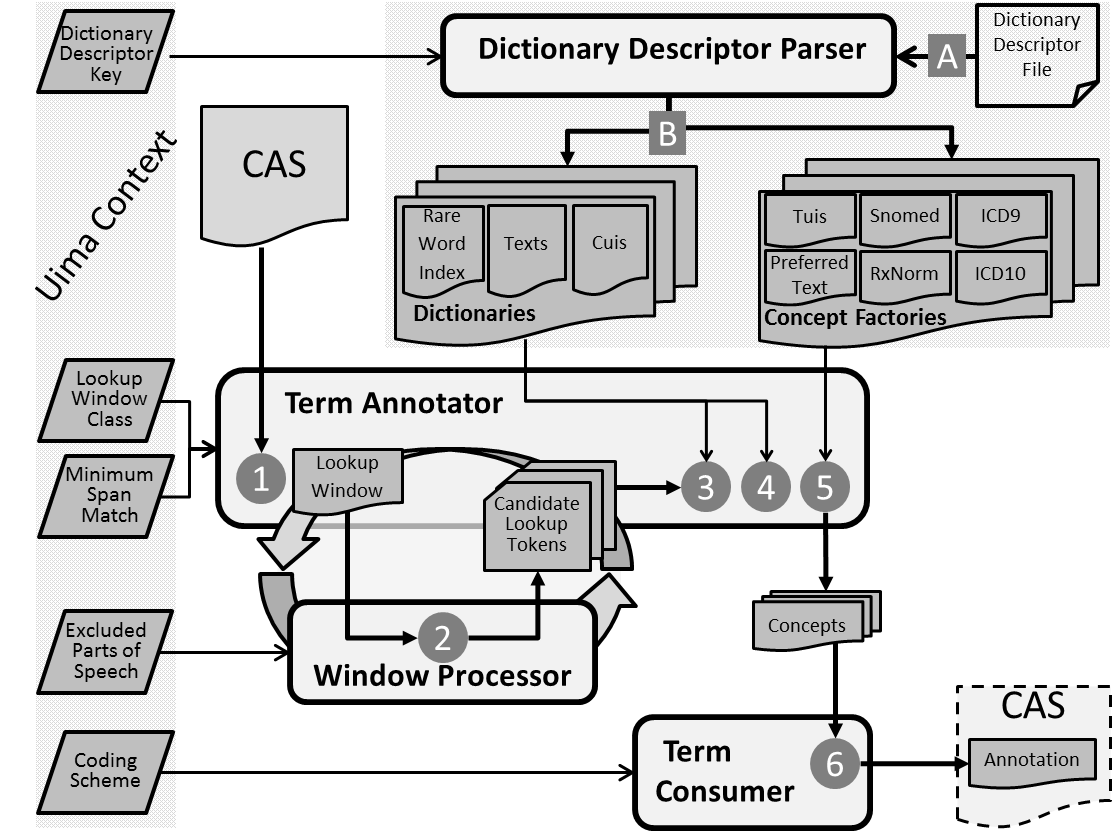
The Fast Dictionary Lookup module has six basic processes performed by three components, as well as a parser that can configure the actual Dictionaries.
- A Parse Dictionary Descriptor file
@@ -15,21 +17,17 @@ The Fast Dictionary Lookup module has six basic processes performed by three com
5. For each _Full Text_ match, create _Concepts_
6. Store appropriate _Concepts_ in **CAS** as **Annotations**
-
-</details>
+
-<details>
-<summary>Configuration</summary>
+## Configuration
There are options available to change the type of term matching used as well as the persistence of terms.
Changes in configuration are made in two places:
1. The main descriptor ...```-fast/desc/analysis_engine/UmlsLookupAnnotator.xml```
2. The resource (dictionary) configuration file ```resources/.../dictionary/lookup/fast/sno_rx_16ab.xml```
(The file name might be different if you created your own custom dictionary)
-</details>
-<details>
-<summary>Text Exact Match</summary>
+## Text Exact Match
Because the UMLS dictionary contains rows with different combinations of lexical elements per term,
using a direct string match of text in note to text of term is a valid candidate for term matching.
This is different from the complex mechanism in the current (first word) lookup, and makes for simpler code and greater accuracy.
@@ -39,28 +37,22 @@ For proper accuracy, custom dictionaries should also contain multiple entries fo
Note that term matching is attempted using the actual text in the note and also per-token cTAKES-generated lexical variants
of the text in the note.
This is the behavior of the ```DefaultJCasTermAnnotator``` class, which is the one used in the ```UmlsLookupAnnotator.xml``` descriptor.
-</details>
-<details>
-<summary>Text Overlap Match</summary>
+## Text Overlap Match
To better approximate the original lookup annotator, one lookup method finds overlapping terms in addition to exact matching terms.
This allows matches on discontiguous spans.
For instance, for the text “blood, urine test” the exact match will find only one procedure: “urine test”.
The overlap match will find both “urine test” and “blood test”.
This is the behavior of the OverlapJCasTermAnnotator class, which is the one used in the ```UmlsOverlapLookupAnnotator.xml``` descriptor.
-</details>
-<details>
-<summary>All Terms Persistence</summary>
+## All Terms Persistence
All terms discovered by the matchers can be stored in the CAS by a consumer, regardless of any property of the term.
This means that for the text “lung cancer” the specific disease term “lung cancer” and broader term “cancer”.
This can be useful for future searches on general concepts,
e.g. searching via the CUI for “cancer” and getting all instances of “cancer” found in texts “lung cancer”, “skin cancer”, “stomach cancer”, etc.
This is the behavior of the ```DefaultTermConsumer``` class.
-</details>
-<details>
-<summary>Most Precise Terms Persistence</summary>
+## Most Precise Terms Persistence
Matched terms can be stored only by the longest overlapping span discovered for a semantic group.
This keeps, for instance, the disease “lung cancer” but not “cancer”.
Using semantic groups means that both the disease “lung cancer” and the anatomical site “lung” are persisted even though the spans overlap.
@@ -69,18 +61,14 @@ So, for “blood, urine test” both the discontiguous spanned term “blood t
To persist only the most precise terms, edit the xml configuration file for your dictionary (default is ```sno_rx_16ab.xml```),
specifically within the section rareWordConsumer change the selected implementation.
By default it is ```DefaultTermConsumer```, but you will want to use the commented-out ```PrecisionTermConsumer```.
-</details>
-<details>
-<summary>Dictionary Stores</summary>
+## Dictionary Stores
The default configuration uses a dictionary that contains a subset of the UMLS in an hsql database.
Custom dictionaries can be added using another hsql database, or using a bar-separated value (BSV) (a.k.a. pipe-separated) flat file.
If you use a BSV file you do not need to tokenize the terms.
Tokenization will be done automatically at runtime.
-</details>
-<details>
-<summary>Lookup Window</summary>
+## Lookup Window
By default the new lookup uses Sentence as the lookup window.
The primary reasons for this are:
@@ -91,4 +79,3 @@ The primary reasons for this are:
Because the lookup is fast, using a full Sentence for lookup doesn't seem to hurt much.
However, you can always switch it back to see if precision is increased enough to warrant the decrease in recall.
This is changed in ```UmlsLookupAnnotator.xml```.
-</details>
\ No newline at end of file