You are viewing a plain text version of this content. The canonical link for it is here.
Posted to commits@pinot.apache.org by xi...@apache.org on 2026/02/06 05:00:47 UTC
(pinot-site) branch new-site-dev updated: Created local images, Scarf, Blog post for 1.4 (#156)
This is an automated email from the ASF dual-hosted git repository.
xiangfu pushed a commit to branch new-site-dev
in repository https://gitbox.apache.org/repos/asf/pinot-site.git
The following commit(s) were added to refs/heads/new-site-dev by this push:
new 378b8468 Created local images, Scarf, Blog post for 1.4 (#156)
378b8468 is described below
commit 378b8468c32757f4e173856fdc24040c014e2e50
Author: James Dilworth <gi...@jamesdilworth.com>
AuthorDate: Thu Feb 5 21:00:40 2026 -0800
Created local images, Scarf, Blog post for 1.4 (#156)
* fixed broken images across various older blog posts
* Added blog images into static as ASF no longer allows external image sourcing. Updated next.config to not do image optimization as it looks like this is being served as static
Updated the announcementBar to promote the Pinot Year in Review meetup. Added expiry parameter so this will gracefully disappear after Feb 12.
* added scarf pixel to layout
* Removed a blog unrelated to Apache Pinot. Added a quick post summarizing and linking to the 1.4 release
---------
Co-authored-by: James Dilworth <in...@dilworth.org>
---
app/layout.tsx | 5 ++++
components/AnnouncementBar.tsx | 15 ++++++++++-
components/Header.tsx | 14 +++++++++--
data/authors/qiaochu.mdx | 12 +++++++++
...-Function-For-Time-Series-Datasets-In-Pinot.mdx | 18 ++++++-------
...-11-08-Apache Pinot-How-do-I-see-my-indexes.mdx | 10 ++++----
.../2022-11-17-Apache Pinot-Inserts-from-SQL.mdx | 10 ++++----
.../2022-11-22-Apache-Pinot-Timestamp-Indexes.mdx | 12 ++++-----
...28-Apache-Pinot-Pausing-Real-Time-Ingestion.mdx | 4 +--
...che-Pinot-Deduplication-on-Real-Time-Tables.mdx | 8 +++---
...pache-Pinot-0-12-Configurable-Time-Boundary.mdx | 2 +-
...03-30-Apache-Pinot-0-12-Consumer-Record-Lag.mdx | 4 +--
...3-05-11-Geospatial-Indexing-in-Apache-Pinot.mdx | 14 +++++------
...derstanding-the-impact-on-query-performance.mdx | 20 +++++++--------
...al-for-getting-started-a-step-by-step-guide.mdx | 24 +++++++++---------
...-capture-with-apache-pinot-how-does-it-work.mdx | 8 +++---
...t-streaming-data-from-kafka-to-apache-pinot.mdx | 26 +++++++++----------
...ith-apache-kafka-apache-pinot-and-streamlit.mdx | 16 ++++++------
...3-understanding-the-impact-in-real-customer.mdx | 8 +++---
...2024-12-20-apache-pinot-year-in-review-2024.mdx | 2 +-
...low-latency-queries-with-raft-data-platform.mdx | 23 -----------------
data/blog/2025-09-30-Announce-Pinot-1-4.mdx | 28 +++++++++++++++++++++
data/siteMetadata.js | 6 +++--
next.config.js | 1 +
.../external/1661700264-entities-emitting-data.png | Bin 0 -> 81803 bytes
.../external/1661700333-parking-data-table.png | Bin 0 -> 58915 bytes
.../external/1661700377-30-min-bucket-example.png | Bin 0 -> 35235 bytes
.../blogs/external/1661700439-innermost-sql.png | Bin 0 -> 46063 bytes
.../blogs/external/1661700473-second-most.png | Bin 0 -> 35441 bytes
.../images/blogs/external/1661700517-outermost.png | Bin 0 -> 32944 bytes
.../blogs/external/1661700601-gapfill-steps.png | Bin 0 -> 64879 bytes
.../blogs/external/1661700642-execution-plan.png | Bin 0 -> 199550 bytes
.../blogs/external/1661700716-challenges.png | Bin 0 -> 136260 bytes
.../blogs/external/1667915561-image1-edittable.png | Bin 0 -> 170459 bytes
.../images/blogs/external/1667915654-image3.png | Bin 0 -> 59861 bytes
.../images/blogs/external/1667915996-image7.png | Bin 0 -> 45886 bytes
.../images/blogs/external/1667916147-image6.png | Bin 0 -> 45798 bytes
.../images/blogs/external/1667916232-image2.png | Bin 0 -> 46067 bytes
.../images/blogs/external/1668701275-image4.png | Bin 0 -> 40772 bytes
.../images/blogs/external/1668701353-image1.png | Bin 0 -> 6674 bytes
.../images/blogs/external/1668701512-image3.png | Bin 0 -> 111916 bytes
.../images/blogs/external/1668701654-image5.png | Bin 0 -> 9695 bytes
.../images/blogs/external/1668701727-image2.png | Bin 0 -> 45627 bytes
.../images/blogs/external/1669132979-image3.png | Bin 0 -> 68118 bytes
.../images/blogs/external/1669133004-image1.png | Bin 0 -> 8192 bytes
.../images/blogs/external/1669133027-image6.png | Bin 0 -> 20877 bytes
.../images/blogs/external/1669133059-image5.png | Bin 0 -> 17579 bytes
.../images/blogs/external/1669133083-image4.png | Bin 0 -> 3392 bytes
.../images/blogs/external/1669133112-image2.png | Bin 0 -> 47408 bytes
.../images/blogs/external/1669668611-image2.png | Bin 0 -> 111624 bytes
...33-pinot_0-11-realtime_injestion-diagram-v1.png | Bin 0 -> 32217 bytes
.../images/blogs/external/1673273173-image4.png | Bin 0 -> 29234 bytes
.../images/blogs/external/1673273248-image3.png | Bin 0 -> 47344 bytes
...3272-pinot_0-11-de-duplication-diagram_1-v2.png | Bin 0 -> 6237 bytes
...3289-pinot_0-11-de-duplication-diagram_2-v3.png | Bin 0 -> 37603 bytes
.../images/blogs/external/1676991003-image2.png | Bin 0 -> 12731 bytes
.../images/blogs/external/1680190272-image2.png | Bin 0 -> 30451 bytes
.../images/blogs/external/1680190286-image1.png | Bin 0 -> 178061 bytes
.../images/blogs/external/1683813508-image5.png | Bin 0 -> 1717886 bytes
.../images/blogs/external/1683813581-image1.png | Bin 0 -> 57271 bytes
.../images/blogs/external/1683813641-image7.png | Bin 0 -> 1215481 bytes
.../images/blogs/external/1683813705-image3.png | Bin 0 -> 55113 bytes
.../images/blogs/external/1683813749-image4.png | Bin 0 -> 90547 bytes
.../images/blogs/external/1683813802-image2.png | Bin 0 -> 1701086 bytes
.../images/blogs/external/1683813851-image6.png | Bin 0 -> 57856 bytes
.../images/blogs/external/1684246698-image5.png | Bin 0 -> 63401 bytes
.../images/blogs/external/1684246716-image1.png | Bin 0 -> 180923 bytes
.../images/blogs/external/1684246732-image2.png | Bin 0 -> 63406 bytes
.../images/blogs/external/1684246748-image3.png | Bin 0 -> 192129 bytes
.../images/blogs/external/1684246766-image4.png | Bin 0 -> 14181 bytes
.../images/blogs/external/1684246806-image7.png | Bin 0 -> 13873 bytes
.../images/blogs/external/1684246816-image6.png | Bin 0 -> 24608 bytes
.../images/blogs/external/1684246852-image9.png | Bin 0 -> 191392 bytes
.../images/blogs/external/1684246872-image10.png | Bin 0 -> 34827 bytes
.../images/blogs/external/1684419409-image7.png | Bin 0 -> 345652 bytes
.../images/blogs/external/1684419802-image1.png | Bin 0 -> 123778 bytes
.../images/blogs/external/1684419932-image2.png | Bin 0 -> 112691 bytes
.../images/blogs/external/1684420004-image3.png | Bin 0 -> 6035 bytes
.../images/blogs/external/1684420103-image4.png | Bin 0 -> 8835 bytes
.../images/blogs/external/1684420155-image5.png | Bin 0 -> 67323 bytes
.../images/blogs/external/1684421163-image6.png | Bin 0 -> 220181 bytes
.../images/blogs/external/1684421215-image8.png | Bin 0 -> 123178 bytes
.../images/blogs/external/1684421358-image9.png | Bin 0 -> 131942 bytes
.../images/blogs/external/1684421406-image12.png | Bin 0 -> 123718 bytes
.../images/blogs/external/1684421493-image11.png | Bin 0 -> 36470 bytes
.../images/blogs/external/1684421611-image10.png | Bin 0 -> 18745 bytes
.../images/blogs/external/1684857201-image4.png | Bin 0 -> 31724 bytes
.../images/blogs/external/1684857250-image5.png | Bin 0 -> 6473 bytes
.../images/blogs/external/1684857317-image6.png | Bin 0 -> 75831 bytes
.../images/blogs/external/1684857872-image3.png | Bin 0 -> 8929 bytes
.../images/blogs/external/1685462020-image1.png | Bin 0 -> 5118 bytes
.../images/blogs/external/1685462061-image2.png | Bin 0 -> 2355 bytes
.../images/blogs/external/1685462099-image3.png | Bin 0 -> 30551 bytes
.../images/blogs/external/1685462150-image4.png | Bin 0 -> 2172 bytes
.../images/blogs/external/1685462203-image5.png | Bin 0 -> 20893 bytes
.../images/blogs/external/1685462248-image6.png | Bin 0 -> 73518 bytes
.../images/blogs/external/1685462274-image7.png | Bin 0 -> 24882 bytes
.../images/blogs/external/1685462322-image8.png | Bin 0 -> 5541 bytes
.../images/blogs/external/1685462366-image9.png | Bin 0 -> 23644 bytes
.../images/blogs/external/1685462400-image10.png | Bin 0 -> 6532 bytes
.../images/blogs/external/1685462441-image11.png | Bin 0 -> 8203 bytes
.../images/blogs/external/1685462480-image12.png | Bin 0 -> 1883 bytes
.../images/blogs/external/1685462510-image13.png | Bin 0 -> 43412 bytes
.../images/blogs/external/1685637507-image4.png | Bin 0 -> 61496 bytes
.../images/blogs/external/1685637607-image1.png | Bin 0 -> 88976 bytes
.../images/blogs/external/1685637644-image2.png | Bin 0 -> 25961 bytes
.../images/blogs/external/1685637772-image5.png | Bin 0 -> 167726 bytes
.../images/blogs/external/1685637837-image6.png | Bin 0 -> 159378 bytes
.../images/blogs/external/1685637876-image7.png | Bin 0 -> 63234 bytes
.../images/blogs/external/1685637909-image8.png | Bin 0 -> 12169 bytes
.../images/blogs/external/1685637945-image9.png | Bin 0 -> 43087 bytes
...549350-screen-shot-2023-06-22-at-1-32-51-pm.png | Bin 0 -> 31686 bytes
.../images/blogs/external/1689174701-image1.png | Bin 0 -> 12954 bytes
.../images/blogs/external/1689175033-image4.png | Bin 0 -> 28262 bytes
.../images/blogs/external/1689175176-image2.png | Bin 0 -> 27410 bytes
.../images/blogs/external/1689175271-image3.png | Bin 0 -> 103478 bytes
.../blogs/external/Pinot-YearinReview24-8.png | Bin 0 -> 856791 bytes
117 files changed, 169 insertions(+), 121 deletions(-)
diff --git a/app/layout.tsx b/app/layout.tsx
index becfd065..a29e88d6 100644
--- a/app/layout.tsx
+++ b/app/layout.tsx
@@ -122,6 +122,11 @@ _paq.push(['enableLinkTracking']);
</SearchProvider>
</div>
</ThemeProviders>
+ {/* Scarf Pixel */}
+ <img
+ referrerPolicy="no-referrer-when-downgrade"
+ src="https://static.scarf.sh/a.png?x-pxid=3dd7caad-22f5-40d7-bc2e-20c8eaf91659"
+ />
</body>
</html>
);
diff --git a/components/AnnouncementBar.tsx b/components/AnnouncementBar.tsx
index 09a129b4..d127fa30 100644
--- a/components/AnnouncementBar.tsx
+++ b/components/AnnouncementBar.tsx
@@ -13,6 +13,7 @@ export interface AnnouncementBarProps {
buttonColor?: string;
buttonTarget?: string;
showArrowIcon?: boolean;
+ expiresAfter?: string;
className?: string;
}
@@ -26,8 +27,20 @@ export default function AnnouncementBar({
buttonColor = 'text-blue-600',
buttonTarget = '_self',
showArrowIcon = true,
+ expiresAfter,
className = ''
}: AnnouncementBarProps) {
+ if (expiresAfter) {
+ const expiryDate = new Date(expiresAfter);
+ if (Number.isNaN(expiryDate.getTime())) {
+ throw new Error(`Invalid AnnouncementBar expiry date: ${expiresAfter}`);
+ }
+
+ if (new Date() > expiryDate) {
+ return null;
+ }
+ }
+
return (
<div className={clsx('z-50', backgroundColor, className)}>
<div
@@ -53,7 +66,7 @@ export default function AnnouncementBar({
{text}
</span>
</div>
- {buttonText}
+ <span className="ml-2">{buttonText}</span>
{showArrowIcon && <ArrowRight className="ml-1 inline-block h-5 w-5" />}
</Link>
</div>
diff --git a/components/Header.tsx b/components/Header.tsx
index 21072a28..968ad712 100644
--- a/components/Header.tsx
+++ b/components/Header.tsx
@@ -12,7 +12,8 @@ import { Button } from '@/components/ui/button';
import MobileNav from './MobileNav';
// import ThemeSwitch from './ThemeSwitch';
import SearchButton from './SearchButton';
-import YouTubeBanner from './YouTubeBanner';
+// import YouTubeBanner from './YouTubeBanner';
+import AnnouncementBar from './AnnouncementBar';
const Header = () => {
const [stars, setStars] = useState<string | null>(null);
@@ -48,7 +49,16 @@ const Header = () => {
return (
<>
{/* <ReleaseBanner /> */}
- {!isSharePage && <YouTubeBanner />}
+ {/* !isSharePage && <YouTubeBanner /> */}
+ <AnnouncementBar
+ text={siteMetadata.announcement.text}
+ buttonText={siteMetadata.announcement.buttonText}
+ backgroundColor="bg-[#C7154A]"
+ textColor="text-white"
+ buttonHref={siteMetadata.announcement.link}
+ buttonColor="text-white"
+ expiresAfter={siteMetadata.announcement.expiresAfter}
+ />
<header className="border-b-1 flex items-center justify-between border-b px-5 py-3 md:px-[4rem] md:py-4">
<div className="flex">
<Link href="/" aria-label={siteMetadata.headerTitle}>
diff --git a/data/authors/qiaochu.mdx b/data/authors/qiaochu.mdx
new file mode 100644
index 00000000..96ce5411
--- /dev/null
+++ b/data/authors/qiaochu.mdx
@@ -0,0 +1,12 @@
+---
+name: Qiaochu Liu
+avatar: /static/images/logomark.svg
+occupation: Staff Software Engineer
+company: Uber
+email: address@yoursite.com
+twitter: https://twitter.com/Twitter
+linkedin: https://www.linkedin.com
+github: https://github.com
+---
+
+Apache Pinot is a real-time distributed online analytical processing (OLAP) datastore. Use Pinot to ingest and immediately query data from streaming or batch data sources (including, Apache Kafka, Amazon Kinesis, Hadoop HDFS, Amazon S3, Azure ADLS, and Google Cloud Storage).
diff --git a/data/blog/2022-08-02-GapFill-Function-For-Time-Series-Datasets-In-Pinot.mdx b/data/blog/2022-08-02-GapFill-Function-For-Time-Series-Datasets-In-Pinot.mdx
index 6ccfdd24..92951492 100644
--- a/data/blog/2022-08-02-GapFill-Function-For-Time-Series-Datasets-In-Pinot.mdx
+++ b/data/blog/2022-08-02-GapFill-Function-For-Time-Series-Datasets-In-Pinot.mdx
@@ -18,7 +18,7 @@ Many real-world datasets are time-series in nature, tracking the value or state
Let us use an IOT dataset tracking the occupancy status of the individual parking slots in a parking garage using automated sensors in this post. The granularity of recorded data points might be sparse or the events could be missing due to network and other device issues in the IOT environment. The following figure demonstrates entities emitting values at irregular intervals as the value changes. Polling and recording values of all entities regularly at a lower granularity would consume [...]
-
+
It is important for Pinot to provide the on-the-fly interpolation (filling the missing data) functionality to better handle time-series data.
@@ -32,7 +32,7 @@ Let us use the following sample data set tracking the status of parking lots in
### Sample Dataset:
-
+
parking_data table
@@ -40,7 +40,7 @@ Use case: We want to find out the total number of parking lots that are occupie
Let us take 30 minutes time bucket as an example:
-
+
In the 30 mins aggregation results table above, we can see a lot of missing data as many lots didn't have anything recorded in those 30-minute windows. To calculate the number of occupied parking lots per time bucket, we need to gap-fill the missing data for each of these 30-minute windows.
@@ -100,15 +100,15 @@ The following concepts were added to interpolate and handle time-series data.
The innermost sql will convert the raw event table to the following table.
-
+
The second most nested sql will gap fill the returned data as below:
-
+
The outermost query will aggregate the gapfilled data as follows:
-
+
### Other Supported Query Scenarios:
@@ -139,7 +139,7 @@ There are two gapfill-specific steps:
1. When Pinot Broker Server receives the gapfill SQL query, it will strip out gapfill related information and send out the stripped SQL query to the pinot server
2. GapfillProcessor will process the result from BrokerReducerService. The gapfill logic will be applied to the reduced result.
-
+
Here is the stripped version of the sql query sent to servers for the query shared above:
@@ -158,7 +158,7 @@ SELECT DATETIMECONVERT(event_time,'1:MILLISECONDS:EPOCH',
The sample execution plan for this query is as shown in the figure below:
-
+
### Time and Space complexity:
@@ -166,7 +166,7 @@ Let us say there are M entities, R rows returned from servers, and N time bucket
### Challenges
-
+
As the time-series datasets are enormous and partitioned, it's hard to get answers to the following questions:
diff --git a/data/blog/2022-11-08-Apache Pinot-How-do-I-see-my-indexes.mdx b/data/blog/2022-11-08-Apache Pinot-How-do-I-see-my-indexes.mdx
index 68c529ad..c6983857 100644
--- a/data/blog/2022-11-08-Apache Pinot-How-do-I-see-my-indexes.mdx
+++ b/data/blog/2022-11-08-Apache Pinot-How-do-I-see-my-indexes.mdx
@@ -36,11 +36,11 @@ docker run \
Once that’s up and running, navigate to [http://localhost:9000/#/](http://localhost:9000/#/) and click on Tables. Under the tables section click on airlineStats_OFFLINE. You should see a page that looks like this:
-
+
Click on Edit Table. This will show a window with the config for this table.
-
+
## Indexing Config
@@ -98,7 +98,7 @@ Now, close the table config modal, and under the segments section, open airlineS
If you look at one of those segments, you’ll see the following grid that lists columns/field names against the indexes defined on those fields.
-
+
All the fields on display are persisting their values using the dictionary/forward [index format](https://docs.pinot.apache.org/basics/indexing/forward-index) ). Still, we can also see that the Quarter column is sorted and has an inverted index, neither of which we explicitly defined.
@@ -112,11 +112,11 @@ I’ve written a couple of blog posts explaining how sorted indexes work on offl
Next, let’s see what happens if we add an explicit index. We’re going to add an inverted index to the FlightNum column. Go to Edit Table config again and update tableIndexConfig to have the following value:
-
+
If you go back to the page for segment airlineStats_OFFLINE_16073_16073_0, notice that it does not have an inverted index for this field.
-
+
This is because indexes are applied on a per segment basis. If we want the inverted index on the FlightNum column in this segment, we can click _Reload Segment_ on this page, or we can go back to the table page and click _Reload All Segments_.
diff --git a/data/blog/2022-11-17-Apache Pinot-Inserts-from-SQL.mdx b/data/blog/2022-11-17-Apache Pinot-Inserts-from-SQL.mdx
index 5036f288..92557cde 100644
--- a/data/blog/2022-11-17-Apache Pinot-Inserts-from-SQL.mdx
+++ b/data/blog/2022-11-17-Apache Pinot-Inserts-from-SQL.mdx
@@ -20,11 +20,11 @@ In the [Batch Import JSON from Amazon S3 into Apache Pinot | StarTree Recipes](h
The contents of that bucket are shown in the screenshot below:
-
+
Let’s quickly recap the steps that we had to do to import those files into Pinot. We have a table called events, which has the following schema:
-
+
We first created a job specification file, which contains a description of our import job. The job file is shown below:
@@ -74,7 +74,7 @@ And don’t worry, those credentials have already been deleted; I find it easier
Once we’ve run this command, if we go to the Pinot UI at [http://localhost:9000](http://localhost:9000/) and click through to the events table from the Query Console menu, we’ll see that the records have been imported, as shown in the screenshot below:
-
+
This approach works, and we may still prefer to use it when we need fine-grained control over the ingestion parameters, but it is a bit heavyweight for your everyday data import!
@@ -111,11 +111,11 @@ OPTION(
If we run this query, we’ll see the following output:
-
+
We can check on the state of the ingestion job via the Swagger REST API. If we navigate to [http://localhost:9000/help#/Task/getTaskState](http://localhost:9000/help#/Task/getTaskState), paste Task_SegmentGenerationAndPushTask_events-task as our task name, and then click Execute, we’ll see the following:
-
+
If we see the state COMPLETED, this means the data has been ingested, which we can check by going back to the Query console and clicking on the events table.
diff --git a/data/blog/2022-11-22-Apache-Pinot-Timestamp-Indexes.mdx b/data/blog/2022-11-22-Apache-Pinot-Timestamp-Indexes.mdx
index ceeb6d31..bdc27043 100644
--- a/data/blog/2022-11-22-Apache-Pinot-Timestamp-Indexes.mdx
+++ b/data/blog/2022-11-22-Apache-Pinot-Timestamp-Indexes.mdx
@@ -20,7 +20,7 @@ Instead, users write queries that use the datetrunc function to filter at a coar
The [timestamp index](https://docs.pinot.apache.org/basics/indexing/timestamp-index) solves that problem! In this blog post, we’ll use it to get an almost 5x query speed improvement on a relatively small dataset of only 7m rows.
-
+
## Spinning up Pinot
@@ -86,7 +86,7 @@ We should see the following output:
A screenshot of the schema is shown below:
-
+
We won’t go through the table config and schema files in this blog post because we did that in the last post, but you can find them in the [config](https://github.com/startreedata/pinot-recipes/tree/main/recipes/analyzing-chicago-crimes/config) directory on GitHub.
@@ -119,11 +119,11 @@ limit 10
If we run that query, we’ll see the following results:
-
+
And, if we look above the query result, there’s metadata about the query, including the time that it took to run.
-
+
The query took 141 ms to execute, so that’s our baseline.
@@ -222,7 +222,7 @@ In our case, that means we’ll have these extra columns: $DateEpoch$DAY, $DateE
We can check if the extra columns and indexes have been added by navigating to the [segment_page](http://localhost:9000/#/tenants/table/crimes_indexed_OFFLINE/crimes_OFFLINE_0) and typing $Date$Epoch in the search box. You should see the following:
-
+
These columns will be assigned the following values:
@@ -276,7 +276,7 @@ limit 10
Let’s now run our initial query against the _crimes_indexed_ table. We’ll get exactly the same results as before, but let’s take a look at the query stats:
-
+
This time the query takes 36 milliseconds rather than 140 milliseconds. That’s an almost 5x improvement, thanks to the timestamp index.
diff --git a/data/blog/2022-11-28-Apache-Pinot-Pausing-Real-Time-Ingestion.mdx b/data/blog/2022-11-28-Apache-Pinot-Pausing-Real-Time-Ingestion.mdx
index 5b4976b9..776e2d5b 100644
--- a/data/blog/2022-11-28-Apache-Pinot-Pausing-Real-Time-Ingestion.mdx
+++ b/data/blog/2022-11-28-Apache-Pinot-Pausing-Real-Time-Ingestion.mdx
@@ -26,7 +26,7 @@ Once a segment reaches the [segment threshold,](https://dev.startree.ai/docs/pin
The diagram below shows what things might look like when we’re ingesting data from a Kafka topic that has 3 partitions:
-
+
A table has one consuming segment per partition but would have many completed segments.
@@ -298,7 +298,7 @@ This time we will see some consuming segments:
Navigate to [http://localhost:9000/#/query](http://localhost:9000/#/query) and click on the events table. You should see the following:
-
+
We have records! We can also run our data generator again, and more events will be ingested.
diff --git a/data/blog/2023-01-29-Apache-Pinot-Deduplication-on-Real-Time-Tables.mdx b/data/blog/2023-01-29-Apache-Pinot-Deduplication-on-Real-Time-Tables.mdx
index 25d7b5ce..e4bd4fbc 100644
--- a/data/blog/2023-01-29-Apache-Pinot-Deduplication-on-Real-Time-Tables.mdx
+++ b/data/blog/2023-01-29-Apache-Pinot-Deduplication-on-Real-Time-Tables.mdx
@@ -245,7 +245,7 @@ limit 10
The results of this query are shown below:
-
+
We can see loads of duplicates!
@@ -331,7 +331,7 @@ The changes to notice here are:
limit 10
```
-
+
We have every combination of hex values (16^3=4096) and no duplicates! Pinot’s de-duplication feature has done its job.
@@ -339,11 +339,11 @@ We have every combination of hex values (16^3=4096) and no duplicates! Pinot’s
When we’re not using the deduplication feature, events are ingested from our streaming platform into Pinot, as shown in the diagram below:
-
+
When de-dup is enabled, we have to check whether records can be ingested, as shown in the diagram below:
-
+
De-dup works out whether a primary key has already been ingested by using an in memory map of (primary key -> corresponding segment reference).
diff --git a/data/blog/2023-02-21-Apache-Pinot-0-12-Configurable-Time-Boundary.mdx b/data/blog/2023-02-21-Apache-Pinot-0-12-Configurable-Time-Boundary.mdx
index 5ec3749a..5fce10b7 100644
--- a/data/blog/2023-02-21-Apache-Pinot-0-12-Configurable-Time-Boundary.mdx
+++ b/data/blog/2023-02-21-Apache-Pinot-0-12-Configurable-Time-Boundary.mdx
@@ -32,7 +32,7 @@ The ingestion frequency can either be 1 hour or 1 day, so one of these values wi
When a query for a hybrid table is received by a Pinot Broker, the broker sends a time boundary annotated version of the query to the offline and real-time tables. Any records from or before the time boundary are read from the offline table; anything greater than the boundary comes from the real-time table.
-
+
For example, if we executed the following query:
diff --git a/data/blog/2023-03-30-Apache-Pinot-0-12-Consumer-Record-Lag.mdx b/data/blog/2023-03-30-Apache-Pinot-0-12-Consumer-Record-Lag.mdx
index 16e57da9..8ae4dc9e 100644
--- a/data/blog/2023-03-30-Apache-Pinot-0-12-Consumer-Record-Lag.mdx
+++ b/data/blog/2023-03-30-Apache-Pinot-0-12-Consumer-Record-Lag.mdx
@@ -211,7 +211,7 @@ Let’s call the function:
We’ll see the following output:
-
+
Now let’s put it in a script and call the watch command so that it will be refreshed every couple of seconds:
@@ -253,7 +253,7 @@ kcat -P -b localhost:9092 -t events -Kø
And now if we look at the watch output:
-
+
We get some transitory lag, but it generally goes away by the next time the command is run.
diff --git a/data/blog/2023-05-11-Geospatial-Indexing-in-Apache-Pinot.mdx b/data/blog/2023-05-11-Geospatial-Indexing-in-Apache-Pinot.mdx
index e96246f8..fffdc63b 100644
--- a/data/blog/2023-05-11-Geospatial-Indexing-in-Apache-Pinot.mdx
+++ b/data/blog/2023-05-11-Geospatial-Indexing-in-Apache-Pinot.mdx
@@ -28,7 +28,7 @@ We can index points using [H3](https://h3geo.org/), an open source library that
For example, if the central hexagon covers the Westminster area of central London, neighbors at distance 1 are colored blue, those at distance 2 are in green, and those at distance 3 are in red.
-
+
Let’s learn how to use geospatial indexing with help from a dataset that captures the latest location of trains moving around the UK. We’re streaming this data into a `trains` topic in Apache Kafka®. Here’s one message from this stream:
@@ -146,13 +146,13 @@ limit 10
These results from running the query would follow:
-
+
Let’s now go into a bit more detail about what happens when we run the query.
The 10 km radius covers the area inside the white circle on the diagram below:
-
+
Pinot’s query planner will first translate the distance of 10 km into a number of rings, in this case, two. It will then find all the hexagons located two rings away from the white one. Some of these hexagons will fit completely inside the white circle, and some will overlap with the circle.
@@ -182,17 +182,17 @@ limit 10
The results from running the query are shown below:
-
+
If we change the query to show trains outside of a central London polygon, we’d see the following results:
-
+
So what’s actually happening when we run this query?
The polygon covers the area inside the white shape as shown below:
-
+
Pinot’s query planner will first find all the coordinates on the exterior of the polygon. It will then find the hexagons that fit within that geofence. Those hexagons get added to the potential cells list.
@@ -231,7 +231,7 @@ If our query uses `STDistance`, we should expect to see the `FILTER\_H3\_I
See this example query plan:
-
+
The [StarTree Developer Hub](https://dev.startree.ai/) contains a [geospatial indexing guide](https://dev.startree.ai/docs/pinot/recipes/geospatial-indexing#how-do-i-check-that-the-geospatial-index-is-being-used) that goes through this in more detail.
diff --git a/data/blog/2023-05-16-star-tree-indexes-in-apache-pinot-part-1-understanding-the-impact-on-query-performance.mdx b/data/blog/2023-05-16-star-tree-indexes-in-apache-pinot-part-1-understanding-the-impact-on-query-performance.mdx
index 81f2ed81..a9f11633 100644
--- a/data/blog/2023-05-16-star-tree-indexes-in-apache-pinot-part-1-understanding-the-impact-on-query-performance.mdx
+++ b/data/blog/2023-05-16-star-tree-indexes-in-apache-pinot-part-1-understanding-the-impact-on-query-performance.mdx
@@ -16,31 +16,31 @@ _Star-Tree Index: Pinot’s Intelligent Materialized View:_
_The star-tree index provides an intelligent way to build materialized views within Pinot. Traditional MVs work by fully materializing the computation for each source record that matches the specified predicates. Although useful, this can result in non-trivial storage overhead. On the other hand, the star-tree index allows us to partially materialize the computations and provide the ability to tune the space-time tradeoff by providing a configurable threshold between pre-aggregation and [...]
-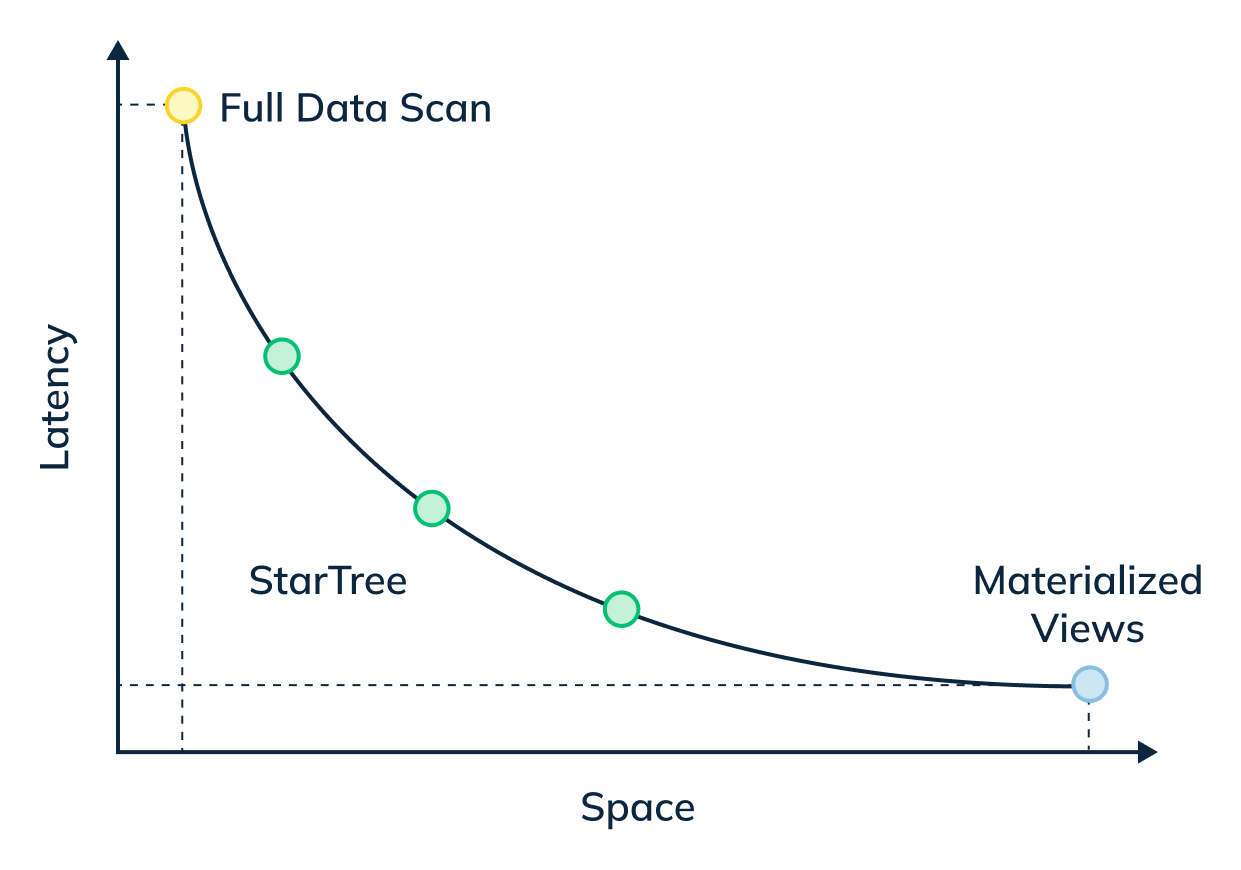
+
In this three-part blog series, we will compare and contrast query performance of a star-tree index with an inverted index, something that most of the OLAP databases end up using for such queries.
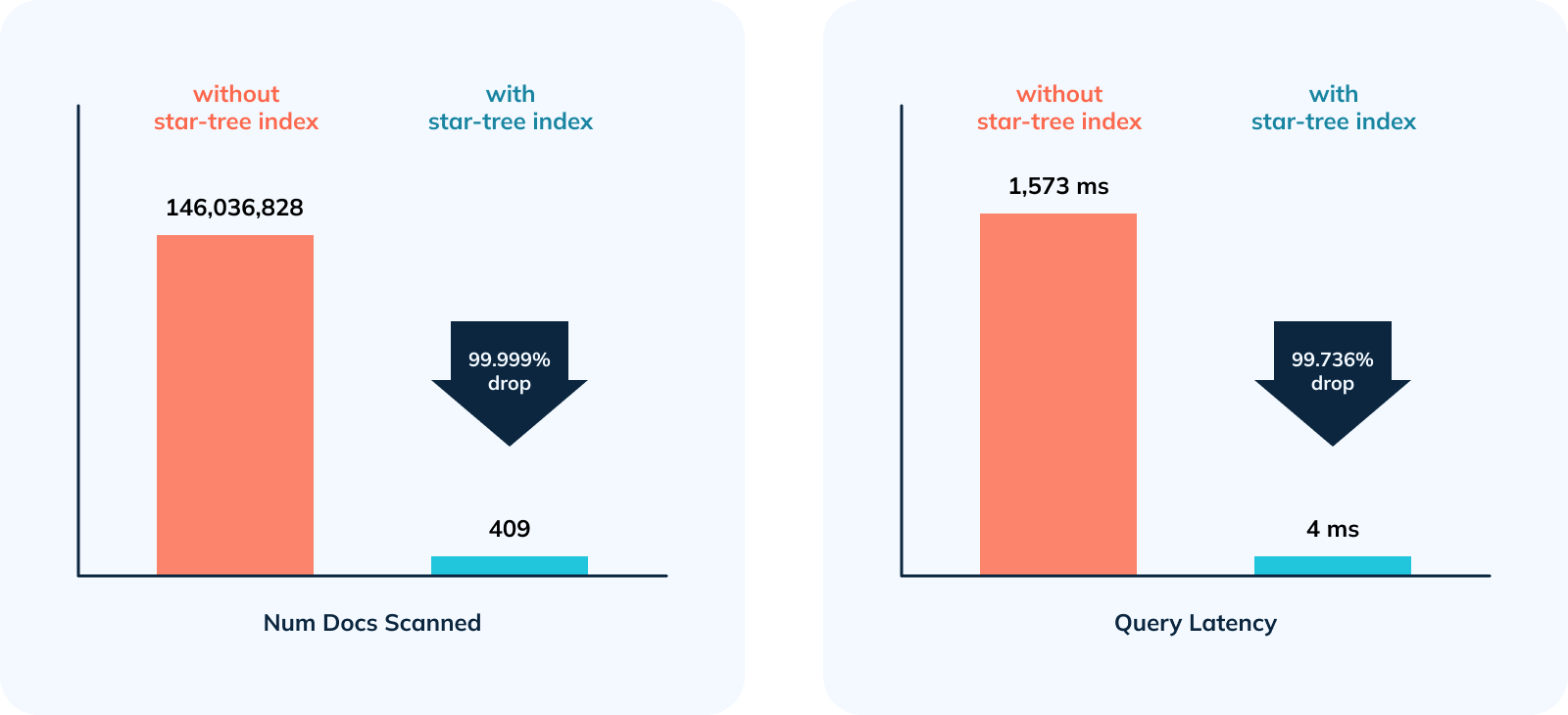
In this first part, we will showcase how a star-tree index brought down standalone query latency on a sizable dataset of ~633M records from 1,513ms to 4ms! — nearly 380x faster.
-
+
## 1\. The Dataset:
We used New York City Taxi Data for this comparison. Original source: [here](https://www.kaggle.com/c/nyc-taxi-trip-duration). Below are the high level details about this dataset.
-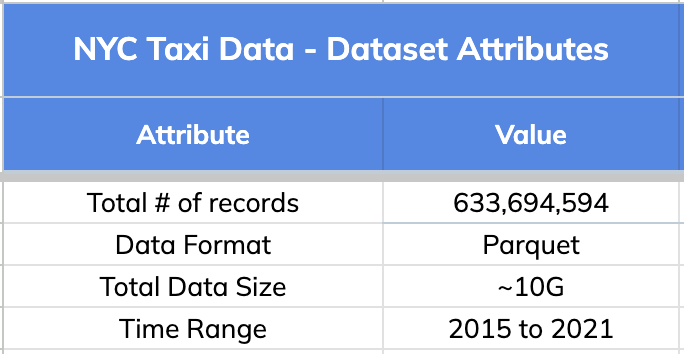
+
### Schema:
The dataset has 8 dimension fields and 11 metric columns as listed below.
-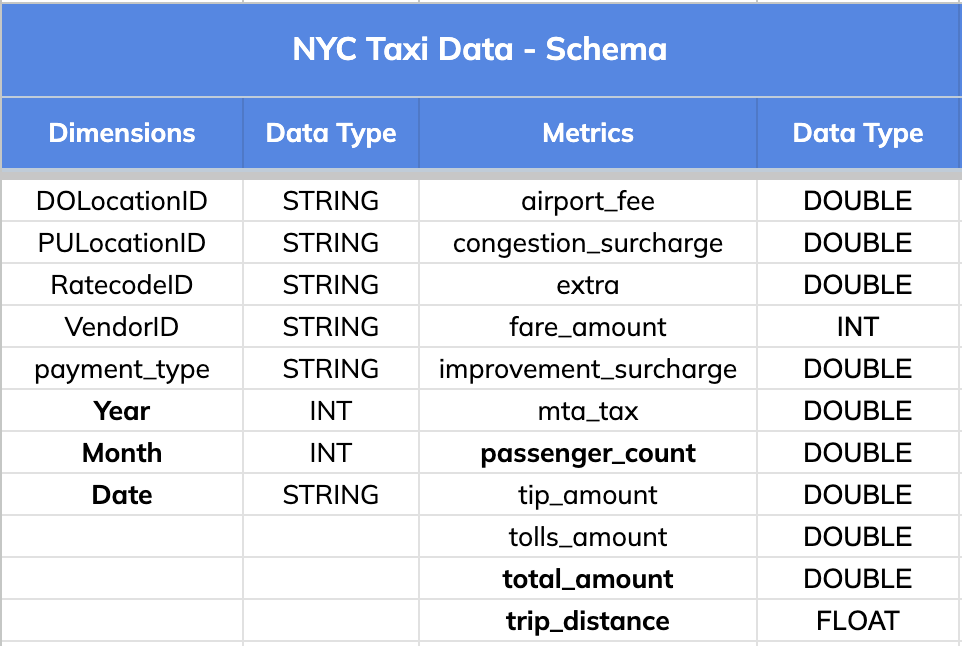
+
## 2\. Query Pattern
The query pattern involved slicing and dicing the data (GROUPING) BY various dimensions (Date, Month and Year), aggregating different metrics (total trips, distance and passengers count) and FILTERING BY a time range that could go as wide as 1 year.
-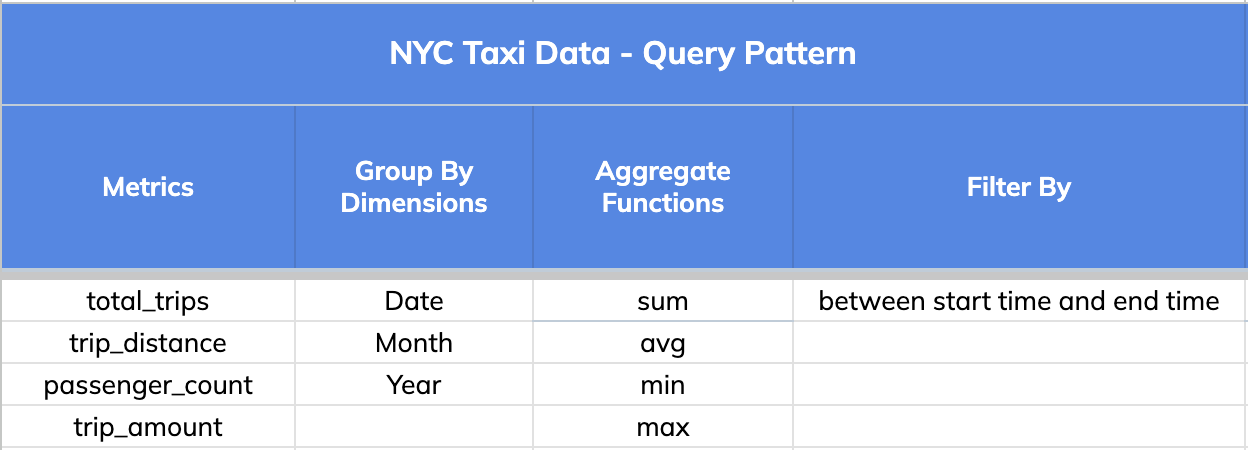
+
Note: A key thing to note is that a single star-tree index covers a wide range of OLAP queries that comprise the dimensions, metrics and aggregate functions specified in it.
@@ -92,7 +92,7 @@ We will use one such variant query for this illustration:
We used a very small infrastructure footprint for this comparison test.
-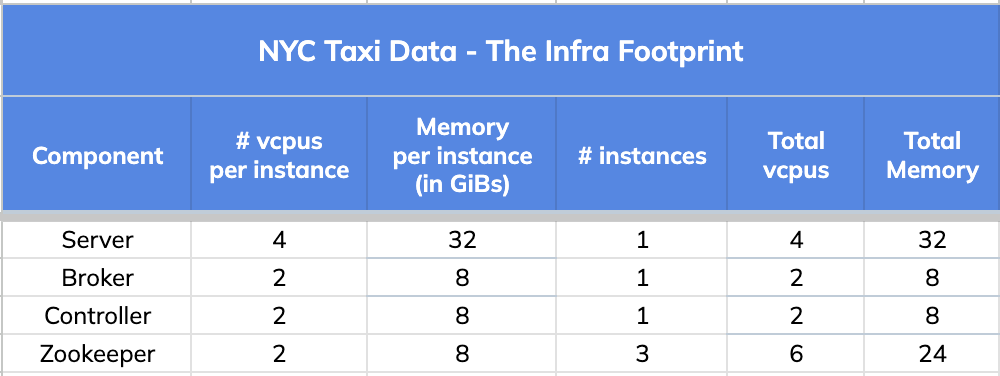
+
## 4\. Query Results and Stats
@@ -148,7 +148,7 @@ limit 1000
option(useStarTree=false, timeoutMs=20000)
```
-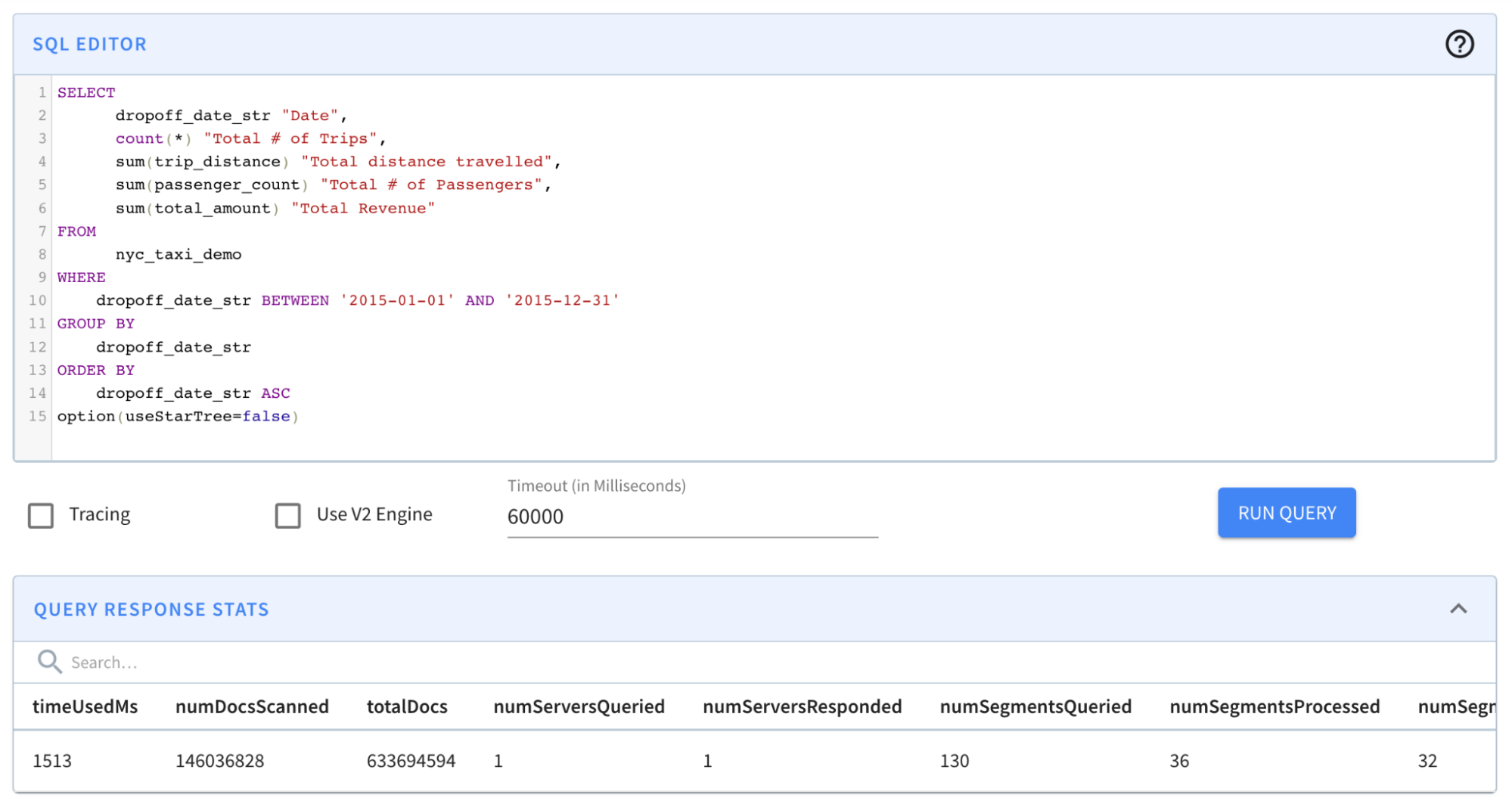
+
Result: The query completed in 1,513 milliseconds. (~1.5s); from ~131s to ~1.5s was a BIG improvement. However, results still took more than a second — which is a relatively long time for an OLAP database, especially if it is faced with multiple concurrent queries.
@@ -176,7 +176,7 @@ limit 1000
option(useStarTree=true)
```
-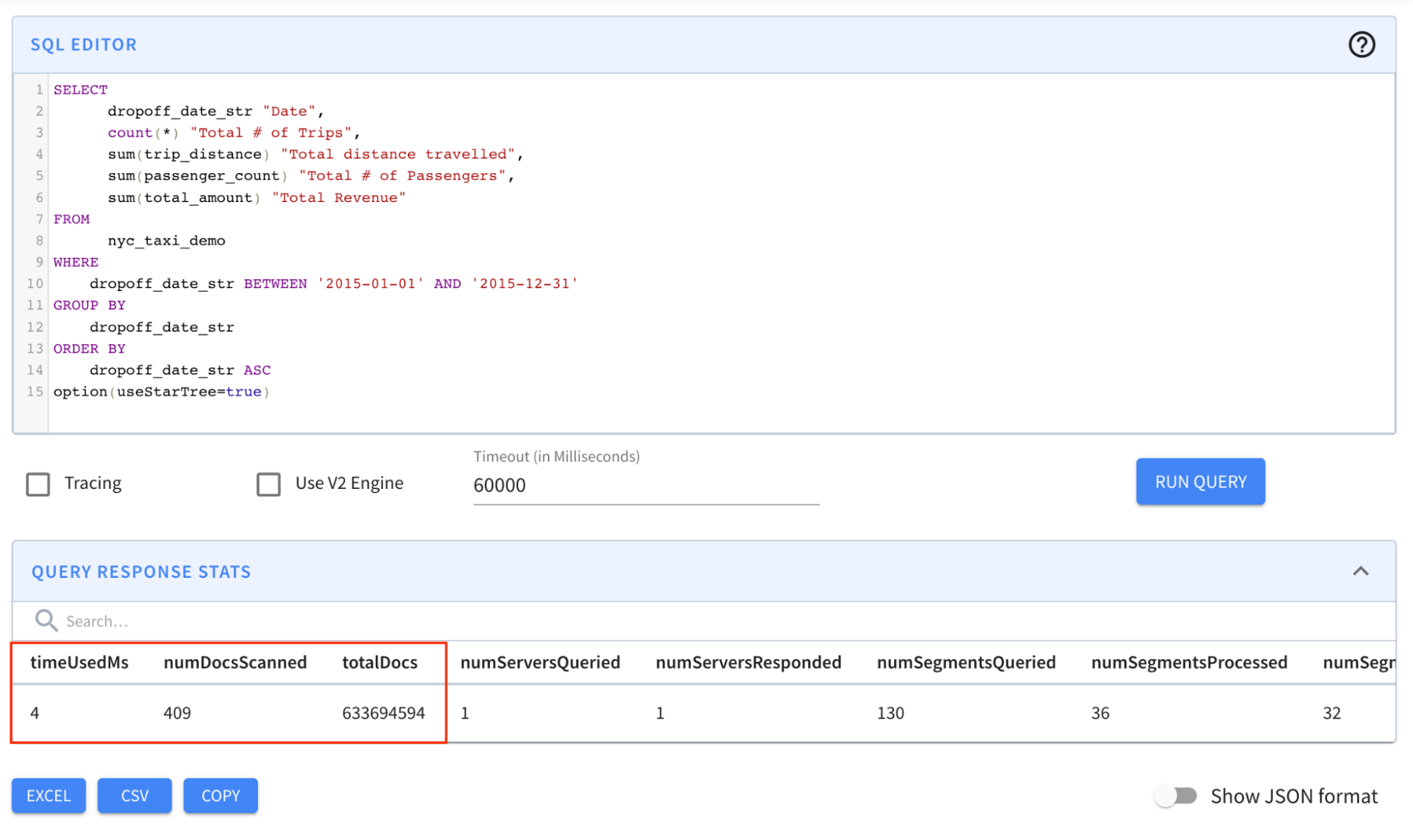
+
Result: The query completed in 4 milliseconds! Notice in particular that the numDocsScanned came down from ~146M to 409!
@@ -184,7 +184,7 @@ Result: The query completed in 4 milliseconds! Notice in particular that the num
Let’s take a closer look at the [query response stats](https://docs.pinot.apache.org/users/api/querying-pinot-using-standard-sql/response-format) across all three iterations to understand the “how” part of this magic of indexing in Apache Pinot.
-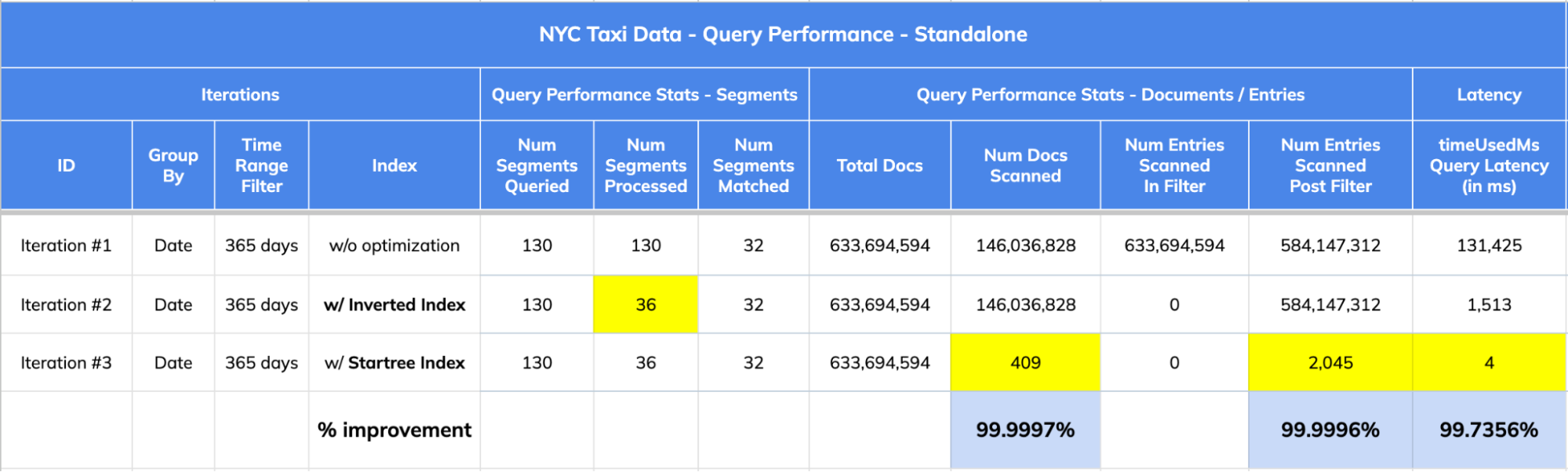
+
1. The dataset has 633,694,594 records (documents) spread across 130 segments.
2. Query Stats:
@@ -195,7 +195,7 @@ Let’s take a closer look at the [query response stats](https://docs.pinot.apac
## 5\. Impact Summary:
-
+
1. 356,968x improvement (or 99.999% drop) in num docs scanned from ~146M to 409.
2. 378.5x improvement (~99.736% drop) in query latency from 1,513 ms to 4 ms.
diff --git a/data/blog/2023-05-18-apache-pinot-tutorial-for-getting-started-a-step-by-step-guide.mdx b/data/blog/2023-05-18-apache-pinot-tutorial-for-getting-started-a-step-by-step-guide.mdx
index 331dcbac..06d43d10 100644
--- a/data/blog/2023-05-18-apache-pinot-tutorial-for-getting-started-a-step-by-step-guide.mdx
+++ b/data/blog/2023-05-18-apache-pinot-tutorial-for-getting-started-a-step-by-step-guide.mdx
@@ -53,7 +53,7 @@ _Docker is a set of platform as a service (PaaS) products that use OS-level virt
Now, let’s download the Docker image. On a Windows machine, start a new PowerShell command window. Note that this is not the same as a Windows PowerShell command window, as shown below.
-
+
Use the following command to get (pull) the image we are looking for:
@@ -79,7 +79,7 @@ docker images
It should show you the image like so:
-
+
### Step 3:
@@ -89,7 +89,7 @@ Let’s run a container using the Docker image that we downloaded:
docker run -it --entrypoint /bin/bash -p 9000:9000 apachepinot.docker.scarf.sh/apachepinot/pinot:0.12.0
```
-
+
The docker run command runs the image. The \-p 9000:00 option maps the docker container port 9000 to the local machine port 9000. This allows us to access the Pinot UI, which defaults to port 9000 to be accessible from the localhost. We are using the –entrypoint to override the default entrypoint and replace it with Bash. We want to override the default behavior so that we can start each component one at a time. The next parameter apachepinot.docker.scarf.sh/apachepinot/pinot:0.12.0 is t [...]
@@ -97,7 +97,7 @@ After running the command, we’ll find ourselves in the Docker container instan
If you’re using VS Code, with the Docker extension installed, you can click on the Docker extension and see our container and its content:
-
+
Click on the Docker icon in the left menu, and apachepinot.docker.scarf.sh/apachepinot/pinot:0.12.0. This should take a few seconds to connect to the running container. Now, you can navigate to the files and see what we have under the opt folder.
@@ -105,7 +105,7 @@ Click on the Docker icon in the left menu, and apachepinot.docker.scarf.sh/apach
Let’s run the components that are essential to running a Pinot cluster. Change directory to the bin folder and list the contents like so:
-
+
In order to start the Pinot cluster, we will need to run the following essential components:
@@ -134,7 +134,7 @@ The controller controls the cluster health and coordinates with ZooKeeper for co
At this time, we should have a running Pinot cluster. We can verify via the Pinot Data Explorer by browsing to localhost:9000. You should see something like this:
-
+
What just happened?
@@ -206,7 +206,7 @@ To create a schema and table for the baseball stats file, run the following comm
You should now see the schema and table created:
-
+
Next, we’ll want to load some data into the table that we created. We have some sample data in the folder rawdata that we can use to load. We will need a YAML file to perform the actual ingestion job and can use the following command to import data:
@@ -217,11 +217,11 @@ Next, we’ll want to load some data into the table that we created. We have som
If you run into trouble on this step like I did, edit the ingestJobSpec.yaml file using Docker Desktop to change the inputDirURI from relative to absolute path. Then rerun the above command.
-
+
You should now be able to see the table has been populated like so:
-
+
Now, let’s run some queries. From localhost:9000, select the Query Console in the left-hand menu. Then type in some of these queries:
@@ -232,7 +232,7 @@ select sum(runs), playerName from baseballStats group by playerName order by sum
You should see results like so:
-
+
And there you have it!
@@ -240,11 +240,11 @@ And there you have it!
If you’re curious to go a step further and see what the segments look like and what the actual data on disk looks like, keep reading! In the Tables section of localhost:9000, you can scroll down to find a segment:
-
+
Clicking on this gives the specifics of the segment:
-
+
Pinot allows you to easily inspect your segments and tables in one easy-to-use UI. You can find what’s where and keep an eye on size, location, number of documents, etc.
diff --git a/data/blog/2023-05-23-change-data-capture-with-apache-pinot-how-does-it-work.mdx b/data/blog/2023-05-23-change-data-capture-with-apache-pinot-how-does-it-work.mdx
index da006b46..49626aaf 100644
--- a/data/blog/2023-05-23-change-data-capture-with-apache-pinot-how-does-it-work.mdx
+++ b/data/blog/2023-05-23-change-data-capture-with-apache-pinot-how-does-it-work.mdx
@@ -18,11 +18,11 @@ NOTE: NoSQL databases also have the ability to perform CDC but may use other mec
The WAL is an append-only, immutable stream of events designed to replicate its data to another instance of the data store for high availability in disaster recovery scenarios (see diagram below). The transactions occurring on the left data store (primary) get replicated to the data store to the right (secondary). The applications connect to the primary data store and replicate its data to the secondary data store. If the primary data store goes down, the application switches to the seco [...]
-
+
The following diagram shows an example of a WAL in a data store. New transactions get appended to the end of the WAL. The old transactions are on the left, and the newer transactions are on the right.
-
+
Change data capture enables you to listen to this WAL by capturing these transactions and sending them downstream for processing. The data processing occurs in a different system where we can view the latest version of each record in other applications. Because of the real-time nature of the data, the subscribing applications to the stream of transactions receive real-time transaction events.
@@ -38,7 +38,7 @@ Capturing change events requires specific knowledge of the database from which t
Kafka connectors must run in a Kafka Connect cluster, a highly available and distributed system for running connectors. Kafka connectors cannot run on their own and require a server. The Debezium project provides a Debezium server that can also run Debezium connectors capable of writing to other event streaming platforms besides Kafka, for instance, Amazon Kinesis. The diagram below shows a Debezium connector reading the WAL and writing to a Debezium server. The Debezium server can then [...]
-
+
## Debezium Data Format
@@ -180,7 +180,7 @@ A FULL upsert means that a new record will replace the older record completely i
PARTIAL only allows updates to specific columns and employs additional strategies.
-
+
Source: [Stream Ingestion with Upsert](https://docs.pinot.apache.org/basics/data-import/upsert)
diff --git a/data/blog/2023-05-30-how-to-ingest-streaming-data-from-kafka-to-apache-pinot.mdx b/data/blog/2023-05-30-how-to-ingest-streaming-data-from-kafka-to-apache-pinot.mdx
index 2bfbc4b5..0ddfa149 100644
--- a/data/blog/2023-05-30-how-to-ingest-streaming-data-from-kafka-to-apache-pinot.mdx
+++ b/data/blog/2023-05-30-how-to-ingest-streaming-data-from-kafka-to-apache-pinot.mdx
@@ -32,7 +32,7 @@ We will be installing Apache Kafka onto our already existing Pinot docker image.
docker run -it --entrypoint /bin/bash -p 9000:9000 apachepinot.docker.scarf.sh/apachepinot/pinot:0.12.0
-
+
We want to override the ENTRYPOINT and run Bash script within the Docker image. If you already have a container running, you can skip this step. I tend to tear down containers after use, so in my case, I created a brand new container.
@@ -54,11 +54,11 @@ Run each of the commands one at a time. The & allows you to continue using the s
It should look like this:
-
+
You can now browse to [http://localhost:9000/#/zookeeper](http://localhost:9000/#/zookeeper) to see the running cluster:
-
+
### Step 2: Install Kafka on the Docker container
@@ -75,7 +75,7 @@ curl https://downloads.apache.org/kafka/3.4.0/kafka_2.12-3.4.0.tgz --output kafk
It should look this:
-
+
Note that we’ve changed the directory to keep the Kafka folder separate from the Pinot folder.
@@ -89,9 +89,9 @@ rm -rf kafka.tgz
It should look like this:
-
+
-
+
Now, Kafka and Pinot reside locally on our Docker container with Pinot up and running. Let’s run the Kafka service. Kafka will use the existing ZooKeeper for configuration management.
@@ -104,11 +104,11 @@ cd kafka
It should look like this:
-
+
To verify that Kafka is running, let’s look at our ZooKeeper configs by browsing to [http://localhost:9000/#/zookeeper:](http://localhost:9000/#/zookeeper)
-
+
You may have to refresh the page and find many more configuration items appear thanexpectedt. These are Kafka configurations.
@@ -128,7 +128,7 @@ mkdir events
It should look like this:
-
+
You may have to start a new PowerShell window and connect to Docker for this. Now, let’s install Node.js and any dependencies we might need for the event consumption script:
@@ -207,15 +207,15 @@ node wikievents.js
Use Ctrl-C to stop the program. Navigate to the events folder to see some new folders created with the various language events downloaded from Wikipedia.
-
+
Navigate to the enwiki folder and review some of the downloaded JSON files.
-
+
At http://localhost:9000/#/zookeeper, you can find the Kafka topic by locating the ZooKeeper config and expanding config > topics. You may have to refresh your browser.
-
+
Here, you should see the wikipedia-events topic that we created using the Node.js script. So far, so good.
@@ -374,7 +374,7 @@ Now, browse to the following location [http://localhost:9000/#/tables,](http://l
Run the node wikievents.js command, then query the newly created wikievents table to see the totalDocs increase in real time:
-
+
To avoid running out of space on your computer, make sure to stop the wikievents.js script when you’re done :-D
diff --git a/data/blog/2023-06-01-real-time-mastodon-usage-with-apache-kafka-apache-pinot-and-streamlit.mdx b/data/blog/2023-06-01-real-time-mastodon-usage-with-apache-kafka-apache-pinot-and-streamlit.mdx
index 12b11d07..e53df1db 100644
--- a/data/blog/2023-06-01-real-time-mastodon-usage-with-apache-kafka-apache-pinot-and-streamlit.mdx
+++ b/data/blog/2023-06-01-real-time-mastodon-usage-with-apache-kafka-apache-pinot-and-streamlit.mdx
@@ -39,7 +39,7 @@ To start, Simon wrote a listener to collect the messages, which he then publishe
Finally, he queried those Parquet files using DuckDB and created some charts using the Seaborn library, as reflected in the architecture diagram below:
-
+
Fig: [Data Collection Architecture](https://simonaubury.com/posts/202302_mastodon_duckdb/)
@@ -49,7 +49,7 @@ The awesome visualizations that Simon created make me wonder whether we can chan
Now [Apache Pinot](https://startree.ai/resources/what-is-apache-pinot) comes into the picture. Instead of using Kafka Connect to batch Mastodon toots into groups of 1,000 messages to generate Parquet files, we can stream the data immediately and directly, toot-by-toot into Pinot and then build a real-time dashboard using Streamlit:
-
+
## Setup
@@ -191,7 +191,7 @@ We can then navigate to the table page of the Pinot UI:
Here, we’ll see the following:
-
+
## Ingest Data into Kafka
@@ -221,7 +221,7 @@ Now, let’s go to the Pinot UI to see what data we’ve got to play with:
We’ll see the following preview of the data in the mastodon table:
-
+
We can then write a query to find the number of messages posted in the last five minutes:
@@ -234,7 +234,7 @@ where created_at*1000 > ago('PT1M')
order by 1 DESC;
```
-
+
We can also query Pinot via the Python client, which we can install by running the following:
@@ -283,19 +283,19 @@ I’ve created a Streamlit app in the file [app.py](https://github.com/mneedham/
First, we’ll create metrics to show the number of toots, users, and URLs in the last _n_ minutes. _n_ will be configurable from the app as shown in the screenshot below:
-
+
From the screenshot, we can identify mastodon.cloud as the most active server, though it produces only 1,800 messages in 10 minutes or three messages per second. The values in green indicate the change in values compared to the previous 10 minutes.
We can also create a chart showing the number of messages per minute for the last 10 minutes:
-
+
Based on this chart, we can see that we’re creating anywhere from 200–900 messages per second. Part of the reason lies in the fact that the Mastodon servers sometimes disconnect our listener, and at the moment, I have to manually reconnect.
Finally, we can look at the toot length by language:
-
+
We see much bigger ranges here than Simon saw in his analysis. He saw a maximum length of 200 characters, whereas we see some messages of up to 4,200 characters.
diff --git a/data/blog/2023-07-12-star-tree-index-in-apache-pinot-part-3-understanding-the-impact-in-real-customer.mdx b/data/blog/2023-07-12-star-tree-index-in-apache-pinot-part-3-understanding-the-impact-in-real-customer.mdx
index 2a5328c7..15348b12 100644
--- a/data/blog/2023-07-12-star-tree-index-in-apache-pinot-part-3-understanding-the-impact-in-real-customer.mdx
+++ b/data/blog/2023-07-12-star-tree-index-in-apache-pinot-part-3-understanding-the-impact-in-real-customer.mdx
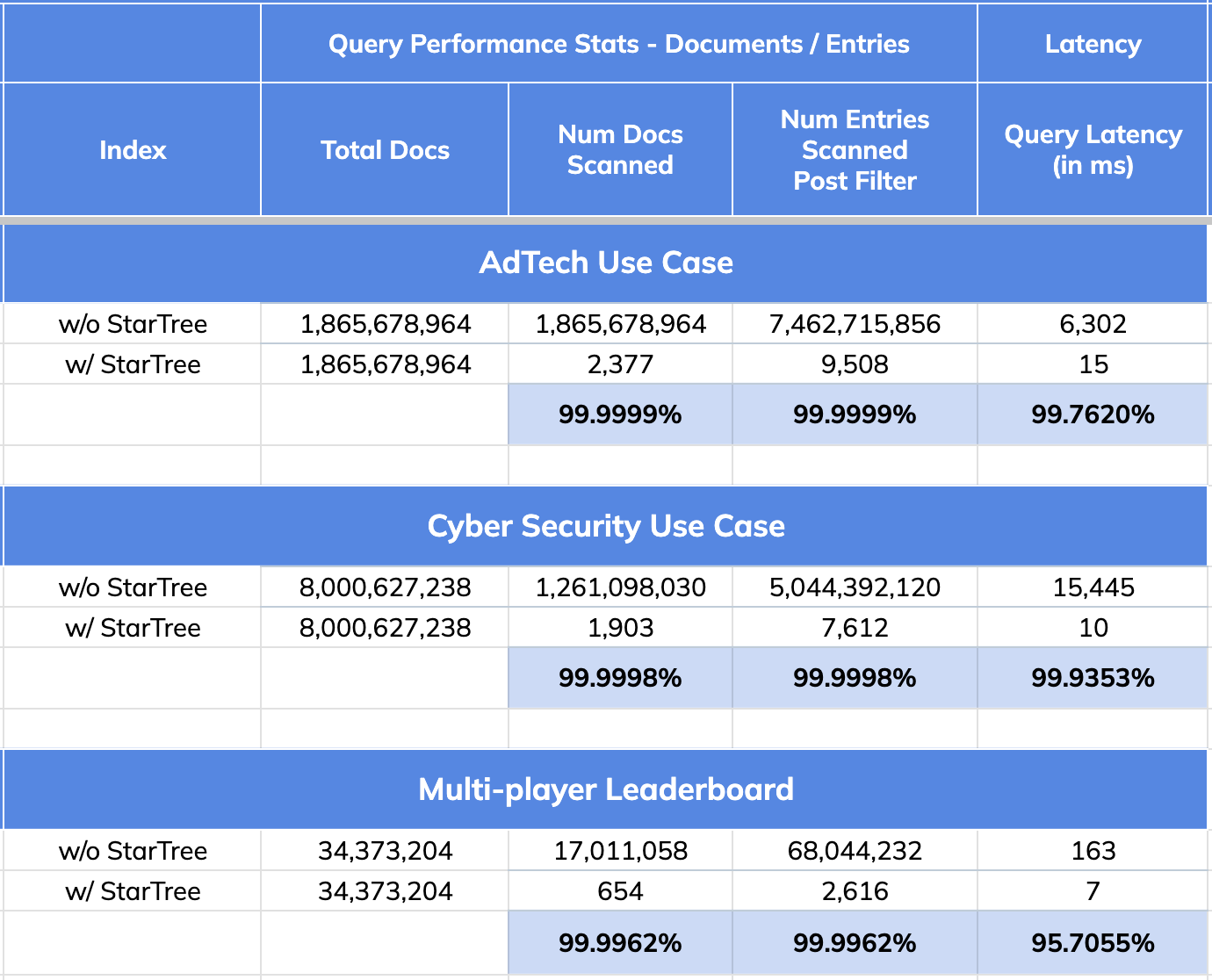
@@ -70,7 +70,7 @@ This is exactly the type of scenario that the [Star-Tree Index](https://docs.pin
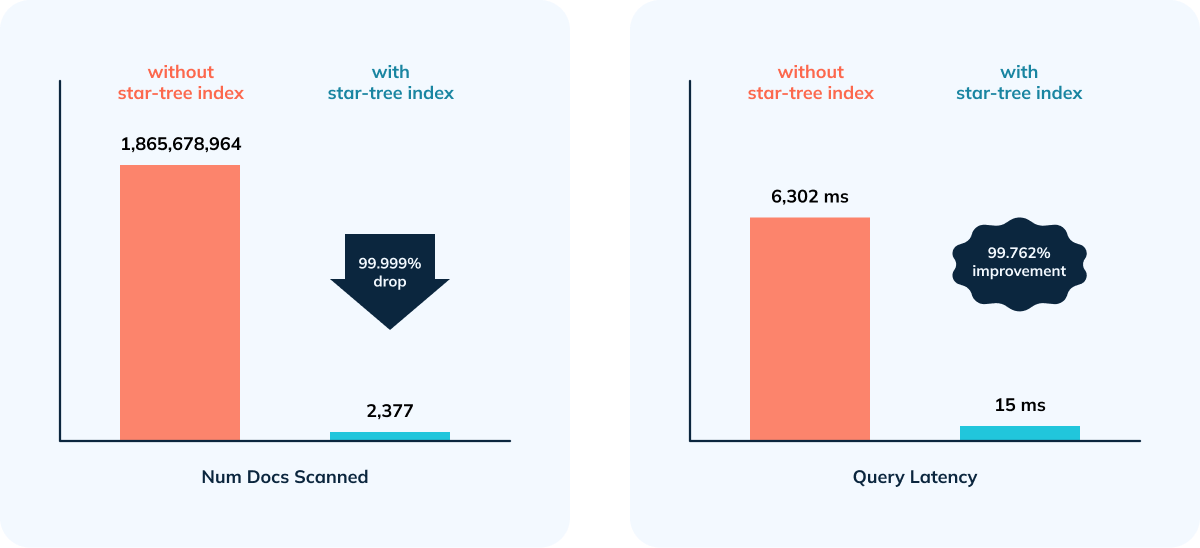
- 99.76% reduction in latency vs. no Star-Tree Index (6.3 seconds to 15 ms)
- 99.99999% reduction in amount of data scanned/aggregated per query (> 1.8B docs to < 2,400)
-
+
## CyberSecurity Use Case:
@@ -105,7 +105,7 @@ Given the overhead while doing complex aggregations, efficient filtering (indexe
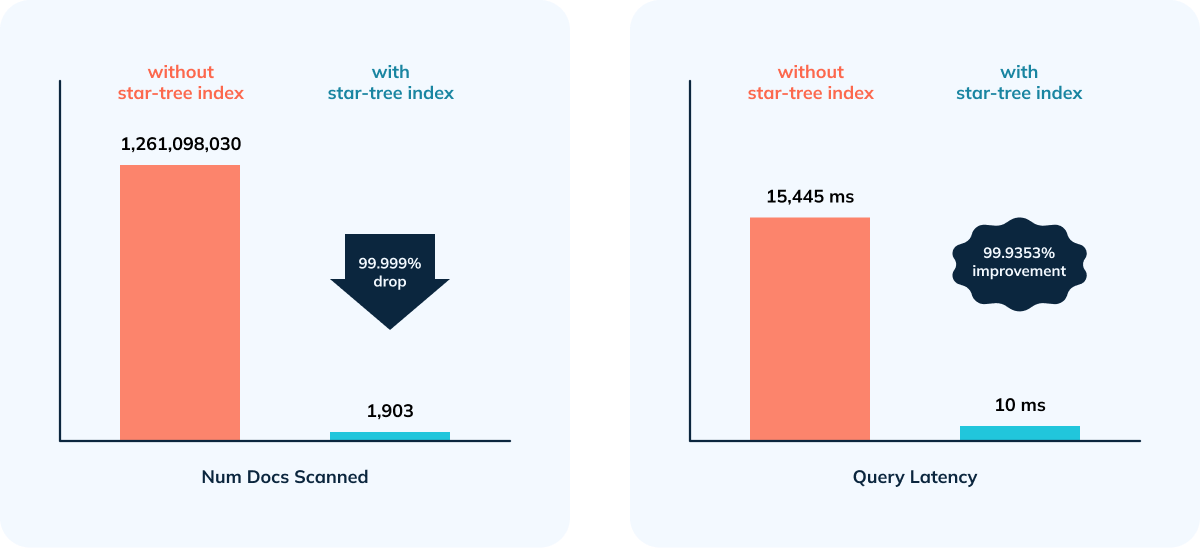
- 99.9998% reduction in data scanned/aggregated per query
- Happy Customer 😃
-
+
## Multiplayer Game Leaderboard Use Case
@@ -131,11 +131,11 @@ Given the overhead while doing complex aggregations, efficient filtering (indexe
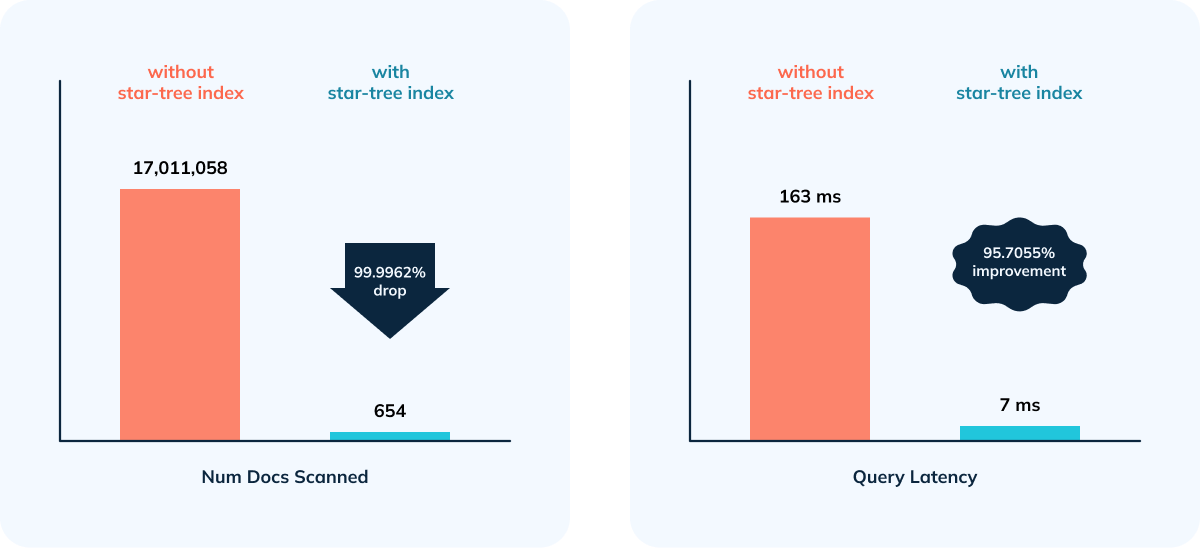
- 95.70% improvement in query performance as a result of 99.9962% reduction in number of documents and entries scanned.
-
+
## Quick Recap: Star-Tree Index Performance Improvements
-
+
- 99.99% reduction in data scanned/aggregated per query
- 95 to 99% improvement in query performance
diff --git a/data/blog/2024-12-20-apache-pinot-year-in-review-2024.mdx b/data/blog/2024-12-20-apache-pinot-year-in-review-2024.mdx
index 46f49377..b6713ba6 100644
--- a/data/blog/2024-12-20-apache-pinot-year-in-review-2024.mdx
+++ b/data/blog/2024-12-20-apache-pinot-year-in-review-2024.mdx
@@ -17,7 +17,7 @@ tags:
]
---
-
+
Discover Apache Pinot’s 2024 highlights, including community milestones, performance enhancements, and new integration capabilities. This retrospective offers insight into Pinot’s growth and a glimpse of its roadmap, showcasing how real-time analytics continues to evolve.
diff --git a/data/blog/2025-03-05-Secure-and-low-latency-queries-with-raft-data-platform.mdx b/data/blog/2025-03-05-Secure-and-low-latency-queries-with-raft-data-platform.mdx
deleted file mode 100644
index 9c99937e..00000000
--- a/data/blog/2025-03-05-Secure-and-low-latency-queries-with-raft-data-platform.mdx
+++ /dev/null
@@ -1,23 +0,0 @@
----
-title: 'Secure & Low-Latency Queries at scale with Raft Data Platform - [R]DP'
-date: 2025-03-05
-authors: ['sharma', 'zych']
-summary: 'Explore how the Raft Data Platform (RDP) meets the growing demands for secure, high-performance data analytics at scale, with flexible architecture, advanced capabilities, and a vision for the future of real-time insights.'
-
-tags:
- [
- data platform,
- real-time analytics,
- open source,
- security,
- cloud infrastructure,
- data ingestion,
- scalability
- ]
----
-
-
-
-Discover how the Raft Data Platform (RDP) delivers secure, low-latency data queries at scale by leveraging cutting-edge technology and a robust, open source foundation. This blog post dives into RDP’s multi-layered security features, performance-optimized architecture, and commitment to community-driven innovation. Gain insights into how RDP addresses real-time analytics challenges while maintaining cost efficiency and flexibility, and learn about its evolving roadmap for the future of d [...]
-
-Read more at [TeamRaft](https://teamraft.com/resources/insights/secure-low-latency-queries-at-scale-with-raft-data-platform-rdp/)
diff --git a/data/blog/2025-09-30-Announce-Pinot-1-4.mdx b/data/blog/2025-09-30-Announce-Pinot-1-4.mdx
new file mode 100644
index 00000000..9664b36c
--- /dev/null
+++ b/data/blog/2025-09-30-Announce-Pinot-1-4.mdx
@@ -0,0 +1,28 @@
+---
+title: 'Announcing Apache Pinot 1.4'
+date: 2025-09-30
+authors: ['qiaochu']
+summary: 'Another packed release with more improvements for real-time analytics with Apache Pinot.'
+
+tags: [Apache Pinot, releases, real-time analytics, open source, community updates]
+---
+
+We are pleased to announce that Apache Pinot 1.4.0 has been released!
+
+Apache Pinot is a realtime distributed OLAP datastore, designed to answer OLAP queries with low latency use-cases.
+
+This release(1.4.0) delivers significant improvements including:
+
+- There's an all new query mode added for running Multistage Engine queries against Pinot, heavily inspired from Uber's Presto over Pinot query architecture. A new query optimizer for the Multistage Engine can automatically eliminate or simplify redundant Exchanges. We aim to make this query optimizer the default in future versions. Plus several other significant improvements to the engine.
+- Pauseless Consumption is introduced in Pinot 1.4.0, it enhances real-time analytics by minimizing ingestion delays and improving data freshness in Apache Pinot.
+- Time Series Engine - Introduced support for ASOF JOIN, allowing time-aligned joins commonly used in time-series analytics. This unlocks use cases where approximate matches based on time proximity are required.
+- Logical Table support,
+- Upsert and Deduplication Enhancement
+- Minion Jobs (including smallSegmentMerger)
+- Rebalancing capabilities
+
+This release also includes numerous smaller features and general bug fixes.
+
+The release can be downloaded at https://pinot.apache.org/download
+
+The release notes are available at https://github.com/apache/pinot/releases
diff --git a/data/siteMetadata.js b/data/siteMetadata.js
index 79800c15..ca0b7b06 100644
--- a/data/siteMetadata.js
+++ b/data/siteMetadata.js
@@ -111,8 +111,10 @@ const siteMetadata = {
}
},
announcement: {
- buttonText: 'learn more',
- link: 'https://github.com/apache/pinot/releases/tag/release-1.4.0'
+ text: 'Feb 11 - Online Meetup: Query, Ingestion, and Apache Pinot Core: ',
+ buttonText: 'RSVP Here',
+ link: 'https://www.meetup.com/apache-pinot/events/313131111/',
+ expiresAfter: '2026-02-12'
},
youtubeShare: {
heading: 'Share Your Knowledge on Apache Pinot YouTube channel!',
diff --git a/next.config.js b/next.config.js
index 16a65d52..d45b9eb0 100644
--- a/next.config.js
+++ b/next.config.js
@@ -19,6 +19,7 @@ module.exports = () => {
dirs: ['app', 'components', 'layouts', 'scripts']
},
images: {
+ unoptimized: true,
remotePatterns: [
{
protocol: 'https',
diff --git a/public/static/images/blogs/external/1661700264-entities-emitting-data.png b/public/static/images/blogs/external/1661700264-entities-emitting-data.png
new file mode 100644
index 00000000..bf247ecc
Binary files /dev/null and b/public/static/images/blogs/external/1661700264-entities-emitting-data.png differ
diff --git a/public/static/images/blogs/external/1661700333-parking-data-table.png b/public/static/images/blogs/external/1661700333-parking-data-table.png
new file mode 100644
index 00000000..85e57a70
Binary files /dev/null and b/public/static/images/blogs/external/1661700333-parking-data-table.png differ
diff --git a/public/static/images/blogs/external/1661700377-30-min-bucket-example.png b/public/static/images/blogs/external/1661700377-30-min-bucket-example.png
new file mode 100644
index 00000000..aee877a4
Binary files /dev/null and b/public/static/images/blogs/external/1661700377-30-min-bucket-example.png differ
diff --git a/public/static/images/blogs/external/1661700439-innermost-sql.png b/public/static/images/blogs/external/1661700439-innermost-sql.png
new file mode 100644
index 00000000..24a558d0
Binary files /dev/null and b/public/static/images/blogs/external/1661700439-innermost-sql.png differ
diff --git a/public/static/images/blogs/external/1661700473-second-most.png b/public/static/images/blogs/external/1661700473-second-most.png
new file mode 100644
index 00000000..302a2f1d
Binary files /dev/null and b/public/static/images/blogs/external/1661700473-second-most.png differ
diff --git a/public/static/images/blogs/external/1661700517-outermost.png b/public/static/images/blogs/external/1661700517-outermost.png
new file mode 100644
index 00000000..8b7402e1
Binary files /dev/null and b/public/static/images/blogs/external/1661700517-outermost.png differ
diff --git a/public/static/images/blogs/external/1661700601-gapfill-steps.png b/public/static/images/blogs/external/1661700601-gapfill-steps.png
new file mode 100644
index 00000000..1dba1b8f
Binary files /dev/null and b/public/static/images/blogs/external/1661700601-gapfill-steps.png differ
diff --git a/public/static/images/blogs/external/1661700642-execution-plan.png b/public/static/images/blogs/external/1661700642-execution-plan.png
new file mode 100644
index 00000000..18ac6fad
Binary files /dev/null and b/public/static/images/blogs/external/1661700642-execution-plan.png differ
diff --git a/public/static/images/blogs/external/1661700716-challenges.png b/public/static/images/blogs/external/1661700716-challenges.png
new file mode 100644
index 00000000..8ecbef22
Binary files /dev/null and b/public/static/images/blogs/external/1661700716-challenges.png differ
diff --git a/public/static/images/blogs/external/1667915561-image1-edittable.png b/public/static/images/blogs/external/1667915561-image1-edittable.png
new file mode 100644
index 00000000..bad22d01
Binary files /dev/null and b/public/static/images/blogs/external/1667915561-image1-edittable.png differ
diff --git a/public/static/images/blogs/external/1667915654-image3.png b/public/static/images/blogs/external/1667915654-image3.png
new file mode 100644
index 00000000..531082c7
Binary files /dev/null and b/public/static/images/blogs/external/1667915654-image3.png differ
diff --git a/public/static/images/blogs/external/1667915996-image7.png b/public/static/images/blogs/external/1667915996-image7.png
new file mode 100644
index 00000000..069aec6f
Binary files /dev/null and b/public/static/images/blogs/external/1667915996-image7.png differ
diff --git a/public/static/images/blogs/external/1667916147-image6.png b/public/static/images/blogs/external/1667916147-image6.png
new file mode 100644
index 00000000..c7f25c61
Binary files /dev/null and b/public/static/images/blogs/external/1667916147-image6.png differ
diff --git a/public/static/images/blogs/external/1667916232-image2.png b/public/static/images/blogs/external/1667916232-image2.png
new file mode 100644
index 00000000..a46b4041
Binary files /dev/null and b/public/static/images/blogs/external/1667916232-image2.png differ
diff --git a/public/static/images/blogs/external/1668701275-image4.png b/public/static/images/blogs/external/1668701275-image4.png
new file mode 100644
index 00000000..cf60b312
Binary files /dev/null and b/public/static/images/blogs/external/1668701275-image4.png differ
diff --git a/public/static/images/blogs/external/1668701353-image1.png b/public/static/images/blogs/external/1668701353-image1.png
new file mode 100644
index 00000000..f63e309d
Binary files /dev/null and b/public/static/images/blogs/external/1668701353-image1.png differ
diff --git a/public/static/images/blogs/external/1668701512-image3.png b/public/static/images/blogs/external/1668701512-image3.png
new file mode 100644
index 00000000..a54780a6
Binary files /dev/null and b/public/static/images/blogs/external/1668701512-image3.png differ
diff --git a/public/static/images/blogs/external/1668701654-image5.png b/public/static/images/blogs/external/1668701654-image5.png
new file mode 100644
index 00000000..af5a67e8
Binary files /dev/null and b/public/static/images/blogs/external/1668701654-image5.png differ
diff --git a/public/static/images/blogs/external/1668701727-image2.png b/public/static/images/blogs/external/1668701727-image2.png
new file mode 100644
index 00000000..7db2fbb7
Binary files /dev/null and b/public/static/images/blogs/external/1668701727-image2.png differ
diff --git a/public/static/images/blogs/external/1669132979-image3.png b/public/static/images/blogs/external/1669132979-image3.png
new file mode 100644
index 00000000..16858722
Binary files /dev/null and b/public/static/images/blogs/external/1669132979-image3.png differ
diff --git a/public/static/images/blogs/external/1669133004-image1.png b/public/static/images/blogs/external/1669133004-image1.png
new file mode 100644
index 00000000..300df44d
Binary files /dev/null and b/public/static/images/blogs/external/1669133004-image1.png differ
diff --git a/public/static/images/blogs/external/1669133027-image6.png b/public/static/images/blogs/external/1669133027-image6.png
new file mode 100644
index 00000000..2c887b7d
Binary files /dev/null and b/public/static/images/blogs/external/1669133027-image6.png differ
diff --git a/public/static/images/blogs/external/1669133059-image5.png b/public/static/images/blogs/external/1669133059-image5.png
new file mode 100644
index 00000000..72d86d59
Binary files /dev/null and b/public/static/images/blogs/external/1669133059-image5.png differ
diff --git a/public/static/images/blogs/external/1669133083-image4.png b/public/static/images/blogs/external/1669133083-image4.png
new file mode 100644
index 00000000..bc7a5043
Binary files /dev/null and b/public/static/images/blogs/external/1669133083-image4.png differ
diff --git a/public/static/images/blogs/external/1669133112-image2.png b/public/static/images/blogs/external/1669133112-image2.png
new file mode 100644
index 00000000..3f9c1fa0
Binary files /dev/null and b/public/static/images/blogs/external/1669133112-image2.png differ
diff --git a/public/static/images/blogs/external/1669668611-image2.png b/public/static/images/blogs/external/1669668611-image2.png
new file mode 100644
index 00000000..5fb2c5e5
Binary files /dev/null and b/public/static/images/blogs/external/1669668611-image2.png differ
diff --git a/public/static/images/blogs/external/1669733133-pinot_0-11-realtime_injestion-diagram-v1.png b/public/static/images/blogs/external/1669733133-pinot_0-11-realtime_injestion-diagram-v1.png
new file mode 100644
index 00000000..eceb1390
Binary files /dev/null and b/public/static/images/blogs/external/1669733133-pinot_0-11-realtime_injestion-diagram-v1.png differ
diff --git a/public/static/images/blogs/external/1673273173-image4.png b/public/static/images/blogs/external/1673273173-image4.png
new file mode 100644
index 00000000..9678df8b
Binary files /dev/null and b/public/static/images/blogs/external/1673273173-image4.png differ
diff --git a/public/static/images/blogs/external/1673273248-image3.png b/public/static/images/blogs/external/1673273248-image3.png
new file mode 100644
index 00000000..01bbb246
Binary files /dev/null and b/public/static/images/blogs/external/1673273248-image3.png differ
diff --git a/public/static/images/blogs/external/1673273272-pinot_0-11-de-duplication-diagram_1-v2.png b/public/static/images/blogs/external/1673273272-pinot_0-11-de-duplication-diagram_1-v2.png
new file mode 100644
index 00000000..567c01c6
Binary files /dev/null and b/public/static/images/blogs/external/1673273272-pinot_0-11-de-duplication-diagram_1-v2.png differ
diff --git a/public/static/images/blogs/external/1673273289-pinot_0-11-de-duplication-diagram_2-v3.png b/public/static/images/blogs/external/1673273289-pinot_0-11-de-duplication-diagram_2-v3.png
new file mode 100644
index 00000000..8f83303d
Binary files /dev/null and b/public/static/images/blogs/external/1673273289-pinot_0-11-de-duplication-diagram_2-v3.png differ
diff --git a/public/static/images/blogs/external/1676991003-image2.png b/public/static/images/blogs/external/1676991003-image2.png
new file mode 100644
index 00000000..075f5005
Binary files /dev/null and b/public/static/images/blogs/external/1676991003-image2.png differ
diff --git a/public/static/images/blogs/external/1680190272-image2.png b/public/static/images/blogs/external/1680190272-image2.png
new file mode 100644
index 00000000..faa5e13a
Binary files /dev/null and b/public/static/images/blogs/external/1680190272-image2.png differ
diff --git a/public/static/images/blogs/external/1680190286-image1.png b/public/static/images/blogs/external/1680190286-image1.png
new file mode 100644
index 00000000..6620849d
Binary files /dev/null and b/public/static/images/blogs/external/1680190286-image1.png differ
diff --git a/public/static/images/blogs/external/1683813508-image5.png b/public/static/images/blogs/external/1683813508-image5.png
new file mode 100644
index 00000000..3ee1dc6a
Binary files /dev/null and b/public/static/images/blogs/external/1683813508-image5.png differ
diff --git a/public/static/images/blogs/external/1683813581-image1.png b/public/static/images/blogs/external/1683813581-image1.png
new file mode 100644
index 00000000..d1e582f5
Binary files /dev/null and b/public/static/images/blogs/external/1683813581-image1.png differ
diff --git a/public/static/images/blogs/external/1683813641-image7.png b/public/static/images/blogs/external/1683813641-image7.png
new file mode 100644
index 00000000..c85385b3
Binary files /dev/null and b/public/static/images/blogs/external/1683813641-image7.png differ
diff --git a/public/static/images/blogs/external/1683813705-image3.png b/public/static/images/blogs/external/1683813705-image3.png
new file mode 100644
index 00000000..53c0ef6a
Binary files /dev/null and b/public/static/images/blogs/external/1683813705-image3.png differ
diff --git a/public/static/images/blogs/external/1683813749-image4.png b/public/static/images/blogs/external/1683813749-image4.png
new file mode 100644
index 00000000..a66e7b45
Binary files /dev/null and b/public/static/images/blogs/external/1683813749-image4.png differ
diff --git a/public/static/images/blogs/external/1683813802-image2.png b/public/static/images/blogs/external/1683813802-image2.png
new file mode 100644
index 00000000..80d04602
Binary files /dev/null and b/public/static/images/blogs/external/1683813802-image2.png differ
diff --git a/public/static/images/blogs/external/1683813851-image6.png b/public/static/images/blogs/external/1683813851-image6.png
new file mode 100644
index 00000000..3b8792cb
Binary files /dev/null and b/public/static/images/blogs/external/1683813851-image6.png differ
diff --git a/public/static/images/blogs/external/1684246698-image5.png b/public/static/images/blogs/external/1684246698-image5.png
new file mode 100644
index 00000000..ff19d0d6
Binary files /dev/null and b/public/static/images/blogs/external/1684246698-image5.png differ
diff --git a/public/static/images/blogs/external/1684246716-image1.png b/public/static/images/blogs/external/1684246716-image1.png
new file mode 100644
index 00000000..5bf15f9d
Binary files /dev/null and b/public/static/images/blogs/external/1684246716-image1.png differ
diff --git a/public/static/images/blogs/external/1684246732-image2.png b/public/static/images/blogs/external/1684246732-image2.png
new file mode 100644
index 00000000..172d248d
Binary files /dev/null and b/public/static/images/blogs/external/1684246732-image2.png differ
diff --git a/public/static/images/blogs/external/1684246748-image3.png b/public/static/images/blogs/external/1684246748-image3.png
new file mode 100644
index 00000000..804ca2ef
Binary files /dev/null and b/public/static/images/blogs/external/1684246748-image3.png differ
diff --git a/public/static/images/blogs/external/1684246766-image4.png b/public/static/images/blogs/external/1684246766-image4.png
new file mode 100644
index 00000000..4adbc3dc
Binary files /dev/null and b/public/static/images/blogs/external/1684246766-image4.png differ
diff --git a/public/static/images/blogs/external/1684246806-image7.png b/public/static/images/blogs/external/1684246806-image7.png
new file mode 100644
index 00000000..be389c48
Binary files /dev/null and b/public/static/images/blogs/external/1684246806-image7.png differ
diff --git a/public/static/images/blogs/external/1684246816-image6.png b/public/static/images/blogs/external/1684246816-image6.png
new file mode 100644
index 00000000..738fc18a
Binary files /dev/null and b/public/static/images/blogs/external/1684246816-image6.png differ
diff --git a/public/static/images/blogs/external/1684246852-image9.png b/public/static/images/blogs/external/1684246852-image9.png
new file mode 100644
index 00000000..02bb4024
Binary files /dev/null and b/public/static/images/blogs/external/1684246852-image9.png differ
diff --git a/public/static/images/blogs/external/1684246872-image10.png b/public/static/images/blogs/external/1684246872-image10.png
new file mode 100644
index 00000000..ff94e28e
Binary files /dev/null and b/public/static/images/blogs/external/1684246872-image10.png differ
diff --git a/public/static/images/blogs/external/1684419409-image7.png b/public/static/images/blogs/external/1684419409-image7.png
new file mode 100644
index 00000000..ef57d6ca
Binary files /dev/null and b/public/static/images/blogs/external/1684419409-image7.png differ
diff --git a/public/static/images/blogs/external/1684419802-image1.png b/public/static/images/blogs/external/1684419802-image1.png
new file mode 100644
index 00000000..2fa97867
Binary files /dev/null and b/public/static/images/blogs/external/1684419802-image1.png differ
diff --git a/public/static/images/blogs/external/1684419932-image2.png b/public/static/images/blogs/external/1684419932-image2.png
new file mode 100644
index 00000000..2c8def58
Binary files /dev/null and b/public/static/images/blogs/external/1684419932-image2.png differ
diff --git a/public/static/images/blogs/external/1684420004-image3.png b/public/static/images/blogs/external/1684420004-image3.png
new file mode 100644
index 00000000..51dbabc3
Binary files /dev/null and b/public/static/images/blogs/external/1684420004-image3.png differ
diff --git a/public/static/images/blogs/external/1684420103-image4.png b/public/static/images/blogs/external/1684420103-image4.png
new file mode 100644
index 00000000..9ee18d0e
Binary files /dev/null and b/public/static/images/blogs/external/1684420103-image4.png differ
diff --git a/public/static/images/blogs/external/1684420155-image5.png b/public/static/images/blogs/external/1684420155-image5.png
new file mode 100644
index 00000000..a6c1f4f8
Binary files /dev/null and b/public/static/images/blogs/external/1684420155-image5.png differ
diff --git a/public/static/images/blogs/external/1684421163-image6.png b/public/static/images/blogs/external/1684421163-image6.png
new file mode 100644
index 00000000..0e4fd300
Binary files /dev/null and b/public/static/images/blogs/external/1684421163-image6.png differ
diff --git a/public/static/images/blogs/external/1684421215-image8.png b/public/static/images/blogs/external/1684421215-image8.png
new file mode 100644
index 00000000..da294860
Binary files /dev/null and b/public/static/images/blogs/external/1684421215-image8.png differ
diff --git a/public/static/images/blogs/external/1684421358-image9.png b/public/static/images/blogs/external/1684421358-image9.png
new file mode 100644
index 00000000..edadd073
Binary files /dev/null and b/public/static/images/blogs/external/1684421358-image9.png differ
diff --git a/public/static/images/blogs/external/1684421406-image12.png b/public/static/images/blogs/external/1684421406-image12.png
new file mode 100644
index 00000000..ce82110a
Binary files /dev/null and b/public/static/images/blogs/external/1684421406-image12.png differ
diff --git a/public/static/images/blogs/external/1684421493-image11.png b/public/static/images/blogs/external/1684421493-image11.png
new file mode 100644
index 00000000..f51169d3
Binary files /dev/null and b/public/static/images/blogs/external/1684421493-image11.png differ
diff --git a/public/static/images/blogs/external/1684421611-image10.png b/public/static/images/blogs/external/1684421611-image10.png
new file mode 100644
index 00000000..d42ddfc8
Binary files /dev/null and b/public/static/images/blogs/external/1684421611-image10.png differ
diff --git a/public/static/images/blogs/external/1684857201-image4.png b/public/static/images/blogs/external/1684857201-image4.png
new file mode 100644
index 00000000..da716da1
Binary files /dev/null and b/public/static/images/blogs/external/1684857201-image4.png differ
diff --git a/public/static/images/blogs/external/1684857250-image5.png b/public/static/images/blogs/external/1684857250-image5.png
new file mode 100644
index 00000000..c73cf0e3
Binary files /dev/null and b/public/static/images/blogs/external/1684857250-image5.png differ
diff --git a/public/static/images/blogs/external/1684857317-image6.png b/public/static/images/blogs/external/1684857317-image6.png
new file mode 100644
index 00000000..976b3a58
Binary files /dev/null and b/public/static/images/blogs/external/1684857317-image6.png differ
diff --git a/public/static/images/blogs/external/1684857872-image3.png b/public/static/images/blogs/external/1684857872-image3.png
new file mode 100644
index 00000000..678d73af
Binary files /dev/null and b/public/static/images/blogs/external/1684857872-image3.png differ
diff --git a/public/static/images/blogs/external/1685462020-image1.png b/public/static/images/blogs/external/1685462020-image1.png
new file mode 100644
index 00000000..e991c75f
Binary files /dev/null and b/public/static/images/blogs/external/1685462020-image1.png differ
diff --git a/public/static/images/blogs/external/1685462061-image2.png b/public/static/images/blogs/external/1685462061-image2.png
new file mode 100644
index 00000000..fcf4ba30
Binary files /dev/null and b/public/static/images/blogs/external/1685462061-image2.png differ
diff --git a/public/static/images/blogs/external/1685462099-image3.png b/public/static/images/blogs/external/1685462099-image3.png
new file mode 100644
index 00000000..9b38673c
Binary files /dev/null and b/public/static/images/blogs/external/1685462099-image3.png differ
diff --git a/public/static/images/blogs/external/1685462150-image4.png b/public/static/images/blogs/external/1685462150-image4.png
new file mode 100644
index 00000000..1de100ac
Binary files /dev/null and b/public/static/images/blogs/external/1685462150-image4.png differ
diff --git a/public/static/images/blogs/external/1685462203-image5.png b/public/static/images/blogs/external/1685462203-image5.png
new file mode 100644
index 00000000..996fc065
Binary files /dev/null and b/public/static/images/blogs/external/1685462203-image5.png differ
diff --git a/public/static/images/blogs/external/1685462248-image6.png b/public/static/images/blogs/external/1685462248-image6.png
new file mode 100644
index 00000000..1c358eaa
Binary files /dev/null and b/public/static/images/blogs/external/1685462248-image6.png differ
diff --git a/public/static/images/blogs/external/1685462274-image7.png b/public/static/images/blogs/external/1685462274-image7.png
new file mode 100644
index 00000000..f84006c9
Binary files /dev/null and b/public/static/images/blogs/external/1685462274-image7.png differ
diff --git a/public/static/images/blogs/external/1685462322-image8.png b/public/static/images/blogs/external/1685462322-image8.png
new file mode 100644
index 00000000..13e56aea
Binary files /dev/null and b/public/static/images/blogs/external/1685462322-image8.png differ
diff --git a/public/static/images/blogs/external/1685462366-image9.png b/public/static/images/blogs/external/1685462366-image9.png
new file mode 100644
index 00000000..c7d116a6
Binary files /dev/null and b/public/static/images/blogs/external/1685462366-image9.png differ
diff --git a/public/static/images/blogs/external/1685462400-image10.png b/public/static/images/blogs/external/1685462400-image10.png
new file mode 100644
index 00000000..ebb6354d
Binary files /dev/null and b/public/static/images/blogs/external/1685462400-image10.png differ
diff --git a/public/static/images/blogs/external/1685462441-image11.png b/public/static/images/blogs/external/1685462441-image11.png
new file mode 100644
index 00000000..772c0756
Binary files /dev/null and b/public/static/images/blogs/external/1685462441-image11.png differ
diff --git a/public/static/images/blogs/external/1685462480-image12.png b/public/static/images/blogs/external/1685462480-image12.png
new file mode 100644
index 00000000..8658bd45
Binary files /dev/null and b/public/static/images/blogs/external/1685462480-image12.png differ
diff --git a/public/static/images/blogs/external/1685462510-image13.png b/public/static/images/blogs/external/1685462510-image13.png
new file mode 100644
index 00000000..71bc1976
Binary files /dev/null and b/public/static/images/blogs/external/1685462510-image13.png differ
diff --git a/public/static/images/blogs/external/1685637507-image4.png b/public/static/images/blogs/external/1685637507-image4.png
new file mode 100644
index 00000000..d3da8c0a
Binary files /dev/null and b/public/static/images/blogs/external/1685637507-image4.png differ
diff --git a/public/static/images/blogs/external/1685637607-image1.png b/public/static/images/blogs/external/1685637607-image1.png
new file mode 100644
index 00000000..41af118a
Binary files /dev/null and b/public/static/images/blogs/external/1685637607-image1.png differ
diff --git a/public/static/images/blogs/external/1685637644-image2.png b/public/static/images/blogs/external/1685637644-image2.png
new file mode 100644
index 00000000..b18f94fa
Binary files /dev/null and b/public/static/images/blogs/external/1685637644-image2.png differ
diff --git a/public/static/images/blogs/external/1685637772-image5.png b/public/static/images/blogs/external/1685637772-image5.png
new file mode 100644
index 00000000..aea7b599
Binary files /dev/null and b/public/static/images/blogs/external/1685637772-image5.png differ
diff --git a/public/static/images/blogs/external/1685637837-image6.png b/public/static/images/blogs/external/1685637837-image6.png
new file mode 100644
index 00000000..b689c10c
Binary files /dev/null and b/public/static/images/blogs/external/1685637837-image6.png differ
diff --git a/public/static/images/blogs/external/1685637876-image7.png b/public/static/images/blogs/external/1685637876-image7.png
new file mode 100644
index 00000000..0878f5f6
Binary files /dev/null and b/public/static/images/blogs/external/1685637876-image7.png differ
diff --git a/public/static/images/blogs/external/1685637909-image8.png b/public/static/images/blogs/external/1685637909-image8.png
new file mode 100644
index 00000000..a65fd638
Binary files /dev/null and b/public/static/images/blogs/external/1685637909-image8.png differ
diff --git a/public/static/images/blogs/external/1685637945-image9.png b/public/static/images/blogs/external/1685637945-image9.png
new file mode 100644
index 00000000..98b3b4b2
Binary files /dev/null and b/public/static/images/blogs/external/1685637945-image9.png differ
diff --git a/public/static/images/blogs/external/1687549350-screen-shot-2023-06-22-at-1-32-51-pm.png b/public/static/images/blogs/external/1687549350-screen-shot-2023-06-22-at-1-32-51-pm.png
new file mode 100644
index 00000000..c14a5e19
Binary files /dev/null and b/public/static/images/blogs/external/1687549350-screen-shot-2023-06-22-at-1-32-51-pm.png differ
diff --git a/public/static/images/blogs/external/1689174701-image1.png b/public/static/images/blogs/external/1689174701-image1.png
new file mode 100644
index 00000000..db73b2a3
Binary files /dev/null and b/public/static/images/blogs/external/1689174701-image1.png differ
diff --git a/public/static/images/blogs/external/1689175033-image4.png b/public/static/images/blogs/external/1689175033-image4.png
new file mode 100644
index 00000000..c0024ac3
Binary files /dev/null and b/public/static/images/blogs/external/1689175033-image4.png differ
diff --git a/public/static/images/blogs/external/1689175176-image2.png b/public/static/images/blogs/external/1689175176-image2.png
new file mode 100644
index 00000000..4e3720af
Binary files /dev/null and b/public/static/images/blogs/external/1689175176-image2.png differ
diff --git a/public/static/images/blogs/external/1689175271-image3.png b/public/static/images/blogs/external/1689175271-image3.png
new file mode 100644
index 00000000..d7c4e372
Binary files /dev/null and b/public/static/images/blogs/external/1689175271-image3.png differ
diff --git a/public/static/images/blogs/external/Pinot-YearinReview24-8.png b/public/static/images/blogs/external/Pinot-YearinReview24-8.png
new file mode 100644
index 00000000..236745f1
Binary files /dev/null and b/public/static/images/blogs/external/Pinot-YearinReview24-8.png differ
---------------------------------------------------------------------
To unsubscribe, e-mail: commits-unsubscribe@pinot.apache.org
For additional commands, e-mail: commits-help@pinot.apache.org