You are viewing a plain text version of this content. The canonical link for it is here.
Posted to notifications@couchdb.apache.org by GitBox <gi...@apache.org> on 2020/05/06 01:38:24 UTC
[GitHub] [couchdb] RNCTX opened a new issue #2872: ini created admin cannot log in, web ui created admin with same user/pass can log in
RNCTX opened a new issue #2872:
URL: https://github.com/apache/couchdb/issues/2872


   ## Expected Behavior
   Per [docs](https://docs.couchdb.org/en/stable/config/auth.html#server-administrators), adding an admin user to the `[admins]` section of the ini should create a new admin on server reload.

   ## Current Behavior
   Admins created via local.ini `[admins]` cannot log in to the web ui.  The exact same user/password created via the web ui can log in to the web ui.

   ## Possible Solution
   Not sure...

   ```
   [notice] 2020-05-06T01:07:43.192755Z couchdb@127.0.0.1 <0.255.0> -------- rexi_server : cluster stable
   [notice] 2020-05-06T01:07:43.192902Z couchdb@127.0.0.1 <0.259.0> -------- rexi_buffer : cluster stable
   [warning] 2020-05-06T01:08:42.009138Z couchdb@127.0.0.1 <0.1030.0> 39b7eceb33 couch_httpd_auth: Authentication failed for user Administrator from 192.168.1.1
   ```

   ## Steps to Reproduce (for bugs)

   1. Add apache couchdb repo to sources.list
   2. fresh install of couchdb
   3. edit /opt/couchdb/etc/local.ini, add another admin to bottom of the file
   4. sudo service couchdb stop && sudo service couchdb start
   5. the user will be created in local.d/10-admins.ini, but cannot log in to the web ui
   6. log in with admin created by dpkg configuration, delete the new ini admin you added
   7. re-add the same user/pass combo in the web ui that could not log in from the ini, now it can log in.

   I'm creating the user "Administrator" (with the capital A) and an `openssl rand -base64 32` randomly generated 32 char password to reproduce this.

   ## Your Environment

   * Version used: 3.1.0
   * Browser Name and version: Chrome v81
   * Operating System and version (desktop or mobile): Ubuntu 18.04
   * Link to your project: N/A


----------------------------------------------------------------
This is an automated message from the Apache Git Service.
To respond to the message, please log on to GitHub and use the
URL above to go to the specific comment.

For queries about this service, please contact Infrastructure at:
users@infra.apache.org
[GitHub] [couchdb] RNCTX edited a comment on issue #2872: ini created admin cannot log in, web ui created admin with same user/pass can log in
Posted by GitBox <gi...@apache.org>.
RNCTX edited a comment on issue #2872:
URL: https://github.com/apache/couchdb/issues/2872#issuecomment-624547195


   Just tried again with alpha-numeric only and leaving the trailing = out, and got the same result.

   ```
   [admins]
   Administrator = bBH9nBYfxMC7YpWgrvT4Dgj1oX7mM72
   ```

   Results in:

   ```
   # Package-introduced administrative user
   [admins]
   admin = -pbkdf2-5c59dc4310ee523d710c2de70e14f5a7d800d7b7,2a7fbd7118e50c7ddd187316ca9e6b32,10
   Administrator = -pbkdf2-b1c801b95f7be32c14c6ffea0ef12d4af1a8ea01,7dc04b4e44e7aa01605ab8d6e7862071,10
   ```

   'admin' can log in but 'Administrator' cannot.


----------------------------------------------------------------
This is an automated message from the Apache Git Service.
To respond to the message, please log on to GitHub and use the
URL above to go to the specific comment.

For queries about this service, please contact Infrastructure at:
users@infra.apache.org
[GitHub] [couchdb] RNCTX commented on issue #2872: Difficulty with ini created admin user/pass authentication
Posted by GitBox <gi...@apache.org>.
RNCTX commented on issue #2872:
URL: https://github.com/apache/couchdb/issues/2872#issuecomment-624789790
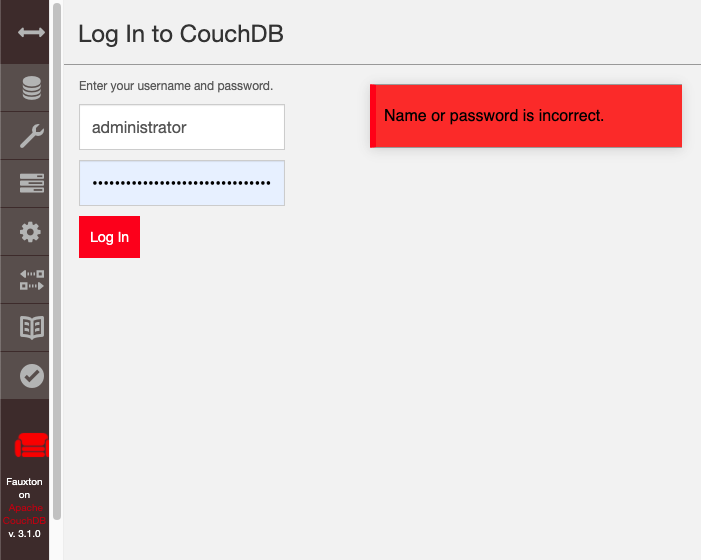
Very strange... maybe a weird Chrome thing. That's what has me scratching my head, I'm copying and pasting the user/pass from Chrome's saved account credentials but when I create an account in the web ui with a Chrome auto-filled form, it works.
I'm gonna just use Ansible's debconf utility to randomly generate the prompt password for 'admin' from the deb installer instead, and switch my other things in different folders on the same webserver to use 'admin' for the username as well.
----------------------------------------------------------------
This is an automated message from the Apache Git Service.
To respond to the message, please log on to GitHub and use the
URL above to go to the specific comment.
For queries about this service, please contact Infrastructure at:
users@infra.apache.org
[GitHub] [couchdb] RNCTX edited a comment on issue #2872: ini created admin cannot log in, web ui created admin with same user/pass can log in
Posted by GitBox <gi...@apache.org>.
RNCTX edited a comment on issue #2872:
URL: https://github.com/apache/couchdb/issues/2872#issuecomment-624547195


   Just tried again with alpha-numeric only and leaving the trailing = out, and got the same result.

   ```
   [admins]
   Administrator = bBH9nBYfxMC7YpWgrvT4Dgj1oX7mM72
   ```

   Results in:

   ```
   # Package-introduced administrative user
   [admins]
   admin = -pbkdf2-5c59dc4310ee523d710c2de70e14f5a7d800d7b7,2a7fbd7118e50c7ddd187316ca9e6b32,10
   Administrator = -pbkdf2-b1c801b95f7be32c14c6ffea0ef12d4af1a8ea01,7dc04b4e44e7aa01605ab8d6e7862071,10
   ```

   'admin' can log in but 'Administrator' cannot.

   I was wrong about the auto-created one not showing up in the web ui, it does, maybe browser cached the page erroneously or something.  Still can't log in, though.

   When I create the Administrator user from Chrome's auto-fill (I have the same user/pass on another folder on the same webserver) it can log in fine, it would appear to be something wrong with the hash from the function which generates admins from ini files.


----------------------------------------------------------------
This is an automated message from the Apache Git Service.
To respond to the message, please log on to GitHub and use the
URL above to go to the specific comment.

For queries about this service, please contact Infrastructure at:
users@infra.apache.org
[GitHub] [couchdb] wohali commented on issue #2872: ini created admin cannot log in, web ui created admin with same user/pass can log in
Posted by GitBox <gi...@apache.org>.
wohali commented on issue #2872:
URL: https://github.com/apache/couchdb/issues/2872#issuecomment-624570617


   I have just tried reproducing this locally, but I cannot. I tried using the exact same text as you have.

   Both the admin and the Administrator logins work correctly.


----------------------------------------------------------------
This is an automated message from the Apache Git Service.
To respond to the message, please log on to GitHub and use the
URL above to go to the specific comment.

For queries about this service, please contact Infrastructure at:
users@infra.apache.org
[GitHub] [couchdb] RNCTX edited a comment on issue #2872: Difficulty with ini created admin user/pass authentication
Posted by GitBox <gi...@apache.org>.
RNCTX edited a comment on issue #2872:
URL: https://github.com/apache/couchdb/issues/2872#issuecomment-626232129


   Yes, I just deleted my log of my own sanity check, lol. This is the weirdest chrome bug with passwords I've managed to create in many years.

   The installation parameters I am passing to the remote server are quite simple:

   ```
       - name: Install couchdb...
         apt:
           name: couchdb
           update_cache: true

       - name: Set couchdb ini file options...
         vars:
           default_password: "{{ lookup('password', '~/pwds/password-for_admin.txt length=32 chars=ascii_letters,digits') }}"
         ini_file:
           ini_file:
           dest: /opt/couchdb/etc/local.ini
           section: "{{ item.section }}"
           option: "{{ item.option }}"
           value: "{{ item.value }}"
           create: false
           backup: "{{ true if index == 0 else false }}"
         loop:
           - { section: 'chttpd', option: 'port', value: '5984' }
           - { section: 'chttpd', option: 'bind_address', value: '127.0.0.1' }
           - { section: 'chttpd', option: 'require_valid_user', value: 'true' }
           - { section: 'admins', option: 'admin', value: '{{ default_password }}' }
         loop_control:
           index_var: index

   ```
   Identical to the debconf prompts (because ansible doesn't do debconf properly, it seems, it can set non-password options but doesn't reconfigure after setting them, so it's fairly worthless).

   I switched to Firefox as I was typing up another head scratcher and every problem went away? Then I went and opened the server in chrome on my desktop instead of my laptop and it works fine as well.

   /shrug

   So for real this time, couchdb works fine, chrome's password saving on (one of my) OS X does not!


----------------------------------------------------------------
This is an automated message from the Apache Git Service.
To respond to the message, please log on to GitHub and use the
URL above to go to the specific comment.

For queries about this service, please contact Infrastructure at:
users@infra.apache.org
[GitHub] [couchdb] wohali commented on issue #2872: ini created admin cannot log in, web ui created admin with same user/pass can log in
Posted by GitBox <gi...@apache.org>.
wohali commented on issue #2872:
URL: https://github.com/apache/couchdb/issues/2872#issuecomment-624501105


   Hi @RNCTX ,

   Can you try again where the password does not have an equals sign in it? `openssl rand -base64 32` will end with an =, which will confuse the parser.

   This is a known bug that needs fixing.


----------------------------------------------------------------
This is an automated message from the Apache Git Service.
To respond to the message, please log on to GitHub and use the
URL above to go to the specific comment.

For queries about this service, please contact Infrastructure at:
users@infra.apache.org
[GitHub] [couchdb] wohali commented on issue #2872: ini created admin cannot log in, web ui created admin with same user/pass can log in
Posted by GitBox <gi...@apache.org>.
wohali commented on issue #2872:
URL: https://github.com/apache/couchdb/issues/2872#issuecomment-624552507


   And what happens if the username is all lowercase?

   Just trying to rule out possibilities here.


----------------------------------------------------------------
This is an automated message from the Apache Git Service.
To respond to the message, please log on to GitHub and use the
URL above to go to the specific comment.

For queries about this service, please contact Infrastructure at:
users@infra.apache.org
[GitHub] [couchdb] RNCTX edited a comment on issue #2872: ini created admin cannot log in, web ui created admin with same user/pass can log in
Posted by GitBox <gi...@apache.org>.
RNCTX edited a comment on issue #2872:
URL: https://github.com/apache/couchdb/issues/2872#issuecomment-624547195


   Just tried again with alpha-numeric only and leaving the trailing = out, and got the same result.

   ```
   [admins]
   Administrator = bBH9nBYfxMC7YpWgrvT4Dgj1oX7mM72
   ```

   Results in:

   ```
   # Package-introduced administrative user
   [admins]
   admin = -pbkdf2-5c59dc4310ee523d710c2de70e14f5a7d800d7b7,2a7fbd7118e50c7ddd187316ca9e6b32,10
   Administrator = -pbkdf2-b1c801b95f7be32c14c6ffea0ef12d4af1a8ea01,7dc04b4e44e7aa01605ab8d6e7862071,10
   ```

   'admin' can log in but 'Administrator' cannot.

   I was wrong about the auto-created one not showing up in the web ui, it does, maybe browser cached the page erroneously or something.  Still can't log in, though.

   When I create the Administrator user from Chrome's auto-fill (I have the same user/pass on another folder on the same webserver) it can log in fine, it would appear to be something wrong with the hash from the function which generates admins from ini files.

   (These are random-generated ansible passwords against a virtual machine that will be deleted when the ansible scripts test okay so no worry with posting them)


----------------------------------------------------------------
This is an automated message from the Apache Git Service.
To respond to the message, please log on to GitHub and use the
URL above to go to the specific comment.

For queries about this service, please contact Infrastructure at:
users@infra.apache.org
[GitHub] [couchdb] RNCTX commented on issue #2872: ini created admin cannot log in, web ui created admin with same user/pass can log in
Posted by GitBox <gi...@apache.org>.
RNCTX commented on issue #2872:
URL: https://github.com/apache/couchdb/issues/2872#issuecomment-624547195


   Just tried again with alpha-numeric only and leaving the trailing = out, and got the same result.

   ```
   Administrator = bBH9nBYfxMC7YpWgrvT4Dgj1oX7mM72
   ```

   Results in:

   ```
   # Package-introduced administrative user
   [admins]
   admin = -pbkdf2-5c59dc4310ee523d710c2de70e14f5a7d800d7b7,2a7fbd7118e50c7ddd187316ca9e6b32,10
   Administrator = -pbkdf2-b1c801b95f7be32c14c6ffea0ef12d4af1a8ea01,7dc04b4e44e7aa01605ab8d6e7862071,10
   ```

   'admin' can log in but 'Administrator' cannot.


----------------------------------------------------------------
This is an automated message from the Apache Git Service.
To respond to the message, please log on to GitHub and use the
URL above to go to the specific comment.

For queries about this service, please contact Infrastructure at:
users@infra.apache.org
[GitHub] [couchdb] RNCTX edited a comment on issue #2872: ini created admin cannot log in, web ui created admin with same user/pass can log in
Posted by GitBox <gi...@apache.org>.
RNCTX edited a comment on issue #2872:
URL: https://github.com/apache/couchdb/issues/2872#issuecomment-624547195


   Just tried again with alpha-numeric only and leaving the trailing = out, and got the same result.

   ```
   [admins]
   Administrator = bBH9nBYfxMC7YpWgrvT4Dgj1oX7mM72
   ```

   Results in:

   ```
   # Package-introduced administrative user
   [admins]
   admin = -pbkdf2-5c59dc4310ee523d710c2de70e14f5a7d800d7b7,2a7fbd7118e50c7ddd187316ca9e6b32,10
   Administrator = -pbkdf2-b1c801b95f7be32c14c6ffea0ef12d4af1a8ea01,7dc04b4e44e7aa01605ab8d6e7862071,10
   ```

   'admin' can log in but 'Administrator' cannot.

   I was wrong about the auto-created one not showing up in the web ui, it does, maybe browser cached the page erroneously or something.  Still can't log in, though.


----------------------------------------------------------------
This is an automated message from the Apache Git Service.
To respond to the message, please log on to GitHub and use the
URL above to go to the specific comment.

For queries about this service, please contact Infrastructure at:
users@infra.apache.org
[GitHub] [couchdb] wohali edited a comment on issue #2872: ini created admin cannot log in, web ui created admin with same user/pass can log in
Posted by GitBox <gi...@apache.org>.
wohali edited a comment on issue #2872:
URL: https://github.com/apache/couchdb/issues/2872#issuecomment-624552507


   And what happens if the username is all lowercase?

   Just trying to rule out possibilities here.

   FYI it's identical hashing. There's only a single place in the CouchDB code that converts a plaintext password to a hashed one.

   My only guess is that you've got unexpected spaces in the file somehow. Be sure you are not using a trailing space after the password, this may be being misinterpreted.


----------------------------------------------------------------
This is an automated message from the Apache Git Service.
To respond to the message, please log on to GitHub and use the
URL above to go to the specific comment.

For queries about this service, please contact Infrastructure at:
users@infra.apache.org
[GitHub] [couchdb] RNCTX commented on issue #2872: Difficulty with ini created admin user/pass authentication
Posted by GitBox <gi...@apache.org>.
RNCTX commented on issue #2872:
URL: https://github.com/apache/couchdb/issues/2872#issuecomment-626132567


   Reopening this because the last idea didn't work.

   I need to deploy with ansible which does not run dpkg configure. So what's the best method for automatic deployment without the configure prompts?

   I have tried setting:

   bind_address
   port
   single_node: true
   and an admin user/pass

   ... in the local.ini and got the following in the log:

   ```
   [notice] 2020-05-09T08:49:27.044761Z couchdb@127.0.0.1 <0.328.0> -------- chttpd_auth_cache changes listener died because the _users database does not exist. Create the database to silence this notice.
   ```

   Otherwise the server is running, but I can't create any databases because I can't authenticate, and can't authenticate because user/pass is set but not in a database that doesn't exist?


----------------------------------------------------------------
This is an automated message from the Apache Git Service.
To respond to the message, please log on to GitHub and use the
URL above to go to the specific comment.

For queries about this service, please contact Infrastructure at:
users@infra.apache.org
[GitHub] [couchdb] RNCTX commented on issue #2872: Difficulty with ini created admin user/pass authentication
Posted by GitBox <gi...@apache.org>.
RNCTX commented on issue #2872:
URL: https://github.com/apache/couchdb/issues/2872#issuecomment-626232129


   Yes, I just deleted my log of my own sanity check, lol. This is the weirdest chrome bug with passwords I've managed to create in many years.

   The installation parameters I am passing to the remote server are quite simple:

   ```
       - name: Install couchdb...
         apt:
           name: couchdb
           update_cache: true

       - name: Set couchdb ini file options...
         vars:
           default_password: "{{ lookup('password', '~/pwds/admin-password-for_admin.txt length=32 chars=ascii_letters,digits') }}"
         ini_file:
           ini_file:
           dest: /opt/couchdb/etc/local.ini
           section: "{{ item.section }}"
           option: "{{ item.option }}"
           value: "{{ item.value }}"
           create: false
           backup: "{{ true if index == 0 else false }}"
         loop:
           - { section: 'chttpd', option: 'port', value: '5984' }
           - { section: 'chttpd', option: 'bind_address', value: '127.0.0.1' }
           - { section: 'chttpd', option: 'require_valid_user', value: 'true' }
           - { section: 'admins', option: 'admin', value: '{{ default_password }}' }
         loop_control:
           index_var: index

   ```
   Identical to the debconf prompts (because ansible doesn't do debconf).

   I switched to Firefox as I was typing up another head scratcher and every problem went away? Then I went and opened the server in chrome on my desktop instead of my laptop and it works fine as well.

   /shrug

   So for real this time, couchdb works fine, chrome's password saving on (one of my) OS X does not!


----------------------------------------------------------------
This is an automated message from the Apache Git Service.
To respond to the message, please log on to GitHub and use the
URL above to go to the specific comment.

For queries about this service, please contact Infrastructure at:
users@infra.apache.org
[GitHub] [couchdb] RNCTX removed a comment on issue #2872: Difficulty with ini created admin user/pass authentication
Posted by GitBox <gi...@apache.org>.
RNCTX removed a comment on issue #2872:
URL: https://github.com/apache/couchdb/issues/2872#issuecomment-626132567


   Reopening this because the last idea didn't work.

   I need to deploy with ansible which does not run dpkg configure. So what's the best method for automatic deployment without the configure prompts?

   I have tried setting:

   bind_address
   port
   single_node: true
   and an admin user/pass

   ... in the local.ini and got the following in the log:

   ```
   [notice] 2020-05-09T08:49:27.044761Z couchdb@127.0.0.1 <0.328.0> -------- chttpd_auth_cache changes listener died because the _users database does not exist. Create the database to silence this notice.
   ```

   Otherwise the server is running, but I can't create any databases because I can't authenticate, and can't authenticate because user/pass is set but not in a database that doesn't exist?


----------------------------------------------------------------
This is an automated message from the Apache Git Service.
To respond to the message, please log on to GitHub and use the
URL above to go to the specific comment.

For queries about this service, please contact Infrastructure at:
users@infra.apache.org
[GitHub] [couchdb] wohali commented on issue #2872: Difficulty with ini created admin user/pass authentication
Posted by GitBox <gi...@apache.org>.
wohali commented on issue #2872:
URL: https://github.com/apache/couchdb/issues/2872#issuecomment-626231349


   Guessing you sorted this out - I saw the comment you removed in our email thread.

   If you are looking for general support with using CouchDB, please try one of these other options:

   * The user mailing list. Signup instructions are [here](http://couchdb.apache.org/#mailing-lists)
   * The Slack/IRC chat room. Joining instructions are [here](http://couchdb.apache.org/#chat)


----------------------------------------------------------------
This is an automated message from the Apache Git Service.
To respond to the message, please log on to GitHub and use the
URL above to go to the specific comment.

For queries about this service, please contact Infrastructure at:
users@infra.apache.org
[GitHub] [couchdb] RNCTX edited a comment on issue #2872: Difficulty with ini created admin user/pass authentication
Posted by GitBox <gi...@apache.org>.
RNCTX edited a comment on issue #2872:
URL: https://github.com/apache/couchdb/issues/2872#issuecomment-626232129


   Yes, I just deleted my log of my own sanity check, lol. This is the weirdest chrome bug with passwords I've managed to create in many years.

   The installation parameters I am passing to the remote server are quite simple:

   ```
       - name: Install couchdb...
         apt:
           name: couchdb
           update_cache: true

       - name: Set couchdb ini file options...
         vars:
           default_password: "{{ lookup('password', '~/pwds/password-for_admin.txt length=32 chars=ascii_letters,digits') }}"
         ini_file:
           ini_file:
           dest: /opt/couchdb/etc/local.ini
           section: "{{ item.section }}"
           option: "{{ item.option }}"
           value: "{{ item.value }}"
           create: false
           backup: "{{ true if index == 0 else false }}"
         loop:
           - { section: 'chttpd', option: 'port', value: '5984' }
           - { section: 'chttpd', option: 'bind_address', value: '127.0.0.1' }
           - { section: 'chttpd', option: 'require_valid_user', value: 'true' }
           - { section: 'admins', option: 'admin', value: '{{ default_password }}' }
         loop_control:
           index_var: index

   ```
   Identical to the debconf prompts (because ansible doesn't do debconf).

   I switched to Firefox as I was typing up another head scratcher and every problem went away? Then I went and opened the server in chrome on my desktop instead of my laptop and it works fine as well.

   /shrug

   So for real this time, couchdb works fine, chrome's password saving on (one of my) OS X does not!


----------------------------------------------------------------
This is an automated message from the Apache Git Service.
To respond to the message, please log on to GitHub and use the
URL above to go to the specific comment.

For queries about this service, please contact Infrastructure at:
users@infra.apache.org