You are viewing a plain text version of this content. The canonical link for it is here.
Posted to commits@casbin.apache.org by hs...@apache.org on 2026/09/04 10:33:30 UTC
(casbin-gateway) 01/01: docs: refresh the README for the new agents and pages
This is an automated email from the ASF dual-hosted git repository.
hsluoyz pushed a commit to branch master
in repository https://gitbox.apache.org/repos/asf/casbin-gateway.git
commit af901c968b8279f134e31872638b02213f1aea7e
Author: Yang Luo <hs...@gmail.com>
AuthorDate: Fri Sep 4 18:29:47 2026 +0800
docs: refresh the README for the new agents and pages
---
README.md | 20 ++++++++++++++++----
README_zh.md | 20 ++++++++++++++++----
web/src/components/usage/usage-trend-chart.tsx | 3 ++-
3 files changed, 34 insertions(+), 9 deletions(-)
diff --git a/README.md b/README.md
index 02bc3ed..8fc16ba 100644
--- a/README.md
+++ b/README.md
@@ -27,6 +27,8 @@
<a href="https://cline.bot" title="Cline"><img src="https://www.google.com/s2/favicons?domain=cline.bot&sz=64" width="30" height="30" alt="Cline"></a>
<a href="https://github.com/QwenLM/qwen-code" title="Qwen Code"><img src="https://www.google.com/s2/favicons?domain=qwen.ai&sz=64" width="30" height="30" alt="Qwen Code"></a>
<a href="https://platform.iflow.cn/en/cli" title="iFlow CLI"><img src="https://www.google.com/s2/favicons?domain=iflow.cn&sz=64" width="30" height="30" alt="iFlow CLI"></a>
+ <a href="https://moonshotai.github.io/kimi-code" title="Kimi Code CLI"><img src="https://www.google.com/s2/favicons?domain=kimi.com&sz=64" width="30" height="30" alt="Kimi Code CLI"></a>
+ <a href="https://www.codebuddy.ai" title="CodeBuddy Code"><img src="https://www.google.com/s2/favicons?domain=codebuddy.ai&sz=64" width="30" height="30" alt="CodeBuddy Code"></a>
<a href="https://roocode.com" title="Roo Code"><img src="https://www.google.com/s2/favicons?domain=roocode.com&sz=64" width="30" height="30" alt="Roo Code"></a>
<a href="https://github.com/github/copilot-cli" title="Copilot CLI"><img src="https://www.google.com/s2/favicons?domain=github.com&sz=64" width="30" height="30" alt="Copilot CLI"></a>
<a href="https://continue.dev" title="Continue"><img src="https://www.google.com/s2/favicons?domain=continue.dev&sz=64" width="30" height="30" alt="Continue"></a>
@@ -41,6 +43,7 @@
<a href="https://openclaw.ai" title="OpenClaw"><img src="https://www.google.com/s2/favicons?domain=openclaw.ai&sz=64" width="30" height="30" alt="OpenClaw"></a>
<a href="https://nousresearch.com" title="Hermes Agent"><img src="https://www.google.com/s2/favicons?domain=nousresearch.com&sz=64" width="30" height="30" alt="Hermes Agent"></a>
<a href="https://deepseek.com" title="DeepSeek Harness"><img src="https://www.google.com/s2/favicons?domain=deepseek.com&sz=64" width="30" height="30" alt="DeepSeek Harness"></a>
+ <a href="https://pi.dev" title="Pi"><img src="https://www.google.com/s2/favicons?domain=pi.dev&sz=64" width="30" height="30" alt="Pi"></a>
</p>
<p align="center"><b>Any model vendor behind one endpoint</b></p>
@@ -110,6 +113,8 @@
| <img src="https://www.google.com/s2/favicons?domain=cline.bot&sz=64" width="16" height="16" alt=""> **Cline** | — | ✅ OpenAI | ✅ | ✅ | — | — | npm |
| <img src="https://www.google.com/s2/favicons?domain=qwen.ai&sz=64" width="16" height="16" alt=""> **Qwen Code** | ✅ | ✅ OpenAI | ✅ | ✅ | ✅ | ✅ | npm |
| <img src="https://www.google.com/s2/favicons?domain=iflow.cn&sz=64" width="16" height="16" alt=""> **iFlow CLI** | — | ✅ OpenAI | ✅ | — | ✅ | — | npm |
+| <img src="https://www.google.com/s2/favicons?domain=kimi.com&sz=64" width="16" height="16" alt=""> **Kimi Code CLI** | — | ✅ OpenAI | ✅ | ✅ | ✅ | — | npm |
+| <img src="https://www.google.com/s2/favicons?domain=codebuddy.ai&sz=64" width="16" height="16" alt=""> **CodeBuddy Code** | — | ✅ OpenAI | ✅ | ✅ | ✅ | — | npm |
| <img src="https://www.google.com/s2/favicons?domain=roocode.com&sz=64" width="16" height="16" alt=""> **Roo Code** | — | — | — | — | — | — | — |
| <img src="https://www.google.com/s2/favicons?domain=github.com&sz=64" width="16" height="16" alt=""> **Copilot CLI** | — | — | — | — | — | — | npm |
| <img src="https://www.google.com/s2/favicons?domain=continue.dev&sz=64" width="16" height="16" alt=""> **Continue** | — | ✅ OpenAI | — | — | — | — | npm |
@@ -125,6 +130,7 @@
| <img src="https://www.google.com/s2/favicons?domain=openclaw.ai&sz=64" width="16" height="16" alt=""> **OpenClaw** | ✅ | ✅ OpenAI | ✅ | ✅ | ✅ | ✅ | npm |
| <img src="https://www.google.com/s2/favicons?domain=nousresearch.com&sz=64" width="16" height="16" alt=""> **Hermes Agent** | ✅ | ✅ OpenAI | — | — | — | — | — |
| <img src="https://www.google.com/s2/favicons?domain=deepseek.com&sz=64" width="16" height="16" alt=""> **DeepSeek Harness** | ✅ | ✅ OpenAI | ✅ | ✅ | — | ✅ | npm |
+| <img src="https://www.google.com/s2/favicons?domain=pi.dev&sz=64" width="16" height="16" alt=""> **Pi** | — | ✅ OpenAI | — | ✅ | ✅ | — | npm |
- **Monitoring** — audit-only records of what the agent did: prompts, tool calls, permission prompts. Nothing an agent does waits on Gateway, and no answer changes because monitoring is on.
- **Provider** — Gateway writes the agent's own configuration to point it at a bound provider, in the wire format that agent's client speaks. An agent without it still reaches Gateway through the environment variables the UI shows.
@@ -132,7 +138,7 @@
- **Sessions** — prompts and token usage read straight from the agent's own transcripts, including what never went through Gateway.
- **Install** — the package managers Gateway installs and upgrades it with. Everything else is a download from its vendor's page.
-Every agent in the table is found on this machine either way, listed with the account it is signed in to and what it has spent, and started or stopped from its card; the columns are what comes on top of that. Roo Code, Copilot CLI, Crush and Trae stop there on purpose: Roo Code and Trae keep their provider settings inside VS Code's own state rather than in a file of their own, Copilot CLI talks to GitHub's own backend and has no base URL to change, and Crush's configuration moved to a sh [...]
+Every agent in the table is found on this machine either way, listed with the account it is signed in to and what it has spent, and started or stopped from its card; the columns are what comes on top of that. Roo Code, Copilot CLI, Crush and Trae stop there on purpose: Roo Code and Trae keep their provider settings inside VS Code's own state rather than in a file of their own, Copilot CLI talks to GitHub's own backend and has no base URL to change, and Crush's configuration moved to a sh [...]
## Features
@@ -140,6 +146,7 @@ Every agent in the table is found on this machine either way, listed with the ac
- **[Switch every agent's provider from one place](#send-an-agents-traffic-through-gateway)** — change an API key or base URL once, and every agent pointed at Gateway picks it up.
- **[Add a provider, an MCP server, a prompt or a skill from a link](#import-from-a-link)** — click a vendor's "add this" button on the web and Gateway opens with what the link carries, before any of it is written.
- **[Run several instances of one agent side by side](#what-to-do-next)** — e.g. multiple Claude Desktop instances, each signed in to a different account.
+- **[Install, upgrade and roll back the agents themselves](#what-to-do-next)** — which build each agent is on against what its package manager publishes, and back to an older release when an update broke something.
- **[See the whole request, not just a count](#recording-prompts)** — every prompt, message and tool schema an agent sent, kept on this machine.
- **[Say what each agent may do](#what-each-agent-is-allowed-to-do)** — around forty switches per agent, in groups, over its tools, models and providers, enforced by Casbin on every request it relays.
- **[Know what every agent spent, even off Gateway](#what-the-agents-spend-including-what-never-went-through-gateway)** — read straight from the agents' own transcripts.
@@ -152,6 +159,11 @@ Every agent in the table is found on this machine either way, listed with the ac
| [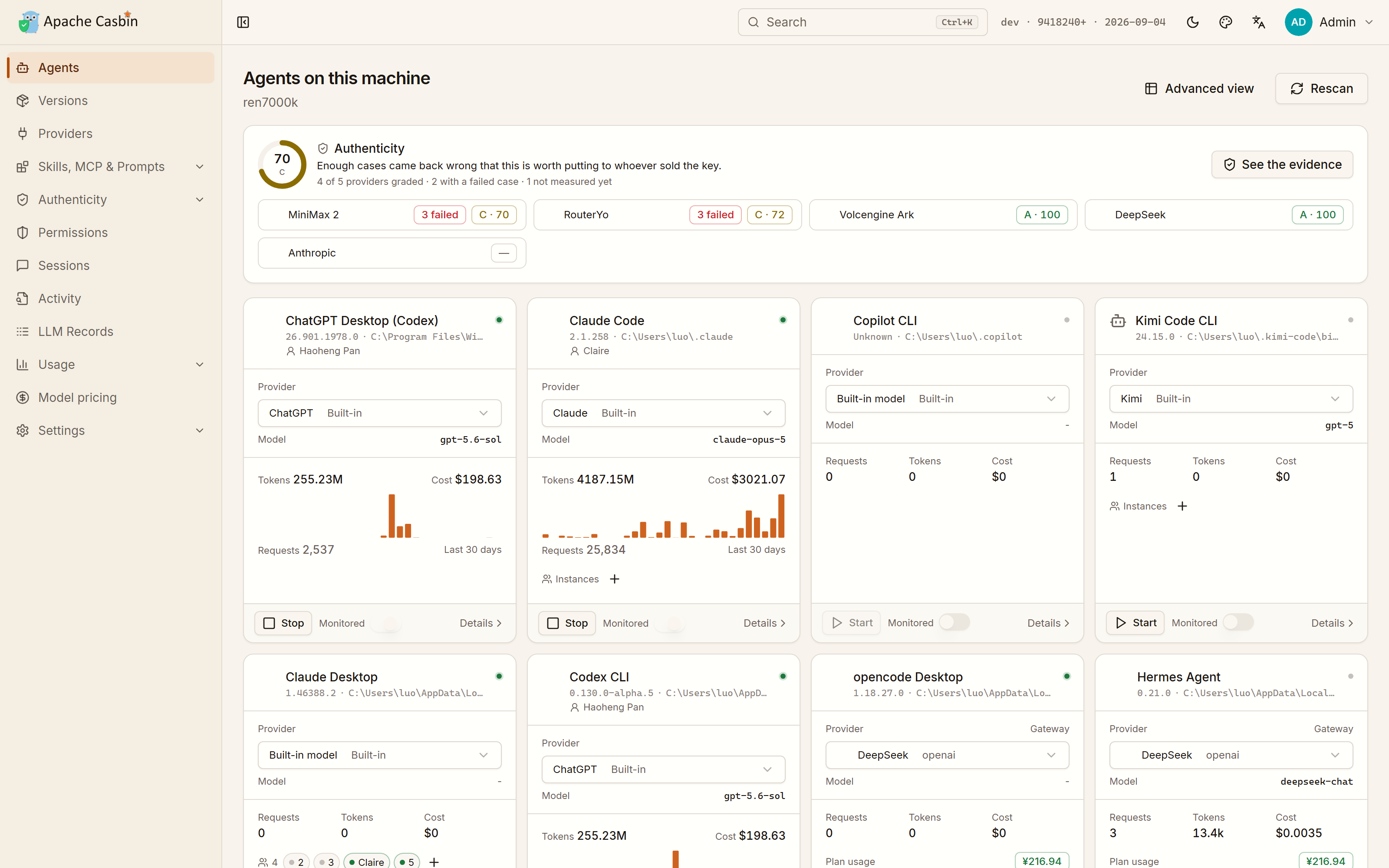](https://cdn.casbin.org/img/casbin-gateway-home.png) | [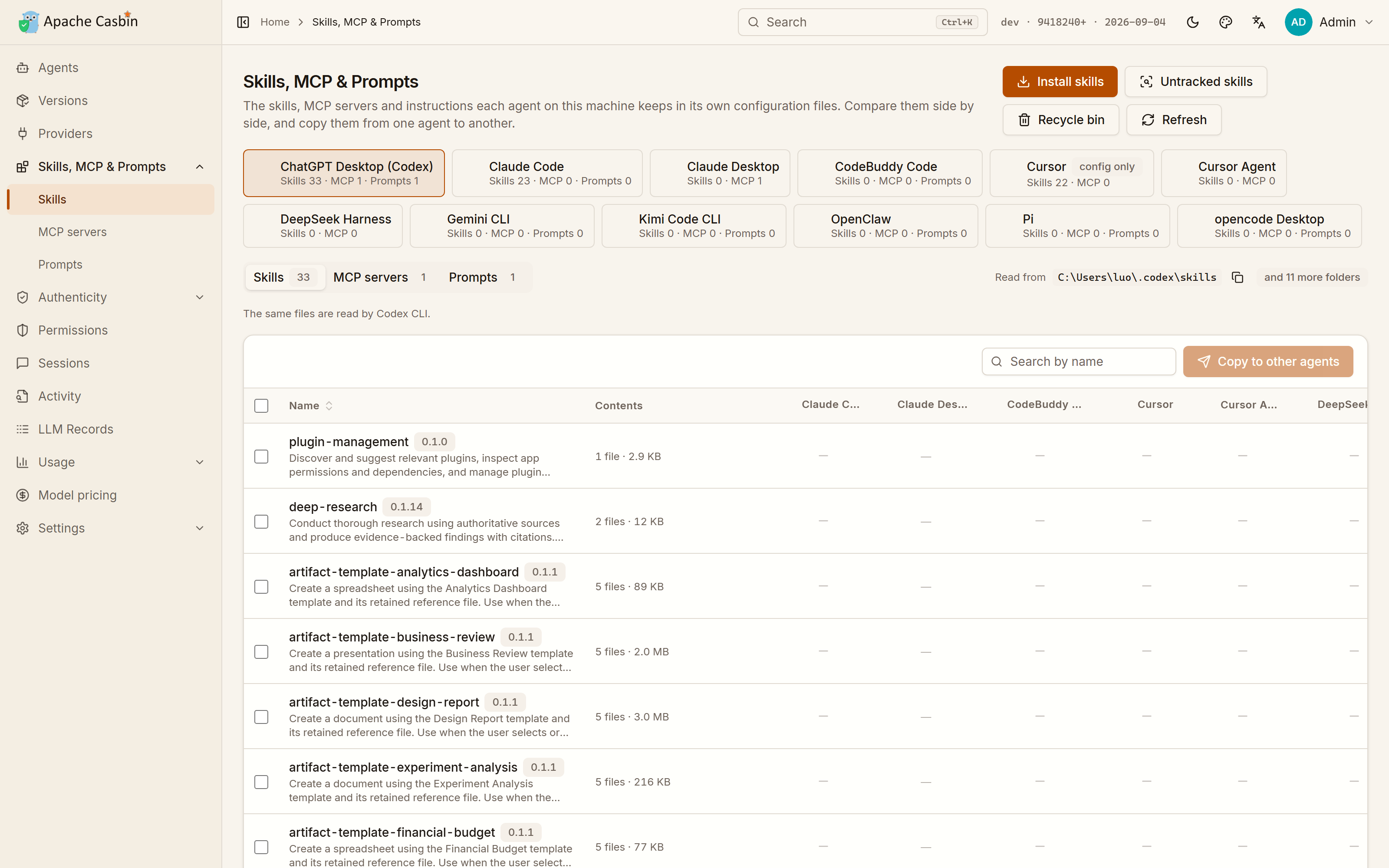](https://cdn.casbin.org/img/casbin-gateway-skills.png) |
| What each one runs on, which account it is signed in to, what it has spent there, and whether it is running | Every skill, MCP server and instruction file of every agent, side by side, copied from one agent to another |
+| What each agent is allowed to do | Which build each agent is on |
+| :---: | :---: |
+| [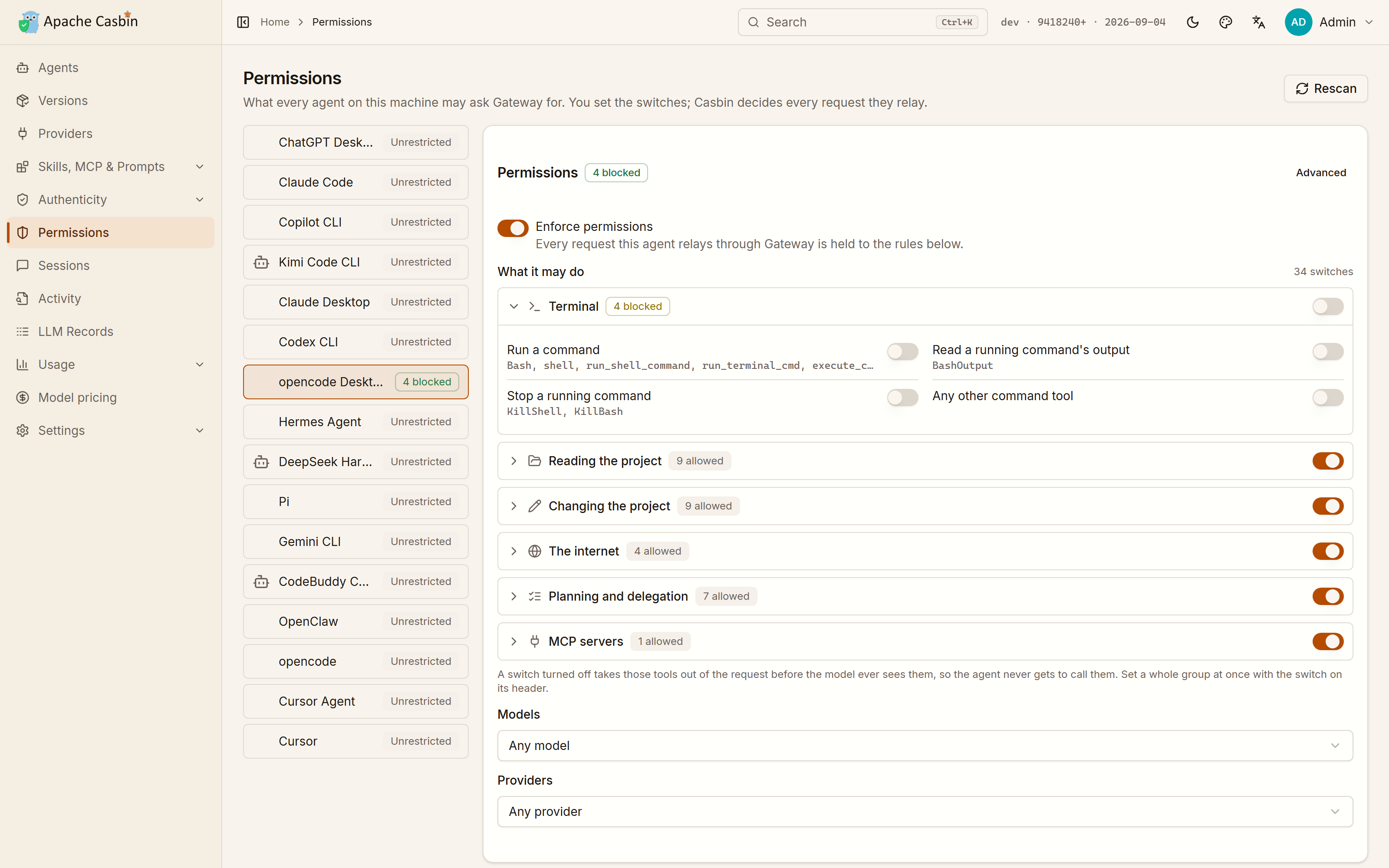](https://cdn.casbin.org/img/casbin-gateway-permissions.png) | [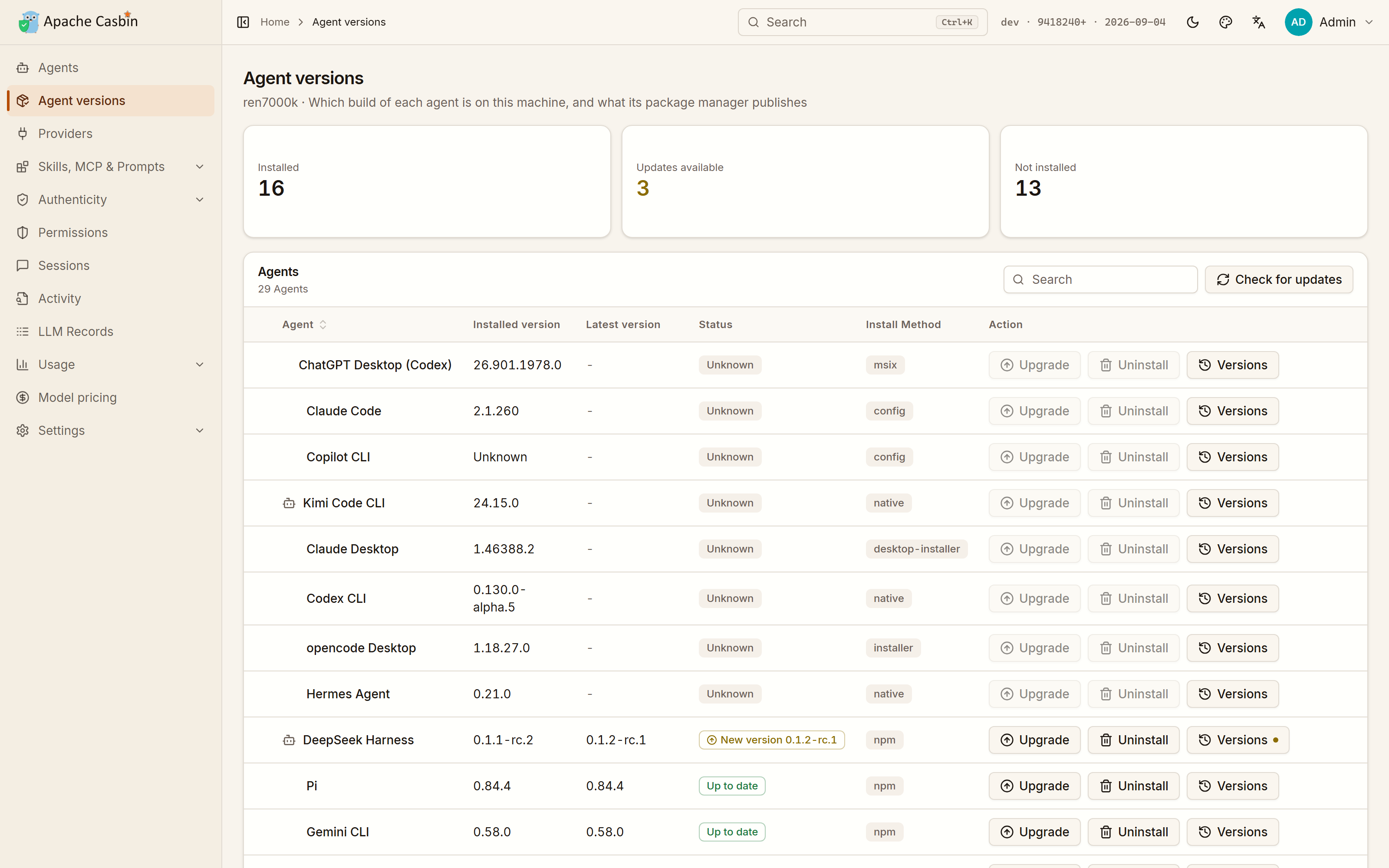](https://cdn.casbin.org/img/casbin-gateway-versions.png) |
+| Around forty switches over the agent's tools, models and providers, compiled to a Casbin policy and enforced on every request it relays | The build on this machine against the one its package manager publishes, installed, upgraded, rolled back or removed from the row it is on |
+
| What the agents spent | One endpoint per model vendor |
| :---: | :---: |
| [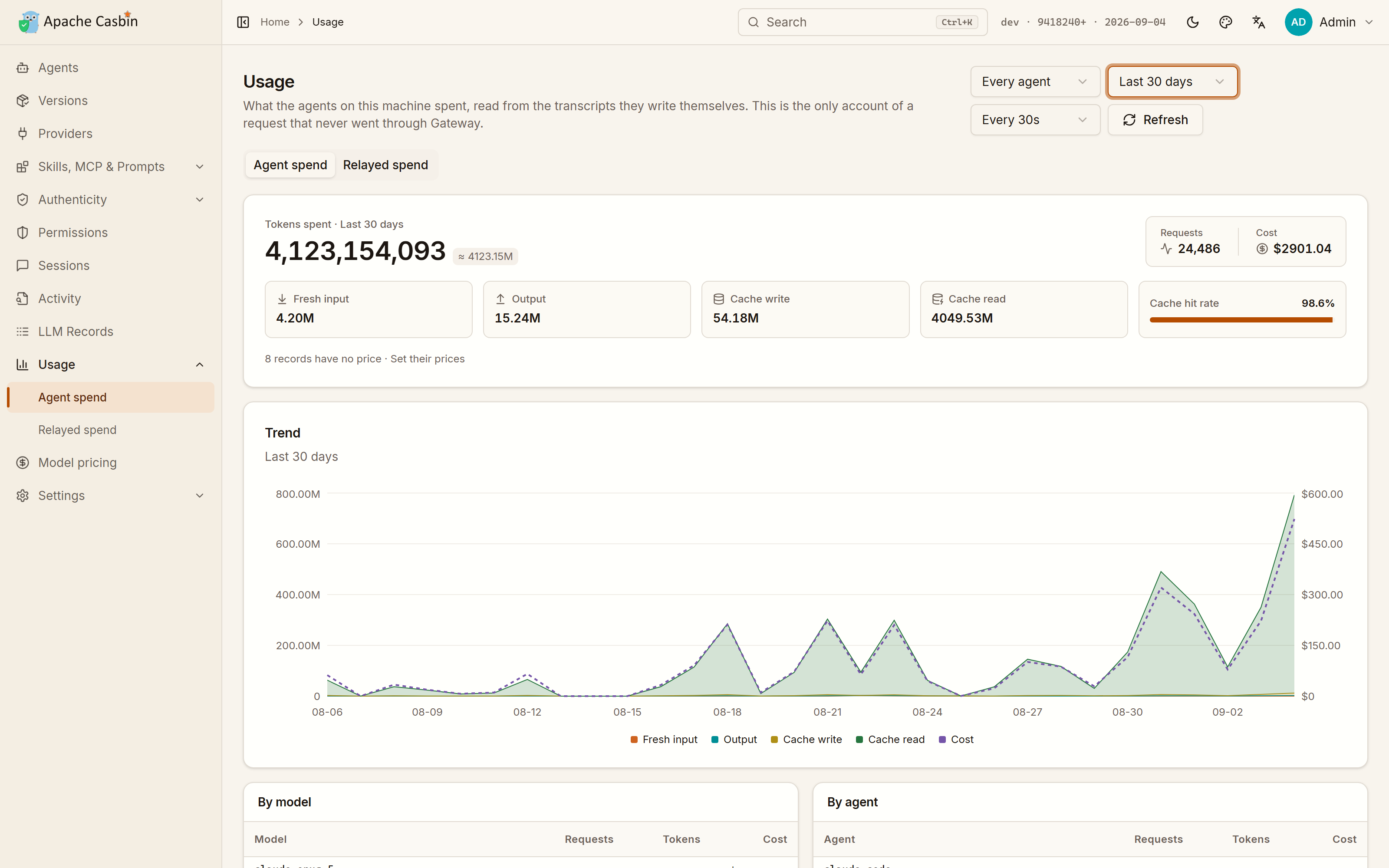](https://cdn.casbin.org/img/casbin-gateway-usage.png) | [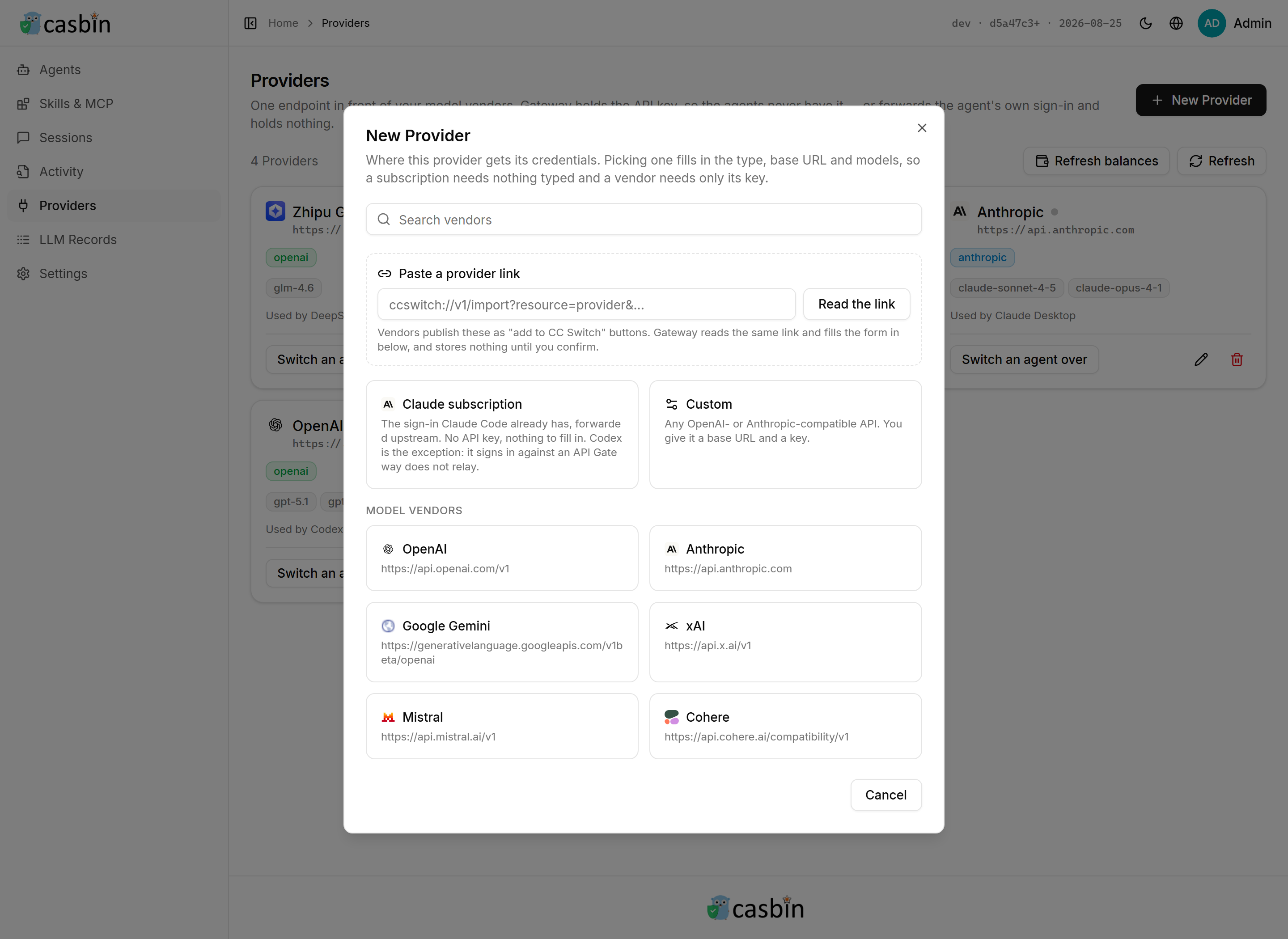](https://cdn.casbin.org/img/casbin-gateway-new-provider.png) |
@@ -180,7 +192,7 @@ irm https://raw.githubusercontent.com/apache/casbin-gateway/master/scripts/insta
Either one downloads the build for this machine, unpacks it into `~/.local/share/casbin-gateway` (`%LOCALAPPDATA%\casbin-gateway` on Windows), puts a `casbin-gateway` command on your PATH, starts it, and arranges for it to start again when you log in. The terminal you installed from is yours again straight away.
-Gateway then opens in its own window — no sign-in: it serves this machine only and signs the local admin in on sight. Closing that window leaves Gateway running behind its tray icon, which is also where you reopen the window and quit for real. There is a **Casbin Gateway** entry on your desktop and in the Start menu, in `~/Applications`, or in the application menu, depending on the platform. An archive unpacked by hand gets the same entry the first time the launcher runs.
+Gateway then opens in its own window — no sign-in: it serves this machine only and signs the local admin in on sight. Closing that window leaves Gateway running behind its tray icon, which is also where you reopen the window, turn **Start at Login** off and on — **Settings → Startup** is the same switch — and quit for real. There is a **Casbin Gateway** entry on your desktop and in the Start menu, in `~/Applications`, or in the application menu, depending on the platform. An archive unpa [...]
If you would rather use a browser, or you are on a machine with no desktop at all, everything is still at **http://localhost:17000**, and `casbin-gateway start` runs the server on its own with no window and no tray.
@@ -209,7 +221,7 @@ Gateway installed some other way, or in a directory it cannot write to, says so
| **Usage** | What every agent on this machine spent, over time and broken down by model and by agent, read from the agents' own transcripts — so it counts the requests that never went through Gateway. A second tab shows what Gateway relayed, which is the only account that knows which provider answered and whether it failed. | Nothing |
| **Model pricing** | What a million tokens costs, which is what every figure on the Usage page is worked out from. Edit a price by hand, or let Gateway reprice the models this machine has run from the [models.dev](https://models.dev) catalogue on a schedule; a price you edited yourself is left alone. | Nothing |
-A page with tabs or sections is in the sidebar under its own name, so the rail lands on the test cases, the MCP servers or the security settings rather than only on the top of the page they are on. **⌘K**, or **Ctrl+K**, opens a search box over whichever page you are on: every page by name, and every agent and provider on this machine, which is how you reach one of thirty providers without paging through the list.
+A page with tabs or sections is in the sidebar under its own name, so the rail lands on the test cases, the MCP servers or the security settings rather than only on the top of the page they are on. **⌘K**, or **Ctrl+K**, opens a search box over whichever page you are on: every page by name, and every agent and provider on this machine, which is how you reach one of thirty providers without paging through the list. The header switches the UI between light and dark, between three palettes [...]
Agents are found by reading the user accounts, home directories and install paths of **the machine Gateway runs on**, so run it on the machine whose agents you want to watch.
@@ -312,7 +324,7 @@ reprice the models this machine has run from the [models.dev](https://models.dev
- **Stop**: `casbin-gateway stop`. **Start again**: `casbin-gateway start`. **Check**: `casbin-gateway status`. All three work from any directory — the command is a wrapper that always starts Gateway in its install directory, where its data lives.
- **Run in the foreground** instead, to watch it: `casbin-gateway`, stopped with `Ctrl-C`. In the background its console output goes to `logs/casbin-gateway.out`.
- **Upgrade**: press the version in the top-right corner and then **Update now**, or run the install command again. Your database and settings are untouched either way.
-- **Remove**: delete `~/.local/share/casbin-gateway` and `~/.local/bin/casbin-gateway` (on Windows, `%LOCALAPPDATA%\casbin-gateway` and its PATH entry), plus the startup entry the installer names when it finishes.
+- **Remove**: `casbin-gateway uninstall` first. Deleting the directory is the part you can do yourself; what it cannot undo is everything Gateway wrote outside it — the monitoring hooks in every agent's own configuration, the provider each agent was pointed at, the login entry, the desktop entries and the `ccswitch://` scheme, all of which would otherwise be left naming a program that is no longer there. It puts all of that back, then names the two things to delete by hand: `~/.local/sha [...]
Set `INSTALL_DIR` to install somewhere else, `NO_START=1` to install without starting, or `NO_AUTOSTART=1` to install without starting at login.
diff --git a/README_zh.md b/README_zh.md
index 1afa5f3..122e632 100644
--- a/README_zh.md
+++ b/README_zh.md
@@ -27,6 +27,8 @@
<a href="https://cline.bot" title="Cline"><img src="https://www.google.com/s2/favicons?domain=cline.bot&sz=64" width="30" height="30" alt="Cline"></a>
<a href="https://github.com/QwenLM/qwen-code" title="Qwen Code"><img src="https://www.google.com/s2/favicons?domain=qwen.ai&sz=64" width="30" height="30" alt="Qwen Code"></a>
<a href="https://platform.iflow.cn/en/cli" title="iFlow CLI"><img src="https://www.google.com/s2/favicons?domain=iflow.cn&sz=64" width="30" height="30" alt="iFlow CLI"></a>
+ <a href="https://moonshotai.github.io/kimi-code" title="Kimi Code CLI"><img src="https://www.google.com/s2/favicons?domain=kimi.com&sz=64" width="30" height="30" alt="Kimi Code CLI"></a>
+ <a href="https://www.codebuddy.ai" title="CodeBuddy Code"><img src="https://www.google.com/s2/favicons?domain=codebuddy.ai&sz=64" width="30" height="30" alt="CodeBuddy Code"></a>
<a href="https://roocode.com" title="Roo Code"><img src="https://www.google.com/s2/favicons?domain=roocode.com&sz=64" width="30" height="30" alt="Roo Code"></a>
<a href="https://github.com/github/copilot-cli" title="Copilot CLI"><img src="https://www.google.com/s2/favicons?domain=github.com&sz=64" width="30" height="30" alt="Copilot CLI"></a>
<a href="https://continue.dev" title="Continue"><img src="https://www.google.com/s2/favicons?domain=continue.dev&sz=64" width="30" height="30" alt="Continue"></a>
@@ -41,6 +43,7 @@
<a href="https://openclaw.ai" title="OpenClaw"><img src="https://www.google.com/s2/favicons?domain=openclaw.ai&sz=64" width="30" height="30" alt="OpenClaw"></a>
<a href="https://nousresearch.com" title="Hermes Agent"><img src="https://www.google.com/s2/favicons?domain=nousresearch.com&sz=64" width="30" height="30" alt="Hermes Agent"></a>
<a href="https://deepseek.com" title="DeepSeek Harness"><img src="https://www.google.com/s2/favicons?domain=deepseek.com&sz=64" width="30" height="30" alt="DeepSeek Harness"></a>
+ <a href="https://pi.dev" title="Pi"><img src="https://www.google.com/s2/favicons?domain=pi.dev&sz=64" width="30" height="30" alt="Pi"></a>
</p>
<p align="center"><b>一个入口对接任意模型厂商</b></p>
@@ -110,6 +113,8 @@
| <img src="https://www.google.com/s2/favicons?domain=cline.bot&sz=64" width="16" height="16" alt=""> **Cline** | — | ✅ OpenAI | ✅ | ✅ | — | — | npm |
| <img src="https://www.google.com/s2/favicons?domain=qwen.ai&sz=64" width="16" height="16" alt=""> **Qwen Code** | ✅ | ✅ OpenAI | ✅ | ✅ | ✅ | ✅ | npm |
| <img src="https://www.google.com/s2/favicons?domain=iflow.cn&sz=64" width="16" height="16" alt=""> **iFlow CLI** | — | ✅ OpenAI | ✅ | — | ✅ | — | npm |
+| <img src="https://www.google.com/s2/favicons?domain=kimi.com&sz=64" width="16" height="16" alt=""> **Kimi Code CLI** | — | ✅ OpenAI | ✅ | ✅ | ✅ | — | npm |
+| <img src="https://www.google.com/s2/favicons?domain=codebuddy.ai&sz=64" width="16" height="16" alt=""> **CodeBuddy Code** | — | ✅ OpenAI | ✅ | ✅ | ✅ | — | npm |
| <img src="https://www.google.com/s2/favicons?domain=roocode.com&sz=64" width="16" height="16" alt=""> **Roo Code** | — | — | — | — | — | — | — |
| <img src="https://www.google.com/s2/favicons?domain=github.com&sz=64" width="16" height="16" alt=""> **Copilot CLI** | — | — | — | — | — | — | npm |
| <img src="https://www.google.com/s2/favicons?domain=continue.dev&sz=64" width="16" height="16" alt=""> **Continue** | — | ✅ OpenAI | — | — | — | — | npm |
@@ -125,6 +130,7 @@
| <img src="https://www.google.com/s2/favicons?domain=openclaw.ai&sz=64" width="16" height="16" alt=""> **OpenClaw** | ✅ | ✅ OpenAI | ✅ | ✅ | ✅ | ✅ | npm |
| <img src="https://www.google.com/s2/favicons?domain=nousresearch.com&sz=64" width="16" height="16" alt=""> **Hermes Agent** | ✅ | ✅ OpenAI | — | — | — | — | — |
| <img src="https://www.google.com/s2/favicons?domain=deepseek.com&sz=64" width="16" height="16" alt=""> **DeepSeek Harness** | ✅ | ✅ OpenAI | ✅ | ✅ | — | ✅ | npm |
+| <img src="https://www.google.com/s2/favicons?domain=pi.dev&sz=64" width="16" height="16" alt=""> **Pi** | — | ✅ OpenAI | — | ✅ | ✅ | — | npm |
- **行为监控** —— 只读地记录 Agent 做了什么:提示词、工具调用、权限询问。Agent 的任何动作都不会等待 Gateway,开着监控也不会改变任何一次回答。
- **换供应商** —— Gateway 按该 Agent 客户端自己说的协议格式,改写它的配置文件,把它指向绑定的供应商。不支持的 Agent 仍可以用界面上给出的环境变量接进来。
@@ -132,7 +138,7 @@
- **会话** —— 直接从 Agent 自己的会话记录里读提示词和 token 用量,包括没走 Gateway 的那部分。
- **安装** —— Gateway 能用来安装和升级它的包管理器。其余的都只能去厂商页面下载。
-表里的每个 Agent,无论支持到哪一步,都能在本机被发现,列出它登录的账号和花了多少,并在卡片上直接启动或停止;上面这些列是在这之外多出来的部分。Roo Code、Copilot CLI、Crush 和 Trae 只做到这一步,是有意为之:Roo Code 和 Trae 把供应商配置放在 VS Code 自己的内部状态里,而不是某个自己的配置文件;Copilot CLI 接的是 GitHub 自己的后端,没有 base URL 可改;Crush 的配置改成了一个 shell 脚本,写进文件反而会被它悄悄盖掉。Zed 是唯一写一半的:它把 API Key 存在系统钥匙串里,所以 Gateway 只写端点和模型列表,Key 需要在 Zed 里填一次。
+表里的每个 Agent,无论支持到哪一步,都能在本机被发现,列出它登录的账号和花了多少,并在卡片上直接启动或停止;上面这些列是在这之外多出来的部分。Roo Code、Copilot CLI、Crush 和 Trae 只做到这一步,是有意为之:Roo Code 和 Trae 把供应商配置放在 VS Code 自己的内部状态里,而不是某个自己的配置文件;Copilot CLI 接的是 GitHub 自己的后端,没有 base URL 可改;Crush 的配置改成了一个 shell 脚本,写进文件反而会被它悄悄盖掉。Zed 是唯一写一半的:它把 API Key 存在系统钥匙串里,所以 Gateway 只写端点和模型列表,Key 需要在 Zed 里填一次。Pi 是唯一有技能却没有 MCP 一列的:它通过扩展去接 MCP 服务器,而不是通过某个配置文件,Gateway 那里没有可写的东西。
## 功能特性
@@ -140,6 +146,7 @@
- **[一个地方切换所有 Agent 的 API 供应商](#让-agent-的流量走-gateway)** —— 改一次 Key 或 base URL,接进 Gateway 的每个 Agent 都跟着换。
- **[一条链接就能导入 Provider、MCP、提示词或技能](#从一条链接导入)** —— 在网页上点厂商的「添加到」按钮,Gateway 就带着链接里的东西打开,写进去之前先给你看。
- **[同一个 Agent 开多个实例](#接下来做什么)** —— 比如同时跑好几个 Claude Desktop,各自登录不同账号。
+- **[安装、升级和回退 Agent 本身](#接下来做什么)** —— 本机装的是哪个版本,包管理器又发布到了哪个版本;升级坏了还能退回旧版。
- **[看到完整的请求,而不只是一个数字](#记录提示词)** —— 每一条 prompt、消息和工具 schema,都留在这台机器上。
- **[规定每个 Agent 能做什么](#每个-agent-能做什么)** —— 每个 Agent 四十来个开关,分组管理,覆盖工具、模型和供应商,每个转发的请求都由 Casbin 判定。
- **[统计每个 Agent 花了多少,包括没走 Gateway 的部分](#每个-agent-花了多少包括没走-gateway-的那部分)** —— 直接读 Agent 自己写的会话记录。
@@ -152,6 +159,11 @@
| [](https://cdn.casbin.org/img/casbin-gateway-home.png) | [](https://cdn.casbin.org/img/casbin-gateway-skills.png) |
| 每个 Agent 接在哪、登录的是哪个账号、在那里花了多少、此刻是不是在跑 | 所有 Agent 的技能、MCP 服务器和提示词文件并排对比,还能从一个 Agent 复制到另一个 |
+| 每个 Agent 能做什么 | 每个 Agent 装的是哪个版本 |
+| :---: | :---: |
+| [](https://cdn.casbin.org/img/casbin-gateway-permissions.png) | [](https://cdn.casbin.org/img/casbin-gateway-versions.png) |
+| 四十来个开关,覆盖该 Agent 的工具、模型和供应商,编译成 Casbin 策略,转发的每个请求都按它判定 | 本机装的版本对上包管理器发布的版本,安装、升级、回退和卸载都在这一行上完成 |
+
| 每个 Agent 花了多少 | 每个模型厂商一个入口 |
| :---: | :---: |
| [](https://cdn.casbin.org/img/casbin-gateway-usage.png) | [](https://cdn.casbin.org/img/casbin-gateway-new-provider.png) |
@@ -180,7 +192,7 @@ irm https://raw.githubusercontent.com/apache/casbin-gateway/master/scripts/insta
两者都会下载适配本机的构建产物,解压到 `~/.local/share/casbin-gateway`(Windows 上是 `%LOCALAPPDATA%\casbin-gateway`),把 `casbin-gateway` 命令加入 PATH,启动它,并设置成开机(登录)自启。安装用的那个终端窗口立刻就还给你。
-Gateway 会在自己的窗口里打开 —— 不用登录:它只服务本机,本机访问会直接以管理员身份进入。关掉窗口不会退出,它缩到托盘图标后台继续跑,重新打开窗口和真正退出都在托盘菜单里。桌面和开始菜单里会有一个 **Casbin Gateway** 快捷方式;macOS 上在 `~/Applications`,Linux 上在应用菜单里。手动解压的压缩包也一样,启动器第一次运行时会自己建好。
+Gateway 会在自己的窗口里打开 —— 不用登录:它只服务本机,本机访问会直接以管理员身份进入。关掉窗口不会退出,它缩到托盘图标后台继续跑,重新打开窗口、开关**开机自启**(**设置 → 启动**是同一个开关)和真正退出都在托盘菜单里。桌面和开始菜单里会有一个 **Casbin Gateway** 快捷方式;macOS 上在 `~/Applications`,Linux 上在应用菜单里。手动解压的压缩包也一样,启动器第一次运行时会自己建好。
想用浏览器,或者机器上根本没有桌面环境,**http://localhost:17000** 一样能访问;`casbin-gateway start` 则只跑服务端,没有窗口也没有托盘。
@@ -207,7 +219,7 @@ Gateway 会在自己的窗口里打开 —— 不用登录:它只服务本机
| **Usage** | 本机每个 Agent 花了多少:按时间、按模型、按 Agent 分别统计,数据来自 Agent 自己写的会话记录 —— 所以没走 Gateway 的请求也算得上。另一个页签是 Gateway 转发过的部分,那是唯一知道由哪个 Provider 作答、是否失败的账。 | 无 |
| **Model pricing** | 每百万 Token 多少钱,Usage 页面上的每一个金额都由它算出来。可以手工改某个价格,也可以让 Gateway 按计划从 [models.dev](https://models.dev) 的目录给本机跑过的模型重新定价;你手工改过的价格不会被覆盖。 | 无 |
-带页签或分节的页面,在侧边栏里各有自己的名字,所以从导航栏可以直接落到测试用例、MCP 服务器或安全设置那一节,而不是只能落到它们所在页面的顶部。**⌘K**(Windows 和 Linux 上是 **Ctrl+K**)在当前页面上打开一个搜索框:按名字搜每一个页面,也搜本机的每一个 Agent 和 Provider —— 三十个 Provider 里找一个,不用一页页翻。
+带页签或分节的页面,在侧边栏里各有自己的名字,所以从导航栏可以直接落到测试用例、MCP 服务器或安全设置那一节,而不是只能落到它们所在页面的顶部。**⌘K**(Windows 和 Linux 上是 **Ctrl+K**)在当前页面上打开一个搜索框:按名字搜每一个页面,也搜本机的每一个 Agent 和 Provider —— 三十个 Provider 里找一个,不用一页页翻。顶栏可以在浅色和深色之间、在 **Amber & Ink**、**Terminal**、**Indigo** 三套配色之间、在中英文之间切换。
Agent 是通过读取 **Gateway 所在机器**的用户账户、home 目录和安装路径发现的,所以要在你想观察的那台机器上运行它。
@@ -306,7 +318,7 @@ p, claude-code, tool:*, use, allow
- **停止**:`casbin-gateway stop`。**再次启动**:`casbin-gateway start`。**查看状态**:`casbin-gateway status`。三条命令在任意目录都能用 —— 这个命令是一个包装脚本,总是在安装目录(数据所在的地方)里启动 Gateway。
- **前台运行**(想盯着它跑的时候):`casbin-gateway`,用 `Ctrl-C` 停止。后台运行时控制台输出写在 `logs/casbin-gateway.out`。
- **升级**:点右上角的版本号,再点**立即升级**,或者再跑一遍安装命令。两种方式都不影响数据库和设置。
-- **卸载**:删除 `~/.local/share/casbin-gateway` 和 `~/.local/bin/casbin-gateway`(Windows 上是 `%LOCALAPPDATA%\casbin-gateway` 及其 PATH 条目),以及安装脚本结束时告诉你的那个自启动条目。
+- **卸载**:先执行 `casbin-gateway uninstall`。删目录这件事你自己就能做,它做不到的是撤销 Gateway 写在目录之外的东西——每个 Agent 自己配置里的监控钩子、每个 Agent 被指向的 Provider、开机自启条目、桌面快捷方式,以及 `ccswitch://` 协议,否则这些都会指向一个已经不存在的程序。这条命令会把它们全部还原,然后告诉你剩下要手动删的两样:`~/.local/share/casbin-gateway` 和 `~/.local/bin/casbin-gateway`(Windows 上是 `%LOCALAPPDATA%\casbin-gateway` 及其 PATH 条目)。
设置 `INSTALL_DIR` 可以装到别的位置,`NO_START=1` 只安装不启动,`NO_AUTOSTART=1` 则不设置登录自启。
diff --git a/web/src/components/usage/usage-trend-chart.tsx b/web/src/components/usage/usage-trend-chart.tsx
index 267381a..680f408 100644
--- a/web/src/components/usage/usage-trend-chart.tsx
+++ b/web/src/components/usage/usage-trend-chart.tsx
@@ -92,7 +92,8 @@ export function UsageTrendChart({
yAxisId="tokens"
tickLine={false}
axisLine={false}
- width={52}
+ // Billions of tokens print as "4118.76M", which 52 clipped.
+ width={72}
tickFormatter={value => formatTokens(Number(value))}
/>
<YAxis
---------------------------------------------------------------------
To unsubscribe, e-mail: commits-unsubscribe@casbin.apache.org
For additional commands, e-mail: commits-help@casbin.apache.org