You are viewing a plain text version of this content. The canonical link for it is here.
Posted to commits@hudi.apache.org by GitBox <gi...@apache.org> on 2021/03/16 07:58:18 UTC
[GitHub] [hudi] danny0405 opened a new pull request #2681: [HUDI-1693] Add document about HUDI Flink integration
danny0405 opened a new pull request #2681:
URL: https://github.com/apache/hudi/pull/2681


   ## *Tips*
   - *Thank you very much for contributing to Apache Hudi.*
   - *Please review https://hudi.apache.org/contributing.html before opening a pull request.*

   ## What is the purpose of the pull request

   *(For example: This pull request adds quick-start document.)*

   ## Brief change log

   *(for example:)*
     - *Modify AnnotationLocation checkstyle rule in checkstyle.xml*

   ## Verify this pull request

   *(Please pick either of the following options)*

   This pull request is a trivial rework / code cleanup without any test coverage.

   *(or)*

   This pull request is already covered by existing tests, such as *(please describe tests)*.

   (or)

   This change added tests and can be verified as follows:

   *(example:)*

     - *Added integration tests for end-to-end.*
     - *Added HoodieClientWriteTest to verify the change.*
     - *Manually verified the change by running a job locally.*

   ## Committer checklist

    - [ ] Has a corresponding JIRA in PR title & commit

    - [ ] Commit message is descriptive of the change

    - [ ] CI is green

    - [ ] Necessary doc changes done or have another open PR

    - [ ] For large changes, please consider breaking it into sub-tasks under an umbrella JIRA.


----------------------------------------------------------------
This is an automated message from the Apache Git Service.
To respond to the message, please log on to GitHub and use the
URL above to go to the specific comment.

For queries about this service, please contact Infrastructure at:
users@infra.apache.org
[GitHub] [hudi] yanghua commented on a change in pull request #2681: [HUDI-1693] Add document about HUDI Flink integration
Posted by GitBox <gi...@apache.org>.
yanghua commented on a change in pull request #2681:
URL: https://github.com/apache/hudi/pull/2681#discussion_r595241367


##########
File path: docs/_docs/1_6_flink_quick_start_guide.md
##########
@@ -0,0 +1,169 @@
+---
+title: "Quick-Start Guide"
+permalink: /docs/flink-quick-start-guide.html
+toc: true
+last_modified_at: 2020-03-16T11:40:57+08:00
+---
+
+This guide provides a quick peek at Hudi's capabilities using flink SQL client. Using flink SQL, we will walk through
+code snippets that allows you to insert and update a Hudi table of default table type:
+[Copy on Write](/docs/concepts.html#copy-on-write-table) and [Merge On Read](/docs/concepts.html#merge-on-read-table).
+After each write operation we will also show how to read the data snapshot (incrementally read is already on the roadmap).
+
+## Setup
+
+We use the [Flink Sql Client](https://ci.apache.org/projects/flink/flink-docs-stable/dev/table/sqlClient.html) because it's a good
+quick start tool for SQL users.
+
+### Step.1 download flink jar
+Hudi works with Flink-1.11.x version. You can follow instructions [here](https://flink.apache.org/downloads.html) for setting up flink.
+The hudi-flink-bundle jar is archived with scala 2.11, so it’s recommended to use flink 1.11 bundled with scala 2.11.
+
+### Step.2 start flink cluster
+Start a standalone flink cluster within hadoop environment.
+Before you start up the cluster, we suggest to config the cluster as follows:
+
+- in `$FLINK_HOME/conf/flink-conf.yaml`, add config option `taskmanager.numberOfTaskSlots: 4`
+- in `$FLINK_HOME/conf/workers`, add item `localhost` as 4 lines so that there are 4 workers on the local cluster
+
+Now starts the cluster:
+
+```bash
+# HADOOP_HOME is your hadoop root directory after unpack the binary package.
+export HADOOP_CLASSPATH=`$HADOOP_HOME/bin/hadoop classpath`
+
+# Start the flink standalone cluster
+./bin/start-cluster.sh
+```
+### Step.3 start flink SQL client
+
+Hudi has a prepared bundle jar for flink, which should be loaded in the flink SQL Client when it starts up.
+You can build the jar manually under path `hudi-source-dir/packaging/hudi-flink-bundle`, or download it from the
+[Apache Official Repository](https://repo.maven.apache.org/maven2/org/apache/hudi/hudi-flink-bundle_2.11/).
+
+Now starts the SQL CLI:
+
+```bash
+# HADOOP_HOME is your hadoop root directory after unpack the binary package.
+export HADOOP_CLASSPATH=`$HADOOP_HOME/bin/hadoop classpath`
+
+./bin/sql-client.sh embedded -j .../hudi-flink-bundle_2.1?-*.*.*.jar shell
+```
+
+<div class="notice--info">
+  <h4>Please note the following: </h4>
+<ul>
+  <li>We suggest hadoop 2.9.x+ version because some of the object storage has filesystem implementation only after that</li>
+  <li>The flink-parquet and flink-avro formats are already packaged into the hudi-flink-bundle jar</li>
+</ul>
+</div>
+
+Setup table name, base path and operate using SQL for this guide.
+The SQL CLI only executes the SQL line by line.
+
+## Insert data
+
+Creates a flink hudi table first and insert data into the Hudi table using SQL `VALUES` as below.
+
+```sql
+-- sets up the result mode to tableau to show the results directly in the CLI
+set execution.result-mode=tableau;
+
+CREATE TABLE t1(
+  uuid VARCHAR(20),
+  name VARCHAR(10),
+  age INT,
+  ts TIMESTAMP(3),
+  `partition` VARCHAR(20)
+)
+PARTITIONED BY (`partition`)
+WITH (
+  'connector' = 'hudi',
+  'path' = 'schema://base-path',
+  'table.type' = 'MERGE_ON_READ' -- this creates a MERGE_ON_READ table, by default COPY_ON_WRITE
+);
+
+-- insert data using values
+INSERT INTO t1 VALUES
+  ('id1','Danny',23,TIMESTAMP '1970-01-01 00:00:01','par1'),
+  ('id2','Stephen',33,TIMESTAMP '1970-01-01 00:00:02','par1'),
+  ('id3','Julian',53,TIMESTAMP '1970-01-01 00:00:03','par2'),
+  ('id4','Fabian',31,TIMESTAMP '1970-01-01 00:00:04','par2'),
+  ('id5','Sophia',18,TIMESTAMP '1970-01-01 00:00:05','par3'),
+  ('id6','Emma',20,TIMESTAMP '1970-01-01 00:00:06','par3'),
+  ('id7','Bob',44,TIMESTAMP '1970-01-01 00:00:07','par4'),
+  ('id8','Han',56,TIMESTAMP '1970-01-01 00:00:08','par4');
+```
+
+## Query data
+
+```sql
+-- query from the hudi table
+select * from t1;
+```
+
+This query provides snapshot querying of the ingested data.
+Refer to [Table types and queries](/docs/concepts#table-types--queries) for more info on all table types and query types supported.
+{: .notice--info}
+
+## Update data
+
+This is similar to inserting new data.
+
+```sql
+-- this would update the record with key 'id1'
+insert into t1 values
+  ('id1','Danny',27,TIMESTAMP '1970-01-01 00:00:01','par1');
+```
+
+Notice that the save mode is now `Append`. In general, always use append mode unless you are trying to create the table for the first time.
+[Querying](#query-data) the data again will now show updated records. Each write operation generates a new [commit](/docs/concepts.html)
+denoted by the timestamp. Look for changes in `_hoodie_commit_time`, `age` fields for the same `_hoodie_record_key`s in previous commit.
+{: .notice--info}
+
+## Streaming query
+
+Hudi flink also provides capability to obtain a stream of records that changed since given commit timestamp.
+This can be achieved using Hudi's streaming querying and providing a start time from which changes need to be streamed.
+We do not need to specify endTime, if we want all changes after the given commit (as is the common case).
+
+```sql
+CREATE TABLE t1(
+  uuid VARCHAR(20),
+  name VARCHAR(10),
+  age INT,
+  ts TIMESTAMP(3),
+  `partition` VARCHAR(20)
+)
+PARTITIONED BY (`partition`)
+WITH (
+  'connector' = 'hudi',
+  'path' = 'oss://vvr-daily/hudi/t1',
+  'table.type' = 'MERGE_ON_READ',
+  'read.streaming.enabled' = 'true',  -- this option enable the streaming read
+  'read.streaming.start-commit' = '20210316134557' -- specifies the start commit instant time
+  'read.streaming.check-interval' = '4' -- specifies the check interval for finding new source commits, default 60s.
+);
+
+-- Then query the table in stream mode
+select * from t1;
+```
+
+This will give all changes that happened after the `read.streaming.start-commit` commit. The unique thing about this
+feature is that it now lets you author streaming pipelines on streaming or batch data source.
+{: .notice--info}
+
+## Delete data {#deletes}
+
+When consuming data in streaming query, hudi flink source can also accepts the change logs from the underneath data source,
+it can then applies the UPDATE and DELETE by per-row level. You can then sync a NEAR-REAL-TIME snapshot on hudi for all kinds
+of RDBMS.
+
+## Where to go from here?
+
+We used flink here to show case the capabilities of Hudi. However, Hudi can support multiple table types/query types and
+Hudi tables can be queried from query engines like Hive, Spark, Flink, Presto and much more. We have put together a
+[demo video](https://www.youtube.com/watch?v=VhNgUsxdrD0) that show cases all of this on a docker based setup with all

Review comment:
       There is an issue with the section. The demo does not contain the Flink, right?

##########
File path: docs/_pages/contributing.cn.md
##########
@@ -25,7 +25,7 @@ To contribute code, you need

 To contribute, you would need to do the following

- - Fork the Hudi code on Github & then clone your own fork locally. Once cloned, we recommend building as per instructions on [quickstart](/docs/quick-start-guide.html)
+ - Fork the Hudi code on Github & then clone your own fork locally. Once cloned, we recommend building as per instructions on [quickstart](/docs/spark_quick-start-guide.html)

Review comment:
       `quickstart` -> `quickstart(Spark)`?

   In addition, can we also add the link to flink guide?

##########
File path: docs/_pages/contributing.md
##########
@@ -24,7 +24,7 @@ To contribute code, you need

 To contribute, you would need to do the following

-- Fork the Hudi code on Github & then clone your own fork locally. Once cloned, we recommend building as per instructions on [quickstart](/docs/quick-start-guide.html)
+- Fork the Hudi code on Github & then clone your own fork locally. Once cloned, we recommend building as per instructions on [quickstart](/docs/spark_quick-start-guide.html)

Review comment:
       ditto


----------------------------------------------------------------
This is an automated message from the Apache Git Service.
To respond to the message, please log on to GitHub and use the
URL above to go to the specific comment.

For queries about this service, please contact Infrastructure at:
users@infra.apache.org
[GitHub] [hudi] danny0405 commented on a change in pull request #2681: [HUDI-1693] Add document about HUDI Flink integration
Posted by GitBox <gi...@apache.org>.
danny0405 commented on a change in pull request #2681:
URL: https://github.com/apache/hudi/pull/2681#discussion_r595657947


##########
File path: docs/_docs/1_6_flink_quick_start_guide.md
##########
@@ -0,0 +1,169 @@
+---
+title: "Quick-Start Guide"
+permalink: /docs/flink-quick-start-guide.html
+toc: true
+last_modified_at: 2020-03-16T11:40:57+08:00
+---
+
+This guide provides a quick peek at Hudi's capabilities using flink SQL client. Using flink SQL, we will walk through
+code snippets that allows you to insert and update a Hudi table of default table type:
+[Copy on Write](/docs/concepts.html#copy-on-write-table) and [Merge On Read](/docs/concepts.html#merge-on-read-table).
+After each write operation we will also show how to read the data snapshot (incrementally read is already on the roadmap).
+
+## Setup
+
+We use the [Flink Sql Client](https://ci.apache.org/projects/flink/flink-docs-stable/dev/table/sqlClient.html) because it's a good
+quick start tool for SQL users.
+
+### Step.1 download flink jar
+Hudi works with Flink-1.11.x version. You can follow instructions [here](https://flink.apache.org/downloads.html) for setting up flink.
+The hudi-flink-bundle jar is archived with scala 2.11, so it’s recommended to use flink 1.11 bundled with scala 2.11.
+
+### Step.2 start flink cluster
+Start a standalone flink cluster within hadoop environment.
+Before you start up the cluster, we suggest to config the cluster as follows:
+
+- in `$FLINK_HOME/conf/flink-conf.yaml`, add config option `taskmanager.numberOfTaskSlots: 4`
+- in `$FLINK_HOME/conf/workers`, add item `localhost` as 4 lines so that there are 4 workers on the local cluster
+
+Now starts the cluster:
+
+```bash
+# HADOOP_HOME is your hadoop root directory after unpack the binary package.
+export HADOOP_CLASSPATH=`$HADOOP_HOME/bin/hadoop classpath`
+
+# Start the flink standalone cluster
+./bin/start-cluster.sh
+```
+### Step.3 start flink SQL client
+
+Hudi has a prepared bundle jar for flink, which should be loaded in the flink SQL Client when it starts up.
+You can build the jar manually under path `hudi-source-dir/packaging/hudi-flink-bundle`, or download it from the
+[Apache Official Repository](https://repo.maven.apache.org/maven2/org/apache/hudi/hudi-flink-bundle_2.11/).
+
+Now starts the SQL CLI:
+
+```bash
+# HADOOP_HOME is your hadoop root directory after unpack the binary package.
+export HADOOP_CLASSPATH=`$HADOOP_HOME/bin/hadoop classpath`
+
+./bin/sql-client.sh embedded -j .../hudi-flink-bundle_2.1?-*.*.*.jar shell
+```
+
+<div class="notice--info">
+  <h4>Please note the following: </h4>
+<ul>
+  <li>We suggest hadoop 2.9.x+ version because some of the object storage has filesystem implementation only after that</li>
+  <li>The flink-parquet and flink-avro formats are already packaged into the hudi-flink-bundle jar</li>
+</ul>
+</div>
+
+Setup table name, base path and operate using SQL for this guide.
+The SQL CLI only executes the SQL line by line.
+
+## Insert data
+
+Creates a flink hudi table first and insert data into the Hudi table using SQL `VALUES` as below.
+
+```sql
+-- sets up the result mode to tableau to show the results directly in the CLI
+set execution.result-mode=tableau;
+
+CREATE TABLE t1(
+  uuid VARCHAR(20),
+  name VARCHAR(10),
+  age INT,
+  ts TIMESTAMP(3),
+  `partition` VARCHAR(20)
+)
+PARTITIONED BY (`partition`)
+WITH (
+  'connector' = 'hudi',
+  'path' = 'schema://base-path',
+  'table.type' = 'MERGE_ON_READ' -- this creates a MERGE_ON_READ table, by default COPY_ON_WRITE
+);
+
+-- insert data using values
+INSERT INTO t1 VALUES
+  ('id1','Danny',23,TIMESTAMP '1970-01-01 00:00:01','par1'),
+  ('id2','Stephen',33,TIMESTAMP '1970-01-01 00:00:02','par1'),
+  ('id3','Julian',53,TIMESTAMP '1970-01-01 00:00:03','par2'),
+  ('id4','Fabian',31,TIMESTAMP '1970-01-01 00:00:04','par2'),
+  ('id5','Sophia',18,TIMESTAMP '1970-01-01 00:00:05','par3'),
+  ('id6','Emma',20,TIMESTAMP '1970-01-01 00:00:06','par3'),
+  ('id7','Bob',44,TIMESTAMP '1970-01-01 00:00:07','par4'),
+  ('id8','Han',56,TIMESTAMP '1970-01-01 00:00:08','par4');
+```
+
+## Query data
+
+```sql
+-- query from the hudi table
+select * from t1;
+```
+
+This query provides snapshot querying of the ingested data.
+Refer to [Table types and queries](/docs/concepts#table-types--queries) for more info on all table types and query types supported.
+{: .notice--info}
+
+## Update data
+
+This is similar to inserting new data.
+
+```sql
+-- this would update the record with key 'id1'
+insert into t1 values
+  ('id1','Danny',27,TIMESTAMP '1970-01-01 00:00:01','par1');
+```
+
+Notice that the save mode is now `Append`. In general, always use append mode unless you are trying to create the table for the first time.
+[Querying](#query-data) the data again will now show updated records. Each write operation generates a new [commit](/docs/concepts.html)
+denoted by the timestamp. Look for changes in `_hoodie_commit_time`, `age` fields for the same `_hoodie_record_key`s in previous commit.
+{: .notice--info}
+
+## Streaming query
+
+Hudi flink also provides capability to obtain a stream of records that changed since given commit timestamp.
+This can be achieved using Hudi's streaming querying and providing a start time from which changes need to be streamed.
+We do not need to specify endTime, if we want all changes after the given commit (as is the common case).
+
+```sql
+CREATE TABLE t1(
+  uuid VARCHAR(20),
+  name VARCHAR(10),
+  age INT,
+  ts TIMESTAMP(3),
+  `partition` VARCHAR(20)
+)
+PARTITIONED BY (`partition`)
+WITH (
+  'connector' = 'hudi',
+  'path' = 'oss://vvr-daily/hudi/t1',
+  'table.type' = 'MERGE_ON_READ',
+  'read.streaming.enabled' = 'true',  -- this option enable the streaming read
+  'read.streaming.start-commit' = '20210316134557' -- specifies the start commit instant time
+  'read.streaming.check-interval' = '4' -- specifies the check interval for finding new source commits, default 60s.
+);
+
+-- Then query the table in stream mode
+select * from t1;
+```
+
+This will give all changes that happened after the `read.streaming.start-commit` commit. The unique thing about this
+feature is that it now lets you author streaming pipelines on streaming or batch data source.
+{: .notice--info}
+
+## Delete data {#deletes}
+
+When consuming data in streaming query, hudi flink source can also accepts the change logs from the underneath data source,
+it can then applies the UPDATE and DELETE by per-row level. You can then sync a NEAR-REAL-TIME snapshot on hudi for all kinds
+of RDBMS.
+
+## Where to go from here?
+
+We used flink here to show case the capabilities of Hudi. However, Hudi can support multiple table types/query types and
+Hudi tables can be queried from query engines like Hive, Spark, Flink, Presto and much more. We have put together a
+[demo video](https://www.youtube.com/watch?v=VhNgUsxdrD0) that show cases all of this on a docker based setup with all

Review comment:
       Yes, we can update the video later on.


----------------------------------------------------------------
This is an automated message from the Apache Git Service.
To respond to the message, please log on to GitHub and use the
URL above to go to the specific comment.

For queries about this service, please contact Infrastructure at:
users@infra.apache.org
[GitHub] [hudi] yanghua merged pull request #2681: [HUDI-1693] Add document about HUDI Flink integration
Posted by GitBox <gi...@apache.org>.
yanghua merged pull request #2681:
URL: https://github.com/apache/hudi/pull/2681


----------------------------------------------------------------
This is an automated message from the Apache Git Service.
To respond to the message, please log on to GitHub and use the
URL above to go to the specific comment.

For queries about this service, please contact Infrastructure at:
users@infra.apache.org
[GitHub] [hudi] yanghua commented on a change in pull request #2681: [HUDI-1693] Add document about HUDI Flink integration
Posted by GitBox <gi...@apache.org>.
yanghua commented on a change in pull request #2681:
URL: https://github.com/apache/hudi/pull/2681#discussion_r595095610


##########
File path: docs/_docs/1_6_flink_quick_start_guide.md
##########
@@ -0,0 +1,169 @@
+---
+title: "Quick-Start Guide"
+permalink: /docs/flink-quick-start-guide.html
+toc: true
+last_modified_at: 2020-03-16T11:40:57+08:00
+---
+
+This guide provides a quick peek at Hudi's capabilities using flink SQL client. Using flink SQL, we will walk through
+code snippets that allows you to insert and update a Hudi table of default table type:
+[Copy on Write](/docs/concepts.html#copy-on-write-table) and [Merge On Read](/docs/concepts.html#merge-on-read-table).
+After each write operation we will also show how to read the data snapshot (incrementally read is already on the roadmap).
+
+## Setup
+
+We use the [Flink Sql Client](https://ci.apache.org/projects/flink/flink-docs-stable/dev/table/sqlClient.html) because it's a good
+quick start tool for SQL users.
+
+### Step.1 download flink jar
+Hudi works with Flink-1.11.x version. You can follow instructions [here](https://flink.apache.org/downloads.html) for setting up flink.
+The hudi-flink-bundle jar is archived with scala 2.11, so it’s recommended to use flink 1.11 bundled with scala 2.11.
+
+### Step.2 start flink cluster

Review comment:
       I mean [Flink docker setup](https://ci.apache.org/projects/flink/flink-docs-stable/deployment/resource-providers/standalone/docker.html)


----------------------------------------------------------------
This is an automated message from the Apache Git Service.
To respond to the message, please log on to GitHub and use the
URL above to go to the specific comment.

For queries about this service, please contact Infrastructure at:
users@infra.apache.org
[GitHub] [hudi] danny0405 commented on a change in pull request #2681: [HUDI-1693] Add document about HUDI Flink integration
Posted by GitBox <gi...@apache.org>.
danny0405 commented on a change in pull request #2681:
URL: https://github.com/apache/hudi/pull/2681#discussion_r595658218


##########
File path: docs/_docs/1_6_flink_quick_start_guide.md
##########
@@ -0,0 +1,169 @@
+---
+title: "Quick-Start Guide"
+permalink: /docs/flink-quick-start-guide.html
+toc: true
+last_modified_at: 2020-03-16T11:40:57+08:00
+---
+
+This guide provides a quick peek at Hudi's capabilities using flink SQL client. Using flink SQL, we will walk through
+code snippets that allows you to insert and update a Hudi table of default table type:
+[Copy on Write](/docs/concepts.html#copy-on-write-table) and [Merge On Read](/docs/concepts.html#merge-on-read-table).
+After each write operation we will also show how to read the data snapshot (incrementally read is already on the roadmap).
+
+## Setup
+
+We use the [Flink Sql Client](https://ci.apache.org/projects/flink/flink-docs-stable/dev/table/sqlClient.html) because it's a good
+quick start tool for SQL users.
+
+### Step.1 download flink jar
+Hudi works with Flink-1.11.x version. You can follow instructions [here](https://flink.apache.org/downloads.html) for setting up flink.
+The hudi-flink-bundle jar is archived with scala 2.11, so it’s recommended to use flink 1.11 bundled with scala 2.11.
+
+### Step.2 start flink cluster

Review comment:
       We do not need docker here, a local cluster is simple enough.


----------------------------------------------------------------
This is an automated message from the Apache Git Service.
To respond to the message, please log on to GitHub and use the
URL above to go to the specific comment.

For queries about this service, please contact Infrastructure at:
users@infra.apache.org
[GitHub] [hudi] danny0405 commented on pull request #2681: [HUDI-1693] Add document about HUDI Flink integration
Posted by GitBox <gi...@apache.org>.
danny0405 commented on pull request #2681:
URL: https://github.com/apache/hudi/pull/2681#issuecomment-800041509
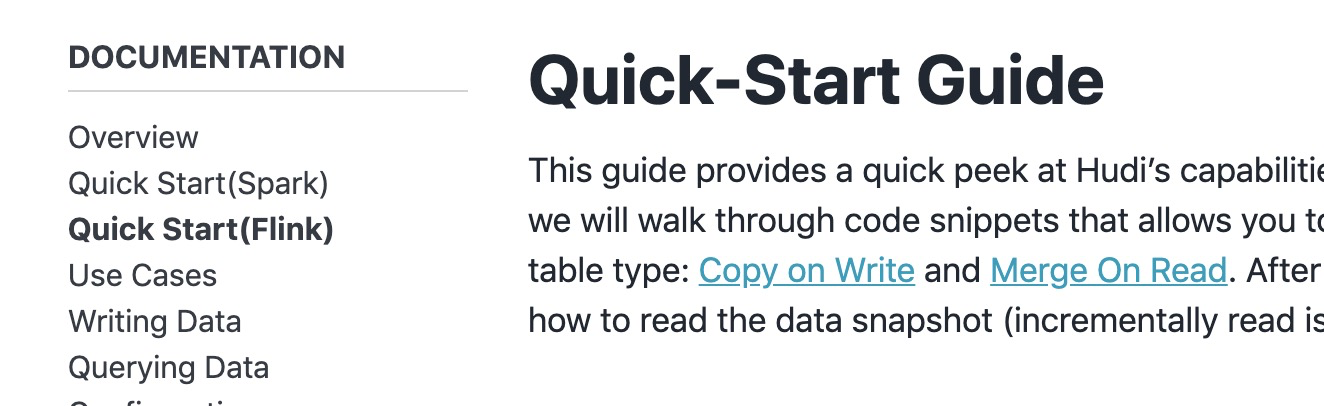
I want to collapse these two items but don't know how to, can someone give some help here ?
----------------------------------------------------------------
This is an automated message from the Apache Git Service.
To respond to the message, please log on to GitHub and use the
URL above to go to the specific comment.
For queries about this service, please contact Infrastructure at:
users@infra.apache.org
[GitHub] [hudi] yanghua commented on a change in pull request #2681: [HUDI-1693] Add document about HUDI Flink integration
Posted by GitBox <gi...@apache.org>.
yanghua commented on a change in pull request #2681:
URL: https://github.com/apache/hudi/pull/2681#discussion_r595738988


##########
File path: docs/_docs/1_6_flink_quick_start_guide.md
##########
@@ -0,0 +1,169 @@
+---
+title: "Quick-Start Guide"
+permalink: /docs/flink-quick-start-guide.html
+toc: true
+last_modified_at: 2020-03-16T11:40:57+08:00
+---
+
+This guide provides a quick peek at Hudi's capabilities using flink SQL client. Using flink SQL, we will walk through
+code snippets that allows you to insert and update a Hudi table of default table type:
+[Copy on Write](/docs/concepts.html#copy-on-write-table) and [Merge On Read](/docs/concepts.html#merge-on-read-table).
+After each write operation we will also show how to read the data snapshot (incrementally read is already on the roadmap).
+
+## Setup
+
+We use the [Flink Sql Client](https://ci.apache.org/projects/flink/flink-docs-stable/dev/table/sqlClient.html) because it's a good
+quick start tool for SQL users.
+
+### Step.1 download flink jar
+Hudi works with Flink-1.11.x version. You can follow instructions [here](https://flink.apache.org/downloads.html) for setting up flink.
+The hudi-flink-bundle jar is archived with scala 2.11, so it’s recommended to use flink 1.11 bundled with scala 2.11.
+
+### Step.2 start flink cluster

Review comment:
       We can add more docker demo about Flink on this page: http://hudi.apache.org/docs/docker_demo.html


----------------------------------------------------------------
This is an automated message from the Apache Git Service.
To respond to the message, please log on to GitHub and use the
URL above to go to the specific comment.

For queries about this service, please contact Infrastructure at:
users@infra.apache.org
[GitHub] [hudi] danny0405 commented on a change in pull request #2681: [HUDI-1693] Add document about HUDI Flink integration
Posted by GitBox <gi...@apache.org>.
danny0405 commented on a change in pull request #2681:
URL: https://github.com/apache/hudi/pull/2681#discussion_r595088821


##########
File path: docs/_docs/1_6_flink_quick_start_guide.md
##########
@@ -0,0 +1,169 @@
+---
+title: "Quick-Start Guide"
+permalink: /docs/flink-quick-start-guide.html
+toc: true
+last_modified_at: 2020-03-16T11:40:57+08:00
+---
+
+This guide provides a quick peek at Hudi's capabilities using flink SQL client. Using flink SQL, we will walk through
+code snippets that allows you to insert and update a Hudi table of default table type:
+[Copy on Write](/docs/concepts.html#copy-on-write-table) and [Merge On Read](/docs/concepts.html#merge-on-read-table).
+After each write operation we will also show how to read the data snapshot (incrementally read is already on the roadmap).
+
+## Setup
+
+We use the [Flink Sql Client](https://ci.apache.org/projects/flink/flink-docs-stable/dev/table/sqlClient.html) because it's a good
+quick start tool for SQL users.
+
+### Step.1 download flink jar
+Hudi works with Flink-1.11.x version. You can follow instructions [here](https://flink.apache.org/downloads.html) for setting up flink.
+The hudi-flink-bundle jar is archived with scala 2.11, so it’s recommended to use flink 1.11 bundled with scala 2.11.
+
+### Step.2 start flink cluster

Review comment:
       What do you mean for flink docker ?


----------------------------------------------------------------
This is an automated message from the Apache Git Service.
To respond to the message, please log on to GitHub and use the
URL above to go to the specific comment.

For queries about this service, please contact Infrastructure at:
users@infra.apache.org
[GitHub] [hudi] yanghua commented on a change in pull request #2681: [HUDI-1693] Add document about HUDI Flink integration
Posted by GitBox <gi...@apache.org>.
yanghua commented on a change in pull request #2681:
URL: https://github.com/apache/hudi/pull/2681#discussion_r595069913


##########
File path: docs/_docs/1_6_flink_quick_start_guide.md
##########
@@ -0,0 +1,169 @@
+---
+title: "Quick-Start Guide"
+permalink: /docs/flink-quick-start-guide.html
+toc: true
+last_modified_at: 2020-03-16T11:40:57+08:00
+---
+
+This guide provides a quick peek at Hudi's capabilities using flink SQL client. Using flink SQL, we will walk through
+code snippets that allows you to insert and update a Hudi table of default table type:
+[Copy on Write](/docs/concepts.html#copy-on-write-table) and [Merge On Read](/docs/concepts.html#merge-on-read-table).
+After each write operation we will also show how to read the data snapshot (incrementally read is already on the roadmap).
+
+## Setup
+
+We use the [Flink Sql Client](https://ci.apache.org/projects/flink/flink-docs-stable/dev/table/sqlClient.html) because it's a good
+quick start tool for SQL users.
+
+### Step.1 download flink jar
+Hudi works with Flink-1.11.x version. You can follow instructions [here](https://flink.apache.org/downloads.html) for setting up flink.
+The hudi-flink-bundle jar is archived with scala 2.11, so it’s recommended to use flink 1.11 bundled with scala 2.11.
+
+### Step.2 start flink cluster

Review comment:
       Can we share some details about how to use the flink docker to simplify the usage?

##########
File path: docs/_docs/1_6_flink_quick_start_guide.md
##########
@@ -0,0 +1,169 @@
+---
+title: "Quick-Start Guide"
+permalink: /docs/flink-quick-start-guide.html
+toc: true
+last_modified_at: 2020-03-16T11:40:57+08:00
+---
+
+This guide provides a quick peek at Hudi's capabilities using flink SQL client. Using flink SQL, we will walk through
+code snippets that allows you to insert and update a Hudi table of default table type:
+[Copy on Write](/docs/concepts.html#copy-on-write-table) and [Merge On Read](/docs/concepts.html#merge-on-read-table).
+After each write operation we will also show how to read the data snapshot (incrementally read is already on the roadmap).
+
+## Setup
+
+We use the [Flink Sql Client](https://ci.apache.org/projects/flink/flink-docs-stable/dev/table/sqlClient.html) because it's a good
+quick start tool for SQL users.
+
+### Step.1 download flink jar
+Hudi works with Flink-1.11.x version. You can follow instructions [here](https://flink.apache.org/downloads.html) for setting up flink.
+The hudi-flink-bundle jar is archived with scala 2.11, so it’s recommended to use flink 1.11 bundled with scala 2.11.
+
+### Step.2 start flink cluster
+Start a standalone flink cluster within hadoop environment.
+Before you start up the cluster, we suggest to config the cluster as follows:
+
+- in `$FLINK_HOME/conf/flink-conf.yaml`, add config option `taskmanager.numberOfTaskSlots: 4`
+- in `$FLINK_HOME/conf/workers`, add item `localhost` as 4 lines so that there are 4 workers on the local cluster
+
+Now starts the cluster:
+
+```bash
+# HADOOP_HOME is your hadoop root directory after unpack the binary package.
+export HADOOP_CLASSPATH=`$HADOOP_HOME/bin/hadoop classpath`
+
+# Start the flink standalone cluster
+./bin/start-cluster.sh
+```
+### Step.3 start flink SQL client
+
+Hudi has a prepared bundle jar for flink, which should be loaded in the flink SQL Client when it starts up.
+You can build the jar manually under path `hudi-source-dir/packaging/hudi-flink-bundle`, or download it from the
+[Apache Official Repository](https://repo.maven.apache.org/maven2/org/apache/hudi/hudi-flink-bundle_2.11/).
+
+Now starts the SQL CLI:
+
+```bash
+# HADOOP_HOME is your hadoop root directory after unpack the binary package.
+export HADOOP_CLASSPATH=`$HADOOP_HOME/bin/hadoop classpath`
+
+./bin/sql-client.sh embedded -j .../hudi-flink-bundle_2.1?-*.*.*.jar shell
+```
+
+<div class="notice--info">
+  <h4>Please note the following: </h4>
+<ul>
+  <li>we suggest hadoop 2.9.x+ version because some of the object storage has filesystem implementation only after that</li>

Review comment:
       `we` -> `We`

##########
File path: docs/_data/navigation.yml
##########
@@ -20,8 +20,10 @@ docs:
     children:
       - title: "Overview"
         url: /docs/overview.html
-      - title: "Quick Start"
+      - title: "Quick Start(Spark)"
         url: /docs/quick-start-guide.html

Review comment:
       Can we rename this file to add the `spark` prefix?


----------------------------------------------------------------
This is an automated message from the Apache Git Service.
To respond to the message, please log on to GitHub and use the
URL above to go to the specific comment.

For queries about this service, please contact Infrastructure at:
users@infra.apache.org