You are viewing a plain text version of this content. The canonical link for it is here.
Posted to commits@weex.apache.org by mo...@apache.org on 2019/02/22 07:21:56 UTC
[incubator-weex-site] branch draft updated: Add blog
This is an automated email from the ASF dual-hosted git repository.
moshen pushed a commit to branch draft
in repository https://gitbox.apache.org/repos/asf/incubator-weex-site.git
The following commit(s) were added to refs/heads/draft by this push:
new e492914 Add blog
e492914 is described below
commit e492914620e7a05e7bc54762a7446145b0f6a8b1
Author: wqyfavor <qi...@taobao.com>
AuthorDate: Fri Feb 22 15:21:47 2019 +0800
Add blog
---
docs/.vuepress/config.js | 3 +-
docs/zh/blog/interaction-optimization.md | 289 ++++++++++++++++++++++++
docs/zh/blog/weexcore-multiprocess-evolution.md | 2 +-
3 files changed, 292 insertions(+), 2 deletions(-)
diff --git a/docs/.vuepress/config.js b/docs/.vuepress/config.js
index 89c722d..ea4be33 100644
--- a/docs/.vuepress/config.js
+++ b/docs/.vuepress/config.js
@@ -341,7 +341,8 @@ module.exports = {
['write-a-blog', '写一篇博客'],
['weex-auto-test-locating', 'Weex自动化测试元素定位方案'],
['ios-weexcore.md', 'iOS WeexSDK 接入 WeexCore'],
- ['weexcore-multiprocess-evolution', 'WeexCore 多进程多线程架构演进']
+ ['weexcore-multiprocess-evolution', 'WeexCore 多进程多线程架构演进'],
+ ['interaction-optimization', '可交互时间的探索和首屏时间的改进之路']
]
}
}
diff --git a/docs/zh/blog/interaction-optimization.md b/docs/zh/blog/interaction-optimization.md
new file mode 100644
index 0000000..6271fc4
--- /dev/null
+++ b/docs/zh/blog/interaction-optimization.md
@@ -0,0 +1,289 @@
+# 用来衡量什么问题
+
+衡量一个weex页面质量的角度有很多种,不管哪种角度,都是为了在端侧给用户更好的体验。
+
+通常来说,用户接触最频繁、影响最大、感受最明显的是页面的加载时间。在之前的版本中,weex提供了首屏时间这个概念,来衡量这个时间。但是随着业务复杂度的增加,引入底图、框架壳子,首屏越来越有局限性,只能算是加载时间的一部分,并不能作为度量整个加载时间的指标。
+
+
+目前业务的逻辑大概是
+
+![img_js_logic_normal][]
+
+
+老的秒开时间最多只能监测到第3步的时间,但是业务方真正想要的、和用户感官最接近的应该是第5步完成的时间
+
+因此,我们做了两件事,来处理这个问题
+
+- 推出`可交互时间`这个指标,来衡量 __开始渲染到屏幕(`instance`)内view稳定渲染完成的时间__ (开始渲染bundle—>异步请求—>屏幕内view树稳定、渲染完成)
+
+- 修正首屏算法,使用新的字段`newFSRenderTime`来作为新的首屏指标 (__老首屏字段不受影响__)
+
+
+# 可交互时间
+
+## 衡量标准是什么
+
+如上所示,可交互时间的起始点分别是
+
+- 起始点 : render(url)
+- 结束 : 屏幕内view渲染完成且view树稳定的时间
+
+对于起始点,应该没什么疑问,对于结束点的两个限定条件,做一些说明。
+
+### 第一个限定条件:屏幕内view树稳定下来:
+
+可交互时间是对首屏时间的补充,首屏后,因为有异步刷新的缘故,view还是会不断增删刷新,所以第一个限定条件是 屏幕内view树且稳定下来,不再出现增删的操作。
+
+![img_async_data_case][]
+
+### 第二个限定条件:屏幕内view渲染完成
+
+定义可交互的时候,碰到一个问题,什么时候算是可交互呢?
+
+- 只有一个view 也可以点
+- view渲染半屏的时候可以点
+- view全屏的完成的时候可以点
+- 在渲染屏幕外的view的时候,屏幕内的view也是可以交互的
+
+
+如上所述,无论是渲染到什么程度,事实上都是可以交互的。
+
+
+![img_interaction_screen_case][]
+
+最后选择屏幕内所有view渲染完成这个结点(图3)作为约束的边界点
+
+- 其一,按照经验,大部分用户打开页面后,基本都会等一会儿,等屏幕内view稳定,不再有剧烈变动后,再开始操作。
+- 其二,一般设计的时候屏幕内展示的内容优先级是最高最重要的,整屏的数据比半屏的数据更有说服力,不管从数据层面还是感官体验层面
+
+
+
+## 可交互时间的算法实现
+
+
+回想一下可交互时间的两个限制条件
+
+- 屏幕内view渲染完成
+- 屏幕内view树稳定下来
+
+
+所以思路很简单,当屏幕内发生view的add/rm操作时,认为是可交互点,记录数据。直到没有再发生为止。
+
+实现过程中,碰到3个bad case
+
+- 渲染过程中,用户点击了view,有可能触发刷新或者其它什么逻辑。
+- 由于没办法知道什么时候是最后一次add/rm 操作,要有个截止时间。
+- fix元素,比如会场的购物津贴,或者某个悬浮元素,晚个几s出来。
+
+
+这几个case的解决方案如下,如果大家有更好的想法,可以提出来
+
+- 点击事件case,每次add/rm操作时,如果当前weex页面发生过点击事件,不再记录,以上一次时间为准。
+- 截止时间case,按照历史数据,首屏基本在2s内,加上可交互延长的时间,最差大概在5s内,考虑到线上复杂情况,截止时间设置为8s,8s后数据不在记录。
+- fix元素问题,和天猫、淘宝会场同学讨论后,一致认为在前端中,fix元素一般都是悬浮view或者导航,对用户体验来说影响不大。所以,最终排除对fix元素的计算。
+- 算法优化,去掉rm操作的监测,对结果影响很小,但是理论上会减少一半的计算量。
+
+
+![img_interaction_logic][]
+
+
+iOS 代码实现
+
+```
+//when addview,call _handleRenderTime
+
+- (void) _handleRenderTime:(WXComponent*)targetComponent withModifyTime:(double)modifyTime
+{
+ //超过8s不再记录
+ double diff = modifyTime - self.renderTimeOrigin;
+ if (diff > 8000) {
+ return;
+ }
+
+ // 去除不必要的多余计算
+ if (diff < self.interactionTime) {
+ //useless calulcate ,for imporove performance
+ return;
+ }
+
+ //有点击事件,直接返回
+ UIView *root = targetComponent.weexInstance.rootView;
+ if (root && [root isKindOfClass:[WXRootView class]]) {
+ WXRootView* wxRootView = (WXRootView *)root;
+ if ([wxRootView isHasEvent]) {
+ return;
+ }
+ }
+
+ //屏蔽fix元素
+ if ([targetComponent.isfix]) {
+ return;
+ }
+
+ CGRect absoluteFrame = [targetComponent.view.superview convertRect:targetComponent.view.frame toView:targetComponent.weexInstance.rootView];
+ CGRect rootFrame = targetComponent.weexInstance.rootView.frame;
+ CGPoint leftTop = absoluteFrame.origin;
+ CGPoint rightBottom = CGPointMake(absoluteFrame.origin.x+absoluteFrame.size.width, absoluteFrame.origin.y+absoluteFrame.size.height);
+
+
+ bool inScreen = CGRectContainsPoint(rootFrame, leftTop) || CGRectContainsPoint(rootFrame, rightBottom);
+
+ //屏幕外的view,不care
+ if (!inScreen) {
+ return;
+ }
+
+ //更新可交互时间
+ self.interactionLimitAddOpCount++;
+ self.interactionAddCount = self.interactionAddCountRecord;
+ self.interactionTime = self.interactionTime < diff ? diff :self.interactionTime;
+}
+```
+
+
+
+## 测试验证数据
+
+|系统|系统版本|机型|
+|:---|:---|:---|
+|iOS|11.2|iPhone 8|
+|Android|8.0|华为P10|
+
+摄像机帧率50,即20ms/帧
+
+
+### 验证数据结果
+
+|业务|埋点时间|摄像机拍摄体感时间|网络时间|误差|
+|:---|:---|:---|:---|:---|
+|有好货Android |2297 |2900 |16 |-20% |
+|有好货iOS |1437 |1300 |8 |11%|
+|有好货Android | 5678 | 5960 | 96 |-3%|
+|头条iOS| 529 |660 |8 | -18|
+|天天特价Android(首次)| 3831| 4440 |100 | -13%|
+|天天特价iOS(首次)|1308 |1500 |144 |3% |
+|天天特价Android(非首次)|3288 |3480| 60| -4% |
+|天天特价iOS(非首次)|1280 |1460 |74 |6% |
+|爱逛街Android |2463 |2240| 20| 10% |
+|爱逛街iOS |830| 940 |16 |-10%|
+
+
+### 验证case示例
+
+展示三个测试case。
+
+
+天天特价iOS(首次)
+
+![img_tttj_first_iOS][]
+
+有好货Android
+![img_yhh_android][]
+
+爱逛街iOS
+
+![img_agj_iOS][]
+
+
+## 可交互时间参考改进数据
+
+
+有同学可能问了,衡量指标给了,那有没有优化的建议或者参考信息呢
+
+当然有的,不都讲究一条龙服务吗 (手动滑稽.jpg)
+
+
+### 使用 weex-dev-tool
+
+github 地址:https://github.com/weexteam/weex-devtool-iOS
+
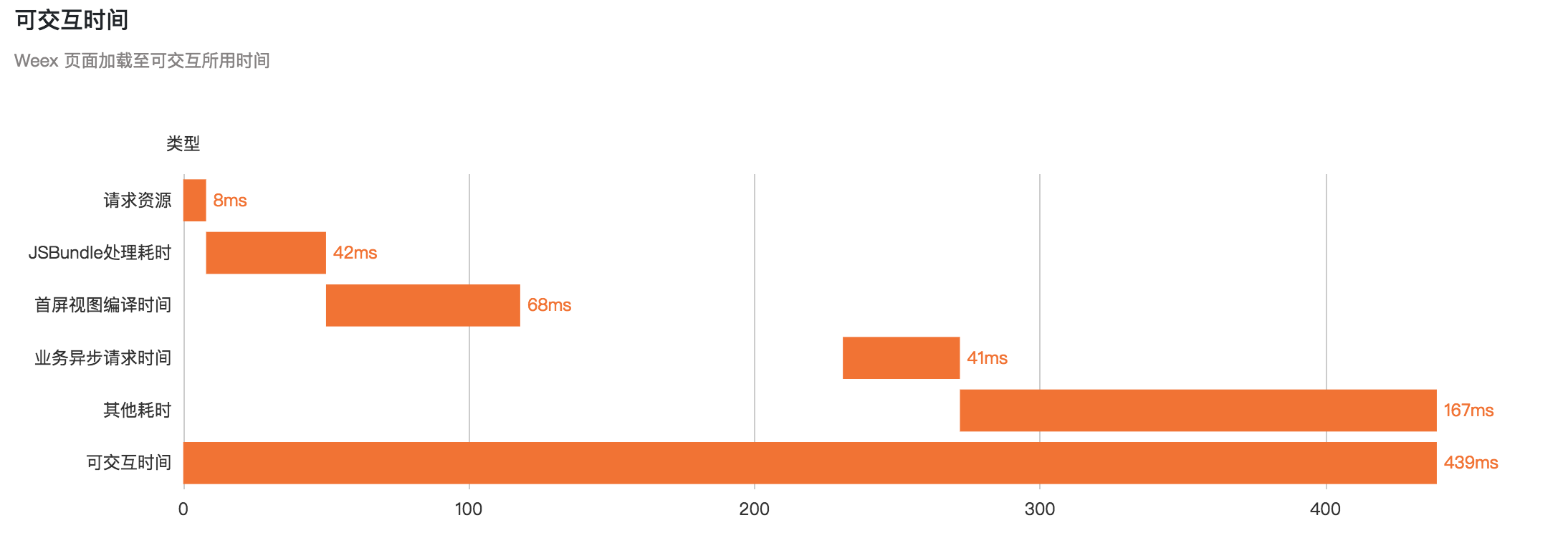
+整体耗时:
+
+
+
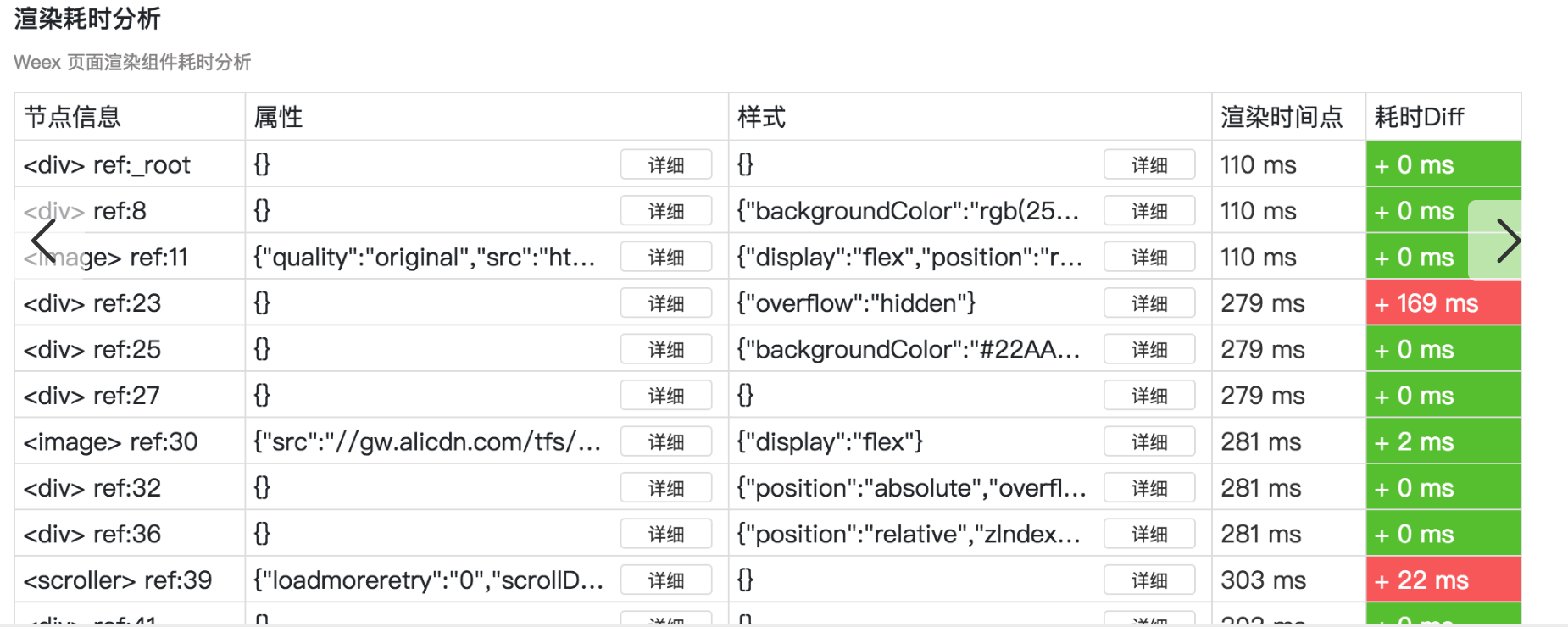
+详细view渲染到屏幕上的时序
+
+
+
+
+
+### 其它信息
+
+weex在统计可交互时间的同时,同时记录了以下几个辅助信息数据
+
+
+|字段|含义|备注|
+|:---|:---|:---|
+| wxInteractionComponentCreateCount |可交互时间内,创建component个数|创建组件要耗时的<br>肾5s上,3ms/个|
+|wxInteractionScreenViewCount |可交互时间内添加view的次数(屏幕内)|屏幕内view,直接影响可交互时间结果|
+|wxInteractionAllViewCount |可交互时间内添加view的次数 (屏幕内+屏幕外)|参考数据<br>不影响可交互时间<br>但不建议在屏幕外创建大量组件,耗时又耗内存|
+
+
+
+
+# 首屏时间的修正
+
+
+在讲首屏修正方案之前,先回忆下现在的前端逻辑
+
+![img_js_logic_normal][]
+
+前面说过,老版首屏最多能监控到第3步的情况。实际上。在业务支撑过程中,发现第3步时未必到达用户真实“首屏”感受
+
+- 在createfinish时,业务方只渲染了了一半(爱逛街),剩下一半搞异步渲染,这时老的首屏时间最多只能算“半屏时间”
+- 业务方只render一个view壳子,真正的内容异步填充,这时候老白屏意义不大,因为屏幕内70%的内容几乎都是在异步渲染
+
+
+鉴于以上case,修正了首屏时间的算法
+
+- 以叶子结点(text/img/button)填满屏幕作为结束点 ,不关心容器(viewgroup)是否填满
+- 若果叶子结点未填满,以createfinish时间为准。
+
+新的字段`newFsRenderTime` 作为新的首屏参考 __老字段不受影响__
+
+
+测试数据比较,以iOS数据为例,如下图所示
+
+![img_wx_render_compare][]
+
+
+
+# 总结
+
+算法和数据结果如上文所述,这里放一张图总结一下首屏(老)、首屏(新)、可交互时间的覆盖范围
+
+
+![img_wx_screen_render_stream][]
+
+欢迎广大业务方来提改进,和bad case 优化可交互时间的算法
+
+毕竟业务认可的,和实际感官相符的,才是正确的。
+
+
+
+
+[img_interaction_logic]: http://ata2-img.cn-hangzhou.img-pub.aliyun-inc.com/ac84ce579b28867aac2e8ba18e40e954.png
+
+[img_yhh_android]: https://cdn.nlark.com/lark/0/2018/png/48836/1532953968812-86ca8419-7b4f-4ac1-987a-1cc32049e385.png
+
+[img_tttj_first_iOS]: https://cdn.nlark.com/lark/0/2018/png/48836/1532953955583-a020c31d-9e1e-4d5f-8754-ba9b42e04eb6.png
+
+[img_agj_iOS]: https://cdn.nlark.com/lark/0/2018/png/48836/1532953779052-391a0eb5-2902-4a76-bb7d-ecb79fad40d5.png
+
+[img_js_logic_normal]: https://cdn.nlark.com/lark/0/2018/png/48836/1532953927448-6af8006c-efa9-4a83-a33e-31ac264e2320.png
+
+[img_interaction_screen_case]: https://cdn.nlark.com/lark/0/2018/png/48836/1532953896764-72b52689-f4b2-4442-9f0f-9a2e4edb007f.png
+
+[img_async_data_case]: https://cdn.nlark.com/lark/0/2018/png/48836/1532953850732-b0d52294-a6c6-4fbb-bd08-ee7e2a4b84b8.png
+
+[img_wx_render_compare]: https://cdn.nlark.com/lark/0/2018/png/48836/1533126050649-50116f85-0101-4389-99f5-35f3ef4813d9.png
+
+
+[img_wx_screen_render_stream]: https://cdn.nlark.com/lark/0/2018/png/48836/1533125815712-c17b4df4-e072-42b7-8c77-560deabf7696.png
+
+
+
+
+
+
+
diff --git a/docs/zh/blog/weexcore-multiprocess-evolution.md b/docs/zh/blog/weexcore-multiprocess-evolution.md
index 7dd841c..361474e 100644
--- a/docs/zh/blog/weexcore-multiprocess-evolution.md
+++ b/docs/zh/blog/weexcore-multiprocess-evolution.md
@@ -1,4 +1,4 @@
-# WeexCore 多进程多线程架构演进 -- 对外发布
+# WeexCore 多进程多线程架构演进
### 1. 背景
`Weex Android` 早在 2016 年时就采用了多线程的模型来提升 `Weex` 的渲染能力. `DomThread`, `JSThread`, `UIThread` . 去年双十一 `Weex` 进化成多进程模式来提升 `Weex` 的稳定性. 所以理论上来说, Weex 早就是多进程多线程的模式了, 为什么现在还在谈这个事情. 且听我慢慢重新介绍一些目前的 `WeexCore`