You are viewing a plain text version of this content. The canonical link for it is here.
Posted to commits@weex.apache.org by ha...@apache.org on 2018/01/29 08:28:45 UTC
[19/36] incubator-weex git commit: - [doc] remove documents from
incubator-weex
http://git-wip-us.apache.org/repos/asf/incubator-weex/blob/8162f8c2/doc/source/releasenote.md
----------------------------------------------------------------------
diff --git a/doc/source/releasenote.md b/doc/source/releasenote.md
deleted file mode 100644
index 803f811..0000000
--- a/doc/source/releasenote.md
+++ /dev/null
@@ -1,354 +0,0 @@
----
-title: Release Note
-type: releasenote
-layout: post
----
-
-# Release Note
-
-## v0.17
------
-
-* `feature` `Android/iOS` Support `writing direction style:direction=rtl`([#782](https://github.com/apache/incubator-weex/pull/782)[#886](https://github.com/apache/incubator-weex/pull/886))
-* `feature` `Android/iOS` Support scroll start and scroll end event on scroller and list ([#858](https://github.com/apache/incubator-weex/pull/858)[856](https://github.com/apache/incubator-weex/pull/856))
-* `feature` `iOS` support text max-width ([#834](https://github.com/apache/incubator-weex/pull/834))
-* `feature` `Android` CSS Transiton Animation Supported component ([#851](https://github.com/apache/incubator-weex/pull/851))
-* `feature` `Android` New `local` module ([#781](https://github.com/apache/incubator-weex/pull/781))
-* `feature` `Android` Support ripple background on Android 5.0 and higher ([#792](https://github.com/apache/incubator-weex/pull/792))
-* `feature` `Android` Support multi language on dialog ([#831](https://github.com/apache/incubator-weex/pull/831))
-* `feature` `H5` Support lazyload and appear watcher when body height set to 100% ([#827](https://github.com/apache/incubator-weex/pull/827)).
-* `feature` `H5` Add try catch for storage accessing incase user disabled the related function in a browser ([#827](https://github.com/apache/incubator-weex/pull/827)).
-* `feature` `H5` image support css sprite (sprite-src, sprite-position, sprite-width) ([#827](https://github.com/apache/incubator-weex/pull/827)).
-* `feature` `JSFM` Support batch update styles and attributes in Vue.js ([#819](https://github.com/apache/incubator-weex/pull/819) [#7046](https://github.com/vuejs/vue/pull/7046))
-* `feature` `JSFM` Stop trimming CSS units in richtext component. ([#6927](https://github.com/vuejs/vue/pull/6927))
-* `feature` `JSFM` Stop rethrow the captured error on Weex platform. ([#7024](https://github.com/vuejs/vue/pull/7024))
-* `feature` `JSFM` Upgrade weex-vue-framework to 2.5.3 ([release nodes](https://github.com/vuejs/vue/releases/tag/v2.5.3))
-* `feature` `JSFM` Adjust the behavior of `nextTick` to improve compatibility.
-* `bugfix` `iOS` bugfix boxshadow render abnormal ([#791](https://github.com/apache/incubator-weex/pull/791))
-* `bugfix` `iOS` bugfix timer exposed on JSContxt ([#839](https://github.com/apache/incubator-weex/pull/839))
-* `bugfix` `iOS` fix iOS8 scrollview’s assign delegate crash ([#838](https://github.com/apache/incubator-weex/pull/838))
-* `bugfix` `iOS` fix setViewport:sometimes doesn’t work([#843](https://github.com/apache/incubator-weex/pull/843))
-* `bugfix` `iOS` fix addEvent lead to generate a new view while it as been recycled ([#837](https://github.com/apache/incubator-weex/pull/837))
-* `bugfix` `iOS` fix about setting nan frame crash ([#853](https://github.com/apache/incubator-weex/pull/853))
-* `bugfix` `iOS` disable tableview estimation row or section height which make list component behavior abnormal ([#867](https://github.com/apache/incubator-weex/pull/867))
-* `bugfix` `Android` Fix that moveElement doesn’t work when parent is not a list ([#805](https://github.com/apache/incubator-weex/pull/805))
-* `bugfix` `Android` Fix flicker caused by coexistence of box-shadow and border-radius (#[780](https://github.com/apache/incubator-weex/pull/780))
-* `bugfix` `Android` Fix android new Date() cannot get accuracy time ([#753](https://github.com/apache/incubator-weex/pull/753))
-* `bugfix` `H5` Fix scroll event listenning and scrollToElement on chrome for the latest version ([#827](https://github.com/apache/incubator-weex/pull/827)).
-
-## v0.16
------
-* + support 3d rotate ([#532](https://github.com/apache/incubator-weex/pull/532) [#418](https://github.com/apache/incubator-weex/pull/418))
-* + new feature support perspective function in transform ([#551](https://github.com/apache/incubator-weex/pull/551)[#532](https://github.com/apache/incubator-weex/pull/532))
-* + new feature support save image to photo album ([547](https://github.com/apache/incubator-weex/pull/547) [575](https://github.com/apache/incubator-weex/pull/575) [544](https://github.com/apache/incubator-weex/pull/544))
-* + support `image.save` ([#575](https://github.com/apache/incubator-weex/pull/575)).
-* + optimize event binding and support mobile firefox, and also fix a lot of other things ([#606](https://github.com/apache/incubator-weex/pull/606)).
-* + Support js service in Rax DSL.
-* + Partial support of sending `ArrayBuffer` between js and native.
-* + Add basic support of `<recycle-list>`, both in Vue and Rax DSL.
-* + Support saving image to photo alubm in `image` [#547](https://github.com/apache/incubator-weex/pull/547)
-* + Support perspective features [#551](https://github.com/apache/incubator-weex/pull/551)
-* + New interface to performance tracing [#586](https://github.com/apache/incubator-weex/pull/586)
-* + Add the ability of FlatGUI, it can reduce the view hierarchy in `cell` [#643](https://github.com/apache/incubator-weex/pull/643)
-* + Support the `box-shadow` style for Android 4.3 and higher [#685](https://github.com/apache/incubator-weex/pull/685)
-* + Support float interval/delay in timer [#699](https://github.com/apache/incubator-weex/pull/699)
-* + New `recycle-list` compoent with hight performance and low memory cost [#726](https://github.com/apache/incubator-weex/pull/726)
-* * remove dependency about socketRocket dependency in iOS.
-* * fix coretext crash in iOS.
-* * fix toast view still pop while the page was destroyed in iOS.
-* * separate weex-vue-render into two parts: render core and plugins ([#533](https://github.com/apache/incubator-weex/pull/533)).
-* * Fix Jni crash due to emoji [#574](https://github.com/apache/incubator-weex/pull/574)
-* * Fix the lost refresh header of `list` in viewpager [#601](https://github.com/apache/incubator-weex/pull/601)
-* * Fix draw iconfont fail when first download iconfont [#625](https://github.com/apache/incubator-weex/pull/625)
-* * Fix the problem of 'text-overflow:clip' [#718](https://github.com/apache/incubator-weex/pull/718)
-* * Fix android new Date() cannot get accuracy time [#753](https://github.com/apache/incubator-weex/pull/753)
-
-## v0.15
-------
-* + support fast click and hairlines border [#507](https://github.com/apache/incubator-weex/pull/507).
-* + Add `weex.supports` api for feature detections. [#6053](https://github.com/vuejs/vue/pull/6053)
-* + Change default image quality to `WXImageQuality.AUTO` [#478](https://github.com/apache/incubator-weex/pull/478)
-* + Support the `scroll` event on horizontal scroller[#494](https://github.com/apache/incubator-weex/pull/494)
-* * Fix the console API to adapt JSC on Android. [#470](https://github.com/apache/incubator-weex/pull/470)
-* * Fix invalid call scrollToElement when has not option param [#491](https://github.com/apache/incubator-weex/pull/491)
-* * Fix the lines of `text` cannot be reset [#493](https://github.com/apache/incubator-weex/pull/493)
-* * Fix invalid init index on `slider` [#510](https://github.com/apache/incubator-weex/pull/510)
-* * Fix Memory optimization for `list` [#512](https://github.com/apache/incubator-weex/pull/512)
-
-## v0.14
-------
-* + support `waterfall` component ([#438](https://github.com/apache/incubator-weex/pull/438)).
-* + support pseudo-class ([#474](https://github.com/apache/incubator-weex/pull/474)).
-* + Support component method in Vue DSL. ([proposal](https://github.com/alibaba/weex/issues/969))
-* + Support returning value synchronously for module methods. ([proposal](https://github.com/alibaba/weex/issues/1677))
-* + Support drag-drop on `list` [#416](https://github.com/apache/incubator-weex/pull/416)
-* + Support rotateX and rotateY, optimize animation as well [#418](https://github.com/apache/incubator-weex/pull/418)
-* * Fix wrong vertical offset in scroll event on `waterfall` [#424](https://github.com/apache/incubator-weex/pull/424)
-* * Fix `clearTimeout` and `clearInterval` doesn't work when funId is greater than 127 [#439](https://github.com/apache/incubator-weex/pull/439)
-
-
-## v0.13.0
-------
-### Notable Changes
-* Slider implemention is refactored [Pull Request#414](https://github.com/apache/incubator-weex/pull/414)
-* Improve integration test. We are working with macaca team, to write better test code.[Pull Request#411](https://github.com/apache/incubator-weex/pull/411) [Pull Request#397](https://github.com/apache/incubator-weex/pull/397) [Pull Request#402](https://github.com/apache/incubator-weex/pull/402) [Pull Request#413](https://github.com/apache/incubator-weex/pull/413) [Pull Request#390](https://github.com/apache/incubator-weex/pull/390) [Pull Request#346](https://github.com/apache/incubator-weex/pull/346) [Pull Request#319](https://github.com/apache/incubator-weex/pull/319) [Pull Request#304](https://github.com/apache/incubator-weex/pull/304) [Pull Request#295](https://github.com/apache/incubator-weex/pull/295)
-* `scroller` now has `pagingEnabled` attribute, which can enable `paging` feature in native [Pull Request#393](https://github.com/apache/incubator-weex/pull/393)
-* New 'prerender' mechanism, which will support rendering a page in background. [Pull Request#343](https://github.com/apache/incubator-weex/pull/343) Pull Request#342](https://github.com/apache/incubator-weex/pull/342)
-* Fix `line-height` feature in iOS. [Pull Request#377](https://github.com/apache/incubator-weex/pull/377) [Pull Request#305](https://github.com/apache/incubator-weex/pull/305)
-* Add `needLayout` option in animation module operation after animation finished [Pull Request#337](https://github.com/apache/incubator-weex/pull/337) [Pull Request#336](https://github.com/apache/incubator-weex/pull/336)
-* `list` component has new type of event for `sticky` feature [Pull Request#332](https://github.com/apache/incubator-weex/pull/332)
-* Support bota and atob [Pull Request#315](https://github.com/apache/incubator-weex/pull/315)
-* Fix mixing background-color and border-color(rgba) in android [Pull Request#359](https://github.com/apache/incubator-weex/pull/359)
-
-
-Beside these, lots of crashes and bugs are fixed.[Pull Request#441](https://github.com/apache/incubator-weex/pull/441) [Pull Request#413](https://github.com/apache/incubator-weex/pull/413) [Pull Request#403](https://github.com/apache/incubator-weex/pull/403) [Pull Request#373](https://github.com/apache/incubator-weex/pull/373)
-
-## v0.12.0 ( First Offical Release)
----------
-- C++ timer by lycool
-Discussed in https://lists.apache.org/thread.html/567c9b19d68ccf3e0d24c1467298ebcd4316ffa524c557a34c6c087f@%3Cdev.weex.apache.org%3E
-relate pull requests:[apache/incubator-weex/pull/228|https://github.com/apache/incubator-weex/pull/228], [apache/incubator-weex/pull/232|https://github.com/apache/incubator-weex/pull/232], [apache/incubator-weex/pull/221|https://github.com/apache/incubator-weex/pull/221]
-
-- Add scroller/list scroll event in html5 render
-android&iOS already have this feature in v0.11
-https://github.com/apache/incubator-weex/commit/f50fba8647c8bb6ac522b1a4569a2a2269da1953
-
-- Enhance accessibility, new `aria-label` & `role` support
-[apache/incubator-weex/pull/149|https://github.com/apache/incubator-weex/pull/149]
-
-- Native input/textarea enhancement by kfeagle & misakuo
-support `number` data type; support soft keyboard event
-
-- Picker module enhancement
-More picker options to customize picker dialog style(background color etc.). Related pull requests: [apache/incubator-weex/pull/234|https://github.com/apache/incubator-weex/pull/234], [apache/incubator-weex/pull/233|https://github.com/apache/incubator-weex/pull/233]
-
-- Android DOM module refactor
-Seperate module code by action, increasing the maintainability.
-[apache/incubator-weex/pull/104|https://github.com/apache/incubator-weex/pull/104]
-
-## v0.10.0
-------
-- New Feature
- - Support Vue.js
- The Vue.js 2.1.8 ([runtime-only build](https://vuejs.org/v2/guide/installation.html#Standalone-vs-Runtime-only-Build)) is in WeexSDK now. You can use Vue.js to build native app by WeexSDK 0.10.0.
- We reused the original native render engine and developed a new renderer ([weex-vue-render](https://www.npmjs.com/package/weex-vue-render)) for the web platform, which is based on Vue 2.0.
- The former front-end framework (commonly known as `.we`), which is inspired by Vue 1.0, is deprecated. Although it still works well in this release, we suggest to migrate it to Vue 2.0.
- - SDK
- - New CSS support
- - [text `font-weight`](https://weex-project.io/references/text-style.html)
- `font-weight` can set to [`normal`|`bold`] or 100-900.
- - gradient
- like CSS3, now you can use gradient in Weex. For example:
-
- ``` css
- background-image: linear-gradient(to right, blue, white);
- ```
- 
- [Read more about gradient](https://weex-project.io/references/common-style.html).
- - Pseudo class
- Currently, Weex supports 4 pseudo classes:`active`, `focus`, `disabled`, `enabled`.
- - New BroadcastChannel API
- Developers can use `BroadcastChannel` API to implement inter-instance communication.
-
- ``` js
- const Stack = new BroadcastChannel('Avengers')
- Stack.onmessage = function (event) {
- console.log(event.data) // in this case, it's "Hulk Smash !!!"
- }
-
- // in another instance
- const Hulk = new BroadcastChannel('Avengers')
- Hulk.postMessage("Hulk Smash !!!")
- ```
- - Image's `onload` event add [`naturalHeight` and `naturalWidthimage`](https://weex-project.io/references/components/image.html) to get the original size of image file.
- - Websocket Support
- WebSockets is an advanced technology that makes it possible to open an interactive communication session between the user's h5/iOS/android and a server. With this API, you can send messages to a server and receive event-driven responses without having to poll the server for a reply.
- [Read more about Weex's websocket.](https://weex-project.io/cn/references/modules/websocket.html)
- - Support synchronous method call
- Both module and component method can defined synchronous method exposed to JS runtime now. Means native will invoke these method in JS thread directly.
- - Support `viewport` configuration
- Similar to [W3C specification](https://drafts.csswg.org/css-device-adapt/#viewport-meta), Weex support set define `viewport` in script tag:
-
- ``` html
- <script type="config">
- {
- "viewport": {
- "width": "device-width"
- }
- }
- </script>
- ```
- - Tools
- - [Devtools](https://github.com/weexteam/weex-devtool)
- - Support Vue 2.0 debugging.
- - Add network switch for network inspector.
- - Make application capable to decide which bundle is 'un-debuggable', which means page's source code is unreadable in debug mode.
- - [Weexpack](https://github.com/weexteam/weex-pack)
- - Has full set of commands for developers to setup android/ios application with his .we/.vue files.
- - Developers could easily pack/install his application with simple command.
- - Has full set of commands for developers to manage weex plugins, including create plugin template, add plugin to his project etc.
- - [Plugin market](http://market.weex-project.io) was formally used for developers to publish/download weex plugins.
-
-
-## v0.9.4
-------
-- New features
- - SDK
- - New API to get Component's size and position:
- Now you can get these data through `getComponentRect`:
- ``` javascript
- var dom = require('@weex-module/dom');
- dom.getComponentRect(this.$el('comp_id'), function(data){
- if(data.result)
- console.log(data);
- });
- ```
- The `data` callback parameter contains a `result` to tell if operation is success. And `size` tell you the true data(`bottom`/`top`/`left`/`right`/`width`/`height`) of component.
- - A brand new `picker` module. We have 'single-picker','date-picker' and 'time-picker' currently, and more common pickers are on the way.
- 
- There are two ways to use `picker`
- - Use `picker` module directly:
- ``` javascript
- var picker = require('@weex-module/picker');
- var self = this;
- picker.pickDate({
- 'value':'2016-11-28',
- 'max':'2029-11-28',
- 'min':'2015-11-28'
- },function (ret) {
- var result = ret.result;
- if(result == 'success')
- {
- self.value = ret.data;
- }
- });
- ```
- - `input` component also add 'date' and 'time`type to work with`picker` module internally:
- ``` html
- <input
- type="date"
- placeholder="select date"
- class="input"
- autofocus="false"
- value=""
- onchange="onchange"
- max = "2029-11-28"
- min = "2015-11-28"
- ></input>
- ```
- - Support animation with `width` and `height` property.
- - Support use empty value to reset css property to default value.
- - Components can expose methods too, like modules do. Developers use the same way as create module method to achieve that.
- - Add `blur` and `focus` method to manually control `input` component to lose or get focus.
- - Support relative URL, which will resolve real URL by bundle's URL.
- - Core javascript framework's unit test coverage is 100% now. we'll pay more attention to quality.
- - DevTool
- - Support to check the node hierarchy in [weex-devtool-extension](https://github.com/weexteam/weex-devtool-extension) and highlight the node if it exceeds an specified level.
- - Support different refresh mode in devtools to reload the page or SDK automatically when source file updated.
- - Improve quality in [weex-devtools-android](https://github.com/weexteam/weex-devtools-android) module
- - Remove explicit dependency on okhttp and okhttp3 by reflection and proxy
- - Improve demo application with less and refactored code
- - Fix some crash caused by class up cast
- - Fix reflection crash caused by complier optimization
- - Fix "network on main thread" and stop screencast when disconnect
- - Add [weex-analyzer-android](https://github.com/weexteam/weex-analyzer-android) and [weex-analyzer-ios](https://github.com/weexteam/weex-analyzer-ios) which support the following on device directly:
- - Inspect FPS/CPU/memory
- - Inspect storage
- - Display log information
- - 3D viewer of the weex page
- - Javascript error prompt
-
-
-## v0.8.0
-------
-
-- New Features
- - Add [globalEvent module](https://github.com/alibaba/weex/blob/doc/doc/modules/globalevent.md)
- - Support `width/height` animation in transition
- - Refactor the default js framework code, hide almost all the private APIs #777
- - iOS 10 compatibility
-- Performance
- - Support `callAddElement` low-level API to make rendering faster
- - Improve SDK initialization performance, for minimise invoke thread impact.
- - Use native `Set` polyfill to fix iOS7 memory leak
- - Use `setProperty` replace reflection for better performance
- - Add `static` directive in default js framework to avoid unnecessary data-binding and take down the memory use
-- Tools
- - Add [weex-pack](https://github.com/weexteam/weex-pack), our next generation of engineering development kits. It allows developers to create weex projects with simple commands and run the project on different development platforms.
- - Add [weex-devtool-extension](https://github.com/weexteam/weex-devtool-extension), a extension for Weex devtool to improve your debug experience,which equivalent an element tag for debugger page.
- - Move devtool to separate [iOS](https://github.com/weexteam/weex-devtool-iOS) and [Android](https://github.com/weexteam/weex_devtools_android) repos.
- - Add "screencast" which enable the screen of the device(or monitor) to appear on the "Inspector" page;
- - Add "remote control" function, in Android user could control remote device(or monitor) when he moves mouse on screencast;
- - Add "select element" function which enable the user to find the exact node in "Elements" inspector Tab when he click the mouse on screencast;
- - Add "vdom inspector", so user can choose to see the details of native dom or vdom in "Elements" Tab at his preference;
- - Adjust interfaces with weex SDK to support "callAddElement";
-
-
-## v0.7.0
-------
-- New Features
- - [Timer Module](https://github.com/alibaba/weex/blob/doc/doc/modules/timer.md)
- - [Storage Module](https://github.com/alibaba/weex/blob/dev/doc/modules/storage.md)
- - Unify the `image` component's error page when src is invalid
- - Unify the `border`,`padding`,`background-color` style
- - Horizontal-scroller support `scrollto` api
- - Fix the issue that component with `position:fixed` style can not be closed
- - Module callback support `object` params
- - Slider suppport `setIndex` api
-- Performance
- - Use `callNative` signal to stop JSFM render after instance been destroyed
- - Lazily initialize JSFM When device is in low-memory status, improve SDK stability
-- [Tools](http://alibaba.github.io/weex/doc/tools/devtools.html)
- - Support debugging weex(.we) and react(.jsx) source
- - Support apps debugging on the same device
- - Support "watch" feature
- - Solve the dependency on Debugger, user could start "Inspector" first or "Debugger" at will
- - Add "refresh" function in sdk, user could inspect new file by scanning its QR code in playground;
- - Android/ios inspect module split from weex sdk, and will deliver in separate repo in future; support inspect in windows system
-
-## v0.6.1
-------
-- New Features
- 1. [iOS has been open sourced](https://github.com/alibaba/weex/tree/dev/ios)
- 2. [Lifecycle Page Event](https://github.com/alibaba/weex/blob/v0.6.1/doc/references/common-event.md#page-event): viewappear, viewdisappear
- 3. [fetch](https://github.com/alibaba/weex/blob/v0.6.1/doc/modules/stream.md#fetchoptions-callbackprogresscallback)
- 4. [line-height](https://github.com/alibaba/weex/blob/v0.6.1/doc/components/text.md#styles)
- 5. [list component](https://github.com/alibaba/weex/blob/v0.6.1/doc/components/list.md)
- - support sticky header
- - support scrollToElement API
- - support nested horizontal scroller
- - support cell children nodes event: appear/disappear
- 6. [Gesture](https://github.com/alibaba/weex/blob/v0.6.1/doc/references/gesture.md): panstart/panmove/panend, swipe, longpress
- 7. Improve Android text compatibility
-- Performance
- 1. iOS, iPhone 5c, rendering frame rate ascends from 45FPS to 52FPS
- 2. Android, Redmi Note 1, loading time of the first screen descends from 602ms to 480ms
- 3. Improve Android animation performance
-- Tools
- 1. [weex-toolkit](https://www.npmjs.com/package/weex-toolkit) supports require and generator
- 2. Playground supports runtime performance viewer
- 3. [Weex DevTools](https://github.com/alibaba/weex/blob/v0.6.1/doc/tools/devtools.md)
-
- <img src="https://img.alicdn.com/tps/TB1O.nwKFXXXXX8XpXXXXXXXXXX-1436-811.png" width="600">
-
-
-## v0.5.0
-------
-
-### New Features
-1. [TabBar](https://github.com/alibaba/weex/blob/dev/doc/components/wxc-tabbar.md) is a specialized component corresponding to the radio-style selection.
-2. [NavPage](https://github.com/alibaba/weex/blob/dev/doc/components/wxc-navpage.md) contains a navbar at the top of the window and an embed content page.
-3. [Activity Showcase](https://github.com/alibaba/weex/blob/dev/examples/showcase/new-fashion/index.we) is built by composing TabBar and NavPage.
-4. [Web](https://github.com/alibaba/weex/blob/dev/doc/components/web.md) displays web content in the weex page.
-5. [A](https://github.com/alibaba/weex/blob/dev/doc/components/a.md) defines a hyperlink to a page in the web.
-6. `Text` supports style [text-overflow](https://github.com/alibaba/weex/blob/dev/doc/references/text-style.md#properties).
-7. `Image` supports attribute [resize](https://github.com/alibaba/weex/blob/dev/doc/components/image.md#styles).
-8. `List` supports [events `appear`, `disappear`, `loadmore`](https://github.com/alibaba/weex/blob/dev/doc/components/list.md#events) and [refresh](https://github.com/alibaba/weex/blob/dev/doc/components/list.md#child-components).
-9. New Syntax
- 1. [Inline event](https://github.com/alibaba/weex/blob/dev/doc/syntax/events.md#inline-handler) supports a expression of calling event handler in template.
- 2. [Require Native Module](https://github.com/alibaba/weex/blob/dev/doc/modules#how-to-use) requires a native module by `require('@weex-module/moduleName')`.
- 3. [Computed Property](https://github.com/alibaba/weex/blob/dev/doc/syntax/data-binding.md#computed-properties) supports complicated logic in data bindings.
- 4. [New Repeat Syntax](https://github.com/alibaba/weex/blob/dev/doc/syntax/display-logic.md#a-extension-of-repeat-syntax) is easy to access the key or value of repeated object.
-
-
-------
\ No newline at end of file
http://git-wip-us.apache.org/repos/asf/incubator-weex/blob/8162f8c2/doc/source/v-0.10/advanced/extend-to-android.md
----------------------------------------------------------------------
diff --git a/doc/source/v-0.10/advanced/extend-to-android.md b/doc/source/v-0.10/advanced/extend-to-android.md
deleted file mode 100644
index 97bb49e..0000000
--- a/doc/source/v-0.10/advanced/extend-to-android.md
+++ /dev/null
@@ -1,189 +0,0 @@
----
-title: Extend to Android
-type: advanced
-order: 6
-has_chapter_content: true
-version: 0.10
----
-
-# Extend to Android
-
-### Module extend
-weex sdk support Module extend,
-Weex SDK provides only rendering capabilities, rather than have other capabilities, such as network, picture, and URL redirection. If you want the these features, you need to implement it.
-
-For example: If you want to implement an address jumping function, you can achieve a Module Follow the steps below.
-
-#### Step to customize a module
-
-1. Customize module must extend WXModule
-2. @WXModuleAnno annotation must be added, as it is the only the way to recognized by Weex
-3. The access levels of mehtod must be **public**
-4. The module class also can not be an inner class
-5. Customize can not be obfuscated by tools like ProGuard
-6. Module methods will be invoked in UI thread, do not put time consuming operation there
-7. Weex params can be int, double, float, String, Map, List
-
-Refer to the following example:
-
-```java
-public class WXEventModule extends WXModule{
-
- private static final String WEEX_CATEGORY="com.taobao.android.intent.category.WEEX";
-
- @JSMethod
- public void openURL(String url){
- //implement your module logic here
- }
-}
-
-```
-
-#### Register the moulde
-
-```java
- WXSDKEngine.registerModule("event", WXEventModule.class);
-```
-
-### Use this module in weex DSL
-Now `event` moudle is avaiable in weex, use the module like this:
-
-```javascript
-var event = require('@weex-module/event');
-event.openURL("http://www.github.com");
-```
-
-### Javascript callback
-
-If the module need implement a callback to javascript, you just add `JSCallback` argument to the method you want expose to javascript:
-
-```java
- @JSMethod
- public void openURL(String url,JSCallback callback){
- //implement your module logic here
- Map<String,Object> resp = new HashMap();
- resp.put("result","ok");
- callback.invoke(resp);
- }
-```
-
-At the javascript side, call the module with javascript function to receive callback data:
-
-```javascript
-event.openURL("http://www.github.com",function(resp){ console.log(resp.result); });
-```
-
-### Component extend
-
-There are label, image, div, scroll, ect. components in weex, you can also customize your own components.
-
-#### Step to customize a component
-
-1. Customize components must extend WXComponent or WXContainer
-2. @WXComponentProp(name=value(value is attr or style of dsl)) for it be recognized by weex SDK.
-3. The access levels of mehtod must be **public**
-4. The component class can not be an inner class
-5. Customize can not be obfuscated by tools like ProGuard
-6. Component methods will be invoked in UI thread, do not put time consuming operation there.
-7. Weex params can be int, double, float, String, Map, List, Array
-
-
-Refer to the following example
-
-```java
-public class MyViewComponent extends WXComponent{
- public MyViewComponent(WXSDKInstance instance, WXDomObject dom,
- WXVContainer parent, String instanceId, boolean isLazy)
- {
- public MyViewComponent(WXSDKInstance instance, WXDomObject dom,
- WXVContainer parent, String instanceId, boolean isLazy) {
- super(instance, dom, parent, instanceId, isLazy);
- }
-
- @Override
- protected void initView() {
- mHost = new TextView(mContext);
- }
- @WXComponentProp(name=WXDomPropConstant.WX_ATTR_VALUE)
- public void setMyViewValue(String value) {
- ((TextView)mHost).setText(value);
- }
-}
-```
-
-#### Register the Component
-
-
-```java
-WXSDKEngine.registerComponent("MyView", MyViewComponent.class);
-```
-
-### Adapter extend
-
-#### ImagedownloadAdapter
-
-Weex SDK has no image download capability, you need to implement `IWXImgLoaderAdapter`. Refer to the following examples.
-
-```java
-public class ImageAdapter implements IWXImgLoaderAdapter {
-
- private Activity mContext;
-
- public ImageAdapter(Activity activity) {
- mContext = activity;
- }
-
- @Override
- public void setImage(final String url, final ImageView view,
- WXImageQuality quality, WXImageStrategy strategy) {
- mContext.runOnUiThread(new Runnable() {
-
- @Override
- public void run() {
- if (TextUtils.isEmpty(url)) {
- view.setImageBitmap(null);
- return;
- }
- String temp = url;
- if (url.startsWith("//")){
- temp = "http:" + url;
- }
- if (view.getLayoutParams().width<=0 || view.getLayoutParams().height<=0) {
- return;
- }
- Picasso.with(WXEnvironment.getApplication())
- .load(temp)
- .resize(view.getLayoutParams().width,
- view.getLayoutParams().height).into(view);
- }
- });
- }
-}
-```
-
-#### Component Method
-from WeexSDK `0.9.5`, you can define your component method
-
-for example, define a method in component:
-
-```java
-@JSMethod
-public void focus(){
-//method implementation
-}
-```
-
-after your registration for your own custom component, now you can call it in your js file.
-
-```html
-<template>
- <mycomponent id='mycomponent'></mycomponent>
-</template>
-<script>
- module.exports = {
- created: function() {
- this.$el('mycomponent').focus();
- }
- }
-</script>
-```
http://git-wip-us.apache.org/repos/asf/incubator-weex/blob/8162f8c2/doc/source/v-0.10/advanced/extend-to-html5.md
----------------------------------------------------------------------
diff --git a/doc/source/v-0.10/advanced/extend-to-html5.md b/doc/source/v-0.10/advanced/extend-to-html5.md
deleted file mode 100644
index 6201fc7..0000000
--- a/doc/source/v-0.10/advanced/extend-to-html5.md
+++ /dev/null
@@ -1,258 +0,0 @@
----
-title: Extend to web
-type: advanced
-order: 8
-has_chapter_content: true
-version: 0.10
----
-
-# Extend Weex HTML5
-
-### Intro
-
-Weex is a extendable cross-platform solution for dynamic programming and publishing projects. You can build your own components on web platform or native platform by extending the components system. Also you can extend weex by adding new methods for one module, new moudles or new bundle loaders. Follow the steps bellow you can dive into the journy of creating multiple builtin components, APIs and loaders.
-
-First of all, components, APIs and loaders are extensions to weex, so you can create your extensions without requiring the weex package, that means your extensions can be totally standalone.
-
-Second, you should always implement a extension for all the three platforms (android, ios and web), except that you only use it on one specific platform. After all weex is a cross platform framework and the equality of user expierence in all platforms is very important. Although you can create components separately on one platform by another, or welcome other developers on other platforms to join your work (You can always find coders who want the same feature with you in the commity). Here are docs about how to create native extensions on [ios](./extend-to-ios.html) and [android](./extend-to-android.html).
-
-You should publish your extensions somewhere weex developers can easily find, somewhere popular, independent and easy to search and use, such as, npm. Npm is what we strongly recommended.
-
-The most important thing is, you'd better name your extension appropriately: it should begin with a `weex-` if it is a weex extension, and it should end up with a `-<platform>` as a platform mark. If your package is wrapped up with all the three platforms you can ignore it through. Here is a demonstrating component [`<weex-hello-web>`](https://github.com/MrRaindrop/weex-hello-web) to show how to define your own component.
-
-### Create a new component
-
-Steps:
-
-1. Extend `Weex.Component`, override methods of component class.
-2. Use `Weex.registerComponent` to register your customized component in the `init` method of the installation module.
-3. export the `init` method for the installation (Every weex-html5 extension has to have a `init` method in the export object, which is for another weex project to install.)
-
-Here's a example to create a weex component for web platform (weex-html5):
-
-```javascript
-const attr = {
- // ...
-}
-const style = {
- // ...
-}
-const event = {
- // ...
-}
-// every extension file should have a init method.
-function init (Weex) {
- const Component = Weex.Component
- const extend = Weex.utils.extend
-
- // the component's constructor
- function Hello (data) {
- Component.call(this, data)
- }
-
- // extend the prototype
- Hello.prototype = Object.create(Component.prototype)
- extend(Hello.prototype, proto)
-
- // config the attributes, styles and events.
- extend(Hello.prototype, { attr })
- extend(Hello.prototype, {
- style: extend(Object.create(Component.prototype.style), style)
- })
- extend(Hello.prototype, { event })
-
- Weex.registerComponent('weex-hello', Hello)
-}
-
-// export the init method.
-export default { init }
-```
-
-The code above is extracted from [weex-hello-web/src/index.js](https://github.com/MrRaindrop/weex-hello-web/blob/master/src/index.js#L46-L65).
-
-This demo has overrided the `create` method of the base class `Component`. You can also override other methods to customize your component's behavior. The typical methods of class `Component` you may override are:
-
-* `create`: to create the node of the component, and return it.
-* `createChildren` to create the children's nodes.
-* `insertBefore` to insert a child before another child.
-* `appendChild` to append a child in the children list.
-* `removeChild` to remove a child in the children list.
-
-**Advanced**: Need more code demonstrations about overriding the component's methods ? Just take a look at the [weex repo's code](https://github.com/apache/incubator-weex/tree/dev/html5/). Basically the most of the built-in components are defined this way.
-
-Important! To register your component in the `init` method, use `Weex.registerComponent`. Here's the demo code:
-
-```javascript
-Weex.registerComponent('weex-hello', Hello)
-```
-
-The code above is from [weex-hello-web/src/index.js](https://github.com/MrRaindrop/weex-hello-web/blob/master/src/index.js#L62)
-
-Install the component using `Weex.install`.
-
-```javascript
-// import the original weex-html5.
-import weex from 'weex-html5'
-import hello from 'weex-hello-web'
-// install the component.
-weex.install(hello)
-```
-
-The code above is from [weex_extend_demo/src/main.js](https://github.com/MrRaindrop/weex_extend_demo/blob/master/src/main.js#L1-L5)
-
-use the component in your `.we` file:
-
-```html
-<template>
- <div>
- <weex-hello class="hello" style="txt-color:#fff;bg-color:green"
- value="WEEX" onclick="handleClick">
- </weex-hello>
- </div>
-</template>
-```
-
-The code above is from [weex_extend_demo/demo/index.we](https://github.com/MrRaindrop/weex_extend_demo/blob/master/demo/index.we#L10-L15)
-
-### Add a new API
-
-You can add new API modules, or just add a new API for any existing API modules. For example, you can add a new module `user` with APIs like 'login', 'logout' etc. The developer can invoke the API by using `require('@weex-module/moduleName)[methodName](arg1, arg2, ...)` ([Module APIs](../references/api.html)).
-
-Steps:
-
-1. Implement your API modules.
-2. Use `Weex.registerAPIModules` to register your API modules in the init method of your installation module.
-
-**Here is a example for register a new API module**
-
-First create a file named `user.js` for a new module, then define `login/logout` methods.
-
-```javascript
-const user = {
- // for user to login.
- login (callbackId) {
- login.then(res => {
- this.sender.performCallback(callbackId, res)
- }).catch(err => {
- this.sender.performCallback(callbackId, err)
- })
- },
-
- // for user to logout.
- logout (callbackId) {
- logout.then(res => {
- this.sender.performCallback(callbackId, res)
- }).catch(err => {
- this.sender.performCallback(callbackId, err)
- })
- }
-}
-
-// add meta info to user module.
-const meta = {
- user: [{
- name: 'login',
- args: ['function']
- }, {
- name: 'logout',
- args: ['function']
- }]
-}
-
-export default {
- init (Weex) {
- // Register your new module. The last parameter is your
- // new API module's meta info.
- Weex.registerApiModule('user', user, meta)
- }
-}
-```
-
-After above coding work, you can publish this user helper API to npm now, for example, with the name of `weex-user-helper`.
-
-Install the component using `Weex.install` in your new weex project.
-
-```javascript
-import Weex from 'weex-html5'
-import user from 'weex-user-helper'
-
-Weex.install(user)
-```
-
-Use the user helper API in your dsl code (xxx.we):
-
-```html
-<template>
- <div>
- <div class="btn" onclick="handleClick">
- <text>LOGIN</text>
- </div>
- </div>
-</template>
-
-<script>
- var userHelper = require('@weex-module/user')
- module.exports = {
- methods: {
- handleClick: function () {
- userHelper.login(function () {
- // ... do sth. in callback.
- })
- }
- }
- }
-</script>
-```
-
-### Add a new loader
-
-**Loader is only a type of extension for weex-html5 (web platform), native platform is not needing this.**
-
-Weex's builtin loaders to load a weex bundle are `xhr`, `jsonp` and `source`. The default loader is `xhr`. You can register your own loader by using `weex.registerLoader`. For example, you got a service method named `myServe.getWeexBundle`, which can load a weex bundle file through some magical tunnel:
-
-```javascript
-function loadByMyServe(pageId, callback) {
- myServe.getWeexBundle(pageId).then(function (bundle) {
- callback(bundle)
- }).catch(function(err) {
- callback(err)
- })
-}
-
-// export the init method to enable weex install this loader.
-export default {
- init (Weex) {
- Weex.registerLoader('myserve', loadByMyServe)
- }
-}
-```
-
-install and use your loader in your project's entry file:
-
-```javascript
-import Weex from 'weex-html5'
-
-// or import from './myserve.js', no matter where you can import your loader file.
-import loader from 'myLoader'
-
-Weex.install(loader)
-
-// use your loader in the init function:
-(function () {
- function getUrlParam (key) {
- const reg = new RegExp('[?|&]' + key + '=([^&]+)')
- const match = location.search.match(reg)
- return match && match[1]
- }
- const page = getUrlParam('page') || 'examples/build/index.js'
- Weex.init({
- appId: location.href,
- loader: 'myserve', // use the loader type you defined.
- source: page,
- rootId: 'weex'
- })
-})();
-```
-
-That's the major extension feature weex brought to you. The deep details can be found in the [weex's repo](https://github.com/alibaba/weex) and the weex's community.
-
http://git-wip-us.apache.org/repos/asf/incubator-weex/blob/8162f8c2/doc/source/v-0.10/advanced/extend-to-ios.md
----------------------------------------------------------------------
diff --git a/doc/source/v-0.10/advanced/extend-to-ios.md b/doc/source/v-0.10/advanced/extend-to-ios.md
deleted file mode 100644
index bddb96e..0000000
--- a/doc/source/v-0.10/advanced/extend-to-ios.md
+++ /dev/null
@@ -1,311 +0,0 @@
----
-title: Extend to iOS
-type: advanced
-order: 7
-has_chapter_content: true
-version: 0.10
----
-
-# Extend to iOS
-
-### Module extend
-
-Weex SDK provides only rendering capabilities, rather than have other capabilities, such as network, picture, and URL redirection. If you want these features, you need to implement it.
-
-For example: If you want to implement an address jumping function, you can achieve a Module following the steps below.
-
-#### Step to customize a module
-
-1. Module
- customized must implement WXModuleProtocol
-2. A macro named `WX_EXPORT_METHOD` must be added, as it is the only way to be recognized by Weex. It takes arguments that specifies the method in module called by JavaScript code.
-3. The weexInstance should be synthesized. Each module object is bind to a specific instance.
-4. Module methods will be invoked in UI thread, so do not put time consuming operation there. If you want to execute the whole module methods in other thread, please implement the method `- (NSThread *)targetExecuteThread` in protocol. In the way, tasks distributed to this module will be executed in targetExecuteThread.
-5. Weex params can be String or Map.
-6. Module supports to return results to Javascript in callback. This callback is type of `WXModuleCallback`, the params of which can be String or Map.
-
-```objective-c
-@implementation WXEventModule
-@synthesize weexInstance;
- WX_EXPORT_METHOD(@selector(openURL:callback))
-
-- (void)openURL:(NSString *)url callback:(WXModuleCallback)callback
-{
- NSString *newURL = url;
- if ([url hasPrefix:@"//"]) {
- newURL = [NSString stringWithFormat:@"http:%@", url];
- } else if (![url hasPrefix:@"http"]) {
- newURL = [NSURL URLWithString:url relativeToURL:weexInstance.scriptURL].absoluteString;
- }
-
- UIViewController *controller = [[WXDemoViewController alloc] init];
- ((WXDemoViewController *)controller).url = [NSURL URLWithString:newURL];
-
- [[weexInstance.viewController navigationController] pushViewController:controller animated:YES];
- callback(@{@"result":@"success"});
-}
-
-@end
-```
-
-#### Register the module
-
-You can register the customized module by calling the method `registerModule:withClass` in WXSDKEngine.
-
-```objective-c
-WXSDKEngine.h
-/**
-* @abstract Registers a module for a given name
-* @param name The module name to register
-* @param clazz The module class to register
-**/
-+ (void)registerModule:(NSString *)name withClass:(Class)clazz;
-
-[WXSDKEngine registerModule:@"event" withClass:[WXEventModule class]];
-```
-
-### Handler extend
-
-Weex SDK doesn't have capabilitis, such as image download 、navigator operation,please implement these protocols by yourself.
-
-#### WXImgLoaderProtocol
-<font color="gray">
-Weex SDK has no image download capability, you need to implement `WXImgLoaderProtocol`. Refer to the following examples.
-
-```objective-c
-WXImageLoaderProtocol.h
-@protocol WXImgLoaderProtocol <WXModuleProtocol>
-
-/**
- * @abstract Creates a image download handler with a given URL
- * @param imageUrl The URL of the image to download
- * @param imageFrame The frame of the image you want to set
- * @param options : The options to be used for this download
- * @param completedBlock : A block called once the download is completed.
- image : the image which has been download to local.
- error : the error which has happened in download.
- finished : a Boolean value indicating whether download action has finished.
- */
- -(id<WXImageOperationProtocol>)downloadImageWithURL:(NSString *)url imageFrame:(CGRect)imageFrame userInfo:(NSDictionary *)options completed:(void(^)(UIImage *image, NSError *error, BOOL finished))completedBlock;
- @end
-```
-
-Implement above protocol as follows.
-
-
-```objective-c
-@implementation WXImgLoaderDefaultImpl
-#pragma mark -
-#pragma mark WXImgLoaderProtocol
-
-- (id<WXImageOperationProtocol>)downloadImageWithURL:(NSString *)url imageFrame:(CGRect)imageFrame userInfo:(NSDictionary *)userInfo completed:(void(^)(UIImage *image, NSError *error, BOOL finished))completedBlock
-{
- if ([url hasPrefix:@"//"]) {
- url = [@"http:" stringByAppendingString:url];
- }
- return (id<WXImageOperationProtocol>)[[SDWebImageManager sharedManager] downloadImageWithURL:[NSURL URLWithString:url] options:0 progress:^(NSInteger receivedSize, NSInteger expectedSize) {
- } completed:^(UIImage *image, NSError *error, SDImageCacheType cacheType, BOOL finished, NSURL *imageURL) {
- if (completedBlock) {
- completedBlock(image, error, finished);
- }
- }];
-}
-@end
-```
-
-#### Register the handler
-
-You can register the handler which implements the protocol by calling `registerHandler:withProtocol` in WXSDKEngine.
-
-```objective-c
-WXSDKEngine.h
-/**
-* @abstract Registers a handler for a given handler instance and specific protocol
-* @param handler The handler instance to register
-* @param protocol The protocol to confirm
-*/
-+ (void)registerHandler:(id)handler withProtocol:(Protocol *)protocol;
-
-[WXSDKEngine registerHandler:[WXImgLoaderDefaultImpl new] withProtocol:@protocol(WXImgLoaderProtocol)];
-```
-
-## Custom Native Components for iOS
-
-### Component extend
-
-There are a lot of native components ready to be used in the Weex SDK, but users always have their own use cases. You might have written an awesome native UI widget in your previous work and just want to wrap up it and export to Weex. So we provide a way to enable developers to create their own custom fully-native components.
-
-This guide will use the implementation of existing component `image` to show you how to build a native component. It will also assume that you are familiar with iOS programming.
-
-#### Registration
-
-Defining a custom native component is simple. Just call `[WXSDKEngine registerComponent:withClass:]` with the component's tag name as first argument.
-
-```objective-c
-[WXSDKEngine registerComponent:@"image" withClass:[WXImageComponent class]];
-```
-
-Then you can create a `WXImageComponent` class to represent the implementation of image component.
-
-Now you can use `<image>` wherever you want in the template.
-
-```html
-<image></image>
-```
-
-#### Adding Properties
-
-The next thing we can do is to extend some native properties to make the component more powerful. As an image, let's say we should have a `src` attribute as image's remote source and a `resize` attribute as image's resize mode(contain/cover/stretch).
-
-```objective-c
-@interface WXImageComponent ()
-
-@property (nonatomic, strong) NSString *imageSrc;
-@property (nonatomic, assign) UIViewContentMode resizeMode;
-
-@end
-```
-
-All of the styles, attributes and events will be passed to the component's initialization method, so here you can store the properties which you are interested in.
-
-```objective-c
-@implementation WXImageComponent
-
-- (instancetype)initWithRef:(NSString *)ref type:(NSString *)type styles:(NSDictionary *)styles attributes:(NSDictionary *)attributes events:(NSArray *)events weexInstance:(WXSDKInstance *)weexInstance
-{
- if (self = [super initWithRef:ref type:type styles:styles attributes:attributes events:events weexInstance:weexInstance]) {
- _imageSrc = [WXConvert NSString:attributes[@"src"]];
- _resizeMode = [WXConvert UIViewContentMode:attributes[@"resize"]];
- }
-
- return self;
-}
-
-@end
-```
-
-The properties getted in the attributes are of `id` type, so we have to convert them to the type we want using a conversion function. Basic conversion functions can be found in the `WXConvert` file, or you can just add your own conversion function.
-
-
-#### Hooking Render Life Cycle
-
-A Native Component has a life cycle managed by Weex. Weex creates it, layout it, renders it and destroys it.
-
-Weex offers component life cycle hooks that give you visibility into these key moments and the ability to act when they occur.
-
-method| description
-:----:|------
-initWithRef:type:...| Initializes a new component using the specified properties.
-layoutDidFinish | Called when the component has just laid out.
-loadView | Creates the view that the component manages.
-viewWillLoad | Called before the load of component's view .
-viewDidLoad | Called after the component's view is loaded and set.
-viewWillUnload | Called just before releasing the component's view.
-viewDidUnload | Called when the component's view is released.
-updateStyles:| Called when component's style are updated.
-updateAttributes:| Called when component's attributes are updated.
-addEvent:| Called when adding an event to the component.
-removeEvent:| Called when removing an event frome the component.
-
-
-As in the image component example, if we need to use our own image view, we can override the `loadView` method.
-
-
-```objective-c
-- (UIView *)loadView
-{
- return [[WXImageView alloc] init];
-}
-```
-
-Now Weex will use `WXImageView` to render the `image` component.
-
-As an image component, we will need to fetch the remote image and set it to the image view. This can be done in `viewDidLoad` method when the view is created and loaded. `viewDidLoad` is also the best time to perform additional initialization for your view, such as content mode changing.
-
-
-```objective-c
-- (void)viewDidLoad
-{
- UIImageView *imageView = (UIImageView *)self.view;
- imageView.contentMode = _resizeMode;
- imageView.userInteractionEnabled = YES;
- imageView.clipsToBounds = YES;
- imageView.exclusiveTouch = YES;
-
- // Do your image fetching and updating logic
-}
-```
-
-If image's remote source can be changed, you can also hook the `updateAttributes:` method to perform your attributes changing logic. Component's view always has been loaded while `updateAttributes:` or `updateStyles:` is called.
-
-
-```objective-c
-- (void)updateAttributes:(NSDictionary *)attributes
-{
- if (attributes[@"src"]) {
- _imageSrc = [WXConvert NSString:attributes[@"src"]];
- // Do your image updating logic
- }
-
- if (attributes[@"resize"]) {
- _resizeMode = [WXConvert UIViewContentMode:attributes[@"resize"]];
- self.view.contentMode = _resizeMode;
- }
-}
-```
-
-Maybe there is even more life cycle hooks you might need to consider, such as `layoutDidFinish` while layout computing is finished. If you want to go deeper, check out the `WXComponent.h` file in the source code.
-
-Now you can use `<image>` and its attributes wherever you want in the template.
-
-```html
-<image style="your-custom-style" src="image-remote-source" resize="contain/cover/stretch"></image>
-```
-#### Component Method
-from WeexSDK `0.9.5`, you can define your component method by macro `WX_EXPORT_METHOD`
-for example:
-
-```
-@implementation WXMyComponent
- +WX_EXPORT_METHOD(@selector(focus))
- +- (instancetype)initWithRef:(NSString *)ref type:(NSString *)type styles:(NSDictionary *)styles attributes:(NSDictionary *)attributes events:(NSArray *)events weexInstance:(WXSDKInstance *)weexInstance
- {
- if (self = [super initWithRef:ref type:type styles:styles attributes:attributes events:events weexInstance:weexInstance]) {
- // handle your attributes
- // handle your styles
- }
-
- return self;
- }
-
-
- - (void)focus
- {
- NSLog(@"you got it");
- }
-@end
-```
-
-after your registration for your own custom component, now you can call it in your js file.
-
-```html
-<template>
- <mycomponent id='mycomponent'></mycomponent>
-</template>
-<script>
- module.exports = {
- created: function() {
- this.$el('mycomponent').focus();
- }
- }
-</script>
-```
-
-
-
-
-
-
-
-
-
http://git-wip-us.apache.org/repos/asf/incubator-weex/blob/8162f8c2/doc/source/v-0.10/advanced/how-data-binding-works.md
----------------------------------------------------------------------
diff --git a/doc/source/v-0.10/advanced/how-data-binding-works.md b/doc/source/v-0.10/advanced/how-data-binding-works.md
deleted file mode 100644
index a207997..0000000
--- a/doc/source/v-0.10/advanced/how-data-binding-works.md
+++ /dev/null
@@ -1,39 +0,0 @@
----
-title: How data-binding works
-type: advanced
-order: 2
-has_chapter_content: true
-version: 0.10
----
-
-# How data-binding works
-
-Weex JS Framework is a MVVM framework. It observe data and use `{% raw %}{{bindedKey}}{% endraw %}` syntax to bind in views. When data is changed in anyway, the view will automatically be updated due to data-binding.
-
-For example, The content of a `<text>` component is bound with the key `notes` in data:
-
-```html
-<template>
- <div>
- <text>{{notes}}</text>
- </div>
-<template>
-
-<script>
- module.exports = {
- data: {
- notes: 'Hello'
- }
- }
-</script>
-```
-
-Weex JS Framework first observe the data object to make sure each data change in the future will be observed. And then it will compile the whole `<template>`. When it finds that the content of the `<text>` is bound with `notes`, JS Framework will watch the `data.notes` changes and set a handler which will update the `<text>` content with new `data.notes`. So developer only need to manage the data, the view display could automatically do corresponding changes.
-
-Some special data-binding syntax here:
-
-* `{% raw %}<foo if="{{condition}}">{% endraw %}` will watch the condition value changes. When it changes to `true`, the `<foo>` element will be created and attached, otherwise it will be not created or removed.
-* `{% raw %}<foo repeat="{{list}}">{% endraw %}` will watch the mutations of a list. At the beginning the `<foo>` element will be cloned and attached with each item in list. When some items are added, removed or moved, the `<foo>` element list will be re-generated new content in the right order with minimum alterations.
-* `{% raw %}<foo if="{{condition}}" repeat="{{list}}">{% endraw %}` will process `repeat` first and `if` the second. In another way, it will walk through each item in list, if the item's condition value is true, a `<foo>` element will be cloned and attached with this certain item value.
-
-Compared with virtual DOM diff algorithm, we just "diff" the data and only calculate/update the virtual DOM with minimum alterations for each user interaction or data-change operation. So it's more lightweight and fast especially for small views in mobile devices.
http://git-wip-us.apache.org/repos/asf/incubator-weex/blob/8162f8c2/doc/source/v-0.10/advanced/images/how-arch.png
----------------------------------------------------------------------
diff --git a/doc/source/v-0.10/advanced/images/how-arch.png b/doc/source/v-0.10/advanced/images/how-arch.png
deleted file mode 100644
index a13df7a..0000000
Binary files a/doc/source/v-0.10/advanced/images/how-arch.png and /dev/null differ
http://git-wip-us.apache.org/repos/asf/incubator-weex/blob/8162f8c2/doc/source/v-0.10/advanced/images/how-render.png
----------------------------------------------------------------------
diff --git a/doc/source/v-0.10/advanced/images/how-render.png b/doc/source/v-0.10/advanced/images/how-render.png
deleted file mode 100644
index db9b0f4..0000000
Binary files a/doc/source/v-0.10/advanced/images/how-render.png and /dev/null differ
http://git-wip-us.apache.org/repos/asf/incubator-weex/blob/8162f8c2/doc/source/v-0.10/advanced/index.md
----------------------------------------------------------------------
diff --git a/doc/source/v-0.10/advanced/index.md b/doc/source/v-0.10/advanced/index.md
deleted file mode 100644
index dca072d..0000000
--- a/doc/source/v-0.10/advanced/index.md
+++ /dev/null
@@ -1,148 +0,0 @@
----
-title: How it works
-type: advanced
-order: 1
-has_chapter_content: true
-version: 0.10
----
-
-# How it works
-<span class="weex-version">0.4</span>
-
-## Overview
-
-Weex is a extendable cross-platform solution for dynamic programming and publishing projects. In the source code you can write pages or components with `<template>`, `<style>` and `<script>` tags, and then transform them into bundles for deploying. In server-side we can use these JS bundles for client request. When client get a bundle from server, it will be processed by client-side JavaScript engine and manages the native view rendering, the native API invoking and user interactions.
-
-### Whole Workflow
-
-```
-Weex file --------------frontend(source code)
-↓ (transform) --------- frontend(build tool)
-JS bundle ------------- frontend(bundle code)
-↓ (deploy) ------------ server
-JS bundle in server --- server
-↓ (compile) ----------- client(js-engine)
-Virtual DOM tree ------ client(weex-jsframework)
-↓ (render) ------------ client(render-engine)
-Native view ----------- client(render-engine)
-```
-
-According to the workflow above, you need:
-
-* Transformer: A nodejs tool to transform the source code into the bundle code.
-* JS Framework: A JavaScript framework runing in the client which manage Weex instance. The instance which created from a JS bundle builds virtual DOM tree. Also it sends/receives native calls for native view rendering, native APIs and user interactions.
-* Native Engine: There are many different ports for different platforms: iOS/Android/HTML5. They have the same components design, module APIs design and rendering effect. So they can work with the one and the same JS Framework and JS bundles.
-
-## Transformer
-
-The transformer transforms a source code into a bundle code. The whole work could be divided into three parts:
-
-* Transform `<template>` into a JSON-like tree and transform data-binding attribute into a function prop which return the correct data value. For example: `{% raw %}<foo a="{{x}}" b="1" />{% endraw %}` will be transformed into `{type: "foo", attr: {a: function () {return this.x}, b: 1}}`.
-* Transform `<style>` into a JSON tree. For example: `.classname {name: value;}` will be transformed into `{classname: {name: value}}`.
-* Join the two above with `<script>` content. The three parts will be joined together and wrapped into a JavaScript AMD module.
-
-A whole example (`main.we`):
-
-```html
-<template>
- <foo a="{{x}}" b="1" class="bar"></foo>
-</template>
-<style>
- .bar {width: 200; height: 200}
-</style>
-<script>
- module.exports = {
- data: function () {
- return {x: 100}
- }
- }
-</script>
-```
-
-will transformed into:
-
-```
-define('@weex-component/main', function () {
- module.exports = {
- data: function () {
- return {x: 100}
- }
- }
- module.template = {
- type: "foo",
- attr: {
- a: function () {return this.x},
- b: 1,
- classname: ['bar']
- }
- }
- module.style = {
- bar: {width: 200, height: 200}
- }
-}
-bootstrap('@weex-component/main')
-```
-
-Additionally, the transformer could also do more things: combo the bundles, bootstrap with config and external data. For more information, please see the syntax specs.
-
-## NOTICE
-Most of Weex utility output JS Bundle after [Webpack](https://webpack.github.io/) re-bundle. So the eventual format of Weex JSBundle is webpack packed .
-
-## JS Framework
-
-JS Framework will run in native JavaScript engine at the beginning preparation phase. It has `define()` and `bootstrap()` functions for each the bunlde code. Once a JS bundle requested from server, the code will be executed. `define()` will register all modules first, then `bootstrap()` will start compiling main component into virtual DOM and send rendering calls to native.
-
-There are two key methods for the bridge between JS and native:
-
-* `callNative` sends commands from JavaScript to native. So it's called from JavaScript and implemented with native code. All commands are native APIs organized by modules, for example `rendering`, `networking`, `authorizing`, and other client-side features like `toast` etc.
-* `callJS` sends commands from native to JavaScript. So it's called from native and implemented by JS Framework. All commands are user interactions or native callbacks.
-
-## Native RenderEngine
-
-Native RenderEngine will supplies many native components and modules for call.
-
-**Component** is an element in the screen which have a certain view and behavior. It could be configured with some attributes and style properties, and could response user interactions. There are some common components like `<div>`, `<text>`, `<image>` etc.
-
-**Module** is a set of APIs which could be called from JS Framework. Some of them also have to make async callbacks to JS Framework, for example: send HTTP request.
-
-During a Weex instance works, Native RenderEngine receives all kinds of module API calls from JS Framework. These calls will create or update components for view and use client-side features like `toast`. When a user interaction or module API callback happens, It will call `callJS()` from JS Framework. These jobs could walk through the Weex instance lifecycle till the instance is destroyed. As is shown in the architecture figure, H5 RenderEngine is a special RenderEngine with almost the same functions as native RenderEngines.
-
-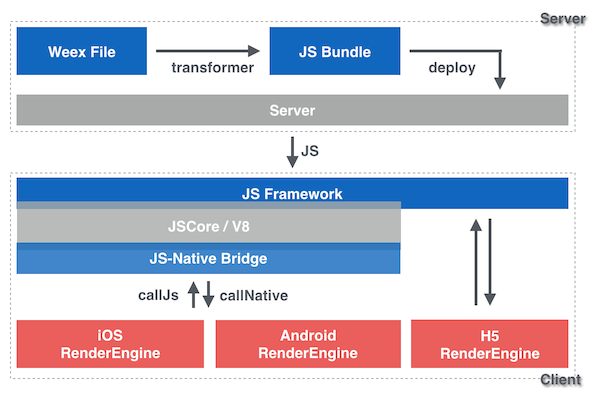
-Weex Architecture
-
-### call native from javascript
-
-```
-[JS Framework]
-↓ callNative
-module APIs
- rendering -> components display
- other features
-[Native RenderEngine]
-```
-
-### call javascript from native
-
-```
-[Native RenderEngine]
-module APIs callbacks
-user interactions
-↓ callJS
-[JS Framework]
-```
-
-### Render Flow
-
-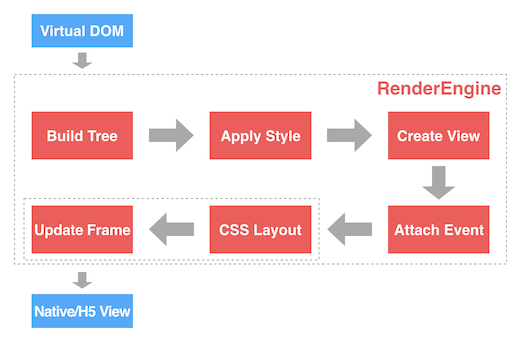
-Weex Render Flow
-
-0. Input is virtual dom.
-0. **Build Tree**. Parse JSON data (virtual dom) to a Render Tree (RT).
-0. **Apply Style**. Attach css style to RT nodes.
-0. **Create View**. Create native views for each RT node.
-0. **Attach Event**. Attach events for each view.
-0. **CSS Layout**. Use [css-layout](https://github.com/facebook/css-layout) to calculate the layout of each view.
-0. **Update Frame**. Update layout parameters of each view.
-0. Output is Native or H5 Views.
-
-In H5 Render Flow, `CSS Layout` and `Update Frame` are implemented by browser engine like webkit.
http://git-wip-us.apache.org/repos/asf/incubator-weex/blob/8162f8c2/doc/source/v-0.10/advanced/integrate-to-android.md
----------------------------------------------------------------------
diff --git a/doc/source/v-0.10/advanced/integrate-to-android.md b/doc/source/v-0.10/advanced/integrate-to-android.md
deleted file mode 100644
index e2b2569..0000000
--- a/doc/source/v-0.10/advanced/integrate-to-android.md
+++ /dev/null
@@ -1,204 +0,0 @@
----
-title: Integrate to Android
-type: advanced
-order: 3
-has_chapter_content: true
-version: 0.10
----
-
-# Integrate to Android
-
-When you need to use the new features or to customize specific features, you can rely on the Source SDK for development。
-
-## Prerequisites
-
-Assuming you have the Android SDK installed, run `android` to open the Android SDK Manager.
-
-Make sure you have the following installed:
-
-1. Android SDK version 23 (compileSdkVersion in [`build.gradle`](https://github.com/apache/incubator-weex/blob/master/android/sdk/build.gradle))
-2. SDK build tools version 23.0.2 (buildToolsVersion in [`build.gradle`](https://github.com/apache/incubator-weex/blob/master/android/sdk/build.gradle))
-3. Android Support Repository >= 17 (for Android Support Library)
-4. Android NDK (download & extraction instructions [here](http://developer.android.com/ndk/downloads/index.html))
-
-Point Gradle to your Android SDK: either have `$ANDROID_SDK` and `$ANDROID_NDK ` defined, or create a local.properties file in the root of your weex checkout with the following contents:
-
-```
-sdk.dir=absolute_path_to_android_sdk
-ndk.dir=absolute_path_to_android_ndk
-```
-
-Example:
-
-```
-sdk.dir=/Users/your_name/android-sdk-macosx
-ndk.dir=/Users/your_name/android-ndk-r10e
-```
-
-
-## Building the source
-
-#### 1. Clone source from github
-
-First, you need to git clone `weex` from github:
-
-```shell
-git clone https://github.com/alibaba/weex.git
-```
-##### 2. Build APK
- *** 1) Android studio build APK ***
-
- ```
- Step 1: run android studio
- Step 2: open the file of ~/weex/android/playground/build.gradle
- Step 3: Run the Project and the Apk will auto install in your android device
- ```
- *** 2) Gradle build APK ***
-
- ```
- Step 1: enter the direction of "/weex/android/playground"
- Step 2: run the build command: ./gradlew clean assemble
- Step 3: obtain the payground APK from the direction of weex/android/playground/app/build/outputs/apk/
- Step 3: then adb install -r weex/android/playground/app/build/outputs/apk/playgroud.apk
- ```
-#### 3. Adding the `:weex_sdk_android` project
-
-
-Add the `:weex_sdk_android` project in `android/settings.gradle`:
-
-```gradle
-include ':weex_sdk_android'
-
-project(':weex_sdk_android').projectDir = new File(
- rootProject.projectDir, '../weex_sdk_android')
-```
-
-Modify your `android/app/build.gradle` to use the `:weex_sdk_android` project instead of the pre-compiled library, e.g. - replace `compile 'com.taobao.android:weex_sdk:0.4.1` with `compile project(':weex_sdk_android')`:
-
-```gradle
-dependencies {
- compile fileTree(dir: 'libs', include: ['*.jar'])
- compile 'com.android.support:appcompat-v7:23.0.1'
-
- compile project(':weex_sdk_android')
-
- ...
-}
-```
-
-#### 3. Making 3rd-party modules use your project
-
-If you use 3rd-party weex modules, you need to override their dependencies so that they don't build the pre-compiled library. Otherwise you'll get an error while compiling - `Error: more than one library with package name 'com.taobao.weex'`.
-
-Modify your `android/app/build.gradle` and replace `compile project(':weex-custom-module')` with:
-
-```gradle
-compile(project(':weex-custom-module')) {
- exclude group: 'com.taobao.weex', module: 'weex_sdk_android'
-}
-```
-
-#### 4、How to load local Your Js bundle in the directory of Android assets
-Besides load a Js Bundle online, you also can load the js bundle from the directory of Android assets.
-
-For Example:
-
- ```
- String yourbundleStr = WXFileUtils.loadFileContent("yourBundle.js", context);
- WXSDKInstance.render(TAG, yourbundleStr, options, null, width, Height, WXRenderStrategy.APPEND_ASYNC);
- ```
-
-
-## Building from Android Studio
-
-From the Welcome screen of Android Studio choose "Import project" and select the `playground` folder of your app.
-
-You should be able to use the _Run_ button to run your app on a device.
-
-## Tip
-1. Since the packet size limit is currently only compiled arm , X86 does not support.
-
-2. Gradle build fails in `ndk-build`. See the section about `local.properties` file above.
-
-#Quick access
-
-## Requirements
-
-* an existing, gradle-based Android app
-
-## Prepare your app
-
-In your app's `build.gradle` file add the WEEX dependency:
-
- compile 'com.taobao.android:weex_sdk:0.4.1'
-
-You can find the latest version of the WEEX library on [jcenter](https://bintray.com/search?query=weex_sdk&forceAgnostic=true). Next, make sure you have the Internet permission in your `AndroidManifest.xml`:
-
- <uses-permission android:name="android.permission.INTERNET" />
-
-
-## Add native code
-
-You need to add some native code in order to start the Weex runtime and get it to render something. To do this, we're going to create an `Application` to init weex, then we we're going to create an `Activity` that creates a WeexContainerView, starts a Weex application inside it and sets it as the main content view.
-
-
-```java
-public class WXApplication extends Application {
- @Override
- public void onCreate() {
- super.onCreate();
-
- WXEnvironment.addCustomOptions("appName","TBSample");
- WXSDKEngine.init(this);
- try {
-
- WXSDKEngine.registerComponent("wtRichText", WTRichText.class);
- ......
-
- WXSDKEngine.registerModule("event", WXEventModule.class);
- } catch (WXException e) {
- e.printStackTrace();
- }
- }
-}
-```
-
-Next,
-
-```java
-// Create or find RenderContainer view.
-// Notice: If you create RenderContainer manually, don't forget add it to view tree.
-RenderContainer renderContainer = (RenderContainer)findViewById(R.id.container);
-
-//crate Weex instance
-WXSDKInstance mInstance = new WXSDKInstance(this);
-//set render container
-mInstance.setRenderContainer(renderContainer);
-//set image Adapter
-mInstance.setImgLoaderAdapter(new ImageAdapter(this));
-//register render listener
-mInstance.registerRenderListener(new IWXRenderListener() {
- @Override
- public void onViewCreated(WXSDKInstance instance, View resultView) {
- // Notice: If you don't setRenderContainer before render, you need add the resultView to view tree here.
-
- }
- @Override
- public void onRenderSuccess(WXSDKInstance instance) {
- }
- @Override
- public void onRefreshSuccess(WXSDKInstance instance) {
- }
- @Override
- public void onException(WXSDKInstance instance, String errCode,String msg) {
- }
-});
-//start render weex view
-mInstance.render(pageName,template, null, null, -1, -1, WXRenderStrategy.APPEND_ASYNC);
-```
-
-That's it, your activity is ready to run some JavaScript code.
-
-## Reference Example
-
-[`Weex Examples`](https://github.com/apache/incubator-weex/tree/master/examples)
http://git-wip-us.apache.org/repos/asf/incubator-weex/blob/8162f8c2/doc/source/v-0.10/advanced/integrate-to-html5.md
----------------------------------------------------------------------
diff --git a/doc/source/v-0.10/advanced/integrate-to-html5.md b/doc/source/v-0.10/advanced/integrate-to-html5.md
deleted file mode 100644
index b71bcd7..0000000
--- a/doc/source/v-0.10/advanced/integrate-to-html5.md
+++ /dev/null
@@ -1,77 +0,0 @@
----
-title: Integrate to web
-type: advanced
-order: 5
-has_chapter_content: true
-version: 0.10
----
-
-# Integrate Weex HTML5 to your project
-
-### Intro
-
-Weex is a extendable cross-platform solution for dynamic programming and publishing projects, which is for developers to write code once and run the code everywhere.
-
-The bundle transformed from the source can currently run on android, ios and web platform. Weex HTML5 is a renderer for weex bundle to run on a webview or a modern browser etc.
-
-### Get Weex HTML5
-
-Use npm to install the latest version of Weex HTML5, require it in your code by CommonJS and use it as a npm package.
-
-#### Install from npm
-
-Make sure you get the latest version by `npm install` or `npm update`. For more information of npm, please visit the [npm official site](https://docs.npmjs.com/).
-
-```
-npm install weex-html5
-```
-
-require weex-html5:
-
-```
-const weex = require('weex-html5')
-```
-
-### Initialize and run
-
-You can initialize weex through the API `init`. This method takes a config object as the first argument to confirm the runtime infomation and environment. Following parameters can be set by this config object:
-
-* `appId`: app instance id, can be either a string or a number
-* `source`: the requested url of weex bundle, or the transformed code it self.
-* `loader`: the loader type to load the weex bundle, which value is 'xhr' or 'jsonp' or 'source'.
- * `xhr`: load the source (weex bundle url) by XHR
- * `jsonp`: load the source bundle by JSONP
- * `source`: the source parameter above should be a weex bundle content (transformed bundle).
-* `rootId`: the id of the root element. Default value is 'weex'.
-
-Here is a example to do the initialzation:
-
-```
-function weexInit() {
- function getUrlParam (key) {
- var reg = new RegExp('[?|&]' + key + '=([^&]+)')
- var match = location.search.match(reg)
- return match && match[1]
- }
-
- var loader = getUrlParam('loader') || 'xhr'
- var page = getUrlParam('page')
-
- // jsonp callback name should be specified or be the default
- // value 'weexJsonpCallback' if the 'jsonp' loader is used.
- var JSONP_CALLBACK_NAME = 'weexJsonpCallback'
-
- window.weex.init({
- jsonpCallback: JSONP_CALLBACK_NAME,
- appId: location.href,
- source: page,
- loader: loader,
- rootId: 'weex'
- })
-}
-
-weexInit()
-```
-
-
-
http://git-wip-us.apache.org/repos/asf/incubator-weex/blob/8162f8c2/doc/source/v-0.10/advanced/integrate-to-ios.md
----------------------------------------------------------------------
diff --git a/doc/source/v-0.10/advanced/integrate-to-ios.md b/doc/source/v-0.10/advanced/integrate-to-ios.md
deleted file mode 100644
index 69dea6d..0000000
--- a/doc/source/v-0.10/advanced/integrate-to-ios.md
+++ /dev/null
@@ -1,118 +0,0 @@
----
-title: Integrate to iOS
-type: advanced
-order: 4
-has_chapter_content: true
-version: 0.10
----
-
-# import Weex iOS to your project
-
-You will need to build Weex from source if you want to work on a new feature/bug fix, try out the latest features not released yet, or maintain your own fork with patches that cannot be merged to the core.
-
-Assuming you have installed [iOS Develop Environment](https://developer.apple.com/library/ios/documentation/IDEs/Conceptual/AppStoreDistributionTutorial/Setup/Setup.html) and [CocoaPods](https://guides.cocoapods.org/using/getting-started.html).
-
-#### 1. Clone source from github
-
-First, you need to git clone `weex` from github:
-
-```
-git clone https://github.com/alibaba/weex.git
-```
-#### 2. Import WeexSDK to project
-
-Copy the whole folder `/ios/sdk` to your project directory.
-
-Before adding the dependencies, please confirm that the project directory already exists the Podfile. If not, create a new one. Then, edit this file, adding some necessary dependecis for the target.
-
-```
-target 'YourTarget' do
- platform :ios, '7.0'
- pod 'WeexSDK', :path=>'./sdk/'
-end
-```
-You can get your `YourTarget` below
-
-
-
-Run pod install in current directory, for a while, .xcworkspace will be created. At this point, the dependencies have been established.
-
-#### 3. Init Weex Environment
-We are used to doing some initial tasks in appDelegate. Of course, there is no exception. You can do this in `didFinishLaunchingWithOptions` as follows.
-
-```
-//business configuration
-[WXAppConfiguration setAppGroup:@"AliApp"];
-[WXAppConfiguration setAppName:@"WeexDemo"];
-[WXAppConfiguration setAppVersion:@"1.0.0"];
-
-//init sdk enviroment
-[WXSDKEngine initSDKEnviroment];
-
-//register custom module and component,optional
-[WXSDKEngine registerComponent:@"MyView" withClass:[MyViewComponent class]];
-[WXSDKEngine registerModule:@"event" withClass:[WXEventModule class]];
-
-//register the implementation of protocol, optional
-[WXSDKEngine registerHandler:[WXNavigationDefaultImpl new] withProtocol:@protocol(WXNavigationProtocol)];
-
-//set the log level
-[WXLog setLogLevel:WXLogLevelVerbose];
-
-```
-
-#### 4. Render Weex Instance
-Weex supports two different modes, the full page rendering and part of page rendering.
-Something you have to do is to render weex view with specific URL, then add it to the parent container, which may be the viewController.
-
-```
-#import <WeexSDK/WXSDKInstance.h>
-
-- (void)viewDidLoad
-{
- [super viewDidLoad];
-
- _instance = [[WXSDKInstance alloc] init];
- _instance.viewController = self;
- _instance.frame = self.view.frame;
-
- __weak typeof(self) weakSelf = self;
- _instance.onCreate = ^(UIView *view) {
- [weakSelf.weexView removeFromSuperview];
- weakSelf.weexView = view;
- [weakSelf.view addSubview:weakSelf.weexView];
- };
-
- _instance.onFailed = ^(NSError *error) {
- //process failure
- };
-
- _instance.renderFinish = ^ (UIView *view) {
- //process renderFinish
- };
- [_instance renderWithURL:self.url options:@{@"bundleUrl":[self.url absoluteString]} data:nil];
-}
-```
-WXSDKInstance is a very imporent class, which provides you with some basic methods and callbacks, such as renderWithURL、onCreate、onFailed and etc. You can understand their usage by reading WXSDKInstance.h.
-
-
-#### 5. Destroy Weex Instance
-
-Please release weex instance in dealloc stage of viewContoller, or it will lead to memory leak.
-
-```
-- (void)dealloc
-{
- [_instance destroyInstance];
-}
-```
-
-#### 6. Build .IPA for Weex
-
-We can also pack all the JS files into the app's resources. This way you can run your app without development server and submit it to the AppStore.
-
-* [Install weex-toolkit](https://github.com/alibaba/weex_toolchain/tree/master/toolkit) and transform your `.we` file to JS by running `weex index.we -o index.js`, `index.we` is the entry file of your app.
-* Move `index.js` to your app's Xcode project and add the file to your target.
-* Replace `[_instance renderWithURL:'httpURL']` with: `[_instance renderWithURL: [[NSBundle mainBundle] URLForResource:@"index" withExtension:@"js"]]`
-
-* Go to Product -> Archive in Xcode and follow the steps to build your .IPA file and submit it to the AppStore.
http://git-wip-us.apache.org/repos/asf/incubator-weex/blob/8162f8c2/doc/source/v-0.10/guide/.gitkeep
----------------------------------------------------------------------
diff --git a/doc/source/v-0.10/guide/.gitkeep b/doc/source/v-0.10/guide/.gitkeep
deleted file mode 100644
index e69de29..0000000
http://git-wip-us.apache.org/repos/asf/incubator-weex/blob/8162f8c2/doc/source/v-0.10/guide/how-to/customize-a-native-component.md
----------------------------------------------------------------------
diff --git a/doc/source/v-0.10/guide/how-to/customize-a-native-component.md b/doc/source/v-0.10/guide/how-to/customize-a-native-component.md
deleted file mode 100644
index 62c0cf0..0000000
--- a/doc/source/v-0.10/guide/how-to/customize-a-native-component.md
+++ /dev/null
@@ -1,58 +0,0 @@
----
-title: Customize a native Component
-type: guide
-order: 3.3
-version: 0.10
----
-
-# How to customize a native Component ?
-
-Weex has wrapped up the most critical platform components, such as `ScrollView`, `ListView`, `Text`, `Imageview` and so on. Certainly these components can not completely meet your need. And thousands of native UI components that always be using in our project may be required to integrate into Weex easily. Fortunately, it's quite convenient to wrap up your own components that should be from any existing components.
-
-##### Step By Step
-
-1. Customized components must inherit from `WXComponent` or `WXContainer`;
-2. @WXComponentProp(name=value(value is attr or style of dsl)) for it be recognized by weex SDK;
-3. The access levels of method must be **public**;
-4. The component class can not be an inner class;
-5. Customized components should not be obfuscated by tools like ProGuard;
-6. Component methods will be invoked on the UI thread, so do not contain time-consuming operations here;
-7. Weex parameter's type can be int, double, float, String, Map, List, self-defined class that implements WXObject interface;
-
-
-#### Refer to the following example:
-
-```java
-package com.taobao.weex.ui.component;
-……
-
-public class MyViewComponent extends WXComponent{
-
- public MyViewComponent(WXSDKInstance instance, WXDomObject node,
- WXVContainer parent, String instanceId, boolean lazy) {
- super(instance, node, parent, instanceId, lazy);
- }
-
- @Override
- protected void initView() {
- //TODO:your own code ……
- }
-
- @Override
- public WXFrameLayout getView() {
- //TODO:your own code ………
- }
- @WXComponentProp(name=WXDomPropConstant.WX_ATTR_VALUE)
- public void setMyViewValue(String value) {
- ((TextView)mHost).setText(value);
- }
-
-}
-```
-#### Component should be registered
-
-```java
-WXSDKEngine.registerComponent("MyView", MyViewComponent.class);
-```
-
-
http://git-wip-us.apache.org/repos/asf/incubator-weex/blob/8162f8c2/doc/source/v-0.10/guide/how-to/cuszomize-native-apis.md
----------------------------------------------------------------------
diff --git a/doc/source/v-0.10/guide/how-to/cuszomize-native-apis.md b/doc/source/v-0.10/guide/how-to/cuszomize-native-apis.md
deleted file mode 100644
index 9594ff0..0000000
--- a/doc/source/v-0.10/guide/how-to/cuszomize-native-apis.md
+++ /dev/null
@@ -1,80 +0,0 @@
----
-title: Customize native APIs
-type: guide
-order: 3.4
-version: 0.10
----
-
-# How to customize native APIs ?
-
-Weex SDK provides only rendering capability, rather than having other capabilities, such as network, picture, and URL redirection. If you want the these features, you need to implement them yourselves.
-The example below will describe how to extend weex with native logic or 'bridge' your existed native code.
-
-## A URLHelper Example
-### Create your own `WXModule` in native:
-
-```java
-public class URLHelperModule extends WXModule{
- private static final String WEEX_CATEGORY="com.taobao.android.intent.category.WEEX";
- @WXModuleAnno
- public void openURL(String url){
- if (TextUtils.isEmpty(url)) {
- return;
- }
- StringBuilder builder=new StringBuilder("http:");
- builder.append(url);
- Uri uri = Uri.parse(builder.toString());
- Intent intent = new Intent(Intent.ACTION_VIEW, uri);
- intent.addCategory(WEEX_CATEGORY);
- mWXSDKInstance.getContext().startActivity(intent);
- }
-}
-
-```
-
-Notice the `@WXModuleAnno`, use this annotation to mark the methods you wanna expose to javascript.
-If your also want to callback to javascript, you should define a `callbackId` parameter to received 'JS callback function id':
-
-```java
-public class URLHelperModule extends WXModule{
-
- @WXModuleAnno
- public void openURL(String url,String callbackId){
- //...
- //callback to javascript
- Map<String, Object> result = new HashMap<String, Object>();
- result.put("ts", System.currentTimeMillis());
- WXBridgeManager.getInstance().callback(mWXSDKInstance.getInstanceId(), callbackId, result);
- }
-}
-```
-
-
-### Register your module to engine:
-
-```
-try {
- WXSDKEngine.registerModule("myURL", URLHelperModule.class);//'myURL' is the name you'll use in javascript
- } catch (WXException e) {
- WXLogUtils.e(e.getMessage());
- }
-```
-### Now, you can use eventModule in javascript like this:
-
-```javascript
-let URLHelper = require('@weex-module/myURL');//same as you registered
-URLHelper.openURL("http://www.taobao.com",function(ts){
- console.log("url is open at "+ts);
-});
-
-```
-
-
-## Things you need to note:
-1. Customized components must inherit from `WXModule`;
-2. @WXModuleAnno annotation must be added, as it is the only way to be recognized by Weex;
-3. The access levels of method must be **public**;
-4. The module class also can not be an inner class;
-5. Customized components should not be obfuscated by tools like ProGuard;
-6. Module methods will be invoked on the UI thread, so do not put time-consuming operations there;
-7. Weex parameter's type can be int, double, float, String, Map, List, self-defined class that implements WXObject interface;
http://git-wip-us.apache.org/repos/asf/incubator-weex/blob/8162f8c2/doc/source/v-0.10/guide/how-to/debug-with-html5.md
----------------------------------------------------------------------
diff --git a/doc/source/v-0.10/guide/how-to/debug-with-html5.md b/doc/source/v-0.10/guide/how-to/debug-with-html5.md
deleted file mode 100644
index c80fb69..0000000
--- a/doc/source/v-0.10/guide/how-to/debug-with-html5.md
+++ /dev/null
@@ -1,47 +0,0 @@
----
-title: Debug in html5 renderer
-type: guide
-order: 3.5
-version: 0.10
----
-
-# How to debug in html5 renderer ?
-
-Since weex-html5 can run on a modern mobile browser, it's naturally supported to debug weex-html5 code in browsers' dev tools. Use browser's devTools to iterate, debug and profile your weex-html5 app. Take chrome's debug tool as a example:
-
-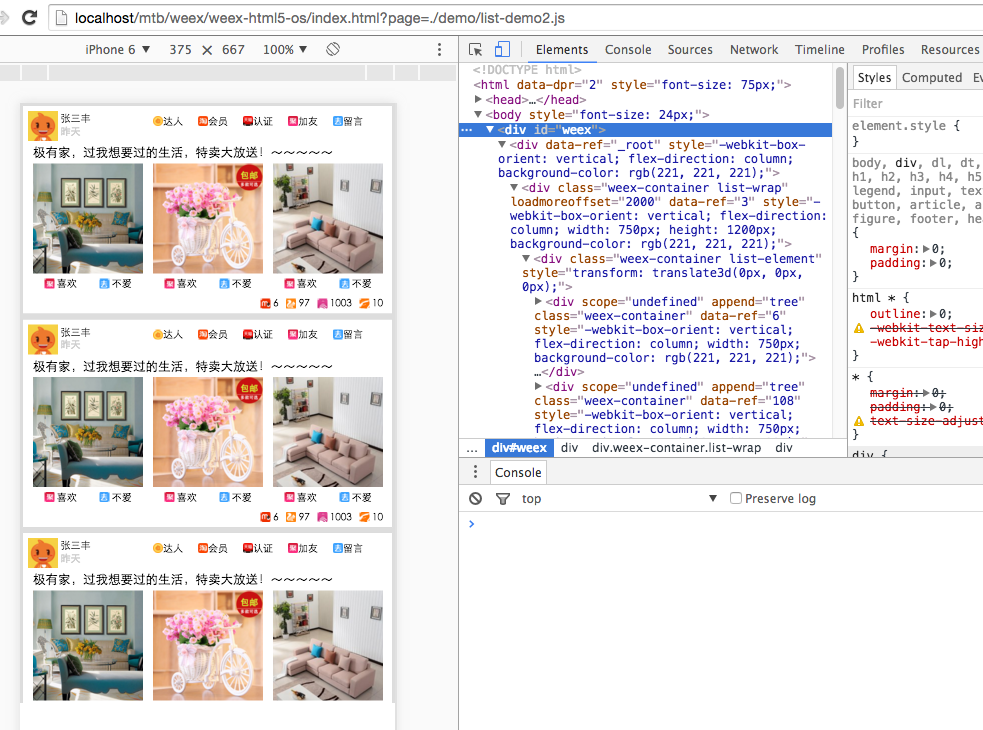
-
-## Elements
-
-Use elements' panel to inspect the layout and design of the weex-html5 page, and manipulate the DOM and CSS to do some experiment freely.
-
-## Console
-
-You can use `console.log` to log information on console, but it's highly recommended to use `nativeLog` instead, since nativeLog can run on a native platform based on a browser. The defect of `nativeLog` is that it's not supported to trace it from the console to the source file which the `nativeLog` is called in, therefore in this situation you'd better use `console.log`, and you should make sure this code will not run on native platform (otherwise a exception or a crash will be caused).
-
-## Breakpoints
-
-You can set breakpoints to debug code. Breakpoints are one of the most effective way to debug code. Breakpoints enable you to pause script execution and then investigate the call stack variable values at that particular moment in time.
-
-Manual breakpoints are individual breakpoints that you set on a specific line of code. You can set these via Chrome DevTools GUI, or by inserting the `debugger` keyword in your code.
-
-## Locate your bug
-
-Generally speaking, there are three possible layer the bug could happen on: the renderer (weex-html5), the js-framework (weex-js-framework) and the transformer (gulp-weex).
-
-Here are some suggestions to locate your bug so that you can recognize which layer the bug is on:
-
-* check the console for errors. In debug mode if there is a error happend there will be info about it on the console.
-* in bridge/receiver.js, whether the `callNative` function is called.
-* whether the supposed to be called API method is actually called and executed.
-* whether the `callJS` method for event firing or callback executing is called.
-
-## other
-
-More info about how to debug h5 pages on chrome devTools: [chrome's devTools docs](https://developers.google.com/web/tools/chrome-devtools/?hl=en)
-
-
-
-
-
-
http://git-wip-us.apache.org/repos/asf/incubator-weex/blob/8162f8c2/doc/source/v-0.10/guide/how-to/index.md
----------------------------------------------------------------------
diff --git a/doc/source/v-0.10/guide/how-to/index.md b/doc/source/v-0.10/guide/how-to/index.md
deleted file mode 100644
index 9f9435a..0000000
--- a/doc/source/v-0.10/guide/how-to/index.md
+++ /dev/null
@@ -1,40 +0,0 @@
----
-title: Preview in browser
-type: guide
-order: 3
-has_chapter_content: false
-chapter_title: How-tos
-version: 0.10
----
-
-# How to preview weex code in browser ?
-
-## weex-toolkit
-
-We strongly suggest you use weex-toolkit to preview weex code in your browser. This tool is Node.JS based, so you need to install Node at first. Please download and install latest stable version of Node from [https://nodejs.org/en/download/stable/](https://nodejs.org/en/download/stable/). Then you can install weex-toolkit using npm install:
-
-```bash
-$ npm install -g weex-toolkit
-```
-
-Check that the toolkit does work by typing `weex` in the command line. Normally you should see the following help text:
-
-```
-Options:
- --qr display QR code for native runtime,
- -o,--output transform weex we file to JS Bundle, output path (single JS bundle file or dir)
- -s,--server start a http file server, weex .we file will be transforme to JS bundle on the server , specify local root path using the option
- ......
- --help Show help
-```
-
-If all work well, navigate to the path the xxx.we file you want to preview in, and type the command:
-
-```bash
-weex xxx.we
-```
-
-A browser window will be opened automatically to display the page you want to preview:
-
-
-