You are viewing a plain text version of this content. The canonical link for it is here.
Posted to commits@flagon.apache.org by au...@apache.org on 2026/10/12 02:50:27 UTC
(flagon) branch master updated: docs: update READMEs, guides, and website for UserALE 2.5, Distill 2.5, and uv (#198)
This is an automated email from the ASF dual-hosted git repository.
brucearctor pushed a commit to branch master
in repository https://gitbox.apache.org/repos/asf/flagon.git
The following commit(s) were added to refs/heads/master by this push:
new cf911b8 docs: update READMEs, guides, and website for UserALE 2.5, Distill 2.5, and uv (#198)
cf911b8 is described below
commit cf911b87e4f2f917434df91344b68053e2112582
Author: brucearctor <50...@users.noreply.github.com>
AuthorDate: Sun Oct 11 19:50:22 2026 -0700
docs: update READMEs, guides, and website for UserALE 2.5, Distill 2.5, and uv (#198)
---
CONTRIBUTING.md | 18 +-
README.md | 25 +-
examples/README.md | 2 +-
examples/elk/docker/README.md | 5 +-
examples/elk/kubernetes/README.md | 10 +-
examples/opensearch/README.md | 8 +-
lefthook.yml | 3 +-
products/distill/AUTHORS.md | 59 ++--
products/distill/CHANGELOG.md | 44 ++-
products/distill/CONTRIBUTING.md | 108 +++----
products/distill/README.md | 21 +-
products/distill/distill/analytics/graph/README.md | 29 +-
products/distill/distill/segmentation/README.rst | 26 +-
.../docs/Combining_Segments_with_Set_Logic.md | 35 +--
products/distill/docs/Creating_Segments.md | 23 +-
products/distill/docs/Example_Usage.md | 17 +-
products/distill/docs/Exporting_Segments.md | 15 -
products/distill/docs/Funnel_Function.md | 159 +---------
products/distill/docs/Getting_Started.md | 15 -
products/distill/docs/Graph_Index.md | 17 +-
.../Manipulating_Collections_of_Segment_Objects.md | 15 -
products/distill/docs/Process.md | 15 -
products/distill/docs/Process_Docs.md | 15 -
products/distill/docs/Sankey_Function.md | 129 +-------
products/distill/docs/Segmentation.md | 15 -
products/distill/docs/Utilities.md | 15 -
products/distill/docs/Utility_Functions.md | 29 +-
products/distill/docs/Writing_Segments.md | 21 +-
products/distill/docs/index.md | 15 -
products/distill/tests/README.rst | 27 +-
products/userale/README.md | 7 +-
products/userale/example/README.md | 179 ++++++-----
products/userale/example/otel-demo/README.md | 9 +-
.../userale/packages/flagon-userale-ext/README.md | 16 +-
.../userale/packages/flagon-userale/CHANGELOG.md | 13 +-
.../packages/flagon-userale/CONTRIBUTING.md | 255 ++++-----------
products/userale/packages/flagon-userale/README.md | 342 +++++++++++----------
.../packages/flagon-userale/example/README.md | 178 ++++++-----
.../custom-non-user-events-example/README.md | 98 +++---
.../example/log-label-example/README.md | 50 +--
.../example/react-app-example/README.md | 9 +-
.../example/webpackUserAleExample/README.md | 162 +++++-----
.../flagon-userale/test/spec/replay.spec.ts | 7 +
.../packages/flagon-userale/test/spec/testUtils.ts | 5 +-
site/CHANGELOG.md | 3 +
site/_docs/contributing.md | 13 +-
site/_docs/distill/index.md | 36 ++-
site/_docs/useralejs/API.md | 45 ++-
site/_docs/useralejs/build.md | 11 +-
site/_docs/useralejs/dataschema.md | 28 +-
site/_docs/useralejs/index.md | 9 +-
site/_docs/useralejs/modifying.md | 7 +-
site/_docs/useralejs/troubleshooting.md | 4 +-
site/_pages/distill.html | 18 +-
site/_pages/releases.html | 4 +-
site/_pages/userale.html | 20 +-
site/index.html | 6 +-
57 files changed, 985 insertions(+), 1484 deletions(-)
diff --git a/CONTRIBUTING.md b/CONTRIBUTING.md
index 64f2b8a..8a6da61 100644
--- a/CONTRIBUTING.md
+++ b/CONTRIBUTING.md
@@ -38,11 +38,11 @@ If you have [Nix](https://nixos.org/) with flakes enabled, run:
nix develop
```
-This drops you into a reproducible shell containing Node.js, `pnpm`, TypeScript, Python 3, `buf`, `nixpkgs-fmt`, and `lefthook` git hooks.
+This drops you into a reproducible shell containing Node.js, `pnpm`, TypeScript, Python 3, `uv`, `buf`, `nixpkgs-fmt`, and `lefthook` git hooks.
### Option B: Manual Toolchain Setup
- **UserALE (`products/userale`)**: Node.js `>= 20.x` and `pnpm >= 10.x`
-- **Distill (`products/distill`)**: Python `>= 3.8` (`3.10+` recommended) and `poetry` (or `uv`)
+- **Distill (`products/distill`)**: Python `>= 3.10,< 4.0` and [`uv`](https://docs.astral.sh/uv/)
- **Protobuf (`proto/`)**: [`buf` CLI](https://buf.build/docs/installation) `>= 1.50`
- **Website (`site/`)**: Ruby + Bundler + Jekyll
@@ -64,7 +64,7 @@ pnpm --dir packages/flagon-userale test
# Run Playwright end-to-end tests
pnpm test
-# Format and lint
+# Format and lint (or use format:check / lint:check as run in CI)
pnpm format
pnpm lint
```
@@ -77,21 +77,23 @@ buf lint
buf generate
```
-Ensure `buf generate --exit-code` passes cleanly (do not reformat generated files under `products/userale/packages/flagon-userale/src/gen/`).
+Ensure `buf generate --exit-code` passes cleanly (and run `pnpm format` in `products/userale` if generated TypeScript files change).
### Distill (`products/distill`)
```bash
cd products/distill
-poetry install --all-groups
-poetry run pytest
+uv sync --all-groups
+uv run pytest
+uv run --group lint ruff check .
```
---
## 4. Pre-Commit Hooks & Code Style
-This repository uses [`lefthook`](./lefthook.yml) to run formatting and lint checks before commits and pushes:
-- **Prettier & ESLint** run automatically on staged files under `products/userale/`.
+This repository uses [`lefthook`](./lefthook.yml) to run formatting, linting, and test checks before commits and pushes:
+- **`pre-commit`**: Runs Prettier & ESLint on staged files under `products/userale/`, `ruff check` (`uv run --group lint ruff check`) on staged Python files under `products/distill/`, and `nixpkgs-fmt` on `.nix` files.
+- **`pre-push`**: Runs the full UserALE (`pnpm test`) and Distill (`uv run --group test pytest`) test suites.
- **Apache License Headers**: Every new source file must include the standard ASF Apache-2.0 license header (enforced in CI via SkyWalking Eyes).
- Always run pre-commit hooks when committing (do not use `--no-verify`).
diff --git a/README.md b/README.md
index ba8bbd2..a1b4b5a 100644
--- a/README.md
+++ b/README.md
@@ -37,6 +37,8 @@
│ │ └── otel-demo/ # Full-stack OTel Collector + Grafana + Loki + Tempo demo
│ └── distill/ # Python behavioral analytics & graph toolkit
├── examples/
+│ ├── opensearch/ # 100% Apache-2.0 OpenSearch + OTel Collector stack
+│ ├── apache-lakehouse/ # All-Apache Kafka + Iceberg + DataFusion + Distill + Superset
│ └── elk/ # Docker Compose & Kubernetes ELK stack examples
└── site/ # Jekyll source for https://flagon.apache.org/
```
@@ -46,27 +48,30 @@
## Products & Capabilities
### 1. [Apache Flagon UserALE.js](./products/userale/packages/flagon-userale/README.md)
-Zero-dependency client-side instrumentation library (`ESM` + `IIFE` script tag) that automatically captures DOM interactions, interval summaries, and custom application events.
+Zero-dependency client-side instrumentation library (`ESM` + `IIFE` script tag) that automatically captures DOM interactions, interval summaries, structural DOM mutations, and custom application events.
- **Multiple Wire Exporters**:
- - **UserALE Flat JSON (`'userale-json'`)**: Default backward-compatible JSON array batch transport over `fetch` (with 48 KiB chunked `keepalive: true` delivery on `pagehide`).
- - **OpenTelemetry OTLP/JSON (`'otlp-json'`)**: Native `ExportLogsServiceRequest` exporter (`OtlpJsonExporter`) with `Resource` attribute hoisting, nanosecond `BigInt` timestamps, OTel Event naming (`eventName` / `event.name`), structured `kvlistValue` body, and W3C TraceContext (`traceId`, `spanId`) correlation.
+ - **UserALE Flat JSON (`'http-json'`)**: Default backward-compatible JSON array batch transport over `fetch` (with 48 KiB chunked `keepalive: true` delivery on `pagehide`).
+ - **OpenTelemetry OTLP/JSON (`'otlp'`)**: Native `ExportLogsServiceRequest` exporter (`OtlpJsonExporter`) with `Resource` attribute hoisting, nanosecond `BigInt` timestamps, OTel Event naming (`eventName` / `event.name`), structured `kvlistValue` body, and W3C TraceContext (`traceId`, `spanId`) correlation.
- **OpenTelemetry JS SDK Bridge (`OtelSdkExporter`)**: Routes UserALE logs directly into an existing `@opentelemetry/api-logs` `Logger`.
- **Protobuf v1 Canonical JSON (`'proto-json'`)**: Serializes batches conforming to [`proto/apache/flagon/userale/v1/log.proto`](./proto/apache/flagon/userale/v1/log.proto) (`apache.flagon.userale.v1.LogBatch`).
- - **WebSocket (`'ws'`)**: Persistent streaming transport for `ws://` and `wss://` endpoints.
+ - **WebSocket (`'websocket'`)**: Persistent streaming transport for `ws://` and `wss://` endpoints.
+- **Two-Layer Session Replay & Behavioral DOM Telemetry (`startSessionReplay`, `flushSessionReplay`, `stopSessionReplay`)**:
+ - **Layer 1 (Built-in)**: Throttled `MutationObserver` structural DOM telemetry (`logType: 'mutation'`), spatial rage-click detection (`RageClickDetector`), element bounding-box geometry (`targetRect`), and zero-dependency browser detection (`detectBrowser`).
+ - **Layer 2 (`rrweb` Bridge)**: Rolling in-memory ring buffer (`ReplayRingBuffer`) that preserves `Meta` and `FullSnapshot` anchor frames and flushes visual replays correlated with `sessionId` and active OpenTelemetry `traceId` / `spanId` on rage clicks or runtime errors.
### 2. [UserALE Browser Extension](./products/userale/packages/flagon-userale-ext/README.md)
-Manifest V3 browser extension for Chrome and Firefox that injects UserALE into pages matching a configurable URL allowlist, complete with options for **Exporter Format** (`UserALE JSON`, `OpenTelemetry (OTLP/JSON)`, `Protobuf v1 JSON`), HTTP Basic Auth, OAuth PKCE, and custom JSON headers.
+Manifest V3 browser extension for Chrome and Firefox that injects UserALE into pages matching a configurable URL allowlist, complete with options for **Exporter Format** (`UserALE JSON`, `OpenTelemetry (OTLP/JSON)`, `Protobuf v1 JSON`), OAuth 2.0 PKCE, API Key (`x-api-key`) authentication, and event/log type filtering.
### 3. [Apache Flagon Distill](./products/distill/README.md)
-Python behavioral analytics package (`flagon-distill`) for session segmentation, funnel conversion analysis, and directed clickstream graph modeling. Seamlessly ingests UserALE flat JSON (`v2.3+`), Protobuf v1 `LogBatch` JSON, and OpenTelemetry OTLP/JSON (`ExportLogsServiceRequest`) payloads.
+Python behavioral analytics package (`flagon-distill`) for session segmentation, UX frustration detection (`detect_rage_clicks`, `detect_dead_clicks`, `detect_dom_thrash`, `frustration_score`), spatial viewport heatmaps (`click_heatmap_data`, `plot_click_heatmap`, `scroll_depth_summary`), OpenTelemetry trace & replay correlation (`correlate_by_trace`, `extract_replay_envelopes`), Markov transition matrices (`transition_matrix`), and directed clickstream graph modeling (`createDiGraph`, ` [...]
---
## Quick Start
### Development Environment (Nix)
-This repository includes a reproducible [`flake.nix`](./flake.nix) providing Node.js, `pnpm`, TypeScript, Python, `buf`, and `lefthook`:
+This repository includes a reproducible [`flake.nix`](./flake.nix) providing Node.js, `pnpm`, TypeScript, Python, `uv`, `buf`, and `lefthook`:
```bash
nix develop
@@ -89,11 +94,13 @@ docker compose up -d
# Open http://localhost:8080 (demo app) and http://localhost:3000 (Grafana)
```
+See [`examples/README.md`](./examples/README.md) for the **100% Apache-2.0 OpenSearch stack** (`examples/opensearch`) and the **All-Apache Behavioral Lakehouse** (`examples/apache-lakehouse`: Kafka + Iceberg + DataFusion + Distill + Superset).
+
### Build & Test Distill (Python)
```bash
cd products/distill
-poetry install --all-groups
-poetry run pytest
+uv sync --all-groups
+uv run pytest
```
---
diff --git a/examples/README.md b/examples/README.md
index 6e90436..b0f131f 100644
--- a/examples/README.md
+++ b/examples/README.md
@@ -19,7 +19,7 @@
# Apache Flagon Deployment & Analytics Examples
-Apache Flagon UserALE.js and Distill support multiple open-standard wire formats (`userale-json`, `otlp-json`, and `proto-json`), allowing you to choose the right backend architecture for your workload:
+Apache Flagon UserALE.js and Distill support multiple open-standard wire formats (`http-json`, `otlp` / `otlp-json`, and `proto-json`), allowing you to choose the right backend architecture for your workload:
| Example | Stack & License | Best For |
| :--- | :--- | :--- |
diff --git a/examples/elk/docker/README.md b/examples/elk/docker/README.md
index 3811f3b..32b921f 100644
--- a/examples/elk/docker/README.md
+++ b/examples/elk/docker/README.md
@@ -21,7 +21,10 @@
This directory contains a pre-configured **Elasticsearch + Logstash + Kibana (ELK)** Docker Compose deployment adapted from [`deviantony/docker-elk`](https://github.com/deviantony/docker-elk) alongside a containerized example web page instrumented with **Apache Flagon UserALE.js**.
-> **Looking for OpenTelemetry + Grafana/Loki/Tempo?** See [`products/userale/example/otel-demo/`](../../../products/userale/example/otel-demo/README.md) for the modern OpenTelemetry Collector demo stack.
+> **Looking for 100% Apache-2.0 or OpenTelemetry stacks?**
+> - **OpenSearch + OpenTelemetry Collector (`Apache-2.0`)**: [`../../opensearch/README.md`](../../opensearch/README.md)
+> - **All-Apache Behavioral Lakehouse (Kafka + Iceberg + DataFusion + Distill)**: [`../../apache-lakehouse/README.md`](../../apache-lakehouse/README.md)
+> - **OpenTelemetry + Grafana/Loki/Tempo**: [`../../../products/userale/example/otel-demo/README.md`](../../../products/userale/example/otel-demo/README.md)
---
diff --git a/examples/elk/kubernetes/README.md b/examples/elk/kubernetes/README.md
index 2d5a3fd..d16318d 100644
--- a/examples/elk/kubernetes/README.md
+++ b/examples/elk/kubernetes/README.md
@@ -17,12 +17,14 @@
~ under the License.
-->
-# Example Kubernetes deployment
+# Example Kubernetes Deployment (ELK)
-This script and accompanying yaml files provide an example ELK stack kubernetes deployment. This is intended to be a starting point for deploying a userale logging end point.
+This script and accompanying YAML files provide an example ELK stack Kubernetes deployment. This is intended to be a starting point for deploying a UserALE logging endpoint.
-Prerequisites: A bash enviroment and Kubernetes running with at least 4 GB memory and 4 CPU cores.
+> **Note:** For a 100% `Apache-2.0`-licensed Kubernetes deployment using OpenTelemetry Collector + OpenSearch + OpenSearch Dashboards, see [`../../opensearch/kubernetes/opensearch.yaml`](../../opensearch/kubernetes/opensearch.yaml).
+
+Prerequisites: A bash environment and Kubernetes running with at least 4 GB memory and 4 CPU cores.
Use the `run.sh` script to deploy the stack.
-`test.py` is included as a utility to verify that logs are correctly posted to elastic locally. To run `test.py`, you must first install it's requirements via `pip install -r requirements.txt`.
+`test.py` is included as a utility to verify that logs are correctly posted to Elasticsearch locally. To run `test.py`, first install its requirements via `uv pip install -r requirements.txt` (or `pip install -r requirements.txt`).
diff --git a/examples/opensearch/README.md b/examples/opensearch/README.md
index d469737..30d9e52 100644
--- a/examples/opensearch/README.md
+++ b/examples/opensearch/README.md
@@ -66,11 +66,15 @@ Configure UserALE.js in your application (or open `products/userale/example/otel
import * as userale from "flagon-userale";
userale.options({
- url: "http://localhost:4318/v1/logs",
- exporterFormat: "otlp-json",
+ otlpEndpoint: "http://localhost:4318",
+ exporterType: "otlp",
toolName: "my-web-app",
toolVersion: "1.0.0",
observeMutations: true,
+});
+
+userale.startSessionReplay({
+ observeMutations: true,
detectRageClicks: true,
});
```
diff --git a/lefthook.yml b/lefthook.yml
index a7afe69..7b2e3a5 100644
--- a/lefthook.yml
+++ b/lefthook.yml
@@ -36,13 +36,14 @@ pre-commit:
pre-push:
parallel: false
+ piped: true
commands:
userale-build:
root: "products/userale/packages/flagon-userale/"
run: pnpm build
userale-test:
root: "products/userale/packages/flagon-userale/"
- run: npx jest -c ./test/jest.config.ts
+ run: pnpm test --runInBand
distill-test:
root: "products/distill/"
run: uv run --group test pytest
diff --git a/products/distill/AUTHORS.md b/products/distill/AUTHORS.md
index 270c736..828e71a 100644
--- a/products/distill/AUTHORS.md
+++ b/products/distill/AUTHORS.md
@@ -17,40 +17,25 @@
~ under the License.
-->
-> \<!\-\--Licensed to the Apache Software Foundation (ASF) under one or
-> more contributor license agreements. See the NOTICE file distributed
-> with this work for additional information regarding copyright
-> ownership. The ASF licenses this file to You under the Apache License,
-> Version 2.0 (the \"License\"); you may not use this file except in
-> compliance with the License. You may obtain a copy of the License at
->
-> > <http://www.apache.org/licenses/LICENSE-2.0>
->
-> Unless required by applicable law or agreed to in writing, software
-> distributed under the License is distributed on an \"AS IS\" BASIS,
-> WITHOUT WARRANTIES OR CONDITIONS OF ANY KIND, either express or
-> implied. See the License for the specific language governing
-> permissions and limitations under the License. \-\--\>
-
-::: {#authors}
-Apache Distill is written and maintained by various contributors:
-:::
-
-# Development Leads:
-
-- Joshua Poore \<<j...@apache.org>\>
-- Kelsey Rassmann
-
-# Contributors:
-
-- Grant Tamrakar
-- Alex Veerasammy
-- Amir Ghaemi
-
-# Inspired by Previous Contributors:
-
-- Michelle Beard \<<m...@apache.org>\>
-- Laura Mariano \<<l...@apache.org>\>
-- Ryan Brill
-- Clay Gimenez \<<c...@dapache.org>\>
-- Arthi Vezhavendan \<<a...@apache.org>\>
+# Authors
+
+Apache Flagon Distill is written and maintained by various contributors:
+
+## Development Leads
+
+- Joshua Poore (<jp...@apache.org>)
+- Kelsey Rassmann
+
+## Contributors
+
+- Grant Tamrakar
+- Alex Veerasammy
+- Amir Ghaemi
+
+## Inspired by Previous Contributors
+
+- Michelle Beard (<ms...@apache.org>)
+- Laura Mariano (<lm...@apache.org>)
+- Ryan Brill
+- Clay Gimenez (<cg...@apache.org>)
+- Arthi Vezhavendan (<av...@apache.org>)
diff --git a/products/distill/CHANGELOG.md b/products/distill/CHANGELOG.md
index d81070e..82feb66 100644
--- a/products/distill/CHANGELOG.md
+++ b/products/distill/CHANGELOG.md
@@ -1,17 +1,33 @@
-Licensed to the Apache Software Foundation (ASF) under one or more
-contributor license agreements. See the NOTICE file distributed with
-this work for additional information regarding copyright ownership.
-The ASF licenses this file to You under the Apache License, Version 2.0
-(the "License"); you may not use this file except in compliance with
-the License. You may obtain a copy of the License at
-
- http://www.apache.org/licenses/LICENSE-2.0
-
-Unless required by applicable law or agreed to in writing, software
-distributed under the License is distributed on an "AS IS" BASIS,
-WITHOUT WARRANTIES OR CONDITIONS OF ANY KIND, either express or implied.
-See the License for the specific language governing permissions and
-limitations under the License.
+<!--
+ Licensed to the Apache Software Foundation (ASF) under one or more
+ contributor license agreements. See the NOTICE file distributed with
+ this work for additional information regarding copyright ownership.
+ The ASF licenses this file to You under the Apache License, Version 2.0
+ (the "License"); you may not use this file except in compliance with
+ the License. You may obtain a copy of the License at
+
+ http://www.apache.org/licenses/LICENSE-2.0
+
+ Unless required by applicable law or agreed to in writing, software
+ distributed under the License is distributed on an "AS IS" BASIS,
+ WITHOUT WARRANTIES OR CONDITIONS OF ANY KIND, either express or implied.
+ See the License for the specific language governing permissions and
+ limitations under the License.
+-->
+
+# Changelog
+
+## Unreleased
+
+### Features
+- **Multi-Format UserALE Ingestion (`distill.schemas.userale`)**: Added `extract_logs` and `normalize_userale_dict` to seamlessly ingest UserALE flat JSON (`v2.3`–`v2.5`), Protobuf v1 `LogBatch` JSON (`ProtoJsonExporter`), and OpenTelemetry OTLP/JSON (`ExportLogsServiceRequest` from `OtlpJsonExporter`), upgraded to Pydantic v2.
+- **Frustration & UX Friction Analytics (`distill.analytics.frustration`)**: Added `detect_rage_clicks`, `detect_dead_clicks`, `detect_dom_thrash`, and composite `[0.0, 100.0]` `frustration_score`.
+- **Spatial & Viewport Analytics (`distill.analytics.spatial`)**: Added `click_heatmap_data`, `plot_click_heatmap`, and `scroll_depth_summary`.
+- **OpenTelemetry & Session Replay Correlation (`distill.analytics.otel`)**: Added `correlate_by_trace` and `extract_replay_envelopes`.
+- **Graph & Statistical Analytics (`distill.analytics.graph`, `distill.analytics.stat`)**: Added first-order Markov `transition_matrix` and `session_summary`, and fixed `funnel` and `sankey` graph construction.
+
+### Build & Tooling
+- Migrated package management, lockfile (`uv.lock`), and CI matrix (`Python 3.10`–`3.13`) from Poetry to `uv` (PEP 621 `pyproject.toml` + `hatchling`).
## v0.1.0 (2023-09-21)
diff --git a/products/distill/CONTRIBUTING.md b/products/distill/CONTRIBUTING.md
index 77e8db2..65b7f51 100644
--- a/products/distill/CONTRIBUTING.md
+++ b/products/distill/CONTRIBUTING.md
@@ -17,68 +17,46 @@
~ under the License.
-->
-> \<!\-\--Licensed to the Apache Software Foundation (ASF) under one or
-> more contributor license agreements. See the NOTICE file distributed
-> with this work for additional information regarding copyright
-> ownership. The ASF licenses this file to You under the Apache License,
-> Version 2.0 (the \"License\"); you may not use this file except in
-> compliance with the License. You may obtain a copy of the License at
->
-> > <http://www.apache.org/licenses/LICENSE-2.0>
->
-> Unless required by applicable law or agreed to in writing, software
-> distributed under the License is distributed on an \"AS IS\" BASIS,
-> WITHOUT WARRANTIES OR CONDITIONS OF ANY KIND, either express or
-> implied. See the License for the specific language governing
-> permissions and limitations under the License. \-\--\>
-
-::: {#contributing}
-Contributing to Apache Flagon Distill
-\-\-\-\-\-\-\-\-\-\-\-\-\-\-\-\-\-\-\-\-\-\-\-\-\-\-\-\-\-\--##TO DO:
-Update for WIP-Package
-:::
-
-Thank you for contributing to the Distill project!
-
-There are certain procedures that must be followed for all
-contributions. These procedures are necessary to allow us to allocate
-resources for reviewing and testing your contribution, as well as to
-communicate effectively with you during the review process.
-
-1) Create an issue in JIRA
-
- > All changes to Distill must have a corresponding issue in JIRA so
- > the change can be properly tracked:
- >
- > > <https://issues.apache.org/jira/browse/senssoft>
- >
- > If you do not already have an account on JIRA, you will need to
- > create before creating your new issue.
-
-2) Make and test your changes locally
-
- > The Distill source is maintained in a git repository hosted on
- > Apache:
- >
- > > <https://git-wip-us.apache.org/repos/asf/incubator-senssoft-distill.git>
- >
- > To make your changes, fork the repository and make commits to a
- > topic branch in your fork. Commits should be made in logical units
- > and must reference the JIRA issue number:
- >
- > $ git commit -m "#SENSSOFT-123: #High-level message describing the changes."
- >
- > Avoid commits which cover multiple, distinct goals that could (and
- > should) be handled separately.
- >
- > If you do not already have an account on JIRA, you will need to
- > create one before making your changes.
-
-3) Submit your changes via a pull request on Git
-
- > Once your changes are ready, submit them by creating a pull
- > request for the corresponding topic branch you created when you
- > began working on your changes.
- >
- > The Apache SensSoft team will then review your changes and, if
- > they pass review, your changes will be merged.
+# Contributing to Apache Flagon Distill
+
+Thank you for contributing to **Apache Flagon Distill** (`flagon-distill`)! Distill is developed in the unified [`apache/flagon`](https://github.com/apache/flagon) monorepo under `products/distill/`.
+
+For repository-wide guidelines, see the root [`CONTRIBUTING.md`](../../CONTRIBUTING.md).
+
+---
+
+## 1. Open or Claim a GitHub Issue
+
+All non-trivial changes should correspond to an issue in [GitHub Issues](https://github.com/apache/flagon/issues). For larger features or schema changes, feel free to start a thread on [`dev@flagon.apache.org`](mailto:dev@flagon.apache.org).
+
+---
+
+## 2. Local Development with `uv`
+
+Distill targets **Python `>= 3.10,< 4.0`** (`3.10`–`3.13` tested in CI) and uses [`uv`](https://docs.astral.sh/uv/) for dependency management, linting, and testing.
+
+If you use [Nix](https://nixos.org/), run `nix develop` at the repository root to get Python, `uv`, and `lefthook` automatically.
+
+```bash
+cd products/distill
+
+# Sync virtual environment with all dependency groups (test, lint, docs, dev)
+uv sync --all-groups
+
+# Run unit tests with coverage
+uv run pytest
+
+# Run linter, formatter check, and type checker
+uv run --group lint ruff check .
+uv run --group lint ruff format --check .
+uv run --group lint mypy distill tests
+```
+
+---
+
+## 3. Submitting a Pull Request
+
+1. Fork [`apache/flagon`](https://github.com/apache/flagon) and create a topic branch from `master`.
+2. Ensure all new files include the ASF Apache-2.0 license header.
+3. Add unit tests under `products/distill/tests/` for any new analytics or schema logic.
+4. Commit your changes with [`lefthook`](../../lefthook.yml) hooks enabled (do not use `--no-verify`) and open a Pull Request referencing the GitHub issue.
diff --git a/products/distill/README.md b/products/distill/README.md
index 92cc759..883e953 100644
--- a/products/distill/README.md
+++ b/products/distill/README.md
@@ -37,15 +37,15 @@
- `detect_rage_clicks`: Temporal and spatial sliding-window detector for rapid repeated clicks on the same target.
- `detect_dead_clicks`: Identifies clicks on non-interactive targets (`div`, `span`, etc.) that produce no DOM mutation, form change, navigation, or state transition within a response window.
- `detect_dom_thrash`: Detects high-frequency DOM mutation bursts (`logType == "mutation"`) indicating layout thrashing or infinite re-render loops.
- - `frustration_score`: Computes a normalized `[0.0, 1.0]` composite UX friction index with breakdown counts.
+ - `frustration_score`: Computes a normalized `[0.0, 100.0]` composite UX friction index with severity classification (`none`, `low`, `medium`, `high`) and breakdown counts.
- **Spatial & Viewport Analytics (`distill.analytics.spatial`)**:
- `click_heatmap_data` & `plot_click_heatmap`: Extracts viewport-normalized `(x, y)` click coordinates and `targetRect` bounding boxes and renders interactive 2D Plotly density heatmaps.
- `scroll_depth_summary`: Computes per-page maximum horizontal/vertical scroll depth in pixels and viewport ratios.
- **OpenTelemetry & Replay Correlation (`distill.analytics.otel`)**:
- `correlate_by_trace`: Joins frontend UserALE interaction logs by W3C `traceId` (`flagon.trace_id`) with span timelines, error flags, and duration.
- - `extract_replay_envelopes`: Extracts and parses `logType == "replay"` (`flagon-lite-v1` and `rrweb-v2`) session replay envelopes.
+ - `extract_replay_envelopes`: Extracts and parses `logType == "replay"` (`type == "session_replay"`) session replay envelopes with frames, trigger metadata, and correlated `traceId`/`spanId`.
- **Process, Graph & Statistical Analytics (`distill.process`, `distill.analytics.graph`, `distill.analytics.stat`)**:
- - Directed clickstream graphs (`createDiGraph`, `funnel`), first-order Markov transition probability matrices (`transition_matrix`), and comprehensive session summaries (`session_summary`, `click_rate`).
+ - Directed clickstream graphs (`createDiGraph`, `funnel`, `sankey`), first-order Markov transition probability matrices (`transition_matrix`), and comprehensive session summaries (`session_summary`, `click_rate`).
---
@@ -53,20 +53,21 @@
```python
import distill
-from distill.process.log import Log
-from distill.schemas.userale import UserAleSchema, extract_logs
+from distill import Log
+from distill.core.types import UserAleSchema
+from distill.schemas.userale import extract_logs
-# 1. Single log or batch of flat UserALE JSON, Proto-JSON LogBatch, or OTLP/JSON:
+# 1. Extract and validate logs from flat UserALE JSON, Proto-JSON LogBatch, or OTLP/JSON:
raw_docs = extract_logs(payload) # Accepts list[dict], LogBatch dict, or OTLP ExportLogsServiceRequest dict
-validated = [UserAleSchema(**doc) for doc in raw_docs]
+validated = [UserAleSchema.validate_python(doc) for doc in raw_docs]
-# 2. Load directly into a Distill Log container:
-log_stream = Log(data=payload, schema=UserAleSchema)
+# 2. Wrap a single log dictionary in a Distill Log container:
+single_log = Log(data=raw_docs[0], schema=UserAleSchema)
# 3. Run behavioral & frustration analytics:
summary = distill.session_summary(raw_docs)
friction = distill.frustration_score(raw_docs)
-transitions = distill.transition_matrix(raw_docs, field="target", normalize=True)
+transitions = distill.transition_matrix(raw_docs, drop_recursions=True)
traces = distill.correlate_by_trace(raw_docs)
```
diff --git a/products/distill/distill/analytics/graph/README.md b/products/distill/distill/analytics/graph/README.md
index 9f9fc1f..215de73 100644
--- a/products/distill/distill/analytics/graph/README.md
+++ b/products/distill/distill/analytics/graph/README.md
@@ -16,15 +16,25 @@
# Graph Functions
-The file 'graph.py' provides Python functions for creating charts from edge lists.
+The file `graph.py` provides Python functions for building directed graphs, transition matrices, and interactive Plotly charts (`sankey` and `funnel`) from UserALE logs and edge lists.
+
+## `createDiGraph` and `transition_matrix`
+
+```python
+createDiGraph(nodes, edges, *, drop_recursions=False, node_labels=False)
+transition_matrix(edges_or_logs, *, drop_recursions=False, node_labels=False, as_dataframe=True)
+```
+
+- `createDiGraph`: Builds a weighted NetworkX `DiGraph` (with edge `"capacity"` counts) from a node list and edge list.
+- `transition_matrix`: Computes a row-normalized first-order Markov transition probability matrix (`pd.DataFrame` or `dict` where rows sum to `1.0`) from an edge list or a list/dict of UserALE logs.
## Sankey Function
```python
-sankey(edges_segmentN, node_labels=False)
+sankey(edges, node_labels=False, *, drop_recursions=False)
```
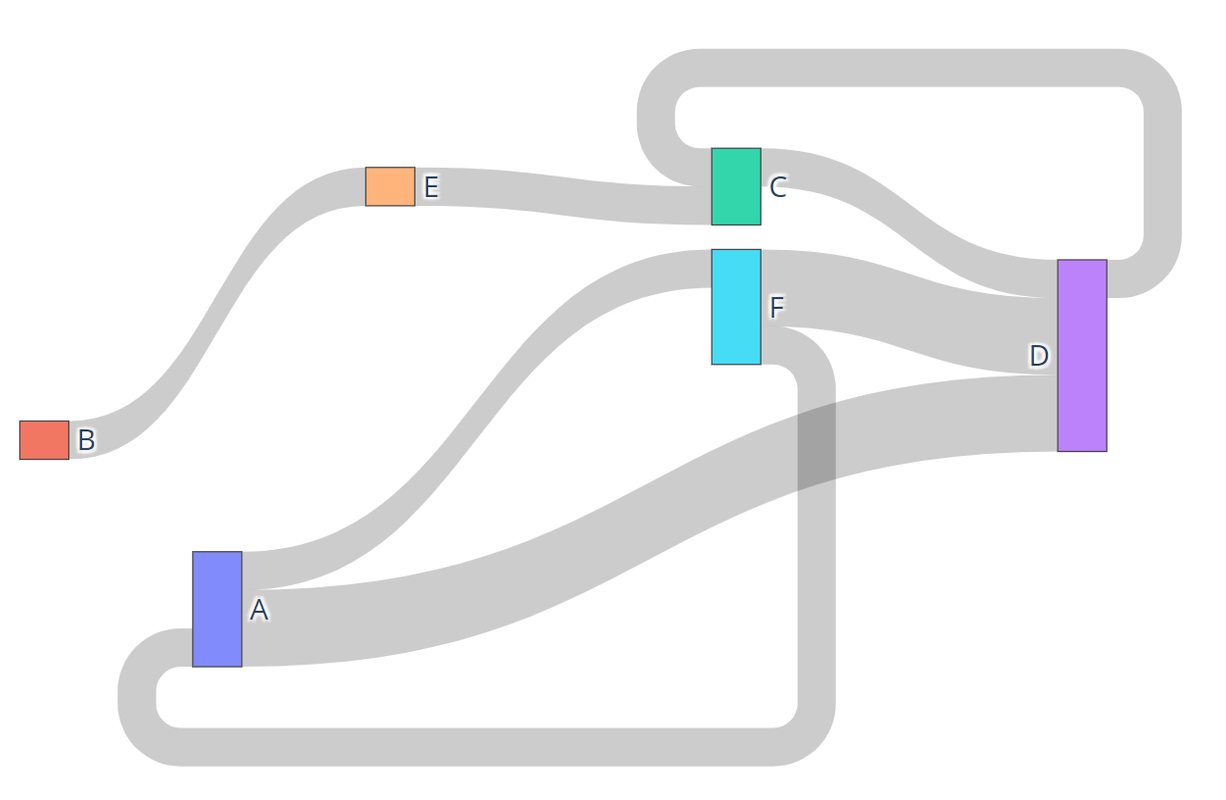
-The Sankey Function passes an edge list, or a list of tuples, and returns a Sankey, or a flow chart where width corresponds to quantity. Below is an example of a Sankey Diagram:
+The Sankey Function passes an edge list, or a list of tuples, and returns a Plotly Sankey figure (`go.Figure`) where link width corresponds to transition count. Below is an example of a Sankey Diagram:
[](https://postimg.cc/w789ryVP)
Additionally, users have the option to pass a dictionary of node labels to replace existing labels.
@@ -51,14 +61,15 @@ sankey(edges, labels)
## Funnel Function
```python
-funnel(edges_segmentN, user_specification, node_labels=False)
+funnel(edges, targets, node_labels=False, *, infer=True)
```
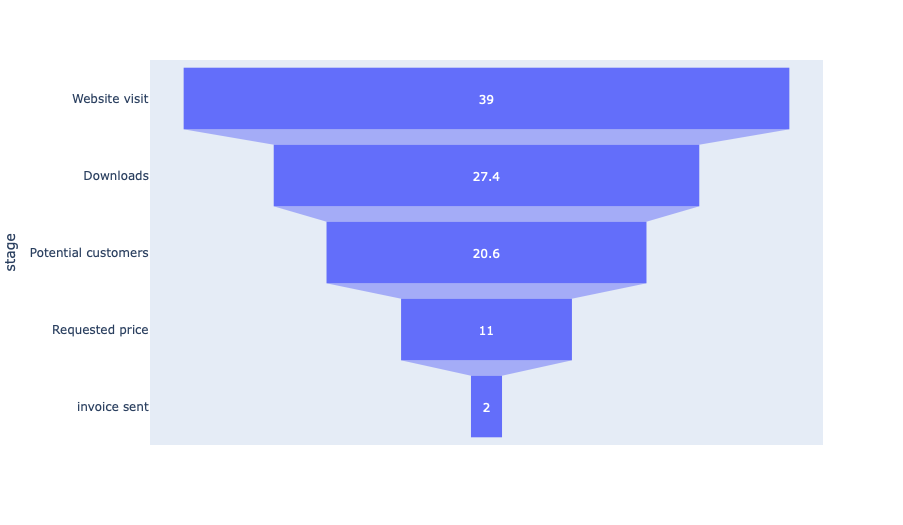
-The Funnel Function takes the arguments:
-edges_segmentN: List of Tuples
-user_specification: A string of target of interest e.g. #document
-node_labels (Optional): Optional Dictionary of key default values with value replacements
-And it will return a Funnel graph. Below is an example of a Funnel Diagram:
+The Funnel Function takes the arguments:
+- `edges`: List of 2-element edge tuples `(source, target)`
+- `targets`: Either a starting target string (e.g. `'#document'`, which infers a 3-step funnel) or an explicit sequence of step targets (e.g. `['#document', 'input', 'button']`)
+- `node_labels` (Optional): Optional dictionary mapping raw target names to display labels
+
+And it will return a Plotly Funnel figure (`go.Figure`). Below is an example of a Funnel Diagram:
[](https://postimg.cc/tsz67YFS)
Additionally, users have the option to pass a dictionary of node labels to replace existing labels.
diff --git a/products/distill/distill/segmentation/README.rst b/products/distill/distill/segmentation/README.rst
index 5f02c73..60a3392 100644
--- a/products/distill/distill/segmentation/README.rst
+++ b/products/distill/distill/segmentation/README.rst
@@ -37,7 +37,7 @@ These fields can be accessed through `get` functions. For example, if a collect
.. code:: python
- generated_segments = distill.generate_segments(sorted_dict, 'type', ['clicks'], 1, 1)
+ generated_segments = distill.generate_segments(sorted_dict, 'type', ['click'], 1, 1)
then the number of logs in each of these ``Segment`` objects could be printed to the console by running:
@@ -431,7 +431,7 @@ Note that by default this function will not trim additional logs that do not fit
Collapsing Window Segments
**************************
-The ``generate_collapsing_windows_segments`` function generates ``Segment`` objects based on a window to time in which the given field name has a value matching one of the values indicated by the ``field_values_of_interest`` list parameter. An example usage of this function is shown below:
+The ``generate_collapsing_window_segments`` function generates ``Segment`` objects based on a window of time in which the given field name has a value matching one of the values indicated by the ``field_values_of_interest`` list parameter. An example usage of this function is shown below:
.. code:: python
@@ -450,14 +450,14 @@ A union can be performed using the ``union`` function. An example usage of this
.. code:: python
# Segment 1
- segment1.get_uids() #[uid1, uid2, uid3]
+ segment1.get_segment_uids() #[uid1, uid2, uid3]
# Segment 2
- segment2.get_uids() #[uid3, uid4, uid5]
+ segment2.get_segment_uids() #[uid3, uid4, uid5]
# Perform Union
new_segment = distill.union("new_segment", segment1, segment2)
- new_segment.get_uids() #[uid1, uid2, uid3, uid4, uid5]
+ new_segment.get_segment_uids() #[uid1, uid2, uid3, uid4, uid5]
The above code will return a new ``Segment`` object with the given segment_name, start and end values based on the smallest client time and largest client time of the given ``Segment`` objects, and a list of the union of the uids of segment1 and segment2.
@@ -468,13 +468,13 @@ An intersection can be performed using the ``intersection`` function. An exampl
.. code:: python
# Segment 1
- segment1.get_uids() #[uid1, uid3, uid6]
+ segment1.get_segment_uids() #[uid1, uid3, uid6]
# Segment 2
- segment2.get_uids() #[uid3, uid6, uid9]
+ segment2.get_segment_uids() #[uid3, uid6, uid9]
new_segment = distill.intersection("new_segment", segment1, segment2)
- new_segment.get_uids() #[uid3, uid6]
+ new_segment.get_segment_uids() #[uid3, uid6]
The above code will return a new ``Segment`` object (similarly to union) with uids that represent the intersection of the uids of segment1 and segment2.
@@ -485,16 +485,16 @@ The ``difference`` function creates a new ``Segment`` object based on the logica
.. code:: python
# Segment 1
- segment1.get_uids() #[uid1, uid2, uid3]
+ segment1.get_segment_uids() #[uid1, uid2, uid3]
# Segment 2
- segment2.get_uids() #[uid2, uid4, uid5]
+ segment2.get_segment_uids() #[uid2, uid4, uid5]
new_segment1 = distill.difference("new_segment_1", segment1, segment2)
- new_segment1.get_uids() #[uid1, uid3]
+ new_segment1.get_segment_uids() #[uid1, uid3]
new_segment2 = distill.difference("new_segment_2", segment2, segment1)
- new_segment2.get_uids() #[uid4, uid5]
+ new_segment2.get_segment_uids() #[uid4, uid5]
The above code will return a new ``Segment`` object (similarly to union and intersection) with uids that represent the difference of the uids of segment1 and segment2.
@@ -516,7 +516,7 @@ The ``write_segment`` function creates a nested dictionary of segment names to U
# Write Segments
segments = distill.write_segment(sorted_dict, segment_names, start_end_vals)
-The above code looks similar to the ``create_segments`` example usage, however, rather than returning a ``Segments`` object, this code will create a dictionary of segment names to UIDs to individual UserALE logs.
+The above code looks similar to the ``create_segment`` example usage, however, rather than returning a ``Segments`` object, this code will create a dictionary of segment names to UIDs to individual UserALE logs.
Exporting Segments
------------------
diff --git a/products/distill/docs/Combining_Segments_with_Set_Logic.md b/products/distill/docs/Combining_Segments_with_Set_Logic.md
index 6d45396..afddcdc 100644
--- a/products/distill/docs/Combining_Segments_with_Set_Logic.md
+++ b/products/distill/docs/Combining_Segments_with_Set_Logic.md
@@ -17,21 +17,6 @@
~ under the License.
-->
-> \<!\-\--Licensed to the Apache Software Foundation (ASF) under one or
-> more contributor license agreements. See the NOTICE file distributed
-> with this work for additional information regarding copyright
-> ownership. The ASF licenses this file to You under the Apache License,
-> Version 2.0 (the \"License\"); you may not use this file except in
-> compliance with the License. You may obtain a copy of the License at
->
-> > <http://www.apache.org/licenses/LICENSE-2.0>
->
-> Unless required by applicable law or agreed to in writing, software
-> distributed under the License is distributed on an \"AS IS\" BASIS,
-> WITHOUT WARRANTIES OR CONDITIONS OF ANY KIND, either express or
-> implied. See the License for the specific language governing
-> permissions and limitations under the License. \-\--\>
-
# Combining Segments with Set Logic
`Segment` objects can be combined with set logic. Distill\'s
@@ -45,14 +30,14 @@ this function is shown below:
``` python
# Segment 1
-segment1.get_uids() #[uid1, uid2, uid3]
+segment1.get_segment_uids() #[uid1, uid2, uid3]
# Segment 2
-segment2.get_uids() #[uid3, uid4, uid5]
+segment2.get_segment_uids() #[uid3, uid4, uid5]
# Perform Union
new_segment = distill.union("new_segment", segment1, segment2)
-new_segment.get_uids() #[uid1, uid2, uid3, uid4, uid5]
+new_segment.get_segment_uids() #[uid1, uid2, uid3, uid4, uid5]
```
The above code will return a new `Segment` object with the given
@@ -67,13 +52,13 @@ example usage of this function is shown below:
``` python
# Segment 1
-segment1.get_uids() #[uid1, uid3, uid6]
+segment1.get_segment_uids() #[uid1, uid3, uid6]
# Segment 2
-segment2.get_uids() #[uid3, uid6, uid9]
+segment2.get_segment_uids() #[uid3, uid6, uid9]
new_segment = distill.intersection("new_segment", segment1, segment2)
-new_segment.get_uids() #[uid3, uid6]
+new_segment.get_segment_uids() #[uid3, uid6]
```
The above code will return a new `Segment` object (similarly to union)
@@ -87,16 +72,16 @@ logical difference of two `Segment` objects.
``` python
# Segment 1
-segment1.get_uids() #[uid1, uid2, uid3]
+segment1.get_segment_uids() #[uid1, uid2, uid3]
# Segment 2
-segment2.get_uids() #[uid2, uid4, uid5]
+segment2.get_segment_uids() #[uid2, uid4, uid5]
new_segment1 = distill.difference("new_segment_1", segment1, segment2)
-new_segment1.get_uids() #[uid1, uid3]
+new_segment1.get_segment_uids() #[uid1, uid3]
new_segment2 = distill.difference("new_segment_2", segment2, segment1)
-new_segment2.get_uids() #[uid4, uid5]
+new_segment2.get_segment_uids() #[uid4, uid5]
```
The above code will return a new `Segment` object (similarly to union
diff --git a/products/distill/docs/Creating_Segments.md b/products/distill/docs/Creating_Segments.md
index 1b46fbd..deac34d 100644
--- a/products/distill/docs/Creating_Segments.md
+++ b/products/distill/docs/Creating_Segments.md
@@ -17,21 +17,6 @@
~ under the License.
-->
-> \<!\-\--Licensed to the Apache Software Foundation (ASF) under one or
-> more contributor license agreements. See the NOTICE file distributed
-> with this work for additional information regarding copyright
-> ownership. The ASF licenses this file to You under the Apache License,
-> Version 2.0 (the \"License\"); you may not use this file except in
-> compliance with the License. You may obtain a copy of the License at
->
-> > <http://www.apache.org/licenses/LICENSE-2.0>
->
-> Unless required by applicable law or agreed to in writing, software
-> distributed under the License is distributed on an \"AS IS\" BASIS,
-> WITHOUT WARRANTIES OR CONDITIONS OF ANY KIND, either express or
-> implied. See the License for the specific language governing
-> permissions and limitations under the License. \-\--\>
-
# Creating Segment Objects
The creation of `Segment` objects can be done through the use of five
@@ -51,14 +36,14 @@ expects logs to be structured in a dictionary sorted by `clientTime`.
The keys of the dictionary are universally unique identifiers (UUIDs)
for each log and the value for each UUID key is the log itself. Distill
provides analysts with a function that will generate these IDs:
-`get_UUID`. This function can be used as follows:
+`getUID`. This function can be used as follows:
``` python
# A UserALE log
log
-# Generate UUID
-uuid = distill.getUUID(log)
+# Generate UID
+uid = distill.getUID(log)
```
Throughout the rest of this documentation UUID and UID will be used
@@ -172,7 +157,7 @@ that do not fit into an additional fixed time window.
### Generate Collapsing Window Segments
-The `generate_collapsing_windows_segments` function generates `Segment`
+The `generate_collapsing_window_segments` function generates `Segment`
objects based on a window of time in which the given field name has a
value matching one of the values indicated by the
`field_values_of_interest` list parameter. An example usage of this
diff --git a/products/distill/docs/Example_Usage.md b/products/distill/docs/Example_Usage.md
index b092be6..9dfd263 100644
--- a/products/distill/docs/Example_Usage.md
+++ b/products/distill/docs/Example_Usage.md
@@ -17,21 +17,6 @@
~ under the License.
-->
-> \<!\-\--Licensed to the Apache Software Foundation (ASF) under one or
-> more contributor license agreements. See the NOTICE file distributed
-> with this work for additional information regarding copyright
-> ownership. The ASF licenses this file to You under the Apache License,
-> Version 2.0 (the \"License\"); you may not use this file except in
-> compliance with the License. You may obtain a copy of the License at
->
-> > <http://www.apache.org/licenses/LICENSE-2.0>
->
-> Unless required by applicable law or agreed to in writing, software
-> distributed under the License is distributed on an \"AS IS\" BASIS,
-> WITHOUT WARRANTIES OR CONDITIONS OF ANY KIND, either express or
-> implied. See the License for the specific language governing
-> permissions and limitations under the License. \-\--\>
-
# Example Usage of Distill
In this example, we run through a simulated user experiment using
@@ -100,7 +85,7 @@ def setup(file, date_type):
data = {}
for log in raw_data:
- data[distill.getUUID(log)] = log
+ data[distill.getUID(log)] = log
# Convert clientTime to specified type
for uid in data:
diff --git a/products/distill/docs/Exporting_Segments.md b/products/distill/docs/Exporting_Segments.md
index 7091fd2..585de39 100644
--- a/products/distill/docs/Exporting_Segments.md
+++ b/products/distill/docs/Exporting_Segments.md
@@ -17,21 +17,6 @@
~ under the License.
-->
-> \<!\-\--Licensed to the Apache Software Foundation (ASF) under one or
-> more contributor license agreements. See the NOTICE file distributed
-> with this work for additional information regarding copyright
-> ownership. The ASF licenses this file to You under the Apache License,
-> Version 2.0 (the \"License\"); you may not use this file except in
-> compliance with the License. You may obtain a copy of the License at
->
-> > <http://www.apache.org/licenses/LICENSE-2.0>
->
-> Unless required by applicable law or agreed to in writing, software
-> distributed under the License is distributed on an \"AS IS\" BASIS,
-> WITHOUT WARRANTIES OR CONDITIONS OF ANY KIND, either express or
-> implied. See the License for the specific language governing
-> permissions and limitations under the License. \-\--\>
-
# Exporting Segments
`Segments` objects can be exported into csv files for further analysis.
diff --git a/products/distill/docs/Funnel_Function.md b/products/distill/docs/Funnel_Function.md
index ebc164e..855736a 100644
--- a/products/distill/docs/Funnel_Function.md
+++ b/products/distill/docs/Funnel_Function.md
@@ -17,165 +17,28 @@
~ under the License.
-->
-> \<!\-\--Licensed to the Apache Software Foundation (ASF) under one or
-> more contributor license agreements. See the NOTICE file distributed
-> with this work for additional information regarding copyright
-> ownership. The ASF licenses this file to You under the Apache License,
-> Version 2.0 (the \"License\"); you may not use this file except in
-> compliance with the License. You may obtain a copy of the License at
->
-> > <http://www.apache.org/licenses/LICENSE-2.0>
->
-> Unless required by applicable law or agreed to in writing, software
-> distributed under the License is distributed on an \"AS IS\" BASIS,
-> WITHOUT WARRANTIES OR CONDITIONS OF ANY KIND, either express or
-> implied. See the License for the specific language governing
-> permissions and limitations under the License. \-\--\>
-
# Funnel
## The Funnel Function
-``` python
-funnel(edges_segmentN, user_specification, node_labels= False)
-```
-
-*Creates Funnel Graph from defined edge list and optional user-provided
-labels* **edges_segmentN**: List of Tuples **user_specification**:
-String of Target of interest e.g. #document **node_labels**: Optional
-Dictionary of key default values, value replacements Returns a Funnel
-graph.
-
-**Remove the duplicates**
-
-``` python
-edge_list_temp = []
-for row in edges_segmentN:
- if row[0] != row[1]:
- edge_list_temp.append(row)
-edge_list = edge_list_temp
-```
-
-**Convert from list of 2s to list of 1s**
-
-``` python
-edgelist_list = []
-length = len(edge_list) - 1
-for i in edge_list:
- if edge_list.index(i) != length:
- edgelist_list.append(i[0])
- else:
- edgelist_list.append(i[0])
- edgelist_list.append(i[1])
-```
-
-**Remove the none values**
-
-``` python
-funnel_targets_temp = []
-for item in edgelist_list:
- if item != None:
- funnel_targets_temp.append(item)
-funnel_targets = funnel_targets_temp
+```python
+funnel(edges, targets, node_labels=False, *, infer=True)
```
-**Convert that list into a list of 3s**
+Creates an interactive Plotly Funnel figure (`go.Figure`) from a list of 2-element edge tuples and either a starting target string (3-step inferred funnel) or an explicit sequence of step targets.
-``` python
-edge_list = []
-for i in range(len(funnel_targets)):
- if i == (len(funnel_targets) - 2):
- break
- else:
- edge_list.append((funnel_targets[i], funnel_targets[i + 1], funnel_targets[i + 2]))
-```
+- **`edges`**: List of 2-element tuples `(source, target)`
+- **`targets`**: Either:
+ - A single target string (e.g. `'#document'`) to infer the most common 3-step path starting at that target (`infer=True`), or
+ - A sequence of step target strings (e.g. `['#document', 'input', 'button']`) for an explicit multi-step funnel
+- **`node_labels`** *(Optional)*: Dictionary mapping original target strings to display labels
+- **`infer`** *(Optional)*: When `True` and `targets` is a single string (or 1-element list), infers the top 3-step path from `edges`
-**Convert the list of 3s to a counter**
-
-``` python
-edge_list_counter = collections.Counter(edge_list)
-first_rung = user_specification
-new_edge_list = []
-for i in edge_list:
- if i[0] == user_specification:
- new_edge_list.append((i[0], i[1], i[2]))
-
-new_edge_list_counter = collections.Counter(new_edge_list)
-new_edge_list_counter.most_common(1)
-
-first_rung = new_edge_list_counter.most_common(1)[0][0][0]
-second_rung = new_edge_list_counter.most_common(1)[0][0][1]
-third_rung = new_edge_list_counter.most_common(1)[0][0][2]
-
-counter1 = 0
-counter2 = 0
-counter3 = 0
-for i in edge_list:
- if i[0] == first_rung:
- counter1 += 1
- if i[1] == second_rung:
- counter2 += 1
- if i[2] == third_rung:
- counter3 += 1
-```
-
-**Numbers are how many times each target occured** **Edges are the
-targets**
-
-``` python
-numbers = [counter1, counter2, counter3]
-edges = [first_rung, second_rung, third_rung]
-```
-
-**If node labels was given as an argument, replaces the targets with the
-provided names**
-
-``` python
-if node_labels:
- new_edges = []
- for edge in edges:
- if edge in node_labels:
- new_edges.append(node_labels[edge])
- else:
- new_edges.append(edge)
- edges = new_edges
-```
-
-**Plotting labels from the list with the values from the dictionary**
-
-``` python
-data = dict(
- number=numbers,
- edge=edges)
-```
-
-**Plotting the figure**
-
-``` python
-fig = go.Figure(go.Funnel(
- y=edges,
- x=numbers,
- textposition="inside",
- textinfo="value+percent initial",
- opacity=0.65, marker={"color": ["deepskyblue", "lightsalmon", "tan"],
- "line": {"width": [2]}},
- connector={"line": {"color": "lime", "dash": "dot", "width": 5}})
-)
-
-fig.show()
-```
+Returns a `plotly.graph_objects.Figure` (does not call `fig.show()` automatically, so it works cleanly in both headless pipelines and Jupyter notebooks).
## Funnel Example
-``` python
-funnel(edges_segmentN, user_specification, node_labels=False)
-```
-
-The Funnel Function takes the arguments: edges_segmentN: List of Tuples
-user_specification: A string of target of interest e.g. #document
-node_labels (Optional): Optional Dictionary of key default values with
-value replacements And it will return a Funnel graph. Below is an
-example of a Funnel Diagram:
+Below is an example of a Funnel Diagram:
[](https://postimg.cc/tsz67YFS)
Additionally, users have the option to pass a dictionary of node labels
diff --git a/products/distill/docs/Getting_Started.md b/products/distill/docs/Getting_Started.md
index db75c98..9212d36 100644
--- a/products/distill/docs/Getting_Started.md
+++ b/products/distill/docs/Getting_Started.md
@@ -17,21 +17,6 @@
~ under the License.
-->
-> \<!\-\--Licensed to the Apache Software Foundation (ASF) under one or
-> more contributor license agreements. See the NOTICE file distributed
-> with this work for additional information regarding copyright
-> ownership. The ASF licenses this file to You under the Apache License,
-> Version 2.0 (the \"License\"); you may not use this file except in
-> compliance with the License. You may obtain a copy of the License at
->
-> > <http://www.apache.org/licenses/LICENSE-2.0>
->
-> Unless required by applicable law or agreed to in writing, software
-> distributed under the License is distributed on an \"AS IS\" BASIS,
-> WITHOUT WARRANTIES OR CONDITIONS OF ANY KIND, either express or
-> implied. See the License for the specific language governing
-> permissions and limitations under the License. \-\--\>
-
# Getting Started with Segmentation
## Why Segmentation?
diff --git a/products/distill/docs/Graph_Index.md b/products/distill/docs/Graph_Index.md
index d5fb545..6bd1029 100644
--- a/products/distill/docs/Graph_Index.md
+++ b/products/distill/docs/Graph_Index.md
@@ -17,23 +17,10 @@
~ under the License.
-->
-> \<!\-\--Licensed to the Apache Software Foundation (ASF) under one or
-> more contributor license agreements. See the NOTICE file distributed
-> with this work for additional information regarding copyright
-> ownership. The ASF licenses this file to You under the Apache License,
-> Version 2.0 (the \"License\"); you may not use this file except in
-> compliance with the License. You may obtain a copy of the License at
->
-> > <http://www.apache.org/licenses/LICENSE-2.0>
->
-> Unless required by applicable law or agreed to in writing, software
-> distributed under the License is distributed on an \"AS IS\" BASIS,
-> WITHOUT WARRANTIES OR CONDITIONS OF ANY KIND, either express or
-> implied. See the License for the specific language governing
-> permissions and limitations under the License. \-\--\>
-
# Graph
+The `distill.analytics.graph` module provides directed graph construction (`createDiGraph`), Markov transition matrices (`transition_matrix`), and Plotly visualization functions (`sankey`, `funnel`).
+
::: {.toctree maxdepth="2"}
Sankey_Function Funnel_Function
:::
diff --git a/products/distill/docs/Manipulating_Collections_of_Segment_Objects.md b/products/distill/docs/Manipulating_Collections_of_Segment_Objects.md
index 0313f3b..4c49c35 100644
--- a/products/distill/docs/Manipulating_Collections_of_Segment_Objects.md
+++ b/products/distill/docs/Manipulating_Collections_of_Segment_Objects.md
@@ -17,21 +17,6 @@
~ under the License.
-->
-> \<!\-\--Licensed to the Apache Software Foundation (ASF) under one or
-> more contributor license agreements. See the NOTICE file distributed
-> with this work for additional information regarding copyright
-> ownership. The ASF licenses this file to You under the Apache License,
-> Version 2.0 (the \"License\"); you may not use this file except in
-> compliance with the License. You may obtain a copy of the License at
->
-> > <http://www.apache.org/licenses/LICENSE-2.0>
->
-> Unless required by applicable law or agreed to in writing, software
-> distributed under the License is distributed on an \"AS IS\" BASIS,
-> WITHOUT WARRANTIES OR CONDITIONS OF ANY KIND, either express or
-> implied. See the License for the specific language governing
-> permissions and limitations under the License. \-\--\>
-
# Manipulating Collections of Segment Objects
Collections of `Segment` objects are held in `Segments` objects.
diff --git a/products/distill/docs/Process.md b/products/distill/docs/Process.md
index 1b40f54..364f104 100644
--- a/products/distill/docs/Process.md
+++ b/products/distill/docs/Process.md
@@ -17,21 +17,6 @@
~ under the License.
-->
-> \<!\-\--Licensed to the Apache Software Foundation (ASF) under one or
-> more contributor license agreements. See the NOTICE file distributed
-> with this work for additional information regarding copyright
-> ownership. The ASF licenses this file to You under the Apache License,
-> Version 2.0 (the \"License\"); you may not use this file except in
-> compliance with the License. You may obtain a copy of the License at
->
-> > <http://www.apache.org/licenses/LICENSE-2.0>
->
-> Unless required by applicable law or agreed to in writing, software
-> distributed under the License is distributed on an \"AS IS\" BASIS,
-> WITHOUT WARRANTIES OR CONDITIONS OF ANY KIND, either express or
-> implied. See the License for the specific language governing
-> permissions and limitations under the License. \-\--\>
-
# Process
::: {.toctree maxdepth="2"}
diff --git a/products/distill/docs/Process_Docs.md b/products/distill/docs/Process_Docs.md
index 320d854..2b47a2d 100644
--- a/products/distill/docs/Process_Docs.md
+++ b/products/distill/docs/Process_Docs.md
@@ -17,21 +17,6 @@
~ under the License.
-->
-> \<!\-\--Licensed to the Apache Software Foundation (ASF) under one or
-> more contributor license agreements. See the NOTICE file distributed
-> with this work for additional information regarding copyright
-> ownership. The ASF licenses this file to You under the Apache License,
-> Version 2.0 (the \"License\"); you may not use this file except in
-> compliance with the License. You may obtain a copy of the License at
->
-> > <http://www.apache.org/licenses/LICENSE-2.0>
->
-> Unless required by applicable law or agreed to in writing, software
-> distributed under the License is distributed on an \"AS IS\" BASIS,
-> WITHOUT WARRANTIES OR CONDITIONS OF ANY KIND, either express or
-> implied. See the License for the specific language governing
-> permissions and limitations under the License. \-\--\>
-
# Processing Functions
Distill provides analysts with three main processing functions: one
diff --git a/products/distill/docs/Sankey_Function.md b/products/distill/docs/Sankey_Function.md
index 82a9b7c..e088252 100644
--- a/products/distill/docs/Sankey_Function.md
+++ b/products/distill/docs/Sankey_Function.md
@@ -17,139 +17,24 @@
~ under the License.
-->
-> \<!\-\--Licensed to the Apache Software Foundation (ASF) under one or
-> more contributor license agreements. See the NOTICE file distributed
-> with this work for additional information regarding copyright
-> ownership. The ASF licenses this file to You under the Apache License,
-> Version 2.0 (the \"License\"); you may not use this file except in
-> compliance with the License. You may obtain a copy of the License at
->
-> > <http://www.apache.org/licenses/LICENSE-2.0>
->
-> Unless required by applicable law or agreed to in writing, software
-> distributed under the License is distributed on an \"AS IS\" BASIS,
-> WITHOUT WARRANTIES OR CONDITIONS OF ANY KIND, either express or
-> implied. See the License for the specific language governing
-> permissions and limitations under the License. \-\--\>
-
# Sankey
## The Sankey Function
-``` python
-def sankey(edges_segmentN, node_labels=False):
-```
-
-*Creates Sankey Graph from defined edge list and optional user-provided
-labels* **edges_segmentN**: List of Tuples **node_labels**: Optional
-Dictionary of Values; keys are originals, values are replacements
-Returns a Sankey graph.
-
-**Remove self-to-self recursions**
-
-``` python
-edge_list_temp = []
-for row in edges_segmentN:
- if row[0] != row[1]:
- edge_list_temp.append(row)
-edge_list = edge_list_temp
-```
-
-**Create a counter to count how many elements are in the edge list**
-
-``` python
-edge_list_counter = collections.Counter(edge_list)
-```
-
-**Extract source list, target list, and value list from the tuples**
-
-``` python
-source_list = [i[0] for i in edge_list_counter.keys()]
-target_list = [i[1] for i in edge_list_counter.keys()]
-value_list = [i for i in edge_list_counter.values()]
-```
-
-**Extract the node names if node_labels does not exist as an argument**
-
-``` python
-nodes = []
-for row in edge_list:
- for col in row:
- if col not in nodes:
- nodes.append(col)
-```
-
-**Replace node names with the give node_labels if it is given as an
-argument**
-
-``` python
-if node_labels:
- new_nodes = []
- for node in nodes:
- if node in node_labels:
- new_nodes.append(node_labels[node])
- else:
- new_nodes.append(node)
-```
-
-**Sources are the nodes sending connections**
-
-``` python
-sources = []
-for i in source_list:
- sources.append(nodes.index(i))
-```
-
-**Targets are the nodes receiving connections**
-
-``` python
-targets = []
-for i in target_list:
- targets.append(nodes.index(i))
-```
-
-**Values are the weight of the connections**
-
-``` python
-values = value_list
+```python
+sankey(edges, node_labels=False, *, drop_recursions=False)
```
-**If node labels is given as an argument, we replace nodes with node
-labels** **If not, we use the original node names**
+Creates an interactive Plotly Sankey figure (`go.Figure`) from a list of 2-element edge tuples and optional user-provided node labels.
-``` python
-if node_labels:
- fig = go.Figure(data=[go.Sankey(
- node=dict(
- label=[new_nodes[item].split("|")[0] for item in range(len(new_nodes))],
- ),
- link=dict(
- source=sources,
- target=targets,
- value=values
- ))])
-else:
- fig = go.Figure(data=[go.Sankey(
- node=dict(
- label=[nodes[item].split("|")[0] for item in range(len(nodes))],
- ),
- link=dict(
- source=sources,
- target=targets,
- value=values
- ))])
+- **`edges`**: List of 2-element tuples `(source, target)`
+- **`node_labels`** *(Optional)*: Dictionary mapping original node names to replacement display labels
+- **`drop_recursions`** *(Optional)*: When `True`, removes self-to-self transitions (`u == v`) before counting links
-fig.show()
-```
+Returns a `plotly.graph_objects.Figure` (does not call `fig.show()` automatically, so it works cleanly in both headless pipelines and Jupyter notebooks).
## Sankey Example
-``` python
-sankey(edges_segmentN, node_labels=False)
-```
-
-The Sankey Function passes an edge list, or a list of tuples, and
-returns a Sankey, or a flow chart where width corresponds to quantity.
Below is an example of a Sankey Diagram:
[](https://postimg.cc/w789ryVP)
diff --git a/products/distill/docs/Segmentation.md b/products/distill/docs/Segmentation.md
index 27efdca..983df18 100644
--- a/products/distill/docs/Segmentation.md
+++ b/products/distill/docs/Segmentation.md
@@ -17,21 +17,6 @@
~ under the License.
-->
-> \<!\-\--Licensed to the Apache Software Foundation (ASF) under one or
-> more contributor license agreements. See the NOTICE file distributed
-> with this work for additional information regarding copyright
-> ownership. The ASF licenses this file to You under the Apache License,
-> Version 2.0 (the \"License\"); you may not use this file except in
-> compliance with the License. You may obtain a copy of the License at
->
-> > <http://www.apache.org/licenses/LICENSE-2.0>
->
-> Unless required by applicable law or agreed to in writing, software
-> distributed under the License is distributed on an \"AS IS\" BASIS,
-> WITHOUT WARRANTIES OR CONDITIONS OF ANY KIND, either express or
-> implied. See the License for the specific language governing
-> permissions and limitations under the License. \-\--\>
-
# Segmentation
::: {.toctree maxdepth="2"}
diff --git a/products/distill/docs/Utilities.md b/products/distill/docs/Utilities.md
index 59c6d7c..ad34b9c 100644
--- a/products/distill/docs/Utilities.md
+++ b/products/distill/docs/Utilities.md
@@ -17,21 +17,6 @@
~ under the License.
-->
-> \<!\-\--Licensed to the Apache Software Foundation (ASF) under one or
-> more contributor license agreements. See the NOTICE file distributed
-> with this work for additional information regarding copyright
-> ownership. The ASF licenses this file to You under the Apache License,
-> Version 2.0 (the \"License\"); you may not use this file except in
-> compliance with the License. You may obtain a copy of the License at
->
-> > <http://www.apache.org/licenses/LICENSE-2.0>
->
-> Unless required by applicable law or agreed to in writing, software
-> distributed under the License is distributed on an \"AS IS\" BASIS,
-> WITHOUT WARRANTIES OR CONDITIONS OF ANY KIND, either express or
-> implied. See the License for the specific language governing
-> permissions and limitations under the License. \-\--\>
-
# Utilities
::: {.toctree maxdepth="2"}
diff --git a/products/distill/docs/Utility_Functions.md b/products/distill/docs/Utility_Functions.md
index 4970d44..01805d3 100644
--- a/products/distill/docs/Utility_Functions.md
+++ b/products/distill/docs/Utility_Functions.md
@@ -17,26 +17,11 @@
~ under the License.
-->
-> \<!\-\--Licensed to the Apache Software Foundation (ASF) under one or
-> more contributor license agreements. See the NOTICE file distributed
-> with this work for additional information regarding copyright
-> ownership. The ASF licenses this file to You under the Apache License,
-> Version 2.0 (the \"License\"); you may not use this file except in
-> compliance with the License. You may obtain a copy of the License at
->
-> > <http://www.apache.org/licenses/LICENSE-2.0>
->
-> Unless required by applicable law or agreed to in writing, software
-> distributed under the License is distributed on an \"AS IS\" BASIS,
-> WITHOUT WARRANTIES OR CONDITIONS OF ANY KIND, either express or
-> implied. See the License for the specific language governing
-> permissions and limitations under the License. \-\--\>
-
# Utility Functions
Distill provides two useful utility functions that can aid in the
preprocessing of UserALE logs. They include the `epoch_to_datetime` and
-`get_UUID` functions. Below we provide an overview of both:
+`getUID` functions. Below we provide an overview of both:
## Epoch to Datetime
@@ -55,20 +40,20 @@ Segmentation as logs can sometimes be read in as strings and
Segmentation requires that they be formatted as either integers or
`datetime` objects.
-## Get UUID
+## Get UID
-The `get_uuid` function will take a UserALE log and output a universally
-unique identifier (UUID) for that log. An example usage of this function
+The `getUID` function will take a UserALE log and output a universally
+unique identifier (UID) for that log. An example usage of this function
is shown below:
``` python
# A UserALE log
log
-# Generate UUID
-uuid = distill.getUUID(log)
+# Generate UID
+uid = distill.getUID(log)
```
-Similarly to the `epoch_to_datetime` function, the `get_uuid` function
+Similarly to the `epoch_to_datetime` function, the `getUID` function
is particularly useful when preprocessing UserALE logs in preparation
for Segmentation.
diff --git a/products/distill/docs/Writing_Segments.md b/products/distill/docs/Writing_Segments.md
index 03702f2..8b10590 100644
--- a/products/distill/docs/Writing_Segments.md
+++ b/products/distill/docs/Writing_Segments.md
@@ -17,21 +17,6 @@
~ under the License.
-->
-> \<!\-\--Licensed to the Apache Software Foundation (ASF) under one or
-> more contributor license agreements. See the NOTICE file distributed
-> with this work for additional information regarding copyright
-> ownership. The ASF licenses this file to You under the Apache License,
-> Version 2.0 (the \"License\"); you may not use this file except in
-> compliance with the License. You may obtain a copy of the License at
->
-> > <http://www.apache.org/licenses/LICENSE-2.0>
->
-> Unless required by applicable law or agreed to in writing, software
-> distributed under the License is distributed on an \"AS IS\" BASIS,
-> WITHOUT WARRANTIES OR CONDITIONS OF ANY KIND, either express or
-> implied. See the License for the specific language governing
-> permissions and limitations under the License. \-\--\>
-
# Writing Segments
Along with the creation of `Segment` objects, analysts also need a way
@@ -60,12 +45,12 @@ start_end_vals = [(start_time_1, end_time_1), (start_time_2, end_time_2)]
segments = distill.write_segment(sorted_dict, segment_names, start_end_vals)
```
-The above code looks similar to the `create_segments` example usage,
+The above code looks similar to the `create_segment` example usage,
however, rather than returning a `Segments` object, this code will
create a dictionary of segment names to UIDs to individual UserALE logs.
Since `Segments` objects support list comprehensions, the usage of the
-`write_segment` functon after curating a collection of `Segment` objects
+`write_segment` function after curating a collection of `Segment` objects
is simple. Below is some example code that shows how this can be done
with a `Segments` object:
@@ -82,5 +67,5 @@ segment_names = [segment.segment_name for segment in segments]
# Create list of start and end values
start_end_vals = [segment.start_end_val for segment in segments]
-written_segments = distill.write_segments(sorted_dict, segment_names, start_end_vals)
+written_segments = distill.write_segment(sorted_dict, segment_names, start_end_vals)
```
diff --git a/products/distill/docs/index.md b/products/distill/docs/index.md
index ab05981..631bcfa 100644
--- a/products/distill/docs/index.md
+++ b/products/distill/docs/index.md
@@ -17,21 +17,6 @@
~ under the License.
-->
-> \<!\-\--Licensed to the Apache Software Foundation (ASF) under one or
-> more contributor license agreements. See the NOTICE file distributed
-> with this work for additional information regarding copyright
-> ownership. The ASF licenses this file to You under the Apache License,
-> Version 2.0 (the \"License\"); you may not use this file except in
-> compliance with the License. You may obtain a copy of the License at
->
-> > <http://www.apache.org/licenses/LICENSE-2.0>
->
-> Unless required by applicable law or agreed to in writing, software
-> distributed under the License is distributed on an \"AS IS\" BASIS,
-> WITHOUT WARRANTIES OR CONDITIONS OF ANY KIND, either express or
-> implied. See the License for the specific language governing
-> permissions and limitations under the License. \-\--\>
-
# Flagon Distill
::: {.toctree maxdepth="2"}
diff --git a/products/distill/tests/README.rst b/products/distill/tests/README.rst
index d59e1e2..48baa98 100644
--- a/products/distill/tests/README.rst
+++ b/products/distill/tests/README.rst
@@ -24,30 +24,13 @@ The distill package uses ``pytest`` as a means to validate our functions. Below
Running Unit Tests
------------------
-Unit tests can be run through the command line, provided that ``pytest`` is installed on your machine. If ``pytest`` is not installed, it can be installed with the following command:
+Install the package and development dependencies with ``uv``, then run ``pytest`` from the ``products/distill/`` directory:
::
- pip install pytest
-Once ``pytest`` is installed, you can navigate to the tests directory and begin running unit tests using the following commands:
-::
- cd tests
- export PYTHONPATH=../
- pytest
-Note that we must set the PYTHONPATH environment variable to the top level distill directory (or ../ in this case). This ensures that ``pytest`` knows where to look for the distill package.
-
-Common Issues
-*************
-The most common issues when running the unit tests with ``pytest`` are that the PYTHONPATH is set incorrectly (or not set at all) or that modules needed to run the tests are not installed on your machine.
-
-To solve these issues, make sure that the PYTHONPATH is set to the proper directory prior to running ``pytest`` and install any modules that ``pytest`` describes as missing (the missing modules should be explained in the error messages).
+ uv sync --all-groups
+ uv run pytest
Test Coverage
-------------
-``Pytest`` can also be used to determine test coverage statistics. This can be done by installing the ``pytest-cov`` plugin.
-::
- pip install pytest-cov
-
-Once this is installed, coverage statistics on the distill package can be obtained through the following commands:
+``pytest-cov`` is included in the development dependencies. Coverage statistics on the distill package can be obtained with:
::
- cd tests
- export PYTHONPATH=../
- pytest --cov=distill ./
+ uv run pytest --cov=distill
diff --git a/products/userale/README.md b/products/userale/README.md
index 3e5cd0d..b8a75f8 100644
--- a/products/userale/README.md
+++ b/products/userale/README.md
@@ -22,10 +22,11 @@ UserALE is a client-side behavioral analytics instrumentation library and browse
## Workspace Packages & Examples
-- [`packages/flagon-userale`](./packages/flagon-userale/README.md): Core TypeScript/JavaScript library (`ESM` module + `IIFE` script-tag bundle) with pluggable exporters for UserALE flat JSON, OpenTelemetry OTLP/JSON (`OtlpJsonExporter`), OpenTelemetry JS SDK (`OtelSdkExporter`), Protobuf v1 canonical JSON (`ProtoJsonExporter`), and WebSockets (`WebSocketExporter`).
+- [`packages/flagon-userale`](./packages/flagon-userale/README.md): Core TypeScript/JavaScript library (`ESM` module + `IIFE` script-tag bundle) with pluggable exporters for UserALE flat JSON (`HttpJsonExporter`), OpenTelemetry OTLP/JSON (`OtlpJsonExporter`), OpenTelemetry JS SDK (`OtelSdkExporter`), Protobuf v1 canonical JSON (`ProtoJsonExporter`), and WebSockets (`WebSocketExporter`), plus two-layer Session Replay & DOM mutation telemetry (`startSessionReplay`, `flushSessionReplay`, `s [...]
- [`packages/flagon-userale-ext`](./packages/flagon-userale-ext/README.md): Chrome and Firefox Manifest V3 browser extension built with [Plasmo](https://docs.plasmo.com/).
- [`example/server`](./example/server/server.js): Local Express + WebSocket test collector supporting `/` and `/v1/logs` across UserALE flat JSON, Protobuf v1 `LogBatch`, and OTLP/JSON payloads.
- [`example/otel-demo`](./example/otel-demo/README.md): Full-stack `docker-compose` stack with OpenTelemetry Collector, Grafana, Loki, and Tempo demonstrating browser-to-backend W3C `traceparent` correlation.
+- [`../../examples`](../../examples/README.md): Production-oriented backend & analytics stacks including **OpenSearch + OTel Collector** (`examples/opensearch`), the **All-Apache Behavioral Lakehouse** (`examples/apache-lakehouse`), and **ELK** (`examples/elk`).
---
@@ -49,9 +50,11 @@ pnpm test
# Run local example collector server on http://localhost:8000
pnpm example:run
-# Format and lint source files
+# Format and lint source files (or check without mutating via format:check / lint:check)
pnpm format
pnpm lint
+pnpm format:check
+pnpm lint:check
```
📚 [Apache Flagon Documentation](https://flagon.apache.org/docs/useralejs/)
diff --git a/products/userale/example/README.md b/products/userale/example/README.md
index 861783e..68322af 100644
--- a/products/userale/example/README.md
+++ b/products/userale/example/README.md
@@ -16,129 +16,128 @@
specific language governing permissions and limitations
under the License.
-->
+
# The UserALE Example Utility
-This directory provides
- * example usage for UserALE deployed as a **script tag** within a simple HTML Webpage;
- * a testing utility for developers to evaluate UserALE modifications to logged events;
- * a means of viewing log event structure within a simple UserALE logging server;
- * a means of testing UserALE API functions within a simple HTML Webpage.
+This directory provides:
-If you are interested in examples for a **module** deployment methodology, see the README in the [/webpack examples directory](https://github.com/apache/flagon-useralejs/tree/master/example/webpackUserAleExample). For details about our web extension, see
-our [UserALE WebExtension documentation](https://github.com/apache/flagon-useralejs/tree/master/src/UserALEWebExtension).
+- Example usage for UserALE deployed as a **`<script>` tag** within a simple HTML webpage ([`index.html`](./index.html));
+- A testing utility for developers to evaluate UserALE modifications to logged events ([`index.js`](./index.js));
+- A local Express + WebSocket + OTLP logging collector server ([`server/server.js`](./server/server.js));
+- A full-stack OpenTelemetry Collector + Grafana + Loki + Tempo demo ([`otel-demo/`](./otel-demo/README.md)).
-## Prerequisites
+If you are interested in examples for **ESM/bundler** deployment, see the [Webpack example](../packages/flagon-userale/example/webpackUserAleExample/README.md) and [React example](../packages/flagon-userale/example/react-app-example/README.md). For details about our browser extension, see the [UserALE Browser Extension README](../packages/flagon-userale-ext/README.md).
-Ensure that you have [node.js](https://nodejs.org/) installed.
+## Prerequisites
-You will need to clone the [UserALE repository](https://github.com/apache/flagon-useralejs) and follow [Installation directions](https://github.com/apache/flagon-useralejs#installation).
+Ensure that you have [Node.js](https://nodejs.org/) (`>= 20.x`) and `pnpm` installed (or run `nix develop` at the repository root).
-## Using the Example Page
+From `products/userale`, install dependencies and build the workspace:
-This Example Page is a simple HTML Webpage with UserALE included as a **script tag**.
+```bash
+pnpm install
+pnpm build
+```
-To generate UserALE logs with the Example Page, you may need to modify the 'src' HTML5 parameter of the UserALE script tag.
+## Using the Example Page
-The `src` parameter should reference the file path to your version of the minified UserALE script, in the /build dir of your cloned `flagon-useralejs` repository or `flagon-userale` node module. See the snippet below.
+The Example Page (`index.html`) loads the compiled UserALE IIFE bundle via a `<script>` tag:
+```html
+<script
+ src="../packages/flagon-userale/build/main.global.js"
+ data-url="http://localhost:8000/"
+ data-user="example-user"
+ data-version="2.5.0"
+ data-tool="Apache UserALE Example"
+></script>
```
- <script
- src="../build/userale-2.2.0.min.js" #works out of the box if downloaded flagon-userale via npm
- data-url="http://localhost:8000/"
- data-user="example-user"
- data-version="2.2.0"
- data-tool="Apache UserALE Example"
- ></script>
-```
-Once you've modified the script tag `src` field, save `index.html`.
-Next open index.html in your browser (you can drag it directly into a tab or double-click it).
-
-You will see a very simple HTML Webpage with a few interactive features.
-
-On this page, all user events will be captured and sent to the logging server. See instructions below.
+When served by the local example server (`pnpm example:run`), open [`http://localhost:8000`](http://localhost:8000) in your browser to interact with the test page and emit behavioral logs.
## Testing with the Example Page
-The UserALE Example page can be used to test the structure of logs after instrumentation or UserALE src code modification. It can also be used to experiment with UserALE API functions.
-
-In order to experiment with various elements of the UserALE API, simply modify the well documented API examples in `index.js`. Details about the API can be found at the [UserALE parent README](https://github.com/apache/flagon-useralejs/tree/FLAGON-469). However, a complete list of exported functions in the API can be found below:
-
-| Function | Description | Notes |
-|---|---|---|
-| userale.options | modify userale's configuration option | see top level README for complete list of options |
-| [DEPRECATED] userale.filter | filters out logs from logging queue by keys or values | filters are callbacks with global scope |
-| [DEPRECATED] userale.map | modify/add log keys or values | mappings are callbacks with global scope |
-| userale.addCallbacks | add one or more callbacks to be executed during log packaging | callbacks have global scope |
-| userale.removeCallbacks | remove one or more callbacks by name | Removes callbacks added from userale.addCallbacks |
-| userale.log | appends a custom log to the log queue | the custom log object is an object key:value pairs |
-| userale.packageLog | transforms the provided event into a log and appends it to the log queue | designed for HTML events |
-| userale.packageCustomLog | packages the provided customLog to include standard meta data and appends it to the log queue | designed for non HTML events|
-| userale.details | defines the way information is extracted from various events | supports packageLog/packageCustomLog 'details' |
-| userale.getSelector | builds a string CSS selector from the provided HTML element id | populates 'target' field in packaged logs |
-| userale.buildPath| builds an array of elements from the provided event target, to the root element (DOM path) | populates the 'path' field in packaged logs |
-| userale.start | used to start the logging process if | unecessary if 'autostart' is set to true in initial setting (default) |
-| userale.stop | halts the logging process. Logs will no longer be sent | will need to invoke userale.start to restart logging |
-
-NOTE: Each modification of `index.html` or `index.js` will require that you both save the modifications and refresh the webpage in your browser.
-
-See the [Flagon website](http://flagon.apache.org/) for additional documentation on the [API](http://flagon.apache.org/docs/useralejs/API/) and [testing for scale](http://flagon.apache.org/docs/stack/scaling/).
+In order to experiment with various elements of the UserALE API, modify the documented API examples in `index.js`. Details about the API can be found in the [`flagon-userale` README](../packages/flagon-userale/README.md). A summary of exported API functions is shown below:
+
+| Function | Description | Notes |
+| --------------------------------- | ---------------------------------------------------------------------------------- | --------------------------------------------------------------- |
+| `userale.options` | Modify or inspect UserALE's configuration options | Returns current `Configuration` object |
+| `userale.start` | Start the logging process if `autostart: false` | Unnecessary if `autostart: true` (default) |
+| `userale.stop` | Halt the logging process | Invoke `userale.start()` to resume |
+| `userale.addCallbacks` | Add one or more named callbacks executed during log packaging | Return `false` to drop a log or return a modified log |
+| `userale.removeCallbacks` | Remove one or more callbacks by name | Removes callbacks added via `userale.addCallbacks` |
+| `userale.log` | Append a custom log object directly to the log queue | Custom log object of key/value pairs |
+| `userale.packageLog` | Transform a DOM event into a log and append it to the queue | Designed for HTML/DOM events |
+| `userale.packageCustomLog` | Package custom metadata with standard UserALE context fields | Designed for custom application events |
+| `userale.details` | Return the default `details` extractor for an event type | Supports `packageLog` / `packageCustomLog` |
+| `userale.getSelector` | Build a CSS selector string from an HTML element | Populates `target` in packaged logs |
+| `userale.buildPath` | Build an array of ancestor selectors from target to root | Populates `path` in packaged logs |
+| `userale.getTargetRect` | Extract element bounding-box geometry (`{ x, y, width, height, ... }`) | Populates `targetRect` on discrete interactions |
+| `userale.detectBrowser` | Detect `{ browser, version }` using User-Agent Client Hints | Zero external dependencies |
+| `userale.registerAuthCallback` | Register dynamic `Authorization` header provider callback | Reset via `userale.resetAuthCallback()` |
+| `userale.registerHeadersCallback` | Register dynamic custom HTTP headers callback | Reset via `userale.resetHeadersCallback()` |
+| `userale.registerExporter` | Register a custom `LogExporter` (`HttpJsonExporter`, `OtlpJsonExporter`, etc.) | Supports `'http-json'`, `'otlp'`, `'proto-json'`, `'websocket'` |
+| `userale.startSessionReplay` | Start Layer 1 (`MutationObserver`, `RageClickDetector`) & Layer 2 (`rrweb`) replay | Returns a stop/cleanup function |
+| `userale.flushSessionReplay` | Flush active session replay ring buffer as a `logType: 'replay'` envelope | Returns `Promise<ReplayEnvelope \| null>` |
+| `userale.stopSessionReplay` | Stop active session replay observers and clear buffer | Safe to call multiple times |
+
+See the [Flagon website](https://flagon.apache.org/docs/useralejs/API/) for additional API documentation.
## Capturing Logs Using the Logging Server
-The example logging server receives log from any UserALE instrumented page at `localhost:8000`.
-
-This means you can test logs from your own instrumented application, the [UserALE WebExtension](https://github.com/apache/flagon-useralejs/tree/master/src/UserALEWebExtension),
-or the UserALE Example Page, so long as the `data-url` parameter is set to `localhost:8000`. This is the default setting for both the WebExtension and UserALE Example Page. See the example above.
-
-Once your UserALE script tag is properly configured to point to a minified UserALE script, and `localhost:8000`, you can log to the Example Logging Server.
+The example logging server receives logs from any UserALE-instrumented page at `http://localhost:8000` (and `/v1/logs` for OTLP/JSON).
-from the `/example` directory or its parent directory, run the following:
+From `products/userale`, run:
-```
-$npm run example:watch
+```bash
+pnpm example:run
+# or with auto-reload via nodemon:
+pnpm example:watch
```
Once started you will see:
-```
-> flagon-userale@2.2.0 example:watch ...
-> nodemon -w ./example example/server.js
-
-[nodemon] 1.19.1
-[nodemon] to restart at any time, enter `rs`
-[nodemon] watching: ...
-[nodemon] starting `node example/server.js`
+```text
UserAle Local running on port 8000
```
-Then start using your instrumented application, browser, or the UserALE Example Page, and you will see logs propagating in the terminal:
-
-```
-
-[ { target: 'body',
- path: [ 'body', 'html' ],
- clientTime: 1504287557492,
- location: { x: 0, y: 0 },
- type: 'keydown',
+Open [`http://localhost:8000`](http://localhost:8000) (or interact with your instrumented app or [Browser Extension](../packages/flagon-userale-ext/README.md)) and you will see logs printed in the terminal:
+
+```js
+[
+ {
+ target: "button#test_button",
+ path: ["button#test_button", "div.container", "body", "html"],
+ clientTime: 1730000000000,
+ location: { x: 42, y: 18 },
+ targetRect: {
+ x: 20,
+ y: 10,
+ width: 120,
+ height: 36,
+ top: 10,
+ right: 140,
+ bottom: 46,
+ left: 20,
+ },
+ type: "click",
+ logType: "raw",
userAction: true,
- details: null,
- userId: 'example-user',
- toolVersion: '2.2.0',
- toolName: 'Apache UserALE Example',
- useraleVersion: '2.2.0' },
- ...
-]
+ details: { clicks: 1, ctrl: false, alt: false, shift: false, meta: false },
+ userId: "example-user",
+ toolVersion: "2.5.0",
+ toolName: "Apache UserALE Example",
+ useraleVersion: "2.4.0",
+ },
+];
```
-Kill the logging script with `^C` or as you would any bash script.
-
-##Reviewing Logs Collected with the Example Server
+Stop the logging server with `^C`.
-In addition to showing in your terminal, logs collected by the UserALE Example Server are written locally to file.
+## Reviewing Logs Collected with the Example Server
-Find them in `/logs` under the top level flagon-userale dir. A new log file will appear each time you restart the logging server.
+In addition to printing to your terminal, logs collected by the UserALE Example Server are written locally to `products/userale/logs/`. A new log file is created each time you start the logging server.
## Contributing
-Contributions are welcome! Simply [submit an issue](https://github.com/apache/flagon-useralejs/issues) for problems you encounter or submit a pull request for your feature or bug fix. The core team will review it and work with you to incorporate it into UserALE.
\ No newline at end of file
+Contributions are welcome! Simply [submit an issue](https://github.com/apache/flagon/issues) or open a pull request on [`apache/flagon`](https://github.com/apache/flagon).
diff --git a/products/userale/example/otel-demo/README.md b/products/userale/example/otel-demo/README.md
index 1901b7b..b4774bf 100644
--- a/products/userale/example/otel-demo/README.md
+++ b/products/userale/example/otel-demo/README.md
@@ -38,14 +38,15 @@ OpenTelemetry Collector (otelcol-contrib:0.114.0)
1. **Build UserALE.js** (from `products/userale`):
```bash
+ cd products/userale
pnpm install
- pnpm run build
+ pnpm build
```
-2. **Start the OpenTelemetry Collector, Loki, Tempo, and Grafana stack**:
+2. **Start the OpenTelemetry Collector, Loki, Tempo, and Grafana stack** (from `products/userale`):
```bash
- docker compose -f products/userale/example/otel-demo/docker-compose.yml up -d
+ docker compose -f example/otel-demo/docker-compose.yml up -d
```
3. **Open the Demo Page & Grafana**:
@@ -56,7 +57,7 @@ OpenTelemetry Collector (otelcol-contrib:0.114.0)
4. **Tear Down**:
```bash
- docker compose -f products/userale/example/otel-demo/docker-compose.yml down
+ docker compose -f example/otel-demo/docker-compose.yml down
```
## CORS Configuration on the OpenTelemetry Collector
diff --git a/products/userale/packages/flagon-userale-ext/README.md b/products/userale/packages/flagon-userale-ext/README.md
index ea58e2a..892f36f 100644
--- a/products/userale/packages/flagon-userale-ext/README.md
+++ b/products/userale/packages/flagon-userale-ext/README.md
@@ -29,10 +29,10 @@ The extension is built with [Plasmo](https://docs.plasmo.com/) and supports Chro
- Passive DOM and browser tab interaction logging across allowlisted URLs
- Zero code changes required on instrumented web pages
- Configurable **Exporter Format**:
- - **UserALE JSON (Default)** (`userale-json`)
- - **OpenTelemetry (OTLP/JSON)** (`otlp-json` — automatically normalizes `/v1/logs` endpoints)
+ - **UserALE JSON (Default)** (`http-json`)
+ - **OpenTelemetry (OTLP/JSON)** (`otlp` — automatically normalizes `/v1/logs` endpoints)
- **Protobuf v1 JSON (`LogBatch`)** (`proto-json`)
-- Built-in support for **HTTP Basic Auth**, **OAuth 2.0 PKCE**, and **Custom HTTP Headers (JSON)**
+- Built-in support for **OAuth 2.0 PKCE**, **API Key (`x-api-key`)** authentication, and configurable **Event Type / Log Type Exclusions**
---
@@ -72,12 +72,12 @@ pnpm --dir packages/flagon-userale-ext build
Click the UserALE icon in your browser toolbar (or open the extension **Options** page) to configure:
- **Logging Endpoint URL**: Target HTTP(S), WebSocket (`ws://` / `wss://`), or OpenTelemetry Collector (`http://localhost:4318/v1/logs`) URL.
-- **Exporter Format**: Choose between `UserALE JSON (Default)`, `OpenTelemetry (OTLP/JSON)`, or `Protobuf v1 JSON (LogBatch)`.
+- **Exporter Format**: Choose between `UserALE JSON (Default)` (`http-json`), `OpenTelemetry (OTLP/JSON)` (`otlp`), or `Protobuf v1 JSON` (`proto-json`).
- **URL Allowlist**: Regular expression controlling which pages are instrumented.
-- **User ID & Tool Metadata**: Optional user identifier, tool name, and version.
-- **HTTP Basic Auth**: Optional username and password encoded as a `Basic` `Authorization` header.
-- **Custom HTTP Headers (JSON)**: Optional JSON object of custom headers (e.g. `{"x-api-key": "..."}`) attached to every export request.
-- **OAuth 2.0 PKCE Credentials**: Optional OAuth provider configuration for token-authenticated endpoints.
+- **Excluded Event Types & Log Types**: Comma-separated lists (`filterEventTypes`, `filterLogTypes`) to suppress specific DOM events (e.g., `mouseover,mousemove`) or log types (e.g., `interval`) before export.
+- **Authentication Mode (`None`, `OAuth`, `API Key`)**:
+ - **OAuth 2.0 PKCE**: Configure an OAuth Issuer URL and Client ID for token-authenticated ingestion endpoints.
+ - **API Key**: Configure an API key sent via the `x-api-key` HTTP header.
---
diff --git a/products/userale/packages/flagon-userale/CHANGELOG.md b/products/userale/packages/flagon-userale/CHANGELOG.md
index eec26e1..309c023 100644
--- a/products/userale/packages/flagon-userale/CHANGELOG.md
+++ b/products/userale/packages/flagon-userale/CHANGELOG.md
@@ -24,20 +24,19 @@ Apache Flagon UserALE.js (Unreleased)
-------------------------------
- [Closed Tickets](https://github.com/apache/flagon/issues)
- - Pluggable `LogExporter` interface (`registerExporter`, `exporter`, `exporterFormat`) supporting `'userale-json'`, `'otlp-json'`, `'proto-json'`, and `'ws'` formats (#139)
+ - Pluggable `LogExporter` interface (`registerExporter`, `createExporter`, `exporter`, `exporterType`, `exporterFormat`) supporting `'http-json'` (`'v2-json'`), `'otlp'` (`'otlp-json'`), `'proto-json'`, and `'websocket'` formats (#139)
- Native OpenTelemetry OTLP/JSON log exporter (`OtlpJsonExporter`, `toOtlpExportLogsServiceRequest`) with `Resource` attribute hoisting, nanosecond `BigInt` timestamps, OTel Event semantic naming (`eventName` / `event.name`), structured `kvlistValue` body, and W3C TraceContext (`traceId`, `spanId`) correlation (#140)
- OpenTelemetry JS SDK bridge exporter (`OtelSdkExporter`) for apps already running `@opentelemetry/sdk-logs` (#140)
- Zero-dependency Protobuf v1 canonical JSON exporter (`ProtoJsonExporter`) contract-tested against `proto/apache/flagon/userale/v1/log.proto` via `@bufbuild/protobuf` (#142, #143)
- - Full-stack OpenTelemetry Collector + Grafana + Loki + Tempo `docker-compose` demo with click-to-trace W3C `traceparent` correlation (#141)
- - Browser extension (`flagon-userale-ext`) updated with OAuth PKCE, basic auth, custom JSON headers, and Exporter Format selector (`UserALE JSON`, `OpenTelemetry (OTLP/JSON)`, `Protobuf v1 JSON`) (#140)
+ - Full-stack OpenTelemetry Collector + Grafana + Loki + Tempo `docker-compose` demo with click-to-trace W3C `traceparent` correlation (#141), plus 100% Apache-2.0 OpenSearch stack (`examples/opensearch`, #54) and All-Apache Behavioral Lakehouse (`examples/apache-lakehouse`)
+ - Browser extension (`flagon-userale-ext`) updated with OAuth PKCE, API Key (`x-api-key`), event/log type exclusion filters (`filterEventTypes`, `filterLogTypes`), and Exporter Format selector (`UserALE JSON`, `OpenTelemetry (OTLP/JSON)`, `Protobuf v1 JSON`) (#107, #109, #140)
- Unified HTTP header builder (`buildHeaders`) with 48 KiB chunked `fetch(..., { keepalive: true })` transport on `pagehide` so auth/custom headers are preserved on tab close (#133, #139)
- - Security hardening: automatic masking of `<input type="password">` values in change/input logs (#135)
+ - Security hardening: automatic masking of `<input type="password">` values in change/input logs and stripping of sensitive `data-api-key`, `data-auth`, `data-token`, `data-secret`, and `data-password` DOM attributes (#135)
- Fixed `autostart: false` initialization bug where `start()` did not attach handlers or start log transmission, and fixed `intervalCounter` truthy check for timer ID `0` (#132)
- Added SSR safety guards for `window` and `document` globals and moved `@bufbuild/protobuf` to `devDependencies` to keep the runtime bundle zero-dependency
- - Upgraded `tsup` bundler from v5 to v8 and added `"files"` allowlist to `package.json` (#136, #146)
- - Updated Apache Flagon Distill schema to seamlessly ingest UserALE v2.3/v2.4/v2.5 flat JSON, Protobuf v1 JSON (`LogBatch`), and OTLP/JSON (`ExportLogsServiceRequest`) payloads
+ - Upgraded `tsup` bundler from v5 to v8, removed unused `cypress` dependency, and added `"files"` allowlist to `package.json` (#136, #146)
+ - Updated Apache Flagon Distill schema and analytics (`frustration`, `spatial`, `otel`, `transition_matrix`, `session_summary`) to seamlessly ingest UserALE v2.3/v2.4/v2.5 flat JSON, Protobuf v1 JSON (`LogBatch`), and OTLP/JSON (`ExportLogsServiceRequest`) payloads
- Zero-dependency browser metadata detection (`detectBrowser`) using User-Agent Client Hints with regex fallback (#108)
- - Configurable event type and log type filtering in the browser extension (`flagon-userale-ext`) options UI (#107, #109)
- Two-layer Session Replay & Behavioral DOM Telemetry (`startSessionReplay`, `flushSessionReplay`, `stopSessionReplay`, `ReplayRingBuffer`, `RageClickDetector`, `getTargetRect`) with throttled `MutationObserver` summaries, rage-click detection, `unhandledrejection` capture, and `rrweb`-compatible ring-buffer replay bridge correlated via `sessionId` and OpenTelemetry `traceId`/`spanId` (#104)
- Fixed `input` event detail extraction (`extractInputDetails`) and added `targetRect` bounding-box geometry to discrete interaction events (`click`, `dblclick`, `change`, `submit`) and OTLP/Proto-JSON exporters
diff --git a/products/userale/packages/flagon-userale/CONTRIBUTING.md b/products/userale/packages/flagon-userale/CONTRIBUTING.md
index e5113f2..112c53f 100644
--- a/products/userale/packages/flagon-userale/CONTRIBUTING.md
+++ b/products/userale/packages/flagon-userale/CONTRIBUTING.md
@@ -17,232 +17,81 @@
under the License.
-->
-# Contributing to Flagon UserALE
+# Contributing to Apache Flagon UserALE
-There are many ways to contribute to Flagon UserALE, just one of which is by contributing code.
-Community building, maintenance, and documentation is just as important, if not more so for the
-longevity of UserALE. We welcome all forms of contributions.
+Thank you for your interest in contributing to **Apache Flagon UserALE**! Both the core `flagon-userale` library and the `flagon-userale-ext` browser extension live inside the unified [`apache/flagon`](https://github.com/apache/flagon) monorepo under `products/userale/`.
-<!-- TODO: Insert link to official website about more ways to get plugged in. -->
+For repository-wide contribution guidelines (including Protobuf schemas and Apache Flagon Distill), see the root [`CONTRIBUTING.md`](../../../CONTRIBUTING.md).
-## Code Contributions
+---
-*Before opening a pull request*, review the UserALE contribution guide below.
-It lists steps that are required before creating a PR and provides tips for
-getting started. In particular, consider the following:
+## Before Opening a Pull Request
-- Have you searched for existing, related Issues and pull requests?
-- Have you shared your intent by creating an issue and commenting that you plan to take it on?
-- If the change is large, have you discussed it on the [dev@](emailto:dev@flagon.apache.org) mailing list?
-- Is the change being proposed clearly explained and motivated?
+1. Search [existing GitHub Issues and Pull Requests](https://github.com/apache/flagon/issues) or open a new issue describing the bug or feature.
+2. For large architectural changes, start a discussion on the [`dev@flagon.apache.org`](mailto:dev@flagon.apache.org) mailing list ([community info](https://flagon.apache.org/community)).
-These steps and instructions on getting started are outlined below as well.
+---
-### Prerequisites
+## Prerequisites
-- A [GitHub](https://github.com/) account.
-- A Linux, macOS, or Microsoft Windows development environment.
-- Node >= v18.x installed (we strongly recommend using [NVM](https://github.com/nvm-sh/nvm?tab=readme-ov-file#installing-and-updating)).
-- [Docker](https://www.docker.com/) installed for some tasks including building the example server and testing changes to this website locally.
-- For large contributions, a signed [Individual Contributor License.
- Agreement](https://www.apache.org/licenses/icla.pdf) (ICLA) to the Apache
- Software Foundation (ASF).
+- **Option A (Recommended — Nix Flake)**: Run `nix develop` from the repository root to enter a reproducible shell with Node.js 24, `pnpm`, TypeScript, `buf`, and `lefthook`.
+- **Option B (Manual Setup)**:
+ - **Node.js `>= 20.x`** (`20.x`, `22.x`, and `24.x` are tested in CI)
+ - **`pnpm >= 10.x`**
+ - **[`buf` CLI](https://buf.build/docs/installation)** (when modifying `proto/apache/flagon/userale/v1/log.proto`)
-### Share Your Intent
-1. Find or create an issue in the [UserALE repo](https://github.com/apache/flagon-useralejs/issues/new/choose).
- Tracking your work in an issue will avoid duplicated or conflicting work, and provide
- a place for notes. Later, your pull request will be linked to the issue as well.
-<!-- 2. Comment ".take-issue" on the issue. This will cause the issue to be assigned to you. -->
-<!-- When you've completed the issue, you can close it by commenting ".close-issue". -->
-<!-- If you are a committer and would like to assign an issue to a non-committer, they must comment -->
-<!-- on the issue first; please tag the user asking them to do so or to comment "\`.take-issue\`". -->
-<!-- The command will be ignored if it is surrounded by `\`` markdown characters. -->
-2. If your change is large or it is your first change, it is a good idea to
- [discuss it on the dev@flagon.apache.org mailing list](https://flagon.apache.org/community).
-3. For large changes create a design doc
- ([template](https://s.apache.org/beam-design-doc-template)
- and email it to the dev@flagon.apache.org mailing list).
+---
-### Setup Your Environment and Learn About Language Specific Setup
+## Development Setup
-<!-- Before you begin, check out the Wiki pages. There are many useful tips about [Git](https://cwiki.apache.org/confluence/display/BEAM/Git+Tips), [Go](https://cwiki.apache.org/confluence/display/BEAM/Go+Tips), [Gradle](https://cwiki.apache.org/confluence/display/BEAM/Gradle+Tips), [Java](https://cwiki.apache.org/confluence/display/BEAM/Java+Tips), [Python](https://cwiki.apache.org/confluence/display/BEAM/Python+Tips), etc. -->
+1. Fork and clone the [`apache/flagon`](https://github.com/apache/flagon) repository:
-#### Configuring Dependencies and Tooling
-
-UserALE has dependencies on the following for development purposes:
-
-- Node >= v18.X
-- Go (for installing [Apache Skywalking Eyes](https://github.com/apache/skywalking-eyes) to check license headers)
-
-For Node, we strongly recommend using Node Version Manage (NVM), especially if you want to run the test suite against multiple node versions locally. Depending on your operating system, the steps for setting up these dependencies vary slightly.
-
-##### Windows Users
-
-For windows users, we strongly recommend you use Windows Subsystem for Linux (WSL) to develop in. There is generally better support for most development tools we use across the Flagon family.
-
-Instructions to install WSL can be found [here](https://learn.microsoft.com/en-us/windows/wsl/setup/environment?source=recommendations). You need only follow them through the update and upgrade packages section. If you are a VSCode user, we also recommend the [WSL extension](https://learn.microsoft.com/en-us/windows/wsl/tutorials/wsl-vscode).
-
-If you do use WSL, jump down to the [Unix Users section](#configuration-unix) for further instructions on setting up dependencies and tooling. Otherwise, continue here.
-
-###### Installing Node
-
-The simplest way to install one or more versions of node is to install and use [nvm-windows](https://github.com/coreybutler/nvm-windows), the NVM utility for windows.
-
-> *_Important:_* It is always recommended to remove any existing installations of Node.js or npm from your operating system before installing a version manager as the different types of installation can lead to strange and confusing conflicts. This includes deleting any existing Node.js installation directories (e.g., "C:\Program Files\nodejs") that might remain. NVM's generated symlink will not overwrite an existing (even empty) installation directory.
-
-Once the installation is complete, open PowerShell (recommended opening with elevated Admin permissions) and try using windows-nvm to list which version of Node are currently installed (should be none if you properly removed existing installations): `nvm ls`.
-
-We then recommend you install the most recent version of Node with long-term support LTS (v22.3.0 as of this writing (2024-06-13)):
-```sh
-nvm list available
+```bash
+git clone https://github.com/<your-username>/flagon.git
+cd flagon/products/userale
```
-Then install the LTS version number with:
-```sh
-nvm install <version>
-```
-###### Installing Go
-
-Head to the [Go release page](https://go.dev/doc/install), download the Go installer and then follow the instructions in the "Windows" tab.
-
-##### Unix (MacOS/Linux) Users {#configuration-unix}
-###### Installing Node
+2. Install workspace dependencies:
-1. Install [Node Version Manager (NVM)](https://github.com/nvm-sh/nvm?tab=readme-ov-file#installing-and-updating).
-2. Check your install was successful (and `nvm` was added to the path), by re-opening your terminal and running `nvm version`. This should return your installed version number.
-3. Install Node v18 LTS
-```sh
-nvm install 18 --lts
-nvm use 18
+```bash
+pnpm install
```
-###### Installing Go
-
-Head to the [Go release page](https://go.dev/doc/install), download the Go installer and then follow the instructions in the "Linux" or "Mac" tab, depending on your OS.
-
-#### Development Setup {#development-setup}
-
-1. Check [Git workflow tips](https://cwiki.apache.org/confluence/display/BEAM/Git+Tips) if you need help with git forking, cloning, branching, committing, pull requests, and squashing commits (thanks to the Apache Beam community for such a great resource).
-
-2. Make a fork of https://github.com/apache/flagon-useralejs repo.
-
-3. Clone the forked repository. You can download it anywhere you like.
- ```sh
- mkdir -p ~/path/to/your/folder
- cd ~/path/to/your/folder
- git clone https://github.com/forked/apache/flagon-useralejs
- cd flagon-useralejs
- ```
-
-4. Install the project dependencies.
-
- ```sh
- npm install
- ```
- In addition to the node packages being installed, the post-install hook should also install Skywalking Eye's `license-eye` utility. To check that it was installed and works, run:
- ```sh
- npm run license:check
- ```
- UserALE uses Husky to run pre-commit hooks, an automated script to ensure your code changes follow required conventions and help increase your PR's chances of success before your code ever reaches remote. To install it:
- ```sh
- npm run prepare
- ```
-
-5. Familiarize yourself with the project structure.
-
- The library follows standard organization conventions:
- - `build` contains the build artifacts. These are committed to source to ensure the repo itself is a self-contained "latest" release.
- - `examples` contains examples for how to extend UserALE and use it with various web stacks.
- - `journey` contains our end-to-end browser tests.
- - `src` the library's source code. Please note, the library consists of of the core javascript library as well as a browser plugin which can be found in `build/UserALEWebExtension`. The plugin depends on the core library.
- - `test` contains our unit test suite.
+3. Understand the `products/userale` workspace layout:
+ - `packages/flagon-userale/src/`: Core TypeScript source (`main.ts`, `configure.ts`, `attachHandlers.ts`, `packageLogs.ts`, `sendLogs.ts`, `exporters/`, `replay/`, `gen/`).
+ - `packages/flagon-userale/test/`: Jest unit tests and `@bufbuild/protobuf` / OTLP contract tests (`*.spec.ts`).
+ - `packages/flagon-userale/build/`: Compiled ESM (`main.mjs`), IIFE (`main.global.js`), and TypeScript declaration (`*.d.ts`) outputs produced by `tsup` and `tsc`.
+ - `packages/flagon-userale-ext/`: Manifest V3 browser extension built with [Plasmo](https://docs.plasmo.com/).
+ - `test/`: Playwright end-to-end browser and extension journey tests (`*.spec.ts`).
+ - `example/`: Local collector server (`example/server/server.js`) and full-stack OpenTelemetry + Grafana + Loki + Tempo demo (`example/otel-demo/`).
-6. Make sure you can build and run tests.
+4. Build, test, format, and lint:
- UserALE is written in Typescript. We use Rollup to compile the library into javascript files, create source maps, and build our typescript types (`d.ts` files). The build artifacts also mirror the source code insofar as the browser plugin is bundled into it's own directory for easy installation.
+```bash
+# Build flagon-userale and flagon-userale-ext
+pnpm build
- You must first build the library before running tests:
- ```sh
- npm run build
- npm test
- ```
+# Run Jest unit & contract tests (fast feedback)
+pnpm --dir packages/flagon-userale test
-### Create a Pull Request
+# Run full test suite (Playwright E2E + Jest)
+pnpm test
-1. Make your code change. Every source file needs to include the Apache license header. You can run `npm run license:fix` to automatically add a license header to *almost& every file type that requires one. Every new dependency needs to
- have an open source license [compatible](https://www.apache.org/legal/resolved.html#criteria) with Apache.
-
-2. Add unit tests for your change.
-
-3. Use descriptive commit messages that make it easy to identify changes and provide a clear history.
-
-4. When your change is ready to be reviewed and merged, create a pull request.
-
-5. Link to the issue you are addressing in your pull request.
-
-6. The pull request and any changes pushed to it will trigger continuous integration (CI) jobs in GH actions that run tests across all supported versions of Node. There are currently no known flaky tests. Therefore, if your tests fail, it is likely due to one of your code changes and you will have to work to fix it.
-
-### Review Process and Releases
-
-#### Get Reviewed
-
-Your pull requests should automatically list recommended reviewers. Please select one to ensure your PR is reviewed in a timely fashion. We are working on improving our developer experience by adding automation tools to streamline things such as this in the future. We appreciate your patience!
-
-1. Pull requests can only be merged by a
- [Flagon committer](https://home.apache.org/phonebook.html?pmc=flagon).
- To find a committer for your area, either:
- - look for similar code merges, or
- - ask on [dev@flagon.apache.org](emailto:dev@flagon.apache.org)
-
- Use `R: @username` in the pull request to notify a reviewer.
-
-2. If you don't get any response in 3 business days, email the [dev@flagon.apache.org mailing list](emailto:dev@flagon.apache.org) to ask for someone to look at your pull request.
-
-#### Make the Reviewer’s Job Easier
-
-1. Provide context for your changes in the associated issue and/or PR description.
-
-2. Avoid huge mega-changes. "Mega-changes" should first be discussed on the Dev mailing list or in a GH issue, preferably both, and, if there's interest, the community will work with you to break the changes up into bite size tickets.
-
-3. Review feedback typically leads to follow-up changes. It is easier to review follow-up changes when they are added as additional "fixup" commits to the
- existing PR/branch. This allows reviewer(s) to track the incremental progress and focus on new changes,
- and keeps comment threads attached to the code.
- Please refrain from squashing new commits into reviewed commits before review is completed.
- Because squashing reviewed and unreviewed commits often makes it harder to
- see the difference between the review iterations, reviewers may ask you to unsquash new changes.
-
-4. After review is complete and the PR is accepted, fixup commits should be squashed (see [Git workflow tips](https://cwiki.apache.org/confluence/display/BEAM/Git+Tips)).
- Flagon committers can squash all commits in the PR during merge; however, if a PR has a mixture of independent changes that should not be squashed, and fixup commits,
- then the PR author should help squashing fixup commits to maintain a clean commit history.
-
-#### Apache Flagon UserALE Releases
-
-Apache Flagon UserALE does not *yet* adhere to a fixed minor release schedule. However, we are discussing a 6 week cadence. We tend to cut a release upon completion of new development [milestones](https://github.com/apache/flagon-useralejs/milestones). If you want to see your changes released sooner, email the [dev@flagon.apache.org](emailto:dev@flagon.apache.org) and we will work to the best of our abilities to cut a release sooner.
-
-#### Stale Pull Requests
-
-The community will close stale pull requests in order to keep the project
-healthy. A pull request becomes stale after its author fails to respond to
-actionable comments for 60 days. Author of a closed pull request is welcome to
-reopen the same pull request again in the future.
-
-<!-- ### Troubleshooting -->
-<!---->
-<!-- If you run into any issues, check out the [contribution FAQ](https://cwiki.apache.org/confluence/display/BEAM/Contributor+FAQ) or ask on the [dev@ mailing list](https://beam.apache.org/community/contact-us/) or [#beam channel of the ASF Slack](https://beam.apache.org/community/contact-us/). -->
-<!---->
-<!-- If you didn't find the information you were looking for in this guide, please -->
-<!-- [reach out to the Beam community](https://beam.apache.org/community/contact-us/). -->
-
-
-## Find Efforts to Contribute to
-A great way to contribute is to join an existing effort. If you want to get involved but don’t have a project in mind, check our [current milestones](https://github.com/apache/flagon-useralejs/milestones). These are areas where our core committers are actively working and most likely to be able to provide extra attention to your contributions as you ramp up your involvement.
+# Format and lint (or run non-mutating checks via format:check / lint:check)
+pnpm format
+pnpm lint
+pnpm format:check
+pnpm lint:check
+```
-## Contributing to the Developer Documentation
+---
-New contributors are often best equipped to find gaps in the developer documentation.
-If you'd like to contribute to our documentation, either open a PR in the UserALE repo with
-the proposed changes or make edits to the [Flagon wiki](https://cwiki.apache.org/confluence/display/flagon).
+## Creating a Pull Request
-By default, everyone has read access to the wiki. If you wish to contribute changes,
-please create an account and request edit access on the dev@flagon.apache.org mailing list (include your Wiki account user ID).
+1. Create a topic branch from `master` (e.g. `feat/otel-exporter`, `fix/session-replay`).
+2. Ensure every new source file includes the standard ASF Apache-2.0 license header (verified in CI by Apache SkyWalking Eyes).
+3. Add or update unit tests in `packages/flagon-userale/test/` (and Playwright E2E tests in `test/` when applicable).
+4. Commit your changes with [`lefthook`](../../../lefthook.yml) pre-commit hooks enabled (do not pass `--no-verify`).
+5. Open a Pull Request against `apache/flagon` `master` and link the corresponding GitHub Issue.
+Questions? Reach out on [`dev@flagon.apache.org`](mailto:dev@flagon.apache.org)!
diff --git a/products/userale/packages/flagon-userale/README.md b/products/userale/packages/flagon-userale/README.md
index ef6ebf3..5490b02 100644
--- a/products/userale/packages/flagon-userale/README.md
+++ b/products/userale/packages/flagon-userale/README.md
@@ -21,95 +21,94 @@

[](https://snyk.io/test/npm/flagon-userale)
-
+

[](http://www.apache.org/licenses/LICENSE-2.0)
-
+
-Apache UserALE is part of the [Apache Flagon Project](http://flagon.apache.org/). It is a client side instrumentation library written in JavaScript designed for easy deployment and lightweight configuration in gathering logs from your web applications for user behavioral analytics.
+Apache UserALE is part of the [Apache Flagon Project](https://flagon.apache.org/). It is a client-side instrumentation library written in TypeScript/JavaScript designed for easy deployment and lightweight configuration in gathering logs from your web applications for user behavioral analytics.
-Once included in your project, Apache UserALE provides a comprehensive behavioral logging capability, capturing every event on every element rendered in your DOM.
+Once included in your project, Apache UserALE provides a comprehensive behavioral logging capability, capturing every event on every element rendered in your DOM with zero runtime dependencies.
-Additional documentation and a demonstration can be found at the [Apache Flagon website](http://flagon.apache.org/userale/).
+Additional documentation and demonstrations can be found at the [Apache Flagon website](https://flagon.apache.org/userale/).
### Quickstart Guide
-1. Include UserALE in your project as either a [module or script tag](#installation)
-1. Set up a logging end-point. Try our [example server utility](https://github.com/apache/flagon/tree/master/example#capturing-logs-using-the-logging-server) or try out our [Elasticsearch (ELK) stack example](https://github.com/apache/flagon/tree/master/docker).
-1. Configure [UserALE settings](#configure) using our API, including where to POST logs to (port:8000 for UserALE example or port:8100 of ELK/Logstash)
-1. Further explore the [UserALE API](#usage) to customize your log feed, add filters, custom logs, and modify logs themselves. Explore a few [examples](#examples) here and a wider set in our [example utility](https://github.com/apache/flagon/blob/master/products/userale/packages/flagon-userale/example/webpackUserAleExample/index.js).
-1. Visualize and analyze your logs. See our sample [kibana dahsboards](https://github.com/apache/flagon/tree/master/examples/elk/docker) for behavioral analytics.
+1. Include UserALE in your project as either an [ESM/CJS module or `<script>` tag](#installation).
+2. Set up a logging endpoint. Try our [local example collector server](https://github.com/apache/flagon/tree/master/products/userale/example#capturing-logs-using-the-logging-server), the [OpenTelemetry + Grafana/Loki/Tempo demo](https://github.com/apache/flagon/tree/master/products/userale/example/otel-demo), the [100% Apache-2.0 OpenSearch stack](https://github.com/apache/flagon/tree/master/examples/opensearch), the [All-Apache Behavioral Lakehouse](https://github.com/apache/flagon/tree [...]
+3. Configure [UserALE settings](#configure) using our API or HTML `data-*` attributes, including where to POST logs (`http://localhost:8000` for the local example server or `http://localhost:4318/v1/logs` for an OpenTelemetry Collector).
+4. Explore the [UserALE API](#usage) to customize your log feed with `addCallbacks`, custom logs, OpenTelemetry trace correlation, and two-layer session replay. Explore a few [examples](#examples) here and in our [example directory](https://github.com/apache/flagon/tree/master/products/userale/packages/flagon-userale/example).
+5. Visualize and analyze your logs with [Apache Flagon Distill](https://github.com/apache/flagon/tree/master/products/distill) or pre-built dashboards in [`examples/`](https://github.com/apache/flagon/tree/master/examples).
## Table of Contents
-[What's New](#whats-new-in-version-210)
-[Installation](#installation)
-[Configure](#configure)
-[Usage](#usage)
-[Examples](#examples)
-[Indexing, Storing, and Visualizing Logs](#indexing-storing-and-visualizing-logs)
-[Modifying Source](#modifying-source)
-[Contributing](#contributing)
-[License](#license)
-
-## What's New in Version 2.4.0?
-
-- Refactors Map and Filter APIs as generalized callbacks for functionality
-- Adds additional UserALE API examples utilizing generalized callbacks
-- Minor updates to update deprecated downstream dev dependencies
-- Minor changes to documentation, updated examples
+- [What's New](#whats-new)
+- [Installation](#installation)
+- [Configure](#configure)
+- [Usage](#usage)
+- [Examples](#examples)
+- [Indexing, Storing, and Visualizing Logs](#indexing-storing-and-visualizing-logs)
+- [Modifying Source](#modifying-source)
+- [Contributing](#contributing)
+- [License](#license)
+
+## What's New
+
+- **Pluggable Wire Exporters (`LogExporter`)**: Built-in zero-dependency exporters for UserALE Flat JSON (`'http-json'`), OpenTelemetry OTLP/JSON (`'otlp'`), OpenTelemetry JS SDK (`OtelSdkExporter`), Protobuf v1 Canonical JSON (`'proto-json'`), and WebSockets (`'websocket'`).
+- **Two-Layer Session Replay & Behavioral DOM Telemetry (`#104`)**:
+ - **Layer 1**: Throttled `MutationObserver` structural DOM telemetry (`logType: 'mutation'`), spatial rage-click detection (`RageClickDetector`), and element bounding-box geometry (`targetRect`).
+ - **Layer 2**: `rrweb`-compatible rolling ring buffer (`ReplayRingBuffer`) that preserves `Meta` and `FullSnapshot` anchor frames and flushes replays correlated with `sessionId` and OpenTelemetry `traceId` / `spanId` on rage clicks or runtime errors.
+- **Security & Reliability Hardening**:
+ - Automatic masking of `<input type="password">` values and sensitive `data-*` attributes (`data-api-key`, `data-auth`, `data-token`, `data-secret`, `data-password`).
+ - 48 KiB chunked `fetch(..., { keepalive: true })` transport on `pagehide` so authentication and custom headers are preserved on tab close.
+ - Zero-dependency browser detection (`detectBrowser`) via User-Agent Client Hints with regex fallback.
See our [CHANGELOG](https://github.com/apache/flagon/blob/master/products/userale/packages/flagon-userale/CHANGELOG.md) for a complete list of changes.
## Installation
-Either through cloning our [source repo](https://github.com/apache/flagon) or by using npm:
+Either through cloning our [source repo](https://github.com/apache/flagon) or by using `npm` / `pnpm`:
-```html
-npm install flagon-userale or npm install flagon-userale --engine-strict
-(enforces supported Node.js versions)
+```bash
+npm install flagon-userale
+# or
+pnpm add flagon-userale
```
-To include UserALE as an object in your project, include as a `module`:
+To include UserALE in your application as an ES module or CommonJS module:
-```html
-import * as userale from 'flagon-userale'; or const userale =
-require('flagon-userale');
+```js
+import * as userale from "flagon-userale";
+// or
+const userale = require("flagon-userale");
```
-Our [webpack example](https://github.com/apache/flagon/tree/master/products/userale/packages/flagon-userale/example/webpackUserAleExample) illustrates this use-case.
+Our [webpack example](https://github.com/apache/flagon/tree/master/products/userale/packages/flagon-userale/example/webpackUserAleExample) and [React example](https://github.com/apache/flagon/tree/master/products/userale/packages/flagon-userale/example/react-app-example) illustrate bundler integration.
-You can also include UserALE as a `script-tag`. A pre-built version of the userale script is included in our package and
-repositories:
+You can also include UserALE via a `<script>` tag using the pre-built IIFE bundle (`build/main.global.js`):
```html
-<script src="./node_modules/flagon-userale/build/userale-2.4.0.min.js"></script>
+<script src="./node_modules/flagon-userale/build/main.global.js"></script>
```
-Our [script tag example](https://github.com/apache/flagon/tree/master/products/userale/packages/flagon-userale/example) illustrates this use-case
-
-If you include UserALE as a `script-tag`, consider installing via npm as a development dependency:
-
-```html
-npm install --save-dev flagon-userale
-```
+Our [script tag example](https://github.com/apache/flagon/tree/master/products/userale/packages/flagon-userale/example) illustrates this use case.
-Or if you want to use a CDN, then you can use something like
+Or via a CDN such as jsDelivr:
```html
-<script src="https://cdn.jsdelivr.net/npm/flagon-userale@2.1.1/build/userale-2.4.0.min.js"></script>
+<script src="https://cdn.jsdelivr.net/npm/flagon-userale/build/main.global.js"></script>
```
-We also support a [WebExtension](https://github.com/apache/flagon/tree/master/products/userale/packages/flagon-userale-ext) that can be added to your browser in developer mode. Follow the link for instructions.
+We also support a Manifest V3 [Browser Extension](https://github.com/apache/flagon/tree/master/products/userale/packages/flagon-userale-ext) for Chrome, Edge, and Firefox.
-Once UserALE is installed in your project, your application will start generating logs automatically.
+Once UserALE is loaded on your page, your application will start generating logs automatically (unless `autostart: false` is configured).
## Configure
Some configuration is necessary. At minimum you will need to provide UserALE an end-point to ship logs to; default behavior is to ship logs to `localhost:8000`.
-**NOTE**: In order to facilitate testing configuration and usage of UserALE, we have included an [example logging server](https://github.com/apache/flagon/blob/master/products/userale/packages/flagon-userale/example#capturing-logs-using-the-logging-server) in our
-[example directory](https://github.com/apache/flagon/blob/master/products/userale/packages/flagon-userale/example). This is a very helpful utility
+**NOTE**: In order to facilitate testing configuration and usage of UserALE, we have included an [example logging server](https://github.com/apache/flagon/tree/master/products/userale/example#capturing-logs-using-the-logging-server) in our
+[example directory](https://github.com/apache/flagon/tree/master/products/userale/example). This is a very helpful utility
that works with both included [module examples](https://github.com/apache/flagon/tree/master/products/userale/packages/flagon-userale/example/webpackUserAleExample)
and [script-tag examples](https://github.com/apache/flagon/tree/master/products/userale/packages/flagon-userale/example). We strongly recommend experimenting with it.
@@ -121,10 +120,17 @@ For example, if you do _not_ want UserALE to start logging automatically, you ca
Then, you can use the `userale.start()` API export to begin logging at the appropriate time during page load or triggered from an event:
-```html
-const changeMe = "me"; userale.options({ "userId": changeMe, "autostart": false,
-"url": "http://localhost:8000/", "version": "next", "logDetails": false,
-"sessionId": "this one" }); userale.start();
+```js
+const changeMe = "me";
+userale.options({
+ userId: changeMe,
+ autostart: false,
+ url: "http://localhost:8000/",
+ version: "next",
+ logDetails: false,
+ sessionId: "this one",
+});
+userale.start();
```
Additional examples of `userale.options()` can be found in our [example directory](https://github.com/apache/flagon/tree/master/products/userale/packages/flagon-userale/example).
@@ -138,16 +144,20 @@ The complete list of configurable parameters that can be configured via `userale
| transmitInterval | Delay between transmit checks | 5000 (ms) |
| logCountThreshold | Minimum number of logs to send | 5 |
| userId | User identifier | null |
-| sessionId | Session identifier | null |
-| version | Application version identifier | null |
+| sessionId | Session identifier (persisted in `sessionStorage` when omitted) | auto-generated |
+| httpSessionId | HTTP session identifier | auto-generated |
+| browserSessionId | Browser session identifier | auto-generated |
+| version | Application version identifier (also configurable via `toolVersion`) | null |
| logDetails | Toggle detailed logs (keys pressed and input/change values) | false |
| resolution | Delay between instances of high frequency logs (mouseover, scroll, etc.) | 500 (ms) |
| userFromParams | Query param in the page URL to fetch userId from | null |
| toolName | Name of tool being logged (`service.name` in OTLP) | null |
+| custIndex | Optional custom Elasticsearch/OpenSearch index prefix | null |
| authHeader | `Authorization` header string or callback function | null |
| apiKey | API key sent via the `x-api-key` HTTP request header | null |
| headers | Custom HTTP headers object (`Record<string, string>`) | null |
| exporterType | Wire format / transport (`'http-json'`, `'otlp'`, `'proto-json'`, `'websocket'`) | `'http-json'` |
+| exporterFormat | Alias for `exporterType` | `'http-json'` |
| otlpEndpoint | OpenTelemetry Collector HTTP endpoint (auto-appends `/v1/logs` when path is empty/root) | null |
| exporter | Custom `LogExporter` instance overriding built-in exporters | null |
| traceContext | Callback returning active W3C `{ traceId, spanId }` for OTLP correlation | null |
@@ -174,11 +184,13 @@ You have access to the same parameters listed above, however, naming conventions
| data-interval | Delay between transmit checks | 5000 (ms) |
| data-threshold | Minimum number of logs to send | 5 |
| data-user | User identifier | null |
+| data-session | Session identifier | auto-generated |
| data-version | Application version identifier | null |
| data-log-details | Toggle detailed logs (keys pressed and input/change values) | false |
| data-resolution | Delay between instances of high frequency logs (mouseover, scroll, etc.) | 500 (ms) |
| data-user-from-params | Query param in the page URL to fetch userId from | null |
| data-tool | Name of tool being logged | null |
+| data-index | Custom index identifier (`custIndex`) | null |
| data-auth | `Authorization` header value | null |
| data-api-key | `x-api-key` header value | null |
| data-headers | JSON-encoded object of custom HTTP headers | null |
@@ -274,137 +286,157 @@ userale.startSessionReplay({
Including UserALE in your project as a `module` attaches the UserALE script as an object to the page.
-We have exposed a number of functions that assist you in modifying, filtering, and customizing logs
-
-A complete list of available functions are as follows:
-
-| Function | Description | Notes |
-| --------------------------- | --------------------------------------------------------------------------------------------- | --------------------------------------------------------------------- |
-| userale.options | modify userale's configuration option | see top level README for complete list of options |
-| [DEPRECATED] userale.filter | filters out logs from logging queue by keys or values | filters are callbacks with global scope |
-| [DEPRECATED] userale.map | modify/add log keys or values | mappings are callbacks with global scope |
-| userale.addCallbacks | add one or more callbacks to be executed during log packaging | callbacks have global scope |
-| userale.removeCallbacks | remove one or more callbacks by name | Removes callbacks added from userale.addCallbacks |
-| userale.log | appends a custom log to the log queue | the custom log object is an object key:value pairs |
-| userale.packageLog | transforms the provided event into a log and appends it to the log queue | designed for HTML events |
-| userale.packageCustomLog | packages the provided customLog to include standard meta data and appends it to the log queue | designed for non HTML events |
-| userale.details | defines the way information is extracted from various events | supports packageLog/packageCustomLog 'details' |
-| userale.getSelector | builds a string CSS selector from the provided HTML element id | populates 'target' field in packaged logs |
-| userale.buildPath | builds an array of elements from the provided event target, to the root element (DOM path) | populates the 'path' field in packaged logs |
-| userale.start | used to start the logging process if | unecessary if 'autostart' is set to true in initial setting (default) |
-| userale.stop | halts the logging process. Logs will no longer be sent | will need to invoke userale.start to restart logging |
-
-Including UserALE as a `script-tag` provides you access to the same functions listed above. However, UserALE essentially
-becomes a property of the DOM. As such, you'll need to call functions as a window property:
+We have exposed a number of functions that assist you in modifying, filtering, and customizing logs.
+
+A complete list of exported functions is as follows:
+
+| Function | Description | Notes |
+| ----------------------------------- | ----------------------------------------------------------------------------------------------------- | ------------------------------------------------------------------- |
+| `userale.options` | Modify or inspect UserALE's configuration options | Returns current `Configuration` object |
+| `userale.start` | Start the logging process if `autostart: false` or after `userale.stop()` | Unnecessary if `autostart: true` (default) |
+| `userale.stop` | Halt the logging process (`userale.start()` restarts logging) | Pauses event packaging and transmission |
+| `userale.addCallbacks` | Register one or more named callbacks `(log, event) => log \| false` executed during log packaging | Return `false` to filter out a log, or return a modified log object |
+| `userale.removeCallbacks` | Remove one or more registered callbacks by name | Accepts an array of callback keys |
+| `userale.log` | Append a pre-constructed custom log object directly to the log queue | Bypasses standard packaging unless combined with `packageCustomLog` |
+| `userale.packageLog` | Transform a DOM `Event` into a canonical UserALE log and append it to the queue | Designed for HTML/DOM events |
+| `userale.packageCustomLog` | Merge custom metadata with standard UserALE context fields and append to the queue | Designed for custom application events |
+| `userale.details` | Return the default `details` extractor function for a given event type | Supports `packageLog` / `packageCustomLog` |
+| `userale.getSelector` | Build a CSS selector string (`tag#id.class`) for an HTML `EventTarget` | Populates the `target` field in packaged logs |
+| `userale.buildPath` | Build the ordered DOM ancestor path array from event target to root | Populates the `path` field in packaged logs |
+| `userale.getTargetRect` | Extract rounded `{ x, y, width, height, top, right, bottom, left }` bounding box for a DOM element | Populates `targetRect` on discrete interaction logs |
+| `userale.detectBrowser` | Detect `{ browser, version }` using User-Agent Client Hints with regex fallback | Zero external runtime dependencies |
+| `userale.registerAuthCallback` | Register a callback `() => string` returning a dynamic `Authorization` header value | Reset with `userale.resetAuthCallback()` |
+| `userale.registerHeadersCallback` | Register a callback `() => Record<string, string>` returning dynamic custom HTTP headers | Reset with `userale.resetHeadersCallback()` |
+| `userale.registerExporter` | Register a custom `LogExporter` implementation (`HttpJsonExporter`, `OtlpJsonExporter`, etc.) | Also configurable via `userale.options({ exporter })` |
+| `userale.startSessionReplay` | Start Layer 1 (`MutationObserver`, `RageClickDetector`) and optional Layer 2 (`rrweb`) session replay | Returns a stop/cleanup function |
+| `userale.flushSessionReplay` | Immediately flush the active `rrweb` session replay ring buffer as a `logType: 'replay'` envelope | Returns `Promise<ReplayEnvelope \| null>` |
+| `userale.stopSessionReplay` | Stop active session replay observers and clear the ring buffer | Safe to call multiple times |
+| `userale.getActiveReplayRingBuffer` | Return the active `ReplayRingBuffer` instance when session replay is running | Returns `null` when inactive |
+
+Including UserALE as a `script-tag` provides you access to the same functions listed above as properties of `window.userale`:
-```html
-userale.options = window.userale.options
+```js
+window.userale.options({ userId: "example-user" });
```
## Examples
-We provide a number of examples to illustrate how the functions above
-can be used with sample webpages and logging servers. These are tailored for [module examples](https://github.com/apache/flagon/tree/master/products/userale/packages/flagon-userale/example/webpackUserAleExample)
-and [script-tag examples](https://github.com/apache/flagon/tree/master/products/userale/packages/flagon-userale/example).
-Select examples are below:
-
-Filter your logs with `userale.filter`:
+We provide a number of examples to illustrate how the functions above can be used with sample webpages and logging servers. These are tailored for [module examples](https://github.com/apache/flagon/tree/master/products/userale/packages/flagon-userale/example/webpackUserAleExample) and [script-tag examples](https://github.com/apache/flagon/tree/master/products/userale/packages/flagon-userale/example).
-```html
-userale.filter(function (log) { var type_array = ['mouseup', 'mouseover',
-'mousedown', 'keydown', 'dblclick', 'blur', 'focus', 'input', 'wheel']; var
-logType_array = ['interval']; return !type_array.includes(log.type) &&
-!logType_array.includes(log.logType); });
-```
+Filter and modify logs using `userale.addCallbacks`:
-Modify (add/remove) log fields with surgical precision using `userale.map`:
-
-```html
-userale.map(function (log) { var targetsForLabels = ["button#test_button"]; if
-(targetsForLabels.includes(log.target)) { return Object.assign({}, log, {
-CustomLabel: "Click me!" }); } else { return log; } });
+```js
+userale.addCallbacks({
+ filterNoisyEvents(log) {
+ const ignoredEvents = [
+ "mouseup",
+ "mouseover",
+ "mousedown",
+ "keydown",
+ "dblclick",
+ "blur",
+ "focus",
+ "input",
+ "wheel",
+ ];
+ if (ignoredEvents.includes(log.type) || log.logType === "interval") {
+ return false;
+ }
+ return log;
+ },
+ labelTestButton(log) {
+ if (log.target === "button#test_button") {
+ return Object.assign({}, log, { customLabel: "Click me!" });
+ }
+ return log;
+ },
+});
```
-(Additional examples illustrate [precision custom labeling](https://github.com/apache/flagon/tree/master/products/userale/packages/flagon-userale/example/log-label-example), using a variety of functions.)
+(Additional examples illustrate [precision custom labeling](https://github.com/apache/flagon/tree/master/products/userale/packages/flagon-userale/example/log-label-example) using `addCallbacks` and `packageCustomLog`.)
-Generate custom logs with `userale.log`:
+Generate custom logs with `userale.packageCustomLog` or `userale.log`:
-```html
-document.addEventListener('change', function(e) { if (e.target.value === 'log')
-{ userale.log({ target: userale.getSelector(e.target), path:
-userale.buildPath(e), type: e.type, logType: 'custom', userAction: false,
-details: 'I can make this log look like anything I want', customField1: 'foo',
-customField2: 'bar', userId: userale.options().userId, toolVersion:
-userale.options().version, toolName: userale.options().toolName, useraleVersion:
-userale.options().useraleVersion, sessionId: userale.options().sessionId,
-customLabel: "(custom) Log Example" }); } });
+```js
+document.addEventListener("change", function (e) {
+ if (e.target.value === "packageCustomLog") {
+ userale.packageCustomLog(
+ {
+ customLabel: "packageCustomLog Example",
+ customField1: "foo",
+ customField2: "bar",
+ },
+ function () {
+ return { changeValue: e.target.value };
+ },
+ true,
+ );
+ }
+});
```
-User our own log packaging pipeline to streamline custom HTML event logging with `userale.packageLog`:
+Use our own log packaging pipeline to streamline custom HTML event logging with `userale.packageLog`:
-```html
-document.addEventListener('change', function(e){ if (e.target.value ===
-'packageLog') { /**You can then use the 'Mapping' API function to modify custom
-logs created with the packageLog function*/ userale.map(function (log) { var
-targetsForLabels = ['change']; if (targetsForLabels.includes(log.type)) { return
-Object.assign({}, log, { logType: 'custom', customLabel: 'packageLog Example'
-}); } else { return log; } }); /**You can also use the details function to
-package additional log meta data, or add custom details*/ userale.packageLog(e,
-userale.details(userale.options(),'change')); } else { return false } });
+```js
+document.addEventListener("change", function (e) {
+ if (e.target.value === "packageLog") {
+ userale.addCallbacks({
+ customChangeLabel(log) {
+ if (log.type === "change") {
+ return Object.assign({}, log, {
+ logType: "custom",
+ customLabel: "packageLog Example",
+ });
+ }
+ return log;
+ },
+ });
+ userale.packageLog(e, userale.details(userale.options(), "change"));
+ }
+});
```
-Again, see [Usage](#usage) for differences in invoking these functions with `module` and `script-tag` includes.
-
-You can find additional examples on our [website](http://flagon.apache.org/docs/useralejs/API/).
+You can find additional examples on our [website](https://flagon.apache.org/docs/useralejs/API/).
-## Indexing, Storing and Visualizing Logs
+## Indexing, Storing, and Visualizing Logs
-We recommend Elastic products, specifically an [ELK cluster](https://www.elastic.co/what-is/elk-stack), for indexing and storing logs in productions.
+Apache Flagon provides ready-to-run reference architectures for collecting, storing, and visualizing UserALE telemetry:
-You can find a 'sand-box' ELK build, configuration files, and visualization/dashboards tailored for UserALE in the [examples](https://github.com/apache/flagon/tree/master/examples).
+- **[OpenTelemetry + Grafana + Loki + Tempo](https://github.com/apache/flagon/tree/master/products/userale/example/otel-demo)**: 5-minute Docker Compose stack correlating browser clicks with distributed traces via W3C `traceparent`.
+- **[OpenSearch + OpenTelemetry Collector](https://github.com/apache/flagon/tree/master/examples/opensearch)**: 100% Apache-2.0 search and analytics stack with Docker Compose and Kubernetes manifests.
+- **[All-Apache Behavioral Lakehouse](https://github.com/apache/flagon/tree/master/examples/apache-lakehouse)**: Apache Kafka + Apache Iceberg + Apache DataFusion + Apache Flagon Distill + Apache Superset.
+- **[ELK Stack (Elasticsearch + Logstash + Kibana)](https://github.com/apache/flagon/tree/master/examples/elk)**: Classic Elastic stack with Logstash pipeline, index templates, and Kibana dashboards.
## Modifying Source
-You may wish to modify UserALE to suite your needs. After making modification to [UserALE src](https://github.com/apache/flagon/blob/master/products/userale/packages/flagon-userale/src),
-you will need to rebuild the UserALE script (and run tests).
+After making modifications to [`products/userale/packages/flagon-userale/src`](https://github.com/apache/flagon/tree/master/products/userale/packages/flagon-userale/src), rebuild and run the test suite from `products/userale`:
-To (re)build UserALE:
+```bash
+# Install workspace dependencies
+pnpm install
-```
-npm run build
-```
+# Build ESM + IIFE bundles and TypeScript declarations
+pnpm build
-To run UserALE unit tests:
+# Run Jest unit & Protobuf/OTLP contract tests (118 tests)
+pnpm --dir packages/flagon-userale test
-```
-npm run test
-```
-
-We use gulp-mocha for unit tests. The results will print to your terminal:
+# Run full test suite including Playwright E2E browser & extension tests
+pnpm test
+# Check formatting and linting
+pnpm format:check
+pnpm lint:check
```
-...
- attachHandlers
- ✓ attaches all the event handlers without duplicates
- ✓ debounces bufferedEvents (505ms)
- defineDetails
- - configures high detail events correctly
-...
-
- 45 passing (954ms)
- 1 pending
-```
-
-Any failing tests will also be logged in the terminal. If there are failing tests, please consider [submitting an issue report](https://github.com/apache/flagon/issues).
-For more guidance on modifying Flagon UserALE src code, check out [the guide on our website](http://flagon.apache.org/docs/useralejs/modifying/).
+For more guidance on modifying Flagon UserALE source code, check out [the guide on our website](https://flagon.apache.org/docs/useralejs/modifying/).
## Contributing
-Contributions are welcome! Simply [submit an issue](https://github.com/apache/flagon/issues). Pull requests are welcome. The core team will review it and work with you to incorporate it into UserALE. If you want to become a contributor to the project, see our [contribution guide](http://flagon.apache.org/docs/contributing/).
+Contributions are welcome! Simply [submit an issue](https://github.com/apache/flagon/issues) or open a pull request. See our [Contributing Guide](https://github.com/apache/flagon/blob/master/CONTRIBUTING.md) for development setup instructions.
-Join the conversation: tell us your needs, wishes, and interests by joining our [mailing list](dev-subscribe@flagon.apache.org)!
+Join the conversation: tell us your needs, wishes, and interests by joining our [mailing list](mailto:dev-subscribe@flagon.apache.org)!
## License
-Apache Flagon UserALE is provided under Apache License version 2.0. See [LICENSE](https://github.com/apache/flagon/blob/master/LICENSE) and [NOTICE](https://github.com/apache/flagon/blob/master/NOTICE) files at MASTER for more details.
+Apache Flagon UserALE is provided under Apache License version 2.0. See [LICENSE](https://github.com/apache/flagon/blob/master/LICENSE) and [NOTICE](https://github.com/apache/flagon/blob/master/NOTICE) files for more details.
diff --git a/products/userale/packages/flagon-userale/example/README.md b/products/userale/packages/flagon-userale/example/README.md
index 861783e..c9243a1 100644
--- a/products/userale/packages/flagon-userale/example/README.md
+++ b/products/userale/packages/flagon-userale/example/README.md
@@ -16,129 +16,127 @@
specific language governing permissions and limitations
under the License.
-->
+
# The UserALE Example Utility
-This directory provides
- * example usage for UserALE deployed as a **script tag** within a simple HTML Webpage;
- * a testing utility for developers to evaluate UserALE modifications to logged events;
- * a means of viewing log event structure within a simple UserALE logging server;
- * a means of testing UserALE API functions within a simple HTML Webpage.
+This directory provides:
-If you are interested in examples for a **module** deployment methodology, see the README in the [/webpack examples directory](https://github.com/apache/flagon-useralejs/tree/master/example/webpackUserAleExample). For details about our web extension, see
-our [UserALE WebExtension documentation](https://github.com/apache/flagon-useralejs/tree/master/src/UserALEWebExtension).
+- Example usage for UserALE deployed as a **`<script>` tag** within a simple HTML webpage ([`index.html`](./index.html));
+- A testing utility for developers to evaluate UserALE modifications to logged events ([`index.js`](./index.js));
+- Additional focused examples for [Webpack](./webpackUserAleExample/README.md), [React](./react-app-example/README.md), [Custom Non-User Events](./custom-non-user-events-example/README.md), and [Custom Log Labels](./log-label-example/README.md).
-## Prerequisites
+For details about our browser extension, see the [UserALE Browser Extension README](../../flagon-userale-ext/README.md).
-Ensure that you have [node.js](https://nodejs.org/) installed.
+## Prerequisites
-You will need to clone the [UserALE repository](https://github.com/apache/flagon-useralejs) and follow [Installation directions](https://github.com/apache/flagon-useralejs#installation).
+Ensure that you have [Node.js](https://nodejs.org/) (`>= 20.x`) and `pnpm` installed (or run `nix develop` at the repository root).
-## Using the Example Page
+From `products/userale`, install dependencies and build the workspace:
-This Example Page is a simple HTML Webpage with UserALE included as a **script tag**.
+```bash
+pnpm install
+pnpm build
+```
-To generate UserALE logs with the Example Page, you may need to modify the 'src' HTML5 parameter of the UserALE script tag.
+## Using the Example Page
-The `src` parameter should reference the file path to your version of the minified UserALE script, in the /build dir of your cloned `flagon-useralejs` repository or `flagon-userale` node module. See the snippet below.
+The Example Page (`index.html`) loads the compiled UserALE IIFE bundle via a `<script>` tag:
+```html
+<script
+ src="../build/main.global.js"
+ data-url="http://localhost:8000/"
+ data-user="example-user"
+ data-version="2.5.0"
+ data-tool="Apache UserALE Example"
+></script>
```
- <script
- src="../build/userale-2.2.0.min.js" #works out of the box if downloaded flagon-userale via npm
- data-url="http://localhost:8000/"
- data-user="example-user"
- data-version="2.2.0"
- data-tool="Apache UserALE Example"
- ></script>
-```
-Once you've modified the script tag `src` field, save `index.html`.
-Next open index.html in your browser (you can drag it directly into a tab or double-click it).
-
-You will see a very simple HTML Webpage with a few interactive features.
-
-On this page, all user events will be captured and sent to the logging server. See instructions below.
+Open `index.html` in your browser (or visit [`http://localhost:8000`](http://localhost:8000) when running `pnpm example:run`). All user events will be captured and sent to the logging server.
## Testing with the Example Page
-The UserALE Example page can be used to test the structure of logs after instrumentation or UserALE src code modification. It can also be used to experiment with UserALE API functions.
-
-In order to experiment with various elements of the UserALE API, simply modify the well documented API examples in `index.js`. Details about the API can be found at the [UserALE parent README](https://github.com/apache/flagon-useralejs/tree/FLAGON-469). However, a complete list of exported functions in the API can be found below:
-
-| Function | Description | Notes |
-|---|---|---|
-| userale.options | modify userale's configuration option | see top level README for complete list of options |
-| [DEPRECATED] userale.filter | filters out logs from logging queue by keys or values | filters are callbacks with global scope |
-| [DEPRECATED] userale.map | modify/add log keys or values | mappings are callbacks with global scope |
-| userale.addCallbacks | add one or more callbacks to be executed during log packaging | callbacks have global scope |
-| userale.removeCallbacks | remove one or more callbacks by name | Removes callbacks added from userale.addCallbacks |
-| userale.log | appends a custom log to the log queue | the custom log object is an object key:value pairs |
-| userale.packageLog | transforms the provided event into a log and appends it to the log queue | designed for HTML events |
-| userale.packageCustomLog | packages the provided customLog to include standard meta data and appends it to the log queue | designed for non HTML events|
-| userale.details | defines the way information is extracted from various events | supports packageLog/packageCustomLog 'details' |
-| userale.getSelector | builds a string CSS selector from the provided HTML element id | populates 'target' field in packaged logs |
-| userale.buildPath| builds an array of elements from the provided event target, to the root element (DOM path) | populates the 'path' field in packaged logs |
-| userale.start | used to start the logging process if | unecessary if 'autostart' is set to true in initial setting (default) |
-| userale.stop | halts the logging process. Logs will no longer be sent | will need to invoke userale.start to restart logging |
-
-NOTE: Each modification of `index.html` or `index.js` will require that you both save the modifications and refresh the webpage in your browser.
-
-See the [Flagon website](http://flagon.apache.org/) for additional documentation on the [API](http://flagon.apache.org/docs/useralejs/API/) and [testing for scale](http://flagon.apache.org/docs/stack/scaling/).
+In order to experiment with various elements of the UserALE API, modify the documented API examples in `index.js`. Details about the API can be found in the [`flagon-userale` README](../README.md). A summary of exported API functions is shown below:
+
+| Function | Description | Notes |
+| --------------------------------- | ---------------------------------------------------------------------------------- | --------------------------------------------------------------- |
+| `userale.options` | Modify or inspect UserALE's configuration options | Returns current `Configuration` object |
+| `userale.start` | Start the logging process if `autostart: false` | Unnecessary if `autostart: true` (default) |
+| `userale.stop` | Halt the logging process | Invoke `userale.start()` to resume |
+| `userale.addCallbacks` | Add one or more named callbacks executed during log packaging | Return `false` to drop a log or return a modified log |
+| `userale.removeCallbacks` | Remove one or more callbacks by name | Removes callbacks added via `userale.addCallbacks` |
+| `userale.log` | Append a custom log object directly to the log queue | Custom log object of key/value pairs |
+| `userale.packageLog` | Transform a DOM event into a log and append it to the queue | Designed for HTML/DOM events |
+| `userale.packageCustomLog` | Package custom metadata with standard UserALE context fields | Designed for custom application events |
+| `userale.details` | Return the default `details` extractor for an event type | Supports `packageLog` / `packageCustomLog` |
+| `userale.getSelector` | Build a CSS selector string from an HTML element | Populates `target` in packaged logs |
+| `userale.buildPath` | Build an array of ancestor selectors from target to root | Populates `path` in packaged logs |
+| `userale.getTargetRect` | Extract element bounding-box geometry (`{ x, y, width, height, ... }`) | Populates `targetRect` on discrete interactions |
+| `userale.detectBrowser` | Detect `{ browser, version }` using User-Agent Client Hints | Zero external dependencies |
+| `userale.registerAuthCallback` | Register dynamic `Authorization` header provider callback | Reset via `userale.resetAuthCallback()` |
+| `userale.registerHeadersCallback` | Register dynamic custom HTTP headers callback | Reset via `userale.resetHeadersCallback()` |
+| `userale.registerExporter` | Register a custom `LogExporter` (`HttpJsonExporter`, `OtlpJsonExporter`, etc.) | Supports `'http-json'`, `'otlp'`, `'proto-json'`, `'websocket'` |
+| `userale.startSessionReplay` | Start Layer 1 (`MutationObserver`, `RageClickDetector`) & Layer 2 (`rrweb`) replay | Returns a stop/cleanup function |
+| `userale.flushSessionReplay` | Flush active session replay ring buffer as a `logType: 'replay'` envelope | Returns `Promise<ReplayEnvelope \| null>` |
+| `userale.stopSessionReplay` | Stop active session replay observers and clear buffer | Safe to call multiple times |
+
+See the [Flagon website](https://flagon.apache.org/docs/useralejs/API/) for additional API documentation.
## Capturing Logs Using the Logging Server
-The example logging server receives log from any UserALE instrumented page at `localhost:8000`.
-
-This means you can test logs from your own instrumented application, the [UserALE WebExtension](https://github.com/apache/flagon-useralejs/tree/master/src/UserALEWebExtension),
-or the UserALE Example Page, so long as the `data-url` parameter is set to `localhost:8000`. This is the default setting for both the WebExtension and UserALE Example Page. See the example above.
-
-Once your UserALE script tag is properly configured to point to a minified UserALE script, and `localhost:8000`, you can log to the Example Logging Server.
+The example logging server receives logs from any UserALE-instrumented page at `http://localhost:8000` (and `/v1/logs` for OTLP/JSON).
-from the `/example` directory or its parent directory, run the following:
+From `products/userale`, run:
-```
-$npm run example:watch
+```bash
+pnpm example:run
+# or with auto-reload via nodemon:
+pnpm example:watch
```
Once started you will see:
-```
-> flagon-userale@2.2.0 example:watch ...
-> nodemon -w ./example example/server.js
-
-[nodemon] 1.19.1
-[nodemon] to restart at any time, enter `rs`
-[nodemon] watching: ...
-[nodemon] starting `node example/server.js`
+```text
UserAle Local running on port 8000
```
-Then start using your instrumented application, browser, or the UserALE Example Page, and you will see logs propagating in the terminal:
-
-```
-
-[ { target: 'body',
- path: [ 'body', 'html' ],
- clientTime: 1504287557492,
- location: { x: 0, y: 0 },
- type: 'keydown',
+Open `index.html` (or [`http://localhost:8000`](http://localhost:8000)) and interact with the page to see logs printed in the terminal:
+
+```js
+[
+ {
+ target: "button#test_button",
+ path: ["button#test_button", "div.container", "body", "html"],
+ clientTime: 1730000000000,
+ location: { x: 42, y: 18 },
+ targetRect: {
+ x: 20,
+ y: 10,
+ width: 120,
+ height: 36,
+ top: 10,
+ right: 140,
+ bottom: 46,
+ left: 20,
+ },
+ type: "click",
+ logType: "raw",
userAction: true,
- details: null,
- userId: 'example-user',
- toolVersion: '2.2.0',
- toolName: 'Apache UserALE Example',
- useraleVersion: '2.2.0' },
- ...
-]
+ details: { clicks: 1, ctrl: false, alt: false, shift: false, meta: false },
+ userId: "example-user",
+ toolVersion: "2.5.0",
+ toolName: "Apache UserALE Example",
+ useraleVersion: "2.4.0",
+ },
+];
```
-Kill the logging script with `^C` or as you would any bash script.
-
-##Reviewing Logs Collected with the Example Server
+Stop the logging server with `^C`.
-In addition to showing in your terminal, logs collected by the UserALE Example Server are written locally to file.
+## Reviewing Logs Collected with the Example Server
-Find them in `/logs` under the top level flagon-userale dir. A new log file will appear each time you restart the logging server.
+In addition to printing to your terminal, logs collected by the UserALE Example Server are written locally to `products/userale/logs/`. A new log file is created each time you start the logging server.
## Contributing
-Contributions are welcome! Simply [submit an issue](https://github.com/apache/flagon-useralejs/issues) for problems you encounter or submit a pull request for your feature or bug fix. The core team will review it and work with you to incorporate it into UserALE.
\ No newline at end of file
+Contributions are welcome! Simply [submit an issue](https://github.com/apache/flagon/issues) or open a pull request on [`apache/flagon`](https://github.com/apache/flagon).
diff --git a/products/userale/packages/flagon-userale/example/custom-non-user-events-example/README.md b/products/userale/packages/flagon-userale/example/custom-non-user-events-example/README.md
index 7db8369..6404c2f 100644
--- a/products/userale/packages/flagon-userale/example/custom-non-user-events-example/README.md
+++ b/products/userale/packages/flagon-userale/example/custom-non-user-events-example/README.md
@@ -16,49 +16,71 @@
specific language governing permissions and limitations
under the License.
-->
+
## Logging Custom, Non-User Events Examples
-UserALE' API provides significant customization options; you can use it extend UserALE' out-of-the-box capabilities and log non-user events.
+
+UserALE's API provides rich customization options to extend out-of-the-box DOM instrumentation and log non-user events.
### XMLHttpRequests
-For user-workflow segmentation or more comprehensive instrumentation, it may be desirable to capture when the client sends requests to other services.
+For user-workflow segmentation or comprehensive instrumentation, it may be desirable to capture when the client sends requests to other services:
-```JavaScript
- req.onreadystatechange = function () {
- if (req.readyState == XMLHttpRequest.DONE) {
- userale.log({
- clientTime: Date.now(),
- type: 'XMLHttpRequest',
- logType: 'custom',
- userAction: 'false',
- details: JSON.parse(req.response),
- userId: userale.options().userId,
- useraleVersion: userale.options().useraleVersion,
- sessionId: userale.options().sessionId,
- });
- }
- }
+```js
+req.onreadystatechange = function () {
+ if (req.readyState === XMLHttpRequest.DONE) {
+ userale.log({
+ clientTime: Date.now(),
+ type: "XMLHttpRequest",
+ logType: "custom",
+ userAction: false,
+ details: JSON.parse(req.response),
+ userId: userale.options().userId,
+ useraleVersion: userale.options().useraleVersion,
+ sessionId: userale.options().sessionId,
+ });
+ }
+};
```
-The example above uses the `userale.log` API, allowing users to script their own log. However, the same effect is achieve with the `userale.packageCustomLog` API, which adds custom user field to the canonical UserALE schema.
-The method above will similarly work with other types of requests (e.g., fetch, websocket, etc..)
+The example above uses `userale.log` to construct a custom log directly. The same effect can also be achieved with `userale.packageCustomLog`, which merges custom fields with the canonical UserALE schema.
+
+### OpenTelemetry Trace Correlation
+
+UserALE natively supports W3C TraceContext correlation (`traceId` and `spanId`) across all logs via the `traceContext` configuration callback and `OtlpJsonExporter` / `OtelSdkExporter`:
+
+```js
+import { context, trace } from "@opentelemetry/api";
+import * as userale from "flagon-userale";
-### Custom Integrations
-In the example below, custom UserALE logs can be used for integration with other instrumentation packages such as [OpenTelemetry](https://github.com/open-telemetry/opentelemetry-js). We can grab traceId's created by OpenTelemetry for tracing client requests throughout distributed systems and associate them with UserALE Logs. See the `index.js` for complete example modified from the [OpenTelemetry UserInteraction Plugin](https://github.com/open-telemetry/opentelemetry-js-contrib/tree/main [...]
-```JavaScript
- req.onreadystatechange = function () {
- if (req.readyState == XMLHttpRequest.DONE) {
- userale.log({
- clientTime: Date.now(),
- type: 'XMLHttpRequest',
- logType: 'custom',
- userAction: 'false',
- details: JSON.parse(req.response),
- userId: userale.options().userId,
- useraleVersion: userale.options().useraleVersion,
- sessionId: userale.options().sessionId,
- traceId: trace.getSpan(context.active())._spanContext.traceId
- });
- }
- }
-```
\ No newline at end of file
+userale.options({
+ exporterType: "otlp",
+ otlpEndpoint: "http://localhost:4318",
+ traceContext: () => {
+ const spanContext = trace.getSpan(context.active())?.spanContext();
+ return spanContext
+ ? { traceId: spanContext.traceId, spanId: spanContext.spanId }
+ : null;
+ },
+});
+```
+
+You can also attach `traceId` manually to custom `XMLHttpRequest` logs (`see index.js`):
+
+```js
+req.onreadystatechange = function () {
+ if (req.readyState === XMLHttpRequest.DONE) {
+ const activeSpan = trace.getSpan(context.active());
+ userale.log({
+ clientTime: Date.now(),
+ type: "XMLHttpRequest",
+ logType: "custom",
+ userAction: false,
+ details: JSON.parse(req.response),
+ userId: userale.options().userId,
+ useraleVersion: userale.options().useraleVersion,
+ sessionId: userale.options().sessionId,
+ traceId: activeSpan ? activeSpan.spanContext().traceId : undefined,
+ });
+ }
+};
+```
diff --git a/products/userale/packages/flagon-userale/example/log-label-example/README.md b/products/userale/packages/flagon-userale/example/log-label-example/README.md
index 6e85e00..b8ed67e 100644
--- a/products/userale/packages/flagon-userale/example/log-label-example/README.md
+++ b/products/userale/packages/flagon-userale/example/log-label-example/README.md
@@ -16,6 +16,7 @@
specific language governing permissions and limitations
under the License.
-->
+
# Custom Log Label Examples
The following are examples illustrating how to add custom labels to logs generated by UserALE. Custom labels are
@@ -25,6 +26,7 @@ logging information about a specific feature.
## Adding Custom Labels to Logs
#### Important Note
+
Please be aware that when adding custom logs without disabling raw logging for those specific logs, duplicate log entries will be generated: one for raw logs and another for custom logs.
### Example 1
@@ -32,9 +34,8 @@ Please be aware that when adding custom logs without disabling raw logging for t
Consider the following HTML:
```html
-
<div>
- <button>New Feature</button>
+ <button>New Feature</button>
</div>
```
@@ -43,35 +44,38 @@ clicked:
```js
window.userale.addCallbacks({
- map(log, e) {
- // determine whether we want to add custom labels to the log
- if (e && e.target.innerHTML !== 'New Feature') {
- return log; // normal logging
- }
- // if the event occurred on the New Feature, add custom labeling
- return {
- ...log,
- customLabel: 'New Feature',
- logType: 'custom',
- }
+ map(log, e) {
+ // determine whether we want to add custom labels to the log
+ if (e && e.target.innerHTML !== "New Feature") {
+ return log; // normal logging
}
+ // if the event occurred on the New Feature, add custom labeling
+ return {
+ ...log,
+ customLabel: "New Feature",
+ logType: "custom",
+ };
+ },
});
```
### Example 2
Let's say you want to generate logs on custom events, or events not currently supported by UserALE. In this case, you
-can add an event listener and use the `customPackageLog` function as shown below:
+can add an event listener and use the `packageCustomLog` function as shown below:
```js
- document.addEventListener('customEvent', function (e) {
- window.userale.packageCustomLog({
- type: 'customEvent',
- customLabel: 'custom label',
- customField1: 'custom field',
- }, () => ({customDetails: Date.now()}), true);
- }
-);
+document.addEventListener("customEvent", function (e) {
+ window.userale.packageCustomLog(
+ {
+ type: "customEvent",
+ customLabel: "custom label",
+ customField1: "custom field",
+ },
+ () => ({ customDetails: Date.now() }),
+ true,
+ );
+});
```
This event listener will now be invoked on the `customEvent` and send a custom log to the backend. Note that the
@@ -80,4 +84,4 @@ This event listener will now be invoked on the `customEvent` and send a custom l
Note that we only advise adding custom event listeners in the following scenarios:
1. For events not captured natively by UserALE (as seen above)
-2. For sending custom logs *only*
+2. For sending custom logs _only_
diff --git a/products/userale/packages/flagon-userale/example/react-app-example/README.md b/products/userale/packages/flagon-userale/example/react-app-example/README.md
index 059cc9e..6ab5372 100644
--- a/products/userale/packages/flagon-userale/example/react-app-example/README.md
+++ b/products/userale/packages/flagon-userale/example/react-app-example/README.md
@@ -16,7 +16,8 @@
specific language governing permissions and limitations
under the License.
-->
-# Apache Flagon UseraALE.js React Example
+
+# Apache Flagon UserALE.js React Example
This example was bootstrapped with [Create React App](https://github.com/facebook/create-react-app). It demonstrates UserALE `autostart` configurations and `start()`, `stop()` exports.
@@ -24,13 +25,13 @@ This example was bootstrapped with [Create React App](https://github.com/faceboo
To use this example, first install dependencies (from this subdir):
-```Javascript
+```bash
npm install
```
Then run the `start` script:
-```Javascript
+```bash
npm run start
```
@@ -40,4 +41,4 @@ Click the text on the page to execute the UserALE `start()` export and start log
Or, modify `App.js` in `src` to experiment with `autostart` and `stop()` exports.
-Note that you will not receive logs unless you have a [logging server](https://github.com/apache/incubator-flagon-useralejs/tree/master/example#capturing-logs-using-the-logging-server) running.
+Note that you will not receive logs unless you have a [logging server](https://github.com/apache/flagon/tree/master/products/userale/example#capturing-logs-using-the-logging-server) running.
diff --git a/products/userale/packages/flagon-userale/example/webpackUserAleExample/README.md b/products/userale/packages/flagon-userale/example/webpackUserAleExample/README.md
index 2132f44..11b7b96 100644
--- a/products/userale/packages/flagon-userale/example/webpackUserAleExample/README.md
+++ b/products/userale/packages/flagon-userale/example/webpackUserAleExample/README.md
@@ -16,141 +16,129 @@
specific language governing permissions and limitations
under the License.
-->
-# The UserALE Webpack Example Utility
-This example provides:
- * example usage for UserALE imported as a **module** into a simple HTML Webpage and built with a package bundler (Webpack);
- * a testing utility for developers to evaluate UserALE modifications to logged events;
- * a means of viewing log event structure within a simple UserALE logging server;
- * a means of testing UserALE API functions within a simple HTML Webpage.
+# The UserALE Webpack Example Utility
-If you are interested in examples for a **script tag** deployment methodology, see the README in the [/examples directory](https://github.com/apache/flagon-useralejs/tree/master/example). For details about our web extension, see
-our [UserALE WebExtension documentation](https://github.com/apache/flagon-useralejs/tree/master/src/UserALEWebExtension).
+This example provides:
-## Prerequisites
+- Example usage for UserALE imported as an **ESM/CJS module** into a simple HTML webpage and bundled with Webpack;
+- A testing utility for developers to evaluate UserALE modifications to logged events;
+- A means of viewing log event structure with the local UserALE logging server;
+- A means of testing UserALE API functions within a simple HTML webpage.
-Ensure that you have [node.js](https://nodejs.org/) installed.
+If you are interested in examples for a **`<script>` tag** deployment methodology, see the README in the [script tag example directory](../README.md). For details about our browser extension, see our [UserALE Browser Extension documentation](../../../flagon-userale-ext/README.md).
-You will need to `npm install` the [flagon-userale](https://www.npmjs.com/package/flagon-userale) npm package.
-
-From `./example/webpackUserAleExample` directory, `npm install` dependencies to run this Example Utility. Note that the UserALE Webpack Example has it's own package.json file, that is separate from the larger `flagon-userale` package.
+## Prerequisites
-Please follow [Installation directions](https://github.com/apache/flagon-useralejs#installation) if you run into issues.
+Ensure that you have [Node.js](https://nodejs.org/) (`>= 20.x`) installed.
-## Using the Example Page
+From `./example/webpackUserAleExample`, run `npm install` to install dependencies for this standalone Webpack example project.
-The Example Page is a simple HTML Webpage with UserALE included as a module import.
+Please follow the [UserALE Installation directions](../../README.md#installation) if you run into issues.
-The example is pre-built and requires no modification to work.
+## Using the Example Page
-Open `index.html` in your browser (you can drag it directly into a tab or double-click it). You will see a very simple HTML Webpage with a few interactive features.
+The Example Page (`index.html`) is a simple HTML webpage with UserALE included via module import (`index.js` bundled to `dist/main.js`).
-On this page, all user events will be captured and sent to the logging server. See instructions below.
+Open `index.html` in your browser. You will see an interactive test webpage where all user events are captured and sent to the logging server.
## Capturing Logs Using the Logging Server
-The UserALE Example page works with a simple logging server, which receives log from any UserALE instrumented page or application at `localhost:8000`.
+The UserALE Example page sends logs to `http://localhost:8000` by default.
-From the `/example` directory or its parent directory (not `example/webpackUserAleExample`) run the following:
+From `products/userale`, start the local example server:
-```
-$npm run example:watch
+```bash
+pnpm example:run
+# or with auto-reload:
+pnpm example:watch
```
Once the server starts you will see:
-```
-> flagon-userale@2.1.0 example:watch ...
-> nodemon -w ./example example/server.js
-
-[nodemon] 1.19.1
-[nodemon] to restart at any time, enter `rs`
-[nodemon] watching: ...
-[nodemon] starting `node example/server.js`
+```text
UserAle Local running on port 8000
```
-The server allows you to watch as logs are sent from the client to the server, as well as review a flat-file of saved logs, which you can view @ `/logs` in the flagon-userale parent directory.
-
-This means you can test logs from your own instrumented application, the [UserALE WebExtension](https://github.com/apache/flagon-useralejs/tree/master/src/UserALEWebExtension), or the UserALE Example Page, so long as you have not changed the UserALE `url` configuration option from `localhost:8000` (instructions below). This is the default setting for userale; logs generated from module, script tag, or WebExtension deployments will always ship logs to `localhost:8000` unless modified via [...]
+The server prints incoming batches to the terminal and writes them to `products/userale/logs/`.
-Start using your instrumented application, browser, or the UserALE Example Page, and you will see logs propagating in the terminal:
+This means you can test logs from your own instrumented application, the [UserALE Browser Extension](../../../flagon-userale-ext/README.md), or the UserALE Example Page, so long as `url` is set to `http://localhost:8000`.
-```
+Interact with the example page and you will see logs propagating in the terminal:
-[ { target: 'body',
- path: [ 'body', 'html' ],
- clientTime: 1504287557492,
+```js
+[
+ {
+ target: "body",
+ path: ["body", "html"],
+ clientTime: 1730000000000,
location: { x: 0, y: 0 },
- type: 'keydown',
+ type: "keydown",
+ logType: "raw",
userAction: true,
details: null,
- userId: 'example-user',
- toolVersion: '2.1.0',
- toolName: 'Apache UserALE Example',
- useraleVersion: '2.1.0' },
- ...
-]
+ userId: "me",
+ toolVersion: "next",
+ toolName: "Webpack Example",
+ useraleVersion: "2.4.0",
+ },
+];
```
-Kill the logging script with `^C` or as you would any bash script.
+Stop the logging server with `^C`.
## Modifying the Example Page (Dev Instructions)
-Beyond providing you in situ examples of UserALE in action and API usage examples, the test utility is useful for prototyping code blocks for use in your own applications.
-
-Below are a few notes that are useful as you begin to modify the UserALE **module** imoort example.
-
-* the `userale` object imports directly into `index.js` with the following import statement:
-
-```html
-import * as userale from 'flagon-userale';
+Below are a few notes that are useful as you begin to modify the UserALE **module** import example:
-or
+- The `userale` object imports directly into `index.js` with:
-const userale = require('flagon-userale');
+```js
+import * as userale from "flagon-userale";
+// or
+const userale = require("flagon-userale");
```
-* `index.js` is bundled with **Webpack**, resulting in a `main.js` file in the /dist directory. `index.html` includes `main.js` through a script tag.
+- `index.js` is bundled with **Webpack**, resulting in `dist/main.js`, which `index.html` loads via:
```html
<script src="dist/main.js"></script>
```
-* the UserALE **module** import example is structured like an npm project--it has its own `package.json` file. This means than any npm commands used for install, built, etc., must be done so within this directory, *not* its parent directories.
+- Any modifications to `index.js` require rebuilding `dist/main.js` inside `example/webpackUserAleExample`:
-* any modifications of `index.js` will require that you rebuild `main.js`, then reload `index.html`. Run the following within the `/example/webpackUserAleExample directory`:
-
-```html
-$npm run build-example
+```bash
+npm run build-example
```
## Experimenting with UserALE Exports (API)
-* UserALE features a robust set of exported functions to support modification and customization of your logs. They can be called as attributes of the userale object (e.g., userale.[function])
-
-* See the top level README for examples and parameters for exports, but a list of exported functions follows:
-
-| Function | Description | Notes |
-|---|---|---|
-| userale.options | modify userale's configuration option | see top level README for complete list of options |
-| [DEPRECATED] userale.filter | filters out logs from logging queue by keys or values | filters are callbacks with global scope |
-| [DEPRECATED] userale.map | modify/add log keys or values | mappings are callbacks with global scope |
-| userale.addCallbacks | add one or more callbacks to be executed during log packaging | callbacks have global scope |
-| userale.removeCallbacks | remove one or more callbacks by name | Removes callbacks added from userale.addCallbacks |
-| userale.log | appends a custom log to the log queue | the custom log object is an object key:value pairs |
-| userale.packageLog | transforms the provided event into a log and appends it to the log queue | designed for HTML events |
-| userale.packageCustomLog | packages the provided customLog to include standard meta data and appends it to the log queue | designed for non HTML events|
-| userale.details | defines the way information is extracted from various events | supports packageLog/packageCustomLog 'details' |
-| userale.getSelector | builds a string CSS selector from the provided HTML element id | populates 'target' field in packaged logs |
-| userale.buildPath| builds an array of elements from the provided event target, to the root element (DOM path) | populates the 'path' field in packaged logs |
-| userale.start | used to start the logging process if | unecessary if 'autostart' is set to true in initial setting (default) |
-| userale.stop | halts the logging process. Logs will no longer be sent | will need to invoke userale.start to restart logging |
-
-* additional, annotated examples for most exports can be found embedded within `index.js` the UserALE **module** import example.
-
-See the [Flagon website](http://flagon.apache.org/) for additional documentation on the [API](http://flagon.apache.org/docs/useralejs/API/) and [testing for scale](http://flagon.apache.org/docs/stack/scaling/).
+UserALE exports functions to configure, filter, enrich, and customize your logs:
+
+| Function | Description | Notes |
+| --------------------------------- | ---------------------------------------------------------------------------------- | --------------------------------------------------------------- |
+| `userale.options` | Modify or inspect UserALE's configuration options | Returns current `Configuration` object |
+| `userale.start` | Start the logging process if `autostart: false` | Unnecessary if `autostart: true` (default) |
+| `userale.stop` | Halt the logging process | Invoke `userale.start()` to resume |
+| `userale.addCallbacks` | Add one or more named callbacks executed during log packaging | Return `false` to drop a log or return a modified log |
+| `userale.removeCallbacks` | Remove one or more callbacks by name | Removes callbacks added via `userale.addCallbacks` |
+| `userale.log` | Append a custom log object directly to the log queue | Custom log object of key/value pairs |
+| `userale.packageLog` | Transform a DOM event into a log and append it to the queue | Designed for HTML/DOM events |
+| `userale.packageCustomLog` | Package custom metadata with standard UserALE context fields | Designed for custom application events |
+| `userale.details` | Return the default `details` extractor for an event type | Supports `packageLog` / `packageCustomLog` |
+| `userale.getSelector` | Build a CSS selector string from an HTML element | Populates `target` in packaged logs |
+| `userale.buildPath` | Build an array of ancestor selectors from target to root | Populates `path` in packaged logs |
+| `userale.getTargetRect` | Extract element bounding-box geometry (`{ x, y, width, height, ... }`) | Populates `targetRect` on discrete interactions |
+| `userale.detectBrowser` | Detect `{ browser, version }` using User-Agent Client Hints | Zero external dependencies |
+| `userale.registerAuthCallback` | Register dynamic `Authorization` header provider callback | Reset via `userale.resetAuthCallback()` |
+| `userale.registerHeadersCallback` | Register dynamic custom HTTP headers callback | Reset via `userale.resetHeadersCallback()` |
+| `userale.registerExporter` | Register a custom `LogExporter` (`HttpJsonExporter`, `OtlpJsonExporter`, etc.) | Supports `'http-json'`, `'otlp'`, `'proto-json'`, `'websocket'` |
+| `userale.startSessionReplay` | Start Layer 1 (`MutationObserver`, `RageClickDetector`) & Layer 2 (`rrweb`) replay | Returns a stop/cleanup function |
+| `userale.flushSessionReplay` | Flush active session replay ring buffer as a `logType: 'replay'` envelope | Returns `Promise<ReplayEnvelope \| null>` |
+| `userale.stopSessionReplay` | Stop active session replay observers and clear buffer | Safe to call multiple times |
+
+See the [Flagon website](https://flagon.apache.org/docs/useralejs/API/) for additional documentation on the API.
## Contributing
-Contributions are welcome! Simply [submit an issue](https://github.com/apache/flagon-useralejs/issues) for problems you encounter or submit a pull request for your feature or bug fix. The core team will review it and work with you to incorporate it into UserALE.
\ No newline at end of file
+Contributions are welcome! Simply [submit an issue](https://github.com/apache/flagon/issues) or open a pull request on [`apache/flagon`](https://github.com/apache/flagon).
diff --git a/products/userale/packages/flagon-userale/test/spec/replay.spec.ts b/products/userale/packages/flagon-userale/test/spec/replay.spec.ts
index ccd5b55..a1ac3fc 100644
--- a/products/userale/packages/flagon-userale/test/spec/replay.spec.ts
+++ b/products/userale/packages/flagon-userale/test/spec/replay.spec.ts
@@ -186,6 +186,13 @@ describe("Session Replay & Behavioral DOM Telemetry (#104)", () => {
document.body.appendChild(trackedModal);
await new Promise((r) => setTimeout(r, 180));
+ for (
+ let i = 0;
+ i < 20 && !logs.some((l) => l.logType === "mutation");
+ i++
+ ) {
+ await new Promise((r) => setTimeout(r, 50));
+ }
const mutationLogs = logs.filter((l) => l.logType === "mutation");
expect(mutationLogs.length).toBeGreaterThanOrEqual(1);
diff --git a/products/userale/packages/flagon-userale/test/spec/testUtils.ts b/products/userale/packages/flagon-userale/test/spec/testUtils.ts
index f6fc45b..ef16262 100644
--- a/products/userale/packages/flagon-userale/test/spec/testUtils.ts
+++ b/products/userale/packages/flagon-userale/test/spec/testUtils.ts
@@ -15,7 +15,7 @@
* limitations under the License.
*/
import { JSDOM } from "jsdom";
-// @ts-ignore
+// @ts-expect-error dom-storage lacks bundled TypeScript declarations
import Storage from "dom-storage";
export function sleep(ms: number) {
@@ -37,6 +37,9 @@ export async function createEnvFromFile(fileName: string, extraConfig = {}) {
...extraConfig,
});
await sleep(100); // wait for external scripts to load
+ for (let i = 0; i < 40 && !dom.window.userale; i++) {
+ await sleep(50);
+ }
return dom;
}
diff --git a/site/CHANGELOG.md b/site/CHANGELOG.md
index 456f877..1a363f5 100644
--- a/site/CHANGELOG.md
+++ b/site/CHANGELOG.md
@@ -1,6 +1,9 @@
CHANGELOG
---------
+### 1.1.0 (2026-04-11)
+- Updated UserALE.js and Distill documentation for 2.5 features (OpenTelemetry OTLP/JSON & SDK exporters, Protobuf v1 schemas, two-layer session replay, behavioral frustration & spatial analytics, `uv` workflow, and OpenSearch / Apache Lakehouse deployment examples).
+
### 1.0.2 (2025-04-03)
- Updated site build process.
diff --git a/site/_docs/contributing.md b/site/_docs/contributing.md
index 50b659b..4ee9629 100644
--- a/site/_docs/contributing.md
+++ b/site/_docs/contributing.md
@@ -33,11 +33,11 @@ If you use [Nix](https://nixos.org/) with flakes enabled, run:
nix develop
```
-This provides Node.js, `pnpm`, TypeScript, Python 3, `buf`, and `lefthook` git hooks automatically.
+This provides Node.js, `pnpm`, TypeScript, Python 3, `uv`, `buf`, and `lefthook` git hooks automatically.
#### Option B: Manual Toolchain Setup
- **UserALE (`products/userale`)**: Node.js `>= 20.x` and `pnpm >= 10.x`
-- **Distill (`products/distill`)**: Python `>= 3.8` and `poetry` (or `uv`)
+- **Distill (`products/distill`)**: Python `>= 3.10,< 4.0` and [`uv`](https://docs.astral.sh/uv/)
- **Protobuf (`proto/`)**: [`buf` CLI](https://buf.build/docs/installation)
---
@@ -50,15 +50,16 @@ cd products/userale
pnpm install
pnpm build
pnpm --dir packages/flagon-userale test
-pnpm format
-pnpm lint
+pnpm format:check
+pnpm lint:check
```
#### Distill (`products/distill`)
```shell
cd products/distill
-poetry install --all-groups
-poetry run pytest
+uv sync --all-groups
+uv run pytest
+uv run --group lint ruff check .
```
#### Protobuf Schemas (`proto/`)
diff --git a/site/_docs/distill/index.md b/site/_docs/distill/index.md
index d403d7a..7522d39 100644
--- a/site/_docs/distill/index.md
+++ b/site/_docs/distill/index.md
@@ -20,8 +20,8 @@ pip install flagon-distill
```bash
git clone https://github.com/apache/flagon.git
cd flagon/products/distill
-poetry install --all-groups
-poetry run pytest
+uv sync --all-groups
+uv run pytest
```
---
@@ -30,20 +30,28 @@ poetry run pytest
Distill's `UserAleSchema` and `extract_logs` utilities automatically normalize and validate logs across all three wire formats emitted by UserALE.js:
-1. **UserALE Flat JSON (`v2.3` / `v2.4` / `v2.5`)**: Standard flat JSON log objects (`raw`, `interval`, and `custom` log types).
+1. **UserALE Flat JSON (`v2.3` / `v2.4` / `v2.5`)**: Standard flat JSON log objects (`raw`, `interval`, `custom`, `mutation`, and `replay` log types).
2. **Protobuf v1 Canonical JSON (`LogBatch`)**: Nested `apache.flagon.userale.v1.LogBatch` payloads produced by `ProtoJsonExporter`.
3. **OpenTelemetry OTLP/JSON (`ExportLogsServiceRequest`)**: `resourceLogs[].scopeLogs[].logRecords[]` payloads produced by `OtlpJsonExporter`.
```python
-from distill.process.log import Log
-from distill.schemas.userale import UserAleSchema, extract_logs, normalize_userale_dict
+import distill
+from distill import Log
+from distill.core.types import UserAleSchema
+from distill.schemas.userale import extract_logs, normalize_userale_dict
# Extract and normalize logs from a flat list, Proto-JSON LogBatch, or OTLP/JSON payload:
normalized_docs = extract_logs(payload)
-validated_logs = [UserAleSchema(**doc) for doc in normalized_docs]
+validated_logs = [UserAleSchema.validate_python(doc) for doc in normalized_docs]
-# Or initialize a Distill Log container directly:
-log = Log(data=payload, schema=UserAleSchema)
+# Wrap a single log dictionary in a Distill Log container:
+single_log = Log(data=normalized_docs[0], schema=UserAleSchema)
+
+# Run behavioral, frustration, spatial, and trace analytics:
+summary = distill.session_summary(normalized_docs)
+friction = distill.frustration_score(normalized_docs)
+transitions = distill.transition_matrix(normalized_docs, drop_recursions=True)
+traces = distill.correlate_by_trace(normalized_docs)
```
---
@@ -52,10 +60,14 @@ log = Log(data=payload, schema=UserAleSchema)
| Module | Key Classes & Functions | Description |
|---|---|---|
-| `distill.schemas.userale` | `UserAleSchema`, `extract_logs(payload)`, `normalize_userale_dict(data)` | Pydantic v2 validation and multi-format normalization for UserALE flat JSON, Protobuf v1 `LogBatch`, and OpenTelemetry OTLP/JSON logs. |
-| `distill.process.log` | `Log` | Container for validated interaction streams, indexing by timestamp/PKSUID and supporting DataFrame/dict conversion. |
-| `distill.segmentation.segment` | `Segment`, `Segments`, `create_segment(...)`, `detect_segments(...)` | Time-window, event-driven, and predicate-based slicing of user sessions. |
-| `distill.analytics.graph` | `graph`, `funnel`, `sankey` | Directed behavioral clickstream graphs, conversion funnels, and path visualizations powered by NetworkX and Plotly. |
+| `distill.schemas.userale` & `distill.core.types` | `UserAleSchema`, `extract_logs(payload)`, `normalize_userale_dict(data)` | Pydantic v2 validation and multi-format normalization for UserALE flat JSON, Protobuf v1 `LogBatch`, and OpenTelemetry OTLP/JSON logs. |
+| `distill.core.log` | `Log` | Container for validated interaction logs with timestamp/PKSUID indexing and DataFrame/dict conversion. |
+| `distill.segmentation` | `Segment`, `Segments`, `create_segment(...)`, `generate_segments(...)`, `generate_fixed_time_segments(...)`, `generate_collapsing_window_segments(...)`, `detect_deadspace(...)`, `write_segment(...)`, `export_segments(...)` | Time-window, event-driven, and predicate-based slicing and set-logic composition of user sessions. |
+| `distill.analytics.frustration` | `detect_rage_clicks`, `detect_dead_clicks`, `detect_dom_thrash`, `frustration_score` | Temporal/spatial rage-click detection, dead-click detection on non-interactive targets, DOM mutation burst detection, and `[0.0, 100.0]` composite UX friction scoring. |
+| `distill.analytics.spatial` | `click_heatmap_data`, `plot_click_heatmap`, `scroll_depth_summary` | Viewport-normalized `(x, y)` click coordinates, `targetRect` bounding boxes, interactive 2D Plotly density heatmaps, and per-page scroll depth ratios. |
+| `distill.analytics.otel` | `correlate_by_trace`, `extract_replay_envelopes` | Joins frontend UserALE interaction logs by W3C `traceId` (`flagon.trace_id`) and extracts `logType == "replay"` session replay envelopes. |
+| `distill.analytics.graph` | `createDiGraph`, `funnel`, `sankey`, `transition_matrix` | Directed behavioral clickstream graphs, conversion funnels, Sankey diagrams, and first-order Markov transition probability matrices. |
+| `distill.analytics.stat` | `session_summary`, `click_rate`, `setup` | Session duration, bounce/engagement metrics, action counts, and event rate calculations. |
---
diff --git a/site/_docs/useralejs/API.md b/site/_docs/useralejs/API.md
index 6d2f246..d883d76 100644
--- a/site/_docs/useralejs/API.md
+++ b/site/_docs/useralejs/API.md
@@ -100,23 +100,28 @@ Returns the default detail-extractor function for a given DOM event type (`click
Utility helpers that compute a CSS-like element selector (`tag#id.class`) and full DOM ancestry path array from a DOM `Event`.
+### `getTargetRect(el: EventTarget | null): TargetRect | null` & `detectBrowser(): { browser: string; version: string }`
+
+- `getTargetRect` extracts a rounded bounding box (`{ x, y, width, height, top, right, bottom, left }`) for a DOM element (attached automatically as `targetRect` on `click`, `dblclick`, `change`, and `submit` events).
+- `detectBrowser` detects the browser name and version using `navigator.userAgentData` (User-Agent Client Hints) with a regex fallback and zero external dependencies.
+
---
## Authentication & Custom HTTP Headers
All HTTP-based exporters (`HttpJsonExporter`, `ProtoJsonExporter`, `OtlpJsonExporter`) construct headers through `buildHeaders(config)`, applying them to both interval `fetch()` requests and `pagehide` (`fetch(..., { keepalive: true })`) flushes.
-### `registerAuthCallback(callback: () => string): boolean`
+### `registerAuthCallback(callback: () => string): boolean` & `resetAuthCallback(): void`
-Registers a dynamic provider returning the `Authorization` header value on each batch export:
+Registers (or resets) a dynamic provider returning the `Authorization` header value on each batch export:
```typescript
userale.registerAuthCallback(() => `Bearer ${getCurrentJwtToken()}`);
```
-### `registerHeadersCallback(callback: () => Record<string, string>): boolean`
+### `registerHeadersCallback(callback: () => Record<string, string>): boolean` & `resetHeadersCallback(): void`
-Registers a dynamic provider returning arbitrary HTTP headers on each batch export:
+Registers (or resets) a dynamic provider returning arbitrary HTTP headers on each batch export:
```typescript
userale.registerHeadersCallback(() => ({
@@ -149,7 +154,7 @@ export interface LogExporter {
| `createExporter(config)` | Factory returning the active `LogExporter` for a `Configuration` instance. |
| `HttpJsonExporter` | Default exporter sending flat UserALE JSON arrays over `fetch` (with 48 KiB chunked `keepalive: true` on `pagehide`). |
| `WebSocketExporter` | Streams log batches over a persistent `WebSocket` (`ws://` / `wss://`). |
-| `ProtoJsonExporter` / `toProtoLogBatch(logs)` | Serializes logs into canonical Protobuf v1 JSON (`apache.flagon.userale.v1.LogBatch`) matching `proto/apache/flagon/userale/v1/log.proto`. |
+| `ProtoJsonExporter` / `toProtoLogBatch(logs)` / `toProtoUserALELog(log)` | Serializes logs into canonical Protobuf v1 JSON (`apache.flagon.userale.v1.LogBatch`) matching `proto/apache/flagon/userale/v1/log.proto`. |
| `OtlpJsonExporter` / `toOtlpExportLogsServiceRequest(logs, config)` | Serializes logs into OpenTelemetry `ExportLogsServiceRequest` JSON with `Resource` hoisting, `BigInt` nanosecond timestamps, `eventName`, structured `kvlistValue` body, and W3C `traceId`/`spanId` correlation. |
| `OtelSdkExporter` | Bridges UserALE logs directly into an existing OpenTelemetry JS `@opentelemetry/api-logs` `Logger` via `logger.emit(...)`. |
| `resolveOtlpLogsEndpoint(endpoint)` | Normalizes an OTLP base URL by appending `/v1/logs` when the URL path is empty or `/`. |
@@ -161,7 +166,7 @@ export interface LogExporter {
import * as userale from 'flagon-userale';
userale.options({
- exporterFormat: 'otlp-json',
+ exporterType: 'otlp',
otlpEndpoint: 'http://localhost:4318/v1/logs',
toolName: 'storefront-web',
traceContext: () => ({
@@ -173,6 +178,34 @@ userale.options({
---
+## Two-Layer Session Replay & Behavioral DOM Telemetry (`#104`)
+
+UserALE provides a two-layer session replay architecture that keeps the core bundle dependency-free while supporting both structural DOM telemetry and `rrweb`-compatible visual playback:
+
+| Exported Symbol | Description |
+|---|---|
+| `startSessionReplay(options?: SessionReplayOptions, config?: Configuration): () => void` | Starts Layer 1 (`MutationObserver` + `RageClickDetector`) and optional Layer 2 (`rrweb` ring-buffer recorder). Returns a stop/cleanup function. |
+| `flushSessionReplay(trigger?: string): Promise<ReplayEnvelope \| null>` | Immediately flushes the rolling `rrweb` ring buffer as a `logType: 'replay', type: 'session_replay'` envelope tagged with `sessionId` and active OpenTelemetry `traceId` / `spanId`. |
+| `stopSessionReplay(): void` | Stops active `MutationObserver` and `rrweb` recording and clears the ring buffer. |
+| `getActiveReplayRingBuffer(): ReplayRingBuffer \| null` | Returns the active `ReplayRingBuffer` instance when session replay is running. |
+| `ReplayRingBuffer` | Rolling in-memory ring buffer (`maxDurationMs`, `maxFrames`) that preserves `rrweb` `Meta` (`type: 4`) and latest `FullSnapshot` (`type: 2`) anchor frames. |
+| `RageClickDetector` | Sliding-window detector that triggers when `threshold` (default `3`) clicks occur on the same target selector within `windowMs` (`1000ms`) and `maxRadiusPx` (`30px`). |
+
+```typescript
+import * as userale from 'flagon-userale';
+import * as rrweb from 'rrweb';
+
+userale.startSessionReplay({
+ recorder: rrweb.record,
+ maxDurationMs: 30_000,
+ observeMutations: true,
+ detectRageClicks: true,
+ flushOnError: true,
+});
+```
+
+---
+
## Contributing
Contributions are welcome! See our [Contributing Guide]({{ '/docs/contributing' | prepend: site.baseurl }}) or open an issue on [GitHub](https://github.com/apache/flagon/issues).
\ No newline at end of file
diff --git a/site/_docs/useralejs/build.md b/site/_docs/useralejs/build.md
index 6e080ec..f23da21 100644
--- a/site/_docs/useralejs/build.md
+++ b/site/_docs/useralejs/build.md
@@ -59,10 +59,11 @@ PASS test/spec/attachHandlers.spec.ts
PASS test/spec/sendLogs.spec.ts
PASS test/spec/exporters.spec.ts
PASS test/spec/packageLogs.spec.ts
+PASS test/spec/replay.spec.ts
PASS test/spec/main.spec.ts
-Test Suites: 9 passed, 9 total
-Tests: 1 skipped, 103 passed, 104 total
+Test Suites: 10 passed, 10 total
+Tests: 1 skipped, 111 passed, 112 total
```
### Run End-to-End Tests (`Playwright`)
@@ -78,8 +79,10 @@ pnpm test
## Code Formatting & Linting
```bash
-pnpm format
-pnpm lint
+pnpm format # Format source/test files with Prettier
+pnpm format:check # Check formatting (used in CI)
+pnpm lint # Lint and auto-fix with ESLint
+pnpm lint:check # Lint without modifying files (used in CI)
```
---
diff --git a/site/_docs/useralejs/dataschema.md b/site/_docs/useralejs/dataschema.md
index b3a7b0a..7147d2c 100644
--- a/site/_docs/useralejs/dataschema.md
+++ b/site/_docs/useralejs/dataschema.md
@@ -6,15 +6,15 @@ priority: 4
---
This guide describes the structure of [Apache Flagon UserALE.js](https://github.com/apache/flagon/tree/master/products/userale/packages/flagon-userale) logs, including:
-- The in-memory and default flat JSON schema (`'userale-json'`)
-- The OpenTelemetry OTLP/JSON export schema (`'otlp-json'`)
+- The in-memory and default flat JSON schema (`'http-json'`)
+- The OpenTelemetry OTLP/JSON export schema (`'otlp'` / `'otlp-json'`)
- The Protobuf v1 canonical JSON export schema (`'proto-json'`, [`proto/apache/flagon/userale/v1/log.proto`](https://github.com/apache/flagon/blob/master/proto/apache/flagon/userale/v1/log.proto))
All three formats are natively supported by **Apache Flagon Distill** (`distill.schemas.userale.extract_logs` and `UserAleSchema`).
---
-## 1. Standard UserALE Flat JSON Schema (`exporterFormat: 'userale-json'`)
+## 1. Standard UserALE Flat JSON Schema (`exporterType: 'http-json'`)
By default, UserALE.js packages each interaction as a flat JSON object so `userale.addCallbacks(...)` filters and mappers can inspect or transform fields with zero nesting overhead.
@@ -40,12 +40,13 @@ By default, UserALE.js packages each interaction as a flat JSON object so `usera
"microTime": 0.42,
"location": { "x": 66, "y": 220 },
"scrnRes": { "width": 1920, "height": 915 },
+ "targetRect": { "x": 20, "y": 200, "width": 120, "height": 36, "top": 200, "right": 140, "bottom": 236, "left": 20 },
"type": "click",
"logType": "raw",
"userAction": true,
"details": { "clicks": 1, "ctrl": false, "alt": false, "shift": false, "meta": false },
"userId": "me",
- "toolVersion": "2.4.0",
+ "toolVersion": "2.5.0",
"toolName": "Apache UserALE Example",
"useraleVersion": "2.4.0",
"sessionId": "session_1729657762020",
@@ -78,7 +79,7 @@ High-frequency events (`mouseover`, `scroll`, etc.) are aggregated over `resolut
"typeChange": false,
"userAction": false,
"userId": "me",
- "toolVersion": "2.4.0",
+ "toolVersion": "2.5.0",
"toolName": "Apache UserALE Example",
"useraleVersion": "2.4.0",
"sessionId": "session_1727742067433",
@@ -87,11 +88,18 @@ High-frequency events (`mouseover`, `scroll`, etc.) are aggregated over `resolut
}
```
+### DOM Mutation, Rage-Click & Session Replay Logs (`#104`)
+
+When `startSessionReplay` or `observeMutations: true` is active:
+- **DOM Mutation Summary (`logType: 'mutation'`, `type: 'mutation'`)**: Emits throttled structural DOM mutation counts in `details` (`{ addedCount, removedCount, attributeCount, targets }`).
+- **Rage-Click Event (`logType: 'custom'`, `type: 'rage_click'`)**: Emits when 3+ rapid clicks occur on the same target within `1000ms` and `30px` radius, including `clickCount` and `targetRect`.
+- **Session Replay Envelope (`logType: 'replay'`, `type: 'session_replay'`)**: Emits rolling `rrweb` frames (`frames`, `frameCount`, `startTime`, `endTime`, `trigger`) correlated with `sessionId` and active `traceId`/`spanId`.
+
---
-## 2. OpenTelemetry OTLP/JSON Schema (`exporterFormat: 'otlp-json'`)
+## 2. OpenTelemetry OTLP/JSON Schema (`exporterType: 'otlp'`)
-When `exporterFormat: 'otlp-json'` (or `data-exporter="otlp"`) is enabled, `OtlpJsonExporter` serializes each batch into an OpenTelemetry `ExportLogsServiceRequest` JSON payload:
+When `exporterType: 'otlp'` (or `data-exporter="otlp"`) is enabled, `OtlpJsonExporter` serializes each batch into an OpenTelemetry `ExportLogsServiceRequest` JSON payload:
- **Resource Attributes (`resourceLogs[].resource.attributes`)**: Constant session/device metadata is hoisted once per batch:
- `service.name` $\leftarrow$ `toolName` (defaults to `"unknown_service:userale"`)
@@ -109,13 +117,13 @@ When `exporterFormat: 'otlp-json'` (or `data-exporter="otlp"`) is enabled, `Otlp
- `eventName`: `"userale.<logType>.<type>"` (e.g. `"userale.raw.click"`, `"userale.interval.mouseover"`)
- `traceId` / `spanId`: Populated from `log.traceId`/`log.spanId` or `config.traceContext()`
- `body`: Structured `kvlistValue` representation of `log.details`
- - `attributes`: `event.name`, `url.full`, `user.id`, `flagon.log_type`, `flagon.event_type`, `flagon.target`, `flagon.path` (`arrayValue`), `flagon.page_title`, `flagon.page_referrer`, `flagon.user_action`, `flagon.location.x`, `flagon.location.y`, `flagon.attributes`, `flagon.style`, and interval metrics (`flagon.count`, `flagon.duration_ms`, `flagon.start_time_ms`, `flagon.end_time_ms`)
+ - `attributes`: `event.name`, `url.full`, `page.title`, `page.referrer`, `user.id`, `flagon.log_type`, `flagon.event_type`, `flagon.target`, `flagon.path` (`arrayValue`), `flagon.user_action`, `flagon.location.x`, `flagon.location.y`, `flagon.target_rect` (`kvlistValue`), `flagon.element.attributes`, `flagon.element.style`, and interval metrics (`flagon.interval.count`, `flagon.interval.duration_ms`, `flagon.interval.start_time_ms`, `flagon.interval.end_time_ms`, `flagon.interval.targe [...]
---
-## 3. Protobuf v1 Canonical JSON Schema (`exporterFormat: 'proto-json'`)
+## 3. Protobuf v1 Canonical JSON Schema (`exporterType: 'proto-json'`)
-When `exporterFormat: 'proto-json'` is configured, `ProtoJsonExporter` serializes each batch into canonical Proto3 JSON conforming to [`proto/apache/flagon/userale/v1/log.proto`](https://github.com/apache/flagon/blob/master/proto/apache/flagon/userale/v1/log.proto) (`apache.flagon.userale.v1.LogBatch`), grouping common context into `metadata` (`CommonMetadata`) and using the `raw`, `interval`, or `custom` `oneof` variant on each `UserALELog`.
+When `exporterType: 'proto-json'` is configured, `ProtoJsonExporter` serializes each batch into canonical Proto3 JSON conforming to [`proto/apache/flagon/userale/v1/log.proto`](https://github.com/apache/flagon/blob/master/proto/apache/flagon/userale/v1/log.proto) (`apache.flagon.userale.v1.LogBatch`), grouping common context into `metadata` (`CommonMetadata`) and using the `raw`, `interval`, or `custom` `oneof` variant on each `UserALELog`.
---
diff --git a/site/_docs/useralejs/index.md b/site/_docs/useralejs/index.md
index 8d7d3fb..51fdb87 100644
--- a/site/_docs/useralejs/index.md
+++ b/site/_docs/useralejs/index.md
@@ -79,13 +79,14 @@ All options can be configured via HTML `data-*` attributes on the `<script>` tag
| `userFromParams` | `data-user-from-params` | URL query parameter to extract `userId` from | `null` |
| `authHeader` | `data-auth` | `Authorization` header string or callback | `null` |
| `apiKey` | `data-api-key` | Value sent in the `x-api-key` HTTP header | `null` |
-| `exporterFormat` / `exporterType` | `data-exporter` | Wire format: `'userale-json'` (default), `'otlp-json'` (`'otlp'`), `'proto-json'`, or `'ws'` | `'userale-json'` |
+| `exporterType` / `exporterFormat` | `data-exporter` | Wire format: `'http-json'` (default), `'otlp'` (`'otlp-json'`), `'proto-json'`, or `'websocket'` | `'http-json'` |
| `otlpEndpoint` | `data-otlp-endpoint` | OpenTelemetry Collector HTTP logs endpoint (automatically appends `/v1/logs` if given a base origin) | `null` |
-| `headers` | — | Custom HTTP headers `Record<string, string>` merged into every request | `null` |
+| `headers` | `data-headers` | Custom HTTP headers `Record<string, string>` (or JSON string in `data-headers`) merged into every request | `null` |
+| `observeMutations` | `data-observe-mutations` | Enable throttled `MutationObserver` structural DOM telemetry (`#104`) | `false` |
| `exporter` | — | Custom `LogExporter` instance implementing `export(logs, options)` | `null` |
| `traceContext` | — | Optional `() => ({ traceId, spanId })` callback for W3C TraceContext correlation | `null` |
-See the [UserALE.js API Reference]({{ '/docs/useralejs/API' | prepend: site.baseurl }}) for full method and exporter documentation.
+See the [UserALE.js API Reference]({{ '/docs/useralejs/API' | prepend: site.baseurl }}) for full method, session replay, and exporter documentation.
---
@@ -101,7 +102,7 @@ The [UserALE Browser Extension](https://github.com/apache/flagon/tree/master/pro
2. Load the extension in your browser:
- **Chrome / Edge**: Open `chrome://extensions/`, enable **Developer mode**, click **Load unpacked**, and select `products/userale/packages/flagon-userale-ext/build/chrome-mv3-prod/` (or `chrome-mv3-dev/` when running `pnpm dev`).
- **Firefox**: Open `about:debugging`, select **This Firefox**, click **Load Temporary Add-on**, and select `manifest.json` in `products/userale/packages/flagon-userale-ext/build/firefox-mv3-prod/`.
-3. Open the extension **Options** page to configure the **Logging Endpoint**, **Exporter Format** (`UserALE JSON`, `OpenTelemetry (OTLP/JSON)`, or `Protobuf v1 JSON`), **URL Allowlist**, **HTTP Basic Auth**, **Custom HTTP Headers (JSON)**, or **OAuth PKCE** credentials.
+3. Open the extension **Options** page to configure the **Logging Endpoint**, **Exporter Format** (`UserALE JSON`, `OpenTelemetry (OTLP/JSON)`, or `Protobuf v1 JSON`), **URL Allowlist**, **Excluded Event Types / Log Types**, and **Authentication** (`OAuth` PKCE or `API Key`).
---
diff --git a/site/_docs/useralejs/modifying.md b/site/_docs/useralejs/modifying.md
index 13122b9..e1aea08 100644
--- a/site/_docs/useralejs/modifying.md
+++ b/site/_docs/useralejs/modifying.md
@@ -20,11 +20,12 @@ priority: 3
- [`exporters/`](https://github.com/apache/flagon/tree/master/products/userale/packages/flagon-userale/src/exporters):
- `types.ts`: `LogExporter`, `ExportOptions`, `ExportResult`, and `ExporterType` interfaces.
- `headers.ts`: Unified `buildHeaders(config)` and `chunkLogsForKeepalive` (48 KiB chunking for `fetch(..., { keepalive: true })`).
- - `http-json.ts`: Default `HttpJsonExporter` (`'userale-json'`).
- - `otlp-json.ts`: Native OpenTelemetry `OtlpJsonExporter` (`'otlp-json'`).
+ - `http-json.ts`: Default `HttpJsonExporter` (`'http-json'` / `'v2-json'`).
+ - `otlp-json.ts`: Native OpenTelemetry `OtlpJsonExporter` (`'otlp'` / `'otlp-json'`).
- `otel-sdk.ts`: OpenTelemetry JS Logs API bridge (`OtelSdkExporter`).
- `proto-json.ts`: Canonical Protobuf v1 JSON exporter (`ProtoJsonExporter`, `'proto-json'`).
- - `websocket.ts`: Persistent `WebSocketExporter` (`'ws'`).
+ - `websocket.ts`: Persistent `WebSocketExporter` (`'websocket'`).
+- [`replay/index.ts`](https://github.com/apache/flagon/blob/master/products/userale/packages/flagon-userale/src/replay/index.ts): Two-layer Session Replay & Behavioral DOM Telemetry (`startSessionReplay`, `flushSessionReplay`, `stopSessionReplay`, `ReplayRingBuffer`, `RageClickDetector`, `MutationObserver` throttling).
---
diff --git a/site/_docs/useralejs/troubleshooting.md b/site/_docs/useralejs/troubleshooting.md
index 3c0adfd..bb352e7 100644
--- a/site/_docs/useralejs/troubleshooting.md
+++ b/site/_docs/useralejs/troubleshooting.md
@@ -11,7 +11,7 @@ Logs generated by [Apache Flagon UserALE.js](https://github.com/apache/flagon/tr
#### OpenTelemetry Collector CORS Configuration (`receivers.otlp.protocols.http`)
-When exporting directly from the browser to an OpenTelemetry Collector (`exporterFormat: 'otlp-json'`), enable `cors` on the HTTP receiver in your `otel-collector-config.yaml`:
+When exporting directly from the browser to an OpenTelemetry Collector (`exporterType: 'otlp'`), enable `cors` on the HTTP receiver in your `otel-collector-config.yaml`:
```yaml
receivers:
@@ -37,7 +37,7 @@ See [`products/userale/example/otel-demo/otel-collector-config.yaml`](https://gi
### Page Unload (`pagehide`) Payload Limits
-Browsers enforce a 64 KiB cumulative quota on `fetch(..., { keepalive: true })` requests triggered during `pagehide` (tab close or navigation). UserALE.js's HTTP exporters (`HttpJsonExporter`, `ProtoJsonExporter`, `OtlpJsonExporter`) automatically split large unload queues into $\le 48\text{ KiB}$ chunks via `chunkLogsForKeepalive` so unload flushes preserve custom `Authorization` and `x-api-key` headers without exceeding browser `keepalive` limits.
+Browsers enforce a 64 KiB cumulative quota on `fetch(..., { keepalive: true })` requests triggered during `pagehide` (tab close or navigation). UserALE.js's HTTP exporters (`HttpJsonExporter`, `ProtoJsonExporter`, `OtlpJsonExporter`) automatically split large unload queues into `<= 48 KiB` chunks via `chunkLogsForKeepalive` so unload flushes preserve custom `Authorization` and `x-api-key` headers without exceeding browser `keepalive` limits.
---
diff --git a/site/_pages/distill.html b/site/_pages/distill.html
index 3536e5c..c3bba74 100644
--- a/site/_pages/distill.html
+++ b/site/_pages/distill.html
@@ -5,29 +5,29 @@ title: Distill
image: /images/distill_inverted.png
component: Distill
-description: Apache Distill is an analytics framework for handling and analyzing UserALE data. Distill allows you to focus on the data you want and model it. Distill empowers you to learn more from your data than any commercial service; use Distill's analytic libraries to generate statistics on how users interact with different elements of your application and also understand how users interact with your applications. Distill specializes in models of sequence and workflow so that you can [...]
+description: Apache Flagon Distill is a Python behavioral analytics framework for segmenting, modeling, and visualizing UserALE telemetry. Distill ingests UserALE flat JSON, Protobuf v1 LogBatch JSON, and OpenTelemetry OTLP/JSON payloads—giving data scientists and product engineers built-in algorithms for session segmentation, frustration detection (rage clicks, dead clicks, cursor thrashing), spatial & viewport engagement heatmaps, and clickstream graph modeling (Markov transition matri [...]
features:
-
icon: search
color: blue
- title: Easy, efficient queries
- description: Distill utilizes RESTful APIs to streamline making calls to your UserALE log database.
+ title: Multi-Format Ingestion & Validation
+ description: Normalize and validate UserALE flat JSON, Protobuf v1 LogBatch JSON, and OpenTelemetry OTLP/JSON payloads with Pydantic v2 schemas.
-
icon: object ungroup
color: yellow
- title: Segment your data
- description: Retrieve on the cases or fields that you want.
+ title: Session & Window Segmentation
+ description: Slice event streams into fixed-time, collapsing-window, deadspace, and set-logic segments with session summaries.
-
icon: line chart
color: red
- title: Compute gross usage trends
- description: Distill comes with built-in statistics libraries so that you can see how much your application is being used and which elements users rely on most.
+ title: Frustration & Spatial Analytics
+ description: Detect rage clicks, dead clicks, and cursor thrashing, compute composite frustration scores, and build click/scroll heatmaps.
-
icon: ordered list
color: green
- title: Model workflow
- description: Distill comes with built in graph libraries for studying how user behaviors are sequenced in time allowing you to explore models of how user behavior unfolds over time.
+ title: Clickstream Graphs & Funnels
+ description: Build weighted NetworkX directed graphs, first-order Markov transition matrices, interactive Plotly Sankey diagrams, and funnels.
contentCount: 0
---
diff --git a/site/_pages/releases.html b/site/_pages/releases.html
index 840747a..b1d61cd 100644
--- a/site/_pages/releases.html
+++ b/site/_pages/releases.html
@@ -25,7 +25,7 @@ title: Releases
</p>
<p>
- To explore changes in our latest release, please see our <a href="https://github.com/apache/flagon/blob/master/products/userale/CHANGELOG.md">CHANGELOG</a>.
+ To explore changes in our latest release, please see our <a href="https://github.com/apache/flagon/blob/master/products/userale/packages/flagon-userale/CHANGELOG.md">CHANGELOG</a>.
Please note, that for convenience, we make UserALE.js available through the NPM <a href="https://www.npmjs.com/package/flagon-userale">'flagon-userale'</a> package.
</p>
@@ -37,7 +37,7 @@ title: Releases
</p>
<p>
- To explore changes in our latest release, please see our <a href="https://github.com/apache/flagon/blob/master/products/distill/CHANGELOG.rst">CHANGELOG</a>.
+ To explore changes in our latest release, please see our <a href="https://github.com/apache/flagon/blob/master/products/distill/CHANGELOG.md">CHANGELOG</a>.
Please note, that for convenience, we make Distill available through the PyPi <a href="https://pypi.org/project/flagon-distill/">'flagon-distill'</a> package.
</p>
diff --git a/site/_pages/userale.html b/site/_pages/userale.html
index 7b2ce0a..76633f0 100644
--- a/site/_pages/userale.html
+++ b/site/_pages/userale.html
@@ -5,39 +5,39 @@ title: UserAle
image: /images/userale_inverted.png
component: UserALE
-description: Apache UserALE (User Analytic Logging Engine) is the beating heart of Apache Flagon technology. UserALE provides instrumentation for applications, embedding a light-weight, easy-to-manage behavioral logging capability. UserALE provides comprehensive user event tracking for web pages, but it is specially engineered for thin-client analytical applications. UserALE transmits specially structured messages from your application to an activity logging server whenever users interac [...]
+description: Apache UserALE (User Analytic Logging Engine) is the beating heart of Apache Flagon technology. UserALE provides instrumentation for web applications, embedding a lightweight, easy-to-manage behavioral logging and session replay capability. Apply UserALE.js with a single script tag or ES module import and capture every user interaction, bounding-box coordinate, W3C Trace Context (`traceparent`), and DOM mutation without managing manual tags on every feature. UserALE exports [...]
features:
-
icon: thumbs up
color: blue
title: Low-effort
- description: Embed UserALE with a single script tag in source, or from your browser console for testing.
+ description: Embed UserALE.js with a single script tag, ES module import, or Manifest V3 browser extension.
-
icon: settings
color: yellow
- title: Customizable
- description: UserALE provides options for custom, manual instrumentation.
+ title: Pluggable Exporters & OTel
+ description: Export UserALE flat JSON, OpenTelemetry OTLP/JSON, Protobuf v1 JSON, or stream over WebSockets with W3C traceparent correlation.
-
icon: mouse pointer
color: red
- title: Capture every event
- description: And the document object model targets of those events, with resolution suitable for advanced behavioral analytics.
+ title: Behavioral DOM & Session Replay
+ description: Capture fine-grained DOM targets, normalized element bounding-box coordinates, and two-layer session replay ring buffers.
-
icon: database
color: green
title: Own your own data
- description: UserALE utilizes Elastic as a scalable, searchable database for user event log storage.
+ description: Stream behavioral telemetry to OpenSearch, OpenTelemetry Collector, Apache Kafka/Flink/Iceberg, or Elastic.
-
icon: dashboard
color: blue
title: Low processing overhead
- description: UserALE will not adversely affect your applications performance.
+ description: Lightweight (~10 KB gzipped IIFE bundle) with throttled high-frequency events and keepalive unload chunking.
-
icon: protect
color: yellow
- title: Never lose data
- description: Temporary offline log storage safeguards from dropped signal due to connectivity issues.
+ title: Privacy & Security Controls
+ description: Built-in PII scrubbing via data-userale- redact/ignore attributes, plus custom auth and header callbacks.
contentCount: 1
---
diff --git a/site/index.html b/site/index.html
index efb607c..16d94ab 100644
--- a/site/index.html
+++ b/site/index.html
@@ -12,7 +12,7 @@ layout: default
<div class="ui very padded vertical segment">
<div class="ui center aligned text container">
<p>
- Apache Flagon is an open-soure, thin-client behavioral logging capability useful for business analytics, usage analytics, usability and user testing. It's also for science into how information technology is used. Flagon supports a range of streamlined deployment schemas ranging from single webpage analysis to enterprise level monitoring, making it easy to collect data without heavy modification of your own code. Using Elastic products, Flagon makes it easy to scale, integrate other [...]
+ Apache Flagon is an open-source, thin-client behavioral logging and analytics suite for business analytics, usage analytics, usability, and user testing. Flagon supports a range of streamlined deployment architectures ranging from single-webpage analysis to cloud-native OpenTelemetry observability (Grafana + Loki + Tempo), OpenSearch, All-Apache Lakehouse (Kafka + Flink + Iceberg + Doris + Superset), and the Elastic Stack (ELK). In the spirit of customization, Apache Flagon combine [...]
</p>
<br>
@@ -33,7 +33,7 @@ layout: default
<div class="ui text container">
<div class="ui two column middle aligned grid">
<div class="column">
- With a single line of code capture all of your users' behavior on your web page with enough resolution and granularity for advanced behavioral modeling. Apache UserALE is Flagon's free, open-source application for thin-client behavioral logging. It's perfect for business analytics and enterprise application monitoring, but powerful enough for UI/UX research and user-testing. Check out our slick demo!
+ With a single line of code, capture your users' behavior on your web page with enough resolution and granularity for advanced behavioral modeling. Apache UserALE.js is Flagon's free, open-source client for thin-client behavioral logging, featuring pluggable exporters (`http-json`, `otlp`, `proto-json`, `websocket`), W3C Trace Context (`traceparent`) correlation, and two-layer session replay. Check out our interactive demo below!
</div>
<div class="center aligned column">
<a href="{{ '/userale' | prepend: site.baseurl }}">
@@ -55,7 +55,7 @@ layout: default
</a>
</div>
<div class="column">
- Process and control your own user event data. Apache Distill is Flagon's experimental, customizable analytics stack built in Python that interfaces directly with Elastic. It gives data scientists and developers the power to segment and model user data in Python or push modeling output to visual analytic applications. From simple aggregations to complex graph models of user workflow, Distill provides access to user data and the python libraries you love in a streamlined analytical [...]
+ Process and control your own user event data. Apache Flagon Distill is Flagon's Python behavioral analytics toolkit that ingests UserALE flat JSON, Protobuf v1 `LogBatch` JSON, and OpenTelemetry OTLP/JSON payloads. It gives data scientists and developers the power to segment sessions, detect user frustration (rage clicks, dead clicks, cursor thrashing), compute spatial & viewport engagement heatmaps, and model user workflows with Markov transition matrices, Sankey diagrams, and c [...]
</div>
</div>
</div>