You are viewing a plain text version of this content. The canonical link for it is here.
Posted to notifications@apisix.apache.org by GitBox <gi...@apache.org> on 2021/08/26 06:05:53 UTC
[GitHub] [apisix-ingress-controller] lgy1027 opened a new issue #652: request help: How to debug tcp
lgy1027 opened a new issue #652:
URL: https://github.com/apache/apisix-ingress-controller/issues/652
helm chart:master
controller-ingress:1.2.0
apisix config
````
apiVersion: v1
data:
config.yaml: |-
#
# Licensed to the Apache Software Foundation (ASF) under one or more
# contributor license agreements. See the NOTICE file distributed with
# this work for additional information regarding copyright ownership.
# The ASF licenses this file to You under the Apache License, Version 2.0
# (the "License"); you may not use this file except in compliance with
# the License. You may obtain a copy of the License at
#
# http://www.apache.org/licenses/LICENSE-2.0
#
# Unless required by applicable law or agreed to in writing, software
# distributed under the License is distributed on an "AS IS" BASIS,
# WITHOUT WARRANTIES OR CONDITIONS OF ANY KIND, either express or implied.
# See the License for the specific language governing permissions and
# limitations under the License.
#
apisix:
node_listen: 9080 # APISIX listening port
enable_heartbeat: true
enable_admin: true
enable_admin_cors: true
enable_debug: false
enable_dev_mode: false # Sets nginx worker_processes to 1 if set to true
enable_reuseport: true # Enable nginx SO_REUSEPORT switch if set to true.
enable_ipv6: true
config_center: etcd # etcd: use etcd to store the config value
# yaml: fetch the config value from local yaml file `/your_path/conf/apisix.yaml`
#proxy_protocol: # Proxy Protocol configuration
# listen_http_port: 9181 # The port with proxy protocol for http, it differs from node_listen and port_admin.
# This port can only receive http request with proxy protocol, but node_listen & port_admin
# can only receive http request. If you enable proxy protocol, you must use this port to
# receive http request with proxy protocol
# listen_https_port: 9182 # The port with proxy protocol for https
# enable_tcp_pp: true # Enable the proxy protocol for tcp proxy, it works for stream_proxy.tcp option
# enable_tcp_pp_to_upstream: true # Enables the proxy protocol to the upstream server
proxy_cache: # Proxy Caching configuration
cache_ttl: 10s # The default caching time if the upstream does not specify the cache time
zones: # The parameters of a cache
- name: disk_cache_one # The name of the cache, administrator can be specify
# which cache to use by name in the admin api
memory_size: 50m # The size of shared memory, it's used to store the cache index
disk_size: 1G # The size of disk, it's used to store the cache data
disk_path: "/tmp/disk_cache_one" # The path to store the cache data
cache_levels: "1:2" # The hierarchy levels of a cache
# - name: disk_cache_two
# memory_size: 50m
# disk_size: 1G
# disk_path: "/tmp/disk_cache_two"
# cache_levels: "1:2"
allow_admin: # http://nginx.org/en/docs/http/ngx_http_access_module.html#allow
- 127.0.0.1/24
- 0.0.0.0/0
# - "::/64"
port_admin: 9180
# Default token when use API to call for Admin API.
# *NOTE*: Highly recommended to modify this value to protect APISIX's Admin API.
# Disabling this configuration item means that the Admin API does not
# require any authentication.
admin_key:
# admin: can everything for configuration data
- name: "admin"
key: edd1c9f034335f136f87ad84b625c8f1
role: admin
# viewer: only can view configuration data
- name: "viewer"
key: 4054f7cf07e344346cd3f287985e76a2
role: viewer
router:
http: 'radixtree_uri' # radixtree_uri: match route by uri(base on radixtree)
# radixtree_host_uri: match route by host + uri(base on radixtree)
ssl: 'radixtree_sni' # radixtree_sni: match route by SNI(base on radixtree)
stream_proxy: # TCP/UDP proxy
only: false
tcp: # TCP proxy port list
- 9100
- 33123
# dns_resolver:
#
# - 127.0.0.1
#
# - 172.20.0.10
#
# - 114.114.114.114
#
# - 223.5.5.5
#
# - 1.1.1.1
#
# - 8.8.8.8
#
dns_resolver_valid: 30
resolver_timeout: 5
ssl:
enable: true
enable_http2: true
listen_port: 9443
ssl_protocols: "TLSv1 TLSv1.1 TLSv1.2 TLSv1.3"
ssl_ciphers: "ECDHE-ECDSA-AES128-GCM-SHA256:ECDHE-RSA-AES128-GCM-SHA256:ECDHE-ECDSA-AES256-GCM-SHA384:ECDHE-RSA-AES256-GCM-SHA384:ECDHE-ECDSA-CHACHA20-POLY1305:ECDHE-RSA-CHACHA20-POLY1305:DHE-RSA-AES128-GCM-SHA256:DHE-RSA-AES256-GCM-SHA384:DHE-RSA-CHACHA20-POLY1305:ECDHE-ECDSA-AES128-SHA256:ECDHE-RSA-AES128-SHA256:ECDHE-ECDSA-AES128-SHA:ECDHE-RSA-AES128-SHA:ECDHE-ECDSA-AES256-SHA384:ECDHE-RSA-AES256-SHA384:ECDHE-ECDSA-AES256-SHA:ECDHE-RSA-AES256-SHA:DHE-RSA-AES128-SHA256:DHE-RSA-AES256-SHA256:AES128-GCM-SHA256:AES256-GCM-SHA384:AES128-SHA256:AES256-SHA256:AES128-SHA:AES256-SHA:DES-CBC3-SHA"
nginx_config: # config for render the template to genarate nginx.conf
error_log: "/dev/stderr"
error_log_level: "warn" # warn,error
worker_rlimit_nofile: 20480 # the number of files a worker process can open, should be larger than worker_connections
event:
worker_connections: 10620
http:
access_log: "/dev/stdout"
keepalive_timeout: 60s # timeout during which a keep-alive client connection will stay open on the server side.
client_header_timeout: 60s # timeout for reading client request header, then 408 (Request Time-out) error is returned to the client
client_body_timeout: 60s # timeout for reading client request body, then 408 (Request Time-out) error is returned to the client
send_timeout: 10s # timeout for transmitting a response to the client.then the connection is closed
underscores_in_headers: "on" # default enables the use of underscores in client request header fields
real_ip_header: "X-Real-IP" # http://nginx.org/en/docs/http/ngx_http_realip_module.html#real_ip_header
real_ip_from: # http://nginx.org/en/docs/http/ngx_http_realip_module.html#set_real_ip_from
- 127.0.0.1
- 'unix:'
#lua_shared_dicts: # add custom shared cache to nginx.conf
# ipc_shared_dict: 100m # custom shared cache, format: `cache-key: cache-size`
etcd:
host: # it's possible to define multiple etcd hosts addresses of the same etcd cluster.
- "http://apisix-etcd.lgy.svc.cluster.local:2379"
prefix: "/apisix" # apisix configurations prefix
timeout: 30 # 30 seconds
plugins: # plugin list
- api-breaker
- authz-keycloak
- basic-auth
- batch-requests
- consumer-restriction
- cors
- echo
- fault-injection
- grpc-transcode
- hmac-auth
- http-logger
- ip-restriction
- jwt-auth
- kafka-logger
- key-auth
- limit-conn
- limit-count
- limit-req
- node-status
- openid-connect
- prometheus
- proxy-cache
- proxy-mirror
- proxy-rewrite
- redirect
- referer-restriction
- request-id
- request-validation
- response-rewrite
- serverless-post-function
- serverless-pre-function
- sls-logger
- syslog
- tcp-logger
- udp-logger
- uri-blocker
- wolf-rbac
- zipkin
- traffic-split
stream_plugins:
- mqtt-proxy
kind: ConfigMap
````
apisixrouter:
````
kind: ApisixRoute
metadata:
name: tcp-route
namespace: lgy
spec:
stream:
- name: tcp-route-rule1
protocol: TCP
match:
ingressPort: 33123
backend:
serviceName: grpc
servicePort: 9100
````
svc:

According to the official website document, the relevant configuration is deployed, now how to test whether the TCP proxy is successful, because the relevant request port is not exposed in the svc
--
This is an automated message from the Apache Git Service.
To respond to the message, please log on to GitHub and use the
URL above to go to the specific comment.
To unsubscribe, e-mail: notifications-unsubscribe@apisix.apache.org
For queries about this service, please contact Infrastructure at:
users@infra.apache.org
[GitHub] [apisix-ingress-controller] tokers commented on issue #652: request help: How to debug tcp
Posted by GitBox <gi...@apache.org>.
tokers commented on issue #652:
URL: https://github.com/apache/apisix-ingress-controller/issues/652#issuecomment-909957777


   @lgy1027 See https://github.com/apache/apisix-ingress-controller/blob/master/test/e2e/ingress/tcp.go#L37 for the details.


--
This is an automated message from the Apache Git Service.
To respond to the message, please log on to GitHub and use the
URL above to go to the specific comment.

To unsubscribe, e-mail: notifications-unsubscribe@apisix.apache.org

For queries about this service, please contact Infrastructure at:
users@infra.apache.org
[GitHub] [apisix-ingress-controller] lgy1027 edited a comment on issue #652: request help: How to debug tcp
Posted by GitBox <gi...@apache.org>.
lgy1027 edited a comment on issue #652:
URL: https://github.com/apache/apisix-ingress-controller/issues/652#issuecomment-906165517
Is the configuration of apisix not effective, resulting in the tcp port not being exposed

--
This is an automated message from the Apache Git Service.
To respond to the message, please log on to GitHub and use the
URL above to go to the specific comment.
To unsubscribe, e-mail: notifications-unsubscribe@apisix.apache.org
For queries about this service, please contact Infrastructure at:
users@infra.apache.org
[GitHub] [apisix-ingress-controller] lgy1027 closed issue #652: request help: How to debug tcp
Posted by GitBox <gi...@apache.org>.
lgy1027 closed issue #652:
URL: https://github.com/apache/apisix-ingress-controller/issues/652


--
This is an automated message from the Apache Git Service.
To respond to the message, please log on to GitHub and use the
URL above to go to the specific comment.

To unsubscribe, e-mail: notifications-unsubscribe@apisix.apache.org

For queries about this service, please contact Infrastructure at:
users@infra.apache.org
[GitHub] [apisix-ingress-controller] tokers commented on issue #652: request help: How to debug tcp
Posted by GitBox <gi...@apache.org>.
tokers commented on issue #652:
URL: https://github.com/apache/apisix-ingress-controller/issues/652#issuecomment-907949282


   > > @lgy1027 The port is the one APISIX listening on, not the `nodePort`.
   > > Then what is my request address and how to debug. I used nginx-ingress to open tcp-server before, and the corresponding svc will open multiple ports to listen.
   > > If I change to apisix, what is the request address, 127.0.0.1:33123? Will automatically jump?

   Sure, it's not something about APISIX, it's the feature supported by Kubernetes.


--
This is an automated message from the Apache Git Service.
To respond to the message, please log on to GitHub and use the
URL above to go to the specific comment.

To unsubscribe, e-mail: notifications-unsubscribe@apisix.apache.org

For queries about this service, please contact Infrastructure at:
users@infra.apache.org
[GitHub] [apisix-ingress-controller] tokers commented on issue #652: request help: How to debug tcp
Posted by GitBox <gi...@apache.org>.
tokers commented on issue #652:
URL: https://github.com/apache/apisix-ingress-controller/issues/652#issuecomment-909957777


   @lgy1027 See https://github.com/apache/apisix-ingress-controller/blob/master/test/e2e/ingress/tcp.go#L37 for the details.


--
This is an automated message from the Apache Git Service.
To respond to the message, please log on to GitHub and use the
URL above to go to the specific comment.

To unsubscribe, e-mail: notifications-unsubscribe@apisix.apache.org

For queries about this service, please contact Infrastructure at:
users@infra.apache.org
[GitHub] [apisix-ingress-controller] lgy1027 commented on issue #652: request help: How to debug tcp
Posted by GitBox <gi...@apache.org>.
lgy1027 commented on issue #652:
URL: https://github.com/apache/apisix-ingress-controller/issues/652#issuecomment-906165517
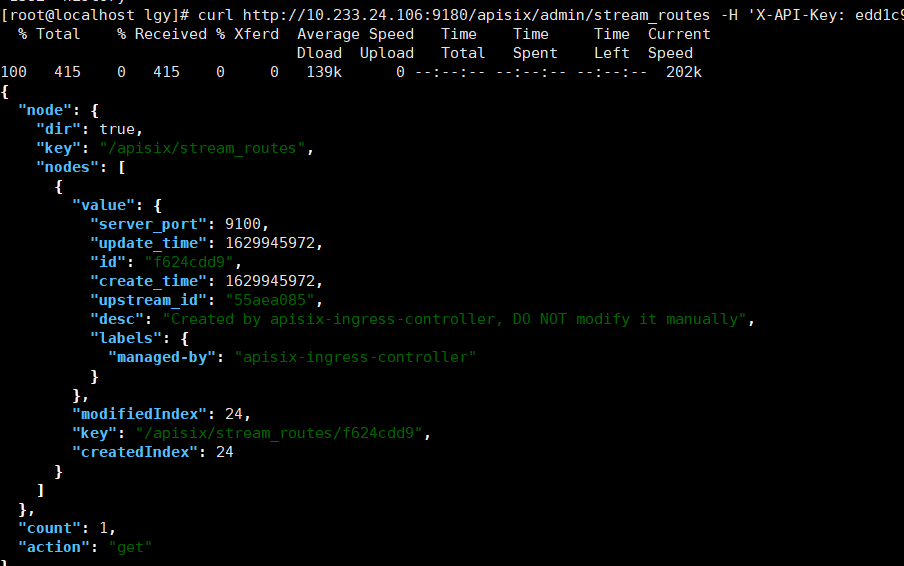
Is the configuration of apisix not effective, resulting in the tcp port not being exposed,Querying stream_router also does not show port and server addr
--
This is an automated message from the Apache Git Service.
To respond to the message, please log on to GitHub and use the
URL above to go to the specific comment.
To unsubscribe, e-mail: notifications-unsubscribe@apisix.apache.org
For queries about this service, please contact Infrastructure at:
users@infra.apache.org
[GitHub] [apisix-ingress-controller] lgy1027 commented on issue #652: request help: How to debug tcp
Posted by GitBox <gi...@apache.org>.
lgy1027 commented on issue #652:
URL: https://github.com/apache/apisix-ingress-controller/issues/652#issuecomment-906941623


   > @lgy1027 The port is the one APISIX listening on, not the `nodePort`.
   Then what is my request address and how to debug. I used nginx-ingress to open tcp-server before, and the corresponding svc will open multiple ports to listen.
   If I change to apisix, what is the request address, 127.0.0.1:33123? Will automatically jump?


--
This is an automated message from the Apache Git Service.
To respond to the message, please log on to GitHub and use the
URL above to go to the specific comment.

To unsubscribe, e-mail: notifications-unsubscribe@apisix.apache.org

For queries about this service, please contact Infrastructure at:
users@infra.apache.org
[GitHub] [apisix-ingress-controller] gxthrj commented on issue #652: request help: How to debug tcp
Posted by GitBox <gi...@apache.org>.
gxthrj commented on issue #652:
URL: https://github.com/apache/apisix-ingress-controller/issues/652#issuecomment-909956233


   `33123` is custom tcp port in APISIX,  you can try `kubectl port-forword` to test .


--
This is an automated message from the Apache Git Service.
To respond to the message, please log on to GitHub and use the
URL above to go to the specific comment.

To unsubscribe, e-mail: notifications-unsubscribe@apisix.apache.org

For queries about this service, please contact Infrastructure at:
users@infra.apache.org
[GitHub] [apisix-ingress-controller] lgy1027 closed issue #652: request help: How to debug tcp
Posted by GitBox <gi...@apache.org>.
lgy1027 closed issue #652:
URL: https://github.com/apache/apisix-ingress-controller/issues/652


--
This is an automated message from the Apache Git Service.
To respond to the message, please log on to GitHub and use the
URL above to go to the specific comment.

To unsubscribe, e-mail: notifications-unsubscribe@apisix.apache.org

For queries about this service, please contact Infrastructure at:
users@infra.apache.org
[GitHub] [apisix-ingress-controller] tokers commented on issue #652: request help: How to debug tcp
Posted by GitBox <gi...@apache.org>.
tokers commented on issue #652:
URL: https://github.com/apache/apisix-ingress-controller/issues/652#issuecomment-906901262


   @lgy1027 The port is the one APISIX listening on, not the `nodePort`.


--
This is an automated message from the Apache Git Service.
To respond to the message, please log on to GitHub and use the
URL above to go to the specific comment.

To unsubscribe, e-mail: notifications-unsubscribe@apisix.apache.org

For queries about this service, please contact Infrastructure at:
users@infra.apache.org
[GitHub] [apisix-ingress-controller] gxthrj commented on issue #652: request help: How to debug tcp
Posted by GitBox <gi...@apache.org>.
gxthrj commented on issue #652:
URL: https://github.com/apache/apisix-ingress-controller/issues/652#issuecomment-909956233


   `33123` is custom tcp port in APISIX,  you can try `kubectl port-forword` to test .


--
This is an automated message from the Apache Git Service.
To respond to the message, please log on to GitHub and use the
URL above to go to the specific comment.

To unsubscribe, e-mail: notifications-unsubscribe@apisix.apache.org

For queries about this service, please contact Infrastructure at:
users@infra.apache.org