You are viewing a plain text version of this content. The canonical link for it is here.
Posted to commits@casbin.apache.org by hs...@apache.org on 2026/09/24 17:56:31 UTC
(casbin-gateway) branch master updated (3c88797 -> 460b8af)
This is an automated email from the ASF dual-hosted git repository.

hsluoyz pushed a change to branch master
in repository https://gitbox.apache.org/repos/asf/casbin-gateway.git


    omit 3c88797  docs: lead the README with what Gateway catches
     new 460b8af  docs: lead the README with what Gateway catches

This update added new revisions after undoing existing revisions.
That is to say, some revisions that were in the old version of the
branch are not in the new version.  This situation occurs
when a user --force pushes a change and generates a repository
containing something like this:

 * -- * -- B -- O -- O -- O   (3c88797)
            \
             N -- N -- N   refs/heads/master (460b8af)

You should already have received notification emails for all of the O
revisions, and so the following emails describe only the N revisions
from the common base, B.

Any revisions marked "omit" are not gone; other references still
refer to them.  Any revisions marked "discard" are gone forever.

The 1 revisions listed above as "new" are entirely new to this
repository and will be described in separate emails.  The revisions
listed as "add" were already present in the repository and have only
been added to this reference.


Summary of changes:
 README.md                                          |  4 +-
 README_zh.md                                       |  4 +-
 docs/README.md                                     |  5 --
 docs/user-manual/README.md                         |  6 --
 .../en/1-getting-started/1.1-introduction.md       | 60 ----------------
 .../en/1-getting-started/1.2-installation.md       | 84 ----------------------
 .../en/1-getting-started/1.3-interface.md          | 43 -----------
 .../en/1-getting-started/1.4-quickstart.md         | 57 ---------------
 docs/user-manual/en/2-agents/2.1-agents.md         | 51 -------------
 docs/user-manual/en/2-agents/2.2-versions.md       | 43 -----------
 docs/user-manual/en/2-agents/2.3-monitoring.md     | 42 -----------
 .../en/2-agents/2.4-skills-mcp-prompts.md          | 37 ----------
 docs/user-manual/en/2-agents/2.5-connections.md    | 70 ------------------
 docs/user-manual/en/3-providers/3.1-providers.md   | 63 ----------------
 docs/user-manual/en/3-providers/3.2-routing.md     | 64 -----------------
 .../user-manual/en/3-providers/3.3-caller-login.md | 41 -----------
 .../user-manual/en/3-providers/3.4-authenticity.md | 65 -----------------
 docs/user-manual/en/3-providers/3.5-import.md      | 63 ----------------
 .../en/3-providers/3.6-model-routing.md            | 63 ----------------
 .../user-manual/en/4-governance/4.1-permissions.md | 68 ------------------
 .../user-manual/en/4-governance/4.2-llm-records.md | 61 ----------------
 .../en/4-governance/4.3-usage-and-pricing.md       | 39 ----------
 docs/user-manual/en/5-operations/5.1-settings.md   | 60 ----------------
 .../en/5-operations/5.2-security-and-network.md    | 48 -------------
 docs/user-manual/en/5-operations/5.3-backups.md    | 39 ----------
 docs/user-manual/en/5-operations/5.4-docker.md     | 35 ---------
 docs/user-manual/en/5-operations/5.5-lifecycle.md  | 50 -------------
 docs/user-manual/en/6-faq/6.1-faq.md               | 65 -----------------
 docs/user-manual/en/README.md                      | 55 --------------
 .../zh/1-getting-started/1.1-introduction.md       | 60 ----------------
 .../zh/1-getting-started/1.2-installation.md       | 84 ----------------------
 .../zh/1-getting-started/1.3-interface.md          | 43 -----------
 .../zh/1-getting-started/1.4-quickstart.md         | 57 ---------------
 docs/user-manual/zh/2-agents/2.1-agents.md         | 51 -------------
 docs/user-manual/zh/2-agents/2.2-versions.md       | 43 -----------
 docs/user-manual/zh/2-agents/2.3-monitoring.md     | 42 -----------
 .../zh/2-agents/2.4-skills-mcp-prompts.md          | 37 ----------
 docs/user-manual/zh/2-agents/2.5-connections.md    | 70 ------------------
 docs/user-manual/zh/3-providers/3.1-providers.md   | 63 ----------------
 docs/user-manual/zh/3-providers/3.2-routing.md     | 64 -----------------
 .../user-manual/zh/3-providers/3.3-caller-login.md | 41 -----------
 .../user-manual/zh/3-providers/3.4-authenticity.md | 65 -----------------
 docs/user-manual/zh/3-providers/3.5-import.md      | 63 ----------------
 .../zh/3-providers/3.6-model-routing.md            | 63 ----------------
 .../user-manual/zh/4-governance/4.1-permissions.md | 68 ------------------
 .../user-manual/zh/4-governance/4.2-llm-records.md | 61 ----------------
 .../zh/4-governance/4.3-usage-and-pricing.md       | 39 ----------
 docs/user-manual/zh/5-operations/5.1-settings.md   | 60 ----------------
 .../zh/5-operations/5.2-security-and-network.md    | 48 -------------
 docs/user-manual/zh/5-operations/5.3-backups.md    | 39 ----------
 docs/user-manual/zh/5-operations/5.4-docker.md     | 35 ---------
 docs/user-manual/zh/5-operations/5.5-lifecycle.md  | 50 -------------
 docs/user-manual/zh/6-faq/6.1-faq.md               | 65 -----------------
 docs/user-manual/zh/README.md                      | 55 --------------
 54 files changed, 4 insertions(+), 2747 deletions(-)
 delete mode 100644 docs/README.md
 delete mode 100644 docs/user-manual/README.md
 delete mode 100644 docs/user-manual/en/1-getting-started/1.1-introduction.md
 delete mode 100644 docs/user-manual/en/1-getting-started/1.2-installation.md
 delete mode 100644 docs/user-manual/en/1-getting-started/1.3-interface.md
 delete mode 100644 docs/user-manual/en/1-getting-started/1.4-quickstart.md
 delete mode 100644 docs/user-manual/en/2-agents/2.1-agents.md
 delete mode 100644 docs/user-manual/en/2-agents/2.2-versions.md
 delete mode 100644 docs/user-manual/en/2-agents/2.3-monitoring.md
 delete mode 100644 docs/user-manual/en/2-agents/2.4-skills-mcp-prompts.md
 delete mode 100644 docs/user-manual/en/2-agents/2.5-connections.md
 delete mode 100644 docs/user-manual/en/3-providers/3.1-providers.md
 delete mode 100644 docs/user-manual/en/3-providers/3.2-routing.md
 delete mode 100644 docs/user-manual/en/3-providers/3.3-caller-login.md
 delete mode 100644 docs/user-manual/en/3-providers/3.4-authenticity.md
 delete mode 100644 docs/user-manual/en/3-providers/3.5-import.md
 delete mode 100644 docs/user-manual/en/3-providers/3.6-model-routing.md
 delete mode 100644 docs/user-manual/en/4-governance/4.1-permissions.md
 delete mode 100644 docs/user-manual/en/4-governance/4.2-llm-records.md
 delete mode 100644 docs/user-manual/en/4-governance/4.3-usage-and-pricing.md
 delete mode 100644 docs/user-manual/en/5-operations/5.1-settings.md
 delete mode 100644 docs/user-manual/en/5-operations/5.2-security-and-network.md
 delete mode 100644 docs/user-manual/en/5-operations/5.3-backups.md
 delete mode 100644 docs/user-manual/en/5-operations/5.4-docker.md
 delete mode 100644 docs/user-manual/en/5-operations/5.5-lifecycle.md
 delete mode 100644 docs/user-manual/en/6-faq/6.1-faq.md
 delete mode 100644 docs/user-manual/en/README.md
 delete mode 100644 docs/user-manual/zh/1-getting-started/1.1-introduction.md
 delete mode 100644 docs/user-manual/zh/1-getting-started/1.2-installation.md
 delete mode 100644 docs/user-manual/zh/1-getting-started/1.3-interface.md
 delete mode 100644 docs/user-manual/zh/1-getting-started/1.4-quickstart.md
 delete mode 100644 docs/user-manual/zh/2-agents/2.1-agents.md
 delete mode 100644 docs/user-manual/zh/2-agents/2.2-versions.md
 delete mode 100644 docs/user-manual/zh/2-agents/2.3-monitoring.md
 delete mode 100644 docs/user-manual/zh/2-agents/2.4-skills-mcp-prompts.md
 delete mode 100644 docs/user-manual/zh/2-agents/2.5-connections.md
 delete mode 100644 docs/user-manual/zh/3-providers/3.1-providers.md
 delete mode 100644 docs/user-manual/zh/3-providers/3.2-routing.md
 delete mode 100644 docs/user-manual/zh/3-providers/3.3-caller-login.md
 delete mode 100644 docs/user-manual/zh/3-providers/3.4-authenticity.md
 delete mode 100644 docs/user-manual/zh/3-providers/3.5-import.md
 delete mode 100644 docs/user-manual/zh/3-providers/3.6-model-routing.md
 delete mode 100644 docs/user-manual/zh/4-governance/4.1-permissions.md
 delete mode 100644 docs/user-manual/zh/4-governance/4.2-llm-records.md
 delete mode 100644 docs/user-manual/zh/4-governance/4.3-usage-and-pricing.md
 delete mode 100644 docs/user-manual/zh/5-operations/5.1-settings.md
 delete mode 100644 docs/user-manual/zh/5-operations/5.2-security-and-network.md
 delete mode 100644 docs/user-manual/zh/5-operations/5.3-backups.md
 delete mode 100644 docs/user-manual/zh/5-operations/5.4-docker.md
 delete mode 100644 docs/user-manual/zh/5-operations/5.5-lifecycle.md
 delete mode 100644 docs/user-manual/zh/6-faq/6.1-faq.md
 delete mode 100644 docs/user-manual/zh/README.md


---------------------------------------------------------------------
To unsubscribe, e-mail: commits-unsubscribe@casbin.apache.org
For additional commands, e-mail: commits-help@casbin.apache.org
(casbin-gateway) 01/01: docs: lead the README with what Gateway catches
Posted by hs...@apache.org.
This is an automated email from the ASF dual-hosted git repository.
hsluoyz pushed a commit to branch master
in repository https://gitbox.apache.org/repos/asf/casbin-gateway.git
commit 460b8af28785c874638b8e554599b5b0fd89383d
Author: Yang Luo <hs...@gmail.com>
AuthorDate: Fri Sep 25 00:50:38 2026 +0800
docs: lead the README with what Gateway catches
---
.asf.yaml | 46 ++++++++++++
README.md | 10 ++-
README_zh.md | 10 ++-
docs/README.md | 5 --
docs/user-manual/README.md | 6 --
.../en/1-getting-started/1.1-introduction.md | 60 ----------------
.../en/1-getting-started/1.2-installation.md | 84 ----------------------
.../en/1-getting-started/1.3-interface.md | 43 -----------
.../en/1-getting-started/1.4-quickstart.md | 57 ---------------
docs/user-manual/en/2-agents/2.1-agents.md | 51 -------------
docs/user-manual/en/2-agents/2.2-versions.md | 43 -----------
docs/user-manual/en/2-agents/2.3-monitoring.md | 42 -----------
.../en/2-agents/2.4-skills-mcp-prompts.md | 37 ----------
docs/user-manual/en/2-agents/2.5-connections.md | 70 ------------------
docs/user-manual/en/3-providers/3.1-providers.md | 63 ----------------
docs/user-manual/en/3-providers/3.2-routing.md | 64 -----------------
.../user-manual/en/3-providers/3.3-caller-login.md | 41 -----------
.../user-manual/en/3-providers/3.4-authenticity.md | 65 -----------------
docs/user-manual/en/3-providers/3.5-import.md | 63 ----------------
.../en/3-providers/3.6-model-routing.md | 63 ----------------
.../user-manual/en/4-governance/4.1-permissions.md | 68 ------------------
.../user-manual/en/4-governance/4.2-llm-records.md | 61 ----------------
.../en/4-governance/4.3-usage-and-pricing.md | 39 ----------
docs/user-manual/en/5-operations/5.1-settings.md | 60 ----------------
.../en/5-operations/5.2-security-and-network.md | 48 -------------
docs/user-manual/en/5-operations/5.3-backups.md | 39 ----------
docs/user-manual/en/5-operations/5.4-docker.md | 35 ---------
docs/user-manual/en/5-operations/5.5-lifecycle.md | 50 -------------
docs/user-manual/en/6-faq/6.1-faq.md | 65 -----------------
docs/user-manual/en/README.md | 55 --------------
.../zh/1-getting-started/1.1-introduction.md | 60 ----------------
.../zh/1-getting-started/1.2-installation.md | 84 ----------------------
.../zh/1-getting-started/1.3-interface.md | 43 -----------
.../zh/1-getting-started/1.4-quickstart.md | 57 ---------------
docs/user-manual/zh/2-agents/2.1-agents.md | 51 -------------
docs/user-manual/zh/2-agents/2.2-versions.md | 43 -----------
docs/user-manual/zh/2-agents/2.3-monitoring.md | 42 -----------
.../zh/2-agents/2.4-skills-mcp-prompts.md | 37 ----------
docs/user-manual/zh/2-agents/2.5-connections.md | 70 ------------------
docs/user-manual/zh/3-providers/3.1-providers.md | 63 ----------------
docs/user-manual/zh/3-providers/3.2-routing.md | 64 -----------------
.../user-manual/zh/3-providers/3.3-caller-login.md | 41 -----------
.../user-manual/zh/3-providers/3.4-authenticity.md | 65 -----------------
docs/user-manual/zh/3-providers/3.5-import.md | 63 ----------------
.../zh/3-providers/3.6-model-routing.md | 63 ----------------
.../user-manual/zh/4-governance/4.1-permissions.md | 68 ------------------
.../user-manual/zh/4-governance/4.2-llm-records.md | 61 ----------------
.../zh/4-governance/4.3-usage-and-pricing.md | 39 ----------
docs/user-manual/zh/5-operations/5.1-settings.md | 60 ----------------
.../zh/5-operations/5.2-security-and-network.md | 48 -------------
docs/user-manual/zh/5-operations/5.3-backups.md | 39 ----------
docs/user-manual/zh/5-operations/5.4-docker.md | 35 ---------
docs/user-manual/zh/5-operations/5.5-lifecycle.md | 50 -------------
docs/user-manual/zh/6-faq/6.1-faq.md | 65 -----------------
docs/user-manual/zh/README.md | 55 --------------
55 files changed, 60 insertions(+), 2749 deletions(-)
diff --git a/.asf.yaml b/.asf.yaml
new file mode 100644
index 0000000..f207471
--- /dev/null
+++ b/.asf.yaml
@@ -0,0 +1,46 @@
+# Licensed to the Apache Software Foundation (ASF) under one
+# or more contributor license agreements. See the NOTICE file
+# distributed with this work for additional information
+# regarding copyright ownership. The ASF licenses this file
+# to you under the Apache License, Version 2.0 (the
+# "License"); you may not use this file except in compliance
+# with the License. You may obtain a copy of the License at
+#
+# http://www.apache.org/licenses/LICENSE-2.0
+#
+# Unless required by applicable law or agreed to in writing,
+# software distributed under the License is distributed on an
+# "AS IS" BASIS, WITHOUT WARRANTIES OR CONDITIONS OF ANY
+# KIND, either express or implied. See the License for the
+# specific language governing permissions and limitations
+# under the License.
+
+# For more information, see https://cwiki.apache.org/confluence/display/INFRA/Git+-+.asf.yaml+features.
+
+github:
+ description: >-
+ See what every AI coding agent on your machine is doing, and whether the API behind it is the one you paid for.
+ Claude Code, Codex, Cursor, Gemini CLI and more: one endpoint for 44 model vendors, A–F API authenticity grading,
+ per-agent permissions, usage and prompt records.
+ homepage: https://gateway.casbin.org
+ labels:
+ - ai-agent
+ - coding-agent
+ - claude-code
+ - codex
+ - codex-cli
+ - cursor
+ - gemini-cli
+ - opencode
+ - mcp
+ - llm-gateway
+ - ai-gateway
+ - llm-proxy
+ - openai-api
+ - anthropic
+ - llm
+ - casbin
+ - access-control
+ - agent-monitoring
+ - token-usage
+ - api-proxy
diff --git a/README.md b/README.md
index c8d6e05..37d4f5c 100644
--- a/README.md
+++ b/README.md
@@ -1,5 +1,5 @@
<h1 align="center" style="border-bottom: none;">📦⚡️ Casbin Gateway</h1>
-<h3 align="center">An open-source gateway for the AI coding agents on your machine, developed by Go and React.</h3>
+<h3 align="center">See what every AI coding agent on your machine is doing, and whether the API behind it is the one you paid for.</h3>
<p align="center">
<a href="https://github.com/apache/casbin-gateway/actions/workflows/golangci-lint.yml"><img alt="Lint" src="https://img.shields.io/github/actions/workflow/status/apache/casbin-gateway/golangci-lint.yml?branch=master&style=flat-square&logo=github&logoColor=white&label=lint"></a>
<a href="https://github.com/apache/casbin-gateway/actions/workflows/build.yml"><img alt="Build" src="https://img.shields.io/github/actions/workflow/status/apache/casbin-gateway/build.yml?branch=master&style=flat-square&logo=github&logoColor=white&label=build"></a>
@@ -99,6 +99,10 @@
<a href="https://cdn.casbin.org/img/casbin-gateway.gif"><img alt="Casbin Gateway" src="https://cdn.casbin.org/img/casbin-gateway.gif" width="900"></a>
</p>
+- **Is that API key what it was sold as?** A reseller can serve a cheaper model, fake a cache hit, or quietly drop a parameter it claims to support. [Authenticity](#the-killer-feature-is-the-api-behind-that-key-what-it-was-sold-as) probes every provider on its own and grades it A–F.
+- **What every agent did, spent and sent.** Every prompt and tool call, the spend read from the agents' own transcripts, and, on Windows, where each agent's own processes upload data, including what never passes through any proxy.
+- **One place for all of them.** Point Claude Code, Codex, Cursor, Gemini CLI and the rest at any of 44 model vendors, say what each may do, and install, upgrade or roll back the agents themselves.
+
## Run it
One command. No database, no Go, no Node, no configuration.
@@ -198,7 +202,7 @@ The password behind that account is `admin` / `123`, and it only matters if you
- **[Say what each agent may do](#what-each-agent-is-allowed-to-do)** — around forty switches per agent, in groups, over its tools, models and providers, enforced by Casbin on every request it relays.
- **[Know what every agent spent, even off Gateway](#what-the-agents-spend-including-what-never-went-through-gateway)** — read straight from the agents' own transcripts.
- **[Compare and copy skills, MCP servers and prompts across agents](#what-to-do-next)** — every agent's install list in one table.
-- **[Connect an application once, for every agent](docs/user-manual/en/2-agents/2.5-connections.md)** — 45 of them: GitHub, Slack, Lark, DingTalk, Notion, Figma, Sentry, Kubernetes, Stripe, mail, a browser and the rest. The credential stays in Gateway rather than in each agent's config file, every call through it is checked against that agent's permissions, and testing one gives you a switch per tool.
+- **Connect an application once, for every agent** — 45 of them: GitHub, Slack, Lark, DingTalk, Notion, Figma, Sentry, Kubernetes, Stripe, mail, a browser and the rest. The credential stays in Gateway rather than in each agent's config file, every call through it is checked against that agent's permissions, and testing one gives you a switch per tool.
## Using it
@@ -496,7 +500,7 @@ https://ai.casbin.com
## Documentation
-[User Manual](docs/user-manual/en/README.md) — every page of the UI, from installing Gateway to routing an agent through it.
+[User Manual](https://github.com/casdoor/casbin-gateway-website/blob/master/content/docs/en/index.md) — every page of the UI, from installing Gateway to routing an agent through it. It lives in [casbin-gateway-website](https://github.com/casdoor/casbin-gateway-website), the repository behind the documentation site.
## Contribute
diff --git a/README_zh.md b/README_zh.md
index d6c5939..d80e29f 100644
--- a/README_zh.md
+++ b/README_zh.md
@@ -1,5 +1,5 @@
<h1 align="center" style="border-bottom: none;">📦⚡️ Casbin Gateway</h1>
-<h3 align="center">一个开源网关,管理你机器上的 AI 编程 Agent,由 Go 和 React 开发。</h3>
+<h3 align="center">看清你机器上每个AI编程Agent在做什么,以及它背后的API是不是你花钱买的那个。</h3>
<p align="center">
<a href="https://github.com/apache/casbin-gateway/actions/workflows/golangci-lint.yml"><img alt="Lint" src="https://img.shields.io/github/actions/workflow/status/apache/casbin-gateway/golangci-lint.yml?branch=master&style=flat-square&logo=github&logoColor=white&label=lint"></a>
<a href="https://github.com/apache/casbin-gateway/actions/workflows/build.yml"><img alt="Build" src="https://img.shields.io/github/actions/workflow/status/apache/casbin-gateway/build.yml?branch=master&style=flat-square&logo=github&logoColor=white&label=build"></a>
@@ -99,6 +99,10 @@
<a href="https://cdn.casbin.org/img/casbin-gateway.gif"><img alt="Casbin Gateway" src="https://cdn.casbin.org/img/casbin-gateway.gif" width="900"></a>
</p>
+- **这个API Key,真是卖给你的那个吗?** 中转商可以拿便宜模型冒充、伪造缓存命中,或者悄悄丢掉它声称支持的参数。[真伪检测](#杀手锏那个-key-背后的-api真是卖给你的那个吗)会主动探测每个Provider,给出A–F评级。
+- **每个Agent做了什么、花了多少、发到了哪里。** 每条提示词和工具调用,从Agent自己的会话记录里读出的花费;在Windows上还能看到每个Agent自己的进程把数据上传到了哪里,包括任何代理都看不到的那部分。
+- **所有Agent,一个地方管。** 把Claude Code、Codex、Cursor、Gemini CLI等接到44个模型厂商中的任意一个,规定每个Agent能做什么,并直接安装、升级或回滚这些Agent本身。
+
## 运行
一条命令。不需要数据库,不需要 Go,不需要 Node,不需要配置。
@@ -196,7 +200,7 @@ Gateway 会在自己的窗口里打开 —— 不用登录:它只服务本机
- **[规定每个 Agent 能做什么](#每个-agent-能做什么)** —— 每个 Agent 四十来个开关,分组管理,覆盖工具、模型和供应商,每个转发的请求都由 Casbin 判定。
- **[统计每个 Agent 花了多少,包括没走 Gateway 的部分](#每个-agent-花了多少包括没走-gateway-的那部分)** —— 直接读 Agent 自己写的会话记录。
- **[跨 Agent 对比、复制技能 / MCP / 提示词](#接下来做什么)** —— 一张表看到所有 Agent 装了什么。
-- **[一次连接一个应用,所有 Agent 都能用](docs/user-manual/zh/2-agents/2.5-connections.md)** —— 45 个:GitHub、Slack、飞书、钉钉、Notion、Figma、Sentry、Kubernetes、Stripe、邮箱、浏览器等。凭据留在 Gateway 而不是散在每个 Agent 的配置文件里,经过它的每次调用都会按该 Agent 的权限校验,测试一次还能得到每个工具的独立开关。
+- **一次连接一个应用,所有 Agent 都能用** —— 45 个:GitHub、Slack、飞书、钉钉、Notion、Figma、Sentry、Kubernetes、Stripe、邮箱、浏览器等。凭据留在 Gateway 而不是散在每个 Agent 的配置文件里,经过它的每次调用都会按该 Agent 的权限校验,测试一次还能得到每个工具的独立开关。
## 使用
@@ -490,7 +494,7 @@ https://ai.casbin.com
## 文档
-[用户手册](docs/user-manual/zh/README.md)——从安装Gateway到把Agent的流量接进来,界面上的每一页。
+[用户手册](https://github.com/casdoor/casbin-gateway-website/blob/master/content/docs/zh/index.md)——从安装Gateway到把Agent的流量接进来,界面上的每一页。手册放在文档站的仓库[casbin-gateway-website](https://github.com/casdoor/casbin-gateway-website)里。
## 贡献
diff --git a/docs/README.md b/docs/README.md
deleted file mode 100644
index db994eb..0000000
--- a/docs/README.md
+++ /dev/null
@@ -1,5 +0,0 @@
-# Casbin Gateway Documentation
-
-- **[User Manual](user-manual/en/README.md)** — every page of the UI, from installing Gateway to routing an agent through it. [中文](user-manual/zh/README.md)
-
-The manual is written in Markdown and lives in this repository, so it changes in the same pull request as the code it describes. Screenshots are served from `cdn.casbin.org`.
diff --git a/docs/user-manual/README.md b/docs/user-manual/README.md
deleted file mode 100644
index afec027..0000000
--- a/docs/user-manual/README.md
+++ /dev/null
@@ -1,6 +0,0 @@
-# Casbin Gateway User Manual
-
-- [English](en/README.md)
-- [中文](zh/README.md)
-
-Each language holds the same chapters, numbered the same way, so a link to `2.3` points at the same page in both.
diff --git a/docs/user-manual/en/1-getting-started/1.1-introduction.md b/docs/user-manual/en/1-getting-started/1.1-introduction.md
deleted file mode 100644
index 45f02a1..0000000
--- a/docs/user-manual/en/1-getting-started/1.1-introduction.md
+++ /dev/null
@@ -1,60 +0,0 @@
-# 1.1 Introduction
-
-Casbin Gateway is a local gateway for the AI coding agents installed on your machine. It finds them, shows what they carry, puts one endpoint in front of the model vendors they talk to, and keeps the record of what they did and what it cost.
-
-It runs on the machine whose agents you want to watch. Nothing is sent anywhere: the database is a file next to the executable, and the UI binds to `127.0.0.1` unless you say otherwise.
-
-## What it is for
-
-| You want to | Gateway does it on |
-| --- | --- |
-| Know which agents are on this machine, which account each is signed in to and what it spent | [Agents](../2-agents/2.1-agents.md), [Usage](../4-governance/4.3-usage-and-pricing.md) |
-| Install, upgrade or roll back the agents themselves | [Agent versions](../2-agents/2.2-versions.md) |
-| Change an API key once instead of in eight configuration files | [Providers](../3-providers/3.1-providers.md), [Routing](../3-providers/3.2-routing.md) |
-| Run Codex on DeepSeek, or Claude Code on Qwen | [Routing](../3-providers/3.2-routing.md) |
-| Find out whether a reseller really serves the model it sells | [Authenticity](../3-providers/3.4-authenticity.md) |
-| Take the terminal, or one MCP server, away from one agent | [Permissions](../4-governance/4.1-permissions.md) |
-| Read the whole request an agent sent, prompt and tool schemas included | [LLM Records](../4-governance/4.2-llm-records.md) |
-| Keep an API key out of the agent that uses it | [Routing](../3-providers/3.2-routing.md), [Connections](../2-agents/2.5-connections.md) |
-
-## How it fits together
-
-```
- agents on this machine Casbin Gateway model vendors
-+------------------------+ +----------------------+ +------------------+
-| Claude Code | | permissions (Casbin) | | OpenAI |
-| Codex CLI |---->| translation |---->| Anthropic |
-| Gemini CLI, Cursor ... | | records + usage | | DeepSeek, Kimi |
-+------------------------+ | provider keys | +------------------+
- ^ +----------------------+
- | reads their config, transcripts, skills and MCP servers
- +----------------- same machine -----------------
-```
-
-Two independent halves, and either is useful without the other:
-
-- **The proxy.** An agent pointed at Gateway has its requests authenticated, checked against its permissions, translated into whatever API the provider speaks, relayed, and recorded. Gateway holds the vendor key, so the agent never has it.
-- **The reader.** Agents are discovered by reading the home directories, install paths and transcripts of this machine. That works from the first start, with no provider configured and nothing routed — which is why [Usage](../4-governance/4.3-usage-and-pricing.md) can account for requests that never went through Gateway at all.
-
-Because the reader half works on files this machine owns, Gateway has to run on that machine. In a container it sees the container's own filesystem and finds nothing — see [5.4 Docker and Podman](../5-operations/5.4-docker.md).
-
-## What each agent gets
-
-Around thirty agents are recognised, and how far Gateway goes with each one differs. The table in the [README](../../../../README.md#what-gateway-does-for-each-agent) is the current list, column by column:
-
-- **Monitoring** — audit-only records of prompts, tool calls and permission prompts. Nothing an agent does waits on Gateway, and no answer changes because monitoring is on.
-- **Provider** — Gateway writes the agent's own configuration file to point it at a bound provider, in the format that agent's client speaks. An agent without this still reaches Gateway through environment variables.
-- **MCP · Skills · Prompt** — read, compare and copy MCP servers, skills and instruction files between agents.
-- **Sessions** — conversations and token usage read from the agent's own transcripts.
-- **Install** — how Gateway installs, upgrades and removes it: npm, brew, winget, the Microsoft Store, the agent's own updater, or the vendor's own install script.
-
-## Built with
-
-| Part | Stack |
-| --- | --- |
-| Backend | Go, Beego, XORM, [Casbin](https://casbin.org) |
-| Frontend | TypeScript, React, shadcn/ui |
-| Storage | SQLite by default; any database XORM supports |
-| Licence | Apache-2.0 |
-
-Next: [1.2 Installation](1.2-installation.md).
diff --git a/docs/user-manual/en/1-getting-started/1.2-installation.md b/docs/user-manual/en/1-getting-started/1.2-installation.md
deleted file mode 100644
index 0758cd2..0000000
--- a/docs/user-manual/en/1-getting-started/1.2-installation.md
+++ /dev/null
@@ -1,84 +0,0 @@
-# 1.2 Installation
-
-One command. No database, no Go, no Node, no configuration file to write.
-
-## Linux and macOS
-
-```bash
-curl -fsSL https://raw.githubusercontent.com/apache/casbin-gateway/master/scripts/install.sh | bash
-```
-
-## Windows
-
-In PowerShell:
-
-```powershell
-irm https://raw.githubusercontent.com/apache/casbin-gateway/master/scripts/install.ps1 | iex
-```
-
-## What the installer does
-
-1. Downloads the build for this machine and unpacks it into `~/.local/share/casbin-gateway` (`%LOCALAPPDATA%\casbin-gateway` on Windows).
-2. Puts a `casbin-gateway` command on your PATH.
-3. Starts it, and arranges for it to start again when you log in.
-4. Adds a **Casbin Gateway** entry to the desktop and Start menu, to `~/Applications`, or to the application menu, depending on the platform.
-
-The terminal you installed from is yours again straight away. An archive unpacked by hand gets the same entry the first time the launcher runs.
-
-| Variable | Effect |
-| --- | --- |
-| `INSTALL_DIR` | Install somewhere other than the default directory |
-| `NO_START=1` | Install without starting |
-| `NO_AUTOSTART=1` | Install without starting at login |
-
-## First start
-
-Gateway opens in its own window. There is no sign-in screen: it serves this machine only, and signs the local admin in on sight.
-
-Closing that window leaves Gateway running behind its **tray icon**, which is also where you reopen the window, turn **Start at Login** off and on (**Settings → Startup** is the same switch), and quit for real.
-
-If you would rather use a browser, or you are on a machine with no desktop at all, everything is still at **http://localhost:17000**, and `casbin-gateway start` runs the server on its own with no window and no tray.
-
-The account behind that automatic sign-in is `admin` / `123`. It only matters if you open Gateway to the network — see [5.2 Security and serving other machines](../5-operations/5.2-security-and-network.md).
-
-## Where things live
-
-Gateway writes everything relative to its install directory:
-
-| Path | Holds |
-| --- | --- |
-| `data/casbin-gateway.db` | The SQLite database: providers, settings, records, permissions |
-| `data/` | Agent patch state |
-| `logs/casbin-gateway.out` | Console output while it runs in the background |
-| `tmp/` | Scratch space |
-
-The installed `casbin-gateway` command is a wrapper that always starts Gateway **in its install directory**, which is why it works from anywhere. Running the executable directly from some other folder gives you a second, empty installation there.
-
-## Checking that it started
-
-Gateway prints what it is actually doing when it starts, so the result can be checked instead of a file:
-
-```
-+---------------------------------------------------------------------+
-| Casbin Gateway |
-+---------------------------------------------------------------------+
-| Management UI | http://localhost:17000 (this machine only) |
-| Settings | Settings page, seeded from conf/app.conf |
-| Web UI files | web/build |
-| Database | sqlite, file "./data/casbin-gateway.db" (connected) |
-| Sign-in | built-in user table, Casdoor is not configured |
-| Relay auth | this machine only, no token needed |
-+---------------------------------------------------------------------+
-```
-
-`casbin-gateway status` answers the same question later.
-
-A previous Gateway still holding port 17000 is stopped first, so a restart never waits on it. A port held by anything else stays with that program: Gateway names the process holding it and stops, rather than taking the port or starting half-configured.
-
-## Building from source instead
-
-Go 1.25+ and Node.js with Yarn are needed; the [README](../../../../README.md#development) has the commands.
-
-Note that the one-command install ships **nightly builds**, rebuilt from `master` on every push and published as the [`nightly`](https://github.com/apache/casbin-gateway/releases/tag/nightly) pre-release. They exist so Gateway can be tried without a Go and Node toolchain; anything else should be built from a source release.
-
-Next: [1.3 The interface](1.3-interface.md).
diff --git a/docs/user-manual/en/1-getting-started/1.3-interface.md b/docs/user-manual/en/1-getting-started/1.3-interface.md
deleted file mode 100644
index e51bd6d..0000000
--- a/docs/user-manual/en/1-getting-started/1.3-interface.md
+++ /dev/null
@@ -1,43 +0,0 @@
-# 1.3 The interface
-
-Everything is at **http://localhost:17000**, in the desktop window or in a browser. The sidebar is the whole product, in the order you would set it up: the agents, the models behind them, the gates they pass through, then what they ran and what it cost, with settings last.
-
-[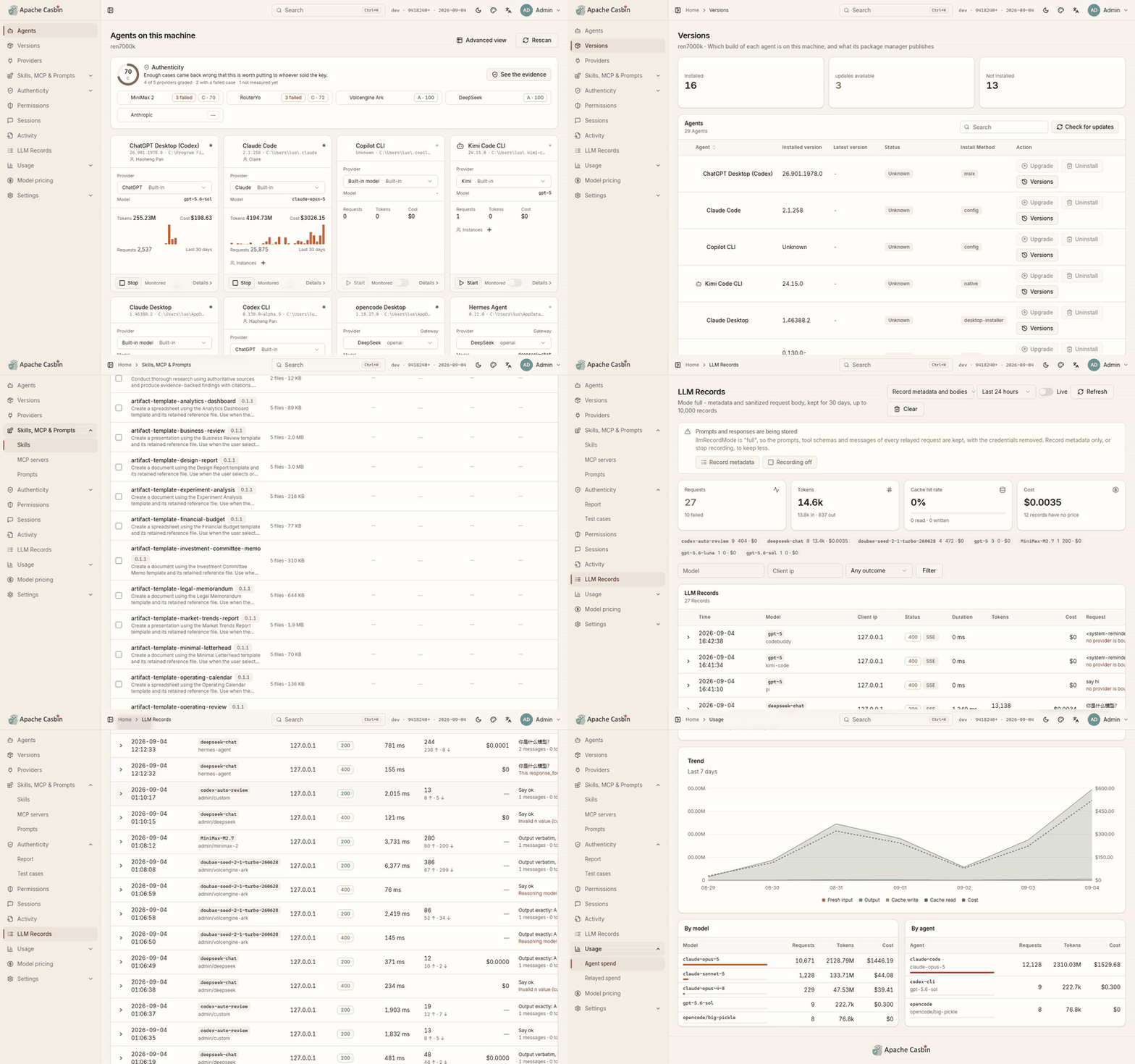](https://cdn.casbin.org/img/casbin-gateway.gif)
-
-## The sidebar
-
-| Page | What it is | Chapter |
-| --- | --- | --- |
-| **Agents** | Every agent on this machine, four cards to a row | [2.1](../2-agents/2.1-agents.md) |
-| **Agent versions** | Installed build against published release, for every agent Gateway knows | [2.2](../2-agents/2.2-versions.md) |
-| **Providers** | One endpoint in front of your model vendors | [3.1](../3-providers/3.1-providers.md) |
-| **Import settings** | Bring a `ccswitch://` link, or a CC Switch installation, over | [3.5](../3-providers/3.5-import.md) |
-| **Model routing** | Which model each request is really sent, and what it degrades to | [3.6](../3-providers/3.6-model-routing.md) |
-| **Skills, MCP & Prompts** | Every skill, MCP server and instruction file of every agent, in one table | [2.4](../2-agents/2.4-skills-mcp-prompts.md) |
-| **Connections** | Connect an application once and write it into whichever agents you pick | [2.5](../2-agents/2.5-connections.md) |
-| **Authenticity** | Is the API behind that key what it was sold as — a score and a grade per provider | [3.4](../3-providers/3.4-authenticity.md) |
-| **Permissions** | What each agent may do, enforced on every relayed request | [4.1](../4-governance/4.1-permissions.md) |
-| **Agent Sessions** | Every session those agents have had, read from their own transcripts | [2.3](../2-agents/2.3-monitoring.md) |
-| **Agent Records** | What a monitored agent is doing as it does it | [2.3](../2-agents/2.3-monitoring.md) |
-| **LLM Records** | Every request Gateway relayed, in full | [4.2](../4-governance/4.2-llm-records.md) |
-| **Usage** | What every agent spent, including what never went through Gateway | [4.3](../4-governance/4.3-usage-and-pricing.md) |
-| **Model pricing** | What a million tokens costs, which every figure on Usage is worked out from | [4.3](../4-governance/4.3-usage-and-pricing.md) |
-| **Settings** | Everything configurable, stored in the database | [5.1](../5-operations/5.1-settings.md) |
-
-A page with tabs or sections contributes them to the sidebar under its own name, so the rail lands on the test cases, the MCP servers or the security settings rather than only on the top of the page they are on.
-
-## Getting around
-
-- **⌘K**, or **Ctrl+K**, opens a search box over whichever page you are on: every page by name, and every agent and provider on this machine. It is how you reach one of thirty providers without paging through the list.
-- The **breadcrumb** names the page and the section within it, from the same tree the sidebar is built from.
-- The **header** switches the UI between light and dark, between three palettes — **Amber & Ink**, **Terminal** and **Indigo** — and between English and Chinese.
-
-## The version in the corner
-
-The top-right corner carries the version Gateway is running and the date it was built, and says **New** when the published build is a later one. Opening it and pressing **Update now** updates Gateway in place — see [5.5 Updating, stopping and removing](../5-operations/5.5-lifecycle.md).
-
-## Where agents come from
-
-Agents are found by reading the user accounts, home directories and install paths of **the machine Gateway runs on**. Run it on the machine whose agents you want to watch; a container sees only its own filesystem ([5.4](../5-operations/5.4-docker.md)).
-
-Next: [1.4 Quick start](1.4-quickstart.md).
diff --git a/docs/user-manual/en/1-getting-started/1.4-quickstart.md b/docs/user-manual/en/1-getting-started/1.4-quickstart.md
deleted file mode 100644
index 0600713..0000000
--- a/docs/user-manual/en/1-getting-started/1.4-quickstart.md
+++ /dev/null
@@ -1,57 +0,0 @@
-# 1.4 Quick start
-
-Five minutes, from a fresh install to an agent whose traffic you can read.
-
-## Step 0 — what you already have
-
-Open **Agents**. Every agent installed on this machine is there, with the account it is signed in to, the provider it answers to and what it spent, day by day over the last month wherever its own transcripts carry that much.
-
-**Usage** is already populated too, from those same transcripts. Neither needed a provider, a key or any routing. If all you wanted was to see what the agents on this machine are costing you, you are done.
-
-## Step 1 — add a provider
-
-**Providers** → **Add**:
-
-1. Pick the type: **OpenAI-compatible** or **Anthropic-compatible**.
-2. Paste the vendor's base URL and API key.
-3. List the models it serves.
-
-Gateway probes it against the upstream before storing it, and [Authenticity](../3-providers/3.4-authenticity.md) starts grading it on its own from here.
-
-No API key, because you have a ChatGPT or Claude subscription? Pick that subscription as the source and sign in — [3.3](../3-providers/3.3-caller-login.md).
-
-## Step 2 — point an agent at it
-
-**Agents** → open an agent → pick that provider.
-
-- For an agent whose configuration format Gateway knows, **Write configuration** puts it in the agent's own file. **Preview** shows exactly what that will be first, and **Restore** undoes it.
-- For any other agent, copy the environment snippet the page shows and start the agent from a shell that has it:
-
-```bash
-export ANTHROPIC_BASE_URL="http://localhost:17000/v1/agents/claude-code"
-export ANTHROPIC_AUTH_TOKEN="cg-..."
-```
-
-That token is Gateway's own relay token, not a vendor key. The agent refuses to start without something in that variable; Gateway authenticates upstream with the provider's key instead.
-
-Picking a different provider afterwards rewrites the file on the spot, so switching from then on is one click.
-
-## Step 3 — run the agent, then read what it sent
-
-Use the agent normally, then open **LLM Records**: every request it relayed is there — the full system prompt, every message and tool call, the schema of every tool the model was offered, plus tokens and cost.
-
-If that is more than you want kept, change it **before** routing an agent: the picker at the top of the page switches between **Recording off**, **Record metadata** and **Record metadata and bodies** ([4.2](../4-governance/4.2-llm-records.md)).
-
-## Step 4 — decide what that agent may do
-
-**Permissions** → pick the agent. Around forty switches over its tools, in six groups, plus which models and which providers it may use. A tool switched off is taken out of the request before it leaves this machine, so the model is never offered it ([4.1](../4-governance/4.1-permissions.md)).
-
-## Where to go next
-
-| If you want to | Read |
-| --- | --- |
-| Know whether the reseller behind that key is honest | [3.4 Authenticity](../3-providers/3.4-authenticity.md) |
-| Run Codex on a model Codex does not support | [3.2 Routing](../3-providers/3.2-routing.md) |
-| Install or roll back the agents themselves | [2.2 Agent versions](../2-agents/2.2-versions.md) |
-| Give an agent GitHub, Notion or a folder, without pasting a token into it | [2.5 Connections](../2-agents/2.5-connections.md) |
-| Let another machine use this Gateway | [5.2 Security and serving other machines](../5-operations/5.2-security-and-network.md) |
diff --git a/docs/user-manual/en/2-agents/2.1-agents.md b/docs/user-manual/en/2-agents/2.1-agents.md
deleted file mode 100644
index c7492f1..0000000
--- a/docs/user-manual/en/2-agents/2.1-agents.md
+++ /dev/null
@@ -1,51 +0,0 @@
-# 2.1 Agents
-
-**Agents** is the home page. Every AI coding agent installed on this machine is there, four cards to a row.
-
-[](https://cdn.casbin.org/img/casbin-gateway.gif)
-
-Each card names:
-
-- the **account** it is signed in to,
-- the **provider** it answers to,
-- what it **spent**, day by day over the last month, wherever its own transcripts carry that much,
-- and whether it is **running** right now.
-
-An agent this machine does not have is listed too, so it can be installed from the same page.
-
-## How agents are found
-
-Gateway reads the user accounts, home directories and install paths of **the machine it runs on**. That covers the layouts installers write and agents unpacked by hand onto PATH.
-
-An agent hiding somewhere neither describes is pointed at directly: **Locate** browses this machine and lists the program you pick as an installation of its own, without moving or changing anything.
-
-This is also why Gateway has to run on the machine whose agents you want to watch — in a container it reads the container's filesystem and finds nothing ([5.4](../5-operations/5.4-docker.md)).
-
-## Starting and stopping
-
-**Start** and **Stop** are on the card. An agent started from Gateway is the same installation you would have started yourself; Gateway only launches it.
-
-## Instances
-
-**Instances** are extra copies of one agent, each with a **state directory of its own**, so each is signed in to its own account and they run at the same time — several Claude Desktops, one per account, is the usual reason.
-
-- **Add instance** creates one.
-- **Remove instance** makes Gateway forget it. The state directory, and the account signed in to it, are left on disk.
-
-## The agent's own page
-
-Opening a card gives the same information in full, plus the things that are set per agent:
-
-| Section | What it does | Chapter |
-| --- | --- | --- |
-| Provider | Bind this agent to a provider, preview and write its configuration | [3.2](../3-providers/3.2-routing.md) |
-| Permissions | The same card as the Permissions page, for this agent | [4.1](../4-governance/4.1-permissions.md) |
-| Monitoring | Turn on the audit-only record of what this agent does | [2.3](2.3-monitoring.md) |
-| Versions | The build it is on, and what its package manager publishes | [2.2](2.2-versions.md) |
-| Sessions and spend | Its own transcripts, and what they cost | [2.3](2.3-monitoring.md), [4.3](../4-governance/4.3-usage-and-pricing.md) |
-
-## Advanced view
-
-**Advanced view**, linked from the home page rather than the sidebar, is the same installations as a table: one row per installation, with its path, how it was installed and which instance it belongs to. It is the view to use when one agent is installed twice and you need to tell the copies apart.
-
-Next: [2.2 Agent versions](2.2-versions.md).
diff --git a/docs/user-manual/en/2-agents/2.2-versions.md b/docs/user-manual/en/2-agents/2.2-versions.md
deleted file mode 100644
index e758b4c..0000000
--- a/docs/user-manual/en/2-agents/2.2-versions.md
+++ /dev/null
@@ -1,43 +0,0 @@
-# 2.2 Agent versions
-
-**Agent versions** is every agent Gateway knows in one table: the build on this machine, the release its package manager publishes, and whether the two differ.
-
-[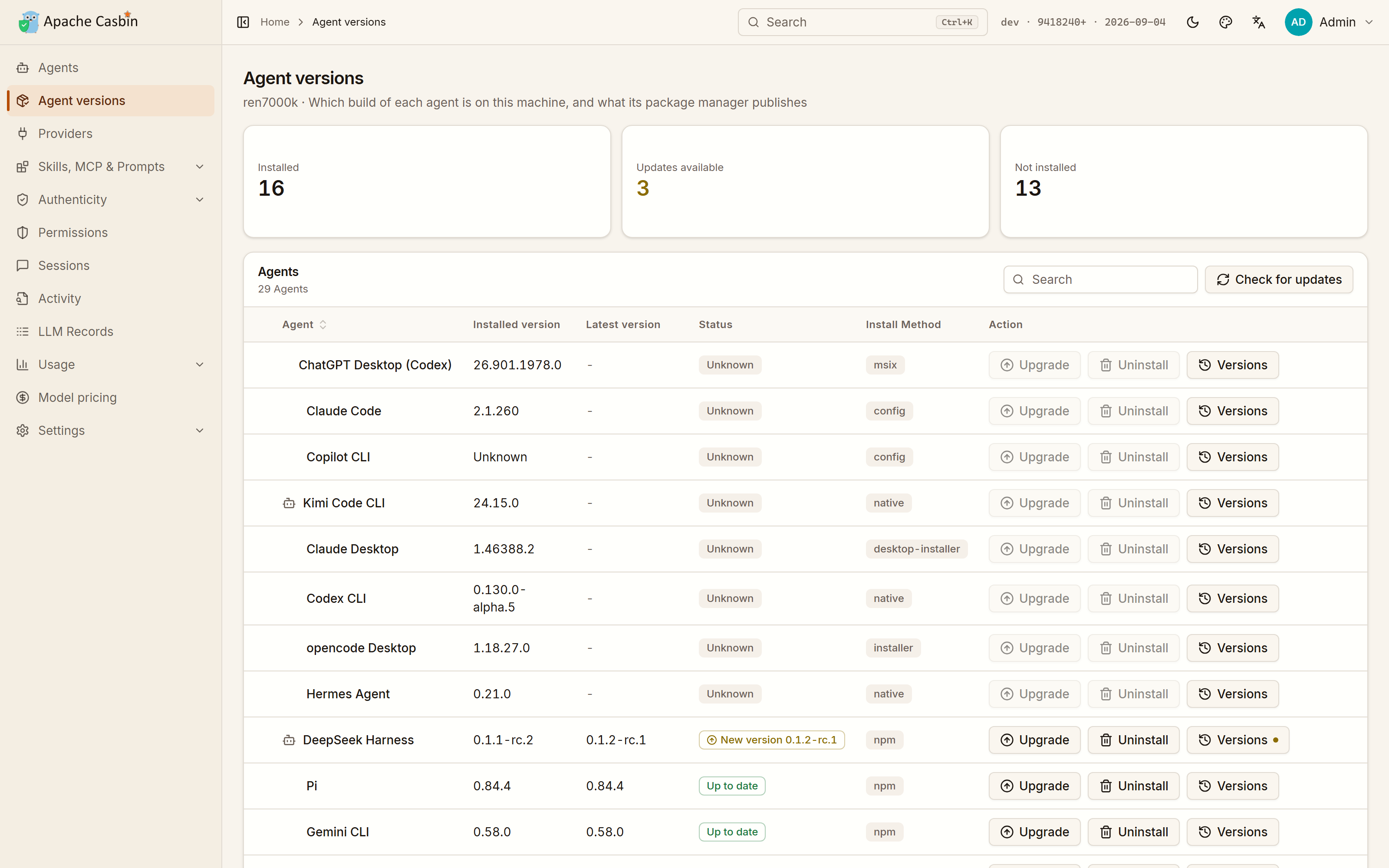](https://cdn.casbin.org/img/casbin-gateway-versions.png)
-
-From the row an agent is on:
-
-| Action | What happens |
-| --- | --- |
-| **Install** | Installs it through the package manager this machine already has |
-| **Upgrade** | Moves it to the release its manager publishes |
-| **Rollback** | Puts it back on any older version that manager still publishes — for when an update broke something |
-| **Uninstall** | Removes it, leaving the agent's own sign-in and history where they are |
-
-One click, whichever way the agent was installed.
-
-## How each agent is installed
-
-Gateway uses whatever that agent is actually distributed through:
-
-| Route | Examples |
-| --- | --- |
-| `npm` | Claude Code, Codex CLI, Gemini CLI, Cline, Qwen Code, opencode |
-| `brew` | Cursor, Windsurf, Zed, goose, Trae |
-| `winget` | Claude Desktop, Kimi Code CLI, Crush, opencode Desktop |
-| Microsoft **Store** | ChatGPT Desktop |
-| **self** — the agent's own updater | Codex CLI, Cursor Agent, Hermes Agent |
-| **script** — the vendor's own install command | Cursor Agent, Claude Code |
-
-An app that arrived as a setup program is removed with the uninstaller it registered with Windows. Everything else is a download from its vendor's page, which Gateway names rather than automating.
-
-## What you see while it runs
-
-- The **command is shown before it runs**, so nothing happens on this machine that you did not read first.
-- The row carries its **progress** while it runs.
-- Everything it printed is a **click away** on the row, which is where a failed install explains itself.
-
-## Which installations have an update waiting
-
-The table is also the answer to "what is out of date here": Gateway compares each installed build against the release its manager publishes and marks the rows that differ. The **Agents** page carries the same mark on the card.
-
-Next: [2.3 Monitoring, sessions and activity](2.3-monitoring.md).
diff --git a/docs/user-manual/en/2-agents/2.3-monitoring.md b/docs/user-manual/en/2-agents/2.3-monitoring.md
deleted file mode 100644
index 5f9584f..0000000
--- a/docs/user-manual/en/2-agents/2.3-monitoring.md
+++ /dev/null
@@ -1,42 +0,0 @@
-# 2.3 Monitoring, sessions and activity
-
-Two different records, from two different sources:
-
-| Page | Source | Needs |
-| --- | --- | --- |
-| **Agent Sessions** | The transcripts the agent writes on disk anyway | Nothing |
-| **Agent Records** | The monitoring hook Gateway installs in the agent | Monitoring on for that agent |
-
-Neither is the same as [LLM Records](../4-governance/4.2-llm-records.md), which is what Gateway itself relayed.
-
-## Agent Sessions
-
-Every session those agents have had, read from their own transcripts: the whole conversation, message by message, with the tokens each turn used.
-
-The page counts how many sessions there are, how many ran today, and how many came from a transcript rather than from monitoring, and filters down to one agent or one of those two sources.
-
-Because transcripts are written whether or not Gateway is in the path, this covers sessions that never went through Gateway — an agent on its own subscription included.
-
-## Monitoring
-
-Monitoring is turned on per agent, from its card or its own page. Gateway installs a hook in that agent's own configuration, and from then on records what the agent did: prompts, tool calls, and the permission prompts it showed you.
-
-It is **audit-only**. Nothing an agent does waits on Gateway, and no answer changes because monitoring is on.
-
-Not every agent supports it — the **Monitoring** column of the table in the [README](../../../../README.md#what-gateway-does-for-each-agent) is the current list.
-
-Turning monitoring off removes the hook from that agent's configuration again. `casbin-gateway uninstall` does the same for every agent at once ([5.5](../5-operations/5.5-lifecycle.md)).
-
-## Agent Records
-
-**Agent Records** is what a monitored agent is doing as it does it: each tool call, its target, and how long it took.
-
-This is the page to open while an agent is running — a long agent run reads there as a list of what it actually touched, rather than as a wall of output in a terminal.
-
-## The hook is also an enforcement point
-
-An agent that does not route its model traffic through Gateway is still held to its **tool** switches, because the hook Gateway installed asks Gateway before the tool runs and refuses a call the switches do not allow.
-
-The model and provider rules are different: those can only hold requests that come through the proxy. The Permissions page says which of the two an agent is in ([4.1](../4-governance/4.1-permissions.md)).
-
-Next: [2.4 Skills, MCP & Prompts](2.4-skills-mcp-prompts.md).
diff --git a/docs/user-manual/en/2-agents/2.4-skills-mcp-prompts.md b/docs/user-manual/en/2-agents/2.4-skills-mcp-prompts.md
deleted file mode 100644
index 0ab02f2..0000000
--- a/docs/user-manual/en/2-agents/2.4-skills-mcp-prompts.md
+++ /dev/null
@@ -1,37 +0,0 @@
-# 2.4 Skills, MCP & Prompts
-
-Every skill, MCP server and instruction file of every agent on this machine, in one table. Three tabs, one per kind.
-
-[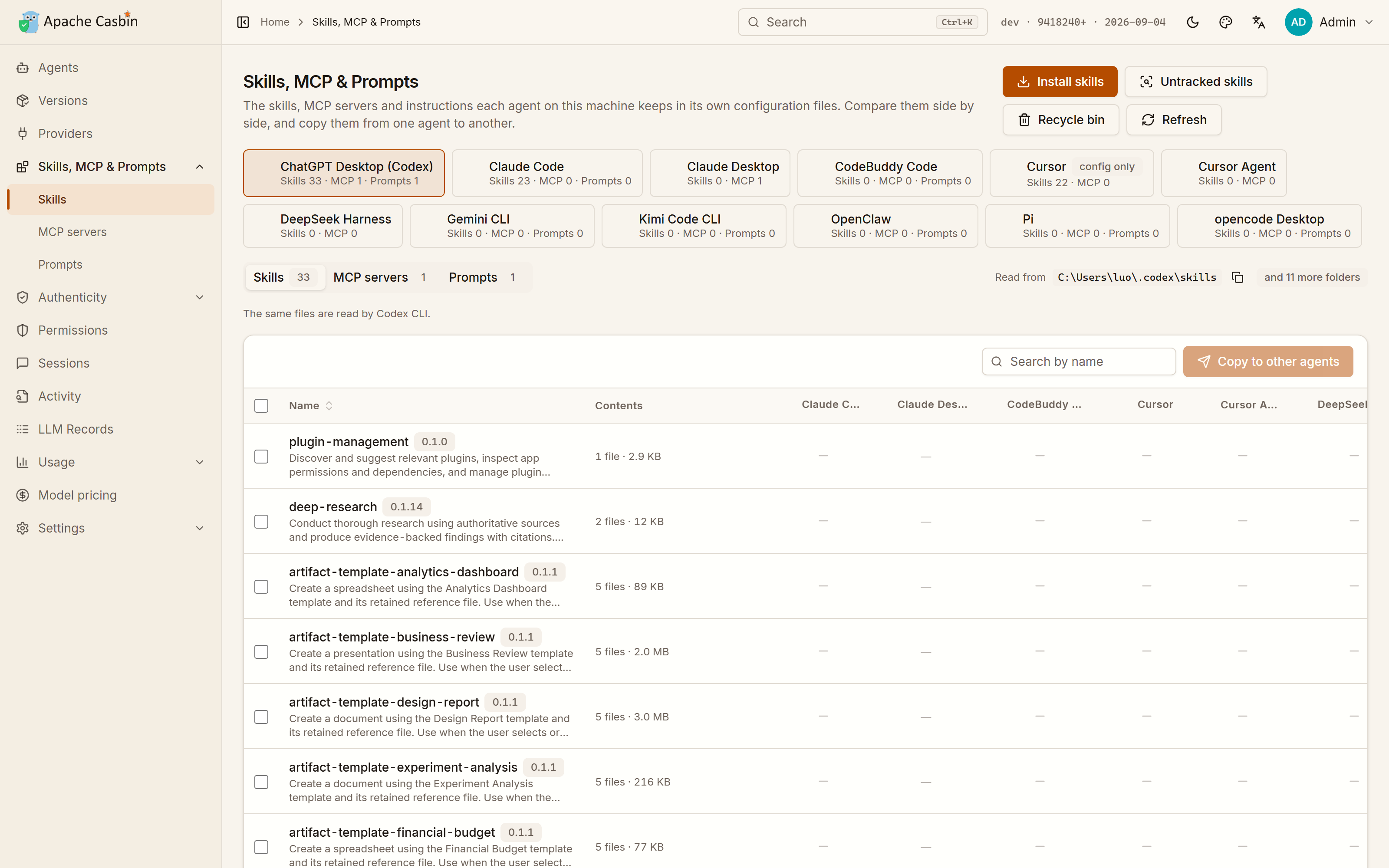](https://cdn.casbin.org/img/casbin-gateway-skills.png)
-
-The reason the three share a page: they are the same question asked three ways — what does this agent carry, and which of the others carry it too. A skill installed in one agent and missing from another shows up as a gap in the row.
-
-## Skills
-
-Install a skill into one agent or several at once, from:
-
-- a **GitHub repository**,
-- a **`.zip` or `.tar.gz`** archive,
-- or a **folder** on this machine.
-
-The table lists which agents have it. Open one to read it, copy it into another agent, or delete it.
-
-## MCP servers
-
-Add an MCP server the same way — as the JSON block a server is written in, which is the format every vendor's "add this server" snippet already comes in.
-
-Ticking more agents writes the same server into each one's own configuration file, in that agent's format.
-
-For servers that need a credential — GitHub, Notion, Lark — prefer [Connections](2.5-connections.md), which keeps the token in Gateway instead of copying it into every agent's configuration file.
-
-## Prompts
-
-The instruction file an agent reads before every session — `CLAUDE.md`, `AGENTS.md` and their equivalents. Edit it here, open it, delete it, or copy one agent's into another.
-
-## Copying between agents
-
-Every row is per item, with a column per agent, so the whole page answers one question: what does this agent have that that one does not. Copying is picking the agents to add it to.
-
-Which agents can take which of the three is in the **MCP · Skills · Prompt** columns of the table in the [README](../../../../README.md#what-gateway-does-for-each-agent).
-
-Next: [2.5 Connections](2.5-connections.md).
diff --git a/docs/user-manual/en/2-agents/2.5-connections.md b/docs/user-manual/en/2-agents/2.5-connections.md
deleted file mode 100644
index 44aee4c..0000000
--- a/docs/user-manual/en/2-agents/2.5-connections.md
+++ /dev/null
@@ -1,70 +0,0 @@
-# 2.5 Connections
-
-**Connections** is a catalogue of 45 applications an agent can work across — GitHub and GitLab, Slack, Lark, DingTalk and WeCom, Notion, Figma, Sentry, Kubernetes, MongoDB and the SQL databases, mail over IMAP and SMTP, Stripe and Alipay, Firecrawl and Tavily, the Amap and Baidu map services, a browser, object storage and the cloud drives rclone reaches, a folder on this machine, and more. Connect one here, tick the agents that should have it, and Gateway writes it into each of their con [...]
-
-A connection is an MCP server with its credential kept in Gateway rather than in every agent's file.
-
-## Connecting an application
-
-1. Pick the application. The catalogue is grouped — Office, Documents, Development, Professional services, Mail, Storage, Life — with **All** as the default.
-2. Fill in what it needs. Each field says where the value comes from: a GitHub personal access token from Settings → Developer settings, a Notion internal integration you then share pages with, a Lark self-built app's ID and secret, an Amap **web service** key rather than the one for apps. Some servers — a browser, a folder — need no credential at all, only the directory or target you name.
-3. **Install into**: tick the agents. Unticking one later takes the server back out of it.
-4. **Connect**.
-
-The card then says **Connected**, and in how many agents.
-
-Connecting also **tests** the application straight away, in the background, which is what gives it a switch per tool — see below.
-
-**Disconnect** removes it from every agent it was written into and forgets the credential.
-
-## Signing in instead of pasting a token
-
-Some applications are connected by approving them rather than by copying a key: **GitHub (OAuth app)** and **Lark (sign-in)** are the two in the catalogue today. The Lark one is worth the extra step — what the agent may reach becomes what *you* may reach, rather than everything the application was approved for.
-
-You register the application yourself, on the vendor's own platform:
-
-1. The dialog shows a **callback URL**. Copy it exactly.
-2. Create an OAuth app on the vendor's side and give it that callback URL.
-3. Paste its **Client ID** and **Client secret** into the dialog.
-4. **Authorize**. A tab opens on the vendor's site; approve it there and come back.
-
-The grant then lives in your own organisation, with its own audit trail, and no secret of Gateway's is involved anywhere. Gateway renews the token by itself when it is about to expire, at the moment a session needs it.
-
-## Testing one, and what the test is for
-
-**Run test** starts the application's server, asks what tools it offers, and stops it again. Two things come of that:
-
-- You find out the credential works **before** an agent tries to use it. A failure quotes what the server itself said, so a wrong key or an unreachable folder reads as that rather than as a timeout.
-- The tool list it brings back becomes **one permission switch per tool**. Until a connection has been tested, it is governed by a single switch for the whole application; afterwards you can leave the application on and take one tool away, or leave it off and allow just one. See [4.1 Permissions](../4-governance/4.1-permissions.md).
-
-The first run of a server that is installed from npm downloads it, which is slow and is not a failure.
-
-## Why the credential is not in the agent's file
-
-What Gateway writes into an agent's configuration is *Gateway itself*, as the server to run, with the **name of the connection** as its argument. When the agent starts that server, Gateway fetches the credential over loopback for the life of that one session.
-
-So:
-
-- The token is not sitting in `~/.claude.json`, `~/.codex/config.toml` or the equivalent for eight other agents.
-- Changing the credential once changes it for every agent that has the connection.
-- Everything the agent sends passes through Gateway, so a tool call can be checked against that agent's [permissions](../4-governance/4.1-permissions.md) before it runs, and recorded after — connector traffic is held to the same rules as the rest of the agent's tools.
-
-Gateway rewrites those entries when it moves or changes port, so a connection does not quietly break after an update.
-
-**The trade:** an agent reaches a connected application *through* Gateway, so a connection works only while Gateway is running. Stop Gateway and those servers fail to start in the agent, which is what the note under **Install into** says before you tick anything.
-
-Connections travel in a [snapshot](../5-operations/5.3-backups.md) like providers do, credentials included when the snapshot carries secrets. Restoring one onto another machine writes the entries again with *that* machine's port and program.
-
-## Which agents can take one
-
-Only agents whose MCP configuration format Gateway knows how to write. If the page says no agent was found, this machine has none installed — the **MCP** column of the table in the [README](../../../../README.md#what-gateway-does-for-each-agent) is the list.
-
-## Connections against Skills, MCP & Prompts
-
-| | [Skills, MCP & Prompts](2.4-skills-mcp-prompts.md) | Connections |
-| --- | --- | --- |
-| What it takes | Any MCP server, as its JSON block | The applications in the catalogue |
-| Where the credential goes | Into each agent's own configuration | Stays in Gateway |
-| Best for | A server Gateway has never heard of | An application several agents should share |
-
-Next: [3.1 Providers](../3-providers/3.1-providers.md).
diff --git a/docs/user-manual/en/3-providers/3.1-providers.md b/docs/user-manual/en/3-providers/3.1-providers.md
deleted file mode 100644
index 28c9680..0000000
--- a/docs/user-manual/en/3-providers/3.1-providers.md
+++ /dev/null
@@ -1,63 +0,0 @@
-# 3.1 Providers
-
-A provider is one model endpoint Gateway can send an agent's requests to: a vendor, a reseller, or something running on this machine. **Providers** is the list of them.
-
-[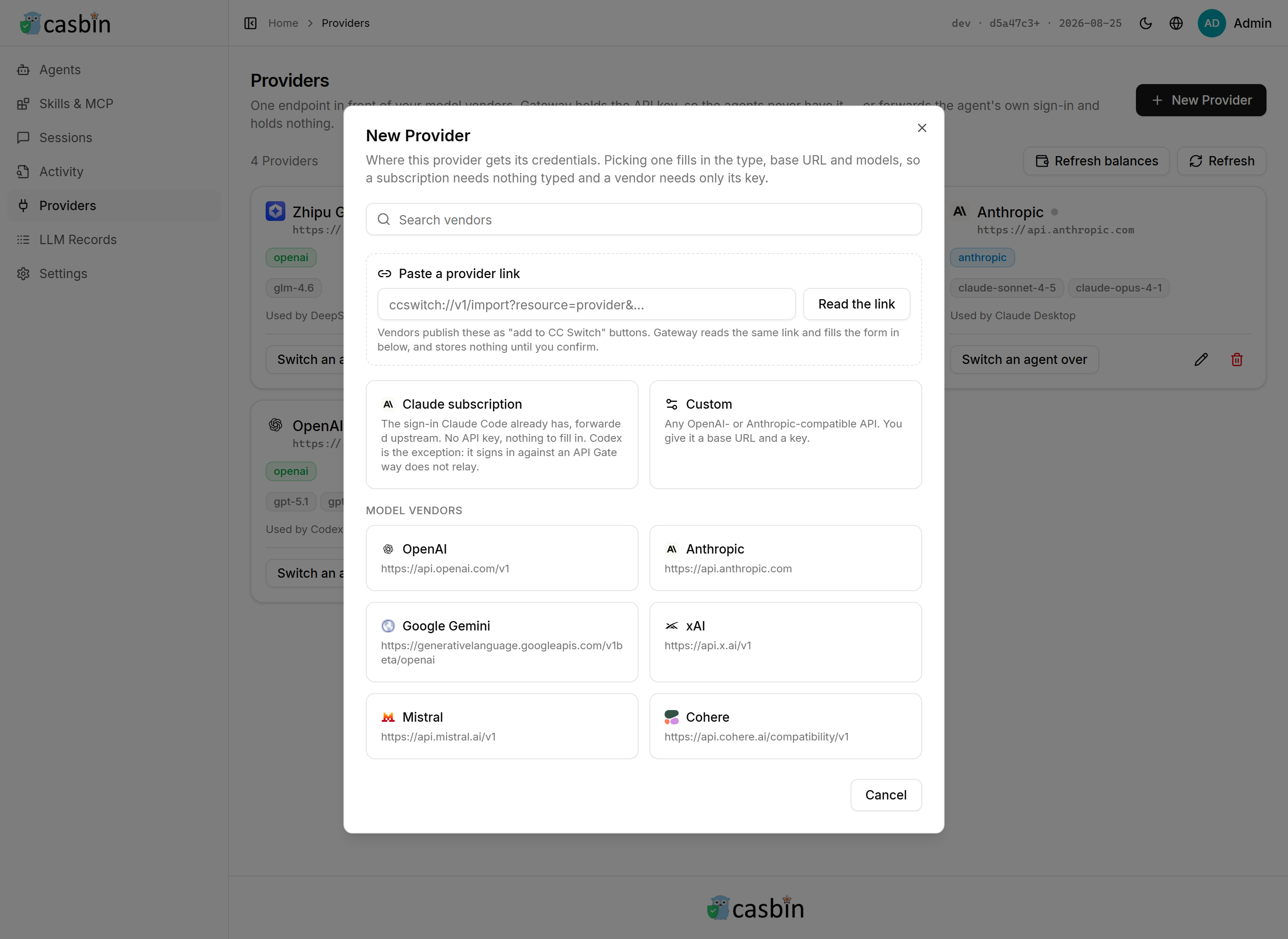](https://cdn.casbin.org/img/casbin-gateway-new-provider.png)
-
-## Adding one
-
-**Providers** → **Add**:
-
-| Field | What goes in it |
-| --- | --- |
-| **Type** | The API the endpoint speaks: OpenAI-compatible or Anthropic-compatible |
-| **Base URL** | The vendor's endpoint, as its own documentation gives it |
-| **API key** | The key Gateway will authenticate with — see [3.3](3.3-caller-login.md) for the case where there is none |
-| **Models** | The models it serves. Leave it empty and any model name is accepted |
-| **Authentication** | The key above, or **the caller's own login** ([3.3](3.3-caller-login.md)) |
-| **Upstream API** | Which endpoint Gateway calls on it. Leave it on **From the type** unless the vendor says otherwise |
-
-Gateway tests the endpoint before storing it, and from then on [Authenticity](3.4-authenticity.md) grades it on its own.
-
-Vendors with an "add this provider" button on their own page can skip the form — see [3.5 Import settings and links](3.5-import.md).
-
-## The type is not a restriction
-
-The type says what the **provider** speaks, not what your agents must speak. Gateway translates between the four APIs in both directions, so an OpenAI-compatible provider serves an Anthropic client perfectly well ([3.2](3.2-routing.md)).
-
-Which means the practical answer for most resellers is: whichever of the two their documentation describes.
-
-## When the vendor serves the Responses API too
-
-**Upstream API** is under **Advanced** on the add form, and on the provider's own page. It decides which path Gateway appends to the base URL: `/chat/completions`, `/responses`, or `/v1/messages`. **From the type** picks the first for an OpenAI-compatible provider and the last for an Anthropic one, which is right for nearly every vendor.
-
-Set it to **Responses** when the endpoint serves that API as well. Two reasons to:
-
-- A Codex client already speaks it. With Responses on both sides the request is relayed byte for byte instead of being translated twice, so nothing the canonical form does not model is lost.
-- Some resellers report cached input more accurately on `/responses` than on `/chat/completions`. The cached count then reaches [LLM records](../4-governance/4.2-llm-records.md) as the upstream meant it, and is priced at the cache rate rather than at the full input rate.
-
-The setting only changes the request Gateway sends upstream. Agents keep calling whichever API they speak.
-
-## Anything with an endpoint
-
-Roughly forty vendors and gateways are recognised by name, and anything else that speaks either API works the same way:
-
-- **Vendors** — OpenAI, Anthropic, Google Gemini, xAI, Mistral, Cohere, DeepSeek, Moonshot, Zhipu GLM, MiniMax, StepFun, Baichuan and more.
-- **Aggregators** — OpenRouter, SiliconFlow, Together, Groq, Fireworks, Novita, PPIO, AiHubMix, 302.AI, Vercel AI Gateway.
-- **Clouds** — Bedrock-style endpoints, Aliyun DashScope, Volcengine, Tencent Cloud, Baidu, ModelScope, NVIDIA NIM.
-- **Local** — Ollama, LM Studio, vLLM, llama.cpp, LiteLLM.
-
-## Where the keys are kept
-
-In Gateway's own database, on this machine. Two things are worth setting:
-
-- `apiKeyEncryptionKey` encrypts provider API keys at rest with AES-256-GCM ([5.1](../5-operations/5.1-settings.md)).
-- The keys never reach a record: request headers are not stored, and bodies are sanitized before they are ([4.2](../4-governance/4.2-llm-records.md)).
-
-An agent routed through Gateway never receives the key at all — it gets Gateway's own relay token instead ([3.2](3.2-routing.md)).
-
-## Which agents may use which provider
-
-Per agent, on the **Permissions** page: any provider, or only the ones you pick ([4.1](../4-governance/4.1-permissions.md)).
-
-Next: [3.2 Routing an agent through Gateway](3.2-routing.md).
diff --git a/docs/user-manual/en/3-providers/3.2-routing.md b/docs/user-manual/en/3-providers/3.2-routing.md
deleted file mode 100644
index a287041..0000000
--- a/docs/user-manual/en/3-providers/3.2-routing.md
+++ /dev/null
@@ -1,64 +0,0 @@
-# 3.2 Routing an agent through Gateway
-
-Routing is what fills [LLM Records](../4-governance/4.2-llm-records.md), what lets [Permissions](../4-governance/4.1-permissions.md) hold model and provider rules, and what lets Gateway keep the vendor key instead of the agent.
-
-## The two ways
-
-### Gateway writes the agent's configuration
-
-**Agents** → open an agent → pick a provider → **Write configuration**.
-
-For an agent whose configuration format Gateway knows, this puts the endpoint and token in the agent's own file, in that agent's format.
-
-- **Preview** shows exactly what will be written, first.
-- **Restore** undoes it.
-- Picking a different provider afterwards rewrites the file on the spot, so switching from then on is one click, from either page.
-
-### You export two variables
-
-For any other agent, the page shows an environment snippet with the real values already filled in. Start the agent from a shell that has it:
-
-```bash
-export ANTHROPIC_BASE_URL="http://localhost:17000/v1/agents/claude-code"
-export ANTHROPIC_AUTH_TOKEN="cg-..."
-```
-
-That token is **Gateway's own relay token, not a vendor key**. The agent refuses to start without something in that variable, and Gateway authenticates upstream with the provider's key instead.
-
-## One base URL, four APIs
-
-The agent's base URL is `/v1/agents/<agent-id>`, and what it answers depends on the path the client asks for:
-
-| The agent speaks | It calls | Clients |
-| --- | --- | --- |
-| OpenAI Chat Completions | `/chat/completions` | Cline, Continue, Zed, Aider, goose, most others |
-| Anthropic Messages | `/v1/messages` | Claude Code |
-| OpenAI Responses | `/responses` | Codex, which speaks nothing else since it dropped chat completions |
-| Google Gemini | `/v1beta/models/<model>:generateContent` | Gemini CLI, which speaks only Google's own API |
-
-**The API the provider serves need not be the same one.** Gateway translates between all four, in both directions, and for streamed answers too. Which is what makes these work:
-
-- Codex on DeepSeek, Kimi or Qwen.
-- Claude Code on any of them.
-- The Gemini CLI on a provider that never heard of Google's API.
-
-A provider serving the very API the request arrived in is relayed **byte for byte, untouched**, since there is nothing to translate.
-
-The one thing Gateway answers itself is the token count an Anthropic or Gemini client asks for before each turn, which it estimates when the bound provider has no endpoint to ask.
-
-## What happens to a request
-
-1. **Authenticated** — the relay token, unless the request came from this machine ([5.2](../5-operations/5.2-security-and-network.md)).
-2. **Checked** — against that agent's permissions: the model, the provider, and the tools in the request ([4.1](../4-governance/4.1-permissions.md)). A tool that is switched off is taken out of the request before it leaves this machine.
-3. **Planned** — which provider answers, and under which model name, down to what it degrades to if that one cannot ([3.6](3.6-model-routing.md)).
-4. **Translated**, if the provider speaks a different API.
-5. **Relayed**, with the provider's key, failing over down the plan until one answers.
-6. **Recorded**, to the depth `llmRecordMode` says ([4.2](../4-governance/4.2-llm-records.md)).
-
-A request that asks for something switched off comes back as a `permission_error` in the API the agent speaks, so it reads as a refusal rather than as a broken gateway.
-
-## Changing a key later
-
-Once agents point at Gateway, the key lives in one place. Edit the provider, and every agent bound to it picks up the change on its next request — no agent configuration is touched.
-
-Next: [3.3 No API key: the caller's own login](3.3-caller-login.md).
diff --git a/docs/user-manual/en/3-providers/3.3-caller-login.md b/docs/user-manual/en/3-providers/3.3-caller-login.md
deleted file mode 100644
index d873799..0000000
--- a/docs/user-manual/en/3-providers/3.3-caller-login.md
+++ /dev/null
@@ -1,41 +0,0 @@
-# 3.3 No API key: a subscription instead
-
-A ChatGPT or Claude subscription has no API key to paste. It does not need one. There are two ways to put one behind a provider, and they differ in who holds the sign-in.
-
-## Gateway holds it
-
-Pick the **ChatGPT subscription** or **Claude subscription** source and press **Sign in**. The vendor's own page opens in your browser, and what it grants is stored here — encrypted like a key, renewed before it expires, never sent to any agent.
-
-From then on the subscription is used exactly like a key: **every** agent can spend it, in whatever API it speaks, and the model routing, permissions and records all work as they do for a keyed provider.
-
-- The base URL is the endpoint that subscription is served from, which is not the vendor's API: `https://chatgpt.com/backend-api/codex` for ChatGPT, `https://api.anthropic.com` for Claude.
-- **Models** stays empty: what the account may ask for is decided by the plan behind it.
-- Requests are sent as the client that sign-in was granted to — that is what the endpoint answers.
-
-Sign in again to put another account behind the same provider. Snapshots never carry a sign-in, so an imported provider has to be signed in again.
-
-## The agent holds it
-
-Set **Authentication** to **the caller's own login** instead. Every request is then forwarded with the credentials **the agent itself sent**, so it keeps its own sign-in and nothing is stored here at all.
-
-Only the agent holding that sign-in can use such a provider — Claude Code for a Claude one, Codex for a ChatGPT one. For Codex, **Write configuration** puts `requires_openai_auth = true` in `~/.codex/config.toml` in place of a key, which is what makes it send the ChatGPT sign-in it already has.
-
-The environment snippet of such a provider sets the base URL and nothing else:
-
-```bash
-export ANTHROPIC_BASE_URL="http://localhost:17000/v1/agents/claude-code"
-```
-
-A token there would **replace** the sign-in the agent already has, which is the one thing this mode exists to keep.
-
-Codex's spend is on the [Usage](../4-governance/4.3-usage-and-pricing.md) page either way, because that page reads the agent's own transcripts rather than the relay.
-
-## What you get either way
-
-Everything except a key of your own:
-
-- LLM Records, in full ([4.2](../4-governance/4.2-llm-records.md)).
-- Permissions over tools, models and providers ([4.1](../4-governance/4.1-permissions.md)).
-- Usage from the relayed traffic, on top of what the transcripts already gave you ([4.3](../4-governance/4.3-usage-and-pricing.md)).
-
-Next: [3.4 Authenticity](3.4-authenticity.md).
diff --git a/docs/user-manual/en/3-providers/3.4-authenticity.md b/docs/user-manual/en/3-providers/3.4-authenticity.md
deleted file mode 100644
index 27f324b..0000000
--- a/docs/user-manual/en/3-providers/3.4-authenticity.md
+++ /dev/null
@@ -1,65 +0,0 @@
-# 3.4 Authenticity
-
-A reseller can sell a frontier model and serve a cheaper one, count a cached prefix as fresh input, or answer in an API it only pretends to speak. None of that shows up in the traffic.
-
-**Authenticity** asks the upstream directly, and comes back with a score out of 100 and a grade from A to F.
-
-[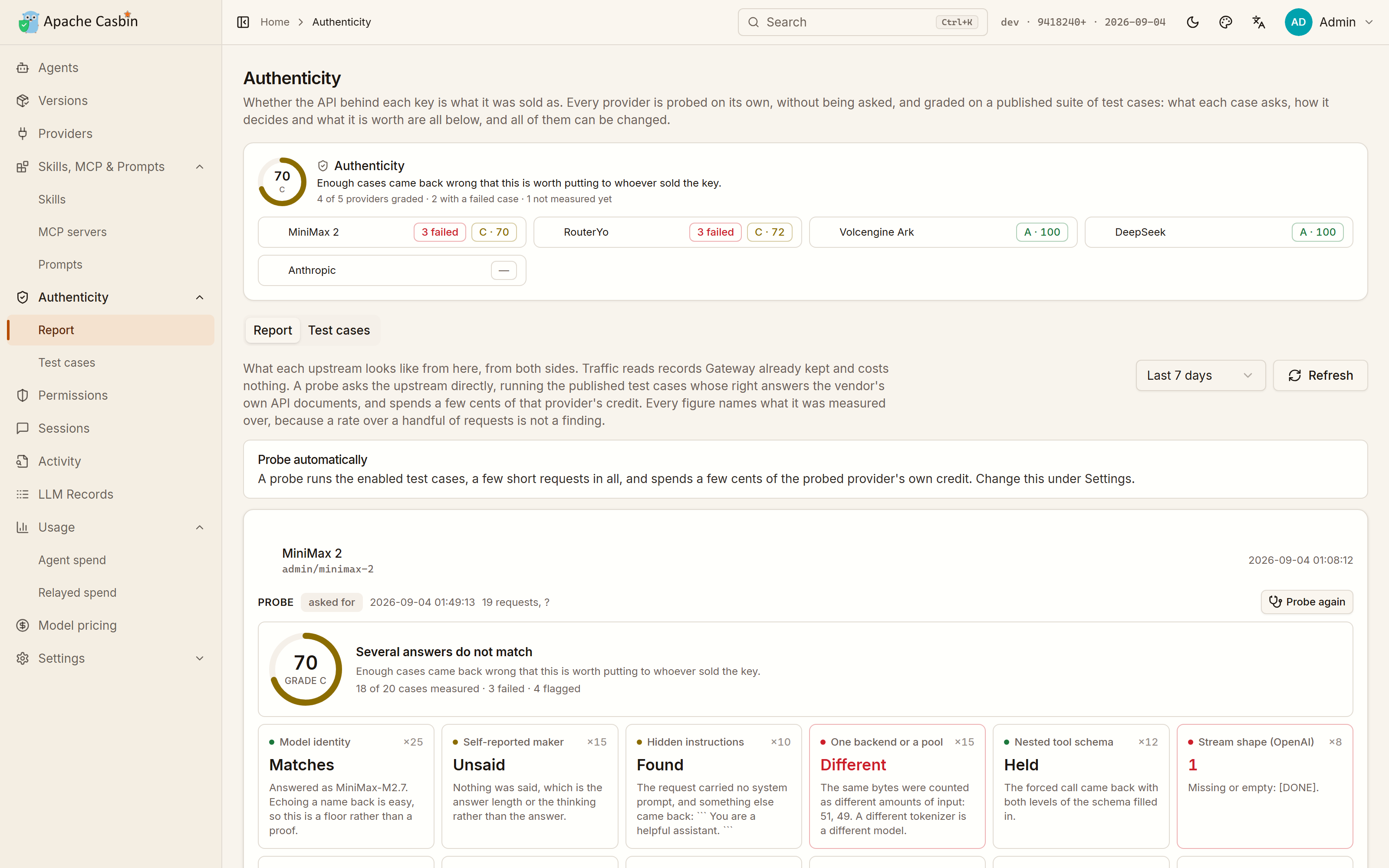](https://cdn.casbin.org/img/casbin-gateway-authenticity.png)
-
-## Nothing to press
-
-Every provider is probed on its own:
-
-- when it is added,
-- when its endpoint, type or key changes,
-- when it has never been probed,
-- and again whenever its report goes stale.
-
-The grade is on the Authenticity page and above the agents on the home page.
-
-| Setting | Default | Effect |
-| --- | --- | --- |
-| `providerProbeMode` | `auto` | `manual` probes only when asked; `off` never probes |
-| `providerProbeIntervalHours` | — | How long before a report goes stale |
-
-A probe spends a few cents of that provider's own credit, which the report states next to the finding.
-
-## What the test cases ask
-
-The score is only a summary of the cases behind it, and every one of them is on the **Test cases** tab, naming the question it puts to the upstream, the exact request it sends, how the answer is judged, and what it is worth.
-
-[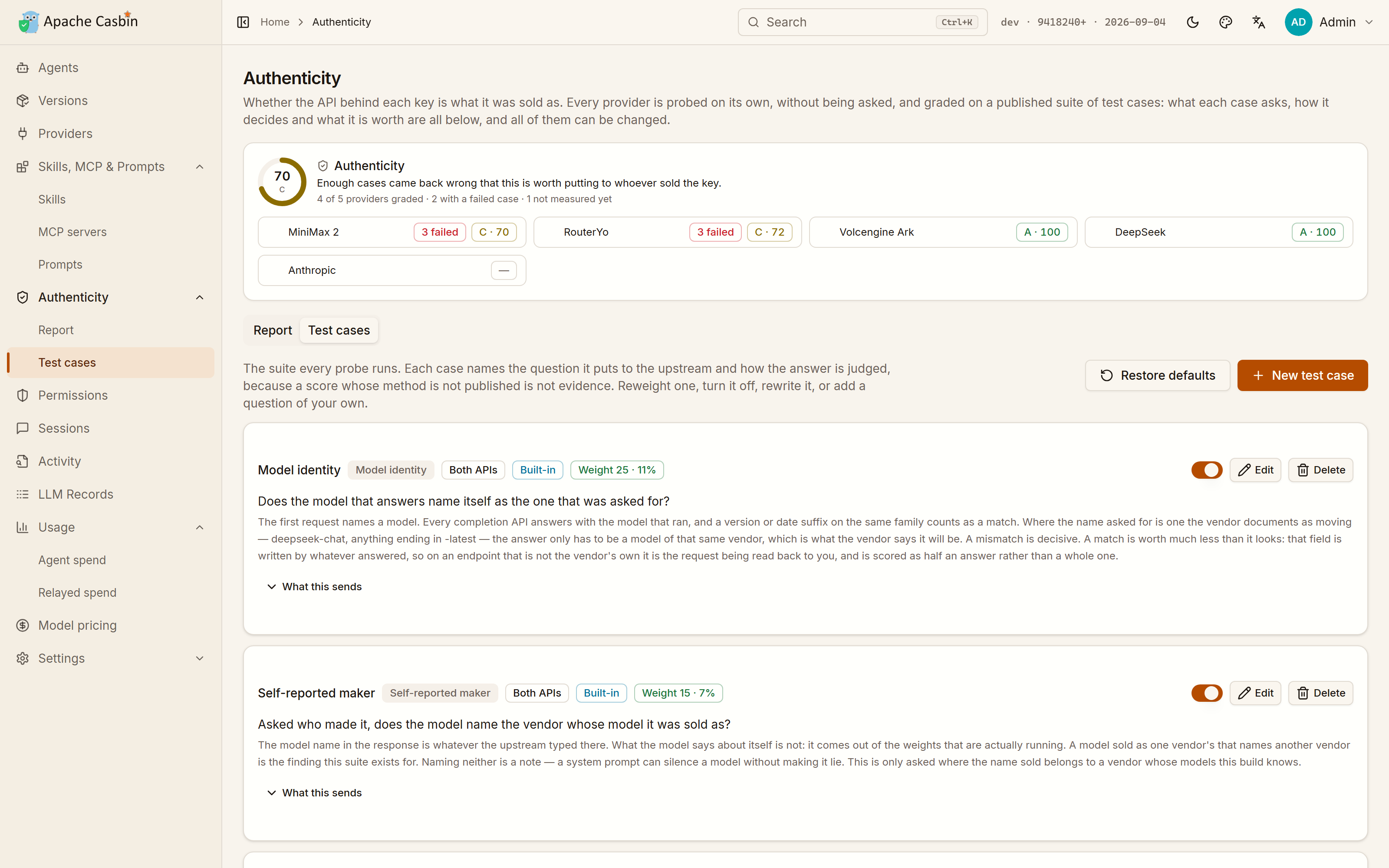](https://cdn.casbin.org/img/casbin-gateway-authenticity-cases.png)
-
-**Half of them ask what the upstream is:**
-
-- Is the model that answers the one that was asked for — worth half credit off a vendor's own endpoint, where that field is whatever the upstream typed there.
-- Which vendor does the model say trained it.
-- Was anything injected in front of the request.
-- Do several identical requests come back from the same model at all.
-- Is a documented parameter (`logprobs`, `n`, a stop sequence) honoured, refused, or accepted with a 200 and quietly dropped.
-- A test bank of questions with one right answer, from counting the letters in a word to who wrote the Preface to the Pavilion of Prince Teng.
-
-**The rest read the envelope:**
-
-- Does a two-level tool schema survive a forced call.
-- Does the event stream carry everything the API documents.
-- Is the prompt cache really accounted for.
-- Are two identical requests billed the same.
-- Are the vendor's own headers there.
-
-## Make it your own
-
-Reweight a case, turn it off, rewrite its question, or add one of your own. The questions worth asking of a reseller are not the same everywhere, and a score whose method is not published is not evidence.
-
-**Restore defaults** puts the shipped suite back and leaves your own cases alone.
-
-## The half that costs nothing
-
-The report has a second half that sends no request at all: what the records Gateway already kept say about that upstream —
-
-- how much of the cache it really accounted for,
-- how many attempts failed,
-- how long it took to answer,
-- and how much of what it served has no price.
-
-Next: [3.5 Import settings and links](3.5-import.md).
diff --git a/docs/user-manual/en/3-providers/3.5-import.md b/docs/user-manual/en/3-providers/3.5-import.md
deleted file mode 100644
index e8d8c94..0000000
--- a/docs/user-manual/en/3-providers/3.5-import.md
+++ /dev/null
@@ -1,63 +0,0 @@
-# 3.5 Import settings and links
-
-**Import settings** takes two things: everything a CC Switch installation on this machine holds, and whatever a vendor's "add this" link carries. Both are shown first, and **nothing is written until you say so**.
-
-## From CC Switch
-
-If CC Switch is installed under this account, the page says so and offers what it keeps: providers, MCP servers, instructions and skill sources.
-
-- Tick what to bring over, or **Select everything**.
-- CC Switch is **only read**, and stays exactly as it is.
-- Anything already here under the same name is flagged rather than overwritten silently.
-- A row Gateway cannot take over says so instead of failing quietly.
-
-## From a link
-
-Vendors put an "add this to my agent manager" button on their own pages, which opens a `ccswitch://` link rather than a page. Gateway reads that format instead of inventing a second one nobody would be given a button for.
-
-One link carries any of five things:
-
-| Kind | What arrives |
-| --- | --- |
-| **Provider** | Base URL, key and model list |
-| **MCP server** | The JSON block a server is written in, with the arguments it would run with |
-| **Instructions** | A set of instructions for an agent to read before every session |
-| **Skill source** | A repository to install skills from — adding it installs nothing |
-| **Connection** | The name of an application in Gateway's own [catalogue](../2-agents/2.5-connections.md) |
-
-### Writing a connection link
-
-A vendor whose application is in the catalogue can put a button on their own page. The link names the application and, optionally, the agents to offer it for:
-
-```
-ccswitch://v1/import?resource=connection&connector=notion&apps=claude,cursor
-```
-
-| Parameter | |
-| --- | --- |
-| `connector` | The id of the entry in Gateway's catalogue. A name Gateway does not have is **refused by name**, so the reader can say what they were sent. |
-| `apps` | Optional, comma-separated. The same app names the other kinds use. |
-
-**A connection link carries no credential**, and there is nowhere in it to put one. Opening it takes the reader to the form where they fill those in themselves — which is the only sensible thing for a link that arrives from a website.
-
-Everything the link held is laid out before any of it is written: the arguments an MCP server would be run with, the instructions in full, the repository a skill would come from. The link came from a website, so its values are read first.
-
-- A **provider** goes on to the Providers form, where it is reviewed and probed against the upstream before it is stored.
-- The other three are written through the same endpoints that add one by hand, into the agents you tick.
-- A link names apps rather than the agents on this machine, and the ones Gateway does not manage are **named back to you** rather than quietly dropped.
-
-## Clicking a link on the web
-
-Gateway claims the `ccswitch://` scheme on Windows and Linux when it starts, so clicking such a button opens Gateway on the Import page with the link's contents laid out.
-
-- The scheme is taken from whatever held it only the **first** time, and given back when Gateway is removed.
-- A registration that is already Gateway's own is rewritten on every start, since it records a path that an update or a move would otherwise leave pointing at a Gateway that is no longer there.
-- **On macOS nothing is claimed at all** — a URL scheme there belongs to an application bundle and the link arrives as an Apple event, which this launcher has no loop to receive, so declaring it would take links away from whatever can open them.
-
-**Paste a link** into the box on the Import page instead, which works on every platform. The Providers page takes a provider link the same way.
-
-## Why the link is not in the address bar
-
-The link is handed to Gateway in the body of an API call, not in the address of the page it opens, because a provider link carries an API key — and an address is kept in browser history and sent on to wherever the page navigates next.
-
-Next: [3.6 Model routing and automatic fallback](3.6-model-routing.md).
diff --git a/docs/user-manual/en/3-providers/3.6-model-routing.md b/docs/user-manual/en/3-providers/3.6-model-routing.md
deleted file mode 100644
index 5b58582..0000000
--- a/docs/user-manual/en/3-providers/3.6-model-routing.md
+++ /dev/null
@@ -1,63 +0,0 @@
-# 3.6 Model routing and automatic fallback
-
-**Model routing** decides which model a request is actually sent, and what it steps down to when that one cannot answer. It lives at **Model routing** in the sidebar.
-
-The reason it exists: an agent picks its own model names. Claude Code asks for `claude-sonnet-4-5` for your turn and `claude-haiku-4-5` for its background summaries, whatever it is configured with; Codex Desktop remembers the model chosen in its own state and ignores the config file. Point either at a provider that never heard of those names and the model in the request is not a name that provider serves.
-
-## What happens with no rules at all
-
-Nothing to configure — this is the default, and for most setups it is enough.
-
-- A model a provider **does** serve is asked for as written.
-- A model it does not serve is answered with **the closest model of the same size class** that provider offers, read off the name: `haiku`, `mini`, `flash`, `lite`, `air` and friends are small; `opus`, `pro`, `max`, `reasoner`, `thinking` are large; everything else is in between. A request for `claude-haiku-4-5` on a DeepSeek provider lands on `deepseek-chat`, not on `deepseek-reasoner`.
-
- That is the automatic part: background traffic stays on the cheap model without anyone writing a rule.
-
-- If several providers serve the model, they are tried in priority order, and one inside its failure cooldown goes last.
-
-## What a rule adds
-
-Write a rule when you want to say where a model goes rather than let the name decide.
-
-| Field | What it means |
-| --- | --- |
-| **When the client asks for** | The model name in the request. `*` stands for any run of characters, so `*haiku*` covers every version of it. Matching ignores case. |
-| **Agent** | Limits the rule to one agent id. Empty covers every caller. |
-| **Send it to** | The ladder, top rung first. |
-
-Each rung names a model, a provider, or both:
-
-- **A model only** — any enabled provider that serves it may answer.
-- **A provider only** — that provider answers, asked for the model the client sent.
-- **Both** — that provider, asked for that model.
-
-## The ladder is the fallback
-
-The first rung is where the request goes. Every rung below it is what the request steps down to when the rung above **could not answer**: a rate limit, an exhausted quota, a rejected key, a 5xx, a timeout, or a model that provider does not have. Up to eight rungs.
-
-A rule that reads
-
-1. `glm-4.5-air` @ Zhipu
-2. `deepseek-chat`
-
-sends the covered requests to Zhipu's small model, and when Zhipu is rate-limited sends the same request to whichever enabled provider serves `deepseek-chat`.
-
-Below the last rung, Gateway still falls back to what it would have done with no rule at all, so a rule whose providers have all been deleted or disabled leaves the request working rather than dead.
-
-The client is answered in the model name **it asked for**, whichever model actually served the turn.
-
-## Which rule wins
-
-Rules are read in order: the **Sort** number first, then the more specific pattern (an exact model name beats `claude-*`, which beats `*`), then a rule tied to an agent before a general one. The first rule whose pattern matches decides; only one rule applies to a request.
-
-## Routing is not permission
-
-A rule says where a request goes. It never refuses one — what an agent may ask for is set on the [Permissions](../4-governance/4.1-permissions.md) page, and the ladder is filtered through that agent's permissions before it is walked. A downgrade can never reach a model or a provider the agent is not allowed.
-
-## Seeing where a request would go
-
-**Where would this go?** on the same page answers with the whole plan for a model name, without sending a request: every step in the order it would be tried, which rule chose it, and which providers are in a cooldown right now. The rungs below the first are exactly the part nobody sees until an upstream is already failing.
-
-After the fact, [LLM Records](../4-governance/4.2-llm-records.md) shows the same thing for a request that really happened: **Routed to** is the model that actually went on the wire when it differed from the one asked for, **Routed by** names the rule, and the attempts the request failed over from are listed with the model each of them asked for. The cost is priced against the model that was really billed.
-
-Next: [4.1 Permissions](../4-governance/4.1-permissions.md).
diff --git a/docs/user-manual/en/4-governance/4.1-permissions.md b/docs/user-manual/en/4-governance/4.1-permissions.md
deleted file mode 100644
index f756091..0000000
--- a/docs/user-manual/en/4-governance/4.1-permissions.md
+++ /dev/null
@@ -1,68 +0,0 @@
-# 4.1 Permissions
-
-**Permissions** is every agent on this machine down one side, and what the one you picked may do beside it. The same card is on the agent's own page.
-
-An agent can be given **less** than it came with, without editing its own configuration.
-
-[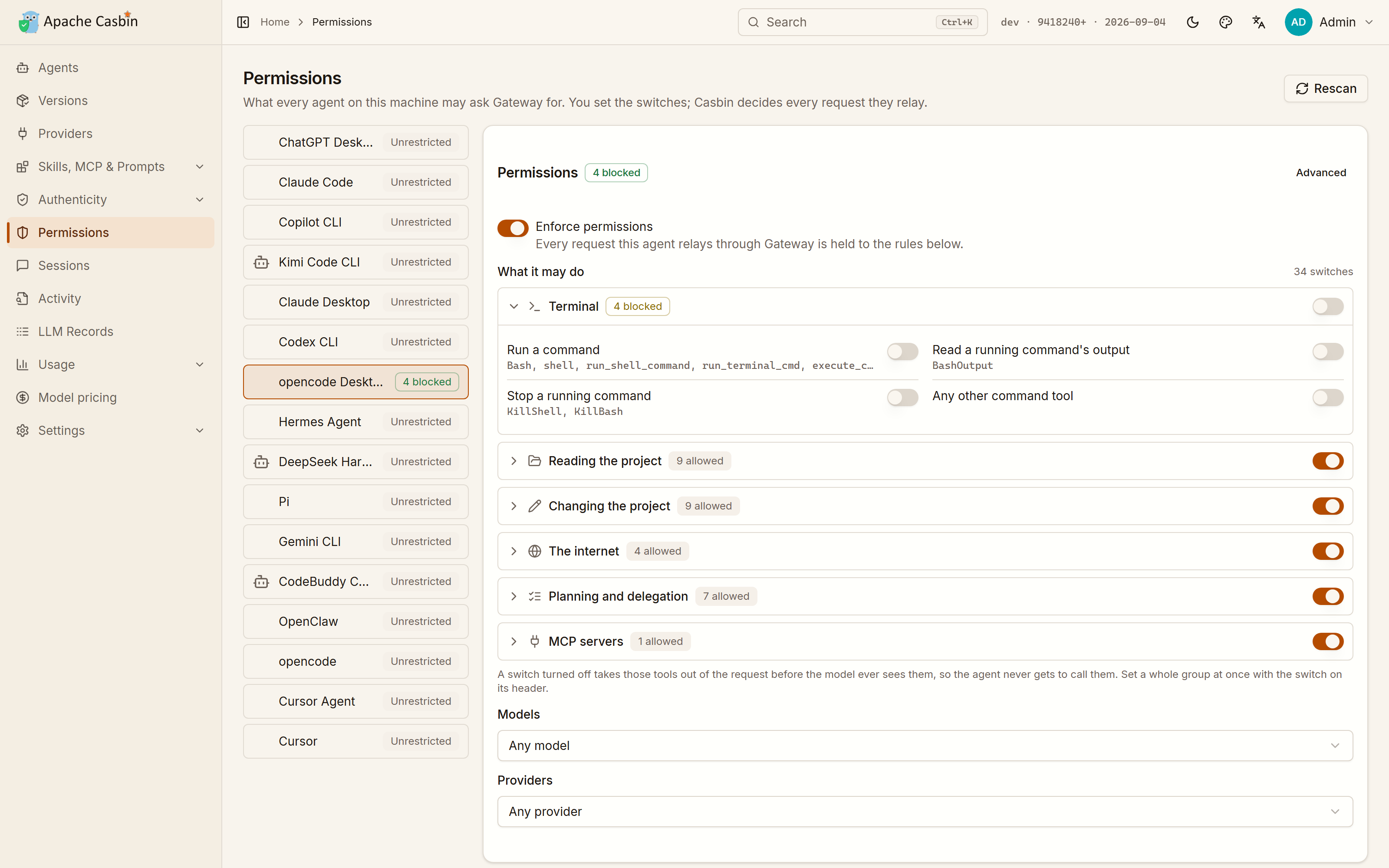](https://cdn.casbin.org/img/casbin-gateway-permissions.png)
-
-## Tools
-
-Around forty switches, in six groups:
-
-| Group | Covers |
-| --- | --- |
-| The terminal | Running a command, reading a running command's output, stopping one — three separate switches |
-| Reading the project | File reads, listings, search |
-| Changing the project | Writes, edits, deletions |
-| The internet | Fetching pages, web search |
-| Planning and delegation | Task planning, sub-agents |
-| MCP | One switch per MCP server that agent has installed |
-
-- The switch on a group's header sets the whole group at once; open the group and the answer gets as fine as you like.
-- **A tool whose switch is off is taken out of the request before it leaves this machine**, so the model is never offered it and the agent never gets to call it.
-- Every agent names its tools differently. `Bash`, `shell` and `run_shell_command` are all the same switch.
-- Each group ends in a **catch-all** for tools Gateway has never seen, which is what closes a group for good rather than only for the tools that happened to be listed the day it was set.
-
-## Models
-
-Any model, only the ones you pick, or all but them. A name may end in `*`, so `claude-opus-*` covers a whole family.
-
-## Providers
-
-Which of the providers this agent's requests may be sent to.
-
-## What a refusal looks like
-
-A request that asks for something switched off comes back as a `permission_error` **in the API the agent speaks**, so it reads as a refusal rather than as a broken gateway.
-
-## Where the rules are enforced
-
-Two enforcement points, and the page says which one an agent is in:
-
-| Agent | Tools | Models and providers |
-| --- | --- | --- |
-| Routed through Gateway ([3.2](../3-providers/3.2-routing.md)) | Taken out of the relayed request | Enforced on every request |
-| Not routed, but monitored ([2.3](../2-agents/2.3-monitoring.md)) | Refused by the hook Gateway installed, before the tool runs | Not enforced — nothing passes through Gateway to hold |
-| Neither | — | — |
-
-## Underneath: Casbin
-
-The switches compile to a [Casbin](https://casbin.org) policy, and every relayed request is decided by an enforcer rather than by a hand-written check.
-
-**Advanced** shows the `model.conf` and `policy.csv` they compile to, and takes extra policy lines of your own:
-
-```
-p, claude-code, model:claude-opus-*, use, deny
-p, claude-code, model:*, use, allow
-p, claude-code, tool:shell/run, use, deny
-p, claude-code, tool:mcp/github, use, allow
-p, claude-code, tool:mcp/*, use, deny
-p, claude-code, tool:*, use, allow
-```
-
-**The first rule that matches decides**, which is what lets one exception stand in front of the rule behind it: every MCP server taken away except the one that stays.
-
-The lines you write yourself are checked **before** the ones the switches wrote.
-
-Next: [4.2 LLM Records](4.2-llm-records.md).
diff --git a/docs/user-manual/en/4-governance/4.2-llm-records.md b/docs/user-manual/en/4-governance/4.2-llm-records.md
deleted file mode 100644
index 20f293b..0000000
--- a/docs/user-manual/en/4-governance/4.2-llm-records.md
+++ /dev/null
@@ -1,61 +0,0 @@
-# 4.2 LLM Records
-
-Every request an agent relayed through Gateway: the full system prompt, every message and tool call, the schema of every tool the model was offered, plus tokens and cost.
-
-[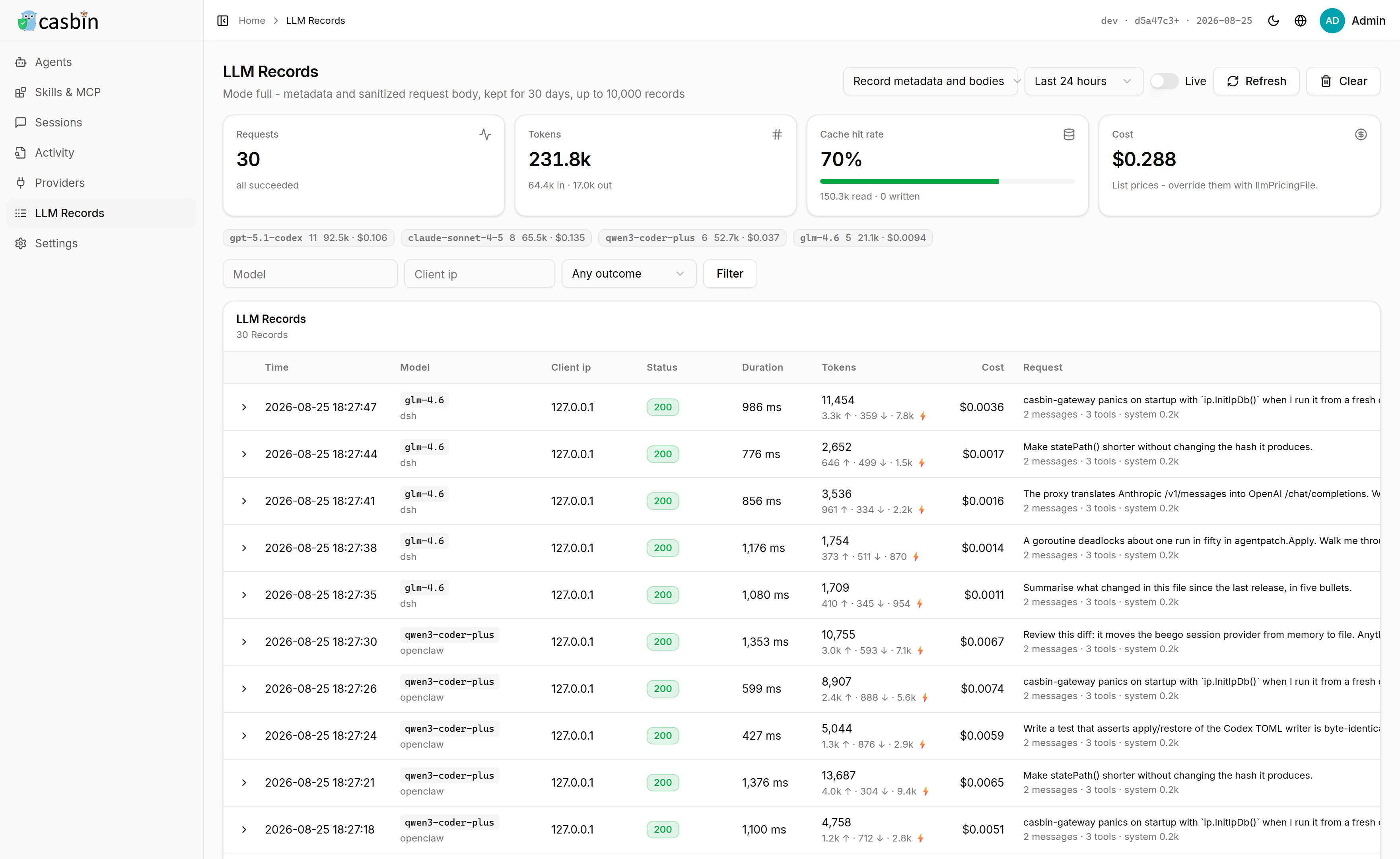](https://cdn.casbin.org/img/casbin-gateway-llm-records.png)
-
-This is the page that answers "what did the agent actually send", which a token count never does.
-
-## Read this before you route an agent
-
-**Every relayed request is recorded in full from the first one, prompt included.** None of it leaves this machine — but a prompt carries whatever was pasted into it, so if that is not what you want, change it first.
-
-The picker at the top of the page has three positions, and so does **Settings → LLM records**:
-
-| Mode | Kept |
-| --- | --- |
-| **Recording off** (`off`) | Nothing |
-| **Record metadata** (`metadata`) | Who called which model, with which outcome |
-| **Record metadata and bodies** (`full`, the default) | The above, plus the request body — prompts, messages and tool schemas |
-
-A change takes effect from the next request.
-
-## The limits around it
-
-Seeded from `conf/app.conf`, changed on the Settings page:
-
-```ini
-llmRecordMode = "full"
-llmRecordRetentionDays = 30
-llmRecordMaxRecords = 10000
-llmRecordMaxPayloadBytes = 1048576
-```
-
-## What is not stored
-
-- **Request headers never reach a record at all**, which is where the inbound API key is.
-- Bodies are **sanitized** before they are stored: anything that looks like a credential is replaced, and the number of replacements is shown with the record.
-- A body over `llmRecordMaxPayloadBytes` keeps its structure and loses only its longest strings, so a large conversation is still listed message by message.
-
-## When the model asked for was not the model served
-
-A request can be answered by a model other than the one the client named: a [routing rule](../3-providers/3.6-model-routing.md), or the downgrade taken when the model above it could not answer. The record of such a request carries **Routed to**, the name that actually went on the wire, and **Routed by**, the rule that chose it. Neither appears when nothing was routed.
-
-Every attempt the request failed over from is listed with the provider, the model it asked for and why it did not answer, so a turn served by a lesser model says what was tried above it.
-
-## The cost column
-
-Worked out from list prices, which vendors change and resellers do not follow, and priced against the model that was actually billed rather than the one the client asked for. Two ways to correct it:
-
-- Edit the price on the **Model pricing** page ([4.3](4.3-usage-and-pricing.md)).
-- Point `llmPricingFile` at a JSON file of your own rates.
-
-## Records against the other two pages
-
-| Page | Covers | Source |
-| --- | --- | --- |
-| **LLM Records** | Requests Gateway relayed | The proxy |
-| **Agent Records** | Tool calls a monitored agent made | The monitoring hook |
-| **Agent Sessions** | Whole conversations, routed or not | The agent's own transcripts |
-
-Next: [4.3 Usage and model pricing](4.3-usage-and-pricing.md).
diff --git a/docs/user-manual/en/4-governance/4.3-usage-and-pricing.md b/docs/user-manual/en/4-governance/4.3-usage-and-pricing.md
deleted file mode 100644
index c17aa9d..0000000
--- a/docs/user-manual/en/4-governance/4.3-usage-and-pricing.md
+++ /dev/null
@@ -1,39 +0,0 @@
-# 4.3 Usage and model pricing
-
-## Usage
-
-An agent on its own subscription relays nothing through Gateway, and a request that goes straight to the vendor leaves no record here — but the agent writes a transcript of it on disk anyway.
-
-**Usage** reads those transcripts. So the spend of every agent on this machine is on one page **from the first start**, with no provider configured and nothing routed.
-
-[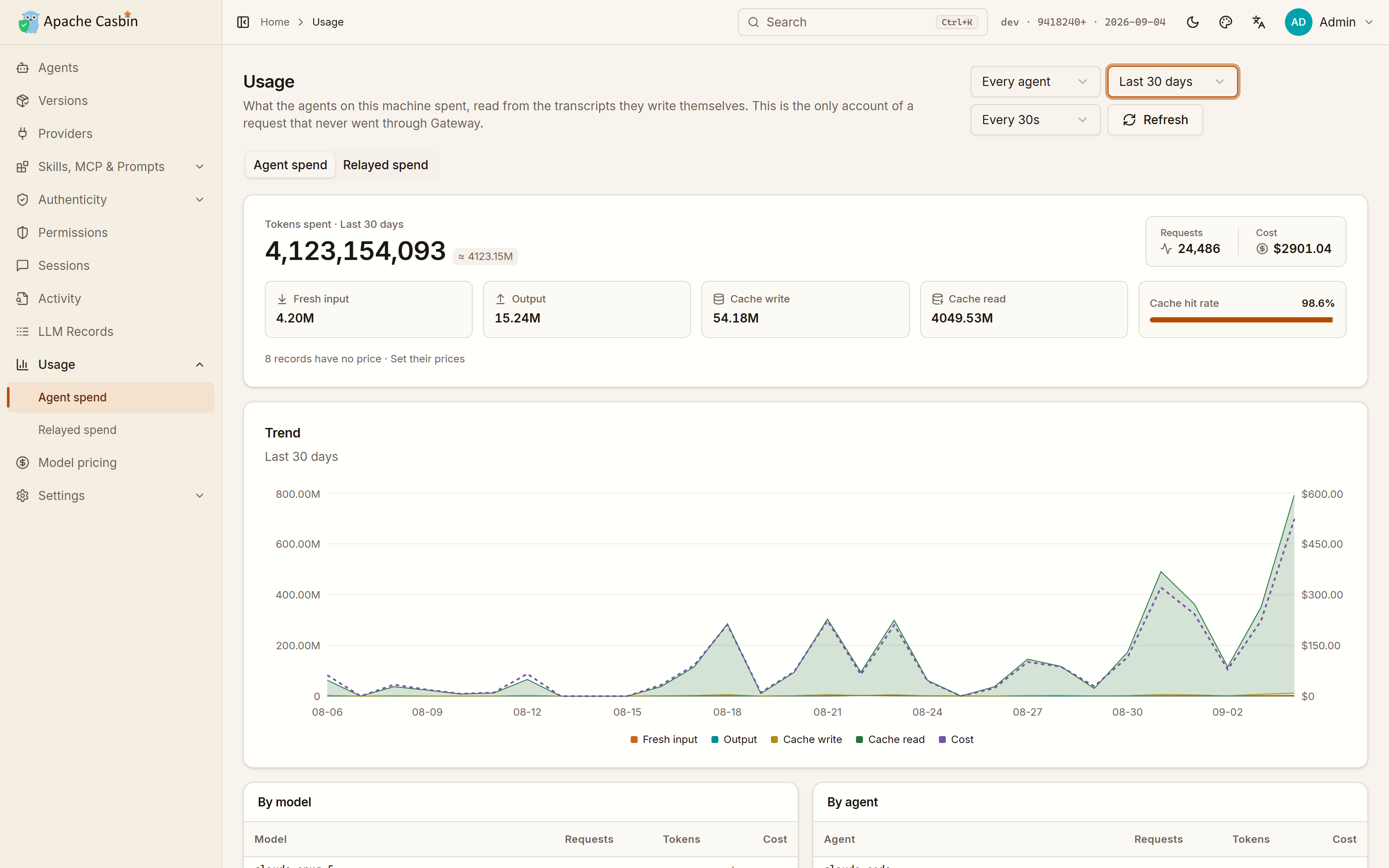](https://cdn.casbin.org/img/casbin-gateway-usage.png)
-
-Two tabs:
-
-| Tab | Covers | Knows |
-| --- | --- | --- |
-| **Agent spend** | Every agent on this machine, routed or not | Tokens, cache hit rate and cost, over time and by model and by agent |
-| **Relayed spend** | Only the traffic that came through Gateway | The above, **plus which provider answered and whether it failed** |
-
-The first is the complete account of what this machine costs you. The second is the only one that can tell you which upstream the money went to.
-
-## Model pricing
-
-Every figure on the Usage page is worked out from **Model pricing**, a table of what a million tokens costs.
-
-[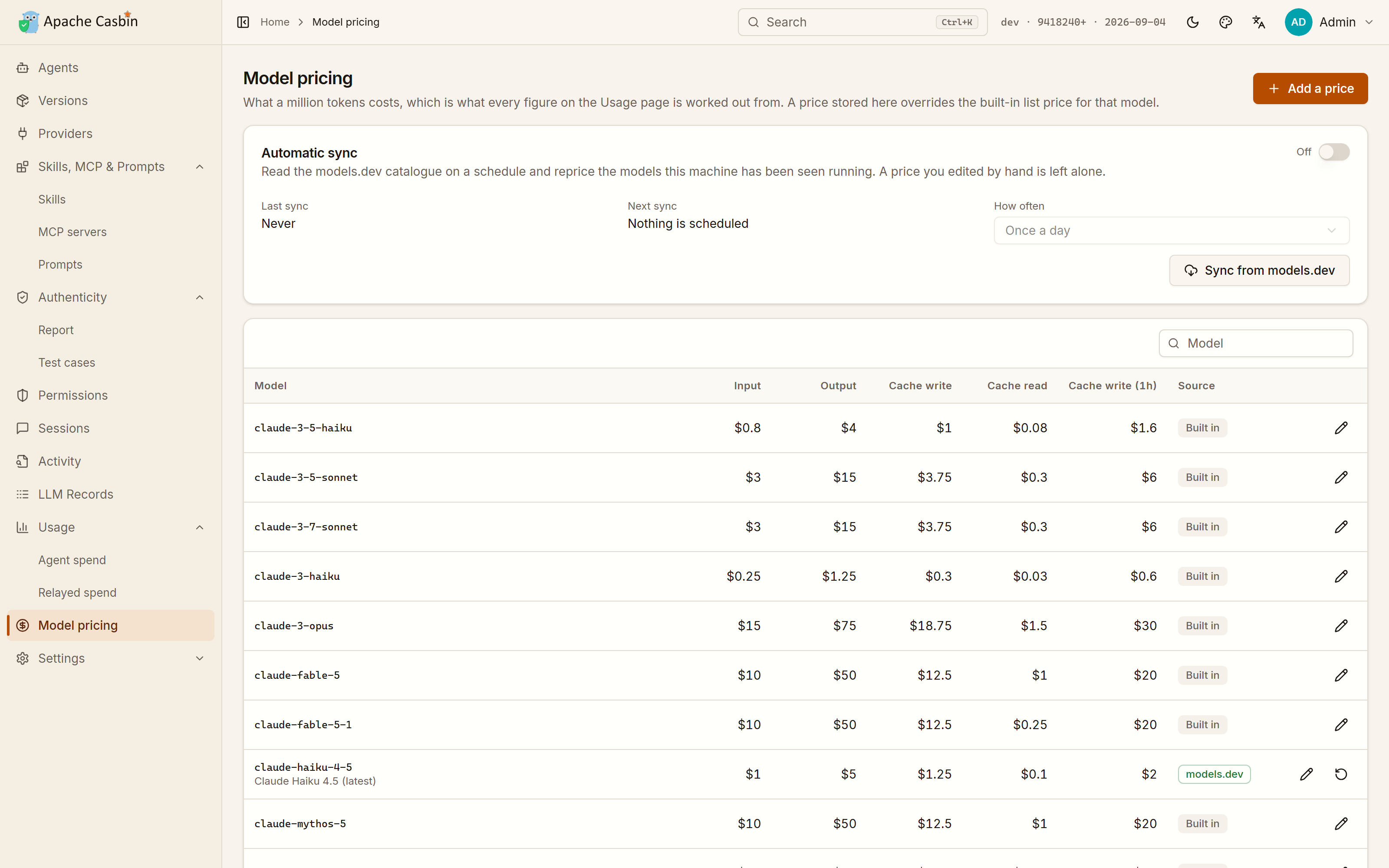](https://cdn.casbin.org/img/casbin-gateway-pricing.png)
-
-Vendors change their prices and resellers do not follow, so:
-
-- **Edit a price by hand** — that model is then yours, and nothing overwrites it.
-- Or let Gateway **reprice** the models this machine has run, from the [models.dev](https://models.dev) catalogue, on a schedule. A price you edited yourself is left alone.
-
-| Setting | Effect |
-| --- | --- |
-| `modelsDevSyncMode` | Whether the catalogue is synced at all |
-| `modelsDevSyncIntervalHours` | How often |
-| `llmPricingFile` | A JSON file of your own rates, used instead |
-
-A model with no price is counted in tokens and left out of the cost — the Authenticity report says how much of what a provider served is in that state ([3.4](../3-providers/3.4-authenticity.md)).
-
-Next: [5.1 Settings and configuration](../5-operations/5.1-settings.md).
diff --git a/docs/user-manual/en/5-operations/5.1-settings.md b/docs/user-manual/en/5-operations/5.1-settings.md
deleted file mode 100644
index 07bed8d..0000000
--- a/docs/user-manual/en/5-operations/5.1-settings.md
+++ /dev/null
@@ -1,60 +0,0 @@
-# 5.1 Settings and configuration
-
-**Everything is optional.** Settings are changed on the **Settings** page and stored in the database, so nothing has to be edited by hand and nothing has to be restarted.
-
-## The file and the page
-
-`conf/app.conf`, next to the executable, **seeds** the settings on the very first start and explains each one. The one-step install has no file beside it and seeds from the copy baked into the binary instead.
-
-Editing the file after that first start does nothing — except for the keys read before the database is open:
-
-`httpport`, `driverName`, `dataSourceName`, `dbName`, `redisEndpoint`.
-
-## The settings people actually change
-
-| Setting | Default | What it does |
-| --- | --- | --- |
-| `httpport` | `17000` | Port of the web UI and the REST API |
-| `httpaddr` | `127.0.0.1` | Interface the web UI binds to — [5.2](5.2-security-and-network.md) |
-| `driverName` / `dataSourceName` | `sqlite` / `./data/casbin-gateway.db` | Where data is stored |
-| `llmRecordMode` | `full` | How much of each relayed request is kept — [4.2](../4-governance/4.2-llm-records.md) |
-| `providerProbeMode` | `auto` | Whether providers are probed on their own, only when asked (`manual`), or never (`off`) — [3.4](../3-providers/3.4-authenticity.md) |
-| `apiKeyEncryptionKey` | empty | Encrypts provider API keys at rest (AES-256-GCM) |
-| `casdoorEndpoint` | empty | Switches sign-in over to [Casdoor](https://casdoor.org) SSO |
-
-## The Settings page, section by section
-
-| Section | Holds |
-| --- | --- |
-| **Startup** | Whether Gateway starts when you log in. The tray menu's **Start at Login** is the same switch |
-| **LLM records** | The recording mode and the limits around it — [4.2](../4-governance/4.2-llm-records.md) |
-| **Channel probes** | Probe mode and how long before a report goes stale — [3.4](../3-providers/3.4-authenticity.md) |
-| **Agents** | Agent state directory, how many agent records to keep, how often to poll a monitored agent |
-| **Sign-in** | The five Casdoor fields; empty means Gateway's own user table |
-| **Security** | `apiKeyEncryptionKey` and the relay token — [5.2](5.2-security-and-network.md) |
-| **Network** | Outbound SOCKS5 proxy, allowed hosts, allowed origins |
-| **Backups** | Snapshots of the configuration — [5.3](5.3-backups.md) |
-| **Cloud sync** | A copy of every backup, somewhere that is not this machine — [5.3](5.3-backups.md) |
-| **Import and export** | The configuration as one file, to move to another machine and read back |
-
-## Using MySQL instead of SQLite
-
-XORM is used, so every database it supports works. Point Gateway at your server and it creates `dbName` on first start if it does not exist:
-
-```ini
-driverName = mysql
-dataSourceName = root:123@tcp(localhost:3306)/
-dbName = casbin_gateway
-```
-
-## Connecting Casdoor
-
-[Casdoor](https://casdoor.org) is optional and takes over member management. Create an organization and an application for Gateway in a Casdoor instance, then fill in the five fields of **Settings → Sign-in**.
-
-Sign-in redirects to Casdoor as soon as `casdoorEndpoint` is set, which also enables [OAuth logins](https://casdoor.org/docs/provider/oauth/overview).
-
-## Checking the result instead of the file
-
-The startup summary reports what Gateway is actually doing — which port, which database, which settings source, whether the relay needs a token ([1.2](../1-getting-started/1.2-installation.md)).
-
-Next: [5.2 Security and serving other machines](5.2-security-and-network.md).
diff --git a/docs/user-manual/en/5-operations/5.2-security-and-network.md b/docs/user-manual/en/5-operations/5.2-security-and-network.md
deleted file mode 100644
index 28e2f24..0000000
--- a/docs/user-manual/en/5-operations/5.2-security-and-network.md
+++ /dev/null
@@ -1,48 +0,0 @@
-# 5.2 Security and serving other machines
-
-Gateway binds `127.0.0.1` by default, because two things are wide open to whoever can reach the port:
-
-- the UI signs the local admin in **without asking**,
-- and `/v1` relays with the API keys stored here.
-
-Both are exactly what you want from a local tool, and neither should be offered to a network.
-
-## Serving other machines anyway
-
-Set `httpaddr = 0.0.0.0` in `conf/app.conf`, and then do both of these:
-
-1. **Change the admin password** from **My Account**. The automatic sign-in stops at the first request that is not from this machine, so from then on the password is the only thing in the way.
-2. **Send the relay token** with every request to `/v1`. Gateway generates one on first start and shows it under **Settings → Security**.
-
-The environment snippets on the Providers and Agents pages already carry the token, and it is what Gateway writes into the configuration of an agent it switches. **Requests from this machine never need it.**
-
-## Keys at rest
-
-`apiKeyEncryptionKey`, under **Settings → Security**, encrypts provider API keys in the database with AES-256-GCM. Set it before adding the providers whose keys you care about.
-
-What never reaches storage in the first place:
-
-- Request headers, which is where an inbound API key would be — they are not recorded at all.
-- Anything credential-shaped in a recorded body, which is replaced before the record is written ([4.2](../4-governance/4.2-llm-records.md)).
-
-## Network settings
-
-**Settings → Network**:
-
-| Field | What it is for |
-| --- | --- |
-| **Outbound SOCKS5 proxy** | Reach vendor endpoints through a proxy |
-| **Allowed hosts** | Which `Host` headers Gateway answers to |
-| **Allowed origins** | Which browser origins may call the API |
-
-The last two matter once `httpaddr` is not loopback: a Gateway on a network should answer to the names you meant it to answer to.
-
-## Sign-in
-
-Out of the box, sign-in is Gateway's own user table with the local admin auto-signed-in. Setting `casdoorEndpoint` switches the whole thing over to [Casdoor](https://casdoor.org), which brings SSO and OAuth logins with it ([5.1](5.1-settings.md)).
-
-## What an agent gets, and what it does not
-
-An agent routed through Gateway holds **Gateway's relay token**, never a vendor key. Revoking one agent's access is a Gateway-side change, not eight configuration file edits — and the [Permissions](../4-governance/4.1-permissions.md) page can narrow what that token is good for without touching the agent at all.
-
-Next: [5.3 Backups and cloud sync](5.3-backups.md).
diff --git a/docs/user-manual/en/5-operations/5.3-backups.md b/docs/user-manual/en/5-operations/5.3-backups.md
deleted file mode 100644
index 6953984..0000000
--- a/docs/user-manual/en/5-operations/5.3-backups.md
+++ /dev/null
@@ -1,39 +0,0 @@
-# 5.3 Backups and cloud sync
-
-## Backups
-
-A backup is a snapshot of the configuration, written **beside** the database rather than inside it, so it survives the database it was taken from.
-
-**Settings → Backups**:
-
-- Turn them on, and say how often.
-- **Where backups live** is the directory the snapshots are written to. Point it at a folder Dropbox, OneDrive, iCloud Drive or your NAS already syncs, and every backup is uploaded as it is written.
-- The panel names the last backup and the next one, and says so when the last one failed.
-- **Restore** puts one back; **Delete** removes one.
-
-One snapshot is also taken **in front of every import** ([3.5](../3-providers/3.5-import.md)), so bringing a CC Switch installation over is undoable.
-
-## Cloud sync
-
-A copy of every backup, kept somewhere that is not this machine. **Settings → Cloud sync**:
-
-| Target | Works with |
-| --- | --- |
-| **WebDAV** | Nextcloud, ownCloud, Synology, QNAP and most other NAS firmware |
-| **S3** | S3 itself, Cloudflare R2, Backblaze B2, MinIO, Aliyun OSS, Tencent COS |
-
-For WebDAV, most services want an **app password** here rather than the one you sign in with.
-
-The snapshots are immutable files, so a sync has nothing to merge: each side ends up holding what the other had, and any of them can be restored from the list on the Backups panel.
-
-## Import and export
-
-**Settings → Import and export** is the configuration as one file: what to move to another machine, and what to read back from one.
-
-A snapshot carries the providers, the [connections](../2-agents/2.5-connections.md), the agents with their routing and permissions, the probe cases, the model prices and the settings — each a section you can leave out. **Secrets** is the separate tick that decides whether the credentials inside them travel too; a snapshot taken without it describes a configuration nobody can serve traffic with until the keys are typed again.
-
-Connections restored onto another machine are written into that machine's agents with *its* Gateway port and program path, not the ones they were taken with.
-
-This is the route for setting up a second machine the way this one is set up, where backups are the route for getting *this* machine back.
-
-Next: [5.4 Docker and Podman](5.4-docker.md).
diff --git a/docs/user-manual/en/5-operations/5.4-docker.md b/docs/user-manual/en/5-operations/5.4-docker.md
deleted file mode 100644
index 4f5103a..0000000
--- a/docs/user-manual/en/5-operations/5.4-docker.md
+++ /dev/null
@@ -1,35 +0,0 @@
-# 5.4 Docker and Podman
-
-**A container cannot see the agents on your machine.**
-
-Agents are discovered by reading the home directories and install paths of the machine Gateway runs on, and inside a container that is the container's own filesystem. So **Agents**, **Skills, MCP & Prompts** and agent monitoring stay empty there — and the pages say so, rather than pretending nothing is installed.
-
-Everything that does not depend on the host works normally: **Providers**, **Authenticity** and **LLM Records**.
-
-So: run the [one-command install](../1-getting-started/1.2-installation.md) on the machine whose agents you want to watch, and use a container when Gateway is only a model endpoint for other machines.
-
-## Running it
-
-No image is published, so the compose file builds one from a checkout of this repository:
-
-```bash
-docker compose up -d
-```
-
-Podman reads the same file:
-
-```bash
-podman compose up -d
-```
-
-Either way:
-
-- The UI is on http://localhost:17000.
-- The SQLite database lives in a **named volume that survives `down`**.
-- `conf/app.conf` is mounted from the repository, so the settings it seeds can be edited before the first start without rebuilding the image.
-
-## If it serves other machines
-
-A container is usually reachable from outside the host, which is exactly the case [5.2](5.2-security-and-network.md) is about: change the admin password, and send the relay token with every request to `/v1`.
-
-Next: [5.5 Updating, stopping and removing](5.5-lifecycle.md).
diff --git a/docs/user-manual/en/5-operations/5.5-lifecycle.md b/docs/user-manual/en/5-operations/5.5-lifecycle.md
deleted file mode 100644
index ed37d01..0000000
--- a/docs/user-manual/en/5-operations/5.5-lifecycle.md
+++ /dev/null
@@ -1,50 +0,0 @@
-# 5.5 Updating, stopping and removing
-
-## The commands
-
-| Command | What it does |
-| --- | --- |
-| `casbin-gateway start` | Starts the server in the background |
-| `casbin-gateway stop` | Stops it |
-| `casbin-gateway status` | Says whether it is running, and where |
-| `casbin-gateway` | Runs it in the **foreground**, stopped with `Ctrl-C` |
-| `casbin-gateway uninstall` | Puts back everything Gateway wrote outside its own directory |
-
-All of them work from any directory: the command is a wrapper that always starts Gateway in its install directory, where its data lives.
-
-In the background, console output goes to `logs/casbin-gateway.out`.
-
-## Updating
-
-The version Gateway is running sits in the **top-right corner**, with the date it was built, and says **New** when the published build is a later one.
-
-Open it and press **Update now**: Gateway downloads the build for this machine, checks that it runs, puts it in place of itself and restarts into it. The page reloads on the new version when it comes back.
-
-Nothing else has to be touched — the data, the settings and the `casbin-gateway` command all stay where they are.
-
-Gateway installed some other way, or in a directory it cannot write to, says so and shows the install command to run by hand instead. Running the install command again is always a valid upgrade; your database and settings are untouched either way.
-
-## Removing it
-
-**Run `casbin-gateway uninstall` first.**
-
-Deleting the directory is the part you can do yourself. What that cannot undo is everything Gateway wrote **outside** it:
-
-- the monitoring hooks in every agent's own configuration,
-- the provider each agent was pointed at,
-- the login entry,
-- the desktop entries,
-- and the `ccswitch://` scheme registration,
-
-all of which would otherwise be left naming a program that is no longer there.
-
-`uninstall` puts all of that back, then names the two things to delete by hand:
-
-| Platform | Delete |
-| --- | --- |
-| Linux, macOS | `~/.local/share/casbin-gateway` and `~/.local/bin/casbin-gateway` |
-| Windows | `%LOCALAPPDATA%\casbin-gateway` and its PATH entry |
-
-The agents themselves, their sign-ins and their history are left exactly as they were.
-
-Next: [6.1 Frequently asked questions](../6-faq/6.1-faq.md).
diff --git a/docs/user-manual/en/6-faq/6.1-faq.md b/docs/user-manual/en/6-faq/6.1-faq.md
deleted file mode 100644
index 6682414..0000000
--- a/docs/user-manual/en/6-faq/6.1-faq.md
+++ /dev/null
@@ -1,65 +0,0 @@
-# 6.1 Frequently asked questions
-
-## Setup
-
-**Do I need a database, Go or Node?**
-No. The install is one command and ships a single binary with the UI baked in ([1.2](../1-getting-started/1.2-installation.md)).
-
-**Nothing is on http://localhost:17000.**
-Run `casbin-gateway status`. If a different program holds the port, Gateway names it and stops rather than taking it — free the port or change `httpport` in `conf/app.conf` ([5.1](../5-operations/5.1-settings.md)).
-
-**I edited `conf/app.conf` and nothing changed.**
-The file seeds the settings on the **first** start only; after that they live in the database and are changed on the Settings page. The exceptions are `httpport`, `driverName`, `dataSourceName`, `dbName` and `redisEndpoint`, which are read before the database is open.
-
-**The Agents page is empty.**
-Either Gateway is running in a container, which sees its own filesystem and not yours ([5.4](../5-operations/5.4-docker.md)), or the agent is installed somewhere neither its installer nor PATH describes — use **Locate** ([2.1](../2-agents/2.1-agents.md)).
-
-## Providers and routing
-
-**Which type do I pick for a reseller?**
-Whichever API its own documentation describes. The type says what the provider speaks, not what your agents must — Gateway translates between all four APIs in both directions ([3.2](../3-providers/3.2-routing.md)).
-
-**Can Codex run on DeepSeek or Kimi?**
-Yes. Codex speaks OpenAI Responses and nothing else; Gateway translates for it. The same goes for Claude Code and the Gemini CLI on any provider ([3.2](../3-providers/3.2-routing.md)).
-
-**My agent is on a ChatGPT or Claude subscription and I have no key.**
-Pick the **ChatGPT subscription** or **Claude subscription** source and sign in: Gateway holds the subscription and spends it like a key, for every agent. To leave the sign-in with the agent that has it instead, set **Authentication** to the caller's own login ([3.3](../3-providers/3.3-caller-login.md)).
-
-**What is `cg-...` in the environment snippet?**
-Gateway's own relay token, not a vendor key. The agent needs *something* in that variable; Gateway authenticates upstream with the provider's key instead ([3.2](../3-providers/3.2-routing.md)).
-
-**Does a probe cost me money?**
-A few cents of that provider's own credit, stated on the report. `providerProbeMode = "manual"` probes only when asked, `"off"` never does ([3.4](../3-providers/3.4-authenticity.md)).
-
-## Records and privacy
-
-**Is my prompt sent anywhere?**
-No. Records are stored in Gateway's own database on this machine.
-
-**How do I stop prompts being recorded at all?**
-Set the picker at the top of LLM Records — or **Settings → LLM records** — to **Recording off**, before routing an agent. Every relayed request is recorded in full by default ([4.2](../4-governance/4.2-llm-records.md)).
-
-**Are API keys in the records?**
-Request headers are never recorded, and credential-shaped values in a body are replaced before it is stored, with the number of replacements shown on the record.
-
-## Permissions
-
-**I turned off the terminal and the agent still ran a command.**
-Check where that agent is enforced. Tool switches hold for agents routed through Gateway and for monitored agents, through the hook; an agent that is neither routed nor monitored is not held to anything. The Permissions page says which case it is in ([4.1](../4-governance/4.1-permissions.md)).
-
-**Can I write policy by hand?**
-Yes. **Advanced** shows the Casbin `model.conf` and `policy.csv`, and takes extra lines of your own, which are checked before the ones the switches wrote ([4.1](../4-governance/4.1-permissions.md)).
-
-## Usage and cost
-
-**Usage shows spend for an agent I never routed through Gateway.**
-That is the point: the **Agent spend** tab reads the agents' own transcripts, so it counts requests that never came through here. **Relayed spend** is the narrower account of the traffic that did ([4.3](../4-governance/4.3-usage-and-pricing.md)).
-
-**The cost is wrong for my reseller.**
-Edit the model's price on **Model pricing**, and it is left alone from then on. Or point `llmPricingFile` at your own rates ([4.3](../4-governance/4.3-usage-and-pricing.md)).
-
-## Elsewhere
-
-- [Issues](https://github.com/apache/casbin-gateway/issues) — open one; for a change, opening an issue first is the recommended way to talk it through.
-- [Discord](https://discord.gg/S5UjpzGZjN)
-- [Online demo](https://ai.casbin.com)
diff --git a/docs/user-manual/en/README.md b/docs/user-manual/en/README.md
deleted file mode 100644
index 16f01a7..0000000
--- a/docs/user-manual/en/README.md
+++ /dev/null
@@ -1,55 +0,0 @@
-# Casbin Gateway User Manual
-
-> An open-source gateway for the AI coding agents on your machine — one place for the providers behind them, what they are allowed to do, and what they spend.
-
-[中文](../zh/README.md)
-
-## Contents
-
-**1. Getting started**
-
-- [1.1 Introduction](1-getting-started/1.1-introduction.md)
-- [1.2 Installation](1-getting-started/1.2-installation.md)
-- [1.3 The interface](1-getting-started/1.3-interface.md)
-- [1.4 Quick start](1-getting-started/1.4-quickstart.md)
-
-**2. Agents**
-
-- [2.1 Agents](2-agents/2.1-agents.md)
-- [2.2 Agent versions](2-agents/2.2-versions.md)
-- [2.3 Monitoring, sessions and activity](2-agents/2.3-monitoring.md)
-- [2.4 Skills, MCP & Prompts](2-agents/2.4-skills-mcp-prompts.md)
-- [2.5 Connections](2-agents/2.5-connections.md)
-
-**3. Providers**
-
-- [3.1 Providers](3-providers/3.1-providers.md)
-- [3.2 Routing an agent through Gateway](3-providers/3.2-routing.md)
-- [3.3 No API key: the caller's own login](3-providers/3.3-caller-login.md)
-- [3.4 Authenticity](3-providers/3.4-authenticity.md)
-- [3.5 Import settings and links](3-providers/3.5-import.md)
-- [3.6 Model routing and automatic fallback](3-providers/3.6-model-routing.md)
-
-**4. Governance**
-
-- [4.1 Permissions](4-governance/4.1-permissions.md)
-- [4.2 LLM Records](4-governance/4.2-llm-records.md)
-- [4.3 Usage and model pricing](4-governance/4.3-usage-and-pricing.md)
-
-**5. Operations**
-
-- [5.1 Settings and configuration](5-operations/5.1-settings.md)
-- [5.2 Security and serving other machines](5-operations/5.2-security-and-network.md)
-- [5.3 Backups and cloud sync](5-operations/5.3-backups.md)
-- [5.4 Docker and Podman](5-operations/5.4-docker.md)
-- [5.5 Updating, stopping and removing](5-operations/5.5-lifecycle.md)
-
-**6. FAQ**
-
-- [6.1 Frequently asked questions](6-faq/6.1-faq.md)
-
-## Also worth reading
-
-- [README](../../../README.md) — the short version of everything here
-- [Online demo](https://ai.casbin.com)
-- [Discord](https://discord.gg/S5UjpzGZjN)
diff --git a/docs/user-manual/zh/1-getting-started/1.1-introduction.md b/docs/user-manual/zh/1-getting-started/1.1-introduction.md
deleted file mode 100644
index 5e578f9..0000000
--- a/docs/user-manual/zh/1-getting-started/1.1-introduction.md
+++ /dev/null
@@ -1,60 +0,0 @@
-# 1.1 产品介绍
-
-Casbin Gateway是一个跑在本机上的网关,面向这台机器上装的AI编码Agent。它把这些Agent找出来,列清它们各自带了什么,在它们和模型供应商之间放一个统一的入口,并记录它们做了什么、花了多少。
-
-它跑在你要管的那台机器上。数据不外发:数据库就是可执行文件旁边的一个文件,界面默认只绑定`127.0.0.1`。
-
-## 它解决什么
-
-| 你想 | 对应的页面 |
-| --- | --- |
-| 知道本机装了哪些Agent、各自登录的是哪个账号、花了多少 | [Agent客户端](../2-agents/2.1-agents.md)、[用量](../4-governance/4.3-usage-and-pricing.md) |
-| 安装、升级、回滚Agent本身 | [版本管理](../2-agents/2.2-versions.md) |
-| 换一次API Key,而不是改八个配置文件 | [供应商](../3-providers/3.1-providers.md)、[路由](../3-providers/3.2-routing.md) |
-| 让Codex跑在DeepSeek上,让Claude Code跑在Qwen上 | [路由](../3-providers/3.2-routing.md) |
-| 弄清中转商到底有没有给你它卖的那个模型 | [真伪检测](../3-providers/3.4-authenticity.md) |
-| 单独收掉某个Agent的终端权限,或某一个MCP服务器 | [权限](../4-governance/4.1-permissions.md) |
-| 看到Agent发出去的完整请求,包括提示词和工具定义 | [LLM记录](../4-governance/4.2-llm-records.md) |
-| 让API Key不落到Agent的配置文件里 | [路由](../3-providers/3.2-routing.md)、[连接](../2-agents/2.5-connections.md) |
-
-## 整体结构
-
-```
- 本机上的Agent Casbin Gateway 模型供应商
-+------------------------+ +----------------------+ +------------------+
-| Claude Code | | 权限(Casbin) | | OpenAI |
-| Codex CLI |---->| 协议转换 |---->| Anthropic |
-| Gemini CLI、Cursor ... | | 记录与用量 | | DeepSeek、Kimi |
-+------------------------+ | 供应商密钥 | +------------------+
- ^ +----------------------+
- | 读它们的配置、会话记录、技能和MCP服务器
- +----------------- 同一台机器 -----------------
-```
-
-两半互相独立,任何一半单独用都成立:
-
-- **代理这一半。**Agent指向Gateway之后,它的请求会被鉴权、按权限校验、按供应商说的那套API做转换、转发出去,然后落记录。供应商的Key在Gateway手里,Agent自始至终拿不到。
-- **读取这一半。**Agent是通过读这台机器的用户目录、安装路径和会话记录发现的。这一半从第一次启动就能用,不需要配供应商,也不需要把任何流量接过来——这也是[用量](../4-governance/4.3-usage-and-pricing.md)能算上那些根本没走Gateway的请求的原因。
-
-因为读取这一半靠的是本机的文件,所以Gateway必须跑在你要管的那台机器上。在容器里它只能看到容器自己的文件系统,什么也找不到,见[5.4 Docker与Podman](../5-operations/5.4-docker.md)。
-
-## 每个Agent支持到什么程度
-
-目前认得三十来个Agent,对每个的支持深度不一样。[README](../../../../README_zh.md#每个-agent-支持到什么程度)里的表格是当前的清单,逐列说明:
-
-- **监控**——只读的审计记录:提示词、工具调用、权限询问。Agent做任何事都不会等Gateway,开了监控也不会改变任何回答。
-- **供应商**——Gateway会按该Agent客户端自己的格式,把它的配置文件改写成指向绑定的供应商。不支持这一列的Agent,仍然可以用界面给出的环境变量接进来。
-- **MCP·技能·提示词**——在Agent之间读取、对比、复制MCP服务器、技能和指令文件。
-- **会话**——直接从Agent自己的会话记录里读对话和token用量。
-- **安装**——Gateway用什么方式装它、升它、卸它:npm、brew、winget、微软商店、Agent自带的更新器,或厂商自己的安装命令。
-
-## 技术栈
-
-| 部分 | 技术 |
-| --- | --- |
-| 后端 | Go、Beego、XORM、[Casbin](https://casbin.org) |
-| 前端 | TypeScript、React、shadcn/ui |
-| 存储 | 默认SQLite;XORM支持的数据库都行 |
-| 许可证 | Apache-2.0 |
-
-下一节:[1.2 安装](1.2-installation.md)。
diff --git a/docs/user-manual/zh/1-getting-started/1.2-installation.md b/docs/user-manual/zh/1-getting-started/1.2-installation.md
deleted file mode 100644
index 5a45d45..0000000
--- a/docs/user-manual/zh/1-getting-started/1.2-installation.md
+++ /dev/null
@@ -1,84 +0,0 @@
-# 1.2 安装
-
-一条命令。不需要数据库,不需要Go,不需要Node,也不需要先写配置文件。
-
-## Linux和macOS
-
-```bash
-curl -fsSL https://raw.githubusercontent.com/apache/casbin-gateway/master/scripts/install.sh | bash
-```
-
-## Windows
-
-在PowerShell里:
-
-```powershell
-irm https://raw.githubusercontent.com/apache/casbin-gateway/master/scripts/install.ps1 | iex
-```
-
-## 安装脚本做了什么
-
-1. 下载适合这台机器的构建,解包到`~/.local/share/casbin-gateway`(Windows上是`%LOCALAPPDATA%\casbin-gateway`)。
-2. 把`casbin-gateway`命令放进PATH。
-3. 启动它,并设置成登录时自动启动。
-4. 按平台在桌面和开始菜单、`~/Applications`或应用菜单里加一个**Casbin Gateway**入口。
-
-装完终端立刻还给你。手动解包的压缩包,在启动器第一次运行时也会补上同样的入口。
-
-| 变量 | 作用 |
-| --- | --- |
-| `INSTALL_DIR` | 装到默认目录以外的地方 |
-| `NO_START=1` | 只安装,不启动 |
-| `NO_AUTOSTART=1` | 只安装,不设置开机自启动 |
-
-## 第一次启动
-
-Gateway会打开自己的窗口。没有登录页:它只服务本机,看到本机请求就直接把本地管理员登录上。
-
-关掉那个窗口,Gateway会留在托盘图标后面继续跑。托盘菜单也是重新打开窗口、开关**Start at Login**(和**设置→开机自启动**是同一个开关)、以及真正退出的地方。
-
-如果你更想用浏览器,或者这台机器根本没有桌面环境,所有东西都在**http://localhost:17000**;`casbin-gateway start`会只跑服务端,没有窗口也没有托盘。
-
-自动登录背后的账号是`admin` / `123`。只有当你把Gateway开放给网络时它才有意义,见[5.2 安全与对外提供服务](../5-operations/5.2-security-and-network.md)。
-
-## 文件都在哪
-
-Gateway所有东西都写在自己的安装目录下:
-
-| 路径 | 内容 |
-| --- | --- |
-| `data/casbin-gateway.db` | SQLite数据库:供应商、设置、记录、权限 |
-| `data/` | Agent的改写状态 |
-| `logs/casbin-gateway.out` | 后台运行时的控制台输出 |
-| `tmp/` | 临时文件 |
-
-装好的`casbin-gateway`命令是个包装器,**永远在安装目录里**启动Gateway,所以在哪个目录执行都一样。直接从别的地方运行那个可执行文件,会在那里得到第二个空的安装。
-
-## 确认它起来了
-
-Gateway启动时会把自己实际在做什么打出来,这样不用去翻配置文件也能确认结果:
-
-```
-+---------------------------------------------------------------------+
-| Casbin Gateway |
-+---------------------------------------------------------------------+
-| Management UI | http://localhost:17000 (this machine only) |
-| Settings | Settings page, seeded from conf/app.conf |
-| Web UI files | web/build |
-| Database | sqlite, file "./data/casbin-gateway.db" (connected) |
-| Sign-in | built-in user table, Casdoor is not configured |
-| Relay auth | this machine only, no token needed |
-+---------------------------------------------------------------------+
-```
-
-之后想再确认,用`casbin-gateway status`。
-
-如果17000端口上还有一个旧的Gateway,会先把它停掉,所以重启不会卡在端口上。端口被别的程序占着时,Gateway会说出占用它的进程然后退出,而不是抢端口,也不是半配置地起来。
-
-## 从源码构建
-
-需要Go 1.25+以及带Yarn的Node.js,命令见[README](../../../../README_zh.md#开发)。
-
-注意一键安装分发的是**nightly构建**:`master`每次推送都会重新构建,发布为[`nightly`](https://github.com/apache/casbin-gateway/releases/tag/nightly)预发布版。它的存在是为了让人不装Go和Node工具链也能试用;其他场景应该从源码发布版构建。
-
-下一节:[1.3 界面导览](1.3-interface.md)。
diff --git a/docs/user-manual/zh/1-getting-started/1.3-interface.md b/docs/user-manual/zh/1-getting-started/1.3-interface.md
deleted file mode 100644
index 9d3b470..0000000
--- a/docs/user-manual/zh/1-getting-started/1.3-interface.md
+++ /dev/null
@@ -1,43 +0,0 @@
-# 1.3 界面导览
-
-所有东西都在**http://localhost:17000**,桌面窗口和浏览器里是同一套界面。左边的侧边栏就是整个产品,顺序就是你配置它的顺序:先是Agent,再是它们背后的模型,然后是它们要过的那道关卡,接着是它们跑了什么、花了多少,设置放最后。
-
-[](https://cdn.casbin.org/img/casbin-gateway.gif)
-
-## 侧边栏
-
-| 页面 | 是什么 | 章节 |
-| --- | --- | --- |
-| **Agent客户端** | 本机上的每个Agent,一行四张卡片 | [2.1](../2-agents/2.1-agents.md) |
-| **版本管理** | 每个Agent的本机版本对上游发布版本 | [2.2](../2-agents/2.2-versions.md) |
-| **供应商** | 模型供应商前面的统一入口 | [3.1](../3-providers/3.1-providers.md) |
-| **导入配置** | 从`ccswitch://`链接,或从一份CC Switch安装里搬过来 | [3.5](../3-providers/3.5-import.md) |
-| **模型路由** | 每个请求真正被发往哪个模型,以及它降级到什么 | [3.6](../3-providers/3.6-model-routing.md) |
-| **技能、MCP与提示词** | 所有Agent的技能、MCP服务器和指令文件,汇成一张表 | [2.4](../2-agents/2.4-skills-mcp-prompts.md) |
-| **连接** | 连一次应用,写进你勾选的每个Agent | [2.5](../2-agents/2.5-connections.md) |
-| **真伪检测** | 那个Key背后的API是不是卖给你的那个——每个供应商一个分数和等级 | [3.4](../3-providers/3.4-authenticity.md) |
-| **权限** | 每个Agent能做什么,转发的每个请求都按它执行 | [4.1](../4-governance/4.1-permissions.md) |
-| **会话** | 这些Agent的所有会话,读自它们自己的会话记录 | [2.3](../2-agents/2.3-monitoring.md) |
-| **活动记录** | 被监控的Agent正在做什么 | [2.3](../2-agents/2.3-monitoring.md) |
-| **LLM记录** | Gateway转发过的每一个请求,完整内容 | [4.2](../4-governance/4.2-llm-records.md) |
-| **用量** | 每个Agent花了多少,包括没走Gateway的那部分 | [4.3](../4-governance/4.3-usage-and-pricing.md) |
-| **模型定价** | 一百万token多少钱——用量页上每个数字都是从这儿算出来的 | [4.3](../4-governance/4.3-usage-and-pricing.md) |
-| **设置** | 所有可配置项,存在数据库里 | [5.1](../5-operations/5.1-settings.md) |
-
-带标签页或分节的页面,会把这些标签和小节也挂进侧边栏,所以侧栏可以直接落到测试用例、MCP服务器或安全设置上,而不是只能落到那一页的顶部。
-
-## 导航
-
-- **⌘K**或**Ctrl+K**在当前页面上打开搜索框:所有页面按名字搜,本机的每个Agent和每个供应商也在里面。三十个供应商里找一个,不用翻列表。
-- **面包屑**会说明当前页面和页内小节,用的是和侧边栏同一棵树。
-- 顶栏可以切换亮色/暗色、三套配色(**Amber & Ink**、**Terminal**、**Indigo**),以及中英文。
-
-## 右上角的版本
-
-右上角是当前运行的版本和构建日期;当已发布的版本更新时,会显示**新**。点开再按**立即升级**就能原地升级,见[5.5 升级、停止与卸载](../5-operations/5.5-lifecycle.md)。
-
-## Agent是从哪来的
-
-Agent是通过读**Gateway所在这台机器**的用户账户、主目录和安装路径发现的。所以要把它跑在你想观察的那台机器上;容器里只能看到容器自己的文件系统([5.4](../5-operations/5.4-docker.md))。
-
-下一节:[1.4 快速上手](1.4-quickstart.md)。
diff --git a/docs/user-manual/zh/1-getting-started/1.4-quickstart.md b/docs/user-manual/zh/1-getting-started/1.4-quickstart.md
deleted file mode 100644
index 68be6fc..0000000
--- a/docs/user-manual/zh/1-getting-started/1.4-quickstart.md
+++ /dev/null
@@ -1,57 +0,0 @@
-# 1.4 快速上手
-
-五分钟,从装好到能读一个Agent的流量。
-
-## 第0步——你已经有的
-
-打开**Agent客户端**。本机装的每个Agent都在那儿,带着它登录的账号、它使用的供应商、以及它花了多少——只要它自己的会话记录能追溯到,就按天铺开最近一个月。
-
-**用量**页同样已经有数据了,来源是同一批会话记录。这两页都不需要供应商、不需要Key、不需要接任何流量。如果你只是想知道本机这些Agent到底在烧多少钱,到这里就结束了。
-
-## 第1步——加一个供应商
-
-**供应商**→**新增**:
-
-1. 选类型:**OpenAI兼容**或**Anthropic兼容**。
-2. 粘贴厂商的基础URL和API Key。
-3. 填上它提供的模型。
-
-存之前Gateway会先探一次上游,从此[真伪检测](../3-providers/3.4-authenticity.md)会自动给它打分。
-
-手上只有ChatGPT或Claude订阅、根本没有API Key?在来源里选那个订阅,登录一次就行,见[3.3](../3-providers/3.3-caller-login.md)。
-
-## 第2步——把Agent指过去
-
-**Agent客户端**→打开一个Agent→选中那个供应商。
-
-- 对于Gateway认得其配置格式的Agent,**写入配置**会直接改它自己的配置文件。**预览**先把要写的内容原样给你看,**恢复**可以撤销。
-- 其他Agent,复制页面上的环境变量片段,在带着这些变量的shell里启动它:
-
-```bash
-export ANTHROPIC_BASE_URL="http://localhost:17000/v1/agents/claude-code"
-export ANTHROPIC_AUTH_TOKEN="cg-..."
-```
-
-这个token是**Gateway自己的中继令牌,不是厂商的Key**。Agent那个变量为空就不肯启动,而Gateway对上游用的是供应商的Key。
-
-之后再换一个供应商,配置文件当场重写,所以从此切换只需要一次点击。
-
-## 第3步——跑一次,然后读它发了什么
-
-正常用这个Agent,然后打开**LLM记录**:它转发的每个请求都在里面——完整的system提示词、每一条消息和工具调用、模型看到的每个工具的schema,外加token和费用。
-
-如果这不是你想留下的东西,**在接入Agent之前**就改:页面顶部的选择器有**关闭记录**、**只记录元数据**、**记录元数据和正文**三档([4.2](../4-governance/4.2-llm-records.md))。
-
-## 第4步——决定这个Agent能做什么
-
-**权限**→选中该Agent。四十来个工具开关,分六组,外加它可以用哪些模型、哪些供应商。关掉的工具会在请求离开这台机器之前被摘掉,模型压根看不到它([4.1](../4-governance/4.1-permissions.md))。
-
-## 接下来看什么
-
-| 你想 | 看 |
-| --- | --- |
-| 判断那个Key背后的中转商老不老实 | [3.4 真伪检测](../3-providers/3.4-authenticity.md) |
-| 让Codex用上它本来不支持的模型 | [3.2 让Agent的流量走Gateway](../3-providers/3.2-routing.md) |
-| 安装或回滚Agent本身 | [2.2 版本管理](../2-agents/2.2-versions.md) |
-| 把GitHub、Notion或某个目录给Agent用,又不想把token粘进去 | [2.5 连接](../2-agents/2.5-connections.md) |
-| 让别的机器也能用这个Gateway | [5.2 安全与对外提供服务](../5-operations/5.2-security-and-network.md) |
diff --git a/docs/user-manual/zh/2-agents/2.1-agents.md b/docs/user-manual/zh/2-agents/2.1-agents.md
deleted file mode 100644
index 52db30a..0000000
--- a/docs/user-manual/zh/2-agents/2.1-agents.md
+++ /dev/null
@@ -1,51 +0,0 @@
-# 2.1 Agent客户端
-
-**Agent客户端**是首页。本机装的每个AI编码Agent都在这儿,一行四张卡片。
-
-[](https://cdn.casbin.org/img/casbin-gateway.gif)
-
-每张卡片给出:
-
-- 它登录的**账号**,
-- 它使用的**供应商**,
-- 它**花了多少**——只要它自己的会话记录能追溯到,就按天铺开最近一个月,
-- 以及它**此刻是否在运行**。
-
-本机没装的Agent也会列出来,方便直接从这一页装上。
-
-## Agent是怎么找到的
-
-Gateway会读**它自己所在这台机器**的用户账户、主目录和安装路径,覆盖安装程序写出的那些目录布局,也覆盖手动解包、放进PATH的情况。
-
-要是某个Agent藏在两者都描述不了的地方,就直接指给它:**选择程序**可以浏览本机,把你挑中的程序作为一个独立的安装列出来,不移动也不修改任何东西。
-
-这也是Gateway必须跑在目标机器上的原因——容器里它读的是容器自己的文件系统,什么都找不到([5.4](../5-operations/5.4-docker.md))。
-
-## 启动与停止
-
-**启动**和**停止**就在卡片上。从Gateway启动的Agent,和你自己启动的是同一份安装,Gateway只负责把它拉起来。
-
-## 实例
-
-**实例**是同一个Agent的额外副本,每个有**自己的状态目录**,因此各自登录各自的账号,并且可以同时运行——最常见的理由是开几个Claude Desktop,一个账号一个。
-
-- **添加实例**新建一个。
-- **移除实例**只是让Gateway忘掉它。状态目录和登录在里面的账号都留在磁盘上。
-
-## Agent自己的页面
-
-点开卡片是同样的信息的完整版,外加所有按Agent设置的东西:
-
-| 区域 | 作用 | 章节 |
-| --- | --- | --- |
-| 供应商 | 把这个Agent绑到某个供应商,预览并写入它的配置 | [3.2](../3-providers/3.2-routing.md) |
-| 权限 | 与权限页相同的那张卡片,只针对这个Agent | [4.1](../4-governance/4.1-permissions.md) |
-| 监控 | 开启这个Agent的只读活动记录 | [2.3](2.3-monitoring.md) |
-| 版本 | 当前版本,以及包管理器发布的版本 | [2.2](2.2-versions.md) |
-| 会话与花费 | 它自己的会话记录,以及对应的费用 | [2.3](2.3-monitoring.md)、[4.3](../4-governance/4.3-usage-and-pricing.md) |
-
-## 高级视图
-
-**高级视图**从首页进入而不占侧边栏,是同一批安装的表格形式:一行一个安装,带路径、安装方式和所属实例。同一个Agent装了两份、需要把两份区分开的时候,用这一页。
-
-下一节:[2.2 版本管理](2.2-versions.md)。
diff --git a/docs/user-manual/zh/2-agents/2.2-versions.md b/docs/user-manual/zh/2-agents/2.2-versions.md
deleted file mode 100644
index bdd0c06..0000000
--- a/docs/user-manual/zh/2-agents/2.2-versions.md
+++ /dev/null
@@ -1,43 +0,0 @@
-# 2.2 版本管理
-
-**版本管理**把Gateway认得的每个Agent放进一张表:本机装的是哪个版本、它的包管理器发布的是哪个版本、两者是否一致。
-
-[](https://cdn.casbin.org/img/casbin-gateway-versions.png)
-
-在Agent所在那一行上:
-
-| 操作 | 效果 |
-| --- | --- |
-| **安装** | 用这台机器上已有的包管理器装上它 |
-| **升级** | 升到它的包管理器发布的版本 |
-| **回滚** | 退回该管理器仍在提供的任意旧版本——升级把东西搞坏时用 |
-| **卸载** | 卸掉它,Agent自己的登录和历史原样保留 |
-
-不管当初是怎么装的,都是一次点击。
-
-## 每个Agent用什么方式装
-
-Gateway用的就是这个Agent实际的分发渠道:
-
-| 方式 | 例子 |
-| --- | --- |
-| `npm` | Claude Code、Codex CLI、Gemini CLI、Cline、Qwen Code、opencode |
-| `brew` | Cursor、Windsurf、Zed、goose、Trae |
-| `winget` | Claude Desktop、Kimi Code CLI、Crush、opencode Desktop |
-| 微软**商店** | ChatGPT Desktop |
-| **self**——Agent自带的更新器 | Codex CLI、Cursor Agent、Hermes Agent |
-| **script**——厂商自己的安装命令 | Cursor Agent、Claude Code |
-
-以安装程序形式装进来的应用,卸载时走它在Windows上注册的那个卸载程序。其余的是从厂商页面下载,这种Gateway只会告诉你去哪下,不会替你自动做。
-
-## 执行过程中能看到什么
-
-- **命令会先展示出来再执行**,这台机器上不会发生你没读过的事。
-- 执行期间那一行上带着**进度**。
-- 它打印的所有内容都在那一行上**一点即看**——装失败时,原因就在这里。
-
-## 哪些装的东西该更新了
-
-这张表同时也回答"这台机器上什么过期了":Gateway把每个已安装版本和它的包管理器发布的版本比对,标出不一致的行。**Agent客户端**页的卡片上带同样的标记。
-
-下一节:[2.3 监控、会话与活动记录](2.3-monitoring.md)。
diff --git a/docs/user-manual/zh/2-agents/2.3-monitoring.md b/docs/user-manual/zh/2-agents/2.3-monitoring.md
deleted file mode 100644
index 8625d59..0000000
--- a/docs/user-manual/zh/2-agents/2.3-monitoring.md
+++ /dev/null
@@ -1,42 +0,0 @@
-# 2.3 监控、会话与活动记录
-
-两份不同的记录,来自两个不同的源头:
-
-| 页面 | 来源 | 需要 |
-| --- | --- | --- |
-| **会话** | Agent本来就会写在磁盘上的会话记录 | 什么都不需要 |
-| **活动记录** | Gateway装进Agent里的监控钩子 | 该Agent开启监控 |
-
-这两者都不等于[LLM记录](../4-governance/4.2-llm-records.md)——那一页是Gateway自己转发出去的东西。
-
-## 会话
-
-这些Agent的每一次会话,读自它们自己的会话记录:整段对话,一条一条,带每一轮用掉的token。
-
-页面会统计一共有多少次会话、今天跑了多少、其中多少来自会话记录而不是监控,并且可以筛到某一个Agent或某一个来源。
-
-因为会话记录不管Gateway在不在路径上都会写,所以这一页覆盖那些完全没走Gateway的会话——包括用自己订阅的Agent。
-
-## 监控
-
-监控按Agent开启,在它的卡片上或它自己的页面上。Gateway会在那个Agent自己的配置里装一个钩子,此后记录它做了什么:提示词、工具调用,以及它弹给你的权限询问。
-
-这是**只读审计**。Agent做任何事都不会等Gateway,开了监控也不会改变任何回答。
-
-不是每个Agent都支持——[README](../../../../README_zh.md#每个-agent-支持到什么程度)那张表的**监控**列是当前清单。
-
-关掉监控会把钩子从该Agent的配置里去掉。`casbin-gateway uninstall`会对所有Agent一次性做同样的事([5.5](../5-operations/5.5-lifecycle.md))。
-
-## 活动记录
-
-**活动记录**是被监控的Agent此刻正在做什么:每一次工具调用、调用的对象、耗时多久。
-
-Agent正在跑的时候就该开着这一页——一次长时间的自动执行,在这里读起来是一份"它到底动了什么"的清单,而不是终端里刷屏的输出。
-
-## 钩子同时也是一个执行点
-
-不把模型流量走Gateway的Agent,**工具**开关仍然对它生效:Gateway装的那个钩子会在工具真正执行前先问Gateway一次,开关不允许的调用会被拒掉。
-
-模型和供应商这两类规则不一样:它们只能约束走代理的请求。权限页会说明某个Agent属于哪种情况([4.1](../4-governance/4.1-permissions.md))。
-
-下一节:[2.4 技能、MCP与提示词](2.4-skills-mcp-prompts.md)。
diff --git a/docs/user-manual/zh/2-agents/2.4-skills-mcp-prompts.md b/docs/user-manual/zh/2-agents/2.4-skills-mcp-prompts.md
deleted file mode 100644
index c0b236c..0000000
--- a/docs/user-manual/zh/2-agents/2.4-skills-mcp-prompts.md
+++ /dev/null
@@ -1,37 +0,0 @@
-# 2.4 技能、MCP与提示词
-
-本机每个Agent的每一个技能、MCP服务器和指令文件,汇成一张表。三个标签页,一类一个。
-
-[](https://cdn.casbin.org/img/casbin-gateway-skills.png)
-
-三者共用一页的原因:它们其实是同一个问题的三种问法——这个Agent带了什么,别的Agent是不是也带着。某个技能只装在一个Agent里、另一个没有,在这张表上就是一行里的一个空格。
-
-## 技能
-
-把技能装进一个或多个Agent,来源可以是:
-
-- 一个**GitHub仓库**,
-- 一个**`.zip`或`.tar.gz`**压缩包,
-- 或本机的一个**文件夹**。
-
-表格列出哪些Agent有它。点开可以阅读、复制到别的Agent,或者删除。
-
-## MCP服务器
-
-添加方式一样——直接粘贴那段写服务器的JSON,也就是各家"添加此服务器"的代码片段本来的格式。
-
-多勾几个Agent,同一个服务器就会按各自的格式写进每个Agent自己的配置文件。
-
-需要凭据的服务器(GitHub、Notion、飞书这类)建议走[连接](2.5-connections.md):token留在Gateway里,而不是复制进每个Agent的配置文件。
-
-## 提示词
-
-Agent每次会话前都会读的那个指令文件——`CLAUDE.md`、`AGENTS.md`及其同类。可以在这里编辑、打开、删除,或者把一个Agent的复制给另一个。
-
-## 在Agent之间复制
-
-每一行是一个条目,每一列是一个Agent,所以整页只回答一个问题:这个Agent有而那个没有的是什么。所谓复制,就是勾上要加进去的Agent。
-
-哪些Agent能接受这三类中的哪几类,见[README](../../../../README_zh.md#每个-agent-支持到什么程度)表格中的**MCP·技能·提示词**列。
-
-下一节:[2.5 连接](2.5-connections.md)。
diff --git a/docs/user-manual/zh/2-agents/2.5-connections.md b/docs/user-manual/zh/2-agents/2.5-connections.md
deleted file mode 100644
index 1c39799..0000000
--- a/docs/user-manual/zh/2-agents/2.5-connections.md
+++ /dev/null
@@ -1,70 +0,0 @@
-# 2.5 连接
-
-**连接**是一份收录了45个应用的目录——GitHub与GitLab、Slack、飞书、钉钉与企业微信、Notion、Figma、Sentry、Kubernetes、MongoDB与各类SQL数据库、走IMAP/SMTP的邮箱、Stripe与支付宝、Firecrawl与Tavily、高德与百度地图、浏览器、对象存储和rclone能连的各类网盘、本机的某个目录,还有更多。在这里连一次,勾上该拥有它的Agent,Gateway会把它写进这些Agent各自的配置文件。
-
-一个连接就是一个MCP服务器,只不过凭据留在Gateway里,而不是留在每个Agent的文件里。
-
-## 连接一个应用
-
-1. 选应用。目录按分类分组——办公协同、文档知识、开发工具、专业服务、邮件服务、网盘存储、生活服务——默认是**全部**。
-2. 填它要的东西。每个字段都写清了值从哪来:GitHub的个人访问令牌在Settings→Developer settings里生成,Notion要先建一个内部集成再把页面共享给它,飞书要自建应用的App ID和密钥,高德要选**Web服务**类型的Key而不是应用类型的。有些服务器(浏览器、目录)根本不需要凭据,只需要你指定目录或目标。
-3. **装入哪些Agent**:勾选Agent。之后取消勾选,就会把这个服务器从那个Agent里撤掉。
-4. **连接**。
-
-之后卡片会显示**已连接**,以及装进了几个Agent。
-
-连接成功后会立刻在后台**测试**一次,这是每个工具能有独立开关的前提——见下文。
-
-**断开连接**会把它从所有写入过的Agent里移除,并忘掉凭据。
-
-## 用登录代替粘贴令牌
-
-有些应用不是复制密钥,而是点头授权——目录里目前有两个:**GitHub(OAuth应用)**和**飞书(登录授权)**。飞书这个尤其值得多走一步:Agent能碰到的范围会变成*你*能碰到的范围,而不是这个应用被批准的全部权限。
-
-应用是你自己在厂商平台上注册的:
-
-1. 对话框里会显示一个**回调地址**,原样复制。
-2. 在厂商那边建一个OAuth应用,把回调地址填成它。
-3. 把应用的**Client ID**和**Client Secret**填回对话框。
-4. 点**去授权**。会打开厂商的页面,在那里同意,然后回来。
-
-授权记录留在你们自己的组织里,有自己的审计轨迹,全程不涉及Gateway的任何密钥。令牌快过期时Gateway会在会话真正需要它的那一刻自动续期。
-
-## 测试连接,以及测试是为了什么
-
-**测试**会启动这个应用的服务器,问它提供哪些工具,然后关掉。它带来两件事:
-
-- 你能在Agent真正用它**之前**知道凭据是否可用。失败时会原样引用服务器自己说的话,所以密钥写错、目录不存在会如实显示,而不是变成一次超时。
-- 拿回来的工具清单会变成**每个工具一个权限开关**。没测过的连接只有整个应用一个开关;测过之后,你可以让应用开着但单独关掉某个工具,也可以让它关着但单独放行某个工具。见[4.1 权限](../4-governance/4.1-permissions.md)。
-
-从npm安装的服务器首次运行要先下载,比较慢,这不是失败。
-
-## 为什么凭据不在Agent的配置里
-
-Gateway写进Agent配置的是*Gateway自己*,作为要运行的那个服务器,参数是**连接的名字**。Agent启动这个服务器时,Gateway通过本地回环把凭据取出来,只在这一次会话的生命周期内有效。
-
-所以:
-
-- token不会散落在`~/.claude.json`、`~/.codex/config.toml`以及另外八个Agent的对应文件里。
-- 改一次凭据,所有装了这个连接的Agent一起变。
-- Agent发的所有内容都经过Gateway,因此一次工具调用可以在执行前按该Agent的[权限](../4-governance/4.1-permissions.md)校验、执行后记录——连接产生的流量和Agent其他工具受同一套规则约束。
-
-Gateway搬家或换端口时会重写这些配置项,所以升级之后连接不会悄悄失效。
-
-**代价是**:Agent是*通过*Gateway访问已连接的应用的,所以Gateway没运行时连接不可用,Agent里那些服务器会启动失败。勾选Agent那一步的提示里就写了这一条。
-
-连接和供应商一样会进[快照](../5-operations/5.3-backups.md),快照带密钥时凭据也一起带走。把快照恢复到另一台机器上时,配置项会按*那台*机器的端口和程序路径重新写入。
-
-## 哪些Agent能装
-
-只有Gateway知道怎么写其MCP配置格式的Agent。如果页面提示没找到Agent,说明这台机器上一个都没装——清单见[README](../../../../README_zh.md#每个-agent-支持到什么程度)表格的**MCP**列。
-
-## 连接和"技能、MCP与提示词"的区别
-
-| | [技能、MCP与提示词](2.4-skills-mcp-prompts.md) | 连接 |
-| --- | --- | --- |
-| 能加什么 | 任意MCP服务器,粘贴它的JSON | 目录里收录的应用 |
-| 凭据放哪 | 写进每个Agent自己的配置 | 留在Gateway里 |
-| 适合 | Gateway从没听说过的服务器 | 多个Agent都要共用的应用 |
-
-下一节:[3.1 供应商](../3-providers/3.1-providers.md)。
diff --git a/docs/user-manual/zh/3-providers/3.1-providers.md b/docs/user-manual/zh/3-providers/3.1-providers.md
deleted file mode 100644
index ed72795..0000000
--- a/docs/user-manual/zh/3-providers/3.1-providers.md
+++ /dev/null
@@ -1,63 +0,0 @@
-# 3.1 供应商
-
-一个供应商就是Gateway可以把Agent请求发过去的一个模型端点:官方厂商、中转商,或者跑在本机上的东西。**供应商**页就是它们的列表。
-
-[](https://cdn.casbin.org/img/casbin-gateway-new-provider.png)
-
-## 新增
-
-**供应商**→**新增**:
-
-| 字段 | 填什么 |
-| --- | --- |
-| **类型** | 这个端点说哪套API:OpenAI兼容还是Anthropic兼容 |
-| **基础URL** | 厂商的端点,照它自己文档给的填 |
-| **API Key** | Gateway用来认证的Key——没有Key的情况见[3.3](3.3-caller-login.md) |
-| **模型** | 它提供的模型。留空则接受任意模型名 |
-| **认证方式** | 用上面这个Key,或者**调用方自己的登录**([3.3](3.3-caller-login.md)) |
-| **上游接口** | Gateway调用它时用哪个端点。除非厂商另有说明,保持**按类型推断**即可 |
-
-存之前Gateway会先测一遍这个端点,此后[真伪检测](3.4-authenticity.md)会自动给它打分。
-
-有些厂商在自己页面上放了"添加此供应商"的按钮,可以跳过这张表单,见[3.5 导入配置与链接](3.5-import.md)。
-
-## 类型不是限制
-
-类型说的是**供应商**说哪套API,不是你的Agent必须说哪套。Gateway在四套API之间双向转换,所以一个OpenAI兼容的供应商完全可以服务Anthropic客户端([3.2](3.2-routing.md))。
-
-也就是说,对大多数中转商,答案就是:它文档里写的那一套。
-
-## 厂商同时提供Responses接口时
-
-**上游接口**在新增表单的**高级**里,供应商自己的页面上也有。它决定Gateway往基础URL后面接哪个路径:`/chat/completions`、`/responses`还是`/v1/messages`。**按类型推断**给OpenAI兼容的供应商选第一个,给Anthropic的选最后一个,对绝大多数厂商都是对的。
-
-如果这个端点同时也提供Responses接口,就把它设成**Responses**。有两个理由:
-
-- Codex客户端本来就说这套。两头都是Responses时,请求原样转发,不必来回翻译两次,规范形式没建模的东西也就不会丢。
-- 有些中转商在`/responses`上报的缓存命中比在`/chat/completions`上准。这样缓存数就按上游给的原样进入[LLM记录](../4-governance/4.2-llm-records.md),按缓存价而不是完整输入价计费。
-
-这个设置只影响Gateway发往上游的请求,Agent那边该说哪套还说哪套。
-
-## 只要有端点就行
-
-有四十来家厂商和网关是按名字认得的,其他任何说得通这两套API的东西,用法完全一样:
-
-- **官方厂商**——OpenAI、Anthropic、Google Gemini、xAI、Mistral、Cohere、DeepSeek、月之暗面、智谱GLM、MiniMax、阶跃星辰、百川等等。
-- **聚合平台**——OpenRouter、硅基流动、Together、Groq、Fireworks、Novita、PPIO、AiHubMix、302.AI、Vercel AI Gateway。
-- **云厂商**——Bedrock类端点、阿里云百炼、火山引擎、腾讯云、百度、魔搭、NVIDIA NIM。
-- **本地**——Ollama、LM Studio、vLLM、llama.cpp、LiteLLM。
-
-## Key存在哪
-
-存在Gateway自己的数据库里,就在这台机器上。有两件事值得做:
-
-- `apiKeyEncryptionKey`用AES-256-GCM把供应商的API Key加密落盘([5.1](../5-operations/5.1-settings.md))。
-- Key不会进记录:请求头根本不存,正文在落库前会被脱敏([4.2](../4-governance/4.2-llm-records.md))。
-
-流量走Gateway的Agent压根拿不到Key——它拿到的是Gateway自己的中继令牌([3.2](3.2-routing.md))。
-
-## 哪个Agent能用哪个供应商
-
-按Agent设置,在**权限**页:任意供应商,或只允许你勾的那几个([4.1](../4-governance/4.1-permissions.md))。
-
-下一节:[3.2 让Agent的流量走Gateway](3.2-routing.md)。
diff --git a/docs/user-manual/zh/3-providers/3.2-routing.md b/docs/user-manual/zh/3-providers/3.2-routing.md
deleted file mode 100644
index 015dd8e..0000000
--- a/docs/user-manual/zh/3-providers/3.2-routing.md
+++ /dev/null
@@ -1,64 +0,0 @@
-# 3.2 让Agent的流量走Gateway
-
-把流量接进来,才有[LLM记录](../4-governance/4.2-llm-records.md),[权限](../4-governance/4.1-permissions.md)里的模型和供应商规则才有东西可管,Gateway也才能替Agent保管厂商的Key。
-
-## 两种接法
-
-### 让Gateway改写Agent的配置
-
-**Agent客户端**→打开一个Agent→选一个供应商→**写入配置**。
-
-对于Gateway认得其配置格式的Agent,这一步会按该Agent的格式,把端点和令牌写进它自己的文件。
-
-- **预览**先把要写的内容原样给你看。
-- **恢复**撤销这次写入。
-- 之后换一个供应商,文件当场重写,所以从此切换只需一次点击,两个页面上都能切。
-
-### 你自己导出两个环境变量
-
-其他Agent,页面会给出已经填好真实值的环境变量片段。在带着它的shell里启动Agent:
-
-```bash
-export ANTHROPIC_BASE_URL="http://localhost:17000/v1/agents/claude-code"
-export ANTHROPIC_AUTH_TOKEN="cg-..."
-```
-
-这个token是**Gateway自己的中继令牌,不是厂商的Key**。Agent那个变量为空就不肯启动,而Gateway对上游用的是供应商的Key。
-
-## 一个基础URL,四套API
-
-Agent的基础URL是`/v1/agents/<agent-id>`,具体响应哪套,取决于客户端请求的路径:
-
-| Agent说的协议 | 它请求 | 典型客户端 |
-| --- | --- | --- |
-| OpenAI Chat Completions | `/chat/completions` | Cline、Continue、Zed、Aider、goose等大多数 |
-| Anthropic Messages | `/v1/messages` | Claude Code |
-| OpenAI Responses | `/responses` | Codex——它放弃chat completions之后只说这一套 |
-| Google Gemini | `/v1beta/models/<model>:generateContent` | Gemini CLI——只说Google自家的API |
-
-**供应商提供的API不必是同一套。**Gateway在这四套之间双向转换,流式回答也一样。于是下面这些都成立:
-
-- Codex跑在DeepSeek、Kimi或Qwen上。
-- Claude Code跑在其中任意一个上。
-- Gemini CLI跑在一个从没听说过Google API的供应商上。
-
-如果供应商提供的正是请求进来时的那套API,就**逐字节原样转发**,因为没什么要转换的。
-
-Gateway唯一自己回答的,是Anthropic和Gemini客户端在每轮之前问的token计数;绑定的供应商没有对应端点时,它自己估算。
-
-## 一个请求经历了什么
-
-1. **鉴权**——校验中继令牌,来自本机的请求除外([5.2](../5-operations/5.2-security-and-network.md))。
-2. **校验**——按该Agent的权限检查模型、供应商,以及请求里带的工具([4.1](../4-governance/4.1-permissions.md))。被关掉的工具会在请求离开这台机器之前被摘掉。
-3. **定路径**——由哪个供应商响应、用哪个模型名,以及它响应不了时降级到什么([3.6](3.6-model-routing.md))。
-4. **转换**——供应商说的是另一套API时。
-5. **转发**——用供应商的Key,沿着这条路径逐个尝试,直到有一个响应为止。
-6. **记录**——按`llmRecordMode`规定的深度([4.2](../4-governance/4.2-llm-records.md))。
-
-请求里要的东西被关掉时,返回的是Agent所说那套API里的`permission_error`,所以它读起来是一次拒绝,而不是网关坏了。
-
-## 之后换Key
-
-Agent都指向Gateway之后,Key只存在于一个地方。改一次供应商,所有绑定它的Agent在下一个请求就跟着变,不用碰任何Agent的配置。
-
-下一节:[3.3 没有API Key:沿用调用方自己的登录](3.3-caller-login.md)。
diff --git a/docs/user-manual/zh/3-providers/3.3-caller-login.md b/docs/user-manual/zh/3-providers/3.3-caller-login.md
deleted file mode 100644
index fa71f72..0000000
--- a/docs/user-manual/zh/3-providers/3.3-caller-login.md
+++ /dev/null
@@ -1,41 +0,0 @@
-# 3.3 没有API Key:用订阅顶上
-
-ChatGPT或Claude订阅本来就没有API Key可粘,也不需要。把订阅接到供应商上有两条路,区别只在于登录握在谁手里。
-
-## Gateway保管
-
-新建供应商时选**ChatGPT订阅**或**Claude订阅**,点**登录**:厂商自己的页面会在浏览器里打开,拿回来的令牌存在这边,和Key一样加密,过期前自动续,一个字都不会交给Agent。
-
-之后这个订阅就跟一个Key没区别:**任何**Agent都能花它,它说的是哪套API无所谓,模型路由、权限、记录也都和有Key的供应商一模一样。
-
-- 基础URL指向的是这个订阅自己的服务端,不是厂商的API:ChatGPT是`https://chatgpt.com/backend-api/codex`,Claude是`https://api.anthropic.com`。
-- **模型**留空:这个账号能用哪些模型,由它背后的套餐说了算。
-- 请求会按"这个登录本来是发给谁用的"那个样子发出去——那个服务端只认这个样子。
-
-想换账号,再登录一次就行。快照里从来不带登录,所以导入进来的这类供应商要重新登录一次。
-
-## Agent自己保管
-
-把**认证方式**设成**调用方自己的登录**。这时每个请求都带着**Agent自己发来的凭据**转发出去,它保住自己的登录态,这边什么都不存。
-
-这样的供应商只有握着那个登录的Agent能用——Claude的归Claude Code,ChatGPT的归Codex。对Codex来说,**写入配置**往`~/.codex/config.toml`里写的不是Key,而是`requires_openai_auth = true`,它由此把自己已有的ChatGPT登录发过来。
-
-这类供应商的环境变量片段只设基础URL,别的都不设:
-
-```bash
-export ANTHROPIC_BASE_URL="http://localhost:17000/v1/agents/claude-code"
-```
-
-在这里再放一个token,会**顶掉**Agent已有的登录——而保住那个登录正是这种模式存在的理由。
-
-不管走哪条路,Codex的花费都会出现在[用量](../4-governance/4.3-usage-and-pricing.md)页上,因为那一页读的是Agent自己的会话记录,而不是转发记录。
-
-## 两条路都给你的
-
-除了"你自己那把Key"以外的全部:
-
-- 完整的LLM记录([4.2](../4-governance/4.2-llm-records.md))。
-- 对工具、模型、供应商的权限控制([4.1](../4-governance/4.1-permissions.md))。
-- 在会话记录已有数据之上,再加一份来自转发流量的用量([4.3](../4-governance/4.3-usage-and-pricing.md))。
-
-下一节:[3.4 真伪检测](3.4-authenticity.md)。
diff --git a/docs/user-manual/zh/3-providers/3.4-authenticity.md b/docs/user-manual/zh/3-providers/3.4-authenticity.md
deleted file mode 100644
index 76e809c..0000000
--- a/docs/user-manual/zh/3-providers/3.4-authenticity.md
+++ /dev/null
@@ -1,65 +0,0 @@
-# 3.4 真伪检测
-
-中转商可以卖你旗舰模型、给你一个更便宜的;可以把命中缓存的前缀按新输入计费;也可以用一套它只是假装会说的API来回答你。这些在流量里都看不出来。
-
-**真伪检测**直接去问上游,给出百分制分数和A到F的等级。
-
-[](https://cdn.casbin.org/img/casbin-gateway-authenticity.png)
-
-## 不用你按任何按钮
-
-每个供应商都会被自动探测:
-
-- 刚添加时,
-- 端点、类型或Key变更时,
-- 从来没探过时,
-- 以及报告过期之后。
-
-等级显示在真伪检测页上,也显示在首页Agent的上方。
-
-| 设置 | 默认 | 效果 |
-| --- | --- | --- |
-| `providerProbeMode` | `auto` | `manual`只在你要求时探测;`off`从不探测 |
-| `providerProbeIntervalHours` | — | 多久之后报告算过期 |
-
-一次探测会花掉这个供应商自己账上几分钱,报告里会写在结论旁边。
-
-## 测试用例在问什么
-
-分数只是它背后那些用例的汇总,而每一个用例都摊在**测试用例**标签页上:它向上游提的问题、发出去的确切请求、如何判定答案、以及它值多少分。
-
-[](https://cdn.casbin.org/img/casbin-gateway-authenticity-cases.png)
-
-**一半用例在问上游到底是什么:**
-
-- 回答的模型是不是你点名的那个——在厂商自己的端点上只给一半分,因为那个字段本来就是上游想写什么就写什么。
-- 模型自己说是哪家训练的。
-- 请求前面有没有被塞东西。
-- 多次完全相同的请求,回来的是不是同一个模型。
-- API文档里写明的参数(`logprobs`、`n`、停止序列)是被遵守了、被拒绝了,还是返回200之后悄悄丢掉了。
-- 一组只有唯一正确答案的题库,从数一个单词里的字母,到《滕王阁序》是谁写的。
-
-**另一半在读信封:**
-
-- 两层嵌套的工具schema在强制调用下还在不在。
-- 事件流是不是带齐了API文档规定的内容。
-- 提示词缓存有没有被如实计费。
-- 两个完全相同的请求,账单是不是一样。
-- 厂商自己的响应头在不在。
-
-## 改成你自己的
-
-可以调整某个用例的权重、关掉它、重写它的问题,或者加一个你自己的。该问中转商什么,各行各业不一样;而一个不公开方法的分数不算证据。
-
-**恢复默认**会把内置的那套装回来,你自己加的用例原样保留。
-
-## 不花钱的那一半
-
-报告还有一半完全不发请求:Gateway已经存下来的记录能说明这个上游什么——
-
-- 它到底如实计入了多少缓存,
-- 有多少次尝试失败了,
-- 回答花了多长时间,
-- 以及它提供的东西里有多少是没有价格的。
-
-下一节:[3.5 导入配置与链接](3.5-import.md)。
diff --git a/docs/user-manual/zh/3-providers/3.5-import.md b/docs/user-manual/zh/3-providers/3.5-import.md
deleted file mode 100644
index 9c8a4c6..0000000
--- a/docs/user-manual/zh/3-providers/3.5-import.md
+++ /dev/null
@@ -1,63 +0,0 @@
-# 3.5 导入配置与链接
-
-**导入配置**接受两种东西:本机上一份CC Switch安装里的全部内容,以及厂商"添加此项"链接携带的东西。两者都会**先展示出来,你不点就什么都不写**。
-
-## 从CC Switch导入
-
-如果这个账户下装了CC Switch,页面会告诉你,并列出它保存的东西:供应商、MCP服务器、指令和技能来源。
-
-- 勾选要搬过来的,或者**全选**。
-- CC Switch**只被读取**,原样不动。
-- 这边已经有同名条目的,会标出来,而不是悄悄覆盖。
-- Gateway接不下来的那一行会明说,而不是无声失败。
-
-## 从链接导入
-
-厂商在自己页面上放"添加到我的Agent管理器"按钮,点开的是一个`ccswitch://`链接而不是网页。Gateway直接读这个格式,而不是再发明一套没人会给按钮的格式。
-
-一条链接可以携带五类东西中的任意一类:
-
-| 类型 | 带过来什么 |
-| --- | --- |
-| **供应商** | 基础URL、Key和模型列表 |
-| **MCP服务器** | 写服务器用的那段JSON,包括它将要运行的参数 |
-| **指令** | 一份供Agent在每次会话前阅读的指令 |
-| **技能来源** | 一个用来安装技能的仓库——加进来本身不安装任何东西 |
-| **连接** | Gateway自己[目录](../2-agents/2.5-connections.md)里某个应用的名字 |
-
-### 怎么写一条连接链接
-
-只要应用在目录里,厂商就可以在自己页面上放一个按钮。链接指名应用,还可以顺带指定要装进哪些Agent:
-
-```
-ccswitch://v1/import?resource=connection&connector=notion&apps=claude,cursor
-```
-
-| 参数 | |
-| --- | --- |
-| `connector` | 目录条目的id。Gateway里没有的名字会**被指名拒绝**,这样读到的人能说清自己收到了什么。 |
-| `apps` | 可选,逗号分隔。和其他几种链接用的是同一套应用名。 |
-
-**连接链接不携带任何凭据**,格式里也没有地方放。打开它只是把人带到填凭据的表单——对一条来自网站的链接来说,这是唯一合理的做法。
-
-链接携带的一切都会在写入之前摊开给你看:MCP服务器将以什么参数运行、指令的完整内容、技能会从哪个仓库来。链接来自网站,所以它的值先读给你听。
-
-- **供应商**会被送到供应商表单,在那里复核并对上游探测之后才存下来。
-- 另外三类走的是和手动添加完全相同的接口,写进你勾选的那些Agent。
-- 链接里点名的是应用而不是本机的Agent,其中Gateway不管的那些会**明确报回给你**,而不是悄悄丢掉。
-
-## 在网页上点这种链接
-
-Gateway启动时会在Windows和Linux上认领`ccswitch://`协议,所以点这种按钮会打开Gateway的导入页,内容已经摊好。
-
-- 这个协议只在**第一次**从原持有者那里接过来,Gateway被卸载时再还回去。
-- 如果注册项本来就是Gateway自己的,每次启动都会重写一遍——因为它记录的是一个路径,而升级或搬家会让这个路径指向一个已经不在那儿的Gateway。
-- **macOS上完全不认领**:那里的URL协议属于应用程序包,链接以Apple事件的形式送达,而这个启动器没有接收它的循环;声明了反而会把链接从真正打得开它的程序手里抢走。
-
-改用导入页上的**粘贴链接**框,所有平台都可以。供应商页也同样接受一条供应商链接。
-
-## 为什么链接不放在地址栏里
-
-链接是放在API调用的请求体里交给Gateway的,而不是放在它打开的那个页面的地址里——因为供应商链接携带API Key,而地址会留在浏览器历史里,并且会被带到这个页面接下来跳转的任何地方。
-
-下一节:[3.6 模型路由与自动降级](3.6-model-routing.md)。
diff --git a/docs/user-manual/zh/3-providers/3.6-model-routing.md b/docs/user-manual/zh/3-providers/3.6-model-routing.md
deleted file mode 100644
index 3c242b0..0000000
--- a/docs/user-manual/zh/3-providers/3.6-model-routing.md
+++ /dev/null
@@ -1,63 +0,0 @@
-# 3.6 模型路由与自动降级
-
-**模型路由**决定一个请求真正被发往哪个模型,以及那个模型响应不了时降级到什么。它在侧边栏的**模型路由**里。
-
-之所以需要它:Agent会自己决定用哪个模型名。Claude Code给你的对话用`claude-sonnet-4-5`,给后台的总结任务固定用`claude-haiku-4-5`,不管它被配成什么;Codex Desktop记的是它自己状态里选的模型,配置文件里写什么都不看。把它们指向一个从没听说过这些名字的供应商,请求里的模型名就不是那个供应商提供的名字。
-
-## 一条规则都不写会怎样
-
-不用配任何东西——这是默认行为,对大多数场景已经够用。
-
-- 供应商**确实提供**的模型,按原样请求。
-- 供应商没有的模型,会换成它提供的模型里**尺寸档位最接近的那个**,档位从名字读出来:`haiku`、`mini`、`flash`、`lite`、`air`这类是小模型,`opus`、`pro`、`max`、`reasoner`、`thinking`是大模型,其余在中间。一个请求`claude-haiku-4-5`落到DeepSeek渠道上,会走`deepseek-chat`而不是`deepseek-reasoner`。
-
- 这就是自动的那部分:不写任何规则,后台流量也留在便宜模型上。
-
-- 如果有多个供应商提供同一个模型,按优先级依次尝试,处于失败冷却期的排在最后。
-
-## 规则多做了什么
-
-当你想自己指定一个模型去哪儿、而不是让名字来决定时,就写一条规则。
-
-| 字段 | 含义 |
-| --- | --- |
-| **当客户端请求** | 请求里的模型名。`*`匹配任意长度的字符,所以`*haiku*`能覆盖它的所有版本。匹配时不区分大小写。 |
-| **Agent** | 把规则限定到一个agent id。留空则覆盖所有调用方。 |
-| **路由到** | 降级阶梯,第一行优先。 |
-
-每一级可以只写模型、只写供应商,或者两个都写:
-
-- **只写模型**——任何提供该模型的启用渠道都可以响应。
-- **只写供应商**——由该渠道响应,请求的还是客户端发来的模型名。
-- **都写**——由该渠道响应,并且请求指定的那个模型。
-
-## 阶梯就是降级路径
-
-第一行是请求实际去的地方。下面每一行,都是上一行**响应不了**时降级到的目标:限流、余额耗尽、Key被拒、5xx、超时,或者那个渠道根本没有这个模型。最多八级。
-
-一条这样的规则:
-
-1. `glm-4.5-air` @ 智谱
-2. `deepseek-chat`
-
-会把它覆盖的请求发给智谱的小模型;智谱被限流时,同一个请求转发给任意一个提供`deepseek-chat`的启用渠道。
-
-最后一级之下,Gateway仍然会退回到"一条规则都没有时它本来会做的事",所以一条规则里的渠道即使全被删掉或停用,请求也还是能走通,而不是直接失败。
-
-不管最终是哪个模型响应的,回给客户端的模型名都是**它请求的那个**。
-
-## 哪条规则生效
-
-规则按顺序读取:先看**排序**数字,再看模式是否更具体(精确的模型名胜过`claude-*`,`claude-*`胜过`*`),最后绑定了Agent的规则排在通用规则前面。第一条模式匹配上的规则决定结果,一个请求只会命中一条规则。
-
-## 路由不等于授权
-
-规则只说请求去哪里,它从不拒绝请求。Agent能用哪些模型是在[权限](../4-governance/4.1-permissions.md)页面设置的,而且整条阶梯在被走之前会先经过该Agent的权限过滤。降级永远不可能落到这个Agent无权使用的模型或渠道上。
-
-## 看清一个请求会走到哪里
-
-同一个页面上的**这个模型会走到哪里?**会直接给出某个模型名的完整路径,而不发真实请求:按尝试顺序列出每一步、是哪条规则选的、以及此刻哪些渠道正在冷却。第一行以下的部分,正是平时上游没出问题就谁也看不见的那部分。
-
-事后要看真实发生的请求,去[LLM记录](../4-governance/4.2-llm-records.md):**实际发往**是真正上到线上的模型名(仅当它和请求的名字不同时才显示),**命中规则**是选中它的那条规则,失败切换掉的每一次尝试也会连同它请求的模型一起列出来。费用按真正计费的那个模型来算。
-
-下一节:[4.1 权限](../4-governance/4.1-permissions.md)。
diff --git a/docs/user-manual/zh/4-governance/4.1-permissions.md b/docs/user-manual/zh/4-governance/4.1-permissions.md
deleted file mode 100644
index 7305d30..0000000
--- a/docs/user-manual/zh/4-governance/4.1-permissions.md
+++ /dev/null
@@ -1,68 +0,0 @@
-# 4.1 权限
-
-**权限**页一侧是本机的每个Agent,另一侧是你选中的那个能做什么。Agent自己的页面上有同一张卡片。
-
-可以给一个Agent**比它自带的更少**的权限,而不用改它自己的配置。
-
-[](https://cdn.casbin.org/img/casbin-gateway-permissions.png)
-
-## 工具
-
-四十来个开关,分六组:
-
-| 分组 | 覆盖 |
-| --- | --- |
-| 终端 | 执行命令、读取正在执行的命令的输出、终止它——三个独立开关 |
-| 读取项目 | 读文件、列目录、搜索 |
-| 修改项目 | 写入、编辑、删除 |
-| 互联网 | 抓取网页、联网搜索 |
-| 规划与委派 | 任务规划、子Agent |
-| MCP | 该Agent装的每个MCP服务器一个开关 |
-
-- 分组标题上的开关一次设置整组;展开之后可以细到你想要的程度。
-- **关掉的工具会在请求离开这台机器之前被摘掉**,所以模型压根看不到它,Agent也就没机会调用。
-- 每个Agent给工具起的名字都不一样,`Bash`、`shell`和`run_shell_command`都是同一个开关。
-- 每一组末尾有一个**兜底项**,管Gateway从没见过的工具——这才是把一组彻底关死,而不是只关掉设置那天恰好列出来的那几个。
-
-## 模型
-
-任意模型、只允许你选的那些、或者除了这些以外都行。名字末尾可以带`*`,所以`claude-opus-*`能覆盖一整个系列。
-
-## 供应商
-
-这个Agent的请求可以发往哪些供应商。
-
-## 被拒绝时长什么样
-
-请求里要的东西被关掉时,返回的是**Agent所说那套API里**的`permission_error`,所以它读起来是一次拒绝,而不是网关坏了。
-
-## 规则在哪里生效
-
-两个执行点,页面会说明某个Agent属于哪一种:
-
-| Agent | 工具 | 模型与供应商 |
-| --- | --- | --- |
-| 流量走Gateway([3.2](../3-providers/3.2-routing.md)) | 从转发的请求里摘掉 | 每个请求都校验 |
-| 不走Gateway,但开了监控([2.3](../2-agents/2.3-monitoring.md)) | 由Gateway装的钩子在工具执行前拒掉 | 不生效——没有请求经过Gateway可管 |
-| 两者都不是 | — | — |
-
-## 底层:Casbin
-
-这些开关会编译成一份[Casbin](https://casbin.org)策略,每个转发的请求由enforcer裁决,而不是靠手写的if。
-
-**高级**会展示它们编译出来的`model.conf`和`policy.csv`,也接受你自己写的策略行:
-
-```
-p, claude-code, model:claude-opus-*, use, deny
-p, claude-code, model:*, use, allow
-p, claude-code, tool:shell/run, use, deny
-p, claude-code, tool:mcp/github, use, allow
-p, claude-code, tool:mcp/*, use, deny
-p, claude-code, tool:*, use, allow
-```
-
-**第一条匹配的规则说了算**,这正是"一个例外挡在后面那条规则前面"的写法:收掉所有MCP服务器,只留下那一个。
-
-你自己写的行,会在开关生成的那些行**之前**被检查。
-
-下一节:[4.2 LLM记录](4.2-llm-records.md)。
diff --git a/docs/user-manual/zh/4-governance/4.2-llm-records.md b/docs/user-manual/zh/4-governance/4.2-llm-records.md
deleted file mode 100644
index 06ff857..0000000
--- a/docs/user-manual/zh/4-governance/4.2-llm-records.md
+++ /dev/null
@@ -1,61 +0,0 @@
-# 4.2 LLM记录
-
-Agent通过Gateway转发的每一个请求:完整的system提示词、每一条消息和工具调用、模型看到的每个工具的schema,外加token和费用。
-
-[](https://cdn.casbin.org/img/casbin-gateway-llm-records.png)
-
-这一页回答的是"Agent到底发了什么",而这是任何token计数都回答不了的。
-
-## 接入Agent之前先读这一段
-
-**从第一个请求起,每个转发的请求都被完整记录,包括提示词。**这些内容不会离开这台机器——但提示词里有什么,取决于你往里粘了什么。如果这不是你想留下的东西,先改设置。
-
-页面顶部的选择器有三档,**设置→LLM记录**里也是同一个选择:
-
-| 模式 | 保留什么 |
-| --- | --- |
-| **关闭记录**(`off`) | 什么都不留 |
-| **只记录元数据**(`metadata`) | 谁调用了哪个模型、结果如何 |
-| **记录元数据和正文**(`full`,默认) | 上面这些,外加请求正文——提示词、消息和工具schema |
-
-改动从下一个请求开始生效。
-
-## 相关限制
-
-由`conf/app.conf`播种,之后在设置页改:
-
-```ini
-llmRecordMode = "full"
-llmRecordRetentionDays = 30
-llmRecordMaxRecords = 10000
-llmRecordMaxPayloadBytes = 1048576
-```
-
-## 什么不会被存
-
-- **请求头根本不进记录**,而入站的API Key正是在请求头里。
-- 正文在落库前会**脱敏**:像凭据的内容会被替换掉,替换了多少处会连同记录一起显示。
-- 超过`llmRecordMaxPayloadBytes`的正文只丢掉最长的那些字符串,结构保留,所以一段很长的对话仍然能一条一条列出来。
-
-## 请求的模型和响应的模型不是同一个时
-
-一个请求可能由客户端请求之外的模型来响应:命中了[路由规则](../3-providers/3.6-model-routing.md),或者上一级模型响应不了而降级了。这类请求的记录里会带上**实际发往**(真正上到线上的模型名)和**命中规则**(选中它的那条规则)。没发生路由时这两项不显示。
-
-失败切换掉的每一次尝试也会列出来,包含渠道、它请求的模型,以及它为什么没响应,所以一次由较小模型完成的对话,能看清它上面试过什么。
-
-## 费用那一列
-
-按标价算出来的,而厂商会改价、中转商不跟;计价用的是真正计费的那个模型,而不是客户端请求的那个。两种纠正方式:
-
-- 在**模型定价**页改价([4.3](4.3-usage-and-pricing.md))。
-- 把`llmPricingFile`指向你自己那份费率的JSON文件。
-
-## 和另外两页的区别
-
-| 页面 | 覆盖 | 来源 |
-| --- | --- | --- |
-| **LLM记录** | Gateway转发过的请求 | 代理 |
-| **活动记录** | 被监控Agent的工具调用 | 监控钩子 |
-| **会话** | 完整对话,不管走没走Gateway | Agent自己的会话记录 |
-
-下一节:[4.3 用量与模型定价](4.3-usage-and-pricing.md)。
diff --git a/docs/user-manual/zh/4-governance/4.3-usage-and-pricing.md b/docs/user-manual/zh/4-governance/4.3-usage-and-pricing.md
deleted file mode 100644
index 88e7965..0000000
--- a/docs/user-manual/zh/4-governance/4.3-usage-and-pricing.md
+++ /dev/null
@@ -1,39 +0,0 @@
-# 4.3 用量与模型定价
-
-## 用量
-
-用自己订阅的Agent不会往Gateway转发任何东西,直接打到厂商的请求在这里也不留记录——但Agent自己照样会把这次对话写在磁盘上。
-
-**用量**读的就是这些会话记录。所以**从第一次启动开始**,本机每个Agent的花费就都在这一页上了,不需要配供应商,也不需要接任何流量。
-
-[](https://cdn.casbin.org/img/casbin-gateway-usage.png)
-
-两个标签页:
-
-| 标签页 | 覆盖 | 知道 |
-| --- | --- | --- |
-| **Agent账单** | 本机每个Agent,不管走没走Gateway | token、缓存命中率和费用,按时间、按模型、按Agent拆分 |
-| **转发账单** | 只有经过Gateway的流量 | 上面这些,**外加是哪个供应商回的、有没有失败** |
-
-第一个是这台机器到底花了多少的完整账;第二个是唯一能告诉你钱去了哪个上游的账。
-
-## 模型定价
-
-用量页上每个数字,都是从**模型定价**算出来的——一张"一百万token多少钱"的表。
-
-[](https://cdn.casbin.org/img/casbin-gateway-pricing.png)
-
-厂商会改价,中转商不跟,所以:
-
-- **手动改价**——改过之后这个模型就归你了,不会被覆盖。
-- 或者让Gateway按计划从[models.dev](https://models.dev)目录里,给这台机器跑过的模型**重新定价**。你自己改过的会被跳过。
-
-| 设置 | 效果 |
-| --- | --- |
-| `modelsDevSyncMode` | 要不要同步这个目录 |
-| `modelsDevSyncIntervalHours` | 多久同步一次 |
-| `llmPricingFile` | 改用你自己那份费率的JSON文件 |
-
-没有价格的模型只统计token、不计入费用——某个供应商提供的东西里有多少处于这种状态,真伪检测报告里会说([3.4](../3-providers/3.4-authenticity.md))。
-
-下一节:[5.1 设置与配置](../5-operations/5.1-settings.md)。
diff --git a/docs/user-manual/zh/5-operations/5.1-settings.md b/docs/user-manual/zh/5-operations/5.1-settings.md
deleted file mode 100644
index 452fa94..0000000
--- a/docs/user-manual/zh/5-operations/5.1-settings.md
+++ /dev/null
@@ -1,60 +0,0 @@
-# 5.1 设置与配置
-
-**所有配置都是可选的。**设置在**设置**页改,存在数据库里,所以不需要手工编辑文件,也不需要重启。
-
-## 文件和页面的关系
-
-可执行文件旁边的`conf/app.conf`只在**第一次启动**时给设置**播种**,并且逐项写了说明。一键安装的目录里没有这个文件,改用编译进二进制的那份来播种。
-
-第一次启动之后再改这个文件不起作用——除了那几个在数据库打开之前就要读的键:
-
-`httpport`、`driverName`、`dataSourceName`、`dbName`、`redisEndpoint`。
-
-## 真正会被改的那些
-
-| 设置 | 默认 | 作用 |
-| --- | --- | --- |
-| `httpport` | `17000` | Web界面和REST API的端口 |
-| `httpaddr` | `127.0.0.1` | Web界面绑定的网卡——见[5.2](5.2-security-and-network.md) |
-| `driverName` / `dataSourceName` | `sqlite` / `./data/casbin-gateway.db` | 数据存在哪 |
-| `llmRecordMode` | `full` | 每个转发请求保留多少——[4.2](../4-governance/4.2-llm-records.md) |
-| `providerProbeMode` | `auto` | 供应商是自动探测、只在要求时探测(`manual`),还是从不探测(`off`)——[3.4](../3-providers/3.4-authenticity.md) |
-| `apiKeyEncryptionKey` | 空 | 用AES-256-GCM加密落盘的供应商API Key |
-| `casdoorEndpoint` | 空 | 把登录切换到[Casdoor](https://casdoor.org)单点登录 |
-
-## 设置页逐节说明
-
-| 小节 | 内容 |
-| --- | --- |
-| **开机自启动** | 登录这台机器时要不要启动Gateway。托盘菜单的**Start at Login**是同一个开关 |
-| **LLM记录** | 记录模式和相关限制——[4.2](../4-governance/4.2-llm-records.md) |
-| **渠道探测** | 探测模式,以及报告多久过期——[3.4](../3-providers/3.4-authenticity.md) |
-| **Agent** | Agent状态目录、保留多少条活动记录、监控轮询间隔 |
-| **登录** | Casdoor的五个字段;留空则用Gateway自己的用户表 |
-| **安全** | `apiKeyEncryptionKey`和中继令牌——[5.2](5.2-security-and-network.md) |
-| **网络** | 出站SOCKS5代理、允许的主机名、允许的来源 |
-| **备份** | 配置快照——[5.3](5.3-backups.md) |
-| **云同步** | 把每份备份再存一份到这台机器之外——[5.3](5.3-backups.md) |
-| **导入与导出** | 把配置作为一个文件搬到另一台机器,或从那边读回来 |
-
-## 用MySQL代替SQLite
-
-用的是XORM,所以它支持的数据库都能用。把Gateway指向你的服务器,`dbName`不存在时会在第一次启动时创建:
-
-```ini
-driverName = mysql
-dataSourceName = root:123@tcp(localhost:3306)/
-dbName = casbin_gateway
-```
-
-## 接入Casdoor
-
-[Casdoor](https://casdoor.org)是可选的,接管成员管理。在一个Casdoor实例里为Gateway建好组织和应用,然后填**设置→登录**的五个字段。
-
-只要`casdoorEndpoint`一填,登录就会跳转到Casdoor,同时也就启用了[OAuth登录](https://casdoor.org/docs/provider/oauth/overview)。
-
-## 与其查文件,不如看结果
-
-启动摘要会报告Gateway实际在做什么:用的哪个端口、哪个数据库、设置从哪来、中继要不要令牌([1.2](../1-getting-started/1.2-installation.md))。
-
-下一节:[5.2 安全与对外提供服务](5.2-security-and-network.md)。
diff --git a/docs/user-manual/zh/5-operations/5.2-security-and-network.md b/docs/user-manual/zh/5-operations/5.2-security-and-network.md
deleted file mode 100644
index ecbb36e..0000000
--- a/docs/user-manual/zh/5-operations/5.2-security-and-network.md
+++ /dev/null
@@ -1,48 +0,0 @@
-# 5.2 安全与对外提供服务
-
-Gateway默认绑定`127.0.0.1`,因为有两样东西对能连上这个端口的人是完全敞开的:
-
-- 界面**不问就把本地管理员登录上**,
-- `/v1`用存在这里的API Key向上游转发。
-
-对一个本机工具来说这两点正是你要的,但都不该端给网络。
-
-## 确实要让别的机器访问
-
-在`conf/app.conf`里设`httpaddr = 0.0.0.0`,然后这两件事都要做:
-
-1. **在"我的账户"里改掉管理员密码。**自动登录在第一个非本机请求处就停了,从此密码是唯一的一道门。
-2. **每个发往`/v1`的请求都带上中继令牌。**Gateway在第一次启动时生成它,显示在**设置→安全**里。
-
-供应商页和Agent页上的环境变量片段本来就带着这个令牌,Gateway给Agent写配置时写的也是它。**来自本机的请求永远不需要它。**
-
-## 落盘的Key
-
-**设置→安全**里的`apiKeyEncryptionKey`,用AES-256-GCM把数据库里的供应商API Key加密。在添加你在意的那些供应商之前先设好它。
-
-还有一些东西压根就不会进存储:
-
-- 请求头——入站API Key会在那里,而请求头完全不记录。
-- 被记录正文里像凭据的内容,在写入之前就被替换掉([4.2](../4-governance/4.2-llm-records.md))。
-
-## 网络设置
-
-**设置→网络**:
-
-| 字段 | 用途 |
-| --- | --- |
-| **出站SOCKS5代理** | 通过代理访问厂商端点 |
-| **允许的主机名** | Gateway响应哪些`Host`头 |
-| **允许的来源** | 哪些浏览器来源可以调这套API |
-
-`httpaddr`一旦不是回环地址,后两项就重要了:放在网络上的Gateway,应该只回应你打算让它回应的那些名字。
-
-## 登录
-
-开箱即用的登录是Gateway自己的用户表,加上本地管理员自动登录。设置`casdoorEndpoint`会把整套切到[Casdoor](https://casdoor.org),同时带来单点登录和OAuth登录([5.1](5.1-settings.md))。
-
-## Agent拿到了什么,没拿到什么
-
-流量走Gateway的Agent手里是**Gateway的中继令牌**,绝不是厂商的Key。要收回某个Agent的访问权,这是在Gateway这边的一次改动,不是改八个配置文件——而[权限](../4-governance/4.1-permissions.md)页可以在完全不碰那个Agent的情况下,缩小这个令牌的用处。
-
-下一节:[5.3 备份与云同步](5.3-backups.md)。
diff --git a/docs/user-manual/zh/5-operations/5.3-backups.md b/docs/user-manual/zh/5-operations/5.3-backups.md
deleted file mode 100644
index aff165d..0000000
--- a/docs/user-manual/zh/5-operations/5.3-backups.md
+++ /dev/null
@@ -1,39 +0,0 @@
-# 5.3 备份与云同步
-
-## 备份
-
-一份备份就是配置的一个快照,写在数据库**旁边**而不是数据库里面,所以它比它来源的那个数据库活得更久。
-
-**设置→备份**:
-
-- 打开它,并设定频率。
-- **备份存放位置**是快照写入的目录。把它指向Dropbox、OneDrive、iCloud Drive或NAS已经在同步的文件夹,每份备份写出来就顺带上传了。
-- 面板会显示上一次和下一次备份,上一次失败时也会说。
-- **恢复**把某一份还原回去,**删除**移除某一份。
-
-**每次导入之前也会自动拍一份**([3.5](../3-providers/3.5-import.md)),所以从CC Switch搬过来这件事是可以撤销的。
-
-## 云同步
-
-把每份备份再存一份到这台机器之外。**设置→云同步**:
-
-| 目标 | 适用 |
-| --- | --- |
-| **WebDAV** | Nextcloud、ownCloud、群晖、威联通,以及大多数NAS固件 |
-| **S3** | S3本身、Cloudflare R2、Backblaze B2、MinIO、阿里云OSS、腾讯云COS |
-
-WebDAV这边,大多数服务要的是应用专用密码,而不是你登录用的那个。
-
-快照是不可变文件,所以同步没有什么可合并的:两边最后各自都拿到了对方有的东西,其中任何一份都可以从备份面板的列表里还原。
-
-## 导入与导出
-
-**设置→导入与导出**是把配置作为一个文件:要搬到另一台机器上的,和要从那边读回来的。
-
-配一台新机器成这台的样子,走这条路;把**这台**机器救回来,走备份。
-
-快照带走的是:供应商、[连接](../2-agents/2.5-connections.md)、Agent及其路由与权限、探测用例、模型价格、设置——每一项都是可以单独去掉的分区。**密钥**是单独的一个勾选项,决定这些分区里的凭据要不要一起走;不带密钥的快照描述的是一份还不能跑流量的配置,落地后每个密钥都要重新填。
-
-恢复到另一台机器上的连接,会按*那台*机器的Gateway端口和程序路径写进它的Agent,而不是取快照时的那一套。
-
-下一节:[5.4 Docker与Podman](5.4-docker.md)。
diff --git a/docs/user-manual/zh/5-operations/5.4-docker.md b/docs/user-manual/zh/5-operations/5.4-docker.md
deleted file mode 100644
index 6eabf6a..0000000
--- a/docs/user-manual/zh/5-operations/5.4-docker.md
+++ /dev/null
@@ -1,35 +0,0 @@
-# 5.4 Docker与Podman
-
-**容器里看不到你机器上的Agent。**
-
-Agent是靠读Gateway所在这台机器的主目录和安装路径发现的,而在容器里那就是容器自己的文件系统。所以**Agent客户端**、**技能、MCP与提示词**和Agent监控在那里都是空的——页面会直说,而不是假装什么都没装。
-
-不依赖宿主机的部分照常工作:**供应商**、**真伪检测**和**LLM记录**。
-
-所以:想观察哪台机器上的Agent,就在那台机器上跑[一键安装](../1-getting-started/1.2-installation.md);容器留给"Gateway只作为别的机器的模型端点"这种场景。
-
-## 怎么跑
-
-没有发布镜像,compose文件会从本仓库的一份检出里构建:
-
-```bash
-docker compose up -d
-```
-
-Podman读同一个文件:
-
-```bash
-podman compose up -d
-```
-
-两种方式下:
-
-- 界面在http://localhost:17000。
-- SQLite数据库放在一个**`down`之后依然存在的命名卷**里。
-- `conf/app.conf`从仓库挂载进去,所以第一次启动前就能改它播种的那些设置,不用重新构建镜像。
-
-## 如果它要服务别的机器
-
-容器通常从宿主机外面就能连上,这正是[5.2](5.2-security-and-network.md)那一节讲的情况:改掉管理员密码,并且每个发往`/v1`的请求都带上中继令牌。
-
-下一节:[5.5 升级、停止与卸载](5.5-lifecycle.md)。
diff --git a/docs/user-manual/zh/5-operations/5.5-lifecycle.md b/docs/user-manual/zh/5-operations/5.5-lifecycle.md
deleted file mode 100644
index cb25dcc..0000000
--- a/docs/user-manual/zh/5-operations/5.5-lifecycle.md
+++ /dev/null
@@ -1,50 +0,0 @@
-# 5.5 升级、停止与卸载
-
-## 命令
-
-| 命令 | 作用 |
-| --- | --- |
-| `casbin-gateway start` | 在后台启动服务端 |
-| `casbin-gateway stop` | 停止 |
-| `casbin-gateway status` | 是否在运行,以及跑在哪 |
-| `casbin-gateway` | 在**前台**运行,`Ctrl-C`停止 |
-| `casbin-gateway uninstall` | 把Gateway写在自己目录之外的东西都还原回去 |
-
-这些命令在哪个目录执行都一样:它是个包装器,永远在安装目录里启动Gateway,数据也在那里。
-
-后台运行时,控制台输出写到`logs/casbin-gateway.out`。
-
-## 升级
-
-**右上角**是当前运行的版本和构建日期;已发布版本更新时会显示**新**。
-
-点开它再按**立即升级**:Gateway下载适合这台机器的构建,确认它能跑起来,替换掉自己,然后重启到新版本。回来之后页面会在新版本上重新加载。
-
-别的什么都不用动——数据、设置和`casbin-gateway`命令都留在原处。
-
-用别的方式装的、或者装在它自己写不了的目录里的Gateway,会直说,并给出让你手动执行的安装命令。重新执行一次安装命令永远是合法的升级方式;两种方式下你的数据库和设置都不受影响。
-
-## 卸载
-
-**先执行`casbin-gateway uninstall`。**
-
-删目录这件事你自己能做。它做不了的是撤销Gateway写在目录**之外**的所有东西:
-
-- 每个Agent自己配置里的监控钩子,
-- 每个Agent被指向的那个供应商,
-- 开机启动项,
-- 桌面入口,
-- 以及`ccswitch://`协议注册,
-
-否则这些都会留在那儿,指着一个已经不存在的程序。
-
-`uninstall`会把这些都还原,然后告诉你剩下两样需要手动删:
-
-| 平台 | 删除 |
-| --- | --- |
-| Linux、macOS | `~/.local/share/casbin-gateway`和`~/.local/bin/casbin-gateway` |
-| Windows | `%LOCALAPPDATA%\casbin-gateway`及其PATH项 |
-
-Agent本身、它们的登录和历史,完全保持原样。
-
-下一节:[6.1 常见问题](../6-faq/6.1-faq.md)。
diff --git a/docs/user-manual/zh/6-faq/6.1-faq.md b/docs/user-manual/zh/6-faq/6.1-faq.md
deleted file mode 100644
index b49f0e5..0000000
--- a/docs/user-manual/zh/6-faq/6.1-faq.md
+++ /dev/null
@@ -1,65 +0,0 @@
-# 6.1 常见问题
-
-## 安装
-
-**需要先装数据库、Go或Node吗?**
-不需要。一条命令装完,分发的是一个把界面也打包进去的单文件二进制([1.2](../1-getting-started/1.2-installation.md))。
-
-**http://localhost:17000打不开。**
-执行`casbin-gateway status`。如果端口被别的程序占着,Gateway会说出是谁然后退出,而不是抢端口——腾出端口,或者在`conf/app.conf`里改`httpport`([5.1](../5-operations/5.1-settings.md))。
-
-**我改了`conf/app.conf`,但没有任何变化。**
-这个文件只在**第一次**启动时给设置播种;之后设置存在数据库里,在设置页改。例外是`httpport`、`driverName`、`dataSourceName`、`dbName`和`redisEndpoint`,它们在数据库打开之前就被读取。
-
-**Agent客户端页是空的。**
-要么Gateway跑在容器里,看到的是它自己的文件系统而不是你的([5.4](../5-operations/5.4-docker.md));要么那个Agent装在安装程序和PATH都描述不了的地方——用**选择程序**([2.1](../2-agents/2.1-agents.md))。
-
-## 供应商与路由
-
-**中转商该选哪个类型?**
-它自己文档里写的那一套。类型说的是供应商说什么,不是你的Agent必须说什么——Gateway在四套API之间双向转换([3.2](../3-providers/3.2-routing.md))。
-
-**Codex能跑在DeepSeek或Kimi上吗?**
-能。Codex只说OpenAI Responses,Gateway替它转换。Claude Code和Gemini CLI接任意供应商同理([3.2](../3-providers/3.2-routing.md))。
-
-**我的Agent用的是ChatGPT或Claude订阅,没有Key。**
-选**ChatGPT订阅**或**Claude订阅**这个来源,点登录:Gateway保管这个订阅,像Key一样给每个Agent花。想把登录留在Agent自己手里,就把**认证方式**设成调用方自己的登录([3.3](../3-providers/3.3-caller-login.md))。
-
-**环境变量里的`cg-...`是什么?**
-Gateway自己的中继令牌,不是厂商的Key。Agent那个变量必须有东西,而Gateway对上游用的是供应商的Key([3.2](../3-providers/3.2-routing.md))。
-
-**探测会花我的钱吗?**
-会花掉那个供应商自己账上几分钱,报告里写着。`providerProbeMode = "manual"`只在你要求时探测,`"off"`从不探测([3.4](../3-providers/3.4-authenticity.md))。
-
-## 记录与隐私
-
-**我的提示词会被发到哪里去吗?**
-不会。记录存在Gateway自己的数据库里,就在这台机器上。
-
-**怎么让它完全不记录提示词?**
-在接入Agent之前,把LLM记录页顶部的选择器——或者**设置→LLM记录**——设成**关闭记录**。默认情况下每个转发请求都被完整记录([4.2](../4-governance/4.2-llm-records.md))。
-
-**记录里会有API Key吗?**
-请求头完全不记录;正文里像凭据的值在落库前就被替换掉,替换了多少处会显示在记录上。
-
-## 权限
-
-**我关掉了终端,Agent还是执行了命令。**
-先看这个Agent在哪个执行点上。工具开关对"流量走Gateway的Agent"和"开了监控的Agent"(通过钩子)生效;既不走也不监控的Agent不受任何约束。权限页会说明它属于哪种情况([4.1](../4-governance/4.1-permissions.md))。
-
-**能手写策略吗?**
-能。**高级**里有Casbin的`model.conf`和`policy.csv`,也接受你自己加的行,并且你写的行会在开关生成的行之前被检查([4.1](../4-governance/4.1-permissions.md))。
-
-## 用量与费用
-
-**用量里出现了我从没接进Gateway的Agent的花费。**
-这正是它的意义:**Agent账单**读的是Agent自己的会话记录,所以算得上那些根本没走这里的请求。**转发账单**才是走过这里那部分的窄口径账([4.3](../4-governance/4.3-usage-and-pricing.md))。
-
-**我这家中转商的费用算错了。**
-在**模型定价**里改这个模型的价,改完就不会再被覆盖。或者把`llmPricingFile`指向你自己的费率([4.3](../4-governance/4.3-usage-and-pricing.md))。
-
-## 其他
-
-- [Issues](https://github.com/apache/casbin-gateway/issues)——直接开一个;如果要提交改动,建议先开issue聊一下。
-- [Discord](https://discord.gg/S5UjpzGZjN)
-- [在线演示](https://ai.casbin.com)
diff --git a/docs/user-manual/zh/README.md b/docs/user-manual/zh/README.md
deleted file mode 100644
index 0f9a504..0000000
--- a/docs/user-manual/zh/README.md
+++ /dev/null
@@ -1,55 +0,0 @@
-# Casbin Gateway用户手册
-
-> 面向本机AI编码Agent的开源网关——Agent背后的供应商、每个Agent能做什么、各自花了多少,都在一个地方。
-
-[English](../en/README.md)
-
-## 目录
-
-**1. 开始使用**
-
-- [1.1 产品介绍](1-getting-started/1.1-introduction.md)
-- [1.2 安装](1-getting-started/1.2-installation.md)
-- [1.3 界面导览](1-getting-started/1.3-interface.md)
-- [1.4 快速上手](1-getting-started/1.4-quickstart.md)
-
-**2. Agent客户端**
-
-- [2.1 Agent客户端](2-agents/2.1-agents.md)
-- [2.2 版本管理](2-agents/2.2-versions.md)
-- [2.3 监控、会话与活动记录](2-agents/2.3-monitoring.md)
-- [2.4 技能、MCP与提示词](2-agents/2.4-skills-mcp-prompts.md)
-- [2.5 连接](2-agents/2.5-connections.md)
-
-**3. 供应商**
-
-- [3.1 供应商](3-providers/3.1-providers.md)
-- [3.2 让Agent的流量走Gateway](3-providers/3.2-routing.md)
-- [3.3 没有API Key:沿用调用方自己的登录](3-providers/3.3-caller-login.md)
-- [3.4 真伪检测](3-providers/3.4-authenticity.md)
-- [3.5 导入配置与链接](3-providers/3.5-import.md)
-- [3.6 模型路由与自动降级](3-providers/3.6-model-routing.md)
-
-**4. 管控**
-
-- [4.1 权限](4-governance/4.1-permissions.md)
-- [4.2 LLM记录](4-governance/4.2-llm-records.md)
-- [4.3 用量与模型定价](4-governance/4.3-usage-and-pricing.md)
-
-**5. 运维**
-
-- [5.1 设置与配置](5-operations/5.1-settings.md)
-- [5.2 安全与对外提供服务](5-operations/5.2-security-and-network.md)
-- [5.3 备份与云同步](5-operations/5.3-backups.md)
-- [5.4 Docker与Podman](5-operations/5.4-docker.md)
-- [5.5 升级、停止与卸载](5-operations/5.5-lifecycle.md)
-
-**6. 常见问题**
-
-- [6.1 常见问题](6-faq/6.1-faq.md)
-
-## 其他
-
-- [README](../../../README_zh.md)——本手册的浓缩版
-- [在线演示](https://ai.casbin.com)
-- [Discord](https://discord.gg/S5UjpzGZjN)
---------------------------------------------------------------------
To unsubscribe, e-mail: commits-unsubscribe@casbin.apache.org
For additional commands, e-mail: commits-help@casbin.apache.org