You are viewing a plain text version of this content. The canonical link for it is here.
Posted to commits@iotdb.apache.org by le...@apache.org on 2023/07/28 14:59:09 UTC
[iotdb-docs] branch rl updated: finish SQL-Manual
This is an automated email from the ASF dual-hosted git repository.
leirui pushed a commit to branch rl
in repository https://gitbox.apache.org/repos/asf/iotdb-docs.git
The following commit(s) were added to refs/heads/rl by this push:
new f238c97 finish SQL-Manual
f238c97 is described below
commit f238c97d93f99ae81419f8b47f30ac655170fec2
Author: Lei Rui <10...@qq.com>
AuthorDate: Fri Jul 28 22:57:28 2023 +0800
finish SQL-Manual
---
.../Master/Edge-Cloud-Collaboration/Sync-Tool.md | 2 +-
.../Master/Operators-Functions/Comparison.md | 6 +-
.../Master/Operators-Functions/Conversion.md | 3 +-
.../Master/Operators-Functions/Machine-Learning.md | 16 +-
.../Master/Operators-Functions/Mathematical.md | 2 +-
.../Master/Operators-Functions/Overview.md | 26 +
.../Operators-Functions/User-Defined-Function.md | 45 +-
src/UserGuide/Master/SQL-Manual/SQL-Manual.md | 3079 +++++------
.../Master/Tools-System/Maintenance-Tool.md | 1 -
.../Master/User-Manual/Database-Programming.md | 5420 ++------------------
.../Master/User-Manual/Operator-and-Expression.md | 678 +--
src/UserGuide/Master/User-Manual/Query-Data.md | 304 +-
.../Master/User-Manual/Write-Delete-Data.md | 4 +-
src/zh/UserGuide/Master/SQL-Manual/SQL-Manual.md | 1592 +++---
.../Master/User-Manual/Operator-and-Expression.md | 35 +-
.../Master/User-Manual/Write-Delete-Data.md | 4 +-
16 files changed, 2526 insertions(+), 8691 deletions(-)
diff --git a/src/UserGuide/Master/Edge-Cloud-Collaboration/Sync-Tool.md b/src/UserGuide/Master/Edge-Cloud-Collaboration/Sync-Tool.md
index 79352ea..60bbc07 100644
--- a/src/UserGuide/Master/Edge-Cloud-Collaboration/Sync-Tool.md
+++ b/src/UserGuide/Master/Edge-Cloud-Collaboration/Sync-Tool.md
@@ -19,7 +19,7 @@
-->
-# Edge-Cloud Collaboration
+# Sync Tool (Edge-Cloud Collaboration)
## 1.Introduction
diff --git a/src/UserGuide/Master/Operators-Functions/Comparison.md b/src/UserGuide/Master/Operators-Functions/Comparison.md
index 3e68c6b..f4c87b5 100644
--- a/src/UserGuide/Master/Operators-Functions/Comparison.md
+++ b/src/UserGuide/Master/Operators-Functions/Comparison.md
@@ -211,7 +211,7 @@ return type `BOOLEAN`
> `s1 in (1, 2, 3, 'test')`, the data type of `s1` is `INT32`
>
> We will throw an exception because `'test'` cannot be converted to type `INT32`
->
+
**Example 1:** Select data with values within a certain range:
```sql
@@ -266,7 +266,7 @@ IoTDB> select ts from root.test;
+-----------------------------+------------+
```
-##### Test 1
+### Test 1
SQL:
```sql
select ts, on_off(ts, 'threshold'='2') from root.test;
@@ -285,7 +285,7 @@ IoTDB> select ts, on_off(ts, 'threshold'='2') from root.test;
+-----------------------------+------------+-------------------------------------+
```
-##### Test 2
+### Test 2
Sql:
```sql
select ts, in_range(ts, 'lower'='2', 'upper'='3.1') from root.test;
diff --git a/src/UserGuide/Master/Operators-Functions/Conversion.md b/src/UserGuide/Master/Operators-Functions/Conversion.md
index 28a5a3f..303eeed 100644
--- a/src/UserGuide/Master/Operators-Functions/Conversion.md
+++ b/src/UserGuide/Master/Operators-Functions/Conversion.md
@@ -40,7 +40,7 @@ The syntax of the cast function is consistent with that of PostgreSQL. The data
| **BOOLEAN** | true: 1<br />false: 0 | true: 1L<br />false: 0 | true: 1.0f<br />false: 0 | true: 1.0<br />false: 0 | No need to cast | true: "true"<br />false: "false" |
| **TEXT** | Integer.parseInt() | Long.parseLong() | Float.parseFloat() | Double.parseDouble() | text.toLowerCase =="true" : true<br />text.toLowerCase =="false" : false<br />Otherwise: throw Exception | No need to cast |
-#### Examples
+## Examples
```
// timeseries
@@ -99,4 +99,3 @@ IoTDB> select cast(s6 as BOOLEAN) from root.sg.d1 where time >= 2
-
diff --git a/src/UserGuide/Master/Operators-Functions/Machine-Learning.md b/src/UserGuide/Master/Operators-Functions/Machine-Learning.md
index ee2ab92..b71604b 100644
--- a/src/UserGuide/Master/Operators-Functions/Machine-Learning.md
+++ b/src/UserGuide/Master/Operators-Functions/Machine-Learning.md
@@ -82,9 +82,9 @@ Output Series:
+-----------------------------+---------------------------+
```
-### Representation
+## Representation
-#### Usage
+### Usage
This function is used to represent a time series.
@@ -103,9 +103,9 @@ This function is used to represent a time series.
- Parameters `tb` and `vb` should be positive integers.
-#### Examples
+### Examples
-##### Assigning Window Size and Dimension
+#### Assigning Window Size and Dimension
Input Series:
@@ -146,9 +146,9 @@ Output Series:
+-----------------------------+-------------------------------------------------+
```
-### RM
+## RM
-#### Usage
+### Usage
This function is used to calculate the matching score of two time series according to the representation.
@@ -167,9 +167,9 @@ This function is used to calculate the matching score of two time series accordi
- Parameters `tb` and `vb` should be positive integers.
-#### Examples
+### Examples
-##### Assigning Window Size and Dimension
+#### Assigning Window Size and Dimension
Input Series:
diff --git a/src/UserGuide/Master/Operators-Functions/Mathematical.md b/src/UserGuide/Master/Operators-Functions/Mathematical.md
index 6861f6e..6273fb0 100644
--- a/src/UserGuide/Master/Operators-Functions/Mathematical.md
+++ b/src/UserGuide/Master/Operators-Functions/Mathematical.md
@@ -19,7 +19,7 @@
-->
-## Arithmetic Operators and Functions
+# Arithmetic Operators and Functions
## Arithmetic Operators
diff --git a/src/UserGuide/Master/Operators-Functions/Overview.md b/src/UserGuide/Master/Operators-Functions/Overview.md
index 40b662c..66bb7eb 100644
--- a/src/UserGuide/Master/Operators-Functions/Overview.md
+++ b/src/UserGuide/Master/Operators-Functions/Overview.md
@@ -236,6 +236,22 @@ For details and examples, see the document [Variation Trend Calculation Function
For details and examples, see the document [Sample Functions](./Sample.md).
+### Change Points Function
+
+| Function Name | Allowed Input Series Data Types | Required Attributes | Output Series Data Type | Description |
+| ------------- | ------------------------------- | ------------------- | ----------------------------- | ----------------------------------------------------------- |
+| CHANGE_POINTS | INT32 / INT64 / FLOAT / DOUBLE | / | Same type as the input series | Remove consecutive identical values from an input sequence. |
+
+For details and examples, see the document [Time-Series](./Time-Series.md).
+
+## Lambda Expression
+
+| Function Name | Allowed Input Series Data Types | Required Attributes | Output Series Data Type | Series Data Type Description |
+| ------------- | ----------------------------------------------- | ------------------------------------------------------------ | ----------------------------------------------- | ------------------------------------------------------------ |
+| JEXL | INT32 / INT64 / FLOAT / DOUBLE / TEXT / BOOLEAN | `expr` is a lambda expression that supports standard one or multi arguments in the form `x -> {...}` or `(x, y, z) -> {...}`, e.g. `x -> {x * 2}`, `(x, y, z) -> {x + y * z}` | INT32 / INT64 / FLOAT / DOUBLE / TEXT / BOOLEAN | Returns the input time series transformed by a lambda expression |
+
+For details and examples, see the document [Lambda](./Lambda.md).
+
## Conditional Expressions
| Expression Name | Description |
@@ -259,3 +275,13 @@ The functions in this function library are not built-in functions, and must be l
3. Run `sbin\start-server.bat` (for Windows) or `sbin\start-server.sh` (for Linux or MacOS) to start IoTDB server.
4. Copy the script to the directory of IoTDB system (under the root directory, at the same level as `sbin`), modify the parameters in the script if needed and run it to register UDF.
+### Implemented Functions
+
+1. Data Quality related functions, such as `Completeness`
+2. Data Profiling related functions, such as `ACF`
+3. Anomaly Detection related functions, such as `IQR`
+4. Frequency Domain Analysis related functions, such as `Conv`
+5. Data Matching related functions, such as `DTW`
+6. Data Repairing related functions, such as `TimestampRepair`
+7. Series Discovery related functions, such as `ConsecutiveSequences`
+8. Machine Learning related functions, such as `AR`
diff --git a/src/UserGuide/Master/Operators-Functions/User-Defined-Function.md b/src/UserGuide/Master/Operators-Functions/User-Defined-Function.md
index 23abab3..6b158aa 100644
--- a/src/UserGuide/Master/Operators-Functions/User-Defined-Function.md
+++ b/src/UserGuide/Master/Operators-Functions/User-Defined-Function.md
@@ -599,9 +599,50 @@ The instructions should be added in `docs/UserGuide/Operation Manual/DML Data Ma
When you have prepared the UDF source code, test cases, and instructions, you are ready to submit a Pull Request (PR) on [Github](https://github.com/apache/iotdb). You can refer to our code contribution guide to submit a PR: [Pull Request Guide](https://iotdb.apache.org/Development/HowToCommit.html).
-## Known Implementation UDF Libraries
-+ [IoTDB-Quality](./Data-Profiling.md), a UDF library about data quality, including data profiling, data quality evalution and data repairing, etc.
+## Known Implementations
+
+### Built-in UDF
+
+1. Aggregate Functions, such as `SUM`. For details and examples, see the document [Aggregate Functions](../Operators-Functions/Aggregation.md).
+2. Arithmetic Functions, such as `SIN`. For details and examples, see the document [Arithmetic Operators and Functions](../Operators-Functions/Mathematical.md).
+3. Comparison Functions, such as `ON_OFF`. For details and examples, see the document [Comparison Operators and Functions](../Operators-Functions/Comparison.md).
+4. String Processing Functions, such as `STRING_CONTAINS`. For details and examples, see the document [String Processing](../Operators-Functions/String.md).
+5. Data Type Conversion Function, such as `CAST`. For details and examples, see the document [Data Type Conversion Function](../Operators-Functions/Conversion.md).
+6. Constant Timeseries Generating Functions, such as `CONST`. For details and examples, see the document [Constant Timeseries Generating Functions](../Operators-Functions/Constant.md).
+7. Selector Functions, such as `TOP_K`. For details and examples, see the document [Selector Functions](../Operators-Functions/Selection.md).
+8. Continuous Interval Functions, such as `ZERO_DURATION`. For details and examples, see the document [Continuous Interval Functions](../Operators-Functions/Continuous-Interval.md).
+9. Variation Trend Calculation Functions, such as `TIME_DIFFERENCE`. For details and examples, see the document [Variation Trend Calculation Functions](../Operators-Functions/Variation-Trend.md).
+10. Sample Functions, such as `M4`. For details and examples, see the document [Sample Functions](../Operators-Functions/Sample.md).
+11. Change Points Function, such as `CHANGE_POINTS`. For details and examples, see the document [Time-Series](../Operators-Functions/Time-Series.md).
+
+### Data Quality Function Library
+
+#### About
+
+For applications based on time series data, data quality is vital. **UDF Library** is IoTDB User Defined Functions (UDF) about data quality, including data profiling, data quality evalution and data repairing. It effectively meets the demand for data quality in the industrial field.
+
+#### Quick Start
+
+The functions in this function library are not built-in functions, and must be loaded into the system before use.
+
+1. [Download](https://archive.apache.org/dist/iotdb/1.0.1/apache-iotdb-1.0.1-library-udf-bin.zip) the JAR with all dependencies and the script of registering UDF.
+2. Copy the JAR package to `ext\udf` under the directory of IoTDB system (Please put JAR to this directory of all DataNodes if you use Cluster).
+3. Run `sbin\start-server.bat` (for Windows) or `sbin\start-server.sh` (for Linux or MacOS) to start IoTDB server.
+4. Copy the script to the directory of IoTDB system (under the root directory, at the same level as `sbin`), modify the parameters in the script if needed and run it to register UDF.
+
+#### Functions
+
+1. Data Quality related functions, such as `Completeness`. For details and examples, see the document [Data-Quality](../Operators-Functions/Data-Quality.md).
+2. Data Profiling related functions, such as `ACF`. For details and examples, see the document [Data-Profiling](../Operators-Functions/Data-Profiling.md).
+3. Anomaly Detection related functions, such as `IQR`. For details and examples, see the document [Anomaly-Detection](../Operators-Functions/Anomaly-Detection.md).
+4. Frequency Domain Analysis related functions, such as `Conv`. For details and examples, see the document [Frequency-Domain](../Operators-Functions/Frequency-Domain.md).
+5. Data Matching related functions, such as `DTW`. For details and examples, see the document [Data-Matching](../Operators-Functions/Data-Matching.md).
+6. Data Repairing related functions, such as `TimestampRepair`. For details and examples, see the document [Data-Repairing](../Operators-Functions/Data-Repairing.md).
+7. Series Discovery related functions, such as `ConsecutiveSequences`. For details and examples, see the document [Series-Discovery](../Operators-Functions/Series-Discovery.md).
+8. Machine Learning related functions, such as `AR`. For details and examples, see the document [Machine-Learning](../Operators-Functions/Machine-Learning.md).
+
+
## Q&A
diff --git a/src/UserGuide/Master/SQL-Manual/SQL-Manual.md b/src/UserGuide/Master/SQL-Manual/SQL-Manual.md
index b3e3a40..b637f44 100644
--- a/src/UserGuide/Master/SQL-Manual/SQL-Manual.md
+++ b/src/UserGuide/Master/SQL-Manual/SQL-Manual.md
@@ -19,389 +19,443 @@
-->
-# SQL手册
+# SQL Manual
-## 1、数据库管理
+## DATABASE MANAGEMENT
-### 创建数据库
+For more details, see document [Operate-Metadata](../User-Manual/Operate-Metadata.md).
-```sql
-CREATE DATABASE root.ln
+### Create Database
-CREATE DATABASE root.ln.wf01
-> Msg: 300: root.ln has already been created as database.
+```sql
+IoTDB > create database root.ln
+IoTDB > create database root.sgcc
+IoTDB> CREATE DATABASE root.ln.wf01
+Msg: 300: root.ln has already been created as database.
+IoTDB> create database root.ln.wf01
+Msg: 300: root.ln has already been created as database.
```
-### 查看数据库
+### Show Databases
```sql
-show databases
-show databases root.*
-show databases root.**
+IoTDB> SHOW DATABASES
+IoTDB> SHOW DATABASES root.**
```
-### 删除数据库
+### Delete Database
```sql
-DELETE DATABASE root.ln
-DELETE DATABASE root.sgcc
-DELETE DATABASE root.**
+IoTDB > DELETE DATABASE root.ln
+IoTDB > DELETE DATABASE root.sgcc
+// delete all data, all timeseries and all databases
+IoTDB > DELETE DATABASE root.**
```
-### 统计数据库数量
+### Count Databases
```sql
-count databases
-count databases root.*
-count databases root.sgcc.*
-count databases root.sgcc
+IoTDB> count databases
+IoTDB> count databases root.*
+IoTDB> count databases root.sgcc.*
+IoTDB> count databases root.sgcc
```
-## 2、时间序列管理
+### Setting up heterogeneous databases (Advanced operations)
-### 创建时间序列
+#### Set heterogeneous parameters when creating a Database
```sql
-create timeseries root.ln.wf01.wt01.status with datatype=BOOLEAN,encoding=PLAIN
-create timeseries root.ln.wf01.wt01.temperature with datatype=FLOAT,encoding=RLE
-create timeseries root.ln.wf02.wt02.hardware with datatype=TEXT,encoding=PLAIN
-create timeseries root.ln.wf02.wt02.status with datatype=BOOLEAN,encoding=PLAIN
-create timeseries root.sgcc.wf03.wt01.status with datatype=BOOLEAN,encoding=PLAIN
-create timeseries root.sgcc.wf03.wt01.temperature with datatype=FLOAT,encoding=RLE
+CREATE DATABASE root.db WITH SCHEMA_REPLICATION_FACTOR=1, DATA_REPLICATION_FACTOR=3, SCHEMA_REGION_GROUP_NUM=1, DATA_REGION_GROUP_NUM=2;
```
-- 简化版
+#### Adjust heterogeneous parameters at run time
```sql
-create timeseries root.ln.wf01.wt01.status BOOLEAN encoding=PLAIN
-create timeseries root.ln.wf01.wt01.temperature FLOAT encoding=RLE
-create timeseries root.ln.wf02.wt02.hardware TEXT encoding=PLAIN
-create timeseries root.ln.wf02.wt02.status BOOLEAN encoding=PLAIN
-create timeseries root.sgcc.wf03.wt01.status BOOLEAN encoding=PLAIN
-create timeseries root.sgcc.wf03.wt01.temperature FLOAT encoding=RLE
+ALTER DATABASE root.db WITH SCHEMA_REGION_GROUP_NUM=1, DATA_REGION_GROUP_NUM=2;
```
-- 错误提示
+#### Show heterogeneous databases
```sql
-create timeseries root.ln.wf02.wt02.status WITH DATATYPE=BOOLEAN, ENCODING=TS_2DIFF
-> error: encoding TS_2DIFF does not support BOOLEAN
+SHOW DATABASES DETAILS
```
-### 创建对齐时间序列
+### TTL
+
+#### Set TTL
```sql
-CREATE ALIGNED TIMESERIES root.ln.wf01.GPS(latitude FLOAT encoding=PLAIN compressor=SNAPPY, longitude FLOAT encoding=PLAIN compressor=SNAPPY)
+IoTDB> set ttl to root.ln 3600000
+IoTDB> set ttl to root.sgcc.** 3600000
+IoTDB> set ttl to root.** 3600000
```
-### 删除时间序列
+#### Unset TTL
```sql
-delete timeseries root.ln.wf01.wt01.status
-delete timeseries root.ln.wf01.wt01.temperature, root.ln.wf02.wt02.hardware
-delete timeseries root.ln.wf02.*
-drop timeseries root.ln.wf02.*
+IoTDB> unset ttl to root.ln
+IoTDB> unset ttl to root.sgcc.**
+IoTDB> unset ttl to root.**
```
-### 查看时间序列
+#### Show TTL
```sql
-SHOW TIMESERIES
-SHOW TIMESERIES <Path>
-show timeseries root.**
-show timeseries root.ln.**
-show timeseries root.ln.** limit 10 offset 10
-show timeseries root.ln.** where timeseries contains 'wf01.wt'
-show timeseries root.ln.** where dataType=FLOAT
-SHOW LATEST TIMESERIES
+IoTDB> SHOW ALL TTL
+IoTDB> SHOW TTL ON StorageGroupNames
```
-### 统计时间序列数量
+## SCHEMA TEMPLATE
-```sql
-COUNT TIMESERIES root.**
-COUNT TIMESERIES root.ln.**
-COUNT TIMESERIES root.ln.*.*.status
-COUNT TIMESERIES root.ln.wf01.wt01.status
-COUNT TIMESERIES root.** WHERE TIMESERIES contains 'sgcc'
-COUNT TIMESERIES root.** WHERE DATATYPE = INT64
-COUNT TIMESERIES root.** WHERE TAGS(unit) contains 'c'
-COUNT TIMESERIES root.** WHERE TAGS(unit) = 'c'
-COUNT TIMESERIES root.** WHERE TIMESERIES contains 'sgcc' group by level = 1
-COUNT TIMESERIES root.** GROUP BY LEVEL=1
-COUNT TIMESERIES root.ln.** GROUP BY LEVEL=2
-COUNT TIMESERIES root.ln.wf01.* GROUP BY LEVEL=2
-```
+For more details, see document [Operate-Metadata](../User-Manual/Operate-Metadata.md).
-### 标签点管理
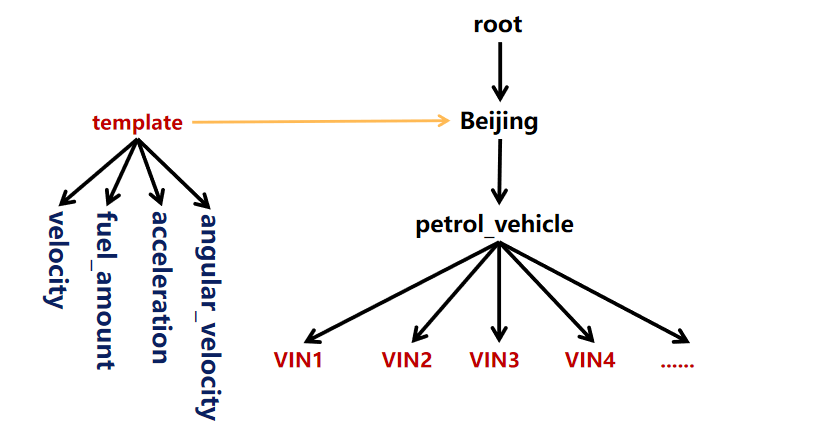
+
-```sql
-create timeseries root.turbine.d1.s1(temprature) with datatype=FLOAT, encoding=RLE, compression=SNAPPY tags(tag1=v1, tag2=v2) attributes(attr1=v1, attr2=v2)
-```
-- 重命名标签或属性
-```sql
-ALTER timeseries root.turbine.d1.s1 RENAME tag1 TO newTag1
-```
+Create template(s1 int, s2 float) on root.sg
-- 重新设置标签或属性的值
+Create device root.sg.d1
-```sql
-ALTER timeseries root.turbine.d1.s1 SET newTag1=newV1, attr1=newV1
-```
-- 删除已经存在的标签或属性
-```sql
-ALTER timeseries root.turbine.d1.s1 DROP tag1, tag2
-```
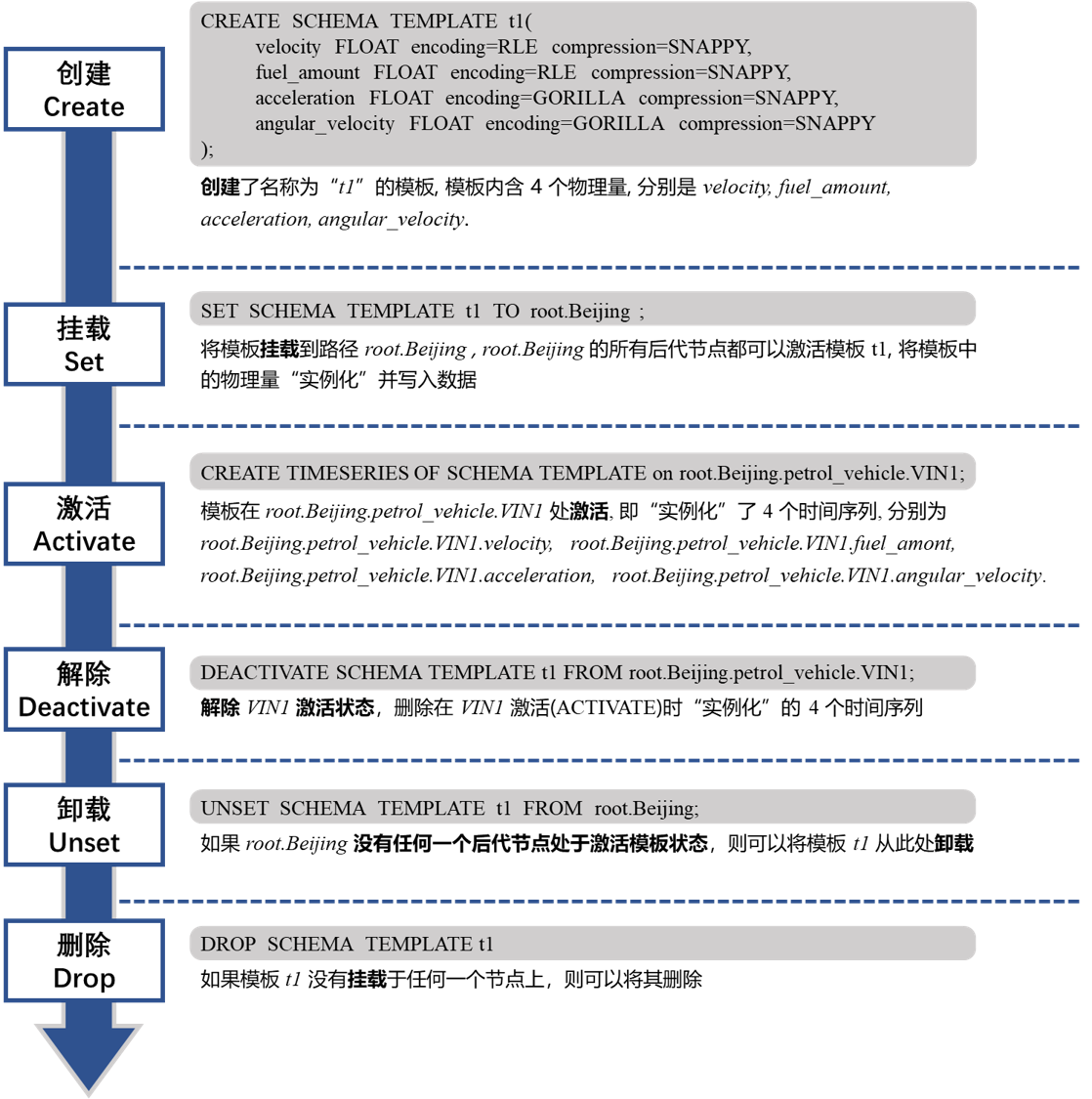
+
-- 添加新的标签
+### Create Schema Template
-```sql
-ALTER timeseries root.turbine.d1.s1 ADD TAGS tag3=v3, tag4=v4
+**Example 1:** Create a template containing two non-aligned timeseires
+
+```shell
+IoTDB> create schema template t1 (temperature FLOAT encoding=RLE, status BOOLEAN encoding=PLAIN compression=SNAPPY)
```
-- 添加新的属性
+**Example 2:** Create a template containing a group of aligned timeseires
-```sql
-ALTER timeseries root.turbine.d1.s1 ADD ATTRIBUTES attr3=v3, attr4=v4
+```shell
+IoTDB> create schema template t2 aligned (lat FLOAT encoding=Gorilla, lon FLOAT encoding=Gorilla)
```
-- 更新插入别名,标签和属性
+The` lat` and `lon` measurements are aligned.
+
+### Set Schema Template
```sql
-ALTER timeseries root.turbine.d1.s1 UPSERT ALIAS=newAlias TAGS(tag2=newV2, tag3=v3) ATTRIBUTES(attr3=v3, attr4=v4)
+IoTDB> set schema template t1 to root.sg1.d1
```
-- 使用标签作为过滤条件查询时间序列
+### Activate Schema Template
```sql
-SHOW TIMESERIES (<`PathPattern`>)? timeseriesWhereClause
+IoTDB> set schema template t1 to root.sg1.d1
+IoTDB> set schema template t2 to root.sg1.d2
+IoTDB> create timeseries using schema template on root.sg1.d1
+IoTDB> create timeseries using schema template on root.sg1.d2
```
-返回给定路径的下的所有满足条件的时间序列信息:
+### Show Schema Template
```sql
-ALTER timeseries root.ln.wf02.wt02.hardware ADD TAGS unit=c
-ALTER timeseries root.ln.wf02.wt02.status ADD TAGS description=test1
-show timeseries root.ln.** where TAGS(unit)='c'
-show timeseries root.ln.** where TAGS(description) contains 'test1'
+IoTDB> show schema templates
+IoTDB> show nodes in schema template t1
+IoTDB> show paths set schema template t1
+IoTDB> show paths using schema template t1
```
-- 使用标签作为过滤条件统计时间序列数量
+### Deactivate Schema Template
```sql
-COUNT TIMESERIES (<`PathPattern`>)? timeseriesWhereClause
-COUNT TIMESERIES (<`PathPattern`>)? timeseriesWhereClause GROUP BY LEVEL=<INTEGER>
+IoTDB> delete timeseries of schema template t1 from root.sg1.d1
+IoTDB> deactivate schema template t1 from root.sg1.d1
+IoTDB> delete timeseries of schema template t1 from root.sg1.*, root.sg2.*
+IoTDB> deactivate schema template t1 from root.sg1.*, root.sg2.*
```
-返回给定路径的下的所有满足条件的时间序列的数量:
+### Unset Schema Template
```sql
-count timeseries
-count timeseries root.** where TAGS(unit)='c'
-count timeseries root.** where TAGS(unit)='c' group by level = 2
+IoTDB> unset schema template t1 from root.sg1.d1
```
-创建对齐时间序列:
+### Drop Schema Template
```sql
-create aligned timeseries root.sg1.d1(s1 INT32 tags(tag1=v1, tag2=v2) attributes(attr1=v1, attr2=v2), s2 DOUBLE tags(tag3=v3, tag4=v4) attributes(attr3=v3, attr4=v4))
+IoTDB> drop schema template t1
```
-支持查询:
+### Alter Schema Template
```sql
-show timeseries where TAGS(tag1)='v1'
+IoTDB> alter schema template t1 add (speed FLOAT encoding=RLE, FLOAT TEXT encoding=PLAIN compression=SNAPPY)
```
-## 3、时间序列路径管理
-
-### 查看路径的所有子路径
-
-SHOW CHILD PATHS pathPattern
-
-- 查询 root.ln 的下一层:show child paths root.ln
-- 查询形如 root.xx.xx.xx 的路径:show child paths root.*.*
+## TIMESERIES MANAGEMENT
-### 查看路径的所有子节点
+For more details, see document [Operate-Metadata](../User-Manual/Operate-Metadata.md).
-SHOW CHILD NODES pathPattern
-
-- 查询 root 的下一层:show child nodes root
-- 查询 root.ln 的下一层 :show child nodes root.ln
-
-### 查看设备
-
-IoTDB> show devices
-
-IoTDB> show devices root.ln.**
-
-#### 查看设备及其 database 信息
-
-IoTDB> show devices with database
-
-IoTDB> show devices root.ln.** with database
-
-### 统计节点数
-
-IoTDB > COUNT NODES root.** LEVEL=2
-
-IoTDB > COUNT NODES root.ln.** LEVEL=2
-
-IoTDB > COUNT NODES root.ln.wf01.* LEVEL=3
-
-IoTDB > COUNT NODES root.**.temperature LEVEL=3
+### Create Timeseries
-### 统计设备数量
+```sql
+IoTDB > create timeseries root.ln.wf01.wt01.status with datatype=BOOLEAN,encoding=PLAIN
+IoTDB > create timeseries root.ln.wf01.wt01.temperature with datatype=FLOAT,encoding=RLE
+IoTDB > create timeseries root.ln.wf02.wt02.hardware with datatype=TEXT,encoding=PLAIN
+IoTDB > create timeseries root.ln.wf02.wt02.status with datatype=BOOLEAN,encoding=PLAIN
+IoTDB > create timeseries root.sgcc.wf03.wt01.status with datatype=BOOLEAN,encoding=PLAIN
+IoTDB > create timeseries root.sgcc.wf03.wt01.temperature with datatype=FLOAT,encoding=RLE
+```
-IoTDB> show devices
+- From v0.13, you can use a simplified version of the SQL statements to create timeseries:
-IoTDB> count devices
+```sql
+IoTDB > create timeseries root.ln.wf01.wt01.status with datatype=BOOLEAN,encoding=PLAIN
+IoTDB > create timeseries root.ln.wf01.wt01.temperature with datatype=FLOAT,encoding=RLE
+IoTDB > create timeseries root.ln.wf02.wt02.hardware with datatype=TEXT,encoding=PLAIN
+IoTDB > create timeseries root.ln.wf02.wt02.status with datatype=BOOLEAN,encoding=PLAIN
+IoTDB > create timeseries root.sgcc.wf03.wt01.status with datatype=BOOLEAN,encoding=PLAIN
+IoTDB > create timeseries root.sgcc.wf03.wt01.temperature with datatype=FLOAT,encoding=RLE
+```
-IoTDB> count devices root.ln.**
+- Notice that when in the CREATE TIMESERIES statement the encoding method conflicts with the data type, the system gives the corresponding error prompt as shown below:
-## 4、设备模板管理
+```sql
+IoTDB > create timeseries root.ln.wf02.wt02.status WITH DATATYPE=BOOLEAN, ENCODING=TS_2DIFF
+error: encoding TS_2DIFF does not support BOOLEAN
+```
-
+### Create Aligned Timeseries
+```sql
+IoTDB> CREATE ALIGNED TIMESERIES root.ln.wf01.GPS(latitude FLOAT encoding=PLAIN compressor=SNAPPY, longitude FLOAT encoding=PLAIN compressor=SNAPPY)
+```
+### Delete Timeseries
-Create template(s1 int, s2 float) on root.sg
+```sql
+IoTDB> delete timeseries root.ln.wf01.wt01.status
+IoTDB> delete timeseries root.ln.wf01.wt01.temperature, root.ln.wf02.wt02.hardware
+IoTDB> delete timeseries root.ln.wf02.*
+IoTDB> drop timeseries root.ln.wf02.*
+```
-Create device root.sg.d1
+### Show Timeseries
+```sql
+IoTDB> show timeseries root.**
+IoTDB> show timeseries root.ln.**
+IoTDB> show timeseries root.ln.** limit 10 offset 10
+IoTDB> show timeseries root.ln.** where timeseries contains 'wf01.wt'
+IoTDB> show timeseries root.ln.** where dataType=FLOAT
+```
+### Count Timeseries
-
+```sql
+IoTDB > COUNT TIMESERIES root.**
+IoTDB > COUNT TIMESERIES root.ln.**
+IoTDB > COUNT TIMESERIES root.ln.*.*.status
+IoTDB > COUNT TIMESERIES root.ln.wf01.wt01.status
+IoTDB > COUNT TIMESERIES root.** WHERE TIMESERIES contains 'sgcc'
+IoTDB > COUNT TIMESERIES root.** WHERE DATATYPE = INT64
+IoTDB > COUNT TIMESERIES root.** WHERE TAGS(unit) contains 'c'
+IoTDB > COUNT TIMESERIES root.** WHERE TAGS(unit) = 'c'
+IoTDB > COUNT TIMESERIES root.** WHERE TIMESERIES contains 'sgcc' group by level = 1
+IoTDB > COUNT TIMESERIES root.** GROUP BY LEVEL=1
+IoTDB > COUNT TIMESERIES root.ln.** GROUP BY LEVEL=2
+IoTDB > COUNT TIMESERIES root.ln.wf01.* GROUP BY LEVEL=2
+```
-### 创建元数据模板
+### Tag and Attribute Management
-```Go
-CREATE SCHEMA TEMPLATE <templateName> ALIGNED? '(' <measurementId> <attributeClauses> [',' <measurementId> <attributeClauses>]+ ')'
+```sql
+create timeseries root.turbine.d1.s1(temprature) with datatype=FLOAT, encoding=RLE, compression=SNAPPY tags(tag1=v1, tag2=v2) attributes(attr1=v1, attr2=v2)
```
-创建包含两个非对齐序列的元数据模板
+* Rename the tag/attribute key
-IoTDB> create schema template t1 (temperature FLOAT encoding=RLE, status BOOLEAN encoding=PLAIN compression=SNAPPY)
+```SQL
+ALTER timeseries root.turbine.d1.s1 RENAME tag1 TO newTag1
+```
-创建包含一组对齐序列的元数据模板
+* Reset the tag/attribute value
-IoTDB> create schema template t2 aligned (lat FLOAT encoding=Gorilla, lon FLOAT encoding=Gorilla)
+```SQL
+ALTER timeseries root.turbine.d1.s1 SET newTag1=newV1, attr1=newV1
+```
-### 挂载元数据模板
+* Delete the existing tag/attribute
-IoTDB> set SCHEMA TEMPLATE t1 to root.sg1
+```SQL
+ALTER timeseries root.turbine.d1.s1 DROP tag1, tag2
+```
-### 激活元数据模板
+* Add new tags
-IoTDB> create timeseries using SCHEMA TEMPLATE on root.sg1.d1
+```SQL
+ALTER timeseries root.turbine.d1.s1 ADD TAGS tag3=v3, tag4=v4
+```
-IoTDB> set SCHEMA TEMPLATE t1 to root.sg1.d1
+* Add new attributes
-IoTDB> set SCHEMA TEMPLATE t2 to root.sg1.d2
+```SQL
+ALTER timeseries root.turbine.d1.s1 ADD ATTRIBUTES attr3=v3, attr4=v4
+```
-IoTDB> create timeseries using schema template on root.sg1.d1
+* Upsert alias, tags and attributes
-IoTDB> create timeseries using schema template on root.sg1.d2
+> add alias or a new key-value if the alias or key doesn't exist, otherwise, update the old one with new value.
-### 查看元数据模板
+```SQL
+ALTER timeseries root.turbine.d1.s1 UPSERT ALIAS=newAlias TAGS(tag3=v3, tag4=v4) ATTRIBUTES(attr3=v3, attr4=v4)
+```
-IoTDB> show schema templates
+* Show timeseries using tags. Use TAGS(tagKey) to identify the tags used as filter key
-- 查看某个元数据模板下的物理量
+```SQL
+SHOW TIMESERIES (<`PathPattern`>)? timeseriesWhereClause
+```
-IoTDB> show nodes in schema template t1
+returns all the timeseries information that satisfy the where condition and match the pathPattern. SQL statements are as follows:
-- 查看挂载了某个元数据模板的路径
+```SQL
+ALTER timeseries root.ln.wf02.wt02.hardware ADD TAGS unit=c
+ALTER timeseries root.ln.wf02.wt02.status ADD TAGS description=test1
+show timeseries root.ln.** where TAGS(unit)='c'
+show timeseries root.ln.** where TAGS(description) contains 'test1'
+```
-IoTDB> show paths set schema template t1
+- count timeseries using tags
-- 查看使用了某个元数据模板的路径(即模板在该路径上已激活,序列已创建)
+```SQL
+COUNT TIMESERIES (<`PathPattern`>)? timeseriesWhereClause
+COUNT TIMESERIES (<`PathPattern`>)? timeseriesWhereClause GROUP BY LEVEL=<INTEGER>
+```
-IoTDB> show paths using schema template t1
+returns all the number of timeseries that satisfy the where condition and match the pathPattern. SQL statements are as follows:
-IoTDB> show devices using schema template t1
+```SQL
+count timeseries
+count timeseries root.** where TAGS(unit)='c'
+count timeseries root.** where TAGS(unit)='c' group by level = 2
+```
-### 解除元数据模板
+create aligned timeseries
-IoTDB> delete timeseries of schema template t1 from root.sg1.d1
+```SQL
+create aligned timeseries root.sg1.d1(s1 INT32 tags(tag1=v1, tag2=v2) attributes(attr1=v1, attr2=v2), s2 DOUBLE tags(tag3=v3, tag4=v4) attributes(attr3=v3, attr4=v4))
+```
-IoTDB> deactivate schema template t1 from root.sg1.d1
+The execution result is as follows:
-批量处理
+```SQL
+IoTDB> show timeseries
++--------------+-----+-------------+--------+--------+-----------+-------------------------+---------------------------+--------+-------------------+
+| timeseries|alias| database|dataType|encoding|compression| tags| attributes|deadband|deadband parameters|
++--------------+-----+-------------+--------+--------+-----------+-------------------------+---------------------------+--------+-------------------+
+|root.sg1.d1.s1| null| root.sg1| INT32| RLE| SNAPPY|{"tag1":"v1","tag2":"v2"}|{"attr2":"v2","attr1":"v1"}| null| null|
+|root.sg1.d1.s2| null| root.sg1| DOUBLE| GORILLA| SNAPPY|{"tag4":"v4","tag3":"v3"}|{"attr4":"v4","attr3":"v3"}| null| null|
++--------------+-----+-------------+--------+--------+-----------+-------------------------+---------------------------+--------+-------------------+
+```
-IoTDB> delete timeseries of schema template t1 from root.sg1.*, root.sg2.*
+Support query:
-IoTDB> deactivate schema template t1 from root.sg1.*, root.sg2.*
+```SQL
+IoTDB> show timeseries where TAGS(tag1)='v1'
++--------------+-----+-------------+--------+--------+-----------+-------------------------+---------------------------+--------+-------------------+
+| timeseries|alias| database|dataType|encoding|compression| tags| attributes|deadband|deadband parameters|
++--------------+-----+-------------+--------+--------+-----------+-------------------------+---------------------------+--------+-------------------+
+|root.sg1.d1.s1| null| root.sg1| INT32| RLE| SNAPPY|{"tag1":"v1","tag2":"v2"}|{"attr2":"v2","attr1":"v1"}| null| null|
++--------------+-----+-------------+--------+--------+-----------+-------------------------+---------------------------+--------+-------------------+
+```
-### 卸载元数据模板
+The above operations are supported for timeseries tag, attribute updates, etc.
-IoTDB> unset schema template t1 from root.sg1.d1
+## NODE MANAGEMENT
-### 删除元数据模板
+For more details, see document [Operate-Metadata](../User-Manual/Operate-Metadata.md).
-IoTDB> drop schema template t1
+### Show Child Paths
-## 5、数据存活时间管理
+```SQL
+SHOW CHILD PATHS pathPattern
+```
-### 设置 TTL
+### Show Child Nodes
-IoTDB> set ttl to root.ln 3600000
+```SQL
+SHOW CHILD NODES pathPattern
+```
-IoTDB> set ttl to root.sgcc.** 3600000
+### Count Nodes
-IoTDB> set ttl to root.** 3600000
+```SQL
+IoTDB > COUNT NODES root.** LEVEL=2
+IoTDB > COUNT NODES root.ln.** LEVEL=2
+IoTDB > COUNT NODES root.ln.wf01.** LEVEL=3
+IoTDB > COUNT NODES root.**.temperature LEVEL=3
+```
-### 取消 TTL
+### Show Devices
-IoTDB> unset ttl to root.ln
+```SQL
+IoTDB> show devices
+IoTDB> show devices root.ln.**
+IoTDB> show devices root.ln.** where device contains 't'
+IoTDB> show devices with database
+IoTDB> show devices root.ln.** with database
+```
-IoTDB> unset ttl to root.sgcc.**
+### Count Devices
-IoTDB> unset ttl to root.**
+```SQL
+IoTDB> show devices
+IoTDB> count devices
+IoTDB> count devices root.ln.**
+```
-### 显示 TTL
+## INSERT & LOAD DATA
-IoTDB> SHOW ALL TTL
+### Insert Data
-IoTDB> SHOW TTL ON StorageGroupNames
+For more details, see document [Write-Delete-Data](../User-Manual/Write-Delete-Data.md).
-# 写入数据
+#### Use of INSERT Statements
-## 1、写入单列数据
+- Insert Single Timeseries
+```sql
IoTDB > insert into root.ln.wf02.wt02(timestamp,status) values(1,true)
+IoTDB > insert into root.ln.wf02.wt02(timestamp,hardware) values(1, 'v1')
+```
-IoTDB > insert into root.ln.wf02.wt02(timestamp,hardware) values(1, 'v1'),(2, 'v1')
-
-## 2、写入多列数据
-
-IoTDB > insert into root.ln.wf02.wt02(timestamp, status, hardware) values (2, false, 'v2')
+- Insert Multiple Timeseries
+```sql
+IoTDB > insert into root.ln.wf02.wt02(timestamp, status, hardware) VALUES (2, false, 'v2')
IoTDB > insert into root.ln.wf02.wt02(timestamp, status, hardware) VALUES (3, false, 'v3'),(4, true, 'v4')
+```
-## 3、使用服务器时间戳
+- Use the Current System Timestamp as the Timestamp of the Data Point
+```SQL
IoTDB > insert into root.ln.wf02.wt02(status, hardware) values (false, 'v2')
+```
-## 4、写入对齐时间序列数据
+#### Insert Data Into Aligned Timeseries
+```SQL
IoTDB > create aligned timeseries root.sg1.d1(s1 INT32, s2 DOUBLE)
-
-IoTDB > insert into root.sg1.d1(timestamp, s1, s2) aligned values(1, 1, 1)
-
-IoTDB > insert into root.sg1.d1(timestamp, s1, s2) aligned values(2, 2, 2), (3, 3, 3)
-
+IoTDB > insert into root.sg1.d1(time, s1, s2) aligned values(1, 1, 1)
+IoTDB > insert into root.sg1.d1(time, s1, s2) aligned values(2, 2, 2), (3, 3, 3)
IoTDB > select * from root.sg1.d1
+```
-## 5、加载 TsFile 文件数据
+### Load External TsFile Tool
-load '<path/dir>' [sglevel=int][verify=true/false][onSuccess=delete/none]
+For more details, see document [Import-Export-Tool](../Tools-System/Import-Export-Tool.md).
-### 通过指定文件路径(绝对路径)加载单 tsfile 文件
+#### Load with SQL
+
+1. Load a single tsfile by specifying a file path (absolute path).
- `load '/Users/Desktop/data/1575028885956-101-0.tsfile'`
- `load '/Users/Desktop/data/1575028885956-101-0.tsfile' verify=true`
@@ -413,7 +467,7 @@ load '<path/dir>' [sglevel=int][verify=true/false][onSuccess=delete/none]
- `load '/Users/Desktop/data/1575028885956-101-0.tsfile' verify=true onSuccess=none`
- `load '/Users/Desktop/data/1575028885956-101-0.tsfile' verify=false sglevel=1 onSuccess=delete`
-### 通过指定文件夹路径(绝对路径)批量加载文件
+2. Load a batch of files by specifying a folder path (absolute path).
- `load '/Users/Desktop/data'`
- `load '/Users/Desktop/data' verify=false`
@@ -421,2112 +475,1399 @@ load '<path/dir>' [sglevel=int][verify=true/false][onSuccess=delete/none]
- `load '/Users/Desktop/data' verify=true sglevel=1`
- `load '/Users/Desktop/data' verify=false sglevel=1 onSuccess=delete`
-# 删除数据
+#### Load with Script
-## 1、删除单列数据
+```
+./load-rewrite.bat -f D:\IoTDB\data -h 192.168.0.101 -p 6667 -u root -pw root
+```
-delete from root.ln.wf02.wt02.status where time<=2017-11-01T16:26:00;
+## DELETE DATA
-delete from root.ln.wf02.wt02.status where time>=2017-01-01T00:00:00 and time<=2017-11-01T16:26:00;
+For more details, see document [Write-Delete-Data](../User-Manual/Write-Delete-Data.md).
-delete from root.ln.wf02.wt02.status where time < 10
+### Delete Single Timeseries
-delete from root.ln.wf02.wt02.status where time <= 10
+```sql
+IoTDB > delete from root.ln.wf02.wt02.status where time<=2017-11-01T16:26:00;
+IoTDB > delete from root.ln.wf02.wt02.status where time>=2017-01-01T00:00:00 and time<=2017-11-01T16:26:00;
+IoTDB > delete from root.ln.wf02.wt02.status where time < 10
+IoTDB > delete from root.ln.wf02.wt02.status where time <= 10
+IoTDB > delete from root.ln.wf02.wt02.status where time < 20 and time > 10
+IoTDB > delete from root.ln.wf02.wt02.status where time <= 20 and time >= 10
+IoTDB > delete from root.ln.wf02.wt02.status where time > 20
+IoTDB > delete from root.ln.wf02.wt02.status where time >= 20
+IoTDB > delete from root.ln.wf02.wt02.status where time = 20
+IoTDB > delete from root.ln.wf02.wt02.status where time > 4 or time < 0
+Msg: 303: Check metadata error: For delete statement, where clause can only contain atomic
+expressions like : time > XXX, time <= XXX, or two atomic expressions connected by 'AND'
+IoTDB > delete from root.ln.wf02.wt02.status
+```
-delete from root.ln.wf02.wt02.status where time < 20 and time > 10
+### Delete Multiple Timeseries
-delete from root.ln.wf02.wt02.status where time <= 20 and time >= 10
+```sql
+IoTDB > delete from root.ln.wf02.wt02 where time <= 2017-11-01T16:26:00;
+IoTDB > delete from root.ln.wf02.wt02.* where time <= 2017-11-01T16:26:00;
+IoTDB> delete from root.ln.wf03.wt02.status where time < now()
+Msg: The statement is executed successfully.
+```
-delete from root.ln.wf02.wt02.status where time > 20
+### Delete Time Partition (experimental)
-delete from root.ln.wf02.wt02.status where time >= 20
+```sql
+IoTDB > DELETE PARTITION root.ln 0,1,2
+```
-delete from root.ln.wf02.wt02.status where time = 20
+## QUERY DATA
-出错:
+For more details, see document [Query-Data](../User-Manual/Query-Data.md).
-delete from root.ln.wf02.wt02.status where time > 4 or time < 0
+```sql
+SELECT [LAST] selectExpr [, selectExpr] ...
+ [INTO intoItem [, intoItem] ...]
+ FROM prefixPath [, prefixPath] ...
+ [WHERE whereCondition]
+ [GROUP BY {
+ ([startTime, endTime), interval [, slidingStep]) |
+ LEVEL = levelNum [, levelNum] ... |
+ TAGS(tagKey [, tagKey] ... ) |
+ VARIATION(expression[,delta][,ignoreNull=true/false]) |
+ CONDITION(expression,[keep>/>=/=/</<=]threshold[,ignoreNull=true/false]) |
+ SESSION(timeInterval) |
+ COUNT(expression, size[,ignoreNull=true/false])
+ }]
+ [HAVING havingCondition]
+ [ORDER BY sortKey {ASC | DESC}]
+ [FILL ({PREVIOUS | LINEAR | constant})]
+ [SLIMIT seriesLimit] [SOFFSET seriesOffset]
+ [LIMIT rowLimit] [OFFSET rowOffset]
+ [ALIGN BY {TIME | DEVICE}]
+```
-Msg: 303: Check metadata error: For delete statement, where clause can only contain atomic
+### Basic Examples
-expressions like : time > XXX, time <= XXX, or two atomic expressions connected by 'AND'
+#### Select a Column of Data Based on a Time Interval
-删除时间序列中的所有数据:
+```sql
+IoTDB > select temperature from root.ln.wf01.wt01 where time < 2017-11-01T00:08:00.000
+```
-delete from root.ln.wf02.wt02.status
+#### Select Multiple Columns of Data Based on a Time Interval
-## 2、删除多列数据
+```sql
+IoTDB > select status, temperature from root.ln.wf01.wt01 where time > 2017-11-01T00:05:00.000 and time < 2017-11-01T00:12:00.000;
+```
-delete from root.ln.wf02.wt02.* where time <= 2017-11-01T16:26:00;
+#### Select Multiple Columns of Data for the Same Device According to Multiple Time Intervals
-声明式的编程方式:
+```sql
+IoTDB > select status,temperature from root.ln.wf01.wt01 where (time > 2017-11-01T00:05:00.000 and time < 2017-11-01T00:12:00.000) or (time >= 2017-11-01T16:35:00.000 and time <= 2017-11-01T16:37:00.000);
+```
-IoTDB> delete from root.ln.wf03.wt02.status where time < now()
+#### Choose Multiple Columns of Data for Different Devices According to Multiple Time Intervals
-Msg: The statement is executed successfully.
+```sql
+IoTDB > select wf01.wt01.status,wf02.wt02.hardware from root.ln where (time > 2017-11-01T00:05:00.000 and time < 2017-11-01T00:12:00.000) or (time >= 2017-11-01T16:35:00.000 and time <= 2017-11-01T16:37:00.000);
+```
-# 数据查询
+#### Order By Time Query
-## 1、基础查询
+```sql
+IoTDB > select * from root.ln.** where time > 1 order by time desc limit 10;
+```
-### 时间过滤查询
+### `SELECT` CLAUSE
-select temperature from root.ln.wf01.wt01 where time < 2017-11-01T00:08:00.000
+#### Use Alias
-### 根据一个时间区间选择多列数据
+```sql
+IoTDB > select s1 as temperature, s2 as speed from root.ln.wf01.wt01;
+```
-select status, temperature from root.ln.wf01.wt01 where time > 2017-11-01T00:05:00.000 and time < 2017-11-01T00:12:00.000;
+#### Nested Expressions
-### 按照多个时间区间选择同一设备的多列数据
+##### Nested Expressions with Time Series Query
-select status, temperature from root.ln.wf01.wt01 where (time > 2017-11-01T00:05:00.000 and time < 2017-11-01T00:12:00.000) or (time >= 2017-11-01T16:35:00.000 and time <= 2017-11-01T16:37:00.000);
+```sql
+IoTDB > select a,
+ b,
+ ((a + 1) * 2 - 1) % 2 + 1.5,
+ sin(a + sin(a + sin(b))),
+ -(a + b) * (sin(a + b) * sin(a + b) + cos(a + b) * cos(a + b)) + 1
+from root.sg1;
-### 按照多个时间区间选择不同设备的多列数据
+IoTDB > select (a + b) * 2 + sin(a) from root.sg
-select wf01.wt01.status, wf02.wt02.hardware from root.ln where (time > 2017-11-01T00:05:00.000 and time < 2017-11-01T00:12:00.000) or (time >= 2017-11-01T16:35:00.000 and time <= 2017-11-01T16:37:00.000);
+IoTDB > select (a + *) / 2 from root.sg1
-### 根据时间降序返回结果集
+IoTDB > select (a + b) * 3 from root.sg, root.ln
+```
-select * from root.ln.** where time > 1 order by time desc limit 10;
+##### Nested Expressions query with aggregations
-## 2、选择表达式
+```sql
+IoTDB > select avg(temperature),
+ sin(avg(temperature)),
+ avg(temperature) + 1,
+ -sum(hardware),
+ avg(temperature) + sum(hardware)
+from root.ln.wf01.wt01;
-### 使用别名
+IoTDB > select avg(*),
+ (avg(*) + 1) * 3 / 2 -1
+from root.sg1
-select s1 as temperature, s2 as speed from root.ln.wf01.wt01;
+IoTDB > select avg(temperature),
+ sin(avg(temperature)),
+ avg(temperature) + 1,
+ -sum(hardware),
+ avg(temperature) + sum(hardware) as custom_sum
+from root.ln.wf01.wt01
+GROUP BY([10, 90), 10ms);
+```
-### 运算符
+#### Last Query
-### 函数
+```sql
+IoTDB > select last status from root.ln.wf01.wt01
+IoTDB > select last status, temperature from root.ln.wf01.wt01 where time >= 2017-11-07T23:50:00
+IoTDB > select last * from root.ln.wf01.wt01 order by timeseries desc;
+IoTDB > select last * from root.ln.wf01.wt01 order by dataType desc;
+```
-不支持:
+### `WHERE` CLAUSE
-select s1, count(s1) from root.sg.d1;
+#### Time Filter
-select sin(s1), count(s1) from root.sg.d1;
+```sql
+IoTDB > select s1 from root.sg1.d1 where time > 2022-01-01T00:05:00.000;
+IoTDB > select s1 from root.sg1.d1 where time = 2022-01-01T00:05:00.000;
+IoTDB > select s1 from root.sg1.d1 where time >= 2022-01-01T00:05:00.000 and time < 2017-11-01T00:12:00.000;
+```
-select s1, count(s1) from root.sg.d1 group by ([10,100),10ms);
+#### Value Filter
-#### 时间序列查询嵌套表达式
+```sql
+IoTDB > select temperature from root.sg1.d1 where temperature > 36.5;
+IoTDB > select status from root.sg1.d1 where status = true;
+IoTDB > select temperature from root.sg1.d1 where temperature between 36.5 and 40;
+IoTDB > select temperature from root.sg1.d1 where temperature not between 36.5 and 40;
+IoTDB > select code from root.sg1.d1 where code in ('200', '300', '400', '500');
+IoTDB > select code from root.sg1.d1 where code not in ('200', '300', '400', '500');
+IoTDB > select code from root.sg1.d1 where temperature is null;
+IoTDB > select code from root.sg1.d1 where temperature is not null;
+```
-示例 1:
+#### Fuzzy Query
-select a,
+- Fuzzy matching using `Like`
- b,
+```sql
+IoTDB > select * from root.sg.d1 where value like '%cc%'
+IoTDB > select * from root.sg.device where value like '_b_'
+```
- ((a + 1) * 2 - 1) % 2 + 1.5,
+- Fuzzy matching using `Regexp`
- sin(a + sin(a + sin(b))),
+```sql
+IoTDB > select * from root.sg.d1 where value regexp '^[A-Za-z]+$'
+IoTDB > select * from root.sg.d1 where value regexp '^[a-z]+$' and time > 100
+```
- -(a + b) * (sin(a + b) * sin(a + b) + cos(a + b) * cos(a + b)) + 1
+### `GROUP BY` CLAUSE
-from root.sg1;
+- Aggregate By Time without Specifying the Sliding Step Length
-示例 2:
+```sql
+IoTDB > select count(status), max_value(temperature) from root.ln.wf01.wt01 group by ([2017-11-01T00:00:00, 2017-11-07T23:00:00),1d);
+```
-select (a + b) * 2 + sin(a) from root.sg
+- Aggregate By Time Specifying the Sliding Step Length
-示例 3:
+```sql
+IoTDB > select count(status), max_value(temperature) from root.ln.wf01.wt01 group by ([2017-11-01 00:00:00, 2017-11-07 23:00:00), 3h, 1d);
+```
-select (a + *) / 2 from root.sg1
+- Aggregate by Natural Month
-示例 4:
+```sql
+IoTDB > select count(status) from root.ln.wf01.wt01 group by([2017-11-01T00:00:00, 2019-11-07T23:00:00), 1mo, 2mo);
+IoTDB > select count(status) from root.ln.wf01.wt01 group by([2017-10-31T00:00:00, 2019-11-07T23:00:00), 1mo, 2mo);
+```
-select (a + b) * 3 from root.sg, root.ln
+- Left Open And Right Close Range
-#### 聚合查询嵌套表达式
+```sql
+IoTDB > select count(status) from root.ln.wf01.wt01 group by ((2017-11-01T00:00:00, 2017-11-07T23:00:00],1d);
+```
-示例 1:
+- Aggregation By Variation
-select avg(temperature),
+```sql
+IoTDB > select __endTime, avg(s1), count(s2), sum(s3) from root.sg.d group by variation(s6)
+IoTDB > select __endTime, avg(s1), count(s2), sum(s3) from root.sg.d group by variation(s6, ignoreNull=false)
+IoTDB > select __endTime, avg(s1), count(s2), sum(s3) from root.sg.d group by variation(s6, 4)
+IoTDB > select __endTime, avg(s1), count(s2), sum(s3) from root.sg.d group by variation(s6+s5, 10)
+```
- sin(avg(temperature)),
+- Aggregation By Condition
- avg(temperature) + 1,
+```sql
+IoTDB > select max_time(charging_status),count(vehicle_status),last_value(soc) from root.** group by condition(charging_status=1,KEEP>=2,ignoringNull=true)
+IoTDB > select max_time(charging_status),count(vehicle_status),last_value(soc) from root.** group by condition(charging_status=1,KEEP>=2,ignoringNull=false)
+```
- -sum(hardware),
+- Aggregation By Session
- avg(temperature) + sum(hardware)
+```sql
+IoTDB > select __endTime,count(*) from root.** group by session(1d)
+IoTDB > select __endTime,sum(hardware) from root.ln.wf02.wt01 group by session(50s) having sum(hardware)>0 align by device
+```
-from root.ln.wf01.wt01;
+- Aggregation By Count
-示例 2:
+```sql
+IoTDB > select count(charging_stauts), first_value(soc) from root.sg group by count(charging_status,5)
+IoTDB > select count(charging_stauts), first_value(soc) from root.sg group by count(charging_status,5,ignoreNull=false)
+```
-select avg(*),
+- Aggregation By Level
- (avg(*) + 1) * 3 / 2 -1
+```sql
+IoTDB > select count(status) from root.** group by level = 1
+IoTDB > select count(status) from root.** group by level = 3
+IoTDB > select count(status) from root.** group by level = 1, 3
+IoTDB > select max_value(temperature) from root.** group by level = 0
+IoTDB > select count(*) from root.ln.** group by level = 2
+```
-from root.sg1
-
-示例 3:
+- Aggregate By Time with Level Clause
-select avg(temperature),
+```sql
+IoTDB > select count(status) from root.ln.wf01.wt01 group by ((2017-11-01T00:00:00, 2017-11-07T23:00:00],1d), level=1;
+IoTDB > select count(status) from root.ln.wf01.wt01 group by ([2017-11-01 00:00:00, 2017-11-07 23:00:00), 3h, 1d), level=1;
+```
- sin(avg(temperature)),
+- Aggregation query by one single tag
- avg(temperature) + 1,
+```sql
+IoTDB > SELECT AVG(temperature) FROM root.factory1.** GROUP BY TAGS(city);
+```
- -sum(hardware),
+- Aggregation query by multiple tags
- avg(temperature) + sum(hardware) as custom_sum
+```sql
+IoTDB > SELECT avg(temperature) FROM root.factory1.** GROUP BY TAGS(city, workshop);
+```
-from root.ln.wf01.wt01
+- Downsampling Aggregation by tags based on Time Window
-GROUP BY([10, 90), 10ms);
+```sql
+IoTDB > SELECT avg(temperature) FROM root.factory1.** GROUP BY ([1000, 10000), 5s), TAGS(city, workshop);
+```
-## 3、最新点查询
+### `HAVING` CLAUSE
-SQL 语法:
+Correct:
-```Go
-select last <Path> [COMMA <Path>]* from < PrefixPath > [COMMA < PrefixPath >]* <whereClause> [ORDER BY TIMESERIES (DESC | ASC)?]
+```sql
+IoTDB > select count(s1) from root.** group by ([1,11),2ms), level=1 having count(s2) > 1
+IoTDB > select count(s1), count(s2) from root.** group by ([1,11),2ms) having count(s2) > 1 align by device
```
-查询 root.ln.wf01.wt01.status 的最新数据点
+Incorrect:
-IoTDB> select last status from root.ln.wf01.wt01
+```sql
+IoTDB > select count(s1) from root.** group by ([1,3),1ms) having sum(s1) > s1
+IoTDB > select count(s1) from root.** group by ([1,3),1ms) having s1 > 1
+IoTDB > select count(s1) from root.** group by ([1,3),1ms), level=1 having sum(d1.s1) > 1
+IoTDB > select count(d1.s1) from root.** group by ([1,3),1ms), level=1 having sum(s1) > 1
+```
-查询 root.ln.wf01.wt01 下 status,temperature 时间戳大于等于 2017-11-07T23:50:00 的最新数据点
+### `FILL` CLAUSE
-IoTDB> select last status, temperature from root.ln.wf01.wt01 where time >= 2017-11-07T23:50:00
+#### `PREVIOUS` Fill
-查询 root.ln.wf01.wt01 下所有序列的最新数据点,并按照序列名降序排列
+```sql
+IoTDB > select temperature, status from root.sgcc.wf03.wt01 where time >= 2017-11-01T16:37:00.000 and time <= 2017-11-01T16:40:00.000 fill(previous);
+```
-IoTDB> select last * from root.ln.wf01.wt01 order by timeseries desc;
+#### `LINEAR` Fill
-## 4、查询对齐模式
+```sql
+IoTDB > select temperature, status from root.sgcc.wf03.wt01 where time >= 2017-11-01T16:37:00.000 and time <= 2017-11-01T16:40:00.000 fill(linear);
+```
-### 按设备对齐
+#### Constant Fill
-select * from root.ln.** where time <= 2017-11-01T00:01:00 align by device;
+```sql
+IoTDB > select temperature, status from root.sgcc.wf03.wt01 where time >= 2017-11-01T16:37:00.000 and time <= 2017-11-01T16:40:00.000 fill(2.0);
+IoTDB > select temperature, status from root.sgcc.wf03.wt01 where time >= 2017-11-01T16:37:00.000 and time <= 2017-11-01T16:40:00.000 fill(true);
+```
-### 设备对齐模式下的排序
+### `LIMIT` and `SLIMIT` CLAUSES (PAGINATION)
-#### 时间对齐模式下的排序
+#### Row Control over Query Results
-select * from root.ln.** where time <= 2017-11-01T00:01:00 order by time desc;
+```sql
+IoTDB > select status, temperature from root.ln.wf01.wt01 limit 10
+IoTDB > select status, temperature from root.ln.wf01.wt01 limit 5 offset 3
+IoTDB > select status,temperature from root.ln.wf01.wt01 where time > 2017-11-01T00:05:00.000 and time< 2017-11-01T00:12:00.000 limit 2 offset 3
+IoTDB > select count(status), max_value(temperature) from root.ln.wf01.wt01 group by ([2017-11-01T00:00:00, 2017-11-07T23:00:00),1d) limit 5 offset 3
+```
-#### 设备对齐模式下的排序
+#### Column Control over Query Results
-select * from root.ln.** where time <= 2017-11-01T00:01:00 order by device desc,time asc align by device;
+```sql
+IoTDB > select * from root.ln.wf01.wt01 where time > 2017-11-01T00:05:00.000 and time < 2017-11-01T00:12:00.000 slimit 1
+IoTDB > select * from root.ln.wf01.wt01 where time > 2017-11-01T00:05:00.000 and time < 2017-11-01T00:12:00.000 slimit 1 soffset 1
+IoTDB > select max_value(*) from root.ln.wf01.wt01 group by ([2017-11-01T00:00:00, 2017-11-07T23:00:00),1d) slimit 1 soffset 1
+```
-在时间戳相等时按照设备名排序
+#### Row and Column Control over Query Results
-select * from root.ln.** where time <= 2017-11-01T00:01:00 order by time asc,device desc align by device;
+```sql
+IoTDB > select * from root.ln.wf01.wt01 limit 10 offset 100 slimit 2 soffset 0
+```
-没有显式指定时
+### `ORDER BY` CLAUSE
-select * from root.ln.** where time <= 2017-11-01T00:01:00 align by device;
+#### Order by in ALIGN BY TIME mode
-对聚合后的结果进行排序
+```sql
+IoTDB > select * from root.ln.** where time <= 2017-11-01T00:01:00 order by time desc;
+```
-select count(*) from root.ln.** group by ((2017-11-01T00:00:00.000+08:00,2017-11-01T00:03:00.000+08:00],1m) order by device asc,time asc align by device
+#### Order by in ALIGN BY DEVICE mode
-## 5、查询过滤条件
+```sql
+IoTDB > select * from root.ln.** where time <= 2017-11-01T00:01:00 order by device desc,time asc align by device;
+IoTDB > select * from root.ln.** where time <= 2017-11-01T00:01:00 order by time asc,device desc align by device;
+IoTDB > select * from root.ln.** where time <= 2017-11-01T00:01:00 align by device;
+IoTDB > select count(*) from root.ln.** group by ((2017-11-01T00:00:00.000+08:00,2017-11-01T00:03:00.000+08:00],1m) order by device asc,time asc align by device
+```
-选择时间戳大于 2022-01-01T00:05:00.000 的数据:
+#### Order by arbitrary expressions
-select s1 from root.sg1.d1 where time > 2022-01-01T00:05:00.000;
+```sql
+IoTDB > select score from root.** order by score desc align by device
+IoTDB > select score,total from root.one order by base+score+bonus desc
+IoTDB > select score,total from root.one order by total desc
+IoTDB > select base, score, bonus, total from root.** order by total desc NULLS Last,
+ score desc NULLS Last,
+ bonus desc NULLS Last,
+ time desc align by device
+IoTDB > select min_value(total) from root.** order by min_value(total) asc align by device
+IoTDB > select min_value(total),max_value(base) from root.** order by max_value(total) desc align by device
+IoTDB > select score from root.** order by device asc, score desc, time asc align by device
+```
-选择时间戳等于 2022-01-01T00:05:00.000 的数据:
+### `ALIGN BY` CLAUSE
-select s1 from root.sg1.d1 where time = 2022-01-01T00:05:00.000;
+#### Align by Device
-选择时间区间 [2017-11-01T00:05:00.000, 2017-11-01T00:12:00.000) 内的数据:
+```sql
+IoTDB > select * from root.ln.** where time <= 2017-11-01T00:01:00 align by device;
+```
-select s1 from root.sg1.d1 where time >= 2022-01-01T00:05:00.000 and time < 2017-11-01T00:12:00.000;
+### `INTO` CLAUSE (QUERY WRITE-BACK)
-### 值过滤条件
+```sql
+IoTDB > select s1, s2 into root.sg_copy.d1(t1), root.sg_copy.d2(t1, t2), root.sg_copy.d1(t2) from root.sg.d1, root.sg.d2;
+IoTDB > select count(s1 + s2), last_value(s2) into root.agg.count(s1_add_s2), root.agg.last_value(s2) from root.sg.d1 group by ([0, 100), 10ms);
+IoTDB > select s1, s2 into root.sg_copy.d1(t1, t2), root.sg_copy.d2(t1, t2) from root.sg.d1, root.sg.d2 align by device;
+IoTDB > select s1 + s2 into root.expr.add(d1s1_d1s2), root.expr.add(d2s1_d2s2) from root.sg.d1, root.sg.d2 align by device;
+```
-选择值大于 36.5 的数据:
+- Using variable placeholders:
-select temperature from root.sg1.d1 where temperature > 36.5;
+```sql
+IoTDB > select s1, s2
+into root.sg_copy.d1(::), root.sg_copy.d2(s1), root.sg_copy.d1(${3}), root.sg_copy.d2(::)
+from root.sg.d1, root.sg.d2;
-选择值等于 true 的数据:
+IoTDB > select d1.s1, d1.s2, d2.s3, d3.s4
+into ::(s1_1, s2_2), root.sg.d2_2(s3_3), root.${2}_copy.::(s4)
+from root.sg;
-select status from root.sg1.d1 where status = true;
+IoTDB > select * into root.sg_bk.::(::) from root.sg.**;
-选择区间 [36.5,40] 内或之外的数据:
+IoTDB > select s1, s2, s3, s4
+into root.backup_sg.d1(s1, s2, s3, s4), root.backup_sg.d2(::), root.sg.d3(backup_${4})
+from root.sg.d1, root.sg.d2, root.sg.d3
+align by device;
-select temperature from root.sg1.d1 where temperature between 36.5 and 40;
+IoTDB > select avg(s1), sum(s2) + sum(s3), count(s4)
+into root.agg_${2}.::(avg_s1, sum_s2_add_s3, count_s4)
+from root.**
+align by device;
-select temperature from root.sg1.d1 where temperature not between 36.5 and 40;
+IoTDB > select * into ::(backup_${4}) from root.sg.** align by device;
-选择值在特定范围内的数据:
+IoTDB > select s1, s2 into root.sg_copy.d1(t1, t2), aligned root.sg_copy.d2(t1, t2) from root.sg.d1, root.sg.d2 align by device;
+```
-select code from root.sg1.d1 where code in ('200', '300', '400', '500');
+## OPERATOR
-选择值在特定范围外的数据:
+For more details, see document [Operator-and-Expression](../User-Manual/Operator-and-Expression.md).
-select code from root.sg1.d1 where code not in ('200', '300', '400', '500');
+### Arithmetic Operators
-选择值为空的数据:
+For details and examples, see the document [Arithmetic Operators and Functions](../Operators-Functions/Mathematical.md).
-select code from root.sg1.d1 where temperature is null;
+```sql
+select s1, - s1, s2, + s2, s1 + s2, s1 - s2, s1 * s2, s1 / s2, s1 % s2 from root.sg.d1
+```
-选择值为非空的数据:
+### Comparison Operators
-select code from root.sg1.d1 where temperature is not null;
+For details and examples, see the document [Comparison Operators and Functions](../Operators-Functions/Comparison.md).
-### 模糊查询
+```sql
+# Basic comparison operators
+select a, b, a > 10, a <= b, !(a <= b), a > 10 && a > b from root.test;
-查询 `root.sg.d1` 下 `value` 含有`'cc'`的数据
+# `BETWEEN ... AND ...` operator
+select temperature from root.sg1.d1 where temperature between 36.5 and 40;
+select temperature from root.sg1.d1 where temperature not between 36.5 and 40;
-IoTDB> select * from root.sg.d1 where value like '%cc%'
+# Fuzzy matching operator: Use `Like` for fuzzy matching
+select * from root.sg.d1 where value like '%cc%'
+select * from root.sg.device where value like '_b_'
-查询 `root.sg.d1` 下 `value` 中间为 `'b'`、前后为任意单个字符的数据
+# Fuzzy matching operator: Use `Regexp` for fuzzy matching
+select * from root.sg.d1 where value regexp '^[A-Za-z]+$'
+select * from root.sg.d1 where value regexp '^[a-z]+$' and time > 100
+select b, b like '1%', b regexp '[0-2]' from root.test;
-IoTDB> select * from root.sg.device where value like '_b_'
+# `IS NULL` operator
+select code from root.sg1.d1 where temperature is null;
+select code from root.sg1.d1 where temperature is not null;
-查询 root.sg.d1 下 value 值为26个英文字符组成的字符串
+# `IN` operator
+select code from root.sg1.d1 where code in ('200', '300', '400', '500');
+select code from root.sg1.d1 where code not in ('200', '300', '400', '500');
+select a, a in (1, 2) from root.test;
+```
-IoTDB> select * from root.sg.d1 where value regexp '^[A-Za-z]+$'
+### Logical Operators
-查询 root.sg.d1 下 value 值为26个小写英文字符组成的字符串且时间大于100的
+For details and examples, see the document [Logical Operators](../Operators-Functions/Logical.md).
-IoTDB> select * from root.sg.d1 where value regexp '^[a-z]+$' and time > 100
+```sql
+select a, b, a > 10, a <= b, !(a <= b), a > 10 && a > b from root.test;
+```
-## 6、分段分组聚合
+## BUILT-IN FUNCTIONS
-#### 未指定滑动步长的时间区间分组聚合查询
+For more details, see document [Operator-and-Expression](../User-Manual/Operator-and-Expression.md).
-select count(status), max_value(temperature) from root.ln.wf01.wt01 group by ([2017-11-01T00:00:00, 2017-11-07T23:00:00),1d);
+### Aggregate Functions
-#### 指定滑动步长的时间区间分组聚合查询
+For details and examples, see the document [Aggregate Functions](../Operators-Functions/Aggregation.md).
-select count(status), max_value(temperature) from root.ln.wf01.wt01 group by ([2017-11-01 00:00:00, 2017-11-07 23:00:00), 3h, 1d);
+```sql
+select count(status) from root.ln.wf01.wt01;
-滑动步长可以小于聚合窗口
+select count_if(s1=0 & s2=0, 3), count_if(s1=1 & s2=0, 3) from root.db.d1;
+select count_if(s1=0 & s2=0, 3, 'ignoreNull'='false'), count_if(s1=1 & s2=0, 3, 'ignoreNull'='false') from root.db.d1;
-select count(status), max_value(temperature) from root.ln.wf01.wt01 group by ([2017-11-01 00:00:00, 2017-11-01 10:00:00), 4h, 2h);
+select time_duration(s1) from root.db.d1;
+```
-#### 按照自然月份的时间区间分组聚合查询
+### Arithmetic Functions
-select count(status) from root.ln.wf01.wt01 where time > 2017-11-01T01:00:00 group by([2017-11-01T00:00:00, 2019-11-07T23:00:00), 1mo, 2mo);
+For details and examples, see the document [Arithmetic Operators and Functions](../Operators-Functions/Mathematical.md).
-每个时间间隔窗口内都有数据
+```sql
+select s1, sin(s1), cos(s1), tan(s1) from root.sg1.d1 limit 5 offset 1000;
+select s4,round(s4),round(s4,2),round(s4,-1) from root.sg1.d1;
+```
-select count(status) from root.ln.wf01.wt01 group by([2017-10-31T00:00:00, 2019-11-07T23:00:00), 1mo, 2mo);
+### Comparison Functions
-#### 左开右闭区间
+For details and examples, see the document [Comparison Operators and Functions](../Operators-Functions/Comparison.md).
-select count(status) from root.ln.wf01.wt01 group by ((2017-11-01T00:00:00, 2017-11-07T23:00:00],1d);
+```sql
+select ts, on_off(ts, 'threshold'='2') from root.test;
+select ts, in_range(ts, 'lower'='2', 'upper'='3.1') from root.test;
+```
-#### 与分组聚合混合使用
+### String Processing Functions
-统计降采样后的数据点个数
+For details and examples, see the document [String Processing](../Operators-Functions/String.md).
-select count(status) from root.ln.wf01.wt01 group by ((2017-11-01T00:00:00, 2017-11-07T23:00:00],1d), level=1;
+```sql
+select s1, string_contains(s1, 's'='warn') from root.sg1.d4;
+select s1, string_matches(s1, 'regex'='[^\\s]+37229') from root.sg1.d4;
+select s1, length(s1) from root.sg1.d1
+select s1, locate(s1, "target"="1") from root.sg1.d1
+select s1, locate(s1, "target"="1", "reverse"="true") from root.sg1.d1
+select s1, startswith(s1, "target"="1") from root.sg1.d1
+select s1, endswith(s1, "target"="1") from root.sg1.d1
+select s1, s2, concat(s1, s2, "target1"="IoT", "target2"="DB") from root.sg1.d1
+select s1, s2, concat(s1, s2, "target1"="IoT", "target2"="DB", "series_behind"="true") from root.sg1.d1
+select s1, substring(s1 from 1 for 2) from root.sg1.d1
+select s1, replace(s1, 'es', 'tt') from root.sg1.d1
+select s1, upper(s1) from root.sg1.d1
+select s1, lower(s1) from root.sg1.d1
+select s3, trim(s3) from root.sg1.d1
+select s1, s2, strcmp(s1, s2) from root.sg1.d1
+select strreplace(s1, "target"=",", "replace"="/", "limit"="2") from root.test.d1
+select strreplace(s1, "target"=",", "replace"="/", "limit"="1", "offset"="1", "reverse"="true") from root.test.d1
+select regexmatch(s1, "regex"="\d+\.\d+\.\d+\.\d+", "group"="0") from root.test.d1
+select regexreplace(s1, "regex"="192\.168\.0\.(\d+)", "replace"="cluster-$1", "limit"="1") from root.test.d1
+select regexsplit(s1, "regex"=",", "index"="-1") from root.test.d1
+select regexsplit(s1, "regex"=",", "index"="3") from root.test.d1
+```
-加上滑动 Step 的降采样后的结果也可以汇总
+### Data Type Conversion Function
-select count(status) from root.ln.wf01.wt01 group by ([2017-11-01 00:00:00, 2017-11-07 23:00:00), 3h, 1d), level=1;
+For details and examples, see the document [Data Type Conversion Function](../Operators-Functions/Conversion.md).
-### 路径层级分组聚合
+```sql
+SELECT cast(s1 as INT32) from root.sg
+```
-统计不同 database 下 status 序列的数据点个数
+### Constant Timeseries Generating Functions
-select count(status) from root.** group by level = 1
+For details and examples, see the document [Constant Timeseries Generating Functions](../Operators-Functions/Constant.md).
-统计不同设备下 status 序列的数据点个数
+```sql
+select s1, s2, const(s1, 'value'='1024', 'type'='INT64'), pi(s2), e(s1, s2) from root.sg1.d1;
+```
-select count(status) from root.** group by level = 3
+### Selector Functions
-统计不同 database 下的不同设备中 status 序列的数据点个数
+For details and examples, see the document [Selector Functions](../Operators-Functions/Selection.md).
-select count(status) from root.** group by level = 1, 3
+```sql
+select s1, top_k(s1, 'k'='2'), bottom_k(s1, 'k'='2') from root.sg1.d2 where time > 2020-12-10T20:36:15.530+08:00;
+```
-查询所有序列下温度传感器 temperature 的最大值
+### Continuous Interval Functions
-select max_value(temperature) from root.** group by level = 0
+For details and examples, see the document [Continuous Interval Functions](../Operators-Functions/Continuous-Interval.md).
-查询某一层级下所有传感器拥有的总数据点数
+```sql
+select s1, zero_count(s1), non_zero_count(s2), zero_duration(s3), non_zero_duration(s4) from root.sg.d2;
+```
-select count(*) from root.ln.** group by level = 2
+### Variation Trend Calculation Functions
-### 标签分组聚合
+For details and examples, see the document [Variation Trend Calculation Functions](../Operators-Functions/Variation-Trend.md).
-#### 单标签聚合查询
+```sql
+select s1, time_difference(s1), difference(s1), non_negative_difference(s1), derivative(s1), non_negative_derivative(s1) from root.sg1.d1 limit 5 offset 1000;
-SELECT AVG(temperature) FROM root.factory1.** GROUP BY TAGS(city);
+SELECT DIFF(s1), DIFF(s2) from root.test;
+SELECT DIFF(s1, 'ignoreNull'='false'), DIFF(s2, 'ignoreNull'='false') from root.test;
+```
-#### 多标签聚合查询
+### Sample Functions
-SELECT avg(temperature) FROM root.factory1.** GROUP BY TAGS(city, workshop);
+For details and examples, see the document [Sample Functions](../Operators-Functions/Sample.md).
-#### 基于时间区间的标签聚合查询
+```sql
+select equal_size_bucket_random_sample(temperature,'proportion'='0.1') as random_sample from root.ln.wf01.wt01;
+select equal_size_bucket_agg_sample(temperature, 'type'='avg','proportion'='0.1') as agg_avg, equal_size_bucket_agg_sample(temperature, 'type'='max','proportion'='0.1') as agg_max, equal_size_bucket_agg_sample(temperature,'type'='min','proportion'='0.1') as agg_min, equal_size_bucket_agg_sample(temperature, 'type'='sum','proportion'='0.1') as agg_sum, equal_size_bucket_agg_sample(temperature, 'type'='extreme','proportion'='0.1') as agg_extreme, equal_size_bucket_agg_sample(temperature, ' [...]
+select equal_size_bucket_m4_sample(temperature, 'proportion'='0.1') as M4_sample from root.ln.wf01.wt01;
+select equal_size_bucket_outlier_sample(temperature, 'proportion'='0.1', 'type'='avg', 'number'='2') as outlier_avg_sample, equal_size_bucket_outlier_sample(temperature, 'proportion'='0.1', 'type'='stendis', 'number'='2') as outlier_stendis_sample, equal_size_bucket_outlier_sample(temperature, 'proportion'='0.1', 'type'='cos', 'number'='2') as outlier_cos_sample, equal_size_bucket_outlier_sample(temperature, 'proportion'='0.1', 'type'='prenextdis', 'number'='2') as outlier_prenextdis_sam [...]
-SELECT AVG(temperature) FROM root.factory1.** GROUP BY ([1000, 10000), 5s), TAGS(city, workshop);
+select M4(s1,'timeInterval'='25','displayWindowBegin'='0','displayWindowEnd'='100') from root.vehicle.d1
+select M4(s1,'windowSize'='10') from root.vehicle.d1
+```
-### 差值分段聚合
+### Change Points Function
-group by variation(controlExpression[,delta][,ignoreNull=true/false])
+For details and examples, see the document [Time-Series](../Operators-Functions/Time-Series.md).
-#### delta=0时的等值事件分段
+```sql
+select change_points(s1), change_points(s2), change_points(s3), change_points(s4), change_points(s5), change_points(s6) from root.testChangePoints.d1
+```
-select __endTime, avg(s1), count(s2), sum(s3) from root.sg.d group by variation(s6)
+## DATA QUALITY FUNCTION LIBRARY
-指定ignoreNull为false
+For more details, see document [Operator-and-Expression](../User-Manual/Operator-and-Expression.md).
-select __endTime, avg(s1), count(s2), sum(s3) from root.sg.d group by variation(s6, ignoreNull=false)
+### Data Quality
-#### delta!=0时的差值事件分段
+For details and examples, see the document [Data-Quality](../Operators-Functions/Data-Quality.md).
-select __endTime, avg(s1), count(s2), sum(s3) from root.sg.d group by variation(s6, 4)
+```sql
+# Completeness
+select completeness(s1) from root.test.d1 where time <= 2020-01-01 00:00:30
+select completeness(s1,"window"="15") from root.test.d1 where time <= 2020-01-01 00:01:00
-### 条件分段聚合
+# Consistency
+select consistency(s1) from root.test.d1 where time <= 2020-01-01 00:00:30
+select consistency(s1,"window"="15") from root.test.d1 where time <= 2020-01-01 00:01:00
-group by condition(predict,[keep>/>=/=/<=/<]threshold,[,ignoreNull=true/false])
+# Timeliness
+select timeliness(s1) from root.test.d1 where time <= 2020-01-01 00:00:30
+select timeliness(s1,"window"="15") from root.test.d1 where time <= 2020-01-01 00:01:00
-查询至少连续两行以上的charging_status=1的数据
+# Validity
+select Validity(s1) from root.test.d1 where time <= 2020-01-01 00:00:30
+select Validity(s1,"window"="15") from root.test.d1 where time <= 2020-01-01 00:01:00
-select max_time(charging_status),count(vehicle_status),last_value(soc) from root.** group by condition(charging_status=1,KEEP>=2,ignoreNull=true)
+# Accuracy
+select Accuracy(t1,t2,t3,m1,m2,m3) from root.test
+```
-当设置`ignoreNull`为false时,遇到null值为将其视为一个不满足条件的行,得到结果原先的分组被含null的行拆分
+### Data Profiling
-select max_time(charging_status),count(vehicle_status),last_value(soc) from root.** group by condition(charging_status=1,KEEP>=2,ignoreNull=false)
+For details and examples, see the document [Data-Profiling](../Operators-Functions/Data-Profiling.md).
-### 会话分段聚合
+```sql
+# ACF
+select acf(s1) from root.test.d1 where time <= 2020-01-01 00:00:05
-group by session(timeInterval)
+# Distinct
+select distinct(s2) from root.test.d2
-按照不同的时间单位设定时间间隔
+# Histogram
+select histogram(s1,"min"="1","max"="20","count"="10") from root.test.d1
-select __endTime,count(*) from root.** group by session(1d)
+# Integral
+select integral(s1) from root.test.d1 where time <= 2020-01-01 00:00:10
+select integral(s1, "unit"="1m") from root.test.d1 where time <= 2020-01-01 00:00:10
-和`HAVING`、`ALIGN BY DEVICE`共同使用
+# IntegralAvg
+select integralavg(s1) from root.test.d1 where time <= 2020-01-01 00:00:10
-select __endTime,sum(hardware) from root.ln.wf02.wt01 group by session(50s) having sum(hardware)>0 align by device
+# Mad
+select mad(s0) from root.test
+select mad(s0, "error"="0.01") from root.test
-## 点数分段聚合
+# Median
+select median(s0, "error"="0.01") from root.test
-group by count(controlExpression, size[,ignoreNull=true/false])
+# MinMax
+select minmax(s1) from root.test
-select count(charging_stauts), first_value(soc) from root.sg group by count(charging_status,5)
+# Mode
+select mode(s2) from root.test.d2
-当使用ignoreNull将null值也考虑进来
+# MvAvg
+select mvavg(s1, "window"="3") from root.test
-select count(charging_stauts), first_value(soc) from root.sg group by count(charging_status,5,ignoreNull=false)
+# PACF
+select pacf(s1, "lag"="5") from root.test
-## 7、聚合结果过滤
+# Percentile
+select percentile(s0, "rank"="0.2", "error"="0.01") from root.test
-不正确的:
+# Quantile
+select quantile(s0, "rank"="0.2", "K"="800") from root.test
-select count(s1) from root.** group by ([1,3),1ms) having sum(s1) > s1
+# Period
+select period(s1) from root.test.d3
-select count(s1) from root.** group by ([1,3),1ms) having s1 > 1
+# QLB
+select QLB(s1) from root.test.d1
-select count(s1) from root.** group by ([1,3),1ms), level=1 having sum(d1.s1) > 1
+# Resample
+select resample(s1,'every'='5m','interp'='linear') from root.test.d1
+select resample(s1,'every'='30m','aggr'='first') from root.test.d1
+select resample(s1,'every'='30m','start'='2021-03-06 15:00:00') from root.test.d1
-select count(d1.s1) from root.** group by ([1,3),1ms), level=1 having sum(s1) > 1
+# Sample
+select sample(s1,'method'='reservoir','k'='5') from root.test.d1
+select sample(s1,'method'='isometric','k'='5') from root.test.d1
-SQL 示例:
+# Segment
+select segment(s1, "error"="0.1") from root.test
-select count(s1) from root.** group by ([1,11),2ms), level=1 having count(s2) > 2;
+# Skew
+select skew(s1) from root.test.d1
-select count(s1), count(s2) from root.** group by ([1,11),2ms) having count(s2) > 1 align by device;
+# Spline
+select spline(s1, "points"="151") from root.test
-## 8、结果集补空值
+# Spread
+select spread(s1) from root.test.d1 where time <= 2020-01-01 00:00:30
-FILL '(' PREVIOUS | LINEAR | constant ')'
+# Stddev
+select stddev(s1) from root.test.d1
-#### `PREVIOUS` 填充
+# ZScore
+select zscore(s1) from root.test
+```
-select temperature, status from root.sgcc.wf03.wt01 where time >= 2017-11-01T16:37:00.000 and time <= 2017-11-01T16:40:00.000 fill(previous);
+### Anomaly Detection
-#### `LINEAR` 填充
+For details and examples, see the document [Anomaly-Detection](../Operators-Functions/Anomaly-Detection.md).
-select temperature, status from root.sgcc.wf03.wt01 where time >= 2017-11-01T16:37:00.000 and time <= 2017-11-01T16:40:00.000 fill(linear);
+```sql
+# IQR
+select iqr(s1) from root.test
-#### 常量填充
+# KSigma
+select ksigma(s1,"k"="1.0") from root.test.d1 where time <= 2020-01-01 00:00:30
-select temperature, status from root.sgcc.wf03.wt01 where time >= 2017-11-01T16:37:00.000 and time <= 2017-11-01T16:40:00.000 fill(2.0);
+# LOF
+select lof(s1,s2) from root.test.d1 where time<1000
+select lof(s1, "method"="series") from root.test.d1 where time<1000
-使用 `BOOLEAN` 类型的常量填充
+# MissDetect
+select missdetect(s2,'minlen'='10') from root.test.d2
-select temperature, status from root.sgcc.wf03.wt01 where time >= 2017-11-01T16:37:00.000 and time <= 2017-11-01T16:40:00.000 fill(true);
+# Range
+select range(s1,"lower_bound"="101.0","upper_bound"="125.0") from root.test.d1 where time <= 2020-01-01 00:00:30
-## 9、查询结果分页
+# TwoSidedFilter
+select TwoSidedFilter(s0, 'len'='5', 'threshold'='0.3') from root.test
-### 按行分页
+# Outlier
+select outlier(s1,"r"="5.0","k"="4","w"="10","s"="5") from root.test
-基本的 `LIMIT` 子句
+# MasterTrain
+select MasterTrain(lo,la,m_lo,m_la,'p'='3','eta'='1.0') from root.test
-select status, temperature from root.ln.wf01.wt01 limit 10
+# MasterDetect
+select MasterDetect(lo,la,m_lo,m_la,model,'output_type'='repair','p'='3','k'='3','eta'='1.0') from root.test
+select MasterDetect(lo,la,m_lo,m_la,model,'output_type'='anomaly','p'='3','k'='3','eta'='1.0') from root.test
+```
-带 `OFFSET` 的 `LIMIT` 子句
+### Frequency Domain
-select status, temperature from root.ln.wf01.wt01 limit 5 offset 3
+For details and examples, see the document [Frequency-Domain](../Operators-Functions/Frequency-Domain.md).
-`LIMIT` 子句与 `WHERE` 子句结合
+```sql
+# Conv
+select conv(s1,s2) from root.test.d2
-select status,temperature from root.ln.wf01.wt01 where time > 2017-11-01T00:05:00.000 and time< 2017-11-01T00:12:00.000 limit 5 offset 3
+# Deconv
+select deconv(s3,s2) from root.test.d2
+select deconv(s3,s2,'result'='remainder') from root.test.d2
-`LIMIT` 子句与 `GROUP BY` 子句组合
+# DWT
+select dwt(s1,"method"="haar") from root.test.d1
-select count(status), max_value(temperature) from root.ln.wf01.wt01 group by ([2017-11-01T00:00:00, 2017-11-07T23:00:00),1d) limit 4 offset 3
+# FFT
+select fft(s1) from root.test.d1
+select fft(s1, 'result'='real', 'compress'='0.99'), fft(s1, 'result'='imag','compress'='0.99') from root.test.d1
-### 按列分页
+# HighPass
+select highpass(s1,'wpass'='0.45') from root.test.d1
-基本的 `SLIMIT` 子句
+# IFFT
+select ifft(re, im, 'interval'='1m', 'start'='2021-01-01 00:00:00') from root.test.d1
-select * from root.ln.wf01.wt01 where time > 2017-11-01T00:05:00.000 and time < 2017-11-01T00:12:00.000 slimit 1
+# LowPass
+select lowpass(s1,'wpass'='0.45') from root.test.d1
+```
-带 `SOFFSET` 的 `SLIMIT` 子句
+### Data Matching
-select * from root.ln.wf01.wt01 where time > 2017-11-01T00:05:00.000 and time < 2017-11-01T00:12:00.000 slimit 1 soffset 1
+For details and examples, see the document [Data-Matching](../Operators-Functions/Data-Matching.md).
-`SLIMIT` 子句与 `GROUP BY` 子句结合
+```sql
+# Cov
+select cov(s1,s2) from root.test.d2
-select max_value(*) from root.ln.wf01.wt01 group by ([2017-11-01T00:00:00, 2017-11-07T23:00:00),1d) slimit 1 soffset 1
+# DTW
+select dtw(s1,s2) from root.test.d2
-`SLIMIT` 子句与 `LIMIT` 子句结合
+# Pearson
+select pearson(s1,s2) from root.test.d2
-select * from root.ln.wf01.wt01 limit 10 offset 100 slimit 2 soffset 0
+# PtnSym
+select ptnsym(s4, 'window'='5', 'threshold'='0') from root.test.d1
-## 10、查询写回(SELECT INTO)
+# XCorr
+select xcorr(s1, s2) from root.test.d1 where time <= 2020-01-01 00:00:05
+```
-#### 整体描述
+### Data Repairing
-selectIntoStatement
+For details and examples, see the document [Data-Repairing](../Operators-Functions/Data-Repairing.md).
- : SELECT
+```sql
+# TimestampRepair
+select timestamprepair(s1,'interval'='10000') from root.test.d2
+select timestamprepair(s1) from root.test.d2
- resultColumn [, resultColumn] ...
+# ValueFill
+select valuefill(s1) from root.test.d2
+select valuefill(s1,"method"="previous") from root.test.d2
- INTO intoItem [, intoItem] ...
+# ValueRepair
+select valuerepair(s1) from root.test.d2
+select valuerepair(s1,'method'='LsGreedy') from root.test.d2
- FROM prefixPath [, prefixPath] ...
+# MasterRepair
+select MasterRepair(t1,t2,t3,m1,m2,m3) from root.test
- [WHERE whereCondition]
+# SeasonalRepair
+select seasonalrepair(s1,'period'=3,'k'=2) from root.test.d2
+select seasonalrepair(s1,'method'='improved','period'=3) from root.test.d2
+```
- [GROUP BY groupByTimeClause, groupByLevelClause]
+### Series Discovery
- [FILL {PREVIOUS | LINEAR | constant}]
+For details and examples, see the document [Series-Discovery](../Operators-Functions/Series-Discovery.md).
- [LIMIT rowLimit OFFSET rowOffset]
+```sql
+# ConsecutiveSequences
+select consecutivesequences(s1,s2,'gap'='5m') from root.test.d1
+select consecutivesequences(s1,s2) from root.test.d1
- [ALIGN BY DEVICE]
+# ConsecutiveWindows
+select consecutivewindows(s1,s2,'length'='10m') from root.test.d1
+```
- ;
+### Machine Learning
+For details and examples, see the document [Machine-Learning](../Operators-Functions/Machine-Learning.md).
+```sql
+# AR
+select ar(s0,"p"="2") from root.test.d0
-intoItem
+# Representation
+select representation(s0,"tb"="3","vb"="2") from root.test.d0
- : [ALIGNED] intoDevicePath '(' intoMeasurementName [',' intoMeasurementName]* ')'
+# RM
+select rm(s0, s1,"tb"="3","vb"="2") from root.test.d0
+```
- ;
+## LAMBDA EXPRESSION
-按时间对齐,将 `root.sg` database 下四条序列的查询结果写入到 `root.sg_copy` database 下指定的四条序列中
+For details and examples, see the document [Lambda](../Operators-Functions/Lambda.md).
-IoTDB> select s1, s2 into root.sg_copy.d1(t1), root.sg_copy.d2(t1, t2), root.sg_copy.d1(t2) from root.sg.d1, root.sg.d2;
+```sql
+select jexl(temperature, 'expr'='x -> {x + x}') as jexl1, jexl(temperature, 'expr'='x -> {x * 3}') as jexl2, jexl(temperature, 'expr'='x -> {x * x}') as jexl3, jexl(temperature, 'expr'='x -> {multiply(x, 100)}') as jexl4, jexl(temperature, st, 'expr'='(x, y) -> {x + y}') as jexl5, jexl(temperature, st, str, 'expr'='(x, y, z) -> {x + y + z}') as jexl6 from root.ln.wf01.wt01;```
+```
-按时间对齐,将聚合查询的结果存储到指定序列中
+## CONDITIONAL EXPRESSION
-IoTDB> select count(s1 + s2), last_value(s2) into root.agg.count(s1_add_s2), root.agg.last_value(s2) from root.sg.d1 group by ([0, 100), 10ms);
+For details and examples, see the document [Conditional Expressions](../Operators-Functions/Conditional.md).
-按设备对齐
+```sql
+select T, P, case
+when 1000<T and T<1050 and 1000000<P and P<1100000 then "good!"
+when T<=1000 or T>=1050 then "bad temperature"
+when P<=1000000 or P>=1100000 then "bad pressure"
+end as `result`
+from root.test1
-IoTDB> select s1, s2 into root.sg_copy.d1(t1, t2), root.sg_copy.d2(t1, t2) from root.sg.d1, root.sg.d2 align by device;
+select str, case
+when str like "%cc%" then "has cc"
+when str like "%dd%" then "has dd"
+else "no cc and dd" end as `result`
+from root.test2
-按设备对齐,将表达式计算的结果存储到指定序列中
+select
+count(case when x<=1 then 1 end) as `(-∞,1]`,
+count(case when 1<x and x<=3 then 1 end) as `(1,3]`,
+count(case when 3<x and x<=7 then 1 end) as `(3,7]`,
+count(case when 7<x then 1 end) as `(7,+∞)`
+from root.test3
-IoTDB> select s1 + s2 into root.expr.add(d1s1_d1s2), root.expr.add(d2s1_d2s2) from root.sg.d1, root.sg.d2 align by device;
+select x, case x when 1 then "one" when 2 then "two" else "other" end from root.test4
-#### 使用变量占位符
+select x, case x when 1 then true when 2 then false end as `result` from root.test4
-##### 按时间对齐(默认)
+select x, case x
+when 1 then 1
+when 2 then 222222222222222
+when 3 then 3.3
+when 4 then 4.4444444444444
+end as `result`
+from root.test4
+```
-###### (1)目标设备不使用变量占位符 & 目标物理量列表使用变量占位符
+## TRIGGER
-select s1, s2
+For more details, see document [Database-Programming](../User-Manual/Database-Programming.md).
-into root.sg_copy.d1(::), root.sg_copy.d2(s1), root.sg_copy.d1(${3}), root.sg_copy.d2(::)
-
-from root.sg.d1, root.sg.d2;
-
-该语句等价于:
-
-select s1, s2
-
-into root.sg_copy.d1(s1), root.sg_copy.d2(s1), root.sg_copy.d1(s2), root.sg_copy.d2(s2)
-
-from root.sg.d1, root.sg.d2;
-
-###### (2)目标设备使用变量占位符 & 目标物理量列表不使用变量占位符
-
-select d1.s1, d1.s2, d2.s3, d3.s4
-
-into ::(s1_1, s2_2), root.sg.d2_2(s3_3), root.${2}_copy.::(s4)
-
-from root.sg;
-
-###### (3)目标设备使用变量占位符 & 目标物理量列表使用变量占位符
-
-select * into root.sg_bk.::(::) from root.sg.**;
-
-##### 按设备对齐(使用 `ALIGN BY DEVICE`)
-
-###### (1)目标设备不使用变量占位符 & 目标物理量列表使用变量占位符
-
-select s1, s2, s3, s4
-
-into root.backup_sg.d1(s1, s2, s3, s4), root.backup_sg.d2(::), root.sg.d3(backup_${4})
-
-from root.sg.d1, root.sg.d2, root.sg.d3
-
-align by device;
-
-###### (2)目标设备使用变量占位符 & 目标物理量列表不使用变量占位符
-
-select avg(s1), sum(s2) + sum(s3), count(s4)
-
-into root.agg_${2}.::(avg_s1, sum_s2_add_s3, count_s4)
-
-from root.**
-
-align by device;
-
-###### (3)目标设备使用变量占位符 & 目标物理量列表使用变量占位符
-
-select * into ::(backup_${4}) from root.sg.** align by device;
-
-#### 指定目标序列为对齐序列
-
-select s1, s2 into root.sg_copy.d1(t1, t2), aligned root.sg_copy.d2(t1, t2) from root.sg.d1, root.sg.d2 align by device;
-
-## 11、连续查询(Continuous Query, CQ)
-
-### 语法
-
-```Go
-CREATE (CONTINUOUS QUERY | CQ) <cq_id>
-[RESAMPLE
- [EVERY <every_interval>]
- [BOUNDARY <execution_boundary_time>]
- [RANGE <start_time_offset>[, end_time_offset]]
-]
-[TIMEOUT POLICY BLOCKED|DISCARD]
-BEGIN
- SELECT CLAUSE
- INTO CLAUSE
- FROM CLAUSE
- [WHERE CLAUSE]
- [GROUP BY(<group_by_interval>[, <sliding_step>]) [, level = <level>]]
- [HAVING CLAUSE]
- [FILL {PREVIOUS | LINEAR | constant}]
- [LIMIT rowLimit OFFSET rowOffset]
- [ALIGN BY DEVICE]
-END
-```
-
-#### 配置连续查询执行的周期性间隔
-
-CREATE CONTINUOUS QUERY cq1
-
-RESAMPLE EVERY 20s
-
-BEGIN
-
-SELECT max_value(temperature)
-
-INTO root.ln.wf02.wt02(temperature_max), root.ln.wf02.wt01(temperature_max), root.ln.wf01.wt02(temperature_max), root.ln.wf01.wt01(temperature_max)
-
-FROM root.ln.*.*
-
-GROUP BY(10s)
-
-END
-
-
-
-\> SELECT temperature_max from root.ln.*.*;
-
-#### 配置连续查询的时间窗口大小
-
-CREATE CONTINUOUS QUERY cq2
-
-RESAMPLE RANGE 40s
-
-BEGIN
-
-SELECT max_value(temperature)
-
-INTO root.ln.wf02.wt02(temperature_max), root.ln.wf02.wt01(temperature_max), root.ln.wf01.wt02(temperature_max), root.ln.wf01.wt01(temperature_max)
-
-FROM root.ln.*.*
-
-GROUP BY(10s)
-
-END
-
-
-
-\> SELECT temperature_max from root.ln.*.*;
-
-#### 同时配置连续查询执行的周期性间隔和时间窗口大小
-
-CREATE CONTINUOUS QUERY cq3
-
-RESAMPLE EVERY 20s RANGE 40s
-
-BEGIN
-
-SELECT max_value(temperature)
-
-INTO root.ln.wf02.wt02(temperature_max), root.ln.wf02.wt01(temperature_max), root.ln.wf01.wt02(temperature_max), root.ln.wf01.wt01(temperature_max)
-
-FROM root.ln.*.*
-
-GROUP BY(10s)
-
-FILL(100.0)
-
-END
-
-
-
-\> SELECT temperature_max from root.ln.*.*;
-
-#### 配置连续查询每次查询执行时间窗口的结束时间
-
-CREATE CONTINUOUS QUERY cq4
-
-RESAMPLE EVERY 20s RANGE 40s, 20s
-
-BEGIN
-
-SELECT max_value(temperature)
-
-INTO root.ln.wf02.wt02(temperature_max), root.ln.wf02.wt01(temperature_max), root.ln.wf01.wt02(temperature_max), root.ln.wf01.wt01(temperature_max)
-
-FROM root.ln.*.*
-
-GROUP BY(10s)
-
-FILL(100.0)
-
-END
-
-
-
-\> SELECT temperature_max from root.ln.*.*;
-
-#### 没有GROUP BY TIME子句的连续查询
-
-CREATE CONTINUOUS QUERY cq5
-
-RESAMPLE EVERY 20s
-
-BEGIN
-
-SELECT temperature + 1
-
-INTO root.precalculated_sg.::(temperature)
-
-FROM root.ln.*.*
-
-align by device
-
-END
-
-
-
-\> SELECT temperature from root.precalculated_sg.*.* align by device;
-
-### 连续查询的管理
-
-#### 查询系统已有的连续查询
-
-展示集群中所有的已注册的连续查询
-
-SHOW (CONTINUOUS QUERIES | CQS)
-
-SHOW CONTINUOUS QUERIES;
-
-#### 删除已有的连续查询
-
-删除指定的名为cq_id的连续查询:
-
-```Go
-DROP (CONTINUOUS QUERY | CQ) <cq_id>
-```
-
-DROP CONTINUOUS QUERY s1_count_cq;
-
-#### 作为子查询的替代品
-
-\1. 创建一个连续查询
-
-CREATE CQ s1_count_cq
-
-BEGIN
-
- SELECT count(s1)
-
- INTO root.sg_count.d.count_s1
-
- FROM root.sg.d
-
- GROUP BY(30m)
-
-END
-
-1. 查询连续查询的结果
-
-SELECT avg(count_s1) from root.sg_count.d;
-
-# 运算符和函数
-
-## 1、用户自定义函数
-
-##### UDFParameters
-
-SELECT UDF(s1, s2, 'key1'='iotdb', 'key2'='123.45') FROM root.sg.d;
-
-### UDF 注册
-
-```Go
-CREATE FUNCTION <UDF-NAME> AS <UDF-CLASS-FULL-PATHNAME> (USING URI URI-STRING)?
-```
-
-##### 不指定URI
-
-CREATE FUNCTION example AS 'org.apache.iotdb.udf.UDTFExample'
-
-##### 指定URI
-
-CREATE FUNCTION example AS 'org.apache.iotdb.udf.UDTFExample' USING URI 'http://jar/example.jar'
-
-### UDF 卸载
-
-```Go
-DROP FUNCTION <UDF-NAME>
-```
-
-DROP FUNCTION example
-
-### UDF 查询
-
-#### 带自定义输入参数的查询
-
-SELECT example(s1, 'key1'='value1', 'key2'='value2'), example(*, 'key3'='value3') FROM root.sg.d1;
-
-SELECT example(s1, s2, 'key1'='value1', 'key2'='value2') FROM root.sg.d1;
-
-#### 与其他查询的嵌套查询
-
-SELECT s1, s2, example(s1, s2) FROM root.sg.d1;
-
-SELECT *, example(*) FROM root.sg.d1 DISABLE ALIGN;
-
-SELECT s1 * example(* / s1 + s2) FROM root.sg.d1;
-
-SELECT s1, s2, s1 + example(s1, s2), s1 - example(s1 + example(s1, s2) / s2) FROM root.sg.d1;
-
-### 查看所有注册的 UDF
-
-SHOW FUNCTIONS
-
-## 2、聚合函数
-
-### COUNT_IF
-
-语法
-
-count_if(predicate, [keep >=/>/=/!=/</<=]threshold[, 'ignoreNull'='true/false'])
-
-##### 不使用ignoreNull参数(忽略null)
-
-select count_if(s1=0 & s2=0, 3), count_if(s1=1 & s2=0, 3) from root.db.d1
-
-##### 使用ignoreNull参数
-
-select count_if(s1=0 & s2=0, 3, 'ignoreNull'='false'), count_if(s1=1 & s2=0, 3, 'ignoreNull'='false') from root.db.d1
-
-## TIME_DURATION
-
-语法
-
- time_duration(Path)
-
-示例
-
-select time_duration(s1) from root.db.d1
-
-## 3、算数运算符和函数
-
-### 算数运算符
-
-select s1, - s1, s2, + s2, s1 + s2, s1 - s2, s1 * s2, s1 / s2, s1 % s2 from root.sg.d1
-
-### 数学函数
-
-select s1, sin(s1), cos(s1), tan(s1) from root.sg1.d1 limit 5 offset 1000;
-
-#### ROUND
-
-select s4,round(s4),round(s4,2),round(s4,-1) from root.sg1.d1
-
-## 4、比较运算符和函数
-
-### 基本比较运算符
-
-select a, b, a > 10, a <= b, !(a <= b), a > 10 && a > b from root.test;
-
-### `BETWEEN ... AND ...` 运算符
-
-select temperature from root.sg1.d1 where temperature between 36.5 and 40;
-
-select temperature from root.sg1.d1 where temperature not between 36.5 and 40;
-
-### 模糊匹配运算符
-
-查询 `root.sg.d1` 下 `value` 含有`'cc'`的数据
-
-select * from root.sg.d1 where value like '%cc%'
-
-查询 `root.sg.d1` 下 `value` 中间为 `'b'`、前后为任意单个字符的数据
-
-select * from root.sg.device where value like '_b_'
-
-#### 使用 `Regexp` 进行模糊匹配
-
-查询 root.sg.d1 下 value 值为26个英文字符组成的字符串
-
-select * from root.sg.d1 where value regexp '^[A-Za-z]+$'
-
-查询 root.sg.d1 下 value 值为26个小写英文字符组成的字符串且时间大于100的
-
-select * from root.sg.d1 where value regexp '^[a-z]+$' and time > 100
-
-
-
-select b, b like '1%', b regexp '[0-2]' from root.test
-
-`IS NULL` 运算符
-
-选择值为空的数据:
-
-select code from root.sg1.d1 where temperature is null;
-
-选择值为非空的数据:
-
-select code from root.sg1.d1 where temperature is not null;
-
-`IN` 运算符
-
-选择值在特定范围内的数据:
-
-select code from root.sg1.d1 where code in ('200', '300', '400', '500');
-
-选择值在特定范围外的数据:
-
-select code from root.sg1.d1 where code not in ('200', '300', '400', '500');
-
-
-
-select a, a in (1, 2) from root.test;
-
-### 条件函数
-
-select ts, on_off(ts, 'threshold'='2') from root.test;
-
-select ts, in_range(ts, 'lower'='2', 'upper'='3.1') from root.test;
-
-## 5、逻辑运算符
-
-select a, b, a > 10, a <= b, !(a <= b), a > 10 && a > b from root.test;
-
-## 6、字符串处理
-
-### STRING_CONTAINS
-
-select s1, string_contains(s1, 's'='warn') from root.sg1.d4;
-
-### STRING_MATCHES
-
-select s1, string_matches(s1, 'regex'='[^\\s]+37229') from root.sg1.d4;
-
-### Length
-
-select s1, length(s1) from root.sg1.d1
-
-### Locate
-
-select s1, locate(s1, "target"="1") from root.sg1.d1
-
-select s1, locate(s1, "target"="1", "reverse"="true") from root.sg1.d1
-
-### StartsWith
-
-select s1, startswith(s1, "target"="1") from root.sg1.d1
-
-### EndsWith
-
-select s1, endswith(s1, "target"="1") from root.sg1.d1
-
-### Concat
-
-select s1, s2, concat(s1, s2, "target1"="IoT", "target2"="DB") from root.sg1.d1
-
-select s1, s2, concat(s1, s2, "target1"="IoT", "target2"="DB", "series_behind"="true") from root.sg1.d1
-
-### Substring
-
-select s1, substring(s1 from 1 for 2) from root.sg1.d1
-
-### Replace
-
-select s1, replace(s1, 'es', 'tt') from root.sg1.d1
-
-### Upper
-
-select s1, upper(s1) from root.sg1.d1
-
-### Lower
-
-select s1, lower(s1) from root.sg1.d1
-
-### Trim
-
-select s3, trim(s3) from root.sg1.d1
-
-### StrCmp
-
-select s1, s2, strcmp(s1, s2) from root.sg1.d1
-
-### StrReplace
-
-select strreplace(s1, "target"=",", "replace"="/", "limit"="2") from root.test.d1
-
-select strreplace(s1, "target"=",", "replace"="/", "limit"="1", "offset"="1", "reverse"="true") from root.test.d1
-
-### RegexMatch
-
-select regexmatch(s1, "regex"="\d+\.\d+\.\d+\.\d+", "group"="0") from root.test.d1
-
-### RegexReplace
-
-select regexreplace(s1, "regex"="192\.168\.0\.(\d+)", "replace"="cluster-$1", "limit"="1") from root.test.d1
-
-### RegexSplit
-
-select regexsplit(s1, "regex"=",", "index"="-1") from root.test.d1
-
-select regexsplit(s1, "regex"=",", "index"="3") from root.test.d1
-
-## 7、数据类型转换
-
-### CAST
-
-SELECT cast(s1 as INT32) from root.sg
-
-#### 使用示例
-
-cast BOOLEAN to other types
-
-select cast(s5 as INT32), cast(s5 as INT64),cast(s5 as FLOAT),cast(s5 as DOUBLE), cast(s5 as TEXT) from root.sg.d1
-
-cast TEXT to numeric types
-
-select cast(s6 as INT32), cast(s6 as INT64), cast(s6 as FLOAT), cast(s6 as DOUBLE) from root.sg.d1 where time < 2
-
-cast TEXT to BOOLEAN
-
-select cast(s6 as BOOLEAN) from root.sg.d1 where time >= 2
-
-## 8、常序列生成函数
-
-select s1, s2, const(s1, 'value'='1024', 'type'='INT64'), pi(s2), e(s1, s2) from root.sg1.d1;
-
-## 9、选择函数
-
-select s1, top_k(s1, 'k'='2'), bottom_k(s1, 'k'='2') from root.sg1.d2 where time > 2020-12-10T20:36:15.530+08:00;
-
-## 10、区间查询函数
-
-select s1, zero_count(s1), non_zero_count(s2), zero_duration(s3), non_zero_duration(s4) from root.sg.d2;
-
-## 11、趋势计算函数
-
-select s1, time_difference(s1), difference(s1), non_negative_difference(s1), derivative(s1), non_negative_derivative(s1) from root.sg1.d1 limit 5 offset 1000;
-
-##### 不使用ignoreNull参数(忽略null)
-
-SELECT DIFF(s1), DIFF(s2) from root.test;
-
-##### 使用ignoreNull参数
-
-SELECT DIFF(s1, 'ignoreNull'='false'), DIFF(s2, 'ignoreNull'='false') from root.test;
-
-## 12、采样函数
-
-### 等数量分桶随机采样
-
-select equal_size_bucket_random_sample(temperature,'proportion'='0.1') as random_sample from root.ln.wf01.wt01;
-
-### 等数量分桶聚合采样
-
-select equal_size_bucket_agg_sample(temperature, 'type'='avg','proportion'='0.1') as agg_avg, equal_size_bucket_agg_sample(temperature, 'type'='max','proportion'='0.1') as agg_max, equal_size_bucket_agg_sample(temperature,'type'='min','proportion'='0.1') as agg_min, equal_size_bucket_agg_sample(temperature, 'type'='sum','proportion'='0.1') as agg_sum, equal_size_bucket_agg_sample(temperature, 'type'='extreme','proportion'='0.1') as agg_extreme, equal_size_bucket_agg_sample(temperature, ' [...]
-
-### 等数量分桶 M4 采样
-
-select equal_size_bucket_m4_sample(temperature, 'proportion'='0.1') as M4_sample from root.ln.wf01.wt01;
-
-### 等数量分桶离群值采样
-
-select equal_size_bucket_outlier_sample(temperature, 'proportion'='0.1', 'type'='avg', 'number'='2') as outlier_avg_sample, equal_size_bucket_outlier_sample(temperature, 'proportion'='0.1', 'type'='stendis', 'number'='2') as outlier_stendis_sample, equal_size_bucket_outlier_sample(temperature, 'proportion'='0.1', 'type'='cos', 'number'='2') as outlier_cos_sample, equal_size_bucket_outlier_sample(temperature, 'proportion'='0.1', 'type'='prenextdis', 'number'='2') as outlier_prenextdis_sam [...]
-
-## M4函数
-
-查询语句1:
-
-select M4(s1,'timeInterval'='25','displayWindowBegin'='0','displayWindowEnd'='100') from root.vehicle.d1
-
-查询语句2:
-
-select M4(s1,'windowSize'='10') from root.vehicle.d1
-
-使用Grafana的[模板变量](https://grafana.com/docs/grafana/latest/dashboards/variables/add-template-variables/#global-variables)
-
-select M4(s1,'timeInterval'='$__interval_ms') from root.sg1.d1
-
-## 13、时间序列处理
-
-### CHANGE_POINTS
-
-select change_points(s1), change_points(s2), change_points(s3), change_points(s4), change_points(s5), change_points(s6) from root.testChangePoints.d1
-
-## 14、Lambda 表达式
-
-### JEXL 自定义函数
-
-select jexl(temperature, 'expr'='x -> {x + x}') as jexl1, jexl(temperature, 'expr'='x -> {x * 3}') as jexl2, jexl(temperature, 'expr'='x -> {x * x}') as jexl3, jexl(temperature, 'expr'='x -> {multiply(x, 100)}') as jexl4, jexl(temperature, st, 'expr'='(x, y) -> {x + y}') as jexl5, jexl(temperature, st, str, 'expr'='(x, y, z) -> {x + y + z}') as jexl6 from root.ln.wf01.wt01;
-
-## 15、条件表达式
-
-### CASE
-
-#### 语法示例
-
-- 格式1:
-
- CASE
-
- WHEN condition1 THEN expression1
-
- [WHEN condition2 THEN expression2] ...
-
- [ELSE expression_end]
-
-END
-
-- 格式2:
-
- CASE caseValue
-
- WHEN whenValue1 THEN expression1
-
- [WHEN whenValue2 THEN expression2] ...
-
- [ELSE expression_end]
-
-END
-
-##### 示例1
-
-select T, P, case
-
-when 1000<T and T<1050 and 1000000<P and P<1100000 then "good!"
-
-when T<=1000 or T>=1050 then "bad temperature"
-
-when P<=1000000 or P>=1100000 then "bad pressure"
-
-end as `result`
-
-from root.test1
-
-##### 示例2
-
-select str, case
-
-when str like "%cc%" then "has cc"
-
-when str like "%dd%" then "has dd"
-
-else "no cc and dd" end as `result`
-
-from root.test2
-
-##### 示例3:搭配聚合函数
-
-select
-
-count(case when x<=1 then 1 end) as `(-∞,1]`,
-
-count(case when 1<x and x<=3 then 1 end) as `(1,3]`,
-
-count(case when 3<x and x<=7 then 1 end) as `(3,7]`,
-
-count(case when 7<x then 1 end) as `(7,+∞)`
-
-from root.test3
-
-###### 非法:CASE表达式←聚合函数
-
-select case when x<=1 then avg(x) else sum(x) end from root.test3
-
-##### 示例4:格式2
-
-select x, case x when 1 then "one" when 2 then "two" else "other" end from root.test4
-
-##### 示例5:结果子句类型
-
-###### 非法:BOOLEAN与其它类型共存
-
-select x, case x when 1 then true when 2 then 2 end from root.test4
-
-###### 合法:只存在BOOLEAN类型
-
-select x, case x when 1 then true when 2 then false end as `result` from root.test4
-
-###### 非法:TEXT与其它类型共存
-
-select x, case x when 1 then 1 when 2 then "str" end from root.test4
-
-###### 合法:数值类型共存
-
-select x, case x
-
-when 1 then 1
-
-when 2 then 222222222222222
-
-when 3 then 3.3
-
-when 4 then 4.4444444444444
-
-end as `result`
-
-from root.test4
-
-## 16、数据画像
-
-### ACF
-
-select acf(s1) from root.test.d1 where time <= 2020-01-01 00:00:05
-
-### Distinct
-
-select distinct(s2) from root.test.d2
-
-### Histogram
-
-select histogram(s1,"min"="1","max"="20","count"="10") from root.test.d1
-
-### Integral
-
-select integral(s1) from root.test.d1 where time <= 2020-01-01 00:00:10
-
-#### 指定时间单位
-
-select integral(s1, "unit"="1m") from root.test.d1 where time <= 2020-01-01 00:00:10
-
-### IntegralAvg
-
-select integralavg(s1) from root.test.d1 where time <= 2020-01-01 00:00:10
-
-### Mad
-
-select mad(s0) from root.test
-
-##### 近似查询
-
-select mad(s0, "error"="0.01") from root.test
-
-### Median
-
-select median(s0, "error"="0.01") from root.test
-
-### MinMax
-
-select minmax(s1) from root.test
-
-### Mode
-
-select mode(s2) from root.test.d2
-
-### MvAvg
-
-select mvavg(s1, "window"="3") from root.test
-
-### PACF
-
-select pacf(s1, "lag"="5") from root.test
-
-### Percentile
-
-select percentile(s0, "rank"="0.2", "error"="0.01") from root.test
-
-### Quantile
-
-select quantile(s0, "rank"="0.2", "K"="800") from root.test
-
-### Period
-
-select period(s1) from root.test.d3
-
-### QLB
-
-select QLB(s1) from root.test.d1
-
-### Resample
-
-##### 上采样
-
-select resample(s1,'every'='5m','interp'='linear') from root.test.d1
-
-##### 下采样
-
-select resample(s1,'every'='30m','aggr'='first') from root.test.d1
-
-##### 指定重采样时间段
-
-select resample(s1,'every'='30m','start'='2021-03-06 15:00:00') from root.test.d1
-
-### Sample
-
-##### 蓄水池采样
-
-select sample(s1,'method'='reservoir','k'='5') from root.test.d1
-
-##### 等距采样
-
-select sample(s1,'method'='isometric','k'='5') from root.test.d1
-
-### Segment
-
-select segment(s1,"error"="0.1") from root.test
-
-### Skew
-
-select skew(s1) from root.test.d1
-
-### Spline
-
-select spline(s1, "points"="151") from root.test
-
-### Spread
-
-select spread(s1) from root.test.d1 where time <= 2020-01-01 00:00:30
-
-### Stddev
-
-select stddev(s1) from root.test.d1
-
-### ZScore
-
-select zscore(s1) from root.test
-
-## 17、异常检测
-
-### IQR
-
-select iqr(s1) from root.test
-
-### KSigma
-
-select ksigma(s1,"k"="1.0") from root.test.d1 where time <= 2020-01-01 00:00:30
-
-### LOF
-
-select lof(s1,s2) from root.test.d1 where time<1000
-
-##### 诊断一维时间序列
-
-select lof(s1, "method"="series") from root.test.d1 where time<1000
-
-### MissDetect
-
-select missdetect(s2,'minlen'='10') from root.test.d2
-
-### Range
-
-select range(s1,"lower_bound"="101.0","upper_bound"="125.0") from root.test.d1 where time <= 2020-01-01 00:00:30
-
-### TwoSidedFilter
-
-select TwoSidedFilter(s0, 'len'='5', 'threshold'='0.3') from root.test
-
-### Outlier
-
-select outlier(s1,"r"="5.0","k"="4","w"="10","s"="5") from root.test
-
-## 18、数据匹配
-
-### Cov
-
-select cov(s1,s2) from root.test.d2
-
-### Dtw
-
-select dtw(s1,s2) from root.test.d2
-
-### Pearson
-
-select pearson(s1,s2) from root.test.d2
-
-### PtnSym
-
-select ptnsym(s4, 'window'='5', 'threshold'='0') from root.test.d1
-
-### XCorr
-
-select xcorr(s1, s2) from root.test.d1 where time <= 2020-01-01 00:00:05
-
-## 19、频域分析
-
-### Conv
-
-select conv(s1,s2) from root.test.d2
-
-### Deconv
-
-##### 计算去卷积的商
-
-select deconv(s3,s2) from root.test.d2
-
-##### 计算去卷积的余数
-
-select deconv(s3,s2,'result'='remainder') from root.test.d2
-
-### DWT
-
-select dwt(s1,"method"="haar") from root.test.d1
-
-### FFT
-
-##### 等距傅里叶变换
-
-select fft(s1) from root.test.d1
-
-##### 等距傅里叶变换并压缩
-
-select fft(s1, 'result'='real', 'compress'='0.99'), fft(s1, 'result'='imag','compress'='0.99') from root.test.d1
-
-### HighPass
-
-select highpass(s1,'wpass'='0.45') from root.test.d1
-
-### IFFT
-
-select ifft(re, im, 'interval'='1m', 'start'='2021-01-01 00:00:00') from root.test.d1
-
-### LowPass
-
-select lowpass(s1,'wpass'='0.45') from root.test.d1
-
-## 20、数据质量
-
-### Completeness
-
-###### 参数缺省
-
-select completeness(s1) from root.test.d1 where time <= 2020-01-01 00:00:30
-
-###### 指定窗口大小
-
-select completeness(s1,"window"="15") from root.test.d1 where time <= 2020-01-01 00:01:00
-
-### Consistency
-
-###### 参数缺省
-
-select consistency(s1) from root.test.d1 where time <= 2020-01-01 00:00:30
-
-###### 指定窗口大小
-
-select consistency(s1,"window"="15") from root.test.d1 where time <= 2020-01-01 00:01:00
-
-### Timeliness
-
-###### 参数缺省
-
-select timeliness(s1) from root.test.d1 where time <= 2020-01-01 00:00:30
-
-###### 指定窗口大小
-
-select timeliness(s1,"window"="15") from root.test.d1 where time <= 2020-01-01 00:01:00
-
-### Validity
-
-###### 参数缺省
-
-select validity(s1) from root.test.d1 where time <= 2020-01-01 00:00:30
-
-###### 指定窗口大小
-
-select validity(s1,"window"="15") from root.test.d1 where time <= 2020-01-01 00:01:00
-
-### Accuracy
-
-select Accuracy(t1,t2,t3,m1,m2,m3) from root.test
-
-## 21、数据修复
-
-### TimestampRepair
-
-##### 指定标准时间间隔
-
-select timestamprepair(s1,'interval'='10000') from root.test.d2
-
-##### 自动推算标准时间间隔
-
-select timestamprepair(s1) from root.test.d2
-
-### ValueFill
-
-##### 使用 linear 方法进行填补
-
-select valuefill(s1) from root.test.d2
-
-##### 使用 previous 方法进行填补
-
-select valuefill(s1,"method"="previous") from root.test.d2
-
-### ValueRepair
-
-##### 使用 Screen 方法进行修复
-
-select valuerepair(s1) from root.test.d2
-
-##### 使用 LsGreedy 方法进行修复
-
-select valuerepair(s1,'method'='LsGreedy') from root.test.d2
-
-### MasterRepair
-
-select MasterRepair(t1,t2,t3,m1,m2,m3) from root.test
-
-### SeasonalRepair
-
-##### 使用经典分解方法进行修复
-
-select seasonalrepair(s1,'period'=3,'k'=2) from root.test.d2
-
-##### 使用改进的分解方法进行修复
-
-select seasonalrepair(s1,'method'='improved','period'=3) from root.test.d2
-
-## 22、序列发现
-
-### ConsecutiveSequences
-
-##### 手动指定标准时间间隔
-
-select consecutivesequences(s1,s2,'gap'='5m') from root.test.d1
-
-##### 自动估计标准时间间隔
-
-select consecutivesequences(s1,s2) from root.test.d1
-
-### ConsecutiveWindows
-
-select consecutivewindows(s1,s2,'length'='10m') from root.test.d1
-
-## 23、机器学习
-
-### AR
-
-select ar(s0,"p"="2") from root.test.d0
-
-### Representation
-
-select representation(s0,"tb"="3","vb"="2") from root.test.d0
-
-### RM
-
-select rm(s0, s1,"tb"="3","vb"="2") from root.test.d0
-
-# 管理触发器
-
-## 1、使用 SQL 语句注册该触发器
-
-// Create Trigger
-
-createTrigger
-
- : CREATE triggerType TRIGGER triggerName=identifier triggerEventClause ON pathPattern AS className=STRING_LITERAL uriClause? triggerAttributeClause?
-
- ;
-
-
-
-triggerType
-
- : STATELESS | STATEFUL
-
- ;
+### Create Trigger
+```sql
+// Create Trigger
+createTrigger
+ : CREATE triggerType TRIGGER triggerName=identifier triggerEventClause ON pathPattern AS className=STRING_LITERAL uriClause? triggerAttributeClause?
+ ;
+triggerType
+ : STATELESS | STATEFUL
+ ;
triggerEventClause
-
- : (BEFORE | AFTER) INSERT
-
- ;
-
-
-
+ : (BEFORE | AFTER) INSERT
+ ;
+
uriClause
-
- : USING URI uri
-
- ;
-
-
+ : USING URI uri
+ ;
uri
-
- : STRING_LITERAL
-
- ;
-
-
-
+ : STRING_LITERAL
+ ;
+
triggerAttributeClause
-
- : WITH LR_BRACKET triggerAttribute (COMMA triggerAttribute)* RR_BRACKET
-
- ;
-
-
+ : WITH LR_BRACKET triggerAttribute (COMMA triggerAttribute)* RR_BRACKET
+ ;
triggerAttribute
+ : key=attributeKey operator_eq value=attributeValue
+ ;
+```
- : key=attributeKey operator_eq value=attributeValue
-
- ;
-
-### SQL 语句示例:
-
-CREATE STATELESS TRIGGER triggerTest
-
-BEFORE INSERT
-
-ON root.sg.**
-
-AS 'org.apache.iotdb.trigger.ClusterAlertingExample'
-
-USING URI 'http://jar/ClusterAlertingExample.jar'
-
-WITH (
-
- "name" = "trigger",
-
- "limit" = "100"
+### Drop Trigger
-)
+```sql
+// Drop Trigger
+dropTrigger
+ : DROP TRIGGER triggerName=identifier
+;
+```
-## 2、卸载触发器
+### Show Trigger
-### 卸载触发器的 SQL 语法如下:
+```sql
+SHOW TRIGGERS
+```
-// Drop Trigger
+## CONTINUOUS QUERY (CQ)
-dropTrigger
+For more details, see document [Operator-and-Expression](../User-Manual/Operator-and-Expression.md).
-: DROP TRIGGER triggerName=identifier
+```sql
+CREATE (CONTINUOUS QUERY | CQ) <cq_id>
+[RESAMPLE
+ [EVERY <every_interval>]
+ [BOUNDARY <execution_boundary_time>]
+ [RANGE <start_time_offset>[, end_time_offset]]
+]
+[TIMEOUT POLICY BLOCKED|DISCARD]
+BEGIN
+ SELECT CLAUSE
+ INTO CLAUSE
+ FROM CLAUSE
+ [WHERE CLAUSE]
+ [GROUP BY(<group_by_interval>[, <sliding_step>]) [, level = <level>]]
+ [HAVING CLAUSE]
+ [FILL {PREVIOUS | LINEAR | constant}]
+ [LIMIT rowLimit OFFSET rowOffset]
+ [ALIGN BY DEVICE]
+END
+```
-;
+### Configuring execution intervals
-### 示例语句:
+```sql
+CREATE CONTINUOUS QUERY cq1
+RESAMPLE EVERY 20s
+BEGIN
+SELECT max_value(temperature)
+ INTO root.ln.wf02.wt02(temperature_max), root.ln.wf02.wt01(temperature_max), root.ln.wf01.wt02(temperature_max), root.ln.wf01.wt01(temperature_max)
+ FROM root.ln.*.*
+ GROUP BY(10s)
+END
+```
-DROP TRIGGER triggerTest1
+### Configuring time range for resampling
-## 查询触发器
+```sql
+CREATE CONTINUOUS QUERY cq2
+RESAMPLE RANGE 40s
+BEGIN
+ SELECT max_value(temperature)
+ INTO root.ln.wf02.wt02(temperature_max), root.ln.wf02.wt01(temperature_max), root.ln.wf01.wt02(temperature_max), root.ln.wf01.wt01(temperature_max)
+ FROM root.ln.*.*
+ GROUP BY(10s)
+END
+```
-SHOW TRIGGERS
+### Configuring execution intervals and CQ time ranges
-# 权限管理
+```sql
+CREATE CONTINUOUS QUERY cq3
+RESAMPLE EVERY 20s RANGE 40s
+BEGIN
+ SELECT max_value(temperature)
+ INTO root.ln.wf02.wt02(temperature_max), root.ln.wf02.wt01(temperature_max), root.ln.wf01.wt02(temperature_max), root.ln.wf01.wt01(temperature_max)
+ FROM root.ln.*.*
+ GROUP BY(10s)
+ FILL(100.0)
+END
+```
-## 1、创建用户
+### Configuring end_time_offset for CQ time range
-CREATE USER `ln_write_user` 'write_pwd'
+```sql
+CREATE CONTINUOUS QUERY cq4
+RESAMPLE EVERY 20s RANGE 40s, 20s
+BEGIN
+ SELECT max_value(temperature)
+ INTO root.ln.wf02.wt02(temperature_max), root.ln.wf02.wt01(temperature_max), root.ln.wf01.wt02(temperature_max), root.ln.wf01.wt01(temperature_max)
+ FROM root.ln.*.*
+ GROUP BY(10s)
+ FILL(100.0)
+END
+```
-CREATE USER `sgcc_write_user` 'write_pwd'
+### CQ without group by clause
-## 2、展示用户
+```sql
+CREATE CONTINUOUS QUERY cq5
+RESAMPLE EVERY 20s
+BEGIN
+ SELECT temperature + 1
+ INTO root.precalculated_sg.::(temperature)
+ FROM root.ln.*.*
+ align by device
+END
+```
-LIST USER
+### CQ Management
-## 3、赋予用户权限
+#### Listing continuous queries
-INSERT INTO root.ln.wf01.wt01(timestamp,status) values(1509465600000,true)
+```sql
+SHOW (CONTINUOUS QUERIES | CQS)
+```
-系统不允许用户进行此操作,会提示错误:
+#### Dropping continuous queries
-IoTDB> INSERT INTO root.ln.wf01.wt01(timestamp,status) values(1509465600000,true)
+```sql
+DROP (CONTINUOUS QUERY | CQ) <cq_id>
+```
-Msg: 602: No permissions for this operation, please add privilege INSERT_TIMESERIES.
+#### Altering continuous queries
-用root用户分别赋予他们向对应 database 数据的写入权限
+CQs can't be altered once they're created. To change a CQ, you must `DROP` and re`CREATE` it with the updated settings.
-GRANT USER `ln_write_user` PRIVILEGES INSERT_TIMESERIES on root.ln.**
+## USER-DEFINED FUNCTION (UDF)
-GRANT USER `sgcc_write_user` PRIVILEGES INSERT_TIMESERIES on root.sgcc1.**, root.sgcc2.**
+For more details, see document [Operator-and-Expression](../User-Manual/Operator-and-Expression.md).
-GRANT USER `ln_write_user` PRIVILEGES CREATE_USER
+### UDF Registration
-使用ln_write_user再尝试写入数据
+```sql
+CREATE FUNCTION <UDF-NAME> AS <UDF-CLASS-FULL-PATHNAME> (USING URI URI-STRING)?
+```
-IoTDB> INSERT INTO root.ln.wf01.wt01(timestamp, status) values(1509465600000, true)
+### UDF Deregistration
-Msg: The statement is executed successfully.
+```sql
+DROP FUNCTION <UDF-NAME>
+```
-## 4、撤销用户权限
+### UDF Queries
-用root用户撤销ln_write_user和sgcc_write_user的权限:
+```sql
+SELECT example(*) from root.sg.d1
+SELECT example(s1, *) from root.sg.d1
+SELECT example(*, *) from root.sg.d1
-REVOKE USER `ln_write_user` PRIVILEGES INSERT_TIMESERIES on root.ln.**
+SELECT example(s1, 'key1'='value1', 'key2'='value2'), example(*, 'key3'='value3') FROM root.sg.d1;
+SELECT example(s1, s2, 'key1'='value1', 'key2'='value2') FROM root.sg.d1;
-REVOKE USER `sgcc_write_user` PRIVILEGES INSERT_TIMESERIES on root.sgcc1.**, root.sgcc2.**
+SELECT s1, s2, example(s1, s2) FROM root.sg.d1;
+SELECT *, example(*) FROM root.sg.d1 DISABLE ALIGN;
+SELECT s1 * example(* / s1 + s2) FROM root.sg.d1;
+SELECT s1, s2, s1 + example(s1, s2), s1 - example(s1 + example(s1, s2) / s2) FROM root.sg.d1;
+```
-REVOKE USER `ln_write_user` PRIVILEGES CREATE_USER
+### Show All Registered UDFs
-撤销权限后,ln_write_user就没有向root.ln.**写入数据的权限了
+```sql
+SHOW FUNCTIONS
+```
-INSERT INTO root.ln.wf01.wt01(timestamp, status) values(1509465600000, true)
+## ADMINISTRATION MANAGEMENT
-Msg: 602: No permissions for this operation, please add privilege INSERT_TIMESERIES.
+For more details, see document [Operator-and-Expression](../User-Manual/Operator-and-Expression.md).
-### 5、SQL 语句
+### SQL Statements
-- 创建用户
+* Create User
-```Go
+```
CREATE USER <userName> <password>;
+Eg: IoTDB > CREATE USER `thulab` 'pwd';
```
-Eg: IoTDB > CREATE USER `thulab` 'passwd';
-
-- 删除用户
+* Delete User
-```Go
-DROP USER <userName>;
```
-
+DROP USER <userName>;
Eg: IoTDB > DROP USER `xiaoming`;
+```
-- 创建角色
+* Create Role
-```Go
-CREATE ROLE <roleName>;
```
-
+CREATE ROLE <roleName>;
Eg: IoTDB > CREATE ROLE `admin`;
+```
-- 删除角色
+* Delete Role
-```Go
-DROP USER <userName>;
+```
+DROP ROLE <roleName>;
+Eg: IoTDB > DROP ROLE `admin`;
```
-Eg: IoTDB > DROP USER `xiaoming`;
-
-- 赋予用户权限
+* Grant User Privileges
-```Go
-GRANT USER <userName> PRIVILEGES <privileges> ON <nodeNames>;
```
-
+GRANT USER <userName> PRIVILEGES <privileges> ON <nodeNames>;
Eg: IoTDB > GRANT USER `tempuser` PRIVILEGES INSERT_TIMESERIES, DELETE_TIMESERIES on root.ln.**, root.sgcc.**;
-
Eg: IoTDB > GRANT USER `tempuser` PRIVILEGES CREATE_ROLE;
+```
-- 赋予用户全部的权限
+- Grant User All Privileges
-```Go
-GRANT USER <userName> PRIVILEGES ALL;
```
-
+GRANT USER <userName> PRIVILEGES ALL;
Eg: IoTDB > GRANT USER `tempuser` PRIVILEGES ALL;
+```
-- 赋予角色权限
+* Grant Role Privileges
-```Go
-GRANT ROLE <roleName> PRIVILEGES <privileges> ON <nodeNames>;
```
-
+GRANT ROLE <roleName> PRIVILEGES <privileges> ON <nodeNames>;
Eg: IoTDB > GRANT ROLE `temprole` PRIVILEGES INSERT_TIMESERIES, DELETE_TIMESERIES ON root.sgcc.**, root.ln.**;
-
Eg: IoTDB > GRANT ROLE `temprole` PRIVILEGES CREATE_ROLE;
+```
-- 赋予角色全部的权限
+- Grant Role All Privileges
-```Go
-GRANT ROLE <roleName> PRIVILEGES ALL;
```
-
+GRANT ROLE <roleName> PRIVILEGES ALL ON <nodeNames>;
Eg: IoTDB > GRANT ROLE `temprole` PRIVILEGES ALL;
+```
-- 赋予用户角色
+* Grant User Role
-```Go
-GRANT <roleName> TO <userName>;
```
-
+GRANT <roleName> TO <userName>;
Eg: IoTDB > GRANT `temprole` TO tempuser;
+```
-- 撤销用户权限
+* Revoke User Privileges
-```Go
-REVOKE USER <userName> PRIVILEGES <privileges> ON <nodeNames>;
```
-
+REVOKE USER <userName> PRIVILEGES <privileges> ON <nodeNames>;
Eg: IoTDB > REVOKE USER `tempuser` PRIVILEGES DELETE_TIMESERIES on root.ln.**;
-
Eg: IoTDB > REVOKE USER `tempuser` PRIVILEGES CREATE_ROLE;
+```
-- 移除用户所有权限
+* Revoke User All Privileges
-```Go
-REVOKE USER <userName> PRIVILEGES ALL;
```
-
+REVOKE USER <userName> PRIVILEGES ALL;
Eg: IoTDB > REVOKE USER `tempuser` PRIVILEGES ALL;
+```
-- 撤销角色权限
+* Revoke Role Privileges
-```Go
-REVOKE ROLE <roleName> PRIVILEGES <privileges> ON <nodeNames>;
```
-
+REVOKE ROLE <roleName> PRIVILEGES <privileges> ON <nodeNames>;
Eg: IoTDB > REVOKE ROLE `temprole` PRIVILEGES DELETE_TIMESERIES ON root.ln.**;
-
Eg: IoTDB > REVOKE ROLE `temprole` PRIVILEGES CREATE_ROLE;
+```
-- 撤销角色全部的权限
+* Revoke All Role Privileges
-```Go
-REVOKE ROLE <roleName> PRIVILEGES ALL;
```
-
+REVOKE ROLE <roleName> PRIVILEGES ALL;
Eg: IoTDB > REVOKE ROLE `temprole` PRIVILEGES ALL;
+```
-- 撤销用户角色
+* Revoke Role From User
-```Go
-REVOKE <roleName> FROM <userName>;
```
-
+REVOKE <roleName> FROM <userName>;
Eg: IoTDB > REVOKE `temprole` FROM tempuser;
+```
-- 列出所有用户
+* List Users
+```
LIST USER
-
Eg: IoTDB > LIST USER
+```
-- 列出指定角色下所有用户
+* List User of Specific Role
-```Go
-LIST USER OF ROLE <roleName>;
```
-
+LIST USER OF ROLE <roleName>;
Eg: IoTDB > LIST USER OF ROLE `roleuser`;
+```
-- 列出所有角色
+* List Roles
-```Go
-REVOKE <roleName> FROM <userName>;
+```
+LIST ROLE
+Eg: IoTDB > LIST ROLE
```
-Eg: IoTDB > REVOKE `temprole` FROM tempuser;
-
-- 列出指定用户下所有角色
+* List Roles of Specific User
-```Go
-LIST USER OF ROLE <roleName>;
+```
+LIST ROLE OF USER <username> ;
+Eg: IoTDB > LIST ROLE OF USER `tempuser`;
```
-Eg: IoTDB > LIST USER OF ROLE `roleuser`;
-
-- 列出用户所有权限
+* List All Privileges of Users
-```Go
-LIST PRIVILEGES USER <username>;
```
-
+LIST PRIVILEGES USER <username> ;
Eg: IoTDB > LIST PRIVILEGES USER `tempuser`;
+```
-- 列出用户在具体路径上相关联的权限
+* List Related Privileges of Users(On Specific Paths)
-```Go
-LIST PRIVILEGES USER <username> ON <paths>;
```
-
+LIST PRIVILEGES USER <username> ON <paths>;
Eg: IoTDB> LIST PRIVILEGES USER `tempuser` ON root.ln.**, root.ln.wf01.**;
-
++--------+-----------------------------------+
+| role| privilege|
++--------+-----------------------------------+
+| | root.ln.** : ALTER_TIMESERIES|
+|temprole|root.ln.wf01.** : CREATE_TIMESERIES|
++--------+-----------------------------------+
+Total line number = 2
+It costs 0.005s
IoTDB> LIST PRIVILEGES USER `tempuser` ON root.ln.wf01.wt01.**;
++--------+-----------------------------------+
+| role| privilege|
++--------+-----------------------------------+
+| | root.ln.** : ALTER_TIMESERIES|
+|temprole|root.ln.wf01.** : CREATE_TIMESERIES|
++--------+-----------------------------------+
+Total line number = 2
+It costs 0.005s
+```
-- 列出角色所有权限
+* List All Privileges of Roles
-```Go
-LIST PRIVILEGES ROLE <roleName>;
```
-
+LIST PRIVILEGES ROLE <roleName>
Eg: IoTDB > LIST PRIVILEGES ROLE `actor`;
+```
-- 列出角色在具体路径上相关联的权限
+* List Related Privileges of Roles(On Specific Paths)
-```Go
-LIST PRIVILEGES ROLE <roleName> ON <paths>;
```
-
+LIST PRIVILEGES ROLE <roleName> ON <paths>;
Eg: IoTDB> LIST PRIVILEGES ROLE `temprole` ON root.ln.**, root.ln.wf01.wt01.**;
-
++-----------------------------------+
+| privilege|
++-----------------------------------+
+|root.ln.wf01.** : CREATE_TIMESERIES|
++-----------------------------------+
+Total line number = 1
+It costs 0.005s
IoTDB> LIST PRIVILEGES ROLE `temprole` ON root.ln.wf01.wt01.**;
++-----------------------------------+
+| privilege|
++-----------------------------------+
+|root.ln.wf01.** : CREATE_TIMESERIES|
++-----------------------------------+
+Total line number = 1
+It costs 0.005s
+```
-- 更新密码
+* Alter Password
-```Go
+```
ALTER USER <username> SET PASSWORD <password>;
+Eg: IoTDB > ALTER USER `tempuser` SET PASSWORD 'newpwd';
```
-Eg: IoTDB > ALTER USER `tempuser` SET PASSWORD 'newpwd';
+### Operations restricted by non root users
-### 6、非root用户限制进行的操作
+At present, the following SQL statements supported by iotdb can only be operated by the `root` user, and no corresponding permission can be given to the new user.
-###### TsFile管理
+#### TsFile Management
-- 加载TsFile
+- Load TsFiles
+```
Eg: IoTDB > load '/Users/Desktop/data/1575028885956-101-0.tsfile'
+```
-- 删除TsFile文件
+- remove a tsfile
+```
Eg: IoTDB > remove '/Users/Desktop/data/data/root.vehicle/0/0/1575028885956-101-0.tsfile'
+```
-- 卸载TsFile文件到指定目录
+- unload a tsfile and move it to a target directory
+```
Eg: IoTDB > unload '/Users/Desktop/data/data/root.vehicle/0/0/1575028885956-101-0.tsfile' '/data/data/tmp'
+```
-###### 删除时间分区(实验性功能)
-
-- 删除时间分区(实验性功能)
+#### Delete Time Partition (experimental)
+```
Eg: IoTDB > DELETE PARTITION root.ln 0,1,2
+```
-###### 连续查询
-
-- 连续查询(CQ)
+#### Continuous Query,CQ
+```
Eg: IoTDB > CREATE CONTINUOUS QUERY cq1 BEGIN SELECT max_value(temperature) INTO temperature_max FROM root.ln.*.* GROUP BY time(10s) END
+```
-###### 运维命令
+#### Maintenance Command
- FLUSH
+```
Eg: IoTDB > flush
+```
- MERGE
+```
Eg: IoTDB > MERGE
-
Eg: IoTDB > FULL MERGE
+```
- CLEAR CACHE
+```sql
Eg: IoTDB > CLEAR CACHE
+```
- SET STSTEM TO READONLY / WRITABLE
+```
Eg: IoTDB > SET STSTEM TO READONLY / WRITABLE
+```
- SCHEMA SNAPSHOT
+```sql
Eg: IoTDB > CREATE SNAPSHOT FOR SCHEMA
-
-- 查询终止
-
-Eg: IoTDB > KILL QUERY 1
-
-###### 水印工具
-
-- 为新用户施加水印
-
-Eg: IoTDB > grant watermark_embedding to Alice
-
-- 撤销水印
-
-Eg: IoTDB > revoke watermark_embedding from Alice
-
-# 运维命令
-
-## 1、FLUSH
-
-IoTDB> FLUSH
-
-IoTDB> FLUSH ON LOCAL
-
-IoTDB> FLUSH ON CLUSTER
-
-IoTDB> FLUSH root.ln
-
-IoTDB> FLUSH root.sg1,root.sg2 ON LOCAL
-
-IoTDB> FLUSH root.sg1,root.sg2 ON CLUSTER
-
-## 2、CLEAR CACHE
-
-IoTDB> CLEAR CACHE
-
-IoTDB> CLEAR CACHE ON LOCAL
-
-IoTDB> CLEAR CACHE ON CLUSTER
-
-## 3、SET SYSTEM TO READONLY / RUNNING
-
-IoTDB> SET SYSTEM TO RUNNING
-
-IoTDB> SET SYSTEM TO READONLY ON LOCAL
-
-IoTDB> SET SYSTEM TO READONLY ON CLUSTER
-
-## 4、终止查询
-
-### 查询超时
-
-IoTDB> select * from root.**;
-
-Msg: 701 Current query is time out, please check your statement or modify timeout parameter.
-
-### 查询终止
-
-#### 终止指定查询
-
-```Go
-KILL QUERY <queryId>
```
-##### 示例
-
-kill query '20221205_114444_00003_5'
-
-#### 终止所有查询
-
-KILL ALL QUERIES
-
-## 5、SHOW QUERIES
-
-### 语法
-
-SHOW QUERIES | (QUERY PROCESSLIST)
-
-[WHERE whereCondition]
-
-[ORDER BY sortKey {ASC | DESC}]
-
-[LIMIT rowLimit] [OFFSET rowOffset]
-
-### SQL示例
-
-#### 示例1:获取当前所有执行时间大于30s的查询
-
-SHOW QUERIES WHERE ElapsedTime > 30
-
-#### 示例2:获取当前执行耗时Top5的查询
-
-SHOW QUERIES limit 5
-
-SHOW QUERIES ORDER BY ElapsedTime DESC limit 5
-
-
-
-# TsFile 同步
-
-## 快速上手
+- Query abort
-- 创建接收端为 IoTDB 类型的 Pipe Sink
-
-IoTDB> CREATE PIPESINK my_iotdb AS IoTDB (ip='接收端IP', port='接收端端口')
-
-- 创建同步任务Pipe(请确保接收端 IoTDB 已经启动)
-
-IoTDB> CREATE PIPE my_pipe TO my_iotdb
-
-- 开始同步任务
-
-IoTDB> START PIPE my_pipe
-
-- 显示所有同步任务状态
-
-IoTDB> SHOW PIPES
-
-- 暂停任务
-
-IoTDB> STOP PIPE my_pipe
-
-- 继续被暂停的任务
-
-IoTDB> START PIPE my_pipe
-
-- 关闭任务(状态信息将被删除)
-
-IoTDB> DROP PIPE my_pipe
-
-## SQL
-
-### SHOW PIPESINKTYPE
-
-IoTDB> SHOW PIPESINKTYPE
-
-### CREATE PIPESINK
-
-```Go
-IoTDB> CREATE PIPESINK <PipeSinkName> AS IoTDB [(ip='127.0.0.1',port=6667);]
```
-
-### DROP PIPESINK
-
-```Go
-IoTDB> DROP PIPESINK <PipeSinkName>
+Eg: IoTDB > KILL QUERY 1
```
-### SHOW PIPESINK
-
-IoTDB> SHOW PIPESINKS IoTDB> SHOW PIPESINK [PipeSinkName]
-
-### CREATE PIPE
-
-IoTDB> CREATE PIPE my_pipe TO my_iotdb [FROM (select ** from root WHERE time>=yyyy-mm-dd HH:MM:SS)]
+#### Watermark Tool
-### STOP PIPE
+- Watermark new users
-```Go
-IoTDB> STOP PIPE <PipeName>
```
-
-### START PIPE
-
-```Go
-IoTDB> START PIPE <PipeName>
+Eg: IoTDB > grant watermark_embedding to Alice
```
-### DROP PIPE
+- Watermark Detection
-```Go
-IoTDB> DROP PIPE <PipeName>
```
-
-### SHOW PIPE
-
-IoTDB> SHOW PIPES
-
-IoTDB> SHOW PIPE [PipeName]
+Eg: IoTDB > revoke watermark_embedding from Alice
+```
diff --git a/src/UserGuide/Master/Tools-System/Maintenance-Tool.md b/src/UserGuide/Master/Tools-System/Maintenance-Tool.md
index 017f448..396bc10 100644
--- a/src/UserGuide/Master/Tools-System/Maintenance-Tool.md
+++ b/src/UserGuide/Master/Tools-System/Maintenance-Tool.md
@@ -225,4 +225,3 @@ device root.sg1.d1, start time 0 (1970-01-01T08:00+08:00[GMT+08:00]), end time 9
Analyzing the resource file D:\github\master\iotdb\data\datanode\data\sequence\root.sg1\0\0\1669359533489-1-0-0.tsfile.resource finished.
`````````````````````````
-
diff --git a/src/UserGuide/Master/User-Manual/Database-Programming.md b/src/UserGuide/Master/User-Manual/Database-Programming.md
index 1b3261d..ee2f959 100644
--- a/src/UserGuide/Master/User-Manual/Database-Programming.md
+++ b/src/UserGuide/Master/User-Manual/Database-Programming.md
@@ -1037,5307 +1037,635 @@ SELECT avg(count_s1) from root.sg_count.d;
## USER-DEFINED FUNCTION (UDF)
-### 1. Data Quality
+IoTDB provides a variety of built-in functions to meet your computing needs, and you can also create user defined functions to meet more computing needs.
-#### Completeness
+This document describes how to write, register and use a UDF.
-##### Usage
-This function is used to calculate the completeness of time series. The input series are divided into several continuous and non overlapping windows. The timestamp of the first data point and the completeness of each window will be output.
+### UDF Types
-**Name:** COMPLETENESS
+In IoTDB, you can expand two types of UDF:
-**Input Series:** Only support a single input series. The type is INT32 / INT64 / FLOAT / DOUBLE.
+| UDF Class | Description |
+| --------------------------------------------------- | ------------------------------------------------------------ |
+| UDTF(User Defined Timeseries Generating Function) | This type of function can take **multiple** time series as input, and output **one** time series, which can have any number of data points. |
+| UDAF(User Defined Aggregation Function) | Under development, please stay tuned. |
-**Parameters:**
+### UDF Development Dependencies
-+ `window`: The size of each window. It is a positive integer or a positive number with an unit. The former is the number of data points in each window. The number of data points in the last window may be less than it. The latter is the time of the window. The unit is 'ms' for millisecond, 's' for second, 'm' for minute, 'h' for hour and 'd' for day. By default, all input data belongs to the same window.
-+ `downtime`: Whether the downtime exception is considered in the calculation of completeness. It is 'true' or 'false' (default). When considering the downtime exception, long-term missing data will be considered as downtime exception without any influence on completeness.
+If you use [Maven](http://search.maven.org/), you can search for the development dependencies listed below from the [Maven repository](http://search.maven.org/) . Please note that you must select the same dependency version as the target IoTDB server version for development.
-**Output Series:** Output a single series. The type is DOUBLE. The range of each value is [0,1].
-
-**Note:** Only when the number of data points in the window exceeds 10, the calculation will be performed. Otherwise, the window will be ignored and nothing will be output.
-
-##### Examples
-
-###### Default Parameters
-
-With default parameters, this function will regard all input data as the same window.
-
-Input series:
-
-```
-+-----------------------------+---------------+
-| Time|root.test.d1.s1|
-+-----------------------------+---------------+
-|2020-01-01T00:00:02.000+08:00| 100.0|
-|2020-01-01T00:00:03.000+08:00| 101.0|
-|2020-01-01T00:00:04.000+08:00| 102.0|
-|2020-01-01T00:00:06.000+08:00| 104.0|
-|2020-01-01T00:00:08.000+08:00| 126.0|
-|2020-01-01T00:00:10.000+08:00| 108.0|
-|2020-01-01T00:00:14.000+08:00| 112.0|
-|2020-01-01T00:00:15.000+08:00| 113.0|
-|2020-01-01T00:00:16.000+08:00| 114.0|
-|2020-01-01T00:00:18.000+08:00| 116.0|
-|2020-01-01T00:00:20.000+08:00| 118.0|
-|2020-01-01T00:00:22.000+08:00| 120.0|
-|2020-01-01T00:00:26.000+08:00| 124.0|
-|2020-01-01T00:00:28.000+08:00| 126.0|
-|2020-01-01T00:00:30.000+08:00| NaN|
-+-----------------------------+---------------+
-```
-
-SQL for query:
-
-```sql
-select completeness(s1) from root.test.d1 where time <= 2020-01-01 00:00:30
-```
-
-Output series:
-
-```
-+-----------------------------+-----------------------------+
-| Time|completeness(root.test.d1.s1)|
-+-----------------------------+-----------------------------+
-|2020-01-01T00:00:02.000+08:00| 0.875|
-+-----------------------------+-----------------------------+
-```
-
-###### Specific Window Size
-
-When the window size is given, this function will divide the input data as multiple windows.
-
-Input series:
-
-```
-+-----------------------------+---------------+
-| Time|root.test.d1.s1|
-+-----------------------------+---------------+
-|2020-01-01T00:00:02.000+08:00| 100.0|
-|2020-01-01T00:00:03.000+08:00| 101.0|
-|2020-01-01T00:00:04.000+08:00| 102.0|
-|2020-01-01T00:00:06.000+08:00| 104.0|
-|2020-01-01T00:00:08.000+08:00| 126.0|
-|2020-01-01T00:00:10.000+08:00| 108.0|
-|2020-01-01T00:00:14.000+08:00| 112.0|
-|2020-01-01T00:00:15.000+08:00| 113.0|
-|2020-01-01T00:00:16.000+08:00| 114.0|
-|2020-01-01T00:00:18.000+08:00| 116.0|
-|2020-01-01T00:00:20.000+08:00| 118.0|
-|2020-01-01T00:00:22.000+08:00| 120.0|
-|2020-01-01T00:00:26.000+08:00| 124.0|
-|2020-01-01T00:00:28.000+08:00| 126.0|
-|2020-01-01T00:00:30.000+08:00| NaN|
-|2020-01-01T00:00:32.000+08:00| 130.0|
-|2020-01-01T00:00:34.000+08:00| 132.0|
-|2020-01-01T00:00:36.000+08:00| 134.0|
-|2020-01-01T00:00:38.000+08:00| 136.0|
-|2020-01-01T00:00:40.000+08:00| 138.0|
-|2020-01-01T00:00:42.000+08:00| 140.0|
-|2020-01-01T00:00:44.000+08:00| 142.0|
-|2020-01-01T00:00:46.000+08:00| 144.0|
-|2020-01-01T00:00:48.000+08:00| 146.0|
-|2020-01-01T00:00:50.000+08:00| 148.0|
-|2020-01-01T00:00:52.000+08:00| 150.0|
-|2020-01-01T00:00:54.000+08:00| 152.0|
-|2020-01-01T00:00:56.000+08:00| 154.0|
-|2020-01-01T00:00:58.000+08:00| 156.0|
-|2020-01-01T00:01:00.000+08:00| 158.0|
-+-----------------------------+---------------+
-```
-
-SQL for query:
-
-```sql
-select completeness(s1,"window"="15") from root.test.d1 where time <= 2020-01-01 00:01:00
-```
-
-Output series:
-
-```
-+-----------------------------+--------------------------------------------+
-| Time|completeness(root.test.d1.s1, "window"="15")|
-+-----------------------------+--------------------------------------------+
-|2020-01-01T00:00:02.000+08:00| 0.875|
-|2020-01-01T00:00:32.000+08:00| 1.0|
-+-----------------------------+--------------------------------------------+
-```
-
-#### Consistency
-
-##### Usage
-
-This function is used to calculate the consistency of time series. The input series are divided into several continuous and non overlapping windows. The timestamp of the first data point and the consistency of each window will be output.
-
-**Name:** CONSISTENCY
-
-**Input Series:** Only support a single input series. The type is INT32 / INT64 / FLOAT / DOUBLE.
-
-**Parameters:**
-
-+ `window`: The size of each window. It is a positive integer or a positive number with an unit. The former is the number of data points in each window. The number of data points in the last window may be less than it. The latter is the time of the window. The unit is 'ms' for millisecond, 's' for second, 'm' for minute, 'h' for hour and 'd' for day. By default, all input data belongs to the same window.
-
-**Output Series:** Output a single series. The type is DOUBLE. The range of each value is [0,1].
-
-**Note:** Only when the number of data points in the window exceeds 10, the calculation will be performed. Otherwise, the window will be ignored and nothing will be output.
-
-##### Examples
-
-###### Default Parameters
-
-With default parameters, this function will regard all input data as the same window.
-
-Input series:
-
-```
-+-----------------------------+---------------+
-| Time|root.test.d1.s1|
-+-----------------------------+---------------+
-|2020-01-01T00:00:02.000+08:00| 100.0|
-|2020-01-01T00:00:03.000+08:00| 101.0|
-|2020-01-01T00:00:04.000+08:00| 102.0|
-|2020-01-01T00:00:06.000+08:00| 104.0|
-|2020-01-01T00:00:08.000+08:00| 126.0|
-|2020-01-01T00:00:10.000+08:00| 108.0|
-|2020-01-01T00:00:14.000+08:00| 112.0|
-|2020-01-01T00:00:15.000+08:00| 113.0|
-|2020-01-01T00:00:16.000+08:00| 114.0|
-|2020-01-01T00:00:18.000+08:00| 116.0|
-|2020-01-01T00:00:20.000+08:00| 118.0|
-|2020-01-01T00:00:22.000+08:00| 120.0|
-|2020-01-01T00:00:26.000+08:00| 124.0|
-|2020-01-01T00:00:28.000+08:00| 126.0|
-|2020-01-01T00:00:30.000+08:00| NaN|
-+-----------------------------+---------------+
-```
-
-SQL for query:
-
-```sql
-select consistency(s1) from root.test.d1 where time <= 2020-01-01 00:00:30
-```
-
-Output series:
-
-```
-+-----------------------------+----------------------------+
-| Time|consistency(root.test.d1.s1)|
-+-----------------------------+----------------------------+
-|2020-01-01T00:00:02.000+08:00| 0.9333333333333333|
-+-----------------------------+----------------------------+
-```
-
-###### Specific Window Size
-
-When the window size is given, this function will divide the input data as multiple windows.
-
-Input series:
-
-```
-+-----------------------------+---------------+
-| Time|root.test.d1.s1|
-+-----------------------------+---------------+
-|2020-01-01T00:00:02.000+08:00| 100.0|
-|2020-01-01T00:00:03.000+08:00| 101.0|
-|2020-01-01T00:00:04.000+08:00| 102.0|
-|2020-01-01T00:00:06.000+08:00| 104.0|
-|2020-01-01T00:00:08.000+08:00| 126.0|
-|2020-01-01T00:00:10.000+08:00| 108.0|
-|2020-01-01T00:00:14.000+08:00| 112.0|
-|2020-01-01T00:00:15.000+08:00| 113.0|
-|2020-01-01T00:00:16.000+08:00| 114.0|
-|2020-01-01T00:00:18.000+08:00| 116.0|
-|2020-01-01T00:00:20.000+08:00| 118.0|
-|2020-01-01T00:00:22.000+08:00| 120.0|
-|2020-01-01T00:00:26.000+08:00| 124.0|
-|2020-01-01T00:00:28.000+08:00| 126.0|
-|2020-01-01T00:00:30.000+08:00| NaN|
-|2020-01-01T00:00:32.000+08:00| 130.0|
-|2020-01-01T00:00:34.000+08:00| 132.0|
-|2020-01-01T00:00:36.000+08:00| 134.0|
-|2020-01-01T00:00:38.000+08:00| 136.0|
-|2020-01-01T00:00:40.000+08:00| 138.0|
-|2020-01-01T00:00:42.000+08:00| 140.0|
-|2020-01-01T00:00:44.000+08:00| 142.0|
-|2020-01-01T00:00:46.000+08:00| 144.0|
-|2020-01-01T00:00:48.000+08:00| 146.0|
-|2020-01-01T00:00:50.000+08:00| 148.0|
-|2020-01-01T00:00:52.000+08:00| 150.0|
-|2020-01-01T00:00:54.000+08:00| 152.0|
-|2020-01-01T00:00:56.000+08:00| 154.0|
-|2020-01-01T00:00:58.000+08:00| 156.0|
-|2020-01-01T00:01:00.000+08:00| 158.0|
-+-----------------------------+---------------+
-```
-
-SQL for query:
-
-```sql
-select consistency(s1,"window"="15") from root.test.d1 where time <= 2020-01-01 00:01:00
-```
-
-Output series:
-
-```
-+-----------------------------+-------------------------------------------+
-| Time|consistency(root.test.d1.s1, "window"="15")|
-+-----------------------------+-------------------------------------------+
-|2020-01-01T00:00:02.000+08:00| 0.9333333333333333|
-|2020-01-01T00:00:32.000+08:00| 1.0|
-+-----------------------------+-------------------------------------------+
-```
-
-#### Timeliness
-
-##### Usage
-
-This function is used to calculate the timeliness of time series. The input series are divided into several continuous and non overlapping windows. The timestamp of the first data point and the timeliness of each window will be output.
-
-**Name:** TIMELINESS
-
-**Input Series:** Only support a single input series. The type is INT32 / INT64 / FLOAT / DOUBLE.
-
-**Parameters:**
-
-+ `window`: The size of each window. It is a positive integer or a positive number with an unit. The former is the number of data points in each window. The number of data points in the last window may be less than it. The latter is the time of the window. The unit is 'ms' for millisecond, 's' for second, 'm' for minute, 'h' for hour and 'd' for day. By default, all input data belongs to the same window.
-
-**Output Series:** Output a single series. The type is DOUBLE. The range of each value is [0,1].
-
-**Note:** Only when the number of data points in the window exceeds 10, the calculation will be performed. Otherwise, the window will be ignored and nothing will be output.
-
-##### Examples
-
-###### Default Parameters
-
-With default parameters, this function will regard all input data as the same window.
-
-Input series:
-
-```
-+-----------------------------+---------------+
-| Time|root.test.d1.s1|
-+-----------------------------+---------------+
-|2020-01-01T00:00:02.000+08:00| 100.0|
-|2020-01-01T00:00:03.000+08:00| 101.0|
-|2020-01-01T00:00:04.000+08:00| 102.0|
-|2020-01-01T00:00:06.000+08:00| 104.0|
-|2020-01-01T00:00:08.000+08:00| 126.0|
-|2020-01-01T00:00:10.000+08:00| 108.0|
-|2020-01-01T00:00:14.000+08:00| 112.0|
-|2020-01-01T00:00:15.000+08:00| 113.0|
-|2020-01-01T00:00:16.000+08:00| 114.0|
-|2020-01-01T00:00:18.000+08:00| 116.0|
-|2020-01-01T00:00:20.000+08:00| 118.0|
-|2020-01-01T00:00:22.000+08:00| 120.0|
-|2020-01-01T00:00:26.000+08:00| 124.0|
-|2020-01-01T00:00:28.000+08:00| 126.0|
-|2020-01-01T00:00:30.000+08:00| NaN|
-+-----------------------------+---------------+
-```
-
-SQL for query:
-
-```sql
-select timeliness(s1) from root.test.d1 where time <= 2020-01-01 00:00:30
-```
-
-Output series:
-
-```
-+-----------------------------+---------------------------+
-| Time|timeliness(root.test.d1.s1)|
-+-----------------------------+---------------------------+
-|2020-01-01T00:00:02.000+08:00| 0.9333333333333333|
-+-----------------------------+---------------------------+
-```
-
-###### Specific Window Size
-
-When the window size is given, this function will divide the input data as multiple windows.
-
-Input series:
-
-```
-+-----------------------------+---------------+
-| Time|root.test.d1.s1|
-+-----------------------------+---------------+
-|2020-01-01T00:00:02.000+08:00| 100.0|
-|2020-01-01T00:00:03.000+08:00| 101.0|
-|2020-01-01T00:00:04.000+08:00| 102.0|
-|2020-01-01T00:00:06.000+08:00| 104.0|
-|2020-01-01T00:00:08.000+08:00| 126.0|
-|2020-01-01T00:00:10.000+08:00| 108.0|
-|2020-01-01T00:00:14.000+08:00| 112.0|
-|2020-01-01T00:00:15.000+08:00| 113.0|
-|2020-01-01T00:00:16.000+08:00| 114.0|
-|2020-01-01T00:00:18.000+08:00| 116.0|
-|2020-01-01T00:00:20.000+08:00| 118.0|
-|2020-01-01T00:00:22.000+08:00| 120.0|
-|2020-01-01T00:00:26.000+08:00| 124.0|
-|2020-01-01T00:00:28.000+08:00| 126.0|
-|2020-01-01T00:00:30.000+08:00| NaN|
-|2020-01-01T00:00:32.000+08:00| 130.0|
-|2020-01-01T00:00:34.000+08:00| 132.0|
-|2020-01-01T00:00:36.000+08:00| 134.0|
-|2020-01-01T00:00:38.000+08:00| 136.0|
-|2020-01-01T00:00:40.000+08:00| 138.0|
-|2020-01-01T00:00:42.000+08:00| 140.0|
-|2020-01-01T00:00:44.000+08:00| 142.0|
-|2020-01-01T00:00:46.000+08:00| 144.0|
-|2020-01-01T00:00:48.000+08:00| 146.0|
-|2020-01-01T00:00:50.000+08:00| 148.0|
-|2020-01-01T00:00:52.000+08:00| 150.0|
-|2020-01-01T00:00:54.000+08:00| 152.0|
-|2020-01-01T00:00:56.000+08:00| 154.0|
-|2020-01-01T00:00:58.000+08:00| 156.0|
-|2020-01-01T00:01:00.000+08:00| 158.0|
-+-----------------------------+---------------+
-```
-
-SQL for query:
-
-```sql
-select timeliness(s1,"window"="15") from root.test.d1 where time <= 2020-01-01 00:01:00
-```
-
-Output series:
-
-```
-+-----------------------------+------------------------------------------+
-| Time|timeliness(root.test.d1.s1, "window"="15")|
-+-----------------------------+------------------------------------------+
-|2020-01-01T00:00:02.000+08:00| 0.9333333333333333|
-|2020-01-01T00:00:32.000+08:00| 1.0|
-+-----------------------------+------------------------------------------+
-```
-
-#### Validity
-
-##### Usage
-
-This function is used to calculate the Validity of time series. The input series are divided into several continuous and non overlapping windows. The timestamp of the first data point and the Validity of each window will be output.
-
-**Name:** VALIDITY
-
-**Input Series:** Only support a single input series. The type is INT32 / INT64 / FLOAT / DOUBLE.
-
-**Parameters:**
-
-+ `window`: The size of each window. It is a positive integer or a positive number with an unit. The former is the number of data points in each window. The number of data points in the last window may be less than it. The latter is the time of the window. The unit is 'ms' for millisecond, 's' for second, 'm' for minute, 'h' for hour and 'd' for day. By default, all input data belongs to the same window.
-
-**Output Series:** Output a single series. The type is DOUBLE. The range of each value is [0,1].
-
-**Note:** Only when the number of data points in the window exceeds 10, the calculation will be performed. Otherwise, the window will be ignored and nothing will be output.
-
-##### Examples
-
-###### Default Parameters
-
-With default parameters, this function will regard all input data as the same window.
-
-Input series:
-
-```
-+-----------------------------+---------------+
-| Time|root.test.d1.s1|
-+-----------------------------+---------------+
-|2020-01-01T00:00:02.000+08:00| 100.0|
-|2020-01-01T00:00:03.000+08:00| 101.0|
-|2020-01-01T00:00:04.000+08:00| 102.0|
-|2020-01-01T00:00:06.000+08:00| 104.0|
-|2020-01-01T00:00:08.000+08:00| 126.0|
-|2020-01-01T00:00:10.000+08:00| 108.0|
-|2020-01-01T00:00:14.000+08:00| 112.0|
-|2020-01-01T00:00:15.000+08:00| 113.0|
-|2020-01-01T00:00:16.000+08:00| 114.0|
-|2020-01-01T00:00:18.000+08:00| 116.0|
-|2020-01-01T00:00:20.000+08:00| 118.0|
-|2020-01-01T00:00:22.000+08:00| 120.0|
-|2020-01-01T00:00:26.000+08:00| 124.0|
-|2020-01-01T00:00:28.000+08:00| 126.0|
-|2020-01-01T00:00:30.000+08:00| NaN|
-+-----------------------------+---------------+
-```
-
-SQL for query:
-
-```sql
-select Validity(s1) from root.test.d1 where time <= 2020-01-01 00:00:30
-```
-
-Output series:
-
-```
-+-----------------------------+-------------------------+
-| Time|validity(root.test.d1.s1)|
-+-----------------------------+-------------------------+
-|2020-01-01T00:00:02.000+08:00| 0.8833333333333333|
-+-----------------------------+-------------------------+
-```
-
-###### Specific Window Size
-
-When the window size is given, this function will divide the input data as multiple windows.
-
-Input series:
-
-```
-+-----------------------------+---------------+
-| Time|root.test.d1.s1|
-+-----------------------------+---------------+
-|2020-01-01T00:00:02.000+08:00| 100.0|
-|2020-01-01T00:00:03.000+08:00| 101.0|
-|2020-01-01T00:00:04.000+08:00| 102.0|
-|2020-01-01T00:00:06.000+08:00| 104.0|
-|2020-01-01T00:00:08.000+08:00| 126.0|
-|2020-01-01T00:00:10.000+08:00| 108.0|
-|2020-01-01T00:00:14.000+08:00| 112.0|
-|2020-01-01T00:00:15.000+08:00| 113.0|
-|2020-01-01T00:00:16.000+08:00| 114.0|
-|2020-01-01T00:00:18.000+08:00| 116.0|
-|2020-01-01T00:00:20.000+08:00| 118.0|
-|2020-01-01T00:00:22.000+08:00| 120.0|
-|2020-01-01T00:00:26.000+08:00| 124.0|
-|2020-01-01T00:00:28.000+08:00| 126.0|
-|2020-01-01T00:00:30.000+08:00| NaN|
-|2020-01-01T00:00:32.000+08:00| 130.0|
-|2020-01-01T00:00:34.000+08:00| 132.0|
-|2020-01-01T00:00:36.000+08:00| 134.0|
-|2020-01-01T00:00:38.000+08:00| 136.0|
-|2020-01-01T00:00:40.000+08:00| 138.0|
-|2020-01-01T00:00:42.000+08:00| 140.0|
-|2020-01-01T00:00:44.000+08:00| 142.0|
-|2020-01-01T00:00:46.000+08:00| 144.0|
-|2020-01-01T00:00:48.000+08:00| 146.0|
-|2020-01-01T00:00:50.000+08:00| 148.0|
-|2020-01-01T00:00:52.000+08:00| 150.0|
-|2020-01-01T00:00:54.000+08:00| 152.0|
-|2020-01-01T00:00:56.000+08:00| 154.0|
-|2020-01-01T00:00:58.000+08:00| 156.0|
-|2020-01-01T00:01:00.000+08:00| 158.0|
-+-----------------------------+---------------+
-```
-
-SQL for query:
-
-```sql
-select Validity(s1,"window"="15") from root.test.d1 where time <= 2020-01-01 00:01:00
-```
-
-Output series:
-
-```
-+-----------------------------+----------------------------------------+
-| Time|validity(root.test.d1.s1, "window"="15")|
-+-----------------------------+----------------------------------------+
-|2020-01-01T00:00:02.000+08:00| 0.8833333333333333|
-|2020-01-01T00:00:32.000+08:00| 1.0|
-+-----------------------------+----------------------------------------+
-```
-
-#### Accuracy
-
-##### Usage
-
-This function is used to calculate the Accuracy of time series based on master data.
-
-**Name**: Accuracy
-
-**Input Series:** Support multiple input series. The types are are in INT32 / INT64 / FLOAT / DOUBLE.
-
-**Parameters:**
-
-+ `omega`: The window size. It is a non-negative integer whose unit is millisecond. By default, it will be estimated according to the distances of two tuples with various time differences.
-+ `eta`: The distance threshold. It is a positive number. By default, it will be estimated according to the distance distribution of tuples in windows.
-+ `k`: The number of neighbors in master data. It is a positive integer. By default, it will be estimated according to the tuple dis- tance of the k-th nearest neighbor in the master data.
-
-**Output Series**: Output a single value. The type is DOUBLE. The range is [0,1].
-
-##### Examples
-
-Input series:
-
-```
-+-----------------------------+------------+------------+------------+------------+------------+------------+
-| Time|root.test.t1|root.test.t2|root.test.t3|root.test.m1|root.test.m2|root.test.m3|
-+-----------------------------+------------+------------+------------+------------+------------+------------+
-|2021-07-01T12:00:01.000+08:00| 1704| 1154.55| 0.195| 1704| 1154.55| 0.195|
-|2021-07-01T12:00:02.000+08:00| 1702| 1152.30| 0.193| 1702| 1152.30| 0.193|
-|2021-07-01T12:00:03.000+08:00| 1702| 1148.65| 0.192| 1702| 1148.65| 0.192|
-|2021-07-01T12:00:04.000+08:00| 1701| 1145.20| 0.194| 1701| 1145.20| 0.194|
-|2021-07-01T12:00:07.000+08:00| 1703| 1150.55| 0.195| 1703| 1150.55| 0.195|
-|2021-07-01T12:00:08.000+08:00| 1694| 1151.55| 0.193| 1704| 1151.55| 0.193|
-|2021-07-01T12:01:09.000+08:00| 1705| 1153.55| 0.194| 1705| 1153.55| 0.194|
-|2021-07-01T12:01:10.000+08:00| 1706| 1152.30| 0.190| 1706| 1152.30| 0.190|
-+-----------------------------+------------+------------+------------+------------+------------+------------+
-```
-
-SQL for query:
-
-```sql
-select Accuracy(t1,t2,t3,m1,m2,m3) from root.test
-```
-
-Output series:
-
-
-```
-+-----------------------------+---------------------------------------------------------------------------------------+
-| Time|Accuracy(root.test.t1,root.test.t2,root.test.t3,root.test.m1,root.test.m2,root.test.m3)|
-+-----------------------------+---------------------------------------------------------------------------------------+
-|2021-07-01T12:00:01.000+08:00| 0.875|
-+-----------------------------+---------------------------------------------------------------------------------------+
-```
-
-### 2. Variation Trend Calculation Functions
-
-Currently, IoTDB supports the following variation trend calculation functions:
-
-| Function Name | Allowed Input Series Data Types | Required Attributes | Output Series Data Type | Description |
-| ----------------------- | ----------------------------------------------- | ------------------------------------------------------------ | ----------------------------- | ------------------------------------------------------------ |
-| TIME_DIFFERENCE | INT32 / INT64 / FLOAT / DOUBLE / BOOLEAN / TEXT | / | INT64 | Calculates the difference between the time stamp of a data point and the time stamp of the previous data point. There is no corresponding output for the first data point. |
-| DIFFERENCE | INT32 / INT64 / FLOAT / DOUBLE | / | Same type as the input series | Calculates the difference between the value of a data point and the value of the previous data point. There is no corresponding output for the first data point. |
-| NON_NEGATIVE_DIFFERENCE | INT32 / INT64 / FLOAT / DOUBLE | / | Same type as the input series | Calculates the absolute value of the difference between the value of a data point and the value of the previous data point. There is no corresponding output for the first data point. |
-| DERIVATIVE | INT32 / INT64 / FLOAT / DOUBLE | / | DOUBLE | Calculates the rate of change of a data point compared to the previous data point, the result is equals to DIFFERENCE / TIME_DIFFERENCE. There is no corresponding output for the first data point. |
-| NON_NEGATIVE_DERIVATIVE | INT32 / INT64 / FLOAT / DOUBLE | / | DOUBLE | Calculates the absolute value of the rate of change of a data point compared to the previous data point, the result is equals to NON_NEGATIVE_DIFFERENCE / TIME_DIFFERENCE. There is no corresponding output for the first data point. |
-| DIFF | INT32 / INT64 / FLOAT / DOUBLE | `ignoreNull`:optional,default is true. If is true, the previous data point is ignored when it is null and continues to find the first non-null value forwardly. If the value is false, previous data point is not ignored when it is null, the result is also null because null is used for subtraction | DOUBLE | Calculates the difference between the value of a data point and the value of the pre [...]
-
-Example:
-
-``` sql
-select s1, time_difference(s1), difference(s1), non_negative_difference(s1), derivative(s1), non_negative_derivative(s1) from root.sg1.d1 limit 5 offset 1000;
-```
-
-Result:
-
-```
-+-----------------------------+-------------------+-------------------------------+--------------------------+---------------------------------------+--------------------------+---------------------------------------+
-| Time| root.sg1.d1.s1|time_difference(root.sg1.d1.s1)|difference(root.sg1.d1.s1)|non_negative_difference(root.sg1.d1.s1)|derivative(root.sg1.d1.s1)|non_negative_derivative(root.sg1.d1.s1)|
-+-----------------------------+-------------------+-------------------------------+--------------------------+---------------------------------------+--------------------------+---------------------------------------+
-|2020-12-10T17:11:49.037+08:00|7360723084922759782| 1| -8431715764844238876| 8431715764844238876| -8.4317157648442388E18| 8.4317157648442388E18|
-|2020-12-10T17:11:49.038+08:00|4377791063319964531| 1| -2982932021602795251| 2982932021602795251| -2.982932021602795E18| 2.982932021602795E18|
-|2020-12-10T17:11:49.039+08:00|7972485567734642915| 1| 3594694504414678384| 3594694504414678384| 3.5946945044146785E18| 3.5946945044146785E18|
-|2020-12-10T17:11:49.040+08:00|2508858212791964081| 1| -5463627354942678834| 5463627354942678834| -5.463627354942679E18| 5.463627354942679E18|
-|2020-12-10T17:11:49.041+08:00|2817297431185141819| 1| 308439218393177738| 308439218393177738| 3.0843921839317773E17| 3.0843921839317773E17|
-+-----------------------------+-------------------+-------------------------------+--------------------------+---------------------------------------+--------------------------+---------------------------------------+
-Total line number = 5
-It costs 0.014s
-```
-
-#### Example
-
-##### RawData
-
-```
-+-----------------------------+------------+------------+
-| Time|root.test.s1|root.test.s2|
-+-----------------------------+------------+------------+
-|1970-01-01T08:00:00.001+08:00| 1| 1.0|
-|1970-01-01T08:00:00.002+08:00| 2| null|
-|1970-01-01T08:00:00.003+08:00| null| 3.0|
-|1970-01-01T08:00:00.004+08:00| 4| null|
-|1970-01-01T08:00:00.005+08:00| 5| 5.0|
-|1970-01-01T08:00:00.006+08:00| null| 6.0|
-+-----------------------------+------------+------------+
-```
-
-##### Not use `ignoreNull` attribute (Ignore Null)
-
-SQL:
-
-```sql
-SELECT DIFF(s1), DIFF(s2) from root.test;
-```
-
-Result:
-
-```
-+-----------------------------+------------------+------------------+
-| Time|DIFF(root.test.s1)|DIFF(root.test.s2)|
-+-----------------------------+------------------+------------------+
-|1970-01-01T08:00:00.001+08:00| null| null|
-|1970-01-01T08:00:00.002+08:00| 1.0| null|
-|1970-01-01T08:00:00.003+08:00| null| 2.0|
-|1970-01-01T08:00:00.004+08:00| 2.0| null|
-|1970-01-01T08:00:00.005+08:00| 1.0| 2.0|
-|1970-01-01T08:00:00.006+08:00| null| 1.0|
-+-----------------------------+------------------+------------------+
-```
-
-##### Use `ignoreNull` attribute
-
-SQL:
-
-```sql
-SELECT DIFF(s1, 'ignoreNull'='false'), DIFF(s2, 'ignoreNull'='false') from root.test;
-```
-
-Result:
-
-```
-+-----------------------------+----------------------------------------+----------------------------------------+
-| Time|DIFF(root.test.s1, "ignoreNull"="false")|DIFF(root.test.s2, "ignoreNull"="false")|
-+-----------------------------+----------------------------------------+----------------------------------------+
-|1970-01-01T08:00:00.001+08:00| null| null|
-|1970-01-01T08:00:00.002+08:00| 1.0| null|
-|1970-01-01T08:00:00.003+08:00| null| null|
-|1970-01-01T08:00:00.004+08:00| null| null|
-|1970-01-01T08:00:00.005+08:00| 1.0| null|
-|1970-01-01T08:00:00.006+08:00| null| 1.0|
-+-----------------------------+----------------------------------------+----------------------------------------+
-```
-
-### 3. Sample Functions
-
-#### Equal Size Bucket Sample Function
-
-This function samples the input sequence in equal size buckets, that is, according to the downsampling ratio and downsampling method given by the user, the input sequence is equally divided into several buckets according to a fixed number of points. Sampling by the given sampling method within each bucket.
-
-- `proportion`: sample ratio, the value range is `(0, 1]`.
-
-##### Equal Size Bucket Random Sample
-
-Random sampling is performed on the equally divided buckets.
-
-| Function Name | Allowed Input Series Data Types | Required Attributes | Output Series Data Type | Description |
-| ------------------------------- | ------------------------------- | ------------------------------------------------------------ | ------------------------------ | ------------------------------------------------------------ |
-| EQUAL_SIZE_BUCKET_RANDOM_SAMPLE | INT32 / INT64 / FLOAT / DOUBLE | `proportion` The value range is `(0, 1]`, the default is `0.1` | INT32 / INT64 / FLOAT / DOUBLE | Returns a random sample of equal buckets that matches the sampling ratio |
-
-###### Example
-
-Example data: `root.ln.wf01.wt01.temperature` has a total of `100` ordered data from `0.0-99.0`.
-
-```sql
-IoTDB> select temperature from root.ln.wf01.wt01;
-+-----------------------------+-----------------------------+
-| Time|root.ln.wf01.wt01.temperature|
-+-----------------------------+-----------------------------+
-|1970-01-01T08:00:00.000+08:00| 0.0|
-|1970-01-01T08:00:00.001+08:00| 1.0|
-|1970-01-01T08:00:00.002+08:00| 2.0|
-|1970-01-01T08:00:00.003+08:00| 3.0|
-|1970-01-01T08:00:00.004+08:00| 4.0|
-|1970-01-01T08:00:00.005+08:00| 5.0|
-|1970-01-01T08:00:00.006+08:00| 6.0|
-|1970-01-01T08:00:00.007+08:00| 7.0|
-|1970-01-01T08:00:00.008+08:00| 8.0|
-|1970-01-01T08:00:00.009+08:00| 9.0|
-|1970-01-01T08:00:00.010+08:00| 10.0|
-|1970-01-01T08:00:00.011+08:00| 11.0|
-|1970-01-01T08:00:00.012+08:00| 12.0|
-|.............................|.............................|
-|1970-01-01T08:00:00.089+08:00| 89.0|
-|1970-01-01T08:00:00.090+08:00| 90.0|
-|1970-01-01T08:00:00.091+08:00| 91.0|
-|1970-01-01T08:00:00.092+08:00| 92.0|
-|1970-01-01T08:00:00.093+08:00| 93.0|
-|1970-01-01T08:00:00.094+08:00| 94.0|
-|1970-01-01T08:00:00.095+08:00| 95.0|
-|1970-01-01T08:00:00.096+08:00| 96.0|
-|1970-01-01T08:00:00.097+08:00| 97.0|
-|1970-01-01T08:00:00.098+08:00| 98.0|
-|1970-01-01T08:00:00.099+08:00| 99.0|
-+-----------------------------+-----------------------------+
-```
-
-Sql:
-
-```sql
-select equal_size_bucket_random_sample(temperature,'proportion'='0.1') as random_sample from root.ln.wf01.wt01;
-```
-
-Result:
-
-```sql
-+-----------------------------+-------------+
-| Time|random_sample|
-+-----------------------------+-------------+
-|1970-01-01T08:00:00.007+08:00| 7.0|
-|1970-01-01T08:00:00.014+08:00| 14.0|
-|1970-01-01T08:00:00.020+08:00| 20.0|
-|1970-01-01T08:00:00.035+08:00| 35.0|
-|1970-01-01T08:00:00.047+08:00| 47.0|
-|1970-01-01T08:00:00.059+08:00| 59.0|
-|1970-01-01T08:00:00.063+08:00| 63.0|
-|1970-01-01T08:00:00.079+08:00| 79.0|
-|1970-01-01T08:00:00.086+08:00| 86.0|
-|1970-01-01T08:00:00.096+08:00| 96.0|
-+-----------------------------+-------------+
-Total line number = 10
-It costs 0.024s
-```
-
-##### Equal Size Bucket Aggregation Sample
-
-The input sequence is sampled by the aggregation sampling method, and the user needs to provide an additional aggregation function parameter, namely
-
-- `type`: Aggregate type, which can be `avg` or `max` or `min` or `sum` or `extreme` or `variance`. By default, `avg` is used. `extreme` represents the value with the largest absolute value in the equal bucket. `variance` represents the variance in the sampling equal buckets.
-
-The timestamp of the sampling output of each bucket is the timestamp of the first point of the bucket.
-
-| Function Name | Allowed Input Series Data Types | Required Attributes | Output Series Data Type | Description |
-| ---------------------------- | ------------------------------- | ------------------------------------------------------------ | ------------------------------ | ------------------------------------------------------------ |
-| EQUAL_SIZE_BUCKET_AGG_SAMPLE | INT32 / INT64 / FLOAT / DOUBLE | `proportion` The value range is `(0, 1]`, the default is `0.1`<br>`type`: The value types are `avg`, `max`, `min`, `sum`, `extreme`, `variance`, the default is `avg` | INT32 / INT64 / FLOAT / DOUBLE | Returns equal bucket aggregation samples that match the sampling ratio |
-
-###### Example
-
-Example data: `root.ln.wf01.wt01.temperature` has a total of `100` ordered data from `0.0-99.0`, and the test data is randomly sampled in equal buckets.
-
-Sql:
-
-```sql
-select equal_size_bucket_agg_sample(temperature, 'type'='avg','proportion'='0.1') as agg_avg, equal_size_bucket_agg_sample(temperature, 'type'='max','proportion'='0.1') as agg_max, equal_size_bucket_agg_sample(temperature,'type'='min','proportion'='0.1') as agg_min, equal_size_bucket_agg_sample(temperature, 'type'='sum','proportion'='0.1') as agg_sum, equal_size_bucket_agg_sample(temperature, 'type'='extreme','proportion'='0.1') as agg_extreme, equal_size_bucket_agg_sample(temperature, ' [...]
-```
-
-Result:
-
-```sql
-+-----------------------------+-----------------+-------+-------+-------+-----------+------------+
-| Time| agg_avg|agg_max|agg_min|agg_sum|agg_extreme|agg_variance|
-+-----------------------------+-----------------+-------+-------+-------+-----------+------------+
-|1970-01-01T08:00:00.000+08:00| 4.5| 9.0| 0.0| 45.0| 9.0| 8.25|
-|1970-01-01T08:00:00.010+08:00| 14.5| 19.0| 10.0| 145.0| 19.0| 8.25|
-|1970-01-01T08:00:00.020+08:00| 24.5| 29.0| 20.0| 245.0| 29.0| 8.25|
-|1970-01-01T08:00:00.030+08:00| 34.5| 39.0| 30.0| 345.0| 39.0| 8.25|
-|1970-01-01T08:00:00.040+08:00| 44.5| 49.0| 40.0| 445.0| 49.0| 8.25|
-|1970-01-01T08:00:00.050+08:00| 54.5| 59.0| 50.0| 545.0| 59.0| 8.25|
-|1970-01-01T08:00:00.060+08:00| 64.5| 69.0| 60.0| 645.0| 69.0| 8.25|
-|1970-01-01T08:00:00.070+08:00|74.50000000000001| 79.0| 70.0| 745.0| 79.0| 8.25|
-|1970-01-01T08:00:00.080+08:00| 84.5| 89.0| 80.0| 845.0| 89.0| 8.25|
-|1970-01-01T08:00:00.090+08:00| 94.5| 99.0| 90.0| 945.0| 99.0| 8.25|
-+-----------------------------+-----------------+-------+-------+-------+-----------+------------+
-Total line number = 10
-It costs 0.044s
-```
-
-##### Equal Size Bucket M4 Sample
-
-The input sequence is sampled using the M4 sampling method. That is to sample the head, tail, min and max values for each bucket.
-
-| Function Name | Allowed Input Series Data Types | Required Attributes | Output Series Data Type | Description |
-| --------------------------- | ------------------------------- | ------------------------------------------------------------ | ------------------------------ | ------------------------------------------------------------ |
-| EQUAL_SIZE_BUCKET_M4_SAMPLE | INT32 / INT64 / FLOAT / DOUBLE | `proportion` The value range is `(0, 1]`, the default is `0.1` | INT32 / INT64 / FLOAT / DOUBLE | Returns equal bucket M4 samples that match the sampling ratio |
-
-###### Example
-
-Example data: `root.ln.wf01.wt01.temperature` has a total of `100` ordered data from `0.0-99.0`, and the test data is randomly sampled in equal buckets.
-
-Sql:
-
-```sql
-select equal_size_bucket_m4_sample(temperature, 'proportion'='0.1') as M4_sample from root.ln.wf01.wt01;
-```
-
-Result:
-
-```sql
-+-----------------------------+---------+
-| Time|M4_sample|
-+-----------------------------+---------+
-|1970-01-01T08:00:00.000+08:00| 0.0|
-|1970-01-01T08:00:00.001+08:00| 1.0|
-|1970-01-01T08:00:00.038+08:00| 38.0|
-|1970-01-01T08:00:00.039+08:00| 39.0|
-|1970-01-01T08:00:00.040+08:00| 40.0|
-|1970-01-01T08:00:00.041+08:00| 41.0|
-|1970-01-01T08:00:00.078+08:00| 78.0|
-|1970-01-01T08:00:00.079+08:00| 79.0|
-|1970-01-01T08:00:00.080+08:00| 80.0|
-|1970-01-01T08:00:00.081+08:00| 81.0|
-|1970-01-01T08:00:00.098+08:00| 98.0|
-|1970-01-01T08:00:00.099+08:00| 99.0|
-+-----------------------------+---------+
-Total line number = 12
-It costs 0.065s
-```
-
-##### Equal Size Bucket Outlier Sample
-
-This function samples the input sequence with equal number of bucket outliers, that is, according to the downsampling ratio given by the user and the number of samples in the bucket, the input sequence is divided into several buckets according to a fixed number of points. Sampling by the given outlier sampling method within each bucket.
-
-| Function Name | Allowed Input Series Data Types | Required Attributes | Output Series Data Type | Description |
-| -------------------------------- | ------------------------------- | ------------------------------------------------------------ | ------------------------------ | ------------------------------------------------------------ |
-| EQUAL_SIZE_BUCKET_OUTLIER_SAMPLE | INT32 / INT64 / FLOAT / DOUBLE | The value range of `proportion` is `(0, 1]`, the default is `0.1`<br> The value of `type` is `avg` or `stendis` or `cos` or `prenextdis`, the default is `avg` <br>The value of `number` should be greater than 0, the default is `3` | INT32 / INT64 / FLOAT / DOUBLE | Returns outlier samples in equal buckets that match the sampling ratio and the number of samples in the bucket |
-
-Parameter Description
-
-- `proportion`: sampling ratio
-- `number`: the number of samples in each bucket, default `3`
-- `type`: outlier sampling method, the value is
- - `avg`: Take the average of the data points in the bucket, and find the `top number` farthest from the average according to the sampling ratio
- - `stendis`: Take the vertical distance between each data point in the bucket and the first and last data points of the bucket to form a straight line, and according to the sampling ratio, find the `top number` with the largest distance
- - `cos`: Set a data point in the bucket as b, the data point on the left of b as a, and the data point on the right of b as c, then take the cosine value of the angle between the ab and bc vectors. The larger the angle, the more likely it is an outlier. Find the `top number` with the smallest cos value
- - `prenextdis`: Let a data point in the bucket be b, the data point to the left of b is a, and the data point to the right of b is c, then take the sum of the lengths of ab and bc as the yardstick, the larger the sum, the more likely it is to be an outlier, and find the `top number` with the largest sum value
-
-###### Example
-
-Example data: `root.ln.wf01.wt01.temperature` has a total of `100` ordered data from `0.0-99.0`. Among them, in order to add outliers, we make the number modulo 5 equal to 0 increment by 100.
-
-```sql
-IoTDB> select temperature from root.ln.wf01.wt01;
-+-----------------------------+-----------------------------+
-| Time|root.ln.wf01.wt01.temperature|
-+-----------------------------+-----------------------------+
-|1970-01-01T08:00:00.000+08:00| 0.0|
-|1970-01-01T08:00:00.001+08:00| 1.0|
-|1970-01-01T08:00:00.002+08:00| 2.0|
-|1970-01-01T08:00:00.003+08:00| 3.0|
-|1970-01-01T08:00:00.004+08:00| 4.0|
-|1970-01-01T08:00:00.005+08:00| 105.0|
-|1970-01-01T08:00:00.006+08:00| 6.0|
-|1970-01-01T08:00:00.007+08:00| 7.0|
-|1970-01-01T08:00:00.008+08:00| 8.0|
-|1970-01-01T08:00:00.009+08:00| 9.0|
-|1970-01-01T08:00:00.010+08:00| 10.0|
-|1970-01-01T08:00:00.011+08:00| 11.0|
-|1970-01-01T08:00:00.012+08:00| 12.0|
-|1970-01-01T08:00:00.013+08:00| 13.0|
-|1970-01-01T08:00:00.014+08:00| 14.0|
-|1970-01-01T08:00:00.015+08:00| 115.0|
-|1970-01-01T08:00:00.016+08:00| 16.0|
-|.............................|.............................|
-|1970-01-01T08:00:00.092+08:00| 92.0|
-|1970-01-01T08:00:00.093+08:00| 93.0|
-|1970-01-01T08:00:00.094+08:00| 94.0|
-|1970-01-01T08:00:00.095+08:00| 195.0|
-|1970-01-01T08:00:00.096+08:00| 96.0|
-|1970-01-01T08:00:00.097+08:00| 97.0|
-|1970-01-01T08:00:00.098+08:00| 98.0|
-|1970-01-01T08:00:00.099+08:00| 99.0|
-+-----------------------------+-----------------------------+
-```
-
-Sql:
-
-```sql
-select equal_size_bucket_outlier_sample(temperature, 'proportion'='0.1', 'type'='avg', 'number'='2') as outlier_avg_sample, equal_size_bucket_outlier_sample(temperature, 'proportion'='0.1', 'type'='stendis', 'number'='2') as outlier_stendis_sample, equal_size_bucket_outlier_sample(temperature, 'proportion'='0.1', 'type'='cos', 'number'='2') as outlier_cos_sample, equal_size_bucket_outlier_sample(temperature, 'proportion'='0.1', 'type'='prenextdis', 'number'='2') as outlier_prenextdis_sam [...]
-```
-
-Result:
-
-```sql
-+-----------------------------+------------------+----------------------+------------------+-------------------------+
-| Time|outlier_avg_sample|outlier_stendis_sample|outlier_cos_sample|outlier_prenextdis_sample|
-+-----------------------------+------------------+----------------------+------------------+-------------------------+
-|1970-01-01T08:00:00.005+08:00| 105.0| 105.0| 105.0| 105.0|
-|1970-01-01T08:00:00.015+08:00| 115.0| 115.0| 115.0| 115.0|
-|1970-01-01T08:00:00.025+08:00| 125.0| 125.0| 125.0| 125.0|
-|1970-01-01T08:00:00.035+08:00| 135.0| 135.0| 135.0| 135.0|
-|1970-01-01T08:00:00.045+08:00| 145.0| 145.0| 145.0| 145.0|
-|1970-01-01T08:00:00.055+08:00| 155.0| 155.0| 155.0| 155.0|
-|1970-01-01T08:00:00.065+08:00| 165.0| 165.0| 165.0| 165.0|
-|1970-01-01T08:00:00.075+08:00| 175.0| 175.0| 175.0| 175.0|
-|1970-01-01T08:00:00.085+08:00| 185.0| 185.0| 185.0| 185.0|
-|1970-01-01T08:00:00.095+08:00| 195.0| 195.0| 195.0| 195.0|
-+-----------------------------+------------------+----------------------+------------------+-------------------------+
-Total line number = 10
-It costs 0.041s
-```
-
-#### M4 Function
-
-M4 is used to sample the `first, last, bottom, top` points for each sliding window:
-
-- the first point is the point with the **m**inimal time;
-- the last point is the point with the **m**aximal time;
-- the bottom point is the point with the **m**inimal value (if there are multiple such points, M4 returns one of them);
-- the top point is the point with the **m**aximal value (if there are multiple such points, M4 returns one of them).
-
-<img src="https://alioss.timecho.com/docs/img/github/198178733-a0919d17-0663-4672-9c4f-1efad6f463c2.png" alt="image" style="zoom:50%;" />
-
-| Function Name | Allowed Input Series Data Types | Required Attributes | Output Series Data Type | Description |
-| ------------- | ------------------------------- | ------------------------------------------------------------ | ------------------------------ | ------------------------------------------------------------ |
-| M4 | INT32 / INT64 / FLOAT / DOUBLE | Different attributes used by the size window and the time window. The size window uses attributes `windowSize` and `slidingStep`. The time window uses attributes `timeInterval`, `slidingStep`, `displayWindowBegin`, and `displayWindowEnd`. More details see below. | INT32 / INT64 / FLOAT / DOUBLE | Returns the `first, last, bottom, top` points in each sliding window. M4 sorts and deduplicates the aggregated points within the window before [...]
-
-##### Attributes
-
-**(1) Attributes for the size window:**
-
-+ `windowSize`: The number of points in a window. Int data type. **Required**.
-+ `slidingStep`: Slide a window by the number of points. Int data type. Optional. If not set, default to the same as `windowSize`.
-
-<img src="https://alioss.timecho.com/docs/img/github/198181449-00d563c8-7bce-4ecd-a031-ec120ca42c3f.png" alt="image" style="zoom: 50%;" />
-
-**(2) Attributes for the time window:**
-
-+ `timeInterval`: The time interval length of a window. Long data type. **Required**.
-+ `slidingStep`: Slide a window by the time length. Long data type. Optional. If not set, default to the same as `timeInterval`.
-+ `displayWindowBegin`: The starting position of the window (included). Long data type. Optional. If not set, default to Long.MIN_VALUE, meaning using the time of the first data point of the input time series as the starting position of the window.
-+ `displayWindowEnd`: End time limit (excluded, essentially playing the same role as `WHERE time < displayWindowEnd`). Long data type. Optional. If not set, default to Long.MAX_VALUE, meaning there is no additional end time limit other than the end of the input time series itself.
-
-<img src="https://alioss.timecho.com/docs/img/github/198183015-93b56644-3330-4acf-ae9e-d718a02b5f4c.png" alt="groupBy window" style="zoom: 67%;" />
-
-##### Examples
-
-Input series:
-
-```sql
-+-----------------------------+------------------+
-| Time|root.vehicle.d1.s1|
-+-----------------------------+------------------+
-|1970-01-01T08:00:00.001+08:00| 5.0|
-|1970-01-01T08:00:00.002+08:00| 15.0|
-|1970-01-01T08:00:00.005+08:00| 10.0|
-|1970-01-01T08:00:00.008+08:00| 8.0|
-|1970-01-01T08:00:00.010+08:00| 30.0|
-|1970-01-01T08:00:00.020+08:00| 20.0|
-|1970-01-01T08:00:00.025+08:00| 8.0|
-|1970-01-01T08:00:00.027+08:00| 20.0|
-|1970-01-01T08:00:00.030+08:00| 40.0|
-|1970-01-01T08:00:00.033+08:00| 9.0|
-|1970-01-01T08:00:00.035+08:00| 10.0|
-|1970-01-01T08:00:00.040+08:00| 20.0|
-|1970-01-01T08:00:00.045+08:00| 30.0|
-|1970-01-01T08:00:00.052+08:00| 8.0|
-|1970-01-01T08:00:00.054+08:00| 18.0|
-+-----------------------------+------------------+
-```
-
-SQL for query1:
-
-```sql
-select M4(s1,'timeInterval'='25','displayWindowBegin'='0','displayWindowEnd'='100') from root.vehicle.d1
-```
-
-Output1:
-
-```sql
-+-----------------------------+-----------------------------------------------------------------------------------------------+
-| Time|M4(root.vehicle.d1.s1, "timeInterval"="25", "displayWindowBegin"="0", "displayWindowEnd"="100")|
-+-----------------------------+-----------------------------------------------------------------------------------------------+
-|1970-01-01T08:00:00.001+08:00| 5.0|
-|1970-01-01T08:00:00.010+08:00| 30.0|
-|1970-01-01T08:00:00.020+08:00| 20.0|
-|1970-01-01T08:00:00.025+08:00| 8.0|
-|1970-01-01T08:00:00.030+08:00| 40.0|
-|1970-01-01T08:00:00.045+08:00| 30.0|
-|1970-01-01T08:00:00.052+08:00| 8.0|
-|1970-01-01T08:00:00.054+08:00| 18.0|
-+-----------------------------+-----------------------------------------------------------------------------------------------+
-Total line number = 8
-```
-
-SQL for query2:
-
-```sql
-select M4(s1,'windowSize'='10') from root.vehicle.d1
-```
-
-Output2:
-
-```sql
-+-----------------------------+-----------------------------------------+
-| Time|M4(root.vehicle.d1.s1, "windowSize"="10")|
-+-----------------------------+-----------------------------------------+
-|1970-01-01T08:00:00.001+08:00| 5.0|
-|1970-01-01T08:00:00.030+08:00| 40.0|
-|1970-01-01T08:00:00.033+08:00| 9.0|
-|1970-01-01T08:00:00.035+08:00| 10.0|
-|1970-01-01T08:00:00.045+08:00| 30.0|
-|1970-01-01T08:00:00.052+08:00| 8.0|
-|1970-01-01T08:00:00.054+08:00| 18.0|
-+-----------------------------+-----------------------------------------+
-Total line number = 7
-```
-
-##### Suggested Use Cases
-
-**(1) Use Case: Extreme-point-preserving downsampling**
-
-As M4 aggregation selects the `first, last, bottom, top` points for each window, M4 usually preserves extreme points and thus patterns better than other downsampling methods such as Piecewise Aggregate Approximation (PAA). Therefore, if you want to downsample the time series while preserving extreme points, you may give M4 a try.
-
-**(2) Use case: Error-free two-color line chart visualization of large-scale time series through M4 downsampling**
-
-Referring to paper ["M4: A Visualization-Oriented Time Series Data Aggregation"](http://www.vldb.org/pvldb/vol7/p797-jugel.pdf), M4 is a downsampling method to facilitate large-scale time series visualization without deforming the shape in terms of a two-color line chart.
-
-Given a chart of `w*h` pixels, suppose that the visualization time range of the time series is `[tqs,tqe)` and (tqe-tqs) is divisible by w, the points that fall within the `i`-th time span `Ii=[tqs+(tqe-tqs)/w*(i-1),tqs+(tqe-tqs)/w*i)` will be drawn on the `i`-th pixel column, i=1,2,...,w. Therefore, from a visualization-driven perspective, use the sql: `"select M4(s1,'timeInterval'='(tqe-tqs)/w','displayWindowBegin'='tqs','displayWindowEnd'='tqe') from root.vehicle.d1"` to sample the ` [...]
-
-To eliminate the hassle of hardcoding parameters, we recommend the following usage of Grafana's [template variable](https://grafana.com/docs/grafana/latest/dashboards/variables/add-template-variables/#global-variables) `$__interval_ms` when Grafana is used for visualization:
-
-```
-select M4(s1,'timeInterval'='$__interval_ms') from root.sg1.d1
-```
-
-where `timeInterval` is set as `(tqe-tqs)/w` automatically. Note that the time precision here is assumed to be milliseconds.
-
-##### Comparison with Other Functions
-
-| SQL | Whether support M4 aggregation | Sliding window type | Example | Docs |
-| ------------------------------------------------------------ | ------------------------------------------------------------ | ------------------------------------------------- | ------------------------------------------------------------ | ------------------------------------------------------------ |
-| 1. native built-in aggregate functions with Group By clause | No. Lack `BOTTOM_TIME` and `TOP_TIME`, which are respectively the time of the points that have the mininum and maximum value. | Time Window | `select count(status), max_value(temperature) from root.ln.wf01.wt01 group by ([2017-11-01 00:00:00, 2017-11-07 23:00:00), 3h, 1d)` | https://iotdb.apache.org/UserGuide/Master/Query-Data/Aggregate-Query.html#built-in-aggregate-functions <br />http [...]
-| 2. EQUAL_SIZE_BUCKET_M4_SAMPLE (built-in UDF) | Yes* | Size Window. `windowSize = 4*(int)(1/proportion)` | `select equal_size_bucket_m4_sample(temperature, 'proportion'='0.1') as M4_sample from root.ln.wf01.wt01` | https://iotdb.apache.org/UserGuide/Master/Query-Data/Select-Expression.html#time-series-generating-functions |
-| **3. M4 (built-in UDF)** | Yes* | Size Window, Time Window | (1) Size Window: `select M4(s1,'windowSize'='10') from root.vehicle.d1` <br />(2) Time Window: `select M4(s1,'timeInterval'='25','displayWindowBegin'='0','displayWindowEnd'='100') from root.vehicle.d1` | refer to this doc |
-| 4. extend native built-in aggregate functions with Group By clause to support M4 aggregation | not implemented | not implemented | not implemented | not implemented |
-
-Further compare `EQUAL_SIZE_BUCKET_M4_SAMPLE` and `M4`:
-
-**(1) Different M4 aggregation definition:**
-
-For each window, `EQUAL_SIZE_BUCKET_M4_SAMPLE` extracts the top and bottom points from points **EXCLUDING** the first and last points.
-
-In contrast, `M4` extracts the top and bottom points from points **INCLUDING** the first and last points, which is more consistent with the semantics of `max_value` and `min_value` stored in metadata.
-
-It is worth noting that both functions sort and deduplicate the aggregated points in a window before outputting them to the collectors.
-
-**(2) Different sliding windows:**
-
-`EQUAL_SIZE_BUCKET_M4_SAMPLE` uses SlidingSizeWindowAccessStrategy and **indirectly** controls sliding window size by sampling proportion. The conversion formula is `windowSize = 4*(int)(1/proportion)`.
-
-`M4` supports two types of sliding window: SlidingSizeWindowAccessStrategy and SlidingTimeWindowAccessStrategy. `M4` **directly** controls the window point size or time length using corresponding parameters.
-
-### 4. Selector Functions
-
-Currently, IoTDB supports the following selector functions:
-
-| Function Name | Allowed Input Series Data Types | Required Attributes | Output Series Data Type | Description |
-| ------------- | ------------------------------------- | ------------------------------------------------------------ | ----------------------------- | ------------------------------------------------------------ |
-| TOP_K | INT32 / INT64 / FLOAT / DOUBLE / TEXT | `k`: the maximum number of selected data points, must be greater than 0 and less than or equal to 1000 | Same type as the input series | Returns `k` data points with the largest values in a time series. |
-| BOTTOM_K | INT32 / INT64 / FLOAT / DOUBLE / TEXT | `k`: the maximum number of selected data points, must be greater than 0 and less than or equal to 1000 | Same type as the input series | Returns `k` data points with the smallest values in a time series. |
-
-Example:
-
-``` sql
-select s1, top_k(s1, 'k'='2'), bottom_k(s1, 'k'='2') from root.sg1.d2 where time > 2020-12-10T20:36:15.530+08:00;
-```
-
-Result:
-
-```
-+-----------------------------+--------------------+------------------------------+---------------------------------+
-| Time| root.sg1.d2.s1|top_k(root.sg1.d2.s1, "k"="2")|bottom_k(root.sg1.d2.s1, "k"="2")|
-+-----------------------------+--------------------+------------------------------+---------------------------------+
-|2020-12-10T20:36:15.531+08:00| 1531604122307244742| 1531604122307244742| null|
-|2020-12-10T20:36:15.532+08:00|-7426070874923281101| null| null|
-|2020-12-10T20:36:15.533+08:00|-7162825364312197604| -7162825364312197604| null|
-|2020-12-10T20:36:15.534+08:00|-8581625725655917595| null| -8581625725655917595|
-|2020-12-10T20:36:15.535+08:00|-7667364751255535391| null| -7667364751255535391|
-+-----------------------------+--------------------+------------------------------+---------------------------------+
-Total line number = 5
-It costs 0.006s
-```
-
-### 5. Data Profiling
-
-#### ACF
-
-##### Usage
-
-This function is used to calculate the auto-correlation factor of the input time series,
-which equals to cross correlation between the same series.
-For more information, please refer to [XCorr](./Data-Matching.md#XCorr) function.
-
-**Name:** ACF
-
-**Input Series:** Only support a single input numeric series. The type is INT32 / INT64 / FLOAT / DOUBLE.
-
-**Output Series:** Output a single series. The type is DOUBLE.
-There are $2N-1$ data points in the series, and the values are interpreted in details in [XCorr](./Data-Matching.md#XCorr) function.
-
-**Note:**
-
-+ `null` and `NaN` values in the input series will be ignored and treated as 0.
-
-##### Examples
-
-Input series:
-
-```
-+-----------------------------+---------------+
-| Time|root.test.d1.s1|
-+-----------------------------+---------------+
-|2020-01-01T00:00:01.000+08:00| 1|
-|2020-01-01T00:00:02.000+08:00| null|
-|2020-01-01T00:00:03.000+08:00| 3|
-|2020-01-01T00:00:04.000+08:00| NaN|
-|2020-01-01T00:00:05.000+08:00| 5|
-+-----------------------------+---------------+
-```
-
-SQL for query:
-
-```sql
-select acf(s1) from root.test.d1 where time <= 2020-01-01 00:00:05
-```
-
-Output series:
-
-```
-+-----------------------------+--------------------+
-| Time|acf(root.test.d1.s1)|
-+-----------------------------+--------------------+
-|1970-01-01T08:00:00.001+08:00| 1.0|
-|1970-01-01T08:00:00.002+08:00| 0.0|
-|1970-01-01T08:00:00.003+08:00| 3.6|
-|1970-01-01T08:00:00.004+08:00| 0.0|
-|1970-01-01T08:00:00.005+08:00| 7.0|
-|1970-01-01T08:00:00.006+08:00| 0.0|
-|1970-01-01T08:00:00.007+08:00| 3.6|
-|1970-01-01T08:00:00.008+08:00| 0.0|
-|1970-01-01T08:00:00.009+08:00| 1.0|
-+-----------------------------+--------------------+
-```
-
-#### Distinct
-
-##### Usage
-
-This function returns all unique values in time series.
-
-**Name:** DISTINCT
-
-**Input Series:** Only support a single input series. The type is arbitrary.
-
-**Output Series:** Output a single series. The type is the same as the input.
-
-**Note:**
-
-+ The timestamp of the output series is meaningless. The output order is arbitrary.
-+ Missing points and null points in the input series will be ignored, but `NaN` will not.
-+ Case Sensitive.
-
-
-##### Examples
-
-Input series:
-
-```
-+-----------------------------+---------------+
-| Time|root.test.d2.s2|
-+-----------------------------+---------------+
-|2020-01-01T08:00:00.001+08:00| Hello|
-|2020-01-01T08:00:00.002+08:00| hello|
-|2020-01-01T08:00:00.003+08:00| Hello|
-|2020-01-01T08:00:00.004+08:00| World|
-|2020-01-01T08:00:00.005+08:00| World|
-+-----------------------------+---------------+
-```
-
-SQL for query:
-
-```sql
-select distinct(s2) from root.test.d2
-```
-
-Output series:
-
-```
-+-----------------------------+-------------------------+
-| Time|distinct(root.test.d2.s2)|
-+-----------------------------+-------------------------+
-|1970-01-01T08:00:00.001+08:00| Hello|
-|1970-01-01T08:00:00.002+08:00| hello|
-|1970-01-01T08:00:00.003+08:00| World|
-+-----------------------------+-------------------------+
-```
-
-#### Histogram
-
-##### Usage
-
-This function is used to calculate the distribution histogram of a single column of numerical data.
-
-**Name:** HISTOGRAM
-
-**Input Series:** Only supports a single input sequence, the type is INT32 / INT64 / FLOAT / DOUBLE
-
-**Parameters:**
-
-+ `min`: The lower limit of the requested data range, the default value is -Double.MAX_VALUE.
-+ `max`: The upper limit of the requested data range, the default value is Double.MAX_VALUE, and the value of start must be less than or equal to end.
-+ `count`: The number of buckets of the histogram, the default value is 1. It must be a positive integer.
-
-**Output Series:** The value of the bucket of the histogram, where the lower bound represented by the i-th bucket (index starts from 1) is $min+ (i-1)\cdot\frac{max-min}{count}$ and the upper bound is $min + i \cdot \frac{max-min}{count}$.
-
-**Note:**
-
-+ If the value is lower than `min`, it will be put into the 1st bucket. If the value is larger than `max`, it will be put into the last bucket.
-+ Missing points, null points and `NaN` in the input series will be ignored.
-
-##### Examples
-
-Input series:
-
-```
-+-----------------------------+---------------+
-| Time|root.test.d1.s1|
-+-----------------------------+---------------+
-|2020-01-01T00:00:00.000+08:00| 1.0|
-|2020-01-01T00:00:01.000+08:00| 2.0|
-|2020-01-01T00:00:02.000+08:00| 3.0|
-|2020-01-01T00:00:03.000+08:00| 4.0|
-|2020-01-01T00:00:04.000+08:00| 5.0|
-|2020-01-01T00:00:05.000+08:00| 6.0|
-|2020-01-01T00:00:06.000+08:00| 7.0|
-|2020-01-01T00:00:07.000+08:00| 8.0|
-|2020-01-01T00:00:08.000+08:00| 9.0|
-|2020-01-01T00:00:09.000+08:00| 10.0|
-|2020-01-01T00:00:10.000+08:00| 11.0|
-|2020-01-01T00:00:11.000+08:00| 12.0|
-|2020-01-01T00:00:12.000+08:00| 13.0|
-|2020-01-01T00:00:13.000+08:00| 14.0|
-|2020-01-01T00:00:14.000+08:00| 15.0|
-|2020-01-01T00:00:15.000+08:00| 16.0|
-|2020-01-01T00:00:16.000+08:00| 17.0|
-|2020-01-01T00:00:17.000+08:00| 18.0|
-|2020-01-01T00:00:18.000+08:00| 19.0|
-|2020-01-01T00:00:19.000+08:00| 20.0|
-+-----------------------------+---------------+
-```
-
-SQL for query:
-
-```sql
-select histogram(s1,"min"="1","max"="20","count"="10") from root.test.d1
-```
-
-Output series:
-
-```
-+-----------------------------+---------------------------------------------------------------+
-| Time|histogram(root.test.d1.s1, "min"="1", "max"="20", "count"="10")|
-+-----------------------------+---------------------------------------------------------------+
-|1970-01-01T08:00:00.000+08:00| 2|
-|1970-01-01T08:00:00.001+08:00| 2|
-|1970-01-01T08:00:00.002+08:00| 2|
-|1970-01-01T08:00:00.003+08:00| 2|
-|1970-01-01T08:00:00.004+08:00| 2|
-|1970-01-01T08:00:00.005+08:00| 2|
-|1970-01-01T08:00:00.006+08:00| 2|
-|1970-01-01T08:00:00.007+08:00| 2|
-|1970-01-01T08:00:00.008+08:00| 2|
-|1970-01-01T08:00:00.009+08:00| 2|
-+-----------------------------+---------------------------------------------------------------+
-```
-
-#### Integral
-
-##### Usage
-
-This function is used to calculate the integration of time series,
-which equals to the area under the curve with time as X-axis and values as Y-axis.
-
-**Name:** INTEGRAL
-
-**Input Series:** Only support a single input numeric series. The type is INT32 / INT64 / FLOAT / DOUBLE.
-
-**Parameters:**
-
-+ `unit`: The unit of time used when computing the integral.
- The value should be chosen from "1S", "1s", "1m", "1H", "1d"(case-sensitive),
- and each represents taking one millisecond / second / minute / hour / day as 1.0 while calculating the area and integral.
-
-**Output Series:** Output a single series. The type is DOUBLE. There is only one data point in the series, whose timestamp is 0 and value is the integration.
-
-**Note:**
-
-+ The integral value equals to the sum of the areas of right-angled trapezoids consisting of each two adjacent points and the time-axis.
- Choosing different `unit` implies different scaling of time axis, thus making it apparent to convert the value among those results with constant coefficient.
-
-+ `NaN` values in the input series will be ignored. The curve or trapezoids will skip these points and use the next valid point.
-
-##### Examples
-
-###### Default Parameters
-
-With default parameters, this function will take one second as 1.0.
-
-Input series:
-
-```
-+-----------------------------+---------------+
-| Time|root.test.d1.s1|
-+-----------------------------+---------------+
-|2020-01-01T00:00:01.000+08:00| 1|
-|2020-01-01T00:00:02.000+08:00| 2|
-|2020-01-01T00:00:03.000+08:00| 5|
-|2020-01-01T00:00:04.000+08:00| 6|
-|2020-01-01T00:00:05.000+08:00| 7|
-|2020-01-01T00:00:08.000+08:00| 8|
-|2020-01-01T00:00:09.000+08:00| NaN|
-|2020-01-01T00:00:10.000+08:00| 10|
-+-----------------------------+---------------+
-```
-
-SQL for query:
-
-```sql
-select integral(s1) from root.test.d1 where time <= 2020-01-01 00:00:10
-```
-
-Output series:
-
-```
-+-----------------------------+-------------------------+
-| Time|integral(root.test.d1.s1)|
-+-----------------------------+-------------------------+
-|1970-01-01T08:00:00.000+08:00| 57.5|
-+-----------------------------+-------------------------+
-```
-
-Calculation expression:
-$$\frac{1}{2}[(1+2) \times 1 + (2+5) \times 1 + (5+6) \times 1 + (6+7) \times 1 + (7+8) \times 3 + (8+10) \times 2] = 57.5$$
-
-###### Specific time unit
-
-With time unit specified as "1m", this function will take one minute as 1.0.
-
-Input series is the same as above, the SQL for query is shown below:
-
-```sql
-select integral(s1, "unit"="1m") from root.test.d1 where time <= 2020-01-01 00:00:10
-```
-
-Output series:
-
-```
-+-----------------------------+-------------------------+
-| Time|integral(root.test.d1.s1)|
-+-----------------------------+-------------------------+
-|1970-01-01T08:00:00.000+08:00| 0.958|
-+-----------------------------+-------------------------+
-```
-
-Calculation expression:
-$$\frac{1}{2\times 60}[(1+2) \times 1 + (2+5) \times 1 + (5+6) \times 1 + (6+7) \times 1 + (7+8) \times 3 + (8+10) \times 2] = 0.958$$
-
-#### IntegralAvg
-
-##### Usage
-
-This function is used to calculate the function average of time series.
-The output equals to the area divided by the time interval using the same time `unit`.
-For more information of the area under the curve, please refer to `Integral` function.
-
-**Name:** INTEGRALAVG
-
-**Input Series:** Only support a single input numeric series. The type is INT32 / INT64 / FLOAT / DOUBLE.
-
-**Output Series:** Output a single series. The type is DOUBLE. There is only one data point in the series, whose timestamp is 0 and value is the time-weighted average.
-
-**Note:**
-
-+ The time-weighted value equals to the integral value with any `unit` divided by the time interval of input series.
- The result is irrelevant to the time unit used in integral, and it's consistent with the timestamp precision of IoTDB by default.
-
-+ `NaN` values in the input series will be ignored. The curve or trapezoids will skip these points and use the next valid point.
-
-+ If the input series is empty, the output value will be 0.0, but if there is only one data point, the value will equal to the input value.
-
-##### Examples
-
-Input series:
-
-```
-+-----------------------------+---------------+
-| Time|root.test.d1.s1|
-+-----------------------------+---------------+
-|2020-01-01T00:00:01.000+08:00| 1|
-|2020-01-01T00:00:02.000+08:00| 2|
-|2020-01-01T00:00:03.000+08:00| 5|
-|2020-01-01T00:00:04.000+08:00| 6|
-|2020-01-01T00:00:05.000+08:00| 7|
-|2020-01-01T00:00:08.000+08:00| 8|
-|2020-01-01T00:00:09.000+08:00| NaN|
-|2020-01-01T00:00:10.000+08:00| 10|
-+-----------------------------+---------------+
-```
-
-SQL for query:
-
-```sql
-select integralavg(s1) from root.test.d1 where time <= 2020-01-01 00:00:10
-```
-
-Output series:
-
-```
-+-----------------------------+----------------------------+
-| Time|integralavg(root.test.d1.s1)|
-+-----------------------------+----------------------------+
-|1970-01-01T08:00:00.000+08:00| 5.75|
-+-----------------------------+----------------------------+
-```
-
-Calculation expression:
-$$\frac{1}{2}[(1+2) \times 1 + (2+5) \times 1 + (5+6) \times 1 + (6+7) \times 1 + (7+8) \times 3 + (8+10) \times 2] / 10 = 5.75$$
-
-#### Mad
-
-##### Usage
-
-The function is used to compute the exact or approximate median absolute deviation (MAD) of a numeric time series. MAD is the median of the deviation of each element from the elements' median.
-
-Take a dataset $\{1,3,3,5,5,6,7,8,9\}$ as an instance. Its median is 5 and the deviation of each element from the median is $\{0,0,1,2,2,2,3,4,4\}$, whose median is 2. Therefore, the MAD of the original dataset is 2.
-
-**Name:** MAD
-
-**Input Series:** Only support a single input series. The data type is INT32 / INT64 / FLOAT / DOUBLE.
-
-**Parameter:**
-
-+ `error`: The relative error of the approximate MAD. It should be within [0,1) and the default value is 0. Taking `error`=0.01 as an instance, suppose the exact MAD is $a$ and the approximate MAD is $b$, we have $0.99a \le b \le 1.01a$. With `error`=0, the output is the exact MAD.
-
-**Output Series:** Output a single series. The type is DOUBLE. There is only one data point in the series, whose timestamp is 0 and value is the MAD.
-
-**Note:** Missing points, null points and `NaN` in the input series will be ignored.
-
-##### Examples
-
-###### Exact Query
-
-With the default `error`(`error`=0), the function queries the exact MAD.
-
-Input series:
-
-```
-+-----------------------------+------------+
-| Time|root.test.s0|
-+-----------------------------+------------+
-|2021-03-17T10:32:17.054+08:00| 0.5319929|
-|2021-03-17T10:32:18.054+08:00| 0.9304316|
-|2021-03-17T10:32:19.054+08:00| -1.4800133|
-|2021-03-17T10:32:20.054+08:00| 0.6114087|
-|2021-03-17T10:32:21.054+08:00| 2.5163336|
-|2021-03-17T10:32:22.054+08:00| -1.0845392|
-|2021-03-17T10:32:23.054+08:00| 1.0562582|
-|2021-03-17T10:32:24.054+08:00| 1.3867859|
-|2021-03-17T10:32:25.054+08:00| -0.45429882|
-|2021-03-17T10:32:26.054+08:00| 1.0353678|
-|2021-03-17T10:32:27.054+08:00| 0.7307929|
-|2021-03-17T10:32:28.054+08:00| 2.3167255|
-|2021-03-17T10:32:29.054+08:00| 2.342443|
-|2021-03-17T10:32:30.054+08:00| 1.5809103|
-|2021-03-17T10:32:31.054+08:00| 1.4829416|
-|2021-03-17T10:32:32.054+08:00| 1.5800357|
-|2021-03-17T10:32:33.054+08:00| 0.7124368|
-|2021-03-17T10:32:34.054+08:00| -0.78597564|
-|2021-03-17T10:32:35.054+08:00| 1.2058644|
-|2021-03-17T10:32:36.054+08:00| 1.4215064|
-|2021-03-17T10:32:37.054+08:00| 1.2808295|
-|2021-03-17T10:32:38.054+08:00| -0.6173715|
-|2021-03-17T10:32:39.054+08:00| 0.06644377|
-|2021-03-17T10:32:40.054+08:00| 2.349338|
-|2021-03-17T10:32:41.054+08:00| 1.7335888|
-|2021-03-17T10:32:42.054+08:00| 1.5872132|
-............
-Total line number = 10000
-```
-
-SQL for query:
-
-```sql
-select mad(s0) from root.test
-```
-
-Output series:
-
-```
-+-----------------------------+------------------+
-| Time| mad(root.test.s0)|
-+-----------------------------+------------------+
-|1970-01-01T08:00:00.000+08:00|0.6806197166442871|
-+-----------------------------+------------------+
-```
-
-###### Approximate Query
-
-By setting `error` within (0,1), the function queries the approximate MAD.
-
-SQL for query:
-
-```sql
-select mad(s0, "error"="0.01") from root.test
-```
-
-Output series:
-
-```
-+-----------------------------+---------------------------------+
-| Time|mad(root.test.s0, "error"="0.01")|
-+-----------------------------+---------------------------------+
-|1970-01-01T08:00:00.000+08:00| 0.6806616245859518|
-+-----------------------------+---------------------------------+
-```
-
-#### Median
-
-##### Usage
-
-The function is used to compute the exact or approximate median of a numeric time series. Median is the value separating the higher half from the lower half of a data sample.
-
-**Name:** MEDIAN
-
-**Input Series:** Only support a single input series. The data type is INT32 / INT64 / FLOAT / DOUBLE.
-
-**Parameter:**
-
-+ `error`: The rank error of the approximate median. It should be within [0,1) and the default value is 0. For instance, a median with `error`=0.01 is the value of the element with rank percentage 0.49~0.51. With `error`=0, the output is the exact median.
-
-**Output Series:** Output a single series. The type is DOUBLE. There is only one data point in the series, whose timestamp is 0 and value is the median.
-
-##### Examples
-
-Input series:
-
-```
-+-----------------------------+------------+
-| Time|root.test.s0|
-+-----------------------------+------------+
-|2021-03-17T10:32:17.054+08:00| 0.5319929|
-|2021-03-17T10:32:18.054+08:00| 0.9304316|
-|2021-03-17T10:32:19.054+08:00| -1.4800133|
-|2021-03-17T10:32:20.054+08:00| 0.6114087|
-|2021-03-17T10:32:21.054+08:00| 2.5163336|
-|2021-03-17T10:32:22.054+08:00| -1.0845392|
-|2021-03-17T10:32:23.054+08:00| 1.0562582|
-|2021-03-17T10:32:24.054+08:00| 1.3867859|
-|2021-03-17T10:32:25.054+08:00| -0.45429882|
-|2021-03-17T10:32:26.054+08:00| 1.0353678|
-|2021-03-17T10:32:27.054+08:00| 0.7307929|
-|2021-03-17T10:32:28.054+08:00| 2.3167255|
-|2021-03-17T10:32:29.054+08:00| 2.342443|
-|2021-03-17T10:32:30.054+08:00| 1.5809103|
-|2021-03-17T10:32:31.054+08:00| 1.4829416|
-|2021-03-17T10:32:32.054+08:00| 1.5800357|
-|2021-03-17T10:32:33.054+08:00| 0.7124368|
-|2021-03-17T10:32:34.054+08:00| -0.78597564|
-|2021-03-17T10:32:35.054+08:00| 1.2058644|
-|2021-03-17T10:32:36.054+08:00| 1.4215064|
-|2021-03-17T10:32:37.054+08:00| 1.2808295|
-|2021-03-17T10:32:38.054+08:00| -0.6173715|
-|2021-03-17T10:32:39.054+08:00| 0.06644377|
-|2021-03-17T10:32:40.054+08:00| 2.349338|
-|2021-03-17T10:32:41.054+08:00| 1.7335888|
-|2021-03-17T10:32:42.054+08:00| 1.5872132|
-............
-Total line number = 10000
-```
-
-SQL for query:
-
-```sql
-select median(s0, "error"="0.01") from root.test
-```
-
-Output series:
-
-```
-+-----------------------------+------------------------------------+
-| Time|median(root.test.s0, "error"="0.01")|
-+-----------------------------+------------------------------------+
-|1970-01-01T08:00:00.000+08:00| 1.021884560585022|
-+-----------------------------+------------------------------------+
-```
-
-#### MinMax
-
-##### Usage
-
-This function is used to standardize the input series with min-max. Minimum value is transformed to 0; maximum value is transformed to 1.
-
-**Name:** MINMAX
-
-**Input Series:** Only support a single input series. The type is INT32 / INT64 / FLOAT / DOUBLE.
-
-+ `compute`: When set to "batch", anomaly test is conducted after importing all data points; when set to "stream", it is required to provide minimum and maximum values. The default method is "batch".
-+ `min`: The maximum value when method is set to "stream".
-+ `max`: The minimum value when method is set to "stream".
-
-**Output Series:** Output a single series. The type is DOUBLE.
-
-##### Examples
-
-###### Batch computing
-
-Input series:
-
-```
-+-----------------------------+------------+
-| Time|root.test.s1|
-+-----------------------------+------------+
-|1970-01-01T08:00:00.100+08:00| 0.0|
-|1970-01-01T08:00:00.200+08:00| 0.0|
-|1970-01-01T08:00:00.300+08:00| 1.0|
-|1970-01-01T08:00:00.400+08:00| -1.0|
-|1970-01-01T08:00:00.500+08:00| 0.0|
-|1970-01-01T08:00:00.600+08:00| 0.0|
-|1970-01-01T08:00:00.700+08:00| -2.0|
-|1970-01-01T08:00:00.800+08:00| 2.0|
-|1970-01-01T08:00:00.900+08:00| 0.0|
-|1970-01-01T08:00:01.000+08:00| 0.0|
-|1970-01-01T08:00:01.100+08:00| 1.0|
-|1970-01-01T08:00:01.200+08:00| -1.0|
-|1970-01-01T08:00:01.300+08:00| -1.0|
-|1970-01-01T08:00:01.400+08:00| 1.0|
-|1970-01-01T08:00:01.500+08:00| 0.0|
-|1970-01-01T08:00:01.600+08:00| 0.0|
-|1970-01-01T08:00:01.700+08:00| 10.0|
-|1970-01-01T08:00:01.800+08:00| 2.0|
-|1970-01-01T08:00:01.900+08:00| -2.0|
-|1970-01-01T08:00:02.000+08:00| 0.0|
-+-----------------------------+------------+
-```
-
-SQL for query:
-
-```sql
-select minmax(s1) from root.test
-```
-
-Output series:
-
-```
-+-----------------------------+--------------------+
-| Time|minmax(root.test.s1)|
-+-----------------------------+--------------------+
-|1970-01-01T08:00:00.100+08:00| 0.16666666666666666|
-|1970-01-01T08:00:00.200+08:00| 0.16666666666666666|
-|1970-01-01T08:00:00.300+08:00| 0.25|
-|1970-01-01T08:00:00.400+08:00| 0.08333333333333333|
-|1970-01-01T08:00:00.500+08:00| 0.16666666666666666|
-|1970-01-01T08:00:00.600+08:00| 0.16666666666666666|
-|1970-01-01T08:00:00.700+08:00| 0.0|
-|1970-01-01T08:00:00.800+08:00| 0.3333333333333333|
-|1970-01-01T08:00:00.900+08:00| 0.16666666666666666|
-|1970-01-01T08:00:01.000+08:00| 0.16666666666666666|
-|1970-01-01T08:00:01.100+08:00| 0.25|
-|1970-01-01T08:00:01.200+08:00| 0.08333333333333333|
-|1970-01-01T08:00:01.300+08:00| 0.08333333333333333|
-|1970-01-01T08:00:01.400+08:00| 0.25|
-|1970-01-01T08:00:01.500+08:00| 0.16666666666666666|
-|1970-01-01T08:00:01.600+08:00| 0.16666666666666666|
-|1970-01-01T08:00:01.700+08:00| 1.0|
-|1970-01-01T08:00:01.800+08:00| 0.3333333333333333|
-|1970-01-01T08:00:01.900+08:00| 0.0|
-|1970-01-01T08:00:02.000+08:00| 0.16666666666666666|
-+-----------------------------+--------------------+
-```
-
-#### Mode
-
-##### Usage
-
-This function is used to calculate the mode of time series, that is, the value that occurs most frequently.
-
-**Name:** MODE
-
-**Input Series:** Only support a single input series. The type is arbitrary.
-
-**Output Series:** Output a single series. The type is the same as the input. There is only one data point in the series, whose timestamp is the same as which the first mode value has and value is the mode.
-
-**Note:**
-
-+ If there are multiple values with the most occurrences, the arbitrary one will be output.
-+ Missing points and null points in the input series will be ignored, but `NaN` will not.
-
-##### Examples
-
-Input series:
-
-```
-+-----------------------------+---------------+
-| Time|root.test.d2.s2|
-+-----------------------------+---------------+
-|1970-01-01T08:00:00.001+08:00| Hello|
-|1970-01-01T08:00:00.002+08:00| hello|
-|1970-01-01T08:00:00.003+08:00| Hello|
-|1970-01-01T08:00:00.004+08:00| World|
-|1970-01-01T08:00:00.005+08:00| World|
-|1970-01-01T08:00:01.600+08:00| World|
-|1970-01-15T09:37:34.451+08:00| Hello|
-|1970-01-15T09:37:34.452+08:00| hello|
-|1970-01-15T09:37:34.453+08:00| Hello|
-|1970-01-15T09:37:34.454+08:00| World|
-|1970-01-15T09:37:34.455+08:00| World|
-+-----------------------------+---------------+
-```
-
-SQL for query:
-
-```sql
-select mode(s2) from root.test.d2
-```
-
-Output series:
-
-```
-+-----------------------------+---------------------+
-| Time|mode(root.test.d2.s2)|
-+-----------------------------+---------------------+
-|1970-01-01T08:00:00.004+08:00| World|
-+-----------------------------+---------------------+
-```
-
-#### MvAvg
-
-##### Usage
-
-This function is used to calculate moving average of input series.
-
-**Name:** MVAVG
-
-**Input Series:** Only support a single input series. The type is INT32 / INT64 / FLOAT / DOUBLE.
-
-+ `window`: Length of the moving window. Default value is 10.
-
-**Output Series:** Output a single series. The type is DOUBLE.
-
-##### Examples
-
-###### Batch computing
-
-Input series:
-
-```
-+-----------------------------+------------+
-| Time|root.test.s1|
-+-----------------------------+------------+
-|1970-01-01T08:00:00.100+08:00| 0.0|
-|1970-01-01T08:00:00.200+08:00| 0.0|
-|1970-01-01T08:00:00.300+08:00| 1.0|
-|1970-01-01T08:00:00.400+08:00| -1.0|
-|1970-01-01T08:00:00.500+08:00| 0.0|
-|1970-01-01T08:00:00.600+08:00| 0.0|
-|1970-01-01T08:00:00.700+08:00| -2.0|
-|1970-01-01T08:00:00.800+08:00| 2.0|
-|1970-01-01T08:00:00.900+08:00| 0.0|
-|1970-01-01T08:00:01.000+08:00| 0.0|
-|1970-01-01T08:00:01.100+08:00| 1.0|
-|1970-01-01T08:00:01.200+08:00| -1.0|
-|1970-01-01T08:00:01.300+08:00| -1.0|
-|1970-01-01T08:00:01.400+08:00| 1.0|
-|1970-01-01T08:00:01.500+08:00| 0.0|
-|1970-01-01T08:00:01.600+08:00| 0.0|
-|1970-01-01T08:00:01.700+08:00| 10.0|
-|1970-01-01T08:00:01.800+08:00| 2.0|
-|1970-01-01T08:00:01.900+08:00| -2.0|
-|1970-01-01T08:00:02.000+08:00| 0.0|
-+-----------------------------+------------+
-```
-
-SQL for query:
-
-```sql
-select mvavg(s1, "window"="3") from root.test
-```
-
-Output series:
-
-```
-+-----------------------------+---------------------------------+
-| Time|mvavg(root.test.s1, "window"="3")|
-+-----------------------------+---------------------------------+
-|1970-01-01T08:00:00.300+08:00| 0.3333333333333333|
-|1970-01-01T08:00:00.400+08:00| 0.0|
-|1970-01-01T08:00:00.500+08:00| -0.3333333333333333|
-|1970-01-01T08:00:00.600+08:00| 0.0|
-|1970-01-01T08:00:00.700+08:00| -0.6666666666666666|
-|1970-01-01T08:00:00.800+08:00| 0.0|
-|1970-01-01T08:00:00.900+08:00| 0.6666666666666666|
-|1970-01-01T08:00:01.000+08:00| 0.0|
-|1970-01-01T08:00:01.100+08:00| 0.3333333333333333|
-|1970-01-01T08:00:01.200+08:00| 0.0|
-|1970-01-01T08:00:01.300+08:00| -0.6666666666666666|
-|1970-01-01T08:00:01.400+08:00| 0.0|
-|1970-01-01T08:00:01.500+08:00| 0.3333333333333333|
-|1970-01-01T08:00:01.600+08:00| 0.0|
-|1970-01-01T08:00:01.700+08:00| 3.3333333333333335|
-|1970-01-01T08:00:01.800+08:00| 4.0|
-|1970-01-01T08:00:01.900+08:00| 0.0|
-|1970-01-01T08:00:02.000+08:00| -0.6666666666666666|
-+-----------------------------+---------------------------------+
-```
-
-#### PACF
-
-##### Usage
-
-This function is used to calculate partial autocorrelation of input series by solving Yule-Walker equation. For some cases, the equation may not be solved, and NaN will be output.
-
-**Name:** PACF
-
-**Input Series:** Only support a single input series. The type is INT32 / INT64 / FLOAT / DOUBLE.
-
-+ `lag`: Maximum lag of pacf to calculate. The default value is $\min(10\log_{10}n,n-1)$, where $n$ is the number of data points.
-
-**Output Series:** Output a single series. The type is DOUBLE.
-
-##### Examples
-
-###### Assigning maximum lag
-
-Input series:
-
-```
-+-----------------------------+------------+
-| Time|root.test.s1|
-+-----------------------------+------------+
-|2019-12-27T00:00:00.000+08:00| 5.0|
-|2019-12-27T00:05:00.000+08:00| 5.0|
-|2019-12-27T00:10:00.000+08:00| 5.0|
-|2019-12-27T00:15:00.000+08:00| 5.0|
-|2019-12-27T00:20:00.000+08:00| 6.0|
-|2019-12-27T00:25:00.000+08:00| 5.0|
-|2019-12-27T00:30:00.000+08:00| 6.0|
-|2019-12-27T00:35:00.000+08:00| 6.0|
-|2019-12-27T00:40:00.000+08:00| 6.0|
-|2019-12-27T00:45:00.000+08:00| 6.0|
-|2019-12-27T00:50:00.000+08:00| 6.0|
-|2019-12-27T00:55:00.000+08:00| 5.982609|
-|2019-12-27T01:00:00.000+08:00| 5.9652176|
-|2019-12-27T01:05:00.000+08:00| 5.947826|
-|2019-12-27T01:10:00.000+08:00| 5.9304347|
-|2019-12-27T01:15:00.000+08:00| 5.9130435|
-|2019-12-27T01:20:00.000+08:00| 5.8956523|
-|2019-12-27T01:25:00.000+08:00| 5.878261|
-|2019-12-27T01:30:00.000+08:00| 5.8608694|
-|2019-12-27T01:35:00.000+08:00| 5.843478|
-............
-Total line number = 18066
-```
-
-SQL for query:
-
-```sql
-select pacf(s1, "lag"="5") from root.test
-```
-
-Output series:
-
-```
-+-----------------------------+-----------------------------+
-| Time|pacf(root.test.s1, "lag"="5")|
-+-----------------------------+-----------------------------+
-|2019-12-27T00:00:00.000+08:00| 1.0|
-|2019-12-27T00:05:00.000+08:00| 0.3528915091942786|
-|2019-12-27T00:10:00.000+08:00| 0.1761346122516304|
-|2019-12-27T00:15:00.000+08:00| 0.1492391973294682|
-|2019-12-27T00:20:00.000+08:00| 0.03560059645868398|
-|2019-12-27T00:25:00.000+08:00| 0.0366222998995286|
-+-----------------------------+-----------------------------+
-```
-
-#### Percentile
-
-##### Usage
-
-The function is used to compute the exact or approximate percentile of a numeric time series. A percentile is value of element in the certain rank of the sorted series.
-
-**Name:** PERCENTILE
-
-**Input Series:** Only support a single input series. The data type is INT32 / INT64 / FLOAT / DOUBLE.
-
-**Parameter:**
-
-+ `rank`: The rank percentage of the percentile. It should be (0,1] and the default value is 0.5. For instance, a percentile with `rank`=0.5 is the median.
-+ `error`: The rank error of the approximate percentile. It should be within [0,1) and the default value is 0. For instance, a 0.5-percentile with `error`=0.01 is the value of the element with rank percentage 0.49~0.51. With `error`=0, the output is the exact percentile.
-
-**Output Series:** Output a single series. The type is the same as input series. If `error`=0, there is only one data point in the series, whose timestamp is the same has which the first percentile value has, and value is the percentile, otherwise the timestamp of the only data point is 0.
-
-**Note:** Missing points, null points and `NaN` in the input series will be ignored.
-
-##### Examples
-
-Input series:
-
-```
-+-----------------------------+------------+
-| Time|root.test.s0|
-+-----------------------------+------------+
-|2021-03-17T10:32:17.054+08:00| 0.5319929|
-|2021-03-17T10:32:18.054+08:00| 0.9304316|
-|2021-03-17T10:32:19.054+08:00| -1.4800133|
-|2021-03-17T10:32:20.054+08:00| 0.6114087|
-|2021-03-17T10:32:21.054+08:00| 2.5163336|
-|2021-03-17T10:32:22.054+08:00| -1.0845392|
-|2021-03-17T10:32:23.054+08:00| 1.0562582|
-|2021-03-17T10:32:24.054+08:00| 1.3867859|
-|2021-03-17T10:32:25.054+08:00| -0.45429882|
-|2021-03-17T10:32:26.054+08:00| 1.0353678|
-|2021-03-17T10:32:27.054+08:00| 0.7307929|
-|2021-03-17T10:32:28.054+08:00| 2.3167255|
-|2021-03-17T10:32:29.054+08:00| 2.342443|
-|2021-03-17T10:32:30.054+08:00| 1.5809103|
-|2021-03-17T10:32:31.054+08:00| 1.4829416|
-|2021-03-17T10:32:32.054+08:00| 1.5800357|
-|2021-03-17T10:32:33.054+08:00| 0.7124368|
-|2021-03-17T10:32:34.054+08:00| -0.78597564|
-|2021-03-17T10:32:35.054+08:00| 1.2058644|
-|2021-03-17T10:32:36.054+08:00| 1.4215064|
-|2021-03-17T10:32:37.054+08:00| 1.2808295|
-|2021-03-17T10:32:38.054+08:00| -0.6173715|
-|2021-03-17T10:32:39.054+08:00| 0.06644377|
-|2021-03-17T10:32:40.054+08:00| 2.349338|
-|2021-03-17T10:32:41.054+08:00| 1.7335888|
-|2021-03-17T10:32:42.054+08:00| 1.5872132|
-............
-Total line number = 10000
-```
-
-SQL for query:
-
-```sql
-select percentile(s0, "rank"="0.2", "error"="0.01") from root.test
-```
-
-Output series:
-
-```
-+-----------------------------+------------------------------------------------------+
-| Time|percentile(root.test.s0, "rank"="0.2", "error"="0.01")|
-+-----------------------------+------------------------------------------------------+
-|2021-03-17T10:35:02.054+08:00| 0.1801469624042511|
-+-----------------------------+------------------------------------------------------+
-```
-
-#### Quantile
-
-##### Usage
-
-The function is used to compute the approximate quantile of a numeric time series. A quantile is value of element in the certain rank of the sorted series.
-
-**Name:** QUANTILE
-
-**Input Series:** Only support a single input series. The data type is INT32 / INT64 / FLOAT / DOUBLE.
-
-**Parameter:**
-
-+ `rank`: The rank of the quantile. It should be (0,1] and the default value is 0.5. For instance, a quantile with `rank`=0.5 is the median.
-+ `K`: The size of KLL sketch maintained in the query. It should be within [100,+inf) and the default value is 800. For instance, the 0.5-quantile computed by a KLL sketch with K=800 items is a value with rank quantile 0.49~0.51 with a confidence of at least 99%. The result will be more accurate as K increases.
-
-**Output Series:** Output a single series. The type is the same as input series. The timestamp of the only data point is 0.
-
-**Note:** Missing points, null points and `NaN` in the input series will be ignored.
-
-##### Examples
-
-Input series:
-
-```
-+-----------------------------+------------+
-| Time|root.test.s0|
-+-----------------------------+------------+
-|2021-03-17T10:32:17.054+08:00| 0.5319929|
-|2021-03-17T10:32:18.054+08:00| 0.9304316|
-|2021-03-17T10:32:19.054+08:00| -1.4800133|
-|2021-03-17T10:32:20.054+08:00| 0.6114087|
-|2021-03-17T10:32:21.054+08:00| 2.5163336|
-|2021-03-17T10:32:22.054+08:00| -1.0845392|
-|2021-03-17T10:32:23.054+08:00| 1.0562582|
-|2021-03-17T10:32:24.054+08:00| 1.3867859|
-|2021-03-17T10:32:25.054+08:00| -0.45429882|
-|2021-03-17T10:32:26.054+08:00| 1.0353678|
-|2021-03-17T10:32:27.054+08:00| 0.7307929|
-|2021-03-17T10:32:28.054+08:00| 2.3167255|
-|2021-03-17T10:32:29.054+08:00| 2.342443|
-|2021-03-17T10:32:30.054+08:00| 1.5809103|
-|2021-03-17T10:32:31.054+08:00| 1.4829416|
-|2021-03-17T10:32:32.054+08:00| 1.5800357|
-|2021-03-17T10:32:33.054+08:00| 0.7124368|
-|2021-03-17T10:32:34.054+08:00| -0.78597564|
-|2021-03-17T10:32:35.054+08:00| 1.2058644|
-|2021-03-17T10:32:36.054+08:00| 1.4215064|
-|2021-03-17T10:32:37.054+08:00| 1.2808295|
-|2021-03-17T10:32:38.054+08:00| -0.6173715|
-|2021-03-17T10:32:39.054+08:00| 0.06644377|
-|2021-03-17T10:32:40.054+08:00| 2.349338|
-|2021-03-17T10:32:41.054+08:00| 1.7335888|
-|2021-03-17T10:32:42.054+08:00| 1.5872132|
-............
-Total line number = 10000
-```
-
-SQL for query:
-
-```sql
-select quantile(s0, "rank"="0.2", "K"="800") from root.test
-```
-
-Output series:
-
-```
-+-----------------------------+------------------------------------------------------+
-| Time|quantile(root.test.s0, "rank"="0.2", "K"="800")|
-+-----------------------------+------------------------------------------------------+
-|1970-01-01T08:00:00.000+08:00| 0.1801469624042511|
-+-----------------------------+------------------------------------------------------+
-```
-
-#### Period
-
-##### Usage
-
-The function is used to compute the period of a numeric time series.
-
-**Name:** PERIOD
-
-**Input Series:** Only support a single input series. The data type is INT32 / INT64 / FLOAT / DOUBLE.
-
-**Output Series:** Output a single series. The type is INT32. There is only one data point in the series, whose timestamp is 0 and value is the period.
-
-##### Examples
-
-Input series:
-
-
-```
-+-----------------------------+---------------+
-| Time|root.test.d3.s1|
-+-----------------------------+---------------+
-|1970-01-01T08:00:00.001+08:00| 1.0|
-|1970-01-01T08:00:00.002+08:00| 2.0|
-|1970-01-01T08:00:00.003+08:00| 3.0|
-|1970-01-01T08:00:00.004+08:00| 1.0|
-|1970-01-01T08:00:00.005+08:00| 2.0|
-|1970-01-01T08:00:00.006+08:00| 3.0|
-|1970-01-01T08:00:00.007+08:00| 1.0|
-|1970-01-01T08:00:00.008+08:00| 2.0|
-|1970-01-01T08:00:00.009+08:00| 3.0|
-+-----------------------------+---------------+
-```
-
-SQL for query:
-
-```sql
-select period(s1) from root.test.d3
-```
-
-Output series:
-
-```
-+-----------------------------+-----------------------+
-| Time|period(root.test.d3.s1)|
-+-----------------------------+-----------------------+
-|1970-01-01T08:00:00.000+08:00| 3|
-+-----------------------------+-----------------------+
-```
-
-#### QLB
-
-##### Usage
-
-This function is used to calculate Ljung-Box statistics $Q_{LB}$ for time series, and convert it to p value.
-
-**Name:** QLB
-
-**Input Series:** Only support a single input series. The type is INT32 / INT64 / FLOAT / DOUBLE.
-
-**Parameters**:
-
-`lag`: max lag to calculate. Legal input shall be integer from 1 to n-2, where n is the sample number. Default value is n-2.
-
-**Output Series:** Output a single series. The type is DOUBLE. The output series is p value, and timestamp means lag.
-
-**Note:** If you want to calculate Ljung-Box statistics $Q_{LB}$ instead of p value, you may use ACF function.
-
-##### Examples
-
-###### Using Default Parameter
-
-Input series:
-
-```
-+-----------------------------+---------------+
-| Time|root.test.d1.s1|
-+-----------------------------+---------------+
-|1970-01-01T00:00:00.100+08:00| 1.22|
-|1970-01-01T00:00:00.200+08:00| -2.78|
-|1970-01-01T00:00:00.300+08:00| 1.53|
-|1970-01-01T00:00:00.400+08:00| 0.70|
-|1970-01-01T00:00:00.500+08:00| 0.75|
-|1970-01-01T00:00:00.600+08:00| -0.72|
-|1970-01-01T00:00:00.700+08:00| -0.22|
-|1970-01-01T00:00:00.800+08:00| 0.28|
-|1970-01-01T00:00:00.900+08:00| 0.57|
-|1970-01-01T00:00:01.000+08:00| -0.22|
-|1970-01-01T00:00:01.100+08:00| -0.72|
-|1970-01-01T00:00:01.200+08:00| 1.34|
-|1970-01-01T00:00:01.300+08:00| -0.25|
-|1970-01-01T00:00:01.400+08:00| 0.17|
-|1970-01-01T00:00:01.500+08:00| 2.51|
-|1970-01-01T00:00:01.600+08:00| 1.42|
-|1970-01-01T00:00:01.700+08:00| -1.34|
-|1970-01-01T00:00:01.800+08:00| -0.01|
-|1970-01-01T00:00:01.900+08:00| -0.49|
-|1970-01-01T00:00:02.000+08:00| 1.63|
-+-----------------------------+---------------+
-```
-
-SQL for query:
-
-```sql
-select QLB(s1) from root.test.d1
-```
-
-Output series:
-
-```
-+-----------------------------+--------------------+
-| Time|QLB(root.test.d1.s1)|
-+-----------------------------+--------------------+
-|1970-01-01T00:00:00.001+08:00| 0.2168702295315677|
-|1970-01-01T00:00:00.002+08:00| 0.3068948509261751|
-|1970-01-01T00:00:00.003+08:00| 0.4217859150918444|
-|1970-01-01T00:00:00.004+08:00| 0.5114539874276656|
-|1970-01-01T00:00:00.005+08:00| 0.6560619525616759|
-|1970-01-01T00:00:00.006+08:00| 0.7722398654053280|
-|1970-01-01T00:00:00.007+08:00| 0.8532491661465290|
-|1970-01-01T00:00:00.008+08:00| 0.9028575017542528|
-|1970-01-01T00:00:00.009+08:00| 0.9434989988192729|
-|1970-01-01T00:00:00.010+08:00| 0.8950280161464689|
-|1970-01-01T00:00:00.011+08:00| 0.7701048398839656|
-|1970-01-01T00:00:00.012+08:00| 0.7845536060001281|
-|1970-01-01T00:00:00.013+08:00| 0.5943030981705825|
-|1970-01-01T00:00:00.014+08:00| 0.4618413512531093|
-|1970-01-01T00:00:00.015+08:00| 0.2645948244673964|
-|1970-01-01T00:00:00.016+08:00| 0.3167530476666645|
-|1970-01-01T00:00:00.017+08:00| 0.2330010780351453|
-|1970-01-01T00:00:00.018+08:00| 0.0666611237622325|
-+-----------------------------+--------------------+
-```
-
-#### Resample
-
-##### Usage
-
-This function is used to resample the input series according to a given frequency,
-including up-sampling and down-sampling.
-Currently, the supported up-sampling methods are
-NaN (filling with `NaN`),
-FFill (filling with previous value),
-BFill (filling with next value) and
-Linear (filling with linear interpolation).
-Down-sampling relies on group aggregation,
-which supports Max, Min, First, Last, Mean and Median.
-
-**Name:** RESAMPLE
-
-**Input Series:** Only support a single input series. The type is INT32 / INT64 / FLOAT / DOUBLE.
-
-**Parameters:**
-
-
-+ `every`: The frequency of resampling, which is a positive number with an unit. The unit is 'ms' for millisecond, 's' for second, 'm' for minute, 'h' for hour and 'd' for day. This parameter cannot be lacked.
-+ `interp`: The interpolation method of up-sampling, which is 'NaN', 'FFill', 'BFill' or 'Linear'. By default, NaN is used.
-+ `aggr`: The aggregation method of down-sampling, which is 'Max', 'Min', 'First', 'Last', 'Mean' or 'Median'. By default, Mean is used.
-+ `start`: The start time (inclusive) of resampling with the format 'yyyy-MM-dd HH:mm:ss'. By default, it is the timestamp of the first valid data point.
-+ `end`: The end time (exclusive) of resampling with the format 'yyyy-MM-dd HH:mm:ss'. By default, it is the timestamp of the last valid data point.
-
-**Output Series:** Output a single series. The type is DOUBLE. It is strictly equispaced with the frequency `every`.
-
-**Note:** `NaN` in the input series will be ignored.
-
-##### Examples
-
-###### Up-sampling
-
-When the frequency of resampling is higher than the original frequency, up-sampling starts.
-
-Input series:
-
-```
-+-----------------------------+---------------+
-| Time|root.test.d1.s1|
-+-----------------------------+---------------+
-|2021-03-06T16:00:00.000+08:00| 3.09|
-|2021-03-06T16:15:00.000+08:00| 3.53|
-|2021-03-06T16:30:00.000+08:00| 3.5|
-|2021-03-06T16:45:00.000+08:00| 3.51|
-|2021-03-06T17:00:00.000+08:00| 3.41|
-+-----------------------------+---------------+
-```
-
-
-SQL for query:
-
-```sql
-select resample(s1,'every'='5m','interp'='linear') from root.test.d1
-```
-
-Output series:
-
-```
-+-----------------------------+----------------------------------------------------------+
-| Time|resample(root.test.d1.s1, "every"="5m", "interp"="linear")|
-+-----------------------------+----------------------------------------------------------+
-|2021-03-06T16:00:00.000+08:00| 3.0899999141693115|
-|2021-03-06T16:05:00.000+08:00| 3.2366665999094644|
-|2021-03-06T16:10:00.000+08:00| 3.3833332856496177|
-|2021-03-06T16:15:00.000+08:00| 3.5299999713897705|
-|2021-03-06T16:20:00.000+08:00| 3.5199999809265137|
-|2021-03-06T16:25:00.000+08:00| 3.509999990463257|
-|2021-03-06T16:30:00.000+08:00| 3.5|
-|2021-03-06T16:35:00.000+08:00| 3.503333330154419|
-|2021-03-06T16:40:00.000+08:00| 3.506666660308838|
-|2021-03-06T16:45:00.000+08:00| 3.509999990463257|
-|2021-03-06T16:50:00.000+08:00| 3.4766666889190674|
-|2021-03-06T16:55:00.000+08:00| 3.443333387374878|
-|2021-03-06T17:00:00.000+08:00| 3.4100000858306885|
-+-----------------------------+----------------------------------------------------------+
-```
-
-###### Down-sampling
-
-When the frequency of resampling is lower than the original frequency, down-sampling starts.
-
-Input series is the same as above, the SQL for query is shown below:
-
-```sql
-select resample(s1,'every'='30m','aggr'='first') from root.test.d1
-```
-
-Output series:
-
-```
-+-----------------------------+--------------------------------------------------------+
-| Time|resample(root.test.d1.s1, "every"="30m", "aggr"="first")|
-+-----------------------------+--------------------------------------------------------+
-|2021-03-06T16:00:00.000+08:00| 3.0899999141693115|
-|2021-03-06T16:30:00.000+08:00| 3.5|
-|2021-03-06T17:00:00.000+08:00| 3.4100000858306885|
-+-----------------------------+--------------------------------------------------------+
-```
-
-
-
-###### Specify the time period
-
-The time period of resampling can be specified with `start` and `end`.
-The period outside the actual time range will be interpolated.
-
-Input series is the same as above, the SQL for query is shown below:
-
-```sql
-select resample(s1,'every'='30m','start'='2021-03-06 15:00:00') from root.test.d1
-```
-
-Output series:
-
-```
-+-----------------------------+-----------------------------------------------------------------------+
-| Time|resample(root.test.d1.s1, "every"="30m", "start"="2021-03-06 15:00:00")|
-+-----------------------------+-----------------------------------------------------------------------+
-|2021-03-06T15:00:00.000+08:00| NaN|
-|2021-03-06T15:30:00.000+08:00| NaN|
-|2021-03-06T16:00:00.000+08:00| 3.309999942779541|
-|2021-03-06T16:30:00.000+08:00| 3.5049999952316284|
-|2021-03-06T17:00:00.000+08:00| 3.4100000858306885|
-+-----------------------------+-----------------------------------------------------------------------+
-```
-
-#### Sample
-
-##### Usage
-
-This function is used to sample the input series,
-that is, select a specified number of data points from the input series and output them.
-Currently, three sampling methods are supported:
-**Reservoir sampling** randomly selects data points.
-All of the points have the same probability of being sampled.
-**Isometric sampling** selects data points at equal index intervals.
-**Triangle sampling** assigns data points to the buckets based on the number of sampling.
-Then it calculates the area of the triangle based on these points inside the bucket and selects the point with the largest area of the triangle.
-For more detail, please read [paper](http://skemman.is/stream/get/1946/15343/37285/3/SS_MSthesis.pdf)
-
-**Name:** SAMPLE
-
-**Input Series:** Only support a single input series. The type is arbitrary.
-
-**Parameters:**
-
-+ `method`: The method of sampling, which is 'reservoir', 'isometric' or 'triangle'. By default, reservoir sampling is used.
-+ `k`: The number of sampling, which is a positive integer. By default, it's 1.
-
-**Output Series:** Output a single series. The type is the same as the input. The length of the output series is `k`. Each data point in the output series comes from the input series.
-
-**Note:** If `k` is greater than the length of input series, all data points in the input series will be output.
-
-##### Examples
-
-###### Reservoir Sampling
-
-When `method` is 'reservoir' or the default, reservoir sampling is used.
-Due to the randomness of this method, the output series shown below is only a possible result.
-
-
-Input series:
-
-```
-+-----------------------------+---------------+
-| Time|root.test.d1.s1|
-+-----------------------------+---------------+
-|2020-01-01T00:00:01.000+08:00| 1.0|
-|2020-01-01T00:00:02.000+08:00| 2.0|
-|2020-01-01T00:00:03.000+08:00| 3.0|
-|2020-01-01T00:00:04.000+08:00| 4.0|
-|2020-01-01T00:00:05.000+08:00| 5.0|
-|2020-01-01T00:00:06.000+08:00| 6.0|
-|2020-01-01T00:00:07.000+08:00| 7.0|
-|2020-01-01T00:00:08.000+08:00| 8.0|
-|2020-01-01T00:00:09.000+08:00| 9.0|
-|2020-01-01T00:00:10.000+08:00| 10.0|
-+-----------------------------+---------------+
-```
-
-SQL for query:
-
-```sql
-select sample(s1,'method'='reservoir','k'='5') from root.test.d1
-```
-
-Output series:
-
-```
-+-----------------------------+------------------------------------------------------+
-| Time|sample(root.test.d1.s1, "method"="reservoir", "k"="5")|
-+-----------------------------+------------------------------------------------------+
-|2020-01-01T00:00:02.000+08:00| 2.0|
-|2020-01-01T00:00:03.000+08:00| 3.0|
-|2020-01-01T00:00:05.000+08:00| 5.0|
-|2020-01-01T00:00:08.000+08:00| 8.0|
-|2020-01-01T00:00:10.000+08:00| 10.0|
-+-----------------------------+------------------------------------------------------+
-```
-
-###### Isometric Sampling
-
-When `method` is 'isometric', isometric sampling is used.
-
-Input series is the same as above, the SQL for query is shown below:
-
-```sql
-select sample(s1,'method'='isometric','k'='5') from root.test.d1
-```
-
-Output series:
-
-```
-+-----------------------------+------------------------------------------------------+
-| Time|sample(root.test.d1.s1, "method"="isometric", "k"="5")|
-+-----------------------------+------------------------------------------------------+
-|2020-01-01T00:00:01.000+08:00| 1.0|
-|2020-01-01T00:00:03.000+08:00| 3.0|
-|2020-01-01T00:00:05.000+08:00| 5.0|
-|2020-01-01T00:00:07.000+08:00| 7.0|
-|2020-01-01T00:00:09.000+08:00| 9.0|
-+-----------------------------+------------------------------------------------------+
-```
-
-#### Segment
-
-##### Usage
-
-This function is used to segment a time series into subsequences according to linear trend, and returns linear fitted values of first values in each subsequence or every data point.
-
-**Name:** SEGMENT
-
-**Input Series:** Only support a single input series. The type is INT32 / INT64 / FLOAT / DOUBLE.
-
-**Parameters:**
-
-+ `output` :"all" to output all fitted points; "first" to output first fitted points in each subsequence.
-
-+ `error`: error allowed at linear regression. It is defined as mean absolute error of a subsequence.
-
-**Output Series:** Output a single series. The type is DOUBLE.
-
-**Note:** This function treat input series as equal-interval sampled. All data are loaded, so downsample input series first if there are too many data points.
-
-##### Examples
-
-Input series:
-
-```
-+-----------------------------+------------+
-| Time|root.test.s1|
-+-----------------------------+------------+
-|1970-01-01T08:00:00.000+08:00| 5.0|
-|1970-01-01T08:00:00.100+08:00| 0.0|
-|1970-01-01T08:00:00.200+08:00| 1.0|
-|1970-01-01T08:00:00.300+08:00| 2.0|
-|1970-01-01T08:00:00.400+08:00| 3.0|
-|1970-01-01T08:00:00.500+08:00| 4.0|
-|1970-01-01T08:00:00.600+08:00| 5.0|
-|1970-01-01T08:00:00.700+08:00| 6.0|
-|1970-01-01T08:00:00.800+08:00| 7.0|
-|1970-01-01T08:00:00.900+08:00| 8.0|
-|1970-01-01T08:00:01.000+08:00| 9.0|
-|1970-01-01T08:00:01.100+08:00| 9.1|
-|1970-01-01T08:00:01.200+08:00| 9.2|
-|1970-01-01T08:00:01.300+08:00| 9.3|
-|1970-01-01T08:00:01.400+08:00| 9.4|
-|1970-01-01T08:00:01.500+08:00| 9.5|
-|1970-01-01T08:00:01.600+08:00| 9.6|
-|1970-01-01T08:00:01.700+08:00| 9.7|
-|1970-01-01T08:00:01.800+08:00| 9.8|
-|1970-01-01T08:00:01.900+08:00| 9.9|
-|1970-01-01T08:00:02.000+08:00| 10.0|
-|1970-01-01T08:00:02.100+08:00| 8.0|
-|1970-01-01T08:00:02.200+08:00| 6.0|
-|1970-01-01T08:00:02.300+08:00| 4.0|
-|1970-01-01T08:00:02.400+08:00| 2.0|
-|1970-01-01T08:00:02.500+08:00| 0.0|
-|1970-01-01T08:00:02.600+08:00| -2.0|
-|1970-01-01T08:00:02.700+08:00| -4.0|
-|1970-01-01T08:00:02.800+08:00| -6.0|
-|1970-01-01T08:00:02.900+08:00| -8.0|
-|1970-01-01T08:00:03.000+08:00| -10.0|
-|1970-01-01T08:00:03.100+08:00| 10.0|
-|1970-01-01T08:00:03.200+08:00| 10.0|
-|1970-01-01T08:00:03.300+08:00| 10.0|
-|1970-01-01T08:00:03.400+08:00| 10.0|
-|1970-01-01T08:00:03.500+08:00| 10.0|
-|1970-01-01T08:00:03.600+08:00| 10.0|
-|1970-01-01T08:00:03.700+08:00| 10.0|
-|1970-01-01T08:00:03.800+08:00| 10.0|
-|1970-01-01T08:00:03.900+08:00| 10.0|
-+-----------------------------+------------+
-```
-
-SQL for query:
-
-```sql
-select segment(s1, "error"="0.1") from root.test
-```
-
-Output series:
-
-```
-+-----------------------------+------------------------------------+
-| Time|segment(root.test.s1, "error"="0.1")|
-+-----------------------------+------------------------------------+
-|1970-01-01T08:00:00.000+08:00| 5.0|
-|1970-01-01T08:00:00.200+08:00| 1.0|
-|1970-01-01T08:00:01.000+08:00| 9.0|
-|1970-01-01T08:00:02.000+08:00| 10.0|
-|1970-01-01T08:00:03.000+08:00| -10.0|
-|1970-01-01T08:00:03.200+08:00| 10.0|
-+-----------------------------+------------------------------------+
-```
-
-#### Skew
-
-##### Usage
-
-This function is used to calculate the population skewness.
-
-**Name:** SKEW
-
-**Input Series:** Only support a single input series. The type is INT32 / INT64 / FLOAT / DOUBLE.
-
-**Output Series:** Output a single series. The type is DOUBLE. There is only one data point in the series, whose timestamp is 0 and value is the population skewness.
-
-**Note:** Missing points, null points and `NaN` in the input series will be ignored.
-
-##### Examples
-
-Input series:
-
-```
-+-----------------------------+---------------+
-| Time|root.test.d1.s1|
-+-----------------------------+---------------+
-|2020-01-01T00:00:00.000+08:00| 1.0|
-|2020-01-01T00:00:01.000+08:00| 2.0|
-|2020-01-01T00:00:02.000+08:00| 3.0|
-|2020-01-01T00:00:03.000+08:00| 4.0|
-|2020-01-01T00:00:04.000+08:00| 5.0|
-|2020-01-01T00:00:05.000+08:00| 6.0|
-|2020-01-01T00:00:06.000+08:00| 7.0|
-|2020-01-01T00:00:07.000+08:00| 8.0|
-|2020-01-01T00:00:08.000+08:00| 9.0|
-|2020-01-01T00:00:09.000+08:00| 10.0|
-|2020-01-01T00:00:10.000+08:00| 10.0|
-|2020-01-01T00:00:11.000+08:00| 10.0|
-|2020-01-01T00:00:12.000+08:00| 10.0|
-|2020-01-01T00:00:13.000+08:00| 10.0|
-|2020-01-01T00:00:14.000+08:00| 10.0|
-|2020-01-01T00:00:15.000+08:00| 10.0|
-|2020-01-01T00:00:16.000+08:00| 10.0|
-|2020-01-01T00:00:17.000+08:00| 10.0|
-|2020-01-01T00:00:18.000+08:00| 10.0|
-|2020-01-01T00:00:19.000+08:00| 10.0|
-+-----------------------------+---------------+
-```
-
-SQL for query:
-
-```sql
-select skew(s1) from root.test.d1
-```
-
-Output series:
-
-```
-+-----------------------------+-----------------------+
-| Time| skew(root.test.d1.s1)|
-+-----------------------------+-----------------------+
-|1970-01-01T08:00:00.000+08:00| -0.9998427402292644|
-+-----------------------------+-----------------------+
-```
-
-#### Spline
-
-##### Usage
-
-This function is used to calculate cubic spline interpolation of input series.
-
-**Name:** SPLINE
-
-**Input Series:** Only support a single input series. The type is INT32 / INT64 / FLOAT / DOUBLE.
-
-+ `points`: Number of resampling points.
-
-**Output Series:** Output a single series. The type is DOUBLE.
-
-**Note**: Output series retains the first and last timestamps of input series. Interpolation points are selected at equal intervals. The function tries to calculate only when there are no less than 4 points in input series.
-
-##### Examples
-
-###### Assigning number of interpolation points
-
-Input series:
-
-```
-+-----------------------------+------------+
-| Time|root.test.s1|
-+-----------------------------+------------+
-|1970-01-01T08:00:00.000+08:00| 0.0|
-|1970-01-01T08:00:00.300+08:00| 1.2|
-|1970-01-01T08:00:00.500+08:00| 1.7|
-|1970-01-01T08:00:00.700+08:00| 2.0|
-|1970-01-01T08:00:00.900+08:00| 2.1|
-|1970-01-01T08:00:01.100+08:00| 2.0|
-|1970-01-01T08:00:01.200+08:00| 1.8|
-|1970-01-01T08:00:01.300+08:00| 1.2|
-|1970-01-01T08:00:01.400+08:00| 1.0|
-|1970-01-01T08:00:01.500+08:00| 1.6|
-+-----------------------------+------------+
-```
-
-SQL for query:
-
-```sql
-select spline(s1, "points"="151") from root.test
-```
-
-Output series:
-
-```
-+-----------------------------+------------------------------------+
-| Time|spline(root.test.s1, "points"="151")|
-+-----------------------------+------------------------------------+
-|1970-01-01T08:00:00.000+08:00| 0.0|
-|1970-01-01T08:00:00.010+08:00| 0.04870000251134237|
-|1970-01-01T08:00:00.020+08:00| 0.09680000495910646|
-|1970-01-01T08:00:00.030+08:00| 0.14430000734329226|
-|1970-01-01T08:00:00.040+08:00| 0.19120000966389972|
-|1970-01-01T08:00:00.050+08:00| 0.23750001192092896|
-|1970-01-01T08:00:00.060+08:00| 0.2832000141143799|
-|1970-01-01T08:00:00.070+08:00| 0.32830001624425253|
-|1970-01-01T08:00:00.080+08:00| 0.3728000183105469|
-|1970-01-01T08:00:00.090+08:00| 0.416700020313263|
-|1970-01-01T08:00:00.100+08:00| 0.4600000222524008|
-|1970-01-01T08:00:00.110+08:00| 0.5027000241279602|
-|1970-01-01T08:00:00.120+08:00| 0.5448000259399414|
-|1970-01-01T08:00:00.130+08:00| 0.5863000276883443|
-|1970-01-01T08:00:00.140+08:00| 0.627200029373169|
-|1970-01-01T08:00:00.150+08:00| 0.6675000309944153|
-|1970-01-01T08:00:00.160+08:00| 0.7072000325520833|
-|1970-01-01T08:00:00.170+08:00| 0.7463000340461731|
-|1970-01-01T08:00:00.180+08:00| 0.7848000354766846|
-|1970-01-01T08:00:00.190+08:00| 0.8227000368436178|
-|1970-01-01T08:00:00.200+08:00| 0.8600000381469728|
-|1970-01-01T08:00:00.210+08:00| 0.8967000393867494|
-|1970-01-01T08:00:00.220+08:00| 0.9328000405629477|
-|1970-01-01T08:00:00.230+08:00| 0.9683000416755676|
-|1970-01-01T08:00:00.240+08:00| 1.0032000427246095|
-|1970-01-01T08:00:00.250+08:00| 1.037500043710073|
-|1970-01-01T08:00:00.260+08:00| 1.071200044631958|
-|1970-01-01T08:00:00.270+08:00| 1.1043000454902647|
-|1970-01-01T08:00:00.280+08:00| 1.1368000462849934|
-|1970-01-01T08:00:00.290+08:00| 1.1687000470161437|
-|1970-01-01T08:00:00.300+08:00| 1.2000000476837158|
-|1970-01-01T08:00:00.310+08:00| 1.2307000483103594|
-|1970-01-01T08:00:00.320+08:00| 1.2608000489139557|
-|1970-01-01T08:00:00.330+08:00| 1.2903000494873524|
-|1970-01-01T08:00:00.340+08:00| 1.3192000500233967|
-|1970-01-01T08:00:00.350+08:00| 1.3475000505149364|
-|1970-01-01T08:00:00.360+08:00| 1.3752000509548186|
-|1970-01-01T08:00:00.370+08:00| 1.402300051335891|
-|1970-01-01T08:00:00.380+08:00| 1.4288000516510009|
-|1970-01-01T08:00:00.390+08:00| 1.4547000518929958|
-|1970-01-01T08:00:00.400+08:00| 1.480000052054723|
-|1970-01-01T08:00:00.410+08:00| 1.5047000521290301|
-|1970-01-01T08:00:00.420+08:00| 1.5288000521087646|
-|1970-01-01T08:00:00.430+08:00| 1.5523000519867738|
-|1970-01-01T08:00:00.440+08:00| 1.575200051755905|
-|1970-01-01T08:00:00.450+08:00| 1.597500051409006|
-|1970-01-01T08:00:00.460+08:00| 1.619200050938924|
-|1970-01-01T08:00:00.470+08:00| 1.6403000503385066|
-|1970-01-01T08:00:00.480+08:00| 1.660800049600601|
-|1970-01-01T08:00:00.490+08:00| 1.680700048718055|
-|1970-01-01T08:00:00.500+08:00| 1.7000000476837158|
-|1970-01-01T08:00:00.510+08:00| 1.7188475466453037|
-|1970-01-01T08:00:00.520+08:00| 1.7373800457262996|
-|1970-01-01T08:00:00.530+08:00| 1.7555825448831923|
-|1970-01-01T08:00:00.540+08:00| 1.7734400440724702|
-|1970-01-01T08:00:00.550+08:00| 1.790937543250622|
-|1970-01-01T08:00:00.560+08:00| 1.8080600423741364|
-|1970-01-01T08:00:00.570+08:00| 1.8247925413995016|
-|1970-01-01T08:00:00.580+08:00| 1.8411200402832066|
-|1970-01-01T08:00:00.590+08:00| 1.8570275389817397|
-|1970-01-01T08:00:00.600+08:00| 1.8725000374515897|
-|1970-01-01T08:00:00.610+08:00| 1.8875225356492449|
-|1970-01-01T08:00:00.620+08:00| 1.902080033531194|
-|1970-01-01T08:00:00.630+08:00| 1.9161575310539258|
-|1970-01-01T08:00:00.640+08:00| 1.9297400281739288|
-|1970-01-01T08:00:00.650+08:00| 1.9428125248476913|
-|1970-01-01T08:00:00.660+08:00| 1.9553600210317021|
-|1970-01-01T08:00:00.670+08:00| 1.96736751668245|
-|1970-01-01T08:00:00.680+08:00| 1.9788200117564232|
-|1970-01-01T08:00:00.690+08:00| 1.9897025062101101|
-|1970-01-01T08:00:00.700+08:00| 2.0|
-|1970-01-01T08:00:00.710+08:00| 2.0097024933913334|
-|1970-01-01T08:00:00.720+08:00| 2.0188199867081615|
-|1970-01-01T08:00:00.730+08:00| 2.027367479995188|
-|1970-01-01T08:00:00.740+08:00| 2.0353599732971155|
-|1970-01-01T08:00:00.750+08:00| 2.0428124666586482|
-|1970-01-01T08:00:00.760+08:00| 2.049739960124489|
-|1970-01-01T08:00:00.770+08:00| 2.056157453739342|
-|1970-01-01T08:00:00.780+08:00| 2.06207994754791|
-|1970-01-01T08:00:00.790+08:00| 2.067522441594897|
-|1970-01-01T08:00:00.800+08:00| 2.072499935925006|
-|1970-01-01T08:00:00.810+08:00| 2.07702743058294|
-|1970-01-01T08:00:00.820+08:00| 2.081119925613404|
-|1970-01-01T08:00:00.830+08:00| 2.0847924210611|
-|1970-01-01T08:00:00.840+08:00| 2.0880599169707317|
-|1970-01-01T08:00:00.850+08:00| 2.0909374133870027|
-|1970-01-01T08:00:00.860+08:00| 2.0934399103546166|
-|1970-01-01T08:00:00.870+08:00| 2.0955824079182768|
-|1970-01-01T08:00:00.880+08:00| 2.0973799061226863|
-|1970-01-01T08:00:00.890+08:00| 2.098847405012549|
-|1970-01-01T08:00:00.900+08:00| 2.0999999046325684|
-|1970-01-01T08:00:00.910+08:00| 2.1005574051201332|
-|1970-01-01T08:00:00.920+08:00| 2.1002599065303778|
-|1970-01-01T08:00:00.930+08:00| 2.0991524087846245|
-|1970-01-01T08:00:00.940+08:00| 2.0972799118041947|
-|1970-01-01T08:00:00.950+08:00| 2.0946874155104105|
-|1970-01-01T08:00:00.960+08:00| 2.0914199198245944|
-|1970-01-01T08:00:00.970+08:00| 2.0875224246680673|
-|1970-01-01T08:00:00.980+08:00| 2.083039929962151|
-|1970-01-01T08:00:00.990+08:00| 2.0780174356281687|
-|1970-01-01T08:00:01.000+08:00| 2.0724999415874406|
-|1970-01-01T08:00:01.010+08:00| 2.06653244776129|
-|1970-01-01T08:00:01.020+08:00| 2.060159954071038|
-|1970-01-01T08:00:01.030+08:00| 2.053427460438006|
-|1970-01-01T08:00:01.040+08:00| 2.046379966783517|
-|1970-01-01T08:00:01.050+08:00| 2.0390624730288924|
-|1970-01-01T08:00:01.060+08:00| 2.031519979095454|
-|1970-01-01T08:00:01.070+08:00| 2.0237974849045237|
-|1970-01-01T08:00:01.080+08:00| 2.015939990377423|
-|1970-01-01T08:00:01.090+08:00| 2.0079924954354746|
-|1970-01-01T08:00:01.100+08:00| 2.0|
-|1970-01-01T08:00:01.110+08:00| 1.9907018211101906|
-|1970-01-01T08:00:01.120+08:00| 1.9788509124245144|
-|1970-01-01T08:00:01.130+08:00| 1.9645127287932083|
-|1970-01-01T08:00:01.140+08:00| 1.9477527250665083|
-|1970-01-01T08:00:01.150+08:00| 1.9286363560946513|
-|1970-01-01T08:00:01.160+08:00| 1.9072290767278735|
-|1970-01-01T08:00:01.170+08:00| 1.8835963418164114|
-|1970-01-01T08:00:01.180+08:00| 1.8578036062105014|
-|1970-01-01T08:00:01.190+08:00| 1.8299163247603802|
-|1970-01-01T08:00:01.200+08:00| 1.7999999523162842|
-|1970-01-01T08:00:01.210+08:00| 1.7623635841923329|
-|1970-01-01T08:00:01.220+08:00| 1.7129696477516976|
-|1970-01-01T08:00:01.230+08:00| 1.6543635959181928|
-|1970-01-01T08:00:01.240+08:00| 1.5890908816156328|
-|1970-01-01T08:00:01.250+08:00| 1.5196969577678319|
-|1970-01-01T08:00:01.260+08:00| 1.4487272772986044|
-|1970-01-01T08:00:01.270+08:00| 1.3787272931317647|
-|1970-01-01T08:00:01.280+08:00| 1.3122424581911272|
-|1970-01-01T08:00:01.290+08:00| 1.251818225400506|
-|1970-01-01T08:00:01.300+08:00| 1.2000000476837158|
-|1970-01-01T08:00:01.310+08:00| 1.1548000470995912|
-|1970-01-01T08:00:01.320+08:00| 1.1130667107899999|
-|1970-01-01T08:00:01.330+08:00| 1.0756000393033045|
-|1970-01-01T08:00:01.340+08:00| 1.043200033187868|
-|1970-01-01T08:00:01.350+08:00| 1.016666692992053|
-|1970-01-01T08:00:01.360+08:00| 0.9968000192642223|
-|1970-01-01T08:00:01.370+08:00| 0.9844000125527389|
-|1970-01-01T08:00:01.380+08:00| 0.9802666734059655|
-|1970-01-01T08:00:01.390+08:00| 0.9852000023722649|
-|1970-01-01T08:00:01.400+08:00| 1.0|
-|1970-01-01T08:00:01.410+08:00| 1.023999999165535|
-|1970-01-01T08:00:01.420+08:00| 1.0559999990463256|
-|1970-01-01T08:00:01.430+08:00| 1.0959999996423722|
-|1970-01-01T08:00:01.440+08:00| 1.1440000009536744|
-|1970-01-01T08:00:01.450+08:00| 1.2000000029802322|
-|1970-01-01T08:00:01.460+08:00| 1.264000005722046|
-|1970-01-01T08:00:01.470+08:00| 1.3360000091791153|
-|1970-01-01T08:00:01.480+08:00| 1.4160000133514405|
-|1970-01-01T08:00:01.490+08:00| 1.5040000182390214|
-|1970-01-01T08:00:01.500+08:00| 1.600000023841858|
-+-----------------------------+------------------------------------+
-```
-
-#### Spread
-
-##### Usage
-
-This function is used to calculate the spread of time series, that is, the maximum value minus the minimum value.
-
-**Name:** SPREAD
-
-**Input Series:** Only support a single input series. The type is INT32 / INT64 / FLOAT / DOUBLE.
-
-**Output Series:** Output a single series. The type is the same as the input. There is only one data point in the series, whose timestamp is 0 and value is the spread.
-
-**Note:** Missing points, null points and `NaN` in the input series will be ignored.
-
-##### Examples
-
-Input series:
-
-```
-+-----------------------------+---------------+
-| Time|root.test.d1.s1|
-+-----------------------------+---------------+
-|2020-01-01T00:00:02.000+08:00| 100.0|
-|2020-01-01T00:00:03.000+08:00| 101.0|
-|2020-01-01T00:00:04.000+08:00| 102.0|
-|2020-01-01T00:00:06.000+08:00| 104.0|
-|2020-01-01T00:00:08.000+08:00| 126.0|
-|2020-01-01T00:00:10.000+08:00| 108.0|
-|2020-01-01T00:00:14.000+08:00| 112.0|
-|2020-01-01T00:00:15.000+08:00| 113.0|
-|2020-01-01T00:00:16.000+08:00| 114.0|
-|2020-01-01T00:00:18.000+08:00| 116.0|
-|2020-01-01T00:00:20.000+08:00| 118.0|
-|2020-01-01T00:00:22.000+08:00| 120.0|
-|2020-01-01T00:00:26.000+08:00| 124.0|
-|2020-01-01T00:00:28.000+08:00| 126.0|
-|2020-01-01T00:00:30.000+08:00| NaN|
-+-----------------------------+---------------+
-```
-
-SQL for query:
-
-```sql
-select spread(s1) from root.test.d1 where time <= 2020-01-01 00:00:30
-```
-
-Output series:
-
-```
-+-----------------------------+-----------------------+
-| Time|spread(root.test.d1.s1)|
-+-----------------------------+-----------------------+
-|1970-01-01T08:00:00.000+08:00| 26.0|
-+-----------------------------+-----------------------+
-```
-
-#### Stddev
-
-##### Usage
-
-This function is used to calculate the population standard deviation.
-
-**Name:** STDDEV
-
-**Input Series:** Only support a single input series. The type is INT32 / INT64 / FLOAT / DOUBLE.
-
-**Output Series:** Output a single series. The type is DOUBLE. There is only one data point in the series, whose timestamp is 0 and value is the population standard deviation.
-
-**Note:** Missing points, null points and `NaN` in the input series will be ignored.
-
-##### Examples
-
-Input series:
-
-```
-+-----------------------------+---------------+
-| Time|root.test.d1.s1|
-+-----------------------------+---------------+
-|2020-01-01T00:00:00.000+08:00| 1.0|
-|2020-01-01T00:00:01.000+08:00| 2.0|
-|2020-01-01T00:00:02.000+08:00| 3.0|
-|2020-01-01T00:00:03.000+08:00| 4.0|
-|2020-01-01T00:00:04.000+08:00| 5.0|
-|2020-01-01T00:00:05.000+08:00| 6.0|
-|2020-01-01T00:00:06.000+08:00| 7.0|
-|2020-01-01T00:00:07.000+08:00| 8.0|
-|2020-01-01T00:00:08.000+08:00| 9.0|
-|2020-01-01T00:00:09.000+08:00| 10.0|
-|2020-01-01T00:00:10.000+08:00| 11.0|
-|2020-01-01T00:00:11.000+08:00| 12.0|
-|2020-01-01T00:00:12.000+08:00| 13.0|
-|2020-01-01T00:00:13.000+08:00| 14.0|
-|2020-01-01T00:00:14.000+08:00| 15.0|
-|2020-01-01T00:00:15.000+08:00| 16.0|
-|2020-01-01T00:00:16.000+08:00| 17.0|
-|2020-01-01T00:00:17.000+08:00| 18.0|
-|2020-01-01T00:00:18.000+08:00| 19.0|
-|2020-01-01T00:00:19.000+08:00| 20.0|
-+-----------------------------+---------------+
-```
-
-SQL for query:
-
-```sql
-select stddev(s1) from root.test.d1
-```
-
-Output series:
-
-```
-+-----------------------------+-----------------------+
-| Time|stddev(root.test.d1.s1)|
-+-----------------------------+-----------------------+
-|1970-01-01T08:00:00.000+08:00| 5.7662812973353965|
-+-----------------------------+-----------------------+
-```
-
-#### ZScore
-
-##### Usage
-
-This function is used to standardize the input series with z-score.
-
-**Name:** ZSCORE
-
-**Input Series:** Only support a single input series. The type is INT32 / INT64 / FLOAT / DOUBLE.
-
-+ `compute`: When set to "batch", anomaly test is conducted after importing all data points; when set to "stream", it is required to provide mean and standard deviation. The default method is "batch".
-+ `avg`: Mean value when method is set to "stream".
-+ `sd`: Standard deviation when method is set to "stream".
-
-**Output Series:** Output a single series. The type is DOUBLE.
-
-##### Examples
-
-###### Batch computing
-
-Input series:
-
-```
-+-----------------------------+------------+
-| Time|root.test.s1|
-+-----------------------------+------------+
-|1970-01-01T08:00:00.100+08:00| 0.0|
-|1970-01-01T08:00:00.200+08:00| 0.0|
-|1970-01-01T08:00:00.300+08:00| 1.0|
-|1970-01-01T08:00:00.400+08:00| -1.0|
-|1970-01-01T08:00:00.500+08:00| 0.0|
-|1970-01-01T08:00:00.600+08:00| 0.0|
-|1970-01-01T08:00:00.700+08:00| -2.0|
-|1970-01-01T08:00:00.800+08:00| 2.0|
-|1970-01-01T08:00:00.900+08:00| 0.0|
-|1970-01-01T08:00:01.000+08:00| 0.0|
-|1970-01-01T08:00:01.100+08:00| 1.0|
-|1970-01-01T08:00:01.200+08:00| -1.0|
-|1970-01-01T08:00:01.300+08:00| -1.0|
-|1970-01-01T08:00:01.400+08:00| 1.0|
-|1970-01-01T08:00:01.500+08:00| 0.0|
-|1970-01-01T08:00:01.600+08:00| 0.0|
-|1970-01-01T08:00:01.700+08:00| 10.0|
-|1970-01-01T08:00:01.800+08:00| 2.0|
-|1970-01-01T08:00:01.900+08:00| -2.0|
-|1970-01-01T08:00:02.000+08:00| 0.0|
-+-----------------------------+------------+
-```
-
-SQL for query:
-
-```sql
-select zscore(s1) from root.test
-```
-
-Output series:
-
-```
-+-----------------------------+--------------------+
-| Time|zscore(root.test.s1)|
-+-----------------------------+--------------------+
-|1970-01-01T08:00:00.100+08:00|-0.20672455764868078|
-|1970-01-01T08:00:00.200+08:00|-0.20672455764868078|
-|1970-01-01T08:00:00.300+08:00| 0.20672455764868078|
-|1970-01-01T08:00:00.400+08:00| -0.6201736729460423|
-|1970-01-01T08:00:00.500+08:00|-0.20672455764868078|
-|1970-01-01T08:00:00.600+08:00|-0.20672455764868078|
-|1970-01-01T08:00:00.700+08:00| -1.033622788243404|
-|1970-01-01T08:00:00.800+08:00| 0.6201736729460423|
-|1970-01-01T08:00:00.900+08:00|-0.20672455764868078|
-|1970-01-01T08:00:01.000+08:00|-0.20672455764868078|
-|1970-01-01T08:00:01.100+08:00| 0.20672455764868078|
-|1970-01-01T08:00:01.200+08:00| -0.6201736729460423|
-|1970-01-01T08:00:01.300+08:00| -0.6201736729460423|
-|1970-01-01T08:00:01.400+08:00| 0.20672455764868078|
-|1970-01-01T08:00:01.500+08:00|-0.20672455764868078|
-|1970-01-01T08:00:01.600+08:00|-0.20672455764868078|
-|1970-01-01T08:00:01.700+08:00| 3.9277665953249348|
-|1970-01-01T08:00:01.800+08:00| 0.6201736729460423|
-|1970-01-01T08:00:01.900+08:00| -1.033622788243404|
-|1970-01-01T08:00:02.000+08:00|-0.20672455764868078|
-+-----------------------------+--------------------+
-```
-
-### 6. Anomaly Detection
-
-#### IQR
-
-##### Usage
-
-This function is used to detect anomalies based on IQR. Points distributing beyond 1.5 times IQR are selected.
-
-**Name:** IQR
-
-**Input Series:** Only support a single input series. The type is INT32 / INT64 / FLOAT / DOUBLE.
-
-+ `method`: When set to "batch", anomaly test is conducted after importing all data points; when set to "stream", it is required to provide upper and lower quantiles. The default method is "batch".
-+ `q1`: The lower quantile when method is set to "stream".
-+ `q3`: The upper quantile when method is set to "stream".
-
-**Output Series:** Output a single series. The type is DOUBLE.
-
-**Note:** $IQR=Q_3-Q_1$
-
-##### Examples
-
-###### Batch computing
-
-Input series:
-
-```
-+-----------------------------+------------+
-| Time|root.test.s1|
-+-----------------------------+------------+
-|1970-01-01T08:00:00.100+08:00| 0.0|
-|1970-01-01T08:00:00.200+08:00| 0.0|
-|1970-01-01T08:00:00.300+08:00| 1.0|
-|1970-01-01T08:00:00.400+08:00| -1.0|
-|1970-01-01T08:00:00.500+08:00| 0.0|
-|1970-01-01T08:00:00.600+08:00| 0.0|
-|1970-01-01T08:00:00.700+08:00| -2.0|
-|1970-01-01T08:00:00.800+08:00| 2.0|
-|1970-01-01T08:00:00.900+08:00| 0.0|
-|1970-01-01T08:00:01.000+08:00| 0.0|
-|1970-01-01T08:00:01.100+08:00| 1.0|
-|1970-01-01T08:00:01.200+08:00| -1.0|
-|1970-01-01T08:00:01.300+08:00| -1.0|
-|1970-01-01T08:00:01.400+08:00| 1.0|
-|1970-01-01T08:00:01.500+08:00| 0.0|
-|1970-01-01T08:00:01.600+08:00| 0.0|
-|1970-01-01T08:00:01.700+08:00| 10.0|
-|1970-01-01T08:00:01.800+08:00| 2.0|
-|1970-01-01T08:00:01.900+08:00| -2.0|
-|1970-01-01T08:00:02.000+08:00| 0.0|
-+-----------------------------+------------+
-```
-
-SQL for query:
-
-```sql
-select iqr(s1) from root.test
-```
-
-Output series:
-
-```
-+-----------------------------+-----------------+
-| Time|iqr(root.test.s1)|
-+-----------------------------+-----------------+
-|1970-01-01T08:00:01.700+08:00| 10.0|
-+-----------------------------+-----------------+
-```
-
-#### KSigma
-
-##### Usage
-
-This function is used to detect anomalies based on the Dynamic K-Sigma Algorithm.
-Within a sliding window, the input value with a deviation of more than k times the standard deviation from the average will be output as anomaly.
-
-**Name:** KSIGMA
-
-**Input Series:** Only support a single input series. The type is INT32 / INT64 / FLOAT / DOUBLE.
-
-+ `k`: How many times to multiply on standard deviation to define anomaly, the default value is 3.
-+ `window`: The window size of Dynamic K-Sigma Algorithm, the default value is 10000.
-
-**Output Series:** Output a single series. The type is same as input series.
-
-**Note:** Only when is larger than 0, the anomaly detection will be performed. Otherwise, nothing will be output.
-
-##### Examples
-
-###### Assigning k
-
-Input series:
-
-```
-+-----------------------------+---------------+
-| Time|root.test.d1.s1|
-+-----------------------------+---------------+
-|2020-01-01T00:00:02.000+08:00| 0.0|
-|2020-01-01T00:00:03.000+08:00| 50.0|
-|2020-01-01T00:00:04.000+08:00| 100.0|
-|2020-01-01T00:00:06.000+08:00| 150.0|
-|2020-01-01T00:00:08.000+08:00| 200.0|
-|2020-01-01T00:00:10.000+08:00| 200.0|
-|2020-01-01T00:00:14.000+08:00| 200.0|
-|2020-01-01T00:00:15.000+08:00| 200.0|
-|2020-01-01T00:00:16.000+08:00| 200.0|
-|2020-01-01T00:00:18.000+08:00| 200.0|
-|2020-01-01T00:00:20.000+08:00| 150.0|
-|2020-01-01T00:00:22.000+08:00| 100.0|
-|2020-01-01T00:00:26.000+08:00| 50.0|
-|2020-01-01T00:00:28.000+08:00| 0.0|
-|2020-01-01T00:00:30.000+08:00| NaN|
-+-----------------------------+---------------+
-```
-
-SQL for query:
-
-```sql
-select ksigma(s1,"k"="1.0") from root.test.d1 where time <= 2020-01-01 00:00:30
-```
-
-Output series:
-
-```
-+-----------------------------+---------------------------------+
-|Time |ksigma(root.test.d1.s1,"k"="3.0")|
-+-----------------------------+---------------------------------+
-|2020-01-01T00:00:02.000+08:00| 0.0|
-|2020-01-01T00:00:03.000+08:00| 50.0|
-|2020-01-01T00:00:26.000+08:00| 50.0|
-|2020-01-01T00:00:28.000+08:00| 0.0|
-+-----------------------------+---------------------------------+
-```
-
-#### LOF
-
-##### Usage
-
-This function is used to detect density anomaly of time series. According to k-th distance calculation parameter and local outlier factor (lof) threshold, the function judges if a set of input values is an density anomaly, and a bool mark of anomaly values will be output.
-
-**Name:** LOF
-
-**Input Series:** Multiple input series. The type is INT32 / INT64 / FLOAT / DOUBLE.
-
-+ `method`:assign a detection method. The default value is "default", when input data has multiple dimensions. The alternative is "series", when a input series will be transformed to high dimension.
-+ `k`:use the k-th distance to calculate lof. Default value is 3.
-+ `window`: size of window to split origin data points. Default value is 10000.
-+ `windowsize`:dimension that will be transformed into when method is "series". The default value is 5.
-
-**Output Series:** Output a single series. The type is DOUBLE.
-
-**Note:** Incomplete rows will be ignored. They are neither calculated nor marked as anomaly.
-
-##### Examples
-
-###### Using default parameters
-
-Input series:
-
-```
-+-----------------------------+---------------+---------------+
-| Time|root.test.d1.s1|root.test.d1.s2|
-+-----------------------------+---------------+---------------+
-|1970-01-01T08:00:00.100+08:00| 0.0| 0.0|
-|1970-01-01T08:00:00.200+08:00| 0.0| 1.0|
-|1970-01-01T08:00:00.300+08:00| 1.0| 1.0|
-|1970-01-01T08:00:00.400+08:00| 1.0| 0.0|
-|1970-01-01T08:00:00.500+08:00| 0.0| -1.0|
-|1970-01-01T08:00:00.600+08:00| -1.0| -1.0|
-|1970-01-01T08:00:00.700+08:00| -1.0| 0.0|
-|1970-01-01T08:00:00.800+08:00| 2.0| 2.0|
-|1970-01-01T08:00:00.900+08:00| 0.0| null|
-+-----------------------------+---------------+---------------+
-```
-
-SQL for query:
-
-```sql
-select lof(s1,s2) from root.test.d1 where time<1000
-```
-
-Output series:
-
-```
-+-----------------------------+-------------------------------------+
-| Time|lof(root.test.d1.s1, root.test.d1.s2)|
-+-----------------------------+-------------------------------------+
-|1970-01-01T08:00:00.100+08:00| 3.8274824267668244|
-|1970-01-01T08:00:00.200+08:00| 3.0117631741126156|
-|1970-01-01T08:00:00.300+08:00| 2.838155437762879|
-|1970-01-01T08:00:00.400+08:00| 3.0117631741126156|
-|1970-01-01T08:00:00.500+08:00| 2.73518261244453|
-|1970-01-01T08:00:00.600+08:00| 2.371440975708148|
-|1970-01-01T08:00:00.700+08:00| 2.73518261244453|
-|1970-01-01T08:00:00.800+08:00| 1.7561416374270742|
-+-----------------------------+-------------------------------------+
-```
-
-###### Diagnosing 1d timeseries
-
-Input series:
-
-```
-+-----------------------------+---------------+
-| Time|root.test.d1.s1|
-+-----------------------------+---------------+
-|1970-01-01T08:00:00.100+08:00| 1.0|
-|1970-01-01T08:00:00.200+08:00| 2.0|
-|1970-01-01T08:00:00.300+08:00| 3.0|
-|1970-01-01T08:00:00.400+08:00| 4.0|
-|1970-01-01T08:00:00.500+08:00| 5.0|
-|1970-01-01T08:00:00.600+08:00| 6.0|
-|1970-01-01T08:00:00.700+08:00| 7.0|
-|1970-01-01T08:00:00.800+08:00| 8.0|
-|1970-01-01T08:00:00.900+08:00| 9.0|
-|1970-01-01T08:00:01.000+08:00| 10.0|
-|1970-01-01T08:00:01.100+08:00| 11.0|
-|1970-01-01T08:00:01.200+08:00| 12.0|
-|1970-01-01T08:00:01.300+08:00| 13.0|
-|1970-01-01T08:00:01.400+08:00| 14.0|
-|1970-01-01T08:00:01.500+08:00| 15.0|
-|1970-01-01T08:00:01.600+08:00| 16.0|
-|1970-01-01T08:00:01.700+08:00| 17.0|
-|1970-01-01T08:00:01.800+08:00| 18.0|
-|1970-01-01T08:00:01.900+08:00| 19.0|
-|1970-01-01T08:00:02.000+08:00| 20.0|
-+-----------------------------+---------------+
-```
-
-SQL for query:
-
-```sql
-select lof(s1, "method"="series") from root.test.d1 where time<1000
-```
-
-Output series:
-
-```
-+-----------------------------+--------------------+
-| Time|lof(root.test.d1.s1)|
-+-----------------------------+--------------------+
-|1970-01-01T08:00:00.100+08:00| 3.77777777777778|
-|1970-01-01T08:00:00.200+08:00| 4.32727272727273|
-|1970-01-01T08:00:00.300+08:00| 4.85714285714286|
-|1970-01-01T08:00:00.400+08:00| 5.40909090909091|
-|1970-01-01T08:00:00.500+08:00| 5.94999999999999|
-|1970-01-01T08:00:00.600+08:00| 6.43243243243243|
-|1970-01-01T08:00:00.700+08:00| 6.79999999999999|
-|1970-01-01T08:00:00.800+08:00| 7.0|
-|1970-01-01T08:00:00.900+08:00| 7.0|
-|1970-01-01T08:00:01.000+08:00| 6.79999999999999|
-|1970-01-01T08:00:01.100+08:00| 6.43243243243243|
-|1970-01-01T08:00:01.200+08:00| 5.94999999999999|
-|1970-01-01T08:00:01.300+08:00| 5.40909090909091|
-|1970-01-01T08:00:01.400+08:00| 4.85714285714286|
-|1970-01-01T08:00:01.500+08:00| 4.32727272727273|
-|1970-01-01T08:00:01.600+08:00| 3.77777777777778|
-+-----------------------------+--------------------+
-```
-
-#### MissDetect
-
-##### Usage
-
-This function is used to detect missing anomalies.
-In some datasets, missing values are filled by linear interpolation.
-Thus, there are several long perfect linear segments.
-By discovering these perfect linear segments,
-missing anomalies are detected.
-
-**Name:** MISSDETECT
-
-**Input Series:** Only support a single input series. The data type is INT32 / INT64 / FLOAT / DOUBLE.
-
-**Parameter:**
-
-`error`: The minimum length of the detected missing anomalies, which is an integer greater than or equal to 10. By default, it is 10.
-
-**Output Series:** Output a single series. The type is BOOLEAN. Each data point which is miss anomaly will be labeled as true.
-
-##### Examples
-
-Input series:
-
-```
-+-----------------------------+---------------+
-| Time|root.test.d2.s2|
-+-----------------------------+---------------+
-|2021-07-01T12:00:00.000+08:00| 0.0|
-|2021-07-01T12:00:01.000+08:00| 1.0|
-|2021-07-01T12:00:02.000+08:00| 0.0|
-|2021-07-01T12:00:03.000+08:00| 1.0|
-|2021-07-01T12:00:04.000+08:00| 0.0|
-|2021-07-01T12:00:05.000+08:00| 0.0|
-|2021-07-01T12:00:06.000+08:00| 0.0|
-|2021-07-01T12:00:07.000+08:00| 0.0|
-|2021-07-01T12:00:08.000+08:00| 0.0|
-|2021-07-01T12:00:09.000+08:00| 0.0|
-|2021-07-01T12:00:10.000+08:00| 0.0|
-|2021-07-01T12:00:11.000+08:00| 0.0|
-|2021-07-01T12:00:12.000+08:00| 0.0|
-|2021-07-01T12:00:13.000+08:00| 0.0|
-|2021-07-01T12:00:14.000+08:00| 0.0|
-|2021-07-01T12:00:15.000+08:00| 0.0|
-|2021-07-01T12:00:16.000+08:00| 1.0|
-|2021-07-01T12:00:17.000+08:00| 0.0|
-|2021-07-01T12:00:18.000+08:00| 1.0|
-|2021-07-01T12:00:19.000+08:00| 0.0|
-|2021-07-01T12:00:20.000+08:00| 1.0|
-+-----------------------------+---------------+
-```
-
-SQL for query:
-
-```sql
-select missdetect(s2,'minlen'='10') from root.test.d2
-```
-
-Output series:
-
-```
-+-----------------------------+------------------------------------------+
-| Time|missdetect(root.test.d2.s2, "minlen"="10")|
-+-----------------------------+------------------------------------------+
-|2021-07-01T12:00:00.000+08:00| false|
-|2021-07-01T12:00:01.000+08:00| false|
-|2021-07-01T12:00:02.000+08:00| false|
-|2021-07-01T12:00:03.000+08:00| false|
-|2021-07-01T12:00:04.000+08:00| true|
-|2021-07-01T12:00:05.000+08:00| true|
-|2021-07-01T12:00:06.000+08:00| true|
-|2021-07-01T12:00:07.000+08:00| true|
-|2021-07-01T12:00:08.000+08:00| true|
-|2021-07-01T12:00:09.000+08:00| true|
-|2021-07-01T12:00:10.000+08:00| true|
-|2021-07-01T12:00:11.000+08:00| true|
-|2021-07-01T12:00:12.000+08:00| true|
-|2021-07-01T12:00:13.000+08:00| true|
-|2021-07-01T12:00:14.000+08:00| true|
-|2021-07-01T12:00:15.000+08:00| true|
-|2021-07-01T12:00:16.000+08:00| false|
-|2021-07-01T12:00:17.000+08:00| false|
-|2021-07-01T12:00:18.000+08:00| false|
-|2021-07-01T12:00:19.000+08:00| false|
-|2021-07-01T12:00:20.000+08:00| false|
-+-----------------------------+------------------------------------------+
-```
-
-#### Range
-
-##### Usage
-
-This function is used to detect range anomaly of time series. According to upper bound and lower bound parameters, the function judges if a input value is beyond range, aka range anomaly, and a new time series of anomaly will be output.
-
-**Name:** RANGE
-
-**Input Series:** Only support a single input series. The type is INT32 / INT64 / FLOAT / DOUBLE.
-
-+ `lower_bound`:lower bound of range anomaly detection.
-+ `upper_bound`:upper bound of range anomaly detection.
-
-**Output Series:** Output a single series. The type is the same as the input.
-
-**Note:** Only when `upper_bound` is larger than `lower_bound`, the anomaly detection will be performed. Otherwise, nothing will be output.
-
-##### Examples
-
-###### Assigning Lower and Upper Bound
-
-Input series:
-
-```
-+-----------------------------+---------------+
-| Time|root.test.d1.s1|
-+-----------------------------+---------------+
-|2020-01-01T00:00:02.000+08:00| 100.0|
-|2020-01-01T00:00:03.000+08:00| 101.0|
-|2020-01-01T00:00:04.000+08:00| 102.0|
-|2020-01-01T00:00:06.000+08:00| 104.0|
-|2020-01-01T00:00:08.000+08:00| 126.0|
-|2020-01-01T00:00:10.000+08:00| 108.0|
-|2020-01-01T00:00:14.000+08:00| 112.0|
-|2020-01-01T00:00:15.000+08:00| 113.0|
-|2020-01-01T00:00:16.000+08:00| 114.0|
-|2020-01-01T00:00:18.000+08:00| 116.0|
-|2020-01-01T00:00:20.000+08:00| 118.0|
-|2020-01-01T00:00:22.000+08:00| 120.0|
-|2020-01-01T00:00:26.000+08:00| 124.0|
-|2020-01-01T00:00:28.000+08:00| 126.0|
-|2020-01-01T00:00:30.000+08:00| NaN|
-+-----------------------------+---------------+
-```
-
-SQL for query:
-
-```sql
-select range(s1,"lower_bound"="101.0","upper_bound"="125.0") from root.test.d1 where time <= 2020-01-01 00:00:30
-```
-
-Output series:
-
-```
-+-----------------------------+------------------------------------------------------------------+
-|Time |range(root.test.d1.s1,"lower_bound"="101.0","upper_bound"="125.0")|
-+-----------------------------+------------------------------------------------------------------+
-|2020-01-01T00:00:02.000+08:00| 100.0|
-|2020-01-01T00:00:28.000+08:00| 126.0|
-+-----------------------------+------------------------------------------------------------------+
-```
-
-#### TwoSidedFilter
-
-##### Usage
-
-The function is used to filter anomalies of a numeric time series based on two-sided window detection.
-
-**Name:** TWOSIDEDFILTER
-
-**Input Series:** Only support a single input series. The data type is INT32 / INT64 / FLOAT / DOUBLE
-
-**Output Series:** Output a single series. The type is the same as the input. It is the input without anomalies.
-
-**Parameter:**
-
-- `len`: The size of the window, which is a positive integer. By default, it's 5. When `len`=3, the algorithm detects forward window and backward window with length 3 and calculates the outlierness of the current point.
-
-- `threshold`: The threshold of outlierness, which is a floating number in (0,1). By default, it's 0.3. The strict standard of detecting anomalies is in proportion to the threshold.
-
-##### Examples
-
-Input series:
-
-```
-+-----------------------------+------------+
-| Time|root.test.s0|
-+-----------------------------+------------+
-|1970-01-01T08:00:00.000+08:00| 2002.0|
-|1970-01-01T08:00:01.000+08:00| 1946.0|
-|1970-01-01T08:00:02.000+08:00| 1958.0|
-|1970-01-01T08:00:03.000+08:00| 2012.0|
-|1970-01-01T08:00:04.000+08:00| 2051.0|
-|1970-01-01T08:00:05.000+08:00| 1898.0|
-|1970-01-01T08:00:06.000+08:00| 2014.0|
-|1970-01-01T08:00:07.000+08:00| 2052.0|
-|1970-01-01T08:00:08.000+08:00| 1935.0|
-|1970-01-01T08:00:09.000+08:00| 1901.0|
-|1970-01-01T08:00:10.000+08:00| 1972.0|
-|1970-01-01T08:00:11.000+08:00| 1969.0|
-|1970-01-01T08:00:12.000+08:00| 1984.0|
-|1970-01-01T08:00:13.000+08:00| 2018.0|
-|1970-01-01T08:00:37.000+08:00| 1484.0|
-|1970-01-01T08:00:38.000+08:00| 1055.0|
-|1970-01-01T08:00:39.000+08:00| 1050.0|
-|1970-01-01T08:01:05.000+08:00| 1023.0|
-|1970-01-01T08:01:06.000+08:00| 1056.0|
-|1970-01-01T08:01:07.000+08:00| 978.0|
-|1970-01-01T08:01:08.000+08:00| 1050.0|
-|1970-01-01T08:01:09.000+08:00| 1123.0|
-|1970-01-01T08:01:10.000+08:00| 1150.0|
-|1970-01-01T08:01:11.000+08:00| 1034.0|
-|1970-01-01T08:01:12.000+08:00| 950.0|
-|1970-01-01T08:01:13.000+08:00| 1059.0|
-+-----------------------------+------------+
-```
-
-SQL for query:
-
-```sql
-select TwoSidedFilter(s0, 'len'='5', 'threshold'='0.3') from root.test
-```
-
-Output series:
-
-```
-+-----------------------------+------------+
-| Time|root.test.s0|
-+-----------------------------+------------+
-|1970-01-01T08:00:00.000+08:00| 2002.0|
-|1970-01-01T08:00:01.000+08:00| 1946.0|
-|1970-01-01T08:00:02.000+08:00| 1958.0|
-|1970-01-01T08:00:03.000+08:00| 2012.0|
-|1970-01-01T08:00:04.000+08:00| 2051.0|
-|1970-01-01T08:00:05.000+08:00| 1898.0|
-|1970-01-01T08:00:06.000+08:00| 2014.0|
-|1970-01-01T08:00:07.000+08:00| 2052.0|
-|1970-01-01T08:00:08.000+08:00| 1935.0|
-|1970-01-01T08:00:09.000+08:00| 1901.0|
-|1970-01-01T08:00:10.000+08:00| 1972.0|
-|1970-01-01T08:00:11.000+08:00| 1969.0|
-|1970-01-01T08:00:12.000+08:00| 1984.0|
-|1970-01-01T08:00:13.000+08:00| 2018.0|
-|1970-01-01T08:01:05.000+08:00| 1023.0|
-|1970-01-01T08:01:06.000+08:00| 1056.0|
-|1970-01-01T08:01:07.000+08:00| 978.0|
-|1970-01-01T08:01:08.000+08:00| 1050.0|
-|1970-01-01T08:01:09.000+08:00| 1123.0|
-|1970-01-01T08:01:10.000+08:00| 1150.0|
-|1970-01-01T08:01:11.000+08:00| 1034.0|
-|1970-01-01T08:01:12.000+08:00| 950.0|
-|1970-01-01T08:01:13.000+08:00| 1059.0|
-+-----------------------------+------------+
-```
-
-#### Outlier
-
-##### Usage
-
-This function is used to detect distance-based outliers. For each point in the current window, if the number of its neighbors within the distance of neighbor distance threshold is less than the neighbor count threshold, the point in detected as an outlier.
-
-**Name:** OUTLIER
-
-**Input Series:** Only support a single input series. The type is INT32 / INT64 / FLOAT / DOUBLE.
-
-+ `r`:the neighbor distance threshold.
-+ `k`:the neighbor count threshold.
-+ `w`:the window size.
-+ `s`:the slide size.
-
-**Output Series:** Output a single series. The type is the same as the input.
-
-##### Examples
-
-###### Assigning Parameters of Queries
-
-Input series:
-
-```
-+-----------------------------+------------+
-| Time|root.test.s1|
-+-----------------------------+------------+
-|2020-01-04T23:59:55.000+08:00| 56.0|
-|2020-01-04T23:59:56.000+08:00| 55.1|
-|2020-01-04T23:59:57.000+08:00| 54.2|
-|2020-01-04T23:59:58.000+08:00| 56.3|
-|2020-01-04T23:59:59.000+08:00| 59.0|
-|2020-01-05T00:00:00.000+08:00| 60.0|
-|2020-01-05T00:00:01.000+08:00| 60.5|
-|2020-01-05T00:00:02.000+08:00| 64.5|
-|2020-01-05T00:00:03.000+08:00| 69.0|
-|2020-01-05T00:00:04.000+08:00| 64.2|
-|2020-01-05T00:00:05.000+08:00| 62.3|
-|2020-01-05T00:00:06.000+08:00| 58.0|
-|2020-01-05T00:00:07.000+08:00| 58.9|
-|2020-01-05T00:00:08.000+08:00| 52.0|
-|2020-01-05T00:00:09.000+08:00| 62.3|
-|2020-01-05T00:00:10.000+08:00| 61.0|
-|2020-01-05T00:00:11.000+08:00| 64.2|
-|2020-01-05T00:00:12.000+08:00| 61.8|
-|2020-01-05T00:00:13.000+08:00| 64.0|
-|2020-01-05T00:00:14.000+08:00| 63.0|
-+-----------------------------+------------+
-```
-
-SQL for query:
-
-```sql
-select outlier(s1,"r"="5.0","k"="4","w"="10","s"="5") from root.test
-```
-
-Output series:
-
-```
-+-----------------------------+--------------------------------------------------------+
-| Time|outlier(root.test.s1,"r"="5.0","k"="4","w"="10","s"="5")|
-+-----------------------------+--------------------------------------------------------+
-|2020-01-05T00:00:03.000+08:00| 69.0|
-+-----------------------------+--------------------------------------------------------+
-|2020-01-05T00:00:08.000+08:00| 52.0|
-+-----------------------------+--------------------------------------------------------+
-```
-
-
-#### MasterTrain
-
-##### Usage
-
-This function is used to train the VAR model based on master data. The model is trained on learning samples consisting of p+1 consecutive non-error points.
-
-**Name:** MasterTrain
-
-**Input Series:** Support multiple input series. The types are are in INT32 / INT64 / FLOAT / DOUBLE.
-
-**Parameters:**
-
-+ `p`: The order of the model.
-+ `eta`: The distance threshold. By default, it will be estimated based on the 3-sigma rule.
-
-**Output Series:** Output a single series. The type is the same as the input.
-
-**Installation**
-
-- Install IoTDB from branch `research/master-detector`.
-- Run `mvn clean package -am -Dmaven.test.skip=true`.
-- Copy `./distribution/target/apache-iotdb-1.2.0-SNAPSHOT-library-udf-bin/apache-iotdb-1.2.0-SNAPSHOT-library-udf-bin/ext/udf/library-udf.jar` to `./ext/udf/`.
-- Start IoTDB server and run `create function MasterTrain as 'org.apache.iotdb.library.anomaly.UDTFMasterTrain'` in client.
-
-##### Examples
-
-Input series:
-
-```
-+-----------------------------+------------+------------+--------------+--------------+
-| Time|root.test.lo|root.test.la|root.test.m_la|root.test.m_lo|
-+-----------------------------+------------+------------+--------------+--------------+
-|1970-01-01T08:00:00.001+08:00| 39.99982556| 116.327274| 116.3271939| 39.99984748|
-|1970-01-01T08:00:00.002+08:00| 39.99983865| 116.327305| 116.3272269| 39.99984748|
-|1970-01-01T08:00:00.003+08:00| 40.00019038| 116.3273291| 116.3272634| 39.99984769|
-|1970-01-01T08:00:00.004+08:00| 39.99982556| 116.327342| 116.3273015| 39.9998483|
-|1970-01-01T08:00:00.005+08:00| 39.99982991| 116.3273744| 116.327339| 39.99984892|
-|1970-01-01T08:00:00.006+08:00| 39.99982716| 116.3274117| 116.3273759| 39.99984892|
-|1970-01-01T08:00:00.007+08:00| 39.9998259| 116.3274396| 116.3274163| 39.99984953|
-|1970-01-01T08:00:00.008+08:00| 39.99982597| 116.3274668| 116.3274525| 39.99985014|
-|1970-01-01T08:00:00.009+08:00| 39.99982226| 116.3275026| 116.3274915| 39.99985076|
-|1970-01-01T08:00:00.010+08:00| 39.99980988| 116.3274967| 116.3275235| 39.99985137|
-|1970-01-01T08:00:00.011+08:00| 39.99984873| 116.3274929| 116.3275611| 39.99985199|
-|1970-01-01T08:00:00.012+08:00| 39.99981589| 116.3274745| 116.3275974| 39.9998526|
-|1970-01-01T08:00:00.013+08:00| 39.9998259| 116.3275095| 116.3276338| 39.99985384|
-|1970-01-01T08:00:00.014+08:00| 39.99984873| 116.3274787| 116.3276695| 39.99985446|
-|1970-01-01T08:00:00.015+08:00| 39.9998343| 116.3274693| 116.3277045| 39.99985569|
-|1970-01-01T08:00:00.016+08:00| 39.99983316| 116.3274941| 116.3277389| 39.99985631|
-|1970-01-01T08:00:00.017+08:00| 39.99983311| 116.3275401| 116.3277747| 39.99985693|
-|1970-01-01T08:00:00.018+08:00| 39.99984113| 116.3275713| 116.3278041| 39.99985756|
-|1970-01-01T08:00:00.019+08:00| 39.99983602| 116.3276003| 116.3278379| 39.99985818|
-|1970-01-01T08:00:00.020+08:00| 39.9998355| 116.3276308| 116.3278723| 39.9998588|
-|1970-01-01T08:00:00.021+08:00| 40.00012176| 116.3276107| 116.3279026| 39.99985942|
-|1970-01-01T08:00:00.022+08:00| 39.9998404| 116.3276684| null| null|
-|1970-01-01T08:00:00.023+08:00| 39.99983942| 116.3277016| null| null|
-|1970-01-01T08:00:00.024+08:00| 39.99984113| 116.3277284| null| null|
-|1970-01-01T08:00:00.025+08:00| 39.99984283| 116.3277562| null| null|
-+-----------------------------+------------+------------+--------------+--------------+
-```
-
-SQL for query:
-
-```sql
-select MasterTrain(lo,la,m_lo,m_la,'p'='3','eta'='1.0') from root.test
-```
-
-Output series:
-
-```
-+-----------------------------+---------------------------------------------------------------------------------------------+
-| Time|MasterTrain(root.test.lo, root.test.la, root.test.m_lo, root.test.m_la, "p"="3", "eta"="1.0")|
-+-----------------------------+---------------------------------------------------------------------------------------------+
-|1970-01-01T08:00:00.001+08:00| 0.13656607660463288|
-|1970-01-01T08:00:00.002+08:00| 0.8291884323013894|
-|1970-01-01T08:00:00.003+08:00| 0.05012816073171693|
-|1970-01-01T08:00:00.004+08:00| -0.5495287787485761|
-|1970-01-01T08:00:00.005+08:00| 0.03740486307345578|
-|1970-01-01T08:00:00.006+08:00| 1.0500132150475212|
-|1970-01-01T08:00:00.007+08:00| 0.04583944643116993|
-|1970-01-01T08:00:00.008+08:00| -0.07863708480736269|
-+-----------------------------+---------------------------------------------------------------------------------------------+
-```
-
-#### MasterDetect
-
-##### Usage
-
-This function is used to detect time series and repair errors based on master data. The VAR model is trained by MasterTrain.
-
-**Name:** MasterDetect
-
-**Input Series:** Support multiple input series. The types are are in INT32 / INT64 / FLOAT / DOUBLE.
-
-**Parameters:**
-
-+ `p`: The order of the model.
-+ `k`: The number of neighbors in master data. It is a positive integer. By default, it will be estimated according to the tuple distance of the k-th nearest neighbor in the master data.
-+ `eta`: The distance threshold. By default, it will be estimated based on the 3-sigma rule.
-+ `eta`: The detection threshold. By default, it will be estimated based on the 3-sigma rule.
-+ `output_type`: The type of output. 'repair' for repairing and 'anomaly' for anomaly detection.
-+ `output_column`: The repaired column to output, defaults to 1 which means output the repair result of the first column.
-
-**Output Series:** Output a single series. The type is the same as the input.
-
-**Installation**
-
-- Install IoTDB from branch `research/master-detector`.
-- Run `mvn clean package -am -Dmaven.test.skip=true`.
-- Copy `./distribution/target/apache-iotdb-1.2.0-SNAPSHOT-library-udf-bin/apache-iotdb-1.2.0-SNAPSHOT-library-udf-bin/ext/udf/library-udf.jar` to `./ext/udf/`.
-- Start IoTDB server and run `create function MasterDetect as 'org.apache.iotdb.library.anomaly.UDTFMasterDetect'` in client.
-
-##### Examples
-
-Input series:
-
-```
-+-----------------------------+------------+------------+--------------+--------------+--------------------+
-| Time|root.test.lo|root.test.la|root.test.m_la|root.test.m_lo| root.test.model|
-+-----------------------------+------------+------------+--------------+--------------+--------------------+
-|1970-01-01T08:00:00.001+08:00| 39.99982556| 116.327274| 116.3271939| 39.99984748| 0.13656607660463288|
-|1970-01-01T08:00:00.002+08:00| 39.99983865| 116.327305| 116.3272269| 39.99984748| 0.8291884323013894|
-|1970-01-01T08:00:00.003+08:00| 40.00019038| 116.3273291| 116.3272634| 39.99984769| 0.05012816073171693|
-|1970-01-01T08:00:00.004+08:00| 39.99982556| 116.327342| 116.3273015| 39.9998483| -0.5495287787485761|
-|1970-01-01T08:00:00.005+08:00| 39.99982991| 116.3273744| 116.327339| 39.99984892| 0.03740486307345578|
-|1970-01-01T08:00:00.006+08:00| 39.99982716| 116.3274117| 116.3273759| 39.99984892| 1.0500132150475212|
-|1970-01-01T08:00:00.007+08:00| 39.9998259| 116.3274396| 116.3274163| 39.99984953| 0.04583944643116993|
-|1970-01-01T08:00:00.008+08:00| 39.99982597| 116.3274668| 116.3274525| 39.99985014|-0.07863708480736269|
-|1970-01-01T08:00:00.009+08:00| 39.99982226| 116.3275026| 116.3274915| 39.99985076| null|
-|1970-01-01T08:00:00.010+08:00| 39.99980988| 116.3274967| 116.3275235| 39.99985137| null|
-|1970-01-01T08:00:00.011+08:00| 39.99984873| 116.3274929| 116.3275611| 39.99985199| null|
-|1970-01-01T08:00:00.012+08:00| 39.99981589| 116.3274745| 116.3275974| 39.9998526| null|
-|1970-01-01T08:00:00.013+08:00| 39.9998259| 116.3275095| 116.3276338| 39.99985384| null|
-|1970-01-01T08:00:00.014+08:00| 39.99984873| 116.3274787| 116.3276695| 39.99985446| null|
-|1970-01-01T08:00:00.015+08:00| 39.9998343| 116.3274693| 116.3277045| 39.99985569| null|
-|1970-01-01T08:00:00.016+08:00| 39.99983316| 116.3274941| 116.3277389| 39.99985631| null|
-|1970-01-01T08:00:00.017+08:00| 39.99983311| 116.3275401| 116.3277747| 39.99985693| null|
-|1970-01-01T08:00:00.018+08:00| 39.99984113| 116.3275713| 116.3278041| 39.99985756| null|
-|1970-01-01T08:00:00.019+08:00| 39.99983602| 116.3276003| 116.3278379| 39.99985818| null|
-|1970-01-01T08:00:00.020+08:00| 39.9998355| 116.3276308| 116.3278723| 39.9998588| null|
-|1970-01-01T08:00:00.021+08:00| 40.00012176| 116.3276107| 116.3279026| 39.99985942| null|
-|1970-01-01T08:00:00.022+08:00| 39.9998404| 116.3276684| null| null| null|
-|1970-01-01T08:00:00.023+08:00| 39.99983942| 116.3277016| null| null| null|
-|1970-01-01T08:00:00.024+08:00| 39.99984113| 116.3277284| null| null| null|
-|1970-01-01T08:00:00.025+08:00| 39.99984283| 116.3277562| null| null| null|
-+-----------------------------+------------+------------+--------------+--------------+--------------------+
-```
-
-###### Repairing
-
-SQL for query:
-
-```sql
-select MasterDetect(lo,la,m_lo,m_la,model,'output_type'='repair','p'='3','k'='3','eta'='1.0') from root.test
-```
-
-Output series:
-
-```
-+-----------------------------+--------------------------------------------------------------------------------------+
-| Time|MasterDetect(lo,la,m_lo,m_la,model,'output_type'='repair','p'='3','k'='3','eta'='1.0')|
-+-----------------------------+--------------------------------------------------------------------------------------+
-|1970-01-01T08:00:00.001+08:00| 116.327274|
-|1970-01-01T08:00:00.002+08:00| 116.327305|
-|1970-01-01T08:00:00.003+08:00| 116.3273291|
-|1970-01-01T08:00:00.004+08:00| 116.327342|
-|1970-01-01T08:00:00.005+08:00| 116.3273744|
-|1970-01-01T08:00:00.006+08:00| 116.3274117|
-|1970-01-01T08:00:00.007+08:00| 116.3274396|
-|1970-01-01T08:00:00.008+08:00| 116.3274668|
-|1970-01-01T08:00:00.009+08:00| 116.3275026|
-|1970-01-01T08:00:00.010+08:00| 116.3274967|
-|1970-01-01T08:00:00.011+08:00| 116.3274929|
-|1970-01-01T08:00:00.012+08:00| 116.3274745|
-|1970-01-01T08:00:00.013+08:00| 116.3275095|
-|1970-01-01T08:00:00.014+08:00| 116.3274787|
-|1970-01-01T08:00:00.015+08:00| 116.3274693|
-|1970-01-01T08:00:00.016+08:00| 116.3274941|
-|1970-01-01T08:00:00.017+08:00| 116.3275401|
-|1970-01-01T08:00:00.018+08:00| 116.3275713|
-|1970-01-01T08:00:00.019+08:00| 116.3276003|
-|1970-01-01T08:00:00.020+08:00| 116.3276308|
-|1970-01-01T08:00:00.021+08:00| 116.3276338|
-|1970-01-01T08:00:00.022+08:00| 116.3276684|
-|1970-01-01T08:00:00.023+08:00| 116.3277016|
-|1970-01-01T08:00:00.024+08:00| 116.3277284|
-|1970-01-01T08:00:00.025+08:00| 116.3277562|
-+-----------------------------+--------------------------------------------------------------------------------------+
-```
-
-###### Anomaly Detection
-
-SQL for query:
-
-```sql
-select MasterDetect(lo,la,m_lo,m_la,model,'output_type'='anomaly','p'='3','k'='3','eta'='1.0') from root.test
-```
-
-Output series:
-
-```
-+-----------------------------+---------------------------------------------------------------------------------------+
-| Time|MasterDetect(lo,la,m_lo,m_la,model,'output_type'='anomaly','p'='3','k'='3','eta'='1.0')|
-+-----------------------------+---------------------------------------------------------------------------------------+
-|1970-01-01T08:00:00.001+08:00| false|
-|1970-01-01T08:00:00.002+08:00| false|
-|1970-01-01T08:00:00.003+08:00| false|
-|1970-01-01T08:00:00.004+08:00| false|
-|1970-01-01T08:00:00.005+08:00| true|
-|1970-01-01T08:00:00.006+08:00| true|
-|1970-01-01T08:00:00.007+08:00| false|
-|1970-01-01T08:00:00.008+08:00| false|
-|1970-01-01T08:00:00.009+08:00| false|
-|1970-01-01T08:00:00.010+08:00| false|
-|1970-01-01T08:00:00.011+08:00| false|
-|1970-01-01T08:00:00.012+08:00| false|
-|1970-01-01T08:00:00.013+08:00| false|
-|1970-01-01T08:00:00.014+08:00| true|
-|1970-01-01T08:00:00.015+08:00| false|
-|1970-01-01T08:00:00.016+08:00| false|
-|1970-01-01T08:00:00.017+08:00| false|
-|1970-01-01T08:00:00.018+08:00| false|
-|1970-01-01T08:00:00.019+08:00| false|
-|1970-01-01T08:00:00.020+08:00| false|
-|1970-01-01T08:00:00.021+08:00| false|
-|1970-01-01T08:00:00.022+08:00| false|
-|1970-01-01T08:00:00.023+08:00| false|
-|1970-01-01T08:00:00.024+08:00| false|
-|1970-01-01T08:00:00.025+08:00| false|
-+-----------------------------+---------------------------------------------------------------------------------------+
-```
-
-### 7. Frequency Domain Analysis
-
-#### Conv
-
-##### Usage
-
-This function is used to calculate the convolution, i.e. polynomial multiplication.
-
-**Name:** CONV
-
-**Input:** Only support two input series. The types are both INT32 / INT64 / FLOAT / DOUBLE.
-
-**Output:** Output a single series. The type is DOUBLE. It is the result of convolution whose timestamps starting from 0 only indicate the order.
-
-**Note:** `NaN` in the input series will be ignored.
-
-##### Examples
-
-Input series:
-
-```
-+-----------------------------+---------------+---------------+
-| Time|root.test.d2.s1|root.test.d2.s2|
-+-----------------------------+---------------+---------------+
-|1970-01-01T08:00:00.000+08:00| 1.0| 7.0|
-|1970-01-01T08:00:00.001+08:00| 0.0| 2.0|
-|1970-01-01T08:00:00.002+08:00| 1.0| null|
-+-----------------------------+---------------+---------------+
-```
-
-SQL for query:
-
-```sql
-select conv(s1,s2) from root.test.d2
-```
-
-Output series:
-
-```
-+-----------------------------+--------------------------------------+
-| Time|conv(root.test.d2.s1, root.test.d2.s2)|
-+-----------------------------+--------------------------------------+
-|1970-01-01T08:00:00.000+08:00| 7.0|
-|1970-01-01T08:00:00.001+08:00| 2.0|
-|1970-01-01T08:00:00.002+08:00| 7.0|
-|1970-01-01T08:00:00.003+08:00| 2.0|
-+-----------------------------+--------------------------------------+
-```
-
-#### Deconv
-
-##### Usage
-
-This function is used to calculate the deconvolution, i.e. polynomial division.
-
-**Name:** DECONV
-
-**Input:** Only support two input series. The types are both INT32 / INT64 / FLOAT / DOUBLE.
-
-**Parameters:**
-
-+ `result`: The result of deconvolution, which is 'quotient' or 'remainder'. By default, the quotient will be output.
-
-**Output:** Output a single series. The type is DOUBLE. It is the result of deconvolving the second series from the first series (dividing the first series by the second series) whose timestamps starting from 0 only indicate the order.
-
-**Note:** `NaN` in the input series will be ignored.
-
-##### Examples
-
-
-###### Calculate the quotient
-
-When `result` is 'quotient' or the default, this function calculates the quotient of the deconvolution.
-
-Input series:
-
-```
-+-----------------------------+---------------+---------------+
-| Time|root.test.d2.s3|root.test.d2.s2|
-+-----------------------------+---------------+---------------+
-|1970-01-01T08:00:00.000+08:00| 8.0| 7.0|
-|1970-01-01T08:00:00.001+08:00| 2.0| 2.0|
-|1970-01-01T08:00:00.002+08:00| 7.0| null|
-|1970-01-01T08:00:00.003+08:00| 2.0| null|
-+-----------------------------+---------------+---------------+
-```
-
-SQL for query:
-
-```sql
-select deconv(s3,s2) from root.test.d2
-```
-
-Output series:
-
-```
-+-----------------------------+----------------------------------------+
-| Time|deconv(root.test.d2.s3, root.test.d2.s2)|
-+-----------------------------+----------------------------------------+
-|1970-01-01T08:00:00.000+08:00| 1.0|
-|1970-01-01T08:00:00.001+08:00| 0.0|
-|1970-01-01T08:00:00.002+08:00| 1.0|
-+-----------------------------+----------------------------------------+
-```
-
-###### Calculate the remainder
-
-When `result` is 'remainder', this function calculates the remainder of the deconvolution.
-
-Input series is the same as above, the SQL for query is shown below:
-
-
-```sql
-select deconv(s3,s2,'result'='remainder') from root.test.d2
-```
-
-Output series:
-
-```
-+-----------------------------+--------------------------------------------------------------+
-| Time|deconv(root.test.d2.s3, root.test.d2.s2, "result"="remainder")|
-+-----------------------------+--------------------------------------------------------------+
-|1970-01-01T08:00:00.000+08:00| 1.0|
-|1970-01-01T08:00:00.001+08:00| 0.0|
-|1970-01-01T08:00:00.002+08:00| 0.0|
-|1970-01-01T08:00:00.003+08:00| 0.0|
-+-----------------------------+--------------------------------------------------------------+
-```
-
-#### DWT
-
-##### Usage
-
-This function is used to calculate 1d discrete wavelet transform of a numerical series.
-
-**Name:** DWT
-
-**Input:** Only support a single input series. The type is INT32 / INT64 / FLOAT / DOUBLE.
-
-**Parameters:**
-
-+ `method`: The type of wavelet. May select 'Haar', 'DB4', 'DB6', 'DB8', where DB means Daubechies. User may offer coefficients of wavelet transform and ignore this parameter. Case ignored.
-+ `coef`: Coefficients of wavelet transform. When providing this parameter, use comma ',' to split them, and leave no spaces or other punctuations.
-+ `layer`: Times to transform. The number of output vectors equals $layer+1$. Default is 1.
-
-**Output:** Output a single series. The type is DOUBLE. The length is the same as the input.
-
-**Note:** The length of input series must be an integer number power of 2.
-
-##### Examples
-
-
-###### Haar wavelet transform
-
-Input series:
-
-```
-+-----------------------------+---------------+
-| Time|root.test.d1.s1|
-+-----------------------------+---------------+
-|1970-01-01T08:00:00.000+08:00| 0.0|
-|1970-01-01T08:00:00.100+08:00| 0.2|
-|1970-01-01T08:00:00.200+08:00| 1.5|
-|1970-01-01T08:00:00.300+08:00| 1.2|
-|1970-01-01T08:00:00.400+08:00| 0.6|
-|1970-01-01T08:00:00.500+08:00| 1.7|
-|1970-01-01T08:00:00.600+08:00| 0.8|
-|1970-01-01T08:00:00.700+08:00| 2.0|
-|1970-01-01T08:00:00.800+08:00| 2.5|
-|1970-01-01T08:00:00.900+08:00| 2.1|
-|1970-01-01T08:00:01.000+08:00| 0.0|
-|1970-01-01T08:00:01.100+08:00| 2.0|
-|1970-01-01T08:00:01.200+08:00| 1.8|
-|1970-01-01T08:00:01.300+08:00| 1.2|
-|1970-01-01T08:00:01.400+08:00| 1.0|
-|1970-01-01T08:00:01.500+08:00| 1.6|
-+-----------------------------+---------------+
-```
-
-SQL for query:
-
-```sql
-select dwt(s1,"method"="haar") from root.test.d1
-```
-
-Output series:
-
-```
-+-----------------------------+-------------------------------------+
-| Time|dwt(root.test.d1.s1, "method"="haar")|
-+-----------------------------+-------------------------------------+
-|1970-01-01T08:00:00.000+08:00| 0.14142135834465192|
-|1970-01-01T08:00:00.100+08:00| 1.909188342921157|
-|1970-01-01T08:00:00.200+08:00| 1.6263456473052773|
-|1970-01-01T08:00:00.300+08:00| 1.9798989957517026|
-|1970-01-01T08:00:00.400+08:00| 3.252691126023161|
-|1970-01-01T08:00:00.500+08:00| 1.414213562373095|
-|1970-01-01T08:00:00.600+08:00| 2.1213203435596424|
-|1970-01-01T08:00:00.700+08:00| 1.8384776479437628|
-|1970-01-01T08:00:00.800+08:00| -0.14142135834465192|
-|1970-01-01T08:00:00.900+08:00| 0.21213200063848547|
-|1970-01-01T08:00:01.000+08:00| -0.7778174761639416|
-|1970-01-01T08:00:01.100+08:00| -0.8485281289944873|
-|1970-01-01T08:00:01.200+08:00| 0.2828427799095765|
-|1970-01-01T08:00:01.300+08:00| -1.414213562373095|
-|1970-01-01T08:00:01.400+08:00| 0.42426400127697095|
-|1970-01-01T08:00:01.500+08:00| -0.42426408557066786|
-+-----------------------------+-------------------------------------+
+``` xml
+<dependency>
+ <groupId>org.apache.iotdb</groupId>
+ <artifactId>udf-api</artifactId>
+ <version>1.0.0</version>
+ <scope>provided</scope>
+</dependency>
```
-#### FFT
-
-##### Usage
-
-This function is used to calculate the fast Fourier transform (FFT) of a numerical series.
-
-**Name:** FFT
-
-**Input:** Only support a single input series. The type is INT32 / INT64 / FLOAT / DOUBLE.
-
-**Parameters:**
-
-+ `method`: The type of FFT, which is 'uniform' (by default) or 'nonuniform'. If the value is 'uniform', the timestamps will be ignored and all data points will be regarded as equidistant. Thus, the equidistant fast Fourier transform algorithm will be applied. If the value is 'nonuniform' (TODO), the non-equidistant fast Fourier transform algorithm will be applied based on timestamps.
-+ `result`: The result of FFT, which is 'real', 'imag', 'abs' or 'angle', corresponding to the real part, imaginary part, magnitude and phase angle. By default, the magnitude will be output.
-+ `compress`: The parameter of compression, which is within (0,1]. It is the reserved energy ratio of lossy compression. By default, there is no compression.
-
-
-**Output:** Output a single series. The type is DOUBLE. The length is the same as the input. The timestamps starting from 0 only indicate the order.
-
-**Note:** `NaN` in the input series will be ignored.
-
-##### Examples
-
-
-###### Uniform FFT
-
-With the default `type`, uniform FFT is applied.
+### UDTF(User Defined Timeseries Generating Function)
-Input series:
+To write a UDTF, you need to inherit the `org.apache.iotdb.udf.api.UDTF` class, and at least implement the `beforeStart` method and a `transform` method.
-```
-+-----------------------------+---------------+
-| Time|root.test.d1.s1|
-+-----------------------------+---------------+
-|1970-01-01T08:00:00.000+08:00| 2.902113|
-|1970-01-01T08:00:01.000+08:00| 1.1755705|
-|1970-01-01T08:00:02.000+08:00| -2.1755705|
-|1970-01-01T08:00:03.000+08:00| -1.9021131|
-|1970-01-01T08:00:04.000+08:00| 1.0|
-|1970-01-01T08:00:05.000+08:00| 1.9021131|
-|1970-01-01T08:00:06.000+08:00| 0.1755705|
-|1970-01-01T08:00:07.000+08:00| -1.1755705|
-|1970-01-01T08:00:08.000+08:00| -0.902113|
-|1970-01-01T08:00:09.000+08:00| 0.0|
-|1970-01-01T08:00:10.000+08:00| 0.902113|
-|1970-01-01T08:00:11.000+08:00| 1.1755705|
-|1970-01-01T08:00:12.000+08:00| -0.1755705|
-|1970-01-01T08:00:13.000+08:00| -1.9021131|
-|1970-01-01T08:00:14.000+08:00| -1.0|
-|1970-01-01T08:00:15.000+08:00| 1.9021131|
-|1970-01-01T08:00:16.000+08:00| 2.1755705|
-|1970-01-01T08:00:17.000+08:00| -1.1755705|
-|1970-01-01T08:00:18.000+08:00| -2.902113|
-|1970-01-01T08:00:19.000+08:00| 0.0|
-+-----------------------------+---------------+
-```
+The following table shows all the interfaces available for user implementation.
-SQL for query:
-
-```sql
-select fft(s1) from root.test.d1
-```
+| Interface definition | Description | Required to Implement |
+| :----------------------------------------------------------- | :----------------------------------------------------------- | ----------------------------------------------------- |
+| `void validate(UDFParameterValidator validator) throws Exception` | This method is mainly used to validate `UDFParameters` and it is executed before `beforeStart(UDFParameters, UDTFConfigurations)` is called. | Optional |
+| `void beforeStart(UDFParameters parameters, UDTFConfigurations configurations) throws Exception` | The initialization method to call the user-defined initialization behavior before a UDTF processes the input data. Every time a user executes a UDTF query, the framework will construct a new UDF instance, and `beforeStart` will be called. | Required |
+| `void transform(Row row, PointCollector collector) throws Exception` | This method is called by the framework. This data processing method will be called when you choose to use the `RowByRowAccessStrategy` strategy (set in `beforeStart`) to consume raw data. Input data is passed in by `Row`, and the transformation result should be output by `PointCollector`. You need to call the data collection method provided by `collector` to determine the output data. | Required to implement at lea [...]
+| `void transform(RowWindow rowWindow, PointCollector collector) throws Exception` | This method is called by the framework. This data processing method will be called when you choose to use the `SlidingSizeWindowAccessStrategy` or `SlidingTimeWindowAccessStrategy` strategy (set in `beforeStart`) to consume raw data. Input data is passed in by `RowWindow`, and the transformation result should be output by `PointCollector`. You need to call the data collection method provided by `collecto [...]
+| `void terminate(PointCollector collector) throws Exception` | This method is called by the framework. This method will be called once after all `transform` calls have been executed. In a single UDF query, this method will and will only be called once. You need to call the data collection method provided by `collector` to determine the output data. | Optional |
+| `void beforeDestroy() ` | This method is called by the framework after the last input data is processed, and will only be called once in the life cycle of each UDF instance. | Optional |
-Output series:
+In the life cycle of a UDTF instance, the calling sequence of each method is as follows:
-```
-+-----------------------------+----------------------+
-| Time| fft(root.test.d1.s1)|
-+-----------------------------+----------------------+
-|1970-01-01T08:00:00.000+08:00| 0.0|
-|1970-01-01T08:00:00.001+08:00| 1.2727111142703152E-8|
-|1970-01-01T08:00:00.002+08:00| 2.385520799101839E-7|
-|1970-01-01T08:00:00.003+08:00| 8.723291723972645E-8|
-|1970-01-01T08:00:00.004+08:00| 19.999999960195904|
-|1970-01-01T08:00:00.005+08:00| 9.999999850988388|
-|1970-01-01T08:00:00.006+08:00| 3.2260694930700566E-7|
-|1970-01-01T08:00:00.007+08:00| 8.723291605373329E-8|
-|1970-01-01T08:00:00.008+08:00| 1.108657103979944E-7|
-|1970-01-01T08:00:00.009+08:00| 1.2727110997246171E-8|
-|1970-01-01T08:00:00.010+08:00|1.9852334701272664E-23|
-|1970-01-01T08:00:00.011+08:00| 1.2727111194499847E-8|
-|1970-01-01T08:00:00.012+08:00| 1.108657103979944E-7|
-|1970-01-01T08:00:00.013+08:00| 8.723291785769131E-8|
-|1970-01-01T08:00:00.014+08:00| 3.226069493070057E-7|
-|1970-01-01T08:00:00.015+08:00| 9.999999850988388|
-|1970-01-01T08:00:00.016+08:00| 19.999999960195904|
-|1970-01-01T08:00:00.017+08:00| 8.723291747109068E-8|
-|1970-01-01T08:00:00.018+08:00| 2.3855207991018386E-7|
-|1970-01-01T08:00:00.019+08:00| 1.2727112069910878E-8|
-+-----------------------------+----------------------+
-```
+1. `void validate(UDFParameterValidator validator) throws Exception`
+2. `void beforeStart(UDFParameters parameters, UDTFConfigurations configurations) throws Exception`
+3. `void transform(Row row, PointCollector collector) throws Exception` or `void transform(RowWindow rowWindow, PointCollector collector) throws Exception`
+4. `void terminate(PointCollector collector) throws Exception`
+5. `void beforeDestroy() `
-Note: The input is $y=sin(2\pi t/4)+2sin(2\pi t/5)$ with a length of 20. Thus, there are peaks in $k=4$ and $k=5$ of the output.
+Note that every time the framework executes a UDTF query, a new UDF instance will be constructed. When the query ends, the corresponding instance will be destroyed. Therefore, the internal data of the instances in different UDTF queries (even in the same SQL statement) are isolated. You can maintain some state data in the UDTF without considering the influence of concurrency and other factors.
-###### Uniform FFT with Compression
+The usage of each interface will be described in detail below.
-Input series is the same as above, the SQL for query is shown below:
-```sql
-select fft(s1, 'result'='real', 'compress'='0.99'), fft(s1, 'result'='imag','compress'='0.99') from root.test.d1
-```
-Output series:
+#### void validate(UDFParameterValidator validator) throws Exception
-```
-+-----------------------------+----------------------+----------------------+
-| Time| fft(root.test.d1.s1,| fft(root.test.d1.s1,|
-| | "result"="real",| "result"="imag",|
-| | "compress"="0.99")| "compress"="0.99")|
-+-----------------------------+----------------------+----------------------+
-|1970-01-01T08:00:00.000+08:00| 0.0| 0.0|
-|1970-01-01T08:00:00.001+08:00| -3.932894010461041E-9| 1.2104201863039066E-8|
-|1970-01-01T08:00:00.002+08:00|-1.4021739447490164E-7| 1.9299268669082926E-7|
-|1970-01-01T08:00:00.003+08:00| -7.057291240286645E-8| 5.127422242345858E-8|
-|1970-01-01T08:00:00.004+08:00| 19.021130288047125| -6.180339875198807|
-|1970-01-01T08:00:00.005+08:00| 9.999999850988388| 3.501852745067114E-16|
-|1970-01-01T08:00:00.019+08:00| -3.932894898639461E-9|-1.2104202549376264E-8|
-+-----------------------------+----------------------+----------------------+
-```
+The `validate` method is used to validate the parameters entered by the user.
-Note: Based on the conjugation of the Fourier transform result, only the first half of the compression result is reserved.
-According to the given parameter, data points are reserved from low frequency to high frequency until the reserved energy ratio exceeds it.
-The last data point is reserved to indicate the length of the series.
+In this method, you can limit the number and types of input time series, check the attributes of user input, or perform any custom verification.
-#### HighPass
+Please refer to the Javadoc for the usage of `UDFParameterValidator`.
-##### Usage
-This function performs low-pass filtering on the input series and extracts components above the cutoff frequency.
-The timestamps of input will be ignored and all data points will be regarded as equidistant.
-**Name:** HIGHPASS
+#### void beforeStart(UDFParameters parameters, UDTFConfigurations configurations) throws Exception
-**Input:** Only support a single input series. The type is INT32 / INT64 / FLOAT / DOUBLE.
+This method is mainly used to customize UDTF. In this method, the user can do the following things:
-**Parameters:**
+1. Use UDFParameters to get the time series paths and parse key-value pair attributes entered by the user.
+2. Set the strategy to access the raw data and set the output data type in UDTFConfigurations.
+3. Create resources, such as establishing external connections, opening files, etc.
-+ `wpass`: The normalized cutoff frequency which values (0,1). This parameter cannot be lacked.
-**Output:** Output a single series. The type is DOUBLE. It is the input after filtering. The length and timestamps of output are the same as the input.
-**Note:** `NaN` in the input series will be ignored.
-##### Examples
+##### UDFParameters
-Input series:
+`UDFParameters` is used to parse UDF parameters in SQL statements (the part in parentheses after the UDF function name in SQL). The input parameters have two parts. The first part is data types of the time series that the UDF needs to process, and the second part is the key-value pair attributes for customization. Only the second part can be empty.
-```
-+-----------------------------+---------------+
-| Time|root.test.d1.s1|
-+-----------------------------+---------------+
-|1970-01-01T08:00:00.000+08:00| 2.902113|
-|1970-01-01T08:00:01.000+08:00| 1.1755705|
-|1970-01-01T08:00:02.000+08:00| -2.1755705|
-|1970-01-01T08:00:03.000+08:00| -1.9021131|
-|1970-01-01T08:00:04.000+08:00| 1.0|
-|1970-01-01T08:00:05.000+08:00| 1.9021131|
-|1970-01-01T08:00:06.000+08:00| 0.1755705|
-|1970-01-01T08:00:07.000+08:00| -1.1755705|
-|1970-01-01T08:00:08.000+08:00| -0.902113|
-|1970-01-01T08:00:09.000+08:00| 0.0|
-|1970-01-01T08:00:10.000+08:00| 0.902113|
-|1970-01-01T08:00:11.000+08:00| 1.1755705|
-|1970-01-01T08:00:12.000+08:00| -0.1755705|
-|1970-01-01T08:00:13.000+08:00| -1.9021131|
-|1970-01-01T08:00:14.000+08:00| -1.0|
-|1970-01-01T08:00:15.000+08:00| 1.9021131|
-|1970-01-01T08:00:16.000+08:00| 2.1755705|
-|1970-01-01T08:00:17.000+08:00| -1.1755705|
-|1970-01-01T08:00:18.000+08:00| -2.902113|
-|1970-01-01T08:00:19.000+08:00| 0.0|
-+-----------------------------+---------------+
-```
-SQL for query:
+Example:
-```sql
-select highpass(s1,'wpass'='0.45') from root.test.d1
+``` sql
+SELECT UDF(s1, s2, 'key1'='iotdb', 'key2'='123.45') FROM root.sg.d;
```
-Output series:
+Usage:
+``` java
+void beforeStart(UDFParameters parameters, UDTFConfigurations configurations) throws Exception {
+ String stringValue = parameters.getString("key1"); // iotdb
+ Float floatValue = parameters.getFloat("key2"); // 123.45
+ Double doubleValue = parameters.getDouble("key3"); // null
+ int intValue = parameters.getIntOrDefault("key4", 678); // 678
+ // do something
+
+ // configurations
+ // ...
+}
```
-+-----------------------------+-----------------------------------------+
-| Time|highpass(root.test.d1.s1, "wpass"="0.45")|
-+-----------------------------+-----------------------------------------+
-|1970-01-01T08:00:00.000+08:00| 0.9999999534830373|
-|1970-01-01T08:00:01.000+08:00| 1.7462829277628608E-8|
-|1970-01-01T08:00:02.000+08:00| -0.9999999593178128|
-|1970-01-01T08:00:03.000+08:00| -4.1115269056426626E-8|
-|1970-01-01T08:00:04.000+08:00| 0.9999999925494194|
-|1970-01-01T08:00:05.000+08:00| 3.328126513330016E-8|
-|1970-01-01T08:00:06.000+08:00| -1.0000000183304454|
-|1970-01-01T08:00:07.000+08:00| 6.260191433311374E-10|
-|1970-01-01T08:00:08.000+08:00| 1.0000000018134796|
-|1970-01-01T08:00:09.000+08:00| -3.097210911744423E-17|
-|1970-01-01T08:00:10.000+08:00| -1.0000000018134794|
-|1970-01-01T08:00:11.000+08:00| -6.260191627862097E-10|
-|1970-01-01T08:00:12.000+08:00| 1.0000000183304454|
-|1970-01-01T08:00:13.000+08:00| -3.328126501424346E-8|
-|1970-01-01T08:00:14.000+08:00| -0.9999999925494196|
-|1970-01-01T08:00:15.000+08:00| 4.111526915498874E-8|
-|1970-01-01T08:00:16.000+08:00| 0.9999999593178128|
-|1970-01-01T08:00:17.000+08:00| -1.7462829341296528E-8|
-|1970-01-01T08:00:18.000+08:00| -0.9999999534830369|
-|1970-01-01T08:00:19.000+08:00| -1.035237222742873E-16|
-+-----------------------------+-----------------------------------------+
-```
-
-Note: The input is $y=sin(2\pi t/4)+2sin(2\pi t/5)$ with a length of 20. Thus, the output is $y=sin(2\pi t/4)$ after high-pass filtering.
-
-#### IFFT
-
-##### Usage
-
-This function treats the two input series as the real and imaginary part of a complex series, performs an inverse fast Fourier transform (IFFT), and outputs the real part of the result.
-For the input format, please refer to the output format of `FFT` function.
-Moreover, the compressed output of `FFT` function is also supported.
-
-**Name:** IFFT
-
-**Input:** Only support two input series. The types are both INT32 / INT64 / FLOAT / DOUBLE.
-**Parameters:**
-+ `start`: The start time of the output series with the format 'yyyy-MM-dd HH:mm:ss'. By default, it is '1970-01-01 08:00:00'.
-+ `interval`: The interval of the output series, which is a positive number with an unit. The unit is 'ms' for millisecond, 's' for second, 'm' for minute, 'h' for hour and 'd' for day. By default, it is 1s.
-**Output:** Output a single series. The type is DOUBLE. It is strictly equispaced. The values are the results of IFFT.
+##### UDTFConfigurations
-**Note:** If a row contains null points or `NaN`, it will be ignored.
-
-##### Examples
+You must use `UDTFConfigurations` to specify the strategy used by UDF to access raw data and the type of output sequence.
+Usage:
-Input series:
-
-```
-+-----------------------------+----------------------+----------------------+
-| Time| root.test.d1.re| root.test.d1.im|
-+-----------------------------+----------------------+----------------------+
-|1970-01-01T08:00:00.000+08:00| 0.0| 0.0|
-|1970-01-01T08:00:00.001+08:00| -3.932894010461041E-9| 1.2104201863039066E-8|
-|1970-01-01T08:00:00.002+08:00|-1.4021739447490164E-7| 1.9299268669082926E-7|
-|1970-01-01T08:00:00.003+08:00| -7.057291240286645E-8| 5.127422242345858E-8|
-|1970-01-01T08:00:00.004+08:00| 19.021130288047125| -6.180339875198807|
-|1970-01-01T08:00:00.005+08:00| 9.999999850988388| 3.501852745067114E-16|
-|1970-01-01T08:00:00.019+08:00| -3.932894898639461E-9|-1.2104202549376264E-8|
-+-----------------------------+----------------------+----------------------+
+``` java
+void beforeStart(UDFParameters parameters, UDTFConfigurations configurations) throws Exception {
+ // parameters
+ // ...
+
+ // configurations
+ configurations
+ .setAccessStrategy(new RowByRowAccessStrategy())
+ .setOutputDataType(Type.INT32);
+}
```
+The `setAccessStrategy` method is used to set the UDF's strategy for accessing the raw data, and the `setOutputDataType` method is used to set the data type of the output sequence.
-SQL for query:
-
-```sql
-select ifft(re, im, 'interval'='1m', 'start'='2021-01-01 00:00:00') from root.test.d1
-```
-
-Output series:
-```
-+-----------------------------+-------------------------------------------------------+
-| Time|ifft(root.test.d1.re, root.test.d1.im, "interval"="1m",|
-| | "start"="2021-01-01 00:00:00")|
-+-----------------------------+-------------------------------------------------------+
-|2021-01-01T00:00:00.000+08:00| 2.902112992431231|
-|2021-01-01T00:01:00.000+08:00| 1.1755704705132448|
-|2021-01-01T00:02:00.000+08:00| -2.175570513757101|
-|2021-01-01T00:03:00.000+08:00| -1.9021130389094498|
-|2021-01-01T00:04:00.000+08:00| 0.9999999925494194|
-|2021-01-01T00:05:00.000+08:00| 1.902113046743454|
-|2021-01-01T00:06:00.000+08:00| 0.17557053610884188|
-|2021-01-01T00:07:00.000+08:00| -1.1755704886020932|
-|2021-01-01T00:08:00.000+08:00| -0.9021130371347148|
-|2021-01-01T00:09:00.000+08:00| 3.552713678800501E-16|
-|2021-01-01T00:10:00.000+08:00| 0.9021130371347154|
-|2021-01-01T00:11:00.000+08:00| 1.1755704886020932|
-|2021-01-01T00:12:00.000+08:00| -0.17557053610884144|
-|2021-01-01T00:13:00.000+08:00| -1.902113046743454|
-|2021-01-01T00:14:00.000+08:00| -0.9999999925494196|
-|2021-01-01T00:15:00.000+08:00| 1.9021130389094498|
-|2021-01-01T00:16:00.000+08:00| 2.1755705137571004|
-|2021-01-01T00:17:00.000+08:00| -1.1755704705132448|
-|2021-01-01T00:18:00.000+08:00| -2.902112992431231|
-|2021-01-01T00:19:00.000+08:00| -3.552713678800501E-16|
-+-----------------------------+-------------------------------------------------------+
-```
-#### LowPass
+###### setAccessStrategy
-##### Usage
+Note that the raw data access strategy you set here determines which `transform` method the framework will call. Please implement the `transform` method corresponding to the raw data access strategy. Of course, you can also dynamically decide which strategy to set based on the attribute parameters parsed by `UDFParameters`. Therefore, two `transform` methods are also allowed to be implemented in one UDF.
-This function performs low-pass filtering on the input series and extracts components below the cutoff frequency.
-The timestamps of input will be ignored and all data points will be regarded as equidistant.
+The following are the strategies you can set:
-**Name:** LOWPASS
+| Interface definition | Description | The `transform` Method to Call |
+| :-------------------------------- | :----------------------------------------------------------- | ------------------------------------------------------------ |
+| `RowByRowAccessStrategy` | Process raw data row by row. The framework calls the `transform` method once for each row of raw data input. When UDF has only one input sequence, a row of input is one data point in the input sequence. When UDF has multiple input sequences, one row of input is a result record of the raw query (aligned by time) on these input sequences. (In a row, there may be a column with a value of `null`, but not all of them are `null`) | `void transform(Row row, [...]
+| `SlidingTimeWindowAccessStrategy` | Process a batch of data in a fixed time interval each time. We call the container of a data batch a window. The framework calls the `transform` method once for each raw data input window. There may be multiple rows of data in a window, and each row is a result record of the raw query (aligned by time) on these input sequences. (In a row, there may be a column with a value of `null`, but not all of them are `null`) | `void transform(RowWindow rowWindo [...]
+| `SlidingSizeWindowAccessStrategy` | The raw data is processed batch by batch, and each batch contains a fixed number of raw data rows (except the last batch). We call the container of a data batch a window. The framework calls the `transform` method once for each raw data input window. There may be multiple rows of data in a window, and each row is a result record of the raw query (aligned by time) on these input sequences. (In a row, there may be a column with a value of `null`, but n [...]
+| `SessionTimeWindowAccessStrategy` | The raw data is processed batch by batch. We call the container of a data batch a window. The time interval between each two windows is greater than or equal to the `sessionGap` given by the user. The framework calls the `transform` method once for each raw data input window. There may be multiple rows of data in a window, and each row is a result record of the raw query (aligned by time) on these input sequences. (In a row, there may be a column wit [...]
+| `StateWindowAccessStrategy` | The raw data is processed batch by batch. We call the container of a data batch a window. In the state window, for text type or boolean type data, each value of the point in window is equal to the value of the first point in the window, and for numerical data, the distance between each value of the point in window and the value of the first point in the window is less than the threshold `delta` given by the user. The framework calls the `transform` m [...]
-**Input:** Only support a single input series. The type is INT32 / INT64 / FLOAT / DOUBLE.
-**Parameters:**
+`RowByRowAccessStrategy`: The construction of `RowByRowAccessStrategy` does not require any parameters.
-+ `wpass`: The normalized cutoff frequency which values (0,1). This parameter cannot be lacked.
+The `SlidingTimeWindowAccessStrategy` is shown schematically below.
+<img style="width:100%; max-width:800px; max-height:600px; margin-left:auto; margin-right:auto; display:block;" src="https://alioss.timecho.com/docs/img/UserGuide/Process-Data/UDF-User-Defined-Function/timeWindow.png">
-**Output:** Output a single series. The type is DOUBLE. It is the input after filtering. The length and timestamps of output are the same as the input.
+`SlidingTimeWindowAccessStrategy`: `SlidingTimeWindowAccessStrategy` has many constructors, you can pass 3 types of parameters to them:
-**Note:** `NaN` in the input series will be ignored.
+- Parameter 1: The display window on the time axis
+- Parameter 2: Time interval for dividing the time axis (should be positive)
+- Parameter 3: Time sliding step (not required to be greater than or equal to the time interval, but must be a positive number)
-##### Examples
+The first type of parameters are optional. If the parameters are not provided, the beginning time of the display window will be set to the same as the minimum timestamp of the query result set, and the ending time of the display window will be set to the same as the maximum timestamp of the query result set.
-Input series:
+The sliding step parameter is also optional. If the parameter is not provided, the sliding step will be set to the same as the time interval for dividing the time axis.
-```
-+-----------------------------+---------------+
-| Time|root.test.d1.s1|
-+-----------------------------+---------------+
-|1970-01-01T08:00:00.000+08:00| 2.902113|
-|1970-01-01T08:00:01.000+08:00| 1.1755705|
-|1970-01-01T08:00:02.000+08:00| -2.1755705|
-|1970-01-01T08:00:03.000+08:00| -1.9021131|
-|1970-01-01T08:00:04.000+08:00| 1.0|
-|1970-01-01T08:00:05.000+08:00| 1.9021131|
-|1970-01-01T08:00:06.000+08:00| 0.1755705|
-|1970-01-01T08:00:07.000+08:00| -1.1755705|
-|1970-01-01T08:00:08.000+08:00| -0.902113|
-|1970-01-01T08:00:09.000+08:00| 0.0|
-|1970-01-01T08:00:10.000+08:00| 0.902113|
-|1970-01-01T08:00:11.000+08:00| 1.1755705|
-|1970-01-01T08:00:12.000+08:00| -0.1755705|
-|1970-01-01T08:00:13.000+08:00| -1.9021131|
-|1970-01-01T08:00:14.000+08:00| -1.0|
-|1970-01-01T08:00:15.000+08:00| 1.9021131|
-|1970-01-01T08:00:16.000+08:00| 2.1755705|
-|1970-01-01T08:00:17.000+08:00| -1.1755705|
-|1970-01-01T08:00:18.000+08:00| -2.902113|
-|1970-01-01T08:00:19.000+08:00| 0.0|
-+-----------------------------+---------------+
-```
+The relationship between the three types of parameters can be seen in the figure below. Please see the Javadoc for more details.
-SQL for query:
+<div style="text-align: center;"><img style="width:100%; max-width:800px; max-height:600px; margin-left:auto; margin-right:auto; display:block;" src="https://alioss.timecho.com/docs/img/github/99787878-47b51480-2b5b-11eb-8ed3-84088c5c30f7.png"></div>
-```sql
-select lowpass(s1,'wpass'='0.45') from root.test.d1
-```
+Note that the actual time interval of some of the last time windows may be less than the specified time interval parameter. In addition, there may be cases where the number of data rows in some time windows is 0. In these cases, the framework will also call the `transform` method for the empty windows.
-Output series:
+The `SlidingSizeWindowAccessStrategy` is shown schematically below.
+<img style="width:100%; max-width:800px; max-height:600px; margin-left:auto; margin-right:auto; display:block;" src="https://alioss.timecho.com/docs/img/UserGuide/Process-Data/UDF-User-Defined-Function/countWindow.png">
-```
-+-----------------------------+----------------------------------------+
-| Time|lowpass(root.test.d1.s1, "wpass"="0.45")|
-+-----------------------------+----------------------------------------+
-|1970-01-01T08:00:00.000+08:00| 1.9021130073323922|
-|1970-01-01T08:00:01.000+08:00| 1.1755704705132448|
-|1970-01-01T08:00:02.000+08:00| -1.1755705286582614|
-|1970-01-01T08:00:03.000+08:00| -1.9021130389094498|
-|1970-01-01T08:00:04.000+08:00| 7.450580419288145E-9|
-|1970-01-01T08:00:05.000+08:00| 1.902113046743454|
-|1970-01-01T08:00:06.000+08:00| 1.1755705212076808|
-|1970-01-01T08:00:07.000+08:00| -1.1755704886020932|
-|1970-01-01T08:00:08.000+08:00| -1.9021130222335536|
-|1970-01-01T08:00:09.000+08:00| 3.552713678800501E-16|
-|1970-01-01T08:00:10.000+08:00| 1.9021130222335536|
-|1970-01-01T08:00:11.000+08:00| 1.1755704886020932|
-|1970-01-01T08:00:12.000+08:00| -1.1755705212076801|
-|1970-01-01T08:00:13.000+08:00| -1.902113046743454|
-|1970-01-01T08:00:14.000+08:00| -7.45058112983088E-9|
-|1970-01-01T08:00:15.000+08:00| 1.9021130389094498|
-|1970-01-01T08:00:16.000+08:00| 1.1755705286582616|
-|1970-01-01T08:00:17.000+08:00| -1.1755704705132448|
-|1970-01-01T08:00:18.000+08:00| -1.9021130073323924|
-|1970-01-01T08:00:19.000+08:00| -2.664535259100376E-16|
-+-----------------------------+----------------------------------------+
-```
+`SlidingSizeWindowAccessStrategy`: `SlidingSizeWindowAccessStrategy` has many constructors, you can pass 2 types of parameters to them:
-Note: The input is $y=sin(2\pi t/4)+2sin(2\pi t/5)$ with a length of 20. Thus, the output is $y=2sin(2\pi t/5)$ after low-pass filtering.
+* Parameter 1: Window size. This parameter specifies the number of data rows contained in a data processing window. Note that the number of data rows in some of the last time windows may be less than the specified number of data rows.
+* Parameter 2: Sliding step. This parameter means the number of rows between the first point of the next window and the first point of the current window. (This parameter is not required to be greater than or equal to the window size, but must be a positive number)
-### 8. Data Matching
+The sliding step parameter is optional. If the parameter is not provided, the sliding step will be set to the same as the window size.
-#### Cov
+The `SessionTimeWindowAccessStrategy` is shown schematically below. **Time intervals less than or equal to the given minimum time interval `sessionGap` are assigned in one group**
+<img style="width:100%; max-width:800px; max-height:600px; margin-left:auto; margin-right:auto; display:block;" src="https://alioss.timecho.com/docs/img/UserGuide/Process-Data/UDF-User-Defined-Function/sessionWindow.png">
-##### Usage
+`SessionTimeWindowAccessStrategy`: `SessionTimeWindowAccessStrategy` has many constructors, you can pass 2 types of parameters to them:
-This function is used to calculate the population covariance.
+- Parameter 1: The display window on the time axis.
+- Parameter 2: The minimum time interval `sessionGap` of two adjacent windows.
-**Name:** COV
-**Input Series:** Only support two input series. The types are both INT32 / INT64 / FLOAT / DOUBLE.
+The `StateWindowAccessStrategy` is shown schematically below. **For numerical data, if the state difference is less than or equal to the given threshold `delta`, it will be assigned in one group. **
+<img style="width:100%; max-width:800px; max-height:600px; margin-left:auto; margin-right:auto; display:block;" src="https://alioss.timecho.com/docs/img/UserGuide/Process-Data/UDF-User-Defined-Function/stateWindow.png">
-**Output Series:** Output a single series. The type is DOUBLE. There is only one data point in the series, whose timestamp is 0 and value is the population covariance.
+`StateWindowAccessStrategy` has four constructors.
-**Note:**
+- Constructor 1: For numerical data, there are 3 parameters: the time axis can display the start and end time of the time window and the threshold `delta` for the allowable change within a single window.
+- Constructor 2: For text data and boolean data, there are 3 parameters: the time axis can be provided to display the start and end time of the time window. For both data types, the data within a single window is same, and there is no need to provide an allowable change threshold.
+- Constructor 3: For numerical data, there are 1 parameters: you can only provide the threshold delta that is allowed to change within a single window. The start time of the time axis display time window will be defined as the smallest timestamp in the entire query result set, and the time axis display time window end time will be defined as The largest timestamp in the entire query result set.
+- Constructor 4: For text data and boolean data, you can provide no parameter. The start and end timestamps are explained in Constructor 3.
-+ If a row contains missing points, null points or `NaN`, it will be ignored;
-+ If all rows are ignored, `NaN` will be output.
+StateWindowAccessStrategy can only take one column as input for now.
+Please see the Javadoc for more details.
-##### Examples
-Input series:
-```
-+-----------------------------+---------------+---------------+
-| Time|root.test.d2.s1|root.test.d2.s2|
-+-----------------------------+---------------+---------------+
-|2020-01-01T00:00:02.000+08:00| 100.0| 101.0|
-|2020-01-01T00:00:03.000+08:00| 101.0| null|
-|2020-01-01T00:00:04.000+08:00| 102.0| 101.0|
-|2020-01-01T00:00:06.000+08:00| 104.0| 102.0|
-|2020-01-01T00:00:08.000+08:00| 126.0| 102.0|
-|2020-01-01T00:00:10.000+08:00| 108.0| 103.0|
-|2020-01-01T00:00:12.000+08:00| null| 103.0|
-|2020-01-01T00:00:14.000+08:00| 112.0| 104.0|
-|2020-01-01T00:00:15.000+08:00| 113.0| null|
-|2020-01-01T00:00:16.000+08:00| 114.0| 104.0|
-|2020-01-01T00:00:18.000+08:00| 116.0| 105.0|
-|2020-01-01T00:00:20.000+08:00| 118.0| 105.0|
-|2020-01-01T00:00:22.000+08:00| 100.0| 106.0|
-|2020-01-01T00:00:26.000+08:00| 124.0| 108.0|
-|2020-01-01T00:00:28.000+08:00| 126.0| 108.0|
-|2020-01-01T00:00:30.000+08:00| NaN| 108.0|
-+-----------------------------+---------------+---------------+
-```
+###### setOutputDataType
-SQL for query:
+Note that the type of output sequence you set here determines the type of data that the `PointCollector` can actually receive in the `transform` method. The relationship between the output data type set in `setOutputDataType` and the actual data output type that `PointCollector` can receive is as follows:
-```sql
-select cov(s1,s2) from root.test.d2
-```
+| Output Data Type Set in `setOutputDataType` | Data Type that `PointCollector` Can Receive |
+| :------------------------------------------ | :----------------------------------------------------------- |
+| `INT32` | `int` |
+| `INT64` | `long` |
+| `FLOAT` | `float` |
+| `DOUBLE` | `double` |
+| `BOOLEAN` | `boolean` |
+| `TEXT` | `java.lang.String` and `org.apache.iotdb.udf.api.type.Binary` |
-Output series:
+The type of output time series of a UDTF is determined at runtime, which means that a UDTF can dynamically determine the type of output time series according to the type of input time series.
+Here is a simple example:
+```java
+void beforeStart(UDFParameters parameters, UDTFConfigurations configurations) throws Exception {
+ // do something
+ // ...
+
+ configurations
+ .setAccessStrategy(new RowByRowAccessStrategy())
+ .setOutputDataType(parameters.getDataType(0));
+}
```
-+-----------------------------+-------------------------------------+
-| Time|cov(root.test.d2.s1, root.test.d2.s2)|
-+-----------------------------+-------------------------------------+
-|1970-01-01T08:00:00.000+08:00| 12.291666666666666|
-+-----------------------------+-------------------------------------+
-```
-
-#### DTW
-
-##### Usage
-
-This function is used to calculate the DTW distance between two input series.
-
-**Name:** DTW
-
-**Input Series:** Only support two input series. The types are both INT32 / INT64 / FLOAT / DOUBLE.
-
-**Output Series:** Output a single series. The type is DOUBLE. There is only one data point in the series, whose timestamp is 0 and value is the DTW distance.
-**Note:**
-+ If a row contains missing points, null points or `NaN`, it will be ignored;
-+ If all rows are ignored, `0` will be output.
+#### void transform(Row row, PointCollector collector) throws Exception
-##### Examples
+You need to implement this method when you specify the strategy of UDF to read the original data as `RowByRowAccessStrategy`.
-Input series:
+This method processes the raw data one row at a time. The raw data is input from `Row` and output by `PointCollector`. You can output any number of data points in one `transform` method call. It should be noted that the type of output data points must be the same as you set in the `beforeStart` method, and the timestamps of output data points must be strictly monotonically increasing.
-```
-+-----------------------------+---------------+---------------+
-| Time|root.test.d2.s1|root.test.d2.s2|
-+-----------------------------+---------------+---------------+
-|1970-01-01T08:00:00.001+08:00| 1.0| 2.0|
-|1970-01-01T08:00:00.002+08:00| 1.0| 2.0|
-|1970-01-01T08:00:00.003+08:00| 1.0| 2.0|
-|1970-01-01T08:00:00.004+08:00| 1.0| 2.0|
-|1970-01-01T08:00:00.005+08:00| 1.0| 2.0|
-|1970-01-01T08:00:00.006+08:00| 1.0| 2.0|
-|1970-01-01T08:00:00.007+08:00| 1.0| 2.0|
-|1970-01-01T08:00:00.008+08:00| 1.0| 2.0|
-|1970-01-01T08:00:00.009+08:00| 1.0| 2.0|
-|1970-01-01T08:00:00.010+08:00| 1.0| 2.0|
-|1970-01-01T08:00:00.011+08:00| 1.0| 2.0|
-|1970-01-01T08:00:00.012+08:00| 1.0| 2.0|
-|1970-01-01T08:00:00.013+08:00| 1.0| 2.0|
-|1970-01-01T08:00:00.014+08:00| 1.0| 2.0|
-|1970-01-01T08:00:00.015+08:00| 1.0| 2.0|
-|1970-01-01T08:00:00.016+08:00| 1.0| 2.0|
-|1970-01-01T08:00:00.017+08:00| 1.0| 2.0|
-|1970-01-01T08:00:00.018+08:00| 1.0| 2.0|
-|1970-01-01T08:00:00.019+08:00| 1.0| 2.0|
-|1970-01-01T08:00:00.020+08:00| 1.0| 2.0|
-+-----------------------------+---------------+---------------+
-```
+The following is a complete UDF example that implements the `void transform(Row row, PointCollector collector) throws Exception` method. It is an adder that receives two columns of time series as input. When two data points in a row are not `null`, this UDF will output the algebraic sum of these two data points.
-SQL for query:
+``` java
+import org.apache.iotdb.udf.api.UDTF;
+import org.apache.iotdb.udf.api.access.Row;
+import org.apache.iotdb.udf.api.collector.PointCollector;
+import org.apache.iotdb.udf.api.customizer.config.UDTFConfigurations;
+import org.apache.iotdb.udf.api.customizer.parameter.UDFParameters;
+import org.apache.iotdb.udf.api.customizer.strategy.RowByRowAccessStrategy;
+import org.apache.iotdb.udf.api.type.Type;
-```sql
-select dtw(s1,s2) from root.test.d2
-```
+public class Adder implements UDTF {
-Output series:
+ @Override
+ public void beforeStart(UDFParameters parameters, UDTFConfigurations configurations) {
+ configurations
+ .setOutputDataType(TSDataType.INT64)
+ .setAccessStrategy(new RowByRowAccessStrategy());
+ }
+ @Override
+ public void transform(Row row, PointCollector collector) throws Exception {
+ if (row.isNull(0) || row.isNull(1)) {
+ return;
+ }
+ collector.putLong(row.getTime(), row.getLong(0) + row.getLong(1));
+ }
+}
```
-+-----------------------------+-------------------------------------+
-| Time|dtw(root.test.d2.s1, root.test.d2.s2)|
-+-----------------------------+-------------------------------------+
-|1970-01-01T08:00:00.000+08:00| 20.0|
-+-----------------------------+-------------------------------------+
-```
-
-#### Pearson
-
-##### Usage
-
-This function is used to calculate the Pearson Correlation Coefficient.
-
-**Name:** PEARSON
-**Input Series:** Only support two input series. The types are both INT32 / INT64 / FLOAT / DOUBLE.
-**Output Series:** Output a single series. The type is DOUBLE. There is only one data point in the series, whose timestamp is 0 and value is the Pearson Correlation Coefficient.
-**Note:**
+#### void transform(RowWindow rowWindow, PointCollector collector) throws Exception
-+ If a row contains missing points, null points or `NaN`, it will be ignored;
-+ If all rows are ignored, `NaN` will be output.
+You need to implement this method when you specify the strategy of UDF to read the original data as `SlidingTimeWindowAccessStrategy` or `SlidingSizeWindowAccessStrategy`.
+This method processes a batch of data in a fixed number of rows or a fixed time interval each time, and we call the container containing this batch of data a window. The raw data is input from `RowWindow` and output by `PointCollector`. `RowWindow` can help you access a batch of `Row`, it provides a set of interfaces for random access and iterative access to this batch of `Row`. You can output any number of data points in one `transform` method call. It should be noted that the type of o [...]
-##### Examples
-
-Input series:
-
-```
-+-----------------------------+---------------+---------------+
-| Time|root.test.d2.s1|root.test.d2.s2|
-+-----------------------------+---------------+---------------+
-|2020-01-01T00:00:02.000+08:00| 100.0| 101.0|
-|2020-01-01T00:00:03.000+08:00| 101.0| null|
-|2020-01-01T00:00:04.000+08:00| 102.0| 101.0|
-|2020-01-01T00:00:06.000+08:00| 104.0| 102.0|
-|2020-01-01T00:00:08.000+08:00| 126.0| 102.0|
-|2020-01-01T00:00:10.000+08:00| 108.0| 103.0|
-|2020-01-01T00:00:12.000+08:00| null| 103.0|
-|2020-01-01T00:00:14.000+08:00| 112.0| 104.0|
-|2020-01-01T00:00:15.000+08:00| 113.0| null|
-|2020-01-01T00:00:16.000+08:00| 114.0| 104.0|
-|2020-01-01T00:00:18.000+08:00| 116.0| 105.0|
-|2020-01-01T00:00:20.000+08:00| 118.0| 105.0|
-|2020-01-01T00:00:22.000+08:00| 100.0| 106.0|
-|2020-01-01T00:00:26.000+08:00| 124.0| 108.0|
-|2020-01-01T00:00:28.000+08:00| 126.0| 108.0|
-|2020-01-01T00:00:30.000+08:00| NaN| 108.0|
-+-----------------------------+---------------+---------------+
-```
+Below is a complete UDF example that implements the `void transform(RowWindow rowWindow, PointCollector collector) throws Exception` method. It is a counter that receives any number of time series as input, and its function is to count and output the number of data rows in each time window within a specified time range.
-SQL for query:
+```java
+import java.io.IOException;
+import org.apache.iotdb.udf.api.UDTF;
+import org.apache.iotdb.udf.api.access.Row;
+import org.apache.iotdb.udf.api.access.RowWindow;
+import org.apache.iotdb.udf.api.collector.PointCollector;
+import org.apache.iotdb.udf.api.customizer.config.UDTFConfigurations;
+import org.apache.iotdb.udf.api.customizer.parameter.UDFParameters;
+import org.apache.iotdb.udf.api.customizer.strategy.SlidingTimeWindowAccessStrategy;
+import org.apache.iotdb.udf.api.type.Type;
-```sql
-select pearson(s1,s2) from root.test.d2
-```
+public class Counter implements UDTF {
-Output series:
+ @Override
+ public void beforeStart(UDFParameters parameters, UDTFConfigurations configurations) {
+ configurations
+ .setOutputDataType(TSDataType.INT32)
+ .setAccessStrategy(new SlidingTimeWindowAccessStrategy(
+ parameters.getLong("time_interval"),
+ parameters.getLong("sliding_step"),
+ parameters.getLong("display_window_begin"),
+ parameters.getLong("display_window_end")));
+ }
-```
-+-----------------------------+-----------------------------------------+
-| Time|pearson(root.test.d2.s1, root.test.d2.s2)|
-+-----------------------------+-----------------------------------------+
-|1970-01-01T08:00:00.000+08:00| 0.5630881927754872|
-+-----------------------------+-----------------------------------------+
+ @Override
+ public void transform(RowWindow rowWindow, PointCollector collector) {
+ if (rowWindow.windowSize() != 0) {
+ collector.putInt(rowWindow.windowStartTime(), rowWindow.windowSize());
+ }
+ }
+}
```
-#### PtnSym
-##### Usage
-This function is used to find all symmetric subseries in the input whose degree of symmetry is less than the threshold.
-The degree of symmetry is calculated by DTW.
-The smaller the degree, the more symmetrical the series is.
+#### void terminate(PointCollector collector) throws Exception
-**Name:** PATTERNSYMMETRIC
+In some scenarios, a UDF needs to traverse all the original data to calculate the final output data points. The `terminate` interface provides support for those scenarios.
-**Input Series:** Only support a single input series. The type is INT32 / INT64 / FLOAT / DOUBLE
+This method is called after all `transform` calls are executed and before the `beforeDestory` method is executed. You can implement the `transform` method to perform pure data processing (without outputting any data points), and implement the `terminate` method to output the processing results.
-**Parameter:**
+The processing results need to be output by the `PointCollector`. You can output any number of data points in one `terminate` method call. It should be noted that the type of output data points must be the same as you set in the `beforeStart` method, and the timestamps of output data points must be strictly monotonically increasing.
-+ `window`: The length of the symmetric subseries. It's a positive integer and the default value is 10.
-+ `threshold`: The threshold of the degree of symmetry. It's non-negative. Only the subseries whose degree of symmetry is below it will be output. By default, all subseries will be output.
+Below is a complete UDF example that implements the `void terminate(PointCollector collector) throws Exception` method. It takes one time series whose data type is `INT32` as input, and outputs the maximum value point of the series.
+```java
+import java.io.IOException;
+import org.apache.iotdb.udf.api.UDTF;
+import org.apache.iotdb.udf.api.access.Row;
+import org.apache.iotdb.udf.api.collector.PointCollector;
+import org.apache.iotdb.udf.api.customizer.config.UDTFConfigurations;
+import org.apache.iotdb.udf.api.customizer.parameter.UDFParameters;
+import org.apache.iotdb.udf.api.customizer.strategy.RowByRowAccessStrategy;
+import org.apache.iotdb.udf.api.type.Type;
-**Output Series:** Output a single series. The type is DOUBLE. Each data point in the output series corresponds to a symmetric subseries. The output timestamp is the starting timestamp of the subseries and the output value is the degree of symmetry.
-
-##### Example
+public class Max implements UDTF {
-Input series:
+ private Long time;
+ private int value;
-```
-+-----------------------------+---------------+
-| Time|root.test.d1.s4|
-+-----------------------------+---------------+
-|2021-01-01T12:00:00.000+08:00| 1.0|
-|2021-01-01T12:00:01.000+08:00| 2.0|
-|2021-01-01T12:00:02.000+08:00| 3.0|
-|2021-01-01T12:00:03.000+08:00| 2.0|
-|2021-01-01T12:00:04.000+08:00| 1.0|
-|2021-01-01T12:00:05.000+08:00| 1.0|
-|2021-01-01T12:00:06.000+08:00| 1.0|
-|2021-01-01T12:00:07.000+08:00| 1.0|
-|2021-01-01T12:00:08.000+08:00| 2.0|
-|2021-01-01T12:00:09.000+08:00| 3.0|
-|2021-01-01T12:00:10.000+08:00| 2.0|
-|2021-01-01T12:00:11.000+08:00| 1.0|
-+-----------------------------+---------------+
-```
+ @Override
+ public void beforeStart(UDFParameters parameters, UDTFConfigurations configurations) {
+ configurations
+ .setOutputDataType(TSDataType.INT32)
+ .setAccessStrategy(new RowByRowAccessStrategy());
+ }
-SQL for query:
+ @Override
+ public void transform(Row row, PointCollector collector) {
+ if (row.isNull(0)) {
+ return;
+ }
+ int candidateValue = row.getInt(0);
+ if (time == null || value < candidateValue) {
+ time = row.getTime();
+ value = candidateValue;
+ }
+ }
-```sql
-select ptnsym(s4, 'window'='5', 'threshold'='0') from root.test.d1
+ @Override
+ public void terminate(PointCollector collector) throws IOException {
+ if (time != null) {
+ collector.putInt(time, value);
+ }
+ }
+}
```
-Output series:
-```
-+-----------------------------+------------------------------------------------------+
-| Time|ptnsym(root.test.d1.s4, "window"="5", "threshold"="0")|
-+-----------------------------+------------------------------------------------------+
-|2021-01-01T12:00:00.000+08:00| 0.0|
-|2021-01-01T12:00:07.000+08:00| 0.0|
-+-----------------------------+------------------------------------------------------+
-```
-#### XCorr
+#### void beforeDestroy()
-##### Usage
+The method for terminating a UDF.
-This function is used to calculate the cross correlation function of given two time series.
-For discrete time series, cross correlation is given by
-$$CR(n) = \frac{1}{N} \sum_{m=1}^N S_1[m]S_2[m+n]$$
-which represent the similarities between two series with different index shifts.
+This method is called by the framework. For a UDF instance, `beforeDestroy` will be called after the last record is processed. In the entire life cycle of the instance, `beforeDestroy` will only be called once.
-**Name:** XCORR
-**Input Series:** Only support two input numeric series. The type is INT32 / INT64 / FLOAT / DOUBLE.
-**Output Series:** Output a single series with DOUBLE as datatype.
-There are $2N-1$ data points in the series, the center of which represents the cross correlation
-calculated with pre-aligned series(that is $CR(0)$ in the formula above),
-and the previous(or post) values represent those with shifting the latter series forward(or backward otherwise)
-until the two series are no longer overlapped(not included).
-In short, the values of output series are given by(index starts from 1)
-$$OS[i] = CR(-N+i) = \frac{1}{N} \sum_{m=1}^{i} S_1[m]S_2[N-i+m],\ if\ i <= N$$
-$$OS[i] = CR(i-N) = \frac{1}{N} \sum_{m=1}^{2N-i} S_1[i-N+m]S_2[m],\ if\ i > N$$
+### Maven Project Example
-**Note:**
+If you use Maven, you can build your own UDF project referring to our **udf-example** module. You can find the project [here](https://github.com/apache/iotdb/tree/master/example/udf).
-+ `null` and `NaN` values in the input series will be ignored and treated as 0.
-##### Examples
-Input series:
+### UDF Registration
-```
-+-----------------------------+---------------+---------------+
-| Time|root.test.d1.s1|root.test.d1.s2|
-+-----------------------------+---------------+---------------+
-|2020-01-01T00:00:01.000+08:00| null| 6|
-|2020-01-01T00:00:02.000+08:00| 2| 7|
-|2020-01-01T00:00:03.000+08:00| 3| NaN|
-|2020-01-01T00:00:04.000+08:00| 4| 9|
-|2020-01-01T00:00:05.000+08:00| 5| 10|
-+-----------------------------+---------------+---------------+
-```
+The process of registering a UDF in IoTDB is as follows:
-SQL for query:
+1. Implement a complete UDF class, assuming the full class name of this class is `org.apache.iotdb.udf.ExampleUDTF`.
+2. Package your project into a JAR. If you use Maven to manage your project, you can refer to the Maven project example above.
+3. Make preparations for registration according to the registration mode. For details, see the following example.
+4. You can use following SQL to register UDF.
```sql
-select xcorr(s1, s2) from root.test.d1 where time <= 2020-01-01 00:00:05
-```
-
-Output series:
-
-```
-+-----------------------------+---------------------------------------+
-| Time|xcorr(root.test.d1.s1, root.test.d1.s2)|
-+-----------------------------+---------------------------------------+
-|1970-01-01T08:00:00.001+08:00| 0.0|
-|1970-01-01T08:00:00.002+08:00| 4.0|
-|1970-01-01T08:00:00.003+08:00| 9.6|
-|1970-01-01T08:00:00.004+08:00| 13.4|
-|1970-01-01T08:00:00.005+08:00| 20.0|
-|1970-01-01T08:00:00.006+08:00| 15.6|
-|1970-01-01T08:00:00.007+08:00| 9.2|
-|1970-01-01T08:00:00.008+08:00| 11.8|
-|1970-01-01T08:00:00.009+08:00| 6.0|
-+-----------------------------+---------------------------------------+
+CREATE FUNCTION <UDF-NAME> AS <UDF-CLASS-FULL-PATHNAME> (USING URI URI-STRING)?
```
-### 9. Data Repairing
-
-#### TimestampRepair
-
-This function is used for timestamp repair.
-According to the given standard time interval,
-the method of minimizing the repair cost is adopted.
-By fine-tuning the timestamps,
-the original data with unstable timestamp interval is repaired to strictly equispaced data.
-If no standard time interval is given,
-this function will use the **median**, **mode** or **cluster** of the time interval to estimate the standard time interval.
-
-**Name:** TIMESTAMPREPAIR
-
-**Input Series:** Only support a single input series. The data type is INT32 / INT64 / FLOAT / DOUBLE.
-
-**Parameters:**
-
-+ `interval`: The standard time interval whose unit is millisecond. It is a positive integer. By default, it will be estimated according to the given method.
-+ `method`: The method to estimate the standard time interval, which is 'median', 'mode' or 'cluster'. This parameter is only valid when `interval` is not given. By default, median will be used.
+#### Example: register UDF named `example`, you can choose either of the following two registration methods
-**Output Series:** Output a single series. The type is the same as the input. This series is the input after repairing.
+##### No URI
-##### Examples
-
-###### Manually Specify the Standard Time Interval
-
-When `interval` is given, this function repairs according to the given standard time interval.
-
-Input series:
+Prepare:
+When use this method to register,you should put JAR to directory `iotdb-server-1.0.0-all-bin/ext/udf`(directory can config).
+**Note,you should put JAR to this directory of all DataNodes if using Cluster**
-```
-+-----------------------------+---------------+
-| Time|root.test.d2.s1|
-+-----------------------------+---------------+
-|2021-07-01T12:00:00.000+08:00| 1.0|
-|2021-07-01T12:00:10.000+08:00| 2.0|
-|2021-07-01T12:00:19.000+08:00| 3.0|
-|2021-07-01T12:00:30.000+08:00| 4.0|
-|2021-07-01T12:00:40.000+08:00| 5.0|
-|2021-07-01T12:00:50.000+08:00| 6.0|
-|2021-07-01T12:01:01.000+08:00| 7.0|
-|2021-07-01T12:01:11.000+08:00| 8.0|
-|2021-07-01T12:01:21.000+08:00| 9.0|
-|2021-07-01T12:01:31.000+08:00| 10.0|
-+-----------------------------+---------------+
-```
-
-SQL for query:
+SQL:
```sql
-select timestamprepair(s1,'interval'='10000') from root.test.d2
-```
-
-Output series:
-
-
-```
-+-----------------------------+----------------------------------------------------+
-| Time|timestamprepair(root.test.d2.s1, "interval"="10000")|
-+-----------------------------+----------------------------------------------------+
-|2021-07-01T12:00:00.000+08:00| 1.0|
-|2021-07-01T12:00:10.000+08:00| 2.0|
-|2021-07-01T12:00:20.000+08:00| 3.0|
-|2021-07-01T12:00:30.000+08:00| 4.0|
-|2021-07-01T12:00:40.000+08:00| 5.0|
-|2021-07-01T12:00:50.000+08:00| 6.0|
-|2021-07-01T12:01:00.000+08:00| 7.0|
-|2021-07-01T12:01:10.000+08:00| 8.0|
-|2021-07-01T12:01:20.000+08:00| 9.0|
-|2021-07-01T12:01:30.000+08:00| 10.0|
-+-----------------------------+----------------------------------------------------+
+CREATE FUNCTION example AS 'org.apache.iotdb.udf.UDTFExample'
```
-###### Automatically Estimate the Standard Time Interval
+##### Using URI
-When `interval` is default, this function estimates the standard time interval.
+Prepare:
+When use this method to register,you need to upload the JAR to URI server and ensure the IoTDB instance executing this registration statement has access to the URI server.
+**Note,you needn't place JAR manually,IoTDB will download the JAR and sync it.**
-Input series is the same as above, the SQL for query is shown below:
+SQL:
```sql
-select timestamprepair(s1) from root.test.d2
-```
-
-Output series:
-
+CREATE FUNCTION example AS 'org.apache.iotdb.udf.UDTFExample' USING URI 'http://jar/example.jar'
```
-+-----------------------------+--------------------------------+
-| Time|timestamprepair(root.test.d2.s1)|
-+-----------------------------+--------------------------------+
-|2021-07-01T12:00:00.000+08:00| 1.0|
-|2021-07-01T12:00:10.000+08:00| 2.0|
-|2021-07-01T12:00:20.000+08:00| 3.0|
-|2021-07-01T12:00:30.000+08:00| 4.0|
-|2021-07-01T12:00:40.000+08:00| 5.0|
-|2021-07-01T12:00:50.000+08:00| 6.0|
-|2021-07-01T12:01:00.000+08:00| 7.0|
-|2021-07-01T12:01:10.000+08:00| 8.0|
-|2021-07-01T12:01:20.000+08:00| 9.0|
-|2021-07-01T12:01:30.000+08:00| 10.0|
-+-----------------------------+--------------------------------+
-```
-
-#### ValueFill
-
-##### Usage
-
-This function is used to impute time series. Several methods are supported.
-
-**Name**: ValueFill
-**Input Series:** Only support a single input series. The type is INT32 / INT64 / FLOAT / DOUBLE.
-
-**Parameters:**
-
-+ `method`: {"mean", "previous", "linear", "likelihood", "AR", "MA", "SCREEN"}, default "linear".
- Method to use for imputation in series. "mean": use global mean value to fill holes; "previous": propagate last valid observation forward to next valid. "linear": simplest interpolation method; "likelihood":Maximum likelihood estimation based on the normal distribution of speed; "AR": auto regression; "MA": moving average; "SCREEN": speed constraint.
-
-**Output Series:** Output a single series. The type is the same as the input. This series is the input after repairing.
-**Note:** AR method use AR(1) model. Input value should be auto-correlated, or the function would output a single point (0, 0.0).
+#### Note
-##### Examples
+Since UDF instances are dynamically loaded through reflection technology, you do not need to restart the server during the UDF registration process.
-###### Fill with linear
+UDF function names are not case-sensitive.
-When `method` is "linear" or the default, Screen method is used to impute.
+Please ensure that the function name given to the UDF is different from all built-in function names. A UDF with the same name as a built-in function cannot be registered.
-Input series:
+We recommend that you do not use classes that have the same class name but different function logic in different JAR packages. For example, in `UDF(UDAF/UDTF): udf1, udf2`, the JAR package of udf1 is `udf1.jar` and the JAR package of udf2 is `udf2.jar`. Assume that both JAR packages contain the `org.apache.iotdb.udf.ExampleUDTF` class. If you use two UDFs in the same SQL statement at the same time, the system will randomly load either of them and may cause inconsistency in UDF execution [...]
-```
-+-----------------------------+---------------+
-| Time|root.test.d2.s1|
-+-----------------------------+---------------+
-|2020-01-01T00:00:02.000+08:00| NaN|
-|2020-01-01T00:00:03.000+08:00| 101.0|
-|2020-01-01T00:00:04.000+08:00| 102.0|
-|2020-01-01T00:00:06.000+08:00| 104.0|
-|2020-01-01T00:00:08.000+08:00| 126.0|
-|2020-01-01T00:00:10.000+08:00| 108.0|
-|2020-01-01T00:00:14.000+08:00| NaN|
-|2020-01-01T00:00:15.000+08:00| 113.0|
-|2020-01-01T00:00:16.000+08:00| 114.0|
-|2020-01-01T00:00:18.000+08:00| 116.0|
-|2020-01-01T00:00:20.000+08:00| NaN|
-|2020-01-01T00:00:22.000+08:00| NaN|
-|2020-01-01T00:00:26.000+08:00| 124.0|
-|2020-01-01T00:00:28.000+08:00| 126.0|
-|2020-01-01T00:00:30.000+08:00| 128.0|
-+-----------------------------+---------------+
-```
+### UDF Deregistration
-SQL for query:
+The following shows the SQL syntax of how to deregister a UDF.
```sql
-select valuefill(s1) from root.test.d2
-```
-
-Output series:
-
+DROP FUNCTION <UDF-NAME>
```
-+-----------------------------+-----------------------+
-| Time|valuefill(root.test.d2)|
-+-----------------------------+-----------------------+
-|2020-01-01T00:00:02.000+08:00| NaN|
-|2020-01-01T00:00:03.000+08:00| 101.0|
-|2020-01-01T00:00:04.000+08:00| 102.0|
-|2020-01-01T00:00:06.000+08:00| 104.0|
-|2020-01-01T00:00:08.000+08:00| 126.0|
-|2020-01-01T00:00:10.000+08:00| 108.0|
-|2020-01-01T00:00:14.000+08:00| 108.0|
-|2020-01-01T00:00:15.000+08:00| 113.0|
-|2020-01-01T00:00:16.000+08:00| 114.0|
-|2020-01-01T00:00:18.000+08:00| 116.0|
-|2020-01-01T00:00:20.000+08:00| 118.7|
-|2020-01-01T00:00:22.000+08:00| 121.3|
-|2020-01-01T00:00:26.000+08:00| 124.0|
-|2020-01-01T00:00:28.000+08:00| 126.0|
-|2020-01-01T00:00:30.000+08:00| 128.0|
-+-----------------------------+-----------------------+
-```
-
-###### Previous Fill
-When `method` is "previous", previous method is used.
-
-Input series is the same as above, the SQL for query is shown below:
+Here is an example:
```sql
-select valuefill(s1,"method"="previous") from root.test.d2
-```
-
-Output series:
-
-```
-+-----------------------------+-------------------------------------------+
-| Time|valuefill(root.test.d2,"method"="previous")|
-+-----------------------------+-------------------------------------------+
-|2020-01-01T00:00:02.000+08:00| NaN|
-|2020-01-01T00:00:03.000+08:00| 101.0|
-|2020-01-01T00:00:04.000+08:00| 102.0|
-|2020-01-01T00:00:06.000+08:00| 104.0|
-|2020-01-01T00:00:08.000+08:00| 126.0|
-|2020-01-01T00:00:10.000+08:00| 108.0|
-|2020-01-01T00:00:14.000+08:00| 110.5|
-|2020-01-01T00:00:15.000+08:00| 113.0|
-|2020-01-01T00:00:16.000+08:00| 114.0|
-|2020-01-01T00:00:18.000+08:00| 116.0|
-|2020-01-01T00:00:20.000+08:00| 116.0|
-|2020-01-01T00:00:22.000+08:00| 116.0|
-|2020-01-01T00:00:26.000+08:00| 124.0|
-|2020-01-01T00:00:28.000+08:00| 126.0|
-|2020-01-01T00:00:30.000+08:00| 128.0|
-+-----------------------------+-------------------------------------------+
+DROP FUNCTION example
```
-#### ValueRepair
-
-##### Usage
-
-This function is used to repair the value of the time series.
-Currently, two methods are supported:
-**Screen** is a method based on speed threshold, which makes all speeds meet the threshold requirements under the premise of minimum changes;
-**LsGreedy** is a method based on speed change likelihood, which models speed changes as Gaussian distribution, and uses a greedy algorithm to maximize the likelihood.
-**Name:** VALUEREPAIR
+### UDF Queries
-**Input Series:** Only support a single input series. The type is INT32 / INT64 / FLOAT / DOUBLE.
+The usage of UDF is similar to that of built-in aggregation functions.
-**Parameters:**
-+ `method`: The method used to repair, which is 'Screen' or 'LsGreedy'. By default, Screen is used.
-+ `minSpeed`: This parameter is only valid with Screen. It is the speed threshold. Speeds below it will be regarded as outliers. By default, it is the median minus 3 times of median absolute deviation.
-+ `maxSpeed`: This parameter is only valid with Screen. It is the speed threshold. Speeds above it will be regarded as outliers. By default, it is the median plus 3 times of median absolute deviation.
-+ `center`: This parameter is only valid with LsGreedy. It is the center of the Gaussian distribution of speed changes. By default, it is 0.
-+ `sigma`: This parameter is only valid with LsGreedy. It is the standard deviation of the Gaussian distribution of speed changes. By default, it is the median absolute deviation.
-**Output Series:** Output a single series. The type is the same as the input. This series is the input after repairing.
+#### Basic SQL syntax support
-**Note:** `NaN` will be filled with linear interpolation before repairing.
+* Support `SLIMIT` / `SOFFSET`
+* Support `LIMIT` / `OFFSET`
+* Support queries with time filters
+* Support queries with value filters
-##### Examples
-
-###### Repair with Screen
-When `method` is 'Screen' or the default, Screen method is used.
+#### Queries with * in SELECT Clauses
-Input series:
+Assume that there are 2 time series (`root.sg.d1.s1` and `root.sg.d1.s2`) in the system.
-```
-+-----------------------------+---------------+
-| Time|root.test.d2.s1|
-+-----------------------------+---------------+
-|2020-01-01T00:00:02.000+08:00| 100.0|
-|2020-01-01T00:00:03.000+08:00| 101.0|
-|2020-01-01T00:00:04.000+08:00| 102.0|
-|2020-01-01T00:00:06.000+08:00| 104.0|
-|2020-01-01T00:00:08.000+08:00| 126.0|
-|2020-01-01T00:00:10.000+08:00| 108.0|
-|2020-01-01T00:00:14.000+08:00| 112.0|
-|2020-01-01T00:00:15.000+08:00| 113.0|
-|2020-01-01T00:00:16.000+08:00| 114.0|
-|2020-01-01T00:00:18.000+08:00| 116.0|
-|2020-01-01T00:00:20.000+08:00| 118.0|
-|2020-01-01T00:00:22.000+08:00| 100.0|
-|2020-01-01T00:00:26.000+08:00| 124.0|
-|2020-01-01T00:00:28.000+08:00| 126.0|
-|2020-01-01T00:00:30.000+08:00| NaN|
-+-----------------------------+---------------+
-```
+* **`SELECT example(*) from root.sg.d1`**
-SQL for query:
+Then the result set will include the results of `example (root.sg.d1.s1)` and `example (root.sg.d1.s2)`.
-```sql
-select valuerepair(s1) from root.test.d2
-```
+* **`SELECT example(s1, *) from root.sg.d1`**
-Output series:
+Then the result set will include the results of `example(root.sg.d1.s1, root.sg.d1.s1)` and `example(root.sg.d1.s1, root.sg.d1.s2)`.
-```
-+-----------------------------+----------------------------+
-| Time|valuerepair(root.test.d2.s1)|
-+-----------------------------+----------------------------+
-|2020-01-01T00:00:02.000+08:00| 100.0|
-|2020-01-01T00:00:03.000+08:00| 101.0|
-|2020-01-01T00:00:04.000+08:00| 102.0|
-|2020-01-01T00:00:06.000+08:00| 104.0|
-|2020-01-01T00:00:08.000+08:00| 106.0|
-|2020-01-01T00:00:10.000+08:00| 108.0|
-|2020-01-01T00:00:14.000+08:00| 112.0|
-|2020-01-01T00:00:15.000+08:00| 113.0|
-|2020-01-01T00:00:16.000+08:00| 114.0|
-|2020-01-01T00:00:18.000+08:00| 116.0|
-|2020-01-01T00:00:20.000+08:00| 118.0|
-|2020-01-01T00:00:22.000+08:00| 120.0|
-|2020-01-01T00:00:26.000+08:00| 124.0|
-|2020-01-01T00:00:28.000+08:00| 126.0|
-|2020-01-01T00:00:30.000+08:00| 128.0|
-+-----------------------------+----------------------------+
-```
+* **`SELECT example(*, *) from root.sg.d1`**
-###### Repair with LsGreedy
+Then the result set will include the results of `example(root.sg.d1.s1, root.sg.d1.s1)`, `example(root.sg.d1.s2, root.sg.d1.s1)`, `example(root.sg.d1.s1, root.sg.d1.s2)` and `example(root.sg.d1.s2, root.sg.d1.s2)`.
-When `method` is 'LsGreedy', LsGreedy method is used.
-Input series is the same as above, the SQL for query is shown below:
-```sql
-select valuerepair(s1,'method'='LsGreedy') from root.test.d2
-```
+#### Queries with Key-value Attributes in UDF Parameters
-Output series:
+You can pass any number of key-value pair parameters to the UDF when constructing a UDF query. The key and value in the key-value pair need to be enclosed in single or double quotes. Note that key-value pair parameters can only be passed in after all time series have been passed in. Here is a set of examples:
+``` sql
+SELECT example(s1, 'key1'='value1', 'key2'='value2'), example(*, 'key3'='value3') FROM root.sg.d1;
+SELECT example(s1, s2, 'key1'='value1', 'key2'='value2') FROM root.sg.d1;
```
-+-----------------------------+-------------------------------------------------+
-| Time|valuerepair(root.test.d2.s1, "method"="LsGreedy")|
-+-----------------------------+-------------------------------------------------+
-|2020-01-01T00:00:02.000+08:00| 100.0|
-|2020-01-01T00:00:03.000+08:00| 101.0|
-|2020-01-01T00:00:04.000+08:00| 102.0|
-|2020-01-01T00:00:06.000+08:00| 104.0|
-|2020-01-01T00:00:08.000+08:00| 106.0|
-|2020-01-01T00:00:10.000+08:00| 108.0|
-|2020-01-01T00:00:14.000+08:00| 112.0|
-|2020-01-01T00:00:15.000+08:00| 113.0|
-|2020-01-01T00:00:16.000+08:00| 114.0|
-|2020-01-01T00:00:18.000+08:00| 116.0|
-|2020-01-01T00:00:20.000+08:00| 118.0|
-|2020-01-01T00:00:22.000+08:00| 120.0|
-|2020-01-01T00:00:26.000+08:00| 124.0|
-|2020-01-01T00:00:28.000+08:00| 126.0|
-|2020-01-01T00:00:30.000+08:00| 128.0|
-+-----------------------------+-------------------------------------------------+
-```
-
-#### MasterRepair
-
-##### Usage
-
-This function is used to clean time series with master data.
-
-**Name**: MasterRepair
-**Input Series:** Support multiple input series. The types are are in INT32 / INT64 / FLOAT / DOUBLE.
-
-**Parameters:**
-+ `omega`: The window size. It is a non-negative integer whose unit is millisecond. By default, it will be estimated according to the distances of two tuples with various time differences.
-+ `eta`: The distance threshold. It is a positive number. By default, it will be estimated according to the distance distribution of tuples in windows.
-+ `k`: The number of neighbors in master data. It is a positive integer. By default, it will be estimated according to the tuple dis- tance of the k-th nearest neighbor in the master data.
-+ `output_column`: The repaired column to output, defaults to 1 which means output the repair result of the first column.
-**Output Series:** Output a single series. The type is the same as the input. This series is the input after repairing.
-##### Examples
-
-Input series:
+#### Nested Queries
+``` sql
+SELECT s1, s2, example(s1, s2) FROM root.sg.d1;
+SELECT *, example(*) FROM root.sg.d1 DISABLE ALIGN;
+SELECT s1 * example(* / s1 + s2) FROM root.sg.d1;
+SELECT s1, s2, s1 + example(s1, s2), s1 - example(s1 + example(s1, s2) / s2) FROM root.sg.d1;
```
-+-----------------------------+------------+------------+------------+------------+------------+------------+
-| Time|root.test.t1|root.test.t2|root.test.t3|root.test.m1|root.test.m2|root.test.m3|
-+-----------------------------+------------+------------+------------+------------+------------+------------+
-|2021-07-01T12:00:01.000+08:00| 1704| 1154.55| 0.195| 1704| 1154.55| 0.195|
-|2021-07-01T12:00:02.000+08:00| 1702| 1152.30| 0.193| 1702| 1152.30| 0.193|
-|2021-07-01T12:00:03.000+08:00| 1702| 1148.65| 0.192| 1702| 1148.65| 0.192|
-|2021-07-01T12:00:04.000+08:00| 1701| 1145.20| 0.194| 1701| 1145.20| 0.194|
-|2021-07-01T12:00:07.000+08:00| 1703| 1150.55| 0.195| 1703| 1150.55| 0.195|
-|2021-07-01T12:00:08.000+08:00| 1694| 1151.55| 0.193| 1704| 1151.55| 0.193|
-|2021-07-01T12:01:09.000+08:00| 1705| 1153.55| 0.194| 1705| 1153.55| 0.194|
-|2021-07-01T12:01:10.000+08:00| 1706| 1152.30| 0.190| 1706| 1152.30| 0.190|
-+-----------------------------+------------+------------+------------+------------+------------+------------+
-```
-
-SQL for query:
-```sql
-select MasterRepair(t1,t2,t3,m1,m2,m3) from root.test
-```
-Output series:
+### Show All Registered UDFs
+``` sql
+SHOW FUNCTIONS
```
-+-----------------------------+-------------------------------------------------------------------------------------------+
-| Time|MasterRepair(root.test.t1,root.test.t2,root.test.t3,root.test.m1,root.test.m2,root.test.m3)|
-+-----------------------------+-------------------------------------------------------------------------------------------+
-|2021-07-01T12:00:01.000+08:00| 1704|
-|2021-07-01T12:00:02.000+08:00| 1702|
-|2021-07-01T12:00:03.000+08:00| 1702|
-|2021-07-01T12:00:04.000+08:00| 1701|
-|2021-07-01T12:00:07.000+08:00| 1703|
-|2021-07-01T12:00:08.000+08:00| 1704|
-|2021-07-01T12:01:09.000+08:00| 1705|
-|2021-07-01T12:01:10.000+08:00| 1706|
-+-----------------------------+-------------------------------------------------------------------------------------------+
-```
-
-#### SeasonalRepair
-
-##### Usage
-
-This function is used to repair the value of the seasonal time series via decomposition. Currently, two methods are supported: **Classical** - detect irregular fluctuations through residual component decomposed by classical decomposition, and repair them through moving average; **Improved** - detect irregular fluctuations through residual component decomposed by improved decomposition, and repair them through moving median.
-
-**Name:** SEASONALREPAIR
-
-**Input Series:** Only support a single input series. The data type is INT32 / INT64 / FLOAT / DOUBLE.
-
-**Parameters:**
-
-+ `method`: The decomposition method used to repair, which is 'Classical' or 'Improved'. By default, classical decomposition is used.
-+ `period`: It is the period of the time series.
-+ `k`: It is the range threshold of residual term, which limits the degree to which the residual term is off-center. By default, it is 9.
-+ `max_iter`: It is the maximum number of iterations for the algorithm. By default, it is 10.
-
-**Output Series:** Output a single series. The type is the same as the input. This series is the input after repairing.
-
-**Note:** `NaN` will be filled with linear interpolation before repairing.
-##### Examples
-
-###### Repair with Classical
-
-When `method` is 'Classical' or default value, classical decomposition method is used.
-
-Input series:
-```
-+-----------------------------+---------------+
-| Time|root.test.d2.s1|
-+-----------------------------+---------------+
-|2020-01-01T00:00:02.000+08:00| 100.0|
-|2020-01-01T00:00:04.000+08:00| 120.0|
-|2020-01-01T00:00:06.000+08:00| 80.0|
-|2020-01-01T00:00:08.000+08:00| 100.5|
-|2020-01-01T00:00:10.000+08:00| 119.5|
-|2020-01-01T00:00:12.000+08:00| 101.0|
-|2020-01-01T00:00:14.000+08:00| 99.5|
-|2020-01-01T00:00:16.000+08:00| 119.0|
-|2020-01-01T00:00:18.000+08:00| 80.5|
-|2020-01-01T00:00:20.000+08:00| 99.0|
-|2020-01-01T00:00:22.000+08:00| 121.0|
-|2020-01-01T00:00:24.000+08:00| 79.5|
-+-----------------------------+---------------+
-```
-SQL for query:
+### User Permission Management
-```sql
-select seasonalrepair(s1,'period'=3,'k'=2) from root.test.d2
-```
+There are 3 types of user permissions related to UDF:
-Output series:
+* `CREATE_FUNCTION`: Only users with this permission are allowed to register UDFs
+* `DROP_FUNCTION`: Only users with this permission are allowed to deregister UDFs
+* `READ_TIMESERIES`: Only users with this permission are allowed to use UDFs for queries
-```
-+-----------------------------+--------------------------------------------------+
-| Time|seasonalrepair(root.test.d2.s1, 'period'=4, 'k'=2)|
-+-----------------------------+--------------------------------------------------+
-|2020-01-01T00:00:02.000+08:00| 100.0|
-|2020-01-01T00:00:04.000+08:00| 120.0|
-|2020-01-01T00:00:06.000+08:00| 80.0|
-|2020-01-01T00:00:08.000+08:00| 100.5|
-|2020-01-01T00:00:10.000+08:00| 119.5|
-|2020-01-01T00:00:12.000+08:00| 87.0|
-|2020-01-01T00:00:14.000+08:00| 99.5|
-|2020-01-01T00:00:16.000+08:00| 119.0|
-|2020-01-01T00:00:18.000+08:00| 80.5|
-|2020-01-01T00:00:20.000+08:00| 99.0|
-|2020-01-01T00:00:22.000+08:00| 121.0|
-|2020-01-01T00:00:24.000+08:00| 79.5|
-+-----------------------------+--------------------------------------------------+
-```
+For more user permissions related content, please refer to [Account Management Statements](../Administration-Management/Administration.md).
-###### Repair with Improved
-When `method` is 'Improved', improved decomposition method is used.
-Input series is the same as above, the SQL for query is shown below:
+### Configurable Properties
-```sql
-select seasonalrepair(s1,'method'='improved','period'=3) from root.test.d2
-```
+You can use `udf_lib_dir` to config udf lib directory.
+When querying by a UDF, IoTDB may prompt that there is insufficient memory. You can resolve the issue by configuring `udf_initial_byte_array_length_for_memory_control`, `udf_memory_budget_in_mb` and `udf_reader_transformer_collector_memory_proportion` in `iotdb-datanode.properties` and restarting the server.
-Output series:
-```
-+-----------------------------+-------------------------------------------------------------+
-| Time|valuerepair(root.test.d2.s1, 'method'='improved', 'period'=3)|
-+-----------------------------+-------------------------------------------------------------+
-|2020-01-01T00:00:02.000+08:00| 100.0|
-|2020-01-01T00:00:04.000+08:00| 120.0|
-|2020-01-01T00:00:06.000+08:00| 80.0|
-|2020-01-01T00:00:08.000+08:00| 100.5|
-|2020-01-01T00:00:10.000+08:00| 119.5|
-|2020-01-01T00:00:12.000+08:00| 81.5|
-|2020-01-01T00:00:14.000+08:00| 99.5|
-|2020-01-01T00:00:16.000+08:00| 119.0|
-|2020-01-01T00:00:18.000+08:00| 80.5|
-|2020-01-01T00:00:20.000+08:00| 99.0|
-|2020-01-01T00:00:22.000+08:00| 121.0|
-|2020-01-01T00:00:24.000+08:00| 79.5|
-+-----------------------------+-------------------------------------------------------------+
-```
-### 10. Series Discovery
+### Contribute UDF
-#### ConsecutiveSequences
+<!-- The template is copied and modified from the Apache Doris community-->
-##### Usage
+This part mainly introduces how external users can contribute their own UDFs to the IoTDB community.
-This function is used to find locally longest consecutive subsequences in strictly equispaced multidimensional data.
-Strictly equispaced data is the data whose time intervals are strictly equal. Missing data, including missing rows and missing values, is allowed in it, while data redundancy and timestamp drift is not allowed.
-Consecutive subsequence is the subsequence that is strictly equispaced with the standard time interval without any missing data. If a consecutive subsequence is not a proper subsequence of any consecutive subsequence, it is locally longest.
+#### Prerequisites
-**Name:** CONSECUTIVESEQUENCES
+1. UDFs must be universal.
-**Input Series:** Support multiple input series. The type is arbitrary but the data is strictly equispaced.
+ The "universal" mentioned here refers to: UDFs can be widely used in some scenarios. In other words, the UDF function must have reuse value and may be directly used by other users in the community.
-**Parameters:**
+ If you are not sure whether the UDF you want to contribute is universal, you can send an email to `dev@iotdb.apache.org` or create an issue to initiate a discussion.
-+ `gap`: The standard time interval which is a positive number with an unit. The unit is 'ms' for millisecond, 's' for second, 'm' for minute, 'h' for hour and 'd' for day. By default, it will be estimated by the mode of time intervals.
+2. The UDF you are going to contribute has been well tested and can run normally in the production environment.
-**Output Series:** Output a single series. The type is INT32. Each data point in the output series corresponds to a locally longest consecutive subsequence. The output timestamp is the starting timestamp of the subsequence and the output value is the number of data points in the subsequence.
-**Note:** For input series that is not strictly equispaced, there is no guarantee on the output.
-##### Examples
+#### What you need to prepare
-###### Manually Specify the Standard Time Interval
+1. UDF source code
+2. Test cases
+3. Instructions
-It's able to manually specify the standard time interval by the parameter `gap`. It's notable that false parameter leads to false output.
-Input series:
-```
-+-----------------------------+---------------+---------------+
-| Time|root.test.d1.s1|root.test.d1.s2|
-+-----------------------------+---------------+---------------+
-|2020-01-01T00:00:00.000+08:00| 1.0| 1.0|
-|2020-01-01T00:05:00.000+08:00| 1.0| 1.0|
-|2020-01-01T00:10:00.000+08:00| 1.0| 1.0|
-|2020-01-01T00:20:00.000+08:00| 1.0| 1.0|
-|2020-01-01T00:25:00.000+08:00| 1.0| 1.0|
-|2020-01-01T00:30:00.000+08:00| 1.0| 1.0|
-|2020-01-01T00:35:00.000+08:00| 1.0| 1.0|
-|2020-01-01T00:40:00.000+08:00| 1.0| null|
-|2020-01-01T00:45:00.000+08:00| 1.0| 1.0|
-|2020-01-01T00:50:00.000+08:00| 1.0| 1.0|
-+-----------------------------+---------------+---------------+
-```
+##### UDF Source Code
-SQL for query:
+1. Create the UDF main class and related classes in `iotdb-core/node-commons/src/main/java/org/apache/iotdb/commons/udf/builtin` or in its subfolders.
+2. Register your UDF in `iotdb-core/node-commons/src/main/java/org/apache/iotdb/commons/udf/builtin/BuiltinTimeSeriesGeneratingFunction.java`.
-```sql
-select consecutivesequences(s1,s2,'gap'='5m') from root.test.d1
-```
-Output series:
-```
-+-----------------------------+------------------------------------------------------------------+
-| Time|consecutivesequences(root.test.d1.s1, root.test.d1.s2, "gap"="5m")|
-+-----------------------------+------------------------------------------------------------------+
-|2020-01-01T00:00:00.000+08:00| 3|
-|2020-01-01T00:20:00.000+08:00| 4|
-|2020-01-01T00:45:00.000+08:00| 2|
-+-----------------------------+------------------------------------------------------------------+
-```
+##### Test Cases
+At a minimum, you need to write integration tests for the UDF.
-###### Automatically Estimate the Standard Time Interval
+You can add a test class in `integration-test/src/test/java/org/apache/iotdb/db/it/udf`.
-When `gap` is default, this function estimates the standard time interval by the mode of time intervals and gets the same results. Therefore, this usage is more recommended.
-Input series is the same as above, the SQL for query is shown below:
-```sql
-select consecutivesequences(s1,s2) from root.test.d1
-```
+##### Instructions
-Output series:
+The instructions need to include: the name and the function of the UDF, the attribute parameters that must be provided when the UDF is executed, the applicable scenarios, and the usage examples, etc.
-```
-+-----------------------------+------------------------------------------------------+
-| Time|consecutivesequences(root.test.d1.s1, root.test.d1.s2)|
-+-----------------------------+------------------------------------------------------+
-|2020-01-01T00:00:00.000+08:00| 3|
-|2020-01-01T00:20:00.000+08:00| 4|
-|2020-01-01T00:45:00.000+08:00| 2|
-+-----------------------------+------------------------------------------------------+
-```
+The instructions should be added in `docs/UserGuide/Operation Manual/DML Data Manipulation Language.md`.
-#### ConsecutiveWindows
-##### Usage
-This function is used to find consecutive windows of specified length in strictly equispaced multidimensional data.
+#### Submit a PR
-Strictly equispaced data is the data whose time intervals are strictly equal. Missing data, including missing rows and missing values, is allowed in it, while data redundancy and timestamp drift is not allowed.
+When you have prepared the UDF source code, test cases, and instructions, you are ready to submit a Pull Request (PR) on [Github](https://github.com/apache/iotdb). You can refer to our code contribution guide to submit a PR: [Pull Request Guide](https://iotdb.apache.org/Development/HowToCommit.html).
-Consecutive window is the subsequence that is strictly equispaced with the standard time interval without any missing data.
+### Known Implementations
-**Name:** CONSECUTIVEWINDOWS
+#### Built-in UDF
-**Input Series:** Support multiple input series. The type is arbitrary but the data is strictly equispaced.
+1. Aggregate Functions, such as `SUM`. For details and examples, see the document [Aggregate Functions](../Operators-Functions/Aggregation.md).
+2. Arithmetic Functions, such as `SIN`. For details and examples, see the document [Arithmetic Operators and Functions](../Operators-Functions/Mathematical.md).
+3. Comparison Functions, such as `ON_OFF`. For details and examples, see the document [Comparison Operators and Functions](../Operators-Functions/Comparison.md).
+4. String Processing Functions, such as `STRING_CONTAINS`. For details and examples, see the document [String Processing](../Operators-Functions/String.md).
+5. Data Type Conversion Function, such as `CAST`. For details and examples, see the document [Data Type Conversion Function](../Operators-Functions/Conversion.md).
+6. Constant Timeseries Generating Functions, such as `CONST`. For details and examples, see the document [Constant Timeseries Generating Functions](../Operators-Functions/Constant.md).
+7. Selector Functions, such as `TOP_K`. For details and examples, see the document [Selector Functions](../Operators-Functions/Selection.md).
+8. Continuous Interval Functions, such as `ZERO_DURATION`. For details and examples, see the document [Continuous Interval Functions](../Operators-Functions/Continuous-Interval.md).
+9. Variation Trend Calculation Functions, such as `TIME_DIFFERENCE`. For details and examples, see the document [Variation Trend Calculation Functions](../Operators-Functions/Variation-Trend.md).
+10. Sample Functions, such as `M4`. For details and examples, see the document [Sample Functions](../Operators-Functions/Sample.md).
+11. Change Points Function, such as `CHANGE_POINTS`. For details and examples, see the document [Time-Series](../Operators-Functions/Time-Series.md).
-**Parameters:**
+#### Data Quality Function Library
-+ `gap`: The standard time interval which is a positive number with an unit. The unit is 'ms' for millisecond, 's' for second, 'm' for minute, 'h' for hour and 'd' for day. By default, it will be estimated by the mode of time intervals.
-+ `length`: The length of the window which is a positive number with an unit. The unit is 'ms' for millisecond, 's' for second, 'm' for minute, 'h' for hour and 'd' for day. This parameter cannot be lacked.
+##### About
-**Output Series:** Output a single series. The type is INT32. Each data point in the output series corresponds to a consecutive window. The output timestamp is the starting timestamp of the window and the output value is the number of data points in the window.
+For applications based on time series data, data quality is vital. **UDF Library** is IoTDB User Defined Functions (UDF) about data quality, including data profiling, data quality evalution and data repairing. It effectively meets the demand for data quality in the industrial field.
-**Note:** For input series that is not strictly equispaced, there is no guarantee on the output.
+##### Quick Start
-##### Examples
+The functions in this function library are not built-in functions, and must be loaded into the system before use.
+1. [Download](https://archive.apache.org/dist/iotdb/1.0.1/apache-iotdb-1.0.1-library-udf-bin.zip) the JAR with all dependencies and the script of registering UDF.
+2. Copy the JAR package to `ext\udf` under the directory of IoTDB system (Please put JAR to this directory of all DataNodes if you use Cluster).
+3. Run `sbin\start-server.bat` (for Windows) or `sbin\start-server.sh` (for Linux or MacOS) to start IoTDB server.
+4. Copy the script to the directory of IoTDB system (under the root directory, at the same level as `sbin`), modify the parameters in the script if needed and run it to register UDF.
-Input series:
+##### Implemented Functions
-```
-+-----------------------------+---------------+---------------+
-| Time|root.test.d1.s1|root.test.d1.s2|
-+-----------------------------+---------------+---------------+
-|2020-01-01T00:00:00.000+08:00| 1.0| 1.0|
-|2020-01-01T00:05:00.000+08:00| 1.0| 1.0|
-|2020-01-01T00:10:00.000+08:00| 1.0| 1.0|
-|2020-01-01T00:20:00.000+08:00| 1.0| 1.0|
-|2020-01-01T00:25:00.000+08:00| 1.0| 1.0|
-|2020-01-01T00:30:00.000+08:00| 1.0| 1.0|
-|2020-01-01T00:35:00.000+08:00| 1.0| 1.0|
-|2020-01-01T00:40:00.000+08:00| 1.0| null|
-|2020-01-01T00:45:00.000+08:00| 1.0| 1.0|
-|2020-01-01T00:50:00.000+08:00| 1.0| 1.0|
-+-----------------------------+---------------+---------------+
-```
+1. Data Quality related functions, such as `Completeness`. For details and examples, see the document [Data-Quality](../Operators-Functions/Data-Quality.md).
+2. Data Profiling related functions, such as `ACF`. For details and examples, see the document [Data-Profiling](../Operators-Functions/Data-Profiling.md).
+3. Anomaly Detection related functions, such as `IQR`. For details and examples, see the document [Anomaly-Detection](../Operators-Functions/Anomaly-Detection.md).
+4. Frequency Domain Analysis related functions, such as `Conv`. For details and examples, see the document [Frequency-Domain](../Operators-Functions/Frequency-Domain.md).
+5. Data Matching related functions, such as `DTW`. For details and examples, see the document [Data-Matching](../Operators-Functions/Data-Matching.md).
+6. Data Repairing related functions, such as `TimestampRepair`. For details and examples, see the document [Data-Repairing](../Operators-Functions/Data-Repairing.md).
+7. Series Discovery related functions, such as `ConsecutiveSequences`. For details and examples, see the document [Series-Discovery](../Operators-Functions/Series-Discovery.md).
+8. Machine Learning related functions, such as `AR`. For details and examples, see the document [Machine-Learning](../Operators-Functions/Machine-Learning.md).
-SQL for query:
-```sql
-select consecutivewindows(s1,s2,'length'='10m') from root.test.d1
-```
+### Q&A
-Output series:
+Q1: How to modify the registered UDF?
-```
-+-----------------------------+--------------------------------------------------------------------+
-| Time|consecutivewindows(root.test.d1.s1, root.test.d1.s2, "length"="10m")|
-+-----------------------------+--------------------------------------------------------------------+
-|2020-01-01T00:00:00.000+08:00| 3|
-|2020-01-01T00:20:00.000+08:00| 3|
-|2020-01-01T00:25:00.000+08:00| 3|
-+-----------------------------+--------------------------------------------------------------------+
-```
+A1: Assume that the name of the UDF is `example` and the full class name is `org.apache.iotdb.udf.ExampleUDTF`, which is introduced by `example.jar`.
+1. Unload the registered function by executing `DROP FUNCTION example`.
+2. Delete `example.jar` under `iotdb-server-1.0.0-all-bin/ext/udf`.
+3. Modify the logic in `org.apache.iotdb.udf.ExampleUDTF` and repackage it. The name of the JAR package can still be `example.jar`.
+4. Upload the new JAR package to `iotdb-server-1.0.0-all-bin/ext/udf`.
+5. Load the new UDF by executing `CREATE FUNCTION example AS "org.apache.iotdb.udf.ExampleUDTF"`.
diff --git a/src/UserGuide/Master/User-Manual/Operator-and-Expression.md b/src/UserGuide/Master/User-Manual/Operator-and-Expression.md
index fc2c0b8..1dea32b 100644
--- a/src/UserGuide/Master/User-Manual/Operator-and-Expression.md
+++ b/src/UserGuide/Master/User-Manual/Operator-and-Expression.md
@@ -1,365 +1,292 @@
<!--
- Licensed to the Apache Software Foundation (ASF) under one
- or more contributor license agreements. See the NOTICE file
- distributed with this work for additional information
- regarding copyright ownership. The ASF licenses this file
- to you under the Apache License, Version 2.0 (the
- "License"); you may not use this file except in compliance
- with the License. You may obtain a copy of the License at
-
- http://www.apache.org/licenses/LICENSE-2.0
-
- Unless required by applicable law or agreed to in writing,
- software distributed under the License is distributed on an
- "AS IS" BASIS, WITHOUT WARRANTIES OR CONDITIONS OF ANY
- KIND, either express or implied. See the License for the
- specific language governing permissions and limitations
- under the License.
+ Licensed to the Apache Software Foundation (ASF) under one
+ or more contributor license agreements. See the NOTICE file
+ distributed with this work for additional information
+ regarding copyright ownership. The ASF licenses this file
+ to you under the Apache License, Version 2.0 (the
+ "License"); you may not use this file except in compliance
+ with the License. You may obtain a copy of the License at
+
+ http://www.apache.org/licenses/LICENSE-2.0
+
+ Unless required by applicable law or agreed to in writing,
+ software distributed under the License is distributed on an
+ "AS IS" BASIS, WITHOUT WARRANTIES OR CONDITIONS OF ANY
+ KIND, either express or implied. See the License for the
+ specific language governing permissions and limitations
+ under the License.
-->
-# Operator and Expression
+# Overview
-## OPERATORS
-
-### Arithmetic Operators
-
-#### Unary Arithmetic Operators
-
-Supported operators: `+`, `-`
-
-Supported input data types: `INT32`, `INT64` and `FLOAT`
-
-Output data type: consistent with the input data type
-
-#### Binary Arithmetic Operators
-
-Supported operators: `+`, `-`, `*`, `/`, `%`
-
-Supported input data types: `INT32`, `INT64`, `FLOAT` and `DOUBLE`
+This chapter describes the operators and functions supported by IoTDB. IoTDB provides a wealth of built-in operators and functions to meet your computing needs, and supports extensions through the [User-Defined Function](./User-Defined-Function.md).
-Output data type: `DOUBLE`
+A list of all available functions, both built-in and custom, can be displayed with `SHOW FUNCTIONS` command.
-Note: Only when the left operand and the right operand under a certain timestamp are not `null`, the binary arithmetic operation will have an output value.
+See the documentation [Select-Expression](../Query-Data/Select-Expression.md) for the behavior of operators and functions in SQL.
-#### Example
+## OPERATORS
-```sql
-select s1, - s1, s2, + s2, s1 + s2, s1 - s2, s1 * s2, s1 / s2, s1 % s2 from root.sg.d1
-```
+### Arithmetic Operators
-Result:
+| Operator | Meaning |
+| -------- | ------------------------- |
+| `+` | positive (unary operator) |
+| `-` | negative (unary operator) |
+| `*` | multiplication |
+| `/` | division |
+| `%` | modulo |
+| `+` | addition |
+| `-` | subtraction |
-```
-+-----------------------------+-------------+--------------+-------------+-------------+-----------------------------+-----------------------------+-----------------------------+-----------------------------+-----------------------------+
-| Time|root.sg.d1.s1|-root.sg.d1.s1|root.sg.d1.s2|root.sg.d1.s2|root.sg.d1.s1 + root.sg.d1.s2|root.sg.d1.s1 - root.sg.d1.s2|root.sg.d1.s1 * root.sg.d1.s2|root.sg.d1.s1 / root.sg.d1.s2|root.sg.d1.s1 % root.sg.d1.s2|
-+-----------------------------+-------------+--------------+-------------+-------------+-----------------------------+-----------------------------+-----------------------------+-----------------------------+-----------------------------+
-|1970-01-01T08:00:00.001+08:00| 1.0| -1.0| 1.0| 1.0| 2.0| 0.0| 1.0| 1.0| 0.0|
-|1970-01-01T08:00:00.002+08:00| 2.0| -2.0| 2.0| 2.0| 4.0| 0.0| 4.0| 1.0| 0.0|
-|1970-01-01T08:00:00.003+08:00| 3.0| -3.0| 3.0| 3.0| 6.0| 0.0| 9.0| 1.0| 0.0|
-|1970-01-01T08:00:00.004+08:00| 4.0| -4.0| 4.0| 4.0| 8.0| 0.0| 16.0| 1.0| 0.0|
-|1970-01-01T08:00:00.005+08:00| 5.0| -5.0| 5.0| 5.0| 10.0| 0.0| 25.0| 1.0| 0.0|
-+-----------------------------+-------------+--------------+-------------+-------------+-----------------------------+-----------------------------+-----------------------------+-----------------------------+-----------------------------+
-Total line number = 5
-It costs 0.014s
-```
+For details and examples, see the document [Arithmetic Operators and Functions](../Operators-Functions/Mathematical.md).
### Comparison Operators
-#### Basic comparison operators
-
-Supported operators `>`, `>=`, `<`, `<=`, `==`, `!=` (or `<>` )
-
-Supported input data types: `INT32`, `INT64`, `FLOAT` and `DOUBLE`
-
-Note: It will transform all type to `DOUBLE` then do computation.
-
-Output data type: `BOOLEAN`
-
-**Example:**
-
-```sql
-select a, b, a > 10, a <= b, !(a <= b), a > 10 && a > b from root.test;
-```
-
-```
-IoTDB> select a, b, a > 10, a <= b, !(a <= b), a > 10 && a > b from root.test;
-+-----------------------------+-----------+-----------+----------------+--------------------------+---------------------------+------------------------------------------------+
-| Time|root.test.a|root.test.b|root.test.a > 10|root.test.a <= root.test.b|!root.test.a <= root.test.b|(root.test.a > 10) & (root.test.a > root.test.b)|
-+-----------------------------+-----------+-----------+----------------+--------------------------+---------------------------+------------------------------------------------+
-|1970-01-01T08:00:00.001+08:00| 23| 10.0| true| false| true| true|
-|1970-01-01T08:00:00.002+08:00| 33| 21.0| true| false| true| true|
-|1970-01-01T08:00:00.004+08:00| 13| 15.0| true| true| false| false|
-|1970-01-01T08:00:00.005+08:00| 26| 0.0| true| false| true| true|
-|1970-01-01T08:00:00.008+08:00| 1| 22.0| false| true| false| false|
-|1970-01-01T08:00:00.010+08:00| 23| 12.0| true| false| true| true|
-+-----------------------------+-----------+-----------+----------------+--------------------------+---------------------------+------------------------------------------------+
-```
-
-#### `BETWEEN ... AND ...` operator
-
-| operator | meaning |
-| ------------------------- | ------------------------------ |
-| `BETWEEN ... AND ...` | within the specified range |
-| `NOT BETWEEN ... AND ...` | Not within the specified range |
-
-**Example:** Select data within or outside the interval [36.5,40]:
-
-```sql
-select temperature from root.sg1.d1 where temperature between 36.5 and 40;
-```
+| Operator | Meaning |
+| ------------------------- | ------------------------------------ |
+| `>` | greater than |
+| `>=` | greater than or equal to |
+| `<` | less than |
+| `<=` | less than or equal to |
+| `==` | equal to |
+| `!=` / `<>` | not equal to |
+| `BETWEEN ... AND ...` | within the specified range |
+| `NOT BETWEEN ... AND ...` | not within the specified range |
+| `LIKE` | match simple pattern |
+| `NOT LIKE` | cannot match simple pattern |
+| `REGEXP` | match regular expression |
+| `NOT REGEXP` | cannot match regular expression |
+| `IS NULL` | is null |
+| `IS NOT NULL` | is not null |
+| `IN` / `CONTAINS` | is a value in the specified list |
+| `NOT IN` / `NOT CONTAINS` | is not a value in the specified list |
+
+For details and examples, see the document [Comparison Operators and Functions](../Operators-Functions/Comparison.md).
+
+### Logical Operators
+
+| Operator | Meaning |
+| --------------------------- | --------------------------------- |
+| `NOT` / `!` | logical negation (unary operator) |
+| `AND` / `&` / `&&` | logical AND |
+| `OR`/ | / || | logical OR |
+
+For details and examples, see the document [Logical Operators](../Operators-Functions/Logical.md).
+
+### Operator Precedence
+
+The precedence of operators is arranged as shown below from high to low, and operators on the same row have the same precedence.
```sql
-select temperature from root.sg1.d1 where temperature not between 36.5 and 40;
+!, - (unary operator), + (unary operator)
+*, /, DIV, %, MOD
+-, +
+=, ==, <=>, >=, >, <=, <, <>, !=
+LIKE, REGEXP, NOT LIKE, NOT REGEXP
+BETWEEN ... AND ..., NOT BETWEEN ... AND ...
+IS NULL, IS NOT NULL
+IN, CONTAINS, NOT IN, NOT CONTAINS
+AND, &, &&
+OR, |, ||
```
-#### Fuzzy matching operator
-
-For TEXT type data, support fuzzy matching of data using `Like` and `Regexp` operators.
-
-| operator | meaning |
-| ------------ | ------------------------------- |
-| `LIKE` | matches simple patterns |
-| `NOT LIKE` | cannot match simple pattern |
-| `REGEXP` | Match regular expression |
-| `NOT REGEXP` | Cannot match regular expression |
-
-Input data type: `TEXT`
-
-Return type: `BOOLEAN`
-
-##### Use `Like` for fuzzy matching
-
-**Matching rules:**
-
-- `%` means any 0 or more characters.
-- `_` means any single character.
-
-**Example 1:** Query the data under `root.sg.d1` that contains `'cc'` in `value`.
-
-```shell
-IoTDB> select * from root.sg.d1 where value like '%cc%'
-+--------------------------+----------------+
-| Time|root.sg.d1.value|
-+--------------------------+----------------+
-|2017-11-01T00:00:00.000+08:00| aabbccdd|
-|2017-11-01T00:00:01.000+08:00| cc|
-+--------------------------+----------------+
-Total line number = 2
-It costs 0.002s
-```
+## BUILT-IN FUNCTIONS
-**Example 2:** Query the data under `root.sg.d1` with `'b'` in the middle of `value` and any single character before and after.
+The built-in functions can be used in IoTDB without registration, and the functions in the data quality function library need to be registered by referring to the registration steps in the next chapter before they can be used.
-```shell
-IoTDB> select * from root.sg.device where value like '_b_'
-+--------------------------+----------------+
-| Time|root.sg.d1.value|
-+--------------------------+----------------+
-|2017-11-01T00:00:02.000+08:00|abc|
-+--------------------------+----------------+
-Total line number = 1
-It costs 0.002s
-```
+### Aggregate Functions
-##### Use `Regexp` for fuzzy matching
+| Function Name | Description | Allowed Input Series Data Types | Required Attributes | Output Series Data Type |
+| ------------- | ------------------------------------------------------------ | ------------------------------- | ------------------------------------------------------------ | ----------------------------------- |
+| SUM | Summation. | INT32 INT64 FLOAT DOUBLE | / | DOUBLE |
+| COUNT | Counts the number of data points. | All types | / | INT |
+| AVG | Average. | INT32 INT64 FLOAT DOUBLE | / | DOUBLE |
+| EXTREME | Finds the value with the largest absolute value. Returns a positive value if the maximum absolute value of positive and negative values is equal. | INT32 INT64 FLOAT DOUBLE | / | Consistent with the input data type |
+| MAX_VALUE | Find the maximum value. | INT32 INT64 FLOAT DOUBLE | / | Consistent with the input data type |
+| MIN_VALUE | Find the minimum value. | INT32 INT64 FLOAT DOUBLE | / | Consistent with the input data type |
+| FIRST_VALUE | Find the value with the smallest timestamp. | All data types | / | Consistent with input data type |
+| LAST_VALUE | Find the value with the largest timestamp. | All data types | / | Consistent with input data type |
+| MAX_TIME | Find the maximum timestamp. | All data Types | / | Timestamp |
+| MIN_TIME | Find the minimum timestamp. | All data Types | / | Timestamp |
+| COUNT_IF | Find the number of data points that continuously meet a given condition and the number of data points that meet the condition (represented by keep) meet the specified threshold. | BOOLEAN | `[keep >=/>/=/!=/</<=]threshold`:The specified threshold or threshold condition, it is equivalent to `keep >= threshold` if `threshold` is used alone, type of `threshold` is `INT64` `ignoreNull`:Optional, default value is `true`;If the value is `true`, null va [...]
+| TIME_DURATION | Find the difference between the timestamp of the largest non-null value and the timestamp of the smallest non-null value in a column | All data Types | / | INT64 |
+| MODE | Find the mode. Note: 1.Having too many different values in the input series risks a memory exception; 2.If all the elements have the same number of occurrences, that is no Mode, return the value with earliest time; 3.If there are many Modes, return the Mode with earliest time. | All data Types | / | Consistent with the input data type |
-The filter condition that needs to be passed in is **Java standard library style regular expression**.
+For details and examples, see the document [Aggregate Functions](../Operators-Functions/Aggregation.md).
-**Common regular matching examples:**
+### Arithmetic Functions
-```
-All characters with a length of 3-20: ^.{3,20}$
-Uppercase English characters: ^[A-Z]+$
-Numbers and English characters: ^[A-Za-z0-9]+$
-Starting with a: ^a.*
-```
+| Function Name | Allowed Input Series Data Types | Output Series Data Type | Required Attributes | Corresponding Implementation in the Java Standard Library |
+| ------------- | ------------------------------- | ----------------------------- | ------------------------------------------------------------ | ------------------------------------------------------------ |
+| SIN | INT32 / INT64 / FLOAT / DOUBLE | DOUBLE | / | Math#sin(double) |
+| COS | INT32 / INT64 / FLOAT / DOUBLE | DOUBLE | / | Math#cos(double) |
+| TAN | INT32 / INT64 / FLOAT / DOUBLE | DOUBLE | / | Math#tan(double) |
+| ASIN | INT32 / INT64 / FLOAT / DOUBLE | DOUBLE | / | Math#asin(double) |
+| ACOS | INT32 / INT64 / FLOAT / DOUBLE | DOUBLE | / | Math#acos(double) |
+| ATAN | INT32 / INT64 / FLOAT / DOUBLE | DOUBLE | / | Math#atan(double) |
+| SINH | INT32 / INT64 / FLOAT / DOUBLE | DOUBLE | / | Math#sinh(double) |
+| COSH | INT32 / INT64 / FLOAT / DOUBLE | DOUBLE | / | Math#cosh(double) |
+| TANH | INT32 / INT64 / FLOAT / DOUBLE | DOUBLE | / | Math#tanh(double) |
+| DEGREES | INT32 / INT64 / FLOAT / DOUBLE | DOUBLE | / | Math#toDegrees(double) |
+| RADIANS | INT32 / INT64 / FLOAT / DOUBLE | DOUBLE | / | Math#toRadians(double) |
+| ABS | INT32 / INT64 / FLOAT / DOUBLE | Same type as the input series | / | Math#abs(int) / Math#abs(long) /Math#abs(float) /Math#abs(double) |
+| SIGN | INT32 / INT64 / FLOAT / DOUBLE | DOUBLE | / | Math#signum(double) |
+| CEIL | INT32 / INT64 / FLOAT / DOUBLE | DOUBLE | / | Math#ceil(double) |
+| FLOOR | INT32 / INT64 / FLOAT / DOUBLE | DOUBLE | / | Math#floor(double) |
+| ROUND | INT32 / INT64 / FLOAT / DOUBLE | DOUBLE | 'places' : Round the significant number, positive number is the significant number after the decimal point, negative number is the significant number of whole number | Math#rint(Math#pow(10,places))/Math#pow(10,places) |
+| EXP | INT32 / INT64 / FLOAT / DOUBLE | DOUBLE | / | Math#exp(double) |
+| LN | INT32 / INT64 / FLOAT / DOUBLE | DOUBLE | / | Math#log(double) |
+| LOG10 | INT32 / INT64 / FLOAT / DOUBLE | DOUBLE | / | Math#log10(double) |
+| SQRT | INT32 / INT64 / FLOAT / DOUBLE | DOUBLE | / | Math#sqrt(double) |
-**Example 1:** Query the string of 26 English characters for value under root.sg.d1.
-
-```shell
-IoTDB> select * from root.sg.d1 where value regexp '^[A-Za-z]+$'
-+--------------------------+----------------+
-| Time|root.sg.d1.value|
-+--------------------------+----------------+
-|2017-11-01T00:00:00.000+08:00| aabbccdd|
-|2017-11-01T00:00:01.000+08:00| cc|
-+--------------------------+----------------+
-Total line number = 2
-It costs 0.002s
-```
+For details and examples, see the document [Arithmetic Operators and Functions](../Operators-Functions/Mathematical.md).
-**Example 2:** Query root.sg.d1 where the value is a string consisting of 26 lowercase English characters and the time is greater than 100.
-
-```shell
-IoTDB> select * from root.sg.d1 where value regexp '^[a-z]+$' and time > 100
-+--------------------------+----------------+
-| Time|root.sg.d1.value|
-+--------------------------+----------------+
-|2017-11-01T00:00:00.000+08:00| aabbccdd|
-|2017-11-01T00:00:01.000+08:00| cc|
-+--------------------------+----------------+
-Total line number = 2
... 3340 lines suppressed ...