You are viewing a plain text version of this content. The canonical link for it is here.
Posted to notifications@skywalking.apache.org by ha...@apache.org on 2025/02/24 01:34:51 UTC
(skywalking-banyandb) branch main updated: Update doc for property (#614)
This is an automated email from the ASF dual-hosted git repository.
hanahmily pushed a commit to branch main
in repository https://gitbox.apache.org/repos/asf/skywalking-banyandb.git
The following commit(s) were added to refs/heads/main by this push:
new c76591fc Update doc for property (#614)
c76591fc is described below
commit c76591fcc9456d68d143fa2c700b2bd6695120e1
Author: Gao Hongtao <ha...@gmail.com>
AuthorDate: Mon Feb 24 09:34:46 2025 +0800
Update doc for property (#614)
* Update doc for property
* Update CHANGES.md
* Update property index structure
Signed-off-by: Gao Hongtao <ha...@gmail.com>
---
CHANGES.md | 2 +
banyand/measure/query.go | 5 +
docs/concept/data-model.md | 4 +-
docs/concept/tsdb.md | 14 +-
docs/guides/quick-start/quick-start.md | 231 +++++++++++++++++++++++++++------
5 files changed, 212 insertions(+), 44 deletions(-)
diff --git a/CHANGES.md b/CHANGES.md
index bf426646..8ba53c15 100644
--- a/CHANGES.md
+++ b/CHANGES.md
@@ -55,6 +55,8 @@ Release Notes.
- Improve the description of the memory in observability doc.
- Update kubernetes install document to align the banyandb helm v0.3.0.
- Add restrictions on updating schema.
+- Add docs for the new property storage.
+- Update quick start guide to use showcase instead of the old example.
### Chores
diff --git a/banyand/measure/query.go b/banyand/measure/query.go
index ab033187..8ba6b13a 100644
--- a/banyand/measure/query.go
+++ b/banyand/measure/query.go
@@ -250,6 +250,11 @@ func (s *measure) searchSeriesList(ctx context.Context, series []*pbv1.Series, m
tagValues := make(map[string]*modelv1.TagValue)
storedIndexValue[sd.SeriesList[j].ID] = tagValues
for name, offset := range projectedEntityOffsets {
+ if offset < 0 || offset >= len(sd.SeriesList[j].EntityValues) {
+ logger.Warningf("offset %d for tag %s is out of range for series ID %v", offset, name, sd.SeriesList[j].ID)
+ tagValues[name] = pbv1.NullTagValue
+ continue
+ }
tagValues[name] = sd.SeriesList[j].EntityValues[offset]
}
if sd.Fields == nil {
diff --git a/docs/concept/data-model.md b/docs/concept/data-model.md
index 4d5156c9..fc7ae546 100644
--- a/docs/concept/data-model.md
+++ b/docs/concept/data-model.md
@@ -182,9 +182,7 @@ Tags in `group_by_tag_names` are used as dimensions. These tags can be searched
### Properties
-`Property` is a schema-less or schema-free data model. That means you __DO NOT__ have to define a schema before writing a Property
-
-`Property` is a standard key-value store. Users could store their metadata or items on a property. BanyanDB's motivation for introducing such a particular structure is to support most APM scenarios that need to store critical data, especially for a distributed database cluster.
+A `Property` is a schema-less (or schema-free) document, stored using a distributed inverted index for efficient tag-based queries. Unlike Measures and Streams, Properties support a more flexible key structure: `group`/`name`/`id`.
We should create a group before creating a property.
diff --git a/docs/concept/tsdb.md b/docs/concept/tsdb.md
index 02477323..827f2014 100644
--- a/docs/concept/tsdb.md
+++ b/docs/concept/tsdb.md
@@ -1,10 +1,12 @@
-# TimeSeries Database(TSDB) v1.1.0
+# TimeSeries Database(TSDB) v1.2.0
TSDB is a time-series storage engine designed to store and query large volumes of time-series data. One of the key features of TSDB is its ability to automatically manage data storage over time, optimize performance and ensure that the system can scale to handle large workloads. TSDB empowers `Measure` and `Stream` relevant data.
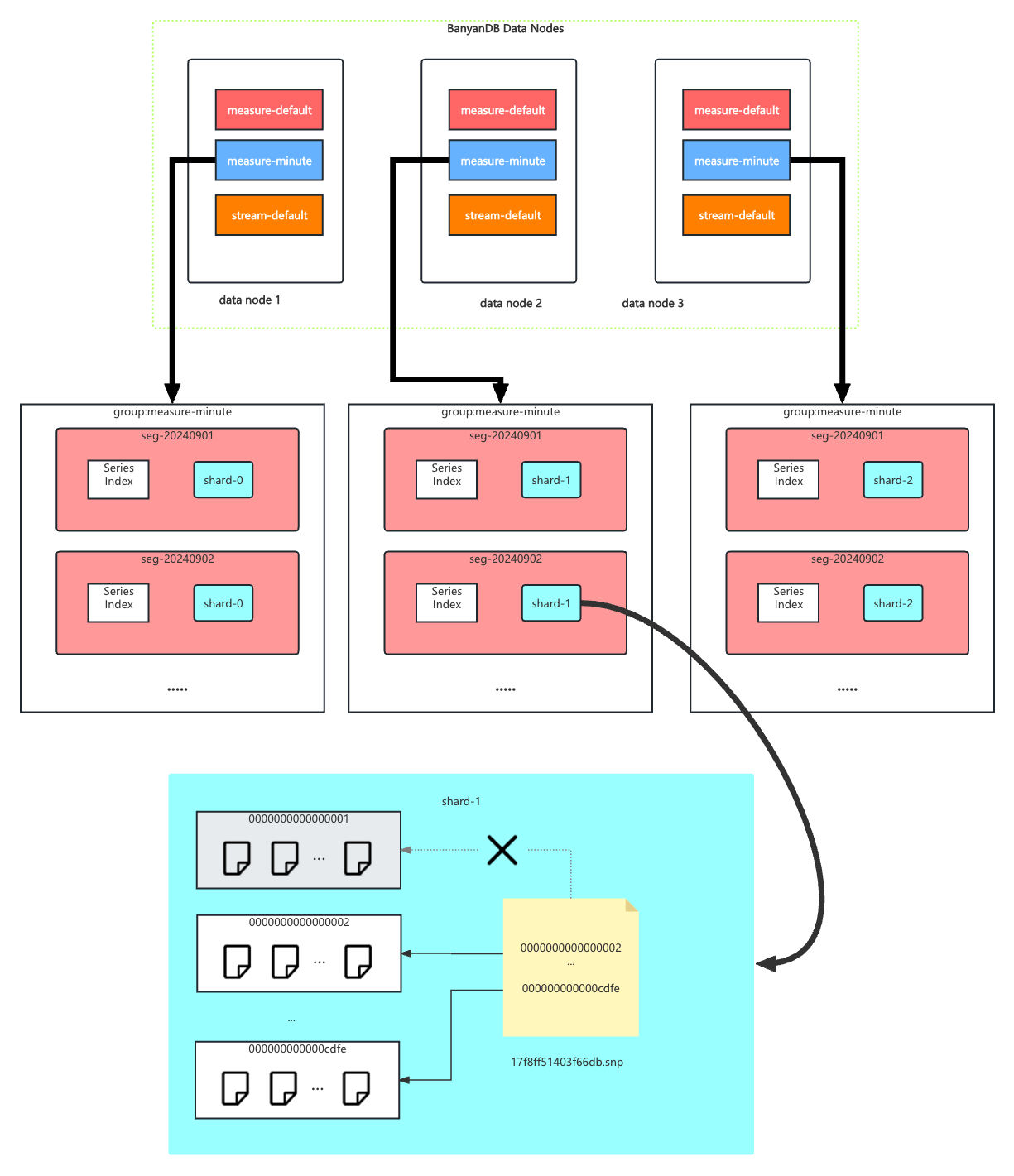
In TSDB, the data in a group is partitioned base on the time range of the data. The segment size is determined by the `segment_interval` of a group. The number of segments in a group is determined by the `ttl` of a group. A new segment is created when the written data exceeds the time range of the current segment. The expired segment will be deleted after the `ttl` of the group.
-
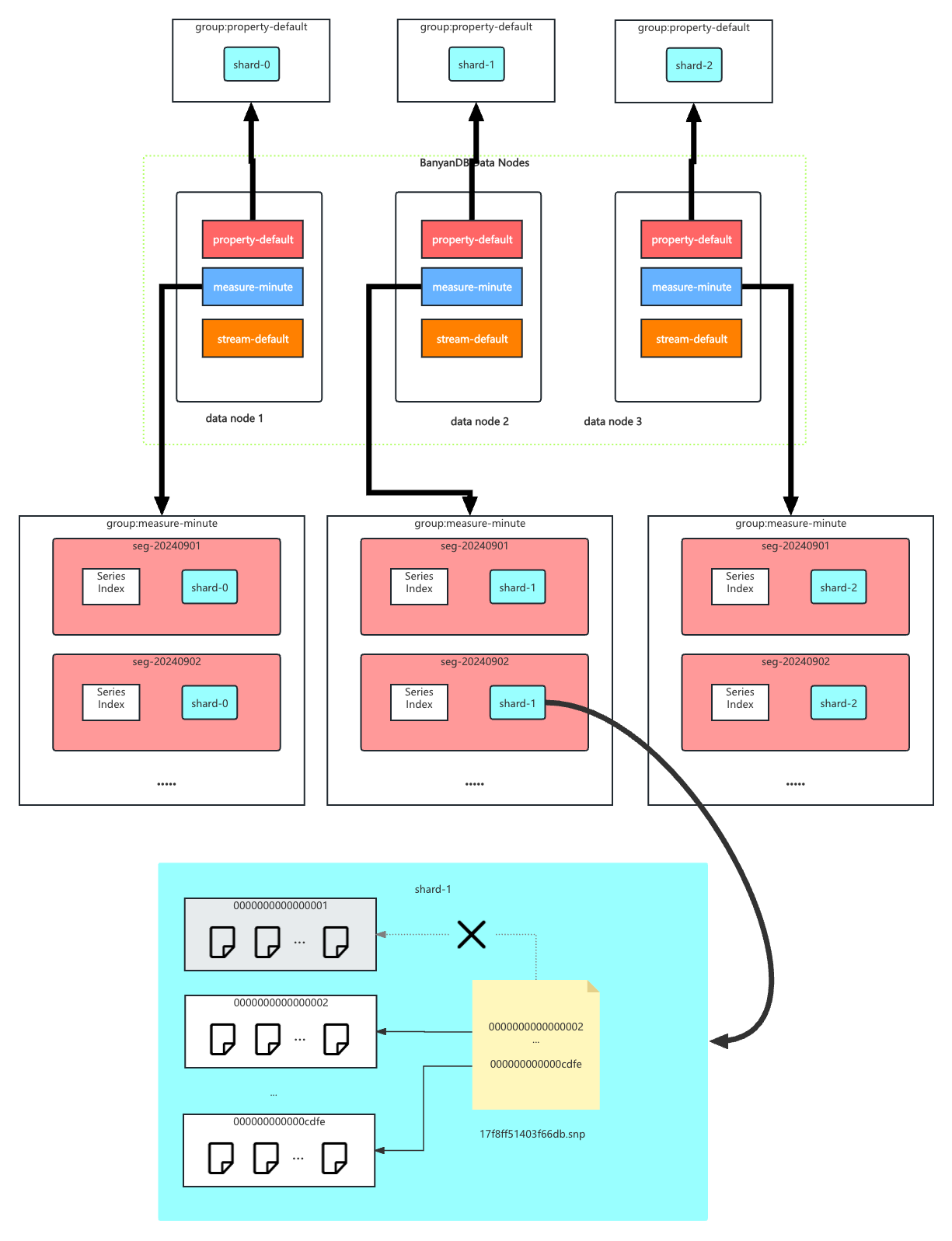
+More than the time series data model, TSDB also provides a schema-less data type, `Property`. The `Property` data type is used to store the document which contains several tags. The `Property` data is separate group which only contains `shard`.
+
+
## Segment
@@ -16,15 +18,19 @@ In each segment, the data is spread into shards based on `entity`. The series in
Each shard is assigned to a specific set of storage nodes, and those nodes store and process the data within that shard. This allows BanyanDB to scale horizontally by adding more storage nodes to the cluster as needed.
-Each shard is composed of multiple [parts](#Part). Whenever SkyWalking sends a batch of data, BanyanDB writes this batch of data into a new part. For data of the `Stream` type, the inverted indexes generated based on the indexing rules are also stored in the segment.
+In `Stream` or `Measure`, Each shard is composed of multiple [parts](#Part). Whenever SkyWalking sends a batch of data, BanyanDB writes this batch of data into a new part. For data of the `Stream` type, the inverted indexes generated based on the indexing rules are also stored in the segment.
Since BanyanDB adopts a snapshot approach for data read and write operations, the segment also needs to maintain additional snapshot information to record the validity of the parts. The shard contains `xxxxxxx.snp` to record the validity of parts. In the chart, `0000000000000001` is removed from the snapshot file, which means the part is invalid. It will be cleaned up in the next flush or merge operation.
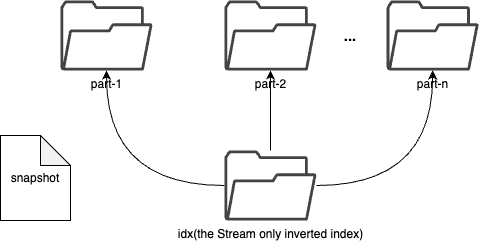
+In `Property`, the shard is implemented by the [inverted index](#Inverted-Index). Users could filter data by the tag.
+
## Inverted Index
-The inverted index is used to locate the data in the shard. For `measure`, it is a mapping from the term to the series id. For `stream`, it is a mapping from the term to the timestamp.
+The inverted index is used to locate the data in the shard. For `measure`, it is a mapping from the term to the series id. For `stream`, it is a mapping from the term to the timestamp.
+
+For `property`, all the content of a property is stored as a `_source` field in the inverted index. `group`, `name`, `id` and `tags` are only indexed in the inverted index.
The inverted index stores `snapshot` file `xxxxxxx.snp` to record the validity of segments. In the chart, `0000000000000001.seg` is removed from the snapshot file, which means the segment is invalid. It will be cleaned up in the next flush or merge operation.
diff --git a/docs/guides/quick-start/quick-start.md b/docs/guides/quick-start/quick-start.md
index 9be2dbe1..bdd248b3 100644
--- a/docs/guides/quick-start/quick-start.md
+++ b/docs/guides/quick-start/quick-start.md
@@ -2,41 +2,27 @@
The following tutorial will guide you through setting up a SkyWalking OAP with BanyanDB as the storage backend using Docker Compose.
It is a quick way to get started with BanyanDB if you are a SkyWalking user and want to try out BanyanDB.
-## Set up quickstart cluster
+## Set up quickstart cluster with Showcase
-- run the following command to start the cluster with OAP and BanyanDB. The docker-compose file is [here](docker-compose.yaml).
+Clone the showcase repository:
```shell
-docker compose -f ./docker-compose.yaml --project-name=banyandb-quickstart up -d
+git clone https://github.com/apache/skywalking-showcase.git
+cd skywalking-showcase
```
-- run the following command to stop the cluster
+Start the showcase cluster:
```shell
-docker compose --project-name=banyandb-quickstart down
+make deploy.docker FEATURE_FLAGS=single-node,agent
```
-## How the cluster works
-The above docker-compose file starts a `standalone` BanyanDB with SkyWalking OAP and a traffic loader. The traffic loader sends HTTP requests to the Consumer app, which in turn sends HTTP requests to the Provider app. Both the Consumer and Provider apps have the SkyWalking agent installed.
-The telemetry data is sent to the OAP, which stores the data in BanyanDB. The OAP UI can be accessed to view the data stored in BanyanDB.
-The following graph shows how the cluster works.
-
-```mermaid
-%% please read this doc in our official website, otherwise the graph is not correctly rendered.
-graph LR;
- loadgen[traffic_loader] --HTTP Request--> consumer("consumer app (with SkyWalking agent)") --HTTP Request--> provider("provider app (with SkyWalking agent)");
- consumer --telemetry data--> oap("OAP (SkyWalking backend)");
- provider --telemetry data--> oap;
- oap --gRPC--> banyandb("BanyanDB");
- oap_ui("SkyWalking UI") --HTTP Request--> oap;
-```
+You could find the details of the showcase cluster in the [SkyWalking Showcase](https://skywalking.apache.org/docs/skywalking-showcase/next/readme/)
## Data presentation
### Get into the SkyWalking UI
-The UI can be accessed at `http://localhost:8080`.
+The UI can be accessed at `http://localhost:9999`.
We can view the final presentation of the metrics/traces/logs/topology for the demo system on the UI dashboards.
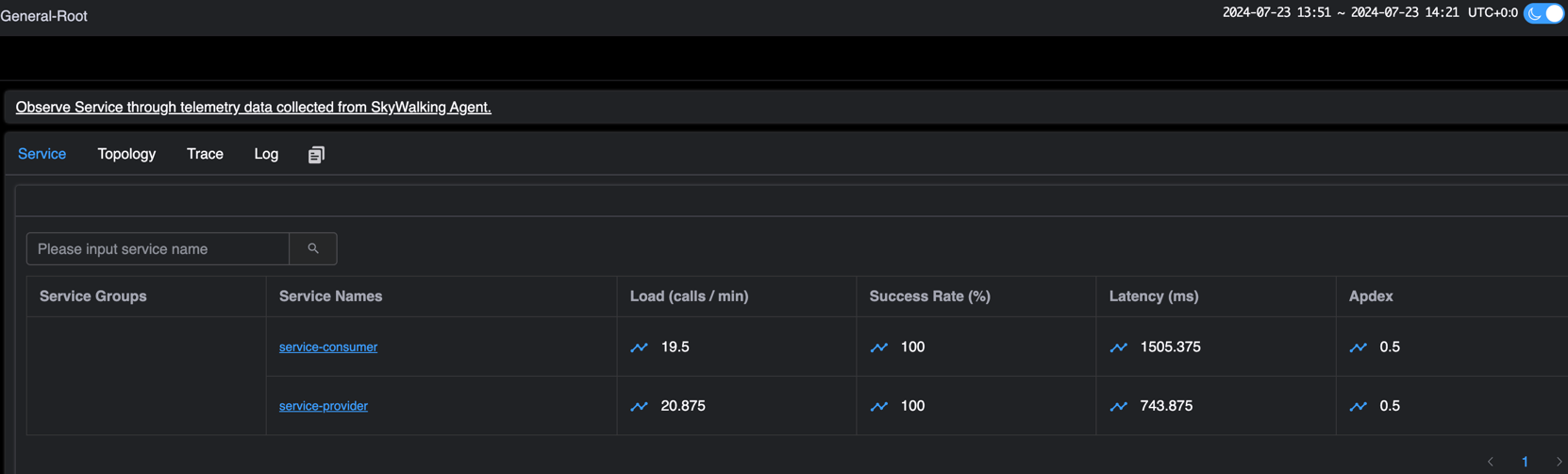
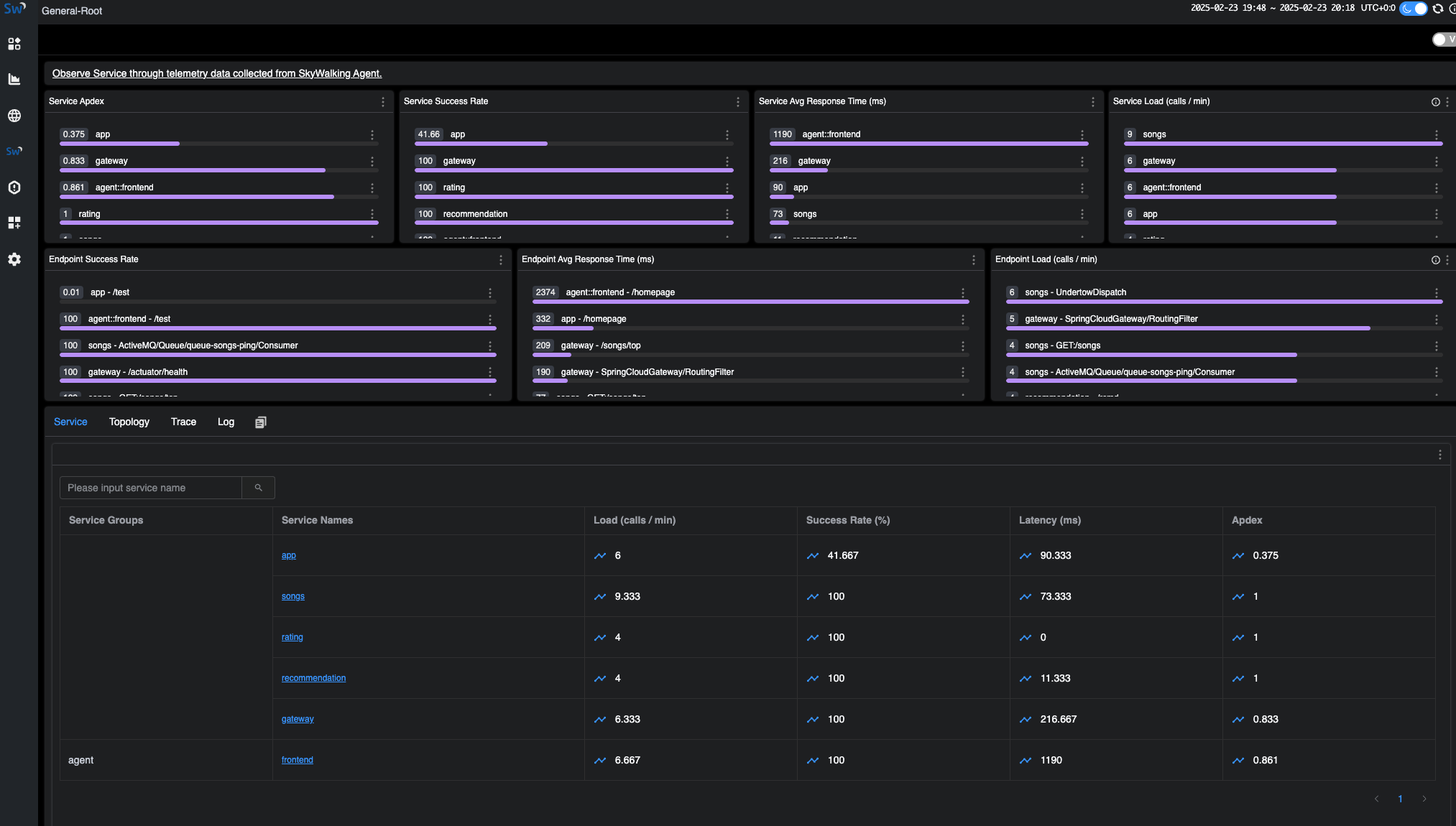
The following image shows the `General-Service` service list in the SkyWalking UI:
-
-
-note: There is a service `localhost:-1` in the `Virtual-Database` dashboard service list, which belongs to `VIRTUAL_DATABASE` layer.
+
### Query the data in BanyanDB
If you interested in the raw data stored in BanyanDB, you can use the BanyanDB embedded UI or BanyanDB CLI(bydbctl) to query the data.
@@ -44,13 +30,13 @@ If you interested in the raw data stored in BanyanDB, you can use the BanyanDB e
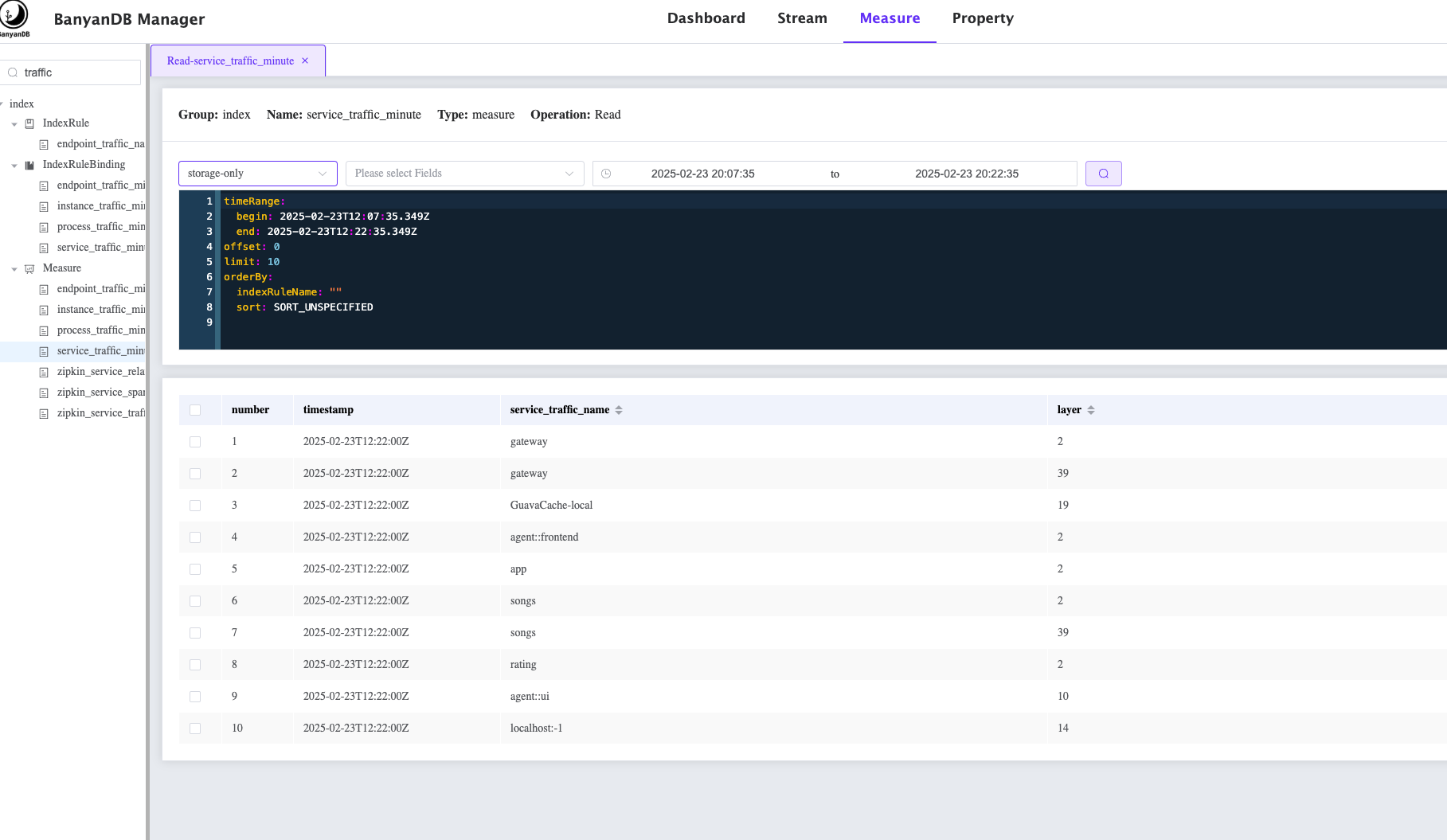
- BanyanDB embedded UI can be accessed at `http://localhost:17913`.
The following image shows how to query all the services from the BanyanDB:
-
+
- BanyanDB CLI(bydbctl) can be used to query the data from the command line.
```shell
bydbctl measure query -f - <<EOF
name: "service_traffic_minute"
-groups: ["measure-default"]
+groups: ["index"]
tagProjection:
tagFamilies:
- name: "default"
@@ -63,43 +49,176 @@ We can see the following output:
```shell
dataPoints:
- fields: []
- sid: "1372594403119019694"
+ sid: "6694704579998440084"
+ tagFamilies:
+ - name: default
+ tags:
+ - key: service_id
+ value:
+ str:
+ value: Z2F0ZXdheQ==.1
+ - key: short_name
+ value:
+ str:
+ value: gateway
+ - key: layer
+ value:
+ int:
+ value: "2"
+ timestamp: "2025-02-23T12:36:00Z"
+ version: "9017360854805676"
+- fields: []
+ sid: "2264252405119611112"
+ tagFamilies:
+ - name: default
+ tags:
+ - key: service_id
+ value:
+ str:
+ value: R3VhdmFDYWNoZS1sb2NhbA==.0
+ - key: short_name
+ value:
+ str:
+ value: GuavaCache-local
+ - key: layer
+ value:
+ int:
+ value: "19"
+ timestamp: "2025-02-23T12:36:00Z"
+ version: "9017360854808916"
+- fields: []
+ sid: "7200167536615717650"
+ tagFamilies:
+ - name: default
+ tags:
+ - key: service_id
+ value:
+ str:
+ value: Z2F0ZXdheQ==.1
+ - key: short_name
+ value:
+ str:
+ value: gateway
+ - key: layer
+ value:
+ int:
+ value: "39"
+ timestamp: "2025-02-23T12:36:00Z"
+ version: "9017360854811805"
+- fields: []
+ sid: "11101904457842605307"
+ tagFamilies:
+ - name: default
+ tags:
+ - key: service_id
+ value:
+ str:
+ value: YWdlbnQ6OmZyb250ZW5k.1
+ - key: short_name
+ value:
+ str:
+ value: frontend
+ - key: layer
+ value:
+ int:
+ value: "2"
+ timestamp: "2025-02-23T12:36:00Z"
+ version: "9017360854814505"
+- fields: []
+ sid: "16886997253576549432"
+ tagFamilies:
+ - name: default
+ tags:
+ - key: service_id
+ value:
+ str:
+ value: c29uZ3M=.1
+ - key: short_name
+ value:
+ str:
+ value: songs
+ - key: layer
+ value:
+ int:
+ value: "2"
+ timestamp: "2025-02-23T12:36:00Z"
+ version: "9017360854817476"
+- fields: []
+ sid: "3060777112302363794"
tagFamilies:
- name: default
tags:
- key: service_id
value:
str:
- value: c2VydmljZS1jb25zdW1lcg==.1
+ value: YXBw.1
- key: short_name
value:
str:
- value: service-consumer
+ value: app
- key: layer
value:
int:
value: "2"
- timestamp: "2024-07-23T08:10:00Z"
- version: "15395932411795"
+ timestamp: "2025-02-23T12:36:00Z"
+ version: "9017360854820076"
- fields: []
- sid: "1927510178256660176"
+ sid: "3424504874722446951"
tagFamilies:
- name: default
tags:
- key: service_id
value:
str:
- value: c2VydmljZS1wcm92aWRlcg==.1
+ value: c29uZ3M=.1
- key: short_name
value:
str:
- value: service-provider
+ value: songs
+ - key: layer
+ value:
+ int:
+ value: "39"
+ timestamp: "2025-02-23T12:36:00Z"
+ version: "9017360854823045"
+- fields: []
+ sid: "7814002932715409293"
+ tagFamilies:
+ - name: default
+ tags:
+ - key: service_id
+ value:
+ str:
+ value: cmF0aW5n.1
+ - key: short_name
+ value:
+ str:
+ value: rating
- key: layer
value:
int:
value: "2"
- timestamp: "2024-07-23T08:10:00Z"
- version: "15380822193095"
+ timestamp: "2025-02-23T12:36:00Z"
+ version: "9017360854827145"
+- fields: []
+ sid: "4722671161330384377"
+ tagFamilies:
+ - name: default
+ tags:
+ - key: service_id
+ value:
+ str:
+ value: YWdlbnQ6OnVp.1
+ - key: short_name
+ value:
+ str:
+ value: ui
+ - key: layer
+ value:
+ int:
+ value: "10"
+ timestamp: "2025-02-23T12:36:00Z"
+ version: "9017360854831856"
- fields: []
sid: "5033399348250958164"
tagFamilies:
@@ -117,8 +236,46 @@ dataPoints:
value:
int:
value: "14"
- timestamp: "2024-07-23T08:10:00Z"
- version: "15380811642295"
+ timestamp: "2025-02-23T12:36:00Z"
+ version: "9017360854839325"
+- fields: []
+ sid: "6492992516036642565"
+ tagFamilies:
+ - name: default
+ tags:
+ - key: service_id
+ value:
+ str:
+ value: MTcyLjE5LjAuNDo2MTYxNg==.0
+ - key: short_name
+ value:
+ str:
+ value: 172.19.0.4:61616
+ - key: layer
+ value:
+ int:
+ value: "15"
+ timestamp: "2025-02-23T12:36:00Z"
+ version: "9017360854846096"
+- fields: []
+ sid: "724075540118355969"
+ tagFamilies:
+ - name: default
+ tags:
+ - key: service_id
+ value:
+ str:
+ value: cmVjb21tZW5kYXRpb24=.1
+ - key: short_name
+ value:
+ str:
+ value: recommendation
+ - key: layer
+ value:
+ int:
+ value: "2"
+ timestamp: "2025-02-23T12:36:00Z"
+ version: "9017360854850545"
trace: null
```