You are viewing a plain text version of this content. The canonical link for it is here.
Posted to commits@pulsar.apache.org by GitBox <gi...@apache.org> on 2020/07/01 22:44:24 UTC
[GitHub] [pulsar] rdhabalia opened a new pull request #7421: [pulsar-doc] Add document for Pulasr SNI routing with ATS
rdhabalia opened a new pull request #7421:
URL: https://github.com/apache/pulsar/pull/7421


   ### Motivation
   Add documentation for [PIP-60](https://github.com/apache/pulsar/wiki/PIP-60:-Support-Proxy-server-with-SNI-routing) with instrunction to setup proxy and configuration.


----------------------------------------------------------------
This is an automated message from the Apache Git Service.
To respond to the message, please log on to GitHub and use the
URL above to go to the specific comment.

For queries about this service, please contact Infrastructure at:
users@infra.apache.org
[GitHub] [pulsar] Huanli-Meng commented on pull request #7421: [pulsar-doc] Add document for Pulasr SNI routing with ATS
Posted by GitBox <gi...@apache.org>.
Huanli-Meng commented on pull request #7421:
URL: https://github.com/apache/pulsar/pull/7421#issuecomment-652828925


   @Jennifer88huang , PIP-60 is a feature released in Pulsar 2.6.0, please cherry-pick the doc to the Release 2.6.0 and 2.6.1. Thanks.


----------------------------------------------------------------
This is an automated message from the Apache Git Service.
To respond to the message, please log on to GitHub and use the
URL above to go to the specific comment.

For queries about this service, please contact Infrastructure at:
users@infra.apache.org
[GitHub] [pulsar] rdhabalia commented on pull request #7421: [pulsar-doc] Add document for Pulasr SNI routing with ATS
Posted by GitBox <gi...@apache.org>.
rdhabalia commented on pull request #7421:
URL: https://github.com/apache/pulsar/pull/7421#issuecomment-653200305


   @Huanli-Meng  for useful feedback. I addressed all the comments.


----------------------------------------------------------------
This is an automated message from the Apache Git Service.
To respond to the message, please log on to GitHub and use the
URL above to go to the specific comment.

For queries about this service, please contact Infrastructure at:
users@infra.apache.org
[GitHub] [pulsar] Huanli-Meng commented on a change in pull request #7421: [pulsar-doc] Add document for Pulasr SNI routing with ATS
Posted by GitBox <gi...@apache.org>.
Huanli-Meng commented on a change in pull request #7421:
URL: https://github.com/apache/pulsar/pull/7421#discussion_r448775644
##########
File path: site2/docs/concepts-proxy-sni-routing.md
##########
@@ -0,0 +1,117 @@
+---
+id: concepts-proxy-sni-routing
+title: Proxy support with SNI routing
+sidebar_label: Proxy support with SNI routing
+---
+
+# Pulsar Proxy with SNI routing
+
+A proxy server is a go‑between or intermediary server that forwards requests from multiple clients to different servers across the Internet. The proxy server can act as a “traffic cop,” in both forward and reverse proxy scenarios, and adds various benefits in your system such as load balancing, performance, security, auto-scaling, etc.. There are already many proxy servers already available in the market which are fast, scalable and more importantly covers various essential security aspects that are needed by the large organization to securely share their confidential data over the network. Pulsar already provides proxy implementation which acts as a reverse proxy and creates a gateway in front of brokers. However, pulsar doesn’t provide support to use other proxies such as Apache traffic server (ATS), HAProxy, Nginx, Envoy those are more scalable and secured. Most of these proxy-servers support SNI ROUTING which can route traffic to a destination without having to terminate the SSL connection. Routing at layer 4 gives greater transparency because the outbound connection is determined by examining the destination address in the client TCP packets.
+
+[PIP-60](https://github.com/apache/pulsar/wiki/PIP-60:-Support-Proxy-server-with-SNI-routing) eexplains SNI routing protocol and how Pulsar clients support SNI routing protocol to connect to brokers via proxy. This document explains how to setup ATS proxy and pulsar-client to enable SNI routing and connect pulsar-client to pulsar-broker via ATS proxy.
Review comment:
```suggestion
[PIP-60](https://github.com/apache/pulsar/wiki/PIP-60:-Support-Proxy-server-with-SNI-routing) explains SNI routing protocol and how Pulsar clients support SNI routing protocol to connect to brokers through the proxy. This document explains how to set up the ATS proxy and the Pulsar client to enable SNI routing and connect Pulsar client to the broker through the ATS proxy.
```
##########
File path: site2/docs/concepts-proxy-sni-routing.md
##########
@@ -0,0 +1,117 @@
+---
+id: concepts-proxy-sni-routing
+title: Proxy support with SNI routing
+sidebar_label: Proxy support with SNI routing
+---
+
+# Pulsar Proxy with SNI routing
+
+A proxy server is a go‑between or intermediary server that forwards requests from multiple clients to different servers across the Internet. The proxy server can act as a “traffic cop,” in both forward and reverse proxy scenarios, and adds various benefits in your system such as load balancing, performance, security, auto-scaling, etc.. There are already many proxy servers already available in the market which are fast, scalable and more importantly covers various essential security aspects that are needed by the large organization to securely share their confidential data over the network. Pulsar already provides proxy implementation which acts as a reverse proxy and creates a gateway in front of brokers. However, pulsar doesn’t provide support to use other proxies such as Apache traffic server (ATS), HAProxy, Nginx, Envoy those are more scalable and secured. Most of these proxy-servers support SNI ROUTING which can route traffic to a destination without having to terminate the SSL connection. Routing at layer 4 gives greater transparency because the outbound connection is determined by examining the destination address in the client TCP packets.
+
+[PIP-60](https://github.com/apache/pulsar/wiki/PIP-60:-Support-Proxy-server-with-SNI-routing) eexplains SNI routing protocol and how Pulsar clients support SNI routing protocol to connect to brokers via proxy. This document explains how to setup ATS proxy and pulsar-client to enable SNI routing and connect pulsar-client to pulsar-broker via ATS proxy.
+
+## ATS-SNI Routing in Pulsar
+[ATS supports layer-4 SNI routing](https://docs.trafficserver.apache.org/en/latest/admin-guide/layer-4-routing.en.html) with requirement that inbound connection must be TLS. Pulsar client supports SNI routing protocol and we can use ATS proxy in front of brokers, so pulsar client can connect to broker via ATS proxy. Pulsar also supports SNI routing for geo-replication, so brokers can connect to cross cluster brokers via ATS proxy.
Review comment:
```suggestion
ATS supports [Layer 4 SNI routing](https://docs.trafficserver.apache.org/en/latest/admin-guide/layer-4-routing.en.html) with a requirement that inbound connection must be a TLS connection. The Pulsar client supports SNI routing protocol and we can use the ATS proxy in front of brokers. Therefore, the Pulsar client can connect to broker through the ATS proxy. Pulsar also supports SNI routing for geo-replication, so brokers can connect to cross cluster brokers through the ATS proxy.
```
##########
File path: site2/docs/concepts-proxy-sni-routing.md
##########
@@ -0,0 +1,117 @@
+---
+id: concepts-proxy-sni-routing
+title: Proxy support with SNI routing
+sidebar_label: Proxy support with SNI routing
+---
+
+# Pulsar Proxy with SNI routing
+
+A proxy server is a go‑between or intermediary server that forwards requests from multiple clients to different servers across the Internet. The proxy server can act as a “traffic cop,” in both forward and reverse proxy scenarios, and adds various benefits in your system such as load balancing, performance, security, auto-scaling, etc.. There are already many proxy servers already available in the market which are fast, scalable and more importantly covers various essential security aspects that are needed by the large organization to securely share their confidential data over the network. Pulsar already provides proxy implementation which acts as a reverse proxy and creates a gateway in front of brokers. However, pulsar doesn’t provide support to use other proxies such as Apache traffic server (ATS), HAProxy, Nginx, Envoy those are more scalable and secured. Most of these proxy-servers support SNI ROUTING which can route traffic to a destination without having to terminate the SSL connection. Routing at layer 4 gives greater transparency because the outbound connection is determined by examining the destination address in the client TCP packets.
Review comment:
```suggestion
A proxy server is an intermediary server that forwards requests from multiple clients to different servers across the Internet. The proxy server acts as a "traffic cop" in both forward and reverse proxy scenarios, and brings various benefits to your system such as load balancing, performance, security, auto-scaling, etc. There are already many proxy servers available in the market which are fast and scalable. More importantly, these proxy servers cover various essential security aspects that are needed by the large organizations to securely share their confidential data over the network. Pulsar already provides proxy implementation which acts as a reverse proxy and creates a gateway in front of brokers. However, pulsar does not supports to use other proxies such as Apache Traffic Server (ATS), HAProxy, Nginx, and Envoy. These proxies are more scalable and secured. Most of these proxy-servers support **SNI routing** which is used to route traffic to a destination without terminating the SSL connection. Routing at layer 4 provides greater transparency because the outbound connection is determined by examining the destination address in the client TCP packets.
```
##########
File path: site2/docs/concepts-proxy-sni-routing.md
##########
@@ -0,0 +1,117 @@
+---
+id: concepts-proxy-sni-routing
+title: Proxy support with SNI routing
+sidebar_label: Proxy support with SNI routing
+---
+
+# Pulsar Proxy with SNI routing
+
+A proxy server is a go‑between or intermediary server that forwards requests from multiple clients to different servers across the Internet. The proxy server can act as a “traffic cop,” in both forward and reverse proxy scenarios, and adds various benefits in your system such as load balancing, performance, security, auto-scaling, etc.. There are already many proxy servers already available in the market which are fast, scalable and more importantly covers various essential security aspects that are needed by the large organization to securely share their confidential data over the network. Pulsar already provides proxy implementation which acts as a reverse proxy and creates a gateway in front of brokers. However, pulsar doesn’t provide support to use other proxies such as Apache traffic server (ATS), HAProxy, Nginx, Envoy those are more scalable and secured. Most of these proxy-servers support SNI ROUTING which can route traffic to a destination without having to terminate the SSL connection. Routing at layer 4 gives greater transparency because the outbound connection is determined by examining the destination address in the client TCP packets.
+
+[PIP-60](https://github.com/apache/pulsar/wiki/PIP-60:-Support-Proxy-server-with-SNI-routing) eexplains SNI routing protocol and how Pulsar clients support SNI routing protocol to connect to brokers via proxy. This document explains how to setup ATS proxy and pulsar-client to enable SNI routing and connect pulsar-client to pulsar-broker via ATS proxy.
+
+## ATS-SNI Routing in Pulsar
+[ATS supports layer-4 SNI routing](https://docs.trafficserver.apache.org/en/latest/admin-guide/layer-4-routing.en.html) with requirement that inbound connection must be TLS. Pulsar client supports SNI routing protocol and we can use ATS proxy in front of brokers, so pulsar client can connect to broker via ATS proxy. Pulsar also supports SNI routing for geo-replication, so brokers can connect to cross cluster brokers via ATS proxy.
+
+### ATS Proxy setup for layer-4 SNI routing
+
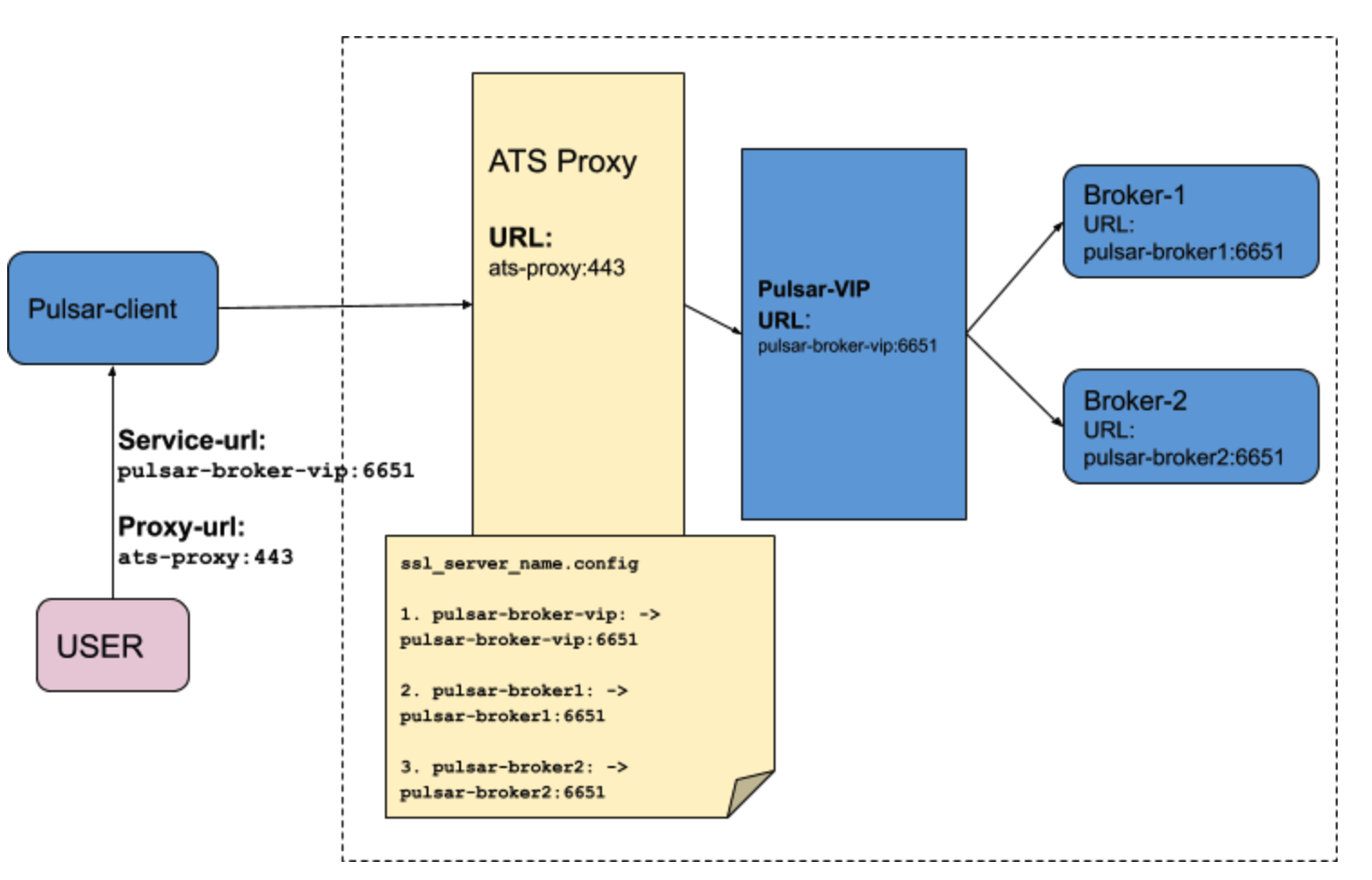
+This section explains ATS-setup to enable layer-4 SNI routing and use ATS proxy as a forward proxy where the pulsar broker runs behind the ATS proxy and client connects to pulsar-broker through this ATS proxy.
+
+
+
+
+We have to configure two conf files into ATS proxy to support SNI routing.
+
+
+1. `records.conf`:
+The [records.config fil](https://docs.trafficserver.apache.org/en/latest/admin-guide/files/records.config.en.html) (by default, located in `/usr/local/etc/trafficserver/`) is a list of configurable variables used by the Traffic Server and we have to update this file with tls port (`http.server_ports`) on which proxy can listen and proxy certs (`ssl.client.cert.path` and `ssl.client.cert.filename`) for secure tls tunneling. We also have to configure a range of server ports (`http.connect_ports`) that can be used for tunneling to pulsar-broker. If Pulsar brokers are listening on 4443 and 6651 then add brokers’ service port in http.connect_ports configuration.
+
+```
+# PROXY TLS PORT
+CONFIG proxy.config.http.server_ports STRING 4443:ssl 4080
+# PROXY CERTS FILE PATH
+CONFIG proxy.config.ssl.client.cert.path STRING /proxy-cert.pem
+# PROXY KEY FILE PATH
+CONFIG proxy.config.ssl.client.cert.filename STRING /proxy-key.pem
+
+
+# The range of origin server ports that can be used for tunneling via CONNECT. # Traffic Server allows tunnels only to the specified ports. Supports both wildcards (*) and ranges (e.g. 0-1023).
+CONFIG proxy.config.http.connect_ports STRING 4443 6651
+```
+
+2. `ssl_server_name.conf`:
+The [ssl_server_name file](https://docs.trafficserver.apache.org/en/8.0.x/admin-guide/files/ssl_server_name.yaml.en.html) is used to configure aspects of TLS connection handling for both inbound and outbound connections. The configuration is driven by the SNI values provided by the inbound connection. The file consists of a set of configuration items, each identified by an SNI value (`fqdn`). When an inbound TLS connection is made, the SNI value from the TLS negotiation is matched against the items specified by this file and if there is a match, the values specified in that item override the defaults.
+Below example of `ssl_server_name`shows mapping of inbound SNI hostname coming from client and actual broker’s service url where request should be redirected. For example: if client sends SNI header `pulsar-broker1` then proxy creates tls tunnel by redirecting request to service-url: `pulsar-broker1:6651`
+
+```
+server_config = {
+ {
+ fqdn = 'pulsar-broker-vip',
+ # Forward to Pulsar broker which is listening on 6651
+ tunnel_route = 'pulsar-broker-vip:6651'
+ },
+ {
+ fqdn = 'pulsar-broker1',
+ # Forward to Pulsar broker-1 which is listening on 6651
+ tunnel_route = 'pulsar-broker1:6651'
+ },
+ {
+ fqdn = 'pulsar-broker2',
+ # Forward to Pulsar broker-2 which is listening on 6651
+ tunnel_route = 'pulsar-broker2:6651'
+ },
+}
+```
+Once, ssl_server_name.config and records.config are configured, ATS-proxy server is ready to handle SNI routing and can create TCP tunnel between client and broker.
+
+### Pulsar-client Configuration with SNI routing
+
+Now, ATS proxy server is configured and ready to handle SNI routing and create TCP tunnel between client and broker. Here, we have to note that ATS SNI-routing works only with TLS. so, ATS proxy and brokers must have tls enabled before Pulsar-client configures SNI routing protocol to connect to broker via ATS proxy. With [PIP-60](https://github.com/apache/pulsar/wiki/PIP-60:-Support-Proxy-server-with-SNI-routing), pulsar-client supports SNI routing by connecting to proxy and sending target broker url into SNI header. Pulsar-client handles SNI routing internally and entire connection handling is abstracted from the user. Users have to only configure following proxy configuration initially when the user creates a pulsar-client to use SNI routing protocol.
Review comment:
```suggestion
Now, ATS proxy server is configured and ready to handle SNI routing and create the TCP tunnel between the client and the broker. Here, we have to note that ATS SNI-routing works only with TLS. Therefore, the ATS proxy and brokers must have TLS enabled before the Pulsar client configures SNI routing protocol to connect to the broker through ATS proxy. With [PIP-60](https://github.com/apache/pulsar/wiki/PIP-60:-Support-Proxy-server-with-SNI-routing), the pulsar client supports SNI routing by connecting to the proxy and sending target the broker URL into the SNI header. The Pulsar client handles SNI routing internally and the entire connection handling is abstracted from the user. Users only need to configure the following proxy configuration initially when the user creates a Pulsar client to use SNI routing protocol.
```
##########
File path: site2/docs/concepts-proxy-sni-routing.md
##########
@@ -0,0 +1,117 @@
+---
+id: concepts-proxy-sni-routing
+title: Proxy support with SNI routing
+sidebar_label: Proxy support with SNI routing
+---
+
+# Pulsar Proxy with SNI routing
+
+A proxy server is a go‑between or intermediary server that forwards requests from multiple clients to different servers across the Internet. The proxy server can act as a “traffic cop,” in both forward and reverse proxy scenarios, and adds various benefits in your system such as load balancing, performance, security, auto-scaling, etc.. There are already many proxy servers already available in the market which are fast, scalable and more importantly covers various essential security aspects that are needed by the large organization to securely share their confidential data over the network. Pulsar already provides proxy implementation which acts as a reverse proxy and creates a gateway in front of brokers. However, pulsar doesn’t provide support to use other proxies such as Apache traffic server (ATS), HAProxy, Nginx, Envoy those are more scalable and secured. Most of these proxy-servers support SNI ROUTING which can route traffic to a destination without having to terminate the SSL connection. Routing at layer 4 gives greater transparency because the outbound connection is determined by examining the destination address in the client TCP packets.
+
+[PIP-60](https://github.com/apache/pulsar/wiki/PIP-60:-Support-Proxy-server-with-SNI-routing) eexplains SNI routing protocol and how Pulsar clients support SNI routing protocol to connect to brokers via proxy. This document explains how to setup ATS proxy and pulsar-client to enable SNI routing and connect pulsar-client to pulsar-broker via ATS proxy.
+
+## ATS-SNI Routing in Pulsar
+[ATS supports layer-4 SNI routing](https://docs.trafficserver.apache.org/en/latest/admin-guide/layer-4-routing.en.html) with requirement that inbound connection must be TLS. Pulsar client supports SNI routing protocol and we can use ATS proxy in front of brokers, so pulsar client can connect to broker via ATS proxy. Pulsar also supports SNI routing for geo-replication, so brokers can connect to cross cluster brokers via ATS proxy.
+
+### ATS Proxy setup for layer-4 SNI routing
+
+This section explains ATS-setup to enable layer-4 SNI routing and use ATS proxy as a forward proxy where the pulsar broker runs behind the ATS proxy and client connects to pulsar-broker through this ATS proxy.
+
+
+
+
+We have to configure two conf files into ATS proxy to support SNI routing.
+
+
+1. `records.conf`:
+The [records.config fil](https://docs.trafficserver.apache.org/en/latest/admin-guide/files/records.config.en.html) (by default, located in `/usr/local/etc/trafficserver/`) is a list of configurable variables used by the Traffic Server and we have to update this file with tls port (`http.server_ports`) on which proxy can listen and proxy certs (`ssl.client.cert.path` and `ssl.client.cert.filename`) for secure tls tunneling. We also have to configure a range of server ports (`http.connect_ports`) that can be used for tunneling to pulsar-broker. If Pulsar brokers are listening on 4443 and 6651 then add brokers’ service port in http.connect_ports configuration.
+
+```
Review comment:
please note the indent of the code example, same comments on the below code examples.
##########
File path: site2/docs/concepts-proxy-sni-routing.md
##########
@@ -0,0 +1,117 @@
+---
+id: concepts-proxy-sni-routing
+title: Proxy support with SNI routing
+sidebar_label: Proxy support with SNI routing
+---
+
+# Pulsar Proxy with SNI routing
+
+A proxy server is a go‑between or intermediary server that forwards requests from multiple clients to different servers across the Internet. The proxy server can act as a “traffic cop,” in both forward and reverse proxy scenarios, and adds various benefits in your system such as load balancing, performance, security, auto-scaling, etc.. There are already many proxy servers already available in the market which are fast, scalable and more importantly covers various essential security aspects that are needed by the large organization to securely share their confidential data over the network. Pulsar already provides proxy implementation which acts as a reverse proxy and creates a gateway in front of brokers. However, pulsar doesn’t provide support to use other proxies such as Apache traffic server (ATS), HAProxy, Nginx, Envoy those are more scalable and secured. Most of these proxy-servers support SNI ROUTING which can route traffic to a destination without having to terminate the SSL connection. Routing at layer 4 gives greater transparency because the outbound connection is determined by examining the destination address in the client TCP packets.
+
+[PIP-60](https://github.com/apache/pulsar/wiki/PIP-60:-Support-Proxy-server-with-SNI-routing) eexplains SNI routing protocol and how Pulsar clients support SNI routing protocol to connect to brokers via proxy. This document explains how to setup ATS proxy and pulsar-client to enable SNI routing and connect pulsar-client to pulsar-broker via ATS proxy.
+
+## ATS-SNI Routing in Pulsar
+[ATS supports layer-4 SNI routing](https://docs.trafficserver.apache.org/en/latest/admin-guide/layer-4-routing.en.html) with requirement that inbound connection must be TLS. Pulsar client supports SNI routing protocol and we can use ATS proxy in front of brokers, so pulsar client can connect to broker via ATS proxy. Pulsar also supports SNI routing for geo-replication, so brokers can connect to cross cluster brokers via ATS proxy.
+
+### ATS Proxy setup for layer-4 SNI routing
+
+This section explains ATS-setup to enable layer-4 SNI routing and use ATS proxy as a forward proxy where the pulsar broker runs behind the ATS proxy and client connects to pulsar-broker through this ATS proxy.
+
+
+
+
+We have to configure two conf files into ATS proxy to support SNI routing.
+
+
+1. `records.conf`:
Review comment:
If there is no order sequence for these 2 config files, i suggest using an unordered list instead of an ordered list.
##########
File path: site2/docs/concepts-proxy-sni-routing.md
##########
@@ -0,0 +1,117 @@
+---
+id: concepts-proxy-sni-routing
+title: Proxy support with SNI routing
+sidebar_label: Proxy support with SNI routing
+---
+
+# Pulsar Proxy with SNI routing
+
+A proxy server is a go‑between or intermediary server that forwards requests from multiple clients to different servers across the Internet. The proxy server can act as a “traffic cop,” in both forward and reverse proxy scenarios, and adds various benefits in your system such as load balancing, performance, security, auto-scaling, etc.. There are already many proxy servers already available in the market which are fast, scalable and more importantly covers various essential security aspects that are needed by the large organization to securely share their confidential data over the network. Pulsar already provides proxy implementation which acts as a reverse proxy and creates a gateway in front of brokers. However, pulsar doesn’t provide support to use other proxies such as Apache traffic server (ATS), HAProxy, Nginx, Envoy those are more scalable and secured. Most of these proxy-servers support SNI ROUTING which can route traffic to a destination without having to terminate the SSL connection. Routing at layer 4 gives greater transparency because the outbound connection is determined by examining the destination address in the client TCP packets.
+
+[PIP-60](https://github.com/apache/pulsar/wiki/PIP-60:-Support-Proxy-server-with-SNI-routing) eexplains SNI routing protocol and how Pulsar clients support SNI routing protocol to connect to brokers via proxy. This document explains how to setup ATS proxy and pulsar-client to enable SNI routing and connect pulsar-client to pulsar-broker via ATS proxy.
+
+## ATS-SNI Routing in Pulsar
+[ATS supports layer-4 SNI routing](https://docs.trafficserver.apache.org/en/latest/admin-guide/layer-4-routing.en.html) with requirement that inbound connection must be TLS. Pulsar client supports SNI routing protocol and we can use ATS proxy in front of brokers, so pulsar client can connect to broker via ATS proxy. Pulsar also supports SNI routing for geo-replication, so brokers can connect to cross cluster brokers via ATS proxy.
+
+### ATS Proxy setup for layer-4 SNI routing
+
+This section explains ATS-setup to enable layer-4 SNI routing and use ATS proxy as a forward proxy where the pulsar broker runs behind the ATS proxy and client connects to pulsar-broker through this ATS proxy.
+
+
+
+
+We have to configure two conf files into ATS proxy to support SNI routing.
+
+
+1. `records.conf`:
+The [records.config fil](https://docs.trafficserver.apache.org/en/latest/admin-guide/files/records.config.en.html) (by default, located in `/usr/local/etc/trafficserver/`) is a list of configurable variables used by the Traffic Server and we have to update this file with tls port (`http.server_ports`) on which proxy can listen and proxy certs (`ssl.client.cert.path` and `ssl.client.cert.filename`) for secure tls tunneling. We also have to configure a range of server ports (`http.connect_ports`) that can be used for tunneling to pulsar-broker. If Pulsar brokers are listening on 4443 and 6651 then add brokers’ service port in http.connect_ports configuration.
Review comment:
```suggestion
The [records.config fil](https://docs.trafficserver.apache.org/en/latest/admin-guide/files/records.config.en.html) (By default, it is located in `/usr/local/etc/trafficserver/`.) is a list of configurable variables used by the Traffic Server and we have to update this file with TLS port (`http.server_ports`) on which proxy can listen and proxy certs (`ssl.client.cert.path` and `ssl.client.cert.filename`) for secure TLS tunneling. We also have to configure a range of server ports (`http.connect_ports`) that can be used for tunneling to the broker. If Pulsar brokers are listening on ports 4443 and 6651 then add the brokers’ service port in http.connect_ports configuration.
```
Traffic Server or Apache Traffic Server?
##########
File path: site2/docs/concepts-proxy-sni-routing.md
##########
@@ -0,0 +1,117 @@
+---
+id: concepts-proxy-sni-routing
+title: Proxy support with SNI routing
+sidebar_label: Proxy support with SNI routing
+---
+
+# Pulsar Proxy with SNI routing
+
+A proxy server is a go‑between or intermediary server that forwards requests from multiple clients to different servers across the Internet. The proxy server can act as a “traffic cop,” in both forward and reverse proxy scenarios, and adds various benefits in your system such as load balancing, performance, security, auto-scaling, etc.. There are already many proxy servers already available in the market which are fast, scalable and more importantly covers various essential security aspects that are needed by the large organization to securely share their confidential data over the network. Pulsar already provides proxy implementation which acts as a reverse proxy and creates a gateway in front of brokers. However, pulsar doesn’t provide support to use other proxies such as Apache traffic server (ATS), HAProxy, Nginx, Envoy those are more scalable and secured. Most of these proxy-servers support SNI ROUTING which can route traffic to a destination without having to terminate the SSL connection. Routing at layer 4 gives greater transparency because the outbound connection is determined by examining the destination address in the client TCP packets.
+
+[PIP-60](https://github.com/apache/pulsar/wiki/PIP-60:-Support-Proxy-server-with-SNI-routing) eexplains SNI routing protocol and how Pulsar clients support SNI routing protocol to connect to brokers via proxy. This document explains how to setup ATS proxy and pulsar-client to enable SNI routing and connect pulsar-client to pulsar-broker via ATS proxy.
+
+## ATS-SNI Routing in Pulsar
+[ATS supports layer-4 SNI routing](https://docs.trafficserver.apache.org/en/latest/admin-guide/layer-4-routing.en.html) with requirement that inbound connection must be TLS. Pulsar client supports SNI routing protocol and we can use ATS proxy in front of brokers, so pulsar client can connect to broker via ATS proxy. Pulsar also supports SNI routing for geo-replication, so brokers can connect to cross cluster brokers via ATS proxy.
+
+### ATS Proxy setup for layer-4 SNI routing
+
+This section explains ATS-setup to enable layer-4 SNI routing and use ATS proxy as a forward proxy where the pulsar broker runs behind the ATS proxy and client connects to pulsar-broker through this ATS proxy.
+
+
+
+
+We have to configure two conf files into ATS proxy to support SNI routing.
+
+
+1. `records.conf`:
+The [records.config fil](https://docs.trafficserver.apache.org/en/latest/admin-guide/files/records.config.en.html) (by default, located in `/usr/local/etc/trafficserver/`) is a list of configurable variables used by the Traffic Server and we have to update this file with tls port (`http.server_ports`) on which proxy can listen and proxy certs (`ssl.client.cert.path` and `ssl.client.cert.filename`) for secure tls tunneling. We also have to configure a range of server ports (`http.connect_ports`) that can be used for tunneling to pulsar-broker. If Pulsar brokers are listening on 4443 and 6651 then add brokers’ service port in http.connect_ports configuration.
+
+```
+# PROXY TLS PORT
+CONFIG proxy.config.http.server_ports STRING 4443:ssl 4080
+# PROXY CERTS FILE PATH
+CONFIG proxy.config.ssl.client.cert.path STRING /proxy-cert.pem
+# PROXY KEY FILE PATH
+CONFIG proxy.config.ssl.client.cert.filename STRING /proxy-key.pem
+
+
+# The range of origin server ports that can be used for tunneling via CONNECT. # Traffic Server allows tunnels only to the specified ports. Supports both wildcards (*) and ranges (e.g. 0-1023).
+CONFIG proxy.config.http.connect_ports STRING 4443 6651
+```
+
+2. `ssl_server_name.conf`:
+The [ssl_server_name file](https://docs.trafficserver.apache.org/en/8.0.x/admin-guide/files/ssl_server_name.yaml.en.html) is used to configure aspects of TLS connection handling for both inbound and outbound connections. The configuration is driven by the SNI values provided by the inbound connection. The file consists of a set of configuration items, each identified by an SNI value (`fqdn`). When an inbound TLS connection is made, the SNI value from the TLS negotiation is matched against the items specified by this file and if there is a match, the values specified in that item override the defaults.
+Below example of `ssl_server_name`shows mapping of inbound SNI hostname coming from client and actual broker’s service url where request should be redirected. For example: if client sends SNI header `pulsar-broker1` then proxy creates tls tunnel by redirecting request to service-url: `pulsar-broker1:6651`
+
+```
+server_config = {
+ {
+ fqdn = 'pulsar-broker-vip',
+ # Forward to Pulsar broker which is listening on 6651
+ tunnel_route = 'pulsar-broker-vip:6651'
+ },
+ {
+ fqdn = 'pulsar-broker1',
+ # Forward to Pulsar broker-1 which is listening on 6651
+ tunnel_route = 'pulsar-broker1:6651'
+ },
+ {
+ fqdn = 'pulsar-broker2',
+ # Forward to Pulsar broker-2 which is listening on 6651
+ tunnel_route = 'pulsar-broker2:6651'
+ },
+}
+```
+Once, ssl_server_name.config and records.config are configured, ATS-proxy server is ready to handle SNI routing and can create TCP tunnel between client and broker.
Review comment:
```suggestion
Once, `ssl_server_name.config` and `records.config` are configured, ATS-proxy server is ready to handle SNI routing and can create TCP tunnel between the client and the broker.
```
##########
File path: site2/docs/concepts-proxy-sni-routing.md
##########
@@ -0,0 +1,117 @@
+---
+id: concepts-proxy-sni-routing
+title: Proxy support with SNI routing
+sidebar_label: Proxy support with SNI routing
+---
+
+# Pulsar Proxy with SNI routing
+
+A proxy server is a go‑between or intermediary server that forwards requests from multiple clients to different servers across the Internet. The proxy server can act as a “traffic cop,” in both forward and reverse proxy scenarios, and adds various benefits in your system such as load balancing, performance, security, auto-scaling, etc.. There are already many proxy servers already available in the market which are fast, scalable and more importantly covers various essential security aspects that are needed by the large organization to securely share their confidential data over the network. Pulsar already provides proxy implementation which acts as a reverse proxy and creates a gateway in front of brokers. However, pulsar doesn’t provide support to use other proxies such as Apache traffic server (ATS), HAProxy, Nginx, Envoy those are more scalable and secured. Most of these proxy-servers support SNI ROUTING which can route traffic to a destination without having to terminate the SSL connection. Routing at layer 4 gives greater transparency because the outbound connection is determined by examining the destination address in the client TCP packets.
+
+[PIP-60](https://github.com/apache/pulsar/wiki/PIP-60:-Support-Proxy-server-with-SNI-routing) eexplains SNI routing protocol and how Pulsar clients support SNI routing protocol to connect to brokers via proxy. This document explains how to setup ATS proxy and pulsar-client to enable SNI routing and connect pulsar-client to pulsar-broker via ATS proxy.
+
+## ATS-SNI Routing in Pulsar
+[ATS supports layer-4 SNI routing](https://docs.trafficserver.apache.org/en/latest/admin-guide/layer-4-routing.en.html) with requirement that inbound connection must be TLS. Pulsar client supports SNI routing protocol and we can use ATS proxy in front of brokers, so pulsar client can connect to broker via ATS proxy. Pulsar also supports SNI routing for geo-replication, so brokers can connect to cross cluster brokers via ATS proxy.
+
+### ATS Proxy setup for layer-4 SNI routing
+
+This section explains ATS-setup to enable layer-4 SNI routing and use ATS proxy as a forward proxy where the pulsar broker runs behind the ATS proxy and client connects to pulsar-broker through this ATS proxy.
+
+
+
+
+We have to configure two conf files into ATS proxy to support SNI routing.
+
+
+1. `records.conf`:
+The [records.config fil](https://docs.trafficserver.apache.org/en/latest/admin-guide/files/records.config.en.html) (by default, located in `/usr/local/etc/trafficserver/`) is a list of configurable variables used by the Traffic Server and we have to update this file with tls port (`http.server_ports`) on which proxy can listen and proxy certs (`ssl.client.cert.path` and `ssl.client.cert.filename`) for secure tls tunneling. We also have to configure a range of server ports (`http.connect_ports`) that can be used for tunneling to pulsar-broker. If Pulsar brokers are listening on 4443 and 6651 then add brokers’ service port in http.connect_ports configuration.
+
+```
+# PROXY TLS PORT
+CONFIG proxy.config.http.server_ports STRING 4443:ssl 4080
+# PROXY CERTS FILE PATH
+CONFIG proxy.config.ssl.client.cert.path STRING /proxy-cert.pem
+# PROXY KEY FILE PATH
+CONFIG proxy.config.ssl.client.cert.filename STRING /proxy-key.pem
+
+
+# The range of origin server ports that can be used for tunneling via CONNECT. # Traffic Server allows tunnels only to the specified ports. Supports both wildcards (*) and ranges (e.g. 0-1023).
+CONFIG proxy.config.http.connect_ports STRING 4443 6651
+```
+
+2. `ssl_server_name.conf`:
+The [ssl_server_name file](https://docs.trafficserver.apache.org/en/8.0.x/admin-guide/files/ssl_server_name.yaml.en.html) is used to configure aspects of TLS connection handling for both inbound and outbound connections. The configuration is driven by the SNI values provided by the inbound connection. The file consists of a set of configuration items, each identified by an SNI value (`fqdn`). When an inbound TLS connection is made, the SNI value from the TLS negotiation is matched against the items specified by this file and if there is a match, the values specified in that item override the defaults.
+Below example of `ssl_server_name`shows mapping of inbound SNI hostname coming from client and actual broker’s service url where request should be redirected. For example: if client sends SNI header `pulsar-broker1` then proxy creates tls tunnel by redirecting request to service-url: `pulsar-broker1:6651`
+
+```
+server_config = {
+ {
+ fqdn = 'pulsar-broker-vip',
+ # Forward to Pulsar broker which is listening on 6651
+ tunnel_route = 'pulsar-broker-vip:6651'
+ },
+ {
+ fqdn = 'pulsar-broker1',
+ # Forward to Pulsar broker-1 which is listening on 6651
+ tunnel_route = 'pulsar-broker1:6651'
+ },
+ {
+ fqdn = 'pulsar-broker2',
+ # Forward to Pulsar broker-2 which is listening on 6651
+ tunnel_route = 'pulsar-broker2:6651'
+ },
+}
+```
+Once, ssl_server_name.config and records.config are configured, ATS-proxy server is ready to handle SNI routing and can create TCP tunnel between client and broker.
+
+### Pulsar-client Configuration with SNI routing
+
+Now, ATS proxy server is configured and ready to handle SNI routing and create TCP tunnel between client and broker. Here, we have to note that ATS SNI-routing works only with TLS. so, ATS proxy and brokers must have tls enabled before Pulsar-client configures SNI routing protocol to connect to broker via ATS proxy. With [PIP-60](https://github.com/apache/pulsar/wiki/PIP-60:-Support-Proxy-server-with-SNI-routing), pulsar-client supports SNI routing by connecting to proxy and sending target broker url into SNI header. Pulsar-client handles SNI routing internally and entire connection handling is abstracted from the user. Users have to only configure following proxy configuration initially when the user creates a pulsar-client to use SNI routing protocol.
+
+```
+String brokerServiceUrl = “pulsar+ssl://pulsar-broker-vip:6651/”;
+String proxyUrl = “pulsar+ssl://ats-proxy:443”;
+ClientBuilder clientBuilder = PulsarClient.builder()
+ .serviceUrl(brokerServiceUrl)
+ .tlsTrustCertsFilePath(TLS_TRUST_CERT_FILE_PATH)
+ .enableTls(true)
+ .allowTlsInsecureConnection(false)
+ .proxyServiceUrl(proxyUrl, ProxyProtocol.SNI)
+ .operationTimeout(1000, TimeUnit.MILLISECONDS);
+
+Map<String, String> authParams = new HashMap<>();
+authParams.put("tlsCertFile", TLS_CLIENT_CERT_FILE_PATH);
+authParams.put("tlsKeyFile", TLS_CLIENT_KEY_FILE_PATH);
+clientBuilder.authentication(AuthenticationTls.class.getName(), authParams);
+
+PulsarClient pulsarClient = clientBuilder.build();
+```
+
+### Pulsar geo-replication with SNI routing
+
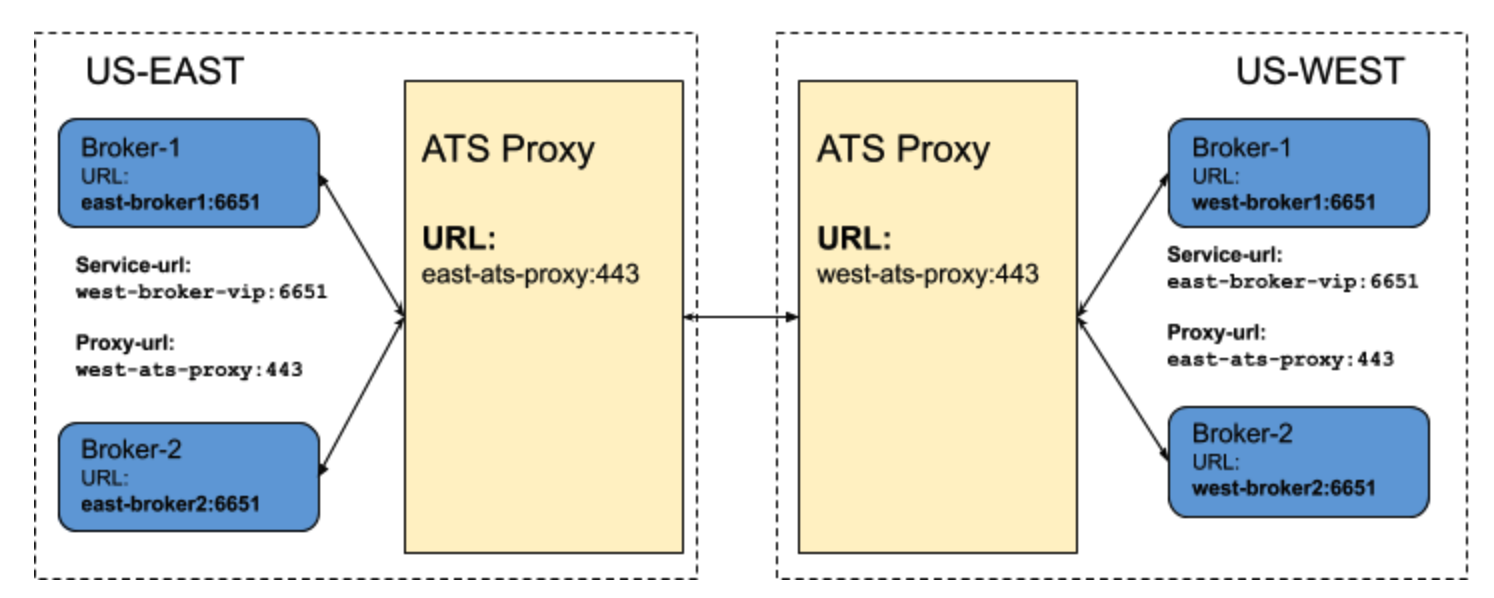
+We can also use ATS proxy for geo-replication. Pulsar broker has capability to connect to cross colo brokers for geo-replication using SNI routing. In order to enable SNI routing for cross cluster broker connection we have to configure SNI proxy URL to cluster metadata. If cluster metadata has SNI proxy url configured then broker will connect to cross cluster broker via proxy over SNI routing.
+
+
Review comment:
In general, all images related about pulsar docs are placed in the asset folder. could you please put the original image to that folder and update the local path for the image?
##########
File path: site2/docs/concepts-proxy-sni-routing.md
##########
@@ -0,0 +1,117 @@
+---
+id: concepts-proxy-sni-routing
+title: Proxy support with SNI routing
+sidebar_label: Proxy support with SNI routing
+---
+
+# Pulsar Proxy with SNI routing
+
+A proxy server is a go‑between or intermediary server that forwards requests from multiple clients to different servers across the Internet. The proxy server can act as a “traffic cop,” in both forward and reverse proxy scenarios, and adds various benefits in your system such as load balancing, performance, security, auto-scaling, etc.. There are already many proxy servers already available in the market which are fast, scalable and more importantly covers various essential security aspects that are needed by the large organization to securely share their confidential data over the network. Pulsar already provides proxy implementation which acts as a reverse proxy and creates a gateway in front of brokers. However, pulsar doesn’t provide support to use other proxies such as Apache traffic server (ATS), HAProxy, Nginx, Envoy those are more scalable and secured. Most of these proxy-servers support SNI ROUTING which can route traffic to a destination without having to terminate the SSL connection. Routing at layer 4 gives greater transparency because the outbound connection is determined by examining the destination address in the client TCP packets.
+
+[PIP-60](https://github.com/apache/pulsar/wiki/PIP-60:-Support-Proxy-server-with-SNI-routing) eexplains SNI routing protocol and how Pulsar clients support SNI routing protocol to connect to brokers via proxy. This document explains how to setup ATS proxy and pulsar-client to enable SNI routing and connect pulsar-client to pulsar-broker via ATS proxy.
+
+## ATS-SNI Routing in Pulsar
+[ATS supports layer-4 SNI routing](https://docs.trafficserver.apache.org/en/latest/admin-guide/layer-4-routing.en.html) with requirement that inbound connection must be TLS. Pulsar client supports SNI routing protocol and we can use ATS proxy in front of brokers, so pulsar client can connect to broker via ATS proxy. Pulsar also supports SNI routing for geo-replication, so brokers can connect to cross cluster brokers via ATS proxy.
+
+### ATS Proxy setup for layer-4 SNI routing
+
+This section explains ATS-setup to enable layer-4 SNI routing and use ATS proxy as a forward proxy where the pulsar broker runs behind the ATS proxy and client connects to pulsar-broker through this ATS proxy.
+
+
+
+
+We have to configure two conf files into ATS proxy to support SNI routing.
+
+
+1. `records.conf`:
+The [records.config fil](https://docs.trafficserver.apache.org/en/latest/admin-guide/files/records.config.en.html) (by default, located in `/usr/local/etc/trafficserver/`) is a list of configurable variables used by the Traffic Server and we have to update this file with tls port (`http.server_ports`) on which proxy can listen and proxy certs (`ssl.client.cert.path` and `ssl.client.cert.filename`) for secure tls tunneling. We also have to configure a range of server ports (`http.connect_ports`) that can be used for tunneling to pulsar-broker. If Pulsar brokers are listening on 4443 and 6651 then add brokers’ service port in http.connect_ports configuration.
+
+```
+# PROXY TLS PORT
+CONFIG proxy.config.http.server_ports STRING 4443:ssl 4080
+# PROXY CERTS FILE PATH
+CONFIG proxy.config.ssl.client.cert.path STRING /proxy-cert.pem
+# PROXY KEY FILE PATH
+CONFIG proxy.config.ssl.client.cert.filename STRING /proxy-key.pem
+
+
+# The range of origin server ports that can be used for tunneling via CONNECT. # Traffic Server allows tunnels only to the specified ports. Supports both wildcards (*) and ranges (e.g. 0-1023).
+CONFIG proxy.config.http.connect_ports STRING 4443 6651
+```
+
+2. `ssl_server_name.conf`:
+The [ssl_server_name file](https://docs.trafficserver.apache.org/en/8.0.x/admin-guide/files/ssl_server_name.yaml.en.html) is used to configure aspects of TLS connection handling for both inbound and outbound connections. The configuration is driven by the SNI values provided by the inbound connection. The file consists of a set of configuration items, each identified by an SNI value (`fqdn`). When an inbound TLS connection is made, the SNI value from the TLS negotiation is matched against the items specified by this file and if there is a match, the values specified in that item override the defaults.
+Below example of `ssl_server_name`shows mapping of inbound SNI hostname coming from client and actual broker’s service url where request should be redirected. For example: if client sends SNI header `pulsar-broker1` then proxy creates tls tunnel by redirecting request to service-url: `pulsar-broker1:6651`
+
+```
+server_config = {
+ {
+ fqdn = 'pulsar-broker-vip',
+ # Forward to Pulsar broker which is listening on 6651
+ tunnel_route = 'pulsar-broker-vip:6651'
+ },
+ {
+ fqdn = 'pulsar-broker1',
+ # Forward to Pulsar broker-1 which is listening on 6651
+ tunnel_route = 'pulsar-broker1:6651'
+ },
+ {
+ fqdn = 'pulsar-broker2',
+ # Forward to Pulsar broker-2 which is listening on 6651
+ tunnel_route = 'pulsar-broker2:6651'
+ },
+}
+```
+Once, ssl_server_name.config and records.config are configured, ATS-proxy server is ready to handle SNI routing and can create TCP tunnel between client and broker.
+
+### Pulsar-client Configuration with SNI routing
+
+Now, ATS proxy server is configured and ready to handle SNI routing and create TCP tunnel between client and broker. Here, we have to note that ATS SNI-routing works only with TLS. so, ATS proxy and brokers must have tls enabled before Pulsar-client configures SNI routing protocol to connect to broker via ATS proxy. With [PIP-60](https://github.com/apache/pulsar/wiki/PIP-60:-Support-Proxy-server-with-SNI-routing), pulsar-client supports SNI routing by connecting to proxy and sending target broker url into SNI header. Pulsar-client handles SNI routing internally and entire connection handling is abstracted from the user. Users have to only configure following proxy configuration initially when the user creates a pulsar-client to use SNI routing protocol.
+
+```
+String brokerServiceUrl = “pulsar+ssl://pulsar-broker-vip:6651/”;
+String proxyUrl = “pulsar+ssl://ats-proxy:443”;
+ClientBuilder clientBuilder = PulsarClient.builder()
+ .serviceUrl(brokerServiceUrl)
+ .tlsTrustCertsFilePath(TLS_TRUST_CERT_FILE_PATH)
+ .enableTls(true)
+ .allowTlsInsecureConnection(false)
+ .proxyServiceUrl(proxyUrl, ProxyProtocol.SNI)
+ .operationTimeout(1000, TimeUnit.MILLISECONDS);
+
+Map<String, String> authParams = new HashMap<>();
+authParams.put("tlsCertFile", TLS_CLIENT_CERT_FILE_PATH);
+authParams.put("tlsKeyFile", TLS_CLIENT_KEY_FILE_PATH);
+clientBuilder.authentication(AuthenticationTls.class.getName(), authParams);
+
+PulsarClient pulsarClient = clientBuilder.build();
+```
+
+### Pulsar geo-replication with SNI routing
+
+We can also use ATS proxy for geo-replication. Pulsar broker has capability to connect to cross colo brokers for geo-replication using SNI routing. In order to enable SNI routing for cross cluster broker connection we have to configure SNI proxy URL to cluster metadata. If cluster metadata has SNI proxy url configured then broker will connect to cross cluster broker via proxy over SNI routing.
Review comment:
```suggestion
We can also use ATS proxy for geo-replication. The Pulsar broker can connect to cross colo brokers for geo-replication using SNI routing. In order to enable SNI routing for cross cluster broker connection, we have to configure SNI proxy URL to the cluster metadata. If the cluster metadata has SNI proxy URL configured, the broker connects to cross cluster broker through the proxy over SNI routing.
```
what does the colo mean? a typo or a technical word?
##########
File path: site2/docs/concepts-proxy-sni-routing.md
##########
@@ -0,0 +1,117 @@
+---
+id: concepts-proxy-sni-routing
+title: Proxy support with SNI routing
+sidebar_label: Proxy support with SNI routing
+---
+
+# Pulsar Proxy with SNI routing
+
+A proxy server is a go‑between or intermediary server that forwards requests from multiple clients to different servers across the Internet. The proxy server can act as a “traffic cop,” in both forward and reverse proxy scenarios, and adds various benefits in your system such as load balancing, performance, security, auto-scaling, etc.. There are already many proxy servers already available in the market which are fast, scalable and more importantly covers various essential security aspects that are needed by the large organization to securely share their confidential data over the network. Pulsar already provides proxy implementation which acts as a reverse proxy and creates a gateway in front of brokers. However, pulsar doesn’t provide support to use other proxies such as Apache traffic server (ATS), HAProxy, Nginx, Envoy those are more scalable and secured. Most of these proxy-servers support SNI ROUTING which can route traffic to a destination without having to terminate the SSL connection. Routing at layer 4 gives greater transparency because the outbound connection is determined by examining the destination address in the client TCP packets.
+
+[PIP-60](https://github.com/apache/pulsar/wiki/PIP-60:-Support-Proxy-server-with-SNI-routing) eexplains SNI routing protocol and how Pulsar clients support SNI routing protocol to connect to brokers via proxy. This document explains how to setup ATS proxy and pulsar-client to enable SNI routing and connect pulsar-client to pulsar-broker via ATS proxy.
+
+## ATS-SNI Routing in Pulsar
+[ATS supports layer-4 SNI routing](https://docs.trafficserver.apache.org/en/latest/admin-guide/layer-4-routing.en.html) with requirement that inbound connection must be TLS. Pulsar client supports SNI routing protocol and we can use ATS proxy in front of brokers, so pulsar client can connect to broker via ATS proxy. Pulsar also supports SNI routing for geo-replication, so brokers can connect to cross cluster brokers via ATS proxy.
+
+### ATS Proxy setup for layer-4 SNI routing
+
+This section explains ATS-setup to enable layer-4 SNI routing and use ATS proxy as a forward proxy where the pulsar broker runs behind the ATS proxy and client connects to pulsar-broker through this ATS proxy.
+
+
+
+
+We have to configure two conf files into ATS proxy to support SNI routing.
+
+
+1. `records.conf`:
+The [records.config fil](https://docs.trafficserver.apache.org/en/latest/admin-guide/files/records.config.en.html) (by default, located in `/usr/local/etc/trafficserver/`) is a list of configurable variables used by the Traffic Server and we have to update this file with tls port (`http.server_ports`) on which proxy can listen and proxy certs (`ssl.client.cert.path` and `ssl.client.cert.filename`) for secure tls tunneling. We also have to configure a range of server ports (`http.connect_ports`) that can be used for tunneling to pulsar-broker. If Pulsar brokers are listening on 4443 and 6651 then add brokers’ service port in http.connect_ports configuration.
+
+```
+# PROXY TLS PORT
+CONFIG proxy.config.http.server_ports STRING 4443:ssl 4080
+# PROXY CERTS FILE PATH
+CONFIG proxy.config.ssl.client.cert.path STRING /proxy-cert.pem
+# PROXY KEY FILE PATH
+CONFIG proxy.config.ssl.client.cert.filename STRING /proxy-key.pem
+
+
+# The range of origin server ports that can be used for tunneling via CONNECT. # Traffic Server allows tunnels only to the specified ports. Supports both wildcards (*) and ranges (e.g. 0-1023).
+CONFIG proxy.config.http.connect_ports STRING 4443 6651
+```
+
+2. `ssl_server_name.conf`:
+The [ssl_server_name file](https://docs.trafficserver.apache.org/en/8.0.x/admin-guide/files/ssl_server_name.yaml.en.html) is used to configure aspects of TLS connection handling for both inbound and outbound connections. The configuration is driven by the SNI values provided by the inbound connection. The file consists of a set of configuration items, each identified by an SNI value (`fqdn`). When an inbound TLS connection is made, the SNI value from the TLS negotiation is matched against the items specified by this file and if there is a match, the values specified in that item override the defaults.
+Below example of `ssl_server_name`shows mapping of inbound SNI hostname coming from client and actual broker’s service url where request should be redirected. For example: if client sends SNI header `pulsar-broker1` then proxy creates tls tunnel by redirecting request to service-url: `pulsar-broker1:6651`
+
+```
+server_config = {
+ {
+ fqdn = 'pulsar-broker-vip',
+ # Forward to Pulsar broker which is listening on 6651
+ tunnel_route = 'pulsar-broker-vip:6651'
+ },
+ {
+ fqdn = 'pulsar-broker1',
+ # Forward to Pulsar broker-1 which is listening on 6651
+ tunnel_route = 'pulsar-broker1:6651'
+ },
+ {
+ fqdn = 'pulsar-broker2',
+ # Forward to Pulsar broker-2 which is listening on 6651
+ tunnel_route = 'pulsar-broker2:6651'
+ },
+}
+```
+Once, ssl_server_name.config and records.config are configured, ATS-proxy server is ready to handle SNI routing and can create TCP tunnel between client and broker.
+
+### Pulsar-client Configuration with SNI routing
+
+Now, ATS proxy server is configured and ready to handle SNI routing and create TCP tunnel between client and broker. Here, we have to note that ATS SNI-routing works only with TLS. so, ATS proxy and brokers must have tls enabled before Pulsar-client configures SNI routing protocol to connect to broker via ATS proxy. With [PIP-60](https://github.com/apache/pulsar/wiki/PIP-60:-Support-Proxy-server-with-SNI-routing), pulsar-client supports SNI routing by connecting to proxy and sending target broker url into SNI header. Pulsar-client handles SNI routing internally and entire connection handling is abstracted from the user. Users have to only configure following proxy configuration initially when the user creates a pulsar-client to use SNI routing protocol.
+
+```
+String brokerServiceUrl = “pulsar+ssl://pulsar-broker-vip:6651/”;
+String proxyUrl = “pulsar+ssl://ats-proxy:443”;
+ClientBuilder clientBuilder = PulsarClient.builder()
+ .serviceUrl(brokerServiceUrl)
+ .tlsTrustCertsFilePath(TLS_TRUST_CERT_FILE_PATH)
+ .enableTls(true)
+ .allowTlsInsecureConnection(false)
+ .proxyServiceUrl(proxyUrl, ProxyProtocol.SNI)
+ .operationTimeout(1000, TimeUnit.MILLISECONDS);
+
+Map<String, String> authParams = new HashMap<>();
+authParams.put("tlsCertFile", TLS_CLIENT_CERT_FILE_PATH);
+authParams.put("tlsKeyFile", TLS_CLIENT_KEY_FILE_PATH);
+clientBuilder.authentication(AuthenticationTls.class.getName(), authParams);
+
+PulsarClient pulsarClient = clientBuilder.build();
+```
+
+### Pulsar geo-replication with SNI routing
+
+We can also use ATS proxy for geo-replication. Pulsar broker has capability to connect to cross colo brokers for geo-replication using SNI routing. In order to enable SNI routing for cross cluster broker connection we have to configure SNI proxy URL to cluster metadata. If cluster metadata has SNI proxy url configured then broker will connect to cross cluster broker via proxy over SNI routing.
+
+
+
+In this example, we have a pulsar cluster deployed into two separate regions, us-west and us-east. We have also configured ATS proxy in both the regions, and brokers in each region running behind this ATS proxy. Now, we will configure cluster metadata for both the clusters, so brokers in one cluster will use SNI routing and connect to brokers in other clusters via ATS proxy.
+
+(a) Configure cluster metadata for us-east with us-east broker service url and us-east ATS proxy url with SNI proxy-protocol.
Review comment:
If this is an ordered task, use "1,2,3..." instead of "a, b,c..."
```suggestion
(a) Configure the cluster metadata for us-east with us-east broker service URL and us-east ATS proxy URL with SNI proxy-protocol.
```
##########
File path: site2/docs/concepts-proxy-sni-routing.md
##########
@@ -0,0 +1,117 @@
+---
+id: concepts-proxy-sni-routing
+title: Proxy support with SNI routing
+sidebar_label: Proxy support with SNI routing
+---
+
+# Pulsar Proxy with SNI routing
+
+A proxy server is a go‑between or intermediary server that forwards requests from multiple clients to different servers across the Internet. The proxy server can act as a “traffic cop,” in both forward and reverse proxy scenarios, and adds various benefits in your system such as load balancing, performance, security, auto-scaling, etc.. There are already many proxy servers already available in the market which are fast, scalable and more importantly covers various essential security aspects that are needed by the large organization to securely share their confidential data over the network. Pulsar already provides proxy implementation which acts as a reverse proxy and creates a gateway in front of brokers. However, pulsar doesn’t provide support to use other proxies such as Apache traffic server (ATS), HAProxy, Nginx, Envoy those are more scalable and secured. Most of these proxy-servers support SNI ROUTING which can route traffic to a destination without having to terminate the SSL connection. Routing at layer 4 gives greater transparency because the outbound connection is determined by examining the destination address in the client TCP packets.
+
+[PIP-60](https://github.com/apache/pulsar/wiki/PIP-60:-Support-Proxy-server-with-SNI-routing) eexplains SNI routing protocol and how Pulsar clients support SNI routing protocol to connect to brokers via proxy. This document explains how to setup ATS proxy and pulsar-client to enable SNI routing and connect pulsar-client to pulsar-broker via ATS proxy.
+
+## ATS-SNI Routing in Pulsar
+[ATS supports layer-4 SNI routing](https://docs.trafficserver.apache.org/en/latest/admin-guide/layer-4-routing.en.html) with requirement that inbound connection must be TLS. Pulsar client supports SNI routing protocol and we can use ATS proxy in front of brokers, so pulsar client can connect to broker via ATS proxy. Pulsar also supports SNI routing for geo-replication, so brokers can connect to cross cluster brokers via ATS proxy.
+
+### ATS Proxy setup for layer-4 SNI routing
+
+This section explains ATS-setup to enable layer-4 SNI routing and use ATS proxy as a forward proxy where the pulsar broker runs behind the ATS proxy and client connects to pulsar-broker through this ATS proxy.
+
+
+
+
+We have to configure two conf files into ATS proxy to support SNI routing.
+
+
+1. `records.conf`:
+The [records.config fil](https://docs.trafficserver.apache.org/en/latest/admin-guide/files/records.config.en.html) (by default, located in `/usr/local/etc/trafficserver/`) is a list of configurable variables used by the Traffic Server and we have to update this file with tls port (`http.server_ports`) on which proxy can listen and proxy certs (`ssl.client.cert.path` and `ssl.client.cert.filename`) for secure tls tunneling. We also have to configure a range of server ports (`http.connect_ports`) that can be used for tunneling to pulsar-broker. If Pulsar brokers are listening on 4443 and 6651 then add brokers’ service port in http.connect_ports configuration.
+
+```
+# PROXY TLS PORT
+CONFIG proxy.config.http.server_ports STRING 4443:ssl 4080
+# PROXY CERTS FILE PATH
+CONFIG proxy.config.ssl.client.cert.path STRING /proxy-cert.pem
+# PROXY KEY FILE PATH
+CONFIG proxy.config.ssl.client.cert.filename STRING /proxy-key.pem
+
+
+# The range of origin server ports that can be used for tunneling via CONNECT. # Traffic Server allows tunnels only to the specified ports. Supports both wildcards (*) and ranges (e.g. 0-1023).
+CONFIG proxy.config.http.connect_ports STRING 4443 6651
+```
+
+2. `ssl_server_name.conf`:
+The [ssl_server_name file](https://docs.trafficserver.apache.org/en/8.0.x/admin-guide/files/ssl_server_name.yaml.en.html) is used to configure aspects of TLS connection handling for both inbound and outbound connections. The configuration is driven by the SNI values provided by the inbound connection. The file consists of a set of configuration items, each identified by an SNI value (`fqdn`). When an inbound TLS connection is made, the SNI value from the TLS negotiation is matched against the items specified by this file and if there is a match, the values specified in that item override the defaults.
+Below example of `ssl_server_name`shows mapping of inbound SNI hostname coming from client and actual broker’s service url where request should be redirected. For example: if client sends SNI header `pulsar-broker1` then proxy creates tls tunnel by redirecting request to service-url: `pulsar-broker1:6651`
+
+```
+server_config = {
+ {
+ fqdn = 'pulsar-broker-vip',
+ # Forward to Pulsar broker which is listening on 6651
+ tunnel_route = 'pulsar-broker-vip:6651'
+ },
+ {
+ fqdn = 'pulsar-broker1',
+ # Forward to Pulsar broker-1 which is listening on 6651
+ tunnel_route = 'pulsar-broker1:6651'
+ },
+ {
+ fqdn = 'pulsar-broker2',
+ # Forward to Pulsar broker-2 which is listening on 6651
+ tunnel_route = 'pulsar-broker2:6651'
+ },
+}
+```
+Once, ssl_server_name.config and records.config are configured, ATS-proxy server is ready to handle SNI routing and can create TCP tunnel between client and broker.
+
+### Pulsar-client Configuration with SNI routing
+
+Now, ATS proxy server is configured and ready to handle SNI routing and create TCP tunnel between client and broker. Here, we have to note that ATS SNI-routing works only with TLS. so, ATS proxy and brokers must have tls enabled before Pulsar-client configures SNI routing protocol to connect to broker via ATS proxy. With [PIP-60](https://github.com/apache/pulsar/wiki/PIP-60:-Support-Proxy-server-with-SNI-routing), pulsar-client supports SNI routing by connecting to proxy and sending target broker url into SNI header. Pulsar-client handles SNI routing internally and entire connection handling is abstracted from the user. Users have to only configure following proxy configuration initially when the user creates a pulsar-client to use SNI routing protocol.
+
+```
+String brokerServiceUrl = “pulsar+ssl://pulsar-broker-vip:6651/”;
+String proxyUrl = “pulsar+ssl://ats-proxy:443”;
+ClientBuilder clientBuilder = PulsarClient.builder()
+ .serviceUrl(brokerServiceUrl)
+ .tlsTrustCertsFilePath(TLS_TRUST_CERT_FILE_PATH)
+ .enableTls(true)
+ .allowTlsInsecureConnection(false)
+ .proxyServiceUrl(proxyUrl, ProxyProtocol.SNI)
+ .operationTimeout(1000, TimeUnit.MILLISECONDS);
+
+Map<String, String> authParams = new HashMap<>();
+authParams.put("tlsCertFile", TLS_CLIENT_CERT_FILE_PATH);
+authParams.put("tlsKeyFile", TLS_CLIENT_KEY_FILE_PATH);
+clientBuilder.authentication(AuthenticationTls.class.getName(), authParams);
+
+PulsarClient pulsarClient = clientBuilder.build();
+```
+
+### Pulsar geo-replication with SNI routing
+
+We can also use ATS proxy for geo-replication. Pulsar broker has capability to connect to cross colo brokers for geo-replication using SNI routing. In order to enable SNI routing for cross cluster broker connection we have to configure SNI proxy URL to cluster metadata. If cluster metadata has SNI proxy url configured then broker will connect to cross cluster broker via proxy over SNI routing.
+
+
+
+In this example, we have a pulsar cluster deployed into two separate regions, us-west and us-east. We have also configured ATS proxy in both the regions, and brokers in each region running behind this ATS proxy. Now, we will configure cluster metadata for both the clusters, so brokers in one cluster will use SNI routing and connect to brokers in other clusters via ATS proxy.
Review comment:
```suggestion
In this example, we have a pulsar cluster deployed into two separate regions, us-west and us-east. We have also configured ATS proxy in both the regions, and brokers in each region run behind this ATS proxy. Now, we configure the cluster metadata for both the clusters, so brokers in one cluster can use SNI routing and connect to brokers in other clusters through the ATS proxy.
```
##########
File path: site2/docs/concepts-proxy-sni-routing.md
##########
@@ -0,0 +1,117 @@
+---
+id: concepts-proxy-sni-routing
+title: Proxy support with SNI routing
+sidebar_label: Proxy support with SNI routing
+---
+
+# Pulsar Proxy with SNI routing
Review comment:
Pulsar docs use level 2 heading level as started. Therefore, you should check through the document and change the heading levels one by one.
##########
File path: site2/docs/concepts-proxy-sni-routing.md
##########
@@ -0,0 +1,117 @@
+---
+id: concepts-proxy-sni-routing
+title: Proxy support with SNI routing
+sidebar_label: Proxy support with SNI routing
+---
+
+# Pulsar Proxy with SNI routing
+
+A proxy server is a go‑between or intermediary server that forwards requests from multiple clients to different servers across the Internet. The proxy server can act as a “traffic cop,” in both forward and reverse proxy scenarios, and adds various benefits in your system such as load balancing, performance, security, auto-scaling, etc.. There are already many proxy servers already available in the market which are fast, scalable and more importantly covers various essential security aspects that are needed by the large organization to securely share their confidential data over the network. Pulsar already provides proxy implementation which acts as a reverse proxy and creates a gateway in front of brokers. However, pulsar doesn’t provide support to use other proxies such as Apache traffic server (ATS), HAProxy, Nginx, Envoy those are more scalable and secured. Most of these proxy-servers support SNI ROUTING which can route traffic to a destination without having to terminate the SSL connection. Routing at layer 4 gives greater transparency because the outbound connection is determined by examining the destination address in the client TCP packets.
+
+[PIP-60](https://github.com/apache/pulsar/wiki/PIP-60:-Support-Proxy-server-with-SNI-routing) eexplains SNI routing protocol and how Pulsar clients support SNI routing protocol to connect to brokers via proxy. This document explains how to setup ATS proxy and pulsar-client to enable SNI routing and connect pulsar-client to pulsar-broker via ATS proxy.
+
+## ATS-SNI Routing in Pulsar
+[ATS supports layer-4 SNI routing](https://docs.trafficserver.apache.org/en/latest/admin-guide/layer-4-routing.en.html) with requirement that inbound connection must be TLS. Pulsar client supports SNI routing protocol and we can use ATS proxy in front of brokers, so pulsar client can connect to broker via ATS proxy. Pulsar also supports SNI routing for geo-replication, so brokers can connect to cross cluster brokers via ATS proxy.
+
+### ATS Proxy setup for layer-4 SNI routing
+
+This section explains ATS-setup to enable layer-4 SNI routing and use ATS proxy as a forward proxy where the pulsar broker runs behind the ATS proxy and client connects to pulsar-broker through this ATS proxy.
+
+
+
+
+We have to configure two conf files into ATS proxy to support SNI routing.
+
+
+1. `records.conf`:
+The [records.config fil](https://docs.trafficserver.apache.org/en/latest/admin-guide/files/records.config.en.html) (by default, located in `/usr/local/etc/trafficserver/`) is a list of configurable variables used by the Traffic Server and we have to update this file with tls port (`http.server_ports`) on which proxy can listen and proxy certs (`ssl.client.cert.path` and `ssl.client.cert.filename`) for secure tls tunneling. We also have to configure a range of server ports (`http.connect_ports`) that can be used for tunneling to pulsar-broker. If Pulsar brokers are listening on 4443 and 6651 then add brokers’ service port in http.connect_ports configuration.
+
+```
+# PROXY TLS PORT
+CONFIG proxy.config.http.server_ports STRING 4443:ssl 4080
+# PROXY CERTS FILE PATH
+CONFIG proxy.config.ssl.client.cert.path STRING /proxy-cert.pem
+# PROXY KEY FILE PATH
+CONFIG proxy.config.ssl.client.cert.filename STRING /proxy-key.pem
+
+
+# The range of origin server ports that can be used for tunneling via CONNECT. # Traffic Server allows tunnels only to the specified ports. Supports both wildcards (*) and ranges (e.g. 0-1023).
+CONFIG proxy.config.http.connect_ports STRING 4443 6651
+```
+
+2. `ssl_server_name.conf`:
+The [ssl_server_name file](https://docs.trafficserver.apache.org/en/8.0.x/admin-guide/files/ssl_server_name.yaml.en.html) is used to configure aspects of TLS connection handling for both inbound and outbound connections. The configuration is driven by the SNI values provided by the inbound connection. The file consists of a set of configuration items, each identified by an SNI value (`fqdn`). When an inbound TLS connection is made, the SNI value from the TLS negotiation is matched against the items specified by this file and if there is a match, the values specified in that item override the defaults.
+Below example of `ssl_server_name`shows mapping of inbound SNI hostname coming from client and actual broker’s service url where request should be redirected. For example: if client sends SNI header `pulsar-broker1` then proxy creates tls tunnel by redirecting request to service-url: `pulsar-broker1:6651`
Review comment:
```suggestion
The following example shows mapping of inbound SNI hostname coming from the client and the actual broker’s service URL where request should be redirected. For example, if the client sends the SNI header `pulsar-broker1`, the proxy creates a TLS tunnel by redirecting request to the service URL `pulsar-broker1:6651`
```
##########
File path: site2/docs/concepts-proxy-sni-routing.md
##########
@@ -0,0 +1,117 @@
+---
+id: concepts-proxy-sni-routing
+title: Proxy support with SNI routing
+sidebar_label: Proxy support with SNI routing
+---
+
+# Pulsar Proxy with SNI routing
+
+A proxy server is a go‑between or intermediary server that forwards requests from multiple clients to different servers across the Internet. The proxy server can act as a “traffic cop,” in both forward and reverse proxy scenarios, and adds various benefits in your system such as load balancing, performance, security, auto-scaling, etc.. There are already many proxy servers already available in the market which are fast, scalable and more importantly covers various essential security aspects that are needed by the large organization to securely share their confidential data over the network. Pulsar already provides proxy implementation which acts as a reverse proxy and creates a gateway in front of brokers. However, pulsar doesn’t provide support to use other proxies such as Apache traffic server (ATS), HAProxy, Nginx, Envoy those are more scalable and secured. Most of these proxy-servers support SNI ROUTING which can route traffic to a destination without having to terminate the SSL connection. Routing at layer 4 gives greater transparency because the outbound connection is determined by examining the destination address in the client TCP packets.
+
+[PIP-60](https://github.com/apache/pulsar/wiki/PIP-60:-Support-Proxy-server-with-SNI-routing) eexplains SNI routing protocol and how Pulsar clients support SNI routing protocol to connect to brokers via proxy. This document explains how to setup ATS proxy and pulsar-client to enable SNI routing and connect pulsar-client to pulsar-broker via ATS proxy.
+
+## ATS-SNI Routing in Pulsar
+[ATS supports layer-4 SNI routing](https://docs.trafficserver.apache.org/en/latest/admin-guide/layer-4-routing.en.html) with requirement that inbound connection must be TLS. Pulsar client supports SNI routing protocol and we can use ATS proxy in front of brokers, so pulsar client can connect to broker via ATS proxy. Pulsar also supports SNI routing for geo-replication, so brokers can connect to cross cluster brokers via ATS proxy.
+
+### ATS Proxy setup for layer-4 SNI routing
+
+This section explains ATS-setup to enable layer-4 SNI routing and use ATS proxy as a forward proxy where the pulsar broker runs behind the ATS proxy and client connects to pulsar-broker through this ATS proxy.
+
+
+
+
+We have to configure two conf files into ATS proxy to support SNI routing.
+
+
+1. `records.conf`:
+The [records.config fil](https://docs.trafficserver.apache.org/en/latest/admin-guide/files/records.config.en.html) (by default, located in `/usr/local/etc/trafficserver/`) is a list of configurable variables used by the Traffic Server and we have to update this file with tls port (`http.server_ports`) on which proxy can listen and proxy certs (`ssl.client.cert.path` and `ssl.client.cert.filename`) for secure tls tunneling. We also have to configure a range of server ports (`http.connect_ports`) that can be used for tunneling to pulsar-broker. If Pulsar brokers are listening on 4443 and 6651 then add brokers’ service port in http.connect_ports configuration.
+
+```
+# PROXY TLS PORT
+CONFIG proxy.config.http.server_ports STRING 4443:ssl 4080
+# PROXY CERTS FILE PATH
+CONFIG proxy.config.ssl.client.cert.path STRING /proxy-cert.pem
+# PROXY KEY FILE PATH
+CONFIG proxy.config.ssl.client.cert.filename STRING /proxy-key.pem
+
+
+# The range of origin server ports that can be used for tunneling via CONNECT. # Traffic Server allows tunnels only to the specified ports. Supports both wildcards (*) and ranges (e.g. 0-1023).
+CONFIG proxy.config.http.connect_ports STRING 4443 6651
+```
+
+2. `ssl_server_name.conf`:
+The [ssl_server_name file](https://docs.trafficserver.apache.org/en/8.0.x/admin-guide/files/ssl_server_name.yaml.en.html) is used to configure aspects of TLS connection handling for both inbound and outbound connections. The configuration is driven by the SNI values provided by the inbound connection. The file consists of a set of configuration items, each identified by an SNI value (`fqdn`). When an inbound TLS connection is made, the SNI value from the TLS negotiation is matched against the items specified by this file and if there is a match, the values specified in that item override the defaults.
+Below example of `ssl_server_name`shows mapping of inbound SNI hostname coming from client and actual broker’s service url where request should be redirected. For example: if client sends SNI header `pulsar-broker1` then proxy creates tls tunnel by redirecting request to service-url: `pulsar-broker1:6651`
+
+```
+server_config = {
+ {
+ fqdn = 'pulsar-broker-vip',
+ # Forward to Pulsar broker which is listening on 6651
+ tunnel_route = 'pulsar-broker-vip:6651'
+ },
+ {
+ fqdn = 'pulsar-broker1',
+ # Forward to Pulsar broker-1 which is listening on 6651
+ tunnel_route = 'pulsar-broker1:6651'
+ },
+ {
+ fqdn = 'pulsar-broker2',
+ # Forward to Pulsar broker-2 which is listening on 6651
+ tunnel_route = 'pulsar-broker2:6651'
+ },
+}
+```
+Once, ssl_server_name.config and records.config are configured, ATS-proxy server is ready to handle SNI routing and can create TCP tunnel between client and broker.
+
+### Pulsar-client Configuration with SNI routing
+
+Now, ATS proxy server is configured and ready to handle SNI routing and create TCP tunnel between client and broker. Here, we have to note that ATS SNI-routing works only with TLS. so, ATS proxy and brokers must have tls enabled before Pulsar-client configures SNI routing protocol to connect to broker via ATS proxy. With [PIP-60](https://github.com/apache/pulsar/wiki/PIP-60:-Support-Proxy-server-with-SNI-routing), pulsar-client supports SNI routing by connecting to proxy and sending target broker url into SNI header. Pulsar-client handles SNI routing internally and entire connection handling is abstracted from the user. Users have to only configure following proxy configuration initially when the user creates a pulsar-client to use SNI routing protocol.
+
+```
+String brokerServiceUrl = “pulsar+ssl://pulsar-broker-vip:6651/”;
+String proxyUrl = “pulsar+ssl://ats-proxy:443”;
+ClientBuilder clientBuilder = PulsarClient.builder()
+ .serviceUrl(brokerServiceUrl)
+ .tlsTrustCertsFilePath(TLS_TRUST_CERT_FILE_PATH)
+ .enableTls(true)
+ .allowTlsInsecureConnection(false)
+ .proxyServiceUrl(proxyUrl, ProxyProtocol.SNI)
+ .operationTimeout(1000, TimeUnit.MILLISECONDS);
+
+Map<String, String> authParams = new HashMap<>();
+authParams.put("tlsCertFile", TLS_CLIENT_CERT_FILE_PATH);
+authParams.put("tlsKeyFile", TLS_CLIENT_KEY_FILE_PATH);
+clientBuilder.authentication(AuthenticationTls.class.getName(), authParams);
+
+PulsarClient pulsarClient = clientBuilder.build();
+```
+
+### Pulsar geo-replication with SNI routing
+
+We can also use ATS proxy for geo-replication. Pulsar broker has capability to connect to cross colo brokers for geo-replication using SNI routing. In order to enable SNI routing for cross cluster broker connection we have to configure SNI proxy URL to cluster metadata. If cluster metadata has SNI proxy url configured then broker will connect to cross cluster broker via proxy over SNI routing.
+
+
+
+In this example, we have a pulsar cluster deployed into two separate regions, us-west and us-east. We have also configured ATS proxy in both the regions, and brokers in each region running behind this ATS proxy. Now, we will configure cluster metadata for both the clusters, so brokers in one cluster will use SNI routing and connect to brokers in other clusters via ATS proxy.
+
+(a) Configure cluster metadata for us-east with us-east broker service url and us-east ATS proxy url with SNI proxy-protocol.
+
+```
+./pulsar-admin clusters update \
+--broker-url-secure pulsar+ssl://east-broker-vip:6651 \
+--url http://east-broker-vip:8080 \
+--proxy-protocol SNI \
+--proxy-url pulsar+ssl://east-ats-proxy:443
+```
+
+(b) Configure cluster metadata for us-east with us-east broker service url and us-east ATS proxy url with SNI proxy-protocol.
Review comment:
```suggestion
(b) Configure the cluster metadata for us-east with us-east broker service URL and us-east ATS proxy URL with SNI proxy-protocol.
```
us-west?
##########
File path: site2/docs/concepts-proxy-sni-routing.md
##########
@@ -0,0 +1,117 @@
+---
+id: concepts-proxy-sni-routing
+title: Proxy support with SNI routing
+sidebar_label: Proxy support with SNI routing
+---
+
+# Pulsar Proxy with SNI routing
+
+A proxy server is a go‑between or intermediary server that forwards requests from multiple clients to different servers across the Internet. The proxy server can act as a “traffic cop,” in both forward and reverse proxy scenarios, and adds various benefits in your system such as load balancing, performance, security, auto-scaling, etc.. There are already many proxy servers already available in the market which are fast, scalable and more importantly covers various essential security aspects that are needed by the large organization to securely share their confidential data over the network. Pulsar already provides proxy implementation which acts as a reverse proxy and creates a gateway in front of brokers. However, pulsar doesn’t provide support to use other proxies such as Apache traffic server (ATS), HAProxy, Nginx, Envoy those are more scalable and secured. Most of these proxy-servers support SNI ROUTING which can route traffic to a destination without having to terminate the SSL connection. Routing at layer 4 gives greater transparency because the outbound connection is determined by examining the destination address in the client TCP packets.
+
+[PIP-60](https://github.com/apache/pulsar/wiki/PIP-60:-Support-Proxy-server-with-SNI-routing) eexplains SNI routing protocol and how Pulsar clients support SNI routing protocol to connect to brokers via proxy. This document explains how to setup ATS proxy and pulsar-client to enable SNI routing and connect pulsar-client to pulsar-broker via ATS proxy.
+
+## ATS-SNI Routing in Pulsar
+[ATS supports layer-4 SNI routing](https://docs.trafficserver.apache.org/en/latest/admin-guide/layer-4-routing.en.html) with requirement that inbound connection must be TLS. Pulsar client supports SNI routing protocol and we can use ATS proxy in front of brokers, so pulsar client can connect to broker via ATS proxy. Pulsar also supports SNI routing for geo-replication, so brokers can connect to cross cluster brokers via ATS proxy.
+
+### ATS Proxy setup for layer-4 SNI routing
+
+This section explains ATS-setup to enable layer-4 SNI routing and use ATS proxy as a forward proxy where the pulsar broker runs behind the ATS proxy and client connects to pulsar-broker through this ATS proxy.
+
+
+
+
+We have to configure two conf files into ATS proxy to support SNI routing.
+
+
+1. `records.conf`:
+The [records.config fil](https://docs.trafficserver.apache.org/en/latest/admin-guide/files/records.config.en.html) (by default, located in `/usr/local/etc/trafficserver/`) is a list of configurable variables used by the Traffic Server and we have to update this file with tls port (`http.server_ports`) on which proxy can listen and proxy certs (`ssl.client.cert.path` and `ssl.client.cert.filename`) for secure tls tunneling. We also have to configure a range of server ports (`http.connect_ports`) that can be used for tunneling to pulsar-broker. If Pulsar brokers are listening on 4443 and 6651 then add brokers’ service port in http.connect_ports configuration.
+
+```
+# PROXY TLS PORT
+CONFIG proxy.config.http.server_ports STRING 4443:ssl 4080
+# PROXY CERTS FILE PATH
+CONFIG proxy.config.ssl.client.cert.path STRING /proxy-cert.pem
+# PROXY KEY FILE PATH
+CONFIG proxy.config.ssl.client.cert.filename STRING /proxy-key.pem
+
+
+# The range of origin server ports that can be used for tunneling via CONNECT. # Traffic Server allows tunnels only to the specified ports. Supports both wildcards (*) and ranges (e.g. 0-1023).
+CONFIG proxy.config.http.connect_ports STRING 4443 6651
+```
+
+2. `ssl_server_name.conf`:
+The [ssl_server_name file](https://docs.trafficserver.apache.org/en/8.0.x/admin-guide/files/ssl_server_name.yaml.en.html) is used to configure aspects of TLS connection handling for both inbound and outbound connections. The configuration is driven by the SNI values provided by the inbound connection. The file consists of a set of configuration items, each identified by an SNI value (`fqdn`). When an inbound TLS connection is made, the SNI value from the TLS negotiation is matched against the items specified by this file and if there is a match, the values specified in that item override the defaults.
Review comment:
```suggestion
The [ssl_server_name file](https://docs.trafficserver.apache.org/en/8.0.x/admin-guide/files/ssl_server_name.yaml.en.html) is used to configure aspects of TLS connection handling for both inbound and outbound connections. The configuration is driven by the SNI values provided by the inbound connection. The file consists of a set of configuration items, each identified by an SNI value (`fqdn`). When an inbound TLS connection is made, the SNI value from the TLS negotiation is matched against the items specified by this file and if there is a match, the values specified in that item override the default values.
```
----------------------------------------------------------------
This is an automated message from the Apache Git Service.
To respond to the message, please log on to GitHub and use the
URL above to go to the specific comment.
For queries about this service, please contact Infrastructure at:
users@infra.apache.org
[GitHub] [pulsar] Jennifer88huang commented on pull request #7421: [pulsar-doc] Add document for Pulasr SNI routing with ATS
Posted by GitBox <gi...@apache.org>.
Jennifer88huang commented on pull request #7421:
URL: https://github.com/apache/pulsar/pull/7421#issuecomment-652857783


   > @Jennifer88huang , PIP-60 is a feature released in Pulsar 2.6.0, please cherry-pick the doc to the Release 2.6.0 and 2.6.1. Thanks.

   Done. Thanks for your reminder.


----------------------------------------------------------------
This is an automated message from the Apache Git Service.
To respond to the message, please log on to GitHub and use the
URL above to go to the specific comment.

For queries about this service, please contact Infrastructure at:
users@infra.apache.org
[GitHub] [pulsar] Jennifer88huang commented on pull request #7421: [pulsar-doc] Add document for Pulasr SNI routing with ATS
Posted by GitBox <gi...@apache.org>.
Jennifer88huang commented on pull request #7421:
URL: https://github.com/apache/pulsar/pull/7421#issuecomment-654915425


   @rdhabalia Thank you very much for your contribution.
   To display the content, we need to refine the `sidebar.json` file as well. I'll fix it in another PR.


----------------------------------------------------------------
This is an automated message from the Apache Git Service.
To respond to the message, please log on to GitHub and use the
URL above to go to the specific comment.

For queries about this service, please contact Infrastructure at:
users@infra.apache.org
[GitHub] [pulsar] Jennifer88huang merged pull request #7421: [pulsar-doc] Add document for Pulasr SNI routing with ATS
Posted by GitBox <gi...@apache.org>.
Jennifer88huang merged pull request #7421:
URL: https://github.com/apache/pulsar/pull/7421


----------------------------------------------------------------
This is an automated message from the Apache Git Service.
To respond to the message, please log on to GitHub and use the
URL above to go to the specific comment.

For queries about this service, please contact Infrastructure at:
users@infra.apache.org
[GitHub] [pulsar] Anonymitaet commented on a change in pull request #7421: [pulsar-doc] Add document for Pulasr SNI routing with ATS
Posted by GitBox <gi...@apache.org>.
Anonymitaet commented on a change in pull request #7421:
URL: https://github.com/apache/pulsar/pull/7421#discussion_r449486398
##########
File path: site2/docs/concepts-proxy-sni-routing.md
##########
@@ -0,0 +1,123 @@
+---
+id: concepts-proxy-sni-routing
+title: Proxy support with SNI routing
+sidebar_label: Proxy support with SNI routing
+---
+
+## Pulsar Proxy with SNI routing
+
+A proxy server is an intermediary server that forwards requests from multiple clients to different servers across the Internet. The proxy server acts as a "traffic cop" in both forward and reverse proxy scenarios, and brings various benefits to your system such as load balancing, performance, security, auto-scaling, etc. There are already many proxy servers available in the market which are fast and scalable. More importantly, these proxy servers cover various essential security aspects that are needed by the large organizations to securely share their confidential data over the network. Pulsar provides proxy implementation which acts as a reverse proxy and creates a gateway in front of brokers. However, pulsar does not supports to use other proxies such as Apache Traffic Server (ATS), HAProxy, Nginx, and Envoy. These proxies are more scalable and secured. Most of these proxy-servers support **SNI routing** which is used to route traffic to a destination without terminating the SSL connection. Routing at layer 4 provides greater transparency because the outbound connection is determined by examining the destination address in the client TCP packets.
+
+[PIP-60](https://github.com/apache/pulsar/wiki/PIP-60:-Support-Proxy-server-with-SNI-routing) explains SNI routing protocol and how Pulsar clients support SNI routing protocol to connect to brokers through the proxy. This document explains how to set up the ATS proxy and the Pulsar client to enable SNI routing and connect Pulsar client to the broker through the ATS proxy.
+
+### ATS-SNI Routing in Pulsar
+[ATS supports layer-4 SNI routing](https://docs.trafficserver.apache.org/en/latest/admin-guide/layer-4-routing.en.html) with the requirement that inbound connection must be a TLS connection. The Pulsar client also supports SNI routing protocol on TLS connection and that allows Pulsar to use ATS as a reverse proxy when Pulsar client wants to connect to broker through ATS proxy. Therefore, this section explains how to set up and use ATS as a reverse proxy so pulsar clients can connect to brokers through the ATS proxy using SNI routing protocol on TLS connection. Pulsar also supports SNI routing for geo-replication, so brokers can connect to cross cluster brokers through the ATS proxy.
+
+
+#### ATS Proxy setup for layer-4 SNI routing
+
+This section explains how to set up ATS proxy to enable layer 4 SNI routing which will be used by Pulsar to use ATS as a reverse proxy.
+
+
+
+
+To support SNI routing, you need to configure two files: `records.conf` and `ssl_server_name.conf`.
+
+
+- `records.conf`:
+The [records.config fil](https://docs.trafficserver.apache.org/en/latest/admin-guide/files/records.config.en.html) (By default, it is located in `/usr/local/etc/trafficserver/`.) is a list of configurable variables used by the Apache Traffic Server and we have to update this file with TLS port (`http.server_ports`) on which proxy can listen and proxy certs (`ssl.client.cert.path` and `ssl.client.cert.filename`) for secure TLS tunneling. We also have to configure a range of server ports (`http.connect_ports`) that can be used for tunneling to the broker. If Pulsar brokers are listening on ports 4443 and 6651 then add the brokers’ service port in http.connect_ports configuration.
+
+**Example:**
+
+```
+# PROXY TLS PORT
+CONFIG proxy.config.http.server_ports STRING 4443:ssl 4080
+# PROXY CERTS FILE PATH
+CONFIG proxy.config.ssl.client.cert.path STRING /proxy-cert.pem
+# PROXY KEY FILE PATH
+CONFIG proxy.config.ssl.client.cert.filename STRING /proxy-key.pem
+
+
+# The range of origin server ports that can be used for tunneling via CONNECT. # Traffic Server allows tunnels only to the specified ports. Supports both wildcards (*) and ranges (e.g. 0-1023).
+CONFIG proxy.config.http.connect_ports STRING 4443 6651
+```
+
+- `ssl_server_name.conf`:
+The [ssl_server_name file](https://docs.trafficserver.apache.org/en/8.0.x/admin-guide/files/ssl_server_name.yaml.en.html) is used to configure aspects of TLS connection handling for both inbound and outbound connections. The configuration is driven by the SNI values provided by the inbound connection. The file consists of a set of configuration items, each identified by an SNI value (`fqdn`). When an inbound TLS connection is made, the SNI value from the TLS negotiation is matched against the items specified by this file and if there is a match, the values specified in that item override the default values.
+
+The following example shows mapping of inbound SNI hostname coming from the client and the actual broker’s service URL where request should be redirected. For example, if the client sends the SNI header `pulsar-broker1`, the proxy creates a TLS tunnel by redirecting request to the service URL `pulsar-broker1:6651`
+
+**Example:**
+
+```
+server_config = {
+ {
+ fqdn = 'pulsar-broker-vip',
+ # Forward to Pulsar broker which is listening on 6651
+ tunnel_route = 'pulsar-broker-vip:6651'
+ },
+ {
+ fqdn = 'pulsar-broker1',
+ # Forward to Pulsar broker-1 which is listening on 6651
+ tunnel_route = 'pulsar-broker1:6651'
+ },
+ {
+ fqdn = 'pulsar-broker2',
+ # Forward to Pulsar broker-2 which is listening on 6651
+ tunnel_route = 'pulsar-broker2:6651'
+ },
+}
+```
+Once, `ssl_server_name.config` and `records.config` are configured, ATS-proxy server is ready to handle SNI routing and can create TCP tunnel between the client and the broker.
+
+#### Pulsar-client Configuration with SNI routing
+
+Now, ATS proxy server is configured and ready to handle SNI routing and create the TCP tunnel between the client and the broker. Here, we have to note that ATS SNI-routing works only with TLS. Therefore, the ATS proxy and brokers must have TLS enabled before the Pulsar client configures SNI routing protocol to connect to the broker through ATS proxy. With [PIP-60](https://github.com/apache/pulsar/wiki/PIP-60:-Support-Proxy-server-with-SNI-routing), the pulsar client supports SNI routing by connecting to the proxy and sending target the broker URL into the SNI header. The Pulsar client handles SNI routing internally and the entire connection handling is abstracted from the user. Users only need to configure the following proxy configuration initially when the user creates a Pulsar client to use SNI routing protocol.
Review comment:
```suggestion
Now, the ATS proxy server is configured and ready to handle SNI routing and create the TCP tunnel between the client and the broker. Here, we have to note that ATS SNI-routing works only with TLS. Therefore, the ATS proxy and brokers must have TLS enabled before the Pulsar client configures the SNI routing protocol to connect to the broker through ATS proxy. With [PIP-60](https://github.com/apache/pulsar/wiki/PIP-60:-Support-Proxy-server-with-SNI-routing), the pulsar client supports SNI routing by connecting to the proxy and sending target the broker URL into the SNI header. The Pulsar client handles SNI routing internally and the entire connection handling is abstracted from the user. Users only need to configure the following proxy configuration initially when the user creates a Pulsar client to use the SNI routing protocol.
```
##########
File path: site2/docs/concepts-proxy-sni-routing.md
##########
@@ -0,0 +1,123 @@
+---
+id: concepts-proxy-sni-routing
+title: Proxy support with SNI routing
+sidebar_label: Proxy support with SNI routing
+---
+
+## Pulsar Proxy with SNI routing
+
+A proxy server is an intermediary server that forwards requests from multiple clients to different servers across the Internet. The proxy server acts as a "traffic cop" in both forward and reverse proxy scenarios, and brings various benefits to your system such as load balancing, performance, security, auto-scaling, etc. There are already many proxy servers available in the market which are fast and scalable. More importantly, these proxy servers cover various essential security aspects that are needed by the large organizations to securely share their confidential data over the network. Pulsar provides proxy implementation which acts as a reverse proxy and creates a gateway in front of brokers. However, pulsar does not supports to use other proxies such as Apache Traffic Server (ATS), HAProxy, Nginx, and Envoy. These proxies are more scalable and secured. Most of these proxy-servers support **SNI routing** which is used to route traffic to a destination without terminating the SSL connection. Routing at layer 4 provides greater transparency because the outbound connection is determined by examining the destination address in the client TCP packets.
Review comment:
```suggestion
A proxy server is an intermediary server that forwards requests from multiple clients to different servers across the Internet. The proxy server acts as a "traffic cop" in both forward and reverse proxy scenarios, and brings various benefits to your system such as load balancing, performance, security, auto-scaling, etc. There are already many proxy servers available in the market which are fast and scalable. More importantly, these proxy servers cover various essential security aspects that are needed by large organizations to securely share their confidential data over the network. Pulsar provides a proxy implementation which acts as a reverse proxy and creates a gateway in front of brokers. However, pulsar does not supports using other proxies such as Apache Traffic Server (ATS), HAProxy, Nginx, and Envoy. These proxies are more scalable and secured. Most of these proxy-servers support **SNI routing** which is used to route traffic to a destination without terminating the SSL connection. Routing at layer 4 provides greater transparency because the outbound connection is determined by examining the destination address in the client TCP packets.
```
##########
File path: site2/docs/concepts-proxy-sni-routing.md
##########
@@ -0,0 +1,123 @@
+---
+id: concepts-proxy-sni-routing
+title: Proxy support with SNI routing
+sidebar_label: Proxy support with SNI routing
+---
+
+## Pulsar Proxy with SNI routing
+
+A proxy server is an intermediary server that forwards requests from multiple clients to different servers across the Internet. The proxy server acts as a "traffic cop" in both forward and reverse proxy scenarios, and brings various benefits to your system such as load balancing, performance, security, auto-scaling, etc. There are already many proxy servers available in the market which are fast and scalable. More importantly, these proxy servers cover various essential security aspects that are needed by the large organizations to securely share their confidential data over the network. Pulsar provides proxy implementation which acts as a reverse proxy and creates a gateway in front of brokers. However, pulsar does not supports to use other proxies such as Apache Traffic Server (ATS), HAProxy, Nginx, and Envoy. These proxies are more scalable and secured. Most of these proxy-servers support **SNI routing** which is used to route traffic to a destination without terminating the SSL connection. Routing at layer 4 provides greater transparency because the outbound connection is determined by examining the destination address in the client TCP packets.
+
+[PIP-60](https://github.com/apache/pulsar/wiki/PIP-60:-Support-Proxy-server-with-SNI-routing) explains SNI routing protocol and how Pulsar clients support SNI routing protocol to connect to brokers through the proxy. This document explains how to set up the ATS proxy and the Pulsar client to enable SNI routing and connect Pulsar client to the broker through the ATS proxy.
Review comment:
```suggestion
[PIP-60](https://github.com/apache/pulsar/wiki/PIP-60:-Support-Proxy-server-with-SNI-routing) explains the SNI routing protocol and how Pulsar clients support SNI routing protocol to connect to brokers through the proxy. This document explains how to set up the ATS proxy and the Pulsar client to enable SNI routing and connect Pulsar client to the broker through the ATS proxy.
```
##########
File path: site2/docs/concepts-proxy-sni-routing.md
##########
@@ -0,0 +1,123 @@
+---
+id: concepts-proxy-sni-routing
+title: Proxy support with SNI routing
+sidebar_label: Proxy support with SNI routing
+---
+
+## Pulsar Proxy with SNI routing
+
+A proxy server is an intermediary server that forwards requests from multiple clients to different servers across the Internet. The proxy server acts as a "traffic cop" in both forward and reverse proxy scenarios, and brings various benefits to your system such as load balancing, performance, security, auto-scaling, etc. There are already many proxy servers available in the market which are fast and scalable. More importantly, these proxy servers cover various essential security aspects that are needed by the large organizations to securely share their confidential data over the network. Pulsar provides proxy implementation which acts as a reverse proxy and creates a gateway in front of brokers. However, pulsar does not supports to use other proxies such as Apache Traffic Server (ATS), HAProxy, Nginx, and Envoy. These proxies are more scalable and secured. Most of these proxy-servers support **SNI routing** which is used to route traffic to a destination without terminating the SSL connection. Routing at layer 4 provides greater transparency because the outbound connection is determined by examining the destination address in the client TCP packets.
+
+[PIP-60](https://github.com/apache/pulsar/wiki/PIP-60:-Support-Proxy-server-with-SNI-routing) explains SNI routing protocol and how Pulsar clients support SNI routing protocol to connect to brokers through the proxy. This document explains how to set up the ATS proxy and the Pulsar client to enable SNI routing and connect Pulsar client to the broker through the ATS proxy.
+
+### ATS-SNI Routing in Pulsar
+[ATS supports layer-4 SNI routing](https://docs.trafficserver.apache.org/en/latest/admin-guide/layer-4-routing.en.html) with the requirement that inbound connection must be a TLS connection. The Pulsar client also supports SNI routing protocol on TLS connection and that allows Pulsar to use ATS as a reverse proxy when Pulsar client wants to connect to broker through ATS proxy. Therefore, this section explains how to set up and use ATS as a reverse proxy so pulsar clients can connect to brokers through the ATS proxy using SNI routing protocol on TLS connection. Pulsar also supports SNI routing for geo-replication, so brokers can connect to cross cluster brokers through the ATS proxy.
+
+
+#### ATS Proxy setup for layer-4 SNI routing
+
+This section explains how to set up ATS proxy to enable layer 4 SNI routing which will be used by Pulsar to use ATS as a reverse proxy.
+
+
+
+
+To support SNI routing, you need to configure two files: `records.conf` and `ssl_server_name.conf`.
Review comment:
```suggestion
To support SNI routing, you need to configure two files: `records.conf` and `ssl_server_name.conf`.
```
##########
File path: site2/docs/concepts-proxy-sni-routing.md
##########
@@ -0,0 +1,123 @@
+---
+id: concepts-proxy-sni-routing
+title: Proxy support with SNI routing
+sidebar_label: Proxy support with SNI routing
+---
+
+## Pulsar Proxy with SNI routing
+
+A proxy server is an intermediary server that forwards requests from multiple clients to different servers across the Internet. The proxy server acts as a "traffic cop" in both forward and reverse proxy scenarios, and brings various benefits to your system such as load balancing, performance, security, auto-scaling, etc. There are already many proxy servers available in the market which are fast and scalable. More importantly, these proxy servers cover various essential security aspects that are needed by the large organizations to securely share their confidential data over the network. Pulsar provides proxy implementation which acts as a reverse proxy and creates a gateway in front of brokers. However, pulsar does not supports to use other proxies such as Apache Traffic Server (ATS), HAProxy, Nginx, and Envoy. These proxies are more scalable and secured. Most of these proxy-servers support **SNI routing** which is used to route traffic to a destination without terminating the SSL connection. Routing at layer 4 provides greater transparency because the outbound connection is determined by examining the destination address in the client TCP packets.
+
+[PIP-60](https://github.com/apache/pulsar/wiki/PIP-60:-Support-Proxy-server-with-SNI-routing) explains SNI routing protocol and how Pulsar clients support SNI routing protocol to connect to brokers through the proxy. This document explains how to set up the ATS proxy and the Pulsar client to enable SNI routing and connect Pulsar client to the broker through the ATS proxy.
+
+### ATS-SNI Routing in Pulsar
+[ATS supports layer-4 SNI routing](https://docs.trafficserver.apache.org/en/latest/admin-guide/layer-4-routing.en.html) with the requirement that inbound connection must be a TLS connection. The Pulsar client also supports SNI routing protocol on TLS connection and that allows Pulsar to use ATS as a reverse proxy when Pulsar client wants to connect to broker through ATS proxy. Therefore, this section explains how to set up and use ATS as a reverse proxy so pulsar clients can connect to brokers through the ATS proxy using SNI routing protocol on TLS connection. Pulsar also supports SNI routing for geo-replication, so brokers can connect to cross cluster brokers through the ATS proxy.
+
+
+#### ATS Proxy setup for layer-4 SNI routing
+
+This section explains how to set up ATS proxy to enable layer 4 SNI routing which will be used by Pulsar to use ATS as a reverse proxy.
+
+
+
+
+To support SNI routing, you need to configure two files: `records.conf` and `ssl_server_name.conf`.
+
+
+- `records.conf`:
+The [records.config fil](https://docs.trafficserver.apache.org/en/latest/admin-guide/files/records.config.en.html) (By default, it is located in `/usr/local/etc/trafficserver/`.) is a list of configurable variables used by the Apache Traffic Server and we have to update this file with TLS port (`http.server_ports`) on which proxy can listen and proxy certs (`ssl.client.cert.path` and `ssl.client.cert.filename`) for secure TLS tunneling. We also have to configure a range of server ports (`http.connect_ports`) that can be used for tunneling to the broker. If Pulsar brokers are listening on ports 4443 and 6651 then add the brokers’ service port in http.connect_ports configuration.
+
+**Example:**
+
+```
+# PROXY TLS PORT
+CONFIG proxy.config.http.server_ports STRING 4443:ssl 4080
+# PROXY CERTS FILE PATH
+CONFIG proxy.config.ssl.client.cert.path STRING /proxy-cert.pem
+# PROXY KEY FILE PATH
+CONFIG proxy.config.ssl.client.cert.filename STRING /proxy-key.pem
+
+
+# The range of origin server ports that can be used for tunneling via CONNECT. # Traffic Server allows tunnels only to the specified ports. Supports both wildcards (*) and ranges (e.g. 0-1023).
+CONFIG proxy.config.http.connect_ports STRING 4443 6651
+```
+
+- `ssl_server_name.conf`:
+The [ssl_server_name file](https://docs.trafficserver.apache.org/en/8.0.x/admin-guide/files/ssl_server_name.yaml.en.html) is used to configure aspects of TLS connection handling for both inbound and outbound connections. The configuration is driven by the SNI values provided by the inbound connection. The file consists of a set of configuration items, each identified by an SNI value (`fqdn`). When an inbound TLS connection is made, the SNI value from the TLS negotiation is matched against the items specified by this file and if there is a match, the values specified in that item override the default values.
+
+The following example shows mapping of inbound SNI hostname coming from the client and the actual broker’s service URL where request should be redirected. For example, if the client sends the SNI header `pulsar-broker1`, the proxy creates a TLS tunnel by redirecting request to the service URL `pulsar-broker1:6651`
+
+**Example:**
+
+```
+server_config = {
+ {
+ fqdn = 'pulsar-broker-vip',
+ # Forward to Pulsar broker which is listening on 6651
+ tunnel_route = 'pulsar-broker-vip:6651'
+ },
+ {
+ fqdn = 'pulsar-broker1',
+ # Forward to Pulsar broker-1 which is listening on 6651
+ tunnel_route = 'pulsar-broker1:6651'
+ },
+ {
+ fqdn = 'pulsar-broker2',
+ # Forward to Pulsar broker-2 which is listening on 6651
+ tunnel_route = 'pulsar-broker2:6651'
+ },
+}
+```
+Once, `ssl_server_name.config` and `records.config` are configured, ATS-proxy server is ready to handle SNI routing and can create TCP tunnel between the client and the broker.
+
+#### Pulsar-client Configuration with SNI routing
+
+Now, ATS proxy server is configured and ready to handle SNI routing and create the TCP tunnel between the client and the broker. Here, we have to note that ATS SNI-routing works only with TLS. Therefore, the ATS proxy and brokers must have TLS enabled before the Pulsar client configures SNI routing protocol to connect to the broker through ATS proxy. With [PIP-60](https://github.com/apache/pulsar/wiki/PIP-60:-Support-Proxy-server-with-SNI-routing), the pulsar client supports SNI routing by connecting to the proxy and sending target the broker URL into the SNI header. The Pulsar client handles SNI routing internally and the entire connection handling is abstracted from the user. Users only need to configure the following proxy configuration initially when the user creates a Pulsar client to use SNI routing protocol.
+
+```
+String brokerServiceUrl = “pulsar+ssl://pulsar-broker-vip:6651/”;
+String proxyUrl = “pulsar+ssl://ats-proxy:443”;
+ClientBuilder clientBuilder = PulsarClient.builder()
+ .serviceUrl(brokerServiceUrl)
+ .tlsTrustCertsFilePath(TLS_TRUST_CERT_FILE_PATH)
+ .enableTls(true)
+ .allowTlsInsecureConnection(false)
+ .proxyServiceUrl(proxyUrl, ProxyProtocol.SNI)
+ .operationTimeout(1000, TimeUnit.MILLISECONDS);
+
+Map<String, String> authParams = new HashMap<>();
+authParams.put("tlsCertFile", TLS_CLIENT_CERT_FILE_PATH);
+authParams.put("tlsKeyFile", TLS_CLIENT_KEY_FILE_PATH);
+clientBuilder.authentication(AuthenticationTls.class.getName(), authParams);
+
+PulsarClient pulsarClient = clientBuilder.build();
+```
+
+#### Pulsar geo-replication with SNI routing
+
+We can also use ATS proxy for geo-replication. The Pulsar broker can connect to cross colo brokers for geo-replication using SNI routing. In order to enable SNI routing for cross cluster broker connection, we have to configure SNI proxy URL to the cluster metadata. If the cluster metadata has SNI proxy URL configured, the broker connects to cross cluster broker through the proxy over SNI routing.
+
+
+
+In this example, we have a pulsar cluster deployed into two separate regions, us-west and us-east. We have also configured ATS proxy in both the regions, and brokers in each region run behind this ATS proxy. Now, we configure the cluster metadata for both the clusters, so brokers in one cluster can use SNI routing and connect to brokers in other clusters through the ATS proxy.
Review comment:
```suggestion
In this example, we have a Pulsar cluster deployed into two separate regions, us-west and us-east. We have also configured ATS proxy in both regions and brokers in each region run behind this ATS proxy. Now, we configure the cluster metadata for both the clusters, so brokers in one cluster can use SNI routing and connect to brokers in other clusters through the ATS proxy.
```
----------------------------------------------------------------
This is an automated message from the Apache Git Service.
To respond to the message, please log on to GitHub and use the
URL above to go to the specific comment.
For queries about this service, please contact Infrastructure at:
users@infra.apache.org
[GitHub] [pulsar] rdhabalia commented on pull request #7421: [pulsar-doc] Add document for Pulasr SNI routing with ATS
Posted by GitBox <gi...@apache.org>.
rdhabalia commented on pull request #7421:
URL: https://github.com/apache/pulsar/pull/7421#issuecomment-654549354


   addressed the comments. PTAL again.


----------------------------------------------------------------
This is an automated message from the Apache Git Service.
To respond to the message, please log on to GitHub and use the
URL above to go to the specific comment.

For queries about this service, please contact Infrastructure at:
users@infra.apache.org
[GitHub] [pulsar] Jennifer88huang commented on a change in pull request #7421: [pulsar-doc] Add document for Pulasr SNI routing with ATS
Posted by GitBox <gi...@apache.org>.
Jennifer88huang commented on a change in pull request #7421:
URL: https://github.com/apache/pulsar/pull/7421#discussion_r448769731
##########
File path: site2/docs/concepts-proxy-sni-routing.md
##########
@@ -0,0 +1,117 @@
+---
+id: concepts-proxy-sni-routing
+title: Proxy support with SNI routing
+sidebar_label: Proxy support with SNI routing
+---
+
+# Pulsar Proxy with SNI routing
+
+A proxy server is a go‑between or intermediary server that forwards requests from multiple clients to different servers across the Internet. The proxy server can act as a “traffic cop,” in both forward and reverse proxy scenarios, and adds various benefits in your system such as load balancing, performance, security, auto-scaling, etc.. There are already many proxy servers already available in the market which are fast, scalable and more importantly covers various essential security aspects that are needed by the large organization to securely share their confidential data over the network. Pulsar already provides proxy implementation which acts as a reverse proxy and creates a gateway in front of brokers. However, pulsar doesn’t provide support to use other proxies such as Apache traffic server (ATS), HAProxy, Nginx, Envoy those are more scalable and secured. Most of these proxy-servers support SNI ROUTING which can route traffic to a destination without having to terminate the SSL connection. Routing at layer 4 gives greater transparency because the outbound connection is determined by examining the destination address in the client TCP packets.
+
+[PIP-60](https://github.com/apache/pulsar/wiki/PIP-60:-Support-Proxy-server-with-SNI-routing) eexplains SNI routing protocol and how Pulsar clients support SNI routing protocol to connect to brokers via proxy. This document explains how to setup ATS proxy and pulsar-client to enable SNI routing and connect pulsar-client to pulsar-broker via ATS proxy.
+
+## ATS-SNI Routing in Pulsar
+[ATS supports layer-4 SNI routing](https://docs.trafficserver.apache.org/en/latest/admin-guide/layer-4-routing.en.html) with requirement that inbound connection must be TLS. Pulsar client supports SNI routing protocol and we can use ATS proxy in front of brokers, so pulsar client can connect to broker via ATS proxy. Pulsar also supports SNI routing for geo-replication, so brokers can connect to cross cluster brokers via ATS proxy.
Review comment:
1. I did not get the meaning of the first sentence.
2. Try to use the second person when writing technical document, see https://developers.google.com/style/person
3. Try not use modal verbs like "can" to avoid ambiguity. "Can" have two meanings:
a. be able to do sth
b. the possibility to do sth
##########
File path: site2/docs/concepts-proxy-sni-routing.md
##########
@@ -0,0 +1,117 @@
+---
+id: concepts-proxy-sni-routing
+title: Proxy support with SNI routing
+sidebar_label: Proxy support with SNI routing
+---
+
+# Pulsar Proxy with SNI routing
+
+A proxy server is a go‑between or intermediary server that forwards requests from multiple clients to different servers across the Internet. The proxy server can act as a “traffic cop,” in both forward and reverse proxy scenarios, and adds various benefits in your system such as load balancing, performance, security, auto-scaling, etc.. There are already many proxy servers already available in the market which are fast, scalable and more importantly covers various essential security aspects that are needed by the large organization to securely share their confidential data over the network. Pulsar already provides proxy implementation which acts as a reverse proxy and creates a gateway in front of brokers. However, pulsar doesn’t provide support to use other proxies such as Apache traffic server (ATS), HAProxy, Nginx, Envoy those are more scalable and secured. Most of these proxy-servers support SNI ROUTING which can route traffic to a destination without having to terminate the SSL connection. Routing at layer 4 gives greater transparency because the outbound connection is determined by examining the destination address in the client TCP packets.
+
+[PIP-60](https://github.com/apache/pulsar/wiki/PIP-60:-Support-Proxy-server-with-SNI-routing) eexplains SNI routing protocol and how Pulsar clients support SNI routing protocol to connect to brokers via proxy. This document explains how to setup ATS proxy and pulsar-client to enable SNI routing and connect pulsar-client to pulsar-broker via ATS proxy.
Review comment:
```suggestion
[PIP-60](https://github.com/apache/pulsar/wiki/PIP-60:-Support-Proxy-server-with-SNI-routing) explains SNI routing protocol and how Pulsar clients support SNI routing protocol to connect to brokers via proxy. This document explains how to setup ATS proxy and pulsar-client to enable SNI routing and connect pulsar-client to pulsar-broker via ATS proxy.
```
##########
File path: site2/docs/concepts-proxy-sni-routing.md
##########
@@ -0,0 +1,117 @@
+---
+id: concepts-proxy-sni-routing
+title: Proxy support with SNI routing
+sidebar_label: Proxy support with SNI routing
+---
+
+# Pulsar Proxy with SNI routing
+
+A proxy server is a go‑between or intermediary server that forwards requests from multiple clients to different servers across the Internet. The proxy server can act as a “traffic cop,” in both forward and reverse proxy scenarios, and adds various benefits in your system such as load balancing, performance, security, auto-scaling, etc.. There are already many proxy servers already available in the market which are fast, scalable and more importantly covers various essential security aspects that are needed by the large organization to securely share their confidential data over the network. Pulsar already provides proxy implementation which acts as a reverse proxy and creates a gateway in front of brokers. However, pulsar doesn’t provide support to use other proxies such as Apache traffic server (ATS), HAProxy, Nginx, Envoy those are more scalable and secured. Most of these proxy-servers support SNI ROUTING which can route traffic to a destination without having to terminate the SSL connection. Routing at layer 4 gives greater transparency because the outbound connection is determined by examining the destination address in the client TCP packets.
Review comment:
```suggestion
A proxy server is a go‑between or intermediary server that forwards requests from multiple clients to different servers across the Internet. The proxy server acts as a “traffic cop,” in both forward and reverse proxy scenarios, and adds various benefits in your system such as load balancing, performance, security, auto-scaling, etc.. There are already many proxy servers already available in the market which are fast, scalable and more importantly covers various essential security aspects that are needed by the large organization to securely share their confidential data over the network. Pulsar provides proxy implementation which acts as a reverse proxy and creates a gateway in front of brokers. However, pulsar doesn’t provide support to use other proxies such as Apache traffic server (ATS), HAProxy, Nginx, Envoy those are more scalable and secured. Most of these proxy-servers support SNI ROUTING which can route traffic to a destination without having to terminate the SSL connection. Routing at layer 4 gives greater transparency because the outbound connection is determined by examining the destination address in the client TCP packets.
```
##########
File path: site2/docs/concepts-proxy-sni-routing.md
##########
@@ -0,0 +1,117 @@
+---
+id: concepts-proxy-sni-routing
+title: Proxy support with SNI routing
+sidebar_label: Proxy support with SNI routing
+---
+
+# Pulsar Proxy with SNI routing
+
+A proxy server is a go‑between or intermediary server that forwards requests from multiple clients to different servers across the Internet. The proxy server can act as a “traffic cop,” in both forward and reverse proxy scenarios, and adds various benefits in your system such as load balancing, performance, security, auto-scaling, etc.. There are already many proxy servers already available in the market which are fast, scalable and more importantly covers various essential security aspects that are needed by the large organization to securely share their confidential data over the network. Pulsar already provides proxy implementation which acts as a reverse proxy and creates a gateway in front of brokers. However, pulsar doesn’t provide support to use other proxies such as Apache traffic server (ATS), HAProxy, Nginx, Envoy those are more scalable and secured. Most of these proxy-servers support SNI ROUTING which can route traffic to a destination without having to terminate the SSL connection. Routing at layer 4 gives greater transparency because the outbound connection is determined by examining the destination address in the client TCP packets.
+
+[PIP-60](https://github.com/apache/pulsar/wiki/PIP-60:-Support-Proxy-server-with-SNI-routing) eexplains SNI routing protocol and how Pulsar clients support SNI routing protocol to connect to brokers via proxy. This document explains how to setup ATS proxy and pulsar-client to enable SNI routing and connect pulsar-client to pulsar-broker via ATS proxy.
+
+## ATS-SNI Routing in Pulsar
+[ATS supports layer-4 SNI routing](https://docs.trafficserver.apache.org/en/latest/admin-guide/layer-4-routing.en.html) with requirement that inbound connection must be TLS. Pulsar client supports SNI routing protocol and we can use ATS proxy in front of brokers, so pulsar client can connect to broker via ATS proxy. Pulsar also supports SNI routing for geo-replication, so brokers can connect to cross cluster brokers via ATS proxy.
+
+### ATS Proxy setup for layer-4 SNI routing
+
+This section explains ATS-setup to enable layer-4 SNI routing and use ATS proxy as a forward proxy where the pulsar broker runs behind the ATS proxy and client connects to pulsar-broker through this ATS proxy.
+
+
+
+
+We have to configure two conf files into ATS proxy to support SNI routing.
Review comment:
```suggestion
To support SNI routing, you need to xxx.
```
##########
File path: site2/docs/concepts-proxy-sni-routing.md
##########
@@ -0,0 +1,117 @@
+---
+id: concepts-proxy-sni-routing
+title: Proxy support with SNI routing
+sidebar_label: Proxy support with SNI routing
+---
+
+# Pulsar Proxy with SNI routing
+
+A proxy server is a go‑between or intermediary server that forwards requests from multiple clients to different servers across the Internet. The proxy server can act as a “traffic cop,” in both forward and reverse proxy scenarios, and adds various benefits in your system such as load balancing, performance, security, auto-scaling, etc.. There are already many proxy servers already available in the market which are fast, scalable and more importantly covers various essential security aspects that are needed by the large organization to securely share their confidential data over the network. Pulsar already provides proxy implementation which acts as a reverse proxy and creates a gateway in front of brokers. However, pulsar doesn’t provide support to use other proxies such as Apache traffic server (ATS), HAProxy, Nginx, Envoy those are more scalable and secured. Most of these proxy-servers support SNI ROUTING which can route traffic to a destination without having to terminate the SSL connection. Routing at layer 4 gives greater transparency because the outbound connection is determined by examining the destination address in the client TCP packets.
+
+[PIP-60](https://github.com/apache/pulsar/wiki/PIP-60:-Support-Proxy-server-with-SNI-routing) eexplains SNI routing protocol and how Pulsar clients support SNI routing protocol to connect to brokers via proxy. This document explains how to setup ATS proxy and pulsar-client to enable SNI routing and connect pulsar-client to pulsar-broker via ATS proxy.
+
+## ATS-SNI Routing in Pulsar
+[ATS supports layer-4 SNI routing](https://docs.trafficserver.apache.org/en/latest/admin-guide/layer-4-routing.en.html) with requirement that inbound connection must be TLS. Pulsar client supports SNI routing protocol and we can use ATS proxy in front of brokers, so pulsar client can connect to broker via ATS proxy. Pulsar also supports SNI routing for geo-replication, so brokers can connect to cross cluster brokers via ATS proxy.
+
+### ATS Proxy setup for layer-4 SNI routing
+
+This section explains ATS-setup to enable layer-4 SNI routing and use ATS proxy as a forward proxy where the pulsar broker runs behind the ATS proxy and client connects to pulsar-broker through this ATS proxy.
Review comment:
It would be better if you can write clear and concise sentences, it's easy to read and understand.
Avoid writing long-winded sentences, see https://developers.google.com/style/tone#some-things-to-avoid-where-possible
##########
File path: site2/docs/concepts-proxy-sni-routing.md
##########
@@ -0,0 +1,117 @@
+---
+id: concepts-proxy-sni-routing
+title: Proxy support with SNI routing
+sidebar_label: Proxy support with SNI routing
+---
+
+# Pulsar Proxy with SNI routing
+
+A proxy server is a go‑between or intermediary server that forwards requests from multiple clients to different servers across the Internet. The proxy server can act as a “traffic cop,” in both forward and reverse proxy scenarios, and adds various benefits in your system such as load balancing, performance, security, auto-scaling, etc.. There are already many proxy servers already available in the market which are fast, scalable and more importantly covers various essential security aspects that are needed by the large organization to securely share their confidential data over the network. Pulsar already provides proxy implementation which acts as a reverse proxy and creates a gateway in front of brokers. However, pulsar doesn’t provide support to use other proxies such as Apache traffic server (ATS), HAProxy, Nginx, Envoy those are more scalable and secured. Most of these proxy-servers support SNI ROUTING which can route traffic to a destination without having to terminate the SSL connection. Routing at layer 4 gives greater transparency because the outbound connection is determined by examining the destination address in the client TCP packets.
+
+[PIP-60](https://github.com/apache/pulsar/wiki/PIP-60:-Support-Proxy-server-with-SNI-routing) eexplains SNI routing protocol and how Pulsar clients support SNI routing protocol to connect to brokers via proxy. This document explains how to setup ATS proxy and pulsar-client to enable SNI routing and connect pulsar-client to pulsar-broker via ATS proxy.
+
+## ATS-SNI Routing in Pulsar
+[ATS supports layer-4 SNI routing](https://docs.trafficserver.apache.org/en/latest/admin-guide/layer-4-routing.en.html) with requirement that inbound connection must be TLS. Pulsar client supports SNI routing protocol and we can use ATS proxy in front of brokers, so pulsar client can connect to broker via ATS proxy. Pulsar also supports SNI routing for geo-replication, so brokers can connect to cross cluster brokers via ATS proxy.
Review comment:
what does "in front of brokers" mean?
----------------------------------------------------------------
This is an automated message from the Apache Git Service.
To respond to the message, please log on to GitHub and use the
URL above to go to the specific comment.
For queries about this service, please contact Infrastructure at:
users@infra.apache.org