You are viewing a plain text version of this content. The canonical link for it is here.
Posted to commits@pulsar.apache.org by "Anonymitaet (via GitHub)" <gi...@apache.org> on 2023/02/09 02:47:32 UTC
[GitHub] [pulsar-site] Anonymitaet opened a new pull request, #403: [feat][doc] add Use Cases, Features, Tools to Pulsar admin API
Anonymitaet opened a new pull request, #403:
URL: https://github.com/apache/pulsar-site/pull/403

   ### ☘️ What content does this PR add?

   - Green parts are newly added content and independent topics.

   - This structure also matches the **[learning path of Dev/DevOps](https://docs.google.com/document/d/1NWmfDyIyUGzXOqX8V28AHyORF72lTFIvxlM6n86wAfU/edit?pli=1#bookmark=id.xgnk69nwtqi)** made in the content strategy report - [Building Great Developer Experience with API Content](https://docs.google.com/document/d/1NWmfDyIyUGzXOqX8V28AHyORF72lTFIvxlM6n86wAfU/edit?pli=1#heading=h.r3dt8xy5x3a3).

   <img width="1183" alt="image" src="https://user-images.githubusercontent.com/50226895/217702489-c4182b92-813d-42e0-948d-dcd23057f5c1.png">

   - Other minor fixes including https://github.com/apache/pulsar/issues/19373

   ### ☘️ Why add this content?

   - Based on the [user behavior metrics collected from GA](https://docs.google.com/document/d/1H-wEEfut18M18dle6a4-2EWCnLOqyJ81RVYxkPkTXhk/edit), the Pulsar API doc is one of the top-viewed content. However, we have not explained Pulsar API systematically.

   - In current docs,  we have too little content for "functionality". It’s quite incomplete and unclear. Since it’s the foundation of understanding Pulsar admin APIs, I add "Use Cases", "Features", and "Tools" in this PR.

   - This doc is a part of [Building Great Developer Experience with API Content](https://docs.google.com/document/d/1NWmfDyIyUGzXOqX8V28AHyORF72lTFIvxlM6n86wAfU/edit?pli=1#heading=h.r3dt8xy5x3a3). You can check all delivered docs [here](https://docs.google.com/document/d/1NWmfDyIyUGzXOqX8V28AHyORF72lTFIvxlM6n86wAfU/edit?pli=1#bookmark=id.ph987o2jj8nw). More [Pulsar API content](https://docs.google.com/document/d/1NWmfDyIyUGzXOqX8V28AHyORF72lTFIvxlM6n86wAfU/edit?pli=1#bookmark=id.h0fmcaa7oxzs) will be created in the future.

   - [x] `doc`


--
This is an automated message from the Apache Git Service.
To respond to the message, please log on to GitHub and use the
URL above to go to the specific comment.

To unsubscribe, e-mail: commits-unsubscribe@pulsar.apache.org

For queries about this service, please contact Infrastructure at:
users@infra.apache.org
[GitHub] [pulsar-site] Anonymitaet commented on pull request #403: [feat][doc] add Use Cases, Features, Tools to Pulsar admin API
Posted by "Anonymitaet (via GitHub)" <gi...@apache.org>.
Anonymitaet commented on PR #403:
URL: https://github.com/apache/pulsar-site/pull/403#issuecomment-1423548110

   @hangc0276 you have already reviewed this content before. Can you take a quick look at this PR? Thank you!


--
This is an automated message from the Apache Git Service.
To respond to the message, please log on to GitHub and use the
URL above to go to the specific comment.

To unsubscribe, e-mail: commits-unsubscribe@pulsar.apache.org

For queries about this service, please contact Infrastructure at:
users@infra.apache.org
[GitHub] [pulsar-site] hangc0276 commented on a diff in pull request #403: [feat][doc] add Use Cases, Features, Tools to Pulsar admin API
Posted by "hangc0276 (via GitHub)" <gi...@apache.org>.
hangc0276 commented on code in PR #403:
URL: https://github.com/apache/pulsar-site/pull/403#discussion_r1101131269
##########
docs/admin-api-use-cases.md:
##########
@@ -0,0 +1,28 @@
+---
+id: admin-api-use-cases
+title: Pulsar admin interfaces - Use cases
+sidebar_label: "Use cases"
+---
+
+````mdx-code-block
+import Tabs from '@theme/Tabs';
+import TabItem from '@theme/TabItem';
+````
+
+Pulsar admin APIs are one of the best productivity tools. You can perform various tasks with them, for example:
+
+- administering Pulsar instances easily by creating, updating, or deleting objects with a single line of command, which increases management efficiency.
Review Comment:
Administering
##########
docs/admin-api-use-cases.md:
##########
@@ -0,0 +1,28 @@
+---
+id: admin-api-use-cases
+title: Pulsar admin interfaces - Use cases
+sidebar_label: "Use cases"
+---
+
+````mdx-code-block
+import Tabs from '@theme/Tabs';
+import TabItem from '@theme/TabItem';
+````
+
+Pulsar admin APIs are one of the best productivity tools. You can perform various tasks with them, for example:
+
+- administering Pulsar instances easily by creating, updating, or deleting objects with a single line of command, which increases management efficiency.
+
+- monitoring Pulsar or troubleshooting issues by getting the status and information about Pulsar clusters, which reduces maintenance costs.
Review Comment:
Monitoring
##########
docs/admin-api-features.md:
##########
@@ -0,0 +1,30 @@
+---
+id: admin-api-features
+title: Pulsar admin interfaces - Features
+sidebar_label: "Features"
+---
+
+````mdx-code-block
+import Tabs from '@theme/Tabs';
+import TabItem from '@theme/TabItem';
+````
+
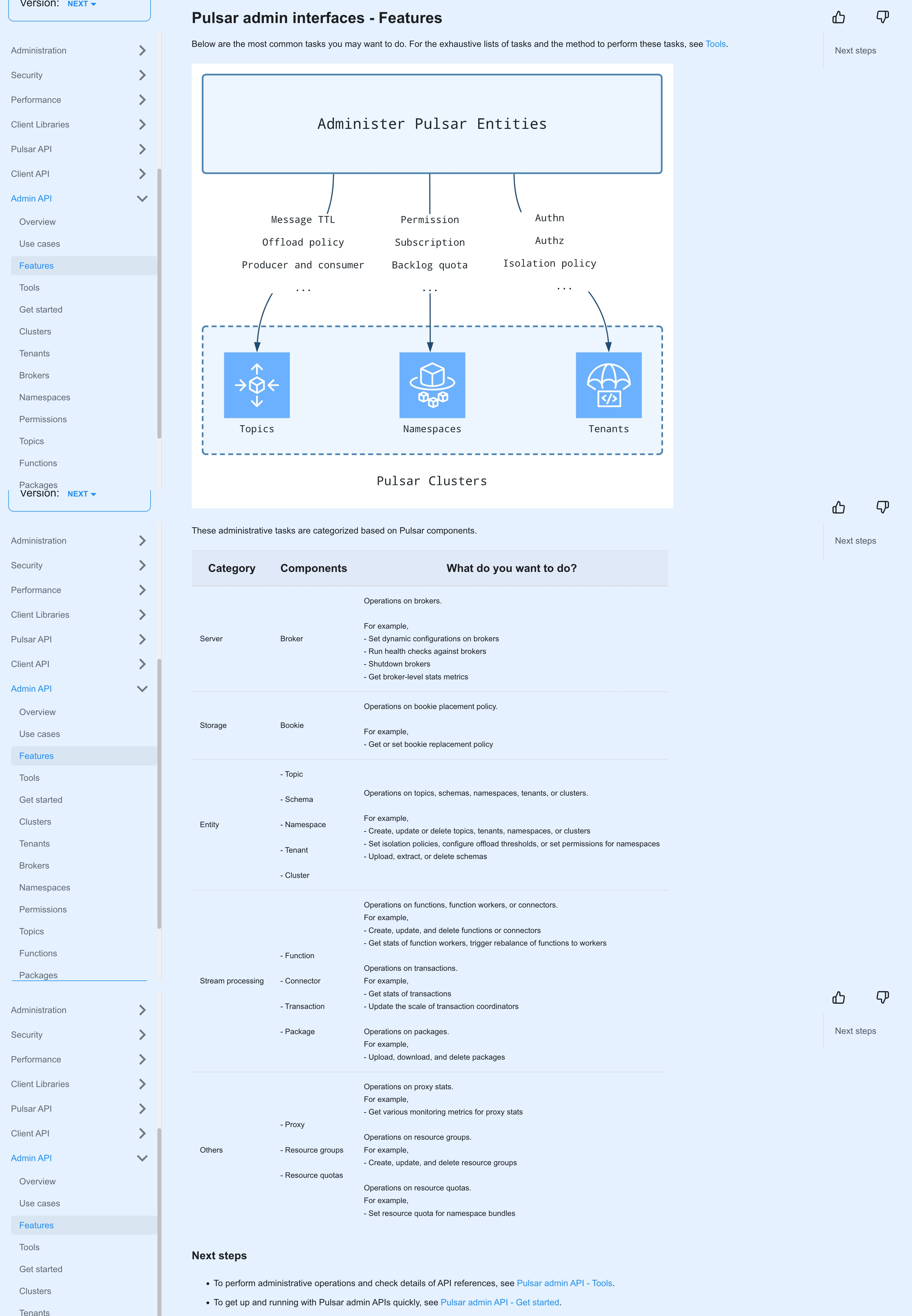
+Below are the most common tasks you may want to do. For the exhaustive lists of tasks and the method to perform these tasks, see [Tools](admin-api-tools.md).
+
+
+
+These administrative tasks are categorized based on Pulsar components.
+
+Category |Components|What do you want to do?
+|---|---|---
+Server|Broker|Operations on brokers.<br/><br/>For example, <br/>- Set dynamic configurations on brokers<br/> - Run health checks against brokers<br/> - Shutdown brokers<br/> - Get broker-level stats metrics
+Storage|Bookie|Operations on bookie placement policy. <br/><br/>For example, <br/> - Get or set bookie replacement policy
+Entity|- Topic <br/><br/> - Schema <br/><br/> - Namespace <br/><br/> - Tenant <br/><br/> - Cluster|Operations on topics, schemas, namespaces, tenants, or clusters.<br/><br/> For example, <br/> - Create, update or delete topics, tenants, namespaces, or clusters <br/> - Set isolation policies, configure offload thresholds, or set permissions for namespaces <br/> - Upload, extract, or delete schemas
Review Comment:
Entities?
##########
docs/admin-api-use-cases.md:
##########
@@ -0,0 +1,28 @@
+---
+id: admin-api-use-cases
+title: Pulsar admin interfaces - Use cases
+sidebar_label: "Use cases"
+---
+
+````mdx-code-block
+import Tabs from '@theme/Tabs';
+import TabItem from '@theme/TabItem';
+````
+
+Pulsar admin APIs are one of the best productivity tools. You can perform various tasks with them, for example:
+
+- administering Pulsar instances easily by creating, updating, or deleting objects with a single line of command, which increases management efficiency.
+
+- monitoring Pulsar or troubleshooting issues by getting the status and information about Pulsar clusters, which reduces maintenance costs.
+
+- facilitating the workflow of application development by implementing admin interface clients using your preferred languages (e.g., Go, Python, C++) based on REST APIs, which enhances developer experiences.
Review Comment:
Facilitating
--
This is an automated message from the Apache Git Service.
To respond to the message, please log on to GitHub and use the
URL above to go to the specific comment.
To unsubscribe, e-mail: commits-unsubscribe@pulsar.apache.org
For queries about this service, please contact Infrastructure at:
users@infra.apache.org
[GitHub] [pulsar-site] Anonymitaet commented on a diff in pull request #403: [feat][doc] add Use Cases, Features, Tools to Pulsar admin API
Posted by "Anonymitaet (via GitHub)" <gi...@apache.org>.
Anonymitaet commented on code in PR #403:
URL: https://github.com/apache/pulsar-site/pull/403#discussion_r1100925893
##########
docs/admin-api-overview.md:
##########
@@ -11,38 +11,14 @@ import TabItem from '@theme/TabItem';
Pulsar admin APIs enable you to administer clusters programmatically. For example, you can create, update, delete, and manage all the entities within Pulsar instances (such as clusters, namespaces, tenants, topics, schemas, connectors, functions, and so on), and set various policies for data, resources, and security.
-
+
-You can interact with the admin interface via:
+### Next steps
-- The `pulsar-admin` CLI tool, which is available in the `bin` folder of your Pulsar installation:
+- To learn usage scenarios, see [Pulsar admin API - Use cases](admin-api-use-cases.md).
- ```shell
- bin/pulsar-admin
- ```
+- To learn common administrative tasks, see [Pulsar admin API - Features](admin-api-features.md).
- :::tip
-
- For the latest and complete information about `Pulsar admin`, including commands, flags, descriptions, and more information, see [Pulsar admin doc](/tools/pulsar-admin/).
+- To perform administrative operations and check details of API references, see [Pulsar admin API - Tools](admin-api-tools.md).
- [Pulsar Shell](administration-pulsar-shell.md) extends `pulsar-admin` with an improved user experience for more flexibility and easier navigation between multiple clusters.
-
- :::
-
-- HTTP calls, which are made against the admin [REST API](reference-rest-api-overview.md) provided by Pulsar brokers. For some RESTful APIs, they might be redirected to the owner brokers for serving with [`307 Temporary Redirect`](https://developer.mozilla.org/en-US/docs/Web/HTTP/Status/307), hence the HTTP callers should handle `307 Temporary Redirect`. If you use `curl` commands, you should specify `-L` to handle redirections.
-
- :::tip
-
- For the latest and complete information about `REST API`, including parameters, responses, samples, and more, see [REST API doc](reference-rest-api-overview.md).
-
- :::
-
-- A Java client interface.
-
- :::tip
-
- For the latest and complete information about `Java admin API`, including classes, methods, descriptions, and more, see [Java admin API doc](https://pulsar.apache.org/api/admin/).
-
- :::
-
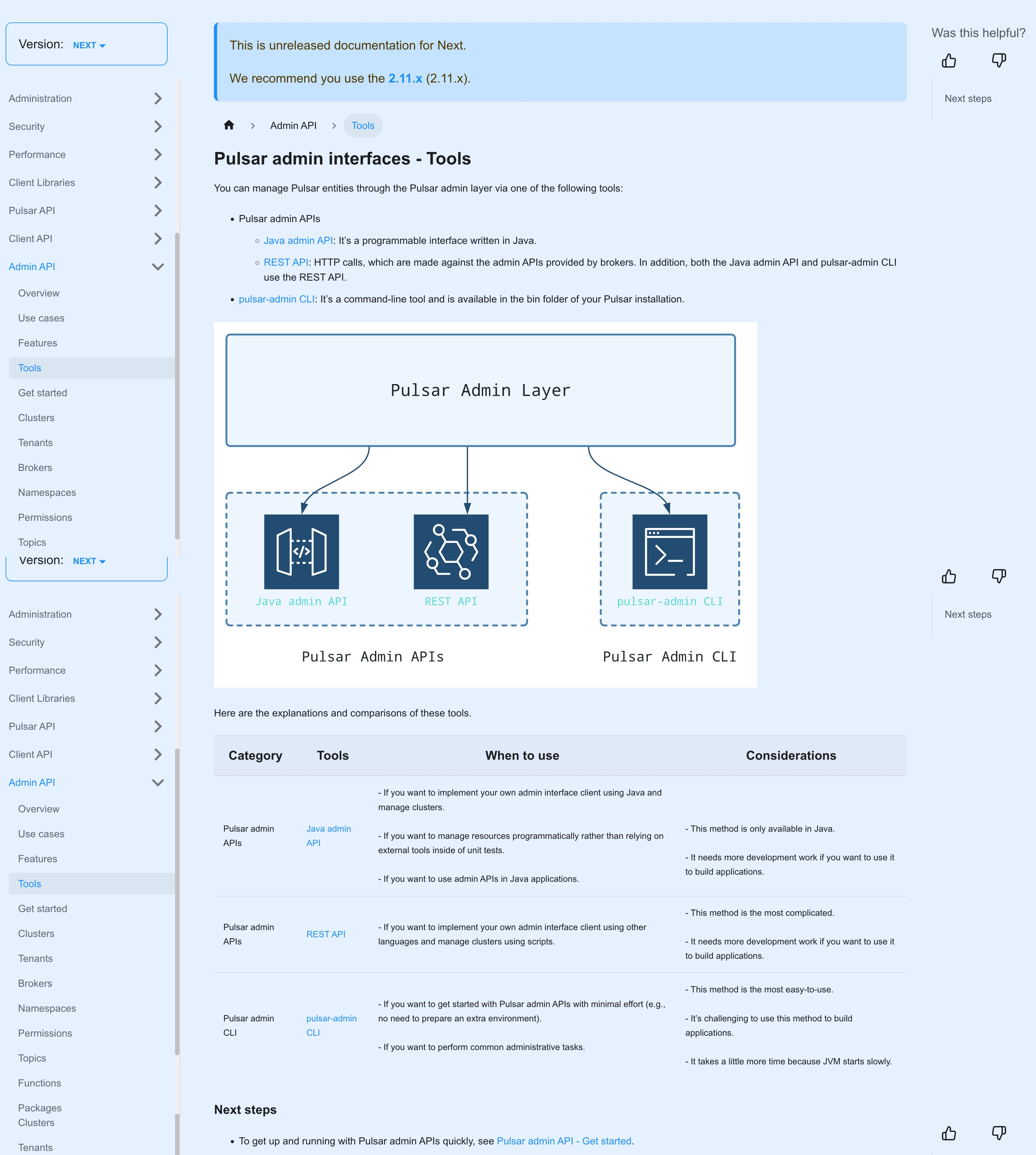
-> **The REST API is the admin interface**. Both the `pulsar-admin` CLI tool and the Java client use the REST API. If you implement your own admin interface client, you should use the REST API.
Review Comment:
This has been added to "Tools" page.
--
This is an automated message from the Apache Git Service.
To respond to the message, please log on to GitHub and use the
URL above to go to the specific comment.
To unsubscribe, e-mail: commits-unsubscribe@pulsar.apache.org
For queries about this service, please contact Infrastructure at:
users@infra.apache.org
[GitHub] [pulsar-site] Anonymitaet merged pull request #403: [feat][doc] add Use Cases, Features, Tools to Pulsar admin API
Posted by "Anonymitaet (via GitHub)" <gi...@apache.org>.
Anonymitaet merged PR #403:
URL: https://github.com/apache/pulsar-site/pull/403


--
This is an automated message from the Apache Git Service.
To respond to the message, please log on to GitHub and use the
URL above to go to the specific comment.

To unsubscribe, e-mail: commits-unsubscribe@pulsar.apache.org

For queries about this service, please contact Infrastructure at:
users@infra.apache.org
[GitHub] [pulsar-site] Anonymitaet commented on pull request #403: [feat][doc] add Use Cases, Features, Tools to Pulsar admin API
Posted by "Anonymitaet (via GitHub)" <gi...@apache.org>.
Anonymitaet commented on PR #403:
URL: https://github.com/apache/pulsar-site/pull/403#issuecomment-1423546100
All previews look good:
- Overview
<img width="1619" alt="image" src="https://user-images.githubusercontent.com/50226895/217705074-ad4bc494-2bd5-4c8d-9010-55de58698b6f.png">
- Use cases
<img width="1665" alt="image" src="https://user-images.githubusercontent.com/50226895/217705213-ee4d19b0-0023-4c0a-aa46-57bf9550c765.png">
- Features
- Tools
--
This is an automated message from the Apache Git Service.
To respond to the message, please log on to GitHub and use the
URL above to go to the specific comment.
To unsubscribe, e-mail: commits-unsubscribe@pulsar.apache.org
For queries about this service, please contact Infrastructure at:
users@infra.apache.org
[GitHub] [pulsar-site] Anonymitaet commented on pull request #403: [feat][doc] add Use Cases, Features, Tools to Pulsar admin API
Posted by "Anonymitaet (via GitHub)" <gi...@apache.org>.
Anonymitaet commented on PR #403:
URL: https://github.com/apache/pulsar-site/pull/403#issuecomment-1425059900

   @hangc0276
   > The code demo doesn't include in this PR?
   Yes, it will be included in the "Quick Start" topic rather than here.

   I've incorporated your comments, PTAL. Feel free to approve if no more comments, thanks!


--
This is an automated message from the Apache Git Service.
To respond to the message, please log on to GitHub and use the
URL above to go to the specific comment.

To unsubscribe, e-mail: commits-unsubscribe@pulsar.apache.org

For queries about this service, please contact Infrastructure at:
users@infra.apache.org
[GitHub] [pulsar-site] Anonymitaet commented on a diff in pull request #403: [feat][doc] add Use Cases, Features, Tools to Pulsar admin API
Posted by "Anonymitaet (via GitHub)" <gi...@apache.org>.
Anonymitaet commented on code in PR #403:
URL: https://github.com/apache/pulsar-site/pull/403#discussion_r1100925893
##########
docs/admin-api-overview.md:
##########
@@ -11,38 +11,14 @@ import TabItem from '@theme/TabItem';
Pulsar admin APIs enable you to administer clusters programmatically. For example, you can create, update, delete, and manage all the entities within Pulsar instances (such as clusters, namespaces, tenants, topics, schemas, connectors, functions, and so on), and set various policies for data, resources, and security.
-
+
-You can interact with the admin interface via:
+### Next steps
-- The `pulsar-admin` CLI tool, which is available in the `bin` folder of your Pulsar installation:
+- To learn usage scenarios, see [Pulsar admin API - Use cases](admin-api-use-cases.md).
- ```shell
- bin/pulsar-admin
- ```
+- To learn common administrative tasks, see [Pulsar admin API - Features](admin-api-features.md).
- :::tip
-
- For the latest and complete information about `Pulsar admin`, including commands, flags, descriptions, and more information, see [Pulsar admin doc](/tools/pulsar-admin/).
+- To perform administrative operations and check details of API references, see [Pulsar admin API - Tools](admin-api-tools.md).
- [Pulsar Shell](administration-pulsar-shell.md) extends `pulsar-admin` with an improved user experience for more flexibility and easier navigation between multiple clusters.
-
- :::
-
-- HTTP calls, which are made against the admin [REST API](reference-rest-api-overview.md) provided by Pulsar brokers. For some RESTful APIs, they might be redirected to the owner brokers for serving with [`307 Temporary Redirect`](https://developer.mozilla.org/en-US/docs/Web/HTTP/Status/307), hence the HTTP callers should handle `307 Temporary Redirect`. If you use `curl` commands, you should specify `-L` to handle redirections.
-
- :::tip
-
- For the latest and complete information about `REST API`, including parameters, responses, samples, and more, see [REST API doc](reference-rest-api-overview.md).
-
- :::
-
-- A Java client interface.
-
- :::tip
-
- For the latest and complete information about `Java admin API`, including classes, methods, descriptions, and more, see [Java admin API doc](https://pulsar.apache.org/api/admin/).
-
- :::
-
-> **The REST API is the admin interface**. Both the `pulsar-admin` CLI tool and the Java client use the REST API. If you implement your own admin interface client, you should use the REST API.
Review Comment:
This has been moved and reorganzed to the "Tools" page.
##########
docs/admin-api-overview.md:
##########
@@ -11,38 +11,14 @@ import TabItem from '@theme/TabItem';
Pulsar admin APIs enable you to administer clusters programmatically. For example, you can create, update, delete, and manage all the entities within Pulsar instances (such as clusters, namespaces, tenants, topics, schemas, connectors, functions, and so on), and set various policies for data, resources, and security.
-
+
-You can interact with the admin interface via:
+### Next steps
-- The `pulsar-admin` CLI tool, which is available in the `bin` folder of your Pulsar installation:
+- To learn usage scenarios, see [Pulsar admin API - Use cases](admin-api-use-cases.md).
- ```shell
- bin/pulsar-admin
- ```
+- To learn common administrative tasks, see [Pulsar admin API - Features](admin-api-features.md).
- :::tip
-
- For the latest and complete information about `Pulsar admin`, including commands, flags, descriptions, and more information, see [Pulsar admin doc](/tools/pulsar-admin/).
+- To perform administrative operations and check details of API references, see [Pulsar admin API - Tools](admin-api-tools.md).
- [Pulsar Shell](administration-pulsar-shell.md) extends `pulsar-admin` with an improved user experience for more flexibility and easier navigation between multiple clusters.
-
- :::
-
-- HTTP calls, which are made against the admin [REST API](reference-rest-api-overview.md) provided by Pulsar brokers. For some RESTful APIs, they might be redirected to the owner brokers for serving with [`307 Temporary Redirect`](https://developer.mozilla.org/en-US/docs/Web/HTTP/Status/307), hence the HTTP callers should handle `307 Temporary Redirect`. If you use `curl` commands, you should specify `-L` to handle redirections.
-
- :::tip
-
- For the latest and complete information about `REST API`, including parameters, responses, samples, and more, see [REST API doc](reference-rest-api-overview.md).
-
- :::
-
-- A Java client interface.
-
- :::tip
-
- For the latest and complete information about `Java admin API`, including classes, methods, descriptions, and more, see [Java admin API doc](https://pulsar.apache.org/api/admin/).
-
- :::
-
-> **The REST API is the admin interface**. Both the `pulsar-admin` CLI tool and the Java client use the REST API. If you implement your own admin interface client, you should use the REST API.
Review Comment:
This has been moved and reorganized to the "Tools" page.
--
This is an automated message from the Apache Git Service.
To respond to the message, please log on to GitHub and use the
URL above to go to the specific comment.
To unsubscribe, e-mail: commits-unsubscribe@pulsar.apache.org
For queries about this service, please contact Infrastructure at:
users@infra.apache.org
[GitHub] [pulsar-site] Anonymitaet commented on a diff in pull request #403: [feat][doc] add Use Cases, Features, Tools to Pulsar admin API
Posted by "Anonymitaet (via GitHub)" <gi...@apache.org>.
Anonymitaet commented on code in PR #403:
URL: https://github.com/apache/pulsar-site/pull/403#discussion_r1100925893
##########
docs/admin-api-overview.md:
##########
@@ -11,38 +11,14 @@ import TabItem from '@theme/TabItem';
Pulsar admin APIs enable you to administer clusters programmatically. For example, you can create, update, delete, and manage all the entities within Pulsar instances (such as clusters, namespaces, tenants, topics, schemas, connectors, functions, and so on), and set various policies for data, resources, and security.
-
+
-You can interact with the admin interface via:
+### Next steps
-- The `pulsar-admin` CLI tool, which is available in the `bin` folder of your Pulsar installation:
+- To learn usage scenarios, see [Pulsar admin API - Use cases](admin-api-use-cases.md).
- ```shell
- bin/pulsar-admin
- ```
+- To learn common administrative tasks, see [Pulsar admin API - Features](admin-api-features.md).
- :::tip
-
- For the latest and complete information about `Pulsar admin`, including commands, flags, descriptions, and more information, see [Pulsar admin doc](/tools/pulsar-admin/).
+- To perform administrative operations and check details of API references, see [Pulsar admin API - Tools](admin-api-tools.md).
- [Pulsar Shell](administration-pulsar-shell.md) extends `pulsar-admin` with an improved user experience for more flexibility and easier navigation between multiple clusters.
-
- :::
-
-- HTTP calls, which are made against the admin [REST API](reference-rest-api-overview.md) provided by Pulsar brokers. For some RESTful APIs, they might be redirected to the owner brokers for serving with [`307 Temporary Redirect`](https://developer.mozilla.org/en-US/docs/Web/HTTP/Status/307), hence the HTTP callers should handle `307 Temporary Redirect`. If you use `curl` commands, you should specify `-L` to handle redirections.
-
- :::tip
-
- For the latest and complete information about `REST API`, including parameters, responses, samples, and more, see [REST API doc](reference-rest-api-overview.md).
-
- :::
-
-- A Java client interface.
-
- :::tip
-
- For the latest and complete information about `Java admin API`, including classes, methods, descriptions, and more, see [Java admin API doc](https://pulsar.apache.org/api/admin/).
-
- :::
-
-> **The REST API is the admin interface**. Both the `pulsar-admin` CLI tool and the Java client use the REST API. If you implement your own admin interface client, you should use the REST API.
Review Comment:
This has been moved and reorganized to "Tools".
--
This is an automated message from the Apache Git Service.
To respond to the message, please log on to GitHub and use the
URL above to go to the specific comment.
To unsubscribe, e-mail: commits-unsubscribe@pulsar.apache.org
For queries about this service, please contact Infrastructure at:
users@infra.apache.org
[GitHub] [pulsar-site] Anonymitaet commented on a diff in pull request #403: [feat][doc] add Use Cases, Features, Tools to Pulsar admin API
Posted by "Anonymitaet (via GitHub)" <gi...@apache.org>.
Anonymitaet commented on code in PR #403:
URL: https://github.com/apache/pulsar-site/pull/403#discussion_r1100925542
##########
docs/admin-api-overview.md:
##########
@@ -11,38 +11,14 @@ import TabItem from '@theme/TabItem';
Pulsar admin APIs enable you to administer clusters programmatically. For example, you can create, update, delete, and manage all the entities within Pulsar instances (such as clusters, namespaces, tenants, topics, schemas, connectors, functions, and so on), and set various policies for data, resources, and security.
-
+
-You can interact with the admin interface via:
+### Next steps
-- The `pulsar-admin` CLI tool, which is available in the `bin` folder of your Pulsar installation:
+- To learn usage scenarios, see [Pulsar admin API - Use cases](admin-api-use-cases.md).
- ```shell
- bin/pulsar-admin
- ```
+- To learn common administrative tasks, see [Pulsar admin API - Features](admin-api-features.md).
- :::tip
-
- For the latest and complete information about `Pulsar admin`, including commands, flags, descriptions, and more information, see [Pulsar admin doc](/tools/pulsar-admin/).
+- To perform administrative operations and check details of API references, see [Pulsar admin API - Tools](admin-api-tools.md).
- [Pulsar Shell](administration-pulsar-shell.md) extends `pulsar-admin` with an improved user experience for more flexibility and easier navigation between multiple clusters.
-
- :::
-
-- HTTP calls, which are made against the admin [REST API](reference-rest-api-overview.md) provided by Pulsar brokers. For some RESTful APIs, they might be redirected to the owner brokers for serving with [`307 Temporary Redirect`](https://developer.mozilla.org/en-US/docs/Web/HTTP/Status/307), hence the HTTP callers should handle `307 Temporary Redirect`. If you use `curl` commands, you should specify `-L` to handle redirections.
Review Comment:
This part will be moved to "Get started" since it's not closely related to "Overview".
--
This is an automated message from the Apache Git Service.
To respond to the message, please log on to GitHub and use the
URL above to go to the specific comment.
To unsubscribe, e-mail: commits-unsubscribe@pulsar.apache.org
For queries about this service, please contact Infrastructure at:
users@infra.apache.org