You are viewing a plain text version of this content. The canonical link for it is here.
Posted to notifications@apisix.apache.org by "joranbo (via GitHub)" <gi...@apache.org> on 2023/07/20 06:47:37 UTC
[GitHub] [apisix] joranbo opened a new issue, #9870: how to use apisix stream_route connction mysql in k8s
joranbo opened a new issue, #9870:
URL: https://github.com/apache/apisix/issues/9870
### Description
k8s port,

stream_route:
curl http://127.0.0.1:9180/apisix/admin/stream_routes/1 -H 'X-API-KEY: edd1c9f034335f136f87ad84b625c8f1' -X PUT -d '
{
"server_addr": "127.0.0.1",
"server_port": 3306,
"upstream": {
"nodes": {
"mysql:3306": 1
},
"type": "roundrobin"
}
}'
stream_pproxy:

### Environment
- APISIX version (run `apisix version`):
- Operating system (run `uname -a`):
- OpenResty / Nginx version (run `openresty -V` or `nginx -V`):
- etcd version, if relevant (run `curl http://127.0.0.1:9090/v1/server_info`):
- APISIX Dashboard version, if relevant:
- Plugin runner version, for issues related to plugin runners:
- LuaRocks version, for installation issues (run `luarocks --version`):
--
This is an automated message from the Apache Git Service.
To respond to the message, please log on to GitHub and use the
URL above to go to the specific comment.
To unsubscribe, e-mail: notifications-unsubscribe@apisix.apache.org.apache.org
For queries about this service, please contact Infrastructure at:
users@infra.apache.org
[GitHub] [apisix] Revolyssup commented on issue #9870: how to use apisix stream_route connction mysql in k8s
Posted by "Revolyssup (via GitHub)" <gi...@apache.org>.
Revolyssup commented on issue #9870:
URL: https://github.com/apache/apisix/issues/9870#issuecomment-1643573140
> 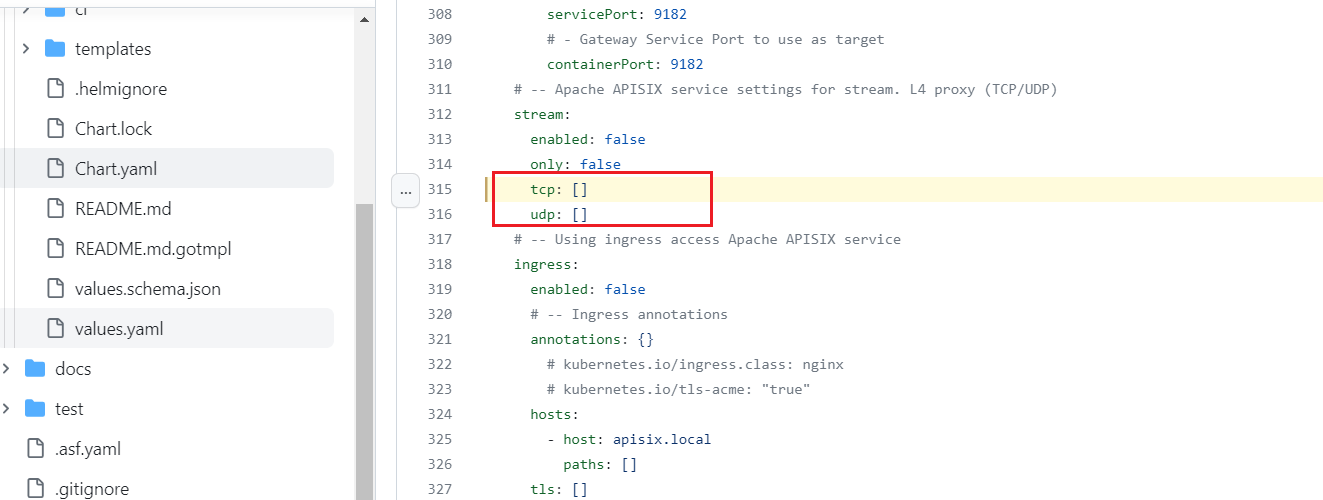 Is this where the port is configured? 32333 is not mapped to tcp proxy port. How is it set up? Could you please tell me, thank you
Yes this is where its setup. If you have used helm to install. Either you can edit this and pass the new values.yaml file using `-f` flag with helm install.
Or
With helm install, you can add `--set` flag to overridde these valued. For eg:
`helm install ...... --set gateway.stream.enabled=true --set gateway.stream.tcp[0]=<your port> .......`
After installation like this, doing you should see extra port mappings on your apisix-gateway service.
--
This is an automated message from the Apache Git Service.
To respond to the message, please log on to GitHub and use the
URL above to go to the specific comment.
To unsubscribe, e-mail: notifications-unsubscribe@apisix.apache.org
For queries about this service, please contact Infrastructure at:
users@infra.apache.org
[GitHub] [apisix] Revolyssup commented on issue #9870: how to use apisix stream_route connction mysql in k8s
Posted by "Revolyssup (via GitHub)" <gi...@apache.org>.
Revolyssup commented on issue #9870:
URL: https://github.com/apache/apisix/issues/9870#issuecomment-1643526075

   @joranbo What installation steps did you follow?


--
This is an automated message from the Apache Git Service.
To respond to the message, please log on to GitHub and use the
URL above to go to the specific comment.

To unsubscribe, e-mail: notifications-unsubscribe@apisix.apache.org

For queries about this service, please contact Infrastructure at:
users@infra.apache.org
[GitHub] [apisix] joranbo commented on issue #9870: how to use apisix stream_route connction mysql in k8s
Posted by "joranbo (via GitHub)" <gi...@apache.org>.
joranbo commented on issue #9870:
URL: https://github.com/apache/apisix/issues/9870#issuecomment-1643657008
> <your port>
thank you very much!
This method is not effective


vim values.yml
This method is effective

--
This is an automated message from the Apache Git Service.
To respond to the message, please log on to GitHub and use the
URL above to go to the specific comment.
To unsubscribe, e-mail: notifications-unsubscribe@apisix.apache.org
For queries about this service, please contact Infrastructure at:
users@infra.apache.org
[GitHub] [apisix] joranbo closed issue #9870: how to use apisix stream_route connction mysql in k8s
Posted by "joranbo (via GitHub)" <gi...@apache.org>.
joranbo closed issue #9870: how to  use  apisix   stream_route connction  mysql  in  k8s
URL: https://github.com/apache/apisix/issues/9870


--
This is an automated message from the Apache Git Service.
To respond to the message, please log on to GitHub and use the
URL above to go to the specific comment.

To unsubscribe, e-mail: notifications-unsubscribe@apisix.apache.org

For queries about this service, please contact Infrastructure at:
users@infra.apache.org
[GitHub] [apisix] Revolyssup commented on issue #9870: how to use apisix stream_route connction mysql in k8s
Posted by "Revolyssup (via GitHub)" <gi...@apache.org>.
Revolyssup commented on issue #9870:
URL: https://github.com/apache/apisix/issues/9870#issuecomment-1643680557

   @joranbo You can close the issue, if it satisfies your requirement.


--
This is an automated message from the Apache Git Service.
To respond to the message, please log on to GitHub and use the
URL above to go to the specific comment.

To unsubscribe, e-mail: notifications-unsubscribe@apisix.apache.org

For queries about this service, please contact Infrastructure at:
users@infra.apache.org
[GitHub] [apisix] joranbo commented on issue #9870: how to use apisix stream_route connction mysql in k8s
Posted by "joranbo (via GitHub)" <gi...@apache.org>.
joranbo commented on issue #9870:
URL: https://github.com/apache/apisix/issues/9870#issuecomment-1643565424

Is this where the port is configured? 32333 is not mapped to tcp proxy port. How is it set up? Could you please tell me, thank you
--
This is an automated message from the Apache Git Service.
To respond to the message, please log on to GitHub and use the
URL above to go to the specific comment.
To unsubscribe, e-mail: notifications-unsubscribe@apisix.apache.org
For queries about this service, please contact Infrastructure at:
users@infra.apache.org
[GitHub] [apisix] joranbo commented on issue #9870: how to use apisix stream_route connction mysql in k8s
Posted by "joranbo (via GitHub)" <gi...@apache.org>.
joranbo commented on issue #9870:
URL: https://github.com/apache/apisix/issues/9870#issuecomment-1643589075
> >  Is this where the port is configured? 32333 is not mapped to tcp proxy port. How is it set up? Could you please tell me, thank you
>
> Yes this is where its setup. If you have used helm to install. Either you can edit this and pass the new values.yaml file using `-f` flag with helm install. Or With helm install, you can add `--set` flag to overridde these valued. For eg: `helm install ...... --set gateway.stream.enabled=true --set gateway.stream.tcp[0]=<your port> .......`
>
> After installation like this, doing you should see extra port mappings on your apisix-gateway service.
Okay, I'll give it a try. Thank you
--
This is an automated message from the Apache Git Service.
To respond to the message, please log on to GitHub and use the
URL above to go to the specific comment.
To unsubscribe, e-mail: notifications-unsubscribe@apisix.apache.org
For queries about this service, please contact Infrastructure at:
users@infra.apache.org