You are viewing a plain text version of this content. The canonical link for it is here.
Posted to commits@spark.apache.org by sr...@apache.org on 2020/09/04 13:22:30 UTC
[spark-website] branch asf-site updated: Update doc related to gpg
key exports
This is an automated email from the ASF dual-hosted git repository.
srowen pushed a commit to branch asf-site
in repository https://gitbox.apache.org/repos/asf/spark-website.git
The following commit(s) were added to refs/heads/asf-site by this push:
new be6e744 Update doc related to gpg key exports
be6e744 is described below
commit be6e744d336bef26beb7c22da2e01a18f19587db
Author: zhengruifeng <ru...@foxmail.com>
AuthorDate: Fri Sep 4 08:22:13 2020 -0500
Update doc related to gpg key exports
When preparing for 3.0.1-rc, I encounted issues related to gpg keys:
1, locally: I generated keys and used `gpg --export` to export it;
2, on an AWS EC2 instance: then imported keys by `gpg --import` commands and then run the `do-release-docker.sh`. I found that the script can not find the key.
That is because:
according to [export-secret-key](https://infra.apache.org/openpgp.html#export-secret-key)
> To ensure that you do not accidentally expose private keys, the GnuPG --export operation exports only public keys.
`gpg --export` only exports **public** keys, while `do-release-docker.sh` needs a **secret/private** key. So we should use `gpg --export-secret-keys` instead `gpg --export`.
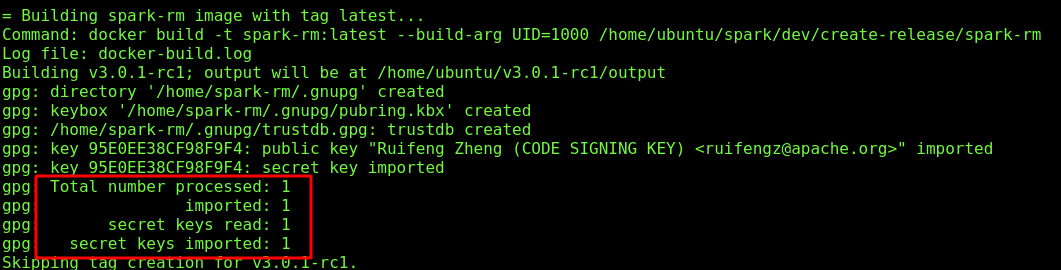
Author: zhengruifeng <ru...@foxmail.com>
Closes #288 from zhengruifeng/fix_gpg_exports.
---
release-process.md | 4 ++--
1 file changed, 2 insertions(+), 2 deletions(-)
diff --git a/release-process.md b/release-process.md
index 2b38b0b..db40a50 100644
--- a/release-process.md
+++ b/release-process.md
@@ -43,8 +43,8 @@ After generating the gpg key, you need to upload your key to a public key server
<a href="https://www.apache.org/dev/openpgp.html#generate-key">https://www.apache.org/dev/openpgp.html#generate-key</a>
for details.
-If you want to do the release on another machine, you can transfer your gpg key to that machine
-via the `gpg --export` and `gpg --import` commands.
+If you want to do the release on another machine, you can transfer your secret key to that machine
+via the `gpg --export-secret-keys` and `gpg --import` commands.
The last step is to update the KEYS file with your code signing key
<a href="https://www.apache.org/dev/openpgp.html#export-public-key">https://www.apache.org/dev/openpgp.html#export-public-key</a>
---------------------------------------------------------------------
To unsubscribe, e-mail: commits-unsubscribe@spark.apache.org
For additional commands, e-mail: commits-help@spark.apache.org