You are viewing a plain text version of this content. The canonical link for it is here.
Posted to commits@iotdb.apache.org by ha...@apache.org on 2023/09/20 11:39:03 UTC
[iotdb-docs] branch main updated: add the dbeaver-jar download URL of V1.2 (#96)
This is an automated email from the ASF dual-hosted git repository.
haonan pushed a commit to branch main
in repository https://gitbox.apache.org/repos/asf/iotdb-docs.git
The following commit(s) were added to refs/heads/main by this push:
new bc57209 add the dbeaver-jar download URL of V1.2 (#96)
bc57209 is described below
commit bc57209b9da58f56cb50d80c0fca0171de3bd688
Author: wanghui42 <10...@users.noreply.github.com>
AuthorDate: Wed Sep 20 19:38:58 2023 +0800
add the dbeaver-jar download URL of V1.2 (#96)
---
.../Master/Ecosystem-Integration/DBeaver.md | 20 +++++++++-----------
.../V1.2.x/Ecosystem-Integration/DBeaver.md | 19 ++++++++-----------
.../Master/Ecosystem-Integration/DBeaver.md | 19 ++++++++-----------
.../V1.2.x/Ecosystem-Integration/DBeaver.md | 19 ++++++++-----------
4 files changed, 33 insertions(+), 44 deletions(-)
diff --git a/src/UserGuide/Master/Ecosystem-Integration/DBeaver.md b/src/UserGuide/Master/Ecosystem-Integration/DBeaver.md
index 4c8b906..ad50638 100644
--- a/src/UserGuide/Master/Ecosystem-Integration/DBeaver.md
+++ b/src/UserGuide/Master/Ecosystem-Integration/DBeaver.md
@@ -51,24 +51,22 @@ DBeaver is a SQL client software application and a database administration tool.
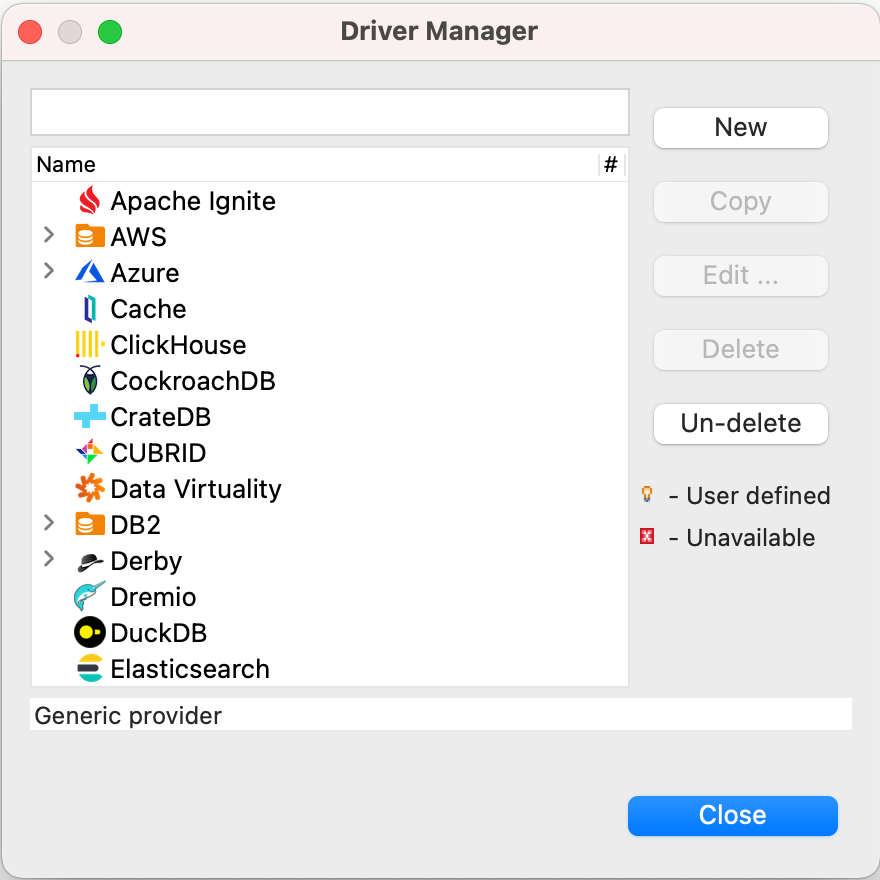
-5. Download [Sources](https://iotdb.apache.org/Download/),unzip it and compile jdbc driver by the following command
-
- ```shell
- mvn clean package -pl iotdb-client/jdbc -am -DskipTests -P get-jar-with-dependencies
- ```
-6. Find and add a lib named `apache-iotdb-jdbc-{version}-jar-with-dependencies.jar`, which should be under `jdbc/target/`, then select `Find Class`.
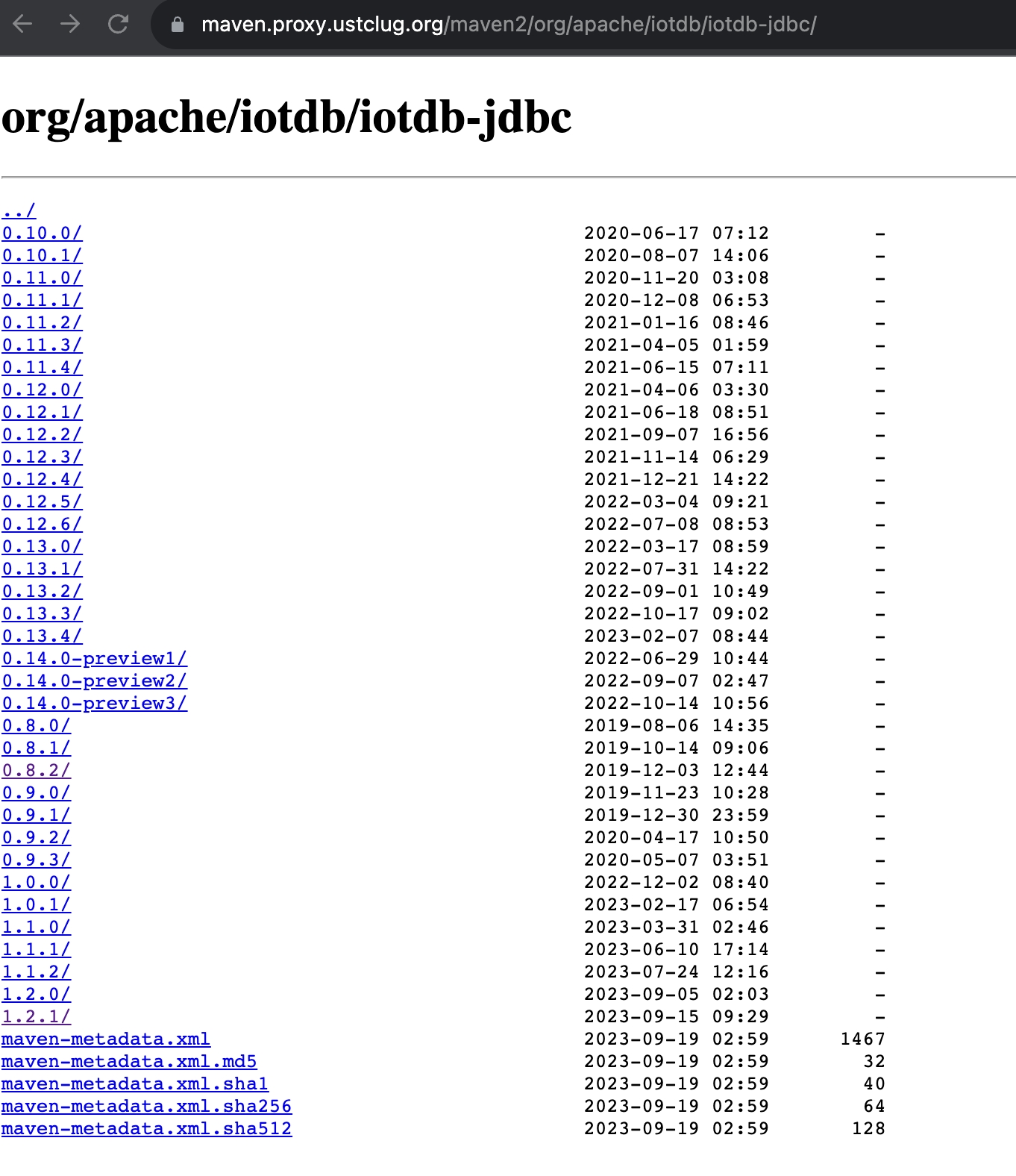
+5. Download `iotdb-jdbc`, from [source1](https://maven.proxy.ustclug.org/maven2/org/apache/iotdb/iotdb-jdbc/) or [source2](https://repo1.maven.org/maven2/org/apache/iotdb/iotdb-jdbc/),choose the corresponding jar file,download the suffix `jar-with-dependencies.jar` file.
+ 
+
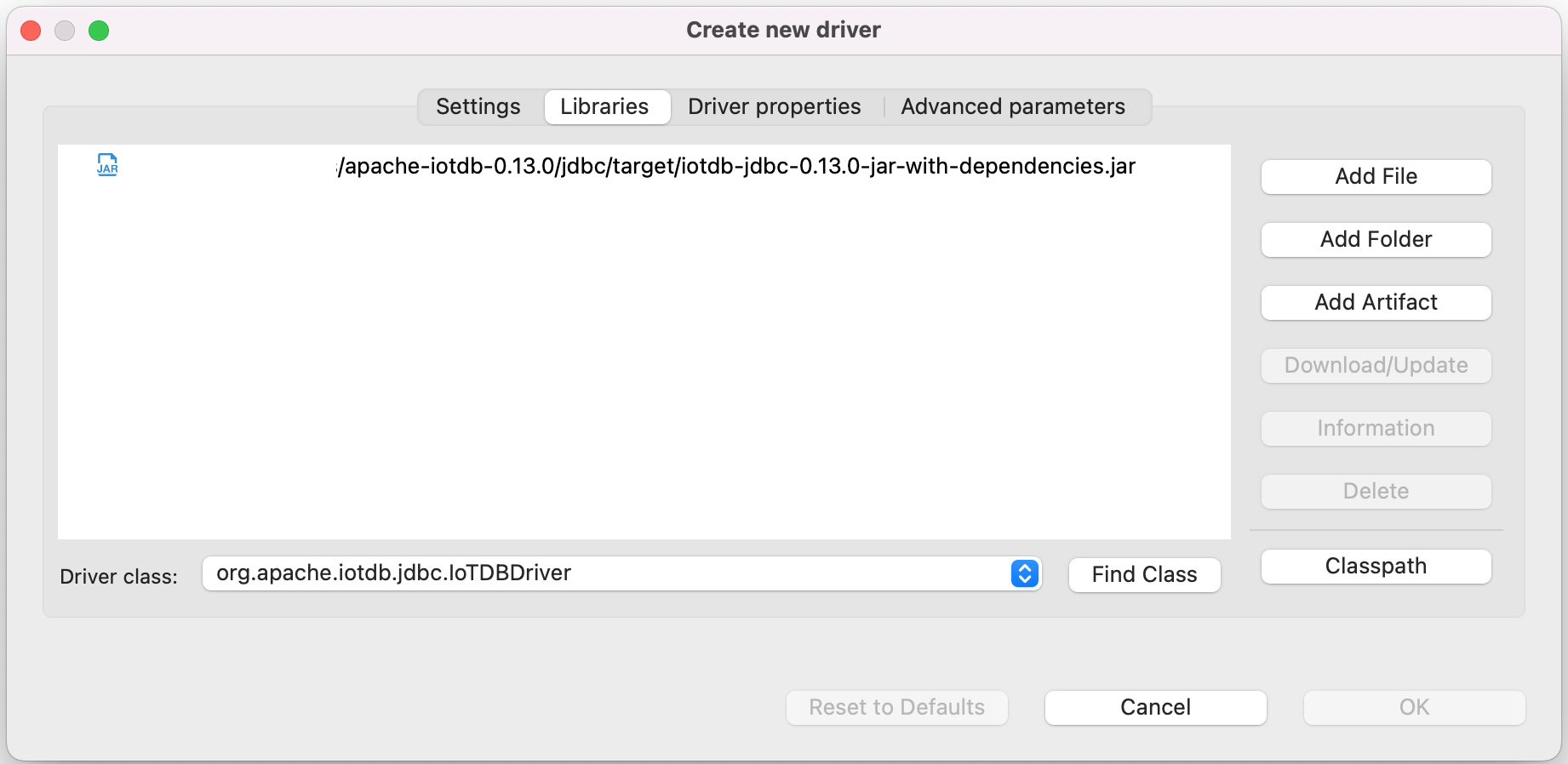
+6. Add the downloaded jar file, then select `Find Class`.
-8. Edit the driver Settings
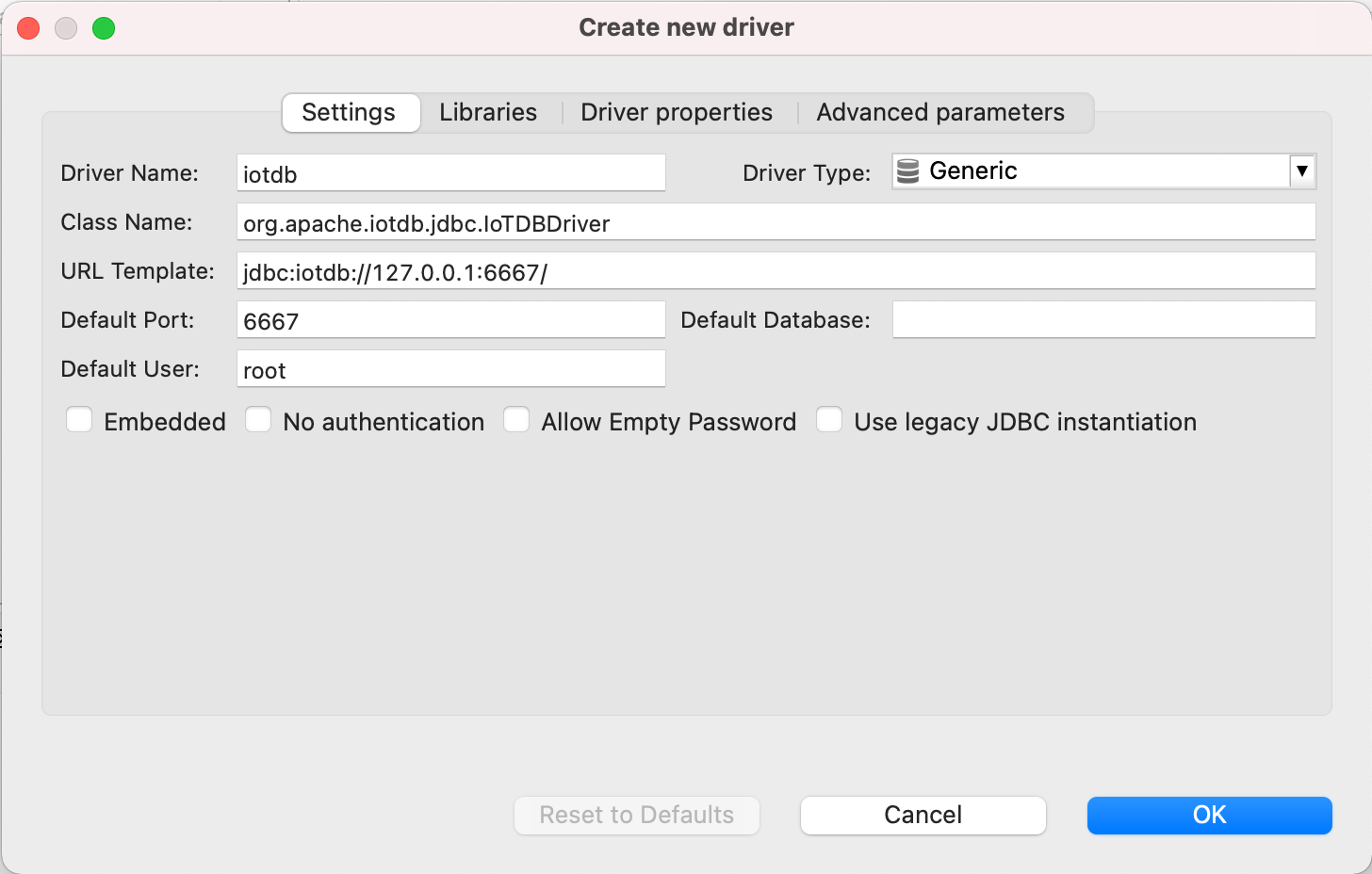
+7. Edit the driver Settings
-9. Open New DataBase Connection and select iotdb
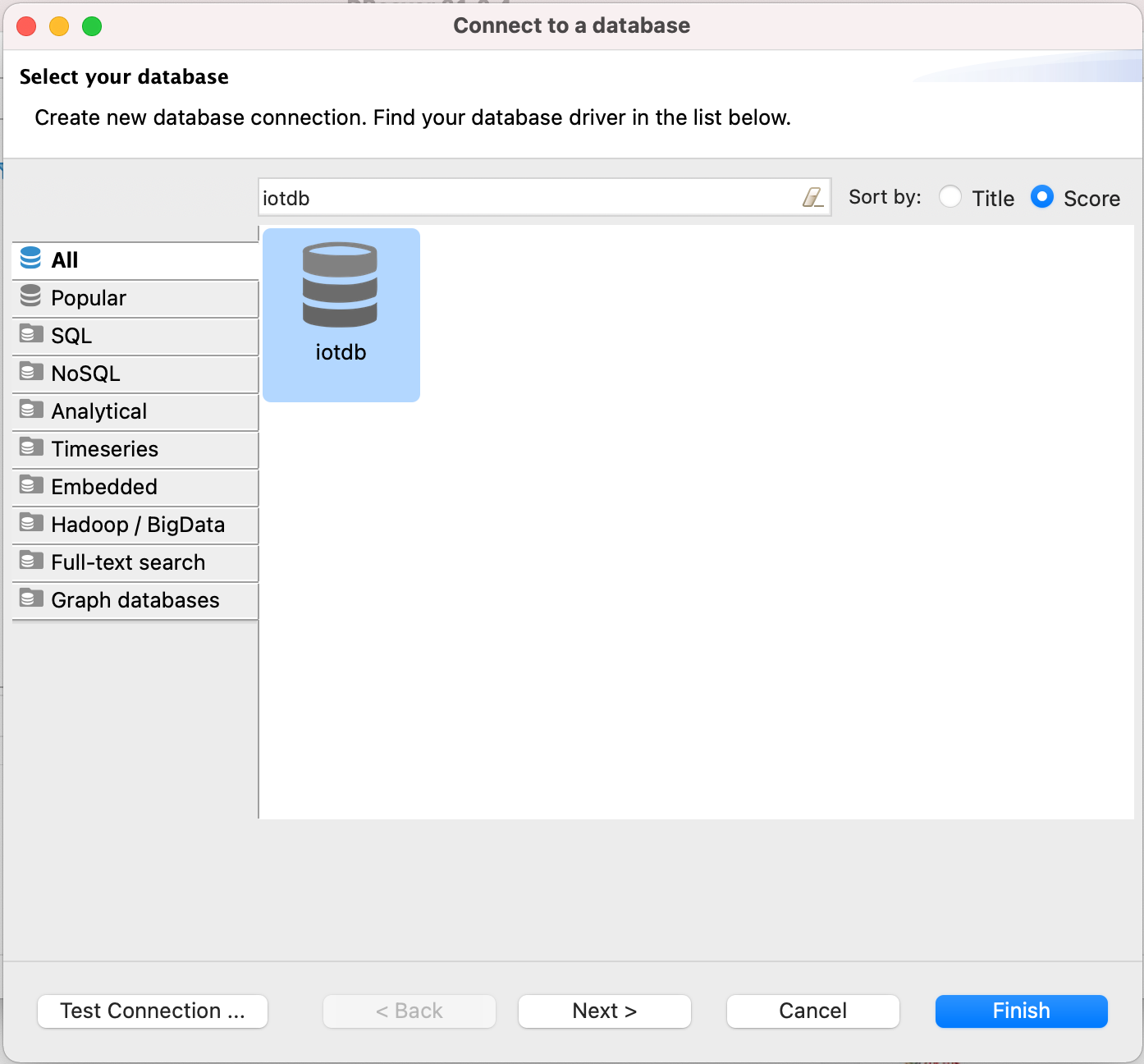
+8. Open New DataBase Connection and select iotdb
-10. Edit JDBC Connection Settings
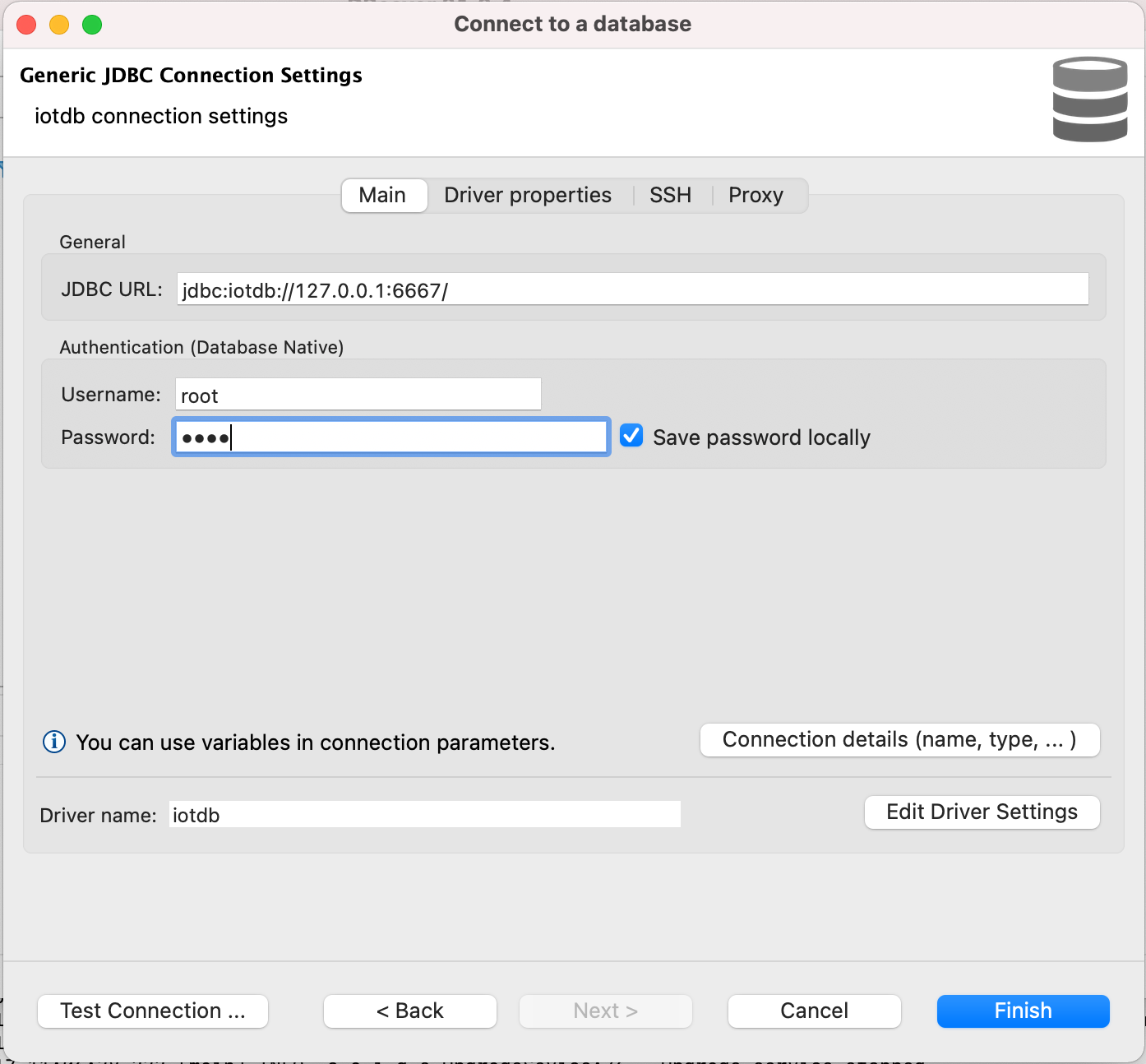
+9. Edit JDBC Connection Settings
```
JDBC URL: jdbc:iotdb://127.0.0.1:6667/
@@ -77,10 +75,10 @@ DBeaver is a SQL client software application and a database administration tool.
```
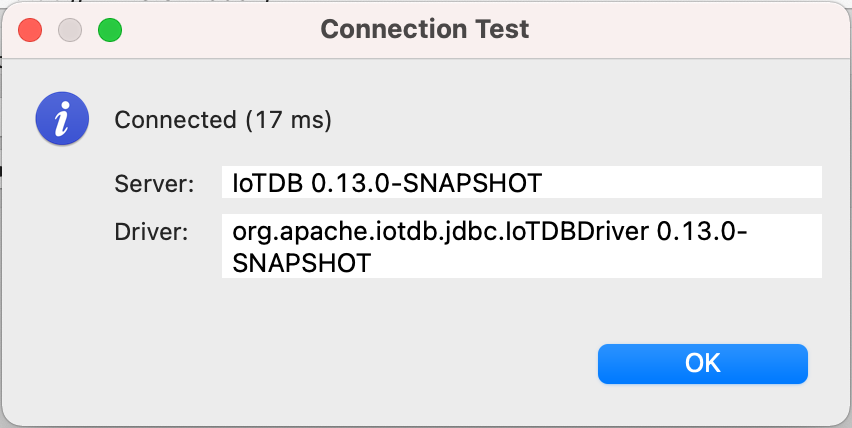
-11. Test Connection
+10. Test Connection
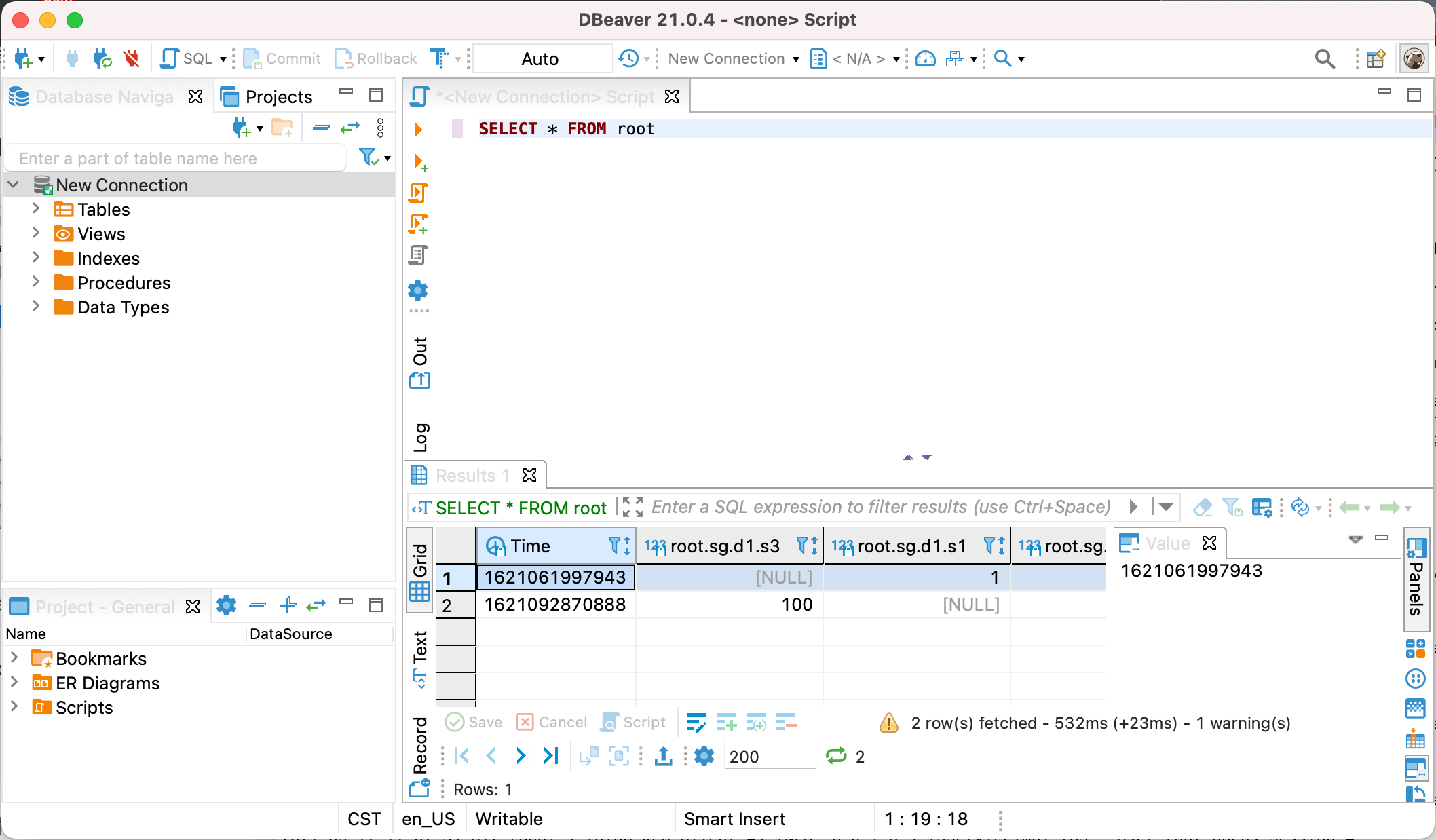
-12. Enjoy IoTDB with DBeaver
+11. Enjoy IoTDB with DBeaver
diff --git a/src/UserGuide/V1.2.x/Ecosystem-Integration/DBeaver.md b/src/UserGuide/V1.2.x/Ecosystem-Integration/DBeaver.md
index 4c8b906..b22e75e 100644
--- a/src/UserGuide/V1.2.x/Ecosystem-Integration/DBeaver.md
+++ b/src/UserGuide/V1.2.x/Ecosystem-Integration/DBeaver.md
@@ -51,24 +51,21 @@ DBeaver is a SQL client software application and a database administration tool.

-5. Download [Sources](https://iotdb.apache.org/Download/),unzip it and compile jdbc driver by the following command
-
- ```shell
- mvn clean package -pl iotdb-client/jdbc -am -DskipTests -P get-jar-with-dependencies
- ```
-6. Find and add a lib named `apache-iotdb-jdbc-{version}-jar-with-dependencies.jar`, which should be under `jdbc/target/`, then select `Find Class`.
+5. Download `iotdb-jdbc` , from [source1](https://maven.proxy.ustclug.org/maven2/org/apache/iotdb/iotdb-jdbc/1.2.1/iotdb-jdbc-1.2.1-jar-with-dependencies.jar) or [source2](https://repo1.maven.org/maven2/org/apache/iotdb/iotdb-jdbc/1.2.1/iotdb-jdbc-1.2.1-jar-with-dependencies.jar).
+
+6. Add the downloaded jar file, then select `Find Class`.

-8. Edit the driver Settings
+7. Edit the driver Settings

-9. Open New DataBase Connection and select iotdb
+8. Open New DataBase Connection and select iotdb

-10. Edit JDBC Connection Settings
+9. Edit JDBC Connection Settings
```
JDBC URL: jdbc:iotdb://127.0.0.1:6667/
@@ -77,10 +74,10 @@ DBeaver is a SQL client software application and a database administration tool.
```

-11. Test Connection
+10. Test Connection

-12. Enjoy IoTDB with DBeaver
+11. Enjoy IoTDB with DBeaver

diff --git a/src/zh/UserGuide/Master/Ecosystem-Integration/DBeaver.md b/src/zh/UserGuide/Master/Ecosystem-Integration/DBeaver.md
index b775002..bd6f65b 100644
--- a/src/zh/UserGuide/Master/Ecosystem-Integration/DBeaver.md
+++ b/src/zh/UserGuide/Master/Ecosystem-Integration/DBeaver.md
@@ -51,24 +51,21 @@ DBeaver 是一个 SQL 客户端和数据库管理工具。DBeaver 可以使用 I

-5. 下载[源代码](https://iotdb.apache.org/zh/Download/),解压并运行下面的命令编译 jdbc 驱动
-
- ```shell
- mvn clean package -pl iotdb-client/jdbc -am -DskipTests -P get-jar-with-dependencies
- ```
-7. 在`jdbc/target/`下找到并添加名为`apache-iotdb-jdbc-{version}-jar-with-dependencies.jar`的库,点击 `Find Class`。
+5. 下载 jdbc 驱动, 点击下列网址 [地址1](https://maven.proxy.ustclug.org/maven2/org/apache/iotdb/iotdb-jdbc/) 或 [地址2](https://repo1.maven.org/maven2/org/apache/iotdb/iotdb-jdbc/),选择对应版本的 jar 包,下载后缀 jar-with-dependencies.jar 的包
+ 
+6. 添加刚刚下载的驱动包,点击 Find Class

-8. 编辑驱动设置
+7. 编辑驱动设置

-9. 新建 DataBase Connection, 选择 iotdb
+8. 新建 DataBase Connection, 选择 iotdb

-10. 编辑 JDBC 连接设置
+9. 编辑 JDBC 连接设置
```
JDBC URL: jdbc:iotdb://127.0.0.1:6667/
@@ -77,10 +74,10 @@ DBeaver 是一个 SQL 客户端和数据库管理工具。DBeaver 可以使用 I
```

-11. 测试连接
+10. 测试连接

-12. 可以开始通过 DBeaver 使用 IoTDB
+11. 可以开始通过 DBeaver 使用 IoTDB

diff --git a/src/zh/UserGuide/V1.2.x/Ecosystem-Integration/DBeaver.md b/src/zh/UserGuide/V1.2.x/Ecosystem-Integration/DBeaver.md
index b775002..3ea4d50 100644
--- a/src/zh/UserGuide/V1.2.x/Ecosystem-Integration/DBeaver.md
+++ b/src/zh/UserGuide/V1.2.x/Ecosystem-Integration/DBeaver.md
@@ -51,24 +51,21 @@ DBeaver 是一个 SQL 客户端和数据库管理工具。DBeaver 可以使用 I

-5. 下载[源代码](https://iotdb.apache.org/zh/Download/),解压并运行下面的命令编译 jdbc 驱动
-
- ```shell
- mvn clean package -pl iotdb-client/jdbc -am -DskipTests -P get-jar-with-dependencies
- ```
-7. 在`jdbc/target/`下找到并添加名为`apache-iotdb-jdbc-{version}-jar-with-dependencies.jar`的库,点击 `Find Class`。
+5. 下载 jdbc 驱动, 可点击下载 [地址1](https://maven.proxy.ustclug.org/maven2/org/apache/iotdb/iotdb-jdbc/1.2.1/iotdb-jdbc-1.2.1-jar-with-dependencies.jar) 或 [地址2](https://repo1.maven.org/maven2/org/apache/iotdb/iotdb-jdbc/1.2.1/iotdb-jdbc-1.2.1-jar-with-dependencies.jar)。
+
+6. 添加刚刚下载的驱动包,点击 Find Class。

-8. 编辑驱动设置
+7. 编辑驱动设置

-9. 新建 DataBase Connection, 选择 iotdb
+8. 新建 DataBase Connection, 选择 iotdb

-10. 编辑 JDBC 连接设置
+9. 编辑 JDBC 连接设置
```
JDBC URL: jdbc:iotdb://127.0.0.1:6667/
@@ -77,10 +74,10 @@ DBeaver 是一个 SQL 客户端和数据库管理工具。DBeaver 可以使用 I
```

-11. 测试连接
+10. 测试连接

-12. 可以开始通过 DBeaver 使用 IoTDB
+11. 可以开始通过 DBeaver 使用 IoTDB
