You are viewing a plain text version of this content. The canonical link for it is here.
Posted to dev@weex.apache.org by GitBox <gi...@apache.org> on 2018/11/08 08:51:36 UTC
[GitHub] Hanks10100 closed pull request #200: add “guide” “docs”
Hanks10100 closed pull request #200: add “guide” “docs”
URL: https://github.com/apache/incubator-weex-site/pull/200
This is a PR merged from a forked repository.
As GitHub hides the original diff on merge, it is displayed below for
the sake of provenance:
As this is a foreign pull request (from a fork), the diff is supplied
below (as it won't show otherwise due to GitHub magic):
diff --git a/.gitignore b/.gitignore
index db3ee9578..7ee441f51 100644
--- a/.gitignore
+++ b/.gitignore
@@ -29,4 +29,3 @@ pids
.yarn-integrity
node_modules/
jspm_packages/
-package-lock.json
diff --git a/README.md b/README.md
index 13a9e5b59..fc867935a 100644
--- a/README.md
+++ b/README.md
@@ -1 +1,26 @@
-# Documents of Weex
+# Weex Website
+
+This is the source code of Weex official website.
+
++ Official website: http://weex.apache.org/
++ Mirror in Alibaba Cloud (faster in China): https://weex-project.io/
+
+## Develop
+
+First you should install the [Node.js](https://nodejs.org/), and install dependencies:
+
+```bash
+npm install
+```
+
+After that, you can start a web server to preview the website on your local machine.
+
+```bash
+npm run dev
+```
+
+It will start a web server at `http://localhost:8080`. The pages will be updated automatically once you save the corresponding source file.
+
+## Contribute
+
+The documents are written in Markdown format located in the `docs` folder. Feel free to send pull requests!
\ No newline at end of file
diff --git a/docs/.vuepress/components/IPhoneImg.vue b/docs/.vuepress/components/IPhoneImg.vue
new file mode 100644
index 000000000..c815f2903
--- /dev/null
+++ b/docs/.vuepress/components/IPhoneImg.vue
@@ -0,0 +1,32 @@
+<template>
+ <div class="wrapper">
+ <div class="iPhone-img">
+ <img src="https://img.alicdn.com/tfs/TB1dZ.4nY2pK1RjSZFsXXaNlXXa-435-895.svg" width="323">
+ <img class="img" :src="$withBase(imgSrc)" width="284" height="505">
+ </div>
+ </div>
+</template>
+
+<script>
+export default {
+ props: ['imgSrc']
+}
+</script>
+
+<style>
+.wrapper {
+ position: relative;
+ height: 644px;
+}
+.iPhone-img {
+ position: absolute;
+ left: 50%;
+ top: 0;
+ transform: translateX(-50%);
+}
+.img {
+ position: absolute;
+ left: 17px;
+ top: 81px;
+}
+</style>
\ No newline at end of file
diff --git a/docs/.vuepress/config.js b/docs/.vuepress/config.js
new file mode 100644
index 000000000..b11432937
--- /dev/null
+++ b/docs/.vuepress/config.js
@@ -0,0 +1,325 @@
+module.exports = {
+ title: 'WEEX',
+ description: 'Weex',
+ locales: {
+ '/': {
+ lang: 'en-US'
+ },
+ '/zh/': {
+ lang: 'zh-CN'
+ }
+ },
+ theme: 'fast',
+ themeConfig: {
+ repo: 'apache/incubator-weex-site',
+ docsRepo: 'apache/incubator-weex-site',
+ docsBranch: 'draft',
+ version: 'v0.19',
+ versionLink: '/release-note.html',
+ logo: 'https://img.alicdn.com/tfs/TB1WtVjogHqK1RjSZFgXXa7JXXa-78-39.svg',
+ locales: {
+ '/': {
+ selectText: 'Languages',
+ label: 'English',
+ nav: [
+ { text: 'Tutorial', link: '/guide/' },
+ { text: 'Docs', link: '/docs/api/android-apis' }
+ ],
+ sidebar: {
+ '/guide/': [
+ {
+ title: 'Getting Started',
+ collapsable: false,
+ children: [
+ ['getting-started/install', 'Install'],
+ ['getting-started/integrate-to-your-app', 'Integrate to Your App']
+ ]
+ },
+ {
+ title: 'Basic',
+ collapsable: false,
+ children: [
+ ['basic/front-end-frameworks', 'Front-End Frameworks'],
+ ['basic/platform-difference', 'Platform Difference'],
+ ['basic/use-vue-in-weex', 'Use Vue.js on Weex']
+ ]
+ },
+ {
+ title: 'Develop',
+ collapsable: false,
+ children: [
+ ['develop/setup-develop-environment', 'Setup Develop Environment'],
+ ['develop/integrate-devtool-to-android', 'Integrate Devtool to Android'],
+ ['develop/integrate-devtool-to-ios', 'Integrate Devtool to iOS']
+ ]
+ },
+ {
+ title: 'Debug',
+ collapsable: false,
+ children: [['debug/debug', 'Debug']]
+ },
+ {
+ title: 'Extend',
+ collapsable: false,
+ children: [
+ ['extend/extend-android', 'Extend Android'],
+ ['extend/extend-ios', 'Extend iOS'],
+ ['extend/extend-ios-with-swift', 'Extend iOS with swift'],
+ ['extend/extend-web', 'Extend Web Renderer'],
+ ['extend/extend-framework', 'Extend JS framework']
+ ]
+ },
+ {
+ title: 'Advanced',
+ collapsable: false,
+ children: [
+ ['advanced/asset-path', 'Asset Path'],
+ ['advanced/downgrade', 'Downgrade'],
+ ['advanced/use-vuex-and-vue-router', 'Use Vuex and vue-router'],
+ ['advanced/mobile-app-architecture', 'Mobile App Architecture'],
+ ['advanced/weex-page-architecture', 'Weex Page Architecture']
+ ]
+ },
+ {
+ title: 'Contribute',
+ collapsable: false,
+ children: [
+ ['contribute/how-to-contribute', 'How To Contribute'],
+ ['contribute/development-process', 'Development Process'],
+ ['contribute/bug-report-guidelines', 'Bug Report Guidelines']
+ ]
+ }
+ ],
+ '/docs/': [
+ {
+ title: 'API',
+ collapsable: true,
+ children: [
+ ['api/android-apis', 'Android APIs'],
+ ['api/ios-apis', 'iOS APIs'],
+ ['api/weex-variable', 'Weex Variable'],
+ ['api/js-service', 'JS Service'],
+ ['api/broadcastchannel', 'BroadcastChannel']
+ ]
+ },
+ {
+ title: 'Build-in Components',
+ collapsable: true,
+ children: [
+ ['components/a', '<a>'],
+ ['components/div', '<div>'],
+ ['components/text', '<text>'],
+ ['components/image', '<image>'],
+ ['components/list', '<list>'],
+ ['components/cell', '<cell>'],
+ ['components/loading', '<loading>'],
+ ['components/refresh', '<refresh>'],
+ ['components/recycle-list', '<recycle-list>'],
+ ['components/scroller', '<scroller>'],
+ ['components/slider', '<slider>'],
+ ['components/textarea', '<textarea>'],
+ ['components/input', '<input>'],
+ ['components/waterfall', '<waterfall>'],
+ ['components/video', '<video>'],
+ ['components/web', '<web>']
+ ]
+ },
+ {
+ title: 'Build-in Modules',
+ collapsable: true,
+ children: [
+ ['modules/animation', 'animation'],
+ ['modules/clipboard', 'clipboard'],
+ ['modules/dom', 'dom'],
+ ['modules/globalEvent', 'globalEvent'],
+ ['modules/meta', 'meta'],
+ ['modules/modal', 'modal'],
+ ['modules/navigator', 'navigator'],
+ ['modules/picker', 'picker'],
+ ['modules/storage', 'storage'],
+ ['modules/stream', 'stream'],
+ ['modules/webview', 'webview'],
+ ['modules/websockets', 'webSockets']
+ ]
+ },
+ {
+ title: 'Style',
+ collapsable: true,
+ children: [
+ ['styles/common-styles', 'Common Styles'],
+ ['styles/text-styles', 'Text Styles'],
+ ['styles/css-units', 'CSS Units'],
+ ['styles/color-name', 'Color name']
+ ]
+ },
+ {
+ title: 'Event',
+ collapsable: true,
+ children: [
+ ['events/common-events', 'Common Events'],
+ ['events/event-bubbling', 'Event Bubble'],
+ ['events/gesture', 'Gesture']
+ ]
+ },
+ {
+ title: 'Compatibility',
+ collapsable: true,
+ children: [['compatibility/compatibility', 'Compatibility']]
+ }
+ ]
+ }
+ },
+ '/zh/': {
+ selectText: '选择语言',
+ label: '简体中文',
+ nav: [
+ { text: '教程', link: '/zh/guide/' },
+ { text: '文档', link: '/zh/docs/api/android-apis' }
+ ],
+ sidebar: {
+ '/zh/guide/': [
+ {
+ title: 'Getting Started',
+ collapsable: false,
+ children: [
+ ['getting-started/install', 'Install'],
+ ['getting-started/integrate-to-your-app', 'Integrate to Your App']
+ ]
+ },
+ {
+ title: 'Basic',
+ collapsable: false,
+ children: [
+ ['basic/front-end-frameworks', 'Front-End Frameworks'],
+ ['basic/platform-difference', 'Platform Difference'],
+ ['basic/use-vue-in-weex', 'Use Vue.js on Weex']
+ ]
+ },
+ {
+ title: 'Develop',
+ collapsable: false,
+ children: [
+ ['develop/setup-develop-environment', 'Setup Develop Environment'],
+ ['develop/integrate-devtool-to-android', 'Integrate Devtool to Android'],
+ ['develop/integrate-devtool-to-ios', 'Integrate Devtool to iOS']
+ ]
+ },
+ {
+ title: 'Debug',
+ collapsable: false,
+ children: [['debug/debug', 'Debug']]
+ },
+ {
+ title: 'Extend',
+ collapsable: false,
+ children: [
+ ['extend/extend-android', 'Extend Android'],
+ ['extend/extend-ios', 'Extend iOS'],
+ ['extend/extend-ios-with-swift', 'Extend iOS with swift'],
+ ['extend/extend-web', 'Extend Web Renderer'],
+ ['extend/extend-framework', 'Extend JS framework']
+ ]
+ },
+ {
+ title: 'Advanced',
+ collapsable: false,
+ children: [
+ ['advanced/asset-path', 'Asset Path'],
+ ['advanced/downgrade', 'Downgrade'],
+ ['advanced/use-vuex-and-vue-router', 'Use Vuex and vue-router'],
+ ['advanced/mobile-app-architecture', 'Mobile App Architecture'],
+ ['advanced/weex-page-architecture', 'Weex Page Architecture']
+ ]
+ },
+ {
+ title: 'Contribute',
+ collapsable: false,
+ children: [
+ ['contribute/how-to-contribute', 'How To Contribute'],
+ ['contribute/development-process', 'Development Process'],
+ ['contribute/bug-report-guidelines', 'Bug Report Guidelines']
+ ]
+ }
+ ],
+ '/zh/docs/': [
+ {
+ title: 'API',
+ collapsable: true,
+ children: [
+ ['api/android-apis', 'Android APIs'],
+ ['api/ios-apis', 'iOS APIs'],
+ ['api/weex-variable', 'Weex Variable'],
+ ['api/js-service', 'JS Service'],
+ ['api/broadcastchannel', 'BroadcastChannel']
+ ]
+ },
+ {
+ title: 'Build-in Components',
+ collapsable: true,
+ children: [
+ ['components/a', '<a>'],
+ ['components/div', '<div>'],
+ ['components/text', '<text>'],
+ ['components/image', '<image>'],
+ ['components/list', '<list>'],
+ ['components/cell', '<cell>'],
+ ['components/loading', '<loading>'],
+ ['components/refresh', '<refresh>'],
+ ['components/recycle-list', '<recycle-list>'],
+ ['components/scroller', '<scroller>'],
+ ['components/slider', '<slider>'],
+ ['components/textarea', '<textarea>'],
+ ['components/input', '<input>'],
+ ['components/waterfall', '<waterfall>'],
+ ['components/video', '<video>'],
+ ['components/web', '<web>']
+ ]
+ },
+ {
+ title: 'Build-in Modules',
+ collapsable: true,
+ children: [
+ ['modules/animation', 'animation'],
+ ['modules/clipboard', 'clipboard'],
+ ['modules/dom', 'dom'],
+ ['modules/globalEvent', 'globalEvent'],
+ ['modules/meta', 'meta'],
+ ['modules/modal', 'modal'],
+ ['modules/navigator', 'navigator'],
+ ['modules/picker', 'picker'],
+ ['modules/storage', 'storage'],
+ ['modules/stream', 'stream'],
+ ['modules/webview', 'webview'],
+ ['modules/websockets', 'webSockets']
+ ]
+ },
+ {
+ title: 'Style',
+ collapsable: true,
+ children: [
+ ['styles/common-styles', 'Common Styles'],
+ ['styles/text-styles', 'Text Styles'],
+ ['styles/css-units', 'CSS Units'],
+ ['styles/color-name', 'Color name']
+ ]
+ },
+ {
+ title: 'Event',
+ collapsable: true,
+ children: [
+ ['events/common-events', 'Common Events'],
+ ['events/event-bubbling', 'Event Bubble'],
+ ['events/gesture', 'Gesture']
+ ]
+ },
+ {
+ title: 'Compatibility',
+ collapsable: true,
+ children: [['compatibility/compatibility', 'Compatibility']]
+ }
+ ]
+ }
+ }
+ }
+ }
+};
diff --git a/docs/.vuepress/data/who-is-using-weex.js b/docs/.vuepress/data/who-is-using-weex.js
new file mode 100644
index 000000000..859dabff1
--- /dev/null
+++ b/docs/.vuepress/data/who-is-using-weex.js
@@ -0,0 +1,285 @@
+export default [
+ {
+ name_CN: '手机淘宝',
+ name_EN: 'taobao',
+ icon: 'https://img.alicdn.com/tfs/TB1jH9bX3mTBuNjy1XbXXaMrVXa-270-271.png',
+ iOS: 'https://itunes.apple.com/cn/app/id387682726?mt=8',
+ android: 'https://play.google.com/store/apps/details?id=com.taobao.taobao&hl=zh_CN'
+ },
+ {
+ name_CN: '手机天猫',
+ name_EN: 'tmall',
+ icon: 'https://img.alicdn.com/tfs/TB16oCjX4GYBuNjy0FnXXX5lpXa-300-300.png',
+ iOS: 'https://itunes.apple.com/cn/app/id518966501?mt=8',
+ android: 'https://play.google.com/store/apps/details?id=com.tmall.wireless&hl=zh_CN'
+ },
+ {
+ name_CN: '优酷',
+ name_EN: 'youku',
+ icon: 'https://img.alicdn.com/tfs/TB1CjajX1uSBuNjy1XcXXcYjFXa-740-737.png',
+ iOS: 'https://itunes.apple.com/us/app/%E4%BC%98%E9%85%B7%E8%A7%86%E9%A2%91/id336141475',
+ android: 'https://play.google.com/store/apps/details?id=com.youku.phone'
+ },
+ {
+ name_CN: '闲鱼',
+ name_EN: 'xianyu',
+ icon: 'https://img.alicdn.com/tfs/TB13I8cnC_I8KJjy0FoXXaFnVXa-150-150.jpg',
+ iOS: 'https://itunes.apple.com/cn/app/id510909506?mt=8',
+ android: 'https://play.google.com/store/apps/details?id=com.taobao.idlefish'
+ },
+ {
+ name_CN: '飞猪',
+ name_EN: 'fliggy',
+ icon: 'https://img.alicdn.com/tfs/TB194hfnsrI8KJjy0FhXXbfnpXa-200-200.png',
+ iOS: 'https://itunes.apple.com/cn/app/id453691481?mt=8',
+ android: 'https://play.google.com/store/apps/details?id=com.taobao.trip&hl=zh_CN'
+ },
+ {
+ name_CN: 'UC浏览器',
+ name_EN: 'uc',
+ icon: 'https://img.alicdn.com/tfs/TB17epRnv6H8KJjy0FjXXaXepXa-200-200.png',
+ iOS: 'https://itunes.apple.com/cn/app/id586871187',
+ android: 'https://play.google.com/store/apps/details?id=com.UCMobile.intl'
+ },
+ {
+ name_CN: '菜鸟裹裹',
+ name_EN: 'cainiao',
+ icon: 'https://img.alicdn.com/tfs/TB1JMw3XMmTBuNjy1XbXXaMrVXa-512-512.jpg',
+ iOS:
+ 'https://itunes.apple.com/us/app/%E8%8F%9C%E9%B8%9F%E8%A3%B9%E8%A3%B9-%E6%98%A5%E8%8A%82%E4%B8%8D%E6%89%93%E7%83%8A-%E5%BF%AB%E9%80%92%E9%9A%8F%E6%97%B6%E6%9F%A5%E5%AF%84%E5%8F%96/id951610982',
+ android: 'https://www.guoguo-app.com/mobileApp.htm'
+ },
+ {
+ name_CN: '裹裹包裹侠',
+ name_EN: 'cainiaobgx',
+ icon: 'https://img.alicdn.com/tfs/TB1dvEjdrGYBuNjy0FoXXciBFXa-1024-1024.png',
+ iOS: 'https://itunes.apple.com/cn/app/id1097678299?mt=8',
+ android: 'http://www.wandoujia.com/apps/com.cainiao.cs'
+ },
+ {
+ name_CN: '千牛',
+ name_EN: 'qianniu',
+ icon: 'https://img.alicdn.com/tfs/TB19dd_nv6H8KJjSspmXXb2WXXa-200-200.png',
+ iOS: 'https://itunes.apple.com/cn/app/id590217303?mt=8',
+ android: 'https://play.google.com/store/apps/details?id=com.taobao.qianniu'
+ },
+ {
+ name_CN: '阿里云',
+ name_EN: 'aliyun',
+ icon: 'https://gw.alicdn.com/tfs/TB1DSqRX_tYBeNjy1XdXXXXyVXa-1024-1024.png',
+ iOS: 'https://itunes.apple.com/cn/app/%E9%98%BF%E9%87%8C%E4%BA%91/id981011420',
+ android: 'https://promotion.aliyun.com/ntms/mobile.html'
+ },
+ {
+ name_CN: '阿里巴巴',
+ name_EN: 'alibaba',
+ icon: 'https://img.alicdn.com/tfs/TB1WJc9XKuSBuNjy1XcXXcYjFXa-80-80.jpg',
+ iOS: 'https://itunes.apple.com/us/app/alibaba-com-b2b-trade-app/id503451073',
+ android:
+ 'https://play.google.com/store/apps/details?id=com.alibaba.intl.android.apps.poseidon'
+ },
+ {
+ name_CN: '淘票票专业版',
+ name_EN: 'taopiaopiao',
+ icon: 'https://gw.alicdn.com/tfs/TB1qB1RX_tYBeNjy1XdXXXXyVXa-512-512.png',
+ iOS: 'https://itunes.apple.com/cn/app/id1211116737?mt=8',
+ android: 'https://piaofang.taopiaopiao.com/pro/download/pc/index.html'
+ },
+ {
+ name_CN: '盒马',
+ name_EN: 'hema',
+ icon: 'https://gw.alicdn.com/tfs/TB1dq38XQyWBuNjy0FpXXassXXa-144-144.png',
+ iOS: 'https://itunes.apple.com/us/app/%E7%9B%92%E9%A9%AC/id1063183999',
+ android: 'https://www.freshhema.com/'
+ },
+ {
+ name_CN: '饿了么',
+ name_EN: 'eleme',
+ icon: 'https://img.alicdn.com/tfs/TB12BM5XFOWBuNjy0FiXXXFxVXa-225-225.jpg',
+ iOS:
+ 'https://itunes.apple.com/cn/app/%E9%A5%BF%E4%BA%86%E4%B9%88-%E5%A4%96%E5%8D%96%E8%AE%A2%E9%A4%90-%E7%BE%8E%E9%A3%9F30%E5%88%86%E9%92%9F%E5%88%B0%E5%AE%B6/id507161324',
+ android: 'https://play.google.com/store/apps/details?id=me.ele'
+ },
+ {
+ name_CN: 'Lazada',
+ name_EN: 'lazada',
+ icon: 'https://gw.alicdn.com/tfs/TB15Zg.XGmWBuNjy1XaXXXCbXXa-225-225.png',
+ iOS: 'https://itunes.apple.com/us/app/lazada-1-online-shopping/id785385147',
+ android: 'https://play.google.com/store/apps/details?id=com.lazada.android'
+ },
+ {
+ name_CN: 'Paytm Mall',
+ name_EN: 'paytmmall',
+ icon: 'https://img.alicdn.com/tfs/TB1poU.XL5TBuNjSspmXXaDRVXa-225-225.png',
+ iOS: 'https://itunes.apple.com/au/app/paytm-mall-online-shopping/id1157845438',
+ android: 'https://play.google.com/store/apps/details?id=com.paytmmall'
+ },
+ {
+ name_CN: '企鹅电竞',
+ name_EN: 'qierdianjing',
+ icon: 'https://img.alicdn.com/tfs/TB1jbs5XFOWBuNjy0FiXXXFxVXa-114-114.png',
+ iOS: 'https://itunes.apple.com/cn/app/qi-e-dian-jing/id1111160472',
+ android: 'https://egame.qq.com/download'
+ },
+ {
+ name_CN: '网易考拉海购',
+ name_EN: 'kaola',
+ icon: 'https://haitao.nos.netease.com/5c5f27c5-71f1-4f73-978d-e1f244bb4128.jpg',
+ iOS: 'https://app.kaola.com/',
+ android: 'https://app.kaola.com/'
+ },
+ {
+ name_CN: '分期乐',
+ name_EN: 'fenqile',
+ icon: 'http://cimg1.fenqile.com/ibanner2/M00/00/8E/jqgHAFpgQnWAV3iwAABPXZNzjzM459.png',
+ iOS: 'http://itunes.apple.com/app/id906611031',
+ android: 'http://mall.m.fenqile.com/app/download/fenqile/app/official/fenqile.apk'
+ },
+ {
+ name_CN: '微店买家版',
+ name_EN: 'weidian',
+ icon: 'https://si.geilicdn.com/hz_img_02480000016107fb8e120a02685e_216_216_unadjust.png',
+ iOS: 'https://h5.weidian.com/m/weidian-buyer/down-buyer/index.html',
+ android: 'https://h5.weidian.com/m/weidian-buyer/down-buyer/index.html'
+ },
+ {
+ name_CN: '达人店',
+ name_EN: 'daren',
+ icon: 'http://cdn1.showjoy.com/images/c5/c5847462b5d942bab077fe932219f4df.png',
+ iOS: 'https://itunes.apple.com/cn/app/id1123389168?mt=8',
+ android: 'http://sj.qq.com/myapp/detail.htm?apkName=com.showjoy.shop'
+ },
+ {
+ name_CN: '点我达骑手',
+ name_EN: 'dianwoda',
+ icon: 'http://prodwbbucket.oss-cn-hangzhou.aliyuncs.com/weex/rider/icon/dwdriderandroid.png',
+ iOS: 'http://a.app.qq.com/o/simple.jsp?pkgname=com.dwd.rider',
+ android: 'http://a.app.qq.com/o/simple.jsp?pkgname=com.dwd.rider'
+ },
+ {
+ name_CN: '极客时间',
+ name_EN: 'geektime',
+ icon: 'http://res001.geekbang.org/static/time/logo/logo-for-weex.png',
+ iOS: 'https://itunes.apple.com/cn/app/id1280245865',
+ android: 'http://a.app.qq.com/o/simple.jsp?pkgname=org.geekbang.geekTime'
+ },
+ {
+ name_CN: '开语',
+ name_EN: 'kyur',
+ icon: 'https://img.alicdn.com/tfs/TB1V.z1X_tYBeNjy1XdXXXXyVXa-1024-1024.png',
+ iOS:
+ 'https://itunes.apple.com/cn/app/%E5%BC%80%E8%AF%AD-%E6%99%BA%E8%83%BD%E8%AF%AD%E9%9F%B3%E5%8A%A9%E6%89%8B/id1281878843',
+ android: ''
+ },
+ {
+ name_CN: '有赞零售',
+ name_EN: 'youzan',
+ icon: 'https://img.yzcdn.cn/public_files/2018/02/13/2e34b39ef45295e47919d34dc84b4cb5.png',
+ iOS: 'https://itunes.apple.com/cn/app/%E6%9C%89%E8%B5%9E%E9%9B%B6%E5%94%AE/id1248696859?mt=8',
+ android: 'https://a.app.qq.com/o/simple.jsp?pkgname=com.youzan.retail'
+ },
+ {
+ name_CN: '百强排行',
+ name_EN: 'qiang100',
+ icon: 'https://www.qiang100.com/public/images/appicon-v2/512-512.png',
+ iOS: 'https://itunes.apple.com/cn/app/id1206796488?mt=8',
+ android: 'http://a.app.qq.com/o/simple.jsp?pkgname=com.qiang100.app'
+ },
+ {
+ name_CN: '新浪众测',
+ name_EN: 'sinazc',
+ icon: 'http://n.sinaimg.cn/tech/zcapp/zhongce_3x.png',
+ iOS: 'https://itunes.apple.com/cn/app/id1309407290?mt=8',
+ android: ''
+ },
+ {
+ name_CN: '班豆',
+ name_EN: 'bandou',
+ icon: 'https://app.bandou.cn/download/app/bandou.png',
+ iOS: 'https://app.bandou.cn/download/app_download.html',
+ android: 'https://app.bandou.cn/download/app_download.html'
+ },
+ {
+ name_CN: '超级云校',
+ name_EN: 'cschool',
+ icon: 'https://app.cschool.cc/download/imgs/512.png',
+ iOS: 'https://app.cschool.cc/download/download.html',
+ android: 'https://app.cschool.cc/download/download.html'
+ },
+ {
+ name_CN: '飞呀',
+ name_EN: 'flya',
+ icon:
+ 'https://is3-ssl.mzstatic.com/image/thumb/Purple128/v4/2a/0f/69/2a0f69df-c1a4-0358-559c-1c9b52e417ae/AppIcon-1x_U007emarketing-sRGB-85-220-4.png/230x0w.jpg',
+ iOS: 'https://itunes.apple.com/cn/app/id1301943383?mt=8',
+ android: 'http://app.hicloud.com/app/C100145677'
+ },
+ {
+ name_CN: '猎游',
+ name_EN: 'lieyou',
+ icon:
+ 'https://res28-lieyou.weplay.cn/aipai_platform/vue/lieyou/common/assets/img/logo512.png',
+ iOS: 'https://itunes.apple.com/cn/app/id1331853626?mt=8',
+ android: 'http://www.lieyou.com/'
+ },
+ {
+ name_CN: 'iGola骑鹅旅行',
+ name_EN: 'igola',
+ icon:
+ 'https://is1-ssl.mzstatic.com/image/thumb/Purple128/v4/fe/c9/05/fec90578-f81f-cb8f-2010-5c94b0966fd5/AppIcon-1x_U007emarketing-85-220-4.png/460x0w.jpg',
+ iOS:
+ 'https://itunes.apple.com/cn/app/igola%E9%AA%91%E9%B9%85%E6%97%85%E8%A1%8C-%E7%89%B9%E4%BB%B7%E6%9C%BA%E7%A5%A8%E9%85%92%E5%BA%97%E6%AF%94%E4%BB%B7%E5%B9%B3%E5%8F%B0/id1048837629?mt=8',
+ android: 'http://android.myapp.com/myapp/detail.htm?apkName=com.igola.travel'
+ },
+ {
+ name_CN: '一亩田',
+ name_EN: 'yimutian',
+ icon: 'http://img.yimutian.com/misc/5aeaeefb5c265556f201b35a01f771e2.png',
+ iOS: 'https://itunes.apple.com/cn/app/fei-li/id882549448?mt=8',
+ android: 'http://www.ymt.com'
+ },
+ {
+ name_CN: '牙医管家',
+ name_EN: 'dentalink',
+ icon: 'http://jfximage.oss-cn-qingdao.aliyuncs.com/app_icon.png',
+ iOS: 'https://itunes.apple.com/cn/app/ya-yi-guan-jia/id904824378?l=zh&ls=1&mt=8',
+ android: 'http://soft.dental360.cn/soft/app'
+ },
+ {
+ name_CN: '人人贷借款',
+ name_EN: 'renrendai',
+ icon: 'https://loan.renrendai.com/static/public/asset/images/logo-raduis.png',
+ iOS: 'https://itunes.apple.com/cn/app/id1149186410?mt=8',
+ android: 'https://loan.renrendai.com/'
+ },
+ {
+ name_CN: '乐和金融',
+ name_EN: 'hbfintech',
+ icon:
+ 'https://is5-ssl.mzstatic.com/image/thumb/Purple118/v4/d3/f3/d7/d3f3d7de-b8e0-ee59-9ae5-570862d44afb/AppIcon-1x_U007emarketing-85-220-1.png/690x0w.jpg',
+ iOS: 'https://itunes.apple.com/cn/app/%E4%B9%90%E5%92%8C%E9%87%91%E8%9E%8D/id1269462821',
+ android: 'https://www.hbfintech.com'
+ },
+ {
+ name_CN: '开始吧',
+ name_EN: 'kaishiba',
+ icon: 'http://images.kaishiba.com/pc_download_logo.png',
+ iOS: 'https://itunes.apple.com/cn/app/%E5%BC%80%E5%A7%8B%E5%90%A72017/id1142943932?mt=8',
+ android: 'https://www.kaishiba.com/special/sys/down'
+ },
+ {
+ name_CN: '达卡',
+ name_EN: 'dakacard',
+ icon: 'http://cdn1.showjoy.com/images/16/167ed4b6ba7d4d56a7e29cf7df3b839d.png',
+ iOS: 'https://itunes.apple.com/cn/app/id1406461453?mt=8',
+ android: 'http://a.app.qq.com/o/simple.jsp?pkgname=com.showjoy.card'
+ },
+ {
+ name_CN: '有赞微商城',
+ name_EN: 'youzan_kdt',
+ icon: 'https://img.yzcdn.cn/public_files/2018/09/20/da60472b1c0bdc0b1ee1fc4f0380fa41.png',
+ iOS:
+ 'https://itunes.apple.com/cn/app/%E6%9C%89%E8%B5%9E%E5%BE%AE%E5%95%86%E5%9F%8E-%E6%89%8B%E6%9C%BA%E5%BF%AB%E9%80%9F%E5%BC%80%E5%BE%AE%E5%BA%97/id880579403?mt=8',
+ android: 'https://a.app.qq.com/o/simple.jsp?pkgname=com.qima.kdt'
+ }
+];
diff --git a/docs/.vuepress/override.styl b/docs/.vuepress/override.styl
new file mode 100644
index 000000000..5b1cb9624
--- /dev/null
+++ b/docs/.vuepress/override.styl
@@ -0,0 +1 @@
+#app .sidebar { width: 15rem; }
\ No newline at end of file
diff --git a/docs/README.md b/docs/README.md
new file mode 100644
index 000000000..59f7ff817
--- /dev/null
+++ b/docs/README.md
@@ -0,0 +1,7 @@
+<script>
+module.exports = {
+ created(){
+ this.$router.push('/guide/')
+ }
+}
+</script>
\ No newline at end of file
diff --git a/docs/docs/README.md b/docs/docs/README.md
new file mode 100644
index 000000000..76d10dfdb
--- /dev/null
+++ b/docs/docs/README.md
@@ -0,0 +1,7 @@
+<script>
+module.exports = {
+ created(){
+ this.$router.push('/docs/components/a.html')
+ }
+}
+</script>
\ No newline at end of file
diff --git a/docs/docs/api/android-apis.md b/docs/docs/api/android-apis.md
new file mode 100644
index 000000000..e69de29bb
diff --git a/docs/docs/api/broadcastchannel.md b/docs/docs/api/broadcastchannel.md
new file mode 100644
index 000000000..e69de29bb
diff --git a/docs/docs/api/ios-apis.md b/docs/docs/api/ios-apis.md
new file mode 100644
index 000000000..e69de29bb
diff --git a/docs/docs/api/js-service.md b/docs/docs/api/js-service.md
new file mode 100644
index 000000000..e69de29bb
diff --git a/docs/docs/api/weex-variable.md b/docs/docs/api/weex-variable.md
new file mode 100644
index 000000000..e69de29bb
diff --git a/docs/docs/compatibility/compatibility.md b/docs/docs/compatibility/compatibility.md
new file mode 100644
index 000000000..e69de29bb
diff --git a/docs/docs/components/a.md b/docs/docs/components/a.md
new file mode 100644
index 000000000..d3e6cc790
--- /dev/null
+++ b/docs/docs/components/a.md
@@ -0,0 +1,25 @@
+# <a>
+`<a>` 组件用于实现页面间的跳转。
+
+```html{1}
+<a href="http://emas-ha-remote-log-poc.oss-cn-beijing.aliyuncs.com/eweex/app/biz-docs-com-mod/upload/271ccdca-db41-423d-981c-c7c6751ba479/show_1.js">
+ <text>主会场</text>
+</a>
+```
+::: warning 注意
+- 不能直接在 `<a>` 中添加�文本。
+- `click` 事件的回调函数和 `href` 跳转的执行顺序**未被定义**,**不要**使用 `click` 来进行 `href` 跳转前的逻辑处理。
+:::
+
+## 属性
+<table>
+ <thead><tr><th style="width: 15%">属性名</th><th style="width: 55%">说明</th><th style="width: 15%">类型</th><th style="width: 15%">默认值</th></tr></thead>
+ <tbody>
+ <tr><td>href</td><td>待跳转的页面 URL,待跳转页面需要是一个 Weex 页面。如果�待跳转页面是一个普通 HTML��,�这会是一个未定义行为</td><td>string</td><td>-</td></tr>
+ </tbody>
+</table>
+
+## Demo
+
+* [页面跳转](http://dotwe.org/vue/3b789771e48be92a70bd682f084b84b5)
+<IPhoneImg imgSrc="https://img.alicdn.com/tfs/TB1scdtoiLaK1RjSZFxXXamPFXa-544-960.gif" />
\ No newline at end of file
diff --git a/docs/docs/components/cell.md b/docs/docs/components/cell.md
new file mode 100644
index 000000000..d68fd1a0c
--- /dev/null
+++ b/docs/docs/components/cell.md
@@ -0,0 +1,36 @@
+---
+sidebarDepth: 0
+---
+# <cell>
+用于定义列表中的子列表项,类似于 HTML 中的 `ul` 之于 `li`。Weex 会对 `<cell>` 进行高效的内存回收以达到更好的性能,该组件必须作为`<list>`、`<waterfall>`组件的子组件, 这是为了优化滚动时的性能。
+
+```vue{3}
+<template>
+ <list>
+ <cell v-for="num in lists">
+ <text>{{num}}</text>
+ </cell>
+ </list>
+</template>
+
+<script>
+ export default {
+ data () {
+ return {
+ lists: ['A', 'B', 'C', 'D', 'E']
+ }
+ }
+ }
+</script>
+```
+
+::: warning 注意
+* 由于 `<cell>` 本身是一个容器,其布局由 `<list>` 进行管理,你不能给 `<cell>` 设定 flex 值。
+* `<cell>` 的宽度等于父组件 `<list>` 的宽度,并且 `<cell>` 高度自适应,指定 margin 样式也不起作用。
+:::
+
+## 子组件
+支持所有 Weex 的组件作为它的子组件。
+
+## Demo
+[基本用法](http://dotwe.org/vue/3c649d5bb5b8ec434fbdce5c16c357c9)
\ No newline at end of file
diff --git a/docs/docs/components/div.md b/docs/docs/components/div.md
new file mode 100644
index 000000000..8c19cbc37
--- /dev/null
+++ b/docs/docs/components/div.md
@@ -0,0 +1,27 @@
+---
+sidebarDepth: 0
+---
+# <div>
+
+`<div>` 组件是用于包装其它组件的最基本容器。支持所有的通用样式、特性、flexbox 布局。其类似于 HTML 的 `<div>` 容器,但不能直接在里面添加文本(字符串),如果要展示文本,应该使用 `<text>` 组件。
+
+``` vue{2}
+<template>
+ <div>
+ <text>Hello World!</text>
+ </div>
+</template>
+```
+
+::: warning 注意
+* 不能直接在 `<div>` 中添加文本。
+* `<div>` 在 native 中不可滚动,即使显式设置高度也一样。
+* `<div>` 嵌套层级不可过深,否则容易引起性能问题,建议控制在 10 层以内。
+:::
+
+## 子组件
+`<div>` 是基本容器组件,支持包括 `<div>` 在内的任何组件作为自己的子组件。
+
+## Demo
+[<div> 在native中不可滚动](http://dotwe.org/vue/57cc2dd8955b0ead3e5b46e3df2f58b9)
+滚动页面,需要使用 [<list>](/docs/list.html)、[<scroller>](/docs/scroller.html) 组件实现。
\ No newline at end of file
diff --git a/docs/docs/components/image.md b/docs/docs/components/image.md
new file mode 100644
index 000000000..d38d23d28
--- /dev/null
+++ b/docs/docs/components/image.md
@@ -0,0 +1,100 @@
+# <image>
+
+`<image>` 用于在界面中显示单个图片。
+
+``` vue
+<image style="width:500px;height:500px" src="https://vuejs.org/images/logo.png"></image>
+```
+::: warning 注意
+* 必须指定样式中的宽度和高度,否则无法工作。
+* 不支持内嵌子组件。
+* 图片地址,建议以CDN的形式引入,但是也可以指定为一个相对路径,参考: [资源路径](http://weex.apache.org/cn/guide/advanced/path.html) 。
+* Weex 没有内置的图片下载器,因为相关的下载、缓存、解码机制非常复杂,一些开源的图片库已经处理得很好, 所以在使用 `<image>` 之前,请在客户端先接入相应的图片处理工具,参考: [Android](http://weex.apache.org/cn/references/android-apis.html#Adapter) 和 [iOS](http://weex.apache.org/cn/references/ios-apis.html#Handler-like-Android-Adapter)。
+* 支持的图片格式——Weex 没有提供必须支持的图片格式列表,主要依赖于你正在使用的图片处理工具。
+:::
+
+## 属性
+<table>
+ <thead><tr><th>属性名</th><th style="width: 40%">说明</th><th>类型</th><th style="width: 33%">值</th><th style="width: 10%">默认值</th></tr></thead>
+ <tbody>
+ <tr><td>src</td><td>要显示图片的 URL</td><td>string</td><td>{ URL / Base64 }</td><td>-</td></tr>
+ <tr><td>placeholder</td><td>占位图的 URL,当由 <code>src</code> 表示的图片下载完成并展示后将被删除</td><td>string</td><td>{ URL / Base64 }</td><td>-</td></tr>
+ <tr><td>resize</td><td>说明见下文</td><td>string</td><td>cover / contain / stretch</td><td>stretch</td></tr>
+ </tbody>
+</table>
+
+### resize
+
+<div style="text-align: center"><img src="https://img.alicdn.com/tfs/TB1Lik8nVzqK1RjSZFCXXbbxVXa-1620-538.png" width="700"></div>
+
+- contain:缩放图片以完全装入 `<image>` 区域,可能背景区部分空白。 ([示例](http://dotwe.org/vue/89be94dcd1fec73b77246ec46c678914))
+- cover:缩放图片以完全覆盖 `<image>` 区域,可能图片部分看不见。 ([示例](http://dotwe.org/vue/bcc12eb2321c1416fee518735646e059))
+- stretch:`默认值`,按照 `<image>` 区域的宽高比例缩放图片。([示例](http://dotwe.org/vue/dcf82a112bd49139685753ba20909a20))
+
+## 事件
+`<image>` 组件除了支持 [通用事件](/guide/common-events.html)外,还支持 `load事件`:当加载完 `src` 指定的图片时,`load` 事件将被触发。
+
+`load` 事件参数 `event`:
+* success:`{ Boolean }`,标记图片是否成功加载
+* size:`{ Object }`,加载的图片大小对象
+ * naturalWidth: `{ Number }` 图片宽度,如果图片加载失败则为0
+ * naturalHeight: `{ Number }` 图片高度,如果图片加载失败则为0
+```vue
+<template>
+ <div>
+ <image @load="onload" style="width:300px;height:300px;" src="https://gw.alicdn.com/tps/TB1bEMYKXXXXXaLaXXXXXXXXXXX-360-388.png"></image>
+ </div>
+</template>
+<script>
+ module.exports = {
+ methods : {
+ onload : function(e) {
+ if (e.success) {
+ console.log(e.size)
+ }
+ }
+ }
+ }
+</script>
+```
+[参考示例](http://dotwe.org/vue/4996b4d1e055168e0cb5cbf817b42249)
+<IPhoneImg imgSrc="https://img.alicdn.com/tfs/TB1lRQ4n9zqK1RjSZFLXXcn2XXa-544-960.gif" />
+
+## 组件方法
+**`save`** <Badge text="0.16.0+" type="warn" vertical="middle"/>
+保存图片内容到本地文件或相册,此操作可能需要设备相关权限。
+
+使用方法:在 `<image>` 标签上增加 `ref` 属性 (Vue.js [Child Component Refs](https://vuejs.org/v2/guide/docss-edge-cases.html#Accessing-Child-Component-Instances-amp-Child-Elements))
+```vue
+<image ref="poster" src="path/to/image.png"></image>
+```
+获取组件引用并使用 `save` 方法,查看 [完整示例](http://dotwe.org/vue/204cafec46aa8e23485a94cfb2c39cfa):
+
+```js
+const $image = this.$refs.poster
+$image.save(result => {
+ if (result.success) {
+ // Do something to hanlde success
+ } else {
+ console.log(result.errorDesc)
+ // Do something to hanlde failure
+ }
+})
+```
+
+参数说明:
+* callback: `{ Function }` 在图片被写入到本地文件或相册后的回调,回调参数
+ * result: `{ Object }` 回调结果对象,属性列表
+ * success: `{ Boolean }` 标记图片是否已写入完成
+ * errorDesc: `{ String }` 如果图像没有成功写入,该字符串包含了详细的错误描述
+
+::: warning 注意
+必须加入 NSPhotoLibraryAddUsageDescription (iOS 11) 以获得访问 iOS 系统相册权限。参考:[Cocoa Keys](https://developer.apple.com/library/archive/documentation/General/Reference/InfoPlistKeyReference/Articles/CocoaKeys.html)。
+:::
+
+## Demo
+[图片 `contain` 属性](http://dotwe.org/vue/11da331116b74515a4d74ae9707f85a9)
+[图片 `cover` 属性](http://dotwe.org/vue/bcc12eb2321c1416fee518735646e059)
+[图片 `stretch` 属性](http://dotwe.org/vue/dcf82a112bd49139685753ba20909a20)
+[组件方法 `save` 示例](http://dotwe.org/vue/204cafec46aa8e23485a94cfb2c39cfa)
+[`load` 事件示例](http://dotwe.org/vue/213ef53ec275cbd550d9ebea9f81acf0)
diff --git a/docs/docs/components/input.md b/docs/docs/components/input.md
new file mode 100644
index 000000000..09040182b
--- /dev/null
+++ b/docs/docs/components/input.md
@@ -0,0 +1,175 @@
+# <input>
+
+Weex 内置的 `<input>` 组件用来创建接收用户输入字符的输入组件。 `<input>` 组件的工作方式因 `type` 属性的值而异,比如 `text`, `password`,`url`,`email`,`tel` 等。
+
+::: warning 注意
+此组件不支持 `click` 事件。请监听 `input` 或 `change` 来代替 `click` 事件。
+:::
+
+## 子组件
+
+不支持子组件。
+
+## 属性
+
+<style>
+table td:first-child {
+ white-space: nowrap;
+}
+.badge {
+ margin-top: 10px;
+}
+</style>
+
+| key | 类型 | 描述 | 默认值 | 备注 |
+| --------------------------------------------------------------------------- | ------- | ----------------------------------------------------------------------------------------------------------------- | ------ | ------------------------------------------------------------------------------------------------------------------------------------------------------------------------------------------------------------------------------------------ |
+| `type` | string | 控件的类型 | text | type 值可以是 text,date,datetime,email, password,tel,time,url,number 。每个 type 值都符合 W3C 标准。<br /> 其中,date 和 time 会使用系统默认组件(Android + IOS)[查看示例](http://dotwe.org/vue/23ec083078356ef0e31618164e5a184b) |
+| `value` | string | 组件的默认内容 | | |
+| `placeholder` | string | 提示用户可以输入什么。 提示文本不能有回车或换行 | | |
+| `autofocus` | boolean | 布尔类型的数据,表示是否在页面加载时控件自动获得输入焦点 | | |
+| `maxlength` <br /><Badge text="v0.7" type="warn" vertical="middle"/> | nubmer | 一个数值类型的值,表示输入的最大长度 | | |
+| `return-key-type` <br /><Badge text="v0.11" type="warn" vertical="middle"/> | string | 键盘返回键的类型(即手机输入法右下角回车按钮的地方)<br /><img src="https://img.alicdn.com/tfs/TB1GSs7n9zqK1RjSZFLXXcn2XXa-311-156.png" height="100px" width="200px" /> | | 支持 defalut;go;next;search;send,done <br /> [查看示例](http://dotwe.org/vue/703c94a1db921df110a11ce33b42c0d7) | |
+| `singleline` <br /><Badge text="only android & ios" type="warning" /> | boolean | 控制内容是否只允许单行 | true | |
+| `max-length` | number | 控制输入内容的最大长度 | | 字符串长度,即中英文字符长度都为 1 |
+| `max` | string | 控制当 type 属性为 date 时选择日期的最大时间,格式为 yyyy-MM-dd | | |
+| `min` | string | 控制当 type 属性为 date 时选择日期的最小时间,格式为 yyyy-MM-dd | | |
+
+## 样式
+
+#### placeholder-color {color}
+
+placeholder 字符颜色。默认值是 `#999999`
+
+#### 伪类
+
+支持:
+
+- `:active`
+- `:focus`
+- `:disabled`
+- `:enabled`
+
+#### 通用样式
+
+支持所有通用样式
+
+- 盒模型
+- `flexbox` 布局
+- `position`
+- `opacity`
+- `background-color`
+
+查看 [组件通用样式](/guide/common-styles.html)
+
+## 事件
+
+#### input 事件
+
+当输入字符时触发。 事件中 `event` 对象有以下属性:
+
+| 属性 | 说明 | 类型 |
+| ----------- | ------------------------------------ | ------ |
+| `value` | 当前组件的值 | string |
+| `timestamp` | 事件发生时的时间戳,仅支持 Android。 | string |
+
+#### change 事件
+
+当用户输入完成时触发。通常在 blur 事件之后。事件中 `event` 对象有以下属性:
+
+| 属性 | 说明 | 类型 |
+| ----------- | ------------------------------------ | ------ |
+| `value` | 当前组件的值 | string |
+| `timestamp` | 事件发生时的时间戳,仅支持 Android。 | string |
+
+#### focus 事件
+
+组件获得输入焦点。事件中 `event` 对象有以下属性:
+
+| 属性 | 说明 | 类型 |
+| ----------- | ------------------------------------ | ------ |
+| `timestamp` | 事件发生时的时间戳,仅支持 Android。 | string |
+
+#### blur 事件
+
+组件失去输入焦点。事件中 `event` 对象有以下属性:
+
+| 属性 | 说明 | 类型 |
+| ----------- | ------------------------------------ | ------ |
+| `timestamp` | 事件发生时的时间戳,仅支持 Android。 | string |
+
+#### return 事件
+
+键盘点击返回键时触发。事件中 `event` 对象有以下属性:
+
+| 属性 | 说明 | 类型 |
+| --------------- | ---------------------- | ------ |
+| `value` | 当前组件的值 | string |
+| `returnKeyType` | 事件发生时的返回键类型 | string |
+
+::: warning 注意
+不支持 `click` 事件。 请监听 `input` 或 `change` 事件代替。
+:::
+
+支持以下通用事件:
+
+- longpress
+- appear
+- disappear
+
+查看 [通用事件](/guide/common-events.html)
+
+## 组件方法
+
+#### focus() <Badge text="0.8+" type="warning" />
+
+将 `input` 组件聚焦。
+
+#### blur() <Badge text="0.9+" type="warning" />
+
+从 `input` 组件中移除焦点并关闭软键盘(如果它具有焦点)。
+
+#### setSelectionRange(selectionStart, selectionEnd) <Badge text="0.11+" type="warning" /><Badge text="only support android & ios" type="warning" />
+
+设置文本选区
+
+| key | 类型 | 描述 |
+| -------------- | ------ | -------------------- |
+| selectionStart | number | 设置文本选区的起始点 |
+| selectionEnd | number | 设置文本选区的起终点 |
+
+#### getSelectionRange(function(params){}) <Badge text="0.11+" type="warning" /><Badge text="only support android & ios" type="warning" />
+
+获取文本选区
+
+| key | 类型 | 描述 |
+| --------------------- | ------ | ---------------- |
+| params.selectionStart | number | 文本选区的起始点 |
+| params.selectionEnd | number | 文本选区的起终点 |
+
+#### setTextFormatter(params) <Badge text="0.18+" type="warning" /><Badge text="only support android & ios" type="warning" />
+
+这是一个非常有用的特性,可以对 input 设置一组对输入的内容进行实时格式化的规则
+
+| key | 类型 | 描述 |
+| --------------------- | ------ | ---------------------------------------- |
+| params.formatRule | regexp | 格式化匹配的正则表达式 |
+| params.formatReplace | regexp | 格式化匹配后用于替换的内容 |
+| params.recoverRule | regexp | 从格式化后的内容还原原始内容的正则表达式 |
+| params.recoverReplace | regexp | 还原原始内容时用于替换的内容 |
+
+- 详细用法参照 [示例(手机扫码查看)](http://dotwe.org/vue/bea3cb0cad697829d8d343552a2b7b77)
+
+::: warning 约束
+目前不支持 this.$el(id).value = '' 这种方式改写 input value。只支持在 `<input>` 组件的 input、change 事件中改写。
+:::
+
+## Demo
+
+- [date + time 示例(手机扫码查看)](http://dotwe.org/vue/23ec083078356ef0e31618164e5a184b)
+
+* [return-key-type 示例(手机扫码查看)](http://dotwe.org/vue/703c94a1db921df110a11ce33b42c0d7)
+
+* [setTextFormatter 示例(手机扫码查看)](http://dotwe.org/vue/bea3cb0cad697829d8d343552a2b7b77)
+
+* [其他示例集合](http://dotwe.org/vue/aec5342b15d3c01b3b427384a71b0874)
+ <IPhoneImg imgSrc="https://img.alicdn.com/tfs/TB10jc9nVzqK1RjSZFvXXcB7VXa-297-479.png" />
diff --git a/docs/docs/components/list.md b/docs/docs/components/list.md
new file mode 100644
index 000000000..c0a8c5b03
--- /dev/null
+++ b/docs/docs/components/list.md
@@ -0,0 +1,98 @@
+# <list>
+`<list>` 组件是提供垂直列表功能的核心组件,拥有平滑的滚动和高效的内存管理,非常适合用于长列表的展示。最简单的使用方法是在 `<list>` 标签内使用一组由简单数组循环生成的 `<cell>` 标签填充。
+
+```vue{2}
+<template>
+ <list>
+ <cell v-for="num in lists">
+ <text>{{num}}</text>
+ </cell>
+ </list>
+</template>
+
+<script>
+ export default {
+ data () {
+ return {
+ lists: ['A', 'B', 'C', 'D', 'E']
+ }
+ }
+ }
+</script>
+```
+
+::: warning 注意
+* 不允许相同方向的 `<list>` 或者 `<scroller>` 互相嵌套,换句话说就是嵌套的 `<list>` / `<scroller>` 必须是不同的方向。
+* `<list>` 需要显式的设置其宽高,可使用 `position: absolute;` 定位或 `width`、`height` 设置其宽高值。
+:::
+
+## 子组件
+`<list>` 的子组件只能包括以下四种组件或是 `fix` 定位的组件,其他形式的组件将不能被正确渲染。
+* `<cell>`
+ 用于定义列表中的子列表项,类似于 HTML 中的 ul 之于 li。Weex 会对 `<cell>` 进行高效的内存回收以达到更好的性能。
+* `<header>`
+ 当 `<header>` 到达屏幕顶部时,吸附在屏幕顶部。
+* `<refresh>`
+ 用于给列表添加下拉刷新的功能。
+* `<loading>`
+ `<loading>` 用法与特性和 `<refresh>` 类似,用于给列表添加上拉加载更多的功能。
+
+## 属性
+<table>
+ <thead>
+ <tr>
+ <th>属性名</th>
+ <th style="width: 60%">说明</th>
+ <th>类型</th>
+ <th>默认值</th>
+ </tr>
+ </thead>
+ <tbody>
+ <tr>
+ <td>show-scrollbar</td>
+ <td>控制是否出现滚动条</td>
+ <td>boolean</td>
+ <td>true</td>
+ </tr>
+ <tr>
+ <td>loadmoreoffset</td>
+ <td>触发 loadmore 事件所需要的垂直偏移距离(设备屏幕底部与 <code>list</code> 底部之间的距离)</td>
+ <td>number</td>
+ <td>0</td>
+ </tr>
+ <tr>
+ <td>offset-accuracy</td>
+ <td>控制 onscroll 事件触发的频率:表示两次onscroll事件之间列表至少滚动了10px。注意,将该值设置为较小的数值会提高滚动事件采样的精度,但同时也会降低页面的性能</td>
+ <td>number</td>
+ <td>10</td>
+ </tr>
+ </tbody>
+</table>
+
+`loadmoreoffset` 示意图:
+ <div style="text-align: center"><img src="https://img.alicdn.com/tfs/TB16QBaobvpK1RjSZFqXXcXUVXa-616-1917.jpg" width="300"></div>
+
+## 事件
+* `loadmore` 事件
+ 如果列表滚动到底部将会立即触发这个事件,你可以在这个事件的处理函数中加载下一页的列表项。
+* `scroll` 事件
+ 列表发生滚动时将会触发该事件,事件的默认抽样率为 10px,即列表每滚动 10px 触发一次,可通过属性 offset-accuracy 设置抽样率。
+
+ 事件中的 event 对象属性:
+ * `contentSize {Object}`:列表的内容尺寸
+ * `width {number}`:列表内容宽度
+ * `height {number}`:列表内容高度
+ * `contentOffset {Object}`:列表的偏移尺寸
+ * `x {number}`:x轴上的偏移量
+ * `y {number}`:y轴上的偏移量
+
+## 扩展
+### `scrollToElement(node, options)`
+滚动到列表某个指定项是常见需求,`<list>` 拓展了该功能,可通过 `dom.scrollToElement()` 滚动到指定 `<cell>`。更多信息可参考 [dom module](/docs/dom.html)。
+相应的 demo 可参考 [<scroller> 示例](http://dotwe.org/vue/014c0dc53edf7320df7701ebf7c0b2be)中的实现。
+
+## Demo
+[简单示例](http://dotwe.org/vue/c9ab413141713d5c7ea3e5083eb4dbd1)
+[滑动加载](http://dotwe.org/vue/f188936d60c6ca45d342d34f0659a2be)
+[头部示例](http://dotwe.org/vue/b66212f9779e20f456ba48ab91fd199f)
+[cell appear事件](http://dotwe.org/vue/b9e8186c38641f41a7bb1785b3d3fa92)
\ No newline at end of file
diff --git a/docs/docs/components/loading.md b/docs/docs/components/loading.md
new file mode 100644
index 000000000..4f80fb126
--- /dev/null
+++ b/docs/docs/components/loading.md
@@ -0,0 +1,46 @@
+# <loading>
+`<loading>` 为容器提供上拉加载功能。
+
+::: warning 注意
+* `<loading>` 是 `<scroller>`、`<list>`、`<waterfall>` 的子组件,只能在被它们包含时才能被正确渲染。
+:::
+
+```vue{5}
+<scroller>
+ <div v-for="num in lists">
+ <text>{{num}}</text>
+ </div>
+ <loading>
+ <text>Loading</text>
+ </loading>
+</scroller>
+```
+
+## 子组件
+* 诸如 `<text>`、`<image>` 之类的任何组件,都可以放到 `<loading>` 进行渲染。
+* 特殊子组件 `<loading-indicator>`: 只能作为 `<refresh>` 和 `<loading>` 的子组件使用,拥有默认的动画效果实现。
+ ```vue{3}
+ <loading>
+ <text>Loading</text>
+ <loading-indicator></loading-indicator>
+ </loading>
+ ```
+
+## 属性
+* `display`
+ 控制 `<loading>` 组件显示、隐藏。`display` 的设置必须成对出现,即设置 `display="show"`,必须有对应的 `display="hide"`。可选值为 `show / hide`,默认值为 `show`。
+
+## 事件
+`loading` 事件:当 `<scroller>`、`<list>`、`<waterfall>` 被上拉完成时触发。
+
+```vue
+<loading @loading="onloading" :display="loadinging ? 'show' : 'hide'">
+ <text>Loading ...</text>
+ <loading-indicator></loading-indicator>
+</loading>
+```
+
+
+## Demo
+[基本用法](http://dotwe.org/vue/1c303ff427e3a92fc8ef5846c00b35e5)
+<IPhoneImg imgSrc="https://img.alicdn.com/tfs/TB1QYo8n9zqK1RjSZFpXXakSXXa-1242-2208.png" />
\ No newline at end of file
diff --git a/docs/docs/components/recycle-list.md b/docs/docs/components/recycle-list.md
new file mode 100644
index 000000000..8b0f43204
--- /dev/null
+++ b/docs/docs/components/recycle-list.md
@@ -0,0 +1,175 @@
+# <recycle-list> <Badge text="beta" type="tip" vertical="middle"/> <Badge text="0.18+" type="warn" vertical="middle"/>
+`<recycle-list>` 是一个新的列表容器,具有回收和复用的能力,可以大幅优化内存占用和渲染性能。
+> * 设计思路请参考 [Design.md](https://github.com/Hanks10100/weex-native-directive/blob/master/Design.md),具体的实现细节请参考 [Implementation.md](https://github.com/Hanks10100/weex-native-directive/blob/master/Implementation.md)
+> * 该功能部分依赖于编译工具,请确保 weex-loader 的版本升级到最新(v0.7.2+)
+> * Web 版本的 `<recycle-list>` 还正在开发,online playground 上暂时无法预览效果,使用最新版的 playground app(SDK 版本 0.18.0 及以上)才可以扫码查看原生效果
+
+## 子组件
+`<recycle-list>` 只能使用 `<cell-slot>` 作为其直接子节点,使用其他节点无效。
+
+### <cell-slot>
+`<cell-slot>` 代表的是列表每一项的模板,它只用来描述模板的结构,并不对应实际的节点。`<cell-slot>` 的个数只表示模板的种类数,真实列表项的个数是由数据决定的。
+
+<table>
+ <thead><tr><th>属性</th><th style="width: 90%">说明</th></tr></thead>
+ <tbody>
+ <tr><td>case</td><td>声明了当前模板的类型,只有和数据中的类型与当前类型匹配时才会渲染,语义和编程语言里的 <code>case</code> 一致。<br>所有模板中最多只会匹配到一项,按照模板的顺序从上到下匹配,一旦匹配成功就不在继续匹配下一个。</td></tr>
+ <tr><td>default</td><td>表示当前模板为默认模板类型,不需要指定值。如果数据项没有匹配到任何 <code>case</code> 类型,则渲染带有 <code>default</code> 模板。如果存在多个 <code>default</code>,则只会使用第一个默认模板。</td></tr>
+ <tr><td>key</td><td>可选属性,用于指定列表数据中可以作为唯一标识的键值,可以优化渲染性能。</td></tr>
+ </tbody>
+</table>
+
+::: warning 属性的省略
+* 如果没写 `switch`,无论有没有写 `case` 或 `default`,都只使用第一个模板
+* 在写了 `switch` 的情况下,`case` 和 `default` 必须写一个,否则该模板将会被忽略
+:::
+
+
+## 属性
+* `for`
+ 在 `<recycle-list>` 添加 `for` 属性即可描述如何循环展开列表的数据,语法和 Vue 的 `v-for` 指令类似,但是它循环的是自己内部的子节点,并不是当前节点。写法:
+ * `alias in expression`
+ * `(alias, index) in expression`
+* `switch`
+ 在 `<recycle-list>` 添加 `switch` 属性可以用来指定数据中用于区分子模板类型的字段名,语义和编程语言里的 switch 一致,配合 `<cell-slot>` 中的 `case` 和 `default` 属性一起使用。<br>如果省略了 `switch` 属性,则只会将第一个 `<cell-slot>` 视为模板,多余的模板将会被忽略。
+
+```html
+<recycle-list for="(item, i) in longList" switch="type">
+ <cell-slot case="A">
+ <text>- A {{i}} -</text>
+ </cell-slot>
+ <cell-slot case="B">
+ <text>- B {{i}} -</text>
+ </cell-slot>
+</recycle-list>
+```
+
+## 可复用的组件
+在 `<recycle-list>` 中使用的子组件也将被视为模板,在开发组件时给 `<template>` 标签添加 recyclable 属性,才可以用在 `<recycle-list>` 中。
+```vue{1}
+<template recyclable>
+ <div>
+ <text>...</text>
+ </div>
+</template>
+<script>
+ // ...
+</script>
+```
+> 添加了 `recyclable` 属性并不会影响组件本身的功能,它仍然可以用在其他正常的组件里。
+
+## 注意事项
+### 属性和文本的绑定
+绑定属性或者文本时,仅支持表达式,不支持函数调用,也不支持使用 filter,可以参考 [Implementation.md#支持的表达式](https://github.com/Hanks10100/weex-native-directive/blob/master/Implementation.md#%E6%94%AF%E6%8C%81%E7%9A%84%E8%A1%A8%E8%BE%BE%E5%BC%8F)。
+
+例如,下列写法不可用:
+```html
+<div :prop="capitalize(card.title)">
+ <text>{{ card.title | capitalize }}</text>
+</div>
+```
+针对这种场景,推荐使用 [computed](https://vuejs.org/v2/guide/computed.html) 属性来实现。
+因为模板的取值是由客户端实现的,而函数的定义在前端(filter 可以认为是在模板里调用函数的语法糖),如果每次取值都走一次通信的话,会大幅降低渲染性能。
+
+### `<slot>`不可用
+`<cell-slot>` 的功能和 `<slot>` 有部分重叠,而且更为激进,在概念上有冲突,存在很多边界情况无法完全支持。不要在 `<cell-slot>` 及其子组件里使用 `<slot>`。
+
+### v-once 不会优化渲染性能
+和前端框架中的理解不同,客户端里要实现复用的逻辑,会标记模板节点的状态,添加了 `v-once` 能保证节点只渲染一次,但是并不一定能优化渲染性能,反而可能会拖慢客户端复用节点时的比对效率。
+
+### 样式功能的限制
+*计划支持*。目前版本里还不支持绑定样式类名(`v-bind:class`),原因和进展可以参考 [#14](https://github.com/Hanks10100/weex-native-directive/issues/14)。
+
+### 双向绑定
+*计划支持*。`v-model` 还未调通,暂时不要使用。
+
+### 子组件的限制
+* 没有 Virtual DOM!
+ 使用在 `<recycle-list>` 中的组件没有 Virtual DOM!与 Virtual DOM 相关的功能也不支持。在开发过程中尽量只处理数据,不要操作生成后的节点。
+
+ 下列这些属性都不再有意义,请不要使用:
+ * `vm.$el`
+ * `vm.$refs.xxx`
+ * `vm.$vnode`
+ * `vm.#slots`
+ * `vm.#scopedSlots`
+
+ `vm.$refs` 里的值可能是数组、子组件的实例、DOM 元素,在前端里比较常用,如果不支持,对 Weex 里的 `dom` 模块和 `animation` 模块的功能也有影响。目前正在讨论技术方案,部分接口可能会重新设计,或者是在 `vm` 上透出专为 `<recycle-list>` 设计的接口。
+* 组件的属性
+ 目前子组件的属性不支持函数。(正在讨论实现方案)
+ ```html
+ <sub-component :prop="item.xxx" />
+ ```
+ 因为子组件的属性值需要在前端和客户端之间传递,所以仅支持可序列化的值。`item.xxx` 的类型可以是对象、数组、字符串、数字、布尔值等,不支持函数。
+* 生命周期的行为差异
+ 由于列表的渲染存在回收机制,节点渲染与否也与用户的滚动行为有关,组件的生命周期行为会有一些不一致。
+
+ 可回收长列表不会立即渲染所有节点,只有即将滚动到可视区域(以及可滚动的安全区域)内时才开始渲染,组件生命周期的语义没变,但是会延迟触发。
+
+ 假设有 100 条数据,一条数据了对应一个组件。渲染首屏时只能展示 8 条数据的节点,那就只有前 8 个组件被创建了,也只有前 8 个组件的生命周期被触发。
+
+ * 组件的 `beforeCreate` 和 `created` 也只有在组件即将创建和创建完成时才会触发
+ * 同理,组件的 `beforeMount` 和 `mounted` 也只有页面真正渲染到了该组件,在即将挂载和已经挂载时才会触发
+ * 同理,组件的 `beforeMount` 和 `mounted` 也只有页面真正渲染到了该组件,在即将挂载和已经挂载时才会触发
+* 组件的自定义事件
+ *计划支持*。`vm.$on`, `vm.$once`, `vm.$emit`, `vm.$off` 等功能还未完全调通,接口可用,但是行为可能有些差异(参数丢失),暂时不要使用。
+
+## Demo
+```html
+<recycle-list for="(item, i) in longList" switch="type">
+ <cell-slot case="A">
+ <text>- A {{i}} -</text>
+ </cell-slot>
+ <cell-slot case="B">
+ <text>- B {{i}} -</text>
+ </cell-slot>
+</recycle-list>
+```
+如果有如下数据:
+```js
+const longList = [
+ { type: 'A' },
+ { type: 'B' },
+ { type: 'B' },
+ { type: 'A' },
+ { type: 'B' }
+]
+```
+则会生成如下等价节点:
+```html
+<text>- A 0 -</text>
+<text>- B 1 -</text>
+<text>- B 2 -</text>
+<text>- A 3 -</text>
+<text>- B 4 -</text>
+```
+如果将模板合并成一个,也可以省略 `switch` 和 `case`,将例子进一步简化:
+```html
+<recycle-list for="(item, i) in longList">
+ <cell-slot>
+ <text>- {{item.type}} {{i}} -</text>
+ </cell-slot>
+</recycle-list>
+```
+更多示例:
+
+**模板语法**
+* [绑定文本](http://dotwe.org/vue/33688e1ad843fd2a1b9f1f27a3905b9c)([普通list](http://dotwe.org/vue/99e44cbc137d4e3ab841c88fedd91d7c))
+* [绑定属性 `v-bind`](http://dotwe.org/vue/b4223fd71c93c89ba75a1876b0832772)([普通list](http://dotwe.org/vue/a43685d00842f0558857b7942a74621a))
+* [循环 `v-for`](http://dotwe.org/vue/7e34f1998a0a04ff11d4c30727b3e1b6)([普通list](http://dotwe.org/vue/fbd22af052d8855a0da0d2eacee322e4))
+* [多层循环](http://dotwe.org/vue/a633e1932c67f59a4c1a6b84aba7c2d0)([普通list](http://dotwe.org/vue/3368f34c62d58b083e9e6de22acafe4d))
+* [条件渲染 `v-if`/`v-else`/`v-else-if`](http://dotwe.org/vue/96cc151e9798bfa43aa029767f66a68b)([普通list](http://dotwe.org/vue/92bd285b3419f34fe16a72604e10b4ff))
+* [绑定事件 `v-on`](http://dotwe.org/vue/f3f72eb4e4e7b39223f174cf9a0d1875)([普通list](http://dotwe.org/vue/88039631a296bd6d41271cd36727d914))
+* [一次性渲染 `v-once`](http://dotwe.org/vue/fc6c08e80ebeebe4cde6f16af88eb3e8)([普通list](http://dotwe.org/vue/e2dde8bf1fa3d121eea824087181ee19))
+* [绑定样式](http://dotwe.org/vue/2bf86e5c2aaff1d1a0eec30abc3713b5)([普通list](http://dotwe.org/vue/db6d50253d88f7670a69cf0225d3c893))
+* [loadmore](http://dotwe.org/vue/efeb1d42226b8b919df0a9a314ef0648)([普通list](http://dotwe.org/vue/107b622dbf231a56b6da7ad49985bd17))
+* [复杂压测例子](http://dotwe.org/vue/dc9ef31c0304e7d1d27f0d0baa677b57)([普通list](http://dotwe.org/vue/da8361cd2f614a26e97ceec6316fe0d7))
+* [无限列表](http://dotwe.org/vue/1a2f6cd2edcd2edcd3a6d9906b7cfd6a)([普通list](http://dotwe.org/vue/6e6dceed2accc3be39c61fac58dc4440))
+
+**使用子组件**
+* [纯静态子组件](http://dotwe.org/vue/68e405753d8c3c2a8168185140ac08bb)([普通list](http://dotwe.org/vue/d7ea3addbd445d7ef51151f84af64c01))
+* [无状态,有 props](http://dotwe.org/vue/89c177e6336ad7789ef500bc2daf61bb)([普通list](http://dotwe.org/vue/451afc28c004b62cec9fa1c46e56c2d5))
+* [props 更新](http://dotwe.org/vue/37056065a0a2c104e73dd550f252fabc)([普通list](http://dotwe.org/vue/778e93001e573ea0bbe9fc332a6a1e6c))
+* [有内部状态](http://dotwe.org/vue/baeda092d257d91d8c9c216e91ba350a)([普通list](http://dotwe.org/vue/a6e19f26653c890544c1036a7e9d2722))
+* [computed & watch](http://dotwe.org/vue/c9ab8a26fb10fb163891ac58b2322671)([普通list](http://dotwe.org/vue/5e13c37f136fde456da311e5ddf17324))
+* [移除组件](http://dotwe.org/vue/c63e11f62c8f50d6120d56f97253a1b6)([普通list](http://dotwe.org/vue/a9d299cbf2870c99b32df047ed0c4265))
\ No newline at end of file
diff --git a/docs/docs/components/refresh.md b/docs/docs/components/refresh.md
new file mode 100644
index 000000000..5a48bb601
--- /dev/null
+++ b/docs/docs/components/refresh.md
@@ -0,0 +1,51 @@
+# <refresh>
+`<refresh>` 为容器提供下拉刷新功能。
+
+::: warning 注意
+* `<refresh>` 是 `<scroller>`、`<list>`、`<waterfall>` 的子组件,只能在被它们包含时才能被正确渲染。
+:::
+
+```vue{2}
+<scroller>
+ <refresh>
+ <text>Refreshing...</text>
+ </refresh>
+ <div v-for="num in lists">
+ <text>{{num}}</text>
+ </div>
+</scroller>
+```
+
+## 子组件
+* 诸如 `<text>`、`<image>` 之类的任何组件,都可以放到 `<loading>` 进行渲染。
+* 特殊子组件 `<loading-indicator>`: 只能作为 `<refresh>` 和 `<loading>` 的子组件使用,拥有默认的动画效果实现。
+```vue{3}
+<refresh>
+ <text>Refreshing</text>
+ <loading-indicator></loading-indicator>
+</refresh>
+```
+
+## 属性
+* `display`
+ 控制 `<refresh>` 组件显示、隐藏。`display` 的设置必须成对出现,即设置 `display="show"`,必须有对应的 `display="hide"`。可选值为 `show / hide`,默认值为 `show`。
+
+## 事件
+* `refresh` 事件:当 `<scroller>`、`<list>`、`<waterfall>` 被下拉完成时触发。
+* `pullingdown` 事件:当 `<scroller>`、`<list>`、`<waterfall>` 被下拉时触发。
+ 可以从 `event` 参数对象中获取以下数据:
+ * `dy`: 前后两次回调滑动距离的差值
+ * `pullingDistance`: 下拉的距离
+ * `viewHeight`: refresh 组件高度
+ * `type`: “pullingdown” 常数字符串
+
+```vue
+<refresh @refresh="onrefresh" @pullingdown="onpullingdown" :display="refreshing ? 'show' : 'hide'">
+ <text>Refreshing ...</text>
+ <loading-indicator></loading-indicator>
+</refresh>
+```
+
+## Demo
+[基本用法](http://dotwe.org/vue/fccb7c6b9a9f4b7b1f3f7518344cf1bb)
+<IPhoneImg imgSrc="https://img.alicdn.com/tfs/TB1EMM7nYvpK1RjSZPiXXbmwXXa-1242-2208.png" />
\ No newline at end of file
diff --git a/docs/docs/components/scroller.md b/docs/docs/components/scroller.md
new file mode 100644
index 000000000..227dc647e
--- /dev/null
+++ b/docs/docs/components/scroller.md
@@ -0,0 +1,116 @@
+# <scroller>
+
+`<scroller>` 是一个容纳子组件进行横向或竖向滚动的容器组件。如果你的组件需要进行滚动,可以将 `<scroller>` 当作根元素或者父元素使用,否则页面无法滚动( `<list>` 组件除外, `<list>` 默认可以滚动)。
+
+::: warning
+- 不允许相同方向的 `<list>` 或者 `<scroller>` 互相嵌套,换句话说就是嵌套的 `<list>` / `<scroller>` 必须是不同的方向。
+- `<scroller>` 需要显式的设置其宽高,可使用 `position: absolute;` 定位或 `width`、`height` 设置其宽高值。
+:::
+
+```html
+<template>
+ <scroller class="scroller">
+ <div class="row" v-for="row in rows" :key="row.id">
+ <text class="text">{{row.name}}</text>
+ </div>
+ </scroller>
+</template>
+
+<script>
+ const dom = weex.requireModule('dom')
+
+ export default {
+ data () {
+ return {
+ rows: []
+ }
+ },
+ created () {
+ for (let i = 0; i < 80; i++) {
+ this.rows.push({id: i, name: 'row ' + i})
+ }
+ },
+ }
+</script>
+```
+
+## 子组件
+
+`<scroller>` 支持任意类型的 Weex 组件作为其子组件。 其中,还支持以下两个特殊组件作为子组件:
+
+- `<refresh>`: 用于添加下拉刷新的功能。详情请查看[`<refersh>`](./refresh.md)。
+- `<loading>`: 用于添加上拉加载更多的功能。详情请查看[`<loading>`](./loading.md)。
+
+## 属性
+
+| 参数 | 说明 | 类型 | 默认值 |
+| ---------- | ------------- | ----- | ----- |
+| show-scrollbar | 控制是否出现滚动条 | boolean | true |
+| scroll-direction | 控制滚动的方向 | string(horizontal 或者 vertical) | vertical |
+| loadmoreoffset | 触发 `loadmore` 事件所需要的垂直偏移距离(设备屏幕底部与页面底部之间的距离)。当页面的滚动条滚动到足够接近页面底部时将会触发 `loadmore` 这个事件 | number | 0 |
+| offset-accuracy | 控制 `scroll` 事件触发的频率,默认值为 10,表示两次 `scroll` 事件之间列表至少滚动了 10px。注意,将该值设置为较小的数值会提高滚动事件采样的精度,但同时也会降低页面的性能 | number | 10 |
+
+::: warning
+`scroll-direction` 定义了 scroller 的滚动方向,样式表属性 `flex-direction` 定义了 scroller 的布局方向,两个方向必须一致。例如:
+ - `scroll-direction` 的默认值是 `vertical`,`flex-direction` 的默认值是 `row`;
+ - 当需要一个水平方向的 scroller 时,使用 `scroll-direction="horizontal"` 和 `flex-direction: row`;
+ - 当需要一个竖直方向的 scroller 时,使用 `scroll-direction="vertical"` 和 `flex-direction: column`,由于这两个值均是默认值,当需要一个竖直方向的 scroller 时,这两个值可以不设置。
+:::
+
+`loadmoreoffset` 如图所示:
+ <div style="text-align: center"><img src="https://img.alicdn.com/tfs/TB16QBaobvpK1RjSZFqXXcXUVXa-616-1917.jpg" width="300"></div>
+
+## 事件
+
+- `loadmore`
+
+ 如果滚动到底部将会立即触发这个事件,你可以在这个事件的处理函数中加载下一页的列表项,可通过 `loadmoreoffset` 属性设置触发偏移距离。
+
+- `scroll`
+
+ 列表发生滚动时将会触发该事件,事件的默认触发频率为 10px,即列表每滚动 10px 触发一次,可通过属性 `offset-accuracy` 设置抽样率。事件中 `Event` 对象有以下属性:
+
+ | 属性 | 说明 | 类型 |
+ | ---------- | ------------- | ----- |
+ | `contentSize` | 列表的内容尺寸 | Object |
+ | `width` | 列表内容宽度 | number |
+ | `height` | 列表内容高度 | number |
+ | `contentOffset` | 列表的偏移尺寸 | Object |
+ | `x` | x 轴上的偏移量 | number |
+ | `y` | y 轴上的偏移量 | number |
+
+- `scrollstart` <Badge text="0.17.0+" type="warn" vertical="middle"/>
+
+ **H5 暂不支持该事件**,当列表开始滚动时触发,当前的内容高度和列表偏移会在 callback 中返回,示例参见 Demo。
+
+- `scrollend` <Badge text="0.17.0+" type="warn" vertical="middle"/>
+
+ **H5 暂不支持该事件**,与 `scrollstar` 类似,当列表结束滚动时触发,当前的内容高度和列表偏移会在 callback 中返回,示例参见 Demo。
+
+## 扩展
+
+### `scrollToElement(node, options)`
+
+与 `<list>` 类似,`<scroller>` 支持滚动到某个指定的元素,可通过 `dom.scrollToElement()` 滚动到指定元素位置。更多信息可参考[dom module](/docs/dom.html)。
+
+#### 参数
+
+- ` {node}`:指定目标节点
+- `options {Object}`:可选项,属性为:
+ - `offset {number}`:一个到其可见位置的偏移距离,默认是 0
+
+## Demo
+
+- [scrollerstart 事件](http://dotwe.org/vue/6e3c7fb21976e80c2959f330ddd1b26a)
+- [设置 scroller 事件触发频率](http://dotwe.org/vue/d896b0896293ec55c209729fdfc7bff2)
+- [热门动画列表](http://dotwe.org/vue/892bd1c977b61762baca8e02a65b6d97),使用 `<scroller>` 进行长列表渲染,支持 `loadmore` 自动加载数据及右下角回到顶部功能。
+
+ <IPhoneImg imgSrc="https://img.alicdn.com/tfs/TB1.Bg6nZbpK1RjSZFyXXX_qFXa-750-1334.gif" />
+
+- [简易电梯导航](http://dotwe.org/vue/dda3f021a788c0cc9c92c9fa89784192),顶部为横向 `<scroller>` 作为楼层导航,点击可定位到对应楼层,常见于各类活动会场页面。
+
+ <IPhoneImg imgSrc="https://img.alicdn.com/tfs/TB1Oo77nZbpK1RjSZFyXXX_qFXa-526-882.gif" />
+
+- [聊天窗口](http://dotwe.org/vue/21d8b0a79c20e95139353d9cc8b634f5),页面局部可滚动,底部输入框不可滚动。
+
+ <IPhoneImg imgSrc="https://img.alicdn.com/tfs/TB11_g_n7voK1RjSZPfXXXPKFXa-264-439.gif" />
\ No newline at end of file
diff --git a/docs/docs/components/slider.md b/docs/docs/components/slider.md
new file mode 100644
index 000000000..85860c683
--- /dev/null
+++ b/docs/docs/components/slider.md
@@ -0,0 +1,83 @@
+# <slider>
+
+`<slider>` 组件用于在一个页面中展示多个图片,在前端,这种效果被称为 “轮播图”。常用来展示 banner 等效果。
+
+::: warning
+- `<slider>` 需要显式的设置其宽高样式,否则在 H5 端无法渲染。
+:::
+
+```html
+<template>
+ <slider class="slider" interval="3000" auto-play="true">
+ <div class="frame" v-for="img in imageList">
+ <image class="image" resize="cover" :src="img.src"></image>
+ </div>
+ </slider>
+</template>
+```
+
+[示例](http://dotwe.org/vue/2a27381ed04ba28e303cce5a55bbb6b8)
+
+## 子组件
+
+`<slider>` 支持任意类型的 Weex 组件作为其子组件。 其中,还支持 `<indicator>` 作为子组件展示特殊效果。
+
+### <indicator>
+
+用于显示轮播图指示器效果,必须作为 `<slider>` 的子组件使用。
+
+::: warning 提示
+`<indicator>` 不支持子组件,向 `<indicator>` 中添加的所有子元素都会被忽略。
+:::
+
+`<indicator>` 组件除了支持 [通用样式](/guide/common-styles.html) 外,还有一些私有样式:
+
+* `item-color {color}`:indicator 指示点未被选中时的�颜色,默认值为 `#CCCCCC`
+* `item-selected-color {color}`:indicator 指示点被选中时的颜色,默认值为 `#444444`
+* `item-size {number}`:指示点的半径,默认为 `5px`
+
+[可参考该示例](http://dotwe.org/vue/00aff16c6c1c9e9c1209d2db70b94b24)
+
+::: warning 注意
+* `<indicator>` 的 `position` 不仅依赖 `top`、`left`、`bottom` 和 `right` 样式,同时会参考 `width` 和 `height` 样式。`<indicator>` 默认的宽高继承于 `<slider>`,如果 `<slider>` 未设置宽高,需要显式的给 `<indicator>` 设置宽高值
+* `background-color` 不推荐使用,建议使用 `item-color` 和 `item-selected-color` 代替
+:::
+
+## 属性
+
+| 参数 | 说明 | 类型 | 默认值 |
+| ---------- | ------------- | ----- | ----- |
+| `auto-play` | 控制是否自动播放轮播 | boolean | false |
+| `interval` | 值为毫秒数,此值设定 slider 切换时间间隔。当 auto-play 值为 true 时生效 | number | 3000 |
+| `infinite` | 是否循环播放 | boolean | true |
+| `offset-x-accuracy` | 控制 `scroll` 事件触发的频率,表示两次 `scroll` 事件之间触发的频率,取值范围为(0, 1],表示相对控件宽度。注意,将该值设置为较小的数值会提高滚动事件采样的精度,但同时也会降低页面的性能。 | number | - |
+| `index` | 设置当前展示的图片的索引 | number | - |
+| `scrollable` | 设置是否可以通过滑动手势来切换 slider | boolean | true |
+| `keep-index` | 设置 slider 中的数据发生变化后是否保持变化前的 index | boolean | true |
+
+## 事件
+
+- `change`
+
+ 当轮播索引改变时,触发该事件。事件中 `Event` 对象有以下属性:
+
+ | 属性 | 说明 | 类型 |
+ | ---------- | ------------- | ----- |
+ | `index` | 当前的图片索引 | number |
+
+- `scroll`
+
+ 列表发生滚动时将会触发该事件,事件的默认抽样率为 10px,即列表每滚动 10px 触发一次,可通过属性 `offset-x-accuracy` 设置抽样率。事件中 `Event` 对象属性:
+
+ | 属性 | 说明 | 类型 |
+ | ---------- | ------------- | ----- |
+ | `offsetXRatio` | 表示当前页面的偏移比例,取值范围为 `[-1, 1]`,负值表示向左侧滚动,正值向右。例如,-0.2 表示当前 item 有 20% 的区域被滚动到 slider 左侧边界以外,0.3 表示当前 item 有 30% 的区域被滚动到 slider 右侧边界以外 | number |
+
+## Demo
+
+- [设置 scroll 事件触发频率](http://dotwe.org/vue/00aff16c6c1c9e9c1209d2db70b94b24)
+- [自动播放与切换控制](http://dotwe.org/vue/7c9c0f5cc6e4571a962b8f0cf627fab3)
+
+- [Ocean](http://dotwe.org/vue/c851d5fe09e54709a6128dbc5bf74a6e),常见的轮播图应用场景。
+
+ <IPhoneImg imgSrc="https://img.alicdn.com/tfs/TB1YqM9n9zqK1RjSZFHXXb3CpXa-750-1334.gif" />
diff --git a/docs/docs/components/text.md b/docs/docs/components/text.md
new file mode 100644
index 000000000..3fb61098e
--- /dev/null
+++ b/docs/docs/components/text.md
@@ -0,0 +1,103 @@
+# <text>
+
+`<text>` 用来将文本按照指定的样式渲染出来。**`<text>` 只能包含文本,不支持其他子组件**,和 Vue 一样,你可以使用“Mustache”语法 (双大括号) `{{}}` 进行文本插值,当数据改变时,插值处的内容会自动更新。
+
+
+::: warning 注意
+- 所有文本内容都必须放在 `<text>` 中,不能放在 `<div>` 等其他组件中。
+- `<text>` 里直接写文本头尾空白会被过滤,如果需要保留头尾空白,暂时只能通过数据绑定写头尾空格。
+:::
+
+```html
+<template>
+ <div class="wrapper">
+ <text class="text" >Weex 是一套简单易用的跨平台开发方案,能以 Web 的开发体验构建高性能、可扩展的原生应用。</text>
+ <text class="text ellipsis">{{enText}}</text>
+ </div>
+</template>
+
+<script>
+ export default {
+ data () {
+ return {
+ enText: 'Weex is an cross-platform development solution that builds high-performance, scalable native applications with a Web development experience. '
+ }
+ }
+ }
+</script>
+```
+
+[示例](http://dotwe.org/vue/808aa57e344eb7a9b7012a8540efae9f)
+
+## 子组件
+
+`<text>` 不支持子组件。
+
+## 属性
+
+| 参数 | 说明 | 类型 | 默认值 |
+| ---------- | ------------- | ----- | ----- |
+| `value` | 文本内容,可直接将文本内容置于在 `<text>` 标签中 | string | - |
+
+## 样式
+
+除通用的样式外,`<text>` 还支持文本样式,其表现与 CSS 文本样式相同相同:
+
+- 支持 `color` 样式。
+- 支持 `font-size` 样式,默认值为 32。
+- 支持 `font-style` 样式。
+- 支持 `font-weight` 样式。
+- 支持 `text-align` 样式。
+- 支持 `text-decoration` 样式。
+- 支持 `text-overflow` 样式。
+- 支持 `line-height` 样式。
+
+此外,`<text>` 还支持限制行数的样式 `lines`:
+
+`lines {number}`: 指定文本行数,默认值是 0,代表不限制行数。
+
+### 自定义字体
+
+在 Weex 0.12 以上版本支持 `ttf` 和 `woff` 字体格式的自定义字体, 可以通过调用 `dom.addRule()` 方法, 构建自定义的 `font-family` 使用, `dom.addRule()` 建议在 `beforeCreate` 或者更早时调用。
+
+```html
+<template>
+ <div style='flex-direction:row;margin-top:50px'>
+ <text style='font-family:iconfont;font-size:80;color:blue'></text>
+ <text style='font-family:iconfont;font-size:80;color:green'></text>
+ </div>
+</template>
+
+<script>
+ const domModule = weex.requireModule('dom');
+
+ export default {
+ beforeCreate: function() {
+ //目前支持ttf、woff文件,不支持svg、eot类型,moreItem at http://www.iconfont.cn/
+ domModule.addRule('fontFace', {
+ 'fontFamily': "iconfont",
+ 'src': "url('http://at.alicdn.com/t/font_522989_pchx71aqjd.ttf')"
+ });
+ }
+ }
+</script>
+```
+
+## Demo
+
+
+- [自定义字体](http://dotwe.org/vue/6062cf0121e0dae5d05c7033ee93a5dc)
+
+ <IPhoneImg imgSrc="https://img.alicdn.com/tfs/TB1aQM4n3DqK1RjSZSyXXaxEVXa-750-1334.png" />
+
+- [热门动画列表](http://dotwe.org/vue/892bd1c977b61762baca8e02a65b6d97),常见的图文混排场景,限制行数,设置文本多种样式等效果。
+
+ <IPhoneImg imgSrc="https://img.alicdn.com/tfs/TB1.Bg6nZbpK1RjSZFyXXX_qFXa-750-1334.gif" />
+
+- [Ocean](http://dotwe.org/vue/bf65efdb828c1c4e5613a0e7a6f7ee57),场景的文章详情页,使用 `<text>` 文本样式渲染文章标题和正文。
+
+ <IPhoneImg imgSrc="https://img.alicdn.com/tfs/TB1YqM9n9zqK1RjSZFHXXb3CpXa-750-1334.gif" />
+
+- [聊天窗口](http://dotwe.org/vue/695ee4cba19d4d9c4dc845e113710dbc),结合 `flex` 实现复杂的排版效果。
+
+ <IPhoneImg imgSrc="https://img.alicdn.com/tfs/TB11_g_n7voK1RjSZPfXXXPKFXa-264-439.gif" />
\ No newline at end of file
diff --git a/docs/docs/components/textarea.md b/docs/docs/components/textarea.md
new file mode 100644
index 000000000..1f12a0cd4
--- /dev/null
+++ b/docs/docs/components/textarea.md
@@ -0,0 +1,113 @@
+# <textarea>
+
+`<textarea>` 与 [`<input>`](./input.md) 组件类似,可用于接受用户输入数据,只不过 `<textarea>` 支持多行文本输入。 `<textarea>` 支持 `<input>` 支持的所有的事件。
+
+```html
+<template>
+ <div class="wrapper">
+ <textarea class="textarea" v-model="msg" placeholder="请输入内容."></textarea>
+ </div>
+</template>
+
+<script>
+ export default {
+ data: function () {
+ return {
+ msg: ''
+ }
+ }
+ }
+</script>
+```
+
+## 子组件
+
+`<textarea>` 不支持子组件。
+
+## 属性
+
+| 参数 | 说明 | 类型 | 默认值 |
+| ---------- | ------------- | ----- | ----- |
+| `value` | 指定 `<textarea>` 的默认值 | string | - |
+| `placeholder` | 指定 `<textarea>` 的默认提示文案 | string | - |
+| `rows` | 指定组件的高度 | number | 2 |
+
+::: warning 注意
+当使用 `v-model` 指令绑定数据时,`value` 属性不生效,你应该通过 JavaScript 在组件的 `data` 选项中声明初始值。详情可参考 [Vue 表单输入绑定](https://cn.vuejs.org/v2/guide/forms.html#%E5%9F%BA%E7%A1%80%E7%94%A8%E6%B3%95)
+:::
+
+## 样式
+
+除通用的样式外,`<textarea>` 还支持文本样式,其表现与 CSS 文本样式相同相同:
+
+- 支持 `color` 样式。
+- 支持 `font-size` 样式,默认值为 32。
+- 支持 `font-style` 样式。
+- 支持 `font-weight` 样式。
+- 支持 `text-align` 样式。
+
+此外,`<textarea>` 还支持以下伪类:
+
+- `active`
+- `focus`
+- `disabled`
+- `enabled`
+
+## 事件
+
+`<textarea>` 支持的事件与 `<input>` 一致:
+
+- input 事件
+
+ 当输入字符时触发。 事件中 `Event` 对象有以下属性:
+
+ | 属性 | 说明 | 类型 |
+ | ---------- | ------------- | ----- |
+ | `value` | 当前组件的值 | string |
+ | `timestamp` | 事件发生时的时间戳,仅支持 Android。 | string |
+
+- change 事件
+
+ 当用户输入完成时触发。通常在 blur 事件之后。事件中 `Event` 对象有以下属性:
+
+ | 属性 | 说明 | 类型 |
+ | ---------- | ------------- | ----- |
+ | `value` | 当前组件的值 | string |
+ | `timestamp` | 事件发生时的时间戳,仅支持 Android。 | string |
+
+- focus 事件
+
+ 组件获得输入焦点。事件中 `Event` 对象有以下属性:
+
+ | 属性 | 说明 | 类型 |
+ | ---------- | ------------- | ----- |
+ | `timestamp` | 事件发生时的时间戳,仅支持 Android。 | string |
+
+- blur 事件
+
+ 组件失去输入焦点。事件中 `Event` 对象有以下属性:
+
+ | 属性 | 说明 | 类型 |
+ | ---------- | ------------- | ----- |
+ | `timestamp` | 事件发生时的时间戳,仅支持 Android。 | string |
+
+- return 事件
+
+ 键盘点击返回键时触发。事件中 `Event` 对象有以下属性:
+
+ | 属性 | 说明 | 类型 |
+ | ---------- | ------------- | ----- |
+ | `value` | 当前组件的值 | string |
+ | `returnKeyType` | 事件发生时的返回键类型 | string |
+
+::: warning 注意
+`<textarea>` 不支持 `click` 事件。 请监听 `input` 或 `change` 事件代替。
+:::
+
+## Demo
+
+- [双向绑定](http://dotwe.org/vue/d884b0c18891a05d653253c0f0a94bc1)
+- [事件监听](http://dotwe.org/vue/4e2ba256d993ec2186c388e9d80157ea)
+- [创建文章](http://dotwe.org/vue/6dd65122144d9ad26594c0f900c75cd4),`<textarea>` 常用于提交大量文本数据。
+
+ <IPhoneImg imgSrc="https://img.alicdn.com/tfs/TB1UWA7n4TpK1RjSZFGXXcHqFXa-750-1334.gif" />
diff --git a/docs/docs/components/video.md b/docs/docs/components/video.md
new file mode 100644
index 000000000..b98054606
--- /dev/null
+++ b/docs/docs/components/video.md
@@ -0,0 +1,62 @@
+# <video>
+
+`<video>` 组件可以让我们在 Weex 页面中嵌入视频内容。**该组件只包含基础视频播放能力,如需复杂能力,建议自行实现。**
+
+::: warning
+- `<video>` 需要显式的设置其宽高样式,否则在 App 中无法渲染。
+:::
+
+```html
+<template>
+ <div>
+ <video class="video" :src="src" auto-play="true" @pause="onpause" controls="true"></video>
+ </div>
+</template>
+
+<script>
+ export default {
+ data () {
+ return {
+ src:'http://7xodnm.com1.z0.glb.clouddn.com/03000A01005A5363D9CB5F514325B3E6018933-6359-951A-945C-0D482B330E2A.mp4'
+ }
+ }
+ }
+</script>
+
+<style scoped>
+ .video {
+ width: 630px;
+ height: 350px;
+ }
+</style>
+```
+
+## 子组件
+
+`<video>` 不支持子组件。
+
+## 属性
+
+| 参数 | 说明 | 类型 | 默认值 |
+| ---------- | ------------- | ----- | ----- |
+| `src` | 内嵌的视频指向的 URL | string | - |
+| `play-status` | 可选值为 `play`/`pause`,用来控制视频的播放状态 | string | pause |
+| `auto-play` | 当页面加载初始化完成后,用来控制视频是否立即播放 | boolean | false |
+
+::: warning
+部分浏览器禁止页面自动播放视频或音频,`auto-play` 属性在这些浏览器中将会失效。建议为 `<video>` 组件添加 `controls="true"` 的属性,该属性是 W3C 标准属性,在浏览器中生效,将显示 video 元素控制栏。
+:::
+
+## 事件
+
+- `start`: 当开始播放或从暂停状态继续播放时触发,事件回调参数为标准 `Event` 对象。
+- `pause`: 当暂停播放时触发,事件回调参数为标准 `Event` 对象。
+- `finish`: 当播放结束后触发,事件回调参数为标准 `Event` 对象。
+- `fail`: 当播放失败时触发,事件回调参数为标准 `Event` 对象。
+
+## Demo
+
+- [自动播放](http://dotwe.org/vue/342d32830f51f72df6acab21fb1c21bd)
+- [手动控制播放状态](http://dotwe.org/vue/7bdf54dce22def3d3850f65d95f5eac9)
+
+ <IPhoneImg imgSrc="https://img.alicdn.com/tfs/TB1rqI5n9zqK1RjSZPxXXc4tVXa-750-1334.gif" />
\ No newline at end of file
diff --git a/docs/docs/components/waterfall.md b/docs/docs/components/waterfall.md
new file mode 100644
index 000000000..41f878f42
--- /dev/null
+++ b/docs/docs/components/waterfall.md
@@ -0,0 +1,67 @@
+# <waterfall>
+
+`<waterfall>` 组件是提供瀑布流布局的核心组件。瀑布流,又称瀑布流式布局是比较流行的一种页面布局,视觉表现为参差不齐的多栏布局。随着页面滚动条向下滚动,这种布局还可以不断加载数据块并附加至当前尾部。
+```vue
+<template>
+ <waterfall column-count="2" column-width="auto">
+ <cell v-for="num in lists" >
+ <text>{{num}}</text>
+ </cell>
+ </waterfall>
+</template>
+<script>
+ export default {
+ data () {
+ return {
+ lists: ['A', 'B', 'C', 'D', 'E']
+ }
+ }
+ }
+</script>
+
+<style></style>
+```
+
+## 子组件
+和 [`<list>`](/docs/list.html)组件一样, `<waterfall>` 组件的子组件只能包括以下四种组件或是 `fix` 定位的组件,其他形式的组件将不能被正确渲染。
+* [`<cell>`](/docs/cell.html):用于定义列表中的子列表项,类似于 HTML 中的 ul 之于 li。Weex 会对 `<cell>` 进行高效的内存回收以达到更好的性能。
+* `<header>`:当 `<header>` 到达屏幕顶部时,吸附在屏幕顶部。
+* [`<refresh>`](/docs/refresh.html):用于给列表添加下拉刷新的功能。
+* [`<loading>`](/docs/loading.html):`<loading>` 用法与特性和 `<refresh>` 类似,用于给列表添加上拉加载更多的功能。
+
+<div style="text-align: center"><img src="https://img.alicdn.com/tfs/TB1sa8bokvoK1RjSZFwXXciCFXa-621-678.png" width="600"></div>
+
+## 属性
+- **show-scrollbar** : `[可选]` 可选值为 true/ false,默认值为 true。控制是否出现滚动条。 `[H5无效]`
+- **column-count**: `[可选]`描述瀑布流的列数
+ - `auto`: 意味着列数是被其他属性所决定的(比如 column-width)
+ - `<integer>`: 最佳列数,column-width 和 column-count 都指定非0值, 则 column-count 代表最大列数。
+- **column-width** : `[可选]`描述瀑布流每一列的列宽
+ - `auto`: 意味着列宽是被其他属性所决定的(比如 column-count)
+ - `<length>`: 最佳列宽,实际的列宽可能会更宽(需要填充剩余的空间), 或者更窄(如果剩余空间比列宽还要小)。 该值必须大于0
+- **column-gap**: `[可选]`列与列的间隙. 如果指定了 `normal` ,则对应 `32`.
+- **left-gap**: `[可选]`左边cell和列表的间隙. 如果未指定 ,则对应 `0` 需要 weex v0.19+.
+- **right-gap**: `[可选]`右边cell和列表的间隙. 如果未指定,则对应 `0` 需要 weex v0.19+.
+
+<div style="text-align: center"><img src="https://img.alicdn.com/tfs/TB1Mjk9n3TqK1RjSZPhXXXfOFXa-641-673.png" width="600"></div>
+
+其他支持的属性参见 [List 组件属性部分](/docs/list.html#%E5%B1%9E%E6%80%A7)
+
+## 事件
+支持所有通用事件:
+- click:用于监听点击事件。(例如:一般绑定于子组件之上触发跳转)。
+- longpress:用于监听长按事件(一般绑定于子组件之上例如:手机淘宝猜你喜欢瀑布流,长按可删除您不感兴趣的商品)。
+- appear:用于监听子组件出现事件(一般绑定于子组件之上例如:监听最后一个元素出现,加载新的数据)
+- disappear:用于监听子组件滑出屏幕事件(一般绑定于子组件之上)
+
+## Demo
+[体验示例](http://dotwe.org/vue/c2d4c7b54d92ac83bb2024ebbf3ccf92)
+
+上述示例使用了4种子组件,同时点击不同的单元格,可体验 `<waterfall>` 不同属性间的区别。
+
+[无限加载瀑布流](http://dotwe.org/vue/96dd413e3c33bca1b9203d3228aa0e80)
+
+无限加载瀑布流,当瀑布流滑动到底部时请求新的瀑布流数据形成可无限滑动的瀑布流。可利用最后一个子组件 appear 时触发请求(例如上述示例代码),也可通过 loadmore 事件触发。
+
+
+<IPhoneImg imgSrc="https://img.alicdn.com/tfs/TB1iEk9nVzqK1RjSZFCXXbbxVXa-544-960.gif" />
\ No newline at end of file
diff --git a/docs/docs/components/web.md b/docs/docs/components/web.md
new file mode 100644
index 000000000..0b14b647b
--- /dev/null
+++ b/docs/docs/components/web.md
@@ -0,0 +1,85 @@
+
+# <web>
+
+`<web>` 用于在 WEEX 页面中显示由 src 属性指定的网页内容。
+
+<div style="text-align: center"><img src="https://img.alicdn.com/tfs/TB161pxoiLaK1RjSZFxXXamPFXa-1465-758.png" width="850"></div>
+
+`<web>` 可以使 H5 与 Native 元素相结合。
+
+* 如图1:您可以整个页面铺满 Web 页面(快速兼容您之前的 H5 页面)
+* 如图2:可以使用 Web 和其他 Weex 组件合成复杂页面
+* 如图3:使用 Web 组合出多种效果(设置透明背景的 H5 页面,灵活配置各类 H5 活动资讯)
+
+```vue
+<template>
+ <web src="https://www.taobao.com/"></web>
+</template>
+<script></script>
+
+<style></style>
+```
+
+::: warning 注意
+* `<web>` 不支持任何嵌套的子组件。
+* `<web>` 必须指定 width 和 height 的样式属性,否则将不起作用。
+* 您可以使用 [webview module](/docs/webview.html)来控制 `<web>`。
+:::
+
+## 属性
+
+* **src** `[必选]`
+
+要加载的网页内容的 URL。建议指定线上真实存在的 URL 地址。
+
+## 事件
+
+支持 appear 和 disappear 事件同时支持:
+
+* **pagestart** 会在 Web 页面开始加载时调用。
+
+ 事件对象:
+ - url: {String} 当前 Web 页面的 URL。
+
+* **pagefinish** 会在 Web 页面完成加载时调用。
+
+ 事件对象:
+ - url: {String} 当前 Web 页面的 URL。
+ - canGoBack: {Boolean} 当前 Web 页面是否可以回退。
+ - canGoForward: {Boolean} 当前 Web 页面是否可以前进。
+ - title: {String} 当前 Web 页面的标题(仅限 iOS 平台)。
+
+* **error** 会在 Web 页面加载失败时调用。
+
+* **receivedtitle** 会在 Web 页面的标题发生改变时调用(仅限 Android 平台)。
+
+```vue
+<template>
+ <div class="wrapper">
+ <web @pagestart="onPageStart" @pagefinish="onPageFinish" @error="onError" src="https://www.taobao.com/"></web>
+ </div>
+</template>
+<script>
+ module.exports = {
+ methods: {
+ onPageStart: function(e) {
+ // page start load
+ },
+ onPageFinish: function(e) {
+ // page finish load
+ },
+ onError: function(e) {
+ // page load error
+ }
+ }
+ }
+</script>
+
+<style></style>
+```
+
+## Demo
+
+* [体验示例](http://dotwe.org/vue/9f8a7be89a4ad881ff515145cc9306ea)
+
+上述示例监听了 pagestart、pagefinish 及 error 事件,同时使用了 [webview module](/docs/webview.html) 提供的 API。
\ No newline at end of file
diff --git a/docs/docs/events/common-events.md b/docs/docs/events/common-events.md
new file mode 100644
index 000000000..5a5739b1d
--- /dev/null
+++ b/docs/docs/events/common-events.md
@@ -0,0 +1,91 @@
+# 通用事件
+
+Weex 提供了通过事件触发动作的能力,例如在用户点击组件时执行 JavaScript。下面列出了可被添加到 Weex 组件上以定义事件动作的属性:
+
+## click
+
+当组件上发生点击手势时被触发。
+
+::: warning 注意
+`<input>` 和 `<switch>` 组件目前不支持 click 事件,请使用 change 或 input 事件来代替。
+:::
+
+### 事件对象
+
+| key | value | 备注 |
+| --------- | ----- | --------------------------------- |
+| type | click | |
+| target | | 触发点击事件的目标组件 |
+| timestamp | | 触发点击事件时的时间戳(不支持 H5) |
+
+[示例](http://dotwe.org/vue/ad62b385c6b3cb7d038539f137be79ad)
+
+## longpress
+
+如果一个组件被绑定了 `longpress` 事件,那么当用户长按这个组件时,该事件将会被触发。
+
+### 事件对象
+
+| key | value | 备注 |
+| --------- | --------- | --------------------------------- |
+| type | longpress | |
+| target | | 触发长按事件的目标组件 |
+| timestamp | | 长按事件触发时的时间戳(不支持 H5) |
+
+[示例](http://dotwe.org/vue/ad62b385c6b3cb7d038539f137be79ad)
+
+## Appear
+
+如果一个位于某个可滚动区域内的组件被绑定了 `appear` 事件,那么当这个组件的状态变为在屏幕上可见时,该事件将被触发。
+
+### 事件对象
+
+| key | value | 备注 |
+| --------- | ------------ | ------------------------------- |
+| type | appear | |
+| target | | 触发 Appear 事件的组件对象 |
+| timestamp | | 事件被触发时的时间戳(不支持 H5) |
+| direction | `up`或`down` | 触发事件时屏幕的滚动方向 |
+
+[示例](http://dotwe.org/vue/ad62b385c6b3cb7d038539f137be79ad)
+
+## Disappear
+
+如果一个位于某个可滚动区域内的组件被绑定了 `disappear` 事件,那么当这个组件被滑出屏幕变为不可见状态时,该事件将被触发。
+
+### 事件对象
+
+| key | value | 备注 |
+| --------- | ------------ | ------------------------------- |
+| type | disappear | |
+| target | | 触发 Disappear 事件的组件对象 |
+| timestamp | | 事件被触发时的时间戳(不支持 H5) |
+| direction | `up`或`down` | 触发事件时屏幕的滚动方向 |
+
+[示例](http://dotwe.org/vue/ad62b385c6b3cb7d038539f137be79ad)
+
+## Page
+
+::: warning 注意
+支持 iOS 和 Android,H5 暂不支持。
+:::
+
+Weex 通过 `viewappear` 和 `viewdisappear` 事件提供了简单的页面状态管理能力。
+
+`viewappear` 事件会在页面就要显示或配置的任何页面动画被执行前触发,例如,当调用 `navigator` 模块的 `push` 方法时,该事件将会在打开新页面时被触发。`viewdisappear` 事件会在页面就要关闭时被触发。
+
+与组件的 `appear` 和 `disappear` 事件不同的是,`viewappear` 和 `viewdisappear` 事件关注的是整个页面的状态,所以它们必须绑定到页面的根元素上。
+
+特殊情况下,这两个事件也能被绑定到非根元素的`body`组件上,例如`wxc-navpage`组件。
+
+### 事件对象
+
+| key | value | 备注 |
+| --------- | ------------------------------- | -------------------- |
+| type | `viewappear` 或 `viewdisappear` | |
+| target | | 触发事件的组件对象 |
+| timestamp | | 事件被触发时的时间戳 |
+
+## Demo
+
+- [综合示例](http://dotwe.org/vue/ad62b385c6b3cb7d038539f137be79ad)
diff --git a/docs/docs/events/event-bubbling.md b/docs/docs/events/event-bubbling.md
new file mode 100644
index 000000000..c1bb9c3b5
--- /dev/null
+++ b/docs/docs/events/event-bubbling.md
@@ -0,0 +1,58 @@
+# 事件冒泡 <Badge text="v0.13+" type="warn" vertical="middle"/>
+
+::: warning 注意
+目前仅 Weex Native(Android 和 iOS)支持,web 端 暂时不支持此项特性.
+:::
+如果你是个 web 开发者,你大概对浏览器事件冒泡机制已经很熟悉了,而且可能认为 Weex 默认会支持事件冒泡。然而,Weex 在 0.13 之前是不支持这一特性的,在 0.13 版本,Weex 提供了这项支持。
+
+## 概念
+
+以点击事件为例,比如一个点击事件发生在某个 `<video>` 元素上,这个元素有一个父元素(比如是个 `div` 元素),浏览器会执行两个处理阶段 - 捕获(capturing)阶段和冒泡(bubbling)阶段。在 web 开发中冒泡阶段会用的比较多,而捕获处理用的比较少。
+
+在捕获阶段,浏览器检查当前元素的最外层父节点(在 web 上,比如,`<html>` 元素),如果它上面绑定了一个 click 事件处理器,那么先执行这个处理器。然后检查下一个元素,`<html>` 的子元素里是 `<video>` 祖先元素的那个元素,做同样的检测。一步步直到遇到当前点击的这个元素本身。
+
+接下来是冒泡阶段,方向和捕获阶段相反:浏览器先检测当前被点击的元素上是否注册了点击事件处理器,如果有则执行它。接下来检测它的父元素,一步步向上,直到最外层 `<html>` 元素。
+
+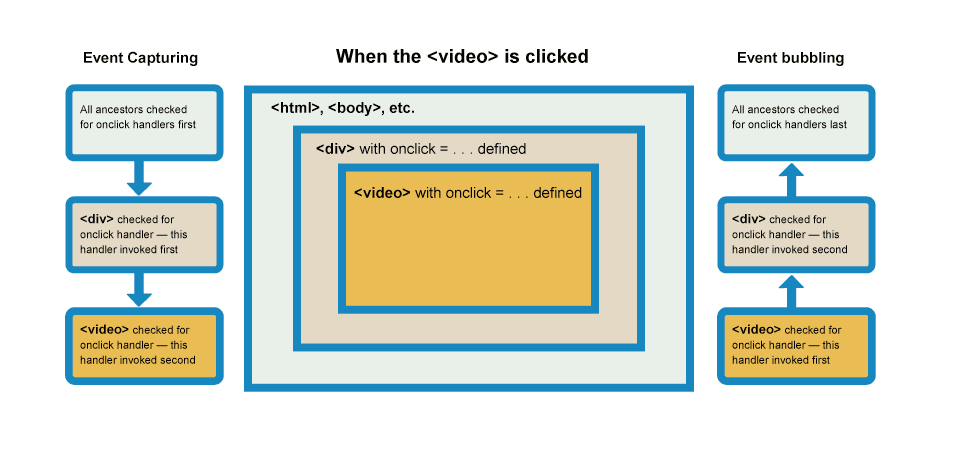
+
+我们一般使用默认的事件注册机制,将事件处理注册在冒泡阶段,所以处理冒泡阶段的情况比较多。当我们想要停止事件冒泡,只需要调用事件对象的 `stopPropagation` 方法。标准事件对象包含 `stopPropagation` 方法,当执行事件处理器时调用该方法,会立即停止事件冒泡,这样事件冒泡处理链上的后续处理器就不会再执行下去。
+
+Weex 在 0.13 版本 SDK 里实现了事件冒泡机制。注意事件冒泡默认是不开启的,你需要在模板根元素上加上属性 `bubble=true` 才能开启冒泡。
+
+## 使用
+
+事件冒泡默认不开启,需要手动添加 `bubble=true` 属性到根元素上。
+
+```vue
+<template>
+ <!-- 开启事件冒泡机制. -->
+ <div bubble="true">
+ ...
+ </div>
+</template>
+```
+
+## 阻止冒泡
+
+在事件处理函数里,可以通过调用 `event.stopPropagation` 方法阻止事件冒泡。这个方法和 [DOM 标准](https://dom.spec.whatwg.org/#dom-event-stoppropagation) 里的方法一致。注意 `event.stopPropagation` 和 `bubble=true` 的影响范围不同,前者仅针对当前冒泡到的元素以及其祖先层级有效,而对子元素无效。而后者相当于一个全局开关,开启以后对该根元素内部所有子元素都开启了事件冒泡效果。两者可以同时存在。
+
+```js
+{
+ handleClick (event) {
+ // 阻止继续冒泡.
+ event.stopPropagation();
+ }
+}
+```
+
+::: warning 注意
+需要注意的是: 为了兼容之前的版本,Weex 默认不会开启事件冒泡机制。需要在根元素的属性上,添加 `bubble="true"` 来开启冒泡机制。否则,将不会向上传播事件,保持与之前版本的效果相同。
+:::
+
+## Demo
+
+- [开启事件冒泡](http://dotwe.org/vue/fa2957ce3e9eb47ad9ae1da22d845e95)
+ 使用 Weex playground App 扫描页面里的二维码,然后在打开页面中点击包含 ‘click me’ 文字的方框,会看到事件冒泡效果,即外层的组件依次显示事件成功冒泡到当前组件的提示。
+
+- [阻止冒泡](http://dotwe.org/vue/2cc80e19c9b2430fb780234628065a69)
+ 使用 Weex playground App 扫描页面里的二维码,然后在打开页面中点击包含 ‘click me’ 文字的方框,可以看到事件冒泡被父组件中断了,不再冒泡到最外层组件。
diff --git a/docs/docs/events/gesture.md b/docs/docs/events/gesture.md
new file mode 100644
index 000000000..b356d70db
--- /dev/null
+++ b/docs/docs/events/gesture.md
@@ -0,0 +1,76 @@
+# 手势 <Badge type="warning" text="该功能属于实验性功能" />
+
+Weex 封装了原生的触摸事件以提供手势系统。使用手势类似于在 Weex 中使用事件,只需在节点上监听手势即可。
+
+## 手势类型
+
+目前,仅支持以下四种手势类型:
+
+- touch: 当触摸到一个点,移动或从触摸面移开时触发 `touch` 手势。触摸手势很精准,它会返回所有详细的事件信息。所以,监听 `touch` 手势可能很慢,即使只移动一丁点也需要处理大量事件。有三种类型的 `touch` 手势:
+ |type|描述|
+ |---|---|
+ |`touchstart`|将在触摸到触摸面上时触发|
+ |`touchmove`|将在触摸点在触摸面移动时被触发|
+ |`touchend`|将在从触摸面离开时被触发|
+ |`shouldStopPropagation` <Badge type="info" text="v0.18+" />|每个 touch 事件都会被传递过来, 可控制 touch 事件是否冒泡(返回 true)或者停止(返回 false);用于解决事件冲突或者自定义手势|
+
+ 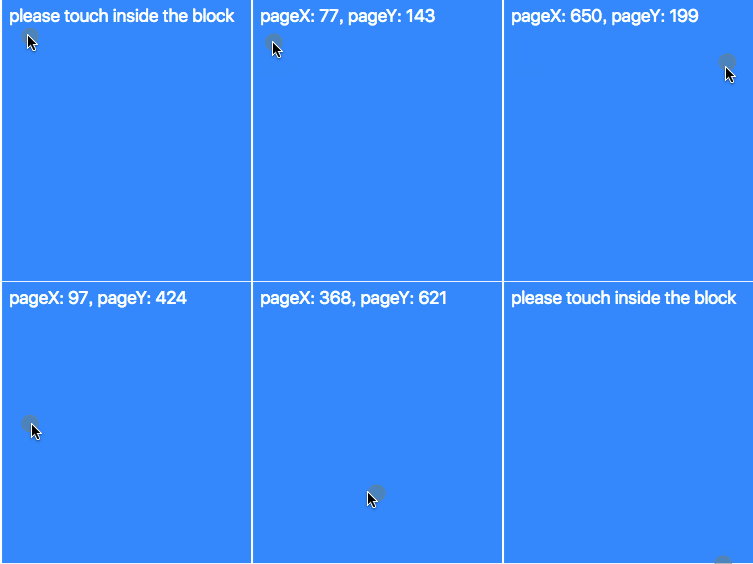
+
+ [试一下](http://dotwe.org/vue/3f03a4f64fd7e04db82bd42b555346a2)
+
+* Pan:`pan` 手势也会返回触摸点在触摸面的移动信息,有点类似于 `touch` 手势。但是 `pan` 手势只会采样收集部分事件信息因此比 `touch` 事件要快得多,当然精准性差于 `touch`。`pan` 也有三种类型的手势,这些手势的意义与 `touch`s 完全一样:
+ |type|描述|
+ |---|---|
+ |`panstart`||
+ |`panmove`||
+ |`panend`||
+ |`horizontalpan` <Badge type="info" text="v0.10+" />|手势的 `start/move/end` 状态保存在 `state` 特性中。目前该手势在 Android 下会与 click 事件冲突|
+ |`verticalpan` <Badge type="info" text="v0.10+" />|手势的 `start/move/end` 状态保存在 `state` 特性中。目前该手势在 Android 下会与 click 事件冲突|
+* Swipe: `swipe` 将会在用户在屏幕上滑动时触发,一次连续的滑动只会触发一次 `swipe` 手势。
+
+ [试一下](http://dotwe.org/vue/2693655847d890fe96160cc7a955040b)
+
+* LongPress: `LongPress`将会在触摸点连续保持 500 ms 以上时触发
+
+ [试一下](http://dotwe.org/vue/a077a3cff49b1098f38349fd70f92de9)
+
+`touch` 和 `pan` 非常接近,它们的特点可以总结成这样:
+|type|描述|
+|---|---|
+|`Touch`|完整信息,精准、很慢|
+|`Pan`|抽样信息,很快,不够精准|
+开发者可以根据自己的情况选择合适的手势。
+
+## 属性
+
+以下属性可以在手势的回调中使用:
+
+- `direction`: 仅在 `swipe` 手势中存在,返回滑动方向,返回值可能为 `up`, `left`, `bottom`, `right`
+
+* `changedTouches`: 一个数组,包含了当前手势的触摸点的运动轨迹
+
+### changedTouches
+
+`changedTouches` 是一个数组,其子元素中包含以下属性:
+|key|描述|
+|---|---|
+|`identifier`|触摸点的唯一标识符|
+|`pageX`|触摸点相对于文档左侧边缘的 X 轴坐标|
+|`pageY`|触摸点相对于文档顶部边缘的 Y 轴坐标|
+|`screenX`|触摸点相对于屏幕左侧边缘的 X 轴坐标|
+|`screenY`|触摸点相对于屏幕顶部边缘的 Y 轴坐标|
+|`force`|屏幕收到的按压力度,值的范围为 0~1|
+
+::: warning 注意
+force 属性目前在支持 forceTouch iOS 设备才支持, iPhone 6s 及更新的 iOS 设备
+:::
+
+## 约束
+
+目前,由于会触发大量事件冲突,Weex Android 还不支持在滚动类型的元素上监听手势,例如 `scroller`, `list` 和 `webview` 这三个组件。
+
+## Demo
+
+- [Touch](http://dotwe.org/vue/3f03a4f64fd7e04db82bd42b555346a2)
+- [Swipe](http://dotwe.org/vue/2693655847d890fe96160cc7a955040b)
+- [LongPress](http://dotwe.org/vue/a077a3cff49b1098f38349fd70f92de9)
diff --git a/docs/docs/modules/animation.md b/docs/docs/modules/animation.md
new file mode 100644
index 000000000..00a063004
--- /dev/null
+++ b/docs/docs/modules/animation.md
@@ -0,0 +1,119 @@
+# animation
+
+`animation` 模块用来在组件上执行动画。可以对组件执行一系列简单的变换 (位置、大小、旋转角度、背景颜色和不透明度)。
+
+```vue
+<template>
+ <div class="wrapper">
+ <div ref="test" class="box"></div>
+ </div>
+</template>
+<script>
+ const animation = weex.requireModule('animation')
+ export default {
+ mounted() {
+ animation.transition(this.$refs.test, {
+ styles: {
+ height: '100px'
+ },
+ duration: 800, //ms
+ timingFunction: 'ease',
+ delay: 100 //ms
+ })
+ }
+ }
+</script>
+<style scoped>
+ .box {
+ width: 250px;
+ height: 250px;
+ background-color: #DDD;
+ }
+</style>
+```
+
+::: warning 注意
+* 涉及动画的需求,建议使用 animation 模块方法。相比于 css 动画 animation 模块方法有更好的兼容性。
+:::
+
+## API
+
+### animation.transition(element, options, callback)
+
+**element**:`[必选]`将要执行动画的元素。
+
+```vue
+<template>
+ <div class="wrapper">
+ <div ref="test"></div>
+ </div>
+</template>
+<script>
+ export default {
+ mounted() {
+ // 例如指定动画的元素 element 属性为 test , 可以通过调用 this.$refs.test 来获取元素的引用。
+ console.log(this.$refs.test);
+ }
+ }
+</script>
+```
+
+**options**:`[必选]`指定动画参数
+- styles(object):设置不同样式过渡效果的键值对,下表列出了所有合法的参数:
+ | 参数 | 描述 | 值类型 | 默认值 |
+ | ---------- | ------------- | ----- | ----- |
+ | width|动画执行后应用到组件上的宽度值|number|无|
+ | height|动画执行后应用到组件上的高度值|number|无|
+ | backgroundColor|动画执行后应用到组件上的背景颜色|string|无|
+ | opacity|动画执行后应用到组件上的不透明度值|number|1|
+ | transformOrigin|定义变化过程的中心点. 参数 x-aris 可能的值为 left、center、right、长度值或百分比值, 参数 y-axis 可能的值为 top、center、bottom、长度值或百分比值|x-axis y-axis|center center|
+ | transform|定义应用在元素上的变换类型,支持的属性请见下方附录部分|object|无|
+- duration(number):指定动画的持续时间 (单位是毫秒),默认值是 0,表示没有动画效果。
+- delay (number):指定请求动画操作到执行动画之间的时间间隔 (单位是毫秒),默认值是 0,表示没有延迟,在请求后立即执行动画。如下图,控制不同的间隔可实现特定效果。
+<div style="text-align: center"><img src="https://img.alicdn.com/tfs/TB15iA.nVzqK1RjSZSgXXcpAVXa-539-428.gif" width="300"></div>
+- needLayout (boolean):节点动画执行时是否产生布局动画即LayoutAnimation,默认值是false。
+ <div style="dispaly:flex;">
+ <img src="https://img.alicdn.com/tfs/TB1x74XoirpK1RjSZFhXXXSdXXa-300-320.gif" width="300"/>
+ <img src="https://img.alicdn.com/tfs/TB175RXomzqK1RjSZFHXXb3CpXa-300-320.gif" width="300"/>
+ </div>
+ 上图为会影响布局的元素 `height` 变化动画:左侧为浏览器动画,右侧为客户端动画。
+
+ 在浏览器上执行动画当布局变化时,会自动将视图运动到它们新的位置上。但客户端 layout 都是独立的,
+ 布局动画变化时,可能不会影响其他元素。当您的动画不符合您的预期时,可设置此参数,保障三端动画一致。
+
+ 请用客户端扫描示例二维码[体验动画差异](http://dotwe.org/vue/45e8b954d93216510782b3b6c0889298)
+- timingFunction (string):描述动画执行的速度曲线,用于使动画变化更为平滑。默认值是 linear,表示动画从开始到结束都拥有同样的速度。下表列出了所有合法的属性:
+ | 参数 | 描述 |
+ | ---------- | ------------- |
+ |linear|动画从头到尾的速度是相同的|
+ |ease|动画速度逐渐变慢|
+ |ease-in|动画速度由慢到快|
+ |ease-out|动画速度由快到慢|
+ |ease-in-out|动画先加速到达中间点后减速到达终点|
+ |cubic-bezier(x1, y1, x2, y2)|在三次贝塞尔函数中定义变化过程,函数的参数值必须处于 0 到 1 之间。更多关于三次贝塞尔的信息请参阅 cubic-bezier 和 Bézier curve.|
+
+**callback**:`[可选]`是动画执行完毕之后的回调函数。
+
+## Demo
+[体验示例](http://dotwe.org/vue/a0f4ed064a6b46a2b8f63ab3843d7aee)
+
+上述示例点击灰色方块后,便可看到操作动画。
+
+[循环动画](http://dotwe.org/vue/97e01e1b7f8992de287b0a690b54511c)
+
+目前 WEEX 没有提供可循环的属性,循环动画可像上述 Demo 在 callback 回调中执行下一次动画形成循环。
+
+### 附录
+WEEX transform 支持的对应属性,可以参见下表:
+
+```js
+// 注:如果想同时执行多个动画只需要用空格隔开,比如
+transform: 'translate(250px, 100px) scale(1.5)'
+```
+| 参数 | 描述 | 值类型 | 默认值 |
+| ---------- | ------------- | ----- | ----- |
+|translate/translateX/translateY|指定元素要移动到的位置|像素值或百分比 |无|
+|rotate|指定元素将被旋转的角度,单位是度|number|无|
+|scale/scaleX/scaleY|按比例放大或缩小元素|number|无|
+|rotateX/rotateY 需要 WEEX v0.14+ |指定元素将被旋转的角度,单位是度|number|无|
+|perspective 需要 WEEX v0.16+ |观察者距离z=0平面的距离,在Android 4.1及以上有效|number|无|
\ No newline at end of file
diff --git a/docs/docs/modules/clipboard.md b/docs/docs/modules/clipboard.md
new file mode 100644
index 000000000..71034ae69
--- /dev/null
+++ b/docs/docs/modules/clipboard.md
@@ -0,0 +1,145 @@
+# clipboard <Badge text="0.8+" type="warn" vertical="middle"/>
+
+- getString 获取粘贴板内容
+- setString 设置粘贴板内容
+
+## 使用场景
+
+以前当我们收到一条短信验证码信息时,除了人肉拷贝,我们无法获取拷贝短信的内容。这是非常苦恼的。目前很多手机自带一键复制短信中的验证码到剪贴板功能,再配合使用 clipboard.getString() 接口,就可以直接获取到验证码信息,并且进行下一步操作,例如帮助用户自动填到对应输入框中。
+
+::: warning 注意
+
+- 仅支持文本拷贝
+- 出于安全考虑和平台限制,只支持 Android 和 iOS,不支持 html5。
+
+:::
+
+## API
+
+### getString(callback) <Badge text="only in android & ios" type="warning" />
+
+> <small>从系统粘贴板读取内容</small>
+
+- `callback: function(ret)`
+
+ ret {Object} 为 callback 函数的参数,有两个属性:
+ | key | 描述 |
+ | ---------- | -------------------------------- |
+ | ret.data | 获取到的文本内容 |
+ | ret.result | 返回状态,可能为 success 或 fail |
+
+ ```javascript
+ clipboard.getString(ret => {
+ this.message = ret.result === 'success' ? ret.data : '';
+ });
+ ```
+
+### setString(text)
+
+> <small>将一段文本复制到剪切板,相当于手动复制文本。</small>
+
+- `text {string}`:要复制到剪切板的字符串。
+
+ ```javascript
+ clipboard.setString('要复制到剪贴板的内容');
+ ```
+
+## Demo
+
+### setString + getString
+
+[<IPhoneImg imgSrc="https://img.alicdn.com/tfs/TB1tzJaomzqK1RjSZFpXXakSXXa-265-438.png" />](http://dotwe.org/vue/2e3e71b2f296c69228ae0cbd5e5854fe)
+
+<!-- [](http://dotwe.org/vue/2e3e71b2f296c69228ae0cbd5e5854fe) -->
+
+<details>
+ <summary>代码</summary>
+
+```vue
+<template>
+ <div>
+ <div class="row">
+ <text class="label">set to clipboard: </text>
+ <input :value="text" class="input" type="text"
+ :autofocus="true" @input="handleChange"
+ />
+ </div>
+ <div class="row btn-holder">
+ <text class="btn" @click="handleSet">setString</text>
+ <text class="btn" @click="handleGet">getString(not supported in web)</text>
+ </div>
+ <div class="row">
+ <text class="label">get from clipboard: </text>
+ <text>{{message}}</text>
+ </div>
+ </div>
+</template>
+
+<script>
+const clipboard = weex.requireModule('clipboard');
+const modal = weex.requireModule('modal');
+
+export default {
+ data() {
+ return {
+ text: '',
+ message: ''
+ };
+ },
+ methods: {
+ handleSet() {
+ clipboard.setString(this.text);
+ modal.toast({
+ message: 'set success',
+ duration: 0.3
+ });
+ },
+ handleGet() {
+ clipboard.getString(ret => {
+ this.message = ret.result === 'success' ? ret.data : '';
+ });
+ },
+ handleChange(e) {
+ this.text = e.value;
+ }
+ }
+};
+</script>
+
+<style scoped>
+.row {
+ flex-direction: row;
+ border-bottom-width: 1px;
+ border-color: #333;
+ padding-top: 10px;
+ padding-right: 10px;
+ padding-bottom: 10px;
+ padding-left: 10px;
+}
+.label {
+ width: 250px;
+}
+.input {
+ width: 400px;
+ height: 50px;
+ color: black;
+ border-width: 1px;
+ border-color: black;
+}
+.btn-holder {
+ justify-content: space-around;
+}
+.btn {
+ padding-top: 10px;
+ padding-right: 10px;
+ padding-bottom: 10px;
+ padding-left: 10px;
+ border-width: 1px;
+ border-color: black;
+ background-color: #238fff;
+ color: #fff;
+}
+</style>
+```
+
+</details>
diff --git a/docs/docs/modules/dom.md b/docs/docs/modules/dom.md
new file mode 100644
index 000000000..4ee8ec876
--- /dev/null
+++ b/docs/docs/modules/dom.md
@@ -0,0 +1,233 @@
+# dom
+
+用于对 weex 页面里的组件节点进行一部分特定操作。
+
+- `scrollToElement`
+ 将 list 的某个子节点滚动到当前视口
+- `getComponentRect`
+ 获取某个组件的 bounding rect 布局信息
+- `addRule`
+ 添加 font-face rule
+
+## API
+
+### scrollToElement(ref, options)
+
+让页面滚动到 ref 对应的组件
+
+::: warning 注意
+
+- `这个 API 只能用于可滚动组件的子节点,例如 <scroller>,<list>, <waterfall> 等可滚动组件中`
+ :::
+
+* `ref`
+ 你要滚动到的那个节点
+
+- `options {object}`
+ 参数
+
+ | key | 描述 | 默认值 |
+ | -------------------------- | -------------------------- | ------ |
+ | options.offset {number} | 一个到其可见位置的偏移距离 | 0 |
+ | options.animated {boolean} | 是否需要附带滚动动画 | true |
+
+调用示例:
+
+```javascript
+const element = this.$refs['kkk'][0];
+dom.scrollToElement(element, { offset: 0 });
+```
+
+[滚动到某层](http://dotwe.org/vue/56e0d256cbb26facd958dbd6424f42b2)
+
+### getComponentRect(ref, callback)
+
+- `ref`
+ 节点元素
+- `callback: function(ret){}`
+ 回调,其中 `ret {object}` 格式如下:
+
+ ```json
+ // top, bottom, left, right 是相对于 `viewport` 的位置
+ {
+ "result": true,
+ "size": {
+ "bottom": 60,
+ "height": 15,
+ "left": 0,
+ "right": 353,
+ "top": 45,
+ "width": 353
+ }
+ }
+ ```
+
+ 调用示例:
+
+ ```javascript
+ const element = this.$refs['kkk'][0];
+ dom.getComponentRect(element, function(ret) {
+ if (ret.result) {
+ console.log(ret.size);
+ } else {
+ console.log('获取失败');
+ }
+ });
+ ```
+
+[获取 box 的布局信息](http://dotwe.org/vue/96b4a0f35da552d2dfea3579d11120e4)
+
+::: tip
+
+- 此方法需要在节点渲染后调用才能获取正确的信息,可在 `mounted` 或 更新数据后 `updated` 中调用
+- 如果想要获取到 Weex 视口容器的布局信息,可以指定 ref 为字符串 'viewport',即 getComponentRect('viewport', callback).
+
+:::
+
+### addRule(type, contentObject)
+
+`支持版本: >=0.12.0`
+addRule 是可以为 dom 添加一条规则,目前支持自定义字体 fontFace 规则,构建自定义的 font-family,可以在 text 使用
+
+- fontFace
+
+ ```javascript
+ const domModule = weex.requireModule('dom');
+ domModule.addRule('fontFace', {
+ fontFamily: 'iconfont2',
+ src: "url('http://at.alicdn.com/t/font_1469606063_76593.ttf')"
+ });
+ ```
+
+ ::: tip
+
+ - addRule 目前仅支持添加 ‘font-face’
+ - 字体只支持 ttf 和 woff
+
+ :::
+
+[add rule fontface](http://dotwe.org/vue/95b2c6716f37066d5f44c5c75c979394)
+
+## DEMO
+
+[<IPhoneImg imgSrc="https://img.alicdn.com/tfs/TB1hVg_n8LoK1RjSZFuXXXn0XXa-262-433.png" />](http://dotwe.org/vue/d8459936b12ed070ccf6bf5b953aa344)
+
+<!-- [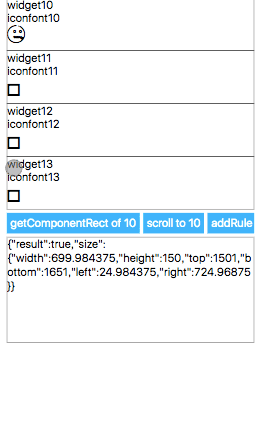](http://dotwe.org/vue/d8459936b12ed070ccf6bf5b953aa344) -->
+
+<details>
+ <summary>代码</summary>
+
+```vue
+ <template>
+ <div class="root">
+ <list class="list">
+ <cell v-for="item in items" v-bind:key="item.title">
+ <div :ref="`widget${item.title}`" class="widget">
+ <text>widget{{item.title}}</text>
+ <text>iconfont{{item.title}}</text>
+ <text :style="{fontFamily:`iconfont${item.title}`, fontSize: '50px'}"></text>
+ </div>
+ </cell>
+ </list>
+ <div class="btn-holder">
+ <text class="btn" @click="getComponentRect">getComponentRect of 10</text>
+ <text class="btn" @click="scrollToElement">scroll to 10</text>
+ <text class="btn" @click="addRule">addRule</text>
+ </div>
+ <div class="message">
+ <text>{{message}}</text>
+ </div>
+ </div>
+ </template>
+
+ <script>
+const dom = weex.requireModule('dom');
+const modal = weex.requireModule('modal');
+
+export default {
+ data() {
+ return {
+ targetIndex: 10,
+ items: [],
+ trigger: '',
+ message: ''
+ };
+ },
+ created() {
+ const targetIndex = this.targetIndex;
+ const items = [];
+ for (let i = 0; i < 30; i++) {
+ items.push({
+ title: i,
+ desc: i === targetIndex ? '' : ''
+ });
+ }
+ this.items = items;
+ },
+ methods: {
+ getStyle(i) {
+ return {};
+ },
+ addRule() {
+ const targetIndex = this.targetIndex;
+ modal.toast({
+ message: `addRule to iconfont${targetIndex}`
+ });
+ this.scrollToElement();
+ dom.addRule('fontFace', {
+ fontFamily: `iconfont${targetIndex}`,
+ src: "url('http://at.alicdn.com/t/font_zn5b3jswpofuhaor.ttf')"
+ });
+ },
+ scrollToElement() {
+ const element = this.$refs[`widget${this.targetIndex}`][0];
+ dom.scrollToElement(element);
+ },
+ getComponentRect() {
+ const element = this.$refs[`widget${this.targetIndex}`][0];
+ dom.getComponentRect(element, data => {
+ this.message = JSON.stringify(data);
+ });
+ }
+ }
+};
+</script>
+
+
+ <style scoped>
+.root {
+ width: 700px;
+ margin-left: 25px;
+}
+.list {
+ height: 600px;
+ width: 700px;
+}
+.widget {
+ height: 150px;
+ width: 700px;
+ border-width: 1px;
+}
+.btn-holder {
+ flex-direction: row;
+ margin-top: 10px;
+}
+.btn {
+ padding-left: 10px;
+ padding-right: 10px;
+ padding-top: 10px;
+ padding-bottom: 10px;
+ background-color: #00b4ff;
+ margin-right: 10px;
+ color: #fff;
+}
+.message {
+ margin-top: 10px;
+ border-width: 1px;
+ height: 300px;
+ width: 700px;
+}
+</style>
+```
+
+</details>
diff --git a/docs/docs/modules/globalEvent.md b/docs/docs/modules/globalEvent.md
new file mode 100644
index 000000000..9dc012de0
--- /dev/null
+++ b/docs/docs/modules/globalEvent.md
@@ -0,0 +1,103 @@
+# globalEvent <Badge text="0.14" type="warn" vertical="middle"/>
+
+`globalEvent` 用于监听持久性事件,例如定位信息,陀螺仪等的变化。全局事件是需要额外 APIs 处理的次要 API。
+
+- 你能通过 `addEventListener` 注册事件监听
+- 当你不再需要的时候,也可以通过 `removeEventListener` 取消事件监听
+
+::: tip
+这是一个实例级别的事件,而非应用级别。
+:::
+
+## 如何让你的模块支持全局事件
+
+API 开发完成后,当需要发送事件时,需要通过以下方法:
+
+```javascript
+/**
+ *
+ * @param eventName eventName
+ * @param params event params
+ */
+instance.fireGlobalEventCallback(eventName, params);
+```
+
+如何在 weex-html5 组件或模块中分发全局事件?只需在文档元素上分派事件:
+
+```javascript
+var evt = new Event('some-type');
+evt.data = { foo: 'bar' };
+document.dispatchEvent(evt);
+```
+
+### 示例
+
+- Android
+ ```java
+ Map<String,Object> params=new HashMap<>();
+ params.put("key","value");
+ mWXSDKInstance.fireGlobalEventCallback("geolocation",params);
+ ```
+- IOS
+ ```objective-c
+ [weexInstance fireGlobalEvent:@"geolocation" params:@{@"key":@"value"}];
+ ```
+
+## API
+
+### addEventListener(eventName, callback)
+
+注册全局事件。
+
+| key | 描述 |
+| --------------------- | -------------------- |
+| `eventName {string}` | 需要监听的事件名称 |
+| `callback {Function}` | 触发事件后的回调函数 |
+
+示例:
+
+```javascript
+var globalEvent = weex.requireModule('globalEvent');
+globalEvent.addEventListener('geolocation', function(e) {
+ console.log('get geolocation');
+});
+```
+
+### removeEventListener(eventName)
+
+取消事件监听。
+
+| key | 描述 |
+| -------------------- | ------------------ |
+| `eventName {string}` | 需要取消的事件名称 |
+
+示例:
+
+```javascript
+var globalEvent = weex.requireModule('globalEvent');
+globalEvent.removeEventListener('geolocation');
+```
+
+## 已有的全局事件
+
+### 应用前后事件
+
+WeexSDK 对获取应用前后台事件做了支持,开发者可以在页面内监听对应的事件,获得应用被前后后这后台,以方便暂停音乐,视频等,只需要指定需要监听的事件名称和回调函数就可以,例如:
+
+```javascript
+var globalEvent = weex.requireModule('globalEvent');
+globalEvent.addEventListener('WXApplicationDidBecomeActiveEvent', function(e) {
+ console.log('WXApplicationDidBecomeActiveEvent');
+});
+```
+
+支持的事件名称:
+
+- WXApplicationDidBecomeActiveEvent 应用被前台的时候触发
+- WXApplicationWillResignActiveEvent 应用即将被后台时候触发
+
+在 [dotWe 上试一试](http://dotwe.org/vue/c89e85483ca2cb2274837ef027030539)
+
+::: warning 注意
+目前只有 platform 为 iOS 和 Android 才能支持。[获取当前 platform](http://weex-project.io/cn/references/weex-variable.html#weex-environment-object)
+:::
diff --git a/docs/docs/modules/meta.md b/docs/docs/modules/meta.md
new file mode 100644
index 000000000..0f42edc34
--- /dev/null
+++ b/docs/docs/modules/meta.md
@@ -0,0 +1,86 @@
+# meta <Badge text="0.10.0+" type="warn" vertical="middle"/>
+
+meta 模块可用于声明单个页面的元信息,通常是一些页面级别的配置,如容器的显示宽度 (viewport) 等。默认情况下,应用无需修改此配置。
+
+## API
+
+### setViewport(options)
+
+Weex 容器默认的宽度 (viewport) 是 750px,通过 setViewport 方法可以改变页面的显示宽度,仅对当前页面生效。
+::: warning 注意
+需要注意的是:只有在页面渲染开始之前设置 viewport 才会生效。 也就是说,setViewport 方法只能在入口文件中使用,而且要在 new Vue(...) 之前调用;如果是在组件中使用,就只有在渲染到该组件的时候才会执行相应的代码,此时页面已经处于渲染过程中,设置 viewport 将不会再生效。
+:::
+
+#### 参数
+
+参数配置借鉴了 W3C 标准中的 CSS Device Adaptation,目前支持如下属性:
+|key|描述|
+|---|---|
+|options.width|数值,或者 `"device-width"` 和 `"device-height"` 之一|
+|options.height|数值,或者 `"device-width"` 和 `"device-height"` 之一|
+
+宽度和高度的单位默认是 px,暂不支持其他单位。
+
+## Demo
+
+入口文件:
+
+```javascript
+// entry.js
+
+import App from './app.vue';
+const meta = weex.requireModule('meta');
+
+// 配置 viewport 的宽度为 640px
+meta.setViewport({
+ width: 640
+});
+
+App.el = '#root';
+new Vue(App);
+```
+
+在入口文件中配置了 viewport 的宽度为 640 之后,当前页面中的所有组件都会以 640px 作为满屏宽度。
+
+组件文件:
+
+```vue
+<!-- app.vue -->
+<template>
+ <div>
+ <div class="box750">
+ <text class="text">750</text>
+ <div class="box640">
+ <text class="text">640</text>
+ <div class="box480">
+ <text class="text">480</text>
+ </div>
+ </div>
+ </div>
+ </div>
+</template>
+
+<style scoped>
+.box750 {
+ width: 750px;
+ height: 750px;
+ background-color: #eeeeee;
+}
+.box640 {
+ width: 640px;
+ height: 640px;
+ background-color: #cccccc;
+}
+.box480 {
+ width: 480px;
+ height: 480px;
+ background-color: #aaaaaa;
+}
+.text {
+ font-size: 50px;
+}
+</style>
+```
+
+[试试看](http://dotwe.org/vue/76e5656fb735fcca0c78facbd1edcde3)。(由于 [http://dotwe.org](http://dotwe.org/vue) 目前还不支持配置入口文件,例子中的效果暂时无法在线查看。)
+本地开发环境的搭建可以参考:[《搭建开发环境》](http://weex-project.io/cn/guide/set-up-env.html)。
diff --git a/docs/docs/modules/modal.md b/docs/docs/modules/modal.md
new file mode 100644
index 000000000..3ee24c4f2
--- /dev/null
+++ b/docs/docs/modules/modal.md
@@ -0,0 +1,92 @@
+---
+pageClass: page-module-modal
+---
+# modal
+`modal` 模块提供了以下展示消息框的 API:`toast`、`alert`、`confirm` 和 `prompt`。
+
+## API
+### modal.toast(options)
+`toast()` 会在一个小浮层里展示关于某个操作的简单反馈。例如,在邮件发送前离开邮件编辑界面,可以触发一个“草稿已保存”的 toast,告知用户以后可以继续编辑。toast 会在显示一段时间之后自动消失。
+
+``` js{2}
+var modal = weex.requireModule('modal')
+modal.toast({
+ message: 'This is a toast',
+ duration: 0.3
+})
+```
+
+| 参数 | 说明 | 类型 | 默认值 |
+| ---------- | ------------- | ----- | ----- |
+| options.message | 展示的内容 | string | - |
+| options.duration | 持续时间(以秒为单位) | number | 0.8 |
+::: warning 参数duration
+* Android: 如果时间长度大于3s,将使用一个被称为**LONG**的系统变量,否则使用**SHORT**这个系统变量
+* iOS: 持续的时间与duration相同
+:::
+
+### modal.alert(options, callback)
+警告框经常用于确保用户可以得到某些信息。当警告框出现后,用户需要点击确定按钮才能继续进行操作。
+
+``` js{2}
+var modal = weex.requireModule('modal')
+modal.alert({
+ message: 'This is a alert',
+ okTitle: '确认'
+}, function () {
+ console.log('alert callback')
+})
+```
+
+
+| 参数 | 说明 | 类型 | 默认值 |
+| ---------- | ------------- | ----- | ----- |
+| options.message | 警告框内显示的文字信息 | string | - |
+| options.okTitle | 确认按钮上显示的文字信息 | string | OK |
+| callback | 用户操作完成后的回调 | function | - |
+
+### modal.confirm(options, callback)
+确认框用于使用户可以验证或者接受某些信息。当确认框出现后,用户需要点击确定或者取消按钮才能继续进行操作。
+
+``` js{2}
+var modal = weex.requireModule('modal')
+modal.confirm({
+ message: 'Do you confirm ?',
+ okTitle: '确认',
+ cancelTitle: '取消'
+}, function (value) {
+ console.log('confirm callback', value)
+})
+```
+
+| 参数 | 说明 | 类型 | 默认值 |
+| ---------- | ------------- | ----- | ----- |
+| options.message | 警告框内显示的文字信息 | string | - |
+| options.okTitle | 确认按钮上显示的文字信息 | string | OK |
+| options.cancelTitle | 取消按钮上显示的文字信息 | string | Cancel |
+| callback | 用户操作完成后的回调,参数 `res` 是按下按钮上的文字信息 | function(res) | - |
+
+### modal.prompt(options, callback)
+提示框经常用于提示用户在进入页面前输入某个值。当提示框出现后,用户需要输入某个值,然后点击确认或取消按钮才能继续操作。
+
+``` js{2}
+var modal = weex.requireModule('modal')
+modal.confirm({
+ message: 'Do you confirm ?',
+ okTitle: '确认',
+ cancelTitle: '取消'
+}, function (value) {
+ console.log('confirm callback', value)
+})
+```
+
+| 参数 | 说明 | 类型 | 默认值 |
+| ---------- | ------------- | ----- | ----- |
+| options.message | 警告框内显示的文字信息 | string | - |
+| options.okTitle | 确认按钮上显示的文字信息 | string | OK |
+| options.cancelTitle | 取消按钮上显示的文字信息 | string | Cancel |
+| callback | 用户操作完成后的回调<ul><li>`res.result`:用户按下的按钮上的文字信息</li><li>`res.data`:用户输入的文字信息</li></ul>| function(res) | - |
+
+## Demo
+[基本用法](http://dotwe.org/vue/4be1c3b956fe0b5628388c34c2ca6320)
+<IPhoneImg imgSrc="https://img.alicdn.com/tfs/TB1lR8cogHqK1RjSZFkXXX.WFXa-544-960.gif" />
\ No newline at end of file
diff --git a/docs/docs/modules/navigator.md b/docs/docs/modules/navigator.md
new file mode 100644
index 000000000..22734e3a8
--- /dev/null
+++ b/docs/docs/modules/navigator.md
@@ -0,0 +1,45 @@
+# navigator
+众所周知,在浏览器里,我们可以通过前进或者回退按钮来切换页面,iOS/Android 的 `navigator` 模块就是用来实现类似的效果的。除了前进、回退功能,该模块还允许我们指定在切换页面的时候是否应用动画效果。
+
+## API
+### navigator.push(options, callback)
+把一个weex页面URL压入导航堆栈中,可指定在页面跳转时是否需要动画,以及操作完成后需要执行的回调函数
+
+```js{2}
+var navigator = weex.requireModule('navigator')
+navigator.push({
+ url: 'http://dotwe.org/raw/dist/519962541fcf6acd911986357ad9c2ed.js',
+ animated: "true"
+}, event => {
+ console.log('callback: ', event })
+})
+```
+| 参数 | 说明 | 类型 | 默认值 |
+| ---------- | ------------- | ----- | ----- |
+| options.url | 要压入的 Weex 页面的 URL | string | - |
+| options.animated | 页面压入时是否需要动画效果 | string | "true" |
+| callback | 执行完该操作后的回调函数 | function | - |
+
+### navigator.pop(options, callback)
+把一个 Weex 页面 URL 弹出导航堆栈中,可指定在页面弹出时是否需要动画,以及操作完成后需要执行的回调函数。
+
+```js{2}
+var navigator = weex.requireModule('navigator')
+navigator.pop({
+ animated: "true"
+}, event => {
+ console.log('callback: ', event })
+})
+```
+| 参数 | 说明 | 类型 | 默认值 |
+| ---------- | ------------- | ----- | ----- |
+| options.animated | 弹出页面时是否需要动画效果 | string | "true" |
+| callback | 执行完该操作后的回调函数 | function | - |
+
+::: warning 注意
+`animated` 二级参数目前仅支持字符串的 `"true"` 和 `"false"`,传入布尔值类型会导致程序崩溃,未来版本会修复这个问题
+:::
+
+## Demo
+[基本用法](http://dotwe.org/vue/5546f1dbd7537a6729cb03c687e885a8)
+<IPhoneImg imgSrc="https://img.alicdn.com/tfs/TB10KNeokvoK1RjSZFDXXXY3pXa-544-960.gif" />
\ No newline at end of file
diff --git a/docs/docs/modules/picker.md b/docs/docs/modules/picker.md
new file mode 100644
index 000000000..601a01220
--- /dev/null
+++ b/docs/docs/modules/picker.md
@@ -0,0 +1,55 @@
+# picker
+以下为 picker 相关的 API,用于数据选择,日期选择,时间选择。( H5模块如需使用,请手动引入 [weex-picker组件](https://github.com/weexteam/weex-picker))。
+
+## API
+### picker.pick(options, callback)
+调用单选 picker
+
+options参数如下:
+| 参数 | 说明 | 类型 |
+| ---------- | ------------- | ----- |
+| index | 默认选中的选项 | number |
+| items | picker 数据源 | array |
+| textColor | picker中文字的颜色 | color |
+| selectionColor | picker中选中item的背景色 | color |
+| confirmTitle | 确认按钮的文案 | string |
+| cancelTitle | 取消按钮的文案 | string |
+| confirmTitleColor | 确认按钮的文字颜色 | color |
+| cancelTitleColor | 取消按钮的文字颜色 | color |
+| title | 对话框的标题 | string |
+| titleColor | 对话框标题的文字颜色 | color |
+| titleBackgroundColor | 对话框标题的背景色 | color |
+
+`callback {function(ret)}`:执行完读取操作后的回调函数。`ret {Object}` 为 `callback` 函数的参数,有两个属性:
+* `result {string}`:结果三种类型 `success`, `cancel`, `error`
+* `data {number}`:选择的选项,仅成功确认时候存在
+
+### picker.pickDate(options, callback)
+调用 date picker
+
+options参数如下:
+| 参数 | 说明 | 类型 |
+| ---------- | ------------- | ----- |
+| value | 必选,date picker 选中的值,date 的字符串格式为 `yyyy-MM-dd` | string |
+| max | 可选,date 的最大值 | string |
+| min | 可选,date 的最小值 | string |
+
+`callback {function(ret)}`:执行完读取操作后的回调函数。`ret {Object}` 为 `callback` 函数的参数,有两个属性:
+* `result {string}`:结果三种类型 `success`, `cancel`, `error`
+* `data {number}`:选择的值 date 的字符,格式为 yyyy-MM-dd, 仅成功确认的时候存在
+
+### picker.pickTime(options, callback)
+调用 time picker
+
+options参数如下:
+| 参数 | 说明 | 类型 |
+| ---------- | ------------- | ----- |
+| value | 必选,time 格式为 `HH:mm` | string |
+
+`callback {function(ret)}`:执行完读取操作后的回调函数。`ret {Object}` 为 `callback` 函数的参数,有两个属性:
+* `result {string}`:结果三种类型 `success`, `cancel`, `error`
+* `data {number}`:time 格式为 `HH:mm`, 仅成功确认的时候存在
+
+## Demo
+[基本用法](http://dotwe.org/vue/060faedd0952f518d2d5322a5fb5ea2f)
+<IPhoneImg imgSrc="https://img.alicdn.com/tfs/TB1idhbogHqK1RjSZJnXXbNLpXa-544-960.gif" />
\ No newline at end of file
diff --git a/docs/docs/modules/storage.md b/docs/docs/modules/storage.md
new file mode 100644
index 000000000..cf842d098
--- /dev/null
+++ b/docs/docs/modules/storage.md
@@ -0,0 +1,41 @@
+# storage
+`storage` 是一个在前端比较常用的模块,可以对本地数据进行存储、修改、删除,并且该数据是永久保存的,除非手动清除或者代码清除。但是,`storage` 模块有一个限制就是浏览器端(H5)只能存储小于5M的数据,因为在 H5/Web 端的实现是采用 `HTML5 LocalStorage API`。而 Android 和 iOS 这块是没什么限制的。
+storage 常用在一些被用户经常查询,但是又不频繁更新的数据,比如搜索历史、用户的订单列表等。搜索历史一般情况都是作为本地数据存储的,因此使用 storage 比较合适。而用户订单列表是需要本地存储和服务端器检索配合的场景。当一个用户下单后,会经常查阅个人的订单列表。但是,订单的列表数据不是频繁更新的,往往只有在收到货品时,才更新“已签收”,其余平时的状态是“已发货”。因此,可以使用 `storage` 存储订单列表,可以减少服务器的压力,例如减少 SQL 查询或者缓存的压力。当用户查看订单详情的时候,再更新数据状态。
+
+## API
+### storage.setItem(key, value, callback)
+该方法可以通过键值对的形式将数据存储到本地。同时可以通过该方法,更新已有的数据。
+| 参数 | 说明 | 类型 |
+| ---------- | ------------- | ----- | ----- |
+| key | 要存储的键,不允许是 `""` 或 `null` | string |
+| value | 要存储的值,不允许是 `""` 或 `null` | string |
+| callback | 执行操作成功后的回调<br>`e.result`:表示设置是否成功,如果成功返回 `"success"`<br>`e.data`:`undefined` 表示设置成功,`invalid_param` 表示 key/value 为 `""` 或者 `null` | function(e) |
+
+### storage.getItem(key, callback)
+传入键名返回对应的键值。
+| 参数 | 说明 | 类型 |
+| ---------- | ------------- | ----- | ----- |
+| key | 要获取的值的名称,不允许是 `""` 或 `null` | string |
+| callback | 执行操作成功后的回调<br>`e.result`:表示操作是否成功,如果成功返回 `"success"`<br>`e.data`:获取对应的键值字符串,如果没有找到则返回 `undefined` | function(e) |
+
+### storage.removeItem(key, callback)
+传入一个键名将会删除本地存储中对应的键值。
+| 参数 | 说明 | 类型 |
+| ---------- | ------------- | ----- | ----- |
+| key | 要删除的值的名称,不允许是 `""` 或 `null` | string |
+| callback | 执行操作成功后的回调<br>`e.result`:表示删除是否成功,如果成功返回 `"success"`<br>`e.data`:`undefined` 表示删除成功| function(e) |
+
+### storage.length(callback)
+返回本地存储的数据中所有存储项数量的整数。
+| 参数 | 说明 | 类型 |
+| ---------- | ------------- | ----- | ----- |
+| callback | 执行操作成功后的回调<br>`e.result`:表示操作是否成功,如果成功返回 `"success"`<br>`e.data`:当前已存储项的数量| function(e) |
+
+### storage.getAllKeys(callback)
+返回一个包含全部已存储项键名的数组。
+| 参数 | 说明 | 类型 |
+| ---------- | ------------- | ----- | ----- |
+| callback | 执行操作成功后的回调<br>`e.result`:表示操作是否成功,如果成功返回 `"success"`<br>`e.data`:所有键名组成的数组| function(e) |
+
+## Demo
+[基本用法](http://dotwe.org/vue/71d1dff37c54fa9bafab4d8cbe3d21e3)
\ No newline at end of file
diff --git a/docs/docs/modules/stream.md b/docs/docs/modules/stream.md
new file mode 100644
index 000000000..af4c59e30
--- /dev/null
+++ b/docs/docs/modules/stream.md
@@ -0,0 +1,66 @@
+# stream
+
+`stream` 模块提供了基本的网络请求能力,例如 GET 请求、POST 请求等,用于在组件的生命周期内与服务端进行交互。
+
+## API
+
+### fetch(options, callback[,progressCallback])
+
+发起一个请求。
+
+#### 参数
+
+##### options {Object}
+
+请求的配置选项,支持以下配置:
+
+| 属性 | 说明 | 类型 | 是否必选 |
+| ---------- | ------------- | ----- | ----- |
+| `method` | HTTP 请求方法,值为 `GET`/`POST`/`PUT`/`DELETE`/`PATCH`/`HEAD` | string | 必选 |
+| `url` | 请求的 URL | string | 必选 |
+| `headers` | HTTP 请求头 | Object | 可选 |
+| `type` | 响应类型:`json`,`text` 或是 `jsonp`(在 native 原生实现中其实与 `json` 相同) | string | 必选 |
+| `body` | HTTP 请求体 | string | 可选 |
+
+::: warning 注意
+- `body` 参数仅支持 `string` 类型的参数,请勿直接传递 `JSON`,必须先将其转为字符串。
+- `GET` 请求不支持 `body` 方式传递参数,请使用 URL 传参。
+- 默认 `Content-Type` 是 `application/x-www-form-urlencoded`。
+- 如果你需要通过 POST 发送 json 数据, 需要将 `Content-Type` 设为 `application/json`。
+:::
+
+##### callback(res) {Function}
+
+响应结果回调,回调函数将收到如下的 `response` 对象:
+
+| 属性 | 说明 | 类型 |
+| ---------- | ------------- | ----- |
+| `status` | 返回的状态码 | number |
+| `ok` | 如果状态码在 200~299 之间就为 `true` | boolean |
+| `statusText` | 状态描述文本 | string |
+| `data` | 返回的数据,如果请求类型是 `json` 和 `jsonp`,则它就是一个 `object` ,否则是一个 `string`。 | `Object | string` |
+| `headers` | HTTP 响应头 | Object | - |
+
+
+##### progressCallback(res) {Function}
+
+关于请求状态的回调,这个回调函数将在请求完成后就被调用,回调函数将收到如下的 `response` 对象:
+
+| 属性 | 说明 | 类型 |
+| ---------- | ------------- | ----- |
+| `readyState` | 当前状态,`1`: 请求连接中;`2`: 返回响应头中;`3`: 正在加载返回数据 | number |
+| `status` | 返回的状态码 | number |
+| `length` | 已经接受到的数据长度. 你可以从响应头中获取总长度 | number |
+| `statusText` | 状态描述文本 | string |
+| `headers` | HTTP 响应头 | Object | - |
+
+## Demo
+
+- [HTTP method 示例](http://dotwe.org/vue/80b21a0fce98acdffad96c57b2eadd1d)
+- [创建文章](http://dotwe.org/vue/6dd65122144d9ad26594c0f900c75cd4),常见应用场景,发送 POST 请求。
+
+ <IPhoneImg imgSrc="https://img.alicdn.com/tfs/TB1UWA7n4TpK1RjSZFGXXcHqFXa-750-1334.gif" />
+
+- [热门动画列表](http://dotwe.org/vue/892bd1c977b61762baca8e02a65b6d97),常见应用场景,通过 GET 请求获取数据。
+
+ <IPhoneImg imgSrc="https://img.alicdn.com/tfs/TB1.Bg6nZbpK1RjSZFyXXX_qFXa-750-1334.gif" />
\ No newline at end of file
diff --git a/docs/docs/modules/websockets.md b/docs/docs/modules/websockets.md
new file mode 100644
index 000000000..72e265f41
--- /dev/null
+++ b/docs/docs/modules/websockets.md
@@ -0,0 +1,150 @@
+# webSocket
+
+`webSockets` 是一种创建持久性的连接,并进行双向数据传输的 HTTP 通信协议。Weex 提供了 `webSockets` 模块方便用户在 H5/iOS/Android 环境下与服务端创建 webSockets 链接进行通信。
+
+::: warning 注意
+h5 提供 WebSockets 的 protocol 默认实现,iOS 和 Android 需要自定义实现,Android 可参考:
+
+- [DefaultWebSocketAdapter.java](https://github.com/apache/incubator-weex/blob/master/android/commons/src/main/java/com/alibaba/weex/commons/adapter/DefaultWebSocketAdapter.java)
+- [DefaultWebSocketAdapterFactory.java](https://github.com/apache/incubator-weex/blob/master/android/commons/src/main/java/com/alibaba/weex/commons/adapter/DefaultWebSocketAdapterFactory.java)
+- 集成例子参考 [weex playground](https://github.com/apache/incubator-weex/tree/master/android/playground)
+:::
+
+## API
+
+### webSocket(url, protocol)
+
+创建 WebSockets,并连接服务器。
+
+#### 参数
+
+| 属性 | 说明 | 类型 | 是否必选 |
+| ---------- | ------------- | ----- | ----- |
+| `url` | 表示要连接的 URL | string | 必选 |
+| `protocol` | WebSockets 协议名字字符串 | string | 可选 |
+
+```js
+const ws = weex.requireModule('webSocket');
+
+ws.WebSocket('ws://echo.websocket.org','');
+```
+
+### send(data)
+
+通过 WebSockets 连接向服务器发送数据。
+
+#### 参数
+
+| 属性 | 说明 | 类型 | 是否必选 |
+| ---------- | ------------- | ----- | ----- |
+| `data` | 要发送到服务器的数据 | string | 可选 |
+
+```js
+const ws = weex.requireModule('webSocket');
+ws.WebSocket('ws://echo.websocket.org','');
+
+ws.send('some message.');
+```
+
+### close(code, reason)
+
+关闭 WebSockets 的链接。
+
+#### 参数
+
+| 属性 | 说明 | 类型 | 是否必选 |
+| ---------- | ------------- | ----- | ----- |
+| `code` | 关闭连接的状态号 | number | 可选 |
+| `reason` | 关闭的原因 | string | 可选 |
+
+```js
+const ws = weex.requireModule('webSocket');
+ws.WebSocket('ws://echo.websocket.org','');
+
+ws.close();
+```
+
+## 实例属性
+
+### onopen
+
+一个用于连接打开事件的事件监听器,该事件表明这个连接已经准备好接受和发送数据。`onopen` 接受一个函数作为 EventListener,这个监听器会接受一个 `type` 为 "open" 的事件对象。
+
+#### event 对象
+
+标准 event 对象,无特殊属性。
+
+```js
+const ws = weex.requireModule('webSocket')
+ws.WebSocket('ws://echo.websocket.org','');
+
+ws.onopen = function(event) {
+ console.log('onopen', event);
+}
+```
+
+### onmessage
+
+一个用于消息事件的事件监听器,当有消息到达的时触发。`onmessage` 接受一个函数作为 EventListener,这个监听器会接受一个 `type` 为 "message" 的事件对象。
+
+#### event 对象
+
+| 属性 | 说明 | 类型 |
+| ---------- | ------------- | ----- |
+| `data` | 监听器接收的到的消息 | string |
+
+```js
+const ws = weex.requireModule('webSocket')
+ws.WebSocket('ws://echo.websocket.org','');
+
+ws.onmessage = function(event) {
+ console.log('onmessage', event);
+}
+```
+
+### onclose
+
+一个用于连接关闭事件的事件监听器,当连接关闭时触发。`onclose` 接受一个函数作为 EventListener,这个监听器会接受一个 `type` 为 "close" 的事件对象。
+
+#### event 对象
+
+| 属性 | 说明 | 类型 |
+| ---------- | ------------- | ----- |
+| `code` | 服务器返回关闭的状态码 | number |
+| `reason` | 服务器返回的关闭原因 | string |
+| `wasClean` | 是否完全关闭 | boolen |
+
+```js
+const ws = weex.requireModule('webSocket')
+ws.WebSocket('ws://echo.websocket.org','');
+
+ws.onclose = function(event) {
+ console.log('onclose', event);
+}
+```
+
+### onerror
+
+一个用于 error 事件的事件监听器,当错误发生时触发。`onerror` 接受一个函数作为 EventListener,这个监听器会接受一个 `type` 为 "error" 的事件对象。
+
+#### event 对象
+
+| 属性 | 说明 | 类型 |
+| ---------- | ------------- | ----- |
+| `data` | 监听器接收的到的消息 | string |
+
+```js
+const ws = weex.requireModule('webSocket')
+ws.WebSocket('ws://echo.websocket.org','');
+
+ws.onerror = function(event) {
+ console.log('onerror', event);
+}
+```
+
+## Demo
+
+- [事件示例](http://dotwe.org/vue/6b7d6dc14320e3f04e0f203cb8bcc703)
+- [聊天窗口](http://dotwe.org/vue/21d8b0a79c20e95139353d9cc8b634f5),webSockets 常用于在线聊天等实时通信场景。
+
+ <IPhoneImg imgSrc="https://img.alicdn.com/tfs/TB11_g_n7voK1RjSZPfXXXPKFXa-264-439.gif" />
diff --git a/docs/docs/modules/webview.md b/docs/docs/modules/webview.md
new file mode 100644
index 000000000..6f335b802
--- /dev/null
+++ b/docs/docs/modules/webview.md
@@ -0,0 +1,61 @@
+# webview
+
+`webview` 模块提供了一系列的 [`<web>`](/docs/web.md) 组件操作接口,例如 `goBack`、`goForward` 和 `reload`,一般与 `<web>` 组件一起使用,在 Weex 页面内渲染 web 页面。
+
+## API
+
+### goBack(webElement)
+
+前往 WebView 历史记录的上一页。
+
+#### 参数
+
+| 属性 | 说明 |
+| ---------- | ------------- |
+| `webElement` | `<web>` 组件元素,可通过 `ref` 获取 |
+
+```js
+const webview = weex.requireModule('webview');
+
+webview.goBack(this.$refs.webview);
+```
+
+### goForward(webElement)
+
+前往 WebView 历史记录的下一页。
+
+#### 参数
+
+| 属性 | 说明 |
+| ---------- | ------------- |
+| `webElement` | `<web>` 组件元素,可通过 `ref` 获取 |
+
+```js
+const webview = weex.requireModule('webview');
+
+webview.goForward(this.$refs.webview);
+```
+
+### reload(webElement)
+
+刷新当前 Web 页面。
+
+#### 参数
+
+| 属性 | 说明 |
+| ---------- | ------------- |
+| `webElement` | `<web>` 组件元素,可通过 `ref` 获取 |
+
+```js
+const webview = weex.requireModule('webview');
+
+webview.reload(this.$refs.webview);
+```
+
+## Demo
+
+- [API 示例](http://dotwe.org/vue/196dcbdb6a5bcea519c239d50ae5012d)
+
+- [仿浏览器](http://dotwe.org/vue/9877838e37d732dbe2639e3ec57f096a)
+
+ <IPhoneImg imgSrc="http://g.alicdn.com/amte-fe/weex-fast-website/1.0.0/webview.png" />
\ No newline at end of file
diff --git a/docs/docs/styles/color-name.md b/docs/docs/styles/color-name.md
new file mode 100644
index 000000000..a8962f78d
--- /dev/null
+++ b/docs/docs/styles/color-name.md
@@ -0,0 +1,676 @@
+### 支持的颜色名称列表
+#### 基础颜色关键词:
+<table>
+<thead>
+<tr>
+<th>颜色名</th>
+<th>十六进制RGB值</th>
+</tr>
+</thead>
+<tbody>
+<tr>
+<td>black(黑)</td>
+<td>#000000</td>
+</tr>
+<tr>
+<td>silver(银)</td>
+<td>#C0C0C0</td>
+</tr>
+<tr>
+<td>gray(灰)</td>
+<td>#808080</td>
+</tr>
+<tr>
+<td>white(白)</td>
+<td>#FFFFFF</td>
+</tr>
+<tr>
+<td>maroon(褐紫红)</td>
+<td>#800000</td>
+</tr>
+<tr>
+<td>red(红)</td>
+<td>#FF0000</td>
+</tr>
+<tr>
+<td>purple(紫)</td>
+<td>#800080</td>
+</tr>
+<tr>
+<td>fuchsia(晚樱)</td>
+<td>#FF00FF</td>
+</tr>
+<tr>
+<td>green(绿)</td>
+<td>#008000</td>
+</tr>
+<tr>
+<td>lime(石灰)</td>
+<td>#00FF00</td>
+</tr>
+<tr>
+<td>olive(橄榄)</td>
+<td>#808000</td>
+</tr>
+<tr>
+<td>yellow(黄)</td>
+<td>#FFFF00</td>
+</tr>
+<tr>
+<td>navy(海军蓝)</td>
+<td>#000080</td>
+</tr>
+<tr>
+<td>blue(蓝)</td>
+<td>#0000FF</td>
+</tr>
+<tr>
+<td>teal(水鸭)</td>
+<td>#008080</td>
+</tr>
+<tr>
+<td>aqua(水蓝)</td>
+<td>#00FFFF</td>
+</tr>
+</tbody>
+</table>
+
+#### 扩展颜色关键词:
+<table>
+<thead>
+<tr>
+<th>颜色名</th>
+<th>十六进制RGB值</th>
+</tr>
+</thead>
+<tbody>
+<tr>
+<td>aliceblue</td>
+<td>#F0F8FF</td>
+</tr>
+<tr>
+<td>antiquewhite</td>
+<td>#FAEBD7</td>
+</tr>
+<tr>
+<td>aqua</td>
+<td>#00FFFF</td>
+</tr>
+<tr>
+<td>aquamarine</td>
+<td>#7FFFD4</td>
+</tr>
+<tr>
+<td>azure</td>
+<td>#F0FFFF</td>
+</tr>
+<tr>
+<td>beige</td>
+<td>#F5F5DC</td>
+</tr>
+<tr>
+<td>bisque</td>
+<td>#FFE4C4</td>
+</tr>
+<tr>
+<td>black</td>
+<td>#000000</td>
+</tr>
+<tr>
+<td>blanchedalmond</td>
+<td>#FFEBCD</td>
+</tr>
+<tr>
+<td>blue</td>
+<td>#0000FF</td>
+</tr>
+<tr>
+<td>blueviolet</td>
+<td>#8A2BE2</td>
+</tr>
+<tr>
+<td>brown</td>
+<td>#A52A2A</td>
+</tr>
+<tr>
+<td>burlywood</td>
+<td>#DEB887</td>
+</tr>
+<tr>
+<td>cadetblue</td>
+<td>#5F9EA0</td>
+</tr>
+<tr>
+<td>chartreuse</td>
+<td>#7FFF00</td>
+</tr>
+<tr>
+<td>chocolate</td>
+<td>#D2691E</td>
+</tr>
+<tr>
+<td>coral</td>
+<td>#FF7F50</td>
+</tr>
+<tr>
+<td>cornflowerblue</td>
+<td>#6495ED</td>
+</tr>
+<tr>
+<td>cornsilk</td>
+<td>#FFF8DC</td>
+</tr>
+<tr>
+<td>crimson</td>
+<td>#DC143C</td>
+</tr>
+<tr>
+<td>cyan</td>
+<td>#00FFFF</td>
+</tr>
+<tr>
+<td>darkblue</td>
+<td>#00008B</td>
+</tr>
+<tr>
+<td>darkcyan</td>
+<td>#008B8B</td>
+</tr>
+<tr>
+<td>darkgoldenrod</td>
+<td>#B8860B</td>
+</tr>
+<tr>
+<td>darkgray</td>
+<td>#A9A9A9</td>
+</tr>
+<tr>
+<td>darkgreen</td>
+<td>#006400</td>
+</tr>
+<tr>
+<td>darkgrey</td>
+<td>#A9A9A9</td>
+</tr>
+<tr>
+<td>darkkhaki</td>
+<td>#BDB76B</td>
+</tr>
+<tr>
+<td>darkmagenta</td>
+<td>#8B008B</td>
+</tr>
+<tr>
+<td>darkolivegreen</td>
+<td>#556B2F</td>
+</tr>
+<tr>
+<td>darkorange</td>
+<td>#FF8C00</td>
+</tr>
+<tr>
+<td>darkorchid</td>
+<td>#9932CC</td>
+</tr>
+<tr>
+<td>darkred</td>
+<td>#8B0000</td>
+</tr>
+<tr>
+<td>darksalmon</td>
+<td>#E9967A</td>
+</tr>
+<tr>
+<td>darkseagreen</td>
+<td>#8FBC8F</td>
+</tr>
+<tr>
+<td>darkslateblue</td>
+<td>#483D8B</td>
+</tr>
+<tr>
+<td>darkslategray</td>
+<td>#2F4F4F</td>
+</tr>
+<tr>
+<td>darkslategrey</td>
+<td>#2F4F4F</td>
+</tr>
+<tr>
+<td>darkturquoise</td>
+<td>#00CED1</td>
+</tr>
+<tr>
+<td>darkviolet</td>
+<td>#9400D3</td>
+</tr>
+<tr>
+<td>deeppink</td>
+<td>#FF1493</td>
+</tr>
+<tr>
+<td>deepskyblue</td>
+<td>#00BFFF</td>
+</tr>
+<tr>
+<td>dimgray</td>
+<td>#696969</td>
+</tr>
+<tr>
+<td>dimgrey</td>
+<td>#696969</td>
+</tr>
+<tr>
+<td>dodgerblue</td>
+<td>#1E90FF</td>
+</tr>
+<tr>
+<td>firebrick</td>
+<td>#B22222</td>
+</tr>
+<tr>
+<td>floralwhite</td>
+<td>#FFFAF0</td>
+</tr>
+<tr>
+<td>forestgreen</td>
+<td>#228B22</td>
+</tr>
+<tr>
+<td>fuchsia</td>
+<td>#FF00FF</td>
+</tr>
+<tr>
+<td>gainsboro</td>
+<td>#DCDCDC</td>
+</tr>
+<tr>
+<td>ghostwhite</td>
+<td>#F8F8FF</td>
+</tr>
+<tr>
+<td>gold</td>
+<td>#FFD700</td>
+</tr>
+<tr>
+<td>goldenrod</td>
+<td>#DAA520</td>
+</tr>
+<tr>
+<td>gray</td>
+<td>#808080</td>
+</tr>
+<tr>
+<td>green</td>
+<td>#008000</td>
+</tr>
+<tr>
+<td>greenyellow</td>
+<td>#ADFF2F</td>
+</tr>
+<tr>
+<td>grey</td>
+<td>#808080</td>
+</tr>
+<tr>
+<td>honeydew</td>
+<td>#F0FFF0</td>
+</tr>
+<tr>
+<td>hotpink</td>
+<td>#FF69B4</td>
+</tr>
+<tr>
+<td>indianred</td>
+<td>#CD5C5C</td>
+</tr>
+<tr>
+<td>indigo</td>
+<td>#4B0082</td>
+</tr>
+<tr>
+<td>ivory</td>
+<td>#FFFFF0</td>
+</tr>
+<tr>
+<td>khaki</td>
+<td>#F0E68C</td>
+</tr>
+<tr>
+<td>lavender</td>
+<td>#E6E6FA</td>
+</tr>
+<tr>
+<td>lavenderblush</td>
+<td>#FFF0F5</td>
+</tr>
+<tr>
+<td>lawngreen</td>
+<td>#7CFC00</td>
+</tr>
+<tr>
+<td>lemonchiffon</td>
+<td>#FFFACD</td>
+</tr>
+<tr>
+<td>lightblue</td>
+<td>#ADD8E6</td>
+</tr>
+<tr>
+<td>lightcoral</td>
+<td>#F08080</td>
+</tr>
+<tr>
+<td>lightcyan</td>
+<td>#E0FFFF</td>
+</tr>
+<tr>
+<td>lightgoldenrodyellow</td>
+<td>#FAFAD2</td>
+</tr>
+<tr>
+<td>lightgray</td>
+<td>#D3D3D3</td>
+</tr>
+<tr>
+<td>lightgreen</td>
+<td>#90EE90</td>
+</tr>
+<tr>
+<td>lightgrey</td>
+<td>#D3D3D3</td>
+</tr>
+<tr>
+<td>lightpink</td>
+<td>#FFB6C1</td>
+</tr>
+<tr>
+<td>lightsalmon</td>
+<td>#FFA07A</td>
+</tr>
+<tr>
+<td>lightseagreen</td>
+<td>#20B2AA</td>
+</tr>
+<tr>
+<td>lightskyblue</td>
+<td>#87CEFA</td>
+</tr>
+<tr>
+<td>lightslategray</td>
+<td>#778899</td>
+</tr>
+<tr>
+<td>lightslategrey</td>
+<td>#778899</td>
+</tr>
+<tr>
+<td>lightsteelblue</td>
+<td>#B0C4DE</td>
+</tr>
+<tr>
+<td>lightyellow</td>
+<td>#FFFFE0</td>
+</tr>
+<tr>
+<td>lime</td>
+<td>#00FF00</td>
+</tr>
+<tr>
+<td>limegreen</td>
+<td>#32CD32</td>
+</tr>
+<tr>
+<td>linen</td>
+<td>#FAF0E6</td>
+</tr>
+<tr>
+<td>magenta</td>
+<td>#FF00FF</td>
+</tr>
+<tr>
+<td>maroon</td>
+<td>#800000</td>
+</tr>
+<tr>
+<td>mediumaquamarine</td>
+<td>#66CDAA</td>
+</tr>
+<tr>
+<td>mediumblue</td>
+<td>#0000CD</td>
+</tr>
+<tr>
+<td>mediumorchid</td>
+<td>#BA55D3</td>
+</tr>
+<tr>
+<td>mediumpurple</td>
+<td>#9370DB</td>
+</tr>
+<tr>
+<td>mediumseagreen</td>
+<td>#3CB371</td>
+</tr>
+<tr>
+<td>mediumslateblue</td>
+<td>#7B68EE</td>
+</tr>
+<tr>
+<td>mediumspringgreen</td>
+<td>#00FA9A</td>
+</tr>
+<tr>
+<td>mediumturquoise</td>
+<td>#48D1CC</td>
+</tr>
+<tr>
+<td>mediumvioletred</td>
+<td>#C71585</td>
+</tr>
+<tr>
+<td>midnightblue</td>
+<td>#191970</td>
+</tr>
+<tr>
+<td>mintcream</td>
+<td>#F5FFFA</td>
+</tr>
+<tr>
+<td>mistyrose</td>
+<td>#FFE4E1</td>
+</tr>
+<tr>
+<td>moccasin</td>
+<td>#FFE4B5</td>
+</tr>
+<tr>
+<td>navajowhite</td>
+<td>#FFDEAD</td>
+</tr>
+<tr>
+<td>navy</td>
+<td>#000080</td>
+</tr>
+<tr>
+<td>oldlace</td>
+<td>#FDF5E6</td>
+</tr>
+<tr>
+<td>olive</td>
+<td>#808000</td>
+</tr>
+<tr>
+<td>olivedrab</td>
+<td>#6B8E23</td>
+</tr>
+<tr>
+<td>orange</td>
+<td>#FFA500</td>
+</tr>
+<tr>
+<td>orangered</td>
+<td>#FF4500</td>
+</tr>
+<tr>
+<td>orchid</td>
+<td>#DA70D6</td>
+</tr>
+<tr>
+<td>palegoldenrod</td>
+<td>#EEE8AA</td>
+</tr>
+<tr>
+<td>palegreen</td>
+<td>#98FB98</td>
+</tr>
+<tr>
+<td>paleturquoise</td>
+<td>#AFEEEE</td>
+</tr>
+<tr>
+<td>palevioletred</td>
+<td>#DB7093</td>
+</tr>
+<tr>
+<td>papayawhip</td>
+<td>#FFEFD5</td>
+</tr>
+<tr>
+<td>peachpuff</td>
+<td>#FFDAB9</td>
+</tr>
+<tr>
+<td>peru</td>
+<td>#CD853F</td>
+</tr>
+<tr>
+<td>pink</td>
+<td>#FFC0CB</td>
+</tr>
+<tr>
+<td>plum</td>
+<td>#DDA0DD</td>
+</tr>
+<tr>
+<td>powderblue</td>
+<td>#B0E0E6</td>
+</tr>
+<tr>
+<td>purple</td>
+<td>#800080</td>
+</tr>
+<tr>
+<td>red</td>
+<td>#FF0000</td>
+</tr>
+<tr>
+<td>rosybrown</td>
+<td>#BC8F8F</td>
+</tr>
+<tr>
+<td>royalblue</td>
+<td>#4169E1</td>
+</tr>
+<tr>
+<td>saddlebrown</td>
+<td>#8B4513</td>
+</tr>
+<tr>
+<td>salmon</td>
+<td>#FA8072</td>
+</tr>
+<tr>
+<td>sandybrown</td>
+<td>#F4A460</td>
+</tr>
+<tr>
+<td>seagreen</td>
+<td>#2E8B57</td>
+</tr>
+<tr>
+<td>seashell</td>
+<td>#FFF5EE</td>
+</tr>
+<tr>
+<td>sienna</td>
+<td>#A0522D</td>
+</tr>
+<tr>
+<td>silver</td>
+<td>#C0C0C0</td>
+</tr>
+<tr>
+<td>skyblue</td>
+<td>#87CEEB</td>
+</tr>
+<tr>
+<td>slateblue</td>
+<td>#6A5ACD</td>
+</tr>
+<tr>
+<td>slategray</td>
+<td>#708090</td>
+</tr>
+<tr>
+<td>slategrey</td>
+<td>#708090</td>
+</tr>
+<tr>
+<td>snow</td>
+<td>#FFFAFA</td>
+</tr>
+<tr>
+<td>springgreen</td>
+<td>#00FF7F</td>
+</tr>
+<tr>
+<td>steelblue</td>
+<td>#4682B4</td>
+</tr>
+<tr>
+<td>tan</td>
+<td>#D2B48C</td>
+</tr>
+<tr>
+<td>teal</td>
+<td>#008080</td>
+</tr>
+<tr>
+<td>thistle</td>
+<td>#D8BFD8</td>
+</tr>
+<tr>
+<td>tomato</td>
+<td>#FF6347</td>
+</tr>
+<tr>
+<td>turquoise</td>
+<td>#40E0D0</td>
+</tr>
+<tr>
+<td>violet</td>
+<td>#EE82EE</td>
+</tr>
+<tr>
+<td>wheat</td>
+<td>#F5DEB3</td>
+</tr>
+<tr>
+<td>white</td>
+<td>#FFFFFF</td>
+</tr>
+<tr>
+<td>whitesmoke</td>
+<td>#F5F5F5</td>
+</tr>
+<tr>
+<td>yellow</td>
+<td>#FFFF00</td>
+</tr>
+<tr>
+<td>yellowgreen</td>
+<td>#9ACD32</td>
+</tr>
+</tbody>
+</table>
\ No newline at end of file
diff --git a/docs/docs/styles/common-styles.md b/docs/docs/styles/common-styles.md
new file mode 100644
index 000000000..3a45a535d
--- /dev/null
+++ b/docs/docs/styles/common-styles.md
@@ -0,0 +1,434 @@
+# 通用样式
+
+所有 Weex 自带组件都支持以下通用样式规则。
+
+## 盒模型
+
+Weex 盒模型基于 [CSS 盒模型](https://developer.mozilla.org/zh-CN/docs/Web/CSS/CSS_Box_Model/Introduction_to_the_CSS_box_model),每个 Weex 元素都可视作一个盒子。我们一般在讨论设计或布局时,会提到「盒模型」这个概念。
+
+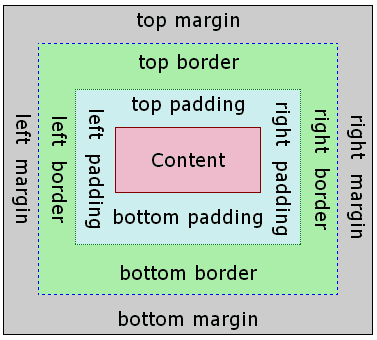
+
+盒模型描述了一个元素所占用的空间。每一个盒子有四条边界:外边距边界 margin edge, 边框边界 border edge, 内边距边界 padding edge 与内容边界 content edge。这四层边界,形成一层层的盒子包裹起来,这就是盒模型大体上的含义。
+
+::: warning
+- Weex 对于长度值目前只支持像素值,不支持相对单位(`em`、`rem`)。
+- **Weex 盒模型的 box-sizing 默认为 border-box,即盒子的宽高包含内容、内边距和边框的宽度,不包含外边距的宽度。**
+:::
+
+### 属性
+
+#### 宽度
+
+`width {length}`:默认值 0
+
+#### 高度
+
+`height {length}`:默认值 0
+
+#### 内边距
+
+`padding {length}`:内边距,内容和边框之间的距离,默认值 0。与标准 CSS 类似,`padding` 支持简写,也可分解为以下四个:
+ - `padding-left {length}`:左内边距,默认值 0
+ - `padding-right {length}`:右内边距,默认值 0
+ - `padding-top {length}`:上内边距,默认值 0
+ - `padding-bottom {length}`:下内边距,默认值 0
+
+```css
+.content {
+ /* 应用于四个边 */
+ padding: 10px;
+
+ /* 垂直方向| 水平方向*/
+ padding: 5px 10px;
+
+ /* 顶部| 水平方向| 底部*/
+ padding: 1px 2px 2px;
+
+ /* 顶部| 右边| 底部| 左边*/
+ padding: 2px 1px 0px 1px;
+}
+```
+
+#### 外边距
+
+`margin {length}`:外边距,元素和元素之间的空白距离,默认值 0。与标准 CSS 类似,`margin` 支持简写,也可分解为以下四个:
+ - `margin-left {length}`:左外边距,默认值 0
+ - `margin-right {length}`:右外边距,默认值 0
+ - `margin-top {length}`:上外边距,默认值 0
+ - `margin-bottom {length}`:下外边距,默认值 0
+
+```css
+.content {
+ /* 应用于四个边 */
+ margin: 10px;
+
+ /* 垂直方向| 水平方向*/
+ margin: 5px 10px;
+
+ /* 顶部| 水平方向| 底部*/
+ margin: 1px 2px 2px;
+
+ /* 顶部| 右边| 底部| 左边*/
+ margin: 2px 1px 0px 1px;
+}
+```
+
+#### 边框
+
+**设置元素边框暂不支持类似** `border: 1 solid #ff0000;` **的组合写法**。需分别设置 `border-width`(边框宽度),`border-style`(边框样式)和 `border-color`(边框颜色)。
+
+- `border-style {string}`:统一设定四个方向的边框样式,值类型为 `string`,**不支持简写**,可选值为:
+ - `solid`:实线边框,默认值 `solid`
+ - `dashed`:方形虚线边框
+ - `dotted`:圆点虚线边框
+
+ 如果四个方向的边框样式不同,可分别设置:
+
+ - `border-left-style {string}`:可选值为 `solid` | `dashed` | `dotted`,默认值 `solid`
+ - `border-top-style {string}`:可选值为 `solid` | `dashed` | `dotted`,默认值 `solid`
+ - `border-right-style {string}`:可选值为 `solid` | `dashed` | `dotted`,默认值 `solid`
+ - `border-bottom-style {string}`:可选值为 `solid` | `dashed` | `dotted`,默认值 `solid`
+
+- `border-width {length}`:统一设定四个方向的边框宽度,非负值, 默认值 0,**不支持简写**,如果四个方向的边框宽度不同,可分别设置:
+
+ - `border-left-width {length}`:非负值, 默认值 0
+ - `border-top-width {length}`:非负值, 默认值 0
+ - `border-right-width {length}`:非负值, 默认值 0
+ - `border-bottom-width {length}`:非负值, 默认值 0
+
+- `border-color {color}`:统一设定四个方向的设定边框颜色,默认值 `#000000`,**不支持简写**,如果四个方向的边框颜色不同,可分别设置:
+
+ - `border-left-color {color}`:默认值 `#000000`
+ - `border-top-color {color}`:默认值 `#000000`
+ - `border-right-color {color}`:默认值 `#000000`
+ - `border-bottom-color {color}`:默认值 `#000000`
+
+- `border-radius {length}`:统一设定四个方向的圆角,默认值 0,**不支持简写**,如果四个方向的圆角弧度不同,可分别设置:
+
+ - `border-bottom-left-radius {length}`:非负值, 默认值 0
+ - `border-bottom-right-radius {length}`:非负值, 默认值 0
+ - `border-top-left-radius {length}`:非负值, 默认值 0
+ - `border-top-right-radius {length}`:非负值, 默认值 0
+
+::: warning
+- 目前在 `<image>` 组件上尚无法只定义一个或几个角的 `border-radius`,比如你无法在这个组件上使用 `border-top-left-radius`,该约束只对 iOS 生效,Android 并不受此限制。
+
+- 尽管 `overflow: hidden` 在 Android 上是默认行为,但只有下列条件都满足时,一个父 view 才会去剪切它的子 view。这个限制只对 Android 生效,iOS 不受影响:
+
+ - 父view是 `div`, `a`, `cell`, `refresh` 或 `loading`。
+ - 系统版本是 Android 4.3 或更高。
+ - 系统版本不是 Andorid 7.0。
+ - 父 view 没有 `background-image` 属性或系统版本是 Android 5.0 或更高。
+:::
+
+## Flexbox
+
+Weex 布局模型基于 CSS [`Flexbox`](http://www.w3.org/TR/css3-flexbox/),以便所有页面元素的排版能够一致可预测,同时页面布局能适应各种设备或者屏幕尺寸。
+
+Flexbox 包含 flex 容器和 flex 成员项。如果一个 Weex 元素可以容纳其他元素,那么它就成为 flex 容器。需要注意的是,flexbox 的老版规范相较新版有些出入,比如是否能支持 wrapping。这些都描述在 W3C 的工作草案中了,你需要注意下新老版本之间的不同。另外,老版本只在安卓 4.4 版以下得到支持。
+
+### Flex 容器
+
+在 Weex 中,Flexbox 是默认且唯一的布局模型,所以你不需要手动为元素添加 `display: flex;` 属性。
+
+- `flex-direction`:
+
+ 定义了 flex 容器中 flex 成员项的排列方向。可选值为 `row` | `column`,默认值为 `column`
+
+ - `column`:从上到下排列。
+ - `row`:从左到右排列。
+
+- `justify-content`:
+
+ 定义了 flex 容器中 flex 成员项在主轴方向上如何排列以处理空白部分。可选值为 `flex-start` | `flex-end` | `center` | `space-between`,默认值为 `flex-start`。
+
+ - `flex-start`:是默认值,所有的 flex 成员项都排列在容器的前部;
+ - `flex-end`:则意味着成员项排列在容器的后部;
+ - `center`:即中间对齐,成员项排列在容器中间、两边留白;
+ - `space-between`:表示两端对齐,空白均匀地填充到 flex 成员项之间。
+
+ <div style="width: 400px; margin: 20px 0;">
+ <img width="400px" src="https://img.alicdn.com/tfs/TB1fQRmohnaK1RjSZFBXXcW7VXa-504-270.svg" />
+ </div>
+
+- `align-items`:
+
+ 定义了 flex 容器中 flex 成员项在纵轴方向上如何排列以处理空白部分。可选值为 `stretch` | `flex-start` | `center` | `flex-end`,默认值为 `stretch`。
+
+ - `stretch` 是默认值,即拉伸高度至 flex 容器的大小;
+ - `flex-start` 则是上对齐,所有的成员项排列在容器顶部;
+ - `flex-end` 是下对齐,所有的成员项排列在容器底部;
+ - `center` 是中间对齐,所有成员项都垂直地居中显示。
+
+ <div style="width: 400px; margin: 20px 0;">
+ <img width="400px" src="https://img.alicdn.com/tfs/TB1AM8oohnaK1RjSZFtXXbC2VXa-1018-502.jpg" />
+ </div>
+
+### Flex 成员项
+
+flex 属性定义了 flex 成员项可以占用容器中剩余空间的大小。如果所有的成员项设置相同的值 `flex: 1`,它们将平均分配剩余空间。如果一个成员项设置的值为 `flex: 2`,其它的成员项设置的值为 `flex: 1`,那么这个成员项所占用的剩余空间是其它成员项的 2 倍。Flex 成员项暂不支持 `flex-shrink` 和 `flex-basis` 属性。
+
+- `flex {number}`:值为 number 类型。**该属性不支持 `flex: <flex-grow> | <flex-shrink> | <'flex-basis>`** 的简写。
+
+示例,使用 flexbox 实现水平居中与垂直居中:
+
+```html
+<template>
+ <div class="wrapper">
+ <div class="box">
+ </div>
+ </div>
+</template>
+
+<style scoped>
+ .wrapper {
+ position: absolute;
+ top: 0;
+ right: 0;
+ bottom: 0;
+ left: 0;
+ background-color: #cccccc;
+ justify-content: center;
+ align-items: center;
+ }
+ .box {
+ width: 200px;
+ height: 200px;
+ background-color: #fc0000;
+ }
+</style>
+```
+
+::: warning
+文档中未说明的 flexbox 属性均不支持:如 `order`、`flex-flow` 等。
+:::
+
+## 定位
+
+Weex 支持 `position` 定位,用法与 CSS position 类似。为元素设置 `position` 后,可通过 `top`、`right`、`bottom`、`left` 四个属性设置元素坐标。
+
+- `position {string}`:
+
+ 设置定位类型。可选值为 `relative` | `absolute` | `fixed` | `sticky`,默认值为 `relative`。
+
+ - `relative` 是默认值,指的是相对定位;
+ - `absolute` 是绝对定位,以元素的容器作为参考系;
+ - `fixed` 保证元素在页面窗口中的对应位置显示;
+ - `sticky` 指的是仅当元素滚动到页面之外时,元素会固定在页面窗口的顶部。
+
+- `top {number}`:距离上方的偏移量,默认为 0。
+- `bottom {number}`:距离下方的偏移量,默认为 0。
+- `left {number}`:距离左方的偏移量,默认为 0。
+- `right {number}`:距离右方的偏移量,默认为 0。
+
+**注意:**
+
+1. Weex 目前不支持 `z-index` 设置元素层级关系,但靠后的元素层级更高,因此,对于层级高的元素,可将其排列在后面。
+2. 如果定位元素超过容器边界,在 Android 下,超出部分将**不可见**,原因在于 Android 端元素 `overflow` 默认值为 `hidden`,但目前 Android 暂不支持设置 `overflow: visible`。
+
+[示例](http://dotwe.org/vue/cb3436ea65283d2ab456641ba30133a4)
+
+## transform
+
+transform 属性向元素应用 2D 转换。该属性允许我们对元素进行旋转、缩放、移动或倾斜。
+
+目前支持的 transform 声明格式:
+
+- `translateX({<length/percentage>})`:X 轴方向平移,支持长度单位或百分比。
+- `translateY({<length/percentage>})`:Y 轴方向平移,支持长度单位或百分比。
+- `translate({<length/percentage>} {<length/percentage>})`:X 轴和 Y 轴方向同时平移,`translateX` + `translateY` 简写。
+- `scaleX(<number>)`:X 轴方向缩放,值为数值,表示缩放比例,**不支持百分比**。
+- `scaleY(<number>)`:Y 轴方向缩放,值为数值,表示缩放比例,**不支持百分比**。
+- `scale(<number>)`:X 轴和 Y 轴方向同时缩放,`scaleX` + `scaleY` 简写。
+- `rotate(<angle/degree>)`:将元素围绕一个定点(由 `transform-origin` 属性指定)旋转而不变形的转换。指定的角度定义了旋转的量度。若角度为正,则顺时针方向旋转,否则逆时针方向旋转。
+- `rotateX(<angle/degree>)`<Badge text="0.14+" type="warn" vertical="middle"/>:X 轴方向的旋转。
+- `rotateY(<angle/degree>)`<Badge text="0.14+" type="warn" vertical="middle"/>:Y 轴方向的旋转。
+- `perspective(<length>)`<Badge text="0.16+" type="warn" vertical="middle"/>:指定了观察者与 z=0 平面的距离,使具有三维位置变换的元素产生透视效果。z>0 的三维元素比正常大,而 z<0 时则比正常小,大小程度由该属性的值决定。**Android 4.1及以上版本支持**。详情可参考 [MDN 介绍](https://developer.mozilla.org/zh-CN/docs/Web/CSS/perspective)。
+- `transform-origin {length/percentage/关键字(top/left/right/bottom)}:`:设置一个元素变形的原点,**仅支持 2D 坐标**。
+
+### 示例
+
+```HTML
+<template>
+ <div class="wrapper">
+ <div class="transform">
+ <text class="title">Transformed element</text>
+ </div>
+ </div>
+</template>
+
+<style>
+ .transform {
+ align-items: center;
+ transform: translate(150px, 200px) rotate(20deg);
+ transform-origin: 0 -250px;
+ border-color:red;
+ border-width:2px;
+ }
+ .title {font-size: 48px;}
+</style>
+```
+
+::: warning
+在 native 端,给组件设置 `transform` 变换后,如果需要恢复原效果,不能直接删除对应的 `transform` 属性,而需要重新设置一个 `transform` 将元素变换恢复。可对比以下两个示例:
+
+- [手动恢复](http://dotwe.org/vue/2c800bd791ce68860981bb6f611ce2aa)
+- [直接删除 transform](http://dotwe.org/vue/020c00fd633711107fd2b3cedd5018db)
+:::
+
+## transition <Badge text="0.16+" type="warn" vertical="middle"/>
+
+现在您可以在 CSS 中使用 `transition` 属性来提升您应用的交互性与视觉感受,`transition` 中包括布局动画,即 LayoutAnimation,现在布局产生变化的同时也能使用 `transition` 带来的流畅动画。`transition`允许 CSS 的属性值在一定的时间区间内平滑地过渡。
+
+### 参数
+
+- ``transition-property``:设置过渡动画的属性名,设置不同样式 `transition` 效果的键值对,默认值为空,表示不执行任何过渡效果,下表列出了所有合法的参数属性:
+
+| 参数名 | 描述 |
+| --------------- | ------------------------------ |
+| `width` | 设置组件的宽度参与过渡动画 |
+| `height` | 设置组件的高度参与过渡动画 |
+| `top` | 设置组件的顶部距离参与过渡动画 |
+| `bottom` | 设置组件的底部距离参与过渡动画 |
+| `left` | 设置组件的左侧距离参与过渡动画 |
+| `right` | 设置组件的右侧距离参与过渡动画 |
+| `background-color` | 设置组件的背景颜色参与过渡动画 |
+| `opacity` | 设置组件的不透明度参与过渡动画 |
+| `transform` | 设置组件的变换类型参与过渡动画 |
+
+- `transition-duration`:指定过渡的持续时间 (单位是毫秒),默认值是 `0`,表示没有动画效果。
+
+- `transition-delay`:指定请求过渡操作到执行过渡之间的时间间隔 (单位是毫秒或者秒),默认值是 `0`,表示没有延迟,在请求后立即执行过渡。
+
+- `transition-timing-function`:描述过渡执行的速度曲线,用于使过渡更为平滑。默认值是 `ease`。下表列出了所有合法的属性:
+
+| 属性名 | 描述 |
+| ------------------------------ | ---------------------------------------- |
+| ease | transition 过渡逐渐变慢的过渡效果 |
+| ease-in | transition 过渡慢速开始,然后变快的过渡效果 |
+| ease-out | transition 过渡快速开始,然后变慢的过渡效果 |
+| ease-in-out | transition 过渡慢速开始,然后变快,然后慢速结束的过渡效果 |
+| linear | transition 过渡以匀速变化 |
+| cubic-bezier(x1, y1, x2, y2) | 使用三阶贝塞尔函数中自定义 transition 变化过程,函数的参数值必须处于 0 到 1 之间。更多关于三次贝塞尔的信息请参阅 [cubic-bezier](http://cubic-bezier.com/) 和 [Bézier curve](https://en.wikipedia.org/wiki/B%C3%A9zier_curve). |
+
+### 示例
+
+```html
+<style scoped>
+ .panel {
+ margin: 10px;
+ top:10px;
+ align-items: center;
+ justify-content: center;
+ border: solid;
+ border-radius: 10px;
+ transition-property: width, height, background-color;
+ transition-duration: 0.3s;
+ transition-delay: 0s;
+ transition-timing-function: cubic-bezier(0.25, 0.1, 0.25, 1.0);
+ }
+</style>
+```
+
+## 伪类 <Badge text="0.9.5" type="warn" vertical="middle"/>
+
+Weex 支持四种伪类:`active`, `focus`, `disabled`, `enabled`
+
+所有组件都支持 `active`, 但只有 `input` 组件和 `textarea` 组件支持 `focus`, `enabled`, `disabled`。
+
+### 规则
+
+- 同时生效的时候,优先级高覆盖优先级低
+
+ - 例如:`input:active:enabled` 和 `input:active` 同时生效,前者覆盖后者
+
+- 互联规则如下所示
+
+ 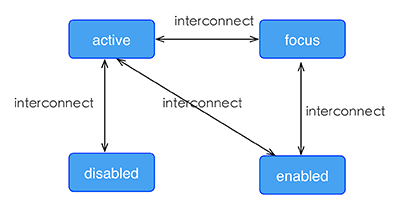
+
+[示例](http://dotwe.org/vue/df2c8f254620d6d30d0906ee75fe5b99)
+
+## 线性渐变 <Badge text="0.10+" type="warn" vertical="middle"/>
+
+Weex 支持线性渐变背景,具体介绍可参考 [CSS 渐变介绍](https://developer.mozilla.org/zh-CN/docs/Web/Guide/CSS/Using_CSS_gradients)。
+
+所有组件均支持线性渐变。
+
+### 使用
+
+你可以通过 `background-image` 属性创建线性渐变。
+
+```css
+background-image: linear-gradient(to top, #a80077, #66ff00);
+```
+
+目前暂不支持 `radial-gradient`(径向渐变)。
+
+Weex 目前只支持两种颜色的渐变,渐变方向如下:
+
+- `to right`:从左向右渐变
+- `to left`:从右向左渐变
+- `to bottom`:从上到下渐变
+- `to top`:从下到上渐变
+- `to bottom right`:从左上角到右下角
+- `to top left`:从右下角到左上角
+
+::: warning
+- `background-image` 优先级高于 `background-color`,这意味着同时设置 `background-image` 和 `background-color`,`background-color` 被覆盖。
+- `background` 不支持简写。
+:::
+
+[示例](http://dotwe.org/vue/5ca46fdb8520e5a1255533d390d41f63)
+
+## 阴影(box-shadow) <Badge text="0.11+" type="warn" vertical="middle"/>
+
+Weex 支持 `box-shadow` 属性用于设置元素阴影。
+
+### 注意
+
+::: warning
+- 目前仅 iOS 支持 `box-shadow` 属性,Android 暂不支持,可以使用图片代替。
+- 每个元素只支持设置一个阴影效果,不支持多个阴影同时作用于一个元素。
+:::
+
+### 参数
+
+- `inset`(可选)
+
+ 默认阴影在边框外。使用 `inset` 后,阴影在边框内(即使是透明边框),背景之上内容之下。
+
+- `<offset-x>`
+
+ `px` 单位长度值,用来设置阴影偏移量。`<offset-x>` 设置水平偏移量,如果是负值则阴影位于元素左边。 `<offset-y>` 设置垂直偏移量,如果是负值则阴影位于元素上面。如果两者都是 0,那么阴影位于元素后面。这时如果设置了 `<blur-radius>` 或 `<spread-radius>` 则有模糊效果。
+
+- `<offset-y>`
+
+ `px` 单位长度值,用来设置阴影偏移量。`<offset-x>` 设置水平偏移量,如果是负值则阴影位于元素左边。 `<offset-y>` 设置垂直偏移量,如果是负值则阴影位于元素上面。如果两者都是 0,那么阴影位于元素后面。这时如果设置了 `<blur-radius>` 或 `<spread-radius>` 则有模糊效果。
+
+- `<blur-radius>`
+
+ 设置模糊半径,`px` 单位长度值,值越大,模糊面积越大,阴影就越大越淡。不能为负值。默认为0,此时阴影边缘锐利。
+
+- `<color>`
+
+ 设置阴影颜色,可参考 [CSS 颜色单位](./css-units.html#css-颜色单位)。
+
+[示例](http://dotwe.org/vue/bc0324f47ea425f89d0e5102801ee856)
+
+## 其他基本样式
+
+- `opacity {number}`:取值范围为 [0, 1] 区间。默认值是 1,即完全不透明;0 是完全透明;0.5 是 50% 的透明度。
+- `background-color {color}`:设定元素的背景色,可选值为色值,支持RGB( `rgb(255, 0, 0)` );RGBA( `rgba(255, 0, 0, 0.5)` );十六进制( `#ff0000` );精简写法的十六进制( `#f00` );色值关键字(`red`),默认值是 `transparent` 。
+
+**注意:** [色值的关键字列表](./css-units.html#颜色关键字列表)。
+
+## 上手样式
+
+如果对于样式写法需要更多上手参考,可参考每个组件的文档中,都有常见的例子可供参考。
+
+你可以按照以下步骤来规划 Weex 页面的样式。
+
+1. 全局样式规划:将整个页面分割成合适的模块。
+2. flex 布局:排列和对齐页面模块。
+3. 定位盒子:定位并设置偏移量。
+4. 细节样式处理:增加特定的具体样式。
diff --git a/docs/docs/styles/css-units.md b/docs/docs/styles/css-units.md
new file mode 100644
index 000000000..64861b72a
--- /dev/null
+++ b/docs/docs/styles/css-units.md
@@ -0,0 +1,204 @@
+# CSS 单位
+
+## CSS 长度单位
+
+在 Weex 中,我们**只支持 `px` 长度单位**。并且它将在 JavaScript 运行时和本机渲染器中解析为数字类型。
+
+::: warning 注意
+- Weex 不支持类似 `em`、`rem`、`pt` 这样的 CSS 标准中的其他长度单位;
+- 单位 `px` 不可省略,否则在 H5 环境无法正确渲染;
+- `line-height` 不支持相对 `font-size` 计算倍数,必须是 `px`。
+:::
+
+## CSS 数值单位
+
+在 Weex 中,除了长度单位外,还有数值单位,仅仅一个数值,后面没有 `px` 等单位。用于 `opacity`,`lines`,`flex` 等属性指定一个纯数值。
+
+有时值必须是整数,例如:`lines`。
+
+## CSS 百分比单位
+
+**Weex 暂不支持百分比,如“50%”,“66.7%”等。**
+
+## CSS 颜色单位
+
+Weex 支持多种颜色单位:
+
+- 颜色关键字,例如 `red`,`green` 等;
+- 十六进制的 HEX 值,每个颜色包括一个 `#` 号,其后面紧跟着三组两位十六进制数,如果这三组数值各自在两位上的数字都相同,那么本单位也可缩写为 `#RGB` 的方式。例如:`#FF8800` 可以缩写为 `#F80`;
+- `rgb(a,b,c)`;
+- `rgba(a,b,c,d)`.
+
+::: warning 注意
+- 不支持 `hsl()`、`hsla()` 8个字符的十六进制颜色。
+- 不支持 `currentColor`单位。
+- `rgb(a,b,c)` 或 `rgba(a,b,c,d)` 的性能比其他颜色格式差很多,请选择合适的颜色格式。
+:::
+
+### 颜色关键字列表
+
+| 颜色名 | 十六进制RGB值 |
+| --- | --- |
+| black | #000000 |
+| silver | #C0C0C0 |
+| gray | #808080 |
+| white | #FFFFFF |
+| maroon | #800000 |
+| red | #FF0000 |
+| purple | #800080 |
+| fuchsia | #FF00FF |
+| green | #008000 |
+| lime | #00FF00 |
+| olive | #808000 |
+| yellow | #FFFF00 |
+| navy | #000080 |
+| blue | #0000FF |
+| teal | #008080 |
+| aqua | #00FFFF |
+| aliceblue | #F0F8FF |
+| antiquewhite | #FAEBD7 |
+| aqua | #00FFFF |
+| aquamarine | #7FFFD4 |
+| azure | #F0FFFF |
+| beige | #F5F5DC |
+| bisque | #FFE4C4 |
+| black | #000000 |
+| blanchedalmond | #FFEBCD |
+| blue | #0000FF |
+| blueviolet | #8A2BE2 |
+| brown | #A52A2A |
+| burlywood | #DEB887 |
+| cadetblue | #5F9EA0 |
+| chartreuse | #7FFF00 |
+| chocolate | #D2691E |
+| coral | #FF7F50 |
+| cornflowerblue | #6495ED |
+| cornsilk | #FFF8DC |
+| crimson | #DC143C |
+| cyan | #00FFFF |
+| darkblue | #00008B |
+| darkcyan | #008B8B |
+| darkgoldenrod | #B8860B |
+| darkgray | #A9A9A9 |
+| darkgreen | #006400 |
+| darkgrey | #A9A9A9 |
+| darkkhaki | #BDB76B |
+| darkmagenta | #8B008B |
+| darkolivegreen | #556B2F |
+| darkorange | #FF8C00 |
+| darkorchid | #9932CC |
+| darkred | #8B0000 |
+| darksalmon | #E9967A |
+| darkseagreen | #8FBC8F |
+| darkslateblue | #483D8B |
+| darkslategray | #2F4F4F |
+| darkslategrey | #2F4F4F |
+| darkturquoise | #00CED1 |
+| darkviolet | #9400D3 |
+| deeppink | #FF1493 |
+| deepskyblue | #00BFFF |
+| dimgray | #696969 |
+| dimgrey | #696969 |
+| dodgerblue | #1E90FF |
+| firebrick | #B22222 |
+| floralwhite | #FFFAF0 |
+| forestgreen | #228B22 |
+| fuchsia | #FF00FF |
+| gainsboro | #DCDCDC |
+| ghostwhite | #F8F8FF |
+| gold | #FFD700 |
+| goldenrod | #DAA520 |
+| gray | #808080 |
+| green | #008000 |
+| greenyellow | #ADFF2F |
+| grey | #808080 |
+| honeydew | #F0FFF0 |
+| hotpink | #FF69B4 |
+| indianred | #CD5C5C |
+| indigo | #4B0082 |
+| ivory | #FFFFF0 |
+| khaki | #F0E68C |
+| lavender | #E6E6FA |
+| lavenderblush | #FFF0F5 |
+| lawngreen | #7CFC00 |
+| lemonchiffon | #FFFACD |
+| lightblue | #ADD8E6 |
+| lightcoral | #F08080 |
+| lightcyan | #E0FFFF |
+| lightgoldenrodyellow | #FAFAD2 |
+| lightgray | #D3D3D3 |
+| lightgreen | #90EE90 |
+| lightgrey | #D3D3D3 |
+| lightpink | #FFB6C1 |
+| lightsalmon | #FFA07A |
+| lightseagreen | #20B2AA |
+| lightskyblue | #87CEFA |
+| lightslategray | #778899 |
+| lightslategrey | #778899 |
+| lightsteelblue | #B0C4DE |
+| lightyellow | #FFFFE0 |
+| lime | #00FF00 |
+| limegreen | #32CD32 |
+| linen | #FAF0E6 |
+| magenta | #FF00FF |
+| maroon | #800000 |
+| mediumaquamarine | #66CDAA |
+| mediumblue | #0000CD |
+| mediumorchid | #BA55D3 |
+| mediumpurple | #9370DB |
+| mediumseagreen | #3CB371 |
+| mediumslateblue | #7B68EE |
+| mediumspringgreen | #00FA9A |
+| mediumturquoise | #48D1CC |
+| mediumvioletred | #C71585 |
+| midnightblue | #191970 |
+| mintcream | #F5FFFA |
+| mistyrose | #FFE4E1 |
+| moccasin | #FFE4B5 |
+| navajowhite | #FFDEAD |
+| navy | #000080 |
+| oldlace | #FDF5E6 |
+| olive | #808000 |
+| olivedrab | #6B8E23 |
+| orange | #FFA500 |
+| orangered | #FF4500 |
+| orchid | #DA70D6 |
+| palegoldenrod | #EEE8AA |
+| palegreen | #98FB98 |
+| paleturquoise | #AFEEEE |
+| palevioletred | #DB7093 |
+| papayawhip | #FFEFD5 |
+| peachpuff | #FFDAB9 |
+| peru | #CD853F |
+| pink | #FFC0CB |
+| plum | #DDA0DD |
+| powderblue | #B0E0E6 |
+| purple | #800080 |
+| red | #FF0000 |
+| rosybrown | #BC8F8F |
+| royalblue | #4169E1 |
+| saddlebrown | #8B4513 |
+| salmon | #FA8072 |
+| sandybrown | #F4A460 |
+| seagreen | #2E8B57 |
+| seashell | #FFF5EE |
+| sienna | #A0522D |
+| silver | #C0C0C0 |
+| skyblue | #87CEEB |
+| slateblue | #6A5ACD |
+| slategray | #708090 |
+| slategrey | #708090 |
+| snow | #FFFAFA |
+| springgreen | #00FF7F |
+| steelblue | #4682B4 |
+| tan | #D2B48C |
+| teal | #008080 |
+| thistle | #D8BFD8 |
+| tomato | #FF6347 |
+| turquoise | #40E0D0 |
+| violet | #EE82EE |
+| wheat | #F5DEB3 |
+| white | #FFFFFF |
+| whitesmoke | #F5F5F5 |
+| yellow | #FFFF00 |
+| yellowgreen | #9ACD32 |
\ No newline at end of file
diff --git a/docs/docs/styles/text-styles.md b/docs/docs/styles/text-styles.md
new file mode 100644
index 000000000..11b47b6bc
--- /dev/null
+++ b/docs/docs/styles/text-styles.md
@@ -0,0 +1,137 @@
+# 文本样式
+
+文本类组件支持一些特殊的 CSS 属性设置文本的样式,如字体、字号、文本颜色等, 这类组件目前包括 `<text>`、 `<input>` 和 `<textarea>`。
+
+## `color`
+
+设置文字颜色,值为色值或颜色关键字,支持 RGB(`rgb(255, 0, 0)`),RGBA(`rgba(255, 0, 0, 0.5)`),十六进制(`#ff0000`),精简写法的十六进制(`#f00`),色值关键字(`red`)。具体可参考 [CSS 颜色单位](./css-units.html#css-颜色单位)。
+
+```html
+<style scope>
+.title {
+ color: rgba(0, 0, 0, 0.8);
+}
+.content {
+ color: #666;
+}
+</style>
+```
+
+## `lines`
+
+指定文本行数,值为整数。**仅在 `<text>` 组件中支持**。默认值是 `0` 代表不限制行数。
+
+通常与 `text-overflow` 配合限制文本行数,超过则文本末尾显示省略号。
+
+```html
+<style scope>
+.content {
+ lines: 3;
+ text-overflow: ellipsis;
+ color: #666;
+}
+</style>
+```
+
+## `text-overflow`
+
+设置内容超长时的省略样式。**仅在 `<text>` 组件中支持**。通常与 `lines` 配合限制文本行数,超过则文本末尾显示省略号。可选值为:
+
+- `clip`:截断,不做任何处理。
+- `ellipsis`:内容超长时在文本末尾显示省略号。
+
+```html
+<style scope>
+.content {
+ lines: 3;
+ text-overflow: ellipsis;
+ color: #666;
+}
+</style>
+```
+
+## `font-size`
+
+设置文字大小,**仅支持 `px` 单位。**文字默认大小为 36px。
+
+```html
+<style scope>
+.title {
+ font-size: 40px;
+}
+</style>
+```
+
+## `font-style`
+
+设置字体类别,可选值 `normal` | `italic`,默认为 `normal`。
+
+```html
+<style scope>
+.title {
+ font-style: italic;
+}
+</style>
+```
+
+## `font-weight`
+
+设置字体粗细程度,可选值为 `normal` | `bold` | `100` | `200` | `300` | `400` | `500` | `600` | `700` | `800` | `900`,默认为 `normal`。
+
+- `normal` 等同于 400, `bold` 等同于 700;
+- iOS 支持以上可选值;Android 仅支持 400 和 700,其他值会设为 400 或 700;
+- 暂不支持 `lighter`, `bolder` 等其他值。
+
+```html
+<style scope>
+.title {
+ font-weight: bold;
+}
+</style>
+```
+
+## `text-decoration`
+
+设置文本装饰,可选值为:
+
+- `none`:无任何装饰,默认为 `none`。
+- `underline`:文本下划线。
+- `line-through`:文本删除线。
+
+```html
+<style scope>
+.title {
+ text-decoration: underline;
+}
+</style>
+```
+
+## `text-align`
+
+设置文本对齐方式,可选值为:
+
+- `left`:左对齐,默认为 `none`。
+- `center`:水平居中对齐。
+- `right`:右对齐。
+
+```html
+<style scope>
+.title {
+ text-align: center;
+}
+</style>
+```
+
+## `font-family`
+
+设置文本设置字体,该属性**不保证**在不同平台、不同设备间的一致性。如所选设置在平台上不可用,将会降级到平台默认字体。
+
+```html
+<style scope>
+.title {
+ font-family: Arial;
+}
+</style>
+```
+
+该属性可配合 `dom.addRule()` 方法为 `<text>` 设置自定义字体,详情可查看 [`<text>` 组件](/docs/text.html#自定义字体)。
diff --git a/docs/guide/README.md b/docs/guide/README.md
new file mode 100644
index 000000000..96611d978
--- /dev/null
+++ b/docs/guide/README.md
@@ -0,0 +1,7 @@
+<script>
+module.exports = {
+ created(){
+ this.$router.push('/guide/getting-started/install.html')
+ }
+}
+</script>
\ No newline at end of file
diff --git a/docs/guide/advanced/asset-path.md b/docs/guide/advanced/asset-path.md
new file mode 100644
index 000000000..e69de29bb
diff --git a/docs/guide/advanced/downgrade.md b/docs/guide/advanced/downgrade.md
new file mode 100644
index 000000000..e69de29bb
diff --git a/docs/guide/advanced/mobile-app-architecture.md b/docs/guide/advanced/mobile-app-architecture.md
new file mode 100644
index 000000000..e69de29bb
diff --git a/docs/guide/advanced/use-vuex-and-vue-router.md b/docs/guide/advanced/use-vuex-and-vue-router.md
new file mode 100644
index 000000000..e69de29bb
diff --git a/docs/guide/advanced/weex-page-architecture.md b/docs/guide/advanced/weex-page-architecture.md
new file mode 100644
index 000000000..e69de29bb
diff --git a/docs/guide/basic/front-end-frameworks.md b/docs/guide/basic/front-end-frameworks.md
new file mode 100644
index 000000000..e69de29bb
diff --git a/docs/guide/basic/platform-difference.md b/docs/guide/basic/platform-difference.md
new file mode 100644
index 000000000..e69de29bb
diff --git a/docs/guide/basic/use-vue-in-weex.md b/docs/guide/basic/use-vue-in-weex.md
new file mode 100644
index 000000000..e69de29bb
diff --git a/docs/guide/contribute/bug-report-guidelines.md b/docs/guide/contribute/bug-report-guidelines.md
new file mode 100644
index 000000000..e69de29bb
diff --git a/docs/guide/contribute/development-process.md b/docs/guide/contribute/development-process.md
new file mode 100644
index 000000000..e69de29bb
diff --git a/docs/guide/contribute/how-to-contribute.md b/docs/guide/contribute/how-to-contribute.md
new file mode 100644
index 000000000..e69de29bb
diff --git a/docs/guide/debug/debug.md b/docs/guide/debug/debug.md
new file mode 100644
index 000000000..e69de29bb
diff --git a/docs/guide/develop/integrate-devtool-to-android.md b/docs/guide/develop/integrate-devtool-to-android.md
new file mode 100644
index 000000000..e69de29bb
diff --git a/docs/guide/develop/integrate-devtool-to-ios.md b/docs/guide/develop/integrate-devtool-to-ios.md
new file mode 100644
index 000000000..e69de29bb
diff --git a/docs/guide/develop/setup-develop-environment.md b/docs/guide/develop/setup-develop-environment.md
new file mode 100644
index 000000000..e69de29bb
diff --git a/docs/guide/extend/extend-android.md b/docs/guide/extend/extend-android.md
new file mode 100644
index 000000000..eeb55c3b1
--- /dev/null
+++ b/docs/guide/extend/extend-android.md
@@ -0,0 +1,189 @@
+Weex 提供了扩展机制,可以根据自己的业务进行定制自己的功能。
+主要分为:
+- Module 扩展, 非 UI 的特定功能。例如 sendHttp、openURL 等。
+- Component 扩展, 实现特别功能的 Native 控件。例如:RichTextview,RefreshListview 等。
+- Adapter 扩展, Weex 对一些基础功能实现了统一的接口,可实现这些接口来定制自己的业务。例如:图片下载等。
+
+## Module 扩展
+1. Module 扩展必须继承 WXModule 类。
+2. 扩展方法必须加上 `@JSMethod (uiThread = false or true)` 注解。Weex 会根据注解来判断当前方法是否要运行在 UI 线程,和当前方法是否是扩展方法。
+3. Weex是根据反射来进行调用 Module 扩展方法,所以Module中的扩展方法必须是 public 类型。
+4. 同样因为是通过反射调用,Module 不能被混淆。请在混淆文件中添加代码:`-keep public class * extends com.taobao.weex.common.WXModule{*;}`
+5. Module 扩展的方法可以使用 int, double, float, String, Map, List 类型的参数
+6. 完成 Module 后一定要在初始化时注册 `WXSDKEngine.registerModule("myModule", MyModule.class);` 否则会报类似错误:`ReportException :undefined:9: TypeError: Object #<Object> has no method 'printLog'`
+
+示例如下:
+```java
+public class MyModule extends WXModule {
+
+ //run ui thread
+ @JSMethod (uiThread = true)
+ public void printLog(String msg) {
+ Toast.makeText(mWXSDKInstance.getContext(),msg,Toast.LENGTH_SHORT).show();
+ }
+
+ //run JS thread
+ @JSMethod (uiThread = false)
+ public void fireEventSyncCall(){
+ //implement your module logic here
+ }
+}
+```
+Register the module
+```
+WXSDKEngine.registerModule("MyModule", MyModule.class);
+```
+S 调用如下:
+```vue
+<template>
+ <div>
+ <text onclick="click">testMyModule</text>
+ </div>
+</template>
+
+<script>
+ module.exports = {
+ methods: {
+ click: function() {
+ weex.requireModule('MyModule').printLog("I am a weex Module");
+ }
+ }
+ }
+</script>
+```
+
+## Component 扩展
+1. Component 扩展类必须继承 WXComponent.
+2. Component 对应的设置属性的方法必须添加注解 @WXComponentProp(name=value(value is attr or style of dsl))
+3. Weex sdk 通过反射调用对应的方法,所以 Component 对应的属性方法必须是 public,并且不能被混淆。请在混淆文件中添加代码 `-keep public class * extends com.taobao.weex.ui.component.WXComponent{*;}`
+4. Component 扩展的方法可以使用 int, double, float, String, Map, List 类型的参数
+5. 完成 Component 后一定要在初始化时注册 `WXSDKEngine.registerComponent("richText", RichText.class);`
+
+示例如下:
+```java
+public class RichText extends WXComponent<TextView> {
+
+ public RichText(WXSDKInstance instance, WXDomObject dom, WXVContainer parent) {
+ super(instance, dom, parent);
+ }
+
+ @Override
+ protected TextView initComponentHostView(@NonNull Context context) {
+ TextView textView = new TextView(context);
+ textView.setTextSize(20);
+ textView.setTextColor(Color.BLACK);
+ return textView;
+ }
+
+ @WXComponentProp(name = "tel")
+ public void setTel(String telNumber) {
+ getHostView().setText("tel: " + telNumber);
+ }
+}
+```
+注册你的组件:
+```
+WXSDKEngine.registerComponent("richText", RichText.class);
+```
+JS 调用如下:
+```html
+<template>
+ <div>
+ <richText tel="12305" style="width:200;height:100">12305</richText>
+ </div>
+</template>
+```
+
+### 组件方法支持
+从WeexSDK 0.9.5开始,你可以定义组件方法
+- 在组件中如下声明一个组件方法
+ ```java
+ @JSMethod
+ public void focus(){
+ //method implementation
+ }
+ ```
+- 注册组之后,你可以在weex 文件中调用
+ ```vue
+ <template>
+ <mycomponent ref='mycomponent'></mycomponent>
+ </template>
+ <script>
+ module.exports = {
+ created: function() {
+ this.$refs.mycomponent.focus();
+ }
+ }
+ </script>
+ ```
+注:工程要添加依赖 `compile 'com.squareup.picasso:picasso:2.5.2'`
+
+## Adapter扩展
+图片下载:
+
+需要时集成接口 IWXImgLoaderAdapter,实现 setImage 方法。
+
+示例如下:
+
+```java
+public class ImageAdapter implements IWXImgLoaderAdapter {
+
+ public ImageAdapter() {
+ }
+
+ @Override
+ public void setImage(final String url, final ImageView view,
+ WXImageQuality quality, WXImageStrategy strategy) {
+
+ WXSDKManager.getInstance().postOnUiThread(new Runnable() {
+
+ @Override
+ public void run() {
+ if(view==null||view.getLayoutParams()==null){
+ return;
+ }
+ if (TextUtils.isEmpty(url)) {
+ view.setImageBitmap(null);
+ return;
+ }
+ String temp = url;
+ if (url.startsWith("//")) {
+ temp = "http:" + url;
+ }
+ if (view.getLayoutParams().width <= 0 || view.getLayoutParams().height <= 0) {
+ return;
+ }
+ Picasso.with(WXEnvironment.getApplication())
+ .load(temp)
+ .into(view);
+ }
+ },0);
+ }
+}
+```
+
+### SDK混淆规则
+若要在APP中使用混淆,请在相应的配置文件中添加如下规则:
+```java
+-keep class com.taobao.weex.WXDebugTool{*;}
+-keep class com.taobao.weex.devtools.common.LogUtil{*;}
+-keepclassmembers class ** {
+ @com.taobao.weex.ui.component.WXComponentProp public *;
+}
+-keep class com.taobao.weex.bridge.**{*;}
+-keep class com.taobao.weex.dom.**{*;}
+-keep class com.taobao.weex.adapter.**{*;}
+-keep class com.taobao.weex.common.**{*;}
+-keep class * implements com.taobao.weex.IWXObject{*;}
+-keep class com.taobao.weex.ui.**{*;}
+-keep class com.taobao.weex.ui.component.**{*;}
+-keep class com.taobao.weex.utils.**{
+ public <fields>;
+ public <methods>;
+ }
+-keep class com.taobao.weex.view.**{*;}
+-keep class com.taobao.weex.module.**{*;}
+-keep public class * extends com.taobao.weex.common.WXModule{*;}
+-keep public class * extends com.taobao.weex.ui.component.WXComponent{*;}
+-keep class * implements com.taobao.weex.ui.IExternalComponentGetter{*;}
+```
diff --git a/docs/guide/extend/extend-framework.md b/docs/guide/extend/extend-framework.md
new file mode 100644
index 000000000..530d111e6
--- /dev/null
+++ b/docs/guide/extend/extend-framework.md
@@ -0,0 +1,144 @@
+这部分扩展能力还在讨论尝试中,可能随时会有调整,请留意。
+
+Weex 希望能够尊重尽可能多的开发者的使用习惯,所以除了 Weex 官方支持的 Vue 2.0 之外,开发者还可以定制并横向扩展自己的或自己喜欢的 JS Framework。完整一套 JS Framework 的定制和扩展需要以下几个步骤:
+
+1. 首先你要有一套完整的 JS Framework。
+2. 了解 Weex 的 JS 引擎的特性支持情况。
+3. 适配 Weex 的 native DOM APIs。
+4. 适配 Weex 的初始化入口和多实例管理机制。
+5. 在 Weex JS runtime 的 framework 配置中加入自己的 JS Framework 然后打包。
+6. 基于该 JS Framework 撰写 JS bundle,并加入特定的前缀注释,以便 Weex JS runtime 能够正确识别。
+
+## Weex JS 引擎的特性支持情况
+- 在 iOS 下,Weex 使用的是系统自带的 JavaScriptCore,所以 ES 支持情况取决于操作系统的版本。目前保守判断,ES5 的特性市面上主流的 iOS 设备都是可以完美支持的,但是 ES6+ 的特性存在一定的碎片化。
+- 在 Android 下,Weex 使用的是 UC 提供的 v8 内核,出于体积、性能和稳定性的考虑,我们使用的并不是最新版本的 v8 内核,同样的保守判断,ES5 特性能够全部支持,包括严格模式、`Object.freeze` 等。
+- Weex JS 引擎不支持 HTML DOM APIs 和 HTML5 JS APIs,这包括 `document`, `setTimeout` 等。
+- 在此基础上,我们加入了 `Promise` 的 polyfill,以及 `console` 的 polyfill。
+- 额外的,为了尽可能的确保 JS 引擎的长效内存管理,我们对一个通用的全局对象进行了 `Object.freeze()` 冻结操作,这包括:
+ - `Object`
+ - `Object.prototype`
+ - `Array`
+ - `Array.prototype`
+ - `String.prototype`
+ - `Number.prototype`
+ - `Boolean.prototype`
+ - `Error.prototype`
+ - `Date.prototype`
+ - `RegExp.prototype`
+
+## 适配 Weex 的初始化入口和多实例管理机制
+开发者提供的 JS Framework 最终需要包装成一个 CommonJS 包,并且这个包需要对外暴露以下方法:
+
+### 框架初始化
+- `init(config)`
+ - `config`
+ - `Document`
+ - `Element`
+ - `Comment`
+ - `TaskSender`
+ - `CallbackManager`
+
+该方法会把 Weex 提供的 Native DOM 类和两个辅助类放到 config 参数中,并允许框架本身完成初始化。
+
+小提示:同时,框架作者也能够通过在框架初始化时传入不同的 config 来进行框架的测试或环境模拟。
+
+#### 参数格式介绍
+- `TaskSender`: wip...
+- `CallbackManager`: wip...
+
+### 注册可用的 native 组件和模块
+- `registerComponents(components)`
+- `registerModules(modules)`
+
+这两个方法会在框架初始化之后立刻调用,这样框架就能够知道当前的客户端支持哪些组件和模块,在一些特殊逻辑或必要的情况下,有机会为框架本身提供参考信息。
+
+#### 参数格式介绍
+- `components: Array`: 描述组件的数组,每一项包括:
+ - `type: string`: 组件名称,比如 `div`。
+ - `methods: string[]`: 可选项,该组件支持的方法名称列表,这些方法可以遵循 Weex 的 native DOM APIs 的组件方法调用方式。
+- `modules: Object`: 描述一系列模块的散列表,每一项的 key 是模块名,每一项的值是一个数组,数组里的每一项描述了一个该模块中的一个方法,该方法的信息包括:
+ `name: string`: 方法名
+ `args: string[]`: 参数个数和类型描述
+例如:
+```js
+registerComponents([
+ { type: 'web', methods: ['goBack', 'goForward', 'refresh']}
+])
+
+registerModules({
+ event: [
+ {name: 'openURL', args: ['string']}
+ ]
+})
+```
+
+### 多实例生命周期管理
+- `createInstance(instanceId, code, config, data, env)`
+- `refreshInstance(instanceId, data)`
+- `destroyInstance(instanceId)`
+
+每个 Weex 页面都有被创建、被销毁两个必经阶段,同时在 Weex 页面运行过程中,native 有机会主动向 Weex 页面发送消息,不同的框架可以根据自己框架的设计对这样的消息有自己的理解和设计实现。
+
+#### 参数格式介绍
+- `instanceId: string`: 该 Weex 页面的唯一 id,由 native 产生。
+- `code: string`: 该 Weex 页面的 JS bundle 的代码,通过 native 传入。
+- `config: Object?`: 该 Weex 页面的配置信息,比如代表该 bundle 地址的 `bundleUrl`,由 native 配置产生,和 JS bundle 本身的内容无关。
+- `data: Object?`: Native 有机会在创建一个 Weex 页面的时候,传入一份外部数据,JS 框架也有机会接此机会为相同的 JS bundle 配合不同的 `data` 生成不同的页面内容。
+- `env: Object?`: 当前 Weex 页面的相关环境信息,各字段的含义:
+ - `info: Object`: 框架 info 信息,详见之后的 “JS Bundle 格式要求”。
+ - `config: Object`: 等同该方法的第三个参数 `config`。
+ - `callbacks: CallbackManager`: 该 Weex 页面唯一的 `CallbackManager` 实例。
+ - `created: number`: 该 Weex 页面的创建时间毫秒数。
+ - `framework: string`: 该 Weex 页面基于的框架名,等同于 `info.framework`。
+
+### Native 通信
+- `receiveTasks(instanceId, tasks)`
+
+Native 除了通过 `refreshInstance` 方法向 JS 框架层发送消息之外,更多的会通过 `receiveTasks` 发送用户事件或方法回调给 JS 框架。
+
+比如用户点击了一个按钮,native 就会发送一个 `fireEvent` 类型的任务给 JS 框架,然后 JS 框架再处理相应的事件逻辑。这部分工作机制和 native DOM 接口中的 `addEvent` 的设计有关。
+
+再比如用户发起了一个 `fetch` 网络请求,当请求在 native 端完成时,会以一个 `callback` 类型的任务发给 JS 框架。由于 native 无法传递 JavaScript 中的 function,所以实际上知会发送一个 `callbackId` 给 JS 框架。这部分工作机制和之前出现过的 `CallbackManager` 的设计有关。
+
+### 辅助方法
+- `getRoot(instanceId): JSON`
+
+该方法可以返回文档主体结点的完整 JSON 描述,开发者可以以此查看到完整的 native DOM 树,具体返回值的格式和 native DOM 接口中的 `toJSON()` 方法返回值格式一致。此功能多用作开发者工具扩展。
+
+## 在 WeexSDK 中配置 JS Framework
+### 准备好你的 JS Framework 代码
+```js
+// your-own-js-framework.js
+
+export function init (config) { ... }
+
+export function registerComponents (components) { ... }
+export function registerModules (modules) { ... }
+
+export function createInstance (id, code, config, data, env) { ... }
+export function destroyInstance (id) { ... }
+export function refreshInstance (id, data) { ... }
+
+export function recieveTasks (id, tasks) { ... }
+export function getRoot (id) { ... }
+```
+
+### 注册一个 JS Framework
+```js
+import * as Vue from '...'
+import * as React from '...'
+import * as Angular from '...'
+
+export default { Vue, React, Angular };
+```
+然后打包 JS runtime,集成到 WeexSDK 中。
+
+### JS Bundle 格式要求
+#### 框架 info
+
+你需要保障基于该 JS Framework 的 JS Bundle 在文件开头带有如下格式的注释,我们称其为框架 info:
+```js
+// { "framework": "Vue" }
+...
+```
+这样 Weex JS 引擎就会识别出这个 JS bundle 需要用 Vue 框架来解析。并分发给 Vue 框架处理。同理,Weex 支持同时多种框架在一个移动应用中共存并各自解析基于不同框架的 JS bundle。
\ No newline at end of file
diff --git a/docs/guide/extend/extend-ios-with-swift.md b/docs/guide/extend/extend-ios-with-swift.md
new file mode 100644
index 000000000..c6e635f8b
--- /dev/null
+++ b/docs/guide/extend/extend-ios-with-swift.md
@@ -0,0 +1,102 @@
+## Swift In Weex
+
+[Swift和Objective-C](https://developer.apple.com/library/ios/documentation/Swift/Conceptual/BuildingCocoaApps/MixandMatch.html#//apple_ref/doc/uid/TP40014216-CH10-ID122) 混编
+
+参考完整 [例子](https://github.com/acton393/WeexSwiftSample.git)
+
+### 使用 Swift 进行 module 扩展
+
+因为 module 暴露 method 是通过`Objective-C`宏来做的,调用的时候是通过反射,所以Swift扩展 module 通过`extension` `Objective-C`的类。
+- 新建 `WXSwiftTestModule.h/m` 和 `WXSwiftTestModule.swift`文件, 在新建Swift文件的时候会提示
+ 
+ 选择 `Create Bridging Header`, 因为我们要在 Swift 中访问 `Objective-C` 的一些类,正是通过这个 header暴露 OC 的类给 Swift,header 格式为 `yourTarget-Bridging-Header.h`,我这里创建完header文件名称为:`WeexDemo-Bridging-Header.h`
+- `WXSwiftTestModule.h/m`中实现
+ - WXSwiftTestModule.h 中
+
+ ```
+ #import <Foundation/Foundation.h>
+ #import <WeexSDK/WeexSDK.h>
+
+ @interface WXSwiftTestModule : NSObject <WXModuleProtocol>
+
+ @end
+
+ ```
+ - WXSwiftTestModule.m 中
+
+ WeexDemo-Swift.h 这个文件需要编译一下才可以搜索到,具体的路径
+
+ ```
+ weex/ios/playground/DerivedData/WeexDemo/Build/Intermediates/WeexDemo.build/Debug-iphonesimulator/WeexDemo.build/DerivedSources/WeexDemo-Swift.h
+ ```
+
+ 路径具体需要根据自己工程而定
+
+ ```
+ #import "WXSwiftTestModule.h"
+ #import "WeexDemo-Swift.h" // Swift类和方法 被 `Objective-C` 识别需要导入
+
+ @implementation WXSwiftTestModule
+ #pragma clang diagnostic push //关闭unknow selector的warrning
+ #pragma clang diagnostic ignored "-Wundeclared-selector"
+
+ WX_EXPORT_METHOD(@selector(printSome:callback:)) //Swift 中定义的方法,XCode 转换成的最终的方法名称,在`WeexDemo-Swift.h`里面查看
+
+ #pragma clang diagnostic pop
+
+ @end
+
+ ```
+- Swift 中实现
+ 扩展 OC 的类 `WXSwiftTestModule`,增加了一个方法,这个方法就是我们要暴露出来,在 js 中可以调到的
+ - WXSwiftTestModule.swift
+
+ ```
+ import Foundation
+ public extension WXSwiftTestModule {
+ public func printSome(someThing:String, callback:WXModuleCallback) {
+ print(someThing)
+ callback(someThing)
+ }
+ }
+ ```
+
+ `WXSwiftTestModule` 和`WXModuleCallback` 因为是 OC 的,需要在 `WeexDemo-Bridging-Header` 中暴露
+ - WeexDemo-Bridging-Header.h中
+
+ ```
+ //
+ // Use this file to import your target's public headers that you would like to expose to Swift.
+ //
+ #import "WXSwiftTestModule.h"
+ #import "WeexSDK.h"
+ ```
+
+ 至此这个使用 Swift 开发的简单的 module 已经完成
+
+ ### module 使用
+ - 注册 module
+
+ ```
+ [WXSDKEngine registerModule:@"swifter" withClass:[WXSwiftTestModule class]];
+
+ ```
+ - 前端脚本中用法
+
+ ```
+ <template>
+ <text>Swift Module</text>
+ </template>
+
+ <script>
+ module.exports = {
+ ready: function() {
+ var swifter = weex.require('swifter');
+ swifter.printSome("https://www.taobao.com",function(param){
+ nativeLog(param);
+ });
+ }
+
+ };
+ </script>
+ ```
\ No newline at end of file
diff --git a/docs/guide/extend/extend-ios.md b/docs/guide/extend/extend-ios.md
new file mode 100644
index 000000000..081518e5f
--- /dev/null
+++ b/docs/guide/extend/extend-ios.md
@@ -0,0 +1,245 @@
+> 注意:Weex 所有暴露给 JS 的内置 module 或 component API 都是安全和可控的, 它们不会去访问系统的私有 API ,也不会去做任何 runtime 上的 hack 更不会去改变应用原有的功能定位。
+> 如果需要扩展自定义的 module 或者 component ,一定注意不要将 OC 的 runtime 暴露给 JS , 不要将一些诸如 `dlopen()`, `dlsym()`, `respondsToSelector:`,`performSelector:`,`method_exchangeImplementations()` 的动态和不可控的方法暴露给JS, 也不要将系统的私有API暴露给JS
+
+Weex SDK 只提供渲染,提供了一些默认的组件和能力,如果你需要一些特性但 Weex 并未提供,可以通过扩展自定义的一些插件来实现,通过 WeexSDK 加载。
+
+本文都以 Objective-C 为例子书写,如果需要 swift 请参考 [使用 swift 扩展 Weex](/guide/extend-ios-with-swift.html)。
+
+## 自定义 module
+自定义 module, 需要让自己的 class 遵循 `WXModuleProtocol` 这个protocol, 通过 `WX_EXPORT_METHOD` 这个宏暴露出需要透出到 `JavaScript` 调用的方法,注册 module , 就可以完成一个简单 module 的自定义。
+### module 自定义初阶
+下面完成一个 module, 该 module 暴露一个打印输入参数的方法:
+1. 新建一个 基类为 NSObject 的 class `WXCustomEventModule`, 让该类遵循 `WXModuleProtocol` 的协议
+<img src="https://img.alicdn.com/tfs/TB1LrZ8n7voK1RjSZPfXXXPKFXa-1042-264.png" width="100%">
+2. 添加打印的方法,通过 `WX_EXPORT_METHOD` 暴露该方法
+<img src="https://img.alicdn.com/tfs/TB156M9nZfpK1RjSZFOXXa6nFXa-1434-564.png" width="100%">
+3. 在初始化完成 Weex SDK 之后注册该 module
+<img src="https://img.alicdn.com/tfs/TB1IGo4nVzqK1RjSZFoXXbfcXXa-1420-122.png" width="100%">
+到此,我们已经完成了一个简单的 module 方法的封装,javaScript 端的使用如下:
+```js
+weex.requireModule("event").showParams("hello weex")
+```
+### module 高阶用法
+1. `weexInstance`
+在一个 Weex 页面中,默认 WXSDKInstance 的 Object 持有 多个 module 的 Object, 而 module 的 object 是没有对 WXSDKInstance 做持有的, 在自定义的module 中添加 `@synthesize weexInstance`, module Object 可以对 持有它本身的 WXSDKInstance Object 做一个 弱引用, 通过 weexInstance 可以拿到调用该 module 的页面的一些信息。
+2. `targetExecuteThread`
+Module 方法默认会在UI线程中被调用,建议不要在这做太多耗时的任务,如果要在其他线程执行整个module 方法,需要实现`WXModuleProtocol` 中 `- (NSThread *)` 的方法,这样,分发到这个module的任务会在指定的线程中运行。
+3. `WXModuleKeepAliveCallback`
+Module 支持返回值给 JavaScript中的回调,回调的类型是 `WXModuleKeepAliveCallback`,回调的参数可以是String或者Map, 该 block 第一个参数为回调给 JavaScript 的数据,第二参数是一个 BOOL 值,表示该回调执行完成之后是否要被清除,JavaScript 每次调用都会产生一个回调,但是对于单独一次调用,是否要在完成该调用之后清除掉回调函数 id 就由这个选项控制,如非特殊场景,建议传 NO。
+4. `WX_EXPORT_METHOD_SYNC`
+使用 `WX_EXPORT_METHOD` 暴露到前端的方法都是异步方法(获得结果需要通过回调函数获得), 如果期望获得同步调用结果,可以使用 `WX_EXPORT_METHOD_SYNC` 暴露module 方法。
+
+## Component 扩展
+可能 WeexSDK 内置提供的组件并不能满足你的开发需求,比如需要期望使用地图这样一个复杂的组件,可以通过自定义一个组件,注册到 WeexSDK engine 中, 可以很方便的使用起来。
+### component 基础生命周期
+- 新建一个基类为 `WXComponent` 的 class
+ 如果此时我们什么都不做,将改组件注册进 WeexSDK engine,它的功能就跟内置的 div 组件功能是一致的。
+- 覆盖 `WXComponent` 中的生命周期方法
+ - `loadView`
+ 一个 component 默认对应于一个 view,如果未覆盖 `loadView` 提供自定义 `view`, 会使用 `WXComponent` 基类中的 `WXView`, `WXView` 是继承自 UIView 的一个派生 view。要实现地图功能,我们需要对应的地图 view, 比如系统的 `MKMapView`
+ ```
+ - (UIView *)loadView {
+ return [MKMapView new];
+ }
+ ```
+ - `viewDidLoad`
+ 对组件 view 需要做一些配置,比如设置 delegate, 可以在 `viewDidLoad` 生命周期做,如果当前 view 没有添加 subview 的话,不要设置 view 的 frame,WeexSDK 会根据 style 设置。
+ ```
+ - (void)viewDidLoad {
+ ((MKMapView*)self.view).delegate = self;
+ }
+ ```
+- 注册 component
+ ```
+ [WXSDKEngine registerComponent:@"map" withClass:[WXMapComponent class]];
+ ```
+ 在前端页面直接可以使用 `<map>` 标签,如下所示
+ ```html
+ <template>
+ <div>
+ <map style="width:200px;height:200px"></map>
+ </div>
+ </template>
+ ```
+- 支持自定义事件
+ 给 map 组件支持 `mapLoaded` 事件
+ ```vue
+ <template>
+ <div>
+ <map style="width:200px;height:200px" @mapLoaded="onMapLoaded"></map>
+ </div>
+ </template>
+
+ <script>
+ export default {
+ methods: {
+ onMapLoaded:function(e) {
+ console.log("map loaded"+JSON.stringify(e))
+ }
+ }
+ }
+ </script>
+ ```
+ 给当前组件添加 BOOL 成员 mapLoaded,记录当前事件是否被添加,当地图加载完成时候,我们可以根据这个判断是否应该发送事件。
+ - 覆盖组件生命周期方法添加和移除事件
+ 覆盖 `addEvent` 和 `removeEvent` 方法
+ ```
+ - (void)addEvent:(NSString *)eventName {
+ if ([eventName isEqualToString:@"mapLoaded"]) {
+ _mapLoaded = YES;
+ }
+ }
+
+ - (void)removeEvent:(NSString *)eventName
+ {
+ if ([eventName isEqualToString:@"mapLoaded"]) {
+ _mapLoaded = NO;
+ }
+ }
+ ```
+ - 在适宜的时间发事件通知
+ 在 MKMapView 加载完成的 delegate 方法中,发事件通知自定义事件
+ > 不要忘记设置 MKMapView 的 delegate.
+ ```
+ - (void)mapViewDidFinishLoadingMap:(MKMapView *)mapView {
+ if (_mapLoaded) {
+ [self fireEvent:@"mapLoaded" params:@{@"customKey":@"customValue"} domChanges:nil]
+ }
+ }
+ ```
+- 支持自定义属性
+ 添加自定义属性 `showTraffic`
+ ```html
+ <template>
+ <div>
+ <map style="width:200px;height:200px" showTraffic="true"></map>
+ </div>
+ </template>
+ ```
+ - 覆盖组件初始化方法 `initWithRef...`
+
+ 当前component 添加 `BOOL` 成员 showsTraffic,接受保存用户输入值,添加到当前组件上的所有属性都会在初始化方法中 `attributes` 中传过来,此处我们处理我们感兴趣的属性即可。
+ ```
+ - (instancetype)initWithRef:(NSString *)ref type:(NSString *)type styles:(NSDictionary *)styles attributes:(NSDictionary *)attributes events:(NSArray *)events weexInstance:(WXSDKInstance *)weexInstance {
+ if(self = [super initWithRef:ref type:type styles:styles attributes:attributes events:events weexInstance:weexInstance]) {
+ if (attributes[@"showsTraffic"]) {
+ _showsTraffic = [WXConvert BOOL: attributes[@"showsTraffic"]];
+ }
+ }
+ return self;
+ }
+ ```
+ - 在 `viewDidLoad` 中设置该属性
+ ```
+ - (void)viewDidLoad {
+ ((MKMapView*)self.view).showsTraffic = _showsTraffic;
+ }
+ ```
+ - 支持属性更新
+ ```
+ - (void)updateAttributes:(NSDictionary *)attributes{
+ if (attributes[@"showsTraffic"]) {
+ _showsTraffic = [WXConvert BOOL: attributes[@"showsTraffic"]];
+ ((MKMapView*)self.view).showsTraffic = _showsTraffic;
+ }
+ }
+ ```
+
+### 更多 component 生命周期
+native 的 component 是由 Weex 管理的,Weex 创建,布局,渲染,销毁。Weex 的 component 生命周期都是可以 hook 的,你可以在这些生命周期中去做自己的事情。
+
+| 方法 | 描述 |
+| ---------- | --------- |
+| initWithRef:type:… | 用给定的属性初始化一个component. |
+| layoutDidFinish | 在component完成布局时候会调用. |
+| loadView | 创建component管理的view. |
+| viewWillLoad | 在component的view加载之前会调用. |
+| viewDidLoad | 在component的view加载完之后调用. |
+| viewWillUnload | 在component的view被释放之前调用. |
+| viewDidUnload | 在component的view被释放之后调用. |
+| updateStyles: | 在component的style更新时候调用. |
+| updateAttributes: | 在component的attribute更新时候调用. |
+| addEvent: | 给component添加event的时候调用. |
+| removeEvent: | 在event移除的时候调用. |
+
+或许你需要考虑更多的生命周期方法去 Hook,当布局完成时候,像 `layoutDidFinish`,如果你想了解更多,可以参考一下 `WXComponent.h` 声明的方法。
+
+### component 方法
+WeexSDK 0.9.5 之后支持了在 js 中直接调用 component 的方法,自定义完组件后,下面的例子可以指引你完成 component 方法。
+
+- 自定义一个 WXMyCompoenent 的组件
+ ```
+ @implementation WXMyComponent
+ WX_EXPORT_METHOD(@selector(focus)) // 暴露该方法给js
+ - (instancetype)initWithRef:(NSString *)ref type:(NSString *)type styles:(NSDictionary *)styles attributes:(NSDictionary *)attributes events:(NSArray *)events weexInstance:(WXSDKInstance *)weexInstance {
+ if (self = [super initWithRef:ref type:type styles:styles attributes:attributes events:events weexInstance:weexInstance]) {
+ // handle your attributes
+ // handle your styles
+ }
+ return self;
+ }
+
+ - (void)focus {
+ NSLog(@"you got it");
+ }
+ @end
+ ```
+- 注册组件 `[WXSDKEngine registerComponent:@"mycomponent" withClass:[WXMyComponent class]]`
+- 在 weex 文件中调用
+ ```vue
+ <template>
+ <mycomponent ref='mycomponent'></mycomponent>
+ </template>
+ <script>
+ module.exports = {
+ created:function() {
+ this.$refs.mycomponent.focus();
+ }
+ }
+ </script>
+ ```
+
+## 自定义 handler
+weexSDK 目前没有提供图片下载的能力,在 `WXImgLoaderProtocol` 定义了一些获取图片的接口, image 组件正是通过 `WXImgLoaderProtocol` 获得并展示图片,开发者可以实现该 protocol 中的接口方法,这样 `image` 标签才能正常展示图片。
+
+开发者也可以定义自己的 `protocol` 和对应的实现来使用 `handler` 机制。
+- 新建基类为 NSObject 的 class 实现 `WXImgLoaderProtocol` 协议, 实现 `WXImgLoaderProtocol` 的方法
+ > 下面加载图片的逻辑需要依赖 SDWebImage,你也可以不依赖 SDWebimage 使用自己的方式加载对应 URL 图片。
+ ```
+ @implementation WXImgLoaderDefaultImpl
+ - (id<WXImageOperationProtocol>)downloadImageWithURL:(NSString *)url imageFrame:(CGRect)imageFrame userInfo:(NSDictionary *)userInfo completed:(void(^)(UIImage *image, NSError *error, BOOL finished))completedBlock
+ {
+ if ([url hasPrefix:@"//"]) {
+ url = [@"http:" stringByAppendingString:url];
+ }
+ return (id<WXImageOperationProtocol>)[[SDWebImageManager sharedManager] downloadImageWithURL:[NSURL URLWithString:url] options:0 progress:^(NSInteger receivedSize, NSInteger expectedSize) {
+ } completed:^(UIImage *image, NSError *error, SDImageCacheType cacheType, BOOL finished, NSURL *imageURL) {
+ if (completedBlock) {
+ completedBlock(image, error, finished);
+ }
+ }];
+ }
+ @end
+ ```
+- 注册 handler
+ 你可以通过WXSDKEngine 中的 `registerHandler:withProtocol` 注册handler
+ ```
+ WXSDKEngine.h
+ /**
+ * @abstract Registers a handler for a given handler instance and specific protocol
+ * @param handler The handler instance to register
+ * @param protocol The protocol to confirm
+ */
+ + (void)registerHandler:(id)handler withProtocol:(Protocol *)protocol;
+
+ [WXSDKEngine registerHandler:[WXImgLoaderDefaultImpl new] withProtocol:@protocol(WXImgLoaderProtocol)]
+
+ ```
+- 使用 handler
+ handler 可以在 native 的 module 或者 component 实现中使用
+ ```
+ id<WXImgLoaderProtocol> imageLoader = [WXSDKEngine handlerForProtocol:@protocol(WXImgLoaderProtocol)];
+ [iamgeLoader downloadImageWithURL:imageURl imageFrame:frame userInfo:customParam completed:^(UIImage *image, NSError *error, BOOL finished){
+ }];
+
+ ```
\ No newline at end of file
diff --git a/docs/guide/extend/extend-web.md b/docs/guide/extend/extend-web.md
new file mode 100644
index 000000000..54f82cd63
--- /dev/null
+++ b/docs/guide/extend/extend-web.md
@@ -0,0 +1,76 @@
+## 扩展 Web 组件
+Vue.js 本身就是一个独立的前端框架,在浏览器中完全能够不基于 Weex 容器渲染。因此,针对 Weex 平台扩展 Vue.js 的 Web 端组件,和直接使用 Vue.js 开发一个 Web 组件是一样的。具体的组件编写方法可以参考其官方文档:[组件](https://cn.vuejs.org/v2/guide/docss.html) ,另外建议使用 `.vue` 格式的文件编写组件,使用方法参考:[单文件组件](https://cn.vuejs.org/v2/guide/single-file-components.html)。
+
+## 扩展内置组件
+目前我们提供了 [weex-vue-render](https://github.com/weexteam/weex-vue-render) 作为 Vue 2.x Web 端的渲染器。首先引入该库到你的项目里,然后你就可以使用 `weex.registerComponent` 来进行内置组件扩展了,也可以使用 `Vue.component`,两者基本上是一致的。
+
+以扩展 `<sidebar>` 为例,首先应该编写组件自身的逻辑:
+```vue
+// sidebar.vue
+<template>
+ <div class="sidebar">
+ <slot></slot>
+ </div>
+</template>
+
+<style scoped>
+ .sidebar {
+ /* ... */
+ }
+</style>
+
+<script>
+ export default {
+ props: [],
+ data () {
+ return {}
+ }
+ }
+</script>
+```
+然后在使用之前,全局注册 `<sidebar>` 组件:
+```js
+import Vue from 'vue'
+import weex from 'weex-vue-render'
+import Sidebar from './path/to/sidebar.vue'
+weex.init(Vue)
+// 全局注册 sidebar 组件
+weex.registerComponent('sidebar', Sidebar)
+// 或者使用 Vue.component
+// Vue.component('sidebar', Sidebar)
+```
+
+在扩展 Weex 组件时,如果只使用了 Weex 提供的内置组件,并且使用的都是 Weex 支持的样式,那么就和普通的自定义组件无异,不需要 Native 端再有相应的实现。
+
+如果你定制组件时不得不用到目前 Weex 不支持的标签和样式,在这种情况下才是真正的“扩展”了 Weex 的组件,你还需要在 Android 和 iOS 中有相应的实现,不然会导致渲染异常。
+
+## 扩展内置模块
+引入了 `weex-vue-render` 这个库之后,在全局能获取到 `weex` 这个变量,其中提供了 `registerModule` 方法可以扩展内置模块。
+### API格式
+`registerModule`
+ - `name`: {string} 必选,模块名称
+ - `define`: {object} 必选,模块的定义
+ - `define`: {object} 可选,如果你需要将非 iterable 的属性或方法注册到模块对象里,你才需要用到这个参数,将 `{ registerType: 'assignment' }` 作为 meta 参数传入即可
+
+### 扩展模块示例
+下边的代码注册了一个名为 `guide` 的模块:
+```js
+weex.registerModule('guide', {
+ greeting () {
+ console.log('Hello, nice to meet you. I am your guide.')
+ },
+ farewell () {
+ console.log('Goodbye, I am always at your service.')
+ }
+})
+```
+在 `weex` 上提供了 `require` 方法用于获取已注册的模块,直接传递模块名即可:
+```js
+// 获取模块
+const guide = weex.requireModule('guide')
+
+// 可以直接调用模块中的方法
+guide.greeting()
+guide.farewell()
+```
+上述模块使用方法在 Native 环境中依然有效,只不过模块中的方法是由 Native 提供的。
\ No newline at end of file
diff --git a/docs/guide/getting-started/install.md b/docs/guide/getting-started/install.md
new file mode 100644
index 000000000..e69de29bb
diff --git a/docs/guide/getting-started/integrate-to-your-app.md b/docs/guide/getting-started/integrate-to-your-app.md
new file mode 100644
index 000000000..e69de29bb
diff --git a/docs/release-note.md b/docs/release-note.md
new file mode 100644
index 000000000..41a2c9524
--- /dev/null
+++ b/docs/release-note.md
@@ -0,0 +1,467 @@
+## v0.19.0
+
+- [WEEX-219][Android] support copy action for text component [#1037](https://github.com/apache/incubator-weex/pull/1037)
+- [WEEX-228][Android] ShouldStopPropagation Use ShortName StopPropagation [#1042](https://github.com/apache/incubator-weex/pull/1042)
+- [WEEX-222][Android] Sticky header in waterfall is not sticky [#1041](https://github.com/apache/incubator-weex/pull/1041)
+- [WEEX-210][Android] Weex Auto Scan Component And Module Discover [#1032](https://github.com/apache/incubator-weex/pull/1032)
+- [WEEX-216][Android] WXAnimation Fix Memory Leak and performance improve [#1026](https://github.com/apache/incubator-weex/pull/1026)
+- [WEEX-368][Android] Turn single process switch on for jsEngine [#1178](https://github.com/apache/incubator-weex/pull/1178)
+- [WEEX-380][Android] Fix weex show abnormally in single process [#1188](https://github.com/apache/incubator-weex/pull/1188)
+- [WEEX-281][Android] Auto Startup Time Quick [#1141](https://github.com/apache/incubator-weex/pull/1141)
+- [WEEX-325][Android] Some MeiZhu Mobole throw NoClassDefFoundError: android/support/design/widget/AppBarLayout$OnOffsetChangedListener [#1140](https://github.com/apache/incubator-weex/pull/1140)
+- [WEEX-299][Android] Touch event will transmit to next layer, requestDisallowInterceptTouchEvent should be reset for every touch event [#1138](https://github.com/apache/incubator-weex/pull/1138)
+- [WEEX-303][Android] fix nullPoint [#1106](https://github.com/apache/incubator-weex/pull/1106)
+- [WEEX-218][Android] support leftGap and rightGap for waterfall recycle-list's orientation support update attrs [#1031](https://github.com/apache/incubator-weex/pull/1031)
+- [Weex-260][Android] switch supports setting color [#1085](https://github.com/apache/incubator-weex/pull/1085)
+- [WEEX-224][Android] WXDomObject Destory Method Should Be Called avoid Memory Leak [#1086](https://github.com/apache/incubator-weex/pull/1086)
+- [WEEX-378][Android] wson support for weex-core new architecture and remove rapidjson [#1187](https://github.com/apache/incubator-weex/pull/1187)
+- [WEEX-399][Android] remove extra api js [#1203](https://github.com/apache/incubator-weex/pull/1203)
+- [WEEX-376][Android] Fix div layeroverflow event [#1191](https://github.com/apache/incubator-weex/pull/1191)
+- [WEEX-244][Android] Weex Android Support W3c Force Api [#1060](https://github.com/apache/incubator-weex/pull/1060)
+- [WEEX-240][Android] feature update for weexsandbox [#1088](https://github.com/apache/incubator-weex/pull/1088)
+- [WEEX-261][Android] Flat GUI NullPointerException fix [#1081](https://github.com/apache/incubator-weex/pull/1081)
+- [WEEX-288][Android] bug fix, fix on some case cannot get bundle type [#1110](https://github.com/apache/incubator-weex/pull/1110)
+- [WEEX-342][Android] when animation module or transition parser properties, some propers may be not right, so add try catch to handle the exceptions [#1275](https://github.com/apache/incubator-weex/pull/1275)
+- [WEEX-465][Android] fix performance point interactionTime record bug [#1278](https://github.com/apache/incubator-weex/pull/1278)
+- [WEEX-342][Android] ava.util.ConcurrentModificationException at java util.ArrayList$ArrayListIterator.next(ArrayList.java:573)at com.taobao.weex.ui.component.WXComponent.applyEvents(WXComponent.java:290) [#1273](https://github.com/apache/incubator-weex/pull/1273)
+- [WEEX-565][Android] do not set view's id if there is a id in this view [#1436](https://github.com/apache/incubator-weex/pull/1436)
+- [WEEX-564][Android] fix check screen empty logic [#1435](https://github.com/apache/incubator-weex/pull/1435)
+- [WEEX-562][Android] task may be null ,should be check ,not try/catch [#1425](https://github.com/apache/incubator-weex/pull/1425)
+- [WEEX-560][Android] fix null point of apm && report initJSFM fail info [#1422](https://github.com/apache/incubator-weex/pull/1422)
+- [WEEX-342][Android] ava.util.ConcurrentModificationException at java.util.ArrayList$ArrayListIterator.next(ArrayList.java:573)at [#1268](https://github.com/apache/incubator-weex/pull/1268)
+- [WEEX-457][Android] add back performance point of maxVDomDeep && int… [#1262](https://github.com/apache/incubator-weex/pull/1262)
+- [WEEX-454][Android] fix can't find libweexjss when deploy [#1259](https://github.com/apache/incubator-weex/pull/1259)
+- [WEEX-360][Android] Fix crash when reinit framework [#1171](https://github.com/apache/incubator-weex/pull/1171)
+- [WEEX-430][Android] Delete arm-v7a and x86 so before the program is run. [#1235](https://github.com/apache/incubator-weex/pull/1235)
+- [WEEX-412][Android] support multi vm [#1217](https://github.com/apache/incubator-weex/pull/1217)
+- [WEEX-419][Android] weeks bugfix for weexcore appear [#1246](https://github.com/apache/incubator-weex/pull/1246)
+- [WEEX-498][Android] fix report url is bundleUrlDefault [#1313](https://github.com/apache/incubator-weex/pull/1313)
+- [WEEX-506][Android] try fix report defaultUrl in mutilThread case [#1331](https://github.com/apache/incubator-weex/pull/1331)
+- [WEEX-453][iOS] transform/transformOrigin conflict when updateStyles [#1260](https://github.com/apache/incubator-weex/pull/1260)
+- [WEEX-262][iOS] Add new interface of Instance,which will terminate re… [#1079](https://github.com/apache/incubator-weex/pull/1079)
+- [WEEX-245][iOS] fix CTFont crash on iOS10 [#1062](https://github.com/apache/incubator-weex/pull/1062)
+- [WEEX-241][iOS] add WXVideoComponent "poster" attribute [#1051](https://github.com/apache/incubator-weex/pull/1051)
+- [WEEX-218][iOS] support leftGap and rightGap for waterfall component [#1029](https://github.com/apache/incubator-weex/pull/1029)
+- [WEEX-219][iOS] support copy action for text component [#1030](https://github.com/apache/incubator-weex/pull/1030)
+- [WEEX-215][iOS] recycle-list scroll orientation support [#1027](https://github.com/apache/incubator-weex/pull/1027)
+- [WEEX-375][iOS] add Protocol for PageEventNotifyEvent [#1183](https://github.com/apache/incubator-weex/pull/1183)
+- [WEEX-373][iOS] try to fix the issue about _remove_assocations [#1182](https://github.com/apache/incubator-weex/pull/1182)
+- [WEEX-345][iOS] fix animationModule with needLayout bug with nil propery [#1165](https://github.com/apache/incubator-weex/pull/1165)
+- [WEEX-339][iOS] add componentTime/Count monitor [#1150](https://github.com/apache/incubator-weex/pull/1150)
+- [WEEX-350][iOS] fix anim crash caused by problem that [WXConvert CGFl… [#1163](https://github.com/apache/incubator-weex/pull/1163)
+- [WEEX-343][iOS] Failure of "scaleY" on animationModule [#1154](https://github.com/apache/incubator-weex/pull/1154)
+- [WEEX-313][iOS] fix RTL issue [#1134](https://github.com/apache/incubator-weex/pull/1134)
+- [WEEX-297][iOS] fix iOS 11 save image permission [#1119](https://github.com/apache/incubator-weex/pull/1119)
+- [WEEX-282][iOS] update layout system to support rtl direction [#1105](https://github.com/apache/incubator-weex/pull/1105)
+- [WEEX-270][iOS] WXListComponent should add reload type of data update [#1095](https://github.com/apache/incubator-weex/pull/1095)
+- [WEEX-489][iOS] Fix resource not loaded when using dynamic framework … [#1305](https://github.com/apache/incubator-weex/pull/1305)
+- [WEEX-484][iOS] Failure of parsing transform parameter when in third-party environment [#1298](https://github.com/apache/incubator-weex/pull/1298)
+- [WEEX-468][iOS] Try to fix Fixed component related crash. [#1281](https://github.com/apache/incubator-weex/pull/1281)
+- [WEEX-548][iOS] Weex devtool can not debug recycle list [#1395](https://github.com/apache/incubator-weex/pull/1395)
+- [WEEX-563][iOS] fix the attribute of linear-gradient on iOS [#1434](https://github.com/apache/incubator-weex/pull/1434)
+- [WEEX-559][iOS] Fix issue that handleAppear should be resent for lazil… [#1420](https://github.com/apache/incubator-weex/pull/1420)
+- [WEEX-556][iOS] Fix video play state is not 'play' while set autoplay… [#1418](https://github.com/apache/incubator-weex/pull/1418)
+- [WEEX-555][iOS] fix layout engin bug [#1414](https://github.com/apache/incubator-weex/pull/1414)
+- [WEEX-552][iOS] apm for ios [#1412](https://github.com/apache/incubator-weex/pull/1412)
+- [WEEX-413][iOS] Fix when main thread parse transform cause deadlock [#1218](https://github.com/apache/incubator-weex/pull/1218)
+- [WEEX-513][iOS] Fix build issue [#1338](https://github.com/apache/incubator-weex/pull/1338)
+- [WEEX-513][iOS] Improve WeexSDK project file [#1337](https://github.com/apache/incubator-weex/pull/1337)
+- [WEEX-511][iOS] Fix debug log may crash when there is a retain cycle … [#1335](https://github.com/apache/incubator-weex/pull/1335)
+- [WEEX-501][iOS] Try to fix insert table view cell exception abort on iOS [#1322](https://github.com/apache/incubator-weex/pull/1322)
+- [WEEX-496][iOS] In CoreText mode, origin of first line is incorret un… [#1312](https://github.com/apache/incubator-weex/pull/1312)
+- [WEEX-353][iOS] Add weex-polyfill.js [#1164](https://github.com/apache/incubator-weex/pull/1164)
+- [WEEX-442][Core] Fix compile error [#1272](https://github.com/apache/incubator-weex/pull/1272)
+- [WEEX-442][Core] Fix setViewport [#1271](https://github.com/apache/incubator-weex/pull/1271)
+- [WEEX-458][Core] remove coremanager setxxx returntype [#1263](https://github.com/apache/incubator-weex/pull/1263)
+- [WEEX-433][Core] rm jni code from weexcore [#1238](https://github.com/apache/incubator-weex/pull/1238)
+- [WEEX-386][Core] Fix apply default style [#1220](https://github.com/apache/incubator-weex/pull/1220)
+- [WEEX-405][Core] make wson compilation modular [#1210](https://github.com/apache/incubator-weex/pull/1210)
+- [WEEX-411][Core] Fix memory leak due to return render time [#1214](https://github.com/apache/incubator-weex/pull/1214)
+- [WEEX-370][Core] Use GNU C++ Runtime [#1180](https://github.com/apache/incubator-weex/pull/1180)
+- [WEEX-376][Core] Support layeroverflow event [#1186](https://github.com/apache/incubator-weex/pull/1186)
+- [WEEX-445][jsfm] export requireModule to global [#1254](https://github.com/apache/incubator-weex/pull/1254)
+- [WEEX-397][jsfm] update build script of js framework [#1342](https://github.com/apache/incubator-weex/pull/1342)
+- [WEEX-547][jsfm] Remove module proxy cache of weex.requireModule [#1389](https://github.com/apache/incubator-weex/pull/1389)
+- [WEEX-461][jsfm] Remove useless trace function in js framework [#1358](https://github.com/apache/incubator-weex/pull/1358)
+
+## v0.18.0
+
+- `feature` `Android/iOS` TemplateList support lifecycle and statefull component [#1019](https://github.com/apache/incubator-weex/pull/1019) [#1023](https://github.com/apache/incubator-weex/pull/1023)
+- `feature` `Android` Support real time format to input component, support disable copy paste to input component [#1013](https://github.com/apache/incubator-weex/pull/1013)
+- `feature` `Android` Support use base64 to import fontface [#1006](https://github.com/apache/incubator-weex/pull/1006)
+- `feature` `Android` High performance binary Wson supported [#974](https://github.com/apache/incubator-weex/pull/974)
+- `feature` `Android` New touch dispatch mechanism and bubble sync method call for android touch event [#961](https://github.com/apache/incubator-weex/pull/961)
+- `feature` `Android` Support set global font to text component [#952](https://github.com/apache/incubator-weex/pull/952)
+- `feature` `Android` List component supported show scrollbar options [#951](https://github.com/apache/incubator-weex/pull/951)
+- `feature` `Android` box-shadow support multi shadows declaration [#915](https://github.com/apache/incubator-weex/pull/915)
+- `feature` `Android` Support `role` property to accessibility [#911](https://github.com/apache/incubator-weex/pull/911)
+- `bugfix` `Android` Fix network operation on main thread by WebSocket [#1015](https://github.com/apache/incubator-weex/pull/1015)
+- `bugfix` `Android` Fix font not rendered right when font is first downloaded [#972](https://github.com/apache/incubator-weex/pull/972)
+- `bugfix` `Android` Fix the `background-color` can not be set to `transparent` [#959](https://github.com/apache/incubator-weex/pull/959)
+- `bugfix` `Android` Improve JSService usage, support mutil type params [#941](https://github.com/apache/incubator-weex/pull/941)
+- `bugfix` `Android` Fix fix security weaknesses on libweex*.so [#934](https://github.com/apache/incubator-weex/pull/934)
+- `bugfix` `Android` Fix long-running operation on WXThread.scure() [#919](https://github.com/apache/incubator-weex/pull/919)
+- `bugfix` `Android` Fix status of pseudo class can not restore after touch [#907](https://github.com/apache/incubator-weex/pull/907)
+- `bugfix` `Android` Fix parallax component not reseted to right position when scrollToElement with animated:false option [#906](https://github.com/apache/incubator-weex/pull/906)
+- `feature` `weex-js-framework` Upgrade weex-vue-framework to [v2.5.13](https://github.com/vuejs/vue/releases/tag/v2.5.13), which implemented the `<recycle-list>`.
+- Only update batched and mutated attributes and styles in js framework ([#953](https://github.com/apache/incubator-weex/pull/953))
+- `feature` `weex-js-framework` Support append as tree on root element ([#954](https://github.com/apache/incubator-weex/pull/954))
+- `improvement` `weex-js-framework` Enhance the multi-instance isolation (sandbox) ([#960](https://github.com/apache/incubator-weex/pull/960))
+- `improvement` `weex-js-framework` Refactor the file structure and build scripts of js framework ([#964](https://github.com/apache/incubator-weex/pull/964) | [#1010](https://github.com/apache/incubator-weex/pull/1010))
+- `improvement` `weex-js-framework` Stop using ES6 Proxy to require a module ([#1017](https://github.com/apache/incubator-weex/pull/1017))
+- `bugfix` `iOS` bugfix about longpress and pangesture innner waterfall component invalid[#1007](https://github.com/apache/incubator-weex/pull/1007)
+- `improvemnet` `iOS` improve for threadSafe dictionary [1005](https://github.com/apache/incubator-weex/pull/1005)
+- `feature` `iOS` deprecate WXCallback and WXModuleCallback, use WXKeepAliveCallback and WXModuleKeepAliveCallback [1000](https://github.com/apache/incubator-weex/pull/1000)
+- `bugfix` `iOS` bugfix about iconfont draw failed on occasion [#997](https://github.com/apache/incubator-weex/pull/997)
+- `improvement` `iOS` [remove redundant implementation of slider](https://github.com/apache/incubator-weex/pull/973)
+- `feature` `iOS` support css value for safe-area-inset-left, safe-area-inset-right, safe-area-inset-top, and safe-area-inset-bottom like [iPhone X design](https://webkit.org/blog/7929/designing-websites-for-iphone-x/)[#916](https://github.com/apache/incubator-weex/pull/916)
+- `feature` `iOS` support word-wrap on iOS when drawing text [#887](https://github.com/apache/incubator-weex/pull/887)
+- `improvement` `web` refactor appear watcher, image lazyloading, components implementation, some APIs, and the event triggering and handling system.
+- `improvement` `web` significantly improved runtime performance.
+- `bugfix` `web` fix event binding.
+- `bugfix` `web` fix indicator item styles.
+- `bugfix` `web` fix slider's overflow style.
+- `feature` `web` support create weex components through render function.
+- `feature` `web` support binding native events for custom components with .native modifier.
+- `feature` `web` all weex native events should be dispatched through dom elements.
+- `improvement` `web` refactor test procedure flow and increase test cases' total number to 96.
+- `bugfix` `web` fix two way binding for `<input>` component.
+- `bugfix` `web` fix return event for `<input>` component.
+- `bugfix` `web` fix errors relative to createEventMap.
+- `feature` `web` now you can use 'wx' unit.
+- `improvement` `web` remove weex.createEventMap method.
+- `bugfix` `web` fix `<switch>` component's styles.
+- `bugfix` `web` fix test cases for `<switch>` and `<input>`.
+- `bugfix` `web` webview.reload for `<web>` component always throws a error.
+- `bugfix` `web` should trigger error event when a cross origin issue arises.
+- `bugfix` `web` always trigger a error event when loaded a cross origin page.
+- `bugfix` `web` trigger duplicated appear/disappear events when there're more than one list.
+
+## v0.17
+
+* `feature` `Android/iOS` Support `writing direction style:direction=rtl`([#782](https://github.com/apache/incubator-weex/pull/782)[#886](https://github.com/apache/incubator-weex/pull/886))
+* `feature` `Android/iOS` Support scroll start and scroll end event on scroller and list ([#858](https://github.com/apache/incubator-weex/pull/858)[856](https://github.com/apache/incubator-weex/pull/856))
+* `feature` `iOS` support text max-width ([#834](https://github.com/apache/incubator-weex/pull/834))
+* `feature` `Android` CSS Transiton Animation Supported component ([#851](https://github.com/apache/incubator-weex/pull/851))
+* `feature` `Android` New `local` module ([#781](https://github.com/apache/incubator-weex/pull/781))
+* `feature` `Android` Support ripple background on Android 5.0 and higher ([#792](https://github.com/apache/incubator-weex/pull/792))
+* `feature` `Android` Support multi language on dialog ([#831](https://github.com/apache/incubator-weex/pull/831))
+* `feature` `H5` Support lazyload and appear watcher when body height set to 100% ([#827](https://github.com/apache/incubator-weex/pull/827)).
+* `feature` `H5` Add try catch for storage accessing incase user disabled the related function in a browser ([#827](https://github.com/apache/incubator-weex/pull/827)).
+* `feature` `H5` image support css sprite (sprite-src, sprite-position, sprite-width) ([#827](https://github.com/apache/incubator-weex/pull/827)).
+* `feature` `JSFM` Support batch update styles and attributes in Vue.js ([#819](https://github.com/apache/incubator-weex/pull/819) [#7046](https://github.com/vuejs/vue/pull/7046))
+* `feature` `JSFM` Stop trimming CSS units in richtext component. ([#6927](https://github.com/vuejs/vue/pull/6927))
+* `feature` `JSFM` Stop rethrow the captured error on Weex platform. ([#7024](https://github.com/vuejs/vue/pull/7024))
+* `feature` `JSFM` Upgrade weex-vue-framework to 2.5.3 ([release nodes](https://github.com/vuejs/vue/releases/tag/v2.5.3))
+* `feature` `JSFM` Adjust the behavior of `nextTick` to improve compatibility.
+* `bugfix` `iOS` bugfix boxshadow render abnormal ([#791](https://github.com/apache/incubator-weex/pull/791))
+* `bugfix` `iOS` bugfix timer exposed on JSContxt ([#839](https://github.com/apache/incubator-weex/pull/839))
+* `bugfix` `iOS` fix iOS8 scrollview’s assign delegate crash ([#838](https://github.com/apache/incubator-weex/pull/838))
+* `bugfix` `iOS` fix setViewport:sometimes doesn’t work([#843](https://github.com/apache/incubator-weex/pull/843))
+* `bugfix` `iOS` fix addEvent lead to generate a new view while it as been recycled ([#837](https://github.com/apache/incubator-weex/pull/837))
+* `bugfix` `iOS` fix about setting nan frame crash ([#853](https://github.com/apache/incubator-weex/pull/853))
+* `bugfix` `iOS` disable tableview estimation row or section height which make list component behavior abnormal ([#867](https://github.com/apache/incubator-weex/pull/867))
+* `bugfix` `Android` Fix that moveElement doesn’t work when parent is not a list ([#805](https://github.com/apache/incubator-weex/pull/805))
+* `bugfix` `Android` Fix flicker caused by coexistence of box-shadow and border-radius (#[780](https://github.com/apache/incubator-weex/pull/780))
+* `bugfix` `Android` Fix android new Date() cannot get accuracy time ([#753](https://github.com/apache/incubator-weex/pull/753))
+* `bugfix` `H5` Fix scroll event listenning and scrollToElement on chrome for the latest version ([#827](https://github.com/apache/incubator-weex/pull/827)).
+
+## v0.16
+
+* support 3d rotate ([#532](https://github.com/apache/incubator-weex/pull/532) [#418](https://github.com/apache/incubator-weex/pull/418))
+* new feature support perspective function in transform ([#551](https://github.com/apache/incubator-weex/pull/551)[#532](https://github.com/apache/incubator-weex/pull/532))
+* new feature support save image to photo album ([547](https://github.com/apache/incubator-weex/pull/547) [575](https://github.com/apache/incubator-weex/pull/575) [544](https://github.com/apache/incubator-weex/pull/544))
+* support `image.save` ([#575](https://github.com/apache/incubator-weex/pull/575)).
+* optimize event binding and support mobile firefox, and also fix a lot of other things ([#606](https://github.com/apache/incubator-weex/pull/606)).
+* Support js service in Rax DSL.
+* Partial support of sending `ArrayBuffer` between js and native.
+* Add basic support of `<recycle-list>`, both in Vue and Rax DSL.
+* Support saving image to photo alubm in `image` [#547](https://github.com/apache/incubator-weex/pull/547)
+* Support perspective features [#551](https://github.com/apache/incubator-weex/pull/551)
+* New interface to performance tracing [#586](https://github.com/apache/incubator-weex/pull/586)
+* Add the ability of FlatGUI, it can reduce the view hierarchy in `cell` [#643](https://github.com/apache/incubator-weex/pull/643)
+* Support the `box-shadow` style for Android 4.3 and higher [#685](https://github.com/apache/incubator-weex/pull/685)
+* Support float interval/delay in timer [#699](https://github.com/apache/incubator-weex/pull/699)
+* New `recycle-list` compoent with hight performance and low memory cost [#726](https://github.com/apache/incubator-weex/pull/726)
+* remove dependency about socketRocket dependency in iOS.
+* fix coretext crash in iOS.
+* fix toast view still pop while the page was destroyed in iOS.
+* separate weex-vue-render into two parts: render core and plugins ([#533](https://github.com/apache/incubator-weex/pull/533)).
+* Fix Jni crash due to emoji [#574](https://github.com/apache/incubator-weex/pull/574)
+* Fix the lost refresh header of `list` in viewpager [#601](https://github.com/apache/incubator-weex/pull/601)
+* Fix draw iconfont fail when first download iconfont [#625](https://github.com/apache/incubator-weex/pull/625)
+* Fix the problem of 'text-overflow:clip' [#718](https://github.com/apache/incubator-weex/pull/718)
+* Fix android new Date() cannot get accuracy time [#753](https://github.com/apache/incubator-weex/pull/753)
+
+## v0.15
+------
+* support fast click and hairlines border [#507](https://github.com/apache/incubator-weex/pull/507).
+* Add `weex.supports` api for feature detections. [#6053](https://github.com/vuejs/vue/pull/6053)
+* Change default image quality to `WXImageQuality.AUTO` [#478](https://github.com/apache/incubator-weex/pull/478)
+* Support the `scroll` event on horizontal scroller[#494](https://github.com/apache/incubator-weex/pull/494)
+* Fix the console API to adapt JSC on Android. [#470](https://github.com/apache/incubator-weex/pull/470)
+* Fix invalid call scrollToElement when has not option param [#491](https://github.com/apache/incubator-weex/pull/491)
+* Fix the lines of `text` cannot be reset [#493](https://github.com/apache/incubator-weex/pull/493)
+* Fix invalid init index on `slider` [#510](https://github.com/apache/incubator-weex/pull/510)
+* Fix Memory optimization for `list` [#512](https://github.com/apache/incubator-weex/pull/512)
+
+## v0.14
+------
+* support `waterfall` component ([#438](https://github.com/apache/incubator-weex/pull/438)).
+* support pseudo-class ([#474](https://github.com/apache/incubator-weex/pull/474)).
+* Support component method in Vue DSL. ([proposal](https://github.com/alibaba/weex/issues/969))
+* Support returning value synchronously for module methods. ([proposal](https://github.com/alibaba/weex/issues/1677))
+* Support drag-drop on `list` [#416](https://github.com/apache/incubator-weex/pull/416)
+* Support rotateX and rotateY, optimize animation as well [#418](https://github.com/apache/incubator-weex/pull/418)
+* Fix wrong vertical offset in scroll event on `waterfall` [#424](https://github.com/apache/incubator-weex/pull/424)
+* Fix `clearTimeout` and `clearInterval` doesn't work when funId is greater than 127 [#439](https://github.com/apache/incubator-weex/pull/439)
+
+## v0.13.0
+
+* Slider implemention is refactored [Pull Request#414](https://github.com/apache/incubator-weex/pull/414)
+* Improve integration test. We are working with macaca team, to write better test code.[Pull Request#411](https://github.com/apache/incubator-weex/pull/411) [Pull Request#397](https://github.com/apache/incubator-weex/pull/397) [Pull Request#402](https://github.com/apache/incubator-weex/pull/402) [Pull Request#413](https://github.com/apache/incubator-weex/pull/413) [Pull Request#390](https://github.com/apache/incubator-weex/pull/390) [Pull Request#346](https://github.com/apache/incubator-weex/pull/346) [Pull Request#319](https://github.com/apache/incubator-weex/pull/319) [Pull Request#304](https://github.com/apache/incubator-weex/pull/304) [Pull Request#295](https://github.com/apache/incubator-weex/pull/295)
+* `scroller` now has `pagingEnabled` attribute, which can enable `paging` feature in native [Pull Request#393](https://github.com/apache/incubator-weex/pull/393)
+* New 'prerender' mechanism, which will support rendering a page in background. [Pull Request#343](https://github.com/apache/incubator-weex/pull/343) Pull Request#342](https://github.com/apache/incubator-weex/pull/342)
+* Fix `line-height` feature in iOS. [Pull Request#377](https://github.com/apache/incubator-weex/pull/377) [Pull Request#305](https://github.com/apache/incubator-weex/pull/305)
+* Add `needLayout` option in animation module operation after animation finished [Pull Request#337](https://github.com/apache/incubator-weex/pull/337) [Pull Request#336](https://github.com/apache/incubator-weex/pull/336)
+* `list` component has new type of event for `sticky` feature [Pull Request#332](https://github.com/apache/incubator-weex/pull/332)
+* Support bota and atob [Pull Request#315](https://github.com/apache/incubator-weex/pull/315)
+* Fix mixing background-color and border-color(rgba) in android [Pull Request#359](https://github.com/apache/incubator-weex/pull/359)
+* Beside these, lots of crashes and bugs are fixed.
+ * [Pull Request#441](https://github.com/apache/incubator-weex/pull/441)
+ * [Pull Request#413](https://github.com/apache/incubator-weex/pull/413)
+ * [Pull Request#403](https://github.com/apache/incubator-weex/pull/403)
+ * [Pull Request#373](https://github.com/apache/incubator-weex/pull/373)
+
+## v0.12.0 (First Offical Release)
+
+
+- C++ timer by lycool
+ - Discussed in https://lists.apache.org/thread.html/567c9b19d68ccf3e0d24c1467298ebcd4316ffa524c557a34c6c087f@%3Cdev.weex.apache.org%3E
+ - relate pull requests:[apache/incubator-weex/pull/228|https://github.com/apache/incubator-weex/pull/228], [apache/incubator-weex/pull/232|https://github.com/apache/incubator-weex/pull/232], [apache/incubator-weex/pull/221|https://github.com/apache/incubator-weex/pull/221]
+- Add scroller/list scroll event in html5 render android&iOS already have this feature in v0.11 https://github.com/apache/incubator-weex/commit/f50fba8647c8bb6ac522b1a4569a2a2269da1953
+- Enhance accessibility, new `aria-label` & `role` support [apache/incubator-weex/pull/149|https://github.com/apache/incubator-weex/pull/149]
+- Native input/textarea enhancement by kfeagle & misakuo support `number` data type; support soft keyboard event
+- Picker module enhancement More picker options to customize picker dialog style(background color etc.). Related pull requests: [apache/incubator-weex/pull/234|https://github.com/apache/incubator-weex/pull/234], [apache/incubator-weex/pull/233|https://github.com/apache/incubator-weex/pull/233]
+- Android DOM module refactor Seperate module code by action, increasing the maintainability. [apache/incubator-weex/pull/104|https://github.com/apache/incubator-weex/pull/104]
+
+## v0.10.0
+
+- New Feature
+ - Support Vue.js
+ The Vue.js 2.1.8 ([runtime-only build](https://vuejs.org/v2/guide/installation.html#Standalone-vs-Runtime-only-Build)) is in WeexSDK now. You can use Vue.js to build native app by WeexSDK 0.10.0.
+ We reused the original native render engine and developed a new renderer ([weex-vue-render](https://www.npmjs.com/package/weex-vue-render)) for the web platform, which is based on Vue 2.0.
+ The former front-end framework (commonly known as `.we`), which is inspired by Vue 1.0, is deprecated. Although it still works well in this release, we suggest to migrate it to Vue 2.0.
+ - SDK
+ - New CSS support
+ - [text `font-weight`](https://weex.apache.org/wiki/text-styles.html)
+ `font-weight` can set to [`normal`|`bold`] or 100-900.
+ - gradient
+ like CSS3, now you can use gradient in Weex. For example:
+
+ ``` css
+ background-image: linear-gradient(to right, blue, white);
+ ```
+ 
+ [Read more about gradient](https://weex.apache.org/wiki/common-styles.html#linear-gradient-v0-10).
+ - Pseudo class
+ Currently, Weex supports 4 pseudo classes:`active`, `focus`, `disabled`, `enabled`.
+ - New BroadcastChannel API
+ Developers can use `BroadcastChannel` API to implement inter-instance communication.
+
+ ``` js
+ const Stack = new BroadcastChannel('Avengers')
+ Stack.onmessage = function (event) {
+ console.log(event.data) // in this case, it's "Hulk Smash !!!"
+ }
+ // in another instance
+ const Hulk = new BroadcastChannel('Avengers')
+ Hulk.postMessage("Hulk Smash !!!")
+ ```
+ - Image's `onload` event add [`naturalHeight` and `naturalWidthimage`](https://weex-project.io/references/docss/image.html) to get the original size of image file.
+ - Websocket Support
+ WebSockets is an advanced technology that makes it possible to open an interactive communication session between the user's h5/iOS/android and a server. With this API, you can send messages to a server and receive event-driven responses without having to poll the server for a reply.
+ [Read more about Weex's websocket.](https://weex-project.io/cn/references/modules/websocket.html)
+ - Support synchronous method call
+ Both module and component method can defined synchronous method exposed to JS runtime now. Means native will invoke these method in JS thread directly.
+ - Support `viewport` configuration
+ Similar to [W3C specification](https://drafts.csswg.org/css-device-adapt/#viewport-meta), Weex support set define `viewport` in script tag:
+
+ ``` html
+ <script type="config">
+ {
+ "viewport": {
+ "width": "device-width"
+ }
+ }
+ </script>
+ ```
+ - Tools
+ - [Devtools](https://github.com/weexteam/weex-devtool)
+ - Support Vue 2.0 debugging.
+ - Add network switch for network inspector.
+ - Make application capable to decide which bundle is 'un-debuggable', which means page's source code is unreadable in debug mode.
+ - [Weexpack](https://github.com/weexteam/weex-pack)
+ - Has full set of commands for developers to setup android/ios application with his .we/.vue files.
+ - Developers could easily pack/install his application with simple command.
+ - Has full set of commands for developers to manage weex plugins, including create plugin template, add plugin to his project etc.
+ - [Plugin market](https://market.dotwe.org) was formally used for developers to publish/download weex plugins.
+
+
+## v0.9.4
+
+- New features
+ - SDK
+ - New API to get Component's size and position:
+ Now you can get these data through `getComponentRect`:
+ ``` javascript
+ var dom = require('@weex-module/dom');
+ dom.getComponentRect(this.$el('comp_id'), function(data){
+ if(data.result)
+ console.log(data);
+ });
+ ```
+ The `data` callback parameter contains a `result` to tell if operation is success. And `size` tell you the true data(`bottom`/`top`/`left`/`right`/`width`/`height`) of component.
+ - A brand new `picker` module. We have 'single-picker','date-picker' and 'time-picker' currently, and more common pickers are on the way.
+ 
+ There are two ways to use `picker`
+ - Use `picker` module directly:
+ ``` javascript
+ var picker = require('@weex-module/picker');
+ var self = this;
+ picker.pickDate({
+ 'value':'2016-11-28',
+ 'max':'2029-11-28',
+ 'min':'2015-11-28'
+ },function (ret) {
+ var result = ret.result;
+ if(result == 'success')
+ {
+ self.value = ret.data;
+ }
+ });
+ ```
+ - `input` component also add 'date' and 'time`type to work with`picker` module internally:
+ ``` html
+ <input
+ type="date"
+ placeholder="select date"
+ class="input"
+ autofocus="false"
+ value=""
+ onchange="onchange"
+ max = "2029-11-28"
+ min = "2015-11-28"
+ ></input>
+ ```
+ - Support animation with `width` and `height` property.
+ - Support use empty value to reset css property to default value.
+ - Components can expose methods too, like modules do. Developers use the same way as create module method to achieve that.
+ - Add `blur` and `focus` method to manually control `input` component to lose or get focus.
+ - Support relative URL, which will resolve real URL by bundle's URL.
+ - Core javascript framework's unit test coverage is 100% now. we'll pay more attention to quality.
+ - DevTool
+ - Support to check the node hierarchy in [weex-devtool-extension](https://github.com/weexteam/weex-devtool-extension) and highlight the node if it exceeds an specified level.
+ - Support different refresh mode in devtools to reload the page or SDK automatically when source file updated.
+ - Improve quality in [weex-devtools-android](https://github.com/weexteam/weex-devtools-android) module
+ - Remove explicit dependency on okhttp and okhttp3 by reflection and proxy
+ - Improve demo application with less and refactored code
+ - Fix some crash caused by class up cast
+ - Fix reflection crash caused by complier optimization
+ - Fix "network on main thread" and stop screencast when disconnect
+ - Add [weex-analyzer-android](https://github.com/weexteam/weex-analyzer-android) and [weex-analyzer-ios](https://github.com/weexteam/weex-analyzer-ios) which support the following on device directly:
+ - Inspect FPS/CPU/memory
+ - Inspect storage
+ - Display log information
+ - 3D viewer of the weex page
+ - Javascript error prompt
+
+
+## v0.8.0
+
+- New Features
+ - Add [globalEvent module](https://github.com/alibaba/weex/blob/doc/doc/modules/globalevent.md)
+ - Support `width/height` animation in transition
+ - Refactor the default js framework code, hide almost all the private APIs #777
+ - iOS 10 compatibility
+- Performance
+ - Support `callAddElement` low-level API to make rendering faster
+ - Improve SDK initialization performance, for minimise invoke thread impact.
+ - Use native `Set` polyfill to fix iOS7 memory leak
+ - Use `setProperty` replace reflection for better performance
+ - Add `static` directive in default js framework to avoid unnecessary data-binding and take down the memory use
+- Tools
+ - Add [weex-pack](https://github.com/weexteam/weex-pack), our next generation of engineering development kits. It allows developers to create weex projects with simple commands and run the project on different development platforms.
+ - Add [weex-devtool-extension](https://github.com/weexteam/weex-devtool-extension), a extension for Weex devtool to improve your debug experience,which equivalent an element tag for debugger page.
+ - Move devtool to separate [iOS](https://github.com/weexteam/weex-devtool-iOS) and [Android](https://github.com/weexteam/weex_devtools_android) repos.
+ - Add "screencast" which enable the screen of the device(or monitor) to appear on the "Inspector" page;
+ - Add "remote control" function, in Android user could control remote device(or monitor) when he moves mouse on screencast;
+ - Add "select element" function which enable the user to find the exact node in "Elements" inspector Tab when he click the mouse on screencast;
+ - Add "vdom inspector", so user can choose to see the details of native dom or vdom in "Elements" Tab at his preference;
+ - Adjust interfaces with weex SDK to support "callAddElement";
+
+
+## v0.7.0
+
+- New Features
+ - [Timer Module](https://github.com/alibaba/weex/blob/doc/doc/modules/timer.md)
+ - [Storage Module](https://github.com/alibaba/weex/blob/dev/doc/modules/storage.md)
+ - Unify the `image` component's error page when src is invalid
+ - Unify the `border`,`padding`,`background-color` style
+ - Horizontal-scroller support `scrollto` api
+ - Fix the issue that component with `position:fixed` style can not be closed
+ - Module callback support `object` params
+ - Slider suppport `setIndex` api
+- Performance
+ - Use `callNative` signal to stop JSFM render after instance been destroyed
+ - Lazily initialize JSFM When device is in low-memory status, improve SDK stability
+- [Tools](http://alibaba.github.io/weex/doc/tools/devtools.html)
+ - Support debugging weex(.we) and react(.jsx) source
+ - Support apps debugging on the same device
+ - Support "watch" feature
+ - Solve the dependency on Debugger, user could start "Inspector" first or "Debugger" at will
+ - Add "refresh" function in sdk, user could inspect new file by scanning its QR code in playground;
+ - Android/ios inspect module split from weex sdk, and will deliver in separate repo in future; support inspect in windows system
+
+## v0.6.1
+
+- New Features
+ 1. [iOS has been open sourced](https://github.com/alibaba/weex/tree/dev/ios)
+ 2. [Lifecycle Page Event](https://github.com/alibaba/weex/blob/v0.6.1/doc/references/common-event.md#page-event): viewappear, viewdisappear
+ 3. [fetch](https://github.com/alibaba/weex/blob/v0.6.1/doc/modules/stream.md#fetchoptions-callbackprogresscallback)
+ 4. [line-height](https://github.com/alibaba/weex/blob/v0.6.1/doc/docss/text.md#styles)
+ 5. [list component](https://github.com/alibaba/weex/blob/v0.6.1/doc/docss/list.md)
+ - support sticky header
+ - support scrollToElement API
+ - support nested horizontal scroller
+ - support cell children nodes event: appear/disappear
+ 6. [Gesture](https://github.com/alibaba/weex/blob/v0.6.1/doc/references/gesture.md): panstart/panmove/panend, swipe, longpress
+ 7. Improve Android text compatibility
+- Performance
+ 1. iOS, iPhone 5c, rendering frame rate ascends from 45FPS to 52FPS
+ 2. Android, Redmi Note 1, loading time of the first screen descends from 602ms to 480ms
+ 3. Improve Android animation performance
+- Tools
+ 1. [weex-toolkit](https://www.npmjs.com/package/weex-toolkit) supports require and generator
+ 2. Playground supports runtime performance viewer
+ 3. [Weex DevTools](https://github.com/alibaba/weex/blob/v0.6.1/doc/tools/devtools.md)
+
+ <img src="https://img.alicdn.com/tps/TB1O.nwKFXXXXX8XpXXXXXXXXXX-1436-811.png" width="600">
+
+
+## v0.5.0
+
+### New Features
+1. [TabBar](https://github.com/alibaba/weex/blob/dev/doc/docss/wxc-tabbar.md) is a specialized component corresponding to the radio-style selection.
+2. [NavPage](https://github.com/alibaba/weex/blob/dev/doc/docss/wxc-navpage.md) contains a navbar at the top of the window and an embed content page.
+3. [Activity Showcase](https://github.com/alibaba/weex/blob/dev/examples/showcase/new-fashion/index.we) is built by composing TabBar and NavPage.
+4. [Web](https://github.com/alibaba/weex/blob/dev/doc/docss/web.md) displays web content in the weex page.
+5. [A](https://github.com/alibaba/weex/blob/dev/doc/docss/a.md) defines a hyperlink to a page in the web.
+6. `Text` supports style [text-overflow](https://github.com/alibaba/weex/blob/dev/doc/references/text-style.md#properties).
+7. `Image` supports attribute [resize](https://github.com/alibaba/weex/blob/dev/doc/docss/image.md#styles).
+8. `List` supports [events `appear`, `disappear`, `loadmore`](https://github.com/alibaba/weex/blob/dev/doc/docss/list.md#events) and [refresh](https://github.com/alibaba/weex/blob/dev/doc/docss/list.md#child-components).
+9. New Syntax
+ 1. [Inline event](https://github.com/alibaba/weex/blob/dev/doc/syntax/events.md#inline-handler) supports a expression of calling event handler in template.
+ 2. [Require Native Module](https://github.com/alibaba/weex/blob/dev/doc/modules#how-to-use) requires a native module by `require('@weex-module/moduleName')`.
+ 3. [Computed Property](https://github.com/alibaba/weex/blob/dev/doc/syntax/data-binding.md#computed-properties) supports complicated logic in data bindings.
+ 4. [New Repeat Syntax](https://github.com/alibaba/weex/blob/dev/doc/syntax/display-logic.md#a-extension-of-repeat-syntax) is easy to access the key or value of repeated object.
\ No newline at end of file
diff --git a/docs/zh/README.md b/docs/zh/README.md
new file mode 100644
index 000000000..748fe9b91
--- /dev/null
+++ b/docs/zh/README.md
@@ -0,0 +1,7 @@
+<script>
+module.exports = {
+ created(){
+ this.$router.push('/zh/guide/')
+ }
+}
+</script>
\ No newline at end of file
diff --git a/docs/zh/docs/README.md b/docs/zh/docs/README.md
new file mode 100644
index 000000000..76d10dfdb
--- /dev/null
+++ b/docs/zh/docs/README.md
@@ -0,0 +1,7 @@
+<script>
+module.exports = {
+ created(){
+ this.$router.push('/docs/components/a.html')
+ }
+}
+</script>
\ No newline at end of file
diff --git a/docs/zh/docs/api/android-apis.md b/docs/zh/docs/api/android-apis.md
new file mode 100644
index 000000000..e69de29bb
diff --git a/docs/zh/docs/api/broadcastchannel.md b/docs/zh/docs/api/broadcastchannel.md
new file mode 100644
index 000000000..e69de29bb
diff --git a/docs/zh/docs/api/ios-apis.md b/docs/zh/docs/api/ios-apis.md
new file mode 100644
index 000000000..e69de29bb
diff --git a/docs/zh/docs/api/js-service.md b/docs/zh/docs/api/js-service.md
new file mode 100644
index 000000000..e69de29bb
diff --git a/docs/zh/docs/api/weex-variable.md b/docs/zh/docs/api/weex-variable.md
new file mode 100644
index 000000000..e69de29bb
diff --git a/docs/zh/docs/compatibility/compatibility.md b/docs/zh/docs/compatibility/compatibility.md
new file mode 100644
index 000000000..e69de29bb
diff --git a/docs/zh/docs/components/a.md b/docs/zh/docs/components/a.md
new file mode 100644
index 000000000..d3e6cc790
--- /dev/null
+++ b/docs/zh/docs/components/a.md
@@ -0,0 +1,25 @@
+# <a>
+`<a>` 组件用于实现页面间的跳转。
+
+```html{1}
+<a href="http://emas-ha-remote-log-poc.oss-cn-beijing.aliyuncs.com/eweex/app/biz-docs-com-mod/upload/271ccdca-db41-423d-981c-c7c6751ba479/show_1.js">
+ <text>主会场</text>
+</a>
+```
+::: warning 注意
+- 不能直接在 `<a>` 中添加�文本。
+- `click` 事件的回调函数和 `href` 跳转的执行顺序**未被定义**,**不要**使用 `click` 来进行 `href` 跳转前的逻辑处理。
+:::
+
+## 属性
+<table>
+ <thead><tr><th style="width: 15%">属性名</th><th style="width: 55%">说明</th><th style="width: 15%">类型</th><th style="width: 15%">默认值</th></tr></thead>
+ <tbody>
+ <tr><td>href</td><td>待跳转的页面 URL,待跳转页面需要是一个 Weex 页面。如果�待跳转页面是一个普通 HTML��,�这会是一个未定义行为</td><td>string</td><td>-</td></tr>
+ </tbody>
+</table>
+
+## Demo
+
+* [页面跳转](http://dotwe.org/vue/3b789771e48be92a70bd682f084b84b5)
+<IPhoneImg imgSrc="https://img.alicdn.com/tfs/TB1scdtoiLaK1RjSZFxXXamPFXa-544-960.gif" />
\ No newline at end of file
diff --git a/docs/zh/docs/components/cell.md b/docs/zh/docs/components/cell.md
new file mode 100644
index 000000000..d68fd1a0c
--- /dev/null
+++ b/docs/zh/docs/components/cell.md
@@ -0,0 +1,36 @@
+---
+sidebarDepth: 0
+---
+# <cell>
+用于定义列表中的子列表项,类似于 HTML 中的 `ul` 之于 `li`。Weex 会对 `<cell>` 进行高效的内存回收以达到更好的性能,该组件必须作为`<list>`、`<waterfall>`组件的子组件, 这是为了优化滚动时的性能。
+
+```vue{3}
+<template>
+ <list>
+ <cell v-for="num in lists">
+ <text>{{num}}</text>
+ </cell>
+ </list>
+</template>
+
+<script>
+ export default {
+ data () {
+ return {
+ lists: ['A', 'B', 'C', 'D', 'E']
+ }
+ }
+ }
+</script>
+```
+
+::: warning 注意
+* 由于 `<cell>` 本身是一个容器,其布局由 `<list>` 进行管理,你不能给 `<cell>` 设定 flex 值。
+* `<cell>` 的宽度等于父组件 `<list>` 的宽度,并且 `<cell>` 高度自适应,指定 margin 样式也不起作用。
+:::
+
+## 子组件
+支持所有 Weex 的组件作为它的子组件。
+
+## Demo
+[基本用法](http://dotwe.org/vue/3c649d5bb5b8ec434fbdce5c16c357c9)
\ No newline at end of file
diff --git a/docs/zh/docs/components/div.md b/docs/zh/docs/components/div.md
new file mode 100644
index 000000000..8c19cbc37
--- /dev/null
+++ b/docs/zh/docs/components/div.md
@@ -0,0 +1,27 @@
+---
+sidebarDepth: 0
+---
+# <div>
+
+`<div>` 组件是用于包装其它组件的最基本容器。支持所有的通用样式、特性、flexbox 布局。其类似于 HTML 的 `<div>` 容器,但不能直接在里面添加文本(字符串),如果要展示文本,应该使用 `<text>` 组件。
+
+``` vue{2}
+<template>
+ <div>
+ <text>Hello World!</text>
+ </div>
+</template>
+```
+
+::: warning 注意
+* 不能直接在 `<div>` 中添加文本。
+* `<div>` 在 native 中不可滚动,即使显式设置高度也一样。
+* `<div>` 嵌套层级不可过深,否则容易引起性能问题,建议控制在 10 层以内。
+:::
+
+## 子组件
+`<div>` 是基本容器组件,支持包括 `<div>` 在内的任何组件作为自己的子组件。
+
+## Demo
+[<div> 在native中不可滚动](http://dotwe.org/vue/57cc2dd8955b0ead3e5b46e3df2f58b9)
+滚动页面,需要使用 [<list>](/docs/list.html)、[<scroller>](/docs/scroller.html) 组件实现。
\ No newline at end of file
diff --git a/docs/zh/docs/components/image.md b/docs/zh/docs/components/image.md
new file mode 100644
index 000000000..d38d23d28
--- /dev/null
+++ b/docs/zh/docs/components/image.md
@@ -0,0 +1,100 @@
+# <image>
+
+`<image>` 用于在界面中显示单个图片。
+
+``` vue
+<image style="width:500px;height:500px" src="https://vuejs.org/images/logo.png"></image>
+```
+::: warning 注意
+* 必须指定样式中的宽度和高度,否则无法工作。
+* 不支持内嵌子组件。
+* 图片地址,建议以CDN的形式引入,但是也可以指定为一个相对路径,参考: [资源路径](http://weex.apache.org/cn/guide/advanced/path.html) 。
+* Weex 没有内置的图片下载器,因为相关的下载、缓存、解码机制非常复杂,一些开源的图片库已经处理得很好, 所以在使用 `<image>` 之前,请在客户端先接入相应的图片处理工具,参考: [Android](http://weex.apache.org/cn/references/android-apis.html#Adapter) 和 [iOS](http://weex.apache.org/cn/references/ios-apis.html#Handler-like-Android-Adapter)。
+* 支持的图片格式——Weex 没有提供必须支持的图片格式列表,主要依赖于你正在使用的图片处理工具。
+:::
+
+## 属性
+<table>
+ <thead><tr><th>属性名</th><th style="width: 40%">说明</th><th>类型</th><th style="width: 33%">值</th><th style="width: 10%">默认值</th></tr></thead>
+ <tbody>
+ <tr><td>src</td><td>要显示图片的 URL</td><td>string</td><td>{ URL / Base64 }</td><td>-</td></tr>
+ <tr><td>placeholder</td><td>占位图的 URL,当由 <code>src</code> 表示的图片下载完成并展示后将被删除</td><td>string</td><td>{ URL / Base64 }</td><td>-</td></tr>
+ <tr><td>resize</td><td>说明见下文</td><td>string</td><td>cover / contain / stretch</td><td>stretch</td></tr>
+ </tbody>
+</table>
+
+### resize
+
+<div style="text-align: center"><img src="https://img.alicdn.com/tfs/TB1Lik8nVzqK1RjSZFCXXbbxVXa-1620-538.png" width="700"></div>
+
+- contain:缩放图片以完全装入 `<image>` 区域,可能背景区部分空白。 ([示例](http://dotwe.org/vue/89be94dcd1fec73b77246ec46c678914))
+- cover:缩放图片以完全覆盖 `<image>` 区域,可能图片部分看不见。 ([示例](http://dotwe.org/vue/bcc12eb2321c1416fee518735646e059))
+- stretch:`默认值`,按照 `<image>` 区域的宽高比例缩放图片。([示例](http://dotwe.org/vue/dcf82a112bd49139685753ba20909a20))
+
+## 事件
+`<image>` 组件除了支持 [通用事件](/guide/common-events.html)外,还支持 `load事件`:当加载完 `src` 指定的图片时,`load` 事件将被触发。
+
+`load` 事件参数 `event`:
+* success:`{ Boolean }`,标记图片是否成功加载
+* size:`{ Object }`,加载的图片大小对象
+ * naturalWidth: `{ Number }` 图片宽度,如果图片加载失败则为0
+ * naturalHeight: `{ Number }` 图片高度,如果图片加载失败则为0
+```vue
+<template>
+ <div>
+ <image @load="onload" style="width:300px;height:300px;" src="https://gw.alicdn.com/tps/TB1bEMYKXXXXXaLaXXXXXXXXXXX-360-388.png"></image>
+ </div>
+</template>
+<script>
+ module.exports = {
+ methods : {
+ onload : function(e) {
+ if (e.success) {
+ console.log(e.size)
+ }
+ }
+ }
+ }
+</script>
+```
+[参考示例](http://dotwe.org/vue/4996b4d1e055168e0cb5cbf817b42249)
+<IPhoneImg imgSrc="https://img.alicdn.com/tfs/TB1lRQ4n9zqK1RjSZFLXXcn2XXa-544-960.gif" />
+
+## 组件方法
+**`save`** <Badge text="0.16.0+" type="warn" vertical="middle"/>
+保存图片内容到本地文件或相册,此操作可能需要设备相关权限。
+
+使用方法:在 `<image>` 标签上增加 `ref` 属性 (Vue.js [Child Component Refs](https://vuejs.org/v2/guide/docss-edge-cases.html#Accessing-Child-Component-Instances-amp-Child-Elements))
+```vue
+<image ref="poster" src="path/to/image.png"></image>
+```
+获取组件引用并使用 `save` 方法,查看 [完整示例](http://dotwe.org/vue/204cafec46aa8e23485a94cfb2c39cfa):
+
+```js
+const $image = this.$refs.poster
+$image.save(result => {
+ if (result.success) {
+ // Do something to hanlde success
+ } else {
+ console.log(result.errorDesc)
+ // Do something to hanlde failure
+ }
+})
+```
+
+参数说明:
+* callback: `{ Function }` 在图片被写入到本地文件或相册后的回调,回调参数
+ * result: `{ Object }` 回调结果对象,属性列表
+ * success: `{ Boolean }` 标记图片是否已写入完成
+ * errorDesc: `{ String }` 如果图像没有成功写入,该字符串包含了详细的错误描述
+
+::: warning 注意
+必须加入 NSPhotoLibraryAddUsageDescription (iOS 11) 以获得访问 iOS 系统相册权限。参考:[Cocoa Keys](https://developer.apple.com/library/archive/documentation/General/Reference/InfoPlistKeyReference/Articles/CocoaKeys.html)。
+:::
+
+## Demo
+[图片 `contain` 属性](http://dotwe.org/vue/11da331116b74515a4d74ae9707f85a9)
+[图片 `cover` 属性](http://dotwe.org/vue/bcc12eb2321c1416fee518735646e059)
+[图片 `stretch` 属性](http://dotwe.org/vue/dcf82a112bd49139685753ba20909a20)
+[组件方法 `save` 示例](http://dotwe.org/vue/204cafec46aa8e23485a94cfb2c39cfa)
+[`load` 事件示例](http://dotwe.org/vue/213ef53ec275cbd550d9ebea9f81acf0)
diff --git a/docs/zh/docs/components/input.md b/docs/zh/docs/components/input.md
new file mode 100644
index 000000000..09040182b
--- /dev/null
+++ b/docs/zh/docs/components/input.md
@@ -0,0 +1,175 @@
+# <input>
+
+Weex 内置的 `<input>` 组件用来创建接收用户输入字符的输入组件。 `<input>` 组件的工作方式因 `type` 属性的值而异,比如 `text`, `password`,`url`,`email`,`tel` 等。
+
+::: warning 注意
+此组件不支持 `click` 事件。请监听 `input` 或 `change` 来代替 `click` 事件。
+:::
+
+## 子组件
+
+不支持子组件。
+
+## 属性
+
+<style>
+table td:first-child {
+ white-space: nowrap;
+}
+.badge {
+ margin-top: 10px;
+}
+</style>
+
+| key | 类型 | 描述 | 默认值 | 备注 |
+| --------------------------------------------------------------------------- | ------- | ----------------------------------------------------------------------------------------------------------------- | ------ | ------------------------------------------------------------------------------------------------------------------------------------------------------------------------------------------------------------------------------------------ |
+| `type` | string | 控件的类型 | text | type 值可以是 text,date,datetime,email, password,tel,time,url,number 。每个 type 值都符合 W3C 标准。<br /> 其中,date 和 time 会使用系统默认组件(Android + IOS)[查看示例](http://dotwe.org/vue/23ec083078356ef0e31618164e5a184b) |
+| `value` | string | 组件的默认内容 | | |
+| `placeholder` | string | 提示用户可以输入什么。 提示文本不能有回车或换行 | | |
+| `autofocus` | boolean | 布尔类型的数据,表示是否在页面加载时控件自动获得输入焦点 | | |
+| `maxlength` <br /><Badge text="v0.7" type="warn" vertical="middle"/> | nubmer | 一个数值类型的值,表示输入的最大长度 | | |
+| `return-key-type` <br /><Badge text="v0.11" type="warn" vertical="middle"/> | string | 键盘返回键的类型(即手机输入法右下角回车按钮的地方)<br /><img src="https://img.alicdn.com/tfs/TB1GSs7n9zqK1RjSZFLXXcn2XXa-311-156.png" height="100px" width="200px" /> | | 支持 defalut;go;next;search;send,done <br /> [查看示例](http://dotwe.org/vue/703c94a1db921df110a11ce33b42c0d7) | |
+| `singleline` <br /><Badge text="only android & ios" type="warning" /> | boolean | 控制内容是否只允许单行 | true | |
+| `max-length` | number | 控制输入内容的最大长度 | | 字符串长度,即中英文字符长度都为 1 |
+| `max` | string | 控制当 type 属性为 date 时选择日期的最大时间,格式为 yyyy-MM-dd | | |
+| `min` | string | 控制当 type 属性为 date 时选择日期的最小时间,格式为 yyyy-MM-dd | | |
+
+## 样式
+
+#### placeholder-color {color}
+
+placeholder 字符颜色。默认值是 `#999999`
+
+#### 伪类
+
+支持:
+
+- `:active`
+- `:focus`
+- `:disabled`
+- `:enabled`
+
+#### 通用样式
+
+支持所有通用样式
+
+- 盒模型
+- `flexbox` 布局
+- `position`
+- `opacity`
+- `background-color`
+
+查看 [组件通用样式](/guide/common-styles.html)
+
+## 事件
+
+#### input 事件
+
+当输入字符时触发。 事件中 `event` 对象有以下属性:
+
+| 属性 | 说明 | 类型 |
+| ----------- | ------------------------------------ | ------ |
+| `value` | 当前组件的值 | string |
+| `timestamp` | 事件发生时的时间戳,仅支持 Android。 | string |
+
+#### change 事件
+
+当用户输入完成时触发。通常在 blur 事件之后。事件中 `event` 对象有以下属性:
+
+| 属性 | 说明 | 类型 |
+| ----------- | ------------------------------------ | ------ |
+| `value` | 当前组件的值 | string |
+| `timestamp` | 事件发生时的时间戳,仅支持 Android。 | string |
+
+#### focus 事件
+
+组件获得输入焦点。事件中 `event` 对象有以下属性:
+
+| 属性 | 说明 | 类型 |
+| ----------- | ------------------------------------ | ------ |
+| `timestamp` | 事件发生时的时间戳,仅支持 Android。 | string |
+
+#### blur 事件
+
+组件失去输入焦点。事件中 `event` 对象有以下属性:
+
+| 属性 | 说明 | 类型 |
+| ----------- | ------------------------------------ | ------ |
+| `timestamp` | 事件发生时的时间戳,仅支持 Android。 | string |
+
+#### return 事件
+
+键盘点击返回键时触发。事件中 `event` 对象有以下属性:
+
+| 属性 | 说明 | 类型 |
+| --------------- | ---------------------- | ------ |
+| `value` | 当前组件的值 | string |
+| `returnKeyType` | 事件发生时的返回键类型 | string |
+
+::: warning 注意
+不支持 `click` 事件。 请监听 `input` 或 `change` 事件代替。
+:::
+
+支持以下通用事件:
+
+- longpress
+- appear
+- disappear
+
+查看 [通用事件](/guide/common-events.html)
+
+## 组件方法
+
+#### focus() <Badge text="0.8+" type="warning" />
+
+将 `input` 组件聚焦。
+
+#### blur() <Badge text="0.9+" type="warning" />
+
+从 `input` 组件中移除焦点并关闭软键盘(如果它具有焦点)。
+
+#### setSelectionRange(selectionStart, selectionEnd) <Badge text="0.11+" type="warning" /><Badge text="only support android & ios" type="warning" />
+
+设置文本选区
+
+| key | 类型 | 描述 |
+| -------------- | ------ | -------------------- |
+| selectionStart | number | 设置文本选区的起始点 |
+| selectionEnd | number | 设置文本选区的起终点 |
+
+#### getSelectionRange(function(params){}) <Badge text="0.11+" type="warning" /><Badge text="only support android & ios" type="warning" />
+
+获取文本选区
+
+| key | 类型 | 描述 |
+| --------------------- | ------ | ---------------- |
+| params.selectionStart | number | 文本选区的起始点 |
+| params.selectionEnd | number | 文本选区的起终点 |
+
+#### setTextFormatter(params) <Badge text="0.18+" type="warning" /><Badge text="only support android & ios" type="warning" />
+
+这是一个非常有用的特性,可以对 input 设置一组对输入的内容进行实时格式化的规则
+
+| key | 类型 | 描述 |
+| --------------------- | ------ | ---------------------------------------- |
+| params.formatRule | regexp | 格式化匹配的正则表达式 |
+| params.formatReplace | regexp | 格式化匹配后用于替换的内容 |
+| params.recoverRule | regexp | 从格式化后的内容还原原始内容的正则表达式 |
+| params.recoverReplace | regexp | 还原原始内容时用于替换的内容 |
+
+- 详细用法参照 [示例(手机扫码查看)](http://dotwe.org/vue/bea3cb0cad697829d8d343552a2b7b77)
+
+::: warning 约束
+目前不支持 this.$el(id).value = '' 这种方式改写 input value。只支持在 `<input>` 组件的 input、change 事件中改写。
+:::
+
+## Demo
+
+- [date + time 示例(手机扫码查看)](http://dotwe.org/vue/23ec083078356ef0e31618164e5a184b)
+
+* [return-key-type 示例(手机扫码查看)](http://dotwe.org/vue/703c94a1db921df110a11ce33b42c0d7)
+
+* [setTextFormatter 示例(手机扫码查看)](http://dotwe.org/vue/bea3cb0cad697829d8d343552a2b7b77)
+
+* [其他示例集合](http://dotwe.org/vue/aec5342b15d3c01b3b427384a71b0874)
+ <IPhoneImg imgSrc="https://img.alicdn.com/tfs/TB10jc9nVzqK1RjSZFvXXcB7VXa-297-479.png" />
diff --git a/docs/zh/docs/components/list.md b/docs/zh/docs/components/list.md
new file mode 100644
index 000000000..c0a8c5b03
--- /dev/null
+++ b/docs/zh/docs/components/list.md
@@ -0,0 +1,98 @@
+# <list>
+`<list>` 组件是提供垂直列表功能的核心组件,拥有平滑的滚动和高效的内存管理,非常适合用于长列表的展示。最简单的使用方法是在 `<list>` 标签内使用一组由简单数组循环生成的 `<cell>` 标签填充。
+
+```vue{2}
+<template>
+ <list>
+ <cell v-for="num in lists">
+ <text>{{num}}</text>
+ </cell>
+ </list>
+</template>
+
+<script>
+ export default {
+ data () {
+ return {
+ lists: ['A', 'B', 'C', 'D', 'E']
+ }
+ }
+ }
+</script>
+```
+
+::: warning 注意
+* 不允许相同方向的 `<list>` 或者 `<scroller>` 互相嵌套,换句话说就是嵌套的 `<list>` / `<scroller>` 必须是不同的方向。
+* `<list>` 需要显式的设置其宽高,可使用 `position: absolute;` 定位或 `width`、`height` 设置其宽高值。
+:::
+
+## 子组件
+`<list>` 的子组件只能包括以下四种组件或是 `fix` 定位的组件,其他形式的组件将不能被正确渲染。
+* `<cell>`
+ 用于定义列表中的子列表项,类似于 HTML 中的 ul 之于 li。Weex 会对 `<cell>` 进行高效的内存回收以达到更好的性能。
+* `<header>`
+ 当 `<header>` 到达屏幕顶部时,吸附在屏幕顶部。
+* `<refresh>`
+ 用于给列表添加下拉刷新的功能。
+* `<loading>`
+ `<loading>` 用法与特性和 `<refresh>` 类似,用于给列表添加上拉加载更多的功能。
+
+## 属性
+<table>
+ <thead>
+ <tr>
+ <th>属性名</th>
+ <th style="width: 60%">说明</th>
+ <th>类型</th>
+ <th>默认值</th>
+ </tr>
+ </thead>
+ <tbody>
+ <tr>
+ <td>show-scrollbar</td>
+ <td>控制是否出现滚动条</td>
+ <td>boolean</td>
+ <td>true</td>
+ </tr>
+ <tr>
+ <td>loadmoreoffset</td>
+ <td>触发 loadmore 事件所需要的垂直偏移距离(设备屏幕底部与 <code>list</code> 底部之间的距离)</td>
+ <td>number</td>
+ <td>0</td>
+ </tr>
+ <tr>
+ <td>offset-accuracy</td>
+ <td>控制 onscroll 事件触发的频率:表示两次onscroll事件之间列表至少滚动了10px。注意,将该值设置为较小的数值会提高滚动事件采样的精度,但同时也会降低页面的性能</td>
+ <td>number</td>
+ <td>10</td>
+ </tr>
+ </tbody>
+</table>
+
+`loadmoreoffset` 示意图:
+ <div style="text-align: center"><img src="https://img.alicdn.com/tfs/TB16QBaobvpK1RjSZFqXXcXUVXa-616-1917.jpg" width="300"></div>
+
+## 事件
+* `loadmore` 事件
+ 如果列表滚动到底部将会立即触发这个事件,你可以在这个事件的处理函数中加载下一页的列表项。
+* `scroll` 事件
+ 列表发生滚动时将会触发该事件,事件的默认抽样率为 10px,即列表每滚动 10px 触发一次,可通过属性 offset-accuracy 设置抽样率。
+
+ 事件中的 event 对象属性:
+ * `contentSize {Object}`:列表的内容尺寸
+ * `width {number}`:列表内容宽度
+ * `height {number}`:列表内容高度
+ * `contentOffset {Object}`:列表的偏移尺寸
+ * `x {number}`:x轴上的偏移量
+ * `y {number}`:y轴上的偏移量
+
+## 扩展
+### `scrollToElement(node, options)`
+滚动到列表某个指定项是常见需求,`<list>` 拓展了该功能,可通过 `dom.scrollToElement()` 滚动到指定 `<cell>`。更多信息可参考 [dom module](/docs/dom.html)。
+相应的 demo 可参考 [<scroller> 示例](http://dotwe.org/vue/014c0dc53edf7320df7701ebf7c0b2be)中的实现。
+
+## Demo
+[简单示例](http://dotwe.org/vue/c9ab413141713d5c7ea3e5083eb4dbd1)
+[滑动加载](http://dotwe.org/vue/f188936d60c6ca45d342d34f0659a2be)
+[头部示例](http://dotwe.org/vue/b66212f9779e20f456ba48ab91fd199f)
+[cell appear事件](http://dotwe.org/vue/b9e8186c38641f41a7bb1785b3d3fa92)
\ No newline at end of file
diff --git a/docs/zh/docs/components/loading.md b/docs/zh/docs/components/loading.md
new file mode 100644
index 000000000..4f80fb126
--- /dev/null
+++ b/docs/zh/docs/components/loading.md
@@ -0,0 +1,46 @@
+# <loading>
+`<loading>` 为容器提供上拉加载功能。
+
+::: warning 注意
+* `<loading>` 是 `<scroller>`、`<list>`、`<waterfall>` 的子组件,只能在被它们包含时才能被正确渲染。
+:::
+
+```vue{5}
+<scroller>
+ <div v-for="num in lists">
+ <text>{{num}}</text>
+ </div>
+ <loading>
+ <text>Loading</text>
+ </loading>
+</scroller>
+```
+
+## 子组件
+* 诸如 `<text>`、`<image>` 之类的任何组件,都可以放到 `<loading>` 进行渲染。
+* 特殊子组件 `<loading-indicator>`: 只能作为 `<refresh>` 和 `<loading>` 的子组件使用,拥有默认的动画效果实现。
+ ```vue{3}
+ <loading>
+ <text>Loading</text>
+ <loading-indicator></loading-indicator>
+ </loading>
+ ```
+
+## 属性
+* `display`
+ 控制 `<loading>` 组件显示、隐藏。`display` 的设置必须成对出现,即设置 `display="show"`,必须有对应的 `display="hide"`。可选值为 `show / hide`,默认值为 `show`。
+
+## 事件
+`loading` 事件:当 `<scroller>`、`<list>`、`<waterfall>` 被上拉完成时触发。
+
+```vue
+<loading @loading="onloading" :display="loadinging ? 'show' : 'hide'">
+ <text>Loading ...</text>
+ <loading-indicator></loading-indicator>
+</loading>
+```
+
+
+## Demo
+[基本用法](http://dotwe.org/vue/1c303ff427e3a92fc8ef5846c00b35e5)
+<IPhoneImg imgSrc="https://img.alicdn.com/tfs/TB1QYo8n9zqK1RjSZFpXXakSXXa-1242-2208.png" />
\ No newline at end of file
diff --git a/docs/zh/docs/components/recycle-list.md b/docs/zh/docs/components/recycle-list.md
new file mode 100644
index 000000000..8b0f43204
--- /dev/null
+++ b/docs/zh/docs/components/recycle-list.md
@@ -0,0 +1,175 @@
+# <recycle-list> <Badge text="beta" type="tip" vertical="middle"/> <Badge text="0.18+" type="warn" vertical="middle"/>
+`<recycle-list>` 是一个新的列表容器,具有回收和复用的能力,可以大幅优化内存占用和渲染性能。
+> * 设计思路请参考 [Design.md](https://github.com/Hanks10100/weex-native-directive/blob/master/Design.md),具体的实现细节请参考 [Implementation.md](https://github.com/Hanks10100/weex-native-directive/blob/master/Implementation.md)
+> * 该功能部分依赖于编译工具,请确保 weex-loader 的版本升级到最新(v0.7.2+)
+> * Web 版本的 `<recycle-list>` 还正在开发,online playground 上暂时无法预览效果,使用最新版的 playground app(SDK 版本 0.18.0 及以上)才可以扫码查看原生效果
+
+## 子组件
+`<recycle-list>` 只能使用 `<cell-slot>` 作为其直接子节点,使用其他节点无效。
+
+### <cell-slot>
+`<cell-slot>` 代表的是列表每一项的模板,它只用来描述模板的结构,并不对应实际的节点。`<cell-slot>` 的个数只表示模板的种类数,真实列表项的个数是由数据决定的。
+
+<table>
+ <thead><tr><th>属性</th><th style="width: 90%">说明</th></tr></thead>
+ <tbody>
+ <tr><td>case</td><td>声明了当前模板的类型,只有和数据中的类型与当前类型匹配时才会渲染,语义和编程语言里的 <code>case</code> 一致。<br>所有模板中最多只会匹配到一项,按照模板的顺序从上到下匹配,一旦匹配成功就不在继续匹配下一个。</td></tr>
+ <tr><td>default</td><td>表示当前模板为默认模板类型,不需要指定值。如果数据项没有匹配到任何 <code>case</code> 类型,则渲染带有 <code>default</code> 模板。如果存在多个 <code>default</code>,则只会使用第一个默认模板。</td></tr>
+ <tr><td>key</td><td>可选属性,用于指定列表数据中可以作为唯一标识的键值,可以优化渲染性能。</td></tr>
+ </tbody>
+</table>
+
+::: warning 属性的省略
+* 如果没写 `switch`,无论有没有写 `case` 或 `default`,都只使用第一个模板
+* 在写了 `switch` 的情况下,`case` 和 `default` 必须写一个,否则该模板将会被忽略
+:::
+
+
+## 属性
+* `for`
+ 在 `<recycle-list>` 添加 `for` 属性即可描述如何循环展开列表的数据,语法和 Vue 的 `v-for` 指令类似,但是它循环的是自己内部的子节点,并不是当前节点。写法:
+ * `alias in expression`
+ * `(alias, index) in expression`
+* `switch`
+ 在 `<recycle-list>` 添加 `switch` 属性可以用来指定数据中用于区分子模板类型的字段名,语义和编程语言里的 switch 一致,配合 `<cell-slot>` 中的 `case` 和 `default` 属性一起使用。<br>如果省略了 `switch` 属性,则只会将第一个 `<cell-slot>` 视为模板,多余的模板将会被忽略。
+
+```html
+<recycle-list for="(item, i) in longList" switch="type">
+ <cell-slot case="A">
+ <text>- A {{i}} -</text>
+ </cell-slot>
+ <cell-slot case="B">
+ <text>- B {{i}} -</text>
+ </cell-slot>
+</recycle-list>
+```
+
+## 可复用的组件
+在 `<recycle-list>` 中使用的子组件也将被视为模板,在开发组件时给 `<template>` 标签添加 recyclable 属性,才可以用在 `<recycle-list>` 中。
+```vue{1}
+<template recyclable>
+ <div>
+ <text>...</text>
+ </div>
+</template>
+<script>
+ // ...
+</script>
+```
+> 添加了 `recyclable` 属性并不会影响组件本身的功能,它仍然可以用在其他正常的组件里。
+
+## 注意事项
+### 属性和文本的绑定
+绑定属性或者文本时,仅支持表达式,不支持函数调用,也不支持使用 filter,可以参考 [Implementation.md#支持的表达式](https://github.com/Hanks10100/weex-native-directive/blob/master/Implementation.md#%E6%94%AF%E6%8C%81%E7%9A%84%E8%A1%A8%E8%BE%BE%E5%BC%8F)。
+
+例如,下列写法不可用:
+```html
+<div :prop="capitalize(card.title)">
+ <text>{{ card.title | capitalize }}</text>
+</div>
+```
+针对这种场景,推荐使用 [computed](https://vuejs.org/v2/guide/computed.html) 属性来实现。
+因为模板的取值是由客户端实现的,而函数的定义在前端(filter 可以认为是在模板里调用函数的语法糖),如果每次取值都走一次通信的话,会大幅降低渲染性能。
+
+### `<slot>`不可用
+`<cell-slot>` 的功能和 `<slot>` 有部分重叠,而且更为激进,在概念上有冲突,存在很多边界情况无法完全支持。不要在 `<cell-slot>` 及其子组件里使用 `<slot>`。
+
+### v-once 不会优化渲染性能
+和前端框架中的理解不同,客户端里要实现复用的逻辑,会标记模板节点的状态,添加了 `v-once` 能保证节点只渲染一次,但是并不一定能优化渲染性能,反而可能会拖慢客户端复用节点时的比对效率。
+
+### 样式功能的限制
+*计划支持*。目前版本里还不支持绑定样式类名(`v-bind:class`),原因和进展可以参考 [#14](https://github.com/Hanks10100/weex-native-directive/issues/14)。
+
+### 双向绑定
+*计划支持*。`v-model` 还未调通,暂时不要使用。
+
+### 子组件的限制
+* 没有 Virtual DOM!
+ 使用在 `<recycle-list>` 中的组件没有 Virtual DOM!与 Virtual DOM 相关的功能也不支持。在开发过程中尽量只处理数据,不要操作生成后的节点。
+
+ 下列这些属性都不再有意义,请不要使用:
+ * `vm.$el`
+ * `vm.$refs.xxx`
+ * `vm.$vnode`
+ * `vm.#slots`
+ * `vm.#scopedSlots`
+
+ `vm.$refs` 里的值可能是数组、子组件的实例、DOM 元素,在前端里比较常用,如果不支持,对 Weex 里的 `dom` 模块和 `animation` 模块的功能也有影响。目前正在讨论技术方案,部分接口可能会重新设计,或者是在 `vm` 上透出专为 `<recycle-list>` 设计的接口。
+* 组件的属性
+ 目前子组件的属性不支持函数。(正在讨论实现方案)
+ ```html
+ <sub-component :prop="item.xxx" />
+ ```
+ 因为子组件的属性值需要在前端和客户端之间传递,所以仅支持可序列化的值。`item.xxx` 的类型可以是对象、数组、字符串、数字、布尔值等,不支持函数。
+* 生命周期的行为差异
+ 由于列表的渲染存在回收机制,节点渲染与否也与用户的滚动行为有关,组件的生命周期行为会有一些不一致。
+
+ 可回收长列表不会立即渲染所有节点,只有即将滚动到可视区域(以及可滚动的安全区域)内时才开始渲染,组件生命周期的语义没变,但是会延迟触发。
+
+ 假设有 100 条数据,一条数据了对应一个组件。渲染首屏时只能展示 8 条数据的节点,那就只有前 8 个组件被创建了,也只有前 8 个组件的生命周期被触发。
+
+ * 组件的 `beforeCreate` 和 `created` 也只有在组件即将创建和创建完成时才会触发
+ * 同理,组件的 `beforeMount` 和 `mounted` 也只有页面真正渲染到了该组件,在即将挂载和已经挂载时才会触发
+ * 同理,组件的 `beforeMount` 和 `mounted` 也只有页面真正渲染到了该组件,在即将挂载和已经挂载时才会触发
+* 组件的自定义事件
+ *计划支持*。`vm.$on`, `vm.$once`, `vm.$emit`, `vm.$off` 等功能还未完全调通,接口可用,但是行为可能有些差异(参数丢失),暂时不要使用。
+
+## Demo
+```html
+<recycle-list for="(item, i) in longList" switch="type">
+ <cell-slot case="A">
+ <text>- A {{i}} -</text>
+ </cell-slot>
+ <cell-slot case="B">
+ <text>- B {{i}} -</text>
+ </cell-slot>
+</recycle-list>
+```
+如果有如下数据:
+```js
+const longList = [
+ { type: 'A' },
+ { type: 'B' },
+ { type: 'B' },
+ { type: 'A' },
+ { type: 'B' }
+]
+```
+则会生成如下等价节点:
+```html
+<text>- A 0 -</text>
+<text>- B 1 -</text>
+<text>- B 2 -</text>
+<text>- A 3 -</text>
+<text>- B 4 -</text>
+```
+如果将模板合并成一个,也可以省略 `switch` 和 `case`,将例子进一步简化:
+```html
+<recycle-list for="(item, i) in longList">
+ <cell-slot>
+ <text>- {{item.type}} {{i}} -</text>
+ </cell-slot>
+</recycle-list>
+```
+更多示例:
+
+**模板语法**
+* [绑定文本](http://dotwe.org/vue/33688e1ad843fd2a1b9f1f27a3905b9c)([普通list](http://dotwe.org/vue/99e44cbc137d4e3ab841c88fedd91d7c))
+* [绑定属性 `v-bind`](http://dotwe.org/vue/b4223fd71c93c89ba75a1876b0832772)([普通list](http://dotwe.org/vue/a43685d00842f0558857b7942a74621a))
+* [循环 `v-for`](http://dotwe.org/vue/7e34f1998a0a04ff11d4c30727b3e1b6)([普通list](http://dotwe.org/vue/fbd22af052d8855a0da0d2eacee322e4))
+* [多层循环](http://dotwe.org/vue/a633e1932c67f59a4c1a6b84aba7c2d0)([普通list](http://dotwe.org/vue/3368f34c62d58b083e9e6de22acafe4d))
+* [条件渲染 `v-if`/`v-else`/`v-else-if`](http://dotwe.org/vue/96cc151e9798bfa43aa029767f66a68b)([普通list](http://dotwe.org/vue/92bd285b3419f34fe16a72604e10b4ff))
+* [绑定事件 `v-on`](http://dotwe.org/vue/f3f72eb4e4e7b39223f174cf9a0d1875)([普通list](http://dotwe.org/vue/88039631a296bd6d41271cd36727d914))
+* [一次性渲染 `v-once`](http://dotwe.org/vue/fc6c08e80ebeebe4cde6f16af88eb3e8)([普通list](http://dotwe.org/vue/e2dde8bf1fa3d121eea824087181ee19))
+* [绑定样式](http://dotwe.org/vue/2bf86e5c2aaff1d1a0eec30abc3713b5)([普通list](http://dotwe.org/vue/db6d50253d88f7670a69cf0225d3c893))
+* [loadmore](http://dotwe.org/vue/efeb1d42226b8b919df0a9a314ef0648)([普通list](http://dotwe.org/vue/107b622dbf231a56b6da7ad49985bd17))
+* [复杂压测例子](http://dotwe.org/vue/dc9ef31c0304e7d1d27f0d0baa677b57)([普通list](http://dotwe.org/vue/da8361cd2f614a26e97ceec6316fe0d7))
+* [无限列表](http://dotwe.org/vue/1a2f6cd2edcd2edcd3a6d9906b7cfd6a)([普通list](http://dotwe.org/vue/6e6dceed2accc3be39c61fac58dc4440))
+
+**使用子组件**
+* [纯静态子组件](http://dotwe.org/vue/68e405753d8c3c2a8168185140ac08bb)([普通list](http://dotwe.org/vue/d7ea3addbd445d7ef51151f84af64c01))
+* [无状态,有 props](http://dotwe.org/vue/89c177e6336ad7789ef500bc2daf61bb)([普通list](http://dotwe.org/vue/451afc28c004b62cec9fa1c46e56c2d5))
+* [props 更新](http://dotwe.org/vue/37056065a0a2c104e73dd550f252fabc)([普通list](http://dotwe.org/vue/778e93001e573ea0bbe9fc332a6a1e6c))
+* [有内部状态](http://dotwe.org/vue/baeda092d257d91d8c9c216e91ba350a)([普通list](http://dotwe.org/vue/a6e19f26653c890544c1036a7e9d2722))
+* [computed & watch](http://dotwe.org/vue/c9ab8a26fb10fb163891ac58b2322671)([普通list](http://dotwe.org/vue/5e13c37f136fde456da311e5ddf17324))
+* [移除组件](http://dotwe.org/vue/c63e11f62c8f50d6120d56f97253a1b6)([普通list](http://dotwe.org/vue/a9d299cbf2870c99b32df047ed0c4265))
\ No newline at end of file
diff --git a/docs/zh/docs/components/refresh.md b/docs/zh/docs/components/refresh.md
new file mode 100644
index 000000000..5a48bb601
--- /dev/null
+++ b/docs/zh/docs/components/refresh.md
@@ -0,0 +1,51 @@
+# <refresh>
+`<refresh>` 为容器提供下拉刷新功能。
+
+::: warning 注意
+* `<refresh>` 是 `<scroller>`、`<list>`、`<waterfall>` 的子组件,只能在被它们包含时才能被正确渲染。
+:::
+
+```vue{2}
+<scroller>
+ <refresh>
+ <text>Refreshing...</text>
+ </refresh>
+ <div v-for="num in lists">
+ <text>{{num}}</text>
+ </div>
+</scroller>
+```
+
+## 子组件
+* 诸如 `<text>`、`<image>` 之类的任何组件,都可以放到 `<loading>` 进行渲染。
+* 特殊子组件 `<loading-indicator>`: 只能作为 `<refresh>` 和 `<loading>` 的子组件使用,拥有默认的动画效果实现。
+```vue{3}
+<refresh>
+ <text>Refreshing</text>
+ <loading-indicator></loading-indicator>
+</refresh>
+```
+
+## 属性
+* `display`
+ 控制 `<refresh>` 组件显示、隐藏。`display` 的设置必须成对出现,即设置 `display="show"`,必须有对应的 `display="hide"`。可选值为 `show / hide`,默认值为 `show`。
+
+## 事件
+* `refresh` 事件:当 `<scroller>`、`<list>`、`<waterfall>` 被下拉完成时触发。
+* `pullingdown` 事件:当 `<scroller>`、`<list>`、`<waterfall>` 被下拉时触发。
+ 可以从 `event` 参数对象中获取以下数据:
+ * `dy`: 前后两次回调滑动距离的差值
+ * `pullingDistance`: 下拉的距离
+ * `viewHeight`: refresh 组件高度
+ * `type`: “pullingdown” 常数字符串
+
+```vue
+<refresh @refresh="onrefresh" @pullingdown="onpullingdown" :display="refreshing ? 'show' : 'hide'">
+ <text>Refreshing ...</text>
+ <loading-indicator></loading-indicator>
+</refresh>
+```
+
+## Demo
+[基本用法](http://dotwe.org/vue/fccb7c6b9a9f4b7b1f3f7518344cf1bb)
+<IPhoneImg imgSrc="https://img.alicdn.com/tfs/TB1EMM7nYvpK1RjSZPiXXbmwXXa-1242-2208.png" />
\ No newline at end of file
diff --git a/docs/zh/docs/components/scroller.md b/docs/zh/docs/components/scroller.md
new file mode 100644
index 000000000..227dc647e
--- /dev/null
+++ b/docs/zh/docs/components/scroller.md
@@ -0,0 +1,116 @@
+# <scroller>
+
+`<scroller>` 是一个容纳子组件进行横向或竖向滚动的容器组件。如果你的组件需要进行滚动,可以将 `<scroller>` 当作根元素或者父元素使用,否则页面无法滚动( `<list>` 组件除外, `<list>` 默认可以滚动)。
+
+::: warning
+- 不允许相同方向的 `<list>` 或者 `<scroller>` 互相嵌套,换句话说就是嵌套的 `<list>` / `<scroller>` 必须是不同的方向。
+- `<scroller>` 需要显式的设置其宽高,可使用 `position: absolute;` 定位或 `width`、`height` 设置其宽高值。
+:::
+
+```html
+<template>
+ <scroller class="scroller">
+ <div class="row" v-for="row in rows" :key="row.id">
+ <text class="text">{{row.name}}</text>
+ </div>
+ </scroller>
+</template>
+
+<script>
+ const dom = weex.requireModule('dom')
+
+ export default {
+ data () {
+ return {
+ rows: []
+ }
+ },
+ created () {
+ for (let i = 0; i < 80; i++) {
+ this.rows.push({id: i, name: 'row ' + i})
+ }
+ },
+ }
+</script>
+```
+
+## 子组件
+
+`<scroller>` 支持任意类型的 Weex 组件作为其子组件。 其中,还支持以下两个特殊组件作为子组件:
+
+- `<refresh>`: 用于添加下拉刷新的功能。详情请查看[`<refersh>`](./refresh.md)。
+- `<loading>`: 用于添加上拉加载更多的功能。详情请查看[`<loading>`](./loading.md)。
+
+## 属性
+
+| 参数 | 说明 | 类型 | 默认值 |
+| ---------- | ------------- | ----- | ----- |
+| show-scrollbar | 控制是否出现滚动条 | boolean | true |
+| scroll-direction | 控制滚动的方向 | string(horizontal 或者 vertical) | vertical |
+| loadmoreoffset | 触发 `loadmore` 事件所需要的垂直偏移距离(设备屏幕底部与页面底部之间的距离)。当页面的滚动条滚动到足够接近页面底部时将会触发 `loadmore` 这个事件 | number | 0 |
+| offset-accuracy | 控制 `scroll` 事件触发的频率,默认值为 10,表示两次 `scroll` 事件之间列表至少滚动了 10px。注意,将该值设置为较小的数值会提高滚动事件采样的精度,但同时也会降低页面的性能 | number | 10 |
+
+::: warning
+`scroll-direction` 定义了 scroller 的滚动方向,样式表属性 `flex-direction` 定义了 scroller 的布局方向,两个方向必须一致。例如:
+ - `scroll-direction` 的默认值是 `vertical`,`flex-direction` 的默认值是 `row`;
+ - 当需要一个水平方向的 scroller 时,使用 `scroll-direction="horizontal"` 和 `flex-direction: row`;
+ - 当需要一个竖直方向的 scroller 时,使用 `scroll-direction="vertical"` 和 `flex-direction: column`,由于这两个值均是默认值,当需要一个竖直方向的 scroller 时,这两个值可以不设置。
+:::
+
+`loadmoreoffset` 如图所示:
+ <div style="text-align: center"><img src="https://img.alicdn.com/tfs/TB16QBaobvpK1RjSZFqXXcXUVXa-616-1917.jpg" width="300"></div>
+
+## 事件
+
+- `loadmore`
+
+ 如果滚动到底部将会立即触发这个事件,你可以在这个事件的处理函数中加载下一页的列表项,可通过 `loadmoreoffset` 属性设置触发偏移距离。
+
+- `scroll`
+
+ 列表发生滚动时将会触发该事件,事件的默认触发频率为 10px,即列表每滚动 10px 触发一次,可通过属性 `offset-accuracy` 设置抽样率。事件中 `Event` 对象有以下属性:
+
+ | 属性 | 说明 | 类型 |
+ | ---------- | ------------- | ----- |
+ | `contentSize` | 列表的内容尺寸 | Object |
+ | `width` | 列表内容宽度 | number |
+ | `height` | 列表内容高度 | number |
+ | `contentOffset` | 列表的偏移尺寸 | Object |
+ | `x` | x 轴上的偏移量 | number |
+ | `y` | y 轴上的偏移量 | number |
+
+- `scrollstart` <Badge text="0.17.0+" type="warn" vertical="middle"/>
+
+ **H5 暂不支持该事件**,当列表开始滚动时触发,当前的内容高度和列表偏移会在 callback 中返回,示例参见 Demo。
+
+- `scrollend` <Badge text="0.17.0+" type="warn" vertical="middle"/>
+
+ **H5 暂不支持该事件**,与 `scrollstar` 类似,当列表结束滚动时触发,当前的内容高度和列表偏移会在 callback 中返回,示例参见 Demo。
+
+## 扩展
+
+### `scrollToElement(node, options)`
+
+与 `<list>` 类似,`<scroller>` 支持滚动到某个指定的元素,可通过 `dom.scrollToElement()` 滚动到指定元素位置。更多信息可参考[dom module](/docs/dom.html)。
+
+#### 参数
+
+- ` {node}`:指定目标节点
+- `options {Object}`:可选项,属性为:
+ - `offset {number}`:一个到其可见位置的偏移距离,默认是 0
+
+## Demo
+
+- [scrollerstart 事件](http://dotwe.org/vue/6e3c7fb21976e80c2959f330ddd1b26a)
+- [设置 scroller 事件触发频率](http://dotwe.org/vue/d896b0896293ec55c209729fdfc7bff2)
+- [热门动画列表](http://dotwe.org/vue/892bd1c977b61762baca8e02a65b6d97),使用 `<scroller>` 进行长列表渲染,支持 `loadmore` 自动加载数据及右下角回到顶部功能。
+
+ <IPhoneImg imgSrc="https://img.alicdn.com/tfs/TB1.Bg6nZbpK1RjSZFyXXX_qFXa-750-1334.gif" />
+
+- [简易电梯导航](http://dotwe.org/vue/dda3f021a788c0cc9c92c9fa89784192),顶部为横向 `<scroller>` 作为楼层导航,点击可定位到对应楼层,常见于各类活动会场页面。
+
+ <IPhoneImg imgSrc="https://img.alicdn.com/tfs/TB1Oo77nZbpK1RjSZFyXXX_qFXa-526-882.gif" />
+
+- [聊天窗口](http://dotwe.org/vue/21d8b0a79c20e95139353d9cc8b634f5),页面局部可滚动,底部输入框不可滚动。
+
+ <IPhoneImg imgSrc="https://img.alicdn.com/tfs/TB11_g_n7voK1RjSZPfXXXPKFXa-264-439.gif" />
\ No newline at end of file
diff --git a/docs/zh/docs/components/slider.md b/docs/zh/docs/components/slider.md
new file mode 100644
index 000000000..85860c683
--- /dev/null
+++ b/docs/zh/docs/components/slider.md
@@ -0,0 +1,83 @@
+# <slider>
+
+`<slider>` 组件用于在一个页面中展示多个图片,在前端,这种效果被称为 “轮播图”。常用来展示 banner 等效果。
+
+::: warning
+- `<slider>` 需要显式的设置其宽高样式,否则在 H5 端无法渲染。
+:::
+
+```html
+<template>
+ <slider class="slider" interval="3000" auto-play="true">
+ <div class="frame" v-for="img in imageList">
+ <image class="image" resize="cover" :src="img.src"></image>
+ </div>
+ </slider>
+</template>
+```
+
+[示例](http://dotwe.org/vue/2a27381ed04ba28e303cce5a55bbb6b8)
+
+## 子组件
+
+`<slider>` 支持任意类型的 Weex 组件作为其子组件。 其中,还支持 `<indicator>` 作为子组件展示特殊效果。
+
+### <indicator>
+
+用于显示轮播图指示器效果,必须作为 `<slider>` 的子组件使用。
+
+::: warning 提示
+`<indicator>` 不支持子组件,向 `<indicator>` 中添加的所有子元素都会被忽略。
+:::
+
+`<indicator>` 组件除了支持 [通用样式](/guide/common-styles.html) 外,还有一些私有样式:
+
+* `item-color {color}`:indicator 指示点未被选中时的�颜色,默认值为 `#CCCCCC`
+* `item-selected-color {color}`:indicator 指示点被选中时的颜色,默认值为 `#444444`
+* `item-size {number}`:指示点的半径,默认为 `5px`
+
+[可参考该示例](http://dotwe.org/vue/00aff16c6c1c9e9c1209d2db70b94b24)
+
+::: warning 注意
+* `<indicator>` 的 `position` 不仅依赖 `top`、`left`、`bottom` 和 `right` 样式,同时会参考 `width` 和 `height` 样式。`<indicator>` 默认的宽高继承于 `<slider>`,如果 `<slider>` 未设置宽高,需要显式的给 `<indicator>` 设置宽高值
+* `background-color` 不推荐使用,建议使用 `item-color` 和 `item-selected-color` 代替
+:::
+
+## 属性
+
+| 参数 | 说明 | 类型 | 默认值 |
+| ---------- | ------------- | ----- | ----- |
+| `auto-play` | 控制是否自动播放轮播 | boolean | false |
+| `interval` | 值为毫秒数,此值设定 slider 切换时间间隔。当 auto-play 值为 true 时生效 | number | 3000 |
+| `infinite` | 是否循环播放 | boolean | true |
+| `offset-x-accuracy` | 控制 `scroll` 事件触发的频率,表示两次 `scroll` 事件之间触发的频率,取值范围为(0, 1],表示相对控件宽度。注意,将该值设置为较小的数值会提高滚动事件采样的精度,但同时也会降低页面的性能。 | number | - |
+| `index` | 设置当前展示的图片的索引 | number | - |
+| `scrollable` | 设置是否可以通过滑动手势来切换 slider | boolean | true |
+| `keep-index` | 设置 slider 中的数据发生变化后是否保持变化前的 index | boolean | true |
+
+## 事件
+
+- `change`
+
+ 当轮播索引改变时,触发该事件。事件中 `Event` 对象有以下属性:
+
+ | 属性 | 说明 | 类型 |
+ | ---------- | ------------- | ----- |
+ | `index` | 当前的图片索引 | number |
+
+- `scroll`
+
+ 列表发生滚动时将会触发该事件,事件的默认抽样率为 10px,即列表每滚动 10px 触发一次,可通过属性 `offset-x-accuracy` 设置抽样率。事件中 `Event` 对象属性:
+
+ | 属性 | 说明 | 类型 |
+ | ---------- | ------------- | ----- |
+ | `offsetXRatio` | 表示当前页面的偏移比例,取值范围为 `[-1, 1]`,负值表示向左侧滚动,正值向右。例如,-0.2 表示当前 item 有 20% 的区域被滚动到 slider 左侧边界以外,0.3 表示当前 item 有 30% 的区域被滚动到 slider 右侧边界以外 | number |
+
+## Demo
+
+- [设置 scroll 事件触发频率](http://dotwe.org/vue/00aff16c6c1c9e9c1209d2db70b94b24)
+- [自动播放与切换控制](http://dotwe.org/vue/7c9c0f5cc6e4571a962b8f0cf627fab3)
+
+- [Ocean](http://dotwe.org/vue/c851d5fe09e54709a6128dbc5bf74a6e),常见的轮播图应用场景。
+
+ <IPhoneImg imgSrc="https://img.alicdn.com/tfs/TB1YqM9n9zqK1RjSZFHXXb3CpXa-750-1334.gif" />
diff --git a/docs/zh/docs/components/text.md b/docs/zh/docs/components/text.md
new file mode 100644
index 000000000..3fb61098e
--- /dev/null
+++ b/docs/zh/docs/components/text.md
@@ -0,0 +1,103 @@
+# <text>
+
+`<text>` 用来将文本按照指定的样式渲染出来。**`<text>` 只能包含文本,不支持其他子组件**,和 Vue 一样,你可以使用“Mustache”语法 (双大括号) `{{}}` 进行文本插值,当数据改变时,插值处的内容会自动更新。
+
+
+::: warning 注意
+- 所有文本内容都必须放在 `<text>` 中,不能放在 `<div>` 等其他组件中。
+- `<text>` 里直接写文本头尾空白会被过滤,如果需要保留头尾空白,暂时只能通过数据绑定写头尾空格。
+:::
+
+```html
+<template>
+ <div class="wrapper">
+ <text class="text" >Weex 是一套简单易用的跨平台开发方案,能以 Web 的开发体验构建高性能、可扩展的原生应用。</text>
+ <text class="text ellipsis">{{enText}}</text>
+ </div>
+</template>
+
+<script>
+ export default {
+ data () {
+ return {
+ enText: 'Weex is an cross-platform development solution that builds high-performance, scalable native applications with a Web development experience. '
+ }
+ }
+ }
+</script>
+```
+
+[示例](http://dotwe.org/vue/808aa57e344eb7a9b7012a8540efae9f)
+
+## 子组件
+
+`<text>` 不支持子组件。
+
+## 属性
+
+| 参数 | 说明 | 类型 | 默认值 |
+| ---------- | ------------- | ----- | ----- |
+| `value` | 文本内容,可直接将文本内容置于在 `<text>` 标签中 | string | - |
+
+## 样式
+
+除通用的样式外,`<text>` 还支持文本样式,其表现与 CSS 文本样式相同相同:
+
+- 支持 `color` 样式。
+- 支持 `font-size` 样式,默认值为 32。
+- 支持 `font-style` 样式。
+- 支持 `font-weight` 样式。
+- 支持 `text-align` 样式。
+- 支持 `text-decoration` 样式。
+- 支持 `text-overflow` 样式。
+- 支持 `line-height` 样式。
+
+此外,`<text>` 还支持限制行数的样式 `lines`:
+
+`lines {number}`: 指定文本行数,默认值是 0,代表不限制行数。
+
+### 自定义字体
+
+在 Weex 0.12 以上版本支持 `ttf` 和 `woff` 字体格式的自定义字体, 可以通过调用 `dom.addRule()` 方法, 构建自定义的 `font-family` 使用, `dom.addRule()` 建议在 `beforeCreate` 或者更早时调用。
+
+```html
+<template>
+ <div style='flex-direction:row;margin-top:50px'>
+ <text style='font-family:iconfont;font-size:80;color:blue'></text>
+ <text style='font-family:iconfont;font-size:80;color:green'></text>
+ </div>
+</template>
+
+<script>
+ const domModule = weex.requireModule('dom');
+
+ export default {
+ beforeCreate: function() {
+ //目前支持ttf、woff文件,不支持svg、eot类型,moreItem at http://www.iconfont.cn/
+ domModule.addRule('fontFace', {
+ 'fontFamily': "iconfont",
+ 'src': "url('http://at.alicdn.com/t/font_522989_pchx71aqjd.ttf')"
+ });
+ }
+ }
+</script>
+```
+
+## Demo
+
+
+- [自定义字体](http://dotwe.org/vue/6062cf0121e0dae5d05c7033ee93a5dc)
+
+ <IPhoneImg imgSrc="https://img.alicdn.com/tfs/TB1aQM4n3DqK1RjSZSyXXaxEVXa-750-1334.png" />
+
+- [热门动画列表](http://dotwe.org/vue/892bd1c977b61762baca8e02a65b6d97),常见的图文混排场景,限制行数,设置文本多种样式等效果。
+
+ <IPhoneImg imgSrc="https://img.alicdn.com/tfs/TB1.Bg6nZbpK1RjSZFyXXX_qFXa-750-1334.gif" />
+
+- [Ocean](http://dotwe.org/vue/bf65efdb828c1c4e5613a0e7a6f7ee57),场景的文章详情页,使用 `<text>` 文本样式渲染文章标题和正文。
+
+ <IPhoneImg imgSrc="https://img.alicdn.com/tfs/TB1YqM9n9zqK1RjSZFHXXb3CpXa-750-1334.gif" />
+
+- [聊天窗口](http://dotwe.org/vue/695ee4cba19d4d9c4dc845e113710dbc),结合 `flex` 实现复杂的排版效果。
+
+ <IPhoneImg imgSrc="https://img.alicdn.com/tfs/TB11_g_n7voK1RjSZPfXXXPKFXa-264-439.gif" />
\ No newline at end of file
diff --git a/docs/zh/docs/components/textarea.md b/docs/zh/docs/components/textarea.md
new file mode 100644
index 000000000..1f12a0cd4
--- /dev/null
+++ b/docs/zh/docs/components/textarea.md
@@ -0,0 +1,113 @@
+# <textarea>
+
+`<textarea>` 与 [`<input>`](./input.md) 组件类似,可用于接受用户输入数据,只不过 `<textarea>` 支持多行文本输入。 `<textarea>` 支持 `<input>` 支持的所有的事件。
+
+```html
+<template>
+ <div class="wrapper">
+ <textarea class="textarea" v-model="msg" placeholder="请输入内容."></textarea>
+ </div>
+</template>
+
+<script>
+ export default {
+ data: function () {
+ return {
+ msg: ''
+ }
+ }
+ }
+</script>
+```
+
+## 子组件
+
+`<textarea>` 不支持子组件。
+
+## 属性
+
+| 参数 | 说明 | 类型 | 默认值 |
+| ---------- | ------------- | ----- | ----- |
+| `value` | 指定 `<textarea>` 的默认值 | string | - |
+| `placeholder` | 指定 `<textarea>` 的默认提示文案 | string | - |
+| `rows` | 指定组件的高度 | number | 2 |
+
+::: warning 注意
+当使用 `v-model` 指令绑定数据时,`value` 属性不生效,你应该通过 JavaScript 在组件的 `data` 选项中声明初始值。详情可参考 [Vue 表单输入绑定](https://cn.vuejs.org/v2/guide/forms.html#%E5%9F%BA%E7%A1%80%E7%94%A8%E6%B3%95)
+:::
+
+## 样式
+
+除通用的样式外,`<textarea>` 还支持文本样式,其表现与 CSS 文本样式相同相同:
+
+- 支持 `color` 样式。
+- 支持 `font-size` 样式,默认值为 32。
+- 支持 `font-style` 样式。
+- 支持 `font-weight` 样式。
+- 支持 `text-align` 样式。
+
+此外,`<textarea>` 还支持以下伪类:
+
+- `active`
+- `focus`
+- `disabled`
+- `enabled`
+
+## 事件
+
+`<textarea>` 支持的事件与 `<input>` 一致:
+
+- input 事件
+
+ 当输入字符时触发。 事件中 `Event` 对象有以下属性:
+
+ | 属性 | 说明 | 类型 |
+ | ---------- | ------------- | ----- |
+ | `value` | 当前组件的值 | string |
+ | `timestamp` | 事件发生时的时间戳,仅支持 Android。 | string |
+
+- change 事件
+
+ 当用户输入完成时触发。通常在 blur 事件之后。事件中 `Event` 对象有以下属性:
+
+ | 属性 | 说明 | 类型 |
+ | ---------- | ------------- | ----- |
+ | `value` | 当前组件的值 | string |
+ | `timestamp` | 事件发生时的时间戳,仅支持 Android。 | string |
+
+- focus 事件
+
+ 组件获得输入焦点。事件中 `Event` 对象有以下属性:
+
+ | 属性 | 说明 | 类型 |
+ | ---------- | ------------- | ----- |
+ | `timestamp` | 事件发生时的时间戳,仅支持 Android。 | string |
+
+- blur 事件
+
+ 组件失去输入焦点。事件中 `Event` 对象有以下属性:
+
+ | 属性 | 说明 | 类型 |
+ | ---------- | ------------- | ----- |
+ | `timestamp` | 事件发生时的时间戳,仅支持 Android。 | string |
+
+- return 事件
+
+ 键盘点击返回键时触发。事件中 `Event` 对象有以下属性:
+
+ | 属性 | 说明 | 类型 |
+ | ---------- | ------------- | ----- |
+ | `value` | 当前组件的值 | string |
+ | `returnKeyType` | 事件发生时的返回键类型 | string |
+
+::: warning 注意
+`<textarea>` 不支持 `click` 事件。 请监听 `input` 或 `change` 事件代替。
+:::
+
+## Demo
+
+- [双向绑定](http://dotwe.org/vue/d884b0c18891a05d653253c0f0a94bc1)
+- [事件监听](http://dotwe.org/vue/4e2ba256d993ec2186c388e9d80157ea)
+- [创建文章](http://dotwe.org/vue/6dd65122144d9ad26594c0f900c75cd4),`<textarea>` 常用于提交大量文本数据。
+
+ <IPhoneImg imgSrc="https://img.alicdn.com/tfs/TB1UWA7n4TpK1RjSZFGXXcHqFXa-750-1334.gif" />
diff --git a/docs/zh/docs/components/video.md b/docs/zh/docs/components/video.md
new file mode 100644
index 000000000..b98054606
--- /dev/null
+++ b/docs/zh/docs/components/video.md
@@ -0,0 +1,62 @@
+# <video>
+
+`<video>` 组件可以让我们在 Weex 页面中嵌入视频内容。**该组件只包含基础视频播放能力,如需复杂能力,建议自行实现。**
+
+::: warning
+- `<video>` 需要显式的设置其宽高样式,否则在 App 中无法渲染。
+:::
+
+```html
+<template>
+ <div>
+ <video class="video" :src="src" auto-play="true" @pause="onpause" controls="true"></video>
+ </div>
+</template>
+
+<script>
+ export default {
+ data () {
+ return {
+ src:'http://7xodnm.com1.z0.glb.clouddn.com/03000A01005A5363D9CB5F514325B3E6018933-6359-951A-945C-0D482B330E2A.mp4'
+ }
+ }
+ }
+</script>
+
+<style scoped>
+ .video {
+ width: 630px;
+ height: 350px;
+ }
+</style>
+```
+
+## 子组件
+
+`<video>` 不支持子组件。
+
+## 属性
+
+| 参数 | 说明 | 类型 | 默认值 |
+| ---------- | ------------- | ----- | ----- |
+| `src` | 内嵌的视频指向的 URL | string | - |
+| `play-status` | 可选值为 `play`/`pause`,用来控制视频的播放状态 | string | pause |
+| `auto-play` | 当页面加载初始化完成后,用来控制视频是否立即播放 | boolean | false |
+
+::: warning
+部分浏览器禁止页面自动播放视频或音频,`auto-play` 属性在这些浏览器中将会失效。建议为 `<video>` 组件添加 `controls="true"` 的属性,该属性是 W3C 标准属性,在浏览器中生效,将显示 video 元素控制栏。
+:::
+
+## 事件
+
+- `start`: 当开始播放或从暂停状态继续播放时触发,事件回调参数为标准 `Event` 对象。
+- `pause`: 当暂停播放时触发,事件回调参数为标准 `Event` 对象。
+- `finish`: 当播放结束后触发,事件回调参数为标准 `Event` 对象。
+- `fail`: 当播放失败时触发,事件回调参数为标准 `Event` 对象。
+
+## Demo
+
+- [自动播放](http://dotwe.org/vue/342d32830f51f72df6acab21fb1c21bd)
+- [手动控制播放状态](http://dotwe.org/vue/7bdf54dce22def3d3850f65d95f5eac9)
+
+ <IPhoneImg imgSrc="https://img.alicdn.com/tfs/TB1rqI5n9zqK1RjSZPxXXc4tVXa-750-1334.gif" />
\ No newline at end of file
diff --git a/docs/zh/docs/components/waterfall.md b/docs/zh/docs/components/waterfall.md
new file mode 100644
index 000000000..41f878f42
--- /dev/null
+++ b/docs/zh/docs/components/waterfall.md
@@ -0,0 +1,67 @@
+# <waterfall>
+
+`<waterfall>` 组件是提供瀑布流布局的核心组件。瀑布流,又称瀑布流式布局是比较流行的一种页面布局,视觉表现为参差不齐的多栏布局。随着页面滚动条向下滚动,这种布局还可以不断加载数据块并附加至当前尾部。
+```vue
+<template>
+ <waterfall column-count="2" column-width="auto">
+ <cell v-for="num in lists" >
+ <text>{{num}}</text>
+ </cell>
+ </waterfall>
+</template>
+<script>
+ export default {
+ data () {
+ return {
+ lists: ['A', 'B', 'C', 'D', 'E']
+ }
+ }
+ }
+</script>
+
+<style></style>
+```
+
+## 子组件
+和 [`<list>`](/docs/list.html)组件一样, `<waterfall>` 组件的子组件只能包括以下四种组件或是 `fix` 定位的组件,其他形式的组件将不能被正确渲染。
+* [`<cell>`](/docs/cell.html):用于定义列表中的子列表项,类似于 HTML 中的 ul 之于 li。Weex 会对 `<cell>` 进行高效的内存回收以达到更好的性能。
+* `<header>`:当 `<header>` 到达屏幕顶部时,吸附在屏幕顶部。
+* [`<refresh>`](/docs/refresh.html):用于给列表添加下拉刷新的功能。
+* [`<loading>`](/docs/loading.html):`<loading>` 用法与特性和 `<refresh>` 类似,用于给列表添加上拉加载更多的功能。
+
+<div style="text-align: center"><img src="https://img.alicdn.com/tfs/TB1sa8bokvoK1RjSZFwXXciCFXa-621-678.png" width="600"></div>
+
+## 属性
+- **show-scrollbar** : `[可选]` 可选值为 true/ false,默认值为 true。控制是否出现滚动条。 `[H5无效]`
+- **column-count**: `[可选]`描述瀑布流的列数
+ - `auto`: 意味着列数是被其他属性所决定的(比如 column-width)
+ - `<integer>`: 最佳列数,column-width 和 column-count 都指定非0值, 则 column-count 代表最大列数。
+- **column-width** : `[可选]`描述瀑布流每一列的列宽
+ - `auto`: 意味着列宽是被其他属性所决定的(比如 column-count)
+ - `<length>`: 最佳列宽,实际的列宽可能会更宽(需要填充剩余的空间), 或者更窄(如果剩余空间比列宽还要小)。 该值必须大于0
+- **column-gap**: `[可选]`列与列的间隙. 如果指定了 `normal` ,则对应 `32`.
+- **left-gap**: `[可选]`左边cell和列表的间隙. 如果未指定 ,则对应 `0` 需要 weex v0.19+.
+- **right-gap**: `[可选]`右边cell和列表的间隙. 如果未指定,则对应 `0` 需要 weex v0.19+.
+
+<div style="text-align: center"><img src="https://img.alicdn.com/tfs/TB1Mjk9n3TqK1RjSZPhXXXfOFXa-641-673.png" width="600"></div>
+
+其他支持的属性参见 [List 组件属性部分](/docs/list.html#%E5%B1%9E%E6%80%A7)
+
+## 事件
+支持所有通用事件:
+- click:用于监听点击事件。(例如:一般绑定于子组件之上触发跳转)。
+- longpress:用于监听长按事件(一般绑定于子组件之上例如:手机淘宝猜你喜欢瀑布流,长按可删除您不感兴趣的商品)。
+- appear:用于监听子组件出现事件(一般绑定于子组件之上例如:监听最后一个元素出现,加载新的数据)
+- disappear:用于监听子组件滑出屏幕事件(一般绑定于子组件之上)
+
+## Demo
+[体验示例](http://dotwe.org/vue/c2d4c7b54d92ac83bb2024ebbf3ccf92)
+
+上述示例使用了4种子组件,同时点击不同的单元格,可体验 `<waterfall>` 不同属性间的区别。
+
+[无限加载瀑布流](http://dotwe.org/vue/96dd413e3c33bca1b9203d3228aa0e80)
+
+无限加载瀑布流,当瀑布流滑动到底部时请求新的瀑布流数据形成可无限滑动的瀑布流。可利用最后一个子组件 appear 时触发请求(例如上述示例代码),也可通过 loadmore 事件触发。
+
+
+<IPhoneImg imgSrc="https://img.alicdn.com/tfs/TB1iEk9nVzqK1RjSZFCXXbbxVXa-544-960.gif" />
\ No newline at end of file
diff --git a/docs/zh/docs/components/web.md b/docs/zh/docs/components/web.md
new file mode 100644
index 000000000..0b14b647b
--- /dev/null
+++ b/docs/zh/docs/components/web.md
@@ -0,0 +1,85 @@
+
+# <web>
+
+`<web>` 用于在 WEEX 页面中显示由 src 属性指定的网页内容。
+
+<div style="text-align: center"><img src="https://img.alicdn.com/tfs/TB161pxoiLaK1RjSZFxXXamPFXa-1465-758.png" width="850"></div>
+
+`<web>` 可以使 H5 与 Native 元素相结合。
+
+* 如图1:您可以整个页面铺满 Web 页面(快速兼容您之前的 H5 页面)
+* 如图2:可以使用 Web 和其他 Weex 组件合成复杂页面
+* 如图3:使用 Web 组合出多种效果(设置透明背景的 H5 页面,灵活配置各类 H5 活动资讯)
+
+```vue
+<template>
+ <web src="https://www.taobao.com/"></web>
+</template>
+<script></script>
+
+<style></style>
+```
+
+::: warning 注意
+* `<web>` 不支持任何嵌套的子组件。
+* `<web>` 必须指定 width 和 height 的样式属性,否则将不起作用。
+* 您可以使用 [webview module](/docs/webview.html)来控制 `<web>`。
+:::
+
+## 属性
+
+* **src** `[必选]`
+
+要加载的网页内容的 URL。建议指定线上真实存在的 URL 地址。
+
+## 事件
+
+支持 appear 和 disappear 事件同时支持:
+
+* **pagestart** 会在 Web 页面开始加载时调用。
+
+ 事件对象:
+ - url: {String} 当前 Web 页面的 URL。
+
+* **pagefinish** 会在 Web 页面完成加载时调用。
+
+ 事件对象:
+ - url: {String} 当前 Web 页面的 URL。
+ - canGoBack: {Boolean} 当前 Web 页面是否可以回退。
+ - canGoForward: {Boolean} 当前 Web 页面是否可以前进。
+ - title: {String} 当前 Web 页面的标题(仅限 iOS 平台)。
+
+* **error** 会在 Web 页面加载失败时调用。
+
+* **receivedtitle** 会在 Web 页面的标题发生改变时调用(仅限 Android 平台)。
+
+```vue
+<template>
+ <div class="wrapper">
+ <web @pagestart="onPageStart" @pagefinish="onPageFinish" @error="onError" src="https://www.taobao.com/"></web>
+ </div>
+</template>
+<script>
+ module.exports = {
+ methods: {
+ onPageStart: function(e) {
+ // page start load
+ },
+ onPageFinish: function(e) {
+ // page finish load
+ },
+ onError: function(e) {
+ // page load error
+ }
+ }
+ }
+</script>
+
+<style></style>
+```
+
+## Demo
+
+* [体验示例](http://dotwe.org/vue/9f8a7be89a4ad881ff515145cc9306ea)
+
+上述示例监听了 pagestart、pagefinish 及 error 事件,同时使用了 [webview module](/docs/webview.html) 提供的 API。
\ No newline at end of file
diff --git a/docs/zh/docs/events/common-events.md b/docs/zh/docs/events/common-events.md
new file mode 100644
index 000000000..5a5739b1d
--- /dev/null
+++ b/docs/zh/docs/events/common-events.md
@@ -0,0 +1,91 @@
+# 通用事件
+
+Weex 提供了通过事件触发动作的能力,例如在用户点击组件时执行 JavaScript。下面列出了可被添加到 Weex 组件上以定义事件动作的属性:
+
+## click
+
+当组件上发生点击手势时被触发。
+
+::: warning 注意
+`<input>` 和 `<switch>` 组件目前不支持 click 事件,请使用 change 或 input 事件来代替。
+:::
+
+### 事件对象
+
+| key | value | 备注 |
+| --------- | ----- | --------------------------------- |
+| type | click | |
+| target | | 触发点击事件的目标组件 |
+| timestamp | | 触发点击事件时的时间戳(不支持 H5) |
+
+[示例](http://dotwe.org/vue/ad62b385c6b3cb7d038539f137be79ad)
+
+## longpress
+
+如果一个组件被绑定了 `longpress` 事件,那么当用户长按这个组件时,该事件将会被触发。
+
+### 事件对象
+
+| key | value | 备注 |
+| --------- | --------- | --------------------------------- |
+| type | longpress | |
+| target | | 触发长按事件的目标组件 |
+| timestamp | | 长按事件触发时的时间戳(不支持 H5) |
+
+[示例](http://dotwe.org/vue/ad62b385c6b3cb7d038539f137be79ad)
+
+## Appear
+
+如果一个位于某个可滚动区域内的组件被绑定了 `appear` 事件,那么当这个组件的状态变为在屏幕上可见时,该事件将被触发。
+
+### 事件对象
+
+| key | value | 备注 |
+| --------- | ------------ | ------------------------------- |
+| type | appear | |
+| target | | 触发 Appear 事件的组件对象 |
+| timestamp | | 事件被触发时的时间戳(不支持 H5) |
+| direction | `up`或`down` | 触发事件时屏幕的滚动方向 |
+
+[示例](http://dotwe.org/vue/ad62b385c6b3cb7d038539f137be79ad)
+
+## Disappear
+
+如果一个位于某个可滚动区域内的组件被绑定了 `disappear` 事件,那么当这个组件被滑出屏幕变为不可见状态时,该事件将被触发。
+
+### 事件对象
+
+| key | value | 备注 |
+| --------- | ------------ | ------------------------------- |
+| type | disappear | |
+| target | | 触发 Disappear 事件的组件对象 |
+| timestamp | | 事件被触发时的时间戳(不支持 H5) |
+| direction | `up`或`down` | 触发事件时屏幕的滚动方向 |
+
+[示例](http://dotwe.org/vue/ad62b385c6b3cb7d038539f137be79ad)
+
+## Page
+
+::: warning 注意
+支持 iOS 和 Android,H5 暂不支持。
+:::
+
+Weex 通过 `viewappear` 和 `viewdisappear` 事件提供了简单的页面状态管理能力。
+
+`viewappear` 事件会在页面就要显示或配置的任何页面动画被执行前触发,例如,当调用 `navigator` 模块的 `push` 方法时,该事件将会在打开新页面时被触发。`viewdisappear` 事件会在页面就要关闭时被触发。
+
+与组件的 `appear` 和 `disappear` 事件不同的是,`viewappear` 和 `viewdisappear` 事件关注的是整个页面的状态,所以它们必须绑定到页面的根元素上。
+
+特殊情况下,这两个事件也能被绑定到非根元素的`body`组件上,例如`wxc-navpage`组件。
+
+### 事件对象
+
+| key | value | 备注 |
+| --------- | ------------------------------- | -------------------- |
+| type | `viewappear` 或 `viewdisappear` | |
+| target | | 触发事件的组件对象 |
+| timestamp | | 事件被触发时的时间戳 |
+
+## Demo
+
+- [综合示例](http://dotwe.org/vue/ad62b385c6b3cb7d038539f137be79ad)
diff --git a/docs/zh/docs/events/event-bubbling.md b/docs/zh/docs/events/event-bubbling.md
new file mode 100644
index 000000000..c1bb9c3b5
--- /dev/null
+++ b/docs/zh/docs/events/event-bubbling.md
@@ -0,0 +1,58 @@
+# 事件冒泡 <Badge text="v0.13+" type="warn" vertical="middle"/>
+
+::: warning 注意
+目前仅 Weex Native(Android 和 iOS)支持,web 端 暂时不支持此项特性.
+:::
+如果你是个 web 开发者,你大概对浏览器事件冒泡机制已经很熟悉了,而且可能认为 Weex 默认会支持事件冒泡。然而,Weex 在 0.13 之前是不支持这一特性的,在 0.13 版本,Weex 提供了这项支持。
+
+## 概念
+
+以点击事件为例,比如一个点击事件发生在某个 `<video>` 元素上,这个元素有一个父元素(比如是个 `div` 元素),浏览器会执行两个处理阶段 - 捕获(capturing)阶段和冒泡(bubbling)阶段。在 web 开发中冒泡阶段会用的比较多,而捕获处理用的比较少。
+
+在捕获阶段,浏览器检查当前元素的最外层父节点(在 web 上,比如,`<html>` 元素),如果它上面绑定了一个 click 事件处理器,那么先执行这个处理器。然后检查下一个元素,`<html>` 的子元素里是 `<video>` 祖先元素的那个元素,做同样的检测。一步步直到遇到当前点击的这个元素本身。
+
+接下来是冒泡阶段,方向和捕获阶段相反:浏览器先检测当前被点击的元素上是否注册了点击事件处理器,如果有则执行它。接下来检测它的父元素,一步步向上,直到最外层 `<html>` 元素。
+
+
+
+我们一般使用默认的事件注册机制,将事件处理注册在冒泡阶段,所以处理冒泡阶段的情况比较多。当我们想要停止事件冒泡,只需要调用事件对象的 `stopPropagation` 方法。标准事件对象包含 `stopPropagation` 方法,当执行事件处理器时调用该方法,会立即停止事件冒泡,这样事件冒泡处理链上的后续处理器就不会再执行下去。
+
+Weex 在 0.13 版本 SDK 里实现了事件冒泡机制。注意事件冒泡默认是不开启的,你需要在模板根元素上加上属性 `bubble=true` 才能开启冒泡。
+
+## 使用
+
+事件冒泡默认不开启,需要手动添加 `bubble=true` 属性到根元素上。
+
+```vue
+<template>
+ <!-- 开启事件冒泡机制. -->
+ <div bubble="true">
+ ...
+ </div>
+</template>
+```
+
+## 阻止冒泡
+
+在事件处理函数里,可以通过调用 `event.stopPropagation` 方法阻止事件冒泡。这个方法和 [DOM 标准](https://dom.spec.whatwg.org/#dom-event-stoppropagation) 里的方法一致。注意 `event.stopPropagation` 和 `bubble=true` 的影响范围不同,前者仅针对当前冒泡到的元素以及其祖先层级有效,而对子元素无效。而后者相当于一个全局开关,开启以后对该根元素内部所有子元素都开启了事件冒泡效果。两者可以同时存在。
+
+```js
+{
+ handleClick (event) {
+ // 阻止继续冒泡.
+ event.stopPropagation();
+ }
+}
+```
+
+::: warning 注意
+需要注意的是: 为了兼容之前的版本,Weex 默认不会开启事件冒泡机制。需要在根元素的属性上,添加 `bubble="true"` 来开启冒泡机制。否则,将不会向上传播事件,保持与之前版本的效果相同。
+:::
+
+## Demo
+
+- [开启事件冒泡](http://dotwe.org/vue/fa2957ce3e9eb47ad9ae1da22d845e95)
+ 使用 Weex playground App 扫描页面里的二维码,然后在打开页面中点击包含 ‘click me’ 文字的方框,会看到事件冒泡效果,即外层的组件依次显示事件成功冒泡到当前组件的提示。
+
+- [阻止冒泡](http://dotwe.org/vue/2cc80e19c9b2430fb780234628065a69)
+ 使用 Weex playground App 扫描页面里的二维码,然后在打开页面中点击包含 ‘click me’ 文字的方框,可以看到事件冒泡被父组件中断了,不再冒泡到最外层组件。
diff --git a/docs/zh/docs/events/gesture.md b/docs/zh/docs/events/gesture.md
new file mode 100644
index 000000000..b356d70db
--- /dev/null
+++ b/docs/zh/docs/events/gesture.md
@@ -0,0 +1,76 @@
+# 手势 <Badge type="warning" text="该功能属于实验性功能" />
+
+Weex 封装了原生的触摸事件以提供手势系统。使用手势类似于在 Weex 中使用事件,只需在节点上监听手势即可。
+
+## 手势类型
+
+目前,仅支持以下四种手势类型:
+
+- touch: 当触摸到一个点,移动或从触摸面移开时触发 `touch` 手势。触摸手势很精准,它会返回所有详细的事件信息。所以,监听 `touch` 手势可能很慢,即使只移动一丁点也需要处理大量事件。有三种类型的 `touch` 手势:
+ |type|描述|
+ |---|---|
+ |`touchstart`|将在触摸到触摸面上时触发|
+ |`touchmove`|将在触摸点在触摸面移动时被触发|
+ |`touchend`|将在从触摸面离开时被触发|
+ |`shouldStopPropagation` <Badge type="info" text="v0.18+" />|每个 touch 事件都会被传递过来, 可控制 touch 事件是否冒泡(返回 true)或者停止(返回 false);用于解决事件冲突或者自定义手势|
+
+ 
+
+ [试一下](http://dotwe.org/vue/3f03a4f64fd7e04db82bd42b555346a2)
+
+* Pan:`pan` 手势也会返回触摸点在触摸面的移动信息,有点类似于 `touch` 手势。但是 `pan` 手势只会采样收集部分事件信息因此比 `touch` 事件要快得多,当然精准性差于 `touch`。`pan` 也有三种类型的手势,这些手势的意义与 `touch`s 完全一样:
+ |type|描述|
+ |---|---|
+ |`panstart`||
+ |`panmove`||
+ |`panend`||
+ |`horizontalpan` <Badge type="info" text="v0.10+" />|手势的 `start/move/end` 状态保存在 `state` 特性中。目前该手势在 Android 下会与 click 事件冲突|
+ |`verticalpan` <Badge type="info" text="v0.10+" />|手势的 `start/move/end` 状态保存在 `state` 特性中。目前该手势在 Android 下会与 click 事件冲突|
+* Swipe: `swipe` 将会在用户在屏幕上滑动时触发,一次连续的滑动只会触发一次 `swipe` 手势。
+
+ [试一下](http://dotwe.org/vue/2693655847d890fe96160cc7a955040b)
+
+* LongPress: `LongPress`将会在触摸点连续保持 500 ms 以上时触发
+
+ [试一下](http://dotwe.org/vue/a077a3cff49b1098f38349fd70f92de9)
+
+`touch` 和 `pan` 非常接近,它们的特点可以总结成这样:
+|type|描述|
+|---|---|
+|`Touch`|完整信息,精准、很慢|
+|`Pan`|抽样信息,很快,不够精准|
+开发者可以根据自己的情况选择合适的手势。
+
+## 属性
+
+以下属性可以在手势的回调中使用:
+
+- `direction`: 仅在 `swipe` 手势中存在,返回滑动方向,返回值可能为 `up`, `left`, `bottom`, `right`
+
+* `changedTouches`: 一个数组,包含了当前手势的触摸点的运动轨迹
+
+### changedTouches
+
+`changedTouches` 是一个数组,其子元素中包含以下属性:
+|key|描述|
+|---|---|
+|`identifier`|触摸点的唯一标识符|
+|`pageX`|触摸点相对于文档左侧边缘的 X 轴坐标|
+|`pageY`|触摸点相对于文档顶部边缘的 Y 轴坐标|
+|`screenX`|触摸点相对于屏幕左侧边缘的 X 轴坐标|
+|`screenY`|触摸点相对于屏幕顶部边缘的 Y 轴坐标|
+|`force`|屏幕收到的按压力度,值的范围为 0~1|
+
+::: warning 注意
+force 属性目前在支持 forceTouch iOS 设备才支持, iPhone 6s 及更新的 iOS 设备
+:::
+
+## 约束
+
+目前,由于会触发大量事件冲突,Weex Android 还不支持在滚动类型的元素上监听手势,例如 `scroller`, `list` 和 `webview` 这三个组件。
+
+## Demo
+
+- [Touch](http://dotwe.org/vue/3f03a4f64fd7e04db82bd42b555346a2)
+- [Swipe](http://dotwe.org/vue/2693655847d890fe96160cc7a955040b)
+- [LongPress](http://dotwe.org/vue/a077a3cff49b1098f38349fd70f92de9)
diff --git a/docs/zh/docs/modules/animation.md b/docs/zh/docs/modules/animation.md
new file mode 100644
index 000000000..00a063004
--- /dev/null
+++ b/docs/zh/docs/modules/animation.md
@@ -0,0 +1,119 @@
+# animation
+
+`animation` 模块用来在组件上执行动画。可以对组件执行一系列简单的变换 (位置、大小、旋转角度、背景颜色和不透明度)。
+
+```vue
+<template>
+ <div class="wrapper">
+ <div ref="test" class="box"></div>
+ </div>
+</template>
+<script>
+ const animation = weex.requireModule('animation')
+ export default {
+ mounted() {
+ animation.transition(this.$refs.test, {
+ styles: {
+ height: '100px'
+ },
+ duration: 800, //ms
+ timingFunction: 'ease',
+ delay: 100 //ms
+ })
+ }
+ }
+</script>
+<style scoped>
+ .box {
+ width: 250px;
+ height: 250px;
+ background-color: #DDD;
+ }
+</style>
+```
+
+::: warning 注意
+* 涉及动画的需求,建议使用 animation 模块方法。相比于 css 动画 animation 模块方法有更好的兼容性。
+:::
+
+## API
+
+### animation.transition(element, options, callback)
+
+**element**:`[必选]`将要执行动画的元素。
+
+```vue
+<template>
+ <div class="wrapper">
+ <div ref="test"></div>
+ </div>
+</template>
+<script>
+ export default {
+ mounted() {
+ // 例如指定动画的元素 element 属性为 test , 可以通过调用 this.$refs.test 来获取元素的引用。
+ console.log(this.$refs.test);
+ }
+ }
+</script>
+```
+
+**options**:`[必选]`指定动画参数
+- styles(object):设置不同样式过渡效果的键值对,下表列出了所有合法的参数:
+ | 参数 | 描述 | 值类型 | 默认值 |
+ | ---------- | ------------- | ----- | ----- |
+ | width|动画执行后应用到组件上的宽度值|number|无|
+ | height|动画执行后应用到组件上的高度值|number|无|
+ | backgroundColor|动画执行后应用到组件上的背景颜色|string|无|
+ | opacity|动画执行后应用到组件上的不透明度值|number|1|
+ | transformOrigin|定义变化过程的中心点. 参数 x-aris 可能的值为 left、center、right、长度值或百分比值, 参数 y-axis 可能的值为 top、center、bottom、长度值或百分比值|x-axis y-axis|center center|
+ | transform|定义应用在元素上的变换类型,支持的属性请见下方附录部分|object|无|
+- duration(number):指定动画的持续时间 (单位是毫秒),默认值是 0,表示没有动画效果。
+- delay (number):指定请求动画操作到执行动画之间的时间间隔 (单位是毫秒),默认值是 0,表示没有延迟,在请求后立即执行动画。如下图,控制不同的间隔可实现特定效果。
+<div style="text-align: center"><img src="https://img.alicdn.com/tfs/TB15iA.nVzqK1RjSZSgXXcpAVXa-539-428.gif" width="300"></div>
+- needLayout (boolean):节点动画执行时是否产生布局动画即LayoutAnimation,默认值是false。
+ <div style="dispaly:flex;">
+ <img src="https://img.alicdn.com/tfs/TB1x74XoirpK1RjSZFhXXXSdXXa-300-320.gif" width="300"/>
+ <img src="https://img.alicdn.com/tfs/TB175RXomzqK1RjSZFHXXb3CpXa-300-320.gif" width="300"/>
+ </div>
+ 上图为会影响布局的元素 `height` 变化动画:左侧为浏览器动画,右侧为客户端动画。
+
+ 在浏览器上执行动画当布局变化时,会自动将视图运动到它们新的位置上。但客户端 layout 都是独立的,
+ 布局动画变化时,可能不会影响其他元素。当您的动画不符合您的预期时,可设置此参数,保障三端动画一致。
+
+ 请用客户端扫描示例二维码[体验动画差异](http://dotwe.org/vue/45e8b954d93216510782b3b6c0889298)
+- timingFunction (string):描述动画执行的速度曲线,用于使动画变化更为平滑。默认值是 linear,表示动画从开始到结束都拥有同样的速度。下表列出了所有合法的属性:
+ | 参数 | 描述 |
+ | ---------- | ------------- |
+ |linear|动画从头到尾的速度是相同的|
+ |ease|动画速度逐渐变慢|
+ |ease-in|动画速度由慢到快|
+ |ease-out|动画速度由快到慢|
+ |ease-in-out|动画先加速到达中间点后减速到达终点|
+ |cubic-bezier(x1, y1, x2, y2)|在三次贝塞尔函数中定义变化过程,函数的参数值必须处于 0 到 1 之间。更多关于三次贝塞尔的信息请参阅 cubic-bezier 和 Bézier curve.|
+
+**callback**:`[可选]`是动画执行完毕之后的回调函数。
+
+## Demo
+[体验示例](http://dotwe.org/vue/a0f4ed064a6b46a2b8f63ab3843d7aee)
+
+上述示例点击灰色方块后,便可看到操作动画。
+
+[循环动画](http://dotwe.org/vue/97e01e1b7f8992de287b0a690b54511c)
+
+目前 WEEX 没有提供可循环的属性,循环动画可像上述 Demo 在 callback 回调中执行下一次动画形成循环。
+
+### 附录
+WEEX transform 支持的对应属性,可以参见下表:
+
+```js
+// 注:如果想同时执行多个动画只需要用空格隔开,比如
+transform: 'translate(250px, 100px) scale(1.5)'
+```
+| 参数 | 描述 | 值类型 | 默认值 |
+| ---------- | ------------- | ----- | ----- |
+|translate/translateX/translateY|指定元素要移动到的位置|像素值或百分比 |无|
+|rotate|指定元素将被旋转的角度,单位是度|number|无|
+|scale/scaleX/scaleY|按比例放大或缩小元素|number|无|
+|rotateX/rotateY 需要 WEEX v0.14+ |指定元素将被旋转的角度,单位是度|number|无|
+|perspective 需要 WEEX v0.16+ |观察者距离z=0平面的距离,在Android 4.1及以上有效|number|无|
\ No newline at end of file
diff --git a/docs/zh/docs/modules/clipboard.md b/docs/zh/docs/modules/clipboard.md
new file mode 100644
index 000000000..71034ae69
--- /dev/null
+++ b/docs/zh/docs/modules/clipboard.md
@@ -0,0 +1,145 @@
+# clipboard <Badge text="0.8+" type="warn" vertical="middle"/>
+
+- getString 获取粘贴板内容
+- setString 设置粘贴板内容
+
+## 使用场景
+
+以前当我们收到一条短信验证码信息时,除了人肉拷贝,我们无法获取拷贝短信的内容。这是非常苦恼的。目前很多手机自带一键复制短信中的验证码到剪贴板功能,再配合使用 clipboard.getString() 接口,就可以直接获取到验证码信息,并且进行下一步操作,例如帮助用户自动填到对应输入框中。
+
+::: warning 注意
+
+- 仅支持文本拷贝
+- 出于安全考虑和平台限制,只支持 Android 和 iOS,不支持 html5。
+
+:::
+
+## API
+
+### getString(callback) <Badge text="only in android & ios" type="warning" />
+
+> <small>从系统粘贴板读取内容</small>
+
+- `callback: function(ret)`
+
+ ret {Object} 为 callback 函数的参数,有两个属性:
+ | key | 描述 |
+ | ---------- | -------------------------------- |
+ | ret.data | 获取到的文本内容 |
+ | ret.result | 返回状态,可能为 success 或 fail |
+
+ ```javascript
+ clipboard.getString(ret => {
+ this.message = ret.result === 'success' ? ret.data : '';
+ });
+ ```
+
+### setString(text)
+
+> <small>将一段文本复制到剪切板,相当于手动复制文本。</small>
+
+- `text {string}`:要复制到剪切板的字符串。
+
+ ```javascript
+ clipboard.setString('要复制到剪贴板的内容');
+ ```
+
+## Demo
+
+### setString + getString
+
+[<IPhoneImg imgSrc="https://img.alicdn.com/tfs/TB1tzJaomzqK1RjSZFpXXakSXXa-265-438.png" />](http://dotwe.org/vue/2e3e71b2f296c69228ae0cbd5e5854fe)
+
+<!-- [](http://dotwe.org/vue/2e3e71b2f296c69228ae0cbd5e5854fe) -->
+
+<details>
+ <summary>代码</summary>
+
+```vue
+<template>
+ <div>
+ <div class="row">
+ <text class="label">set to clipboard: </text>
+ <input :value="text" class="input" type="text"
+ :autofocus="true" @input="handleChange"
+ />
+ </div>
+ <div class="row btn-holder">
+ <text class="btn" @click="handleSet">setString</text>
+ <text class="btn" @click="handleGet">getString(not supported in web)</text>
+ </div>
+ <div class="row">
+ <text class="label">get from clipboard: </text>
+ <text>{{message}}</text>
+ </div>
+ </div>
+</template>
+
+<script>
+const clipboard = weex.requireModule('clipboard');
+const modal = weex.requireModule('modal');
+
+export default {
+ data() {
+ return {
+ text: '',
+ message: ''
+ };
+ },
+ methods: {
+ handleSet() {
+ clipboard.setString(this.text);
+ modal.toast({
+ message: 'set success',
+ duration: 0.3
+ });
+ },
+ handleGet() {
+ clipboard.getString(ret => {
+ this.message = ret.result === 'success' ? ret.data : '';
+ });
+ },
+ handleChange(e) {
+ this.text = e.value;
+ }
+ }
+};
+</script>
+
+<style scoped>
+.row {
+ flex-direction: row;
+ border-bottom-width: 1px;
+ border-color: #333;
+ padding-top: 10px;
+ padding-right: 10px;
+ padding-bottom: 10px;
+ padding-left: 10px;
+}
+.label {
+ width: 250px;
+}
+.input {
+ width: 400px;
+ height: 50px;
+ color: black;
+ border-width: 1px;
+ border-color: black;
+}
+.btn-holder {
+ justify-content: space-around;
+}
+.btn {
+ padding-top: 10px;
+ padding-right: 10px;
+ padding-bottom: 10px;
+ padding-left: 10px;
+ border-width: 1px;
+ border-color: black;
+ background-color: #238fff;
+ color: #fff;
+}
+</style>
+```
+
+</details>
diff --git a/docs/zh/docs/modules/dom.md b/docs/zh/docs/modules/dom.md
new file mode 100644
index 000000000..4ee8ec876
--- /dev/null
+++ b/docs/zh/docs/modules/dom.md
@@ -0,0 +1,233 @@
+# dom
+
+用于对 weex 页面里的组件节点进行一部分特定操作。
+
+- `scrollToElement`
+ 将 list 的某个子节点滚动到当前视口
+- `getComponentRect`
+ 获取某个组件的 bounding rect 布局信息
+- `addRule`
+ 添加 font-face rule
+
+## API
+
+### scrollToElement(ref, options)
+
+让页面滚动到 ref 对应的组件
+
+::: warning 注意
+
+- `这个 API 只能用于可滚动组件的子节点,例如 <scroller>,<list>, <waterfall> 等可滚动组件中`
+ :::
+
+* `ref`
+ 你要滚动到的那个节点
+
+- `options {object}`
+ 参数
+
+ | key | 描述 | 默认值 |
+ | -------------------------- | -------------------------- | ------ |
+ | options.offset {number} | 一个到其可见位置的偏移距离 | 0 |
+ | options.animated {boolean} | 是否需要附带滚动动画 | true |
+
+调用示例:
+
+```javascript
+const element = this.$refs['kkk'][0];
+dom.scrollToElement(element, { offset: 0 });
+```
+
+[滚动到某层](http://dotwe.org/vue/56e0d256cbb26facd958dbd6424f42b2)
+
+### getComponentRect(ref, callback)
+
+- `ref`
+ 节点元素
+- `callback: function(ret){}`
+ 回调,其中 `ret {object}` 格式如下:
+
+ ```json
+ // top, bottom, left, right 是相对于 `viewport` 的位置
+ {
+ "result": true,
+ "size": {
+ "bottom": 60,
+ "height": 15,
+ "left": 0,
+ "right": 353,
+ "top": 45,
+ "width": 353
+ }
+ }
+ ```
+
+ 调用示例:
+
+ ```javascript
+ const element = this.$refs['kkk'][0];
+ dom.getComponentRect(element, function(ret) {
+ if (ret.result) {
+ console.log(ret.size);
+ } else {
+ console.log('获取失败');
+ }
+ });
+ ```
+
+[获取 box 的布局信息](http://dotwe.org/vue/96b4a0f35da552d2dfea3579d11120e4)
+
+::: tip
+
+- 此方法需要在节点渲染后调用才能获取正确的信息,可在 `mounted` 或 更新数据后 `updated` 中调用
+- 如果想要获取到 Weex 视口容器的布局信息,可以指定 ref 为字符串 'viewport',即 getComponentRect('viewport', callback).
+
+:::
+
+### addRule(type, contentObject)
+
+`支持版本: >=0.12.0`
+addRule 是可以为 dom 添加一条规则,目前支持自定义字体 fontFace 规则,构建自定义的 font-family,可以在 text 使用
+
+- fontFace
+
+ ```javascript
+ const domModule = weex.requireModule('dom');
+ domModule.addRule('fontFace', {
+ fontFamily: 'iconfont2',
+ src: "url('http://at.alicdn.com/t/font_1469606063_76593.ttf')"
+ });
+ ```
+
+ ::: tip
+
+ - addRule 目前仅支持添加 ‘font-face’
+ - 字体只支持 ttf 和 woff
+
+ :::
+
+[add rule fontface](http://dotwe.org/vue/95b2c6716f37066d5f44c5c75c979394)
+
+## DEMO
+
+[<IPhoneImg imgSrc="https://img.alicdn.com/tfs/TB1hVg_n8LoK1RjSZFuXXXn0XXa-262-433.png" />](http://dotwe.org/vue/d8459936b12ed070ccf6bf5b953aa344)
+
+<!-- [](http://dotwe.org/vue/d8459936b12ed070ccf6bf5b953aa344) -->
+
+<details>
+ <summary>代码</summary>
+
+```vue
+ <template>
+ <div class="root">
+ <list class="list">
+ <cell v-for="item in items" v-bind:key="item.title">
+ <div :ref="`widget${item.title}`" class="widget">
+ <text>widget{{item.title}}</text>
+ <text>iconfont{{item.title}}</text>
+ <text :style="{fontFamily:`iconfont${item.title}`, fontSize: '50px'}"></text>
+ </div>
+ </cell>
+ </list>
+ <div class="btn-holder">
+ <text class="btn" @click="getComponentRect">getComponentRect of 10</text>
+ <text class="btn" @click="scrollToElement">scroll to 10</text>
+ <text class="btn" @click="addRule">addRule</text>
+ </div>
+ <div class="message">
+ <text>{{message}}</text>
+ </div>
+ </div>
+ </template>
+
+ <script>
+const dom = weex.requireModule('dom');
+const modal = weex.requireModule('modal');
+
+export default {
+ data() {
+ return {
+ targetIndex: 10,
+ items: [],
+ trigger: '',
+ message: ''
+ };
+ },
+ created() {
+ const targetIndex = this.targetIndex;
+ const items = [];
+ for (let i = 0; i < 30; i++) {
+ items.push({
+ title: i,
+ desc: i === targetIndex ? '' : ''
+ });
+ }
+ this.items = items;
+ },
+ methods: {
+ getStyle(i) {
+ return {};
+ },
+ addRule() {
+ const targetIndex = this.targetIndex;
+ modal.toast({
+ message: `addRule to iconfont${targetIndex}`
+ });
+ this.scrollToElement();
+ dom.addRule('fontFace', {
+ fontFamily: `iconfont${targetIndex}`,
+ src: "url('http://at.alicdn.com/t/font_zn5b3jswpofuhaor.ttf')"
+ });
+ },
+ scrollToElement() {
+ const element = this.$refs[`widget${this.targetIndex}`][0];
+ dom.scrollToElement(element);
+ },
+ getComponentRect() {
+ const element = this.$refs[`widget${this.targetIndex}`][0];
+ dom.getComponentRect(element, data => {
+ this.message = JSON.stringify(data);
+ });
+ }
+ }
+};
+</script>
+
+
+ <style scoped>
+.root {
+ width: 700px;
+ margin-left: 25px;
+}
+.list {
+ height: 600px;
+ width: 700px;
+}
+.widget {
+ height: 150px;
+ width: 700px;
+ border-width: 1px;
+}
+.btn-holder {
+ flex-direction: row;
+ margin-top: 10px;
+}
+.btn {
+ padding-left: 10px;
+ padding-right: 10px;
+ padding-top: 10px;
+ padding-bottom: 10px;
+ background-color: #00b4ff;
+ margin-right: 10px;
+ color: #fff;
+}
+.message {
+ margin-top: 10px;
+ border-width: 1px;
+ height: 300px;
+ width: 700px;
+}
+</style>
+```
+
+</details>
diff --git a/docs/zh/docs/modules/globalEvent.md b/docs/zh/docs/modules/globalEvent.md
new file mode 100644
index 000000000..9dc012de0
--- /dev/null
+++ b/docs/zh/docs/modules/globalEvent.md
@@ -0,0 +1,103 @@
+# globalEvent <Badge text="0.14" type="warn" vertical="middle"/>
+
+`globalEvent` 用于监听持久性事件,例如定位信息,陀螺仪等的变化。全局事件是需要额外 APIs 处理的次要 API。
+
+- 你能通过 `addEventListener` 注册事件监听
+- 当你不再需要的时候,也可以通过 `removeEventListener` 取消事件监听
+
+::: tip
+这是一个实例级别的事件,而非应用级别。
+:::
+
+## 如何让你的模块支持全局事件
+
+API 开发完成后,当需要发送事件时,需要通过以下方法:
+
+```javascript
+/**
+ *
+ * @param eventName eventName
+ * @param params event params
+ */
+instance.fireGlobalEventCallback(eventName, params);
+```
+
+如何在 weex-html5 组件或模块中分发全局事件?只需在文档元素上分派事件:
+
+```javascript
+var evt = new Event('some-type');
+evt.data = { foo: 'bar' };
+document.dispatchEvent(evt);
+```
+
+### 示例
+
+- Android
+ ```java
+ Map<String,Object> params=new HashMap<>();
+ params.put("key","value");
+ mWXSDKInstance.fireGlobalEventCallback("geolocation",params);
+ ```
+- IOS
+ ```objective-c
+ [weexInstance fireGlobalEvent:@"geolocation" params:@{@"key":@"value"}];
+ ```
+
+## API
+
+### addEventListener(eventName, callback)
+
+注册全局事件。
+
+| key | 描述 |
+| --------------------- | -------------------- |
+| `eventName {string}` | 需要监听的事件名称 |
+| `callback {Function}` | 触发事件后的回调函数 |
+
+示例:
+
+```javascript
+var globalEvent = weex.requireModule('globalEvent');
+globalEvent.addEventListener('geolocation', function(e) {
+ console.log('get geolocation');
+});
+```
+
+### removeEventListener(eventName)
+
+取消事件监听。
+
+| key | 描述 |
+| -------------------- | ------------------ |
+| `eventName {string}` | 需要取消的事件名称 |
+
+示例:
+
+```javascript
+var globalEvent = weex.requireModule('globalEvent');
+globalEvent.removeEventListener('geolocation');
+```
+
+## 已有的全局事件
+
+### 应用前后事件
+
+WeexSDK 对获取应用前后台事件做了支持,开发者可以在页面内监听对应的事件,获得应用被前后后这后台,以方便暂停音乐,视频等,只需要指定需要监听的事件名称和回调函数就可以,例如:
+
+```javascript
+var globalEvent = weex.requireModule('globalEvent');
+globalEvent.addEventListener('WXApplicationDidBecomeActiveEvent', function(e) {
+ console.log('WXApplicationDidBecomeActiveEvent');
+});
+```
+
+支持的事件名称:
+
+- WXApplicationDidBecomeActiveEvent 应用被前台的时候触发
+- WXApplicationWillResignActiveEvent 应用即将被后台时候触发
+
+在 [dotWe 上试一试](http://dotwe.org/vue/c89e85483ca2cb2274837ef027030539)
+
+::: warning 注意
+目前只有 platform 为 iOS 和 Android 才能支持。[获取当前 platform](http://weex-project.io/cn/references/weex-variable.html#weex-environment-object)
+:::
diff --git a/docs/zh/docs/modules/meta.md b/docs/zh/docs/modules/meta.md
new file mode 100644
index 000000000..0f42edc34
--- /dev/null
+++ b/docs/zh/docs/modules/meta.md
@@ -0,0 +1,86 @@
+# meta <Badge text="0.10.0+" type="warn" vertical="middle"/>
+
+meta 模块可用于声明单个页面的元信息,通常是一些页面级别的配置,如容器的显示宽度 (viewport) 等。默认情况下,应用无需修改此配置。
+
+## API
+
+### setViewport(options)
+
+Weex 容器默认的宽度 (viewport) 是 750px,通过 setViewport 方法可以改变页面的显示宽度,仅对当前页面生效。
+::: warning 注意
+需要注意的是:只有在页面渲染开始之前设置 viewport 才会生效。 也就是说,setViewport 方法只能在入口文件中使用,而且要在 new Vue(...) 之前调用;如果是在组件中使用,就只有在渲染到该组件的时候才会执行相应的代码,此时页面已经处于渲染过程中,设置 viewport 将不会再生效。
+:::
+
+#### 参数
+
+参数配置借鉴了 W3C 标准中的 CSS Device Adaptation,目前支持如下属性:
+|key|描述|
+|---|---|
+|options.width|数值,或者 `"device-width"` 和 `"device-height"` 之一|
+|options.height|数值,或者 `"device-width"` 和 `"device-height"` 之一|
+
+宽度和高度的单位默认是 px,暂不支持其他单位。
+
+## Demo
+
+入口文件:
+
+```javascript
+// entry.js
+
+import App from './app.vue';
+const meta = weex.requireModule('meta');
+
+// 配置 viewport 的宽度为 640px
+meta.setViewport({
+ width: 640
+});
+
+App.el = '#root';
+new Vue(App);
+```
+
+在入口文件中配置了 viewport 的宽度为 640 之后,当前页面中的所有组件都会以 640px 作为满屏宽度。
+
+组件文件:
+
+```vue
+<!-- app.vue -->
+<template>
+ <div>
+ <div class="box750">
+ <text class="text">750</text>
+ <div class="box640">
+ <text class="text">640</text>
+ <div class="box480">
+ <text class="text">480</text>
+ </div>
+ </div>
+ </div>
+ </div>
+</template>
+
+<style scoped>
+.box750 {
+ width: 750px;
+ height: 750px;
+ background-color: #eeeeee;
+}
+.box640 {
+ width: 640px;
+ height: 640px;
+ background-color: #cccccc;
+}
+.box480 {
+ width: 480px;
+ height: 480px;
+ background-color: #aaaaaa;
+}
+.text {
+ font-size: 50px;
+}
+</style>
+```
+
+[试试看](http://dotwe.org/vue/76e5656fb735fcca0c78facbd1edcde3)。(由于 [http://dotwe.org](http://dotwe.org/vue) 目前还不支持配置入口文件,例子中的效果暂时无法在线查看。)
+本地开发环境的搭建可以参考:[《搭建开发环境》](http://weex-project.io/cn/guide/set-up-env.html)。
diff --git a/docs/zh/docs/modules/modal.md b/docs/zh/docs/modules/modal.md
new file mode 100644
index 000000000..3ee24c4f2
--- /dev/null
+++ b/docs/zh/docs/modules/modal.md
@@ -0,0 +1,92 @@
+---
+pageClass: page-module-modal
+---
+# modal
+`modal` 模块提供了以下展示消息框的 API:`toast`、`alert`、`confirm` 和 `prompt`。
+
+## API
+### modal.toast(options)
+`toast()` 会在一个小浮层里展示关于某个操作的简单反馈。例如,在邮件发送前离开邮件编辑界面,可以触发一个“草稿已保存”的 toast,告知用户以后可以继续编辑。toast 会在显示一段时间之后自动消失。
+
+``` js{2}
+var modal = weex.requireModule('modal')
+modal.toast({
+ message: 'This is a toast',
+ duration: 0.3
+})
+```
+
+| 参数 | 说明 | 类型 | 默认值 |
+| ---------- | ------------- | ----- | ----- |
+| options.message | 展示的内容 | string | - |
+| options.duration | 持续时间(以秒为单位) | number | 0.8 |
+::: warning 参数duration
+* Android: 如果时间长度大于3s,将使用一个被称为**LONG**的系统变量,否则使用**SHORT**这个系统变量
+* iOS: 持续的时间与duration相同
+:::
+
+### modal.alert(options, callback)
+警告框经常用于确保用户可以得到某些信息。当警告框出现后,用户需要点击确定按钮才能继续进行操作。
+
+``` js{2}
+var modal = weex.requireModule('modal')
+modal.alert({
+ message: 'This is a alert',
+ okTitle: '确认'
+}, function () {
+ console.log('alert callback')
+})
+```
+
+
+| 参数 | 说明 | 类型 | 默认值 |
+| ---------- | ------------- | ----- | ----- |
+| options.message | 警告框内显示的文字信息 | string | - |
+| options.okTitle | 确认按钮上显示的文字信息 | string | OK |
+| callback | 用户操作完成后的回调 | function | - |
+
+### modal.confirm(options, callback)
+确认框用于使用户可以验证或者接受某些信息。当确认框出现后,用户需要点击确定或者取消按钮才能继续进行操作。
+
+``` js{2}
+var modal = weex.requireModule('modal')
+modal.confirm({
+ message: 'Do you confirm ?',
+ okTitle: '确认',
+ cancelTitle: '取消'
+}, function (value) {
+ console.log('confirm callback', value)
+})
+```
+
+| 参数 | 说明 | 类型 | 默认值 |
+| ---------- | ------------- | ----- | ----- |
+| options.message | 警告框内显示的文字信息 | string | - |
+| options.okTitle | 确认按钮上显示的文字信息 | string | OK |
+| options.cancelTitle | 取消按钮上显示的文字信息 | string | Cancel |
+| callback | 用户操作完成后的回调,参数 `res` 是按下按钮上的文字信息 | function(res) | - |
+
+### modal.prompt(options, callback)
+提示框经常用于提示用户在进入页面前输入某个值。当提示框出现后,用户需要输入某个值,然后点击确认或取消按钮才能继续操作。
+
+``` js{2}
+var modal = weex.requireModule('modal')
+modal.confirm({
+ message: 'Do you confirm ?',
+ okTitle: '确认',
+ cancelTitle: '取消'
+}, function (value) {
+ console.log('confirm callback', value)
+})
+```
+
+| 参数 | 说明 | 类型 | 默认值 |
+| ---------- | ------------- | ----- | ----- |
+| options.message | 警告框内显示的文字信息 | string | - |
+| options.okTitle | 确认按钮上显示的文字信息 | string | OK |
+| options.cancelTitle | 取消按钮上显示的文字信息 | string | Cancel |
+| callback | 用户操作完成后的回调<ul><li>`res.result`:用户按下的按钮上的文字信息</li><li>`res.data`:用户输入的文字信息</li></ul>| function(res) | - |
+
+## Demo
+[基本用法](http://dotwe.org/vue/4be1c3b956fe0b5628388c34c2ca6320)
+<IPhoneImg imgSrc="https://img.alicdn.com/tfs/TB1lR8cogHqK1RjSZFkXXX.WFXa-544-960.gif" />
\ No newline at end of file
diff --git a/docs/zh/docs/modules/navigator.md b/docs/zh/docs/modules/navigator.md
new file mode 100644
index 000000000..22734e3a8
--- /dev/null
+++ b/docs/zh/docs/modules/navigator.md
@@ -0,0 +1,45 @@
+# navigator
+众所周知,在浏览器里,我们可以通过前进或者回退按钮来切换页面,iOS/Android 的 `navigator` 模块就是用来实现类似的效果的。除了前进、回退功能,该模块还允许我们指定在切换页面的时候是否应用动画效果。
+
+## API
+### navigator.push(options, callback)
+把一个weex页面URL压入导航堆栈中,可指定在页面跳转时是否需要动画,以及操作完成后需要执行的回调函数
+
+```js{2}
+var navigator = weex.requireModule('navigator')
+navigator.push({
+ url: 'http://dotwe.org/raw/dist/519962541fcf6acd911986357ad9c2ed.js',
+ animated: "true"
+}, event => {
+ console.log('callback: ', event })
+})
+```
+| 参数 | 说明 | 类型 | 默认值 |
+| ---------- | ------------- | ----- | ----- |
+| options.url | 要压入的 Weex 页面的 URL | string | - |
+| options.animated | 页面压入时是否需要动画效果 | string | "true" |
+| callback | 执行完该操作后的回调函数 | function | - |
+
+### navigator.pop(options, callback)
+把一个 Weex 页面 URL 弹出导航堆栈中,可指定在页面弹出时是否需要动画,以及操作完成后需要执行的回调函数。
+
+```js{2}
+var navigator = weex.requireModule('navigator')
+navigator.pop({
+ animated: "true"
+}, event => {
+ console.log('callback: ', event })
+})
+```
+| 参数 | 说明 | 类型 | 默认值 |
+| ---------- | ------------- | ----- | ----- |
+| options.animated | 弹出页面时是否需要动画效果 | string | "true" |
+| callback | 执行完该操作后的回调函数 | function | - |
+
+::: warning 注意
+`animated` 二级参数目前仅支持字符串的 `"true"` 和 `"false"`,传入布尔值类型会导致程序崩溃,未来版本会修复这个问题
+:::
+
+## Demo
+[基本用法](http://dotwe.org/vue/5546f1dbd7537a6729cb03c687e885a8)
+<IPhoneImg imgSrc="https://img.alicdn.com/tfs/TB10KNeokvoK1RjSZFDXXXY3pXa-544-960.gif" />
\ No newline at end of file
diff --git a/docs/zh/docs/modules/picker.md b/docs/zh/docs/modules/picker.md
new file mode 100644
index 000000000..601a01220
--- /dev/null
+++ b/docs/zh/docs/modules/picker.md
@@ -0,0 +1,55 @@
+# picker
+以下为 picker 相关的 API,用于数据选择,日期选择,时间选择。( H5模块如需使用,请手动引入 [weex-picker组件](https://github.com/weexteam/weex-picker))。
+
+## API
+### picker.pick(options, callback)
+调用单选 picker
+
+options参数如下:
+| 参数 | 说明 | 类型 |
+| ---------- | ------------- | ----- |
+| index | 默认选中的选项 | number |
+| items | picker 数据源 | array |
+| textColor | picker中文字的颜色 | color |
+| selectionColor | picker中选中item的背景色 | color |
+| confirmTitle | 确认按钮的文案 | string |
+| cancelTitle | 取消按钮的文案 | string |
+| confirmTitleColor | 确认按钮的文字颜色 | color |
+| cancelTitleColor | 取消按钮的文字颜色 | color |
+| title | 对话框的标题 | string |
+| titleColor | 对话框标题的文字颜色 | color |
+| titleBackgroundColor | 对话框标题的背景色 | color |
+
+`callback {function(ret)}`:执行完读取操作后的回调函数。`ret {Object}` 为 `callback` 函数的参数,有两个属性:
+* `result {string}`:结果三种类型 `success`, `cancel`, `error`
+* `data {number}`:选择的选项,仅成功确认时候存在
+
+### picker.pickDate(options, callback)
+调用 date picker
+
+options参数如下:
+| 参数 | 说明 | 类型 |
+| ---------- | ------------- | ----- |
+| value | 必选,date picker 选中的值,date 的字符串格式为 `yyyy-MM-dd` | string |
+| max | 可选,date 的最大值 | string |
+| min | 可选,date 的最小值 | string |
+
+`callback {function(ret)}`:执行完读取操作后的回调函数。`ret {Object}` 为 `callback` 函数的参数,有两个属性:
+* `result {string}`:结果三种类型 `success`, `cancel`, `error`
+* `data {number}`:选择的值 date 的字符,格式为 yyyy-MM-dd, 仅成功确认的时候存在
+
+### picker.pickTime(options, callback)
+调用 time picker
+
+options参数如下:
+| 参数 | 说明 | 类型 |
+| ---------- | ------------- | ----- |
+| value | 必选,time 格式为 `HH:mm` | string |
+
+`callback {function(ret)}`:执行完读取操作后的回调函数。`ret {Object}` 为 `callback` 函数的参数,有两个属性:
+* `result {string}`:结果三种类型 `success`, `cancel`, `error`
+* `data {number}`:time 格式为 `HH:mm`, 仅成功确认的时候存在
+
+## Demo
+[基本用法](http://dotwe.org/vue/060faedd0952f518d2d5322a5fb5ea2f)
+<IPhoneImg imgSrc="https://img.alicdn.com/tfs/TB1idhbogHqK1RjSZJnXXbNLpXa-544-960.gif" />
\ No newline at end of file
diff --git a/docs/zh/docs/modules/storage.md b/docs/zh/docs/modules/storage.md
new file mode 100644
index 000000000..cf842d098
--- /dev/null
+++ b/docs/zh/docs/modules/storage.md
@@ -0,0 +1,41 @@
+# storage
+`storage` 是一个在前端比较常用的模块,可以对本地数据进行存储、修改、删除,并且该数据是永久保存的,除非手动清除或者代码清除。但是,`storage` 模块有一个限制就是浏览器端(H5)只能存储小于5M的数据,因为在 H5/Web 端的实现是采用 `HTML5 LocalStorage API`。而 Android 和 iOS 这块是没什么限制的。
+storage 常用在一些被用户经常查询,但是又不频繁更新的数据,比如搜索历史、用户的订单列表等。搜索历史一般情况都是作为本地数据存储的,因此使用 storage 比较合适。而用户订单列表是需要本地存储和服务端器检索配合的场景。当一个用户下单后,会经常查阅个人的订单列表。但是,订单的列表数据不是频繁更新的,往往只有在收到货品时,才更新“已签收”,其余平时的状态是“已发货”。因此,可以使用 `storage` 存储订单列表,可以减少服务器的压力,例如减少 SQL 查询或者缓存的压力。当用户查看订单详情的时候,再更新数据状态。
+
+## API
+### storage.setItem(key, value, callback)
+该方法可以通过键值对的形式将数据存储到本地。同时可以通过该方法,更新已有的数据。
+| 参数 | 说明 | 类型 |
+| ---------- | ------------- | ----- | ----- |
+| key | 要存储的键,不允许是 `""` 或 `null` | string |
+| value | 要存储的值,不允许是 `""` 或 `null` | string |
+| callback | 执行操作成功后的回调<br>`e.result`:表示设置是否成功,如果成功返回 `"success"`<br>`e.data`:`undefined` 表示设置成功,`invalid_param` 表示 key/value 为 `""` 或者 `null` | function(e) |
+
+### storage.getItem(key, callback)
+传入键名返回对应的键值。
+| 参数 | 说明 | 类型 |
+| ---------- | ------------- | ----- | ----- |
+| key | 要获取的值的名称,不允许是 `""` 或 `null` | string |
+| callback | 执行操作成功后的回调<br>`e.result`:表示操作是否成功,如果成功返回 `"success"`<br>`e.data`:获取对应的键值字符串,如果没有找到则返回 `undefined` | function(e) |
+
+### storage.removeItem(key, callback)
+传入一个键名将会删除本地存储中对应的键值。
+| 参数 | 说明 | 类型 |
+| ---------- | ------------- | ----- | ----- |
+| key | 要删除的值的名称,不允许是 `""` 或 `null` | string |
+| callback | 执行操作成功后的回调<br>`e.result`:表示删除是否成功,如果成功返回 `"success"`<br>`e.data`:`undefined` 表示删除成功| function(e) |
+
+### storage.length(callback)
+返回本地存储的数据中所有存储项数量的整数。
+| 参数 | 说明 | 类型 |
+| ---------- | ------------- | ----- | ----- |
+| callback | 执行操作成功后的回调<br>`e.result`:表示操作是否成功,如果成功返回 `"success"`<br>`e.data`:当前已存储项的数量| function(e) |
+
+### storage.getAllKeys(callback)
+返回一个包含全部已存储项键名的数组。
+| 参数 | 说明 | 类型 |
+| ---------- | ------------- | ----- | ----- |
+| callback | 执行操作成功后的回调<br>`e.result`:表示操作是否成功,如果成功返回 `"success"`<br>`e.data`:所有键名组成的数组| function(e) |
+
+## Demo
+[基本用法](http://dotwe.org/vue/71d1dff37c54fa9bafab4d8cbe3d21e3)
\ No newline at end of file
diff --git a/docs/zh/docs/modules/stream.md b/docs/zh/docs/modules/stream.md
new file mode 100644
index 000000000..af4c59e30
--- /dev/null
+++ b/docs/zh/docs/modules/stream.md
@@ -0,0 +1,66 @@
+# stream
+
+`stream` 模块提供了基本的网络请求能力,例如 GET 请求、POST 请求等,用于在组件的生命周期内与服务端进行交互。
+
+## API
+
+### fetch(options, callback[,progressCallback])
+
+发起一个请求。
+
+#### 参数
+
+##### options {Object}
+
+请求的配置选项,支持以下配置:
+
+| 属性 | 说明 | 类型 | 是否必选 |
+| ---------- | ------------- | ----- | ----- |
+| `method` | HTTP 请求方法,值为 `GET`/`POST`/`PUT`/`DELETE`/`PATCH`/`HEAD` | string | 必选 |
+| `url` | 请求的 URL | string | 必选 |
+| `headers` | HTTP 请求头 | Object | 可选 |
+| `type` | 响应类型:`json`,`text` 或是 `jsonp`(在 native 原生实现中其实与 `json` 相同) | string | 必选 |
+| `body` | HTTP 请求体 | string | 可选 |
+
+::: warning 注意
+- `body` 参数仅支持 `string` 类型的参数,请勿直接传递 `JSON`,必须先将其转为字符串。
+- `GET` 请求不支持 `body` 方式传递参数,请使用 URL 传参。
+- 默认 `Content-Type` 是 `application/x-www-form-urlencoded`。
+- 如果你需要通过 POST 发送 json 数据, 需要将 `Content-Type` 设为 `application/json`。
+:::
+
+##### callback(res) {Function}
+
+响应结果回调,回调函数将收到如下的 `response` 对象:
+
+| 属性 | 说明 | 类型 |
+| ---------- | ------------- | ----- |
+| `status` | 返回的状态码 | number |
+| `ok` | 如果状态码在 200~299 之间就为 `true` | boolean |
+| `statusText` | 状态描述文本 | string |
+| `data` | 返回的数据,如果请求类型是 `json` 和 `jsonp`,则它就是一个 `object` ,否则是一个 `string`。 | `Object | string` |
+| `headers` | HTTP 响应头 | Object | - |
+
+
+##### progressCallback(res) {Function}
+
+关于请求状态的回调,这个回调函数将在请求完成后就被调用,回调函数将收到如下的 `response` 对象:
+
+| 属性 | 说明 | 类型 |
+| ---------- | ------------- | ----- |
+| `readyState` | 当前状态,`1`: 请求连接中;`2`: 返回响应头中;`3`: 正在加载返回数据 | number |
+| `status` | 返回的状态码 | number |
+| `length` | 已经接受到的数据长度. 你可以从响应头中获取总长度 | number |
+| `statusText` | 状态描述文本 | string |
+| `headers` | HTTP 响应头 | Object | - |
+
+## Demo
+
+- [HTTP method 示例](http://dotwe.org/vue/80b21a0fce98acdffad96c57b2eadd1d)
+- [创建文章](http://dotwe.org/vue/6dd65122144d9ad26594c0f900c75cd4),常见应用场景,发送 POST 请求。
+
+ <IPhoneImg imgSrc="https://img.alicdn.com/tfs/TB1UWA7n4TpK1RjSZFGXXcHqFXa-750-1334.gif" />
+
+- [热门动画列表](http://dotwe.org/vue/892bd1c977b61762baca8e02a65b6d97),常见应用场景,通过 GET 请求获取数据。
+
+ <IPhoneImg imgSrc="https://img.alicdn.com/tfs/TB1.Bg6nZbpK1RjSZFyXXX_qFXa-750-1334.gif" />
\ No newline at end of file
diff --git a/docs/zh/docs/modules/websockets.md b/docs/zh/docs/modules/websockets.md
new file mode 100644
index 000000000..72e265f41
--- /dev/null
+++ b/docs/zh/docs/modules/websockets.md
@@ -0,0 +1,150 @@
+# webSocket
+
+`webSockets` 是一种创建持久性的连接,并进行双向数据传输的 HTTP 通信协议。Weex 提供了 `webSockets` 模块方便用户在 H5/iOS/Android 环境下与服务端创建 webSockets 链接进行通信。
+
+::: warning 注意
+h5 提供 WebSockets 的 protocol 默认实现,iOS 和 Android 需要自定义实现,Android 可参考:
+
+- [DefaultWebSocketAdapter.java](https://github.com/apache/incubator-weex/blob/master/android/commons/src/main/java/com/alibaba/weex/commons/adapter/DefaultWebSocketAdapter.java)
+- [DefaultWebSocketAdapterFactory.java](https://github.com/apache/incubator-weex/blob/master/android/commons/src/main/java/com/alibaba/weex/commons/adapter/DefaultWebSocketAdapterFactory.java)
+- 集成例子参考 [weex playground](https://github.com/apache/incubator-weex/tree/master/android/playground)
+:::
+
+## API
+
+### webSocket(url, protocol)
+
+创建 WebSockets,并连接服务器。
+
+#### 参数
+
+| 属性 | 说明 | 类型 | 是否必选 |
+| ---------- | ------------- | ----- | ----- |
+| `url` | 表示要连接的 URL | string | 必选 |
+| `protocol` | WebSockets 协议名字字符串 | string | 可选 |
+
+```js
+const ws = weex.requireModule('webSocket');
+
+ws.WebSocket('ws://echo.websocket.org','');
+```
+
+### send(data)
+
+通过 WebSockets 连接向服务器发送数据。
+
+#### 参数
+
+| 属性 | 说明 | 类型 | 是否必选 |
+| ---------- | ------------- | ----- | ----- |
+| `data` | 要发送到服务器的数据 | string | 可选 |
+
+```js
+const ws = weex.requireModule('webSocket');
+ws.WebSocket('ws://echo.websocket.org','');
+
+ws.send('some message.');
+```
+
+### close(code, reason)
+
+关闭 WebSockets 的链接。
+
+#### 参数
+
+| 属性 | 说明 | 类型 | 是否必选 |
+| ---------- | ------------- | ----- | ----- |
+| `code` | 关闭连接的状态号 | number | 可选 |
+| `reason` | 关闭的原因 | string | 可选 |
+
+```js
+const ws = weex.requireModule('webSocket');
+ws.WebSocket('ws://echo.websocket.org','');
+
+ws.close();
+```
+
+## 实例属性
+
+### onopen
+
+一个用于连接打开事件的事件监听器,该事件表明这个连接已经准备好接受和发送数据。`onopen` 接受一个函数作为 EventListener,这个监听器会接受一个 `type` 为 "open" 的事件对象。
+
+#### event 对象
+
+标准 event 对象,无特殊属性。
+
+```js
+const ws = weex.requireModule('webSocket')
+ws.WebSocket('ws://echo.websocket.org','');
+
+ws.onopen = function(event) {
+ console.log('onopen', event);
+}
+```
+
+### onmessage
+
+一个用于消息事件的事件监听器,当有消息到达的时触发。`onmessage` 接受一个函数作为 EventListener,这个监听器会接受一个 `type` 为 "message" 的事件对象。
+
+#### event 对象
+
+| 属性 | 说明 | 类型 |
+| ---------- | ------------- | ----- |
+| `data` | 监听器接收的到的消息 | string |
+
+```js
+const ws = weex.requireModule('webSocket')
+ws.WebSocket('ws://echo.websocket.org','');
+
+ws.onmessage = function(event) {
+ console.log('onmessage', event);
+}
+```
+
+### onclose
+
+一个用于连接关闭事件的事件监听器,当连接关闭时触发。`onclose` 接受一个函数作为 EventListener,这个监听器会接受一个 `type` 为 "close" 的事件对象。
+
+#### event 对象
+
+| 属性 | 说明 | 类型 |
+| ---------- | ------------- | ----- |
+| `code` | 服务器返回关闭的状态码 | number |
+| `reason` | 服务器返回的关闭原因 | string |
+| `wasClean` | 是否完全关闭 | boolen |
+
+```js
+const ws = weex.requireModule('webSocket')
+ws.WebSocket('ws://echo.websocket.org','');
+
+ws.onclose = function(event) {
+ console.log('onclose', event);
+}
+```
+
+### onerror
+
+一个用于 error 事件的事件监听器,当错误发生时触发。`onerror` 接受一个函数作为 EventListener,这个监听器会接受一个 `type` 为 "error" 的事件对象。
+
+#### event 对象
+
+| 属性 | 说明 | 类型 |
+| ---------- | ------------- | ----- |
+| `data` | 监听器接收的到的消息 | string |
+
+```js
+const ws = weex.requireModule('webSocket')
+ws.WebSocket('ws://echo.websocket.org','');
+
+ws.onerror = function(event) {
+ console.log('onerror', event);
+}
+```
+
+## Demo
+
+- [事件示例](http://dotwe.org/vue/6b7d6dc14320e3f04e0f203cb8bcc703)
+- [聊天窗口](http://dotwe.org/vue/21d8b0a79c20e95139353d9cc8b634f5),webSockets 常用于在线聊天等实时通信场景。
+
+ <IPhoneImg imgSrc="https://img.alicdn.com/tfs/TB11_g_n7voK1RjSZPfXXXPKFXa-264-439.gif" />
diff --git a/docs/zh/docs/modules/webview.md b/docs/zh/docs/modules/webview.md
new file mode 100644
index 000000000..6f335b802
--- /dev/null
+++ b/docs/zh/docs/modules/webview.md
@@ -0,0 +1,61 @@
+# webview
+
+`webview` 模块提供了一系列的 [`<web>`](/docs/web.md) 组件操作接口,例如 `goBack`、`goForward` 和 `reload`,一般与 `<web>` 组件一起使用,在 Weex 页面内渲染 web 页面。
+
+## API
+
+### goBack(webElement)
+
+前往 WebView 历史记录的上一页。
+
+#### 参数
+
+| 属性 | 说明 |
+| ---------- | ------------- |
+| `webElement` | `<web>` 组件元素,可通过 `ref` 获取 |
+
+```js
+const webview = weex.requireModule('webview');
+
+webview.goBack(this.$refs.webview);
+```
+
+### goForward(webElement)
+
+前往 WebView 历史记录的下一页。
+
+#### 参数
+
+| 属性 | 说明 |
+| ---------- | ------------- |
+| `webElement` | `<web>` 组件元素,可通过 `ref` 获取 |
+
+```js
+const webview = weex.requireModule('webview');
+
+webview.goForward(this.$refs.webview);
+```
+
+### reload(webElement)
+
+刷新当前 Web 页面。
+
+#### 参数
+
+| 属性 | 说明 |
+| ---------- | ------------- |
+| `webElement` | `<web>` 组件元素,可通过 `ref` 获取 |
+
+```js
+const webview = weex.requireModule('webview');
+
+webview.reload(this.$refs.webview);
+```
+
+## Demo
+
+- [API 示例](http://dotwe.org/vue/196dcbdb6a5bcea519c239d50ae5012d)
+
+- [仿浏览器](http://dotwe.org/vue/9877838e37d732dbe2639e3ec57f096a)
+
+ <IPhoneImg imgSrc="http://g.alicdn.com/amte-fe/weex-fast-website/1.0.0/webview.png" />
\ No newline at end of file
diff --git a/docs/zh/docs/styles/color-name.md b/docs/zh/docs/styles/color-name.md
new file mode 100644
index 000000000..a8962f78d
--- /dev/null
+++ b/docs/zh/docs/styles/color-name.md
@@ -0,0 +1,676 @@
+### 支持的颜色名称列表
+#### 基础颜色关键词:
+<table>
+<thead>
+<tr>
+<th>颜色名</th>
+<th>十六进制RGB值</th>
+</tr>
+</thead>
+<tbody>
+<tr>
+<td>black(黑)</td>
+<td>#000000</td>
+</tr>
+<tr>
+<td>silver(银)</td>
+<td>#C0C0C0</td>
+</tr>
+<tr>
+<td>gray(灰)</td>
+<td>#808080</td>
+</tr>
+<tr>
+<td>white(白)</td>
+<td>#FFFFFF</td>
+</tr>
+<tr>
+<td>maroon(褐紫红)</td>
+<td>#800000</td>
+</tr>
+<tr>
+<td>red(红)</td>
+<td>#FF0000</td>
+</tr>
+<tr>
+<td>purple(紫)</td>
+<td>#800080</td>
+</tr>
+<tr>
+<td>fuchsia(晚樱)</td>
+<td>#FF00FF</td>
+</tr>
+<tr>
+<td>green(绿)</td>
+<td>#008000</td>
+</tr>
+<tr>
+<td>lime(石灰)</td>
+<td>#00FF00</td>
+</tr>
+<tr>
+<td>olive(橄榄)</td>
+<td>#808000</td>
+</tr>
+<tr>
+<td>yellow(黄)</td>
+<td>#FFFF00</td>
+</tr>
+<tr>
+<td>navy(海军蓝)</td>
+<td>#000080</td>
+</tr>
+<tr>
+<td>blue(蓝)</td>
+<td>#0000FF</td>
+</tr>
+<tr>
+<td>teal(水鸭)</td>
+<td>#008080</td>
+</tr>
+<tr>
+<td>aqua(水蓝)</td>
+<td>#00FFFF</td>
+</tr>
+</tbody>
+</table>
+
+#### 扩展颜色关键词:
+<table>
+<thead>
+<tr>
+<th>颜色名</th>
+<th>十六进制RGB值</th>
+</tr>
+</thead>
+<tbody>
+<tr>
+<td>aliceblue</td>
+<td>#F0F8FF</td>
+</tr>
+<tr>
+<td>antiquewhite</td>
+<td>#FAEBD7</td>
+</tr>
+<tr>
+<td>aqua</td>
+<td>#00FFFF</td>
+</tr>
+<tr>
+<td>aquamarine</td>
+<td>#7FFFD4</td>
+</tr>
+<tr>
+<td>azure</td>
+<td>#F0FFFF</td>
+</tr>
+<tr>
+<td>beige</td>
+<td>#F5F5DC</td>
+</tr>
+<tr>
+<td>bisque</td>
+<td>#FFE4C4</td>
+</tr>
+<tr>
+<td>black</td>
+<td>#000000</td>
+</tr>
+<tr>
+<td>blanchedalmond</td>
+<td>#FFEBCD</td>
+</tr>
+<tr>
+<td>blue</td>
+<td>#0000FF</td>
+</tr>
+<tr>
+<td>blueviolet</td>
+<td>#8A2BE2</td>
+</tr>
+<tr>
+<td>brown</td>
+<td>#A52A2A</td>
+</tr>
+<tr>
+<td>burlywood</td>
+<td>#DEB887</td>
+</tr>
+<tr>
+<td>cadetblue</td>
+<td>#5F9EA0</td>
+</tr>
+<tr>
+<td>chartreuse</td>
+<td>#7FFF00</td>
+</tr>
+<tr>
+<td>chocolate</td>
+<td>#D2691E</td>
+</tr>
+<tr>
+<td>coral</td>
+<td>#FF7F50</td>
+</tr>
+<tr>
+<td>cornflowerblue</td>
+<td>#6495ED</td>
+</tr>
+<tr>
+<td>cornsilk</td>
+<td>#FFF8DC</td>
+</tr>
+<tr>
+<td>crimson</td>
+<td>#DC143C</td>
+</tr>
+<tr>
+<td>cyan</td>
+<td>#00FFFF</td>
+</tr>
+<tr>
+<td>darkblue</td>
+<td>#00008B</td>
+</tr>
+<tr>
+<td>darkcyan</td>
+<td>#008B8B</td>
+</tr>
+<tr>
+<td>darkgoldenrod</td>
+<td>#B8860B</td>
+</tr>
+<tr>
+<td>darkgray</td>
+<td>#A9A9A9</td>
+</tr>
+<tr>
+<td>darkgreen</td>
+<td>#006400</td>
+</tr>
+<tr>
+<td>darkgrey</td>
+<td>#A9A9A9</td>
+</tr>
+<tr>
+<td>darkkhaki</td>
+<td>#BDB76B</td>
+</tr>
+<tr>
+<td>darkmagenta</td>
+<td>#8B008B</td>
+</tr>
+<tr>
+<td>darkolivegreen</td>
+<td>#556B2F</td>
+</tr>
+<tr>
+<td>darkorange</td>
+<td>#FF8C00</td>
+</tr>
+<tr>
+<td>darkorchid</td>
+<td>#9932CC</td>
+</tr>
+<tr>
+<td>darkred</td>
+<td>#8B0000</td>
+</tr>
+<tr>
+<td>darksalmon</td>
+<td>#E9967A</td>
+</tr>
+<tr>
+<td>darkseagreen</td>
+<td>#8FBC8F</td>
+</tr>
+<tr>
+<td>darkslateblue</td>
+<td>#483D8B</td>
+</tr>
+<tr>
+<td>darkslategray</td>
+<td>#2F4F4F</td>
+</tr>
+<tr>
+<td>darkslategrey</td>
+<td>#2F4F4F</td>
+</tr>
+<tr>
+<td>darkturquoise</td>
+<td>#00CED1</td>
+</tr>
+<tr>
+<td>darkviolet</td>
+<td>#9400D3</td>
+</tr>
+<tr>
+<td>deeppink</td>
+<td>#FF1493</td>
+</tr>
+<tr>
+<td>deepskyblue</td>
+<td>#00BFFF</td>
+</tr>
+<tr>
+<td>dimgray</td>
+<td>#696969</td>
+</tr>
+<tr>
+<td>dimgrey</td>
+<td>#696969</td>
+</tr>
+<tr>
+<td>dodgerblue</td>
+<td>#1E90FF</td>
+</tr>
+<tr>
+<td>firebrick</td>
+<td>#B22222</td>
+</tr>
+<tr>
+<td>floralwhite</td>
+<td>#FFFAF0</td>
+</tr>
+<tr>
+<td>forestgreen</td>
+<td>#228B22</td>
+</tr>
+<tr>
+<td>fuchsia</td>
+<td>#FF00FF</td>
+</tr>
+<tr>
+<td>gainsboro</td>
+<td>#DCDCDC</td>
+</tr>
+<tr>
+<td>ghostwhite</td>
+<td>#F8F8FF</td>
+</tr>
+<tr>
+<td>gold</td>
+<td>#FFD700</td>
+</tr>
+<tr>
+<td>goldenrod</td>
+<td>#DAA520</td>
+</tr>
+<tr>
+<td>gray</td>
+<td>#808080</td>
+</tr>
+<tr>
+<td>green</td>
+<td>#008000</td>
+</tr>
+<tr>
+<td>greenyellow</td>
+<td>#ADFF2F</td>
+</tr>
+<tr>
+<td>grey</td>
+<td>#808080</td>
+</tr>
+<tr>
+<td>honeydew</td>
+<td>#F0FFF0</td>
+</tr>
+<tr>
+<td>hotpink</td>
+<td>#FF69B4</td>
+</tr>
+<tr>
+<td>indianred</td>
+<td>#CD5C5C</td>
+</tr>
+<tr>
+<td>indigo</td>
+<td>#4B0082</td>
+</tr>
+<tr>
+<td>ivory</td>
+<td>#FFFFF0</td>
+</tr>
+<tr>
+<td>khaki</td>
+<td>#F0E68C</td>
+</tr>
+<tr>
+<td>lavender</td>
+<td>#E6E6FA</td>
+</tr>
+<tr>
+<td>lavenderblush</td>
+<td>#FFF0F5</td>
+</tr>
+<tr>
+<td>lawngreen</td>
+<td>#7CFC00</td>
+</tr>
+<tr>
+<td>lemonchiffon</td>
+<td>#FFFACD</td>
+</tr>
+<tr>
+<td>lightblue</td>
+<td>#ADD8E6</td>
+</tr>
+<tr>
+<td>lightcoral</td>
+<td>#F08080</td>
+</tr>
+<tr>
+<td>lightcyan</td>
+<td>#E0FFFF</td>
+</tr>
+<tr>
+<td>lightgoldenrodyellow</td>
+<td>#FAFAD2</td>
+</tr>
+<tr>
+<td>lightgray</td>
+<td>#D3D3D3</td>
+</tr>
+<tr>
+<td>lightgreen</td>
+<td>#90EE90</td>
+</tr>
+<tr>
+<td>lightgrey</td>
+<td>#D3D3D3</td>
+</tr>
+<tr>
+<td>lightpink</td>
+<td>#FFB6C1</td>
+</tr>
+<tr>
+<td>lightsalmon</td>
+<td>#FFA07A</td>
+</tr>
+<tr>
+<td>lightseagreen</td>
+<td>#20B2AA</td>
+</tr>
+<tr>
+<td>lightskyblue</td>
+<td>#87CEFA</td>
+</tr>
+<tr>
+<td>lightslategray</td>
+<td>#778899</td>
+</tr>
+<tr>
+<td>lightslategrey</td>
+<td>#778899</td>
+</tr>
+<tr>
+<td>lightsteelblue</td>
+<td>#B0C4DE</td>
+</tr>
+<tr>
+<td>lightyellow</td>
+<td>#FFFFE0</td>
+</tr>
+<tr>
+<td>lime</td>
+<td>#00FF00</td>
+</tr>
+<tr>
+<td>limegreen</td>
+<td>#32CD32</td>
+</tr>
+<tr>
+<td>linen</td>
+<td>#FAF0E6</td>
+</tr>
+<tr>
+<td>magenta</td>
+<td>#FF00FF</td>
+</tr>
+<tr>
+<td>maroon</td>
+<td>#800000</td>
+</tr>
+<tr>
+<td>mediumaquamarine</td>
+<td>#66CDAA</td>
+</tr>
+<tr>
+<td>mediumblue</td>
+<td>#0000CD</td>
+</tr>
+<tr>
+<td>mediumorchid</td>
+<td>#BA55D3</td>
+</tr>
+<tr>
+<td>mediumpurple</td>
+<td>#9370DB</td>
+</tr>
+<tr>
+<td>mediumseagreen</td>
+<td>#3CB371</td>
+</tr>
+<tr>
+<td>mediumslateblue</td>
+<td>#7B68EE</td>
+</tr>
+<tr>
+<td>mediumspringgreen</td>
+<td>#00FA9A</td>
+</tr>
+<tr>
+<td>mediumturquoise</td>
+<td>#48D1CC</td>
+</tr>
+<tr>
+<td>mediumvioletred</td>
+<td>#C71585</td>
+</tr>
+<tr>
+<td>midnightblue</td>
+<td>#191970</td>
+</tr>
+<tr>
+<td>mintcream</td>
+<td>#F5FFFA</td>
+</tr>
+<tr>
+<td>mistyrose</td>
+<td>#FFE4E1</td>
+</tr>
+<tr>
+<td>moccasin</td>
+<td>#FFE4B5</td>
+</tr>
+<tr>
+<td>navajowhite</td>
+<td>#FFDEAD</td>
+</tr>
+<tr>
+<td>navy</td>
+<td>#000080</td>
+</tr>
+<tr>
+<td>oldlace</td>
+<td>#FDF5E6</td>
+</tr>
+<tr>
+<td>olive</td>
+<td>#808000</td>
+</tr>
+<tr>
+<td>olivedrab</td>
+<td>#6B8E23</td>
+</tr>
+<tr>
+<td>orange</td>
+<td>#FFA500</td>
+</tr>
+<tr>
+<td>orangered</td>
+<td>#FF4500</td>
+</tr>
+<tr>
+<td>orchid</td>
+<td>#DA70D6</td>
+</tr>
+<tr>
+<td>palegoldenrod</td>
+<td>#EEE8AA</td>
+</tr>
+<tr>
+<td>palegreen</td>
+<td>#98FB98</td>
+</tr>
+<tr>
+<td>paleturquoise</td>
+<td>#AFEEEE</td>
+</tr>
+<tr>
+<td>palevioletred</td>
+<td>#DB7093</td>
+</tr>
+<tr>
+<td>papayawhip</td>
+<td>#FFEFD5</td>
+</tr>
+<tr>
+<td>peachpuff</td>
+<td>#FFDAB9</td>
+</tr>
+<tr>
+<td>peru</td>
+<td>#CD853F</td>
+</tr>
+<tr>
+<td>pink</td>
+<td>#FFC0CB</td>
+</tr>
+<tr>
+<td>plum</td>
+<td>#DDA0DD</td>
+</tr>
+<tr>
+<td>powderblue</td>
+<td>#B0E0E6</td>
+</tr>
+<tr>
+<td>purple</td>
+<td>#800080</td>
+</tr>
+<tr>
+<td>red</td>
+<td>#FF0000</td>
+</tr>
+<tr>
+<td>rosybrown</td>
+<td>#BC8F8F</td>
+</tr>
+<tr>
+<td>royalblue</td>
+<td>#4169E1</td>
+</tr>
+<tr>
+<td>saddlebrown</td>
+<td>#8B4513</td>
+</tr>
+<tr>
+<td>salmon</td>
+<td>#FA8072</td>
+</tr>
+<tr>
+<td>sandybrown</td>
+<td>#F4A460</td>
+</tr>
+<tr>
+<td>seagreen</td>
+<td>#2E8B57</td>
+</tr>
+<tr>
+<td>seashell</td>
+<td>#FFF5EE</td>
+</tr>
+<tr>
+<td>sienna</td>
+<td>#A0522D</td>
+</tr>
+<tr>
+<td>silver</td>
+<td>#C0C0C0</td>
+</tr>
+<tr>
+<td>skyblue</td>
+<td>#87CEEB</td>
+</tr>
+<tr>
+<td>slateblue</td>
+<td>#6A5ACD</td>
+</tr>
+<tr>
+<td>slategray</td>
+<td>#708090</td>
+</tr>
+<tr>
+<td>slategrey</td>
+<td>#708090</td>
+</tr>
+<tr>
+<td>snow</td>
+<td>#FFFAFA</td>
+</tr>
+<tr>
+<td>springgreen</td>
+<td>#00FF7F</td>
+</tr>
+<tr>
+<td>steelblue</td>
+<td>#4682B4</td>
+</tr>
+<tr>
+<td>tan</td>
+<td>#D2B48C</td>
+</tr>
+<tr>
+<td>teal</td>
+<td>#008080</td>
+</tr>
+<tr>
+<td>thistle</td>
+<td>#D8BFD8</td>
+</tr>
+<tr>
+<td>tomato</td>
+<td>#FF6347</td>
+</tr>
+<tr>
+<td>turquoise</td>
+<td>#40E0D0</td>
+</tr>
+<tr>
+<td>violet</td>
+<td>#EE82EE</td>
+</tr>
+<tr>
+<td>wheat</td>
+<td>#F5DEB3</td>
+</tr>
+<tr>
+<td>white</td>
+<td>#FFFFFF</td>
+</tr>
+<tr>
+<td>whitesmoke</td>
+<td>#F5F5F5</td>
+</tr>
+<tr>
+<td>yellow</td>
+<td>#FFFF00</td>
+</tr>
+<tr>
+<td>yellowgreen</td>
+<td>#9ACD32</td>
+</tr>
+</tbody>
+</table>
\ No newline at end of file
diff --git a/docs/zh/docs/styles/common-styles.md b/docs/zh/docs/styles/common-styles.md
new file mode 100644
index 000000000..3a45a535d
--- /dev/null
+++ b/docs/zh/docs/styles/common-styles.md
@@ -0,0 +1,434 @@
+# 通用样式
+
+所有 Weex 自带组件都支持以下通用样式规则。
+
+## 盒模型
+
+Weex 盒模型基于 [CSS 盒模型](https://developer.mozilla.org/zh-CN/docs/Web/CSS/CSS_Box_Model/Introduction_to_the_CSS_box_model),每个 Weex 元素都可视作一个盒子。我们一般在讨论设计或布局时,会提到「盒模型」这个概念。
+
+
+
+盒模型描述了一个元素所占用的空间。每一个盒子有四条边界:外边距边界 margin edge, 边框边界 border edge, 内边距边界 padding edge 与内容边界 content edge。这四层边界,形成一层层的盒子包裹起来,这就是盒模型大体上的含义。
+
+::: warning
+- Weex 对于长度值目前只支持像素值,不支持相对单位(`em`、`rem`)。
+- **Weex 盒模型的 box-sizing 默认为 border-box,即盒子的宽高包含内容、内边距和边框的宽度,不包含外边距的宽度。**
+:::
+
+### 属性
+
+#### 宽度
+
+`width {length}`:默认值 0
+
+#### 高度
+
+`height {length}`:默认值 0
+
+#### 内边距
+
+`padding {length}`:内边距,内容和边框之间的距离,默认值 0。与标准 CSS 类似,`padding` 支持简写,也可分解为以下四个:
+ - `padding-left {length}`:左内边距,默认值 0
+ - `padding-right {length}`:右内边距,默认值 0
+ - `padding-top {length}`:上内边距,默认值 0
+ - `padding-bottom {length}`:下内边距,默认值 0
+
+```css
+.content {
+ /* 应用于四个边 */
+ padding: 10px;
+
+ /* 垂直方向| 水平方向*/
+ padding: 5px 10px;
+
+ /* 顶部| 水平方向| 底部*/
+ padding: 1px 2px 2px;
+
+ /* 顶部| 右边| 底部| 左边*/
+ padding: 2px 1px 0px 1px;
+}
+```
+
+#### 外边距
+
+`margin {length}`:外边距,元素和元素之间的空白距离,默认值 0。与标准 CSS 类似,`margin` 支持简写,也可分解为以下四个:
+ - `margin-left {length}`:左外边距,默认值 0
+ - `margin-right {length}`:右外边距,默认值 0
+ - `margin-top {length}`:上外边距,默认值 0
+ - `margin-bottom {length}`:下外边距,默认值 0
+
+```css
+.content {
+ /* 应用于四个边 */
+ margin: 10px;
+
+ /* 垂直方向| 水平方向*/
+ margin: 5px 10px;
+
+ /* 顶部| 水平方向| 底部*/
+ margin: 1px 2px 2px;
+
+ /* 顶部| 右边| 底部| 左边*/
+ margin: 2px 1px 0px 1px;
+}
+```
+
+#### 边框
+
+**设置元素边框暂不支持类似** `border: 1 solid #ff0000;` **的组合写法**。需分别设置 `border-width`(边框宽度),`border-style`(边框样式)和 `border-color`(边框颜色)。
+
+- `border-style {string}`:统一设定四个方向的边框样式,值类型为 `string`,**不支持简写**,可选值为:
+ - `solid`:实线边框,默认值 `solid`
+ - `dashed`:方形虚线边框
+ - `dotted`:圆点虚线边框
+
+ 如果四个方向的边框样式不同,可分别设置:
+
+ - `border-left-style {string}`:可选值为 `solid` | `dashed` | `dotted`,默认值 `solid`
+ - `border-top-style {string}`:可选值为 `solid` | `dashed` | `dotted`,默认值 `solid`
+ - `border-right-style {string}`:可选值为 `solid` | `dashed` | `dotted`,默认值 `solid`
+ - `border-bottom-style {string}`:可选值为 `solid` | `dashed` | `dotted`,默认值 `solid`
+
+- `border-width {length}`:统一设定四个方向的边框宽度,非负值, 默认值 0,**不支持简写**,如果四个方向的边框宽度不同,可分别设置:
+
+ - `border-left-width {length}`:非负值, 默认值 0
+ - `border-top-width {length}`:非负值, 默认值 0
+ - `border-right-width {length}`:非负值, 默认值 0
+ - `border-bottom-width {length}`:非负值, 默认值 0
+
+- `border-color {color}`:统一设定四个方向的设定边框颜色,默认值 `#000000`,**不支持简写**,如果四个方向的边框颜色不同,可分别设置:
+
+ - `border-left-color {color}`:默认值 `#000000`
+ - `border-top-color {color}`:默认值 `#000000`
+ - `border-right-color {color}`:默认值 `#000000`
+ - `border-bottom-color {color}`:默认值 `#000000`
+
+- `border-radius {length}`:统一设定四个方向的圆角,默认值 0,**不支持简写**,如果四个方向的圆角弧度不同,可分别设置:
+
+ - `border-bottom-left-radius {length}`:非负值, 默认值 0
+ - `border-bottom-right-radius {length}`:非负值, 默认值 0
+ - `border-top-left-radius {length}`:非负值, 默认值 0
+ - `border-top-right-radius {length}`:非负值, 默认值 0
+
+::: warning
+- 目前在 `<image>` 组件上尚无法只定义一个或几个角的 `border-radius`,比如你无法在这个组件上使用 `border-top-left-radius`,该约束只对 iOS 生效,Android 并不受此限制。
+
+- 尽管 `overflow: hidden` 在 Android 上是默认行为,但只有下列条件都满足时,一个父 view 才会去剪切它的子 view。这个限制只对 Android 生效,iOS 不受影响:
+
+ - 父view是 `div`, `a`, `cell`, `refresh` 或 `loading`。
+ - 系统版本是 Android 4.3 或更高。
+ - 系统版本不是 Andorid 7.0。
+ - 父 view 没有 `background-image` 属性或系统版本是 Android 5.0 或更高。
+:::
+
+## Flexbox
+
+Weex 布局模型基于 CSS [`Flexbox`](http://www.w3.org/TR/css3-flexbox/),以便所有页面元素的排版能够一致可预测,同时页面布局能适应各种设备或者屏幕尺寸。
+
+Flexbox 包含 flex 容器和 flex 成员项。如果一个 Weex 元素可以容纳其他元素,那么它就成为 flex 容器。需要注意的是,flexbox 的老版规范相较新版有些出入,比如是否能支持 wrapping。这些都描述在 W3C 的工作草案中了,你需要注意下新老版本之间的不同。另外,老版本只在安卓 4.4 版以下得到支持。
+
+### Flex 容器
+
+在 Weex 中,Flexbox 是默认且唯一的布局模型,所以你不需要手动为元素添加 `display: flex;` 属性。
+
+- `flex-direction`:
+
+ 定义了 flex 容器中 flex 成员项的排列方向。可选值为 `row` | `column`,默认值为 `column`
+
+ - `column`:从上到下排列。
+ - `row`:从左到右排列。
+
+- `justify-content`:
+
+ 定义了 flex 容器中 flex 成员项在主轴方向上如何排列以处理空白部分。可选值为 `flex-start` | `flex-end` | `center` | `space-between`,默认值为 `flex-start`。
+
+ - `flex-start`:是默认值,所有的 flex 成员项都排列在容器的前部;
+ - `flex-end`:则意味着成员项排列在容器的后部;
+ - `center`:即中间对齐,成员项排列在容器中间、两边留白;
+ - `space-between`:表示两端对齐,空白均匀地填充到 flex 成员项之间。
+
+ <div style="width: 400px; margin: 20px 0;">
+ <img width="400px" src="https://img.alicdn.com/tfs/TB1fQRmohnaK1RjSZFBXXcW7VXa-504-270.svg" />
+ </div>
+
+- `align-items`:
+
+ 定义了 flex 容器中 flex 成员项在纵轴方向上如何排列以处理空白部分。可选值为 `stretch` | `flex-start` | `center` | `flex-end`,默认值为 `stretch`。
+
+ - `stretch` 是默认值,即拉伸高度至 flex 容器的大小;
+ - `flex-start` 则是上对齐,所有的成员项排列在容器顶部;
+ - `flex-end` 是下对齐,所有的成员项排列在容器底部;
+ - `center` 是中间对齐,所有成员项都垂直地居中显示。
+
+ <div style="width: 400px; margin: 20px 0;">
+ <img width="400px" src="https://img.alicdn.com/tfs/TB1AM8oohnaK1RjSZFtXXbC2VXa-1018-502.jpg" />
+ </div>
+
+### Flex 成员项
+
+flex 属性定义了 flex 成员项可以占用容器中剩余空间的大小。如果所有的成员项设置相同的值 `flex: 1`,它们将平均分配剩余空间。如果一个成员项设置的值为 `flex: 2`,其它的成员项设置的值为 `flex: 1`,那么这个成员项所占用的剩余空间是其它成员项的 2 倍。Flex 成员项暂不支持 `flex-shrink` 和 `flex-basis` 属性。
+
+- `flex {number}`:值为 number 类型。**该属性不支持 `flex: <flex-grow> | <flex-shrink> | <'flex-basis>`** 的简写。
+
+示例,使用 flexbox 实现水平居中与垂直居中:
+
+```html
+<template>
+ <div class="wrapper">
+ <div class="box">
+ </div>
+ </div>
+</template>
+
+<style scoped>
+ .wrapper {
+ position: absolute;
+ top: 0;
+ right: 0;
+ bottom: 0;
+ left: 0;
+ background-color: #cccccc;
+ justify-content: center;
+ align-items: center;
+ }
+ .box {
+ width: 200px;
+ height: 200px;
+ background-color: #fc0000;
+ }
+</style>
+```
+
+::: warning
+文档中未说明的 flexbox 属性均不支持:如 `order`、`flex-flow` 等。
+:::
+
+## 定位
+
+Weex 支持 `position` 定位,用法与 CSS position 类似。为元素设置 `position` 后,可通过 `top`、`right`、`bottom`、`left` 四个属性设置元素坐标。
+
+- `position {string}`:
+
+ 设置定位类型。可选值为 `relative` | `absolute` | `fixed` | `sticky`,默认值为 `relative`。
+
+ - `relative` 是默认值,指的是相对定位;
+ - `absolute` 是绝对定位,以元素的容器作为参考系;
+ - `fixed` 保证元素在页面窗口中的对应位置显示;
+ - `sticky` 指的是仅当元素滚动到页面之外时,元素会固定在页面窗口的顶部。
+
+- `top {number}`:距离上方的偏移量,默认为 0。
+- `bottom {number}`:距离下方的偏移量,默认为 0。
+- `left {number}`:距离左方的偏移量,默认为 0。
+- `right {number}`:距离右方的偏移量,默认为 0。
+
+**注意:**
+
+1. Weex 目前不支持 `z-index` 设置元素层级关系,但靠后的元素层级更高,因此,对于层级高的元素,可将其排列在后面。
+2. 如果定位元素超过容器边界,在 Android 下,超出部分将**不可见**,原因在于 Android 端元素 `overflow` 默认值为 `hidden`,但目前 Android 暂不支持设置 `overflow: visible`。
+
+[示例](http://dotwe.org/vue/cb3436ea65283d2ab456641ba30133a4)
+
+## transform
+
+transform 属性向元素应用 2D 转换。该属性允许我们对元素进行旋转、缩放、移动或倾斜。
+
+目前支持的 transform 声明格式:
+
+- `translateX({<length/percentage>})`:X 轴方向平移,支持长度单位或百分比。
+- `translateY({<length/percentage>})`:Y 轴方向平移,支持长度单位或百分比。
+- `translate({<length/percentage>} {<length/percentage>})`:X 轴和 Y 轴方向同时平移,`translateX` + `translateY` 简写。
+- `scaleX(<number>)`:X 轴方向缩放,值为数值,表示缩放比例,**不支持百分比**。
+- `scaleY(<number>)`:Y 轴方向缩放,值为数值,表示缩放比例,**不支持百分比**。
+- `scale(<number>)`:X 轴和 Y 轴方向同时缩放,`scaleX` + `scaleY` 简写。
+- `rotate(<angle/degree>)`:将元素围绕一个定点(由 `transform-origin` 属性指定)旋转而不变形的转换。指定的角度定义了旋转的量度。若角度为正,则顺时针方向旋转,否则逆时针方向旋转。
+- `rotateX(<angle/degree>)`<Badge text="0.14+" type="warn" vertical="middle"/>:X 轴方向的旋转。
+- `rotateY(<angle/degree>)`<Badge text="0.14+" type="warn" vertical="middle"/>:Y 轴方向的旋转。
+- `perspective(<length>)`<Badge text="0.16+" type="warn" vertical="middle"/>:指定了观察者与 z=0 平面的距离,使具有三维位置变换的元素产生透视效果。z>0 的三维元素比正常大,而 z<0 时则比正常小,大小程度由该属性的值决定。**Android 4.1及以上版本支持**。详情可参考 [MDN 介绍](https://developer.mozilla.org/zh-CN/docs/Web/CSS/perspective)。
+- `transform-origin {length/percentage/关键字(top/left/right/bottom)}:`:设置一个元素变形的原点,**仅支持 2D 坐标**。
+
+### 示例
+
+```HTML
+<template>
+ <div class="wrapper">
+ <div class="transform">
+ <text class="title">Transformed element</text>
+ </div>
+ </div>
+</template>
+
+<style>
+ .transform {
+ align-items: center;
+ transform: translate(150px, 200px) rotate(20deg);
+ transform-origin: 0 -250px;
+ border-color:red;
+ border-width:2px;
+ }
+ .title {font-size: 48px;}
+</style>
+```
+
+::: warning
+在 native 端,给组件设置 `transform` 变换后,如果需要恢复原效果,不能直接删除对应的 `transform` 属性,而需要重新设置一个 `transform` 将元素变换恢复。可对比以下两个示例:
+
+- [手动恢复](http://dotwe.org/vue/2c800bd791ce68860981bb6f611ce2aa)
+- [直接删除 transform](http://dotwe.org/vue/020c00fd633711107fd2b3cedd5018db)
+:::
+
+## transition <Badge text="0.16+" type="warn" vertical="middle"/>
+
+现在您可以在 CSS 中使用 `transition` 属性来提升您应用的交互性与视觉感受,`transition` 中包括布局动画,即 LayoutAnimation,现在布局产生变化的同时也能使用 `transition` 带来的流畅动画。`transition`允许 CSS 的属性值在一定的时间区间内平滑地过渡。
+
+### 参数
+
+- ``transition-property``:设置过渡动画的属性名,设置不同样式 `transition` 效果的键值对,默认值为空,表示不执行任何过渡效果,下表列出了所有合法的参数属性:
+
+| 参数名 | 描述 |
+| --------------- | ------------------------------ |
+| `width` | 设置组件的宽度参与过渡动画 |
+| `height` | 设置组件的高度参与过渡动画 |
+| `top` | 设置组件的顶部距离参与过渡动画 |
+| `bottom` | 设置组件的底部距离参与过渡动画 |
+| `left` | 设置组件的左侧距离参与过渡动画 |
+| `right` | 设置组件的右侧距离参与过渡动画 |
+| `background-color` | 设置组件的背景颜色参与过渡动画 |
+| `opacity` | 设置组件的不透明度参与过渡动画 |
+| `transform` | 设置组件的变换类型参与过渡动画 |
+
+- `transition-duration`:指定过渡的持续时间 (单位是毫秒),默认值是 `0`,表示没有动画效果。
+
+- `transition-delay`:指定请求过渡操作到执行过渡之间的时间间隔 (单位是毫秒或者秒),默认值是 `0`,表示没有延迟,在请求后立即执行过渡。
+
+- `transition-timing-function`:描述过渡执行的速度曲线,用于使过渡更为平滑。默认值是 `ease`。下表列出了所有合法的属性:
+
+| 属性名 | 描述 |
+| ------------------------------ | ---------------------------------------- |
+| ease | transition 过渡逐渐变慢的过渡效果 |
+| ease-in | transition 过渡慢速开始,然后变快的过渡效果 |
+| ease-out | transition 过渡快速开始,然后变慢的过渡效果 |
+| ease-in-out | transition 过渡慢速开始,然后变快,然后慢速结束的过渡效果 |
+| linear | transition 过渡以匀速变化 |
+| cubic-bezier(x1, y1, x2, y2) | 使用三阶贝塞尔函数中自定义 transition 变化过程,函数的参数值必须处于 0 到 1 之间。更多关于三次贝塞尔的信息请参阅 [cubic-bezier](http://cubic-bezier.com/) 和 [Bézier curve](https://en.wikipedia.org/wiki/B%C3%A9zier_curve). |
+
+### 示例
+
+```html
+<style scoped>
+ .panel {
+ margin: 10px;
+ top:10px;
+ align-items: center;
+ justify-content: center;
+ border: solid;
+ border-radius: 10px;
+ transition-property: width, height, background-color;
+ transition-duration: 0.3s;
+ transition-delay: 0s;
+ transition-timing-function: cubic-bezier(0.25, 0.1, 0.25, 1.0);
+ }
+</style>
+```
+
+## 伪类 <Badge text="0.9.5" type="warn" vertical="middle"/>
+
+Weex 支持四种伪类:`active`, `focus`, `disabled`, `enabled`
+
+所有组件都支持 `active`, 但只有 `input` 组件和 `textarea` 组件支持 `focus`, `enabled`, `disabled`。
+
+### 规则
+
+- 同时生效的时候,优先级高覆盖优先级低
+
+ - 例如:`input:active:enabled` 和 `input:active` 同时生效,前者覆盖后者
+
+- 互联规则如下所示
+
+ 
+
+[示例](http://dotwe.org/vue/df2c8f254620d6d30d0906ee75fe5b99)
+
+## 线性渐变 <Badge text="0.10+" type="warn" vertical="middle"/>
+
+Weex 支持线性渐变背景,具体介绍可参考 [CSS 渐变介绍](https://developer.mozilla.org/zh-CN/docs/Web/Guide/CSS/Using_CSS_gradients)。
+
+所有组件均支持线性渐变。
+
+### 使用
+
+你可以通过 `background-image` 属性创建线性渐变。
+
+```css
+background-image: linear-gradient(to top, #a80077, #66ff00);
+```
+
+目前暂不支持 `radial-gradient`(径向渐变)。
+
+Weex 目前只支持两种颜色的渐变,渐变方向如下:
+
+- `to right`:从左向右渐变
+- `to left`:从右向左渐变
+- `to bottom`:从上到下渐变
+- `to top`:从下到上渐变
+- `to bottom right`:从左上角到右下角
+- `to top left`:从右下角到左上角
+
+::: warning
+- `background-image` 优先级高于 `background-color`,这意味着同时设置 `background-image` 和 `background-color`,`background-color` 被覆盖。
+- `background` 不支持简写。
+:::
+
+[示例](http://dotwe.org/vue/5ca46fdb8520e5a1255533d390d41f63)
+
+## 阴影(box-shadow) <Badge text="0.11+" type="warn" vertical="middle"/>
+
+Weex 支持 `box-shadow` 属性用于设置元素阴影。
+
+### 注意
+
+::: warning
+- 目前仅 iOS 支持 `box-shadow` 属性,Android 暂不支持,可以使用图片代替。
+- 每个元素只支持设置一个阴影效果,不支持多个阴影同时作用于一个元素。
+:::
+
+### 参数
+
+- `inset`(可选)
+
+ 默认阴影在边框外。使用 `inset` 后,阴影在边框内(即使是透明边框),背景之上内容之下。
+
+- `<offset-x>`
+
+ `px` 单位长度值,用来设置阴影偏移量。`<offset-x>` 设置水平偏移量,如果是负值则阴影位于元素左边。 `<offset-y>` 设置垂直偏移量,如果是负值则阴影位于元素上面。如果两者都是 0,那么阴影位于元素后面。这时如果设置了 `<blur-radius>` 或 `<spread-radius>` 则有模糊效果。
+
+- `<offset-y>`
+
+ `px` 单位长度值,用来设置阴影偏移量。`<offset-x>` 设置水平偏移量,如果是负值则阴影位于元素左边。 `<offset-y>` 设置垂直偏移量,如果是负值则阴影位于元素上面。如果两者都是 0,那么阴影位于元素后面。这时如果设置了 `<blur-radius>` 或 `<spread-radius>` 则有模糊效果。
+
+- `<blur-radius>`
+
+ 设置模糊半径,`px` 单位长度值,值越大,模糊面积越大,阴影就越大越淡。不能为负值。默认为0,此时阴影边缘锐利。
+
+- `<color>`
+
+ 设置阴影颜色,可参考 [CSS 颜色单位](./css-units.html#css-颜色单位)。
+
+[示例](http://dotwe.org/vue/bc0324f47ea425f89d0e5102801ee856)
+
+## 其他基本样式
+
+- `opacity {number}`:取值范围为 [0, 1] 区间。默认值是 1,即完全不透明;0 是完全透明;0.5 是 50% 的透明度。
+- `background-color {color}`:设定元素的背景色,可选值为色值,支持RGB( `rgb(255, 0, 0)` );RGBA( `rgba(255, 0, 0, 0.5)` );十六进制( `#ff0000` );精简写法的十六进制( `#f00` );色值关键字(`red`),默认值是 `transparent` 。
+
+**注意:** [色值的关键字列表](./css-units.html#颜色关键字列表)。
+
+## 上手样式
+
+如果对于样式写法需要更多上手参考,可参考每个组件的文档中,都有常见的例子可供参考。
+
+你可以按照以下步骤来规划 Weex 页面的样式。
+
+1. 全局样式规划:将整个页面分割成合适的模块。
+2. flex 布局:排列和对齐页面模块。
+3. 定位盒子:定位并设置偏移量。
+4. 细节样式处理:增加特定的具体样式。
diff --git a/docs/zh/docs/styles/css-units.md b/docs/zh/docs/styles/css-units.md
new file mode 100644
index 000000000..64861b72a
--- /dev/null
+++ b/docs/zh/docs/styles/css-units.md
@@ -0,0 +1,204 @@
+# CSS 单位
+
+## CSS 长度单位
+
+在 Weex 中,我们**只支持 `px` 长度单位**。并且它将在 JavaScript 运行时和本机渲染器中解析为数字类型。
+
+::: warning 注意
+- Weex 不支持类似 `em`、`rem`、`pt` 这样的 CSS 标准中的其他长度单位;
+- 单位 `px` 不可省略,否则在 H5 环境无法正确渲染;
+- `line-height` 不支持相对 `font-size` 计算倍数,必须是 `px`。
+:::
+
+## CSS 数值单位
+
+在 Weex 中,除了长度单位外,还有数值单位,仅仅一个数值,后面没有 `px` 等单位。用于 `opacity`,`lines`,`flex` 等属性指定一个纯数值。
+
+有时值必须是整数,例如:`lines`。
+
+## CSS 百分比单位
+
+**Weex 暂不支持百分比,如“50%”,“66.7%”等。**
+
+## CSS 颜色单位
+
+Weex 支持多种颜色单位:
+
+- 颜色关键字,例如 `red`,`green` 等;
+- 十六进制的 HEX 值,每个颜色包括一个 `#` 号,其后面紧跟着三组两位十六进制数,如果这三组数值各自在两位上的数字都相同,那么本单位也可缩写为 `#RGB` 的方式。例如:`#FF8800` 可以缩写为 `#F80`;
+- `rgb(a,b,c)`;
+- `rgba(a,b,c,d)`.
+
+::: warning 注意
+- 不支持 `hsl()`、`hsla()` 8个字符的十六进制颜色。
+- 不支持 `currentColor`单位。
+- `rgb(a,b,c)` 或 `rgba(a,b,c,d)` 的性能比其他颜色格式差很多,请选择合适的颜色格式。
+:::
+
+### 颜色关键字列表
+
+| 颜色名 | 十六进制RGB值 |
+| --- | --- |
+| black | #000000 |
+| silver | #C0C0C0 |
+| gray | #808080 |
+| white | #FFFFFF |
+| maroon | #800000 |
+| red | #FF0000 |
+| purple | #800080 |
+| fuchsia | #FF00FF |
+| green | #008000 |
+| lime | #00FF00 |
+| olive | #808000 |
+| yellow | #FFFF00 |
+| navy | #000080 |
+| blue | #0000FF |
+| teal | #008080 |
+| aqua | #00FFFF |
+| aliceblue | #F0F8FF |
+| antiquewhite | #FAEBD7 |
+| aqua | #00FFFF |
+| aquamarine | #7FFFD4 |
+| azure | #F0FFFF |
+| beige | #F5F5DC |
+| bisque | #FFE4C4 |
+| black | #000000 |
+| blanchedalmond | #FFEBCD |
+| blue | #0000FF |
+| blueviolet | #8A2BE2 |
+| brown | #A52A2A |
+| burlywood | #DEB887 |
+| cadetblue | #5F9EA0 |
+| chartreuse | #7FFF00 |
+| chocolate | #D2691E |
+| coral | #FF7F50 |
+| cornflowerblue | #6495ED |
+| cornsilk | #FFF8DC |
+| crimson | #DC143C |
+| cyan | #00FFFF |
+| darkblue | #00008B |
+| darkcyan | #008B8B |
+| darkgoldenrod | #B8860B |
+| darkgray | #A9A9A9 |
+| darkgreen | #006400 |
+| darkgrey | #A9A9A9 |
+| darkkhaki | #BDB76B |
+| darkmagenta | #8B008B |
+| darkolivegreen | #556B2F |
+| darkorange | #FF8C00 |
+| darkorchid | #9932CC |
+| darkred | #8B0000 |
+| darksalmon | #E9967A |
+| darkseagreen | #8FBC8F |
+| darkslateblue | #483D8B |
+| darkslategray | #2F4F4F |
+| darkslategrey | #2F4F4F |
+| darkturquoise | #00CED1 |
+| darkviolet | #9400D3 |
+| deeppink | #FF1493 |
+| deepskyblue | #00BFFF |
+| dimgray | #696969 |
+| dimgrey | #696969 |
+| dodgerblue | #1E90FF |
+| firebrick | #B22222 |
+| floralwhite | #FFFAF0 |
+| forestgreen | #228B22 |
+| fuchsia | #FF00FF |
+| gainsboro | #DCDCDC |
+| ghostwhite | #F8F8FF |
+| gold | #FFD700 |
+| goldenrod | #DAA520 |
+| gray | #808080 |
+| green | #008000 |
+| greenyellow | #ADFF2F |
+| grey | #808080 |
+| honeydew | #F0FFF0 |
+| hotpink | #FF69B4 |
+| indianred | #CD5C5C |
+| indigo | #4B0082 |
+| ivory | #FFFFF0 |
+| khaki | #F0E68C |
+| lavender | #E6E6FA |
+| lavenderblush | #FFF0F5 |
+| lawngreen | #7CFC00 |
+| lemonchiffon | #FFFACD |
+| lightblue | #ADD8E6 |
+| lightcoral | #F08080 |
+| lightcyan | #E0FFFF |
+| lightgoldenrodyellow | #FAFAD2 |
+| lightgray | #D3D3D3 |
+| lightgreen | #90EE90 |
+| lightgrey | #D3D3D3 |
+| lightpink | #FFB6C1 |
+| lightsalmon | #FFA07A |
+| lightseagreen | #20B2AA |
+| lightskyblue | #87CEFA |
+| lightslategray | #778899 |
+| lightslategrey | #778899 |
+| lightsteelblue | #B0C4DE |
+| lightyellow | #FFFFE0 |
+| lime | #00FF00 |
+| limegreen | #32CD32 |
+| linen | #FAF0E6 |
+| magenta | #FF00FF |
+| maroon | #800000 |
+| mediumaquamarine | #66CDAA |
+| mediumblue | #0000CD |
+| mediumorchid | #BA55D3 |
+| mediumpurple | #9370DB |
+| mediumseagreen | #3CB371 |
+| mediumslateblue | #7B68EE |
+| mediumspringgreen | #00FA9A |
+| mediumturquoise | #48D1CC |
+| mediumvioletred | #C71585 |
+| midnightblue | #191970 |
+| mintcream | #F5FFFA |
+| mistyrose | #FFE4E1 |
+| moccasin | #FFE4B5 |
+| navajowhite | #FFDEAD |
+| navy | #000080 |
+| oldlace | #FDF5E6 |
+| olive | #808000 |
+| olivedrab | #6B8E23 |
+| orange | #FFA500 |
+| orangered | #FF4500 |
+| orchid | #DA70D6 |
+| palegoldenrod | #EEE8AA |
+| palegreen | #98FB98 |
+| paleturquoise | #AFEEEE |
+| palevioletred | #DB7093 |
+| papayawhip | #FFEFD5 |
+| peachpuff | #FFDAB9 |
+| peru | #CD853F |
+| pink | #FFC0CB |
+| plum | #DDA0DD |
+| powderblue | #B0E0E6 |
+| purple | #800080 |
+| red | #FF0000 |
+| rosybrown | #BC8F8F |
+| royalblue | #4169E1 |
+| saddlebrown | #8B4513 |
+| salmon | #FA8072 |
+| sandybrown | #F4A460 |
+| seagreen | #2E8B57 |
+| seashell | #FFF5EE |
+| sienna | #A0522D |
+| silver | #C0C0C0 |
+| skyblue | #87CEEB |
+| slateblue | #6A5ACD |
+| slategray | #708090 |
+| slategrey | #708090 |
+| snow | #FFFAFA |
+| springgreen | #00FF7F |
+| steelblue | #4682B4 |
+| tan | #D2B48C |
+| teal | #008080 |
+| thistle | #D8BFD8 |
+| tomato | #FF6347 |
+| turquoise | #40E0D0 |
+| violet | #EE82EE |
+| wheat | #F5DEB3 |
+| white | #FFFFFF |
+| whitesmoke | #F5F5F5 |
+| yellow | #FFFF00 |
+| yellowgreen | #9ACD32 |
\ No newline at end of file
diff --git a/docs/zh/docs/styles/text-styles.md b/docs/zh/docs/styles/text-styles.md
new file mode 100644
index 000000000..11b47b6bc
--- /dev/null
+++ b/docs/zh/docs/styles/text-styles.md
@@ -0,0 +1,137 @@
+# 文本样式
+
+文本类组件支持一些特殊的 CSS 属性设置文本的样式,如字体、字号、文本颜色等, 这类组件目前包括 `<text>`、 `<input>` 和 `<textarea>`。
+
+## `color`
+
+设置文字颜色,值为色值或颜色关键字,支持 RGB(`rgb(255, 0, 0)`),RGBA(`rgba(255, 0, 0, 0.5)`),十六进制(`#ff0000`),精简写法的十六进制(`#f00`),色值关键字(`red`)。具体可参考 [CSS 颜色单位](./css-units.html#css-颜色单位)。
+
+```html
+<style scope>
+.title {
+ color: rgba(0, 0, 0, 0.8);
+}
+.content {
+ color: #666;
+}
+</style>
+```
+
+## `lines`
+
+指定文本行数,值为整数。**仅在 `<text>` 组件中支持**。默认值是 `0` 代表不限制行数。
+
+通常与 `text-overflow` 配合限制文本行数,超过则文本末尾显示省略号。
+
+```html
+<style scope>
+.content {
+ lines: 3;
+ text-overflow: ellipsis;
+ color: #666;
+}
+</style>
+```
+
+## `text-overflow`
+
+设置内容超长时的省略样式。**仅在 `<text>` 组件中支持**。通常与 `lines` 配合限制文本行数,超过则文本末尾显示省略号。可选值为:
+
+- `clip`:截断,不做任何处理。
+- `ellipsis`:内容超长时在文本末尾显示省略号。
+
+```html
+<style scope>
+.content {
+ lines: 3;
+ text-overflow: ellipsis;
+ color: #666;
+}
+</style>
+```
+
+## `font-size`
+
+设置文字大小,**仅支持 `px` 单位。**文字默认大小为 36px。
+
+```html
+<style scope>
+.title {
+ font-size: 40px;
+}
+</style>
+```
+
+## `font-style`
+
+设置字体类别,可选值 `normal` | `italic`,默认为 `normal`。
+
+```html
+<style scope>
+.title {
+ font-style: italic;
+}
+</style>
+```
+
+## `font-weight`
+
+设置字体粗细程度,可选值为 `normal` | `bold` | `100` | `200` | `300` | `400` | `500` | `600` | `700` | `800` | `900`,默认为 `normal`。
+
+- `normal` 等同于 400, `bold` 等同于 700;
+- iOS 支持以上可选值;Android 仅支持 400 和 700,其他值会设为 400 或 700;
+- 暂不支持 `lighter`, `bolder` 等其他值。
+
+```html
+<style scope>
+.title {
+ font-weight: bold;
+}
+</style>
+```
+
+## `text-decoration`
+
+设置文本装饰,可选值为:
+
+- `none`:无任何装饰,默认为 `none`。
+- `underline`:文本下划线。
+- `line-through`:文本删除线。
+
+```html
+<style scope>
+.title {
+ text-decoration: underline;
+}
+</style>
+```
+
+## `text-align`
+
+设置文本对齐方式,可选值为:
+
+- `left`:左对齐,默认为 `none`。
+- `center`:水平居中对齐。
+- `right`:右对齐。
+
+```html
+<style scope>
+.title {
+ text-align: center;
+}
+</style>
+```
+
+## `font-family`
+
+设置文本设置字体,该属性**不保证**在不同平台、不同设备间的一致性。如所选设置在平台上不可用,将会降级到平台默认字体。
+
+```html
+<style scope>
+.title {
+ font-family: Arial;
+}
+</style>
+```
+
+该属性可配合 `dom.addRule()` 方法为 `<text>` 设置自定义字体,详情可查看 [`<text>` 组件](/docs/text.html#自定义字体)。
diff --git a/docs/zh/guide/README.md b/docs/zh/guide/README.md
new file mode 100644
index 000000000..96611d978
--- /dev/null
+++ b/docs/zh/guide/README.md
@@ -0,0 +1,7 @@
+<script>
+module.exports = {
+ created(){
+ this.$router.push('/guide/getting-started/install.html')
+ }
+}
+</script>
\ No newline at end of file
diff --git a/docs/zh/guide/advanced/asset-path.md b/docs/zh/guide/advanced/asset-path.md
new file mode 100644
index 000000000..e69de29bb
diff --git a/docs/zh/guide/advanced/downgrade.md b/docs/zh/guide/advanced/downgrade.md
new file mode 100644
index 000000000..e69de29bb
diff --git a/docs/zh/guide/advanced/mobile-app-architecture.md b/docs/zh/guide/advanced/mobile-app-architecture.md
new file mode 100644
index 000000000..e69de29bb
diff --git a/docs/zh/guide/advanced/use-vuex-and-vue-router.md b/docs/zh/guide/advanced/use-vuex-and-vue-router.md
new file mode 100644
index 000000000..e69de29bb
diff --git a/docs/zh/guide/advanced/weex-page-architecture.md b/docs/zh/guide/advanced/weex-page-architecture.md
new file mode 100644
index 000000000..e69de29bb
diff --git a/docs/zh/guide/basic/front-end-frameworks.md b/docs/zh/guide/basic/front-end-frameworks.md
new file mode 100644
index 000000000..e69de29bb
diff --git a/docs/zh/guide/basic/platform-difference.md b/docs/zh/guide/basic/platform-difference.md
new file mode 100644
index 000000000..e69de29bb
diff --git a/docs/zh/guide/basic/use-vue-in-weex.md b/docs/zh/guide/basic/use-vue-in-weex.md
new file mode 100644
index 000000000..e69de29bb
diff --git a/docs/zh/guide/contribute/bug-report-guidelines.md b/docs/zh/guide/contribute/bug-report-guidelines.md
new file mode 100644
index 000000000..e69de29bb
diff --git a/docs/zh/guide/contribute/development-process.md b/docs/zh/guide/contribute/development-process.md
new file mode 100644
index 000000000..e69de29bb
diff --git a/docs/zh/guide/contribute/how-to-contribute.md b/docs/zh/guide/contribute/how-to-contribute.md
new file mode 100644
index 000000000..e69de29bb
diff --git a/docs/zh/guide/debug/debug.md b/docs/zh/guide/debug/debug.md
new file mode 100644
index 000000000..e69de29bb
diff --git a/docs/zh/guide/develop/integrate-devtool-to-android.md b/docs/zh/guide/develop/integrate-devtool-to-android.md
new file mode 100644
index 000000000..e69de29bb
diff --git a/docs/zh/guide/develop/integrate-devtool-to-ios.md b/docs/zh/guide/develop/integrate-devtool-to-ios.md
new file mode 100644
index 000000000..e69de29bb
diff --git a/docs/zh/guide/develop/setup-develop-environment.md b/docs/zh/guide/develop/setup-develop-environment.md
new file mode 100644
index 000000000..e69de29bb
diff --git a/docs/zh/guide/extend/extend-android.md b/docs/zh/guide/extend/extend-android.md
new file mode 100644
index 000000000..eeb55c3b1
--- /dev/null
+++ b/docs/zh/guide/extend/extend-android.md
@@ -0,0 +1,189 @@
+Weex 提供了扩展机制,可以根据自己的业务进行定制自己的功能。
+主要分为:
+- Module 扩展, 非 UI 的特定功能。例如 sendHttp、openURL 等。
+- Component 扩展, 实现特别功能的 Native 控件。例如:RichTextview,RefreshListview 等。
+- Adapter 扩展, Weex 对一些基础功能实现了统一的接口,可实现这些接口来定制自己的业务。例如:图片下载等。
+
+## Module 扩展
+1. Module 扩展必须继承 WXModule 类。
+2. 扩展方法必须加上 `@JSMethod (uiThread = false or true)` 注解。Weex 会根据注解来判断当前方法是否要运行在 UI 线程,和当前方法是否是扩展方法。
+3. Weex是根据反射来进行调用 Module 扩展方法,所以Module中的扩展方法必须是 public 类型。
+4. 同样因为是通过反射调用,Module 不能被混淆。请在混淆文件中添加代码:`-keep public class * extends com.taobao.weex.common.WXModule{*;}`
+5. Module 扩展的方法可以使用 int, double, float, String, Map, List 类型的参数
+6. 完成 Module 后一定要在初始化时注册 `WXSDKEngine.registerModule("myModule", MyModule.class);` 否则会报类似错误:`ReportException :undefined:9: TypeError: Object #<Object> has no method 'printLog'`
+
+示例如下:
+```java
+public class MyModule extends WXModule {
+
+ //run ui thread
+ @JSMethod (uiThread = true)
+ public void printLog(String msg) {
+ Toast.makeText(mWXSDKInstance.getContext(),msg,Toast.LENGTH_SHORT).show();
+ }
+
+ //run JS thread
+ @JSMethod (uiThread = false)
+ public void fireEventSyncCall(){
+ //implement your module logic here
+ }
+}
+```
+Register the module
+```
+WXSDKEngine.registerModule("MyModule", MyModule.class);
+```
+S 调用如下:
+```vue
+<template>
+ <div>
+ <text onclick="click">testMyModule</text>
+ </div>
+</template>
+
+<script>
+ module.exports = {
+ methods: {
+ click: function() {
+ weex.requireModule('MyModule').printLog("I am a weex Module");
+ }
+ }
+ }
+</script>
+```
+
+## Component 扩展
+1. Component 扩展类必须继承 WXComponent.
+2. Component 对应的设置属性的方法必须添加注解 @WXComponentProp(name=value(value is attr or style of dsl))
+3. Weex sdk 通过反射调用对应的方法,所以 Component 对应的属性方法必须是 public,并且不能被混淆。请在混淆文件中添加代码 `-keep public class * extends com.taobao.weex.ui.component.WXComponent{*;}`
+4. Component 扩展的方法可以使用 int, double, float, String, Map, List 类型的参数
+5. 完成 Component 后一定要在初始化时注册 `WXSDKEngine.registerComponent("richText", RichText.class);`
+
+示例如下:
+```java
+public class RichText extends WXComponent<TextView> {
+
+ public RichText(WXSDKInstance instance, WXDomObject dom, WXVContainer parent) {
+ super(instance, dom, parent);
+ }
+
+ @Override
+ protected TextView initComponentHostView(@NonNull Context context) {
+ TextView textView = new TextView(context);
+ textView.setTextSize(20);
+ textView.setTextColor(Color.BLACK);
+ return textView;
+ }
+
+ @WXComponentProp(name = "tel")
+ public void setTel(String telNumber) {
+ getHostView().setText("tel: " + telNumber);
+ }
+}
+```
+注册你的组件:
+```
+WXSDKEngine.registerComponent("richText", RichText.class);
+```
+JS 调用如下:
+```html
+<template>
+ <div>
+ <richText tel="12305" style="width:200;height:100">12305</richText>
+ </div>
+</template>
+```
+
+### 组件方法支持
+从WeexSDK 0.9.5开始,你可以定义组件方法
+- 在组件中如下声明一个组件方法
+ ```java
+ @JSMethod
+ public void focus(){
+ //method implementation
+ }
+ ```
+- 注册组之后,你可以在weex 文件中调用
+ ```vue
+ <template>
+ <mycomponent ref='mycomponent'></mycomponent>
+ </template>
+ <script>
+ module.exports = {
+ created: function() {
+ this.$refs.mycomponent.focus();
+ }
+ }
+ </script>
+ ```
+注:工程要添加依赖 `compile 'com.squareup.picasso:picasso:2.5.2'`
+
+## Adapter扩展
+图片下载:
+
+需要时集成接口 IWXImgLoaderAdapter,实现 setImage 方法。
+
+示例如下:
+
+```java
+public class ImageAdapter implements IWXImgLoaderAdapter {
+
+ public ImageAdapter() {
+ }
+
+ @Override
+ public void setImage(final String url, final ImageView view,
+ WXImageQuality quality, WXImageStrategy strategy) {
+
+ WXSDKManager.getInstance().postOnUiThread(new Runnable() {
+
+ @Override
+ public void run() {
+ if(view==null||view.getLayoutParams()==null){
+ return;
+ }
+ if (TextUtils.isEmpty(url)) {
+ view.setImageBitmap(null);
+ return;
+ }
+ String temp = url;
+ if (url.startsWith("//")) {
+ temp = "http:" + url;
+ }
+ if (view.getLayoutParams().width <= 0 || view.getLayoutParams().height <= 0) {
+ return;
+ }
+ Picasso.with(WXEnvironment.getApplication())
+ .load(temp)
+ .into(view);
+ }
+ },0);
+ }
+}
+```
+
+### SDK混淆规则
+若要在APP中使用混淆,请在相应的配置文件中添加如下规则:
+```java
+-keep class com.taobao.weex.WXDebugTool{*;}
+-keep class com.taobao.weex.devtools.common.LogUtil{*;}
+-keepclassmembers class ** {
+ @com.taobao.weex.ui.component.WXComponentProp public *;
+}
+-keep class com.taobao.weex.bridge.**{*;}
+-keep class com.taobao.weex.dom.**{*;}
+-keep class com.taobao.weex.adapter.**{*;}
+-keep class com.taobao.weex.common.**{*;}
+-keep class * implements com.taobao.weex.IWXObject{*;}
+-keep class com.taobao.weex.ui.**{*;}
+-keep class com.taobao.weex.ui.component.**{*;}
+-keep class com.taobao.weex.utils.**{
+ public <fields>;
+ public <methods>;
+ }
+-keep class com.taobao.weex.view.**{*;}
+-keep class com.taobao.weex.module.**{*;}
+-keep public class * extends com.taobao.weex.common.WXModule{*;}
+-keep public class * extends com.taobao.weex.ui.component.WXComponent{*;}
+-keep class * implements com.taobao.weex.ui.IExternalComponentGetter{*;}
+```
diff --git a/docs/zh/guide/extend/extend-framework.md b/docs/zh/guide/extend/extend-framework.md
new file mode 100644
index 000000000..530d111e6
--- /dev/null
+++ b/docs/zh/guide/extend/extend-framework.md
@@ -0,0 +1,144 @@
+这部分扩展能力还在讨论尝试中,可能随时会有调整,请留意。
+
+Weex 希望能够尊重尽可能多的开发者的使用习惯,所以除了 Weex 官方支持的 Vue 2.0 之外,开发者还可以定制并横向扩展自己的或自己喜欢的 JS Framework。完整一套 JS Framework 的定制和扩展需要以下几个步骤:
+
+1. 首先你要有一套完整的 JS Framework。
+2. 了解 Weex 的 JS 引擎的特性支持情况。
+3. 适配 Weex 的 native DOM APIs。
+4. 适配 Weex 的初始化入口和多实例管理机制。
+5. 在 Weex JS runtime 的 framework 配置中加入自己的 JS Framework 然后打包。
+6. 基于该 JS Framework 撰写 JS bundle,并加入特定的前缀注释,以便 Weex JS runtime 能够正确识别。
+
+## Weex JS 引擎的特性支持情况
+- 在 iOS 下,Weex 使用的是系统自带的 JavaScriptCore,所以 ES 支持情况取决于操作系统的版本。目前保守判断,ES5 的特性市面上主流的 iOS 设备都是可以完美支持的,但是 ES6+ 的特性存在一定的碎片化。
+- 在 Android 下,Weex 使用的是 UC 提供的 v8 内核,出于体积、性能和稳定性的考虑,我们使用的并不是最新版本的 v8 内核,同样的保守判断,ES5 特性能够全部支持,包括严格模式、`Object.freeze` 等。
+- Weex JS 引擎不支持 HTML DOM APIs 和 HTML5 JS APIs,这包括 `document`, `setTimeout` 等。
+- 在此基础上,我们加入了 `Promise` 的 polyfill,以及 `console` 的 polyfill。
+- 额外的,为了尽可能的确保 JS 引擎的长效内存管理,我们对一个通用的全局对象进行了 `Object.freeze()` 冻结操作,这包括:
+ - `Object`
+ - `Object.prototype`
+ - `Array`
+ - `Array.prototype`
+ - `String.prototype`
+ - `Number.prototype`
+ - `Boolean.prototype`
+ - `Error.prototype`
+ - `Date.prototype`
+ - `RegExp.prototype`
+
+## 适配 Weex 的初始化入口和多实例管理机制
+开发者提供的 JS Framework 最终需要包装成一个 CommonJS 包,并且这个包需要对外暴露以下方法:
+
+### 框架初始化
+- `init(config)`
+ - `config`
+ - `Document`
+ - `Element`
+ - `Comment`
+ - `TaskSender`
+ - `CallbackManager`
+
+该方法会把 Weex 提供的 Native DOM 类和两个辅助类放到 config 参数中,并允许框架本身完成初始化。
+
+小提示:同时,框架作者也能够通过在框架初始化时传入不同的 config 来进行框架的测试或环境模拟。
+
+#### 参数格式介绍
+- `TaskSender`: wip...
+- `CallbackManager`: wip...
+
+### 注册可用的 native 组件和模块
+- `registerComponents(components)`
+- `registerModules(modules)`
+
+这两个方法会在框架初始化之后立刻调用,这样框架就能够知道当前的客户端支持哪些组件和模块,在一些特殊逻辑或必要的情况下,有机会为框架本身提供参考信息。
+
+#### 参数格式介绍
+- `components: Array`: 描述组件的数组,每一项包括:
+ - `type: string`: 组件名称,比如 `div`。
+ - `methods: string[]`: 可选项,该组件支持的方法名称列表,这些方法可以遵循 Weex 的 native DOM APIs 的组件方法调用方式。
+- `modules: Object`: 描述一系列模块的散列表,每一项的 key 是模块名,每一项的值是一个数组,数组里的每一项描述了一个该模块中的一个方法,该方法的信息包括:
+ `name: string`: 方法名
+ `args: string[]`: 参数个数和类型描述
+例如:
+```js
+registerComponents([
+ { type: 'web', methods: ['goBack', 'goForward', 'refresh']}
+])
+
+registerModules({
+ event: [
+ {name: 'openURL', args: ['string']}
+ ]
+})
+```
+
+### 多实例生命周期管理
+- `createInstance(instanceId, code, config, data, env)`
+- `refreshInstance(instanceId, data)`
+- `destroyInstance(instanceId)`
+
+每个 Weex 页面都有被创建、被销毁两个必经阶段,同时在 Weex 页面运行过程中,native 有机会主动向 Weex 页面发送消息,不同的框架可以根据自己框架的设计对这样的消息有自己的理解和设计实现。
+
+#### 参数格式介绍
+- `instanceId: string`: 该 Weex 页面的唯一 id,由 native 产生。
+- `code: string`: 该 Weex 页面的 JS bundle 的代码,通过 native 传入。
+- `config: Object?`: 该 Weex 页面的配置信息,比如代表该 bundle 地址的 `bundleUrl`,由 native 配置产生,和 JS bundle 本身的内容无关。
+- `data: Object?`: Native 有机会在创建一个 Weex 页面的时候,传入一份外部数据,JS 框架也有机会接此机会为相同的 JS bundle 配合不同的 `data` 生成不同的页面内容。
+- `env: Object?`: 当前 Weex 页面的相关环境信息,各字段的含义:
+ - `info: Object`: 框架 info 信息,详见之后的 “JS Bundle 格式要求”。
+ - `config: Object`: 等同该方法的第三个参数 `config`。
+ - `callbacks: CallbackManager`: 该 Weex 页面唯一的 `CallbackManager` 实例。
+ - `created: number`: 该 Weex 页面的创建时间毫秒数。
+ - `framework: string`: 该 Weex 页面基于的框架名,等同于 `info.framework`。
+
+### Native 通信
+- `receiveTasks(instanceId, tasks)`
+
+Native 除了通过 `refreshInstance` 方法向 JS 框架层发送消息之外,更多的会通过 `receiveTasks` 发送用户事件或方法回调给 JS 框架。
+
+比如用户点击了一个按钮,native 就会发送一个 `fireEvent` 类型的任务给 JS 框架,然后 JS 框架再处理相应的事件逻辑。这部分工作机制和 native DOM 接口中的 `addEvent` 的设计有关。
+
+再比如用户发起了一个 `fetch` 网络请求,当请求在 native 端完成时,会以一个 `callback` 类型的任务发给 JS 框架。由于 native 无法传递 JavaScript 中的 function,所以实际上知会发送一个 `callbackId` 给 JS 框架。这部分工作机制和之前出现过的 `CallbackManager` 的设计有关。
+
+### 辅助方法
+- `getRoot(instanceId): JSON`
+
+该方法可以返回文档主体结点的完整 JSON 描述,开发者可以以此查看到完整的 native DOM 树,具体返回值的格式和 native DOM 接口中的 `toJSON()` 方法返回值格式一致。此功能多用作开发者工具扩展。
+
+## 在 WeexSDK 中配置 JS Framework
+### 准备好你的 JS Framework 代码
+```js
+// your-own-js-framework.js
+
+export function init (config) { ... }
+
+export function registerComponents (components) { ... }
+export function registerModules (modules) { ... }
+
+export function createInstance (id, code, config, data, env) { ... }
+export function destroyInstance (id) { ... }
+export function refreshInstance (id, data) { ... }
+
+export function recieveTasks (id, tasks) { ... }
+export function getRoot (id) { ... }
+```
+
+### 注册一个 JS Framework
+```js
+import * as Vue from '...'
+import * as React from '...'
+import * as Angular from '...'
+
+export default { Vue, React, Angular };
+```
+然后打包 JS runtime,集成到 WeexSDK 中。
+
+### JS Bundle 格式要求
+#### 框架 info
+
+你需要保障基于该 JS Framework 的 JS Bundle 在文件开头带有如下格式的注释,我们称其为框架 info:
+```js
+// { "framework": "Vue" }
+...
+```
+这样 Weex JS 引擎就会识别出这个 JS bundle 需要用 Vue 框架来解析。并分发给 Vue 框架处理。同理,Weex 支持同时多种框架在一个移动应用中共存并各自解析基于不同框架的 JS bundle。
\ No newline at end of file
diff --git a/docs/zh/guide/extend/extend-ios-with-swift.md b/docs/zh/guide/extend/extend-ios-with-swift.md
new file mode 100644
index 000000000..c6e635f8b
--- /dev/null
+++ b/docs/zh/guide/extend/extend-ios-with-swift.md
@@ -0,0 +1,102 @@
+## Swift In Weex
+
+[Swift和Objective-C](https://developer.apple.com/library/ios/documentation/Swift/Conceptual/BuildingCocoaApps/MixandMatch.html#//apple_ref/doc/uid/TP40014216-CH10-ID122) 混编
+
+参考完整 [例子](https://github.com/acton393/WeexSwiftSample.git)
+
+### 使用 Swift 进行 module 扩展
+
+因为 module 暴露 method 是通过`Objective-C`宏来做的,调用的时候是通过反射,所以Swift扩展 module 通过`extension` `Objective-C`的类。
+- 新建 `WXSwiftTestModule.h/m` 和 `WXSwiftTestModule.swift`文件, 在新建Swift文件的时候会提示
+ 
+ 选择 `Create Bridging Header`, 因为我们要在 Swift 中访问 `Objective-C` 的一些类,正是通过这个 header暴露 OC 的类给 Swift,header 格式为 `yourTarget-Bridging-Header.h`,我这里创建完header文件名称为:`WeexDemo-Bridging-Header.h`
+- `WXSwiftTestModule.h/m`中实现
+ - WXSwiftTestModule.h 中
+
+ ```
+ #import <Foundation/Foundation.h>
+ #import <WeexSDK/WeexSDK.h>
+
+ @interface WXSwiftTestModule : NSObject <WXModuleProtocol>
+
+ @end
+
+ ```
+ - WXSwiftTestModule.m 中
+
+ WeexDemo-Swift.h 这个文件需要编译一下才可以搜索到,具体的路径
+
+ ```
+ weex/ios/playground/DerivedData/WeexDemo/Build/Intermediates/WeexDemo.build/Debug-iphonesimulator/WeexDemo.build/DerivedSources/WeexDemo-Swift.h
+ ```
+
+ 路径具体需要根据自己工程而定
+
+ ```
+ #import "WXSwiftTestModule.h"
+ #import "WeexDemo-Swift.h" // Swift类和方法 被 `Objective-C` 识别需要导入
+
+ @implementation WXSwiftTestModule
+ #pragma clang diagnostic push //关闭unknow selector的warrning
+ #pragma clang diagnostic ignored "-Wundeclared-selector"
+
+ WX_EXPORT_METHOD(@selector(printSome:callback:)) //Swift 中定义的方法,XCode 转换成的最终的方法名称,在`WeexDemo-Swift.h`里面查看
+
+ #pragma clang diagnostic pop
+
+ @end
+
+ ```
+- Swift 中实现
+ 扩展 OC 的类 `WXSwiftTestModule`,增加了一个方法,这个方法就是我们要暴露出来,在 js 中可以调到的
+ - WXSwiftTestModule.swift
+
+ ```
+ import Foundation
+ public extension WXSwiftTestModule {
+ public func printSome(someThing:String, callback:WXModuleCallback) {
+ print(someThing)
+ callback(someThing)
+ }
+ }
+ ```
+
+ `WXSwiftTestModule` 和`WXModuleCallback` 因为是 OC 的,需要在 `WeexDemo-Bridging-Header` 中暴露
+ - WeexDemo-Bridging-Header.h中
+
+ ```
+ //
+ // Use this file to import your target's public headers that you would like to expose to Swift.
+ //
+ #import "WXSwiftTestModule.h"
+ #import "WeexSDK.h"
+ ```
+
+ 至此这个使用 Swift 开发的简单的 module 已经完成
+
+ ### module 使用
+ - 注册 module
+
+ ```
+ [WXSDKEngine registerModule:@"swifter" withClass:[WXSwiftTestModule class]];
+
+ ```
+ - 前端脚本中用法
+
+ ```
+ <template>
+ <text>Swift Module</text>
+ </template>
+
+ <script>
+ module.exports = {
+ ready: function() {
+ var swifter = weex.require('swifter');
+ swifter.printSome("https://www.taobao.com",function(param){
+ nativeLog(param);
+ });
+ }
+
+ };
+ </script>
+ ```
\ No newline at end of file
diff --git a/docs/zh/guide/extend/extend-ios.md b/docs/zh/guide/extend/extend-ios.md
new file mode 100644
index 000000000..081518e5f
--- /dev/null
+++ b/docs/zh/guide/extend/extend-ios.md
@@ -0,0 +1,245 @@
+> 注意:Weex 所有暴露给 JS 的内置 module 或 component API 都是安全和可控的, 它们不会去访问系统的私有 API ,也不会去做任何 runtime 上的 hack 更不会去改变应用原有的功能定位。
+> 如果需要扩展自定义的 module 或者 component ,一定注意不要将 OC 的 runtime 暴露给 JS , 不要将一些诸如 `dlopen()`, `dlsym()`, `respondsToSelector:`,`performSelector:`,`method_exchangeImplementations()` 的动态和不可控的方法暴露给JS, 也不要将系统的私有API暴露给JS
+
+Weex SDK 只提供渲染,提供了一些默认的组件和能力,如果你需要一些特性但 Weex 并未提供,可以通过扩展自定义的一些插件来实现,通过 WeexSDK 加载。
+
+本文都以 Objective-C 为例子书写,如果需要 swift 请参考 [使用 swift 扩展 Weex](/guide/extend-ios-with-swift.html)。
+
+## 自定义 module
+自定义 module, 需要让自己的 class 遵循 `WXModuleProtocol` 这个protocol, 通过 `WX_EXPORT_METHOD` 这个宏暴露出需要透出到 `JavaScript` 调用的方法,注册 module , 就可以完成一个简单 module 的自定义。
+### module 自定义初阶
+下面完成一个 module, 该 module 暴露一个打印输入参数的方法:
+1. 新建一个 基类为 NSObject 的 class `WXCustomEventModule`, 让该类遵循 `WXModuleProtocol` 的协议
+<img src="https://img.alicdn.com/tfs/TB1LrZ8n7voK1RjSZPfXXXPKFXa-1042-264.png" width="100%">
+2. 添加打印的方法,通过 `WX_EXPORT_METHOD` 暴露该方法
+<img src="https://img.alicdn.com/tfs/TB156M9nZfpK1RjSZFOXXa6nFXa-1434-564.png" width="100%">
+3. 在初始化完成 Weex SDK 之后注册该 module
+<img src="https://img.alicdn.com/tfs/TB1IGo4nVzqK1RjSZFoXXbfcXXa-1420-122.png" width="100%">
+到此,我们已经完成了一个简单的 module 方法的封装,javaScript 端的使用如下:
+```js
+weex.requireModule("event").showParams("hello weex")
+```
+### module 高阶用法
+1. `weexInstance`
+在一个 Weex 页面中,默认 WXSDKInstance 的 Object 持有 多个 module 的 Object, 而 module 的 object 是没有对 WXSDKInstance 做持有的, 在自定义的module 中添加 `@synthesize weexInstance`, module Object 可以对 持有它本身的 WXSDKInstance Object 做一个 弱引用, 通过 weexInstance 可以拿到调用该 module 的页面的一些信息。
+2. `targetExecuteThread`
+Module 方法默认会在UI线程中被调用,建议不要在这做太多耗时的任务,如果要在其他线程执行整个module 方法,需要实现`WXModuleProtocol` 中 `- (NSThread *)` 的方法,这样,分发到这个module的任务会在指定的线程中运行。
+3. `WXModuleKeepAliveCallback`
+Module 支持返回值给 JavaScript中的回调,回调的类型是 `WXModuleKeepAliveCallback`,回调的参数可以是String或者Map, 该 block 第一个参数为回调给 JavaScript 的数据,第二参数是一个 BOOL 值,表示该回调执行完成之后是否要被清除,JavaScript 每次调用都会产生一个回调,但是对于单独一次调用,是否要在完成该调用之后清除掉回调函数 id 就由这个选项控制,如非特殊场景,建议传 NO。
+4. `WX_EXPORT_METHOD_SYNC`
+使用 `WX_EXPORT_METHOD` 暴露到前端的方法都是异步方法(获得结果需要通过回调函数获得), 如果期望获得同步调用结果,可以使用 `WX_EXPORT_METHOD_SYNC` 暴露module 方法。
+
+## Component 扩展
+可能 WeexSDK 内置提供的组件并不能满足你的开发需求,比如需要期望使用地图这样一个复杂的组件,可以通过自定义一个组件,注册到 WeexSDK engine 中, 可以很方便的使用起来。
+### component 基础生命周期
+- 新建一个基类为 `WXComponent` 的 class
+ 如果此时我们什么都不做,将改组件注册进 WeexSDK engine,它的功能就跟内置的 div 组件功能是一致的。
+- 覆盖 `WXComponent` 中的生命周期方法
+ - `loadView`
+ 一个 component 默认对应于一个 view,如果未覆盖 `loadView` 提供自定义 `view`, 会使用 `WXComponent` 基类中的 `WXView`, `WXView` 是继承自 UIView 的一个派生 view。要实现地图功能,我们需要对应的地图 view, 比如系统的 `MKMapView`
+ ```
+ - (UIView *)loadView {
+ return [MKMapView new];
+ }
+ ```
+ - `viewDidLoad`
+ 对组件 view 需要做一些配置,比如设置 delegate, 可以在 `viewDidLoad` 生命周期做,如果当前 view 没有添加 subview 的话,不要设置 view 的 frame,WeexSDK 会根据 style 设置。
+ ```
+ - (void)viewDidLoad {
+ ((MKMapView*)self.view).delegate = self;
+ }
+ ```
+- 注册 component
+ ```
+ [WXSDKEngine registerComponent:@"map" withClass:[WXMapComponent class]];
+ ```
+ 在前端页面直接可以使用 `<map>` 标签,如下所示
+ ```html
+ <template>
+ <div>
+ <map style="width:200px;height:200px"></map>
+ </div>
+ </template>
+ ```
+- 支持自定义事件
+ 给 map 组件支持 `mapLoaded` 事件
+ ```vue
+ <template>
+ <div>
+ <map style="width:200px;height:200px" @mapLoaded="onMapLoaded"></map>
+ </div>
+ </template>
+
+ <script>
+ export default {
+ methods: {
+ onMapLoaded:function(e) {
+ console.log("map loaded"+JSON.stringify(e))
+ }
+ }
+ }
+ </script>
+ ```
+ 给当前组件添加 BOOL 成员 mapLoaded,记录当前事件是否被添加,当地图加载完成时候,我们可以根据这个判断是否应该发送事件。
+ - 覆盖组件生命周期方法添加和移除事件
+ 覆盖 `addEvent` 和 `removeEvent` 方法
+ ```
+ - (void)addEvent:(NSString *)eventName {
+ if ([eventName isEqualToString:@"mapLoaded"]) {
+ _mapLoaded = YES;
+ }
+ }
+
+ - (void)removeEvent:(NSString *)eventName
+ {
+ if ([eventName isEqualToString:@"mapLoaded"]) {
+ _mapLoaded = NO;
+ }
+ }
+ ```
+ - 在适宜的时间发事件通知
+ 在 MKMapView 加载完成的 delegate 方法中,发事件通知自定义事件
+ > 不要忘记设置 MKMapView 的 delegate.
+ ```
+ - (void)mapViewDidFinishLoadingMap:(MKMapView *)mapView {
+ if (_mapLoaded) {
+ [self fireEvent:@"mapLoaded" params:@{@"customKey":@"customValue"} domChanges:nil]
+ }
+ }
+ ```
+- 支持自定义属性
+ 添加自定义属性 `showTraffic`
+ ```html
+ <template>
+ <div>
+ <map style="width:200px;height:200px" showTraffic="true"></map>
+ </div>
+ </template>
+ ```
+ - 覆盖组件初始化方法 `initWithRef...`
+
+ 当前component 添加 `BOOL` 成员 showsTraffic,接受保存用户输入值,添加到当前组件上的所有属性都会在初始化方法中 `attributes` 中传过来,此处我们处理我们感兴趣的属性即可。
+ ```
+ - (instancetype)initWithRef:(NSString *)ref type:(NSString *)type styles:(NSDictionary *)styles attributes:(NSDictionary *)attributes events:(NSArray *)events weexInstance:(WXSDKInstance *)weexInstance {
+ if(self = [super initWithRef:ref type:type styles:styles attributes:attributes events:events weexInstance:weexInstance]) {
+ if (attributes[@"showsTraffic"]) {
+ _showsTraffic = [WXConvert BOOL: attributes[@"showsTraffic"]];
+ }
+ }
+ return self;
+ }
+ ```
+ - 在 `viewDidLoad` 中设置该属性
+ ```
+ - (void)viewDidLoad {
+ ((MKMapView*)self.view).showsTraffic = _showsTraffic;
+ }
+ ```
+ - 支持属性更新
+ ```
+ - (void)updateAttributes:(NSDictionary *)attributes{
+ if (attributes[@"showsTraffic"]) {
+ _showsTraffic = [WXConvert BOOL: attributes[@"showsTraffic"]];
+ ((MKMapView*)self.view).showsTraffic = _showsTraffic;
+ }
+ }
+ ```
+
+### 更多 component 生命周期
+native 的 component 是由 Weex 管理的,Weex 创建,布局,渲染,销毁。Weex 的 component 生命周期都是可以 hook 的,你可以在这些生命周期中去做自己的事情。
+
+| 方法 | 描述 |
+| ---------- | --------- |
+| initWithRef:type:… | 用给定的属性初始化一个component. |
+| layoutDidFinish | 在component完成布局时候会调用. |
+| loadView | 创建component管理的view. |
+| viewWillLoad | 在component的view加载之前会调用. |
+| viewDidLoad | 在component的view加载完之后调用. |
+| viewWillUnload | 在component的view被释放之前调用. |
+| viewDidUnload | 在component的view被释放之后调用. |
+| updateStyles: | 在component的style更新时候调用. |
+| updateAttributes: | 在component的attribute更新时候调用. |
+| addEvent: | 给component添加event的时候调用. |
+| removeEvent: | 在event移除的时候调用. |
+
+或许你需要考虑更多的生命周期方法去 Hook,当布局完成时候,像 `layoutDidFinish`,如果你想了解更多,可以参考一下 `WXComponent.h` 声明的方法。
+
+### component 方法
+WeexSDK 0.9.5 之后支持了在 js 中直接调用 component 的方法,自定义完组件后,下面的例子可以指引你完成 component 方法。
+
+- 自定义一个 WXMyCompoenent 的组件
+ ```
+ @implementation WXMyComponent
+ WX_EXPORT_METHOD(@selector(focus)) // 暴露该方法给js
+ - (instancetype)initWithRef:(NSString *)ref type:(NSString *)type styles:(NSDictionary *)styles attributes:(NSDictionary *)attributes events:(NSArray *)events weexInstance:(WXSDKInstance *)weexInstance {
+ if (self = [super initWithRef:ref type:type styles:styles attributes:attributes events:events weexInstance:weexInstance]) {
+ // handle your attributes
+ // handle your styles
+ }
+ return self;
+ }
+
+ - (void)focus {
+ NSLog(@"you got it");
+ }
+ @end
+ ```
+- 注册组件 `[WXSDKEngine registerComponent:@"mycomponent" withClass:[WXMyComponent class]]`
+- 在 weex 文件中调用
+ ```vue
+ <template>
+ <mycomponent ref='mycomponent'></mycomponent>
+ </template>
+ <script>
+ module.exports = {
+ created:function() {
+ this.$refs.mycomponent.focus();
+ }
+ }
+ </script>
+ ```
+
+## 自定义 handler
+weexSDK 目前没有提供图片下载的能力,在 `WXImgLoaderProtocol` 定义了一些获取图片的接口, image 组件正是通过 `WXImgLoaderProtocol` 获得并展示图片,开发者可以实现该 protocol 中的接口方法,这样 `image` 标签才能正常展示图片。
+
+开发者也可以定义自己的 `protocol` 和对应的实现来使用 `handler` 机制。
+- 新建基类为 NSObject 的 class 实现 `WXImgLoaderProtocol` 协议, 实现 `WXImgLoaderProtocol` 的方法
+ > 下面加载图片的逻辑需要依赖 SDWebImage,你也可以不依赖 SDWebimage 使用自己的方式加载对应 URL 图片。
+ ```
+ @implementation WXImgLoaderDefaultImpl
+ - (id<WXImageOperationProtocol>)downloadImageWithURL:(NSString *)url imageFrame:(CGRect)imageFrame userInfo:(NSDictionary *)userInfo completed:(void(^)(UIImage *image, NSError *error, BOOL finished))completedBlock
+ {
+ if ([url hasPrefix:@"//"]) {
+ url = [@"http:" stringByAppendingString:url];
+ }
+ return (id<WXImageOperationProtocol>)[[SDWebImageManager sharedManager] downloadImageWithURL:[NSURL URLWithString:url] options:0 progress:^(NSInteger receivedSize, NSInteger expectedSize) {
+ } completed:^(UIImage *image, NSError *error, SDImageCacheType cacheType, BOOL finished, NSURL *imageURL) {
+ if (completedBlock) {
+ completedBlock(image, error, finished);
+ }
+ }];
+ }
+ @end
+ ```
+- 注册 handler
+ 你可以通过WXSDKEngine 中的 `registerHandler:withProtocol` 注册handler
+ ```
+ WXSDKEngine.h
+ /**
+ * @abstract Registers a handler for a given handler instance and specific protocol
+ * @param handler The handler instance to register
+ * @param protocol The protocol to confirm
+ */
+ + (void)registerHandler:(id)handler withProtocol:(Protocol *)protocol;
+
+ [WXSDKEngine registerHandler:[WXImgLoaderDefaultImpl new] withProtocol:@protocol(WXImgLoaderProtocol)]
+
+ ```
+- 使用 handler
+ handler 可以在 native 的 module 或者 component 实现中使用
+ ```
+ id<WXImgLoaderProtocol> imageLoader = [WXSDKEngine handlerForProtocol:@protocol(WXImgLoaderProtocol)];
+ [iamgeLoader downloadImageWithURL:imageURl imageFrame:frame userInfo:customParam completed:^(UIImage *image, NSError *error, BOOL finished){
+ }];
+
+ ```
\ No newline at end of file
diff --git a/docs/zh/guide/extend/extend-web.md b/docs/zh/guide/extend/extend-web.md
new file mode 100644
index 000000000..54f82cd63
--- /dev/null
+++ b/docs/zh/guide/extend/extend-web.md
@@ -0,0 +1,76 @@
+## 扩展 Web 组件
+Vue.js 本身就是一个独立的前端框架,在浏览器中完全能够不基于 Weex 容器渲染。因此,针对 Weex 平台扩展 Vue.js 的 Web 端组件,和直接使用 Vue.js 开发一个 Web 组件是一样的。具体的组件编写方法可以参考其官方文档:[组件](https://cn.vuejs.org/v2/guide/docss.html) ,另外建议使用 `.vue` 格式的文件编写组件,使用方法参考:[单文件组件](https://cn.vuejs.org/v2/guide/single-file-components.html)。
+
+## 扩展内置组件
+目前我们提供了 [weex-vue-render](https://github.com/weexteam/weex-vue-render) 作为 Vue 2.x Web 端的渲染器。首先引入该库到你的项目里,然后你就可以使用 `weex.registerComponent` 来进行内置组件扩展了,也可以使用 `Vue.component`,两者基本上是一致的。
+
+以扩展 `<sidebar>` 为例,首先应该编写组件自身的逻辑:
+```vue
+// sidebar.vue
+<template>
+ <div class="sidebar">
+ <slot></slot>
+ </div>
+</template>
+
+<style scoped>
+ .sidebar {
+ /* ... */
+ }
+</style>
+
+<script>
+ export default {
+ props: [],
+ data () {
+ return {}
+ }
+ }
+</script>
+```
+然后在使用之前,全局注册 `<sidebar>` 组件:
+```js
+import Vue from 'vue'
+import weex from 'weex-vue-render'
+import Sidebar from './path/to/sidebar.vue'
+weex.init(Vue)
+// 全局注册 sidebar 组件
+weex.registerComponent('sidebar', Sidebar)
+// 或者使用 Vue.component
+// Vue.component('sidebar', Sidebar)
+```
+
+在扩展 Weex 组件时,如果只使用了 Weex 提供的内置组件,并且使用的都是 Weex 支持的样式,那么就和普通的自定义组件无异,不需要 Native 端再有相应的实现。
+
+如果你定制组件时不得不用到目前 Weex 不支持的标签和样式,在这种情况下才是真正的“扩展”了 Weex 的组件,你还需要在 Android 和 iOS 中有相应的实现,不然会导致渲染异常。
+
+## 扩展内置模块
+引入了 `weex-vue-render` 这个库之后,在全局能获取到 `weex` 这个变量,其中提供了 `registerModule` 方法可以扩展内置模块。
+### API格式
+`registerModule`
+ - `name`: {string} 必选,模块名称
+ - `define`: {object} 必选,模块的定义
+ - `define`: {object} 可选,如果你需要将非 iterable 的属性或方法注册到模块对象里,你才需要用到这个参数,将 `{ registerType: 'assignment' }` 作为 meta 参数传入即可
+
+### 扩展模块示例
+下边的代码注册了一个名为 `guide` 的模块:
+```js
+weex.registerModule('guide', {
+ greeting () {
+ console.log('Hello, nice to meet you. I am your guide.')
+ },
+ farewell () {
+ console.log('Goodbye, I am always at your service.')
+ }
+})
+```
+在 `weex` 上提供了 `require` 方法用于获取已注册的模块,直接传递模块名即可:
+```js
+// 获取模块
+const guide = weex.requireModule('guide')
+
+// 可以直接调用模块中的方法
+guide.greeting()
+guide.farewell()
+```
+上述模块使用方法在 Native 环境中依然有效,只不过模块中的方法是由 Native 提供的。
\ No newline at end of file
diff --git a/docs/zh/guide/getting-started/install.md b/docs/zh/guide/getting-started/install.md
new file mode 100644
index 000000000..e69de29bb
diff --git a/docs/zh/guide/getting-started/integrate-to-your-app.md b/docs/zh/guide/getting-started/integrate-to-your-app.md
new file mode 100644
index 000000000..e69de29bb
diff --git a/docs/zh/release-note.md b/docs/zh/release-note.md
new file mode 100644
index 000000000..41a2c9524
--- /dev/null
+++ b/docs/zh/release-note.md
@@ -0,0 +1,467 @@
+## v0.19.0
+
+- [WEEX-219][Android] support copy action for text component [#1037](https://github.com/apache/incubator-weex/pull/1037)
+- [WEEX-228][Android] ShouldStopPropagation Use ShortName StopPropagation [#1042](https://github.com/apache/incubator-weex/pull/1042)
+- [WEEX-222][Android] Sticky header in waterfall is not sticky [#1041](https://github.com/apache/incubator-weex/pull/1041)
+- [WEEX-210][Android] Weex Auto Scan Component And Module Discover [#1032](https://github.com/apache/incubator-weex/pull/1032)
+- [WEEX-216][Android] WXAnimation Fix Memory Leak and performance improve [#1026](https://github.com/apache/incubator-weex/pull/1026)
+- [WEEX-368][Android] Turn single process switch on for jsEngine [#1178](https://github.com/apache/incubator-weex/pull/1178)
+- [WEEX-380][Android] Fix weex show abnormally in single process [#1188](https://github.com/apache/incubator-weex/pull/1188)
+- [WEEX-281][Android] Auto Startup Time Quick [#1141](https://github.com/apache/incubator-weex/pull/1141)
+- [WEEX-325][Android] Some MeiZhu Mobole throw NoClassDefFoundError: android/support/design/widget/AppBarLayout$OnOffsetChangedListener [#1140](https://github.com/apache/incubator-weex/pull/1140)
+- [WEEX-299][Android] Touch event will transmit to next layer, requestDisallowInterceptTouchEvent should be reset for every touch event [#1138](https://github.com/apache/incubator-weex/pull/1138)
+- [WEEX-303][Android] fix nullPoint [#1106](https://github.com/apache/incubator-weex/pull/1106)
+- [WEEX-218][Android] support leftGap and rightGap for waterfall recycle-list's orientation support update attrs [#1031](https://github.com/apache/incubator-weex/pull/1031)
+- [Weex-260][Android] switch supports setting color [#1085](https://github.com/apache/incubator-weex/pull/1085)
+- [WEEX-224][Android] WXDomObject Destory Method Should Be Called avoid Memory Leak [#1086](https://github.com/apache/incubator-weex/pull/1086)
+- [WEEX-378][Android] wson support for weex-core new architecture and remove rapidjson [#1187](https://github.com/apache/incubator-weex/pull/1187)
+- [WEEX-399][Android] remove extra api js [#1203](https://github.com/apache/incubator-weex/pull/1203)
+- [WEEX-376][Android] Fix div layeroverflow event [#1191](https://github.com/apache/incubator-weex/pull/1191)
+- [WEEX-244][Android] Weex Android Support W3c Force Api [#1060](https://github.com/apache/incubator-weex/pull/1060)
+- [WEEX-240][Android] feature update for weexsandbox [#1088](https://github.com/apache/incubator-weex/pull/1088)
+- [WEEX-261][Android] Flat GUI NullPointerException fix [#1081](https://github.com/apache/incubator-weex/pull/1081)
+- [WEEX-288][Android] bug fix, fix on some case cannot get bundle type [#1110](https://github.com/apache/incubator-weex/pull/1110)
+- [WEEX-342][Android] when animation module or transition parser properties, some propers may be not right, so add try catch to handle the exceptions [#1275](https://github.com/apache/incubator-weex/pull/1275)
+- [WEEX-465][Android] fix performance point interactionTime record bug [#1278](https://github.com/apache/incubator-weex/pull/1278)
+- [WEEX-342][Android] ava.util.ConcurrentModificationException at java util.ArrayList$ArrayListIterator.next(ArrayList.java:573)at com.taobao.weex.ui.component.WXComponent.applyEvents(WXComponent.java:290) [#1273](https://github.com/apache/incubator-weex/pull/1273)
+- [WEEX-565][Android] do not set view's id if there is a id in this view [#1436](https://github.com/apache/incubator-weex/pull/1436)
+- [WEEX-564][Android] fix check screen empty logic [#1435](https://github.com/apache/incubator-weex/pull/1435)
+- [WEEX-562][Android] task may be null ,should be check ,not try/catch [#1425](https://github.com/apache/incubator-weex/pull/1425)
+- [WEEX-560][Android] fix null point of apm && report initJSFM fail info [#1422](https://github.com/apache/incubator-weex/pull/1422)
+- [WEEX-342][Android] ava.util.ConcurrentModificationException at java.util.ArrayList$ArrayListIterator.next(ArrayList.java:573)at [#1268](https://github.com/apache/incubator-weex/pull/1268)
+- [WEEX-457][Android] add back performance point of maxVDomDeep && int… [#1262](https://github.com/apache/incubator-weex/pull/1262)
+- [WEEX-454][Android] fix can't find libweexjss when deploy [#1259](https://github.com/apache/incubator-weex/pull/1259)
+- [WEEX-360][Android] Fix crash when reinit framework [#1171](https://github.com/apache/incubator-weex/pull/1171)
+- [WEEX-430][Android] Delete arm-v7a and x86 so before the program is run. [#1235](https://github.com/apache/incubator-weex/pull/1235)
+- [WEEX-412][Android] support multi vm [#1217](https://github.com/apache/incubator-weex/pull/1217)
+- [WEEX-419][Android] weeks bugfix for weexcore appear [#1246](https://github.com/apache/incubator-weex/pull/1246)
+- [WEEX-498][Android] fix report url is bundleUrlDefault [#1313](https://github.com/apache/incubator-weex/pull/1313)
+- [WEEX-506][Android] try fix report defaultUrl in mutilThread case [#1331](https://github.com/apache/incubator-weex/pull/1331)
+- [WEEX-453][iOS] transform/transformOrigin conflict when updateStyles [#1260](https://github.com/apache/incubator-weex/pull/1260)
+- [WEEX-262][iOS] Add new interface of Instance,which will terminate re… [#1079](https://github.com/apache/incubator-weex/pull/1079)
+- [WEEX-245][iOS] fix CTFont crash on iOS10 [#1062](https://github.com/apache/incubator-weex/pull/1062)
+- [WEEX-241][iOS] add WXVideoComponent "poster" attribute [#1051](https://github.com/apache/incubator-weex/pull/1051)
+- [WEEX-218][iOS] support leftGap and rightGap for waterfall component [#1029](https://github.com/apache/incubator-weex/pull/1029)
+- [WEEX-219][iOS] support copy action for text component [#1030](https://github.com/apache/incubator-weex/pull/1030)
+- [WEEX-215][iOS] recycle-list scroll orientation support [#1027](https://github.com/apache/incubator-weex/pull/1027)
+- [WEEX-375][iOS] add Protocol for PageEventNotifyEvent [#1183](https://github.com/apache/incubator-weex/pull/1183)
+- [WEEX-373][iOS] try to fix the issue about _remove_assocations [#1182](https://github.com/apache/incubator-weex/pull/1182)
+- [WEEX-345][iOS] fix animationModule with needLayout bug with nil propery [#1165](https://github.com/apache/incubator-weex/pull/1165)
+- [WEEX-339][iOS] add componentTime/Count monitor [#1150](https://github.com/apache/incubator-weex/pull/1150)
+- [WEEX-350][iOS] fix anim crash caused by problem that [WXConvert CGFl… [#1163](https://github.com/apache/incubator-weex/pull/1163)
+- [WEEX-343][iOS] Failure of "scaleY" on animationModule [#1154](https://github.com/apache/incubator-weex/pull/1154)
+- [WEEX-313][iOS] fix RTL issue [#1134](https://github.com/apache/incubator-weex/pull/1134)
+- [WEEX-297][iOS] fix iOS 11 save image permission [#1119](https://github.com/apache/incubator-weex/pull/1119)
+- [WEEX-282][iOS] update layout system to support rtl direction [#1105](https://github.com/apache/incubator-weex/pull/1105)
+- [WEEX-270][iOS] WXListComponent should add reload type of data update [#1095](https://github.com/apache/incubator-weex/pull/1095)
+- [WEEX-489][iOS] Fix resource not loaded when using dynamic framework … [#1305](https://github.com/apache/incubator-weex/pull/1305)
+- [WEEX-484][iOS] Failure of parsing transform parameter when in third-party environment [#1298](https://github.com/apache/incubator-weex/pull/1298)
+- [WEEX-468][iOS] Try to fix Fixed component related crash. [#1281](https://github.com/apache/incubator-weex/pull/1281)
+- [WEEX-548][iOS] Weex devtool can not debug recycle list [#1395](https://github.com/apache/incubator-weex/pull/1395)
+- [WEEX-563][iOS] fix the attribute of linear-gradient on iOS [#1434](https://github.com/apache/incubator-weex/pull/1434)
+- [WEEX-559][iOS] Fix issue that handleAppear should be resent for lazil… [#1420](https://github.com/apache/incubator-weex/pull/1420)
+- [WEEX-556][iOS] Fix video play state is not 'play' while set autoplay… [#1418](https://github.com/apache/incubator-weex/pull/1418)
+- [WEEX-555][iOS] fix layout engin bug [#1414](https://github.com/apache/incubator-weex/pull/1414)
+- [WEEX-552][iOS] apm for ios [#1412](https://github.com/apache/incubator-weex/pull/1412)
+- [WEEX-413][iOS] Fix when main thread parse transform cause deadlock [#1218](https://github.com/apache/incubator-weex/pull/1218)
+- [WEEX-513][iOS] Fix build issue [#1338](https://github.com/apache/incubator-weex/pull/1338)
+- [WEEX-513][iOS] Improve WeexSDK project file [#1337](https://github.com/apache/incubator-weex/pull/1337)
+- [WEEX-511][iOS] Fix debug log may crash when there is a retain cycle … [#1335](https://github.com/apache/incubator-weex/pull/1335)
+- [WEEX-501][iOS] Try to fix insert table view cell exception abort on iOS [#1322](https://github.com/apache/incubator-weex/pull/1322)
+- [WEEX-496][iOS] In CoreText mode, origin of first line is incorret un… [#1312](https://github.com/apache/incubator-weex/pull/1312)
+- [WEEX-353][iOS] Add weex-polyfill.js [#1164](https://github.com/apache/incubator-weex/pull/1164)
+- [WEEX-442][Core] Fix compile error [#1272](https://github.com/apache/incubator-weex/pull/1272)
+- [WEEX-442][Core] Fix setViewport [#1271](https://github.com/apache/incubator-weex/pull/1271)
+- [WEEX-458][Core] remove coremanager setxxx returntype [#1263](https://github.com/apache/incubator-weex/pull/1263)
+- [WEEX-433][Core] rm jni code from weexcore [#1238](https://github.com/apache/incubator-weex/pull/1238)
+- [WEEX-386][Core] Fix apply default style [#1220](https://github.com/apache/incubator-weex/pull/1220)
+- [WEEX-405][Core] make wson compilation modular [#1210](https://github.com/apache/incubator-weex/pull/1210)
+- [WEEX-411][Core] Fix memory leak due to return render time [#1214](https://github.com/apache/incubator-weex/pull/1214)
+- [WEEX-370][Core] Use GNU C++ Runtime [#1180](https://github.com/apache/incubator-weex/pull/1180)
+- [WEEX-376][Core] Support layeroverflow event [#1186](https://github.com/apache/incubator-weex/pull/1186)
+- [WEEX-445][jsfm] export requireModule to global [#1254](https://github.com/apache/incubator-weex/pull/1254)
+- [WEEX-397][jsfm] update build script of js framework [#1342](https://github.com/apache/incubator-weex/pull/1342)
+- [WEEX-547][jsfm] Remove module proxy cache of weex.requireModule [#1389](https://github.com/apache/incubator-weex/pull/1389)
+- [WEEX-461][jsfm] Remove useless trace function in js framework [#1358](https://github.com/apache/incubator-weex/pull/1358)
+
+## v0.18.0
+
+- `feature` `Android/iOS` TemplateList support lifecycle and statefull component [#1019](https://github.com/apache/incubator-weex/pull/1019) [#1023](https://github.com/apache/incubator-weex/pull/1023)
+- `feature` `Android` Support real time format to input component, support disable copy paste to input component [#1013](https://github.com/apache/incubator-weex/pull/1013)
+- `feature` `Android` Support use base64 to import fontface [#1006](https://github.com/apache/incubator-weex/pull/1006)
+- `feature` `Android` High performance binary Wson supported [#974](https://github.com/apache/incubator-weex/pull/974)
+- `feature` `Android` New touch dispatch mechanism and bubble sync method call for android touch event [#961](https://github.com/apache/incubator-weex/pull/961)
+- `feature` `Android` Support set global font to text component [#952](https://github.com/apache/incubator-weex/pull/952)
+- `feature` `Android` List component supported show scrollbar options [#951](https://github.com/apache/incubator-weex/pull/951)
+- `feature` `Android` box-shadow support multi shadows declaration [#915](https://github.com/apache/incubator-weex/pull/915)
+- `feature` `Android` Support `role` property to accessibility [#911](https://github.com/apache/incubator-weex/pull/911)
+- `bugfix` `Android` Fix network operation on main thread by WebSocket [#1015](https://github.com/apache/incubator-weex/pull/1015)
+- `bugfix` `Android` Fix font not rendered right when font is first downloaded [#972](https://github.com/apache/incubator-weex/pull/972)
+- `bugfix` `Android` Fix the `background-color` can not be set to `transparent` [#959](https://github.com/apache/incubator-weex/pull/959)
+- `bugfix` `Android` Improve JSService usage, support mutil type params [#941](https://github.com/apache/incubator-weex/pull/941)
+- `bugfix` `Android` Fix fix security weaknesses on libweex*.so [#934](https://github.com/apache/incubator-weex/pull/934)
+- `bugfix` `Android` Fix long-running operation on WXThread.scure() [#919](https://github.com/apache/incubator-weex/pull/919)
+- `bugfix` `Android` Fix status of pseudo class can not restore after touch [#907](https://github.com/apache/incubator-weex/pull/907)
+- `bugfix` `Android` Fix parallax component not reseted to right position when scrollToElement with animated:false option [#906](https://github.com/apache/incubator-weex/pull/906)
+- `feature` `weex-js-framework` Upgrade weex-vue-framework to [v2.5.13](https://github.com/vuejs/vue/releases/tag/v2.5.13), which implemented the `<recycle-list>`.
+- Only update batched and mutated attributes and styles in js framework ([#953](https://github.com/apache/incubator-weex/pull/953))
+- `feature` `weex-js-framework` Support append as tree on root element ([#954](https://github.com/apache/incubator-weex/pull/954))
+- `improvement` `weex-js-framework` Enhance the multi-instance isolation (sandbox) ([#960](https://github.com/apache/incubator-weex/pull/960))
+- `improvement` `weex-js-framework` Refactor the file structure and build scripts of js framework ([#964](https://github.com/apache/incubator-weex/pull/964) | [#1010](https://github.com/apache/incubator-weex/pull/1010))
+- `improvement` `weex-js-framework` Stop using ES6 Proxy to require a module ([#1017](https://github.com/apache/incubator-weex/pull/1017))
+- `bugfix` `iOS` bugfix about longpress and pangesture innner waterfall component invalid[#1007](https://github.com/apache/incubator-weex/pull/1007)
+- `improvemnet` `iOS` improve for threadSafe dictionary [1005](https://github.com/apache/incubator-weex/pull/1005)
+- `feature` `iOS` deprecate WXCallback and WXModuleCallback, use WXKeepAliveCallback and WXModuleKeepAliveCallback [1000](https://github.com/apache/incubator-weex/pull/1000)
+- `bugfix` `iOS` bugfix about iconfont draw failed on occasion [#997](https://github.com/apache/incubator-weex/pull/997)
+- `improvement` `iOS` [remove redundant implementation of slider](https://github.com/apache/incubator-weex/pull/973)
+- `feature` `iOS` support css value for safe-area-inset-left, safe-area-inset-right, safe-area-inset-top, and safe-area-inset-bottom like [iPhone X design](https://webkit.org/blog/7929/designing-websites-for-iphone-x/)[#916](https://github.com/apache/incubator-weex/pull/916)
+- `feature` `iOS` support word-wrap on iOS when drawing text [#887](https://github.com/apache/incubator-weex/pull/887)
+- `improvement` `web` refactor appear watcher, image lazyloading, components implementation, some APIs, and the event triggering and handling system.
+- `improvement` `web` significantly improved runtime performance.
+- `bugfix` `web` fix event binding.
+- `bugfix` `web` fix indicator item styles.
+- `bugfix` `web` fix slider's overflow style.
+- `feature` `web` support create weex components through render function.
+- `feature` `web` support binding native events for custom components with .native modifier.
+- `feature` `web` all weex native events should be dispatched through dom elements.
+- `improvement` `web` refactor test procedure flow and increase test cases' total number to 96.
+- `bugfix` `web` fix two way binding for `<input>` component.
+- `bugfix` `web` fix return event for `<input>` component.
+- `bugfix` `web` fix errors relative to createEventMap.
+- `feature` `web` now you can use 'wx' unit.
+- `improvement` `web` remove weex.createEventMap method.
+- `bugfix` `web` fix `<switch>` component's styles.
+- `bugfix` `web` fix test cases for `<switch>` and `<input>`.
+- `bugfix` `web` webview.reload for `<web>` component always throws a error.
+- `bugfix` `web` should trigger error event when a cross origin issue arises.
+- `bugfix` `web` always trigger a error event when loaded a cross origin page.
+- `bugfix` `web` trigger duplicated appear/disappear events when there're more than one list.
+
+## v0.17
+
+* `feature` `Android/iOS` Support `writing direction style:direction=rtl`([#782](https://github.com/apache/incubator-weex/pull/782)[#886](https://github.com/apache/incubator-weex/pull/886))
+* `feature` `Android/iOS` Support scroll start and scroll end event on scroller and list ([#858](https://github.com/apache/incubator-weex/pull/858)[856](https://github.com/apache/incubator-weex/pull/856))
+* `feature` `iOS` support text max-width ([#834](https://github.com/apache/incubator-weex/pull/834))
+* `feature` `Android` CSS Transiton Animation Supported component ([#851](https://github.com/apache/incubator-weex/pull/851))
+* `feature` `Android` New `local` module ([#781](https://github.com/apache/incubator-weex/pull/781))
+* `feature` `Android` Support ripple background on Android 5.0 and higher ([#792](https://github.com/apache/incubator-weex/pull/792))
+* `feature` `Android` Support multi language on dialog ([#831](https://github.com/apache/incubator-weex/pull/831))
+* `feature` `H5` Support lazyload and appear watcher when body height set to 100% ([#827](https://github.com/apache/incubator-weex/pull/827)).
+* `feature` `H5` Add try catch for storage accessing incase user disabled the related function in a browser ([#827](https://github.com/apache/incubator-weex/pull/827)).
+* `feature` `H5` image support css sprite (sprite-src, sprite-position, sprite-width) ([#827](https://github.com/apache/incubator-weex/pull/827)).
+* `feature` `JSFM` Support batch update styles and attributes in Vue.js ([#819](https://github.com/apache/incubator-weex/pull/819) [#7046](https://github.com/vuejs/vue/pull/7046))
+* `feature` `JSFM` Stop trimming CSS units in richtext component. ([#6927](https://github.com/vuejs/vue/pull/6927))
+* `feature` `JSFM` Stop rethrow the captured error on Weex platform. ([#7024](https://github.com/vuejs/vue/pull/7024))
+* `feature` `JSFM` Upgrade weex-vue-framework to 2.5.3 ([release nodes](https://github.com/vuejs/vue/releases/tag/v2.5.3))
+* `feature` `JSFM` Adjust the behavior of `nextTick` to improve compatibility.
+* `bugfix` `iOS` bugfix boxshadow render abnormal ([#791](https://github.com/apache/incubator-weex/pull/791))
+* `bugfix` `iOS` bugfix timer exposed on JSContxt ([#839](https://github.com/apache/incubator-weex/pull/839))
+* `bugfix` `iOS` fix iOS8 scrollview’s assign delegate crash ([#838](https://github.com/apache/incubator-weex/pull/838))
+* `bugfix` `iOS` fix setViewport:sometimes doesn’t work([#843](https://github.com/apache/incubator-weex/pull/843))
+* `bugfix` `iOS` fix addEvent lead to generate a new view while it as been recycled ([#837](https://github.com/apache/incubator-weex/pull/837))
+* `bugfix` `iOS` fix about setting nan frame crash ([#853](https://github.com/apache/incubator-weex/pull/853))
+* `bugfix` `iOS` disable tableview estimation row or section height which make list component behavior abnormal ([#867](https://github.com/apache/incubator-weex/pull/867))
+* `bugfix` `Android` Fix that moveElement doesn’t work when parent is not a list ([#805](https://github.com/apache/incubator-weex/pull/805))
+* `bugfix` `Android` Fix flicker caused by coexistence of box-shadow and border-radius (#[780](https://github.com/apache/incubator-weex/pull/780))
+* `bugfix` `Android` Fix android new Date() cannot get accuracy time ([#753](https://github.com/apache/incubator-weex/pull/753))
+* `bugfix` `H5` Fix scroll event listenning and scrollToElement on chrome for the latest version ([#827](https://github.com/apache/incubator-weex/pull/827)).
+
+## v0.16
+
+* support 3d rotate ([#532](https://github.com/apache/incubator-weex/pull/532) [#418](https://github.com/apache/incubator-weex/pull/418))
+* new feature support perspective function in transform ([#551](https://github.com/apache/incubator-weex/pull/551)[#532](https://github.com/apache/incubator-weex/pull/532))
+* new feature support save image to photo album ([547](https://github.com/apache/incubator-weex/pull/547) [575](https://github.com/apache/incubator-weex/pull/575) [544](https://github.com/apache/incubator-weex/pull/544))
+* support `image.save` ([#575](https://github.com/apache/incubator-weex/pull/575)).
+* optimize event binding and support mobile firefox, and also fix a lot of other things ([#606](https://github.com/apache/incubator-weex/pull/606)).
+* Support js service in Rax DSL.
+* Partial support of sending `ArrayBuffer` between js and native.
+* Add basic support of `<recycle-list>`, both in Vue and Rax DSL.
+* Support saving image to photo alubm in `image` [#547](https://github.com/apache/incubator-weex/pull/547)
+* Support perspective features [#551](https://github.com/apache/incubator-weex/pull/551)
+* New interface to performance tracing [#586](https://github.com/apache/incubator-weex/pull/586)
+* Add the ability of FlatGUI, it can reduce the view hierarchy in `cell` [#643](https://github.com/apache/incubator-weex/pull/643)
+* Support the `box-shadow` style for Android 4.3 and higher [#685](https://github.com/apache/incubator-weex/pull/685)
+* Support float interval/delay in timer [#699](https://github.com/apache/incubator-weex/pull/699)
+* New `recycle-list` compoent with hight performance and low memory cost [#726](https://github.com/apache/incubator-weex/pull/726)
+* remove dependency about socketRocket dependency in iOS.
+* fix coretext crash in iOS.
+* fix toast view still pop while the page was destroyed in iOS.
+* separate weex-vue-render into two parts: render core and plugins ([#533](https://github.com/apache/incubator-weex/pull/533)).
+* Fix Jni crash due to emoji [#574](https://github.com/apache/incubator-weex/pull/574)
+* Fix the lost refresh header of `list` in viewpager [#601](https://github.com/apache/incubator-weex/pull/601)
+* Fix draw iconfont fail when first download iconfont [#625](https://github.com/apache/incubator-weex/pull/625)
+* Fix the problem of 'text-overflow:clip' [#718](https://github.com/apache/incubator-weex/pull/718)
+* Fix android new Date() cannot get accuracy time [#753](https://github.com/apache/incubator-weex/pull/753)
+
+## v0.15
+------
+* support fast click and hairlines border [#507](https://github.com/apache/incubator-weex/pull/507).
+* Add `weex.supports` api for feature detections. [#6053](https://github.com/vuejs/vue/pull/6053)
+* Change default image quality to `WXImageQuality.AUTO` [#478](https://github.com/apache/incubator-weex/pull/478)
+* Support the `scroll` event on horizontal scroller[#494](https://github.com/apache/incubator-weex/pull/494)
+* Fix the console API to adapt JSC on Android. [#470](https://github.com/apache/incubator-weex/pull/470)
+* Fix invalid call scrollToElement when has not option param [#491](https://github.com/apache/incubator-weex/pull/491)
+* Fix the lines of `text` cannot be reset [#493](https://github.com/apache/incubator-weex/pull/493)
+* Fix invalid init index on `slider` [#510](https://github.com/apache/incubator-weex/pull/510)
+* Fix Memory optimization for `list` [#512](https://github.com/apache/incubator-weex/pull/512)
+
+## v0.14
+------
+* support `waterfall` component ([#438](https://github.com/apache/incubator-weex/pull/438)).
+* support pseudo-class ([#474](https://github.com/apache/incubator-weex/pull/474)).
+* Support component method in Vue DSL. ([proposal](https://github.com/alibaba/weex/issues/969))
+* Support returning value synchronously for module methods. ([proposal](https://github.com/alibaba/weex/issues/1677))
+* Support drag-drop on `list` [#416](https://github.com/apache/incubator-weex/pull/416)
+* Support rotateX and rotateY, optimize animation as well [#418](https://github.com/apache/incubator-weex/pull/418)
+* Fix wrong vertical offset in scroll event on `waterfall` [#424](https://github.com/apache/incubator-weex/pull/424)
+* Fix `clearTimeout` and `clearInterval` doesn't work when funId is greater than 127 [#439](https://github.com/apache/incubator-weex/pull/439)
+
+## v0.13.0
+
+* Slider implemention is refactored [Pull Request#414](https://github.com/apache/incubator-weex/pull/414)
+* Improve integration test. We are working with macaca team, to write better test code.[Pull Request#411](https://github.com/apache/incubator-weex/pull/411) [Pull Request#397](https://github.com/apache/incubator-weex/pull/397) [Pull Request#402](https://github.com/apache/incubator-weex/pull/402) [Pull Request#413](https://github.com/apache/incubator-weex/pull/413) [Pull Request#390](https://github.com/apache/incubator-weex/pull/390) [Pull Request#346](https://github.com/apache/incubator-weex/pull/346) [Pull Request#319](https://github.com/apache/incubator-weex/pull/319) [Pull Request#304](https://github.com/apache/incubator-weex/pull/304) [Pull Request#295](https://github.com/apache/incubator-weex/pull/295)
+* `scroller` now has `pagingEnabled` attribute, which can enable `paging` feature in native [Pull Request#393](https://github.com/apache/incubator-weex/pull/393)
+* New 'prerender' mechanism, which will support rendering a page in background. [Pull Request#343](https://github.com/apache/incubator-weex/pull/343) Pull Request#342](https://github.com/apache/incubator-weex/pull/342)
+* Fix `line-height` feature in iOS. [Pull Request#377](https://github.com/apache/incubator-weex/pull/377) [Pull Request#305](https://github.com/apache/incubator-weex/pull/305)
+* Add `needLayout` option in animation module operation after animation finished [Pull Request#337](https://github.com/apache/incubator-weex/pull/337) [Pull Request#336](https://github.com/apache/incubator-weex/pull/336)
+* `list` component has new type of event for `sticky` feature [Pull Request#332](https://github.com/apache/incubator-weex/pull/332)
+* Support bota and atob [Pull Request#315](https://github.com/apache/incubator-weex/pull/315)
+* Fix mixing background-color and border-color(rgba) in android [Pull Request#359](https://github.com/apache/incubator-weex/pull/359)
+* Beside these, lots of crashes and bugs are fixed.
+ * [Pull Request#441](https://github.com/apache/incubator-weex/pull/441)
+ * [Pull Request#413](https://github.com/apache/incubator-weex/pull/413)
+ * [Pull Request#403](https://github.com/apache/incubator-weex/pull/403)
+ * [Pull Request#373](https://github.com/apache/incubator-weex/pull/373)
+
+## v0.12.0 (First Offical Release)
+
+
+- C++ timer by lycool
+ - Discussed in https://lists.apache.org/thread.html/567c9b19d68ccf3e0d24c1467298ebcd4316ffa524c557a34c6c087f@%3Cdev.weex.apache.org%3E
+ - relate pull requests:[apache/incubator-weex/pull/228|https://github.com/apache/incubator-weex/pull/228], [apache/incubator-weex/pull/232|https://github.com/apache/incubator-weex/pull/232], [apache/incubator-weex/pull/221|https://github.com/apache/incubator-weex/pull/221]
+- Add scroller/list scroll event in html5 render android&iOS already have this feature in v0.11 https://github.com/apache/incubator-weex/commit/f50fba8647c8bb6ac522b1a4569a2a2269da1953
+- Enhance accessibility, new `aria-label` & `role` support [apache/incubator-weex/pull/149|https://github.com/apache/incubator-weex/pull/149]
+- Native input/textarea enhancement by kfeagle & misakuo support `number` data type; support soft keyboard event
+- Picker module enhancement More picker options to customize picker dialog style(background color etc.). Related pull requests: [apache/incubator-weex/pull/234|https://github.com/apache/incubator-weex/pull/234], [apache/incubator-weex/pull/233|https://github.com/apache/incubator-weex/pull/233]
+- Android DOM module refactor Seperate module code by action, increasing the maintainability. [apache/incubator-weex/pull/104|https://github.com/apache/incubator-weex/pull/104]
+
+## v0.10.0
+
+- New Feature
+ - Support Vue.js
+ The Vue.js 2.1.8 ([runtime-only build](https://vuejs.org/v2/guide/installation.html#Standalone-vs-Runtime-only-Build)) is in WeexSDK now. You can use Vue.js to build native app by WeexSDK 0.10.0.
+ We reused the original native render engine and developed a new renderer ([weex-vue-render](https://www.npmjs.com/package/weex-vue-render)) for the web platform, which is based on Vue 2.0.
+ The former front-end framework (commonly known as `.we`), which is inspired by Vue 1.0, is deprecated. Although it still works well in this release, we suggest to migrate it to Vue 2.0.
+ - SDK
+ - New CSS support
+ - [text `font-weight`](https://weex.apache.org/wiki/text-styles.html)
+ `font-weight` can set to [`normal`|`bold`] or 100-900.
+ - gradient
+ like CSS3, now you can use gradient in Weex. For example:
+
+ ``` css
+ background-image: linear-gradient(to right, blue, white);
+ ```
+ 
+ [Read more about gradient](https://weex.apache.org/wiki/common-styles.html#linear-gradient-v0-10).
+ - Pseudo class
+ Currently, Weex supports 4 pseudo classes:`active`, `focus`, `disabled`, `enabled`.
+ - New BroadcastChannel API
+ Developers can use `BroadcastChannel` API to implement inter-instance communication.
+
+ ``` js
+ const Stack = new BroadcastChannel('Avengers')
+ Stack.onmessage = function (event) {
+ console.log(event.data) // in this case, it's "Hulk Smash !!!"
+ }
+ // in another instance
+ const Hulk = new BroadcastChannel('Avengers')
+ Hulk.postMessage("Hulk Smash !!!")
+ ```
+ - Image's `onload` event add [`naturalHeight` and `naturalWidthimage`](https://weex-project.io/references/docss/image.html) to get the original size of image file.
+ - Websocket Support
+ WebSockets is an advanced technology that makes it possible to open an interactive communication session between the user's h5/iOS/android and a server. With this API, you can send messages to a server and receive event-driven responses without having to poll the server for a reply.
+ [Read more about Weex's websocket.](https://weex-project.io/cn/references/modules/websocket.html)
+ - Support synchronous method call
+ Both module and component method can defined synchronous method exposed to JS runtime now. Means native will invoke these method in JS thread directly.
+ - Support `viewport` configuration
+ Similar to [W3C specification](https://drafts.csswg.org/css-device-adapt/#viewport-meta), Weex support set define `viewport` in script tag:
+
+ ``` html
+ <script type="config">
+ {
+ "viewport": {
+ "width": "device-width"
+ }
+ }
+ </script>
+ ```
+ - Tools
+ - [Devtools](https://github.com/weexteam/weex-devtool)
+ - Support Vue 2.0 debugging.
+ - Add network switch for network inspector.
+ - Make application capable to decide which bundle is 'un-debuggable', which means page's source code is unreadable in debug mode.
+ - [Weexpack](https://github.com/weexteam/weex-pack)
+ - Has full set of commands for developers to setup android/ios application with his .we/.vue files.
+ - Developers could easily pack/install his application with simple command.
+ - Has full set of commands for developers to manage weex plugins, including create plugin template, add plugin to his project etc.
+ - [Plugin market](https://market.dotwe.org) was formally used for developers to publish/download weex plugins.
+
+
+## v0.9.4
+
+- New features
+ - SDK
+ - New API to get Component's size and position:
+ Now you can get these data through `getComponentRect`:
+ ``` javascript
+ var dom = require('@weex-module/dom');
+ dom.getComponentRect(this.$el('comp_id'), function(data){
+ if(data.result)
+ console.log(data);
+ });
+ ```
+ The `data` callback parameter contains a `result` to tell if operation is success. And `size` tell you the true data(`bottom`/`top`/`left`/`right`/`width`/`height`) of component.
+ - A brand new `picker` module. We have 'single-picker','date-picker' and 'time-picker' currently, and more common pickers are on the way.
+ 
+ There are two ways to use `picker`
+ - Use `picker` module directly:
+ ``` javascript
+ var picker = require('@weex-module/picker');
+ var self = this;
+ picker.pickDate({
+ 'value':'2016-11-28',
+ 'max':'2029-11-28',
+ 'min':'2015-11-28'
+ },function (ret) {
+ var result = ret.result;
+ if(result == 'success')
+ {
+ self.value = ret.data;
+ }
+ });
+ ```
+ - `input` component also add 'date' and 'time`type to work with`picker` module internally:
+ ``` html
+ <input
+ type="date"
+ placeholder="select date"
+ class="input"
+ autofocus="false"
+ value=""
+ onchange="onchange"
+ max = "2029-11-28"
+ min = "2015-11-28"
+ ></input>
+ ```
+ - Support animation with `width` and `height` property.
+ - Support use empty value to reset css property to default value.
+ - Components can expose methods too, like modules do. Developers use the same way as create module method to achieve that.
+ - Add `blur` and `focus` method to manually control `input` component to lose or get focus.
+ - Support relative URL, which will resolve real URL by bundle's URL.
+ - Core javascript framework's unit test coverage is 100% now. we'll pay more attention to quality.
+ - DevTool
+ - Support to check the node hierarchy in [weex-devtool-extension](https://github.com/weexteam/weex-devtool-extension) and highlight the node if it exceeds an specified level.
+ - Support different refresh mode in devtools to reload the page or SDK automatically when source file updated.
+ - Improve quality in [weex-devtools-android](https://github.com/weexteam/weex-devtools-android) module
+ - Remove explicit dependency on okhttp and okhttp3 by reflection and proxy
+ - Improve demo application with less and refactored code
+ - Fix some crash caused by class up cast
+ - Fix reflection crash caused by complier optimization
+ - Fix "network on main thread" and stop screencast when disconnect
+ - Add [weex-analyzer-android](https://github.com/weexteam/weex-analyzer-android) and [weex-analyzer-ios](https://github.com/weexteam/weex-analyzer-ios) which support the following on device directly:
+ - Inspect FPS/CPU/memory
+ - Inspect storage
+ - Display log information
+ - 3D viewer of the weex page
+ - Javascript error prompt
+
+
+## v0.8.0
+
+- New Features
+ - Add [globalEvent module](https://github.com/alibaba/weex/blob/doc/doc/modules/globalevent.md)
+ - Support `width/height` animation in transition
+ - Refactor the default js framework code, hide almost all the private APIs #777
+ - iOS 10 compatibility
+- Performance
+ - Support `callAddElement` low-level API to make rendering faster
+ - Improve SDK initialization performance, for minimise invoke thread impact.
+ - Use native `Set` polyfill to fix iOS7 memory leak
+ - Use `setProperty` replace reflection for better performance
+ - Add `static` directive in default js framework to avoid unnecessary data-binding and take down the memory use
+- Tools
+ - Add [weex-pack](https://github.com/weexteam/weex-pack), our next generation of engineering development kits. It allows developers to create weex projects with simple commands and run the project on different development platforms.
+ - Add [weex-devtool-extension](https://github.com/weexteam/weex-devtool-extension), a extension for Weex devtool to improve your debug experience,which equivalent an element tag for debugger page.
+ - Move devtool to separate [iOS](https://github.com/weexteam/weex-devtool-iOS) and [Android](https://github.com/weexteam/weex_devtools_android) repos.
+ - Add "screencast" which enable the screen of the device(or monitor) to appear on the "Inspector" page;
+ - Add "remote control" function, in Android user could control remote device(or monitor) when he moves mouse on screencast;
+ - Add "select element" function which enable the user to find the exact node in "Elements" inspector Tab when he click the mouse on screencast;
+ - Add "vdom inspector", so user can choose to see the details of native dom or vdom in "Elements" Tab at his preference;
+ - Adjust interfaces with weex SDK to support "callAddElement";
+
+
+## v0.7.0
+
+- New Features
+ - [Timer Module](https://github.com/alibaba/weex/blob/doc/doc/modules/timer.md)
+ - [Storage Module](https://github.com/alibaba/weex/blob/dev/doc/modules/storage.md)
+ - Unify the `image` component's error page when src is invalid
+ - Unify the `border`,`padding`,`background-color` style
+ - Horizontal-scroller support `scrollto` api
+ - Fix the issue that component with `position:fixed` style can not be closed
+ - Module callback support `object` params
+ - Slider suppport `setIndex` api
+- Performance
+ - Use `callNative` signal to stop JSFM render after instance been destroyed
+ - Lazily initialize JSFM When device is in low-memory status, improve SDK stability
+- [Tools](http://alibaba.github.io/weex/doc/tools/devtools.html)
+ - Support debugging weex(.we) and react(.jsx) source
+ - Support apps debugging on the same device
+ - Support "watch" feature
+ - Solve the dependency on Debugger, user could start "Inspector" first or "Debugger" at will
+ - Add "refresh" function in sdk, user could inspect new file by scanning its QR code in playground;
+ - Android/ios inspect module split from weex sdk, and will deliver in separate repo in future; support inspect in windows system
+
+## v0.6.1
+
+- New Features
+ 1. [iOS has been open sourced](https://github.com/alibaba/weex/tree/dev/ios)
+ 2. [Lifecycle Page Event](https://github.com/alibaba/weex/blob/v0.6.1/doc/references/common-event.md#page-event): viewappear, viewdisappear
+ 3. [fetch](https://github.com/alibaba/weex/blob/v0.6.1/doc/modules/stream.md#fetchoptions-callbackprogresscallback)
+ 4. [line-height](https://github.com/alibaba/weex/blob/v0.6.1/doc/docss/text.md#styles)
+ 5. [list component](https://github.com/alibaba/weex/blob/v0.6.1/doc/docss/list.md)
+ - support sticky header
+ - support scrollToElement API
+ - support nested horizontal scroller
+ - support cell children nodes event: appear/disappear
+ 6. [Gesture](https://github.com/alibaba/weex/blob/v0.6.1/doc/references/gesture.md): panstart/panmove/panend, swipe, longpress
+ 7. Improve Android text compatibility
+- Performance
+ 1. iOS, iPhone 5c, rendering frame rate ascends from 45FPS to 52FPS
+ 2. Android, Redmi Note 1, loading time of the first screen descends from 602ms to 480ms
+ 3. Improve Android animation performance
+- Tools
+ 1. [weex-toolkit](https://www.npmjs.com/package/weex-toolkit) supports require and generator
+ 2. Playground supports runtime performance viewer
+ 3. [Weex DevTools](https://github.com/alibaba/weex/blob/v0.6.1/doc/tools/devtools.md)
+
+ <img src="https://img.alicdn.com/tps/TB1O.nwKFXXXXX8XpXXXXXXXXXX-1436-811.png" width="600">
+
+
+## v0.5.0
+
+### New Features
+1. [TabBar](https://github.com/alibaba/weex/blob/dev/doc/docss/wxc-tabbar.md) is a specialized component corresponding to the radio-style selection.
+2. [NavPage](https://github.com/alibaba/weex/blob/dev/doc/docss/wxc-navpage.md) contains a navbar at the top of the window and an embed content page.
+3. [Activity Showcase](https://github.com/alibaba/weex/blob/dev/examples/showcase/new-fashion/index.we) is built by composing TabBar and NavPage.
+4. [Web](https://github.com/alibaba/weex/blob/dev/doc/docss/web.md) displays web content in the weex page.
+5. [A](https://github.com/alibaba/weex/blob/dev/doc/docss/a.md) defines a hyperlink to a page in the web.
+6. `Text` supports style [text-overflow](https://github.com/alibaba/weex/blob/dev/doc/references/text-style.md#properties).
+7. `Image` supports attribute [resize](https://github.com/alibaba/weex/blob/dev/doc/docss/image.md#styles).
+8. `List` supports [events `appear`, `disappear`, `loadmore`](https://github.com/alibaba/weex/blob/dev/doc/docss/list.md#events) and [refresh](https://github.com/alibaba/weex/blob/dev/doc/docss/list.md#child-components).
+9. New Syntax
+ 1. [Inline event](https://github.com/alibaba/weex/blob/dev/doc/syntax/events.md#inline-handler) supports a expression of calling event handler in template.
+ 2. [Require Native Module](https://github.com/alibaba/weex/blob/dev/doc/modules#how-to-use) requires a native module by `require('@weex-module/moduleName')`.
+ 3. [Computed Property](https://github.com/alibaba/weex/blob/dev/doc/syntax/data-binding.md#computed-properties) supports complicated logic in data bindings.
+ 4. [New Repeat Syntax](https://github.com/alibaba/weex/blob/dev/doc/syntax/display-logic.md#a-extension-of-repeat-syntax) is easy to access the key or value of repeated object.
\ No newline at end of file
diff --git a/package-lock.json b/package-lock.json
new file mode 100644
index 000000000..27103d259
--- /dev/null
+++ b/package-lock.json
@@ -0,0 +1,12415 @@
+{
+ "name": "incubator-weex-site",
+ "version": "1.0.0",
+ "lockfileVersion": 1,
+ "requires": true,
+ "dependencies": {
+ "@babel/code-frame": {
+ "version": "7.0.0-beta.47",
+ "resolved": "https://registry.npmjs.org/@babel/code-frame/-/code-frame-7.0.0-beta.47.tgz",
+ "integrity": "sha512-W7IeG4MoVf4oUvWfHUx9VG9if3E0xSUDf1urrnNYtC2ow1dz2ptvQ6YsJfyVXDuPTFXz66jkHhzMW7a5Eld7TA==",
+ "dev": true,
+ "requires": {
+ "@babel/highlight": "7.0.0-beta.47"
+ }
+ },
+ "@babel/core": {
+ "version": "7.0.0-beta.47",
+ "resolved": "https://registry.npmjs.org/@babel/core/-/core-7.0.0-beta.47.tgz",
+ "integrity": "sha512-7EIuAX0UVnCgZ0E9tz9rFK0gd+aovwMA9bul+dnkmBQYLrJdas2EHMUSmaK67i1cyZpvgVvXhHtXJxC7wo3rlQ==",
+ "dev": true,
+ "requires": {
+ "@babel/code-frame": "7.0.0-beta.47",
+ "@babel/generator": "7.0.0-beta.47",
+ "@babel/helpers": "7.0.0-beta.47",
+ "@babel/template": "7.0.0-beta.47",
+ "@babel/traverse": "7.0.0-beta.47",
+ "@babel/types": "7.0.0-beta.47",
+ "babylon": "7.0.0-beta.47",
+ "convert-source-map": "^1.1.0",
+ "debug": "^3.1.0",
+ "json5": "^0.5.0",
+ "lodash": "^4.17.5",
+ "micromatch": "^2.3.11",
+ "resolve": "^1.3.2",
+ "semver": "^5.4.1",
+ "source-map": "^0.5.0"
+ }
+ },
+ "@babel/generator": {
+ "version": "7.0.0-beta.47",
+ "resolved": "https://registry.npmjs.org/@babel/generator/-/generator-7.0.0-beta.47.tgz",
+ "integrity": "sha512-fJP+9X+gqgTTZzTqrKJHwebPwt6S/e/4YuyRyKyWHAIirGgUwjRoZgbFci24wwGYMJW7nlkCSwWG7QvCVsG0eg==",
+ "dev": true,
+ "requires": {
+ "@babel/types": "7.0.0-beta.47",
+ "jsesc": "^2.5.1",
+ "lodash": "^4.17.5",
+ "source-map": "^0.5.0",
+ "trim-right": "^1.0.1"
+ }
+ },
+ "@babel/helper-annotate-as-pure": {
+ "version": "7.0.0-beta.47",
+ "resolved": "https://registry.npmjs.org/@babel/helper-annotate-as-pure/-/helper-annotate-as-pure-7.0.0-beta.47.tgz",
+ "integrity": "sha512-Pjxb/PrxyKWc7jcAXlawvNAQMxxY+tSSNC5wxJstJjpO10mocmGzBOqNYjxdvVhMb3d0BEPQ8mR+D65fFpZ+TA==",
+ "dev": true,
+ "requires": {
+ "@babel/types": "7.0.0-beta.47"
+ }
+ },
+ "@babel/helper-builder-binary-assignment-operator-visitor": {
+ "version": "7.0.0-beta.47",
+ "resolved": "https://registry.npmjs.org/@babel/helper-builder-binary-assignment-operator-visitor/-/helper-builder-binary-assignment-operator-visitor-7.0.0-beta.47.tgz",
+ "integrity": "sha512-nv8d6TcDBb1CJMQzwab/e0rqyqoP9d2AQBjr4GdSiVRpJX4aiLEiLBm2XprdEb/sVIRmmBnVxPXJaHDsS/K2fw==",
+ "dev": true,
+ "requires": {
+ "@babel/helper-explode-assignable-expression": "7.0.0-beta.47",
+ "@babel/types": "7.0.0-beta.47"
+ }
+ },
+ "@babel/helper-call-delegate": {
+ "version": "7.0.0-beta.47",
+ "resolved": "https://registry.npmjs.org/@babel/helper-call-delegate/-/helper-call-delegate-7.0.0-beta.47.tgz",
+ "integrity": "sha512-Rx9TRmCCEP0pWau9gfR6ubcbbX3nVc4ImNY143ftC70jrKdSv5rS20yz2cmCilDzhexwGZQ3PFwOLKe3C/5aEg==",
+ "dev": true,
+ "requires": {
+ "@babel/helper-hoist-variables": "7.0.0-beta.47",
+ "@babel/traverse": "7.0.0-beta.47",
+ "@babel/types": "7.0.0-beta.47"
+ }
+ },
+ "@babel/helper-define-map": {
+ "version": "7.0.0-beta.47",
+ "resolved": "https://registry.npmjs.org/@babel/helper-define-map/-/helper-define-map-7.0.0-beta.47.tgz",
+ "integrity": "sha512-pLB9RY7GZKcc/frzgfDY/HwdqxWPe60qMAvNUef1V1bDZ8i4AUgxAANgltFzj61t100WGhqaS0xGkALD+9VA+g==",
+ "dev": true,
+ "requires": {
+ "@babel/helper-function-name": "7.0.0-beta.47",
+ "@babel/types": "7.0.0-beta.47",
+ "lodash": "^4.17.5"
+ }
+ },
+ "@babel/helper-explode-assignable-expression": {
+ "version": "7.0.0-beta.47",
+ "resolved": "https://registry.npmjs.org/@babel/helper-explode-assignable-expression/-/helper-explode-assignable-expression-7.0.0-beta.47.tgz",
+ "integrity": "sha512-1mwk27zmhSuMUcVWxw5ZKiPYfuWXviZNqgA4OvFBloPf9R+dKDhNgP2uUrkHh68ltVVc3Bup1nsbd/2KM5AxEw==",
+ "dev": true,
+ "requires": {
+ "@babel/traverse": "7.0.0-beta.47",
+ "@babel/types": "7.0.0-beta.47"
+ }
+ },
+ "@babel/helper-function-name": {
+ "version": "7.0.0-beta.47",
+ "resolved": "https://registry.npmjs.org/@babel/helper-function-name/-/helper-function-name-7.0.0-beta.47.tgz",
+ "integrity": "sha512-0LSvt95XCYaOrDA5K68KkTyldKXizDwBnKACdYzQszp1GdbtzmSeGwFU5Ecw86fU6bkYXtDvkFTOQwk/WQSJPw==",
+ "dev": true,
+ "requires": {
+ "@babel/helper-get-function-arity": "7.0.0-beta.47",
+ "@babel/template": "7.0.0-beta.47",
+ "@babel/types": "7.0.0-beta.47"
+ }
+ },
+ "@babel/helper-get-function-arity": {
+ "version": "7.0.0-beta.47",
+ "resolved": "https://registry.npmjs.org/@babel/helper-get-function-arity/-/helper-get-function-arity-7.0.0-beta.47.tgz",
+ "integrity": "sha512-63j0i3YUW8CO//uQc3ACffJdIlYcIlysuHjMF0yzQhqKoQ/CUPv0hf3nBwdRGjiWrr3JcL6++NF4XmXdwSU+fA==",
+ "dev": true,
+ "requires": {
+ "@babel/types": "7.0.0-beta.47"
+ }
+ },
+ "@babel/helper-hoist-variables": {
+ "version": "7.0.0-beta.47",
+ "resolved": "https://registry.npmjs.org/@babel/helper-hoist-variables/-/helper-hoist-variables-7.0.0-beta.47.tgz",
+ "integrity": "sha512-5BcKFhyzrsInlrfO/tGoe6khUuJzGfROD7oozF/5MWsKo/c3gVJfQ5y83lZ4XoTKJt/x4PQlLU0aHd/SJpYONA==",
+ "dev": true,
+ "requires": {
+ "@babel/types": "7.0.0-beta.47"
+ }
+ },
+ "@babel/helper-member-expression-to-functions": {
+ "version": "7.0.0-beta.47",
+ "resolved": "https://registry.npmjs.org/@babel/helper-member-expression-to-functions/-/helper-member-expression-to-functions-7.0.0-beta.47.tgz",
+ "integrity": "sha512-gpipslnZw2hcVGADUtqQII9KF8FPpRZsVUXwKP/0EnWwtujRFSVL+u2Fh+VXODRAxFmTLo6eGcOr/Vfan0MqYw==",
+ "dev": true,
+ "requires": {
+ "@babel/types": "7.0.0-beta.47"
+ }
+ },
+ "@babel/helper-module-imports": {
+ "version": "7.0.0-beta.47",
+ "resolved": "https://registry.npmjs.org/@babel/helper-module-imports/-/helper-module-imports-7.0.0-beta.47.tgz",
+ "integrity": "sha512-Rk43Ty+a6npu9znK22IqFlseStRGWxEHi2cjmLbbi63VGiseofdUtIJI65F9MTCuMTXAX7VbY/ghef1Jp5qpvw==",
+ "dev": true,
+ "requires": {
+ "@babel/types": "7.0.0-beta.47",
+ "lodash": "^4.17.5"
+ }
+ },
+ "@babel/helper-module-transforms": {
+ "version": "7.0.0-beta.47",
+ "resolved": "https://registry.npmjs.org/@babel/helper-module-transforms/-/helper-module-transforms-7.0.0-beta.47.tgz",
+ "integrity": "sha512-CziMe30ZunAhe6j05oNOFOg7im1lcv3dYuMxrwBYVe9YdP4NHPU7a1wrDBUhaPmyqTIZDwGnFne7k1KP79SeGQ==",
+ "dev": true,
+ "requires": {
+ "@babel/helper-module-imports": "7.0.0-beta.47",
+ "@babel/helper-simple-access": "7.0.0-beta.47",
+ "@babel/helper-split-export-declaration": "7.0.0-beta.47",
+ "@babel/template": "7.0.0-beta.47",
+ "@babel/types": "7.0.0-beta.47",
+ "lodash": "^4.17.5"
+ }
+ },
+ "@babel/helper-optimise-call-expression": {
+ "version": "7.0.0-beta.47",
+ "resolved": "https://registry.npmjs.org/@babel/helper-optimise-call-expression/-/helper-optimise-call-expression-7.0.0-beta.47.tgz",
+ "integrity": "sha512-NhnGhjwrhzGas4A/PoBDEtEPCGJHrzhaT6qGmo1hmkA2orG4UNi7KENC38DhJII0n2oUrKUuzTwgCvxKOTiHbw==",
+ "dev": true,
+ "requires": {
+ "@babel/types": "7.0.0-beta.47"
+ }
+ },
+ "@babel/helper-plugin-utils": {
+ "version": "7.0.0-beta.47",
+ "resolved": "https://registry.npmjs.org/@babel/helper-plugin-utils/-/helper-plugin-utils-7.0.0-beta.47.tgz",
+ "integrity": "sha512-GR67o8boOKVJRKM5Nhk7oVEHpxYy8R00lwu0F82WxxBH+iiT26DqW1e/4w/mo7Bdn1A6l0pNaOlNk1PdM2Hgag==",
+ "dev": true
+ },
+ "@babel/helper-regex": {
+ "version": "7.0.0-beta.47",
+ "resolved": "https://registry.npmjs.org/@babel/helper-regex/-/helper-regex-7.0.0-beta.47.tgz",
+ "integrity": "sha512-dafidvVkjJP5AIWkJspV+7RGj1jeNts0qYvlmVzqAGb6BmQzEldJr6ZPzrmlpW/AW1YJGdw7br2yiwvlCRqDvQ==",
+ "dev": true,
+ "requires": {
+ "lodash": "^4.17.5"
+ }
+ },
+ "@babel/helper-remap-async-to-generator": {
+ "version": "7.0.0-beta.47",
+ "resolved": "https://registry.npmjs.org/@babel/helper-remap-async-to-generator/-/helper-remap-async-to-generator-7.0.0-beta.47.tgz",
+ "integrity": "sha512-Nmj3lUHQscD160asav2bZ3sMIjGwGY9r6Vrriy9TqH7bmaClKUKUs5Twv0htFWfOKNFLEeY/MaqiAXylr1GS2w==",
+ "dev": true,
+ "requires": {
+ "@babel/helper-annotate-as-pure": "7.0.0-beta.47",
+ "@babel/helper-wrap-function": "7.0.0-beta.47",
+ "@babel/template": "7.0.0-beta.47",
+ "@babel/traverse": "7.0.0-beta.47",
+ "@babel/types": "7.0.0-beta.47"
+ }
+ },
+ "@babel/helper-replace-supers": {
+ "version": "7.0.0-beta.47",
+ "resolved": "https://registry.npmjs.org/@babel/helper-replace-supers/-/helper-replace-supers-7.0.0-beta.47.tgz",
+ "integrity": "sha512-yf2JAD1+xNTjavqazqknRgPfd6MbGfvfIcAkxWsPURynAwOMSs4zThED8ImT2d5a97rGPysRJcq1jNh2L0WYxg==",
+ "dev": true,
+ "requires": {
+ "@babel/helper-member-expression-to-functions": "7.0.0-beta.47",
+ "@babel/helper-optimise-call-expression": "7.0.0-beta.47",
+ "@babel/traverse": "7.0.0-beta.47",
+ "@babel/types": "7.0.0-beta.47"
+ }
+ },
+ "@babel/helper-simple-access": {
+ "version": "7.0.0-beta.47",
+ "resolved": "https://registry.npmjs.org/@babel/helper-simple-access/-/helper-simple-access-7.0.0-beta.47.tgz",
+ "integrity": "sha512-sd2t3QDKjd+hHkJKaC2AX39l6oIil1N548oMZAtV5YHlVGoWWkAVGnPMxRg7ICEjIftCU3ZI6UeaogyEhF8t7Q==",
+ "dev": true,
+ "requires": {
+ "@babel/template": "7.0.0-beta.47",
+ "@babel/types": "7.0.0-beta.47",
+ "lodash": "^4.17.5"
+ }
+ },
+ "@babel/helper-split-export-declaration": {
+ "version": "7.0.0-beta.47",
+ "resolved": "https://registry.npmjs.org/@babel/helper-split-export-declaration/-/helper-split-export-declaration-7.0.0-beta.47.tgz",
+ "integrity": "sha512-jx8GmxryT6Qy4+24W6M6TnVL9T8bxqdyg5UKHjxBdw0Y2Sano1n0WphUS2seuOugn04W2ZQLqGc0ut8nGe/taA==",
+ "dev": true,
+ "requires": {
+ "@babel/types": "7.0.0-beta.47"
+ }
+ },
+ "@babel/helper-wrap-function": {
+ "version": "7.0.0-beta.47",
+ "resolved": "https://registry.npmjs.org/@babel/helper-wrap-function/-/helper-wrap-function-7.0.0-beta.47.tgz",
+ "integrity": "sha512-SAasvh80Mz5q9x15dqH6z8jpM0WTBmxQSNZATSwJwhmWdme6r2gxpufIMr8LwQIJHmXmgNLmvh0zdWSbE/PR4Q==",
+ "dev": true,
+ "requires": {
+ "@babel/helper-function-name": "7.0.0-beta.47",
+ "@babel/template": "7.0.0-beta.47",
+ "@babel/traverse": "7.0.0-beta.47",
+ "@babel/types": "7.0.0-beta.47"
+ }
+ },
+ "@babel/helpers": {
+ "version": "7.0.0-beta.47",
+ "resolved": "https://registry.npmjs.org/@babel/helpers/-/helpers-7.0.0-beta.47.tgz",
+ "integrity": "sha512-uWk7gIua2COEWLwZGxfF5Wq1bgXOt1V6xzWxqeFznrA6F1TUPiAhkK5zORiZEa5RAILp6Mswsn3xFjDyCpp3rQ==",
+ "dev": true,
+ "requires": {
+ "@babel/template": "7.0.0-beta.47",
+ "@babel/traverse": "7.0.0-beta.47",
+ "@babel/types": "7.0.0-beta.47"
+ }
+ },
+ "@babel/highlight": {
+ "version": "7.0.0-beta.47",
+ "resolved": "https://registry.npmjs.org/@babel/highlight/-/highlight-7.0.0-beta.47.tgz",
+ "integrity": "sha512-d505K3Hth1eg0b2swfEF7oFMw3J9M8ceFg0s6dhCSxOOF+07WDvJ0HKT/YbK/Jk9wn8Wyr6HIRAUPKJ9Wfv8Rg==",
+ "dev": true,
+ "requires": {
+ "chalk": "^2.0.0",
+ "esutils": "^2.0.2",
+ "js-tokens": "^3.0.0"
+ }
+ },
+ "@babel/plugin-proposal-async-generator-functions": {
+ "version": "7.0.0-beta.47",
+ "resolved": "https://registry.npmjs.org/@babel/plugin-proposal-async-generator-functions/-/plugin-proposal-async-generator-functions-7.0.0-beta.47.tgz",
+ "integrity": "sha512-TQMLYVIqQ0MqVS1Z7jsuv3HlEetLo/7EnDY9mGBZ4c4/WLD/mu+tFuLiK2/2QH5wgi5viRfJGs/+L5TaDzxWng==",
+ "dev": true,
+ "requires": {
+ "@babel/helper-plugin-utils": "7.0.0-beta.47",
+ "@babel/helper-remap-async-to-generator": "7.0.0-beta.47",
+ "@babel/plugin-syntax-async-generators": "7.0.0-beta.47"
+ }
+ },
+ "@babel/plugin-proposal-class-properties": {
+ "version": "7.0.0-beta.47",
+ "resolved": "https://registry.npmjs.org/@babel/plugin-proposal-class-properties/-/plugin-proposal-class-properties-7.0.0-beta.47.tgz",
+ "integrity": "sha512-6yuCiF+ZZHPLgAa+0a6/teNeAMsWqY6AVtZA4NhCWnwP4OH0JrRaY7rwvFCJSqNGurf8rF65W9IucM/l0+HOCg==",
+ "dev": true,
+ "requires": {
+ "@babel/helper-function-name": "7.0.0-beta.47",
+ "@babel/helper-plugin-utils": "7.0.0-beta.47",
+ "@babel/helper-replace-supers": "7.0.0-beta.47",
+ "@babel/plugin-syntax-class-properties": "7.0.0-beta.47"
+ }
+ },
+ "@babel/plugin-proposal-decorators": {
+ "version": "7.0.0-beta.47",
+ "resolved": "https://registry.npmjs.org/@babel/plugin-proposal-decorators/-/plugin-proposal-decorators-7.0.0-beta.47.tgz",
+ "integrity": "sha512-sI+cO1okrlOyV4I63HDXf/SFsCr492HLjzNsMsd7Lk9WrViA+eQIboIiI9wHicozdgD1WrpZGJTjz7Z3xwl2Qw==",
+ "dev": true,
+ "requires": {
+ "@babel/helper-plugin-utils": "7.0.0-beta.47",
+ "@babel/plugin-syntax-decorators": "7.0.0-beta.47"
+ }
+ },
+ "@babel/plugin-proposal-export-namespace-from": {
+ "version": "7.0.0-beta.47",
+ "resolved": "https://registry.npmjs.org/@babel/plugin-proposal-export-namespace-from/-/plugin-proposal-export-namespace-from-7.0.0-beta.47.tgz",
+ "integrity": "sha512-tTYnPZzCrOm8NK+7lRi4LGxPaw6lErDsozNInM/FWOXGe7s2EpQnTa40S7/gLLNGvpNshYHdykJtKgfiar9qkA==",
+ "dev": true,
+ "requires": {
+ "@babel/helper-plugin-utils": "7.0.0-beta.47",
+ "@babel/plugin-syntax-export-namespace-from": "7.0.0-beta.47"
+ }
+ },
+ "@babel/plugin-proposal-function-sent": {
+ "version": "7.0.0-beta.47",
+ "resolved": "https://registry.npmjs.org/@babel/plugin-proposal-function-sent/-/plugin-proposal-function-sent-7.0.0-beta.47.tgz",
+ "integrity": "sha512-253O7PlXtV1LjJkRSMCzG7L16JaQE62AWFVUbbd/8LZI7evyGE5pP90d4R7V+ir/Ra17tL+nk9GfUpEKG7KT4A==",
+ "dev": true,
+ "requires": {
+ "@babel/helper-plugin-utils": "7.0.0-beta.47",
+ "@babel/helper-wrap-function": "7.0.0-beta.47",
+ "@babel/plugin-syntax-function-sent": "7.0.0-beta.47"
+ }
+ },
+ "@babel/plugin-proposal-numeric-separator": {
+ "version": "7.0.0-beta.47",
+ "resolved": "https://registry.npmjs.org/@babel/plugin-proposal-numeric-separator/-/plugin-proposal-numeric-separator-7.0.0-beta.47.tgz",
+ "integrity": "sha512-WSS8EVGwHF1g0nQ7IFjiCtBOSyONLqVA3yOriJR1oJS+0HVjfvbee5XwfwsIvdtEIh6YKEnHik5yh54qu7C/PQ==",
+ "dev": true,
+ "requires": {
+ "@babel/helper-plugin-utils": "7.0.0-beta.47",
+ "@babel/plugin-syntax-numeric-separator": "7.0.0-beta.47"
+ }
+ },
+ "@babel/plugin-proposal-object-rest-spread": {
+ "version": "7.0.0-beta.47",
+ "resolved": "https://registry.npmjs.org/@babel/plugin-proposal-object-rest-spread/-/plugin-proposal-object-rest-spread-7.0.0-beta.47.tgz",
+ "integrity": "sha512-ujUjQUyTxUWHfixRD7Y5Nm8VCgHSf6YgbM37LEnojKp5lPahZO42qJfDty+Kh0tEanpI5H8BLPkJbFSzx6TNEw==",
+ "dev": true,
+ "requires": {
+ "@babel/helper-plugin-utils": "7.0.0-beta.47",
+ "@babel/plugin-syntax-object-rest-spread": "7.0.0-beta.47"
+ }
+ },
+ "@babel/plugin-proposal-optional-catch-binding": {
+ "version": "7.0.0-beta.47",
+ "resolved": "https://registry.npmjs.org/@babel/plugin-proposal-optional-catch-binding/-/plugin-proposal-optional-catch-binding-7.0.0-beta.47.tgz",
+ "integrity": "sha512-XMZavW6uior8KD4BeMavxF3PGrwVpIFlZk/GJQGkd3lOeOHil8nhHDuTWvsbsJptKFWMPkhGR18boNdxgmxyFQ==",
+ "dev": true,
+ "requires": {
+ "@babel/helper-plugin-utils": "7.0.0-beta.47",
+ "@babel/plugin-syntax-optional-catch-binding": "7.0.0-beta.47"
+ }
+ },
+ "@babel/plugin-proposal-throw-expressions": {
+ "version": "7.0.0-beta.47",
+ "resolved": "https://registry.npmjs.org/@babel/plugin-proposal-throw-expressions/-/plugin-proposal-throw-expressions-7.0.0-beta.47.tgz",
+ "integrity": "sha512-BGJ96kIVi9NlojyZkpJNkdkxABt+VQT6hLQfILpNfFBJUzdOnZbVecXJUmoTAzg56Wse29XbY9bpNmocdNmtFQ==",
+ "dev": true,
+ "requires": {
+ "@babel/helper-plugin-utils": "7.0.0-beta.47",
+ "@babel/plugin-syntax-throw-expressions": "7.0.0-beta.47"
+ }
+ },
+ "@babel/plugin-proposal-unicode-property-regex": {
+ "version": "7.0.0-beta.47",
+ "resolved": "https://registry.npmjs.org/@babel/plugin-proposal-unicode-property-regex/-/plugin-proposal-unicode-property-regex-7.0.0-beta.47.tgz",
+ "integrity": "sha512-TCQqSmPrgVB0Txr6WzCpxJyLuVTb9KoT0+oECKELtF717bvHOI4woR7o8D8DFkXzVQeb7Kqfu5w05gsvPq591g==",
+ "dev": true,
+ "requires": {
+ "@babel/helper-plugin-utils": "7.0.0-beta.47",
+ "@babel/helper-regex": "7.0.0-beta.47",
+ "regexpu-core": "^4.1.4"
+ }
+ },
+ "@babel/plugin-syntax-async-generators": {
+ "version": "7.0.0-beta.47",
+ "resolved": "https://registry.npmjs.org/@babel/plugin-syntax-async-generators/-/plugin-syntax-async-generators-7.0.0-beta.47.tgz",
+ "integrity": "sha512-LCNGYTLpQAsvTmVmT/I2pz7dIh3Bu+9BLxqL7b3QfplsMQxNsoBBMend33Arb4EtPt5dX7KeeVof8tL0trDRRA==",
+ "dev": true,
+ "requires": {
+ "@babel/helper-plugin-utils": "7.0.0-beta.47"
+ }
+ },
+ "@babel/plugin-syntax-class-properties": {
+ "version": "7.0.0-beta.47",
+ "resolved": "https://registry.npmjs.org/@babel/plugin-syntax-class-properties/-/plugin-syntax-class-properties-7.0.0-beta.47.tgz",
+ "integrity": "sha512-vLoAuLSjHSenX3TQmri6ttQWZp3rEtGcRp4LgYEBQ012fN5h+KmcssvkCAqm6V6ozS5KzUWpBlZ6t7YhZG6oBw==",
+ "dev": true,
+ "requires": {
+ "@babel/helper-plugin-utils": "7.0.0-beta.47"
+ }
+ },
+ "@babel/plugin-syntax-decorators": {
+ "version": "7.0.0-beta.47",
+ "resolved": "https://registry.npmjs.org/@babel/plugin-syntax-decorators/-/plugin-syntax-decorators-7.0.0-beta.47.tgz",
+ "integrity": "sha512-Lv10BM3C+0Ki53lI7T9xZsSsgzQqfoQZq4pZj0F6tkK54E5BBSFfUxGavRE43CFXHbK0Hd9uMqmpGWPGtCvgAw==",
+ "dev": true,
+ "requires": {
+ "@babel/helper-plugin-utils": "7.0.0-beta.47"
+ }
+ },
+ "@babel/plugin-syntax-dynamic-import": {
+ "version": "7.0.0-beta.47",
+ "resolved": "https://registry.npmjs.org/@babel/plugin-syntax-dynamic-import/-/plugin-syntax-dynamic-import-7.0.0-beta.47.tgz",
+ "integrity": "sha512-J2y7RAH2NwQ+ahJahj2eS1PqS2NWNWTDaEibqrE55VTJU7nPL8AhthRwIQfQkCH+8UIeL/T3Jh1iHIRkvJ6dXA==",
+ "dev": true,
+ "requires": {
+ "@babel/helper-plugin-utils": "7.0.0-beta.47"
+ }
+ },
+ "@babel/plugin-syntax-export-namespace-from": {
+ "version": "7.0.0-beta.47",
+ "resolved": "https://registry.npmjs.org/@babel/plugin-syntax-export-namespace-from/-/plugin-syntax-export-namespace-from-7.0.0-beta.47.tgz",
+ "integrity": "sha512-mCNj425dtBdO95z1jMKoW0H3nZnTy9tjsdIuLw94uS+y97hvmFkFQtffqH+WIwEGxGBWq1Pn0OGfk3E8GfkhgQ==",
+ "dev": true,
+ "requires": {
+ "@babel/helper-plugin-utils": "7.0.0-beta.47"
+ }
+ },
+ "@babel/plugin-syntax-function-sent": {
+ "version": "7.0.0-beta.47",
+ "resolved": "https://registry.npmjs.org/@babel/plugin-syntax-function-sent/-/plugin-syntax-function-sent-7.0.0-beta.47.tgz",
+ "integrity": "sha512-S/jMyfNd+a/MbtUCvQ3wDC/Wt9Cftj/Q59bVROOX79DrWpKE9VL/kEeiIJzCNKetvDesUdDH+4xcXt3D0/5Rog==",
+ "dev": true,
+ "requires": {
+ "@babel/helper-plugin-utils": "7.0.0-beta.47"
+ }
+ },
+ "@babel/plugin-syntax-import-meta": {
+ "version": "7.0.0-beta.47",
+ "resolved": "https://registry.npmjs.org/@babel/plugin-syntax-import-meta/-/plugin-syntax-import-meta-7.0.0-beta.47.tgz",
+ "integrity": "sha512-ISVXJZw9Q2Q0pwcXNv3nfA1p9Ia0clDMTtYxlqIGE5/3WaIQoHkkeaOYsckBKiIIL0hfU+GEjL1g5hRBYPlMUA==",
+ "dev": true,
+ "requires": {
+ "@babel/helper-plugin-utils": "7.0.0-beta.47"
+ }
+ },
+ "@babel/plugin-syntax-jsx": {
+ "version": "7.0.0-beta.47",
+ "resolved": "https://registry.npmjs.org/@babel/plugin-syntax-jsx/-/plugin-syntax-jsx-7.0.0-beta.47.tgz",
+ "integrity": "sha512-5scuJzIYZY8M+A1ra8mcKANIwB5TtsRD6Aw94xZxfvnjhhVMFR5RYE9HshVlBrZVY+r3cJDNIQLJMC/fGJHImA==",
+ "dev": true,
+ "requires": {
+ "@babel/helper-plugin-utils": "7.0.0-beta.47"
+ }
+ },
+ "@babel/plugin-syntax-numeric-separator": {
+ "version": "7.0.0-beta.47",
+ "resolved": "https://registry.npmjs.org/@babel/plugin-syntax-numeric-separator/-/plugin-syntax-numeric-separator-7.0.0-beta.47.tgz",
+ "integrity": "sha512-qAGv7jHtZWNWy4n23OzKLrVk+xfaEO4LYRK3zCMyudXRfB3FPaer6NJNjU5rebvJzC4wB2EVb2nPwVENNNh2jQ==",
+ "dev": true,
+ "requires": {
+ "@babel/helper-plugin-utils": "7.0.0-beta.47"
+ }
+ },
+ "@babel/plugin-syntax-object-rest-spread": {
+ "version": "7.0.0-beta.47",
+ "resolved": "https://registry.npmjs.org/@babel/plugin-syntax-object-rest-spread/-/plugin-syntax-object-rest-spread-7.0.0-beta.47.tgz",
+ "integrity": "sha512-UOGQCmzvNlZMQOuys7xPiTa2EjTT3xHuhUghcdJnYikqGV43obpIIaP+VDCWPvIT8g0QDIvmRWx5UefvkWXN+w==",
+ "dev": true,
+ "requires": {
+ "@babel/helper-plugin-utils": "7.0.0-beta.47"
+ }
+ },
+ "@babel/plugin-syntax-optional-catch-binding": {
+ "version": "7.0.0-beta.47",
+ "resolved": "https://registry.npmjs.org/@babel/plugin-syntax-optional-catch-binding/-/plugin-syntax-optional-catch-binding-7.0.0-beta.47.tgz",
+ "integrity": "sha512-Dmq+REMR95Syg+VjV3bh63DD/tDxdraNQ4ErAOXFobfSCDbfov9YGkqSJ4K61LHTQwinQ0+dIUlgdFL2kbedIw==",
+ "dev": true,
+ "requires": {
+ "@babel/helper-plugin-utils": "7.0.0-beta.47"
+ }
+ },
+ "@babel/plugin-syntax-throw-expressions": {
+ "version": "7.0.0-beta.47",
+ "resolved": "https://registry.npmjs.org/@babel/plugin-syntax-throw-expressions/-/plugin-syntax-throw-expressions-7.0.0-beta.47.tgz",
+ "integrity": "sha512-v9DcO3cmp0maysKG7MMjHqHeGTY0/UY4cOuPckIZK3HHmUtQliSLeAw6eaLXGRUv4ZgaqX/T3dbi8YH7YeK4YQ==",
+ "dev": true,
+ "requires": {
+ "@babel/helper-plugin-utils": "7.0.0-beta.47"
+ }
+ },
+ "@babel/plugin-transform-arrow-functions": {
+ "version": "7.0.0-beta.47",
+ "resolved": "https://registry.npmjs.org/@babel/plugin-transform-arrow-functions/-/plugin-transform-arrow-functions-7.0.0-beta.47.tgz",
+ "integrity": "sha512-xiU+7RJAsqx+iZqWSQQWBu9ZDTruWimkg4puDSdRVfEwgZQdOtiU2LuO0+xGFyitJPHkKuje0WvK1tFu1dmxCw==",
+ "dev": true,
+ "requires": {
+ "@babel/helper-plugin-utils": "7.0.0-beta.47"
+ }
+ },
+ "@babel/plugin-transform-async-to-generator": {
+ "version": "7.0.0-beta.47",
+ "resolved": "https://registry.npmjs.org/@babel/plugin-transform-async-to-generator/-/plugin-transform-async-to-generator-7.0.0-beta.47.tgz",
+ "integrity": "sha512-/TXK3v6ipvmhMO81Y2Vjc7RYROkS2PcmRc+kvmU3CWA7r5I73KWg10UEW/fpWqCuoTCHHHXu1ZcZ5u+nduJeFw==",
+ "dev": true,
+ "requires": {
+ "@babel/helper-module-imports": "7.0.0-beta.47",
+ "@babel/helper-plugin-utils": "7.0.0-beta.47",
+ "@babel/helper-remap-async-to-generator": "7.0.0-beta.47"
+ }
+ },
+ "@babel/plugin-transform-block-scoped-functions": {
+ "version": "7.0.0-beta.47",
+ "resolved": "https://registry.npmjs.org/@babel/plugin-transform-block-scoped-functions/-/plugin-transform-block-scoped-functions-7.0.0-beta.47.tgz",
+ "integrity": "sha512-8KPxKyE6kb9VRbHwQ8XKsg/IPlxHaOMRyg2WfyV5C4dCmXbRdHDJy4hZKB3o4rGxjggmC/Bx8Fh51/P7UNtTcA==",
+ "dev": true,
+ "requires": {
+ "@babel/helper-plugin-utils": "7.0.0-beta.47"
+ }
+ },
+ "@babel/plugin-transform-block-scoping": {
+ "version": "7.0.0-beta.47",
+ "resolved": "https://registry.npmjs.org/@babel/plugin-transform-block-scoping/-/plugin-transform-block-scoping-7.0.0-beta.47.tgz",
+ "integrity": "sha512-V/u3Zdy40KjVQeyYUaQnCGiHQbRNJoc6IEtNDERltuW9vYPHS1n6YGc+EHKi8JVYT4kE6UHOjD+BrbCCV4kjRw==",
+ "dev": true,
+ "requires": {
+ "@babel/helper-plugin-utils": "7.0.0-beta.47",
+ "lodash": "^4.17.5"
+ }
+ },
+ "@babel/plugin-transform-classes": {
+ "version": "7.0.0-beta.47",
+ "resolved": "https://registry.npmjs.org/@babel/plugin-transform-classes/-/plugin-transform-classes-7.0.0-beta.47.tgz",
+ "integrity": "sha512-hzW/jL6TPBMHJXeXwzuxMN0PFAfjVD0UzATHrFSejY5A7SvhWWrv1cZ3K0/SzCXJ9LpMdxCNiREvVjeD/Tyx2g==",
+ "dev": true,
+ "requires": {
+ "@babel/helper-annotate-as-pure": "7.0.0-beta.47",
+ "@babel/helper-define-map": "7.0.0-beta.47",
+ "@babel/helper-function-name": "7.0.0-beta.47",
+ "@babel/helper-optimise-call-expression": "7.0.0-beta.47",
+ "@babel/helper-plugin-utils": "7.0.0-beta.47",
+ "@babel/helper-replace-supers": "7.0.0-beta.47",
+ "@babel/helper-split-export-declaration": "7.0.0-beta.47",
+ "globals": "^11.1.0"
+ }
+ },
+ "@babel/plugin-transform-computed-properties": {
+ "version": "7.0.0-beta.47",
+ "resolved": "https://registry.npmjs.org/@babel/plugin-transform-computed-properties/-/plugin-transform-computed-properties-7.0.0-beta.47.tgz",
+ "integrity": "sha512-V78qyzmjj4aq/tjpkMFbV5gPtrx7xdclW1Rn6vV9hIwMSMbtstYEXF4msy614MofvYj6gYbPbNfyhXFIUvz/xw==",
+ "dev": true,
+ "requires": {
+ "@babel/helper-plugin-utils": "7.0.0-beta.47"
+ }
+ },
+ "@babel/plugin-transform-destructuring": {
+ "version": "7.0.0-beta.47",
+ "resolved": "https://registry.npmjs.org/@babel/plugin-transform-destructuring/-/plugin-transform-destructuring-7.0.0-beta.47.tgz",
+ "integrity": "sha512-3AaXC9H7qPybJbSs/QMhhj9EZF9MYrb/HRytwki1tckaYifqCJquENIZxDAYmwsWIGIHiq34WqwPRMIsz/b5uQ==",
+ "dev": true,
+ "requires": {
+ "@babel/helper-plugin-utils": "7.0.0-beta.47"
+ }
+ },
+ "@babel/plugin-transform-dotall-regex": {
+ "version": "7.0.0-beta.47",
+ "resolved": "https://registry.npmjs.org/@babel/plugin-transform-dotall-regex/-/plugin-transform-dotall-regex-7.0.0-beta.47.tgz",
+ "integrity": "sha512-ofB5GwipMoaOH3Qyr5g5FpXWePhIAaD4zMDOoAHDYBPuLWxzAME8YQCa0S3HJf3eTu/HTN/c/G1gDwDB8Z/gKQ==",
+ "dev": true,
+ "requires": {
+ "@babel/helper-plugin-utils": "7.0.0-beta.47",
+ "@babel/helper-regex": "7.0.0-beta.47",
+ "regexpu-core": "^4.1.3"
+ }
+ },
+ "@babel/plugin-transform-duplicate-keys": {
+ "version": "7.0.0-beta.47",
+ "resolved": "https://registry.npmjs.org/@babel/plugin-transform-duplicate-keys/-/plugin-transform-duplicate-keys-7.0.0-beta.47.tgz",
+ "integrity": "sha512-r3xNVYTLVasjqTowIr6s+27oc5n7A5TKbB0/4u9FHjF7ONTWaggO8UFbbj07DOJ4Ll2RkigrZA8/D+w2nJ+XlA==",
+ "dev": true,
+ "requires": {
+ "@babel/helper-plugin-utils": "7.0.0-beta.47"
+ }
+ },
+ "@babel/plugin-transform-exponentiation-operator": {
+ "version": "7.0.0-beta.47",
+ "resolved": "https://registry.npmjs.org/@babel/plugin-transform-exponentiation-operator/-/plugin-transform-exponentiation-operator-7.0.0-beta.47.tgz",
+ "integrity": "sha512-vyGG3kLIXpMuaPL485aqowdWFrxCxXtbzMXy9p1QTK5Q/+9UHpK9XoAVJZGknnsm091m0Ss7spo8uHaxbzYVog==",
+ "dev": true,
+ "requires": {
+ "@babel/helper-builder-binary-assignment-operator-visitor": "7.0.0-beta.47",
+ "@babel/helper-plugin-utils": "7.0.0-beta.47"
+ }
+ },
+ "@babel/plugin-transform-for-of": {
+ "version": "7.0.0-beta.47",
+ "resolved": "https://registry.npmjs.org/@babel/plugin-transform-for-of/-/plugin-transform-for-of-7.0.0-beta.47.tgz",
+ "integrity": "sha512-tfH5OMzV9fWLYJTzWDhoRJKr8kvBZWH26jiCgM0ayNq75ES/X947MqMNAgBjJdTAVEV2kOyks2ItgNAJT4rOUw==",
+ "dev": true,
+ "requires": {
+ "@babel/helper-plugin-utils": "7.0.0-beta.47"
+ }
+ },
+ "@babel/plugin-transform-function-name": {
+ "version": "7.0.0-beta.47",
+ "resolved": "https://registry.npmjs.org/@babel/plugin-transform-function-name/-/plugin-transform-function-name-7.0.0-beta.47.tgz",
+ "integrity": "sha512-/5I/f8NCouugsRT6ORB1UjCP3N+Rgv/OB6SzmaeIUEpYYPM6D7WQ+4BaRYXQn4eqtOJmTgxDXYa8FgYtoeqP9A==",
+ "dev": true,
+ "requires": {
+ "@babel/helper-function-name": "7.0.0-beta.47",
+ "@babel/helper-plugin-utils": "7.0.0-beta.47"
+ }
+ },
+ "@babel/plugin-transform-literals": {
+ "version": "7.0.0-beta.47",
+ "resolved": "https://registry.npmjs.org/@babel/plugin-transform-literals/-/plugin-transform-literals-7.0.0-beta.47.tgz",
+ "integrity": "sha512-PxBw+52qWypwR76YfS2FlW4wZfp61SjIyt3OSPZeWnf0zVQWNVrlRRunJ7lBYudDYvyMwStAE/VynZ0fHtPgng==",
+ "dev": true,
+ "requires": {
+ "@babel/helper-plugin-utils": "7.0.0-beta.47"
+ }
+ },
+ "@babel/plugin-transform-modules-amd": {
+ "version": "7.0.0-beta.47",
+ "resolved": "https://registry.npmjs.org/@babel/plugin-transform-modules-amd/-/plugin-transform-modules-amd-7.0.0-beta.47.tgz",
+ "integrity": "sha512-zW84YqQ5Kt8+t5pYrnFhjWQP2w2wq6Nxz9pozxpnvXP+lhqyJPqNdWM1lcVApORpWL1BF7BlgP08yk+5MVRfGA==",
+ "dev": true,
+ "requires": {
+ "@babel/helper-module-transforms": "7.0.0-beta.47",
+ "@babel/helper-plugin-utils": "7.0.0-beta.47"
+ }
+ },
+ "@babel/plugin-transform-modules-commonjs": {
+ "version": "7.0.0-beta.47",
+ "resolved": "https://registry.npmjs.org/@babel/plugin-transform-modules-commonjs/-/plugin-transform-modules-commonjs-7.0.0-beta.47.tgz",
+ "integrity": "sha512-MYoLyexybBJ9ODWWMsMFzxAQey68RzhQNPjfNAYPhPPB3X160EZ5qOjWxRS2rYNvuYAxs6guy5OdrDpESqFSrQ==",
+ "dev": true,
+ "requires": {
+ "@babel/helper-module-transforms": "7.0.0-beta.47",
+ "@babel/helper-plugin-utils": "7.0.0-beta.47",
+ "@babel/helper-simple-access": "7.0.0-beta.47"
+ }
+ },
+ "@babel/plugin-transform-modules-systemjs": {
+ "version": "7.0.0-beta.47",
+ "resolved": "https://registry.npmjs.org/@babel/plugin-transform-modules-systemjs/-/plugin-transform-modules-systemjs-7.0.0-beta.47.tgz",
+ "integrity": "sha512-bMQy3/jEZRpoUg7RdOouphBO8+7Sfjl7XrO84PtgBx4ck+ZPc4xOlBQyr2rkmsJNmmGLi42nnMI1cZZJT3LVnQ==",
+ "dev": true,
+ "requires": {
+ "@babel/helper-hoist-variables": "7.0.0-beta.47",
+ "@babel/helper-plugin-utils": "7.0.0-beta.47"
+ }
+ },
+ "@babel/plugin-transform-modules-umd": {
+ "version": "7.0.0-beta.47",
+ "resolved": "https://registry.npmjs.org/@babel/plugin-transform-modules-umd/-/plugin-transform-modules-umd-7.0.0-beta.47.tgz",
+ "integrity": "sha512-rG7KioAFCLxZ33wNBqUoxPhtXOmVEvnZNIy9wv0fSbNIQr8lO1avZ7SeBL3OZduNvLocqrESt9Xhh1nzb/zOvA==",
+ "dev": true,
+ "requires": {
+ "@babel/helper-module-transforms": "7.0.0-beta.47",
+ "@babel/helper-plugin-utils": "7.0.0-beta.47"
+ }
+ },
+ "@babel/plugin-transform-new-target": {
+ "version": "7.0.0-beta.47",
+ "resolved": "https://registry.npmjs.org/@babel/plugin-transform-new-target/-/plugin-transform-new-target-7.0.0-beta.47.tgz",
+ "integrity": "sha512-2IRZtdoPXJn7KSwrmp0xtLTZ0PnhlQxhcTZ0XZ5wfFXmsZ9vi6AK4whIZ2IXI/c2qrYK9FEYLwR5QRfL5Qe6eQ==",
+ "dev": true,
+ "requires": {
+ "@babel/helper-plugin-utils": "7.0.0-beta.47"
+ }
+ },
+ "@babel/plugin-transform-object-super": {
+ "version": "7.0.0-beta.47",
+ "resolved": "https://registry.npmjs.org/@babel/plugin-transform-object-super/-/plugin-transform-object-super-7.0.0-beta.47.tgz",
+ "integrity": "sha512-JN6ox2rH1xe6hlsd6/7d2kPjZSA97wH4oOdNOSaNqaFGEFuaP/Je4+ojHMgyHKU2nx9QHNBCTxHEj+ko+Ij6HQ==",
+ "dev": true,
+ "requires": {
+ "@babel/helper-plugin-utils": "7.0.0-beta.47",
+ "@babel/helper-replace-supers": "7.0.0-beta.47"
+ }
+ },
+ "@babel/plugin-transform-parameters": {
+ "version": "7.0.0-beta.47",
+ "resolved": "https://registry.npmjs.org/@babel/plugin-transform-parameters/-/plugin-transform-parameters-7.0.0-beta.47.tgz",
+ "integrity": "sha512-UzQG8draO+30Y8eNEREuGBfmEHLL7WFxOjmTBbaTrbdOrm/znCUThqcuNz8cyn2nrZbln7M/loQ3stjf9Pt9fQ==",
+ "dev": true,
+ "requires": {
+ "@babel/helper-call-delegate": "7.0.0-beta.47",
+ "@babel/helper-get-function-arity": "7.0.0-beta.47",
+ "@babel/helper-plugin-utils": "7.0.0-beta.47"
+ }
+ },
+ "@babel/plugin-transform-regenerator": {
+ "version": "7.0.0-beta.47",
+ "resolved": "https://registry.npmjs.org/@babel/plugin-transform-regenerator/-/plugin-transform-regenerator-7.0.0-beta.47.tgz",
+ "integrity": "sha512-JEPIiJyqYRfjOYUTZguLkb2HTwudReqLyOljpOXnJ/1ymwsiof4D6ul611DGlMxJMZJGQ6TBi59iY9GoJ6j4Iw==",
+ "dev": true,
+ "requires": {
+ "regenerator-transform": "^0.12.3"
+ }
+ },
+ "@babel/plugin-transform-runtime": {
+ "version": "7.0.0-beta.47",
+ "resolved": "https://registry.npmjs.org/@babel/plugin-transform-runtime/-/plugin-transform-runtime-7.0.0-beta.47.tgz",
+ "integrity": "sha512-RhnhjYsOxmKDGa1ePM5RQWFBYe1PnEZAhXTNEeIwtw1jluEoLL+PCTZDbt/aAcAkZvqwIWccjkNM/FwKTd5Sxw==",
+ "dev": true,
+ "requires": {
+ "@babel/helper-module-imports": "7.0.0-beta.47",
+ "@babel/helper-plugin-utils": "7.0.0-beta.47"
+ }
+ },
+ "@babel/plugin-transform-shorthand-properties": {
+ "version": "7.0.0-beta.47",
+ "resolved": "https://registry.npmjs.org/@babel/plugin-transform-shorthand-properties/-/plugin-transform-shorthand-properties-7.0.0-beta.47.tgz",
+ "integrity": "sha512-+o7/yb0Nrk4Gg/tnBgfBf+G1uGZbtkSluUnj8RyD37ajpDlWmysDjFEHSfktKcuD8YHeGz2M9AYNGcClk1fr/g==",
+ "dev": true,
+ "requires": {
+ "@babel/helper-plugin-utils": "7.0.0-beta.47"
+ }
+ },
+ "@babel/plugin-transform-spread": {
+ "version": "7.0.0-beta.47",
+ "resolved": "https://registry.npmjs.org/@babel/plugin-transform-spread/-/plugin-transform-spread-7.0.0-beta.47.tgz",
+ "integrity": "sha512-LFAozFdfT4bE2AQw2BnjzLufTX4GBsTUHUGRhT8XNoDYuGnV+7k9Yj6JU3/7csJc9u6W91PArYgoO+D56CMw6Q==",
+ "dev": true,
+ "requires": {
+ "@babel/helper-plugin-utils": "7.0.0-beta.47"
+ }
+ },
+ "@babel/plugin-transform-sticky-regex": {
+ "version": "7.0.0-beta.47",
+ "resolved": "https://registry.npmjs.org/@babel/plugin-transform-sticky-regex/-/plugin-transform-sticky-regex-7.0.0-beta.47.tgz",
+ "integrity": "sha512-+Rc6NihGoXcwAqAxbiumvzOYxRR0aUg1ZExfyHnI5QnQf0sf4xAfgT/YpGvEgLd5Ci0rka+IWSj54PhzZkhuTg==",
+ "dev": true,
+ "requires": {
+ "@babel/helper-plugin-utils": "7.0.0-beta.47",
+ "@babel/helper-regex": "7.0.0-beta.47"
+ }
+ },
+ "@babel/plugin-transform-template-literals": {
+ "version": "7.0.0-beta.47",
+ "resolved": "https://registry.npmjs.org/@babel/plugin-transform-template-literals/-/plugin-transform-template-literals-7.0.0-beta.47.tgz",
+ "integrity": "sha512-ORfrfN/gQoRuI+xf+kOa2i/yvXfedFRgH+KtgoIrpUQom7OhexxzD280x80LMCIkdaVGzYhvlC3kdJkFMWAfUg==",
+ "dev": true,
+ "requires": {
+ "@babel/helper-annotate-as-pure": "7.0.0-beta.47",
+ "@babel/helper-plugin-utils": "7.0.0-beta.47"
+ }
+ },
+ "@babel/plugin-transform-typeof-symbol": {
+ "version": "7.0.0-beta.47",
+ "resolved": "https://registry.npmjs.org/@babel/plugin-transform-typeof-symbol/-/plugin-transform-typeof-symbol-7.0.0-beta.47.tgz",
+ "integrity": "sha512-PhPy5NUY5MT++fEr7/sxN1/ERSM2siHSbGgdkbqgDlyvf1NlU1HeqyfomHJEFE1Y4PX0hj+XmtjSAali/6XqYA==",
+ "dev": true,
+ "requires": {
+ "@babel/helper-plugin-utils": "7.0.0-beta.47"
+ }
+ },
+ "@babel/plugin-transform-unicode-regex": {
+ "version": "7.0.0-beta.47",
+ "resolved": "https://registry.npmjs.org/@babel/plugin-transform-unicode-regex/-/plugin-transform-unicode-regex-7.0.0-beta.47.tgz",
+ "integrity": "sha512-44nWn421tMVZ/A4+1uppzoAO7nrlwWzefMr9JUi5G+tXl0DLEtWy+F7L6zCVw19C4OAOA6WlolVro5CEs6g6AQ==",
+ "dev": true,
+ "requires": {
+ "@babel/helper-plugin-utils": "7.0.0-beta.47",
+ "@babel/helper-regex": "7.0.0-beta.47",
+ "regexpu-core": "^4.1.3"
+ }
+ },
+ "@babel/preset-env": {
+ "version": "7.0.0-beta.47",
+ "resolved": "https://registry.npmjs.org/@babel/preset-env/-/preset-env-7.0.0-beta.47.tgz",
+ "integrity": "sha512-ZFUgKdQDqw2H5TCMaWq6iDDO9+16RZPdDfOuoPID8Agm8I2MBlrqTI1MKWwqgEHICdZIOXkVszAMuuDTBwdzHA==",
+ "dev": true,
+ "requires": {
+ "@babel/helper-module-imports": "7.0.0-beta.47",
+ "@babel/helper-plugin-utils": "7.0.0-beta.47",
+ "@babel/plugin-proposal-async-generator-functions": "7.0.0-beta.47",
+ "@babel/plugin-proposal-object-rest-spread": "7.0.0-beta.47",
+ "@babel/plugin-proposal-optional-catch-binding": "7.0.0-beta.47",
+ "@babel/plugin-proposal-unicode-property-regex": "7.0.0-beta.47",
+ "@babel/plugin-syntax-async-generators": "7.0.0-beta.47",
+ "@babel/plugin-syntax-object-rest-spread": "7.0.0-beta.47",
+ "@babel/plugin-syntax-optional-catch-binding": "7.0.0-beta.47",
+ "@babel/plugin-transform-arrow-functions": "7.0.0-beta.47",
+ "@babel/plugin-transform-async-to-generator": "7.0.0-beta.47",
+ "@babel/plugin-transform-block-scoped-functions": "7.0.0-beta.47",
+ "@babel/plugin-transform-block-scoping": "7.0.0-beta.47",
+ "@babel/plugin-transform-classes": "7.0.0-beta.47",
+ "@babel/plugin-transform-computed-properties": "7.0.0-beta.47",
+ "@babel/plugin-transform-destructuring": "7.0.0-beta.47",
+ "@babel/plugin-transform-dotall-regex": "7.0.0-beta.47",
+ "@babel/plugin-transform-duplicate-keys": "7.0.0-beta.47",
+ "@babel/plugin-transform-exponentiation-operator": "7.0.0-beta.47",
+ "@babel/plugin-transform-for-of": "7.0.0-beta.47",
+ "@babel/plugin-transform-function-name": "7.0.0-beta.47",
+ "@babel/plugin-transform-literals": "7.0.0-beta.47",
+ "@babel/plugin-transform-modules-amd": "7.0.0-beta.47",
+ "@babel/plugin-transform-modules-commonjs": "7.0.0-beta.47",
+ "@babel/plugin-transform-modules-systemjs": "7.0.0-beta.47",
+ "@babel/plugin-transform-modules-umd": "7.0.0-beta.47",
+ "@babel/plugin-transform-new-target": "7.0.0-beta.47",
+ "@babel/plugin-transform-object-super": "7.0.0-beta.47",
+ "@babel/plugin-transform-parameters": "7.0.0-beta.47",
+ "@babel/plugin-transform-regenerator": "7.0.0-beta.47",
+ "@babel/plugin-transform-shorthand-properties": "7.0.0-beta.47",
+ "@babel/plugin-transform-spread": "7.0.0-beta.47",
+ "@babel/plugin-transform-sticky-regex": "7.0.0-beta.47",
+ "@babel/plugin-transform-template-literals": "7.0.0-beta.47",
+ "@babel/plugin-transform-typeof-symbol": "7.0.0-beta.47",
+ "@babel/plugin-transform-unicode-regex": "7.0.0-beta.47",
+ "browserslist": "^3.0.0",
+ "invariant": "^2.2.2",
+ "semver": "^5.3.0"
+ }
+ },
+ "@babel/preset-stage-2": {
+ "version": "7.0.0-beta.47",
+ "resolved": "https://registry.npmjs.org/@babel/preset-stage-2/-/preset-stage-2-7.0.0-beta.47.tgz",
+ "integrity": "sha512-IabxIY3AAAHRy3GCGJQ3KBfRMR59OZJSMLke24Kwpwlvk09WEP5ERReRbfmUGJeEPeZK3rAt0oZBdF83Ri+C5Q==",
+ "dev": true,
+ "requires": {
+ "@babel/helper-plugin-utils": "7.0.0-beta.47",
+ "@babel/plugin-proposal-decorators": "7.0.0-beta.47",
+ "@babel/plugin-proposal-export-namespace-from": "7.0.0-beta.47",
+ "@babel/plugin-proposal-function-sent": "7.0.0-beta.47",
+ "@babel/plugin-proposal-numeric-separator": "7.0.0-beta.47",
+ "@babel/plugin-proposal-throw-expressions": "7.0.0-beta.47",
+ "@babel/preset-stage-3": "7.0.0-beta.47"
+ }
+ },
+ "@babel/preset-stage-3": {
+ "version": "7.0.0-beta.47",
+ "resolved": "https://registry.npmjs.org/@babel/preset-stage-3/-/preset-stage-3-7.0.0-beta.47.tgz",
+ "integrity": "sha512-JOOsIaC3sbcBPbRpELUij3xLE8ObIr7TjanKTExlMwc/Hvz0YG3/ioXmDbphvR9L2cb9a+QNIdjAyOebqDyaFw==",
+ "dev": true,
+ "requires": {
+ "@babel/helper-plugin-utils": "7.0.0-beta.47",
+ "@babel/plugin-proposal-async-generator-functions": "7.0.0-beta.47",
+ "@babel/plugin-proposal-class-properties": "7.0.0-beta.47",
+ "@babel/plugin-proposal-object-rest-spread": "7.0.0-beta.47",
+ "@babel/plugin-proposal-optional-catch-binding": "7.0.0-beta.47",
+ "@babel/plugin-proposal-unicode-property-regex": "7.0.0-beta.47",
+ "@babel/plugin-syntax-dynamic-import": "7.0.0-beta.47",
+ "@babel/plugin-syntax-import-meta": "7.0.0-beta.47"
+ }
+ },
+ "@babel/runtime": {
+ "version": "7.0.0-beta.47",
+ "resolved": "https://registry.npmjs.org/@babel/runtime/-/runtime-7.0.0-beta.47.tgz",
+ "integrity": "sha512-3IaakAC5B4bHJ0aCUKVw0pt+GruavdgWDFbf7TfKh7ZJ8yQuUp7af7MNwf3e+jH8776cjqYmMO1JNDDAE9WfrA==",
+ "dev": true,
+ "requires": {
+ "core-js": "^2.5.3",
+ "regenerator-runtime": "^0.11.1"
+ }
+ },
+ "@babel/template": {
+ "version": "7.0.0-beta.47",
+ "resolved": "https://registry.npmjs.org/@babel/template/-/template-7.0.0-beta.47.tgz",
+ "integrity": "sha512-mAzrOCLwOb4jAobHi0kTwIkoamP1Do28c6zxvrDXjYSJFZHz6KGuzMaT0AV7ZCq7M3si7QypVVMVX2bE6IsuOg==",
+ "dev": true,
+ "requires": {
+ "@babel/code-frame": "7.0.0-beta.47",
+ "@babel/types": "7.0.0-beta.47",
+ "babylon": "7.0.0-beta.47",
+ "lodash": "^4.17.5"
+ }
+ },
+ "@babel/traverse": {
+ "version": "7.0.0-beta.47",
+ "resolved": "https://registry.npmjs.org/@babel/traverse/-/traverse-7.0.0-beta.47.tgz",
+ "integrity": "sha512-kYGGs//OnUnei+9TTldxlgf7llprj7VUeDKtG50+g+0k1g0yZyrkEgbyFheYFdnudR8IDEHOEXVsUuY82r5Aiw==",
+ "dev": true,
+ "requires": {
+ "@babel/code-frame": "7.0.0-beta.47",
+ "@babel/generator": "7.0.0-beta.47",
+ "@babel/helper-function-name": "7.0.0-beta.47",
+ "@babel/helper-split-export-declaration": "7.0.0-beta.47",
+ "@babel/types": "7.0.0-beta.47",
+ "babylon": "7.0.0-beta.47",
+ "debug": "^3.1.0",
+ "globals": "^11.1.0",
+ "invariant": "^2.2.0",
+ "lodash": "^4.17.5"
+ }
+ },
+ "@babel/types": {
+ "version": "7.0.0-beta.47",
+ "resolved": "https://registry.npmjs.org/@babel/types/-/types-7.0.0-beta.47.tgz",
+ "integrity": "sha512-MOP5pOosg7JETrVGg8OQyzmUmbyoSopT5j2HlblHsto89mPz3cmxzn1IA4UNUmnWKgeticSwfhS+Gdy25IIlBQ==",
+ "dev": true,
+ "requires": {
+ "esutils": "^2.0.2",
+ "lodash": "^4.17.5",
+ "to-fast-properties": "^2.0.0"
+ }
+ },
+ "@mrmlnc/readdir-enhanced": {
+ "version": "2.2.1",
+ "resolved": "https://registry.npmjs.org/@mrmlnc/readdir-enhanced/-/readdir-enhanced-2.2.1.tgz",
+ "integrity": "sha512-bPHp6Ji8b41szTOcaP63VlnbbO5Ny6dwAATtY6JTjh5N2OLrb5Qk/Th5cRkRQhkWCt+EJsYrNB0MiL+Gpn6e3g==",
+ "dev": true,
+ "requires": {
+ "call-me-maybe": "^1.0.1",
+ "glob-to-regexp": "^0.3.0"
+ }
+ },
+ "@nodelib/fs.stat": {
+ "version": "1.1.3",
+ "resolved": "https://registry.npmjs.org/@nodelib/fs.stat/-/fs.stat-1.1.3.tgz",
+ "integrity": "sha512-shAmDyaQC4H92APFoIaVDHCx5bStIocgvbwQyxPRrbUY20V1EYTbSDchWbuwlMG3V17cprZhA6+78JfB+3DTPw==",
+ "dev": true
+ },
+ "@shellscape/koa-send": {
+ "version": "4.1.3",
+ "resolved": "https://registry.npmjs.org/@shellscape/koa-send/-/koa-send-4.1.3.tgz",
+ "integrity": "sha512-akNxJetq2ak8aj7U6ys+EYXfWY4k8keleDZJbHWvpuVDj0/PUbbOuPkeBYaie7C6d5fRNLK+0M1Puu8ywTlj3w==",
+ "dev": true,
+ "requires": {
+ "debug": "^2.6.3",
+ "http-errors": "^1.6.1",
+ "mz": "^2.6.0",
+ "resolve-path": "^1.3.3"
+ },
+ "dependencies": {
+ "debug": {
+ "version": "2.6.9",
+ "resolved": "https://registry.npmjs.org/debug/-/debug-2.6.9.tgz",
+ "integrity": "sha512-bC7ElrdJaJnPbAP+1EotYvqZsb3ecl5wi6Bfi6BJTUcNowp6cvspg0jXznRTKDjm/E7AdgFBVeAPVMNcKGsHMA==",
+ "dev": true,
+ "requires": {
+ "ms": "2.0.0"
+ }
+ },
+ "ms": {
+ "version": "2.0.0",
+ "resolved": "https://registry.npmjs.org/ms/-/ms-2.0.0.tgz",
+ "integrity": "sha1-VgiurfwAvmwpAd9fmGF4jeDVl8g=",
+ "dev": true
+ }
+ }
+ },
+ "@shellscape/koa-static": {
+ "version": "4.0.5",
+ "resolved": "https://registry.npmjs.org/@shellscape/koa-static/-/koa-static-4.0.5.tgz",
+ "integrity": "sha512-0T2g2NtaO2zhbqR8EBACIGtBy+haodKb8PuJ17RGDXAJwhjkgghUKLrLEnm05zuiwupfYm2APIax6D2TwLoflA==",
+ "dev": true,
+ "requires": {
+ "@shellscape/koa-send": "^4.1.0",
+ "debug": "^2.6.8"
+ },
+ "dependencies": {
+ "debug": {
+ "version": "2.6.9",
+ "resolved": "https://registry.npmjs.org/debug/-/debug-2.6.9.tgz",
+ "integrity": "sha512-bC7ElrdJaJnPbAP+1EotYvqZsb3ecl5wi6Bfi6BJTUcNowp6cvspg0jXznRTKDjm/E7AdgFBVeAPVMNcKGsHMA==",
+ "dev": true,
+ "requires": {
+ "ms": "2.0.0"
+ }
+ },
+ "ms": {
+ "version": "2.0.0",
+ "resolved": "https://registry.npmjs.org/ms/-/ms-2.0.0.tgz",
+ "integrity": "sha1-VgiurfwAvmwpAd9fmGF4jeDVl8g=",
+ "dev": true
+ }
+ }
+ },
+ "@vue/babel-preset-app": {
+ "version": "3.0.0-beta.11",
+ "resolved": "https://registry.npmjs.org/@vue/babel-preset-app/-/babel-preset-app-3.0.0-beta.11.tgz",
+ "integrity": "sha1-yLiJqnNGQFD5zT+dxiGVHYXCRQg=",
+ "dev": true,
+ "requires": {
+ "@babel/plugin-syntax-jsx": "7.0.0-beta.47",
+ "@babel/plugin-transform-runtime": "7.0.0-beta.47",
+ "@babel/preset-env": "7.0.0-beta.47",
+ "@babel/preset-stage-2": "7.0.0-beta.47",
+ "@babel/runtime": "7.0.0-beta.47",
+ "babel-helper-vue-jsx-merge-props": "^2.0.3",
+ "babel-plugin-dynamic-import-node": "^1.2.0",
+ "babel-plugin-transform-vue-jsx": "^4.0.1"
+ }
+ },
+ "@vue/docs-compiler-utils": {
+ "version": "2.3.0",
+ "resolved": "https://registry.npmjs.org/@vue/docs-compiler-utils/-/docs-compiler-utils-2.3.0.tgz",
+ "integrity": "sha512-4RB1mow8IO2X0/86plKhflMJYSiSn3sWHiqVob8s/LCADFMHSaFRTQp5GdqvjvlGmwjhdn2dzDQik+RLjTx/5g==",
+ "dev": true,
+ "requires": {
+ "consolidate": "^0.15.1",
+ "hash-sum": "^1.0.2",
+ "lru-cache": "^4.1.2",
+ "merge-source-map": "^1.1.0",
+ "postcss": "^6.0.20",
+ "postcss-selector-parser": "^3.1.1",
+ "prettier": "1.13.7",
+ "source-map": "^0.5.6",
+ "vue-template-es2015-compiler": "^1.6.0"
+ },
+ "dependencies": {
+ "postcss-selector-parser": {
+ "version": "3.1.1",
+ "resolved": "https://registry.npmjs.org/postcss-selector-parser/-/postcss-selector-parser-3.1.1.tgz",
+ "integrity": "sha1-T4dfSvsMllc9XPTXQBGu4lCn6GU=",
+ "dev": true,
+ "requires": {
+ "dot-prop": "^4.1.1",
+ "indexes-of": "^1.0.1",
+ "uniq": "^1.0.1"
+ }
+ }
+ }
+ },
+ "@webassemblyjs/ast": {
+ "version": "1.7.11",
+ "resolved": "https://registry.npmjs.org/@webassemblyjs/ast/-/ast-1.7.11.tgz",
+ "integrity": "sha512-ZEzy4vjvTzScC+SH8RBssQUawpaInUdMTYwYYLh54/s8TuT0gBLuyUnppKsVyZEi876VmmStKsUs28UxPgdvrA==",
+ "dev": true,
+ "requires": {
+ "@webassemblyjs/helper-module-context": "1.7.11",
+ "@webassemblyjs/helper-wasm-bytecode": "1.7.11",
+ "@webassemblyjs/wast-parser": "1.7.11"
+ }
+ },
+ "@webassemblyjs/floating-point-hex-parser": {
+ "version": "1.7.11",
+ "resolved": "https://registry.npmjs.org/@webassemblyjs/floating-point-hex-parser/-/floating-point-hex-parser-1.7.11.tgz",
+ "integrity": "sha512-zY8dSNyYcgzNRNT666/zOoAyImshm3ycKdoLsyDw/Bwo6+/uktb7p4xyApuef1dwEBo/U/SYQzbGBvV+nru2Xg==",
+ "dev": true
+ },
+ "@webassemblyjs/helper-api-error": {
+ "version": "1.7.11",
+ "resolved": "https://registry.npmjs.org/@webassemblyjs/helper-api-error/-/helper-api-error-1.7.11.tgz",
+ "integrity": "sha512-7r1qXLmiglC+wPNkGuXCvkmalyEstKVwcueZRP2GNC2PAvxbLYwLLPr14rcdJaE4UtHxQKfFkuDFuv91ipqvXg==",
+ "dev": true
+ },
+ "@webassemblyjs/helper-buffer": {
+ "version": "1.7.11",
+ "resolved": "https://registry.npmjs.org/@webassemblyjs/helper-buffer/-/helper-buffer-1.7.11.tgz",
+ "integrity": "sha512-MynuervdylPPh3ix+mKZloTcL06P8tenNH3sx6s0qE8SLR6DdwnfgA7Hc9NSYeob2jrW5Vql6GVlsQzKQCa13w==",
+ "dev": true
+ },
+ "@webassemblyjs/helper-code-frame": {
+ "version": "1.7.11",
+ "resolved": "https://registry.npmjs.org/@webassemblyjs/helper-code-frame/-/helper-code-frame-1.7.11.tgz",
+ "integrity": "sha512-T8ESC9KMXFTXA5urJcyor5cn6qWeZ4/zLPyWeEXZ03hj/x9weSokGNkVCdnhSabKGYWxElSdgJ+sFa9G/RdHNw==",
+ "dev": true,
+ "requires": {
+ "@webassemblyjs/wast-printer": "1.7.11"
+ }
+ },
+ "@webassemblyjs/helper-fsm": {
+ "version": "1.7.11",
+ "resolved": "https://registry.npmjs.org/@webassemblyjs/helper-fsm/-/helper-fsm-1.7.11.tgz",
+ "integrity": "sha512-nsAQWNP1+8Z6tkzdYlXT0kxfa2Z1tRTARd8wYnc/e3Zv3VydVVnaeePgqUzFrpkGUyhUUxOl5ML7f1NuT+gC0A==",
+ "dev": true
+ },
+ "@webassemblyjs/helper-module-context": {
+ "version": "1.7.11",
+ "resolved": "https://registry.npmjs.org/@webassemblyjs/helper-module-context/-/helper-module-context-1.7.11.tgz",
+ "integrity": "sha512-JxfD5DX8Ygq4PvXDucq0M+sbUFA7BJAv/GGl9ITovqE+idGX+J3QSzJYz+LwQmL7fC3Rs+utvWoJxDb6pmC0qg==",
+ "dev": true
+ },
+ "@webassemblyjs/helper-wasm-bytecode": {
+ "version": "1.7.11",
+ "resolved": "https://registry.npmjs.org/@webassemblyjs/helper-wasm-bytecode/-/helper-wasm-bytecode-1.7.11.tgz",
+ "integrity": "sha512-cMXeVS9rhoXsI9LLL4tJxBgVD/KMOKXuFqYb5oCJ/opScWpkCMEz9EJtkonaNcnLv2R3K5jIeS4TRj/drde1JQ==",
+ "dev": true
+ },
+ "@webassemblyjs/helper-wasm-section": {
+ "version": "1.7.11",
+ "resolved": "https://registry.npmjs.org/@webassemblyjs/helper-wasm-section/-/helper-wasm-section-1.7.11.tgz",
+ "integrity": "sha512-8ZRY5iZbZdtNFE5UFunB8mmBEAbSI3guwbrsCl4fWdfRiAcvqQpeqd5KHhSWLL5wuxo53zcaGZDBU64qgn4I4Q==",
+ "dev": true,
+ "requires": {
+ "@webassemblyjs/ast": "1.7.11",
+ "@webassemblyjs/helper-buffer": "1.7.11",
+ "@webassemblyjs/helper-wasm-bytecode": "1.7.11",
+ "@webassemblyjs/wasm-gen": "1.7.11"
+ }
+ },
+ "@webassemblyjs/ieee754": {
+ "version": "1.7.11",
+ "resolved": "https://registry.npmjs.org/@webassemblyjs/ieee754/-/ieee754-1.7.11.tgz",
+ "integrity": "sha512-Mmqx/cS68K1tSrvRLtaV/Lp3NZWzXtOHUW2IvDvl2sihAwJh4ACE0eL6A8FvMyDG9abes3saB6dMimLOs+HMoQ==",
+ "dev": true,
+ "requires": {
+ "@xtuc/ieee754": "^1.2.0"
+ }
+ },
+ "@webassemblyjs/leb128": {
+ "version": "1.7.11",
+ "resolved": "https://registry.npmjs.org/@webassemblyjs/leb128/-/leb128-1.7.11.tgz",
+ "integrity": "sha512-vuGmgZjjp3zjcerQg+JA+tGOncOnJLWVkt8Aze5eWQLwTQGNgVLcyOTqgSCxWTR4J42ijHbBxnuRaL1Rv7XMdw==",
+ "dev": true,
+ "requires": {
+ "@xtuc/long": "4.2.1"
+ }
+ },
+ "@webassemblyjs/utf8": {
+ "version": "1.7.11",
+ "resolved": "https://registry.npmjs.org/@webassemblyjs/utf8/-/utf8-1.7.11.tgz",
+ "integrity": "sha512-C6GFkc7aErQIAH+BMrIdVSmW+6HSe20wg57HEC1uqJP8E/xpMjXqQUxkQw07MhNDSDcGpxI9G5JSNOQCqJk4sA==",
+ "dev": true
+ },
+ "@webassemblyjs/wasm-edit": {
+ "version": "1.7.11",
+ "resolved": "https://registry.npmjs.org/@webassemblyjs/wasm-edit/-/wasm-edit-1.7.11.tgz",
+ "integrity": "sha512-FUd97guNGsCZQgeTPKdgxJhBXkUbMTY6hFPf2Y4OedXd48H97J+sOY2Ltaq6WGVpIH8o/TGOVNiVz/SbpEMJGg==",
+ "dev": true,
+ "requires": {
+ "@webassemblyjs/ast": "1.7.11",
+ "@webassemblyjs/helper-buffer": "1.7.11",
+ "@webassemblyjs/helper-wasm-bytecode": "1.7.11",
+ "@webassemblyjs/helper-wasm-section": "1.7.11",
+ "@webassemblyjs/wasm-gen": "1.7.11",
+ "@webassemblyjs/wasm-opt": "1.7.11",
+ "@webassemblyjs/wasm-parser": "1.7.11",
+ "@webassemblyjs/wast-printer": "1.7.11"
+ }
+ },
+ "@webassemblyjs/wasm-gen": {
+ "version": "1.7.11",
+ "resolved": "https://registry.npmjs.org/@webassemblyjs/wasm-gen/-/wasm-gen-1.7.11.tgz",
+ "integrity": "sha512-U/KDYp7fgAZX5KPfq4NOupK/BmhDc5Kjy2GIqstMhvvdJRcER/kUsMThpWeRP8BMn4LXaKhSTggIJPOeYHwISA==",
+ "dev": true,
+ "requires": {
+ "@webassemblyjs/ast": "1.7.11",
+ "@webassemblyjs/helper-wasm-bytecode": "1.7.11",
+ "@webassemblyjs/ieee754": "1.7.11",
+ "@webassemblyjs/leb128": "1.7.11",
+ "@webassemblyjs/utf8": "1.7.11"
+ }
+ },
+ "@webassemblyjs/wasm-opt": {
+ "version": "1.7.11",
+ "resolved": "https://registry.npmjs.org/@webassemblyjs/wasm-opt/-/wasm-opt-1.7.11.tgz",
+ "integrity": "sha512-XynkOwQyiRidh0GLua7SkeHvAPXQV/RxsUeERILmAInZegApOUAIJfRuPYe2F7RcjOC9tW3Cb9juPvAC/sCqvg==",
+ "dev": true,
+ "requires": {
+ "@webassemblyjs/ast": "1.7.11",
+ "@webassemblyjs/helper-buffer": "1.7.11",
+ "@webassemblyjs/wasm-gen": "1.7.11",
+ "@webassemblyjs/wasm-parser": "1.7.11"
+ }
+ },
+ "@webassemblyjs/wasm-parser": {
+ "version": "1.7.11",
+ "resolved": "https://registry.npmjs.org/@webassemblyjs/wasm-parser/-/wasm-parser-1.7.11.tgz",
+ "integrity": "sha512-6lmXRTrrZjYD8Ng8xRyvyXQJYUQKYSXhJqXOBLw24rdiXsHAOlvw5PhesjdcaMadU/pyPQOJ5dHreMjBxwnQKg==",
+ "dev": true,
+ "requires": {
+ "@webassemblyjs/ast": "1.7.11",
+ "@webassemblyjs/helper-api-error": "1.7.11",
+ "@webassemblyjs/helper-wasm-bytecode": "1.7.11",
+ "@webassemblyjs/ieee754": "1.7.11",
+ "@webassemblyjs/leb128": "1.7.11",
+ "@webassemblyjs/utf8": "1.7.11"
+ }
+ },
+ "@webassemblyjs/wast-parser": {
+ "version": "1.7.11",
+ "resolved": "https://registry.npmjs.org/@webassemblyjs/wast-parser/-/wast-parser-1.7.11.tgz",
+ "integrity": "sha512-lEyVCg2np15tS+dm7+JJTNhNWq9yTZvi3qEhAIIOaofcYlUp0UR5/tVqOwa/gXYr3gjwSZqw+/lS9dscyLelbQ==",
+ "dev": true,
+ "requires": {
+ "@webassemblyjs/ast": "1.7.11",
+ "@webassemblyjs/floating-point-hex-parser": "1.7.11",
+ "@webassemblyjs/helper-api-error": "1.7.11",
+ "@webassemblyjs/helper-code-frame": "1.7.11",
+ "@webassemblyjs/helper-fsm": "1.7.11",
+ "@xtuc/long": "4.2.1"
+ }
+ },
+ "@webassemblyjs/wast-printer": {
+ "version": "1.7.11",
+ "resolved": "https://registry.npmjs.org/@webassemblyjs/wast-printer/-/wast-printer-1.7.11.tgz",
+ "integrity": "sha512-m5vkAsuJ32QpkdkDOUPGSltrg8Cuk3KBx4YrmAGQwCZPRdUHXxG4phIOuuycLemHFr74sWL9Wthqss4fzdzSwg==",
+ "dev": true,
+ "requires": {
+ "@webassemblyjs/ast": "1.7.11",
+ "@webassemblyjs/wast-parser": "1.7.11",
+ "@xtuc/long": "4.2.1"
+ }
+ },
+ "@webpack-contrib/config-loader": {
+ "version": "1.2.1",
+ "resolved": "https://registry.npmjs.org/@webpack-contrib/config-loader/-/config-loader-1.2.1.tgz",
+ "integrity": "sha512-C7XsS6bXft0aRlyt7YCLg+fm97Mb3tWd+i5fVVlEl0NW5HKy8LoXVKj3mB7ECcEHNEEdHhgzg8gxP+Or8cMj8Q==",
+ "dev": true,
+ "requires": {
+ "@webpack-contrib/schema-utils": "^1.0.0-beta.0",
+ "chalk": "^2.1.0",
+ "cosmiconfig": "^5.0.2",
+ "is-plain-obj": "^1.1.0",
+ "loud-rejection": "^1.6.0",
+ "merge-options": "^1.0.1",
+ "minimist": "^1.2.0",
+ "resolve": "^1.6.0",
+ "webpack-log": "^1.1.2"
+ },
+ "dependencies": {
+ "cosmiconfig": {
+ "version": "5.0.6",
+ "resolved": "https://registry.npmjs.org/cosmiconfig/-/cosmiconfig-5.0.6.tgz",
+ "integrity": "sha512-6DWfizHriCrFWURP1/qyhsiFvYdlJzbCzmtFWh744+KyWsJo5+kPzUZZaMRSSItoYc0pxFX7gEO7ZC1/gN/7AQ==",
+ "dev": true,
+ "requires": {
+ "is-directory": "^0.3.1",
+ "js-yaml": "^3.9.0",
+ "parse-json": "^4.0.0"
+ }
+ },
+ "minimist": {
+ "version": "1.2.0",
+ "resolved": "http://registry.npmjs.org/minimist/-/minimist-1.2.0.tgz",
+ "integrity": "sha1-o1AIsg9BOD7sH7kU9M1d95omQoQ=",
+ "dev": true
+ }
+ }
+ },
+ "@webpack-contrib/schema-utils": {
+ "version": "1.0.0-beta.0",
+ "resolved": "https://registry.npmjs.org/@webpack-contrib/schema-utils/-/schema-utils-1.0.0-beta.0.tgz",
+ "integrity": "sha512-LonryJP+FxQQHsjGBi6W786TQB1Oym+agTpY0c+Kj8alnIw+DLUJb6SI8Y1GHGhLCH1yPRrucjObUmxNICQ1pg==",
+ "dev": true,
+ "requires": {
+ "ajv": "^6.1.0",
+ "ajv-keywords": "^3.1.0",
+ "chalk": "^2.3.2",
+ "strip-ansi": "^4.0.0",
+ "text-table": "^0.2.0",
+ "webpack-log": "^1.1.2"
+ },
+ "dependencies": {
+ "ansi-regex": {
+ "version": "3.0.0",
+ "resolved": "https://registry.npmjs.org/ansi-regex/-/ansi-regex-3.0.0.tgz",
+ "integrity": "sha1-7QMXwyIGT3lGbAKWa922Bas32Zg=",
+ "dev": true
+ },
+ "strip-ansi": {
+ "version": "4.0.0",
+ "resolved": "https://registry.npmjs.org/strip-ansi/-/strip-ansi-4.0.0.tgz",
+ "integrity": "sha1-qEeQIusaw2iocTibY1JixQXuNo8=",
+ "dev": true,
+ "requires": {
+ "ansi-regex": "^3.0.0"
+ }
+ }
+ }
+ },
+ "@xtuc/ieee754": {
+ "version": "1.2.0",
+ "resolved": "https://registry.npmjs.org/@xtuc/ieee754/-/ieee754-1.2.0.tgz",
+ "integrity": "sha512-DX8nKgqcGwsc0eJSqYt5lwP4DH5FlHnmuWWBRy7X0NcaGR0ZtuyeESgMwTYVEtxmsNGY+qit4QYT/MIYTOTPeA==",
+ "dev": true
+ },
+ "@xtuc/long": {
+ "version": "4.2.1",
+ "resolved": "https://registry.npmjs.org/@xtuc/long/-/long-4.2.1.tgz",
+ "integrity": "sha512-FZdkNBDqBRHKQ2MEbSC17xnPFOhZxeJ2YGSfr2BKf3sujG49Qe3bB+rGCwQfIaA7WHnGeGkSijX4FuBCdrzW/g==",
+ "dev": true
+ },
+ "abbrev": {
+ "version": "1.1.1",
+ "resolved": "https://registry.npmjs.org/abbrev/-/abbrev-1.1.1.tgz",
+ "integrity": "sha512-nne9/IiQ/hzIhY6pdDnbBtz7DjPTKrY00P/zvPSm5pOFkl6xuGrGnXn/VtTNNfNtAfZ9/1RtehkszU9qcTii0Q==",
+ "dev": true
+ },
+ "accepts": {
+ "version": "1.3.5",
+ "resolved": "https://registry.npmjs.org/accepts/-/accepts-1.3.5.tgz",
+ "integrity": "sha1-63d99gEXI6OxTopywIBcjoZ0a9I=",
+ "dev": true,
+ "requires": {
+ "mime-types": "~2.1.18",
+ "negotiator": "0.6.1"
+ }
+ },
+ "acorn": {
+ "version": "5.7.3",
+ "resolved": "https://registry.npmjs.org/acorn/-/acorn-5.7.3.tgz",
+ "integrity": "sha512-T/zvzYRfbVojPWahDsE5evJdHb3oJoQfFbsrKM7w5Zcs++Tr257tia3BmMP8XYVjp1S9RZXQMh7gao96BlqZOw==",
+ "dev": true
+ },
+ "acorn-dynamic-import": {
+ "version": "3.0.0",
+ "resolved": "https://registry.npmjs.org/acorn-dynamic-import/-/acorn-dynamic-import-3.0.0.tgz",
+ "integrity": "sha512-zVWV8Z8lislJoOKKqdNMOB+s6+XV5WERty8MnKBeFgwA+19XJjJHs2RP5dzM57FftIs+jQnRToLiWazKr6sSWg==",
+ "dev": true,
+ "requires": {
+ "acorn": "^5.0.0"
+ }
+ },
+ "agentkeepalive": {
+ "version": "2.2.0",
+ "resolved": "http://registry.npmjs.org/agentkeepalive/-/agentkeepalive-2.2.0.tgz",
+ "integrity": "sha1-xdG9SxKQCPEWPyNvhuX66iAm4u8=",
+ "dev": true
+ },
+ "ajv": {
+ "version": "6.5.5",
+ "resolved": "https://registry.npmjs.org/ajv/-/ajv-6.5.5.tgz",
+ "integrity": "sha512-7q7gtRQDJSyuEHjuVgHoUa2VuemFiCMrfQc9Tc08XTAc4Zj/5U1buQJ0HU6i7fKjXU09SVgSmxa4sLvuvS8Iyg==",
+ "dev": true,
+ "requires": {
+ "fast-deep-equal": "^2.0.1",
+ "fast-json-stable-stringify": "^2.0.0",
+ "json-schema-traverse": "^0.4.1",
+ "uri-js": "^4.2.2"
+ }
+ },
+ "ajv-errors": {
+ "version": "1.0.0",
+ "resolved": "https://registry.npmjs.org/ajv-errors/-/ajv-errors-1.0.0.tgz",
+ "integrity": "sha1-7PAh+hCP0X37Xms4Py3SM+Mf/Fk=",
+ "dev": true
+ },
+ "ajv-keywords": {
+ "version": "3.2.0",
+ "resolved": "https://registry.npmjs.org/ajv-keywords/-/ajv-keywords-3.2.0.tgz",
+ "integrity": "sha1-6GuBnGAs+IIa1jdBNpjx3sAhhHo=",
+ "dev": true
+ },
+ "algoliasearch": {
+ "version": "3.30.0",
+ "resolved": "https://registry.npmjs.org/algoliasearch/-/algoliasearch-3.30.0.tgz",
+ "integrity": "sha512-FuinyPgNn0MeAHm9pan6rLgY6driY3mcTo4AWNBMY1MUReeA5PQA8apV/3SNXqA5bbsuvMvmA0ZrVzrOmEeQTA==",
+ "dev": true,
+ "requires": {
+ "agentkeepalive": "^2.2.0",
+ "debug": "^2.6.8",
+ "envify": "^4.0.0",
+ "es6-promise": "^4.1.0",
+ "events": "^1.1.0",
+ "foreach": "^2.0.5",
+ "global": "^4.3.2",
+ "inherits": "^2.0.1",
+ "isarray": "^2.0.1",
+ "load-script": "^1.0.0",
+ "object-keys": "^1.0.11",
+ "querystring-es3": "^0.2.1",
+ "reduce": "^1.0.1",
+ "semver": "^5.1.0",
+ "tunnel-agent": "^0.6.0"
+ },
+ "dependencies": {
+ "debug": {
+ "version": "2.6.9",
+ "resolved": "https://registry.npmjs.org/debug/-/debug-2.6.9.tgz",
+ "integrity": "sha512-bC7ElrdJaJnPbAP+1EotYvqZsb3ecl5wi6Bfi6BJTUcNowp6cvspg0jXznRTKDjm/E7AdgFBVeAPVMNcKGsHMA==",
+ "dev": true,
+ "requires": {
+ "ms": "2.0.0"
+ }
+ },
+ "isarray": {
+ "version": "2.0.4",
+ "resolved": "https://registry.npmjs.org/isarray/-/isarray-2.0.4.tgz",
+ "integrity": "sha512-GMxXOiUirWg1xTKRipM0Ek07rX+ubx4nNVElTJdNLYmNO/2YrDkgJGw9CljXn+r4EWiDQg/8lsRdHyg2PJuUaA==",
+ "dev": true
+ },
+ "ms": {
+ "version": "2.0.0",
+ "resolved": "https://registry.npmjs.org/ms/-/ms-2.0.0.tgz",
+ "integrity": "sha1-VgiurfwAvmwpAd9fmGF4jeDVl8g=",
+ "dev": true
+ }
+ }
+ },
+ "alphanum-sort": {
+ "version": "1.0.2",
+ "resolved": "https://registry.npmjs.org/alphanum-sort/-/alphanum-sort-1.0.2.tgz",
+ "integrity": "sha1-l6ERlkmyEa0zaR2fn0hqjsn74KM=",
+ "dev": true
+ },
+ "amdefine": {
+ "version": "1.0.1",
+ "resolved": "https://registry.npmjs.org/amdefine/-/amdefine-1.0.1.tgz",
+ "integrity": "sha1-SlKCrBZHKek2Gbz9OtFR+BfOkfU=",
+ "dev": true
+ },
+ "ansi-align": {
+ "version": "2.0.0",
+ "resolved": "https://registry.npmjs.org/ansi-align/-/ansi-align-2.0.0.tgz",
+ "integrity": "sha1-w2rsy6VjuJzrVW82kPCx2eNUf38=",
+ "dev": true,
+ "requires": {
+ "string-width": "^2.0.0"
+ }
+ },
+ "ansi-colors": {
+ "version": "3.2.1",
+ "resolved": "https://registry.npmjs.org/ansi-colors/-/ansi-colors-3.2.1.tgz",
+ "integrity": "sha512-Xt+zb6nqgvV9SWAVp0EG3lRsHcbq5DDgqjPPz6pwgtj6RKz65zGXMNa82oJfOSBA/to6GmRP7Dr+6o+kbApTzQ==",
+ "dev": true
+ },
+ "ansi-escapes": {
+ "version": "3.1.0",
+ "resolved": "http://registry.npmjs.org/ansi-escapes/-/ansi-escapes-3.1.0.tgz",
+ "integrity": "sha512-UgAb8H9D41AQnu/PbWlCofQVcnV4Gs2bBJi9eZPxfU/hgglFh3SMDMENRIqdr7H6XFnXdoknctFByVsCOotTVw==",
+ "dev": true
+ },
+ "ansi-regex": {
+ "version": "2.1.1",
+ "resolved": "https://registry.npmjs.org/ansi-regex/-/ansi-regex-2.1.1.tgz",
+ "integrity": "sha1-w7M6te42DYbg5ijwRorn7yfWVN8=",
+ "dev": true
+ },
+ "ansi-styles": {
+ "version": "3.2.1",
+ "resolved": "https://registry.npmjs.org/ansi-styles/-/ansi-styles-3.2.1.tgz",
+ "integrity": "sha512-VT0ZI6kZRdTh8YyJw3SMbYm/u+NqfsAxEpWO0Pf9sq8/e94WxxOpPKx9FR1FlyCtOVDNOQ+8ntlqFxiRc+r5qA==",
+ "dev": true,
+ "requires": {
+ "color-convert": "^1.9.0"
+ }
+ },
+ "any-promise": {
+ "version": "1.3.0",
+ "resolved": "https://registry.npmjs.org/any-promise/-/any-promise-1.3.0.tgz",
+ "integrity": "sha1-q8av7tzqUugJzcA3au0845Y10X8=",
+ "dev": true
+ },
+ "anymatch": {
+ "version": "2.0.0",
+ "resolved": "https://registry.npmjs.org/anymatch/-/anymatch-2.0.0.tgz",
+ "integrity": "sha512-5teOsQWABXHHBFP9y3skS5P3d/WfWXpv3FUpy+LorMrNYaT9pI4oLMQX7jzQ2KklNpGpWHzdCXTDT2Y3XGlZBw==",
+ "dev": true,
+ "requires": {
+ "micromatch": "^3.1.4",
+ "normalize-path": "^2.1.1"
+ },
+ "dependencies": {
+ "arr-diff": {
+ "version": "4.0.0",
+ "resolved": "https://registry.npmjs.org/arr-diff/-/arr-diff-4.0.0.tgz",
+ "integrity": "sha1-1kYQdP6/7HHn4VI1dhoyml3HxSA=",
+ "dev": true
+ },
+ "array-unique": {
+ "version": "0.3.2",
+ "resolved": "https://registry.npmjs.org/array-unique/-/array-unique-0.3.2.tgz",
+ "integrity": "sha1-qJS3XUvE9s1nnvMkSp/Y9Gri1Cg=",
+ "dev": true
+ },
+ "braces": {
+ "version": "2.3.2",
+ "resolved": "https://registry.npmjs.org/braces/-/braces-2.3.2.tgz",
+ "integrity": "sha512-aNdbnj9P8PjdXU4ybaWLK2IF3jc/EoDYbC7AazW6to3TRsfXxscC9UXOB5iDiEQrkyIbWp2SLQda4+QAa7nc3w==",
+ "dev": true,
+ "requires": {
+ "arr-flatten": "^1.1.0",
+ "array-unique": "^0.3.2",
+ "extend-shallow": "^2.0.1",
+ "fill-range": "^4.0.0",
+ "isobject": "^3.0.1",
+ "repeat-element": "^1.1.2",
+ "snapdragon": "^0.8.1",
+ "snapdragon-node": "^2.0.1",
+ "split-string": "^3.0.2",
+ "to-regex": "^3.0.1"
+ },
+ "dependencies": {
+ "extend-shallow": {
+ "version": "2.0.1",
+ "resolved": "https://registry.npmjs.org/extend-shallow/-/extend-shallow-2.0.1.tgz",
+ "integrity": "sha1-Ua99YUrZqfYQ6huvu5idaxxWiQ8=",
+ "dev": true,
+ "requires": {
+ "is-extendable": "^0.1.0"
+ }
+ }
+ }
+ },
+ "debug": {
+ "version": "2.6.9",
+ "resolved": "https://registry.npmjs.org/debug/-/debug-2.6.9.tgz",
+ "integrity": "sha512-bC7ElrdJaJnPbAP+1EotYvqZsb3ecl5wi6Bfi6BJTUcNowp6cvspg0jXznRTKDjm/E7AdgFBVeAPVMNcKGsHMA==",
+ "dev": true,
+ "requires": {
+ "ms": "2.0.0"
+ }
+ },
+ "expand-brackets": {
+ "version": "2.1.4",
+ "resolved": "https://registry.npmjs.org/expand-brackets/-/expand-brackets-2.1.4.tgz",
+ "integrity": "sha1-t3c14xXOMPa27/D4OwQVGiJEliI=",
+ "dev": true,
+ "requires": {
+ "debug": "^2.3.3",
+ "define-property": "^0.2.5",
+ "extend-shallow": "^2.0.1",
+ "posix-character-classes": "^0.1.0",
+ "regex-not": "^1.0.0",
+ "snapdragon": "^0.8.1",
+ "to-regex": "^3.0.1"
+ },
+ "dependencies": {
+ "define-property": {
+ "version": "0.2.5",
+ "resolved": "https://registry.npmjs.org/define-property/-/define-property-0.2.5.tgz",
+ "integrity": "sha1-w1se+RjsPJkPmlvFe+BKrOxcgRY=",
+ "dev": true,
+ "requires": {
+ "is-descriptor": "^0.1.0"
+ }
+ },
+ "extend-shallow": {
+ "version": "2.0.1",
+ "resolved": "https://registry.npmjs.org/extend-shallow/-/extend-shallow-2.0.1.tgz",
+ "integrity": "sha1-Ua99YUrZqfYQ6huvu5idaxxWiQ8=",
+ "dev": true,
+ "requires": {
+ "is-extendable": "^0.1.0"
+ }
+ },
+ "is-accessor-descriptor": {
+ "version": "0.1.6",
+ "resolved": "https://registry.npmjs.org/is-accessor-descriptor/-/is-accessor-descriptor-0.1.6.tgz",
+ "integrity": "sha1-qeEss66Nh2cn7u84Q/igiXtcmNY=",
+ "dev": true,
+ "requires": {
+ "kind-of": "^3.0.2"
+ },
+ "dependencies": {
+ "kind-of": {
+ "version": "3.2.2",
+ "resolved": "https://registry.npmjs.org/kind-of/-/kind-of-3.2.2.tgz",
+ "integrity": "sha1-MeohpzS6ubuw8yRm2JOupR5KPGQ=",
+ "dev": true,
+ "requires": {
+ "is-buffer": "^1.1.5"
+ }
+ }
+ }
+ },
+ "is-data-descriptor": {
+ "version": "0.1.4",
+ "resolved": "https://registry.npmjs.org/is-data-descriptor/-/is-data-descriptor-0.1.4.tgz",
+ "integrity": "sha1-C17mSDiOLIYCgueT8YVv7D8wG1Y=",
+ "dev": true,
+ "requires": {
+ "kind-of": "^3.0.2"
+ },
+ "dependencies": {
+ "kind-of": {
+ "version": "3.2.2",
+ "resolved": "https://registry.npmjs.org/kind-of/-/kind-of-3.2.2.tgz",
+ "integrity": "sha1-MeohpzS6ubuw8yRm2JOupR5KPGQ=",
+ "dev": true,
+ "requires": {
+ "is-buffer": "^1.1.5"
+ }
+ }
+ }
+ },
+ "is-descriptor": {
+ "version": "0.1.6",
+ "resolved": "https://registry.npmjs.org/is-descriptor/-/is-descriptor-0.1.6.tgz",
+ "integrity": "sha512-avDYr0SB3DwO9zsMov0gKCESFYqCnE4hq/4z3TdUlukEy5t9C0YRq7HLrsN52NAcqXKaepeCD0n+B0arnVG3Hg==",
+ "dev": true,
+ "requires": {
+ "is-accessor-descriptor": "^0.1.6",
+ "is-data-descriptor": "^0.1.4",
+ "kind-of": "^5.0.0"
+ }
+ },
+ "kind-of": {
+ "version": "5.1.0",
+ "resolved": "https://registry.npmjs.org/kind-of/-/kind-of-5.1.0.tgz",
+ "integrity": "sha512-NGEErnH6F2vUuXDh+OlbcKW7/wOcfdRHaZ7VWtqCztfHri/++YKmP51OdWeGPuqCOba6kk2OTe5d02VmTB80Pw==",
+ "dev": true
+ }
+ }
+ },
+ "extglob": {
+ "version": "2.0.4",
+ "resolved": "https://registry.npmjs.org/extglob/-/extglob-2.0.4.tgz",
+ "integrity": "sha512-Nmb6QXkELsuBr24CJSkilo6UHHgbekK5UiZgfE6UHD3Eb27YC6oD+bhcT+tJ6cl8dmsgdQxnWlcry8ksBIBLpw==",
+ "dev": true,
+ "requires": {
+ "array-unique": "^0.3.2",
+ "define-property": "^1.0.0",
+ "expand-brackets": "^2.1.4",
+ "extend-shallow": "^2.0.1",
+ "fragment-cache": "^0.2.1",
+ "regex-not": "^1.0.0",
+ "snapdragon": "^0.8.1",
+ "to-regex": "^3.0.1"
+ },
+ "dependencies": {
+ "define-property": {
+ "version": "1.0.0",
+ "resolved": "https://registry.npmjs.org/define-property/-/define-property-1.0.0.tgz",
+ "integrity": "sha1-dp66rz9KY6rTr56NMEybvnm/sOY=",
+ "dev": true,
+ "requires": {
+ "is-descriptor": "^1.0.0"
+ }
+ },
+ "extend-shallow": {
+ "version": "2.0.1",
+ "resolved": "https://registry.npmjs.org/extend-shallow/-/extend-shallow-2.0.1.tgz",
+ "integrity": "sha1-Ua99YUrZqfYQ6huvu5idaxxWiQ8=",
+ "dev": true,
+ "requires": {
+ "is-extendable": "^0.1.0"
+ }
+ }
+ }
+ },
+ "fill-range": {
+ "version": "4.0.0",
+ "resolved": "https://registry.npmjs.org/fill-range/-/fill-range-4.0.0.tgz",
+ "integrity": "sha1-1USBHUKPmOsGpj3EAtJAPDKMOPc=",
+ "dev": true,
+ "requires": {
+ "extend-shallow": "^2.0.1",
+ "is-number": "^3.0.0",
+ "repeat-string": "^1.6.1",
+ "to-regex-range": "^2.1.0"
+ },
+ "dependencies": {
+ "extend-shallow": {
+ "version": "2.0.1",
+ "resolved": "https://registry.npmjs.org/extend-shallow/-/extend-shallow-2.0.1.tgz",
+ "integrity": "sha1-Ua99YUrZqfYQ6huvu5idaxxWiQ8=",
+ "dev": true,
+ "requires": {
+ "is-extendable": "^0.1.0"
+ }
+ }
+ }
+ },
+ "is-accessor-descriptor": {
+ "version": "1.0.0",
+ "resolved": "https://registry.npmjs.org/is-accessor-descriptor/-/is-accessor-descriptor-1.0.0.tgz",
+ "integrity": "sha512-m5hnHTkcVsPfqx3AKlyttIPb7J+XykHvJP2B9bZDjlhLIoEq4XoK64Vg7boZlVWYK6LUY94dYPEE7Lh0ZkZKcQ==",
+ "dev": true,
+ "requires": {
+ "kind-of": "^6.0.0"
+ }
+ },
+ "is-data-descriptor": {
+ "version": "1.0.0",
+ "resolved": "https://registry.npmjs.org/is-data-descriptor/-/is-data-descriptor-1.0.0.tgz",
+ "integrity": "sha512-jbRXy1FmtAoCjQkVmIVYwuuqDFUbaOeDjmed1tOGPrsMhtJA4rD9tkgA0F1qJ3gRFRXcHYVkdeaP50Q5rE/jLQ==",
+ "dev": true,
+ "requires": {
+ "kind-of": "^6.0.0"
+ }
+ },
+ "is-descriptor": {
+ "version": "1.0.2",
+ "resolved": "https://registry.npmjs.org/is-descriptor/-/is-descriptor-1.0.2.tgz",
+ "integrity": "sha512-2eis5WqQGV7peooDyLmNEPUrps9+SXX5c9pL3xEB+4e9HnGuDa7mB7kHxHw4CbqS9k1T2hOH3miL8n8WtiYVtg==",
+ "dev": true,
+ "requires": {
+ "is-accessor-descriptor": "^1.0.0",
+ "is-data-descriptor": "^1.0.0",
+ "kind-of": "^6.0.2"
+ }
+ },
+ "is-number": {
+ "version": "3.0.0",
+ "resolved": "https://registry.npmjs.org/is-number/-/is-number-3.0.0.tgz",
+ "integrity": "sha1-JP1iAaR4LPUFYcgQJ2r8fRLXEZU=",
+ "dev": true,
+ "requires": {
+ "kind-of": "^3.0.2"
+ },
+ "dependencies": {
+ "kind-of": {
+ "version": "3.2.2",
+ "resolved": "https://registry.npmjs.org/kind-of/-/kind-of-3.2.2.tgz",
+ "integrity": "sha1-MeohpzS6ubuw8yRm2JOupR5KPGQ=",
+ "dev": true,
+ "requires": {
+ "is-buffer": "^1.1.5"
+ }
+ }
+ }
+ },
+ "isobject": {
+ "version": "3.0.1",
+ "resolved": "https://registry.npmjs.org/isobject/-/isobject-3.0.1.tgz",
+ "integrity": "sha1-TkMekrEalzFjaqH5yNHMvP2reN8=",
+ "dev": true
+ },
+ "kind-of": {
+ "version": "6.0.2",
+ "resolved": "https://registry.npmjs.org/kind-of/-/kind-of-6.0.2.tgz",
+ "integrity": "sha512-s5kLOcnH0XqDO+FvuaLX8DDjZ18CGFk7VygH40QoKPUQhW4e2rvM0rwUq0t8IQDOwYSeLK01U90OjzBTme2QqA==",
+ "dev": true
+ },
+ "micromatch": {
+ "version": "3.1.10",
+ "resolved": "https://registry.npmjs.org/micromatch/-/micromatch-3.1.10.tgz",
+ "integrity": "sha512-MWikgl9n9M3w+bpsY3He8L+w9eF9338xRl8IAO5viDizwSzziFEyUzo2xrrloB64ADbTf8uA8vRqqttDTOmccg==",
+ "dev": true,
+ "requires": {
+ "arr-diff": "^4.0.0",
+ "array-unique": "^0.3.2",
+ "braces": "^2.3.1",
+ "define-property": "^2.0.2",
+ "extend-shallow": "^3.0.2",
+ "extglob": "^2.0.4",
+ "fragment-cache": "^0.2.1",
+ "kind-of": "^6.0.2",
+ "nanomatch": "^1.2.9",
+ "object.pick": "^1.3.0",
+ "regex-not": "^1.0.0",
+ "snapdragon": "^0.8.1",
+ "to-regex": "^3.0.2"
+ }
+ },
+ "ms": {
+ "version": "2.0.0",
+ "resolved": "https://registry.npmjs.org/ms/-/ms-2.0.0.tgz",
+ "integrity": "sha1-VgiurfwAvmwpAd9fmGF4jeDVl8g=",
+ "dev": true
+ }
+ }
+ },
+ "app-root-path": {
+ "version": "2.1.0",
+ "resolved": "https://registry.npmjs.org/app-root-path/-/app-root-path-2.1.0.tgz",
+ "integrity": "sha1-mL9lmTJ+zqGZMJhm6BQDaP0uZGo=",
+ "dev": true
+ },
+ "aproba": {
+ "version": "1.2.0",
+ "resolved": "https://registry.npmjs.org/aproba/-/aproba-1.2.0.tgz",
+ "integrity": "sha512-Y9J6ZjXtoYh8RnXVCMOU/ttDmk1aBjunq9vO0ta5x85WDQiQfUF9sIPBITdbiiIVcBo03Hi3jMxigBtsddlXRw==",
+ "dev": true
+ },
+ "arch": {
+ "version": "2.1.1",
+ "resolved": "https://registry.npmjs.org/arch/-/arch-2.1.1.tgz",
+ "integrity": "sha512-BLM56aPo9vLLFVa8+/+pJLnrZ7QGGTVHWsCwieAWT9o9K8UeGaQbzZbGoabWLOo2ksBCztoXdqBZBplqLDDCSg==",
+ "dev": true
+ },
+ "argparse": {
+ "version": "1.0.10",
+ "resolved": "https://registry.npmjs.org/argparse/-/argparse-1.0.10.tgz",
+ "integrity": "sha512-o5Roy6tNG4SL/FOkCAN6RzjiakZS25RLYFrcMttJqbdd8BWrnA+fGz57iN5Pb06pvBGvl5gQ0B48dJlslXvoTg==",
+ "dev": true,
+ "requires": {
+ "sprintf-js": "~1.0.2"
+ }
+ },
+ "arr-diff": {
+ "version": "2.0.0",
+ "resolved": "https://registry.npmjs.org/arr-diff/-/arr-diff-2.0.0.tgz",
+ "integrity": "sha1-jzuCf5Vai9ZpaX5KQlasPOrjVs8=",
+ "dev": true,
+ "requires": {
+ "arr-flatten": "^1.0.1"
+ }
+ },
+ "arr-flatten": {
+ "version": "1.1.0",
+ "resolved": "https://registry.npmjs.org/arr-flatten/-/arr-flatten-1.1.0.tgz",
+ "integrity": "sha512-L3hKV5R/p5o81R7O02IGnwpDmkp6E982XhtbuwSe3O4qOtMMMtodicASA1Cny2U+aCXcNpml+m4dPsvsJ3jatg==",
+ "dev": true
+ },
+ "arr-union": {
+ "version": "3.1.0",
+ "resolved": "https://registry.npmjs.org/arr-union/-/arr-union-3.1.0.tgz",
+ "integrity": "sha1-45sJrqne+Gao8gbiiK9jkZuuOcQ=",
+ "dev": true
+ },
+ "array-find-index": {
+ "version": "1.0.2",
+ "resolved": "https://registry.npmjs.org/array-find-index/-/array-find-index-1.0.2.tgz",
+ "integrity": "sha1-3wEKoSh+Fku9pvlyOwqWoexBh6E=",
+ "dev": true
+ },
+ "array-union": {
+ "version": "1.0.2",
+ "resolved": "https://registry.npmjs.org/array-union/-/array-union-1.0.2.tgz",
+ "integrity": "sha1-mjRBDk9OPaI96jdb5b5w8kd47Dk=",
+ "dev": true,
+ "requires": {
+ "array-uniq": "^1.0.1"
+ }
+ },
+ "array-uniq": {
+ "version": "1.0.3",
+ "resolved": "https://registry.npmjs.org/array-uniq/-/array-uniq-1.0.3.tgz",
+ "integrity": "sha1-r2rId6Jcx/dOBYiUdThY39sk/bY=",
+ "dev": true
+ },
+ "array-unique": {
+ "version": "0.2.1",
+ "resolved": "https://registry.npmjs.org/array-unique/-/array-unique-0.2.1.tgz",
+ "integrity": "sha1-odl8yvy8JiXMcPrc6zalDFiwGlM=",
+ "dev": true
+ },
+ "arrify": {
+ "version": "1.0.1",
+ "resolved": "https://registry.npmjs.org/arrify/-/arrify-1.0.1.tgz",
+ "integrity": "sha1-iYUI2iIm84DfkEcoRWhJwVAaSw0=",
+ "dev": true
+ },
+ "asn1.js": {
+ "version": "4.10.1",
+ "resolved": "https://registry.npmjs.org/asn1.js/-/asn1.js-4.10.1.tgz",
+ "integrity": "sha512-p32cOF5q0Zqs9uBiONKYLm6BClCoBCM5O9JfeUSlnQLBTxYdTK+pW+nXflm8UkKd2UYlEbYz5qEi0JuZR9ckSw==",
+ "dev": true,
+ "requires": {
+ "bn.js": "^4.0.0",
+ "inherits": "^2.0.1",
+ "minimalistic-assert": "^1.0.0"
+ }
+ },
+ "assert": {
+ "version": "1.4.1",
+ "resolved": "https://registry.npmjs.org/assert/-/assert-1.4.1.tgz",
+ "integrity": "sha1-mZEtWRg2tab1s0XA8H7vwI/GXZE=",
+ "dev": true,
+ "requires": {
+ "util": "0.10.3"
+ },
+ "dependencies": {
+ "inherits": {
+ "version": "2.0.1",
+ "resolved": "https://registry.npmjs.org/inherits/-/inherits-2.0.1.tgz",
+ "integrity": "sha1-sX0I0ya0Qj5Wjv9xn5GwscvfafE=",
+ "dev": true
+ },
+ "util": {
+ "version": "0.10.3",
+ "resolved": "http://registry.npmjs.org/util/-/util-0.10.3.tgz",
+ "integrity": "sha1-evsa/lCAUkZInj23/g7TeTNqwPk=",
+ "dev": true,
+ "requires": {
+ "inherits": "2.0.1"
+ }
+ }
+ }
+ },
+ "assign-symbols": {
+ "version": "1.0.0",
+ "resolved": "https://registry.npmjs.org/assign-symbols/-/assign-symbols-1.0.0.tgz",
+ "integrity": "sha1-WWZ/QfrdTyDMvCu5a41Pf3jsA2c=",
+ "dev": true
+ },
+ "async": {
+ "version": "1.5.2",
+ "resolved": "http://registry.npmjs.org/async/-/async-1.5.2.tgz",
+ "integrity": "sha1-7GphrlZIDAw8skHJVhjiCJL5Zyo=",
+ "dev": true
+ },
+ "async-each": {
+ "version": "1.0.1",
+ "resolved": "https://registry.npmjs.org/async-each/-/async-each-1.0.1.tgz",
+ "integrity": "sha1-GdOGodntxufByF04iu28xW0zYC0=",
+ "dev": true
+ },
+ "async-limiter": {
+ "version": "1.0.0",
+ "resolved": "https://registry.npmjs.org/async-limiter/-/async-limiter-1.0.0.tgz",
+ "integrity": "sha512-jp/uFnooOiO+L211eZOoSyzpOITMXx1rBITauYykG3BRYPu8h0UcxsPNB04RR5vo4Tyz3+ay17tR6JVf9qzYWg==",
+ "dev": true
+ },
+ "atob": {
+ "version": "2.1.2",
+ "resolved": "https://registry.npmjs.org/atob/-/atob-2.1.2.tgz",
+ "integrity": "sha512-Wm6ukoaOGJi/73p/cl2GvLjTI5JM1k/O14isD73YML8StrH/7/lRFgmg8nICZgD3bZZvjwCGxtMOD3wWNAu8cg==",
+ "dev": true
+ },
+ "autocomplete.js": {
+ "version": "0.29.0",
+ "resolved": "https://registry.npmjs.org/autocomplete.js/-/autocomplete.js-0.29.0.tgz",
+ "integrity": "sha512-pvR95T2OVglWEmh+MiIF4kDzBS8EfxsyDTJo0G7DR3BcFXTYUsJ5EyXnEMfUMjTgv7ytnwH9mdEYNCJ+p2ZlHQ==",
+ "dev": true,
+ "requires": {
+ "immediate": "^3.2.3"
+ }
+ },
+ "autoprefixer": {
+ "version": "8.6.5",
+ "resolved": "https://registry.npmjs.org/autoprefixer/-/autoprefixer-8.6.5.tgz",
+ "integrity": "sha512-PLWJN3Xo/rycNkx+mp8iBDMTm3FeWe4VmYaZDSqL5QQB9sLsQkG5k8n+LNDFnhh9kdq2K+egL/icpctOmDHwig==",
+ "dev": true,
+ "requires": {
+ "browserslist": "^3.2.8",
+ "caniuse-lite": "^1.0.30000864",
+ "normalize-range": "^0.1.2",
+ "num2fraction": "^1.2.2",
+ "postcss": "^6.0.23",
+ "postcss-value-parser": "^3.2.3"
+ }
+ },
+ "babel-code-frame": {
+ "version": "6.26.0",
+ "resolved": "https://registry.npmjs.org/babel-code-frame/-/babel-code-frame-6.26.0.tgz",
+ "integrity": "sha1-Y/1D99weO7fONZR9uP42mj9Yx0s=",
+ "dev": true,
+ "requires": {
+ "chalk": "^1.1.3",
+ "esutils": "^2.0.2",
+ "js-tokens": "^3.0.2"
+ },
+ "dependencies": {
+ "ansi-styles": {
+ "version": "2.2.1",
+ "resolved": "https://registry.npmjs.org/ansi-styles/-/ansi-styles-2.2.1.tgz",
+ "integrity": "sha1-tDLdM1i2NM914eRmQ2gkBTPB3b4=",
+ "dev": true
+ },
+ "chalk": {
+ "version": "1.1.3",
+ "resolved": "http://registry.npmjs.org/chalk/-/chalk-1.1.3.tgz",
+ "integrity": "sha1-qBFcVeSnAv5NFQq9OHKCKn4J/Jg=",
+ "dev": true,
+ "requires": {
+ "ansi-styles": "^2.2.1",
+ "escape-string-regexp": "^1.0.2",
+ "has-ansi": "^2.0.0",
+ "strip-ansi": "^3.0.0",
+ "supports-color": "^2.0.0"
+ }
+ },
+ "supports-color": {
+ "version": "2.0.0",
+ "resolved": "https://registry.npmjs.org/supports-color/-/supports-color-2.0.0.tgz",
+ "integrity": "sha1-U10EXOa2Nj+kARcIRimZXp3zJMc=",
+ "dev": true
+ }
+ }
+ },
+ "babel-extract-comments": {
+ "version": "1.0.0",
+ "resolved": "https://registry.npmjs.org/babel-extract-comments/-/babel-extract-comments-1.0.0.tgz",
+ "integrity": "sha512-qWWzi4TlddohA91bFwgt6zO/J0X+io7Qp184Fw0m2JYRSTZnJbFR8+07KmzudHCZgOiKRCrjhylwv9Xd8gfhVQ==",
+ "dev": true,
+ "requires": {
+ "babylon": "^6.18.0"
+ },
+ "dependencies": {
+ "babylon": {
+ "version": "6.18.0",
+ "resolved": "https://registry.npmjs.org/babylon/-/babylon-6.18.0.tgz",
+ "integrity": "sha512-q/UEjfGJ2Cm3oKV71DJz9d25TPnq5rhBVL2Q4fA5wcC3jcrdn7+SssEybFIxwAvvP+YCsCYNKughoF33GxgycQ==",
+ "dev": true
+ }
+ }
+ },
+ "babel-helper-vue-jsx-merge-props": {
+ "version": "2.0.3",
+ "resolved": "https://registry.npmjs.org/babel-helper-vue-jsx-merge-props/-/babel-helper-vue-jsx-merge-props-2.0.3.tgz",
+ "integrity": "sha512-gsLiKK7Qrb7zYJNgiXKpXblxbV5ffSwR0f5whkPAaBAR4fhi6bwRZxX9wBlIc5M/v8CCkXUbXZL4N/nSE97cqg==",
+ "dev": true
+ },
+ "babel-loader": {
+ "version": "8.0.0-beta.3",
+ "resolved": "https://registry.npmjs.org/babel-loader/-/babel-loader-8.0.0-beta.3.tgz",
+ "integrity": "sha512-yvaAx7cBEjh+R2oGL2vIPmveO6daS5TYP2FSPq4b6CUYjU/ilD4HHyfLIa9KUj6OKBcR9fQcl1NvUOTWNaJ6mw==",
+ "dev": true,
+ "requires": {
+ "find-cache-dir": "^1.0.0",
+ "loader-utils": "^1.0.2",
+ "mkdirp": "^0.5.1",
+ "util.promisify": "^1.0.0"
+ }
+ },
+ "babel-plugin-dynamic-import-node": {
+ "version": "1.2.0",
+ "resolved": "https://registry.npmjs.org/babel-plugin-dynamic-import-node/-/babel-plugin-dynamic-import-node-1.2.0.tgz",
+ "integrity": "sha512-yeDwKaLgGdTpXL7RgGt5r6T4LmnTza/hUn5Ul8uZSGGMtEjYo13Nxai7SQaGCTEzUtg9Zq9qJn0EjEr7SeSlTQ==",
+ "dev": true,
+ "requires": {
+ "babel-plugin-syntax-dynamic-import": "^6.18.0"
+ }
+ },
+ "babel-plugin-syntax-dynamic-import": {
+ "version": "6.18.0",
+ "resolved": "http://registry.npmjs.org/babel-plugin-syntax-dynamic-import/-/babel-plugin-syntax-dynamic-import-6.18.0.tgz",
+ "integrity": "sha1-jWomIpyDdFqZgqRBBRVyyqF5sdo=",
+ "dev": true
+ },
+ "babel-plugin-syntax-object-rest-spread": {
+ "version": "6.13.0",
+ "resolved": "http://registry.npmjs.org/babel-plugin-syntax-object-rest-spread/-/babel-plugin-syntax-object-rest-spread-6.13.0.tgz",
+ "integrity": "sha1-/WU28rzhODb/o6VFjEkDpZe7O/U=",
+ "dev": true
+ },
+ "babel-plugin-transform-object-rest-spread": {
+ "version": "6.26.0",
+ "resolved": "https://registry.npmjs.org/babel-plugin-transform-object-rest-spread/-/babel-plugin-transform-object-rest-spread-6.26.0.tgz",
+ "integrity": "sha1-DzZpLVD+9rfi1LOsFHgTepY7ewY=",
+ "dev": true,
+ "requires": {
+ "babel-plugin-syntax-object-rest-spread": "^6.8.0",
+ "babel-runtime": "^6.26.0"
+ }
+ },
+ "babel-plugin-transform-vue-jsx": {
+ "version": "4.0.1",
+ "resolved": "https://registry.npmjs.org/babel-plugin-transform-vue-jsx/-/babel-plugin-transform-vue-jsx-4.0.1.tgz",
+ "integrity": "sha512-wbOz7ITB5cloLSjKUU1hWn8zhR+Dwah/RZiTiJY/CQliCwhowmzu6m7NEF+y5EJX/blDzGjRtZvC10Vdb3Q7vw==",
+ "dev": true,
+ "requires": {
+ "esutils": "^2.0.2"
+ }
+ },
+ "babel-runtime": {
+ "version": "6.26.0",
+ "resolved": "https://registry.npmjs.org/babel-runtime/-/babel-runtime-6.26.0.tgz",
+ "integrity": "sha1-llxwWGaOgrVde/4E/yM3vItWR/4=",
+ "dev": true,
+ "requires": {
+ "core-js": "^2.4.0",
+ "regenerator-runtime": "^0.11.0"
+ }
+ },
+ "babylon": {
+ "version": "7.0.0-beta.47",
+ "resolved": "https://registry.npmjs.org/babylon/-/babylon-7.0.0-beta.47.tgz",
+ "integrity": "sha512-+rq2cr4GDhtToEzKFD6KZZMDBXhjFAr9JjPw9pAppZACeEWqNM294j+NdBzkSHYXwzzBmVjZ3nEVJlOhbR2gOQ==",
+ "dev": true
+ },
+ "balanced-match": {
+ "version": "1.0.0",
+ "resolved": "https://registry.npmjs.org/balanced-match/-/balanced-match-1.0.0.tgz",
+ "integrity": "sha1-ibTRmasr7kneFk6gK4nORi1xt2c=",
+ "dev": true
+ },
+ "base": {
+ "version": "0.11.2",
+ "resolved": "https://registry.npmjs.org/base/-/base-0.11.2.tgz",
+ "integrity": "sha512-5T6P4xPgpp0YDFvSWwEZ4NoE3aM4QBQXDzmVbraCkFj8zHM+mba8SyqB5DbZWyR7mYHo6Y7BdQo3MoA4m0TeQg==",
+ "dev": true,
+ "requires": {
+ "cache-base": "^1.0.1",
+ "class-utils": "^0.3.5",
+ "component-emitter": "^1.2.1",
+ "define-property": "^1.0.0",
+ "isobject": "^3.0.1",
+ "mixin-deep": "^1.2.0",
+ "pascalcase": "^0.1.1"
+ },
+ "dependencies": {
+ "define-property": {
+ "version": "1.0.0",
+ "resolved": "https://registry.npmjs.org/define-property/-/define-property-1.0.0.tgz",
+ "integrity": "sha1-dp66rz9KY6rTr56NMEybvnm/sOY=",
+ "dev": true,
+ "requires": {
+ "is-descriptor": "^1.0.0"
+ }
+ },
+ "is-accessor-descriptor": {
+ "version": "1.0.0",
+ "resolved": "https://registry.npmjs.org/is-accessor-descriptor/-/is-accessor-descriptor-1.0.0.tgz",
+ "integrity": "sha512-m5hnHTkcVsPfqx3AKlyttIPb7J+XykHvJP2B9bZDjlhLIoEq4XoK64Vg7boZlVWYK6LUY94dYPEE7Lh0ZkZKcQ==",
+ "dev": true,
+ "requires": {
+ "kind-of": "^6.0.0"
+ }
+ },
+ "is-data-descriptor": {
+ "version": "1.0.0",
+ "resolved": "https://registry.npmjs.org/is-data-descriptor/-/is-data-descriptor-1.0.0.tgz",
+ "integrity": "sha512-jbRXy1FmtAoCjQkVmIVYwuuqDFUbaOeDjmed1tOGPrsMhtJA4rD9tkgA0F1qJ3gRFRXcHYVkdeaP50Q5rE/jLQ==",
+ "dev": true,
+ "requires": {
+ "kind-of": "^6.0.0"
+ }
+ },
+ "is-descriptor": {
+ "version": "1.0.2",
+ "resolved": "https://registry.npmjs.org/is-descriptor/-/is-descriptor-1.0.2.tgz",
+ "integrity": "sha512-2eis5WqQGV7peooDyLmNEPUrps9+SXX5c9pL3xEB+4e9HnGuDa7mB7kHxHw4CbqS9k1T2hOH3miL8n8WtiYVtg==",
+ "dev": true,
+ "requires": {
+ "is-accessor-descriptor": "^1.0.0",
+ "is-data-descriptor": "^1.0.0",
+ "kind-of": "^6.0.2"
+ }
+ },
+ "isobject": {
+ "version": "3.0.1",
+ "resolved": "https://registry.npmjs.org/isobject/-/isobject-3.0.1.tgz",
+ "integrity": "sha1-TkMekrEalzFjaqH5yNHMvP2reN8=",
+ "dev": true
+ },
+ "kind-of": {
+ "version": "6.0.2",
+ "resolved": "https://registry.npmjs.org/kind-of/-/kind-of-6.0.2.tgz",
+ "integrity": "sha512-s5kLOcnH0XqDO+FvuaLX8DDjZ18CGFk7VygH40QoKPUQhW4e2rvM0rwUq0t8IQDOwYSeLK01U90OjzBTme2QqA==",
+ "dev": true
+ }
+ }
+ },
+ "base64-js": {
+ "version": "1.3.0",
+ "resolved": "https://registry.npmjs.org/base64-js/-/base64-js-1.3.0.tgz",
+ "integrity": "sha512-ccav/yGvoa80BQDljCxsmmQ3Xvx60/UpBIij5QN21W3wBi/hhIC9OoO+KLpu9IJTS9j4DRVJ3aDDF9cMSoa2lw==",
+ "dev": true
+ },
+ "big.js": {
+ "version": "3.2.0",
+ "resolved": "https://registry.npmjs.org/big.js/-/big.js-3.2.0.tgz",
+ "integrity": "sha512-+hN/Zh2D08Mx65pZ/4g5bsmNiZUuChDiQfTUQ7qJr4/kuopCr88xZsAXv6mBoZEsUI4OuGHlX59qE94K2mMW8Q==",
+ "dev": true
+ },
+ "binary-extensions": {
+ "version": "1.12.0",
+ "resolved": "https://registry.npmjs.org/binary-extensions/-/binary-extensions-1.12.0.tgz",
+ "integrity": "sha512-DYWGk01lDcxeS/K9IHPGWfT8PsJmbXRtRd2Sx72Tnb8pcYZQFF1oSDb8hJtS1vhp212q1Rzi5dUf9+nq0o9UIg==",
+ "dev": true
+ },
+ "bluebird": {
+ "version": "3.5.3",
+ "resolved": "https://registry.npmjs.org/bluebird/-/bluebird-3.5.3.tgz",
+ "integrity": "sha512-/qKPUQlaW1OyR51WeCPBvRnAlnZFUJkCSG5HzGnuIqhgyJtF+T94lFnn33eiazjRm2LAHVy2guNnaq48X9SJuw==",
+ "dev": true
+ },
+ "bn.js": {
+ "version": "4.11.8",
+ "resolved": "https://registry.npmjs.org/bn.js/-/bn.js-4.11.8.tgz",
+ "integrity": "sha512-ItfYfPLkWHUjckQCk8xC+LwxgK8NYcXywGigJgSwOP8Y2iyWT4f2vsZnoOXTTbo+o5yXmIUJ4gn5538SO5S3gA==",
+ "dev": true
+ },
+ "boolbase": {
+ "version": "1.0.0",
+ "resolved": "https://registry.npmjs.org/boolbase/-/boolbase-1.0.0.tgz",
+ "integrity": "sha1-aN/1++YMUes3cl6p4+0xDcwed24=",
+ "dev": true
+ },
+ "boxen": {
+ "version": "1.3.0",
+ "resolved": "https://registry.npmjs.org/boxen/-/boxen-1.3.0.tgz",
+ "integrity": "sha512-TNPjfTr432qx7yOjQyaXm3dSR0MH9vXp7eT1BFSl/C51g+EFnOR9hTg1IreahGBmDNCehscshe45f+C1TBZbLw==",
+ "dev": true,
+ "requires": {
+ "ansi-align": "^2.0.0",
+ "camelcase": "^4.0.0",
+ "chalk": "^2.0.1",
+ "cli-boxes": "^1.0.0",
+ "string-width": "^2.0.0",
+ "term-size": "^1.2.0",
+ "widest-line": "^2.0.0"
+ }
+ },
+ "brace-expansion": {
+ "version": "1.1.11",
+ "resolved": "https://registry.npmjs.org/brace-expansion/-/brace-expansion-1.1.11.tgz",
+ "integrity": "sha512-iCuPHDFgrHX7H2vEI/5xpz07zSHB00TpugqhmYtVmMO6518mCuRMoOYFldEBl0g187ufozdaHgWKcYFb61qGiA==",
+ "dev": true,
+ "requires": {
+ "balanced-match": "^1.0.0",
+ "concat-map": "0.0.1"
+ }
+ },
+ "braces": {
+ "version": "1.8.5",
+ "resolved": "https://registry.npmjs.org/braces/-/braces-1.8.5.tgz",
+ "integrity": "sha1-uneWLhLf+WnWt2cR6RS3N4V79qc=",
+ "dev": true,
+ "requires": {
+ "expand-range": "^1.8.1",
+ "preserve": "^0.2.0",
+ "repeat-element": "^1.1.2"
+ }
+ },
+ "brorand": {
+ "version": "1.1.0",
+ "resolved": "https://registry.npmjs.org/brorand/-/brorand-1.1.0.tgz",
+ "integrity": "sha1-EsJe/kCkXjwyPrhnWgoM5XsiNx8=",
+ "dev": true
+ },
+ "browserify-aes": {
+ "version": "1.2.0",
+ "resolved": "http://registry.npmjs.org/browserify-aes/-/browserify-aes-1.2.0.tgz",
+ "integrity": "sha512-+7CHXqGuspUn/Sl5aO7Ea0xWGAtETPXNSAjHo48JfLdPWcMng33Xe4znFvQweqc/uzk5zSOI3H52CYnjCfb5hA==",
+ "dev": true,
+ "requires": {
+ "buffer-xor": "^1.0.3",
+ "cipher-base": "^1.0.0",
+ "create-hash": "^1.1.0",
+ "evp_bytestokey": "^1.0.3",
+ "inherits": "^2.0.1",
+ "safe-buffer": "^5.0.1"
+ }
+ },
+ "browserify-cipher": {
+ "version": "1.0.1",
+ "resolved": "https://registry.npmjs.org/browserify-cipher/-/browserify-cipher-1.0.1.tgz",
+ "integrity": "sha512-sPhkz0ARKbf4rRQt2hTpAHqn47X3llLkUGn+xEJzLjwY8LRs2p0v7ljvI5EyoRO/mexrNunNECisZs+gw2zz1w==",
+ "dev": true,
+ "requires": {
+ "browserify-aes": "^1.0.4",
+ "browserify-des": "^1.0.0",
+ "evp_bytestokey": "^1.0.0"
+ }
+ },
+ "browserify-des": {
+ "version": "1.0.2",
+ "resolved": "https://registry.npmjs.org/browserify-des/-/browserify-des-1.0.2.tgz",
+ "integrity": "sha512-BioO1xf3hFwz4kc6iBhI3ieDFompMhrMlnDFC4/0/vd5MokpuAc3R+LYbwTA9A5Yc9pq9UYPqffKpW2ObuwX5A==",
+ "dev": true,
+ "requires": {
+ "cipher-base": "^1.0.1",
+ "des.js": "^1.0.0",
+ "inherits": "^2.0.1",
+ "safe-buffer": "^5.1.2"
+ }
+ },
+ "browserify-rsa": {
+ "version": "4.0.1",
+ "resolved": "http://registry.npmjs.org/browserify-rsa/-/browserify-rsa-4.0.1.tgz",
+ "integrity": "sha1-IeCr+vbyApzy+vsTNWenAdQTVSQ=",
+ "dev": true,
+ "requires": {
+ "bn.js": "^4.1.0",
+ "randombytes": "^2.0.1"
+ }
+ },
+ "browserify-sign": {
+ "version": "4.0.4",
+ "resolved": "https://registry.npmjs.org/browserify-sign/-/browserify-sign-4.0.4.tgz",
+ "integrity": "sha1-qk62jl17ZYuqa/alfmMMvXqT0pg=",
+ "dev": true,
+ "requires": {
+ "bn.js": "^4.1.1",
+ "browserify-rsa": "^4.0.0",
+ "create-hash": "^1.1.0",
+ "create-hmac": "^1.1.2",
+ "elliptic": "^6.0.0",
+ "inherits": "^2.0.1",
+ "parse-asn1": "^5.0.0"
+ }
+ },
+ "browserify-zlib": {
+ "version": "0.2.0",
+ "resolved": "https://registry.npmjs.org/browserify-zlib/-/browserify-zlib-0.2.0.tgz",
+ "integrity": "sha512-Z942RysHXmJrhqk88FmKBVq/v5tqmSkDz7p54G/MGyjMnCFFnC79XWNbg+Vta8W6Wb2qtSZTSxIGkJrRpCFEiA==",
+ "dev": true,
+ "requires": {
+ "pako": "~1.0.5"
+ }
+ },
+ "browserslist": {
+ "version": "3.2.8",
+ "resolved": "https://registry.npmjs.org/browserslist/-/browserslist-3.2.8.tgz",
+ "integrity": "sha512-WHVocJYavUwVgVViC0ORikPHQquXwVh939TaelZ4WDqpWgTX/FsGhl/+P4qBUAGcRvtOgDgC+xftNWWp2RUTAQ==",
+ "dev": true,
+ "requires": {
+ "caniuse-lite": "^1.0.30000844",
+ "electron-to-chromium": "^1.3.47"
+ }
+ },
+ "buffer": {
+ "version": "4.9.1",
+ "resolved": "http://registry.npmjs.org/buffer/-/buffer-4.9.1.tgz",
+ "integrity": "sha1-bRu2AbB6TvztlwlBMgkwJ8lbwpg=",
+ "dev": true,
+ "requires": {
+ "base64-js": "^1.0.2",
+ "ieee754": "^1.1.4",
+ "isarray": "^1.0.0"
+ }
+ },
+ "buffer-from": {
+ "version": "1.1.1",
+ "resolved": "https://registry.npmjs.org/buffer-from/-/buffer-from-1.1.1.tgz",
+ "integrity": "sha512-MQcXEUbCKtEo7bhqEs6560Hyd4XaovZlO/k9V3hjVUF/zwW7KBVdSK4gIt/bzwS9MbR5qob+F5jusZsb0YQK2A==",
+ "dev": true
+ },
+ "buffer-xor": {
+ "version": "1.0.3",
+ "resolved": "https://registry.npmjs.org/buffer-xor/-/buffer-xor-1.0.3.tgz",
+ "integrity": "sha1-JuYe0UIvtw3ULm42cp7VHYVf6Nk=",
+ "dev": true
+ },
+ "builtin-modules": {
+ "version": "1.1.1",
+ "resolved": "https://registry.npmjs.org/builtin-modules/-/builtin-modules-1.1.1.tgz",
+ "integrity": "sha1-Jw8HbFpywC9bZaR9+Uxf46J4iS8=",
+ "dev": true
+ },
+ "builtin-status-codes": {
+ "version": "3.0.0",
+ "resolved": "https://registry.npmjs.org/builtin-status-codes/-/builtin-status-codes-3.0.0.tgz",
+ "integrity": "sha1-hZgoeOIbmOHGZCXgPQF0eI9Wnug=",
+ "dev": true
+ },
+ "cacache": {
+ "version": "10.0.4",
+ "resolved": "http://registry.npmjs.org/cacache/-/cacache-10.0.4.tgz",
+ "integrity": "sha512-Dph0MzuH+rTQzGPNT9fAnrPmMmjKfST6trxJeK7NQuHRaVw24VzPRWTmg9MpcwOVQZO0E1FBICUlFeNaKPIfHA==",
+ "dev": true,
+ "requires": {
+ "bluebird": "^3.5.1",
+ "chownr": "^1.0.1",
+ "glob": "^7.1.2",
+ "graceful-fs": "^4.1.11",
+ "lru-cache": "^4.1.1",
+ "mississippi": "^2.0.0",
+ "mkdirp": "^0.5.1",
+ "move-concurrently": "^1.0.1",
+ "promise-inflight": "^1.0.1",
+ "rimraf": "^2.6.2",
+ "ssri": "^5.2.4",
+ "unique-filename": "^1.1.0",
+ "y18n": "^4.0.0"
+ }
+ },
+ "cache-base": {
+ "version": "1.0.1",
+ "resolved": "https://registry.npmjs.org/cache-base/-/cache-base-1.0.1.tgz",
+ "integrity": "sha512-AKcdTnFSWATd5/GCPRxr2ChwIJ85CeyrEyjRHlKxQ56d4XJMGym0uAiKn0xbLOGOl3+yRpOTi484dVCEc5AUzQ==",
+ "dev": true,
+ "requires": {
+ "collection-visit": "^1.0.0",
+ "component-emitter": "^1.2.1",
+ "get-value": "^2.0.6",
+ "has-value": "^1.0.0",
+ "isobject": "^3.0.1",
+ "set-value": "^2.0.0",
+ "to-object-path": "^0.3.0",
+ "union-value": "^1.0.0",
+ "unset-value": "^1.0.0"
+ },
+ "dependencies": {
+ "isobject": {
+ "version": "3.0.1",
+ "resolved": "https://registry.npmjs.org/isobject/-/isobject-3.0.1.tgz",
+ "integrity": "sha1-TkMekrEalzFjaqH5yNHMvP2reN8=",
+ "dev": true
+ }
+ }
+ },
+ "cache-content-type": {
+ "version": "1.0.1",
+ "resolved": "https://registry.npmjs.org/cache-content-type/-/cache-content-type-1.0.1.tgz",
+ "integrity": "sha512-IKufZ1o4Ut42YUrZSo8+qnMTrFuKkvyoLXUywKz9GJ5BrhOFGhLdkx9sG4KAnVvbY6kEcSFjLQul+DVmBm2bgA==",
+ "dev": true,
+ "requires": {
+ "mime-types": "^2.1.18",
+ "ylru": "^1.2.0"
+ }
+ },
+ "cache-loader": {
+ "version": "1.2.5",
+ "resolved": "https://registry.npmjs.org/cache-loader/-/cache-loader-1.2.5.tgz",
+ "integrity": "sha512-enWKEQ4kO3YreDFd7AtVRjtJBmNiqh/X9hVDReu0C4qm8gsGmySkwuWtdc+N5O+vq5FzxL1mIZc30NyXCB7o/Q==",
+ "dev": true,
+ "requires": {
+ "loader-utils": "^1.1.0",
+ "mkdirp": "^0.5.1",
+ "neo-async": "^2.5.0",
+ "schema-utils": "^0.4.2"
+ }
+ },
+ "call-me-maybe": {
+ "version": "1.0.1",
+ "resolved": "https://registry.npmjs.org/call-me-maybe/-/call-me-maybe-1.0.1.tgz",
+ "integrity": "sha1-JtII6onje1y95gJQoV8DHBak1ms=",
+ "dev": true
+ },
+ "camel-case": {
+ "version": "3.0.0",
+ "resolved": "https://registry.npmjs.org/camel-case/-/camel-case-3.0.0.tgz",
+ "integrity": "sha1-yjw2iKTpzzpM2nd9xNy8cTJJz3M=",
+ "dev": true,
+ "requires": {
+ "no-case": "^2.2.0",
+ "upper-case": "^1.1.1"
+ }
+ },
+ "camelcase": {
+ "version": "4.1.0",
+ "resolved": "https://registry.npmjs.org/camelcase/-/camelcase-4.1.0.tgz",
+ "integrity": "sha1-1UVjW+HjPFQmScaRc+Xeas+uNN0=",
+ "dev": true
+ },
+ "camelcase-keys": {
+ "version": "4.2.0",
+ "resolved": "https://registry.npmjs.org/camelcase-keys/-/camelcase-keys-4.2.0.tgz",
+ "integrity": "sha1-oqpfsa9oh1glnDLBQUJteJI7m3c=",
+ "dev": true,
+ "requires": {
+ "camelcase": "^4.1.0",
+ "map-obj": "^2.0.0",
+ "quick-lru": "^1.0.0"
+ }
+ },
+ "caniuse-api": {
+ "version": "1.6.1",
+ "resolved": "https://registry.npmjs.org/caniuse-api/-/caniuse-api-1.6.1.tgz",
+ "integrity": "sha1-tTTnxzTE+B7F++isoq0kNUuWLGw=",
+ "dev": true,
+ "requires": {
+ "browserslist": "^1.3.6",
+ "caniuse-db": "^1.0.30000529",
+ "lodash.memoize": "^4.1.2",
+ "lodash.uniq": "^4.5.0"
+ },
+ "dependencies": {
+ "browserslist": {
+ "version": "1.7.7",
+ "resolved": "https://registry.npmjs.org/browserslist/-/browserslist-1.7.7.tgz",
+ "integrity": "sha1-C9dnBCWL6CmyOYu1Dkti0aFmsLk=",
+ "dev": true,
+ "requires": {
+ "caniuse-db": "^1.0.30000639",
+ "electron-to-chromium": "^1.2.7"
+ }
+ }
+ }
+ },
+ "caniuse-db": {
+ "version": "1.0.30000906",
+ "resolved": "https://registry.npmjs.org/caniuse-db/-/caniuse-db-1.0.30000906.tgz",
+ "integrity": "sha512-PrxbTWezapS26wYU+lgGKLW7QTr5QrUWDunjlHOQ1qBoHDJruHGb9pdDKFOI1nUnkudSDPhNoan2FW0vMlwFvA==",
+ "dev": true
+ },
+ "caniuse-lite": {
+ "version": "1.0.30000906",
+ "resolved": "https://registry.npmjs.org/caniuse-lite/-/caniuse-lite-1.0.30000906.tgz",
+ "integrity": "sha512-ME7JFX6h0402om/nC/8Lw+q23QvPe2ust9U0ntLmkX9F2zaGwq47fZkjlyHKirFBuq1EM+T/LXBcDdW4bvkCTA==",
+ "dev": true
+ },
+ "capture-stack-trace": {
+ "version": "1.0.1",
+ "resolved": "https://registry.npmjs.org/capture-stack-trace/-/capture-stack-trace-1.0.1.tgz",
+ "integrity": "sha512-mYQLZnx5Qt1JgB1WEiMCf2647plpGeQ2NMR/5L0HNZzGQo4fuSPnK+wjfPnKZV0aiJDgzmWqqkV/g7JD+DW0qw==",
+ "dev": true
+ },
+ "chalk": {
+ "version": "2.4.1",
+ "resolved": "https://registry.npmjs.org/chalk/-/chalk-2.4.1.tgz",
+ "integrity": "sha512-ObN6h1v2fTJSmUXoS3nMQ92LbDK9be4TV+6G+omQlGJFdcUX5heKi1LZ1YnRMIgwTLEj3E24bT6tYni50rlCfQ==",
+ "dev": true,
+ "requires": {
+ "ansi-styles": "^3.2.1",
+ "escape-string-regexp": "^1.0.5",
+ "supports-color": "^5.3.0"
+ }
+ },
+ "chokidar": {
+ "version": "2.0.4",
+ "resolved": "https://registry.npmjs.org/chokidar/-/chokidar-2.0.4.tgz",
+ "integrity": "sha512-z9n7yt9rOvIJrMhvDtDictKrkFHeihkNl6uWMmZlmL6tJtX9Cs+87oK+teBx+JIgzvbX3yZHT3eF8vpbDxHJXQ==",
+ "dev": true,
+ "requires": {
+ "anymatch": "^2.0.0",
+ "async-each": "^1.0.0",
+ "braces": "^2.3.0",
+ "fsevents": "^1.2.2",
+ "glob-parent": "^3.1.0",
+ "inherits": "^2.0.1",
+ "is-binary-path": "^1.0.0",
+ "is-glob": "^4.0.0",
+ "lodash.debounce": "^4.0.8",
+ "normalize-path": "^2.1.1",
+ "path-is-absolute": "^1.0.0",
+ "readdirp": "^2.0.0",
+ "upath": "^1.0.5"
+ },
+ "dependencies": {
+ "array-unique": {
+ "version": "0.3.2",
+ "resolved": "https://registry.npmjs.org/array-unique/-/array-unique-0.3.2.tgz",
+ "integrity": "sha1-qJS3XUvE9s1nnvMkSp/Y9Gri1Cg=",
+ "dev": true
+ },
+ "braces": {
+ "version": "2.3.2",
+ "resolved": "https://registry.npmjs.org/braces/-/braces-2.3.2.tgz",
+ "integrity": "sha512-aNdbnj9P8PjdXU4ybaWLK2IF3jc/EoDYbC7AazW6to3TRsfXxscC9UXOB5iDiEQrkyIbWp2SLQda4+QAa7nc3w==",
+ "dev": true,
+ "requires": {
+ "arr-flatten": "^1.1.0",
+ "array-unique": "^0.3.2",
+ "extend-shallow": "^2.0.1",
+ "fill-range": "^4.0.0",
+ "isobject": "^3.0.1",
+ "repeat-element": "^1.1.2",
+ "snapdragon": "^0.8.1",
+ "snapdragon-node": "^2.0.1",
+ "split-string": "^3.0.2",
+ "to-regex": "^3.0.1"
+ }
+ },
+ "extend-shallow": {
+ "version": "2.0.1",
+ "resolved": "https://registry.npmjs.org/extend-shallow/-/extend-shallow-2.0.1.tgz",
+ "integrity": "sha1-Ua99YUrZqfYQ6huvu5idaxxWiQ8=",
+ "dev": true,
+ "requires": {
+ "is-extendable": "^0.1.0"
+ }
+ },
+ "fill-range": {
+ "version": "4.0.0",
+ "resolved": "https://registry.npmjs.org/fill-range/-/fill-range-4.0.0.tgz",
+ "integrity": "sha1-1USBHUKPmOsGpj3EAtJAPDKMOPc=",
+ "dev": true,
+ "requires": {
+ "extend-shallow": "^2.0.1",
+ "is-number": "^3.0.0",
+ "repeat-string": "^1.6.1",
+ "to-regex-range": "^2.1.0"
+ }
+ },
+ "glob-parent": {
+ "version": "3.1.0",
+ "resolved": "https://registry.npmjs.org/glob-parent/-/glob-parent-3.1.0.tgz",
+ "integrity": "sha1-nmr2KZ2NO9K9QEMIMr0RPfkGxa4=",
+ "dev": true,
+ "requires": {
+ "is-glob": "^3.1.0",
+ "path-dirname": "^1.0.0"
+ },
+ "dependencies": {
+ "is-glob": {
+ "version": "3.1.0",
+ "resolved": "https://registry.npmjs.org/is-glob/-/is-glob-3.1.0.tgz",
+ "integrity": "sha1-e6WuJCF4BKxwcHuWkiVnSGzD6Eo=",
+ "dev": true,
+ "requires": {
+ "is-extglob": "^2.1.0"
+ }
+ }
+ }
+ },
+ "is-extglob": {
+ "version": "2.1.1",
+ "resolved": "https://registry.npmjs.org/is-extglob/-/is-extglob-2.1.1.tgz",
+ "integrity": "sha1-qIwCU1eR8C7TfHahueqXc8gz+MI=",
+ "dev": true
+ },
+ "is-glob": {
+ "version": "4.0.0",
+ "resolved": "https://registry.npmjs.org/is-glob/-/is-glob-4.0.0.tgz",
+ "integrity": "sha1-lSHHaEXMJhCoUgPd8ICpWML/q8A=",
+ "dev": true,
+ "requires": {
+ "is-extglob": "^2.1.1"
+ }
+ },
+ "is-number": {
+ "version": "3.0.0",
+ "resolved": "https://registry.npmjs.org/is-number/-/is-number-3.0.0.tgz",
+ "integrity": "sha1-JP1iAaR4LPUFYcgQJ2r8fRLXEZU=",
+ "dev": true,
+ "requires": {
+ "kind-of": "^3.0.2"
+ }
+ },
+ "isobject": {
+ "version": "3.0.1",
+ "resolved": "https://registry.npmjs.org/isobject/-/isobject-3.0.1.tgz",
+ "integrity": "sha1-TkMekrEalzFjaqH5yNHMvP2reN8=",
+ "dev": true
+ }
+ }
+ },
+ "chownr": {
+ "version": "1.1.1",
+ "resolved": "https://registry.npmjs.org/chownr/-/chownr-1.1.1.tgz",
+ "integrity": "sha512-j38EvO5+LHX84jlo6h4UzmOwi0UgW61WRyPtJz4qaadK5eY3BTS5TY/S1Stc3Uk2lIM6TPevAlULiEJwie860g==",
+ "dev": true
+ },
+ "chrome-trace-event": {
+ "version": "1.0.0",
+ "resolved": "https://registry.npmjs.org/chrome-trace-event/-/chrome-trace-event-1.0.0.tgz",
+ "integrity": "sha512-xDbVgyfDTT2piup/h8dK/y4QZfJRSa73bw1WZ8b4XM1o7fsFubUVGYcE+1ANtOzJJELGpYoG2961z0Z6OAld9A==",
+ "dev": true,
+ "requires": {
+ "tslib": "^1.9.0"
+ }
+ },
+ "ci-info": {
+ "version": "1.6.0",
+ "resolved": "https://registry.npmjs.org/ci-info/-/ci-info-1.6.0.tgz",
+ "integrity": "sha512-vsGdkwSCDpWmP80ncATX7iea5DWQemg1UgCW5J8tqjU3lYw4FBYuj89J0CTVomA7BEfvSZd84GmHko+MxFQU2A==",
+ "dev": true
+ },
+ "cipher-base": {
+ "version": "1.0.4",
+ "resolved": "https://registry.npmjs.org/cipher-base/-/cipher-base-1.0.4.tgz",
+ "integrity": "sha512-Kkht5ye6ZGmwv40uUDZztayT2ThLQGfnj/T71N/XzeZeo3nf8foyW7zGTsPYkEya3m5f3cAypH+qe7YOrM1U2Q==",
+ "dev": true,
+ "requires": {
+ "inherits": "^2.0.1",
+ "safe-buffer": "^5.0.1"
+ }
+ },
+ "clap": {
+ "version": "1.2.3",
+ "resolved": "https://registry.npmjs.org/clap/-/clap-1.2.3.tgz",
+ "integrity": "sha512-4CoL/A3hf90V3VIEjeuhSvlGFEHKzOz+Wfc2IVZc+FaUgU0ZQafJTP49fvnULipOPcAfqhyI2duwQyns6xqjYA==",
+ "dev": true,
+ "requires": {
+ "chalk": "^1.1.3"
+ },
+ "dependencies": {
+ "ansi-styles": {
+ "version": "2.2.1",
+ "resolved": "https://registry.npmjs.org/ansi-styles/-/ansi-styles-2.2.1.tgz",
+ "integrity": "sha1-tDLdM1i2NM914eRmQ2gkBTPB3b4=",
+ "dev": true
+ },
+ "chalk": {
+ "version": "1.1.3",
+ "resolved": "http://registry.npmjs.org/chalk/-/chalk-1.1.3.tgz",
+ "integrity": "sha1-qBFcVeSnAv5NFQq9OHKCKn4J/Jg=",
+ "dev": true,
+ "requires": {
+ "ansi-styles": "^2.2.1",
+ "escape-string-regexp": "^1.0.2",
+ "has-ansi": "^2.0.0",
+ "strip-ansi": "^3.0.0",
+ "supports-color": "^2.0.0"
+ }
+ },
+ "supports-color": {
+ "version": "2.0.0",
+ "resolved": "https://registry.npmjs.org/supports-color/-/supports-color-2.0.0.tgz",
+ "integrity": "sha1-U10EXOa2Nj+kARcIRimZXp3zJMc=",
+ "dev": true
+ }
+ }
+ },
+ "class-utils": {
+ "version": "0.3.6",
+ "resolved": "https://registry.npmjs.org/class-utils/-/class-utils-0.3.6.tgz",
+ "integrity": "sha512-qOhPa/Fj7s6TY8H8esGu5QNpMMQxz79h+urzrNYN6mn+9BnxlDGf5QZ+XeCDsxSjPqsSR56XOZOJmpeurnLMeg==",
+ "dev": true,
+ "requires": {
+ "arr-union": "^3.1.0",
+ "define-property": "^0.2.5",
+ "isobject": "^3.0.0",
+ "static-extend": "^0.1.1"
+ },
+ "dependencies": {
+ "define-property": {
+ "version": "0.2.5",
+ "resolved": "https://registry.npmjs.org/define-property/-/define-property-0.2.5.tgz",
+ "integrity": "sha1-w1se+RjsPJkPmlvFe+BKrOxcgRY=",
+ "dev": true,
+ "requires": {
+ "is-descriptor": "^0.1.0"
+ }
+ },
+ "isobject": {
+ "version": "3.0.1",
+ "resolved": "https://registry.npmjs.org/isobject/-/isobject-3.0.1.tgz",
+ "integrity": "sha1-TkMekrEalzFjaqH5yNHMvP2reN8=",
+ "dev": true
+ }
+ }
+ },
+ "clean-css": {
+ "version": "4.2.1",
+ "resolved": "https://registry.npmjs.org/clean-css/-/clean-css-4.2.1.tgz",
+ "integrity": "sha512-4ZxI6dy4lrY6FHzfiy1aEOXgu4LIsW2MhwG0VBKdcoGoH/XLFgaHSdLTGr4O8Be6A8r3MOphEiI8Gc1n0ecf3g==",
+ "dev": true,
+ "requires": {
+ "source-map": "~0.6.0"
+ },
+ "dependencies": {
+ "source-map": {
+ "version": "0.6.1",
+ "resolved": "https://registry.npmjs.org/source-map/-/source-map-0.6.1.tgz",
+ "integrity": "sha512-UjgapumWlbMhkBgzT7Ykc5YXUT46F0iKu8SGXq0bcwP5dz/h0Plj6enJqjz1Zbq2l5WaqYnrVbwWOWMyF3F47g==",
+ "dev": true
+ }
+ }
+ },
+ "cli-boxes": {
+ "version": "1.0.0",
+ "resolved": "https://registry.npmjs.org/cli-boxes/-/cli-boxes-1.0.0.tgz",
+ "integrity": "sha1-T6kXw+WclKAEzWH47lCdplFocUM=",
+ "dev": true
+ },
+ "cli-cursor": {
+ "version": "2.1.0",
+ "resolved": "https://registry.npmjs.org/cli-cursor/-/cli-cursor-2.1.0.tgz",
+ "integrity": "sha1-s12sN2R5+sw+lHR9QdDQ9SOP/LU=",
+ "dev": true,
+ "requires": {
+ "restore-cursor": "^2.0.0"
+ }
+ },
+ "clipboard": {
+ "version": "2.0.1",
+ "resolved": "https://registry.npmjs.org/clipboard/-/clipboard-2.0.1.tgz",
+ "integrity": "sha512-7yhQBmtN+uYZmfRjjVjKa0dZdWuabzpSKGtyQZN+9C8xlC788SSJjOHWh7tzurfwTqTD5UDYAhIv5fRJg3sHjQ==",
+ "dev": true,
+ "optional": true,
+ "requires": {
+ "good-listener": "^1.2.2",
+ "select": "^1.1.2",
+ "tiny-emitter": "^2.0.0"
+ }
+ },
+ "clipboardy": {
+ "version": "1.2.3",
+ "resolved": "https://registry.npmjs.org/clipboardy/-/clipboardy-1.2.3.tgz",
+ "integrity": "sha512-2WNImOvCRe6r63Gk9pShfkwXsVtKCroMAevIbiae021mS850UkWPbevxsBz3tnvjZIEGvlwaqCPsw+4ulzNgJA==",
+ "dev": true,
+ "requires": {
+ "arch": "^2.1.0",
+ "execa": "^0.8.0"
+ }
+ },
+ "clone": {
+ "version": "1.0.4",
+ "resolved": "https://registry.npmjs.org/clone/-/clone-1.0.4.tgz",
+ "integrity": "sha1-2jCcwmPfFZlMaIypAheco8fNfH4=",
+ "dev": true
+ },
+ "co": {
+ "version": "4.6.0",
+ "resolved": "https://registry.npmjs.org/co/-/co-4.6.0.tgz",
+ "integrity": "sha1-bqa989hTrlTMuOR7+gvz+QMfsYQ=",
+ "dev": true
+ },
+ "coa": {
+ "version": "1.0.4",
+ "resolved": "https://registry.npmjs.org/coa/-/coa-1.0.4.tgz",
+ "integrity": "sha1-qe8VNmDWqGqL3sAomlxoTSF0Mv0=",
+ "dev": true,
+ "requires": {
+ "q": "^1.1.2"
+ }
+ },
+ "collection-visit": {
+ "version": "1.0.0",
+ "resolved": "https://registry.npmjs.org/collection-visit/-/collection-visit-1.0.0.tgz",
+ "integrity": "sha1-S8A3PBZLwykbTTaMgpzxqApZ3KA=",
+ "dev": true,
+ "requires": {
+ "map-visit": "^1.0.0",
+ "object-visit": "^1.0.0"
+ }
+ },
+ "color": {
+ "version": "0.11.4",
+ "resolved": "http://registry.npmjs.org/color/-/color-0.11.4.tgz",
+ "integrity": "sha1-bXtcdPtl6EHNSHkq0e1eB7kE12Q=",
+ "dev": true,
+ "requires": {
+ "clone": "^1.0.2",
+ "color-convert": "^1.3.0",
+ "color-string": "^0.3.0"
+ }
+ },
+ "color-convert": {
+ "version": "1.9.3",
+ "resolved": "https://registry.npmjs.org/color-convert/-/color-convert-1.9.3.tgz",
+ "integrity": "sha512-QfAUtd+vFdAtFQcC8CCyYt1fYWxSqAiK2cSD6zDB8N3cpsEBAvRxp9zOGg6G/SHHJYAT88/az/IuDGALsNVbGg==",
+ "dev": true,
+ "requires": {
+ "color-name": "1.1.3"
+ }
+ },
+ "color-name": {
+ "version": "1.1.3",
+ "resolved": "https://registry.npmjs.org/color-name/-/color-name-1.1.3.tgz",
+ "integrity": "sha1-p9BVi9icQveV3UIyj3QIMcpTvCU=",
+ "dev": true
+ },
+ "color-string": {
+ "version": "0.3.0",
+ "resolved": "https://registry.npmjs.org/color-string/-/color-string-0.3.0.tgz",
+ "integrity": "sha1-J9RvtnAlxcL6JZk7+/V55HhBuZE=",
+ "dev": true,
+ "requires": {
+ "color-name": "^1.0.0"
+ }
+ },
+ "colormin": {
+ "version": "1.1.2",
+ "resolved": "https://registry.npmjs.org/colormin/-/colormin-1.1.2.tgz",
+ "integrity": "sha1-6i90IKcrlogaOKrlnsEkpvcpgTM=",
+ "dev": true,
+ "requires": {
+ "color": "^0.11.0",
+ "css-color-names": "0.0.4",
+ "has": "^1.0.1"
+ }
+ },
+ "colors": {
+ "version": "1.1.2",
+ "resolved": "https://registry.npmjs.org/colors/-/colors-1.1.2.tgz",
+ "integrity": "sha1-FopHAXVran9RoSzgyXv6KMCE7WM=",
+ "dev": true
+ },
+ "commander": {
+ "version": "2.19.0",
+ "resolved": "https://registry.npmjs.org/commander/-/commander-2.19.0.tgz",
+ "integrity": "sha512-6tvAOO+D6OENvRAh524Dh9jcfKTYDQAqvqezbCW82xj5X0pSrcpxtvRKHLG0yBY6SD7PSDrJaj+0AiOcKVd1Xg==",
+ "dev": true
+ },
+ "common-tags": {
+ "version": "1.8.0",
+ "resolved": "https://registry.npmjs.org/common-tags/-/common-tags-1.8.0.tgz",
+ "integrity": "sha512-6P6g0uetGpW/sdyUy/iQQCbFF0kWVMSIVSyYz7Zgjcgh8mgw8PQzDNZeyZ5DQ2gM7LBoZPHmnjz8rUthkBG5tw==",
+ "dev": true
+ },
+ "commondir": {
+ "version": "1.0.1",
+ "resolved": "https://registry.npmjs.org/commondir/-/commondir-1.0.1.tgz",
+ "integrity": "sha1-3dgA2gxmEnOTzKWVDqloo6rxJTs=",
+ "dev": true
+ },
+ "component-emitter": {
+ "version": "1.2.1",
+ "resolved": "https://registry.npmjs.org/docs-emitter/-/docs-emitter-1.2.1.tgz",
+ "integrity": "sha1-E3kY1teCg/ffemt8WmPhQOaUJeY=",
+ "dev": true
+ },
+ "concat-map": {
+ "version": "0.0.1",
+ "resolved": "https://registry.npmjs.org/concat-map/-/concat-map-0.0.1.tgz",
+ "integrity": "sha1-2Klr13/Wjfd5OnMDajug1UBdR3s=",
+ "dev": true
+ },
+ "concat-stream": {
+ "version": "1.6.2",
+ "resolved": "https://registry.npmjs.org/concat-stream/-/concat-stream-1.6.2.tgz",
+ "integrity": "sha512-27HBghJxjiZtIk3Ycvn/4kbJk/1uZuJFfuPEns6LaEvpvG1f0hTea8lilrouyo9mVc2GWdcEZ8OLoGmSADlrCw==",
+ "dev": true,
+ "requires": {
+ "buffer-from": "^1.0.0",
+ "inherits": "^2.0.3",
+ "readable-stream": "^2.2.2",
+ "typedarray": "^0.0.6"
+ }
+ },
+ "configstore": {
+ "version": "3.1.2",
+ "resolved": "https://registry.npmjs.org/configstore/-/configstore-3.1.2.tgz",
+ "integrity": "sha512-vtv5HtGjcYUgFrXc6Kx747B83MRRVS5R1VTEQoXvuP+kMI+if6uywV0nDGoiydJRy4yk7h9od5Og0kxx4zUXmw==",
+ "dev": true,
+ "requires": {
+ "dot-prop": "^4.1.0",
+ "graceful-fs": "^4.1.2",
+ "make-dir": "^1.0.0",
+ "unique-string": "^1.0.0",
+ "write-file-atomic": "^2.0.0",
+ "xdg-basedir": "^3.0.0"
+ }
+ },
+ "connect-history-api-fallback": {
+ "version": "1.5.0",
+ "resolved": "https://registry.npmjs.org/connect-history-api-fallback/-/connect-history-api-fallback-1.5.0.tgz",
+ "integrity": "sha1-sGhzk0vF40T+9hGhlqb6rgruAVo=",
+ "dev": true
+ },
+ "consola": {
+ "version": "1.4.5",
+ "resolved": "https://registry.npmjs.org/consola/-/consola-1.4.5.tgz",
+ "integrity": "sha512-movqq3MbyXbSf7cG/x+EbO3VjKQVZPB/zeB5+lN1TuBYh9BWDemLQca9P+a4xpO4lXva9rz+Bd8XyqlH136Lww==",
+ "dev": true,
+ "requires": {
+ "chalk": "^2.3.2",
+ "figures": "^2.0.0",
+ "lodash": "^4.17.5",
+ "std-env": "^1.1.0"
+ }
+ },
+ "console-browserify": {
+ "version": "1.1.0",
+ "resolved": "https://registry.npmjs.org/console-browserify/-/console-browserify-1.1.0.tgz",
+ "integrity": "sha1-8CQcRXMKn8YyOyBtvzjtx0HQuxA=",
+ "dev": true,
+ "requires": {
+ "date-now": "^0.1.4"
+ }
+ },
+ "consolidate": {
+ "version": "0.15.1",
+ "resolved": "https://registry.npmjs.org/consolidate/-/consolidate-0.15.1.tgz",
+ "integrity": "sha512-DW46nrsMJgy9kqAbPt5rKaCr7uFtpo4mSUvLHIUbJEjm0vo+aY5QLwBUq3FK4tRnJr/X0Psc0C4jf/h+HtXSMw==",
+ "dev": true,
+ "requires": {
+ "bluebird": "^3.1.1"
+ }
+ },
+ "constants-browserify": {
+ "version": "1.0.0",
+ "resolved": "https://registry.npmjs.org/constants-browserify/-/constants-browserify-1.0.0.tgz",
+ "integrity": "sha1-wguW2MYXdIqvHBYCF2DNJ/y4y3U=",
+ "dev": true
+ },
+ "content-disposition": {
+ "version": "0.5.2",
+ "resolved": "https://registry.npmjs.org/content-disposition/-/content-disposition-0.5.2.tgz",
+ "integrity": "sha1-DPaLud318r55YcOoUXjLhdunjLQ=",
+ "dev": true
+ },
+ "content-type": {
+ "version": "1.0.4",
+ "resolved": "https://registry.npmjs.org/content-type/-/content-type-1.0.4.tgz",
+ "integrity": "sha512-hIP3EEPs8tB9AT1L+NUqtwOAps4mk2Zob89MWXMHjHWg9milF/j4osnnQLXBCBFBk/tvIG/tUc9mOUJiPBhPXA==",
+ "dev": true
+ },
+ "convert-source-map": {
+ "version": "1.6.0",
+ "resolved": "https://registry.npmjs.org/convert-source-map/-/convert-source-map-1.6.0.tgz",
+ "integrity": "sha512-eFu7XigvxdZ1ETfbgPBohgyQ/Z++C0eEhTor0qRwBw9unw+L0/6V8wkSuGgzdThkiS5lSpdptOQPD8Ak40a+7A==",
+ "dev": true,
+ "requires": {
+ "safe-buffer": "~5.1.1"
+ }
+ },
+ "cookies": {
+ "version": "0.7.3",
+ "resolved": "https://registry.npmjs.org/cookies/-/cookies-0.7.3.tgz",
+ "integrity": "sha512-+gixgxYSgQLTaTIilDHAdlNPZDENDQernEMiIcZpYYP14zgHsCt4Ce1FEjFtcp6GefhozebB6orvhAAWx/IS0A==",
+ "dev": true,
+ "requires": {
+ "depd": "~1.1.2",
+ "keygrip": "~1.0.3"
+ }
+ },
+ "copy-concurrently": {
+ "version": "1.0.5",
+ "resolved": "https://registry.npmjs.org/copy-concurrently/-/copy-concurrently-1.0.5.tgz",
+ "integrity": "sha512-f2domd9fsVDFtaFcbaRZuYXwtdmnzqbADSwhSWYxYB/Q8zsdUUFMXVRwXGDMWmbEzAn1kdRrtI1T/KTFOL4X2A==",
+ "dev": true,
+ "requires": {
+ "aproba": "^1.1.1",
+ "fs-write-stream-atomic": "^1.0.8",
+ "iferr": "^0.1.5",
+ "mkdirp": "^0.5.1",
+ "rimraf": "^2.5.4",
+ "run-queue": "^1.0.0"
+ }
+ },
+ "copy-descriptor": {
+ "version": "0.1.1",
+ "resolved": "https://registry.npmjs.org/copy-descriptor/-/copy-descriptor-0.1.1.tgz",
+ "integrity": "sha1-Z29us8OZl8LuGsOpJP1hJHSPV40=",
+ "dev": true
+ },
+ "copy-webpack-plugin": {
+ "version": "4.6.0",
+ "resolved": "https://registry.npmjs.org/copy-webpack-plugin/-/copy-webpack-plugin-4.6.0.tgz",
+ "integrity": "sha512-Y+SQCF+0NoWQryez2zXn5J5knmr9z/9qSQt7fbL78u83rxmigOy8X5+BFn8CFSuX+nKT8gpYwJX68ekqtQt6ZA==",
+ "dev": true,
+ "requires": {
+ "cacache": "^10.0.4",
+ "find-cache-dir": "^1.0.0",
+ "globby": "^7.1.1",
+ "is-glob": "^4.0.0",
+ "loader-utils": "^1.1.0",
+ "minimatch": "^3.0.4",
+ "p-limit": "^1.0.0",
+ "serialize-javascript": "^1.4.0"
+ },
+ "dependencies": {
+ "globby": {
+ "version": "7.1.1",
+ "resolved": "https://registry.npmjs.org/globby/-/globby-7.1.1.tgz",
+ "integrity": "sha1-+yzP+UAfhgCUXfral0QMypcrhoA=",
+ "dev": true,
+ "requires": {
+ "array-union": "^1.0.1",
+ "dir-glob": "^2.0.0",
+ "glob": "^7.1.2",
+ "ignore": "^3.3.5",
+ "pify": "^3.0.0",
+ "slash": "^1.0.0"
+ }
+ },
+ "is-extglob": {
+ "version": "2.1.1",
+ "resolved": "https://registry.npmjs.org/is-extglob/-/is-extglob-2.1.1.tgz",
+ "integrity": "sha1-qIwCU1eR8C7TfHahueqXc8gz+MI=",
+ "dev": true
+ },
+ "is-glob": {
+ "version": "4.0.0",
+ "resolved": "https://registry.npmjs.org/is-glob/-/is-glob-4.0.0.tgz",
+ "integrity": "sha1-lSHHaEXMJhCoUgPd8ICpWML/q8A=",
+ "dev": true,
+ "requires": {
+ "is-extglob": "^2.1.1"
+ }
+ }
+ }
+ },
+ "core-js": {
+ "version": "2.5.7",
+ "resolved": "https://registry.npmjs.org/core-js/-/core-js-2.5.7.tgz",
+ "integrity": "sha512-RszJCAxg/PP6uzXVXL6BsxSXx/B05oJAQ2vkJRjyjrEcNVycaqOmNb5OTxZPE3xa5gwZduqza6L9JOCenh/Ecw==",
+ "dev": true
+ },
+ "core-util-is": {
+ "version": "1.0.2",
+ "resolved": "https://registry.npmjs.org/core-util-is/-/core-util-is-1.0.2.tgz",
+ "integrity": "sha1-tf1UIgqivFq1eqtxQMlAdUUDwac=",
+ "dev": true
+ },
+ "cosmiconfig": {
+ "version": "4.0.0",
+ "resolved": "https://registry.npmjs.org/cosmiconfig/-/cosmiconfig-4.0.0.tgz",
+ "integrity": "sha512-6e5vDdrXZD+t5v0L8CrurPeybg4Fmf+FCSYxXKYVAqLUtyCSbuyqE059d0kDthTNRzKVjL7QMgNpEUlsoYH3iQ==",
+ "dev": true,
+ "requires": {
+ "is-directory": "^0.3.1",
+ "js-yaml": "^3.9.0",
+ "parse-json": "^4.0.0",
+ "require-from-string": "^2.0.1"
+ }
+ },
+ "create-ecdh": {
+ "version": "4.0.3",
+ "resolved": "https://registry.npmjs.org/create-ecdh/-/create-ecdh-4.0.3.tgz",
+ "integrity": "sha512-GbEHQPMOswGpKXM9kCWVrremUcBmjteUaQ01T9rkKCPDXfUHX0IoP9LpHYo2NPFampa4e+/pFDc3jQdxrxQLaw==",
+ "dev": true,
+ "requires": {
+ "bn.js": "^4.1.0",
+ "elliptic": "^6.0.0"
+ }
+ },
+ "create-error-class": {
+ "version": "3.0.2",
+ "resolved": "https://registry.npmjs.org/create-error-class/-/create-error-class-3.0.2.tgz",
+ "integrity": "sha1-Br56vvlHo/FKMP1hBnHUAbyot7Y=",
+ "dev": true,
+ "requires": {
+ "capture-stack-trace": "^1.0.0"
+ }
+ },
+ "create-hash": {
+ "version": "1.2.0",
+ "resolved": "http://registry.npmjs.org/create-hash/-/create-hash-1.2.0.tgz",
+ "integrity": "sha512-z00bCGNHDG8mHAkP7CtT1qVu+bFQUPjYq/4Iv3C3kWjTFV10zIjfSoeqXo9Asws8gwSHDGj/hl2u4OGIjapeCg==",
+ "dev": true,
+ "requires": {
+ "cipher-base": "^1.0.1",
+ "inherits": "^2.0.1",
+ "md5.js": "^1.3.4",
+ "ripemd160": "^2.0.1",
+ "sha.js": "^2.4.0"
+ }
+ },
+ "create-hmac": {
+ "version": "1.1.7",
+ "resolved": "http://registry.npmjs.org/create-hmac/-/create-hmac-1.1.7.tgz",
+ "integrity": "sha512-MJG9liiZ+ogc4TzUwuvbER1JRdgvUFSB5+VR/g5h82fGaIRWMWddtKBHi7/sVhfjQZ6SehlyhvQYrcYkaUIpLg==",
+ "dev": true,
+ "requires": {
+ "cipher-base": "^1.0.3",
+ "create-hash": "^1.1.0",
+ "inherits": "^2.0.1",
+ "ripemd160": "^2.0.0",
+ "safe-buffer": "^5.0.1",
+ "sha.js": "^2.4.8"
+ }
+ },
+ "cross-spawn": {
+ "version": "6.0.5",
+ "resolved": "https://registry.npmjs.org/cross-spawn/-/cross-spawn-6.0.5.tgz",
+ "integrity": "sha512-eTVLrBSt7fjbDygz805pMnstIs2VTBNkRm0qxZd+M7A5XDdxVRWO5MxGBXZhjY4cqLYLdtrGqRf8mBPmzwSpWQ==",
+ "dev": true,
+ "requires": {
+ "nice-try": "^1.0.4",
+ "path-key": "^2.0.1",
+ "semver": "^5.5.0",
+ "shebang-command": "^1.2.0",
+ "which": "^1.2.9"
+ }
+ },
+ "crypto-browserify": {
+ "version": "3.12.0",
+ "resolved": "https://registry.npmjs.org/crypto-browserify/-/crypto-browserify-3.12.0.tgz",
+ "integrity": "sha512-fz4spIh+znjO2VjL+IdhEpRJ3YN6sMzITSBijk6FK2UvTqruSQW+/cCZTSNsMiZNvUeq0CqurF+dAbyiGOY6Wg==",
+ "dev": true,
+ "requires": {
+ "browserify-cipher": "^1.0.0",
+ "browserify-sign": "^4.0.0",
+ "create-ecdh": "^4.0.0",
+ "create-hash": "^1.1.0",
+ "create-hmac": "^1.1.0",
+ "diffie-hellman": "^5.0.0",
+ "inherits": "^2.0.1",
+ "pbkdf2": "^3.0.3",
+ "public-encrypt": "^4.0.0",
+ "randombytes": "^2.0.0",
+ "randomfill": "^1.0.3"
+ }
+ },
+ "crypto-random-string": {
+ "version": "1.0.0",
+ "resolved": "https://registry.npmjs.org/crypto-random-string/-/crypto-random-string-1.0.0.tgz",
+ "integrity": "sha1-ojD2T1aDEOFJgAmUB5DsmVRbyn4=",
+ "dev": true
+ },
+ "css-color-names": {
+ "version": "0.0.4",
+ "resolved": "http://registry.npmjs.org/css-color-names/-/css-color-names-0.0.4.tgz",
+ "integrity": "sha1-gIrcLnnPhHOAabZGyyDsJ762KeA=",
+ "dev": true
+ },
+ "css-loader": {
+ "version": "0.28.11",
+ "resolved": "http://registry.npmjs.org/css-loader/-/css-loader-0.28.11.tgz",
+ "integrity": "sha512-wovHgjAx8ZIMGSL8pTys7edA1ClmzxHeY6n/d97gg5odgsxEgKjULPR0viqyC+FWMCL9sfqoC/QCUBo62tLvPg==",
+ "dev": true,
+ "requires": {
+ "babel-code-frame": "^6.26.0",
+ "css-selector-tokenizer": "^0.7.0",
+ "cssnano": "^3.10.0",
+ "icss-utils": "^2.1.0",
+ "loader-utils": "^1.0.2",
+ "lodash.camelcase": "^4.3.0",
+ "object-assign": "^4.1.1",
+ "postcss": "^5.0.6",
+ "postcss-modules-extract-imports": "^1.2.0",
+ "postcss-modules-local-by-default": "^1.2.0",
+ "postcss-modules-scope": "^1.1.0",
+ "postcss-modules-values": "^1.3.0",
+ "postcss-value-parser": "^3.3.0",
+ "source-list-map": "^2.0.0"
+ },
+ "dependencies": {
+ "ansi-styles": {
+ "version": "2.2.1",
+ "resolved": "https://registry.npmjs.org/ansi-styles/-/ansi-styles-2.2.1.tgz",
+ "integrity": "sha1-tDLdM1i2NM914eRmQ2gkBTPB3b4=",
+ "dev": true
+ },
+ "chalk": {
+ "version": "1.1.3",
+ "resolved": "http://registry.npmjs.org/chalk/-/chalk-1.1.3.tgz",
+ "integrity": "sha1-qBFcVeSnAv5NFQq9OHKCKn4J/Jg=",
+ "dev": true,
+ "requires": {
+ "ansi-styles": "^2.2.1",
+ "escape-string-regexp": "^1.0.2",
+ "has-ansi": "^2.0.0",
+ "strip-ansi": "^3.0.0",
+ "supports-color": "^2.0.0"
+ },
+ "dependencies": {
+ "supports-color": {
+ "version": "2.0.0",
+ "resolved": "https://registry.npmjs.org/supports-color/-/supports-color-2.0.0.tgz",
+ "integrity": "sha1-U10EXOa2Nj+kARcIRimZXp3zJMc=",
+ "dev": true
+ }
+ }
+ },
+ "has-flag": {
+ "version": "1.0.0",
+ "resolved": "https://registry.npmjs.org/has-flag/-/has-flag-1.0.0.tgz",
+ "integrity": "sha1-nZ55MWXOAXoA8AQYxD+UKnsdEfo=",
+ "dev": true
+ },
+ "postcss": {
+ "version": "5.2.18",
+ "resolved": "https://registry.npmjs.org/postcss/-/postcss-5.2.18.tgz",
+ "integrity": "sha512-zrUjRRe1bpXKsX1qAJNJjqZViErVuyEkMTRrwu4ud4sbTtIBRmtaYDrHmcGgmrbsW3MHfmtIf+vJumgQn+PrXg==",
+ "dev": true,
+ "requires": {
+ "chalk": "^1.1.3",
+ "js-base64": "^2.1.9",
+ "source-map": "^0.5.6",
+ "supports-color": "^3.2.3"
+ }
+ },
+ "supports-color": {
+ "version": "3.2.3",
+ "resolved": "https://registry.npmjs.org/supports-color/-/supports-color-3.2.3.tgz",
+ "integrity": "sha1-ZawFBLOVQXHYpklGsq48u4pfVPY=",
+ "dev": true,
+ "requires": {
+ "has-flag": "^1.0.0"
+ }
+ }
+ }
+ },
+ "css-parse": {
+ "version": "1.7.0",
+ "resolved": "https://registry.npmjs.org/css-parse/-/css-parse-1.7.0.tgz",
+ "integrity": "sha1-Mh9s9zeCpv91ERE5D8BeLGV9jJs=",
+ "dev": true
+ },
+ "css-select": {
+ "version": "1.2.0",
+ "resolved": "http://registry.npmjs.org/css-select/-/css-select-1.2.0.tgz",
+ "integrity": "sha1-KzoRBTnFNV8c2NMUYj6HCxIeyFg=",
+ "dev": true,
+ "requires": {
+ "boolbase": "~1.0.0",
+ "css-what": "2.1",
+ "domutils": "1.5.1",
+ "nth-check": "~1.0.1"
+ }
+ },
+ "css-selector-tokenizer": {
+ "version": "0.7.1",
+ "resolved": "https://registry.npmjs.org/css-selector-tokenizer/-/css-selector-tokenizer-0.7.1.tgz",
+ "integrity": "sha512-xYL0AMZJ4gFzJQsHUKa5jiWWi2vH77WVNg7JYRyewwj6oPh4yb/y6Y9ZCw9dsj/9UauMhtuxR+ogQd//EdEVNA==",
+ "dev": true,
+ "requires": {
+ "cssesc": "^0.1.0",
+ "fastparse": "^1.1.1",
+ "regexpu-core": "^1.0.0"
+ },
+ "dependencies": {
+ "jsesc": {
+ "version": "0.5.0",
+ "resolved": "https://registry.npmjs.org/jsesc/-/jsesc-0.5.0.tgz",
+ "integrity": "sha1-597mbjXW/Bb3EP6R1c9p9w8IkR0=",
+ "dev": true
+ },
+ "regexpu-core": {
+ "version": "1.0.0",
+ "resolved": "https://registry.npmjs.org/regexpu-core/-/regexpu-core-1.0.0.tgz",
+ "integrity": "sha1-hqdj9Y7k18L2sQLkdkBQ3n7ZDGs=",
+ "dev": true,
+ "requires": {
+ "regenerate": "^1.2.1",
+ "regjsgen": "^0.2.0",
+ "regjsparser": "^0.1.4"
+ }
+ },
+ "regjsgen": {
+ "version": "0.2.0",
+ "resolved": "http://registry.npmjs.org/regjsgen/-/regjsgen-0.2.0.tgz",
+ "integrity": "sha1-bAFq3qxVT3WCP+N6wFuS1aTtsfc=",
+ "dev": true
+ },
+ "regjsparser": {
+ "version": "0.1.5",
+ "resolved": "https://registry.npmjs.org/regjsparser/-/regjsparser-0.1.5.tgz",
+ "integrity": "sha1-fuj4Tcb6eS0/0K4ijSS9lJ6tIFw=",
+ "dev": true,
+ "requires": {
+ "jsesc": "~0.5.0"
+ }
+ }
+ }
+ },
+ "css-what": {
+ "version": "2.1.2",
+ "resolved": "https://registry.npmjs.org/css-what/-/css-what-2.1.2.tgz",
+ "integrity": "sha512-wan8dMWQ0GUeF7DGEPVjhHemVW/vy6xUYmFzRY8RYqgA0JtXC9rJmbScBjqSu6dg9q0lwPQy6ZAmJVr3PPTvqQ==",
+ "dev": true
+ },
+ "cssesc": {
+ "version": "0.1.0",
+ "resolved": "https://registry.npmjs.org/cssesc/-/cssesc-0.1.0.tgz",
+ "integrity": "sha1-yBSQPkViM3GgR3tAEJqq++6t27Q=",
+ "dev": true
+ },
+ "cssnano": {
+ "version": "3.10.0",
+ "resolved": "http://registry.npmjs.org/cssnano/-/cssnano-3.10.0.tgz",
+ "integrity": "sha1-Tzj2zqK5sX+gFJDyPx3GjqZcHDg=",
+ "dev": true,
+ "requires": {
+ "autoprefixer": "^6.3.1",
+ "decamelize": "^1.1.2",
+ "defined": "^1.0.0",
+ "has": "^1.0.1",
+ "object-assign": "^4.0.1",
+ "postcss": "^5.0.14",
+ "postcss-calc": "^5.2.0",
+ "postcss-colormin": "^2.1.8",
+ "postcss-convert-values": "^2.3.4",
+ "postcss-discard-comments": "^2.0.4",
+ "postcss-discard-duplicates": "^2.0.1",
+ "postcss-discard-empty": "^2.0.1",
+ "postcss-discard-overridden": "^0.1.1",
+ "postcss-discard-unused": "^2.2.1",
+ "postcss-filter-plugins": "^2.0.0",
+ "postcss-merge-idents": "^2.1.5",
+ "postcss-merge-longhand": "^2.0.1",
+ "postcss-merge-rules": "^2.0.3",
+ "postcss-minify-font-values": "^1.0.2",
+ "postcss-minify-gradients": "^1.0.1",
+ "postcss-minify-params": "^1.0.4",
+ "postcss-minify-selectors": "^2.0.4",
+ "postcss-normalize-charset": "^1.1.0",
+ "postcss-normalize-url": "^3.0.7",
+ "postcss-ordered-values": "^2.1.0",
+ "postcss-reduce-idents": "^2.2.2",
+ "postcss-reduce-initial": "^1.0.0",
+ "postcss-reduce-transforms": "^1.0.3",
+ "postcss-svgo": "^2.1.1",
+ "postcss-unique-selectors": "^2.0.2",
+ "postcss-value-parser": "^3.2.3",
+ "postcss-zindex": "^2.0.1"
+ },
+ "dependencies": {
+ "ansi-styles": {
+ "version": "2.2.1",
+ "resolved": "https://registry.npmjs.org/ansi-styles/-/ansi-styles-2.2.1.tgz",
+ "integrity": "sha1-tDLdM1i2NM914eRmQ2gkBTPB3b4=",
+ "dev": true
+ },
+ "autoprefixer": {
+ "version": "6.7.7",
+ "resolved": "https://registry.npmjs.org/autoprefixer/-/autoprefixer-6.7.7.tgz",
+ "integrity": "sha1-Hb0cg1ZY41zj+ZhAmdsAWFx4IBQ=",
+ "dev": true,
+ "requires": {
+ "browserslist": "^1.7.6",
+ "caniuse-db": "^1.0.30000634",
+ "normalize-range": "^0.1.2",
+ "num2fraction": "^1.2.2",
+ "postcss": "^5.2.16",
+ "postcss-value-parser": "^3.2.3"
+ }
+ },
+ "browserslist": {
+ "version": "1.7.7",
+ "resolved": "https://registry.npmjs.org/browserslist/-/browserslist-1.7.7.tgz",
+ "integrity": "sha1-C9dnBCWL6CmyOYu1Dkti0aFmsLk=",
+ "dev": true,
+ "requires": {
+ "caniuse-db": "^1.0.30000639",
+ "electron-to-chromium": "^1.2.7"
+ }
+ },
+ "chalk": {
+ "version": "1.1.3",
+ "resolved": "http://registry.npmjs.org/chalk/-/chalk-1.1.3.tgz",
+ "integrity": "sha1-qBFcVeSnAv5NFQq9OHKCKn4J/Jg=",
+ "dev": true,
+ "requires": {
+ "ansi-styles": "^2.2.1",
+ "escape-string-regexp": "^1.0.2",
+ "has-ansi": "^2.0.0",
+ "strip-ansi": "^3.0.0",
+ "supports-color": "^2.0.0"
+ },
+ "dependencies": {
+ "supports-color": {
+ "version": "2.0.0",
+ "resolved": "https://registry.npmjs.org/supports-color/-/supports-color-2.0.0.tgz",
+ "integrity": "sha1-U10EXOa2Nj+kARcIRimZXp3zJMc=",
+ "dev": true
+ }
+ }
+ },
+ "has-flag": {
+ "version": "1.0.0",
+ "resolved": "https://registry.npmjs.org/has-flag/-/has-flag-1.0.0.tgz",
+ "integrity": "sha1-nZ55MWXOAXoA8AQYxD+UKnsdEfo=",
+ "dev": true
+ },
+ "postcss": {
+ "version": "5.2.18",
+ "resolved": "https://registry.npmjs.org/postcss/-/postcss-5.2.18.tgz",
+ "integrity": "sha512-zrUjRRe1bpXKsX1qAJNJjqZViErVuyEkMTRrwu4ud4sbTtIBRmtaYDrHmcGgmrbsW3MHfmtIf+vJumgQn+PrXg==",
+ "dev": true,
+ "requires": {
+ "chalk": "^1.1.3",
+ "js-base64": "^2.1.9",
+ "source-map": "^0.5.6",
+ "supports-color": "^3.2.3"
+ }
+ },
+ "supports-color": {
+ "version": "3.2.3",
+ "resolved": "https://registry.npmjs.org/supports-color/-/supports-color-3.2.3.tgz",
+ "integrity": "sha1-ZawFBLOVQXHYpklGsq48u4pfVPY=",
+ "dev": true,
+ "requires": {
+ "has-flag": "^1.0.0"
+ }
+ }
+ }
+ },
+ "csso": {
+ "version": "2.3.2",
+ "resolved": "https://registry.npmjs.org/csso/-/csso-2.3.2.tgz",
+ "integrity": "sha1-3dUsWHAz9J6Utx/FVWnyUuj/X4U=",
+ "dev": true,
+ "requires": {
+ "clap": "^1.0.9",
+ "source-map": "^0.5.3"
+ }
+ },
+ "currently-unhandled": {
+ "version": "0.4.1",
+ "resolved": "https://registry.npmjs.org/currently-unhandled/-/currently-unhandled-0.4.1.tgz",
+ "integrity": "sha1-mI3zP+qxke95mmE2nddsF635V+o=",
+ "dev": true,
+ "requires": {
+ "array-find-index": "^1.0.1"
+ }
+ },
+ "cyclist": {
+ "version": "0.2.2",
+ "resolved": "https://registry.npmjs.org/cyclist/-/cyclist-0.2.2.tgz",
+ "integrity": "sha1-GzN5LhHpFKL9bW7WRHRkRE5fpkA=",
+ "dev": true
+ },
+ "d": {
+ "version": "1.0.0",
+ "resolved": "http://registry.npmjs.org/d/-/d-1.0.0.tgz",
+ "integrity": "sha1-dUu1v+VUUdpppYuU1F9MWwRi1Y8=",
+ "dev": true,
+ "requires": {
+ "es5-ext": "^0.10.9"
+ }
+ },
+ "date-now": {
+ "version": "0.1.4",
+ "resolved": "https://registry.npmjs.org/date-now/-/date-now-0.1.4.tgz",
+ "integrity": "sha1-6vQ5/U1ISK105cx9vvIAZyueNFs=",
+ "dev": true
+ },
+ "de-indent": {
+ "version": "1.0.2",
+ "resolved": "https://registry.npmjs.org/de-indent/-/de-indent-1.0.2.tgz",
+ "integrity": "sha1-sgOOhG3DO6pXlhKNCAS0VbjB4h0=",
+ "dev": true
+ },
+ "debug": {
+ "version": "3.2.6",
+ "resolved": "https://registry.npmjs.org/debug/-/debug-3.2.6.tgz",
+ "integrity": "sha512-mel+jf7nrtEl5Pn1Qx46zARXKDpBbvzezse7p7LqINmdoIk8PYP5SySaxEmYv6TZ0JyEKA1hsCId6DIhgITtWQ==",
+ "dev": true,
+ "requires": {
+ "ms": "^2.1.1"
+ }
+ },
+ "decamelize": {
+ "version": "1.2.0",
+ "resolved": "https://registry.npmjs.org/decamelize/-/decamelize-1.2.0.tgz",
+ "integrity": "sha1-9lNNFRSCabIDUue+4m9QH5oZEpA=",
+ "dev": true
+ },
+ "decamelize-keys": {
+ "version": "1.1.0",
+ "resolved": "https://registry.npmjs.org/decamelize-keys/-/decamelize-keys-1.1.0.tgz",
+ "integrity": "sha1-0XGoeTMlKAfrPLYdwcFEXQeN8tk=",
+ "dev": true,
+ "requires": {
+ "decamelize": "^1.1.0",
+ "map-obj": "^1.0.0"
+ },
+ "dependencies": {
+ "map-obj": {
+ "version": "1.0.1",
+ "resolved": "https://registry.npmjs.org/map-obj/-/map-obj-1.0.1.tgz",
+ "integrity": "sha1-2TPOuSBdgr3PSIb2dCvcK03qFG0=",
+ "dev": true
+ }
+ }
+ },
+ "decode-uri-component": {
+ "version": "0.2.0",
+ "resolved": "https://registry.npmjs.org/decode-uri-component/-/decode-uri-component-0.2.0.tgz",
+ "integrity": "sha1-6zkTMzRYd1y4TNGh+uBiEGu4dUU=",
+ "dev": true
+ },
+ "deep-equal": {
+ "version": "1.0.1",
+ "resolved": "https://registry.npmjs.org/deep-equal/-/deep-equal-1.0.1.tgz",
+ "integrity": "sha1-9dJgKStmDghO/0zbyfCK0yR0SLU=",
+ "dev": true
+ },
+ "deep-extend": {
+ "version": "0.6.0",
+ "resolved": "https://registry.npmjs.org/deep-extend/-/deep-extend-0.6.0.tgz",
+ "integrity": "sha512-LOHxIOaPYdHlJRtCQfDIVZtfw/ufM8+rVj649RIHzcm/vGwQRXFt6OPqIFWsm2XEMrNIEtWR64sY1LEKD2vAOA==",
+ "dev": true
+ },
+ "deepmerge": {
+ "version": "1.5.2",
+ "resolved": "https://registry.npmjs.org/deepmerge/-/deepmerge-1.5.2.tgz",
+ "integrity": "sha512-95k0GDqvBjZavkuvzx/YqVLv/6YYa17fz6ILMSf7neqQITCPbnfEnQvEgMPNjH4kgobe7+WIL0yJEHku+H3qtQ==",
+ "dev": true
+ },
+ "define-properties": {
+ "version": "1.1.3",
+ "resolved": "https://registry.npmjs.org/define-properties/-/define-properties-1.1.3.tgz",
+ "integrity": "sha512-3MqfYKj2lLzdMSf8ZIZE/V+Zuy+BgD6f164e8K2w7dgnpKArBDerGYpM46IYYcjnkdPNMjPk9A6VFB8+3SKlXQ==",
+ "dev": true,
+ "requires": {
+ "object-keys": "^1.0.12"
+ }
+ },
+ "define-property": {
+ "version": "2.0.2",
+ "resolved": "https://registry.npmjs.org/define-property/-/define-property-2.0.2.tgz",
+ "integrity": "sha512-jwK2UV4cnPpbcG7+VRARKTZPUWowwXA8bzH5NP6ud0oeAxyYPuGZUAC7hMugpCdz4BeSZl2Dl9k66CHJ/46ZYQ==",
+ "dev": true,
+ "requires": {
+ "is-descriptor": "^1.0.2",
+ "isobject": "^3.0.1"
+ },
+ "dependencies": {
+ "is-accessor-descriptor": {
+ "version": "1.0.0",
+ "resolved": "https://registry.npmjs.org/is-accessor-descriptor/-/is-accessor-descriptor-1.0.0.tgz",
+ "integrity": "sha512-m5hnHTkcVsPfqx3AKlyttIPb7J+XykHvJP2B9bZDjlhLIoEq4XoK64Vg7boZlVWYK6LUY94dYPEE7Lh0ZkZKcQ==",
+ "dev": true,
+ "requires": {
+ "kind-of": "^6.0.0"
+ }
+ },
+ "is-data-descriptor": {
+ "version": "1.0.0",
+ "resolved": "https://registry.npmjs.org/is-data-descriptor/-/is-data-descriptor-1.0.0.tgz",
+ "integrity": "sha512-jbRXy1FmtAoCjQkVmIVYwuuqDFUbaOeDjmed1tOGPrsMhtJA4rD9tkgA0F1qJ3gRFRXcHYVkdeaP50Q5rE/jLQ==",
+ "dev": true,
+ "requires": {
+ "kind-of": "^6.0.0"
+ }
+ },
+ "is-descriptor": {
+ "version": "1.0.2",
+ "resolved": "https://registry.npmjs.org/is-descriptor/-/is-descriptor-1.0.2.tgz",
+ "integrity": "sha512-2eis5WqQGV7peooDyLmNEPUrps9+SXX5c9pL3xEB+4e9HnGuDa7mB7kHxHw4CbqS9k1T2hOH3miL8n8WtiYVtg==",
+ "dev": true,
+ "requires": {
+ "is-accessor-descriptor": "^1.0.0",
+ "is-data-descriptor": "^1.0.0",
+ "kind-of": "^6.0.2"
+ }
+ },
+ "isobject": {
+ "version": "3.0.1",
+ "resolved": "https://registry.npmjs.org/isobject/-/isobject-3.0.1.tgz",
+ "integrity": "sha1-TkMekrEalzFjaqH5yNHMvP2reN8=",
+ "dev": true
+ },
+ "kind-of": {
+ "version": "6.0.2",
+ "resolved": "https://registry.npmjs.org/kind-of/-/kind-of-6.0.2.tgz",
+ "integrity": "sha512-s5kLOcnH0XqDO+FvuaLX8DDjZ18CGFk7VygH40QoKPUQhW4e2rvM0rwUq0t8IQDOwYSeLK01U90OjzBTme2QqA==",
+ "dev": true
+ }
+ }
+ },
+ "defined": {
+ "version": "1.0.0",
+ "resolved": "https://registry.npmjs.org/defined/-/defined-1.0.0.tgz",
+ "integrity": "sha1-yY2bzvdWdBiOEQlpFRGZ45sfppM=",
+ "dev": true
+ },
+ "delegate": {
+ "version": "3.2.0",
+ "resolved": "https://registry.npmjs.org/delegate/-/delegate-3.2.0.tgz",
+ "integrity": "sha512-IofjkYBZaZivn0V8nnsMJGBr4jVLxHDheKSW88PyxS5QC4Vo9ZbZVvhzlSxY87fVq3STR6r+4cGepyHkcWOQSw==",
+ "dev": true,
+ "optional": true
+ },
+ "delegates": {
+ "version": "1.0.0",
+ "resolved": "https://registry.npmjs.org/delegates/-/delegates-1.0.0.tgz",
+ "integrity": "sha1-hMbhWbgZBP3KWaDvRM2HDTElD5o=",
+ "dev": true
+ },
+ "depd": {
+ "version": "1.1.2",
+ "resolved": "https://registry.npmjs.org/depd/-/depd-1.1.2.tgz",
+ "integrity": "sha1-m81S4UwJd2PnSbJ0xDRu0uVgtak=",
+ "dev": true
+ },
+ "des.js": {
+ "version": "1.0.0",
+ "resolved": "https://registry.npmjs.org/des.js/-/des.js-1.0.0.tgz",
+ "integrity": "sha1-wHTS4qpqipoH29YfmhXCzYPsjsw=",
+ "dev": true,
+ "requires": {
+ "inherits": "^2.0.1",
+ "minimalistic-assert": "^1.0.0"
+ }
+ },
+ "destroy": {
+ "version": "1.0.4",
+ "resolved": "https://registry.npmjs.org/destroy/-/destroy-1.0.4.tgz",
+ "integrity": "sha1-l4hXRCxEdJ5CBmE+N5RiBYJqvYA=",
+ "dev": true
+ },
+ "diacritics": {
+ "version": "1.3.0",
+ "resolved": "https://registry.npmjs.org/diacritics/-/diacritics-1.3.0.tgz",
+ "integrity": "sha1-PvqHMj67hj5mls67AILUj/PW96E=",
+ "dev": true
+ },
+ "diffie-hellman": {
+ "version": "5.0.3",
+ "resolved": "http://registry.npmjs.org/diffie-hellman/-/diffie-hellman-5.0.3.tgz",
+ "integrity": "sha512-kqag/Nl+f3GwyK25fhUMYj81BUOrZ9IuJsjIcDE5icNM9FJHAVm3VcUDxdLPoQtTuUylWm6ZIknYJwwaPxsUzg==",
+ "dev": true,
+ "requires": {
+ "bn.js": "^4.1.0",
+ "miller-rabin": "^4.0.0",
+ "randombytes": "^2.0.0"
+ }
+ },
+ "dir-glob": {
+ "version": "2.0.0",
+ "resolved": "https://registry.npmjs.org/dir-glob/-/dir-glob-2.0.0.tgz",
+ "integrity": "sha512-37qirFDz8cA5fimp9feo43fSuRo2gHwaIn6dXL8Ber1dGwUosDrGZeCCXq57WnIqE4aQ+u3eQZzsk1yOzhdwag==",
+ "dev": true,
+ "requires": {
+ "arrify": "^1.0.1",
+ "path-type": "^3.0.0"
+ }
+ },
+ "docsearch.js": {
+ "version": "2.5.2",
+ "resolved": "https://registry.npmjs.org/docsearch.js/-/docsearch.js-2.5.2.tgz",
+ "integrity": "sha512-bf84/poKgLgeNg45SqabZ9lHdK55QcMtUHvpVj8NLMCpAE6IPaxzeNAg5UfHRPVMwFRKMU0NNZt9yFyNYmVGrg==",
+ "dev": true,
+ "requires": {
+ "algoliasearch": "^3.24.5",
+ "autocomplete.js": "^0.29.0",
+ "hogan.js": "^3.0.2",
+ "to-factory": "^1.0.0"
+ }
+ },
+ "dom-converter": {
+ "version": "0.2.0",
+ "resolved": "https://registry.npmjs.org/dom-converter/-/dom-converter-0.2.0.tgz",
+ "integrity": "sha512-gd3ypIPfOMr9h5jIKq8E3sHOTCjeirnl0WK5ZdS1AW0Odt0b1PaWaHdJ4Qk4klv+YB9aJBS7mESXjFoDQPu6DA==",
+ "dev": true,
+ "requires": {
+ "utila": "~0.4"
+ }
+ },
+ "dom-serializer": {
+ "version": "0.1.0",
+ "resolved": "https://registry.npmjs.org/dom-serializer/-/dom-serializer-0.1.0.tgz",
+ "integrity": "sha1-BzxpdUbOB4DOI75KKOKT5AvDDII=",
+ "dev": true,
+ "requires": {
+ "domelementtype": "~1.1.1",
+ "entities": "~1.1.1"
+ },
+ "dependencies": {
+ "domelementtype": {
+ "version": "1.1.3",
+ "resolved": "http://registry.npmjs.org/domelementtype/-/domelementtype-1.1.3.tgz",
+ "integrity": "sha1-vSh3PiZCiBrsUVRJJCmcXNgiGFs=",
+ "dev": true
+ }
+ }
+ },
+ "dom-walk": {
+ "version": "0.1.1",
+ "resolved": "https://registry.npmjs.org/dom-walk/-/dom-walk-0.1.1.tgz",
+ "integrity": "sha1-ZyIm3HTI95mtNTB9+TaroRrNYBg=",
+ "dev": true
+ },
+ "domain-browser": {
+ "version": "1.2.0",
+ "resolved": "https://registry.npmjs.org/domain-browser/-/domain-browser-1.2.0.tgz",
+ "integrity": "sha512-jnjyiM6eRyZl2H+W8Q/zLMA481hzi0eszAaBUzIVnmYVDBbnLxVNnfu1HgEBvCbL+71FrxMl3E6lpKH7Ge3OXA==",
+ "dev": true
+ },
+ "domelementtype": {
+ "version": "1.2.1",
+ "resolved": "https://registry.npmjs.org/domelementtype/-/domelementtype-1.2.1.tgz",
+ "integrity": "sha512-SQVCLFS2E7G5CRCMdn6K9bIhRj1bS6QBWZfF0TUPh4V/BbqrQ619IdSS3/izn0FZ+9l+uODzaZjb08fjOfablA==",
+ "dev": true
+ },
+ "domhandler": {
+ "version": "2.1.0",
+ "resolved": "https://registry.npmjs.org/domhandler/-/domhandler-2.1.0.tgz",
+ "integrity": "sha1-0mRvXlf2w7qxHPbLBdPArPdBJZQ=",
+ "dev": true,
+ "requires": {
+ "domelementtype": "1"
+ }
+ },
+ "domutils": {
+ "version": "1.5.1",
+ "resolved": "https://registry.npmjs.org/domutils/-/domutils-1.5.1.tgz",
+ "integrity": "sha1-3NhIiib1Y9YQeeSMn3t+Mjc2gs8=",
+ "dev": true,
+ "requires": {
+ "dom-serializer": "0",
+ "domelementtype": "1"
+ }
+ },
+ "dot-prop": {
+ "version": "4.2.0",
+ "resolved": "https://registry.npmjs.org/dot-prop/-/dot-prop-4.2.0.tgz",
+ "integrity": "sha512-tUMXrxlExSW6U2EXiiKGSBVdYgtV8qlHL+C10TsW4PURY/ic+eaysnSkwB4kA/mBlCyy/IKDJ+Lc3wbWeaXtuQ==",
+ "dev": true,
+ "requires": {
+ "is-obj": "^1.0.0"
+ }
+ },
+ "duplexer3": {
+ "version": "0.1.4",
+ "resolved": "https://registry.npmjs.org/duplexer3/-/duplexer3-0.1.4.tgz",
+ "integrity": "sha1-7gHdHKwO08vH/b6jfcCo8c4ALOI=",
+ "dev": true
+ },
+ "duplexify": {
+ "version": "3.6.1",
+ "resolved": "https://registry.npmjs.org/duplexify/-/duplexify-3.6.1.tgz",
+ "integrity": "sha512-vM58DwdnKmty+FSPzT14K9JXb90H+j5emaR4KYbr2KTIz00WHGbWOe5ghQTx233ZCLZtrGDALzKwcjEtSt35mA==",
+ "dev": true,
+ "requires": {
+ "end-of-stream": "^1.0.0",
+ "inherits": "^2.0.1",
+ "readable-stream": "^2.0.0",
+ "stream-shift": "^1.0.0"
+ }
+ },
+ "ee-first": {
+ "version": "1.1.1",
+ "resolved": "https://registry.npmjs.org/ee-first/-/ee-first-1.1.1.tgz",
+ "integrity": "sha1-WQxhFWsK4vTwJVcyoViyZrxWsh0=",
+ "dev": true
+ },
+ "electron-to-chromium": {
+ "version": "1.3.83",
+ "resolved": "https://registry.npmjs.org/electron-to-chromium/-/electron-to-chromium-1.3.83.tgz",
+ "integrity": "sha512-DqJoDarxq50dcHsOOlMLNoy+qQitlMNbYb6wwbE0oUw2veHdRkpNrhmngiUYKMErdJ8SJ48rpJsZTQgy5SoEAA==",
+ "dev": true
+ },
+ "elliptic": {
+ "version": "6.4.1",
+ "resolved": "https://registry.npmjs.org/elliptic/-/elliptic-6.4.1.tgz",
+ "integrity": "sha512-BsXLz5sqX8OHcsh7CqBMztyXARmGQ3LWPtGjJi6DiJHq5C/qvi9P3OqgswKSDftbu8+IoI/QDTAm2fFnQ9SZSQ==",
+ "dev": true,
+ "requires": {
+ "bn.js": "^4.4.0",
+ "brorand": "^1.0.1",
+ "hash.js": "^1.0.0",
+ "hmac-drbg": "^1.0.0",
+ "inherits": "^2.0.1",
+ "minimalistic-assert": "^1.0.0",
+ "minimalistic-crypto-utils": "^1.0.0"
+ }
+ },
+ "emojis-list": {
+ "version": "2.1.0",
+ "resolved": "https://registry.npmjs.org/emojis-list/-/emojis-list-2.1.0.tgz",
+ "integrity": "sha1-TapNnbAPmBmIDHn6RXrlsJof04k=",
+ "dev": true
+ },
+ "end-of-stream": {
+ "version": "1.4.1",
+ "resolved": "https://registry.npmjs.org/end-of-stream/-/end-of-stream-1.4.1.tgz",
+ "integrity": "sha512-1MkrZNvWTKCaigbn+W15elq2BB/L22nqrSY5DKlo3X6+vclJm8Bb5djXJBmEX6fS3+zCh/F4VBK5Z2KxJt4s2Q==",
+ "dev": true,
+ "requires": {
+ "once": "^1.4.0"
+ }
+ },
+ "enhanced-resolve": {
+ "version": "4.1.0",
+ "resolved": "https://registry.npmjs.org/enhanced-resolve/-/enhanced-resolve-4.1.0.tgz",
+ "integrity": "sha512-F/7vkyTtyc/llOIn8oWclcB25KdRaiPBpZYDgJHgh/UHtpgT2p2eldQgtQnLtUvfMKPKxbRaQM/hHkvLHt1Vng==",
+ "dev": true,
+ "requires": {
+ "graceful-fs": "^4.1.2",
+ "memory-fs": "^0.4.0",
+ "tapable": "^1.0.0"
+ }
+ },
+ "entities": {
+ "version": "1.1.2",
+ "resolved": "https://registry.npmjs.org/entities/-/entities-1.1.2.tgz",
+ "integrity": "sha512-f2LZMYl1Fzu7YSBKg+RoROelpOaNrcGmE9AZubeDfrCEia483oW4MI4VyFd5VNHIgQ/7qm1I0wUHK1eJnn2y2w==",
+ "dev": true
+ },
+ "envify": {
+ "version": "4.1.0",
+ "resolved": "https://registry.npmjs.org/envify/-/envify-4.1.0.tgz",
+ "integrity": "sha512-IKRVVoAYr4pIx4yIWNsz9mOsboxlNXiu7TNBnem/K/uTHdkyzXWDzHCK7UTolqBbgaBz0tQHsD3YNls0uIIjiw==",
+ "dev": true,
+ "requires": {
+ "esprima": "^4.0.0",
+ "through": "~2.3.4"
+ },
+ "dependencies": {
+ "esprima": {
+ "version": "4.0.1",
+ "resolved": "https://registry.npmjs.org/esprima/-/esprima-4.0.1.tgz",
+ "integrity": "sha512-eGuFFw7Upda+g4p+QHvnW0RyTX/SVeJBDM/gCtMARO0cLuT2HcEKnTPvhjV6aGeqrCB/sbNop0Kszm0jsaWU4A==",
+ "dev": true
+ }
+ }
+ },
+ "errno": {
+ "version": "0.1.7",
+ "resolved": "https://registry.npmjs.org/errno/-/errno-0.1.7.tgz",
+ "integrity": "sha512-MfrRBDWzIWifgq6tJj60gkAwtLNb6sQPlcFrSOflcP1aFmmruKQ2wRnze/8V6kgyz7H3FF8Npzv78mZ7XLLflg==",
+ "dev": true,
+ "requires": {
+ "prr": "~1.0.1"
+ }
+ },
+ "error-ex": {
+ "version": "1.3.2",
+ "resolved": "https://registry.npmjs.org/error-ex/-/error-ex-1.3.2.tgz",
+ "integrity": "sha512-7dFHNmqeFSEt2ZBsCriorKnn3Z2pj+fd9kmI6QoWw4//DL+icEBfc0U7qJCisqrTsKTjw4fNFy2pW9OqStD84g==",
+ "dev": true,
+ "requires": {
+ "is-arrayish": "^0.2.1"
+ }
+ },
+ "error-inject": {
+ "version": "1.0.0",
+ "resolved": "https://registry.npmjs.org/error-inject/-/error-inject-1.0.0.tgz",
+ "integrity": "sha1-4rPZG1Su1nLzCdlQ0VSFD6EdTzc=",
+ "dev": true
+ },
+ "es-abstract": {
+ "version": "1.12.0",
+ "resolved": "https://registry.npmjs.org/es-abstract/-/es-abstract-1.12.0.tgz",
+ "integrity": "sha512-C8Fx/0jFmV5IPoMOFPA9P9G5NtqW+4cOPit3MIuvR2t7Ag2K15EJTpxnHAYTzL+aYQJIESYeXZmDBfOBE1HcpA==",
+ "dev": true,
+ "requires": {
+ "es-to-primitive": "^1.1.1",
+ "function-bind": "^1.1.1",
+ "has": "^1.0.1",
+ "is-callable": "^1.1.3",
+ "is-regex": "^1.0.4"
+ }
+ },
+ "es-to-primitive": {
+ "version": "1.2.0",
+ "resolved": "https://registry.npmjs.org/es-to-primitive/-/es-to-primitive-1.2.0.tgz",
+ "integrity": "sha512-qZryBOJjV//LaxLTV6UC//WewneB3LcXOL9NP++ozKVXsIIIpm/2c13UDiD9Jp2eThsecw9m3jPqDwTyobcdbg==",
+ "dev": true,
+ "requires": {
+ "is-callable": "^1.1.4",
+ "is-date-object": "^1.0.1",
+ "is-symbol": "^1.0.2"
+ }
+ },
+ "es5-ext": {
+ "version": "0.10.46",
+ "resolved": "https://registry.npmjs.org/es5-ext/-/es5-ext-0.10.46.tgz",
+ "integrity": "sha512-24XxRvJXNFwEMpJb3nOkiRJKRoupmjYmOPVlI65Qy2SrtxwOTB+g6ODjBKOtwEHbYrhWRty9xxOWLNdClT2djw==",
+ "dev": true,
+ "requires": {
+ "es6-iterator": "~2.0.3",
+ "es6-symbol": "~3.1.1",
+ "next-tick": "1"
+ }
+ },
+ "es6-iterator": {
+ "version": "2.0.3",
+ "resolved": "https://registry.npmjs.org/es6-iterator/-/es6-iterator-2.0.3.tgz",
+ "integrity": "sha1-p96IkUGgWpSwhUQDstCg+/qY87c=",
+ "dev": true,
+ "requires": {
+ "d": "1",
+ "es5-ext": "^0.10.35",
+ "es6-symbol": "^3.1.1"
+ }
+ },
+ "es6-promise": {
+ "version": "4.2.5",
+ "resolved": "https://registry.npmjs.org/es6-promise/-/es6-promise-4.2.5.tgz",
+ "integrity": "sha512-n6wvpdE43VFtJq+lUDYDBFUwV8TZbuGXLV4D6wKafg13ldznKsyEvatubnmUe31zcvelSzOHF+XbaT+Bl9ObDg==",
+ "dev": true
+ },
+ "es6-symbol": {
+ "version": "3.1.1",
+ "resolved": "https://registry.npmjs.org/es6-symbol/-/es6-symbol-3.1.1.tgz",
+ "integrity": "sha1-vwDvT9q2uhtG7Le2KbTH7VcVzHc=",
+ "dev": true,
+ "requires": {
+ "d": "1",
+ "es5-ext": "~0.10.14"
+ }
+ },
+ "escape-html": {
+ "version": "1.0.3",
+ "resolved": "https://registry.npmjs.org/escape-html/-/escape-html-1.0.3.tgz",
+ "integrity": "sha1-Aljq5NPQwJdN4cFpGI7wBR0dGYg=",
+ "dev": true
+ },
+ "escape-string-regexp": {
+ "version": "1.0.5",
+ "resolved": "https://registry.npmjs.org/escape-string-regexp/-/escape-string-regexp-1.0.5.tgz",
+ "integrity": "sha1-G2HAViGQqN/2rjuyzwIAyhMLhtQ=",
+ "dev": true
+ },
+ "eslint-scope": {
+ "version": "4.0.0",
+ "resolved": "https://registry.npmjs.org/eslint-scope/-/eslint-scope-4.0.0.tgz",
+ "integrity": "sha512-1G6UTDi7Jc1ELFwnR58HV4fK9OQK4S6N985f166xqXxpjU6plxFISJa2Ba9KCQuFa8RCnj/lSFJbHo7UFDBnUA==",
+ "dev": true,
+ "requires": {
+ "esrecurse": "^4.1.0",
+ "estraverse": "^4.1.1"
+ }
+ },
+ "esprima": {
+ "version": "2.7.3",
+ "resolved": "https://registry.npmjs.org/esprima/-/esprima-2.7.3.tgz",
+ "integrity": "sha1-luO3DVd59q1JzQMmc9HDEnZ7pYE=",
+ "dev": true
+ },
+ "esrecurse": {
+ "version": "4.2.1",
+ "resolved": "https://registry.npmjs.org/esrecurse/-/esrecurse-4.2.1.tgz",
+ "integrity": "sha512-64RBB++fIOAXPw3P9cy89qfMlvZEXZkqqJkjqqXIvzP5ezRZjW+lPWjw35UX/3EhUPFYbg5ER4JYgDw4007/DQ==",
+ "dev": true,
+ "requires": {
+ "estraverse": "^4.1.0"
+ }
+ },
+ "estraverse": {
+ "version": "4.2.0",
+ "resolved": "https://registry.npmjs.org/estraverse/-/estraverse-4.2.0.tgz",
+ "integrity": "sha1-De4/7TH81GlhjOc0IJn8GvoL2xM=",
+ "dev": true
+ },
+ "esutils": {
+ "version": "2.0.2",
+ "resolved": "https://registry.npmjs.org/esutils/-/esutils-2.0.2.tgz",
+ "integrity": "sha1-Cr9PHKpbyx96nYrMbepPqqBLrJs=",
+ "dev": true
+ },
+ "events": {
+ "version": "1.1.1",
+ "resolved": "http://registry.npmjs.org/events/-/events-1.1.1.tgz",
+ "integrity": "sha1-nr23Y1rQmccNzEwqH1AEKI6L2SQ=",
+ "dev": true
+ },
+ "evp_bytestokey": {
+ "version": "1.0.3",
+ "resolved": "https://registry.npmjs.org/evp_bytestokey/-/evp_bytestokey-1.0.3.tgz",
+ "integrity": "sha512-/f2Go4TognH/KvCISP7OUsHn85hT9nUkxxA9BEWxFn+Oj9o8ZNLm/40hdlgSLyuOimsrTKLUMEorQexp/aPQeA==",
+ "dev": true,
+ "requires": {
+ "md5.js": "^1.3.4",
+ "safe-buffer": "^5.1.1"
+ }
+ },
+ "execa": {
+ "version": "0.8.0",
+ "resolved": "https://registry.npmjs.org/execa/-/execa-0.8.0.tgz",
+ "integrity": "sha1-2NdrvBtVIX7RkP1t1J08d07PyNo=",
+ "dev": true,
+ "requires": {
+ "cross-spawn": "^5.0.1",
+ "get-stream": "^3.0.0",
+ "is-stream": "^1.1.0",
+ "npm-run-path": "^2.0.0",
+ "p-finally": "^1.0.0",
+ "signal-exit": "^3.0.0",
+ "strip-eof": "^1.0.0"
+ },
+ "dependencies": {
+ "cross-spawn": {
+ "version": "5.1.0",
+ "resolved": "https://registry.npmjs.org/cross-spawn/-/cross-spawn-5.1.0.tgz",
+ "integrity": "sha1-6L0O/uWPz/b4+UUQoKVUu/ojVEk=",
+ "dev": true,
+ "requires": {
+ "lru-cache": "^4.0.1",
+ "shebang-command": "^1.2.0",
+ "which": "^1.2.9"
+ }
+ }
+ }
+ },
+ "expand-brackets": {
+ "version": "0.1.5",
+ "resolved": "https://registry.npmjs.org/expand-brackets/-/expand-brackets-0.1.5.tgz",
+ "integrity": "sha1-3wcoTjQqgHzXM6xa9yQR5YHRF3s=",
+ "dev": true,
+ "requires": {
+ "is-posix-bracket": "^0.1.0"
+ }
+ },
+ "expand-range": {
+ "version": "1.8.2",
+ "resolved": "https://registry.npmjs.org/expand-range/-/expand-range-1.8.2.tgz",
+ "integrity": "sha1-opnv/TNf4nIeuujiV+x5ZE/IUzc=",
+ "dev": true,
+ "requires": {
+ "fill-range": "^2.1.0"
+ }
+ },
+ "extend-shallow": {
+ "version": "3.0.2",
+ "resolved": "https://registry.npmjs.org/extend-shallow/-/extend-shallow-3.0.2.tgz",
+ "integrity": "sha1-Jqcarwc7OfshJxcnRhMcJwQCjbg=",
+ "dev": true,
+ "requires": {
+ "assign-symbols": "^1.0.0",
+ "is-extendable": "^1.0.1"
+ },
+ "dependencies": {
+ "is-extendable": {
+ "version": "1.0.1",
+ "resolved": "https://registry.npmjs.org/is-extendable/-/is-extendable-1.0.1.tgz",
+ "integrity": "sha512-arnXMxT1hhoKo9k1LZdmlNyJdDDfy2v0fXjFlmok4+i8ul/6WlbVge9bhM74OpNPQPMGUToDtz+KXa1PneJxOA==",
+ "dev": true,
+ "requires": {
+ "is-plain-object": "^2.0.4"
+ }
+ }
+ }
+ },
+ "extglob": {
+ "version": "0.3.2",
+ "resolved": "https://registry.npmjs.org/extglob/-/extglob-0.3.2.tgz",
+ "integrity": "sha1-Lhj/PS9JqydlzskCPwEdqo2DSaE=",
+ "dev": true,
+ "requires": {
+ "is-extglob": "^1.0.0"
+ }
+ },
+ "fast-deep-equal": {
+ "version": "2.0.1",
+ "resolved": "https://registry.npmjs.org/fast-deep-equal/-/fast-deep-equal-2.0.1.tgz",
+ "integrity": "sha1-ewUhjd+WZ79/Nwv3/bLLFf3Qqkk=",
+ "dev": true
+ },
+ "fast-glob": {
+ "version": "2.2.3",
+ "resolved": "https://registry.npmjs.org/fast-glob/-/fast-glob-2.2.3.tgz",
+ "integrity": "sha512-NiX+JXjnx43RzvVFwRWfPKo4U+1BrK5pJPsHQdKMlLoFHrrGktXglQhHliSihWAq+m1z6fHk3uwGHrtRbS9vLA==",
+ "dev": true,
+ "requires": {
+ "@mrmlnc/readdir-enhanced": "^2.2.1",
+ "@nodelib/fs.stat": "^1.0.1",
+ "glob-parent": "^3.1.0",
+ "is-glob": "^4.0.0",
+ "merge2": "^1.2.1",
+ "micromatch": "^3.1.10"
+ },
+ "dependencies": {
+ "arr-diff": {
+ "version": "4.0.0",
+ "resolved": "https://registry.npmjs.org/arr-diff/-/arr-diff-4.0.0.tgz",
+ "integrity": "sha1-1kYQdP6/7HHn4VI1dhoyml3HxSA=",
+ "dev": true
+ },
+ "array-unique": {
+ "version": "0.3.2",
+ "resolved": "https://registry.npmjs.org/array-unique/-/array-unique-0.3.2.tgz",
+ "integrity": "sha1-qJS3XUvE9s1nnvMkSp/Y9Gri1Cg=",
+ "dev": true
+ },
+ "braces": {
+ "version": "2.3.2",
+ "resolved": "https://registry.npmjs.org/braces/-/braces-2.3.2.tgz",
+ "integrity": "sha512-aNdbnj9P8PjdXU4ybaWLK2IF3jc/EoDYbC7AazW6to3TRsfXxscC9UXOB5iDiEQrkyIbWp2SLQda4+QAa7nc3w==",
+ "dev": true,
+ "requires": {
+ "arr-flatten": "^1.1.0",
+ "array-unique": "^0.3.2",
+ "extend-shallow": "^2.0.1",
+ "fill-range": "^4.0.0",
+ "isobject": "^3.0.1",
+ "repeat-element": "^1.1.2",
+ "snapdragon": "^0.8.1",
+ "snapdragon-node": "^2.0.1",
+ "split-string": "^3.0.2",
+ "to-regex": "^3.0.1"
+ },
+ "dependencies": {
+ "extend-shallow": {
+ "version": "2.0.1",
+ "resolved": "https://registry.npmjs.org/extend-shallow/-/extend-shallow-2.0.1.tgz",
+ "integrity": "sha1-Ua99YUrZqfYQ6huvu5idaxxWiQ8=",
+ "dev": true,
+ "requires": {
+ "is-extendable": "^0.1.0"
+ }
+ }
+ }
+ },
+ "debug": {
+ "version": "2.6.9",
+ "resolved": "https://registry.npmjs.org/debug/-/debug-2.6.9.tgz",
+ "integrity": "sha512-bC7ElrdJaJnPbAP+1EotYvqZsb3ecl5wi6Bfi6BJTUcNowp6cvspg0jXznRTKDjm/E7AdgFBVeAPVMNcKGsHMA==",
+ "dev": true,
+ "requires": {
+ "ms": "2.0.0"
+ }
+ },
+ "expand-brackets": {
+ "version": "2.1.4",
+ "resolved": "https://registry.npmjs.org/expand-brackets/-/expand-brackets-2.1.4.tgz",
+ "integrity": "sha1-t3c14xXOMPa27/D4OwQVGiJEliI=",
+ "dev": true,
+ "requires": {
+ "debug": "^2.3.3",
+ "define-property": "^0.2.5",
+ "extend-shallow": "^2.0.1",
+ "posix-character-classes": "^0.1.0",
+ "regex-not": "^1.0.0",
+ "snapdragon": "^0.8.1",
+ "to-regex": "^3.0.1"
+ },
+ "dependencies": {
+ "define-property": {
+ "version": "0.2.5",
+ "resolved": "https://registry.npmjs.org/define-property/-/define-property-0.2.5.tgz",
+ "integrity": "sha1-w1se+RjsPJkPmlvFe+BKrOxcgRY=",
+ "dev": true,
+ "requires": {
+ "is-descriptor": "^0.1.0"
+ }
+ },
+ "extend-shallow": {
+ "version": "2.0.1",
+ "resolved": "https://registry.npmjs.org/extend-shallow/-/extend-shallow-2.0.1.tgz",
+ "integrity": "sha1-Ua99YUrZqfYQ6huvu5idaxxWiQ8=",
+ "dev": true,
+ "requires": {
+ "is-extendable": "^0.1.0"
+ }
+ },
+ "is-accessor-descriptor": {
+ "version": "0.1.6",
+ "resolved": "https://registry.npmjs.org/is-accessor-descriptor/-/is-accessor-descriptor-0.1.6.tgz",
+ "integrity": "sha1-qeEss66Nh2cn7u84Q/igiXtcmNY=",
+ "dev": true,
+ "requires": {
+ "kind-of": "^3.0.2"
+ },
+ "dependencies": {
+ "kind-of": {
+ "version": "3.2.2",
+ "resolved": "https://registry.npmjs.org/kind-of/-/kind-of-3.2.2.tgz",
+ "integrity": "sha1-MeohpzS6ubuw8yRm2JOupR5KPGQ=",
+ "dev": true,
+ "requires": {
+ "is-buffer": "^1.1.5"
+ }
+ }
+ }
+ },
+ "is-data-descriptor": {
+ "version": "0.1.4",
+ "resolved": "https://registry.npmjs.org/is-data-descriptor/-/is-data-descriptor-0.1.4.tgz",
+ "integrity": "sha1-C17mSDiOLIYCgueT8YVv7D8wG1Y=",
+ "dev": true,
+ "requires": {
+ "kind-of": "^3.0.2"
+ },
+ "dependencies": {
+ "kind-of": {
+ "version": "3.2.2",
+ "resolved": "https://registry.npmjs.org/kind-of/-/kind-of-3.2.2.tgz",
+ "integrity": "sha1-MeohpzS6ubuw8yRm2JOupR5KPGQ=",
+ "dev": true,
+ "requires": {
+ "is-buffer": "^1.1.5"
+ }
+ }
+ }
+ },
+ "is-descriptor": {
+ "version": "0.1.6",
+ "resolved": "https://registry.npmjs.org/is-descriptor/-/is-descriptor-0.1.6.tgz",
+ "integrity": "sha512-avDYr0SB3DwO9zsMov0gKCESFYqCnE4hq/4z3TdUlukEy5t9C0YRq7HLrsN52NAcqXKaepeCD0n+B0arnVG3Hg==",
+ "dev": true,
+ "requires": {
+ "is-accessor-descriptor": "^0.1.6",
+ "is-data-descriptor": "^0.1.4",
+ "kind-of": "^5.0.0"
+ }
+ },
+ "kind-of": {
+ "version": "5.1.0",
+ "resolved": "https://registry.npmjs.org/kind-of/-/kind-of-5.1.0.tgz",
+ "integrity": "sha512-NGEErnH6F2vUuXDh+OlbcKW7/wOcfdRHaZ7VWtqCztfHri/++YKmP51OdWeGPuqCOba6kk2OTe5d02VmTB80Pw==",
+ "dev": true
+ }
+ }
+ },
+ "extglob": {
+ "version": "2.0.4",
+ "resolved": "https://registry.npmjs.org/extglob/-/extglob-2.0.4.tgz",
+ "integrity": "sha512-Nmb6QXkELsuBr24CJSkilo6UHHgbekK5UiZgfE6UHD3Eb27YC6oD+bhcT+tJ6cl8dmsgdQxnWlcry8ksBIBLpw==",
+ "dev": true,
+ "requires": {
+ "array-unique": "^0.3.2",
+ "define-property": "^1.0.0",
+ "expand-brackets": "^2.1.4",
+ "extend-shallow": "^2.0.1",
+ "fragment-cache": "^0.2.1",
+ "regex-not": "^1.0.0",
+ "snapdragon": "^0.8.1",
+ "to-regex": "^3.0.1"
+ },
+ "dependencies": {
+ "define-property": {
+ "version": "1.0.0",
+ "resolved": "https://registry.npmjs.org/define-property/-/define-property-1.0.0.tgz",
+ "integrity": "sha1-dp66rz9KY6rTr56NMEybvnm/sOY=",
+ "dev": true,
+ "requires": {
+ "is-descriptor": "^1.0.0"
+ }
+ },
+ "extend-shallow": {
+ "version": "2.0.1",
+ "resolved": "https://registry.npmjs.org/extend-shallow/-/extend-shallow-2.0.1.tgz",
+ "integrity": "sha1-Ua99YUrZqfYQ6huvu5idaxxWiQ8=",
+ "dev": true,
+ "requires": {
+ "is-extendable": "^0.1.0"
+ }
+ }
+ }
+ },
+ "fill-range": {
+ "version": "4.0.0",
+ "resolved": "https://registry.npmjs.org/fill-range/-/fill-range-4.0.0.tgz",
+ "integrity": "sha1-1USBHUKPmOsGpj3EAtJAPDKMOPc=",
+ "dev": true,
+ "requires": {
+ "extend-shallow": "^2.0.1",
+ "is-number": "^3.0.0",
+ "repeat-string": "^1.6.1",
+ "to-regex-range": "^2.1.0"
+ },
+ "dependencies": {
+ "extend-shallow": {
+ "version": "2.0.1",
+ "resolved": "https://registry.npmjs.org/extend-shallow/-/extend-shallow-2.0.1.tgz",
+ "integrity": "sha1-Ua99YUrZqfYQ6huvu5idaxxWiQ8=",
+ "dev": true,
+ "requires": {
+ "is-extendable": "^0.1.0"
+ }
+ }
+ }
+ },
+ "glob-parent": {
+ "version": "3.1.0",
+ "resolved": "https://registry.npmjs.org/glob-parent/-/glob-parent-3.1.0.tgz",
+ "integrity": "sha1-nmr2KZ2NO9K9QEMIMr0RPfkGxa4=",
+ "dev": true,
+ "requires": {
+ "is-glob": "^3.1.0",
+ "path-dirname": "^1.0.0"
+ },
+ "dependencies": {
+ "is-glob": {
+ "version": "3.1.0",
+ "resolved": "https://registry.npmjs.org/is-glob/-/is-glob-3.1.0.tgz",
+ "integrity": "sha1-e6WuJCF4BKxwcHuWkiVnSGzD6Eo=",
+ "dev": true,
+ "requires": {
+ "is-extglob": "^2.1.0"
+ }
+ }
+ }
+ },
+ "is-accessor-descriptor": {
+ "version": "1.0.0",
+ "resolved": "https://registry.npmjs.org/is-accessor-descriptor/-/is-accessor-descriptor-1.0.0.tgz",
+ "integrity": "sha512-m5hnHTkcVsPfqx3AKlyttIPb7J+XykHvJP2B9bZDjlhLIoEq4XoK64Vg7boZlVWYK6LUY94dYPEE7Lh0ZkZKcQ==",
+ "dev": true,
+ "requires": {
+ "kind-of": "^6.0.0"
+ }
+ },
+ "is-data-descriptor": {
+ "version": "1.0.0",
+ "resolved": "https://registry.npmjs.org/is-data-descriptor/-/is-data-descriptor-1.0.0.tgz",
+ "integrity": "sha512-jbRXy1FmtAoCjQkVmIVYwuuqDFUbaOeDjmed1tOGPrsMhtJA4rD9tkgA0F1qJ3gRFRXcHYVkdeaP50Q5rE/jLQ==",
+ "dev": true,
+ "requires": {
+ "kind-of": "^6.0.0"
+ }
+ },
+ "is-descriptor": {
+ "version": "1.0.2",
+ "resolved": "https://registry.npmjs.org/is-descriptor/-/is-descriptor-1.0.2.tgz",
+ "integrity": "sha512-2eis5WqQGV7peooDyLmNEPUrps9+SXX5c9pL3xEB+4e9HnGuDa7mB7kHxHw4CbqS9k1T2hOH3miL8n8WtiYVtg==",
+ "dev": true,
+ "requires": {
+ "is-accessor-descriptor": "^1.0.0",
+ "is-data-descriptor": "^1.0.0",
+ "kind-of": "^6.0.2"
+ }
+ },
+ "is-extglob": {
+ "version": "2.1.1",
+ "resolved": "https://registry.npmjs.org/is-extglob/-/is-extglob-2.1.1.tgz",
+ "integrity": "sha1-qIwCU1eR8C7TfHahueqXc8gz+MI=",
+ "dev": true
+ },
+ "is-glob": {
+ "version": "4.0.0",
+ "resolved": "https://registry.npmjs.org/is-glob/-/is-glob-4.0.0.tgz",
+ "integrity": "sha1-lSHHaEXMJhCoUgPd8ICpWML/q8A=",
+ "dev": true,
+ "requires": {
+ "is-extglob": "^2.1.1"
+ }
+ },
+ "is-number": {
+ "version": "3.0.0",
+ "resolved": "https://registry.npmjs.org/is-number/-/is-number-3.0.0.tgz",
+ "integrity": "sha1-JP1iAaR4LPUFYcgQJ2r8fRLXEZU=",
+ "dev": true,
+ "requires": {
+ "kind-of": "^3.0.2"
+ },
+ "dependencies": {
+ "kind-of": {
+ "version": "3.2.2",
+ "resolved": "https://registry.npmjs.org/kind-of/-/kind-of-3.2.2.tgz",
+ "integrity": "sha1-MeohpzS6ubuw8yRm2JOupR5KPGQ=",
+ "dev": true,
+ "requires": {
+ "is-buffer": "^1.1.5"
+ }
+ }
+ }
+ },
+ "isobject": {
+ "version": "3.0.1",
+ "resolved": "https://registry.npmjs.org/isobject/-/isobject-3.0.1.tgz",
+ "integrity": "sha1-TkMekrEalzFjaqH5yNHMvP2reN8=",
+ "dev": true
+ },
+ "kind-of": {
+ "version": "6.0.2",
+ "resolved": "https://registry.npmjs.org/kind-of/-/kind-of-6.0.2.tgz",
+ "integrity": "sha512-s5kLOcnH0XqDO+FvuaLX8DDjZ18CGFk7VygH40QoKPUQhW4e2rvM0rwUq0t8IQDOwYSeLK01U90OjzBTme2QqA==",
+ "dev": true
+ },
+ "micromatch": {
+ "version": "3.1.10",
+ "resolved": "https://registry.npmjs.org/micromatch/-/micromatch-3.1.10.tgz",
+ "integrity": "sha512-MWikgl9n9M3w+bpsY3He8L+w9eF9338xRl8IAO5viDizwSzziFEyUzo2xrrloB64ADbTf8uA8vRqqttDTOmccg==",
+ "dev": true,
+ "requires": {
+ "arr-diff": "^4.0.0",
+ "array-unique": "^0.3.2",
+ "braces": "^2.3.1",
+ "define-property": "^2.0.2",
+ "extend-shallow": "^3.0.2",
+ "extglob": "^2.0.4",
+ "fragment-cache": "^0.2.1",
+ "kind-of": "^6.0.2",
+ "nanomatch": "^1.2.9",
+ "object.pick": "^1.3.0",
+ "regex-not": "^1.0.0",
+ "snapdragon": "^0.8.1",
+ "to-regex": "^3.0.2"
+ }
+ },
+ "ms": {
+ "version": "2.0.0",
+ "resolved": "https://registry.npmjs.org/ms/-/ms-2.0.0.tgz",
+ "integrity": "sha1-VgiurfwAvmwpAd9fmGF4jeDVl8g=",
+ "dev": true
+ }
+ }
+ },
+ "fast-json-stable-stringify": {
+ "version": "2.0.0",
+ "resolved": "https://registry.npmjs.org/fast-json-stable-stringify/-/fast-json-stable-stringify-2.0.0.tgz",
+ "integrity": "sha1-1RQsDK7msRifh9OnYREGT4bIu/I=",
+ "dev": true
+ },
+ "fastparse": {
+ "version": "1.1.2",
+ "resolved": "https://registry.npmjs.org/fastparse/-/fastparse-1.1.2.tgz",
+ "integrity": "sha512-483XLLxTVIwWK3QTrMGRqUfUpoOs/0hbQrl2oz4J0pAcm3A3bu84wxTFqGqkJzewCLdME38xJLJAxBABfQT8sQ==",
+ "dev": true
+ },
+ "figures": {
+ "version": "2.0.0",
+ "resolved": "https://registry.npmjs.org/figures/-/figures-2.0.0.tgz",
+ "integrity": "sha1-OrGi0qYsi/tDGgyUy3l6L84nyWI=",
+ "dev": true,
+ "requires": {
+ "escape-string-regexp": "^1.0.5"
+ }
+ },
+ "file-loader": {
+ "version": "1.1.11",
+ "resolved": "http://registry.npmjs.org/file-loader/-/file-loader-1.1.11.tgz",
+ "integrity": "sha512-TGR4HU7HUsGg6GCOPJnFk06RhWgEWFLAGWiT6rcD+GRC2keU3s9RGJ+b3Z6/U73jwwNb2gKLJ7YCrp+jvU4ALg==",
+ "dev": true,
+ "requires": {
+ "loader-utils": "^1.0.2",
+ "schema-utils": "^0.4.5"
+ }
+ },
+ "filename-regex": {
+ "version": "2.0.1",
+ "resolved": "https://registry.npmjs.org/filename-regex/-/filename-regex-2.0.1.tgz",
+ "integrity": "sha1-wcS5vuPglyXdsQa3XB4wH+LxiyY=",
+ "dev": true
+ },
+ "fill-range": {
+ "version": "2.2.4",
+ "resolved": "https://registry.npmjs.org/fill-range/-/fill-range-2.2.4.tgz",
+ "integrity": "sha512-cnrcCbj01+j2gTG921VZPnHbjmdAf8oQV/iGeV2kZxGSyfYjjTyY79ErsK1WJWMpw6DaApEX72binqJE+/d+5Q==",
+ "dev": true,
+ "requires": {
+ "is-number": "^2.1.0",
+ "isobject": "^2.0.0",
+ "randomatic": "^3.0.0",
+ "repeat-element": "^1.1.2",
+ "repeat-string": "^1.5.2"
+ }
+ },
+ "find-cache-dir": {
+ "version": "1.0.0",
+ "resolved": "https://registry.npmjs.org/find-cache-dir/-/find-cache-dir-1.0.0.tgz",
+ "integrity": "sha1-kojj6ePMN0hxfTnq3hfPcfww7m8=",
+ "dev": true,
+ "requires": {
+ "commondir": "^1.0.1",
+ "make-dir": "^1.0.0",
+ "pkg-dir": "^2.0.0"
+ }
+ },
+ "find-up": {
+ "version": "2.1.0",
+ "resolved": "https://registry.npmjs.org/find-up/-/find-up-2.1.0.tgz",
+ "integrity": "sha1-RdG35QbHF93UgndaK3eSCjwMV6c=",
+ "dev": true,
+ "requires": {
+ "locate-path": "^2.0.0"
+ }
+ },
+ "flatten": {
+ "version": "1.0.2",
+ "resolved": "https://registry.npmjs.org/flatten/-/flatten-1.0.2.tgz",
+ "integrity": "sha1-2uRqnXj74lKSJYzB54CkHZXAN4I=",
+ "dev": true
+ },
+ "flush-write-stream": {
+ "version": "1.0.3",
+ "resolved": "https://registry.npmjs.org/flush-write-stream/-/flush-write-stream-1.0.3.tgz",
+ "integrity": "sha512-calZMC10u0FMUqoiunI2AiGIIUtUIvifNwkHhNupZH4cbNnW1Itkoh/Nf5HFYmDrwWPjrUxpkZT0KhuCq0jmGw==",
+ "dev": true,
+ "requires": {
+ "inherits": "^2.0.1",
+ "readable-stream": "^2.0.4"
+ }
+ },
+ "for-in": {
+ "version": "1.0.2",
+ "resolved": "https://registry.npmjs.org/for-in/-/for-in-1.0.2.tgz",
+ "integrity": "sha1-gQaNKVqBQuwKxybG4iAMMPttXoA=",
+ "dev": true
+ },
+ "for-own": {
+ "version": "0.1.5",
+ "resolved": "https://registry.npmjs.org/for-own/-/for-own-0.1.5.tgz",
+ "integrity": "sha1-UmXGgaTylNq78XyVCbZ2OqhFEM4=",
+ "dev": true,
+ "requires": {
+ "for-in": "^1.0.1"
+ }
+ },
+ "foreach": {
+ "version": "2.0.5",
+ "resolved": "https://registry.npmjs.org/foreach/-/foreach-2.0.5.tgz",
+ "integrity": "sha1-C+4AUBiusmDQo6865ljdATbsG5k=",
+ "dev": true
+ },
+ "fragment-cache": {
+ "version": "0.2.1",
+ "resolved": "https://registry.npmjs.org/fragment-cache/-/fragment-cache-0.2.1.tgz",
+ "integrity": "sha1-QpD60n8T6Jvn8zeZxrxaCr//DRk=",
+ "dev": true,
+ "requires": {
+ "map-cache": "^0.2.2"
+ }
+ },
+ "fresh": {
+ "version": "0.5.2",
+ "resolved": "https://registry.npmjs.org/fresh/-/fresh-0.5.2.tgz",
+ "integrity": "sha1-PYyt2Q2XZWn6g1qx+OSyOhBWBac=",
+ "dev": true
+ },
+ "from2": {
+ "version": "2.3.0",
+ "resolved": "https://registry.npmjs.org/from2/-/from2-2.3.0.tgz",
+ "integrity": "sha1-i/tVAr3kpNNs/e6gB/zKIdfjgq8=",
+ "dev": true,
+ "requires": {
+ "inherits": "^2.0.1",
+ "readable-stream": "^2.0.0"
+ }
+ },
+ "fs-extra": {
+ "version": "5.0.0",
+ "resolved": "https://registry.npmjs.org/fs-extra/-/fs-extra-5.0.0.tgz",
+ "integrity": "sha512-66Pm4RYbjzdyeuqudYqhFiNBbCIuI9kgRqLPSHIlXHidW8NIQtVdkM1yeZ4lXwuhbTETv3EUGMNHAAw6hiundQ==",
+ "dev": true,
+ "requires": {
+ "graceful-fs": "^4.1.2",
+ "jsonfile": "^4.0.0",
+ "universalify": "^0.1.0"
+ }
+ },
+ "fs-write-stream-atomic": {
+ "version": "1.0.10",
+ "resolved": "https://registry.npmjs.org/fs-write-stream-atomic/-/fs-write-stream-atomic-1.0.10.tgz",
+ "integrity": "sha1-tH31NJPvkR33VzHnCp3tAYnbQMk=",
+ "dev": true,
+ "requires": {
+ "graceful-fs": "^4.1.2",
+ "iferr": "^0.1.5",
+ "imurmurhash": "^0.1.4",
+ "readable-stream": "1 || 2"
+ }
+ },
+ "fs.realpath": {
+ "version": "1.0.0",
+ "resolved": "https://registry.npmjs.org/fs.realpath/-/fs.realpath-1.0.0.tgz",
+ "integrity": "sha1-FQStJSMVjKpA20onh8sBQRmU6k8=",
+ "dev": true
+ },
+ "fsevents": {
+ "version": "1.2.4",
+ "resolved": "https://registry.npmjs.org/fsevents/-/fsevents-1.2.4.tgz",
+ "integrity": "sha512-z8H8/diyk76B7q5wg+Ud0+CqzcAF3mBBI/bA5ne5zrRUUIvNkJY//D3BqyH571KuAC4Nr7Rw7CjWX4r0y9DvNg==",
+ "dev": true,
+ "optional": true,
+ "requires": {
+ "nan": "^2.9.2",
+ "node-pre-gyp": "^0.10.0"
+ },
+ "dependencies": {
+ "abbrev": {
+ "version": "1.1.1",
+ "bundled": true,
+ "dev": true,
+ "optional": true
+ },
+ "ansi-regex": {
+ "version": "2.1.1",
+ "bundled": true,
+ "dev": true
+ },
+ "aproba": {
+ "version": "1.2.0",
+ "bundled": true,
+ "dev": true,
+ "optional": true
+ },
+ "are-we-there-yet": {
+ "version": "1.1.4",
+ "bundled": true,
+ "dev": true,
+ "optional": true,
+ "requires": {
+ "delegates": "^1.0.0",
+ "readable-stream": "^2.0.6"
+ }
+ },
+ "balanced-match": {
+ "version": "1.0.0",
+ "bundled": true,
+ "dev": true
+ },
+ "brace-expansion": {
+ "version": "1.1.11",
+ "bundled": true,
+ "dev": true,
+ "requires": {
+ "balanced-match": "^1.0.0",
+ "concat-map": "0.0.1"
+ }
+ },
+ "chownr": {
+ "version": "1.0.1",
+ "bundled": true,
+ "dev": true,
+ "optional": true
+ },
+ "code-point-at": {
+ "version": "1.1.0",
+ "bundled": true,
+ "dev": true
+ },
+ "concat-map": {
+ "version": "0.0.1",
+ "bundled": true,
+ "dev": true
+ },
+ "console-control-strings": {
+ "version": "1.1.0",
+ "bundled": true,
+ "dev": true
+ },
+ "core-util-is": {
+ "version": "1.0.2",
+ "bundled": true,
+ "dev": true,
+ "optional": true
+ },
+ "debug": {
+ "version": "2.6.9",
+ "bundled": true,
+ "dev": true,
+ "optional": true,
+ "requires": {
+ "ms": "2.0.0"
+ }
+ },
+ "deep-extend": {
+ "version": "0.5.1",
+ "bundled": true,
+ "dev": true,
+ "optional": true
+ },
+ "delegates": {
+ "version": "1.0.0",
+ "bundled": true,
+ "dev": true,
+ "optional": true
+ },
+ "detect-libc": {
+ "version": "1.0.3",
+ "bundled": true,
+ "dev": true,
+ "optional": true
+ },
+ "fs-minipass": {
+ "version": "1.2.5",
+ "bundled": true,
+ "dev": true,
+ "optional": true,
+ "requires": {
+ "minipass": "^2.2.1"
+ }
+ },
+ "fs.realpath": {
+ "version": "1.0.0",
+ "bundled": true,
+ "dev": true,
+ "optional": true
+ },
+ "gauge": {
+ "version": "2.7.4",
+ "bundled": true,
+ "dev": true,
+ "optional": true,
+ "requires": {
+ "aproba": "^1.0.3",
+ "console-control-strings": "^1.0.0",
+ "has-unicode": "^2.0.0",
+ "object-assign": "^4.1.0",
+ "signal-exit": "^3.0.0",
+ "string-width": "^1.0.1",
+ "strip-ansi": "^3.0.1",
+ "wide-align": "^1.1.0"
+ }
+ },
+ "glob": {
+ "version": "7.1.2",
+ "bundled": true,
+ "dev": true,
+ "optional": true,
+ "requires": {
+ "fs.realpath": "^1.0.0",
+ "inflight": "^1.0.4",
+ "inherits": "2",
+ "minimatch": "^3.0.4",
+ "once": "^1.3.0",
+ "path-is-absolute": "^1.0.0"
+ }
+ },
+ "has-unicode": {
+ "version": "2.0.1",
+ "bundled": true,
+ "dev": true,
+ "optional": true
+ },
+ "iconv-lite": {
+ "version": "0.4.21",
+ "bundled": true,
+ "dev": true,
+ "optional": true,
+ "requires": {
+ "safer-buffer": "^2.1.0"
+ }
+ },
+ "ignore-walk": {
+ "version": "3.0.1",
+ "bundled": true,
+ "dev": true,
+ "optional": true,
+ "requires": {
+ "minimatch": "^3.0.4"
+ }
+ },
+ "inflight": {
+ "version": "1.0.6",
+ "bundled": true,
+ "dev": true,
+ "optional": true,
+ "requires": {
+ "once": "^1.3.0",
+ "wrappy": "1"
+ }
+ },
+ "inherits": {
+ "version": "2.0.3",
+ "bundled": true,
+ "dev": true
+ },
+ "ini": {
+ "version": "1.3.5",
+ "bundled": true,
+ "dev": true,
+ "optional": true
+ },
+ "is-fullwidth-code-point": {
+ "version": "1.0.0",
+ "bundled": true,
+ "dev": true,
+ "requires": {
+ "number-is-nan": "^1.0.0"
+ }
+ },
+ "isarray": {
+ "version": "1.0.0",
+ "bundled": true,
+ "dev": true,
+ "optional": true
+ },
+ "minimatch": {
+ "version": "3.0.4",
+ "bundled": true,
+ "dev": true,
+ "requires": {
+ "brace-expansion": "^1.1.7"
+ }
+ },
+ "minimist": {
+ "version": "0.0.8",
+ "bundled": true,
+ "dev": true
+ },
+ "minipass": {
+ "version": "2.2.4",
+ "bundled": true,
+ "dev": true,
+ "requires": {
+ "safe-buffer": "^5.1.1",
+ "yallist": "^3.0.0"
+ }
+ },
+ "minizlib": {
+ "version": "1.1.0",
+ "bundled": true,
+ "dev": true,
+ "optional": true,
+ "requires": {
+ "minipass": "^2.2.1"
+ }
+ },
+ "mkdirp": {
+ "version": "0.5.1",
+ "bundled": true,
+ "dev": true,
+ "requires": {
+ "minimist": "0.0.8"
+ }
+ },
+ "ms": {
+ "version": "2.0.0",
+ "bundled": true,
+ "dev": true,
+ "optional": true
+ },
+ "needle": {
+ "version": "2.2.0",
+ "bundled": true,
+ "dev": true,
+ "optional": true,
+ "requires": {
+ "debug": "^2.1.2",
+ "iconv-lite": "^0.4.4",
+ "sax": "^1.2.4"
+ }
+ },
+ "node-pre-gyp": {
+ "version": "0.10.0",
+ "bundled": true,
+ "dev": true,
+ "optional": true,
+ "requires": {
+ "detect-libc": "^1.0.2",
+ "mkdirp": "^0.5.1",
+ "needle": "^2.2.0",
+ "nopt": "^4.0.1",
+ "npm-packlist": "^1.1.6",
+ "npmlog": "^4.0.2",
+ "rc": "^1.1.7",
+ "rimraf": "^2.6.1",
+ "semver": "^5.3.0",
+ "tar": "^4"
+ }
+ },
+ "nopt": {
+ "version": "4.0.1",
+ "bundled": true,
+ "dev": true,
+ "optional": true,
+ "requires": {
+ "abbrev": "1",
+ "osenv": "^0.1.4"
+ }
+ },
+ "npm-bundled": {
+ "version": "1.0.3",
+ "bundled": true,
+ "dev": true,
+ "optional": true
+ },
+ "npm-packlist": {
+ "version": "1.1.10",
+ "bundled": true,
+ "dev": true,
+ "optional": true,
+ "requires": {
+ "ignore-walk": "^3.0.1",
+ "npm-bundled": "^1.0.1"
+ }
+ },
+ "npmlog": {
+ "version": "4.1.2",
+ "bundled": true,
+ "dev": true,
+ "optional": true,
+ "requires": {
+ "are-we-there-yet": "~1.1.2",
+ "console-control-strings": "~1.1.0",
+ "gauge": "~2.7.3",
+ "set-blocking": "~2.0.0"
+ }
+ },
+ "number-is-nan": {
+ "version": "1.0.1",
+ "bundled": true,
+ "dev": true
+ },
+ "object-assign": {
+ "version": "4.1.1",
+ "bundled": true,
+ "dev": true,
+ "optional": true
+ },
+ "once": {
+ "version": "1.4.0",
+ "bundled": true,
+ "dev": true,
+ "requires": {
+ "wrappy": "1"
+ }
+ },
+ "os-homedir": {
+ "version": "1.0.2",
+ "bundled": true,
+ "dev": true,
+ "optional": true
+ },
+ "os-tmpdir": {
+ "version": "1.0.2",
+ "bundled": true,
+ "dev": true,
+ "optional": true
+ },
+ "osenv": {
+ "version": "0.1.5",
+ "bundled": true,
+ "dev": true,
+ "optional": true,
+ "requires": {
+ "os-homedir": "^1.0.0",
+ "os-tmpdir": "^1.0.0"
+ }
+ },
+ "path-is-absolute": {
+ "version": "1.0.1",
+ "bundled": true,
+ "dev": true,
+ "optional": true
+ },
+ "process-nextick-args": {
+ "version": "2.0.0",
+ "bundled": true,
+ "dev": true,
+ "optional": true
+ },
+ "rc": {
+ "version": "1.2.7",
+ "bundled": true,
+ "dev": true,
+ "optional": true,
+ "requires": {
+ "deep-extend": "^0.5.1",
+ "ini": "~1.3.0",
+ "minimist": "^1.2.0",
+ "strip-json-comments": "~2.0.1"
+ },
+ "dependencies": {
+ "minimist": {
+ "version": "1.2.0",
+ "bundled": true,
+ "dev": true,
+ "optional": true
+ }
+ }
+ },
+ "readable-stream": {
+ "version": "2.3.6",
+ "bundled": true,
+ "dev": true,
+ "optional": true,
+ "requires": {
+ "core-util-is": "~1.0.0",
+ "inherits": "~2.0.3",
+ "isarray": "~1.0.0",
+ "process-nextick-args": "~2.0.0",
+ "safe-buffer": "~5.1.1",
+ "string_decoder": "~1.1.1",
+ "util-deprecate": "~1.0.1"
+ }
+ },
+ "rimraf": {
+ "version": "2.6.2",
+ "bundled": true,
+ "dev": true,
+ "optional": true,
+ "requires": {
+ "glob": "^7.0.5"
+ }
+ },
+ "safe-buffer": {
+ "version": "5.1.1",
+ "bundled": true,
+ "dev": true
+ },
+ "safer-buffer": {
+ "version": "2.1.2",
+ "bundled": true,
+ "dev": true,
+ "optional": true
+ },
+ "sax": {
+ "version": "1.2.4",
+ "bundled": true,
+ "dev": true,
+ "optional": true
+ },
+ "semver": {
+ "version": "5.5.0",
+ "bundled": true,
+ "dev": true,
+ "optional": true
+ },
+ "set-blocking": {
+ "version": "2.0.0",
+ "bundled": true,
+ "dev": true,
+ "optional": true
+ },
+ "signal-exit": {
+ "version": "3.0.2",
+ "bundled": true,
+ "dev": true,
+ "optional": true
+ },
+ "string-width": {
+ "version": "1.0.2",
+ "bundled": true,
+ "dev": true,
+ "requires": {
+ "code-point-at": "^1.0.0",
+ "is-fullwidth-code-point": "^1.0.0",
+ "strip-ansi": "^3.0.0"
+ }
+ },
+ "string_decoder": {
+ "version": "1.1.1",
+ "bundled": true,
+ "dev": true,
+ "optional": true,
+ "requires": {
+ "safe-buffer": "~5.1.0"
+ }
+ },
+ "strip-ansi": {
+ "version": "3.0.1",
+ "bundled": true,
+ "dev": true,
+ "requires": {
+ "ansi-regex": "^2.0.0"
+ }
+ },
+ "strip-json-comments": {
+ "version": "2.0.1",
+ "bundled": true,
+ "dev": true,
+ "optional": true
+ },
+ "tar": {
+ "version": "4.4.1",
+ "bundled": true,
+ "dev": true,
+ "optional": true,
+ "requires": {
+ "chownr": "^1.0.1",
+ "fs-minipass": "^1.2.5",
+ "minipass": "^2.2.4",
+ "minizlib": "^1.1.0",
+ "mkdirp": "^0.5.0",
+ "safe-buffer": "^5.1.1",
+ "yallist": "^3.0.2"
+ }
+ },
+ "util-deprecate": {
+ "version": "1.0.2",
+ "bundled": true,
+ "dev": true,
+ "optional": true
+ },
+ "wide-align": {
+ "version": "1.1.2",
+ "bundled": true,
+ "dev": true,
+ "optional": true,
+ "requires": {
+ "string-width": "^1.0.2"
+ }
+ },
+ "wrappy": {
+ "version": "1.0.2",
+ "bundled": true,
+ "dev": true
+ },
+ "yallist": {
+ "version": "3.0.2",
+ "bundled": true,
+ "dev": true
+ }
+ }
+ },
+ "function-bind": {
+ "version": "1.1.1",
+ "resolved": "https://registry.npmjs.org/function-bind/-/function-bind-1.1.1.tgz",
+ "integrity": "sha512-yIovAzMX49sF8Yl58fSCWJ5svSLuaibPxXQJFLmBObTuCr0Mf1KiPopGM9NiFjiYBCbfaa2Fh6breQ6ANVTI0A==",
+ "dev": true
+ },
+ "get-own-enumerable-property-symbols": {
+ "version": "3.0.0",
+ "resolved": "https://registry.npmjs.org/get-own-enumerable-property-symbols/-/get-own-enumerable-property-symbols-3.0.0.tgz",
+ "integrity": "sha512-CIJYJC4GGF06TakLg8z4GQKvDsx9EMspVxOYih7LerEL/WosUnFIww45CGfxfeKHqlg3twgUrYRT1O3WQqjGCg==",
+ "dev": true
+ },
+ "get-port": {
+ "version": "3.2.0",
+ "resolved": "https://registry.npmjs.org/get-port/-/get-port-3.2.0.tgz",
+ "integrity": "sha1-3Xzn3hh8Bsi/NTeWrHHgmfCYDrw=",
+ "dev": true
+ },
+ "get-stream": {
+ "version": "3.0.0",
+ "resolved": "http://registry.npmjs.org/get-stream/-/get-stream-3.0.0.tgz",
+ "integrity": "sha1-jpQ9E1jcN1VQVOy+LtsFqhdO3hQ=",
+ "dev": true
+ },
+ "get-value": {
+ "version": "2.0.6",
+ "resolved": "https://registry.npmjs.org/get-value/-/get-value-2.0.6.tgz",
+ "integrity": "sha1-3BXKHGcjh8p2vTesCjlbogQqLCg=",
+ "dev": true
+ },
+ "glob": {
+ "version": "7.1.3",
+ "resolved": "https://registry.npmjs.org/glob/-/glob-7.1.3.tgz",
+ "integrity": "sha512-vcfuiIxogLV4DlGBHIUOwI0IbrJ8HWPc4MU7HzviGeNho/UJDfi6B5p3sHeWIQ0KGIU0Jpxi5ZHxemQfLkkAwQ==",
+ "dev": true,
+ "requires": {
+ "fs.realpath": "^1.0.0",
+ "inflight": "^1.0.4",
+ "inherits": "2",
+ "minimatch": "^3.0.4",
+ "once": "^1.3.0",
+ "path-is-absolute": "^1.0.0"
+ }
+ },
+ "glob-base": {
+ "version": "0.3.0",
+ "resolved": "https://registry.npmjs.org/glob-base/-/glob-base-0.3.0.tgz",
+ "integrity": "sha1-27Fk9iIbHAscz4Kuoyi0l98Oo8Q=",
+ "dev": true,
+ "requires": {
+ "glob-parent": "^2.0.0",
+ "is-glob": "^2.0.0"
+ }
+ },
+ "glob-parent": {
+ "version": "2.0.0",
+ "resolved": "https://registry.npmjs.org/glob-parent/-/glob-parent-2.0.0.tgz",
+ "integrity": "sha1-gTg9ctsFT8zPUzbaqQLxgvbtuyg=",
+ "dev": true,
+ "requires": {
+ "is-glob": "^2.0.0"
+ }
+ },
+ "glob-to-regexp": {
+ "version": "0.3.0",
+ "resolved": "https://registry.npmjs.org/glob-to-regexp/-/glob-to-regexp-0.3.0.tgz",
+ "integrity": "sha1-jFoUlNIGbFcMw7/kSWF1rMTVAqs=",
+ "dev": true
+ },
+ "global": {
+ "version": "4.3.2",
+ "resolved": "https://registry.npmjs.org/global/-/global-4.3.2.tgz",
+ "integrity": "sha1-52mJJopsdMOJCLEwWxD8DjlOnQ8=",
+ "dev": true,
+ "requires": {
+ "min-document": "^2.19.0",
+ "process": "~0.5.1"
+ }
+ },
+ "global-dirs": {
+ "version": "0.1.1",
+ "resolved": "https://registry.npmjs.org/global-dirs/-/global-dirs-0.1.1.tgz",
+ "integrity": "sha1-sxnA3UYH81PzvpzKTHL8FIxJ9EU=",
+ "dev": true,
+ "requires": {
+ "ini": "^1.3.4"
+ }
+ },
+ "globals": {
+ "version": "11.8.0",
+ "resolved": "https://registry.npmjs.org/globals/-/globals-11.8.0.tgz",
+ "integrity": "sha512-io6LkyPVuzCHBSQV9fmOwxZkUk6nIaGmxheLDgmuFv89j0fm2aqDbIXKAGfzCMHqz3HLF2Zf8WSG6VqMh2qFmA==",
+ "dev": true
+ },
+ "globby": {
+ "version": "8.0.1",
+ "resolved": "https://registry.npmjs.org/globby/-/globby-8.0.1.tgz",
+ "integrity": "sha512-oMrYrJERnKBLXNLVTqhm3vPEdJ/b2ZE28xN4YARiix1NOIOBPEpOUnm844K1iu/BkphCaf2WNFwMszv8Soi1pw==",
+ "dev": true,
+ "requires": {
+ "array-union": "^1.0.1",
+ "dir-glob": "^2.0.0",
+ "fast-glob": "^2.0.2",
+ "glob": "^7.1.2",
+ "ignore": "^3.3.5",
+ "pify": "^3.0.0",
+ "slash": "^1.0.0"
+ }
+ },
+ "good-listener": {
+ "version": "1.2.2",
+ "resolved": "https://registry.npmjs.org/good-listener/-/good-listener-1.2.2.tgz",
+ "integrity": "sha1-1TswzfkxPf+33JoNR3CWqm0UXFA=",
+ "dev": true,
+ "optional": true,
+ "requires": {
+ "delegate": "^3.1.2"
+ }
+ },
+ "got": {
+ "version": "6.7.1",
+ "resolved": "http://registry.npmjs.org/got/-/got-6.7.1.tgz",
+ "integrity": "sha1-JAzQV4WpoY5WHcG0S0HHY+8ejbA=",
+ "dev": true,
+ "requires": {
+ "create-error-class": "^3.0.0",
+ "duplexer3": "^0.1.4",
+ "get-stream": "^3.0.0",
+ "is-redirect": "^1.0.0",
+ "is-retry-allowed": "^1.0.0",
+ "is-stream": "^1.0.0",
+ "lowercase-keys": "^1.0.0",
+ "safe-buffer": "^5.0.1",
+ "timed-out": "^4.0.0",
+ "unzip-response": "^2.0.1",
+ "url-parse-lax": "^1.0.0"
+ }
+ },
+ "graceful-fs": {
+ "version": "4.1.15",
+ "resolved": "https://registry.npmjs.org/graceful-fs/-/graceful-fs-4.1.15.tgz",
+ "integrity": "sha512-6uHUhOPEBgQ24HM+r6b/QwWfZq+yiFcipKFrOFiBEnWdy5sdzYoi+pJeQaPI5qOLRFqWmAXUPQNsielzdLoecA==",
+ "dev": true
+ },
+ "gray-matter": {
+ "version": "4.0.1",
+ "resolved": "https://registry.npmjs.org/gray-matter/-/gray-matter-4.0.1.tgz",
+ "integrity": "sha512-p0MADBEBl1CohV7nRZ8sVinBexEe3CKVhh0A0QIHKpcbRoxB0VgeMpRPjW/HBHIPLAKrpIIIm5mZ6hKu3E+iQg==",
+ "dev": true,
+ "requires": {
+ "js-yaml": "^3.11.0",
+ "kind-of": "^6.0.2",
+ "section-matter": "^1.0.0",
+ "strip-bom-string": "^1.0.0"
+ },
+ "dependencies": {
+ "kind-of": {
+ "version": "6.0.2",
+ "resolved": "https://registry.npmjs.org/kind-of/-/kind-of-6.0.2.tgz",
+ "integrity": "sha512-s5kLOcnH0XqDO+FvuaLX8DDjZ18CGFk7VygH40QoKPUQhW4e2rvM0rwUq0t8IQDOwYSeLK01U90OjzBTme2QqA==",
+ "dev": true
+ }
+ }
+ },
+ "has": {
+ "version": "1.0.3",
+ "resolved": "https://registry.npmjs.org/has/-/has-1.0.3.tgz",
+ "integrity": "sha512-f2dvO0VU6Oej7RkWJGrehjbzMAjFp5/VKPp5tTpWIV4JHHZK1/BxbFRtf/siA2SWTe09caDmVtYYzWEIbBS4zw==",
+ "dev": true,
+ "requires": {
+ "function-bind": "^1.1.1"
+ }
+ },
+ "has-ansi": {
+ "version": "2.0.0",
+ "resolved": "https://registry.npmjs.org/has-ansi/-/has-ansi-2.0.0.tgz",
+ "integrity": "sha1-NPUEnOHs3ysGSa8+8k5F7TVBbZE=",
+ "dev": true,
+ "requires": {
+ "ansi-regex": "^2.0.0"
+ }
+ },
+ "has-flag": {
+ "version": "3.0.0",
+ "resolved": "https://registry.npmjs.org/has-flag/-/has-flag-3.0.0.tgz",
+ "integrity": "sha1-tdRU3CGZriJWmfNGfloH87lVuv0=",
+ "dev": true
+ },
+ "has-symbols": {
+ "version": "1.0.0",
+ "resolved": "https://registry.npmjs.org/has-symbols/-/has-symbols-1.0.0.tgz",
+ "integrity": "sha1-uhqPGvKg/DllD1yFA2dwQSIGO0Q=",
+ "dev": true
+ },
+ "has-value": {
+ "version": "1.0.0",
+ "resolved": "https://registry.npmjs.org/has-value/-/has-value-1.0.0.tgz",
+ "integrity": "sha1-GLKB2lhbHFxR3vJMkw7SmgvmsXc=",
+ "dev": true,
+ "requires": {
+ "get-value": "^2.0.6",
+ "has-values": "^1.0.0",
+ "isobject": "^3.0.0"
+ },
+ "dependencies": {
+ "isobject": {
+ "version": "3.0.1",
+ "resolved": "https://registry.npmjs.org/isobject/-/isobject-3.0.1.tgz",
+ "integrity": "sha1-TkMekrEalzFjaqH5yNHMvP2reN8=",
+ "dev": true
+ }
+ }
+ },
+ "has-values": {
+ "version": "1.0.0",
+ "resolved": "https://registry.npmjs.org/has-values/-/has-values-1.0.0.tgz",
+ "integrity": "sha1-lbC2P+whRmGab+V/51Yo1aOe/k8=",
+ "dev": true,
+ "requires": {
+ "is-number": "^3.0.0",
+ "kind-of": "^4.0.0"
+ },
+ "dependencies": {
+ "is-number": {
+ "version": "3.0.0",
+ "resolved": "https://registry.npmjs.org/is-number/-/is-number-3.0.0.tgz",
+ "integrity": "sha1-JP1iAaR4LPUFYcgQJ2r8fRLXEZU=",
+ "dev": true,
+ "requires": {
+ "kind-of": "^3.0.2"
+ },
+ "dependencies": {
+ "kind-of": {
+ "version": "3.2.2",
+ "resolved": "https://registry.npmjs.org/kind-of/-/kind-of-3.2.2.tgz",
+ "integrity": "sha1-MeohpzS6ubuw8yRm2JOupR5KPGQ=",
+ "dev": true,
+ "requires": {
+ "is-buffer": "^1.1.5"
+ }
+ }
+ }
+ },
+ "kind-of": {
+ "version": "4.0.0",
+ "resolved": "https://registry.npmjs.org/kind-of/-/kind-of-4.0.0.tgz",
+ "integrity": "sha1-IIE989cSkosgc3hpGkUGb65y3Vc=",
+ "dev": true,
+ "requires": {
+ "is-buffer": "^1.1.5"
+ }
+ }
+ }
+ },
+ "hash-base": {
+ "version": "3.0.4",
+ "resolved": "https://registry.npmjs.org/hash-base/-/hash-base-3.0.4.tgz",
+ "integrity": "sha1-X8hoaEfs1zSZQDMZprCj8/auSRg=",
+ "dev": true,
+ "requires": {
+ "inherits": "^2.0.1",
+ "safe-buffer": "^5.0.1"
+ }
+ },
+ "hash-sum": {
+ "version": "1.0.2",
+ "resolved": "https://registry.npmjs.org/hash-sum/-/hash-sum-1.0.2.tgz",
+ "integrity": "sha1-M7QHd3VMZDJXPBIMw4CLvRDUfwQ=",
+ "dev": true
+ },
+ "hash.js": {
+ "version": "1.1.5",
+ "resolved": "https://registry.npmjs.org/hash.js/-/hash.js-1.1.5.tgz",
+ "integrity": "sha512-eWI5HG9Np+eHV1KQhisXWwM+4EPPYe5dFX1UZZH7k/E3JzDEazVH+VGlZi6R94ZqImq+A3D1mCEtrFIfg/E7sA==",
+ "dev": true,
+ "requires": {
+ "inherits": "^2.0.3",
+ "minimalistic-assert": "^1.0.1"
+ }
+ },
+ "he": {
+ "version": "1.2.0",
+ "resolved": "https://registry.npmjs.org/he/-/he-1.2.0.tgz",
+ "integrity": "sha512-F/1DnUGPopORZi0ni+CvrCgHQ5FyEAHRLSApuYWMmrbSwoN2Mn/7k+Gl38gJnR7yyDZk6WLXwiGod1JOWNDKGw==",
+ "dev": true
+ },
+ "hmac-drbg": {
+ "version": "1.0.1",
+ "resolved": "https://registry.npmjs.org/hmac-drbg/-/hmac-drbg-1.0.1.tgz",
+ "integrity": "sha1-0nRXAQJabHdabFRXk+1QL8DGSaE=",
+ "dev": true,
+ "requires": {
+ "hash.js": "^1.0.3",
+ "minimalistic-assert": "^1.0.0",
+ "minimalistic-crypto-utils": "^1.0.1"
+ }
+ },
+ "hoek": {
+ "version": "4.2.1",
+ "resolved": "http://registry.npmjs.org/hoek/-/hoek-4.2.1.tgz",
+ "integrity": "sha512-QLg82fGkfnJ/4iy1xZ81/9SIJiq1NGFUMGs6ParyjBZr6jW2Ufj/snDqTHixNlHdPNwN2RLVD0Pi3igeK9+JfA==",
+ "dev": true
+ },
+ "hogan.js": {
+ "version": "3.0.2",
+ "resolved": "https://registry.npmjs.org/hogan.js/-/hogan.js-3.0.2.tgz",
+ "integrity": "sha1-TNnhq9QpQUbnZ55B14mHMrAse/0=",
+ "dev": true,
+ "requires": {
+ "mkdirp": "0.3.0",
+ "nopt": "1.0.10"
+ },
+ "dependencies": {
+ "mkdirp": {
+ "version": "0.3.0",
+ "resolved": "http://registry.npmjs.org/mkdirp/-/mkdirp-0.3.0.tgz",
+ "integrity": "sha1-G79asbqCevI1dRQ0kEJkVfSB/h4=",
+ "dev": true
+ }
+ }
+ },
+ "hosted-git-info": {
+ "version": "2.7.1",
+ "resolved": "https://registry.npmjs.org/hosted-git-info/-/hosted-git-info-2.7.1.tgz",
+ "integrity": "sha512-7T/BxH19zbcCTa8XkMlbK5lTo1WtgkFi3GvdWEyNuc4Vex7/9Dqbnpsf4JMydcfj9HCg4zUWFTL3Za6lapg5/w==",
+ "dev": true
+ },
+ "html-comment-regex": {
+ "version": "1.1.2",
+ "resolved": "https://registry.npmjs.org/html-comment-regex/-/html-comment-regex-1.1.2.tgz",
+ "integrity": "sha512-P+M65QY2JQ5Y0G9KKdlDpo0zK+/OHptU5AaBwUfAIDJZk1MYf32Frm84EcOytfJE0t5JvkAnKlmjsXDnWzCJmQ==",
+ "dev": true
+ },
+ "html-minifier": {
+ "version": "3.5.21",
+ "resolved": "https://registry.npmjs.org/html-minifier/-/html-minifier-3.5.21.tgz",
+ "integrity": "sha512-LKUKwuJDhxNa3uf/LPR/KVjm/l3rBqtYeCOAekvG8F1vItxMUpueGd94i/asDDr8/1u7InxzFA5EeGjhhG5mMA==",
+ "dev": true,
+ "requires": {
+ "camel-case": "3.0.x",
+ "clean-css": "4.2.x",
+ "commander": "2.17.x",
+ "he": "1.2.x",
+ "param-case": "2.1.x",
+ "relateurl": "0.2.x",
+ "uglify-js": "3.4.x"
+ },
+ "dependencies": {
+ "commander": {
+ "version": "2.17.1",
+ "resolved": "https://registry.npmjs.org/commander/-/commander-2.17.1.tgz",
+ "integrity": "sha512-wPMUt6FnH2yzG95SA6mzjQOEKUU3aLaDEmzs1ti+1E9h+CsrZghRlqEM/EJ4KscsQVG8uNN4uVreUeT8+drlgg==",
+ "dev": true
+ }
+ }
+ },
+ "htmlparser2": {
+ "version": "3.3.0",
+ "resolved": "http://registry.npmjs.org/htmlparser2/-/htmlparser2-3.3.0.tgz",
+ "integrity": "sha1-zHDQWln2VC5D8OaFyYLhTJJKnv4=",
+ "dev": true,
+ "requires": {
+ "domelementtype": "1",
+ "domhandler": "2.1",
+ "domutils": "1.1",
+ "readable-stream": "1.0"
+ },
+ "dependencies": {
+ "domutils": {
+ "version": "1.1.6",
+ "resolved": "https://registry.npmjs.org/domutils/-/domutils-1.1.6.tgz",
+ "integrity": "sha1-vdw94Jm5ou+sxRxiPyj0FuzFdIU=",
+ "dev": true,
+ "requires": {
+ "domelementtype": "1"
+ }
+ },
+ "isarray": {
+ "version": "0.0.1",
+ "resolved": "https://registry.npmjs.org/isarray/-/isarray-0.0.1.tgz",
+ "integrity": "sha1-ihis/Kmo9Bd+Cav8YDiTmwXR7t8=",
+ "dev": true
+ },
+ "readable-stream": {
+ "version": "1.0.34",
+ "resolved": "http://registry.npmjs.org/readable-stream/-/readable-stream-1.0.34.tgz",
+ "integrity": "sha1-Elgg40vIQtLyqq+v5MKRbuMsFXw=",
+ "dev": true,
+ "requires": {
+ "core-util-is": "~1.0.0",
+ "inherits": "~2.0.1",
+ "isarray": "0.0.1",
+ "string_decoder": "~0.10.x"
+ }
+ },
+ "string_decoder": {
+ "version": "0.10.31",
+ "resolved": "https://registry.npmjs.org/string_decoder/-/string_decoder-0.10.31.tgz",
+ "integrity": "sha1-YuIDvEF2bGwoyfyEMB2rHFMQ+pQ=",
+ "dev": true
+ }
+ }
+ },
+ "http-assert": {
+ "version": "1.4.0",
+ "resolved": "https://registry.npmjs.org/http-assert/-/http-assert-1.4.0.tgz",
+ "integrity": "sha512-tPVv62a6l3BbQoM/N5qo969l0OFxqpnQzNUPeYfTP6Spo4zkgWeDBD1D5thI7sDLg7jCCihXTLB0X8UtdyAy8A==",
+ "dev": true,
+ "requires": {
+ "deep-equal": "~1.0.1",
+ "http-errors": "~1.7.1"
+ }
+ },
+ "http-errors": {
+ "version": "1.7.1",
+ "resolved": "https://registry.npmjs.org/http-errors/-/http-errors-1.7.1.tgz",
+ "integrity": "sha512-jWEUgtZWGSMba9I1N3gc1HmvpBUaNC9vDdA46yScAdp+C5rdEuKWUBLWTQpW9FwSWSbYYs++b6SDCxf9UEJzfw==",
+ "dev": true,
+ "requires": {
+ "depd": "~1.1.2",
+ "inherits": "2.0.3",
+ "setprototypeof": "1.1.0",
+ "statuses": ">= 1.5.0 < 2",
+ "toidentifier": "1.0.0"
+ }
+ },
+ "https-browserify": {
+ "version": "1.0.0",
+ "resolved": "https://registry.npmjs.org/https-browserify/-/https-browserify-1.0.0.tgz",
+ "integrity": "sha1-7AbBDgo0wPL68Zn3/X/Hj//QPHM=",
+ "dev": true
+ },
+ "icss-replace-symbols": {
+ "version": "1.1.0",
+ "resolved": "https://registry.npmjs.org/icss-replace-symbols/-/icss-replace-symbols-1.1.0.tgz",
+ "integrity": "sha1-Bupvg2ead0njhs/h/oEq5dsiPe0=",
+ "dev": true
+ },
+ "icss-utils": {
+ "version": "2.1.0",
+ "resolved": "https://registry.npmjs.org/icss-utils/-/icss-utils-2.1.0.tgz",
+ "integrity": "sha1-g/Cg7DeL8yRheLbCrZE28TWxyWI=",
+ "dev": true,
+ "requires": {
+ "postcss": "^6.0.1"
+ }
+ },
+ "ieee754": {
+ "version": "1.1.12",
+ "resolved": "https://registry.npmjs.org/ieee754/-/ieee754-1.1.12.tgz",
+ "integrity": "sha512-GguP+DRY+pJ3soyIiGPTvdiVXjZ+DbXOxGpXn3eMvNW4x4irjqXm4wHKscC+TfxSJ0yw/S1F24tqdMNsMZTiLA==",
+ "dev": true
+ },
+ "iferr": {
+ "version": "0.1.5",
+ "resolved": "https://registry.npmjs.org/iferr/-/iferr-0.1.5.tgz",
+ "integrity": "sha1-xg7taebY/bazEEofy8ocGS3FtQE=",
+ "dev": true
+ },
+ "ignore": {
+ "version": "3.3.10",
+ "resolved": "https://registry.npmjs.org/ignore/-/ignore-3.3.10.tgz",
+ "integrity": "sha512-Pgs951kaMm5GXP7MOvxERINe3gsaVjUWFm+UZPSq9xYriQAksyhg0csnS0KXSNRD5NmNdapXEpjxG49+AKh/ug==",
+ "dev": true
+ },
+ "immediate": {
+ "version": "3.2.3",
+ "resolved": "https://registry.npmjs.org/immediate/-/immediate-3.2.3.tgz",
+ "integrity": "sha1-0UD6j2FGWb1lQSMwl92qwlzdmRw=",
+ "dev": true
+ },
+ "import-cwd": {
+ "version": "2.1.0",
+ "resolved": "https://registry.npmjs.org/import-cwd/-/import-cwd-2.1.0.tgz",
+ "integrity": "sha1-qmzzbnInYShcs3HsZRn1PiQ1sKk=",
+ "dev": true,
+ "requires": {
+ "import-from": "^2.1.0"
+ }
+ },
+ "import-from": {
+ "version": "2.1.0",
+ "resolved": "https://registry.npmjs.org/import-from/-/import-from-2.1.0.tgz",
+ "integrity": "sha1-M1238qev/VOqpHHUuAId7ja387E=",
+ "dev": true,
+ "requires": {
+ "resolve-from": "^3.0.0"
+ }
+ },
+ "import-lazy": {
+ "version": "2.1.0",
+ "resolved": "https://registry.npmjs.org/import-lazy/-/import-lazy-2.1.0.tgz",
+ "integrity": "sha1-BWmOPUXIjo1+nZLLBYTnfwlvPkM=",
+ "dev": true
+ },
+ "import-local": {
+ "version": "1.0.0",
+ "resolved": "https://registry.npmjs.org/import-local/-/import-local-1.0.0.tgz",
+ "integrity": "sha512-vAaZHieK9qjGo58agRBg+bhHX3hoTZU/Oa3GESWLz7t1U62fk63aHuDJJEteXoDeTCcPmUT+z38gkHPZkkmpmQ==",
+ "dev": true,
+ "requires": {
+ "pkg-dir": "^2.0.0",
+ "resolve-cwd": "^2.0.0"
+ }
+ },
+ "imurmurhash": {
+ "version": "0.1.4",
+ "resolved": "https://registry.npmjs.org/imurmurhash/-/imurmurhash-0.1.4.tgz",
+ "integrity": "sha1-khi5srkoojixPcT7a21XbyMUU+o=",
+ "dev": true
+ },
+ "indent-string": {
+ "version": "3.2.0",
+ "resolved": "https://registry.npmjs.org/indent-string/-/indent-string-3.2.0.tgz",
+ "integrity": "sha1-Sl/W0nzDMvN+VBmlBNu4NxBckok=",
+ "dev": true
+ },
+ "indexes-of": {
+ "version": "1.0.1",
+ "resolved": "https://registry.npmjs.org/indexes-of/-/indexes-of-1.0.1.tgz",
+ "integrity": "sha1-8w9xbI4r00bHtn0985FVZqfAVgc=",
+ "dev": true
+ },
+ "indexof": {
+ "version": "0.0.1",
+ "resolved": "https://registry.npmjs.org/indexof/-/indexof-0.0.1.tgz",
+ "integrity": "sha1-gtwzbSMrkGIXnQWrMpOmYFn9Q10=",
+ "dev": true
+ },
+ "inflight": {
+ "version": "1.0.6",
+ "resolved": "https://registry.npmjs.org/inflight/-/inflight-1.0.6.tgz",
+ "integrity": "sha1-Sb1jMdfQLQwJvJEKEHW6gWW1bfk=",
+ "dev": true,
+ "requires": {
+ "once": "^1.3.0",
+ "wrappy": "1"
+ }
+ },
+ "inherits": {
+ "version": "2.0.3",
+ "resolved": "https://registry.npmjs.org/inherits/-/inherits-2.0.3.tgz",
+ "integrity": "sha1-Yzwsg+PaQqUC9SRmAiSA9CCCYd4=",
+ "dev": true
+ },
+ "ini": {
+ "version": "1.3.5",
+ "resolved": "https://registry.npmjs.org/ini/-/ini-1.3.5.tgz",
+ "integrity": "sha512-RZY5huIKCMRWDUqZlEi72f/lmXKMvuszcMBduliQ3nnWbx9X/ZBQO7DijMEYS9EhHBb2qacRUMtC7svLwe0lcw==",
+ "dev": true
+ },
+ "invariant": {
+ "version": "2.2.4",
+ "resolved": "https://registry.npmjs.org/invariant/-/invariant-2.2.4.tgz",
+ "integrity": "sha512-phJfQVBuaJM5raOpJjSfkiD6BpbCE4Ns//LaXl6wGYtUBY83nWS6Rf9tXm2e8VaK60JEjYldbPif/A2B1C2gNA==",
+ "dev": true,
+ "requires": {
+ "loose-envify": "^1.0.0"
+ }
+ },
+ "is-absolute-url": {
+ "version": "2.1.0",
+ "resolved": "https://registry.npmjs.org/is-absolute-url/-/is-absolute-url-2.1.0.tgz",
+ "integrity": "sha1-UFMN+4T8yap9vnhS6Do3uTufKqY=",
+ "dev": true
+ },
+ "is-accessor-descriptor": {
+ "version": "0.1.6",
+ "resolved": "https://registry.npmjs.org/is-accessor-descriptor/-/is-accessor-descriptor-0.1.6.tgz",
+ "integrity": "sha1-qeEss66Nh2cn7u84Q/igiXtcmNY=",
+ "dev": true,
+ "requires": {
+ "kind-of": "^3.0.2"
+ }
+ },
+ "is-arrayish": {
+ "version": "0.2.1",
+ "resolved": "https://registry.npmjs.org/is-arrayish/-/is-arrayish-0.2.1.tgz",
+ "integrity": "sha1-d8mYQFJ6qOyxqLppe4BkWnqSap0=",
+ "dev": true
+ },
+ "is-binary-path": {
+ "version": "1.0.1",
+ "resolved": "https://registry.npmjs.org/is-binary-path/-/is-binary-path-1.0.1.tgz",
+ "integrity": "sha1-dfFmQrSA8YenEcgUFh/TpKdlWJg=",
+ "dev": true,
+ "requires": {
+ "binary-extensions": "^1.0.0"
+ }
+ },
+ "is-buffer": {
+ "version": "1.1.6",
+ "resolved": "https://registry.npmjs.org/is-buffer/-/is-buffer-1.1.6.tgz",
+ "integrity": "sha512-NcdALwpXkTm5Zvvbk7owOUSvVvBKDgKP5/ewfXEznmQFfs4ZRmanOeKBTjRVjka3QFoN6XJ+9F3USqfHqTaU5w==",
+ "dev": true
+ },
+ "is-builtin-module": {
+ "version": "1.0.0",
+ "resolved": "http://registry.npmjs.org/is-builtin-module/-/is-builtin-module-1.0.0.tgz",
+ "integrity": "sha1-VAVy0096wxGfj3bDDLwbHgN6/74=",
+ "dev": true,
+ "requires": {
+ "builtin-modules": "^1.0.0"
+ }
+ },
+ "is-callable": {
+ "version": "1.1.4",
+ "resolved": "https://registry.npmjs.org/is-callable/-/is-callable-1.1.4.tgz",
+ "integrity": "sha512-r5p9sxJjYnArLjObpjA4xu5EKI3CuKHkJXMhT7kwbpUyIFD1n5PMAsoPvWnvtZiNz7LjkYDRZhd7FlI0eMijEA==",
+ "dev": true
+ },
+ "is-ci": {
+ "version": "1.2.1",
+ "resolved": "https://registry.npmjs.org/is-ci/-/is-ci-1.2.1.tgz",
+ "integrity": "sha512-s6tfsaQaQi3JNciBH6shVqEDvhGut0SUXr31ag8Pd8BBbVVlcGfWhpPmEOoM6RJ5TFhbypvf5yyRw/VXW1IiWg==",
+ "dev": true,
+ "requires": {
+ "ci-info": "^1.5.0"
+ }
+ },
+ "is-data-descriptor": {
+ "version": "0.1.4",
+ "resolved": "https://registry.npmjs.org/is-data-descriptor/-/is-data-descriptor-0.1.4.tgz",
+ "integrity": "sha1-C17mSDiOLIYCgueT8YVv7D8wG1Y=",
+ "dev": true,
+ "requires": {
+ "kind-of": "^3.0.2"
+ }
+ },
+ "is-date-object": {
+ "version": "1.0.1",
+ "resolved": "https://registry.npmjs.org/is-date-object/-/is-date-object-1.0.1.tgz",
+ "integrity": "sha1-mqIOtq7rv/d/vTPnTKAbM1gdOhY=",
+ "dev": true
+ },
+ "is-descriptor": {
+ "version": "0.1.6",
+ "resolved": "https://registry.npmjs.org/is-descriptor/-/is-descriptor-0.1.6.tgz",
+ "integrity": "sha512-avDYr0SB3DwO9zsMov0gKCESFYqCnE4hq/4z3TdUlukEy5t9C0YRq7HLrsN52NAcqXKaepeCD0n+B0arnVG3Hg==",
+ "dev": true,
+ "requires": {
+ "is-accessor-descriptor": "^0.1.6",
+ "is-data-descriptor": "^0.1.4",
+ "kind-of": "^5.0.0"
+ },
+ "dependencies": {
+ "kind-of": {
+ "version": "5.1.0",
+ "resolved": "https://registry.npmjs.org/kind-of/-/kind-of-5.1.0.tgz",
+ "integrity": "sha512-NGEErnH6F2vUuXDh+OlbcKW7/wOcfdRHaZ7VWtqCztfHri/++YKmP51OdWeGPuqCOba6kk2OTe5d02VmTB80Pw==",
+ "dev": true
+ }
+ }
+ },
+ "is-directory": {
+ "version": "0.3.1",
+ "resolved": "https://registry.npmjs.org/is-directory/-/is-directory-0.3.1.tgz",
+ "integrity": "sha1-YTObbyR1/Hcv2cnYP1yFddwVSuE=",
+ "dev": true
+ },
+ "is-dotfile": {
+ "version": "1.0.3",
+ "resolved": "https://registry.npmjs.org/is-dotfile/-/is-dotfile-1.0.3.tgz",
+ "integrity": "sha1-pqLzL/0t+wT1yiXs0Pa4PPeYoeE=",
+ "dev": true
+ },
+ "is-equal-shallow": {
+ "version": "0.1.3",
+ "resolved": "https://registry.npmjs.org/is-equal-shallow/-/is-equal-shallow-0.1.3.tgz",
+ "integrity": "sha1-IjgJj8Ih3gvPpdnqxMRdY4qhxTQ=",
+ "dev": true,
+ "requires": {
+ "is-primitive": "^2.0.0"
+ }
+ },
+ "is-extendable": {
+ "version": "0.1.1",
+ "resolved": "https://registry.npmjs.org/is-extendable/-/is-extendable-0.1.1.tgz",
+ "integrity": "sha1-YrEQ4omkcUGOPsNqYX1HLjAd/Ik=",
+ "dev": true
+ },
+ "is-extglob": {
+ "version": "1.0.0",
+ "resolved": "https://registry.npmjs.org/is-extglob/-/is-extglob-1.0.0.tgz",
+ "integrity": "sha1-rEaBd8SUNAWgkvyPKXYMb/xiBsA=",
+ "dev": true
+ },
+ "is-fullwidth-code-point": {
+ "version": "2.0.0",
+ "resolved": "https://registry.npmjs.org/is-fullwidth-code-point/-/is-fullwidth-code-point-2.0.0.tgz",
+ "integrity": "sha1-o7MKXE8ZkYMWeqq5O+764937ZU8=",
+ "dev": true
+ },
+ "is-generator-function": {
+ "version": "1.0.7",
+ "resolved": "https://registry.npmjs.org/is-generator-function/-/is-generator-function-1.0.7.tgz",
+ "integrity": "sha512-YZc5EwyO4f2kWCax7oegfuSr9mFz1ZvieNYBEjmukLxgXfBUbxAWGVF7GZf0zidYtoBl3WvC07YK0wT76a+Rtw==",
+ "dev": true
+ },
+ "is-glob": {
+ "version": "2.0.1",
+ "resolved": "https://registry.npmjs.org/is-glob/-/is-glob-2.0.1.tgz",
+ "integrity": "sha1-0Jb5JqPe1WAPP9/ZEZjLCIjC2GM=",
+ "dev": true,
+ "requires": {
+ "is-extglob": "^1.0.0"
+ }
+ },
+ "is-installed-globally": {
+ "version": "0.1.0",
+ "resolved": "https://registry.npmjs.org/is-installed-globally/-/is-installed-globally-0.1.0.tgz",
+ "integrity": "sha1-Df2Y9akRFxbdU13aZJL2e/PSWoA=",
+ "dev": true,
+ "requires": {
+ "global-dirs": "^0.1.0",
+ "is-path-inside": "^1.0.0"
+ }
+ },
+ "is-npm": {
+ "version": "1.0.0",
+ "resolved": "https://registry.npmjs.org/is-npm/-/is-npm-1.0.0.tgz",
+ "integrity": "sha1-8vtjpl5JBbQGyGBydloaTceTufQ=",
+ "dev": true
+ },
+ "is-number": {
+ "version": "2.1.0",
+ "resolved": "https://registry.npmjs.org/is-number/-/is-number-2.1.0.tgz",
+ "integrity": "sha1-Afy7s5NGOlSPL0ZszhbezknbkI8=",
+ "dev": true,
+ "requires": {
+ "kind-of": "^3.0.2"
+ }
+ },
+ "is-obj": {
+ "version": "1.0.1",
+ "resolved": "http://registry.npmjs.org/is-obj/-/is-obj-1.0.1.tgz",
+ "integrity": "sha1-PkcprB9f3gJc19g6iW2rn09n2w8=",
+ "dev": true
+ },
+ "is-path-inside": {
+ "version": "1.0.1",
+ "resolved": "https://registry.npmjs.org/is-path-inside/-/is-path-inside-1.0.1.tgz",
+ "integrity": "sha1-jvW33lBDej/cprToZe96pVy0gDY=",
+ "dev": true,
+ "requires": {
+ "path-is-inside": "^1.0.1"
+ }
+ },
+ "is-plain-obj": {
+ "version": "1.1.0",
+ "resolved": "https://registry.npmjs.org/is-plain-obj/-/is-plain-obj-1.1.0.tgz",
+ "integrity": "sha1-caUMhCnfync8kqOQpKA7OfzVHT4=",
+ "dev": true
+ },
+ "is-plain-object": {
+ "version": "2.0.4",
+ "resolved": "https://registry.npmjs.org/is-plain-object/-/is-plain-object-2.0.4.tgz",
+ "integrity": "sha512-h5PpgXkWitc38BBMYawTYMWJHFZJVnBquFE57xFpjB8pJFiF6gZ+bU+WyI/yqXiFR5mdLsgYNaPe8uao6Uv9Og==",
+ "dev": true,
+ "requires": {
+ "isobject": "^3.0.1"
+ },
+ "dependencies": {
+ "isobject": {
+ "version": "3.0.1",
+ "resolved": "https://registry.npmjs.org/isobject/-/isobject-3.0.1.tgz",
+ "integrity": "sha1-TkMekrEalzFjaqH5yNHMvP2reN8=",
+ "dev": true
+ }
+ }
+ },
+ "is-posix-bracket": {
+ "version": "0.1.1",
+ "resolved": "https://registry.npmjs.org/is-posix-bracket/-/is-posix-bracket-0.1.1.tgz",
+ "integrity": "sha1-MzTceXdDaOkvAW5vvAqI9c1ua8Q=",
+ "dev": true
+ },
+ "is-primitive": {
+ "version": "2.0.0",
+ "resolved": "https://registry.npmjs.org/is-primitive/-/is-primitive-2.0.0.tgz",
+ "integrity": "sha1-IHurkWOEmcB7Kt8kCkGochADRXU=",
+ "dev": true
+ },
+ "is-redirect": {
+ "version": "1.0.0",
+ "resolved": "https://registry.npmjs.org/is-redirect/-/is-redirect-1.0.0.tgz",
+ "integrity": "sha1-HQPd7VO9jbDzDCbk+V02/HyH3CQ=",
+ "dev": true
+ },
+ "is-regex": {
+ "version": "1.0.4",
+ "resolved": "https://registry.npmjs.org/is-regex/-/is-regex-1.0.4.tgz",
+ "integrity": "sha1-VRdIm1RwkbCTDglWVM7SXul+lJE=",
+ "dev": true,
+ "requires": {
+ "has": "^1.0.1"
+ }
+ },
+ "is-regexp": {
+ "version": "1.0.0",
+ "resolved": "https://registry.npmjs.org/is-regexp/-/is-regexp-1.0.0.tgz",
+ "integrity": "sha1-/S2INUXEa6xaYz57mgnof6LLUGk=",
+ "dev": true
+ },
+ "is-retry-allowed": {
+ "version": "1.1.0",
+ "resolved": "https://registry.npmjs.org/is-retry-allowed/-/is-retry-allowed-1.1.0.tgz",
+ "integrity": "sha1-EaBgVotnM5REAz0BJaYaINVk+zQ=",
+ "dev": true
+ },
+ "is-stream": {
+ "version": "1.1.0",
+ "resolved": "https://registry.npmjs.org/is-stream/-/is-stream-1.1.0.tgz",
+ "integrity": "sha1-EtSj3U5o4Lec6428hBc66A2RykQ=",
+ "dev": true
+ },
+ "is-svg": {
+ "version": "2.1.0",
+ "resolved": "https://registry.npmjs.org/is-svg/-/is-svg-2.1.0.tgz",
+ "integrity": "sha1-z2EJDaDZ77yrhyLeum8DIgjbsOk=",
+ "dev": true,
+ "requires": {
+ "html-comment-regex": "^1.1.0"
+ }
+ },
+ "is-symbol": {
+ "version": "1.0.2",
+ "resolved": "https://registry.npmjs.org/is-symbol/-/is-symbol-1.0.2.tgz",
+ "integrity": "sha512-HS8bZ9ox60yCJLH9snBpIwv9pYUAkcuLhSA1oero1UB5y9aiQpRA8y2ex945AOtCZL1lJDeIk3G5LthswI46Lw==",
+ "dev": true,
+ "requires": {
+ "has-symbols": "^1.0.0"
+ }
+ },
+ "is-windows": {
+ "version": "1.0.2",
+ "resolved": "https://registry.npmjs.org/is-windows/-/is-windows-1.0.2.tgz",
+ "integrity": "sha512-eXK1UInq2bPmjyX6e3VHIzMLobc4J94i4AWn+Hpq3OU5KkrRC96OAcR3PRJ/pGu6m8TRnBHP9dkXQVsT/COVIA==",
+ "dev": true
+ },
+ "is-wsl": {
+ "version": "1.1.0",
+ "resolved": "https://registry.npmjs.org/is-wsl/-/is-wsl-1.1.0.tgz",
+ "integrity": "sha1-HxbkqiKwTRM2tmGIpmrzxgDDpm0=",
+ "dev": true
+ },
+ "isarray": {
+ "version": "1.0.0",
+ "resolved": "https://registry.npmjs.org/isarray/-/isarray-1.0.0.tgz",
+ "integrity": "sha1-u5NdSFgsuhaMBoNJV6VKPgcSTxE=",
+ "dev": true
+ },
+ "isemail": {
+ "version": "3.2.0",
+ "resolved": "https://registry.npmjs.org/isemail/-/isemail-3.2.0.tgz",
+ "integrity": "sha512-zKqkK+O+dGqevc93KNsbZ/TqTUFd46MwWjYOoMrjIMZ51eU7DtQG3Wmd9SQQT7i7RVnuTPEiYEWHU3MSbxC1Tg==",
+ "dev": true,
+ "requires": {
+ "punycode": "2.x.x"
+ }
+ },
+ "isexe": {
+ "version": "2.0.0",
+ "resolved": "https://registry.npmjs.org/isexe/-/isexe-2.0.0.tgz",
+ "integrity": "sha1-6PvzdNxVb/iUehDcsFctYz8s+hA=",
+ "dev": true
+ },
+ "isobject": {
+ "version": "2.1.0",
+ "resolved": "https://registry.npmjs.org/isobject/-/isobject-2.1.0.tgz",
+ "integrity": "sha1-8GVWEJaj8dou9GJy+BXIQNh+DIk=",
+ "dev": true,
+ "requires": {
+ "isarray": "1.0.0"
+ }
+ },
+ "javascript-stringify": {
+ "version": "1.6.0",
+ "resolved": "https://registry.npmjs.org/javascript-stringify/-/javascript-stringify-1.6.0.tgz",
+ "integrity": "sha1-FC0RHzpuPa6PSpr9d9RYVbWpzOM=",
+ "dev": true
+ },
+ "joi": {
+ "version": "11.4.0",
+ "resolved": "https://registry.npmjs.org/joi/-/joi-11.4.0.tgz",
+ "integrity": "sha512-O7Uw+w/zEWgbL6OcHbyACKSj0PkQeUgmehdoXVSxt92QFCq4+1390Rwh5moI2K/OgC7D8RHRZqHZxT2husMJHA==",
+ "dev": true,
+ "requires": {
+ "hoek": "4.x.x",
+ "isemail": "3.x.x",
+ "topo": "2.x.x"
+ }
+ },
+ "js-base64": {
+ "version": "2.4.9",
+ "resolved": "https://registry.npmjs.org/js-base64/-/js-base64-2.4.9.tgz",
+ "integrity": "sha512-xcinL3AuDJk7VSzsHgb9DvvIXayBbadtMZ4HFPx8rUszbW1MuNMlwYVC4zzCZ6e1sqZpnNS5ZFYOhXqA39T7LQ==",
+ "dev": true
+ },
+ "js-tokens": {
+ "version": "3.0.2",
+ "resolved": "https://registry.npmjs.org/js-tokens/-/js-tokens-3.0.2.tgz",
+ "integrity": "sha1-mGbfOVECEw449/mWvOtlRDIJwls=",
+ "dev": true
+ },
+ "js-yaml": {
+ "version": "3.12.0",
+ "resolved": "https://registry.npmjs.org/js-yaml/-/js-yaml-3.12.0.tgz",
+ "integrity": "sha512-PIt2cnwmPfL4hKNwqeiuz4bKfnzHTBv6HyVgjahA6mPLwPDzjDWrplJBMjHUFxku/N3FlmrbyPclad+I+4mJ3A==",
+ "dev": true,
+ "requires": {
+ "argparse": "^1.0.7",
+ "esprima": "^4.0.0"
+ },
+ "dependencies": {
+ "esprima": {
+ "version": "4.0.1",
+ "resolved": "https://registry.npmjs.org/esprima/-/esprima-4.0.1.tgz",
+ "integrity": "sha512-eGuFFw7Upda+g4p+QHvnW0RyTX/SVeJBDM/gCtMARO0cLuT2HcEKnTPvhjV6aGeqrCB/sbNop0Kszm0jsaWU4A==",
+ "dev": true
+ }
+ }
+ },
+ "jsesc": {
+ "version": "2.5.1",
+ "resolved": "https://registry.npmjs.org/jsesc/-/jsesc-2.5.1.tgz",
+ "integrity": "sha1-5CGiqOINawgZ3yiQj3glJrlt0f4=",
+ "dev": true
+ },
+ "json-parse-better-errors": {
+ "version": "1.0.2",
+ "resolved": "https://registry.npmjs.org/json-parse-better-errors/-/json-parse-better-errors-1.0.2.tgz",
+ "integrity": "sha512-mrqyZKfX5EhL7hvqcV6WG1yYjnjeuYDzDhhcAAUrq8Po85NBQBJP+ZDUT75qZQ98IkUoBqdkExkukOU7Ts2wrw==",
+ "dev": true
+ },
+ "json-schema-traverse": {
+ "version": "0.4.1",
+ "resolved": "https://registry.npmjs.org/json-schema-traverse/-/json-schema-traverse-0.4.1.tgz",
+ "integrity": "sha512-xbbCH5dCYU5T8LcEhhuh7HJ88HXuW3qsI3Y0zOZFKfZEHcpWiHU/Jxzk629Brsab/mMiHQti9wMP+845RPe3Vg==",
+ "dev": true
+ },
+ "json-stringify-safe": {
+ "version": "5.0.1",
+ "resolved": "https://registry.npmjs.org/json-stringify-safe/-/json-stringify-safe-5.0.1.tgz",
+ "integrity": "sha1-Epai1Y/UXxmg9s4B1lcB4sc1tus=",
+ "dev": true
+ },
+ "json5": {
+ "version": "0.5.1",
+ "resolved": "http://registry.npmjs.org/json5/-/json5-0.5.1.tgz",
+ "integrity": "sha1-Hq3nrMASA0rYTiOWdn6tn6VJWCE=",
+ "dev": true
+ },
+ "jsonfile": {
+ "version": "4.0.0",
+ "resolved": "https://registry.npmjs.org/jsonfile/-/jsonfile-4.0.0.tgz",
+ "integrity": "sha1-h3Gq4HmbZAdrdmQPygWPnBDjPss=",
+ "dev": true,
+ "requires": {
+ "graceful-fs": "^4.1.6"
+ }
+ },
+ "keygrip": {
+ "version": "1.0.3",
+ "resolved": "https://registry.npmjs.org/keygrip/-/keygrip-1.0.3.tgz",
+ "integrity": "sha512-/PpesirAIfaklxUzp4Yb7xBper9MwP6hNRA6BGGUFCgbJ+BM5CKBtsoxinNXkLHAr+GXS1/lSlF2rP7cv5Fl+g==",
+ "dev": true
+ },
+ "killable": {
+ "version": "1.0.1",
+ "resolved": "https://registry.npmjs.org/killable/-/killable-1.0.1.tgz",
+ "integrity": "sha512-LzqtLKlUwirEUyl/nicirVmNiPvYs7l5n8wOPP7fyJVpUPkvCnW/vuiXGpylGUlnPDnB7311rARzAt3Mhswpjg==",
+ "dev": true
+ },
+ "kind-of": {
+ "version": "3.2.2",
+ "resolved": "https://registry.npmjs.org/kind-of/-/kind-of-3.2.2.tgz",
+ "integrity": "sha1-MeohpzS6ubuw8yRm2JOupR5KPGQ=",
+ "dev": true,
+ "requires": {
+ "is-buffer": "^1.1.5"
+ }
+ },
+ "koa": {
+ "version": "2.6.1",
+ "resolved": "https://registry.npmjs.org/koa/-/koa-2.6.1.tgz",
+ "integrity": "sha512-n9R5Eex4y0drUeqFTeCIeXyz8wjr2AxBo2Cq8LvmiXbJl4yDA5KIrecMPkhnmgACZnPXMRyCLbJoyLmpM9aFAw==",
+ "dev": true,
+ "requires": {
+ "accepts": "^1.3.5",
+ "cache-content-type": "^1.0.0",
+ "content-disposition": "~0.5.2",
+ "content-type": "^1.0.4",
+ "cookies": "~0.7.1",
+ "debug": "~3.1.0",
+ "delegates": "^1.0.0",
+ "depd": "^1.1.2",
+ "destroy": "^1.0.4",
+ "error-inject": "^1.0.0",
+ "escape-html": "^1.0.3",
+ "fresh": "~0.5.2",
+ "http-assert": "^1.3.0",
+ "http-errors": "^1.6.3",
+ "is-generator-function": "^1.0.7",
+ "koa-compose": "^4.1.0",
+ "koa-convert": "^1.2.0",
+ "koa-is-json": "^1.0.0",
+ "on-finished": "^2.3.0",
+ "only": "~0.0.2",
+ "parseurl": "^1.3.2",
+ "statuses": "^1.5.0",
+ "type-is": "^1.6.16",
+ "vary": "^1.1.2"
+ },
+ "dependencies": {
+ "debug": {
+ "version": "3.1.0",
+ "resolved": "https://registry.npmjs.org/debug/-/debug-3.1.0.tgz",
+ "integrity": "sha512-OX8XqP7/1a9cqkxYw2yXss15f26NKWBpDXQd0/uK/KPqdQhxbPa994hnzjcE2VqQpDslf55723cKPUOGSmMY3g==",
+ "dev": true,
+ "requires": {
+ "ms": "2.0.0"
+ }
+ },
+ "koa-compose": {
+ "version": "4.1.0",
+ "resolved": "https://registry.npmjs.org/koa-compose/-/koa-compose-4.1.0.tgz",
+ "integrity": "sha512-8ODW8TrDuMYvXRwra/Kh7/rJo9BtOfPc6qO8eAfC80CnCvSjSl0bkRM24X6/XBBEyj0v1nRUQ1LyOy3dbqOWXw==",
+ "dev": true
+ },
+ "ms": {
+ "version": "2.0.0",
+ "resolved": "https://registry.npmjs.org/ms/-/ms-2.0.0.tgz",
+ "integrity": "sha1-VgiurfwAvmwpAd9fmGF4jeDVl8g=",
+ "dev": true
+ }
+ }
+ },
+ "koa-compose": {
+ "version": "3.2.1",
+ "resolved": "https://registry.npmjs.org/koa-compose/-/koa-compose-3.2.1.tgz",
+ "integrity": "sha1-qFzLQLfZhtjlo0Wzoazo6rz1Tec=",
+ "dev": true,
+ "requires": {
+ "any-promise": "^1.1.0"
+ }
+ },
+ "koa-connect": {
+ "version": "2.0.1",
+ "resolved": "https://registry.npmjs.org/koa-connect/-/koa-connect-2.0.1.tgz",
+ "integrity": "sha512-MNaiK5og8aj4I+tx8l+jSW24QX7aaQyZemV821VPY+AOJ8XUbrrAj9AzrpZKDQp5jTmylAZW2sXhTz2+SRqZog==",
+ "dev": true
+ },
+ "koa-convert": {
+ "version": "1.2.0",
+ "resolved": "https://registry.npmjs.org/koa-convert/-/koa-convert-1.2.0.tgz",
+ "integrity": "sha1-2kCHXfSd4FOQmNFwC1CCDOvNIdA=",
+ "dev": true,
+ "requires": {
+ "co": "^4.6.0",
+ "koa-compose": "^3.0.0"
+ }
+ },
+ "koa-is-json": {
+ "version": "1.0.0",
+ "resolved": "https://registry.npmjs.org/koa-is-json/-/koa-is-json-1.0.0.tgz",
+ "integrity": "sha1-JzwH7c3Ljfaiwat9We52SRRR7BQ=",
+ "dev": true
+ },
+ "koa-mount": {
+ "version": "3.0.0",
+ "resolved": "https://registry.npmjs.org/koa-mount/-/koa-mount-3.0.0.tgz",
+ "integrity": "sha1-CMqzuD0xRC7Yt+dcVLGr65IuwZc=",
+ "dev": true,
+ "requires": {
+ "debug": "^2.6.1",
+ "koa-compose": "^3.2.1"
+ },
+ "dependencies": {
+ "debug": {
+ "version": "2.6.9",
+ "resolved": "https://registry.npmjs.org/debug/-/debug-2.6.9.tgz",
+ "integrity": "sha512-bC7ElrdJaJnPbAP+1EotYvqZsb3ecl5wi6Bfi6BJTUcNowp6cvspg0jXznRTKDjm/E7AdgFBVeAPVMNcKGsHMA==",
+ "dev": true,
+ "requires": {
+ "ms": "2.0.0"
+ }
+ },
+ "ms": {
+ "version": "2.0.0",
+ "resolved": "https://registry.npmjs.org/ms/-/ms-2.0.0.tgz",
+ "integrity": "sha1-VgiurfwAvmwpAd9fmGF4jeDVl8g=",
+ "dev": true
+ }
+ }
+ },
+ "koa-range": {
+ "version": "0.3.0",
+ "resolved": "https://registry.npmjs.org/koa-range/-/koa-range-0.3.0.tgz",
+ "integrity": "sha1-NYjjSWRzqDmhvSZNKkKx2FvX/qw=",
+ "dev": true,
+ "requires": {
+ "stream-slice": "^0.1.2"
+ }
+ },
+ "koa-send": {
+ "version": "4.1.3",
+ "resolved": "http://registry.npmjs.org/koa-send/-/koa-send-4.1.3.tgz",
+ "integrity": "sha512-3UetMBdaXSiw24qM2Mx5mKmxLKw5ZTPRjACjfhK6Haca55RKm9hr/uHDrkrxhSl5/S1CKI/RivZVIopiatZuTA==",
+ "dev": true,
+ "requires": {
+ "debug": "^2.6.3",
+ "http-errors": "^1.6.1",
+ "mz": "^2.6.0",
+ "resolve-path": "^1.4.0"
+ },
+ "dependencies": {
+ "debug": {
+ "version": "2.6.9",
+ "resolved": "https://registry.npmjs.org/debug/-/debug-2.6.9.tgz",
+ "integrity": "sha512-bC7ElrdJaJnPbAP+1EotYvqZsb3ecl5wi6Bfi6BJTUcNowp6cvspg0jXznRTKDjm/E7AdgFBVeAPVMNcKGsHMA==",
+ "dev": true,
+ "requires": {
+ "ms": "2.0.0"
+ }
+ },
+ "ms": {
+ "version": "2.0.0",
+ "resolved": "https://registry.npmjs.org/ms/-/ms-2.0.0.tgz",
+ "integrity": "sha1-VgiurfwAvmwpAd9fmGF4jeDVl8g=",
+ "dev": true
+ }
+ }
+ },
+ "koa-static": {
+ "version": "4.0.3",
+ "resolved": "https://registry.npmjs.org/koa-static/-/koa-static-4.0.3.tgz",
+ "integrity": "sha512-JGmxTuPWy4bH7bt6gD/OMWkhprawvRmzJSr8TWKmTL4N7+IMv3s0SedeQi5S4ilxM9Bo6ptkCyXj/7wf+VS5tg==",
+ "dev": true,
+ "requires": {
+ "debug": "^3.1.0",
+ "koa-send": "^4.1.3"
+ }
+ },
+ "koa-webpack": {
+ "version": "4.0.0",
+ "resolved": "https://registry.npmjs.org/koa-webpack/-/koa-webpack-4.0.0.tgz",
+ "integrity": "sha512-P+j2TzeZAqFwscd/dlLykk/sxwr6wQ5Tp3FYDhqv1+y9aRIffTPnu2zK+1BhfM+Kyh8bepU1jFR420maE+Vajw==",
+ "dev": true,
+ "requires": {
+ "app-root-path": "^2.0.1",
+ "merge-options": "^1.0.0",
+ "webpack-dev-middleware": "^3.0.0",
+ "webpack-hot-client": "^3.0.0",
+ "webpack-log": "^1.1.1"
+ }
+ },
+ "last-call-webpack-plugin": {
+ "version": "3.0.0",
+ "resolved": "https://registry.npmjs.org/last-call-webpack-plugin/-/last-call-webpack-plugin-3.0.0.tgz",
+ "integrity": "sha512-7KI2l2GIZa9p2spzPIVZBYyNKkN+e/SQPpnjlTiPhdbDW3F86tdKKELxKpzJ5sgU19wQWsACULZmpTPYHeWO5w==",
+ "dev": true,
+ "requires": {
+ "lodash": "^4.17.5",
+ "webpack-sources": "^1.1.0"
+ }
+ },
+ "latest-version": {
+ "version": "3.1.0",
+ "resolved": "https://registry.npmjs.org/latest-version/-/latest-version-3.1.0.tgz",
+ "integrity": "sha1-ogU4P+oyKzO1rjsYq+4NwvNW7hU=",
+ "dev": true,
+ "requires": {
+ "package-json": "^4.0.0"
+ }
+ },
+ "linkify-it": {
+ "version": "2.0.3",
+ "resolved": "https://registry.npmjs.org/linkify-it/-/linkify-it-2.0.3.tgz",
+ "integrity": "sha1-2UpGSPmxwXnWT6lykSaL22zpQ08=",
+ "dev": true,
+ "requires": {
+ "uc.micro": "^1.0.1"
+ }
+ },
+ "load-json-file": {
+ "version": "4.0.0",
+ "resolved": "https://registry.npmjs.org/load-json-file/-/load-json-file-4.0.0.tgz",
+ "integrity": "sha1-L19Fq5HjMhYjT9U62rZo607AmTs=",
+ "dev": true,
+ "requires": {
+ "graceful-fs": "^4.1.2",
+ "parse-json": "^4.0.0",
+ "pify": "^3.0.0",
+ "strip-bom": "^3.0.0"
+ }
+ },
+ "load-script": {
+ "version": "1.0.0",
+ "resolved": "https://registry.npmjs.org/load-script/-/load-script-1.0.0.tgz",
+ "integrity": "sha1-BJGTngvuVkPuSUp+PaPSuscMbKQ=",
+ "dev": true
+ },
+ "loader-runner": {
+ "version": "2.3.1",
+ "resolved": "https://registry.npmjs.org/loader-runner/-/loader-runner-2.3.1.tgz",
+ "integrity": "sha512-By6ZFY7ETWOc9RFaAIb23IjJVcM4dvJC/N57nmdz9RSkMXvAXGI7SyVlAw3v8vjtDRlqThgVDVmTnr9fqMlxkw==",
+ "dev": true
+ },
+ "loader-utils": {
+ "version": "1.1.0",
+ "resolved": "https://registry.npmjs.org/loader-utils/-/loader-utils-1.1.0.tgz",
+ "integrity": "sha1-yYrvSIvM7aL/teLeZG1qdUQp9c0=",
+ "dev": true,
+ "requires": {
+ "big.js": "^3.1.3",
+ "emojis-list": "^2.0.0",
+ "json5": "^0.5.0"
+ }
+ },
+ "locate-path": {
+ "version": "2.0.0",
+ "resolved": "https://registry.npmjs.org/locate-path/-/locate-path-2.0.0.tgz",
+ "integrity": "sha1-K1aLJl7slExtnA3pw9u7ygNUzY4=",
+ "dev": true,
+ "requires": {
+ "p-locate": "^2.0.0",
+ "path-exists": "^3.0.0"
+ }
+ },
+ "lodash": {
+ "version": "4.17.11",
+ "resolved": "https://registry.npmjs.org/lodash/-/lodash-4.17.11.tgz",
+ "integrity": "sha512-cQKh8igo5QUhZ7lg38DYWAxMvjSAKG0A8wGSVimP07SIUEK2UO+arSRKbRZWtelMtN5V0Hkwh5ryOto/SshYIg==",
+ "dev": true
+ },
+ "lodash._reinterpolate": {
+ "version": "3.0.0",
+ "resolved": "https://registry.npmjs.org/lodash._reinterpolate/-/lodash._reinterpolate-3.0.0.tgz",
+ "integrity": "sha1-DM8tiRZq8Ds2Y8eWU4t1rG4RTZ0=",
+ "dev": true
+ },
+ "lodash.camelcase": {
+ "version": "4.3.0",
+ "resolved": "https://registry.npmjs.org/lodash.camelcase/-/lodash.camelcase-4.3.0.tgz",
+ "integrity": "sha1-soqmKIorn8ZRA1x3EfZathkDMaY=",
+ "dev": true
+ },
+ "lodash.clonedeep": {
+ "version": "4.5.0",
+ "resolved": "https://registry.npmjs.org/lodash.clonedeep/-/lodash.clonedeep-4.5.0.tgz",
+ "integrity": "sha1-4j8/nE+Pvd6HJSnBBxhXoIblzO8=",
+ "dev": true
+ },
+ "lodash.debounce": {
+ "version": "4.0.8",
+ "resolved": "https://registry.npmjs.org/lodash.debounce/-/lodash.debounce-4.0.8.tgz",
+ "integrity": "sha1-gteb/zCmfEAF/9XiUVMArZyk168=",
+ "dev": true
+ },
+ "lodash.memoize": {
+ "version": "4.1.2",
+ "resolved": "https://registry.npmjs.org/lodash.memoize/-/lodash.memoize-4.1.2.tgz",
+ "integrity": "sha1-vMbEmkKihA7Zl/Mj6tpezRguC/4=",
+ "dev": true
+ },
+ "lodash.template": {
+ "version": "4.4.0",
+ "resolved": "https://registry.npmjs.org/lodash.template/-/lodash.template-4.4.0.tgz",
+ "integrity": "sha1-5zoDhcg1VZF0bgILmWecaQ5o+6A=",
+ "dev": true,
+ "requires": {
+ "lodash._reinterpolate": "~3.0.0",
+ "lodash.templatesettings": "^4.0.0"
+ }
+ },
+ "lodash.templatesettings": {
+ "version": "4.1.0",
+ "resolved": "https://registry.npmjs.org/lodash.templatesettings/-/lodash.templatesettings-4.1.0.tgz",
+ "integrity": "sha1-K01OlbpEDZFf8IvImeRVNmZxMxY=",
+ "dev": true,
+ "requires": {
+ "lodash._reinterpolate": "~3.0.0"
+ }
+ },
+ "lodash.throttle": {
+ "version": "4.1.1",
+ "resolved": "https://registry.npmjs.org/lodash.throttle/-/lodash.throttle-4.1.1.tgz",
+ "integrity": "sha1-wj6RtxAkKscMN/HhzaknTMOb8vQ=",
+ "dev": true
+ },
+ "lodash.uniq": {
+ "version": "4.5.0",
+ "resolved": "https://registry.npmjs.org/lodash.uniq/-/lodash.uniq-4.5.0.tgz",
+ "integrity": "sha1-0CJTc662Uq3BvILklFM5qEJ1R3M=",
+ "dev": true
+ },
+ "log-symbols": {
+ "version": "2.2.0",
+ "resolved": "https://registry.npmjs.org/log-symbols/-/log-symbols-2.2.0.tgz",
+ "integrity": "sha512-VeIAFslyIerEJLXHziedo2basKbMKtTw3vfn5IzG0XTjhAVEJyNHnL2p7vc+wBDSdQuUpNw3M2u6xb9QsAY5Eg==",
+ "dev": true,
+ "requires": {
+ "chalk": "^2.0.1"
+ }
+ },
+ "log-update": {
+ "version": "2.3.0",
+ "resolved": "https://registry.npmjs.org/log-update/-/log-update-2.3.0.tgz",
+ "integrity": "sha1-iDKP19HOeTiykoN0bwsbwSayRwg=",
+ "dev": true,
+ "requires": {
+ "ansi-escapes": "^3.0.0",
+ "cli-cursor": "^2.0.0",
+ "wrap-ansi": "^3.0.1"
+ }
+ },
+ "loglevelnext": {
+ "version": "1.0.5",
+ "resolved": "https://registry.npmjs.org/loglevelnext/-/loglevelnext-1.0.5.tgz",
+ "integrity": "sha512-V/73qkPuJmx4BcBF19xPBr+0ZRVBhc4POxvZTZdMeXpJ4NItXSJ/MSwuFT0kQJlCbXvdlZoQQ/418bS1y9Jh6A==",
+ "dev": true,
+ "requires": {
+ "es6-symbol": "^3.1.1",
+ "object.assign": "^4.1.0"
+ }
+ },
+ "loose-envify": {
+ "version": "1.4.0",
+ "resolved": "https://registry.npmjs.org/loose-envify/-/loose-envify-1.4.0.tgz",
+ "integrity": "sha512-lyuxPGr/Wfhrlem2CL/UcnUc1zcqKAImBDzukY7Y5F/yQiNdko6+fRLevlw1HgMySw7f611UIY408EtxRSoK3Q==",
+ "dev": true,
+ "requires": {
+ "js-tokens": "^3.0.0 || ^4.0.0"
+ }
+ },
+ "loud-rejection": {
+ "version": "1.6.0",
+ "resolved": "https://registry.npmjs.org/loud-rejection/-/loud-rejection-1.6.0.tgz",
+ "integrity": "sha1-W0b4AUft7leIcPCG0Eghz5mOVR8=",
+ "dev": true,
+ "requires": {
+ "currently-unhandled": "^0.4.1",
+ "signal-exit": "^3.0.0"
+ }
+ },
+ "lower-case": {
+ "version": "1.1.4",
+ "resolved": "https://registry.npmjs.org/lower-case/-/lower-case-1.1.4.tgz",
+ "integrity": "sha1-miyr0bno4K6ZOkv31YdcOcQujqw=",
+ "dev": true
+ },
+ "lowercase-keys": {
+ "version": "1.0.1",
+ "resolved": "https://registry.npmjs.org/lowercase-keys/-/lowercase-keys-1.0.1.tgz",
+ "integrity": "sha512-G2Lj61tXDnVFFOi8VZds+SoQjtQC3dgokKdDG2mTm1tx4m50NUHBOZSBwQQHyy0V12A0JTG4icfZQH+xPyh8VA==",
+ "dev": true
+ },
+ "lru-cache": {
+ "version": "4.1.3",
+ "resolved": "https://registry.npmjs.org/lru-cache/-/lru-cache-4.1.3.tgz",
+ "integrity": "sha512-fFEhvcgzuIoJVUF8fYr5KR0YqxD238zgObTps31YdADwPPAp82a4M8TrckkWyx7ekNlf9aBcVn81cFwwXngrJA==",
+ "dev": true,
+ "requires": {
+ "pseudomap": "^1.0.2",
+ "yallist": "^2.1.2"
+ }
+ },
+ "make-dir": {
+ "version": "1.3.0",
+ "resolved": "https://registry.npmjs.org/make-dir/-/make-dir-1.3.0.tgz",
+ "integrity": "sha512-2w31R7SJtieJJnQtGc7RVL2StM2vGYVfqUOvUDxH6bC6aJTxPxTF0GnIgCyu7tjockiUWAYQRbxa7vKn34s5sQ==",
+ "dev": true,
+ "requires": {
+ "pify": "^3.0.0"
+ }
+ },
+ "map-cache": {
+ "version": "0.2.2",
+ "resolved": "https://registry.npmjs.org/map-cache/-/map-cache-0.2.2.tgz",
+ "integrity": "sha1-wyq9C9ZSXZsFFkW7TyasXcmKDb8=",
+ "dev": true
+ },
+ "map-obj": {
+ "version": "2.0.0",
+ "resolved": "https://registry.npmjs.org/map-obj/-/map-obj-2.0.0.tgz",
+ "integrity": "sha1-plzSkIepJZi4eRJXpSPgISIqwfk=",
+ "dev": true
+ },
+ "map-visit": {
+ "version": "1.0.0",
+ "resolved": "https://registry.npmjs.org/map-visit/-/map-visit-1.0.0.tgz",
+ "integrity": "sha1-7Nyo8TFE5mDxtb1B8S80edmN+48=",
+ "dev": true,
+ "requires": {
+ "object-visit": "^1.0.0"
+ }
+ },
+ "markdown-it": {
+ "version": "8.4.2",
+ "resolved": "https://registry.npmjs.org/markdown-it/-/markdown-it-8.4.2.tgz",
+ "integrity": "sha512-GcRz3AWTqSUphY3vsUqQSFMbgR38a4Lh3GWlHRh/7MRwz8mcu9n2IO7HOh+bXHrR9kOPDl5RNCaEsrneb+xhHQ==",
+ "dev": true,
+ "requires": {
+ "argparse": "^1.0.7",
+ "entities": "~1.1.1",
+ "linkify-it": "^2.0.0",
+ "mdurl": "^1.0.1",
+ "uc.micro": "^1.0.5"
+ }
+ },
+ "markdown-it-anchor": {
+ "version": "5.0.2",
+ "resolved": "https://registry.npmjs.org/markdown-it-anchor/-/markdown-it-anchor-5.0.2.tgz",
+ "integrity": "sha512-AFM/woBI8QDJMS/9+MmsBMT5/AR+ImfOsunQZTZhzcTmna3rIzAzbOh5E0l6mlFM/i9666BpUtkqQ9bS7WApCg==",
+ "dev": true
+ },
+ "markdown-it-container": {
+ "version": "2.0.0",
+ "resolved": "https://registry.npmjs.org/markdown-it-container/-/markdown-it-container-2.0.0.tgz",
+ "integrity": "sha1-ABm0P9Au7+zi8ZYKKJX7qBpARpU=",
+ "dev": true
+ },
+ "markdown-it-emoji": {
+ "version": "1.4.0",
+ "resolved": "https://registry.npmjs.org/markdown-it-emoji/-/markdown-it-emoji-1.4.0.tgz",
+ "integrity": "sha1-m+4OmpkKljupbfaYDE/dsF37Tcw=",
+ "dev": true
+ },
+ "markdown-it-table-of-contents": {
+ "version": "0.4.3",
+ "resolved": "https://registry.npmjs.org/markdown-it-table-of-contents/-/markdown-it-table-of-contents-0.4.3.tgz",
+ "integrity": "sha512-x/OdaRzLYxAjmB+jIVlXuE3nX7tZTLDQxm58RkgjTLyQ+I290jYQvPS9cJjVN6SM3U6K6CHKYNgUtPNZmLblYQ==",
+ "dev": true
+ },
+ "math-expression-evaluator": {
+ "version": "1.2.17",
+ "resolved": "https://registry.npmjs.org/math-expression-evaluator/-/math-expression-evaluator-1.2.17.tgz",
+ "integrity": "sha1-3oGf282E3M2PrlnGrreWFbnSZqw=",
+ "dev": true
+ },
+ "math-random": {
+ "version": "1.0.1",
+ "resolved": "https://registry.npmjs.org/math-random/-/math-random-1.0.1.tgz",
+ "integrity": "sha1-izqsWIuKZuSXXjzepn97sylgH6w=",
+ "dev": true
+ },
+ "md5.js": {
+ "version": "1.3.5",
+ "resolved": "https://registry.npmjs.org/md5.js/-/md5.js-1.3.5.tgz",
+ "integrity": "sha512-xitP+WxNPcTTOgnTJcrhM0xvdPepipPSf3I8EIpGKeFLjt3PlJLIDG3u8EX53ZIubkb+5U2+3rELYpEhHhzdkg==",
+ "dev": true,
+ "requires": {
+ "hash-base": "^3.0.0",
+ "inherits": "^2.0.1",
+ "safe-buffer": "^5.1.2"
+ }
+ },
+ "mdurl": {
+ "version": "1.0.1",
+ "resolved": "https://registry.npmjs.org/mdurl/-/mdurl-1.0.1.tgz",
+ "integrity": "sha1-/oWy7HWlkDfyrf7BAP1sYBdhFS4=",
+ "dev": true
+ },
+ "media-typer": {
+ "version": "0.3.0",
+ "resolved": "http://registry.npmjs.org/media-typer/-/media-typer-0.3.0.tgz",
+ "integrity": "sha1-hxDXrwqmJvj/+hzgAWhUUmMlV0g=",
+ "dev": true
+ },
+ "memory-fs": {
+ "version": "0.4.1",
+ "resolved": "https://registry.npmjs.org/memory-fs/-/memory-fs-0.4.1.tgz",
+ "integrity": "sha1-OpoguEYlI+RHz7x+i7gO1me/xVI=",
+ "dev": true,
+ "requires": {
+ "errno": "^0.1.3",
+ "readable-stream": "^2.0.1"
+ }
+ },
+ "meow": {
+ "version": "5.0.0",
+ "resolved": "https://registry.npmjs.org/meow/-/meow-5.0.0.tgz",
+ "integrity": "sha512-CbTqYU17ABaLefO8vCU153ZZlprKYWDljcndKKDCFcYQITzWCXZAVk4QMFZPgvzrnUQ3uItnIE/LoUOwrT15Ig==",
+ "dev": true,
+ "requires": {
+ "camelcase-keys": "^4.0.0",
+ "decamelize-keys": "^1.0.0",
+ "loud-rejection": "^1.0.0",
+ "minimist-options": "^3.0.1",
+ "normalize-package-data": "^2.3.4",
+ "read-pkg-up": "^3.0.0",
+ "redent": "^2.0.0",
+ "trim-newlines": "^2.0.0",
+ "yargs-parser": "^10.0.0"
+ }
+ },
+ "merge-options": {
+ "version": "1.0.1",
+ "resolved": "https://registry.npmjs.org/merge-options/-/merge-options-1.0.1.tgz",
+ "integrity": "sha512-iuPV41VWKWBIOpBsjoxjDZw8/GbSfZ2mk7N1453bwMrfzdrIk7EzBd+8UVR6rkw67th7xnk9Dytl3J+lHPdxvg==",
+ "dev": true,
+ "requires": {
+ "is-plain-obj": "^1.1"
+ }
+ },
+ "merge-source-map": {
+ "version": "1.1.0",
+ "resolved": "https://registry.npmjs.org/merge-source-map/-/merge-source-map-1.1.0.tgz",
+ "integrity": "sha512-Qkcp7P2ygktpMPh2mCQZaf3jhN6D3Z/qVZHSdWvQ+2Ef5HgRAPBO57A77+ENm0CPx2+1Ce/MYKi3ymqdfuqibw==",
+ "dev": true,
+ "requires": {
+ "source-map": "^0.6.1"
+ },
+ "dependencies": {
+ "source-map": {
+ "version": "0.6.1",
+ "resolved": "https://registry.npmjs.org/source-map/-/source-map-0.6.1.tgz",
+ "integrity": "sha512-UjgapumWlbMhkBgzT7Ykc5YXUT46F0iKu8SGXq0bcwP5dz/h0Plj6enJqjz1Zbq2l5WaqYnrVbwWOWMyF3F47g==",
+ "dev": true
+ }
+ }
+ },
+ "merge2": {
+ "version": "1.2.3",
+ "resolved": "https://registry.npmjs.org/merge2/-/merge2-1.2.3.tgz",
+ "integrity": "sha512-gdUU1Fwj5ep4kplwcmftruWofEFt6lfpkkr3h860CXbAB9c3hGb55EOL2ali0Td5oebvW0E1+3Sr+Ur7XfKpRA==",
+ "dev": true
+ },
+ "micromatch": {
+ "version": "2.3.11",
+ "resolved": "https://registry.npmjs.org/micromatch/-/micromatch-2.3.11.tgz",
+ "integrity": "sha1-hmd8l9FyCzY0MdBNDRUpO9OMFWU=",
+ "dev": true,
+ "requires": {
+ "arr-diff": "^2.0.0",
+ "array-unique": "^0.2.1",
+ "braces": "^1.8.2",
+ "expand-brackets": "^0.1.4",
+ "extglob": "^0.3.1",
+ "filename-regex": "^2.0.0",
+ "is-extglob": "^1.0.0",
+ "is-glob": "^2.0.1",
+ "kind-of": "^3.0.2",
+ "normalize-path": "^2.0.1",
+ "object.omit": "^2.0.0",
+ "parse-glob": "^3.0.4",
+ "regex-cache": "^0.4.2"
+ }
+ },
+ "miller-rabin": {
+ "version": "4.0.1",
+ "resolved": "https://registry.npmjs.org/miller-rabin/-/miller-rabin-4.0.1.tgz",
+ "integrity": "sha512-115fLhvZVqWwHPbClyntxEVfVDfl9DLLTuJvq3g2O/Oxi8AiNouAHvDSzHS0viUJc+V5vm3eq91Xwqn9dp4jRA==",
+ "dev": true,
+ "requires": {
+ "bn.js": "^4.0.0",
+ "brorand": "^1.0.1"
+ }
+ },
+ "mime": {
+ "version": "2.3.1",
+ "resolved": "https://registry.npmjs.org/mime/-/mime-2.3.1.tgz",
+ "integrity": "sha512-OEUllcVoydBHGN1z84yfQDimn58pZNNNXgZlHXSboxMlFvgI6MXSWpWKpFRra7H1HxpVhHTkrghfRW49k6yjeg==",
+ "dev": true
+ },
+ "mime-db": {
+ "version": "1.37.0",
+ "resolved": "https://registry.npmjs.org/mime-db/-/mime-db-1.37.0.tgz",
+ "integrity": "sha512-R3C4db6bgQhlIhPU48fUtdVmKnflq+hRdad7IyKhtFj06VPNVdk2RhiYL3UjQIlso8L+YxAtFkobT0VK+S/ybg==",
+ "dev": true
+ },
+ "mime-types": {
+ "version": "2.1.21",
+ "resolved": "https://registry.npmjs.org/mime-types/-/mime-types-2.1.21.tgz",
+ "integrity": "sha512-3iL6DbwpyLzjR3xHSFNFeb9Nz/M8WDkX33t1GFQnFOllWk8pOrh/LSrB5OXlnlW5P9LH73X6loW/eogc+F5lJg==",
+ "dev": true,
+ "requires": {
+ "mime-db": "~1.37.0"
+ }
+ },
+ "mimic-fn": {
+ "version": "1.2.0",
+ "resolved": "https://registry.npmjs.org/mimic-fn/-/mimic-fn-1.2.0.tgz",
+ "integrity": "sha512-jf84uxzwiuiIVKiOLpfYk7N46TSy8ubTonmneY9vrpHNAnp0QBt2BxWV9dO3/j+BoVAb+a5G6YDPW3M5HOdMWQ==",
+ "dev": true
+ },
+ "min-document": {
+ "version": "2.19.0",
+ "resolved": "https://registry.npmjs.org/min-document/-/min-document-2.19.0.tgz",
+ "integrity": "sha1-e9KC4/WELtKVu3SM3Z8f+iyCRoU=",
+ "dev": true,
+ "requires": {
+ "dom-walk": "^0.1.0"
+ }
+ },
+ "mini-css-extract-plugin": {
+ "version": "0.4.4",
+ "resolved": "https://registry.npmjs.org/mini-css-extract-plugin/-/mini-css-extract-plugin-0.4.4.tgz",
+ "integrity": "sha512-o+Jm+ocb0asEngdM6FsZWtZsRzA8koFUudIDwYUfl94M3PejPHG7Vopw5hN9V8WsMkSFpm3tZP3Fesz89EyrfQ==",
+ "dev": true,
+ "requires": {
+ "loader-utils": "^1.1.0",
+ "schema-utils": "^1.0.0",
+ "webpack-sources": "^1.1.0"
+ },
+ "dependencies": {
+ "schema-utils": {
+ "version": "1.0.0",
+ "resolved": "https://registry.npmjs.org/schema-utils/-/schema-utils-1.0.0.tgz",
+ "integrity": "sha512-i27Mic4KovM/lnGsy8whRCHhc7VicJajAjTrYg11K9zfZXnYIt4k5F+kZkwjnrhKzLic/HLU4j11mjsz2G/75g==",
+ "dev": true,
+ "requires": {
+ "ajv": "^6.1.0",
+ "ajv-errors": "^1.0.0",
+ "ajv-keywords": "^3.1.0"
+ }
+ }
+ }
+ },
+ "minimalistic-assert": {
+ "version": "1.0.1",
+ "resolved": "https://registry.npmjs.org/minimalistic-assert/-/minimalistic-assert-1.0.1.tgz",
+ "integrity": "sha512-UtJcAD4yEaGtjPezWuO9wC4nwUnVH/8/Im3yEHQP4b67cXlD/Qr9hdITCU1xDbSEXg2XKNaP8jsReV7vQd00/A==",
+ "dev": true
+ },
+ "minimalistic-crypto-utils": {
+ "version": "1.0.1",
+ "resolved": "https://registry.npmjs.org/minimalistic-crypto-utils/-/minimalistic-crypto-utils-1.0.1.tgz",
+ "integrity": "sha1-9sAMHAsIIkblxNmd+4x8CDsrWCo=",
+ "dev": true
+ },
+ "minimatch": {
+ "version": "3.0.4",
+ "resolved": "https://registry.npmjs.org/minimatch/-/minimatch-3.0.4.tgz",
+ "integrity": "sha512-yJHVQEhyqPLUTgt9B83PXu6W3rx4MvvHvSUvToogpwoGDOUQ+yDrR0HRot+yOCdCO7u4hX3pWft6kWBBcqh0UA==",
+ "dev": true,
+ "requires": {
+ "brace-expansion": "^1.1.7"
+ }
+ },
+ "minimist": {
+ "version": "0.0.8",
+ "resolved": "http://registry.npmjs.org/minimist/-/minimist-0.0.8.tgz",
+ "integrity": "sha1-hX/Kv8M5fSYluCKCYuhqp6ARsF0=",
+ "dev": true
+ },
+ "minimist-options": {
+ "version": "3.0.2",
+ "resolved": "https://registry.npmjs.org/minimist-options/-/minimist-options-3.0.2.tgz",
+ "integrity": "sha512-FyBrT/d0d4+uiZRbqznPXqw3IpZZG3gl3wKWiX784FycUKVwBt0uLBFkQrtE4tZOrgo78nZp2jnKz3L65T5LdQ==",
+ "dev": true,
+ "requires": {
+ "arrify": "^1.0.1",
+ "is-plain-obj": "^1.1.0"
+ }
+ },
+ "mississippi": {
+ "version": "2.0.0",
+ "resolved": "https://registry.npmjs.org/mississippi/-/mississippi-2.0.0.tgz",
+ "integrity": "sha512-zHo8v+otD1J10j/tC+VNoGK9keCuByhKovAvdn74dmxJl9+mWHnx6EMsDN4lgRoMI/eYo2nchAxniIbUPb5onw==",
+ "dev": true,
+ "requires": {
+ "concat-stream": "^1.5.0",
+ "duplexify": "^3.4.2",
+ "end-of-stream": "^1.1.0",
+ "flush-write-stream": "^1.0.0",
+ "from2": "^2.1.0",
+ "parallel-transform": "^1.1.0",
+ "pump": "^2.0.1",
+ "pumpify": "^1.3.3",
+ "stream-each": "^1.1.0",
+ "through2": "^2.0.0"
+ }
+ },
+ "mixin-deep": {
+ "version": "1.3.1",
+ "resolved": "https://registry.npmjs.org/mixin-deep/-/mixin-deep-1.3.1.tgz",
+ "integrity": "sha512-8ZItLHeEgaqEvd5lYBXfm4EZSFCX29Jb9K+lAHhDKzReKBQKj3R+7NOF6tjqYi9t4oI8VUfaWITJQm86wnXGNQ==",
+ "dev": true,
+ "requires": {
+ "for-in": "^1.0.2",
+ "is-extendable": "^1.0.1"
+ },
+ "dependencies": {
+ "is-extendable": {
+ "version": "1.0.1",
+ "resolved": "https://registry.npmjs.org/is-extendable/-/is-extendable-1.0.1.tgz",
+ "integrity": "sha512-arnXMxT1hhoKo9k1LZdmlNyJdDDfy2v0fXjFlmok4+i8ul/6WlbVge9bhM74OpNPQPMGUToDtz+KXa1PneJxOA==",
+ "dev": true,
+ "requires": {
+ "is-plain-object": "^2.0.4"
+ }
+ }
+ }
+ },
+ "mkdirp": {
+ "version": "0.5.1",
+ "resolved": "http://registry.npmjs.org/mkdirp/-/mkdirp-0.5.1.tgz",
+ "integrity": "sha1-MAV0OOrGz3+MR2fzhkjWaX11yQM=",
+ "dev": true,
+ "requires": {
+ "minimist": "0.0.8"
+ }
+ },
+ "move-concurrently": {
+ "version": "1.0.1",
+ "resolved": "https://registry.npmjs.org/move-concurrently/-/move-concurrently-1.0.1.tgz",
+ "integrity": "sha1-viwAX9oy4LKa8fBdfEszIUxwH5I=",
+ "dev": true,
+ "requires": {
+ "aproba": "^1.1.1",
+ "copy-concurrently": "^1.0.0",
+ "fs-write-stream-atomic": "^1.0.8",
+ "mkdirp": "^0.5.1",
+ "rimraf": "^2.5.4",
+ "run-queue": "^1.0.3"
+ }
+ },
+ "ms": {
+ "version": "2.1.1",
+ "resolved": "https://registry.npmjs.org/ms/-/ms-2.1.1.tgz",
+ "integrity": "sha512-tgp+dl5cGk28utYktBsrFqA7HKgrhgPsg6Z/EfhWI4gl1Hwq8B/GmY/0oXZ6nF8hDVesS/FpnYaD/kOWhYQvyg==",
+ "dev": true
+ },
+ "mz": {
+ "version": "2.7.0",
+ "resolved": "https://registry.npmjs.org/mz/-/mz-2.7.0.tgz",
+ "integrity": "sha512-z81GNO7nnYMEhrGh9LeymoE4+Yr0Wn5McHIZMK5cfQCl+NDX08sCZgUc9/6MHni9IWuFLm1Z3HTCXu2z9fN62Q==",
+ "dev": true,
+ "requires": {
+ "any-promise": "^1.0.0",
+ "object-assign": "^4.0.1",
+ "thenify-all": "^1.0.0"
+ }
+ },
+ "nan": {
+ "version": "2.11.1",
+ "resolved": "https://registry.npmjs.org/nan/-/nan-2.11.1.tgz",
+ "integrity": "sha512-iji6k87OSXa0CcrLl9z+ZiYSuR2o+c0bGuNmXdrhTQTakxytAFsC56SArGYoiHlJlFoHSnvmhpceZJaXkVuOtA==",
+ "dev": true,
+ "optional": true
+ },
+ "nanoassert": {
+ "version": "1.1.0",
+ "resolved": "https://registry.npmjs.org/nanoassert/-/nanoassert-1.1.0.tgz",
+ "integrity": "sha1-TzFS4JVA/eKMdvRLGbvNHVpCR40=",
+ "dev": true
+ },
+ "nanobus": {
+ "version": "4.3.5",
+ "resolved": "https://registry.npmjs.org/nanobus/-/nanobus-4.3.5.tgz",
+ "integrity": "sha512-6UlqagLV9/ADqcTU60mipAPEd16WDbO+a9WeeGVn9RucHKNDTcPt9MOf8ZmAvbA3V2CV+EJS28eupNalg4YF8Q==",
+ "dev": true,
+ "requires": {
+ "nanoassert": "^1.1.0",
+ "nanotiming": "^7.2.0",
+ "remove-array-items": "^1.0.0"
+ }
+ },
+ "nanomatch": {
+ "version": "1.2.13",
+ "resolved": "https://registry.npmjs.org/nanomatch/-/nanomatch-1.2.13.tgz",
+ "integrity": "sha512-fpoe2T0RbHwBTBUOftAfBPaDEi06ufaUai0mE6Yn1kacc3SnTErfb/h+X94VXzI64rKFHYImXSvdwGGCmwOqCA==",
+ "dev": true,
+ "requires": {
+ "arr-diff": "^4.0.0",
+ "array-unique": "^0.3.2",
+ "define-property": "^2.0.2",
+ "extend-shallow": "^3.0.2",
+ "fragment-cache": "^0.2.1",
+ "is-windows": "^1.0.2",
+ "kind-of": "^6.0.2",
+ "object.pick": "^1.3.0",
+ "regex-not": "^1.0.0",
+ "snapdragon": "^0.8.1",
+ "to-regex": "^3.0.1"
+ },
+ "dependencies": {
+ "arr-diff": {
+ "version": "4.0.0",
+ "resolved": "https://registry.npmjs.org/arr-diff/-/arr-diff-4.0.0.tgz",
+ "integrity": "sha1-1kYQdP6/7HHn4VI1dhoyml3HxSA=",
+ "dev": true
+ },
+ "array-unique": {
+ "version": "0.3.2",
+ "resolved": "https://registry.npmjs.org/array-unique/-/array-unique-0.3.2.tgz",
+ "integrity": "sha1-qJS3XUvE9s1nnvMkSp/Y9Gri1Cg=",
+ "dev": true
+ },
+ "kind-of": {
+ "version": "6.0.2",
+ "resolved": "https://registry.npmjs.org/kind-of/-/kind-of-6.0.2.tgz",
+ "integrity": "sha512-s5kLOcnH0XqDO+FvuaLX8DDjZ18CGFk7VygH40QoKPUQhW4e2rvM0rwUq0t8IQDOwYSeLK01U90OjzBTme2QqA==",
+ "dev": true
+ }
+ }
+ },
+ "nanoscheduler": {
+ "version": "1.0.3",
+ "resolved": "https://registry.npmjs.org/nanoscheduler/-/nanoscheduler-1.0.3.tgz",
+ "integrity": "sha512-jBbrF3qdU9321r8n9X7yu18DjP31Do2ItJm3mWrt90wJTrnDO+HXpoV7ftaUglAtjgj9s+OaCxGufbvx6pvbEQ==",
+ "dev": true,
+ "requires": {
+ "nanoassert": "^1.1.0"
+ }
+ },
+ "nanotiming": {
+ "version": "7.3.1",
+ "resolved": "https://registry.npmjs.org/nanotiming/-/nanotiming-7.3.1.tgz",
+ "integrity": "sha512-l3lC7v/PfOuRWQa8vV29Jo6TG10wHtnthLElFXs4Te4Aas57Fo4n1Q8LH9n+NDh9riOzTVvb2QNBhTS4JUKNjw==",
+ "dev": true,
+ "requires": {
+ "nanoassert": "^1.1.0",
+ "nanoscheduler": "^1.0.2"
+ }
+ },
+ "negotiator": {
+ "version": "0.6.1",
+ "resolved": "https://registry.npmjs.org/negotiator/-/negotiator-0.6.1.tgz",
+ "integrity": "sha1-KzJxhOiZIQEXeyhWP7XnECrNDKk=",
+ "dev": true
+ },
+ "neo-async": {
+ "version": "2.6.0",
+ "resolved": "https://registry.npmjs.org/neo-async/-/neo-async-2.6.0.tgz",
+ "integrity": "sha512-MFh0d/Wa7vkKO3Y3LlacqAEeHK0mckVqzDieUKTT+KGxi+zIpeVsFxymkIiRpbpDziHc290Xr9A1O4Om7otoRA==",
+ "dev": true
+ },
+ "next-tick": {
+ "version": "1.0.0",
+ "resolved": "http://registry.npmjs.org/next-tick/-/next-tick-1.0.0.tgz",
+ "integrity": "sha1-yobR/ogoFpsBICCOPchCS524NCw=",
+ "dev": true
+ },
+ "nice-try": {
+ "version": "1.0.5",
+ "resolved": "https://registry.npmjs.org/nice-try/-/nice-try-1.0.5.tgz",
+ "integrity": "sha512-1nh45deeb5olNY7eX82BkPO7SSxR5SSYJiPTrTdFUVYwAl8CKMA5N9PjTYkHiRjisVcxcQ1HXdLhx2qxxJzLNQ==",
+ "dev": true
+ },
+ "no-case": {
+ "version": "2.3.2",
+ "resolved": "https://registry.npmjs.org/no-case/-/no-case-2.3.2.tgz",
+ "integrity": "sha512-rmTZ9kz+f3rCvK2TD1Ue/oZlns7OGoIWP4fc3llxxRXlOkHKoWPPWJOfFYpITabSow43QJbRIoHQXtt10VldyQ==",
+ "dev": true,
+ "requires": {
+ "lower-case": "^1.1.1"
+ }
+ },
+ "node-libs-browser": {
+ "version": "2.1.0",
+ "resolved": "https://registry.npmjs.org/node-libs-browser/-/node-libs-browser-2.1.0.tgz",
+ "integrity": "sha512-5AzFzdoIMb89hBGMZglEegffzgRg+ZFoUmisQ8HI4j1KDdpx13J0taNp2y9xPbur6W61gepGDDotGBVQ7mfUCg==",
+ "dev": true,
+ "requires": {
+ "assert": "^1.1.1",
+ "browserify-zlib": "^0.2.0",
+ "buffer": "^4.3.0",
+ "console-browserify": "^1.1.0",
+ "constants-browserify": "^1.0.0",
+ "crypto-browserify": "^3.11.0",
+ "domain-browser": "^1.1.1",
+ "events": "^1.0.0",
+ "https-browserify": "^1.0.0",
+ "os-browserify": "^0.3.0",
+ "path-browserify": "0.0.0",
+ "process": "^0.11.10",
+ "punycode": "^1.2.4",
+ "querystring-es3": "^0.2.0",
+ "readable-stream": "^2.3.3",
+ "stream-browserify": "^2.0.1",
+ "stream-http": "^2.7.2",
+ "string_decoder": "^1.0.0",
+ "timers-browserify": "^2.0.4",
+ "tty-browserify": "0.0.0",
+ "url": "^0.11.0",
+ "util": "^0.10.3",
+ "vm-browserify": "0.0.4"
+ },
+ "dependencies": {
+ "process": {
+ "version": "0.11.10",
+ "resolved": "https://registry.npmjs.org/process/-/process-0.11.10.tgz",
+ "integrity": "sha1-czIwDoQBYb2j5podHZGn1LwW8YI=",
+ "dev": true
+ },
+ "punycode": {
+ "version": "1.4.1",
+ "resolved": "https://registry.npmjs.org/punycode/-/punycode-1.4.1.tgz",
+ "integrity": "sha1-wNWmOycYgArY4esPpSachN1BhF4=",
+ "dev": true
+ }
+ }
+ },
+ "nopt": {
+ "version": "1.0.10",
+ "resolved": "https://registry.npmjs.org/nopt/-/nopt-1.0.10.tgz",
+ "integrity": "sha1-bd0hvSoxQXuScn3Vhfim83YI6+4=",
+ "dev": true,
+ "requires": {
+ "abbrev": "1"
+ }
+ },
+ "normalize-package-data": {
+ "version": "2.4.0",
+ "resolved": "https://registry.npmjs.org/normalize-package-data/-/normalize-package-data-2.4.0.tgz",
+ "integrity": "sha512-9jjUFbTPfEy3R/ad/2oNbKtW9Hgovl5O1FvFWKkKblNXoN/Oou6+9+KKohPK13Yc3/TyunyWhJp6gvRNR/PPAw==",
+ "dev": true,
+ "requires": {
+ "hosted-git-info": "^2.1.4",
+ "is-builtin-module": "^1.0.0",
+ "semver": "2 || 3 || 4 || 5",
+ "validate-npm-package-license": "^3.0.1"
+ }
+ },
+ "normalize-path": {
+ "version": "2.1.1",
+ "resolved": "https://registry.npmjs.org/normalize-path/-/normalize-path-2.1.1.tgz",
+ "integrity": "sha1-GrKLVW4Zg2Oowab35vogE3/mrtk=",
+ "dev": true,
+ "requires": {
+ "remove-trailing-separator": "^1.0.1"
+ }
+ },
+ "normalize-range": {
+ "version": "0.1.2",
+ "resolved": "https://registry.npmjs.org/normalize-range/-/normalize-range-0.1.2.tgz",
+ "integrity": "sha1-LRDAa9/TEuqXd2laTShDlFa3WUI=",
+ "dev": true
+ },
+ "normalize-url": {
+ "version": "1.9.1",
+ "resolved": "https://registry.npmjs.org/normalize-url/-/normalize-url-1.9.1.tgz",
+ "integrity": "sha1-LMDWazHqIwNkWENuNiDYWVTGbDw=",
+ "dev": true,
+ "requires": {
+ "object-assign": "^4.0.1",
+ "prepend-http": "^1.0.0",
+ "query-string": "^4.1.0",
+ "sort-keys": "^1.0.0"
+ }
+ },
+ "npm-run-path": {
+ "version": "2.0.2",
+ "resolved": "https://registry.npmjs.org/npm-run-path/-/npm-run-path-2.0.2.tgz",
+ "integrity": "sha1-NakjLfo11wZ7TLLd8jV7GHFTbF8=",
+ "dev": true,
+ "requires": {
+ "path-key": "^2.0.0"
+ }
+ },
+ "nprogress": {
+ "version": "0.2.0",
+ "resolved": "http://registry.npmjs.org/nprogress/-/nprogress-0.2.0.tgz",
+ "integrity": "sha1-y480xTIT2JVyP8urkH6UIq28r7E=",
+ "dev": true
+ },
+ "nth-check": {
+ "version": "1.0.2",
+ "resolved": "https://registry.npmjs.org/nth-check/-/nth-check-1.0.2.tgz",
+ "integrity": "sha512-WeBOdju8SnzPN5vTUJYxYUxLeXpCaVP5i5e0LF8fg7WORF2Wd7wFX/pk0tYZk7s8T+J7VLy0Da6J1+wCT0AtHg==",
+ "dev": true,
+ "requires": {
+ "boolbase": "~1.0.0"
+ }
+ },
+ "num2fraction": {
+ "version": "1.2.2",
+ "resolved": "https://registry.npmjs.org/num2fraction/-/num2fraction-1.2.2.tgz",
+ "integrity": "sha1-b2gragJ6Tp3fpFZM0lidHU5mnt4=",
+ "dev": true
+ },
+ "object-assign": {
+ "version": "4.1.1",
+ "resolved": "https://registry.npmjs.org/object-assign/-/object-assign-4.1.1.tgz",
+ "integrity": "sha1-IQmtx5ZYh8/AXLvUQsrIv7s2CGM=",
+ "dev": true
+ },
+ "object-copy": {
+ "version": "0.1.0",
+ "resolved": "https://registry.npmjs.org/object-copy/-/object-copy-0.1.0.tgz",
+ "integrity": "sha1-fn2Fi3gb18mRpBupde04EnVOmYw=",
+ "dev": true,
+ "requires": {
+ "copy-descriptor": "^0.1.0",
+ "define-property": "^0.2.5",
+ "kind-of": "^3.0.3"
+ },
+ "dependencies": {
+ "define-property": {
+ "version": "0.2.5",
+ "resolved": "https://registry.npmjs.org/define-property/-/define-property-0.2.5.tgz",
+ "integrity": "sha1-w1se+RjsPJkPmlvFe+BKrOxcgRY=",
+ "dev": true,
+ "requires": {
+ "is-descriptor": "^0.1.0"
+ }
+ }
+ }
+ },
+ "object-keys": {
+ "version": "1.0.12",
+ "resolved": "https://registry.npmjs.org/object-keys/-/object-keys-1.0.12.tgz",
+ "integrity": "sha512-FTMyFUm2wBcGHnH2eXmz7tC6IwlqQZ6mVZ+6dm6vZ4IQIHjs6FdNsQBuKGPuUUUY6NfJw2PshC08Tn6LzLDOag==",
+ "dev": true
+ },
+ "object-visit": {
+ "version": "1.0.1",
+ "resolved": "https://registry.npmjs.org/object-visit/-/object-visit-1.0.1.tgz",
+ "integrity": "sha1-95xEk68MU3e1n+OdOV5BBC3QRbs=",
+ "dev": true,
+ "requires": {
+ "isobject": "^3.0.0"
+ },
+ "dependencies": {
+ "isobject": {
+ "version": "3.0.1",
+ "resolved": "https://registry.npmjs.org/isobject/-/isobject-3.0.1.tgz",
+ "integrity": "sha1-TkMekrEalzFjaqH5yNHMvP2reN8=",
+ "dev": true
+ }
+ }
+ },
+ "object.assign": {
+ "version": "4.1.0",
+ "resolved": "https://registry.npmjs.org/object.assign/-/object.assign-4.1.0.tgz",
+ "integrity": "sha512-exHJeq6kBKj58mqGyTQ9DFvrZC/eR6OwxzoM9YRoGBqrXYonaFyGiFMuc9VZrXf7DarreEwMpurG3dd+CNyW5w==",
+ "dev": true,
+ "requires": {
+ "define-properties": "^1.1.2",
+ "function-bind": "^1.1.1",
+ "has-symbols": "^1.0.0",
+ "object-keys": "^1.0.11"
+ }
+ },
+ "object.getownpropertydescriptors": {
+ "version": "2.0.3",
+ "resolved": "https://registry.npmjs.org/object.getownpropertydescriptors/-/object.getownpropertydescriptors-2.0.3.tgz",
+ "integrity": "sha1-h1jIRvW0B62rDyNuCYbxSwUcqhY=",
+ "dev": true,
+ "requires": {
+ "define-properties": "^1.1.2",
+ "es-abstract": "^1.5.1"
+ }
+ },
+ "object.omit": {
+ "version": "2.0.1",
+ "resolved": "https://registry.npmjs.org/object.omit/-/object.omit-2.0.1.tgz",
+ "integrity": "sha1-Gpx0SCnznbuFjHbKNXmuKlTr0fo=",
+ "dev": true,
+ "requires": {
+ "for-own": "^0.1.4",
+ "is-extendable": "^0.1.1"
+ }
+ },
+ "object.pick": {
+ "version": "1.3.0",
+ "resolved": "https://registry.npmjs.org/object.pick/-/object.pick-1.3.0.tgz",
+ "integrity": "sha1-h6EKxMFpS9Lhy/U1kaZhQftd10c=",
+ "dev": true,
+ "requires": {
+ "isobject": "^3.0.1"
+ },
+ "dependencies": {
+ "isobject": {
+ "version": "3.0.1",
+ "resolved": "https://registry.npmjs.org/isobject/-/isobject-3.0.1.tgz",
+ "integrity": "sha1-TkMekrEalzFjaqH5yNHMvP2reN8=",
+ "dev": true
+ }
+ }
+ },
+ "on-finished": {
+ "version": "2.3.0",
+ "resolved": "https://registry.npmjs.org/on-finished/-/on-finished-2.3.0.tgz",
+ "integrity": "sha1-IPEzZIGwg811M3mSoWlxqi2QaUc=",
+ "dev": true,
+ "requires": {
+ "ee-first": "1.1.1"
+ }
+ },
+ "once": {
+ "version": "1.4.0",
+ "resolved": "https://registry.npmjs.org/once/-/once-1.4.0.tgz",
+ "integrity": "sha1-WDsap3WWHUsROsF9nFC6753Xa9E=",
+ "dev": true,
+ "requires": {
+ "wrappy": "1"
+ }
+ },
+ "onetime": {
+ "version": "2.0.1",
+ "resolved": "https://registry.npmjs.org/onetime/-/onetime-2.0.1.tgz",
+ "integrity": "sha1-BnQoIw/WdEOyeUsiu6UotoZ5YtQ=",
+ "dev": true,
+ "requires": {
+ "mimic-fn": "^1.0.0"
+ }
+ },
+ "only": {
+ "version": "0.0.2",
+ "resolved": "https://registry.npmjs.org/only/-/only-0.0.2.tgz",
+ "integrity": "sha1-Kv3oTQPlC5qO3EROMGEKcCle37Q=",
+ "dev": true
+ },
+ "opn": {
+ "version": "5.4.0",
+ "resolved": "https://registry.npmjs.org/opn/-/opn-5.4.0.tgz",
+ "integrity": "sha512-YF9MNdVy/0qvJvDtunAOzFw9iasOQHpVthTCvGzxt61Il64AYSGdK+rYwld7NAfk9qJ7dt+hymBNSc9LNYS+Sw==",
+ "dev": true,
+ "requires": {
+ "is-wsl": "^1.1.0"
+ }
+ },
+ "optimize-css-assets-webpack-plugin": {
+ "version": "4.0.3",
+ "resolved": "https://registry.npmjs.org/optimize-css-assets-webpack-plugin/-/optimize-css-assets-webpack-plugin-4.0.3.tgz",
+ "integrity": "sha512-iOfMsuGMPbM/bZZ731gwtAXfXjIkR97BXqUXsPGIzBaQzpvqajsoIFlR+z+Q7FLcq2TmV4JFGo80d98ttfRzhA==",
+ "dev": true,
+ "requires": {
+ "cssnano": "^3.10.0",
+ "last-call-webpack-plugin": "^3.0.0"
+ }
+ },
+ "os-browserify": {
+ "version": "0.3.0",
+ "resolved": "https://registry.npmjs.org/os-browserify/-/os-browserify-0.3.0.tgz",
+ "integrity": "sha1-hUNzx/XCMVkU/Jv8a9gjj92h7Cc=",
+ "dev": true
+ },
+ "p-finally": {
+ "version": "1.0.0",
+ "resolved": "https://registry.npmjs.org/p-finally/-/p-finally-1.0.0.tgz",
+ "integrity": "sha1-P7z7FbiZpEEjs0ttzBi3JDNqLK4=",
+ "dev": true
+ },
+ "p-limit": {
+ "version": "1.3.0",
+ "resolved": "https://registry.npmjs.org/p-limit/-/p-limit-1.3.0.tgz",
+ "integrity": "sha512-vvcXsLAJ9Dr5rQOPk7toZQZJApBl2K4J6dANSsEuh6QI41JYcsS/qhTGa9ErIUUgK3WNQoJYvylxvjqmiqEA9Q==",
+ "dev": true,
+ "requires": {
+ "p-try": "^1.0.0"
+ }
+ },
+ "p-locate": {
+ "version": "2.0.0",
+ "resolved": "https://registry.npmjs.org/p-locate/-/p-locate-2.0.0.tgz",
+ "integrity": "sha1-IKAQOyIqcMj9OcwuWAaA893l7EM=",
+ "dev": true,
+ "requires": {
+ "p-limit": "^1.1.0"
+ }
+ },
+ "p-try": {
+ "version": "1.0.0",
+ "resolved": "https://registry.npmjs.org/p-try/-/p-try-1.0.0.tgz",
+ "integrity": "sha1-y8ec26+P1CKOE/Yh8rGiN8GyB7M=",
+ "dev": true
+ },
+ "package-json": {
+ "version": "4.0.1",
+ "resolved": "https://registry.npmjs.org/package-json/-/package-json-4.0.1.tgz",
+ "integrity": "sha1-iGmgQBJTZhxMTKPabCEh7VVfXu0=",
+ "dev": true,
+ "requires": {
+ "got": "^6.7.1",
+ "registry-auth-token": "^3.0.1",
+ "registry-url": "^3.0.3",
+ "semver": "^5.1.0"
+ }
+ },
+ "pako": {
+ "version": "1.0.6",
+ "resolved": "https://registry.npmjs.org/pako/-/pako-1.0.6.tgz",
+ "integrity": "sha512-lQe48YPsMJAig+yngZ87Lus+NF+3mtu7DVOBu6b/gHO1YpKwIj5AWjZ/TOS7i46HD/UixzWb1zeWDZfGZ3iYcg==",
+ "dev": true
+ },
+ "parallel-transform": {
+ "version": "1.1.0",
+ "resolved": "https://registry.npmjs.org/parallel-transform/-/parallel-transform-1.1.0.tgz",
+ "integrity": "sha1-1BDwZbBdojCB/NEPKIVMKb2jOwY=",
+ "dev": true,
+ "requires": {
+ "cyclist": "~0.2.2",
+ "inherits": "^2.0.3",
+ "readable-stream": "^2.1.5"
+ }
+ },
+ "param-case": {
+ "version": "2.1.1",
+ "resolved": "https://registry.npmjs.org/param-case/-/param-case-2.1.1.tgz",
+ "integrity": "sha1-35T9jPZTHs915r75oIWPvHK+Ikc=",
+ "dev": true,
+ "requires": {
+ "no-case": "^2.2.0"
+ }
+ },
+ "parse-asn1": {
+ "version": "5.1.1",
+ "resolved": "http://registry.npmjs.org/parse-asn1/-/parse-asn1-5.1.1.tgz",
+ "integrity": "sha512-KPx7flKXg775zZpnp9SxJlz00gTd4BmJ2yJufSc44gMCRrRQ7NSzAcSJQfifuOLgW6bEi+ftrALtsgALeB2Adw==",
+ "dev": true,
+ "requires": {
+ "asn1.js": "^4.0.0",
+ "browserify-aes": "^1.0.0",
+ "create-hash": "^1.1.0",
+ "evp_bytestokey": "^1.0.0",
+ "pbkdf2": "^3.0.3"
+ }
+ },
+ "parse-glob": {
+ "version": "3.0.4",
+ "resolved": "https://registry.npmjs.org/parse-glob/-/parse-glob-3.0.4.tgz",
+ "integrity": "sha1-ssN2z7EfNVE7rdFz7wu246OIORw=",
+ "dev": true,
+ "requires": {
+ "glob-base": "^0.3.0",
+ "is-dotfile": "^1.0.0",
+ "is-extglob": "^1.0.0",
+ "is-glob": "^2.0.0"
+ }
+ },
+ "parse-json": {
+ "version": "4.0.0",
+ "resolved": "https://registry.npmjs.org/parse-json/-/parse-json-4.0.0.tgz",
+ "integrity": "sha1-vjX1Qlvh9/bHRxhPmKeIy5lHfuA=",
+ "dev": true,
+ "requires": {
+ "error-ex": "^1.3.1",
+ "json-parse-better-errors": "^1.0.1"
+ }
+ },
+ "parseurl": {
+ "version": "1.3.2",
+ "resolved": "https://registry.npmjs.org/parseurl/-/parseurl-1.3.2.tgz",
+ "integrity": "sha1-/CidTtiZMRlGDBViUyYs3I3mW/M=",
+ "dev": true
+ },
+ "pascalcase": {
+ "version": "0.1.1",
+ "resolved": "https://registry.npmjs.org/pascalcase/-/pascalcase-0.1.1.tgz",
+ "integrity": "sha1-s2PlXoAGym/iF4TS2yK9FdeRfxQ=",
+ "dev": true
+ },
+ "path-browserify": {
+ "version": "0.0.0",
+ "resolved": "https://registry.npmjs.org/path-browserify/-/path-browserify-0.0.0.tgz",
+ "integrity": "sha1-oLhwcpquIUAFt9UDLsLLuw+0RRo=",
+ "dev": true
+ },
+ "path-dirname": {
+ "version": "1.0.2",
+ "resolved": "https://registry.npmjs.org/path-dirname/-/path-dirname-1.0.2.tgz",
+ "integrity": "sha1-zDPSTVJeCZpTiMAzbG4yuRYGCeA=",
+ "dev": true
+ },
+ "path-exists": {
+ "version": "3.0.0",
+ "resolved": "https://registry.npmjs.org/path-exists/-/path-exists-3.0.0.tgz",
+ "integrity": "sha1-zg6+ql94yxiSXqfYENe1mwEP1RU=",
+ "dev": true
+ },
+ "path-is-absolute": {
+ "version": "1.0.1",
+ "resolved": "https://registry.npmjs.org/path-is-absolute/-/path-is-absolute-1.0.1.tgz",
+ "integrity": "sha1-F0uSaHNVNP+8es5r9TpanhtcX18=",
+ "dev": true
+ },
+ "path-is-inside": {
+ "version": "1.0.2",
+ "resolved": "https://registry.npmjs.org/path-is-inside/-/path-is-inside-1.0.2.tgz",
+ "integrity": "sha1-NlQX3t5EQw0cEa9hAn+s8HS9/FM=",
+ "dev": true
+ },
+ "path-key": {
+ "version": "2.0.1",
+ "resolved": "https://registry.npmjs.org/path-key/-/path-key-2.0.1.tgz",
+ "integrity": "sha1-QRyttXTFoUDTpLGRDUDYDMn0C0A=",
+ "dev": true
+ },
+ "path-parse": {
+ "version": "1.0.6",
+ "resolved": "https://registry.npmjs.org/path-parse/-/path-parse-1.0.6.tgz",
+ "integrity": "sha512-GSmOT2EbHrINBf9SR7CDELwlJ8AENk3Qn7OikK4nFYAu3Ote2+JYNVvkpAEQm3/TLNEJFD/xZJjzyxg3KBWOzw==",
+ "dev": true
+ },
+ "path-type": {
+ "version": "3.0.0",
+ "resolved": "https://registry.npmjs.org/path-type/-/path-type-3.0.0.tgz",
+ "integrity": "sha512-T2ZUsdZFHgA3u4e5PfPbjd7HDDpxPnQb5jN0SrDsjNSuVXHJqtwTnWqG0B1jZrgmJ/7lj1EmVIByWt1gxGkWvg==",
+ "dev": true,
+ "requires": {
+ "pify": "^3.0.0"
+ }
+ },
+ "pbkdf2": {
+ "version": "3.0.17",
+ "resolved": "https://registry.npmjs.org/pbkdf2/-/pbkdf2-3.0.17.tgz",
+ "integrity": "sha512-U/il5MsrZp7mGg3mSQfn742na2T+1/vHDCG5/iTI3X9MKUuYUZVLQhyRsg06mCgDBTd57TxzgZt7P+fYfjRLtA==",
+ "dev": true,
+ "requires": {
+ "create-hash": "^1.1.2",
+ "create-hmac": "^1.1.4",
+ "ripemd160": "^2.0.1",
+ "safe-buffer": "^5.0.1",
+ "sha.js": "^2.4.8"
+ }
+ },
+ "pify": {
+ "version": "3.0.0",
+ "resolved": "https://registry.npmjs.org/pify/-/pify-3.0.0.tgz",
+ "integrity": "sha1-5aSs0sEB/fPZpNB/DbxNtJ3SgXY=",
+ "dev": true
+ },
+ "pkg-dir": {
+ "version": "2.0.0",
+ "resolved": "https://registry.npmjs.org/pkg-dir/-/pkg-dir-2.0.0.tgz",
+ "integrity": "sha1-9tXREJ4Z1j7fQo4L1X4Sd3YVM0s=",
+ "dev": true,
+ "requires": {
+ "find-up": "^2.1.0"
+ }
+ },
+ "portfinder": {
+ "version": "1.0.19",
+ "resolved": "https://registry.npmjs.org/portfinder/-/portfinder-1.0.19.tgz",
+ "integrity": "sha512-23aeQKW9KgHe6citUrG3r9HjeX6vls0h713TAa+CwTKZwNIr/pD2ApaxYF4Um3ZZyq4ar+Siv3+fhoHaIwSOSw==",
+ "dev": true,
+ "requires": {
+ "async": "^1.5.2",
+ "debug": "^2.2.0",
+ "mkdirp": "0.5.x"
+ },
+ "dependencies": {
+ "debug": {
+ "version": "2.6.9",
+ "resolved": "https://registry.npmjs.org/debug/-/debug-2.6.9.tgz",
+ "integrity": "sha512-bC7ElrdJaJnPbAP+1EotYvqZsb3ecl5wi6Bfi6BJTUcNowp6cvspg0jXznRTKDjm/E7AdgFBVeAPVMNcKGsHMA==",
+ "dev": true,
+ "requires": {
+ "ms": "2.0.0"
+ }
+ },
+ "ms": {
+ "version": "2.0.0",
+ "resolved": "https://registry.npmjs.org/ms/-/ms-2.0.0.tgz",
+ "integrity": "sha1-VgiurfwAvmwpAd9fmGF4jeDVl8g=",
+ "dev": true
+ }
+ }
+ },
+ "posix-character-classes": {
+ "version": "0.1.1",
+ "resolved": "https://registry.npmjs.org/posix-character-classes/-/posix-character-classes-0.1.1.tgz",
+ "integrity": "sha1-AerA/jta9xoqbAL+q7jB/vfgDqs=",
+ "dev": true
+ },
+ "postcss": {
+ "version": "6.0.23",
+ "resolved": "https://registry.npmjs.org/postcss/-/postcss-6.0.23.tgz",
+ "integrity": "sha512-soOk1h6J3VMTZtVeVpv15/Hpdl2cBLX3CAw4TAbkpTJiNPk9YP/zWcD1ND+xEtvyuuvKzbxliTOIyvkSeSJ6ag==",
+ "dev": true,
+ "requires": {
+ "chalk": "^2.4.1",
+ "source-map": "^0.6.1",
+ "supports-color": "^5.4.0"
+ },
+ "dependencies": {
+ "source-map": {
+ "version": "0.6.1",
+ "resolved": "https://registry.npmjs.org/source-map/-/source-map-0.6.1.tgz",
+ "integrity": "sha512-UjgapumWlbMhkBgzT7Ykc5YXUT46F0iKu8SGXq0bcwP5dz/h0Plj6enJqjz1Zbq2l5WaqYnrVbwWOWMyF3F47g==",
+ "dev": true
+ }
+ }
+ },
+ "postcss-calc": {
+ "version": "5.3.1",
+ "resolved": "http://registry.npmjs.org/postcss-calc/-/postcss-calc-5.3.1.tgz",
+ "integrity": "sha1-d7rnypKK2FcW4v2kLyYb98HWW14=",
+ "dev": true,
+ "requires": {
+ "postcss": "^5.0.2",
+ "postcss-message-helpers": "^2.0.0",
+ "reduce-css-calc": "^1.2.6"
+ },
+ "dependencies": {
+ "ansi-styles": {
+ "version": "2.2.1",
+ "resolved": "https://registry.npmjs.org/ansi-styles/-/ansi-styles-2.2.1.tgz",
+ "integrity": "sha1-tDLdM1i2NM914eRmQ2gkBTPB3b4=",
+ "dev": true
+ },
+ "chalk": {
+ "version": "1.1.3",
+ "resolved": "http://registry.npmjs.org/chalk/-/chalk-1.1.3.tgz",
+ "integrity": "sha1-qBFcVeSnAv5NFQq9OHKCKn4J/Jg=",
+ "dev": true,
+ "requires": {
+ "ansi-styles": "^2.2.1",
+ "escape-string-regexp": "^1.0.2",
+ "has-ansi": "^2.0.0",
+ "strip-ansi": "^3.0.0",
+ "supports-color": "^2.0.0"
+ },
+ "dependencies": {
+ "supports-color": {
+ "version": "2.0.0",
+ "resolved": "https://registry.npmjs.org/supports-color/-/supports-color-2.0.0.tgz",
+ "integrity": "sha1-U10EXOa2Nj+kARcIRimZXp3zJMc=",
+ "dev": true
+ }
+ }
+ },
+ "has-flag": {
+ "version": "1.0.0",
+ "resolved": "https://registry.npmjs.org/has-flag/-/has-flag-1.0.0.tgz",
+ "integrity": "sha1-nZ55MWXOAXoA8AQYxD+UKnsdEfo=",
+ "dev": true
+ },
+ "postcss": {
+ "version": "5.2.18",
+ "resolved": "https://registry.npmjs.org/postcss/-/postcss-5.2.18.tgz",
+ "integrity": "sha512-zrUjRRe1bpXKsX1qAJNJjqZViErVuyEkMTRrwu4ud4sbTtIBRmtaYDrHmcGgmrbsW3MHfmtIf+vJumgQn+PrXg==",
+ "dev": true,
+ "requires": {
+ "chalk": "^1.1.3",
+ "js-base64": "^2.1.9",
+ "source-map": "^0.5.6",
+ "supports-color": "^3.2.3"
+ }
+ },
+ "supports-color": {
+ "version": "3.2.3",
+ "resolved": "https://registry.npmjs.org/supports-color/-/supports-color-3.2.3.tgz",
+ "integrity": "sha1-ZawFBLOVQXHYpklGsq48u4pfVPY=",
+ "dev": true,
+ "requires": {
+ "has-flag": "^1.0.0"
+ }
+ }
+ }
+ },
+ "postcss-colormin": {
+ "version": "2.2.2",
+ "resolved": "https://registry.npmjs.org/postcss-colormin/-/postcss-colormin-2.2.2.tgz",
+ "integrity": "sha1-ZjFBfV8OkJo9fsJrJMio0eT5bks=",
+ "dev": true,
+ "requires": {
+ "colormin": "^1.0.5",
+ "postcss": "^5.0.13",
+ "postcss-value-parser": "^3.2.3"
+ },
+ "dependencies": {
+ "ansi-styles": {
+ "version": "2.2.1",
+ "resolved": "https://registry.npmjs.org/ansi-styles/-/ansi-styles-2.2.1.tgz",
+ "integrity": "sha1-tDLdM1i2NM914eRmQ2gkBTPB3b4=",
+ "dev": true
+ },
+ "chalk": {
+ "version": "1.1.3",
+ "resolved": "http://registry.npmjs.org/chalk/-/chalk-1.1.3.tgz",
+ "integrity": "sha1-qBFcVeSnAv5NFQq9OHKCKn4J/Jg=",
+ "dev": true,
+ "requires": {
+ "ansi-styles": "^2.2.1",
+ "escape-string-regexp": "^1.0.2",
+ "has-ansi": "^2.0.0",
+ "strip-ansi": "^3.0.0",
+ "supports-color": "^2.0.0"
+ },
+ "dependencies": {
+ "supports-color": {
+ "version": "2.0.0",
+ "resolved": "https://registry.npmjs.org/supports-color/-/supports-color-2.0.0.tgz",
+ "integrity": "sha1-U10EXOa2Nj+kARcIRimZXp3zJMc=",
+ "dev": true
+ }
+ }
+ },
+ "has-flag": {
+ "version": "1.0.0",
+ "resolved": "https://registry.npmjs.org/has-flag/-/has-flag-1.0.0.tgz",
+ "integrity": "sha1-nZ55MWXOAXoA8AQYxD+UKnsdEfo=",
+ "dev": true
+ },
+ "postcss": {
+ "version": "5.2.18",
+ "resolved": "https://registry.npmjs.org/postcss/-/postcss-5.2.18.tgz",
+ "integrity": "sha512-zrUjRRe1bpXKsX1qAJNJjqZViErVuyEkMTRrwu4ud4sbTtIBRmtaYDrHmcGgmrbsW3MHfmtIf+vJumgQn+PrXg==",
+ "dev": true,
+ "requires": {
+ "chalk": "^1.1.3",
+ "js-base64": "^2.1.9",
+ "source-map": "^0.5.6",
+ "supports-color": "^3.2.3"
+ }
+ },
+ "supports-color": {
+ "version": "3.2.3",
+ "resolved": "https://registry.npmjs.org/supports-color/-/supports-color-3.2.3.tgz",
+ "integrity": "sha1-ZawFBLOVQXHYpklGsq48u4pfVPY=",
+ "dev": true,
+ "requires": {
+ "has-flag": "^1.0.0"
+ }
+ }
+ }
+ },
+ "postcss-convert-values": {
+ "version": "2.6.1",
+ "resolved": "https://registry.npmjs.org/postcss-convert-values/-/postcss-convert-values-2.6.1.tgz",
+ "integrity": "sha1-u9hZPFwf0uPRwyK7kl3K6Nrk1i0=",
+ "dev": true,
+ "requires": {
+ "postcss": "^5.0.11",
+ "postcss-value-parser": "^3.1.2"
+ },
+ "dependencies": {
+ "ansi-styles": {
+ "version": "2.2.1",
+ "resolved": "https://registry.npmjs.org/ansi-styles/-/ansi-styles-2.2.1.tgz",
+ "integrity": "sha1-tDLdM1i2NM914eRmQ2gkBTPB3b4=",
+ "dev": true
+ },
+ "chalk": {
+ "version": "1.1.3",
+ "resolved": "http://registry.npmjs.org/chalk/-/chalk-1.1.3.tgz",
+ "integrity": "sha1-qBFcVeSnAv5NFQq9OHKCKn4J/Jg=",
+ "dev": true,
+ "requires": {
+ "ansi-styles": "^2.2.1",
+ "escape-string-regexp": "^1.0.2",
+ "has-ansi": "^2.0.0",
+ "strip-ansi": "^3.0.0",
+ "supports-color": "^2.0.0"
+ },
+ "dependencies": {
+ "supports-color": {
+ "version": "2.0.0",
+ "resolved": "https://registry.npmjs.org/supports-color/-/supports-color-2.0.0.tgz",
+ "integrity": "sha1-U10EXOa2Nj+kARcIRimZXp3zJMc=",
+ "dev": true
+ }
+ }
+ },
+ "has-flag": {
(This diff was longer than 20,000 lines, and has been truncated...)
----------------------------------------------------------------
This is an automated message from the Apache Git Service.
To respond to the message, please log on GitHub and use the
URL above to go to the specific comment.
For queries about this service, please contact Infrastructure at:
users@infra.apache.org
With regards,
Apache Git Services