You are viewing a plain text version of this content. The canonical link for it is here.
Posted to commits@streampipes.apache.org by bo...@apache.org on 2022/12/04 20:44:17 UTC
[streampipes] 02/02: add examples for Python client
This is an automated email from the ASF dual-hosted git repository.
bossenti pushed a commit to branch add-example-files-python-client
in repository https://gitbox.apache.org/repos/asf/streampipes.git
commit f3181c3f6a07f3ba2985010b93e0dabe35dbfd80
Author: bossenti <bo...@posteo.de>
AuthorDate: Sun Dec 4 21:43:57 2022 +0100
add examples for Python client
---
streampipes-client-python/README.md | 34 +-
...introduction-to-streampipes-python-client.ipynb | 213 +++++++++++
...cting-data-from-the-streampipes-data-lake.ipynb | 391 +++++++++++++++++++++
.../docs/getting-started/installation.md | 2 +-
.../docs/getting-started/quickstart.md | 19 +-
streampipes-client-python/mkdocs.yml | 4 +
streampipes-client-python/setup.py | 1 +
7 files changed, 623 insertions(+), 41 deletions(-)
diff --git a/streampipes-client-python/README.md b/streampipes-client-python/README.md
index 9ed564210..836603dc6 100644
--- a/streampipes-client-python/README.md
+++ b/streampipes-client-python/README.md
@@ -53,7 +53,6 @@ and the amazing universe of data analytics libraries in Python. </p>
## ⚡️ Quickstart
As a quick example, we demonstrate how to set up and configure a StreamPipes client.
-In addition, we will get the available data lake measures out of StreamPipes.
```python
>>> from streampipes_client.client import StreamPipesClient
@@ -71,32 +70,13 @@ In addition, we will get the available data lake measures out of StreamPipes.
...)
>>> client = StreamPipesClient(client_config=config)
+>>> client.describe()
-# get all available datat lake measures
->>> measures = client.dataLakeMeasureApi.all()
-
-# get amount of retrieved measures
->>> len(measures)
-1
-
-# inspect the data lake measures as pandas dataframe
->>> measures.to_pandas()
- measure_name timestamp_field ... pipeline_is_running num_event_properties
-0 test s0::timestamp ... False 2
-[1 rows x 6 columns]
-```
-<br>
-Alternatively, you can provide your credentials via environment variables.
-Simply define your credential provider as follows:
-
-```python
->>> from streampipes_client.client.credential_provider import StreamPipesApiKeyCredentials
-
-StreamPipesApiKeyCredentials.from_env(username_env="USER", api_key_env="API-KEY")
+Hi there!
+You are connected to a StreamPipes instance running at http://localhost:80.
+The following StreamPipes resources are available with this client:
+6x DataStreams
+1x DataLakeMeasures
```
-<br>
-
-`username` is always the username that is used to log in into StreamPipes. <br>
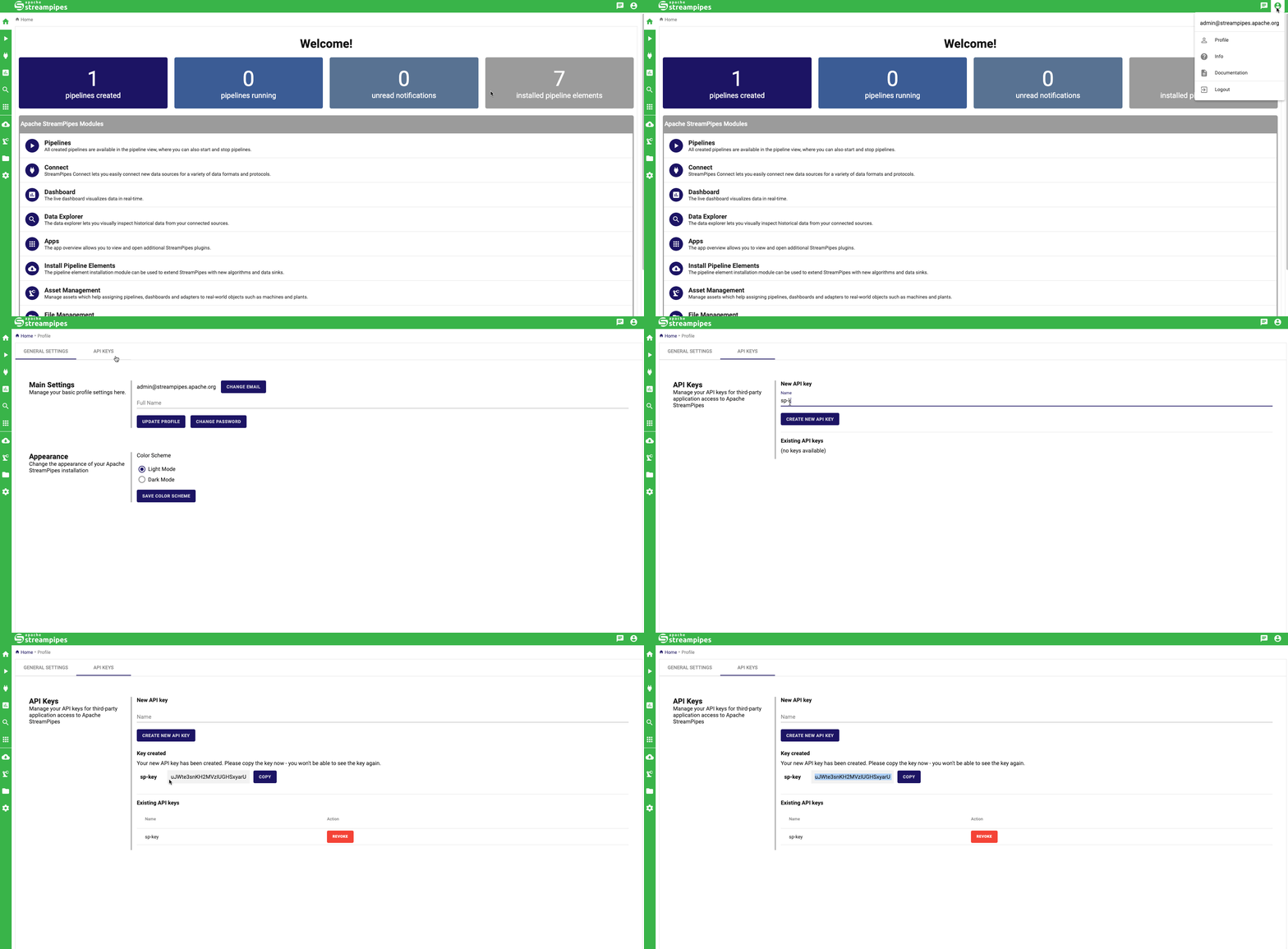
-The `api_key` can be generated within the UI as demonstrated below:
-
\ No newline at end of file
+For more information about how to use the StreamPipes client visit our [introduction example]().
\ No newline at end of file
diff --git a/streampipes-client-python/docs/examples/1-introduction-to-streampipes-python-client.ipynb b/streampipes-client-python/docs/examples/1-introduction-to-streampipes-python-client.ipynb
new file mode 100644
index 000000000..4d215a983
--- /dev/null
+++ b/streampipes-client-python/docs/examples/1-introduction-to-streampipes-python-client.ipynb
@@ -0,0 +1,213 @@
+{
+ "cells": [
+ {
+ "cell_type": "markdown",
+ "source": [
+ "# Introduction to StreamPipes Python Client\n",
+ "\n",
+ "<br>\n",
+ "\n",
+ "### Why there is an extra Python client for StreamPipes\n",
+ "[Apache StreamPipes](https://streampipes.apache.org/) aims to enable non-technical users to connect and analyze IoT data streams.\n",
+ "To this end, it provides an easy-to-use and convenient user interface that allows one to connect to an IoT data source and create some visual\n",
+ "graphs within a few minutes. <br>\n",
+ "Although this is the main use case of Apache StreamPipes, it can also provide great value for people who are eager to work on data analysis or data science with IoT data, but don't we do get in touch with all the hassle associated with extracting data from devices in a suitable format.\n",
+ "In this scenario, StreamPipes helps you connect to your data source and extract the data for you.\n",
+ "You then can make the data available outside StreamPipes by writing it into an external source, such as a database, Kafka, etc.\n",
+ "While this requires another component, you can also extract your data directly from StreamPipes programmatically using the StreamPipes API.\n",
+ "For convenience, we also provide you with a StreamPipes client both available for Java and Python.\n",
+ "Specifically with the Python client, we want to address the amazing data analytics and data science community in Python and benefit from the great universe of Python libraries out there.\n",
+ "\n",
+ "<br>\n",
+ "\n",
+ "### How to install the Python client\n",
+ "Up to this point, we do not provide a release of the Python client in any of the package indexes known for Python.\n",
+ "This will probably start with StreamPipes `1.0.0` when we officially launch the Python client.\n",
+ "Until then, you can just install the currently available development version of the client directly from GitHub.\n",
+ "Simply use the following `pip` command:"
+ ],
+ "metadata": {
+ "collapsed": false
+ }
+ },
+ {
+ "cell_type": "code",
+ "execution_count": null,
+ "outputs": [],
+ "source": [
+ "%pip install git+https://github.com/apache/streampipes.git#subdirectory=streampipes-client-python"
+ ],
+ "metadata": {
+ "collapsed": false
+ }
+ },
+ {
+ "cell_type": "markdown",
+ "source": [
+ "### How to configure the Python client\n",
+ "In order to access the resources available in StreamPipes, one must be able to authenticate against the backend.\n",
+ "For this purpose, the client sofar only supports the authentication via an API token that can be generated via the StreamPipes UI, as you see below.\n",
+ "\n",
+ "\n",
+ "\n",
+ "<br>\n",
+ "\n",
+ "Having generated the API token, one can directly start initializing a client instance as follows:"
+ ],
+ "metadata": {
+ "collapsed": false
+ }
+ },
+ {
+ "cell_type": "code",
+ "execution_count": 3,
+ "outputs": [],
+ "source": [
+ "from streampipes_client.client import StreamPipesClient\n",
+ "from streampipes_client.client.client_config import StreamPipesClientConfig\n",
+ "from streampipes_client.client.credential_provider import StreamPipesApiKeyCredentials"
+ ],
+ "metadata": {
+ "collapsed": false
+ }
+ },
+ {
+ "cell_type": "code",
+ "execution_count": null,
+ "outputs": [],
+ "source": [
+ "config = StreamPipesClientConfig(\n",
+ " credential_provider=StreamPipesApiKeyCredentials(\n",
+ " username=\"test@streampipes.apache.org\",\n",
+ " api_key=\"DEMO-KEY\",\n",
+ " ),\n",
+ " host_address=\"localhost\",\n",
+ " https_disabled=True,\n",
+ " port=80\n",
+ ")"
+ ],
+ "metadata": {
+ "collapsed": false
+ }
+ },
+ {
+ "cell_type": "markdown",
+ "source": [
+ "Please be aware that connecting to StreamPipes via a `https` connection is currently not supported by the Python client.\n",
+ "\n",
+ "Providing secrets like the `api_key` as plaintext in the source code is an anti-pattern.\n",
+ "This is why the StreamPipes client also supports passing the required secrets as environment variables.\n",
+ "To do so, you must initialize the credential provider like the following:"
+ ],
+ "metadata": {
+ "collapsed": false
+ }
+ },
+ {
+ "cell_type": "code",
+ "execution_count": null,
+ "outputs": [],
+ "source": [
+ "StreamPipesApiKeyCredentials.from_env(username_env=\"USER\", api_key_env=\"API-KEY\")"
+ ],
+ "metadata": {
+ "collapsed": false
+ }
+ },
+ {
+ "cell_type": "markdown",
+ "source": [
+ "Please note that you pass the names of the environment variables.\n",
+ "To ensure that the above code works, you must set the environment variables with the same name you specified in `from_env`.\n",
+ "\n",
+ "Having the `config` ready, we can now initialize the actual client."
+ ],
+ "metadata": {
+ "collapsed": false
+ }
+ },
+ {
+ "cell_type": "code",
+ "execution_count": null,
+ "outputs": [],
+ "source": [
+ "client = StreamPipesClient(client_config=config)"
+ ],
+ "metadata": {
+ "collapsed": false
+ }
+ },
+ {
+ "cell_type": "markdown",
+ "source": [
+ "That's already it. You can check if everything works out by using the following command:"
+ ],
+ "metadata": {
+ "collapsed": false
+ }
+ },
+ {
+ "cell_type": "code",
+ "execution_count": null,
+ "outputs": [],
+ "source": [
+ "client.describe()"
+ ],
+ "metadata": {
+ "collapsed": false
+ }
+ },
+ {
+ "cell_type": "markdown",
+ "source": [
+ "This prints you a short textual description of the connected StreamPipes instance to the console.\n",
+ "\n",
+ "<br>\n",
+ "\n",
+ "The created `client` instance serves as the central point of interaction for StreamPipes.\n",
+ "You can invoke a variety of commands directly on this object.\n",
+ "\n",
+ "Are you curious now how you actually can get data out of StreamPipes and make use of it with Python?\n",
+ "Then check out the next example on [extracting Data from the StreamPipes data lake]().\n",
+ "\n",
+ "<br>\n",
+ "\n",
+ "Thanks for reading this introductory example.\n",
+ "We hope you like it and would love to receive some feedback from you.\n",
+ "Just go to our [GitHub discussion page](https://github.com/apache/streampipes/discussions) and let us know your impression.\n",
+ "We'll read and react to them all, we promise!"
+ ],
+ "metadata": {
+ "collapsed": false
+ }
+ },
+ {
+ "cell_type": "markdown",
+ "source": [],
+ "metadata": {
+ "collapsed": false
+ }
+ }
+ ],
+ "metadata": {
+ "kernelspec": {
+ "display_name": "Python 3",
+ "language": "python",
+ "name": "python3"
+ },
+ "language_info": {
+ "codemirror_mode": {
+ "name": "ipython",
+ "version": 2
+ },
+ "file_extension": ".py",
+ "mimetype": "text/x-python",
+ "name": "python",
+ "nbconvert_exporter": "python",
+ "pygments_lexer": "ipython2",
+ "version": "2.7.6"
+ }
+ },
+ "nbformat": 4,
+ "nbformat_minor": 0
+}
diff --git a/streampipes-client-python/docs/examples/2-extracting-data-from-the-streampipes-data-lake.ipynb b/streampipes-client-python/docs/examples/2-extracting-data-from-the-streampipes-data-lake.ipynb
new file mode 100644
index 000000000..558f8a710
--- /dev/null
+++ b/streampipes-client-python/docs/examples/2-extracting-data-from-the-streampipes-data-lake.ipynb
@@ -0,0 +1,391 @@
+{
+ "cells": [
+ {
+ "cell_type": "markdown",
+ "source": [
+ "# Extracting Data from the StreamPipes data lake\n",
+ "\n",
+ "In the first example ([Introduction to the StreamPipes Python client]()) we took the first steps with the StreamPipes Python client and learned how to set everything up.\n",
+ "Now we are ready to get started and want to retrieve some data out of StreamPipes.\n",
+ "In this tutorial, we'll focus on the StreamPipes Data Lake, the component where StreamPipes stores data internally.\n",
+ "To get started, we'll use the `client` instance created in the first tutorial."
+ ],
+ "metadata": {
+ "collapsed": false
+ }
+ },
+ {
+ "cell_type": "code",
+ "execution_count": 1,
+ "outputs": [],
+ "source": [
+ "from streampipes_client.client import StreamPipesClient\n",
+ "from streampipes_client.client.client_config import StreamPipesClientConfig\n",
+ "from streampipes_client.client.credential_provider import StreamPipesApiKeyCredentials"
+ ],
+ "metadata": {
+ "collapsed": false
+ }
+ },
+ {
+ "cell_type": "code",
+ "execution_count": 2,
+ "outputs": [],
+ "source": [
+ "import os\n",
+ "os.environ[\"USER\"] = \"admin@streampipes.apache.org\"\n",
+ "os.environ[\"API-KEY\"] = \"XXX\"\n"
+ ],
+ "metadata": {
+ "collapsed": false
+ }
+ },
+ {
+ "cell_type": "code",
+ "execution_count": 3,
+ "outputs": [],
+ "source": [
+ "config = StreamPipesClientConfig(\n",
+ " credential_provider=StreamPipesApiKeyCredentials.from_env(username_env=\"USER\", api_key_env=\"API-KEY\"),\n",
+ " host_address=\"localhost\",\n",
+ " https_disabled=True,\n",
+ " port=80\n",
+ ")"
+ ],
+ "metadata": {
+ "collapsed": false
+ }
+ },
+ {
+ "cell_type": "code",
+ "execution_count": 4,
+ "outputs": [
+ {
+ "name": "stdout",
+ "output_type": "stream",
+ "text": [
+ "2022-12-04 21:19:21,832 - streampipes_client.client.client - [INFO] - [client.py:127] [_set_up_logging] - Logging successfully initialized with logging level INFO.\n"
+ ]
+ }
+ ],
+ "source": [
+ "client = StreamPipesClient(client_config=config)"
+ ],
+ "metadata": {
+ "collapsed": false
+ }
+ },
+ {
+ "cell_type": "markdown",
+ "source": [
+ "As a first step, we want to get an overview about all data available in the data lake.\n",
+ "The data is stored as so-called `measures`, which refer to a data stream stored in the data lake.\n",
+ "For his purpose we use the `all()` method of the `dataLakeMeasure` endpoint."
+ ],
+ "metadata": {
+ "collapsed": false
+ }
+ },
+ {
+ "cell_type": "code",
+ "execution_count": 5,
+ "outputs": [
+ {
+ "name": "stdout",
+ "output_type": "stream",
+ "text": [
+ "2022-12-04 21:19:23,599 - streampipes_client.endpoint.endpoint - [INFO] - [endpoint.py:153] [_make_request] - Successfully retrieved all resources.\n"
+ ]
+ }
+ ],
+ "source": [
+ "data_lake_measures = client.dataLakeMeasureApi.all()"
+ ],
+ "metadata": {
+ "collapsed": false
+ }
+ },
+ {
+ "cell_type": "markdown",
+ "source": [
+ "So let's see how many measures are available"
+ ],
+ "metadata": {
+ "collapsed": false
+ }
+ },
+ {
+ "cell_type": "code",
+ "execution_count": 6,
+ "outputs": [
+ {
+ "data": {
+ "text/plain": "2"
+ },
+ "execution_count": 6,
+ "metadata": {},
+ "output_type": "execute_result"
+ }
+ ],
+ "source": [
+ "len(data_lake_measures)"
+ ],
+ "metadata": {
+ "collapsed": false
+ }
+ },
+ {
+ "cell_type": "markdown",
+ "source": [
+ "All resources of the StreamPipes Python client support the standard Python expressions. If not, [please let us know](https://github.com/apache/streampipes/issues/new/choose)."
+ ],
+ "metadata": {
+ "collapsed": false
+ }
+ },
+ {
+ "cell_type": "code",
+ "execution_count": 7,
+ "outputs": [
+ {
+ "data": {
+ "text/plain": "DataLakeMeasure(element_id='urn:streampipes.apache.org:spi:datalakemeasure:xLSfXZ', measure_name='test', timestamp_field='s0::timestamp', event_schema=EventSchema(element_id='urn:streampipes.apache.org:spi:eventschema:UDMHXn', event_properties=[EventProperty(element_id='urn:streampipes.apache.org:spi:eventpropertyprimitive:utvSWg', label='Density', description='Denotes the current density of the fluid', runtime_name='density', required=False, domain_properties=['http [...]
+ },
+ "execution_count": 7,
+ "metadata": {},
+ "output_type": "execute_result"
+ }
+ ],
+ "source": [
+ "data_lake_measures[-1]"
+ ],
+ "metadata": {
+ "collapsed": false
+ }
+ },
+ {
+ "cell_type": "markdown",
+ "source": [
+ "To ge a more comprehensive overview you can take a look at the `pandas` representation"
+ ],
+ "metadata": {
+ "collapsed": false
+ }
+ },
+ {
+ "cell_type": "code",
+ "execution_count": 8,
+ "outputs": [
+ {
+ "data": {
+ "text/plain": " measure_name timestamp_field pipeline_id pipeline_name pipeline_is_running \\\n0 flow-rate s0::timestamp None None False \n1 test s0::timestamp None None False \n\n num_event_properties \n0 3 \n1 6 ",
+ "text/html": "<div>\n<style scoped>\n .dataframe tbody tr th:only-of-type {\n vertical-align: middle;\n }\n\n .dataframe tbody tr th {\n vertical-align: top;\n }\n\n .dataframe thead th {\n text-align: right;\n }\n</style>\n<table border=\"1\" class=\"dataframe\">\n <thead>\n <tr style=\"text-align: right;\">\n <th></th>\n <th>measure_name</th>\n <th>timestamp_field</th>\n <th>pipeline_id</th>\n <th>pipeline_name</ [...]
+ },
+ "metadata": {},
+ "output_type": "display_data"
+ }
+ ],
+ "source": [
+ "display(data_lake_measures.to_pandas())"
+ ],
+ "metadata": {
+ "collapsed": false
+ }
+ },
+ {
+ "cell_type": "markdown",
+ "source": [
+ "So far, we have only retrieved metadata about the available data lake measure.\n",
+ "In the following, we will access the actual data of the measure `flow-rate`.\n",
+ "\n",
+ "For this purpose, we will use the `get()` method of the `dataLakeMeasure` endpoint."
+ ],
+ "metadata": {
+ "collapsed": false
+ }
+ },
+ {
+ "cell_type": "code",
+ "execution_count": 9,
+ "outputs": [
+ {
+ "name": "stdout",
+ "output_type": "stream",
+ "text": [
+ "2022-12-04 21:19:30,505 - streampipes_client.endpoint.endpoint - [INFO] - [endpoint.py:153] [_make_request] - Successfully retrieved all resources.\n"
+ ]
+ }
+ ],
+ "source": [
+ "flow_rate_measure = client.dataLakeMeasureApi.get(identifier=\"flow-rate\")"
+ ],
+ "metadata": {
+ "collapsed": false
+ }
+ },
+ {
+ "cell_type": "markdown",
+ "source": [
+ "For further processing, the easiest way is to turn the data measure into a `pandas DataFrame`."
+ ],
+ "metadata": {
+ "collapsed": false
+ }
+ },
+ {
+ "cell_type": "code",
+ "execution_count": 10,
+ "outputs": [],
+ "source": [
+ "flow_rate_pd = flow_rate_measure.to_pandas()"
+ ],
+ "metadata": {
+ "collapsed": false
+ }
+ },
+ {
+ "cell_type": "markdown",
+ "source": [
+ "Let's see how many data points we got..."
+ ],
+ "metadata": {
+ "collapsed": false
+ }
+ },
+ {
+ "cell_type": "code",
+ "execution_count": 11,
+ "outputs": [
+ {
+ "data": {
+ "text/plain": "2020"
+ },
+ "execution_count": 11,
+ "metadata": {},
+ "output_type": "execute_result"
+ }
+ ],
+ "source": [
+ "len(flow_rate_pd)"
+ ],
+ "metadata": {
+ "collapsed": false
+ }
+ },
+ {
+ "cell_type": "markdown",
+ "source": [
+ "... and get a first overview"
+ ],
+ "metadata": {
+ "collapsed": false
+ }
+ },
+ {
+ "cell_type": "code",
+ "execution_count": 12,
+ "outputs": [
+ {
+ "data": {
+ "text/plain": " mass_flow temperature\ncount 2020.000000 2020.000000\nmean 4.976635 52.688616\nstd 2.920448 8.756244\nmin 0.003300 40.002800\n25% 2.443325 45.250551\n50% 4.886400 50.289900\n75% 7.524550 60.050674\nmax 9.997400 69.993896",
+ "text/html": "<div>\n<style scoped>\n .dataframe tbody tr th:only-of-type {\n vertical-align: middle;\n }\n\n .dataframe tbody tr th {\n vertical-align: top;\n }\n\n .dataframe thead th {\n text-align: right;\n }\n</style>\n<table border=\"1\" class=\"dataframe\">\n <thead>\n <tr style=\"text-align: right;\">\n <th></th>\n <th>mass_flow</th>\n <th>temperature</th>\n </tr>\n </thead>\n <tbody>\n <tr>\n <th>count< [...]
+ },
+ "execution_count": 12,
+ "metadata": {},
+ "output_type": "execute_result"
+ }
+ ],
+ "source": [
+ "flow_rate_pd.describe()"
+ ],
+ "metadata": {
+ "collapsed": false
+ }
+ },
+ {
+ "cell_type": "markdown",
+ "source": [
+ "As a final step, we want to create a plot of both attributes"
+ ],
+ "metadata": {
+ "collapsed": false
+ }
+ },
+ {
+ "cell_type": "code",
+ "execution_count": 13,
+ "outputs": [
+ {
+ "data": {
+ "text/plain": "<Figure size 640x480 with 1 Axes>",
+ "image/png": "iVBORw0KGgoAAAANSUhEUgAAAh8AAAGdCAYAAACyzRGfAAAAOXRFWHRTb2Z0d2FyZQBNYXRwbG90bGliIHZlcnNpb24zLjYuMiwgaHR0cHM6Ly9tYXRwbG90bGliLm9yZy8o6BhiAAAACXBIWXMAAA9hAAAPYQGoP6dpAAC8Z0lEQVR4nOydd3gVRffHvzc9gRQIkNBB6b0oEFBBRIHXDvaO2AEFLMjvtYG+4mvF3l4FG6JYUEBAQHrvvYZOCjUJBFLv/v7Y3JvdvbOzM3v33tzA+TwPD7m7szOzu7MzZ845c8alKIoCgiAIgiCIIBFW0RUgCIIgCOLCgoQPgiAIgiCCCgkfBEEQBEEEFRI+CIIgCIIIKiR8EARBEAQRVEj4IAiCIAgiqJDwQRAEQRBEUCHhgyAIgiCIoBJR0RUw4na7kZGRgfj4eLhcroquDkEQBEEQAiiKgtOnT6NOnToIC+Pr [...]
+ },
+ "metadata": {},
+ "output_type": "display_data"
+ }
+ ],
+ "source": [
+ "import matplotlib.pyplot as plt\n",
+ "flow_rate_pd.plot(y=[\"mass_flow\", \"temperature\"])\n",
+ "plt.show()"
+ ],
+ "metadata": {
+ "collapsed": false
+ }
+ },
+ {
+ "cell_type": "markdown",
+ "source": [
+ "... from this point on we leave all future processing of the data up to your creativity.\n",
+ "Keep in mind: the general syntax used in this example (`all()`, `to_pandas()`, `get()`) applies to all endpoints and associated resources of the StreamPipes Python client.\n",
+ "\n",
+ "If you get further and create exiting stuff with data extracted from StreamPipes please [let us know](https://github.com/apache/streampipes/discussions/categories/show-and-tell).\n",
+ "We are thrilled to see what you as a community will build with the provided client.\n",
+ "Furthermore, don't hesitate to discuss [feature requests](https://github.com/apache/streampipes/discussions/812) to extend the current functionality with us."
+ ],
+ "metadata": {
+ "collapsed": false
+ }
+ },
+ {
+ "cell_type": "markdown",
+ "source": [
+ "How do you like this tutorial?\n",
+ "We hope you like it and would love to receive some feedback from you.\n",
+ "Just go to our [GitHub discussion page](https://github.com/apache/streampipes/discussions) and let us know your impression.\n",
+ "We'll read and react to them all, we promise!"
+ ],
+ "metadata": {
+ "collapsed": false
+ }
+ },
+ {
+ "cell_type": "markdown",
+ "source": [],
+ "metadata": {
+ "collapsed": false
+ }
+ }
+ ],
+ "metadata": {
+ "kernelspec": {
+ "display_name": "Python 3",
+ "language": "python",
+ "name": "python3"
+ },
+ "language_info": {
+ "codemirror_mode": {
+ "name": "ipython",
+ "version": 2
+ },
+ "file_extension": ".py",
+ "mimetype": "text/x-python",
+ "name": "python",
+ "nbconvert_exporter": "python",
+ "pygments_lexer": "ipython2",
+ "version": "2.7.6"
+ }
+ },
+ "nbformat": 4,
+ "nbformat_minor": 0
+}
diff --git a/streampipes-client-python/docs/getting-started/installation.md b/streampipes-client-python/docs/getting-started/installation.md
index b072c5b21..e6ddce8ed 100644
--- a/streampipes-client-python/docs/getting-started/installation.md
+++ b/streampipes-client-python/docs/getting-started/installation.md
@@ -22,7 +22,7 @@ The StreamPipes Python Client is meant to work with Python 3.8 and above. Instal
You can install the latest development version from GitHub, as so:
```bash
-pip install <NEEDS TO BE CLARIFIED>
+pip install git+https://github.com/apache/streampipes.git#subdirectory=streampipes-client-python
```
---
diff --git a/streampipes-client-python/docs/getting-started/quickstart.md b/streampipes-client-python/docs/getting-started/quickstart.md
index 5a80a9f06..9a0a2db04 100644
--- a/streampipes-client-python/docs/getting-started/quickstart.md
+++ b/streampipes-client-python/docs/getting-started/quickstart.md
@@ -19,7 +19,6 @@
# ⚡️ Quickstart
As a quick example, we demonstrate how to set up and configure a StreamPipes client.
-In addition, we will get the available data lake measures out of StreamPipes.
```python
>>> from streampipes_client.client import StreamPipesClient
@@ -37,19 +36,13 @@ In addition, we will get the available data lake measures out of StreamPipes.
...)
>>> client = StreamPipesClient(client_config=config)
+>>> client.describe()
-# get all available datat lake measures
->>> measures = client.dataLakeMeasureApi.all()
-
-# get amount of retrieved measures
->>> len(measures)
-1
-
-# inspect the data lake measures as pandas dataframe
->>> measures.to_pandas()
- measure_name timestamp_field ... pipeline_is_running num_event_properties
-0 test s0::timestamp ... False 2
-[1 rows x 6 columns]
+Hi there!
+You are connected to a StreamPipes instance running at http://localhost:80.
+The following StreamPipes resources are available with this client:
+6x DataStreams
+1x DataLakeMeasures
```
<br>
Alternatively, you can provide your credentials via environment variables.
diff --git a/streampipes-client-python/mkdocs.yml b/streampipes-client-python/mkdocs.yml
index 5bf0f9e83..bc129cea5 100644
--- a/streampipes-client-python/mkdocs.yml
+++ b/streampipes-client-python/mkdocs.yml
@@ -56,6 +56,7 @@ markdown_extensions:
plugins:
- awesome-pages
- autorefs
+ - mkdocs-jupyter
- gen-files:
scripts:
- docs/scripts/gen_ref_pages.py
@@ -78,4 +79,7 @@ nav:
- Getting Started:
- Installation: getting-started/installation.md
- Quickstart: getting-started/quickstart.md
+ - Examples:
+ - Introduction to the StreamPipes Python Client: examples/1-introduction-to-streampipes-python-client.ipynb
+ - Extracting Data from the StreamPipes Data Lake: examples/2-extracting-data-from-the-streampipes-data-lake.ipynb
- Reference: reference/*
\ No newline at end of file
diff --git a/streampipes-client-python/setup.py b/streampipes-client-python/setup.py
index 99a5ee2be..4c642c480 100644
--- a/streampipes-client-python/setup.py
+++ b/streampipes-client-python/setup.py
@@ -60,6 +60,7 @@ docs_packages = [
"mkdocs-gen-files>=0.3.5",
"mkdocs-literate-nav>=0.4.1",
"numpydoc>=1.2",
+ "mkdocs-jupyter>=0.22.0 "
]
here = os.path.abspath(os.path.dirname(__file__))