You are viewing a plain text version of this content. The canonical link for it is here.
Posted to notifications@apisix.apache.org by yi...@apache.org on 2026/04/27 02:26:20 UTC
(apisix) branch master updated: docs: update skywalking and skywalking-logger plugin docs (#13274)
This is an automated email from the ASF dual-hosted git repository.
Yilialinn pushed a commit to branch master
in repository https://gitbox.apache.org/repos/asf/apisix.git
The following commit(s) were added to refs/heads/master by this push:
new 99f5599aa docs: update skywalking and skywalking-logger plugin docs (#13274)
99f5599aa is described below
commit 99f5599aa7405d4318d7cc8616b1b34c5a3c2fd6
Author: Yilia Lin <11...@users.noreply.github.com>
AuthorDate: Mon Apr 27 10:26:14 2026 +0800
docs: update skywalking and skywalking-logger plugin docs (#13274)
---
docs/en/latest/plugins/skywalking-logger.md | 4 +--
docs/en/latest/plugins/skywalking.md | 2 +-
docs/zh/latest/plugins/skywalking-logger.md | 42 +++++++++++++++--------------
docs/zh/latest/plugins/skywalking.md | 6 +----
4 files changed, 26 insertions(+), 28 deletions(-)
diff --git a/docs/en/latest/plugins/skywalking-logger.md b/docs/en/latest/plugins/skywalking-logger.md
index f1e6aad54..5b036b662 100644
--- a/docs/en/latest/plugins/skywalking-logger.md
+++ b/docs/en/latest/plugins/skywalking-logger.md
@@ -138,7 +138,7 @@ In [Skywalking UI](http://localhost:8080), navigate to __General Service__ > __S
"start_time": 1736945107345,
"upstream": "3.210.94.60:80",
"server": {
- "version": "3.11.0",
+ "version": "3.13.0",
"hostname": "7edbcebe8eb3"
},
"service_id": "",
@@ -148,7 +148,7 @@ In [Skywalking UI](http://localhost:8080), navigate to __General Service__ > __S
"headers": {
"content-type": "application/json",
"date": "Thu, 16 Jan 2025 12:45:08 GMT",
- "server": "APISIX/3.11.0",
+ "server": "APISIX/3.13.0",
"access-control-allow-origin": "*",
"connection": "close",
"access-control-allow-credentials": "true",
diff --git a/docs/en/latest/plugins/skywalking.md b/docs/en/latest/plugins/skywalking.md
index e49a2a595..d54c0d6f5 100644
--- a/docs/en/latest/plugins/skywalking.md
+++ b/docs/en/latest/plugins/skywalking.md
@@ -61,7 +61,7 @@ Reload APISIX for changes to take effect.
| Name | Type | Required | Default | Valid values | Description |
|--------------|--------|----------|---------|--------------|----------------------------------------------------------------------------|
-| sample_ratio | number | True | 1 | [0.00001, 1] | Frequency of request sampling. Setting the sample ratio to `1` means to sample all requests. |
+| sample_ratio | number | False | 1 | [0.00001, 1] | Frequency of request sampling. Setting the sample ratio to `1` means to sample all requests. |
## Example
diff --git a/docs/zh/latest/plugins/skywalking-logger.md b/docs/zh/latest/plugins/skywalking-logger.md
index 8d2bb2a3e..1d61cb4b8 100644
--- a/docs/zh/latest/plugins/skywalking-logger.md
+++ b/docs/zh/latest/plugins/skywalking-logger.md
@@ -46,17 +46,19 @@ description: skywalking-logger 将请求和响应日志作为 JSON 对象批量
| service_instance_name | string | 否 |"APISIX Instance Name"| | SkyWalking 服务的实例名称。当设置为 `$hostname` 会直接获取本地主机名。 |
| log_format | object | 否 | | | 日志格式以 JSON 的键值对声明。值支持字符串和嵌套对象(最多五层,超出部分将被截断)。字符串中可通过在前面加上 `$` 来引用 [APISIX 变量](../apisix-variable.md) 或 [NGINX 内置变量](http://nginx.org/en/docs/varindex.html)。 |
| timeout | integer | 否 | 3 | [1,...] | 发送请求后保持连接活动的时间。 |
-| name | string | 否 | "skywalking logger" | | 标识 logger 的唯一标识符。如果您使用 Prometheus 监视 APISIX 指标,名称将以 `apisix_batch_process_entries` 导出。 |
-| include_req_body | boolean | 否 | false |如果为 true,则将请求主体包含在日志中。请注意,如果请求主体太大而无法保存在内存中,则由于 NGINX 的限制而无法记录。|
-| include_req_body_expr | array[array] | 否 | | 一个或多个条件的数组,形式为 [lua-resty-expr](https://github.com/api7/lua-resty-expr)。在 `include_req_body` 为 true 时使用。仅当此处配置的表达式计算结果为 true 时,才会记录请求主体。|
-| include_resp_body | boolean | 否 | false | 如果为 true,则将响应主体包含在日志中。|
-| include_resp_body_expr | array[array] | 否 | | 一个或多个条件的数组,形式为 [lua-resty-expr](https://github.com/api7/lua-resty-expr)。在 `include_resp_body` 为 true 时使用。仅当此处配置的表达式计算结果为 true 时,才会记录响应主体。|
+| name | string | 否 | "skywalking logger" | | 标识 logger 的唯一标识符。如果你使用 Prometheus 监视 APISIX 指标,名称将以 `apisix_batch_process_entries` 导出。 |
+| include_req_body | boolean | 否 | false | | 如果为 true,则将请求主体包含在日志中。请注意,如果请求主体太大而无法保存在内存中,则由于 NGINX 的限制而无法记录。|
+| include_req_body_expr | array[array] | 否 | | | 一个或多个条件的数组,形式为 [lua-resty-expr](https://github.com/api7/lua-resty-expr)。在 `include_req_body` 为 true 时使用。仅当此处配置的表达式计算结果为 true 时,才会记录请求主体。|
+| max_req_body_bytes | integer | 否 | 524288 | >=1 | 在此大小范围内的请求主体将被记录,如果大小超过配置值则截断后记录。|
+| include_resp_body | boolean | 否 | false | | 如果为 true,则将响应主体包含在日志中。|
+| include_resp_body_expr | array[array] | 否 | | | 一个或多个条件的数组,形式为 [lua-resty-expr](https://github.com/api7/lua-resty-expr)。在 `include_resp_body` 为 true 时使用。仅当此处配置的表达式计算结果为 true 时,才会记录响应主体。|
+| max_resp_body_bytes | integer | 否 | 524288 | >=1 | 在此大小范围内的响应主体将被记录,如果大小超过配置值则截断后记录。|
该插件支持使用批处理器来聚合并批量处理条目(日志/数据)。这样可以避免插件频繁地提交数据,默认设置情况下批处理器会每 `5` 秒钟或队列中的数据达到 `1000` 条时提交数据,如需了解批处理器相关参数设置,请参考 [Batch-Processor](../batch-processor.md#配置)。
## 元数据
-您还可以通过配置插件元数据来设置日志的格式。可用的配置如下:
+你还可以通过配置插件元数据来设置日志的格式。可用的配置如下:
| 名称 | 类型 | 必选项 | 默认值 | 有效值 | 描述 |
| ---------------------- | ------- | ------ | -------------------- | ------------- | ---------------------------------------------------------------- |
@@ -67,11 +69,11 @@ description: skywalking-logger 将请求和响应日志作为 JSON 对象批量
以下示例演示了如何为不同场景配置 `skywalking-logger` 插件。
-要按照示例操作,请按照 [Skywalking 的文档](https://skywalking.apache.org/docs/main/next/en/setup/backend/backend-docker/) 使用 Docker Compose 启动存储、OAP 和 Booster UI。设置完成后,OAP 服务器应在 `12800` 上监听,并且您应该能够通过 [http://localhost:8080](http://localhost:8080) 访问 UI。
+要按照示例操作,请按照 [Skywalking 的文档](https://skywalking.apache.org/docs/main/next/en/setup/backend/backend-docker/) 使用 Docker Compose 启动存储、OAP 和 Booster UI。设置完成后,OAP 服务器应在 `12800` 上监听,并且你应该能够通过 [http://localhost:8080](http://localhost:8080) 访问 UI。
:::note
-您可以这样从 `config.yaml` 中获取 `admin_key` 并存入环境变量:
+你可以这样从 `config.yaml` 中获取 `admin_key` 并存入环境变量:
```bash
admin_key=$(yq '.deployment.admin.admin_key[0].key' conf/config.yaml | sed 's/"//g')
@@ -111,9 +113,9 @@ curl "http://127.0.0.1:9180/apisix/admin/routes" -X PUT \
curl -i "http://127.0.0.1:9080/anything"
```
-您应该会收到 `HTTP/1.1 200 OK` 响应。
+你应该会收到 `HTTP/1.1 200 OK` 响应。
-在 [Skywalking UI](http://localhost:8080) 中,导航至 __General Service__ > __Services__。您应该会看到一个名为 `APISIX` 的服务,其中包含与您的请求相对应的日志条目:
+在 [Skywalking UI](http://localhost:8080) 中,导航至 __General Service__ > __Services__。你应该会看到一个名为 `APISIX` 的服务,其中包含与你的请求相对应的日志条目:
```json
{
@@ -135,7 +137,7 @@ curl -i "http://127.0.0.1:9080/anything"
"start_time": 1736945107345,
"upstream": "3.210.94.60:80",
"server": {
- "version": "3.11.0",
+ "version": "3.13.0",
"hostname": "7edbcebe8eb3"
},
"service_id": "",
@@ -145,7 +147,7 @@ curl -i "http://127.0.0.1:9080/anything"
"headers": {
"content-type": "application/json",
"date": "Thu, 16 Jan 2025 12:45:08 GMT",
- "server": "APISIX/3.11.0",
+ "server": "APISIX/3.13.0",
"access-control-allow-origin": "*",
"connection": "close",
"access-control-allow-credentials": "true",
@@ -163,7 +165,7 @@ curl -i "http://127.0.0.1:9080/anything"
在 APISIX 中,插件元数据用于配置同一插件的所有插件实例的通用元数据字段。当插件在多个资源中启用并需要对其元数据字段进行通用更新时,它很有用。
-首先,使用 `skywalking-logger` 插件创建路由,并使用您的 OAP 服务器 URI 配置插件:
+首先,使用 `skywalking-logger` 插件创建路由,并使用你的 OAP 服务器 URI 配置插件:
```shell
curl "http://127.0.0.1:9180/apisix/admin/routes" -X PUT \
@@ -207,7 +209,7 @@ curl "http://127.0.0.1:9180/apisix/admin/plugin_metadata/skywalking-logger" -X P
curl -i "http://127.0.0.1:9080/anything" -H "env: dev"
```
-您应该收到 `HTTP/1.1 200 OK` 响应。在 [Skywalking UI](http://localhost:8080) 中,导航至 __General Service__ > __Services__。您应该会看到一个名为 `APISIX` 的服务,其中包含与您的请求相对应的日志条目:
+你应该收到 `HTTP/1.1 200 OK` 响应。在 [Skywalking UI](http://localhost:8080) 中,导航至 __General Service__ > __Services__。你应该会看到一个名为 `APISIX` 的服务,其中包含与你的请求相对应的日志条目:
```json
[
@@ -256,7 +258,7 @@ curl "http://127.0.0.1:9180/apisix/admin/routes" -X PUT \
curl -i "http://127.0.0.1:9080/anything?log_body=yes" -X POST -d '{"env": "dev"}'
```
-您应该收到 `HTTP/1.1 200 OK` 响应。在 [Skywalking UI](http://localhost:8080) 中,导航到 __General Service__ > __Services__。您应该看到一个名为 `APISIX` 的服务,其中包含与您的请求相对应的日志条目,并记录了请求正文:
+你应该收到 `HTTP/1.1 200 OK` 响应。在 [Skywalking UI](http://localhost:8080) 中,导航到 __General Service__ > __Services__。你应该看到一个名为 `APISIX` 的服务,其中包含与你的请求相对应的日志条目,并记录了请求正文:
```json
[
@@ -281,13 +283,13 @@ curl -i "http://127.0.0.1:9080/anything?log_body=yes" -X POST -d '{"env": "dev"}
curl -i "http://127.0.0.1:9080/anything" -X POST -d '{"env": "dev"}'
```
-您不应该观察到没有请求正文的日志条目。
+你不应该观察到没有请求正文的日志条目。
:::info
-如果您除了将 `include_req_body` 或 `include_resp_body` 设置为 `true` 之外还自定义了 `log_format`,则插件不会在日志中包含正文。
+如果你除了将 `include_req_body` 或 `include_resp_body` 设置为 `true` 之外还自定义了 `log_format`,则插件不会在日志中包含正文。
-作为一种解决方法,您可以在日志格式中使用 NGINX 变量 `$request_body`,例如:
+作为一种解决方法,你可以在日志格式中使用 NGINX 变量 `$request_body`,例如:
```json
{
@@ -335,9 +337,9 @@ curl "http://127.0.0.1:9180/apisix/admin/routes" -X PUT \
curl -i "http://127.0.0.1:9080/anything"
```
-您应该会收到 `HTTP/1.1 200 OK` 响应。
+你应该会收到 `HTTP/1.1 200 OK` 响应。
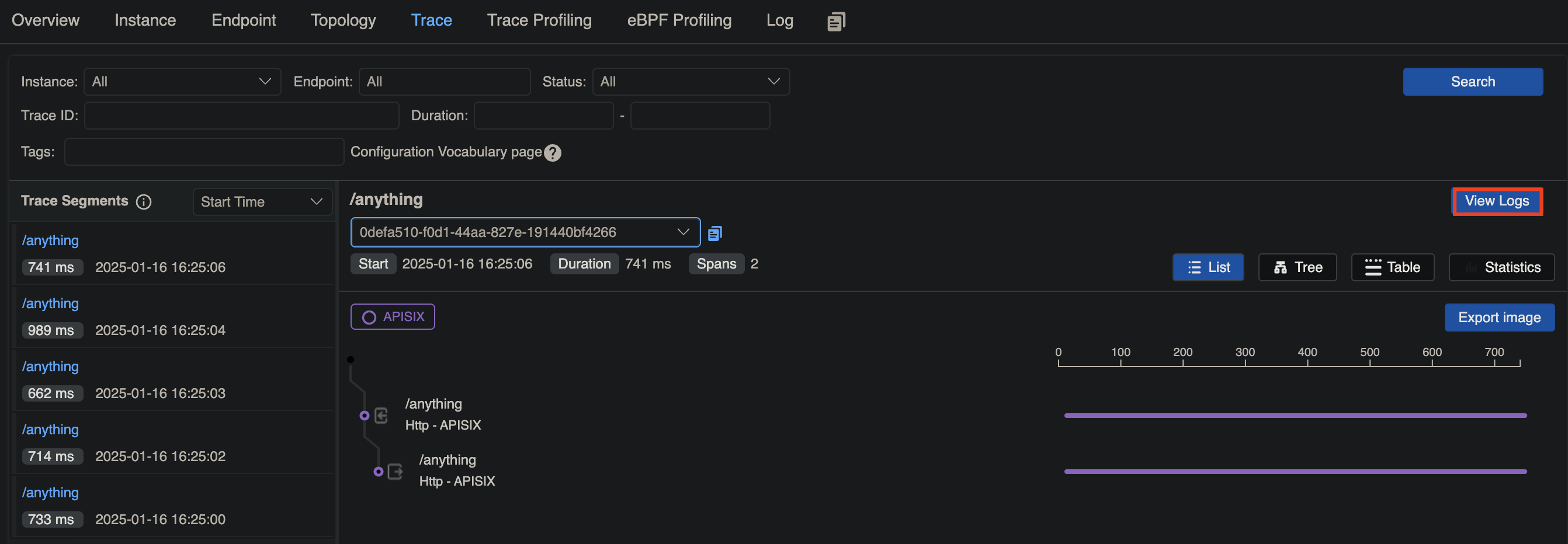
-在 [Skywalking UI](http://localhost:8080) 中,导航到 __General Service__ > __Services__。您应该会看到一个名为 `APISIX` 的服务,其中包含与您的请求相对应的跟踪,您可以在其中查看相关日志:
+在 [Skywalking UI](http://localhost:8080) 中,导航到 __General Service__ > __Services__。你应该会看到一个名为 `APISIX` 的服务,其中包含与你的请求相对应的跟踪,你可以在其中查看相关日志:
diff --git a/docs/zh/latest/plugins/skywalking.md b/docs/zh/latest/plugins/skywalking.md
index 7e459be24..1b161c266 100644
--- a/docs/zh/latest/plugins/skywalking.md
+++ b/docs/zh/latest/plugins/skywalking.md
@@ -61,7 +61,7 @@ plugin_attr:
| 名称 | 类型 | 必选项 | 默认值 | 有效值 | 描述 |
| ------------ | ------ | ------ | ------ | ------------ | ----------------------------------------------------- |
-| sample_ratio | number | 是 | 1 | [0.00001, 1] | 请求采样频率。将采样率设置为 `1` 表示对所有请求进行采样。 |
+| sample_ratio | number | 否 | 1 | [0.00001, 1] | 请求采样频率。将采样率设置为 `1` 表示对所有请求进行采样。 |
## 示例
@@ -84,10 +84,6 @@ plugin_attr:
重新加载 APISIX 以使配置更改生效。
-:::
-
-以下示例展示了如何通过 Admin API 配置插件元数据:
-
:::note
您可以这样从 `config.yaml` 中获取 `admin_key` 并存入环境变量: