You are viewing a plain text version of this content. The canonical link for it is here.
Posted to commits@pulsar.apache.org by GitBox <gi...@apache.org> on 2020/07/01 02:53:43 UTC
[GitHub] [pulsar] Anonymitaet commented on a change in pull request #7393: Update docs for tiered storage
Anonymitaet commented on a change in pull request #7393:
URL: https://github.com/apache/pulsar/pull/7393#discussion_r448086929
##########
File path: site2/docs/tiered-storage-gcs.md
##########
@@ -0,0 +1,275 @@
+---
+id: tiered-storage-gcs
+title: Use GCS offloader with Pulsar
+sidebar_label: GCS offloader
+---
+
+This chapter guides you through every step of installing and configuring the GCS offloader and using it with Pulsar.
+
+## Installation
+
+Follow the steps below to install the GCS offloader.
+
+### Prerequisite
+
+- Pulsar: 2.4.2 or later versions
+
+- Apache jclouds: 2.2.0 or later versions
+
+### Step
+
+This example uses Pulsar 2.5.1.
+
+1. Download Pulsar tarball using one of the following ways:
+
+ * download the Pulsar tarball from the [Apache mirror](https://archive.apache.org/dist/pulsar/pulsar-2.5.1/apache-pulsar-2.5.1-bin.tar.gz)
+
+ * download from the Pulsar [download page](https://pulsar.apache.org/download)
+
+ * use [wget](https://www.gnu.org/software/wget)
+
+ ```shell
+ wget https://archive.apache.org/dist/pulsar/pulsar-2.5.1/apache-pulsar-2.5.1-bin.tar.gz
+ ```
+
+2. Download and untar the Pulsar offloaders package.
+
+ ```bash
+ wget https://downloads.apache.org/pulsar/pulsar-2.5.1/apache-pulsar-offloaders-2.5.1-bin.tar.gz
+
+ tar xvfz apache-pulsar-offloaders-2.5.1-bin.tar.gz
+ ```
+
+ > #### Note
+ >
+ > * If you are running Pulsar in a bare metal cluster, make sure that `offloaders` tarball is unzipped in every broker's Pulsar directory.
+ >
+ > * If you are running Pulsar in Docker or deploying Pulsar using a Docker image (such as K8S and DCOS), you can use the `apachepulsar/pulsar-all` image instead of the `apachepulsar/pulsar` image. `apachepulsar/pulsar-all` image has already bundled tiered storage offloaders.
+
+3. Copy the Pulsar offloaders as `offloaders` in the Pulsar directory.
+
+ ```
+ mv apache-pulsar-offloaders-2.5.1/offloaders apache-pulsar-2.5.1/offloaders
+
+ ls offloaders
+ ```
+
+ **Output**
+
+ As shown in the output, Pulsar uses [Apache jclouds](https://jclouds.apache.org) to support GCS and AWS S3 for long term storage.
+
+
+ ```
+ tiered-storage-file-system-2.5.1.nar
+ tiered-storage-jcloud-2.5.1.nar
+ ```
+
+## Configuration
+
+> #### Note
+>
+> Before offloading data from BookKeeper to GCS, you need to configure some properties of the GCS offloader driver.
+
+Besides, you can also configure the GCS offloader to run it automatically or trigger it manually.
+
+### Configure GCS offloader driver
+
+You can configure GCS offloader driver in the configuration file `broker.conf` or `standalone.conf`.
+
+- **Required** configurations are as below.
+
+ **Required** configuration | Description | Example value
+ |---|---|---
+ `managedLedgerOffloadDriver`|Offloader driver name, which is case-insensitive.|google-cloud-storage
+ `offloadersDirectory`|Offloader directory|offloaders
+ `gcsManagedLedgerOffloadBucket`|Bucket|pulsar-topic-offload
+ `gcsManagedLedgerOffloadRegion`|Bucket region|europe-west3
+ `gcsManagedLedgerOffloadServiceAccountKeyFile`|Authentication |/Users/user-name/Downloads/project-804d5e6a6f33.json
+
+- **Optional** configurations are as below.
+
+ Optional configuration|Description|Example value
+ |---|---|---
+ `gcsManagedLedgerOffloadReadBufferSizeInBytes`|Size of block read|1 MB
+ `gcsManagedLedgerOffloadMaxBlockSizeInBytes`|Size of block write|64 MB
+ `managedLedgerMinLedgerRolloverTimeMinutes`|Minimum time between ledger rollover for a topic.|2
+ `managedLedgerMaxEntriesPerLedger`|Max number of entries to append to a ledger before triggering a rollover.|5000
+
+#### Bucket (required)
+
+A bucket is a basic container that holds your data. Everything you store in GCS **must** be contained in a bucket. You can use a bucket to organize your data and control access to your data, but unlike directory and folder, you can not nest a bucket.
+
+##### Example
+
+This example names the bucket as _pulsar-topic-offload_.
+
+```conf
+gcsManagedLedgerOffloadBucket=pulsar-topic-offload
+```
+
+#### Bucket region (required)
+
+Bucket region is the region where a bucket is located. If a bucket region is not specified, the **default** region (`us multi-regional location`) is used.
+
+> #### Tip
+>
+> For more information about bucket location, see [here](https://cloud.google.com/storage/docs/bucket-locations).
+
+##### Example
+
+This example sets the bucket region as _europe-west3_.
+
+```
+gcsManagedLedgerOffloadRegion=europe-west3
+```
+
+#### Authentication (required)
+
+To enable a broker access GCS, you need to configure `gcsManagedLedgerOffloadServiceAccountKeyFile` in the configuration file `broker.conf`.
+
+`gcsManagedLedgerOffloadServiceAccountKeyFile` is
+a JSON file, containing GCS credentials of a service account.
+
+##### Example
+
+To generate service account credentials or view the public credentials that you've already generated, follow the following steps.
+
+1. Navigate to the [Service accounts page](https://console.developers.google.com/iam-admin/serviceaccounts).
+
+2. Select a project or create a new one.
+
+3. Click **Create service account**.
+
+4. In the **Create service account** window, type a name for the service account and select **Furnish a new private key**.
+
+ If you want to [grant G Suite domain-wide authority](https://developers.google.com/identity/protocols/OAuth2ServiceAccount#delegatingauthority) to the service account, select **Enable G Suite Domain-wide Delegation**.
+
+5. Click **Create**.
+
+ > #### Note
+ >
+ > Make sure the service account you create has permission to operate GCS, you need to assign **Storage Admin** permission to your service account [here](https://cloud.google.com/storage/docs/access-control/iam).
+
+6. You can get the following information and set this in `broker.conf`.
+
+ ```conf
+ gcsManagedLedgerOffloadServiceAccountKeyFile="/Users/user-name/Downloads/project-804d5e6a6f33.json"
+ ```
+
+ > #### Tip
+ >
+ > - For more information about how to create `gcsManagedLedgerOffloadServiceAccountKeyFile`, see [here](https://support.google.com/googleapi/answer/6158849).
+ >
+ > - For more information about Google Cloud IAM, see [here](https://cloud.google.com/storage/docs/access-control/iam).
+
+#### Size of block read/write
+
+You can configure the size of a request sent to or read from GCS in the configuration file `broker.conf`.
+
+Configuration|Description
+|---|---
+`gcsManagedLedgerOffloadReadBufferSizeInBytes`|Block size for each individual read when reading back data from GCS.<br><br>The **default** value is 1 MB.
+`gcsManagedLedgerOffloadMaxBlockSizeInBytes`|Maximum size of a "part" sent during a multipart upload to GCS. <br><br>It **can not** be smaller than 5 MB. <br><br>The **default** value is 64 MB.
+
+### Configure GCS offloader to run automatically
+
+Namespace policy can be configured to offload data automatically once a threshold is reached. The threshold is based on the size of data that a topic has stored on a Pulsar cluster. Once the topic reaches the threshold, an offload operation is triggered automatically.
+
+Threshold value|Action
+|---|---
+> 0 | It triggers the offloading operation if the topic storage reaches its threshold.
+= 0|It causes a broker to offload data as soon as possible.
+< 0 |It disables automatic offloading operation.
+
+Automatic offloading runs when a new segment is added to a topic log. If you set the threshold on a namespace, but few messages are being produced to the topic, offload does not work until the current segment is full.
+
+You can configure the threshold size using CLI tools, such as [pulsarctl](https://streamnative.io/docs/v1.0.0/manage-and-monitor/pulsarctl/overview/) or pulsar-admin.
+
+The offload configurations in `broker.conf` and `standalone.conf` are used for the namespaces that do not have namespace level offload policies. Each namespace can have its own offload policy. If you want to set offload policy for each namespace, use the command [`pulsar-admin namespaces set-offload-policies options`](http://pulsar.apache.org/tools/pulsar-admin/2.6.0-SNAPSHOT/#-em-set-offload-policies-em-) command.
+
+#### Example
+
+This example sets the GCS offloader threshold size to 10 MB using pulsarctl.
+
+```bash
+bin/pulsarctl namespaces set-offload-threshold --size 10M my-tenant/my-namespace
+```
+
+> #### Tip
+>
+> For more information about the `pulsarctl namespaces set-offload-threshold options` command, including flags, descriptions, default values, and shorthands, see [here](https://streamnative.io/docs/pulsarctl/v0.4.0/#-em-set-offload-threshold-em-).
+
+### Configure GCS offloader to run manually
+
+For individual topics, you can trigger GCS offloader manually using one of the following methods:
+
+- Use REST endpoint
Review comment:
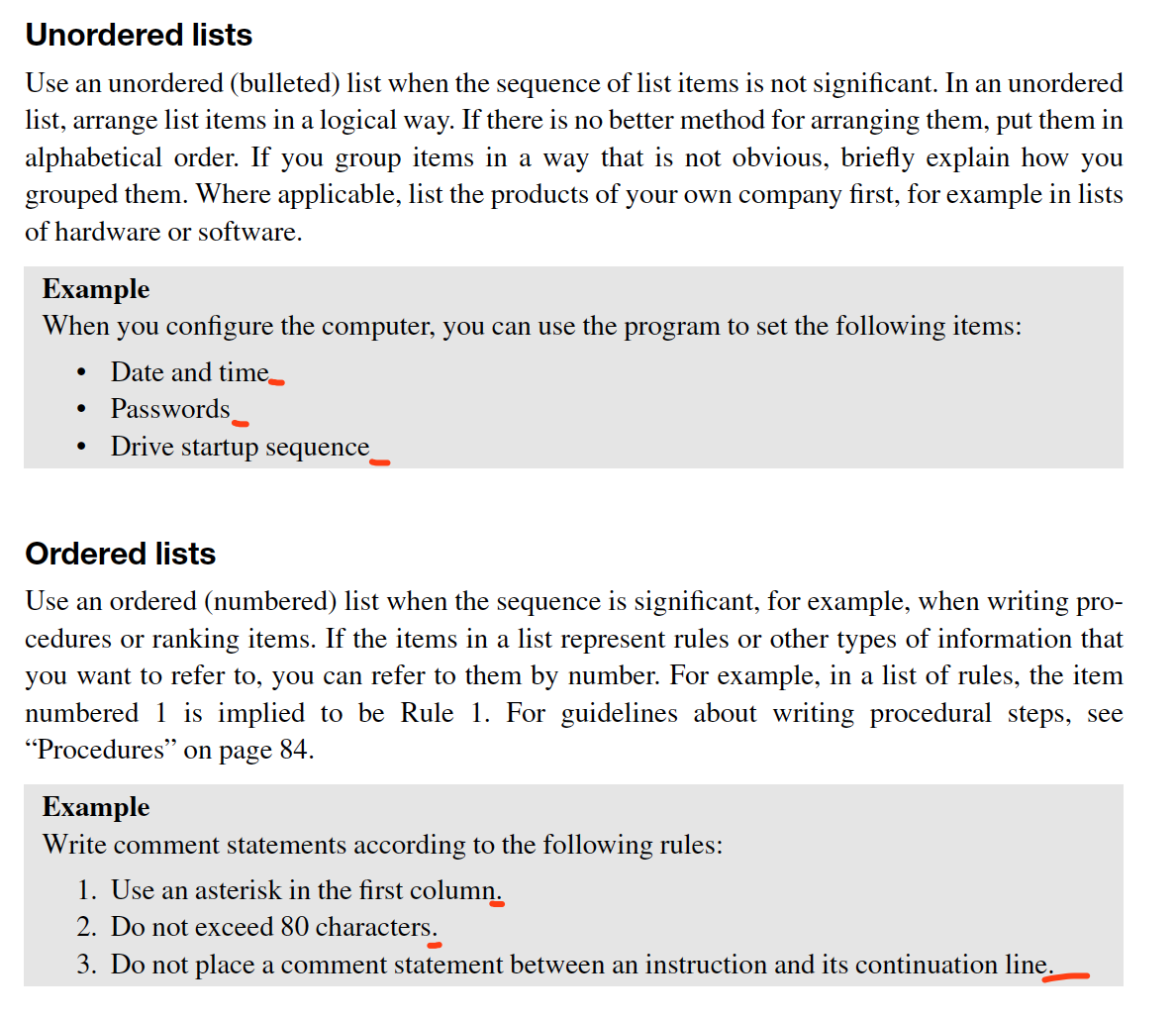
This is not a complete sentence which has a subject and predicate.
IBM style guide:
Do not use a period after a phrase and use a period after a sentence.
----------------------------------------------------------------
This is an automated message from the Apache Git Service.
To respond to the message, please log on to GitHub and use the
URL above to go to the specific comment.
For queries about this service, please contact Infrastructure at:
users@infra.apache.org