You are viewing a plain text version of this content. The canonical link for it is here.
Posted to commits@camel.apache.org by GitBox <gi...@apache.org> on 2022/09/13 10:47:27 UTC
[GitHub] [camel-website] Navyashree0923 opened a new pull request, #901: Blogpost:Adding configuration on how to debug Apache Camel with the Vimspector
Navyashree0923 opened a new pull request, #901:
URL: https://github.com/apache/camel-website/pull/901

   …imspector


--
This is an automated message from the Apache Git Service.
To respond to the message, please log on to GitHub and use the
URL above to go to the specific comment.

To unsubscribe, e-mail: commits-unsubscribe@camel.apache.org

For queries about this service, please contact Infrastructure at:
users@infra.apache.org
[GitHub] [camel-website] github-actions[bot] commented on pull request #901: Blogpost:Adding configuration on how to debug Apache Camel with the Vimspector
Posted by GitBox <gi...@apache.org>.
github-actions[bot] commented on PR #901:
URL: https://github.com/apache/camel-website/pull/901#issuecomment-1246501569

   🚀 Preview is available at https://pr-901--camel.netlify.app


--
This is an automated message from the Apache Git Service.
To respond to the message, please log on to GitHub and use the
URL above to go to the specific comment.

To unsubscribe, e-mail: commits-unsubscribe@camel.apache.org

For queries about this service, please contact Infrastructure at:
users@infra.apache.org
[GitHub] [camel-website] apupier commented on a diff in pull request #901: Blogpost:Adding configuration on how to debug Apache Camel with the Vimspector
Posted by GitBox <gi...@apache.org>.
apupier commented on code in PR #901:
URL: https://github.com/apache/camel-website/pull/901#discussion_r970571119
##########
content/blog/2022/09/vimdap/index.md:
##########
@@ -0,0 +1,189 @@
+---
+title: "Camel Textual Route debugging in Vim"
+date: 2022-09-14
+authors: [Navyashree0923]
+categories: ["Tooling"]
+preview: "Camel Textual Route debugging in Vim"
+---
+
+A month before it became easier to provide language support inside Vim, Neovim using coc.nvim -[See this blog post](/blog/2022/07/coc-nvim-camel-lsp/). It is now time to use Camel Debug Adapter in Vim[camel-tooling/camel-dap-client-vim](https://github.com/camel-tooling/camel-dap-client-vim).
+
+# VIM Debug Adapter client for Apache Camel
+
+I just got the debug integration for camel in vim running using [vimspector](https://github.com/puremourning/vimspector).
+
+
+
+## Install
+Install the vimspector using vim-plug plugin manager.
+- Inside `.vimrc` file:
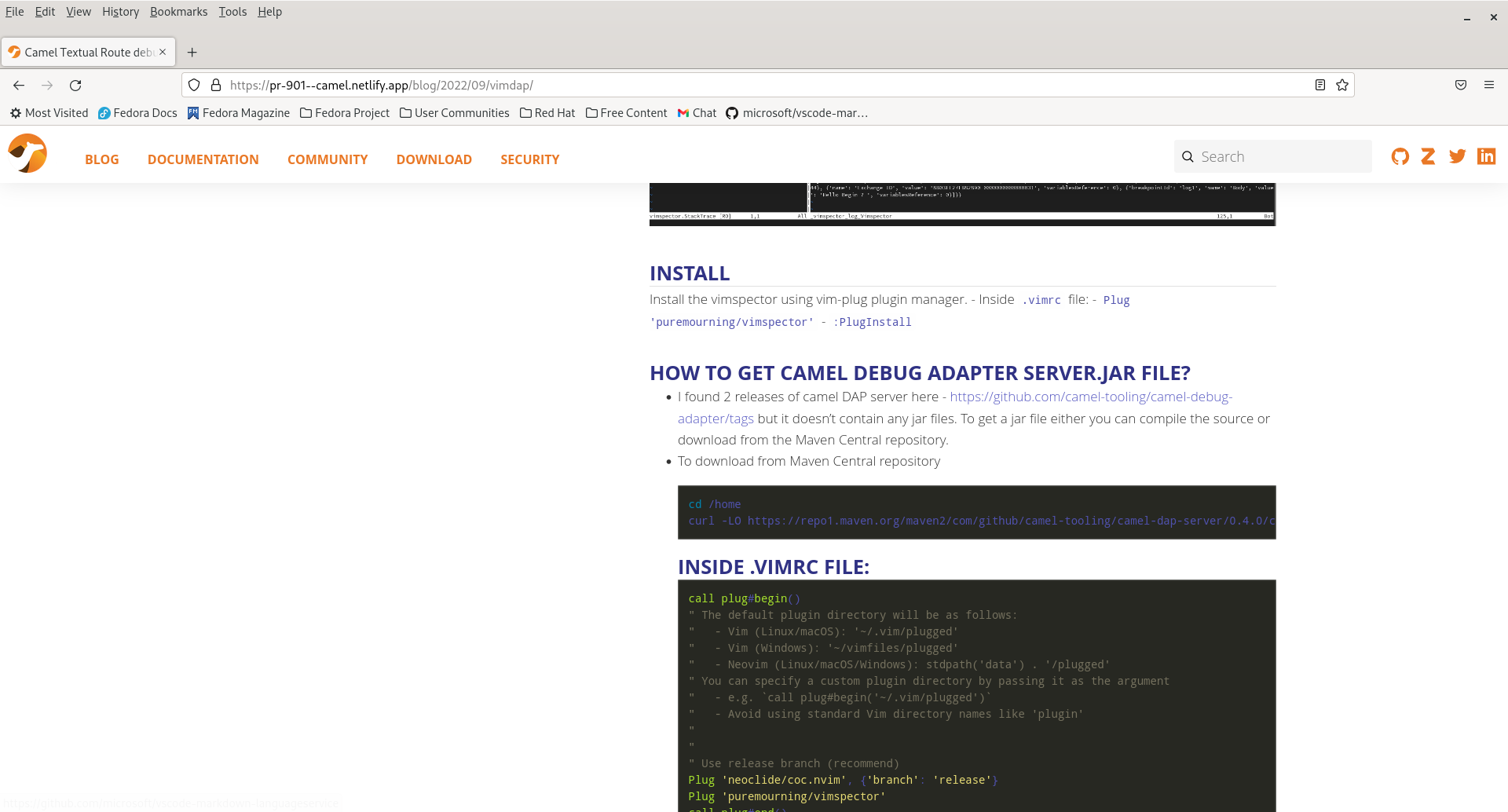
Review Comment:
the rendering seems bad on the website. I think you need to add an empty line
--
This is an automated message from the Apache Git Service.
To respond to the message, please log on to GitHub and use the
URL above to go to the specific comment.
To unsubscribe, e-mail: commits-unsubscribe@camel.apache.org
For queries about this service, please contact Infrastructure at:
users@infra.apache.org
[GitHub] [camel-website] apupier commented on pull request #901: Blogpost:Adding configuration on how to debug Apache Camel with the Vimspector
Posted by GitBox <gi...@apache.org>.
apupier commented on PR #901:
URL: https://github.com/apache/camel-website/pull/901#issuecomment-1246406165

   GitHub action needs to be relaunched (i do not have rights), the main branch of camel-website should have been fixed now https://github.com/apache/camel-k/pull/3642


--
This is an automated message from the Apache Git Service.
To respond to the message, please log on to GitHub and use the
URL above to go to the specific comment.

To unsubscribe, e-mail: commits-unsubscribe@camel.apache.org

For queries about this service, please contact Infrastructure at:
users@infra.apache.org
[GitHub] [camel-website] Navyashree0923 commented on pull request #901: Blogpost:Adding configuration on how to debug Apache Camel with the Vimspector
Posted by GitBox <gi...@apache.org>.
Navyashree0923 commented on PR #901:
URL: https://github.com/apache/camel-website/pull/901#issuecomment-1246336171

   Hello @apupier, I have add the changes, please review it.


--
This is an automated message from the Apache Git Service.
To respond to the message, please log on to GitHub and use the
URL above to go to the specific comment.

To unsubscribe, e-mail: commits-unsubscribe@camel.apache.org

For queries about this service, please contact Infrastructure at:
users@infra.apache.org
[GitHub] [camel-website] Navyashree0923 commented on a diff in pull request #901: Blogpost:Adding configuration on how to debug Apache Camel with the Vimspector
Posted by GitBox <gi...@apache.org>.
Navyashree0923 commented on code in PR #901:
URL: https://github.com/apache/camel-website/pull/901#discussion_r970698605
##########
content/blog/2022/09/vimdap/index.md:
##########
@@ -0,0 +1,189 @@
+---
+title: "Camel Textual Route debugging in Vim"
+date: 2022-09-14
+authors: [Navyashree0923]
+categories: ["Tooling"]
+preview: "Camel Textual Route debugging in Vim"
+---
+
+A month before it became easier to provide language support inside Vim, Neovim using coc.nvim -[See this blog post](/blog/2022/07/coc-nvim-camel-lsp/). It is now time to use Camel Debug Adapter in Vim[camel-tooling/camel-dap-client-vim](https://github.com/camel-tooling/camel-dap-client-vim).
+
+# VIM Debug Adapter client for Apache Camel
+
+I just got the debug integration for camel in vim running using [vimspector](https://github.com/puremourning/vimspector).
+
+
+
+## Install
+Install the vimspector using vim-plug plugin manager.
+- Inside `.vimrc` file:
Review Comment:
Thanks. I have updated the change
--
This is an automated message from the Apache Git Service.
To respond to the message, please log on to GitHub and use the
URL above to go to the specific comment.
To unsubscribe, e-mail: commits-unsubscribe@camel.apache.org
For queries about this service, please contact Infrastructure at:
users@infra.apache.org
[GitHub] [camel-website] apupier commented on a diff in pull request #901: Blogpost:Adding configuration on how to debug Apache Camel with the Vimspector
Posted by GitBox <gi...@apache.org>.
apupier commented on code in PR #901:
URL: https://github.com/apache/camel-website/pull/901#discussion_r969576427
##########
content/blog/2022/09/vimdap/index.md:
##########
@@ -0,0 +1,189 @@
+---
+title: "Configure Camel Debug Adapter in Vim to enable Camel Textual Route debugging"
Review Comment:
as a title, I'm wondering if we cannot make it shorter and emphasize the important part fo rCamel users. Something like: "Camel Textual Route debugging in Vim"
Your title is fine too, just tryign to give more ideas
##########
content/blog/2022/09/vimdap/index.md:
##########
@@ -0,0 +1,189 @@
+---
+title: "Configure Camel Debug Adapter in Vim to enable Camel Textual Route debugging"
+date: 2022-09-13
+authors: [Navyashree0923]
+categories: ["Tooling"]
+preview: "Configure Camel Debug Adapter in Vim to enable Camel Textual Route debugging"
+---
+
+A month before it became easier to provide language support inside Vim, Neovim using coc.nvim -[See this blog post](/blog/2022/07/coc-nvim-camel-lsp/). It is now time to use Camel Debug Adapter in Vim[camel-tooling/camel-dap-client-vim](https://github.com/camel-tooling/camel-dap-client-vim).
+
+# VIM Debug Adapter client for Apache Camel
+
+I just got the debug integration for camel in vim running using [vimspector](https://github.com/puremourning/vimspector).
+
+
+
+## Install
+Install the vimspector using vim-plug plugin manager.
+- Inside `.vimrc` file:
+- `Plug 'puremourning/vimspector'`
+- `:PlugInstall`
+
+# How to get Camel Debug Adapter server.jar file?
+- I found 2 releases of camel DAP server here - https://github.com/camel-tooling/camel-debug-adapter/tags but it doesn't contain any jar files. To get a jar file either you can compile the source or download from the Maven Central repository.
+- To download from Maven Central repository
+```sh
+cd /home
+curl -LO https://repo1.maven.org/maven2/com/github/camel-tooling/camel-dap-server/0.4.0/camel-dap-server-0.4.0.jar
+ ```
+# Inside .vimrc file:
+```viml
+ call plug#begin()
+ " The default plugin directory will be as follows:
+ " - Vim (Linux/macOS): '~/.vim/plugged'
+ " - Vim (Windows): '~/vimfiles/plugged'
+ " - Neovim (Linux/macOS/Windows): stdpath('data') . '/plugged'
+ " You can specify a custom plugin directory by passing it as the argument
+ " - e.g. `call plug#begin('~/.vim/plugged')`
+ " - Avoid using standard Vim directory names like 'plugin'
+ "
+ "
+ " Use release branch (recommend)
+ Plug 'neoclide/coc.nvim', {'branch': 'release'}
+ Plug 'puremourning/vimspector'
+ call plug#end()
+
+ " https://github.com/puremourning/vimspector/blob/master/README.md#human-mode
+ let g:vimspector_enable_mappings = 'HUMAN'
+
+ " Vimspector key mappings
+ nnoremap <Leader>dd :call vimspector#Launch()<CR>
+ nnoremap <Leader>dt :call vimspector#ToggleBreakpoint()<CR>
+ nnoremap <Leader>dc :call vimspector#Continue()<CR>
+ nnoremap <Leader>de :call vimspector#Reset()<CR>
+```
+
+# Configure camel-example Debug Gadget
+Place this content in `cust_camel-debug-adapter.json` in your vimspector directory (path might be different for you)
+```sh
+cd ~/.vim/plugged/vimspector/gadgets/linux/.gadgets.d
+```
+Vimspector adapter configuration:
+```json
+{
+ "adapters": {
+ "cust_camel-debug-adapter": {
+ "command": [
+ "java",
+ "-jar",
+ "/home/camel-dap-server-0.4.0.jar"
+ ]
+ }
+ }
+}
+```
+# Vimspector Config
+ Create a file called `.vimspector.json` in the project root and then place the following content
+
+ Vimspector debugger configuration:
+ ```json
+{
+ "configurations": {
+ "Camel Debug Adapter - Attach": {
+ "adapter": "cust_camel-debug-adapter",
+ "configuration": {
+ "request": "attach",
+ "sourcePaths": [ "${workspaceRoot}/src/main/java" ],
+ "hostName": "localhost",
+ "port": "${JVMDebugPort}",
+ "stepFilters": {
+ "skipClasses": [ "$$JDK" ]
+ }
+ }
+ }
+ }
+}
+```
+# How to attach Camel application to vimspector for debugging
+
+* To test the Camel application debugging need a working example. Lot of good examples are provided in this repo, [camel-examples](https://github.com/apache/camel-examples).
+* To enable Camel Textual Route debugging, now we can use directly `mvn camel:debug`.
+
+## Make the following changes and run your camel application in window-1
+```sh
+ cd ~/camel-examples/examples/main
+```
+- vim src/main/java/org/apache/camel/example/MyBean.java
+- Add the following content inside `MyBean.java` file:
+```java
+package org.apache.camel.example;
+
+public class MyBean {
+
+ private String hi;
+
+ public MyBean(String hi) {
+ this.hi = hi;
+ }
+
+ public String hello() {
+ return hi + " Begin ? ";
+
+ }
+ public String bye() {
+ return hi + " End ? ";
+}
+}
+```
+- vim src/main/java/org/apache/camel/example/MyRouteBuilder.java
+- Inside `MyRouteBuilder.java` file:
+```java
+package org.apache.camel.example;
+
+import org.apache.camel.builder.RouteBuilder;
+
+public class MyRouteBuilder extends RouteBuilder {
+
+ @Override
+ public void configure() throws Exception {
+ from("timer:foo").routeId("foo")
+ .bean("myBean", "hello")
+ .log("${body}")
+ .bean("myBean", "bye")
+ .log("${body}");
+ }
+}
+```
+* Compile the source to reflect the new changes
+ ```sh
+ mvn compile
+ ```
+* Launch this example with the profile `camel.debug`
+```sh
+ mvn camel:run -Pcamel.debug
+```
+## Attach this camel example to Vimspector for Camel Textual Route Debugging in window-2
+* Open this file in vim `src/main/java/org/apache/camel/example/MyRouteBuilder.java` and then use the following keys to set the breakpoints.
+* Start the Camel debugger by again using the following keys.
+* Enter `1099` as port number when it is prompted for user input in vimspector.
+* Now you could able to debug your camel application and again use the following key mappings to instruct the debugger.
Review Comment:
```suggestion
* Now you should be able to debug your camel application and again use the following key mappings to instruct the debugger.
```
##########
content/blog/2022/09/vimdap/index.md:
##########
@@ -0,0 +1,189 @@
+---
+title: "Configure Camel Debug Adapter in Vim to enable Camel Textual Route debugging"
+date: 2022-09-13
+authors: [Navyashree0923]
+categories: ["Tooling"]
+preview: "Configure Camel Debug Adapter in Vim to enable Camel Textual Route debugging"
+---
+
+A month before it became easier to provide language support inside Vim, Neovim using coc.nvim -[See this blog post](/blog/2022/07/coc-nvim-camel-lsp/). It is now time to use Camel Debug Adapter in Vim[camel-tooling/camel-dap-client-vim](https://github.com/camel-tooling/camel-dap-client-vim).
+
+# VIM Debug Adapter client for Apache Camel
+
+I just got the debug integration for camel in vim running using [vimspector](https://github.com/puremourning/vimspector).
+
+
+
+## Install
+Install the vimspector using vim-plug plugin manager.
+- Inside `.vimrc` file:
+- `Plug 'puremourning/vimspector'`
+- `:PlugInstall`
+
+# How to get Camel Debug Adapter server.jar file?
+- I found 2 releases of camel DAP server here - https://github.com/camel-tooling/camel-debug-adapter/tags but it doesn't contain any jar files. To get a jar file either you can compile the source or download from the Maven Central repository.
+- To download from Maven Central repository
+```sh
+cd /home
+curl -LO https://repo1.maven.org/maven2/com/github/camel-tooling/camel-dap-server/0.4.0/camel-dap-server-0.4.0.jar
+ ```
+# Inside .vimrc file:
+```viml
+ call plug#begin()
+ " The default plugin directory will be as follows:
+ " - Vim (Linux/macOS): '~/.vim/plugged'
+ " - Vim (Windows): '~/vimfiles/plugged'
+ " - Neovim (Linux/macOS/Windows): stdpath('data') . '/plugged'
+ " You can specify a custom plugin directory by passing it as the argument
+ " - e.g. `call plug#begin('~/.vim/plugged')`
+ " - Avoid using standard Vim directory names like 'plugin'
+ "
+ "
+ " Use release branch (recommend)
+ Plug 'neoclide/coc.nvim', {'branch': 'release'}
+ Plug 'puremourning/vimspector'
+ call plug#end()
+
+ " https://github.com/puremourning/vimspector/blob/master/README.md#human-mode
+ let g:vimspector_enable_mappings = 'HUMAN'
+
+ " Vimspector key mappings
+ nnoremap <Leader>dd :call vimspector#Launch()<CR>
+ nnoremap <Leader>dt :call vimspector#ToggleBreakpoint()<CR>
+ nnoremap <Leader>dc :call vimspector#Continue()<CR>
+ nnoremap <Leader>de :call vimspector#Reset()<CR>
+```
+
+# Configure camel-example Debug Gadget
+Place this content in `cust_camel-debug-adapter.json` in your vimspector directory (path might be different for you)
+```sh
+cd ~/.vim/plugged/vimspector/gadgets/linux/.gadgets.d
+```
+Vimspector adapter configuration:
+```json
+{
+ "adapters": {
+ "cust_camel-debug-adapter": {
+ "command": [
+ "java",
+ "-jar",
+ "/home/camel-dap-server-0.4.0.jar"
+ ]
+ }
+ }
+}
+```
+# Vimspector Config
+ Create a file called `.vimspector.json` in the project root and then place the following content
+
+ Vimspector debugger configuration:
+ ```json
+{
+ "configurations": {
+ "Camel Debug Adapter - Attach": {
+ "adapter": "cust_camel-debug-adapter",
+ "configuration": {
+ "request": "attach",
+ "sourcePaths": [ "${workspaceRoot}/src/main/java" ],
+ "hostName": "localhost",
+ "port": "${JVMDebugPort}",
+ "stepFilters": {
+ "skipClasses": [ "$$JDK" ]
+ }
+ }
+ }
+ }
+}
+```
+# How to attach Camel application to vimspector for debugging
+
+* To test the Camel application debugging need a working example. Lot of good examples are provided in this repo, [camel-examples](https://github.com/apache/camel-examples).
+* To enable Camel Textual Route debugging, now we can use directly `mvn camel:debug`.
+
+## Make the following changes and run your camel application in window-1
+```sh
+ cd ~/camel-examples/examples/main
+```
+- vim src/main/java/org/apache/camel/example/MyBean.java
+- Add the following content inside `MyBean.java` file:
+```java
+package org.apache.camel.example;
+
+public class MyBean {
+
+ private String hi;
+
+ public MyBean(String hi) {
+ this.hi = hi;
+ }
+
+ public String hello() {
+ return hi + " Begin ? ";
+
+ }
+ public String bye() {
+ return hi + " End ? ";
+}
+}
+```
+- vim src/main/java/org/apache/camel/example/MyRouteBuilder.java
+- Inside `MyRouteBuilder.java` file:
+```java
+package org.apache.camel.example;
+
+import org.apache.camel.builder.RouteBuilder;
+
+public class MyRouteBuilder extends RouteBuilder {
+
+ @Override
+ public void configure() throws Exception {
+ from("timer:foo").routeId("foo")
+ .bean("myBean", "hello")
+ .log("${body}")
+ .bean("myBean", "bye")
+ .log("${body}");
+ }
+}
+```
+* Compile the source to reflect the new changes
+ ```sh
+ mvn compile
+ ```
+* Launch this example with the profile `camel.debug`
+```sh
+ mvn camel:run -Pcamel.debug
+```
Review Comment:
```suggestion
* Launch this example in Camel debug mode:
```sh
mvn camel:debug
```
```
--
This is an automated message from the Apache Git Service.
To respond to the message, please log on to GitHub and use the
URL above to go to the specific comment.
To unsubscribe, e-mail: commits-unsubscribe@camel.apache.org
For queries about this service, please contact Infrastructure at:
users@infra.apache.org
[GitHub] [camel-website] github-actions[bot] commented on pull request #901: Blogpost:Adding configuration on how to debug Apache Camel with the Vimspector
Posted by GitBox <gi...@apache.org>.
github-actions[bot] commented on PR #901:
URL: https://github.com/apache/camel-website/pull/901#issuecomment-1246732628

   🚀 Preview is available at https://pr-901--camel.netlify.app


--
This is an automated message from the Apache Git Service.
To respond to the message, please log on to GitHub and use the
URL above to go to the specific comment.

To unsubscribe, e-mail: commits-unsubscribe@camel.apache.org

For queries about this service, please contact Infrastructure at:
users@infra.apache.org
[GitHub] [camel-website] zregvart merged pull request #901: Blogpost:Adding configuration on how to debug Apache Camel with the Vimspector
Posted by GitBox <gi...@apache.org>.
zregvart merged PR #901:
URL: https://github.com/apache/camel-website/pull/901


--
This is an automated message from the Apache Git Service.
To respond to the message, please log on to GitHub and use the
URL above to go to the specific comment.

To unsubscribe, e-mail: commits-unsubscribe@camel.apache.org

For queries about this service, please contact Infrastructure at:
users@infra.apache.org